Top 5 Ways to Block Spam on WhatsApp

0
Receiving spam messages is never fun, but it is twice as annoying to deal with on your primary messaging app. WhatsApp is no stranger to spam pushers and other malicious entities trying to scam you out of money. Once the WhatsApp notification pops up on your phone, your natural response is to click on it. Some scammers use this as a strategy to get you to click on phishing links. To combat this, WhatsApp now allows users to block spam senders from the lock screen itself. Today, we bring you the top 5 ways to block spam on WhatsApp. Read Also: Top 10 Tech Gifts for Valentine’s Day 2024: For Her and Him

What’s new on WhatsApp?

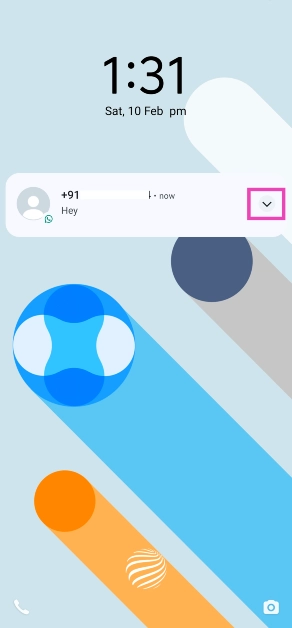
Over the last couple of years, spam and malicious scams have increased drastically on WhatsApp. Most of the extortion scams operate by either making you click on a malicious link or gaining access to your device by making you download an APK. If you receive a suspicious message from an unknown number, you should be mindful of how you interact with it. To tackle spam (and other kinds of malicious content) on the platform, do not hesitate to use the block button liberally. Even though the security measures in place haven’t kept up with the volume of spam pushed on the platform, WhatsApp is taking steps to filter unwanted content. The messenger recently introduced a new feature that allows users to block unknown numbers directly from the lock screen. As soon as you receive a new message notification, you can expand it and hit the block button. This saves you from accidentally clicking on phishing links and other malicious content.

Block spam messages on WhatsApp directly from the lock screen

WhatsApp’s new feature lets you block spam messages directly from the lock screen. This feature is being rolled out in a phased manner so it may take some time to reach your device. Make sure the app is updated to its latest version on your device. Step 1: Hit the arrow next to the message on your lock screen. Step 1: Hit the arrow next to the message on your lock screen. Step 2: Select Block from the list of quick actions.

Block a sender from the chat thread

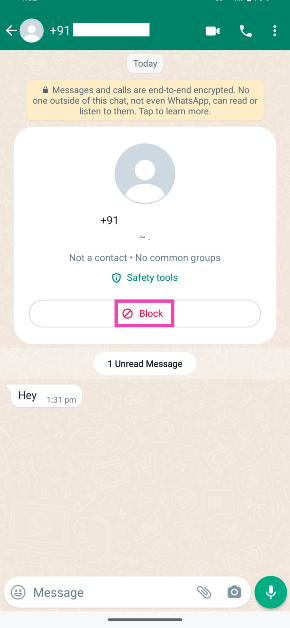
Step 1: Launch WhatsApp and open the message from the unknown sender. Step 2: Hit the Block button on the sender’s card. Step 2: Hit the Block button on the sender’s card.

Use the block button on the sender’s WhatsApp profile

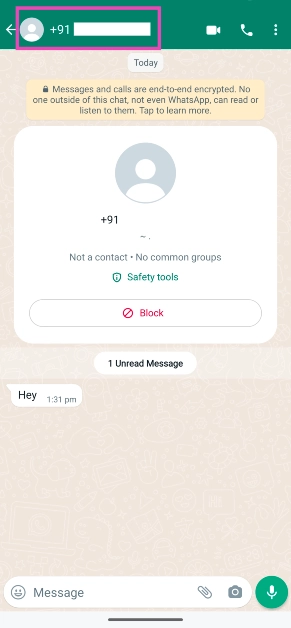
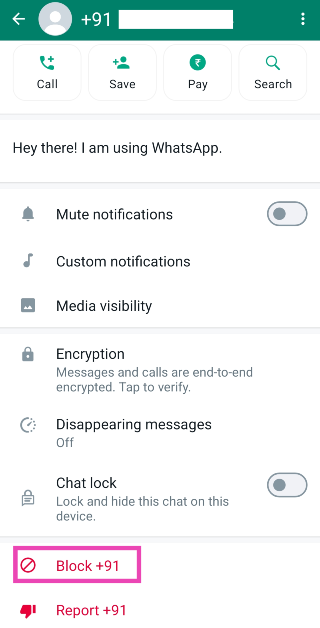
Step 1: Launch WhatsApp and open the conversation thread with the person you want to block. Step 2: Tap on their contact number/name at the top of the screen. Step 2: Tap on their contact number/name at the top of the screen. Step 3: Scroll down and hit the Block button at the bottom of their profile. Step 3: Scroll down and hit the Block button at the bottom of their profile.

Silence WhatsApp calls from unknown numbers

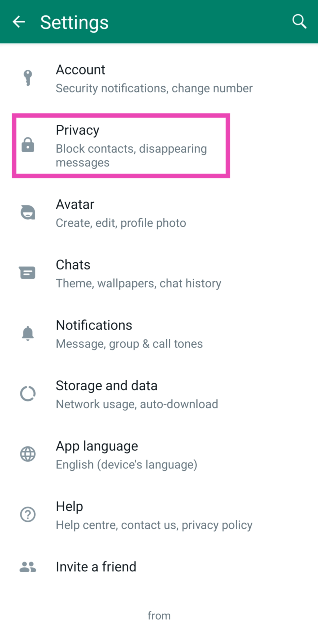
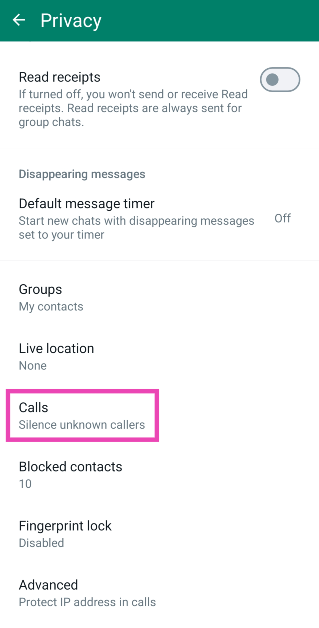
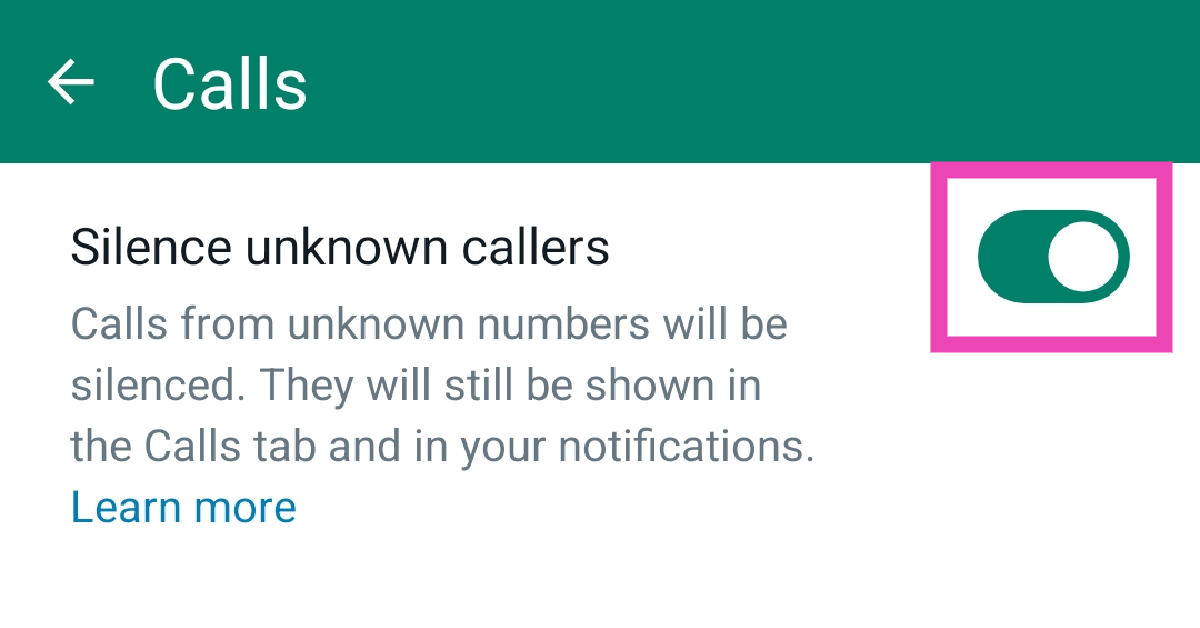
Sometimes, spam pushers resort to calling you on WhatsApp. This tactic is also used by a lot of scammers. Luckily, WhatsApp allows you to silence all calls from unknown numbers. Once the call has ended, you will get a notification alert about the missed call. Here’s how you can enable this feature. Step 1: Launch WhatsApp and hit the ellipses at the top right corner of the screen. Step 2: Hit the ellipses at the top right corner of the screen. How to share your WhatsApp Status on Instagram? Step 2: Go to Settings. Step 3: Go to Settings. How to share your WhatsApp Status on Instagram? Top 4 Ways to Block Spam on WhatsApp? (2024) Step 3: Select Privacy. Step 3: Select Privacy. Top 4 Ways to Block Spam on WhatsApp? (2024) Step 4: Tap on Calls. Step 4: Tap on Calls. Top 4 Ways to Block Spam on WhatsApp? (2024) Step 5: Turn on the toggle switch next to ‘Silence unknown callers’. Step 5: Turn on the toggle switch next to ‘Silence unknown callers’. Top 4 Ways to Block Spam on WhatsApp? (2024)

Block messages from unknown accounts

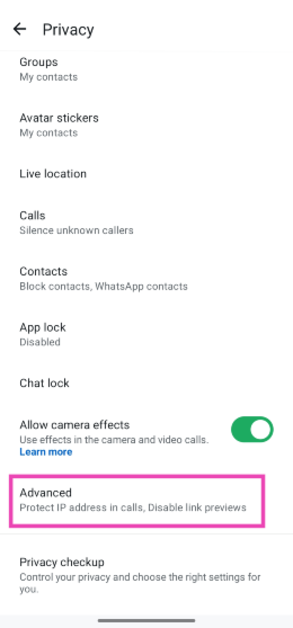
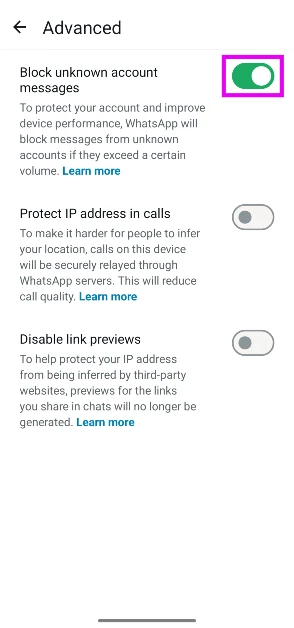
Step 1: Launch WhatsApp and hit the ellipses at the top right corner of the screen. Step 2: Hit the ellipses at the top right corner of the screen. How to share your WhatsApp Status on Instagram? Step 2: Go to Settings. Step 3: Go to Settings. How to share your WhatsApp Status on Instagram? Top 4 Ways to Block Spam on WhatsApp? (2024) Step 3: Select Privacy. Step 3: Select Privacy. Top 4 Ways to Block Spam on WhatsApp? (2024) Step 4: Scroll down and go to Advanced. Step 4: Scroll down and tap on Advanced. How To Stay Safe From Cyber Attacks on WhatsApp: Top 7 Ways WhatsApp introduces ‘Strict account settings’: How to enable it Step 5: Hit the toggle switch next to Block unknown account messages. This feature will block large volumes of messages sent from unknown numbers. Step 5: Hit the toggle switch next to Block unknown account messages. This feature will block large volumes of messages sent from unknown numbers.

Frequently Asked Questions (FAQs)

What’s the easiest way to block someone on WhatsApp?

Simply expand the new message notification on your lock screen and hit the Block button to block the sender. This only works for people who aren’t in your contact list.

How do I block calls from unknown callers on WhatsApp?

While you can’t block calls from unknown numbers on WhatsApp, the platform offers you the option to silence them. Go to Settings>Privacy>Calls and turn on the toggle switch next to ‘Silence unknown callers’.

Where can I see my WhatsApp block list?

Go to Settings>Privacy>Blocked Contacts to view your block list on WhatsApp.

How do I block unknown numbers from sending me spam on WhatsApp?

Go to Settings>Privacy>Advanced and turn on the toggle switch next to ‘Block unknown account messages’.

How do I enable ‘Strict account settings’ on WhatsApp?

Go to Settings>Privacy>Advanced>Strict account settings and select ‘Turn on’. Read Also: Top 4 ways to change app notification sounds on iPhone? (2024)

Conclusion

These are the top 5 ways to block spam senders on WhatsApp. Despite your best efforts, spam has a way of creeping into your WhatsApp inbox. To reduce the volume of unwanted messages, don’t hand out your primary number to businesses and e-services. If you know any other way to tackle spam on the platform, let us know in the comments!

Top 10 Tech Gifts for Valentine’s Day 2024: For Her and Him

Valentine’s Day is just around the corner and if you haven’t already purchased a gift for your significant other, now would be a good time to whip out the credit card and start adding items to your cart. If you don’t know where to begin, you’ve landed on the right page. While you can never go wrong with flowers and chocolates, if you want to go the extra mile, a tech gift can make things really special. So, without further ado, let’s take a look at the top 10 tech gifts you can buy for your partner on Valentine’s Day 2024 for your loved one. Read Also: How to delete multiple apps at once on an Android phone? (2024)

iPhone 15

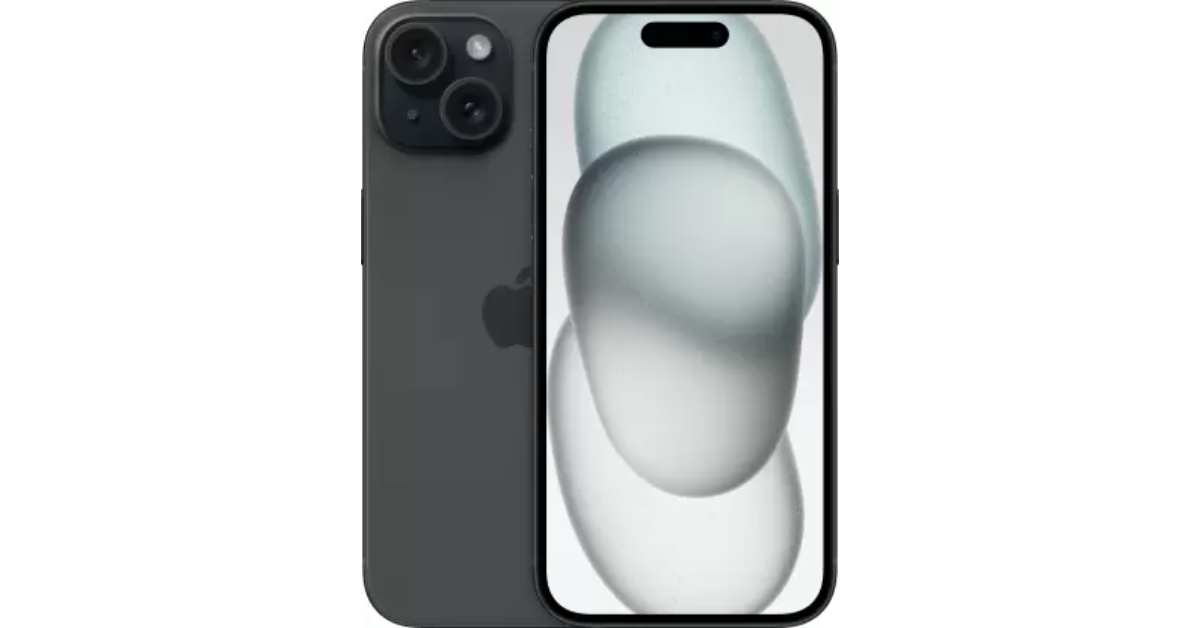
Price: Rs 79,900 on Apple.com Here is how to get iPhone 15 for as low as Rs 36,949 The new iPhone 15 runs on the A16 Bionic chipset from the 14 Pro series. The newest entry-level variant of the iPhone features the Dynamic Island, a 48MP primary camera, and a 12MP ultrawide lens. The new features that were introduced on the iPhone 14 Pro models are a part of the iPhone 15’s base variant. However, it doesn’t get the latest Apple A17 Pro chipset and also misses out on the titanium band. But, its relatively affordable pricing makes it a good buy.

Fujifilm Instax Pal

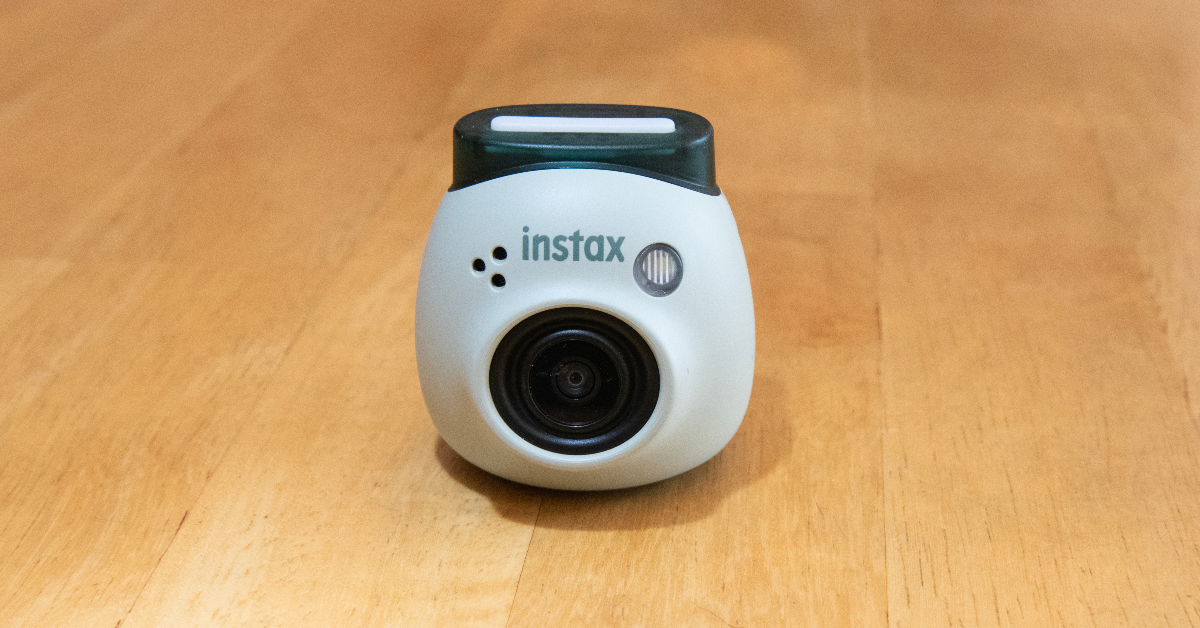
Price: Rs 10,999 on Instax.in Fujifilm Instax Pal, palm sizes digital camera launched in India The new Fulijilm Instax Pal is the perfect gift to preserve your memories with your partner in style. For the Polaroid-obsessed, the Instax Pal would make an amazing gift. This palm-sized Polaroid camera can easily fit inside your pocket. Fujifilm has removed the printing function from the camera to increase its portability. The digital images taken by the Instax Pal can be printed using an Instax Link Series smartphone printer. The portable camera is available in five colour options — Gem Black, Powder Pink, Pistachio Green, Lavender Blue and Milky White.

Amazon Kindle (2022)

Price: Rs 9,999 on Amazon Amazon Kindle 2022 Review: The perfect no-nonsense e-reader! The entry-level Kindle variant is the perfect gift for voracious readers. While it may be the most basic Kindle model, it matches most of the specs of the Paperwhite. We reviewed the e-reader when it was launched and were impressed by the glare-free display and the overall reading experience. The 300 ppi resolution is ideal for reading books, newspapers, and graphic novels on the e-reader. The 4 LEDs do a good job of lighting up the display in dark conditions. You can use the toolbar to adjust the brightness of the device. With an internal storage capacity of 16GB, the Kindle can store thousands of books.

boAt Smart Ring

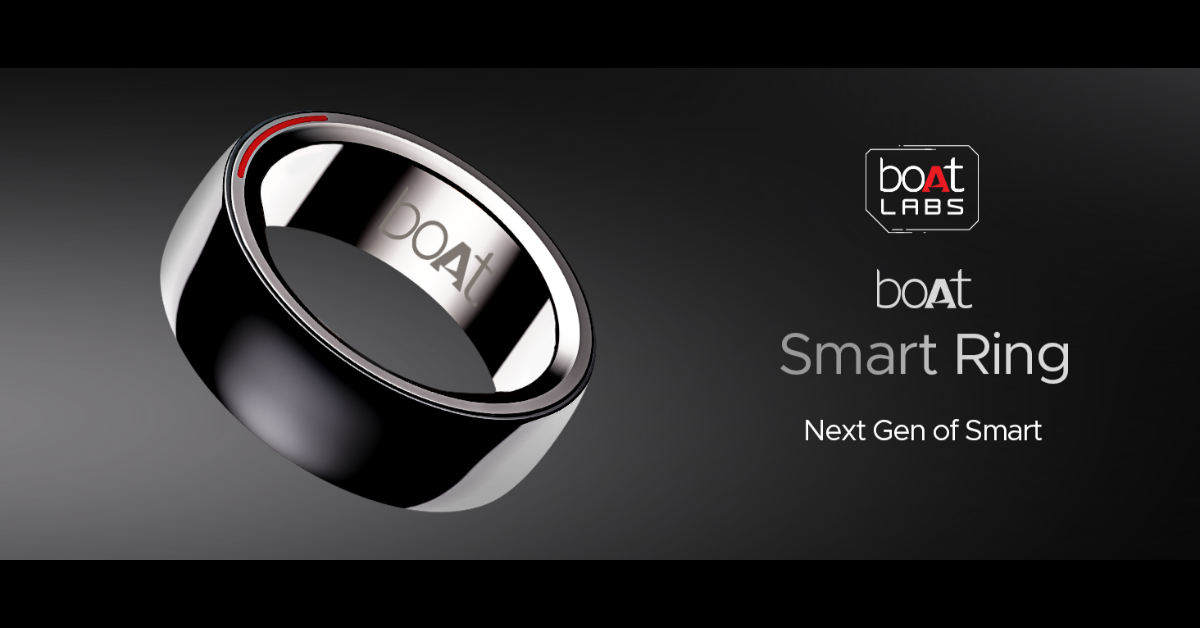
Price: Rs 8,999 on boAt-lifestyle.com Boat Smart Ring with heart and menstrual monitoring launched in India Give your partner a ring this Valentine’s Day – but make it smart. boAt’s smart ring can track health and fitness metrics just like a smartwatch. With a 5ATM water resistance, you can even wear this ring while swimming. Its premium ceramic build contributes massively to its premium aesthetic. Integrated with smart touch controls, this ring can be used to click pictures, change track, pause/play media playback, and navigate applications. You can view your health and fitness data in the boAt Smart Ring app at any given time.

JBL Go 3

Price: Rs 2,999 JBL.com JBL Go 3 The JBL Go 3 brings the party wherever you go. This waterproof portable speaker is one of the best tech gifts you can give to your partner for Valentine’s Day in 2024. The Go 3 has a power output of 4.3W and offers 5 hours of playback on a single charge. It has dimensions of 3.4 x 2.7 x 1.6 inches and weighs just 200 grams. You can easily carry it around in your pocket all day. The portable speaker can be charged using a USB Type-C cable but it takes 2.5 hours to fully charge the device.

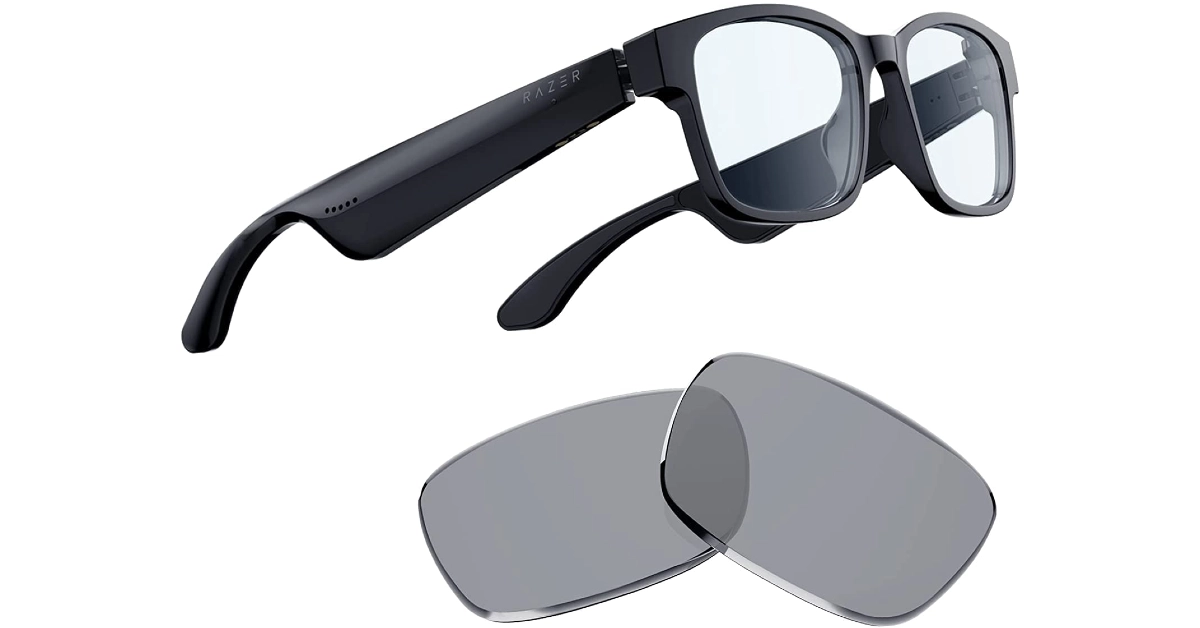
Razer Anzu Smart Glasses

Price: Rs 2,999 on Amazon Razer Anzu Smart Glasses Smart in more ways than one, the Razer Ansu Smart Glasses let you take calls, play music, and enjoy and enjoy the omnidirectional sound with no hiccups. A low latency of 60ms ensures there is no delay between the audio and the video feed. Anzu smart glasses have touch panels on the stem which let you control media playback and answer calls with just a single tap. On top of that, they are also voice assistant-compatible. On a single charge, the smart functions of these glasses can run for more than 5 hours.

Samsung Galaxy Watch6 Classic

Price: Rs 36,999 on Samsung.in Samsung Galaxy Watch6 Classic Review: A supreme health tracker that does not compromise on style The Classic variant of the Samsung Galaxy Watch6 is a thing to behold. The physical rotating bezel around the 1.5-inch Super AMOLED display is both stylish and practical. Navigating the interface of the watch becomes much easier with this bezel. Running on Wear OS 4 skinned with One UI Watch 5, the Galaxy Watch6 is also one of the smartest smartwatches out there. The range of apps available on the Play Store ensures you never spend a dull moment with this app. You can read and respond to your WhatsApp message directly from the watch and even check your email on the go. Check out our review of the smartwatch here.

Amazon Echo Pop

Price: Rs 3,449 on Amazon.in Top 10 Tech Gifts for Valentine’s Day 2024: For Her and Him These cute Echo smart speakers are a perfect addition to your nightstand. The best part about them is that they don’t occupy a lot of space and can carry out most of the functions of a regular Echo Dot. The temperature and motion sensors are some of the sore misses on the Echo Pop. However, since they are primarily intended to be used as nightstand speakers, there isn’t much need for those sensors to begin with. What the Echo Pop does best is provide cutting-edge software experience with its built-in routines, smart device support, and tons of skills. Check out our full review here.

CMF Buds Pro

Price: Rs 2,499 on Flipkart Top 10 Tech Gifts for Valentine’s Day 2024: For Her and Him Nothing’s subsidiary brand CMF put out some interesting products last year. Primarily operating in the budget segment, CMF’s products offer high value for money. We were very impressed by the Buds Pro back when we reviewed the TWS headset. The hockey puck design of the charging case is novel and has a nice finish to it. The audio output of the earbuds has that signature Nothing tuning and a diverse soundstage. Although a little bass-heavy, the CMF Buds Pro’s audio output is very enjoyable. Certainly one of the best tech gifts you can give your significant other this Valentine’s Day.

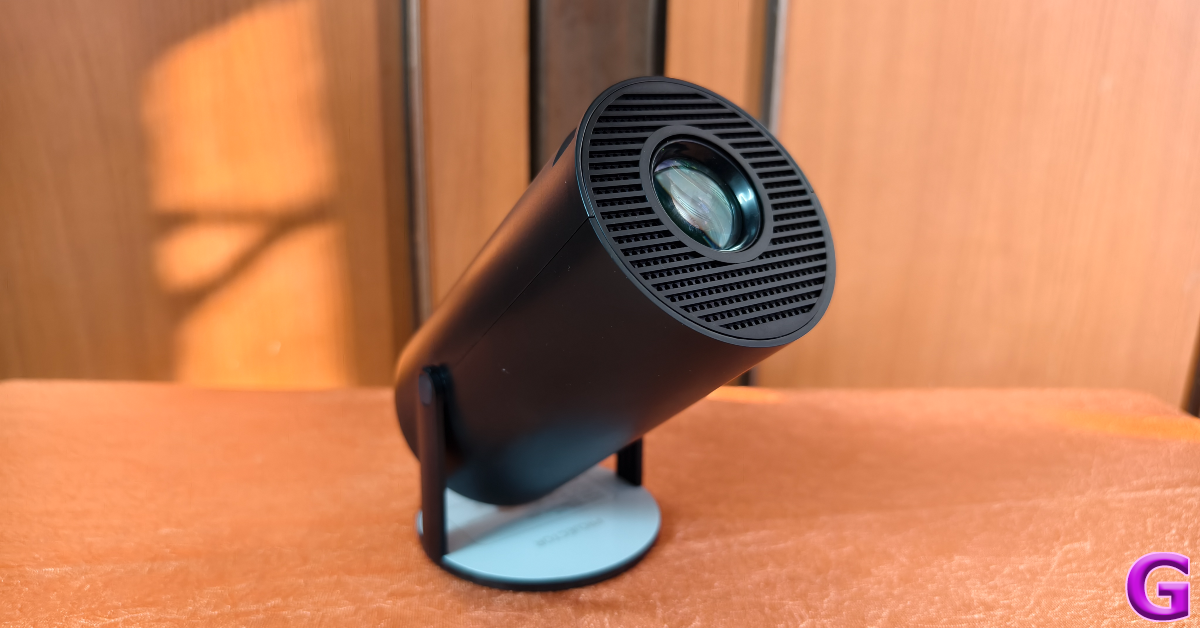
Clokowe T08 Mini Projector

Clokowe T08 Mini Projector review: Design Top 10 Tech Gifts for Valentine’s Day 2024: For Her and Him The Clokowe T08 mini projector is a fun, offbeat tech gift for Valentine’s Day 2024. This projector is incredibly easy to use and can connect to your smartphone, laptop, or tablet within seconds. It can rotate up to 180 degrees, which means you can even point it at the ceiling and enjoy HD visuals. The projector can deliver 720p footage and features automatic keystone correction. A 3W speaker is integrated into the device, and you can also pair it with your home speaker via a 3.5mm headphone jack or a Bluetooth connection. The images produced by the projector are sharp, detailed, and rich in colour. Here’s our full review of the projector. Read Also: Redmi A3 gets listed on Flipkart, key details revealed

Conclusion

These are the top 10 tech gifts you can give to your partner this Valentine’s Day (2024). Done with gift shopping already? Let us know what you got in the comments! Also, keep a look at the Valentine’s Day discounts offered by e-commerce platforms this week.

Redmi A3 gets listed on Flipkart, key details revealed

Key Highlights
  • Redmi A3 has been listed on Flipkart and Mi India websites.
  • The upcoming phone will feature a circular camera module.
  • It will have a leather-textured rear panel.
Redmi A3 is confirmed to launch in India on February 14. But before the official release, the key specifications of the upcoming phone have been confirmed by the company. The device has been listed on the e-commerce platform Flipkart to not only tease its availability but also reveal the key details. As per the microsite, the phone will house a 5,000mAh battery. Ahead of the Redmi A3 launch in India, the company has created a dedicated microsite on Flipkart as well as on its official website. The device is scheduled to launch in the country on February 14. Redmi A3 gets listed on Flipkart, key details revealed In terms of design, the Redmi A3 will come with a Halo Design featuring a round dual rear camera module. The phone can be seen in a green colour with a leather-textured rear panel that is reminiscent of that of its predecessor. The company logo is positioned at the bottom. The teased images also show the USB Type-C charging port. The device will come with a 90 Hz display. The phone will come with 6GB RAM with support for 6GB virtual RAM. Additionally, the smartphone will be backed by a 5,000mAh battery. But there have also been hints about other important phone specs. The device was previously spotted at African stores. The listing indicates that the smartphone might be powered by a MediaTek chip. The description also offered a 64GB built-in storage option with 4GB of RAM. Also Read: Amazon Quiz Answers Today 10 February 2024: Participate to win Rs 1,250 Amazon Pay Balance Additionally, the upcoming phone is said to include an 8-megapixel selfie camera while the rear camera setup may sport a 13-megapixel main camera. The battery is also expected to get 10W wired charging support. Also Read: Google Bard is now Gemini AI, launches new app for Android and iOS devices Reportedly the Redmi A3 may have a 6.71-inch display. In addition to this, a 32GB and 128GB internal storage option was suggested. Android 13 Go Edition is speculated to come pre-installed on the mobile phone. The company is likely to offer the upcoming smartphone in three colour options: forest green, blue, and black. It is expected to be powered by a MediaTek Helio G36 SoC.

Garena Free Fire Redeem Codes Today 10 February 2024: Here is how to claim them

Garena Free Fire is a battle royale game with regular awards and tournaments to keep players interested. If you play Garena Free Fire, you should be aware of the redeem codes that are released on a daily basis. However, because the battle royale game is banned in India, players from other countries can use the Free Fire Redeem codes daily. If you’re unfamiliar with the Garena Free Fire redeem codes or don’t know how to get them, we’ve put together a step-by-step guide to help you redeem them. Check out Garena Free Fire Redeem Codes for 10 February 2024. The Free Fire redeem codes are a great way to get free stuff. These are 12-digit codes that contain alphabets and numbers, as well as an expiration date and time. Because the Garena FF redeem codes cannot be used more than once, you should hurry to the redemption page to claim your free reward before someone else does. To get a free reward, all you have to do is go to reward.ff.garena.com/en, which is the official redemption page. Also, keep an eye on this space for daily updates on Garena Free Fire redemption codes and rewards. Also Read: Sennheiser Accentum Plus wireless headphones with Hybrid Adaptive Noise Cancellation launched

Garena Free Fire Redeem Codes Today 10 February 2024

FF11WFNPP956 X99TK56XDJ4X FF11DAKX4WHV WLSGJXS5KFYR FF11NJN5YS3E ZRJAPH294KV5 Y6ACLK7KUD1N VNY3MQWNKEGU U8S47JGJH5MG FF10617KGUF9 FF119MB3PFA5 ZYPPXWRWIAHD YXY3EGTLHGJX FF10GCGXRNHY FFIC33NTEUKA ZZATXB24QES8 MCPTFNXZF4TA FF11HHGCGK3B W0JJAFV3TU5E SARG886AV5GR FF1164XNJZ2V B6IYCTNH4PV3 8F3QZKNTLWBZ

How to Get Free Fire Redeem Codes for Garena on 10 February 2024?

  • Visit the Garena Free Fire game’s official website at reward.ff.garena.com.
  • Use your Facebook, Google, VK, Apple ID, Huawei ID, or Twitter account to log in.
  • You’ll be taken to a valid redemption code (s)
  • Copy and paste the 12-digit redemption code into the text box.
  • On the screen, a dialogue box will appear.
  • ‘Ok’ should be selected.
For the latest gadget and tech news, and gadget reviews, follow us on TwitterFacebook and Instagram. For newest tech & gadget videos subscribe to our YouTube Channel. You can also stay up to date using the Gadget Bridge Android App. You can find the latest car and bike news here.

A Complete Guide to No KYC iGaming: Different Types and More

The rise of No KYC (Know Your Customer) casinos represents a notable move towards prioritizing player privacy and ease of use. Traditional online gambling platforms often demand thorough identity checks from their users, but No KYC casinos break away from this norm. They offer a way for players to enjoy betting without having to reveal personal or financial details, essentially allowing them to remain anonymous. In this guide, we’ll explore the different kinds of No KYC casinos, shedding light on what sets them apart and the advantages they bring to the table. In this article we will discuss:
  • Mobile No KYC Casinos
  • Live Dealer No KYC Casinos
  • Instant Withdrawal No KYC Casinos
  • Instant Play No KYC Casinos
  • Bitcoin No KYC Casinos
Mobile No KYC Casinos The emergence of mobile No KYC casinos is a boon for gamers who value the flexibility to play whenever and wherever they like. These platforms are tailor-made for an optimal gaming experience on mobile devices like smartphones and tablets. This means you can dive into your preferred casino games at any moment, free from the cumbersome process of identity checks. Mobile No KYC casinos shine in their ability to combine top-notch performance with user-friendly design, offering an extensive variety of games from slots to table games, all the while keeping your identity under wraps. Advantages include:
  • Ease of Use: Enjoy gaming on the move, anytime, free from verification delays.
  • Anonymity: Keep your personal details private, adding an extra layer of safety.
  • Wide Selection: Access a diverse range of games perfectly suited for mobile play.
Live Dealer No KYC Casinos Live dealer No KYC casinos bring the vibrant atmosphere of a brick-and-mortar casino right into your home. They enable players to immerse themselves in real-time table games like blackjack, roulette, and baccarat, all facilitated by actual dealers through video streaming. This innovative approach combines the excitement of live gambling with the discreetness of No KYC platforms. Hence, players get to relish in an authentic gambling experience while safeguarding their privacy. Key advantages:
  • Realistic Experience: The direct interaction with dealers elevates the gaming experience to new heights.
  • Privacy Preserved: Participate in live games while keeping your personal details to yourself.
  • Diverse Options: Enjoy a broad selection of live table games and various betting limits to suit your style.
Read Also: Department of Telecommunications (DoT) to soon bring a caller ID feature Instant Withdrawal No KYC Casinos Instant withdrawal No KYC casinos offer a game-changing advantage for players who prioritize speed and simplicity in their transactions. These platforms stand out by ensuring rapid processing, allowing players to get their hands on their winnings in no time, all without the need for KYC verification. This aspect is especially attractive for those looking to quickly and discreetly access their funds. Key perks include:
  • Quick Access: Get your winnings fast, bypassing any verification hold-ups.
  • Anonymity: Keep your transactions private, safeguarding your identity.
  • Streamlined Payments: Benefit from a smooth and efficient process for managing your money.
Instant Play No KYC Casinos Instant play No KYC casinos are designed for players who prefer immediate access to casino games without the need for downloads or prolonged registration processes. These casinos offer a wide array of games directly through web browsers, ensuring players can start playing almost instantly upon visiting the site. This type of casino combines the ease of no-download gaming with the privacy benefits of No KYC platforms. Benefits:
  • Ease of Use: Play directly through your web browser without downloads.
  • Quick Access: Start playing immediately with no registration hurdles.
  • Diversity: Access a vast selection of games instantly.
Bitcoin No KYC Casinos Bitcoin No KYC casinos are at the forefront of combining cryptocurrency benefits with anonymous gambling. By allowing players to deposit, play, and withdraw in Bitcoin (and often other cryptocurrencies), these casinos offer an unparalleled level of anonymity and security. The decentralized nature of cryptocurrencies, coupled with the No KYC policy, ensures that players’ identities and transactions remain private. Benefits:
  • Anonymity: Complete transactions without revealing your identity.
  • Security: Leverage the security features of cryptocurrencies.
  • Global Access: Play and transact from anywhere without currency restrictions.
Conclusion No KYC casinos represent a significant milestone in the evolution of online gambling, providing players with privacy, convenience, and accessibility. Whether you prefer the immersive experience of live dealer games, the convenience of mobile gaming, the efficiency of instant withdrawals, the simplicity of instant play, or the anonymity of Bitcoin transactions, there’s a No KYC casino to meet your needs. As the popularity of these platforms continues to grow, players need to conduct due diligence and choose reputable No KYC casinos that offer fair play, robust security measures, and a wide selection of games. By doing so, you can enjoy the thrill of online gambling while safeguarding your privacy and security. You can find a much more detailed guide on no KYC casinos (including no KYC casinos list) here.

How to delete multiple apps at once on an Android phone?

0
While deleting a single app on your Android device is a piece of cake, things take a complicated turn when you want to mass delete them. Long-pressing an app on the home screen or app drawer reveals its quick menu, instead of letting you select multiple apps to apply blanket actions. Visiting the ‘Apps’ section on device settings is no help either. Luckily, not all hope is lost since there is one lesser-known way that lets you accomplish this task. Here’s how you can delete multiple apps at once on an Android phone. Read Also: Top 4 ways to change app notification sounds on iPhone? (2024)

When should I mass delete apps on my Android phone?

While managing and organising their smartphones, users often want to delete the apps that have been lying around for a while without being used even once. Let’s be honest, we are all guilty of mindlessly installing apps on our devices only to never return to them again. Some users prefer installing a bunch of similar apps that cater to a particular task and then picking the best of the lot. The trouble arises when you want to delete the rest of the apps at once. Long-pressing and deleting apps can take a long time, especially with all the pop-up boxes asking you to confirm your action every time you hit the delete button. Luckily, Android phones have the mass delete option tucked away in the Google Play Store. Since people rarely ever use the Play Store to uninstall apps, this feature goes unnoticed. But once you start using it, there’s no looking back.

Delete multiple apps at once from the app drawer

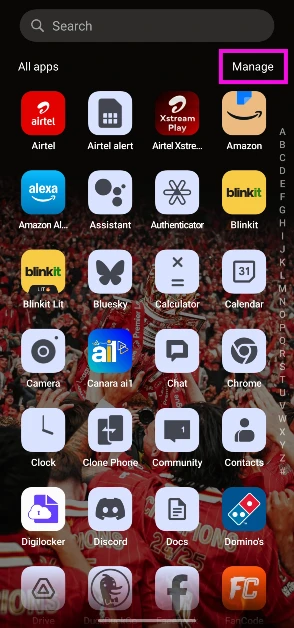
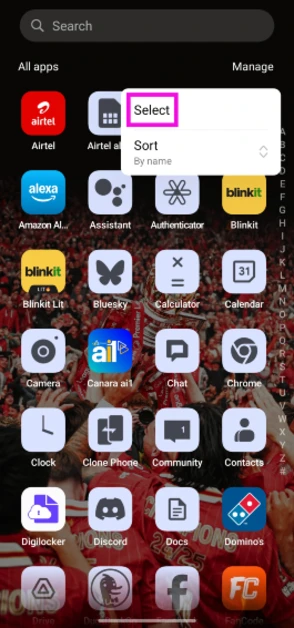
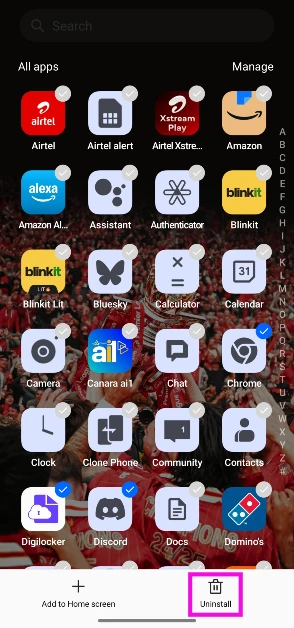
Step 1: Unlock your phone and swipe up to go to the app drawer. Step 2: Tap on Manage or hit the ellipses. Step 2: Tap on Manage or hit the ellipses. Step 3: Tap on Select. Step 3: Tap on Select. Step 4: Tap the apps you wish to delete. Step 4: Tap the apps you wish to delete. Step 5: Hit the Uninstall button at the bottom of the screen.
Delete multiple apps at once using the Google Play Store

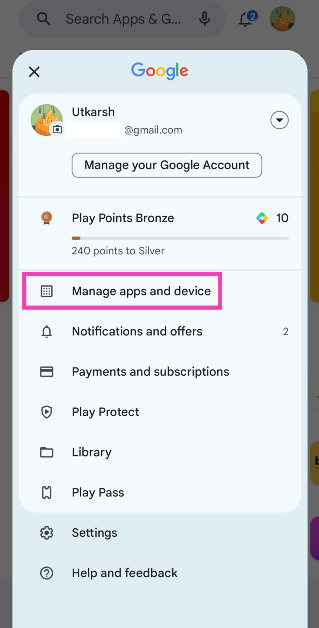
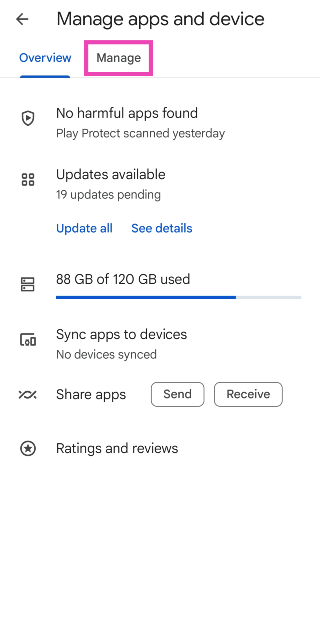
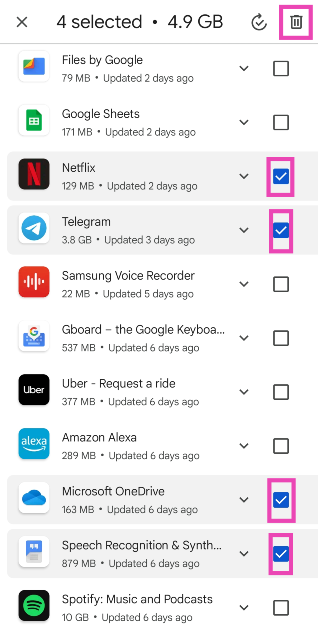
Apart from being Android’s official marketplace, the Google Play Store also lets you manage the apps on your device. You can use it to delete multiple apps on your phone at once. There is no other native way to go about this task. Follow these steps. Step 1: Launch the Google Play Store on your Android phone. Step 2: Tap your profile picture at the top right corner of the screen. Step 2: Tap your profile picture at the top right corner of the screen. Step 3: Select Manage apps and device. Step 3: Select Manage apps and device. Step 4: Switch to the Manage tab. Step 4: Switch to the Manage tab. Step 5: Tap the checkboxes next to the apps you wish to uninstall. Step 5: Tap the checkboxes next to the apps you wish to uninstall. Step 6: Hit the bin sign at the top right corner of the screen. The apps you selected will be removed from your device.

Use a third-party app (UnApp)

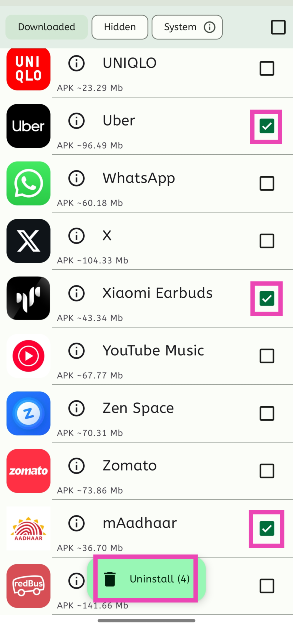
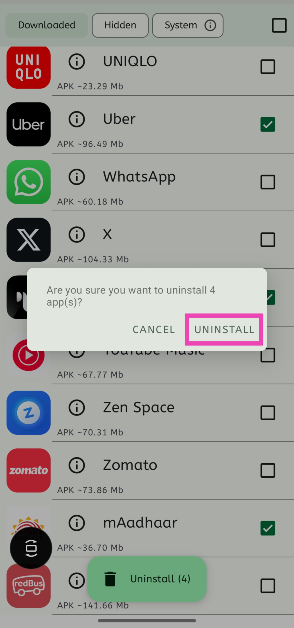
The method mentioned above only works for apps that were downloaded via the Google Play Store. If you want to mass delete apps downloaded from third-party sources, use the UnApp app. Step 1: Download and install UnApp from the Google Play Store. Step 2: Launch the app and hit the checkbox next to the apps you wish to uninstall. Step 2: Launch the app and hit the checkbox next to the apps you wish to uninstall. Step 3: Tap on Uninstall. Step 4: Confirm your selection. Step 4: Confirm your selection.
Bonus Tip: Delete multiple apps on your iPhone at once

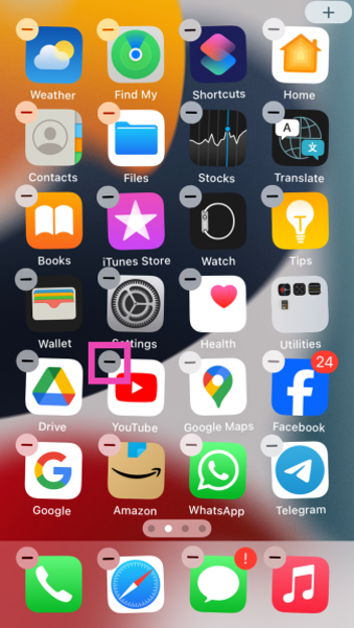
Step 1: Unlock your iPhone and long-press anywhere on the home screen. Step 2: The app icons on the home screen will start wiggling back and forth. Hit the minus icon to delete an app. Step 2: The app icons on the home screen will start wiggling back and forth. Hit the minus icon to delete an app. How to delete multiple apps at once on an Android phone? (2024) Step 3: Confirm your selection in the popup box. Step 3: Confirm your selection in the popup box. How to delete multiple apps at once on an Android phone? (2024) Step 4: The apps will continue to wiggle on the screen. Hit the minus icon on another app to remove it. Continue doing this until the undesired apps have been removed from your iPhone.

Frequently Asked Questions (FAQs)

How do I remove apps that cannot be uninstalled on my phone?

You can either disable the uninstallable apps by going to Settings>Apps or use ADB to remove the app package on your Android phone.

Is there a way to delete multiple apps at once on my Android phone?

The only way to delete multiple apps at once on your Android phone is by going to the Google Play Store, selecting ‘Manage apps and device’, switching to the ‘Manage’ tab, checking the boxes next to the apps you wish to remove and hitting the bin icon at the top of the screen.

How do I mass delete the apps downloaded from third-party sources?

Apps downloaded from third-party sources cannot be uninstalled from the Play Store. You can download the UnApp app for this task.

What is the fastest way to delete apps on my Android phone?

The fastest way to delete an app on an Android phone is by long-pressing its icon in the app drawer and selecting ‘Uninstall’.

How to delete the data accumulated by an app on my Android phone?

Go to Settings>Apps, select the app, tap on ‘Storage’, and hit ‘Clear data’. Read Also: Top 5 Ways To Remove Apps That Android Won’t Let You Uninstall (2024)

Conclusion

This is how you can delete multiple apps on your Android phone at once. If you know any other way to go about this task, let us know in the comments! While you’re here, check out this article to learn how to delete those stubborn apps on your phone that refuse to be uninstalled.

Top 4 ways to change app notification sounds on iPhone? (2024)

0
Unlike Android, iOS does not let you change the notification sound for every third-party app on your iPhone. Using device settings, you can set custom alert tones for Apple’s suite of apps, but that’s about it. Third-party instant messaging apps like WhatsApp and Telegram allow users to change the sounds for certain notifications, but only from within the app. Today, we bring you the top 4 ways to change app notification sound on iPhone. Read Also: Top 10 headphones under $200 in the USA for working from home (2024)

Can I create a custom ringtone on my iPhone from scratch?

Short answer – yes. If you find the system tones on your iPhone bland and uninspiring, you can take matters into your own hands. There are two ways to go about creating a custom ringtone – iTunes and Garage Band. If you want to set your favourite song as your ringtone, choose iTunes. If you have an idea for a ringtone or notification tone that you want to bring to life, Garage Band is your guy. Apple allows you to create a 30-second ringtone from any song on your iTunes library. On your Mac or PC, select the song, right-click on it, and go to Song Info>Options. Select the 30-second segment that you want to convert into a ringtone and go to File>Convert>Create AAC Version. Open the file in Finder and change its format from m4a to m4r. Connect your iPhone to your Mac/PC and drop the file in the Tones folder. Now, go to Settings>Sounds & Haptics>Ringtone and select the song from the list. If you know your way around Garage Band, you can use it to create a 30-second sample. Once the sample has been recorded, hit ‘Share’ and select ‘Ringtone’. Now go to Export>Use Song As>Standard Ringtone. Voila! Your iPhone ringtone will be changed successfully.

Change the app notification sounds on iPhone

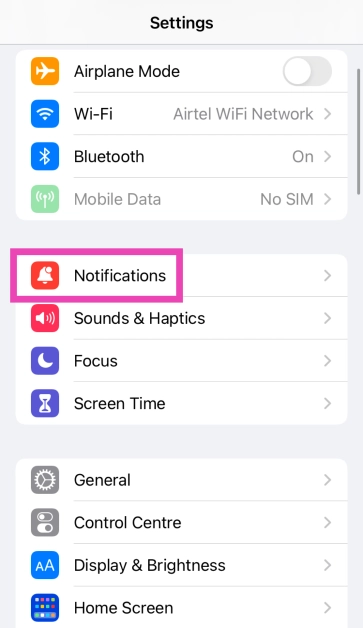
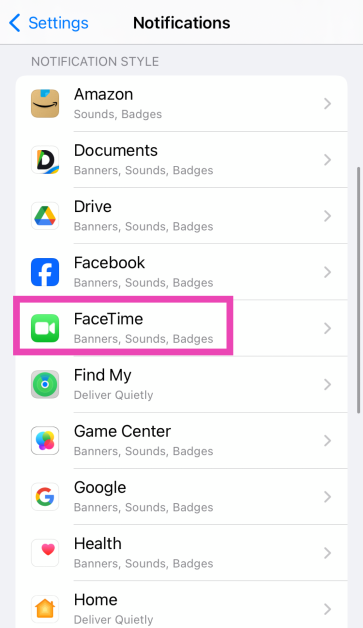
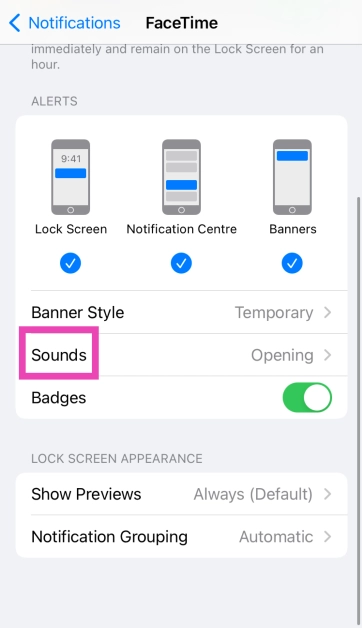
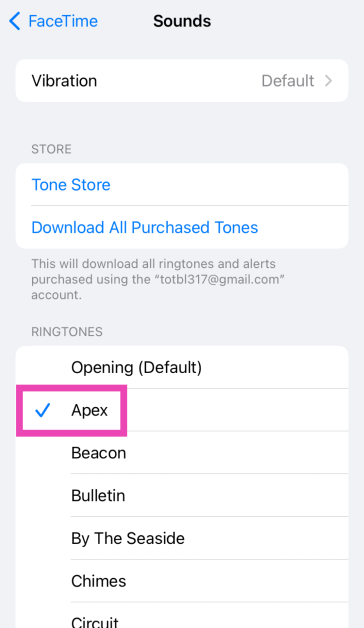
Step 1: Go to Settings and select Notifications. Step 1: Go to Settings and select Notifications. Step 2: Scroll down and select the app for which you want to set a custom notification sound. You can only change the notification sound for Apple’s suite of apps. Step 2: Scroll down and select the app for which you want to set a custom notification sound. You can only change the notification sound for Apple’s suite of apps. Step 3: Tap on Sounds. Step 2: Tap on the alert tone you wish to change.   Step 4: Select a new sound for the app’s notification from the list. Step 4: Select a new sound for the app’s notification from the list.

Change the alert tone

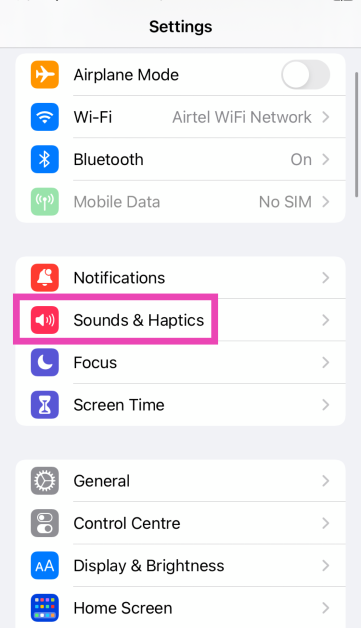
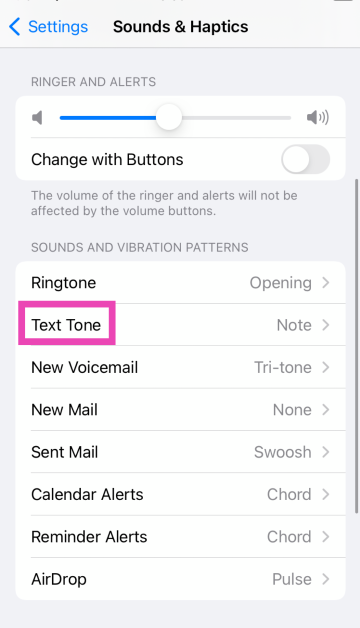
You can also change the alert tone for voicemail, new mail, calendar alerts, and more from the Sounds & Haptics settings on your iPhone. Here’s how. Step 1: Go to Settings and select Sounds & Haptics. Step 1: Go to Settings and select Sounds & Haptics. Step 2: Tap on the alert tone you wish to change. Step 2: Tap on the alert tone you wish to change. Step 3: Select a new tone from the list. Step 3: Select a new tone from the list.

Change the notification sound for WhatsApp on iPhone

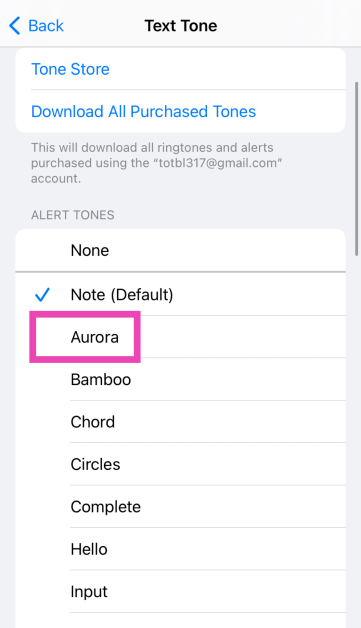
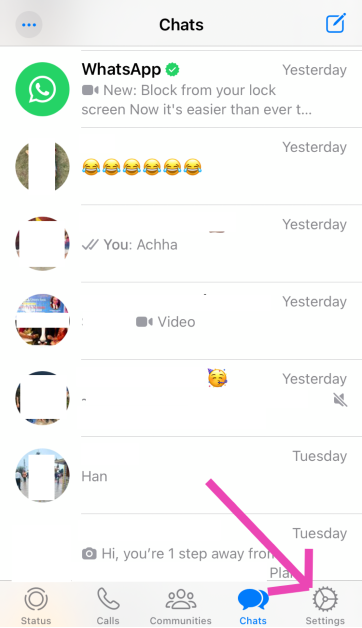
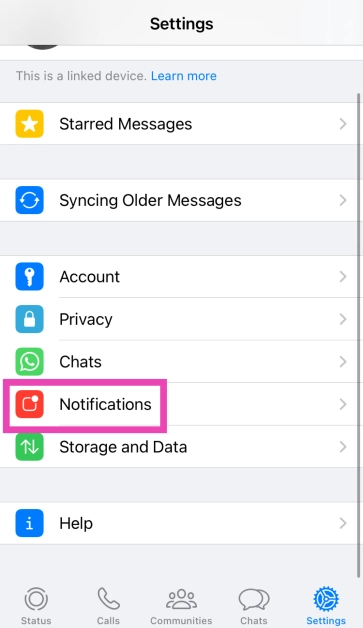
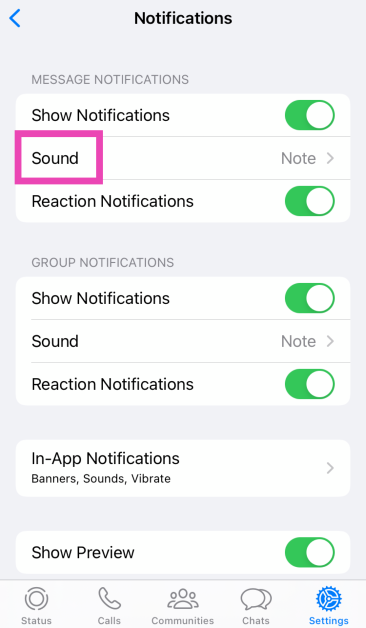
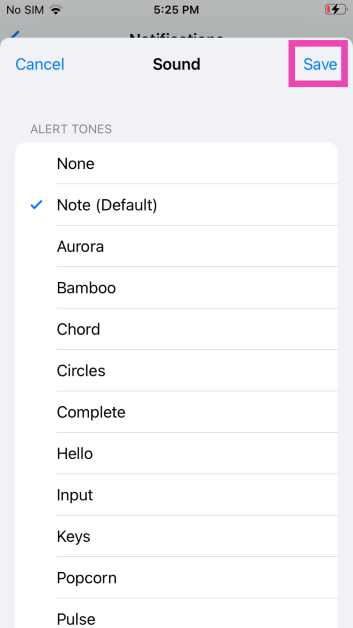
Step 1: Launch WhatsApp on your iPhone and switch to the Settings tab. Step 1: Launch WhatsApp on your iPhone and switch to the Settings tab. Step 2: Tap on Notifications. Step 2: Tap on Notifications. Step 3: Tap on Sound (under the category you wish to customise). Step 3: Tap on Sounds. Step 4: Select the new notification sound and hit Save. Step 4: Select a new sound for the app’s notification from the list.

Change the notification sound for Telegram

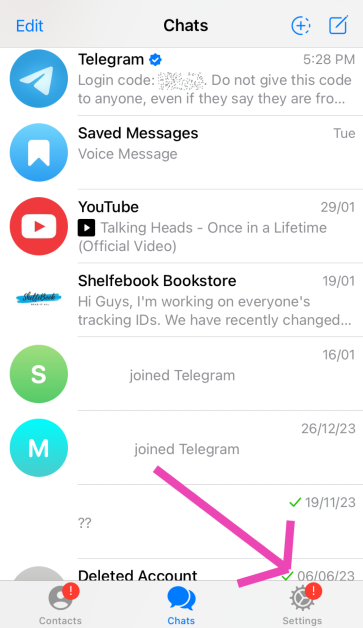
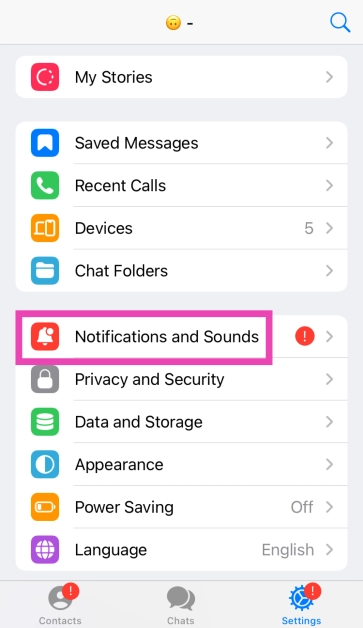
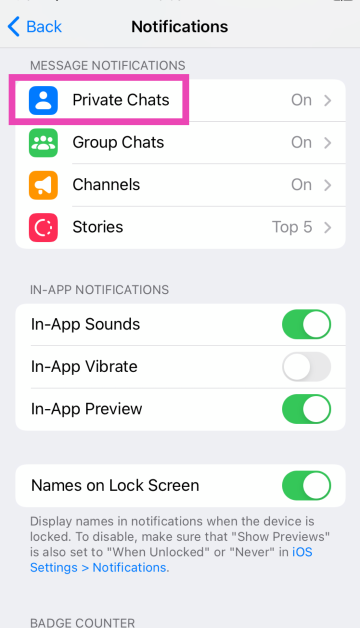
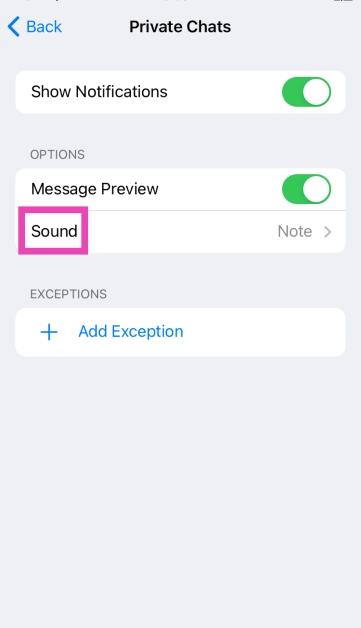
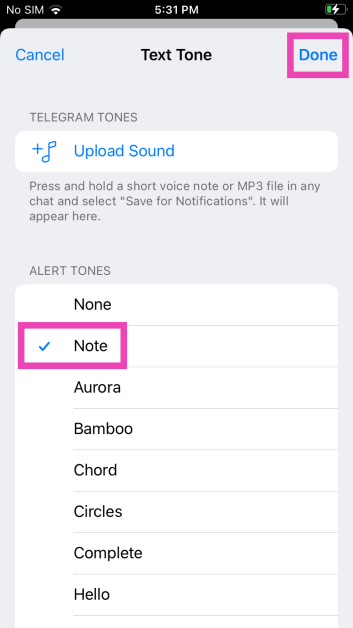
Step 1: Launch Telegram on your iPhone. Step 2: Switch to the Settings tab. Step 1: Launch Telegram on your iPhone. Step 3: Tap on Notifications and Sounds. Step 3: Tap on Notifications and Sounds. Step 4: Select the category for which you want to change the notification sound. Step 4: Select the category for which you want to change the notification sound. Step 5: Tap on Sound. Step 5: Tap on Sound. Step 6: Select a new notification sound from the list and hit Done. Step 6: Select a new notification sound from the list and hit Done.

Frequently Asked Questions (FAQs)

Can I change the notification sound for any app on my iPhone?

Your iPhone only lets you change the notification sounds for Apple’s native apps. These apps include Apple Maps, Facetime, Messages, Mail, and more.

How do I change WhatsApp’s notification sound on my iPhone?

Launch WhatsApp, go to Settings>Notifications>Sound and select a new tone.

How do I change my iPhone’s ringtone?

Go to Settings>Sounds & Haptics>Ringtone and select a new tone. You can also purchase a new tone from Apple’s Tone Store. Read Also: Google Bard is now Gemini AI, launches new app for Android and iOS devices

Conclusion

These are the top 4 ways to change app notification sounds on iPhone. While there is a vast library of sounds to choose from, you can also purchase new alert tones from Apple’s tone store. If you know any other way to change the notification for a specific app on your iPhone, let us know in the comments!

Top 10 headphones under $200 in the USA for working from home (2024)

If you’re thinking of buying a good pair of headphones for your home office, there are a couple of things you need to consider. Of course, exceptional call quality is a non-negotiable factor, but if your household tends to get noisy at times, you may want to consider a good ANC headset that lets you focus at work. Finding the perfect headphones that are suited to your needs can be a daunting task. To make your job easier, here are the top 10 headphones under $200 in the USA for working from home. Read Also: Asus Chromebook CM14 with MediaTek Kompanio 520 CPU launched in India

Jabra Evolve2 65 UC

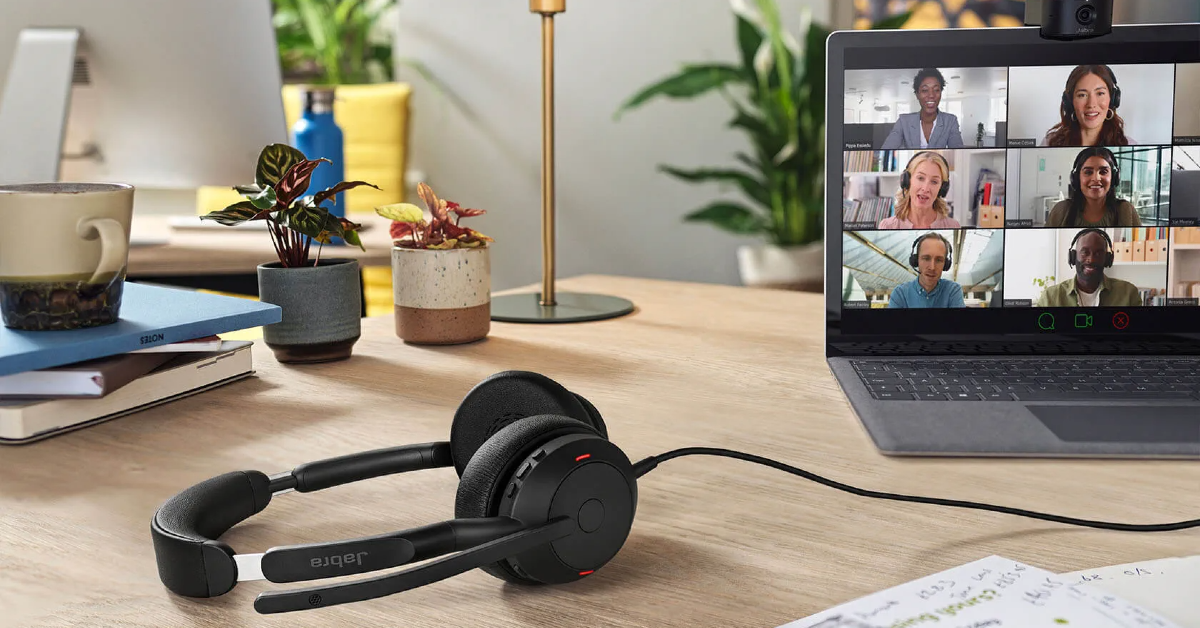
Price: $179.99 on Amazon Jabra Evolve2 65 UC Top 10 headphones under $200 in the USA for working from home (2024) Specially designed to offer a professional call experience, the Jabra Evolve2 65 is one of the headphones under $200 for working from home in the USA. The Evolve2 65 works with all Unified Communications (UC) platforms. There is also a special Microsoft Teams variant on offer if most of your work calls are hosted on that platform. This variant is optimised to deliver the best possible performance on Microsoft Teams. While it doesn’t support ANC, the Evolve2 65 does a good job of passively filtering out the surrounding noise to a significant degree. If you’re working from an office, you can turn on the red busylight on the headphones to let everyone around you know that you’re occupied with a task or on a call.

Poly Voyager Focus 2 UC

Price: $158 on Amazon Poly Voyager Focus 2 UC Top 10 headphones under $200 in the USA for working from home (2024) Poly Voyager Focus 2 offers 3 levels of hybrid Active Noise Cancellation to tune out the surrounding noise and get rid of any distractions. One of its best features is the boom microphone which creates a noise-free bubble in front of your mouth with its Acoustic Fence technology. The result is a crystal-clear calling experience. This boom mic meets the Microsoft Teams Open Office premium microphone requirements. The Voyager Focus 2 offers up to 25 hours of talk time on a single charge and can be plugged into your PC and used as a wired headset when the battery runs out. It also offers multi-device connectivity, which means you can connect it to more than one device at once.

Audio Technica ATH-M50xSTS StreamSet

Price: $199 on Amazon Audio Technica ATH-M50xSTS StreamSet Audio Technica’s ATH-M50xSTS headset brings the sound quality of the popular ATH-50x headphones and integrates it with the superior call quality of the 20 Series microphones. Ideal for working from home, the cardioid condenser microphone on these headphones is perfect for streaming as well as work calls. The headphones are available in XLR/Analog and USB/Digital variants – the latter being more accessible to work with. One of our favourite features on these headphones is ‘flip to mute’ which automatically mutes you on the stream/call as soon as you flip up the boom microphone. 

Jabra Evolve2 50

Price: $140 on Amazon Jabra Evolve2 50 The Jabra Evolve2 50 are super comfortable to wear for an extended period of time. Its cushioned headband and ergonomic earcups perfectly wrap around the head, exerting minimal pressure. These headphones are equipped with ANC, which helps in filtering out the surrounding noise and focusing on work. Its speech-separating and noise-cancelling algorithms are crucial in delivering a professional performance on online conference calls. Like the Evolve2 65, the Evolve2 50 is also available in the Microsoft Teams variant. The UC variant is optimised for all the major communications platforms.

Poly Voyager 4320 UC

Price: $149 on Amazon Poly Voyager 4320 UC With a wireless range of up to 50 metres/164 feet, you can walk around freely in your home office while taking a work call on the Poly Voyager 4320 UC. On a full charge, these headphones provide up to 24 hours of talk time. The boom mic on the Voyager 4230 UC is equipped with Audio Fence technology, which expertly picks up your voice, filtering it from the surrounding noise. The headphones have a super accessible dedicated mute button for calls. It also features multi-point connectivity, allowing you to connect it to several devices at once. Using an office base (sold separately), you can also connect it to a desk phone.

Sony WH-CH720N

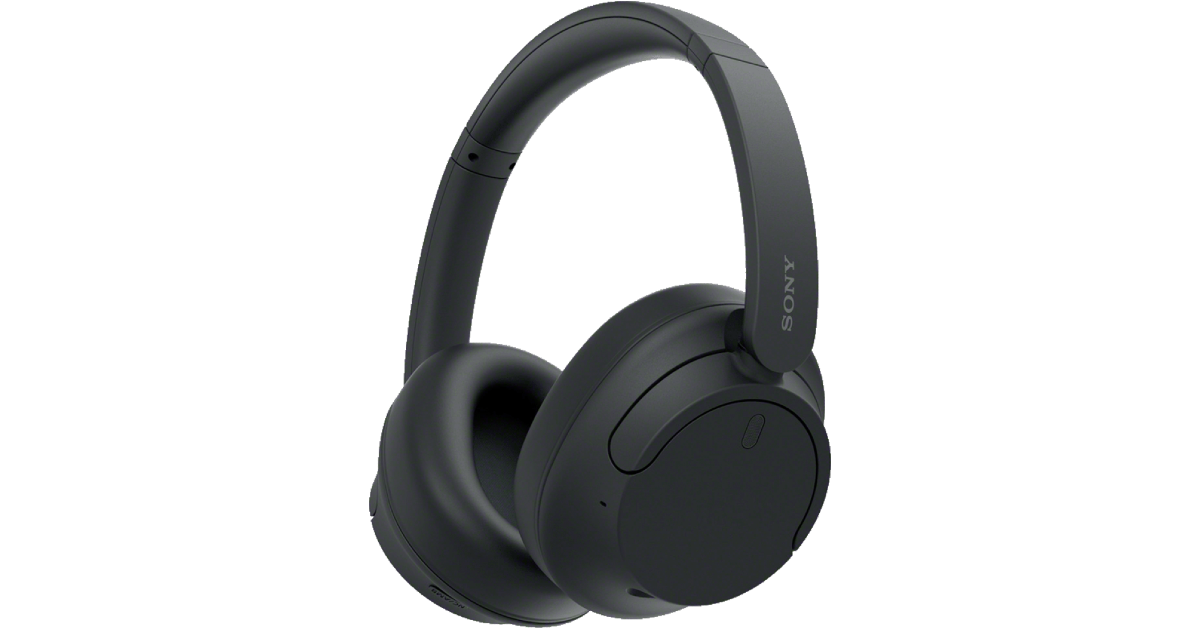
Price: $149.99 on Sony.com Sony WH-CH720N Although they are designed for music consumption, Sony WH-CH720N’s superior calling experience makes it one of the best headphones under $200 in the USA for working from home. Equipped with Precise Voice Pickup technology, a beamforming mic, and Wind Noise Reduction Structure, the WH-CH720N is perfect for work and for play. You pair these headphones to two devices at one time. So, if you get a call on your phone while watching a movie on your PC, you won’t need to take off your headphones to answer it. The headphones also let you know which device is ringing and switch the connection automatically. Read our review of the Sony WH-CH720N here.

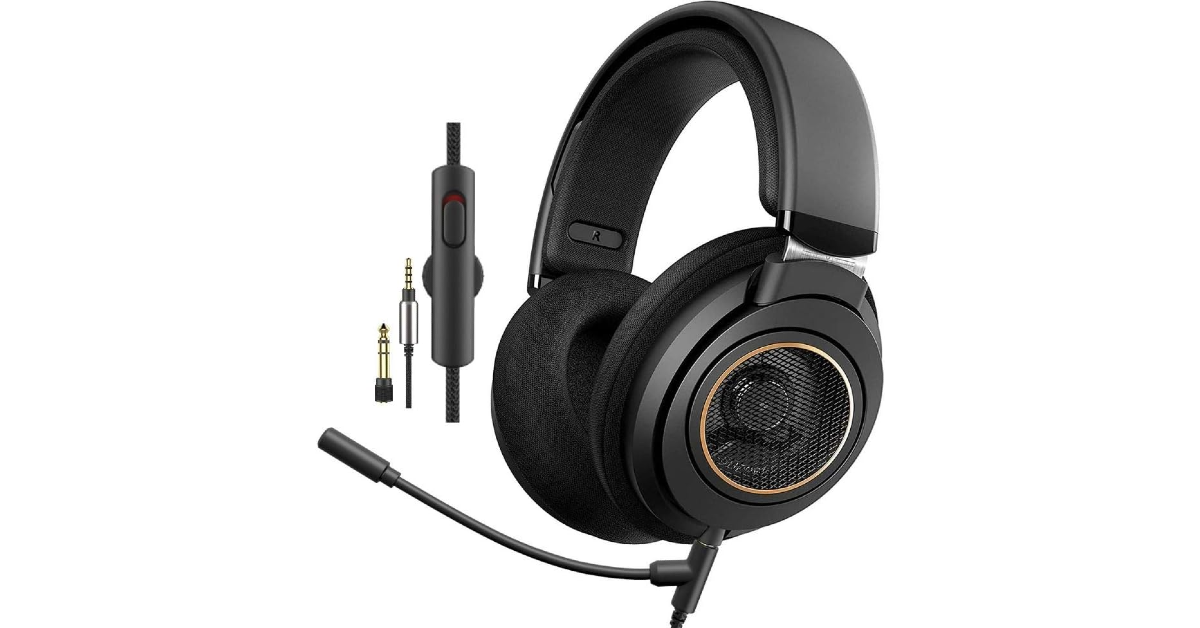
Philips SHP9600MB

Price: $149.99 on Amazon Philips SHP9600MB The Philips SHP9600MB comes with a detachable boom mic that is perfect for working from home. The open-back design of the headphones offers a spacious soundstage. Delivering the audio on the SHP9600MB are 50mm drivers. The soundstage offers a balanced mix of frequencies – something the audiophiles will appreciate. The ergonomic design of the earcups and the cushioned headband ensure that you don’t get fatigued after long hours of wearing the headset. You also get a 9.8ft cable inside the box, making it easier to move around with the headphones on.

Logitech Zone Vibe 100

Price: $99.99 on Logitech.com Logitech Zone Vibe 100 Looking for some affordable options? The Logitech Zone Vibe 100 is a good pick. Priced under $100, these headphones are ideal for working from home. The memory foam covered with soft knitted fabric makes for comfortable earpads – something you wouldn’t mind wearing for hours at a stretch. The noise-cancelling microphone can be flipped up to mute yourself on calls. On a full charge, these headphones offer 20 hours of listening time and 18 hours of talk time. 5 minutes of charging is enough to power them for an hour of listening time. The Zone Vibe 100 also offers multi-point connectivity. Certainly one of the best headphones you can buy under $200 in the USA for working from home.

Hyper X Cloud II

Price: $95 on Amazon Hyper X Cloud II Top 10 headphones under $200 in the USA for working from home The Hyper X Cloud II takes care of your gaming and work demands all at once. Its detachable noise-cancelling boom mic is as good for online conference calls as it is for gaming lobbies. The memory foam ear cushions and padded headband with a leatherette fabric offer high-end comfort which allows you to wear the headphones for hours without a break. Delivering the audio output on these headphones are large 53mm drivers. Its Advanced Audio Control Box has volume controls for the audio control and microphone along with a dedicated slider that acts as a mute switch.

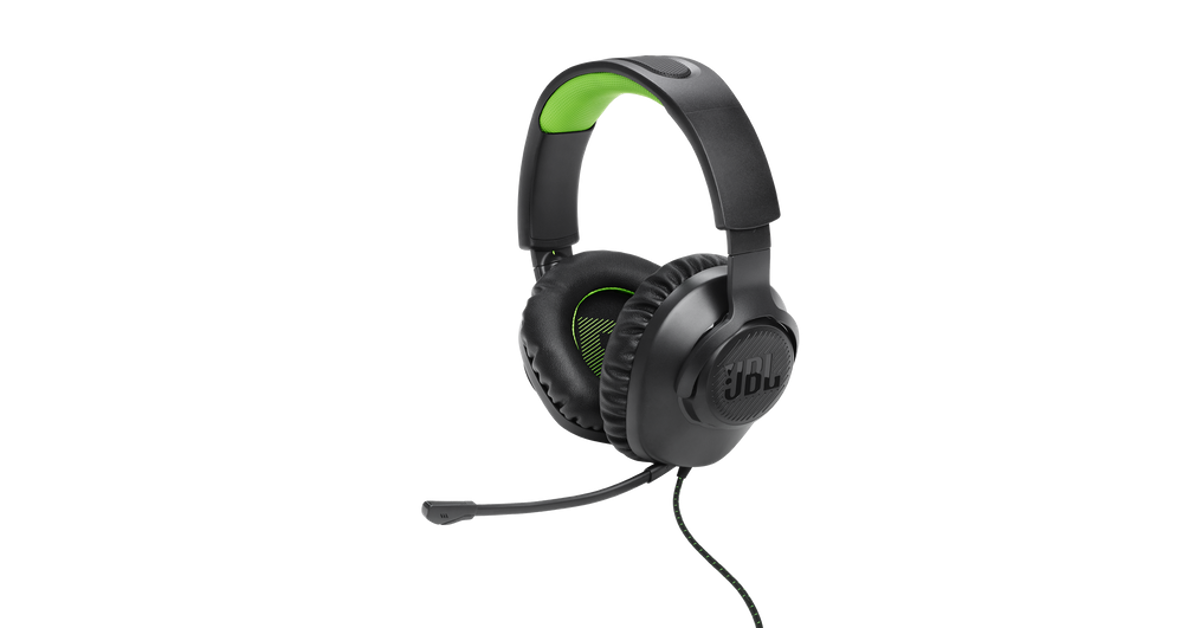
JBL Quantum 100X Console

Price: $29.95 on HarmanAudio.com JBL Quantum 100X Console Top 10 headphones under $200 in the USA for working from home Ending this list is the ultra-affordable JBL Quantum 100X Console. Designed for work and play, these gaming headphones are a rock-solid option for online meetings as well. The detachable boom mic keeps your voice in focus and tunes out the surrounding noise on a call. For a pair of gaming headphones, the Quantum 100X Console looks professional, with no tacky RGB or flashy highlights. If you like to game, you will certainly enjoy the detailed and dynamic soundscapes this headset has to offer. Read Also: Itel P55, Itel P55+ with up to 45W fast charging support launched in India 

Conclusion

These are the top 10 headphones for under $200 that you can buy in the USA for working from home. If you think we missed out on a headset that deserves to be on this list, give it a shout-out in the comments. And while you’re here, check out our list of the top 10 smartphones under $1,000 too.

Google Bard is now Gemini AI, launches new app for Android and iOS devices

Key Highlights
  • Gemini with Pro 1.0 model is available in over 40 languages and more than 230 countries and territories.
  • It is capable of doing highly complex tasks like coding, logical reasoning, following nuanced instructions and collaborating on creative projects.
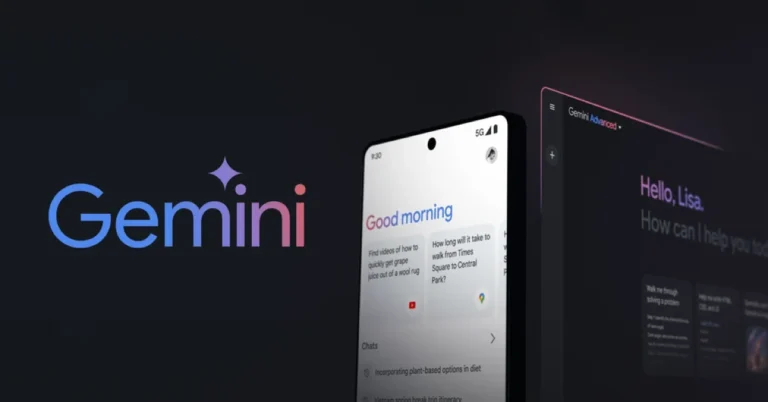
Google has revealed that Bard, its AI chatbot, will now go by Gemini. The software company claims that consumers in more than 230 nations and territories can now interact with the Gemini Pro 1.0 model in more than 40 languages. The firm has introduced two new experiences under Gemini Advanced, giving you access to our most powerful AI model, Ultra 1.0, as well as a new mobile app that makes collaboration easier when on the go. While announcing the rebranding, Google said, “Our mission with Bard has always been to give you direct access to our AI models, and Gemini represents our most capable family of models. To reflect this, Bard will now simply be known as Gemini.” Users across the globe can not access Gemini and chat with its Pro 1.0 model in over 40 languages and more than 230 countries and territories. Along with this, it has also released two new experiences — Gemini Advanced and a mobile app — to help you easily collaborate with the best of Google AI. Gemini Advanced gives access to Ultra 1.0 which is the company’s latest AI model. According to the company, Gemini Advanced is proficient at handling highly complex tasks like coding, logical reasoning, following nuanced instructions and collaborating on creative projects. It can not only allow users to have in-depth conversations but also better understand the context of your previous prompts. It can be your tutor by creating step-by-step instructions, sample quizzes or back-and-forth discussions customised to your preferred learning method. Moreover Gemini Advanced can help you with more advanced coding scenarios, serving as a sounding board for ideas and helping you evaluate different coding approaches. It can also help content creators generate fresh content, analyse recent trends and brainstorm improved ways to grow their audiences. Also Read: Noise Buds Xero with 12.4mm driver launched in India Gemini Advanced is currently available in over 150 countries and territories in English, and we’ll expand it to more languages over time. It will be part of the new Google One AI Premium Plan for $19.99/month, starting with a two-month trial at no cost. Google has also rolled out a new mobile experience for Gemini and Gemini Advanced with a new app on Android and the Google app on iOS. You can text, speak, or add an image to the Gemini app for a variety of on-the-go assistance. You can take a picture of your flat tyre and ask for instructions, generate a custom image for your dinner party invitation or ask for help writing a difficult text message. Also Read: Itel P55, Itel P55+ with up to 45W fast charging support launched in India Beginning today, Gemini is being made available in English on Android and iOS phones in the United States and will be fully available in the coming weeks. Starting next week, you’ll be able to access it in more locations in English, and in Japanese and Korean, with more countries and languages coming soon.

Noise Buds Xero with 12.4mm driver launched in India

Key Highlights
  • Noise Buds Xero has an innovative Sound+ Algorithm.
  • It comes with a 12.4mm PEEK + TITANIUM driver.
  • The earphones offer 3-level of ANC Modes.
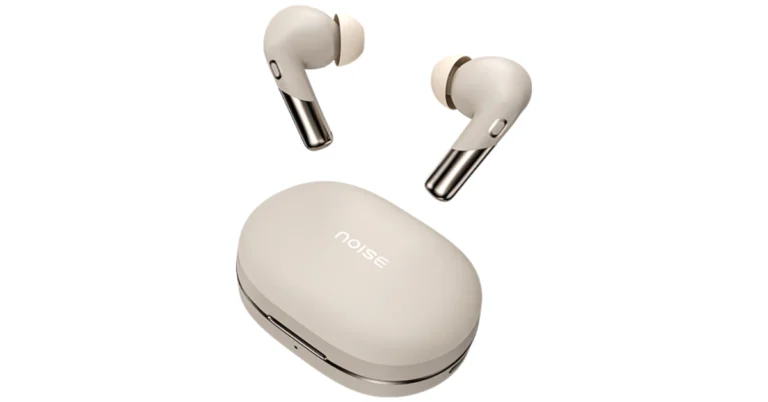
Indian tech brand Noise has released a new set of Truly Wireless Earphones- Noise Buds Xero. The new TWS features a 12.4mm driver unit in addition to six microphones. The audio device also comes with an Adaptive Hybrid ANC of up to 50 dB. Additionally, it runs for up to 6 hours with just 10 minutes of quick charge.

Noise Buds Xero specifications, features

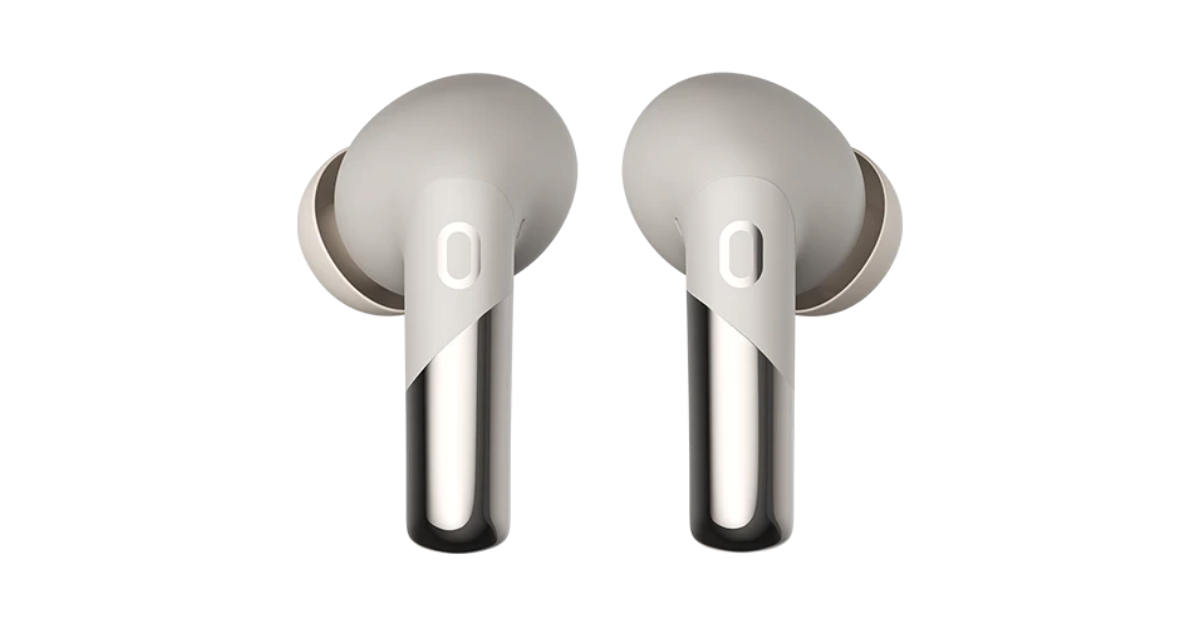
Noise Buds Xero comes with a premium matte and chrome design. It is equipped with a 12.4mm PEEK + TITANIUM driver with an advanced triple-mic setup for smoother and clearer conversations. It offers in-ear detection, allowing the users to instantly play or pause the audio by just removing the TWS or putting them back in the ear. Additionally, it offers ‘Concert for One’ and Adaptive Hybrid Noise Cancellation up to 50 dB and adapts seamlessly to surroundings, ensuring premium audio in bustling cities or crowded offices. The earbuds offer 3-level of ANC Modes: Deep, Light and Transparent. Noise Buds Xero specifications, features It has an innovative Sound+ Algorithm provides a steady and noise-free experience in all situations, eliminates echo and improves speech quality with dynamic range control. For synchronised audio and video, the Buds Xero TWS promises a low latency of 50ms. Users may control their earphones using touch commands. The Noise Buds Xero delivers up to 50 hours of playtime. With just 10 minutes of quick charge, it can offer 6 hours of battery life. Along with Bluetooth v5.3, it is accompanied by HyperSync technology for hassle-free pairing. It is compatible with both Android and iOS devices. The TWS earphones are IPX5 water resistance rated and support AI Voice Assistants. Also read: Itel P55, Itel P55+ with up to 45W fast charging support launched in India

Noise Buds Xero price in India

Noise Buds Xero has launched in India at an introductory price of Rs 3,999. The wireless earphones come in Chrome Blue, Chrome Beige and Chrome Black colour options. The device will be available for purchase via Flipkart, Amazon, Myntra and gonoise.com. Also Read: iQoo Neo 9 Pro pricing leaked ahead of February 22 India launch Commenting on the launch, Amit Khatri, Co-Founder, Noise said, “With the unveiling of Noise Buds Xero, we’re orchestrating a personalised concert experience for every individual. This launch marks a breakthrough in our mission to immerse our discerning consumers in cutting-edge audio experiences. These earbuds are yet another product that outline our commitment to redefine the premium TWS landscape, seamlessly blending design, innovation, and performance into a harmonious symphony of unparalleled excellence.”