The laptop includes a Lenovo LA-2 AI chip allowing auto-adjusting power for peak FPS.
Additionally, there is an AI-tuned triple-fan air system boasting 6,333 individual vents
Lenovo has officially introduced its 13th Gen Intel Core i9-series powered Lenovo Legion 9i laptop in India. The machine also includes up to Nvidia GeForce RTX 4090 graphics and Windows 11 Home is pre-installed on it. The device features a 16-inch display with a 3.2K resolution and a refresh rate of up to 165 Hz. The laptop comes with a self-contained liquid-cooling system and a forged carbon A-cover.
Lenovo Legion 9i price in India, sale details
Lenovo Legion 9i has been launched with a starting price of Rs 4,49,990. The laptop can be purchased via Lenovo.com, Lenovo Exclusive Stores, leading e-commerce websites, and other offline retail stores across the country.
Lenovo Legion 9i specifications
Lenovo Legion 9i features a 16-inch 3.2K Mini LED display with 2,000×3,200 pixels of resolution. The display panel offers a 94% screen-to-body ratio and a variable refresh rate of up to 165Hz, with vibrant DCI-P3 and sRGB colour fidelity with the pre-installed X-Rite software. The screen comes with a 3ms response time and 1200nits of peak brightness. It also supports Dolby Vision and is DisplayHDR 1000 certified.The laptop is armed with a 13th Gen Intel Core i9-13980HX processor, up to an NVIDIA GeForce RTX 4090 Laptop GPU. It also comes with 32GB of overclocked 6400Mhz DDR5 Dual Channel RAM and 2TB of SSD M.2 storage.The Lenovo Legion 9i is integrated with liquid cooling, co-engineered with Cooler Master, and tackles scorching VRAM under extreme gaming loads, kicking in at 84°C for instant chill. Additionally, there is an AI-tuned triple-fan air system boasting 6,333 individual vents, keeping all components ice-cool even during intense gaming and content creation.
Also Read: OnePlus Buds 3 with 10.4mm driver unit launched in IndiaFurthermore, there is a dedicated Lenovo LA-2 AI chip allowing auto-adjusting power for peak FPS through its Smart FPS feature, while synchronizing Legion Spectrum RGB throughout, from the keyboard’s per-key TrueStrike illumination.Also Read:Itel Roar 75 Review: Are they worth buying?The device also features a 1080p webcam with an electronic e-shutter for privacy. It boasts a 99.99Whr battery. Additionally, it comes with Windows 11 as well as 3 months of access to Xbox Game Pass Ultimate and Legion Arena consolidates games from multiple platforms and acts like a ‘gaming hub’. Optional Lenovo Premium Care support is also available for people who want access to advanced technical support with at-your-doorstep support and preventative PC health checks.
While Instagram may have introduced the option to save Reels directly to your device, the chances of YouTube getting a similar feature for Shorts are very bleak. The video-sharing platform already has an option to save videos for offline viewing. This includes Shorts as well. But what if you want to download a video directly to your phone’s gallery? Take a look at these 6 ways that will help you download YouTube Shorts on your Android smartphone.Read Also:OnePlus 12R with Qualcomm Snapdragon 8 Gen 2 SoC launched in India
Which method is best for you?
As we mentioned earlier, unlike Instagram, YouTube does not offer a native way to download bite-sized video content from its platform. Before Instagram got this functionality, users relied upon third-party apps on the Play Store to carry out the task. Unfortunately, this isn’t possible for YouTube due to the platform’s stringent content policy. Due to strict copyrights in place, the Play Store constantly weeds out apps that facilitate downloads from YouTube.This does not mean that there aren’t any ways to download Shorts on your phone. The Internet is full of third-party websites that let you download any video from YouTube, including Shorts. If you don’t want to go down that route, you can always use your phone’s native screen recording feature to capture Shorts. Both these methods will ensure that the video is saved to your phone’s native gallery app.
Save a YouTube Shorts video in the app
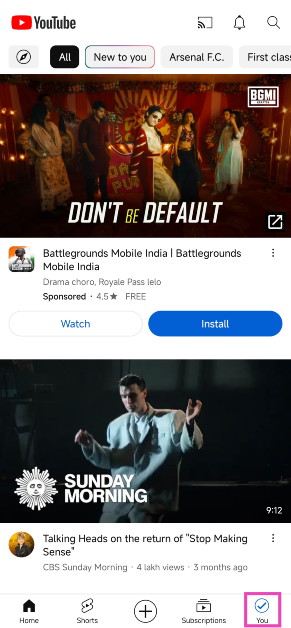
YouTube allows you to save Shorts within the app for offline viewing. The video quality for regular users is limited to 360p, but for Premium subscribers, this limit is pushed to 1080p.Step 1:Open the YouTube Shorts video you want to save for offline viewing.Step 2: Go back and switch to the You tab.Step 3: Tap on View all in the History section.Step 4: Hit the ellipses next to the Shorts video you want to download.
Step 5: Hit Download video.Step 6: Select a resolution and tap on Download.
Download your YouTube Shorts videos on Android
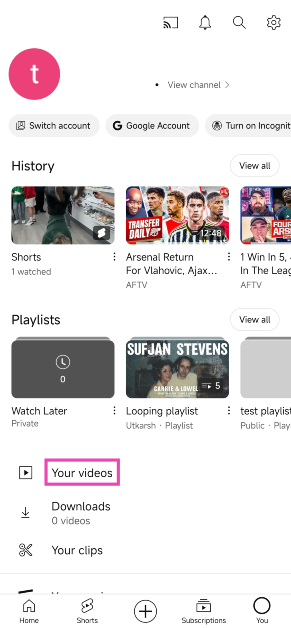
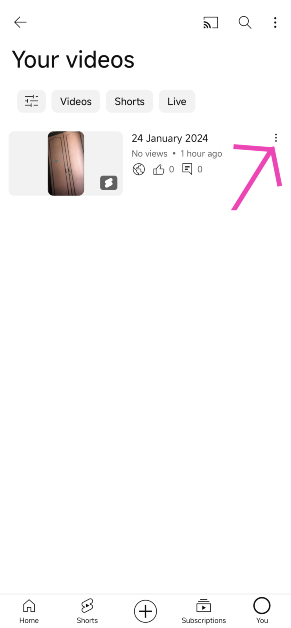
To save the Shorts that you have uploaded on YouTube, follow these steps.Step 1:Launch the YouTube app on your smartphone and switch to the You tab.Step 2: Tap on Your videos.Step 3: Hit the ellipses next to the Shorts video that you wish to download.Step 4: Tap on Save to device.
Use a third-party website to download YouTube Shorts on Android (SSYouTube Downloader)
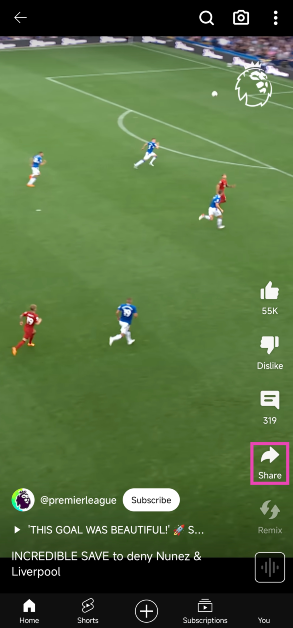
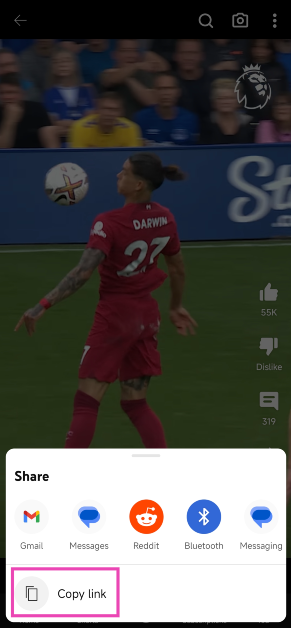
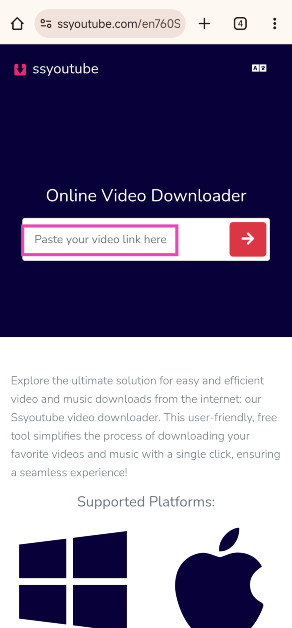
Came across a video while scrolling through Shorts that you want to save on your device? Follow these steps.Step 1: Hit the Share button on the video.Step 2: Tap on Copy link.Step 3: Go to SSYouTube Downloader.Step 4:Paste the link in the download box.Step 5: Hit Download next to the resolution of your choice.The video will be saved on your device.
Use a third-party website to download YouTube Shorts (PasteDownload)
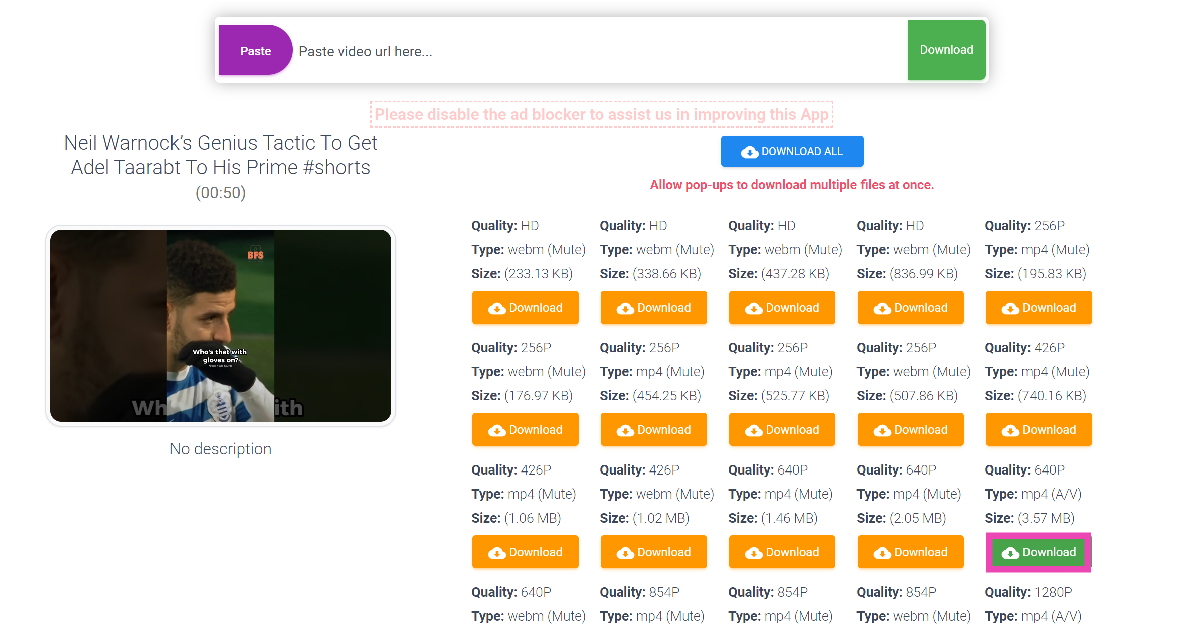
Step 1:Open the YouTube Shorts video you wish to download.Step 2: Hit the Share button.Step 3: Select Copy link.Step 4: Go to PasteDownload and paste the link in the download box.Step 5: PasteDownload will present a bunch of download options. Hit the option with the green download button to save the video with sound.Step 6: The video will open in a new tab. Tap the ellipses and hit Download.
Use YTDLnis
Step 1: Go to https://ytdlnis.org/ and hit Download.
Step 2: Download the stable APK from the website and install it on your phone.
Step 3:Launch the app and paste the link to the YouTube Short you wish to install in the text box.
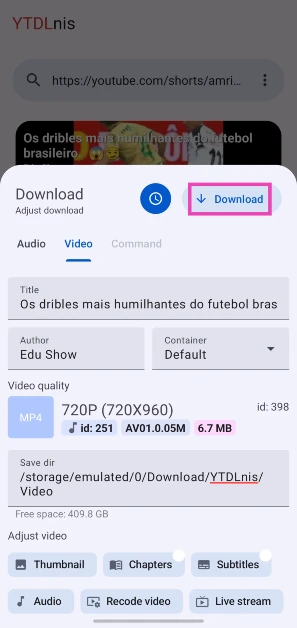
Step 4: Hit Download.
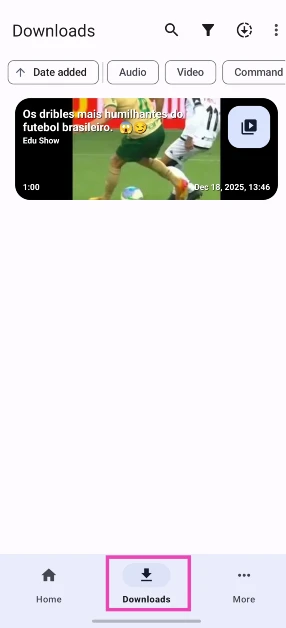
Step 5: The Short will appear in the Downloads tab.
Screen record your phone to download YouTube Shorts
Android does not allow third-party apps to download YouTube videos, including Shorts. If you don’t want to use a third-party website like SSYouTube and PasteDownload, your best option is to record your phone’s screen while the video is playing. Here’s how you can go about it.Step 1:Launch the YouTube app and go to the Shorts video that you wish to download.Step 2:Pause the video before it begins to play. Swipe down from the status bar and tap on the screen recording tile.Step 3: Hit the record button and play the video.Step 4: Hit the stop button once the video ends.The video will be saved to your phone’s internal memory.
Frequently Asked Questions (FAQs)
Is there an app to download YouTube Shorts on Android?
Due to YouTube’s copyright restrictions, Google Play Store does not allow YouTube video downloader apps on its platform.
How do I download YouTube Shorts to my phone’s storage?
Copy the link of the YouTube Shorts video you want to save on your device, go to the PasteDownload website, and paste the link in the download box. Hit the download button to save the video to your device.
How do I download YouTube Shorts on my phone without using any app?
You can save YouTube Shorts for offline viewing by going to your Watch History, tapping the ellipses next to the Shorts video, and selecting ‘Download video’. You can also screen record the video if you want to save it to your phone’s gallery.Read Also:OnePlus 12 debuts in India and globally: Price in India, specs details inside
Conclusion
These are the top 6 ways to download YouTube Shorts on your Android smartphone in 2024. The videos that you save for offline viewing in the YouTube app remain there for 30 days. After that, you need to download them again. If you know any other way to save Shorts on your smartphone, let us know in the comments!
The ANC can be adjusted using three different modes.
The TWS earphones offer up to 49dB Adaptive Noise Cancellation.
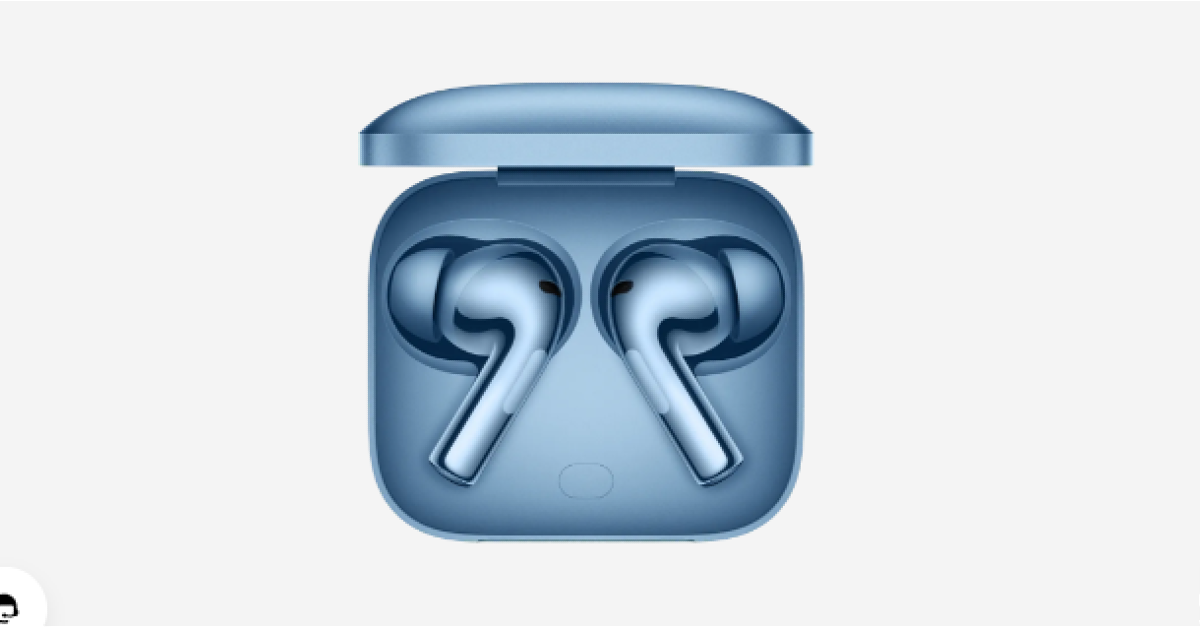
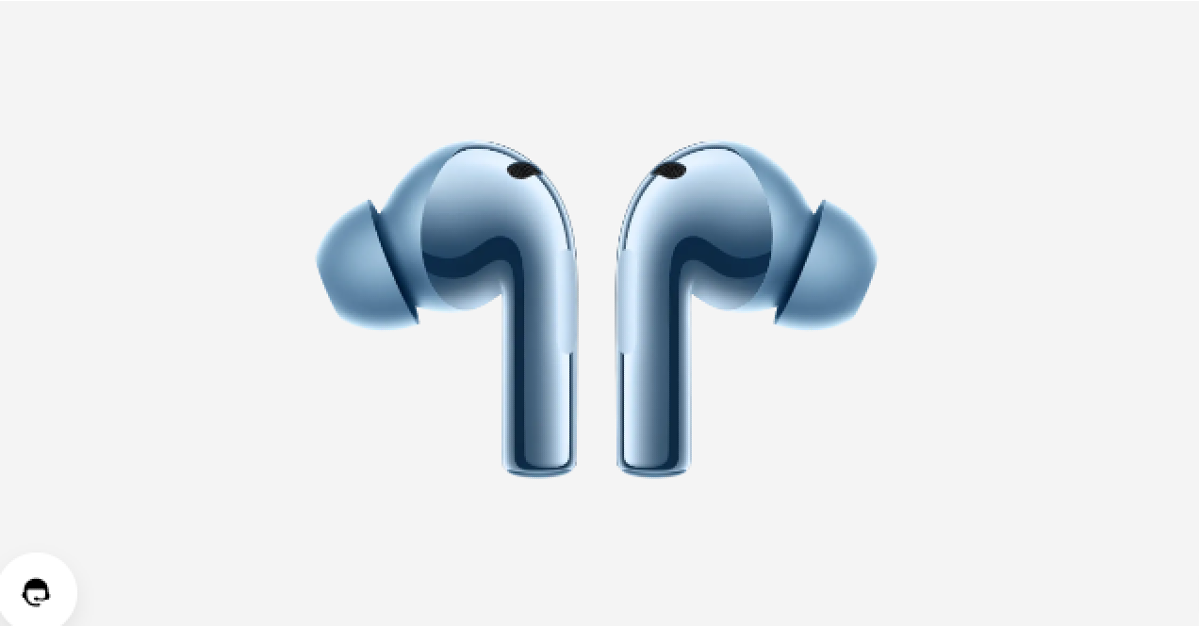
OnePlus Buds 3 was launched in China earlier this month and has now arrived in India. The company today introduced the premium earphones alongside the OnePlus 12 and OnePlus 12R. The device features a 10.4mm driver unit. It also supports an LHDC 5.0 hi-res audio. Additionally, it comes with three levels of active noise cancellation and a transparency mode. The buds also provide a dual connection with ultra-low latency.
OnePlus Buds 3 specifications
OnePlus Buds 3 comes equipped with a 10.4mm driver unit. The Buds 3 delivers an ultra-wide 15Hz to 40KHz frequency response, offering commanding bass, exquisite treble, and soul-touching vocals. The device supports active noise cancellation (ANC) with three modes – mild, moderate, and depth. The three available modes offer ANC levels of 10 dB, 20 dB, and 49 dB, respectively. There is a transparency mode which can let them hear background noise. The noise cancellation has also earned the Buds 3 a TÜV Rheinland certification as a High-Performance Noise Cancellation device. Additionally, three microphones support LHDC 5.0 Hi-Res audio output alongside AAC and SBC Bluetooth codec. The audio device also comes with Dynamic Bass technology. It offers 94ms low latency and comes with game sound effects that can be customised as per liking. With these true wireless earbuds, gamers can experience 3D surround sound.Also Read:OnePlus 12 debuts in India and globally: Price in India, specs details insideThe OnePlus Buds 3 houses a 58mAh battery. The charging case boasts a 520mAh battery and a USB Type-C port. The TWS earbuds promise to provide up to 6.5 hours of playtime and up to 28 hours with the case (ANC on). When ANC is turned off the wireless earphone offers up to 10 hours of playback time and runs up to 44 hours with the charging case. Quick 10 minutes of charge provides up to 7 hours of playback.Additionally, the IP55 classification for dust and splash protection is included with the earbuds. These are compatible with smartphones, tablets, or laptops running Android, iOS, or Windows.
OnePlus Buds 3 price in India, availability details
OnePlus Buds 3 has been launched in India with a price tag of Rs 5,499. The device comes in two colour options Metallic Gray and Splendid Blue. The buds are scheduled to go on sale on February 6 at noon via OnePlus.in, OnePlus Experience Store, Amazon, Flipkart, Myntra and Offline Partner Stores.Also Read:Itel Roar 75 Review: Are they worth buying?Users can avail of an Instant Bank Discount of Rs 1000 via purchase with ICICI and OneCard credit cards from February 6th-12th. RCC members can also avail an additional Rs 800 off.
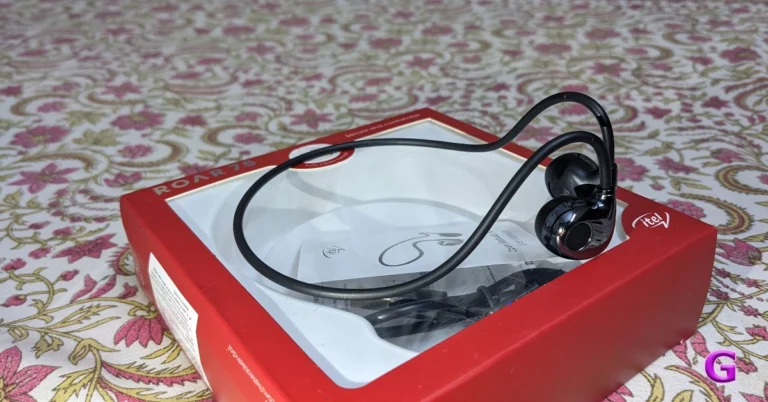
Homegrown tech brand, Itel, has launched its first open-ear headset in India — Itel Roar 75. The cost of the gadget is less than Rs 1,500. It has a lightweight design and can pair with two devices. Furthermore, it has 14.2mm dynamic speakers with support for Environmental Noise Cancellation to provide crystal-clear audio. A stable fit is guaranteed for sporting activities with this headset. The specs sheets look interesting but is it as amazing as the company claims? This is why we reviewed them to know whether they are worth buying.
Itel Roar 75 Review: Design
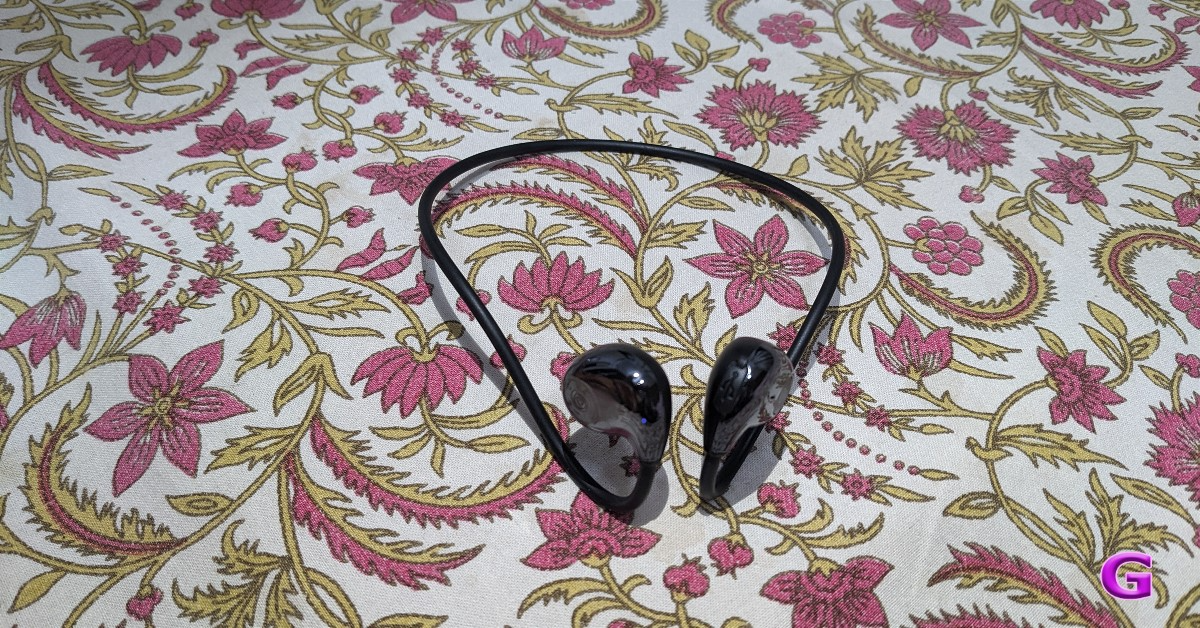
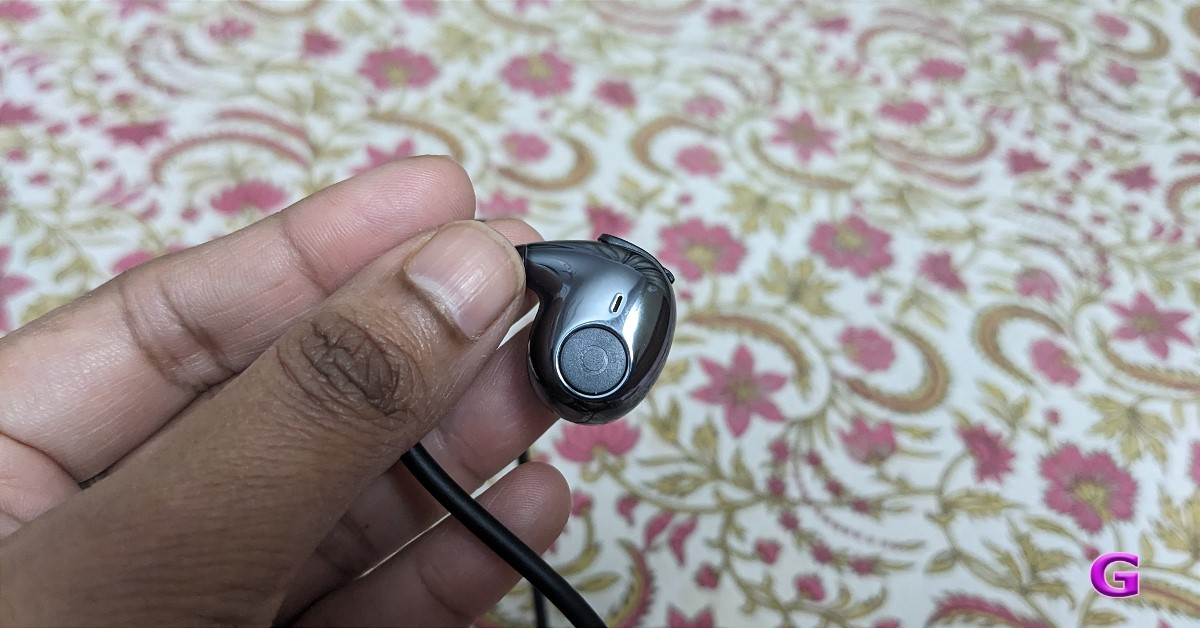
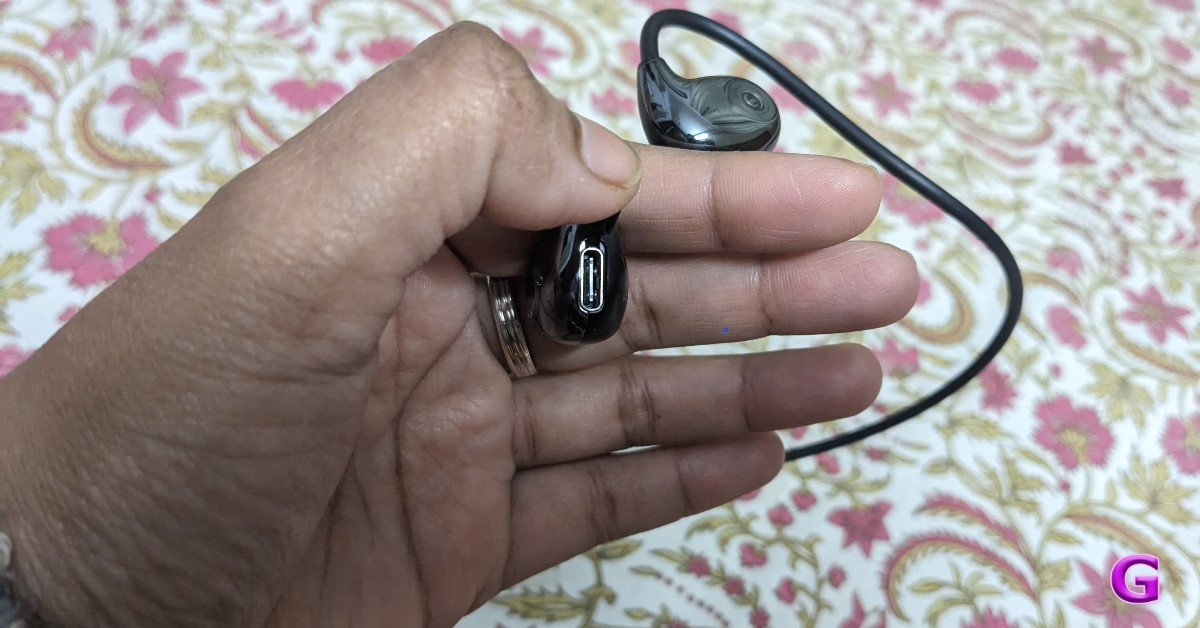
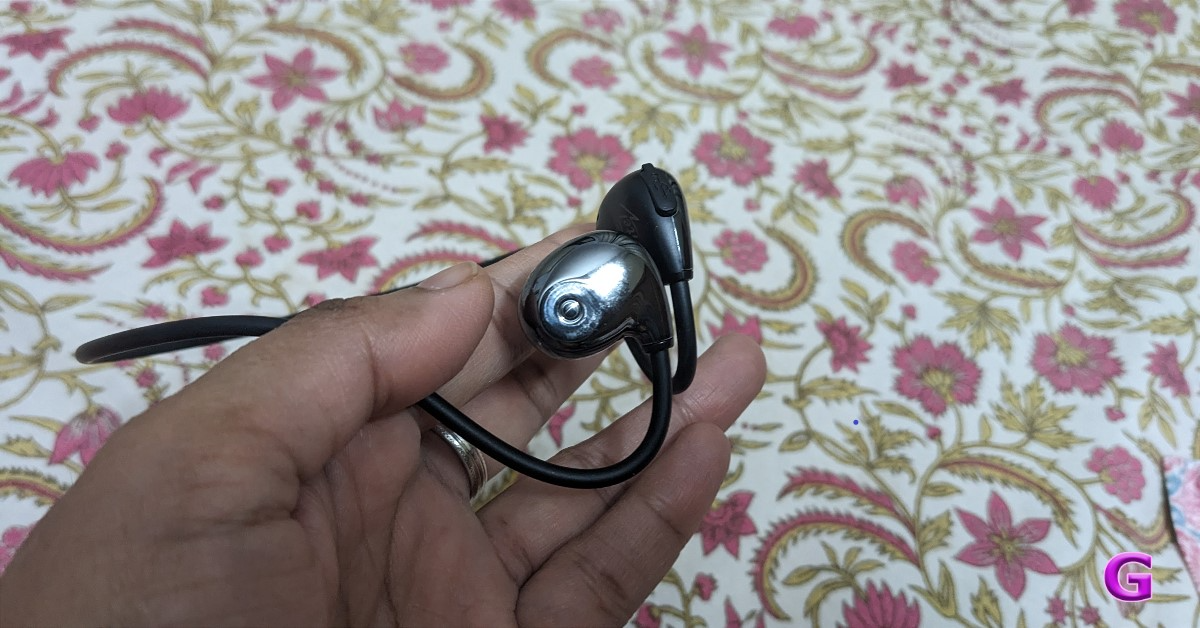
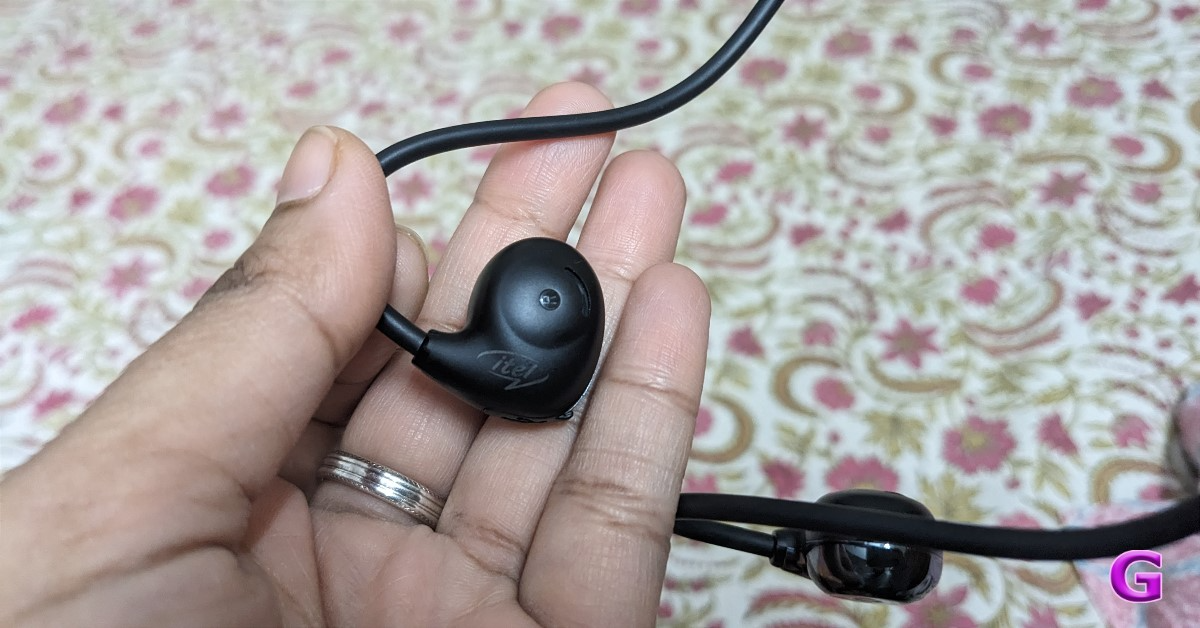
The Itel Roar 75 has an open-ear design. It seems robust and lightweight because of the titanium used in its body frame. The neckband is bendable and extremely thin. There are two finishes on the earphones. The interior features a matte plastic finish with the brand’s logo, while the exterior is glossy and resembles chrome. It comes in just one colour option right now, which is blue.Thanks to the use of a titanium body frame, it weighs only 11 grams.The fit is comparable to that of over-the-ear headphones, with the exception that the band is fitted behind your ears. Remember that these earbuds are not as comfortable as those that insert into your ear canal. The ear tips are not adjustable and are meant to sit on top of your ear, not precisely inside the ear canal. As a result, these don’t require separate silicon tips and may be worn by everyone. You do not get a completely secure fit, similar to other earphones.On the flipside, There won’t be any irritation if you use them for an extended period. Running, jogging, and other outdoor sports are made possible by the earbuds’ design.There is a button visible on the right side of the earpiece. This button can be long-pressed to turn on the device. It turns on with a soft glow, and then it is ready to pair with your smartphone. Additionally, you can use this button to play or pause music with a single click, and can move on to the next song with a double click. In addition, you can activate Google Assistant by long pressing.The right side of the earbuds has a USB Type-C connector for charging.
Itel Roar 75 Review: Performance
Let’s discuss the audio quality of these earphones. With a 14.2 mm driver unit, the audio quality can be deemed as decent considering the price. Because it doesn’t get all the way inside your ears, the audio is not particularly loud and lacks richness. Because these earbuds have an open-ear design, it is acceptable that the vocals and instrument separation are not the best and that the music lacks a bit of bass. Additionally, there is audio leakage caused by the design, which allows people sitting near you to hear what you are listening to.Additionally, there is no option to adjust the volume from the device, therefore you must do so on the linked device.Furthermore, environmental noise cancellation is supported by this device. However, since this feature only functions properly with properly fitting earphones and not with those that have an open ear design, it is useless with these earbuds.Despite offering 45ms ultra-low latency, the Itel Roar 75 is not intended for gaming. We did not encounter any latency or audio sync problems during testing.It also allows you to accept and reject calls. Call quality is not too problematic. For the price, it’s decent but not outstanding.Bluetooth 5.2 is the connectivity technology used by the Itel Roar 75. Ten metres is the wireless range that it has. Your smartphone can be effortlessly connected to the earbuds. Additionally, the headset has a dual pairing feature that lets it pair with two devices simultaneously. Our laptop and smartphone connected to them without any issues.Also Read:Truke Clarity Five TWS Review: Great sound qualityEven though it has a 60mAh battery, it can run for up to 13 hours. It supports charging via USB Type-C. When the volume is set to 100%, the earphones can last 6 to 7 hours on a single charge after taking around an hour to fully charge.
Verdict
According to their promises, the titanium metal backbone ensures longevity and stability even during intense physical activity. Because the earphones rest in the ear canal rather than within the ears, they won’t hurt your ears if you wear them for an extended period. This is why we loved the design and fit of the earphones. It fits your ears comfortably, although it’s not a perfectly snug fit. The headset does not completely block out outside noise, even if it supports ENC.Although the sound quality could have been better, it is still decent considering the price (Rs 1,099).
Buy HereAlso Read:Boult Curve Max Neckband Review: ‘Max’ features for a neckband priced at Rs 1,299Pros
Lightweight
Its foldable and compact form makes it possible to fit it inside a pocket.
Garena Free Fire is a battle royale game with regular awards and tournaments to keep players interested. If you play Garena Free Fire, you should be aware of the redeem codes that are released on a daily basis. However, because the battle royale game is banned in India, players from other countries can use the Free Fire Redeem codes daily. If you’re unfamiliar with the Garena Free Fire redeem codes or don’t know how to get them, we’ve put together a step-by-step guide to help you redeem them. Check out Garena Free Fire Redeem Codes for 24 January 2024.The Free Fire redeem codes are a great way to get free stuff. These are 12-digit codes that contain alphabets and numbers, as well as an expiration date and time. Because the Garena FF redeem codes cannot be used more than once, you should hurry to the redemption page to claim your free reward before someone else does. To get a free reward, all you have to do is go to reward.ff.garena.com/en, which is the official redemption page. Also, keep an eye on this space for daily updates on Garena Free Fire redemption codes and rewards.
Garena Free Fire Redeem Codes Today 24 January 2024
In October 2019, Instagram introduced the ‘Restrict’ feature to combat bullying on the platform. While blocking someone is the perfect way to cut off their access to your profile, it could lead to the person stalking you with multiple profiles. If you’re comfortable with the person viewing your posts, but don’t want their comments to show up on your profile, restricting them is the way to go. Let’s take a closer look at what restricting someone on Instagram means and what restrictions it imposes on the user.Read Also:Top 4 ways to disable the touchscreen on your Android phone (2024)
What happens when you Restrict someone on Instagram?
Restricting someone on Instagram curtails how they can interact with you on the platform. They will be able to view your content (posts, stories, reels) on Instagram, but the comments they leave on your posts will not be made public unless you approve them. Until the comment is made public, no one except the restricted user will be able to see it on your profile.Messages from restricted users land directly in the ‘Requests’ folder in your Instagram DMs. You will not be notified about these messages. Opening a DM from a restricted user does not send them a read receipt. However, if you want to respond to the DM, you will need to unrestrict the user. In order to combat harassment and cyberstalking, Instagram does not show your online status to restricted users. This means they will not be able to see the green dot next to your profile in their DMs. This green dot signifies to your followers that you are online.So, the question remains – when should you restrict someone on Instagram? The answer lies in the key factor that differentiates it from blocking someone. If you don’t want the person to view your content at all, blocking them is the way to go. However, if you only want to restrict their presence on your profile, restricting works just fine. The latter is an easier way of ignoring someone and does not lead to any unnecessary confrontation that may arise after blocking them.
How to Restrict someone on Instagram
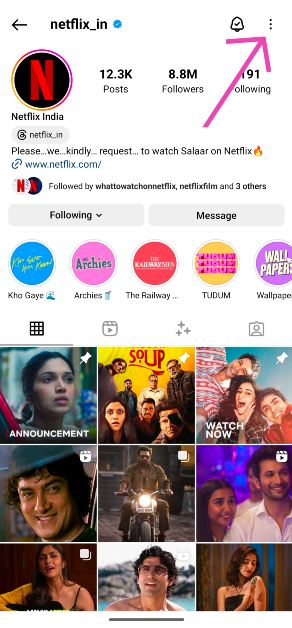
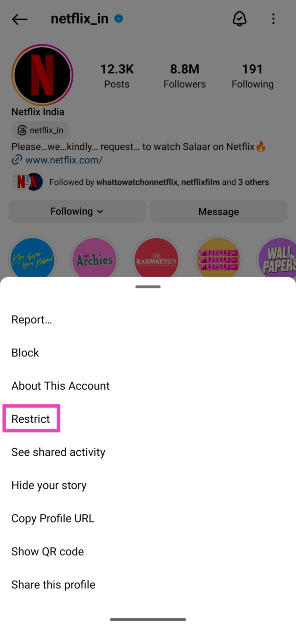
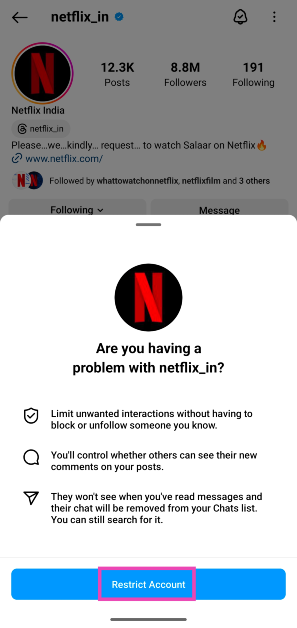
Step 1:Launch the Instagram app on your smartphone.Step 2: Go to the profile of the user you want to restrict.Step 3: Tap the ellipses at the top right corner of the screen.Step 4: Hit Restrict.Step 5:Confirm your selection.
How to Unrestrict someone on Instagram
Step 1:Launch the Instagram app on your smartphone.Step 2: Tap your profile icon at the bottom right corner of the screen.Step 3: Hit the hamburger menu at the top left corner of the screen.Step 4: Tap on Settings and privacy.Step 5: Select Restricted.Step 6: Tap on Unrestrict next to a profile to restore its normal status.
Frequently Asked Questions (FAQs)
Does Instagram notify someone when you restrict their profile?
How do I find out if I have been restricted by someone on Instagram?
The easiest way to find out if someone has restricted you on Instagram is by leaving a comment on one of their posts and asking a mutual friend if they can see it. If they cannot see the comment, it means you have been restricted by the user.
What is the difference between blocking and restricting someone on Instagram?
Blocking someone ensures they cannot view your profile or content and are unable to contact you via DMs. Restricting someone does not take away their access to your profile or DMs. Instead, their messages will land directly in the ‘Requests’ folder and their comments will be hidden by default on your profile.Read Also:Top 12 Apps For Your New OnePlus 12
Conclusion
So now that you know what it means to restrict someone on Instagram, you can use it instead of the block button in situations that demand milder actions. Since Instagram does not notify people when they get blocked or restricted, you don’t have to worry about them drumming up noise after you take this action. If you have any other questions about this feature, let us know in the comments!
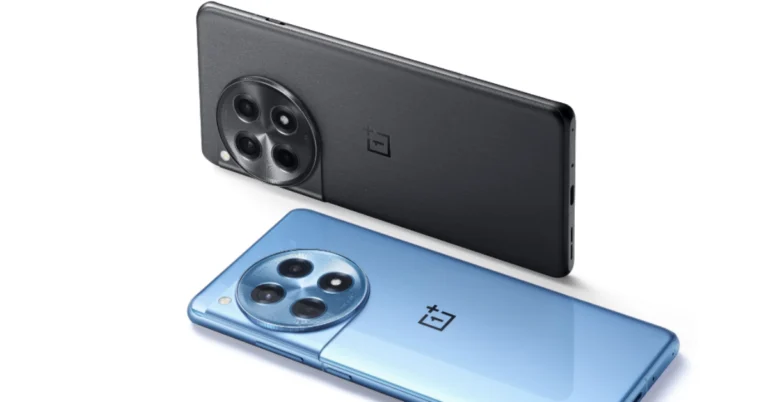
The OnePlus 12R comes with a repositioned Lert Slider.
The gaming smartphone supports 100W SUPERVOOC charging.
The handset will go on sale on February 6.
OnePlus today officially unveiled its latest gaming-centric phone- the OnePlus 12R. The device has been launched in India and globally alongside the flagship OnePlus 12 smartphone. The gaming smartphone by OnePlus looks very similar to its elder sibling. The device is powered by Qualcomm Snapdragon 8 Gen 2 SoC. It comes with an AMOLED screen with 1.5K resolution. Additionally, just like its sibling, the handset includes 100W SuperVOOC fast charging support.
OnePlus 12R Specifications
The OnePlus 12R features a 6.78-inch Oriental AMOLED LTPO display with 1,264×2,780 pixels of resolution: Here are the following specs of the display:
Supports up to 120Hz adaptive refresh rate
360Hz touch sampling rate
2160Hz instant touch sampling rate
4,500 nits peak brightness
360Hz touch sampling rate
Corning Gorilla Glass Victus 2 protection.
At its heart the an octa-core 4nm Snapdragon 8 Gen 2 SoC, along with Adreno 740 GPU. The device comes with up to 8GB of LPDDR5x RAM options and 256TB UFS 4.0 storage.
For photos and videos, there is a triple rear camera setup on the OnePlus 12R that includes the following:
50-megapixel Sony IMX890 primary sensor with an f/1.8 aperture and OIS
8-megapixel ultra wide-angle sensor with f/2.2 aperture
2-megapixel macro camera with f/2.4 aperture
The device is highlighted with a 16-megapixel front-facing camera with f/2.4 aperture for taking selfies.
For connectivity, there is 5G, 4G LTE, Wi-Fi 7, Bluetooth 5.3, Beidou, GLONASS, Galileo, GPS, and NFC. Additionally, there is an accelerometer, e-compass, gyroscope, gravity sensor, geomagnetic sensor, IR control, light sensor, colour temperature sensor, proximity sensor, and X-axis linear motor.
The stereo speaker setup on the phone supports Dolby Atmos.
OnePlus 12R is backed by a 5,500mAh battery with 100W SuperVOOC fast charging support. OnePlus 12R has the iconic OnePlus Alert Slider located in its new home on the left of the phone.
Also Read: OnePlus 12 debuts in India and globally: Price in India, specs details inside
OnePlus 12R price in India, availability and offer details
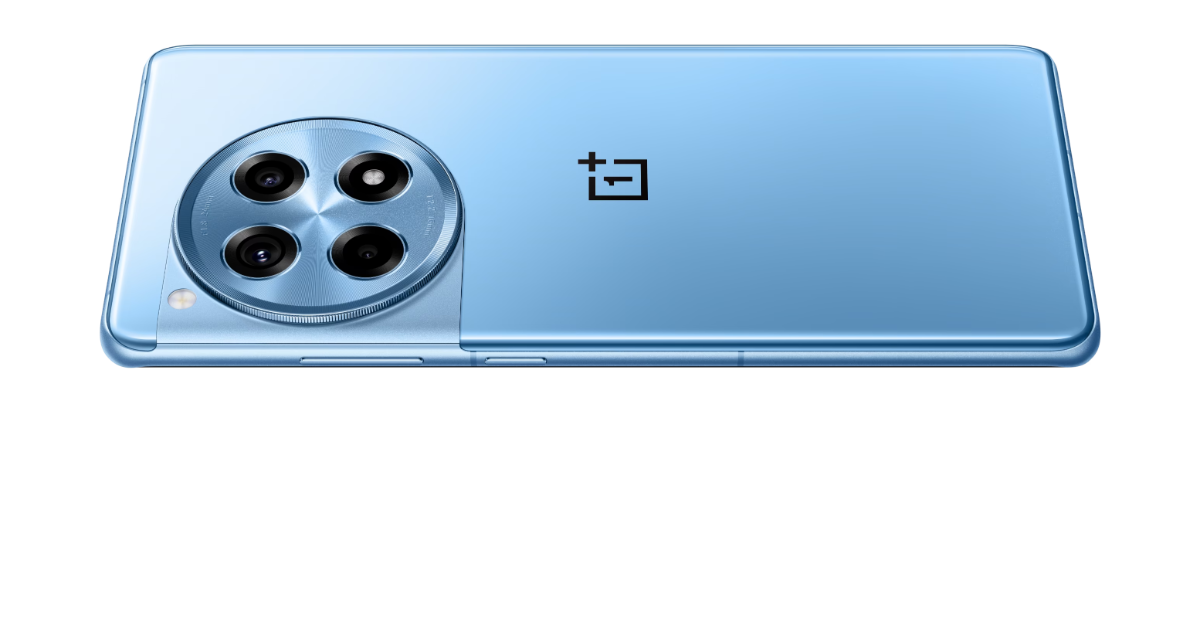
OnePlus 12R will be available in two colourways Iron Gray and Cool Blue. Price starts at:
8GB RAM with 128GB storage: Rs 39,999
16GB RAM with 256GB storage: Rs 45,999
The device is scheduled to go on sale on February 6 in the country.
Customers can avail an instant bank discount of INR 1,000 with ICICI credit card and OneCard
Customers can also avail of a 6-month no-cost EMI through ICICI credit/debit card EMI and OneCard EMI.
Customers can also buy the OnePlus 12R with OnePlus Easy Upgrades and get 35% assured value at the end of the 24 months.
Customers purchasing the 12R can avail benefits worth INR 2,250 on Jio Plus
OnePlus 12R users can link to RCC and avail a special coupon discount of INR 3,000 discount while purchasing the OnePlus Pad
Customers purchasing the OnePlus 12R will get a free trial of Google One for 6 months & YouTube Premium for 3 months. Find more details on OnePlus.in
Eager users can also get their hands on a OnePlus Buds Z2 worth 4,999 with the purchase of the 12R. Limited period offer
OnePlus 12 has officially made its debut in India.
The newly launched flagship smartphone comes with a Dual Cryo-velocity VC Cooling System.
The phone also has an LTPO OLED screen that supports a refresh rate of 120 Hz.
At the OnePlus launch event today, the company officially launched the OnePlus 12 in India and the global market. The triple camera setup tuned by Hasselblad is a standout feature of the OnePlus 12. The camera module includes a Sony LYT-808 sensor with a 50-megapixel primary camera. Qualcomm’s most recent flagship Snapdragon 8 Gen 3 SoC powers it. The phone runs ColorOS 14, which is based on Android 14.
OnePlus 12 price in India
OnePlus 12 pricing with configuration is listed below:
12GB RAM with 256GB storage: Rs 64,999
16GB RAM with 512GB storage: Rs 69,999
OnePlus 12 Availability and offer details
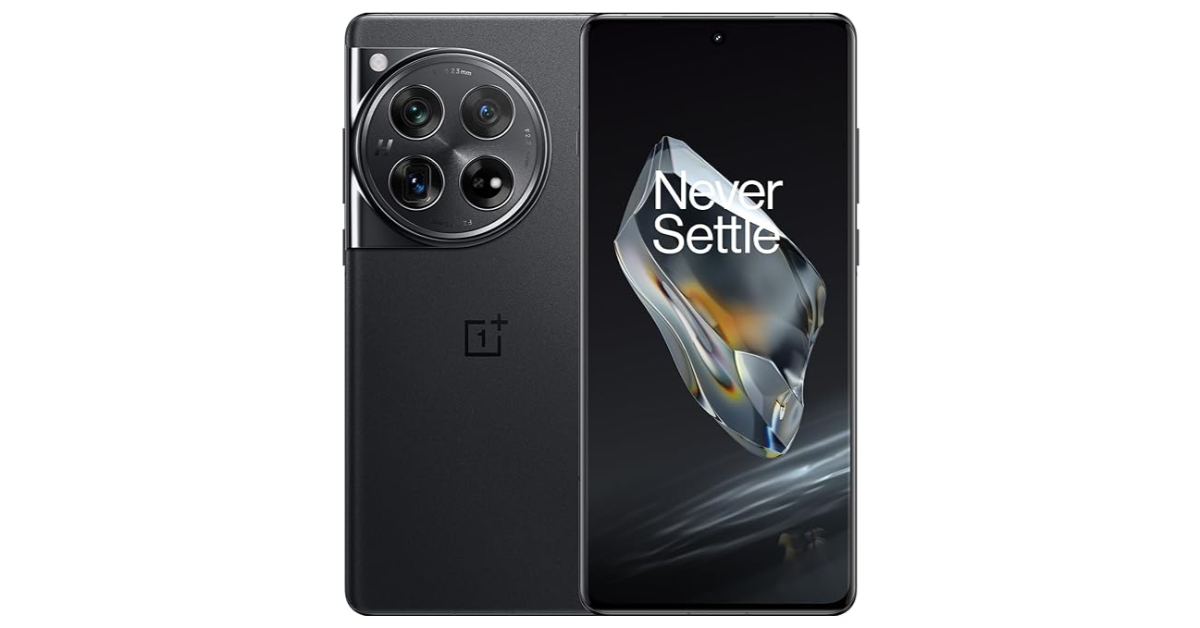
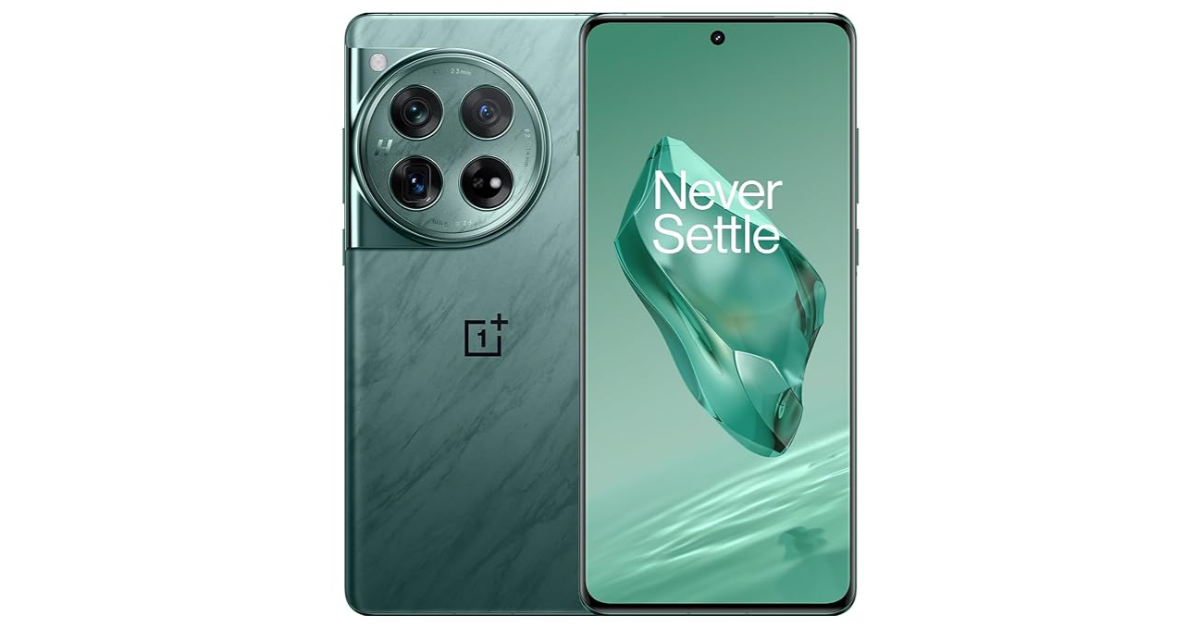
OnePlus 12 is offered in two colourways Flowy Emerald and Silky Black. Pre-orders start today whereas the open sale kicks off on January 30.
Customers can avail an instant bank discount of INR 2,000 with ICICI credit card and OneCard
Customers can avail a special exchange bonus of up to INR 10,000 while purchasing the OnePlus 12
Customers can also buy the phone with OnePlus Easy Upgrades and get 35% assured value at the end of the 24 months.
A special pre-booking offer is available for INR 1,999, where customers can pre-order the OnePlus 12 from 23rd January and also avail no cost EMI for 12 months
The first 1,000 customers who order the OnePlus 12 are entitled to exclusive OnePlus Merchandise
OnePlus 12 and users can link to RCC and avail a special coupon discount of INR 3,000 discount while purchasing the OnePlus Pad
Customers can also avail of 50% off on the Accidental Damage Protection Plan, available on OnePlus.in, OnePlus Store App and OnePlus Experience Stores
OnePlus 12 specifications
The 6.82-inch quad-HD+ LTPO OLED screen is the OnePlus 12’s primary feature which has 1,440 x 3,168 pixels of resolution. The front panel has an adaptive refresh rate ranging between 1Hz and 120Hz. Additionally, 4,500 nits of screen brightness is supported. The smartphone also has an IP65 rating that protects it from dust and water. Under the hood sits Qualcomm’s 4nm Snapdragon 8 Gen 3 SoC. Up to 12GB of LPDDR5X RAM and up to 512GB of UFS 4 internal storage are available for the device.
OnePlus 12‘s standout feature is its triple rear camera setup powered by Hasselblad. It includes the following:
Sony LYT-808 sensor with a 50-megapixel primary camera (OIS, and f/1.6 aperture)
The 32-megapixel front-facing camera (f/2.4 aperture) is provided for video calling and selfies.
The sensors onboard include an under-display fingerprint sensor, gyroscope, accelerometer, magnetometer and proximity sensor. Additionally, it comes with 5G, 4G LTE, Wi-Fi 7, Bluetooth 5.4, GPS, NFC, and a USB Type-C port for connectivity.
The phone is powered by a 5,400mAh battery with compatibility for 100W SuperVOOC wired, 50W wireless, and 10W reverse wireless charging. The handset takes only 26 minutes from 1% to 100% battery capacity. The phone also includes a Dual Cryo-velocity VC Cooling System, featuring a 3D capillary dissipation structure and a dual VC design to significantly reduce overheating.
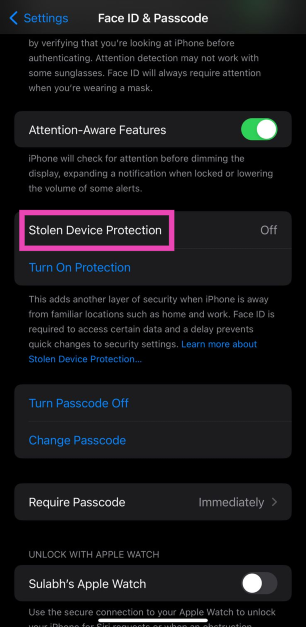
The new iOS 17.3 update which was rolled out on Monday brings new improvements to crash detection, Apple Music, wallpapers, and more. The most significant addition that the new update brings to your iPhone is ‘Stolen Device Protection’. This feature amps up your iPhone’s security in case it gets stolen by someone who has access to your passcode. In case someone is able to bypass your device’s lock screen, this feature will prevent them from performing certain actions like using your saved passwords, making payments, and more. If you have updated your iPhone to iOS 17.3, here is how you can enable Stolen Device Protection.Read Also:Simple steps to recover unplayable and inaccessible videos
How does Stolen Device Protection work?
Apple’s newest security feature kicks in when someone tries to use your iPhone in an unfamiliar location. The ‘familiar’ locations include your home, workplace, school, and other places where you frequently use your iPhone. In case your device gets stolen and the person bypasses the lock screen using your passcode, it beefs up the security of certain integral services, features, and actions.The actions listed below will require Face ID or Touch ID authentication if your iPhone is used in an unfamiliar location.
Accessing and using passwords and passkeys saved in Keychain.
Using payment methods saved in Safari.
Turning off Lost Mode.
Erasing all data and settings from the phone.
Applying for a new Apple Card.
Viewing Apple Card virtual card number.
Transferring Apple Cash or Savings and other Wallet-related actions.
Setting up a new device using your iPhone.
Apart from requiring Face ID or Touch ID authentication for the above-mentioned actions, Stolen Device Protection will also create a security delay when the miscreant tries to change certain settings on your device. This will give you enough time to mark your iPhone as lost and track its location. This delay will kick in for the following actions.
Changing your Apple ID password.
Signing out of your Apple ID.
Updating Apple ID account security settings.
Adding or removing Face ID or Touch ID.
Changing the iPhone’s passcode.
Turning off Find My.
Turning off Stolen Device Protection.
Resetting all settings.
How to enable Stolen Device Protection on iOS 17.3
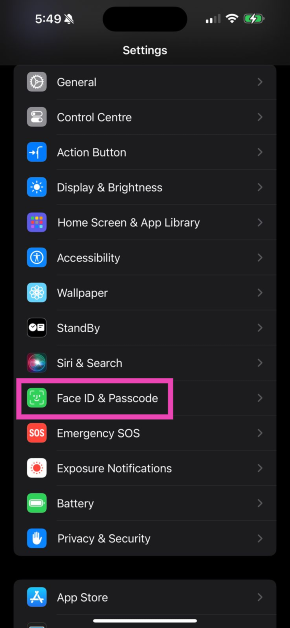
Step 1: Go to Settings.Step 2: Select Face ID & Passcode.Step 3: Tap on Stolen Device Protection to turn it on.
Frequently Asked Questions (FAQs)
How do I track my stolen iPhone?
You can track your lost or stolen iPhone from the iCloud Find Devices Page. Login using the Apple ID registered with your iPhone to view its live location on the map.
How do I turn on Stolen Device Protection on my iPhone?
To turn on Stolen Device Protection on your iPhone, update it to iOS 17.3, then go to Settings>Face ID & Passcode and turn on the toggle switch for it.
This is how you can turn on Stolen Device Protection for your iPhone on iOS 17.3. The new update also brings Collaborative Playlists for Apple Music which allows multiple users to manage and edit a playlist on the music streaming platform. Apple has also introduced a new ‘Unity Bloom’ wallpaper for Black History Month.
Google Pixel 8 Series was launched in India four months ago.
The company introduced both the devices in three colour options.
Both smartphones are equipped with Tensor G3 SoC.
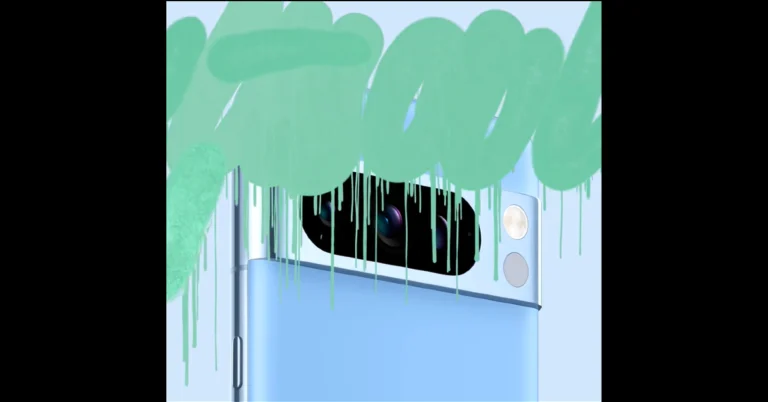
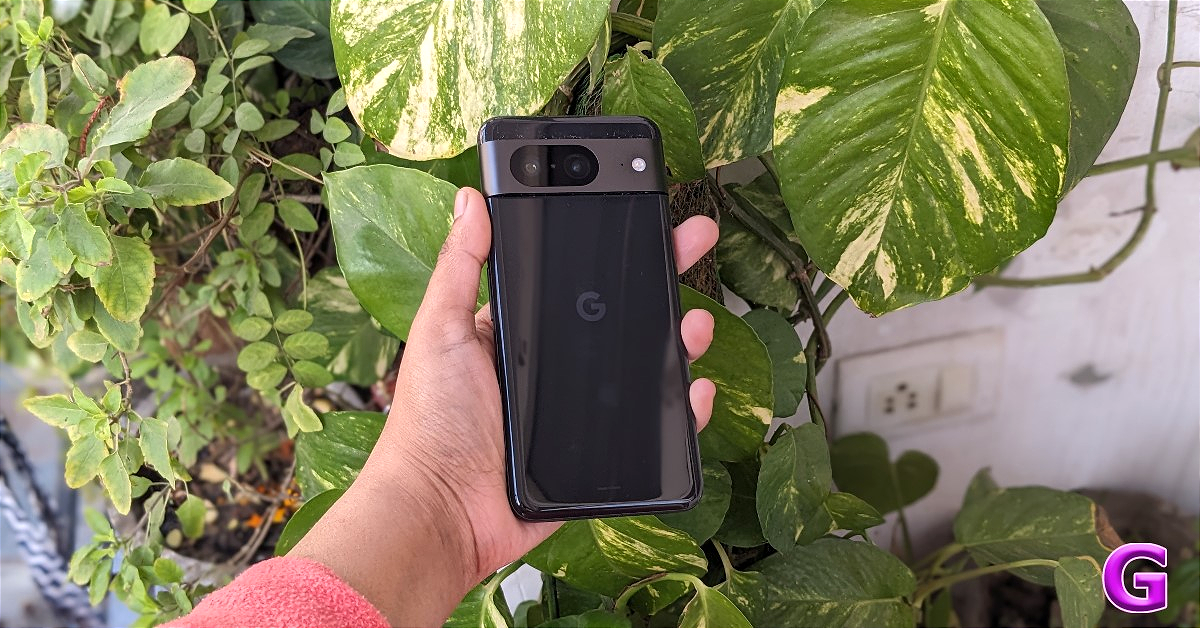
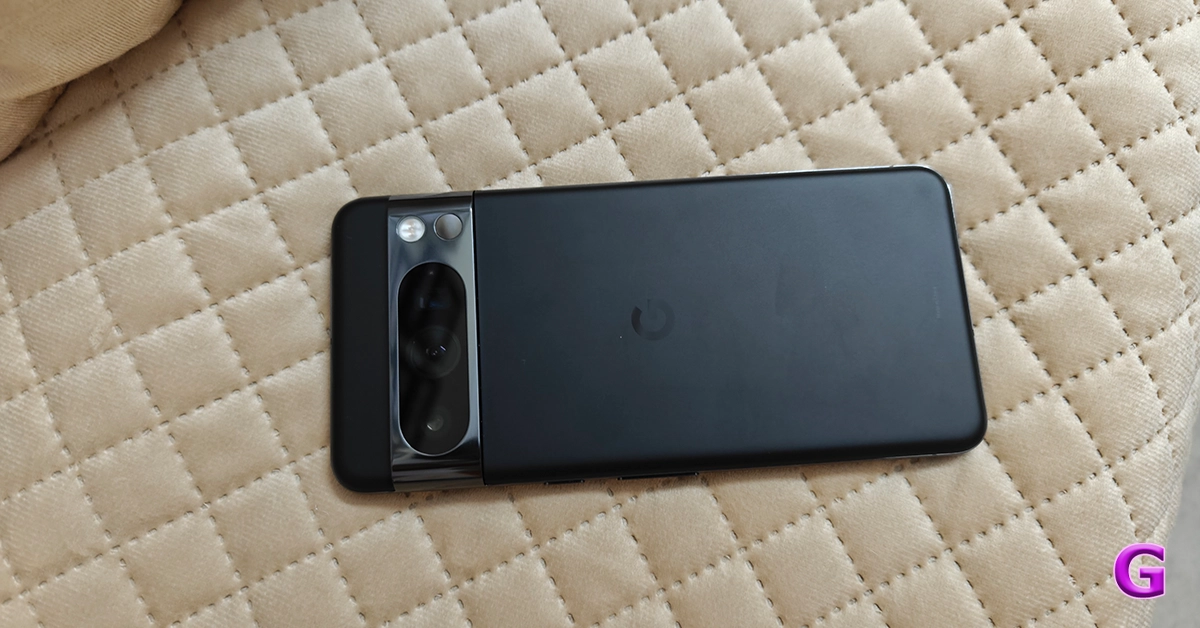
Google Pixel 8 Series is all set to come in a new colour option. Google has officially teased the new shade which will join the previously released three colour option. Pixel 8 Series was launched in India in October last year. The device is powered by in-house Tensor G3 SoC and runs on Android 13 out of the box. In addition to this, the Pixel phone features a 120Hz display and includes pixel-exclusive features powered by AI.This week Google will release a new shade for the Google Pixel 8 series. Google hinted at the Minty Fresh colour option for the existing lineup. According to the tech giant, the new Minty Fresh colour option for the Pixel 8 series will be available on January 25. In terms of price, there will be no change, the new colour price might be in line with that of the existing models.The Pixel 8 is already available in three colours Obsidian, Hazel and Rose. Whereas the Pixel 8 Pro comes in Obsidian, Porcelain and Bay colour options.
Pixel 8 Series specifications
The Google Pixel 8 features a 6.2-inch FHD+ Actua display with 1080 x 2400 pixels of resolution. The OLED screen has an Adaptive refresh rate ranging between 60Hz and 120Hz and supports 2,000 nits of peak brightness.On the other hand, the Pixel 8 Pro comes with a 6.7-inch Super Actua display with 1344 x 2992 resolution and an Adaptive refresh rate ranging from 1Hz to 120Hz and 20:9 aspect The LTPO OLED features a peak brightness of 2,400 nits. The screen is protected with Corning Gorilla Glass Victus 2. There is a temperature sensor on the back of the Pro model.The devices are powered by Google Tensor G3 SoC with Titan M2 security coprocessor.Also Read:OnePlus 12, OnePlus 12R, OnePlus Buds 3 launch event today: Here is how to watch the launch in India and globallyThey come pre-loaded with Android 14 with Pixel-exclusive features onboard. For photos and videos, the Pixel 8 Series includes a similar 10.5-megapixel Dual PD sensor on the front panel for taking selfies. The selfie camera on the Pixel 8 has a fixed focus while the Pixel 8 Pro has an autofocus.The Pixel 8 and Pixel 8 Pro are highlighted with a primary 50MP Octa PD sensor with f/1.68 aperture. The secondary camera on the vanilla variant is a 12 MP ultrawide camera with an auto-focus. The pro model includes a 48 MP Quad PD ultrawide camera with autofocus. The Pro’s camera system also includes a third 48 MP Quad PD telephoto lens with 5x optical zoom.Also Read:Samsung Galaxy S24 series in India received 2.5 lakh pre-orders in India in just three daysThe Google Pixel 8 is backed by a 4,485mAh battery with 24W wired and 12W wireless fast charging support. On the other hand, the Pixel 8 Pro boasts a 4,950mAh battery.


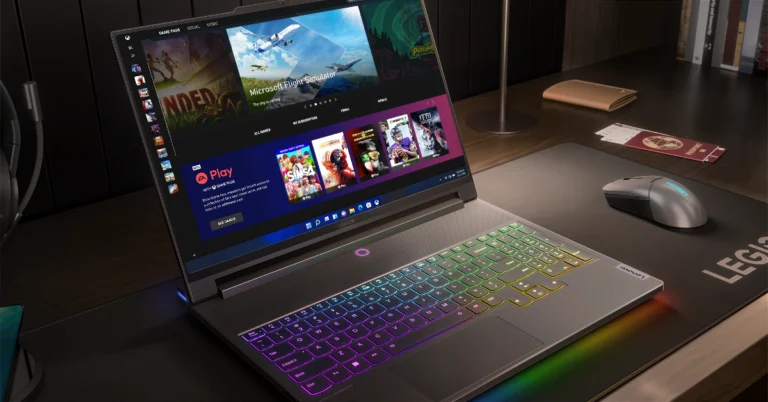
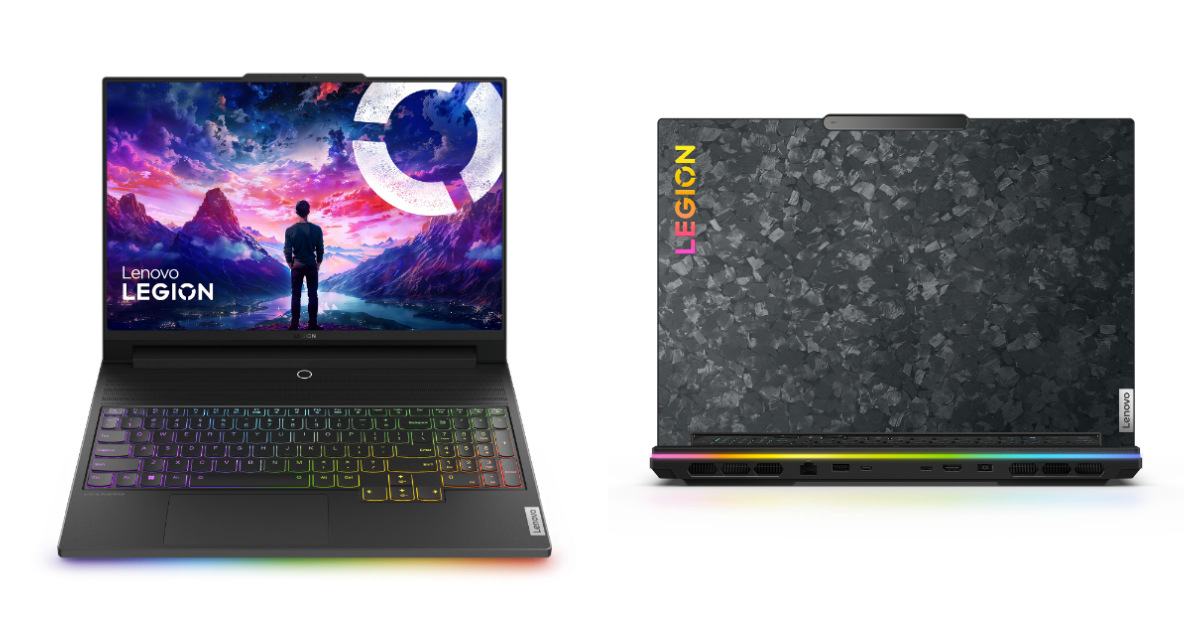 The laptop is armed with a 13th Gen Intel Core i9-13980HX processor, up to an NVIDIA GeForce RTX 4090 Laptop GPU. It also comes with 32GB of overclocked 6400Mhz DDR5 Dual Channel RAM and 2TB of SSD M.2 storage.
The Lenovo Legion 9i is integrated with liquid cooling, co-engineered with Cooler Master, and tackles scorching VRAM under extreme gaming loads, kicking in at 84°C for instant chill. Additionally, there is an AI-tuned triple-fan air system boasting 6,333 individual vents, keeping all components ice-cool even during intense gaming and content creation.
Also Read: OnePlus Buds 3 with 10.4mm driver unit launched in India
Furthermore, there is a dedicated Lenovo LA-2 AI chip allowing auto-adjusting power for peak FPS through its Smart FPS feature, while synchronizing Legion Spectrum RGB throughout, from the keyboard’s per-key TrueStrike illumination.
Also Read: Itel Roar 75 Review: Are they worth buying?
The device also features a 1080p webcam with an electronic e-shutter for privacy. It boasts a 99.99Whr battery. Additionally, it comes with Windows 11 as well as 3 months of access to Xbox Game Pass Ultimate and Legion Arena consolidates games from multiple platforms and acts like a ‘gaming hub’. Optional Lenovo Premium Care support is also available for people who want access to advanced technical support with at-your-doorstep support and preventative PC health checks.
The laptop is armed with a 13th Gen Intel Core i9-13980HX processor, up to an NVIDIA GeForce RTX 4090 Laptop GPU. It also comes with 32GB of overclocked 6400Mhz DDR5 Dual Channel RAM and 2TB of SSD M.2 storage.
The Lenovo Legion 9i is integrated with liquid cooling, co-engineered with Cooler Master, and tackles scorching VRAM under extreme gaming loads, kicking in at 84°C for instant chill. Additionally, there is an AI-tuned triple-fan air system boasting 6,333 individual vents, keeping all components ice-cool even during intense gaming and content creation.
Also Read: OnePlus Buds 3 with 10.4mm driver unit launched in India
Furthermore, there is a dedicated Lenovo LA-2 AI chip allowing auto-adjusting power for peak FPS through its Smart FPS feature, while synchronizing Legion Spectrum RGB throughout, from the keyboard’s per-key TrueStrike illumination.
Also Read: Itel Roar 75 Review: Are they worth buying?
The device also features a 1080p webcam with an electronic e-shutter for privacy. It boasts a 99.99Whr battery. Additionally, it comes with Windows 11 as well as 3 months of access to Xbox Game Pass Ultimate and Legion Arena consolidates games from multiple platforms and acts like a ‘gaming hub’. Optional Lenovo Premium Care support is also available for people who want access to advanced technical support with at-your-doorstep support and preventative PC health checks. 
 Step 3:
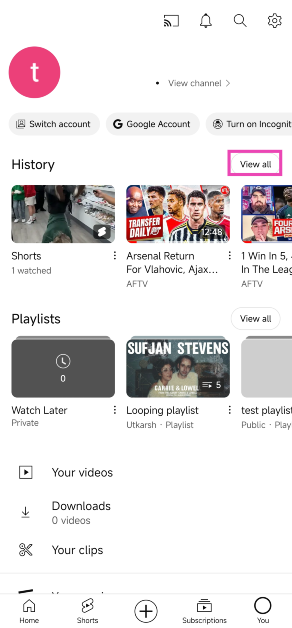 Step 4: Hit the ellipses next to the Shorts video you want to download.
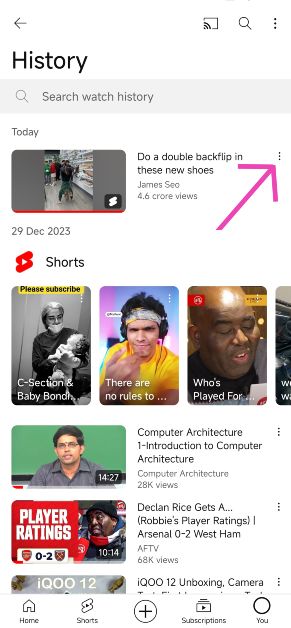 Step 5:
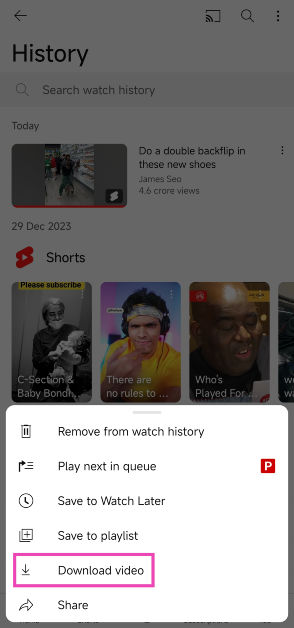 Step 6: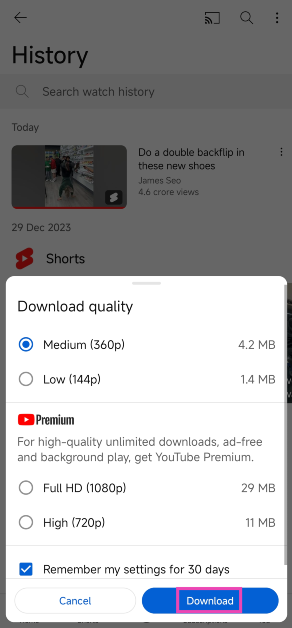
 Step 3:
 Step 4: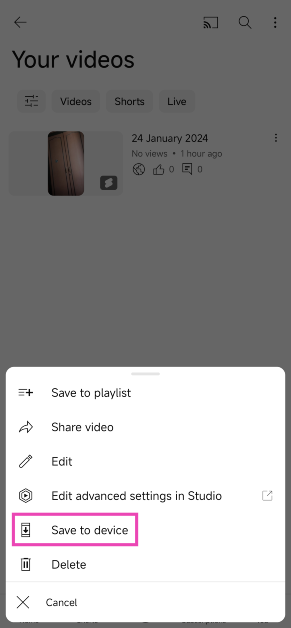
 Step 2:
 Step 3:
 Step 4: Paste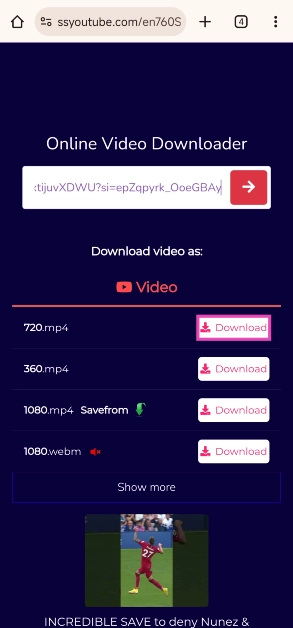
 Step 6: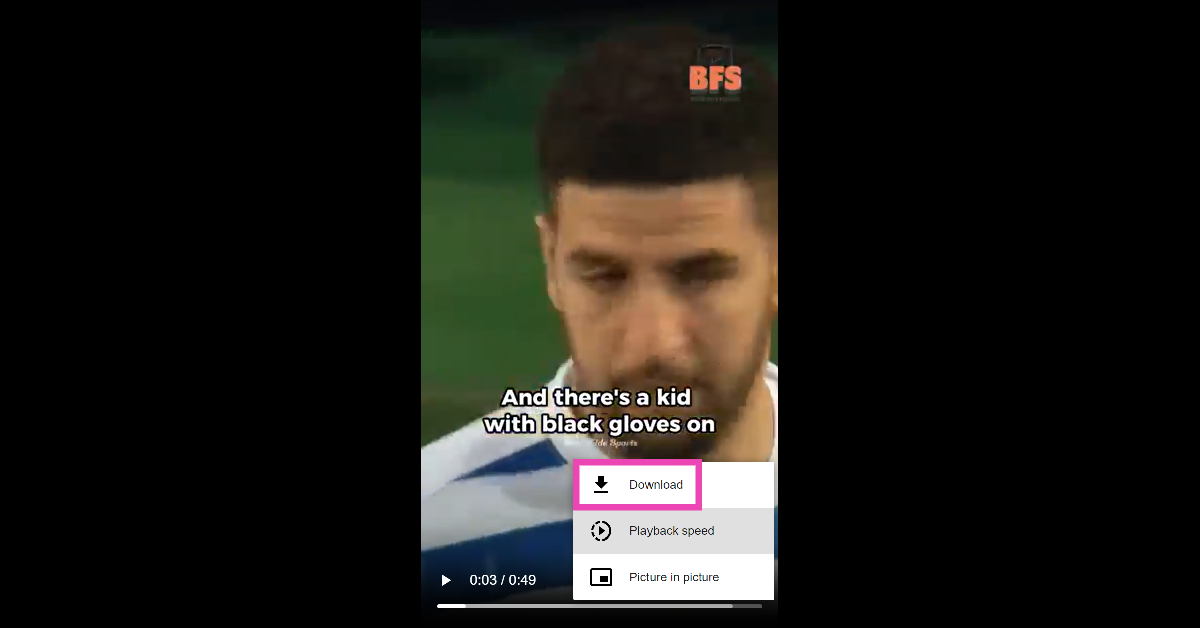
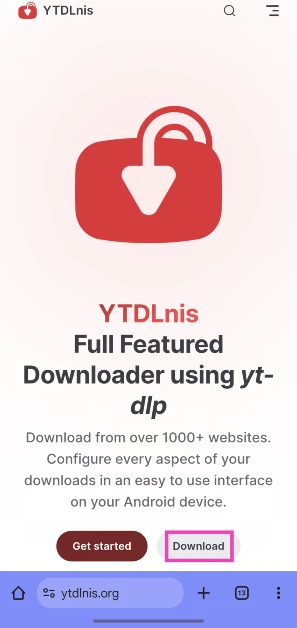
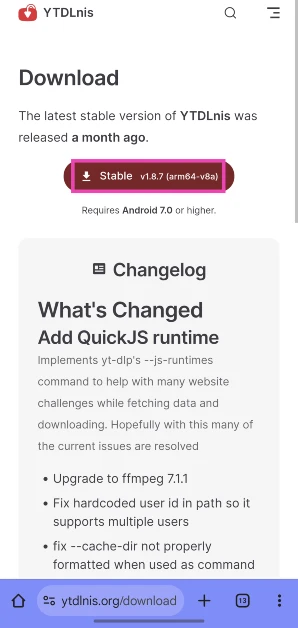 Step 3: Launch the app and paste the link to the YouTube Short you wish to install in the text box.
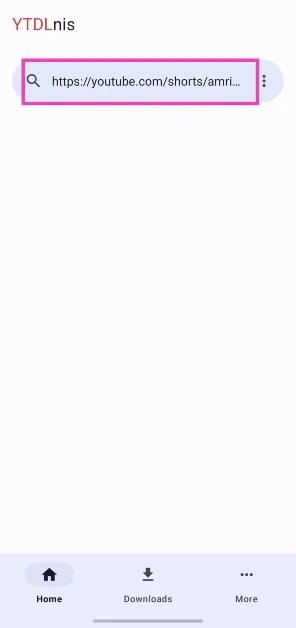 Step 4: Hit Download.
 Step 5: The Short will appear in the Downloads tab.
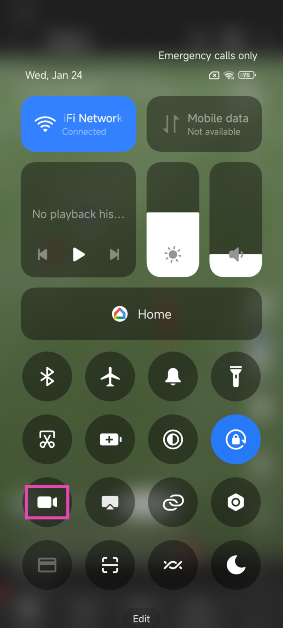 Step 3:
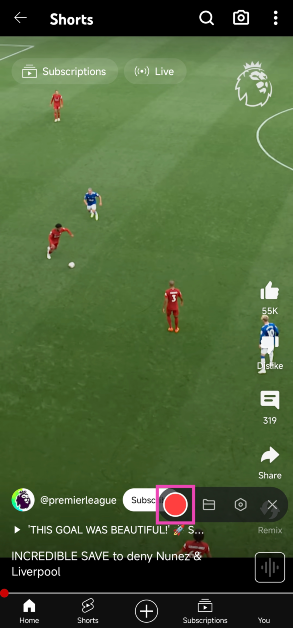 Step 4: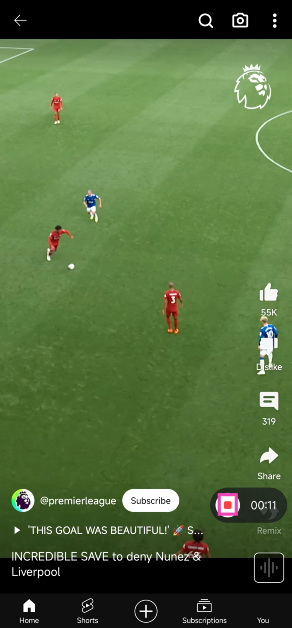


 Step 4:
 Step 5: Confirm your selection.
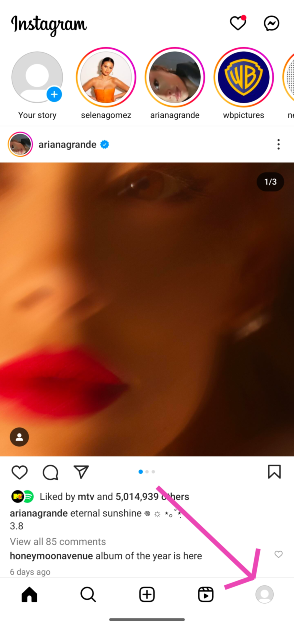 Step 3:
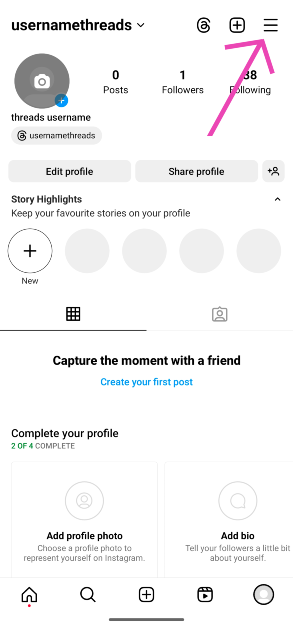 Step 4:
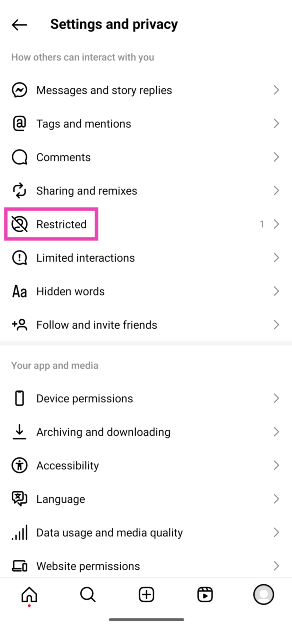 Step 6: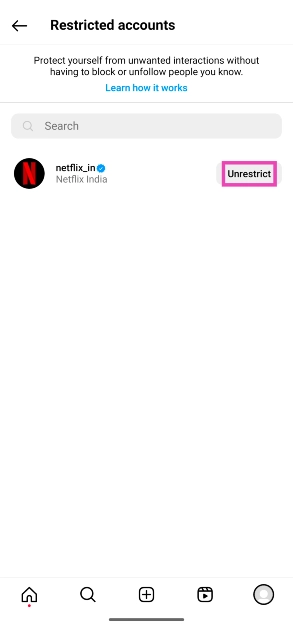
 At its heart the an octa-core 4nm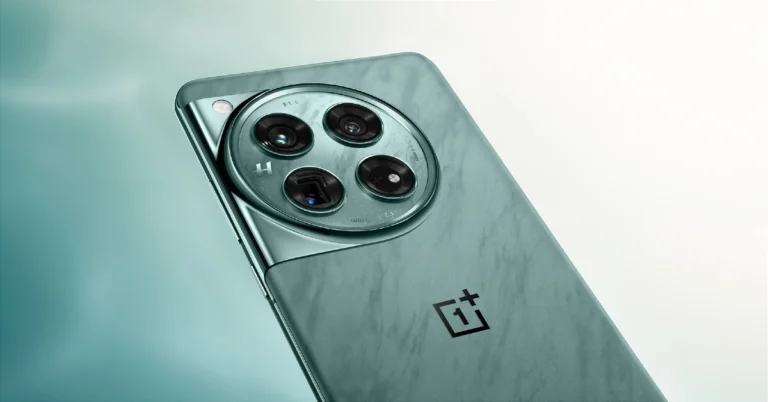

 Step 3: