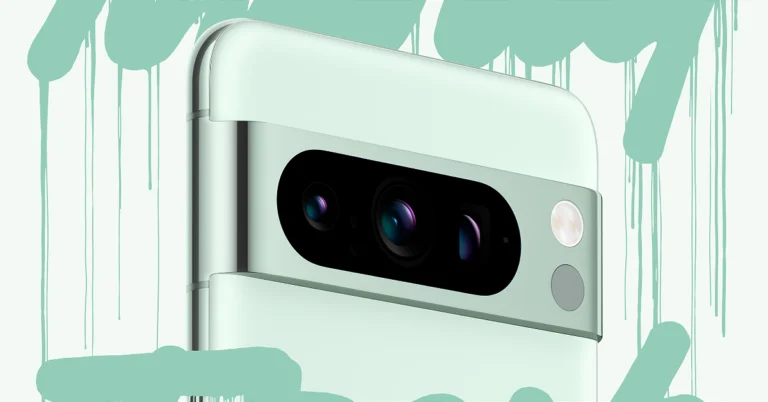
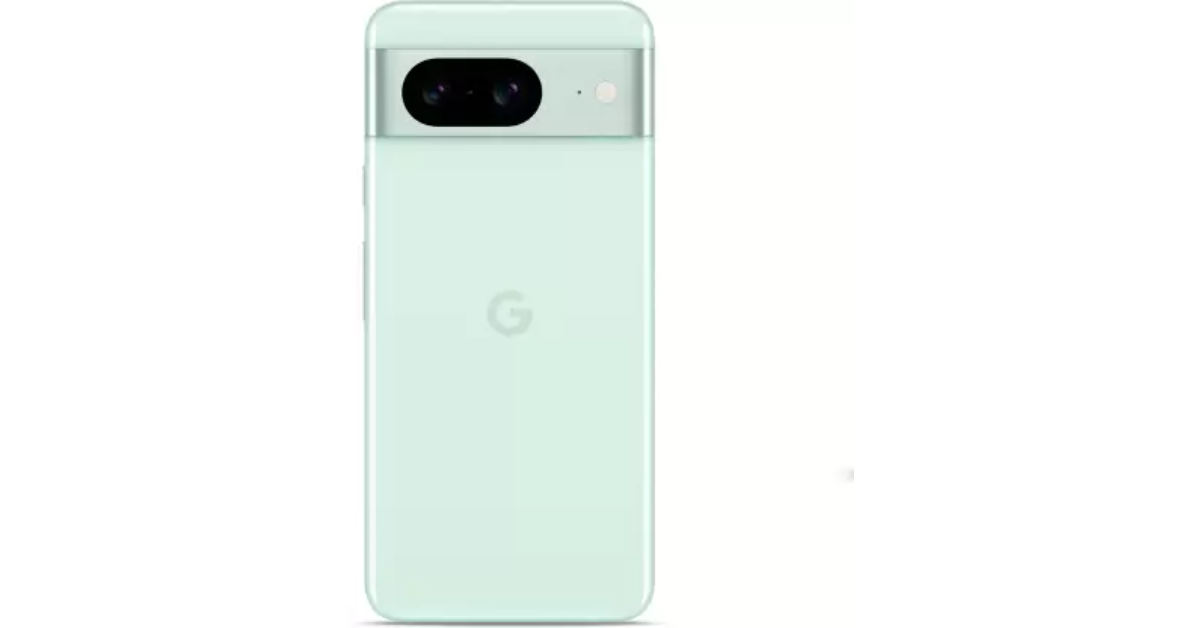
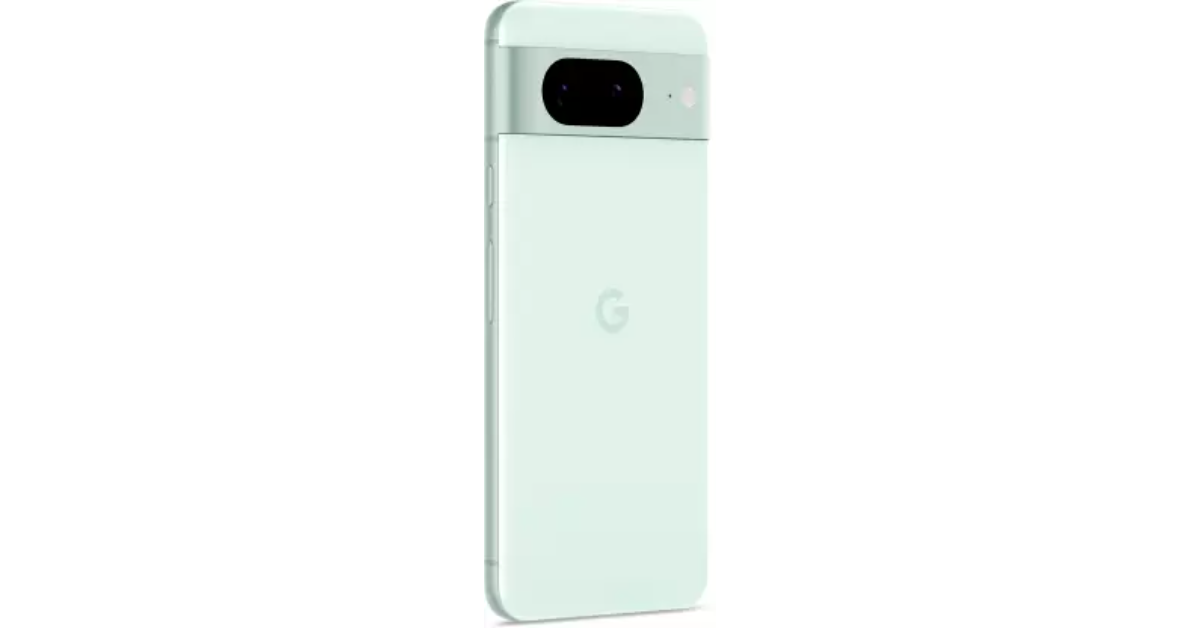
Google Pixel 8 and Pixel 8 Pro now available in a new Mint colour

Key Highlights
  • Pixel 8 Series was announced in October last year.
  • Google has now introduced the Mint colour option for both Pixel 8 and Pixel 8 Pro.
  • The Pixel 8 is already available in Obsidian, Hazel and Rose colour options.
  • The Pro variant comes in Obsidian, Porcelain and Bay colour options.
Google Pixel 8 and Pixel 8 Pro can now be purchased in a fresh new colour option. After teasing the new variant for a week the company today introduced the Mint colour option for the Google Pixel 8 Series. Both the models were previously launched in three colourways last year in October. The new mint colour option for Google Pixel 8 and Pixel 8 Pro has been launched. But this new colour option for the Pixel 8 Series will come in a 128GB storage variety. Note that the new colourway for both models is only available in the US. In India, the Mint colour option will be available for the regular Pixel 8 model only. Google Pixel 8 and Pixel 8 Pro now available in a new Mint colour The new variant is currently up for sale in the country via Flipkart. There will be no price change for the new model. The device also comes in three more shades Hazel, Obsidian and Rose. The price of Pixel 8 in India starts at Rs 75,999 for the base 8GB RAM with 128GB storage and Rs 82,999 for the 8GB RAM and 256GB memory. Google Pixel 8 and Pixel 8 Pro now available in a new Mint colour

Google Pixel 8 Series specifications

Google Pixel 8 and Pixel 8 Pro are powered by Google Tensor G3 SoC with Titan M2 security coprocessor. They run on Android 14 with Pixel-exclusive features onboard. Also Read: Akai 4K QLED Google TV series with Quantum Dot technology launched in India The Google Pixel 8 (Review)comes with a 6.2-inch FHD+ Actua display with 1080 x 2400 pixels of resolution. The OLED screen has an Adaptive refresh rate ranging between 60Hz and 120Hz and supports 2,000 nits of peak brightness. Whereas Pixel 8 Pro features a 6.7-inch Super Actua display with 1344 x 2992 resolution and an Adaptive refresh rate ranging from 1Hz to 120Hz and 20:9 aspect The LTPO OLED features a peak brightness of 2,400 nits. The screen is protected with Corning Gorilla Glass Victus 2. There is a temperature sensor on the back of the Pro model. Both smartphones have the same 10.5-megapixel Dual PD sensor for selfies. But the pro varaint supports autofocus. The Pixel 8 and Pixel 8 Pro (Review) features a primary 50MP Octa PD sensor with f/1.68 aperture. The secondary camera on the vanilla variant is a 12 MP ultrawide camera with an auto-focus. The pro model includes a 48 MP Quad PD ultrawide camera with autofocus. The Pro’s camera system also includes a third 48 MP Quad PD telephoto lens with 5x optical zoom. Also Read: 3 new generative AI features coming to Chrome to improve organisation The Google Pixel 8 boasts a 4,485mAh battery with 24W wired and 12W wireless fast charging support. On the other hand, the Pixel 8 Pro is fuelled by a 4,950mAh battery.

Garena Free Fire Redeem Codes Today 26 January 2024: Here is how to claim them

Garena Free Fire is a battle royale game with regular awards and tournaments to keep players interested. If you play Garena Free Fire, you should be aware of the redeem codes that are released on a daily basis. However, because the battle royale game is banned in India, players from other countries can use the Free Fire Redeem codes daily. If you’re unfamiliar with the Garena Free Fire redeem codes or don’t know how to get them, we’ve put together a step-by-step guide to help you redeem them. Check out Garena Free Fire Redeem Codes for 26 January 2024. The Free Fire redeem codes are a great way to get free stuff. These are 12-digit codes that contain alphabets and numbers, as well as an expiration date and time. Because the Garena FF redeem codes cannot be used more than once, you should hurry to the redemption page to claim your free reward before someone else does. To get a free reward, all you have to do is go to reward.ff.garena.com/en, which is the official redemption page. Also, keep an eye on this space for daily updates on Garena Free Fire redemption codes and rewards.

Garena Free Fire Redeem Codes Today 26 January 2024

FF10617KGUF9 NPYFATT3HGSQ XZJZE25WEFJJ 6KWMFJVMQQYG MCPW2D2WKWF2 ZZZ76NT3PDSH MHM5D8ZQZP22 FFCMCPSJ99S3 UVX9PYZV54AC MCPW3D28VZD6 V427K98RUCHZ BR43FMAPYEZZ EYH2W3XK8UPG FFCMCPSUYUY7E FFCMCPSEN5MX FF11NJN5YS3E HNC95435FAGJ MCPW2D1U3XA3 FFCMCPSGC9XZ

How to Get Free Fire Redeem Codes for Garena on 26 January 2024?

  • Visit the Garena Free Fire game’s official website at reward.ff.garena.com.
  • Use your Facebook, Google, VK, Apple ID, Huawei ID, or Twitter account to log in.
  • You’ll be taken to a valid redemption code (s)
  • Copy and paste the 12-digit redemption code into the text box.
  • On the screen, a dialogue box will appear.
  • ‘Ok’ should be selected.
For the latest gadget and tech news, and gadget reviews, follow us on TwitterFacebook and Instagram. For newest tech & gadget videos subscribe to our YouTube Channel. You can also stay up to date using the Gadget Bridge Android App. You can find the latest car and bike news here.

7 Easy Ways to Sign Out of Amazon on All Devices (Laptop, PC, Android and iPhone)

0
Amazon’s ecosystem has grown significantly over the years. What started off with the Kindle, slowly expanded to Echo speakers, streaming sticks, and even a giant OTT platform. You need an Amazon account to use these products and services, including the e-commerce platform. Over a period of time, it can get challenging to keep track of which devices you are logged into. So, here are the top 7 ways to sign out of your Amazon account across all devices. Read Also: Poco X6 Pro Review: A step ahead in its category

Which method should you use?

Available across every major platform, Amazon offers several ways to remotely sign out across all your devices. If your account has been compromised, you can sign out of all devices at once and change your password right away. To further boost the security of your account, you can use paskeys or 2-step verification. If you are logged into a lot of devices or using your Amazon account for several different home products and services, you should consider using this option as it takes just a few clicks to remotely sign out out of all devices at once. Another way you can go about this task is by simply changing your account password. However, if you want to sign out of a particular device, you will need to ‘Deregister’ it from your account. Use this method for your Kindle and Amazon Echo speakers. This process can be carried out on the Amazon app on your smartphone as well as the website. 

Sign out of Amazon on all devices (Android and iOS)

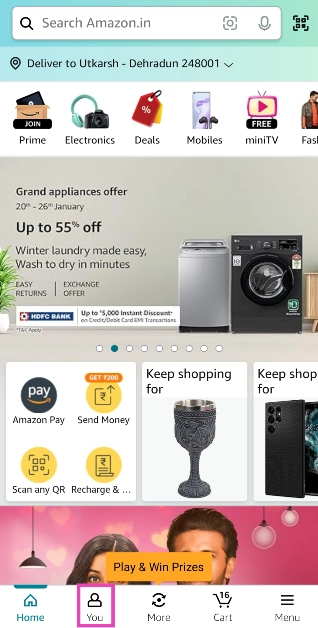
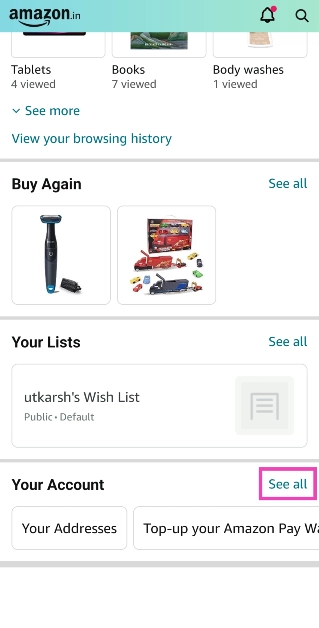
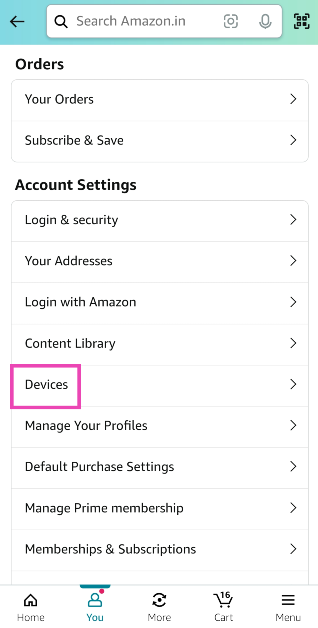
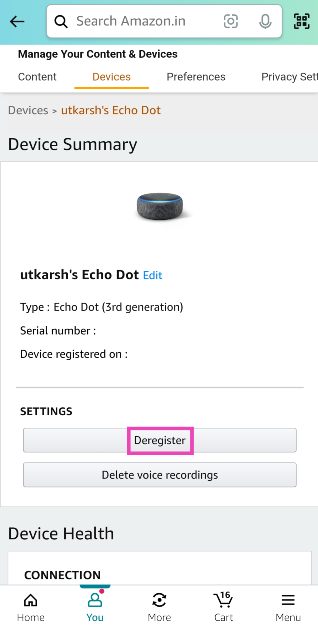
Step 1: Launch the Amazon app on your smartphone. Step 2: Switch to the You tab. Step 2: Switch to the You tab. Step 3: Scroll down to the bottom and tap See All next to Your Account. Step 3: Scroll down to the bottom and tap See All next to Your Account. Step 4: Under Account Settings, tap on Devices. Step 4: Under Account Settings, tap on Devices. Step 5: Switch to the Devices tab. Step 5: Switch to the Devices tab. Step 6: Tap the device you want to log out of. Step 7: Hit Deregister.   Step 7: Hit Deregister.Step 8: Confirm your selection in the popup box.

Sign out of Amazon on all devices (Laptop)

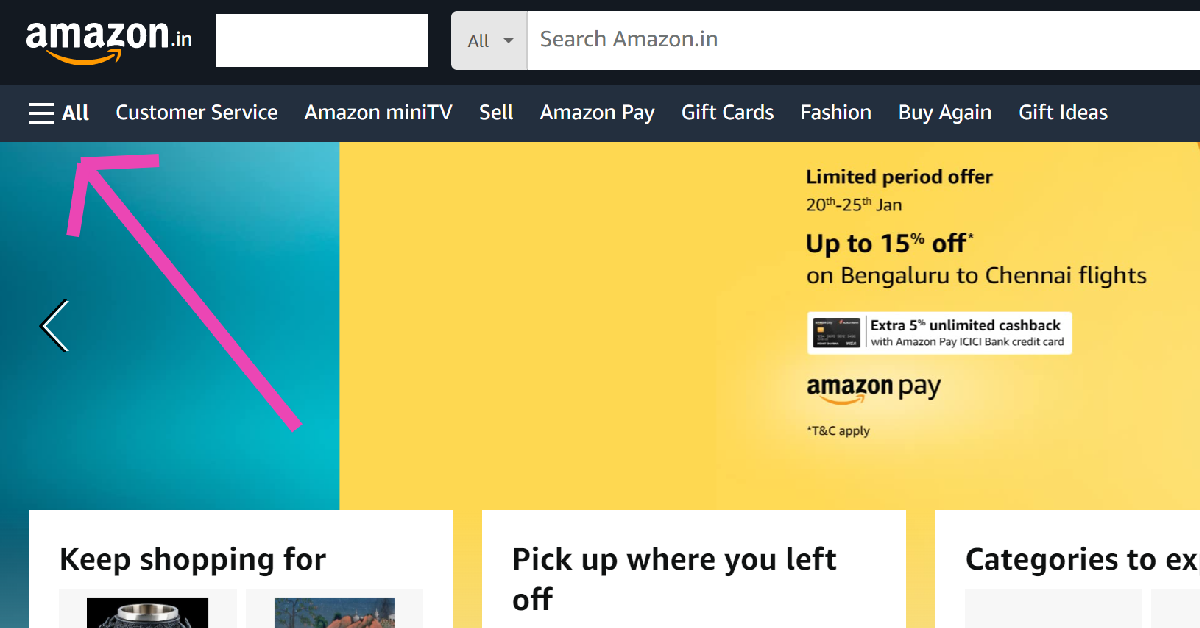
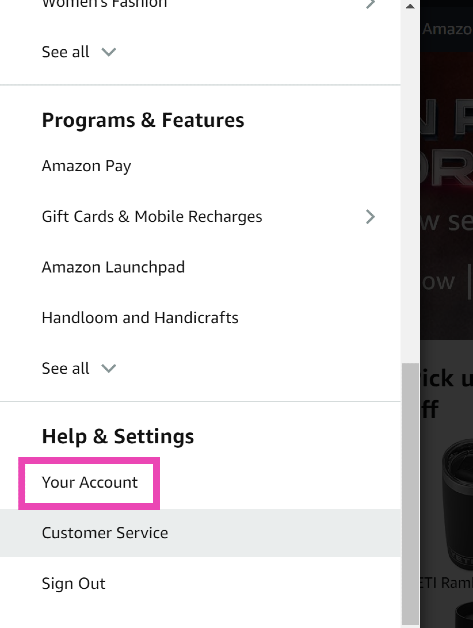
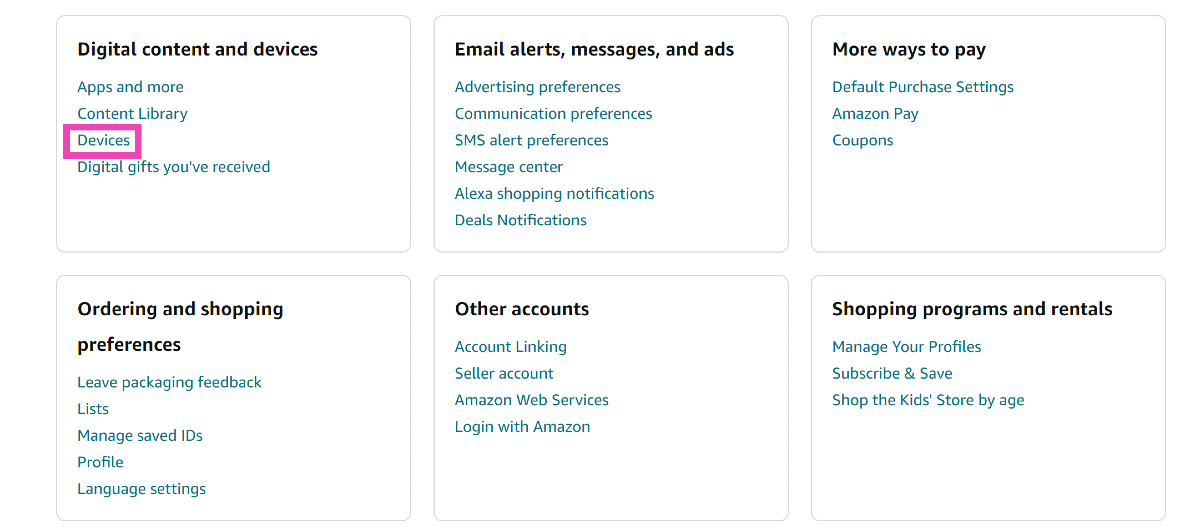
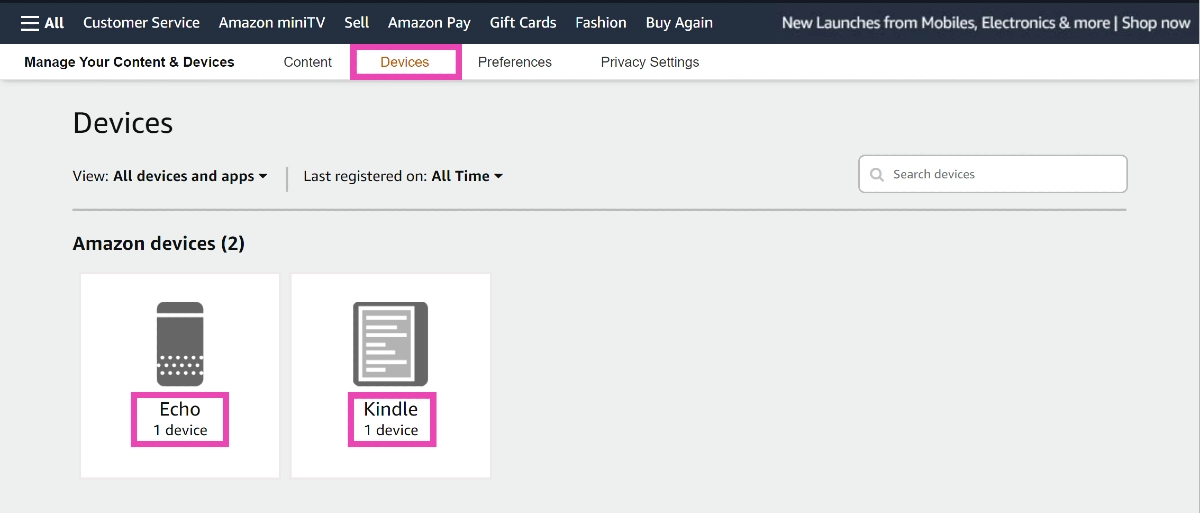
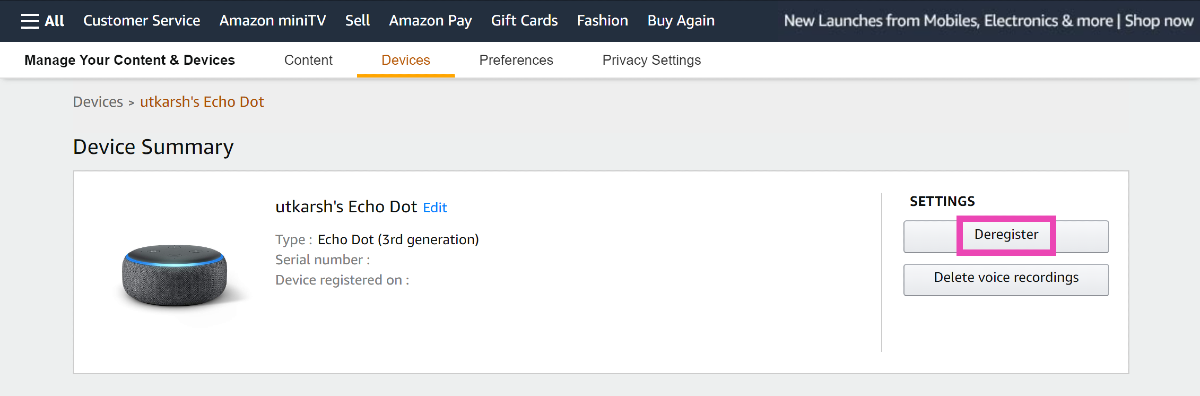
Step 1: Go to the Amazon website and sign in using your Amazon account. Step 2: Click on the All option at the top right corner of the screen. Step 2: Click on the All option at the top right corner of the screen. Step 3: Scroll down and select Your Account. Step 3: Scroll down and select Your Account. Step 4: Under Digital content and devices, select Devices. Step 4: Under Digital content and devices, select Devices. Step 5: Switch to the devices tab. Step 6: Select the device you want to remove. Step 6: Select the device you want to remove. Step 7: Click on Deregister. Step 7: Click on Deregister. Step 8: Confirm your selection in the popup box.

Sign out of Amazon on all devices by reporting your account as compromised (Laptop)

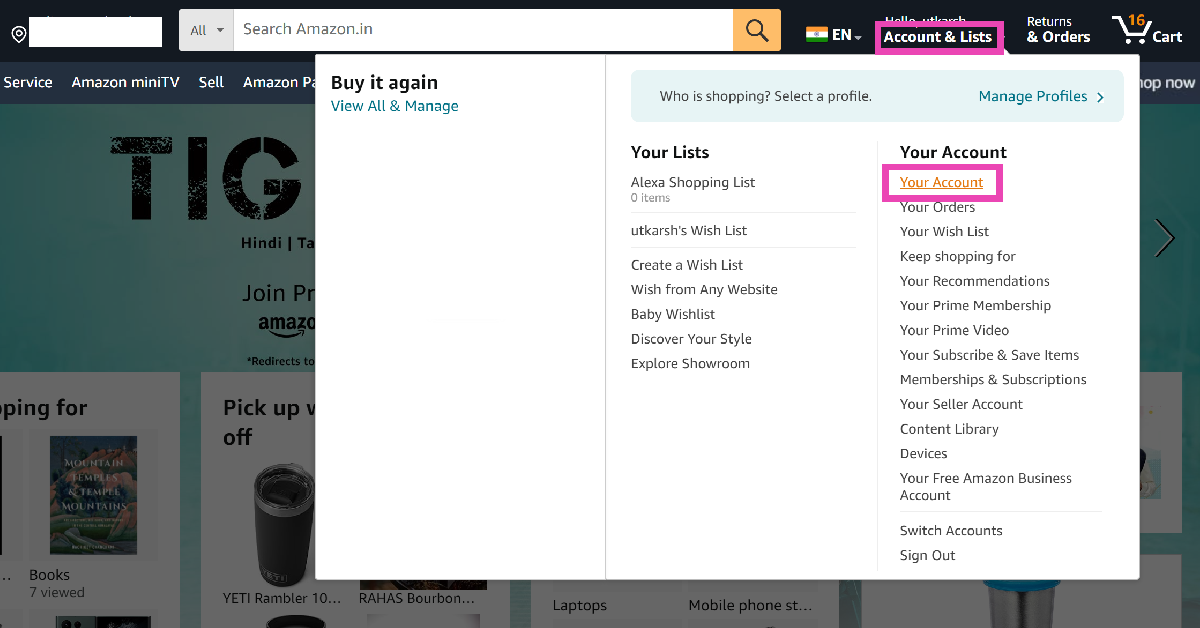
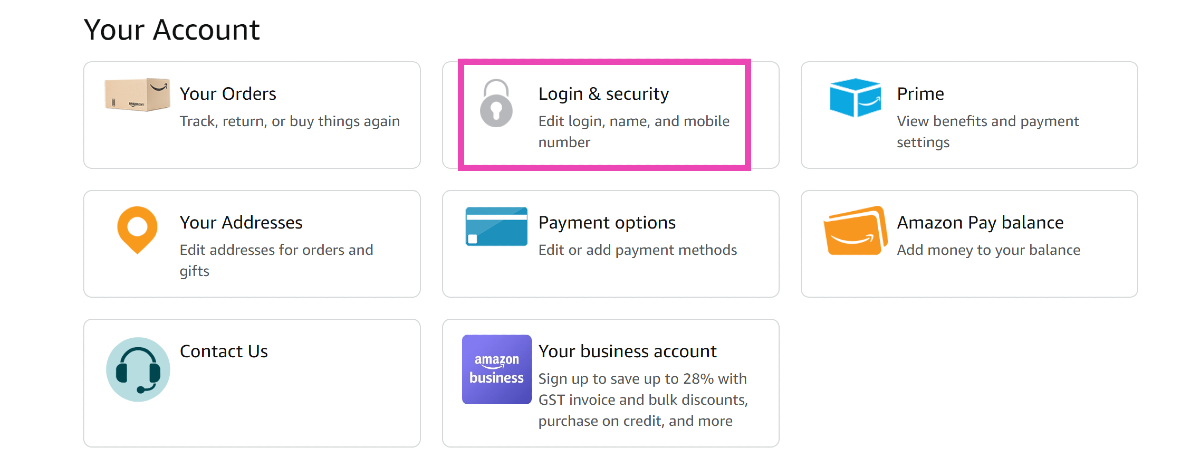
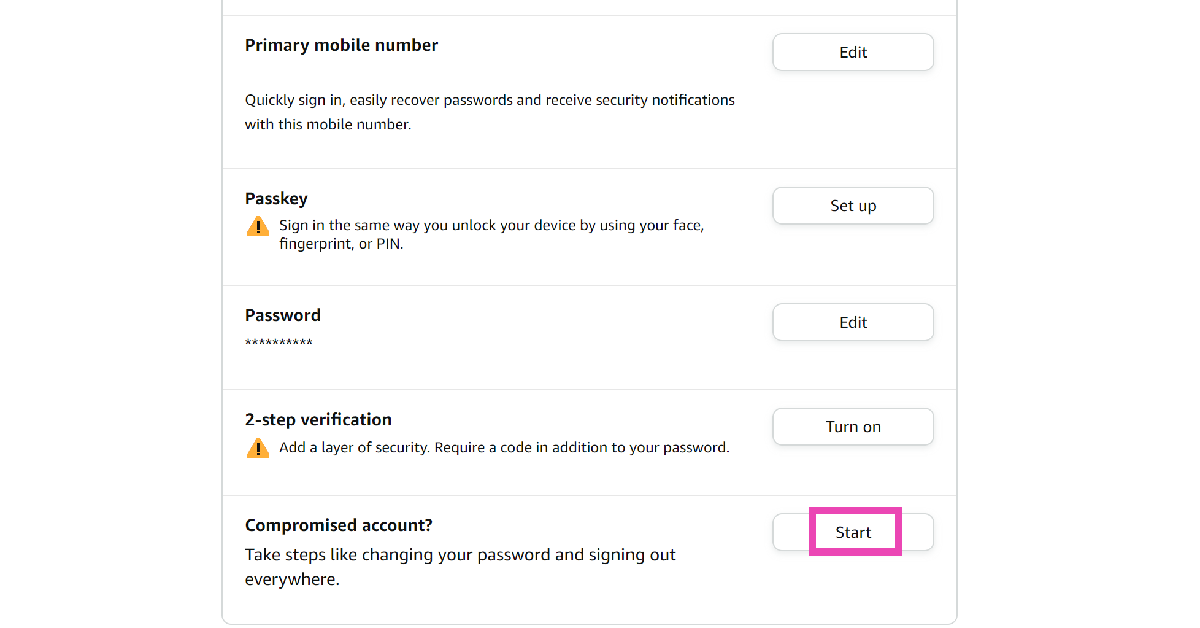
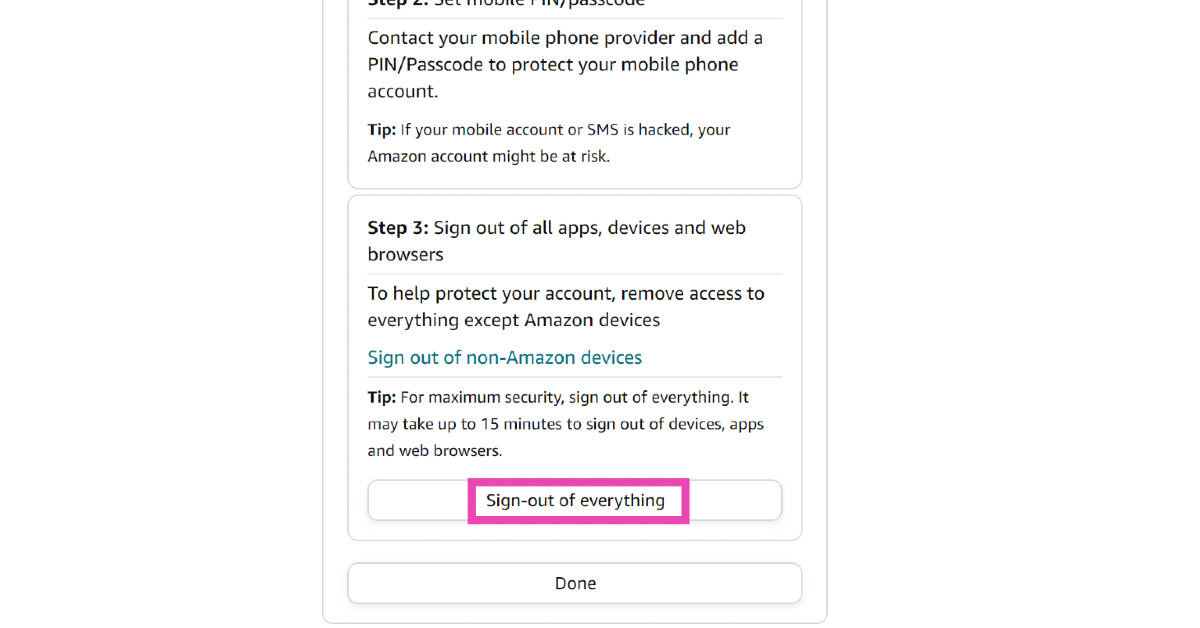
Step 1: Go to the Amazon website. Step 2: Move the cursor to Accounts & Lists and select Your Account. Step 2: Move the cursor to Accounts & Lists and select Your Account. Step 3: Click on Login & security. Step 3: Click on Login & security. Step 4: Scroll down and click on Start next to ‘Compromised account? Step 4: Scroll down and click on Start next to ‘Compromised account?’ Step 5: Scroll down and select Sign-out of everything. Step 5: Scroll down and select Sign-out of everything.

Sign out of Amazon on all devices by changing your password (Laptop)

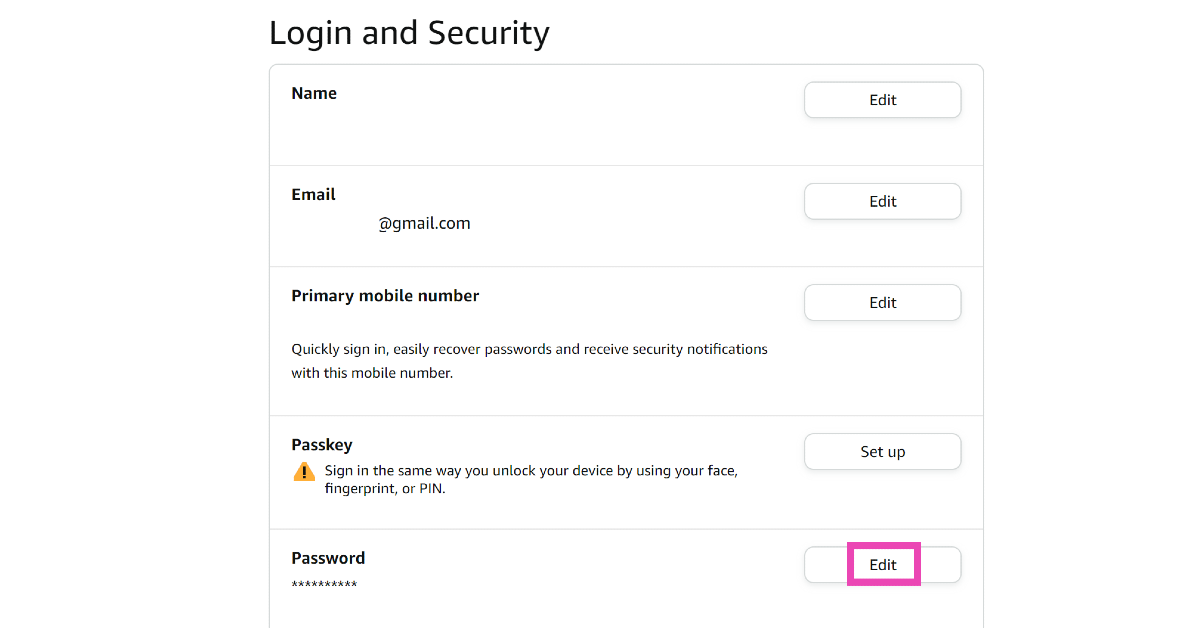
Step 1: Go to the Amazon website. Step 2: Move the cursor to Accounts & Lists and select Your Account. Step 2: Move the cursor to Accounts & Lists and select Your Account. 7 Easy Ways to Sign Out of Amazon on All Devices (Laptop, PC, Android and iPhone) Step 3: Click on Login & security. Step 3: Click on Login & security. Step 4: Hit Edit next to Password. Step 4: Hit Edit next to Password. 7 Easy Ways to Sign Out of Amazon on All Devices (Laptop, PC, Android and iPhone) Step 5: Enter your password. Step 6: Enter the OTP sent to your mobile number and email. Step 7: Enter the new password and save your changes.

Sign out of Amazon on all devices by adding 2-Step Verification (Android and iOS)

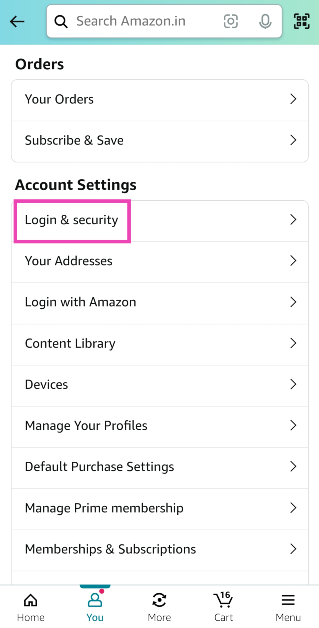
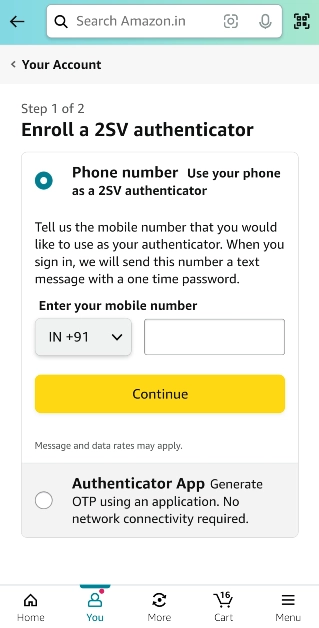
Step 1: Launch the Amazon app on your smartphone. Step 2: Switch to the You tab and select Your Account. Step 2: Switch to the You tab. 7 Easy Ways to Sign Out of Amazon on All Devices (Laptop, PC, Android and iPhone) Step 3: Tap on Login and security. Step 3: Tap on Login and security. 7 Easy Ways to Sign Out of Amazon on All Devices (Laptop, PC, Android and iPhone) Step 4: Hit Turn on next to 2-step verification. Step 4: Hit Turn on next to 2-step verification. 7 Easy Ways to Sign Out of Amazon on All Devices (Laptop, PC, Android and iPhone) Step 5: Enter your phone number to enable 2SV via OTP or use an authenticator app. Step 5: Enter your phone number to enable 2SV via OTP or use an authenticator app. 7 Easy Ways to Sign Out of Amazon on All Devices (Laptop, PC, Android and iPhone)

Simply log out of Amazon on your smartphone

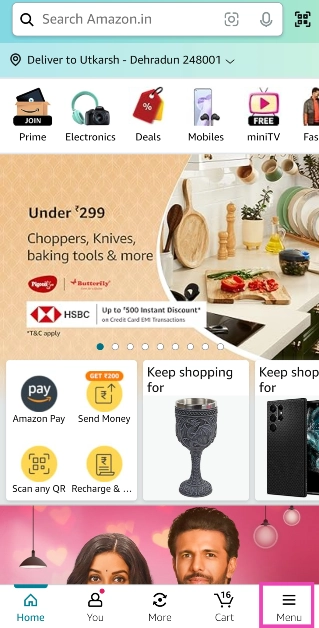
Step 1: Launch the Amazon app on your smartphone. Step 2: Switch to the Menu tab and tap on Settings. Step 2: Switch to the Menu tab and tap on Settings. 7 Easy Ways to Sign Out of Amazon on All Devices (Laptop, PC, Android and iPhone) Step 3: Select Sign Out.

Simply Log out of Amazon on your laptop

Step 1: Go to the Amazon website. Step 2: Move the cursor to Accounts & Lists. Step 2: Move the cursor to Accounts & Lists. 7 Easy Ways to Sign Out of Amazon on All Devices (Laptop, PC, Android and iPhone) Step 3: Select Sign out from the drop-down menu.

Frequently Asked Questions (FAQs)

How do I sign out of Amazon on all devices using my laptop?

Go to the Amazon website and select Your Account from Accounts & Lists. Click on Login & security>Compromised account>Sign-out of everything.

How do I sign out of my Kindle remotely?

Launch the Amazon app on your smartphone, go to You>Your Account>Account Settings>Content and Devices, select your Kindle and hit Deregister.

How do I enable two-factor authentication for Amazon?

Launch the Amazon app and go to You>Your Account>2-Step Verification to enable it. Read Also: Asus Zenbook 14 OLED with AI-powered Core Ultra 7 processors launched in India

Conclusion

These are the top 7 easy ways to sign out of Amazon on all devices. If you want to bump up the security of your Amazon account, use passkeys instead of passwords. This will allow you to log into your account using biometrics and face authentication. If you know any other way to sign out of Amazon across all your devices, let us know in the comments!

Akai 4K QLED Google TV series with Quantum Dot technology launched in India

Key Highlights
  • The Akai 4K QLED Google TV series offers 4 models.
  • The Television supports Dolby Vision and Atmos.
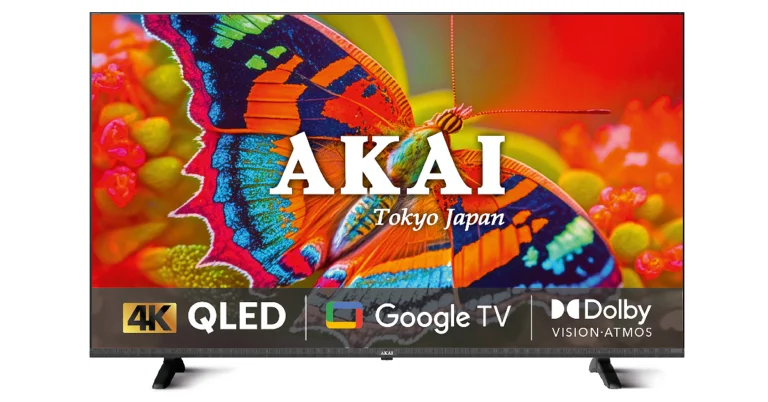
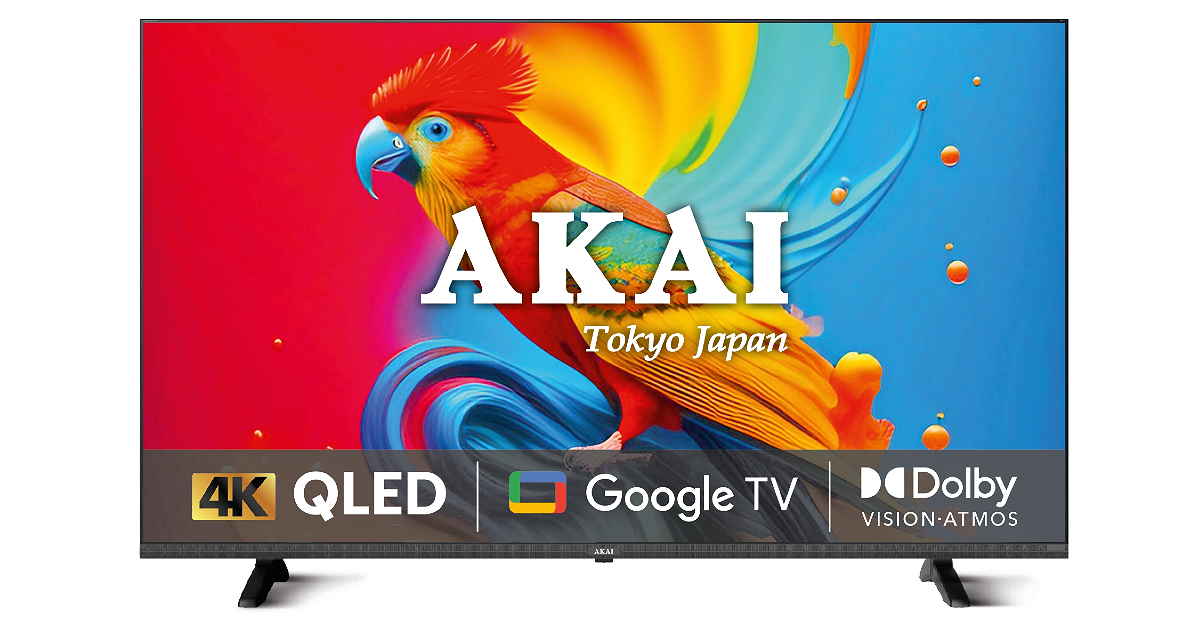
Hong Kong-based electronics brand Akai has announced the launch of a new 4K QLED Google TV series in India. The latest TV lineup includes 43, 50, 55, and 65-inch screen sizes. The TV panel has a bezel-less design and is powered by Quantum Dot technology. In addition to this, all the models come with a meta cabinet for durability. While announcing the Akai 4K QLED Google TV series, Mr Anurag Sharma, Director AKAI India said “At the heart of our QLED TV is our commitment to deliver an experience that is quintessentially Akai. The TV is a perfect blend of legacy and luxury, offering a visual feast that goes beyond expectations. We feel the new 4K QLED series is uniquely brilliant and Akai India has been a constant companion in the evolution of home entertainment for close to a decade. It has been our constant endeavour to evolve and bring the best of the world to Indian households.” Akai 4K QLED Google TV price in India, availability Akai’s new 4K QLED Google TV Series is being made available in 109cm (43), 127cm (50), 140cm (55), and 165cm (65) screen sizes. All the models include slim, sleek and bezel-less designs with 4K resolution (3840 x 2160). There is a metal cabinet that will contribute to the TV’s longevity and overall performance. Along with HDR HLG support for dynamic contrast, the Akai Television has Dolby Vision and Atmos delivering a rich, immersive experience that enhances the overall viewing pleasure. Powered by Quantum Dot technology the Akai 4K QLED Google TV series produces vivid and true-to-life colours and enhanced brightness. Also Read: AMD Radeon RX 7600 XT graphics card announced Along with voice commands the Television can also be controlled through a remote to effectively switch between channels and settings. In terms of connectivity Akai’s new 4K QLED Google TV Series comes with three HDMI 2.0 ports to connect set-top box, Blu-Ray players and gaming consoles, along with two USB 3.0 ports to connect hard drives and other USB devices. Customers may easily cast content to the QLED unit from their mobile phones and other connected devices for convenient viewing on any device. Also Read: 3 new generative AI features coming to Chrome to improve organisation

Akai 4K QLED Google TV price in India, availability

The Akai 4K QLED Google TV series price in India starts at Rs 24,999 for the 43-inch models. The price of the 50-inch, 55-inch and 65-inch models is set at Rs 28,990, Rs 35,990 and Rs 51,990 respectively. It can be purchased via Reliance Digital.

3 new generative AI features coming to Chrome to improve organisation

Key Highlights
  • The new Chrome update will allow users to organise their tabs with Tab Organizer.
  • Customise Chrome feature will help users change themes and create them with AI.
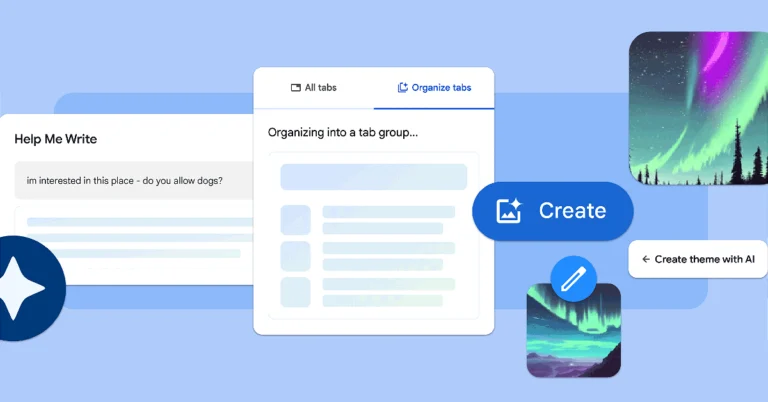
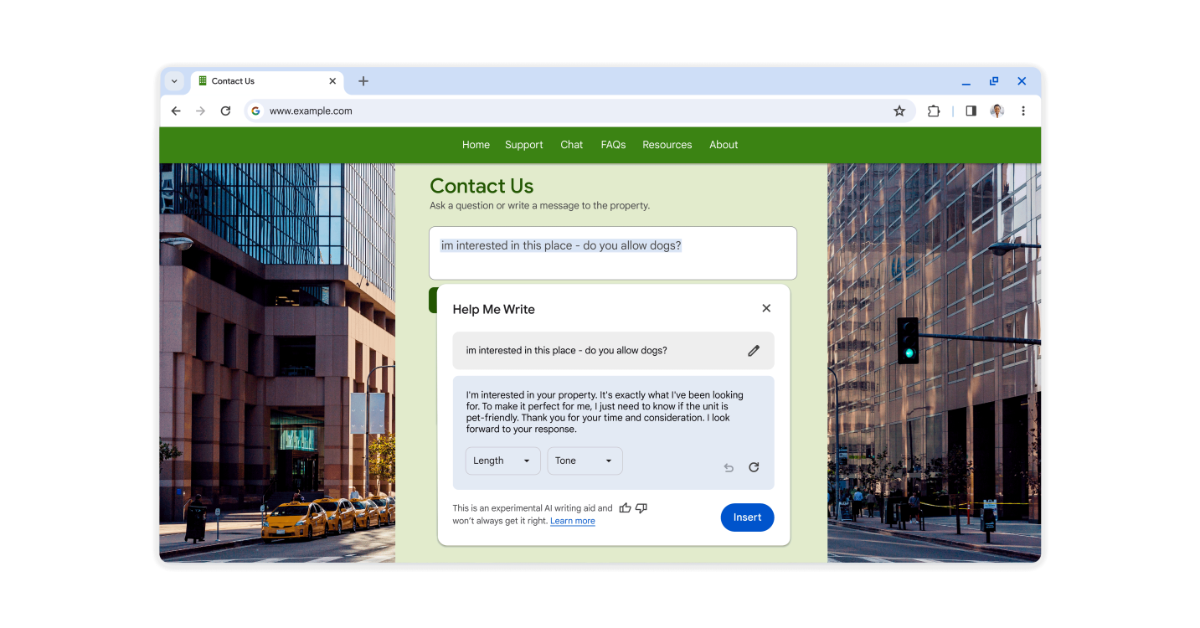
Google is rolling out a new update for Chrome that brings three new generative AI features that will make web browsing and organisation much easier. The features will be available to Chrome on Macs and Windows PCs over the next few days. The company via blog post said, “Over the last few years, we’ve brought the latest machine learning and AI technologies into Chrome to make searching the web easier, safer and more accessible. We started with improving practical, everyday tasks, like helping you add real-time captions to videos, better detect malicious sites, manage permission prompts and generate the key points of a webpage. Starting with today’s release of Chrome (M121), we’re introducing experimental generative AI features to make it even easier and more efficient to browse — all while keeping your experience personalized to you.” Based on the tabs you have open, Tab Organiser allows Chrome to automatically recommend and create tab groups. This can be helpful if you’re using Chrome to multitask on multiple projects at once like planning a trip, researching a topic and shopping. To use this feature, right-click on a tab and select “Organize Similar Tabs” or click the drop-down arrow to the left of your tabs. Chrome will even suggest names and emojis for these new groups so they can be easily located when needed. Google introduced generative AI wallpapers with Android 14 and Pixel 8 series last year. Similarly, it has now introduced the text-to-image diffusion model to Chrome. This will allow you to personalise your web browser. You can easily create custom themes based on a subject, mood, visual style and colour that you choose. To get started, visit the “Customize Chrome” side panel, click “Change theme” and then “Create with AI.” “For example, maybe you’re enamoured with the “aurora borealis” and want to see it in an “animated” style with a “serene” mood. Just select those options to see what Chrome comes up with. For more inspiration, check out this collection of the Chrome team’s favourite theme creations,” Google stated. In addition to this users can also customize Chrome with photos they have uploaded or themes from our collections in the Chrome Web Store, including ones commissioned from a growing community of artists. Also Read: AMD Radeon RX 7600 XT graphics card announced Google will also bring another experimental AI-powered feature in the Chrome update that will help users write a review for a restaurant, craft a friendly RSVP for a party or make a formal inquiry about an apartment rental on the web. 3 new generative AI features coming to Chrome to improve organisation To get started, right-click a text box or field on any site you visit in Chrome and select “Help me write.” Type in a few words, and our AI will kickstart your writing process. Also Read: LG’s QNED 83 Series with Quantum Dot and NanoCell technologies launched in India The new features will be available in Chrome on Macs and Windows PCs over the next few days, starting in the U.S. Just sign into Chrome, select “Settings” from the three-dot menu and navigate to the “Experimental AI” page. Because these features are early public experiments, they’ll be disabled for enterprise and educational accounts for now.

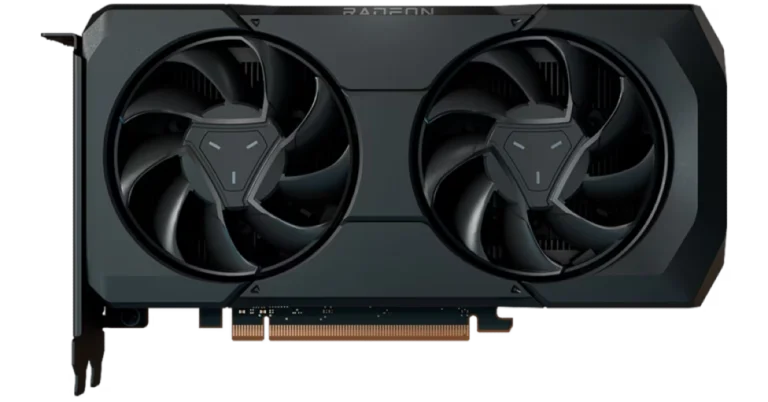
AMD Radeon RX 7600 XT graphics card announced

Key Highlights
  • The AMD Radeon RX 7600 XT supports next-generation DisplayPort 2.1 and HDMI 2.1a-based displays.
  • The graphics card is designed for gamers that like 1080p or 1440p resolution.
  • In addition to this, AMD also released AMD Software: Adrenalin Edition 24.1.1.
  • The new driver features AMD Fluid Motion Frames Technology, which boosts FPS up to 97%.
AMD has launched a new graphics card that can handle demanding games and content creation well. The newest card in AMD’s lineup, the Radeon RX 7600 XT, is aimed in the same price range as the NVIDIA RTX 4060 Ti. With integrated HYPR-RX profiles and AFMF technology, the newest graphics card can generate frames for any DX11 or DX12 game. Based on the AMD RDNA 3 architecture, the RX 7600 XT employs specialised ray tracing accelerators along with AI technologies to produce what AMD claims to be the greatest performance possible at 1080p. The Radeon RX 7600 XT graphics card is a specialised ray tracing accelerator with 16GB of VRAM, powerful AMD RDNA 3 compute units, and cutting-edge AI technology. It also lets users maximise their creativity with tasks related to AI and content creation. As per the company, the Radeon RX 7600 XT include: up to 1.9X faster gaming and ray tracing performance than the popular NVIDIA GeForce RTX 2060 in select titles at 1080p. Moreover, the AMD Fluid Motion Frames (AFMF) frame generation technology boosts FPS with the Adrenalin Edition driver. Whereas AMD HYPR-RX technology optimises and manages the simultaneous interoperation of AMD Fluid Motion Frames, AMD Radeon Super Resolution, and AMD Radeon Boost technologies. Also Read: Asus Zenbook 14 OLED with AI-powered Core Ultra 7 processors launched in India The encode/decode media engine opens up new multimedia experiences with full AV1 encode/decode support, wide colour gamut and high-dynamic range enhancements. Support for next-generation DisplayPort 2.1 and HDMI 2.1a-based displays is also possible with the new AMD Radiance Display Engine. AMD also made available AMD Software: Adrenalin Edition 24.1.1 featuring AMD Fluid Motion Frames Technology, which boosts FPS up to 97% for a smoother gaming experience by adding frame generation technology to any DirectX 11 and 12 game. It also released new Video Upscaling technology, text detection support for 4K streaming using Content Adaptive ML, enhanced encode quality for AV1, HEVC, AVC, and OBS, and more. Also Read: LG’s QNED 83 Series with Quantum Dot and NanoCell technologies launched in India

AMD Radeon RX 7600 XT Availability

According to AMD, the Radeon RX 7600 XT is currently available at AMD board partners, including Acer, ASRock, ASUS, Gigabyte, PowerColor, Sapphire and XFX, with a SEP of $329 USD.

Garena Free Fire Redeem Codes Today 25 January 2024: Here is how to claim them

Garena Free Fire is a battle royale game with regular awards and tournaments to keep players interested. If you play Garena Free Fire, you should be aware of the redeem codes that are released on a daily basis. However, because the battle royale game is banned in India, players from other countries can use the Free Fire Redeem codes daily. If you’re unfamiliar with the Garena Free Fire redeem codes or don’t know how to get them, we’ve put together a step-by-step guide to help you redeem them. Check out Garena Free Fire Redeem Codes for 25 January 2024. The Free Fire redeem codes are a great way to get free stuff. These are 12-digit codes that contain alphabets and numbers, as well as an expiration date and time. Because the Garena FF redeem codes cannot be used more than once, you should hurry to the redemption page to claim your free reward before someone else does. To get a free reward, all you have to do is go to reward.ff.garena.com/en, which is the official redemption page. Also, keep an eye on this space for daily updates on Garena Free Fire redemption codes and rewards.

Garena Free Fire Redeem Codes Today 25 January 2024

FF11DAKX4WHV WLSGJXS5KFYR FF11NJN5YS3E ZRJAPH294KV5 Y6ACLK7KUD1N W0JJAFV3TU5E FFICJGW9NKYT XUW3FNK7AV8N FF10617KGUF9 FF119MB3PFA5 ZYPPXWRWIAHD YXY3EGTLHGJX FF10GCGXRNHY MCPTFNXZF4TA FF11HHGCGK3B FF11WFNPP956 X99TK56XDJ4X SARG886AV5GR FF1164XNJZ2V B6IYCTNH4PV3 8F3QZKNTLWBZ

How to Get Free Fire Redeem Codes for Garena on 25 January 2024?

  • Visit the Garena Free Fire game’s official website at reward.ff.garena.com.
  • Use your Facebook, Google, VK, Apple ID, Huawei ID, or Twitter account to log in.
  • You’ll be taken to a valid redemption code (s)
  • Copy and paste the 12-digit redemption code into the text box.
  • On the screen, a dialogue box will appear.
  • ‘Ok’ should be selected.
For the latest gadget and tech news, and gadget reviews, follow us on TwitterFacebook and Instagram. For newest tech & gadget videos subscribe to our YouTube Channel. You can also stay up to date using the Gadget Bridge Android App. You can find the latest car and bike news here.

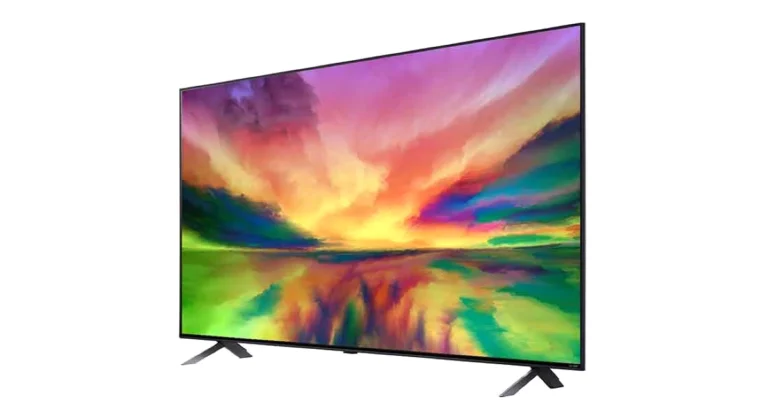
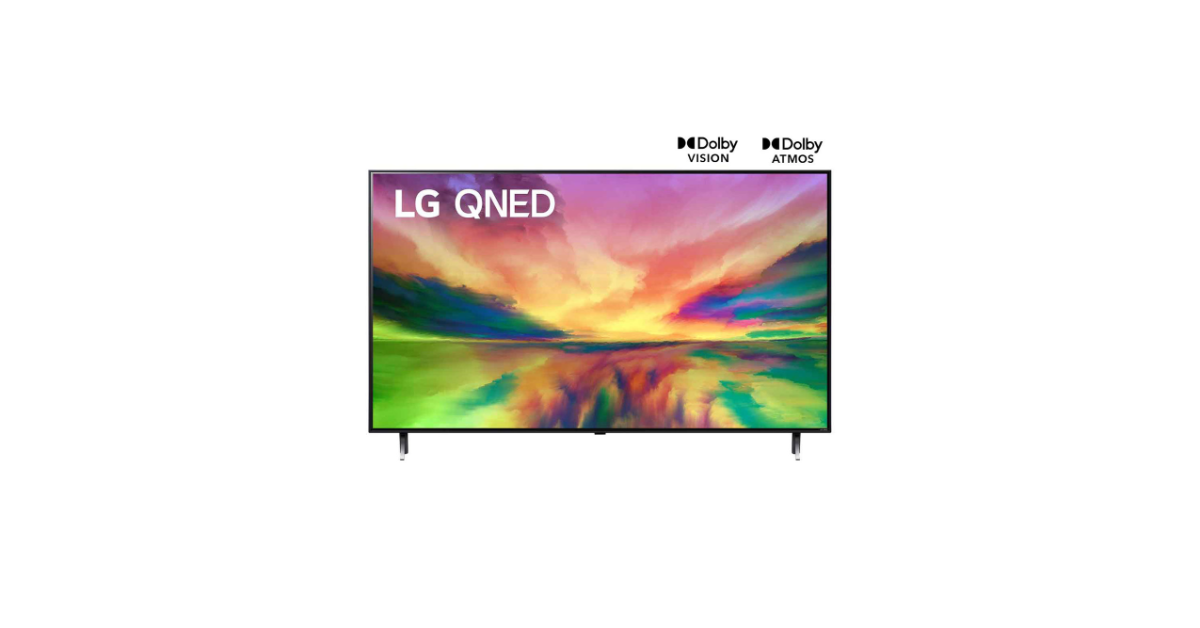
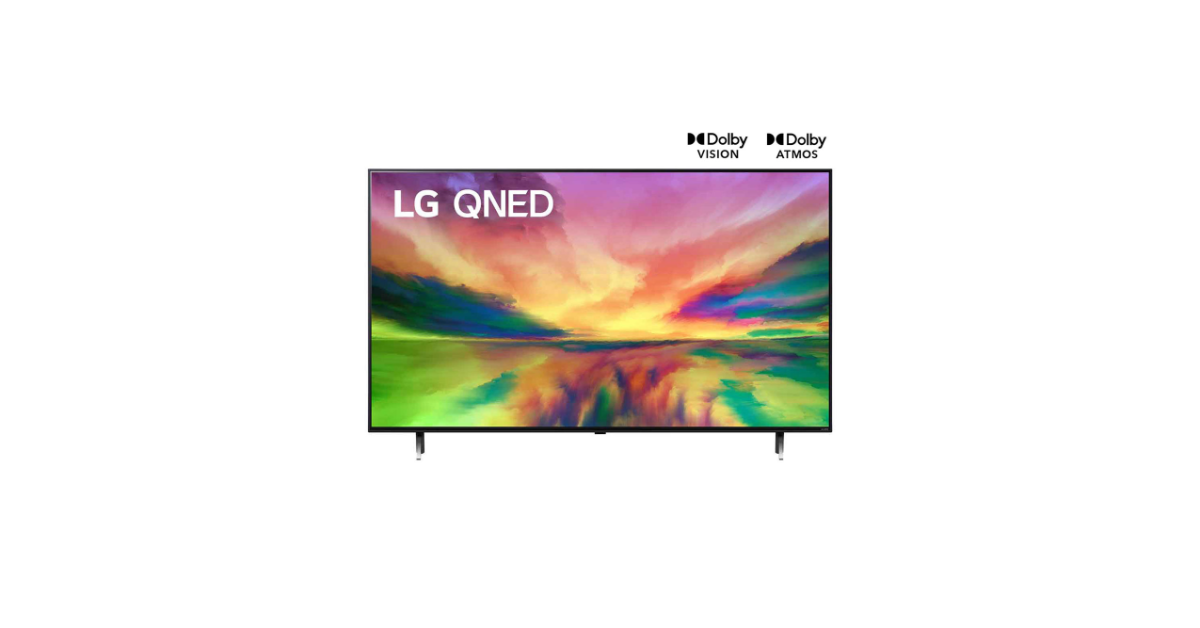
LG’s QNED 83 Series with Quantum Dot and NanoCell technologies launched in India

Key Highlights
  • The LG QNED 83 TVs come in two different screen sizes- 55-inch and 65-inch.
  • Both variants support Dolby Vision and Dolby Atmos.
  • The new Television comes with AI Super Upscaling and Local Dimming.
LG QNED 83 Series has made its India debut. The company’s latest television series is powered by the Quantum Dot and NanoCell technologies. The Televisions in this range have a 120hz refresh rate and include Dolby Vision & Atmos support. Moreover, it is equipped with α7 AI 4K Gen6 AI Processor and also provides access to Netflix, Apple TV+, Disney+ Hotstar, and Prime Video. LG QNED 83 TVs that were introduced earlier this month at CES 2024 have now reached the Indian market. The new Television series includes two models 55-inch (55QNED83SRA) and 65-inch (65QNED83SRA) screen sizes. Both the models come with α7 4K Gen6 AI Processor. This chipset supports Virtual 5.1.2 channel output and aids in the AI Picture Pro and AI Sound Pro features.
LG QNED 83 55
LG QNED 83 55
The televisions are good for gaming as they support a refresh rate of 120Hz in addition to AMD Freesync compatibility. There are other gaming features like Game Dashboard & Optimizer and VRR for smooth gameplay. LG QNED 83 Series comes with a combined strength of NanoCell and Quantum Dot technology to produce remarkably accurate and deeper colours in 4K resolution. Also with smart dimming technology and deep-learning algorithms, the Television reduces the halo effect and produces images that are crisper and more lifelike.
LG QNED 83 65
LG QNED 83 65
The new Television series runs on all-new webOS which provides access to a variety of content from popular streaming services like Netflix, Apple TV+, Disney+ Hotstar, and Prime Video. Also Read: ViewSonic launched “Designed for Xbox” projectors in India The Multi-View feature of the LG QNED 83 Series allows screens from two different sources to be displayed simultaneously in side-by-side, picture-in-picture, or double-input modes. Additional features include Quick Cards, Picture Wizard, User Profiles, ThinQ AI, and compatibility with voice assistants like Google Assistant, Amazon Alexa, and Apple Airplay2. Also Read: Lenovo Legion 9i with 13th Gen Intel Core i9 CPU launched in India

LG QNED 83 Series TV price in India and availability

LG QNED 83 Series TV offer two models, the 55-inch variant with model number 55QNED83SRA is priced at Rs 1,59,990. Whereas the 65-inch variant with model number 65QNED83SRA costs Rs 2,19,990. Both models can be purchased via LG’s website, LG Showrooms, and Partner Retailers such as Croma, Reliance Digital, and other e-commerce platforms in the country.

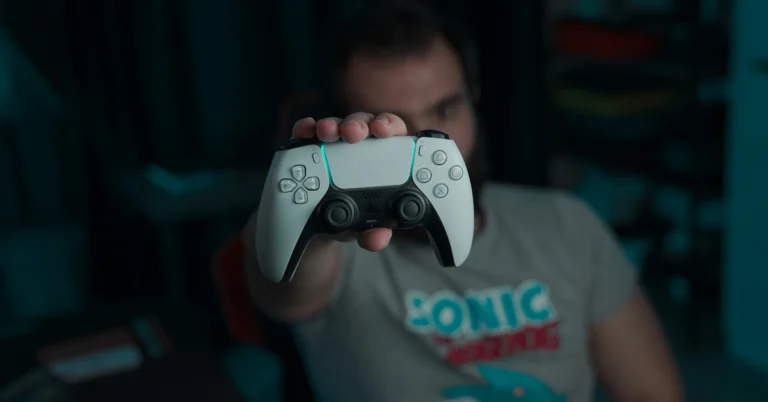
How to Use the PS5 Controller on a PS4?

0
Sony isn’t too keen on backwards compatibility, especially when it comes to its PlayStation series. If you have an old PS4 lying around, you can officially only use the ‘DualShock’ PS4 controller on it. If you’ve upgraded to the PS5, the PS4’s DualShock controller will work fine on the new console, but only for PS4 gaming titles. But, if you’re looking to use the PS5 controller on a PS4, you will have to explore other options. Here are some of them. Read Also: Top 5 Ways to Download YouTube Shorts on Android (2024)

Is it possible to use the PS5 Dual Sense controller on a PS4 console?

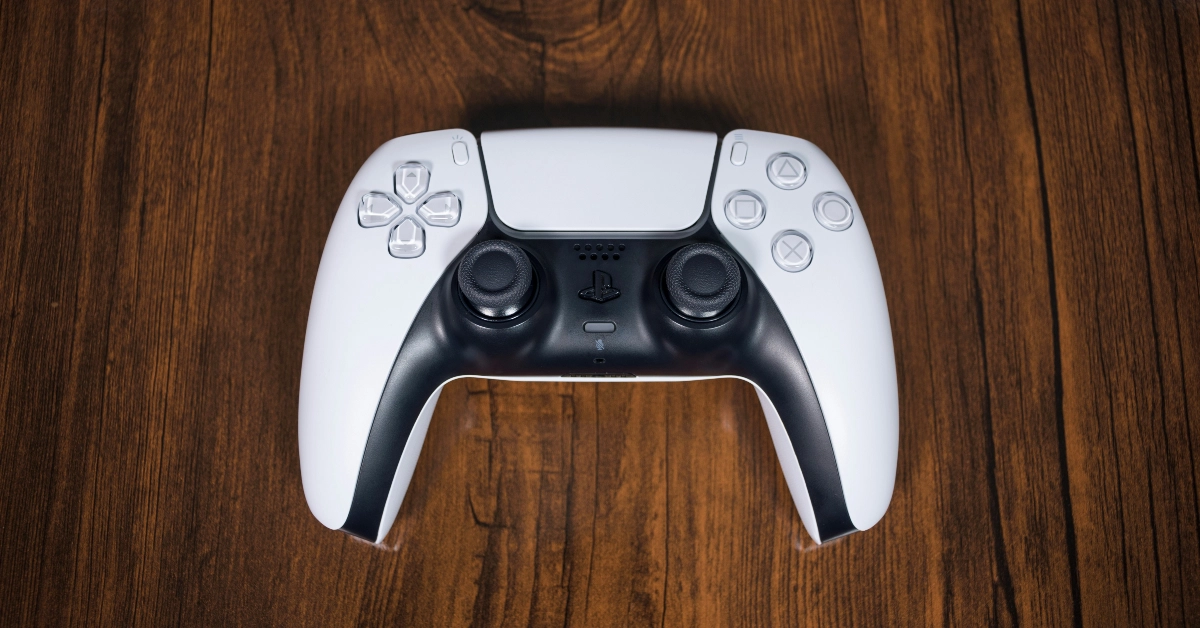
Sony does not offer a native way to connect the PlayStation 5 controller to a PS4 console. If you plug the controller into the console using a USB cable, it will start charging but won’t be able to control the device. Luckily, there are a couple of workarounds to this problem. You may already be aware of the Remote Play app which bridges the divide between the controller and console from two different generations. While the Remote Play app is free to use, it requires a PC or the PS5 console as the intermediary between your Dual Sense controller and the PS4. On top of that, it generates some latency between the two devices. If you don’t want to use the app, you will have to crack open your wallet and spend some money on a Bluetooth adapter. While buying an adapter, you need to make sure that it offers support for Dual Sense and PS4. It does not matter whether it is compatible with the PS5 console.

Use your PS5 Controller on a PS4 with the Remote Play app

Use your PS5 Controller on a PS4 with the Remote Play app Step 1: Connect your PS5 controller to the PS5 console/PC. Step 2: Launch the Remote Play app on your PS5/PC. Step 3: Select PS4 as the console you want to connect to. Step 4: Follow the onscreen instructions to connect the PS5 controller to your PS4.

Use an adapter

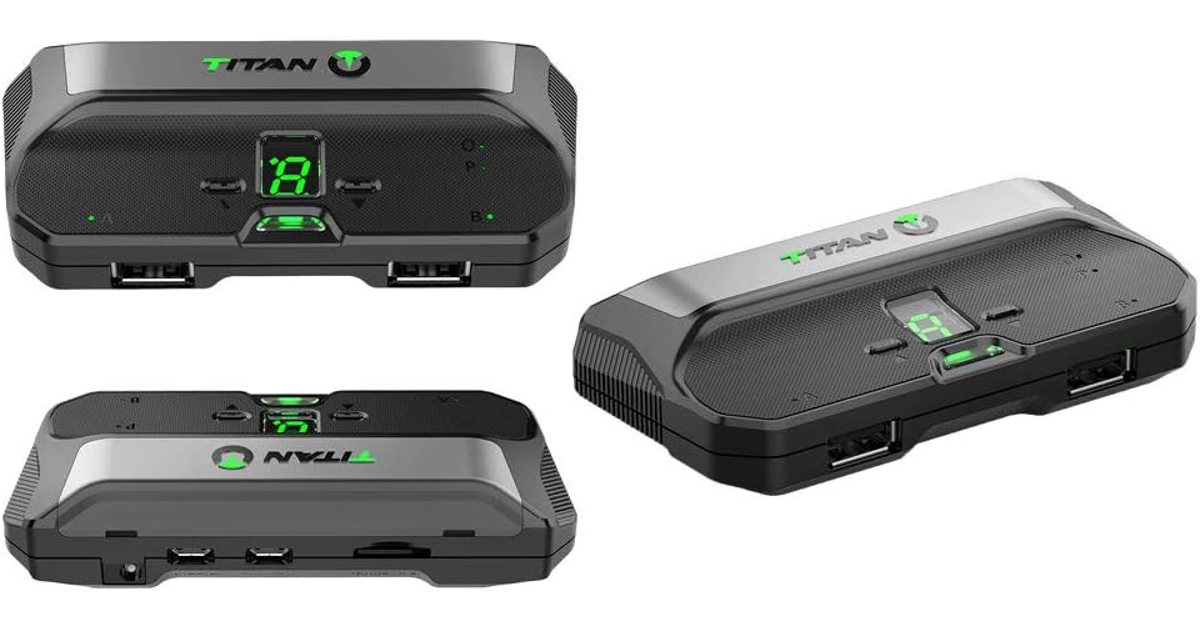
Use an adapter If you don’t want to use the Remote Play app, you can purchase an adapter for a wired/wireless connection between your PS4 console and PS5 controller. The Titan Two and Mayflash Magic-S Pro 2 are good choices. Step 1: Plug the adapter into the PS4 console. Step 2: Press the pairing button on the adapter until the LED starts blinking. This denotes that the adapter is in pairing mode. Step 3: Put your PS5 Dual Sense controller in pairing mode by pressing the Play Station button and Create button simultaneously. Step 4: Once they are paired, you will be able to use your PS5 controller on your PS4.

Frequently Asked Questions (FAQs)

Can I connect my PS5 controller to a PS4?

You can connect a PlayStation 5 controller to a PS4 using the Remote Play app or a Bluetooth adapter.

How much does a Bluetooth adapter for a PS4 cost?

The Mayflash Magic-S Pro 2 is a decent Bluetooth adapter priced at $23.99. It offers support for PS4, Switch, macOS, Windows, Raspberry Pi, Xbox Series X & S Controller, Xbox One Bluetooth, PS5 Controller and more.

Is my PS4 controller compatible with a PS5 console?

You can connect your PS4 controller to the PS5 but it will only work for PS4 games. Read Also: OnePlus Buds 3 with 10.4mm driver unit launched in India

Conclusion

These are the top 2 ways to connect your PlayStation 5 controller to a PS4 console. If you don’t want to be bugged by any latency issues, you will need to splurge some money on a Bluetooth adapter. You should know that you will not be able to feel the Dual Sense controller’s haptic feedback when it is connected to a PS4.

Poco X6 Pro Review: A step ahead in its category

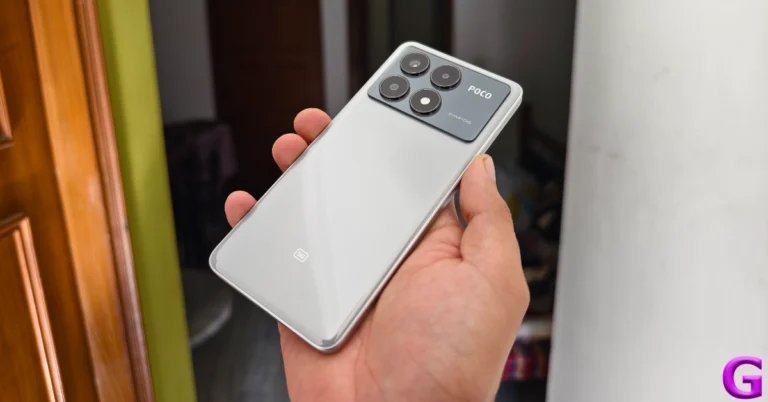
Xiaomi’s subsidiary brand, Poco, is relatively new in the Indian market but has consistently produced a series of good products. Primarily operating in the lower midrange segment, Poco’s X Series goes up against the likes of OnePlus’ Nord Series, Samsung’s A Series, and its parent company Xiaomi’s Note series. The newly launched Poco X6 Pro is currently priced at Rs 27,000. Its non-Pro variant fetches Rs 22,000. Both variants arrived at our desk earlier this month and we have been using them since then. For the last week, the Poco X6 Pro has remained our daily driver – here is our review of the smartphone. Read Also: OnePlus Buds 3 with 10.4mm driver unit launched in India

Poco X6 Pro review: Design and Display

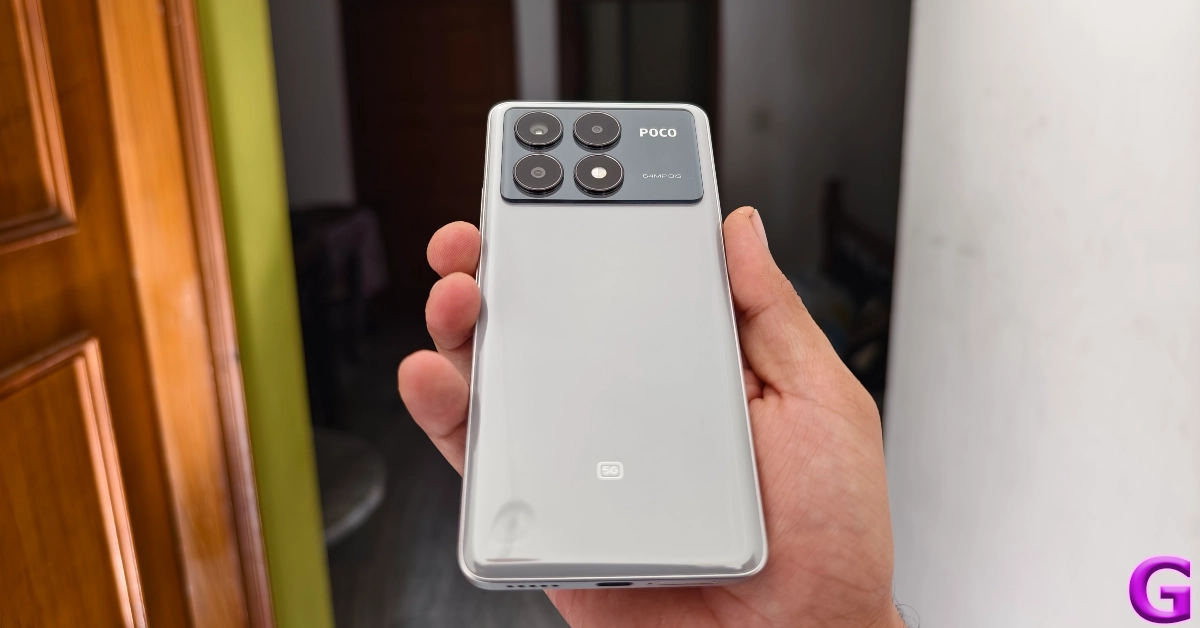
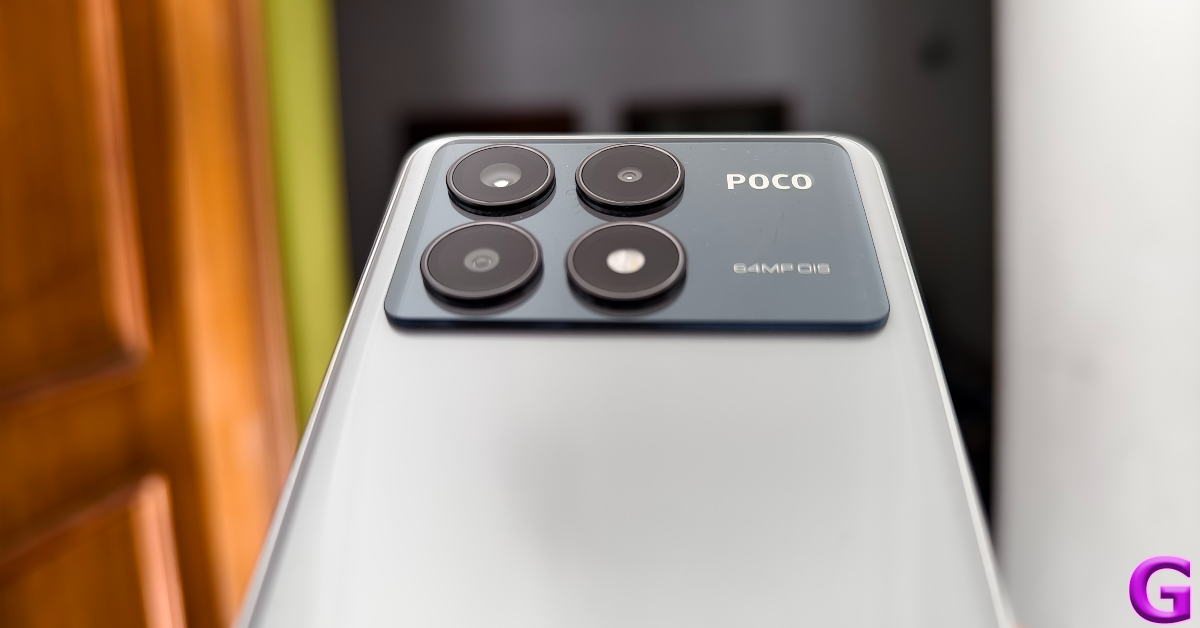
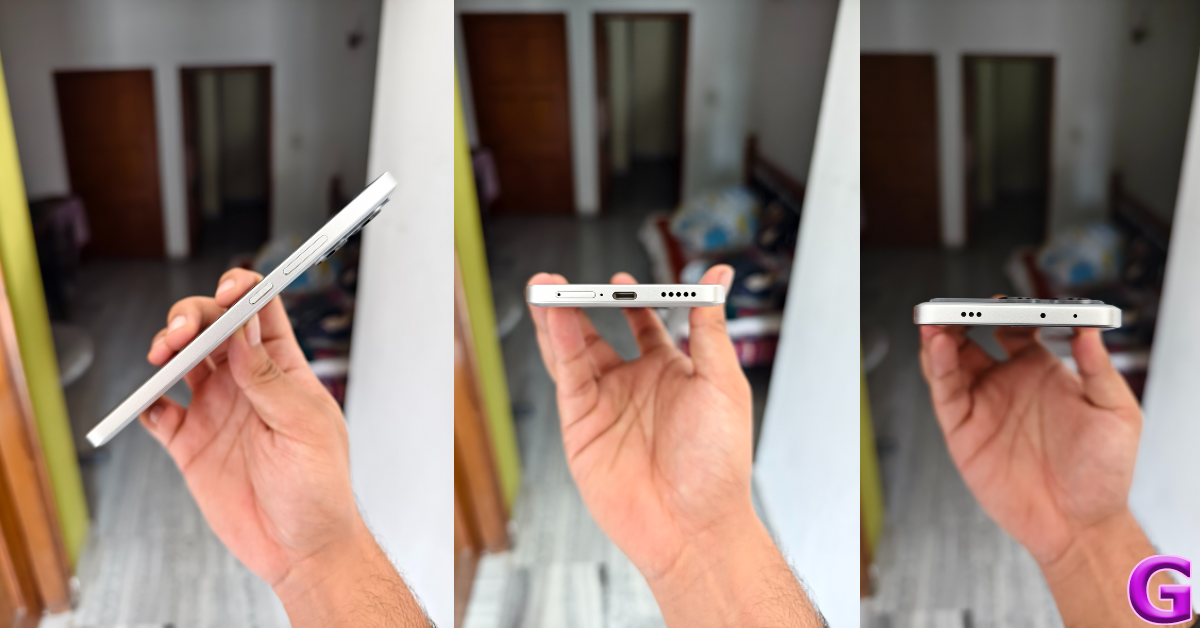
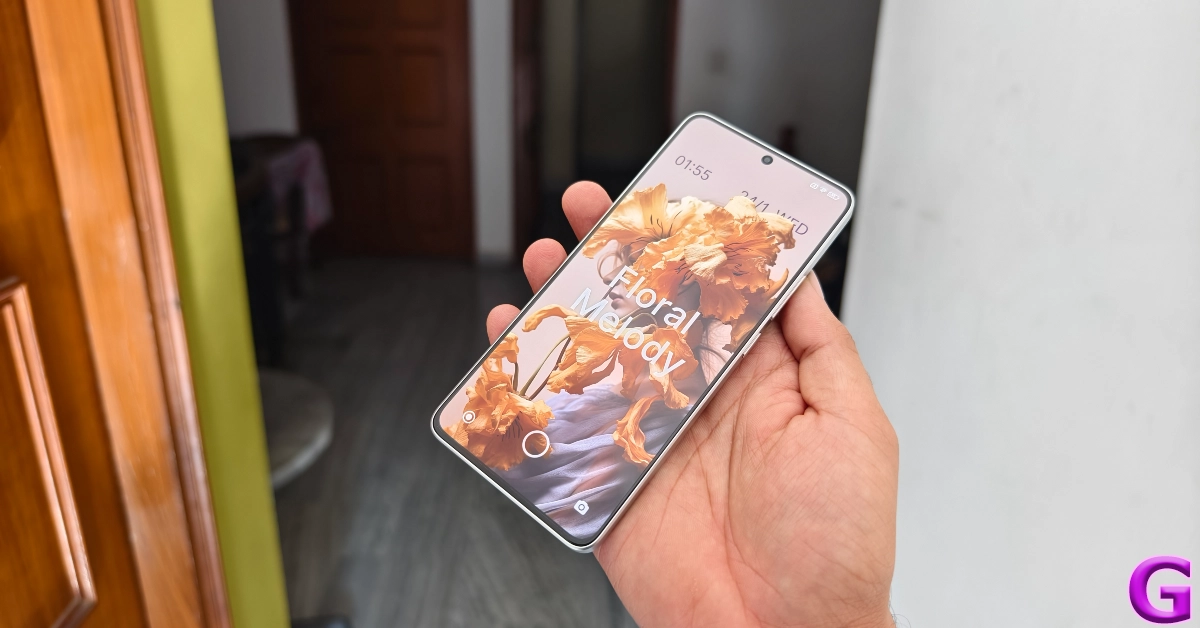
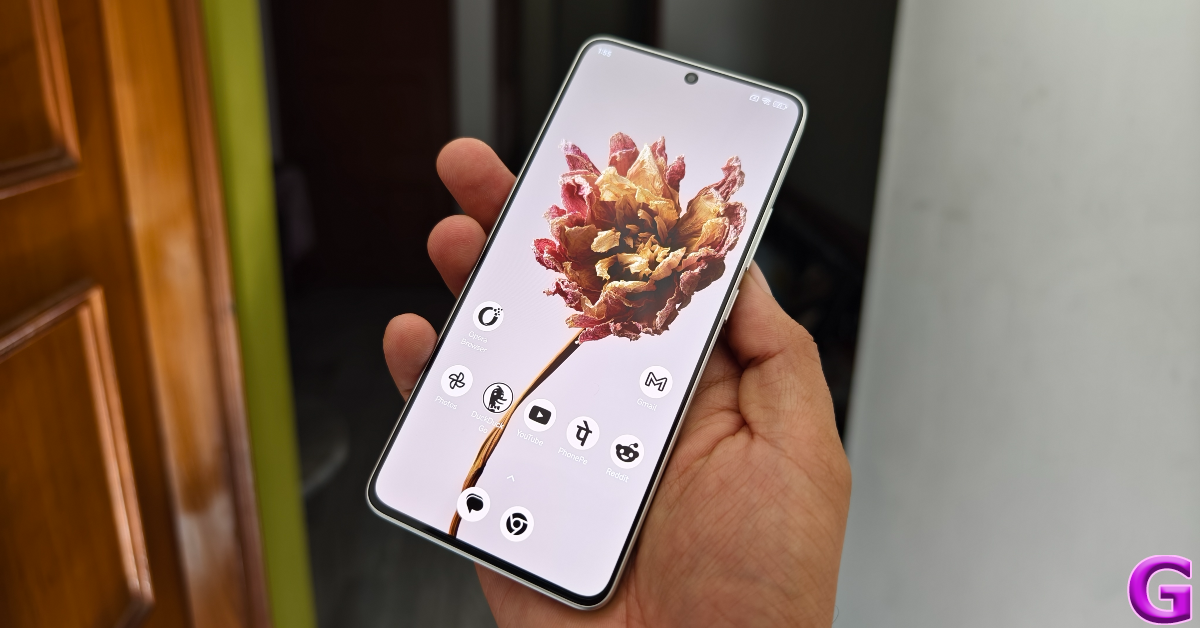
The unboxing experience of the Poco X6 Pro is pretty standard as far as mid-rangers go. Inside the box, you get the smartphone, a 67W power adapter, a USB Type-A to Type-C cable, a black plastic case, a SIM ejector tool, and a quick start guide. 2024 seems to be the year when OEMs across the board are replacing the clear plastic case with an opaque black one. Poco X6 Pro review: Design and Display Poco’s Pro variant in its 2024 X6 Series has made small yet significant changes to its design. The two-step camera panel at the back now covers the entire width of the smartphone. In its previous iteration, this glossy panel was aligned to the left, with the dual-tone colouring covering the remaining area. This is still the case in the non-Pro variant this year. Even though the X6 Pro has a plastic back, it almost feels like glass. This ‘glasstic’ material does elevate the in-hand feel of the device but is a fingerprint magnet. Picking up the phone for a couple of minutes will surely leave some prints on the back. The vegan leather back on the yellow colour variant does not present this issue. Smudges aside, we like the overall design of the smartphone. The three cameras and the LED flash get individual cutouts which are aligned in a square pattern. camera panel The back panel curves slightly into the flat plastic frame. The left edge of the frame houses the volume rocker and power keys. At the bottom, you get the SIM tray, microphone, USB Type-C port, and the primary speaker grille. Up top lie the secondary microphone, IR blaster, and stereo speaker. The left edge is completely keyless. Unlike its previous iteration (our review here), there is no 3.5mm headphone jack on the X6 Pro, but you can still get it on the non-Pro variant. design Moving on, Poco X6 Pro’s display is undoubtedly its biggest attribute. This 6.67-inch AMOLED panel has a 1,220 x 2,712p resolution and a 120Hz refresh rate. On top of that, it gets HDR10+ support and Widevine L1 certification. Reaching an impressive peak brightness of 1,800 nits, this display remains perfectly legible under direct sunlight. Surrounding the display are very slim bezels that get a smidge thicker around the chin. If you don’t pay close attention to the bezels (which is quite easy, given their size), they appear uniform. Poco X6 Pro review: Design and Display The touch response offered by the X6 Pro’s display is very close to the flagship level. Swiping through pages, switching apps, navigating the phone’s interface, and other activities provide a very fluid experience. The X6 Pro is also the first Poco smartphone to get an in-display fingerprint scanner. It is one of the fastest scanners we have used in any segment, and it is nice to see Poco nail such a vital part of the display in its first attempt. We watched a variety of content across different OTT and streaming apps. The HDR quality is good and the images produced on the screen are rich in colour. The stereo speakers can go loud without sounding distorted. Although the audio output could have improved on its low end, it doesn’t sound tinny or hollow. We did not feel the need to put on headphones while watching movies on the X6 Pro. display An IP54 rating ensures that the smartphone can handle minor water splashes and exposure to minimal dust. Pulling a smartphone out while it’s raining will not damage its internals, but a dip in the water may lead to a different outcome.

Poco X6 Pro review: Performance and Cameras

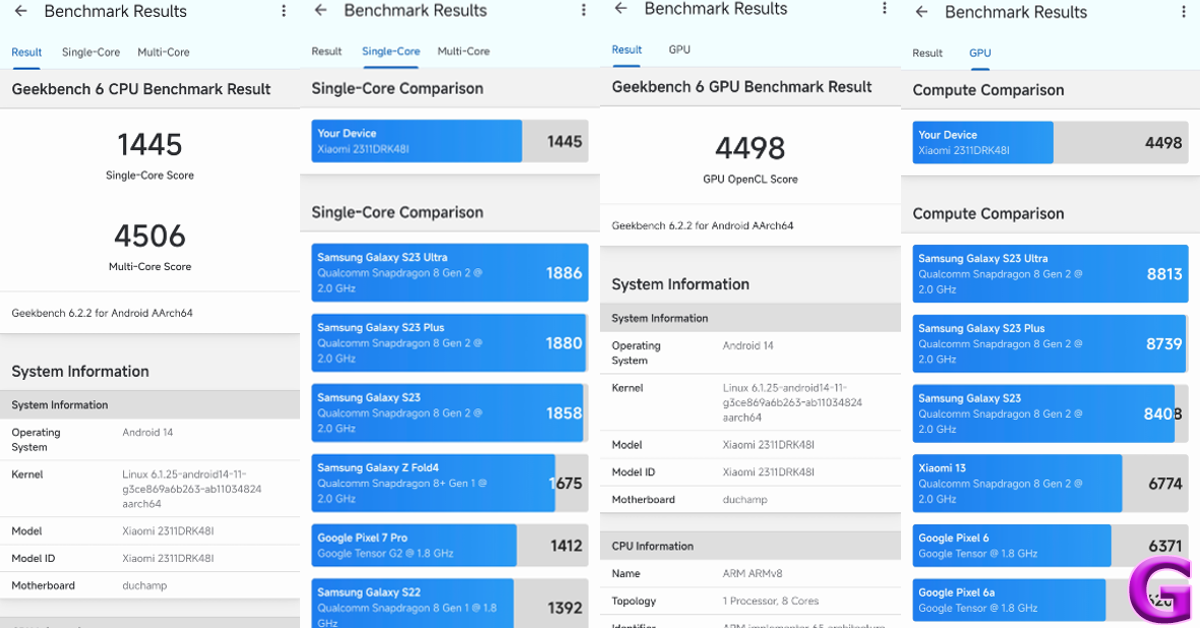
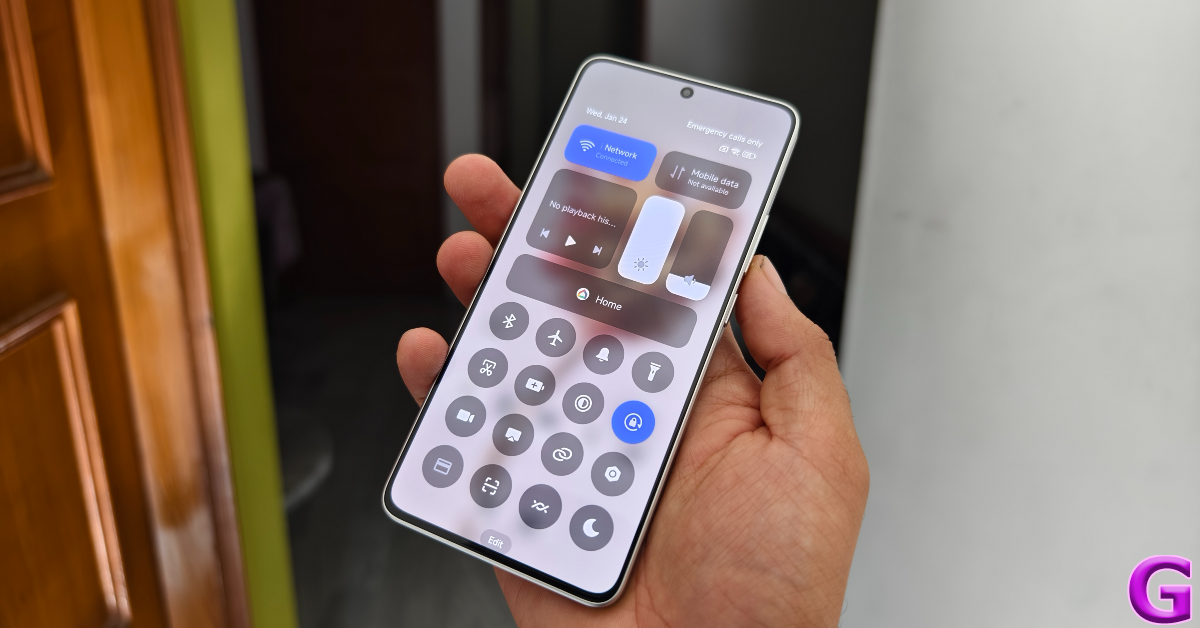
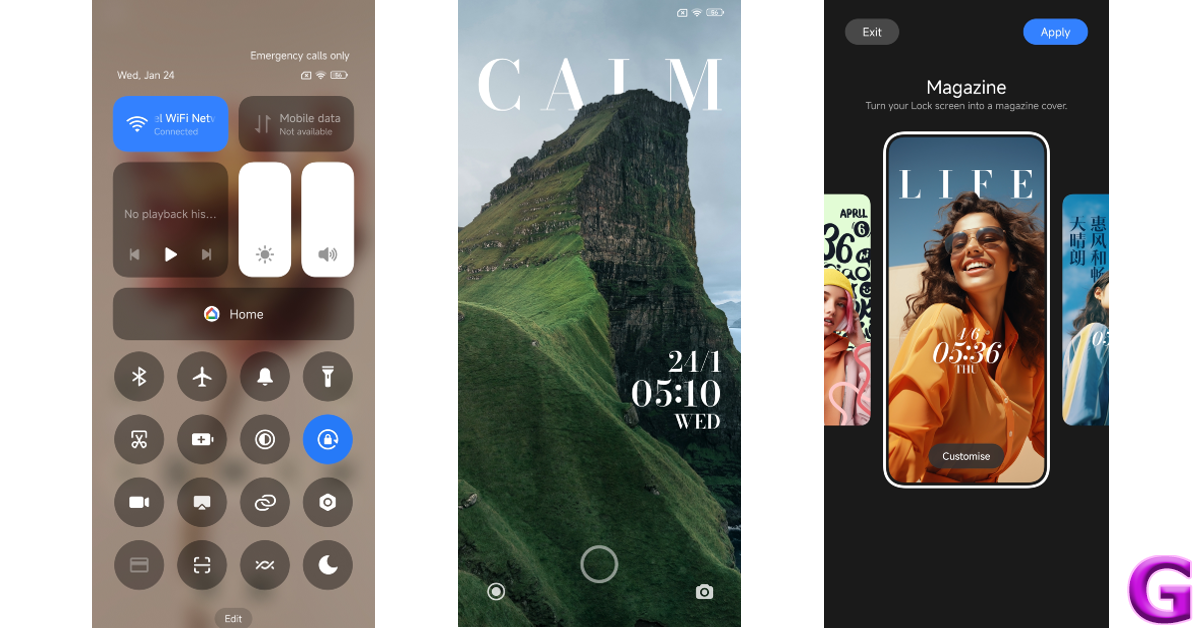
Powering the Poco X6 Pro is the MediaTek Dimensity 8300 Ultra SoC. There are two RAM and storage variants on offer — 8GB + 256GB and 12GB + 512GB. The LPDDR5X RAM and UFS 4.0 storage are integral to the device’s speedy functioning. On the Geekbench 6 app, the smartphone scored 1,445 points in the single-core test and 4,506 points in the multi-core test. The non-Pro variant powered by the Snapdragon 7s Gen 2 SoC scored 1,022 and 2,995 points respectively. Poco X6 Pro review: Performance and Cameras One of the things that make the X6 Pro stand apart in its segments is its speediness. The smartphone takes no time to load apps and switch between them. While working on the phone, we always felt like it was a step ahead of us. This isn’t something we can say for other smartphones in this price bracket. The X6 Pro crushes basic tasks like instant messaging, video calling, photo editing, web browsing, and others. Even with multiple apps occupying the RAM, the smartphone remains unfazed. performance A similar performance is replicated while gaming on the device. The brilliant touch response pays dividends while playing games like Call of Duty Mobile and BGMI. The 5,000mm2 stainless steel vapour changer plays its part in maintaining the internal temperature to an optimum level. Even with high graphic settings and maximum frame rate, the smartphone does not create any jitters or unwanted lags while gaming. Poco X6 Pro is one of the first smartphones in India to ship with the Xiaomi HyperOS. Its non-Pro sibling gets MIUI 14 OS out of the box, which can be upgraded to HyperOS. While there isn’t much that separates the two Android 14-based skins, we do like the overall feel of the HyperOS. The quick settings panel extends to the bottom of the display upon swiping down from the status bar. The tiles are text-free, which makes them aesthetically appealing, but it takes a few days to get used to them. It looks eerily similar to the iPhone’s Control Centre, but that isn’t a bad thing at all. os The OS also offers a new ‘MiSans’ font along with a bunch of lock screen and wallpaper customisation options. You can choose from a bunch of styles for the lock screen and customise them even further by adding a signature and applying the depth effect. This is also inspired by the lock screen effects in iOS. Overall the software experience on the X6 Pro is quite pleasing, once you get past the bloatware. The 5,000 mAh battery was able to power it for an entire day. During the review period, we used the Poco X6 Pro for calling, texting, binge-watching TV shows, and gaming. At the end of each day, we were left with a 15-20% charge. This is pretty standard as far as most mid-range smartphones go. The 67W power adapter provided in the box can fully charge the smartphone in 45 minutes. Poco X6 Pro review: Performance and Cameras Cameras are not Poco X6 Pro’s strongest suit, but it does not disappoint. The rear camera array consists of a 64MP primary shooter, an 8MP ultrawide lens, and a 2MP macro sensor. In daylight conditions, the primary camera takes good images that are rich in colour and pack a lot of detail. The images are well-processed, featuring adequate dynamic range with sharp and well-exposed shadows. camera Poco X6 Pro review: Performance and Cameras The primary camera surprised us in low-light conditions, making use of clever photoprocessing to produce good results. The camera manages to expose and brighten the subject nicely, while the noise level is suppressed to an optimum degree. With the Night Mode turned on, the images come out a little sharpened and some colour correction is applied to the final result.
low light
Without Night Mode v With Night Mode
low light photography
Ultrawide lens: Without Night Mode v With Night Mode
Pictures taken with the ultrawide lens are on the softer side but manage to produce deep colours and a decent dynamic range. Even in low light conditions, the ultrawide camera puts up a good performance. The camera app has a Portrait Mode that does a good job of separating the subject from the background but is a little restrained while applying the blur effect. The 2MP macro lens is there if you want to take close-up images, but we were not happy with the flat colours produced by it.
Ultrawide lens
Ultrawide lens
Poco X6 Pro review: Performance and Cameras
Ultrawide lens
The 16MP selfie camera takes good images with a warm colour palette. It does not overcorrect the skin tone but does smoothen the texture a little. This camera can 1080p videos at 30/60fps. Meanwhile, the rear camera can record 4K videos at 30 fps with HDR and 30/24 fps without HDR.
portrait
Portrait Mode
Read Also: Itel Roar 75 Review: Are they worth buying?

Verdict

In the under Rs 30,000 category, the Poco X6 Pro would be our pick of the lot. Its brilliant AMOLED display beats almost every device in this segment. The MediaTek Dimensity 8300 Ultra chipset is an efficient performer, delivering blazing-fast speeds across the board. If you want to try a bit of gaming, the X6 Pro can handle high graphics and deliver lag-free gameplay. The camera performance is pretty standard and certainly not on par with the more ‘camera-focused’ smartphones in this category, but as an overall package, the Poco X6 Pro is up there with the best.

Poco X6 Pro: Pros

  • Superb display
  • Minimal bezels
  • Incredibly fast
  • Good software experience

Poco X6 Pro: Cons

  • Mediocre macro lens