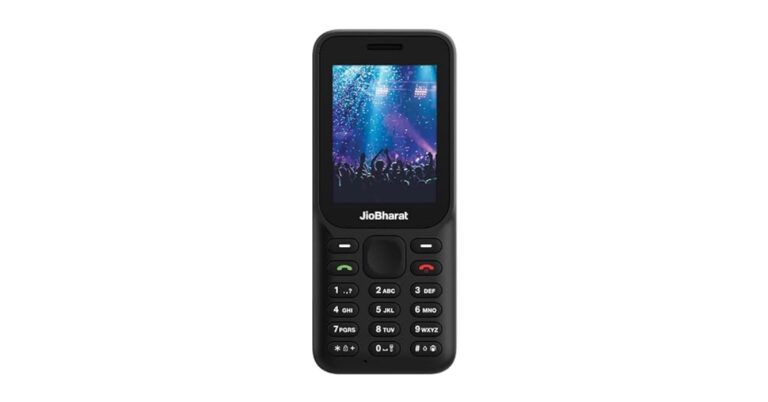
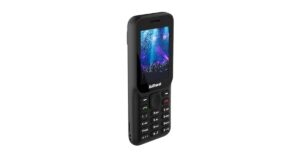
Reliance Jio has unnoticed introduced the JioBharat B1 series in India. The device replaces the JioBharat V2 and K1 Karbonn. It comes with a 2,000mAh battery and a 2.4-inch display. It is a basic feature phone with an alphanumeric keypad with multi-lingual support. The handset supports 4G connectivity. As of now, the telco has presented a single phone but it may bring more mobile phones to the series.
JioBharat B1 price in India and sale details
Reliance has introduced JioBharat B1 in a single variant priced at Rs 1,299. The phone is made available in a lone black colour option. It can be purchased via the company’s official website as well as via Amazon in the country.
JioBharat B1 specifications and features
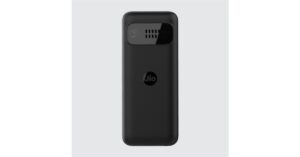
Starting with the design JioBharat B1 sports a shiny and matte finish. The back panel has the company’s log while the rear camera is sitting inside a rectangular module which also has a speaker grille. It has a single nano SIM slot. The mobile phone has a 2.4-inch rectangular QVGA display. It runs on Threadx RTOS. The device comes with a 0.05GB of RAM. While the internal storage can be expanded up to 128GB using a microSD card. There is a provision of Bluetooth, Wi-Fi, and USB. Additionally, the phone includes 4G connectivity.JioBharat B1 has a 2,000mAh battery that is touted to provide up to 343 hours of standby time. The mobile phone comes pre-loaded with JioCinema and JioSaavn.The device includes a rear camera setup and the resolution of the lens is unspecified. It has a 3.5mm headphone jack. The 4G phone has an alphanumeric keypad that is said to support 23 languages, including several regional Indian dialects. Not just that it comes loaded with JioPay, which allows users to make UPI payments.
For the latest gadget and tech news, and gadget reviews, follow us on Twitter, Facebook and Instagram. For newest tech & gadget videos subscribe to our YouTube Channel. You can also stay up to date using the Gadget Bridge Android App. You can find the latest car and bike news here.
The option to hide apps on your smartphone is offered by every major Android-based OS these days. For a lot of users, this is an essential feature that helps them keep their financial and personal apps away from prying eyes. Hiding an app also ensures that your personal files are secure in case your phone falls into malicious hands. In this article, we bring you the top 4 ways to hide apps on an Android smartphone.Read Also:How to Sync Apps between Android devices automatically?
Hide apps on a Samsung smartphone
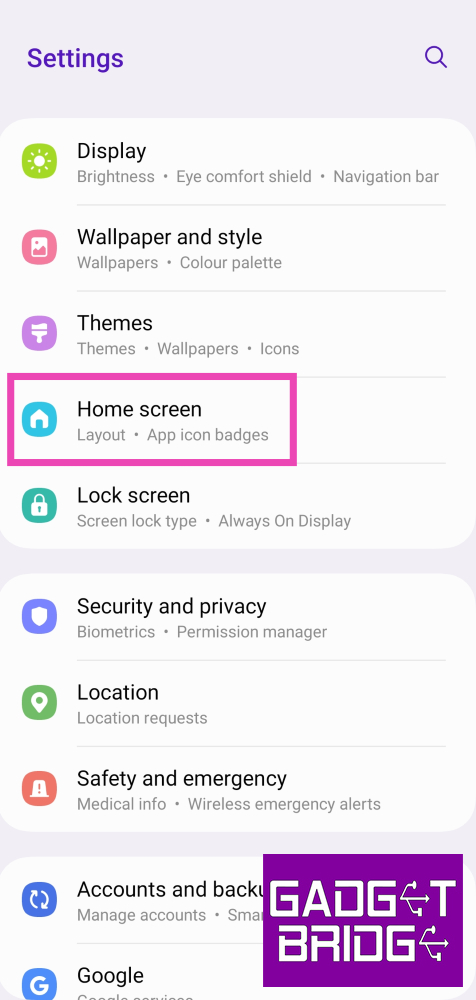
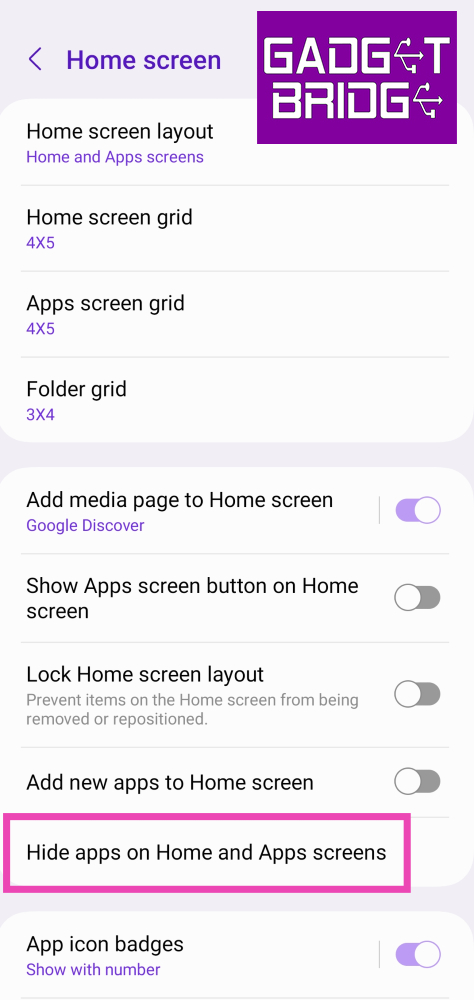
Step 1: Go to Settings and select Home screen.Step 2: Select Hide apps on Home and Apps screens.Step 3: Select the app you want to hide and hit Done.
Hide apps on a Vivo or iQOO smartphone
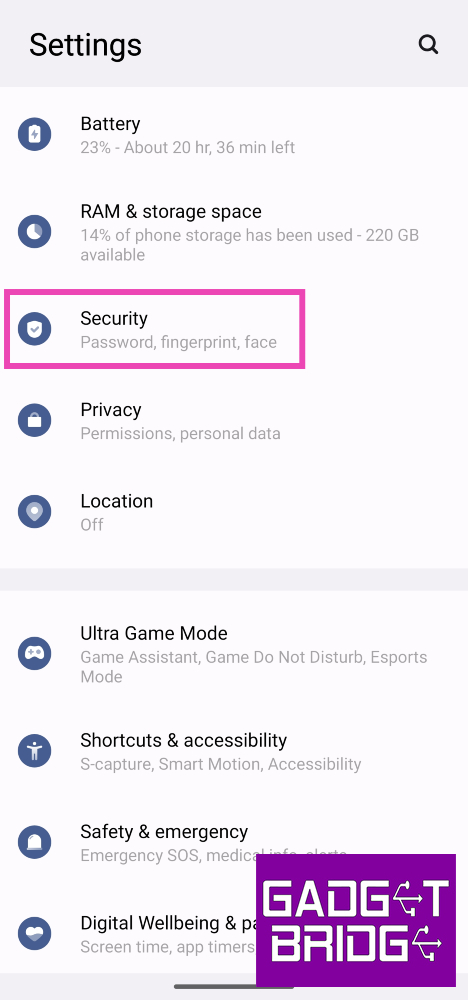
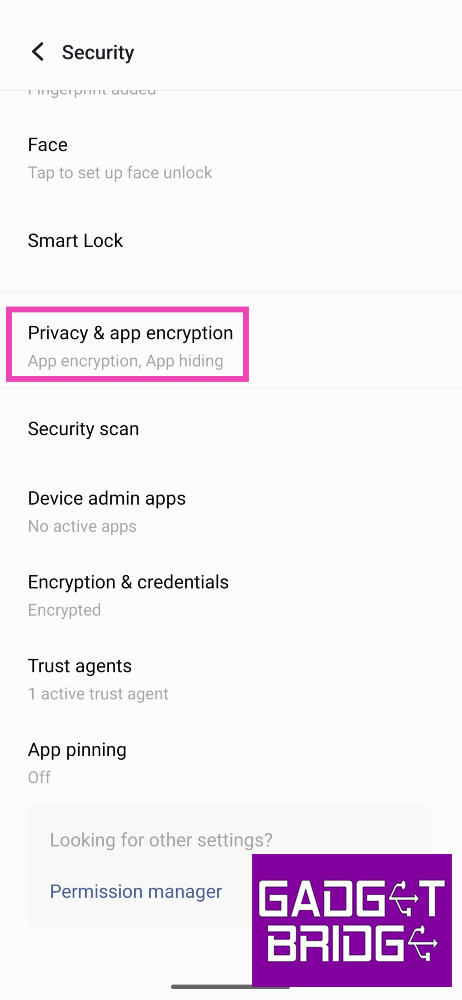
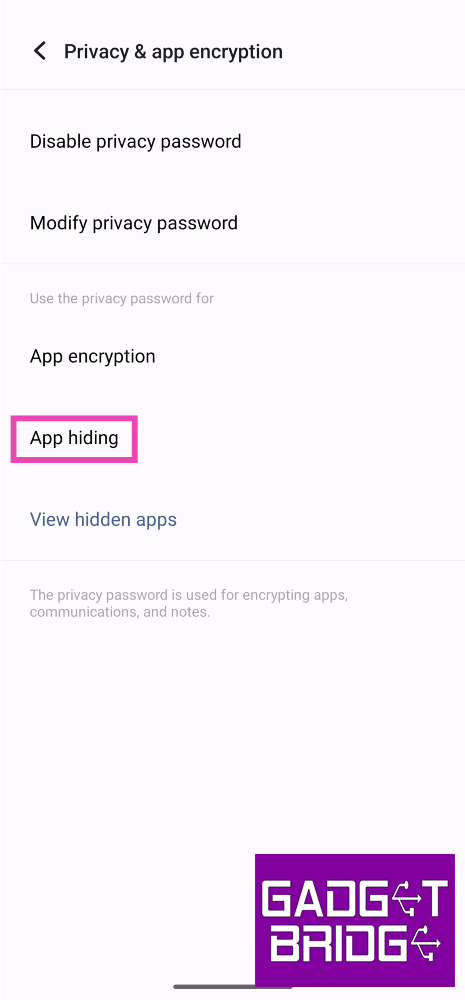
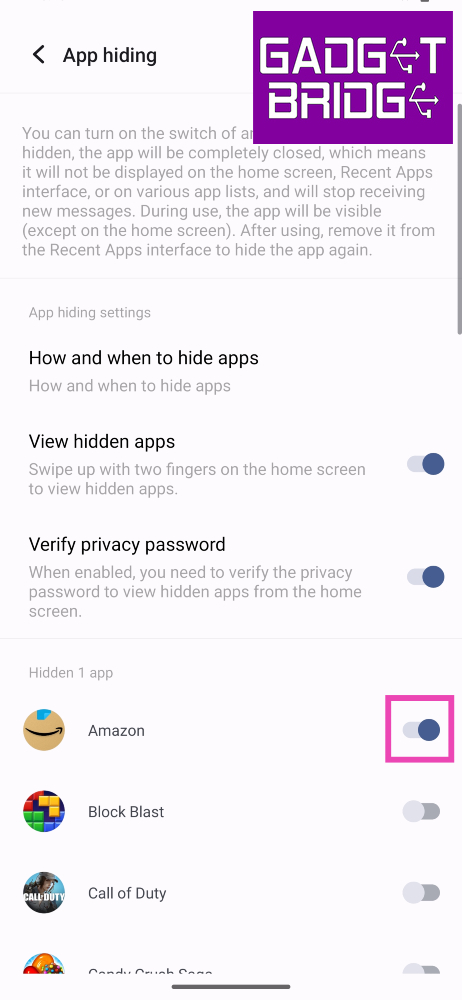
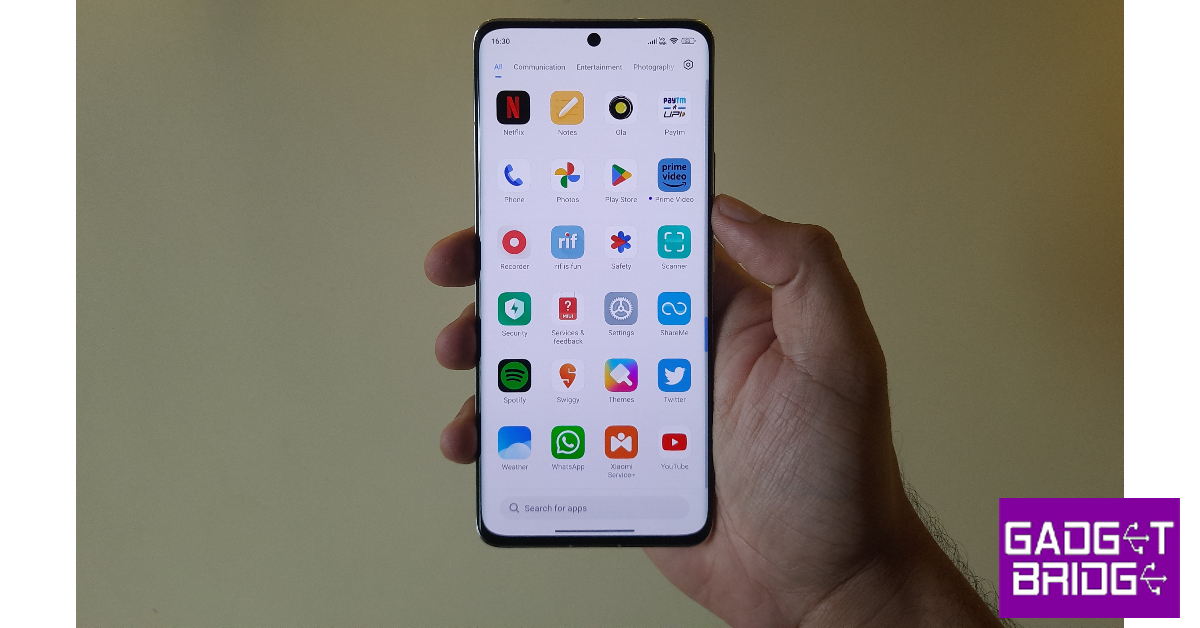
Step 1: Go to Settings and select Security.Step 2: Scroll down and select Privacy & app encryption.Step 3: Enter your privacy password.Step 4: Tap on App hiding.Step 5: Turn on the toggle switch for the apps you want to hide.Step 6: Turn on the toggle switch for View hidden apps to easily access them by swiping up with two fingers on the home screen.
Hide apps on a Xiaomi or Redmi smartphone
Step 1: Go to Settings and select Apps.Step 2: Select App lock.Step 3: Set up a password or enter the pre-existing password.Step 4: Switch to the Hidden Apps tab.Step 5: Turn on the toggle switch for the apps you want to hide.
Use a third-party app to hide apps on Android
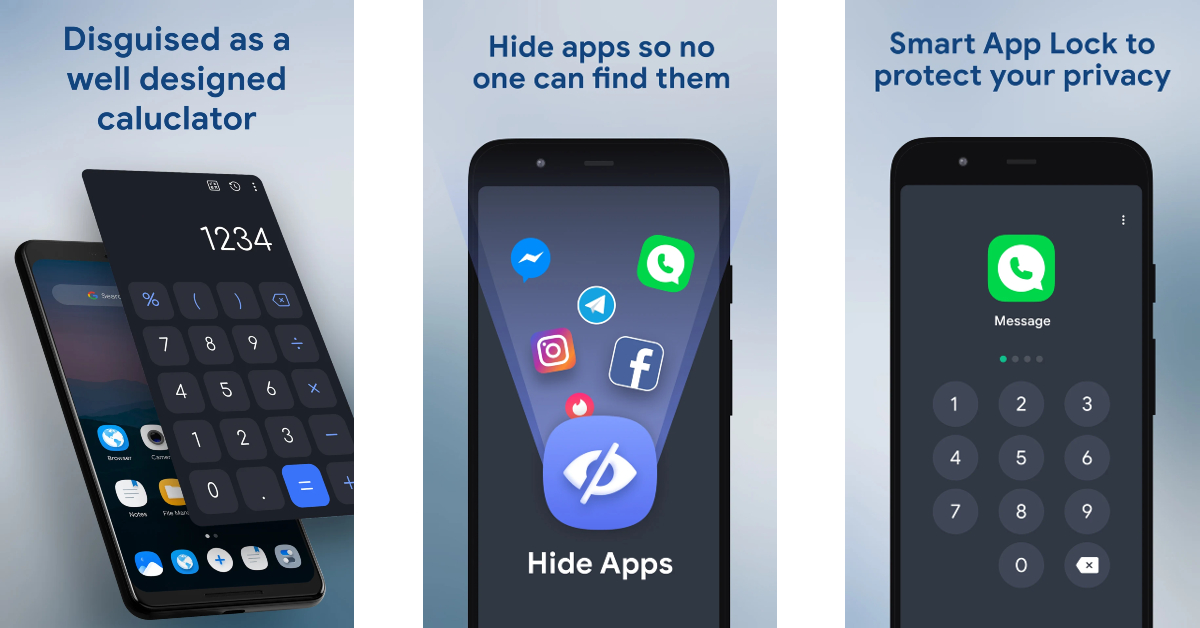
Step 1:Install the HideU: Calculator Lock app on your Android smartphone.Step 2: Set up a 4-digit PIN. Hit the = sign when you’re done.Step 3: Tap on Hide apps.Step 4:Select the app you want to hide.Step 5: Make HideU your default home screen app.Your phone’s home screen will no longer display the selected apps.
Frequently Asked Questions (FAQs)
How do I access hidden apps on Android?
Every Android skin has its own way of letting you access hidden apps. MIUI and Funtouch OS let you view hidden apps by swiping sideways and upwards on the home screen with two fingers respectively. On Samsung devices, you need to unhide the apps to access them again.
What are some good third-party app hiders for Android?
HideU: Calculator Lock, App Hider, and Private Zone are some of the best third-party app hiders for Android.
Some days back OnePlus confirmed the India launch of its upcoming foldable. The company has now confirmed that the OnePlus Open will make its debut in the country on October 19 which is next week. The company has not revealed the specs nor the design of its foldable, but it has been teasing the upcoming device through teasers. Also, the specs details and features of the OnePlus Open have been doing the rounds on the web for a long. Multiple reports have also surfaced on the internet sharing some glimpses of the device.OnePlus has officially confirmed that its first foldable OnePlus Open will launch in India on October 19. The same day its sister company Oppo will also hold a global launch of the Oppo N3 Fold and Oppo N2 Flip.The OnePlus Open India launch event will take place in Mumbai, India. As per the media invite the event is set to begin at 7.30 PM.
As we said earlier the company has not revealed the specs and features of its foldable. But the official teaser gives us a glimpse of the device. The teasers show the phone slightly opened. Based on the teaser, we should expect the phone will be available in black, with further colour options available. Moreover, an Alert Slider on the left edge can also be seen. Moreover, there are volume rocker and a power button on the right side of the frame.Leaked images also suggest a circular rear camera module on the upper side of the back panel at the centre. The device is likely to come with rounded corners and a lychee-like leather finish.OnePlus Open is likely to sport a 7.82-inch OLED primary display with 2,440×2,268 pixels of resolution. On the other hand, there could be a 6.31-inch OLED outer display with 1,116 x 2,484 pixels of resolution. Both the screen may support a refresh rate of 120Hz. The device is expected to be powered by an octa-core Qualcomm Snapdragon 8 Gen 2 SoC along with 16GB of RAM and up to 1TB of storage.The foldable phone is speculated to feature a circular camera module with three camera sensors arranged inside it. The camera system consists of a 48-megapixel primary lens, a secondary 48-megapixel sensor, and a 64-megapixel telephoto sensor with 3x optical zoom. It might also include a 32-megapixel or a 20-megapixel front-facing camera.The device may also include a 4,805mAh battery with support for 100W wired fast charging.
For the latest gadget and tech news, and gadget reviews, follow us on Twitter, Facebook and Instagram. For newest tech & gadget videos subscribe to our YouTube Channel. You can also stay up to date using the Gadget Bridge Android App. You can find the latest car and bike news here.
Garena Free Fire is a battle royale game with regular awards and tournaments to keep players interested. If you play Garena Free Fire, you should be aware of the redeem codes that are released on a daily basis. However, because the battle royale game is banned in India, players from other countries can use the Free Fire Redeem codes daily. If you’re unfamiliar with the Garena Free Fire redeem codes or don’t know how to get them, we’ve put together a step-by-step guide to help you redeem them. Check out Garena Free Fire Redeem Codes for 13 October 2023.The Free Fire redeem codes are a great way to get free stuff. These are 12-digit codes that contain alphabets and numbers, as well as an expiration date and time. Because the Garena FF redeem codes cannot be used more than once, you should hurry to the redemption page to claim your free reward before someone else does. To get a free reward, all you have to do is go to reward.ff.garena.com/en, which is the official redemption page. Also, keep an eye on this space for daily updates on Garena Free Fire redemption codes and rewards.
Garena Free Fire Redeem Codes Today 13 October2023
updating…
How to Get Free Fire Redeem Codes for Garena on 13 October2023?
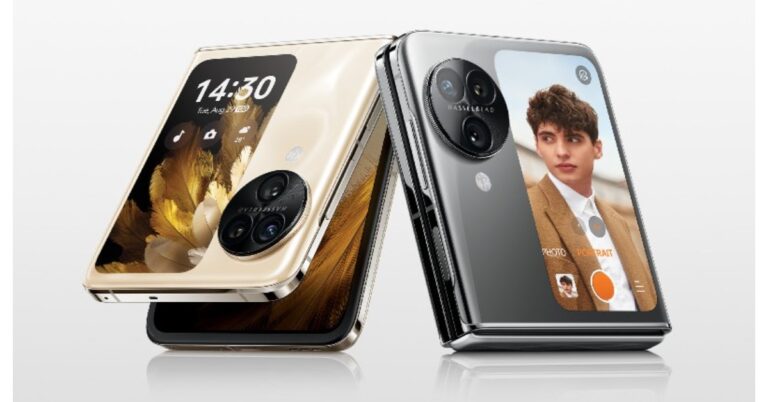
Oppo Find N3 Flip has finally arrived in India. The device is currently up for pre-order in the country. It has a vertically positioned cover screen and a circular-shaped camera module. There is an alert slider as well on the phone. The device will take on its rivals Samsung and Motorola who have already launched their clamshell design phone in India.
Oppo Find N3 Flip price in India and availability
The Oppo Find N3 Flip price in India is set at Rs 94,999 for the 12GB RAM with 256GB storage option. The flip phone come in two colour Sleek Black and Cream Gold. To recall the foldable device was made available in three colour options of Mirror Night, Mist Rose, and Moonlight Muse.The device is scheduled to go on sale on October 22. It can be purchased via the company’s official online store and Flipkart starting at 6 PM. The pre-order window has also opened.Also Read:Google Pixel 8 Series first sale in India begins: Pricing and offer details insideThere will be up to Rs 12,000 cashback on SBI cards, ICICI Bank cards and more. Up to 12 months, no no-cost EMI options are available. Oppo customers can upgrade to the new Flip Phone with an exchange bonus of up to Rs 8,000. Also, there is a one-time screen replacement offer on the handset along with Oppo Premium Services.The buyers will also get to enjoy a 3-month trial of YouTube Premium and 6 6-month free trial of Google One.
Oppo Find N3 Flip features and specs
Oppo Find N3 Flip’s primary display features an AMOLED 6.80-inch screen with 1,080×2,520 pixels of resolution. There is support for a dynamic refresh rate that ranges between 1Hz to 120Hz. The clamshell-style foldable phone has an additional 3.26-inch cover display, akin to its predecessor, and is vertically positioned with 382×720 pixels of resolution. The cover screen supports over 40 native cover screen apps. In addition to this, there is an alert slider on the side. An octa-core MediaTek Dimensity 9200 SoC powers the phone along with 256GB of UFS 4.0 internal storage and 12GB of LPDDR5X RAM. The device comes with colorOS 13 out of the box. The company is promising 4 years of major OS updates and 5 years of security patches.The Find N3 Flip sports triple rear cameras arranged inside a circular module which sits beside the cover screen. The camera system consists of a 32-megapixel telephoto sensor, an 8-megapixel ultra-wide-angle sensor, and a 50-megapixel Sony IMX890 main lens with OIS feature. The smartphone further features a 32-megapixel front camera for taking selfies and making video calls.Also Read:Samsung Galaxy Z Flip 5 Review: Flip it good!The Oppo Find N3 Flip is fuelled by a 4,300mAh battery with 44W supervooc wired charging support. To unlock the device the Find N3 Flip has a side-mounted fingerprint scanner. A gravity sensor, gyroscope, compass and an ambient light sensor are also available on the phone. The Oppo Find N3 Flip has 5G, Wi-Fi, Bluetooth, and NFC connectivity options.
For the latest gadget and tech news, and gadget reviews, follow us on Twitter, Facebook and Instagram. For newest tech & gadget videos subscribe to our YouTube Channel. You can also stay up to date using the Gadget Bridge Android App. You can find the latest car and bike news here.
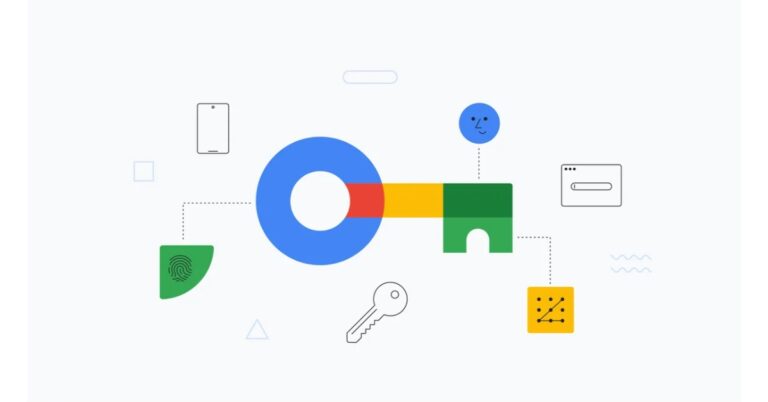
Google has started to ask its users to start setting up passkeys on their devices for secure login across its products. This move will eliminate the need to remember tricky and difficult passwords for logging into Google Services. Hence the logins will become much easier, secure and faster as they will require a fingerprint, face scan, or PIN.You no longer need to remember or establish a tricky password with alphanumeric and unique characters to secure your online accounts. Google is completely removing the complicated password system as it has finally implemented passkeys across all its services. According to the company, Google Passkeys are more secure and 40 percent faster than traditional passwords. So now when you log in to your accounts online you will be asked to create and use passkeys, simplifying your future sign-ins. You also have the option to “Skip password when possible” option toggled on in your Google Account settings.Passkey requires a fingerprint, face scan or PIN to unlock your device. As per the tech giant, it relies on a type of cryptography which is more secure.“But while they’re a big step forward, we know that new technologies take time to catch on — so passwords may be around for a little while. That’s why people will still be given the option to use a password to sign in and may opt out of passkeys by turning off “Skip password when possible.” Google noted in its blog post.As per the company even if you use a strong password with special characters, numbers and alphabets they are now phishing resistant in contrast to Google Passkeys.
What is a passkey?
A passkey is a FIDO credential that is stored on your computer or phone and is used to sign in on online accounts. As per the company logging in is more secure thanks to the passkey. It makes use of public key cryptography, and proof of possession is only shown to your online account when you unlock your phone. It uses biometrics such as a fingerprint or face scan, or a screen lock PIN, to securely log you into your accounts across the web. Passkeys take care of securely completing authentication with a service on your behalf, so you don’t have to remember passwords for sign-in. For the latest gadget and tech news, and gadget reviews, follow us on Twitter, Facebook and Instagram. For newest tech & gadget videos subscribe to our YouTube Channel. You can also stay up to date using the Gadget Bridge Android App. You can find the latest car and bike news here.
Earlier this year, Google introduced the feature to automatically sync apps between two Android devices. This comes in quite handy if you use multiple phones or tablets for work and recreation. Any app you download on one device will be installed on the other as well. You can select which devices on which you want the apps to automatically sync. The only condition is that you need to be logged into the same Google account on both devices. So, without further ado, here is how you can sync apps between Android devices automatically.Read Also:Top 3 Ways to Update Apps on Android Phone or Tablet Manually
Sync apps between Android devices
Step 1: Launch the Google Play Store app on the Android device from which you want to sync your apps.Step 2: Tap your profile picture at the top right corner of the screen.Step 3: Select Manage apps and device.Step 4: Tap on Sync apps to devices.Step 5:Select the device to which you want to sync your installed apps. Any apps you install on your current device will also be installed on the selected device.
Frequently Asked Questions (FAQs)
Does auto-sync install all my older apps on the device?
No. Once you turn on syncing between two Android devices, only the apps that you install after the feature is enabled will be synced to the other device.
Can I manually install an app on another device?
If you are logged into the same Google account on both devices, you can remotely install a particular app on any one of them. Simply go to the app’s Play Store page and hit the arrow next to the Install button. Select the device on which you want to install the app.
Google Pixel 8 Series debuted in India last week. The new smartphone series by the tech giant includes two models Pixel 8 and Pixel 8 Pro. They both feature the iconic Pixel design. Under the hood, there is a Tensor G3 processor by Google. They run on the Android 14 operating system.
Google Pixel 8, Pixel 8 Pro price in India, sale details
Pixel 8 price in India and colour options
8GB RAM with 128GB storage: Rs 75,999
8GB RAM with 128GB storage: Rs 82,999
Colour options: Hazel, Obsidian and Rose
Pixel 8 Pro price in India
12GB RAM with 128GB storage: Rs 1,06,999
Colour options: Bay, Obsidian and Porcelain
Both devices are not available on Flipkart in the country. There will be an instant discount of up to Rs 8,000 on ICICI, Kotak Mahindra, and Axis Bank card transactions on Pixel 8. Rs 3,000 off can be availed in exchange for an old phone. There will be up to Rs 9,000 discount on select bank cards on the purchase of the Pro variant along with Rs 4,000 exchange discount.Pixel 8
Pixel 8 Series specifications
The Pixel 8 comes with a 6.2-inch FHD+ Actua display with 1080 x 2400 pixels of resolution. The OLED screen has an Adaptive refresh rate ranging between 60Hz and 120Hz and supports 2,000 nits of peak brightness.Also Read:New Pixel 8, Pixel 8 Pro unleashed: Price in India, availability detailsWhereas the Pixel 8 Pro is highlighted with a 6.7-inch Super Actua display with 1344 x 2992 resolution. It supports an Adaptive refresh rate ranging from 1Hz to 120Hz and 20:9 aspect The LTPO OLED features a peak brightness of 2,400 nits. The front panel is protected with Corning Gorilla Glass Victus 2. There is a temperature sensor on the back of the Pro model.Both smartphones are powered by Google Tensor G3 SoC with Titan M2 security coprocessor. They run on Android 14 with Pixel-exclusive features onboard. For photos and videos, the Pixel 8 Series includes a similar 10.5-megapixel Dual PD sensor on the front panel for taking selfies. The selfie camera on the Pixel 8 has a fixed focus while the Pixel 8 Pro has an autofocus.Pixel 8 ProThe Pixel 8 and Pixel 8 Pro have a primary 50MP Octa PD sensor with f/1.68 aperture. The secondary camera on the vanilla variant is a 12 MP ultrawide camera with an auto-focus. Whereas the pro variant comes with a 48 MP Quad PD ultrawide camera with autofocus. The Pro’s camera system also includes a third 48 MP Quad PD telephoto lens with 5x optical zoom.The Google Pixel 8 boasts a 4,485mAh battery with 24W wired and 12W wireless fast charging support. On the other hand the Pixel 8 Pro sports a 4,950mAh battery.
For the latest gadget and tech news, and gadget reviews, follow us on Twitter, Facebook and Instagram. For newest tech & gadget videos subscribe to our YouTube Channel. You can also stay up to date using the Gadget Bridge Android App. You can find the latest car and bike news here.
Reddit is one of the biggest content-aggregating websites in the world. The platform has millions of niche communities called ‘subreddits’ that generate discourse about the subject they are based on. One of the most underrated features of Reddit is the ability to download videos directly to your device. Users who are new to the platform or have just started using the official smartphone app may not be aware of this feature. In this article, we bring you the top 5 ways to download Reddit videos on your smartphone with sound.Read Also:Oppo Find N3 Flip expected to launch at this pricing
Download Reddit videos on your phone from the official app
Step 1:Launch the official Reddit app on your smartphone.Step 2:Open the video you want to download.Step 3: Hit the Share icon.Step 4: Tap on Download.
Another way to download Reddit videos on your phone
Step 1:Launch the official Reddit app on your smartphone.Step 2:Open the video you want to download.Step 3: Tap the ellipses at the top right corner of the screen.Step 4: Select Download.
Use a third-party tool
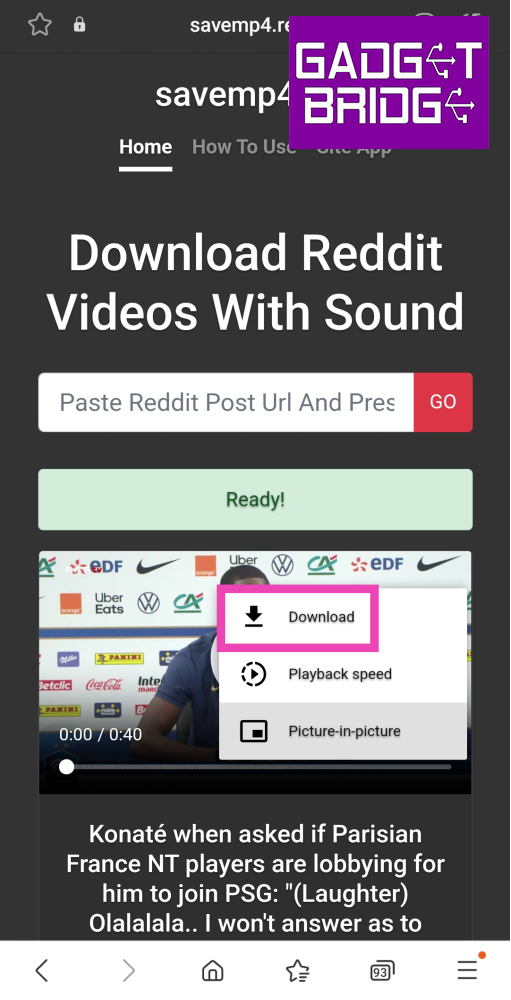
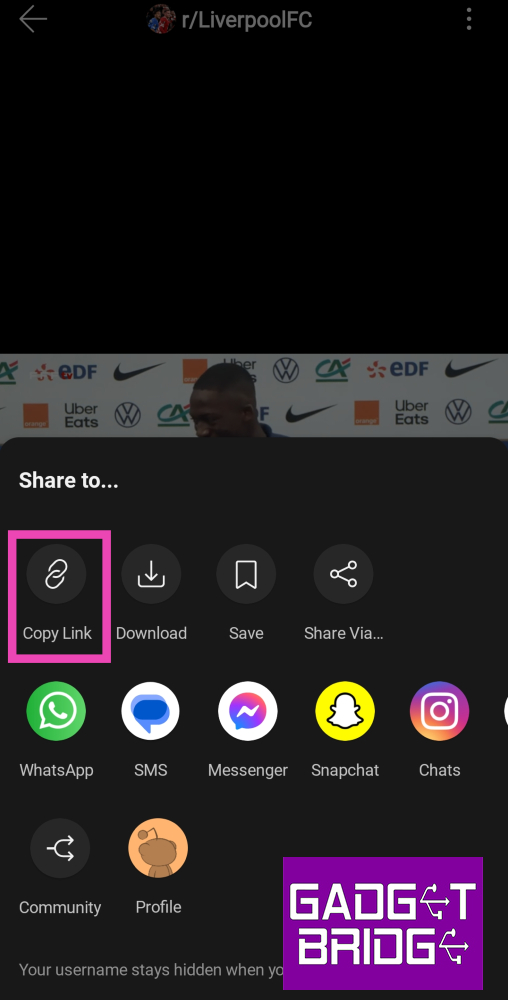
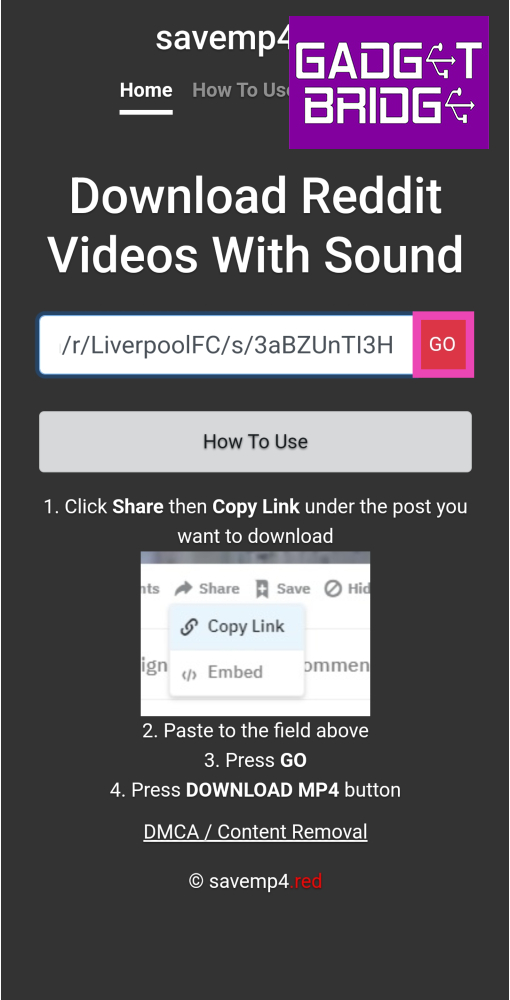
Step 1:Launch the official Reddit app on your smartphone.Step 2:Open the video you want to download.Step 3: Hit the Share icon.Step 4: Tap on Copy Link.Step 5:Launch your preferred web browser on your smartphone.Step 6: Go to https://savemp4.red/.Step 7: Paste the link in the website’s address box and hit Go.Step 8: Tap the ellipses in the video player and hit Download.
Use the u/SaveVideo bot
Reddit’s native download option may not always work on every video. If you don’t want to use a third-party online tool or app to download the video on your device, you can use a Reddit bot instead. Simply go to the video post and comment u/SaveVideo. The bot will respond to your comment with a downloadable link to the video. If you don’t receive a comment with the link right away, wait for some time as the bot may be flooded with requests. You can also check if someone else in the comments has summoned the bot. In that case, you can simply download the video using the link in the commenter’s reply thread.
Use a third-party app
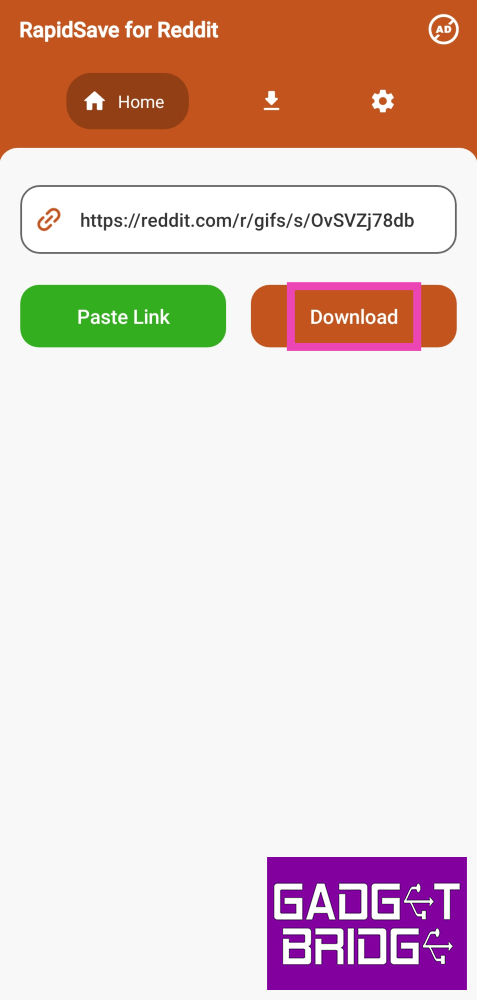
If the Reddit video you’re trying to download is posted on another platform (like Gfycat), you will need a third-party app to download it on your device. Here’s how.Step 1:Download the Video Downloader for Reddit app from the Google Play Store.Step 2: Launch the app and paste the link to the video.Step 3: Hit the Download button.The Reddit video will be saved on your device.
Frequently Asked Questions (FAQs)
Does the official Reddit app let you download videos with sound?
Yes, you can download videos from Reddit by tapping the ellipses or share icon and selecting ‘Download’.
Why can’t I hear any sound on Reddit videos?
Most videos on Reddit are muted by default. To play sound on a video, tap the speaker icon at the bottom right corner of the screen.
I don’t see the download button on Reddit. How do I download a video to my device?
If you are unable to access Reddit’s native download feature, simply paste the video link to a third-party tool or app like savemp4.red. The video will be downloaded to your device. You can also comment u/SaveVideo on the post and the bot will respond to your comment with a downloadable link to the video.Read Also:Great India Festival: Best camera smartphone deals under Rs 20,000 on Amazon
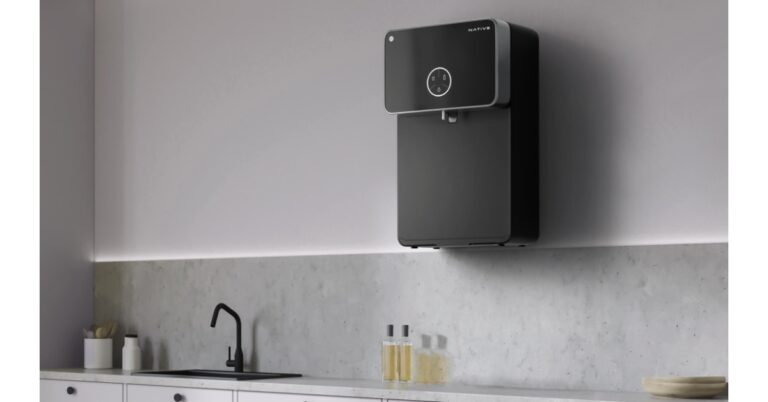
Home services platform Urban Company has announced the launch of a new range of smart RO water purifiers under the sub-brand Native. Two models Urban Company Native M1 and Native M2 have been introduced. As per the company both the water filters come with superior filters and ‘rapid reverse rinse’ technology, so you don’t need filter changes or servicing for 2 years. In addition to this, the UC is offering a 2-year ‘zero-cost’ comprehensive warranty covering all filters, and membranes along with spare parts.Also Read:Spotify is disabling some features for free users in India
Urban Company Native M1 and Native M2 Price and Availability
The Urban Company Native M2 Water Purifier has been launched at an introductory price of Rs 17,499. On the other hand, the Native M1 will be available at a launch price of Rs 13,499. The Urban Company smart RO can be purchased via the company’s app and website as well as on Amazon. Additionally, it will also be selling offline on Croma stores soon.
Urban Company Native M1 and Native M2 water purifier features
Urban Company Native Water Purifier can give 12000 litres of pure water without needing their filters changed. Also, there is no need for servicing for 2 years. The Native M1 and Native M2 are equipped with ‘rapid reverse rinse’ technology, and multi-micron filter surfaces that increase the longevity of smart RO for two years.The Urban Company Native M2 comes with an IoT feature that allows users to keep a tab on TDS levels in real time along with water consumption and filter life status. This can be easily monitored on the UC app. In addition to this, the water filters are provided with a ‘zero-cost’ warranty that includes filters, membranes and all other spare parts for the two-year period.The Urban Company RO have a tank with a capacity of 8 litres. Both the water filters have the latest design. The M2 offers a mirror design with a brushed metal finish. It sports 3 preset dispensing modes and a breathing LED indicator that displays IoT pairing status. On the other hand, the Native M1 boasts 9 stages of filtration (RO + UV + UF + MTDS Minerals and Alkaline Filters) that is capable of eliminating 99.99% impurities including chemical contaminants like metal ions, chromium, lead, and sodium and reducing arsenic, radium, fluoride, sulphate, magnesium, amongst others. Whereas Native M2 has 10 stages of filtration, with all the stages of the M1 device + copper-charged filters.
For the latest gadget and tech news, and gadget reviews, follow us on Twitter, Facebook and Instagram. For newest tech & gadget videos subscribe to our YouTube Channel. You can also stay up to date using the Gadget Bridge Android App. You can find the latest car and bike news here.


 JioBharat B1 has a 2,000mAh battery that is touted to provide up to 343 hours of standby time. The mobile phone comes pre-loaded with JioCinema and JioSaavn.
The device includes a rear camera setup and the resolution of the lens is unspecified. It has a 3.5mm headphone jack. The 4G phone has an alphanumeric keypad that is said to support 23 languages, including several regional Indian dialects. Not just that it comes loaded with JioPay, which allows users to make UPI payments.
For the latest gadget and tech news, and gadget reviews, follow us on Twitter, Facebook and Instagram. For newest tech & gadget videos subscribe to our YouTube Channel. You can also stay up to date using the Gadget Bridge Android App. You can find the latest car and bike news here.
JioBharat B1 has a 2,000mAh battery that is touted to provide up to 343 hours of standby time. The mobile phone comes pre-loaded with JioCinema and JioSaavn.
The device includes a rear camera setup and the resolution of the lens is unspecified. It has a 3.5mm headphone jack. The 4G phone has an alphanumeric keypad that is said to support 23 languages, including several regional Indian dialects. Not just that it comes loaded with JioPay, which allows users to make UPI payments.
For the latest gadget and tech news, and gadget reviews, follow us on Twitter, Facebook and Instagram. For newest tech & gadget videos subscribe to our YouTube Channel. You can also stay up to date using the Gadget Bridge Android App. You can find the latest car and bike news here. 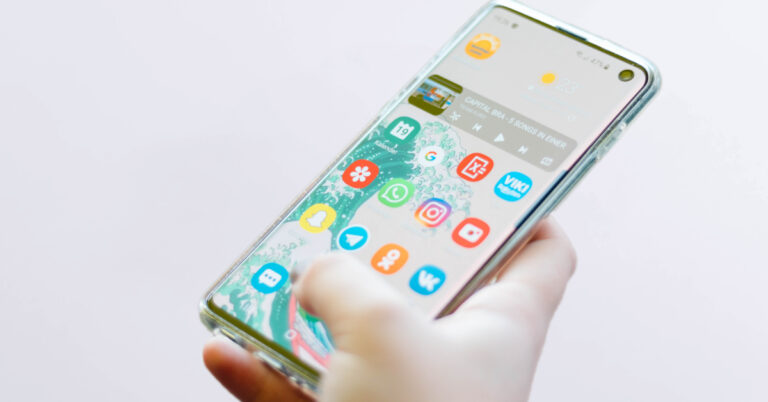
 Step 2:
 Step 3: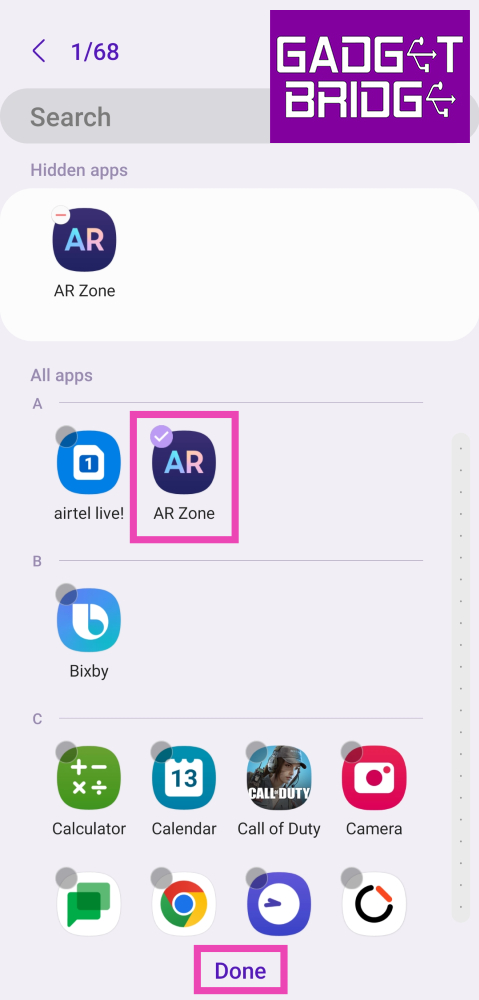
 Step 2:
 Step 3:
 Step 5:
 Step 6:
 Step 1:
 Step 1: Install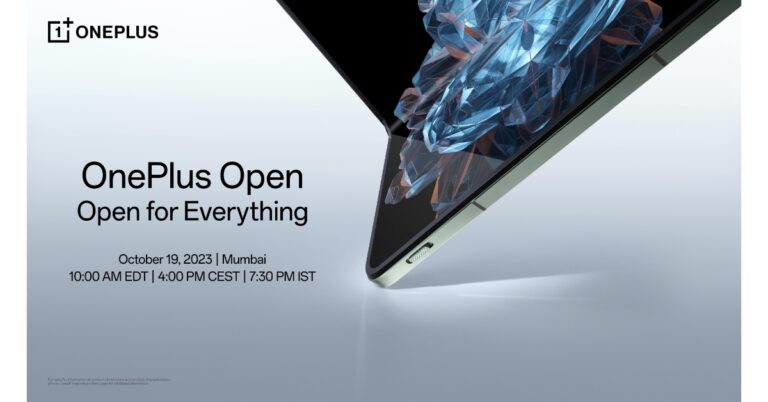


 Step 3:
 Step 4:
 Step 5: Select the device


 Step 4: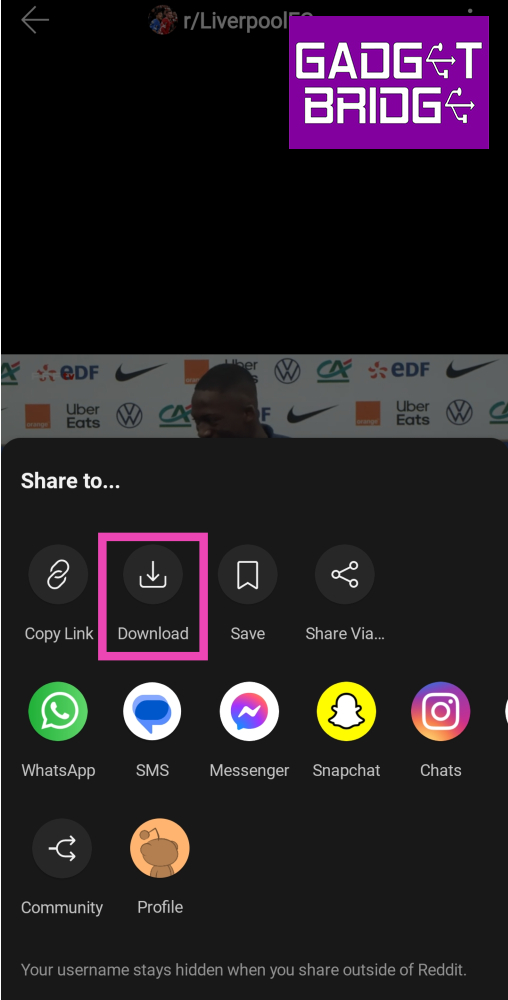
 Step 4: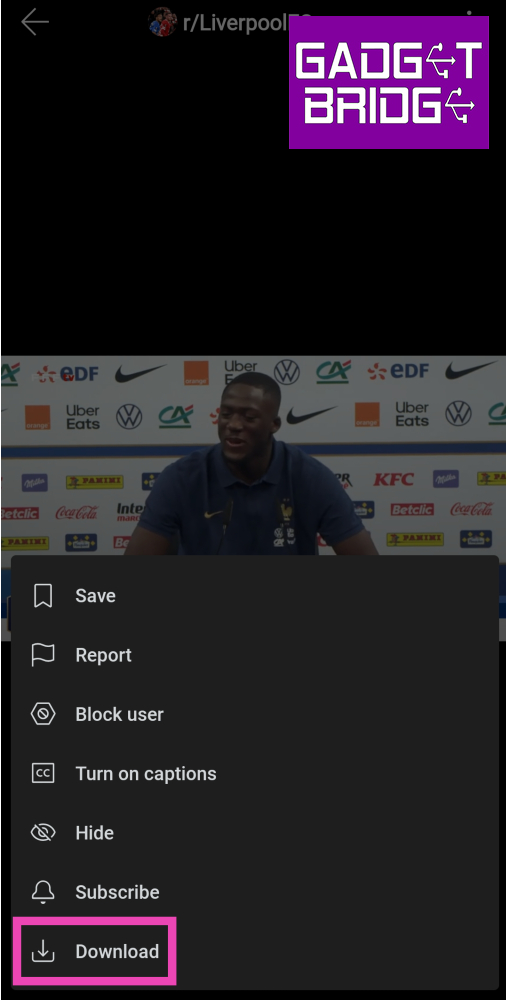
 Step 5: Launch
 Step 8: