Oppo Find N3 Flip India launch today: How to watch the event live

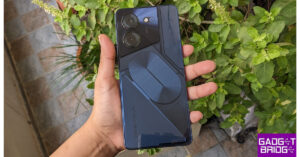
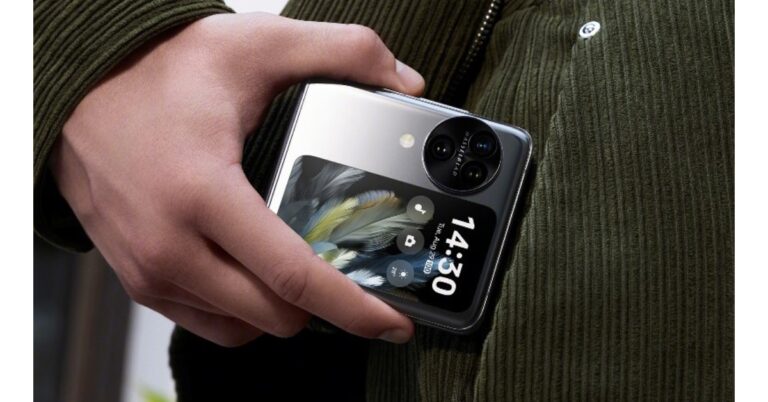
Oppo is all set to launch a new foldable phone in India today. After launching in China in August this year Oppo Find N3 Flip will hit the India shore today. The device comes with a completely new design compared to the Samsung Galaxy Flip 5. The upcoming flip phone features a vertically positioned cover display and a round camera module beside it. The phone has a 3.26-inch cover and a 6.80-inch primary AMOLED screen. A MediaTek Dimensity 9200 SoC will power the clamshell design phone.

How the watch the Oppo Find N3 Flip launch event livestream

Oppo Find N3 Flip is scheduled to debut in India today. The company will be hosting a dedicated launch event to present the device. The launch live stream will start at 7 PM via the company’s official YouTube channel as well as via its official social media channels. However you can also watch the launch event live here on our website, we are embedding a link below.

Oppo Find N3 Flip Price in India expected

Ahead of the official announcement the price of Find N3 Flip has been leaked. According to a tipster, the Oppo Find N3 Flip price in India will start at Rs 94,999 for the 12GB RAM with 256GB storage option. The tipster claims that after the discount the device will be available at Rs 89,622. Also Read: Great India Festival: Best camera smartphone deals under Rs 20,000 on Amazon

Oppo Find N3 Flip specifications

Oppo Find N3 Flip is highlighted with an AMOLED primary display measuring 6.80 inches with a 120Hz refresh rate. There is a 3.26-inch vertical cover display, like its predecessor. The handset is powered by an octa-core MediaTek Dimensity 9200 SoC that powers the clamshell-style foldable phone along with up to 512GB of internal storage and 12GB of RAM. Oppo Find N3 Flip Price in India expected The Find N3 Flip features a circular camera set-up beside its outer display that includes a triple rear camera arrangement. The camera system consists of a 32-megapixel telephoto sensor, an 8-megapixel ultra-wide-angle sensor, and a 50-megapixel Sony IMX890 main lens with OIS capability. The phone includes a 32-megapixel front camera for taking selfies and making video calls. The clamshell design phone has a side-mounted fingerprint scanner. A gyroscope and an ambient light sensor are also present. The Oppo Find N3 Flip has 5G, Wi-Fi, Bluetooth, and NFC connectivity options. The phone sports a 4,300mAh battery with 44W wired charging support. For the latest gadget and tech news, and gadget reviews, follow us on TwitterFacebook and Instagram. For newest tech & gadget videos subscribe to our YouTube Channel. You can also stay up to date using the Gadget Bridge Android App. You can find the latest car and bike news here.

Top 3 Ways to Update Apps on Android Phone or Tablet Manually

0
If you use a lot of apps on your Android phone, automatic updates can eat up a lot of mobile and WiFi data. This is why some users prefer selectively updating the apps that they use the most. Google Play Store makes it easy to pick and choose the apps you want to update at any given time. In this article, we bring you the top 3 ways to manually update apps on your Android phone and tablet. Read Also: Global PC shipments fell 7.6% YoY in Q3 2023: Report

Update Android apps manually from the Google Play Store

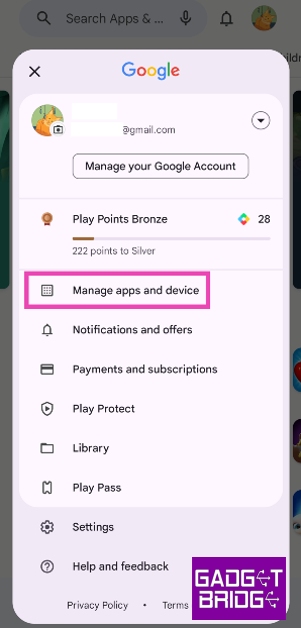
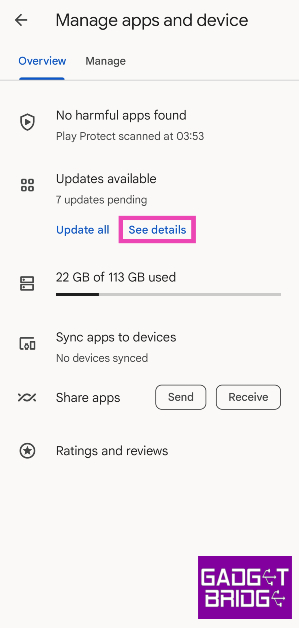
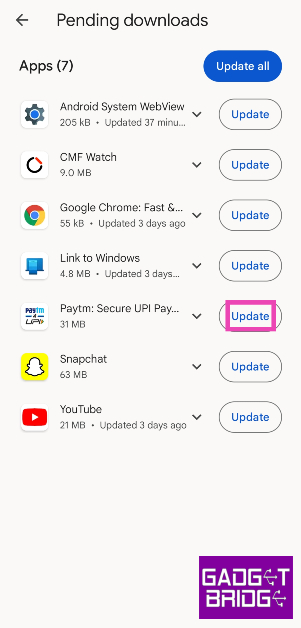
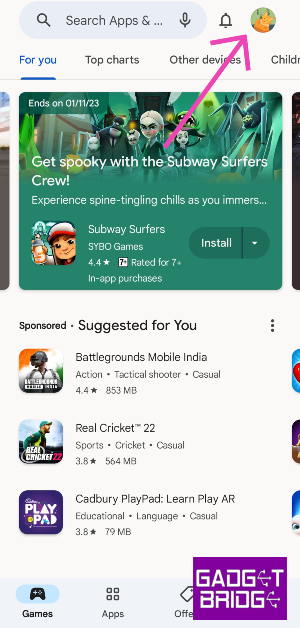
Step 1: Launch the Google Play Store app on your Android phone or tablet. Step 2: Tap your profile icon at the top right corner of the screen. Step 2: Tap your profile icon at the top right corner of the screen. Step 3: Select Manage apps and device. Step 3: Select Manage apps and device. Step 4: Tap on See details under Updates available. Step 3: Select Manage apps and device. Top 3 Ways to Update Apps on Android Phone or Tablet Manually Step 5: Hit the Update button next to the app you want to update. Step 5: Hit the Update button next to the app you want to update. Top 3 Ways to Update Apps on Android Phone or Tablet Manually

Manually update a single app on Android

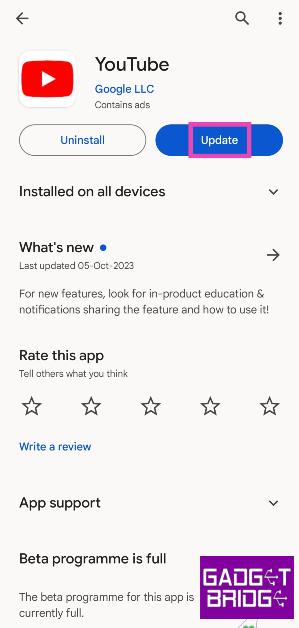
Step 1: Launch the Google Play Store app on your Android phone or tablet. Step 2: Search for the app you want to update. Step 3: Open the app’s page. Step 3: Open the app’s page. Top 3 Ways to Update Apps on Android Phone or Tablet Manually Step 4: Hit Update.

Use a third-party app marketplace

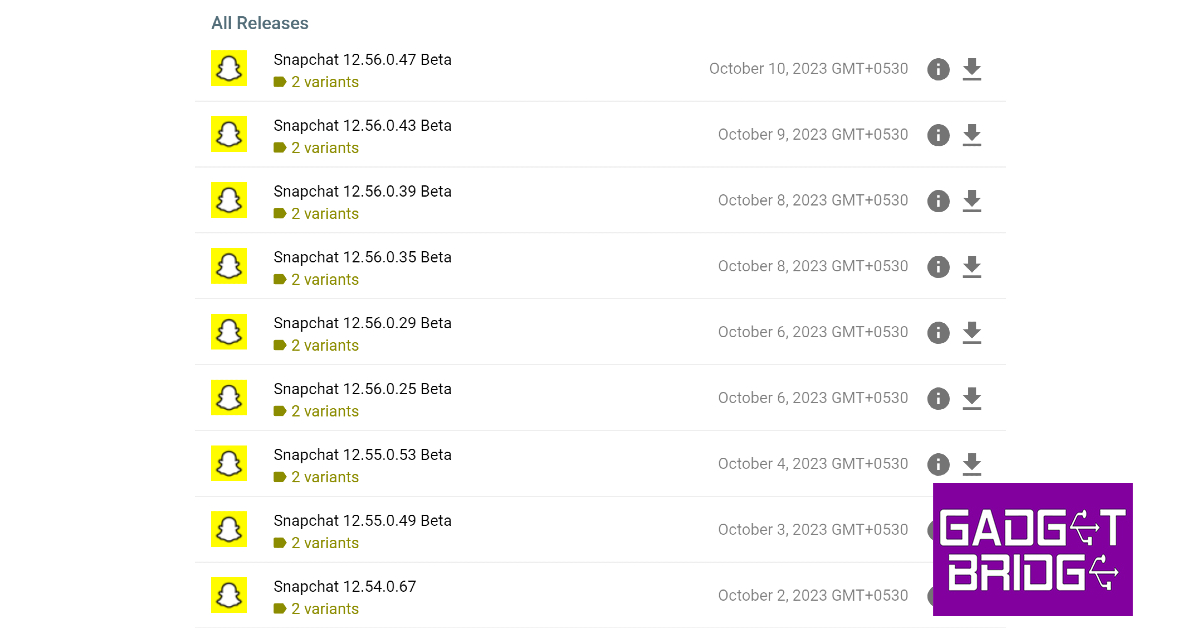
Step 4: Uninstall Snapchat from your device and download an older version from a third-party marketplace. Top 4 Ways: How to Get Dark Mode in Snapchat on Android and iOS? If you are reluctant to use the Google Play Store on your Android device, you can always check out third-party marketplaces like APKMirror, Softonic, and F-Droid for the latest versions of your favourite apps. One of the advantages of using third-party marketplaces is that they also let you download older versions of the apps. This cannot be done on the Google Play Store. Before you install the downloaded APK on your Android device, make sure to allow installations from unknown sources in device settings.

Frequently Asked Questions (FAQs)

How do I update all my apps at once?

To update all the apps on your Android phone at once, go to Google Play Store>Manage apps and device and select Update all.

How do I turn on auto-updates for just one app on my Android device?

If you want to turn on automatic updates for a particular app on Android, go to the app’s page on Google Play Store, hit the ellipses on the top right corner of the screen and select the check box for auto-updates.

What are some of the most trusted websites for third-party app downloads on Android?

APKMirror, Uptodown, APKPure, F-Droid, and Softonic are some of the most trusted third-party app marketplaces for Android. Read Also: Nokia G42 5G new variant now available in India

Conclusion

These are the top 3 ways to manually update apps on your Android phone or tablet. It is recommended that you keep the apps on your phone updated at all times since the latest versions of the apps are generally more secure and do not contain any pesky bugs that may be plaguing the older versions. For the latest gadget and tech news, and gadget reviews, follow us on Twitter, Facebook and Instagram. For newest tech & gadget videos subscribe to our YouTube Channel. You can also stay up to date using the Gadget Bridge Android App. You can find the latest car and bike news here.

Garena Free Fire Redeem Codes Today 12 October 2023: Here is how to claim them

Garena Free Fire is a battle royale game with regular awards and tournaments to keep players interested. If you play Garena Free Fire, you should be aware of the redeem codes that are released on a daily basis. However, because the battle royale game is banned in India, players from other countries can use the Free Fire Redeem codes daily. If you’re unfamiliar with the Garena Free Fire redeem codes or don’t know how to get them, we’ve put together a step-by-step guide to help you redeem them. Check out Garena Free Fire Redeem Codes for 12 October 2023. The Free Fire redeem codes are a great way to get free stuff. These are 12-digit codes that contain alphabets and numbers, as well as an expiration date and time. Because the Garena FF redeem codes cannot be used more than once, you should hurry to the redemption page to claim your free reward before someone else does. To get a free reward, all you have to do is go to reward.ff.garena.com/en, which is the official redemption page. Also, keep an eye on this space for daily updates on Garena Free Fire redemption codes and rewards.

Garena Free Fire Redeem Codes Today 12 October 2023

8F3QZKNTLWBZ B6IYCTNH4PV3 X99TK56XDJ4X FF1164XNJZ2V FF11NJN5YS3E W0JJAFV3TU5E MCPTFNXZF4TA FF11HHGCGK3B WLSGJXS5KFYR FF11DAKX4WHV ZYPPXWRWIAHD VNY3MQWNKEGU ZZATXB24QES8 U8S47JGJH5MG FFIC33NTEUKA YXY3EGTLHGJX FF10GCGXRNHY SARG886AV5GR Y6ACLK7KUD1N FF10617KGUF9 FF11WFNPP956 ZRJAPH294KV5 FF119MB3PFA5

How to Get Free Fire Redeem Codes for Garena on 12 October 2023?

  • Visit the Garena Free Fire game’s official website at reward.ff.garena.com.
  • Use your Facebook, Google, VK, Apple ID, Huawei ID, or Twitter account to log in.
  • You’ll be taken to a valid redemption code (s)
  • Copy and paste the 12-digit redemption code into the text box.
  • On the screen, a dialogue box will appear.
  • ‘Ok’ should be selected.
For the latest gadget and tech news, and gadget reviews, follow us on TwitterFacebook and Instagram. For newest tech & gadget videos subscribe to our YouTube Channel. You can also stay up to date using the Gadget Bridge Android App. You can find the latest car and bike news here.
Oppo Find N3 Flip expected to launch at this pricing

Oppo Find N3 Flip is set to launch in India on October 12. Ahead of the official announcement the price of the clamshell design phone has been leaked. The Flip phone has a 3.26-inch cover and a 6.80-inch primary AMOLED screen. The device is powered by MediaTek Dimensity 9200 SoC. It comes with a circular camera module. The price of the Oppo Find N3 Flip in India has been leaked just one day ahead of the official announcement. As per a tipster price of the upcoming flip phone will start at Rs 94,999 for the 12GB RAM with 256GB storage option. The tipster claims that after the discount the device will be available at Rs 89,622.

Oppo Find N3 Flip specifications

Oppo Find N3 Flip features an AMOLED primary display measuring 6.80 inches with a 120Hz refresh rate. There is a 3.26-inch vertical cover display, like its predecessor. The handset is powered by an octa-core MediaTek Dimensity 9200 SoC that powers the clamshell-style foldable phone along with up to 512GB of internal storage and 12GB of RAM. The Find N3 Flip has a circular camera set-up beside its outer display that includes a triple rear camera arrangement. The camera system consists of a 32-megapixel telephoto sensor, an 8-megapixel ultra-wide-angle sensor, and a 50-megapixel Sony IMX890 main lens with OIS capability. The phone includes a 32-megapixel front camera for taking selfies and making video calls. The Find N3 Flip has a side-mounted fingerprint scanner. A gyroscope and an ambient light sensor are also present. The Oppo Find N3 Flip has 5G, Wi-Fi, Bluetooth, and NFC connectivity options. The phone sports a 4,300mAh battery with 44W wired charging support. The company will be hosting a dedicated launch event tomorrow that will be live-streamed at 7 PM in the evening. Interested ones can join the webcast on YouTube or via the company’s official social media channels in the country. For the latest gadget and tech news, and gadget reviews, follow us on TwitterFacebook and Instagram. For newest tech & gadget videos subscribe to our YouTube Channel. You can also stay up to date using the Gadget Bridge Android App. You can find the latest car and bike news here.

Great India Festival: Best camera smartphone deals under Rs 20,000 on Amazon

The Amazon Great India Festival is live. It is currently offering huge discounts on smartphones from brands like Samsung, OnePlus, Xiaomi, iQOO, Tecno, and many more. Check out some of the top deals now available for camera smartphones under Rs 20,000 during Amazon’s Great Indian Festival Sale.

Here is a list of the camera smartphones under Rs 20,000 if you’re on the lookout for a phone with outstanding camera features during the Great India Festival Sale on Amazon.

OnePlus Nord CE 3 Lite review: Design and Display

OnePlus Nord CE 3 Lite

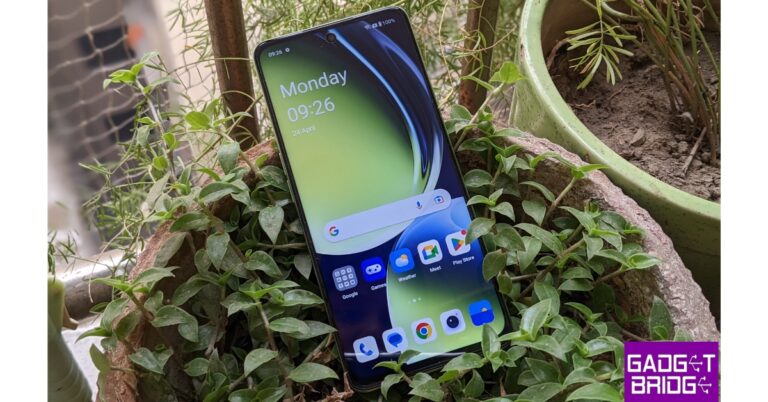
On Amazon, the OnePlus Nord CE 3 Lite is available at a starting price of Rs 19,999 for the 8GB RAM with 128GB storage option during the ongoing Great India Festival Sale. The smartphone features a triple rear camera setup that includes a 108-megapixel Samsung HM6 sensor with an f/1.75 aperture and EIS support. It also consists of a 2-megapixel macro lens and another 2-megapixel depth sensor. There is a 16-megapixel front-facing camera for selfies. The Nord CE 3 Lite is fuelled by an octa-core Snapdragon 695 SoC with Adreno 619 GPU for graphics. It is highlighted with a 6.72-inch full-HD+ LCD display with 1,080×2,400 pixels of resolution. The phone packs a 5,000mAh battery that supports 67W SuperVOOC fast charging. Samsung Galaxy M34 5G with 6,000mAh battery launched in India

Samsung Galaxy M34 5G

Samsung Galaxy M34 5G on the other hand is listed at Rs 15,999 for the 6GB RAM with 128GB storage model. The smartphone features a Full HD+ 6.5-inch display. The device runs OneUI 5.1, an Android 13-based operating system. The 5G phone is powered by Exynos 1280 SoC with a Mali-G68 MP4 GPU. It has a triple rear camera setup that includes a 50-megapixel primary sensor, a 2-megapixel macro sensor and an 8-megapixel ultra-wide angle camera. For selfies, there is a 13-megapixel sensor front-facing camera. A 6,000mAh battery powers the device. Redmi Note 12 5G, Redmi Note 12 Pro 5G, and Redmi Note 12 Pro+ 5G goes official in India

Redmi Note 12 5G 

Redmi Note 12 5G is currently made available at Rs 17,499 for the 6GB RAM with 128GB storage on Amazon. It features a 6.67-inch display with a 120Hz refresh rate. The phone operates on MIUI 13 based on Android 12 and is powered by Qualcomm Snapdragon 4 Gen 1 octa-core SoC. The Note 12 5G comes with a 48-megapixel primary sensor and a 2-megapixel depth sensor. There is an 8-megapixel front camera for selfies. It also houses a 5,000mAh battery that comes with 33W fast charging support. Vivo Y27 with MediaTek Helio G85 SoC launched in India

Vivo Y27

Vivo Y27 is listed at Rs 14,999 on Amazon for the 6GB RAM with 128GB storage. The phone has a 6.64-inch FHD+ LCD Sunlight display. It runs on FunTouch OS 13 which is based on the Android 13 operating system. Under the hood, there is MediaTek Helio G85 chipset and its Extended RAM 3.0 functionality. The smartphone comes with a dual rear camera setup that includes a 50 MP primary camera and a 2 MP bokeh camera. It has a variety of camera functions, including Bokeh Flare Portrait, Super Night Mode, and Super Night Selfie Mode. It has an 8 MP front camera with the Aura Screen Light function for selfies, ensuring sharp, high-resolution selfies in any setting. It includes a 5000mAh battery and a quick 44W FlashCharge.
Vivo T2 5G
Vivo T2 5G

Vivo T2 5G

Vivo T2 5G can be bought at Rs 17,999 for 6GB RAM with 128GB storage on Amazon. The device includes a 6.38-inch AMOLED display with 1,080×2,400 pixels of resolution. The smartphone is powered by a Snapdragon 695 SoC. dual rear camera setup that includes a 64-megapixel primary sensor with f/1.79 aperture and a 2-megapixel bokeh sensor with f/2.4 aperture. In addition to this, there is a 16-megapixel sensor with f/2.0 aperture. It further includes a 4500mAh battery, with 44W fast charging support. iQoo Z7s 5G powered by Qualcomm Snapdragon 695 SoC launched in India

iQoo Z7s 5G

iQOO Z7s 5G is currently selling at Rs 17,999 for the 8GB RAM with 128GB storage on Amazon. The handset is highlighted with a 6.38-inch full-HD+ display. Funtouch OS 13 on top of Android 13 operates the phone. Under the hood is an octa-core Qualcomm Snapdragon 695 5G SoC and Adreno 619L GPU. The 5G smartphone features a dual rear camera setup a 64-megapixel primary sensor and a 2-megapixel sensor. In addition to this, there is a 16-megapixel front-facing camera for taking selfies. The phone has a 4,500mAh battery and support for 44W wired Flash Charging. Tecno Pova 5 Pro 5G Review: A good value-for-money smartphone

Tecno Pova 5 Pro 5G

Last on the list is Tecno Pova 5 Pro 5G which is currently up for sale at Rs 15,999 for the 8GB RAM storage option. This smartphone features a 6.78-inch full-HD+ display. The device is powered by MediaTek Dimensity 6080 5G SoC and Mali-G57 MC2 GPU. The smartphone comes pre-installed with HiOS 13.1, an Android 13-based operating system. It has a dual rear camera setup that includes a 50-megapixel main sensor and a secondary AI camera. It further sports a 16-megapixel front-facing camera. The phone also boasts a 5,000mAh battery. Amazon is also offering Easy financing options from reputable partner institutions like SBI Bank; 10% Instant Discount on SBI Credit and Debit Cards & EMI Transactions, Free EMI on Credit and Debit Cards, Exciting Offers from Other Top Credit/Debit Cards, and Much More For the latest gadget and tech news, and gadget reviews, follow us on TwitterFacebook and Instagram. For newest tech & gadget videos subscribe to our YouTube Channel. You can also stay up to date using the Gadget Bridge Android App. You can find the latest car and bike news here.
Top 3 Ways to Automatically Upload Photos to Google Photos on Android

0
Backing up the pictures and videos on your device to a cloud server is a great way to make sure you don’t lose them in case your phone stops working or gets stolen. Android’s stock gallery app, Google Photos, makes it incredibly easy to backup all your media on Google’s cloud server. The process is seamless and doesn’t take much time. In this article, we bring you the top 3 ways to automatically upload photos to Google Photos on Android. Read Also: Nokia G42 5G new variant now available in India

Automatically upload or backup photos to Google Photos on Android

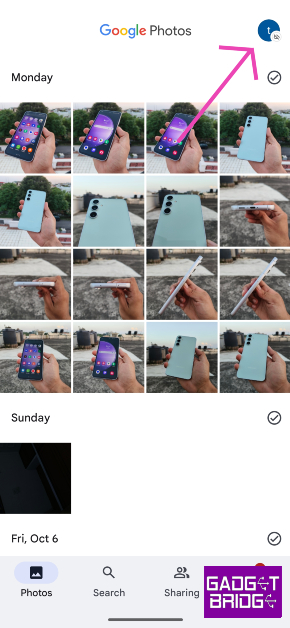
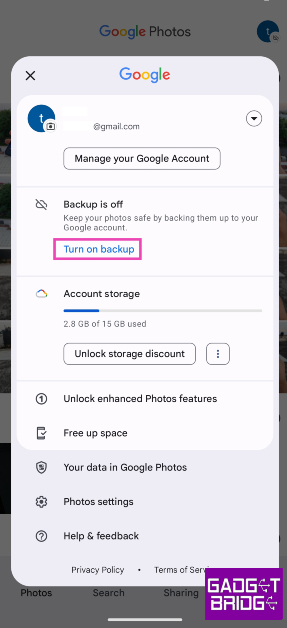
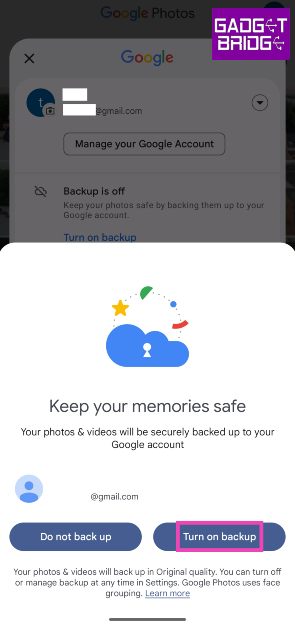
Step 1: Launch the Google Photos app on your Android smartphone. Step 2: Hit the profile icon at the top right corner of the screen. Step 2: Hit the profile icon at the top right corner of the screen. Step 3: Tap on Turn on backup. Step 3: Tap on Turn on backup. Step 4: In the popup box, select Turn on backup. Step 4: In the popup box, select Turn on backup. Google Photos will automatically start backing up the pictures in your gallery to the cloud. Any new pictures you take on your phone will be backed up on Google Photos.

Another method to automatically upload or backup photos to Google Photos on Android

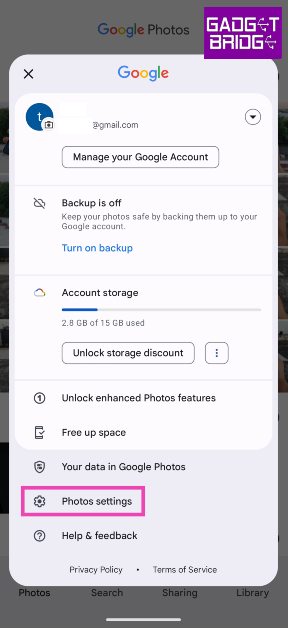
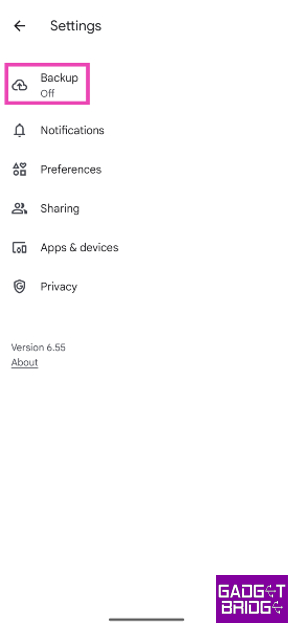
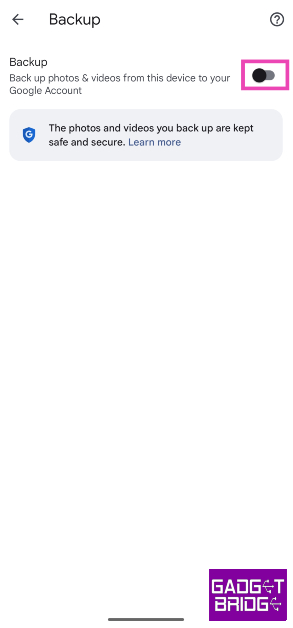
Step 1: Launch the Google Photos app on your Android smartphone. Step 2: Hit the profile icon at the top right corner of the screen. Step 2: Hit the profile icon at the top right corner of the screen. Step 3: Tap on Photos settings. Step 3: Tap on Photos settings. Step 4: Select Backup. Step 4: Select Backup. Step 5: Turn on the toggle switch for Backup. Step 5: Turn on the toggle switch for Backup.

Turn on automatic backup for Google Photos using device settings

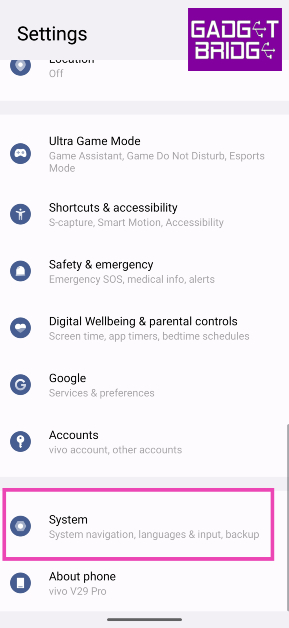
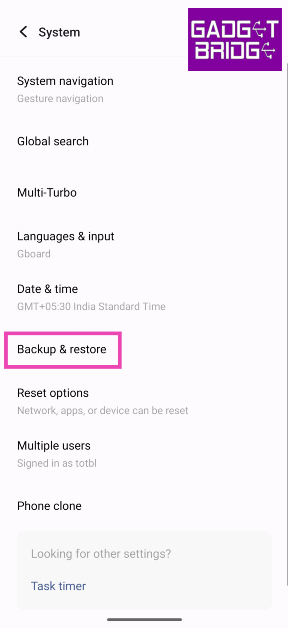
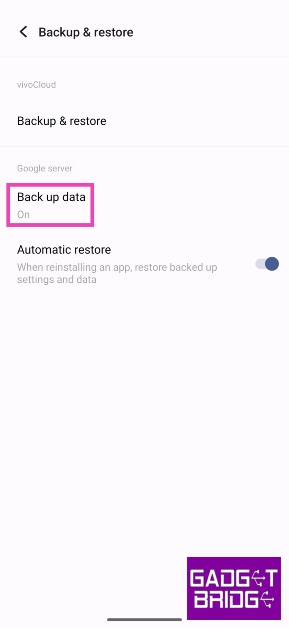
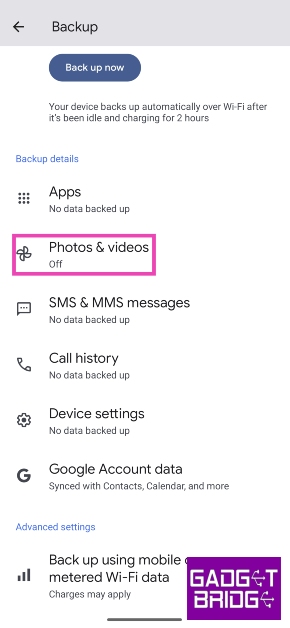
Step 1: Go to Settings and select System. Step 1: Go to Settings and select System. top 3 ways to automatically upload and backup photos to Google Photos on Android. Step 2: Tap on Backup & restore. Step 2: Tap on Backup & restore. top 3 ways to automatically upload and backup photos to Google Photos on Android. Step 3: Tap on Back up data under the Google server section. Step 3: Tap on Back up data under the Google server section. top 3 ways to automatically upload and backup photos to Google Photos on Android. Step 4: Tap on Photos & videos. Step 4: Tap on Photos & videos. top 3 ways to automatically upload and backup photos to Google Photos on Android. Step 5: Turn on the toggle switch for Backup. Step 5: Turn on the toggle switch for Backup. top 3 ways to automatically upload and backup photos to Google Photos on Android.

Frequently Asked Questions (FAQs)

Where does my phone back up my photos and videos?

You can choose to back up your photos and videos on Google Photos or your smartphone manufacturer’s native cloud service.

How much cloud storage does Google Photos offer?

Every Google Account gets 15GB of free cloud storage. This storage spans different services like Google Photos, Gmail, Google Drive, and more.

How do I turn on automatic backup for pictures on my Android device?

Go to Google Photos and tap the profile icon at the top right corner of the screen, tap on Turn on backup to enable automatic backup and syncing of pictures on your Android device. Read Also: Truke Clarity Five TWS Review: Great sound quality

Conclusion

This is how you can automatically upload or backup photos to Google Photos on Android. Since Google offers only 15GB of storage space per account, it is nearly not enough to backup all your pictures. Luckily, smartphone manufacturers like Samsung, Vivo, OnePlus, and more offer their own cloud storage as well. Check out your device’s settings to know more. For the latest gadget and tech news, and gadget reviews, follow us on Twitter, Facebook and Instagram. For newest tech & gadget videos subscribe to our YouTube Channel. You can also stay up to date using the Gadget Bridge Android App. You can find the latest car and bike news here.
Fast and Best Ways to Create Reels from Instagram Stories

0
Even though they share the same bite-sized form, Instagram Stories and Reels could not be more different. Stories are personal and meant to be shared with your friends while Reels are shared to a wider audience across the app (if your profile is public). Once you post a Reel, it shows up in your followers’ feed. Meanwhile, a Story can only be accessed from the home page header. Recently, Instagram quietly added the option to share your Story as a Reel. In this article, we bring you the best ways to create Reels from Instagram Stories. Read Also: Truke Clarity Five TWS Review: Great sound quality

Create Reels from Instagram Stories

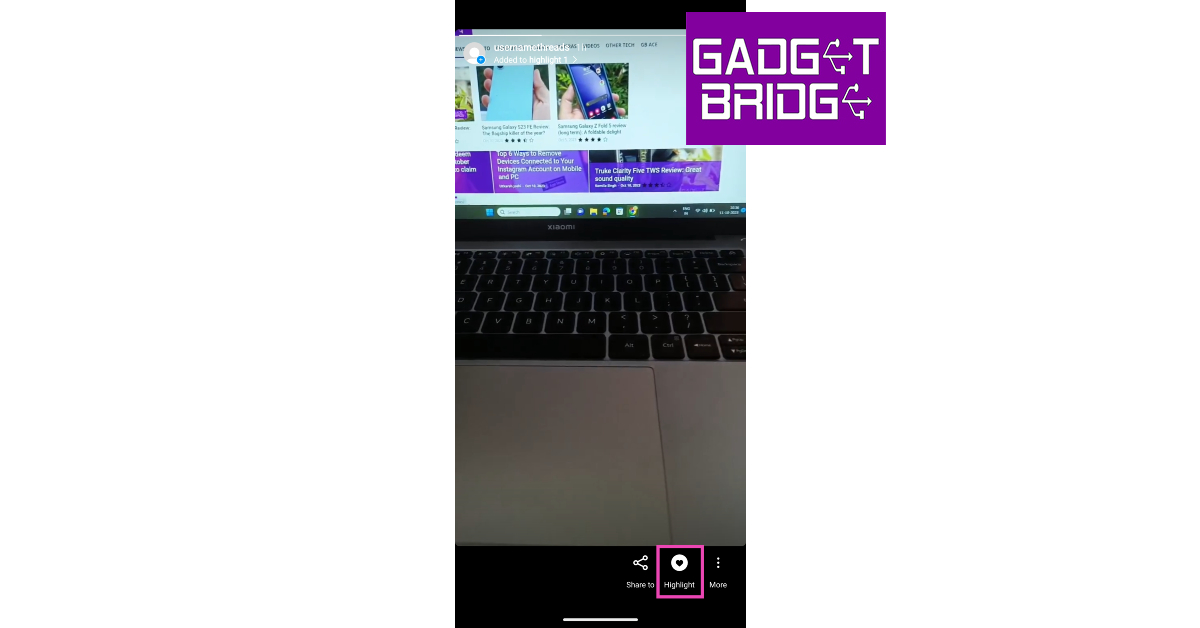
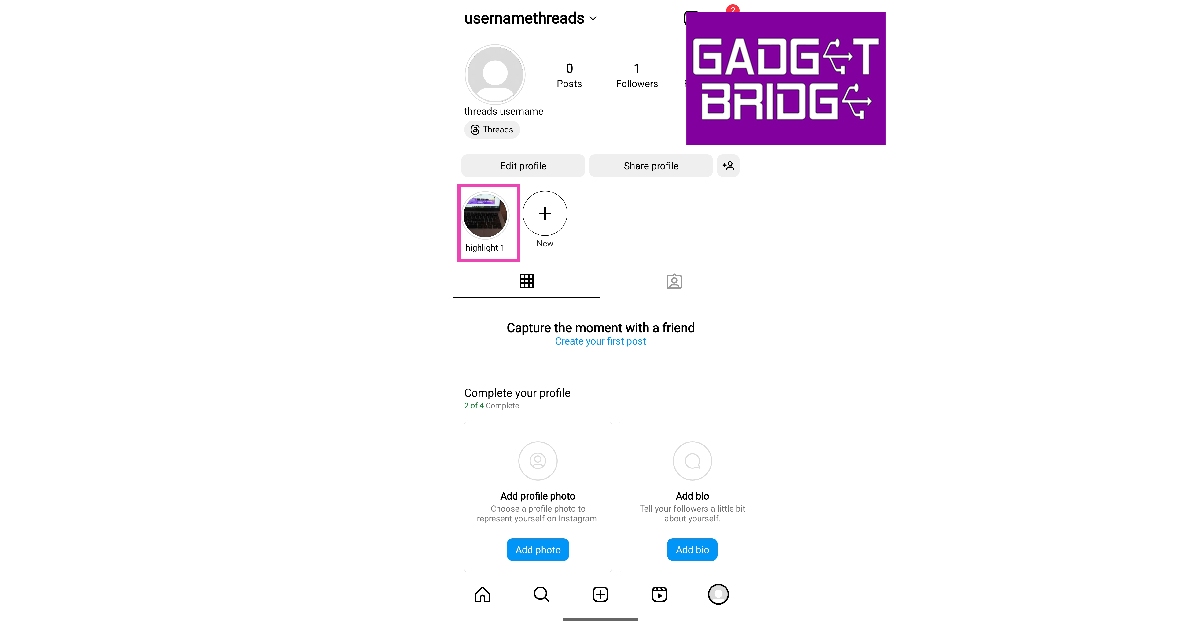
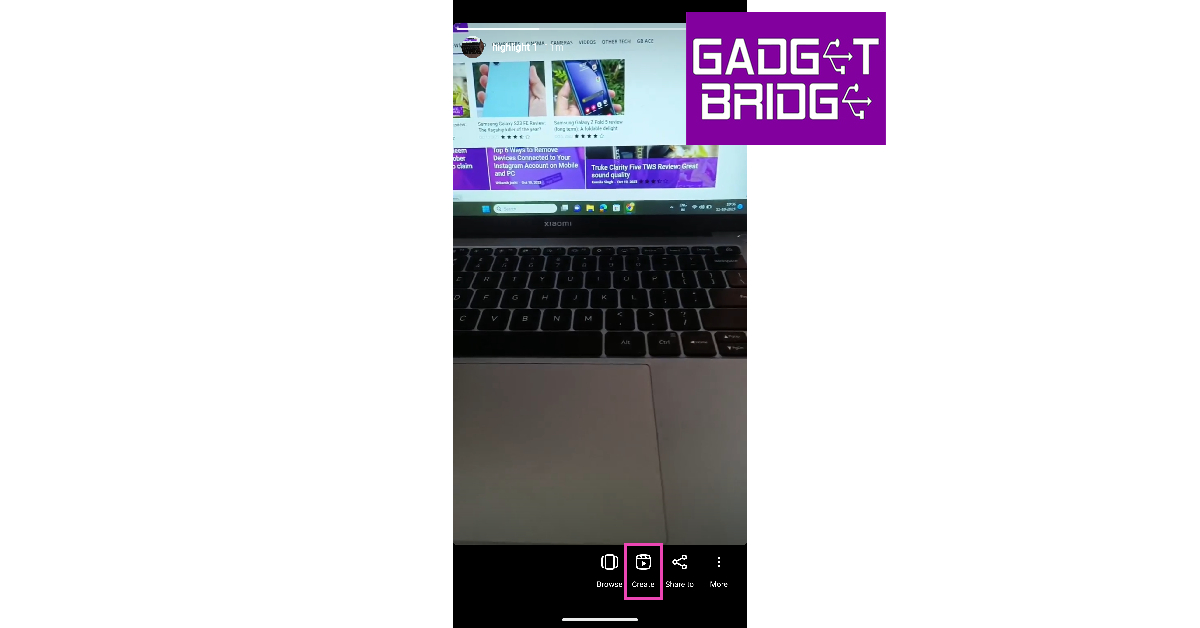
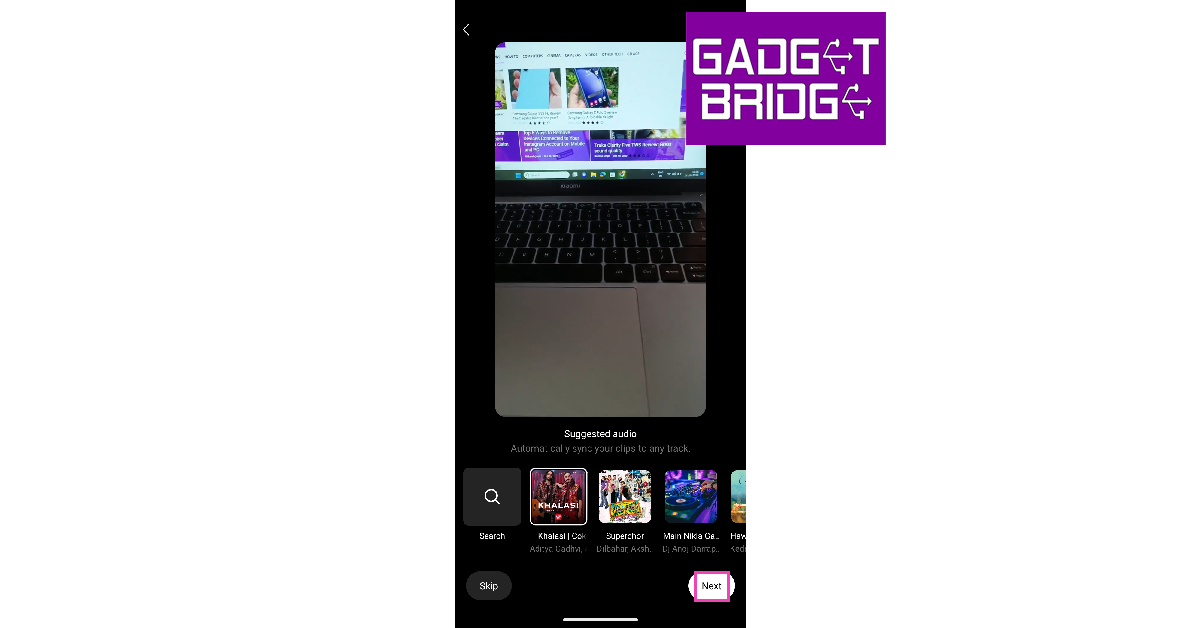
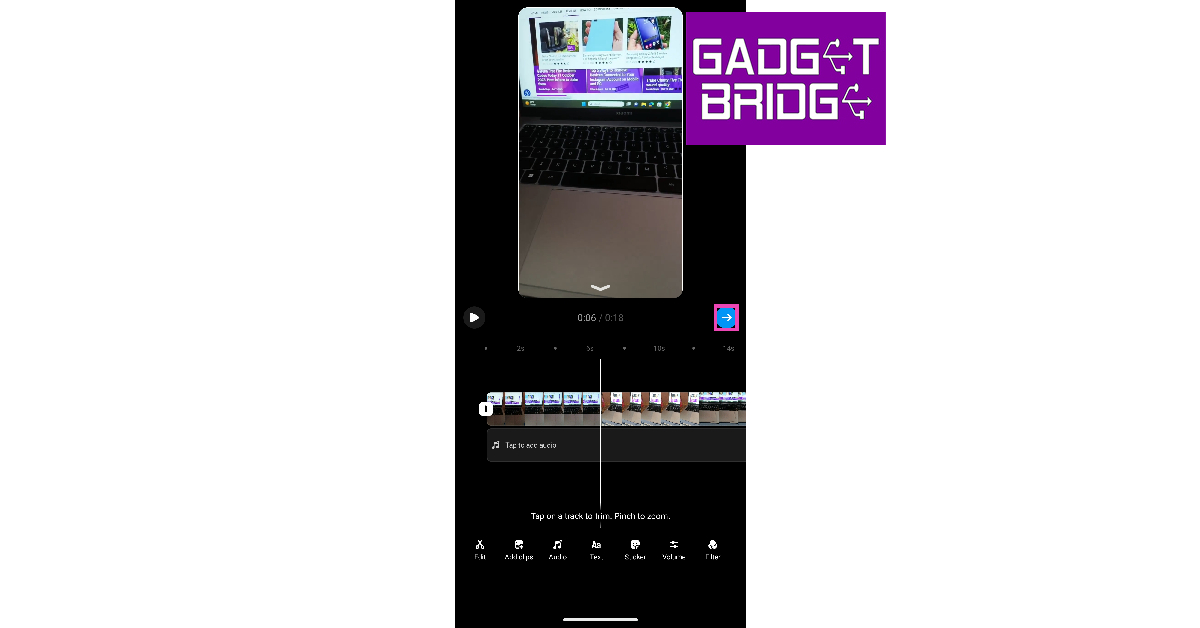
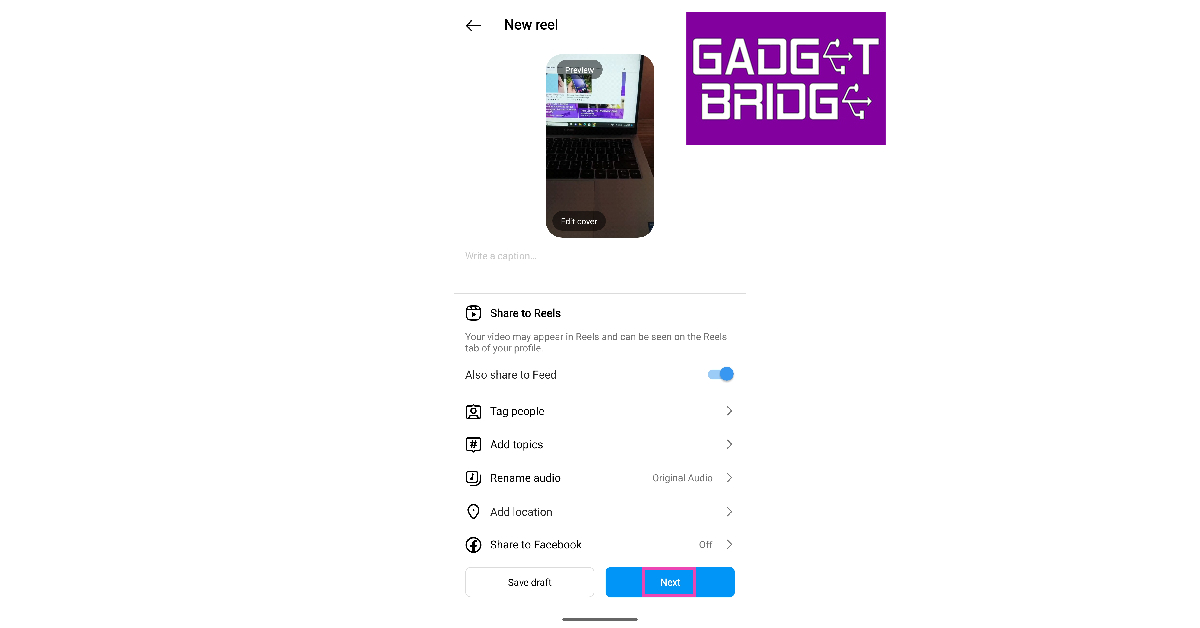
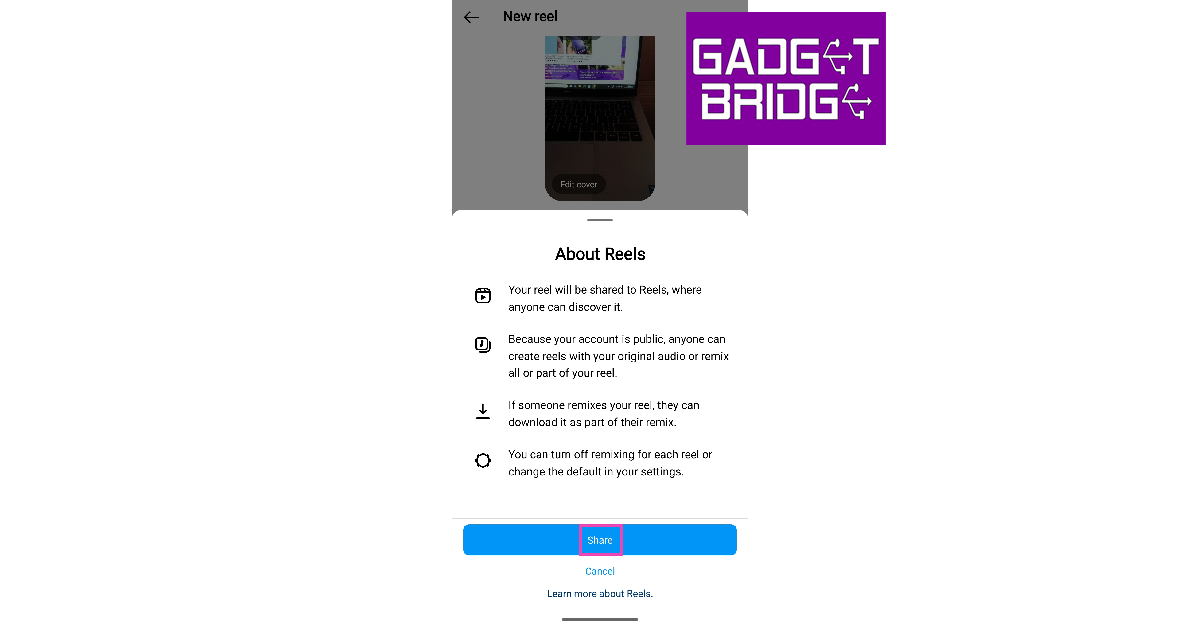
Instagram now lets you create Reels directly from Story Highlights. Here’s how you can go about it. Step 1: Tap on your Story and hit the Highlight icon at the bottom of the screen. Add the Story to a Highlight compilation. Step 1: Tap on your Story and hit the Highlight icon at the bottom of the screen. Add the Story to a Highlight compilation. Step 2: Open the Highlight. Step 2: Open the Highlight. Step 3: Tap on Create. Step 3: Tap on Create. Step 4: Add a song to your Reel from Instagram’s recommended list. You can also choose to skip this step. Step 4: Add a song to your Reel from Instagram’s recommended list. You can also choose to skip this step. Step 5: Edit your Reel on the following page. Hit the blue arrow icon when you’re done. Step 5: Edit your Reel on the following page. Hit the blue arrow icon when you’re done. Step 6: Write a caption and add a thumbnail for your Reel. You can also tag other people and control other visibility settings from this page. Hit Next. Step 6: Write a caption and add a thumbnail for your Reel. You can also tag other people and control other visibility settings from this page. Hit Next. Step 7: Hit Share. Step 7: Hit Share.

Another way to post your Instagram Story as a Reel

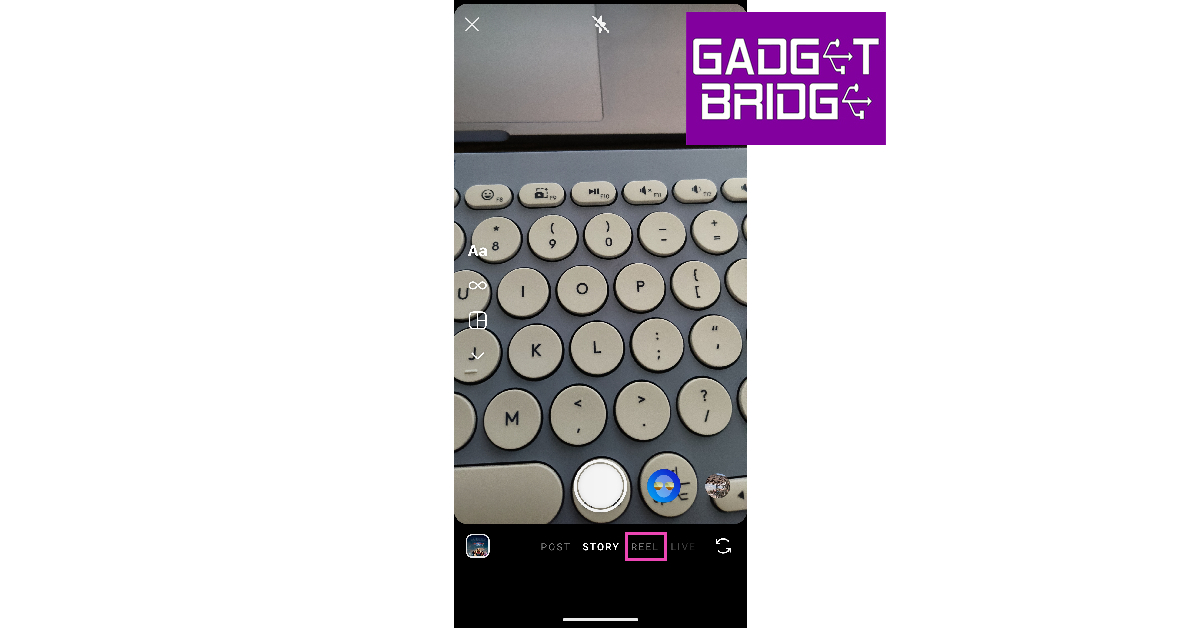
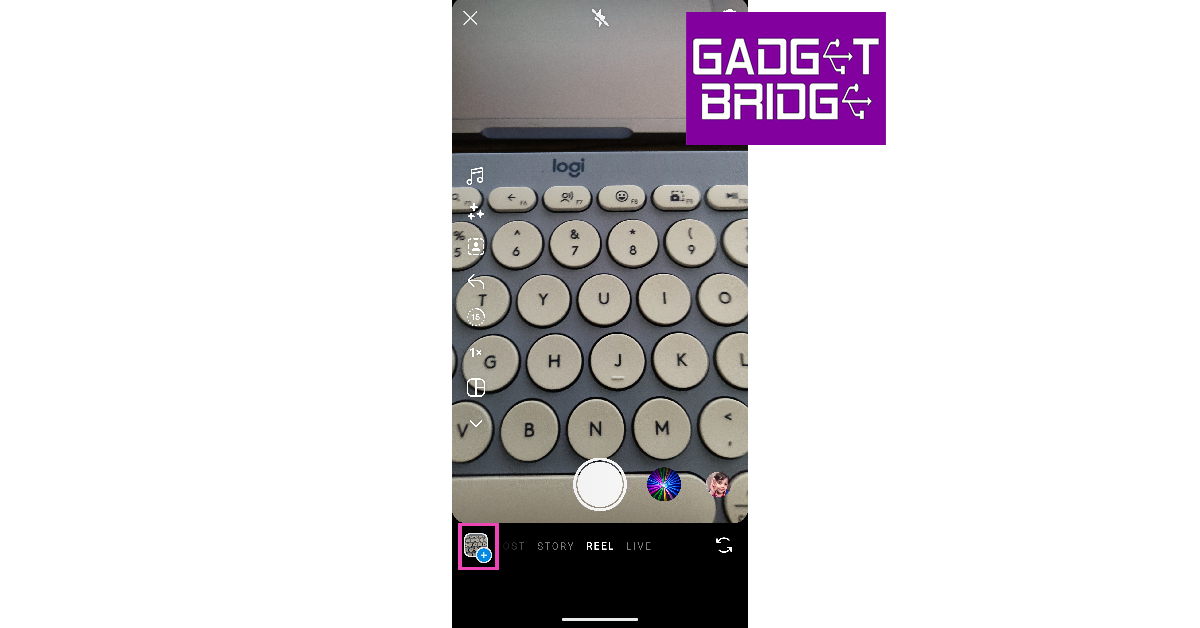
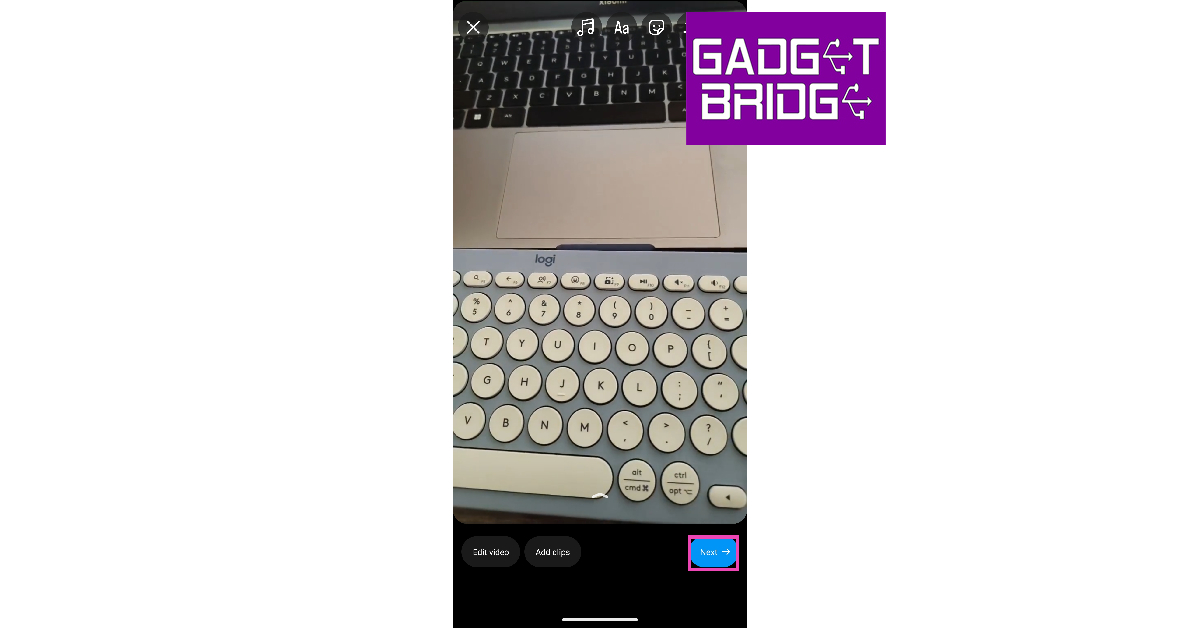
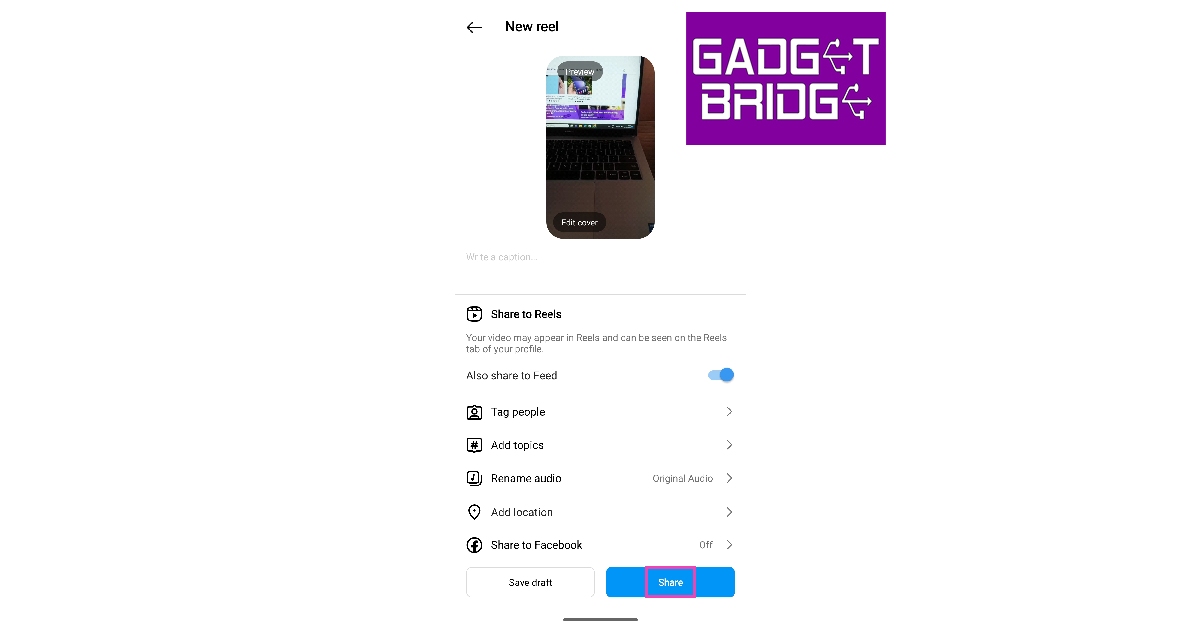
Step 1: Open your Instagram Story and tap the ellipses at the bottom right corner of the screen. Step 2: Tap on Save video. The video will be saved to your Camera Roll. Step 2: Tap on Save video. The video will be saved to your Camera Roll. Step 3: Swipe right from your homepage and switch to the Reel tab. Step 3: Swipe right from your homepage and switch to the Reel tab. Step 4: Tap the Gallery icon at the bottom left corner of the screen and upload the Story you just saved on your device. Step 4: Tap the Gallery icon at the bottom left corner of the screen and upload the Story you just saved on your device. Fast and Best Ways to Create Reels from Instagram Stories Step 5: On the following page, edit the video and add text, music, stickers, or filters to it. You can also add location to your Reel. Hit Next when you’re done. Step 5: On the following page, edit the video and add text, music, stickers, or filters to it. You can also add location to your Reel. Hit Next when you’re done. Fast and Best Ways to Create Reels from Instagram Stories Step 6: Add a caption and edit the Reel cover. Hit Share. Step 6: Add a caption and edit the Reel cover. Hit Share. Fast and Best Ways to Create Reels from Instagram Stories Your Instagram Story will be shared as a Reel.

Bonus Tip: How to add an Instagram Reel to your Story

Step 1: Launch the Instagram app and open the Reel you want to share as a Story. Step 2: Tap the Share icon. Step 2: Tap the Share icon. Fast and Best Ways to Create Reels from Instagram Stories Step 3: Select Add reel to your story. Step 3: Select 'Add reel to your story'. Fast and Best Ways to Create Reels from Instagram Stories

Frequently Asked Questions (FAQs)

What is the time limit for Instagram Reels?

Instagram Reels have a time limit of up to 90 seconds. In comparison, an Instagram Story has a time limit of 60 seconds.

How do I share an Instagram Story as a Reel?

Post the Instagram Story as a Highlight on your profile, then open the Highlight and hit the Create option at the bottom of the screen.

How do I download an Instagram Reel on my phone without using a third-party app?

If the Instagram Reel is up to 60 seconds long, you can download it on your device by adding it to your Story and selecting More>Save. Read Also: Top 4 Ways: How to Get Dark Mode in Snapchat on Android and iOS?

Conclusion

This is how you can create Reels from Instagram Stories. To make your Reel more appealing and increase its visibility, add the trending songs suggested by Instagram and edit it cleverly to hold the attention of the viewer. If you found this article helpful, let us know in the comments! For the latest gadget and tech news, and gadget reviews, follow us on Twitter, Facebook and Instagram. For newest tech & gadget videos subscribe to our YouTube Channel. You can also stay up to date using the Gadget Bridge Android App. You can find the latest car and bike news here.

Spotify is disabling some features for free users in India

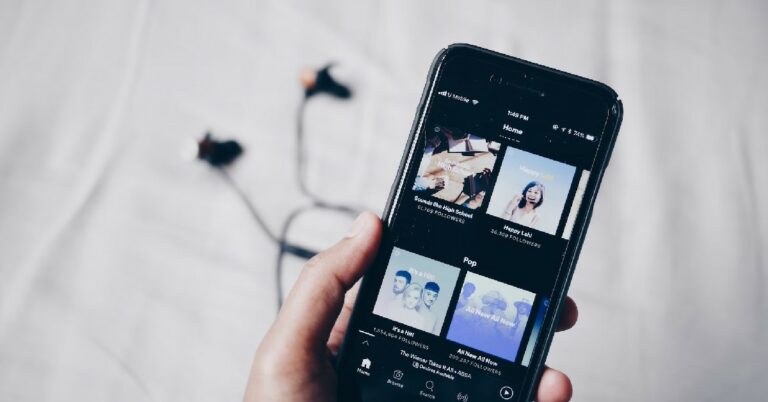
Unfortunately, Spotify is making changes to its free service in India. From now onwards the free users of the Audio Streaming app will not be able to access a few features. Now those features will only be accessible to Premium users in the country. After imposing a cap following features will not be accessible. Now users who have not subscribed to Spotify premium subscription will no longer to able to avail benefits of other features of the free services. The Application is now limiting the users to play songs in any order, or repeating songs/or on a loop and tapping back to the previous song. However, the users will still be able to access to the artists, albums and playlists they like with song recommendations mixed in. Also Read: Global PC shipments fell 7.6% YoY in Q3 2023: Report All of these features have been available to free users since its launch. But now after imposing a limit, the company says these restrictions were being put to make the free experience more uniform across the globe. Spotify is disabling some features for free users in India A pop-up has started to show up on the Spotify app for those who are not paying a subscription. There three of the above-listed features have been locked and will now only be unlocked if you opt for the premium service. So now the users have the choice to pay and benefit. The Spotify Premium subscription in India starts at Rs 119. After you have opted for the paid service you will get access to on-demand and ad-free music listening, offline music downloads, and quality music streaming. It should be noted that for several months, we at Gadget Bridge were also unable to access the option that allowed us to choose a specific section of a song, or to play our playlist in the order that it was organised.

Spotify Premium offer a total of four plans:

Mini Play starts at Rs 7 per day where only one account on mobile is accessible. Users have access to Ad-free music listening on mobile, Group Sessions and Download 30 songs on 1 mobile device. Whereas the only Individual Plan/monthly starts at Rs 119. Along with access to Ad-free music listening and Group Sessions, you will also be able to download 10k songs/device on 5 devices. Duo Plan as the name suggest allow two accounts to access the Spotify Premium Service starting at Rs 149 per month. This is suitable for couples having access for Ad-free music listening, Group Sessions and downloading 10k songs/device, on 5 devices per account. Lastly, the Family pack starts at Rs 179 per month where 6 family members can be added. This plan offers all the basic features but provide the functionality to block explicit music. For the latest gadget and tech news, and gadget reviews, follow us on TwitterFacebook and Instagram. For newest tech & gadget videos subscribe to our YouTube Channel. You can also stay up to date using the Gadget Bridge Android App. You can find the latest car and bike news here.

Global PC shipments fell 7.6% YoY in Q3 2023: Report

According to research by IDC Tracker, global PC shipments show a decline again in the third quarter of 2023 despite signs of market improvement. The shipment is down by 7.6% year over year with 68.2 million PCs shipped. The preliminary results from the International Data Corporation (IDC) Worldwide Quarterly Personal Computing Device Tracker show demand and the global economy are still weak. Shipments, however, rose in each of the previous two quarters, decreasing the yearly decline and proving that the market is no longer at the bottom of the trough. Also Read: Nokia G42 5G new variant now available in India In the past few months PC inventory has also become less substantial and is now close to healthy levels in most channels. As per the analyst the consumer and business sectors are experiencing downward pricing pressure that is anticipated to stay around.
Global PC shipments fell 7.6% YoY in Q3 2023: Report
Image Courtesy: IDC
The top 5 vendors saw double-digit decreases throughout the quarter but Apple’s huge loss was caused by challenging YoY comparisons as the company recovered from a COVID-related production halt during the third quarter of 2022. On the other hand, HP’s growth was mostly the result of inventory returning to normal. But this not going to last long as the PC sector is still recovering slowly. Reportedly the device refresh cycle and end of support for Windows 10 will help drive sales in the second half of 2024 and beyond. Unfortunately, the PC industry will continue to suffer meanwhile. As per Jitesh Ubrani, research manager for IDC’s Mobility and Consumer Device Trackers, “The slowness in the industry is giving the supply chain an opportunity to explore procurement and production options outside China and this will likely remain a key issue going forward, second only to the advancement of AI within PCs.”
Global PC shipments fell 7.6% YoY in Q3 2023: Report
Image Courtesy: IDC
“While the Generative AI could be a watershed moment for the PC industry,” said Linn Huang, research vice president, of Devices & Displays at IDC. “While use cases have yet to be fully articulated, interest in the category is already strong. AI PCs promise organizations the ability to personalize the user experience at a deeper level all while being able to preserve data privacy and sovereignty. As more of these devices launch next year, we expect a significant boost to overall selling prices.” For the latest gadget and tech news, and gadget reviews, follow us on TwitterFacebook and Instagram. For newest tech & gadget videos subscribe to our YouTube Channel. You can also stay up to date using the Gadget Bridge Android App. You can find the latest car and bike news here.

Garena Free Fire Redeem Codes Today 11 October 2023: Here is how to claim them

Garena Free Fire is a battle royale game with regular awards and tournaments to keep players interested. If you play Garena Free Fire, you should be aware of the redeem codes that are released on a daily basis. However, because the battle royale game is banned in India, players from other countries can use the Free Fire Redeem codes daily. If you’re unfamiliar with the Garena Free Fire redeem codes or don’t know how to get them, we’ve put together a step-by-step guide to help you redeem them. Check out Garena Free Fire Redeem Codes for 11 October 2023. The Free Fire redeem codes are a great way to get free stuff. These are 12-digit codes that contain alphabets and numbers, as well as an expiration date and time. Because the Garena FF redeem codes cannot be used more than once, you should hurry to the redemption page to claim your free reward before someone else does. To get a free reward, all you have to do is go to reward.ff.garena.com/en, which is the official redemption page. Also, keep an eye on this space for daily updates on Garena Free Fire redemption codes and rewards.

Garena Free Fire Redeem Codes Today 11 October 2023

Updating soon…

How to Get Free Fire Redeem Codes for Garena on 11 October 2023?

  • Visit the Garena Free Fire game’s official website at reward.ff.garena.com.
  • Use your Facebook, Google, VK, Apple ID, Huawei ID, or Twitter account to log in.
  • You’ll be taken to a valid redemption code (s)
  • Copy and paste the 12-digit redemption code into the text box.
  • On the screen, a dialogue box will appear.
  • ‘Ok’ should be selected.
For the latest gadget and tech news, and gadget reviews, follow us on TwitterFacebook and Instagram. For newest tech & gadget videos subscribe to our YouTube Channel. You can also stay up to date using the Gadget Bridge Android App. You can find the latest car and bike news here.