How to create a custom ringtone for Android?

If you want to customise your smartphone, changing the ringtone is a good place to start. Before smartphones became the norm, you had to pay for custom ringtones, but now you can create a unique ringtone using any app of your choice. If you like a hook from a song or a sound bite from a movie, converting it into a ringtone is a pretty easy task. In this article, we show you how to create a custom ringtone for your Android smartphone. Read Also: Redmi Note 11 gets cheaper in India: New pricing details

Create a custom ringtone using a third-party app

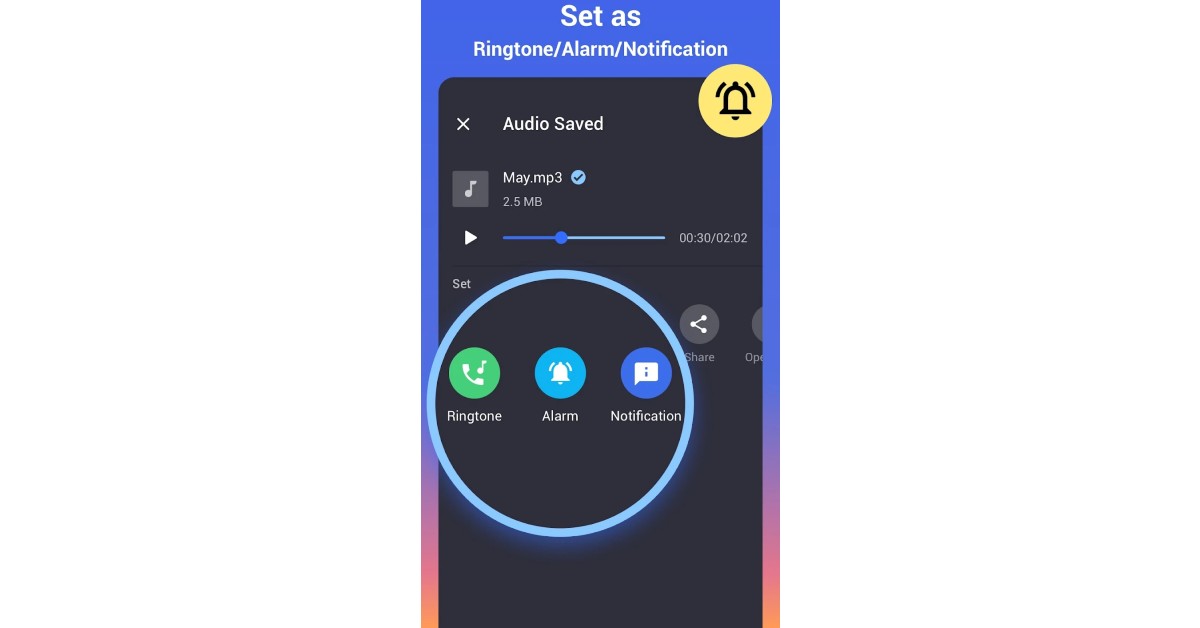
If you want to set a song as your ringtone, you want the hook or a particular segment of the song to play whenever you receive a call. Setting the entire song as the ringtone can be quite tedious and defeats the purpose of a customised tone if you can’t even hear the desired part. Luckily, there are a ton of song editing apps on Google Play Store that will help you trim a song to an ideal length. Once you have edited a song, you can set it as your ringtone. Here’s how you can trim a song using the ‘MP3 cutter & ringtone maker’ app. Step 1: Install the ‘MP3 cutter & ringtone maker’ app from Google Play Store. Step 2: Open the app and select the song you want to trim. Step 3: Use the slider to trim the song and edit the part you want to set as your ringtone. Step 3: Use the slider to trim the song and edit the part you want to set as your ringtone. Step 4: You can also use the fade effects and alter the volume of specific parts of the song. Step 4: You can also use the fade effects and alter the volume of specific parts of the song. Step 5: If you want to get creative, you can even merge multiple songs together to create a unique ringtone. Step 5: If you want to get creative, you can even merge multiple songs together to create a unique ringtone. Step 6: Once you’ve edited the song, save it on your device. You can also set the song as your ringtone directly from the app. Step 6: Once you’ve edited the song, save it on your device. You can also set the song as your ringtone directly from the app.

Set a song as your ringtone on Android

Once you’ve trimmed a song down, you can set it as your ringtone from your phone’s settings. Here’s how. Step 1: Go to Settings and select ‘Sounds and vibration.’ Step 1: Go to Settings and select ‘Sounds and vibration.’ Step 2: Select Ringtone and tap on the plus icon at the top right corner of the screen. Step 2: Select Ringtone and tap on the plus icon at the top right corner of the screen. how to create a custom ringtone for android Step 3: Select the song from your phone’s storage.  Step 4: Tap on ‘Done.’ Step 4: Tap on ‘Done.’ how to create a custom ringtone for android Read Also: Vivo Y02 with 5,000mAh battery likely to launch in India soon

Conclusion

This is how you can create a custom ringtone for your Android smartphone. If you do not want to use a third-party app to edit a song on your phone, you can achieve the same result by using Audacity on your PC. Once you’ve figured out how to trim a song to an ideal length, you can use it to set custom notification sounds and personalised ringtones for different contacts as well. For the latest gadget and tech news, and gadget reviews, follow us on Twitter, Facebook and Instagram. For newest tech & gadget videos subscribe to our YouTube Channel. You can also stay up to date using the Gadget Bridge Android App. You can find the latest car and bike news here.

Here Are The Features Your Smart TVs Will Get In 2023 With The Announced Android 13 TV Platform

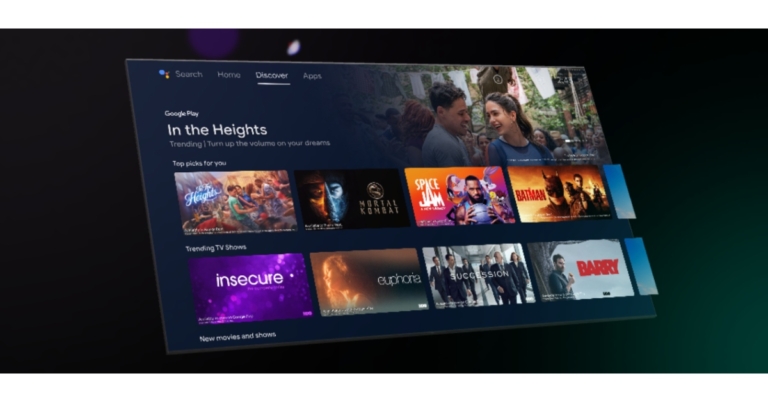
Google has finally rolled out Android TV for devices soon. The latest version of Android TV is likely to take some time before you see it on your smart TV as the company wants to make sure that developers are prepared to optimise their apps for the new version. The most recent version of Android 13 for TV is currently accessible. As per the company, additional changes are added to Android 13 to enhance user experience and increase TV device compatibility. Improvements in performance and quality as well as ongoing developments in user interaction with Android TV are some of the highlights of this release. For the time being, the Android 13 TV version is available to developers, enabling them to create applications and other user interfaces. Therefore, the majority of smart TVs using Android 12 should receive an upgrade next year that is 2023. With the fresh Android 13 for TV apps will be able to identify the routed device and compatible formats using anticipatory audio routes before creating an AudioTrack. On approved HDMI source devices, user controls for preferred resolution and refresh rate. Improvements in power management for low powered standby will be made. The system privacy controls will take hardware mute switch settings into account. The remote’s user controls for assistant microphone access will also be updated. Default settings for all apps to enable audio descriptions. The new Keyboard Layouts API makes it possible to choose from a variety of language layouts for external keyboards. There will be improved language selection for HDMI source devices as well as better handling of HDMI state changes for HDMI source devices. Framework for ISDB-T Multi-Layer support, dual tuner, and Tuner HAL 2.0 performance optimizations for interactive TV use cases as an addition to TIF. If you have the ADT-3 Developer Kit, install a system image by following the directions in this section. As an alternative, you can check out certain new user interface features including audio routing, keyboard layouts, and HDMI status changes by using the Android Emulator for TV. Install system images manually To install Android 13, follow these steps:
  • Use the ADT-3 Developer Kit for Google TV. The provided system image is for ADT-3 developer devices only.
  • Download the system image listed on this page.
  • If needed, back up your device data.
  • Flash the image onto your ADT-3 device. Manually flashing a device gives you precise control over the test environment and can be performed with command line tools.
For the latest gadget and tech news, and gadget reviews, follow us on TwitterFacebook and Instagram. For newest tech & gadget videos subscribe to our YouTube Channel. You can also stay up to date using the Gadget Bridge Android App. You can find the latest car and bike news here.

Infinix Zero 5G 2023 with triple rear cameras announced

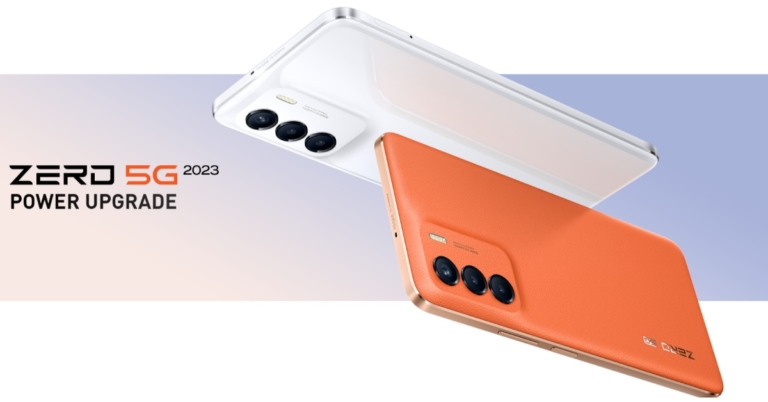
Transsion holding’s smartphone brand Infinix introduced a new smartphone Infinix Zero 5G 2023 in the market. The device is powered by MediaTek Dimensity 1080 5G SoC and features a 5,000mAh battery that comes with 33W fast charging capabilities. The handset also includes an IPS LCD screen.

Infinix Zero 5G 2023 price and availability details

Infinix Zero 5G 2023 has been launched with a price tag of $239 which translates to Rs 19,400. The phone will be available in three colour options of Pearly White, Coral Orange and Submariner Black. The company is yet to announce the phone in other regions including India but as per the firm, the pricing, as well as availability, will vary based on the region.

Infinix Zero 5G 2023 specifications

The Infinix Zero 5G 2023 features a 6.78-inch full-HD+ IPS LTPS screen with a 1,080×2,460 pixel resolution. The screen’s refresh rate is 120 Hz in addition. The smartphone’s hardware includes an Arm Mali-G68 MC4 GPU and a MediaTek Dimensity 1080 5G SoC, along with 8GB of RAM. Using unused storage, the built-in RAM may potentially be “extended” to 5GB. The smartphone includes 256GB of internal storage that can be increased by another 256GB with a microSD card. Moreover, the phone runs XOS 12, an Android 12-based operating system. The Infinix Zero 5G 2023 has three cameras on the back, with a 50-megapixel primary sensor and two 2-megapixel cameras. The 16-megapixel front-facing camera on the Zero 5G 2023 comes with a dual front flash for taking selfies. The back camera can record 4K footage at 30 frames per second. For authentication, the device has a side-mounted fingerprint sensor. Other smartphones on the phone include a light sensor, gyroscope, an e-compass and a proximity sensor. Moreover, the handset includes Wi-Fi 6 a/b/g/n/ac/ax, 5G, FM radio, a 3.5mm headphone jack, Bluetooth, GPS, OTG and a USB Type-C connector as connectivity options. For the latest gadget and tech news, and gadget reviews, follow us on TwitterFacebook and Instagram. For newest tech & gadget videos subscribe to our YouTube Channel. You can also stay up to date using the Gadget Bridge Android App. You can find the latest car and bike news here.
Garena Free Fire Redeem Codes Today 5 December 2022: Here is how to claim them

Garena Free Fire is a battle royale game with regular awards and tournaments to keep players interested. If you play Garena Free Fire, you should be aware of the redeem codes that are released on a daily basis. However, because the battle royale game is banned in India, players from other countries can use the Free Fire Redeem codes daily. If you’re unfamiliar with the Garena Free Fire redeem codes or don’t know how to get them, we’ve put together a step-by-step guide to help you redeem them. Check out Garena Free Fire Redeem Codes for December 5. The Free Fire redeem codes are a great way to get free stuff. These are 12-digit codes that contain alphabets and numbers, as well as an expiration date and time. Because the Garena FF redeem codes cannot be used more than once, you should hurry to the redemption page to claim your free reward before someone else does. To get a free reward, all you have to do is go to reward.ff.garena.com/en, which is the official redemption page. Also, keep an eye on this space for daily updates on Garena Free Fire redemption codes and rewards.

Garena Free Fire Redeem Codes Today 5 December 2022

Updating Soon

How to Get Free Fire Redeem Codes for Garena on December 5?

  • Visit the Garena Free Fire game’s official website at reward.ff.garena.com.
  • Use your Facebook, Google, VK, Apple ID, Huawei ID, or Twitter account to log in.
  • You’ll be taken to a valid redemption code (s)
  • Copy and paste the 12-digit redemption code into the text box.
  • On the screen, a dialogue box will appear.
  • ‘Ok’ should be selected.
For the latest gadget and tech news, and gadget reviews, follow us on TwitterFacebook and Instagram. For newest tech & gadget videos subscribe to our YouTube Channel. You can also stay up to date using the Gadget Bridge Android App. You can find the latest car and bike news here.

Amazon Quiz Answers Today 5 December 2022: Participate to win Rs 500

5 December 2022 Amazon Quiz has gone live. Customers from different parts of the country are participating in the daily quiz. The quiz begins from 12 AM to 11:59 PM. Those participating in the quiz can win exciting prizes by answering all the questions correctly. Today participants have a chance to win a Rs 500 Amazon Pay Balance. Amazon quiz brings an opportunity for its customers to win Amazon Pay Balance ranging from Rs 1,000 to Rs 50,000. The Quiz can be played from 12 AM to 11:59 PM. The e-commerce platform brings a fresh quiz on a daily basis which consists of five questions related to general knowledge and current affairs. The participants need to answer all the questions correctly and their names will be selected for a lucky draw. The winner will be announced at the end of the month. One wrong answer could eliminate you from the quiz. If you manage to answer all the questions correctly you can stand a chance to win a Rs 500 Amazon Pay Balance today. Only app users are eligible to participate in the Quiz. Check Out 5 December 2022 Amazon Quiz Answers. Amazon Quiz Today Prize – Rs 500 Amazon Pay Balance Quiz Date – 5 December 2022 Daily Timing – 12 AM to 11:59 PM Winner Announcement – Today 12 PM

Amazon Quiz Answers Today 5 December 2022

Question 1: Eusebio was the top goalscorer at the 1966 FIFA World Cup. He represented which country? Answer: Portugal Question 2: Which country recently ordered 80 Rafale fighter jets from France, the largest order ever for the warplane? Answer: UAE Question 3: Beyond EPICA project started with the aim of drilling for and recovering what from up to 1.5 Million years ago in Antarctica? Answer: Ice Question 4: Who among these is one of the co-founders of this app? Answer: Kevin Systrom Question 5: Kano Jigoro Shihan was the founder of which Japanese martial art, which was the first martial art to become an official sport here? Answer: Judo

How To Play Amazon Quiz

Only app users are eligible to play the Amazon quiz every morning from 12 AM to 11:59 PM. The quiz is not available on the desktop. For those who are unaware of how to play the Amazon quiz below are the steps, you can follow to take the quiz.
  • Firstly download the Amazon app from Google Play Store or App Store
  • Now fill in the required information through the Sign Up option.
  • You need to log in to the Amazon app and scroll down on the home screen to find the Amazon Quiz banner.
  • Tap on the Amazon Quiz banner and tap on the Start button to start the Quiz.
  • Now you will get 5 questions and you need to answer them correctly. One wrong answer will eliminate you from the Quiz.
  • After answering all the questions correctly you are now eligible for a Lucky Draw.
  • The winner’s name will be announced today at 12 PM.
For the latest gadget and tech news, and gadget reviews, follow us on TwitterFacebook and Instagram. For newest tech & gadget videos subscribe to our YouTube Channel. You can also stay up to date using the Gadget Bridge Android App. You can find the latest car and bike news here.

Redmi Note 11 gets cheaper in India: New pricing details

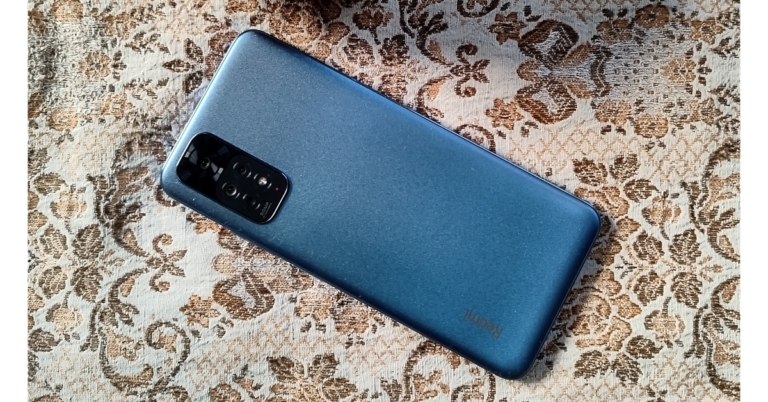
Recently Redmi Note 11 Pro+ got a price reduction of up to Rs 2,000 in India. The Redmi Note 11 now has received a price cut. Each of the handsets has received a price reduction of Rs 500. However, it is presently uncertain if this price reduction is temporary. After receiving a price cut of Rs 500 the Redmi Note 11 will be available for Rs 12,999 for the 64GB storage model with 4GB RAM down from its previous cost of Rs 13,499. The cost of a 6GB RAM with a 64GB storage variant is Rs 13,499, while a 6GB RAM with a 128GB storage model costs Rs 14,499. The smartphone with the new pricing is now being flashed on both company’s official website as well as on Amazon. On the other hand, the 4GB model of the phone on Flipkart is available at a much lower price of Rs 12,799. However, if you are purchasing the device via Mi.com you can get a Rs 1,000 discount using ICICI credit card, bringing the price down to Rs 11,999.

Redmi Note 11 specifications

The 6.43-inch full-HD+ AMOLED Dot Display on the Redmi Note 11 has a resolution of 1,0802,400 pixels. It sports a 90Hz refresh rate and a 20:9 aspect ratio. An octa-core Qualcomm Snapdragon 680 SoC and up to 6GB of LPDDR4X RAM are featured in the phone. The phone has up to 128GB of internal storage that can be increased to 1TB with the use of a microSD card. The device sports a quad rear camera array that can take pictures with an f/1.8 aperture and a 50-megapixel main sensor. An 8-megapixel secondary sensor with an ultra-wide lens, a 2-megapixel macro lens, and a 2-megapixel depth sensor rounds out the camera. Additionally, there is a 13-megapixel selfie camera sensor with an f/2.4 aperture. A 5,000mAh battery that supports 33W Pro fast charging is included with the Redmi Note 11. A fingerprint reader is also located on the side. The phone also has two speakers for audio. For the latest gadget and tech news, and gadget reviews, follow us on TwitterFacebook and Instagram. For newest tech & gadget videos subscribe to our YouTube Channel. You can also stay up to date using the Gadget Bridge Android App. You can find the latest car and bike news here.

To establish a Blockchain-eCommerce Center of Excellence, Flipkart and Polygon Companies enter into a strategic partnership

Flipkart has established a strategic alliance with Polygon Companies, the creator of the top Ethereum scaling protocol and provider of scalable, inexpensive, safe, and long-lasting blockchains for Web3. In order to hasten the adoption of Web3, the agreement will lead to the establishment of a Blockchain-eCommerce Center of Excellence (CoE) in India that will focus on research and development of Web3 and metaverse commerce use cases. This collaboration comes after a number of recent forays into Web3 by Flipkart. Flipkart Labs, the innovation wing, was introduced earlier this year to incubate various concepts to bring innovation to the Indian e-commerce sector. To investigate NFTs, Virtual Immersive shops, and other Blockchain-related use cases, Flipkart entered the Web3 and Metaverse commerce space with Labs. According to the company since then, it has introduced FireDrops, a user-friendly NFT platform that enables companies to explore fresh possibilities for community building and refocus the value of NFTs around utilities. Flipkart and eDAO collaborated to launch Flipverse, a virtual shopping platform in the metaverse, during the holiday sale. Flipverse gave businesses the tools they needed to plan original product launches and design fun user experiences in a setting that felt like a video game. Decentralization, blockchain technology, and token-based economics are all included in the concept of Web3, which is a new version of the World Wide Web. This includes the world of NFTs and digital collectibles, which have advanced significantly in recent years as brands have discovered new ways to generate value for both themselves and their users. Decentralized technologies are still in their infancy and haven’t really taken off yet. It will be possible to have a significant effect and fulfill the promise of Web3 for everyone as per the company. Jeyandran Venugopal, Chief Product and Technology Officer, Flipkart, stated, “Innovation is one of the main pillars for Flipkart and we have consistently worked towards technology solutions to scale new frontiers and introduce new products and services. We are delighted to partner with Polygon, a company that is at the forefront of blockchain innovation, nationally and internationally. With the COE, we look forward to working with them and leveraging their expertise and technical know-how to successfully onboard users not just to the value proposition of Web3 or Metaverse commerce but also Web3 in general.” Sandeep Nailwal, Co-Founder of Polygon says, “We are excited to partner with Flipkart to create the Centre of Excellence. Polygon’s mission is to bring the next billion users to Web3 and this partnership will pioneer research and development at the intersection of Web3 and experiential retail which will advance adoption and impact in India and across the world. We see the Blockchain-eCommerce Centre of Excellence as an engine for the evolution of e-commerce in the years to come.” For the latest gadget and tech news, and gadget reviews, follow us on TwitterFacebook and Instagram. For newest tech & gadget videos subscribe to our YouTube Channel. You can also stay up to date using the Gadget Bridge Android App. You can find the latest car and bike news here.

Google rolls out new entertainment, WearOS and productivity features to Android smartphones and smartwatches

Google has unveiled a list of new features for Android smartphones and Wear OS. Numerous new capabilities have been added for multi-device experiences, entertainment, messaging, accessibility and protection that are said to be available to access in the coming weeks.

Multi-device experiences

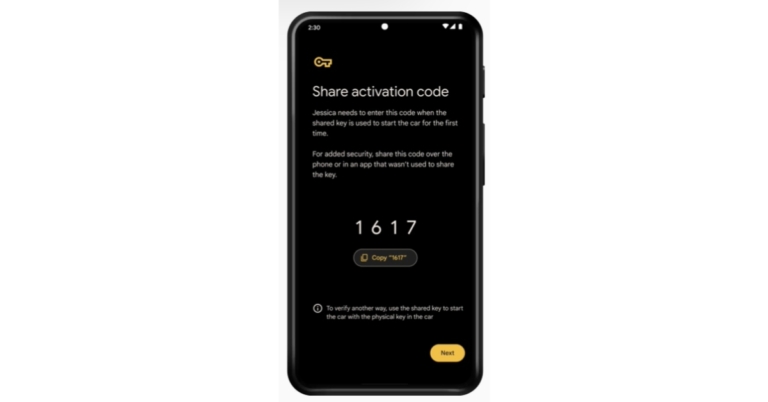
You can now cast content from your preferred streaming sources to your TV with a single tap using the Google TV app. Titles from different streaming services can be browsed. Additionally, the smartphone can function as a convenient remote control for your Android TV. Share your digital car key safely and remotely with loved ones so they can use your car. You can alter access at any moment with a digital car key that works with both iOS and Android devices. In addition, Google has improved Google Keep and swiping functionality for smartwatches powered by Wear OS. All the photographs, co-authors, and background colours added to your notes from your phone look just as fantastic on your smartwatch thanks to an improved Keep software for Wear OS. Shortcuts to programmes like contacts, Google Maps, and weather are available on Wear OS Tiles. Moreover, Voice commands for Google Assistant are now supported by Adidas Running to quickly begin tracking your workout on your smartwatch.

Entertainment

A YouTube search widget will be included in upcoming entertainment updates. It can be quickly accessed on your home screen. You can access your subscription feed, favourite videos, and Shorts directly from your home screen. Additionally, Google is introducing new collage designs with new styles by talented artists DABSMYLA and Yao Cheng Design for Google Photos.

Messaging

By responding to particular messages on the Messages app, you may keep the conversation going. You can clearly see the particular text you are responding to, allowing you to follow the thread of dialogue as it develops. A new selection of emojis for Gboard has been added for users to remix into fresh sticker sets. Use Emoji Kitchen on Gboard to bolster your messages with extra Christmas happiness.

Accessibility

Accessibility features are included in Android’s new Reading mode to improve the reading experience. The display font type, size, colour, text-to-speech, and playback speed can all be changed. You can now download Google’s new reading mode app from the Google Play store.

Protection

On your Google Account profile picture, a new safety alert has been added with suggested steps to secure your account. For the latest gadget and tech news, and gadget reviews, follow us on TwitterFacebook and Instagram. For newest tech & gadget videos subscribe to our YouTube Channel. You can also stay up to date using the Gadget Bridge Android App. You can find the latest car and bike news here.

Garena Free Fire Redeem Codes Today 3 December 2022: Here is how to claim them

Garena Free Fire is a battle royale game with regular awards and tournaments to keep players interested. If you play Garena Free Fire, you should be aware of the redeem codes that are released on a daily basis. However, because the battle royale game is banned in India, players from other countries can use the Free Fire Redeem codes daily. If you’re unfamiliar with the Garena Free Fire redeem codes or don’t know how to get them, we’ve put together a step-by-step guide to help you redeem them. Check out Garena Free Fire Redeem Codes for December 3. The Free Fire redeem codes are a great way to get free stuff. These are 12-digit codes that contain alphabets and numbers, as well as an expiration date and time. Because the Garena FF redeem codes cannot be used more than once, you should hurry to the redemption page to claim your free reward before someone else does. To get a free reward, all you have to do is go to reward.ff.garena.com/en, which is the official redemption page. Also, keep an eye on this space for daily updates on Garena Free Fire redemption codes and rewards.

Garena Free Fire Redeem Codes Today 3 December 2022

Updating Soon

How to Get Free Fire Redeem Codes for Garena on December 3?

  • Visit the Garena Free Fire game’s official website at reward.ff.garena.com.
  • Use your Facebook, Google, VK, Apple ID, Huawei ID, or Twitter account to log in.
  • You’ll be taken to a valid redemption code (s)
  • Copy and paste the 12-digit redemption code into the text box.
  • On the screen, a dialogue box will appear.
  • ‘Ok’ should be selected.
For the latest gadget and tech news, and gadget reviews, follow us on TwitterFacebook and Instagram. For newest tech & gadget videos subscribe to our YouTube Channel. You can also stay up to date using the Gadget Bridge Android App. You can find the latest car and bike news here.

Amazon Quiz Answers Today 3 December 2022: Participate to win Rs 5,000

3 December 2022 Amazon Quiz has gone live. Customers from different parts of the country are participating in the daily quiz. The quiz begins from 12 AM to 11:59 PM. Those participating in the quiz can win exciting prizes by answering all the questions correctly. Today participants have a chance to win a Rs 5,000 Amazon Pay Balance. Amazon quiz brings an opportunity for its customers to win Amazon Pay Balance ranging from Rs 1,000 to Rs 50,000. The Quiz can be played from 12 AM to 11:59 PM. The e-commerce platform brings a fresh quiz on a daily basis which consists of five questions related to general knowledge and current affairs. The participants need to answer all the questions correctly and their names will be selected for a lucky draw. The winner will be announced at the end of the month. One wrong answer could eliminate you from the quiz. If you manage to answer all the questions correctly you can stand a chance to win a Rs 5,000 Amazon Pay Balance today. Only app users are eligible to participate in the Quiz. Check Out 3 December 2022 Amazon Quiz Answers. Amazon Quiz Today Prize – Rs 5,000 Amazon Pay Balance Quiz Date – 3 December 2022 Daily Timing – 12 AM to 11:59 PM Winner Announcement – Today 12 PM

Amazon Quiz Answers Today 3 December 2022

Question 1: The Golden Ball for the best player at the FIFA World Cup was officially instituted in 1982. Who was the first winner of the award? Answer: Paolo Rossi Question 2: Which Indian long-jump star was bestowed the Woman of the Year Award by World Athletics in 2021? Answer: Anju Bobby George Question 3: Who among these holds the record for the most number of goals in the history of the men’s FIFA World Cup? Answer: Miroslav Klose Question 4: Where did the marble used to make this building come from? Answer: Makrana, Rajasthan Question 5: This structure holds the largest reservoir of water in North America. Which city is it located near? Answer: Boulder City, Nevada

How To Play Amazon Quiz

Only app users are eligible to play the Amazon quiz every morning from 12 AM to 11:59 PM. The quiz is not available on the desktop. For those who are unaware of how to play the Amazon quiz below are the steps, you can follow to take the quiz.
  • Firstly download the Amazon app from Google Play Store or App Store
  • Now fill in the required information through the Sign Up option.
  • You need to log in to the Amazon app and scroll down on the home screen to find the Amazon Quiz banner.
  • Tap on the Amazon Quiz banner and tap on the Start button to start the Quiz.
  • Now you will get 5 questions and you need to answer them correctly. One wrong answer will eliminate you from the Quiz.
  • After answering all the questions correctly you are now eligible for a Lucky Draw.
  • The winner’s name will be announced today at 12 PM.
For the latest gadget and tech news, and gadget reviews, follow us on TwitterFacebook and Instagram. For newest tech & gadget videos subscribe to our YouTube Channel. You can also stay up to date using the Gadget Bridge Android App. You can find the latest car and bike news here.