

Meta brings age verification to Facebook dating
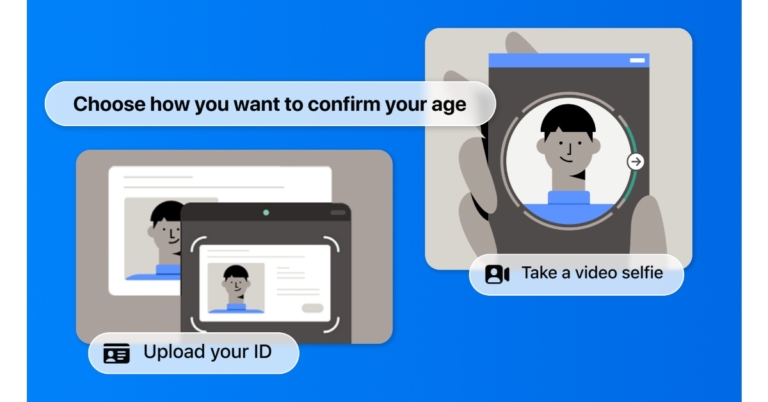
Meta made the announcement that it would begin asking Facebook Dating users to confirm their age if the platform suspected they are under 18. As per the company, this will ensure that only adults are using the service and will help it stop children from using it. In order to preserve people’s privacy and give them a variety of options to choose from when verifying their age. For that, it is extending its collaboration with the online age-verification firm Yoti.
Meta in its announcement said. “We’re committed to making sure people have age-appropriate experiences across our technologies, and as part of this work, we’ve been testing age verification tools and using age detection technology to stop people under the age of 18 from accessing experiences meant for adults.”
It further added, “Starting today, we’re expanding our age verification test to Facebook Dating in the US. We require people to be at least 18 years old in order to sign up for and access Facebook Dating, and age verification tools will help verify that only adults are using the service and help prevent minors from accessing it. We’re also continuing our partnership with Yoti, a company that specialises in online age verification so that people have more than one option to choose from to verify their age.”
According to Meta, it used technology to identify instances in which individuals had falsified their ages in order to make sure that they were placed in situations that were acceptable for their ages. To identify any potential differences between the ages people provide them and the age it believes they may be based on its technology, it has invested in age detection technologies. It will ask someone to confirm their age if it thinks they may be under 18 and trying to use Facebook Dating. They will have a choice between two options: video selfies and ID upload.
You will be given step-by-step instructions on your screen if you select the Video Selfie option. When you take a video selfie on Facebook dating, you only share one still image from the video with Yoti. Based on your facial traits, Yoti’s algorithm calculates your age and shares it with the company before deleting the image right away. Only your age can be determined by the technology, not your identity as per Meta.
As an additional option, you can upload proof of identity to prove your age. After you upload a copy of your ID, it will be encrypted and safely kept; it won’t be accessible to other users of the app or on your Facebook page. As per the company you can control how long your ID is kept on file after your age has been confirmed.
For the latest gadget and tech news, and gadget reviews, follow us on Twitter, Facebook and Instagram. For newest tech & gadget videos subscribe to our YouTube Channel. You can also stay up to date using the Gadget Bridge Android App. You can find the latest car and bike news here.
3 Easy Methods to Convert Any Video to a Slow-Motion Video on Android
Most smartphones let you shoot videos in slow motion but very few give you the option to edit the slow motion on the video after you’re done shooting it. For TikTok and Instagram creators, the slow-motion effect is a necessity. When used cleverly, the slow-motion effect can capture the attention of the viewer and make your content all the more engrossing. While Instagram and TikTok let you shoot in slo-mo, both apps lack the option of letting you use the effect on pre-shot videos. If you do not want to work your way around a complex video editor, here are 3 easy methods to convert any video to a slow-motion video on Android.
Read Also: Sony SRS-XV900 Bluetooth party speaker debuts in India
 Step 3: Select ‘Speed’ from the toolbar.
Step 4: Select the playback speed. You can speed up the video or convert it entirely into slow motion.
Step 5: Tap on ‘Curve’ to convert different parts of the video into slow motion. Tap the play button to preview.
Step 6: Select ‘Save.’
Step 3: Use the tracker to select the segment of the video you want to convert to slow motion.
Step 4: Use the speed tool to adjust the playback speed of the video. Tap the play icon to see the changes on the preview window.
Step 5: Tap on ‘Save’ when you’re done making changes.
Step 3: Select ‘Edit’ from the bottom menu.
Step 4: Tap on ‘Speed’ from the list of editing tools at the bottom.
Step 5: Select the tempo from the speed tool. Tap on the tick icon to save the speed.
Step 6: Go back to the main window and export your video to local storage.
Read Also: Best methods to Reverse Search On Google Using an Image or Video (2023)
Remember: Some of these apps have premium features that can only be unlocked with a subscription. At the moment the functions mentioned above are free to use.
Step 3: Select ‘Speed’ from the toolbar.
Step 4: Select the playback speed. You can speed up the video or convert it entirely into slow motion.
Step 5: Tap on ‘Curve’ to convert different parts of the video into slow motion. Tap the play button to preview.
Step 6: Select ‘Save.’
Step 3: Use the tracker to select the segment of the video you want to convert to slow motion.
Step 4: Use the speed tool to adjust the playback speed of the video. Tap the play icon to see the changes on the preview window.
Step 5: Tap on ‘Save’ when you’re done making changes.
Step 3: Select ‘Edit’ from the bottom menu.
Step 4: Tap on ‘Speed’ from the list of editing tools at the bottom.
Step 5: Select the tempo from the speed tool. Tap on the tick icon to save the speed.
Step 6: Go back to the main window and export your video to local storage.
Read Also: Best methods to Reverse Search On Google Using an Image or Video (2023)
Remember: Some of these apps have premium features that can only be unlocked with a subscription. At the moment the functions mentioned above are free to use.
Use InShot to add the Slow-Motion effect
InShot is one of the simplest and most popular video editing apps for Android. With just a few taps, you can choose from hundreds of transitions and effects. Here’s how you can convert a video into a slow-motion video using InShot. Step 1: Download and install the Video Editor & Maker – InShot app from Google Play Store. Step 2: Tap on ‘Video’ from the ‘Create new’ section and upload the video from your phone’s gallery. Step 3: Select ‘Speed’ from the toolbar.
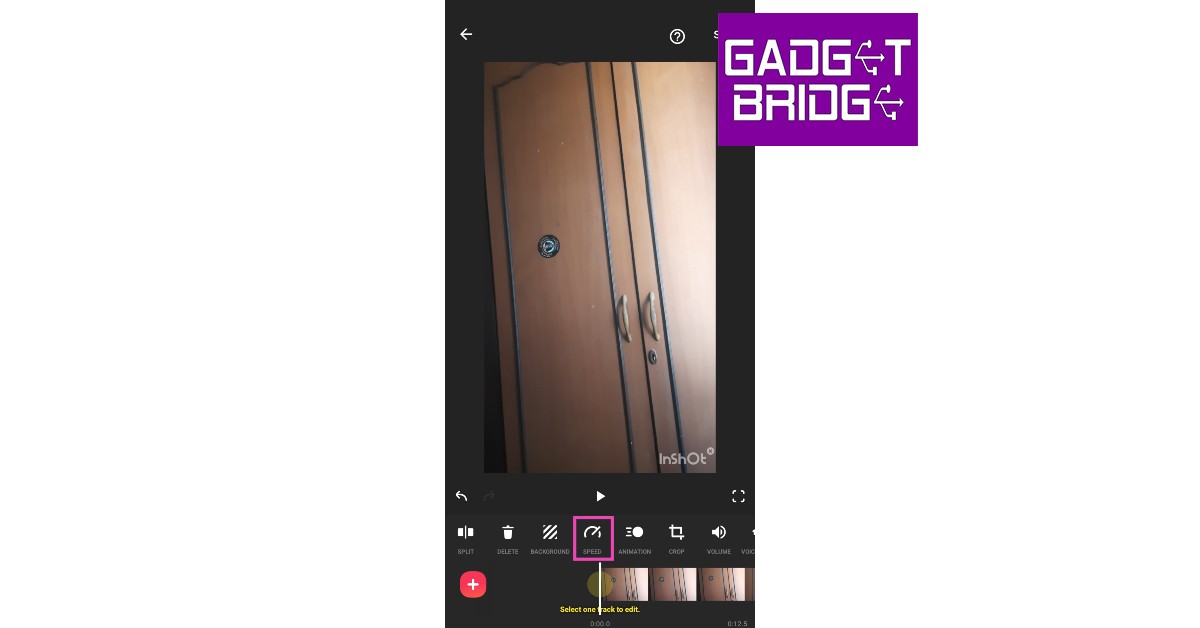 Step 4: Select the playback speed. You can speed up the video or convert it entirely into slow motion.
 Step 5: Tap on ‘Curve’ to convert different parts of the video into slow motion. Tap the play button to preview.
 Step 6: Select ‘Save.’
Use Slow Motion Video Maker
While the InShot Video Editor offers a range of editing tools, the Slow Motion Video Maker app offers only a handful of features apart from the slow-motion effect. This is a pretty straightforward app if you just want to convert a video into slow motion. Step 1: Download and install the Slow Motion Video Maker from Google Play Store. Step 2: Open the app and select ‘Gallery.’ Select the video you want to convert. Step 3: Use the tracker to select the segment of the video you want to convert to slow motion.
Step 4: Use the speed tool to adjust the playback speed of the video. Tap the play icon to see the changes on the preview window.
Step 3: Use the tracker to select the segment of the video you want to convert to slow motion.
Step 4: Use the speed tool to adjust the playback speed of the video. Tap the play icon to see the changes on the preview window.
 Step 5: Tap on ‘Save’ when you’re done making changes.
Use the VITA app
Like InShot, VITA is an extensive video editing app for Android smartphones. You can use the ‘speed’ tool from the app to convert your videos to slow motion. Here’s how. Step 1: Download and install the VITA app from Google Play Store. Step 2: Tap on ‘New Project’ and select the video you want to edit. Step 3: Select ‘Edit’ from the bottom menu.
 Step 4: Tap on ‘Speed’ from the list of editing tools at the bottom.
 Step 5: Select the tempo from the speed tool. Tap on the tick icon to save the speed.
 Step 6: Go back to the main window and export your video to local storage.
Read Also: Best methods to Reverse Search On Google Using an Image or Video (2023)
Remember: Some of these apps have premium features that can only be unlocked with a subscription. At the moment the functions mentioned above are free to use.
Step 6: Go back to the main window and export your video to local storage.
Read Also: Best methods to Reverse Search On Google Using an Image or Video (2023)
Remember: Some of these apps have premium features that can only be unlocked with a subscription. At the moment the functions mentioned above are free to use.
Conclusion
These are the top 3 easy methods to convert any video to a slow-motion on Android. While most video editors let you control the speed of the video using the tracker, the apps mentioned in this article provide greater accessibility to their users. If you like to use any other app for the slo-mo effect, let us know in the comments! For the latest gadget and tech news, and gadget reviews, follow us on Twitter, Facebook and Instagram. For newest tech & gadget videos subscribe to our YouTube Channel. You can also stay up to date using the Gadget Bridge Android App. You can find the latest car and bike news here.Blaupunkt BTW20 TWS earbuds that can last up to 14 hours launched in India
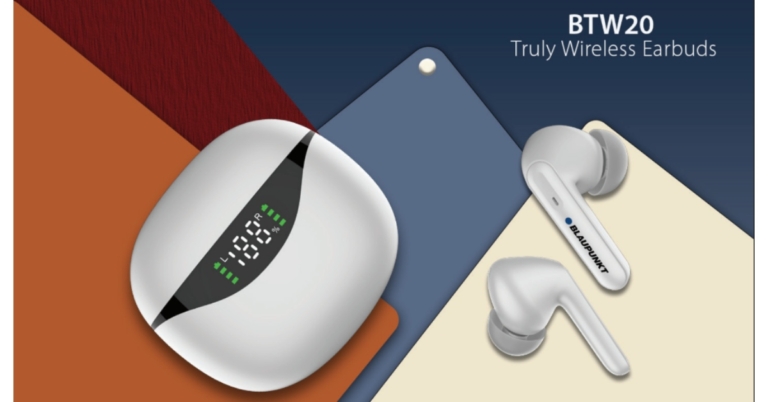
With the introduction of BTW20 TWS earbuds in India, Blaupunkt has increased the range of their true wireless earbuds. The TWS earbuds are said to provide better battery life at a reasonable cost offering up to 30 hours of battery life. The Bluetooth Headphone has a Smart LED Digital Display, making it simple to see how much battery life remains after charging.
Blaupunkt BTW20 price in India and availability details
Blaupunkt BTW20 has been launched in India at an affordable price tag of Rs 1,299. The audio device comes in four colour options of White, Black, Blue and Green. These can be purchased via Amazon in the country.Blaupunkt BTW20 specifications
The 10mm dynamic driver found in the Blaupunkt BTW20 delivers strong bass, crystal-clear vocals, and sharp high tones. The built-in MIC is another premium enhancement; it will suffer the least degree of background noise interference. These earbuds are wonderfully lightweight. In addition, the case’s LED display helps to ease battery anxiety. You will always be able to view the battery level of each bud through the unique display. As per the company, a single charge of the F1 battery provides 14 hours of playing. Turbo-volt technology inside allows for incredibly quick charging. The charging case may be fully recharged in a short amount of time thanks to USB-C fast charging technology. You can play for 30 minutes after a 10-minute charge. Additionally, it’s simple to use Siri and Google Assistant. Your voice commands will be responded to quickly thanks to the clear MIC. The BTW20 are sweat and moisture-resistant, making them the ideal running, jogging, and exercise partner. The earphones are equipped with highly sensitive touch sensors that can recognise every touch. Without lifting up your phone, use the earbud to softly tap to skip music, accept or reject calls, and activate the voice assistant. For the latest gadget and tech news, and gadget reviews, follow us on Twitter, Facebook and Instagram. For newest tech & gadget videos subscribe to our YouTube Channel. You can also stay up to date using the Gadget Bridge Android App. You can find the latest car and bike news here.Garena Free Fire Redeem Codes Today 6 December 2022: Here is how to claim them

Garena Free Fire is a battle royale game with regular awards and tournaments to keep players interested. If you play Garena Free Fire, you should be aware of the redeem codes that are released on a daily basis. However, because the battle royale game is banned in India, players from other countries can use the Free Fire Redeem codes daily. If you’re unfamiliar with the Garena Free Fire redeem codes or don’t know how to get them, we’ve put together a step-by-step guide to help you redeem them. Check out Garena Free Fire Redeem Codes for December 6.
The Free Fire redeem codes are a great way to get free stuff. These are 12-digit codes that contain alphabets and numbers, as well as an expiration date and time. Because the Garena FF redeem codes cannot be used more than once, you should hurry to the redemption page to claim your free reward before someone else does. To get a free reward, all you have to do is go to reward.ff.garena.com/en, which is the official redemption page. Also, keep an eye on this space for daily updates on Garena Free Fire redemption codes and rewards.
Garena Free Fire Redeem Codes Today 6 December 2022
MHM5D8ZQZP22 MCPW3D28VZD6 FFCMCPSJ99S3 FFCMCPSEN5MX XZJZE25WEFJJ BR43FMAPYEZZ FFCMCPSGC9XZ ZZZ76NT3PDSH MCPW2D1U3XA3 HNC95435FAGJ MCPW2D2WKWF2 NPYFATT3HGSQ UVX9PYZV54AC FFCMCPSUYUY7E V427K98RUCHZ 6KWMFJVMQQYG EYH2W3XK8UPGHow to Get Free Fire Redeem Codes for Garena on December 6?
- Visit the Garena Free Fire game’s official website at reward.ff.garena.com.
- Use your Facebook, Google, VK, Apple ID, Huawei ID, or Twitter account to log in.
- You’ll be taken to a valid redemption code (s)
- Copy and paste the 12-digit redemption code into the text box.
- On the screen, a dialogue box will appear.
- ‘Ok’ should be selected.
Amazon Quiz Answers Today 6 December 2022: Participate to win Rs 1000

6 December 2022 Amazon Quiz has gone live on its platform. The quiz timings are 12 AM to 11:59 PM. The Amazon App users can participate in the quiz daily and all they have to do is submit correct answers to the questions asked on the e-commerce platform. Today’s participants can get a chance to win Rs 1000 Amazon Pay Balance.
Amazon brings a fresh questionnaire that contains 5 questions daily. These questions are based on current affairs and general knowledge. The quiz can be played from 8 AM to 11:59 PM and the contestants need to answer correctly to enter into a lucky draw.
Only one person is declared as a winner and the results will be announced at the end of every month. And to make sure that you give correct answers to all the 5 questions Gadget Bridge everyday updates all the answers to the Amazon Quiz. Do check out 6 December 2022 Amazon Quiz Answers to win a Rs 1000 Amazon pay Balance.
Amazon Quiz Today Prize – Rs 1000 Amazon Pay Balance
Quiz Date – 6 December 2022
Daily Timing – 12 AM to 11:59 PM
Winner Announcement – Today 12 PM
Amazon Quiz Answers Today 6 December 2022
Question 1: Which is the only Asian nation to make the semi-finals of the men’s FIFA World Cup? Answer: South Korea Question 2: Which word was named Dictionary.com’s word of the year 2021? Answer: Allyship Question 3: In which year did Zinedine Zidane score 2 goals in a FIFA World Cup final for the winning side? Answer: 1998 Question 4: Who is the founder of this company, that started out as a watch brand in 1984? Answer: Xerxes Desai Question 5: Physician Johann Freiherr von Mikulicz-Radecki created primitive versions of these for what in 1897? Answer: SurgeryHow To Play Amazon Quiz
Only app users are eligible to play the Amazon quiz every morning from 12 AM to 11:59 PM. The quiz is not available on the desktop. For those who are unaware of how to play the Amazon quiz below are the steps, you can follow to take the quiz.- Firstly download the Amazon app from Google Play Store or App Store
- Now fill in the required information through the Sign Up option.
- You need to log in to the Amazon app and scroll down on the home screen to find the Amazon Quiz banner.
- Tap on the Amazon Quiz banner and tap on the Start button to start the Quiz.
- Now you will get 5 questions and you need to answer them correctly. One wrong answer will eliminate you from the Quiz.
- After answering all the questions correctly you are now eligible for a Lucky Draw.
- The winner’s name will be announced today at 12 PM.
Vivo Y02 budget smartphone launched in India at Rs 8,999
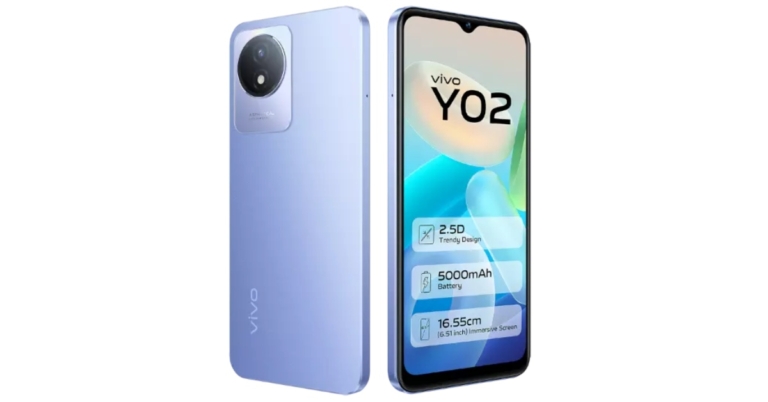
The Vivo Y02 was just made available in India. The smartphone was first introduced in Indonesia a few days back. This low-cost smartphone has a 6.51-inch HD+ FullView screen with Eye Protection functionality. The phone is powered by an Unknown octa-core CPU, which is speculated to be a MediaTek Helio P22 SoC. The device has a battery capacity of 5,000mAh.

Vivo Y02 price in India details
As we said earlier Vivo Y02 was launched in Indonesia before arriving in India at IDR 1,499,000 which translates to Rs 8,000 for the 3GB RAM with 32GB storage option. But here in India, it has launched in India at Rs 8,999 for a single 3GB RAM with 32GB storage model. The phone will be available in two colour options of Orchid Blue and Cosmic Grey. The device can be purchased through Vivo India E-Store and across all partner retail stores.
Vivo Y02 specifications
The Vivo Y02 has a 6.51-inch HD+ FullView display with a resolution of 720 x 1,600 pixels and Eye Protection. An unidentified octa-core chipset, maybe a MediaTek Helio P22 SoC, is present. The Vivo Y02 has 32GB of internal storage that can be increased with a microSD card and 3GB of RAM. The Vivo Y02 smartphone is run by Funtouch OS 12, which is based on Android 12 Go Edition. The primary camera of the Y02 features an aperture of f/2.0 and an LED flash. The budget phone also features a 5-megapixel front camera with an f/2.2 aperture. The smartphone comes with capabilities like Time Lapse and Face Beauty. The Y02’s 5,000mAh battery offers uninterrupted all-day usage. Support is provided for both 10W wired charging and 5W reverse charging. The Y02 also includes a tonne of useful features and applications for further security and convenience, including Electronic Compass for GPS accuracy, Face Wake, EasyShare, iManager, etc. For the latest gadget and tech news, and gadget reviews, follow us on Twitter, Facebook and Instagram. For newest tech & gadget videos subscribe to our YouTube Channel. You can also stay up to date using the Gadget Bridge Android App. You can find the latest car and bike news here.Sony SRS-XV900 Bluetooth party speaker debuts in India
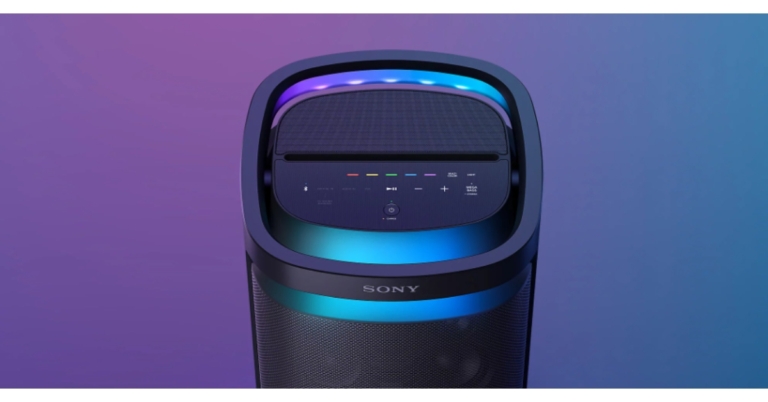
The new SRS-XV900 Bluetooth party speaker in the wireless speaker X-series family was just introduced by Sony India. The new Sony SRS-XV900 are omnidirectional X-balanced speakers and a TV Sound Booster for improved TV sound. The audio device offers a 25-hour battery life and quick charging. These are portable and come with convenient wheels and a carry handle.
You may take advantage of strong omnidirectional party sound with the new Sony SRS-XV900. The X-Balanced speaker unit’s non-circular diaphragm increases sound pressure while minimising distortion by optimising the speaker’s surface area. Whereas the jet bass booster produces rich, punchy bass and high-frequency sound is dispersed all around by the six tweeters on the front, side, and rear.
 With Sony’s exclusive TV Sound booster feature, the SRS-XV900 speaker, you can experience boosted sound while watching live performance videos or movies on TV. Regardless of the brand or model of the TV, just connect the optical cable (included) and choose TV Sound Booster.
You may increase the bass on your speaker using the Mega Bass option, giving you a powerful and deep bass. You may listen to your music just like it’s live with the new SRS-XV900 speaker. You can repeatedly relive your greatest musical moments with the Live Sound mode by recreating that special environment.
The new SRS-XV900 Bluetooth party speaker offers 25 hours of battery life. There’s no need to be concerned if you discover that your speaker’s battery is running low. With the speaker’s quick charging feature, 3 hours of playback may be obtained in just 10 minutes.
The device has a comfortable handle included. You may tilt the carry handle back whenever you need to relocate the speaker. You can connect your device to the microphone or even to a guitar and use the speaker as an amplifier with two inputs (mic & guitar). Utilise the Double Tracking function on the Fiestable mobile app to further enhance your singing vocals. The speaker’s intuitive top touch screen, which enables you to change function settings and lights with a single touch, also gives you complete control over it at all times. You can connect up to 100 compatible Sony Bluetooth speakers to Party Connect via Bluetooth. Additionally, the speaker has USB connectivity, so you can plug it in and listen to music. Furthermore, you may plug your smartphone directly into the speaker to have it charged if the battery is getting low. Additionally, the SRS-Bluetooth XV900’s fast pair with Android functionality enables you to instantly pair the speaker with your smartphone.
Both Fiestable and Sony Music Center are compatible with the new Sony SRS-XV900. You can choose playlists, cue the next song, alter lighting schemes, and switch sound modes all from the dance floor using Sony Music Center. With Fiestable, you can get exciting features like generating a party playlist, karaoke capabilities like Voice Changer and Echo, and DJ control to add sound effects.
With Sony’s exclusive TV Sound booster feature, the SRS-XV900 speaker, you can experience boosted sound while watching live performance videos or movies on TV. Regardless of the brand or model of the TV, just connect the optical cable (included) and choose TV Sound Booster.
You may increase the bass on your speaker using the Mega Bass option, giving you a powerful and deep bass. You may listen to your music just like it’s live with the new SRS-XV900 speaker. You can repeatedly relive your greatest musical moments with the Live Sound mode by recreating that special environment.
The new SRS-XV900 Bluetooth party speaker offers 25 hours of battery life. There’s no need to be concerned if you discover that your speaker’s battery is running low. With the speaker’s quick charging feature, 3 hours of playback may be obtained in just 10 minutes.
The device has a comfortable handle included. You may tilt the carry handle back whenever you need to relocate the speaker. You can connect your device to the microphone or even to a guitar and use the speaker as an amplifier with two inputs (mic & guitar). Utilise the Double Tracking function on the Fiestable mobile app to further enhance your singing vocals. The speaker’s intuitive top touch screen, which enables you to change function settings and lights with a single touch, also gives you complete control over it at all times. You can connect up to 100 compatible Sony Bluetooth speakers to Party Connect via Bluetooth. Additionally, the speaker has USB connectivity, so you can plug it in and listen to music. Furthermore, you may plug your smartphone directly into the speaker to have it charged if the battery is getting low. Additionally, the SRS-Bluetooth XV900’s fast pair with Android functionality enables you to instantly pair the speaker with your smartphone.
Both Fiestable and Sony Music Center are compatible with the new Sony SRS-XV900. You can choose playlists, cue the next song, alter lighting schemes, and switch sound modes all from the dance floor using Sony Music Center. With Fiestable, you can get exciting features like generating a party playlist, karaoke capabilities like Voice Changer and Echo, and DJ control to add sound effects.
 With Sony’s exclusive TV Sound booster feature, the SRS-XV900 speaker, you can experience boosted sound while watching live performance videos or movies on TV. Regardless of the brand or model of the TV, just connect the optical cable (included) and choose TV Sound Booster.
You may increase the bass on your speaker using the Mega Bass option, giving you a powerful and deep bass. You may listen to your music just like it’s live with the new SRS-XV900 speaker. You can repeatedly relive your greatest musical moments with the Live Sound mode by recreating that special environment.
The new SRS-XV900 Bluetooth party speaker offers 25 hours of battery life. There’s no need to be concerned if you discover that your speaker’s battery is running low. With the speaker’s quick charging feature, 3 hours of playback may be obtained in just 10 minutes.
The device has a comfortable handle included. You may tilt the carry handle back whenever you need to relocate the speaker. You can connect your device to the microphone or even to a guitar and use the speaker as an amplifier with two inputs (mic & guitar). Utilise the Double Tracking function on the Fiestable mobile app to further enhance your singing vocals. The speaker’s intuitive top touch screen, which enables you to change function settings and lights with a single touch, also gives you complete control over it at all times. You can connect up to 100 compatible Sony Bluetooth speakers to Party Connect via Bluetooth. Additionally, the speaker has USB connectivity, so you can plug it in and listen to music. Furthermore, you may plug your smartphone directly into the speaker to have it charged if the battery is getting low. Additionally, the SRS-Bluetooth XV900’s fast pair with Android functionality enables you to instantly pair the speaker with your smartphone.
Both Fiestable and Sony Music Center are compatible with the new Sony SRS-XV900. You can choose playlists, cue the next song, alter lighting schemes, and switch sound modes all from the dance floor using Sony Music Center. With Fiestable, you can get exciting features like generating a party playlist, karaoke capabilities like Voice Changer and Echo, and DJ control to add sound effects.
With Sony’s exclusive TV Sound booster feature, the SRS-XV900 speaker, you can experience boosted sound while watching live performance videos or movies on TV. Regardless of the brand or model of the TV, just connect the optical cable (included) and choose TV Sound Booster.
You may increase the bass on your speaker using the Mega Bass option, giving you a powerful and deep bass. You may listen to your music just like it’s live with the new SRS-XV900 speaker. You can repeatedly relive your greatest musical moments with the Live Sound mode by recreating that special environment.
The new SRS-XV900 Bluetooth party speaker offers 25 hours of battery life. There’s no need to be concerned if you discover that your speaker’s battery is running low. With the speaker’s quick charging feature, 3 hours of playback may be obtained in just 10 minutes.
The device has a comfortable handle included. You may tilt the carry handle back whenever you need to relocate the speaker. You can connect your device to the microphone or even to a guitar and use the speaker as an amplifier with two inputs (mic & guitar). Utilise the Double Tracking function on the Fiestable mobile app to further enhance your singing vocals. The speaker’s intuitive top touch screen, which enables you to change function settings and lights with a single touch, also gives you complete control over it at all times. You can connect up to 100 compatible Sony Bluetooth speakers to Party Connect via Bluetooth. Additionally, the speaker has USB connectivity, so you can plug it in and listen to music. Furthermore, you may plug your smartphone directly into the speaker to have it charged if the battery is getting low. Additionally, the SRS-Bluetooth XV900’s fast pair with Android functionality enables you to instantly pair the speaker with your smartphone.
Both Fiestable and Sony Music Center are compatible with the new Sony SRS-XV900. You can choose playlists, cue the next song, alter lighting schemes, and switch sound modes all from the dance floor using Sony Music Center. With Fiestable, you can get exciting features like generating a party playlist, karaoke capabilities like Voice Changer and Echo, and DJ control to add sound effects.
Price and Availability
With a price tag of Rs 79,990, the Sony SRS-XV900 has just been released in India. From December 5, the speaker will be offered in all Sony Centers, major electronics retailers, and online shopping websites in India. For the latest gadget and tech news, and gadget reviews, follow us on Twitter, Facebook and Instagram. For newest tech & gadget videos subscribe to our YouTube Channel. You can also stay up to date using the Gadget Bridge Android App. You can find the latest car and bike news here.Best methods to Reverse Search On Google Using an Image or Video (2023)

Google’s reverse image search is the most efficient way of finding the source of any image or video you come across on the internet. If you found an artwork you like, you can find its creator using this feature. Reverse image search works on a desktop as well as on a smartphone. Here are some of the best methods to reverse search on Google using an image or video.
Read Also: How to track product prices on Google Chrome and save money?
Step 2: On the search bar, click on the camera icon. This is the ‘search by image’ option.
Step 3: Click on ‘Upload an Image.’
Step 4: Upload the image.
Step 5: Google will search the internet for the source of the image and come up with relevant results.
Step 3: Tap the camera icon.
Step 4: Tap on ‘Upload an image’ and select the image you want to search from your phone’s gallery.
Step 5: Google will present the relevant results for the source of the image.
Step 3: Tap on the Google lens icon on the top right corner of the image.
At the bottom of your screen will be displayed all the websites where the selected image or any images similar to it appear on the internet, along with any information or description regarding the same.
Step 3: Google will find the source location of your video. If this doesn’t work, try again with a different screenshot.
Read Also: Infinix Zero 5G 2023 with triple rear cameras announced
How to reverse image search on Google
Step 1: Go to https://images.google.com. Step 2: On the search bar, click on the camera icon. This is the ‘search by image’ option.
Step 3: Click on ‘Upload an Image.’
Step 2: On the search bar, click on the camera icon. This is the ‘search by image’ option.
Step 3: Click on ‘Upload an Image.’
 Step 4: Upload the image.
Step 5: Google will search the internet for the source of the image and come up with relevant results.
Step 4: Upload the image.
Step 5: Google will search the internet for the source of the image and come up with relevant results.

How to reverse image search on Google using an Android smartphone
Step 1: Go to https://images.google.com on the Chrome web browser. Step 2: Tap the ellipses (three dots) at the top right corner of the screen. Select ‘desktop site.’ Step 3: Tap the camera icon.
Step 4: Tap on ‘Upload an image’ and select the image you want to search from your phone’s gallery.
Step 3: Tap the camera icon.
Step 4: Tap on ‘Upload an image’ and select the image you want to search from your phone’s gallery.
 Step 5: Google will present the relevant results for the source of the image.
Reverse Image Search From Search Results
Step 1: Visit https://images.google.com from your Android device. Step 2: Search for an image and tap on the required image from the search results. Step 3: Tap on the Google lens icon on the top right corner of the image.
 At the bottom of your screen will be displayed all the websites where the selected image or any images similar to it appear on the internet, along with any information or description regarding the same.
How to reverse search on Google using a video
While Google does not offer a Reverse video search yet, you can still make use of its Reverse image search function to find your desired video. All you need to do is take multiple screenshots of the video you want to search and upload them to the reverse image search bar. Just follow these simple steps. Step 1: Take multiple screenshots of your video. Step 2: Go to https://images.google.com and upload the screenshots.
Step 3: Google will find the source location of your video. If this doesn’t work, try again with a different screenshot.
 Read Also: Infinix Zero 5G 2023 with triple rear cameras announced
Conclusion
These are the best methods to reverse search on Google using an image or a video. While reverse searching for the source of a video, make sure you take enough screenshots from different parts of the video to increase the chances of finding relevant results. You can also use websites like Berify and Tineye to reverse search for videos. For the latest gadget and tech news, and gadget reviews, follow us on Twitter, Facebook and Instagram. For newest tech & gadget videos subscribe to our YouTube Channel. You can also stay up to date using the Gadget Bridge Android App. You can find the latest car and bike news here.iQOO 11 5G launch scheduled for December 8
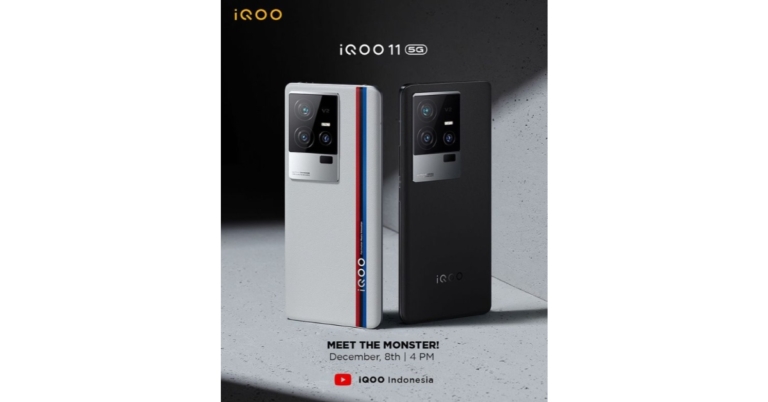
The launch of iQOO 11 5G will now take place on December 8. Along with the iQOO 11, iQOO is also anticipated to release the iQOO Neo 7 SE. The iQoo 11 5G smartphone will be released in a special version with a BMW Motorsport theme. It is confirmed that a Snapdragon 8 Gen 2 SoC powers the gadget. Other anticipated features of the iQoo 11 5G suggest a 5,000mAh battery with 120W fast charging capabilities.
The debut on December 8 is for the Indonesian market, but it is anticipated that China will also experience a comparable event on the same day. The launch was originally scheduled for December 2, but it was delayed because Jiang Zemin, the former president of the People’s Republic of China, passed away. The iQoo 11 5G will be unveiled during the business’ launch event which is slated to begin at 2:30 PM IST, according to an Instagram post uploaded on iQoo Indonesia’s Instagram account.
The iQoo 11 5G smartphone will include the most recent Snapdragon 8 Gen 2 SoC from Qualcomm together with LPDDR5x RAM and UFS 4.0 storage. Along with 256GB and 512GB of internal storage, the smartphone will reportedly arrive with 8GB and 12GB RAM configurations. The iQoo 11 5G is anticipated to have further specifications that indicate its 5,000mAh battery will allow 120W of rapid charging. Rumour has it that the iQoo 11 5G will also have an E6 AMOLED display with a 144Hz refresh rate and up to 2K resolution.
There will be a customised version of BMW Motorsport on the smartphone, according to another Instagram post from their account. According to rumours regarding the iQoo 11 5G’s camera, the device will have a triple back camera setup. The camera arrangement will consist of a 12-megapixel telephoto lens, a 13-megapixel ultra-wide lens, and a 50-megapixel primary camera. The device might possibly have a 16-megapixel front-facing selfie camera.
For the latest gadget and tech news, and gadget reviews, follow us on Twitter, Facebook and Instagram. For newest tech & gadget videos subscribe to our YouTube Channel. You can also stay up to date using the Gadget Bridge Android App. You can find the latest car and bike news here.
How to track product prices on Google Chrome and save money?

Pro online shoppers know that tracking product prices can save a significant amount of money. Earlier, you needed to download an extension or plugin to track prices, but now Google Chrome has made it easier to keep a tab on the products you want to buy. You don’t need to download any extension to get an alert whenever a particular product’s price drops. In this article, we show you how to track product prices on Google Chrome and save money!
Read Also: Google rolls out new entertainment, WearOS and productivity features to Android smartphones and smartwatches
Chrome will start tracking the product and notify you whenever there is a drop in its price. Here’s how you can manage the products you are tracking.
Step 3: Click on the side panel icon right next to your profile icon on Chrome.
Step 4: Click on Bookmarks and select Tracked Products.
Step 5: You will be able to see all the products being tracked by Chrome. Turn off alerts if you want to untrack a product.
Here’s how you can manage notifications of the products you are tracking on Chrome.
Step 6: Open Google Chrome on your desktop and click on the ellipses (three dots) at the top right corner of the screen. Go to Settings>Sync and Google Services.
Step 7: Scroll down to ‘Other Google services’ and turn off ‘Get price tracking notifications.’
Remember: ‘Track price’ will only work if you are logged in/signed into the Chrome browser.
Remember: ‘Track price’ will only work if you are logged in/signed into the Chrome browser/Android device.
Read Also: Striking Distance Studios and Krafton launched a new horror game Callisto Protocol
Here’s how you can track product prices on a desktop
First, you need to make sure that you are signed into the Chrome browser and have the sync turned on for your profile. You also need to turn on ‘Web and App activity.’ Visit this page to enable it. Step 1: Open the product page on your desktop. Step 2: Click on the ‘Track price’ icon right next to the address bar. Click ‘Done’ in the following box. Chrome will start tracking the product and notify you whenever there is a drop in its price. Here’s how you can manage the products you are tracking.
Step 3: Click on the side panel icon right next to your profile icon on Chrome.
Chrome will start tracking the product and notify you whenever there is a drop in its price. Here’s how you can manage the products you are tracking.
Step 3: Click on the side panel icon right next to your profile icon on Chrome.
 Step 4: Click on Bookmarks and select Tracked Products.
Step 5: You will be able to see all the products being tracked by Chrome. Turn off alerts if you want to untrack a product.
Here’s how you can manage notifications of the products you are tracking on Chrome.
Step 6: Open Google Chrome on your desktop and click on the ellipses (three dots) at the top right corner of the screen. Go to Settings>Sync and Google Services.
Step 7: Scroll down to ‘Other Google services’ and turn off ‘Get price tracking notifications.’
Remember: ‘Track price’ will only work if you are logged in/signed into the Chrome browser.
Step 4: Click on Bookmarks and select Tracked Products.
Step 5: You will be able to see all the products being tracked by Chrome. Turn off alerts if you want to untrack a product.
Here’s how you can manage notifications of the products you are tracking on Chrome.
Step 6: Open Google Chrome on your desktop and click on the ellipses (three dots) at the top right corner of the screen. Go to Settings>Sync and Google Services.
Step 7: Scroll down to ‘Other Google services’ and turn off ‘Get price tracking notifications.’
Remember: ‘Track price’ will only work if you are logged in/signed into the Chrome browser.
Here’s how you can track product prices on an Android smartphone
Step 1: Open Chrome on your Android smartphone and tap the ellipses (three dots) at the top right corner of the screen. Go to Settings>Google Services and turn ‘Track prices on tabs’ on. Step 2: Open the product page on Chrome and tap the three dots (ellipses) at the top right corner of the screen. Select ‘Track price.’ Remember: ‘Track price’ will only work if you are logged in/signed into the Chrome browser/Android device.
Read Also: Striking Distance Studios and Krafton launched a new horror game Callisto Protocol
Remember: ‘Track price’ will only work if you are logged in/signed into the Chrome browser/Android device.
Read Also: Striking Distance Studios and Krafton launched a new horror game Callisto Protocol