The Oppo A3 Pro has been officially launched in India, featuring a 50-megapixel dual rear camera and is powered by MediaTek Dimensity 6300 chipset. It also has a 120Hz Ultra Bright Display, AI LinkBoost, AI Eraser, and a large 5,100mAh Hyper Energy Battery with a four-year lifespan.
In This Article
Oppo A3 Pro price in India, sale details
Oppo A3 Pro has launched in India with a price tag of Rs 17,999 for the 128GB variant and Rs 19,999 for the 256GB model. The device will be available in two colour options Moonlight Purple and Starry BlackThe smartphone is currently on sale at OPPO Store, Flipkart, Amazon, and mainline retail outlets.Customers can avail up to 10% instant cashback on credit and debit cards from HDFC Bank, SBI Cards, IDFC First Bank, Yes Bank, and ICICI Bank, as well as no-cost EMI for up to 6 months and consumer loans without any down payment from leading financiers.
Oppo A3 Pro Specifications
The Oppo A3 Pro is designed for endurance and features a Damage-proof All-Round Armour Body for drop and impact resistance, IP54 certification for water and dust resistance, and Splash Touch technology for wet hands. The device comes with a 6.67-inch display with a 180Hz touch response and 120Hz refresh rate support. The standard brightness can be manually raised to 850nits, making this phone’s screen the brightest in the sub-INR 20K category. Under the hood, there is a MediaTek Dimensity 6300 5G SoC with 8GB of RAM and up to 256GB of storage, as well as up to 8GB of additional RAM via RAM Expansion. The phone runs on ColorOS 14 on top of Android 14 out of the box.For photos and videos, the Oppo A3 Pro features a 50MP AI Dual Camera set-up and an 8MP Selfie Camera. The shooters come with a Portrait Mode, AI Portrait Retouching, and Dual-view Video to help users capture completely natural-looking content.It further includes an Ultra Volume Mode that boosts the phone’s loudspeaker volume by up to 300%. The phone also sports a 5,100mAh battery that comes with 5W wired SuperVOOC charging support. According to the company, the battery maintains over 80% of its original capacity after 1,600 charge cycles, equivalent to over 4 years of use if charged once per day on average.
The Cyberstuds Spin wireless earbuds from Nu Republic put an interesting ‘spin’ on the typical TWS experience. The charging case of the Cyberstud Spin doubles up as a fidget spinner. If you’re wondering what a viral children’s toy from 2016 is doing on a TWS product in 2024, you’re probably as puzzled as us. Gimmicky design aside, we were curious to check out the audio chops of this TWS when it landed on our desk earlier this month. We’ve been using it for the last week as our primary audio accessory. Here is our in-depth review of the Nu Republic Cyberstud Spin.Read Also:How to Properly Restart a Router & Modem? (2024)
In This Article
Nu Republic Cyberstud Spin Review: Design
Cyberstud Spin’s unboxing experience is pretty standard. Inside the retail box, you get the fidget spinner charging case with earbuds inside, extra ear tips, a USB Type-C cable, and a promotional card.The wireless earbuds are nestled in either wing of the plastic charging case with metal gliders keeping them in place. Sliding these gliders makes a ‘swish’ sound, which is perhaps the coolest thing about this TWS. At the centre of the charging case lies the see-through plastic cap meant for gripping the fidget spinner while it rotates. There are a couple of LED notification lights below this cap.Our biggest gripe with fusion products is that they often fail to be good at either of the things they bring to the table. While the fidget spinner works in practice, it is nowhere as satisfying to play with compared to the actual toy. The hefty weight of the TWS and the poor distribution keep it from attaining that smooth rotating motion.Balancing the case on one finger and pulling off the usual fidget spinner tricks is an uphill battle. Giving the case a good spin often dislodges the earbuds from their cutouts, which is the one thing that should not happen. Sure, the design is appealing to the eyes, but the Cyberstud Spin is a far cry from being the ideal fidget spinner.The earbuds follow the traditional in-ear design language. However, the inner panel of the earbuds is moulded in a way that protrudes outwards from the tragus. The fit suffers as a result, requiring multiple attempts to showcase the full soundstage.We used the Cyberstud Spin while hiking and working out. While the issues with the fit still persisted, the TWS was unharmed by sweat. Nu Republic has not mentioned the IP rating for the earbuds but claims they are resistant to sweat and water splashes.
Nu Republic Cyberstud Spin Review: Performance
Most fusion products tend to falter when it comes to delivering the essential function that they are designed to carry out. Thankfully, that is not the case here. Nu Republic Cyberstud Spin relies on 13mm dynamic drivers to deliver a lush audio output.Cyberstud Spin’s neutral-sounding soundstage is a breath of fresh air in a segment that’s flooded with bass-heavy wireless earbuds. Even though Nu Republic heavily markets its ‘X Bass’ technology, the low-end frequencies on the soundstage are subtle and not overpowering. The mids and the highs get good representation in the mix and the result is a very enjoyable audio output.We listened to a diverse range of genres using the Cyberstud Spin and the TWS did justice to all of them. The crisp guitar riffs of Testament’s ‘Brotherhood of the Snake’ were beautifully presented on the TWS’ soundstage. The same was the case with moody synths and guitars of Sabrina Carpenter’s ‘Espresso’.The ‘gaming mode’ with 40ms latency is a good addition to these earbuds. We played games like Call of Duty Mobile and Asphalt 9 wearing the Cyberstud Spin. There were no audio lags to be found throughout the gameplay. The in-game sound and call quality were also up to the standards of the segment.The calling experience in an indoor setting is pleasant and noise-free while wearing the Nu Republic Cyberstud Spin. The TWS does a good job of extracting the speaker’s voice from the ambient sounds and background noise. However, the call quality takes a sudden drop in outdoor conditions where the background noise is significantly higher.We used the Nu Republic Cyberstud Spin for an average of 4-6 hours daily during the week-long review period. The battery pack on the earbuds powers it for a little over 6 hours. Combined with the charging case, you can get up to 70 hours of playback.Read Also:OnePlus Nord CE 4 Lite launching in India today: Livestream details
Verdict
Purely as a TWS, the Nu Republic Cyberstud Spin is a solid product that presents a balanced and nuanced soundstage for the listener. Most midrange and entry-level wireless earbuds are heavily focused on bass, which leads to suppression of the mid and high frequencies. However, the price tag of Rs 2,499 warrants additional features that are absent on this TWS. At this price point, we expect dual-point connectivity at the very least. A lot of competitive earbuds in price range offer ANC as well. The lack of a companion app is a downside as well. We’d much rather see these features on a TWS than a shoehorned gimmick.
If you rely on a WiFi connection for internet connectivity at home, you should know how to properly restart the router and the modem. The modem connects your home to the Internet Service Provider and is responsible for the transmission of Internet data. Meanwhile, the WiFi router disperses the signal transmitted by the modem to all the devices in your home. If you’re unable to connect to the internet or experiencing sluggish speeds, either of the two devices may be at fault. Read Also:Meta AI is now available to WhatsApp, Facebook, Messenger and Instagram users in India
In This Article
Why you should restart your modem and router
‘Power cycling’ is the process of unplugging your electronic device and then plugging it back again. This process of removing the power source and then connecting it performs a quick restart. Like your smartphone and PC, the router and modem can also develop glitches that can only be resolved by restarting the devices.Upon close inspection, you may notice that the two devices have a ‘reset’ pinhole as well. This function can be triggered by inserting a paper clip or a safety clip through the pinhole. However, you should be warned that this will not only reboot the two devices but also reset them completely. You will lose all your saved configurations and settings. If you’re experiencing slugging speeds, it is better to stick with restarting the modem and the router.
Manually restart a router and modem
Step 1:Unplug the router and the modem from the wall outlet. If there’s any additional hardware contributing to the setup (like network switches), unplug it as well.Step 2: Wait for 30-60 seconds after unplugging the hardware. Let the router and modem cool down.Step 3: Plug in the modem and press the power button. Let the modem connect to your ISP. This will take 60-90 seconds.Step 4: Plug in the router and press its power button. If your router and modem work in a combined setup, pressing the power button won’t be necessary.Step 5: Wait for 2-3 minutes for the router to boot up. You can track the LED notification lights to view its connectivity status.Step 6: Once the router and modem have restarted you can connect to the WiFi network.
Restart your router using its management gateway
Step 1: Enter the router’s IP address in the web browser to access its management gateway. 192.168.1.1 should work for most routers.Step 2: Login using your username and password.Step 3: Select Maintenance from the sidebar and click on Reboot.Step 4: Hit Reboot and confirm your selection in the popup box.
Frequently Asked Questions (FAQs)
How often should I restart my router and modem?
You should restart your modem and router when you encounter slugging internet speed and unwanted lags.
How do I restart the router and modem?
Simply unplug the two devices from their wall outlets, wait for 30-60 seconds, plug in the modem, and then plug in the router after 30 seconds.
How do I remotely restart my WiFi router?
On your PC or mobile, enter the router’s IP address in the web browser to access its management gateway. Enter the username and password. Go to Maintainenance>Reboot and select the appropriate option.Read Also:Top 9 ways to fix ‘Apple Face ID not working’ on iPhone (2024)
Conclusion
This is how you can restart your modem and the WiFi router at home. If restarting the two devices does not restore internet connectivity, contact your network provider for further assistance. Press the ‘Reset’ button on the two devices if you want to perform a factory reset.
Meta is releasing its AI chatbot, Meta AI Assistant, in India via its apps WhatsApp, Facebook, Instagram, and Messenger. The AI assistant will be available for searches across these platforms and can deliver real-time search results from Microsoft and Google. It can perform simple functions such as composing emails, creating poems, summarising materials, and translating texts. Meta AI also generates images and GIFs as users type, removing the need to use additional apps such as ChatGPT or Gemini.Meta AI, an AI assistant built with Llama 3, is now available for free in over a dozen countries. Launched at Connect last year, it can be used on WhatsApp, Facebook, Messenger, and Instagram to complete tasks, learn, create, and connect with important things. The latest version is now rolling out in India in English.Also Read:OnePlus Nord CE 4 Lite launching in India today: Livestream detailsGadget Bridge verifies that Meta AI is currently unavailable on WhatsApp, Instagram, and Facebook across many platforms, and the website displays a message stating “Meta AI isn’t yet available in your country,” implying a more gradual rollout of the AI assistant.You can use Meta AI on WhatsApp, Facebook, Messenger, and Instagram to get things done, learn, create and connect with the things that matter to you. Facebook’s parent company initially made it available in nations such as Australia, Canada, and New Zealand. Meta AI’s search functionality will be available on Facebook, Instagram, WhatsApp, and Messenger. It delivers insights as you scroll through Facebook posts. The AI assistant also provides real-time search results from Microsoft and Google, allowing for real-time support in group discussions for trip planning. Or, ask Meta AI to give you ideas of places to stop on a road trip.Also Read: Redmi 13 5G to be launched in India on this date: Details revealedAside from basic tasks such as email writing, poetry creation, text summarisation, and language translation, the AI assistant can also generate images and GIFs as the user types. Using the word imagine while interacting with Meta AI directly or in a group chat, you can create and share images. You can create a customised fun invite for your kid’s birthday party or riff with your friends to create fun images.
Garena Free Fire Max is a battle royale game with regular awards and tournaments to keep players interested. If you play Garena Free Fire, you should be aware of the redeem codes that are released on a daily basis. However, because the battle royale game is banned in India, players from other countries can use the Free Fire Redeem codes daily. If you’re unfamiliar with the Garena Free Fire redeem codes or don’t know how to get them, we’ve put together a step-by-step guide to help you redeem them. Check out Garena Free Fire Max Redeem Codes for 24 June 2024.The Free Fire Max redeem codes are a great way to get free stuff. These are 12-digit codes that contain alphabets and numbers, as well as an expiration date and time. Because the Garena FF redeem codes cannot be used more than once, you should hurry to the redemption page to claim your free reward before someone else does. To get a free reward, all you have to do is go to reward.ff.garena.com/en, which is the official redemption page. Also, keep an eye on this space for daily updates on Garena Free Fire Max redemption codes and rewards.Also Read: Sennheiser Accentum Plus wireless headphones with Hybrid Adaptive Noise Cancellation launched
In This Article
Garena Free Fire Max Redeem Codes Today 24 June 2024
OnePlus, a Chinese smartphone company, will introduce its latest smartphone in India today. The OnePlus Nord CE 4 Lite will be officially unveiled at an online event. The Nord CE 4 Lite 5G will be the successor to the Nord CE 3 Lite 5G, which launched in India in April 2023. Along with exhibiting the phone’s appearance, the company has also released the handset’s necessary specifications prior to its official release. The smartphone is said to have a dual rear camera arrangement with a 50-megapixel Sony LYT-600 primary sensor.
In This Article
How to watch the Nord CE 4 Lite India launch event live?
The OnePlus Nord CE 4 Lite will be unveiled via an online presentation beginning at 7 p.m. IST Livestream on the OnePlus official website and YouTube. The event will be webcast live via OnePlus’ official media platforms. You can also watch the event live on our website, which we’ve embedded below.
OnePlus Nord CE 4 Lite pricing and specifications expected
Amazon has listed the new product to tease its arrival and important features. The Nord CE 4 Lite landing page indicates that two cameras will be installed. Unlike its predecessor, the phone would include a pill-shaped camera module composed of two vertically stacked sensors. The company has only released information about one of the two sensors, the 50-megapixel Sony LYT-600 primary camera. The primary sensor will incorporate support for optical image stabilisation (OIS).According to the Amazon description, the Nord CE 4 Lite would come with 8GB of RAM and 128GB of storage. The OnePlus Nord CE 4 Lite will feature a 5,500mAh battery with 80W fast charging technology.According to reports, the phone will be available in Mega Blue.Also Read:Redmi 13 5G to be launched in India on this date: Details revealedThe gadget features a 120Hz AMOLED display with Aqua Touch technology, similar to the OnePlus 12R. The panel offers the highest peak brightness in its segment, at 2,100nits. The other specifications are still unknown.According to a source, the CE 4 Lite 5G could cost less than Rs 20,000 in India. The proposed price is equal to the OnePlus Nord CE 3 Lite 5G’s initial price of Rs 19,999. The OnePlus Nord 4 5G is expected to cost around Rs 31,999.Ahead of the device’s formal release, the tipster revealed the Nord CE 4 Lite 5G’s specifications. It will most likely have a 6.67-inch 120Hz full-HD+ AMOLED screen. The handset is rumoured to use a Snapdragon 6 Gen 1 SoC. The phone is expected to be pre-installed with Android 14. Along with three years of security patches, it might get two years of OS updates.Also Read:Samsung Galaxy S24 Ultra now comes in a new Titanium Yellow variant in IndiaThe dual back camera set on the CE 4 Lite 5G is rumoured to have a 50-megapixel primary sensor and an 8-megapixel depth sensor. The front-facing camera will most likely include a 16-megapixel sensor.It is anticipated to contain a 5,500mAh battery. It is expected to feature an in-display fingerprint sensor.
Leaked renders reveal Samsung Galaxy Tab S10 Ultra design is nearly identical to its predecessor.
Dimensions and button placement remain almost unchanged, with a slightly thicker build.
Expected specs include upgraded chipset options, with 12GB or 16GB RAM and up to 1TB storage.
In a recent leak, unofficial renders of Samsung’s upcoming Galaxy Tab S10 Ultra have surfaced, suggesting a design very similar to the Galaxy Tab S9 Ultra. The renders, shared by @OnLeaks in collaboration with Android Headlines, show minimal changes from the previous model, maintaining the same overall aesthetic and dimensions.
Read Also:6 smartphone with biggest batteries under Rs 20,000 categorySamsung is expected to launch the Galaxy Tab S10 Ultra early next year. The leaked dimensions indicate the new model will be approximately 326.4 mm x 208.6 mm x 5.45 mm, just 0.5 mm thicker than its predecessor. This consistency in design might appeal to users who appreciate the sleek form factor of the Tab S9 Ultra. However, it may also be perceived as a lack of innovation from Samsung.
Image Credit: OnLeaks
The specs are anticipated to remain largely the same, with options for 12GB or 16GB of RAM and internal storage variants of 256GB, 512GB, or 1TB. While the chipset is expected to be upgraded from the Snapdragon 8 Gen 2, Samsung is reportedly still deciding between the Qualcomm Snapdragon 8 Gen 4 and the Snapdragon X Elite. The final choice could significantly impact the tablet’s performance and battery life.
Read Also:Samsung Galaxy S24 Ultra now comes in a new Titanium Yellow variant in India
In terms of design, the Galaxy Tab S10 Ultra is expected to retain the 14.6-inch display, dual front and rear cameras, and the display notch. Only a single colour, dark gray, has been shown in the leaked images.
As the Galaxy Unpacked event approaches, more details about the Galaxy Tab S10 Ultra and other anticipated devices are likely to emerge, keeping tech enthusiasts eagerly awaiting further updates.
24 June 2024: New Amazon Quiz is now available. Customers from different parts of the country are participating in the daily quiz. The quiz starts at midnight today and will be live until 11:59 PM tonight. By successfully answering every question, participants in the quiz have the chance to win wonderful rewards. A Rs 500 Amazon Pay Balance is up for grabs to participants today.One wrong answer could eliminate you from the quiz. You have a chance to win Rs 500 Amazon Pay Balance if you successfully answer every question. Users of the app only have the opportunity to take the quiz. Check Out 24 June 2024 Amazon Quiz Answers.Amazon Quiz Today Prize: Rs 500 Amazon Pay Balance
Quiz Date: 24 June 2024Daily Timing: 12 AM to 11:59 PM
Previous Amazon Quiz Winners Announcement: Today 12 PM Noon
Question 1: During the Mughal period, which of these heritage sites was originally along the path of the Yamuna river?
Answer: Red Fort
Question 2: Which country banned the film “Barbie” because it features a map showing China’s claim to the South China Sea?Answer: Vietnam
Question 3: Name the author of “The Unbearable Lightness of Being” who passed away in 2023.Answer: Milan Kundera
Question 4: What is the largest prey for these omnivores?Answer: Antelope
Question 5: This is associated with which festival tradition?Answer: ChristmasAlso Read:Noise Buds Verve, budget TWS with up to 45 hours of playback launched in India
How To Play Amazon Quiz Today
Only app users are eligible to play the Amazon quiz every morning from 12 AM to 11:59 PM. The quiz is not available on the desktop. For those who are unaware of how to play the Amazon quiz, below are the steps, you can follow to take the quiz.
Question 1: In 2023, who achieved the title of the ‘fastest Indian’ by completing the 100-meter run in just 10.23 seconds?
Answer: Manikanta HH
Question 2: By the year’s end, President Emmanuel Macron revealed a plan to pull French troops out of which African nation?Answer: Niger
Question 3: In the document “Praise God,” who encouraged negotiators to pledge to binding climate goals at the upcoming UN talks in Dubai?Answer: Pope Francis
Question 4: Which shark species is capable of leaving bite marks like these on prey?Answer: Cookiecutter Shark
Question 5: In the valley of which river was this ancient civilization located?Answer: Indus
Question 1: Which new adventure role-playing video game, set in a galaxy of 1,000 planets, was released by Xbox in 2023?
Answer: Starfield
Question 2: During the tenure of which US president did the longest government shutdown in the country’s history, lasting 34 days, occur?Answer: Donald trump
Question 3: Which country is human rights activist Narges Mohammadi from, the recipient of the 2023 Nobel Peace Prize?Answer: Iran
Question 4: Name this creature which is the largest animal to have ever existed.Answer: Blue whale
Question 5: Name the actor who played this man in the iconic movie ‘Downfall’.Answer: Bruno ganz
Question 1: A zookeeper in Austria was killed after being attacked by which animal at the Salzburg Hellbrunn Zoo?
Answer: Iran Rhinoceros
Question 2: The Biden administration announced plans to allow citizens of which country to travel to the U.S. without a visa.Answer: Israel
Question 3: India’s men’s hockey team beat which country 5-1 to win gold at the Asian Games 2022?Answer: Japan
Question 4: On which show was the only video of this creature giving birth recorded?Answer: River Monster
Question 5: What is the name of this famous Nazi concentration camp?Answer: Auschwitz
Question 1: Which country freed five Americans it had detained on spying charges in exchange for access to $6 billion in seized oil revenue?
Answer: Iran
Question 2: Moungi Bawendi, Louis Brus, and Alexei Ekimov were awarded the Nobel Prize in chemistry for their work on which tiny particles?Answer: Quantum dots
Question 3: The ICC World Cup opened in which city on Oct 5 at the Narendra Modi Stadium, the world’s largest cricket venue?Answer: Ahmedabad
Question 4: What does this shark species represent to the Torres Strait Islanders?Answer: Law and Order
Question 5: What is the name of this fountain which is the largest in Rome?Answer: Trevi Fountain
Question 1: Who won nine MTV Video Music Awards 2023, including Artist of the Year, Song of the Year, Video of the Year, and Best Pop?
Answer: Taylor Swift
Question 2: Which company was fined $150,000 by the US Federal Trade Commission for leaving a satellite in the wrong place in space?Answer: Dish Network
Question 3: Who received the Dadasaheb Phalke Lifetime Achievement Award in 2023 for playing women of substance over her 50-year career?Answer: Waheeda Rehman
Question 4: Name this shark species responsible for the most unprovoked fatal shark attacks.Answer: Great White Shark
Question 5: In which year was the man holding the book elected President of USA?Answer: 2016
Question 1: Bernard Looney resigned as the CEO of which petroleum company in 2023?
Answer: BP
Question 2: Which actor used social media to alert fans about his AI likeness being used without permission in an online dental ad?Answer: Tom Hanks
Question 3: Sep 28 was the 116th birth anniversary of which Indian freedom fighter who was martyred at 23?Answer: Bhagat Singh
Question 4: In which Hemingway book, does the protagonist struggle to catch a specific fish?Answer: The Old Man and the Sea
Question 5: Which pope consecrated a church in this building in 2010?Answer: Tarun Bhatia Pope Benedict XVI
We have written an explainer above, you can refer to that.
When are the winners of the Amazon Quiz and contest announced or declared?
The announcement of today’s Amazon quiz winner will take place Tomorrow. As for the Special Quiz and “Spin & Win” Contest, the winners will be declared once the Quiz Contest comes to an end. To find out who the lucky winner is, you can refer to the Amazon Quiz Winners List or visit the Amazon Winners tab in the Amazon App.
How to participate in the Daily Amazon Quiz?
That is very easy, just got to the Amazon app and scroll to the bottom of the page and you will find the Quiz section. Click on it (usually it is called the fun zone) and you can enter the Amazon Today Quiz Contest.
Are there any other quizzes or contests running on Amazon daily?
Yes, there are many running on a daily basis. These range from spinning the wheel to answering the questions correctly. All are located in the Fun Zone.
What are the criteria for selecting a winner in the Daily Amazon Quiz?
When a qualified player submits correct answers to all the questions, they will automatically be entered into a lucky draw. This draw will include all participants who answered all the questions correctly. Amazon randomly selects the final winners from the pool of eligible participants who gave the right answers.
Which Types of Questions are asked within Amazon Daily Quiz?
These are very simple and straightforward questions. These are mainly related to general knowledge.
Where should I look for Amazon Daily Quiz answers?
You can bookmark this page as we will help you every day with the Amazon Daily Quiz. We bring you fresh answers every day for the Amazon Daily Quiz and Contest.
Apple Face ID is not just crucial in unlocking your iPhone but also for authenticating your identity for services like Apple Pay, Wallet, autofill passwords, and more. You can even set it up to secure some third-party apps on your phone. Things can come to a screeching halt if Face ID stops working all of a sudden. If you’re struggling with making it work, you’ve landed on the right page. Here are the top 10 ways to fix the ‘Apple Face ID not working’ issue on your iPhone.
Your iPhone’s Face ID may have stopped working due to one of these reasons.
Grime and dirt collected on the TrueDepth sensor
Something is obstructing the TrueDepth sensor
Your face wasn’t in the frame while holding up the iPhone
Face ID made 5 incorrect facial scans in a row
Your iPhone wasn’t unlocked in 48 hours
Your iPhone was put in Lost Mode
Your iPhone was put in Emergency SOS mode
You’re using an outdated iOS version
Make sure the camera is clean
Your iPhone relies on the front-facing TrueDepth camera to validate access using Face ID. If dust and grime settle on this sensor, they may cause irregularities in its functioning. Wipe the notch or Dynamic Island with a clean microfibre cloth and try unlocking your iPhone with Face ID. If the issue persists, move on to other fixes.
Remove the screen protector and case
Your iPhone’s screen protector can sometimes be a hindrance to the TrueDepth camera’s functioning. Poorly applied screen protectors are often the culprit in this scenario. You don’t want the glass to cover the area on the notch or the Dynamic Island. If that is the case, remove the screen protector and reapply it correctly. Make sure your iPhone’s case isn’t obstructing the notch either.
Restart your iPhone
Background glitches can often cause the Face ID on your iPhone to stop working. A simple restart can fix that. Press the side button along with any one of the volume buttons and drag the power slider across the screen. Once your iPhone has shut down, press and hold the side key to turn it on. You will need to enter your passcode to unlock your phone after it has restarted.
Make sure Face ID is enabled
Step 1: Go to Settings and select Face ID and Passcode.
Step 2: Make sure the toggle switch for Face ID is turned on. You can also enable Face ID for Apple services like Wallet, iTunes, Auto Fill, as well as other third-party apps.
Take off your sunglasses while using Face ID
Apple Face ID works fine if you’re wearing prescription glasses. The Infrared Camera, which resides in the front notch, is crucial in matching your eyes with the registered biometrics. However, it does not work if you’re wearing polarised sunglasses. Take your sunglasses off and try again.
Hold your iPhone at an optimum distance
To unlock your iPhone using Face ID, the framing has to be just right. Awkward angles can keep it from working as intended. The same is the case if you hold your iPhone too close to your face. If you want it to work swiftly, keep your phone in line with your face and at arm’s length.
Turn on the Mask setting for Face ID
During the COVID-19 pandemic, Apple introduced a setting that made Face ID work even if you’re wearing a face mask. Keep this setting turned on if you still wear masks or scarves that block the lower half of your face.
Step 1: Go to Settings and select Face ID and Passcode.
Step 2: Turn on the toggle switch for Face ID with a Mask.
Reset Face ID
Step 1: Go to Settings and select Face ID and Passcode.
Step 2: Tap on Reset Face ID.
Step 3: Go back to Face ID and Passcode.
Step 4: Hit Set up Face ID.
Step 5:Register your Face ID again.
Update your iPhone
If you’re using an older iOS version, update it to the latest version to fix the Face ID issue. Here’s how.
Step 1: Make sure your iPhone is connected to a WiFi network and plug in its charger.
Step 2: Go to Settings and select General.
Step 3: Select Software Update.
Step 4: Tap on Download and Install.
Reset your iPhone to its factory settings
Step 1: Go to Settings and select General.
Step 2: Tap on Transfer or Reset iPhone.
Step 3: Hit Erase All Content And Settings.
Step 4: Tap on Continue and enter the passcode to reset your iPhone to its factory settings.
Frequently Asked Questions (FAQs)
Does Face ID work with sunglasses?
Apple Face ID works with prescription glasses, contact lenses, and even some shades. However, if you’re wearing polarised sunglasses, you will need to take them off to gain access to your iPhone.
Does Face ID work with a face mask?
Go to Settings>Face ID and Passcode and turn on the toggle switch for ‘Face ID with a Mask’ to make sure it works when you’re wearing a surgical mask.
Can I set up 2 Face IDs on my iPhone?
Go to Settings>Face ID and Passcode and select ‘Set Up an Alternate Appearance’ to add support for another Face ID.
Why is Face ID not working on my phone?
Obstruction to the TrueDepth camera can cause Face ID to malfunction. Your iPhone also suspends Face ID when it is put in Lost Mode.
Why is my iPhone asking me to use my passcode instead of Face ID?
If your iPhone hasn’t been unlocked in 48 hours, you will be asked to use a passcode instead of Face ID.
These are the top 10 ways to fix the Apple Face ID on your iPhone if it stops working. If you suspect the TrueDepth sensor on your iPhone is damaged, you will need to take your device to an authorised repair centre to get it replaced or fixed.
Garena Free Fire Max is a battle royale game with regular awards and tournaments to keep players interested. If you play Garena Free Fire, you should be aware of the redeem codes that are released on a daily basis. However, because the battle royale game is banned in India, players from other countries can use the Free Fire Redeem codes daily. If you’re unfamiliar with the Garena Free Fire redeem codes or don’t know how to get them, we’ve put together a step-by-step guide to help you redeem them. Check out Garena Free Fire Max Redeem Codes for 23 June 2024.The Free Fire Max redeem codes are a great way to get free stuff. These are 12-digit codes that contain alphabets and numbers, as well as an expiration date and time. Because the Garena FF redeem codes cannot be used more than once, you should hurry to the redemption page to claim your free reward before someone else does. To get a free reward, all you have to do is go to reward.ff.garena.com/en, which is the official redemption page. Also, keep an eye on this space for daily updates on Garena Free Fire Max redemption codes and rewards.Also Read: Sennheiser Accentum Plus wireless headphones with Hybrid Adaptive Noise Cancellation launched
In This Article
Garena Free Fire Max Redeem Codes Today 23 June 2024
23 June 2024: New Amazon Quiz is now available. Customers from different parts of the country are participating in the daily quiz. The quiz starts at midnight today and will be live until 11:59 PM tonight. By successfully answering every question, participants in the quiz have the chance to win wonderful rewards. A Rs 500 Amazon Pay Balance is up for grabs to participants today.One wrong answer could eliminate you from the quiz. You have a chance to win Rs 500 Amazon Pay Balance if you successfully answer every question. Users of the app only have the opportunity to take the quiz. Check Out 23 June 2024 Amazon Quiz Answers.Amazon Quiz Today Prize: Rs 500 Amazon Pay Balance
Quiz Date: 23 June 2024Daily Timing: 12 AM to 11:59 PM
Previous Amazon Quiz Winners Announcement: Today 12 PM Noon
Question 1: In 2023, who achieved the title of the ‘fastest Indian’ by completing the 100-meter run in just 10.23 seconds?
Answer: Manikanta HH
Question 2: By the year’s end, President Emmanuel Macron revealed a plan to pull French troops out of which African nation?Answer: Niger
Question 3: In the document “Praise God,” who encouraged negotiators to pledge to binding climate goals at the upcoming UN talks in Dubai?Answer: Pope Francis
Question 4: Which shark species is capable of leaving bite marks like these on prey?Answer: Cookiecutter Shark
Question 5: In the valley of which river was this ancient civilization located?Answer: IndusAlso Read:Noise Buds Verve, budget TWS with up to 45 hours of playback launched in India
How To Play Amazon Quiz Today
Only app users are eligible to play the Amazon quiz every morning from 12 AM to 11:59 PM. The quiz is not available on the desktop. For those who are unaware of how to play the Amazon quiz, below are the steps, you can follow to take the quiz.
Question 1: Which new adventure role-playing video game, set in a galaxy of 1,000 planets, was released by Xbox in 2023?
Answer: Starfield
Question 2: During the tenure of which US president did the longest government shutdown in the country’s history, lasting 34 days, occur?Answer: Donald trump
Question 3: Which country is human rights activist Narges Mohammadi from, the recipient of the 2023 Nobel Peace Prize?Answer: Iran
Question 4: Name this creature which is the largest animal to have ever existed.Answer: Blue whale
Question 5: Name the actor who played this man in the iconic movie ‘Downfall’.Answer: Bruno ganz
Question 1: A zookeeper in Austria was killed after being attacked by which animal at the Salzburg Hellbrunn Zoo?
Answer: Iran Rhinoceros
Question 2: The Biden administration announced plans to allow citizens of which country to travel to the U.S. without a visa.Answer: Israel
Question 3: India’s men’s hockey team beat which country 5-1 to win gold at the Asian Games 2022?Answer: Japan
Question 4: On which show was the only video of this creature giving birth recorded?Answer: River Monster
Question 5: What is the name of this famous Nazi concentration camp?Answer: Auschwitz
Question 1: Which country freed five Americans it had detained on spying charges in exchange for access to $6 billion in seized oil revenue?
Answer: Iran
Question 2: Moungi Bawendi, Louis Brus, and Alexei Ekimov were awarded the Nobel Prize in chemistry for their work on which tiny particles?Answer: Quantum dots
Question 3: The ICC World Cup opened in which city on Oct 5 at the Narendra Modi Stadium, the world’s largest cricket venue?Answer: Ahmedabad
Question 4: What does this shark species represent to the Torres Strait Islanders?Answer: Law and Order
Question 5: What is the name of this fountain which is the largest in Rome?Answer: Trevi Fountain
Question 1: Who won nine MTV Video Music Awards 2023, including Artist of the Year, Song of the Year, Video of the Year, and Best Pop?
Answer: Taylor Swift
Question 2: Which company was fined $150,000 by the US Federal Trade Commission for leaving a satellite in the wrong place in space?Answer: Dish Network
Question 3: Who received the Dadasaheb Phalke Lifetime Achievement Award in 2023 for playing women of substance over her 50-year career?Answer: Waheeda Rehman
Question 4: Name this shark species responsible for the most unprovoked fatal shark attacks.Answer: Great White Shark
Question 5: In which year was the man holding the book elected President of USA?Answer: 2016
Question 1: Bernard Looney resigned as the CEO of which petroleum company in 2023?
Answer: BP
Question 2: Which actor used social media to alert fans about his AI likeness being used without permission in an online dental ad?Answer: Tom Hanks
Question 3: Sep 28 was the 116th birth anniversary of which Indian freedom fighter who was martyred at 23?Answer: Bhagat Singh
Question 4: In which Hemingway book, does the protagonist struggle to catch a specific fish?Answer: The Old Man and the Sea
Question 5: Which pope consecrated a church in this building in 2010?Answer: Tarun Bhatia Pope Benedict XVI
Question 1: As per an order by the Supreme Court who would be selected by the PM, the Oppn Leader, and the CJI?
Answer: Election commissioner
Question 2: Which young batter made his India debut in a T20I match on Aug 3?Answer: Tilak Verma
Question 3: Actor Rachel Shelly returned to Indian screens via the web series Kohrra. What film did she appear in 22 years ago?Answer: Lagaan
Question 4: This animal was the symbol of which Greek god?Answer: Hermes
Question 5: Who is the current CEO of this food processing company?Answer: Tarun Bhatia
We have written an explainer above, you can refer to that.
When are the winners of the Amazon Quiz and contest announced or declared?
The announcement of today’s Amazon quiz winner will take place Tomorrow. As for the Special Quiz and “Spin & Win” Contest, the winners will be declared once the Quiz Contest comes to an end. To find out who the lucky winner is, you can refer to the Amazon Quiz Winners List or visit the Amazon Winners tab in the Amazon App.
How to participate in the Daily Amazon Quiz?
That is very easy, just got to the Amazon app and scroll to the bottom of the page and you will find the Quiz section. Click on it (usually it is called the fun zone) and you can enter the Amazon Today Quiz Contest.
Are there any other quizzes or contests running on Amazon daily?
Yes, there are many running on a daily basis. These range from spinning the wheel to answering the questions correctly. All are located in the Fun Zone.
What are the criteria for selecting a winner in the Daily Amazon Quiz?
When a qualified player submits correct answers to all the questions, they will automatically be entered into a lucky draw. This draw will include all participants who answered all the questions correctly. Amazon randomly selects the final winners from the pool of eligible participants who gave the right answers.
Which Types of Questions are asked within Amazon Daily Quiz?
These are very simple and straightforward questions. These are mainly related to general knowledge.
Where should I look for Amazon Daily Quiz answers?
You can bookmark this page as we will help you every day with the Amazon Daily Quiz. We bring you fresh answers every day for the Amazon Daily Quiz and Contest.
A functional SIM card is an essential requirement to make cellular calls and send texts to other numbers from your phone. If your SIM card stops functioning, all of the cellular services will come to a screeching halt. The most likely reason behind a SIM card ceasing to work is the expiration of the cellular plan. However, sometimes users report encountering strange errors related to their SIM cards. Today, we bring you some possible fixes to the ‘SIM not provisioned MM2’ error on your Android smartphone.Read Also:Top 3 ways to unlock your iPad without a Passcode (2024)
In This Article
What does the ‘SIM not provisioned MM2’ error mean?
To put it simply, your phone displays the ‘SIM not provisioned MM2’ error when the SIM card is unable to communicate your smartphone’s information to the carrier or network provider. Your network provider is able to differentiate your smartphone from other devices using its IMEI number. This IMEI number is relayed to the network provider by the SIM card. If your SIM card isn’t able to gather or forward this information, your phone displays the ‘SIM not provisioned MM2’ error.Typically, this error pops up on new SIM cards that aren’t activated. Following the activation instructions provided by the network carrier will take care of this situation. However, sometimes physical damage to the SIM card or a software issue on your phone can also cause this problem. You may also encounter this message if the network provider has blocked your SIM card.
Update Carrier Services on your phone
Step 1: Launch the Google Play Store.Step 2: Hit the Search tab.Step 3: Search for Carrier Services.Step 4: Open the page and hit Update.
Toggle the Airplane Mode on and off
Sometimes, refreshing the network can resolve the background issues. You can do this by turning Airplane Mode on and off. Swipe down from the status bar and tap the airplane icon. Wait for a few seconds and tap it again to turn it off. If the problem still persists, move on to other fixes.
Restart your smartphone
If the issue is software-related, a quick restart of your smartphone will resolve it in no time. Press and hold the side key and the volume-up key together to access the power menu. Hit Restart and wait for a few seconds. Once your smartphone reboots itself, check if the network connectivity has been restored.
Insert the SIM card correctly
If your SIM card was inserted incorrectly, your phone may throw the ‘SIM not provisioned MM2’ error. This may also happen if your phone takes a knock and the SIM card is unsettled from its resting position. Use the SIM ejector tool to pull out the SIM tray, give it a quick wipe to clean the dirt, reinsert the SIM card, and restart your phone to check if the issue has been resolved.
Activate your SIM card
If you recently acquired your SIM card, you need to activate it before using it. If it remains unactivated, you will encounter the ‘SIM not provisioned MM2’ error on your phone. Luckily, the process to activate your SIM card is simple. Depending on the network provider, you need to call or text a number to activate the card. This number is printed on the SIM’s retail package. Use it to activate the card.
Reset Network Settings
Step 1: Go to Settings and select General management.
Step 2: Scroll down and select Reset.
Step 3: Tap on Reset mobile network settings.
Step 4: Select Reset settings.
Update your phone’s OS
Step 1: Go to Settings and select Software update.
Step 2: Tap on Download and install.
Step 3: Select Install now.
Contact the network provider
If the steps mentioned above didn’t work for you, contact your network provider and report the issue. Once you’re on the line with the support staff, walk them through the measures you’ve taken so far and ask for possible fixes. They will be able to tell whether the fault lies with your device, SIM card, or the coverage in your area.
Frequently Asked Questions (FAQs)
How do I activate my SIM card?
To activate your SIM card, text the SIM card number to the USSD number provided by the network provider. Answer the incoming call to finish the process.
How long does it take to activate a SIM card?
It takes anywhere between 0-4 hours to activate a SIM card.
What does the ‘SIM not provisioned MM2’ error mean?
If you encounter the ‘SIM not provisioned MM2’ error, it means your SIM card is not able to connect your smartphone to your network provider or carrier.
How do I update the carrier services on my phone?
Go to the Google Play Store, search for Carrier Services, open the page, and hit ‘Update’.
These are the top 8 ways to fix the ‘SIM not provisioned MM2’ error on your Android smartphone. You can also try inserting your SIM in another device to make sure if your phone is at fault. If you know of any other ways to resolve this error, let us know in the comments!
If you use Face ID to unlock your iPad, it is easy to forget its six-digit Passcode. However, you will need the Passcode to access your iPad whenever you restart it. On top of that, your iPad also requires Passcode authentication while updating the software or resetting the device. If you’ve forgotten the six-digit PIN, not all hope is lost. You can still gain access to your iPad, but there is one catch involved. Let’s take a look at the top 3 ways to unlock your iPad without a Passcode.Read Also:When will the next iOS 18 Developer Beta come out?
In This Article
What are your options?
If you want to stick to the native methods of unlocking your iPad without the Passcode, you will need to erase all your personal data on the device. Apple offers a bunch of ways you can go about erasing your iPad without unlocking it. Once the device has been reset, you can unlock it without the Passcode. Of course, you will need to log in using your Apple ID again. If you recently backed up your personal data, this method will suit you well.If erasing your iPad is not an option for you, you can go for third-party apps and toolkits that claim to unlock your iPad without needing Passcode access. We advise against these methods because these apps are known to push spyware and malware on devices. There is also a chance they may not work.
Reset your iPad using your Mac or PC
This process will erase the data on your iPad, so make sure your personal data is backed up.Step 1: Turn off your iPad by pressing the top button and one of the volume keys. Drag the power slider across the screen.Step 2: On Macs running macOS Catalina or later, open the Finder window. On macOS Mojave or later, open iTunes. If you’re on a PC, open iTunes or the Apple Devices app.Step 3: Connect your iPad to your PC/Mac using a USB cable. Press the top/home button while doing so.Step 4:Release the top button once the recovery mode screen appears on your iPad. If you see the passcode screen, turn off your iPad and try again.Step 5: Locate your iPad in Finder/iTunes/Apple Devices.Step 6: Hit Restore.Step 7: Let the download finish and restart your iPad.
Reset your iPad using security options
Step 1: Keep entering the wrong passcodes on your iPad until you hit the timeout page.Step 2: Tap on Forgot Passcode?Step 3: Tap on Start iPad Reset.Step 4: Log in using your Apple ID.Step 5: Follow the onscreen instructions to reset your iPad.
Use Find My to reset your iPad
Step 1: On your PC or Mac go to https://www.icloud.com/find/.Step 2: Sign in using your Apple ID.Step 3: Click on your iPad in the sidebar.Step 4: Click on Erase This Device.Once the iPad has been erased, you can open it without using the passcode.
Frequently Asked Questions (FAQs)
How do I log into my iPad without a Passcode?
If you’ve forgotten your Passcode and haven’t enabled Face ID on your iPad, your only option is to reset the device to bypass the passcode window.
How do I reset my iPad using my PC or Mac?
Turn off your iPad, connect it to your PC/Mac using a USB cable and put it into recovery mode by long-pressing the top button. Once your iPad is in recovery mode, go to Finder/iTunes/Apple Devices, select your iPad and hit ‘Restore’.
These are the top 3 ways to unlock your iPad without a Passcode. While some third-party apps may claim to unlock your iPad without erasing your personal, they may end up pushing malware on your device. Unless it is absolutely necessary to protect your data, we suggest using native methods to reset your iPad.
Apple announced the new iOS 18 at WWDC on June 10, 2024. Along with the announcement, the tech giant also launched the first developer beta version of the mobile operating system. If you haven’t checked it out already, read this article to learn how you can install it on your iPhone. Now that the first developer beta has been out for almost two weeks, Apple is gearing up to release iOS 18 Developer Beta 2.Read Also:Sony ULT Wear (WH-ULT900N) Review: A good mix of form and function
In This Article
iOS 18 Developer Beta 2: Release date, features, and more
Apple says the iOS 18 Developer Beta 2 will be released on Monday, June 24. This is on track with the previous release trends.
Software version
Beta 1 Release Date (WWDC)
Beta 2 Release Date
iOS 15
June 6, 2021
June 24, 2021
iOS 16
June 6, 2022
June 22, 2021
iOS 17
June 5, 2023
June 21, 2023
iOS 18
June 10, 2023
June 24, 2024
With the launch of iOS 18 Developer Beta 2, Apple will also launch its first Public Beta version. Users don’t need to sign up for the Apple Developer Program to access the public beta. There won’t be any difference between the first public beta and the developer beta, but the former will be more stable than its developer counterpart. To install iOS 18 Public Beta on your iPhone, you will need an Apple Beta account.Apple has not confirmed the launch date for the iOS 18 Public Beta. However, going by past trends, it is expected to arrive by July 8, 2024.
Software Version
Public Beta 1 Release Date
iOS 15
June 30, 2021
iOS 16
July 11, 2022
iOS 17
July 12, 2023
If you’re interested in new features, the iOS 18 Developer Beta 2 is the one to watch out for. The second iteration of the developer beta will introduce two new features to the operating system: iPhone Mirroring and SharePlay screen sharing.iPhone Mirroring allows users to mirror their iPhone’s screen on their Mac and seamlessly transfer files simply by dragging and dropping them between the two interfaces. This is quite similar to Phone Link/Link to Windows for Android users. With SharePlay’s screen-sharing capabilities, you can draw on someone’s screen to guide them through a particular task. You can also take control of their screen and carry out the action yourself.
Frequently Asked Questions (FAQs)
When will the iOS 18 Developer Beta 2 be released?
Apple has confirmed that the second developer beta version for iOS 18 will be released on June 24, 2024.
When will the first public beta version of iOS 18 be released?
While Apple has not confirmed the release date for the first iOS 18 Public Beta, it is expected to arrive by July 8, 2024.
It has also been revealed that Apple will reserve its AI suite of features for the Pro iPhone 16 models. This means that iOS 18 for iPhone 15 and below (as well as the non-Pro iPhone 16 models) will not be equipped with Apple Intelligence. Let us know your favourite iOS 18 features in the comments!
Garena Free Fire Max is a battle royale game with regular awards and tournaments to keep players interested. If you play Garena Free Fire, you should be aware of the redeem codes that are released on a daily basis. However, because the battle royale game is banned in India, players from other countries can use the Free Fire Redeem codes daily. If you’re unfamiliar with the Garena Free Fire redeem codes or don’t know how to get them, we’ve put together a step-by-step guide to help you redeem them. Check out Garena Free Fire Max Redeem Codes for 22 June 2024.The Free Fire Max redeem codes are a great way to get free stuff. These are 12-digit codes that contain alphabets and numbers, as well as an expiration date and time. Because the Garena FF redeem codes cannot be used more than once, you should hurry to the redemption page to claim your free reward before someone else does. To get a free reward, all you have to do is go to reward.ff.garena.com/en, which is the official redemption page. Also, keep an eye on this space for daily updates on Garena Free Fire Max redemption codes and rewards.Also Read: Sennheiser Accentum Plus wireless headphones with Hybrid Adaptive Noise Cancellation launched
In This Article
Garena Free Fire Max Redeem Codes Today 22 June 2024
22 June 2024: New Amazon Quiz is now available. Customers from different parts of the country are participating in the daily quiz. The quiz starts at midnight today and will be live until 11:59 PM tonight. By successfully answering every question, participants in the quiz have the chance to win wonderful rewards. A Rs 500 Amazon Pay Balance is up for grabs to participants today.One wrong answer could eliminate you from the quiz. You have a chance to win Rs 500 Amazon Pay Balance if you successfully answer every question. Users of the app only have the opportunity to take the quiz. Check Out 22 June 2024 Amazon Quiz Answers.Amazon Quiz Today Prize: Rs 500 Amazon Pay Balance
Quiz Date: 22 June 2024Daily Timing: 12 AM to 11:59 PM
Previous Amazon Quiz Winners Announcement: Today 12 PM Noon
Question 1: Which new adventure role-playing video game, set in a galaxy of 1,000 planets, was released by Xbox in 2023?
Answer: Starfield
Question 2: During the tenure of which US president did the longest government shutdown in the country’s history, lasting 34 days, occur?Answer: Donald trump
Question 3: Which country is human rights activist Narges Mohammadi from, the recipient of the 2023 Nobel Peace Prize?Answer: Iran
Question 4: Name this creature which is the largest animal to have ever existed.Answer: Blue whale
Question 5: Name the actor who played this man in the iconic movie ‘Downfall’.Answer: Bruno ganzAlso Read:Noise Buds Verve, budget TWS with up to 45 hours of playback launched in India
How To Play Amazon Quiz Today
Only app users are eligible to play the Amazon quiz every morning from 12 AM to 11:59 PM. The quiz is not available on the desktop. For those who are unaware of how to play the Amazon quiz, below are the steps, you can follow to take the quiz.
Question 1: A zookeeper in Austria was killed after being attacked by which animal at the Salzburg Hellbrunn Zoo?
Answer: Iran Rhinoceros
Question 2: The Biden administration announced plans to allow citizens of which country to travel to the U.S. without a visa.Answer: Israel
Question 3: India’s men’s hockey team beat which country 5-1 to win gold at the Asian Games 2022?Answer: Japan
Question 4: On which show was the only video of this creature giving birth recorded?Answer: River Monster
Question 5: What is the name of this famous Nazi concentration camp?Answer: Auschwitz
Question 1: Which country freed five Americans it had detained on spying charges in exchange for access to $6 billion in seized oil revenue?
Answer: Iran
Question 2: Moungi Bawendi, Louis Brus, and Alexei Ekimov were awarded the Nobel Prize in chemistry for their work on which tiny particles?Answer: Quantum dots
Question 3: The ICC World Cup opened in which city on Oct 5 at the Narendra Modi Stadium, the world’s largest cricket venue?Answer: Ahmedabad
Question 4: What does this shark species represent to the Torres Strait Islanders?Answer: Law and Order
Question 5: What is the name of this fountain which is the largest in Rome?Answer: Trevi Fountain
Question 1: Who won nine MTV Video Music Awards 2023, including Artist of the Year, Song of the Year, Video of the Year, and Best Pop?
Answer: Taylor Swift
Question 2: Which company was fined $150,000 by the US Federal Trade Commission for leaving a satellite in the wrong place in space?Answer: Dish Network
Question 3: Who received the Dadasaheb Phalke Lifetime Achievement Award in 2023 for playing women of substance over her 50-year career?Answer: Waheeda Rehman
Question 4: Name this shark species responsible for the most unprovoked fatal shark attacks.Answer: Great White Shark
Question 5: In which year was the man holding the book elected President of USA?Answer: 2016
Question 1: Bernard Looney resigned as the CEO of which petroleum company in 2023?
Answer: BP
Question 2: Which actor used social media to alert fans about his AI likeness being used without permission in an online dental ad?Answer: Tom Hanks
Question 3: Sep 28 was the 116th birth anniversary of which Indian freedom fighter who was martyred at 23?Answer: Bhagat Singh
Question 4: In which Hemingway book, does the protagonist struggle to catch a specific fish?Answer: The Old Man and the Sea
Question 5: Which pope consecrated a church in this building in 2010?Answer: Tarun Bhatia Pope Benedict XVI
Question 1: As per an order by the Supreme Court who would be selected by the PM, the Oppn Leader, and the CJI?
Answer: Election commissioner
Question 2: Which young batter made his India debut in a T20I match on Aug 3?Answer: Tilak Verma
Question 3: Actor Rachel Shelly returned to Indian screens via the web series Kohrra. What film did she appear in 22 years ago?Answer: Lagaan
Question 4: This animal was the symbol of which Greek god?Answer: Hermes
Question 5: Who is the current CEO of this food processing company?Answer: Tarun Bhatia
Question 1: As per an order by the Supreme Court who would be selected by the PM, the Oppn Leader, and the CJI?
Answer: Election commissioner
Question 2: Which young batter made his India debut in a T20I match on Aug 3?Answer: Tilak Verma
Question 3: Actor Rachel Shelly returned to Indian screens via the web series Kohrra. What film did she appear in 22 years ago?Answer: Lagaan
Question 4: This animal was the symbol of which Greek god?Answer: Hermes
Question 5: Who is the current CEO of this food processing company?Answer: Tarun Bhatia
We have written an explainer above, you can refer to that.
When are the winners of the Amazon Quiz and contest announced or declared?
The announcement of today’s Amazon quiz winner will take place Tomorrow. As for the Special Quiz and “Spin & Win” Contest, the winners will be declared once the Quiz Contest comes to an end. To find out who the lucky winner is, you can refer to the Amazon Quiz Winners List or visit the Amazon Winners tab in the Amazon App.
How to participate in the Daily Amazon Quiz?
That is very easy, just got to the Amazon app and scroll to the bottom of the page and you will find the Quiz section. Click on it (usually it is called the fun zone) and you can enter the Amazon Today Quiz Contest.
Are there any other quizzes or contests running on Amazon daily?
Yes, there are many running on a daily basis. These range from spinning the wheel to answering the questions correctly. All are located in the Fun Zone.
What are the criteria for selecting a winner in the Daily Amazon Quiz?
When a qualified player submits correct answers to all the questions, they will automatically be entered into a lucky draw. This draw will include all participants who answered all the questions correctly. Amazon randomly selects the final winners from the pool of eligible participants who gave the right answers.
Which Types of Questions are asked within Amazon Daily Quiz?
These are very simple and straightforward questions. These are mainly related to general knowledge.
Where should I look for Amazon Daily Quiz answers?
You can bookmark this page as we will help you every day with the Amazon Daily Quiz. We bring you fresh answers every day for the Amazon Daily Quiz and Contest.
Sony’s new ‘ULT’ Wear headphones serve as an affordable alternative to the flagship WH-100XM5 and a successor to the WH-XB910N. The ULT Power Sound Series further comprises the ULT Tower 10, ULT Field 7, and ULT Field 1. The ULT Wear is priced at Rs 16,990 and rivals the midrange offerings from Sennheiser and Beats. Packed with 40mm drivers and Integrated Processor V1, the ULT Wear looks very promising on paper, especially when you consider its midrange price. We’ve been using it as our primary audio device for the last week. Here is our in-depth review of the Sony ULT Wear (WH-ULT900N).Read Also:How to turn on Eye Tracking on your iPhone (iOS 18)
In This Article
Sony ULT Wear (WH-ULT900N) Review: Design
Here’s what you get inside the Sony ULT Wear retail box:
ULT Wear headphones
Hard case
USB Type-A to Type-C charging cable
3.5mm cable
360 Reality Audio trial code
Reference guide
The ULT Wear headphones are available in three colour options – Off White, Forest Gray, and Black. Sony’s flagship WH-1000XM5 headphones have their imprints all over the design of the ULT Wear. The spherical matte-finished plastic cups bear a striking resemblance to the XM5. While the ULT Wear may not be as heavy as its flagship counterpart, its weight distribution is perfect.The cushioned headband and padded earcups bring a lot of comfort to the fit. The earcups on the ULT Wear are slightly larger than the XB910N to accommodate all ear sizes. They support a swivel motion and can be folded inwards for easy storage. The left earcup houses the power button, an ANC/transparency button, a USB Type-C charging port, a 3.5mm headphone jack, an LED indicator, and a special ‘ULT’ button that toggles between two levels of bass. The right earcup is touch-sensitive and can be used to control media playback.Sony ULT Wear’s design leaves little room for complaints, but there are a few things that could have been perfected on the headphones. Physical buttons are always a welcome sight on Bluetooth audio devices, but their placement on the ULT Wear is a little off. We found ourselves hitting the ANC or power button quite often while adjusting the headphones.
Sony ULT Wear (WH-ULT900N) Review: Performance
Delivering the audio output on the ULT Wear are 40mm drivers. The headphones are also equipped with the V1 chip. There are three audio codecs on offer – SBC, AAC, and Sony’s exclusive LDAC. The company says that the low-latency LC3 codec will be provided for the ULT Wear in a future update.Sony ULT Wear’s soundstage has an undeniably warm envelope of bass surrounding it, but it doesn’t shroud the mid and low frequencies. Sony’s signature sound is prevalent here, albeit with a boosted low end. We were happy with the sound clarity and the mesmerising details in the audio output. Overall, ULT Wear’s sound quality is just a notch below the XM5 (our review here). The latter’s focus on a neutral soundstage makes it a better pair of headphones.Playing Charli xcx’s new album ‘Brat’ on the ULT Wear was a perfect showcase for its bass-y output. The thumping basslines and synths on dance-pop numbers were relayed expertly. The subtle details in the mix did not get lost in the soundstage. On the opposite end of the spectrum, we played Thou’s latest doom/sludge release, ‘Umbilical’, and were pleased with the punchy, raw output.For a pair of headphones priced at Rs 17,000, you expect superior quality of ANC onboard the device. The Sony ULT Wear does not disappoint in this regard. The padded cushions on the cups seal your ears perfectly and the V2 chip intelligently neutralises the surrounding noises. With Active Noise Cancellation turned on, we were unable to hear the ambient noises emanating from the ceiling fan and the air conditioner. Covering the right earcup with your palm switches the headphones from ANC to transparency mode and turns down the music volume to facilitate conversations with people around you.Installing the Sony Headphones app on your device is necessary if you want to access the secondary features of the ULT Wear. Adaptive Sound Control analyses your actions and most frequented places and automatically switches between ANC and transparency mode depending on your history of usage. If you frequently visit a hiking trail wearing these headphones, they will automatically turn on the transparency mode to make you more aware of your surroundings. While we like this feature, it doesn’t always work as intended.Sony has also equipped the ULT Wear with premium features like 360 Reality Audio. The Headphones app analyses your ear shape which allows the ULT Wear to track your head movement and adjust the flow of music (on supported apps) accordingly. This feature is best utilised with Sony’s Bravia XR TVs.Another aspect where the Sony ULT Wear excels is the sound quality on cellular and VoIP calls. In an indoor setting, the headphones expertly extracted our voice from the surrounding noise and relayed it to the receiver. In an outdoor setting, some background noise tends to bleed into the calls but it doesn’t dampen the calling experience altogether.On a full charge, the Sony ULT Wear can last up to 50 hours with the ANC turned off. With the ANC turned on, the battery life is curtailed to 30 hours. It takes almost 3.5 hours to fully charge the headphones using a USB Type-C cable. These numbers are pretty consistent with what we got out of our review unit of the Sony ULT Wear.Read Also:Redmi 13 5G to be launched in India on this date: Details revealed
Verdict
The Sony ULT Wear offer a punchy, dynamic soundstage along with a good mix of premium features. The bass-oriented output may not be everyone’s cup of tea, but bassheads are certainly in for a good time. The dedicated ULT button on the headphones adds an extra dollop of bass to the output, which feels unnecessary given the UTR Wear’s special focus on the low end, to begin with. Soundstage aside, the ANC chops of these headphones are impressive and almost on flagship level. If you want to splurge Rs 17,000 on a pair of headphones, there aren’t many options that are better than the ULT Wear.
The Redmi 13 5G is slated to come in India next month. Xiaomi has officially revealed the India launch date. The Redmi 13 5G is set to be the successor to the Redmi 12 5G, which debuted in India in August 2023. Ahead of the official announcement, the firm has disclosed the major specs and colour variants of its next affordable 5G smartphone. The phone will be available in two colours and will have a 108MP camera. In addition, the phone will be powered by the Snapdragon 8 4 Gen 2 chipset, a 5,030mAh battery, and 33W rapid charging.The Redmi 13 5G is scheduled to launch in India on July 9 at noon. The company took to X.com to announce the official launch date. Xiaomi has also created an event page to tease the key specs, design and colour options of the phone.Also Read:Samsung Galaxy S24 Ultra now comes in a new Titanium Yellow variant in IndiaThe Redmi 13 5G smartphone has a flat display with notable bezels, a thicker chin, and a punch-hole camera cutout. The brand says that it will sport the segment’s largest display and Gorilla Glass 3 protection.The back features a sleek surface and a dual rear camera setup. The phone appears in blue and pink tones. The back panel features a crystal glass design, but it is unclear whether it is glass or something else.In the top left corner, three separate, round, slightly raised modules house two camera units and an LED flash unit.Also Read: Boat Airdopes 131 Elite ANC with up to 60 hours of battery life launched in IndiaThe Redmi 13 5G will include a 108MP primary camera in a dual-camera arrangement at the back. It’s said to have a 2MP macro camera and an 8MP selfie camera. It will be powered by the Qualcomm Snapdragon 4 Generation 2 chipset. The Redmi 13 5G will use Xiaomi HyperOS as its operating system. The smartphone will reportedly include a 5,030mAh battery with 33W fast charging capabilities.
In India, the Samsung Galaxy S24 Ultra is now offered in a new colour option. The Galaxy S24 series was introduced by Samsung back in January. The phone’s body is made of titanium. It came in three Titanium-based colourways as well as three colour choices that were only available online.Samsung today revealed that the Galaxy S24 Ultra would now be available for purchase in India with a new, refreshing Titanium Yellow colour. Titanium Grey, Titanium Violet, and Titanium Black are the current colour options for the Galaxy S24 Ultra. Titanium Blue, Titanium Green, and Titanium Orange colour options are the only ones available for purchase on Samsung’s web store. Customers wishing to buy Galaxy S24 Ultra will have additional options thanks to the launch of the new Titanium Yellow option.Galaxy S24 Ultra Titanium Yellow will be available across all leading online and offline retail stores at Rs 1,29,999 for the base 128GB RAM with 256GB storage option. The price of the 12GB storage variant is set at Rs 1,39,999 and Rs 1,59,999 for the 1TB storage device.Also Read:Sennheiser Accentum True Wireless earphones now available in India
Samsung Galaxy S24 Ultra specifications
The Samsung Galaxy S24 Ultra features a 6.8-inch QHD+ Dynamic AMOLED 2X Display with a Super Smooth 120Hz refresh rate (1~120Hz), 2,600nit peak brightness, and Vision booster. The screen is protected with Corning Gorilla Armor. Samsung Galaxy S24 Ultra is powered by Snapdragon 8 Gen 3 SoC, which Samsung is calling the Snapdragon 8 Gen 3 Mobile Platform for Galaxy. The device runs on Android 14 with UI 6.1. The company will provide seven generations of OS upgrades and seven years of security updates.Also Read:Xiaomi Air Fryer 6L introduced in IndiaGalaxy S24 Ultra has a quad rear camera setup that includes a 12MP Ultra-Wide Camera (F2.2 aperture, FOV-120˚), 200MP Wide Camera (OIS, F1.7 Aperture, and FOV-85˚), 50MP Telephoto Camera (5x Optical Zoom, OIS, F3.4 aperture, and FOV of 22˚) and a 10MP Telephoto Camera (3x Optical Zoom, OIS, F2.4 aperture, and FOV 36˚).The Galaxy S24 Ultra comes with a S Pen stylus. In addition to this, all the variables include Samsung Knox, Knox Vault, and Passkeys.The device includes Live Translate, Note Assist, and Circle to Search, powered by built-in AI features. The handset sports a 5,000mAh battery.
Popular Indian audio brand Boat today announced the introduction of Airdopes 131 Elite ANC. The TWS earphone features instant in-ear detection and ANC technology. It is equipped with 13mm dynamic drivers and boAt’s Signature Sound. The audio device is claimed to offer up to 60 hours of battery life.
In This Article
Boat Airdopes 131 Elite ANC price in India, availability
Airdopes 131 Elite ANC has launched in India with a price tag of Rs 1,499. The device is now available for purchase via Flipkart and boAt-lifestyle.com. The device will be available in Active Black, Active Teal, Active White, and Dawn Blue colour options.
Boat Airdopes 131 Elite ANC specifications
Boat Airdopes 131 Elite ANC is integrated with 13mm dynamic drivers and boAt’s Signature Sound. According to the company these TWS offers deep bass, clear highs, and thumping sound, perfect for immersive gaming, music, and movie experiences. The device features BEAST Mode that ensures lag-free gaming and action movies with ultra-low latency of up to 65ms.Even in crowded spaces, the Boat Airdopes 131 Elite ANC’s ANC and ENC technology offers pristine online voice and video calls by cancelling out ambient sounds. You can concentrate on your discussion during noise-free chats thanks to the quad mics with ANC.Also Read:Xiaomi Air Fryer 6L introduced in IndiaIWP (Insta Wake N’ Pair) technology is another feature of the Airdopes 131 Elite that guarantees an instant connection to your smartphone as soon as you open the charging case. Battery life is preserved by instant playback and pause thanks to in-ear detection. You can easily control music, and volume, answer calls, and access your voice assistant (Siri or Google) with the touch controls on each earpiece. These earbuds with IPX5 protection are ideal for an active lifestyle, whether you’re working out or it’s raining outside.In terms of endurance and battery life, each earbud (35mAh) has a battery life of up to 60 hours, which is nearly 10 hours of playback. The charging case (400mAh) can hold five more charges.
Announced at WWD24, iOS 18 marks Apple’s foray into Artificial Intelligence. Dubbed ‘Apple Intelligence’, Apple’s suite of AI features will only be available on the Pro models of the iPhone 16 Series. For those who won’t be making the switch to the iPhone 16, there are a lot of features on the iOS 18 that make it worth the upgrade. One of them is ‘Eye Tracking’. So, let’s take a look at what ‘Eye Tracking’ is and how you can turn it on on your iOS 18 iPhone.Read Also:Xiaomi Air Fryer 6L introduced in India
In This Article
What is Eye Tracking?
Eye Tracking is one of the new accessibility features that will be rolled out on the new iOS 18 update. As the name suggests, this feature will allow users to navigate their iPhones and carry out commands and actions using just their eyes. Designed for users with physical disabilities, Eye Tracking calibrates the iPhone in accordance with the user’s eye movement. On-device machine learning plays a crucial role in this aspect. All the data gathered using this feature is secured on your device.Users can choose to navigate and control any app using just their eyes. This feature does not disable the touchscreen – users can use the physical touch gestures while also controlling the screen with their vision. No additional accessories are required for this feature to work.
Turn on iPhone Eye Tracking in iOS 18
Step 1: Install the iOS 18. Read this article to learn how to go about it.Step 2: Once iOS 18 has been installed on your iPhone, go to Settings.Step 3: Tap on Accessibility.Step 4: Scroll down and select Eye Tracking.Step 5: Turn on the toggle switch for Eye Tracking.Step 6:Follow the dot with your eyes as it moves around the screen.Step 7: Tap on Yes to include Dwell and Scroll in AssistiveTouch menu.
Frequently Asked Questions (FAQs)
When will iOS 18 be launched?
iOS 18 will be launched at Apple’s fall event alongside the new iPhone 16 Series. Until then, you can install the iOS 18 Developer Beta on your iPhone.
Which iPhones will get the iOS 18 update?
All models above (and including) iPhone XR and XS will get the new iOS 18 update.
This is how you can turn on Eye Tracking on your iPhone using iOS 18. Check out this article to know what’s new on the iOS 18. Which feature are you looking forward to using the most? Let us know in the comments!
Xiaomi has expanded its home appliance portfolio with the launch of the new Air Fryer 6L. Designed for families, the Xiaomi Air Fryer can be used for grilling, baking, frying, toasting, roasting, defrosting, reheating, and dehydrating, among many other cooking methods. With a 6L (adjustable to 3L) capacity, 1500W of power, and 6 pre-set recipes, it offers a healthy substitute for traditional frying and is an indispensable component of any contemporary kitchen.
In This Article
Xiaomi Air Fryer 6L price in India, sale details
The Xiaomi Air Fryer 6L has been introduced in India with a price tag of Rs 5,999 inclusive of Rs 1,000 ICICI bank offer. The appliance can be purchased via Mi.com, Amazon.in, Flipkart and Xiaomi retail partners.Also Read:Sennheiser Accentum True Wireless earphones now available in India
Xiaomi Air Fryer 6L specifications
Xiaomi Air Fryer 6L can meet a range of cooking requirements. With its 6L/3L adjustable capacity, it can accommodate both small, private get-togethers and substantial family feasts. With its potent 1500W heating power output, the air fryer guarantees consistently perfectly cooked food. Along with having an integrated NTC temperature sensor and a temperature range of 40° to 200°C, the gadget also offers precise heat management for a variety of cooking purposes.Also Read:Vivo X Fold 3 Pro Review: The Performance Ace!With just a button, customers may effortlessly cook their preferred foods thanks to the touch-control panel’s six pre-set fast recipes. The intelligent touch panels provide a shake reminder feature to guarantee even cooking. The LED display facilitates easy monitoring and setting adjustments.The cooking options available with the Xiaomi Air Fryer are as follows: grill, bake, fry, toast, roast, defrost, reheat, and dehydrate.The air fryer’s heat-resistant handle, detachable drip tray, and double-layer non-stick coating make cleaning simple.
iOS 18 is finally here and can be installed on eligible iPhones. The new software upgrade marks the debut of Apple Intelligence, which is seamlessly ingrained into the software. Apple has also added a bunch of customisation options for the home screen, lock screen, and Control Centre on the new iOS 18. So, let’s take a look at how you can hide app names on your iOS 18 iPhone.Read Also:How to delete a voicemail on Android (2024)
In This Article
What’s new on iOS 18?
Apple Intelligence may have grabbed all the headlines when iOS 18 was unveiled at WWDC24 in June, but it is a beta feature that will be limited to the Pro models of the iPhone 16 series. The good thing is that there are a lot of other exciting features to look forward to.Apart from home screen and lock screen customisations, Apple has paid a lot of attention to user privacy this year. You can hide or lock any app on your iPhone using Passcode or Face ID. There is also a new ‘Passwords’ app for iPhones which will help users store and sync their login credentials across all their devices.
Hide app names on your iPhone in iOS 18
Step 1:Update your iPhone to iOS 18. Check out this article to learn how to do it.Step 2: Long press an empty spot in the home screen to go into editing mode.Step 3: Hit the Edit option in the top left corner of the screen.Step 4: Tap on Customise.Step 5: Select Large.Step 6:Tap anywhere on the screen.The app icons on your iPhone’s home screen will become larger and their name will be hidden.
Frequently Asked Questions (FAQs)
Is there a way to hide app names on my iPhone?
iOS 18 lets you hide the app names on your iPhone’s home screen by making the icons larger. Long press any empty spot on the screen, go to Edit>Customise, and select ‘Larger’.
How do I get iOS 18 on my iPhone?
Go to Settings>General>Software Update and hit ‘Update Now’.
This is how you can hide app names on your iPhone in iOS 18. The new mobile operating system from Apple also lets you change the placement of app icons, as well as their colour and size. You can also customise the Control Centre according to your needs.
Consumers can now get the Sennheiser Accentum True Wireless earphones in India. The TWS earphones have officially launched in the country. IP54 rating applies to these earbuds. They support LC3, AAC, aptX, SBC, and Bluetooth codes. The audio device also comes with Bluetooth 5.3 with LE Audio. Moreover, these earphones have an integrated equaliser and a specialised transparency mode for noise cancellation. Both wired USB Type-C and wireless Qi charging are supported by the earbuds. When completely charged, they can last up to 28 hours on battery power.
In This Article
Sennheiser Accentum True Wireless earphones price in India
Sennheiser Accentum True Wireless earphones have launched in India with a price tag of Rs 12,990. The audio device will come in Black and White colour options. The TWS can be purchased via the brand webshop, as well as on Flipkart and Amazon. The headphones come with a 2-year warranty.
Sennheiser Accentum True Wireless earphones are equipped with 7mm dynamic True Response Transducers with a frequency response range of 5Hz to 21kHz that are said to produce powerful and engaging bass, natural mids and crisp treble–handling even the most complex modern music. Their speaker sensitivity is 107dB. The earbuds, designed in collaboration with Sonova, offer a unique ergonomic design that balances stability, comfort, and sophistication. The earbuds, which won the Red Dot Design award, are designed to complement a wide range of wearers and feature four sizes of ear tips for impactful low-frequency response and effective hybrid noise cancellation.Also Read: Vivo X Fold 3 Pro Review: The Performance Ace!The earbuds have an equaliser built-in and a transparency setting to accommodate different listening preferences. An adaptive hybrid ANC is provided by the earphones. The TWS earphones have an IP54 splash-resistant rating. They support Auracast and provide Bluetooth 5.3 with Bluetooth LE Audio. SBC, AAC, aptX, and LC3 Bluetooth codes are supported by the earbuds.The ANC said to quickly eliminate droning low-frequency distractions like aircraft cabin noise, buzzing appliances, adjacent traffic, and the murmur of busy coffee shops when paired with the discrete beamforming mic array. With the help of the free Sennheiser Smart Control app or intuitive tap gestures, users can effortlessly limit interruptions thanks to the Hybrid ANC and Transparency modes of ACCENTUM True Wireless.Also Read:Oppo Reno 12 and Reno 12 Pro launched globallyThe compact comes with versatile charging options, including USB-C and Qi wireless, with a battery life of up to 28 hours. It supports quick USB charging, allowing up to 1 hour of playback in 10 minutes, and comes with a USB-A to type C cable for efficient setup.
Garena Free Fire Max is a battle royale game with regular awards and tournaments to keep players interested. If you play Garena Free Fire, you should be aware of the redeem codes that are released on a daily basis. However, because the battle royale game is banned in India, players from other countries can use the Free Fire Redeem codes daily. If you’re unfamiliar with the Garena Free Fire redeem codes or don’t know how to get them, we’ve put together a step-by-step guide to help you redeem them. Check out Garena Free Fire Max Redeem Codes for 21 June 2024.The Free Fire Max redeem codes are a great way to get free stuff. These are 12-digit codes that contain alphabets and numbers, as well as an expiration date and time. Because the Garena FF redeem codes cannot be used more than once, you should hurry to the redemption page to claim your free reward before someone else does. To get a free reward, all you have to do is go to reward.ff.garena.com/en, which is the official redemption page. Also, keep an eye on this space for daily updates on Garena Free Fire Max redemption codes and rewards.Also Read: Sennheiser Accentum Plus wireless headphones with Hybrid Adaptive Noise Cancellation launched
In This Article
Garena Free Fire Max Redeem Codes Today 21 June 2024


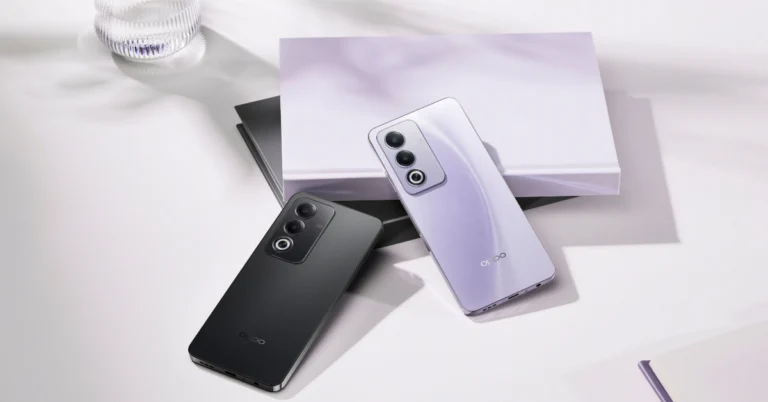
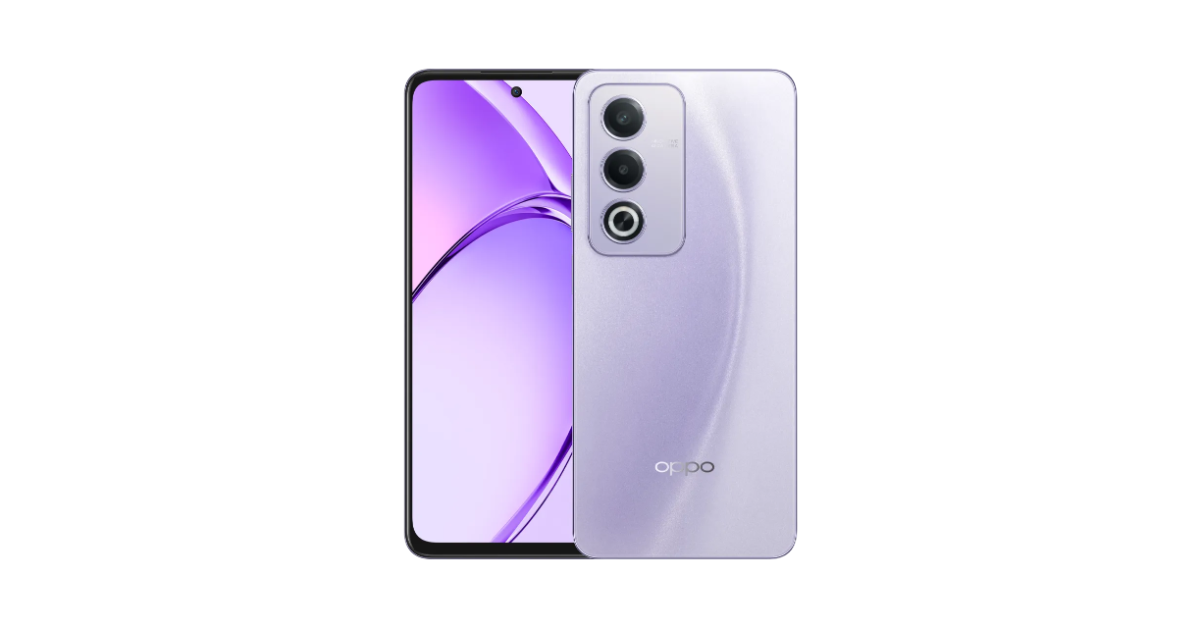 Customers can avail up to 10% instant cashback on credit and debit cards from HDFC Bank, SBI Cards, IDFC First Bank, Yes Bank, and ICICI Bank, as well as no-cost EMI for up to 6 months and consumer loans without any down payment from leading financiers.
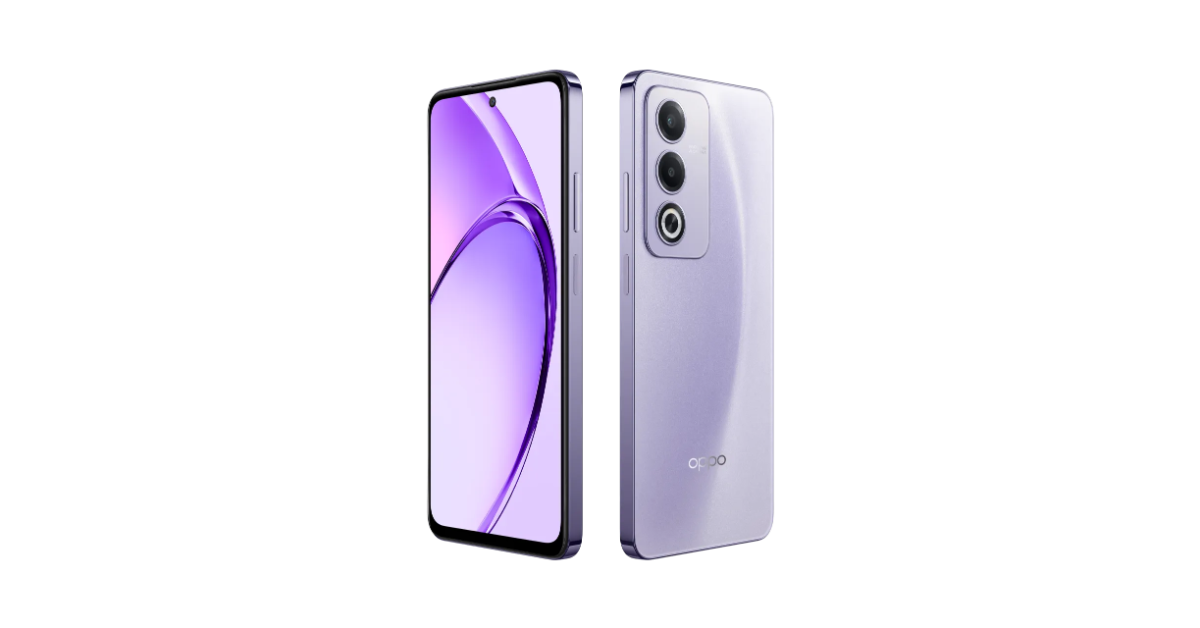 For photos and videos, the Oppo A3 Pro features a 50MP AI Dual Camera set-up and an 8MP Selfie Camera. The shooters come with a Portrait Mode, AI Portrait Retouching, and Dual-view Video to help users capture completely natural-looking content.
It further includes an Ultra Volume Mode that boosts the phone’s loudspeaker volume by up to 300%. The phone also sports a 5,100mAh battery that comes with 5W wired SuperVOOC charging support. According to the company, the battery maintains over 80% of its original capacity after 1,600 charge cycles, equivalent to over 4 years of use if charged once per day on average.
For photos and videos, the Oppo A3 Pro features a 50MP AI Dual Camera set-up and an 8MP Selfie Camera. The shooters come with a Portrait Mode, AI Portrait Retouching, and Dual-view Video to help users capture completely natural-looking content.
It further includes an Ultra Volume Mode that boosts the phone’s loudspeaker volume by up to 300%. The phone also sports a 5,100mAh battery that comes with 5W wired SuperVOOC charging support. According to the company, the battery maintains over 80% of its original capacity after 1,600 charge cycles, equivalent to over 4 years of use if charged once per day on average. 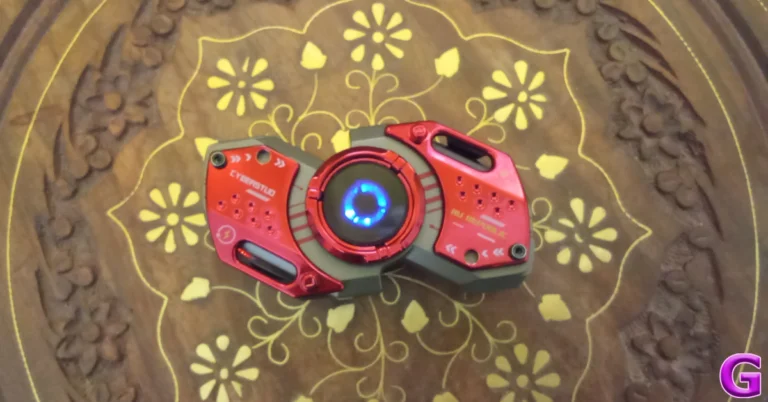
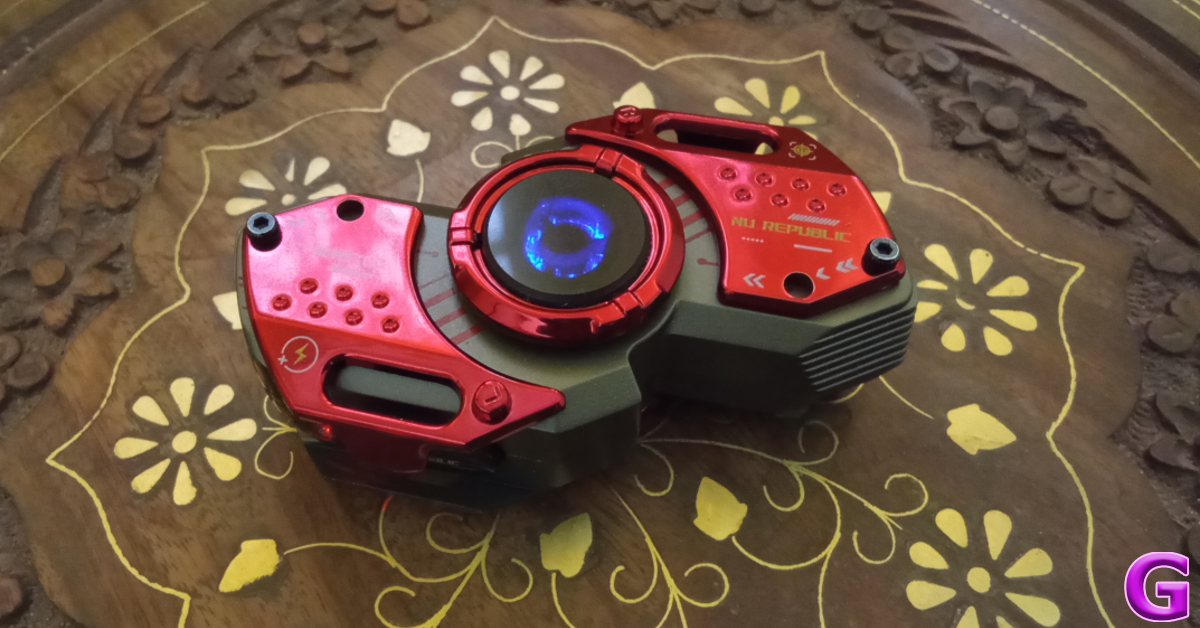
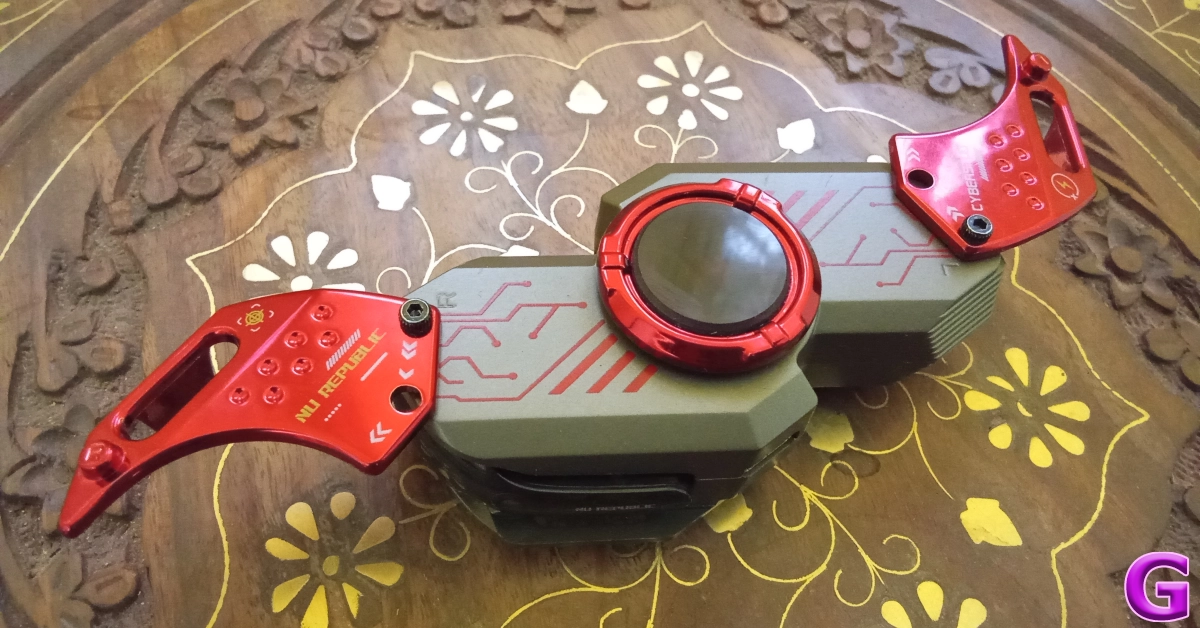
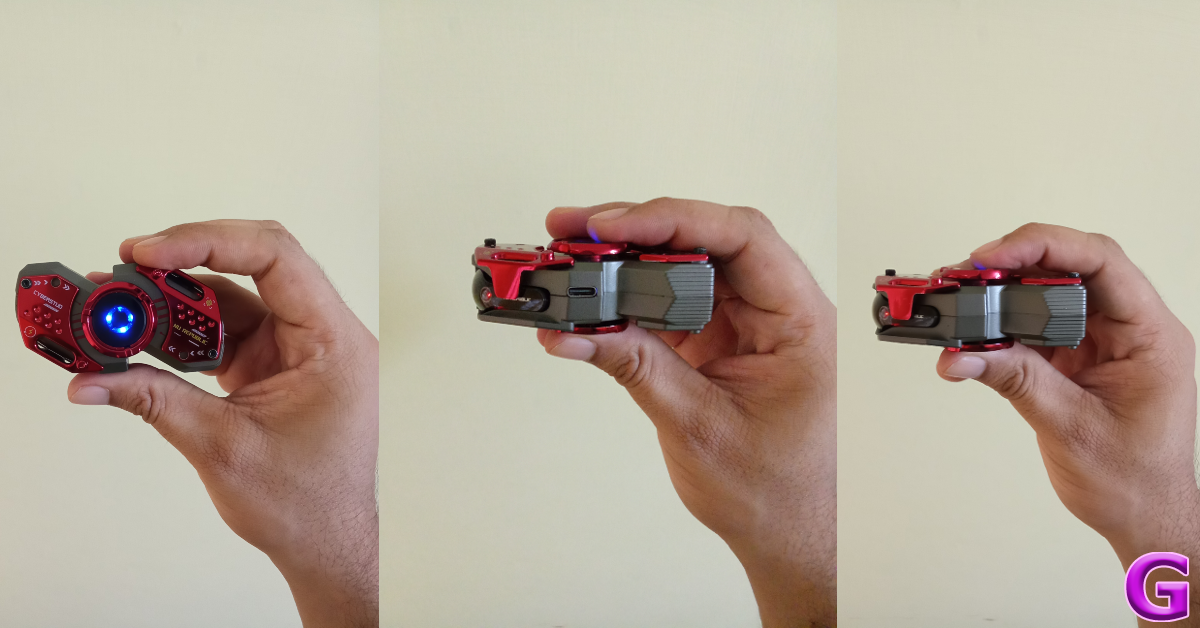
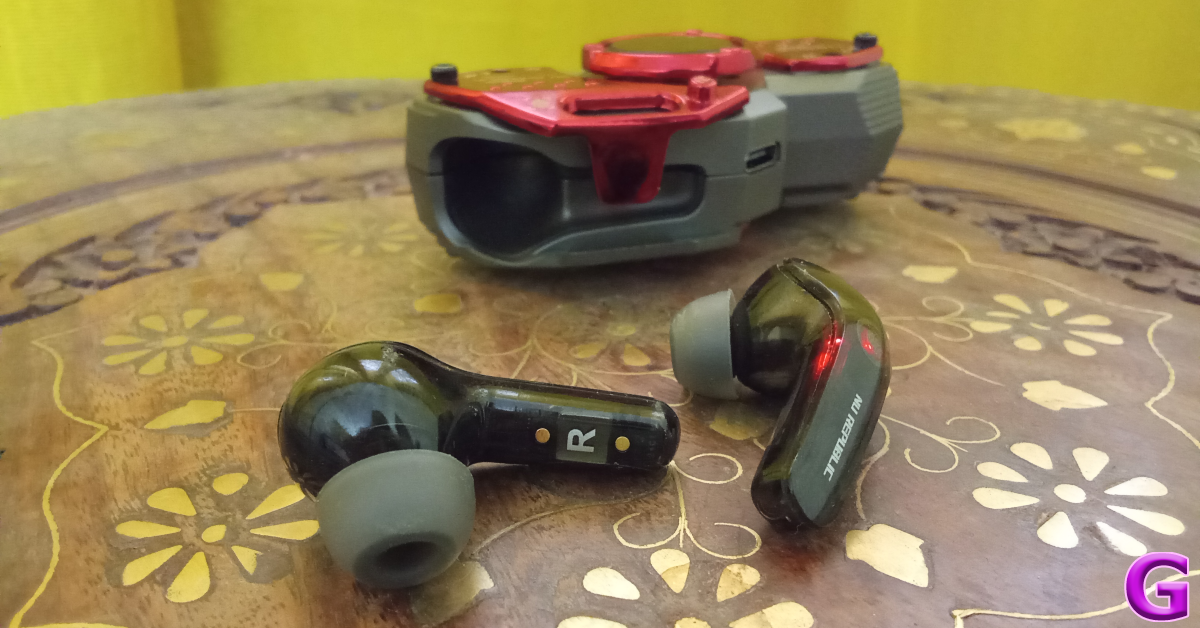
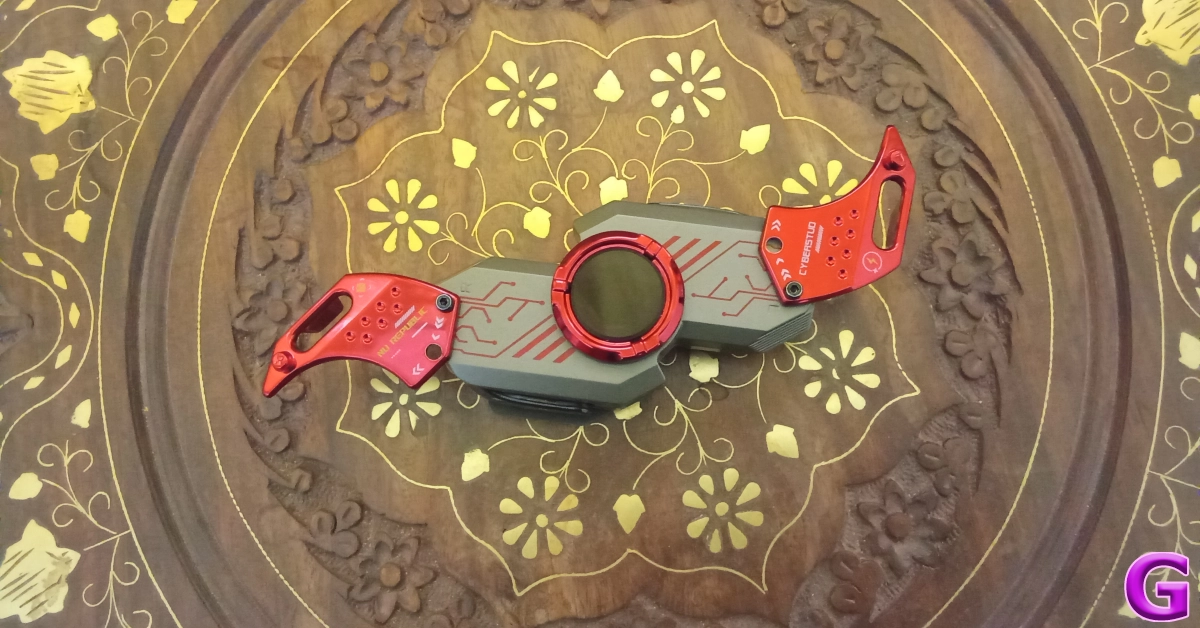
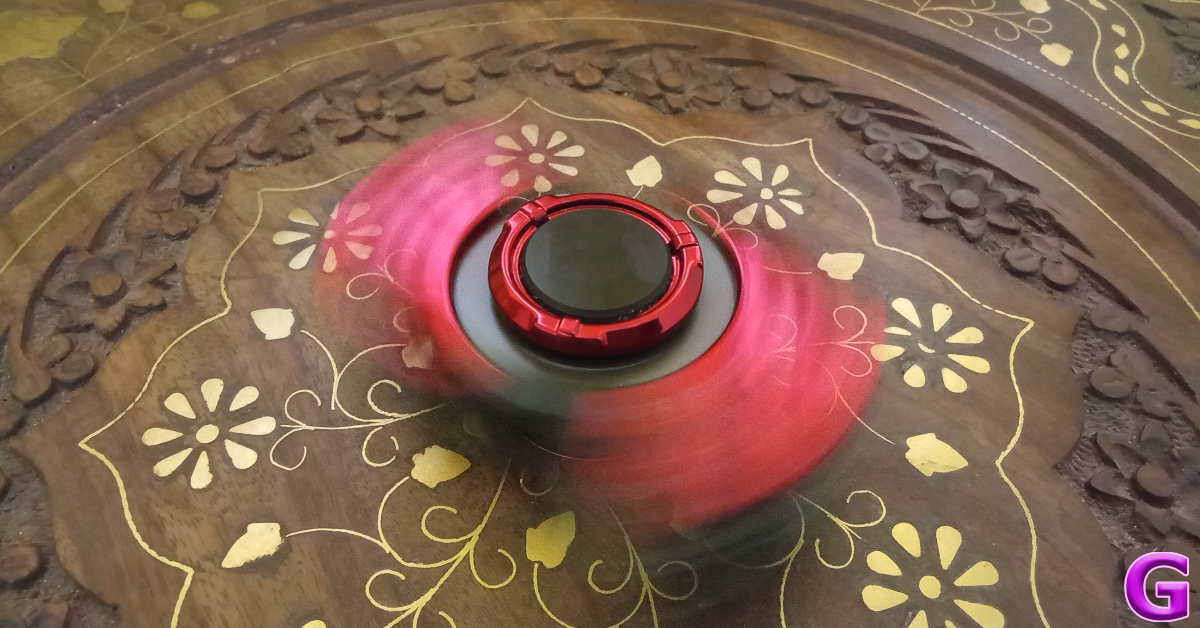
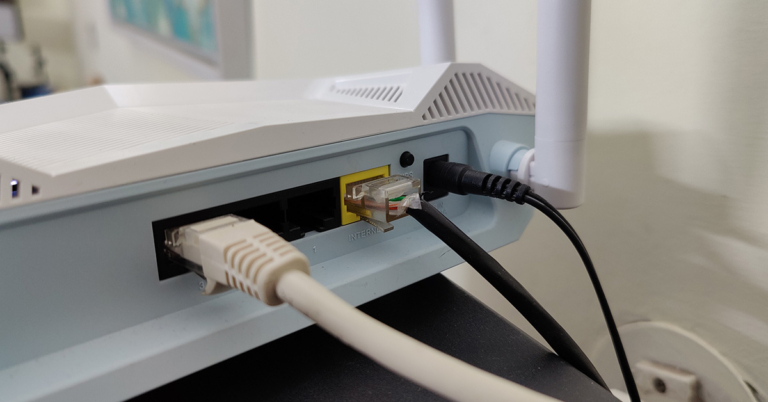
 Step 1: Unplug
 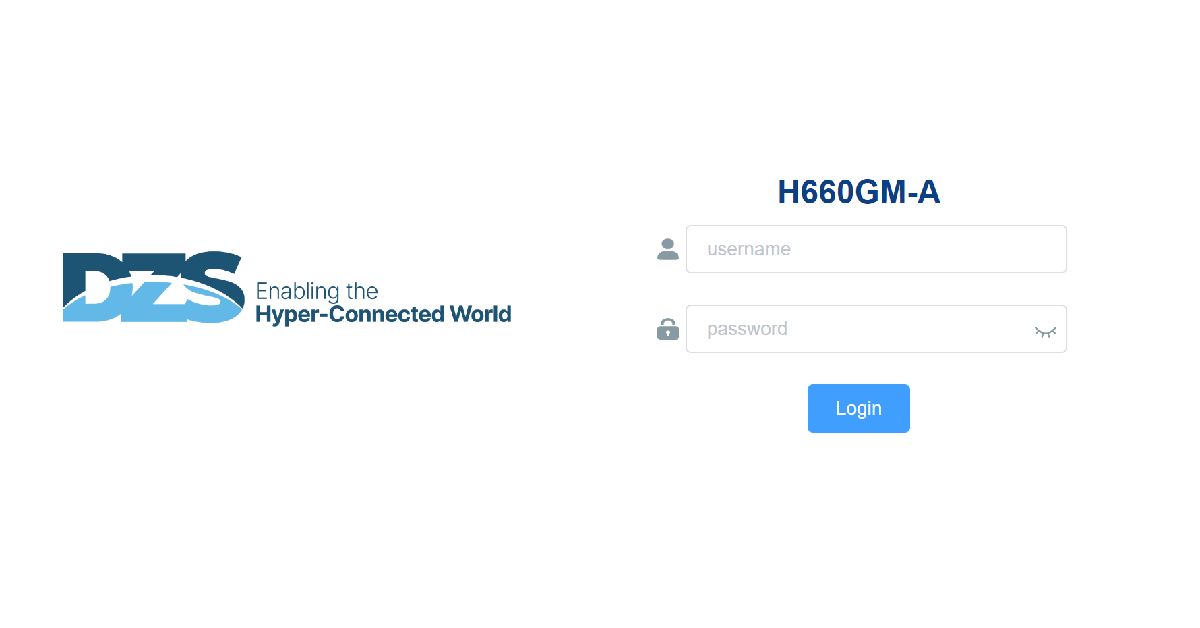 Step 2:
 Step 4: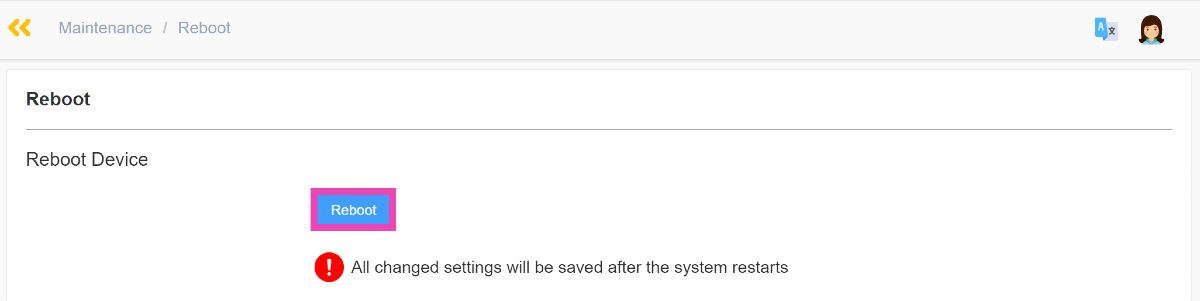
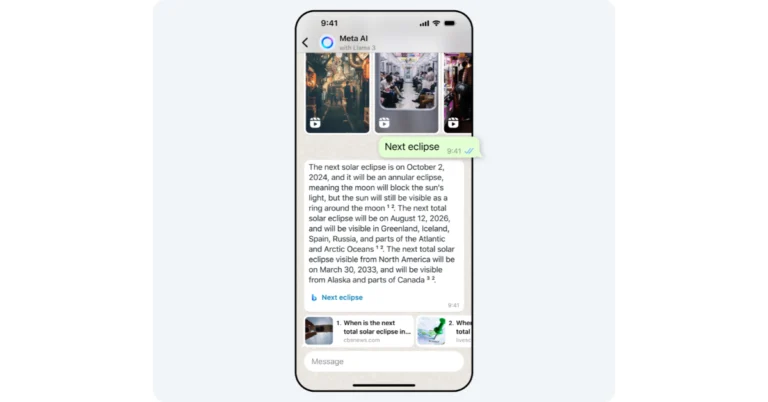
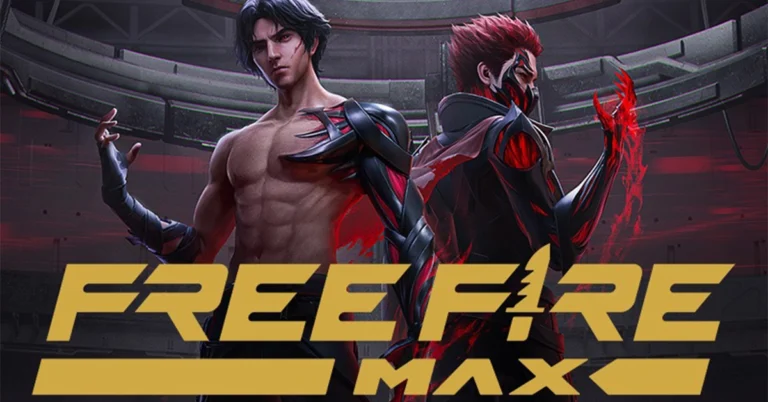
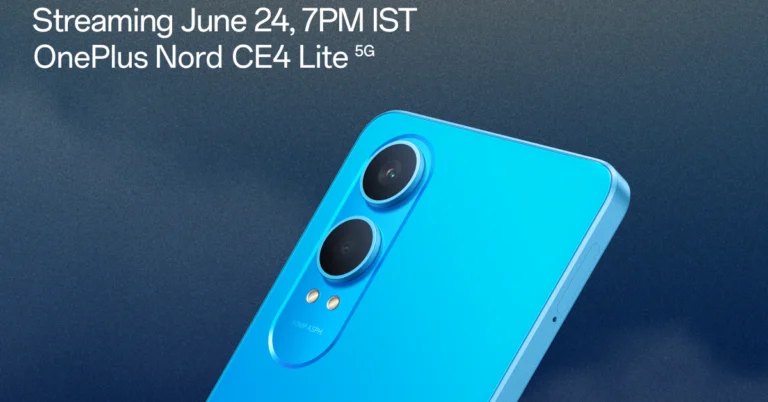
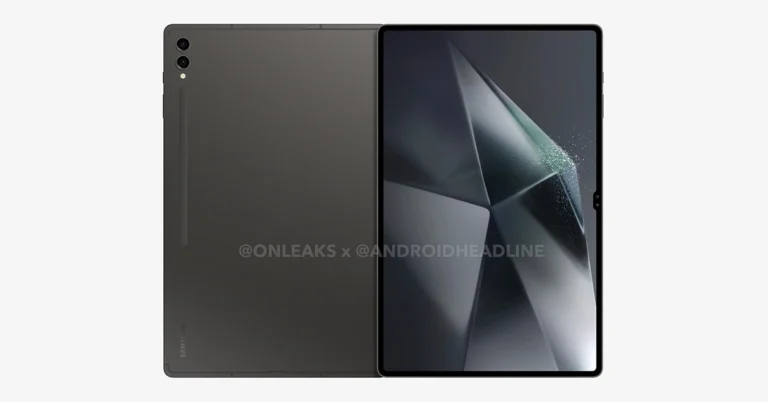
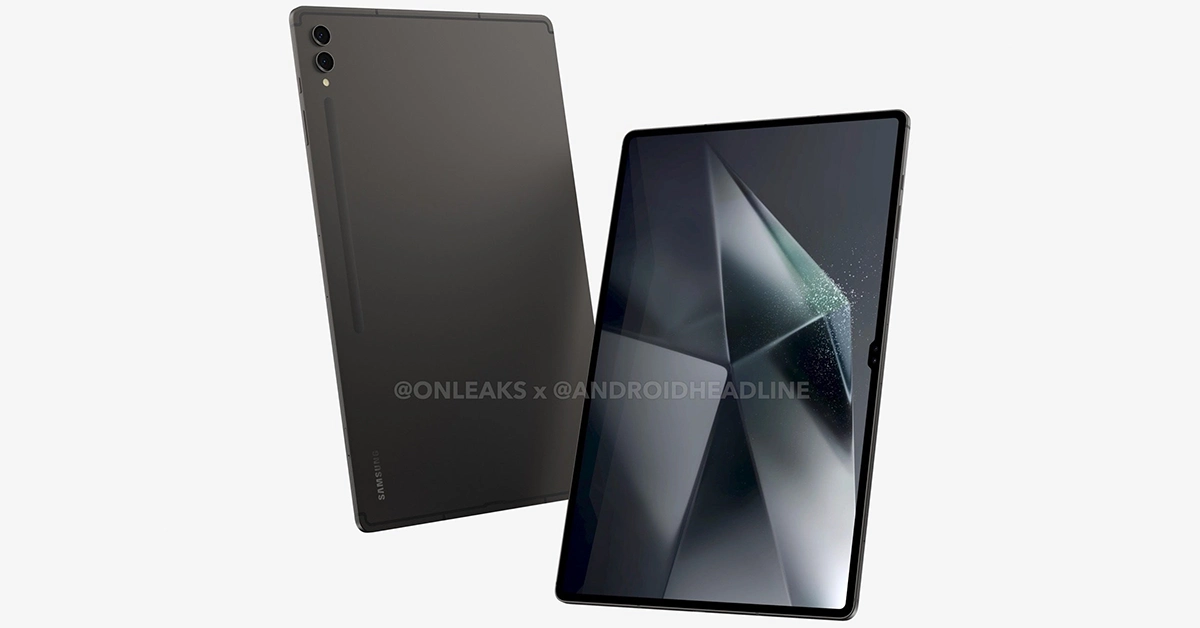

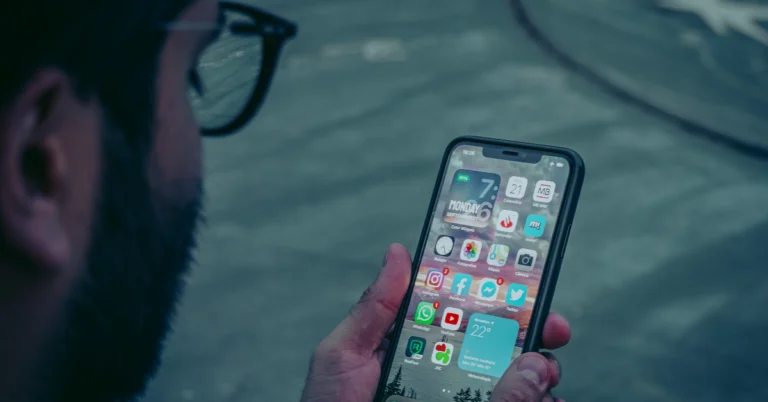
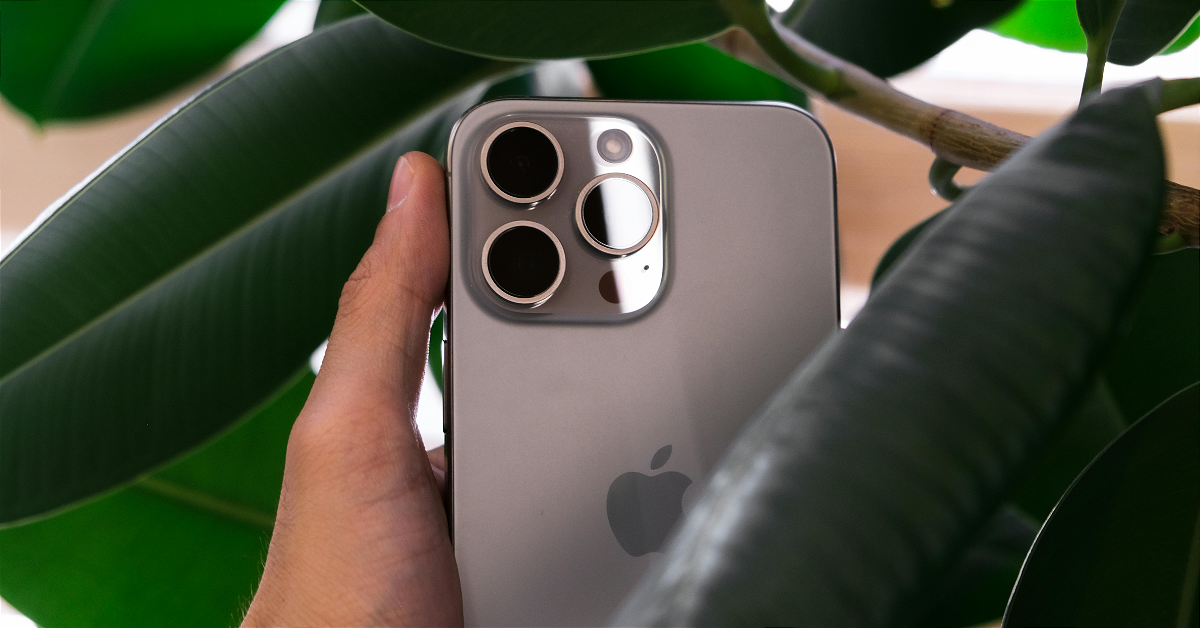


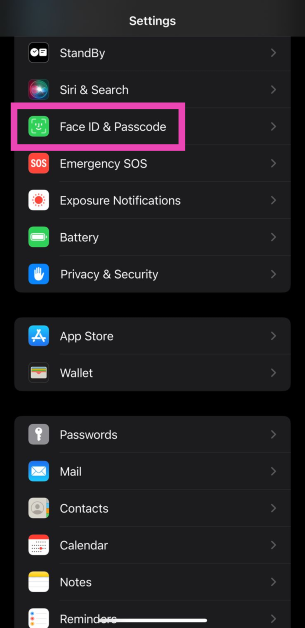
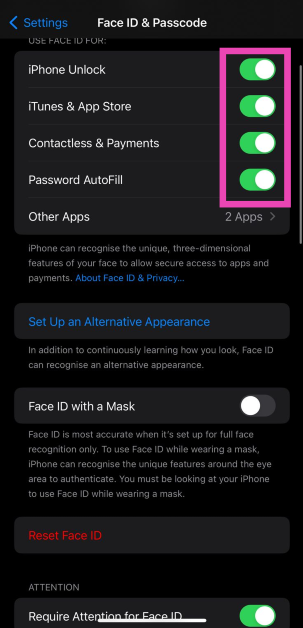
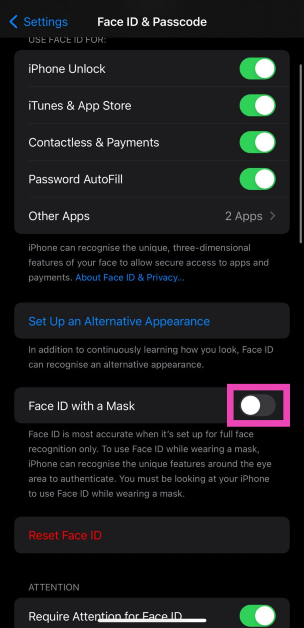
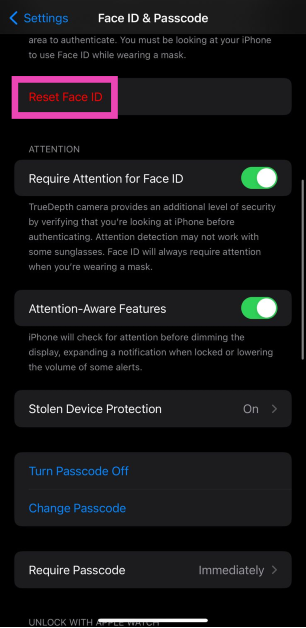

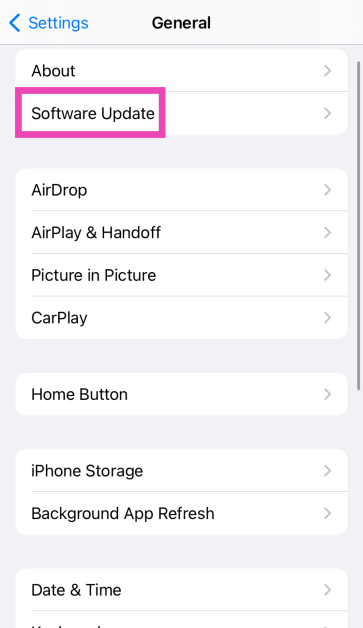
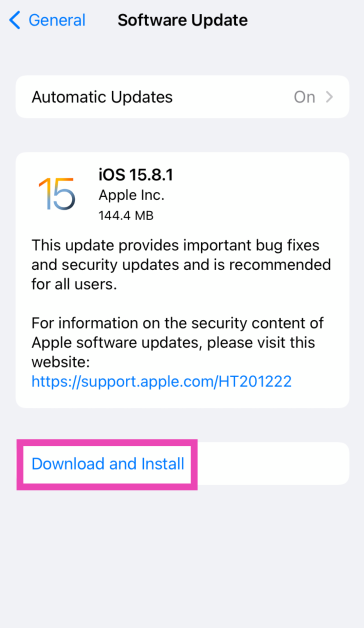
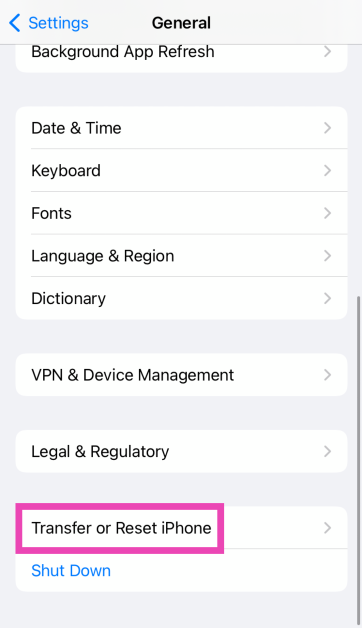
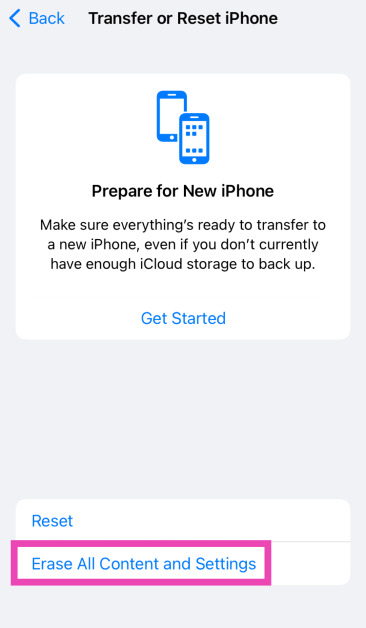
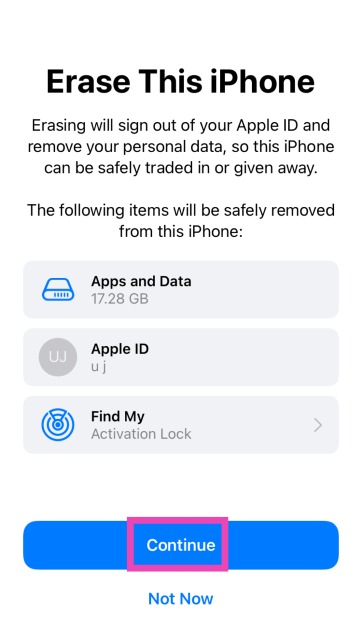

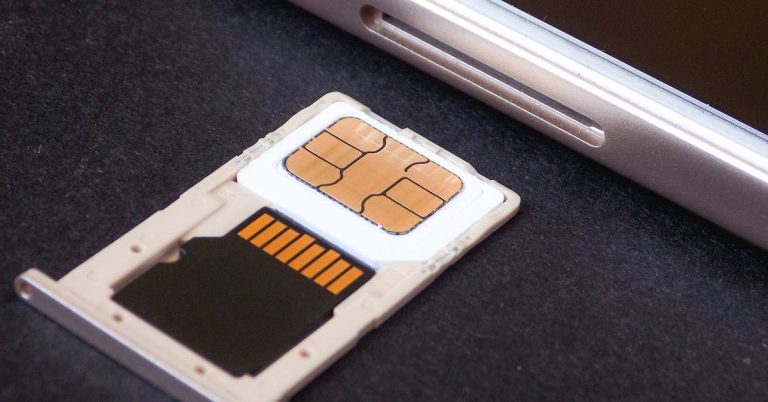
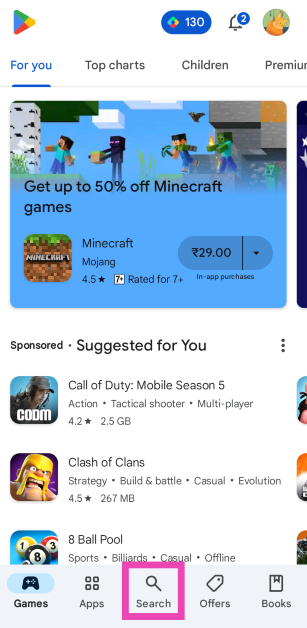 Step 3:
 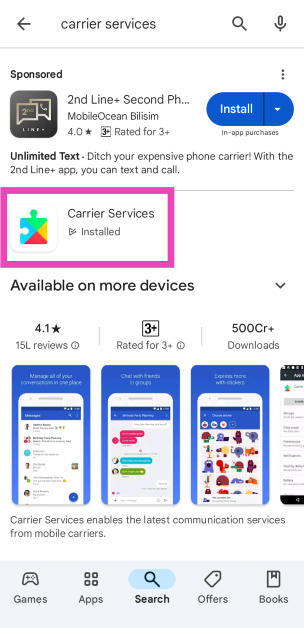 Step 4:


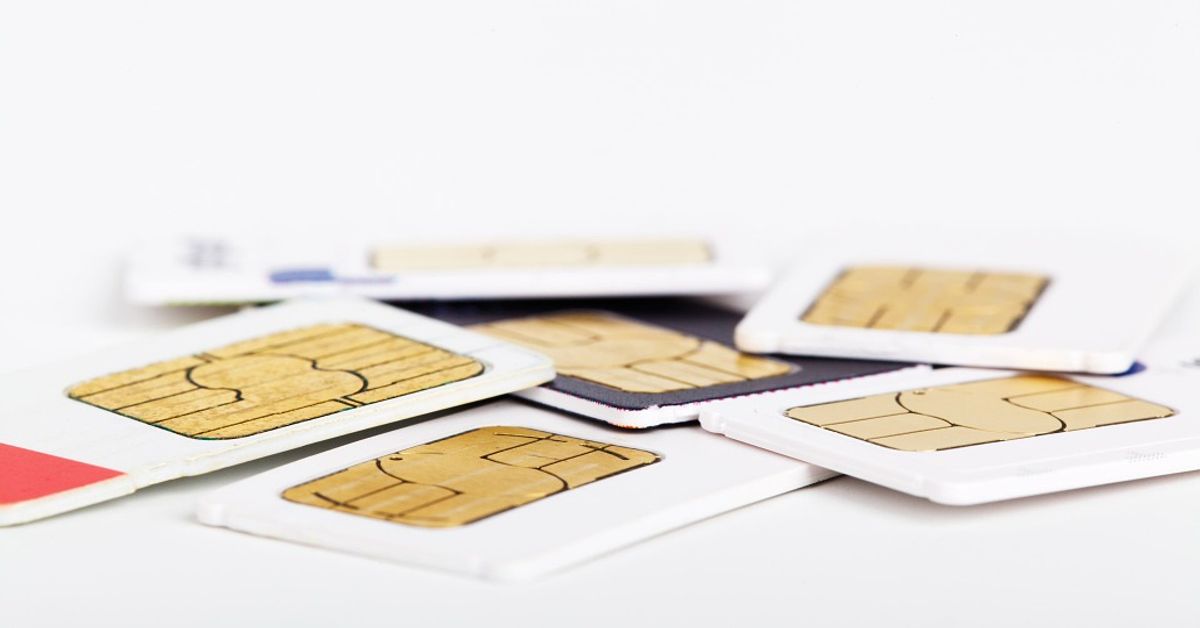
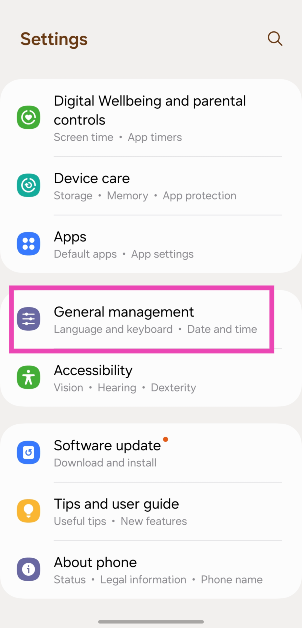 Step 2: Scroll down and select Reset.
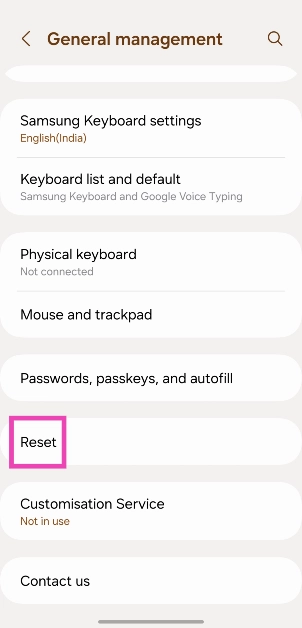 Step 3: Tap on Reset mobile network settings.
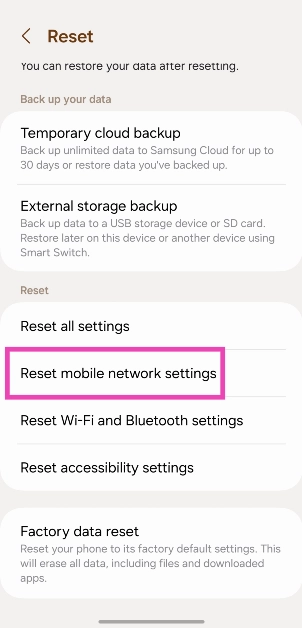 Step 4: Select Reset settings.
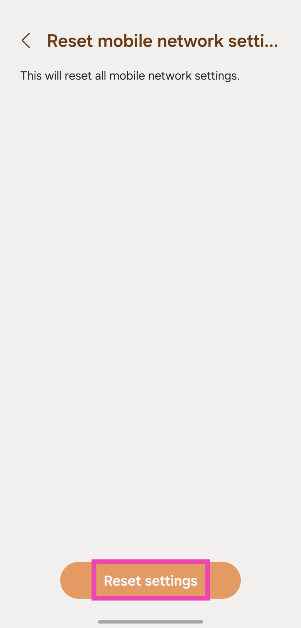
 Step 2: Tap on Download and install.
 Step 3: Select Install now.

 If the steps mentioned above didn’t work for you, contact your network provider and report the issue. Once you’re on the line with the support staff, walk them through the measures you’ve taken so far and ask for possible fixes. They will be able to tell whether the fault lies with your device, SIM card, or the coverage in your area.
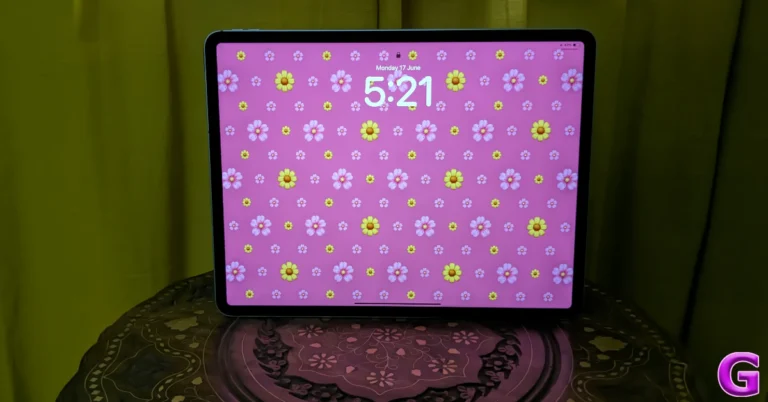
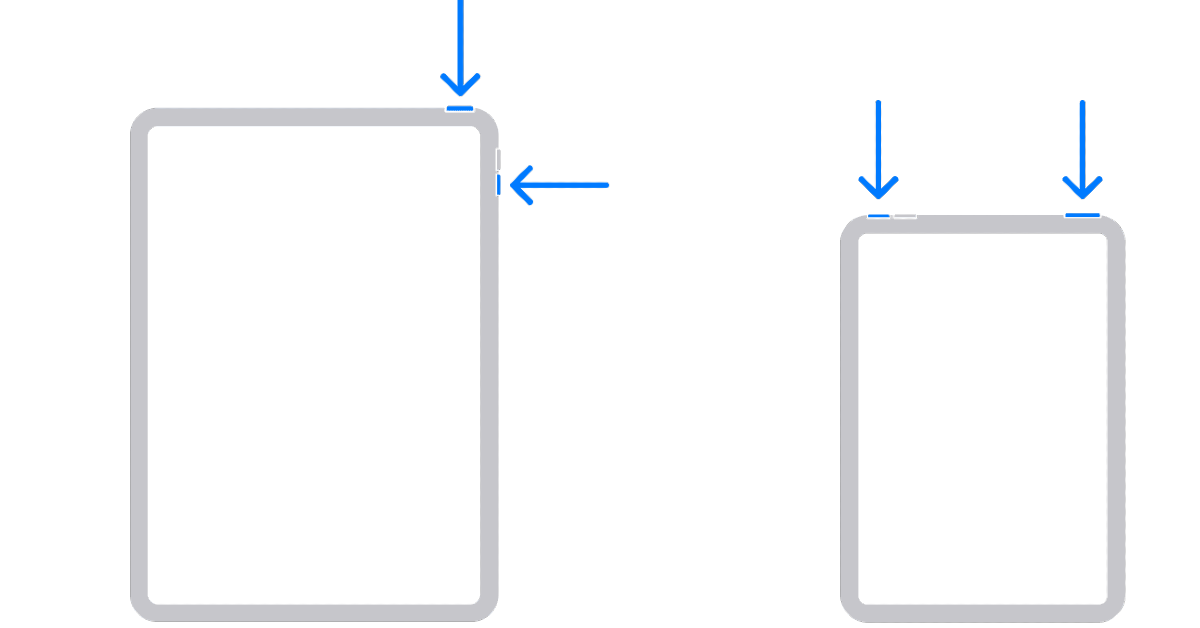 Step 2:
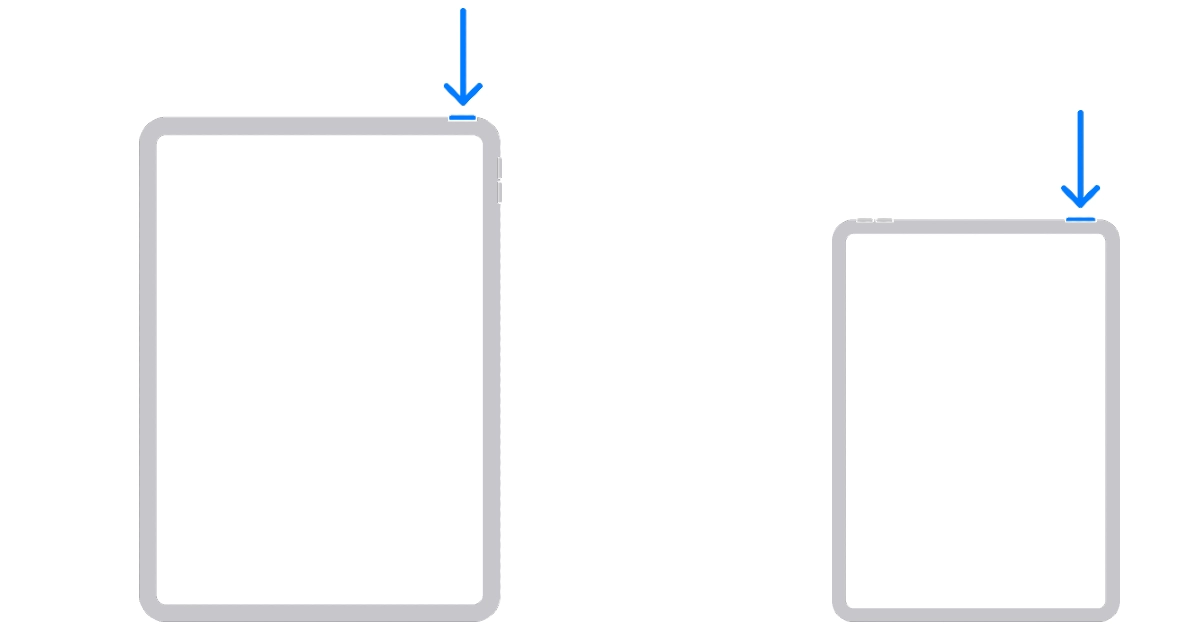 Step 4: Release
 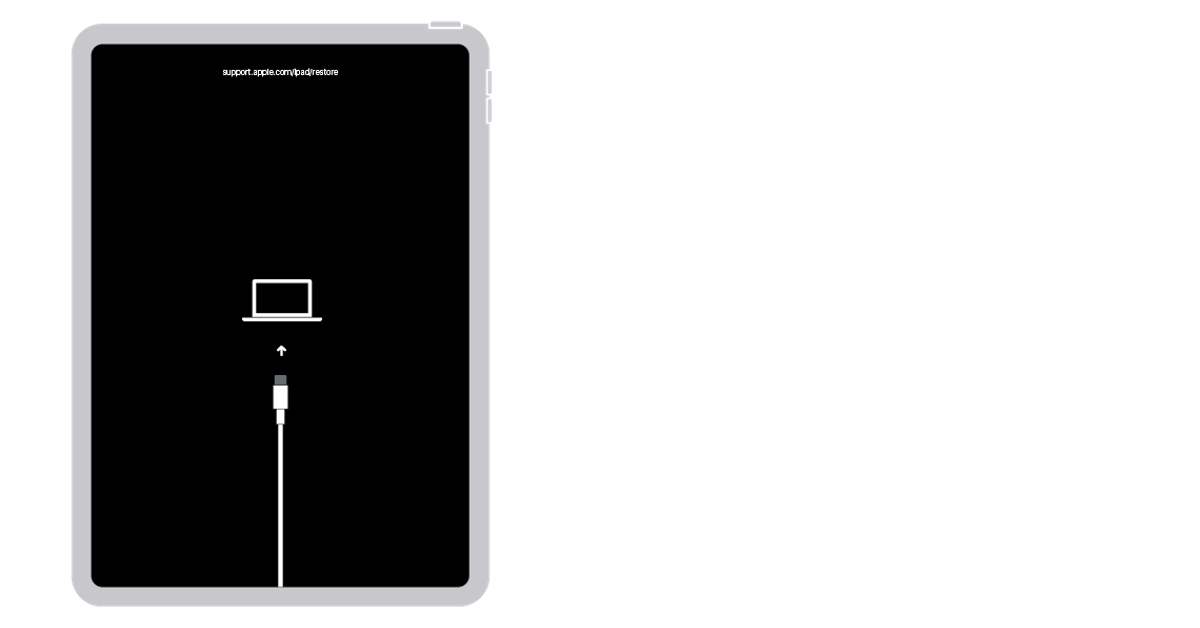 Step 5:
 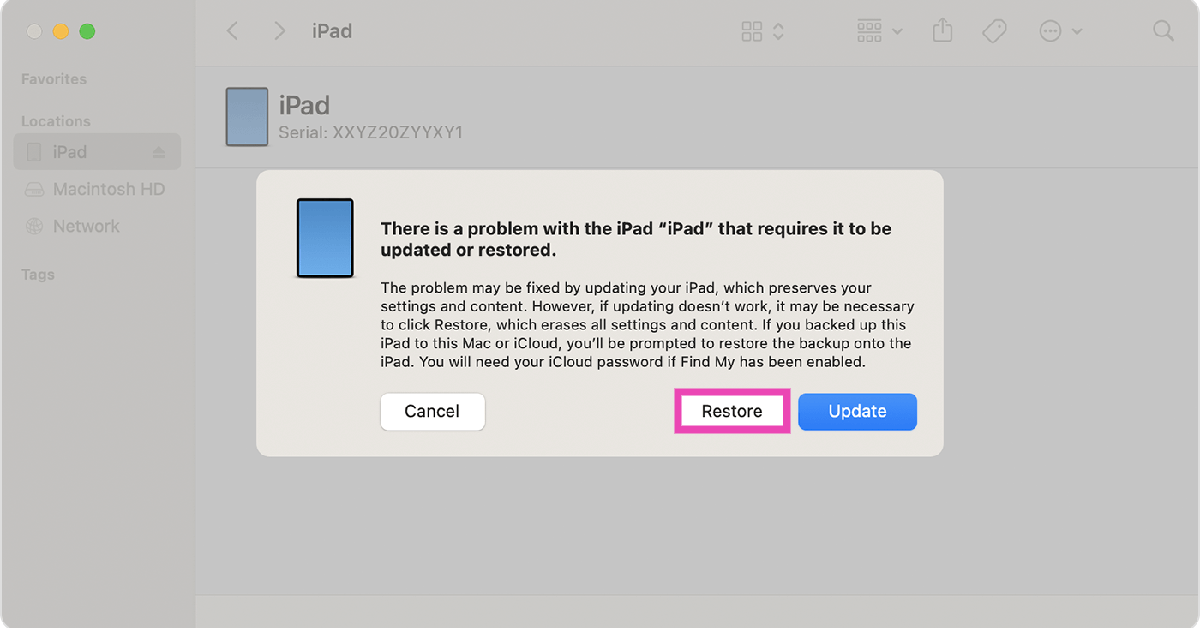 Step 7:
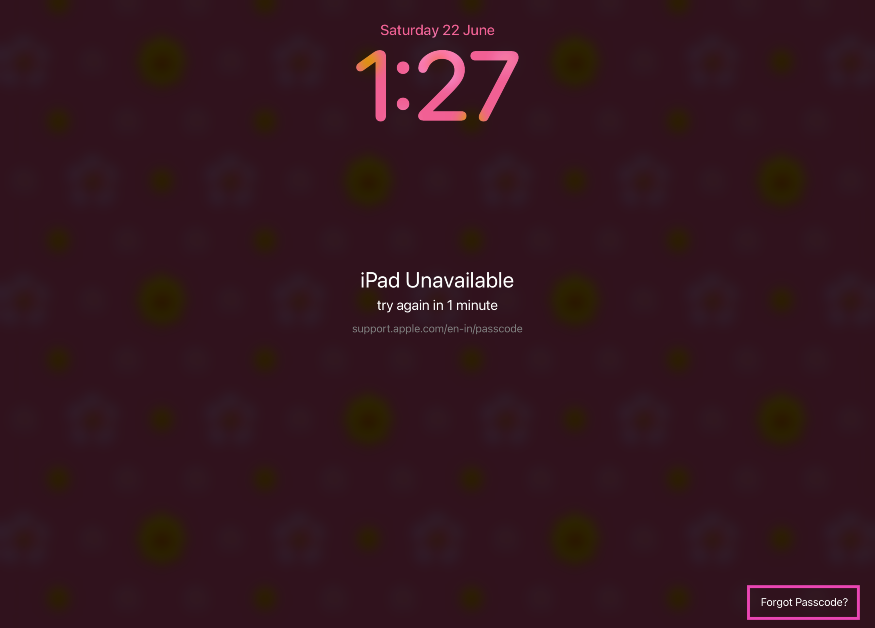 Step 3:
 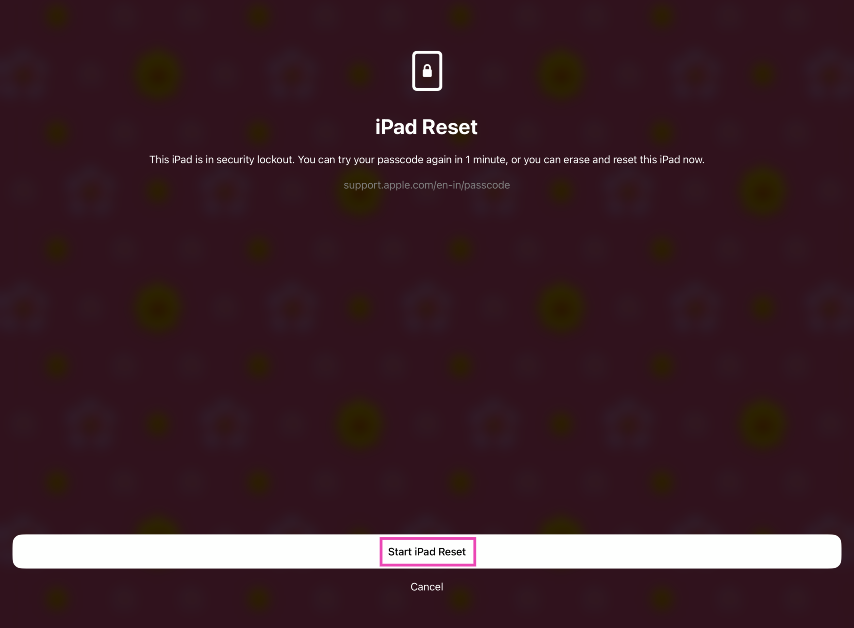 Step 4: Log in
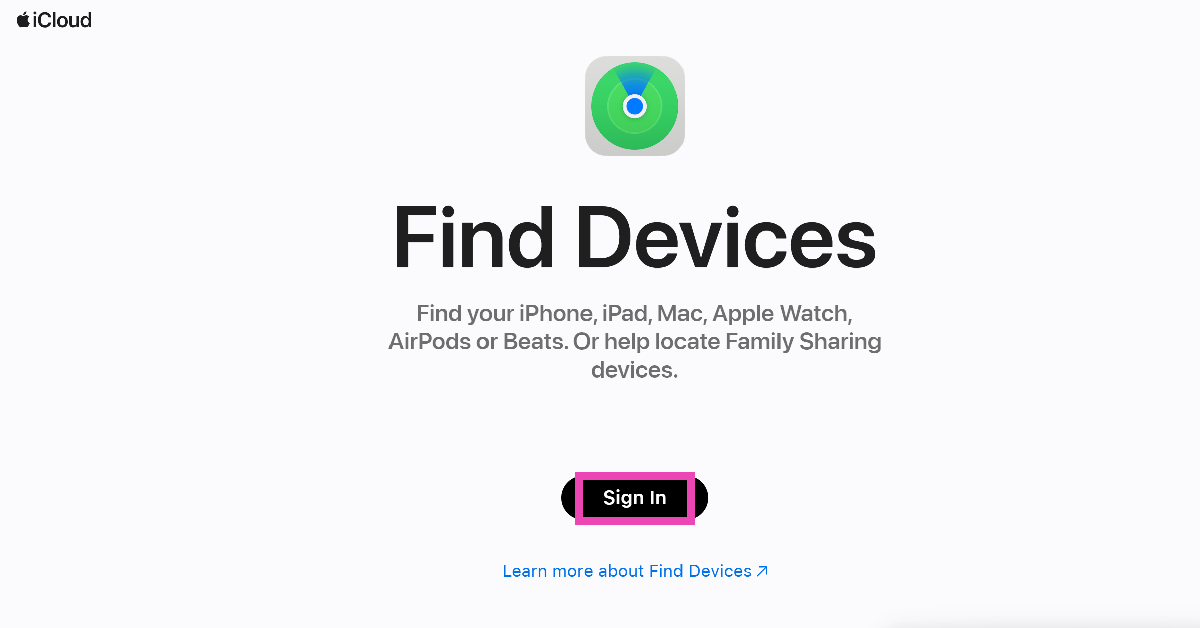 Step 2:
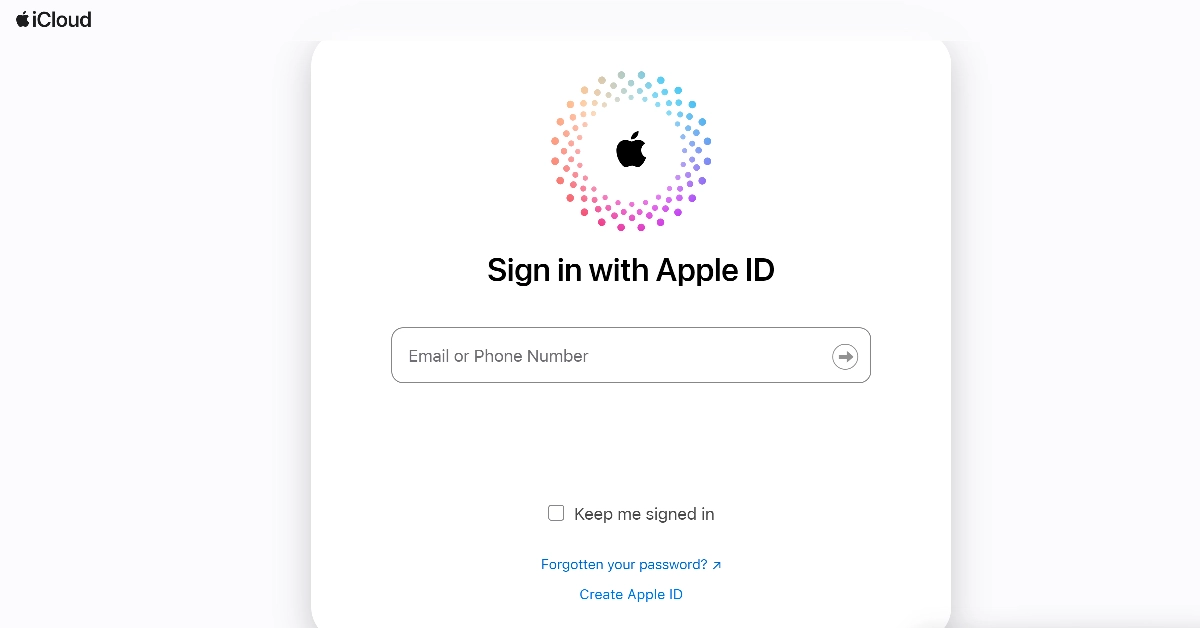 Step 3:
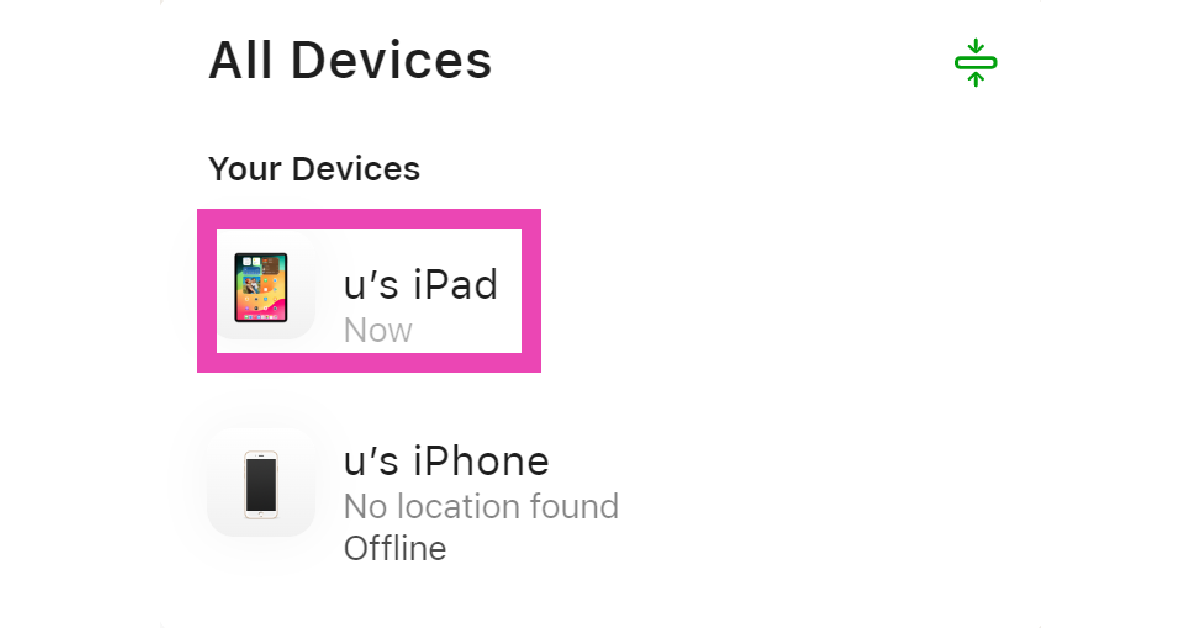 Step 4:
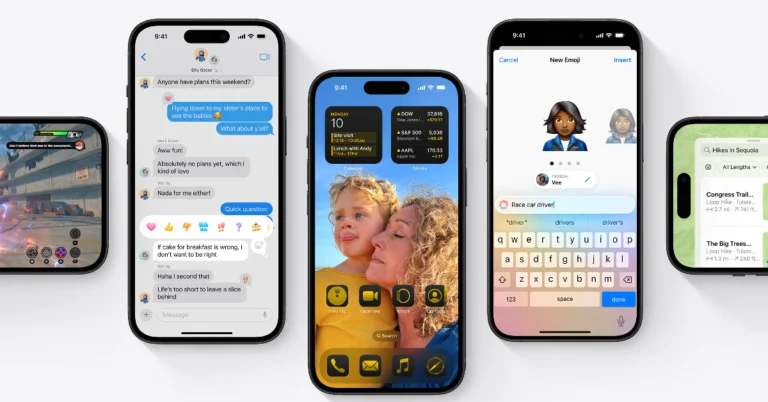
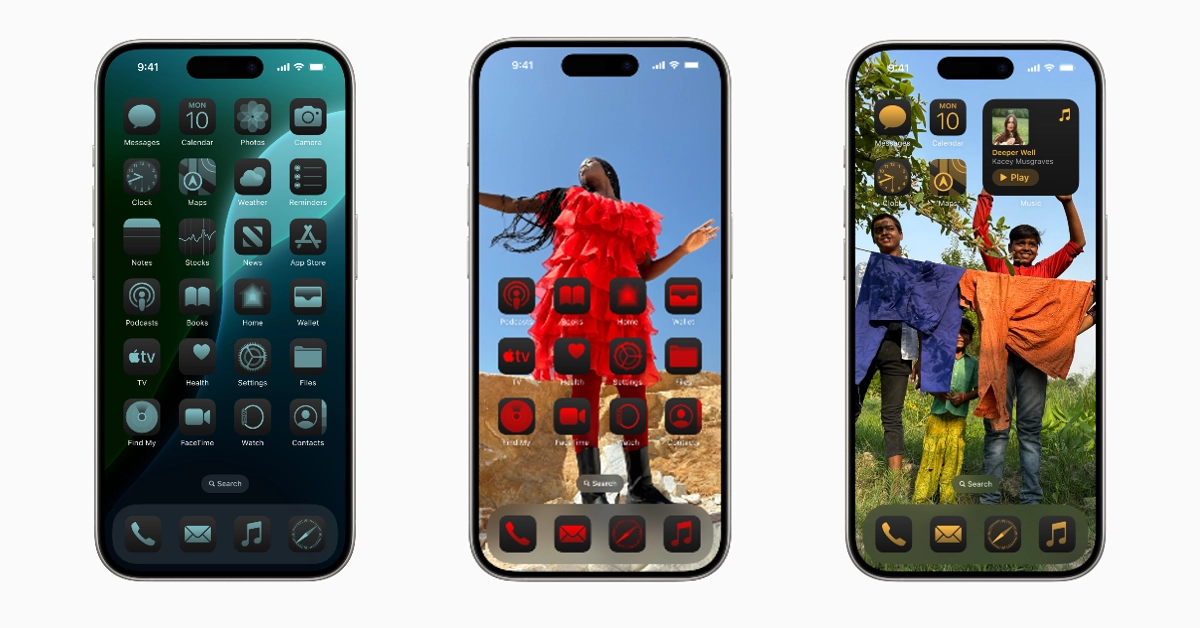


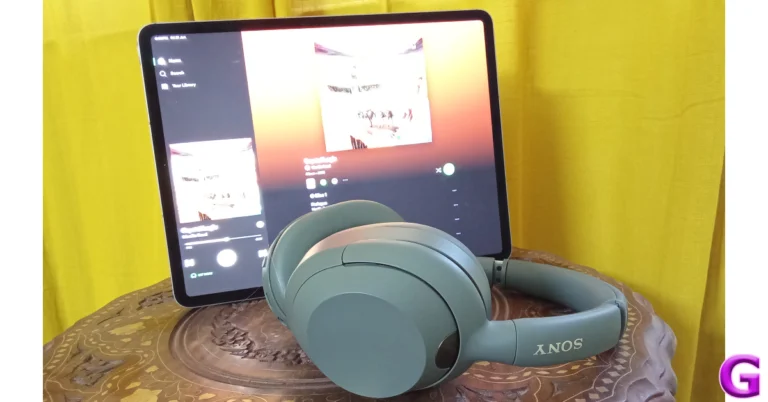

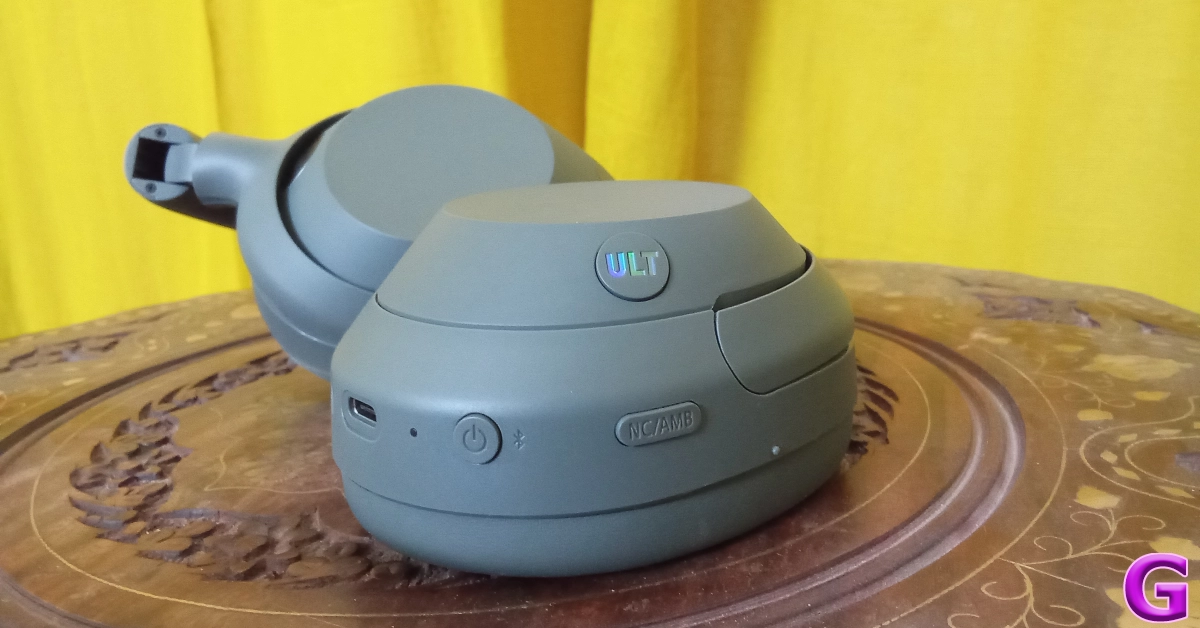

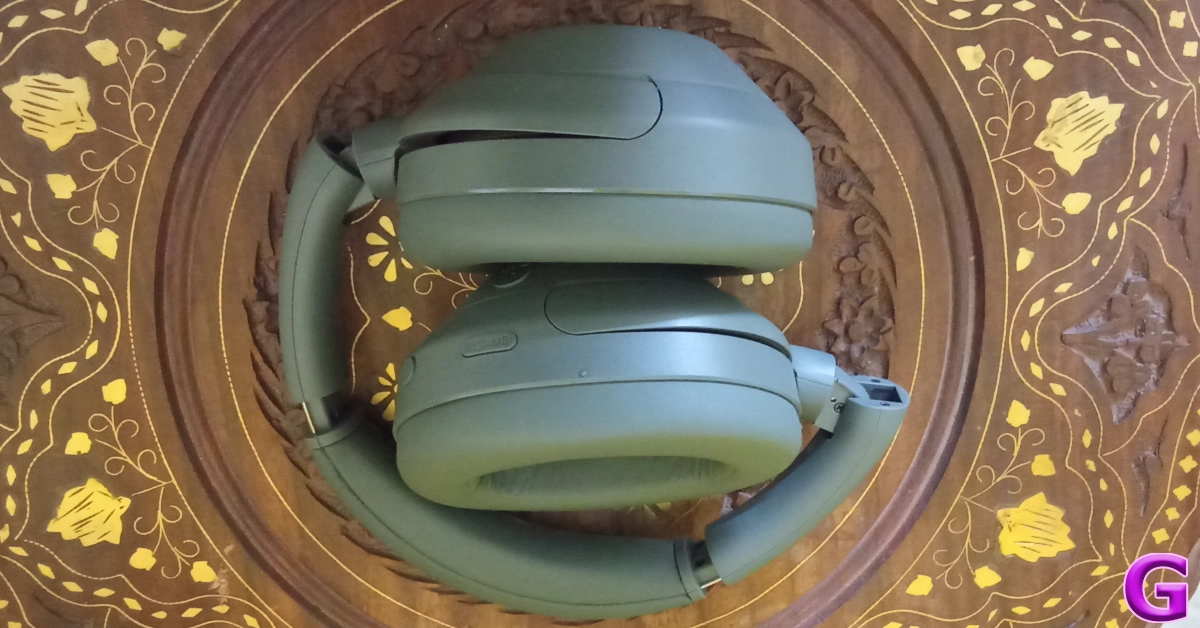
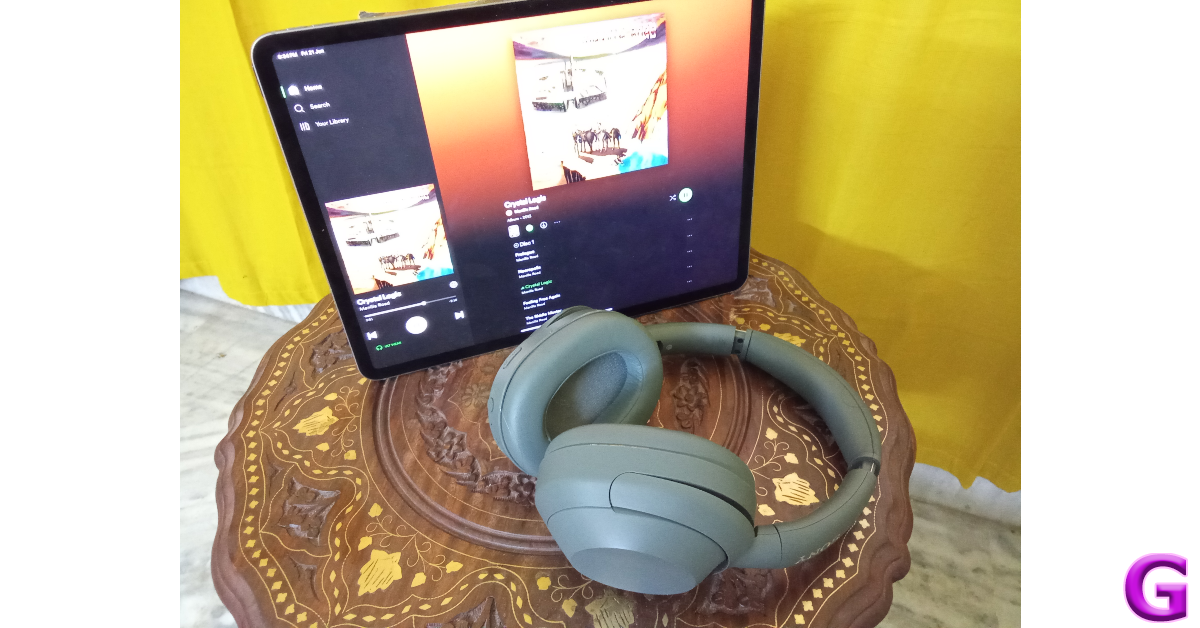
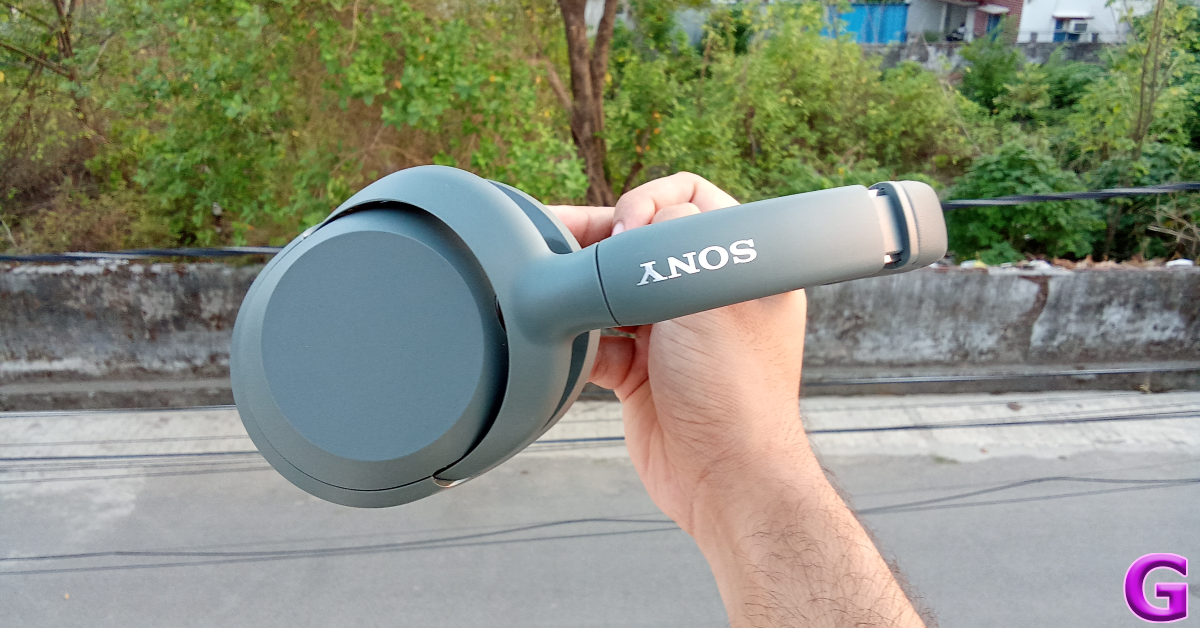
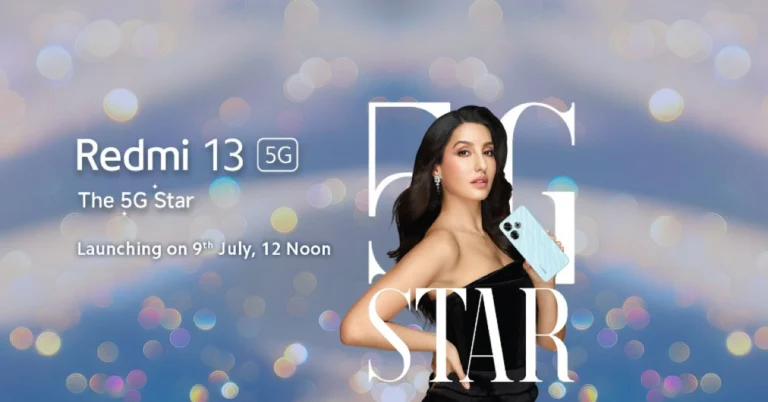
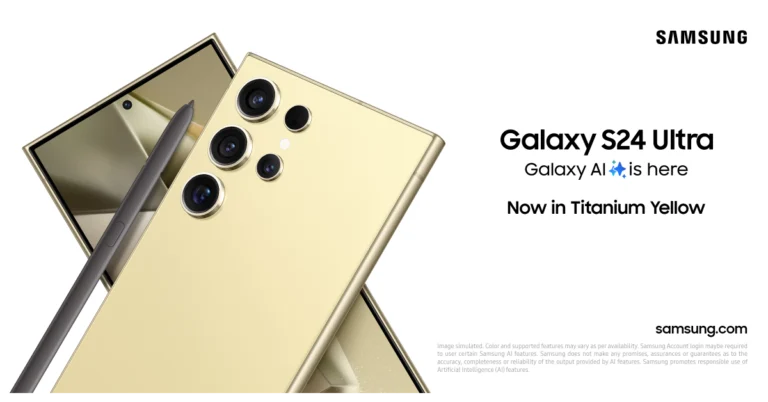
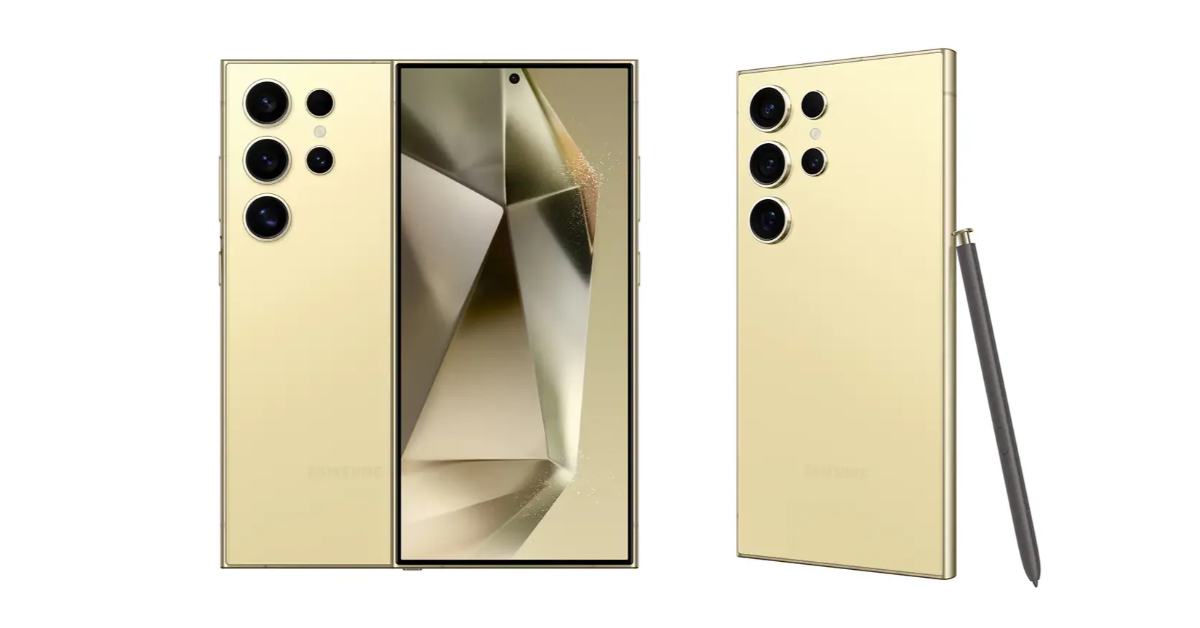

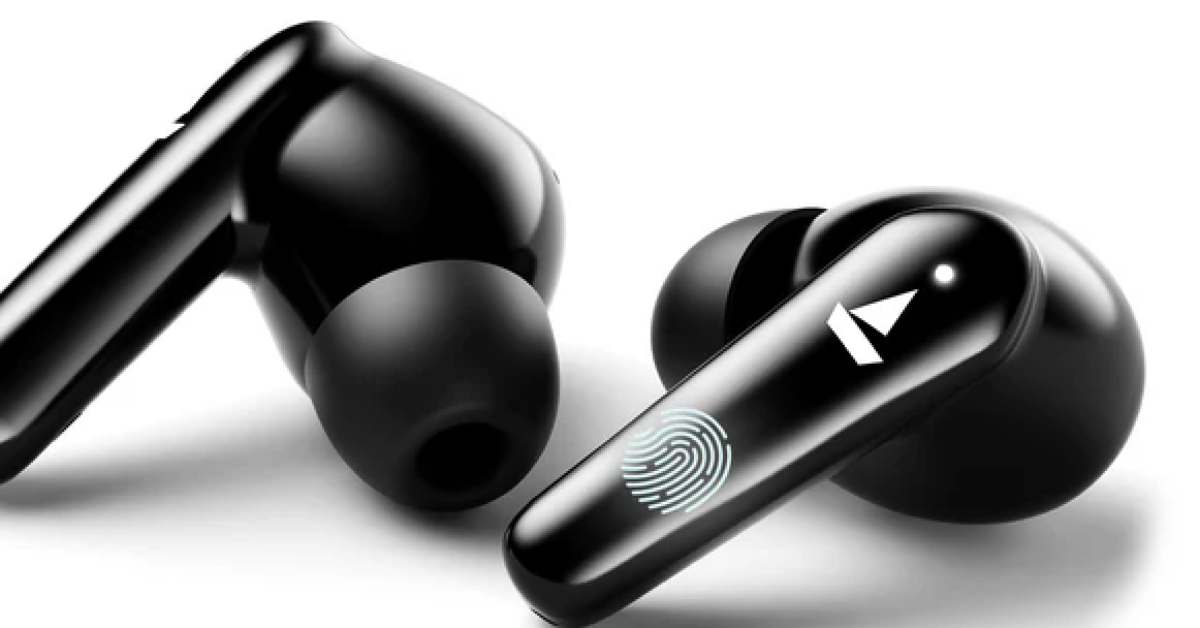
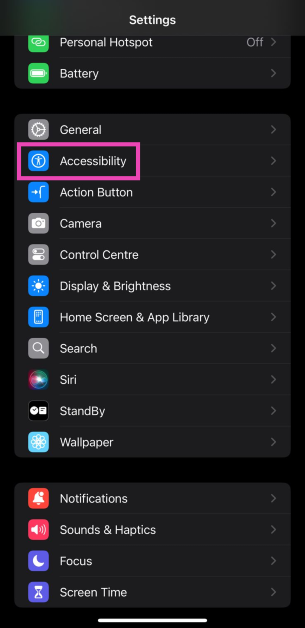 Step 4:
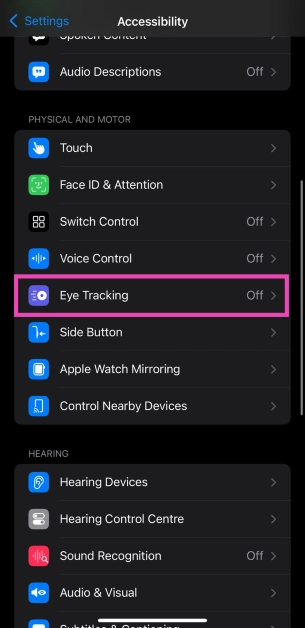 Step 5:
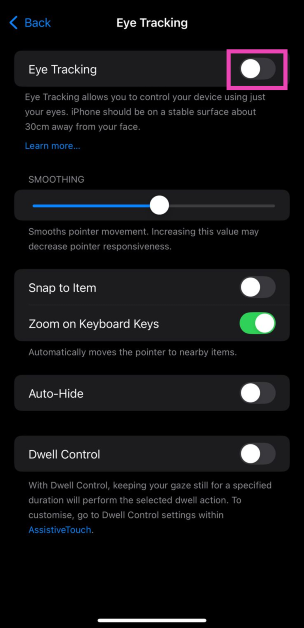 Step 6: Follow the dot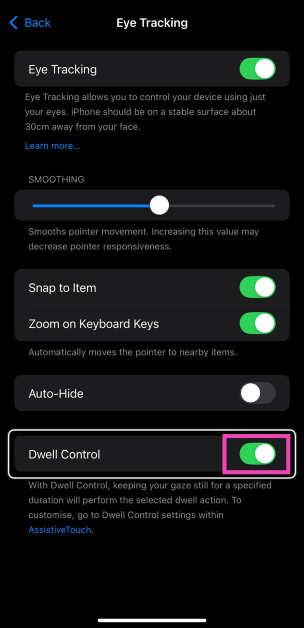
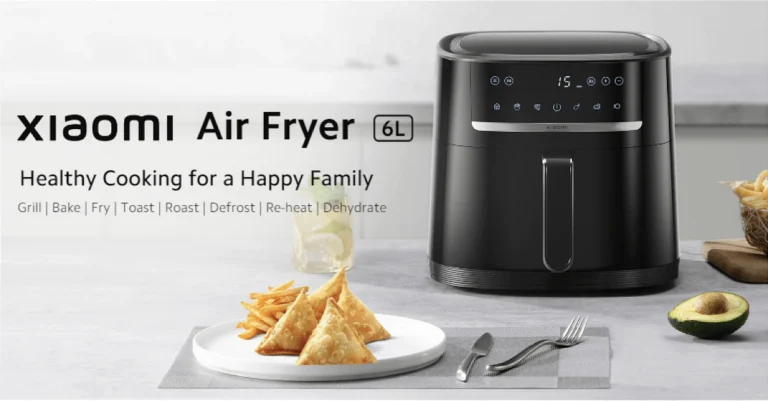
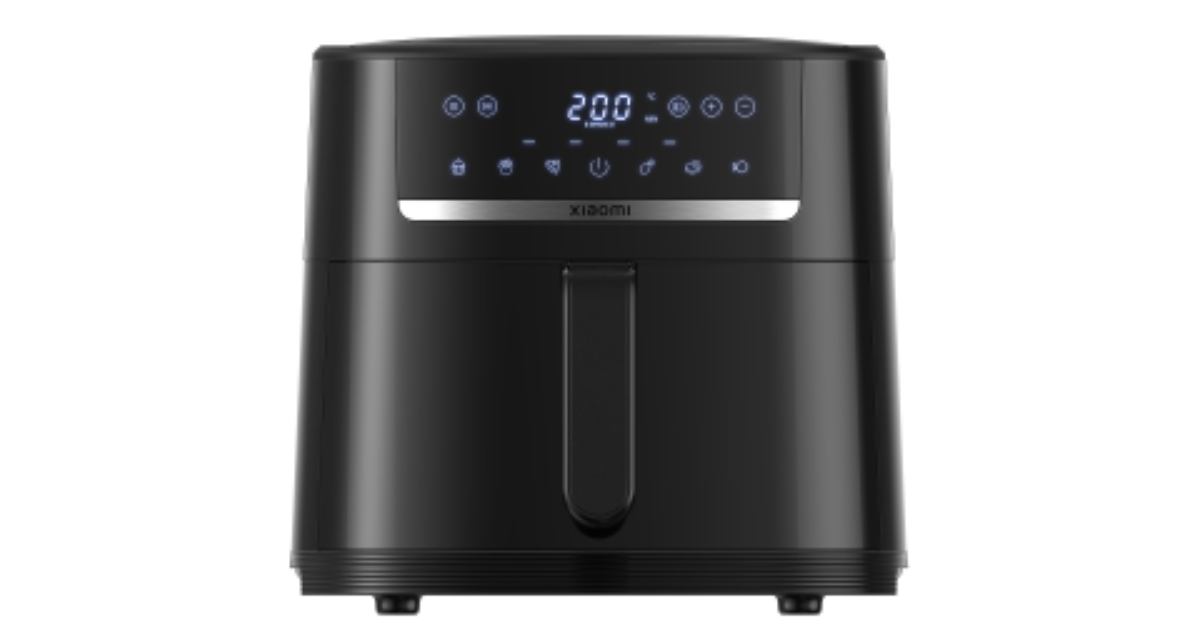
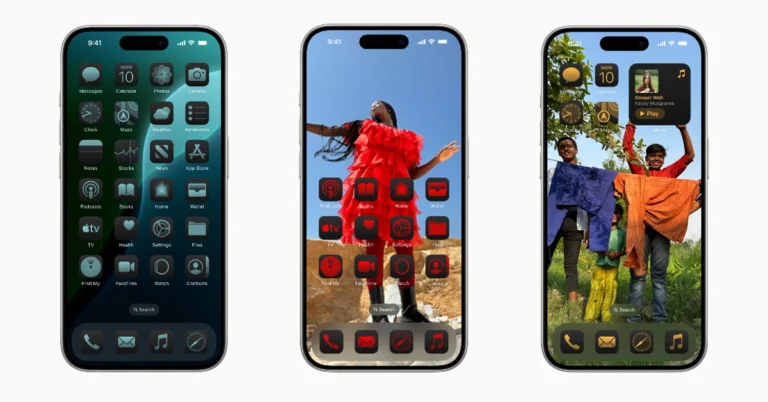
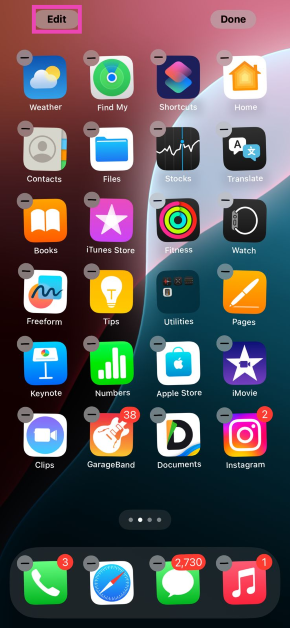 Step 4:
 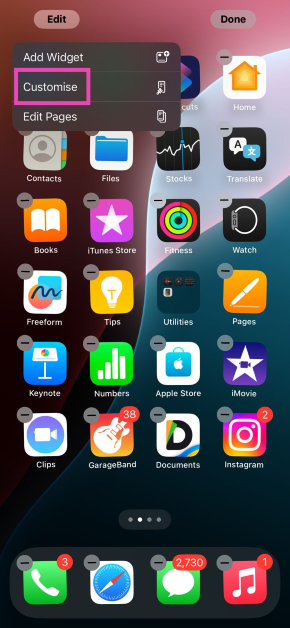 Step 5:
 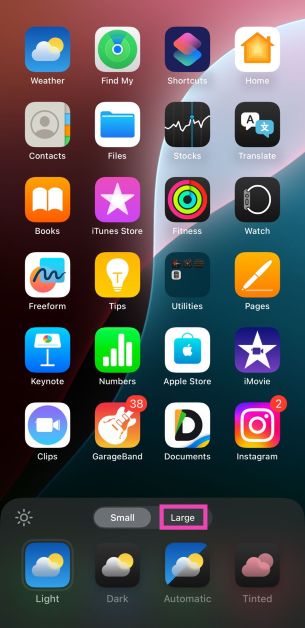 Step 6: Tap