Spigen cover listing revealed the iPhone SE 4 design: Report

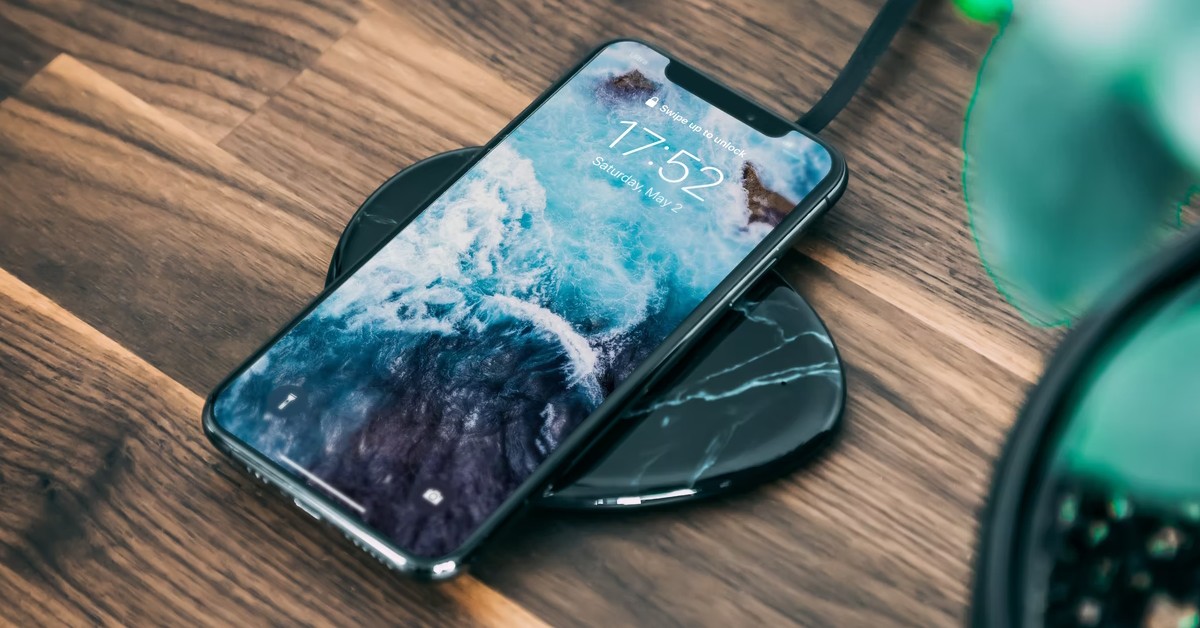
The iPhone SE 4 debut is right around the corner, with alleged features, price range, and design updates. The 2025 iPhone SE is expected to arrive this week, including a 6.1-inch OLED screen, Face ID instead of Touch ID, and a bigger battery. A recent leak reveals the full design of the upcoming device.

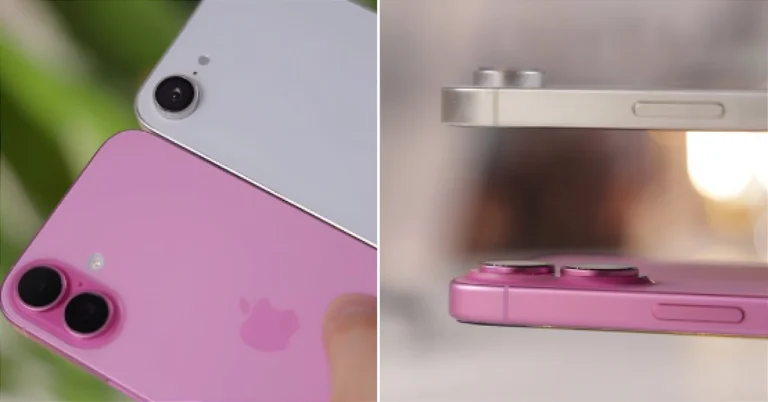
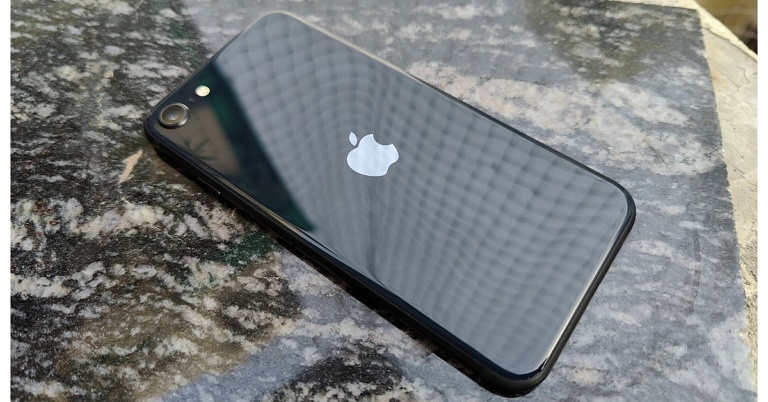
Apple has not yet announced the iPhone SE 4 debut date, although it is expected to arrive this week, according to leaks and speculation. However, the upcoming gadget has been leaked several times, revealing information about its specifications, expected price range, and design overhaul. The latest leak reveals the whole design of the upcoming iPhone. A listing for the iPhone SE 4 was mistakenly published on Spigen’s website, displaying product images that give a good picture of the future handset. Spigen has already removed the listing, but users have shared the photographs on Reddit.

Also Read: Samsung TV Plus India announced collaboration with Warner Bros. Television to offer five exclusive FAST channels

According to claims, the design and functionality of the iPhone SE 4 are similar to those of the iPhone 14. It has comparable power and volume buttons as well as a display notch. Instead of the dead mute switch, the left side of the case may feature an Action Button. Unlike its most recent models, the 2025 iPhone SE does not have a separate camera button, and its rear camera is comparable to that of the 2022 iPhone SE model.

Also Read: Tinder’s Dating Safety Guide now available in four Indian languages

The next generation iPhone SE 4 is expected to look like the iPhone 14 but will not have a home button or Touch ID. Rumour has it that the SE 4 will run on the latest A18 Bionic processor and will have Apple Intelligence features, like an updated Siri with AI capabilities. The SE 4 will also have a USB Type-C port and will have Apple Intelligence capabilities, since Apple no longer sells phones with Lightning ports.

How to use Photo Ambient Wallpaper on your Samsung phone?

0

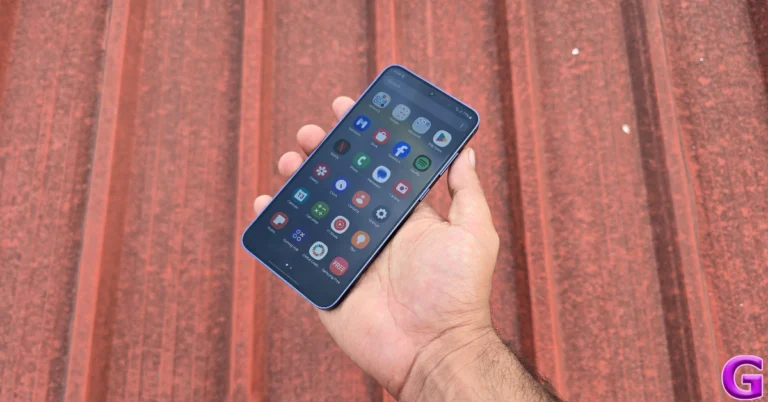
Samsung’s smartphones are leading the AI-integration race and it seems unlikely that other OEMs will catch up anytime soon. Samsung’s AI suite, Galaxy AI, is tastefully woven into its One UI OS. One of the AI features that has flown under everyone’s radar is ‘Photo Ambient Wallpaper’. It makes your lock screen wallpaper more dynamic and interactive. Here’s how you can use Photo Ambient Wallpaper on your Samsung smartphone.

Read Also: Samsung TV Plus India announced collaboration with Warner Bros. Television to offer five exclusive FAST channels

What is ‘Photo ambient wallpaper’?

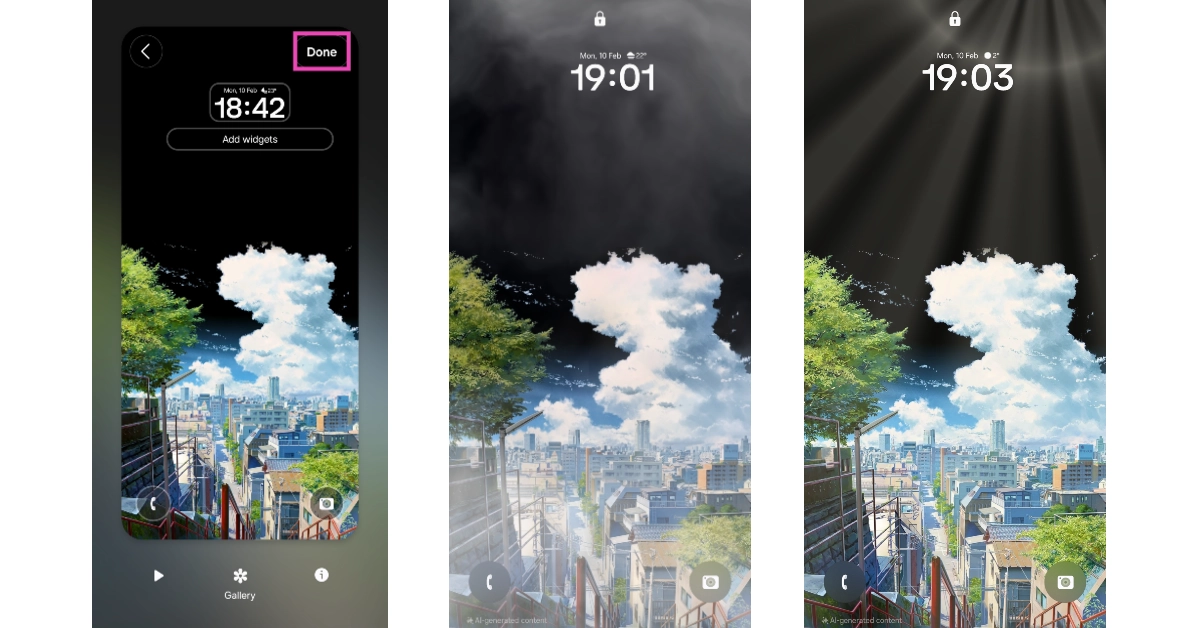
When talking about AI features in smartphones, it is important to separate practicality from gimmicks. Samsung’s ‘Photo ambient wallpaper’ does not radically change how you use your smartphone, rather it is a delightful little detail that makes your phone’s lock screen more fun. It uses the information from the Weather app on your phone to add relevant effects to the lock screen image.

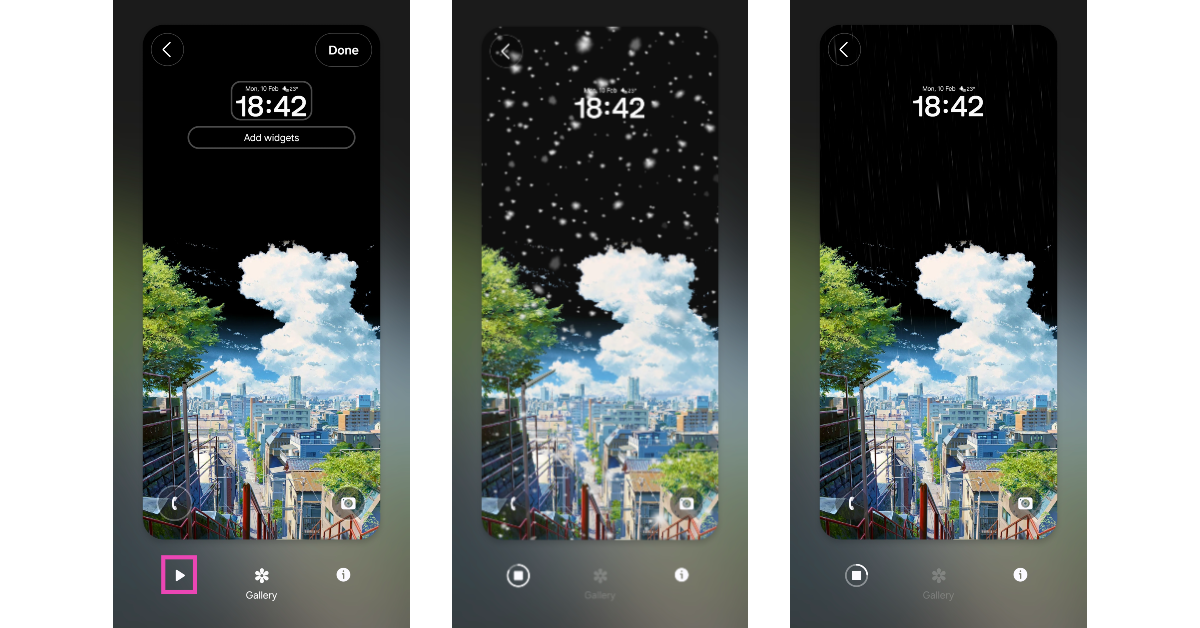
For example, if your local weather is bright and sunny, Photo Ambient Wallpaper will add gleaming sun rays to the lock screen image. In case of rainfall, the lock screen will be overlaid with falling raindrops. Similarly, there are attention-grabbing effects for haze, nighttime, and other weather conditions and situations.

While picking an image for Photo Ambient Wallpaper, make sure it is shot outdoors and has optimum lighting. Dark and gloomy pictures that are shot in indoor settings don’t work well with the overlaid effects. Having lots of negative space in the wallpaper helps too.

Use Photo Ambient Wallpaper on a Samsung Phone

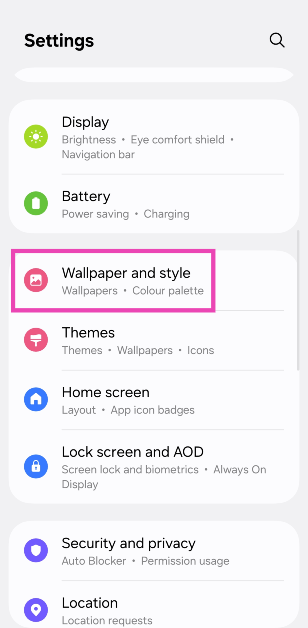
Step 1: Go to Settings and select Wallpaper and style.

Step 1: Go to Settings and select Wallpaper and style.

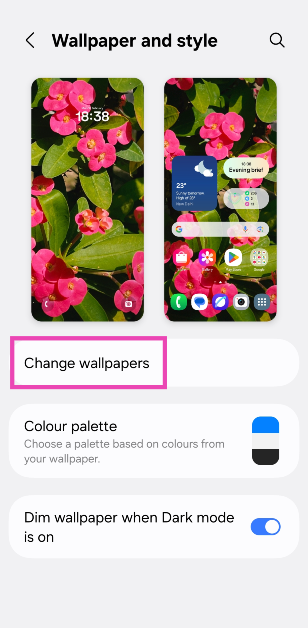
Step 2: Tap on Change wallpapers.

Step 2: Tap on Change wallpapers.

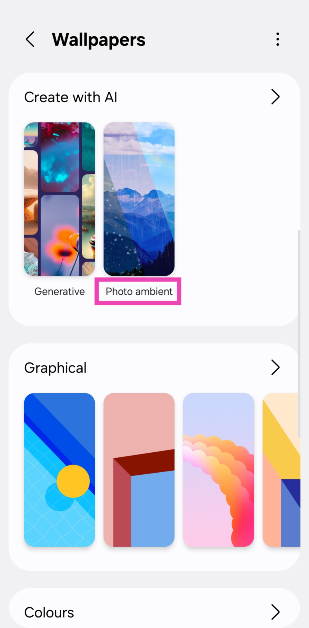
Step 3: Scroll down and select Photo ambient in the Create with AI category.

Step 3: Scroll down and select Photo ambient in the Create with AI category.

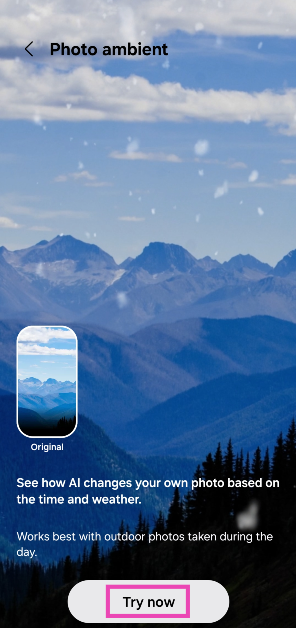
Step 4: Tap on Try now.

Step 4: Tap on Try now.

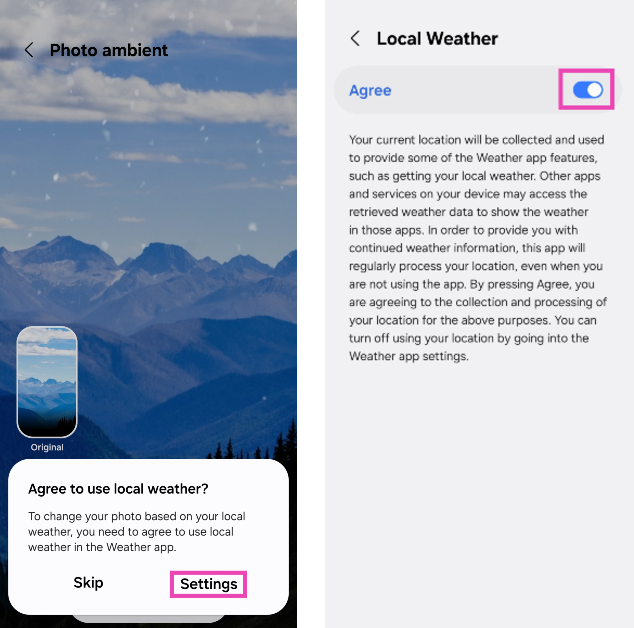
Step 5: Tap on Settings in the popup box and turn on the toggle switch next to Agree.

Step 5: Tap on Settings in the popup box and turn on the toggle switch next to Agree. How to use Photo Ambient Wallpaper on your Samsung phone?

Step 6: Go back and select an image from your phone’s internal storage. Pictures that are taken outdoors make the best photo ambient wallpapers.

Step 7: Adjust the clock style and size. Add your preferred widgets.

Step 8: Hit the play icon to view the weather effects on the wallpaper. Tap on Gallery to select a new image for the wallpaper.

Step 6: Go back and select an image from your phone’s internal storage. Pictures that are taken outdoors make the best photo ambient wallpapers. How to use Photo Ambient Wallpaper on your Samsung phone?

Step 9: Hit Done to set the wallpaper to your lock screen.

Step 9: Hit Done to set the wallpaper to your lock screen. How to use Photo Ambient Wallpaper on your Samsung phone?

Frequently Asked Questions (FAQs)

What is ‘Photo ambient wallpaper’?

Photo ambient wallpaper is a feature that is exclusive to Samsung smartphones. It uses Galaxy AI to overlay weather effects on the lock screen wallpaper. These effects are consistent with your local weather.

Do photo ambient wallpapers consume more battery?

Like live and interactive wallpapers, photo ambient wallpapers consume more battery than regular ones.

How to get ‘Photo ambient wallpaper’ on Samsung?

Go to Settings>Wallpaper and style>Change wallpaper and select ‘Photo ambient’ under ‘Create with AI’. Choose a picture from your phone’s internal storage, make the necessary lock screen customisations, and hit ‘Done’.

How do I turn off photo ambient wallpaper?

You can turn off photo ambient wallpaper by going to Settings>Wallpaper and style>Change wallpaper and setting up an ordinary picture as your lock screen wallpaper.

Can I set a photo ambient wallpaper on my Samsung phone’s home screen?

No, photo ambient wallpapers are only available for the lock screen.

Read Also: Valentine’s Day 2025: Top tech gifts for him and her

Final Thoughts

This is how you can Photo Ambient Wallpapers on your Samsung phone. This Galaxy AI feature is available with on-device processing. This means your phone does not need to use cloud servers to carry out the AI computation for this feature. If you have any questions, let us know in the comments!

Samsung TV Plus India announced collaboration with Warner Bros. Television to offer five exclusive FAST channels

Five FAST channels from Warner Bros. Television have been added to Samsung TV Plus India, with an emphasis on Hindi programming. With a variety of channels, such as Wheel World, XXtreme Jobs, Wild Flix, Foodie Hub, and Crime, these television networks aim to appeal to both urban and regional viewers.

Kunal Mehta, Head of Partnerships and Business Development, at Samsung TV Plus India, said “We are thrilled to welcome Warner Bros. Television to Samsung TV Plus. As a leader in FAST, we are committed to bringing top-tier content to our audiences. This partnership expands entertainment choices while delivering even more value and access to our viewers—and opportunities for advertisers.”

Also Read: Tinder’s Dating Safety Guide now available in four Indian languages

Five additional FAST channels will be available only on Samsung TV Plus India thanks to a partnership with Warner Bros. Samsung TV Plus is a free streaming service that comes pre-installed on Samsung Smart TVs. These channels, which specialise in Hindi television, provide both urban and regional viewers with excellent entertainment and great storytelling. The partnership seeks to satisfy consumer demand for free, high-calibre entertainment.

House of Crime, Foodie Hub, Wheel World, Wild Flix, and XXtreme Jobs will all be available on Samsung TV Plus India. The Hindi-language channel House of Crime focuses on crime and offers gripping dramas and investigative shows. Popular food shows, recipes, and gourmet adventures in Hindi can be found on Foodie Hub, a culinary adventurer’s heaven. Hindi-language stories about animal rescue and zoo life will be available on Wild Flix. With English-language restoration stories and car and bike exhibits, Wheel World is a fast-paced destination for auto aficionados.

Also Read: Google Photos introduces SynthID technology to images edited using the Reimagine feature in Magic Editor

Ruchir Jain, Head of Distribution, Warner Bros. Discovery, South Asia, said: “At Warner Bros. Discovery, we are passionate about curating diverse and high-quality entertainment for our audiences. With connected TVs on the rise, we are excited to expand our presence on Samsung TV Plus through these new channels. Our partnership with Samsung TV Plus will enable us to bring our viewers the very best of WBTV.”

Tinder’s Dating Safety Guide now available in four Indian languages

0

In partnership with the Centre for Social Research, Tinder has published its Dating Safety Guide in four Indian languages. The guide was developed in advance of Safer Internet Day and based on input from an Indian survey. The dating app’s guide, which was first made available in September 2023 and has received over a million views, aims to increase awareness of online dating safety in India.

The Dating Safety Guide on Tinder, which was first released in English in September 2023 and has received over a million views and 50,000 downloads, will now be available in four additional Indian languages: Bengali, Hindi, Kannada, and Marathi.

Also Read: Google Photos introduces SynthID technology to images edited using the Reimagine feature in Magic Editor

The guide, which will be accessible on the app on February 11, intends to help users detect when a romance scam and provide recommendations on how to handle them, as part of its continuous efforts to support safety initiatives across all of its parent companies’ brands.

Under the title, “How to Identify a Romance Scam: Warning Signs,” Tinder users will get access to a comprehensive guide that includes all the information required to identify unhealthy behaviours and important prevention tips.

Overall, the guide offers helpful information to help protect against romance scams. It recommends recognising red flags, protecting privacy, and confirming the identity of the person behind a profile; using security tools to block suspicious individuals; using Video Chat for video calls; and not sending money to strangers.

Besides this Tinder also offers a variety of safety features like Report Chat, Block Contacts, Video Verification, Video Chat, “ Does this message make you uncomfortable?” and “Are you sure?”

“At Tinder, protecting our users is a top priority. Unfortunately, scammers are present in all apps, not just dating apps. We work tirelessly to help prevent and warn users about potential scams or fraud by using AI tools and proactively intervening either with in-app features, notifications or education. This collaboration with ANCEME is yet another commitment to providing our users with the right tools to detect and protect themselves against scams, and we look forward to continuing to collaborate with industry experts,” says Vicente Balbastre, Senior Communication Manager for Southern Europe.

Also Read: Samsung Galaxy S25 Series is now available for purchase, Sale opens in India

Blanca Frías, president of ANCEME, adds: “ Collaborating with Tinder represents a great step in the fight for security in the digital environment. This campaign brings us closer to all users, promoting a safer space with the necessary resources so that people can connect in a healthy way without getting caught up in this type of scam.”

Valentine’s Day 2025: Top tech gifts for him and her

As we head into the second week of February, it is time to pull out the credit card and come up with thoughtful gift ideas for Valentine’s Day. If you’re struggling with the latter, you’ve landed on the right page. We keep an eye on all the major tech releases throughout the year and have some practical and endearing gifting options. So, take a look at our top 10 tech gift ideas for Valentine’s Day 2025.

Read Also: How to disable Gemini in Gmail?

iPhone 16

Here is how a Reddit user managed to buy iPhone 16 for just Rs 27,000

The base variant in the new iPhone 16 series holds up as a serious performer. Powered by the new Apple A18 chipset, the smartphone flaunts a 6.1-inch Super Retina XDR OLED display that can reach 2,000 nits in High Brightness Mode. It also features the new Camera Control button on its right edge. This button acts as a shutter and can be used to control functions like exposure, zoom, and more. The rear camera panel of the iPhone 16 comprises a 48MP primary shooter and a 12MP ultrawide lens. The 3,561mAh battery pack can last an entire day with ease.

Pros

  • Exciting design
  • Camera control button

Buy on Amazon for Rs 74,400

Samsung Galaxy S25

Samsung Galaxy S25

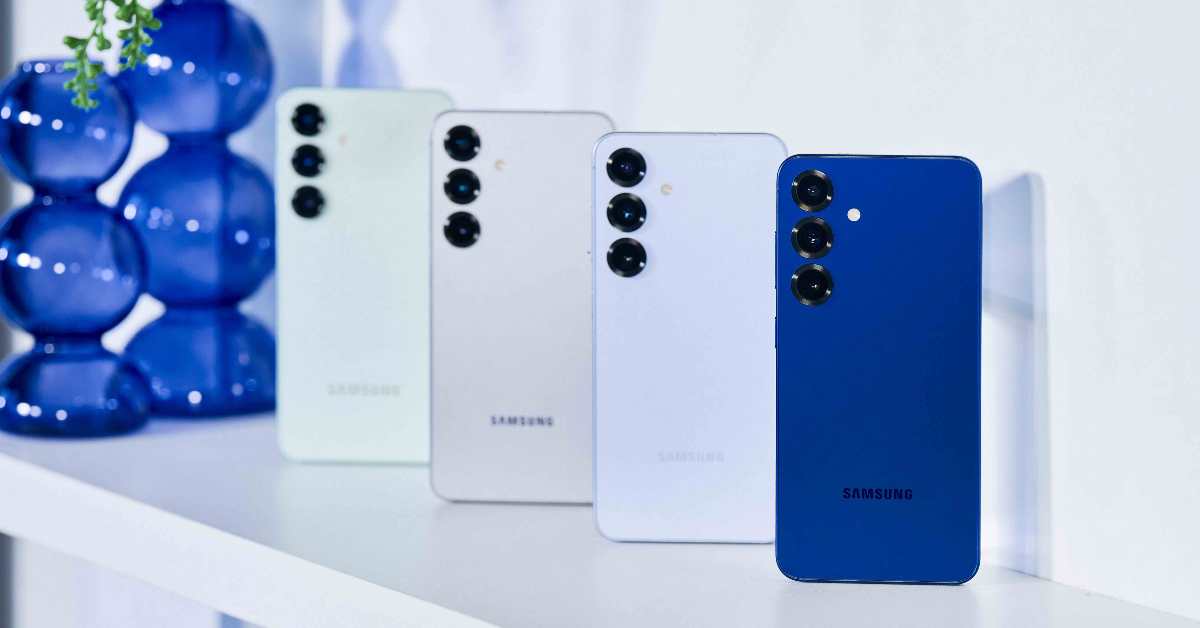
The Samsung Galaxy S25 is perfect for people who like compact Android smartphones. The 6.2-inch Dynamic LTPO AMOLED display has a 120Hz refresh rate and can reach a peak brightness of 2,600 nits. At the heart of the smartphones lies the Snapdragon 8 Elite chipset – a welcome change from the recent trend of Exynos chipsets powering Samsung’s base flagships. The rear triple camera array houses a 50MP primary shooter, a 12MP ultrawide sensor, and a 10MP telephoto lens with 2x optical zoom. The 4,000mAh battery pack supports 25W wired and 15W wireless charging.

Pros

  • Compact form factor
  • Snapdragon 8 Elite chipset

Buy on Amazon for Rs 80,999

Dyson Airwrap

Dyson Airwrap multi-styler price in India and availability

When it comes to hairstyling solutions, not many brands do it like Dyson. The Dyson Airwrap is one of the best tech gifts you can give to your significant other this Valentine’s Day. The Airwrap maintains even heat distribution and limits the heat damage caused by over-styling. The 30mm barrel can cover chest-length hair and create voluminous curls. The 40mm barrel can be used for longer hair. The soft and firm smoothing brushes get rid of the frizz and give the user greater control over how they want to style their hair.

Pros

  • Excellent build quality
  • Versatile range of attachments

Buy on Amazon for Rs 43,000

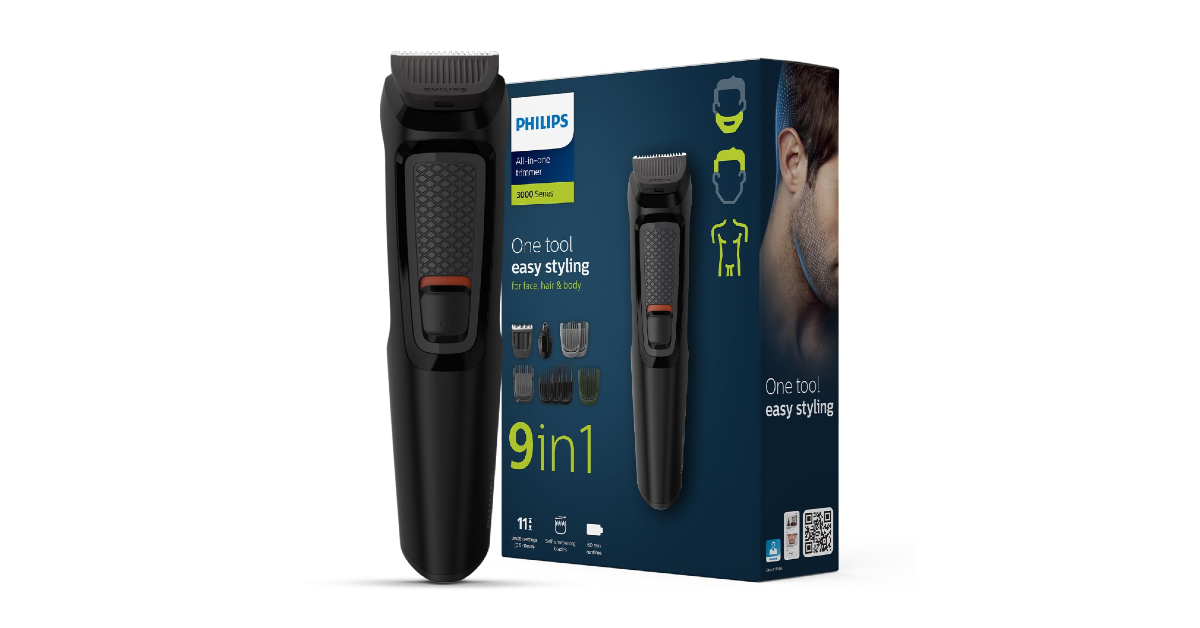
Philips All-in-one Trimmer

Philips All-in-one Trimmer

The 9-in-1 trimmer from Philips is an excellent grooming tool for men. The device comes with 2 stubble combs (1mm and 2mm), 3 hair combs (9mm, 12mm, and 16mm), an adjustable beard comb, and a body comb. The blades on the trimmer are skin-friendly and have rounded tips to cover the tricky spots on the face and body. The device can last 60 minutes on a full charge. You can get 6 weeks’ worth of usage (assuming it is used 2 times per week) on a single charge. Philips offers a 2-year worldwide warranty for its all-in-one trimmer.

Pros

  • Versatile attachments
  • Good battery life

Buy on Amazon for Rs 1,499

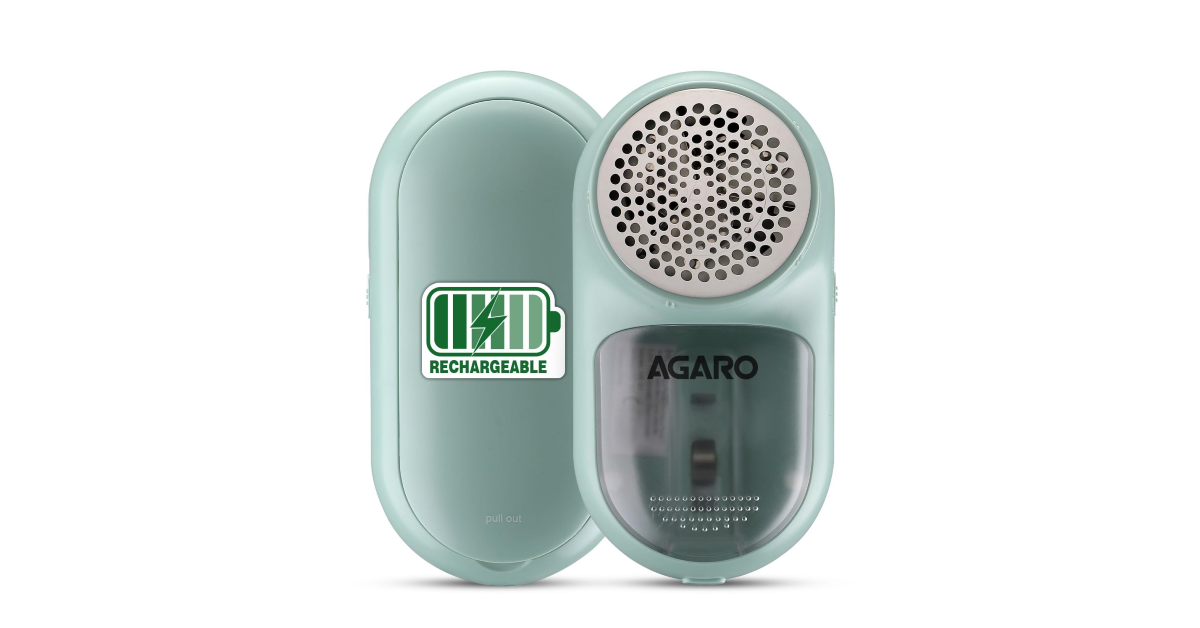
Agaro LR2007 Lint Remover

Agaro LR2007 Lint Remover

No one likes lint on their clothes. Luckily, the solution is quite affordable. The Agaro LR2007 lint remover shaves the fluff, fuzz, and odd bobbles from all kinds of clothing, be it a woollen sweater or a corduroy jacket. The 5W motor inside this gadget operates at 6,500 RPM and effortlessly removes the lint from your garment. The 3 leaf stainless steel blades ensure that the fabric isn’t damaged while taking out the burrs. The see-through panel for the link collector lets you know when the chamber is about to reach its capacity.

Pros

  • Efficient functioning
  • 1 hour battery life

Buy on Amazon for Rs 758

Xiaomi Sound Outdoor Speaker

performance

Xiaomi Sound Outdoor is one of the best all-weather Bluetooth speakers around and would make a great Valentine’s Day gift for your significant other. The dual drivers inside this speaker produce a 30W audio output. The passive woofer radiators positioned on either side of the speaker add a powerful ‘thump’ to the mix. The Sound Outdoor is rated IP67 for dust and water resistance. This means you can take it to beaches and pool parties without worrying about water-related damage. The 2,600mAh battery inside the speaker can power it for 12 hours on a full charge. Read our Xiaomi Sound Outdoor review to know more about the device.

Pros

  • Amazing audio output
  • IP67 rated

Buy on Flipkart for Rs 3,999

Sony Linkbuds Open (WF-L910)

Sony Linkbuds Open (WF-LN900) Review: Performance Valentine’s Day 2025: Top tech gifts for him and her

The Sony Linkbuds Open would make a great gift for someone who avoids regular earbuds due to the passive noise cancellation created by the airtight fit. The Linkbuds Open have a donut-shaped hole in the middle that allows ambient noises to pass through the earbuds. The listener remains aware of their surroundings while enjoying the music. These earbuds are ideal for hiking, working out, and walking around in busy public spaces. They also have the added advantage of being more hygienic since they never enter the ear canal. We reviewed the Sony Linkbuds Open soon after they were released and were mighty impressed by their performance and battery life.

Pros

  • Balanced audio output
  • Clean design

Buy on Amazon for Rs 18,990

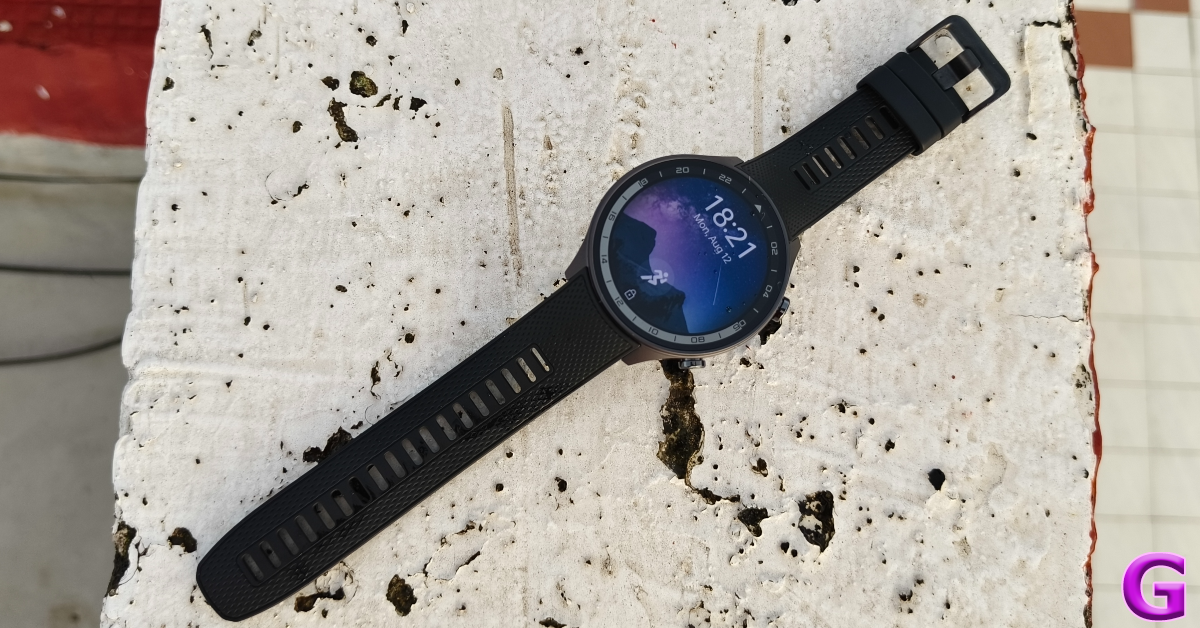
OnePlus Watch 2R

OnePlus Watch 2R Review: Is this the quintessential Android smartwatch? Valentine’s Day 2025: Top tech gifts for him and her

The OnePlus Watch 2R is one of our favourite midrange Android smartwatches and would make an excellent tech gift this Valentine’s Day. Our favourite thing about this smartwatch is its dual processor configuration comprising the Snapdragon W5 Gen 1 and BES2700BP chipsets. Google’s Wear OS 4 and OnePlus’ ColorOS Watch 6.0 take care of the software duties. The BES2700BP chipset and ColorOS Watch 6.0 take control in power-saving mode. Access to third-party apps is cut off in this mode. The smartwatch tracks the essential health and exercise metrics in this mode and the light software ensures extended battery usage. On a full charge, the Watch 2R can last up to 12 days in power-saving mode. For more details about the fit, design, and general performance, read our OnePlus Watch 2R review.

Pros

  • Dual-processor and OS
  • Amazing battery life

Buy on Amazon for Rs 15,999

Samsung Galaxy Ring

Enable Gesture Controls on Samsung Galaxy Smart Ring Valentine’s Day 2025: Top tech gifts for him and her

Thinking of putting a ring on your partner’s finger this Valentine’s Day? Why not go the tech route? Samsung’s debut health tracking ring matches can do everything a smartwatch can. The wearable is available in 3 finishes – Titanium Black, Titanium Silver, and Titanium Gold. It has an IP68 rating and is water resistant up to 10ATM. The Grade 5 Titanium frame provides the ring with much-needed durability. There are 9 sizes on offer. Depending on the ring size, the battery pack capacity may lie between 18-23.5mAh. The charging case has an LED-lit design and packs an 18mAh battery. On a full charge, the Galaxy Ring can last up to 7 days.

Pros

  • Titanium frame
  • 7-day battery life

Buy on Amazon for Rs 38,999

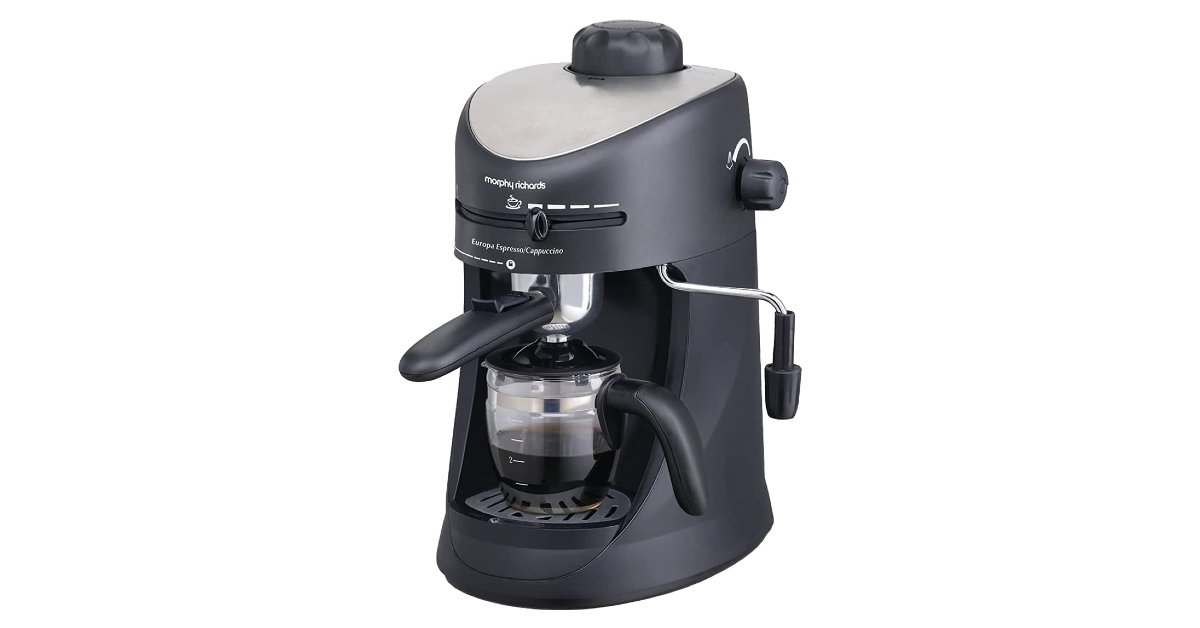
Morphy Richards New Europa Coffee Machine

Morphy Richards New Europa Coffee Machine Valentine’s Day 2025: Top tech gifts for him and her

This coffee machine from Morphy Richards would make the perfect Valentine’s Day gift for caffeine enthusiasts. This versatile coffee machine can prepare an espresso, cappuccino, and latte within minutes. Its milk-frothing nozzle helps you prepare beverages like Espresso Macchiato, Caffe Breve, and Latte. The default pot provided with the machine has a 4-cup capacity. There is a dedicated knob for steam and coffee strength. The removable drip tray takes care of any spillage and can be cleaned easily.

Pros

  • Let’s you decide the strength of your coffee
  • Easy to operate

Buy on Amazon for Rs 4,299

Read Also: How to create a GIF using AI Select on a Samsung phone? (One UI 7)

Final Thoughts

These are our top 10 tech gifts for Valentine’s Day 2025. If you’re looking for tech products in a niche category, give it a shout in the comments and we’ll get back to you with our top recommendations!

How to disable Gemini in Gmail?

0

If you’re puzzled by the Gemini logo in your Gmail inbox, it is because Google made its AI service free across all Workspace apps. Earlier, Google Gemini was exclusively available with the Google One AI premium subscription which cost Rs 1,500 per month. Now that Gemini is available with Workspace Business and Enterprise subscriptions as well, Google has hiked the prices for all of the Workspace subscription tiers. If you’re not a fan of Gemini or AI in general, you can get rid of it from your inbox. Here’s how you can disable Gemini in Gmail on your smartphone and PC.

Read Also: Google Photos introduces SynthID technology to images edited using the Reimagine feature in Magic Editor

What can you do with Gemini in Gmail?

Before you bin Gemini for good, you should check out what the AI bot can do for you in Gmail, now that it is bundled with every Workspace subscription. Here are some of the tasks that Gemini can do for you in Gmail.

  • Summarise email threads
  • Draft responses to emails using prompts
  • Analyse the email thread and come up with relevant responses
  • Finding information from the emails in your inbox
  • Answering queries in a Q&A format by deriving information from your inbox
  • Translate emails in real time

Disable Gemini in Gmail (PC)

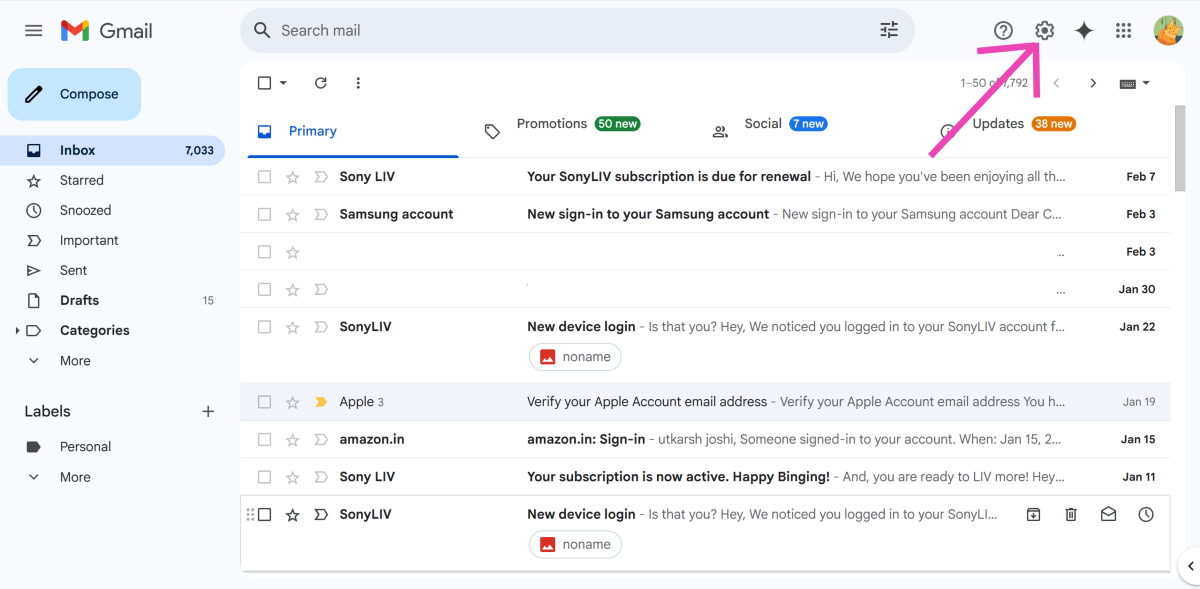
Step 1: Go to your Gmail inbox and hit the cog wheel icon in the top-right section of the screen.

Step 1: Go to your Gmail inbox and hit the cog wheel icon in the top-right section of the screen.

Step 2: Click on See all settings.

Step 2: Click on See all settings.

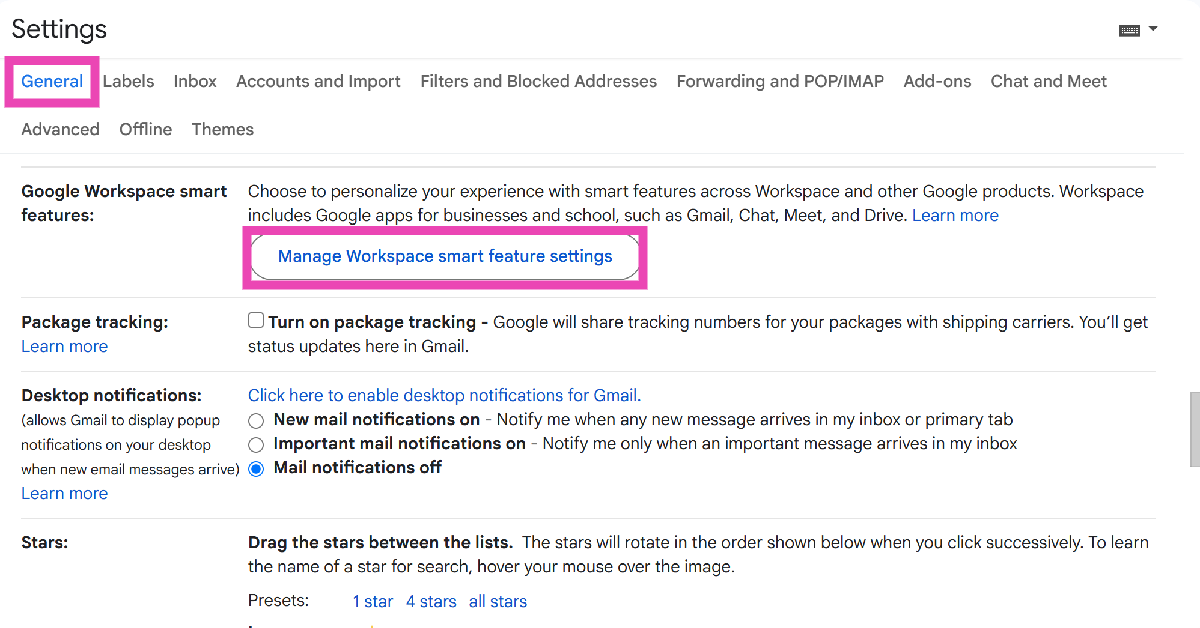
Step 3: Scroll down to Google Workspace smart features in the General tab and click on Manage Workspace smart feature settings.

Step 3: Scroll down to Google Workspace smart features in the General tab and click on Manage Workspace smart feature settings.

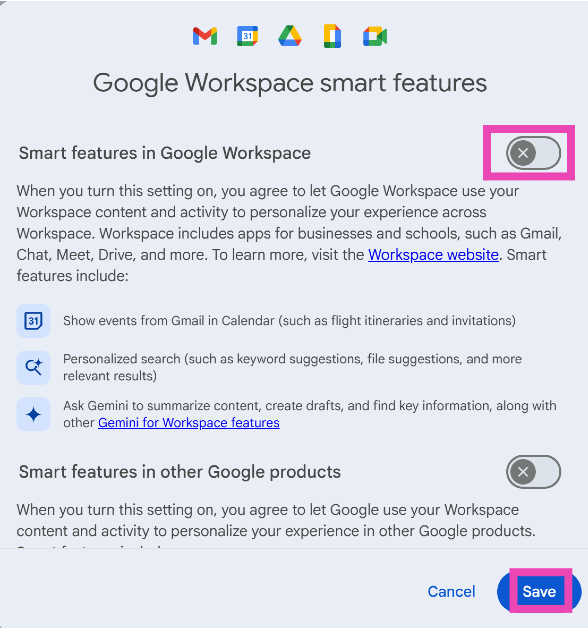
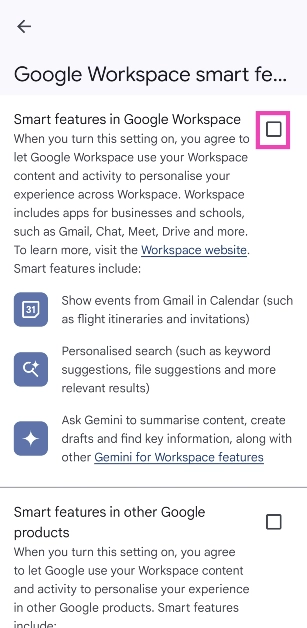
Step 4: Turn off the toggle switch next to Smart features in Google Workspace.

Step 4: Turn off the toggle switch next to Smart features in Google Workspace.

Step 5: Hit Save.

Disable Gemini in Gmail (Smartphone)

Step 1: Launch the Gmail app on your smartphone.

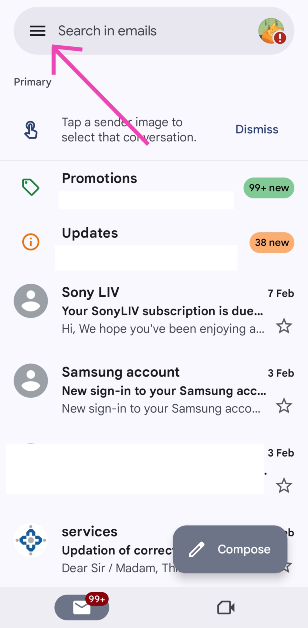
Step 2: Hit the hamburger menu in the top-left corner of the screen.

Step 2: Hit the hamburger menu in the top-left corner of the screen.

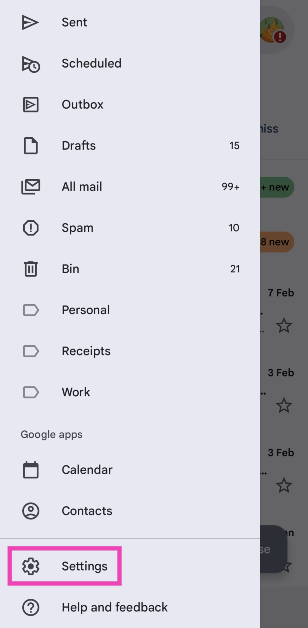
Step 3: Scroll down and select Settings.

Step 3: Scroll down and select Settings.

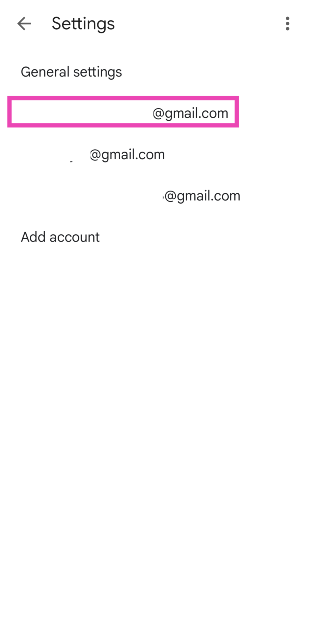
Step 4: Select a Gmail account.

Step 4: Select a Gmail account.

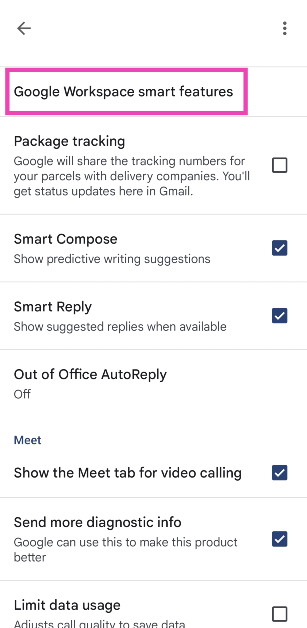
Step 5: Scroll down and select Google Workspace smart features.

Step 1: Go to your Gmail inbox and hit the cog wheel icon in the top-right section of the screen.

Step 6: Uncheck the box next to Smart features in Google Workspace.

Step 6: Uncheck the box next to Smart features in Google Workspace.

Frequently Asked Questions (FAQs)

How do I turn off Gemini in Gmail?

Hit the cog wheel icon, select ‘See all settings’, scroll down and click on ‘Manage Workspace smart feature settings’, and turn off the toggle switch next to ‘Smart features in Google Workspace’.

How do I remove Gemini from the Gmail app?

Launch the Gmail app on your phone, hit the hamburger menu icon in the top left corner of the screen, tap on Settings, select an account, then go to ‘Google Workspace smart features’, and uncheck the box next to ‘Smart features in Google Workspace’.

How do I deactivate Gemini Assistant on my phone?

Go to the Google app on your phone, tap your profile picture, navigate to Settings>Gemini>Digital assistants from Google, and select Google Assistant.

How do I stop Gemini from recording my activity?

Go to gemini.google.com, click on ‘Activity’ in the sidebar, then click on ‘Turn off’ and select ‘Turn off and delete’.

Is Google Gemini free in Gmail?

Yes, Gemini can accessed for free across Google Workspace apps and services.

Read Also: How to create a GIF using AI Select on a Samsung phone? (One UI 7)

Final Thoughts

This is how you can disable Gemini in Gmail on your smartphone and PC. You can also choose to stop Gemini from recording your activity. However, this will disable Gemini extensions on your phone. If you have any questions, let us know in the comments!

Google Photos introduces SynthID technology to images edited using the Reimagine feature in Magic Editor

Google Photos is launching a new feature that lets users check whether an image was artificial intelligence (AI) enhanced. In an effort to control the number of deepfakes, the function, known as Reimagine in Magic Editor, labels photographs and detects them using specialised tools employing SynthID, a watermarking technology.

Google has introduced the SynthID AI Watermark, which enables users to determine whether or not artificial intelligence (AI) was used to enhance an image. SynthID will be used to classify images that have been edited in Magic Editor using Reimagine. The Imagen AI model powers Reimagine in Magic Editor. If there is a SynthID watermark, it will be displayed in the About this Image section.

SynthID is a system that uses Reimagine in Magic Editor to mark modified images by directly embedding a digital watermark into AI-generated images, audio, text, or video. Similar to Google’s Imagen text-to-image technology, this capability helps recognise AI-generated stuff fast and easily.

Also Read: Samsung Galaxy S25 Series is now available for purchase, Sale opens in India

In some circumstances, Reimagine edits may be too small for SynthID to label and detect—for example, changing the colour of a little flower in an image’s backdrop. To learn more, click “About this image,” which displays whether a SynthID watermark is present as well as an image’s metadata.

Besides this, to provide great control over their grid display choices including the ability to swipe through related photos, stack similar photos, and adjust layout density. The grid now has choices to show backed-up content, hide clutter, and customise by app, and users may also show or hide images, GIFs, and videos from other apps. Previously, the Photos grid’s overflow menu could only be used to choose a layout density (Comfortable, Day, or Month) and stack similar images.

Also Read: Google Photos for Android now offers new grid customisations to minimise clutter

The primary grid of photos and videos in Google Photos for Android now has more detailed customisation options, such as “Show content from other apps,” “Only show backed-up content,” “Hide clutter from other apps,” and “Customise by app.” 9to5google was the first to report on this feature. The user experience is improved as a result.

NYT Wordle Answer and Hints Today (February 10)

Are you looking for today’s Wordle for February 10, 2025? The problem is difficult to solve, so if you need assistance, we’ve included hints and the answer to the February 10 Wordle.

Hints and Answers for Today’s Wordle February 10

Before answering directly, please check the February 10 Wordle Hints first.

Hint 1: Today’s Wordle answer includes a vowel.
Hint 2: The answer for today has a repeating letter.
Hint 3:A special treat, especially one you can eat

What word does today’s Wordle begin with?

Do you need help with today’s Wordle answer’s initial letter?

The first letter in today’s Wordle is “G”

Today’s Wordle Answer February 10 #1332

The answer to Wordle #1332 on February 10, 2025, is — GOODY

Also Read: Ranveer Allahbadia got his YouTube Channels back, videos restored

What is Wordle?

Wordle: A Five-Letter Word Guessing Game
• The game allows six guesses of a five-letter word.
• Provide feedback on guessed letters’ placement in the puzzle.
• The New York Times purchased the game in 2022.
• Created by Josh Wardle for his partner, narrowing down 12,000 English words to 2,500.
• Named after the word “word.”

How To Play Wordle?

Wordle is a New York Times word puzzle game that allows users to guess a five-letter word in six attempts. The letters are highlighted in Yellow and Green, indicating whether the word is present in the answer or not, and Green letters indicate the correct guess.

Wordle Tips and Tricks

  • Select a powerful starting word: Avoid using unusual words, as they frequently do not match common letters. A good opening word has plenty of benefits.
  • Repeating letters: Don’t be afraid of repeating letters; they appear frequently in words. The answer may contain one or two repeated letters.
  • Use the Wordlebot: The NYT’s Wordlebot analyses and compares replies to itself. This challenge can assist you enhance guessing skills and highlight areas for development.

Amazon Quiz Answers Today 10 February 2025: Participate to win Up To Rs 500 Amazon Pay Balance

10 February 2025: New Amazon Quiz is now available. Customers from different parts of the country are participating in the daily quiz. The quiz starts at midnight today and will be live until 11:59 PM tonight. By successfully answering every question, participants in the quiz have the chance to win wonderful rewards. Up to Rs 500 Amazon Pay Balance is up for grabs to participants today.

One wrong answer could eliminate you from the quiz. You have a chance to win up to Rs 500 Amazon Pay Balance if you successfully answer every question. Users of the app only have the opportunity to take the quiz. Check Out 10 February 2025 Amazon Quiz Answers.

Are you not able to find Amazon FunZone? Click below and participate.

Click here to enter the Amazon FunZone Quiz and play today.

Amazon Quiz Today Prize: Rs 500 Amazon Pay Balance

Quiz Date: 10 February  2025

Daily Timing: 12 AM to 11:59 PM

Previous Amazon Quiz Winners Announcement: Today 12 PM Noon

Amazon Quiz Answers Today 10 February  2025: Win Up To ₹ 500 Amazon Pay Balance

Question 1: In August 2023, which Italian World Heritage Site celebrated its 850th birthday?

Answer: Leaning Tower of Pisa

Question 2: As per Nature magazine, Perucetus colossus, the colossal whale from which country is now the Earth’s heaviest known animal?

Answer: Peru

Question 3: Paris is set to allow what in Seine River after almost 100 years of ban in 2024?

Answer: Swimming

Question 4: The name of this animal was first used in its present form in which language?

Answer: Old English

Question 5: Who is the global brand ambassador of this clothing company?

Answer: Deepika Padukone

How To Play Amazon Quiz Today

Only app users are eligible to play the Amazon quiz every morning from 12 AM to 11:59 PM. The quiz is not available on the desktop. For those who are unaware of how to play the Amazon quiz, below are the steps, you can follow to take the quiz.

  • First, download the Amazon app from the Google Play Store or App Store or go here to download the Amazon App
  • Now fill in the required information through the Sign-Up option.
  • To find the Amazon Quiz banner, log in to the Amazon app and scroll down to the home screen.
  • Tap on the Amazon Quiz banner and tap on the Start button to start the Quiz.
  • Now you will get 5 questions and you need to answer them correctly. One wrong answer will eliminate you from the Quiz.
  • After answering all the questions correctly you are now eligible for a Lucky Draw.
  • The previous winner’s name will be announced today at 12 PM.

Amazon Daily Quiz Answers from the previous few days.

Here are all the answers from the previous 5 days of the Amazon Daily Quiz and Contest.

Amazon Quiz Answers Today 8 February  2025: Win Up To ₹ 500 Amazon Pay Balance

Question 1: Italy’s football authorities banned the use of which number on jerseys due to its association with the Nazi slogan ‘Heil Hitler’?

Answer: 88

Question 2: For which film did Tom cruise rode a bike off a cliff, pulled the parachute open and landed on a moving train?

Answer: Mission: Impossible – Dead Reckoning Part One

Question 3: Which city annually sees the Nathan’s Fourth of July hot dog eating competition at Coney Island?

Answer: New York City

Question 4: Which country is the main breeding ground for this bird species?

Answer: Canada

Question 5: Where is the headquater of this airline company located?

Answer: Malaysia

Amazon Quiz Answers Today 7 February  2025: Win Up To ₹ 500 Amazon Pay Balance

Question 1: After 38 years as Prime Minister of which country did Hun Sen announce to step down in 2023?

Answer: Cambodia

Question 2: Selvamani Selvaraj’s new web series delves into the ‘unseen and unheard’ aspects of the 17-year manhunt to catch whom?

Answer: Veerappan

Question 3: Which Indian food item has been named the world’s second-best flatbread by TasteAtlas?

Answer: Butter garlic naan

Question 4: This bird was the symbol of which English Monarch?

Answer: Elizabeth I

Question 5: When did this site became a UNESCO World Heritage site?

Answer: 1989

Amazon Quiz Answers Today 6 February  2025: Win Up To ₹ 500 Amazon Pay Balance

Question 1: In MP’s Kuno Park, what prey is taking up more bite power from the Cheetahs?

Answer: Chital

Question 2: Ayam Goreng is ranked #1 and Chicken 65 is ranked #10 on a major Top 10 list about what food?

Answer: Fried Chicken

Question 3: What name, derived from the Sanskrit for ‘wisdom’, is given to the lunar rover of Chandrayaan-3?

Answer: Pragyan

Question 4: The name of this animal came from ghosts of which culture?

Answer: Romans

Question 5: Who has designed this logo?

Answer: Rob Janoff

Amazon Quiz Answers Today 5 February  2025: Win Up To ₹ 500 Amazon Pay Balance

Question 1: Sabyasachi made masks of what for King Charles and Queen Camilla’s Animal Ball in 2023?

Answer: Shola

Question 2: In August 2023, ‘Bandit King’ Malkhan Singh joined the Congress party in which state?

Answer: Madhya Pradesh

Question 3: Microsoft has changed the default font for its Office apps to what after 16 years?

Answer: Aptos

Question 4: Why is this animal not considered a big cat?

Answer: Lack of Roar

Question 5: This drink comes from which place?

Answer: Cuba

Amazon Quiz Answers Today 4 February  2025: Win Up To ₹ 500 Amazon Pay Balance

Question 1: Fatma Samoura became the first woman, first Black person, first non-European to be which organisation’s secretary general?

Answer: FIFA

Question 2: The central government has agreed to investigate the Havana syndrome. It originated in which country?

Answer: Cuba

Question 3: Across Parliament’s history, we’ve had 28 of what in India?

Answer: No-confidence motions

Question 4: What is the only place outside of Africa, where this primate is found?

Answer: Grenada

Question 5: This vegetable was worshipped by the ancient Egyptians as a symbol of what?

Answer: Eternal Life

Amazon Quiz Answers Today 3 February  2025: Win Up To ₹ 500 Amazon Pay Balance

Question 1: The latest venue in Test cricket is the Civil Service Cricket Ground in which city?

Answer: Belfast

Question 2: Nitanshi Goel stars as the lead character of Phool Kumari in which movie produced by Aamir Khan?

Answer: Laapataa Ladies

Question 3: Vinod Khosla and Bill Joy were two of the founders of which famous technology company headquartered currently in Santa Clara?

Answer: Sun Microsystems

Question 4: This is the ancient roman theatre of Kom El Deka in Alexandria in which country?

Answer: Egypt

Question 5: Which famous singer is shown here?

Answer: Bruce Springsteen

Amazon Quiz Answers Today 2 February  2025: Win Up To ₹ 500 Amazon Pay Balance

Question 1: Which famous badminton player is one of India’s flagbearers for the 2024 Paris Olympics?

Answer: PV Sindhu

Question 2: What is the latest edition of the ‘Bad Boys’ movie franchise?

Answer: Bad Boys: Ride or Die

Question 3:Nobel Prize winner Ernest Rutherford was born in which country?

Answer: New Zealand

Question 4: This is the Taj-ul-Masjid in which city?

Answer: Bhopal

Question 5: This is a bust of which famous ruler from history?

Answer: Alexander the Great

Amazon Quiz Answers Today 1 February  2025: Win Up To ₹ 500 Amazon Pay Balance

Question 1: Which of these batters scored a century during India’s recent 5 match T20I series against Zimbabwe?

Answer: Abhishek Sharma

Question 2: In May 2025. the ___ edition of the Mission Impossible movie franchise is going to be released. Fill in the blanks

Answer: 8th

Question 3: In which present day Indian state was the Battle of Buxar, which saw the East India Company emerge victorious fought?

Answer: Bihar

Question 4: This is a view of the City Palace in which Indian city?

Answer: Jaipur

Question 5: Valletta is the capital of which country, whose flag is shown here?

Answer: Malta

Amazon Quiz Answers Frequently Asked Questions (FAQs)

Where can I check the previous winners? Did I win how to check?

You can head over to this link on your mobile or desktop to check the winners of the Amazon Daily Quiz Contest.

How to Play Amazon Daily Quiz or Contest?

We have written an explainer above, you can refer to that.

When are the winners of the Amazon Quiz and contest announced or declared?

The announcement of today’s Amazon quiz winner will take place Tomorrow. As for the Special Quiz and “Spin & Win” Contest, the winners will be declared once the Quiz Contest comes to an end. To find out who the lucky winner is, you can refer to the Amazon Quiz Winners List or visit the Amazon Winners tab in the Amazon App.

How to participate in the Daily Amazon Quiz?

That is very easy, just got to the Amazon app and scroll to the bottom of the page and you will find the Quiz section. Click on it (usually it is called the fun zone) and you can enter the Amazon Today Quiz Contest. 

Are there any other quizzes or contests running on Amazon daily?

Yes, there are many running on a daily basis. These range from spinning the wheel to answering the questions correctly. All are located in the Fun Zone. 

What are the criteria for selecting a winner in the Daily Amazon Quiz?

When a qualified player submits correct answers to all the questions, they will automatically be entered into a lucky draw. This draw will include all participants who answered all the questions correctly. Amazon randomly selects the final winners from the pool of eligible participants who gave the right answers.

Which Types of Questions are asked within Amazon Daily Quiz?

These are very simple and straightforward questions. These are mainly related to general knowledge. 

Where should I look for Amazon Daily Quiz answers?

You can bookmark our website www.gadgetbridge.com as we will help you every day with the Amazon Daily Quiz. We bring you fresh answers every day for the Amazon Daily Quiz and Contest. 

What time does Amazon Announce previous winners?

The previous winner’s name will be announced today at 12 PM (noon).

Garena Free Fire Max Redeem Codes Today 10 February 2025: Here is how to claim them

Garena Free Fire Max is a battle royale game with regular awards and tournaments to keep players interested. If you play Garena Free Fire, you should be aware of the redeem codes that are released on a daily basis. However, because the battle royale game is banned in India, players from other countries can use the Free Fire Redeem codes daily. If you’re unfamiliar with the Garena Free Fire redeem codes or don’t know how to get them, we’ve put together a step-by-step guide to help you redeem them. Check out Garena Free Fire Max Redeem Codes for 10 February 2025.

The Free Fire Max redeem codes are a great way to get free stuff. These are 12-digit codes that contain alphabets and numbers, as well as an expiration date and time. Because the Garena FF redeem codes cannot be used more than once, you should hurry to the redemption page to claim your free reward before someone else does. To get a free reward, all you have to do is go to reward.ff.garena.com/en, which is the official redemption page. Also, keep an eye on this space for daily updates on Garena Free Fire Max redemption codes and rewards.

Also Read: Sennheiser Accentum Plus wireless headphones with Hybrid Adaptive Noise Cancellation launched

Garena Free Fire Max Redeem Codes Today 10 February 2025

FFSGT7KNFQ2X

FFSKTXVQF2NR

FFDMNSW9KG2

FFNRWTQPFDZ9

FFBYS2MQX9KM

FFM4X2HQWCVK

FFRSX4CYHLLQ

FFRINGY2KDZ9

FPSTQ7MXNPY5

NPTF2FWSPXN9

XF4SWKCH6KY4

FFCBRAXQTS9S

FFYNC9V2FTNN

FF4MTXQPFDZ9

FPUS5XQ2TNZK

FFKSY7PQNWHG

FFNFSXTPVQZ9

GXFT7YNWTQSZ

FFEV0SQPFDZ9

FFPURTQPFDZ9

FF6WN9QSFTHX

FVTCQK2MFNSK

FFNFSXTPVQZ9

RDNAFV2KX2CQ

FFNGY7PP2NWC

How to Get Free Fire Max Redeem Codes for Garena on 10 February 2025?

  • Visit the Garena Free Fire Max game’s official website at reward.ff.garena.com.
  • Use your Facebook, Google, VK, Apple ID, Huawei ID, or Twitter account to log in.
  • You’ll be taken to a valid redemption code (s)
  • Copy and paste the 12-digit redemption code into the text box.
  • On the screen, a dialogue box will appear.
  • ‘Ok’ should be selected.

For the latest gadget and tech news, and gadget reviews, follow us on Twitter, Facebook and Instagram. For newest tech & gadget videos subscribe to our YouTube Channel. You can also stay up to date using the Gadget Bridge Android App. You can find the latest car and bike news here.

How to watch the 2025 Super Bowl online in India and the USA?

0

USA’s biggest annual sporting event, the Super Bowl, will kick off on Sunday evening at 6:30 PM ET (3:30 PM PT). The game will take place at the Caesar Superdome in New Orleans and will see the current champions, the Kansas City Chiefs, take on the Philadelphia Eagles. The last time these two teams met at the Super Bowl was in 2023, which resulted in the Chiefs securing a 38-35 victory. In India, the Super Bowl LIX will begin in early Monday morning at 5:00 AM. Let’s take a look at how you can watch the 2025 Super Bowl LIX online in India and the USA.

Read Also: How to create a GIF using AI Select on a Samsung phone? (One UI 7)

How to watch the 2025 Super Bowl online in the USA?

How to watch the 2025 Super Bowl online in India and the USA?

Tubi (Free): If you don’t want to shell out money for a monthly subscription to a service you likely won’t use after watching the Super Bowl, Tubi is your best option. Fox Sports will be streaming the Super Bowl LIX on Tubi for free. The streaming service will also host the pre-game and red-carpet shows. All you need to do is create an account.

DirecTV ($49.99 per month): DirecTV’s basic MySports Beta package is priced at $49.99 and gives you access to the Fox Sports network. New subscribers can avail of the 5-day free trial to watch the Big Game along with the halftime show.

Fubo ($59.99 per month): Fubo offers Fox Sports as a part of its sporting content. Its subscription packages start at $59.99 per month. The streaming platform also offers a free 7-day trial period to new users.

Hulu + Live TV ($82.99 per month): The Hulu + Live TV package covers over 95 channels, including ABC, CBS, FOX, NBC, and Adult Swim. You can catch the Super Bowl LIX on the Fox Sports network via Hulu + Live TV. Monthly packages start at $82.99 and new users can avail of a 3-day free trial.

NFL+ ($6.99 per month): NFL’s very own streaming service, NFL+, will stream the Big Game. Its monthly subscription costs $6.99 and is ideal for users who are only concerned with football. NFL+’s coverage will include the Super Bowl LIX halftime show featuring Kendrick Lamar.

How to watch the 2025 Super Bowl online in India?

The Super Bowl LIX will be broadcast on the Star Sports Select 2 SD and HD channels in India. It will be streamed online on  Disney+ Hotstar. Its monthly subscription package (Premium) fetches Rs 299.

Read Also: How to enable Dark Mode on Facebook?

Final Thoughts

This is how you can watch the 2025 Super Bowl LIX online in India and the USA. People in the US can also tune into the live radio broadcast of the game via SiriusXM, Westwood One Sports, TuneIn, ESPN Radio, and NFL+. What are your predictions for the Big Game? Let us know in the comments!

How to create a GIF using AI Select on a Samsung phone? (One UI 7)

0

Most Android phones come with a native tool for making GIFs. However, these tools are a part of the native gallery app and require the source material to be saved on your phone. This means that if you want to turn a clip from a movie or a TV into a GIF, you will need to download it on your phone first. Samsung’s newest One UI 7 OS tackles this issue with its AI Select tool. Let’s take a look at how you can create a GIF on your Samsung phone using AI Select.

Read Also: How to enable Dark Mode on Facebook?

What is AI Select?

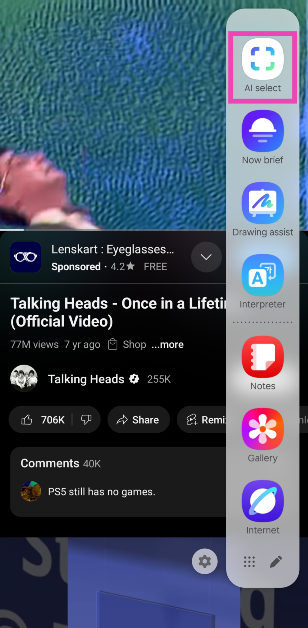
AI Select is one of the new Galaxy AI features on Samsung’s One UI 7 OS. This tool can be selected from the edge panel of your Samsung phone. AI Select scans the content on your phone’s screen and lets you interact with it in creative ways. Here’s what you can do with it:

Drawing Assist: Select an image or object on the screen and turn it into an artwork using Drawing Assist. Once the artwork is generated, you can turn it into a sticker on the spot.

Generative Edit: Remove objects from the selected image or use ‘sketch to image’ to add more stuff to it.

Create a GIF: Record a clip from the video playing on the screen to turn it into a GIF.

Other tools: You can also choose to set the selected frame or image as the wallpaper, share it with your contacts, save it on your phone, and more.

Create a GIF on your Samsung phone using AI Select

Step 1: Play the video from which you want to create a GIF. AI Select works for the videos in your phone’s gallery or on the internet (YouTube, Facebook, etc).

Step 2: Navigate to the part of the video containing the source material for the GIF.

Step 3: Swipe left on the edge panel and tap on AI Select.

Step 3: Swipe left on the edge panel and tap on AI Select.

Step 4: AI Select will scan the screen for content.

Step 5: Tap or draw around the video to select it.

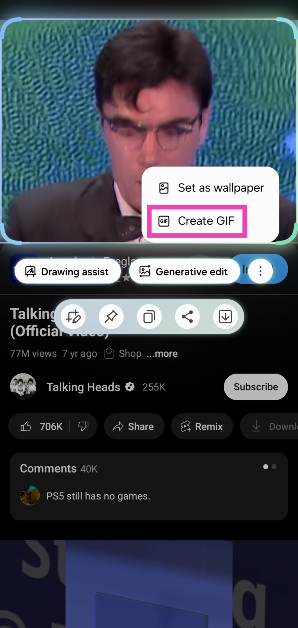
Step 6: Hit the ellipses next to Drawing assist.

Step 6: Hit the ellipses next to Drawing assist.

Step 7: Select Create GIF.

Step 7: Select Create GIF.

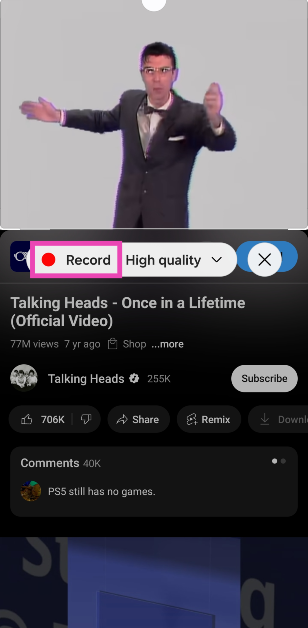
Step 8: Crop the video to your liking and tap on Record.

Step 8: Crop the video to your liking and tap on Record.

Step 9: Hit Stop when you want to end the GIF.

Step 9: Hit Stop when you want to end the GIF.

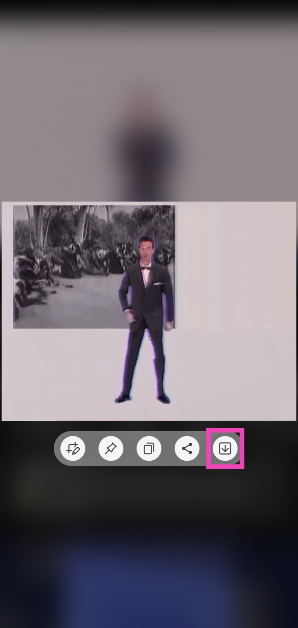
Step 10: Hit the arrow icon to save the GIF on your phone.

Step 10: Hit the arrow icon to save the GIF on your phone.

Step 11: Go to the GIFs album in the Gallery app to view the GIF you just created.

Bonus Tip: Create a GIF from a video saved on your Samsung phone

Step 1: Launch the native Gallery app on your Samsung phone.

Step 2: Play the video from which you want to create a GIF.

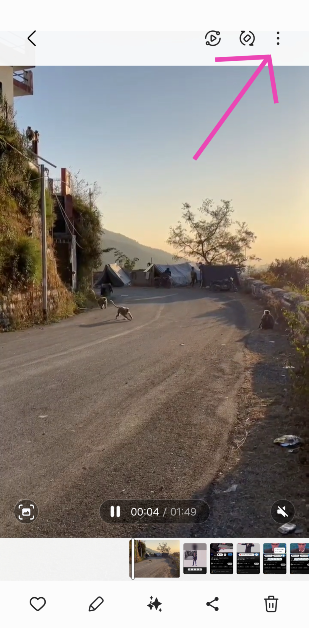
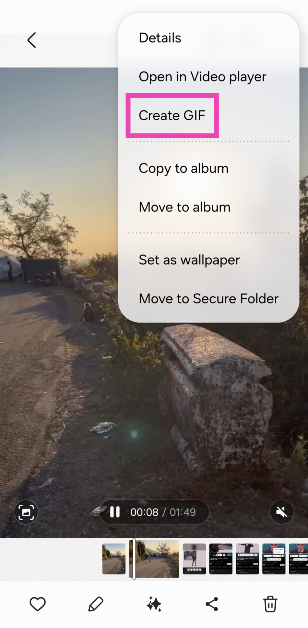
Step 3: Hit the ellipses in the top right corner of the screen.

Step 3: Hit the ellipses in the top right corner of the screen.

Step 4: Tap on Create GIF.

Step 4: Tap on Create GIF.

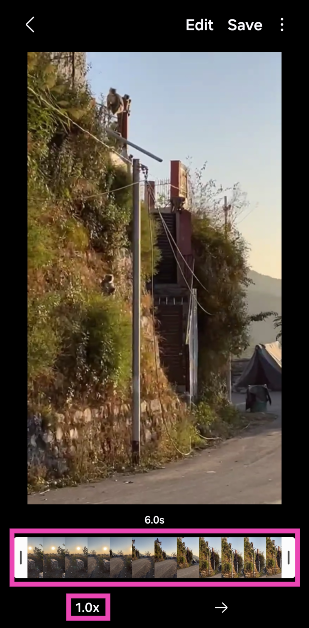
Step 5: Use the slider to go to the part of the video from which you want to create a GIF.

Step 5: Use the slider to go to the part of the video from which you want to create a GIF.

Step 6: Tap 1.0x at the bottom of the screen to change the playback speed.

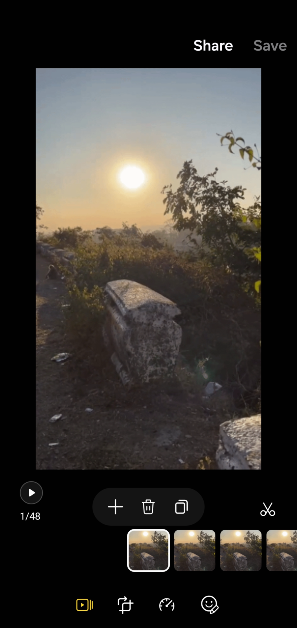
Step 7: Tap on Edit to remove frames from the GIF, draw on it, or add stickers, and text.

Step 7: Tap on Edit to remove frames from the GIF, draw on it, or add stickers, and text.

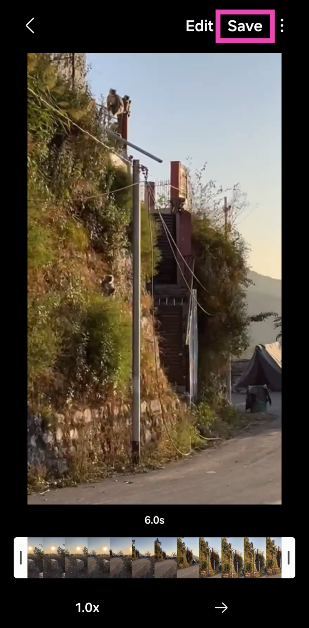
Step 8: Hit Save in the top right corner of the screen.

Step 8: Hit Save in the top right corner of the screen.

Frequently Asked Questions (FAQs)

How do I create a GIF on my Samsung phone?

Go to the gallery app on your Samsung phone, open a video, tap the ellipses and select ‘Create GIF’. Use the slider to select the part of the video from which you want to make the GIF and hit ‘Save’.

How do I create a GIF using AI Select?

Play a video on your Samsung phone, drag the edge panel, and tap on ‘AI Select’. Tap the ellipses, select ‘Create GIF’, record the video, and hit stop when you’re done. Tap the arrow icon to save the GIF on your phone.

How to create a GIF on WhatsApp?

Open a conversation on WhatsApp, record or select a video from your phone’s library, tap the GIF icon on the editing screen, and hit ‘Send’.

Which are the best apps to create GIFs on Android?

Canva, Picsart, GIF Maker, and ImgPlay are some of the best Android apps to create GIFs on your phone.

When will One UI 7 come out?

Samsung will start rolling out One UI 7 on eligible devices in the coming weeks. The Android 15-based OS skin made its debut on the Galaxy S25 series.

Read Also: OnePlus 13R Review: The 2025 flagship killer?

Final Thoughts

This is how you can create a GIF on your Samsung phone using AI Select. You may also want to check out how to use the Audio Eraser on Samsung. If you have any questions, let us know in the comments!

How to enable Dark Mode on Facebook?

0

Facebook was one of the last social media platforms to adopt Dark Mode, but it did a good job of integrating it tastefully. If you often use your phone in dimly lit conditions, you should consider enabling dark mode on Facebook as well as on the rest of your phone’s interface. Accessing dark mode on Facebook is easy and it does not take more than a few seconds to enable it. Here’s how you can go about it.

Read Also: OnePlus 13R Review: The 2025 flagship killer?

Here’s why you should use Dark Mode on Facebook

If your sleep cycle is disrupted by looking at your phone for too long at night, you need to limit your exposure to blue light. Dark Mode helps with this problem. There are other advantages to using Dark Mode as well. Here are some of them.

  • Reduces stress caused by the display on your eyes in dimly lit conditions
  • Improves your sleep quality
  • Increases the battery life of your phone by a small margin
  • Serves as a better background colour
  • Better aesthetics

Facebook offers 3 Dark Mode settings:

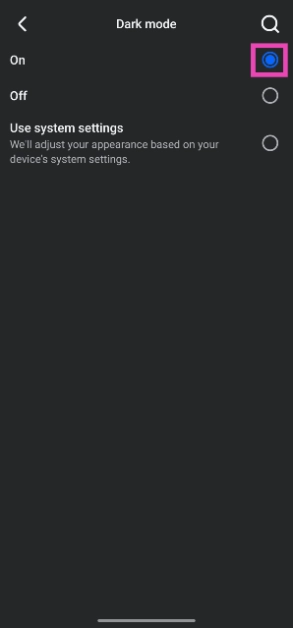
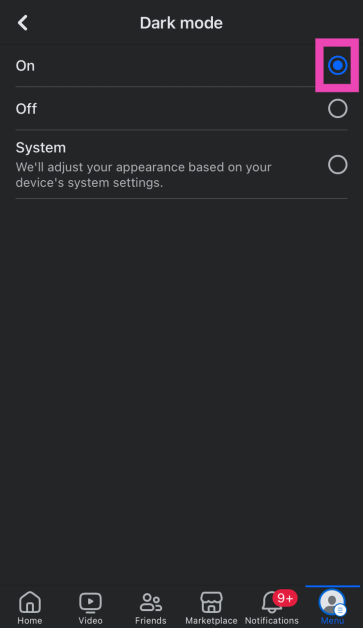
On: Once enabled, the lights will go off on the Facebook app and it will switch to the darker theme.

Off: Switches the app back to Light Mode.

Use system settings: When this setting is chosen, Facebook adheres to the central Dark Mode setting on your phone. If you’ve set up a schedule for your phone to go dark, Facebook will follow it as well.

Enable Dark Mode in the Facebook app for Android

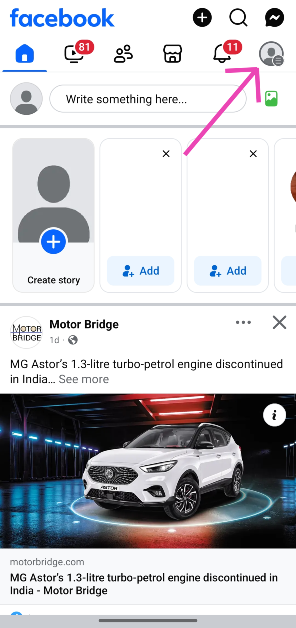
Step 1: Launch the Facebook app on your Android phone and hit your profile picture in the top right corner of the screen.

Step 1: Launch the Facebook app on your Android phone and hit your profile picture in the top right corner of the screen.

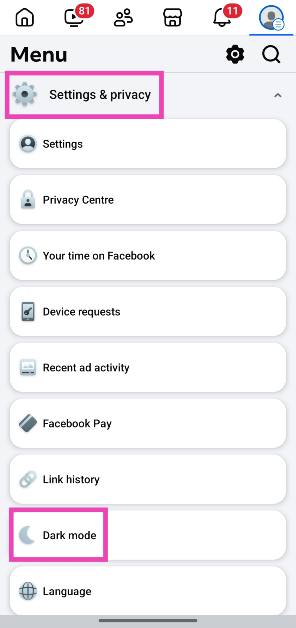
Step 2: Tap on Settings & privacy.

Step 2: Tap on Settings & privacy.

Step 3: Go to Dark mode.

Step 3: Go to Dark mode.

Step 4: Select On. Choose ‘Use system settings’ if you want the Facebook app to follow the Dark Mode schedule set on your phone.

Enable Dark Mode in the Facebook app for iOS

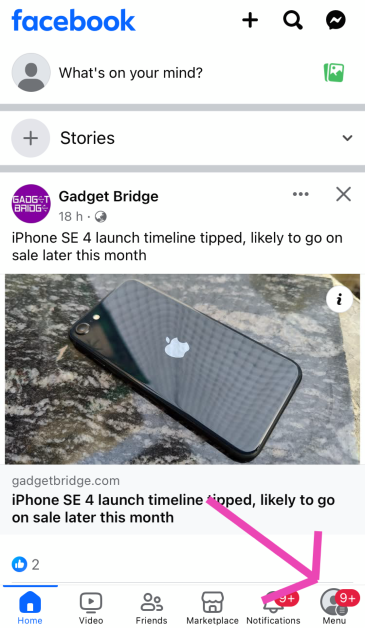
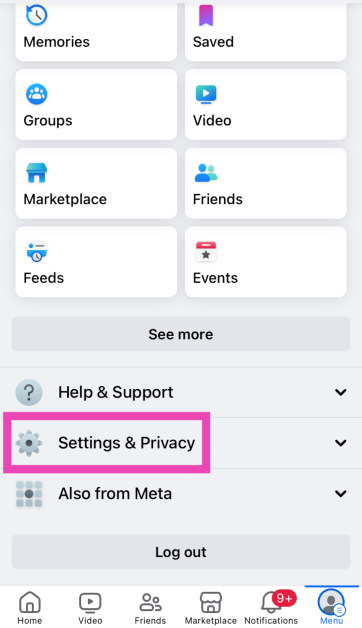
Step 1: Launch the Facebook app on your phone and hit your profile picture in the bottom right corner of the screen.

Step 1: Launch the Facebook app on your phone and hit your profile picture in the bottom right corner of the screen.

Step 2: Tap on Settings & privacy.

Step 2: Tap on Settings & privacy.

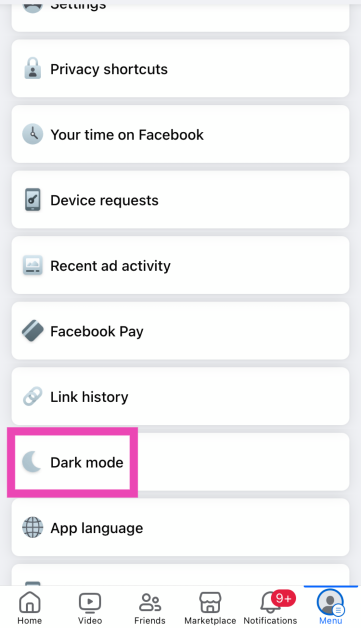
Step 3: Go to Dark mode.

Step 3: Go to Dark mode.

Step 4: Select On. Choose ‘Use system settings’ if you want the Facebook app to follow the Dark Mode schedule set on your phone.

Step 4: Select On. Choose ‘Use system settings’ if you want the Facebook app to follow the Dark Mode schedule set on your phone.

Enable Dark Mode on the Facebook website

Step 1: Log into Facebook on your PC.

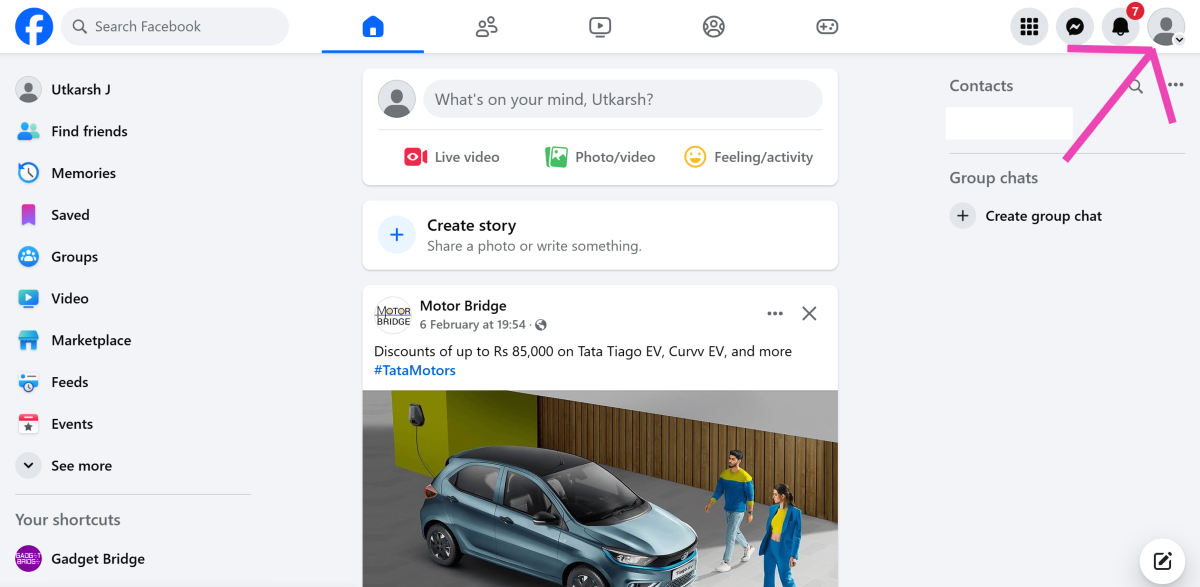
Step 2: Click on your profile picture in the top-right corner of the screen.

Step 1: Launch the Facebook app on your Android phone and hit your profile picture in the top right corner of the screen.

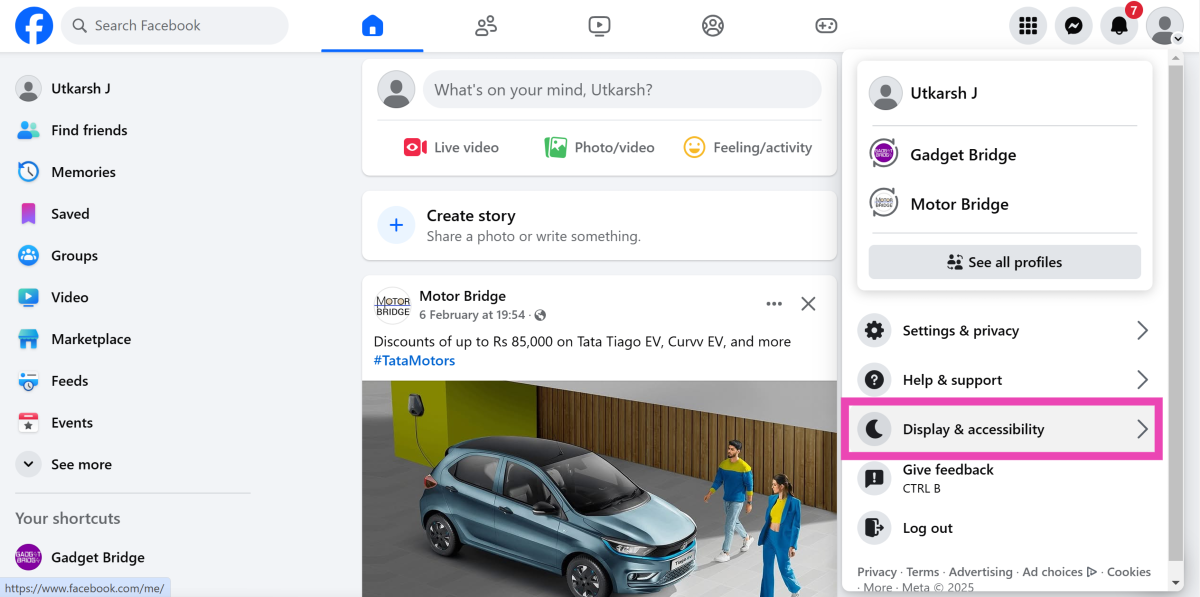
Step 3: Select Display & accessibility.

Step 2: Tap on Settings & privacy.

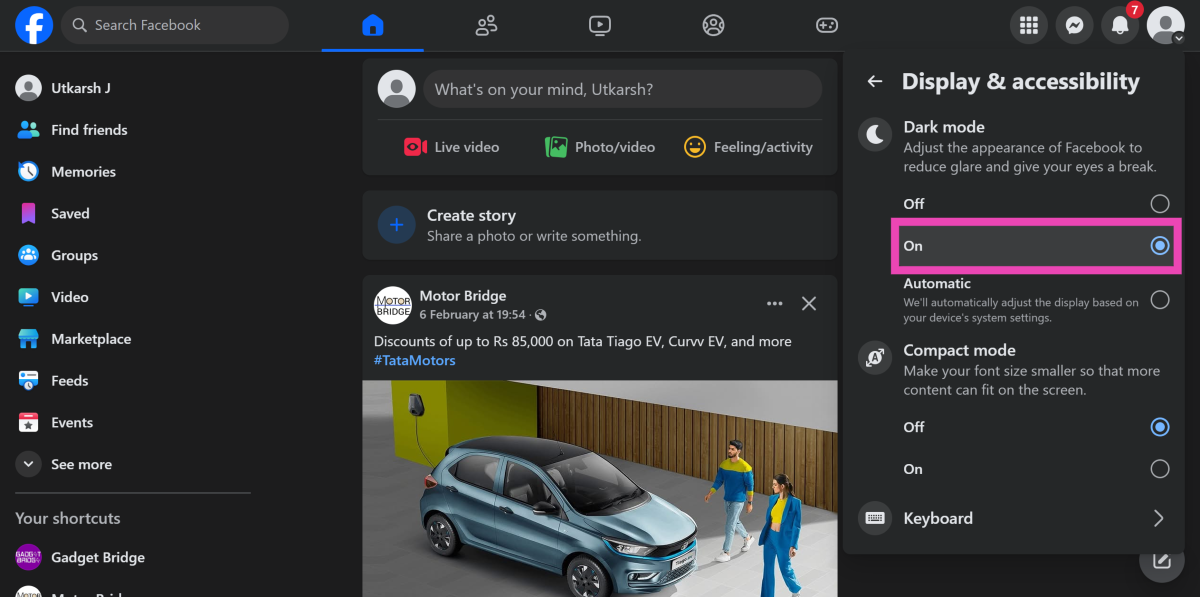
Step 4: Under the Dark Mode category, select On. Choose Automatic if you want to adjust the dark mode based on your PC’s settings.

Step 3: Go to Dark mode.

Frequently Asked Questions (FAQs)

How do I get Dark Mode on Facebook?

On the Facebook website, hit your profile picture in the top-right corner of the screen, select ‘Display & accessibility’, and hit ‘On’ under Dark Mode.

How do I turn on Dark Mode on Facebook’s Android app?

Launch the Facebook app, tap your profile picture in the top right corner of the screen, select Settings & privacy>Dark mode and select ‘On’.

Does Dark Mode save battery?

Dark Mode can save around 5-10% of power on an OLED screen. However, this requires the display not to exceed 50% brightness.

Is Dark Mode good for the eyes?

Dark Mode exerts less stress on your eyes when you’re using your phone in dimly lit conditions.

How do I enable Dark Mode on my phone?

Go to Settings>Display and tap on ‘Dark’ to enable Dark/Night Mode on your phone.

Read Also: How to live translate conversations using your Samsung phone?

Final Thoughts

This is how you can enable Dark Mode on Facebook on PC, Android, and iOS. While you’re here, check out how you can get Dark Mode on Snapchat. If you have any further questions, let us know in the comments!

Garena Free Fire Max Redeem Codes Today 8 February 2025: Here is how to claim them

Garena Free Fire Max is a battle royale game with regular awards and tournaments to keep players interested. If you play Garena Free Fire, you should be aware of the redeem codes that are released on a daily basis. However, because the battle royale game is banned in India, players from other countries can use the Free Fire Redeem codes daily. If you’re unfamiliar with the Garena Free Fire redeem codes or don’t know how to get them, we’ve put together a step-by-step guide to help you redeem them. Check out Garena Free Fire Max Redeem Codes for 8 February 2025.

The Free Fire Max redeem codes are a great way to get free stuff. These are 12-digit codes that contain alphabets and numbers, as well as an expiration date and time. Because the Garena FF redeem codes cannot be used more than once, you should hurry to the redemption page to claim your free reward before someone else does. To get a free reward, all you have to do is go to reward.ff.garena.com/en, which is the official redemption page. Also, keep an eye on this space for daily updates on Garena Free Fire Max redemption codes and rewards.

Also Read: Sennheiser Accentum Plus wireless headphones with Hybrid Adaptive Noise Cancellation launched

Garena Free Fire Max Redeem Codes Today 8 February 2025

FFEV0SQPFDZ9

FFM4X2HQWCVK

NPTF2FWSPXN9

FFRSX4CYHLLQ

FFRINGY2KDZ9

FF6WN9QSFTHX

FVTCQK2MFNSK

FFNFSXTPVQZ9

FFPURTQPFDZ9

FFSGT7KNFQ2X

FFSKTXVQF2NR

FFDMNSW9KG2

FPSTQ7MXNPY5

XF4SWKCH6KY4

FFKSY7PQNWHG

FFNFSXTPVQZ9

GXFT7YNWTQSZ

FFNRWTQPFDZ9

FFBYS2MQX9KM

RDNAFV2KX2CQ

FFCBRAXQTS9S

FFNGY7PP2NWC

FFYNC9V2FTNN

FF4MTXQPFDZ9

FPUS5XQ2TNZK

How to Get Free Fire Max Redeem Codes for Garena on 8 February 2025?

  • Visit the Garena Free Fire Max game’s official website at reward.ff.garena.com.
  • Use your Facebook, Google, VK, Apple ID, Huawei ID, or Twitter account to log in.
  • You’ll be taken to a valid redemption code (s)
  • Copy and paste the 12-digit redemption code into the text box.
  • On the screen, a dialogue box will appear.
  • ‘Ok’ should be selected.

For the latest gadget and tech news, and gadget reviews, follow us on Twitter, Facebook and Instagram. For newest tech & gadget videos subscribe to our YouTube Channel. You can also stay up to date using the Gadget Bridge Android App. You can find the latest car and bike news here.

Amazon Quiz Answers Today 8 February 2025: Participate to win Up To Rs 500 Amazon Pay Balance

8 February 2025: New Amazon Quiz is now available. Customers from different parts of the country are participating in the daily quiz. The quiz starts at midnight today and will be live until 11:59 PM tonight. By successfully answering every question, participants in the quiz have the chance to win wonderful rewards. Up to Rs 500 Amazon Pay Balance is up for grabs to participants today.

One wrong answer could eliminate you from the quiz. You have a chance to win up to Rs 500 Amazon Pay Balance if you successfully answer every question. Users of the app only have the opportunity to take the quiz. Check Out 8 February 2025 Amazon Quiz Answers.

Are you not able to find Amazon FunZone? Click below and participate.

Click here to enter the Amazon FunZone Quiz and play today.

Amazon Quiz Today Prize: Rs 500 Amazon Pay Balance

Quiz Date: 8 February  2025

Daily Timing: 12 AM to 11:59 PM

Previous Amazon Quiz Winners Announcement: Today 12 PM Noon

Amazon Quiz Answers Today 8 February  2025: Win Up To ₹ 500 Amazon Pay Balance

Question 1: Italy’s football authorities banned the use of which number on jerseys due to its association with the Nazi slogan ‘Heil Hitler’?

Answer: 88

Question 2: For which film did Tom cruise rode a bike off a cliff, pulled the parachute open and landed on a moving train?

Answer: Mission: Impossible – Dead Reckoning Part One

Question 3: Which city annually sees the Nathan’s Fourth of July hot dog eating competition at Coney Island?

Answer: New York City

Question 4: Which country is the main breeding ground for this bird species?

Answer: Canada

Question 5: Where is the headquater of this airline company located?

Answer: Malaysia

How To Play Amazon Quiz Today

Only app users are eligible to play the Amazon quiz every morning from 12 AM to 11:59 PM. The quiz is not available on the desktop. For those who are unaware of how to play the Amazon quiz, below are the steps, you can follow to take the quiz.

  • First, download the Amazon app from the Google Play Store or App Store or go here to download the Amazon App
  • Now fill in the required information through the Sign-Up option.
  • To find the Amazon Quiz banner, log in to the Amazon app and scroll down to the home screen.
  • Tap on the Amazon Quiz banner and tap on the Start button to start the Quiz.
  • Now you will get 5 questions and you need to answer them correctly. One wrong answer will eliminate you from the Quiz.
  • After answering all the questions correctly you are now eligible for a Lucky Draw.
  • The previous winner’s name will be announced today at 12 PM.

Amazon Daily Quiz Answers from the previous few days.

Here are all the answers from the previous 5 days of the Amazon Daily Quiz and Contest.

Amazon Quiz Answers Today 7 February  2025: Win Up To ₹ 500 Amazon Pay Balance

Question 1: After 38 years as Prime Minister of which country did Hun Sen announce to step down in 2023?

Answer: Cambodia

Question 2: Selvamani Selvaraj’s new web series delves into the ‘unseen and unheard’ aspects of the 17-year manhunt to catch whom?

Answer: Veerappan

Question 3: Which Indian food item has been named the world’s second-best flatbread by TasteAtlas?

Answer: Butter garlic naan

Question 4: This bird was the symbol of which English Monarch?

Answer: Elizabeth I

Question 5: When did this site became a UNESCO World Heritage site?

Answer: 1989

Amazon Quiz Answers Today 6 February  2025: Win Up To ₹ 500 Amazon Pay Balance

Question 1: In MP’s Kuno Park, what prey is taking up more bite power from the Cheetahs?

Answer: Chital

Question 2: Ayam Goreng is ranked #1 and Chicken 65 is ranked #10 on a major Top 10 list about what food?

Answer: Fried Chicken

Question 3: What name, derived from the Sanskrit for ‘wisdom’, is given to the lunar rover of Chandrayaan-3?

Answer: Pragyan

Question 4: The name of this animal came from ghosts of which culture?

Answer: Romans

Question 5: Who has designed this logo?

Answer: Rob Janoff

Amazon Quiz Answers Today 5 February  2025: Win Up To ₹ 500 Amazon Pay Balance

Question 1: Sabyasachi made masks of what for King Charles and Queen Camilla’s Animal Ball in 2023?

Answer: Shola

Question 2: In August 2023, ‘Bandit King’ Malkhan Singh joined the Congress party in which state?

Answer: Madhya Pradesh

Question 3: Microsoft has changed the default font for its Office apps to what after 16 years?

Answer: Aptos

Question 4: Why is this animal not considered a big cat?

Answer: Lack of Roar

Question 5: This drink comes from which place?

Answer: Cuba

Amazon Quiz Answers Today 4 February  2025: Win Up To ₹ 500 Amazon Pay Balance

Question 1: Fatma Samoura became the first woman, first Black person, first non-European to be which organisation’s secretary general?

Answer: FIFA

Question 2: The central government has agreed to investigate the Havana syndrome. It originated in which country?

Answer: Cuba

Question 3: Across Parliament’s history, we’ve had 28 of what in India?

Answer: No-confidence motions

Question 4: What is the only place outside of Africa, where this primate is found?

Answer: Grenada

Question 5: This vegetable was worshipped by the ancient Egyptians as a symbol of what?

Answer: Eternal Life

Amazon Quiz Answers Today 3 February  2025: Win Up To ₹ 500 Amazon Pay Balance

Question 1: The latest venue in Test cricket is the Civil Service Cricket Ground in which city?

Answer: Belfast

Question 2: Nitanshi Goel stars as the lead character of Phool Kumari in which movie produced by Aamir Khan?

Answer: Laapataa Ladies

Question 3: Vinod Khosla and Bill Joy were two of the founders of which famous technology company headquartered currently in Santa Clara?

Answer: Sun Microsystems

Question 4: This is the ancient roman theatre of Kom El Deka in Alexandria in which country?

Answer: Egypt

Question 5: Which famous singer is shown here?

Answer: Bruce Springsteen

Amazon Quiz Answers Today 2 February  2025: Win Up To ₹ 500 Amazon Pay Balance

Question 1: Which famous badminton player is one of India’s flagbearers for the 2024 Paris Olympics?

Answer: PV Sindhu

Question 2: What is the latest edition of the ‘Bad Boys’ movie franchise?

Answer: Bad Boys: Ride or Die

Question 3:Nobel Prize winner Ernest Rutherford was born in which country?

Answer: New Zealand

Question 4: This is the Taj-ul-Masjid in which city?

Answer: Bhopal

Question 5: This is a bust of which famous ruler from history?

Answer: Alexander the Great

Amazon Quiz Answers Today 1 February  2025: Win Up To ₹ 500 Amazon Pay Balance

Question 1: Which of these batters scored a century during India’s recent 5 match T20I series against Zimbabwe?

Answer: Abhishek Sharma

Question 2: In May 2025. the ___ edition of the Mission Impossible movie franchise is going to be released. Fill in the blanks

Answer: 8th

Question 3: In which present day Indian state was the Battle of Buxar, which saw the East India Company emerge victorious fought?

Answer: Bihar

Question 4: This is a view of the City Palace in which Indian city?

Answer: Jaipur

Question 5: Valletta is the capital of which country, whose flag is shown here?

Answer: Malta

Amazon Quiz Answers Frequently Asked Questions (FAQs)

Where can I check the previous winners? Did I win how to check?

You can head over to this link on your mobile or desktop to check the winners of the Amazon Daily Quiz Contest.

How to Play Amazon Daily Quiz or Contest?

We have written an explainer above, you can refer to that.

When are the winners of the Amazon Quiz and contest announced or declared?

The announcement of today’s Amazon quiz winner will take place Tomorrow. As for the Special Quiz and “Spin & Win” Contest, the winners will be declared once the Quiz Contest comes to an end. To find out who the lucky winner is, you can refer to the Amazon Quiz Winners List or visit the Amazon Winners tab in the Amazon App.

How to participate in the Daily Amazon Quiz?

That is very easy, just got to the Amazon app and scroll to the bottom of the page and you will find the Quiz section. Click on it (usually it is called the fun zone) and you can enter the Amazon Today Quiz Contest. 

Are there any other quizzes or contests running on Amazon daily?

Yes, there are many running on a daily basis. These range from spinning the wheel to answering the questions correctly. All are located in the Fun Zone. 

What are the criteria for selecting a winner in the Daily Amazon Quiz?

When a qualified player submits correct answers to all the questions, they will automatically be entered into a lucky draw. This draw will include all participants who answered all the questions correctly. Amazon randomly selects the final winners from the pool of eligible participants who gave the right answers.

Which Types of Questions are asked within Amazon Daily Quiz?

These are very simple and straightforward questions. These are mainly related to general knowledge. 

Where should I look for Amazon Daily Quiz answers?

You can bookmark our website www.gadgetbridge.com as we will help you every day with the Amazon Daily Quiz. We bring you fresh answers every day for the Amazon Daily Quiz and Contest. 

What time does Amazon Announce previous winners?

The previous winner’s name will be announced today at 12 PM (noon).

NYT Wordle Answer and Hints Today (February 8)

Are you looking for today’s Wordle for February 8, 2025? The problem is difficult to solve, so if you need assistance, we’ve included hints and the answer to the February 8 Wordle.

Hints and Answers for Today’s Wordle February 8

Before answering directly, please check the February 8 Wordle Hints first.

Hint 1: Today’s Wordle answer includes a vowel.
Hint 2: The answer for today has a repeating letter.
Hint 3: Used about a hill, mountain, street, etc.

What word does today’s Wordle begin with?

Do you need help with today’s Wordle answer’s initial letter?

The first letter in today’s Wordle is “S”

Today’s Wordle Answer February 8 #1330

The answer to Wordle #1330 on February 8, 2025, is — STEEP

Also Read: Ranveer Allahbadia got his YouTube Channels back, videos restored

What is Wordle?

Wordle: A Five-Letter Word Guessing Game
• The game allows six guesses of a five-letter word.
• Provide feedback on guessed letters’ placement in the puzzle.
• The New York Times purchased the game in 2022.
• Created by Josh Wardle for his partner, narrowing down 12,000 English words to 2,500.
• Named after the word “word.”

How To Play Wordle?

Wordle is a New York Times word puzzle game that allows users to guess a five-letter word in six attempts. The letters are highlighted in Yellow and Green, indicating whether the word is present in the answer or not, and Green letters indicate the correct guess.

Wordle Tips and Tricks

  • Select a powerful starting word: Avoid using unusual words, as they frequently do not match common letters. A good opening word has plenty of benefits.
  • Repeating letters: Don’t be afraid of repeating letters; they appear frequently in words. The answer may contain one or two repeated letters.
  • Use the Wordlebot: The NYT’s Wordlebot analyses and compares replies to itself. This challenge can assist you enhance guessing skills and highlight areas for development.

OnePlus 13R Review: The 2025 flagship killer?

OnePlus stepped into 2025 by launching the flagship OnePlus 13 (our review here) and the flagship alternative OnePlus 13R. While its Rs 42,999 price tag places it in the upper-midrange category, the OnePlus 13R can easily go up against premium smartphones that cost twice as much. What makes the R series so competitive is the previous year’s flagship Qualcomm chipset under its hood. However, this year, the 13R has made incredible strides in the camera department as well, replacing the infamous 2MP macro lens with a more practical 50MP telephoto sensor. When it comes to the design the OnePlus 13 and 13R are almost indistinguishable. ‘Flagship killer’ is a term that is thrown around quite liberally these days, but with the 13R, we may finally have a formidable beast on our hands. Here is our OnePlus 13R review.

Read Also: How to live translate conversations using your Samsung phone?

OnePlus 13R Review: Design and Display

Here’s what you get inside OnePlus 13R’s retail box:

  • Smartphone
  • 80W power adapter
  • USB Type-A to Type-C cable
  • Silicone case
  • SIM ejector 
  • Quick guide

OnePlus 13R Review: Design and Display

OnePlus 13R follows the design language established by the flagship OnePlus 13. The panel around the camera island is now gone and the circular cutout now sits freely on the top left section of the back panel. OnePlus’ collaboration with the camera giant Hasselblad is only limited to its flagship offering, which is why the ‘H’ logo is absent on the 13R. The glass back panel comes in 2 shades – Nebula Noir (Black) and Astral Trail (Silver). We used the latter unit for this review. The star trail pattern on the back panel is executed tastefully. It doesn’t stick out when you turn the phone around but adds a subtle flair.


OnePlus 13R Review: Design and Display
OnePlus 13R with the silicone case

Aesthetically, the form factor sets the 13R apart from the OnePlus 13, and we prefer it to the flagship model. The flat back panel, rails, and display give the device a clean look. Not to mention, the accidental touches are also kept to a minimum. If you’re not a fan of curved panels and displays, the 13R would be more up your alley. The aluminium frame on this smartphone has a matte finish. It houses the iconic tri-state alert slider on the left edge. The volume rocker and side key are positioned on the right edge. At the bottom, lie the SIM slot, primary microphone, USB port, and primary speaker grille. The secondary speaker and IR blaster find their way to the top edge.

design

The 6.78-inch LTPO 4.1 AMOLED display has a 120Hz refresh rate and can hit a peak brightness of 4,500 nits. In High Brightness Mode, this panel can reach 1,600 nits. It goes without saying that the display remains clear and legible under direct sunlight. The touch response is smooth and the snappy animations make it all the more better. Since the display isn’t curved around the edges, the accidental touches are almost non-existent.

display

The AMOLED panel has a 1,264 x 2,780p resolution, making it ideal for binging on HD content. During the review period, we used the OnePlus 13R as our primary media streaming device. The rich image quality remained consistent across all OTT platforms. The punchiness of the colours elevated the viewing experience. The smartphone offers plenty of customisation options for the display, including 4 colour modes, 3 colour temperature settings, an image sharpener, and a colour boost tool for videos.

display

OnePlus 13R is rated IP65 for dust and water resistance, which is quite mediocre for an upper-midrange smartphone. It can withstand torrential rainfall, but not prolonged exposure underwater. However, when you look at the rest of the spec sheet, this tradeoff makes the most sense.

OnePlus 13R: Performance and Cameras

The Snapdragon 8 Gen 3 chipset lies at the heart of the OnePlus 13R. This was Qualcomm’s flagship SoC in 2024 and it still holds up very well. The smartphone is available in 2 RAM (LPDDR5X) and storage (UFS 4.0) variants:

12GB + 256GB: Rs 42,999

16GB + 512GB: Rs 49,999

Here’s how the smartphone performed in Geekbench 6 and AnTuTu benchmarks:

Geekbench 6: 2,188 (single-core) | 6,470 (multi-core)

AnTuTu: 1,823,819

OnePlus 13R: Performance and Cameras

We used the OnePlus 13R for a variety of tasks in the week-long review period. In everyday use, it matched the performance of the OnePlus 13. The smartphone did a great job of handling multiple tasks at once without throwing any jitters. Even with a dozen apps running in the background, the 13R did not move out of second gear. Routine tasks like video calling, media streaming, social media browsing, navigation, and photo editing were handled expertly.

We played gaming titles like Call of Duty Mobile and BGMI on the OnePlus 13R during the review period and were happy with the overall experience. There were no unexpected lags or frame drops to be seen. You can unlock the 120fps frame rate while playing BGMI on this device. The double-layered 9925mm Cryo-velocity vapour chamber does a great job of dissipating the heat and keeping the device’s internal temperature in check. We noticed slight heating around the camera panel after 30 minutes of gameplay.

os

OnePlus 13R runs the Android 15-based OxygenOS 15 out of the box. OnePlus has promised 4 major OS upgrades and 6 years of security patches for this smartphone – the same as its flagship model. The software experience is clean right out of the box, with only 3 bloatware apps present on the device. The software feels very light and snappy.

OnePlus 13R: Performance and Cameras

The 13R gets the full range of OnePlus AI features. We’ve talked about these features in our OnePlus 13 review, so make sure you give it a read as well. Features like AI Reply, AI Summary, and AI Speak have found their way into our daily usage, mostly due to their ease of access. The AI object eraser does a decent job of eliminating undesired objects from pictures, but it is still a step behind Samsung and Google’s object removal tools.

ai summary
AI Summary

OxygenOS 15’s strongest suit is its customisation and privacy features. You can apply magazine-style wallpapers on the lock screen (Flux themes) and apply the depth effect on the text and the clock widget. Features like app lock, private safe, and system cloner keep your privacy intact.

lock screen

OnePlus 13R rocks the same 6,000mAh Si/C battery as its flagship counterpart. This battery pack puts in an amazing shift on both smartphones. We were able to hit 8-9 hours of screen time on a single charge. On heavy usage days that involved a lot of gaming and media streaming, we were left with a 20% charge after a screen time of 6 hours. If you’re more conservative with your usage, you can push this smartphone to 2 days on a single charge. With 80W fast charging support, it takes just under an hour to fully charge the device.

camera

OnePlus 13R’s rear camera panel rocks a 50MP Sony LYT-700 primary sensor, a 50MP ISOCELL JN5 telephoto sensor with 2x optical zoom, and an 8 ultrawide lens. The decision to replace the 2MP macro sensor with a telephoto lens is a welcome one.

camera

camera

The 50MP primary shooter produces brilliant pictures in outdoor daylight conditions. The images are detailed and showcase a good dynamic range. The colours are rich and vivid, without looking overprocessed. In limited lighting conditions, the camera app defaults to Night Mode, which does a good job of brightening the subject, assigning it accurate colours, and getting rid of the grain from the shot.

night mode
Primary Shooter: Without Night Mode v Night Mode
ultrawide
Ultrawide Lens: Without Night Mode v Night Mode

The 8MP ultrawide lens retains the colour accuracy of the primary shooter, but the images taken from this camera are a tad soft. The dropoff isn’t large, but it is noticeable. Having said that, we found a lot of use for this camera in daily usage. In limited lighting conditions, the ultrawide shots are well-lit but visibly grainy.

ultrawide OnePlus 13R Review: The 2025 flagship killer?
Ultrawide Lens
ultrawide OnePlus 13R Review: The 2025 flagship killer?
Ultrawide Lens

The new 50MP 2x telephoto lens is a fine addition to this camera array. It takes well-composed pictures at 2x zoom. The colour palette is quite rich and the images have a lot of detail. The images taken at 5x zoom are quite impressive too. You hit the point of diminishing returns soon after that, but there is the option to zoom up to 20x. In comparison, the flagship model can zoom up to 120x.

OnePlus 13R: Performance and Cameras
1x v 2x
camera OnePlus 13R Review: The 2025 flagship killer?
5x v 10x

OnePlus 13R takes delightful portrait shots, showcasing rich colours and impressive depth of field. The great thing about having a telephoto camera on board is that you can take amazing 2x portrait shots. The smartphone does a good job of separating the subject from the background and applying the appropriate level of blur. The front-facing 16MP camera takes good selfies and keeps the skin correction effects to a minimum. The primary shooter and telephoto lens can shoot 4K footage at 30 and 60fps. Meanwhile, the 8MP ultrawide lens can record 1080p videos at 30/60fps.

portrait OnePlus 13R Review: The 2025 flagship killer?
Portrait Mode: 1x v 2x

Read Also: Google rolls out Gemini 2.0 Flash Thinking to handle complex queries

Verdict

The OnePlus 13R is the ideal device for power users who don’t want to spend a small fortune on a premium smartphone. This device can do it all – be it taking stunning portrait shots or running high-end games. Its flat form factor and superior build quality give it an excellent in-hand feel. The LTPO AMOLED display is as smooth as it gets. The Snapdragon 8 Gen 3 SoC makes this smartphone a true powerhouse. Meanwhile, the OxygenOS 15 brings all the latest AI features. However, the biggest improvement on this smartphone compared to its previous iteration is the 50MP telephoto lens in its rear camera array. Not only does this camera take good 2x shots, but it also produces amazing portraits.

OnePlus 13R: Pros

  • Flat form-factor
  • Smooth display
  • Well-rounded camera array
  • Powerful chipset
  • Relatively affordable

OnePlus 13R: Cons

  • IP65 rating instead of IP67

How to live translate conversations using your Samsung phone?

0

If you’re an avid traveller, you should know how to use your smartphone to translate live conversations. Getting around in places where people don’t speak your native language can be an ordeal. Instead of scrambling on your web browser and manually translating every sentence on Google, you’re better off using the dedicated translator app on your phone (if it has one). Samsung’s native translation app is one of the best around. Here’s how you can live-translate conversations using the Interpreter app on your Samsung phone.
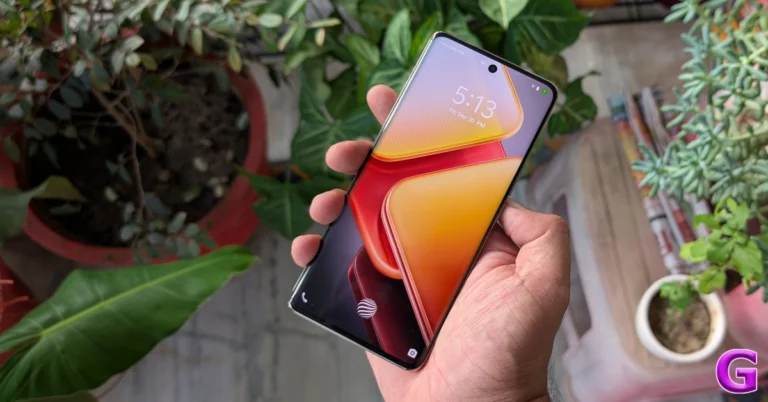
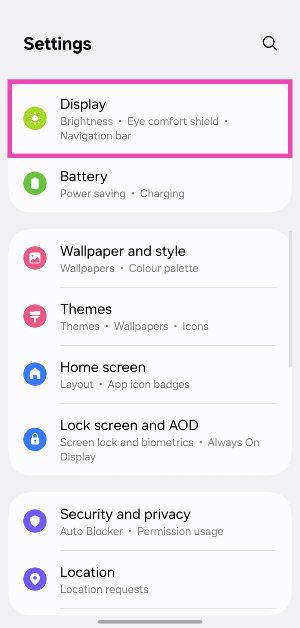
Read Also: Samsung Galaxy S25 Series is now available for purchase, Sale opens in India

Can’t find the Interpreter app on your Samsung phone?

If you can’t find the Interpreter app on your phone’s app drawer or home page, it’s because Samsung does not place it there by default. There are 2 ways to access the Interpreter tool:

Quick Settings Menu: Swipe down from the top-right corner of the screen and tap the Interpreter tile.

Edge Panel: Swipe left on the edge panel and tap on Interpreter.

Follow these steps if you want to add the Interpreter app on your phone’s home screen:

  • Launch the Interpreter app from the Quick Settings Menu or the Edge Panel.
  • Hit the hamburger menu icon in the top left corner of the screen.
  • Tap on ‘Show on Apps screen’.
  • Swipe up on the home page to go to the app drawer.
  • Long-press the Interpreter app.
  • Drag the app to the top of the screen.
  • Once you’re on the home page, drop the app icon in your preferred spot.

Use the Interpreter tool on your Samsung phone to live translate conversations

Step 1: Swipe down from the top-right corner of the screen and select the Interpreter tile from the Quick Settings Menu. Alternatively, you can select Interpreter from the edge panel.

Step 1: Swipe down from the top-right corner of the screen and select the Interpreter tile from the Quick Settings Menu. Alternatively, you can select Interpreter from the edge panel.

Step 2: Once you’re in the app, give it the necessary permissions.

Step 3: Hit the hamburger menu and choose between Conversation Mode or Listener Mode. The former is ideal for 2-person conversations.

Step 3: Hit the hamburger menu and choose between Conversation Mode or Listener Mode. The former is ideal for 2-person conversations.

Step 4: Select the language of the listener in the upper box and your language in the lower box. You may need to download a language pack.

Step 5: Once the languages have been set, hit the mic icon to start speaking. Once you finish speaking, the Interpreter app will translate your sentence into the target language.

Step 5: Once the languages have been set, hit the mic icon to start speaking. Once you finish speaking, the Interpreter app will translate your sentence into the target language. How to live translate conversations using your Samsung phone?

Step 6: Hit the layout icon in the top right corner of the screen to flip the upper box towards the listener. This will make it easier for them to read the translated text and hit the mic button when it is their turn to speak.

Step 6: Hit the layout icon in the top right corner of the screen to flip the upper box towards the listener. This will make it easier for them to read the translated text and hit the mic button when it is their turn to speak. How to live translate conversations using your Samsung phone?

Step 7: When the second speaker finishes their sentence after hitting the mic button on their panel, the Interpreter app will translate it into your language.

Frequently Asked Questions (FAQs)

Where is the Interpreter on Samsung smartphones?

The Interpreter app on Samsung phones can be accessed from the Quick Settings Menu and the edge panel. 

How do I add the Interpreter app to my Samsung phone’s app drawer?

Launch the Interpreter app from the Quick Settings Menu/edge panel, hit the hamburger menu in the top left corner of the screen, and tap on ‘Show on Apps screen’. This will add the Interpreter to your phone’s app drawer.

How do get Samsung Interpreter on the home screen?

Launch the Interpreter app, hit the hamburger menu, and select ‘Show on Apps screen’. Now, go to the app drawer, long-press the Interpreter app, and drag it to the top of the screen. Once you land on the home page, drop the app on your preferred spot.

Does Samsung Interpreter use cloud servers?

When you use the Interpreter app on your Samsung phone, the translation process takes place on your device and not on third-party servers.

Do I need an internet connection to translate conversations on my Samsung phone?

No, you do not need access to the internet to use the Interpreter app on your Samsung phone.

Read Also: Top 10 ways to fix ‘In-display fingerprint scanner not working’ on Android

Final Thoughts

This is how you can live-translate conversations on your Samsung phone using the Interpreter app. While you’re here, check out how you can translate conversations on a OnePlus smartphone. If you have any questions, let us know in the comments!

Samsung Galaxy S25 Series is now available for purchase, Sale opens in India

Samsung Galaxy S25 Series went on sale for the first time in India today. Launched last month the device was up for pre-orders. The flagship smartphone lineup includes the Galaxy S25, S25+, and S25 Ultra. The starting price for the S25 series in India is Rs 80,999. Samsung offers exchange bonuses and HDFC bank discounts, and buyers can bundle purchases with the Galaxy Watch 7 and Buds 3 series.

Samsung Galaxy S25 Series Pricing, Offer Details

Price of Galaxy S25 Ultra

  • 12GB RAM with 1TB storage: Rs 165999
  • 12GB RAM with 512GB storage: Rs 141999
  • 12GB RAM with 256GB storage: Rs 129999

Available in Titanium Silverblue, Titanium Gray, Titanium Black, and Titanium Whitesilver.

Price of Galaxy S25+

  • 12GB RAM with 512GB storage: Rs 111999
  • 12GB RAM with 256GB storage: Rs 99999

Available in Icyblue, Silver Shadow, Navy, and Mint colours.

Price of Galaxy S25

  • 12GB RAM with 512GB storage: Rs 92999
  • 12GB RAM with 256GB storage: Rs 80999

Available in Icyblue, Silver Shadow, Navy, and Mint colours

Customers buying the Galaxy S25 Ultra from Samsung.com can also choose from three exclusive colours: Titanium Jadegreen, Titanium Jetblack, and Titanium Pinkgold. Similarly, those purchasing the Galaxy S25 and S25 Plus from Samsung.com will now have the option of three unique colours: blueblack, coralred, and pinkgold.

Samsung is offering an exchange bonus of up to Rs. 9,000 for old devices when converting them to the Galaxy S25 series. Transactions with HDFC Credit cards also provide an additional exchange value of Rs 9,000. Additionally, there is an instant discount of Rs 8,000 on HDFC Credit card full-swipe transactions.

Also Read: iPhone SE 4 launch timeline tipped, likely to go on sale later this month

Samsung Galaxy S25 Ultra Specifications

Samsung Galaxy S25 Series Pricing, Offer Details

The Samsung Galaxy S25 Ultra features a 6.9-inch Dynamic AMOLED 2X screen with a resolution of 1,400×3,120 pixels. The panel’s refresh rate ranges from 1Hz to 120Hz, and its peak brightness can reach 2,600nits. The display is Corning Gorilla Armor 2 protected.
Under the hood, there is a Snapdragon 8 Elite for Galaxy CPU, 12GB of RAM, and up to 1TB of internal storage. The phone operates on One UI 7 interface on top of Android 15 that supports seven years’ Android OS and security updates.

Samsung has launched a new Now Brief feature, which provides personalised summaries, as well as a new Now bar on the lock screen that displays critical information in the shape of a coloured capsule. The company’s apps now integrate Google’s Gemini AI assistant, allowing users to engage with Samsung Notes and YouTube at one time.

For the photos and videos, the Galaxy S25 Ultra packs a Quad-Camera Module having a 200MP with OIS: Optical Image Stabilisation, a 50MP 120-degree Ultra Wide sensor, a 10MP Telephoto lens (3x Optical Zoom, OIS F2.4, FOV 36˚) and a 50MP Periscope lens (5x Optical Zoom, OIS F3.4, FOV 22˚). In terms of selfies, there is a 12MP front camera.

A 5,000mAh battery powers the phone, and it can be charged via 45W wired charging with Wireless PowerShare and Fast Wireless Charging 2.0.

Also Read: Google rolls out Gemini 2.0 Flash Thinking to handle complex queries

Samsung Galaxy S25, Galaxy S25+ Specifications

Samsung Galaxy S25
Samsung Galaxy S25

The Galaxy S25 features a 6.2-inch Full-HD+ Dynamic AMOLED 2X display with a resolution of 1,080×2,340 pixels. While the Galaxy S25+ features a bigger 6.7-inch Dynamic AMOLED 2X display with a 1,440×3,120 pixel resolution. Both models support a refresh rate of 120Hz and a peak brightness of 2,600nits.

Samsung Galaxy S25 and S25+ are Android 15-based smartphones with an octa-core Snapdragon 8 Elite processor and 12GB LPDDR5x RAM. Available in 256GB and 512GB storage variants, the standard S25 also offers a 128GB option. The devices will receive seven years of OS and security updates.

Samsung Galaxy S25+Samsung will introduce new Galaxy AI capabilities in the Galaxy S25 series, such as Now Brief and Night Video with Audio Eraser, as well as Google Gemini features within Samsung apps.

The triple rear camera configuration on both phones consists of a 10MP Telephoto lens (3x Optical Zoom, F2.4, FOV 36), a 12MP Ultra Wide sensor with 120 degrees of field of view, and a 50MP sensor with OIS. A 12MP front-facing device camera is used for video calls and selfies.

They are compatible with 5G, LTE, Wi-Fi 7, and Wi-Fi Direct Bluetooth v 5.4. The batteries of the Galaxy S25 and Galaxy S25+ have capacities of 4,000 mAh and 4,900 mAh, respectively. The S25+ supports 45W wired charging, while the S25 only supports 25W wired. Wireless PowerShare and Fast Wireless Charging 2.0 are features of both phones.

iPhone SE 4 launch timeline tipped, likely to go on sale later this month

Technology giant Apple rarely ever stays out of the news. Although the company has not yet released the iPhone SE 4, rumours regarding its plans for its most affordable iPhone models have already started to circulate online. The iPhone SE 4’s launch schedule has been revealed in a recent web leak. It states that later this month, Apple will introduce the newest model. Read more about this here.

Apple intends to release the iPhone SE 4 next week, likely through the company’s website rather than a launch event, as the device’s predecessor was unveiled, according to a report that first appeared in Bloomberg.

The 2025 iPhone SE will be available for purchase later this month, even though several 2022 model options are currently sold out at US retailers, it was also disclosed. In the US and India, the phone will be sold on Apple’s website, costing a little more than the 2022 model.

Also Read: Google rolls out Gemini 2.0 Flash Thinking to handle complex queries

Previous leaks about the iPhone SE 4 have also surfaced online that suggest that the third-generation model, succeeding the one that was introduced in 2022 will see significant improvements. The leaked images suggest a single rear camera and a taller camera bump than the iPhone 16. The power button is also visible on the right side of the display, just like its predecessor.

The iPhone SE 4 is set to undergo a significant design change, featuring a notch-based design that matches Apple’s flagship aesthetics and Face ID for the first time, and a larger 6.1-inch OLED display with thinner bezels.

Contrary to reports that Apple is integrating Dynamic Island into its most affordable iPhone model, another report indicates that the future phone will have a notch similar to the one found on the iPhone 14.

According to speculations, the SE 4 will run on the latest A18 Bionic processor and will offer Apple Intelligence features, such as an updated Siri with AI capabilities.

Also Read: KRAFTON India and KukuFM launched its first audiobook BGMI: Lone Survivor Audiobook

The SE 4 is expected to include a larger battery and USB Type-C charging, and the tech community is betting on a 48MP rear camera, akin to Apple’s premium handsets, which might feature Smart HDR, better Night Mode, and higher-quality video recording.

It’s unclear what fresh developments Apple will introduce to the market with the upcoming release of the iPhone SE 4.

Top 11 ways to fix ‘In-display fingerprint scanner not working’ on Android

0

One of the advantages of buying an Android phone is having an additional option of unlocking the device. While Apple may have discontinued Touch ID on iPhones after getting rid of the physical home button for more screen size, Android devices quickly adopted fingerprint scanners mounted on the side button or hidden underneath the display. The in-display fingerprint scanners are further divided into 2 categories – optical and ultrasonic. The latter is considerably faster than the former. If you ever run into trouble with your Android phone’s in-display fingerprint scanner, here are 11 fixes that will get it working again.

Read Also: Google rolls out Gemini 2.0 Flash Thinking to handle complex queries

What causes the fingerprint scanner to stop working?

There are a bunch of reasons that can cause the fingerprint scanner on your phone to start malfunctioning or cease all activity. Here are some usual suspects that are behind this issue.

  • Dust and grime collection on the display
  • Screen protection layer reducing the display’s sensitivity
  • Not keeping the finger pressed for an optimum duration
  • Fingers are dry and not moisturised
  • The fingerprints were enrolled incorrectly
  • The phone is connected to a wireless charger
  • Overheating issues
  • Background software issues
  • The fingerprint hardware is damaged

Increase the touch sensitivity of the display

If you’re using your phone with a screen protector, increase the touch sensitivity of the display to eliminate any issues with the in-display fingerprint scanner. Here’s how.

Step 1: Go to Settings and select Display.

Step 1: Go to Settings and select Display. Top 10 ways to fix ‘In-display fingerprint scanner not working’ on Android

Step 2: Scroll down and turn on the toggle switch next to Touch sensitivity.

Step 2: Scroll down and turn on the toggle switch next to Touch sensitivity. Top 10 ways to fix ‘In-display fingerprint scanner not working’ on Android

Remove the screen protector

How to easily fix Samsung Galaxy M series ‘Touchscreen Not Working’? Top 10 ways to fix ‘In-display fingerprint scanner not working’ on Android

Sometimes, the screen protector can interfere with the functioning of your phone’s in-display fingerprint scanner. Remove the protective covering and check whether the scanner is working again. Sometimes, dust and grime can collect between the display and the screen protector, causing the fingerprint scanner to malfunction. Give the display a good wipe and reinstall the protective covering.

Remove your fingerprint and add it again

Step 1: Go to Settings and tap on Security and privacy.

Step 1: Go to Settings and tap on Security and privacy. Top 10 ways to fix ‘In-display fingerprint scanner not working’ on Android

Step 2: Tap on Screen lock and biometrics.

Step 2: Tap on Screen lock and biometrics. Top 10 ways to fix ‘In-display fingerprint scanner not working’ on Android

Step 3: Enter your password and tap on Fingerprints.

Step 3: Enter your password and tap on Fingerprints. Top 10 ways to fix ‘In-display fingerprint scanner not working’ on Android

Step 4: Tap on the saved fingerprints and hit Remove.

Step 4: Tap on the saved fingerprints and hit Remove. Top 10 ways to fix ‘In-display fingerprint scanner not working’ on Android

Step 5: Go back and tap on Add fingerprint to register your fingerprint again.

Add duplicate fingerprints

If you want to increase the accuracy of the fingerprint scanner, enrol the same fingerprint multiple times. This will allow you to register multiple angles and ensure that the scanner works no matter how you place your finger on it. Registering the same fingerprint twice should do the trick.

Remove the wireless charger

SanDisk-Ixpand-wireless-charger-1

If your phone is charging wirelessly, the electrical waves emitted by the wireless charger may cause the fingerprint scanner to malfunction. Remove the phone from the charger to restore the functionality of the scanner. This also applies to wireless power banks.

Moisturise your finger

If the skin on your finger is too dry, your phone won’t pick up the fingerprint correctly. Make sure your fingers are moisturised appropriately before scanning them on your phone.

Restart your phone

Restart Your Phone

Background software issues can often cause the fingerprint scanner on your phone to malfunction. Luckily, a quick reboot can resolve these issues. Press and hold the side key and volume up key simultaneously to access your phone’s power menu. Hit Restart to reboot the device.

Let your phone cool down

How to cool down your smartphone quickly? Top 7 easy ways

When your smartphone starts overheating, it shuts down certain functions to avoid further heat generation. You may have noticed that the camera shuts down after the internal temperature of your phone crosses a certain point. Sometimes, your phone may suspend the functioning of the fingerprint scanner too. Wait for your phone to cool down before using the in-display scanner again.

Remove your phone from the wireless charger

Plug your phone in the charger

The electric waves emitted by a wireless charger can interfere with the functioning of the fingerprint scanner. Take your phone off the charger to use the in-display fingerprint scanner. Additionally, make sure that the wireless charger you’re using for your phone is authorised by the manufacturer.

Update your phone’s OS

Step 1: Go to Settings and select Software update.

Go to Settings and select Software update. 10 top ways to fix unable to answer calls on Android phone Top 7 ways to fix ‘Microphone not working’ on an Android phone (2024) Top 6 ways to fix overnight battery drain on your Android phone (2024) Top 10 ways to fix ‘In-display fingerprint scanner not working’ on Android

Step 2: Tap on Download and install.

tap on download and install 10 top ways to fix unable to answer calls on Android phone Top 7 ways to fix ‘Microphone not working’ on an Android phone (2024) Top 6 ways to fix overnight battery drain on your Android phone (2024)

Step 3: Select Install now.

Select Install now. 10 top ways to fix unable to answer calls on Android phone Top 7 ways to fix ‘Microphone not working’ on an Android phone (2024) Top 6 ways to fix overnight battery drain on your Android phone (2024)

Factory reset your phone

If none of the fixes mentioned above worked for you, a factory reset might be in order. Before you go ahead, make sure you back up all the data on your phone as you will lose it in the process.

Step 1: Go to Settings and select General management.

Step 1: Go to Settings, scroll down and select General management. Best 5 ways to fix ‘Phone Screen Turning Green’

Step 2: Tap on Reset.

Step 2: Tap on Reset. Best 5 ways to fix ‘Phone Screen Turning Green’

Step 3: Scroll down and select Factory data reset.

Step 3: Select Factory data reset.

Step 4: Scroll down and hit Reset.

Step 4: Scroll down and tap on Reset.

Frequently Asked Questions (FAQs)

Why is my fingerprint not working on my Android phone?

If your finger is too oily, dry, or wet, your phone won’t register the fingerprint. Wipe your finger and moisturise it to scan it properly. 

Why can’t I get the in-display fingerprint scanner to work on my Android phone?

The in-display fingerprint scanner on your Android phone may grind to a halt due to a faulty screen protector, dust and grime collection, overheating issues, and background software issues.

How do I get my fingerprint sensor to work again?

Remove the protective covering from your phone and enrol your fingerprints again. Additionally, take your phone off wireless charging.

How do I delete a fingerprint from my phone?

Go to Settings>Security and privacy>Screen lock and biometrics>Fingerprints, tap on a saved fingerprint and hit ‘Remove’.

Read Also: Realme P3 Pro India launch date announced, will be powered by Snapdragon 7s Gen 3 chipset

Final Thoughts

These are the 11 ways to fix the ‘in-display fingerprint scanner not working’ issue on your Android phone. While you’re here, check out how you can hide apps on your phone and access them with your fingerprint. If you have any further questions regarding the fingerprint scanner on your phone, let us know in the comments!

Garena Free Fire Max Redeem Codes Today 7 February 2025: Here is how to claim them

Garena Free Fire Max is a battle royale game with regular awards and tournaments to keep players interested. If you play Garena Free Fire, you should be aware of the redeem codes that are released on a daily basis. However, because the battle royale game is banned in India, players from other countries can use the Free Fire Redeem codes daily. If you’re unfamiliar with the Garena Free Fire redeem codes or don’t know how to get them, we’ve put together a step-by-step guide to help you redeem them. Check out Garena Free Fire Max Redeem Codes for 7 February 2025.

The Free Fire Max redeem codes are a great way to get free stuff. These are 12-digit codes that contain alphabets and numbers, as well as an expiration date and time. Because the Garena FF redeem codes cannot be used more than once, you should hurry to the redemption page to claim your free reward before someone else does. To get a free reward, all you have to do is go to reward.ff.garena.com/en, which is the official redemption page. Also, keep an eye on this space for daily updates on Garena Free Fire Max redemption codes and rewards.

Also Read: Sennheiser Accentum Plus wireless headphones with Hybrid Adaptive Noise Cancellation launched

Garena Free Fire Max Redeem Codes Today 7 February 2025

FFSKTXVQF2NR

FVTCQK2MFNSK

FFNFSXTPVQZ9

RDNAFV2KX2CQ

FFCBRAXQTS9S

FFNGY7PP2NWC

FFXT7SW9KG2M

FFBYS2MQX9KM

FFEV0SQPFDZ9

FFM4X2HQWCVK

FPSTQ7MXNPY5

XF4SWKCH6KY4

FFKSY7PQNWHG

FFNFSXTPVQZ9

GXFT7YNWTQSZ

NPTF2FWSPXN9

FFRSX4CYHLLQ

FFRINGY2KDZ9

FF6WN9QSFTHX

FFNRWTQPFDZ9

FFYNC9V2FTNN

FF4MTXQPFDZ9

FPUS5XQ2TNZK

How to Get Free Fire Max Redeem Codes for Garena on 7 February 2025?

  • Visit the Garena Free Fire Max game’s official website at reward.ff.garena.com.
  • Use your Facebook, Google, VK, Apple ID, Huawei ID, or Twitter account to log in.
  • You’ll be taken to a valid redemption code (s)
  • Copy and paste the 12-digit redemption code into the text box.
  • On the screen, a dialogue box will appear.
  • ‘Ok’ should be selected.

For the latest gadget and tech news, and gadget reviews, follow us on Twitter, Facebook and Instagram. For newest tech & gadget videos subscribe to our YouTube Channel. You can also stay up to date using the Gadget Bridge Android App. You can find the latest car and bike news here.

Google rolls out Gemini 2.0 Flash Thinking to handle complex queries

Google has introduced Gemini 2.0 Flash Thinking, a next-generation AI reasoning model designed to improve user responses by breaking down challenging enquiries into easily understood parts. The model, which comes after OpenAI’s o3 and o3-mini models, is presently the world’s best-performing AI model. Its outstanding feature is the 2-million-token context window.

Google is launching 2.0 Flash Thinking, which can interact with popular apps like YouTube, Search, and Google Maps, transforming the Gemini app into a powerful AI-powered assistant. The new reasoning skills are being looked into to improve the user experience.

Gemini app users can now try 2.0 Flash Thinking Experimental for free. The revised version, 2.0 Flash Thinking Experimental, is now available to all Gemini app users, including desktop and mobile. This model, which is based on the speed and performance of 2.0 Flash, divides prompts into phases to improve its reasoning abilities. It provides a complete thought process, allowing users to comprehend its rationale, assumptions, and reasoning line.

Also Read: KRAFTON India and KukuFM launched its first audiobook BGMI: Lone Survivor Audiobook

Google’s Gemini 2.0 Flash Thinking, which debuted in December 2024, is now available on both web and mobile platforms. This model is similar to competitors such as OpenAI’s reasoning series and DeepSeek’s R1, divides tasks into logical phases for greater accuracy and consistency, however, it takes significantly longer to process.

Gemini Advanced customers now have access to an experimental version of Gemini 2.0 Pro, which is designed for hard tasks, improved factuality, and faster performance for coding and math prompts, giving them priority access to our most capable models.

According to Google, the most cost-effective model, Gemini 2.0 Flash-Lite, is currently under public preview in Google AI Studio and Vertex AI. The 2.0 Flash Thinking Experimental will be accessible to Gemini app users via the model dropdown on PC and mobile. More modalities are expected to be ready for broad use in the months to come.

Also Read: Realme P3 Pro India launch date announced, will be powered by Snapdragon 7s Gen 3 chipset

Google has made 2.0 Flash available to more users across its AI products, resulting in better performance in key benchmarks. The Gemini 2.0 Flash can be tried in the Gemini app or via the Gemini API in Google AI Studio and Vertex AI.

NYT Wordle Answer and Hints Today (February 7)

Are you looking for today’s Wordle for February 7, 2025? The problem is difficult to solve, so if you need assistance, we’ve included hints and the answer to the February 7 Wordle.

Hints and Answers for Today’s Wordle February 7

Before answering directly, please check the February 7 Wordle Hints first.

Hint 1: Today’s Wordle answer includes a vowel.
Hint 2: The answer for today has no repeating letter.
Hint 3: A row of cut grain or grass left by a scythe or mowing machine

What word does today’s Wordle begin with?

Do you need help with today’s Wordle answer’s initial letter?

The first letter in today’s Wordle is “P”

Today’s Wordle Answer February 7 #1329

The answer to Wordle #1329 on February 7, 2025, is — SWATH

Also Read: Ranveer Allahbadia got his YouTube Channels back, videos restored

What is Wordle?

Wordle: A Five-Letter Word Guessing Game
• The game allows six guesses of a five-letter word.
• Provide feedback on guessed letters’ placement in the puzzle.
• The New York Times purchased the game in 2022.
• Created by Josh Wardle for his partner, narrowing down 12,000 English words to 2,500.
• Named after the word “word.”

How To Play Wordle?

Wordle is a New York Times word puzzle game that allows users to guess a five-letter word in six attempts. The letters are highlighted in Yellow and Green, indicating whether the word is present in the answer or not, and Green letters indicate the correct guess.

Wordle Tips and Tricks

  • Select a powerful starting word: Avoid using unusual words, as they frequently do not match common letters. A good opening word has plenty of benefits.
  • Repeating letters: Don’t be afraid of repeating letters; they appear frequently in words. The answer may contain one or two repeated letters.
  • Use the Wordlebot: The NYT’s Wordlebot analyses and compares replies to itself. This challenge can assist you enhance guessing skills and highlight areas for development.

Amazon Quiz Answers Today 7 February 2025: Participate to win Up To Rs 500 Amazon Pay Balance

7 February 2025: New Amazon Quiz is now available. Customers from different parts of the country are participating in the daily quiz. The quiz starts at midnight today and will be live until 11:59 PM tonight. By successfully answering every question, participants in the quiz have the chance to win wonderful rewards. Up to Rs 500 Amazon Pay Balance is up for grabs to participants today.

One wrong answer could eliminate you from the quiz. You have a chance to win up to Rs 500 Amazon Pay Balance if you successfully answer every question. Users of the app only have the opportunity to take the quiz. Check Out 7 February 2025 Amazon Quiz Answers.

Are you not able to find Amazon FunZone? Click below and participate.

Click here to enter the Amazon FunZone Quiz and play today.

Amazon Quiz Today Prize: Rs 500 Amazon Pay Balance

Quiz Date: 7 February  2025

Daily Timing: 12 AM to 11:59 PM

Previous Amazon Quiz Winners Announcement: Today 12 PM Noon

Amazon Quiz Answers Today 7 February  2025: Win Up To ₹ 500 Amazon Pay Balance

Question 1: After 38 years as Prime Minister of which country did Hun Sen announce to step down in 2023?

Answer: Cambodia

Question 2: Selvamani Selvaraj’s new web series delves into the ‘unseen and unheard’ aspects of the 17-year manhunt to catch whom?

Answer: Veerappan

Question 3: Which Indian food item has been named the world’s second-best flatbread by TasteAtlas?

Answer: Butter garlic naan

Question 4: This bird was the symbol of which English Monarch?

Answer: Elizabeth I

Question 5: When did this site became a UNESCO World Heritage site?

Answer: 1989

How To Play Amazon Quiz Today

Only app users are eligible to play the Amazon quiz every morning from 12 AM to 11:59 PM. The quiz is not available on the desktop. For those who are unaware of how to play the Amazon quiz, below are the steps, you can follow to take the quiz.

  • First, download the Amazon app from the Google Play Store or App Store or go here to download the Amazon App
  • Now fill in the required information through the Sign-Up option.
  • To find the Amazon Quiz banner, log in to the Amazon app and scroll down to the home screen.
  • Tap on the Amazon Quiz banner and tap on the Start button to start the Quiz.
  • Now you will get 5 questions and you need to answer them correctly. One wrong answer will eliminate you from the Quiz.
  • After answering all the questions correctly you are now eligible for a Lucky Draw.
  • The previous winner’s name will be announced today at 12 PM.

Amazon Daily Quiz Answers from the previous few days.

Here are all the answers from the previous 5 days of the Amazon Daily Quiz and Contest.

Amazon Quiz Answers Today 6 February  2025: Win Up To ₹ 500 Amazon Pay Balance

Question 1: In MP’s Kuno Park, what prey is taking up more bite power from the Cheetahs?

Answer: Chital

Question 2: Ayam Goreng is ranked #1 and Chicken 65 is ranked #10 on a major Top 10 list about what food?

Answer: Fried Chicken

Question 3: What name, derived from the Sanskrit for ‘wisdom’, is given to the lunar rover of Chandrayaan-3?

Answer: Pragyan

Question 4: The name of this animal came from ghosts of which culture?

Answer: Romans

Question 5: Who has designed this logo?

Answer: Rob Janoff

Amazon Quiz Answers Today 5 February  2025: Win Up To ₹ 500 Amazon Pay Balance

Question 1: Sabyasachi made masks of what for King Charles and Queen Camilla’s Animal Ball in 2023?

Answer: Shola

Question 2: In August 2023, ‘Bandit King’ Malkhan Singh joined the Congress party in which state?

Answer: Madhya Pradesh

Question 3: Microsoft has changed the default font for its Office apps to what after 16 years?

Answer: Aptos

Question 4: Why is this animal not considered a big cat?

Answer: Lack of Roar

Question 5: This drink comes from which place?

Answer: Cuba

Amazon Quiz Answers Today 4 February  2025: Win Up To ₹ 500 Amazon Pay Balance

Question 1: Fatma Samoura became the first woman, first Black person, first non-European to be which organisation’s secretary general?

Answer: FIFA

Question 2: The central government has agreed to investigate the Havana syndrome. It originated in which country?

Answer: Cuba

Question 3: Across Parliament’s history, we’ve had 28 of what in India?

Answer: No-confidence motions

Question 4: What is the only place outside of Africa, where this primate is found?

Answer: Grenada

Question 5: This vegetable was worshipped by the ancient Egyptians as a symbol of what?

Answer: Eternal Life

Amazon Quiz Answers Today 3 February  2025: Win Up To ₹ 500 Amazon Pay Balance

Question 1: The latest venue in Test cricket is the Civil Service Cricket Ground in which city?

Answer: Belfast

Question 2: Nitanshi Goel stars as the lead character of Phool Kumari in which movie produced by Aamir Khan?

Answer: Laapataa Ladies

Question 3: Vinod Khosla and Bill Joy were two of the founders of which famous technology company headquartered currently in Santa Clara?

Answer: Sun Microsystems

Question 4: This is the ancient roman theatre of Kom El Deka in Alexandria in which country?

Answer: Egypt

Question 5: Which famous singer is shown here?

Answer: Bruce Springsteen

Amazon Quiz Answers Today 2 February  2025: Win Up To ₹ 500 Amazon Pay Balance

Question 1: Which famous badminton player is one of India’s flagbearers for the 2024 Paris Olympics?

Answer: PV Sindhu

Question 2: What is the latest edition of the ‘Bad Boys’ movie franchise?

Answer: Bad Boys: Ride or Die

Question 3:Nobel Prize winner Ernest Rutherford was born in which country?

Answer: New Zealand

Question 4: This is the Taj-ul-Masjid in which city?

Answer: Bhopal

Question 5: This is a bust of which famous ruler from history?

Answer: Alexander the Great

Amazon Quiz Answers Today 1 February  2025: Win Up To ₹ 500 Amazon Pay Balance

Question 1: Which of these batters scored a century during India’s recent 5 match T20I series against Zimbabwe?

Answer: Abhishek Sharma

Question 2: In May 2025. the ___ edition of the Mission Impossible movie franchise is going to be released. Fill in the blanks

Answer: 8th

Question 3: In which present day Indian state was the Battle of Buxar, which saw the East India Company emerge victorious fought?

Answer: Bihar

Question 4: This is a view of the City Palace in which Indian city?

Answer: Jaipur

Question 5: Valletta is the capital of which country, whose flag is shown here?

Answer: Malta

Amazon Quiz Answers Frequently Asked Questions (FAQs)

Where can I check the previous winners? Did I win how to check?

You can head over to this link on your mobile or desktop to check the winners of the Amazon Daily Quiz Contest.

How to Play Amazon Daily Quiz or Contest?

We have written an explainer above, you can refer to that.

When are the winners of the Amazon Quiz and contest announced or declared?

The announcement of today’s Amazon quiz winner will take place Tomorrow. As for the Special Quiz and “Spin & Win” Contest, the winners will be declared once the Quiz Contest comes to an end. To find out who the lucky winner is, you can refer to the Amazon Quiz Winners List or visit the Amazon Winners tab in the Amazon App.

How to participate in the Daily Amazon Quiz?

That is very easy, just got to the Amazon app and scroll to the bottom of the page and you will find the Quiz section. Click on it (usually it is called the fun zone) and you can enter the Amazon Today Quiz Contest. 

Are there any other quizzes or contests running on Amazon daily?

Yes, there are many running on a daily basis. These range from spinning the wheel to answering the questions correctly. All are located in the Fun Zone. 

What are the criteria for selecting a winner in the Daily Amazon Quiz?

When a qualified player submits correct answers to all the questions, they will automatically be entered into a lucky draw. This draw will include all participants who answered all the questions correctly. Amazon randomly selects the final winners from the pool of eligible participants who gave the right answers.

Which Types of Questions are asked within Amazon Daily Quiz?

These are very simple and straightforward questions. These are mainly related to general knowledge. 

Where should I look for Amazon Daily Quiz answers?

You can bookmark our website www.gadgetbridge.com as we will help you every day with the Amazon Daily Quiz. We bring you fresh answers every day for the Amazon Daily Quiz and Contest. 

What time does Amazon Announce previous winners?

The previous winner’s name will be announced today at 12 PM (noon).