Amazon Quiz Answers Today 21 January 2025: Participate to win Up To Rs 500 Amazon Pay Balance

21 January 2025: New Amazon Quiz is now available. Customers from different parts of the country are participating in the daily quiz. The quiz starts at midnight today and will be live until 11:59 PM tonight. By successfully answering every question, participants in the quiz have the chance to win wonderful rewards. Up to Rs 500 Amazon Pay Balance is up for grabs to participants today.

One wrong answer could eliminate you from the quiz. You have a chance to win up to Rs 500 Amazon Pay Balance if you successfully answer every question. Users of the app only have the opportunity to take the quiz. Check Out 21 January 2025 Amazon Quiz Answers.

Are you not able to find Amazon FunZone? Click below and participate.

Click here to enter the Amazon FunZone Quiz and play today.

Amazon Quiz Today Prize: Rs 500 Amazon Pay Balance

Quiz Date: 21 January 2025

Daily Timing: 12 AM to 11:59 PM

Previous Amazon Quiz Winners Announcement: Today 12 PM Noon

Amazon Quiz Answers Today 21 January 2025: Win Up To ₹ 500 Amazon Pay Balance

Question 1: Which film is based on Mstyslav Chernov’s daily news dispatches and personal footage of his own country at war?

Answer: 20 Days in Mariupol

Question 2: Ae Watan Mere Watan’ is inspired by which freedom fighter, instrumental in founding the underground Congress Radio?

Answer: Usha Mehta

Question 3: Which Indian musician’s biography, written by Oliver Craske, is titled Indian Sun?

Answer: Ravi Shankar

Question 4: Which Roman Emperor was fond of this fruit?

Answer: Tiberius

Question 5: In the beginning, what was this system called?

Answer: Navstar

How To Play Amazon Quiz Today

Only app users are eligible to play the Amazon quiz every morning from 12 AM to 11:59 PM. The quiz is not available on the desktop. For those who are unaware of how to play the Amazon quiz, below are the steps, you can follow to take the quiz.

  • First, download the Amazon app from the Google Play Store or App Store or go here to download the Amazon App
  • Now fill in the required information through the Sign-Up option.
  • To find the Amazon Quiz banner, log in to the Amazon app and scroll down to the home screen.
  • Tap on the Amazon Quiz banner and tap on the Start button to start the Quiz.
  • Now you will get 5 questions and you need to answer them correctly. One wrong answer will eliminate you from the Quiz.
  • After answering all the questions correctly you are now eligible for a Lucky Draw.
  • The previous winner’s name will be announced today at 12 PM.

Amazon Daily Quiz Answers from the previous few days.

Here are all the answers from the previous 5 days of the Amazon Daily Quiz and Contest.

Amazon Quiz Answers Today 20 January 2025: Win Up To ₹ 500 Amazon Pay Balance

Question 1: Which director won his first directing Oscar in 2024?

Answer: Christopher Nolan

Question 2: Jane Fraser is the current CEO of which bank?

Answer: Citigroup

Question 3: Which Asian country’s passport has been rated the most ‘powerful’ in the world for 2024, according to the Henley Index?

Answer: Singapore

Question 4: Which state is the largest producer of this?

Answer: Maharashtra

Question 5: Which was the first country to make this drink?

Answer: France

Amazon Quiz Answers Today 18 January 2025: Win Up To ₹ 500 Amazon Pay Balance

Question 1: The Tata Steel Chess tournament played in the classical format is being held in which country?

Answer: Netherlands

Question 2:

The show ‘Criminal Justice’ stars which actor in the central character of lawyer Madhav Mishra?

Answer: Pankaj Tripathi

Question 3: The Amroha Dholak is a musical instrument from which state that got a GI tag in 2023?

Answer: Uttar Pradesh

Question 4: This ancient temple is located in which country?

Answer: Egypt

Question 5: This statue is located at which famous educational institution?

Answer: IISC Bangalore

Amazon Quiz Answers Today 17 January 2025: Win Up To ₹ 500 Amazon Pay Balance

Question 1: Which of these West Indies bowlers took the wicket of Steve Smith with his first ball in Test cricket?

Answer: Shamar Joseph

Question 2: At the 2024 Emmy Awards which series won the award for Best Drama Series?

Answer: Succession

Question 3: Sharmistha Mukherjee has recently written a book titled ‘_____ My Father: A Daughter Remembers’. Fill in the blanks

Answer: Pranab

Question 4: Name the famous freedom fighter, whose statue is in the middle

Answer: Bhagat Singh

Question 5: Name this famous person who had cameos in several Marvel movies

Answer: Stan Lee

Amazon Quiz Answers Today 16 January 2025: Win Up To ₹ 500 Amazon Pay Balance

Question 1: Which former champion did Caroline Garcia knock out in the first round of the 2024 Australian Open?

Answer: Naomi Osaka

Question 2: Lily Gladstone won the ‘Best female actor in a film- drama’ at the 2024 Golden Globes for which film?

Answer: Killers of the Flower Moon

Question 3: Nigar Shahji is the project director of which ISRO mission that was launched on 2nd September, 2023?

Answer: Aditya- L1

Question 4: In which city is this famous museum located?

Answer: Bilbao

Question 5: This famous shoe brand was founded in which country?

Answer: Germany

Amazon Quiz Answers Today 15 January 2025: Win Up To ₹ 500 Amazon Pay Balance

Question 1: Recently which of these New Zealand batters equalled the record for most sixes in a T20I innings?

Answer: Finn Allen

Question 2: Which movie won the Best film- Drama award at the 2024 Golden Globes?

Answer: Oppenheimer

Question 3: The Tangail sarees from which state recently got a GI tag?

Answer: West Bengal

Question 4: Which university is shown here, attended by the likes of Mark Zuckerberg?

Answer: Harvard University

Question 5: What breed of dog is shown here?

Answer: Shih Tzu

Amazon Quiz Answers Today 11 January 2025: Win Up To ₹ 500 Amazon Pay Balance

Question 1: Which state in Australia has chosen not to be the host of the 2026 Commonwealth Games?

Answer: Victoria

Question 2: In June 2023, which country briefly banned the film ‘Adipurush’?

Answer: Nepal

Question 3: The world’s most prized variety of which fruit, called Miyazaki, is sold at up to Rs 2.75 lakh per kg?

Answer: Mango

Question 4: In which West African country is this animal featured prominently on the national emblem?

Answer: Ivory Coast

Question 5: The Andromeda Galaxy is also known as ?

Answer:Messier 31

Amazon Quiz Answers Today 10 January 2025: Win Up To ₹ 500 Amazon Pay Balance

Question 1: Which state in Australia has chosen not to be the host of the 2026 Commonwealth Games?

Answer: Victoria

Question 2: In June 2023, which country briefly banned the film ‘Adipurush’?

Answer: Nepal

Question 3: The world’s most prized variety of which fruit, called Miyazaki, is sold at up to Rs 2.75 lakh per kg?

Answer: Mango

Question 4: In which West African country is this animal featured prominently on the national emblem?

Answer: Ivory Coast

Question 5: The Andromeda Galaxy is also known as ?

Answer:Messier 31

Amazon Quiz Answers Frequently Asked Questions (FAQs)

Where can I check the previous winners? Did I win how to check?

You can head over to this link on your mobile or desktop to check the winners of the Amazon Daily Quiz Contest.

How to Play Amazon Daily Quiz or Contest?

We have written an explainer above, you can refer to that.

When are the winners of the Amazon Quiz and contest announced or declared?

The announcement of today’s Amazon quiz winner will take place Tomorrow. As for the Special Quiz and “Spin & Win” Contest, the winners will be declared once the Quiz Contest comes to an end. To find out who the lucky winner is, you can refer to the Amazon Quiz Winners List or visit the Amazon Winners tab in the Amazon App.

How to participate in the Daily Amazon Quiz?

That is very easy, just got to the Amazon app and scroll to the bottom of the page and you will find the Quiz section. Click on it (usually it is called the fun zone) and you can enter the Amazon Today Quiz Contest. 

Are there any other quizzes or contests running on Amazon daily?

Yes, there are many running on a daily basis. These range from spinning the wheel to answering the questions correctly. All are located in the Fun Zone. 

What are the criteria for selecting a winner in the Daily Amazon Quiz?

When a qualified player submits correct answers to all the questions, they will automatically be entered into a lucky draw. This draw will include all participants who answered all the questions correctly. Amazon randomly selects the final winners from the pool of eligible participants who gave the right answers.

Which Types of Questions are asked within Amazon Daily Quiz?

These are very simple and straightforward questions. These are mainly related to general knowledge. 

Where should I look for Amazon Daily Quiz answers?

You can bookmark our website www.gadgetbridge.com as we will help you every day with the Amazon Daily Quiz. We bring you fresh answers every day for the Amazon Daily Quiz and Contest. 

What time does Amazon Announce previous winners?

The previous winner’s name will be announced today at 12 PM (noon).
WhatsApp notifications not working? Try these 12 fixes

0

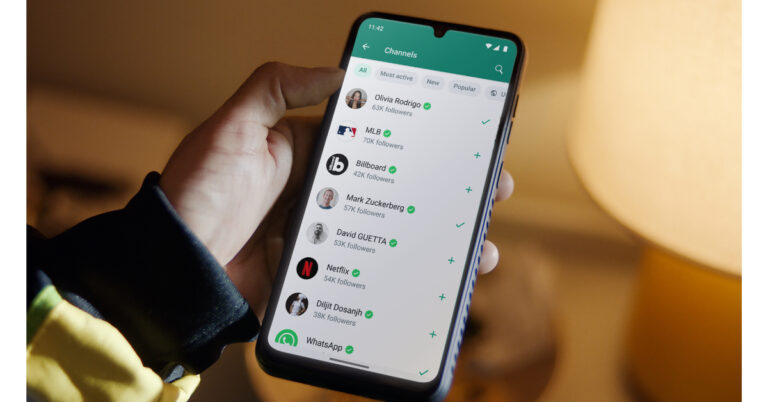
Missing an important text because you did not get notified of it can be very annoying. If this happens regularly, it can completely ruin the instant messaging experience. WhatsApp, being the most popular instant messenger in the world, very rarely suffers from this issue. This also means that when you come across this issue, you may not know what to do to fix it. So, here are 12 ways to fix the ‘WhatsApp notifications not working’ issue on your phone.

Read Also: How to add AppleCare+ to an iPhone?

Why is WhatsApp not pushing notifications?

WhatsApp failing to deliver message alerts on your phone is an uncommon issue, but it is caused due to very familiar reasons. Here’s what may be causing the message notifications to malfunction on your device.

  • Poor internet connection
  • DND mode
  • WhatsApp notifications are disabled 
  • A specific conversation on WhatsApp is muted
  • Corrupted cache
  • Outdated app version
  • WhatsApp’s servers are down
  • Software glitches on your phone

Enable WhatsApp notifications

It is possible that you accidentally disabled notifications for WhatsApp Messenger. Here’s how you can enable them.

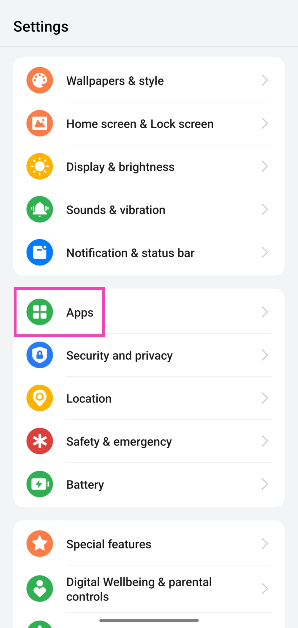
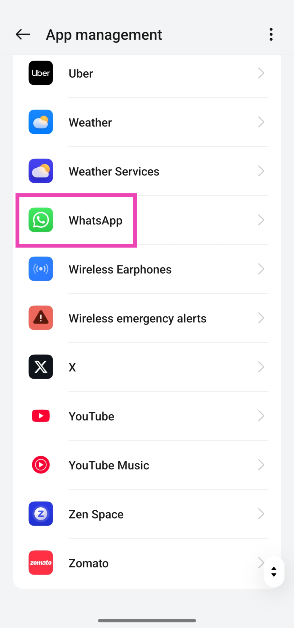
Step 1: Go to Settings and select Apps.

Step 1: Go to Settings and select Apps. Top 8 ways to fix ‘WhatsApp images not showing in gallery’

Step 2: Tap on WhatsApp.

Step 2: Tap on WhatsApp.

Step 3: Tap on Manage Notifications.

Step 3: Tap on Manage Notifications.

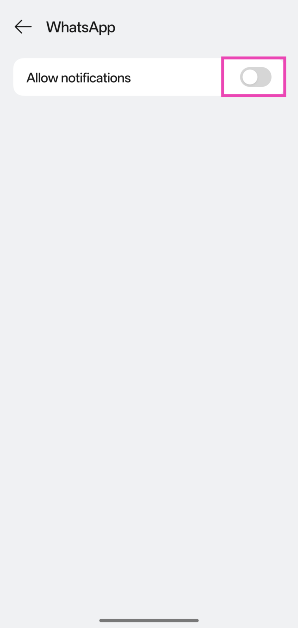
Step 4: Turn on the toggle switch next to Allow notifications.

Step 4: Turn on the toggle switch next to Allow notifications.

Unmute a conversation

Live translation and voice note transcription coming to WhatsApp soon

If you mute a conversation thread on WhatsApp, you won’t receive notifications for messages sent by the person or group participants. Unmute the conversation/group to start receiving notifications again. You can do this by long-pressing the conversation and tapping the bell icon at the top of the screen. Alternatively, open the conversation, tap the banner, go to Notifications, and turn off the toggle switch next to ‘Mute notifications’.

Allow WhatsApp to send notifications when DND mode is enabled

Enabling Do Not Disturb on your smartphone limits apps from sending you notifications. However, you can greenlight certain apps to receive alerts that are important to you.

Step 1: Go to Settings and select Apps.

Step 1: Go to Settings and select Apps. Top 8 ways to fix ‘WhatsApp images not showing in gallery’

Step 2: Tap on WhatsApp.

Step 2: Tap on WhatsApp.

Step 3: Tap on Manage Notifications.

Step 3: Tap on Manage Notifications.

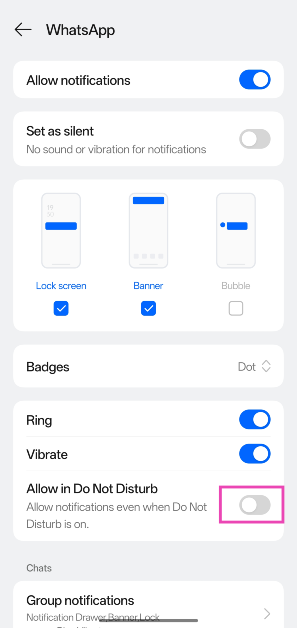
Step 4: Turn on the toggle switch next to Allow in Do Not Disturb.

Step 4: Turn on the toggle switch next to Allow in Do Not Disturb.

Check your internet connection

Check Internet Connection

If there’s something wrong with the internet connection, WhatsApp won’t be able to check for new messages. Perform an internet speed test on your phone to confirm whether this is the case. If the internet connection is weak, switch to a better network.

Turn off Airplane Mode

Turn on the Airplane Mode

You may have accidentally enabled Airplane Mode on your device, causing WhatsApp to halt notifications. Since Airplane Mode suspends cellular and internet connectivity, WhatsApp isn’t able to refresh in the background and check for new messages. Swipe down from the status bar and tap the tile with the airplane icon to disable Airplane Mode on your phone.

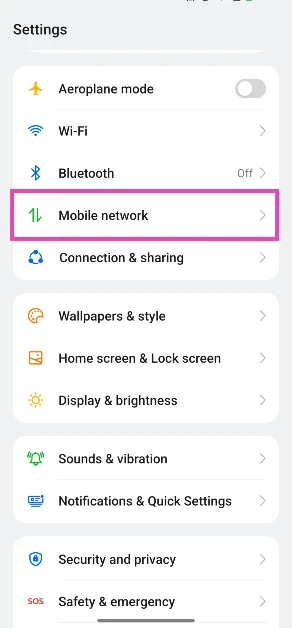
Turn off Data Saver

Step 1: Go to Settings and select Mobile network.

Step 1: Go to Settings and select Mobile network.

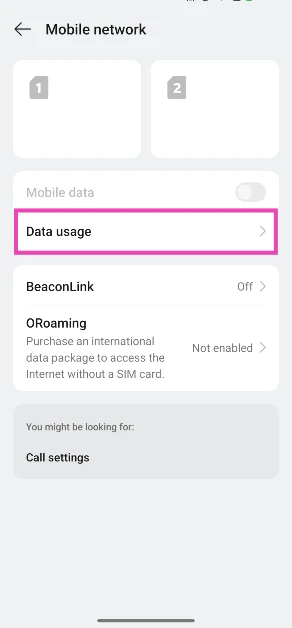
Step 2: Tap on Data usage.

Step 3: Tap on Data usage.

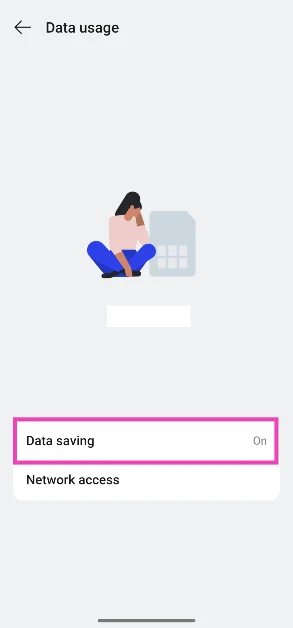
Step 3: Select Data saving.

Step 3: Select Data saving.

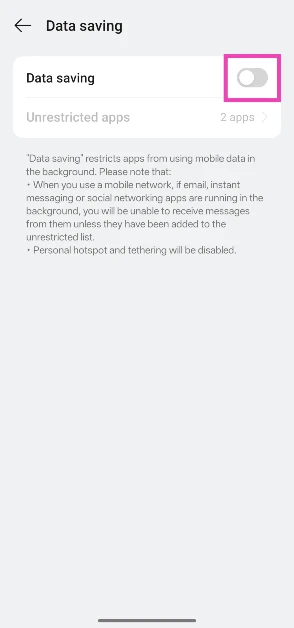
Step 4: Turn off the toggle switch next to Data saving.

Step 4: Turn off the toggle switch next to Data saving. WhatsApp notifications not working? Try these 12 fixes

Allow WhatsApp to use mobile data in the background

Step 1: Go to Settings and select Apps.

Step 1: Go to Settings and select Apps. WhatsApp notifications not working? Try these 12 fixes

Step 2: Tap on WhatsApp.

Step 2: Tap on WhatsApp. WhatsApp notifications not working? Try these 12 fixes

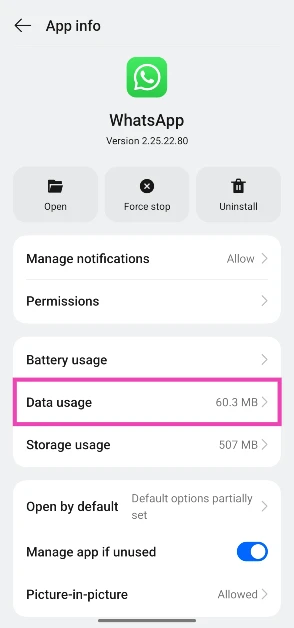
Step 3: Tap on Data usage.

Step 3: Tap on Data usage. WhatsApp notifications not working? Try these 12 fixes

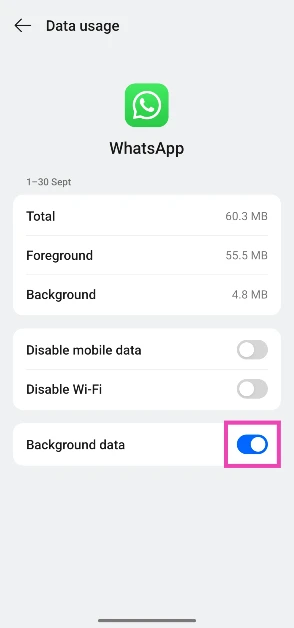
Step 4: Turn on the toggle switch next to Background data.

Step 4: Turn on the toggle switch next to Background data. WhatsApp notifications not working? Try these 12 fixes

Clear WhatsApp’s cache

Step 1: Go to Settings and select Apps.

Step 1: Go to Settings and select Apps. WhatsApp notifications not working? Try these 12 fixes

Step 2: Tap on WhatsApp.

Step 2: Tap on WhatsApp. WhatsApp notifications not working? Try these 12 fixes

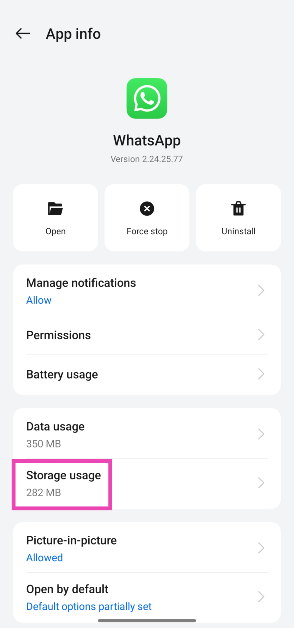
Step 3: Select Storage.

Step 3: Select Storage. WhatsApp notifications not working? Try these 12 fixes

Step 4: Tap on Clear cache.

Step 4: Tap on Clear cache. WhatsApp notifications not working? Try these 12 fixes

Restart your phone

Restart Your Phone WhatsApp notifications not working? Try these 12 fixes

Background glitches in your phone’s software can limit notifications. Luckily, these background issues can be resolved by a simple reboot of the device. Press the volume up key and the side key simultaneously to access the power menu. Select ‘Restart’ from the list.

Check if WhatsApp is down

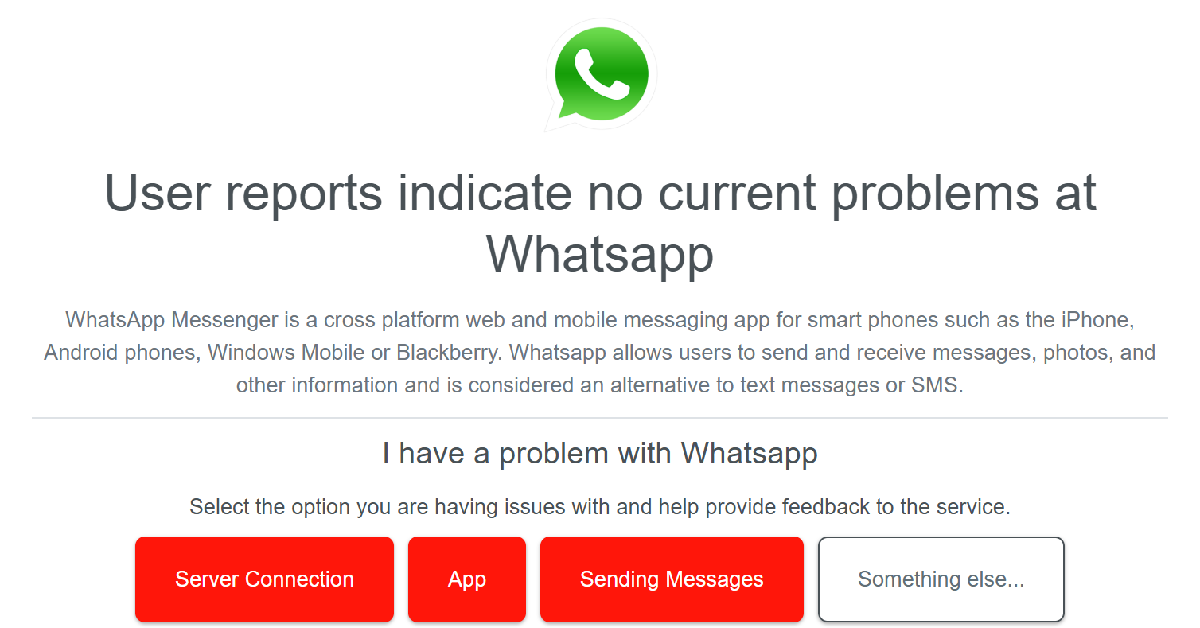
Check if WhatsApp is down WhatsApp notifications not working? Try these 12 fixes

You may not be receiving WhatsApp notifications on your phone due to a server outage. Go to Downdetector.in and perform a search for WhatsApp. If you notice a spike in recent user reports, it means that the messenger is currently experiencing a server outage.

Update WhatsApp

WhatsApp notifications not working? Try these 12 fixes

If you’re using an old version of WhatsApp on your phone, then the notification issue is likely being caused by a bug. App developers are quick to fix such bug-related issues with swift updates. Go to Google Play Store, search for WhatsApp, and hit the Update button on its page.

Update your phone’s OS

Step 1: Go to Settings and select Software update.

WhatsApp notifications not working? Try these 12 fixes

Step 2: Tap on Download and install.

WhatsApp notifications not working? Try these 12 fixes

Step 3: Select Install now.

Select Install now. WhatsApp notifications not working? Try these 12 fixes

Frequently Asked Questions (FAQs)

Why am I not getting WhatsApp notifications?

If WhatsApp isn’t pushing notifications on your phone, it is likely because of a poor internet connection, muted conversations, corrupted app cache, or background software glitches on your phone.

How do I enable WhatsApp notifications?

Go to Settings>Apps>WhatsApp>Manage Notifications and turn on the toggle switch next to ‘Allow Notifications’.

How do I allow WhatsApp to send me notifications in DND mode?

Go to Settings>Apps>WhatsApp>Manage Notifications and turn on the toggle switch next to ‘Allow in Do Not Disturb’.

How do I see all my WhatsApp notifications?

To view your WhatsApp notification history, go to Settings>Notifications & Quick Settings>More settings and tap on ‘Notification settings’.

Read Also: 4 ways to use your iPhone or Android phone as a ruler

Final Thoughts

This is how you can fix the ‘WhatsApp notifications not working’ issue on your phone. If you don’t want to be bothered by constant alerts from the messenger, you can choose which notifications you want to receive in app settings. If you have any questions, let us know in the comments!

How to add AppleCare+ to an iPhone?

0

If you didn’t get AppleCare+ at the time of buying your iPhone and have since changed your mind, you can still grab the warranty package. Apple allows iPhone users to get a premium warranty within 60 days of buying the smartphone. The great thing is that you can do this without leaving your home. If you have exceeded the 60-day window, you will need to take a trip to the Apple Store. Let’s take a look at how you can add AppleCare+ to your iPhone.

Read Also: 4 ways to use your iPhone or Android phone as a ruler

What is AppleCare+?

Apple offers a standard 1-year repair warranty and a 90-day technical assistance period with every iPhone. This is commonly referred to as ‘AppleCare’. Users can choose to extend the warranty of their phones by 1 more year by purchasing an AppleCare+ subscription. Apart from the extended warranty, AppleCare+ comes with additional perks. Here are some of them.

  • Accidental damage protection for unlimited incidents (does not include service fee)
  • Express Replacement Service
  • Battery service coverage
  • 24/7 priority access to technical support
  • Same-day service in metropolitan cities
  • Mail-in repair
  • Theft and loss coverage (added cost)

Add AppleCare+ to your iPhone using device settings

You can add AppleCare to your iPhone within 60 days of purchasing your device. Here’s how.

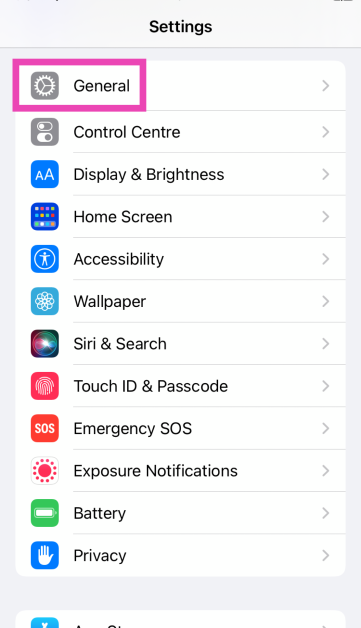
Step 1: Go to Settings and select General.

Step 1: Go to Settings and select General. 

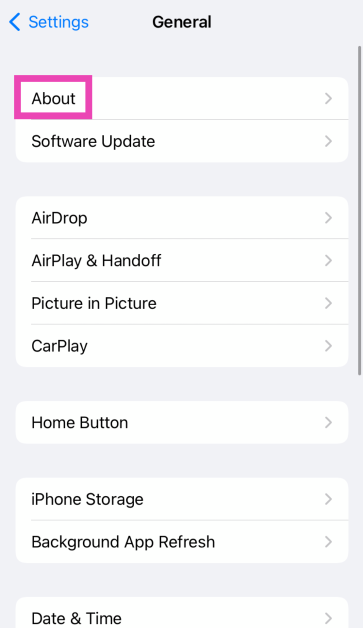
Step 2: Tap on About.

Step 2: Tap on About.

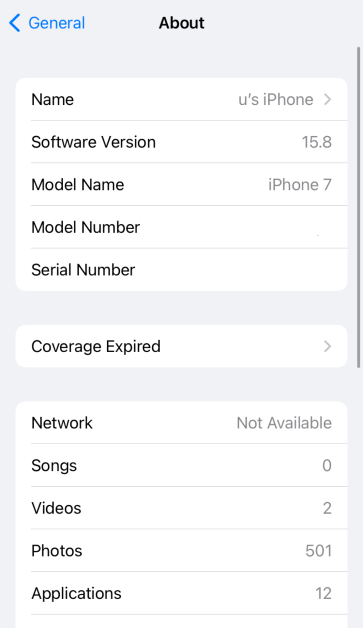
Step 3: Tap on AppleCare+ Coverage Available. If your iPhone is no longer eligible, it’ll say Coverage Expired.

Step 3: Tap on AppleCare+ Coverage Available. If your iPhone is no longer eligible, it’ll say Coverage Expired.

Step 4: Follow the onscreen instructions to add AppleCare to your iPhone.

Use Apple’s website to add AppleCare+ to your iPhone

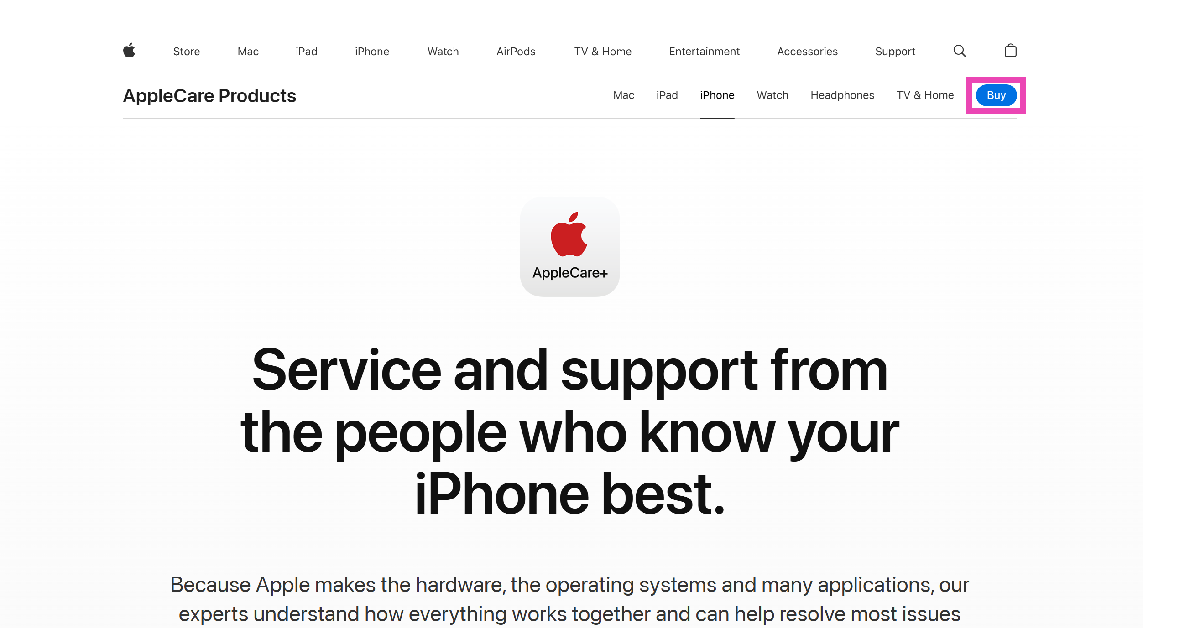
Step 1: Go to the AppleCare+ page on Apple’s website.

Step 2: Hit Buy.

Step 2: Hit Buy.

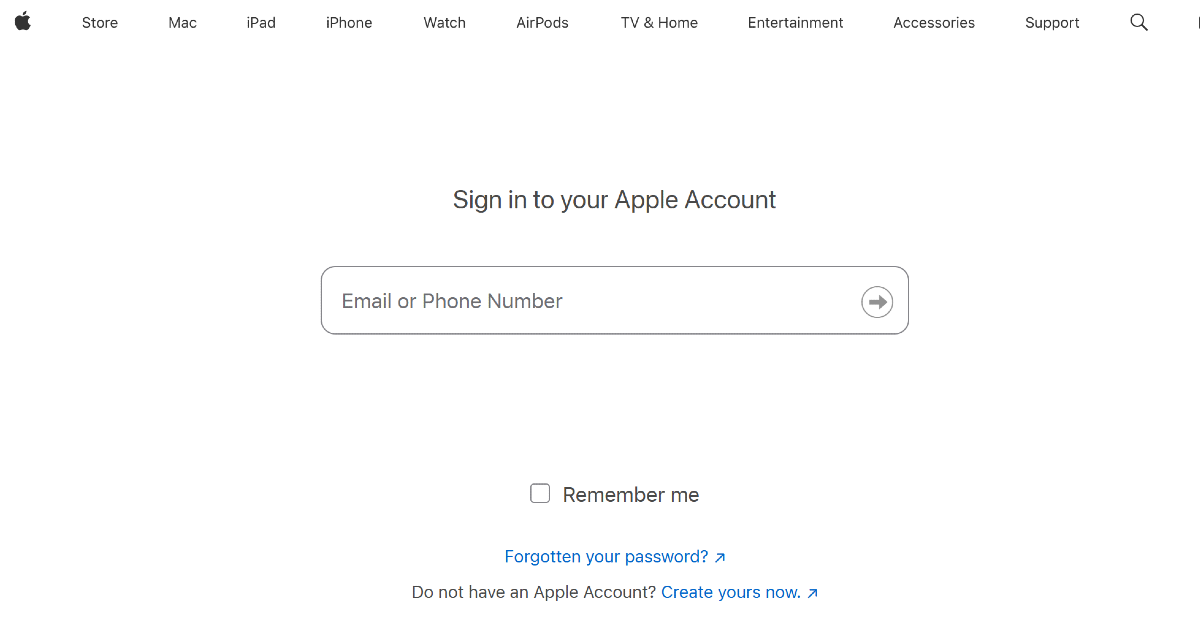
Step 3: Sign into your Apple Account.

Step 3: Sign in using your Apple ID.

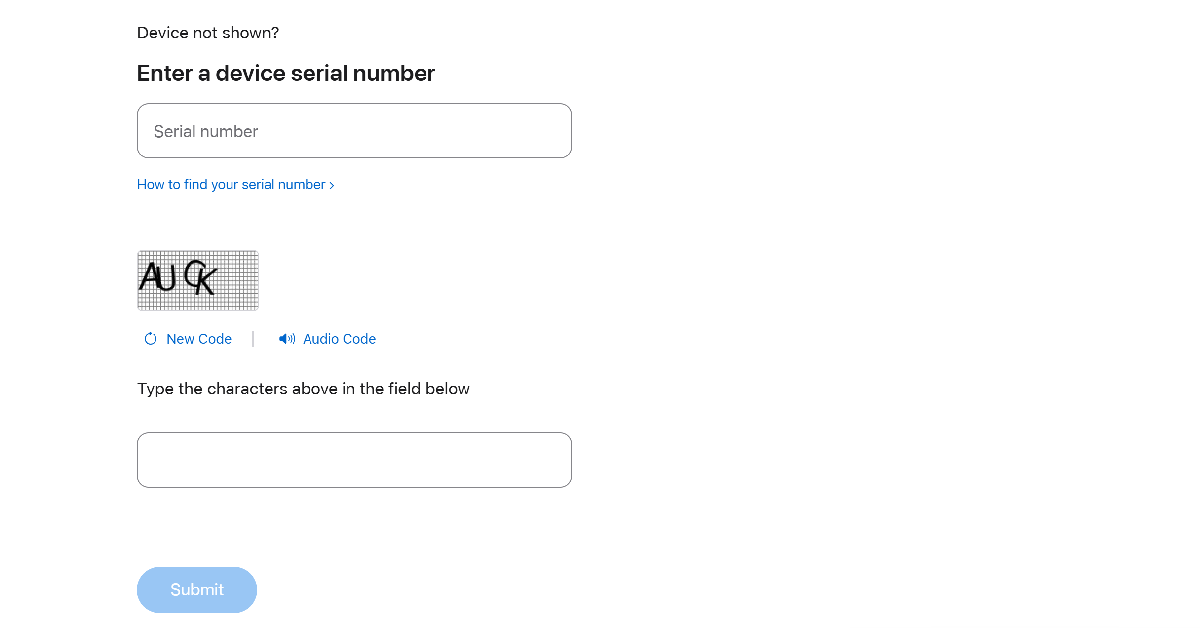
Step 4: Enter your iPhone’s serial number.

Step 4: Enter your iPhone’s serial number.

Step 5: Run the remote diagnostic test provided by Apple.

Step 6: Choose an AppleCare+ plan and make the purchase.

Add AppleCare+ to your iPhone from the Apple Store

If your iPhone has exceeded the 60-day window for adding AppleCare, you will need to book an appointment at the Apple Store. At the Apple Store, a Genius will inspect your phone for hardware and internal damage. If your iPhone passes the test, you can pick an AppleCare+ subscription for the device.

Use the Apple helpline

Apple has a dedicated helpline which can be used to add AppleCare to your iPhone. Dial 800-275-2273 and talk to Apple’s customer support representative about the warranty package. You will be asked to provide your device’s receipt. Following that, the representative will run a remote diagnostic test on your device. If your device passes the test, you can choose an AppleCare+ package.

Frequently Asked Questions (FAQs)

Can you add AppleCare+ to an existing iPhone?

You can add AppleCare to your iPhone within 60 days of making the purchase. Go to Settings>General>About and tap on ‘AppleCare+ Coverage Available’.

Can I buy AppleCare+ after 60 days?

If you missed the 60-day window to add AppleCare+, make an appointment at the Apple Store and get a Genius to do it. Once your iPhone has been inspected by the Genius, you will be able to add the warranty package.

What is the time limit for AppleCare?

The standard Apple warranty for phone repair lasts 1 year. Meanwhile, an AppleCare+ warranty lasts 2 years.

Can you have AppleCare+ after 2 years?

Once your 2-year AppleCare package has expired, you can extend it on a monthly or annual basis.

What is the difference between AppleCare and AppleCare+?

AppleCare refers to the standard 1-year repair warranty offered on all iPhones. AppleCare+ extends this warranty to 2 years and comes with several other benefits.

Read Also: 6 Ways to Fix ‘Grammarly Extension Not Working’ on Google Chrome

Final Thoughts

This is how you can add AppleCare to your iPhone. If you’re unsure whether you should go for an AppleCare+ subscription, this article will help. If you have any questions, let us know in the comments!

4 ways to use your iPhone or Android phone as a ruler

0

What makes a smartphone really smart is its ability to replace everyday objects. If you have your phone in your pocket, you don’t need a torchlight or a map before embarking on a hike. If you’re at home and need to take a quick measurement, you don’t need to search for a ruler or a measuring tape as long as you have your phone. Today, we bring you the top 4 ways to use your iPhone or Android phone as a ruler.

Read Also: Airtel has surpassed the industry-leading data upload speeds in Delhi: TRAI report

Which method is best for you?

There are 2 ways you can go about measuring the dimensions of an object. The first one entails using your smartphone as an actual ruler and having the markings overlaid on the screen. This is an easy and reliable way to measure an object. However, if the object is more than twice the size of your phone, this method can get tricky. Sliding your phone to take multiple measurements can open the window to minor errors.

Using AR apps is the way to go if you want to measure large objects. The readings taken by AR apps are accurate and reliable. Furthermore, they can calculate the area of an object with ease. If you want to measure a large object (like a table) and figure out whether it can go through a door or fit in a certain place in your room, you should definitely use an AR app to take the measurements.

Use the Ruler app by NixGame

The Ruler app by NixGame is the simplest and most accessible app for making quick measurements. Here’s how you can use it.

Step 1: Download and install the Ruler app from the Google Play Store.

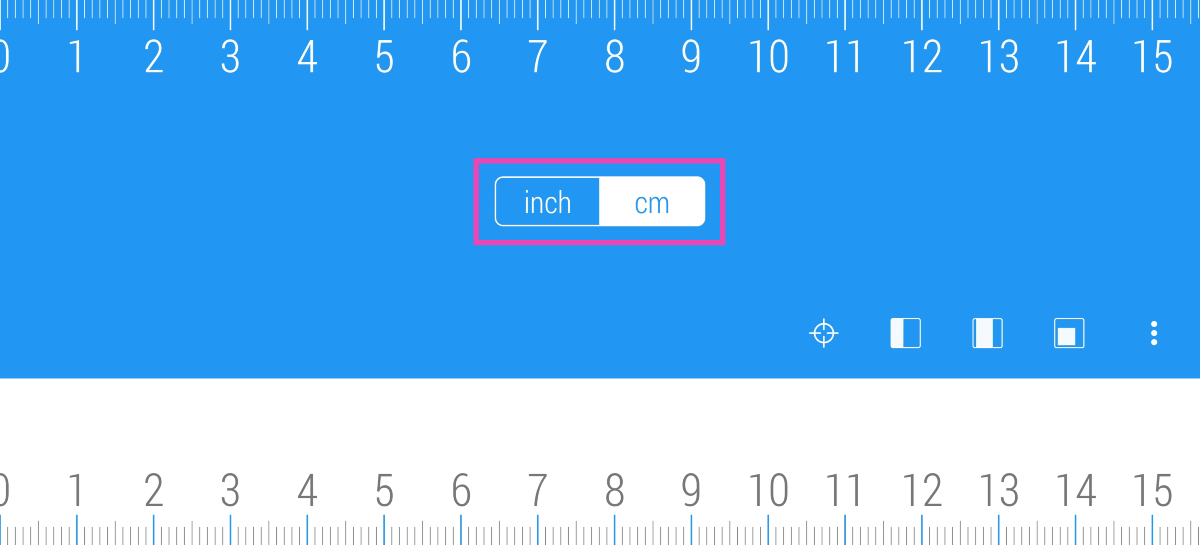
Step 2: Launch the app and select whether you want to measure in cm or inches.

Step 2: Launch the app and select whether you want to measure in cm or inches.

Step 3: Place your phone next to the object you want to measure.

Step 4: Since most smartphones have rounded corners, line the object from the 2cm/inch mark.

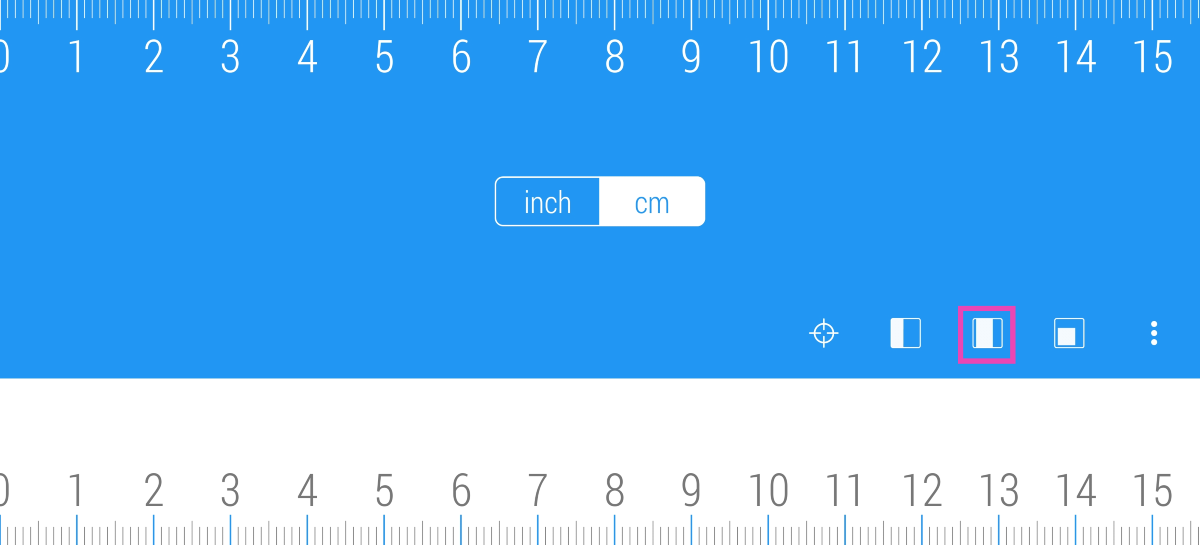
Step 5: Tap the third layout icon on the screen.

Step 5: Tap the third layout icon on the screen.

Step 6: Adjust the starting and ending points according to the length of the object.

Step 6: Adjust the starting and ending points according to the length of the object.

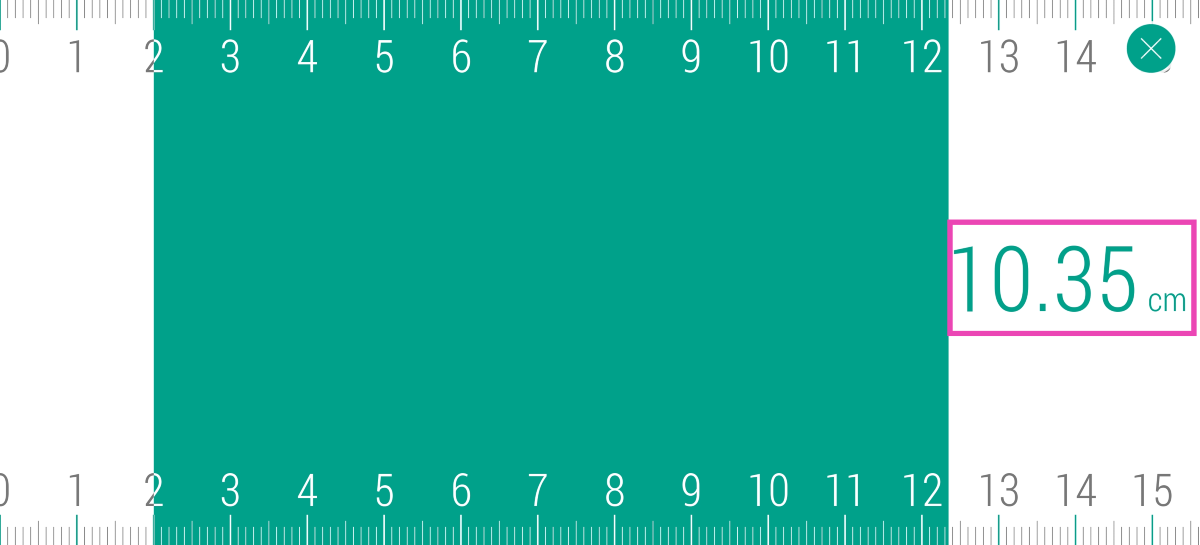
Step 7: The measurement will be displayed on the screen.

Use iPhone as a ruler (Measure app)

Use the Measure app (iPhone)

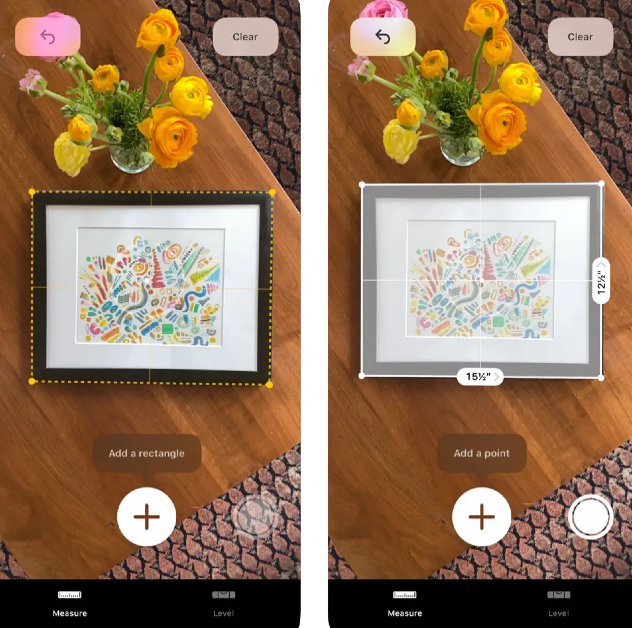
The native Measure app on your iPhone uses AR to take measurements accurately. Here’s how you can use it.

Step 1: Launch the Measure app on your iPhone.

Step 2: Point your iPhone at the object you want to measure. Tap the starting point to begin measuring.

Step 3: Tap the ending point of the object to create a straight line.

Step 4: The distance between the two points will be displayed on the screen. You can tap multiple points to get the distance between them. Once a close figure is formed, you can calculate its area.

Use Quick Measure on Samsung phones

Samsung smartphones have AR measurement features baked into them. Here’s how you can use them.

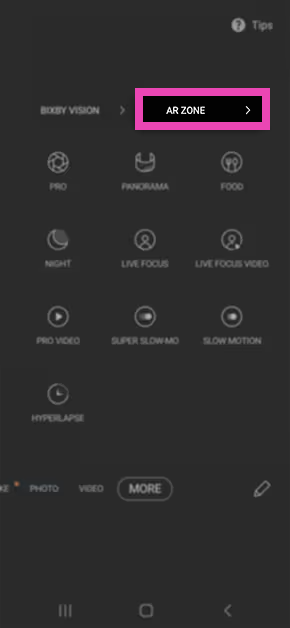
Step 1: Launch the Camera app and switch to the More tab.

Step 2: Tap on AR Zone.

Step 2: Tap on AR Zone.

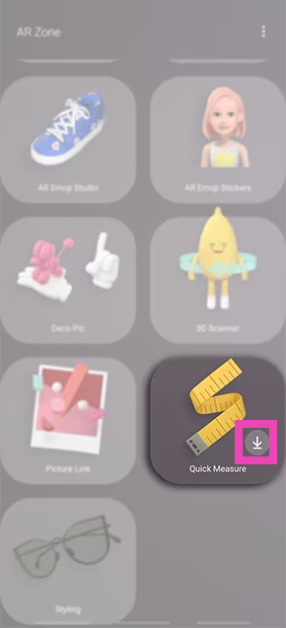
Step 3: Hit the arrow icon on the Quick Measure tile.

Step 3: Hit the arrow icon on the Quick Measure tile.

Step 4: Hit Install.

Step 4: Hit Install. 4 ways to use your iPhone or Android phone as a ruler measure app for android

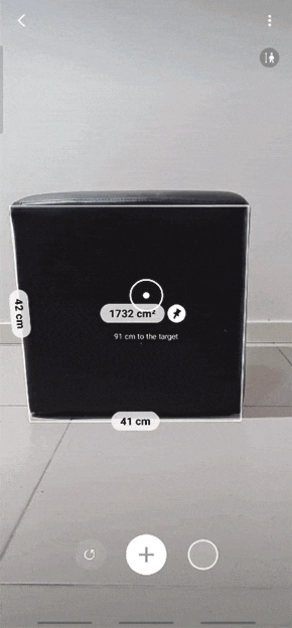
Step 5: Scan the area around you.

Step 5: Scan the area around you. 4 ways to use your iPhone or Android phone as a ruler measure app for android

Step 6: Point your camera at the object to scan its dimensions.

Step 6: Point your camera at the object to scan its dimensions. 4 ways to use your iPhone or Android phone as a ruler measure app for android

Step 7: Once the object has been scanned, its dimensions will be listed on the screen.

Use the Ruler tool on the Edge panel (Samsung)

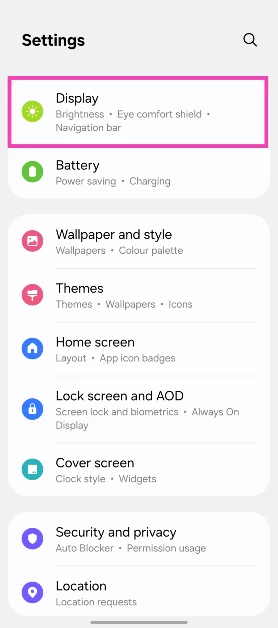
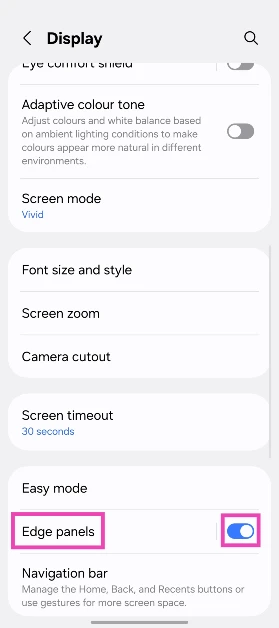
Step 1: On your Samsung smartphone, go to Settings and select Display.

Step 1: On your Samsung smartphone, go to Settings and select Display.

Step 2: Turn on the toggle switch next to Edge panels and select it.

Step 2: Turn on the toggle switch next to Edge panels and select it.

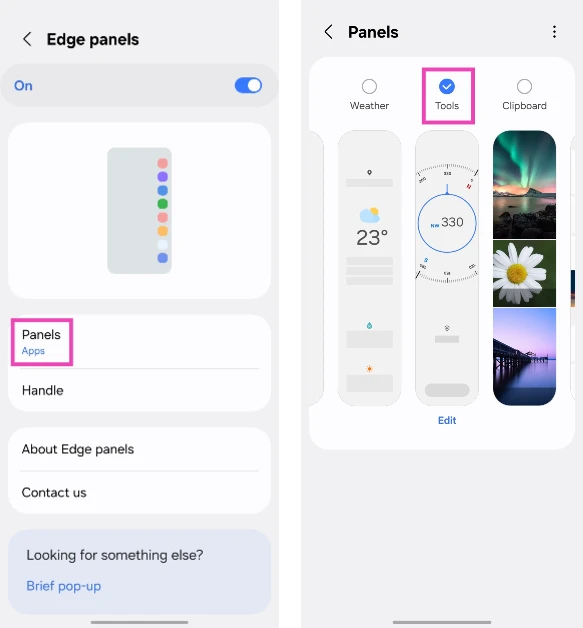
Step 3: Hit Panels and select Tools.

Step 3: Hit Panels and select Tools.

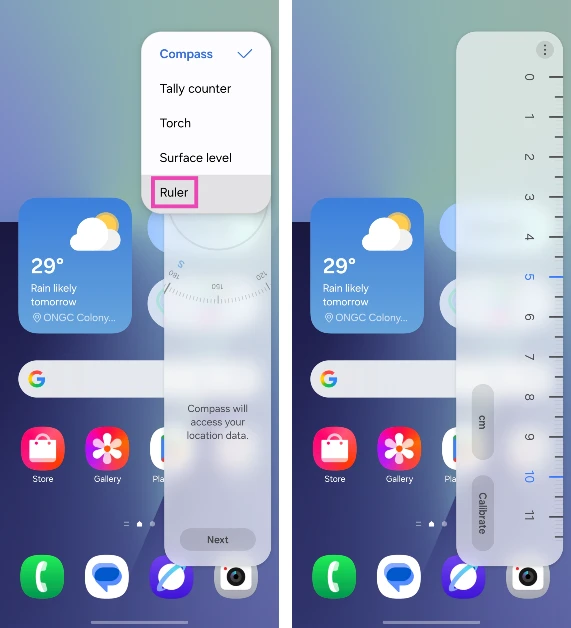
Step 4: Go to the homepage and swipe open the edge panel.

Step 4: Go to the homepage and swipe open the edge panel. 4 ways to use your iPhone or Android phone as a ruler

Step 5: Hit the ellipses and select Ruler.

Bonus Tip: Use the screen ruler on your Windows PC

Step 1: Download and install Microsoft Power Toys from the Microsoft Store.

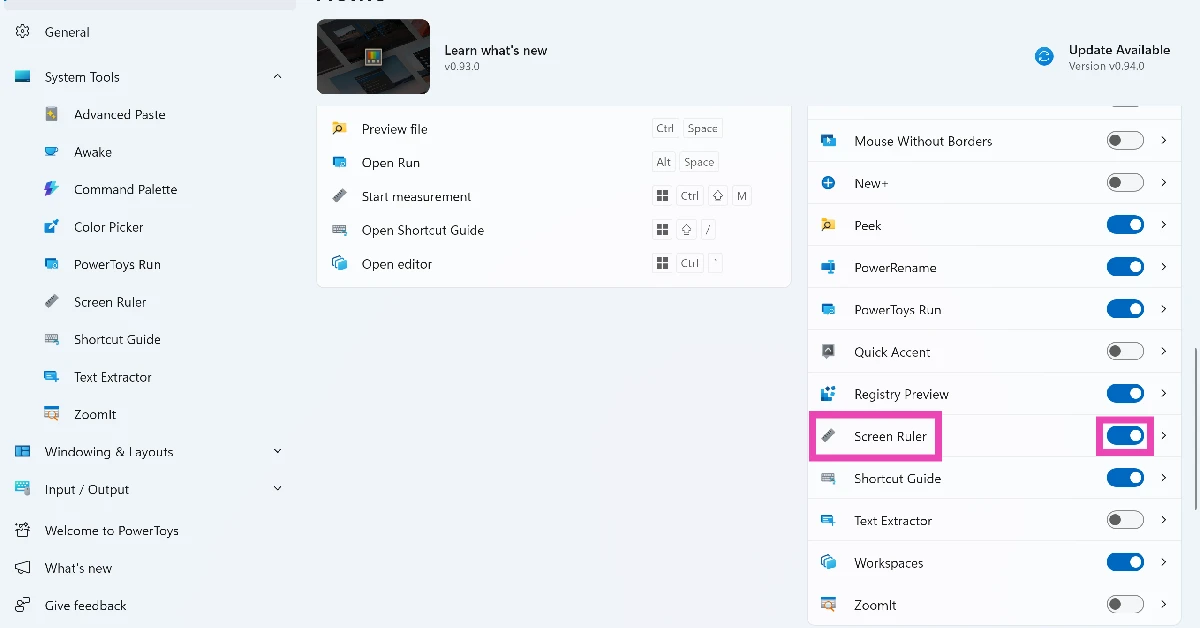
Step 2: Launch Microsoft Power Toys and turn on the toggle switch next to the Screen Ruler module.

Step 2: Launch Microsoft Power Toys and turn on the toggle switch next to the Screen Ruler module. 4 ways to use your iPhone or Android phone as a ruler

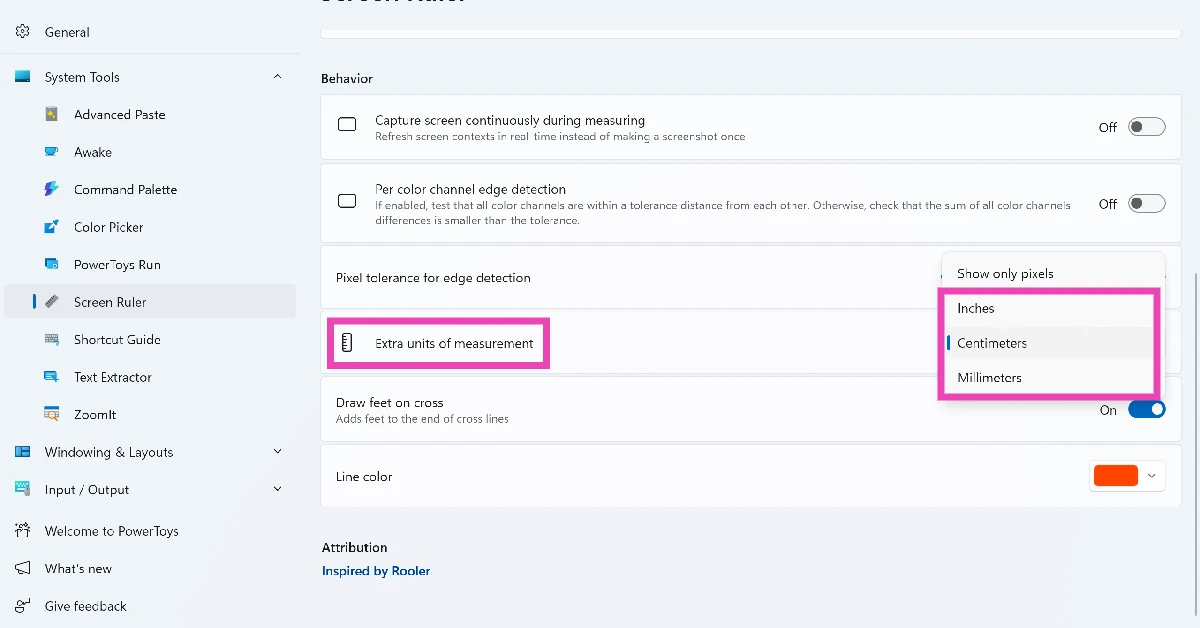
Step 3: Go to the Screen Ruler module and set an extra unit of measurement (cm, mm, or in).

Step 3: Go to the Screen Ruler module and set an extra unit of measurement (cm, mm, or in). 4 ways to use your iPhone or Android phone as a ruler

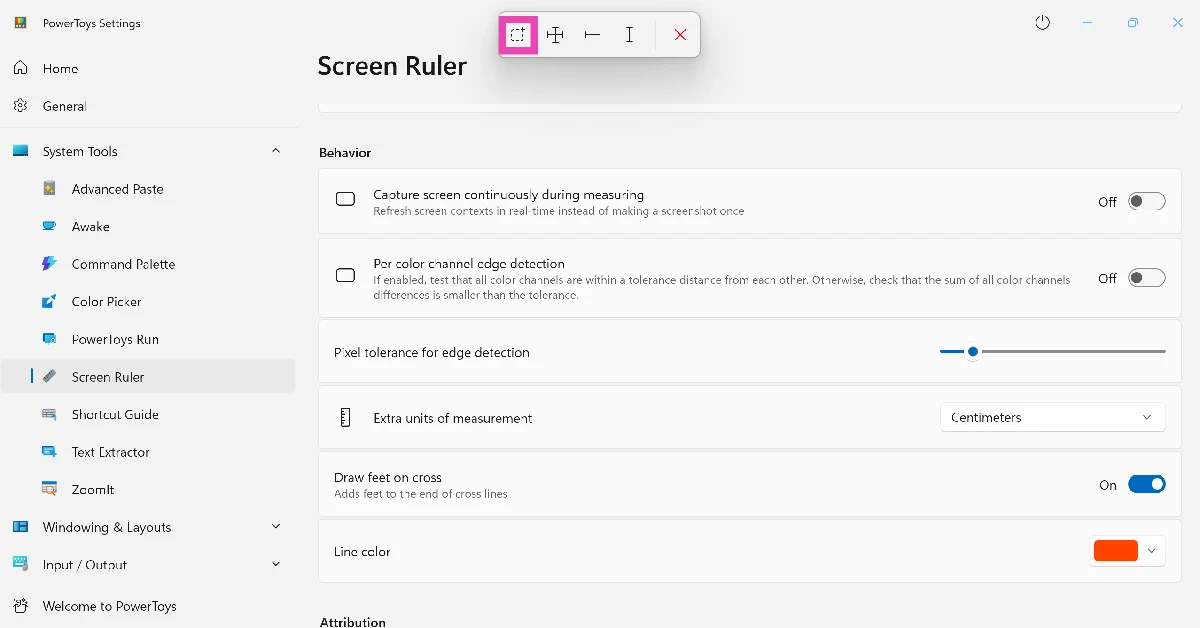
Step 4: Press Windows Key + Ctrl + Shift + M.

Step 5: Select the freeform icon from the pop-up menu at the top of the screen.

Step 5: Select the freeform icon from the pop-up menu at the top of the screen. 4 ways to use your iPhone or Android phone as a ruler

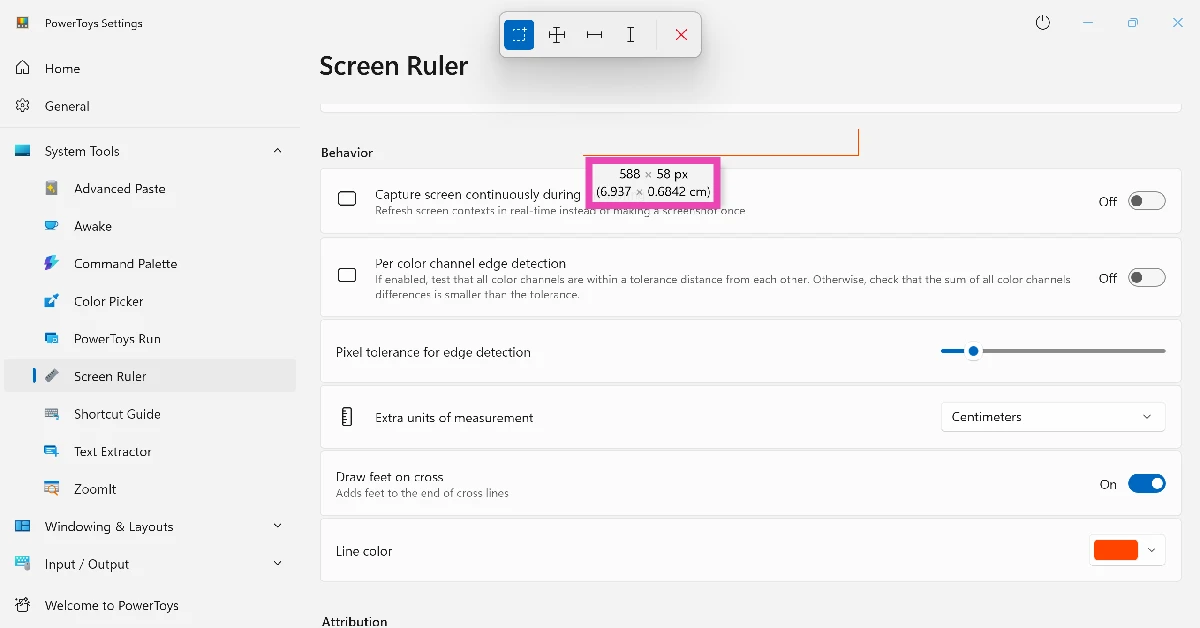
Step 6: Drag the cursor to select an area. Its dimensions will be listed on the screen.

Step 6: Drag the cursor to select an area. Its dimensions will be listed on the screen. 4 ways to use your iPhone or Android phone as a ruler

Frequently Asked Questions (FAQs)

Can I measure the length of an object with my phone?

You can measure the dimensions of any object using the Ruler app by Nix on your phone. This app overlays a ruler on your phone’s screen, turning it into a measuring tool.

Can I use my phone as a ruler?

You can use your phone as a ruler by installing a measurement app from the Google Play Store. If you own a Samsung phone, you can use the Ruler tool in the Edge Panel.

Can Samsung phones measure length?

If you want to measure the dimensions of an object using your Samsung phone, you have two options: Quick Measure and Edge Panel. The former is baked into the native Camera app on your phone scans the object to produce accurate measurements. The latter turns the edge panel into a ruler to take quick measurements.

How do I use my iPhone as a ruler?

The native Measure app on your iPhone lets you scan the objects around you and measure their dimensions. Launch the app and tap anywhere on the screen to set the starting point. Tap at the ending point to finish the line and view its distance.

What are some of the best measurement apps for Android phones?

Ruler by Nix, AR Ruler, Quick Measure, and AR Plan 3D are some of the best measurement apps for Android phones.

Read Also: Western Digital introduced a microSD UHS-I Card in 2TB capacity launched in India

Final Thoughts

These are the top 4 ways to use your iPhone or Android phone as a ruler. If you want to measure larger distances (like a plot of land), use the built-in measurement tools on Google Maps. If you have any questions, let us know in the comments!

Garena Free Fire Max Redeem Codes Today 20 January 2025: Here is how to claim them

Garena Free Fire Max is a battle royale game with regular awards and tournaments to keep players interested. If you play Garena Free Fire, you should be aware of the redeem codes that are released on a daily basis. However, because the battle royale game is banned in India, players from other countries can use the Free Fire Redeem codes daily. If you’re unfamiliar with the Garena Free Fire redeem codes or don’t know how to get them, we’ve put together a step-by-step guide to help you redeem them. Check out Garena Free Fire Max Redeem Codes for 20 January 2025.

The Free Fire Max redeem codes are a great way to get free stuff. These are 12-digit codes that contain alphabets and numbers, as well as an expiration date and time. Because the Garena FF redeem codes cannot be used more than once, you should hurry to the redemption page to claim your free reward before someone else does. To get a free reward, all you have to do is go to reward.ff.garena.com/en, which is the official redemption page. Also, keep an eye on this space for daily updates on Garena Free Fire Max redemption codes and rewards.

Also Read: Sennheiser Accentum Plus wireless headphones with Hybrid Adaptive Noise Cancellation launched

Garena Free Fire Max Redeem Codes Today 20 January 2025

FFSUTXVQF2NR
BLFY7MSTFXV2
FY9MFW7KFSNN
FFMSTXP2FWCK
NPCQ2FW7PXN2
FFXT7SW9KG2M
UPQ7X5NMJ64V
V44ZX8Y7GJ52
HZ2RM8VW9TP7
JF6AT3ZREM45
KFN9Y6XW4Z89
MN3XK4TY9EP1
XN7TP5RM3K49
ZRW3J4N8VX56
TFX9J3Z2RP6G
FF4MTXQPFDZ9
RD3TZK7WME65
F8YC4TN6VKQ9
WD4XJ7WQZ42A

How to Get Free Fire Max Redeem Codes for Garena on 20 January 2025?

  • Visit the Garena Free Fire Max game’s official website at reward.ff.garena.com.
  • Use your Facebook, Google, VK, Apple ID, Huawei ID, or Twitter account to log in.
  • You’ll be taken to a valid redemption code (s)
  • Copy and paste the 12-digit redemption code into the text box.
  • On the screen, a dialogue box will appear.
  • ‘Ok’ should be selected.

For the latest gadget and tech news, and gadget reviews, follow us on Twitter, Facebook and Instagram. For newest tech & gadget videos subscribe to our YouTube Channel. You can also stay up to date using the Gadget Bridge Android App. You can find the latest car and bike news here.

NYT Wordle Answer and Hints Today (January 20)

Are you looking for today’s Wordle for January 20, 2025? The problem is difficult to solve, so if you need assistance, we’ve included hints and the answer to the January 20 Wordle.

Hints and Answers for Today’s Wordle January 20

Before answering directly, please check the January 20 Wordle Hints first.

Hint 1: Today’s Wordle answer includes two vowels.
Hint 2: The answer for today has no repeating letter.
Hint 3: Found in oceans in Minecraft.

What word does today’s Wordle begin with?

Do you need help with today’s Wordle answer’s initial letter?

The first letter in today’s Wordle is “S”

Today’s Wordle Answer January 20 #1311

The answer to Wordle #1311 on January 20, 2024, is — SQUID

Also Read: Ranveer Allahbadia got his YouTube Channels back, videos restored

What is Wordle?

Wordle: A Five-Letter Word Guessing Game
• The game allows six guesses of a five-letter word.
• Provide feedback on guessed letters’ placement in the puzzle.
• The New York Times purchased the game in 2022.
• Created by Josh Wardle for his partner, narrowing down 12,000 English words to 2,500.
• Named after the word “word.”

How To Play Wordle?

Wordle is a New York Times word puzzle game that allows users to guess a five-letter word in six attempts. The letters are highlighted in Yellow and Green, indicating whether the word is present in the answer or not, and Green letters indicate the correct guess.

Also Read: Samsung Galaxy Tab S10+, Galaxy Tab S10 Ultra with Galaxy AI launched in India

Wordle Tips and Tricks

  • Select a powerful starting word: Avoid using unusual words, as they frequently do not match common letters. A good opening word has plenty of benefits.
  • Repeating letters: Don’t be afraid of repeating letters; they appear frequently in words. The answer may contain one or two repeated letters.
  • Use the Wordlebot: The NYT’s Wordlebot analyses and compares replies to itself. This challenge can assist you enhance guessing skills and highlight areas for development.

Amazon Quiz Answers Today 20 January 2025: Participate to win Up To Rs 500 Amazon Pay Balance

20 January 2025: New Amazon Quiz is now available. Customers from different parts of the country are participating in the daily quiz. The quiz starts at midnight today and will be live until 11:59 PM tonight. By successfully answering every question, participants in the quiz have the chance to win wonderful rewards. Up to Rs 500 Amazon Pay Balance is up for grabs to participants today.

One wrong answer could eliminate you from the quiz. You have a chance to win up to Rs 500 Amazon Pay Balance if you successfully answer every question. Users of the app only have the opportunity to take the quiz. Check Out 20 January 2025 Amazon Quiz Answers.

Are you not able to find Amazon FunZone? Click below and participate.

Click here to enter the Amazon FunZone Quiz and play today.

Amazon Quiz Today Prize: Rs 500 Amazon Pay Balance

Quiz Date: 20 January 2025

Daily Timing: 12 AM to 11:59 PM

Previous Amazon Quiz Winners Announcement: Today 12 PM Noon

Amazon Quiz Answers Today 20 January 2025: Win Up To ₹ 500 Amazon Pay Balance

Question 1: Which director won his first directing Oscar in 2024?

Answer: Christopher Nolan

Question 2: Jane Fraser is the current CEO of which bank?

Answer: Citigroup

Question 3: Which Asian country’s passport has been rated the most ‘powerful’ in the world for 2024, according to the Henley Index?

Answer: Singapore

Question 4: Which state is the largest producer of this?

Answer: Maharashtra

Question 5: Which was the first country to make this drink?

Answer: France

How To Play Amazon Quiz Today

Only app users are eligible to play the Amazon quiz every morning from 12 AM to 11:59 PM. The quiz is not available on the desktop. For those who are unaware of how to play the Amazon quiz, below are the steps, you can follow to take the quiz.

  • First, download the Amazon app from the Google Play Store or App Store or go here to download the Amazon App
  • Now fill in the required information through the Sign-Up option.
  • To find the Amazon Quiz banner, log in to the Amazon app and scroll down to the home screen.
  • Tap on the Amazon Quiz banner and tap on the Start button to start the Quiz.
  • Now you will get 5 questions and you need to answer them correctly. One wrong answer will eliminate you from the Quiz.
  • After answering all the questions correctly you are now eligible for a Lucky Draw.
  • The previous winner’s name will be announced today at 12 PM.

Amazon Daily Quiz Answers from the previous few days.

Here are all the answers from the previous 5 days of the Amazon Daily Quiz and Contest.

Amazon Quiz Answers Today 18 January 2025: Win Up To ₹ 500 Amazon Pay Balance

Question 1: The Tata Steel Chess tournament played in the classical format is being held in which country?

Answer: Netherlands

Question 2:

The show ‘Criminal Justice’ stars which actor in the central character of lawyer Madhav Mishra?

Answer: Pankaj Tripathi

Question 3: The Amroha Dholak is a musical instrument from which state that got a GI tag in 2023?

Answer: Uttar Pradesh

Question 4: This ancient temple is located in which country?

Answer: Egypt

Question 5: This statue is located at which famous educational institution?

Answer: IISC Bangalore

Amazon Quiz Answers Today 17 January 2025: Win Up To ₹ 500 Amazon Pay Balance

Question 1: Which of these West Indies bowlers took the wicket of Steve Smith with his first ball in Test cricket?

Answer: Shamar Joseph

Question 2: At the 2024 Emmy Awards which series won the award for Best Drama Series?

Answer: Succession

Question 3: Sharmistha Mukherjee has recently written a book titled ‘_____ My Father: A Daughter Remembers’. Fill in the blanks

Answer: Pranab

Question 4: Name the famous freedom fighter, whose statue is in the middle

Answer: Bhagat Singh

Question 5: Name this famous person who had cameos in several Marvel movies

Answer: Stan Lee

Amazon Quiz Answers Today 16 January 2025: Win Up To ₹ 500 Amazon Pay Balance

Question 1: Which former champion did Caroline Garcia knock out in the first round of the 2024 Australian Open?

Answer: Naomi Osaka

Question 2: Lily Gladstone won the ‘Best female actor in a film- drama’ at the 2024 Golden Globes for which film?

Answer: Killers of the Flower Moon

Question 3: Nigar Shahji is the project director of which ISRO mission that was launched on 2nd September, 2023?

Answer: Aditya- L1

Question 4: In which city is this famous museum located?

Answer: Bilbao

Question 5: This famous shoe brand was founded in which country?

Answer: Germany

Amazon Quiz Answers Today 15 January 2025: Win Up To ₹ 500 Amazon Pay Balance

Question 1: Recently which of these New Zealand batters equalled the record for most sixes in a T20I innings?

Answer: Finn Allen

Question 2: Which movie won the Best film- Drama award at the 2024 Golden Globes?

Answer: Oppenheimer

Question 3: The Tangail sarees from which state recently got a GI tag?

Answer: West Bengal

Question 4: Which university is shown here, attended by the likes of Mark Zuckerberg?

Answer: Harvard University

Question 5: What breed of dog is shown here?

Answer: Shih Tzu

Amazon Quiz Answers Today 11 January 2025: Win Up To ₹ 500 Amazon Pay Balance

Question 1: Which state in Australia has chosen not to be the host of the 2026 Commonwealth Games?

Answer: Victoria

Question 2: In June 2023, which country briefly banned the film ‘Adipurush’?

Answer: Nepal

Question 3: The world’s most prized variety of which fruit, called Miyazaki, is sold at up to Rs 2.75 lakh per kg?

Answer: Mango

Question 4: In which West African country is this animal featured prominently on the national emblem?

Answer: Ivory Coast

Question 5: The Andromeda Galaxy is also known as ?

Answer:Messier 31

Amazon Quiz Answers Today 10 January 2025: Win Up To ₹ 500 Amazon Pay Balance

Question 1: Which state in Australia has chosen not to be the host of the 2026 Commonwealth Games?

Answer: Victoria

Question 2: In June 2023, which country briefly banned the film ‘Adipurush’?

Answer: Nepal

Question 3: The world’s most prized variety of which fruit, called Miyazaki, is sold at up to Rs 2.75 lakh per kg?

Answer: Mango

Question 4: In which West African country is this animal featured prominently on the national emblem?

Answer: Ivory Coast

Question 5: The Andromeda Galaxy is also known as ?

Answer:Messier 31

Amazon Quiz Answers Frequently Asked Questions (FAQs)

Where can I check the previous winners? Did I win how to check?

You can head over to this link on your mobile or desktop to check the winners of the Amazon Daily Quiz Contest.

How to Play Amazon Daily Quiz or Contest?

We have written an explainer above, you can refer to that.

When are the winners of the Amazon Quiz and contest announced or declared?

The announcement of today’s Amazon quiz winner will take place Tomorrow. As for the Special Quiz and “Spin & Win” Contest, the winners will be declared once the Quiz Contest comes to an end. To find out who the lucky winner is, you can refer to the Amazon Quiz Winners List or visit the Amazon Winners tab in the Amazon App.

How to participate in the Daily Amazon Quiz?

That is very easy, just got to the Amazon app and scroll to the bottom of the page and you will find the Quiz section. Click on it (usually it is called the fun zone) and you can enter the Amazon Today Quiz Contest. 

Are there any other quizzes or contests running on Amazon daily?

Yes, there are many running on a daily basis. These range from spinning the wheel to answering the questions correctly. All are located in the Fun Zone. 

What are the criteria for selecting a winner in the Daily Amazon Quiz?

When a qualified player submits correct answers to all the questions, they will automatically be entered into a lucky draw. This draw will include all participants who answered all the questions correctly. Amazon randomly selects the final winners from the pool of eligible participants who gave the right answers.

Which Types of Questions are asked within Amazon Daily Quiz?

These are very simple and straightforward questions. These are mainly related to general knowledge. 

Where should I look for Amazon Daily Quiz answers?

You can bookmark our website www.gadgetbridge.com as we will help you every day with the Amazon Daily Quiz. We bring you fresh answers every day for the Amazon Daily Quiz and Contest. 

What time does Amazon Announce previous winners?

The previous winner’s name will be announced today at 12 PM (noon).
Airtel has surpassed the industry-leading data upload speeds in Delhi: TRAI report

Airtel has the highest average data upload speed in the Delhi LSA, with 34.37 Mbps. The company also has the lowest call drop rates in the region, ensuring uninterrupted service. Airtel’s 4.01 call quality score demonstrates its dedication to enhancing network infrastructure. This outperforms competitors such as Reliance Jio, which reported an average upload speed of 23.91 Mbps, while VIL and MTNL had lesser rates of 4.59 Mbps and 1.67 Mbps, respectively.

Airtel outperformed rivals in data upload performance during Telecom Regulatory Authority of India (TRAI) Independent Drive Tests in Delhi LSA, reaching an average upload speed of 34.37 Mbps across a 635 km area, including 210 km of Metro lines.

Airtel in Delhi boasts the lowest call drop rates and the fastest upload speeds, assuring smooth connectivity for its customers.

Also Read: Western Digital introduced a microSD UHS-I Card in 2TB capacity launched in India

The TRAI Report for the Delhi Region reveals Airtel as the top provider with 34.37 Mbps data upload speed, followed by Jio at 23.91 Mbps. VIL and MTNL lagged with speeds of 4.59 Mbps and 1.67 Mbps, respectively. Airtel maintains a high call setup success rate of 99.25%, ensuring reliability for voice calls. It also has the industry’s lowest call drop rate of 0.12%, setting a benchmark for uninterrupted connectivity. Airtel’s call quality score of 4.01 is impressive.

Also Read: Itel S9 Ultra Earbuds with 10mm drivers launched in India

In order to evaluate the quality of service offered by cellular mobile telephone service providers for voice and data services, TRAI conducted Independent Drive Tests (IDT) in four cities: New Delhi, Jaipur, Ahmednagar, and Hyderabad. Using a variety of technologies, the tests evaluated the performance of Bharti Airtel Ltd., BSNL/MTNL, Reliance JIO Infocom Ltd., and Vodafone Idea Ltd., providing services in Licensed Service Areas using various technologies. Key Performance Indicators (KPIs) for voice and data services were measured for all telecom service providers operating in the region, and data service metrics included data throughput, packet drop rate, video streaming delay, latency, and jitter.

Western Digital introduced a microSD UHS-I Card in 2TB capacity launched in India

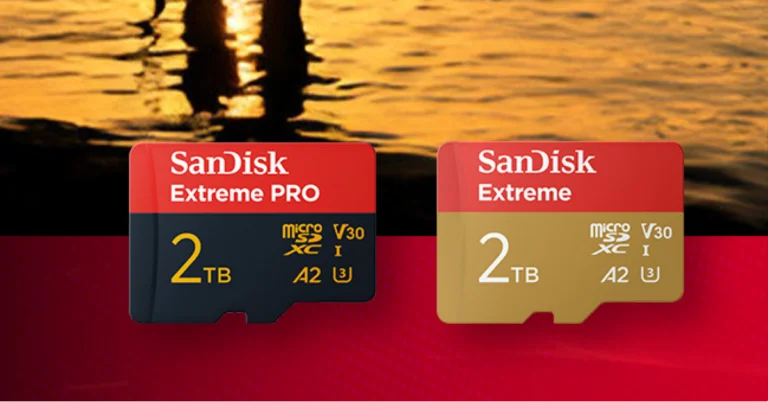
Western Digital has announced the world’s fastest microSD UHS-I Card in 2TB capacity from SanDisk to satisfy the needs of digital workflows. These SanDisk cards are intended for both weekend trips and professional gigs, catering to enthusiasts, creators, and professionals alike, making them an essential storage solution for portable devices.

The SanDisk Extreme PRO microSDXC UHS-I Card has up to 2TB of storage capacity, allowing modern creators to capture high-quality 4K UHD2 point-of-view video, high-resolution stills, and boost storage for Android devices, laptops, and handheld gaming consoles. When combined with the SanDisk QuickFlow microSD UHS-I Card USB-A Reader, it provides unrivalled performance, with read and write speeds of up to 250MB/s3 and 150MB/s3.

With up to 2TB of storage, it can record up to 2,808 minutes of 4K UHD video at 30 frames per second. The card also comes with free data recovery software for two years.

Also Read: Itel S9 Ultra Earbuds with 10mm drivers launched in India

Western Digital’s SanDisk Extreme PRO microSD UHS-I card is built to resist harsh conditions and frequent use, and it comes with RescuePRO Deluxe data recovery software for fast file restoration from deleted, corrupted, or lost media. It includes a lifetime limited warranty, ensuring longevity and outstanding performance for years to come.

In terms of pricing, the SanDisk Extreme microSDXC UHS-I Card the 2TB capacity will be available at Rs 16,997. The storage device can be purchased via Amazon in the country.

Also Read: Samsung Galaxy S25 Series leaked teasers suggest design upgrades ahead of official launch

Khalid Wani, Senior Director Sales, India, Western Digital, said, “We aim to inspire people to create more and are committed to helping content creators transform ideas into stories without worrying about storage limitations. We are happy to introduce the world’s fastest 2TB1 microSD card; so, people around the world have more time to focus on capturing the moment, wherever their adventure takes them.”

Garena Free Fire Max Redeem Codes Today 18 January 2025: Here is how to claim them

Garena Free Fire Max is a battle royale game with regular awards and tournaments to keep players interested. If you play Garena Free Fire, you should be aware of the redeem codes that are released on a daily basis. However, because the battle royale game is banned in India, players from other countries can use the Free Fire Redeem codes daily. If you’re unfamiliar with the Garena Free Fire redeem codes or don’t know how to get them, we’ve put together a step-by-step guide to help you redeem them. Check out Garena Free Fire Max Redeem Codes for 18 January 2025.

The Free Fire Max redeem codes are a great way to get free stuff. These are 12-digit codes that contain alphabets and numbers, as well as an expiration date and time. Because the Garena FF redeem codes cannot be used more than once, you should hurry to the redemption page to claim your free reward before someone else does. To get a free reward, all you have to do is go to reward.ff.garena.com/en, which is the official redemption page. Also, keep an eye on this space for daily updates on Garena Free Fire Max redemption codes and rewards.

Also Read: Sennheiser Accentum Plus wireless headphones with Hybrid Adaptive Noise Cancellation launched

Garena Free Fire Max Redeem Codes Today 18 January 2025

V427K98RUCHZ
FFCMCPSBN9CU
FEJ4589HY7GUYN
FFBBCVQZ4MWA
FTL781KJNUEFRT
FFCMCPSUYUY7E
FVGH2YGEFHUY76
EYH2W3XK8UPG
FJTYIUKR1FTDRT
3IBBMSL7AK8G
FTEHBRJJFIUCYGT
J3ZKQ57Z2P2P
FNRJ1HG7BFUJNR
FFW4FST9FQY2
FGJ87UJHGDRTG3
FNJU67EWADWEFT
FTY7FGN4XKHC
FFPSYKMXTP2H
FFPSTXV5FRDM
FH87KJHGFSERF3
XF4SWKCH6KY4
VY2KFXT9FQNC
F76HBVDRFVDFC5
FY9MFW7KFSNN
FXK2NDY5QSMX
PCNF5CQBAJLK
FAHI2UJHERNFJGI
FFAC2YXE6RF2
FNYJ85U6YHGW4G
YFW2Y7NQFV9S
FDHJU6KMJHRY43
FBHWNUJIHGUWN
F8U7Y6CTGSBEHN
FU8H7FYFTD5QCF
FFCMCPSJ99S3
F765A4ED2CFVG3
GCNVA2PDRGRZ
FKO5I46JNYKGOI
FGYSEWRFUR45F3
FW2KQX9MFFPS

How to Get Free Fire Max Redeem Codes for Garena on 18 January 2025?

  • Visit the Garena Free Fire Max game’s official website at reward.ff.garena.com.
  • Use your Facebook, Google, VK, Apple ID, Huawei ID, or Twitter account to log in.
  • You’ll be taken to a valid redemption code (s)
  • Copy and paste the 12-digit redemption code into the text box.
  • On the screen, a dialogue box will appear.
  • ‘Ok’ should be selected.

For the latest gadget and tech news, and gadget reviews, follow us on Twitter, Facebook and Instagram. For newest tech & gadget videos subscribe to our YouTube Channel. You can also stay up to date using the Gadget Bridge Android App. You can find the latest car and bike news here.

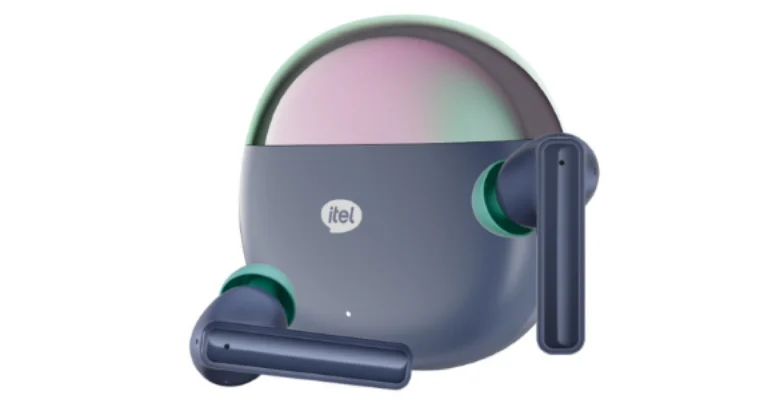
Itel S9 Ultra Earbuds with 10mm drivers launched in India

Itel has introduced the Pearlescent Finish S9 Ultra Earbuds with a beautiful dual-tone design. The audio device features 360° surround bass and AI Environmental Noise Cancellation. It also features IPX5 water resistance and seamless Bluetooth 5.3 connectivity for versatility.

Itel has introduced the S9 Ultra earphones, a smart device that blends design, performance, and durability. The pearlescent finish and dual-tone design improve the audio experience, while the immersive 360° surround bass delivers deep, rich sound. The earphones also have AI Environmental Noise Cancellation (ENC) technology, which improves communication by filtering out background noise during calls. They have quick Bluetooth 5.3 connectivity and 10mm drivers for powerful audio.

Also Read: Samsung Galaxy S25 Series leaked teasers suggest design upgrades ahead of official launch

The earbuds include a powerful 400 mAh battery that may provide up to 30 hours of continuous playtime. The S9 Ultra is a sturdy earphone with an IPX5 water resistance rating, making it ideal for exercise and outdoor sports. The earbuds come in exquisite packaging and a 365-day warranty, showcasing itel’s commitment to client pleasure.
The Itel S9 Ultra Earbuds will be available in Space Grey and Dazzle Black.

They are intended for music enthusiasts, professionals, and active individuals, and they provide amazing sound and user-friendly features. The Itel S9 Ultra Earbuds will be available at an affordable price of just Rs 899.

Also Read: Amazon’s Great Republic Day Sale 2025: Best deals on home appliances

Commenting on the launch, CEO of itel India, Mr. Arijeet Talapatra said, “At itel, we believe access to technology should not be restricted by budget. We recognize today’s Gen Z’s growing need of having smart and fashionable accessories that are not only durable and feature rich but aesthetically appealing as well, matching their style. The S9 Ultra Earbuds are a perfect example of this fusion, combining essential features of TWS with a dazzling pearlescent design. These earbuds are crafted to make daily interactions with audio – be it music, calls, or podcasts – effortless, enjoyable and elegant.”

7 Ways to Fix ‘Grammarly Extension Not Working’ on Google Chrome

0

The consensus for Grammarly being the best writing assistant is pretty much unanimous. One of the big reasons behind its popularity is its availability on all platforms. Grammarly can be downloaded as an app or used as an extension on your PC. One of the common problems that users face with the writing assistant’s web extension is its unresponsiveness. Luckily, this issue is easy to fix. Today, we bring you the top 7 ways to fix the ‘Grammarly extension not working’ issue on Google Chrome.

Read Also: Poco C75 5G Review: Does the performance match the looks?

Why is the Grammarly extension suddenly unresponsive?

There are a bunch of factors that can cause the Grammarly extension to malfunction. Typically, a simple refresh can resolve these issues, but in case that doesn’t work, you need to be aware of what’s causing the problem. Here are the usual suspects.

  • Faulty internet connection
  • Rogue extensions interfering with Grammarly
  • Grammarly subscription has expired
  • Account-related issues
  • Grammarly’s servers are down (Check the status page)
  • Background issues in Google Chrome

Turn on the Grammarly extension

If you accidentally turned off the Grammarly extension for the tab you’re currently on, it won’t correct your grammatical errors. Here’s how you can turn it back on.

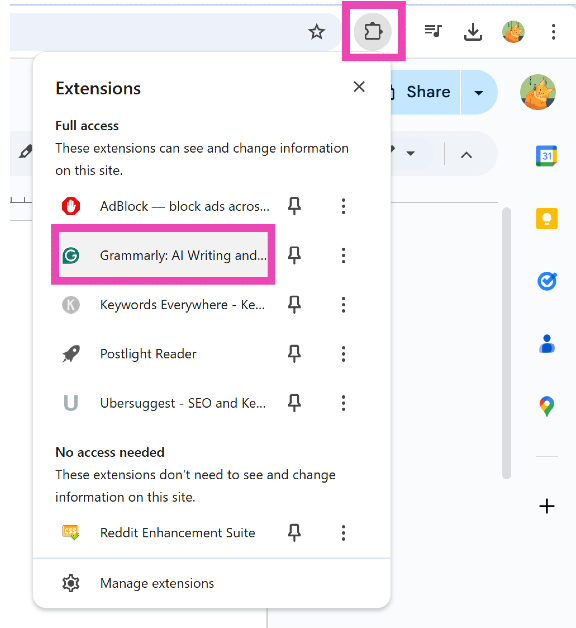
Step 1: Click the extension icon next to the address bar on Google Chrome.

Step 2: Select the Grammarly extension.

Step 2: Select the Grammarly extension.

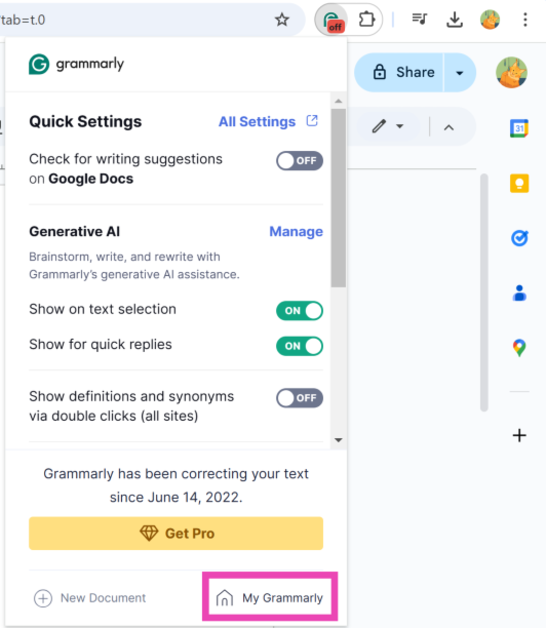
Step 3: Turn on the toggle switch next to ‘Check for writing suggestions on [x]’.

Step 3: Turn on the toggle switch next to ‘Check for writing suggestions on [x]’.

Restart the Grammarly extension

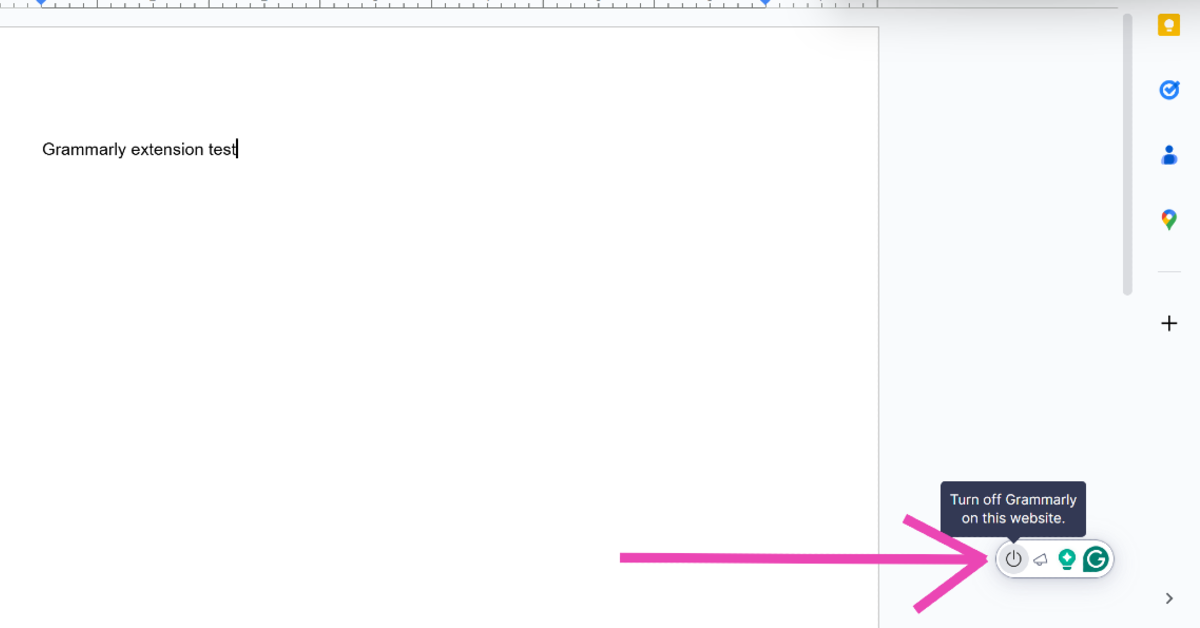
Step 1: Move the cursor over the Grammarly icon in the bottom right corner of the screen.

Step 2: Hit the power icon.

Step 2: Select the Grammarly extension.

Step 3: Click the extension icon next to the address bar on Google Chrome.

Step 4: Select the Grammarly extension.

Step 2: Select the Grammarly extension.

Step 5: Turn on the toggle switch next to ‘Check for writing suggestions on [x]’.

Step 3: Turn on the toggle switch next to ‘Check for writing suggestions on [x]’.

Sign out and sign in to Grammarly

Step 1: Click the extension icon next to the address bar on Google Chrome.

Step 2: Select the Grammarly extension.

Step 2: Select the Grammarly extension.

Step 3: Click on My Grammarly.

Step 3: Click on My Grammarly.

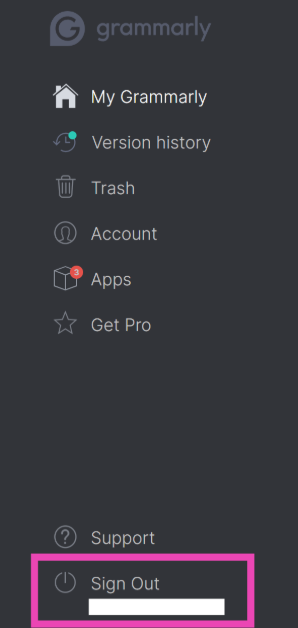
Step 4: Select Sign Out from the sidebar.

Step 4: Select Sign Out from the sidebar.

Step 5: Once you’ve been signed out, sign in again.

Check whether other extensions are causing Grammarly to malfunction

Step 1: Type chrome://extensions/ in Google Chrome’s address bar and hit Enter.

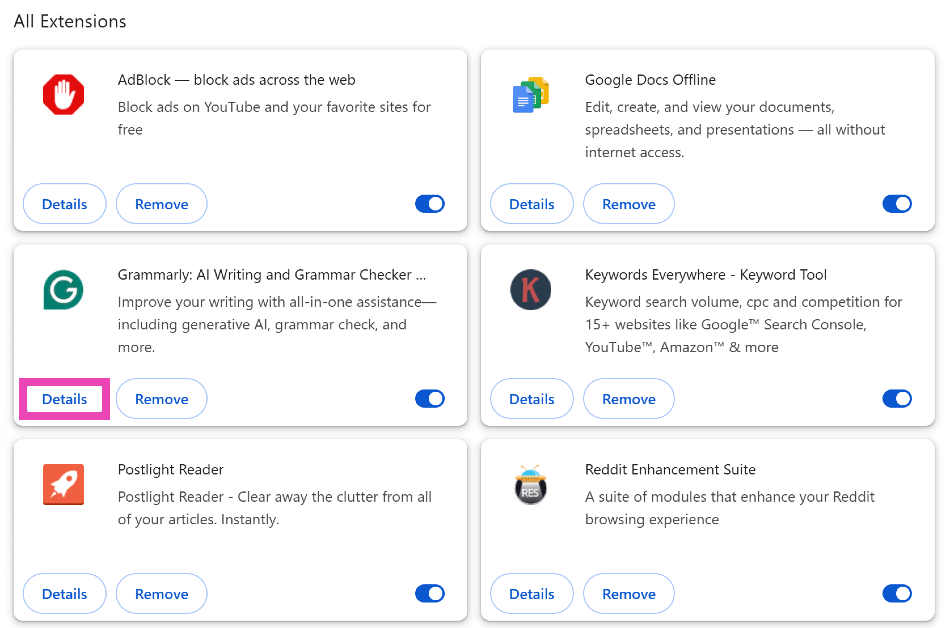
Step 2: Click Details under Grammarly.

Step 2: Click Details under Grammarly.

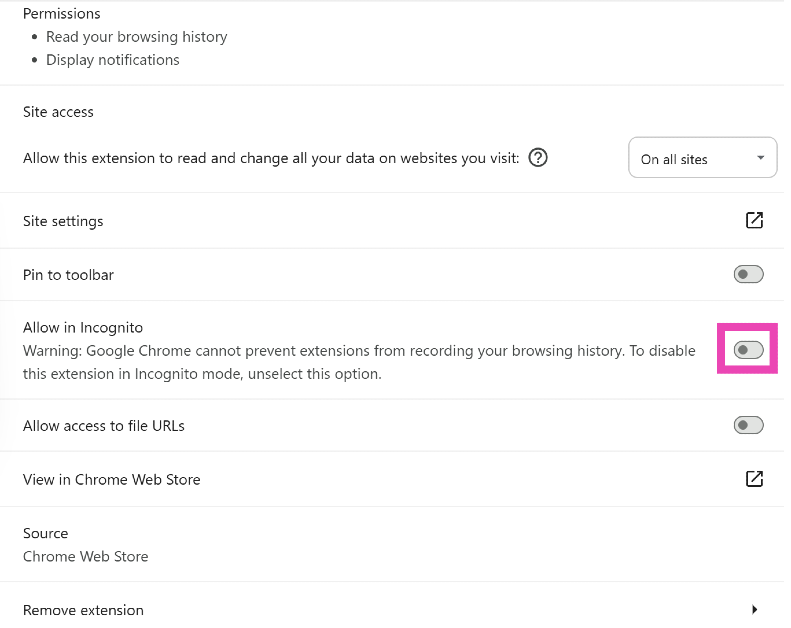
Step 3: Turn on the toggle switch next to Allow in incognito.

Step 3: Turn on the toggle switch next to Allow in incognito.

Step 4: Open an incognito tab by pressing Ctrl + Shift + N.

Step 5: Go to Google Docs and begin typing.

Step 6: If Grammarly is working fine in Incognito Mode, the other installed extensions are causing it to malfunction in your browser. Find the rogue extension and uninstall it.

Reinstall the Grammarly extension

Step 1: Click the extension icon next to the address bar on Google Chrome.

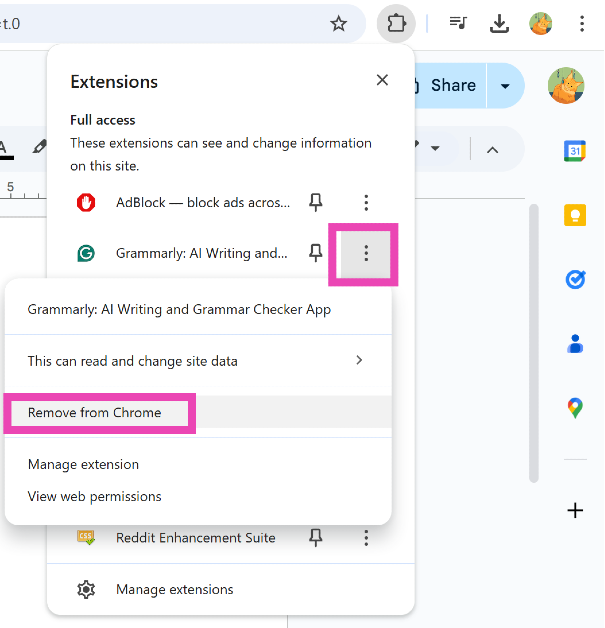
Step 2: Hit the ellipses next to Grammarly.

Step 3: Select Remove from Chrome.

Step 3: Select Remove from Chrome.

Step 4: Go to the Chrome Web Store and search for Grammarly.

Step 5: Click on Add to Chrome.

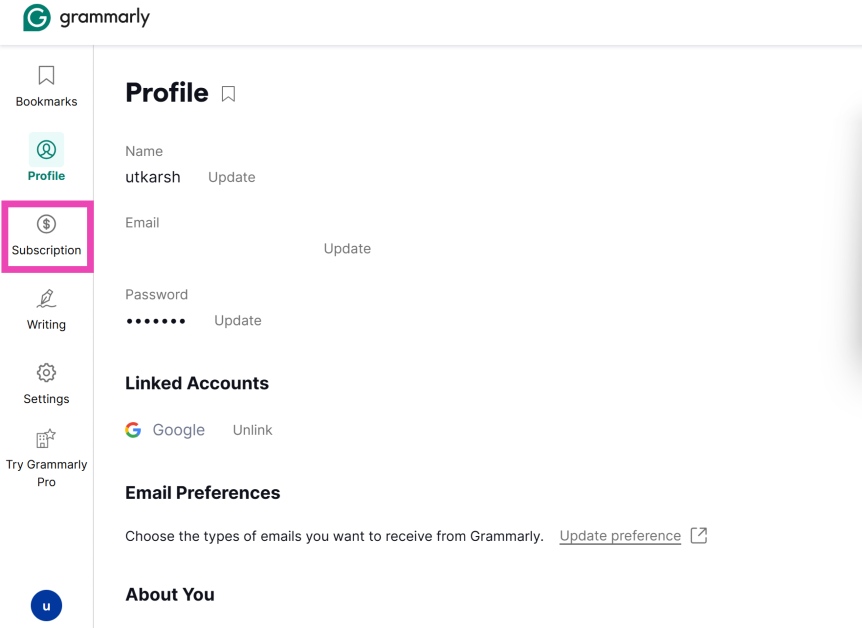
Check the validity of your subscription

Step 1: Go to Grammarly’s account management page.

Step 2: Switch to the Subscription tab from the sidebar.

Step 2: Switch to the Subscription tab from the sidebar.

Step 3: Re-subscribe to Grammarly if your membership has expired.

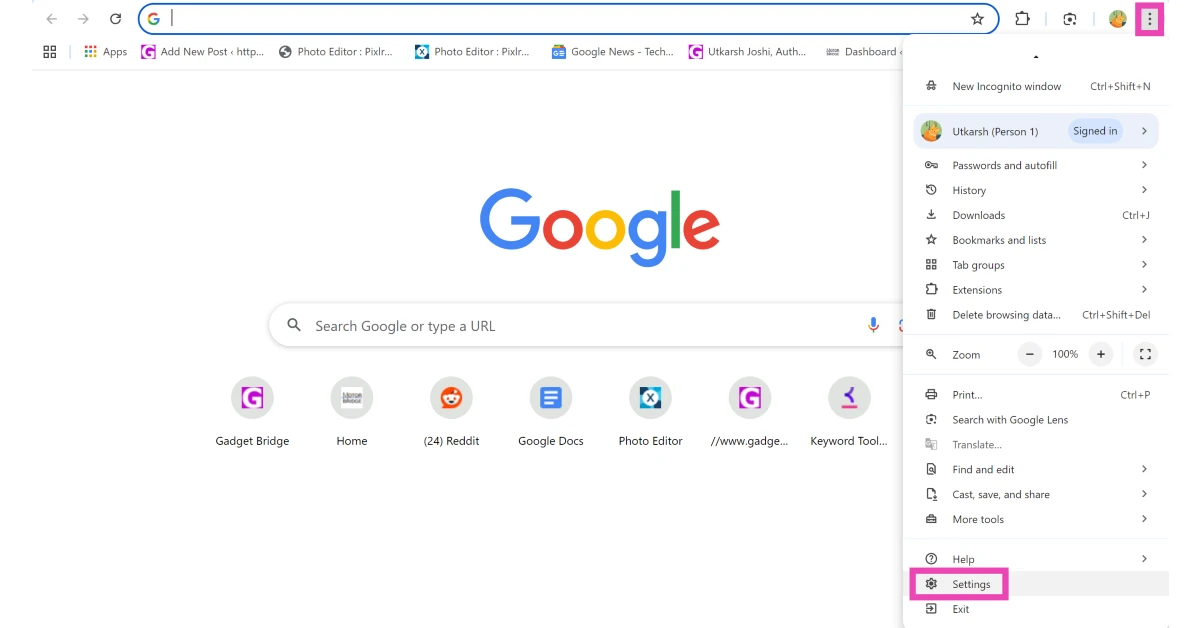
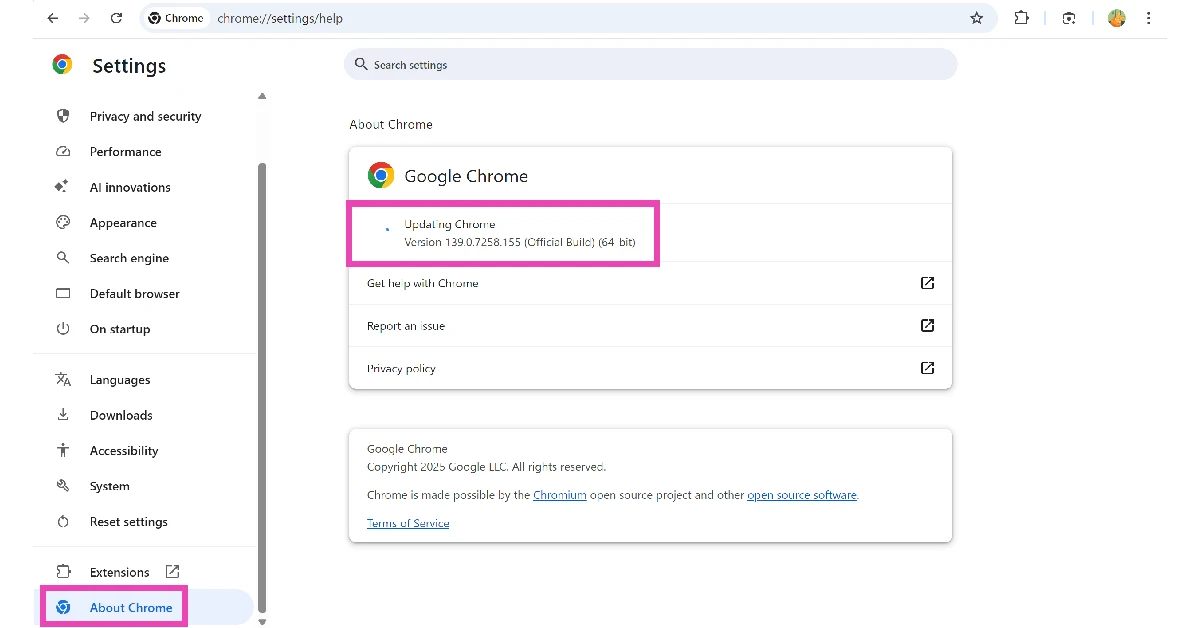
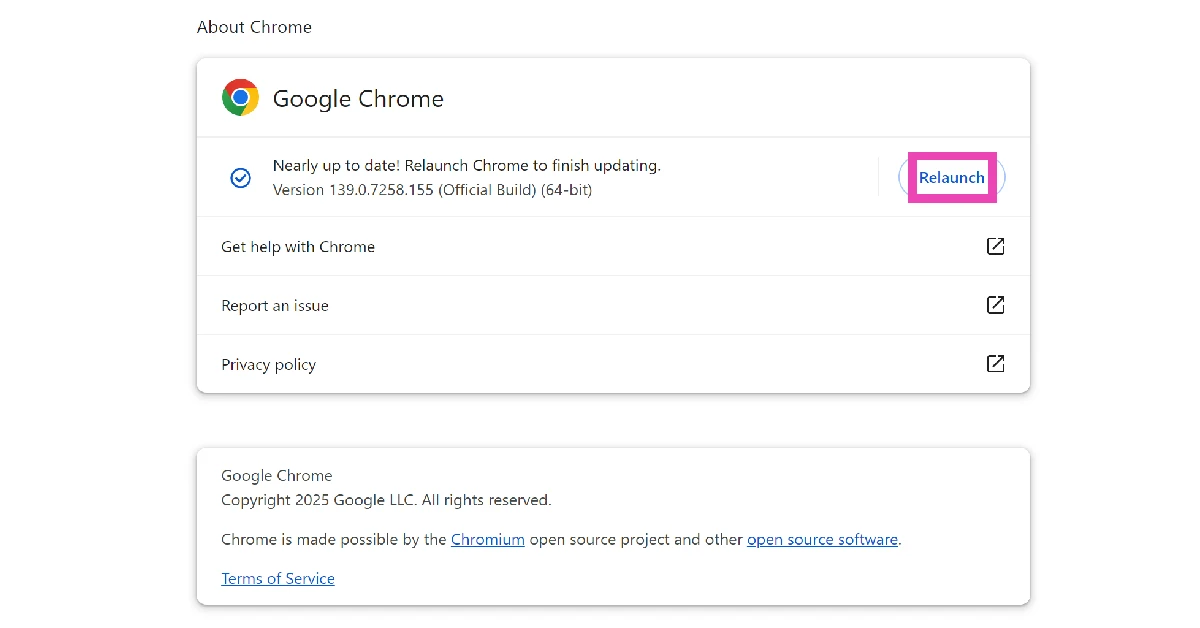
Update Google Chrome

Step 1: Launch Google Chrome on your PC.

Step 2: Hit the ellipses in the top right corner of the screen and select Settings.

Step 2: Hit the ellipses in the top right corner of the screen and select Settings.

Step 3: Go to the About Chrome tab. Google Chrome will automatically download the latest update.

Step 3: Go to the About Chrome tab. Google Chrome will automatically download the latest update.

Step 4: Hit Relaunch once the update has been downloaded.

Step 4: Hit Relaunch once the update has been downloaded.

Frequently Asked Questions (FAQs)

Why is my Grammarly extension unresponsive?

Sometimes, the Grammarly extension for Chrome can become unresponsive out of the blue. It is also possible that you may have accidentally disabled the extension.

How do I enable the Grammarly extension on Chrome?

Hit the extensions icon, click on Grammarly, and turn on the toggle switch next to ‘Check for writing suggestions on [current website]’.

Why isn’t Grammarly working on a website?

If Grammarly isn’t working on a specific website, make sure it is enabled for that website. You can do this by clicking on the extension and turning on the first toggle switch.

Why is Grammarly not working on Google Docs?

If you can’t get Grammarly to work on Google Docs, refresh the doc or go back and open it again.

How do I install the Chrome extension for Grammarly?

Go to the Chrome Web Store, search for Grammarly, and hit ‘Add to Chrome’.

Read Also: Samsung Galaxy S25 Series leaked teasers suggest design upgrades ahead of official launch

Conclusion

This is how you can fix Grammarly on Google Chrome. If these fixes don’t work for you, you may want to check your internet connection. You can also use Grammarly as an add-in on Microsoft Word. If you have any questions, let us know in the comments!

NYT Wordle Answer and Hints Today (January 18)

Are you looking for today’s Wordle for January 18, 2025? The problem is difficult to solve, so if you need assistance, we’ve included hints and the answer to the January 18 Wordle.

Hints and Answers for Today’s Wordle January 18

Before answering directly, please check the January 18 Wordle Hints first.

Hint 1: Today’s Wordle answer includes two vowels.
Hint 2: The answer for today has one repeating letter.
Hint 3: Not showing thought or understanding; foolish

What word does today’s Wordle begin with?

Do you need help with today’s Wordle answer’s initial letter?

The first letter in today’s Wordle is “S”

Today’s Wordle Answer January 18 #1309

The answer to Wordle #1309 on January 18, 2024, is — SILLY

Also Read: Ranveer Allahbadia got his YouTube Channels back, videos restored

What is Wordle?

Wordle: A Five-Letter Word Guessing Game
• The game allows six guesses of a five-letter word.
• Provide feedback on guessed letters’ placement in the puzzle.
• The New York Times purchased the game in 2022.
• Created by Josh Wardle for his partner, narrowing down 12,000 English words to 2,500.
• Named after the word “word.”

How To Play Wordle?

Wordle is a New York Times word puzzle game that allows users to guess a five-letter word in six attempts. The letters are highlighted in Yellow and Green, indicating whether the word is present in the answer or not, and Green letters indicate the correct guess.

Also Read: Samsung Galaxy Tab S10+, Galaxy Tab S10 Ultra with Galaxy AI launched in India

Wordle Tips and Tricks

  • Select a powerful starting word: Avoid using unusual words, as they frequently do not match common letters. A good opening word has plenty of benefits.
  • Repeating letters: Don’t be afraid of repeating letters; they appear frequently in words. The answer may contain one or two repeated letters.
  • Use the Wordlebot: The NYT’s Wordlebot analyses and compares replies to itself. This challenge can assist you enhance guessing skills and highlight areas for development.

Amazon Quiz Answers Today 18 January 2025: Participate to win Up To Rs 500 Amazon Pay Balance

18 January 2025: New Amazon Quiz is now available. Customers from different parts of the country are participating in the daily quiz. The quiz starts at midnight today and will be live until 11:59 PM tonight. By successfully answering every question, participants in the quiz have the chance to win wonderful rewards. Up to Rs 500 Amazon Pay Balance is up for grabs to participants today.

One wrong answer could eliminate you from the quiz. You have a chance to win up to Rs 500 Amazon Pay Balance if you successfully answer every question. Users of the app only have the opportunity to take the quiz. Check Out 18 January 2025 Amazon Quiz Answers.

Are you not able to find Amazon FunZone? Click below and participate.

Click here to enter the Amazon FunZone Quiz and play today.

Amazon Quiz Today Prize: Rs 500 Amazon Pay Balance

Quiz Date: 18 January 2025

Daily Timing: 12 AM to 11:59 PM

Previous Amazon Quiz Winners Announcement: Today 12 PM Noon

Amazon Quiz Answers Today 18 January 2025: Win Up To ₹ 500 Amazon Pay Balance

Question 1: The Tata Steel Chess tournament played in the classical format is being held in which country?

Answer: Netherlands

Question 2:

The show ‘Criminal Justice’ stars which actor in the central character of lawyer Madhav Mishra?

Answer: Pankaj Tripathi

Question 3: The Amroha Dholak is a musical instrument from which state that got a GI tag in 2023?

Answer: Uttar Pradesh

Question 4: This ancient temple is located in which country?

Answer: Egypt

Question 5: This statue is located at which famous educational institution?

Answer: IISC Bangalore

How To Play Amazon Quiz Today

Only app users are eligible to play the Amazon quiz every morning from 12 AM to 11:59 PM. The quiz is not available on the desktop. For those who are unaware of how to play the Amazon quiz, below are the steps, you can follow to take the quiz.

  • First, download the Amazon app from the Google Play Store or App Store or go here to download the Amazon App
  • Now fill in the required information through the Sign-Up option.
  • To find the Amazon Quiz banner, log in to the Amazon app and scroll down to the home screen.
  • Tap on the Amazon Quiz banner and tap on the Start button to start the Quiz.
  • Now you will get 5 questions and you need to answer them correctly. One wrong answer will eliminate you from the Quiz.
  • After answering all the questions correctly you are now eligible for a Lucky Draw.
  • The previous winner’s name will be announced today at 12 PM.

Amazon Daily Quiz Answers from the previous few days.

Here are all the answers from the previous 5 days of the Amazon Daily Quiz and Contest.

Amazon Quiz Answers Today 17 January 2025: Win Up To ₹ 500 Amazon Pay Balance

Question 1: Which of these West Indies bowlers took the wicket of Steve Smith with his first ball in Test cricket?

Answer: Shamar Joseph

Question 2: At the 2024 Emmy Awards which series won the award for Best Drama Series?

Answer: Succession

Question 3: Sharmistha Mukherjee has recently written a book titled ‘_____ My Father: A Daughter Remembers’. Fill in the blanks

Answer: Pranab

Question 4: Name the famous freedom fighter, whose statue is in the middle

Answer: Bhagat Singh

Question 5: Name this famous person who had cameos in several Marvel movies

Answer: Stan Lee

Amazon Quiz Answers Today 16 January 2025: Win Up To ₹ 500 Amazon Pay Balance

Question 1: Which former champion did Caroline Garcia knock out in the first round of the 2024 Australian Open?

Answer: Naomi Osaka

Question 2: Lily Gladstone won the ‘Best female actor in a film- drama’ at the 2024 Golden Globes for which film?

Answer: Killers of the Flower Moon

Question 3: Nigar Shahji is the project director of which ISRO mission that was launched on 2nd September, 2023?

Answer: Aditya- L1

Question 4: In which city is this famous museum located?

Answer: Bilbao

Question 5: This famous shoe brand was founded in which country?

Answer: Germany

Amazon Quiz Answers Today 15 January 2025: Win Up To ₹ 500 Amazon Pay Balance

Question 1: Recently which of these New Zealand batters equalled the record for most sixes in a T20I innings?

Answer: Finn Allen

Question 2: Which movie won the Best film- Drama award at the 2024 Golden Globes?

Answer: Oppenheimer

Question 3: The Tangail sarees from which state recently got a GI tag?

Answer: West Bengal

Question 4: Which university is shown here, attended by the likes of Mark Zuckerberg?

Answer: Harvard University

Question 5: What breed of dog is shown here?

Answer: Shih Tzu

Amazon Quiz Answers Today 11 January 2025: Win Up To ₹ 500 Amazon Pay Balance

Question 1: Which state in Australia has chosen not to be the host of the 2026 Commonwealth Games?

Answer: Victoria

Question 2: In June 2023, which country briefly banned the film ‘Adipurush’?

Answer: Nepal

Question 3: The world’s most prized variety of which fruit, called Miyazaki, is sold at up to Rs 2.75 lakh per kg?

Answer: Mango

Question 4: In which West African country is this animal featured prominently on the national emblem?

Answer: Ivory Coast

Question 5: The Andromeda Galaxy is also known as ?

Answer:Messier 31

Amazon Quiz Answers Today 10 January 2025: Win Up To ₹ 500 Amazon Pay Balance

Question 1: Which state in Australia has chosen not to be the host of the 2026 Commonwealth Games?

Answer: Victoria

Question 2: In June 2023, which country briefly banned the film ‘Adipurush’?

Answer: Nepal

Question 3: The world’s most prized variety of which fruit, called Miyazaki, is sold at up to Rs 2.75 lakh per kg?

Answer: Mango

Question 4: In which West African country is this animal featured prominently on the national emblem?

Answer: Ivory Coast

Question 5: The Andromeda Galaxy is also known as ?

Answer:Messier 31

Amazon Quiz Answers Frequently Asked Questions (FAQs)

Where can I check the previous winners? Did I win how to check?

You can head over to this link on your mobile or desktop to check the winners of the Amazon Daily Quiz Contest.

How to Play Amazon Daily Quiz or Contest?

We have written an explainer above, you can refer to that.

When are the winners of the Amazon Quiz and contest announced or declared?

The announcement of today’s Amazon quiz winner will take place Tomorrow. As for the Special Quiz and “Spin & Win” Contest, the winners will be declared once the Quiz Contest comes to an end. To find out who the lucky winner is, you can refer to the Amazon Quiz Winners List or visit the Amazon Winners tab in the Amazon App.

How to participate in the Daily Amazon Quiz?

That is very easy, just got to the Amazon app and scroll to the bottom of the page and you will find the Quiz section. Click on it (usually it is called the fun zone) and you can enter the Amazon Today Quiz Contest. 

Are there any other quizzes or contests running on Amazon daily?

Yes, there are many running on a daily basis. These range from spinning the wheel to answering the questions correctly. All are located in the Fun Zone. 

What are the criteria for selecting a winner in the Daily Amazon Quiz?

When a qualified player submits correct answers to all the questions, they will automatically be entered into a lucky draw. This draw will include all participants who answered all the questions correctly. Amazon randomly selects the final winners from the pool of eligible participants who gave the right answers.

Which Types of Questions are asked within Amazon Daily Quiz?

These are very simple and straightforward questions. These are mainly related to general knowledge. 

Where should I look for Amazon Daily Quiz answers?

You can bookmark our website www.gadgetbridge.com as we will help you every day with the Amazon Daily Quiz. We bring you fresh answers every day for the Amazon Daily Quiz and Contest. 

What time does Amazon Announce previous winners?

The previous winner’s name will be announced today at 12 PM (noon).
Samsung Galaxy S25 Series leaked teasers suggest design upgrades ahead of official launch

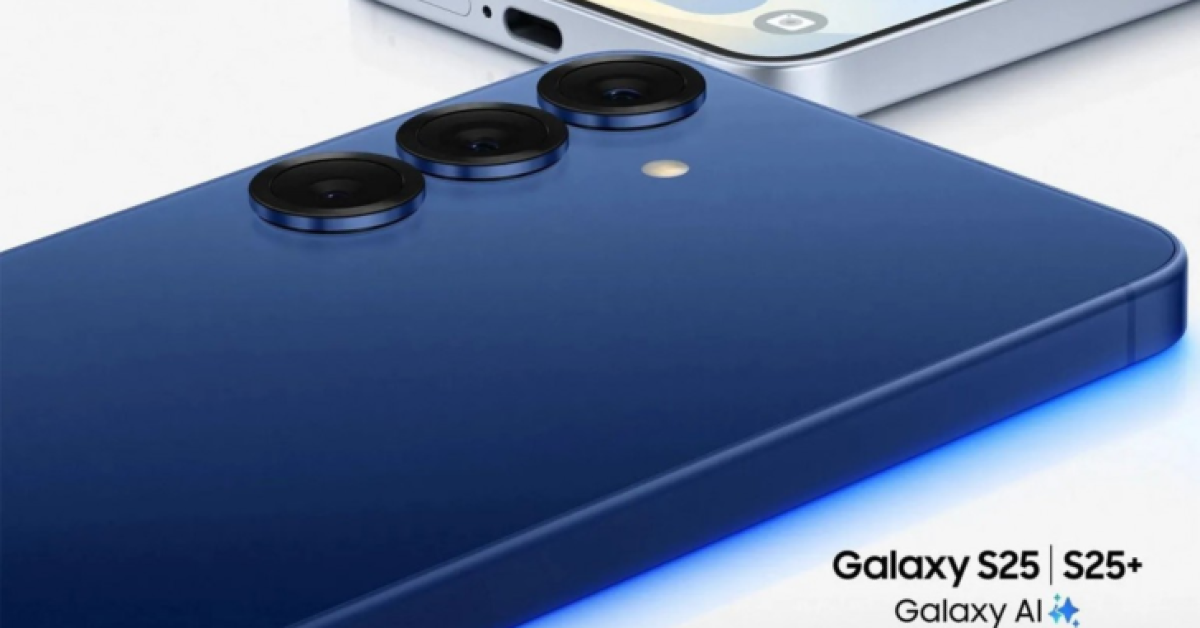
On January 22, Samsung will host its Galaxy Unpacked event. Four smartphone models—the Galaxy S25, S25+, S25 Ultra, and S25 Slim—are rumoured to be released. Evan Blass, a tipster, has leaked promotional images of the phones. The camera configurations of the S25 and S25+ models are identical to those of their predecessors. It is anticipated that the S25 Ultra will include a modified rear camera arrangement, thinner bezels, and a more rounded look.

The upcoming phones are being leaked ahead of Samsung’s Galaxy Unpacked event on January 22. The debut date and a promotional image of four smartphone edges, which shows how many smartphones will be released this year, are the only details the company has revealed. The Galaxy S25, S25+, S25 Ultra, and a new model called the S25 Slim are rumoured to be the four gadgets in the Samsung Galaxy S25 series.

Design of the Galaxy S25 and S25+

Design of the Galaxy S25 and S25+

The designs of the rumoured Galaxy S25 models—the Galaxy S25 and S25+ remain almost unchanged from previous generations, according to promotional images gathered by tipster Evan Blass. The three different lenses on the cameras on both devices match the colour of the rear panel and the frame. They are reported to have a similar triple camera setup on the back, a flat bezel, and rounded corners.

Also Read: Amazon’s Great Republic Day Sale 2025: Best deals on home appliances

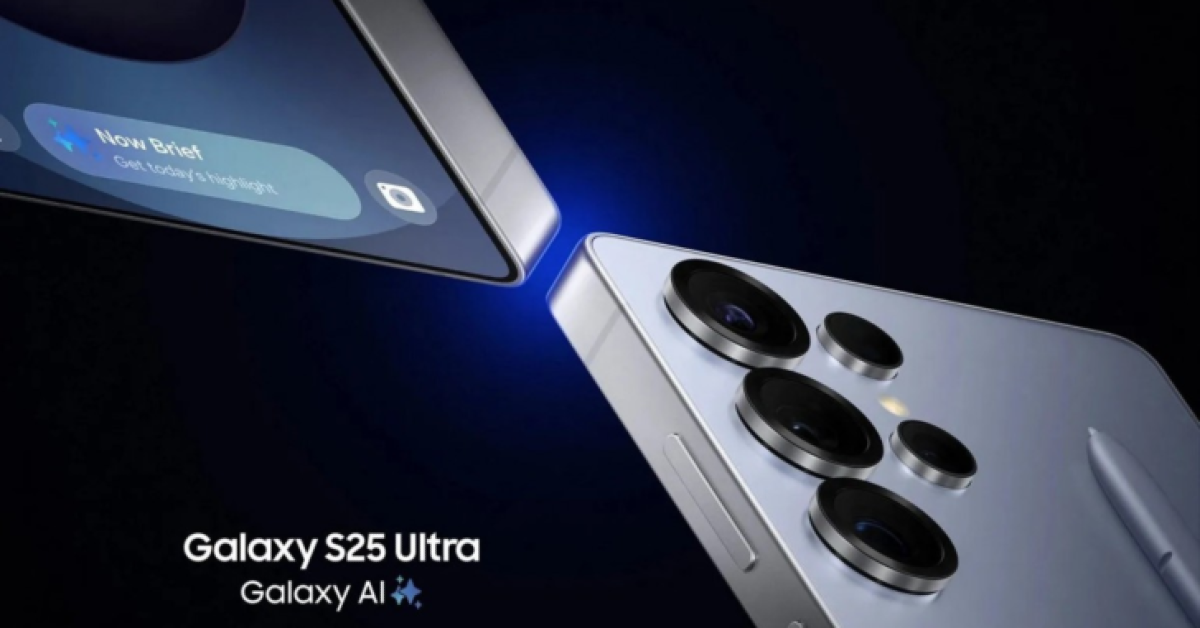
Design of the Galaxy S25 Ultra

Design of the Galaxy S25 Ultra

According to leaked images, the Galaxy S25 Ultra is getting an overhaul redesign, moving away from the boxy style of past Ultra iterations and towards a more contoured one. The gadget is also anticipated to include a quad-camera configuration with slimmer bezels, with the lens rims now lining up with the frame instead of the back panel. The lenses on the cameras might also be updated.

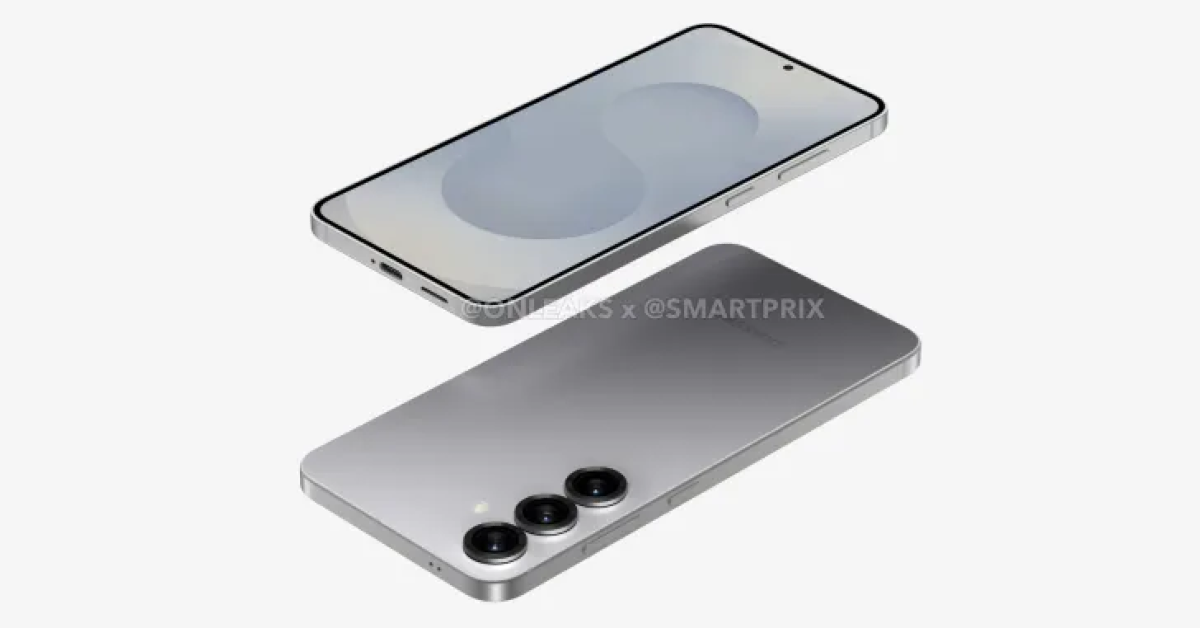
Design and Specs (Expected) of the Galaxy S25 Slim

Design and Specs (Expected) of the Galaxy S25 Slim

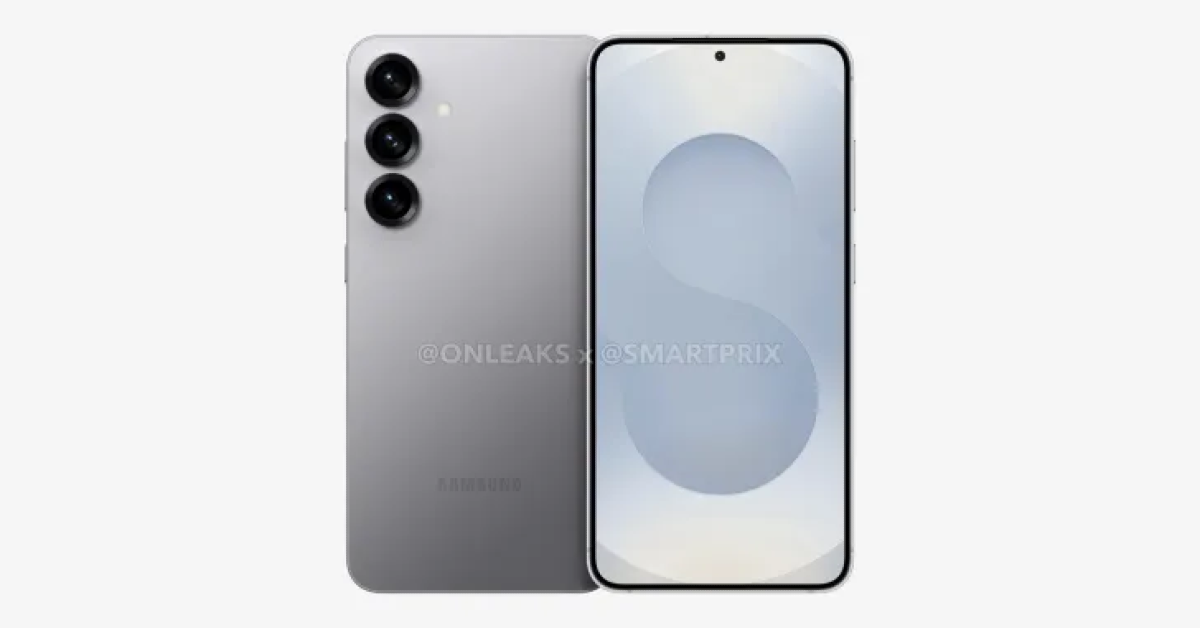
Although an official Galaxy S25 Slim announcement at Unpacked is still pending, this year’s Galaxy S25 debut is anticipated to be special. Based on the four corners, Samsung’s Unpacked teaser predicts four models. In line with leaked pictures from OnLeaks and SmartPrix, the Samsung Galaxy S25 Slim is expected to be the fourth device in the forthcoming series.

With a flat front, back, and sides, three rear cameras, and a thickness of 6.4 mm, the Galaxy S25 Slim is 1.2 mm thinner than the Galaxy S24. The device is anticipated to be over 2 mm slimmer than the flagship model from Samsung. It is anticipated to feature a 50-megapixel telephoto lens with 3.5X optical zoom, a 200-megapixel primary camera, and a 50-megapixel ultrawide camera.

Design and Specs (Expected) of the Galaxy S25 Slim

It is anticipated that the S25 Slim will have a Snapdragon 8 Elite, 12GB of RAM, and Samsung’s One UI 7 running Android 15. It is anticipated to come in May 2025, and it may be teased at Samsung’s Galaxy Unpacked presentation the next week.

Amazon’s Great Republic Day Sale 2025: Best deals on home appliances

Are you planning to buy new appliances for your house this year? For all users, Amazon’s Great Republic Day Sale 2025 has begun in India and is a fantastic chance to do so. During the sale, customers can purchase a variety of electronics, personal gadgets, home furnishings, and other products for a discount.

Started on January 13 and ending on January 19, the Amazon Great Republic Day Sale 2025 will allow customers to take advantage of direct price reductions, bank offers, and exchange deals on a variety of products, ranging from laptops, smartphones, and tablets to home appliances and other consumer electronics.

Take a look at these fantastic offers below:

The Dreame X40 Ultra is a high-performance cleaning solution that simplifies household chores by utilizing next-gen self-cleaning technology, allowing users to spend less time maintaining their surfaces and more time enjoying their clean surroundings. On Amazon during the Great Republic Day Sale 2025, it is currently available at 94,999. The device was launched at Rs 1,29,999 in India.

On the other hand, Dreame R20 is selling at a discounted price of Rs 24,999. It originally cost Rs 36,999. The Dreame R20 is a cordless vacuum that effectively cleans dust, pet hair, and hidden dirt in corners.

Also Read: Samsung announced new year offers on its premium foldable phones: Checkout the deals

The Dreame Airstyle is a versatile 5-in-1 hair styling tool that allows for easy experimentation with various looks. During Amazon’s Republic Day Sale, it will be available at Rs 19,999 down from its launch price of Rs 24,999.

The SHARP Room Air Purifier FP-F40E air purifier, certified by IIT Delhi and the British Allergy Foundation, uses SHARP’s patented Plasmacluster Ion technology for dual purification, making it a popular choice for Indian households due to extreme weather and poor air quality. You can purchase it for as low as Rs 9,480 on Amazon.

Lastly, the Hisense Q7N Series 4K Ultra HD Smart QLED TV offers a stunning display with Quantum Dot Technology, 120 Hz refresh rate, and Dolby Atmos-powered immersive sound. The 55-inch OLED TV is currently available at a discounted price of Rs 49,999.

Also Read: Samsung introduced 9KG Front Load Washing Machines with AI features in India

Customers who use SBI Cards and EMI transactions can receive an instant discount of up to 10%, substantially reducing the cost of these goods during the Great Republic Day Sale 2025. Amazon Pay ICICI Bank credit cardholders are eligible for an instant discount of up to 5%. Customers will also receive extra perks like free EMI offers and coupon or exchange offers.

Poco C75 5G Review: Does the performance match the looks?

Last month, Poco added a new entry-level smartphone to its C series. Priced at Rs 7,999, Poco C75 is one of the most affordable 5G smartphones in India. Since then it has also spawned a Xiaomi counterpart in Redmi 14C. The Snapdragon 4s Gen 2 chipset powers the C75. The smartphone comes in a single 4GB RAM + 64GB storage variant. Additionally, it has a refreshing design, a large display, and a 50MP primary shooter. For a device priced under Rs 8,000, these specs offer a lot of value. The important question is whether these specs translate into a solid everyday performance. We used the smartphone for a week to find the answer. Here is our in-depth review of the Poco C75 5G.

Read Also: How to stop others from adding you to WhatsApp groups?

Poco C75 5G Review: Design and Display

Before we talk about the smartphone, let’s look at what you get inside the box.

  • Smartphone
  • 10W power adapter
  • USB Type-A to Type-C cable
  • SIM ejector
  • Quick start guide

The absence of a plastic case inside the box is a letdown, but given the device’s affordable price, we can let it slide.

Poco C75 5G Review: Design and Display

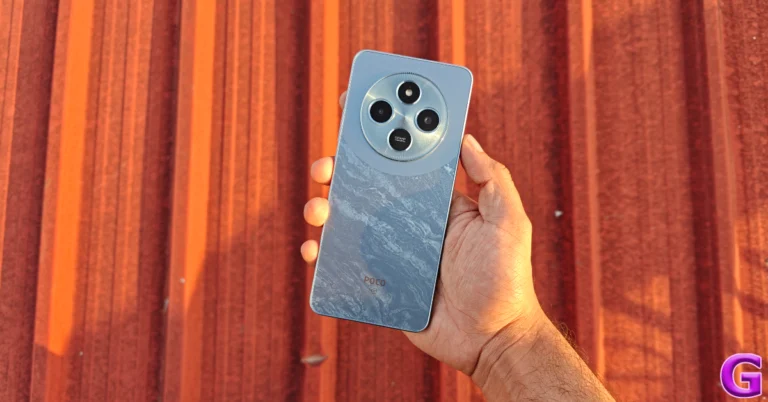
Poco C75 5G is available in 3 colour schemes – Aqua Bliss, Enchanted Green, and Silver Stardust. All three colour variants have a marble flow design on the back panel. This marble pattern is tasteful and radiates a glow when the smartphone is held against the light. The top section of the plastic back has a giant circular panel that houses the primary camera, auxiliary lens, and LED flash in individual cutouts. The area around this panel is finished in a solid colour without the marble pattern. On aesthetics alone, the C75 stands out from the rest of the smartphones in the segment.

design

The plastic frame’s bottom edge houses the primary microphone, USB cable, and speaker grille. The hybrid SIM slot is positioned on the left edge, while the volume rocker and side button are on the right side of the frame. Up top lies the elusive 3.5mm headphone jack. The fingerprint sensor is mounted on the side button and is very snappy.

design

The 6.88-inch IPS LCD panel is surrounded by sizeable bezels that get thicker around the chin. The selfie camera is housed in a waterdrop notch, which feels quite dated. The display has a 120Hz refresh rate but most apps are limited to 60Hz. It can reach 600 nits in High Brightness Mode. The LCD panel holds up well in outdoor conditions but its brightness is easily overpowered under harsh sunlight.

Poco C75 5G Review: Design and Display

The viewing experience on the LCD panel is quite satisfactory. It offers adequate viewing angles and packs a good level of detail. While it lacks the deep blacks of AMOLED panels, this display produces rich and punchy colours. The solitary bottom-firing speaker produces a loud output but lacks a lush low-end.

Poco C75 5G Review: Performance and Cameras

Powering the Poco C75 5G is the Snapdragon 4s Gen 2 chipset. The smartphone is available in a single 4GB RAM (LPDDR4X) + 64 storage (UFS 2.2) variant. The device’s storage can be expanded to 1TB using a micro SD card. We put the smartphone through the Geekbench 6 test and it returned 845 points in the single-core test and 1,956 points in the multi-core test.

Poco C75 5G Review: Performance and Cameras

Poco C75 5G performs well in everyday use, but it suffers from the usual flaws of the segment. The browsing experience is not as seamless as you will find on midrange smartphones. The touch response of the display leaves a little more to be desired. The apps take a fraction of a second longer to load and multitasking often leads to unwanted delays. Having said that, routine tasks like video calling, social media browsing, and media streaming are handled well by the device.

performance

The gaming experience on entry-level smartphones is pretty limited due to constant jitters and frame drops. The C75 suffers from similar issues. Its limited storage capacity of 64GB isn’t ideal for bulky games like Call of Duty Mobile and BGMI. Games like Candy Crush Saga and Subway Surfers are more up its alley.

Our only big gripe with this smartphone is that its 5G support is only limited to Jio. This is bad news for AirTel and Vi users as they will have to contend with 4G speeds on the device. Poco says that once AirTel and Vi transfer to Stand Alone 5G networks, they will be supported by the C75.

hyperos

The Poco C75 5G’s OS duties are handled by the Android 14-based Xiaomi HyperOS. Poco has promised 2 years of major OS upgrades and 4 years of security patches for this phone. However, the current-gen Android 15 will use up one of the two promised OS upgrades. The HyperOS experience on the C75 is consistent with what we’ve seen on Xiaomi and Poco devices. The software is well-optimised and snappy.

Poco C75 5G Review: Performance and Cameras

You get a good range of customisation options for the home screen, app drawer, and lock screen. The iPhone-inspired magazine-style lock screen layouts make the device more vibrant and fun. On the privacy front, the HyperOS offers a handy app locker. We also like that the device uses native a native dialer app instead of resorting to Google’s alternative. There are a lot of bloatware apps on the device, which is something you should expect from an entry-level phone. Thankfully, these apps can be easily uninstalled.

During the review period, we were happy with the mileage we got out of Poco C75 5G’s 5,160mAh battery. Our daily usage consisted of calling, instant messaging, browsing social media, streaming, and gaming. We were left with a 15-20% charge on the device at the end of each day. The smartphone supports 18W but comes with a 10W adapter inside the box. Using a more powerful adapter, we were able to fully charge the device in 90 minutes.

Poco C75 5G Review: Performance and Cameras

Poco C75 5G’s rear camera array houses a 50MP Sony IMX852 sensor and an auxiliary lens. You can only access the primary shooter from the native camera app. This camera puts up a good display in outdoor daylight conditions. The pictures showcase vivid colours and pack a good amount of details. The final results are balanced and do not look overprocessed.

camera

The camera app has a portrait mode for close-up shots, but it produces average results. The shallow depth of field we expect from portraits is nowhere to be found. The camera performance takes a hit in limited lighting conditions as the smartphone struggles to brighten the subject. The images are grainy and soft. The selfies taken with the 5MP front-facing camera are on the softer side but they showcase rich colours. We like that the selfie camera does not go overboard with skin smoothening and tone correction.

portrait
Portrait shots

Admittedly, midrange smartphones in the Rs 15,000 price bracket produce sharper results with more clarity, but for a smartphone that costs half that amount, the C75 does not disappoint.

Read Also: Realme 14 Pro+ Review: Towers over its peers

Verdict

The Poco C75 5G is a good purchase for first-time smartphone buyers. Its massive display is great for media streaming and watching YouTube videos. The everyday performance is reliable and the smartphone handles tasks like WhatsApp calling and texting pretty well. The camera performance in outdoor daylight conditions is satisfactory too. However, the one thing that you need to keep in mind before buying this smartphone is that its 5G support is limited to Jio only.

Poco C75 5G: Pros

  • Excellent design
  • Big display
  • Good battery life

Poco C75 5G: Cons

  • Does not support 5G on AirTel and Vi

Garena Free Fire Max Redeem Codes Today 17 January 2025: Here is how to claim them

Garena Free Fire Max is a battle royale game with regular awards and tournaments to keep players interested. If you play Garena Free Fire, you should be aware of the redeem codes that are released on a daily basis. However, because the battle royale game is banned in India, players from other countries can use the Free Fire Redeem codes daily. If you’re unfamiliar with the Garena Free Fire redeem codes or don’t know how to get them, we’ve put together a step-by-step guide to help you redeem them. Check out Garena Free Fire Max Redeem Codes for 17 January 2025.

The Free Fire Max redeem codes are a great way to get free stuff. These are 12-digit codes that contain alphabets and numbers, as well as an expiration date and time. Because the Garena FF redeem codes cannot be used more than once, you should hurry to the redemption page to claim your free reward before someone else does. To get a free reward, all you have to do is go to reward.ff.garena.com/en, which is the official redemption page. Also, keep an eye on this space for daily updates on Garena Free Fire Max redemption codes and rewards.

Also Read: Sennheiser Accentum Plus wireless headphones with Hybrid Adaptive Noise Cancellation launched

Garena Free Fire Max Redeem Codes Today 17 January 2025

FFYNC9V2FTNN

FFSUTXVQF2NR

FF4MTXQPFDZ9

FFSP9XQ2TNZK

BLFY7MSTFXV2

FFYNC9V2FTNN

FPSTQ7MXNPY5

FFNRX2MQ7SUA

FY9MFW7KFSNN

FFMSTXP2FWCK

FFNRWTQPFDZ9

FFSP9XQ2TNZK

FFKSY7PQNWHG

FFXT7SW9KG2M

NPCQ2FW7PXN2

How to Get Free Fire Max Redeem Codes for Garena on 17 January 2025?

  • Visit the Garena Free Fire Max game’s official website at reward.ff.garena.com.
  • Use your Facebook, Google, VK, Apple ID, Huawei ID, or Twitter account to log in.
  • You’ll be taken to a valid redemption code (s)
  • Copy and paste the 12-digit redemption code into the text box.
  • On the screen, a dialogue box will appear.
  • ‘Ok’ should be selected.

For the latest gadget and tech news, and gadget reviews, follow us on Twitter, Facebook and Instagram. For newest tech & gadget videos subscribe to our YouTube Channel. You can also stay up to date using the Gadget Bridge Android App. You can find the latest car and bike news here.

How to stop others from adding you to WhatsApp groups?

0

WhatsApp is the biggest messaging platform in the world which also makes it a hotbed for internet scams. The platform puts a lot of effort into making its users aware of such scams and pushing them to practice safer messaging habits. To limit the possibility of being contacted by scammers, WhatsApp has a few helpful privacy settings. If you are often added to suspicious groups by unknown people, there is a way you can prevent it from happening. Here’s how you can stop others from adding you to WhatsApp groups.

Read Also: Samsung announced new year offers on its premium foldable phones: Checkout the deals

Who can add you to WhatsApp groups?

By default, everyone on WhatsApp can add you to groups. While this is a convenient feature, it also comes with a chance of being subjected to group spam. For example, if you provide your phone number to a store while making a purchase, they can add you to a group with other customers. Not only does this push a lot of spam your way, but it also makes your phone number visible to other members of the group. To prevent this from happening, WhatsApp lets you decide who can add you to groups. You get to choose from 3 options.

Everyone: As mentioned above, this is the default setting. If you select this option, anyone on the platform can add you to a group.

Contacts: Only people from your phone’s contact list can add you to a group. If someone who is not in your contacts tries to add you to a group, they will get a pop-up that says they can’t add you. If they choose to send you an invite, it will be delivered to you as a personal message and you will get 3 days to make your decision.

My Contacts Except…: This option lets you exclude certain contacts from adding you to groups. The excluded contacts will get the same popup as unknown numbers when they try to add you to a group. They can choose to send you an invite instead. All invites are valid for three days. 

Control who can add you to WhatsApp groups

Step 1: Launch WhatsApp Messenger on your phone and hit the ellipses in the top right corner of the screen.

Step 2: Hit the ellipses at the top right corner of the screen.

Step 2: Tap on Settings.

Step 3: Go to Settings.

Step 3: Hit Privacy.

Step 3: Hit Privacy.

Step 4: Tap on Groups.

Step 4: Tap on Groups. How to stop others from adding you to WhatsApp groups?

Step 5: Select My Contacts. You can also choose to exclude certain contacts from the list of approved people by tapping ‘My Contacts except..’.

Step 4: Tap on Groups and select My Contacts. You can also choose to exclude certain contacts from the list of approved people by tapping ‘My Contacts except..’. How to stop others from adding you to WhatsApp groups?

Frequently Asked Questions (FAQs)

How do I stop others from adding me to a WhatsApp group?

Using privacy settings, you can allow only your contacts to add you to groups. If you don’t want certain contacts to have that access, you can revoke it from group privacy settings.

How do I restrict who can join my WhatsApp group?

If you don’t want other people to join your group, you can disable the option that allows other members to add more people to the group. Tap the name of the group, select ‘Group permissions’ and turn off the toggle switch next to ‘Add other members’. Additionally, turn on the option to approve new requests.

Why can’t someone add me to a WhatsApp group?

If your privacy settings allow only your contacts to add you to a WhatsApp group, other people won’t be able to add you to random groups. Add someone to your list of contacts if you want them to be able to add you to groups. Alternatively, you can go to Settings>Privacy>Groups and allow everyone to add you to groups.

How do I lock a WhatsApp group chat?

Tap the group name at the top of the screen and turn on the toggle switch next to Chat Lock on the following screen. Confirm the action with your biometrics.

Can someone contact me on WhatsApp if they are not in my contacts?

Yes, people who are not on your contact list can message you and call you on WhatsApp. The messenger lets you know if you share any groups in common with the user or if their number is registered in a different country.

Read Also: Realme 14 Pro+ Review: Towers over its peers

Final Thoughts

This is how you can stop others from adding you to WhatsApp groups. If you don’t want to receive phone calls from unknown numbers on WhatsApp, you can silence them from privacy settings. If you have any questions, let us know in the comments!

Samsung announced new year offers on its premium foldable phones: Checkout the deals

Samsung recently announced massive festive discounts on its premium Galaxy Tabs and wearable series in India. Now the company has unveiled new year offers exclusively for its premium foldables including – Galaxy Z Fold 6 and Galaxy Z Flip 6. Checkout the deals below:

Samsung has announced festive offers on its Galaxy Z Fold 6 and Galaxy Z Flip 6 smartphones in India. The Samsung Galaxy Z Fold 6 which was originally priced at Rs 1,64,999 is now available with an instant cashback of Rs 15000 and a 24 months of no-cost EMI offer for just Rs 4167 per month.

Whereas, the Galaxy Z Flip 6 is now available with an instant cashback of Rs 20000 and a 24-month no-cost EMI offer for just Rs 2500 per month. The smartphone is priced at Rs 1,09,999.

Samsung announced new year offers on its premium foldable phones: Checkout the deals

Similarly, Galaxy Tab S10+ Wi-Fi and Galaxy Tab S10 Ultra Wi-Fi are now available in India at discounted pricing, which includes bank cashback and upgrade bonuses. The updated model is currently available for Rs 71999 and Rs 88999, down from Rs 90999 and Rs 108999 upon launch. These exceptional offers include a bank cashback of Rs 19000 and an upgrade bonus of Rs 12000.

Also Read: Samsung introduced 9KG Front Load Washing Machines with AI features in India

The Galaxy Tab A9+ starts at Rs 12999, while the Galaxy Tab S9 FE starts at Rs 22999 and includes a complementary S Pen, making it ideal for first-time Galaxy tablet customers.
The Galaxy Tab S9 FE+ is available at a discounted price of Rs 30999, with high-end performance and features. The Wi-Fi version costs Rs 59999 with a bank cashback of Rs 9000 and an exchange bonus of Rs 3000.

A few days back the company announced new offers on its Galaxy wearables. The Galaxy Watch Ultra will be discounted by Rs 10,000, while the Galaxy Watch 6 Classic will be heavily discounted by up to Rs 19,000. The special price for the Galaxy Watch Ultra will feature an Rs 10,000 upgrade incentive or instant cash back.

Also Read: Realme 14 Pro 5G Series arrived in India: Price in India, Specifications

Buyers of Galaxy Buds 3 Pro and Galaxy Buds 3 will now be eligible for an instant cash refund or an upgrade bonus of up to Rs 5000. Customers seeking better affordability can also benefit from free EMIs for up to 24 months.

The Galaxy Watch Ultra, Galaxy Watch 7, Galaxy Watch 6 Classic, Galaxy Buds 3 Pro, Galaxy Buds 3 FE, and Galaxy Ring all have different discounts and EMI options. The Ultra provides Rs 10000 money or upgrade, whereas the Watch 7 provides Rs 8000 cashback or upgrade. The Buds3 Pro comes with a discount or upgrade offer of Rs 5000, whereas the Buds FE comes with an upgrade offer of Rs 4,000.


NYT Wordle Answer and Hints Today (January 17)

Are you looking for today’s Wordle for January 17, 2025? The problem is difficult to solve, so if you need assistance, we’ve included hints and the answer to the January 17 Wordle.

Hints and Answers for Today’s Wordle January 17

Before answering directly, please check the January 17 Wordle Hints first.

Hint 1: Today’s Wordle answer includes two  vowels.
Hint 2: The answer for today has no repeating letter.
Hint 3: Written or spoken language that is not poetry

What word does today’s Wordle begin with?

Do you need help with today’s Wordle answer’s initial letter?

The first letter in today’s Wordle is “P”

Today’s Wordle Answer January 17 #1308

The answer to Wordle #1308 on January 17, 2024, is — PROSE

Also Read: Ranveer Allahbadia got his YouTube Channels back, videos restored

What is Wordle?

Wordle: A Five-Letter Word Guessing Game
• The game allows six guesses of a five-letter word.
• Provide feedback on guessed letters’ placement in the puzzle.
• The New York Times purchased the game in 2022.
• Created by Josh Wardle for his partner, narrowing down 12,000 English words to 2,500.
• Named after the word “word.”

How To Play Wordle?

Wordle is a New York Times word puzzle game that allows users to guess a five-letter word in six attempts. The letters are highlighted in Yellow and Green, indicating whether the word is present in the answer or not, and Green letters indicate the correct guess.

Also Read: Samsung Galaxy Tab S10+, Galaxy Tab S10 Ultra with Galaxy AI launched in India

Wordle Tips and Tricks

  • Select a powerful starting word: Avoid using unusual words, as they frequently do not match common letters. A good opening word has plenty of benefits.
  • Repeating letters: Don’t be afraid of repeating letters; they appear frequently in words. The answer may contain one or two repeated letters.
  • Use the Wordlebot: The NYT’s Wordlebot analyses and compares replies to itself. This challenge can assist you enhance guessing skills and highlight areas for development.

Amazon Quiz Answers Today 17 January 2025: Participate to win Up To Rs 500 Amazon Pay Balance

17 January 2025: New Amazon Quiz is now available. Customers from different parts of the country are participating in the daily quiz. The quiz starts at midnight today and will be live until 11:59 PM tonight. By successfully answering every question, participants in the quiz have the chance to win wonderful rewards. Up to Rs 500 Amazon Pay Balance is up for grabs to participants today.

One wrong answer could eliminate you from the quiz. You have a chance to win up to Rs 500 Amazon Pay Balance if you successfully answer every question. Users of the app only have the opportunity to take the quiz. Check Out 17 January 2025 Amazon Quiz Answers.

Are you not able to find Amazon FunZone? Click below and participate.

Click here to enter the Amazon FunZone Quiz and play today.

Amazon Quiz Today Prize: Rs 500 Amazon Pay Balance

Quiz Date: 17 January 2025

Daily Timing: 12 AM to 11:59 PM

Previous Amazon Quiz Winners Announcement: Today 12 PM Noon

Amazon Quiz Answers Today 17 January 2025: Win Up To ₹ 500 Amazon Pay Balance

Question 1: Which of these West Indies bowlers took the wicket of Steve Smith with his first ball in Test cricket?

Answer: Shamar Joseph

Question 2: At the 2024 Emmy Awards which series won the award for Best Drama Series?

Answer: Succession

Question 3: Sharmistha Mukherjee has recently written a book titled ‘_____ My Father: A Daughter Remembers’. Fill in the blanks

Answer: Pranab

Question 4: Name the famous freedom fighter, whose statue is in the middle

Answer: Bhagat Singh

Question 5: Name this famous person who had cameos in several Marvel movies

Answer: Stan Lee

How To Play Amazon Quiz Today

Only app users are eligible to play the Amazon quiz every morning from 12 AM to 11:59 PM. The quiz is not available on the desktop. For those who are unaware of how to play the Amazon quiz, below are the steps, you can follow to take the quiz.

  • First, download the Amazon app from the Google Play Store or App Store or go here to download the Amazon App
  • Now fill in the required information through the Sign-Up option.
  • To find the Amazon Quiz banner, log in to the Amazon app and scroll down to the home screen.
  • Tap on the Amazon Quiz banner and tap on the Start button to start the Quiz.
  • Now you will get 5 questions and you need to answer them correctly. One wrong answer will eliminate you from the Quiz.
  • After answering all the questions correctly you are now eligible for a Lucky Draw.
  • The previous winner’s name will be announced today at 12 PM.

Amazon Daily Quiz Answers from the previous few days.

Here are all the answers from the previous 5 days of the Amazon Daily Quiz and Contest.

Amazon Quiz Answers Today 16 January 2025: Win Up To ₹ 500 Amazon Pay Balance

Question 1: Which former champion did Caroline Garcia knock out in the first round of the 2024 Australian Open?

Answer: Naomi Osaka

Question 2: Lily Gladstone won the ‘Best female actor in a film- drama’ at the 2024 Golden Globes for which film?

Answer: Killers of the Flower Moon

Question 3: Nigar Shahji is the project director of which ISRO mission that was launched on 2nd September, 2023?

Answer: Aditya- L1

Question 4: In which city is this famous museum located?

Answer: Bilbao

Question 5: This famous shoe brand was founded in which country?

Answer: Germany

Amazon Quiz Answers Today 15 January 2025: Win Up To ₹ 500 Amazon Pay Balance

Question 1: Recently which of these New Zealand batters equalled the record for most sixes in a T20I innings?

Answer: Finn Allen

Question 2: Which movie won the Best film- Drama award at the 2024 Golden Globes?

Answer: Oppenheimer

Question 3: The Tangail sarees from which state recently got a GI tag?

Answer: West Bengal

Question 4: Which university is shown here, attended by the likes of Mark Zuckerberg?

Answer: Harvard University

Question 5: What breed of dog is shown here?

Answer: Shih Tzu

Amazon Quiz Answers Today 11 January 2025: Win Up To ₹ 500 Amazon Pay Balance

Question 1: Which state in Australia has chosen not to be the host of the 2026 Commonwealth Games?

Answer: Victoria

Question 2: In June 2023, which country briefly banned the film ‘Adipurush’?

Answer: Nepal

Question 3: The world’s most prized variety of which fruit, called Miyazaki, is sold at up to Rs 2.75 lakh per kg?

Answer: Mango

Question 4: In which West African country is this animal featured prominently on the national emblem?

Answer: Ivory Coast

Question 5: The Andromeda Galaxy is also known as ?

Answer:Messier 31

Amazon Quiz Answers Today 10 January 2025: Win Up To ₹ 500 Amazon Pay Balance

Question 1: Which state in Australia has chosen not to be the host of the 2026 Commonwealth Games?

Answer: Victoria

Question 2: In June 2023, which country briefly banned the film ‘Adipurush’?

Answer: Nepal

Question 3: The world’s most prized variety of which fruit, called Miyazaki, is sold at up to Rs 2.75 lakh per kg?

Answer: Mango

Question 4: In which West African country is this animal featured prominently on the national emblem?

Answer: Ivory Coast

Question 5: The Andromeda Galaxy is also known as ?

Answer:Messier 31

Amazon Quiz Answers Today 9 January 2025: Win Up To ₹ 500 Amazon Pay Balance

Question 1: In which state capital was the yearly Bonalu Festival held?

Answer: Telangana

Question 2: The Ministry of Defense has appointed Rakesh Pal as the 25th Director General of which organisation?

Answer: Indian Coast Guard

Question 3: What name is given to Apple’s ‘mixed reality’ headset that will be a personal computer controlled with hands, voice & eyes?

Answer: Vision Pro

Question 4: Which country has the largest population of these animals?

Answer: Somalia

Question 5: Which actor has climbed the top of this building?

Answer: Will Smith

Amazon Quiz Answers Frequently Asked Questions (FAQs)

Where can I check the previous winners? Did I win how to check?

You can head over to this link on your mobile or desktop to check the winners of the Amazon Daily Quiz Contest.

How to Play Amazon Daily Quiz or Contest?

We have written an explainer above, you can refer to that.

When are the winners of the Amazon Quiz and contest announced or declared?

The announcement of today’s Amazon quiz winner will take place Tomorrow. As for the Special Quiz and “Spin & Win” Contest, the winners will be declared once the Quiz Contest comes to an end. To find out who the lucky winner is, you can refer to the Amazon Quiz Winners List or visit the Amazon Winners tab in the Amazon App.

How to participate in the Daily Amazon Quiz?

That is very easy, just got to the Amazon app and scroll to the bottom of the page and you will find the Quiz section. Click on it (usually it is called the fun zone) and you can enter the Amazon Today Quiz Contest. 

Are there any other quizzes or contests running on Amazon daily?

Yes, there are many running on a daily basis. These range from spinning the wheel to answering the questions correctly. All are located in the Fun Zone. 

What are the criteria for selecting a winner in the Daily Amazon Quiz?

When a qualified player submits correct answers to all the questions, they will automatically be entered into a lucky draw. This draw will include all participants who answered all the questions correctly. Amazon randomly selects the final winners from the pool of eligible participants who gave the right answers.

Which Types of Questions are asked within Amazon Daily Quiz?

These are very simple and straightforward questions. These are mainly related to general knowledge. 

Where should I look for Amazon Daily Quiz answers?

You can bookmark our website www.gadgetbridge.com as we will help you every day with the Amazon Daily Quiz. We bring you fresh answers every day for the Amazon Daily Quiz and Contest. 

What time does Amazon Announce previous winners?

The previous winner’s name will be announced today at 12 PM (noon).
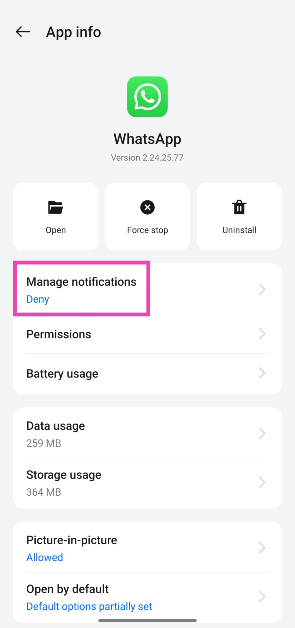
Samsung introduced 9KG Front Load Washing Machines with AI features in India

Samsung has introduced its 9KG Front Load Washing Machines, which are an extension of its Bespoke AI Laundry Series. The 9KG models provide tremendous performance and extensive features in a compact package. The 9KG Front Load Washing Machines are intended for effective daily laundry, and handling heavy loads such as clothes, bedsheets, and towels. They include advanced features including Super Speed, AI Energy Mode, AI Ecobubble, and Hygiene Steam, which enable faster cycles, energy savings, better fabric care, and thorough, hygienic cleaning.

Samsung’s 9KG Front Load Washing Machines incorporate AI-powered technologies to make laundry less of a bother. In AI Energy mode, the machine uses Ecobubble technology to save up to 70% of its energy consumption. Ecobubble optimises wash cycles based on fabric differences, enhancing garment protection by up to 20%. Laundry becomes less of a chore.

Also Read: Realme 14 Pro 5G Series arrived in India: Price in India, Specifications

The washing machine’s Super Speed technology allows it to wash a load in 39 minutes by guiding the jet to the clothing. Hygiene Steam provides a thorough cleaning by removing dirt, 99.9% of bacteria, and allergies. AI Control simplifies washing by learning the user’s habits and recommending personalised cycles. Digital Inverter Technology (DIT) uses stronger magnets and less energy than a Universal Motor, resulting in quieter operation and longer durability.

Also Read: MrBeast expresses interest in purchasing the popular app TikTok ahead of the US ban

Samsung’s latest 9 kg front load washing machines are priced at Rs 40990. Customers can receive up to 15% cashback. The new models are now available for purchase on Samsung.com, Samsung Shop App, retail stores, and other e-commerce sites. It will be available in Navy, Black, and Inox finishes.

Realme 14 Pro 5G Series arrived in India: Price in India, Specifications

Realme 14 Pro 5G Series has debuted in India today. The lineup consists of Realme 14 Pro+ 5G and Realme 14 Pro 5G models. The Plus variant is powered by Qualcomm’s Snapdragon 7s Gen 3 SoC whereas the base variant is equipped with MediaTek Dimensity 7300 Energy 5G processor. Both phones house a 6,000mAh battery and feature a triple Flash Camera setup featuring a 50-megapixel primary sensor.

Pricing and Availability

The price of Realme 14 Pro+ 5G starts at Rs 29,999 for the 8GB RAM with 128GB storage. The top-of-the-line 12GB RAM with 256GB storage variant comes with a price tag of Rs 34,999. The device comes in three shades white, purple and grey.

On the other hand, the Realme 14 Pro 5G price in India begins at Rs 24,999 for the base 8GB RAM with 128GB storage. The 8GB RAM with 256GB storage varaint will be avaiable at Rs 26,999. Pink, White and Grey are the three colour options for the smartphone.

Both the phones are scheduled to go on sale on January 23 at noon via the company’s official website in the country, Flipkart and offline retail stores. The device can now be pre-booked for a limited period.

Also Read: MrBeast expresses interest in purchasing the popular app TikTok ahead of the US ban

Realme 14 Pro+ 5G Specifications

Realme 14 Pro 5G Series arrived in India: Price in India, Specifications

The Realme 14 Pro+ 5G features a 6.83-inch 1.5K AMOLED screen with 1,272×2,800 pixels of resolution. The display has support for a 120Hz refresh rate and 1500nits peak brightness. The panel has 3840Hz PWM dimming and Corning Gorilla Glass 7i protection. The phone operates on Realme UI 6.0 OS based on Android 15 out of the box. Under the hood, there is Qualcomm’s Snapdragon 7s Gen 3 SoC.

In terms of photos and videos, there is a triple rear camera setup lead by a 50-megapixel 1/1.56-inch Sony IMX896 primary sensor (OIS and f/1.88 aperture), an 8-megapixel Sony IMX896 ultra-wide angle sensor and a 50-megapixel Sony IMX882 periscope lens(OIS and up to 3x optical zoom and 6x lossless zoom). There is a 32-megapixel front-facing camera for selfies.
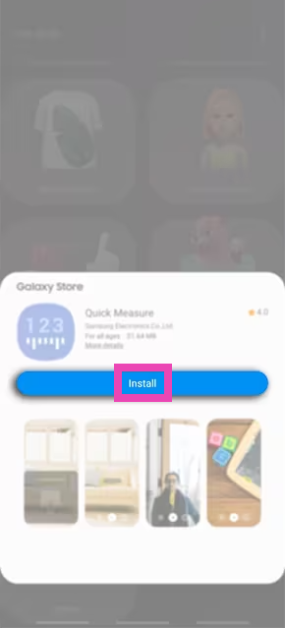
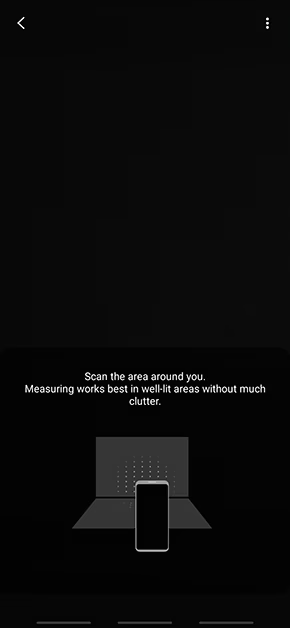
The device also packs a 6,000mAh Titan battery with 80W fast charging support. It comes with IP66+IP68+IP69 ratings for dust and water resistance.

Also Read: Realme 14 Pro+ Review: Towers over its peers

Realme 14 Pro 5G Specifications

Realme 14 Pro 5G Specifications

Realme 14 Pro 5G is highlighted with a 6.77-inch AMOLED display with 2392 X 1080 pixels resolution of resolution and 120Hz refresh rate support. The panel has up to 4,500 nits of peak brightness, 100 percent DCI-P3 colour gamut and Corning Gorilla Glass 7i protection. The phone is powered by a MediaTek Dimensity 7300 Energy 5G processor.
Realme 14 Pro 5G comes with a 50-megapixel Sony IMX882 rear camera with OIS, f/1.8 aperture and a secondary monochrome lens. There is a 16-megapixel selfie camera on the front.

The Realme 14 Pro has a 6000mAh battery with 45W fast charging support.

Realme 14 Pro+ Review: Towers over its peers

After launching its flagship smartphone at the tail end of 2024, Realme has kicked off the new year with its segment-disrupting midrange series. The Realme 14 Pro Series comprises 2 variants, with the top-spec ‘Plus’ model fetching Rs 29,999. It is powered by the Snapdragon 7 Gen 3 SoC and is rated IP69 for dust and water resistance. It is one of the few smartphones in its segment to feature a telephoto lens in its rear camera array. These specs alone were enough to gain our attention when the smartphone crossed our desk a week ago. We’ve been daily driving it since then. Here is our review of the Realme 14 Pro+.

Read Also: Acerpure’s Aspire & Swift TVs Promise Vibrant UHD at a Surprising Price Of Rs 11,299

Realme 14 Pro+ Review: Design and Display

Here’s what you get inside Realme 14 Pro+’s retail box:

  • Smartphone
  • 80W SUPERVOOC power adapter
  • USB Type-A to Type-C cable
  • Silicone phone cover
  • SIM ejector
  • Phone hole seal stickers
  • Quick guide

Realme 14 Pro+ looks similar to its predecessor but it gets a few interesting design tweaks. For starters, its white variant has a temperature-sensitive back panel. The veiny pattern on the panel turns blue when the surrounding temperature drops below 15°C. However, the Suede Grey variant which we used for this review is our favourite of the lot. Its soft-touch matte finish lends it an excellent in-hand feel. The dark grey shade looks tasteful and matches the overall aesthetic of the smartphone.

Realme 14 Pro+ Review: Design and Display

The outer ring covering the circular camera cutout has been stripped of its ridge texture. The smooth surface of the ring is engraved with the aperture, focal length, and maximum zoom limit of the primary shooter along with the ‘Hyperimage+’ branding. The 3 lenses in the camera cutout are arranged in a triangular layout resembling a fidget spinner. The spaces between juxtaposing lenses are occupied by the 3 MagicGlow Triple Flash segments.

design

The curved form factor of Realme 14 Pro+ sets it apart from the flat-edged smartphones in its category. Its display and back panel are curved along the sides and merge seamlessly into the frame. This frame has curved edges and rounded corners. As a result, the smartphone has a great grip and a phenomenal in-hand feel. The volume rocker keys and the side button are positioned on the right edge of the frame. The bottom edge houses the SIM tray, primary microphone, USB port, and primary speaker grille. The secondary speaker and microphone find their way to the top edge of the frame.

sides

The 6.83-inch curved AMOLED display is slightly larger than the panel on the previous model but peaks at 1,500 nits which is 500 nits fewer than its predecessor. Since AMOLED panels rarely reach their peak brightness in general use, this isn’t a big deal. Interestingly, this display can hit 1,500 nits in High Brightness Mode as well. We used it extensively under direct sunlight and were pleased to see that it retained its legibility. Surrounding the display are very slim bezels. The smooth touch response offered by the 120Hz screen makes the browsing experience fun and seamless.

Realme 14 Pro+ Review: Design and Display

During the review period, we used the Realme 14 Pro+ to stream content across major OTT platforms. The smartphone delivered an immersive experience with a wide range of viewing angles and no obstructive bezels to get in the way. The images showcased rich, vibrant colours with deep dark shades. The dual speaker arrangement produces a well-rounded audio output that is loud enough to overpower the ambient noises in an indoor setting. The only downside to the viewing experience is that the Netflix app lacks HDR support for this smartphone.

display

Realme 14 Pro+ is rated IP69 for dust and water resistance, which is a big upgrade over its predecessor’s IP65 rating. This smartphone is completely waterproof and can handle being submerged up to 1.5m for 60 minutes.

Realme 14 Pro+ Review: Performance and Cameras

The Snapdragon 7s Gen 3 SoC lies at the heart of Realme 14 Pro+. There are 3 RAM + Storage configurations on offer — 8GB + 128GB (Rs 29,999), 8GB + 256GB (Rs 31,999), and 12GB + 256GB (Rs 34,999). Here’s how the smartphone performed in Geekbench and AnTuTu benchmarks.

Geekbench 6: 1,191 (Single-core) | 3,249 (Multi-core)
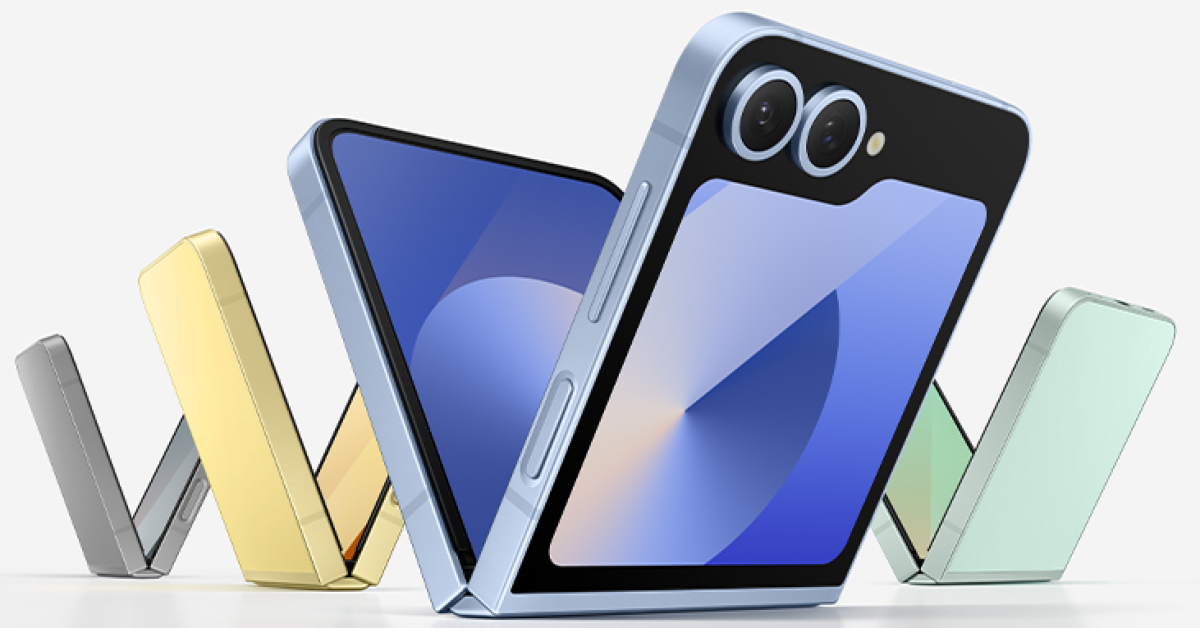
AnTuTu: 826,288

benchmark

Daily driving the Realme 14 Pro+ was a pleasant experience as the smartphone helped us stay on top of routine tasks like instant messaging, video calling, media streaming, web browsing, navigation, and more. Apps take minimal time to load and the smartphone intelligently shelves them in the background when they’re not in use. We did not hit any roadblocks while juggling multiple apps on the device. The haptic motor within the phone is tuned nicely and offers satisfying feedback.

Although the smartphone’s gaming performance isn’t segment-defining, we had a nice time playing titles like Call of Duty Mobile and BGMI on the device. The gameplay is free of jitters and frame drops in medium graphics. The frame rate is capped at 60fps. However, Realme says that the software update scheduled for February will unlock 90fps gameplay in BGMI. When it comes to thermal management, the Realme 14 Pro+ does a decent job of keeping its internals cool. The device starts warming up after 40 minutes of gaming.

Realme 14 Pro+ Review: Design and Display

Handling the OS duties on the Realme 14 Pro+ is the Android 15-based Realme UI 6.0. If you’re not familiar with Realme’s Android skin, it is nearly identical to Oppo’s ColorOS. Realme UI’s strengths lie in its vibrant aesthetic and snappy optimisation. We also like the customisation options for the app icons, fingerprint animation, Always On Display, and more. There are some AI features baked into the software, like Google’s Circle to Search. The native photo editor is equipped with an AI object eraser.

The Realme 14 Pro+ puts any kind of battery anxiety to rest with its massive 6,000mAh Si/C battery pack. On heavy usage days, we racked up almost 6 hours of screen time and were left with a 20-25% charge in the tank. If you’re more conservative with your usage, you can push the battery life to 2 days. The smartphone supports 80W wired charging. After plugging in the charger at 20%, it took us 40 minutes to fully charge the device.

primary shooter

Realme 14 Pro+ Review: Performance and Cameras

Realme 14 Pro+’s rear camera array features a 50MP Sony IMX896 primary sensor, an 8-megapixel ultrawide shooter, and a 50MP Sony IMX882 sensor for the periscope telephoto lens. This telephoto lens has 3x optical zoom. The smartphone can zoom up to 120x, which is something we rarely see in midrange devices.

Realme 14 Pro+ Review: Performance and Cameras

Realme 14 Pro+ Review: Performance and Cameras

The 50MP primary shooter takes great pictures in outdoor daylight conditions. The images pack a lot of details and showcase rich, punchy colours. We also like how it exposes the sky and assigns it accurate colours. The images look sharp and have a good dynamic range. In limited lighting conditions, this camera relies on the Night Mode to brighten up the subject and clear the noise. While the images are smooth and mostly grain-free, the subjects often appear over-brightened.

camera
Primary shooter: Without Night Mode v Night Mode
Ultrawide
Ultrawide lens

Images taken with the 8MP ultrawide camera are less warm but have a good colour profile. They pack the important details and have a decent dynamic range. While the colour shift from the primary shooter is noticeable, we don’t mind it too much. In limited lighting conditions, this camera relies heavily on Night Mode. The results are a bit grainy but the colour profile is decent.

Ultrawide lens
Ultrawide lens
Realme 14 Pro+ Review: Performance and Cameras
Ultrawide lens: Without Night Mode v Night Mode

The 50MP telephoto lens captures good pictures at 3x optical zoom. The images are sharp and detailed, flaunting deep colours. Like the primary shooter, this lens is equipped with OIS. You can zoom up to 120x, but the image quality takes a hit after the 20x mark. The smartphone relies heavily on photoprocessing and image smoothening to make the results presentable beyond this point. This comes in handy while zooming into distant billboards and signs.

Realme 14 Pro+ Review: Performance and Cameras
1x v 3x
zoom
6x v 20x
zoom
30x v 120x

Apart from taking zoomed-in images, the telephoto lens comes in clutch while taking portrait shots. We prefer this camera to the primary shooter for taking portraits. The images are focused and have just the right amount of background blur. The smartphone does a good job of separating the subject from the background and ensuring that its borders don’t get blurred out.

Realme 14 Pro+ Review: Performance and Cameras
1x portrait shots
Realme 14 Pro+ Review: Performance and Cameras
2x portrait shots
portrait
3x portrait shots

The 32MP front-facing camera takes good selfies while keeping the skin smoothening and brightening effects to a minimum. This camera can record 4K videos at 30fps. The primary shooter and telephoto lens are also capable of shooting in 4K at 30fps.

Read Also: Top 5 ways to disable the touchpad on a Windows 11 laptop 

Verdict

The Realme 14 Pro+ is one of the most complete smartphones in its price segment. The Snapdragon 7s Gen 3 processor makes it an incredible device for rigorous everyday use. The soft-touch back panel, along with the curved back panel, lends the device a very premium in-hand feel. The 3x telephoto lens is the highlight of the smartphone’s versatile rear camera system and snaps some of the most beautiful portrait shots we’ve seen in this category. To top things off, the new 6,000mAh Si/C battery pack on this smartphone can power it for 2 days on moderate usage.

Realme 14 Pro+: Pros

  • Clean design
  • Great in-hand feel
  • Excellent cameras
  • Versatile battery life

Realme 14 Pro+: Cons

  • Contains bloatware