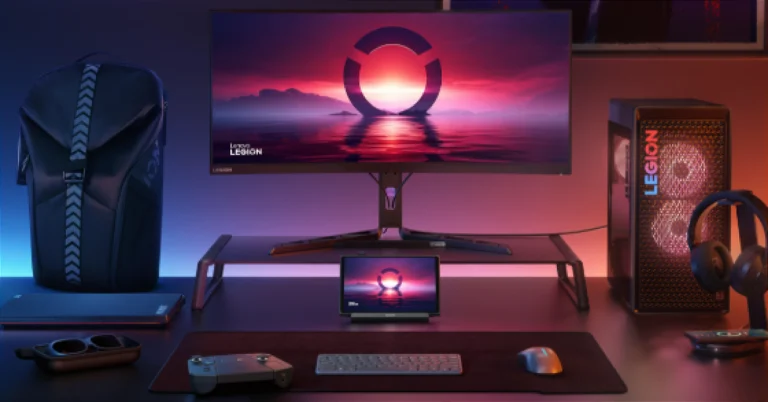
Lenovo introduced a new range of Legion Go monitors and accessories in India

Lenovo expanded its Legion ecosystem by launching several Legion Go accessories and new Legion gaming displays, enabling gamers to personalise their gadgets and gaming experiences.

Lenovo Legion R27qc-30 and Lenovo Legion R32qc-30 Monitors

Lenovo Legion R27qc-30 and Lenovo Legion R32qc-30 Monitors

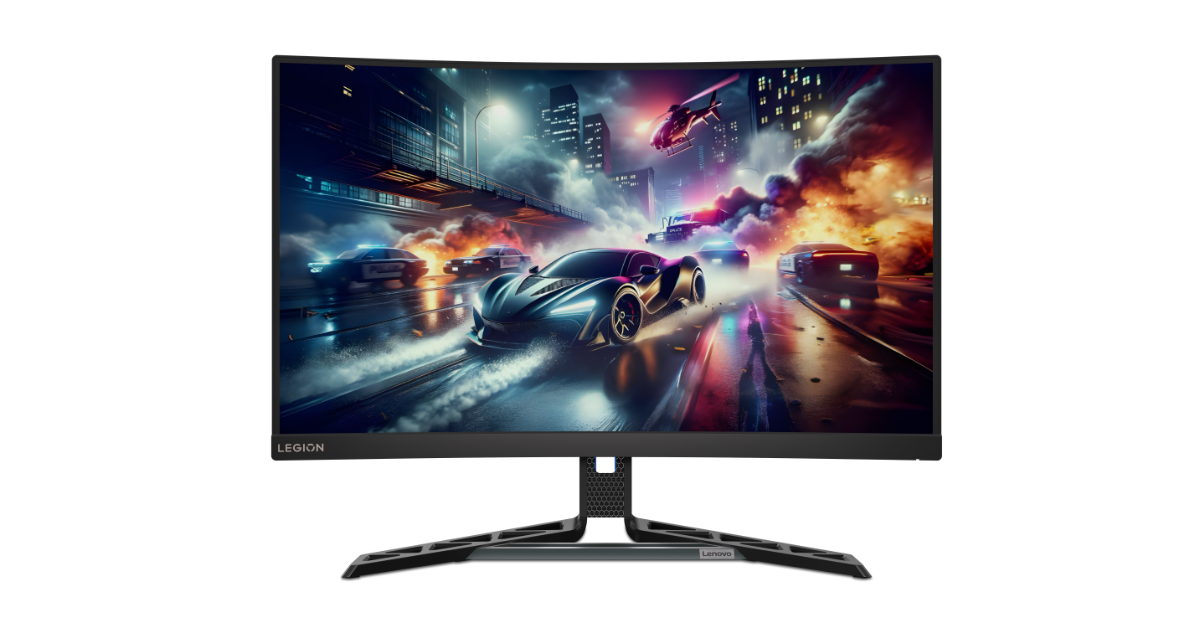
Lenovo Legion Go owners now have two more display options: the 27-inch Lenovo Legion R27qc-30 and the 31.5-inch Lenovo Legion R32qc-30 monitors. These monitors offer 1500R curved panels, a refresh rate of up to 180Hz, and a response time of 0.5ms (MPRT). They support 120% sRGB and 90% DCI-P3 resolutions and have two HDMI 2.1 connections, a single DP1.4 port, and an audio output. They also have a pair of three-watt speakers. Legion Ultimate Support provides 24-hour access to skilled gaming techs for consumers looking to get the most out of their Lenovo Legion accessories.

The Lenovo Legion R27qc-30 and R32qc-30 displays will be available in October for INR 24,000 and INR 32,600, respectively.

Also Read: Apple launched Beats Solo Buds, Beats Solo 4, and Beats Pill in India

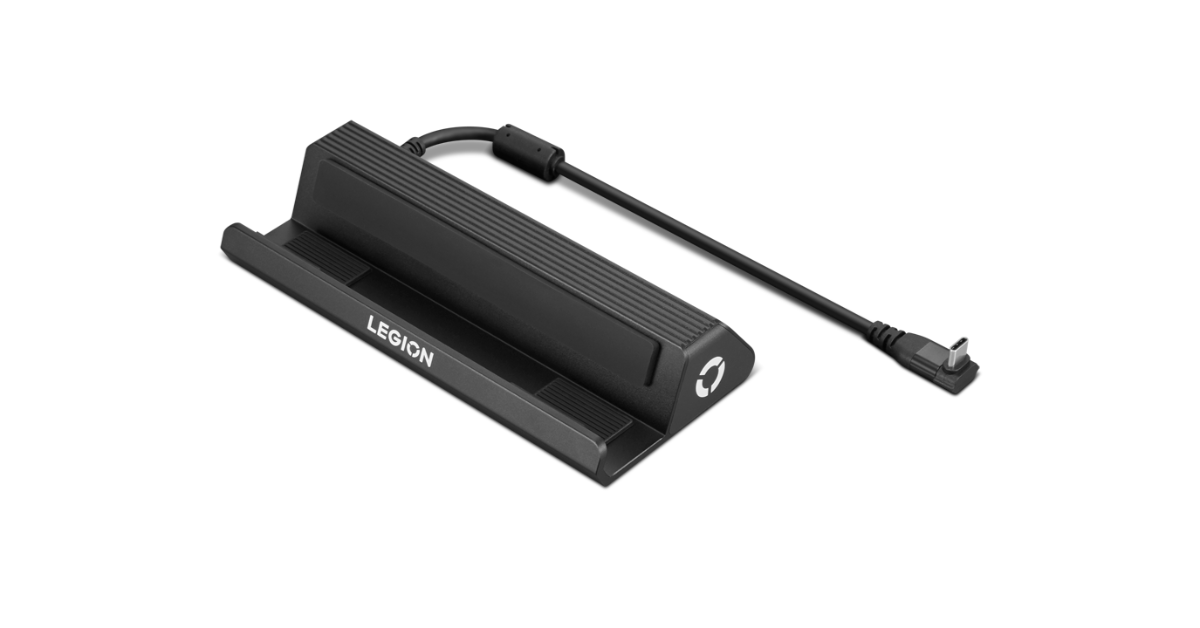
Lenovo Legion Go USB-C Dock

Lenovo Legion Go USB-C Dock

The Lenovo Legion Go USB-C dock is a gaming base station with multiple ports, including a USB-C power port, 1G RJ45 port, Type-C port, two USB-A 3.0 ports, and an HDMI 2.0 port supporting 4K at 60Hz. It also has a 230mm integrated Type-C cable for connectivity.
The Lenovo Legion Go USB-C Dock is slated to be available at INR 6,000.

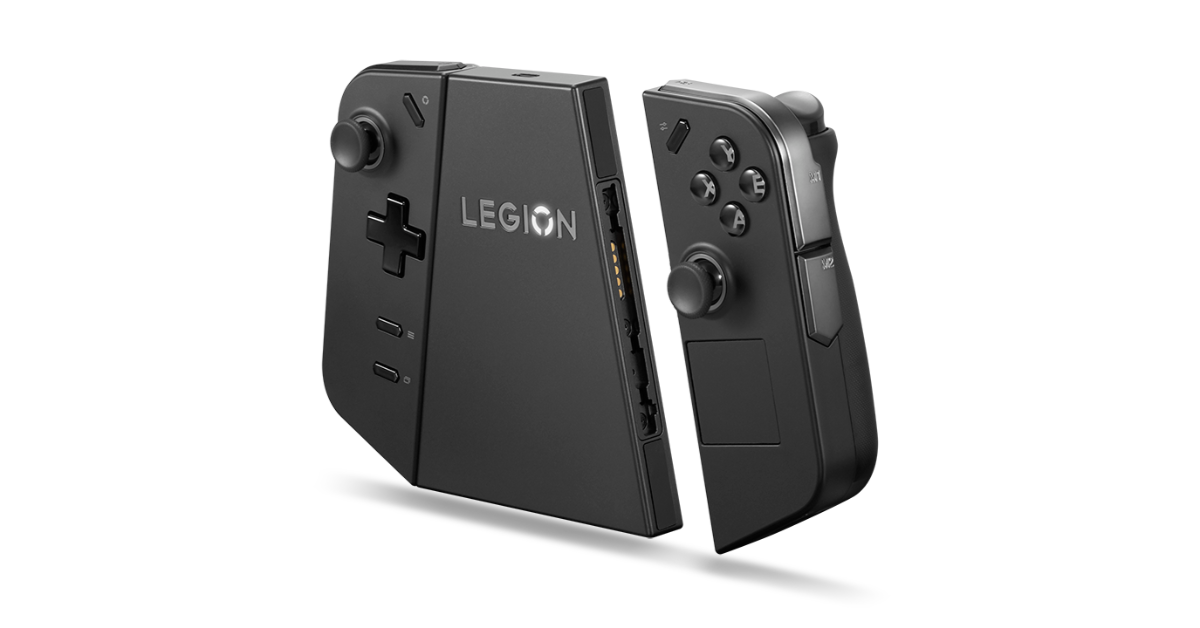
Lenovo Legion Go Charging Connector

Lenovo Legion Go Charging Connector

The Lenovo Legion Go Charging Connector converts detachable TrueStrike controllers into a single, chargeable controller, providing full charge for both left and right controllers when fully charged. The onboard battery also recharges the Lenovo Legion Go Charging Connector via a Type-C port.

The Lenovo Legion Go Charging Connector is expected to be available from October 2024, starting at INR 5,600.

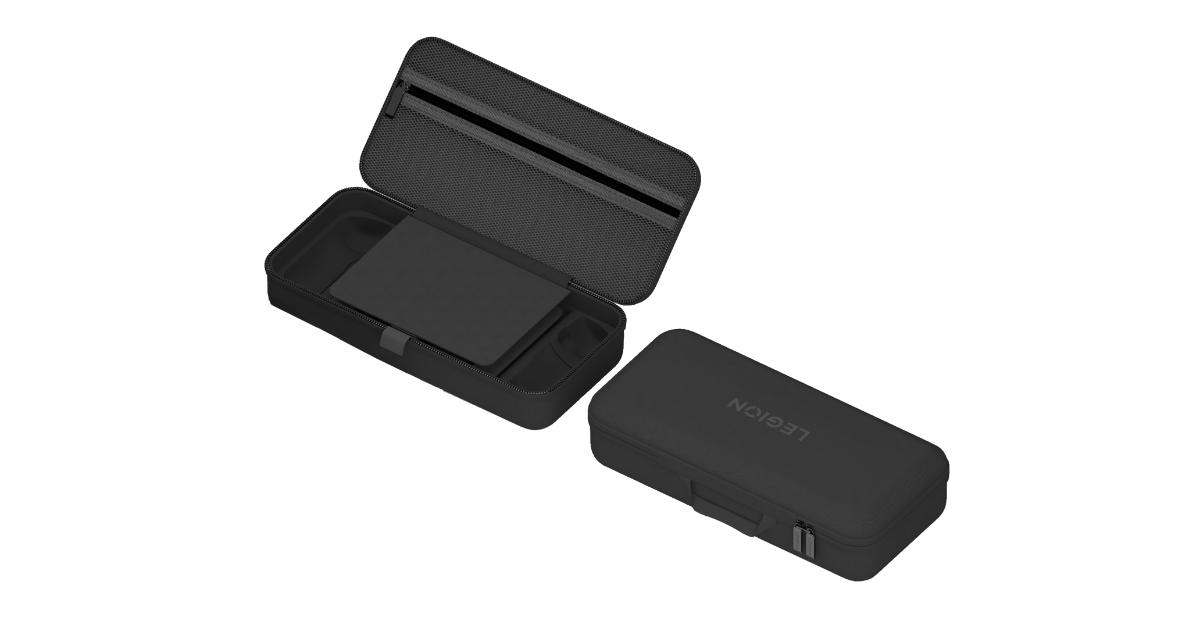
Lenovo Legion Go Carry Case

Lenovo Legion Go Carry Case

The Lenovo Legion Go Carry Case is a dual-zip case that includes a solid shell, screen protection, and an inside zip pocket for additional accessories. It also contains a power adapter and the FPS Mode controller puck.

The Lenovo Legion Go Carry Case is planned to be available beginning January 2025, starting at INR 2,800.

Also Read: Asus announced AMD AI 300 Series powered laptops in India

Lenovo Legion Go Joystick and Joystick Caps


The Lenovo Legion Go Joystick and Joystick Caps provide accurate control for racing or FPS games, thanks to their extra-grippy textured material that provides comfort and control during intense gaming sessions.

The Lenovo Legion Go Joystick and Joystick Caps is scheduled to be available from October 2024, starting at INR 930.

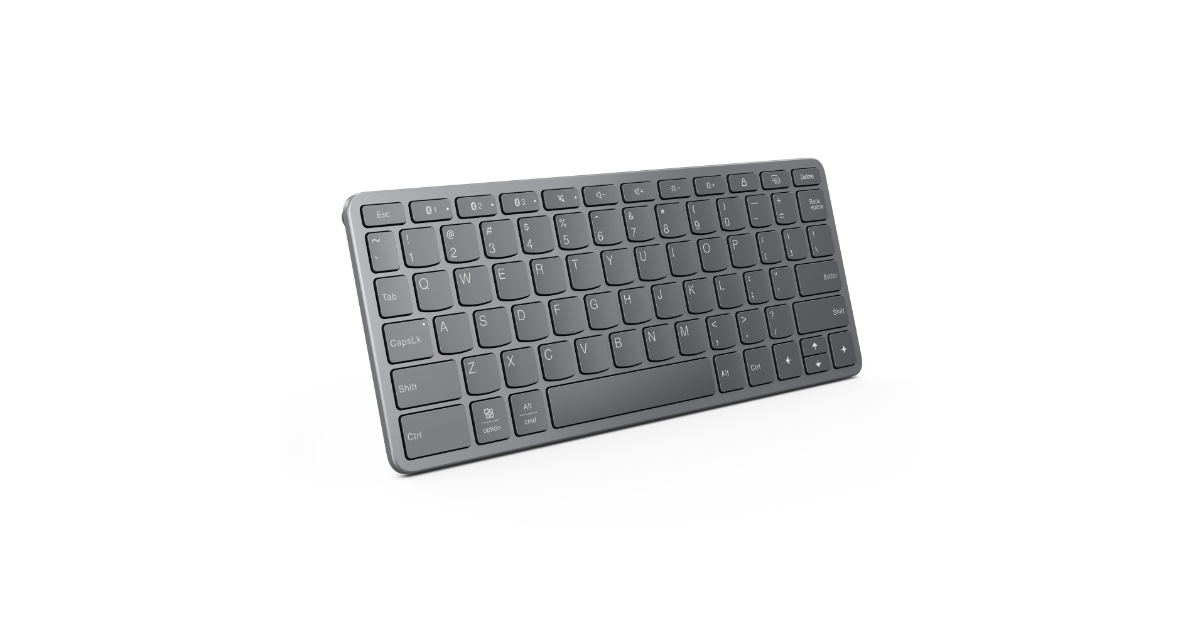
Lenovo Multi-Device Bluetooth Mini Keyboard

Lenovo Multi-Device Bluetooth Mini Keyboard

The Lenovo Multi-Device Bluetooth Mini Keyboard is a lightweight, 75% layout keyboard that supports up to three devices and works with Microsoft Windows, Android, and iPadOS, making it an excellent complement to the Lenovo Legion Go.

The Lenovo Multi-Device Bluetooth Mini Keyboard is likely to be available from November 2024, starting at INR 3,700.

iOS 18.1 Beta Introduces ‘Clean Up’ AI Tool for Image Editing

In the latest iOS 18.1 developer beta, Apple has introduced an AI-powered image-editing tool called “Clean Up,” designed to help users remove unwanted objects from their photos. This new feature is currently available exclusively on the iPhone 15 Pro and iPhone 15 Pro Max, bringing a powerful yet easy-to-use photo editing experience to these devices.

A New Contender in AI Image Editing

The Clean Up tool works similarly to Google’s Magic Eraser, which is available through the Google Photos app on Android and iOS. However, Apple’s version is integrated directly into the Photos app, allowing for a seamless editing experience. Users can simply select an object using smart detection and remove it with just one tap. For more precise control, users can draw a circle or brush over the unwanted objects they wish to delete.

What sets Clean Up apart is its ability to use AI to intelligently fill in the background after an object is removed, ensuring that the photo appears unedited. This includes accurately generating shadows and reflections, which enhances the realism of the edited image.

Read Also: OnePlus new AI Eraser image editing feature announced

Exclusivity and Future Availability

Currently, the Clean Up feature is limited to the iPhone 15 Pro and iPhone 15 Pro Max running the iOS 18.1 developer beta. Other iPhone models, even those on the latest developer beta, do not yet have access to this tool. It remains unclear whether Apple will extend this feature to other devices with the official release of iOS 18.1.

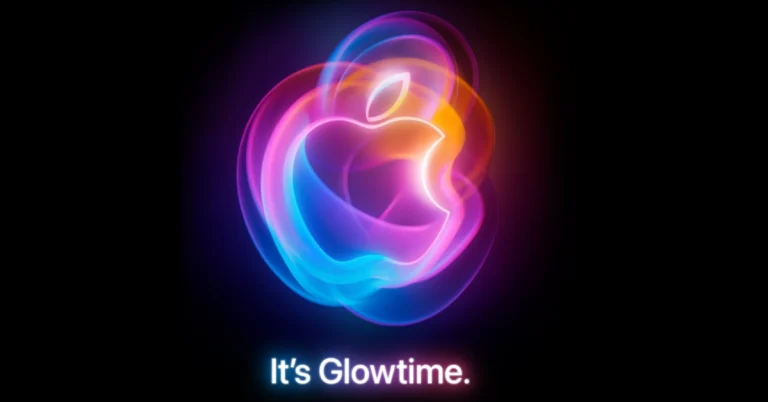
The timing of this feature’s introduction is interesting, as it comes just days before Apple’s much-anticipated “It’s Glowtime” event, where the company is expected to unveil the iPhone 16 series along with other new products. This strategic release could indicate Apple’s intent to showcase its advancements in AI and software capabilities as a highlight of its upcoming product announcements.

A Step Forward in AI-Driven Photography

Apple has been gradually rolling out various AI-powered features under the banner of Apple Intelligence since the first iOS 18.1 developer beta. These include writing tools, natural language search in Photos, transcription services, and smart replies in Mail. The addition of Clean Up further solidifies Apple’s commitment to integrating AI deeply into its ecosystem.

Read Also: How to use the AI Eraser tool on Oppo smartphones

Despite the obvious benefits of such features, there’s a growing debate over the increasing reliance on AI in everyday tasks like photo editing. While AI tools like Clean Up can enhance user experience by simplifying complex tasks, there’s a question of whether this trend might reduce the importance of traditional editing skills.

The introduction of Clean Up in the iOS 18.1 beta is undoubtedly a significant advancement in mobile photography, demonstrating Apple’s push to stay ahead in the AI race. However, its current exclusivity to the iPhone 15 Pro models raises questions about Apple’s long-term strategy. Will this feature remain a premium offering, or will it eventually be made available to a broader audience? Only time will tell, but for now, Apple seems to be keeping its cards close to its chest.

Apple launched Beats Solo Buds, Beats Solo 4, and Beats Pill in India

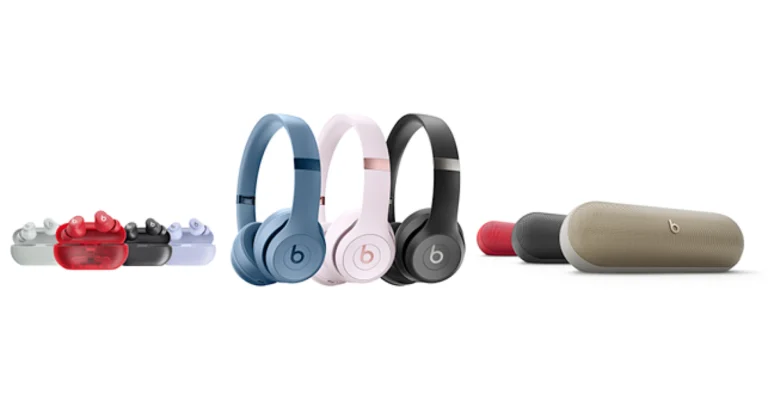
Beats Solo Buds, Beats Solo 4, and Beats Pill are the three new audio products that Apple has introduced in India. The gadgets are currently available in India after being first introduced in the US and other regions. With its stemless in-ear design, the Beats Solo Buds provide up to 18 hours of listening time. A dynamic head tracking function called Spatial Audio is available on the Beats Solo 4. IP67 certification indicates that the Beats Pill wireless portable speaker is resistant to dust and water. iOS and Android phones are both compatible with Beats Solo Buds.

Beats Solo Buds, Beats Solo 4, Beats Pill pricing and sale details

In India, the cost of the Beats Solo Buds is set at Rs 6,900. The device will be available in Transparent Red, Arctic Purple, Matte Black and Storm Gray colour options. The Beats Solo 4 will be available with a price tag of Rs 22,900 and will come in three colourways Cloud Pink, Matte Black, and Slate Blue shades. Lastly, the Beats Pill can be purchased at Rs 16,900 in India. There are Champagne Gold, Matte Black, and Statement Red colourways available for the portable Bluetooth speaker.

The audio devices are available to order starting today at apple.com/in, with availability in stores beginning Wednesday, September 4.

Also Read: Asus announced AMD AI 300 Series powered laptops in India 

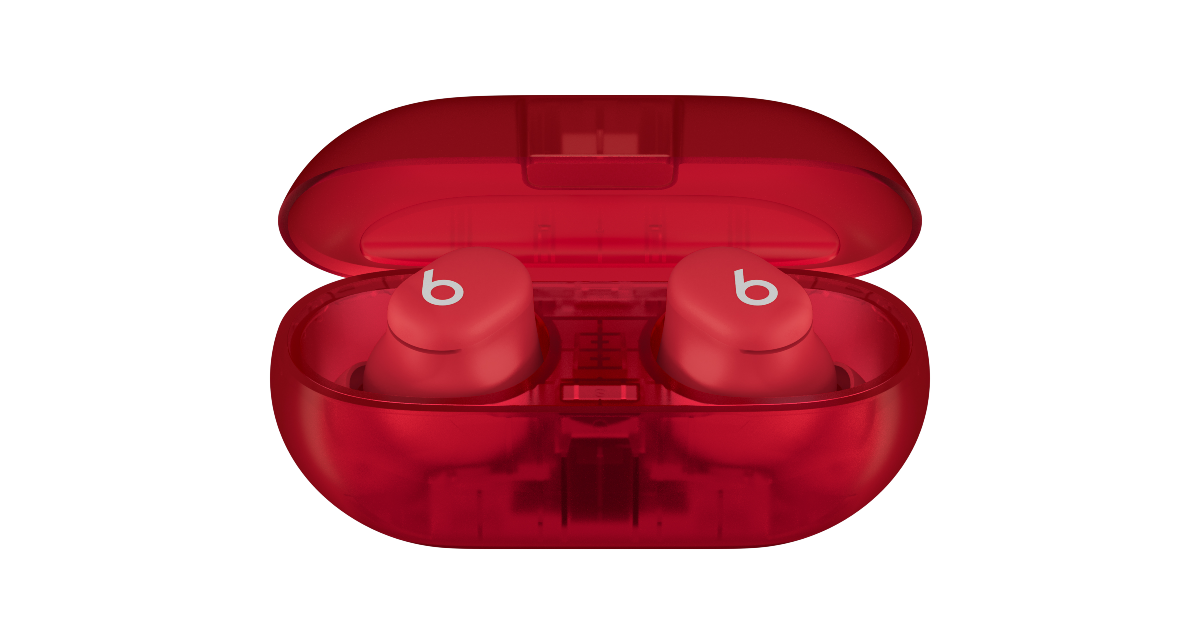
Beats Solo Buds

Beats Solo Buds

Designed specifically for enhanced comfort and sound quality, Beats Solo Buds are acoustic earbuds featuring ergonomic nozzles and laser-cut vents. These ear tips, which come in four sizes (XS, S, M, and L), maximise comfort and passive noise isolation to provide a variety of listening experiences. In order to provide high-fidelity sound with unwavering clarity and detail, dual-layer transducers reduce micro-distortions throughout the frequency curve. Outstanding call quality is provided by the Beats earphones‘ specially crafted microphone, which incorporates a sophisticated noise-learning system. Their longer range and smooth one-touch pairing are made possible by Class 1 Bluetooth. Support for native compatibility guarantees Find My or Find My Device options and easy account creation. Music control, phone answering, and voice assistant activation are all possible with customisable on-ear features. The Beats app or iOS settings can be used by users to customise volume control.

With up to 18 hours of playback, the Beats Solo Buds have the longest battery life ever. They can be charged directly from a phone, tablet, or laptop or via a USB-C cable. With a five-minute charge, Fast Fuel provides playback for up to one hour.

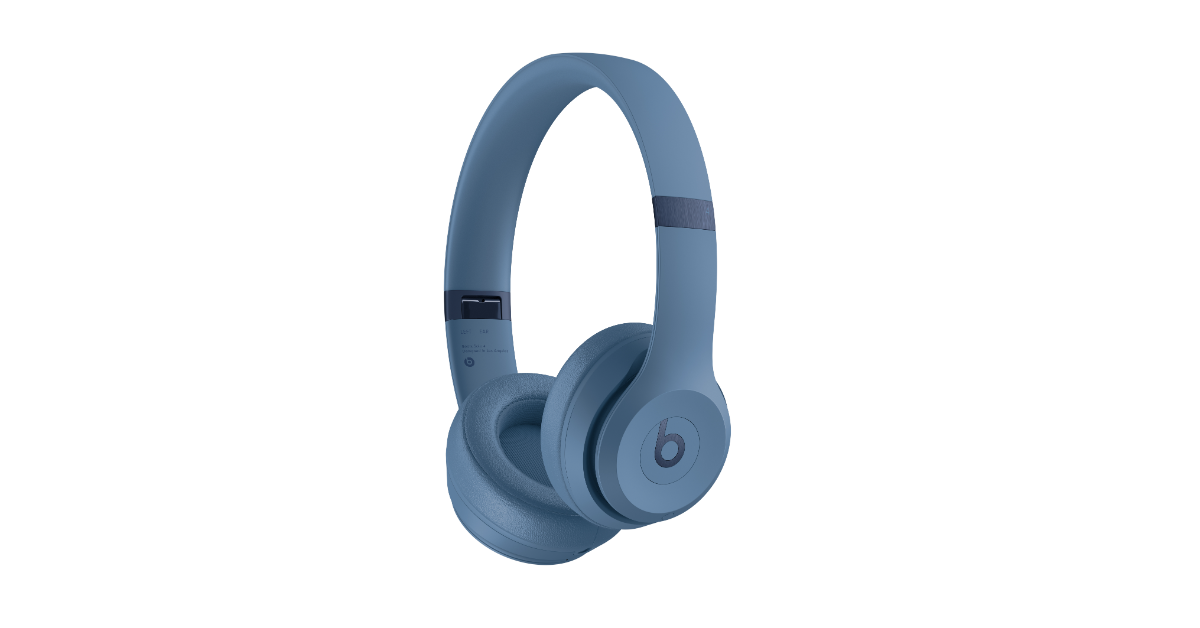
Beats Solo 4

Beats Solo 4

The Beats Solo 4 boasts an ultralight and comfortable design that ensures a snug fit. It has UltraPlush on-ear cushions for durability and weighs 217 grams. The ergonomically inclined ear cups, adjustable sliders and flex-grip headband of the on-ear headphones guarantee optimal sound delivery.

Beats Solo 4 has been redesigned with 40mm transducers that are specifically made to reduce distortion and electrical artefacts, resulting in high-fidelity acoustics. It can now create interactive surround-sound experiences with dynamic head tracking and personalised spatial audio. It also has an advanced noise-learning algorithm and improved beam-forming microphones for excellent call quality and voice-assistant interaction.

Also Read: Airtel and Apple comes together to provide exclusive Apple TV+ and Apple Music offers in India

With its smooth one-touch pairing, automatic account setup, hands-free access to Siri, and audio-sharing features, Beats Solo 4 is compatible with both iOS and Android smartphones. It has USB-C audio, 3.5mm analogue input, and Class 1 Bluetooth connectivity for connecting to devices. Calls, music management, and voice assistant activation are all possible with the ‘b’ button. To adjust the volume, tap either the button’s top or bottom. The Beats Solo 4 can now last up to 50 hours on a single charge, which makes it ideal for phone calls, long days spent travelling, and workouts. It can also play music for up to 5 hours after only 10 minutes.

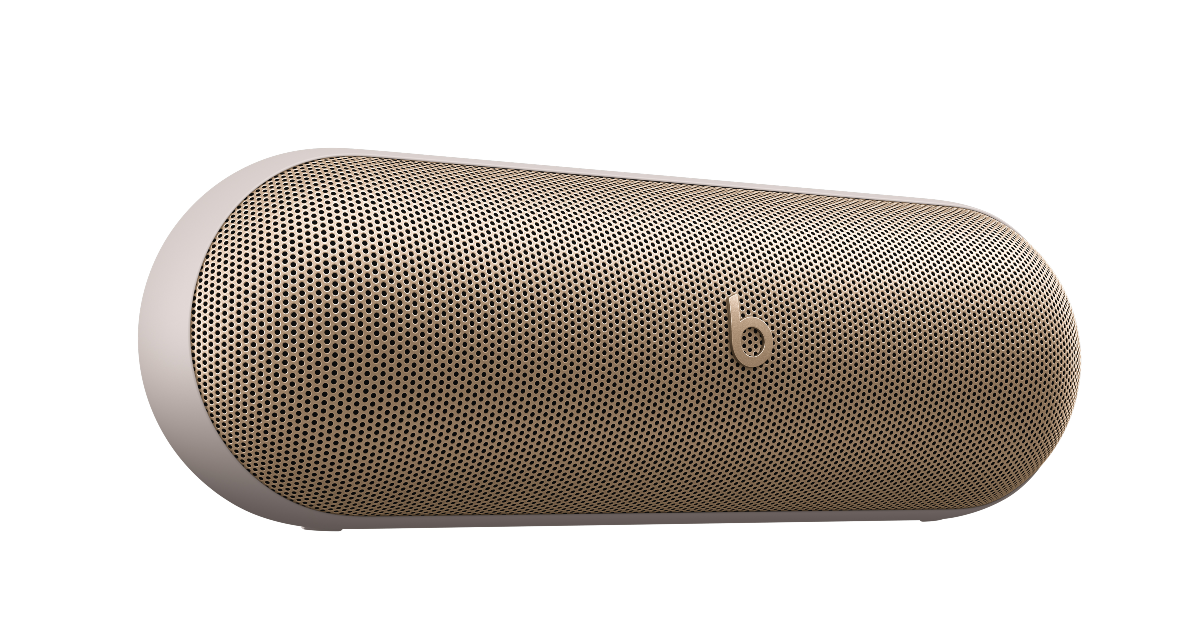
Beats Pill

Beats Pill

With its redesigned racetrack woofer and radial ribbing, the Beats Pill home audio system produces loud, room-filling sound with enhanced tonality and deeper bass. Its sleek design reduces reflected sound and has a 20-degree upward tilt for improved on-axis sound projection.

The Beats Pill is a thin, lightweight speaker featuring a silicone base that is comfortable to the touch and a detachable carry lanyard. It is portable and robust due to its IP67 dust and water-resistant rating. With Class 1 Bluetooth connectivity, it also functions as a speakerphone with speech functionality, providing a longer range and fewer dropouts. It includes quick one-touch pairing, automatic pairing across devices, and Find My or Find My Device functions. It is compatible with both iOS and Android.

Beats Pill is a portable music player featuring simple controls for controlling the speaker’s power, volume, pairing of devices, and music. It can be used in Stereo or Amplify Mode to synchronise two speakers for a two-fold audio experience. Beats Pill can play your favourite playlists continuously for up to 24 hours, from dawn to dusk. Fast Fuel charges in 10 minutes and provides 2 hours of music playback.

Garena Free Fire Max Redeem Codes Today 29 August 2024: Here is how to claim them

Garena Free Fire Max is a battle royale game with regular awards and tournaments to keep players interested. If you play Garena Free Fire, you should be aware of the redeem codes that are released on a daily basis. However, because the battle royale game is banned in India, players from other countries can use the Free Fire Redeem codes daily. If you’re unfamiliar with the Garena Free Fire redeem codes or don’t know how to get them, we’ve put together a step-by-step guide to help you redeem them. Check out Garena Free Fire Max Redeem Codes for 29 August  2024.

The Free Fire Max redeem codes are a great way to get free stuff. These are 12-digit codes that contain alphabets and numbers, as well as an expiration date and time. Because the Garena FF redeem codes cannot be used more than once, you should hurry to the redemption page to claim your free reward before someone else does. To get a free reward, all you have to do is go to reward.ff.garena.com/en, which is the official redemption page. Also, keep an eye on this space for daily updates on Garena Free Fire Max redemption codes and rewards.

Also Read: Sennheiser Accentum Plus wireless headphones with Hybrid Adaptive Noise Cancellation launched

Garena Free Fire Max Redeem Codes Today 29 August 2024

FF34-5RFV-BGT5
FF67-8IKM-JNHB
FF98-7UYT-VFDR
FF23-4ERD-XSWC
FF56-7UJM-KLO9
FF12-3GHJ-KLMO
FF78-9IKM-NJHU
FF01-2PLO-KMNB
FF34-5RFV-TGBN
FF67-8UJM-KLOI
FF98-7YHB-TGVC
FF45-6BVC-XZSD
FF78-9KJN-BVGF
FF11-2TYU-OPAS
FF89-0POI-UYTR
FF21-3WSX-CDE3
FF45-6EDC-VFR4

How to Get Free Fire Max Redeem Codes for Garena on 29 August 2024?

  • Visit the Garena Free Fire Max game’s official website at reward.ff.garena.com.
  • Use your Facebook, Google, VK, Apple ID, Huawei ID, or Twitter account to log in.
  • You’ll be taken to a valid redemption code (s)
  • Copy and paste the 12-digit redemption code into the text box.
  • On the screen, a dialogue box will appear.
  • ‘Ok’ should be selected.

For the latest gadget and tech news, and gadget reviews, follow us on TwitterFacebook and Instagram. For newest tech & gadget videos subscribe to our YouTube Channel. You can also stay up to date using the Gadget Bridge Android App. You can find the latest car and bike news here.

Amazon Quiz Answers Today 29 August 2024: Participate to win Rs 500 Amazon Pay Balance

29 August 2024: New Amazon Quiz is now available. Customers from different parts of the country are participating in the daily quiz. The quiz starts at midnight today and will be live until 11:59 PM tonight. By successfully answering every question, participants in the quiz have the chance to win wonderful rewards. A Rs 500 Amazon Pay Balance is up for grabs to participants today.

One wrong answer could eliminate you from the quiz. You have a chance to win Rs 500 Amazon Pay Balance if you successfully answer every question. Users of the app only have the opportunity to take the quiz. Check Out 29 August 2024 Amazon Quiz Answers.

Amazon Quiz Today Prize: Rs 500 Amazon Pay Balance

Quiz Date: 29 August 2024

Daily Timing: 12 AM to 11:59 PM

Previous Amazon Quiz Winners Announcement: Today 12 PM Noon

Amazon Quiz Answers Today 29 August 2024: Win ₹ 500 Amazon Pay Balance

Question 1: Which film is based on Mstyslav Chernov’s daily news dispatches and personal footage of his own country at war?

Answer: 20 Days in Mariupol

Question 2: Ae Watan Mere Watan’ is inspired by which freedom fighter, instrumental in founding the underground Congress Radio?

Answer: Usha Mehta

Question 3: Which Indian musician’s biography, written by Oliver Craske, is titled Indian Sun?

Answer: Ravi Shankar

Question 4: Which Roman Emperor was fond of this fruit?

Answer: Tiberius

Question 5: In the beginning, what was this system called?

Answer: Navstar

Also Read: Noise Buds Verve, budget TWS with up to 45 hours of playback launched in India

How To Play Amazon Quiz Today

Only app users are eligible to play the Amazon quiz every morning from 12 AM to 11:59 PM. The quiz is not available on the desktop. For those who are unaware of how to play the Amazon quiz, below are the steps, you can follow to take the quiz.

  • First, download the Amazon app from the Google Play Store or App Store or go here to download the Amazon App
  • Now fill in the required information through the Sign-Up option.
  • You need to log in to the Amazon app and scroll down on the home screen to find the Amazon Quiz banner.
  • Tap on the Amazon Quiz banner and tap on the Start button to start the Quiz.
  • Now you will get 5 questions and you need to answer them correctly. One wrong answer will eliminate you from the Quiz.
  • After answering all the questions correctly you are now eligible for a Lucky Draw.
  • The previous winner’s name will be announced today at 12 PM.

Amazon Daily Quiz Answers from the previous few days.

Here are all the answers from the previous 5 days of the Amazon Daily Quiz and Contest.

Amazon Quiz Answers Today 28 August 2024: Win ₹ 500 Amazon Pay Balance

Question 1: Which director won his first directing Oscar in 2024?

Answer: Christopher Nolan

Question 2: Jane Fraser is the current CEO of which bank?

Answer: Citigroup

Question 3: Which Asian country’s passport has been rated the most ‘powerful’ in the world for 2024, according to the Henley Index?

Answer:  Singapore

Question 4: Which state is the largest producer of this?

Answer: Maharashtra

Question 5: Which was the first country to make this drink?

Answer: France

Amazon Quiz Answers Today 27 August 2024: Win ₹ 500 Amazon Pay Balance

Question 1: Who scored a half-century in just 15 balls in a losing effort against Sunrisers Hyderabad in IPL 2024 for Delhi Capitals?

Answer: Jake Fraser- Mcgurk

Question 2: The Amazon Prime series- ‘A Gentleman in Moscow’ stars which famous actor in the lead role of Alexander Rostov?

Answer: Ewan Mcgregor

Question 3: The Achyutraya temple, the Virupaksha temple and the Vithala temple are located in which UNESCO World Heritage Site?

Answer: Hampi

Question 4: This is the logo of a famous automobile company headquartered in which country?

Answer:  France

Question 5: This visual shows which dwarf planet as seen from the New Horizons spacecraft in 2015?

Answer: Pluto

Amazon Quiz Answers Today 26 August 2024: Win ₹ 500 Amazon Pay Balance

Question 1: Who scored a half-century in just 15 balls in a losing effort against Sunrisers Hyderabad in IPL 2024 for Delhi Capitals?

Answer: Jake Fraser- Mcgurk

Question 2: The Amazon Prime series- ‘A Gentleman in Moscow’ stars which famous actor in the lead role of Alexander Rostov?

Answer: Ewan Mcgregor

Question 3: The Achyutraya temple, the Virupaksha temple and the Vithala temple are located in which UNESCO World Heritage Site?

Answer: Hampi

Question 4: This is the logo of a famous automobile company headquartered in which country?

Answer:  France

Question 5: This visual shows which dwarf planet as seen from the New Horizons spacecraft in 2015?

Answer: Pluto

Amazon Quiz Answers Today 24 August 2024: Win ₹ 500 Amazon Pay Balance

Question 1: Which Indian won the silver medal in the FIDE women’s candidates 2024?

Answer: Koneru Humpy

Question 2: Which of these actresses is the executive producer of the Amazon Prime series ‘Poacher’?

Answer: Alia Bhatt

Question 3: Which of these is a traditional, flat-bottomed Venetian rowing boat?

Answer:  Gondola

Question 4: The man in the picture is cosplaying a character from which famous children’s book?

Answer: Alice in Wonderland

Question 5: This is the Adalaj Ni Vav, a stepwel located in which state?

Answer: Gujarat

Amazon Quiz Answers Today 23 August 2024: Win ₹ 500 Amazon Pay Balance

Question 1: Which team recently set the record for the highest chase in Indian Premier League history by successfully chasing a target of 262?

Answer: Punjab Kings

Question 2: The comedy movie ‘Ricky Stanicky’ stars which of these actors, also a big star in sports entertainment?

Answer: John Cena

Question 3: The famous monument, the Humayun’s Tomb was built in which century?

Answer: 16th century

Question 4: This is the famous Rathaus, located in which famous European capital?

Answer:  Vienna

Question 5: Which of these famous guitarists was part of this iconic band?

Answer: France

Amazon Quiz Answers Today 22 August 2024: Win ₹ 500 Amazon Pay Balance

Question 1: Which of these recently played ATP events has a court named after the legendary tennis player Rafael Nadal?

Answer: Barcelona Open

Question 2: The movie Road House sees Jake Gyllenhaal play the role of an ex UFC fighter. Which of these famous sportspeople also acts in the movie?

Answer: Conor Mcgregor

Question 3: What is the other name given to the swamp deer, the state animal of Madhya Pradesh?

Answer: Barasingha

Question 4: In which of these cities in the USA is this famous museum located?

Answer: New York

Question 5: Which of these controversial media organizations was founded by this Australian editor and publisher?

Answer: Wikileaks

Amazon Quiz Answers Today 21 August 2024: Win ₹ 500 Amazon Pay Balance

Question 1: Which of these players won the Monte Carlo Masters tennis tournament in 2024, his 3rd triumph in that event in 4 years?

Answer: Stefanos Tsitsipas

Question 2: Which of these Amazon Prime shows shares its name with a 2005 Brad Pitt- Angelina Jolie movie?

Answer: Mr and Mrs Smith

Question 3: Which animal features on the election symbol of the Republican party in the USA?

Answer:  Elephant

Question 4: These waterfalls span the border between the province of Ontario in Canada and which state in the USA?

Answer:  New York

Question 5: Which of these famous architects designed this iconic monument in India?

Answer: Edwin Lutyens

Amazon Quiz Answers Frequently Asked Questions (FAQs)

Where can I check the previous winners? Did I win how to check?

You can head over to this link on your mobile or desktop to check the winners of the Amazon Daily Quiz Contest.

How to Play Amazon Daily Quiz or Contest?

We have written an explainer above, you can refer to that.

When are the winners of the Amazon Quiz and contest announced or declared?

The announcement of today’s Amazon quiz winner will take place Tomorrow. As for the Special Quiz and “Spin & Win” Contest, the winners will be declared once the Quiz Contest comes to an end. To find out who the lucky winner is, you can refer to the Amazon Quiz Winners List or visit the Amazon Winners tab in the Amazon App.

How to participate in the Daily Amazon Quiz?

That is very easy, just got to the Amazon app and scroll to the bottom of the page and you will find the Quiz section. Click on it (usually it is called the fun zone) and you can enter the Amazon Today Quiz Contest. 

Are there any other quizzes or contests running on Amazon daily?

Yes, there are many running on a daily basis. These range from spinning the wheel to answering the questions correctly. All are located in the Fun Zone. 

What are the criteria for selecting a winner in the Daily Amazon Quiz?

When a qualified player submits correct answers to all the questions, they will automatically be entered into a lucky draw. This draw will include all participants who answered all the questions correctly. Amazon randomly selects the final winners from the pool of eligible participants who gave the right answers.

Which Types of Questions are asked within Amazon Daily Quiz?

These are very simple and straightforward questions. These are mainly related to general knowledge. 

Where should I look for Amazon Daily Quiz answers?

You can bookmark this page as we will help you every day with the Amazon Daily Quiz. We bring you fresh answers every day for the Amazon Daily Quiz and Contest. 

What time does Amazon Announce previous winners?

The previous winner’s name will be announced today at 12 PM (noon).

For the latest gadget and tech news, and gadget reviews, follow us on Twitter, Facebook and Instagram. For newest tech & gadget videos subscribe to our YouTube Channel. You can also stay up to date using the Gadget Bridge Android App. You can find the latest car and bike news here.

How to Sync Audio to Video with Filmora?

If you want your video to sound great, it’s a good idea to record the audio separately from the video. Using your camera or phone to record audio can sometimes pick up unwanted noises like scratching, hissing, or background sounds.

Also, the people in your video might sound too quiet or far away because the camera’s microphone is usually not close enough to them.

But when you record the audio separately, it can be tricky to make sure it matches perfectly with the video. If the sound is even a tiny bit behind what’s happening on the screen, it can be distracting and make the video less enjoyable to watch.

Not sure how to do it? In this article, we’ll explain everything you need to know about syncing audio with video and how to sync audio to video using Wondershare Filmora.

Part 1: What is Audio Video Sync

Audio-visual synchronization, or AV sync, means making sure that what you see and hear in a video or presentation happens at the same time. For example, if someone is talking in a video, their lips should move in sync with the words you hear.

This is important in meetings and presentations because it helps everything feel smooth and makes it easier to understand what’s going on. A good match of audio to video is especially important in online meetings and webinars, where people rely on seeing and hearing everything clearly at the right time to stay engaged and understand the content.

Part 2: Reasons Why Video Can Be Out of Sync With Audio

Now that we have an understanding of what is synchronize sound with video it is time to dig into the reasons for it. If you’ve watched your video and noticed that the sound doesn’t match up with the picture, there could be a few reasons why.

First, there might have been a problem with the device you used to record. For example, if you’re recording a live stream and your internet connection gets weak, the video might get squished into a lower-quality file. The sound might stay the same, but the video changes, causing them to go out of sync.

Another issue could happen if you record the audio and video separately, especially if you don’t use something like a clapper to start them at the same time. You’d have to go back and match them up later.

Part 3: How to Sync Audio to Video with Filmora

Wondershare Filmora is an all-in-one video editor, which means it has everything you need to create awesome videos. It’s easy to use, with a simple interface, drag-and-drop editing, and powerful tools that make professional video editing a breeze.

One of the coolest features of Filmora Video Editor is automatically syncs audio and video. This tool helps you match the sound with the video perfectly. You can easily make the audio faster or slower to fit with what’s happening in the video by using simple buttons and settings. Auto Audio Sync can automatically line up the video and audio for you, so they play together smoothly.

Audio Synchronization Software Filmora has some cool audio features that make video editing super easy. One of these features is Silence Detection. It helps you find and remove any quiet parts in your video that you don’t need. Filmora also has other tools like Audio Ducking, Text to Speech, and Audio Visualizer, which help you improve the sound in your videos.

Auto-sync video and audio in Filmora isn’t as hard as it might seem. Just follow these simple steps:

Step 1: Open Filmora and Add Your Video

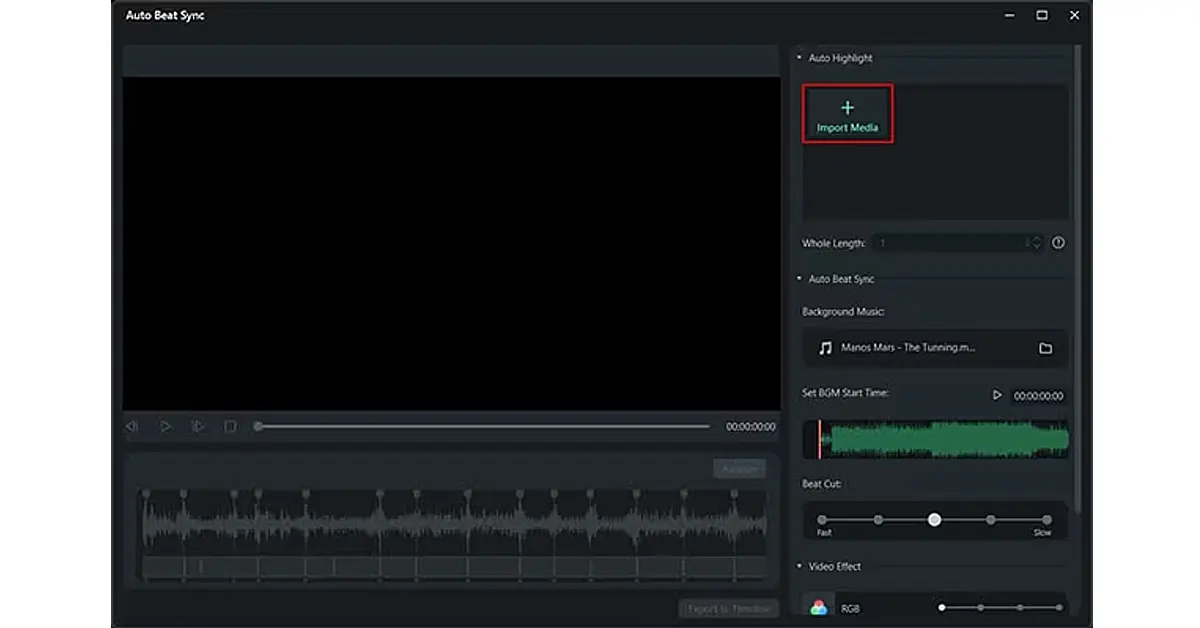
First, open Wondershare Filmora on your device. From the main screen, choose the “Auto Beat Sync” option. Then, click the “Import Media” button on the right side to add the video you want to sync with the audio.

import media

Step 2: Sync the Video with the Audio Automatically

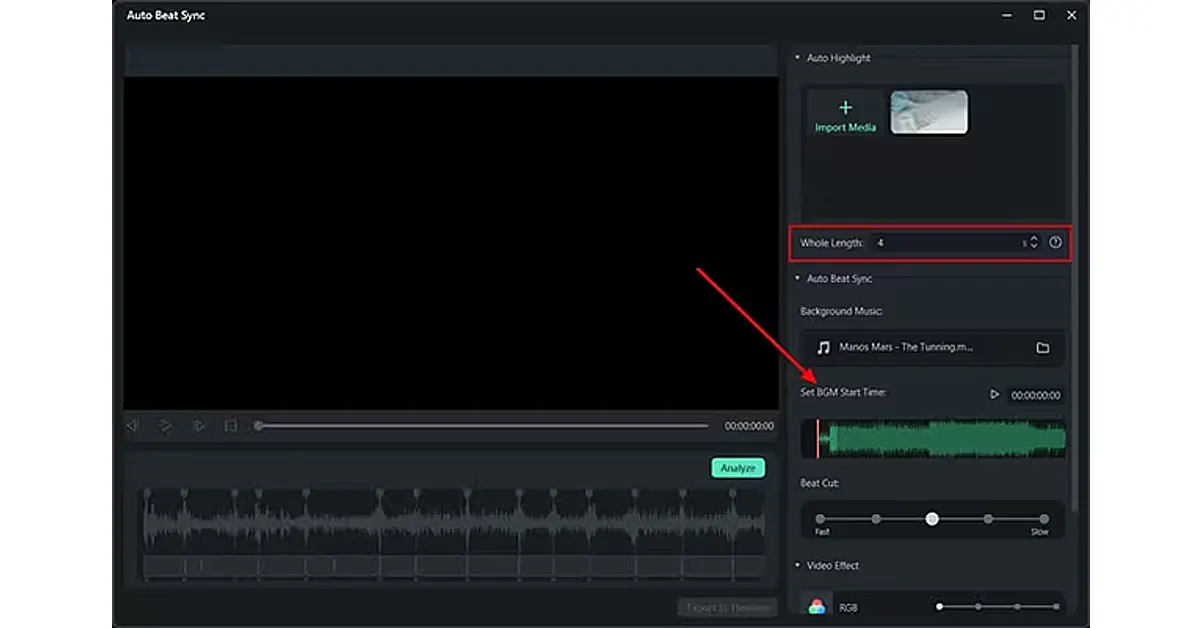
After you add your video, decide how long the whole video should be. Next, pick the background music you want to sync with the video. Set when you want the music to start and choose any “Beat Cut” and “Video Effects” from the options on the right.

choose beat cut

Step 3: Save and Export Your Video

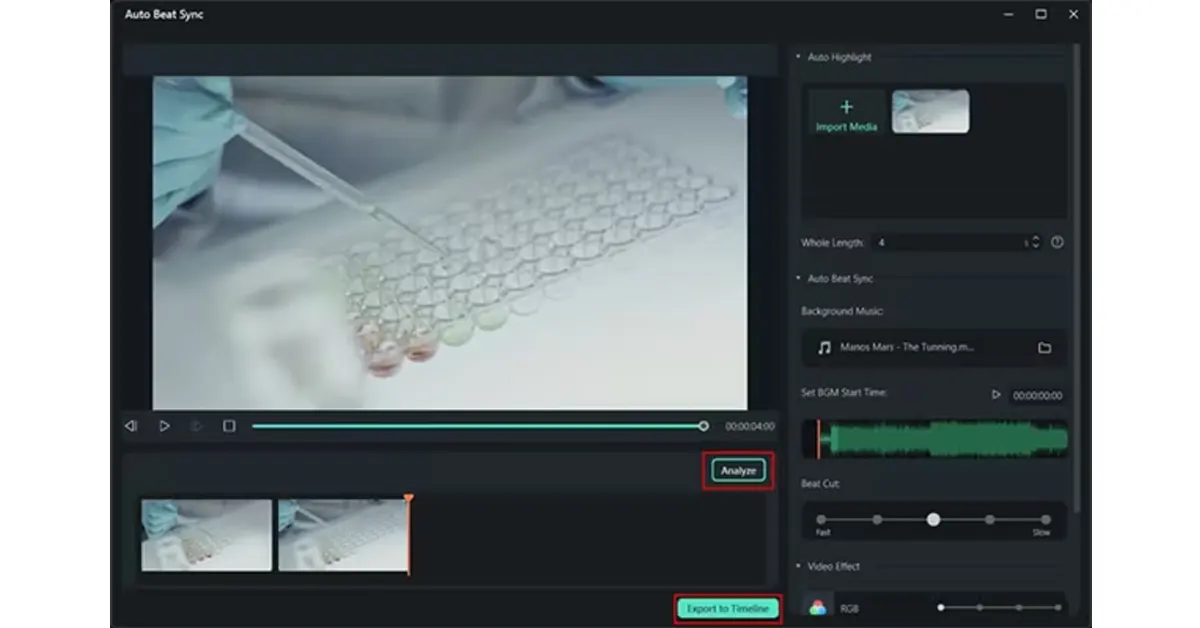
Once you’re done editing, click the “Analyze” button to check how well everything synced up. If it looks good, click the “Export to Timeline” button to add the video to the timeline, where you can save it.

save and export

Conclusion

Audio and video synchronization is essential for a smooth and engaging viewing experience. Wondershare Filmora makes this process easy with its Auto Audio Sync feature, allowing users to automatically align sound with video.

By following simple steps importing media, setting synchronization parameters, and exporting the final product you can ensure your audio and visuals are perfectly in sync.

Filmora also offers additional audio tools like Silence Detection and Audio Ducking to enhance your video’s sound quality, making it an all-in-one solution for professional video editing.

How to use Gemini in Google Chrome’s address bar

0

Google recently updated the Chrome browser, integrating it with Google Lens and Gemini AI. Previously we talked about how you can perform a reverse image search via Google Lens directly from the web browser. Gemini integration on Google Chrome is limited to the address bar. You can summon the bot in the web browser and enter your prompt. The prompt is then answered on Gemini’s website. Let’s take a quick look at how this works.  

Read Also: Asus announced AMD AI 300 Series powered laptops in India

Before you begin

Since this is a new feature on Google Chrome, it is possible that it may not have arrived on your device yet. If you’re using an older version of Google Chrome, update the web browser and check again. The availability of this feature may be limited in certain countries and regions. If that is the case with you, you can use the Gemini app on your phone or access the chatbot on its official website.

If you’re trying to generate images via Gemini, you should know that the chatbot cannot create images of humans yet. If your image prompt involves humans, you are better off using other AI image generators like Dall-E, Midjourney, DreamStudio, and more.

Chat with Gemini from the address bar in Google Chrome

Step 1: Launch Google Chrome on your PC.

Step 2: Click the address bar at the top of the screen.

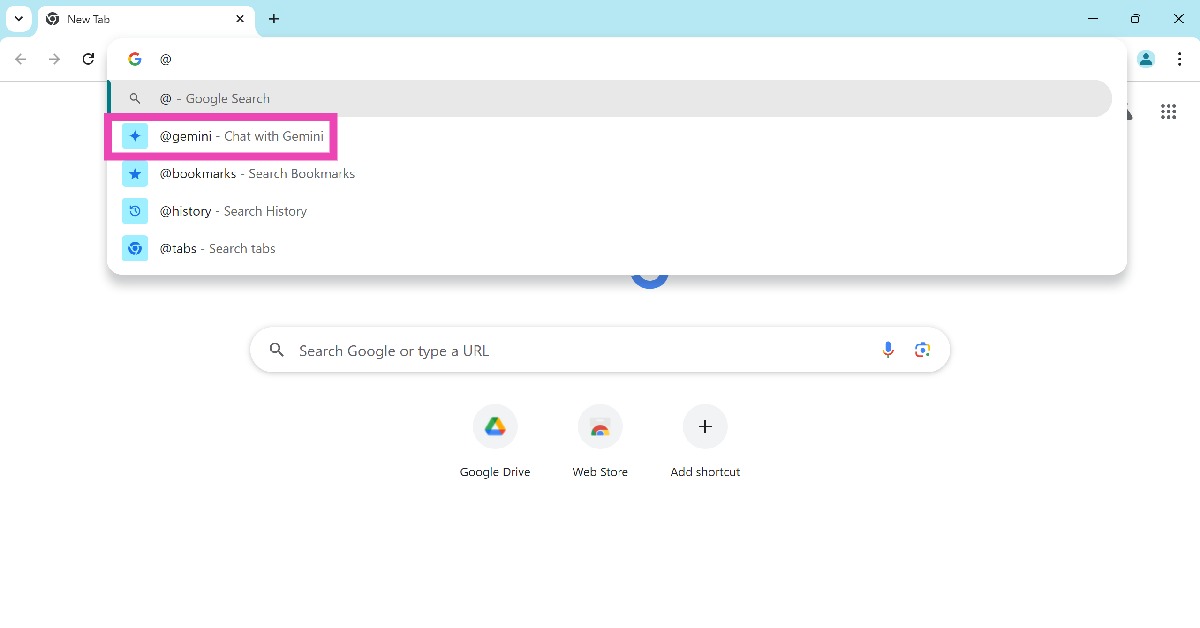
Step 3: Type @ and select Chat with Gemini.

Step 3: Type @ and select Chat with Gemini.

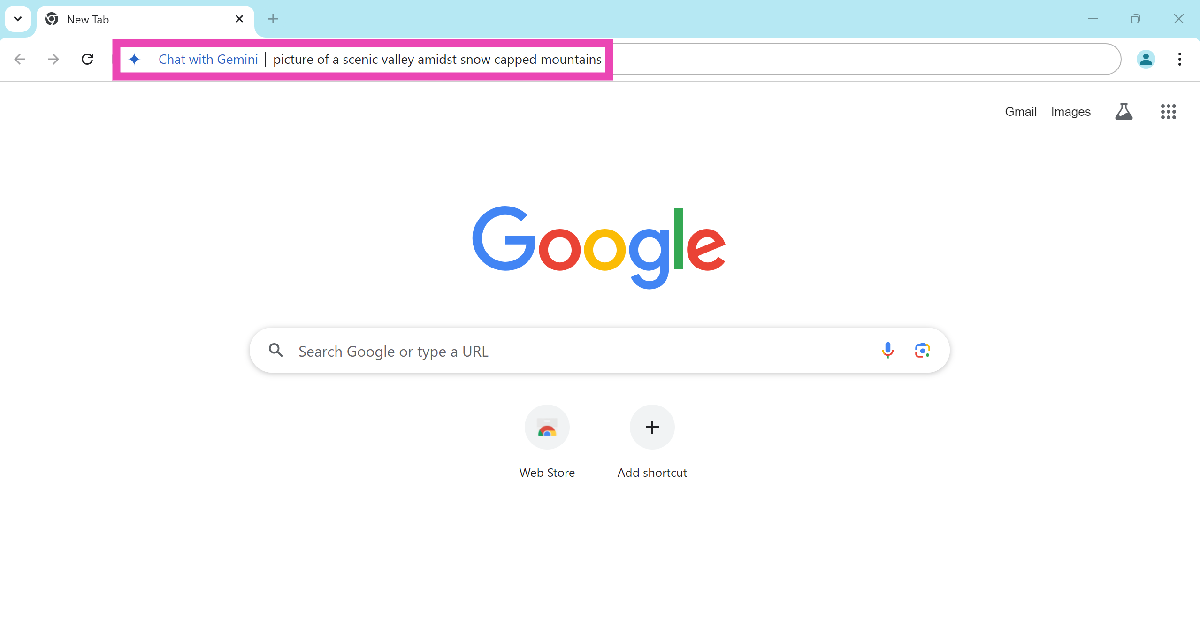
Step 4: Type your prompt or query.

Step 4: Type your prompt or query.

Step 5: Hit Enter.

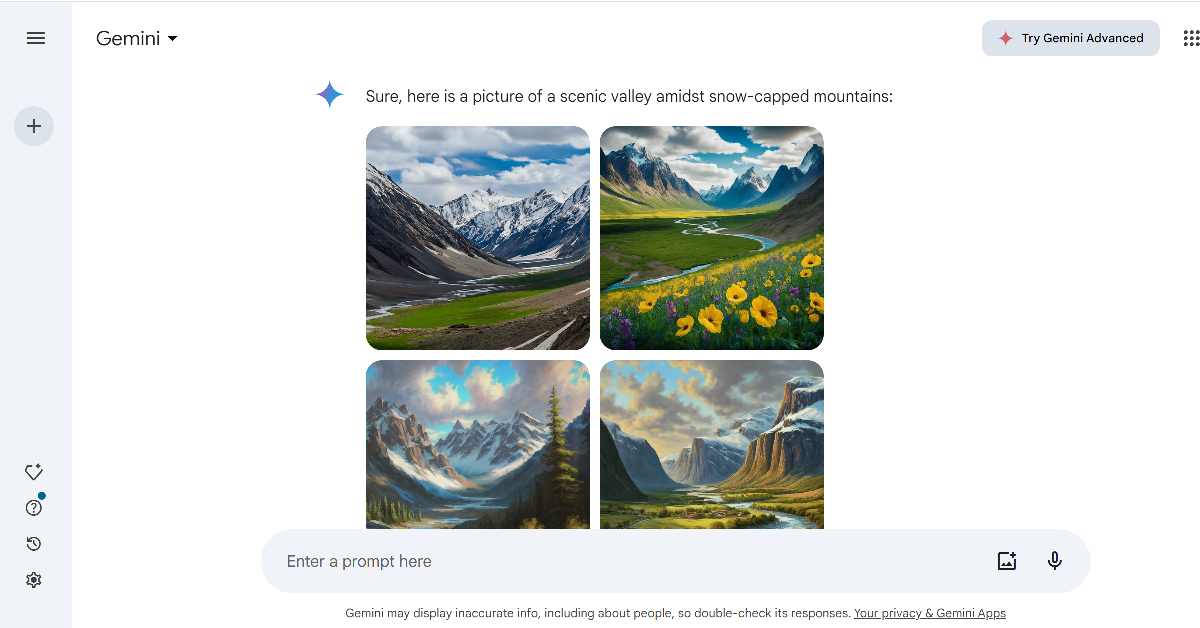
Step 6: You will be directed to the Google Gemini website where your prompt will be answered.

Step 6: You will be directed to the Google Gemini website where your prompt will be answered.

Frequently Asked Questions (FAQs)

How do I use Gemini in Google Chrome?

Launch Chrome on your PC, click the address bar, type @, and select Gemini. Enter the prompt and hit Enter.

Can Google Gemini generate images?

Yes, you can generate AI images using Gemini. However, as of now, Gemini cannot generate images of humans.

Is Google Gemini free to use?

Google Gemini is currently free to use but it requires you to log in using your Google Account.

Read Also: 3 ways to search anything on Chrome using Google Lens (2024)

Conclusion

This is how you can use Gemini in Google Chrome. Gemini also powers the AI features in Google Pixel smartphones. These features include the Magic Editor tool, Call Notes, Pixel Studio, and more. You can also use the Gemini app on all Android smartphones.

Asus announced AMD AI 300 Series powered laptops in India

ASUS has introduced several Next-Gen laptops, such as the ROG Zephyrus G16, TUF Gaming A14, Zenbook S 16 OLED, ProArt PX13, and Vivobook S 14 OLED, which AMD AI 300 Series power. These laptops also have NVIDIA GeForce RTX GPUs. For continuous work, they also provide lightning-fast response speeds, vibrant images, a wide range of connectivity choices, and a long battery life with quick charging.

The new lineup of laptops Asus ROG Zephyrus G16, TUF Gaming A14, ProArt PX13, Zenbook S 16, and Vivobook S 14 is designed for creators, professionals, and gamers. The ROG Zephyrus G16 series starts at INR 1,94,990, while the TUF Gaming A14 series starts at INR 1,69,990. The Zenbook S 16 and Vivobook S 14 series start at INR 1,49,990 and INR 1,24,990, respectively. The new lineup can be purchased from the Asus store, Croma, Eshop, Flipkart, and Amazon.

Asus announced AMD AI 300 Series powered laptops in India

The AI-powered ROG Zephyrus G16 is a device aimed at gamers and creators. With an NVIDIA GeForce RTX 4070 GPU and the newest AMD Ryzen AI 9 HX 370 Processor, it offers top-tier performance with 50 TOPs NPU and cutting-edge liquid metal cooling. Additionally, the device has an OLED panel option that features a 500 nits bright QHD+ 240Hz ROG Nebula Display with incredibly quick response rates of 0.2 ms. With a superior aluminium CNC unibody design, the new Zephyrus G16 boasts a 25% slimmer design. At its thinnest point, it measures 14.9mm and weighs 1.85 kg. The device supports Wi-Fi 7 and has a 90Wh battery that charges from 0% to 50% in 30 minutes. It also has a comprehensive set of IO ports, including a 40Gbps USB 4 Type-C port with DP 2.1 support and a full-sized UHS-II SD card reader.

Also Read: Airtel and Apple comes together to provide exclusive Apple TV+ and Apple Music offers in India

Featuring an AMD Ryzen AI 9 HX 370 CPU with 12 cores and an integrated Radeon 890M iGPU, the TUF Gaming A14 is a potent 14-inch laptop. With a maximum TGP of 110W in manual mode, it provides unparalleled gaming performance. In addition to having a 2TB M.2 Gen 4 SSD for adequate storage, the laptop supports up to 32GB of LPDDR5X dual-channel memory at 7,500MHz. Long-lasting power is provided by the 73Wh battery, which can be charged to 50% capacity in 30 minutes via fast charging or to 100% capacity using Type-C technology. Featuring 100% sRGB coverage, the 14-inch 2.5K 165Hz G-Sync display produces crisp images.

Connectivity is robust with Wi-Fi 6E, dual USB Type-C ports, DisplayPort, and USB 4. The laptop also features a MUX switch and Nvidia Advanced Optimus for optimised performance.

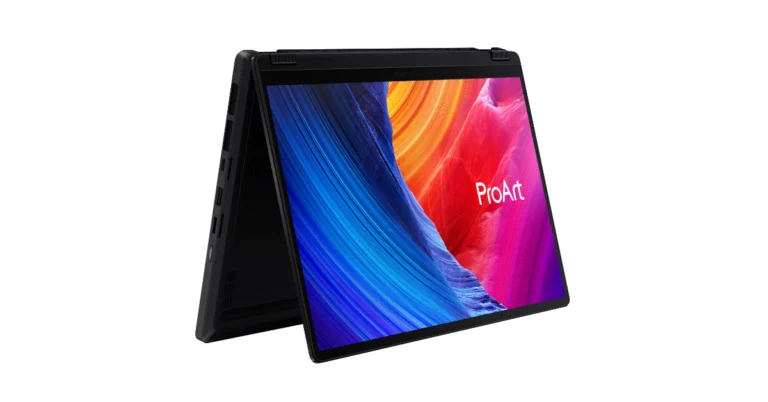
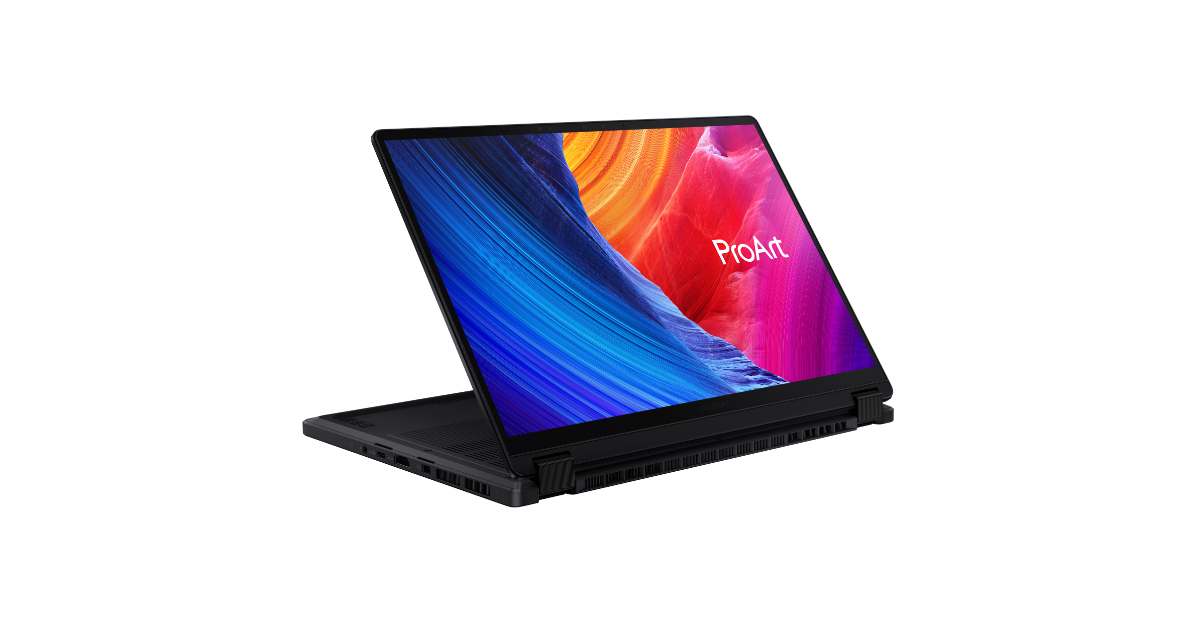
Designed for creative professionals in India, the ASUS ProArt PX13 is a 13-inch convertible laptop. The laptop’s AMD Ryzen offers faster and more efficient performance AI 9 365 Processor and 50 TOPs NPU. Featuring a 100% DCI-P3 colour gamut coverage and a 0.2ms response time, the 13-inch 16:10 3K ASUS Lumina OLED touchscreen provides exceptional visual clarity. Built to meet military specifications MIL-STD 810H, the laptop is dependable in a variety of settings.

Graphics performance is provided by the NVIDIA GeForce RTX 4050 GPU, and usability is improved by the Dialpad integration with touchpad, ProArt Creator Hub, and stylus support. Additionally, the laptop provides AI-powered software programs like StoryCube and MuseTree to enhance workflows and content production.

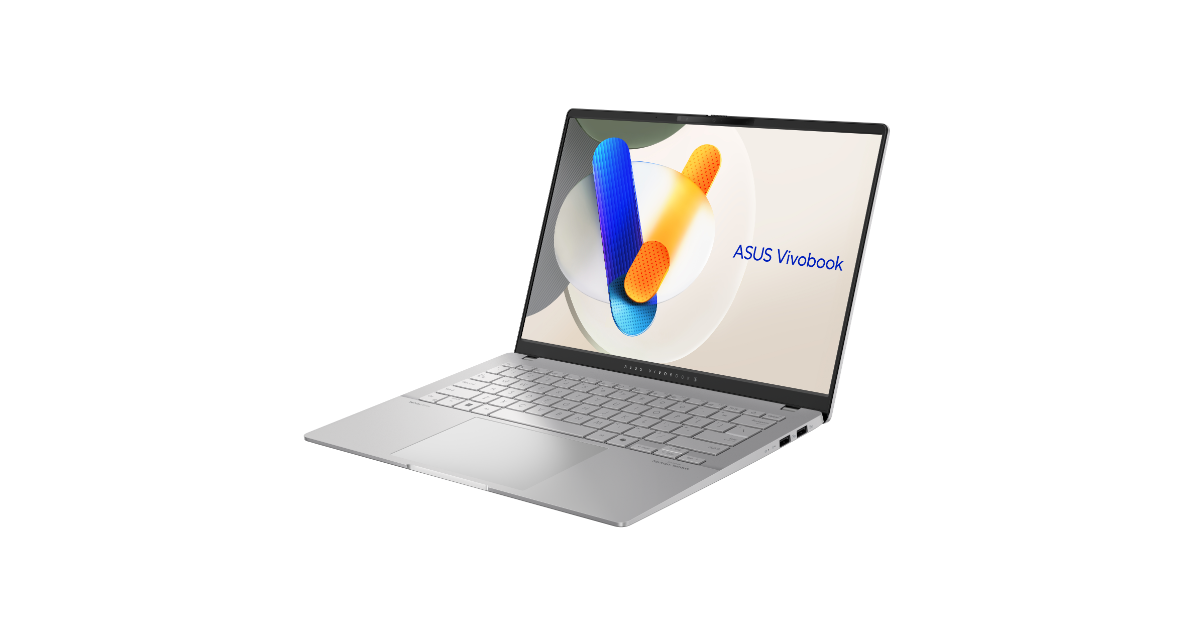
ASUS Vivobook S 14 OLED_M5406N_M5406U_Product photo_8S_Cool Silver_08

The ASUS Zenbook S 16 OLED has a 1TB PCIe 4.0 NVMe SSD, 32GB LPDDR5X-7500 RAM, and an all-metal construction with a Ceraluminum lid. For better eye care, the 16-inch 3K ASUS Lumina OLED Display provides lifelike images with less blue light. With Type-C connectors, the laptop can be quickly charged and offers a 78Wh battery life. The connectivity choices include SD card reader, HDMI 2.1, and USB 4 Type-C. Workflow is improved by the ASUS ErgoSense keyboard’s intuitive touchpad and dedicated Copilot key. With its MIL-STD 810H certification and six Harmon/Kardon speakers that use Dolby Atmos to provide high-quality sound, the laptop is made to last. With its extensive AI features and Copilot+ PC connectivity, the laptop is equipped for the future.

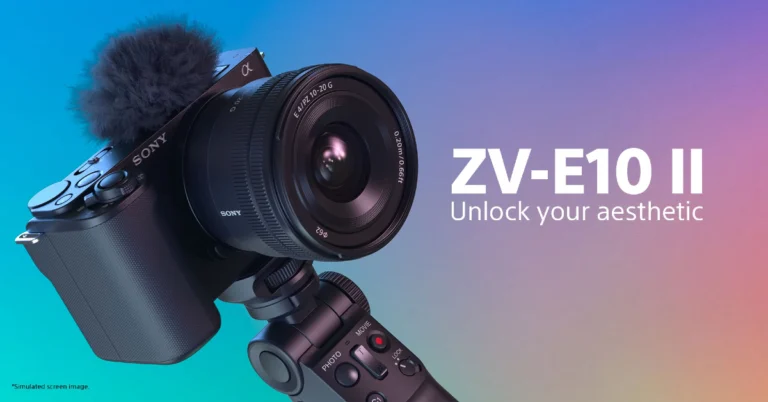
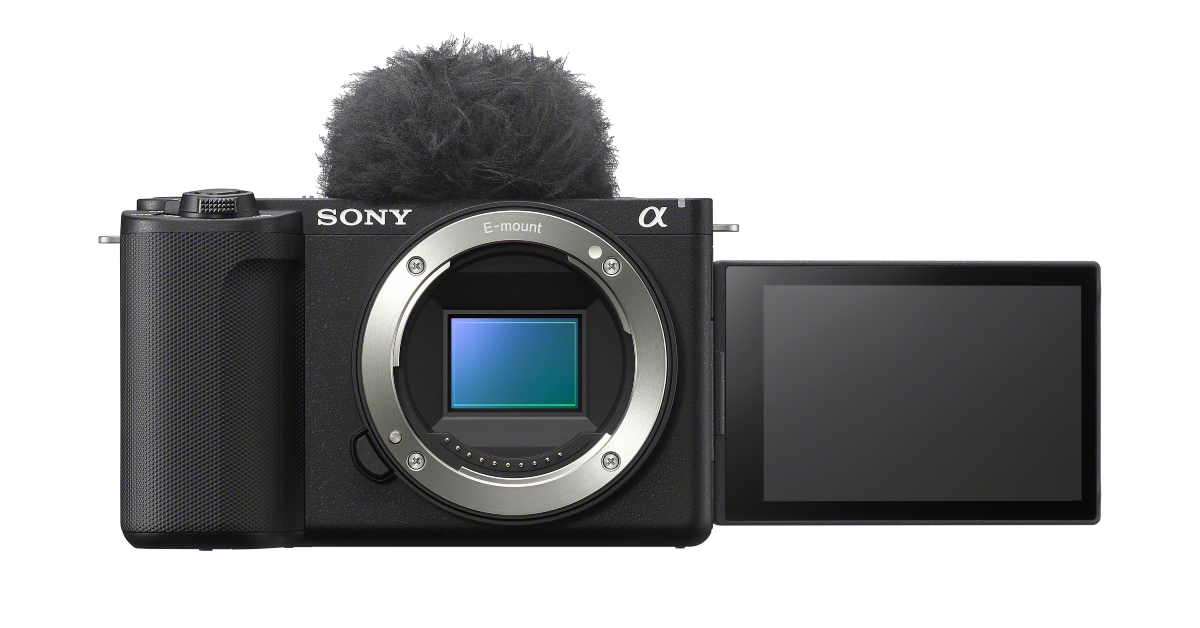
Also Read: Sony ZV-E10 II vlogging camera with E PZ 16-50mm F3.5-5.6 OSS II lens launched in India

The ASUS Vivobook S 14 OLED is a small notebook with a stylish appearance and strong performance. It has an AMD Ryzen AI 9 HX 370 Processor with 50 TOPS XDNA2 NPU, which enables effective multitasking and superior AI capabilities. The laptop includes a 512 GB PCIe Gen 4 SSD and 24 GB of LPDDR5X RAM. As certified by VESA DisplayHDR True Black 600 and Pantone, the 14-inch 3K ASUS Lumina OLED panel provides accurate and vibrant images. It has a 17-hour battery life, quick Type-C charging, and flexible networking. The laptop also features an ASUS ErgoSense keyboard with RGB illumination that can be customised, a wide touchpad for comfortable use, and an FHD IR camera that supports Windows Hello.

4 ways to search anything on Chrome using Google Lens

0

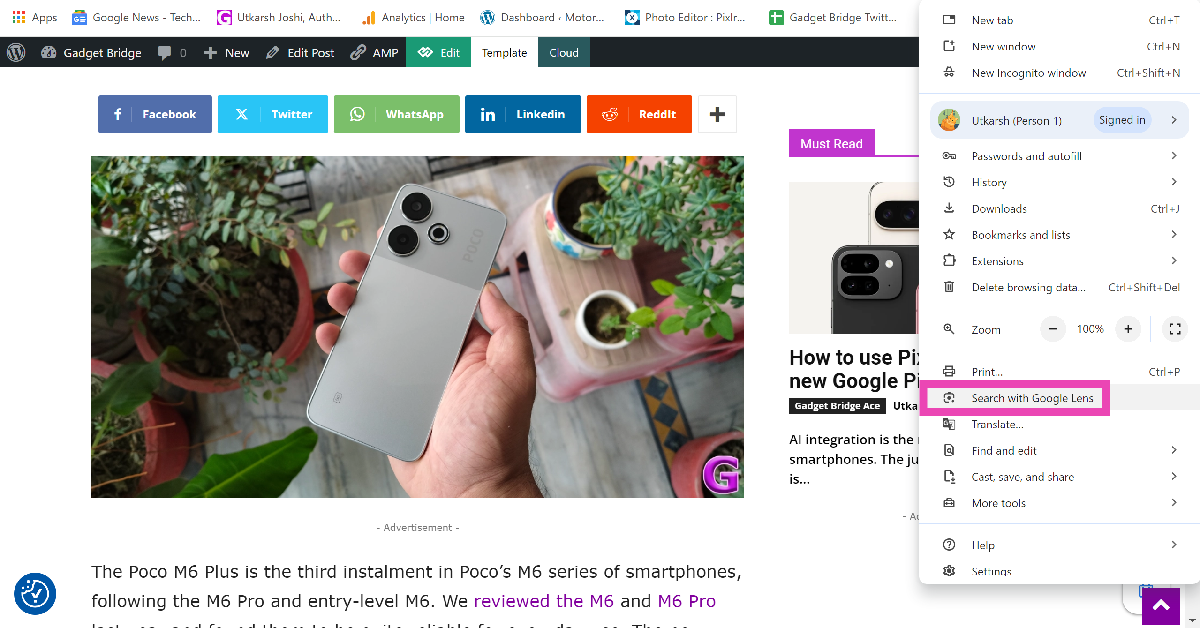
The recent update to Google Chrome brings a couple of useful tools to the web browser. If you don’t want to take the long route to reverse searching an image, you can simply trigger Google Lens within the browser and get the results related to the image in no time. The good thing about this tool is that it works with text queries as well. So, without further ado, here are the 4 ways you can search anything on Chrome using Google Lens.

Read Also: How to use Pixel Studio on the new Google Pixel 9

Before you begin

Since Google just rolled out Lens integration for Chrome, it may take time for it to reach all users. Make sure that your Chrome browser is updated to the latest version. You can also try changing your Chrome profile to see if this feature is available for other accounts.

If you can’t find Google Lens on Chrome, the only thing you can do is wait for it to be made available for your device. Until then, you can use Google Lens on https://images.google.com/. Once you land on the page, click the camera icon to reverse search an image using Google Lens.

Use Google Lens on Chrome web browser to make searches

Step 1: Launch Google Chrome on your PC and open a webpage.

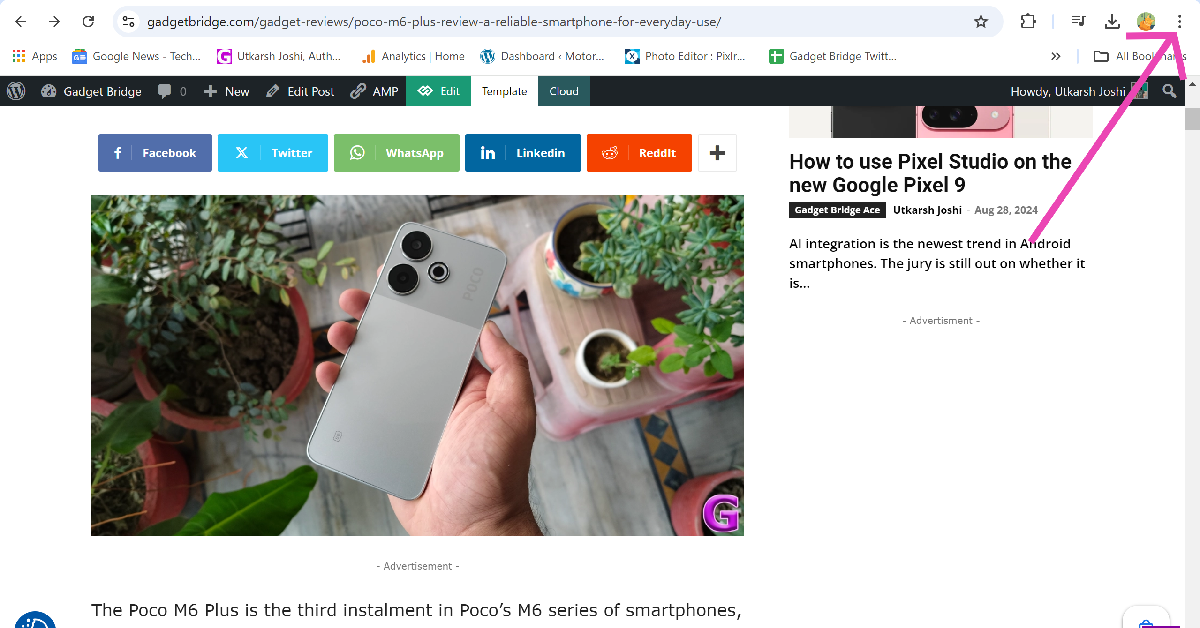
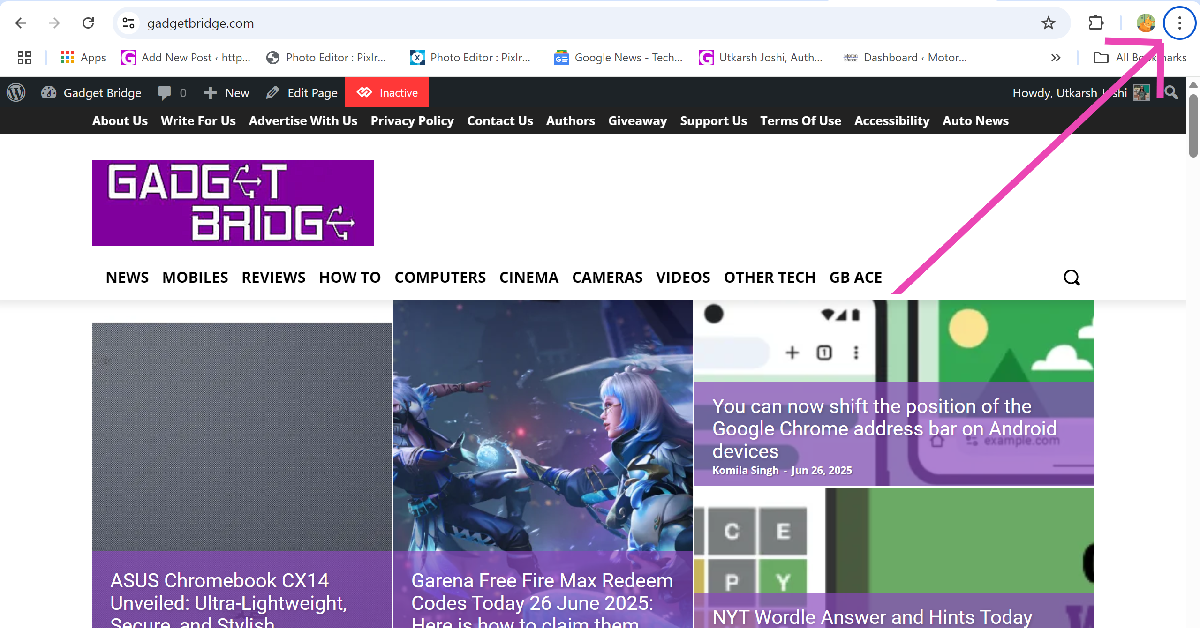
Step 2: Click the ellipses at the top right corner of the screen.

Step 2: Click the ellipses at the top right corner of the screen.

Step 3: Select Search with Google Lens.

Step 3: Select Search with Google Lens.

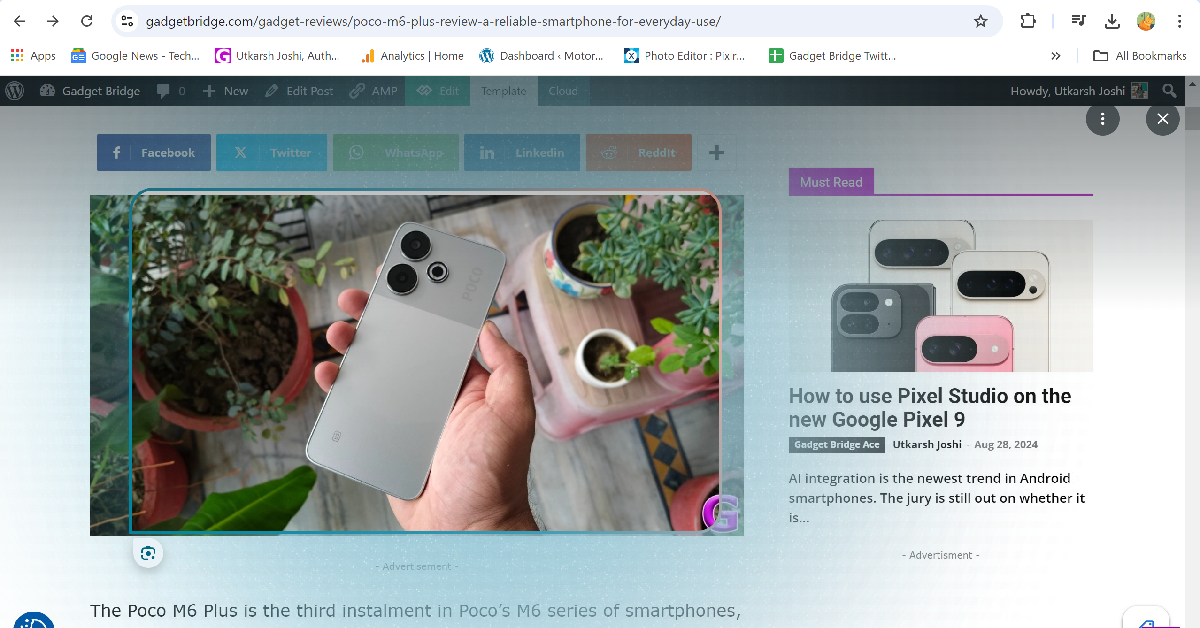
Step 4: Drag the cursor over an image or text to initiate a web search.

Step 4: Drag the cursor over an image or text to initiate a web search.

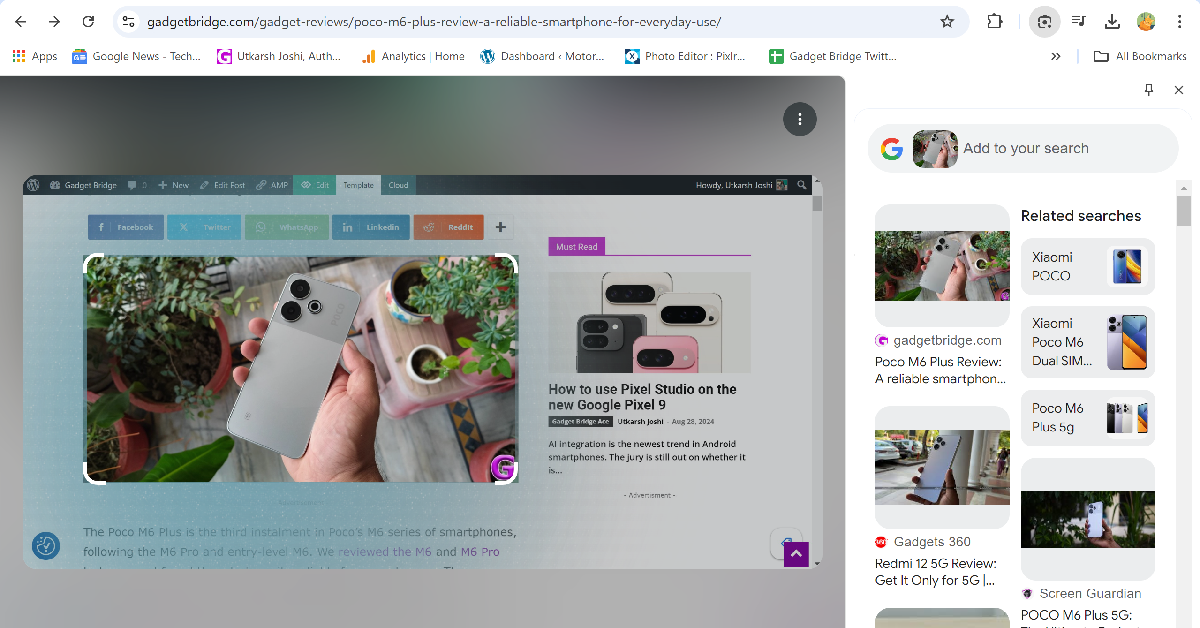
Step 5: The results will appear on a sidebar on the right side of the screen. You can further refine the results by adding text queries to the image.

Step 5: The results will appear on a sidebar on the right side of the screen. You can further refine the results by adding text queries to the image.

Use the address bar

There is a quicker way to commence a search using Google Lens than the one mentioned above. Here’s how you can go about it.

Step 1: Launch Google Chrome on your PC and go to a webpage.

Step 2: Click the address bar.

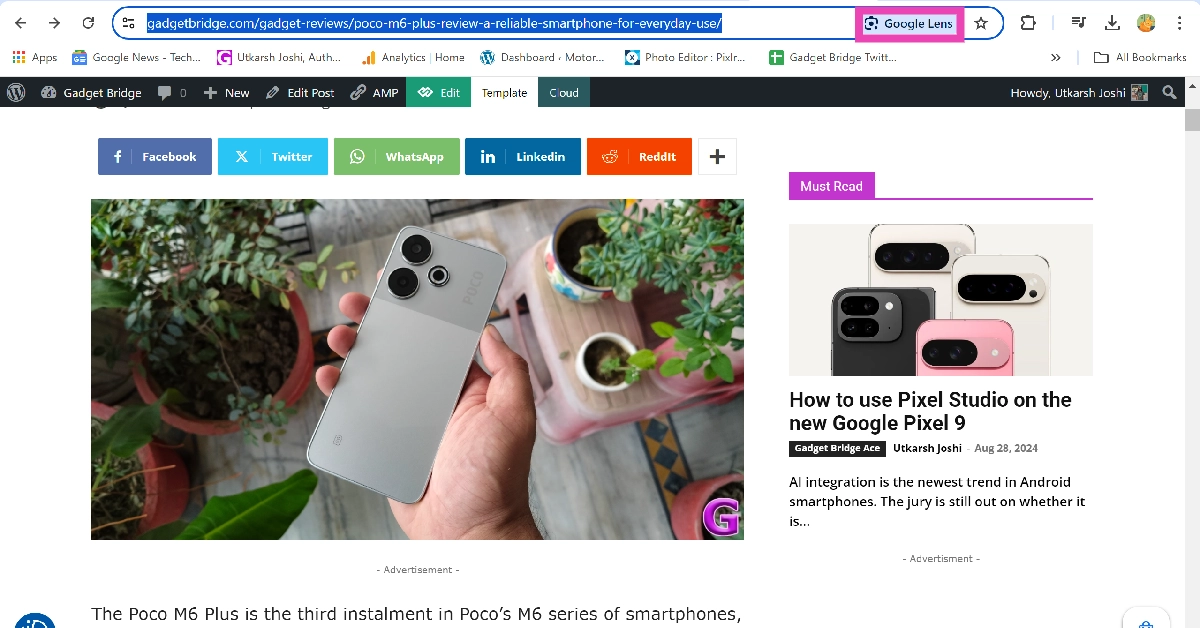
Step 3: Select Google Lens in the address bar.

Step 3: Select Google Lens in the address bar.

Step 4: Drag the cursor over the query (text or image) to make a search.

Step 4: Drag the cursor over an image or text to initiate a web search.

Step 5: The results will appear in the sidebar. You can further refine the results by adding text queries to the image.

Step 5: The results will appear on a sidebar on the right side of the screen. You can further refine the results by adding text queries to the image.

Use the Google Lens toolbar shortcut

Step 1: Hit the ellipses in the top-right corner of the screen.

Step 1: Hit the ellipses in the top-right corner of the screen.

Step 2: Go to More Tools and select Customise Chrome.

Step 2: Go to More Tools and select Customise Chrome.

Step 3: Click on Toolbar.

Step 3: Click on Toolbar.

Step 4: Turn on the toggle switch next to Search with Google Lens.

Step 4: Turn on the toggle switch next to Search with Google Lens.

Step 5: Click the Google Lens icon in the toolbar.

Step 5: Click the Google Lens icon in the toolbar.

Step 6: Select an image by dragging the cursor over it.

Step 6: Select an image by dragging the cursor over it.

Step 7: Google Lens will search the image on the web.

Step 7: Google Lens will search the image on the web.

Use the Google Lens keyboard shortcut

Use the keyboard shortcut

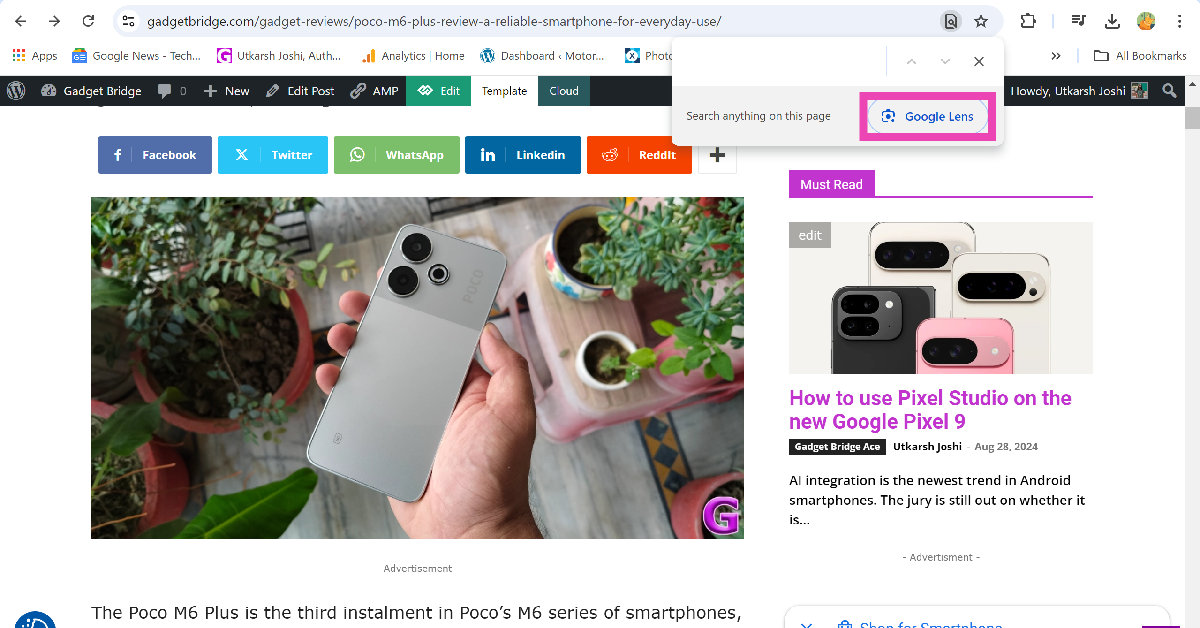
You can also access Google Lens in the page search tool on Chrome. This tool can be triggered by pressing Ctrl + F or Ctrl + G on the keyboard. Once the page search box pops up at the top of the screen, click on Google Lens.

Frequently Asked Questions (FAQs)

How do I use Google Lens on the Chrome web browser?

Open Chrome, click the ellipses, and select ‘Search with Google Lens’. You also access Google Lens by clicking the address bar or opening the page search tool.

How do I add the Google Lens shortcut to Chrome’s toolbar?

Launch Chrome, hit the ellipses, go to More Tools>Customise>Toolbar, and turn on the toggle switch next to Search with Google Lens.

Is there a keyboard shortcut for Google Lens?

You can trigger Google Lens in Google Chrome by pressing Ctrl + F or Ctrl + G on your keyboard.

Does Google Lens work on videos?

You can use Google Lens in Chrome to search for any object in a video. Pause the video in the relevant frame, open Google Lens, and drag the cursor around the object. You can supplement the image with a text query as well.

How do I use Gemini on Chrome?

Open a new tab, type @ and select ‘Chat with Gemini’. Enter your prompt and hit Enter. You will get your response on gemini.google.com.

Read Also: 5 Ways to Type the Copyright and Trademark Symbols on Your PC and Mac (2024)

Conclusion

These are the top 4 ways to use Google Lens on your Chrome browser. This ‘screen search’ feature is not too different from the Circle to Search tool that Google recently introduced on its Pixel 9 smartphones. If you own an older Android smartphone, you can use screen search on Google Lens to achieve similar results.

How to use Pixel Studio on the new Google Pixel 9 

AI integration is the newest trend in Android smartphones. The jury is still out on whether it is here to stay and become the cornerstone of mobile computing. Android OEMs have been quick to adapt to the trend and tailor their products to accommodate new language models and native AI apps. It makes sense that Google, the home of Android, would push the boundaries of AI in new and interesting ways. The new Pixel 9 smartphones are equipped with AI features like Call Notes, Magic Editor, and Gemini Live. The smartphone also has a new ‘Studio’ app which allows users to quickly generate AI images. So, let’s take a look at how you can use the Pixel Studio app on your Google Pixel 9.

Read Also: 5 Ways to Type the Copyright and Trademark Symbols on Your PC and Mac (2024)

What can you do with the Pixel Studio?

Pixel Studio is a handy app to create AI images within seconds. At the moment, the Pixel Studio cannot generate or edit pictures of humans. If your prompt alludes to humans being present as a part of the picture, Pixel Studio may reject it outright. Make sure the input you give to the app is strictly in accordance with its established policy. 

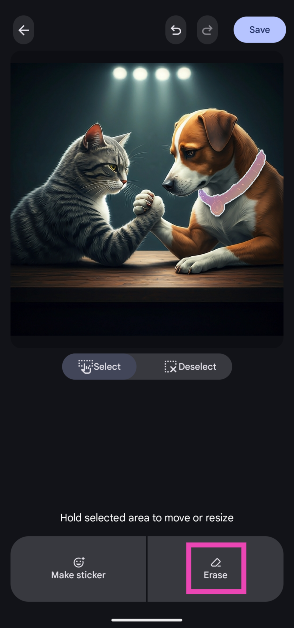
The app further allows users to edit the AI-generated images. Users can choose to erase an object from the scene or add captions and stickers to it. It also lets users select a portion of the image and make a sticker out of it. Users can also upload pictures from their phone’s gallery to the Studio for editing purposes. However, the editing tools offered by the Pixel Studio are already present on the Photos app.

Use Pixel Studio to generate AI images

Step 1: Launch the Pixel Studio app on your Pixel smartphone.

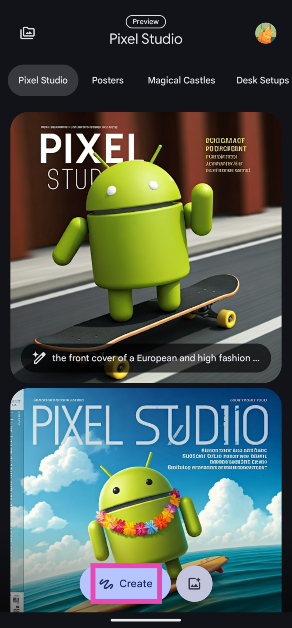
Step 2: Hit the Create button at the bottom of the screen.

Step 2: Hit the Create button at the bottom of the screen.

Step 3: Enter a prompt for the image. Pixel Studio is currently not able to process prompts that involve humans.

Step 3: Enter a prompt for the image. Pixel Studio is currently not able to process prompts that involve humans.

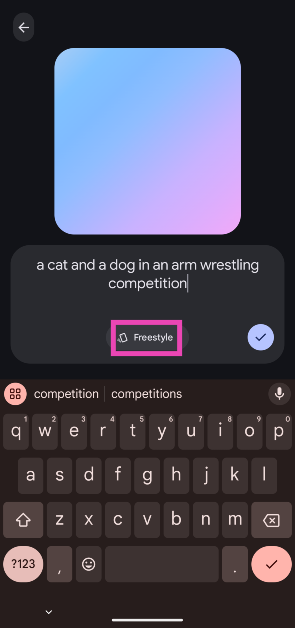
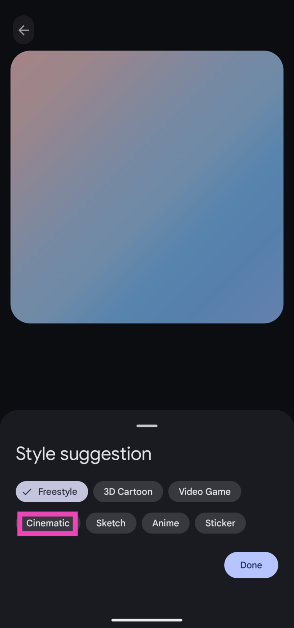
Step 4: Tap on Freestyle and select a style for the image.

Step 4: Tap on Freestyle and select a style for the image.

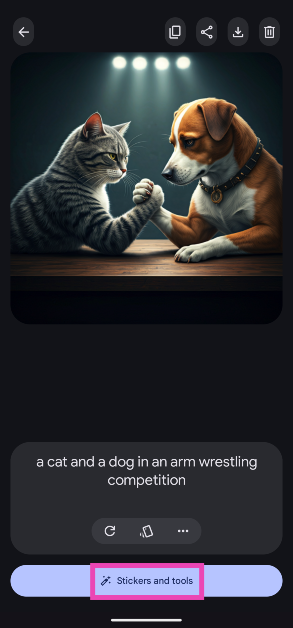
Step 5: Pixel Studio will create an image based on your prompt and style.

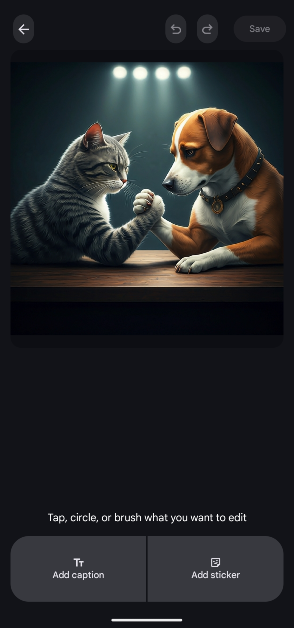
Step 6: Tap on Stickers and tools to edit the image.

Step 6: Tap on Stickers and tools to edit the image. How to use Pixel Studio on the new Google Pixel 9 

Step 7: Select an object or area by brushing or circling it.

Step 7: Select an object or area by brushing or circling it. How to use Pixel Studio on the new Google Pixel 9 

Step 8: Hit Erase to remove the object. You can choose to turn it into a sticker as well.

Step 8: Hit Erase to remove the object. You can choose to turn it into a sticker as well. How to use Pixel Studio on the new Google Pixel 9 

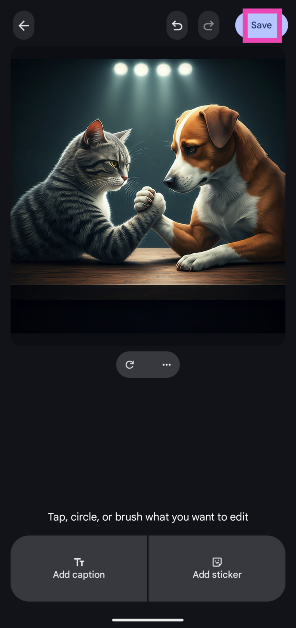
Step 9: Hit Save at the top right corner of the screen.

Step 9: Hit Save at the top right corner of the screen.

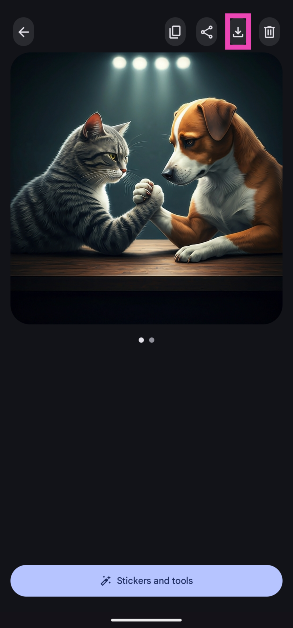
Step 10: On the following page you can view the downloaded and edited images. Hit the downward arrow at the top right corner of the screen to save the image(s) on your phone.

Step 10: On the following page you can view the downloaded and edited images. Hit the downward arrow at the top right corner of the screen to save the image(s) on your phone.

Frequently Asked Questions (FAQs)

What does the Pixel Studio do?

The Pixel Studio app generates AI images based on user prompts. Users can also edit existing images in their phone’s gallery using this app.

Does Pixel Studio work on-device?

Pixel Studio requires an active internet connection to generate AI images. The AI computation is not carried out on the device.

Can I edit images on Pixel Studio?

You can edit the images on your phone using the Pixel Studio app. It allows you to erase objects, add captions, and apply stickers to your images.

Read Also: YouTube Premium Hikes Prices in India by Up to 58%

Conclusion

This is how you can the Pixel Studio on your Google Pixel 9 smartphone. You can tap the icon at the top left corner of the app to view all of the images you have generated using the Pixel Studio. Oppo recently introduced a similar AI studio on its Reno series of smartphones. Oppo’s AI studio turns your pictures into AI portraits. 

5 Ways to Type the Copyright and Trademark Symbols on Your PC and Mac (2024)

0

Your Mac and PC keyboard has major special characters (like !, @, #, $, and more) in the horizontal number row. These characters can be typed by pressing Shift along with the respective number. However, some characters like © and ™ are missing from the keyboard. If you don’t want to Google special symbols every time you want to type them on a text editor, there are a few easy ways you can turn to. Here are the top 5 ways to type the Copyright and Trademark symbols on your PC and Mac.

Read Also: These old iPhones will support iOS 18 and Apple Intelligence: Check out the list

Copyright and Trademark: What’s the difference?

While using the Copyright and Trademark symbols, it can be quite easy to confuse what the two terms mean. The two symbols are meant to be used in very specific situations and cannot be used interchangeably. Copyright protects tangible works of art like books, plays, movies, and more. Once a work is copyrighted, it cannot be reproduced without the creator’s consent. It preserves their original work and protects it in case of plagiarism. Copyright restrictions are lifted 60 years after the death of the artist.

A Trademark, as the name suggests, is a tool that is used by corporate entities to protect their logos, branding, slogans, and other distinguishing attributes from being reproduced by another entity. This ensures that no other business can falsely identify as another brand or mislead customers into believing so.

Type the Copyright and Trademark Symbols on a PC

MS Word

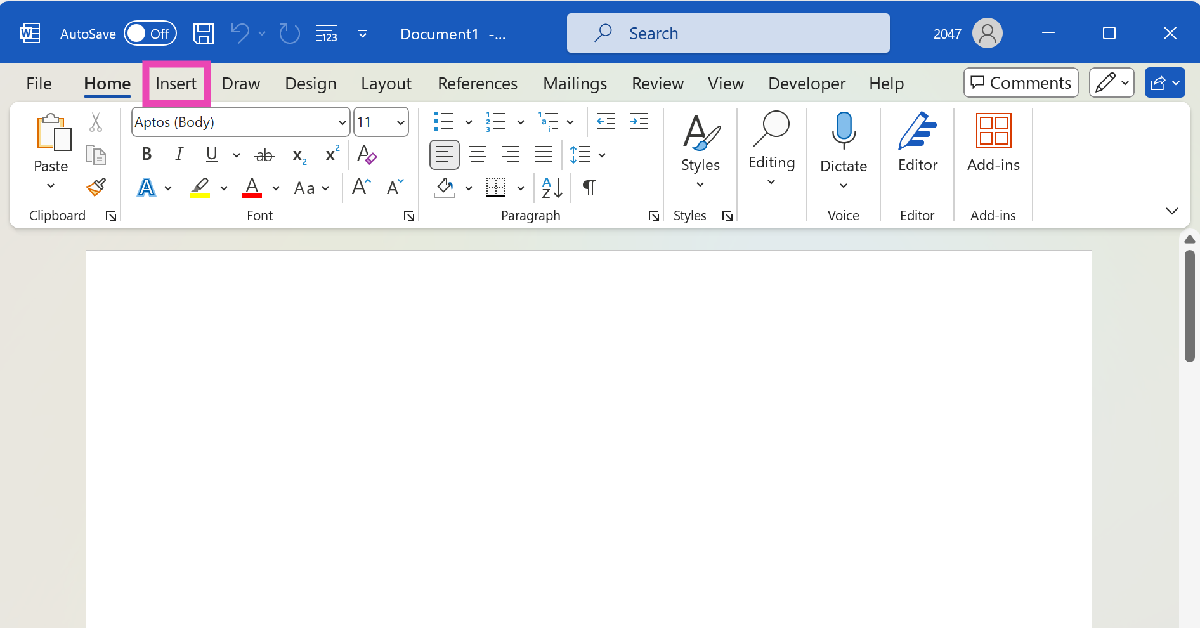
Step 1: Launch Microsoft Word on your PC and open a blank document.

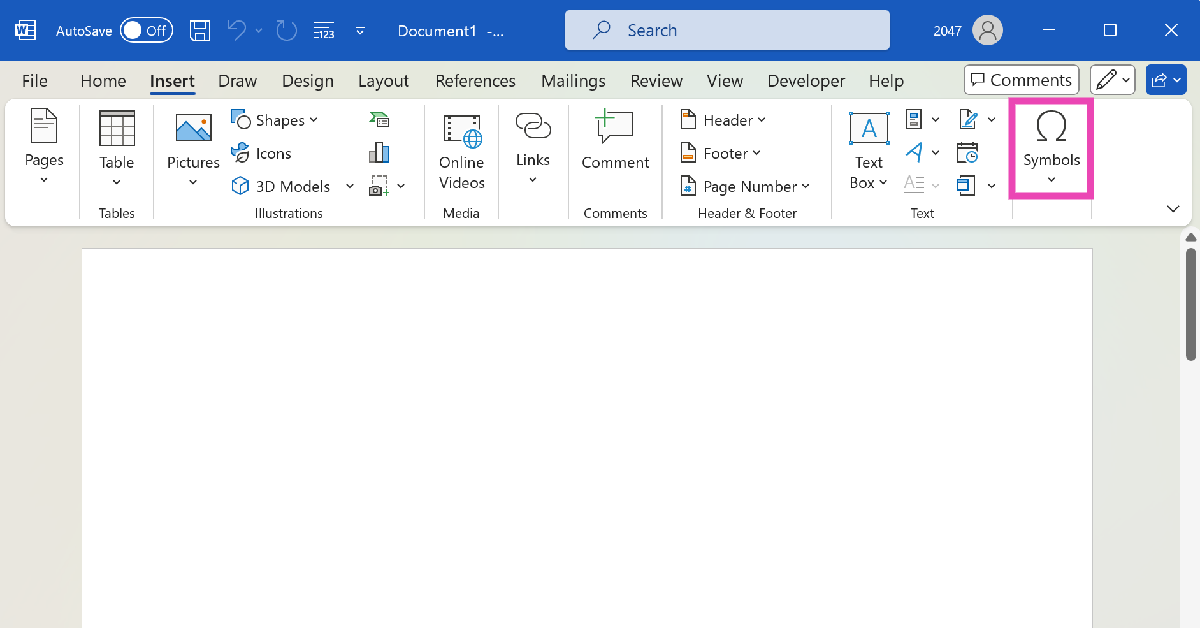
Step 2: Switch to the Insert tab.

Step 2: Switch to the Insert tab.

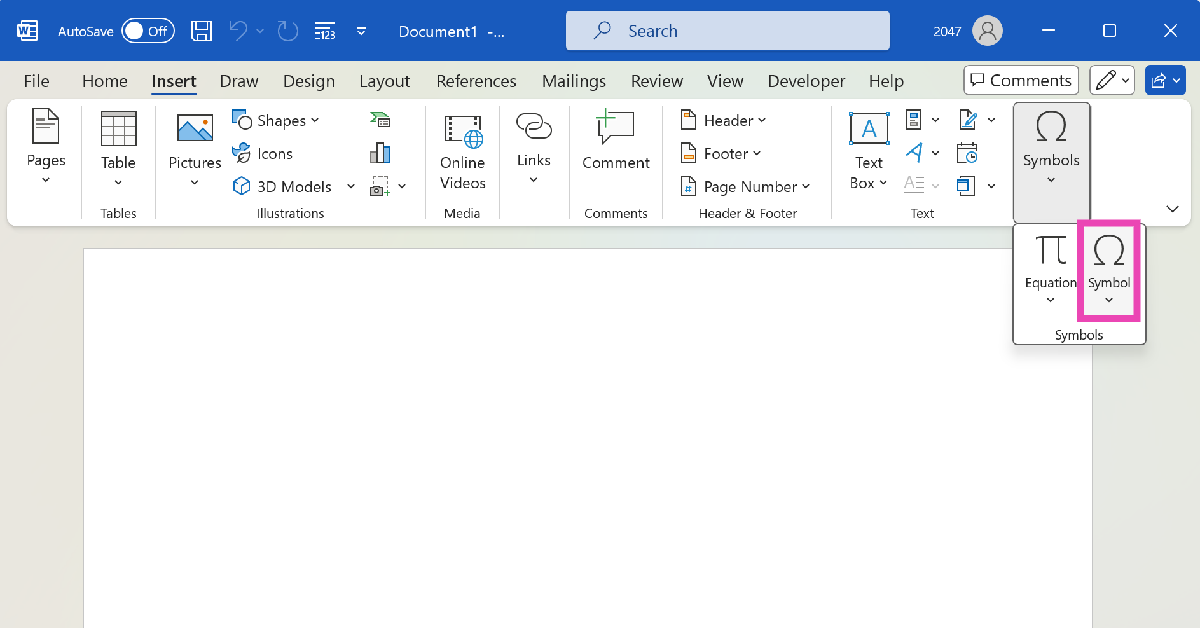
Step 3: Click on Symbols.

Step 3: Click on Symbols.

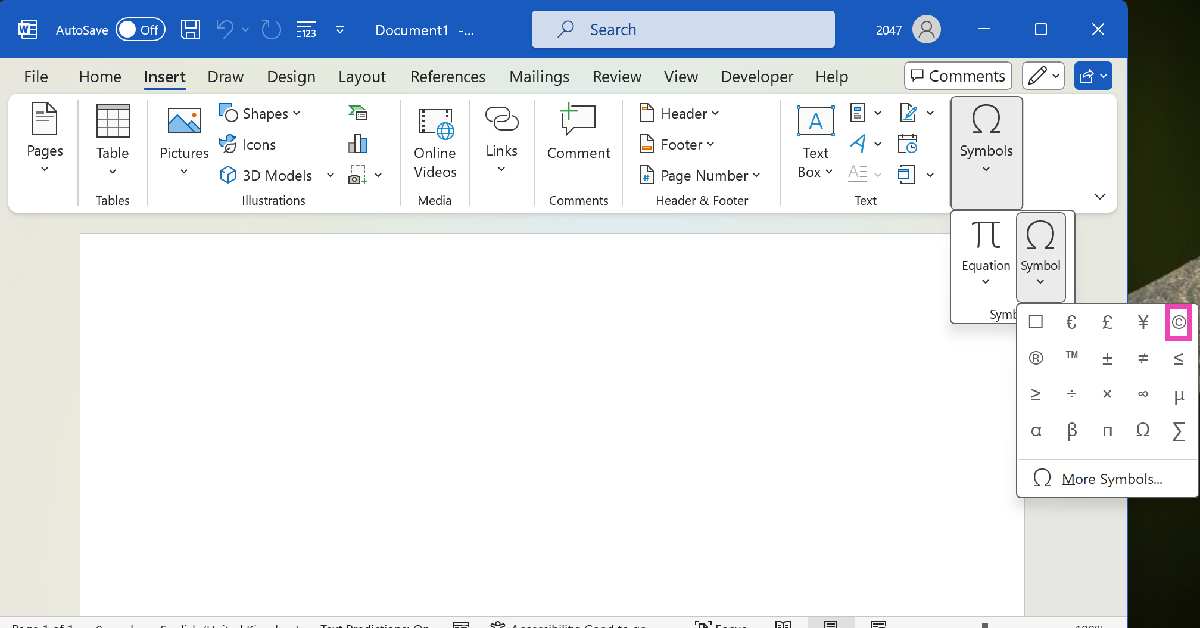
Step 4: Hit Symbol.

Step 4: Hit Symbol.

Step 5: Select the Copyright and Trademark symbols from the list.

Step 5: Select the Copyright and Trademark symbols from the list.

Keyboard shortcut

  • Press Alt + 0169 to type the Copyright symbol
  • Press Alt + 0153 to type the Trademark symbol

Note: The digits in these keyboard shortcuts must be pressed using the vertical numpad on the right side of the keyboard with the Num Lock turned on.

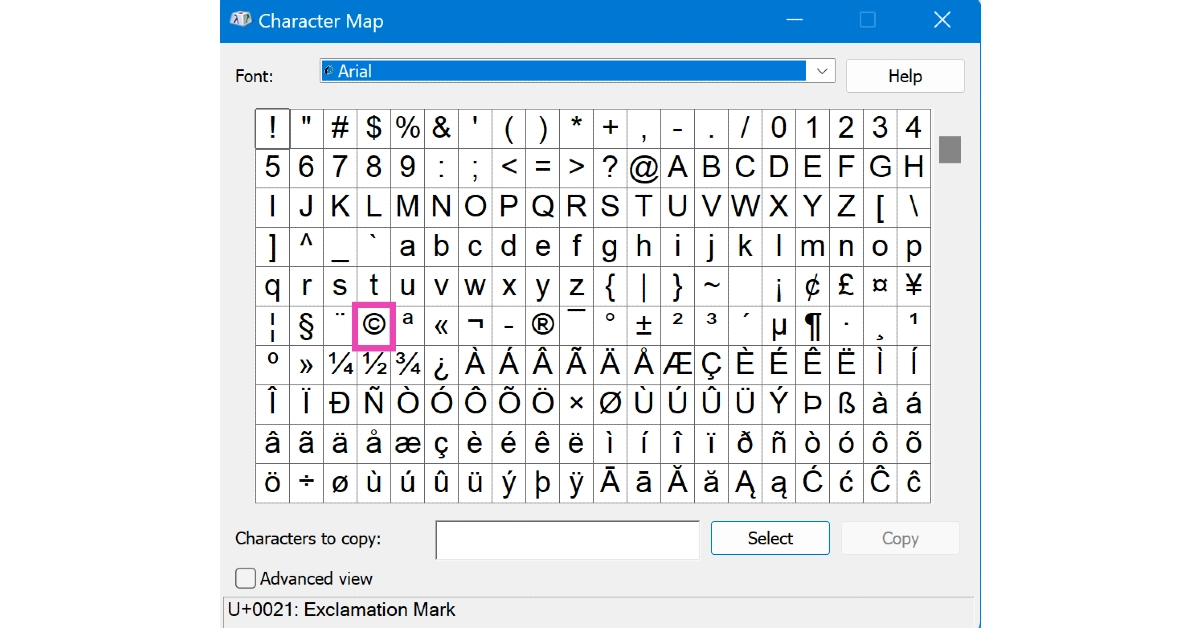
Character Map

Step 1: Type Character Map in the search bar on the taskbar.

Step 2: Launch the Character Map application.

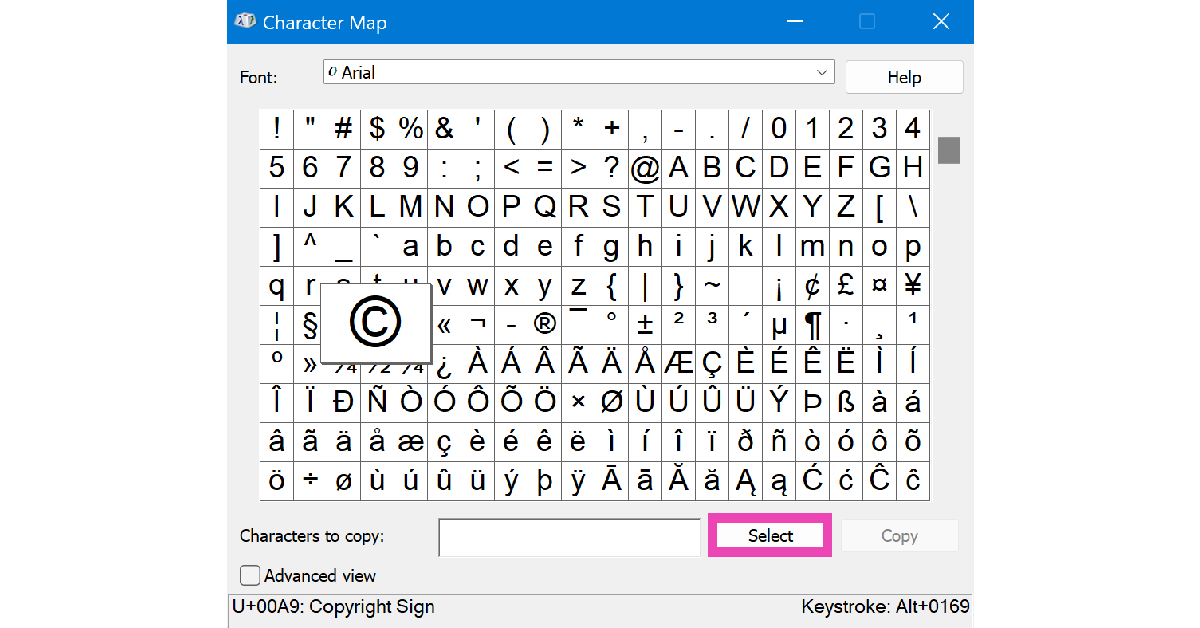
Step 3: Click on the symbol you want to copy.

Step 3: Click on the symbol you want to copy. 5 Ways to Type the Copyright and Trademark Symbols on Your PC and Mac

Step 4: Hit Select.

Step 4: Hit Select. 5 Ways to Type the Copyright and Trademark Symbols on Your PC and Mac

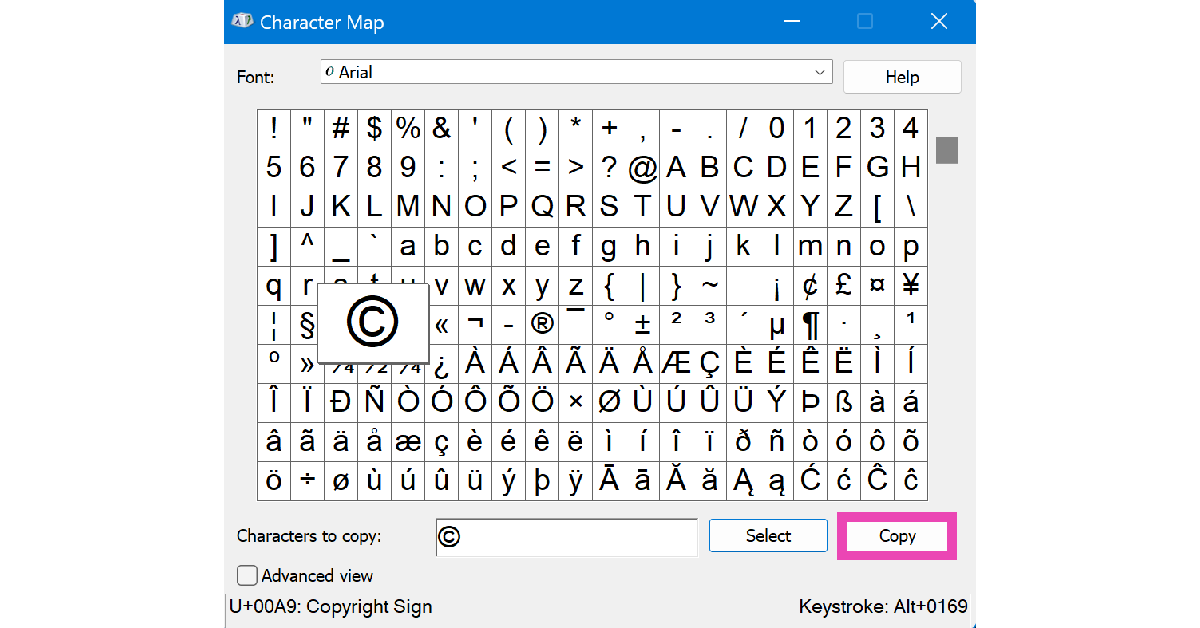
Step 5: Hit Copy.

Step 5: Hit Copy. 5 Ways to Type the Copyright and Trademark Symbols on Your PC and Mac

Step 4: Press Ctrl + V to paste the symbol anywhere you like.

Type the Copyright and Trademark Symbols on a Mac

Keyboard Shortcut

Press Option + G to type the Copyright symbol

Press Option + 2 or Option + Shift + 2 to type the Trademark symbol

Character Viewer

Step 1: Click on Edit at the top of the screen and select Emoji & Symbols. Alternatively, you can press Control + Cmd + Space.

Step 2: Switch to the Letter-Like Symbols tab in the left sidebar.

Step 3: Double-click the character you want to type.

Frequently Asked Questions (FAQs)

How do I type the Trademark and Copyright symbols on Microsoft Word?

Click on Insert>Symbols>Symbol and select a symbol from the list.

What is the keyboard shortcut for the Copyright symbol on PC?

Press Alt + 0169 on your PC to type the Copyright symbol. The digits need to be pressed on the vertical number pad with the Num Lock turned on.

What is the keyboard shortcut for the Copyright symbol on a Mac?

Press Option + G on your Mac keyboard to type the Copyright symbol.

Read Also: How to Connect a Bluetooth Speaker to Your Android Phone?

Conclusion

These are the top 5 ways to type the Copyright and Trademark symbols on your PC and Mac. Want to learn how to type these symbols on your iPhone and iPad? Here’s a quick explainer. If you have any questions, let us know in the comments!

YouTube Premium Hikes Prices in India by Up to 58%

In a move that’s set to affect millions of users, YouTube has raised the prices of its Premium subscription plans in India, with hikes ranging from 12% to a whopping 58%. This marks the first price adjustment since YouTube Premium launched in the country in 2019, and it signals a broader push by Google to enhance its subscription revenue, a growing pillar of its business strategy.

Revised Pricing Across Plans

The individual YouTube Premium plan, which has been a go-to for users seeking an ad-free experience, has jumped from Rs 129 to Rs 149 per month—a 15.5% increase. The student plan, catering to the budget-conscious younger demographic, is now priced at Rs 89 per month, up 12.7% from the previous Rs 79.

However, the most eye-popping change comes with the Family plan. This plan, which allows up to five family members in the same household to share a single subscription, has leapt from Rs 189 to Rs 299 per month, marking a steep 58.2% hike. This is the most significant increase across all plans, reflecting YouTube’s strategy to capitalize on shared subscriptions.

YouTube Music, the company’s music streaming service, hasn’t been left out of the price adjustments. The individual plan for YouTube Music has risen by about 20%, now costing Rs 119 per month, up from Rs 99.

Read Also: Airtel and Apple comes together to provide exclusive Apple TV+ and Apple Music offers in India

What Do You Get for Your Money?

Despite the price hikes, YouTube Premium still offers a suite of features that many users may find worthwhile. Subscribers can enjoy an ad-free viewing experience, offline video downloads, background playback (perfect for multitasking), and early access to experimental features. Additionally, YouTube Music subscribers get an ad-free music experience, with high-quality audio streaming.

These revised prices will apply not only to new subscribers but also to existing users, who will see the changes reflected in their next billing cycle.

A Growing Revenue Stream for Google

YouTube’s decision to increase Premium prices aligns with Google’s broader strategy to grow its subscription revenue. With over 100 million global subscribers, YouTube Premium is a key component of Google’s efforts to diversify its income streams beyond traditional advertising.

Read Also: Top 3 Ways to Identify Songs in YouTube Videos (2024)

A Price Worth Paying?

While the hikes may be a bitter pill for some, especially Family plan users, the core offerings of YouTube Premium—ad-free content, offline access, and exclusive features—remain compelling. However, with alternatives like Spotify and Netflix offering their own premium experiences, whether these price increases will deter subscribers or if the value proposition holds strong will be an interesting trend to watch in the coming months.

In the rapidly evolving digital landscape, YouTube’s ability to justify these higher costs to its users could be crucial for sustaining its momentum in the subscription market.

Airtel and Apple comes together to provide exclusive Apple TV+ and Apple Music offers in India

Together, Apple and Airtel are providing Indian consumers with special offers on Apple Music and TV+. Customers of Airtel Xstream will have access to Hollywood and award-winning entertainment on Apple TV+. Additionally, Wynk Premium members will receive unique discounts, while Airtel users will have access to Apple Music.

Amit Tripathi, Chief Marketing Officer & EVP Customer Experience for Bharti Airtel said, “Apple and Airtel are natural partners who strive to bring excellence to customer experience. We also share the common vision of serving the entertainment needs of Indian users. Airtel offers a one-stop shop to bring all content and entertainment through Airtel Xstream. This partnership with Apple will provide immense value to our customers since they will now have access to the best content and entertainment globally.”

Also Read: Sony ZV-E10 II vlogging camera with E PZ 16-50mm F3.5-5.6 OSS II lens launched in India

Apple and Airtel announce a strategic alliance to provide Indian customers with access to exclusive offers for Apple TV+ and Apple Music. All of your favourite displays may be used to watch Apple TV+, which delivers top-notch, gripping drama and comedy series, feature films, ground-breaking documentaries, and entertainment for kids and families. Compared to other streaming services in its debut, Apple TV+ has debuted more original hits and won more awards more quickly since its start. The WiFi plans that come with Airtel Xstream fibre also include access to a wide variety of TV shows, movies, and online series; the inclusion of Apple TV+ will enhance this content selection even further. Postpaid Airtel WiFi plans and Apple TV+ will be bundled together.

Additionally, Airtel will provide its Wynk Premium members in India with exclusive Apple Music offers. Along with captivating features like time-synchronized lyrics, lossless audio, and immersive Spatial Audio, Apple Music users may also enjoy Apple Music Sing. Apple Music will be integrated for Wynk Premium members, who will also receive exclusive discounts.

Also Read: OnePlus Nord CE 4 is available for Rs 3,000 discount on Amazon and OnePlus Store

Later this year, Airtel users in India will be the only ones able to take advantage of these Apple Music and Apple TV+ offers.

Oliver Schusser, Apple’s vice president of Apple Music, Apple TV+, Sports, and Beats said, “We are thrilled that Airtel customers in India will soon be able to enjoy all of the incredible content on Apple TV+ and Apple Music. With our ever-growing catalogue of world-class films, television shows and music to choose from, we know there will be something for everyone.”

Garena Free Fire Max Redeem Codes Today 28 August 2024: Here is how to claim them

Garena Free Fire Max is a battle royale game with regular awards and tournaments to keep players interested. If you play Garena Free Fire, you should be aware of the redeem codes that are released on a daily basis. However, because the battle royale game is banned in India, players from other countries can use the Free Fire Redeem codes daily. If you’re unfamiliar with the Garena Free Fire redeem codes or don’t know how to get them, we’ve put together a step-by-step guide to help you redeem them. Check out Garena Free Fire Max Redeem Codes for 28 August  2024.

The Free Fire Max redeem codes are a great way to get free stuff. These are 12-digit codes that contain alphabets and numbers, as well as an expiration date and time. Because the Garena FF redeem codes cannot be used more than once, you should hurry to the redemption page to claim your free reward before someone else does. To get a free reward, all you have to do is go to reward.ff.garena.com/en, which is the official redemption page. Also, keep an eye on this space for daily updates on Garena Free Fire Max redemption codes and rewards.

Also Read: Sennheiser Accentum Plus wireless headphones with Hybrid Adaptive Noise Cancellation launched

Garena Free Fire Max Redeem Codes Today 28 August 2024

Q1AZ-2WSX-3EDC
4RFV-T5GB-6YHN
N7UJ-M8IK-L9OP
G1HJ-2WQ3-E4VR
T5BY-6NUM-7IKJ
GY1D-R2EK-3B4L
W5FI-6TGH-7U8J
W9PQ-0OZA-1SXD
2C3V-4B5N-6M7K
J8I9-O0PZ-QA1X
2S3D-4E5R-6FTG
Z9XA-Q1VW-2S3D
E4RF-T5GB-6YHN
M7UI-J8KO-L9P0
O8LP-A9ZQ-1XW2
C3ED-V4FR-B5GT
N6YH-M7UJ-K8IL

How to Get Free Fire Max Redeem Codes for Garena on 28 August 2024?

  • Visit the Garena Free Fire Max game’s official website at reward.ff.garena.com.
  • Use your Facebook, Google, VK, Apple ID, Huawei ID, or Twitter account to log in.
  • You’ll be taken to a valid redemption code (s)
  • Copy and paste the 12-digit redemption code into the text box.
  • On the screen, a dialogue box will appear.
  • ‘Ok’ should be selected.

For the latest gadget and tech news, and gadget reviews, follow us on TwitterFacebook and Instagram. For newest tech & gadget videos subscribe to our YouTube Channel. You can also stay up to date using the Gadget Bridge Android App. You can find the latest car and bike news here.
Amazon Quiz Answers Today 28 August 2024: Participate to win Rs 500 Amazon Pay Balance

28 August 2024: New Amazon Quiz is now available. Customers from different parts of the country are participating in the daily quiz. The quiz starts at midnight today and will be live until 11:59 PM tonight. By successfully answering every question, participants in the quiz have the chance to win wonderful rewards. A Rs 500 Amazon Pay Balance is up for grabs to participants today.

One wrong answer could eliminate you from the quiz. You have a chance to win Rs 500 Amazon Pay Balance if you successfully answer every question. Users of the app only have the opportunity to take the quiz. Check Out 28 August 2024 Amazon Quiz Answers.

Amazon Quiz Today Prize: Rs 500 Amazon Pay Balance

Quiz Date: 28 August 2024

Daily Timing: 12 AM to 11:59 PM

Previous Amazon Quiz Winners Announcement: Today 12 PM Noon

Amazon Quiz Answers Today 28 August 2024: Win ₹ 500 Amazon Pay Balance

Question 1: Which director won his first directing Oscar in 2024?

Answer: Christopher Nolan

Question 2: Jane Fraser is the current CEO of which bank?

Answer: Citigroup

Question 3: Which Asian country’s passport has been rated the most ‘powerful’ in the world for 2024, according to the Henley Index?

Answer:  Singapore

Question 4: Which state is the largest producer of this?

Answer: Maharashtra

Question 5: Which was the first country to make this drink?

Answer: France

Also Read: Noise Buds Verve, budget TWS with up to 45 hours of playback launched in India

How To Play Amazon Quiz Today

Only app users are eligible to play the Amazon quiz every morning from 12 AM to 11:59 PM. The quiz is not available on the desktop. For those who are unaware of how to play the Amazon quiz, below are the steps, you can follow to take the quiz.

  • First, download the Amazon app from the Google Play Store or App Store or go here to download the Amazon App
  • Now fill in the required information through the Sign-Up option.
  • You need to log in to the Amazon app and scroll down on the home screen to find the Amazon Quiz banner.
  • Tap on the Amazon Quiz banner and tap on the Start button to start the Quiz.
  • Now you will get 5 questions and you need to answer them correctly. One wrong answer will eliminate you from the Quiz.
  • After answering all the questions correctly you are now eligible for a Lucky Draw.
  • The previous winner’s name will be announced today at 12 PM.

Amazon Daily Quiz Answers from the previous few days.

Here are all the answers from the previous 5 days of the Amazon Daily Quiz and Contest.

Amazon Quiz Answers Today 27 August 2024: Win ₹ 500 Amazon Pay Balance

Question 1: Who scored a half-century in just 15 balls in a losing effort against Sunrisers Hyderabad in IPL 2024 for Delhi Capitals?

Answer: Jake Fraser- Mcgurk

Question 2: The Amazon Prime series- ‘A Gentleman in Moscow’ stars which famous actor in the lead role of Alexander Rostov?

Answer: Ewan Mcgregor

Question 3: The Achyutraya temple, the Virupaksha temple and the Vithala temple are located in which UNESCO World Heritage Site?

Answer: Hampi

Question 4: This is the logo of a famous automobile company headquartered in which country?

Answer:  France

Question 5: This visual shows which dwarf planet as seen from the New Horizons spacecraft in 2015?

Answer: Pluto

Amazon Quiz Answers Today 26 August 2024: Win ₹ 500 Amazon Pay Balance

Question 1: Who scored a half-century in just 15 balls in a losing effort against Sunrisers Hyderabad in IPL 2024 for Delhi Capitals?

Answer: Jake Fraser- Mcgurk

Question 2: The Amazon Prime series- ‘A Gentleman in Moscow’ stars which famous actor in the lead role of Alexander Rostov?

Answer: Ewan Mcgregor

Question 3: The Achyutraya temple, the Virupaksha temple and the Vithala temple are located in which UNESCO World Heritage Site?

Answer: Hampi

Question 4: This is the logo of a famous automobile company headquartered in which country?

Answer:  France

Question 5: This visual shows which dwarf planet as seen from the New Horizons spacecraft in 2015?

Answer: Pluto

Amazon Quiz Answers Today 24 August 2024: Win ₹ 500 Amazon Pay Balance

Question 1: Which Indian won the silver medal in the FIDE women’s candidates 2024?

Answer: Koneru Humpy

Question 2: Which of these actresses is the executive producer of the Amazon Prime series ‘Poacher’?

Answer: Alia Bhatt

Question 3: Which of these is a traditional, flat-bottomed Venetian rowing boat?

Answer:  Gondola

Question 4: The man in the picture is cosplaying a character from which famous children’s book?

Answer: Alice in Wonderland

Question 5: This is the Adalaj Ni Vav, a stepwel located in which state?

Answer: Gujarat

Amazon Quiz Answers Today 23 August 2024: Win ₹ 500 Amazon Pay Balance

Question 1: Which team recently set the record for the highest chase in Indian Premier League history by successfully chasing a target of 262?

Answer: Punjab Kings

Question 2: The comedy movie ‘Ricky Stanicky’ stars which of these actors, also a big star in sports entertainment?

Answer: John Cena

Question 3: The famous monument, the Humayun’s Tomb was built in which century?

Answer: 16th century

Question 4: This is the famous Rathaus, located in which famous European capital?

Answer:  Vienna

Question 5: Which of these famous guitarists was part of this iconic band?

Answer: France

Amazon Quiz Answers Today 22 August 2024: Win ₹ 500 Amazon Pay Balance

Question 1: Which of these recently played ATP events has a court named after the legendary tennis player Rafael Nadal?

Answer: Barcelona Open

Question 2: The movie Road House sees Jake Gyllenhaal play the role of an ex UFC fighter. Which of these famous sportspeople also acts in the movie?

Answer: Conor Mcgregor

Question 3: What is the other name given to the swamp deer, the state animal of Madhya Pradesh?

Answer: Barasingha

Question 4: In which of these cities in the USA is this famous museum located?

Answer: New York

Question 5: Which of these controversial media organizations was founded by this Australian editor and publisher?

Answer: Wikileaks

Amazon Quiz Answers Today 21 August 2024: Win ₹ 500 Amazon Pay Balance

Question 1: Which of these players won the Monte Carlo Masters tennis tournament in 2024, his 3rd triumph in that event in 4 years?

Answer: Stefanos Tsitsipas

Question 2: Which of these Amazon Prime shows shares its name with a 2005 Brad Pitt- Angelina Jolie movie?

Answer: Mr and Mrs Smith

Question 3: Which animal features on the election symbol of the Republican party in the USA?

Answer:  Elephant

Question 4: These waterfalls span the border between the province of Ontario in Canada and which state in the USA?

Answer:  New York

Question 5: Which of these famous architects designed this iconic monument in India?

Answer: Edwin Lutyens

Amazon Quiz Answers Today 20 August 2024: Win ₹ 500 Amazon Pay Balance

Question 1: Against which team did Sunrisers Hyderabad set a new record scoring 287 in an IPL match?

Answer: Royal Challengers Bengaluru

Question 2: Who plays the role of soldier Arun Katyal in the recently released movie ‘Yodha’?

Answer: Sidharth malhotra

Question 3: Which of these famous rulers was born in the Shivneri Fort in Maharashtra in the 17th century?

Answer: Shivaji

Question 4: Name this famous church located in Europe

Answer: St. Peter’s Basilica

Question 5: This is the flag of which Caribbean country?

Answer: Barbados

Amazon Quiz Answers Frequently Asked Questions (FAQs)

Where can I check the previous winners? Did I win how to check?

You can head over to this link on your mobile or desktop to check the winners of the Amazon Daily Quiz Contest.

How to Play Amazon Daily Quiz or Contest?

We have written an explainer above, you can refer to that.

When are the winners of the Amazon Quiz and contest announced or declared?

The announcement of today’s Amazon quiz winner will take place Tomorrow. As for the Special Quiz and “Spin & Win” Contest, the winners will be declared once the Quiz Contest comes to an end. To find out who the lucky winner is, you can refer to the Amazon Quiz Winners List or visit the Amazon Winners tab in the Amazon App.

How to participate in the Daily Amazon Quiz?

That is very easy, just got to the Amazon app and scroll to the bottom of the page and you will find the Quiz section. Click on it (usually it is called the fun zone) and you can enter the Amazon Today Quiz Contest. 

Are there any other quizzes or contests running on Amazon daily?

Yes, there are many running on a daily basis. These range from spinning the wheel to answering the questions correctly. All are located in the Fun Zone. 

What are the criteria for selecting a winner in the Daily Amazon Quiz?

When a qualified player submits correct answers to all the questions, they will automatically be entered into a lucky draw. This draw will include all participants who answered all the questions correctly. Amazon randomly selects the final winners from the pool of eligible participants who gave the right answers.

Which Types of Questions are asked within Amazon Daily Quiz?

These are very simple and straightforward questions. These are mainly related to general knowledge. 

Where should I look for Amazon Daily Quiz answers?

You can bookmark this page as we will help you every day with the Amazon Daily Quiz. We bring you fresh answers every day for the Amazon Daily Quiz and Contest. 

What time does Amazon Announce previous winners?

The previous winner’s name will be announced today at 12 PM (noon).

For the latest gadget and tech news, and gadget reviews, follow us on TwitterFacebook and Instagram. For newest tech & gadget videos subscribe to our YouTube Channel. You can also stay up to date using the Gadget Bridge Android App. You can find the latest car and bike news here.
How to Connect a Bluetooth Speaker to Your Android Phone?

0

Pairing a Bluetooth speaker with your Android phone is a seamless and intuitive process. If the speaker supports Google Fast Pair, its device name pops up on your phone as soon as it is turned on. Once you connect to the speaker, it is saved to your Google Account. This enables seamless pairing with other devices that use the Google Account. If you’re pairing your speaker for the first time, it is possible to hit a snag. Here’s how you can connect a Bluetooth speaker to your Android phone.

Read Also: These old iPhones will support iOS 18 and Apple Intelligence: Check out the list

Unable to pair the speaker with your phone?

Most Bluetooth speakers are compatible with Android and iOS smartphones. As long as the host device has Bluetooth, it can control the speaker. If you can’t get it to pair with your phone, it could be due to one of the following reasons.

The speaker is low on battery

  • Your phone’s Bluetooth is turned off
  • The speaker is connected to another device
  • The speaker is not in pairing mode
  • Your phone is connected to another Bluetooth device
  • Your phone is in Airplane Mode

Connect a Bluetooth speaker to your Android phone

Step 1: Press the power button on the Bluetooth speaker. If there is a pairing button on the device, long-press it until you hear a notification tone.

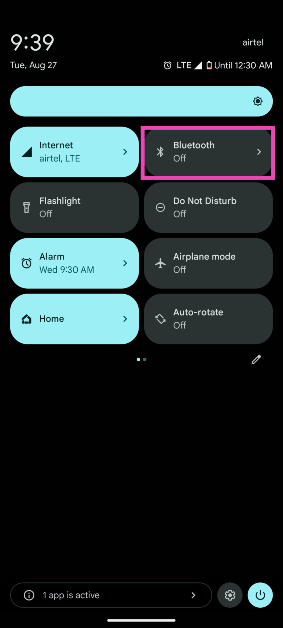
Step 2: Unlock your Android smartphone and swipe down from the status bar to access the Quick Settings Menu.

Step 3: Long-press the Bluetooth tile.

Step 3: Long-press the Bluetooth tile.

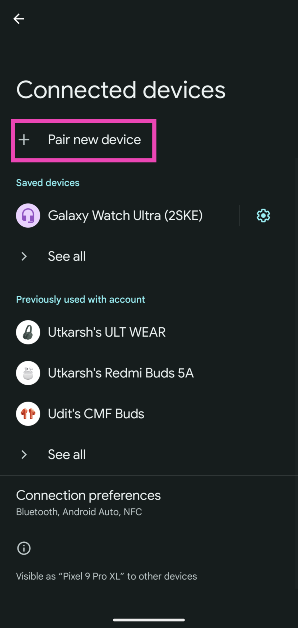
Step 4: Tap on Pair new device. This will turn on the Bluetooth on your phone.

Step 4: Tap on Pair new device. This will turn on the Bluetooth on your phone. How to Connect a Bluetooth Speaker to Your Android Phone?

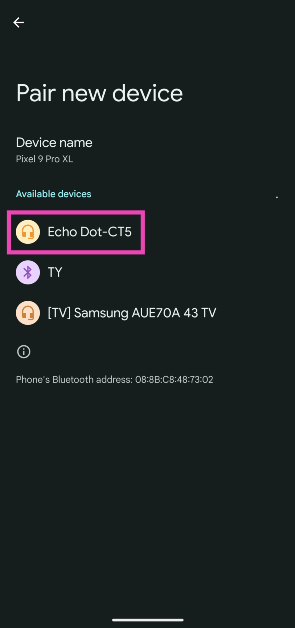
Step 5: Select the Bluetooth speaker from the list.

Step 5: Select the Bluetooth speaker from the list. How to Connect a Bluetooth Speaker to Your Android Phone?

Step 6: Tap on Pair in the popup box.

Frequently Asked Questions (FAQs)

Can I connect two Bluetooth speakers to my Android phone simultaneously?

You cannot connect two Bluetooth speakers to your phone unless the speakers support interlinking between them. Interlinking is generally supported by speakers belonging to the same brand.

Can I connect my Bluetooth speaker to two devices?

Bluetooth speakers that support multi-point connection can be connected to two devices at the same time.

How do I put my Bluetooth speaker in pairing mode?

Press and hold the power button to turn on the Bluetooth speaker and put it in pairing mode. Some speakers have a dedicated pairing button. Long-press this button to enter pairing mode.

Read Also: Sony ZV-E10 II vlogging camera with E PZ 16-50mm F3.5-5.6 OSS II lens launched in India

Conclusion

This is how you can connect a Bluetooth speaker to your Android phone. Download the speaker’s companion app to gain access to advanced features like equaliser modes, sound profiles, multi-point connection, and more. If you have two more Amazon Echo speakers, you can pair them together for a louder output.

These old iPhones will support iOS 18 and Apple Intelligence: Check out the list

0

Apple has confirmed that the new iPhone 16 Series will launch on September 9. This is consistent with the company’s strategy of revealing the new iPhones in the fall. The new iPhone 16 will come in four variants and will sport design and hardware upgrades. However, the more notable upgrades will be on the OS front as the new iOS 18 is set to integrate AI features for the first time. Apple showcased these features along with the iOS 18 at its WWDC event earlier this year. While iOS 18 has since been released for beta trials, the ‘Apple Intelligence’ features will arrive alongside the new iPhone series. So, let’s take a look at which old iPhones will support iOS 18 and Apple Intelligence.

Read Also: Samsung introduces ten 12 Kg AI washing machines in India

What is Apple Intelligence?

Apple Intelligence is Apple’s in-house AI suite of features for the iPhone, iPad, Macbook, and Mac. It will bring features like Image Playground, Genmoji, Writing Tools, Image Wand, Priority Notifications, and more to Apple devices. The iPhone 16 will also rely on Apple Intelligence to record phone calls and transcribe them. The Photos app and Siri voice assistant will also be rejuvenated with AI features.

Focussing on user privacy, Apple has devised on-device models for Apple Intelligence. The tech giant has reassured users that it will not train these models with user-generated data. Personal features like call recording and transcription will be handled by these on-device models. Some of the more demanding AI tasks will be exported to cloud servers. The newest A17 Pro chipset from Apple, which powers the iPhone 15 Pro and Pro Max, has the NPU architecture to handle AI computation. The upcoming A18 chipset from Apple will further boost the NPU cores.

Which old iPhones will get Apple Intelligence?

iphone 15 pro max review

Here is the list of older iPhones that are compatible with Apple Intelligence.

  • iPhone 15 Pro
  • iPhone 15 Pro Max

Other than iPhones, these Apple devices will also support the upcoming AI suite.

  • iPad Pro (M1 and later)
  • iPad Air (M1 and later)
  • Macbook Air (M1 and later)
  • Macbook Pro (M1 and later)
  • iMac (M1 and later)
  • Mac mini (M1 and later)
  • Mac Studio (M1 Max and later)
  • Mac Pro (M2 Ultra)

Which old iPhones will get iOS 18?

Amazon is offering a huge discount on the iPhone 15

These older iPhones will receive the iOS 18 update.

  • iPhone 15 Pro Max
  • iPhone 15 Pro
  • iPhone 15 Plus
  • iPhone 15
  • iPhone 14 Pro Max
  • iPhone 14 Pro
  • iPhone 14 Plus
  • iPhone 14
  • iPhone 13 Pro Max
  • iPhone 13 Pro
  • iPhone 13
  • iPhone 13 mini
  • iPhone SE (2nd Gen or later)
  • iPhone 12 Pro Max
  • iPhone 12 Pro
  • iPhone 12
  • iPhone 12 mini
  • iPhone 11 Pro Max
  • iPhone 11 Pro
  • iPhone 11
  • iPhone XR
  • iPhone XS Max
  • iPhone XS

Frequently Asked Questions (FAQs)

Which old iPhones will support Apple Intelligence features?

The iPhone 15 Pro and Pro Max are the only older iPhones that will receive the Apple Intelligence features.

Is Apple Intelligence completely on-device?

Apple Intelligence relies on the company’s in-house on-device models for some of the computational tasks, but it also uses cloud servers for AI computation.

When will Apple release the new iPhones?

The new iPhone 16 series will be launched on September 9.

Read Also: 8 Ways to Fix ‘No Service’ Issue on an iPhone (2024)

Conclusion

As the release date of the new iPhones comes closer, check out what you can expect from the new devices. Next year, Apple plans on launching the new iPhone ‘Slim’, which will be a sleeker version of the iPhone. Which AI features are you most excited to use on your iPhone? Let us know in the comments!

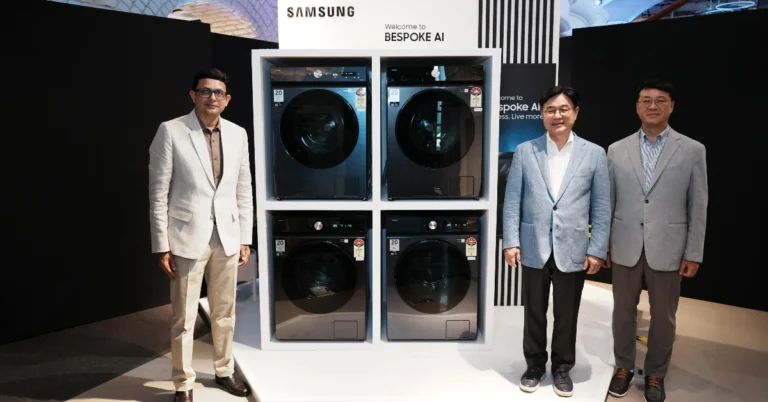
Samsung introduced ten 12 Kg AI washing machines in India

For Indian consumers, Samsung has introduced ten high-capacity AI washing machines, including a 12 kg model with AI Ecobubble, AI Energy, AI Control, and AI Wash functions. These washers are made to streamline the laundry process, giving Indian customers the convenience and ease of doing a large load of laundry at once.

With the goal of making laundry easier for Indian customers, Samsung has introduced a new line of ten large-sized front-load washing machines that are AI-powered. With a flat glass door design and cutting-edge technologies like AI Wash, AI Energy Mode, AI Control, and AI Ecobubble, the machines range in price from INR 52990 to INR 74990. Larger loads, such as blankets, curtains, and sarees, are perfect for these machines to wash. Customers can also purchase new washing machines with convenient EMIs with the aid of Samsung Finance+.

Capacity MRP Colour
12KG 52990 Inox
12KG 53990 Navy
12KG 56990 Black
12KG 59990 Navy
12KG 60990 Black
12KG 60990 Navy
12KG 65990 Inox
12KG 69990 Black
12KG 73990 Navy
12KG 74990 Inox

Utilising 2.8 million big data points, Samsung’s Bespoke AI washing machines link the SmartThings App and provide optimised wash options. Every wash cycle sees up to 70% less energy used, which lowers power costs for customers and offers a marked improvement in personalised laundry experiences.

Also Read: Sony ZV-E10 II vlogging camera with E PZ 16-50mm F3.5-5.6 OSS II lens launched in India

Users can experience a more eco-friendly, smart, and efficient washing machine with the Bespoke AI models. The machines have AI Wash, which tracks soil level to maximise detergent and water consumption, and advanced sensing to determine fabric weight and softness. Without requiring any guesswork, the Auto Dispense feature distributes the ideal amount of fabric softener and detergent automatically. AI Energy Mode in the SmartThings App lets users control energy use and save money. This feature estimates monthly expenses, tracks daily, weekly, and monthly power consumption, and activates energy-saving mode if the bill goes beyond a predetermined amount. Using Habit Learning, the AI Control feature picks up on customer habits and adjusts to recommend the best cycles. Laundry is less of a chore overall thanks to these machines.

With SmartThings Clothing Care, users may save and create custom cycles based on suggested cycles. Moreover, it has a Going Out mode that enables remote laundry management. The user is prompted to reschedule the laundry when they surpass a geofence threshold. It sends a reminder for the laundry alert if they forget to take out the clothes after the cycle. In addition to offering preventive maintenance and troubleshooting advice for Galaxy devices, SmartThings Home Care keeps an eye on the machine’s performance.

Also Read: OnePlus Nord CE 4 is available for Rs 3,000 discount on Amazon and OnePlus Store

Powerful cleaning is ensured by Q-Bubble and Speed Spray, while the SuperSpeed option cuts the wash time to 39 minutes. Elegance is enhanced by the Tempered Glass Door, and microplastic discharge is minimised by the Less Microfiber cycle. By eliminating 99.9% of bacteria and deactivating allergies, Hygiene Steam offers a thorough cleaning. With a 20-year motor guarantee, these machines, which are driven by Digital Inverter Technology, provide long-lasting performance, reduced noise, and energy economy.

Sony ZV-E10 II vlogging camera with E PZ 16-50mm F3.5-5.6 OSS II lens launched in India

Sony India has introduced the ZV-E10 II vlogging camera, the company’s second generation of APS-C cameras. The camera, a staple of the ZV content creation series, has Creative Looks, Product Showcase Setting, Background Defocus function, and a vari-angle flip screen.

The Sony ZV-E10 II has been updated with a 26-megapixel Exmor R CMOS sensor and Sony’s latest BIONZ XR image processing engine. It also has better focussing and video capture capabilities, a new vertical format user interface, and an upgraded Sony Z battery for greater endurance and connectivity.

The E PZ 16-50mm F3.5-5.6 OSS II lens, available alone or as part of a lens kit, provides better autofocus and video performance than the first-generation model.

Sony ZV-E10 II vlogging camera

The Sony ZV-E10 II camera has two functions for creating high-quality content: Creative Looks and Cinematic Vlog Setting. Users can improve their videos and still photographs with ten Creative Look options, which can be further tailored using eight factors. Once customised, creators can save six personal custom styles directly to the camera for future usage. These capabilities enable users to generate high-quality content from their cameras.

Also Read: OnePlus Nord CE 4 is available for Rs 3,000 discount on Amazon and OnePlus Store

The ZV-E10 II lets creators create premium cinematic video content with a single touch thanks to the Cinematic Vlog Setting, which automatically adjusts aspect ratio, frame rate, and AF transition speed for optimal capture. Creators can additionally improve their videos with five “Looks” and four “Moods,” which allow for greater creative expression.

With real-time eye AF for tracking, the Sony ZV-E10 II camera includes a 759-point Focal Plane Phase-detection autofocus system. Its Exmor R CMOS backside-illuminated sensor has an ISO range of 100 to 32000. The camera is compatible with more than 70 Sony E-mount lenses and is APS-C interchangeable. It also features Active Mode electronic picture stabilisation, 5.6K oversampling, and a high-speed readout. Additionally, it has a larger Z battery with an improved capacity for continuous movie recording.

With the new Vertical User Interface (UI) on the Sony ZV-E1 camera, users can create and view content from any angle by rotating the UI from a horizontal to a vertical configuration. Additionally, it has excellent XAVC-S Full HD grade capture capabilities for 4K 60p and up to 120p, enabling users to record amazing motion sequences at 5x slow motion (24p playback) while using the S&Q mode.

The camera also has a Product Showcase Setting for easy-to-make product review videos, a Face Priority Auto-Exposure for optimum facial brightness, a Background Defocus Function for adjusting the depth of field and producing bokeh, and a Soft Skin Effect for even-looking skin and minimising imperfections. With a USB 3.2 Type-C connector that facilitates fast-wired transmission to a compatible PC or smartphone via the Creators App, the camera also provides stress-free connectivity for simple post-production and social media sharing. The camera contains an innovative 3-capsule microphone with variable directivity for capturing high-quality, clear audio, and it can make time-lapse sequences in-camera. In addition, the camera has 5 GHz Wi-Fi connectivity, a Multi-Interface (MI Shoe) for connecting to external microphones, and a windscreen for windy settings.

Also Read: Vivo T3 Pro 5G with 120Hz AMOLED display launched in India

Sony’s 75th E-mount lens, the E PZ 16-50mm F3.5-5.6 OSS II, is a good fit for the ZV-E10 II because of its small size and wide zoom range. With an efficient optical design that includes one ED element and four aspherical elements, it provides excellent resolution performance. With a maximum magnification of 0.215x and a minimum focusing distance of 9.8 inch (0.25 m), it provides flexible close-up performance for capturing details. When the camera power is switched off, the lens retracts to a total length of around 1.25 inches (31.3mm), making it portable for daily photography. It has an easy-to-use power zoom for filming videos, continuous autofocus (AF) when zooming, and an integrated optical stabilisation system with Active Mode to reduce blur in videos. In order to minimise variations in the angle of view while focusing on steady, smooth video, it also offers in-body breathing compensation.

The price of the Sony ZV-E10 II camera is set at Rs 94,990 whereas the price of the E PZ 16-50mm F3.5-5.6 OSS II Lens Kit is to be announced soon. It will be available for purchase across all Sony Centers, Alpha Flagship stores, www.ShopatSC.com portal, major electronic stores and e-commerce websites (Amazon and Flipkart) from 27th August 2024 onwards.

OnePlus Nord CE 4 is available for Rs 3,000 discount on Amazon and OnePlus Store

The OnePlus Nord CE 4 is now available at a discount on Amazon and the OnePlus store. The base model costs Rs 24,999, with an instant discount of Rs 3,000 when paid with an ICICI Bank, OneCard, or AU Small Finance Bank credit card. The gadget is powered by the Snapdragon 7 Gen 3 processor. There is also a dual-camera arrangement with a 50-megapixel primary sensor. Its massive 5,500mAh battery allows 100W rapid charging.

The OnePlus Nord CE 4 was launched in India in two variants: 8GB RAM with 128GB storage priced at Rs 24,999 and 8GB RAM with 256GB storage at Rs 26,999. Customers can avail of an instant discount of Rs 3,000 with ICICI Bank, AU Small Finance Bank, and OneCard credit cards, bringing the cost down to Rs 21,999 and Rs 23,999 for both models.
The phone is available in two colour options: Dark Chrome and Celadon Marble.

The offer is available on both Amazon and OnePlus online store.

OnePlus Nord CE 4 is available for Rs 3,000 discount on Amazon and OnePlus Store

The OnePlus Nord CE 4 sports a 6.7-inch FHD+ AMOLED display with 2412 × 1080 pixels of resolution. The screen comes with 2160Hz PWM dimming technology that includes Aqua Touch technology that better detects touches in wet conditions just like the OnePlus 12, and ProXDR technology to make images pop. The panel supports a 120Hz refresh rate and a 240Hz touch sampling rate.

Also Read: Vivo T3 Pro 5G with 120Hz AMOLED display launched in India

The handset is powered by the Qualcomm Snapdragon 7 Gen 3 chipset with 8GB of LPDDR4x RAM (supports 8GB of virtual RAM)and up to 256GB of UFS3.1 storage. There is a dedicated slot for a microSD card to expand the storage up to 1TB. The OnePlus phone operates on Android 14-based OxygenOS 14 out of the box.

There is a dual rear camera setup on the OnePlus Nord CE 4 that contains a 50-megapixel Sony LYT600 primary sensor with Optical Image Stabilisation and an 8-megapixel Sony IMX355 ultra-wide camera. In addition to this, there is a 16-megapixel front-facing camera for taking selfies.

Also Read: Save the Date: The iPhone 16 series launch event is set for September 9, Monday

The 5,500mAh battery on the smartphone supports 100W SUPERVOOC charging and can go from 1-100% in 29 minutes.

10 Ways to Fix ‘No Service’ Issue on an iPhone

0

The ‘No Service’ error message pops up on your iPhone when it fails to receive the optimum network signal to make calls, send messages, or connect to the internet. You may have noticed this error when you’re in a remote area with no network coverage or inside an elevator. However, facing this issue in a place with strong network reception is quite unusual. Here are the top 8 ways to fix the ‘no service’ issue on your iPhone.

Read Also: Top wearable tech – Smartwatches, Rings and more (2024)

What causes your iPhone to display the ‘no service’ message

As we mentioned earlier, your iPhone displays this message when it is out of network coverage area. However, this message can also be triggered due to one of the following reasons.

  • Your phone is out of talk time
  • Outdated network carrier settings
  • SIM tray is dirty and unable to work
  • SIM card is outdated or physically damaged
  • Software issues with your iPhone

Turn off Airplane Mode

Turn off Airplane Mode

Airplane Mode cuts off your phone’s connection to cellular services, including mobile data. If you’re facing the ‘No Service’ issue on your iPhone, make sure that the Airplane Mode is disabled. It is quite easy to accidentally enable this mode from the Control Centre. The good thing is that your iPhone displays a small aeroplane sign in the status bar when this mode is turned on. To disable airplane mode, swipe down from the right side of the status bar and tap the airplane tile. Alternatively, go to settings and turn off the toggle switch next to Airplane Mode.

Make sure you’re in an area with optimum network coverage

If you’re not receiving any cellular service on your iPhone, it could simply be because your network provider does not cover the area you’re in. Move around and find an elevated distance to search for a signal. If you’re indoors, you will have better luck finding a signal in an open area. If you’re in an elevator, exit it to get a signal on your device.

Toggle Mobile Data

If your iPhone is receiving an optimum network signal but you can’t connect it to the internet, try toggling the mobile data. Here’s how.

Step 1: Go to Settings and select Mobile Service.

Step 1: Go to Settings and select Mobile Service. 10 Ways to Fix ‘No Service’ Issue on an iPhone

Step 2: Turn off the toggle switch next to Mobile Data.

Step 2: Turn off the toggle switch next to Mobile Data. 10 Ways to Fix ‘No Service’ Issue on an iPhone

Step 3: Wait for a few seconds and turn the toggle switch back on.

Restart your iPhone

Restart your iPhone

A quick restart can fix any background issues that may be causing the ‘no service’ error on your iPhone. Press the side button along with the volume or volume down button. Drag the power slider across the screen to turn off your iPhone. Long-press the side button to turn on the smartphone.

Enable WiFi calling

If you’re in a poor network zone but have access to a WiFi network, enable WiFi calling on your iPhone. This feature uses the WiFi connection to deliver your messages and connect your calls.

Step 1: Go to Settings and tap on Mobile Service.

Step 1: Go to Settings and select Mobile Service. 10 Ways to Fix ‘No Service’ Issue on an iPhone

Step 2: Scroll down and tap on WiFi Calling.

Step 2: Scroll down and tap on WiFi Calling. 10 Ways to Fix ‘No Service’ Issue on an iPhone

Step 3: Turn on the toggle switch next to WiFi Calling on This iPhone.

Step 3: Turn on the toggle switch next to WiFi Calling on This iPhone. 10 Ways to Fix ‘No Service’ Issue on an iPhone

Step 4: Hit Enable in the pop-up box.

Step 4: Hit Enable in the pop-up box. 10 Ways to Fix ‘No Service’ Issue on an iPhone

Update carrier settings

Network providers routinely push out updates to boost connectivity. These updates are downloaded automatically on your device. If you notice the ‘no service’ error on your iPhone, it is a good idea to check if the carrier settings are updated. Here’s how you can go about it.

Step 1: Go to Settings and select General.

Step 1: Go to Settings and select General.

Step 2: Tap on About.

Step 2: Tap on About.

Step 3: A pop-up box will appear, asking you to update the carrier settings. Hit Update.

Re-insert the SIM card

Re-insert the SIM card

You can refresh the cellular network by toggling airplane mode on your iPhone. You can also carry out this task by pulling out the SIM card and re-inserting it into the device. Apart from refreshing the network, you can also make sure that dust and grime collection in the SIM tray is not a factor that’s causing this issue. Clean the SIM card and the SIM tray and make sure there’s no settled dust on them. Re-insert the SIM card and restart your device.

Replace the SIM card

sim card

If you’re using a very old SIM card, chances are that it has been phased out by the network provider. This is a very rare occurrence, but it is known to happen. If your SIM card is over a decade old, you should contact your service provider and get it replaced. You will be charged a nominal fee, and the duplicate SIM will be activated in a couple of hours.

Reset Network Settings

Step 1: Go to Settings and select General.

Step 1: Go to Settings and select General.

Step 2: Tap on Transfer or Reset Device.

Step 3: A popup box will appear, asking you to update the carrier settings. Hit Update. Top 11 Ways to Fix 'Message Blocking is Active' on iPhone

Step 3: Hit Reset.

Step 3: Hit Reset. Top 11 Ways to Fix 'Message Blocking is Active' on iPhone

Step 4: Select Reset Network Settings.

Step 4: Select Reset Network Settings. Top 11 Ways to Fix 'Message Blocking is Active' on iPhone 8 Ways to Fix ‘No Service’ Issue on an iPhone (2024)

Update iOS

Step 1: Make sure your iPhone is connected to a WiFi network and plug in its charger.

Step 2: Go to Settings and select General.

Step 1: Go to Settings and select General. Top 11 Ways to Fix 'Message Blocking is Active' on iPhone 8 Ways to Fix ‘No Service’ Issue on an iPhone (2024)

Step 3: Select Software Update.

Step 3: Select Software Update. Top 11 Ways to Fix 'Message Blocking is Active' on iPhone 8 Ways to Fix ‘No Service’ Issue on an iPhone (2024)

Step 4: Tap on Download and Install.

Step 4: Tap on Download and Install. Top 11 Ways to Fix 'Message Blocking is Active' on iPhone 8 Ways to Fix ‘No Service’ Issue on an iPhone (2024)

Frequently Asked Questions (FAQs)

How do I fix the ‘no service’ issue on my iPhone?

Move to an area with better network reception and make sure your phone has enough talk time. Additionally, ensure that the airplane mode is turned off and the SIM tray is clean and locked in.

How do I update the carrier settings on my iPhone?

The carrier settings on your iPhone are updated automatically. You can go to Settings>General>About to make sure they are updated to the latest version.

What is WiFi calling?

The WiFi calling feature on your smartphone uses your WiFi network to make calls and deliver messages when the signal strength of your cellular network is not optimal.

How do I enable WiFi calling on my iPhone?

Go to Settings>Mobile Service>WiFi Calling and turn on the toggle switch next to ‘WiFi Calling on This iPhone’.

How do I reset my iPhone’s network settings?

Go to Settings>General>Transfer or Reset Device>Reset and hit ‘Reset Network Settings’. This will set all your customised network settings to their factory defaults. All the connected devices and networks will be unpaired and forgotten by your iPhone.

Read Also: Vivo T3 Pro 5G with 120Hz AMOLED display launched in India

Conclusion

These are the top 10 ways to fix the ‘no service’ issue on your iPhone. If you’re facing a similar issue on your Samsung Galaxy phone, read this article for possible fixes. If you have any questions, let us know in the comments!

Top wearable tech – Smartwatches, Rings and more (2024)

Wearable tech has advanced by leaps and bounds in the last few years. Its affordability has led to an increased popularity even among people who aren’t fitness enthusiasts. An entry-level, inexpensive smartwatch can track your steps and basic workouts with good accuracy. Having the option to take phone calls on your watch is a big plus. If you don’t like the distractions that come with a smartwatch, there are other smart wearables that might be up your alley. Let’s take a look at the top 10 wearable tech products that you can buy right now across price categories. 

Read Also: Save the Date: The iPhone 16 series launch event is set for September 9, Monday

Apple Watch Ultra 2

Price: Rs 89,900 on Apple.com

Apple Watch Ultra 2

The Apple Watch Ultra 2 is designed to be worn in challenging conditions. The smartwatch is built for rugged tasks, be it mountain climbing, triathlons, surfing, or swimming. The Watch Ultra 2 is water resistant up to 40 metres. It is powered by the same S9 SiP as the Watch Series 9. The smartwatch has on-device dual-frequency GPS and Siri voice assistant. There’s a special customisation button on the Watch Ultra 2’s shell. Also present is the iconic physical crown. Apple Watch Ultra 2 offers a 36-hour battery life, which can be pushed to 72 hours in low-power mode. Hands down, one of the best wearable tech products you can buy right now.

Samsung Galaxy Watch7

Price: Rs 29,999 on Samsung.com

Samsung Galaxy Watch7

Launched in July 2024, the new Samsung Galaxy Watch7 is one of the best Android smartwatches and wearable tech products around. It is available in two sizes and four colour options –  40mm (Green, Cream) and 44mm (Green, Silver). The 40mm variant features a 1.3-inch 432x432p Super AMOLED display. The 44mm variant rocks a 1.5-inch 480x480p Super AMOLED panel. Powering the smartwatch is the Exynos W1000 processor. The Samsung BioActive Sensor inside this smartwatch comprises an optical bio-signal sensor and an electrical heart sensor along with bioelectrical impedance analysis. The Galaxy Watch7 is rated IP68 for dust and water resistance and is MIL-810H-STD compliant. The smartwatch can track over 100 workouts and monitor your sleeping pattern, blood pressure, ECG, and more.

OnePlus Watch 2R

Price: Rs 17,999 on OnePlus.in

OnePlus Watch 2R Review: Is this the quintessential Android smartwatch?

The Watch 2R is supposed to be an affordable alternative to the OnePlus Watch 2, undercutting the flagship by Rs 5,000. However, the two smartwatches are pretty evenly matched in specs and performance. The aluminium shell of the smartwatch holds the 1.43-inch flat AMOLED display. The Watch 2R is rated IP68 and can handle 5ATM of water pressure. However, it is not MIL-STD-810H compliant like the flagship. Powering the Watch 2R are the Snapdragon W5 Gen 1 and BES2700BP chipsets. OS duties are handled by Wear OS 4 and ColorOS Watch 6.0. The Wear OS taps into the power of the Snapdragon W5 Gen 1 processor and handles all the ‘smart’ functions and third-party apps. The ColorOS takes over when the smartwatch is put into power-saving mode. The Watch 2R can last 2 days with AOD turned on. Without AOD, the battery life can be pushed to 3 days. In power-saving mode, the watch lasts up to 12 days. Read our review of the OnePlus Watch 2R here.
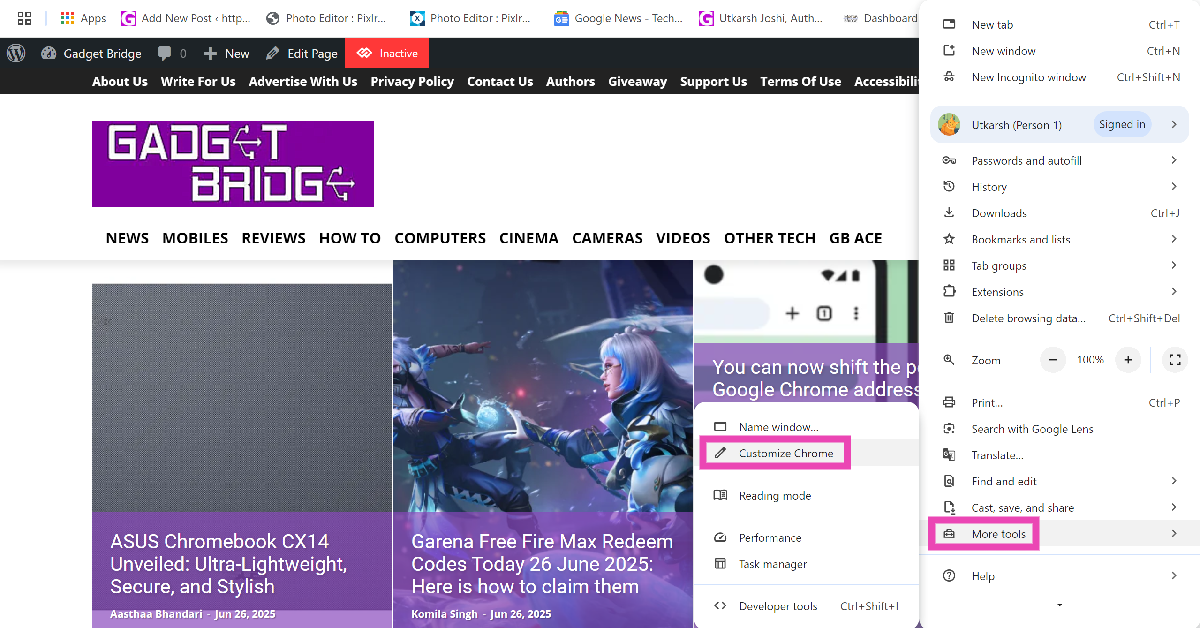
Titan Celestor

Price: Rs 9,995 on Titan.co.in

Titan Celestor Review: Performance best wearable tech products

Outside of the Android smartwatches, Titan Celestor is one of the best-looking and highly efficient smart wearable tech products out there. When we reviewed the smartwatch, we were very impressed by its smooth display and snug fit. The Celestor uses a 1.43-inch AMOLED panel. It has a 60Hz refresh rate and can reach a peak brightness of 750 nits. The smartwatch can handle up to 3ATM of water pressure. You can wear it while swimming without worrying about water damage. There’s support for a range of sports, exercises, workouts, dances, and more. The smartwatch can last up to 7 days on a full charge if you’re conservative with your usage. 
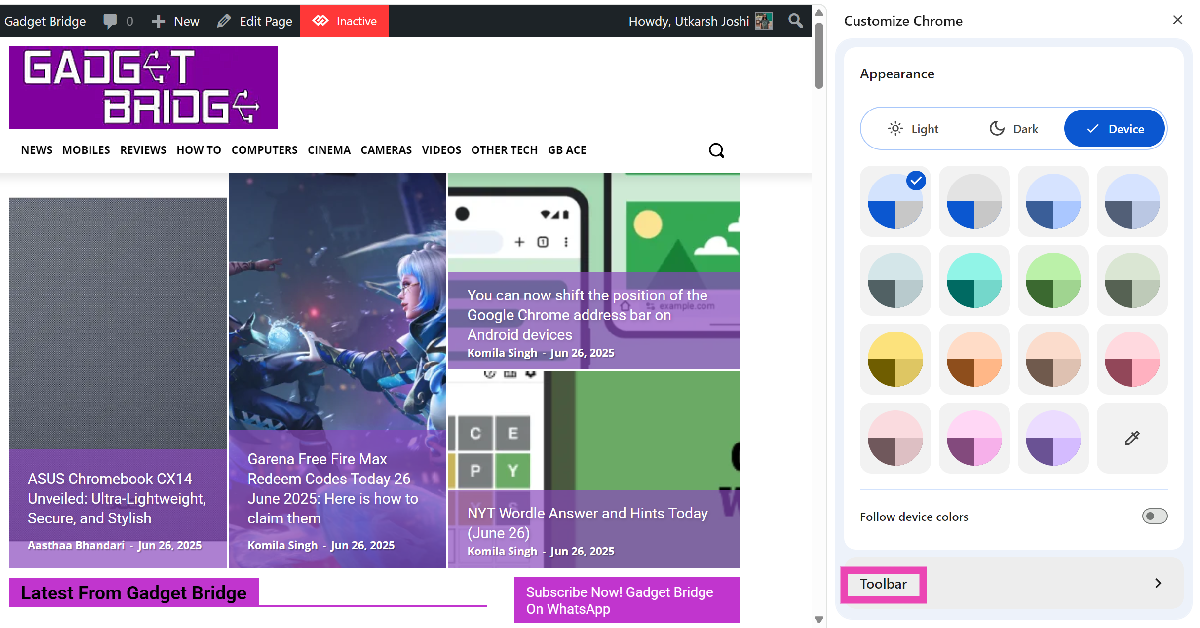
CMF Watch Pro 2

Price: Rs 5,499 on Flipkart

CMF Watch Pro 2 by Nothing Review: Performance best wearable tech products

The new CMF Watch Pro 2 from Nothing is a snappy and efficient smart wearable that does not compromise aesthetics for a powerhouse performance. The smartwatch has an interchangeable bezel which can be easily detached from the dial. These bezels come in two shapes (flat and curved) and two colours (Dark Grey and Ash Grey). The 1.32-inch AMOLED display has a 60Hz refresh rate and can reach a peak brightness of 620 nits. The watch features Nothing’s proprietary OS. This OS flaunts the dot matrix font that Nothing is known for. The Watch Pro 2 has on-device GPS and supports up to 120 sports, exercises, and workout routines. It can easily last a week on a full charge. Read our review of the CMF Watch Pro 2 here.
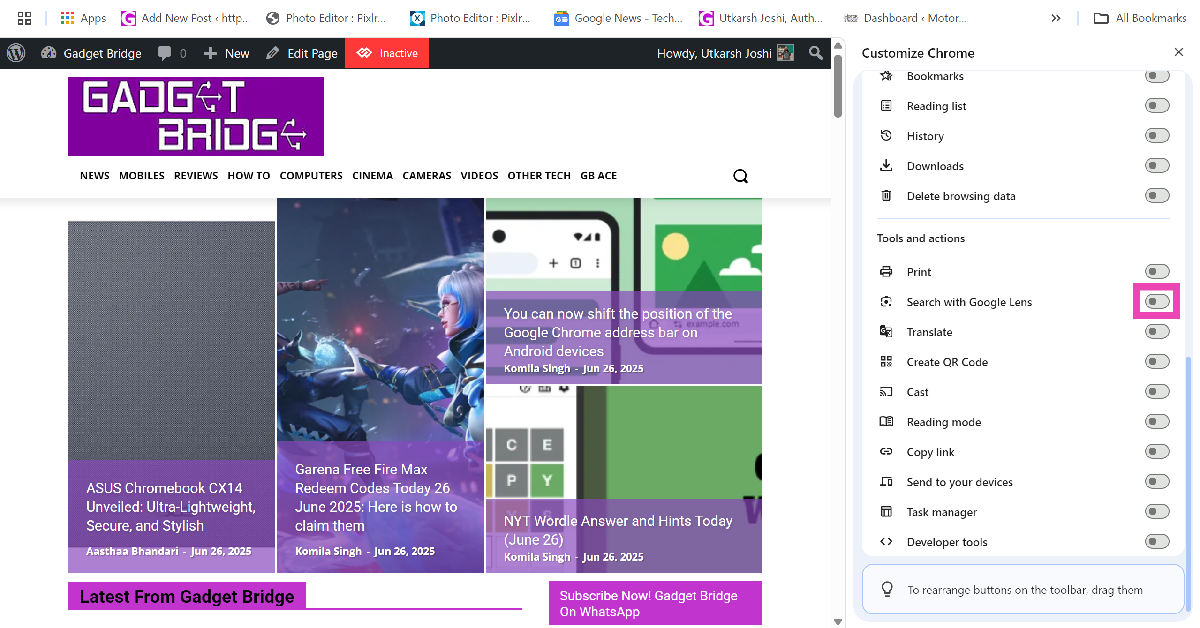
Fitbit Charge 6

Price: Rs 14,999 on GetGear

Fitbit Charge 6

If you find smartwatches to be too bulky and extravagant, a fitness tracker will suit your needs better. Over the years, Fitbit has become synonymous with fitness trackers. The company was acquired by Google in 2021 but it still makes high-end fitness gear. The Fitbit Charge 6 tracks your health and fitness metrics around the clock and lets you view the stats in real-time. The sleek 1.4-inch AMOLED display has a nice touch response. It showcases all the important metrics without proving to be a distraction. You can even get turn-by-turn directions from Google Maps on this display. You can wear this band while swimming as well. The Fitbit Charge 6 has a 7-day battery life.

Xiaomi Smart Band 9

Price: Rs 3,470 on AliExpress

Xiaomi Smart Band 9

The Xiaomi Smart Band 9 has a pill-shaped dial befitting a fitness tracker. The 1.62-inch AMOLED display on this device can reach a peak brightness of up to 1,200 nits. The smart band contains four sensors – accelerometer, gyroscope, optical heart rate, and ambient light. It is water resistant up to 5ATM pressure, which means you can wear it while swimming. The fitness band packs a 233mAh battery pack which can be fully charged in under an hour. A full charge lasts up to 21 days.

Samsung Galaxy Ring

Price: $399.99 on Samsung.com

Enable Gesture Controls on Samsung Galaxy Smart Ring Top wearable tech – Smartwatches, Rings and more (2024) best wearable tech products

Launched alongside the Galaxy Watch7 and Watch Ultra, the Galaxy Ring is a sleek and minimal fitness tracker for people who want to track their health metrics but don’t want another screen on their wrists. The Galaxy Ring is available in three finishes and nine sizes. You can order a free sizing kit from Samsung to calculate your ring size. The smart ring has an IP68 rating and a Titanium Grade 5 frame and can handle 10ATM of water pressure. The battery capacity varies between 18 – 23.5mAh, depending on the ring size. The Galaxy Ring can track a range of workouts and has features like Energy Score, Heart Rate Alert, Live Heart Rate Check, Wellness Tips, Auto Workout Detection, Inactive Alerts, and Find My Ring.
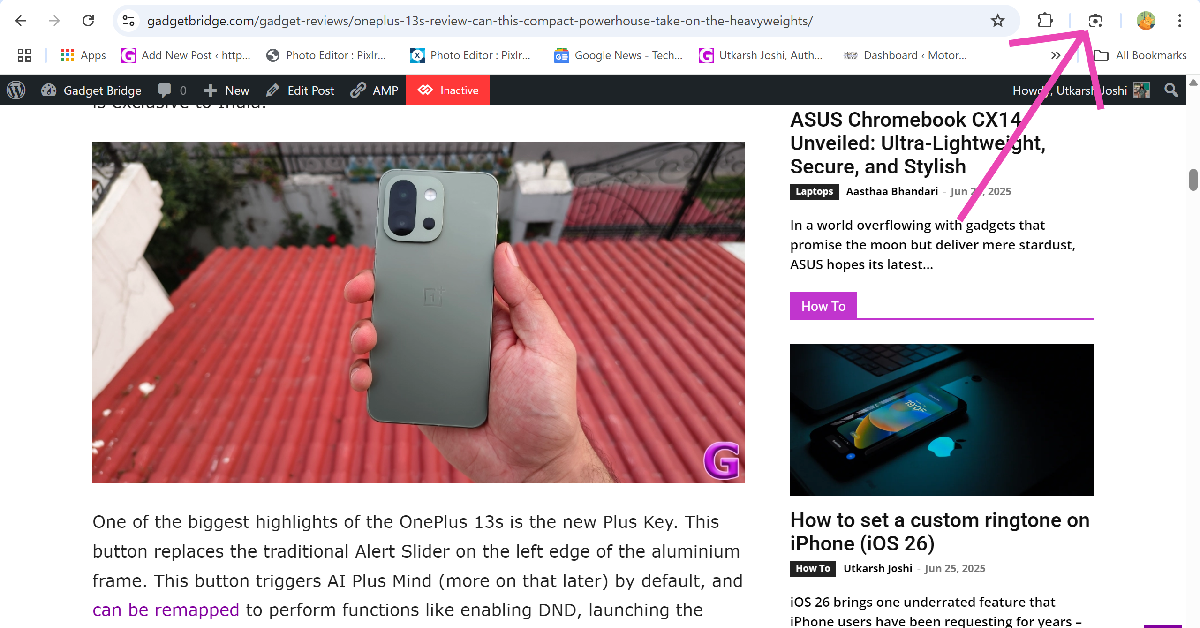
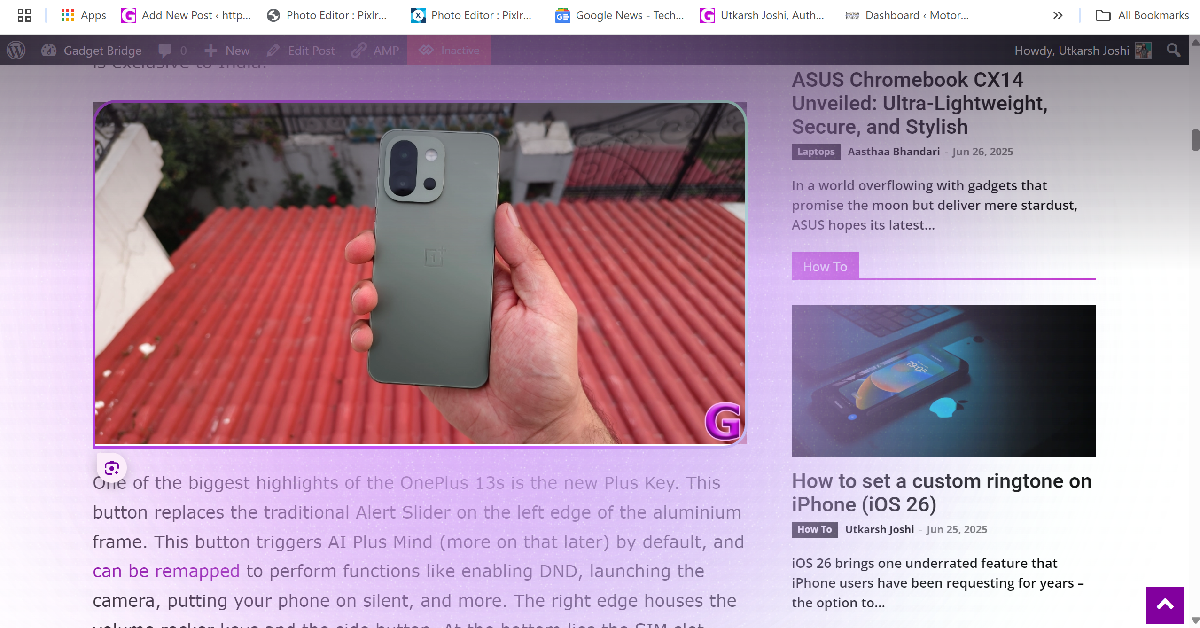
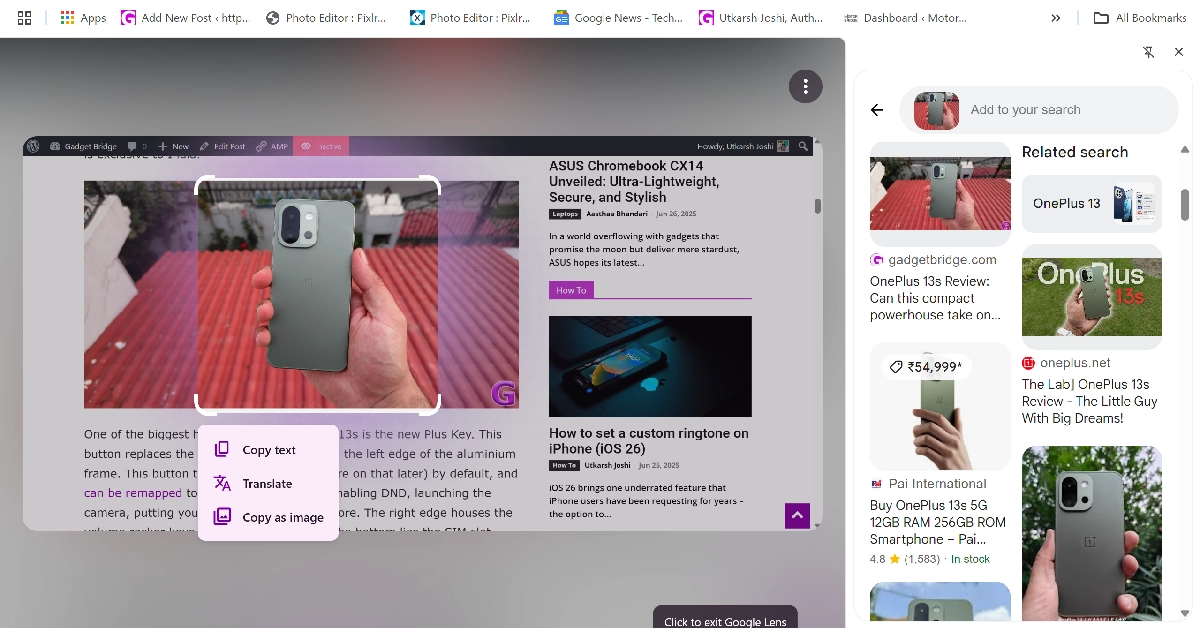
boAt Smart Ring

Price: Rs 8,999 on boAt-lifestyle.com

Boat Smart Ring price in India, sale details Top wearable tech – Smartwatches, Rings and more (2024) best wearable tech products

boAt’s ambitious smart ring can track your workouts and monitor your health without costing a fortune. The touch-sensitive panel of the ring can be used to take pictures, change the music, and do other navigation tasks. The ring has 5ATM water resistance, making it fit to wear while swimming. It can monitor your body temperature, SpO2 level, heart rate, and sleeping pattern with ease. There is also a menstrual tracker on board. It supports all the major workouts and exercise routines as well. On a full charge, the smart ring lasts up to 5-7 days. 
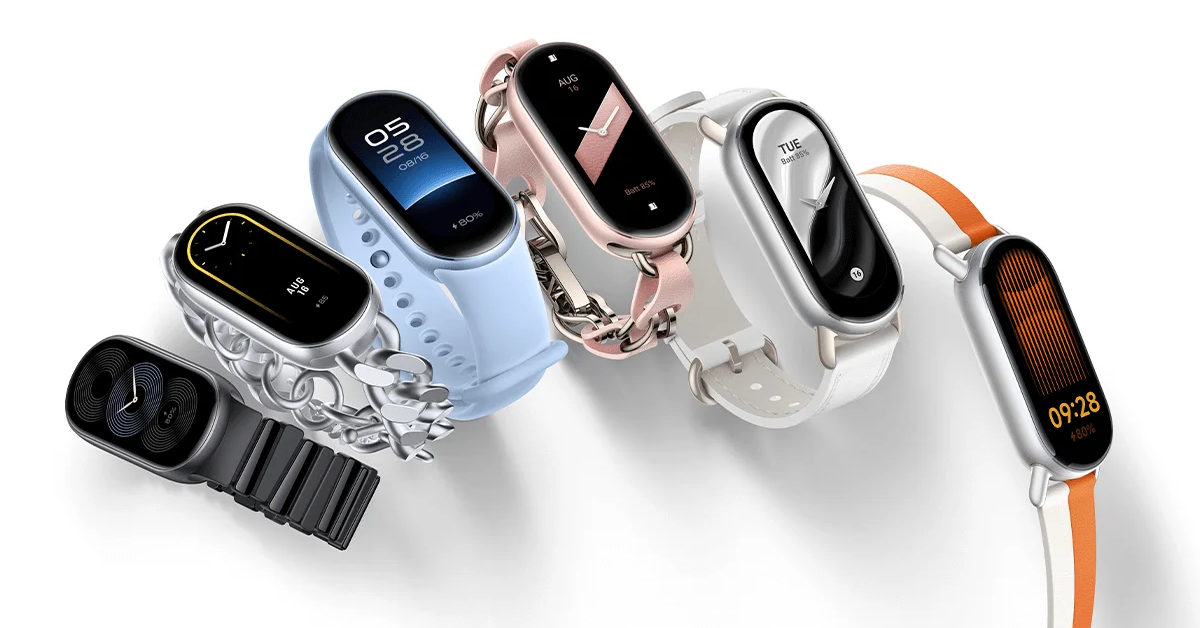

Actofit Heart Rate Monitoring Chest Strap

Price: Rs 4,199 on Amazon

Actofit Heart Rate Monitoring Chest Strap Top wearable tech – Smartwatches, Rings and more (2024) best wearable tech products

The Actofit Chest Strap can measure your heart rate with the utmost precision. Its elasticised fabric comfortably wraps around your chest and tracks your heart rate during intense workout sessions. The chest strap is rated IP67 for dust and water resistance. It remains unbothered by excessive sweat. Its companion app gives you a detailed breakdown of your heart rate throughout the activity period. The device can also calculate the calories burnt while working out.

Read Also: 2 Ways to Use a Router as a WiFi Extender or Repeater (2024)

Conclusion

These are the best wearable tech products that you can buy right now. We would recommend going for a fitness band or smart ring if you’re averse to screens. While a chest strap provides accurate data, it is pretty much limited to tracking your heart rate. Wearing a fitness band or ring is much more convenient and comfortable if you want round-the-clock metrics.

Vivo T3 Pro 5G with 120Hz AMOLED display launched in India

Vivo today announced the launch of a new smartphone Vivo T3 Pro 5G in India. The device is a successor of the Vivo T2 Pro that was launched last year. The newly launched phone features a 120Hz AMOLED display. It comes with a massive 5,500mAh battery that supports 80W fast charging. Also, the mobile phone includes a 50-megapixel primary camera.

Vivo T3 Pro 5G price in India, sale details

Vivo T3 Pro 5G comes with 8GB RAM with 128GB storage priced at Rs 24,999. The price of the 8GB RAM with 256GB storage is set at Rs 26,999.

The device is scheduled to go on sale from September 3 at noon via Flipkart and Vivo e-store in the country.

Also Read: Save the Date: The iPhone 16 series launch event is set for September 9, Monday

Vivo T3 Pro 5G Design, Specification

The Vivo T3 Pro has a curved body and a metal frame, akin to the iQOO Z9s Pro. It’s available in Sandstone Orange with a vegan leather back and a gold frame, as well as Emerald Green with a matte finish and a gold camera module. The back has a dual camera arrangement and an LED flash, and the front has a curved display with a punch-hole cutout for the selfie camera.

Vivo T3 Pro 5G with 120Hz AMOLED display launched in India

Vivo T3 Pro 5G features a 6.77-inch full-HD+ 3D curved AMOLED screen with 1,080 x 2,392 pixels of resolution. The device’s display comes with 120Hz refresh rate support and 4,500nits peak brightness which is an improvement over its predecessor the Vivo T2 Pro that supported 1,300 nits of peak brightness. Also, there is an in-display optical fingerprint sensor for biometrics. Under the hood, there is Qualcomm’s Snapdragon 7 Gen 3 SoC with up to 8GB of LPDDR4X RAM and up to 256GB of UFS 2.2 onboard storage. It operates on Funtouch OS 14 based on Android 14 out of the box.

Also Read: iPhone 16 Series Price, Specifications Leaked Ahead Of September Launch

For the photos and videos, the T3 Pro 5G by 5G comes with a dual rear camera setup that includes a 50-megapixel Sony IMX882 primary sensor with OIS and an 8-megapixel ultra-wide angle lens. Upfront there is a 16-megapixel camera for selfies and video calling.

The phone boasts a 5,500mAh battery with 80W wired fast charging support. The Vivo smartphone is IP64-rated for dust and splash resistance. In terms of connectivity, there is 5G, 4G LTE, Wi-Fi 6, Bluetooth 5.4, GPS, and a USB Type-C port.

Save the Date: The iPhone 16 series launch event is set for September 9, Monday

Apple has finally announced the iPhone 16 Series launch event date. Putting aside rumours and leaks, the company has scheduled its next Apple Event for September 9. The company has also started sending out media invites which come with the tagline ‘It’s Glowtime’. Apple has not confirmed, but it plans to release four models: the iPhone 16, the iPhone 16 Plus, the iPhone 16 Pro, and the iPhone 16 Pro Max. The company is also expected to unveil new Apple Watch and AirPods models with new features. Here is everything we know about the upcoming Apple Event.

Apple has officially announced the date for its annual event. Apple’s event will take place on Monday, September 9. This year’s Apple Event has a catchy tagline ‘It’s Glowtime’. The iPhone 16 unveiling event will be streamed live online. The event will take place at Apple Park and will begin at 10 p.m. PT (10.30 p.m. IST). The unveiling will be aired live on both Apple.com and the Apple TV app.

As previously stated, Apple is sending out media invites indicating the iPhone 16 launch date under the tagline ‘It’s Glowtime’. The upcoming Apple Event invitation features the Apple logo in a variety of hues, which could be connected to Apple Intelligence.

Also Read: iPhone 16 Series Price, Specifications Leaked Ahead Of September Launch

iPhone 16 Series price expected

According to a leak, the standard iPhone 16 will cost $799, or around Rs 67,100, for the base model with 128GB of storage. It is reported that the price of the iPhone 16 Plus would begin at $899, or around Rs 75,500. The iPhone 16 Pro with 256GB of storage will run you about Rs 92,300 at $1,099, while the iPhone 16 Pro Max with similar storage will run you about $1,199 or Rs 1,00,700.

iPhone 16 Series Price, Specifications Leaked Ahead Of September Launch
Image Courtesy: X.com/Apple Hub

iPhone 16 Series specifications expected

The iPhone 16 is expected to feature a 6.1-inch display with a refresh rate of 60Hz, while the Plus variant will have a 6.7-inch screen. According to the leak, the phones would have Apple’s rumoured A18 processor and 8GB of RAM, as well as compatibility with Apple Intelligence capabilities. Apple is likely to equip the iPhone 16 with a larger 3,561mAh battery, while the iPhone 16 Plus could feature a lower 4,006mAh battery than its predecessor’s 4,383mAh battery.

On the other hand, with a 0.2-inch increase in screen size, the iPhone 16 Pro and iPhone 16 Pro Max are expected to have displays of 6.3 inches and 6.9 inches, respectively. Industry-leading smallest display bezels are anticipated for the Pro Max variant. Apple’s A18 Pro chipset is going to power both models. The post on X claims that the 48-megapixel ultra-wide angle camera on Apple’s iPhone 16 Pro and iPhone 16 Pro Max will allow 5x optical zoom and use a ‘tetraprism’ periscope lens.

Also Read: Samsung is offering limited-period discounts on Galaxy A55 and A35 smartphones in India

This year, Apple plans to increase the capacity of the batteries in the iPhone 16 Pro and iPhone 16 Pro Max. The smaller model will likely have a 3,355mAh battery, while the larger model may have a 4,676mAh battery. These numbers represent a major improvement over last year’s versions.

Garena Free Fire Max Redeem Codes Today 27 August 2024: Here is how to claim them

Garena Free Fire Max is a battle royale game with regular awards and tournaments to keep players interested. If you play Garena Free Fire, you should be aware of the redeem codes that are released on a daily basis. However, because the battle royale game is banned in India, players from other countries can use the Free Fire Redeem codes daily. If you’re unfamiliar with the Garena Free Fire redeem codes or don’t know how to get them, we’ve put together a step-by-step guide to help you redeem them. Check out Garena Free Fire Max Redeem Codes for 27 August  2024.

The Free Fire Max redeem codes are a great way to get free stuff. These are 12-digit codes that contain alphabets and numbers, as well as an expiration date and time. Because the Garena FF redeem codes cannot be used more than once, you should hurry to the redemption page to claim your free reward before someone else does. To get a free reward, all you have to do is go to reward.ff.garena.com/en, which is the official redemption page. Also, keep an eye on this space for daily updates on Garena Free Fire Max redemption codes and rewards.

Also Read: Sennheiser Accentum Plus wireless headphones with Hybrid Adaptive Noise Cancellation launched

Garena Free Fire Max Redeem Codes Today 27 August 2024

FF34-UVWX-0123
FF56-YZAB-4567
FF78-CDEF-8910
FF90-GHIJ-2345
FF21-KLMN-6789
FF34-ABCD-5678
FF56-EFGH-1234
FF09-ABCD-2345
FF31-EFGH-6789
FF52-IJKL-0123
FF74-MNOP-4567
FF78-IJKL-9101
FF90-MNOP-2345
FF12-QRST-6789
FF43-OPQR-0123
FF65-STUV-4567
FF87-WXYZ-8910

How to Get Free Fire Max Redeem Codes for Garena on 27 August 2024?

  • Visit the Garena Free Fire Max game’s official website at reward.ff.garena.com.
  • Use your Facebook, Google, VK, Apple ID, Huawei ID, or Twitter account to log in.
  • You’ll be taken to a valid redemption code (s)
  • Copy and paste the 12-digit redemption code into the text box.
  • On the screen, a dialogue box will appear.
  • ‘Ok’ should be selected.

For the latest gadget and tech news, and gadget reviews, follow us on TwitterFacebook and Instagram. For newest tech & gadget videos subscribe to our YouTube Channel. You can also stay up to date using the Gadget Bridge Android App. You can find the latest car and bike news here.