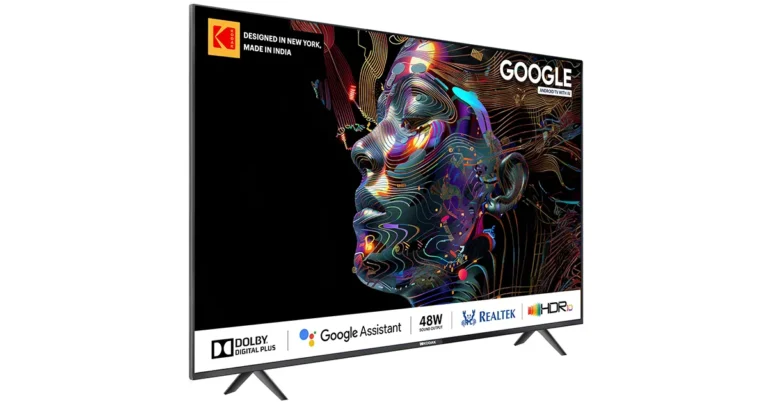
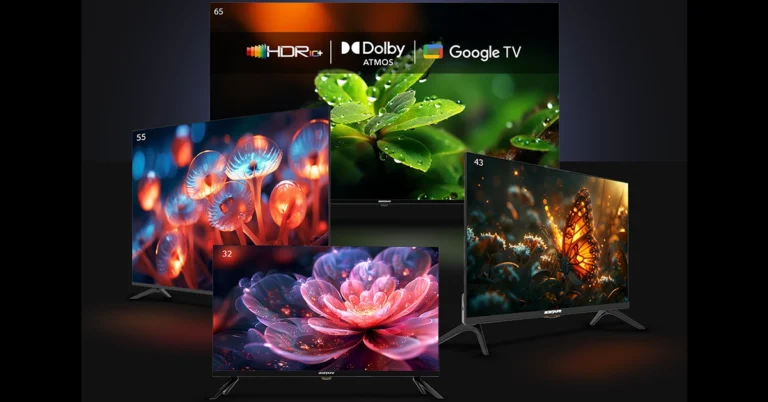
Kodak launches AI-powered 32-inch QLED TV on Amazon for Rs 11,499.
New 43-inch QLED TV available on Flipkart for Rs 21,999.
TVs feature Dolby Digital Plus, Google Assistant, and superior connectivity.
Kodak is set to brighten up the monsoon season with the launch of its new AI-enabled QLED TVs. The 32-inch model, available on Amazon during the Prime Day Sale starting 20th July 2024, and the 43-inch model, available on Flipkart during the GOAT Sale starting 19th July 2024, promise to be the ideal choice for compact living spaces.
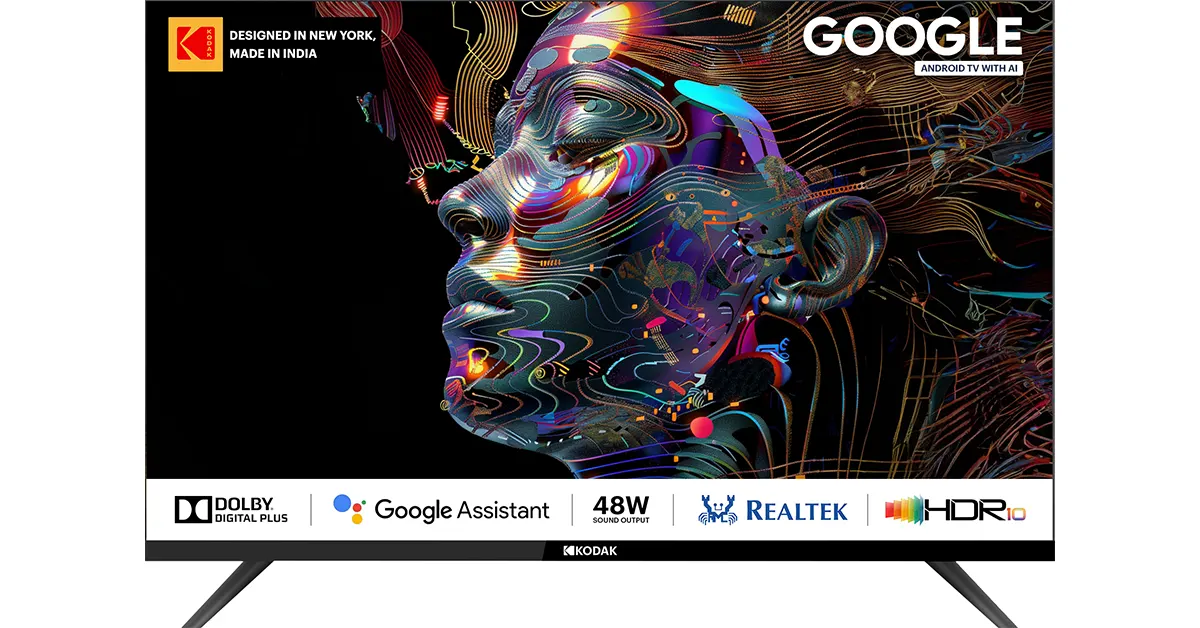
The Kodak 32-inch QLED TV, model 32MT5077, offers a crisp viewing experience with smart TV capabilities powered by Google’s Android TV operating system. This model, priced at Rs 11,499, features Dolby Digital Plus sound technology with 48W RMS output, Google Assistant, and built-in Wi-Fi for seamless internet access. It also supports popular streaming services like Netflix, YouTube, Disney+ Hotstar, and Prime Video, making it a versatile addition to any home.
For those seeking a larger screen, the Kodak 43-inch QLED TV is now available on Flipkart for Rs 21,999. This model boasts enhanced sound quality with DTS TruSurround, a QLED 4K display showcasing 1.1 billion colours, and support for Dolby Atmos, Dolby Vision, and HDR 10+. This TV is part of Kodak’s collaboration with Google TV, which includes additional sizes of 50, 55, and 65 inches, starting at Rs 21,999.
Kodak’s new offerings come equipped with multiple user profiles, smart home device controls, and personalized home screens tailored to individual users. The flagship 43-inch 4K QLED TV also features 2GB RAM, 16GB internal storage, and a bezel-less design with an Airslim profile, providing a sleek and modern look.
Avneet Singh Marwah, CEO of Super Plastronics Pvt Ltd, stated, “The upcoming major revolution is AI, and as a result, we’ve endeavoured to develop a product tailored for Indian consumers. Our goal is to provide cutting-edge AI technology that customers can experience even in compact spaces. We look forward to delighting customers with an immersive viewing experience that blends innovation and elegance seamlessly.”
In This Article
Bank Offers
Amazon: 10% extra discount on all debit and credit cards for SBI Bank and ICICI Bank.
Flipkart: 10% extra discount on all debit and credit cards for Axis Bank, HDFC Bank, and IDFC FIRST Bank.
The ‘Blue Screen Of Death’ is a catch-all term for different kinds of errors that halt the functioning of your Windows PC. When you encounter this screen, the first thing you should do is note the error displayed on the screen. Once you figure out what’s causing your PC to malfunction, the sooner you can move to apply the fixes. If you see the 0xc00000e error code on the Blue Screen Of Death on your Windows 10 PC, here are the 5 ways you can fix it.
What does the error code 0xc00000e mean on Windows 10?
Before we move on to the fixes, let’s understand what the 0xc00000 error code really means. Typically, this error code is prefixed with the ‘A required device isn’t connected or can’t be accessed’ error message. Users also report that there are multiple variations of this error message, like ‘Required device is inaccessible’ or ‘The selected entry could not be loaded’.
Your Windows 10 PC displays this error when it is unable to detect or access an essential piece of hardware which is required for the computer to boot. This includes your PC’s hard drive since your PC needs it to boot the OS. You may also encounter this error when the winload.exe file cannot be accessed or has been corrupted.
Remove any external hard drives attached to your PC
The first thing you should do when you encounter the ‘0xc00000e’ error on your Windows 10 PC is check whether there are any external hard drives connected to your PC. At the time of startup, the BIOS may confuse the external storage as your PC’s primary hard drive and use it to boot the device. Since the external hard drive does not contain the Windows operating system, your PC will throw the 0xc00000 error.
Use Windows Startup Repair tool
Step 1: Go to the boot menu by restarting your PC and pressing F2 when the OEM’s logo appears on the screen.
Step 2: Select Boot from USB.
Step 3:Connect your USB drive containing Windows 10 OS and restart your PC.
Step 1: Go to Settings and switch to the Update & Security tab.
Step 2: Scroll down and select Recovery.
Step 3: Click on Get Started under Reset this PC.
Step 4: You will be presented with two options. You can choose to keep your personal files and remove apps & settings or remove all of your personal files, apps, and settings. Choose the option you want.
Step 5: Select how you would like to reinstall Windows. You can choose between Cloud download or Local download.
Step 6: After you’ve made your choice, click on next to confirm your selection and then click on reset to begin the factory reset process.
Frequently Asked Questions (FAQs)
What does the error code 0xc00000e mean on Windows 10?
If you encounter the 0xc00000e error on your Windows 10 PC, it means that your computer was not able to detect an essential piece of hardware during startup.
How do I fix the 0xc00000e error on Windows 10?
You can fix the 0xc00000e error by ensuring no external hard drives are connected to your computer during startup, rebuilding the boot configuration data file, running the automatic repair tool, and resetting the BIOS.
How do I factory reset my Windows 10 PC?
Go to Settings>Update & Security>Recovery>Get Started and choose whether you want to keep your personal files or erase them. Select whether you want to reinstall Windows using Cloud or Local download and hit Reset.
These are the top 5 ways to fix the 0xc00000e error code on your Windows 10 PC. If you encounter the error even after trying these fixes, take your PC to an authorised service centre for further diagnosis. If you have any other questions, let us know in the comments!
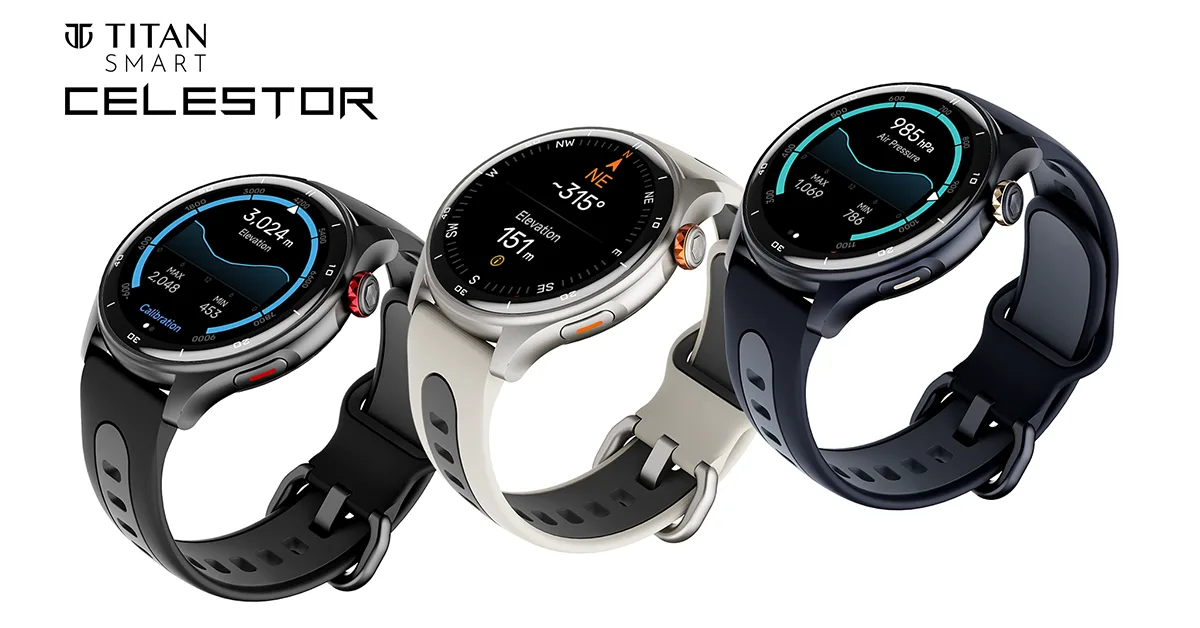
Titan Smart unveils the high-performance GPS smartwatch, Titan Celestor.
The Celestor features built-in GPS, ABC trio, and a unique swim mode.
Available at Rs 9,995 with a special launch offer of Rs 1,000 off.
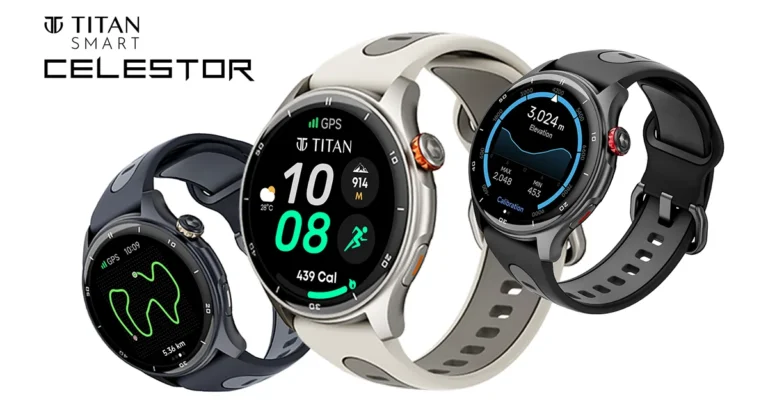
Titan Smart Wearables is set to transform the performance smartwatch market with its latest innovation, the Titan Celestor. This state-of-the-art device is designed for Indian fitness enthusiasts, blending Titan’s legacy of excellence with advanced technology to offer unparalleled accuracy and style.
The Titan Celestor stands out with its industry-leading built-in GPS, perfect for activities like running, walking, hiking, and cycling. Whether navigating trails or exploring new paths, the Celestor ensures precise guidance. Its integrated Altimeter, Barometer, and Compass (ABC) provide crucial data on elevation, ascent, descent, and power metrics, enhancing outdoor adventures. Swimmers will appreciate the unique swim mode with a water eject feature, making pool time hassle-free.
Boasting a sleek aluminium body, the Celestor features a stunning 3.6cm (1.43-inch) Super AMOLED display with a brightness of 750 nits and adaptable AOD watch faces. The dual-tone, sweat-resistant strap adds comfort and durability, available in three striking colours: Black Eclipse, Aurora Blue, and Moonlight Edition.
Fitness tracking is comprehensive with the My Fitness feature, which monitors calories burned, steps taken, distance covered, activity intensity, and floors climbed. The smartwatch also includes SingleSync™ BT Calling, a long-lasting battery, customizable Watchface Studio, and an SOS feature for added safety. The opto-mechanical crown ensures a dynamic UI experience, making navigation seamless.
The Celestor introduces Today’s Highlights, an AI-powered dashboard that consolidates daily health data, activity reports, and frequently used apps into one accessible location. This personalized feature provides a holistic view of your day with a single swipe.
“With the Titan Celestor, we’re committed to providing our customers with intelligent wearable technology that empowers them to lead healthier and more fulfilling lives,” said Ravi Kuppuraj, Chief Operating Officer, Wearables Division, Titan Company Limited. “Titan Celestor’s superior technology and innovative features are designed to transform how users approach fitness and exploration. We understand the growing need for fitness enthusiasts in India to have access to accurate and superior technology that can empower them to achieve their goals. Celestor equips trekkers and travellers with the tools to conquer any terrain, emphasising health and wellness. We are confident that the Celestor will be a game-changer for Indian fitness enthusiasts, offering unparalleled accuracy and innovative features.”
Priced at Rs 9,995, the Titan Celestor is available with an additional Rs 1,000 off during the special launch offer. The smartwatch can be purchased at Titan World Stores, top multi-brand retail outlets, and online exclusively on Amazon.
The state-of-the-art security features of Windows OS are rarely matched by other operating systems. The OS encrypts the storage drive on the PC by default to ensure that your data remains safe. This encryption is carried out by BitLocker, a useful tool in Windows’ arsenal. While encryption is always a good thing, you can always disable it on your PC. For those interested, here’s how you can turn off or disable BitLocker on Windows 10 and 11 PCs.
BitLocker is the Windows’ native encryption tool. When a drive is encrypted using BitLocker, other users cannot access it without prior authentication. If you’re worried about your laptop getting lost or stolen, you can always secure your data by encrypting the drives using BitLocker. When a disk is encrypted, its contents cannot be accessed by any other operating system on the PC.
When you disable BitLocker, anyone can view the contents of a drive without needing any prior authentication. Turning off BitLocker is recommended when a laptop or PC is used by multiple people. BitLocker only protects the data from people who have physical access to the device. It does not offer protection against online hacking.
Turn off BitLocker from Settings
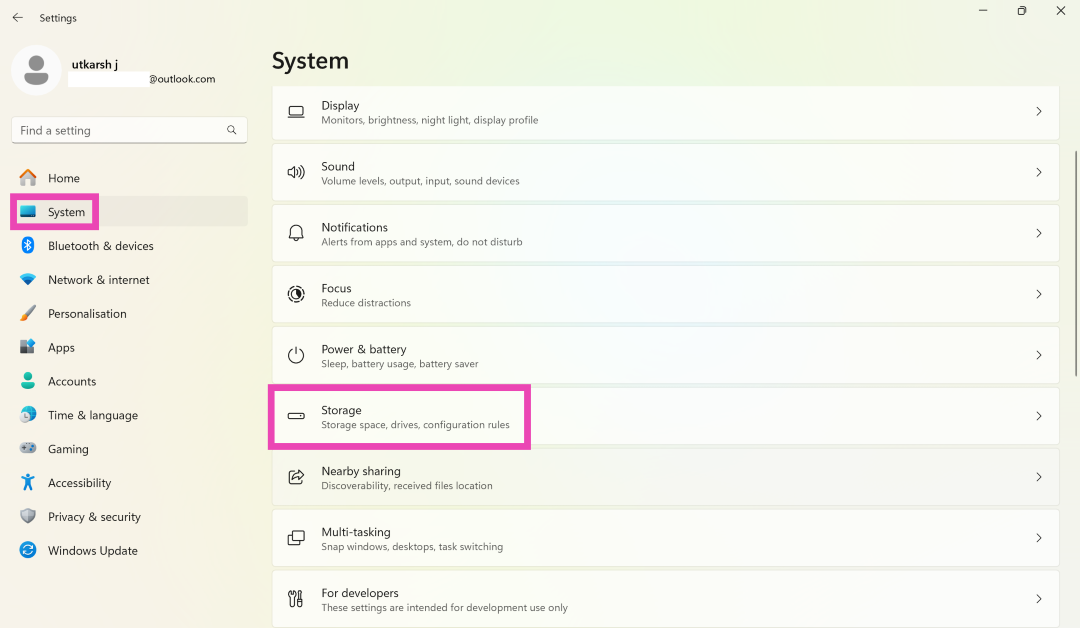
Step 1: Go to Settings and switch to the System tab.
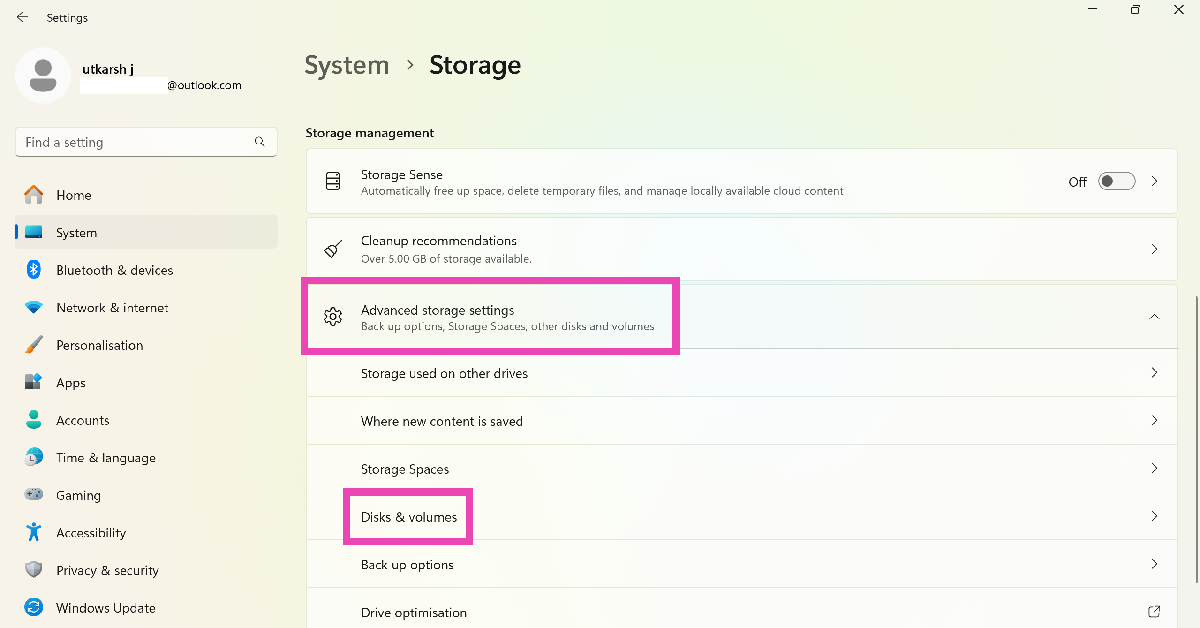
Step 2: Click on Storage and select Advanced storage settings.
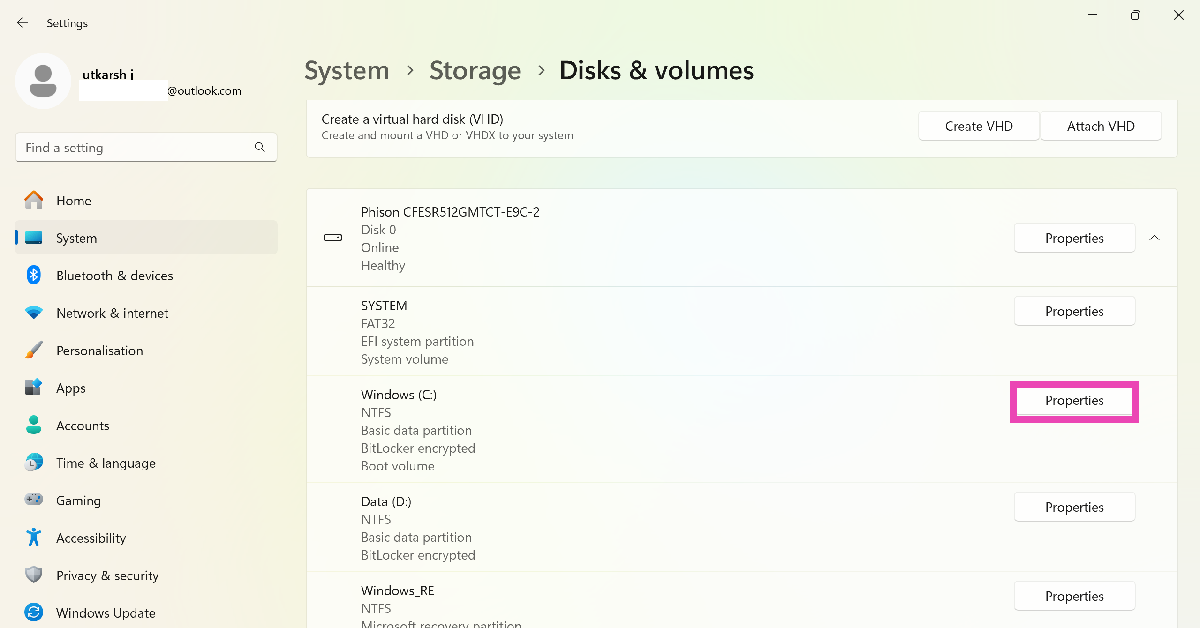
Step 3: Click on Disks and volumes.
Step 4: Click on Properties next to the encrypted drive.
Step 5: Scroll down and select Turn off BitLocker. This option is only available for administrator profiles.
Turn off BitLocker from the Control Panel
Step 1: Go to Control Panel and select System and Security.
Step 2: Click on BitLocker Drive Encryption.
Step 3: Select Turn off BitLocker next to your preferred drive.
Step 4:Confirm your selection in the popup box.
Turn off BitLocker using Command Prompt
Step 1: Press the Windows key + R combination, enter cmd in the Run box, and hit Enter. This will launch Command Prompt.
Step 2: Enter the following command to check the encryption status:
manage-bde -status
Step 3: To decrypt a drive type the following command:
manage-bde -off [drive name]
Frequently Asked Questions (FAQs)
What is BitLocker used for?
BitLocker is a common feature in Windows PCs, primarily used to encrypt storage drives to prevent data theft and unauthorised access.
How do I disable BitLocker on my Windows PC?
To disable BitLocker for a drive, open Command Prompt, type manage-bde -off [drive name], and hit Enter.
What happens when I disable BitLocker on my PC?
Disabling BitLocker for a drive decrypts its data and makes it easy for other users to access it without any authentication.
These are the top 3 ways to turn off or disable BitLocker for any drive on your Windows 10 or 11 PC. The process of decrypting a drive can take a significant amount of time. You can carry out other tasks on your PC while the decryption takes place in the background. If you have any other questions, let us know in the comments!
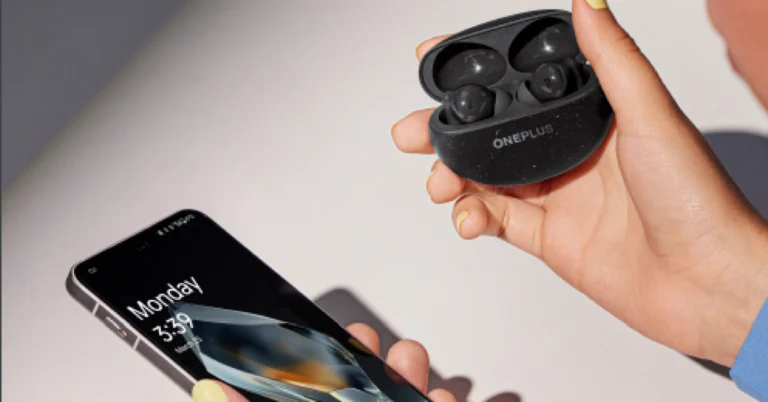
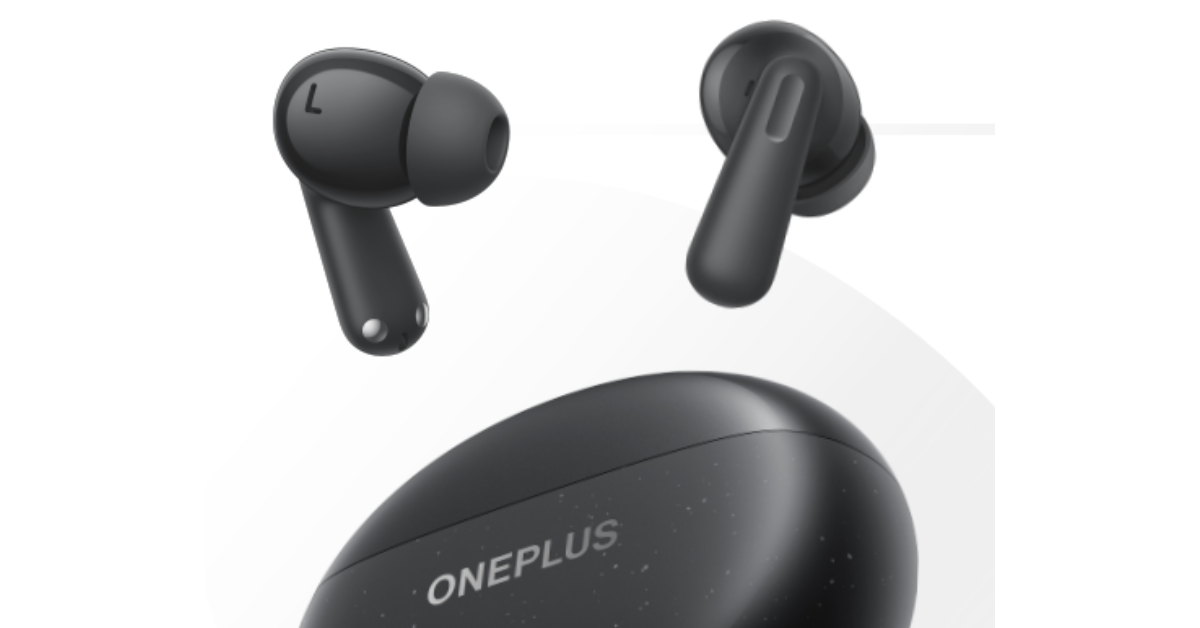
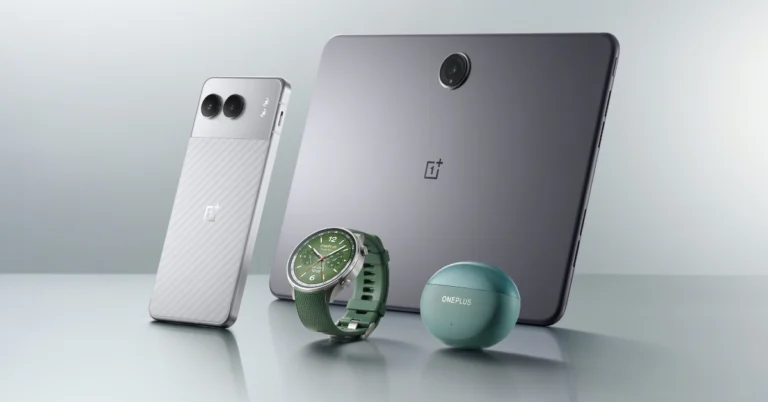
OnePlus today at its Summer Launch Event 2024 announced four new products — the OnePlus Nord 4 5G, the OnePlus Pad 2, the OnePlus Watch 2R, and the OnePlus Nord Buds 3 Pro. The OnePlus Nord Buds 3 Pro is a mid-range model that has active noise cancellation (ANC). Unlike its predecessor, the device has an AirPods-inspired design and will be available in two colours. Here is everything about it.
OnePlus Nord Bud 3 Pro design, specs, pricing
The OnePlus Nord Bud 3 Pro features an AirPods-like design. The device consists of an outside metal mesh and chamber, a structure to prevent wind noise and an internal acoustic mesh that further filters out wind and other noises. The TWS has an IP55 water and dust resistance rating.
The OnePlus Nord Bud 3 Pro has a 12.4 mm titanized diaphragm with BassWave 2.0. The TWS provides up to 49 decibels of Hybrid Active Noise Cancellation. It can cancel out ambient noise captured from both outside and within the ear cup, thanks to one digital mic and two analogue mics.
According to the makers, the Buds 3 Pro’s Smart Noise Cancellation automatically adjusts the level and type of noise reduction based on background noise. The OnePlus Nord Buds 3 Pro uses the flagship triple stereo microphone system on each side of the earphones to detect and analyse environmental sounds in real time. Smart Noise Cancellation automatically selects the appropriate setting for your environment, whether it’s a quiet study area, a busy downtown street or the tube. These earphones offer three degrees of ANC: Mild (15 dB), Moderate (25 dB), and Max (49 dB), which precisely balance ANC effectiveness and convenience.
Furthermore, the triple stereo microphone system, along with the OnePlus noise reduction algorithm for calls and the wind cancellation algorithm, Crystal Clear Call technology goes above and beyond to reliably capture vocals in even the most windy settings. The Transparency Mode allows you to hear outside sounds and be completely aware of your surroundings.
The audio gadget also includes an innovative Master EQ; the customisable Sound Master Equaliser provides fine control over the EQ for a completely personalised sound. The corporation has also increased the total bass level by two decibels. It includes three preset modes: balanced, serenade, and bass. The Bud 3 Pro is equipped with Dual Connection, Google Fast Pair, and Bluetooth 5.4 for connectivity. The dual connection allows customers to switch between their smartphone, tablet, and laptop.
Each earbud has a 58 mAh battery, while the charging case holds a 440 mAh battery. The earbuds are said to provide up to 44 hours of music playback. The OnePlus Nord Buds 3 Pro provides 12 hours of continuous music playback on a single charge, with ANC turned off. Only ten minutes of quick charging can provide 11 hours of playing.
OnePlus Nord Bud 3 Pro will be available for Rs 3,299. The open sale will start on July 20.
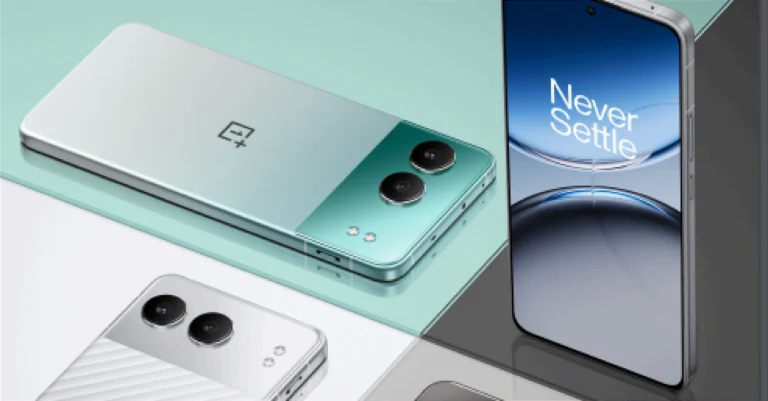
The OnePlus Nord 4, OnePlus Pad 2, OnePlus Buds 3 Pro, and OnePlus Watch 2R are the four products that the company unveiled today at the OnePlus Summer Launch Event in Milan, Italy. At the same time, the new OnePlus products debuted in India and are expected to be sold soon. Here’s everything you need to know about the OnePlus Nord 4’s price, availability, and specifications.
In This Article
OnePlus Nord 4 design and specifications
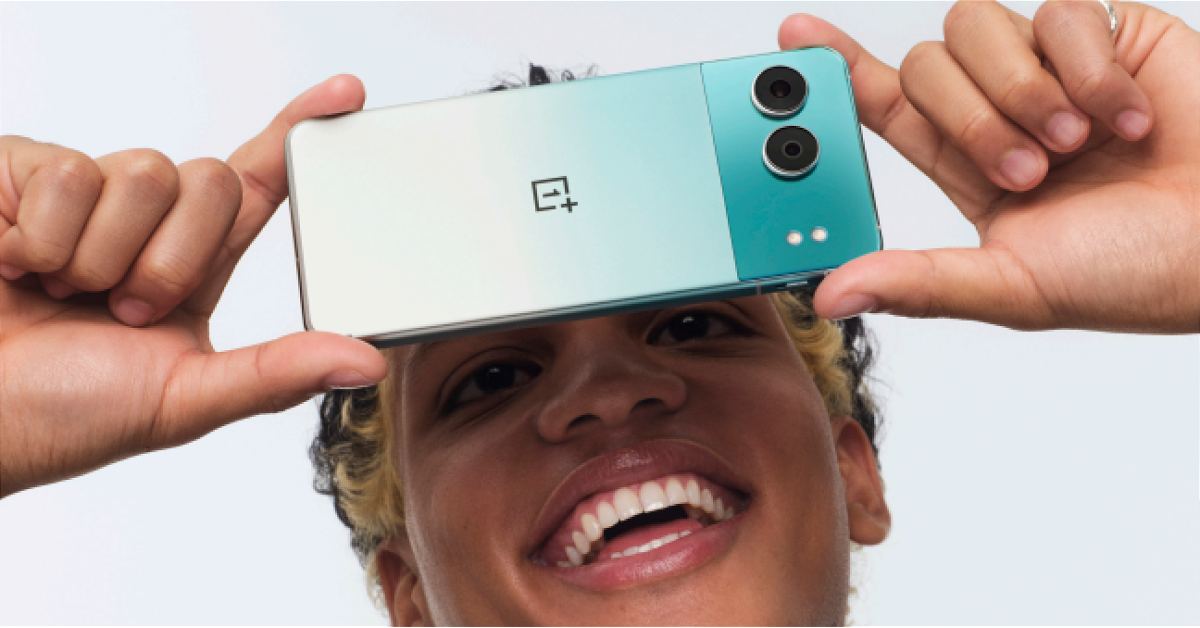
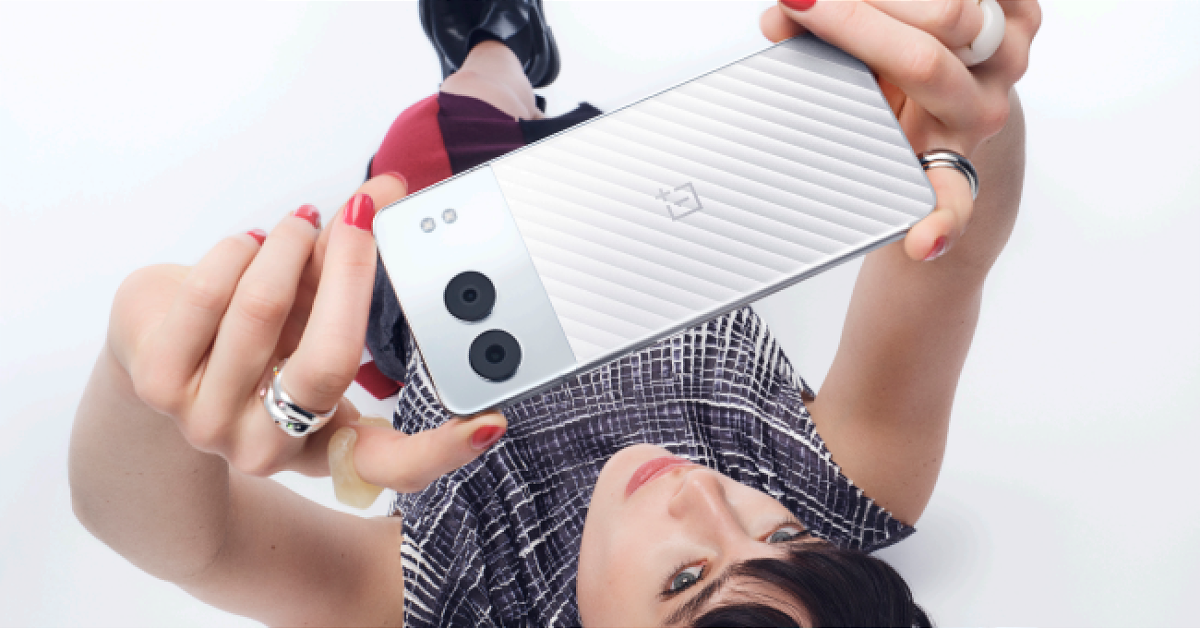
The OnePlus Nord 4 boasts an all-metal shell with a flattened corner and a boxy middle frame with curved edges for better grip. The OnePlus logo, an LED flash, and two camera sensors are all featured on the device’s dual-tone rear surface. There is an alert slider on the left side of the frame. The narrow bezels that surround the screen have an in-display fingerprint sensor and a punch-hole cutout in the middle for the selfie camera.
The OnePlus Nord 4 features a 6.74-inch Super Fluid AMOLED with Ultra HDR support and a resolution of 2772×1240 pixels. The display supports up to 120Hz refresh rate and a peak brightness of 2,150 nits. It also features AquaTouch technology, designed to make your phone usable even when the screen is covered in rain.
Under the hood, there is Qualcomm Snapdragon 7+ Gen 3 CPU, with up to 16GB of LPDDR5X RAM and up to 512GB of UFS 4.0 storage. The phone will be available in 8, 12 and 16GB RAM and 256GB or 512GB of storage to choose from. The Phone operates on OxygenOS on top of Android 14. OnePlus has already stated that the Nord 4 will come with four years of Android updates and six years of security fix updates, ensuring that the phone is ready until Android 18.
OnePlus Nord 4 has the latest and greatest AI features you’d expect. These include AI Audio Summary, AI Note Summary and AI Text Translate. Additionally, Nord 4 will also use AI Linkboost to improve signals.
For the photos and videos, the brand has provided a dual rear camera setup consisting of a 50-megapixel Sony LYT 600 primary sensor with optical image stabilisation (OIS) and an 112-degree 8-megapixel ultra-wide angle lens. For selfies, it has a 16-megapixel front-facing camera.
The OnePlus Nord 4 packs a 5,500mAh battery with 100W SUPERVOOC fast charging support, which means it’ll go from 1–100% in just 28 minutes. According to the company, the battery can survive more than 1,600 charging cycles— over four years of use—with over 80% of its original capacity. Dolby Atmos-compatible stereo speakers are also included with Noise-cancellation support. In terms of connectivity, there is a Dual nano-SIM slot, 4 × 4 MIMO, Wi-Fi6, Bluetooth 5.4, NFC, GNSS Beidou, GPS, GLONASS, Galileo, and QZSS as well as USB 2.0, Type-C.
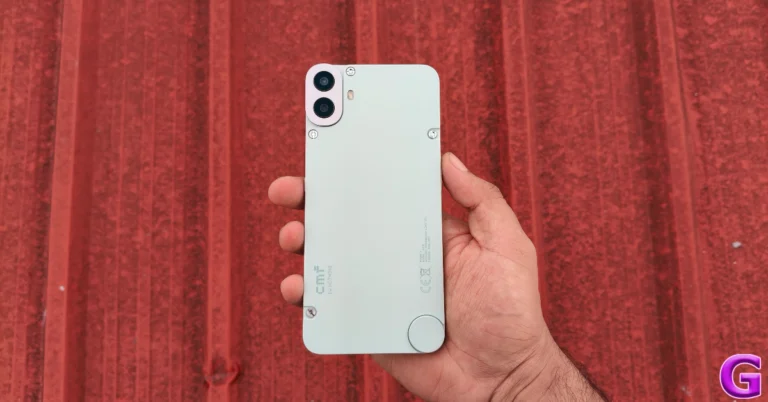
Coming across character-driven products with an avant-garde approach to design is uncommon in the budget smartphone segment. However, when Nothing puts out a product, its design language is always the centre of discussion. This time around, the UK-based tech outfit has grabbed the headlines by launching an affordable smartphone with a modular design under the banner of its subsidiary brand, CMF. Ditching its parent company’s ‘see-through’ design philosophy, CMF embraces colour and minimalism. Its debut smartphone, aptly named Phone 1, features an interchangeable back and comes with a range of accessories. Also impressive is the Dimensity 7300 SoC it packs under its hood. Its price tag of Rs 16,000 is just as impressive. We used the CMF Phone 1 for a week, here is our in-depth review of the smartphone.
Here’s what you get inside the CMF Phone 1’s retail box:
Smartphone
USB Type-C to Type-C cable
SIM ejector
Safety and Information Guide
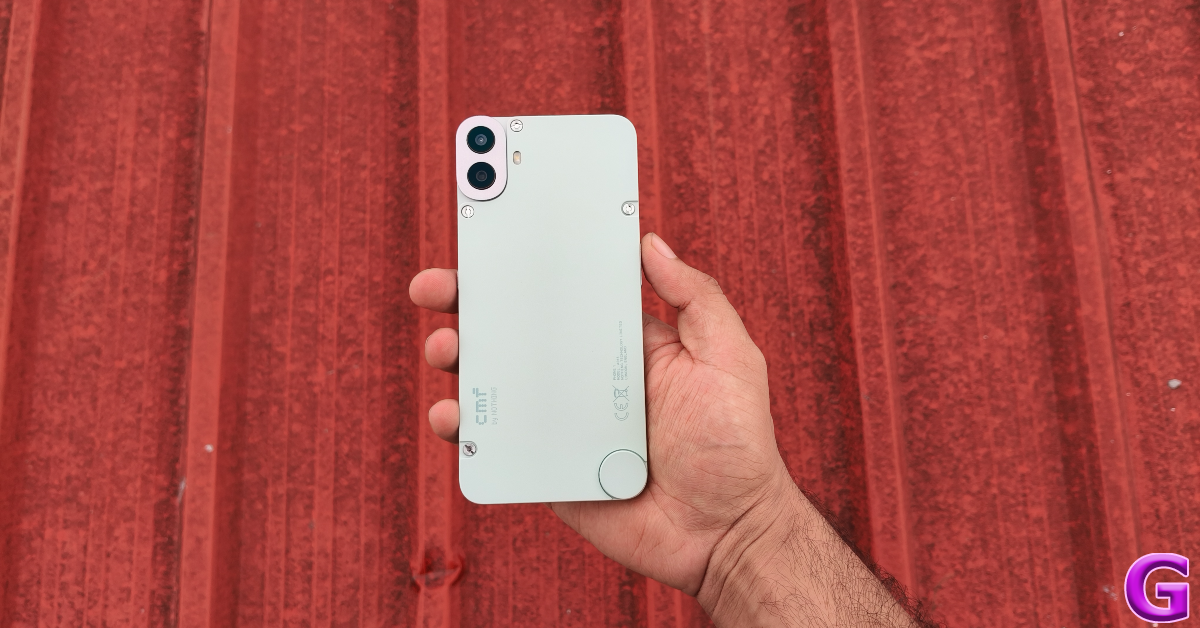
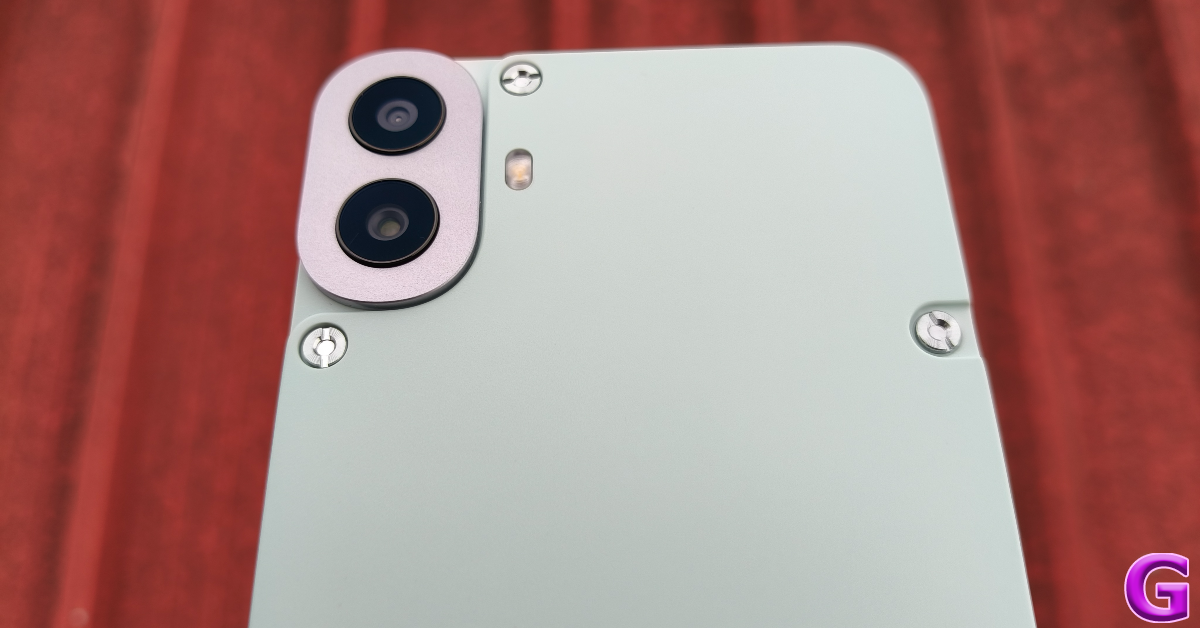
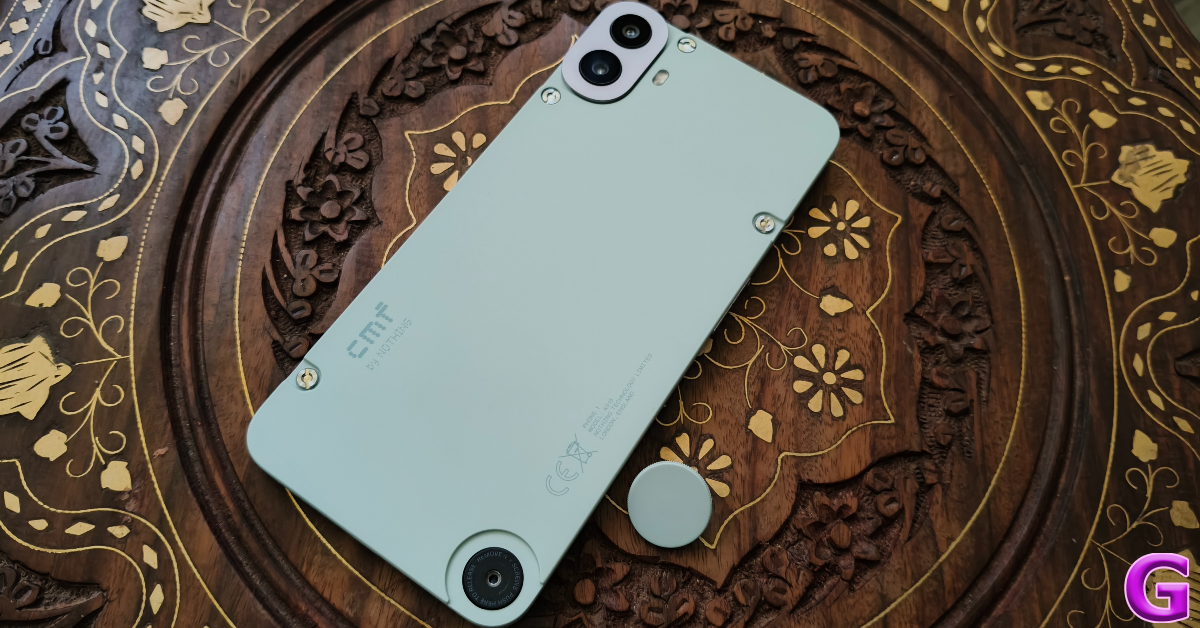
The modular design of the CMF Phone 1 lends it a whole lot of personality. There are visible screws on the plastic panel, which is a bold choice that has paid off well on the device. It gives the smartphone a ‘raw’ look without being too loud. There’s a rotating wheel at the bottom right corner of the panel which can be unscrewed to attach the kickstand and lanyard. The oval-shaped camera cutout on the top-left corner balances the screw wheel on the bottom.
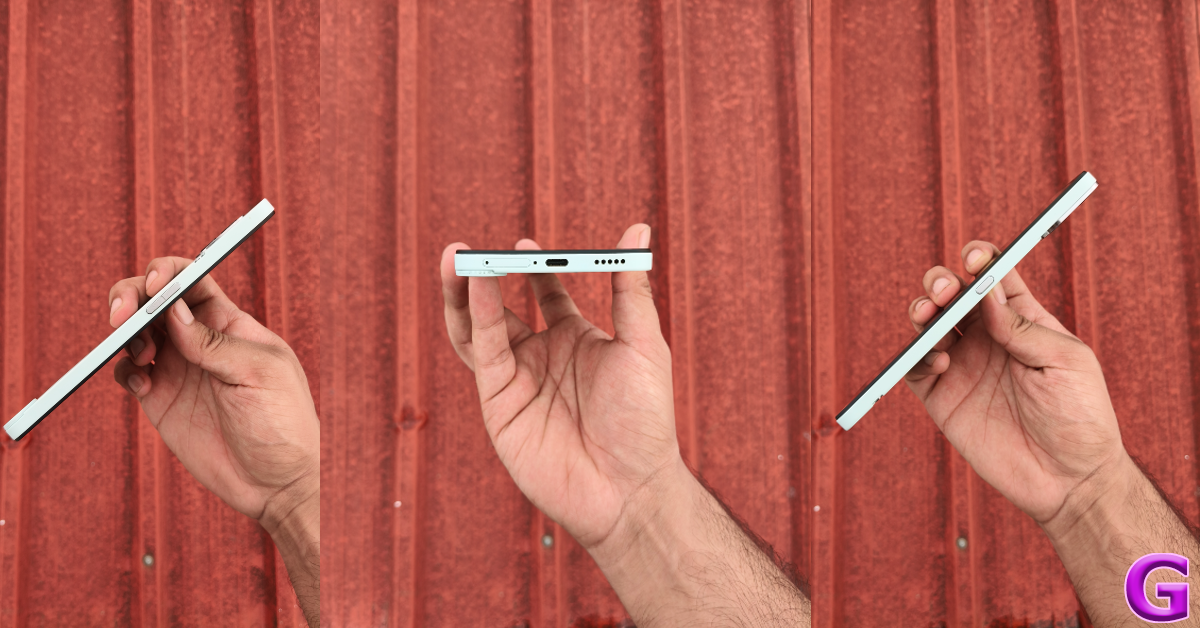
The matte finish on the plastic back panel massively elevates its in-hand feel. The CMF Phone 1 does not feel like a cheap device at all. Everything about its design is tasteful and well thought out. The volume rocker keys and the side button on either side of the frame have a glossy finish which offers a nice contrast to the matte texture of the back panel. The hybrid SIM tray, USB port, and speaker grille are positioned at the bottom of the device. The secondary microphone finds its way to the top edge of the frame.
The customisation versatility of the CMF Phone 1 is its X factor. The back panel of the device can be easily swapped after removing the screws with a flathead screwdriver (provided with the accessories). Once you’ve removed the back, there is no option to swap the battery unit. We hope CMF adds this option in future iterations of this smartphone.
There are four back panel colour options on offer – Black, Blue, Light Green, and Orange. Since every panel comes with its own rotating wheel, you can give your device a unique colour combination. Having an easily replaceable back panel also means you can easily swap it when it breaks or gets worn out.
CMF’s accessory list for the Phone 1 also includes a card holder, a kickstand, and a lanyard cable. You don’t need to unscrew the device to attach the latter two accessories. The rotating screw wheel takes care of it. However, the cardholder requires installing a magnetic plate on the back panel with the help of screws before the mini wallet can snap onto it. We like this workaround as it opens the door to a lot of other accessories for the device.
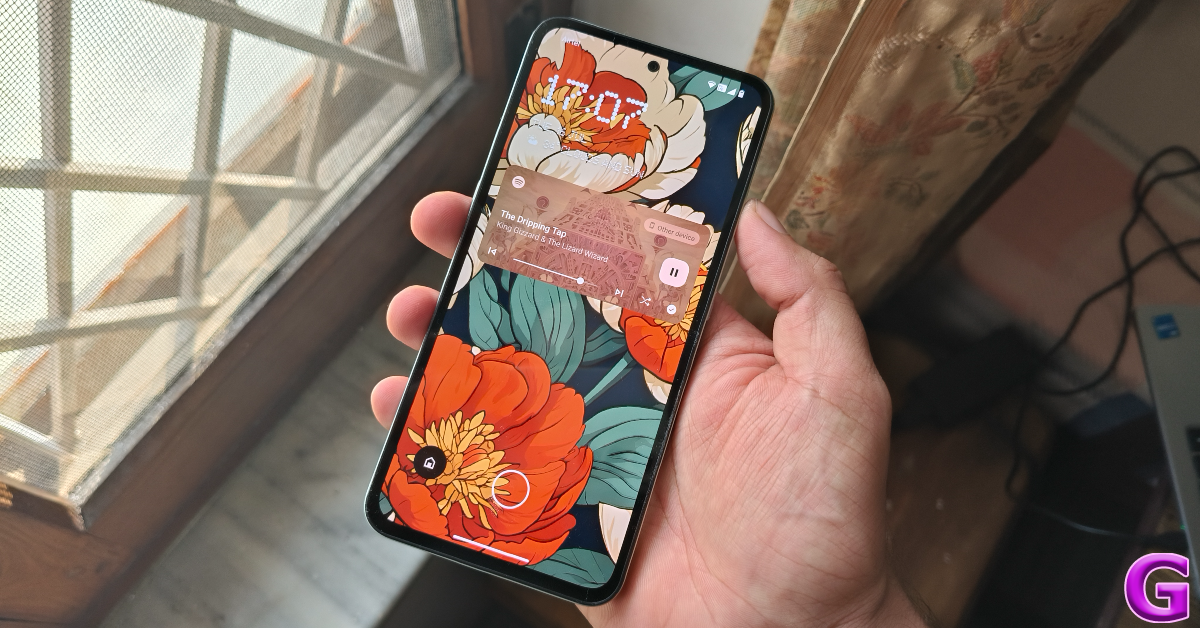
The front fascia of the Phone 1 can hold its own without relying on the charm and design intricacies of the back panel. The 6.67-inch Super AMOLED display has a 120Hz refresh rate and can hit 2,000 nits of peak brightness. The touch response offered by this display is snappy and fun. The punchy colours, deep blacks, and contrast-packed images bring the best out of this display. Streaming content on platforms like Netflix, Prime Video, and Disney+ Hotstar was a pleasant experience. The smartphone does not have a stereo speaker, but the bottom firing unit can get pretty loud.
CMF Phone 1 by Nothing Review: Performance and Cameras
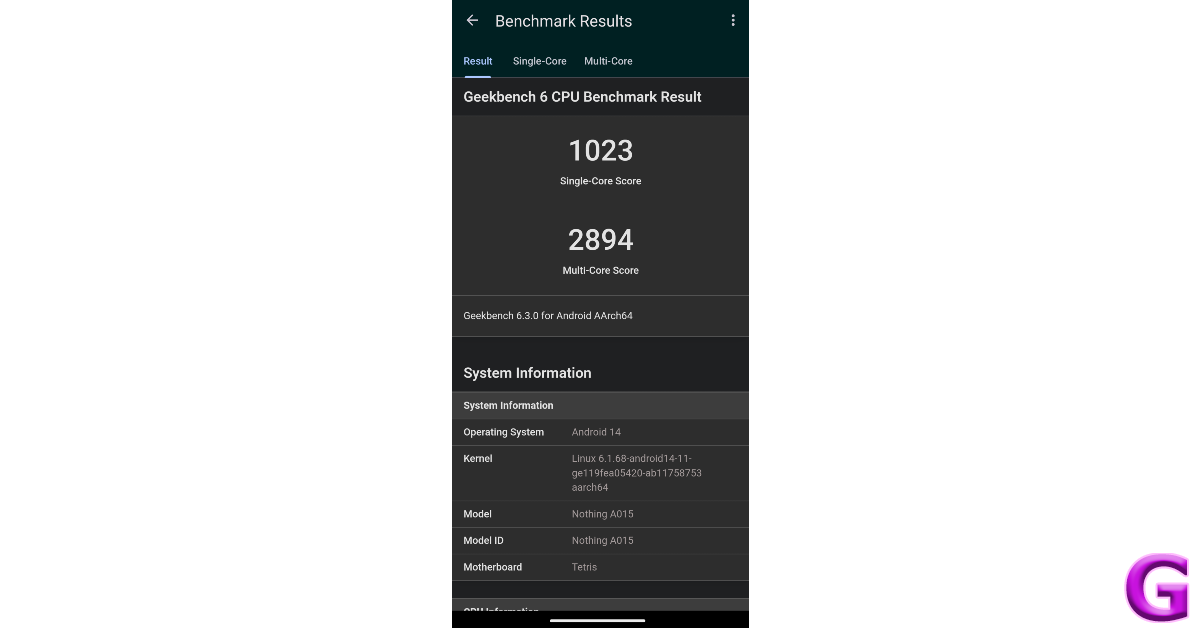
Powering the CMF Phone 1 is the MediaTek Dimensity 7300 SoC, which is an excellent chipset in this price range. More recently, we saw the Dimensity 7300 family of chipsets on the much pricier Oppo Reno12 Pro and the entry-level Motorola Razr50. On the Geekbench 6 app, the CMF Phone 1 scored 1,023 points in the single-core test and 2,894 points in the multi-core test.
The smartphone crushes everyday tasks like instant messaging, video calling, social media browsing, video recording, and navigation without breaking a sweat. The load time for apps is minimal and the general usage experience is quite smooth. During the week-long review period, we did not hit a snag on the CMF Phone 1.
Putting the Phone 1 to the gaming test yielded good results. We played Call of Duty Mobile and Asphalt 9 on the smartphone and were pleased with the way it handled demanding graphics. The touch response rate of the display played a crucial role in ensuring a seamless gaming experience. After 40 minutes of gaming, we were able to feel a slight warmth on the back panel but the smartphone did a good job of managing the internal temperature when we crossed the 1-hour mark.
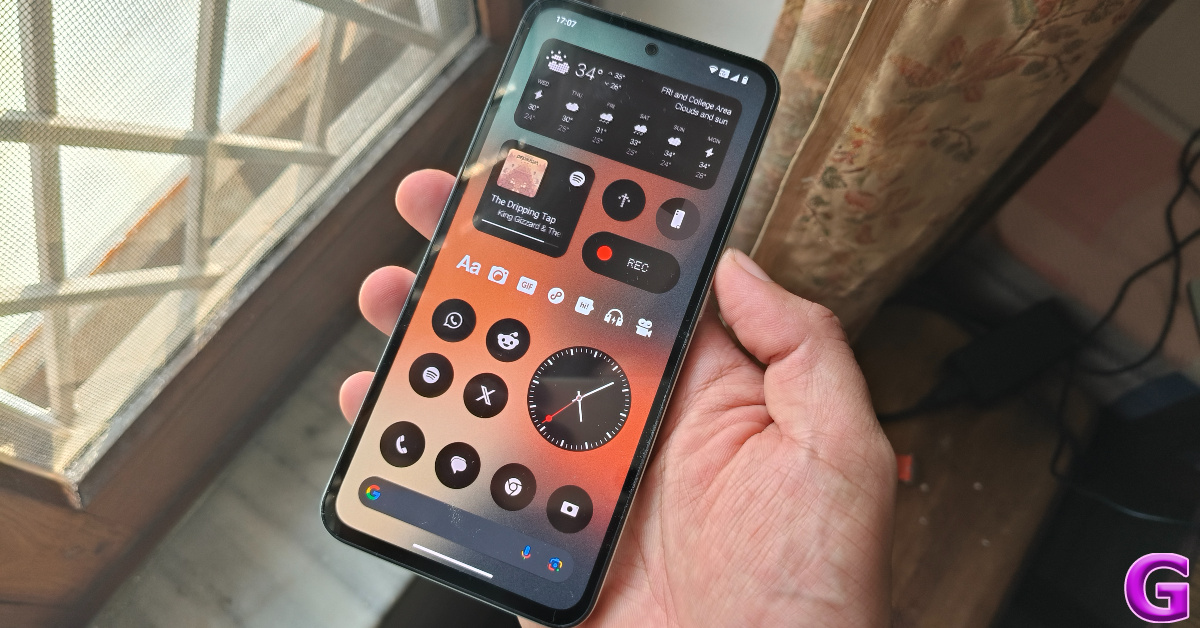
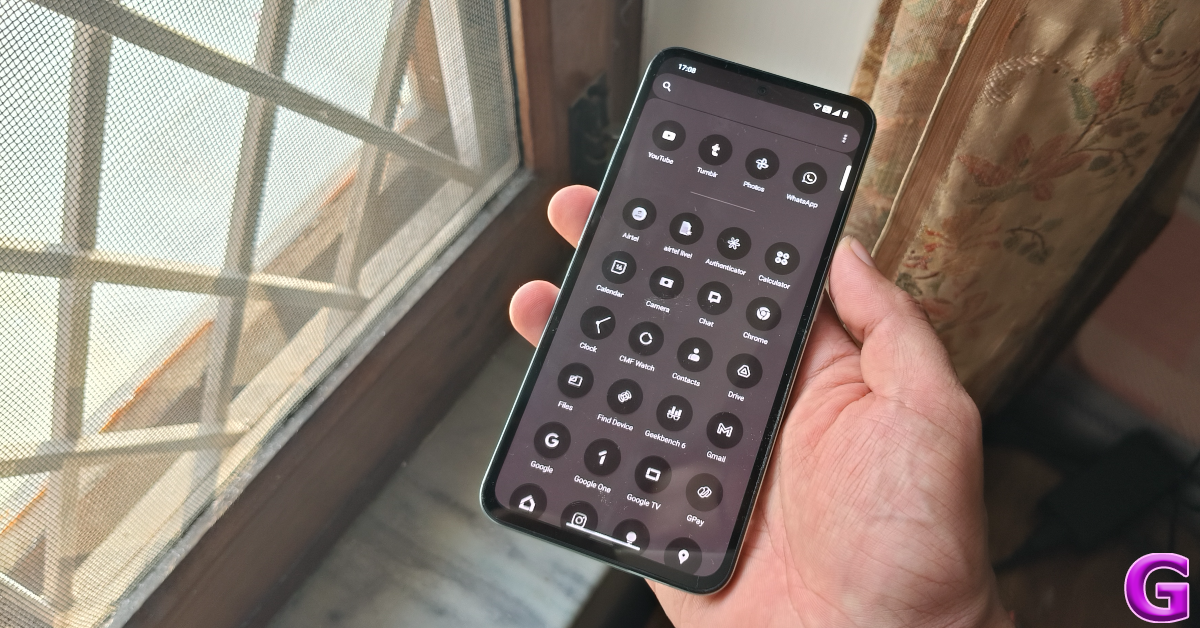
OS duties on the CMF Phone 1 are handled by Android 14-based Nothing OS 2.6. Despite being a ‘budget’ offering, the smartphone runs the full version of Nothing OS 2.6, consisting of all the features bar the Glyph controls (for obvious reasons). The lack of significant bloatware earns the smartphone brownie points from us. Nothing’s eye-catching icon packs and widgets bring a lot of flair to its devices. Even though the software experience is close to stock Android, the little tweaks make it much more enjoyable.
We are particularly fond of the home screen customisations offered by Nothing OS. Not only can you choose from a wide range of native widgets, but also apply a number of skins and layouts to the app folders on the screen. The ‘Wallpaper Studio’ generates novel wallpapers using AI but has a limited number of prompts. Nonetheless, it isn’t hard to generate a wallpaper that matches the home screen aesthetic.
The 5,000 mAh battery on the CMF Phone 1 puts in a versatile performance. The phone can easily last a day on heavy usage. You can push its battery life to a day and a half if you’re more conservative with your usage. We were able to clock 7 hours and 20 minutes of Screen On Time on the device before the battery hit 15%. Our daily tasks on the CMF Phone 1 during the review period included video streaming, social media browsing, video calling, web browsing, and gaming. With support for 33W wired charging, the smartphone took just over an hour to reach a 100% charge.
The rear camera panel of the CMF Phone 1 consists of a 50MP primary sensor and a 2MP depth sensor. The latter isn’t a standalone camera but helps in adding the depth effect to the portraits captured by the main sensor. The rear camera setup lacks an ultrawide camera, but given the price of the smartphone, we don’t deem this as a major loss.
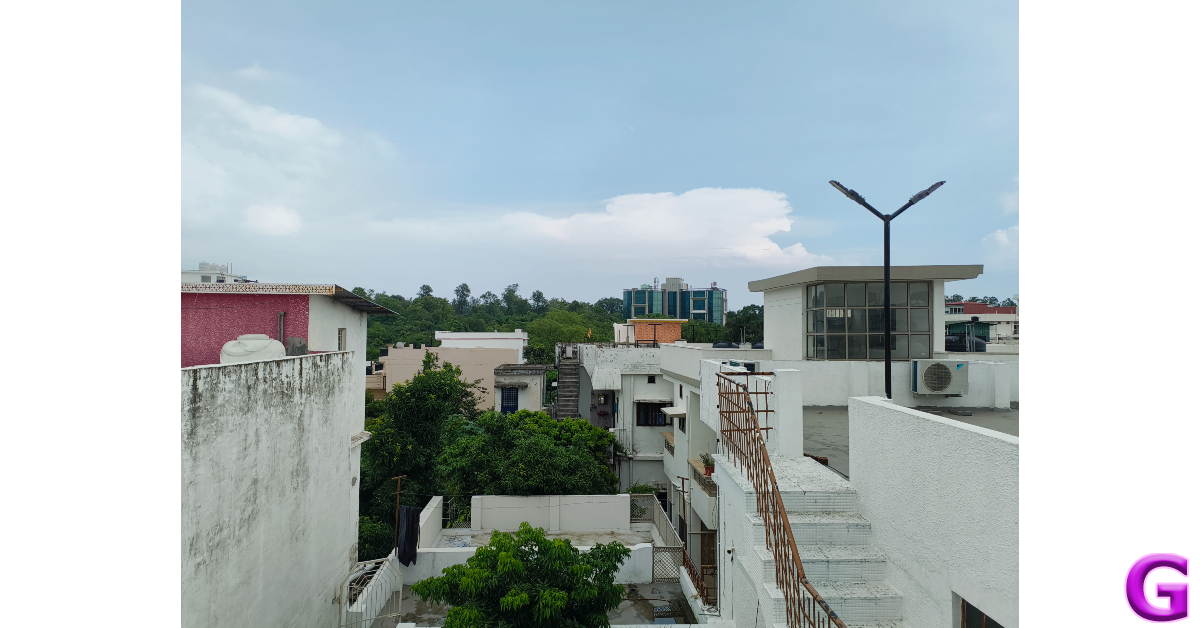
The 50MP primary sensor takes good pictures in daylight conditions. The images flaunt vivid, punchy colours and pack a good amount of details. The camera app has a ‘Vivid Mode’ which uses AI to detect the scene and enhance the colours in the images. Every time you change the scene in front of the camera, the AI engine generates a small description of how it will improve the image. This seems like a neat trick on the surface, but the end results are never as versatile as the smartphone makes them out to be.
Budget smartphones typically don’t fare well in limited lighting conditions, but the CMF Phone 1 proved to be a pleasant exception. With the Night Mode turned on, the 50MP camera produced decent results. In the image processing phase, the smartphone does a good job of brightening the subject and assigning it accurate colours.
Without Night Mode vs Night Mode
Portrait shots taken with the CMF Phone 1 are detailed and have a lot of clarity. The camera does a good job of detecting the edges of the subject and separating it from the background. However, the background blur leaves more to be desired.
Portrait Shots: 1x vs 2x
The front-facing 16MP camera takes decent selfies but they seem a little too processed. The skin tone and texture seem a bit artificial. In limited lighting, the selfies are visibly soft. This camera can record 1080p videos at 30fps. Meanwhile, the rear camera can record 4K videos at 30fps.
The Rs 16,000 price tag of the CMF Phone 1 places it in the budget smartphone category but it punches above its weight in almost every metric. The smartphone has a distinct personality that separates it from the cliched devices in its segment. What we like about the smartphone is that it doesn’t rely on its modular design as a gimmick. Even without the accessories, the CMF Phone 1 is a rock-solid device that is ideal for everyday use.
The MediaTek Dimensity 7300 SoC delivers a well-rounded performance on the smartphone, as evidenced by the impressive benchmarks. The Super AMOLED display is a delight to use and brings fluidity to the device. On the OS front, the reliable Nothing OS 2.6 delivers a signature performance. The versatile battery life ties the bow on a splendid smartphone experience.
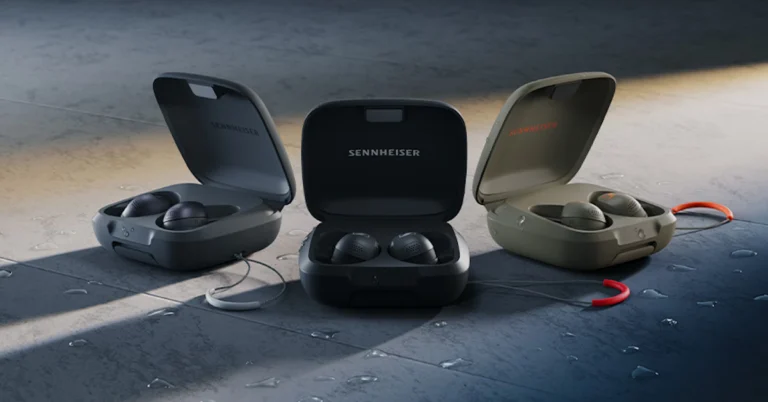
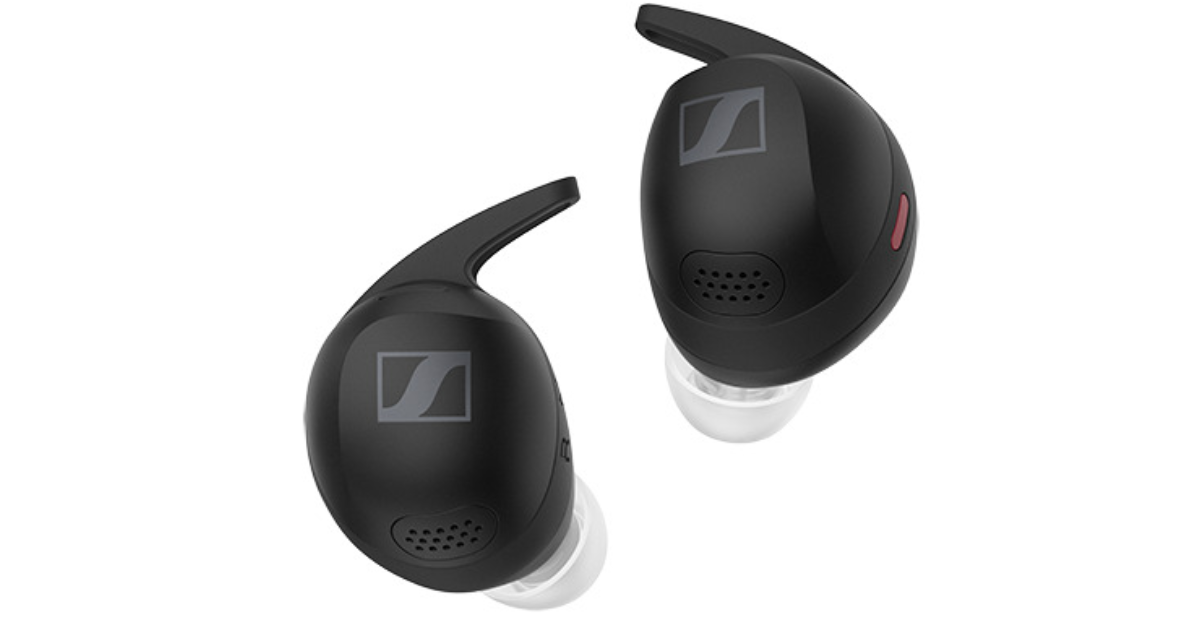
Sennheiser has expanded its MOMENTUM series with the launch of MOMENTUM Sport earbuds in India. These earbuds not only take care of HQ sound but also useful workout insights with cutting-edge in-ear sensors that measure heart rate and body temperature. This real-time biometric feedback allows users to optimise their training, safely push their boundaries, and accurately track their progress.
The MOMENTUM Sport earbuds incorporate a 10mm transducer and an acoustic relief channel that curtails body-borne interruptions, such as footstep noise and breathing. The semi-open design also provides natural environmental awareness with Transparency mode, Anti-wind mode, and Adaptive Noise Cancelling mode. The earbuds function over Bluetooth 5.2 and support aptX Adaptive, AAC, and SBC codecs, making them apt for innumerable activities, including running gym sessions, and home use.
Sennheiser’s MOMENTUM Sport uses a photoplethysmography (PPG) heart rate and body temperature sensor to provide important information to fitness apps and devices. The gadget optimises Sennheiser Sound for sports and provides real-time performance tracking and feedback for more effective exercises. The inner ear, which is an ideal, dark area with low light pollution and stability during physical activity, provides consistent performance tracking data even at the peak of a workout. The correct playlist can boost motivation and make working out more fun.
The MOMENTUM Sport wearer may take in-ear temperature and heart rate measurements with an accuracy of +/- 0.3 degrees Celsius, which aids minimise heat-related fatigue. It also contains three-axis accelerometers, capacitive touch, and infrared sensors for controlling audio playing and call features with easy finger tap gestures, regardless of weather conditions. The device also lets users to pause music with a double tap of the cheek, even while wearing gloves.
MOMENTUM Sport’s heart rate data is well-matched with popular fitness devices and apps such as Apple Watch/Health, Garmin Watch/Connect, and Strava. Polar Flow, which serves as training software, now gives users access to Polar’s superior biosensing skills and data analytics ecosystem. This features expert-level performance monitoring, training analytics, smart coaching, and voice guiding. In-ear performance tracking data, including body temperature, is linked in real-time for rapid insights during training and saved for improved post-training analysis.
The MOMENTUM Sport will integrate with the Polar Vantage V3 multisport watch, providing real-time in-ear performance tracking data and Polar training audio and navigation guidance. This feature allows users to start training and monitor their progress straight on the watch.
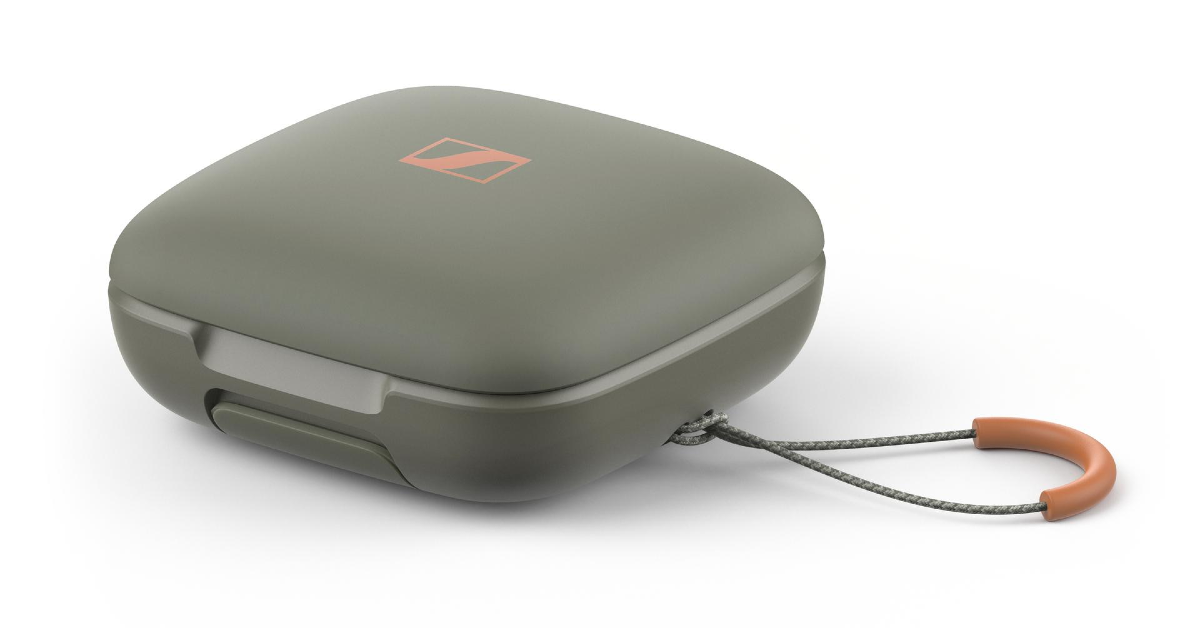
Sennheiser’s MOMENTUM Sport earbuds have an on-screen interface and intuitive tap motions for effortless operation. These earbuds are built to withstand a vigorous workout, involving IP55 sweat and water resistance, a shock-proof chassis, and clog-resistant ear tips. They include replaceable ear fins and tips for a more comfortable fit, as well as a bigger transducer and housing for medium to large-sized ears. The IP54-rated carrying case can hold up to three additional recharges, increasing playback time from 6 to 24 hours without the need for a USB-C connection or Qi charging pad. With just 10 minutes of quick charging via USB, you may enjoy up to an hour of playback on the road.
Sennheiser has launched MOMENTUM Sport earbuds at a launch price of Rs 27,990. The TWS earphones will be available in Polar Black, Burned Olive, and Metallic Graphite colour options. The earphones can be purchased via the brand webshop at www.sennheiser-hearing.com, Amazon.in and Flipkart.
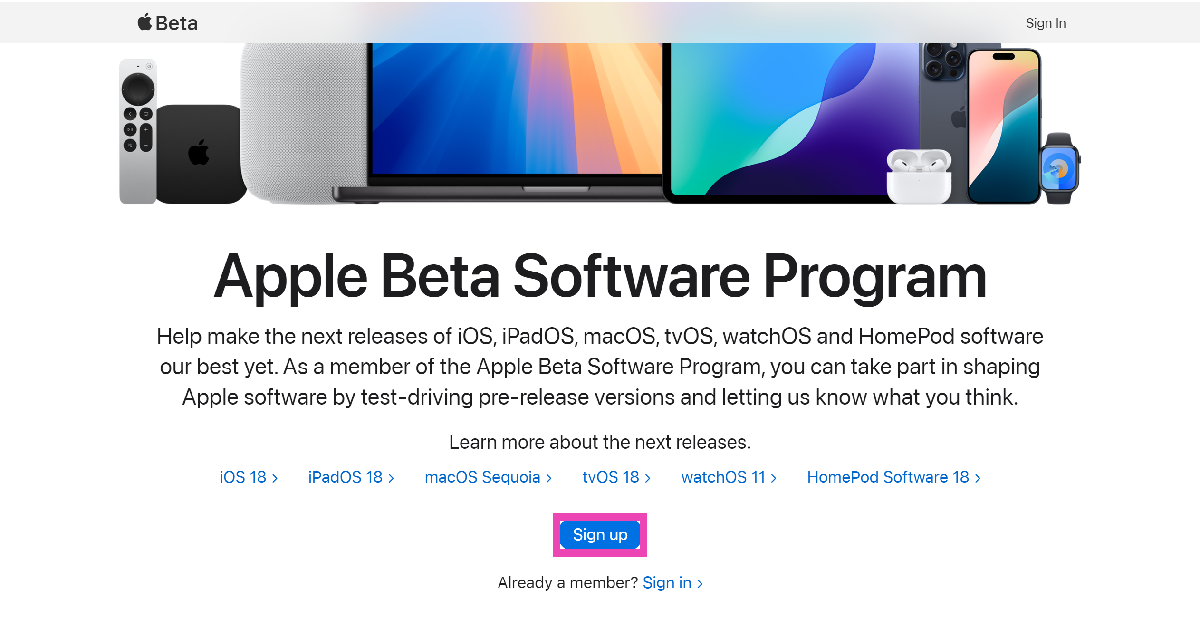
Ahead of the official launch of iOS 18 in September, Apple has released the first public beta version of the mobile software. The Developer Beta versions of iOS 18 have been around for some time now, but this is the first time that the general public can try out the new mobile software. The process to install the public beta version is much simpler than its developer counterpart. So, without further ado, here’s how you can install iOS 18 Public Beta on your iPhone.
iOS 18: What is the difference between Developer and Public Beta?
The main clue lies in the name of the two beta versions. The Developer Beta version of iOS is intended for app developers to update or design their apps in accordance with the new mobile software. Earlier, signing up for the Apple Developer Program to gain access to the new iOS version required a $99 fee. However, Apple waived this fee last year, allowing more users to try out the beta version.
The Public Beta version of iOS is meant for the general public. Users can try out the new software on their devices and report any bugs or glitches to Apple. This ensures that the official version is free of any glaring issues. Public Beta is generally rolled out a couple of months after the Developer Beta. Apple usually holds back some features on both the beta versions and releases them with the official version.
Download and install iOS 18 Public Beta on your iPhone
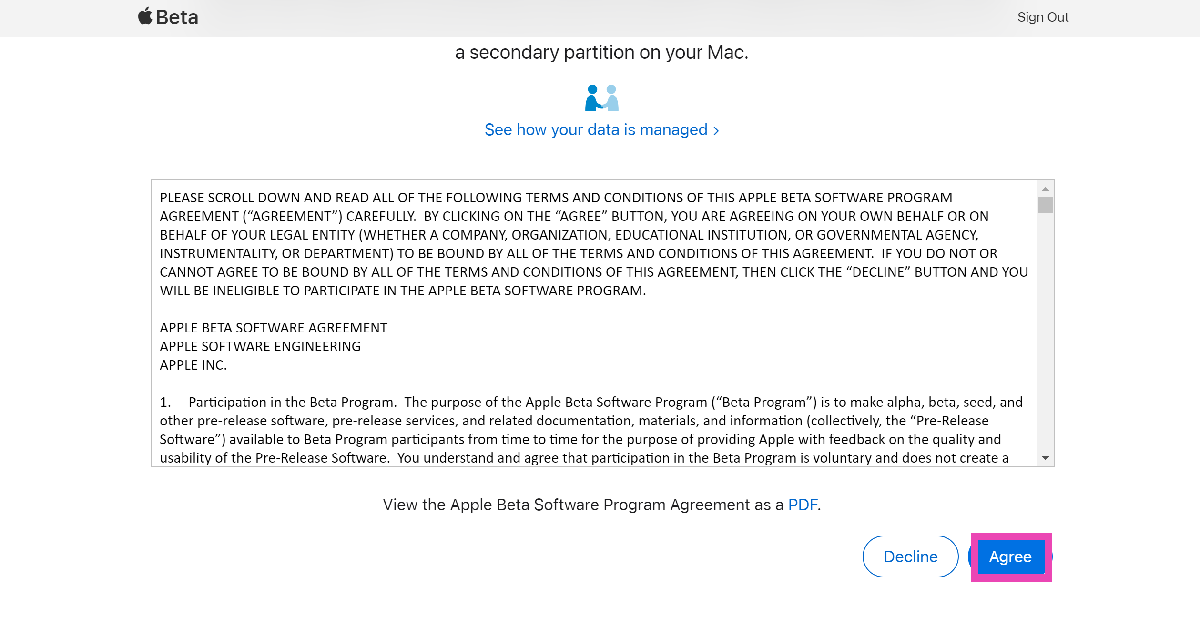
Step 2: Agree to the Apple Beta Software Program Agreement.
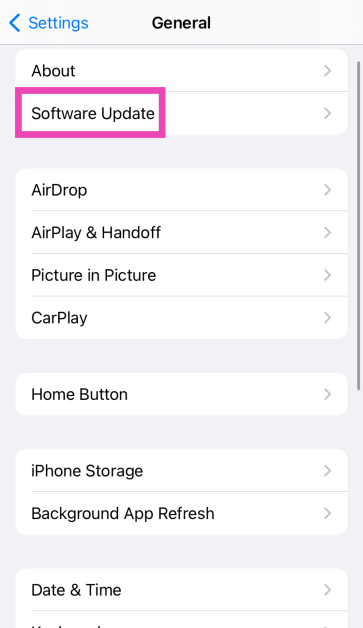
Step 3: Open Settings on your iPhone and select General.
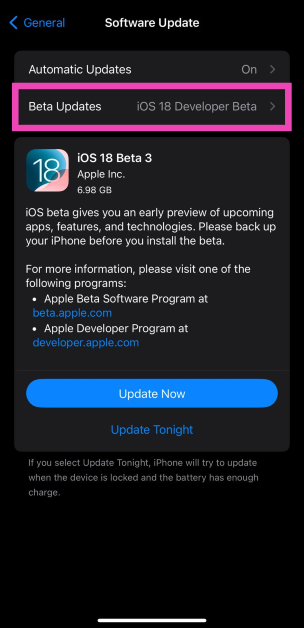
Step 4: Tap on Software Update.
Step 5: Tap on Beta Updates.
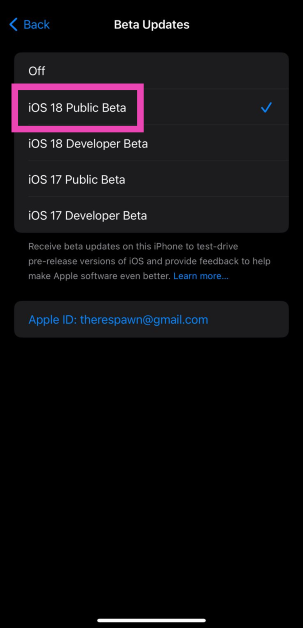
Step 6: Select iOS 18 Public Beta.
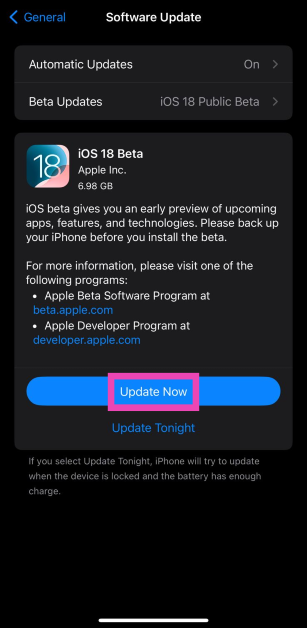
Step 7: Go to the previous screen and hit Update Now.
Frequently Asked Questions (FAQs)
When will iOS 18 be released officially?
Apple will launch iOS 18 at its fall event in September alongside the new iPhone 16 Series.
Will older iPhones get Apple Intelligence as a part of iOS 18?
The developer and public beta versions of iOS 18 do not have Apple Intelligence features yet. It is believed that these features will be exclusive to the Pro models of the iPhone 16 Series.
Which iPhones will get iOS 18?
All models above (and including) iPhone XS will get iOS 18.
This is how you can install iOS 18 Public Beta on your iPhone. Features like call recording and call transcripts have been reserved for the official version of iOS 18, which will drop in September. Excited about the new iOS 18? Read this article to learn about its new features.
OnePlus will announce several new products today at its Summer Launch Event, including the OnePlus Nord 4, OnePlus Pad 2, Nord Buds 3 Pro, and Watch 2R. This time, the company is hosting the event in Milan, Italy, but it will be live-streamed so that the company’s global fans may watch it live. While OnePlus hasn’t officially announced many specifics about its forthcoming products, leaks have surfaced on the internet revealing full specifications and pricing. Continue reading to learn about live stream details, expected specifications, and pricing.
In This Article
How to watch the OnePlus Summer Launch Event today?
OnePlus is preparing to debut a new range of devices at its OnePlus Summer debut Event today in Milan, Italy. The event will also be live-streamed for a wider audience via its YouTube channel. If you want to watch the live stream, go to the Live Section on both the OnePlus and OnePlus India YouTube channels at 6.30 PM IST. You may also watch the streaming in real time on our website; we’ve provided a link below for your convenience.
OnePlus Nord 4 price and specs expected
Recently, a leak surfaced on the internet, disclosing all of the specifications and pricing details for the OnePlus Nord 4. The OnePlus Nord 4 will feature a 6.74-inch Tianma U8+ OLED display with a resolution of 2772×1240 pixels. The display may further support up to 120Hz refresh rate, and a peak brightness of 2150 nits, according to a tipster.
The forthcoming phone is expected to be powered by the Qualcomm Snapdragon 7+ Gen 3 CPU, with LPDDR5X RAM and UFS 4.0 storage. The phone is believed to run the most recent version of OxygenOS on top of Android 14. OnePlus has already stated that the Nord 4 will come with four years of Android updates and six years of security fix updates, ensuring that the phone is ready until Android 18.
The Nord 4 could include a 50-megapixel Sony LYT 600 primary sensor with optical image stabilisation (OIS) and an 8-megapixel ultra-wide angle lens. There will likely be a 16-megapixel front-facing camera for selfies and video chats.
Nord 4 may have a 5,500 mAh battery and support for 100W SUPERVOOC fast charging. It may also have an in-display fingerprint sensor and an alert slider. Dolby Atmos-compatible stereo speakers and an IR blaster will also likely be featured.
The starting price for the OnePlus Nord 4 is expected to be Rs 27,999, which includes all bank offers. This suggests that the phone’s original price may be slightly higher, most likely about Rs 31,999, as speculated. The smartphone will come in three colours: black, mint, and silver.
The OnePlus Pad 2’s Indian price looks to have been leaked, just a few days before its official release. According to a tipster, the tablet’s pricing may have increased in comparison to the OnePlus Pad from the previous year. The tablet will retail for Rs 45,999, while its MRP is expected to be Rs 47,999. According to reports, the OnePlus Pad 2 will be released together with the Smart Keyboard and Stylo 2 stylus. The reported prices for the Smart Keyboard and Stylo 2 are Rs 11,999 and Rs 5,000, respectively.
The OnePlus Pad 2 is expected to run the Android 14-based OxygenOS 14. It is claimed to be powered by the Snapdragon 8 Gen 3 chipset. The tablet is speculated to have a 12.1-inch IPS LCD screen with 3K resolution. It could have a 13-megapixel back camera and an 8-megapixel front-facing camera. The tab is said to have a 9,510mAh battery and 67W charging capabilities.
It has been announced that the OnePlus Watch 2R will have a lightweight design with a touch of antique appeal. With a battery life of up to 100 hours in Smart Mode and 12 days in Power Saver Mode, this Google Wear OS watch is incredibly energy-efficient.
OnePlus Nord Bud 3 Pro
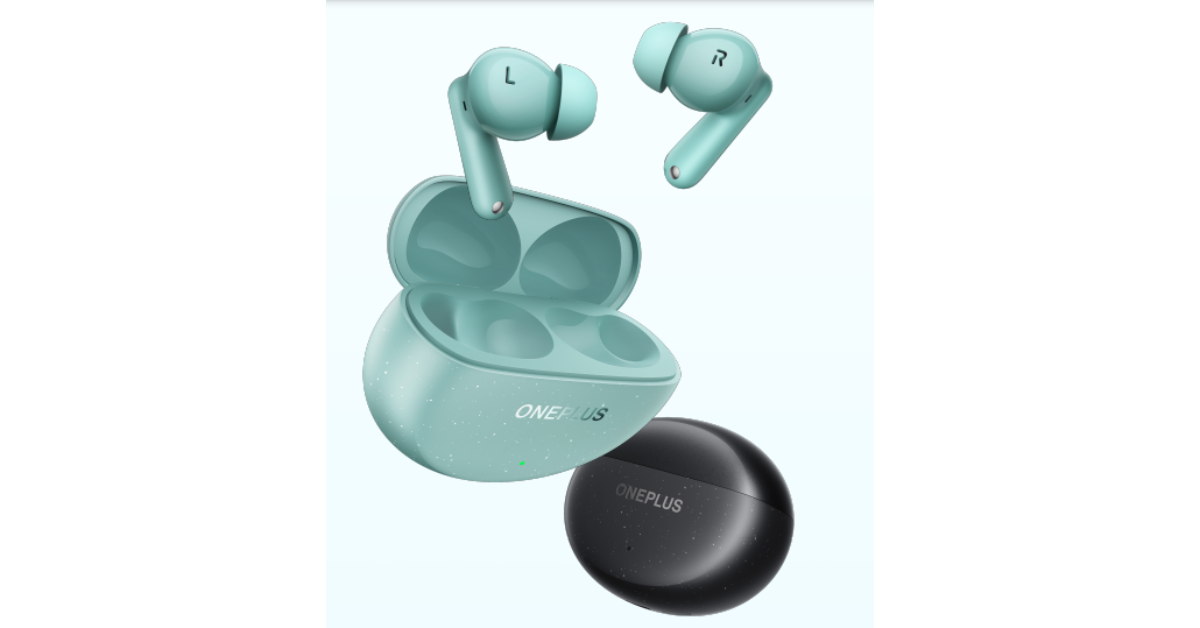
OnePlus has stated that the Nord Buds 3 Pro will be available in two colours: Soft Jade and Starry Black. It will also enable Active Noise Cancellation, which reduces noise by up to 49 decibels.
Garena Free Fire Max is a battle royale game with regular awards and tournaments to keep players interested. If you play Garena Free Fire, you should be aware of the redeem codes that are released on a daily basis. However, because the battle royale game is banned in India, players from other countries can use the Free Fire Redeem codes daily. If you’re unfamiliar with the Garena Free Fire redeem codes or don’t know how to get them, we’ve put together a step-by-step guide to help you redeem them. Check out Garena Free Fire Max Redeem Codes for 16 July 2024.
The Free Fire Max redeem codes are a great way to get free stuff. These are 12-digit codes that contain alphabets and numbers, as well as an expiration date and time. Because the Garena FF redeem codes cannot be used more than once, you should hurry to the redemption page to claim your free reward before someone else does. To get a free reward, all you have to do is go to reward.ff.garena.com/en, which is the official redemption page. Also, keep an eye on this space for daily updates on Garena Free Fire Max redemption codes and rewards.
16 July 2024: New Amazon Quiz is now available. Customers from different parts of the country are participating in the daily quiz. The quiz starts at midnight today and will be live until 11:59 PM tonight. By successfully answering every question, participants in the quiz have the chance to win wonderful rewards. A Rs 500 Amazon Pay Balance is up for grabs to participants today.
One wrong answer could eliminate you from the quiz. You have a chance to win Rs 500 Amazon Pay Balance if you successfully answer every question. Users of the app only have the opportunity to take the quiz. Check Out 16 July 2024 Amazon Quiz Answers.
Only app users are eligible to play the Amazon quiz every morning from 12 AM to 11:59 PM. The quiz is not available on the desktop. For those who are unaware of how to play the Amazon quiz, below are the steps, you can follow to take the quiz.
We have written an explainer above, you can refer to that.
When are the winners of the Amazon Quiz and contest announced or declared?
The announcement of today’s Amazon quiz winner will take place Tomorrow. As for the Special Quiz and “Spin & Win” Contest, the winners will be declared once the Quiz Contest comes to an end. To find out who the lucky winner is, you can refer to the Amazon Quiz Winners List or visit the Amazon Winners tab in the Amazon App.
How to participate in the Daily Amazon Quiz?
That is very easy, just got to the Amazon app and scroll to the bottom of the page and you will find the Quiz section. Click on it (usually it is called the fun zone) and you can enter the Amazon Today Quiz Contest.
Are there any other quizzes or contests running on Amazon daily?
Yes, there are many running on a daily basis. These range from spinning the wheel to answering the questions correctly. All are located in the Fun Zone.
What are the criteria for selecting a winner in the Daily Amazon Quiz?
When a qualified player submits correct answers to all the questions, they will automatically be entered into a lucky draw. This draw will include all participants who answered all the questions correctly. Amazon randomly selects the final winners from the pool of eligible participants who gave the right answers.
Which Types of Questions are asked within Amazon Daily Quiz?
These are very simple and straightforward questions. These are mainly related to general knowledge.
Where should I look for Amazon Daily Quiz answers?
You can bookmark this page as we will help you every day with the Amazon Daily Quiz. We bring you fresh answers every day for the Amazon Daily Quiz and Contest.
What time does Amazon Announce previous winners?
The previous winner’s name will be announced today at 12 PM (noon).
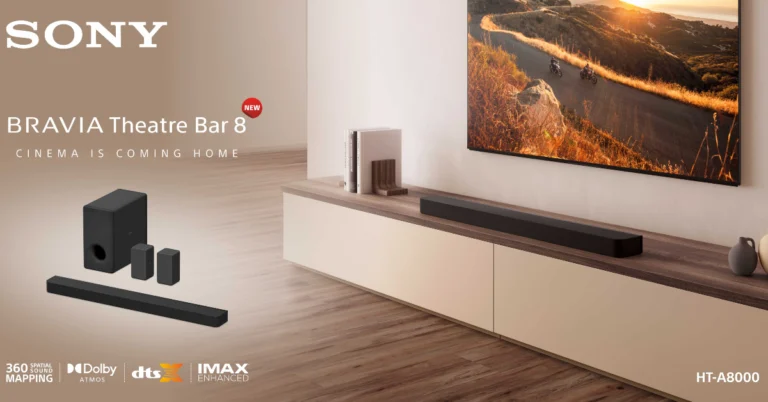
Sony India has unveiled the new BRAVIA Theatre Bar 8 and BRAVIA Theatre Bar 9. The BRAVIA Theatre Bar 8 contains 11 speaker units, while Bar 9 has 13 speaker units, all featuring 360 Spatial Sound Mapping for immersive audio and Sound Field Optimisation for optimal sound. Both speakers are compatible with IMAX Enhanced and Dolby Atmos, providing industry-leading audio technology. Acoustic Centre Sync offers exact sound with TV integration, and Voice Zoom3, an AI-enhanced dialogue clarity technology, is offered. The BRAVIA Connect App allows customers to easily control settings from their smartphone. The speakers also include advanced gaming features, 360 Reality Audio, HDMI ARC, and an optical input for easy device connectivity.
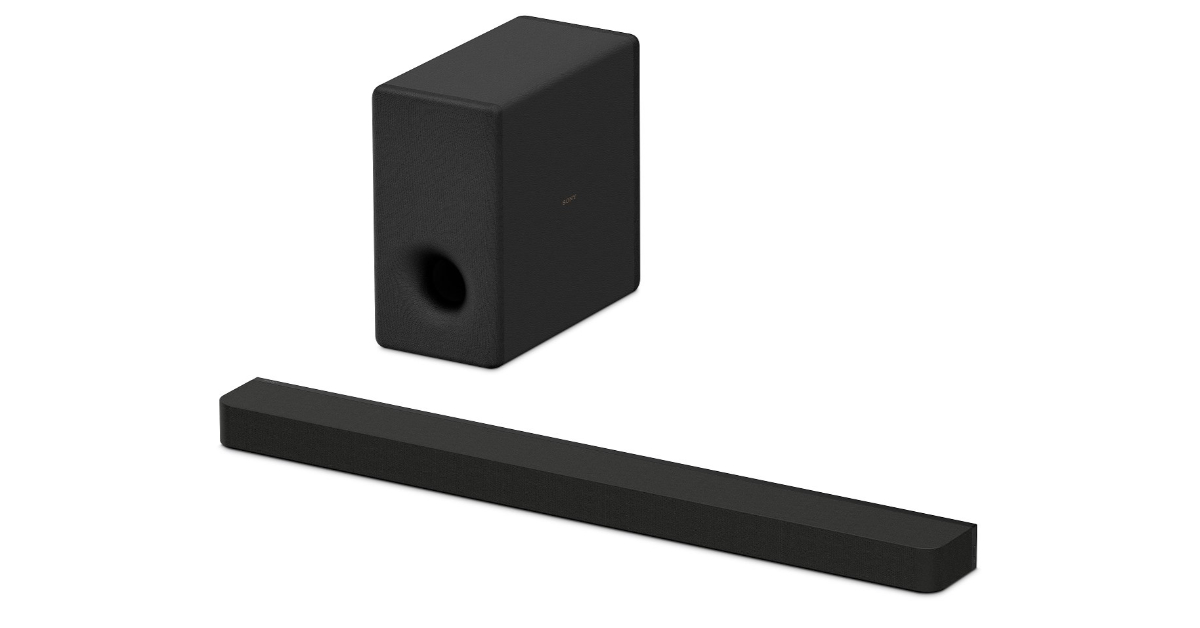
BRAVIA Theatre Bar 8
The BRAVIA Theatre Bar 8 and Bar 9 come with Sound Field Optimisation, which automatically adjusts speakers based on room arrangement, delivering theatrical sound at home. They support industry-standard audio technologies such as Dolby Atmos and DTS and are IMAX Enhanced certified. Dolby Atmos produces a three-dimensional soundscape, whilst DTS adapts to speaker arrangement for authentic sound.
Acoustic Centre Sync is a function on both speakers that combines a sound system, such as a soundbar, with a television to provide a cinematic experience. This functionality makes sure that the sound from the TV’s speakers and soundbar is synchronised with the screen’s action. This is accomplished by positioning speakers directly behind the screen, letting the sound overlap with the image projected onto it.
Moreover, Sony’s BRAVIA Theatre Bar 8 and Bar 9 have Voice Zoom 3, an AI-powered feature that enhances conversation clarity and precision. The technology detects human dialogue and amplifies or reduces its loudness, ensuring that even slight dialogue is audible and clear. The settings can be accessed through the new BRAVIA Connect App, which eliminates the need for a menu bar on the TV screen.
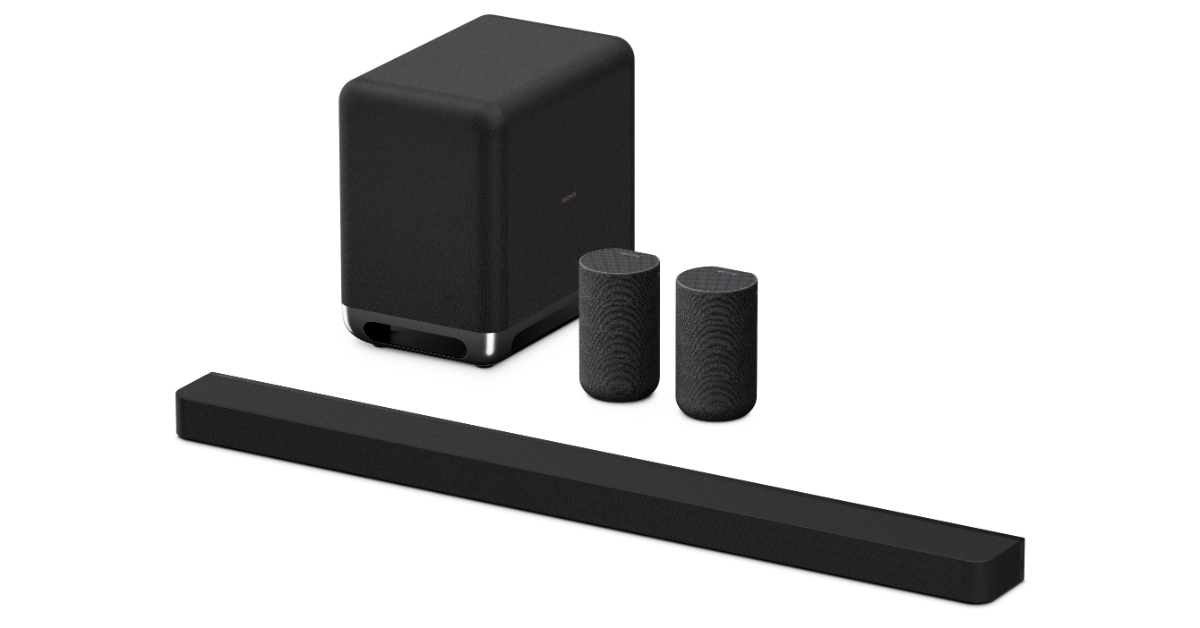
The BRAVIA Theatre Bar 8 and Bar 9 also offer optional subwoofers and back speakers, allowing for unique audio solutions. According to Sony, the wireless subwoofer has a strong driver and passive radiator for deep bass, while the wireless rear speakers, such as the SA-RS5, have up-firing speakers and built-in batteries for versatile placement. These components improve the home entertainment experience by addressing individual preferences and room acoustics.
In addition to this, the BRAVIA Theatre Bar 8 and Bar 9 soundbars enhance the gaming performance as they support 8K/4K at 120Hz, Variable Refresh Rate (VRR), and Auto Low Latency Mode (ALLM). They’re perfect for both recreational and competitive gaming environments. The Sony soundbars also have Sony 360 Reality Audio, which allows for immersive music listening.
BRAVIA Theatre Bar 9
The BRAVIA Theatre Bar 8 and Bar 9 provide seamless connectivity with a variety of devices via HDMI ARC and optical input. HDMI ARC transfers audio from compatible TVs to the soundbar via a single cable, whereas Optical Input connects gaming consoles or older TVs, giving versatility and rich sound for home entertainment.
In terms of availability and pricing the Sony BRAVIA Theatre Bar 8 will be available with a price tag of Rs 89,990. The price of the BRAVIA Theatre Bar 9 is set at Rs 1,29,990. The soundbars can now be purchased via Sony retail stores (Sony Center and Sony Exclusive), www.ShopatSC.com portal, major electronic stores, and other e-commerce websites in India.
There is an additional cashback offer of Rs 8,000 on Bar 8 and Rs 10,000 on Bar 9, which can be availed through selected credit cards in both online and offline channels. A special combo offer discount of Rs 8,000 is also available on the purchase of selected BRAVIA televisions along with BRAVIA Theatre Bar 8 and Bar 9.
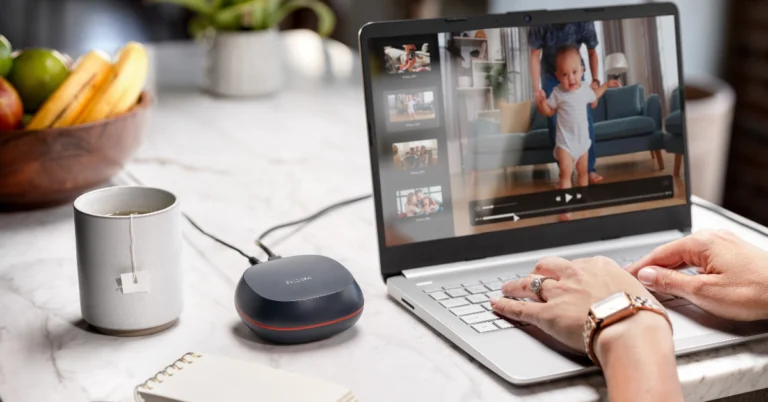
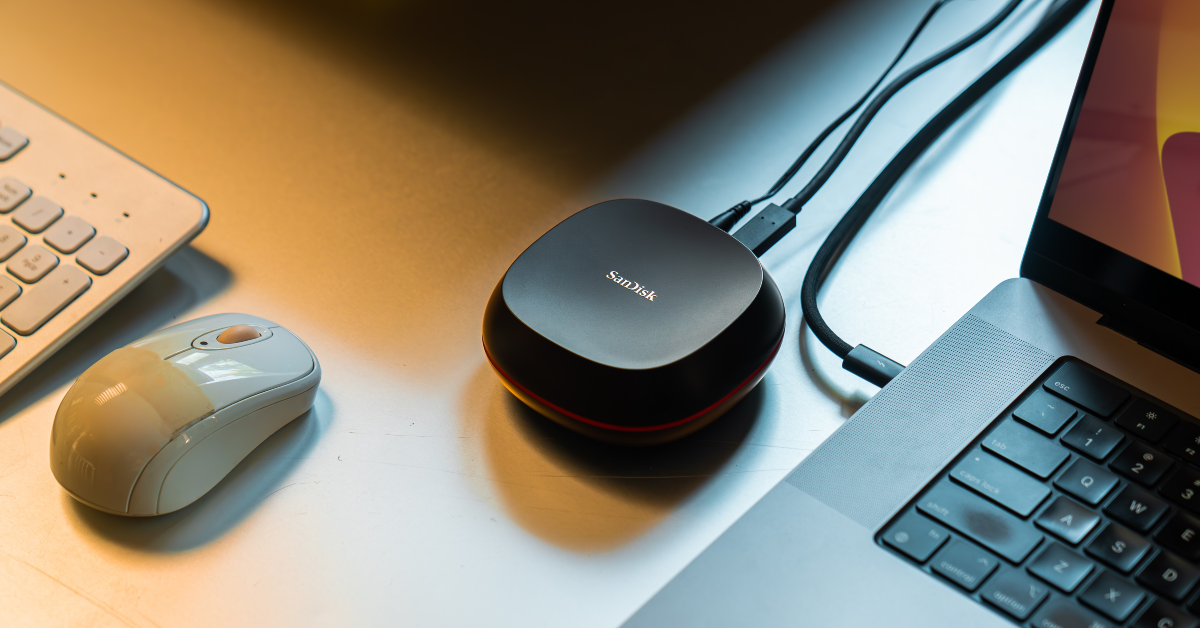
Western Digital has launched its 8TB Desktop SSD in India. The SanDisk Desk Drive is the highest capacity external desktop solid state drive (SSD) yet for content creators and business professionals to back up and access high-resolution photos, videos, and files. The drive is available exclusively for pre-orders on the Western Digital E-store until July 16.
Western Digital has officially introduced the SanDisk Desk Drive, its highest capacity external desktop solid state drive (SSD) in India. This drive offers content creators and business professionals a convenient way to back up and access high-resolution photos, videos, and files in a single location.
The SanDisk Desk Drive offers 4TB and 8TB capacities for various files, including photo and video collections, CAD files, AI-generated files, music libraries, and important documents. The desktop solid state drive offers faster content access with read speeds up to 1,000 MB/s, up to 4x faster than a desktop HDD3. It also allows quick backups using Apple Time Machine or Acronis True Image for Western Digital backup software. The compact, modern design maximizes desk space and feels natural in any professional or home setting. Its desktop SSD is compatible with Windows or macOS with exFAT formatting using the included USB Type-CTM cable.
The SanDisk Desk Drive is provided with a three-year limited warranty. The The SanDisk Desk Drive comes in two storage capacities 4TB and 8TB priced at Rs 39,999 and Rs 72,999 respectively. The SSD can be purchased at the Western Digital Store and authorized SanDisk retailers, e-retailers, and distributors.
The SanDisk Desk Drive is available with amazing pre-order incentives exclusively on the Western Digital E-store until July 16th.
Get one free 1TB SanDisk Portable SSD by pre-ordering the 8TB SanDisk Desk SSD6. Get one free 512GB SanDisk Ultra Dual Drive Luxe USB Type-C on pre-ordering the 4TB SanDisk Desk SSD6.
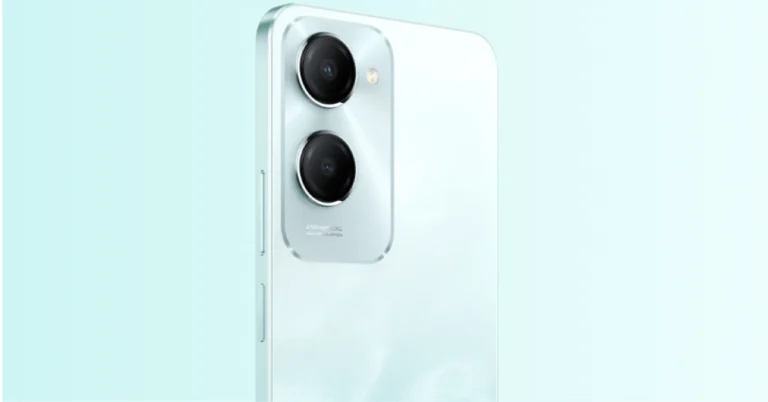
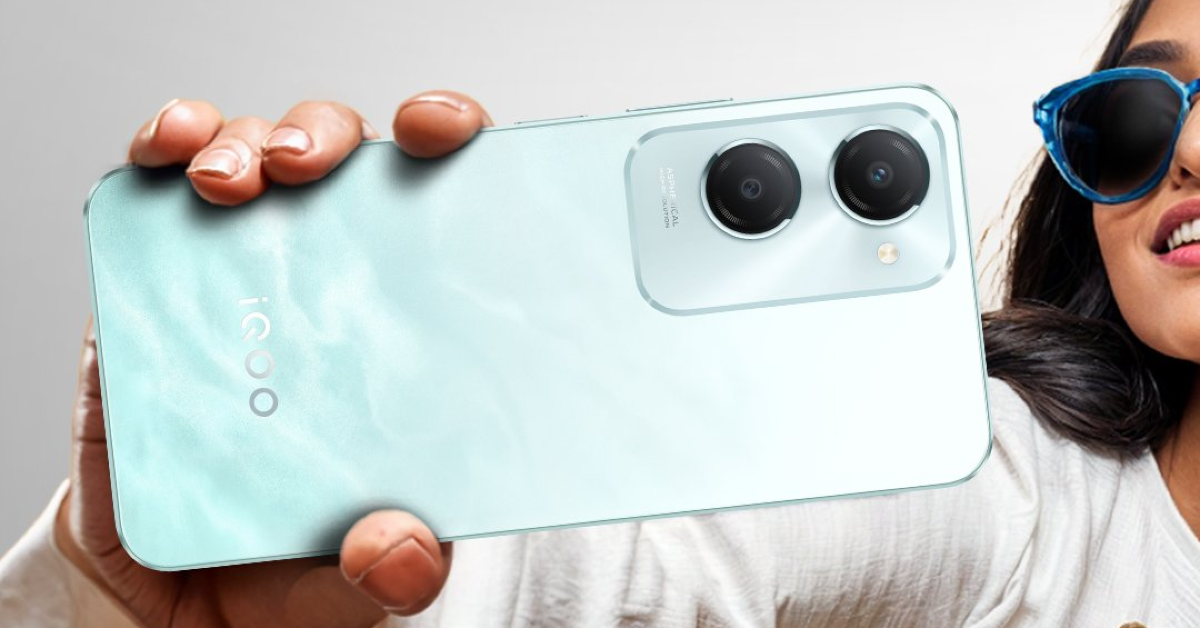
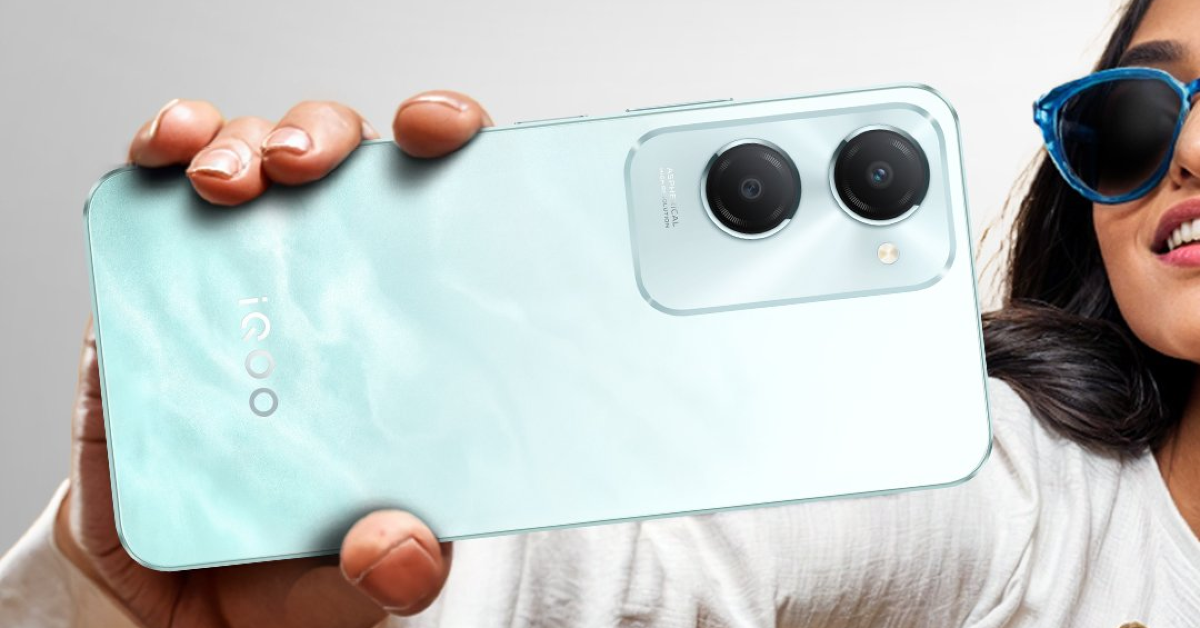
iQoo Z9 Lite 5G has officially made its debut in the Indian market today. The budget 5G smartphone comes with a MediaTek Dimensity 6300, Funtouch OS 14 based on Android 14, a 5,000mAh battery and a 50-megapixel primary camera all under 11k. The handset also features a 6.56-inch LCD screen with a 90Hz refresh rate. Additionally, it has an IP64 rating for dust and water resistance.
In This Article
iQoo Z9 Lite 5G Price in India, sale details
iQoo Z9 Lite 5G will be available in two variants. The price of the 4GB of RAM and 128GB storage is set at Rs 10,499. Whereas, the 6GB RAM with 128GB storage model can be purchased for Rs 11,499. The handset is being offered in Aqua Flow and Mocha Brown colour options. The budget phone is scheduled to go on sale from July 20 via Amazon and iQoo’s official online store in the country.
Customers who purchase the newly announced smartphone will also receive an instant discount of Rs 500 on ICICI Bank and HDFC Bank debit and credit card transactions, as well as EMI transactions.
iQoo Z9 Lite 5G specs, details
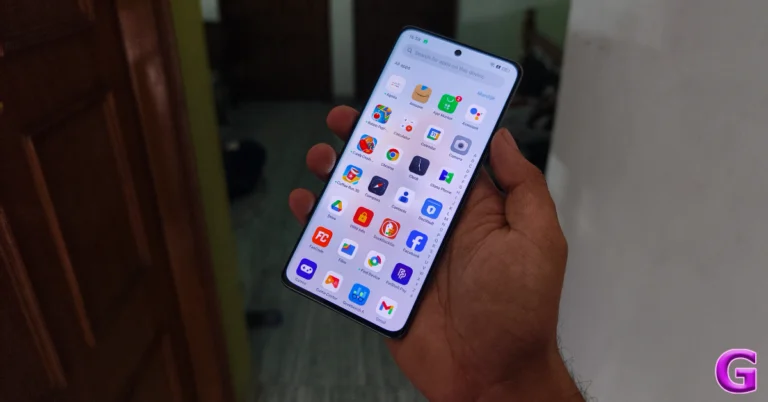
iQoo Z9 Lite 5G is highlighted with a 6.56-inch HD+ LCD screen with 720×1,612 pixels of resolution and a 90Hz refresh rate. The smartphone is powered by MediaTek Dimensity 6300 5G chipset with Mali-G57 GPU. It is available with up to 6GB of RAM and 128GB of storage which can be further expanded up to 1TB using a microSD card and 6GB of additional RAM. The phone runs on Android 14-based Funtouch OS 14 out of the box.
For photos and videos, there is a dual rear camera setup that includes a 50-megapixel Sony AI primary camera with f/1.8 aperture and a 2-megapixel bokeh lens with f/2.4 aperture. Regarding selfies, the Z9 Lite 5G includes an 8-megapixel front-facing camera with f/2.0 aperture.
For connectivity, the smartphone includes a 5G, 4G LTE, Wi-Fi, GPS, Bluetooth 5.4 and a USB Type-C port for charging. The sensors onboard include a side-mounted fingerprint scanner, an accelerometer, an e-compass, as well as proximity along with ambient light sensors.
The handset is IP64-rated for protection against dust and water splashes. iQoo Z9 Lite 5G boasts a 5,000mAh battery with 15W charging support.
Acerpure launches cutting-edge TV series with prices starting at Rs. 11,490.
The new range features models from 32 to 65 inches with state-of-the-art technology.
Available at Acer Exclusive Stores and Flipkart.
Acerpure, an entity of the Acer Group, has introduced its latest flagship product, the Acerpure Aspire & Swift TV series. This new series features sizes ranging from 32 to 65-inches and offers advanced technology for an immersive viewing experience at an introductory price of Rs. 11,490.
The Acerpure TVs boast Pure Vision technology, showcasing an impressive 1.07 billion colours that bring every scene to life with clarity and vibrancy. These models are equipped with Pure Dolby audio, a sleek bezel-less design, and multiple connectivity options. Powered by a robust processor, they deliver Ultra High Definition (UHD) resolution of 3,840 x 2,160, ensuring crystal-clear picture quality that highlights every detail.
Operating on the Google TV system, the Acerpure TVs provide seamless integration with various apps and services, enhancing entertainment options. The 178-degree viewing angle ensures consistent picture quality from wide angles, ideal for family movie nights and gatherings. The Variable Refresh Rate feature offers smooth motion handling for fast-paced action scenes and sports.
The Acerpure Swift series, with its focus on Pure Audio, includes Dolby ATMOS technology for a multi-dimensional sound experience that elevates viewing. Connectivity is abundant with three HDMI 2.0 ports, USB 2.0, Bluetooth V5.0, dual-band Wi-Fi (2.4G + 5G), and an ethernet port, making it easy to connect multiple devices.
Aligned with the Make in India initiative, the Acerpure TV series embodies pure trust and entertainment, combining innovative technology with Indian manufacturing pride.
Vasudeva G, Director of Acerpure India, emphasized the brand’s commitment to meeting the varied needs of Indian consumers and reinforcing its position in the consumer electronics market. “Our innovative approach and dedication to quality will resonate with consumers, making Acerpure a household name synonymous with excellence in home entertainment,” he stated.
The Acerpure TV series is available at Acer Exclusive Stores across India and on Flipkart, with the introductory price of Rs. 11,490 available for a limited time. Serving over 18,000 pin codes, Acerpure is dedicated to providing world-class customer service and reliability, ensuring a hassle-free experience.
Garena Free Fire Max is a battle royale game with regular awards and tournaments to keep players interested. If you play Garena Free Fire, you should be aware of the redeem codes that are released on a daily basis. However, because the battle royale game is banned in India, players from other countries can use the Free Fire Redeem codes daily. If you’re unfamiliar with the Garena Free Fire redeem codes or don’t know how to get them, we’ve put together a step-by-step guide to help you redeem them. Check out Garena Free Fire Max Redeem Codes for 15 July 2024.
The Free Fire Max redeem codes are a great way to get free stuff. These are 12-digit codes that contain alphabets and numbers, as well as an expiration date and time. Because the Garena FF redeem codes cannot be used more than once, you should hurry to the redemption page to claim your free reward before someone else does. To get a free reward, all you have to do is go to reward.ff.garena.com/en, which is the official redemption page. Also, keep an eye on this space for daily updates on Garena Free Fire Max redemption codes and rewards.
Vivo’s sub-brand iQOO is all set to launch its latest smartphone Z9 Lite 5G in India today. It is believed that the low-cost 5G smartphone is a rebranded Vivo T3 Lite 5G. The gadget will be added to the nation’s current lineup of iQOO Z9 5G series models, which includes the iQOO Z9 5G and the iQOO Z9x 5G, which were introduced in March and May of this year, respectively. A MediaTek Dimensity 6300 SoC will power it. There won’t be an IP rating on the phone. It is going to be the company’s first smartphone to go on sale for less than Rs 10,000.
The iQOO Z9 Lite 5G India launch is going to take place today. The device will be launched at noon via Amazon. Ahead of the launch, the company has also listed the upcoming smartphone on the e-commerce platform revealing the key details of the brand itself, except for the pricing.
In This Article
iQOO Z9 Lite 5G price in India (expected)
Rebranded from the Vivo T3 Lite, which was released in India last month, it is anticipated to cost less than Rs 13,000 in pricing. The Vivo T3 Lite base model, which comes with 4GB RAM and 128GB storage, costs Rs 10,499, while the 6GB RAM with 128GB storage model costs Rs 11,499 in India.
These figures suggest that the iQOO Z9 Lite base model may likewise run you about Rs 10,000.
iQOO Z9 Lite 5G Specs, features (expected)
As per Amazon’s listing, The iQOO Z9 Lite will be made available in two colour options: blue and mocha brown. It has a dual-camera configuration and a side-mounted fingerprint sensor. The 6.56-inch display offers a 90Hz refresh rate and 840 nits of peak brightness, making it ideal for outdoor viewing.
The listing suggests that the upcoming device will be powered by an octa-core MediaTek Dimesity 6300 chipset with 6GB RAM, and 128 storage and is likely to be available in several versions. It will run on Android 14 and will include two years of Android updates and three years of security patches.
The iQOO Z9 Lite smartphone, like its sister, has a 5000-mAh battery that can power 9 hours of gaming and 23 hours of continuous binge-watching. It has a 50-megapixel primary camera and a 2-megapixel Bokeh camera, both driven by AI and is a collaboration with Sony.
15 July 2024: New Amazon Quiz is now available. Customers from different parts of the country are participating in the daily quiz. The quiz starts at midnight today and will be live until 11:59 PM tonight. By successfully answering every question, participants in the quiz have the chance to win wonderful rewards. A Rs 500 Amazon Pay Balance is up for grabs to participants today.
One wrong answer could eliminate you from the quiz. You have a chance to win Rs 500 Amazon Pay Balance if you successfully answer every question. Users of the app only have the opportunity to take the quiz. Check Out 15 July 2024 Amazon Quiz Answers.
Only app users are eligible to play the Amazon quiz every morning from 12 AM to 11:59 PM. The quiz is not available on the desktop. For those who are unaware of how to play the Amazon quiz, below are the steps, you can follow to take the quiz.
We have written an explainer above, you can refer to that.
When are the winners of the Amazon Quiz and contest announced or declared?
The announcement of today’s Amazon quiz winner will take place Tomorrow. As for the Special Quiz and “Spin & Win” Contest, the winners will be declared once the Quiz Contest comes to an end. To find out who the lucky winner is, you can refer to the Amazon Quiz Winners List or visit the Amazon Winners tab in the Amazon App.
How to participate in the Daily Amazon Quiz?
That is very easy, just got to the Amazon app and scroll to the bottom of the page and you will find the Quiz section. Click on it (usually it is called the fun zone) and you can enter the Amazon Today Quiz Contest.
Are there any other quizzes or contests running on Amazon daily?
Yes, there are many running on a daily basis. These range from spinning the wheel to answering the questions correctly. All are located in the Fun Zone.
What are the criteria for selecting a winner in the Daily Amazon Quiz?
When a qualified player submits correct answers to all the questions, they will automatically be entered into a lucky draw. This draw will include all participants who answered all the questions correctly. Amazon randomly selects the final winners from the pool of eligible participants who gave the right answers.
Which Types of Questions are asked within Amazon Daily Quiz?
These are very simple and straightforward questions. These are mainly related to general knowledge.
Where should I look for Amazon Daily Quiz answers?
You can bookmark this page as we will help you every day with the Amazon Daily Quiz. We bring you fresh answers every day for the Amazon Daily Quiz and Contest.
What time does Amazon Announce previous winners?
The previous winner’s name will be announced today at 12 PM (noon).
Earlier this week, Oppo showcased its new suite of AI features at the Reno12 Series launch event. These AI features are available on older Oppo smartphones like the Reno11 Series, Find N2 Flip, Find N3 Series, and Find X7 Series as well. One of the features that caught our eye was the AI Summary tool which not only summarises web pages but any piece of text on any page on the device. So, let’s take a look at how you can use the AI Summary feature on your Oppo smartphone.
Oppo smartphones use Google’s Gemini LLM family to carry out AI tasks. Almost all of the AI computation takes place on external servers. This means that you need to be connected to the Internet while using tools like AI Eraser, AI Best Face, AI Summary, and more.
The AI Summary tool on Oppo smartphones is not restricted to the web browser and Notes app. You can access this tool anytime there is text on the screen. It is nestled in the Smart Sidebar.
You can also choose to convert the text into speech without installing a TTS engine on your device. While on-device computation is always preferable, having AI handle the task makes the process much more simple for casual users.
Create AI Summary on Oppo Smartphone
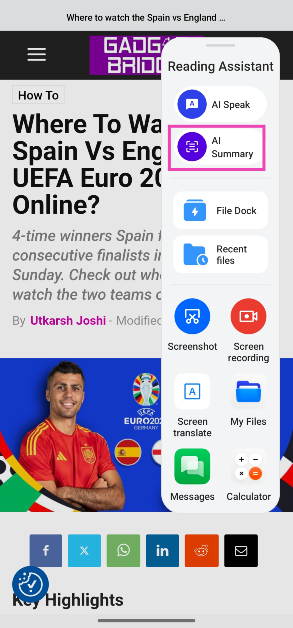
Step 1: Go to the webpage or any piece of text you want to summarise.
Step 2: Swipe on the Smart Sidebar on the right side of the screen to reveal the options.
Step 3: Tap on AI Summary.
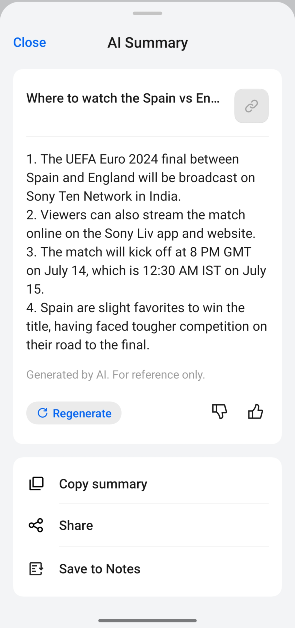
Step 4: Oppo AI will scan the screen for text and summarise it in a popup page.
Step 5: You can choose to save the summary in the Notes app, copy it to the clipboard, or share it with your friends.
Step 6: If you want Oppo AI to read the article to you, swipe on the Smart Sidebar and select AI speak.
Frequently Asked Questions (FAQs)
Does the AI Summary feature on Oppo phones require the internet to work?
Oppo AI requires access to external servers for computation. You need access to the internet to use Oppo AI features on your device.
How do I use AI Summary on an Oppo smartphone?
Go to the page with the text you want to summarize, swipe on the Smart Sidebar, and select ‘AI Summary’.
Which old Oppo smartphones will get AI features?
Oppo AI is currently available on the new Reno12 Series, Reno11 Series, Find N2 Flip, Find N3 Series, and Find X7 Series.
This is how you can use the AI Summary feature on your Oppo smartphone. Read this article to learn how to use the AI Eraser tool on your Oppo device. If you have any other questions, let us know in the comments!
The UEFA Euro 2024 final kicks off at 8 PM GMT on July 14 (12:30 AM IST, July 15).
Spain will go up against England to solidify their position as the most decorated team in Europe.
The final will be broadcast on Sony Ten Network and can be streamed on Sony Liv.
The UEFA Euro 2024 final will take place between Spain and England on Sunday, July 14, 2024. The two teams will clash at the Olympiastadion (Olympic Stadium) in Berlin, Germany. Spain will be looking to clinch their 4th Euro title to join Germany as the most decorated team in the European competition. Meanwhile, England will hope to break their 58-year winless streak in major international competitions. For those looking to tune into the match, here’s how you can watch the UEFA Euro 2024 final.
UEFA Euro 2024 Final: Where to watch, kick-off time, and more
Sony Ten Network is the official UEFA Euro 2024 broadcaster in India. The final between Spain and England will be telecast live on Sony Sports Ten 1 SD/HD and Sony Sports Ten 2 SD/HD channels in India. Viewers can also stream the final online on the Sony Liv app and website.
The entry-level mobile-only Sony Liv subscription costs Rs 699 per year. This plan allows 720p streaming on one device at a time. The Rs 1,499 per year package allows up to 4K UHD streaming, supports Doby Atmos, and lets users watch content on 2 devices at the same time. The Rs 399 per month package has the same perks but 1 device limit. All three plans offer an ad-free experience except for sports, Liv exclusives, and reality shows (live & recorded).
You can also check out the complimentary Sony Liv subscription offered by Jio and Vi.
Jio: Complimentary Sony Liv subscription with Rs 1,049 data pack (Validity: 84 days).
Vi: Complimentary Sony Liv subscription with Rs 95 (Validity: 14 days), Rs 408 (Validity: 28 days), and Rs 998 (Validity: 84 days) data packs.
The 2024 UEFA Euro 2024 final will kick off at 8 PM GMT, which means it will begin post-midnight at 12:30 AM in India. Spain are slight favourites to win the title, having faced tougher competition on their road to the final which included the likes of France, Germany, and Georgia. Meanwhile, England faced Slovakia, Switzerland, and the Netherlands to reach the final, relying on an extra-time winner, penalties, and a last-minute winner to do the job.
This is how you can watch the Spain vs England UEFA Euro 2024 final on TV and online. Airtel Xstream users can stream Sony Liv content on their mobile, laptop and TV. Who do you reckon will put their hands on the trophy on Sunday? Give us your predictions in the comments!
The Men’s and Women’s Wimbledon singles finals will take place this weekend.
Novak Djokovic could bag his 8th Wimbledon title on Sunday.
Barbora Krejčíková is the favourite to win the title on Saturday with betting odds of -137.
The 2024 Wimbledon Men’s and Women’s finals are set to take place this weekend. 7-time winner Novak Djokovic will meet the defending champion Carlos Alcaraz in the final for the second year in a row. The Women’s final will see Barbora Krejčíková vs Jasmine Paolini coming together and battling it out. The Women’s final will take place on Saturday, July 13, 2024. The Men’s clash is scheduled for Sunday, July 14, 2024. Here’s how you can watch the 2024 Wimbledon finals online.
2024 Wimbledon Men’s and Women’s finals: Where to watch, starting time, and more
Star Sports is the official Wimbledon broadcaster in India. This means you can catch the two finals on the Star Sports Network channels provided by your cable or DTH service. The matches can also be streamed online on Disney+ Hotstar, the official streaming platform of Star Sports Network. Both finals will start at 6:30 PM (IST).
Disney+ Hotstar’s subscription starts at Rs 149 / 3 months. This basic subscription plan is available for mobile devices only. Users can access content on 1 mobile device at a time. The standard Disney+ Hotstar subscription is priced at Rs 299 for 3 months and can be accessed on all types of devices. The device limit for this plan is 2 devices. The only catch is that this plan does not get rid of ads on the platform. The ad-free plan costs Rs 299 per month and can be used on up to 4 devices at one time. While the entertainment content on this plan is completely devoid of ads, you will be exposed to commercials while watching live sports.
Users can also check out the complimentary Disney+ Hostar packages offered by their network provider.
Jio: Complimentary 3-month Disney+ Hotstar subscription with Rs 949 data pack (Validity: 84 days).
Airtel: Complimentary 3-month Disney+ Hostar subscription with Rs 549 (Validity: 28 days) and Rs 979 (Validity: 84 days) data packs and 1-year subscription with Rs 3,999 (Validity: 365 days) data pack.
Vi: Complimentary 3-month Disney+ Hotstar subscription with Rs 151 (Validity: 30 days), Rs 169 (Validity: 30 days), and Rs 994 (Validity: 84 days) data packs. Complimentary 1-year subscription with Rs 3,699 data pack (Validity: 365 days).
This is how you can watch the 2024 Wimbledon Men’s and Women’s finals on TV and online. If you have a mobile subscription to Disney+ Hotstar, you can always mirror your smartphone on your Smart TV. Read this article to learn how to go about this process. Give us your predictions for the two finals in the comments below!
Oppo’s latest Reno12 Series smartphones pack a bunch of AI tools powered by Google’s Gemini family of LLMs. These AI tools have also been made available for older Oppo devices. One of the more popular AI tools on the latest Oppo devices is the AI eraser. If it isn’t increasingly obvious, this tool is similar to the ‘Magic Eraser’ on Google Pixel smartphones. Let’s take a quick look at how the AI eraser tool works and how to use it on Oppo smartphones.
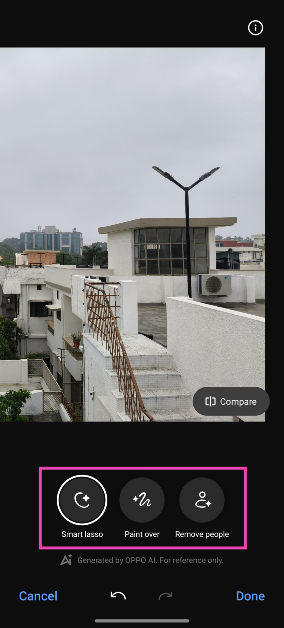
Oppo’s AI Eraser utilises Google’s Gemini AI to carry out the editing processing required to recognise and remove unwanted images from the selected images. Its set of selection tools makes it easy to mark and highlight the unwanted objects in your pictures. You can either choose to circle an object or simply cover it with broad brush strokes. However, using the AI Eraser on our Oppo Reno 12, we found that it struggled to select smaller objects.
Removing a crowd of people from your images is a piece of cake, though. The AI Eraser has a handy ‘Remove people’ selection tool that automatically recognises the people in the shot and efficiently removes them. If you’re in the frame as well, the tool will keep you in the final result as long as you’re the subject of the image.
Here’s how you can use the AI eraser on your Oppo smartphone
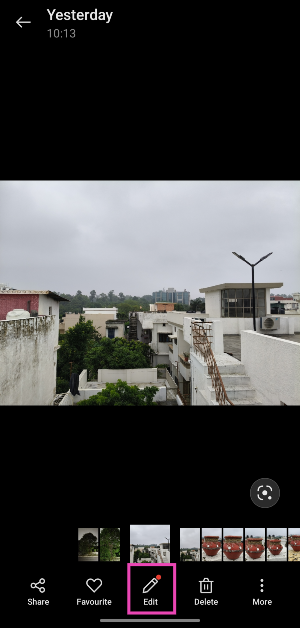
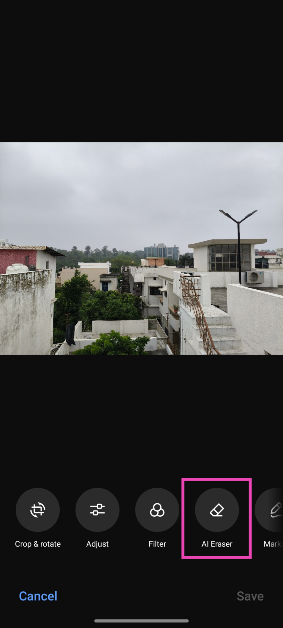
Step 1:Launch the Photos app and open the image you want to edit.
Step 2: Hit the Edit icon at the bottom of the screen.
Step 3: Tap on AI Eraser.
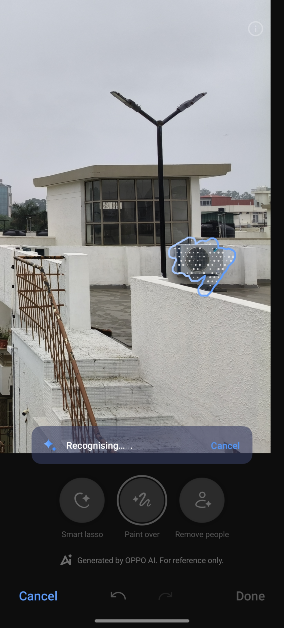
Step 4: Choose the tool you wish to use. Smart lasso lets you circle the object you want to remove. Using Paint over, you can select the object by covering it in brush strokes. Remove people automatically recognises the people in the shot and removes them.
Step 5: If you want to remove an object, use Smart lasso or Paint over to select it. The AI eraser will remove the object.
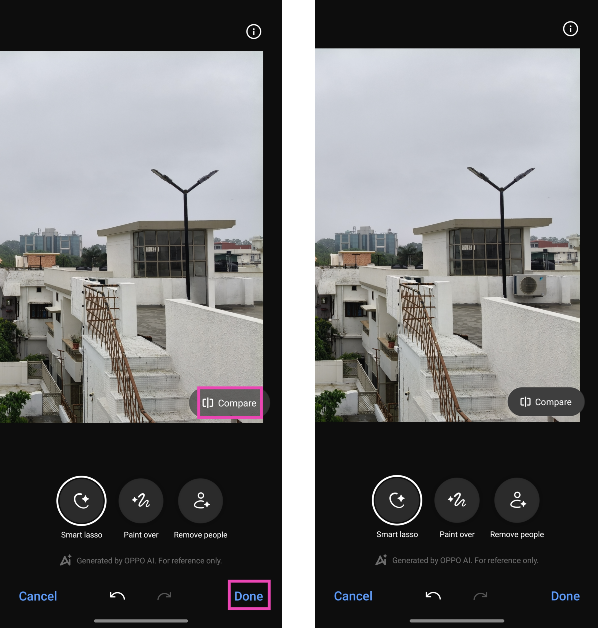
Step 6: Hit Compare to analyse the ‘before’ and ‘after’ images.
Step 7: If you’re satisfied with the result, hit Done.
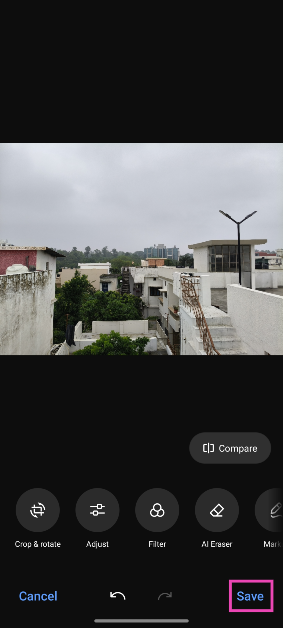
Step 8: Tap on Save at the bottom right corner of the screen.
Frequently Asked Questions (FAQs)
Does Oppo’s AI Eraser tool use the internet for editing?
The AI Eraser on Oppo uses external servers to carry out the computation and therefore cannot function without an internet connection.
How do I use the AI Eraser too on Oppo smartphones?
Open an image, hit Edit, tap on AI Eraser, choose a selection tool, and highlight the object. The AI tool will remove the object from the picture within seconds.
Does Oppo’s AI eraser tool work on pictures taken from another device?
Yes, Oppo’s AI eraser works on pictures taken from other phones and images downloaded from the Internet.
This is how you can use the AI Eraser to remove unwanted objects from images on your Oppo smartphone. Oppo shares this tool with its OnePlus counterparts. You can read more about it here. If you have any questions about Oppo AI, let us know in the comments!
13 July 2024: New Amazon Quiz is now available. Customers from different parts of the country are participating in the daily quiz. The quiz starts at midnight today and will be live until 11:59 PM tonight. By successfully answering every question, participants in the quiz have the chance to win wonderful rewards. A Rs 500 Amazon Pay Balance is up for grabs to participants today.
One wrong answer could eliminate you from the quiz. You have a chance to win Rs 500 Amazon Pay Balance if you successfully answer every question. Users of the app only have the opportunity to take the quiz. Check Out 13 July 2024 Amazon Quiz Answers.
Only app users are eligible to play the Amazon quiz every morning from 12 AM to 11:59 PM. The quiz is not available on the desktop. For those who are unaware of how to play the Amazon quiz, below are the steps, you can follow to take the quiz.
We have written an explainer above, you can refer to that.
When are the winners of the Amazon Quiz and contest announced or declared?
The announcement of today’s Amazon quiz winner will take place Tomorrow. As for the Special Quiz and “Spin & Win” Contest, the winners will be declared once the Quiz Contest comes to an end. To find out who the lucky winner is, you can refer to the Amazon Quiz Winners List or visit the Amazon Winners tab in the Amazon App.
How to participate in the Daily Amazon Quiz?
That is very easy, just got to the Amazon app and scroll to the bottom of the page and you will find the Quiz section. Click on it (usually it is called the fun zone) and you can enter the Amazon Today Quiz Contest.
Are there any other quizzes or contests running on Amazon daily?
Yes, there are many running on a daily basis. These range from spinning the wheel to answering the questions correctly. All are located in the Fun Zone.
What are the criteria for selecting a winner in the Daily Amazon Quiz?
When a qualified player submits correct answers to all the questions, they will automatically be entered into a lucky draw. This draw will include all participants who answered all the questions correctly. Amazon randomly selects the final winners from the pool of eligible participants who gave the right answers.
Which Types of Questions are asked within Amazon Daily Quiz?
These are very simple and straightforward questions. These are mainly related to general knowledge.
Where should I look for Amazon Daily Quiz answers?
You can bookmark this page as we will help you every day with the Amazon Daily Quiz. We bring you fresh answers every day for the Amazon Daily Quiz and Contest.
What time does Amazon Announce previous winners?
The previous winner’s name will be announced today at 12 PM (noon).
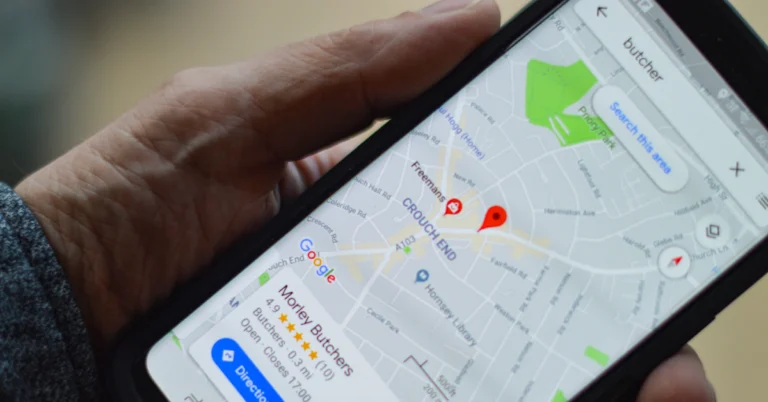
Last year, Google announced the ‘Glanceable Directions’ feature for the Maps app. This feature was rolled out in a phased manner earlier this year. If you update the Google Maps app on your phone, you’ll find this feature in the navigation settings. It may seem like a minor upgrade, but glanceable directions are important if you want to conserve your phone’s battery life and limit distractions while driving. So, let’s take a look at how you can enable glanceable directions on the Google Maps app on your phone.
Using Google Maps on a long journey doesn’t always require keeping your display turned on at all times. If you’re on a highway, you don’t need to look at the directions until you need to make a turn or an exit. You can use your phone for other activities like playing music and making calls. You can also choose to lock its screen if you want to conserve the battery.
Glanceable directions make it easy to get notified about upcoming turns on the lock screen itself. You don’t need to unlock your phone and go to the Maps app to know when to take a turn. On top of that, the lock screen notification also lets you know the ETA. If you’re somewhat sure of the route and don’t want to use navigation on your phone, you can also glance at the direction on the Maps app without hitting ‘Start’.
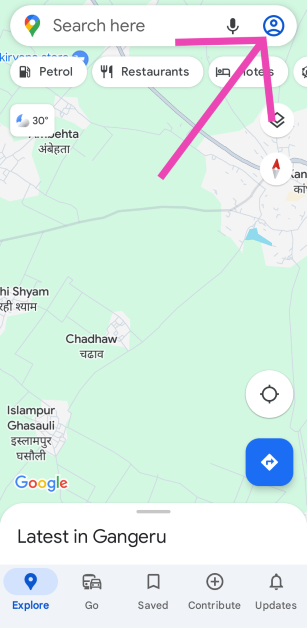
Step 2: Tap on your profile picture at the top right corner of the screen.
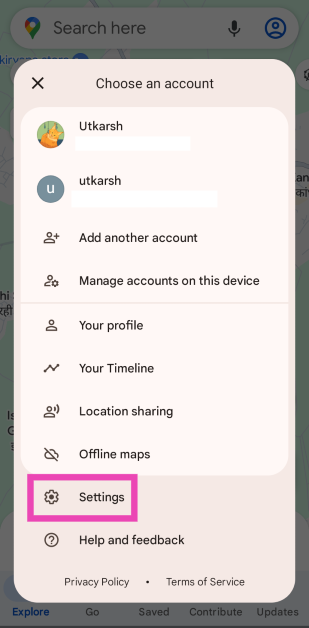
Step 3: Select Settings.
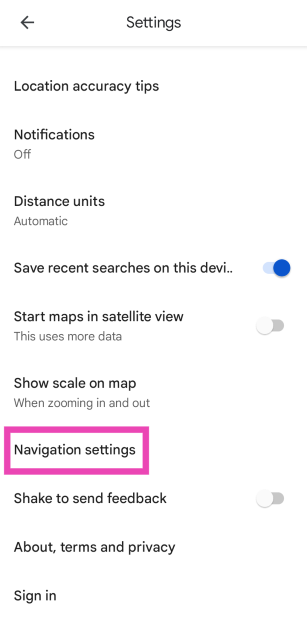
Step 4: Scroll down and select Navigation settings.
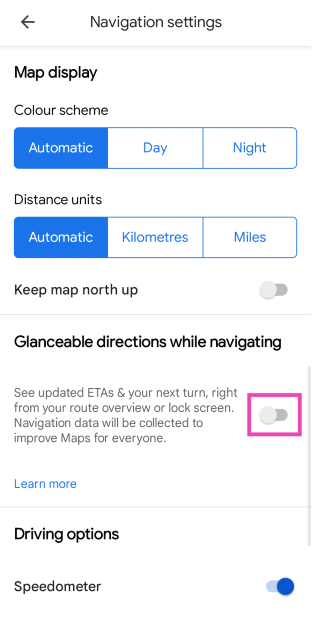
Step 5: Turn on the toggle switch for Glanceable directions while driving.
Frequently Asked Questions (FAQs)
What are glanceable directions on Google Maps?
Glanceable directions let you view turn-by-turn directions and ETA on the lock screen itself. This saves your battery life if you’re planning a long journey and can’t afford to keep the screen on at all times.
How can I turn on glanceable directions on Google Maps?
Launch Google Maps, go to Settings>Navigation setting, and turn on the toggle switch for ‘Glanceable directions while driving’.
How do I turn on dark mode in Google Maps?
Go to Google Maps>Settings>Navigation Settings and select ‘Night’ under ‘Colour scheme’ to turn on the dark mode.
This is how you can enable glanceable directions on Google Maps. If you can’t get this feature to work, clear the app’s cache and try again. Updating the app and restarting your phone might also help. If you have any other questions, let us know in the comments!