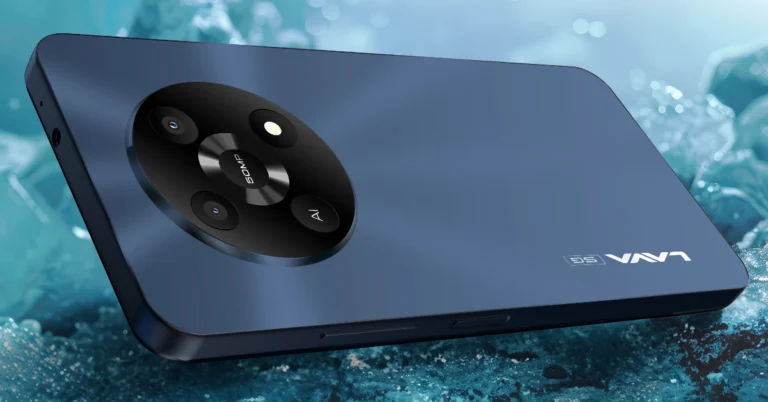
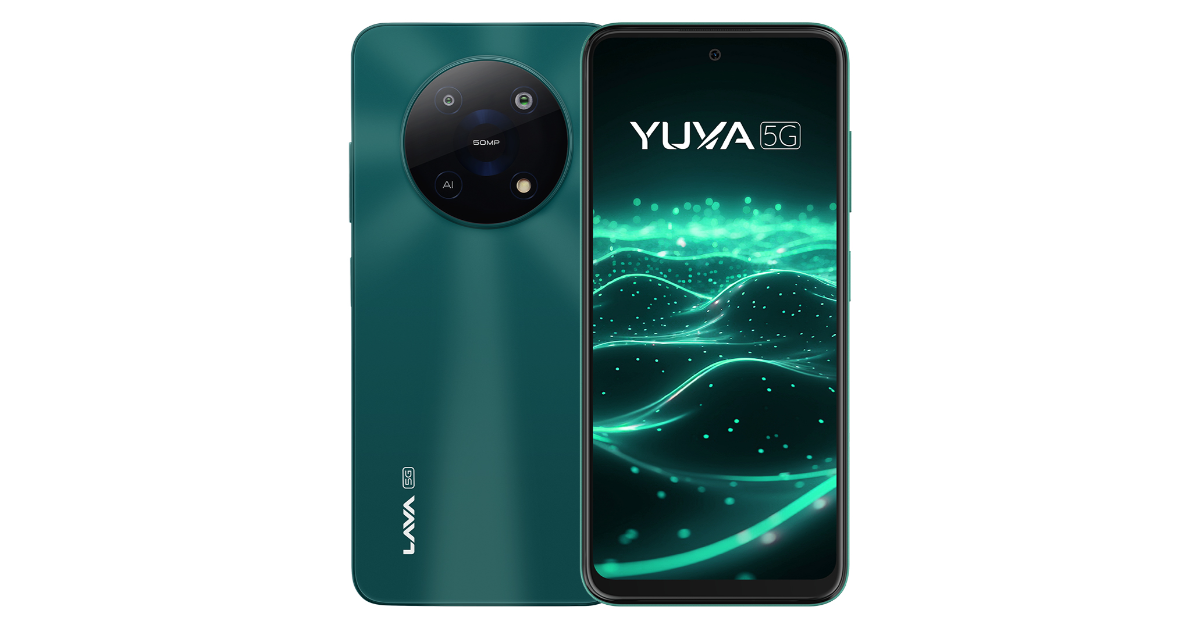
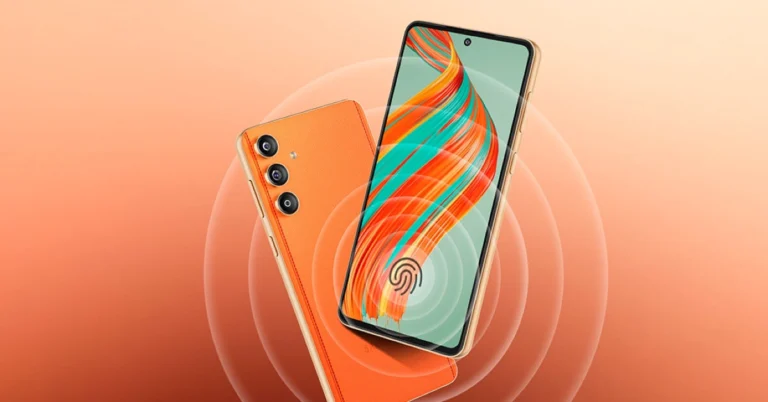
Lava has launched the Lava Yuva 5G in India, the first phone to use octa-core chipsets on the Unisoc T750 5G platform. The device has a dual rear camera system, a 6.52-inch HD+ IPS display with a refresh rate of 90Hz, and a 5,000mAh battery that supports 18W fast charging. It is powered by Android 13 and includes an update to Android 14 along with two years of security updates.
In This Article
Lava Yuva 5G price in India, sale details
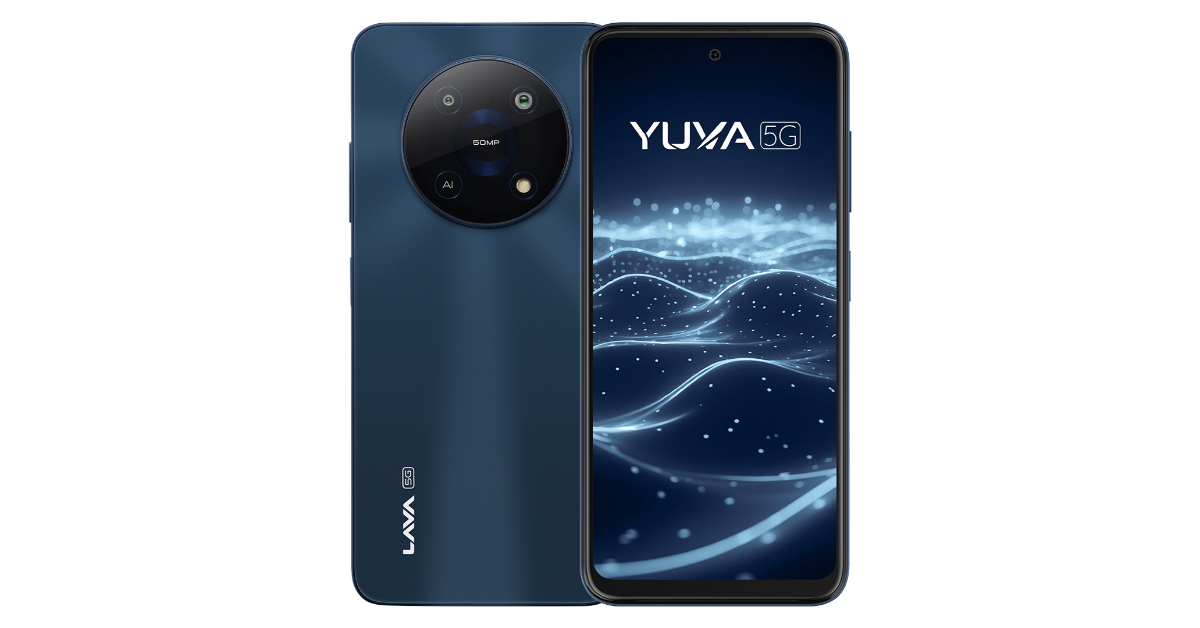
Lava Yuva 5G is priced at Rs 9,499 for 4GB RAM with 64GB storage and Rs 9,999 for 4GB RAM with 128GB storage. It will be on sale on June 5 via Amazon, the Lava online store, and physical stores. It comes in Mystic Blue and Mystic Green. Lava is providing the phone with a one-year warranty.
According to the company, buyers can use LAVA’s “FREE SERVICE AT HOME” option from any location in India for a seamless after-sales experience. An engineer or technician from LAVA will be at your door to assist you with the request. (When the phone is still under warranty, customers can use the service).
Lava Yuva 5G comes with a 6.52-inch HD+ IPS 2.5D curved display with 720×1,600 pixels of resolution. The screen offers 269ppi pixel density and 90 Hz refresh rate. Under the hood, there is an octa-core Unisoc T750 5G SoC paired with GB+4GB(Virtual) RAM and 64/128GB UFS 2.2 storage. The internal storage can be expanded up to 1TB using a microSD card. It operates on Android 13 with no ads and no bloatware. The company assures 2 years of security updates and an upgrade to Android 14. Additionally, 1-year warranty on handset and 6- a months warranty on accessories is offered by Lava.
The device features a dual AI camera setup led by a 50-megapixel primary sensor and a 2-megapixel secondary lens with LED Flash. The camera app includes features such as Portrait, Slow Motion, Timelapse, Audio Note, Motion Photo, Ultra Resolution, Beauty, HDR, Night, AI, Pro, Panorama, Filters, and Intelligent Scanning. It also includes an 8-megapixel front-facing camera with a screen flash for selfies and video calling.
Lava Yuva 5G is backed by a 5,000mAh battery and comes with 18W charging support. Additionally, it includes a fingerprint sensor, along with an accelerometer, ambient light sensor, magnetometer and proximity sensor. In terms of connectivity, there is 4G VoLTE, Bluetooth 5, GPRS, OTG, Wi-Fi 802.11 b/g/n/ac, a 3.5mm audio jack, and a USB Type-C port for charging.
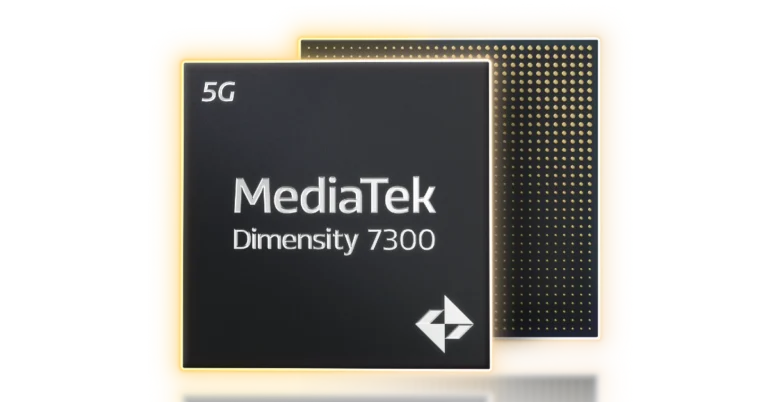
MediaTek has announced the Dimensity 7300 and 7300X, ultra-efficient 4nm chips designed for high-tech mobile devices offering power efficiency, performance, and dual display support for flip-style devices. These chips offer power efficiency, excellent performance, and enhanced gaming experiences. The octa-core CPU, featuring 4X Arm Cortex-A78 and 4X Arm Cortex-A55 cores, provides up to 25% lower power consumption compared to the Dimensity 7050. The MediaTek APU 655 boosts AI task efficiency and accommodates new mixed-precision data types. The chips support WFHD+ displays with 10-bit true colour and support global HDR standards. The chips also support dual-display flip phones and offer MediaTek 5G UltraSave 3.0+ technology.
The MediaTek Dimensity 7300 chipsets feature an octa-core CPU with 4X Arm Cortex-A78 and 4X Arm Cortex-A55 cores, offering 25% lower power consumption compared to the Dimensity 7050. They also offer 20% faster FPS and 20% improved energy efficiency, smart resource optimisation, and Bluetooth LE Audio support.
Dimensity 7300 chipsets also provide improved photographic capabilities through the MediaTek Imagiq 950, a high-end 12-bit HDR-ISP that can accommodate a 200MP primary camera. The Dimensity 7300 has been improved with new hardware engines that offer accurate noise reduction (MCNR), face detection (HWFD), and video HDR. This allows users to take beautiful pictures and videos in any kind of lighting. Furthermore, compared to the Dimensity 7050, live focus photo performance is up to 1.3X faster and photo remastering is up to 1.5X faster. In addition, 4K HDR video may be recorded with a dynamic range that is more than 50% broader than competing solutions, allowing users to capture more detail in their recordings.
AI task efficiency is doubled by the MediaTek APU 655 compared to the Dimensity 7050. By supporting mixed-precision data types, the Dimensity 7300 processors lower the memory needs for larger AI models. The chips’ integrated MiraVision 955 enhances video streaming and playback by supporting WFHD+ displays with 10-bit true colour and global HDR standards. The Dimensity 7300X satisfies consumer demand for novel form factors by supporting twin-display flip phones.
With MediaTek 5G UltraSave 3.0+ technology, the Dimensity 7300 and 7300X offer 13–30% more power efficiency than competing products. With 3CC carrier aggregation, they can support up to 3.27Gb/s 5G downlink, which can provide better speeds in urban and suburban environments. For further customer choice, they also include dual 5G SIM compatibility with dual VoNR and tri-band Wi-Fi 6E support.
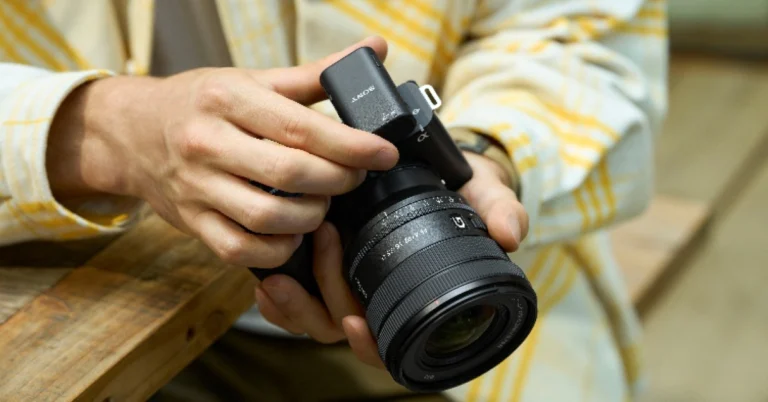
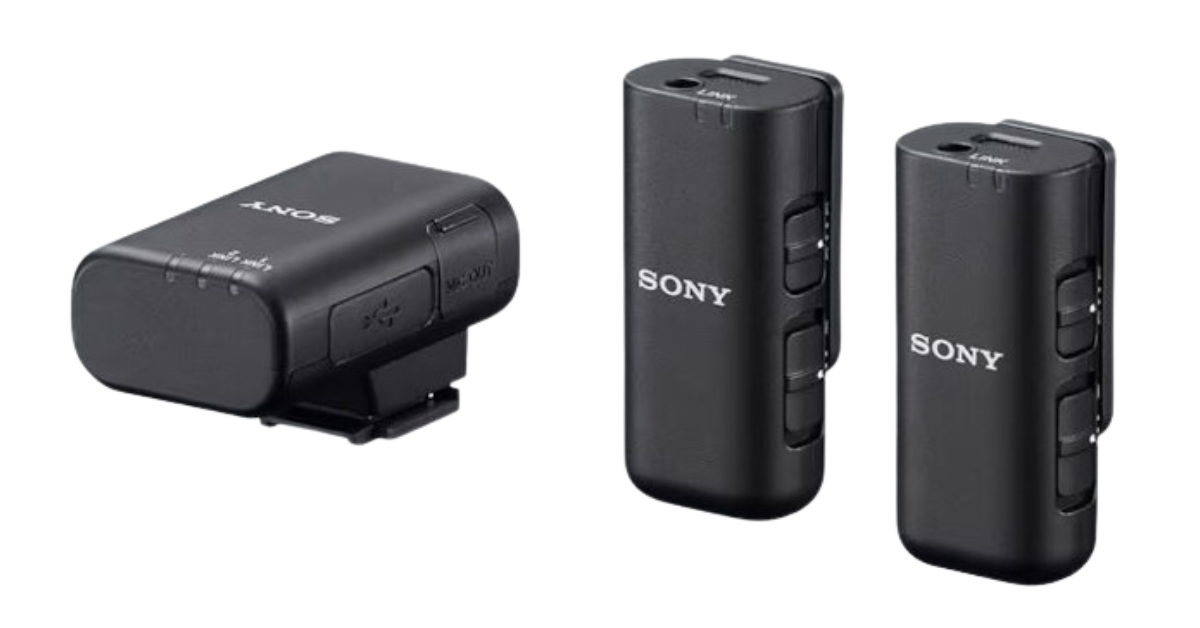
Sony India has introduced the ECM-W3 and ECM-W3S wireless microphones offering a lightweight design along with excellent sound capture. Video content creators who work in a variety of shooting situations, like Vlogs and interviews, will find these mics to be perfect. The ECM-W3S has a single-channel receiver and one microphone, whereas the ECM-W3 features a two-channel receiver and two microphones. Even when shooting away from the camera, both models are built to record sounds in high definition.
The ECM-W3 and ECM-W3S wireless microphones from Sony are ideal for one-on-one discussions and interviews because they capture users’ distinct, expressive voices, which is useful for vloggers and other video content creators. They are compatible with PCs, smartphones, and Sony cameras and provide excellent sound pickup and noise reduction. The lightweight, portable ECM-W3 and ECM-W3S microphones and receivers are intended for outdoor use because they are moisture and dust-resistant. Charging while on the go is possible with the thin, lightweight charging case.
Power is sent straight from the camera to the receiver with the MI Shoe support, eliminating the need for batteries and cables when shooting. For digital audio output to a USB-connected smartphone or PC, it has a USB Type-C connection. Additionally, for compatibility with non-MI shoes, it contains a 3.5mm micro jack audio output connector. Included for multi-interface foot attachments is a terminal protection holder/stand. Utilising a lapel microphone for covert audio recording, the microphone features a 3.5mm small port for external input. After fully charged, the recharging microphone has a maximum duration of 6 hours.
To lessen jarring noise and undesired low-frequency noise, they have a noise-cut filter and a low-cut filter. With ambient interference, the integrated windscreen aids in the recording of clear audio. The ECM-W3 and ECM-W3S receivers minimise noise interference by directly recording audio signals when attached to a Sony camera that has the Multi-Interface shoe installed. Additionally, they feature an attenuator function to lessen sound during high-volume recording and a safety function to suppress distortion at high volumes. With Bluetooth 5.3 and the LC3Plus codec, these devices offer low power consumption, minimal latency, and excellent sound quality.
Sony ECM-W3 and ECM-W3S wireless microphones price and availability
The price of the Sony ECM-W3 wireless microphone is set at Rs 39,090 in India. Whereas, the ECM-W3S wireless microphone will come with a price tag of Rs 32,990. Both devices are available for purchase via Sony Centers, Alpha Flagship stores, Sony authorised dealers, e-commerce websites (Amazon and Flipkart) and major electronic stores across India today.
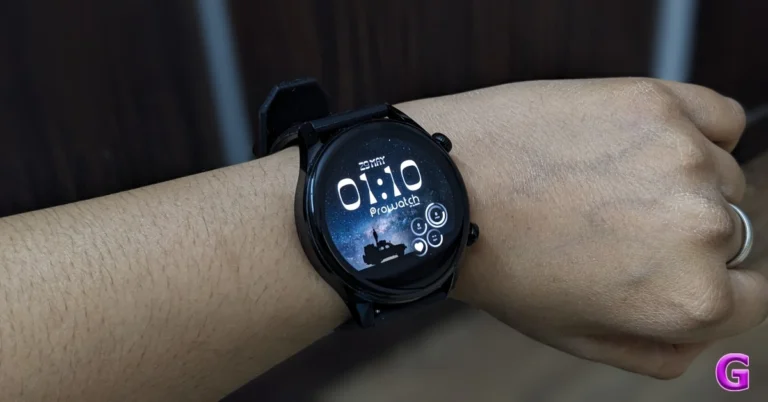
Lava, an Indian tech brand, entered the smartwatch market with the launch of the Prowatch. It is offered in two versions: Prowatch ZN and VN. The former has a circular display while the latter has a square-shaped dial, which is the only difference between the two. We got the more expensive ZN model with a silicone strap for this review. The watch looks great and has a lot of capabilities that the brand often does not include in this price bracket. So, this is our detailed review of Lava Prowatch ZN and is a must-read if you are in the market to buy a new smartwatch.
In This Article
Lava Prowatch ZN Review: Design and Display
Beginning with the design and construction, the watch appears premium due to its slim and sleek form factor. It does not feel bulky like the other smartwatches and seems to be a quality product.
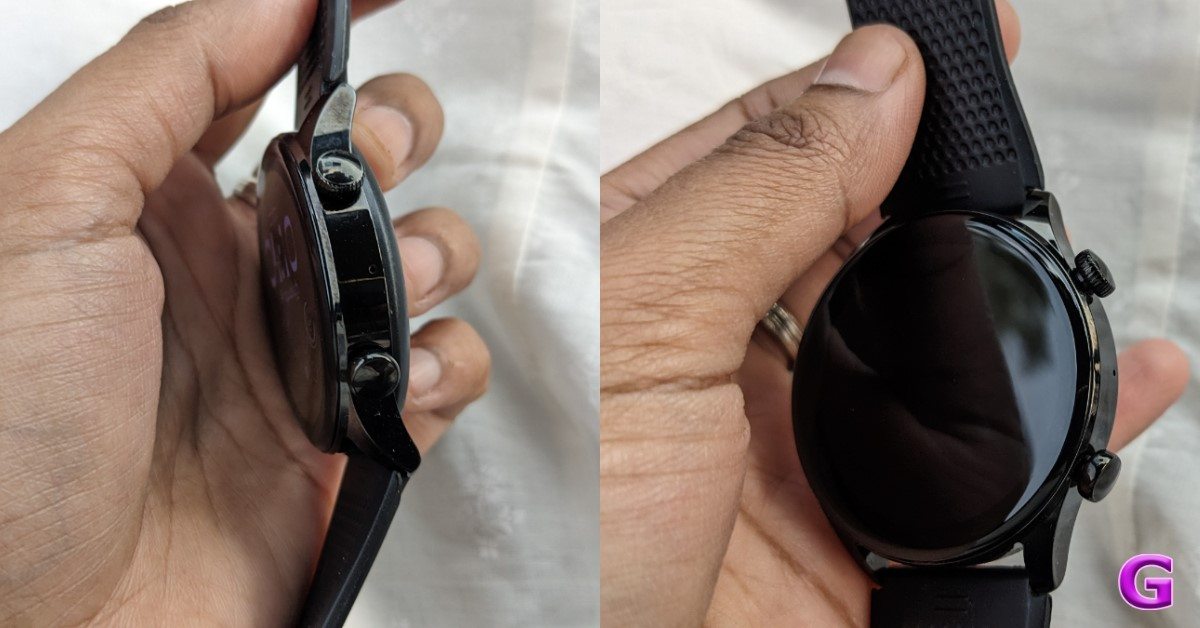
The body of the Lava Prowatch ZN is composed of zinc alloy. Its metal body gives the watch an expensive appearance. Despite its shiny finish, it does not attract fingerprints or smudges. It contains side-mounted buttons to navigate the user interface.
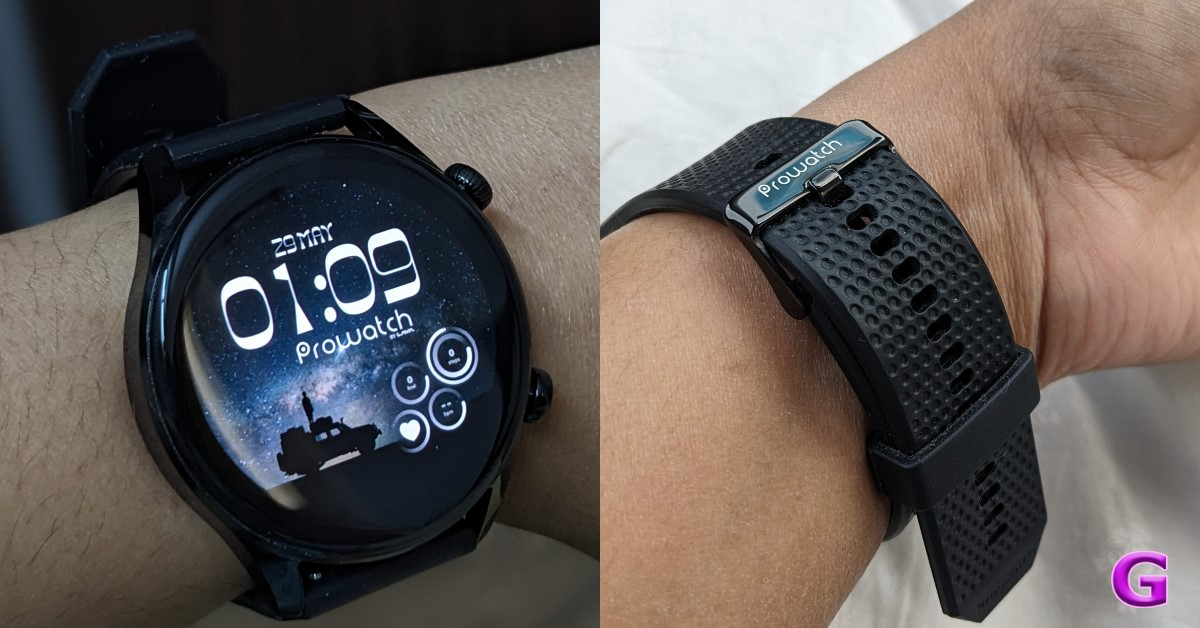
Lava Prowatch ZN comes with high-quality silicone straps. The straps have a textured finish, a metal buckle, and the Prowatch logo. These measure 22 mm and can be replaced by pulling the hook mechanism at its ends. So, if you want coloured straps to complement your dress or metal straps, you can easily replace them. The silicone strap with a 65-degree bend strikes the right mix between flexibility and durability. By the way, the Prowatch is also available with a metal and silicone strap combo, for a slightly higher price. It is skin-friendly, causes no irritation, and fits perfectly.
There are two versions of the Prowatch ZN available: Dragonglass Black and Valyrian Grey. For the review, we have the Dragonglass Black Variant. It looks good on thin as well as thick wrists/hands.
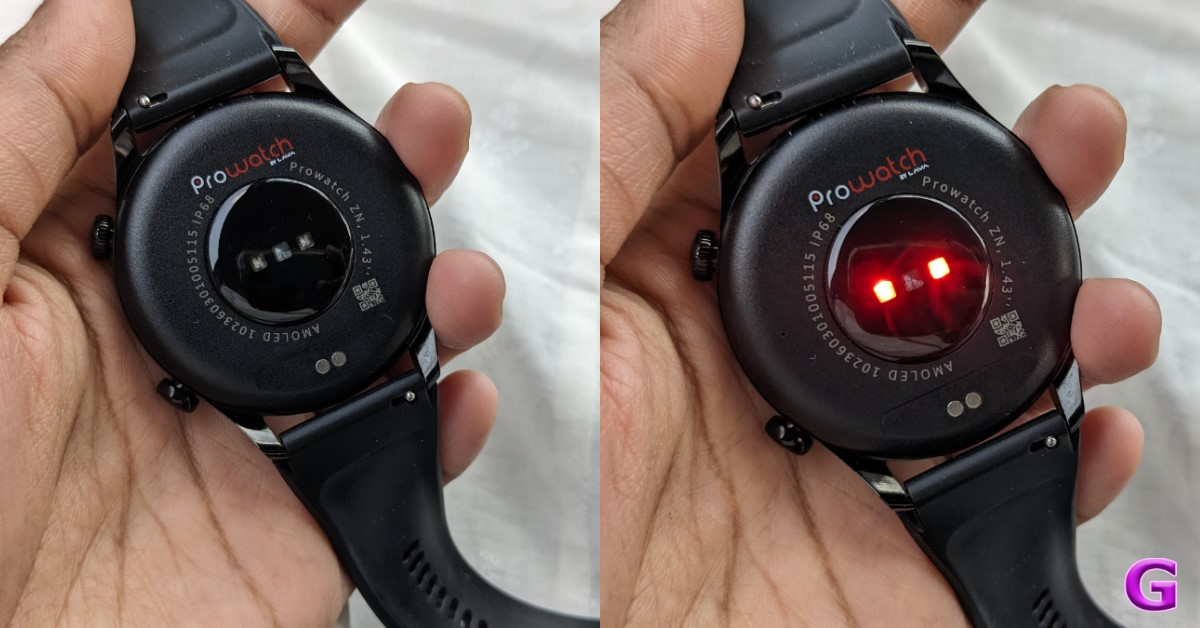
Moving back, the rear has been made of plastic and houses all of the sensors as well as the charging port. Over that. the watch is IP68-rated. This means it is dust and water-resistant, so you may use it at the gym or during a run outside in the rain. In fact, this watch has a swim tracking feature built-in, so you can wear it in the pool.
In terms of fit and comfort, even though the body is made of metal, it fits well and does not feel bulky. It can be worn both at work and during a workout.
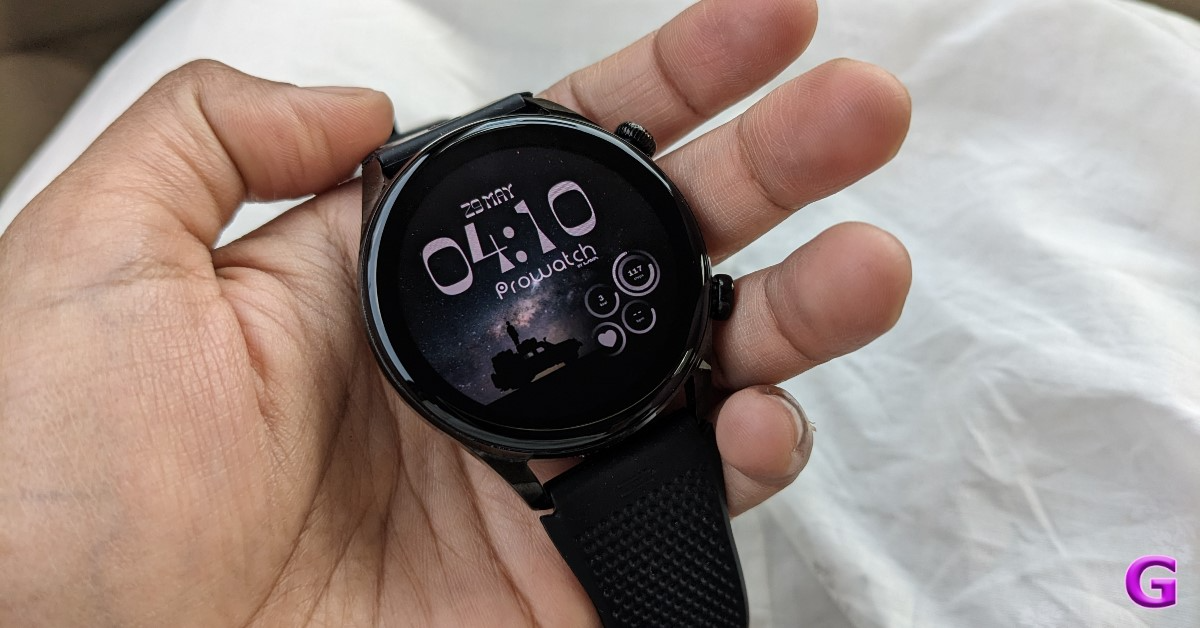
Now let us take a closer look at the display. The Lava Prowatch ZN’s round, bright AMOLED touchscreen display is 1.43-inches and has a resolution of 466×466 pixels. The display features an always-on mode with a maximum brightness of 600 nits. It’s a high-resolution display, so even the smallest text is visible. It boasts a 326 ppi pixel depth with vivid colours, the whites are whiter, and the blacks are darker.
To turn on the device, simply press the first-side rotating crown; this dial also allows you to change watch faces. Simply rotate it, and the pre-installed watch faces may be switched seamlessly and effortlessly. Of course, you may still add more using the app, as we will discuss later. Pressing the second button will display the workout options. The Lava Prowatch has no built-in GPS, which is the same as most others in its price bracket.
One thing which its competition does not have is a CG Glass. The Corning Gorilla Glass 3 protection ensures that it will not get scratched easily, which is excellent. We have tested it outside, and the display is very legible. It features a 60Hz refresh rate, so the OS does not appear jittery or stuttering.
With that, there is a Bluetooth calling feature, and a microphone has been placed near the navigation controls.
Lava Prowatch ZN Review: Performance
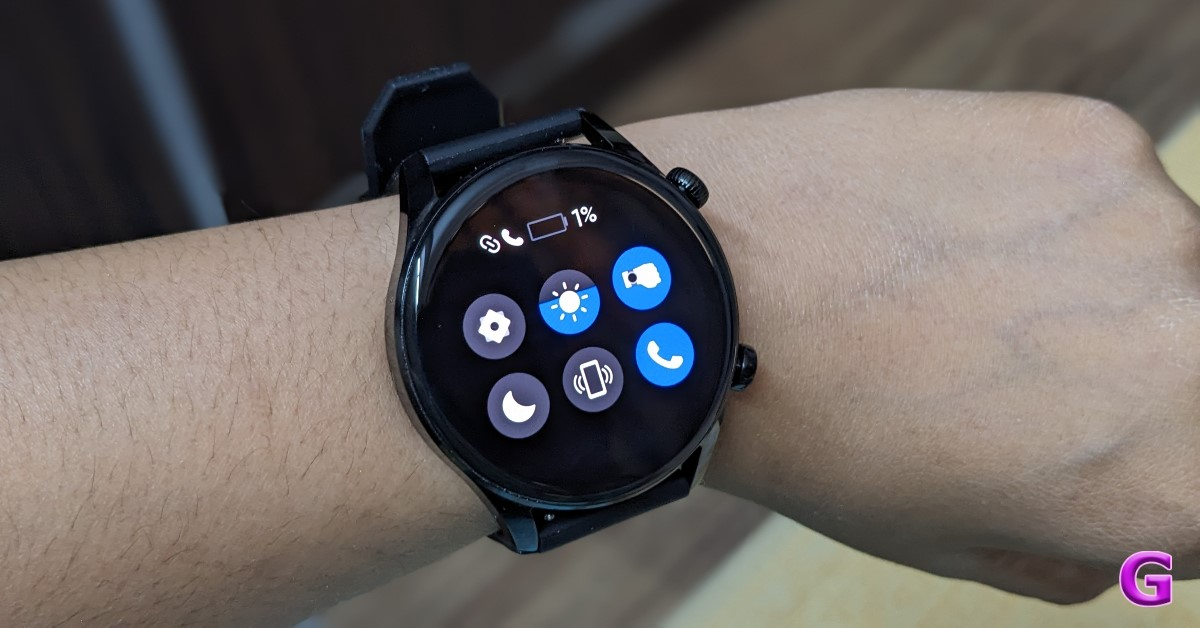
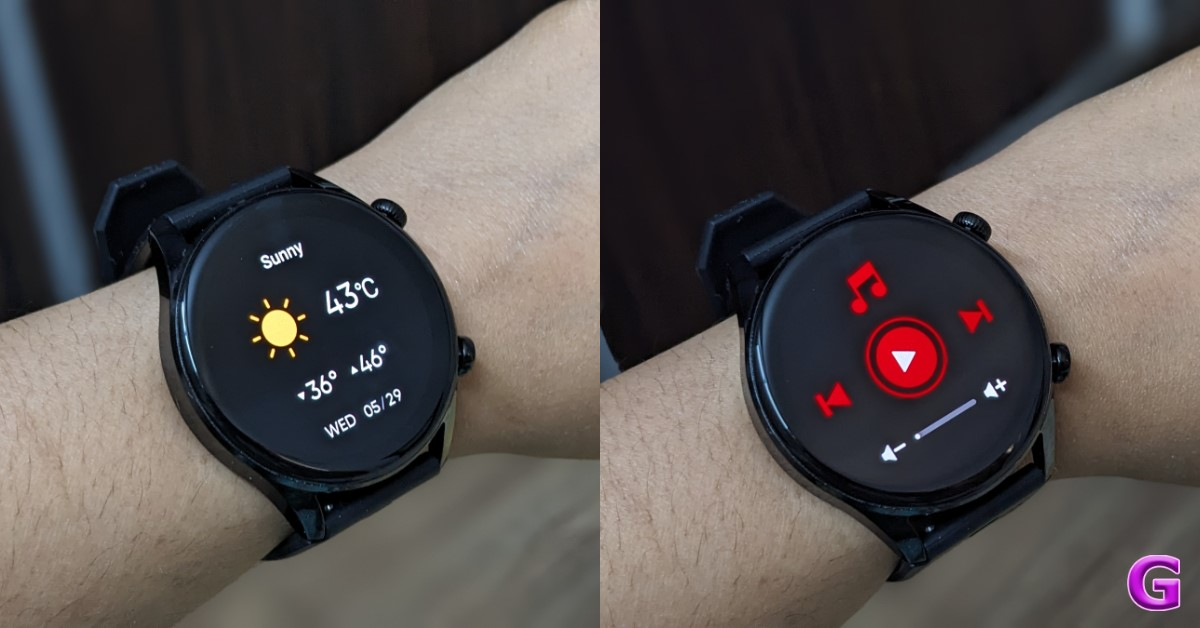
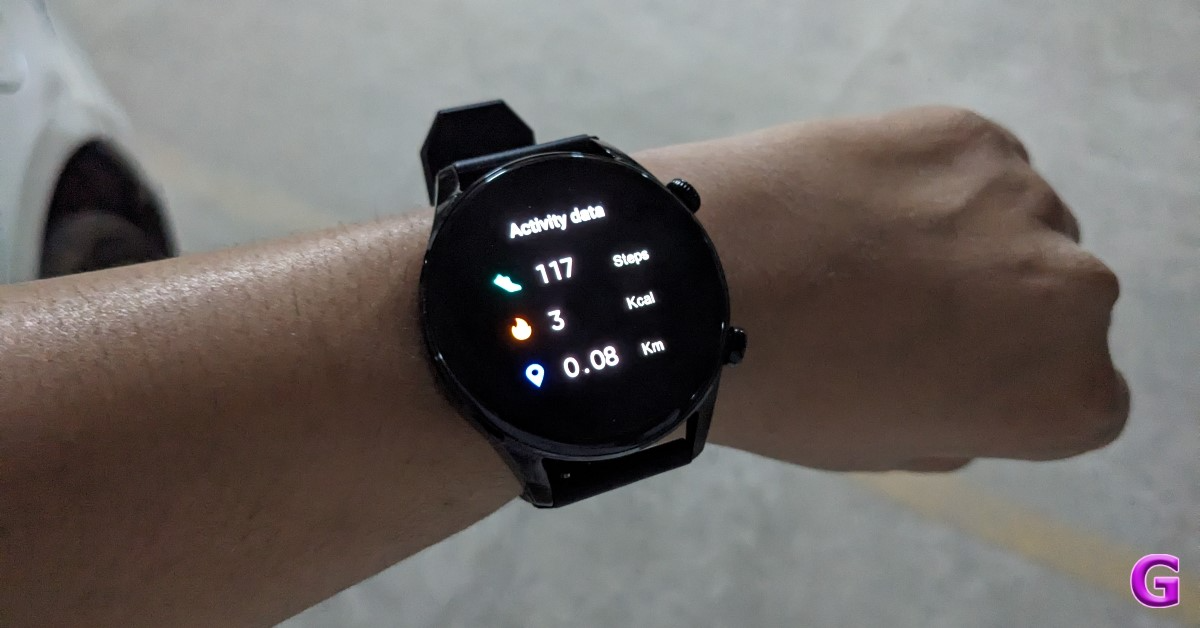
Let’s first take a quick look at the interface. Swiping Right allows you to view your daily activities, heart rate, sleep, spO2, weather, manage the music playing on your connected smartphone, and access your voice assistant. Like on other devices, you can access quick toggles by swiping up. You can adjust the brightness in the settings; you can also turn on and off raise to display to wake it up; you can put it in sleep mode; and you can use Find My Phone to enable and disable phone calls. Phew, that is a lot.
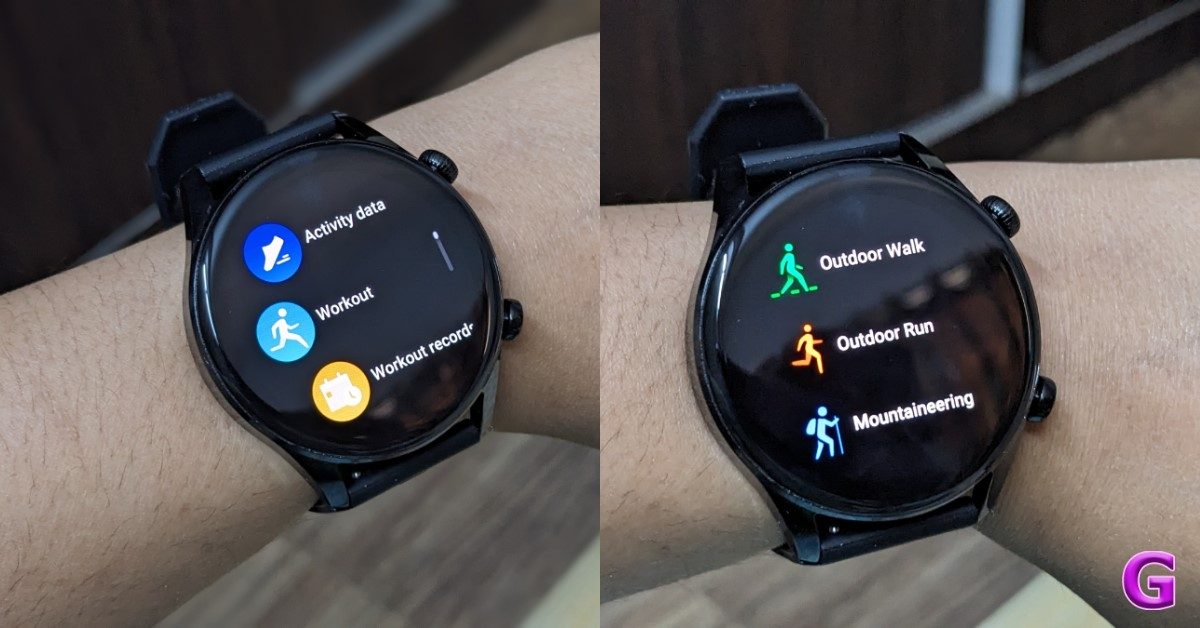
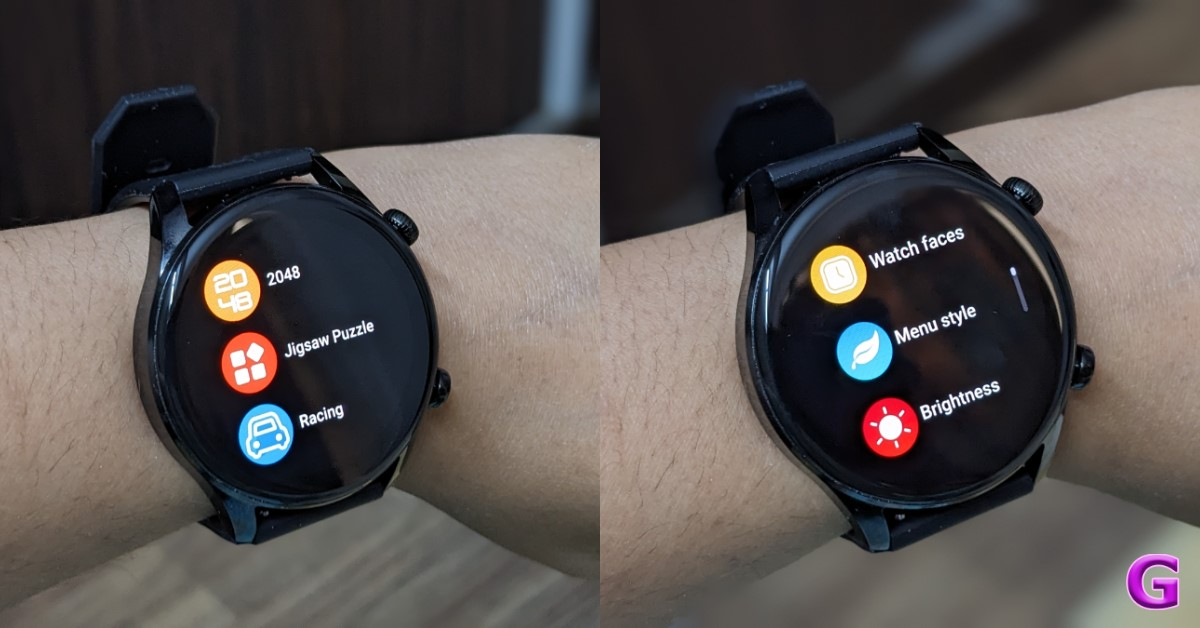
But that is not it. If you swipe right, you’ll get a menu with your activity data, workout records, voice assistant, heart rate, blood pressure, alarm clock, stopwatch, timer, stress monitoring, breathing, weather, menstrual cycle tracking for women, flashlight, missed calls, messages and more. It also contains a variety of games, such as 2048, jigsaw puzzles, and racing games.
However, note that playing games on the watch may drain the battery much faster. All of these functions can also be accessed by rotating the crown. An AOD clock can be turned on and off, and you can select between a digital and analogue clock. You can set the Always on time to 5 minutes, 10 minutes, 15 minutes, or 30 minutes. This will not deplete your battery however you can easily turn it off when you don’t need it.
To make a phone call, slide right, select the menu, and then press the phone app. You will see the dial pad, the contact person, and the call record. The speaker on the watch is audible and crisp. You may also manage the volume, mute the microphone, transfer the call to your phone, and end the call right from your smartwatch. Similarly, you can answer calls directly from your watch. There is a vibration alert and a ringtone. You can see the caller’s name, manage the volume, decline the call, answer the phone, and respond with a preset SMS.
Taking into account the calling experience, the speakers become loud enough to be heard both outdoors and indoors. The mics also do an excellent job of not capturing ambient sound. Indoors, it was crystal clear both ways. The user interface is quite nice and easy to use.
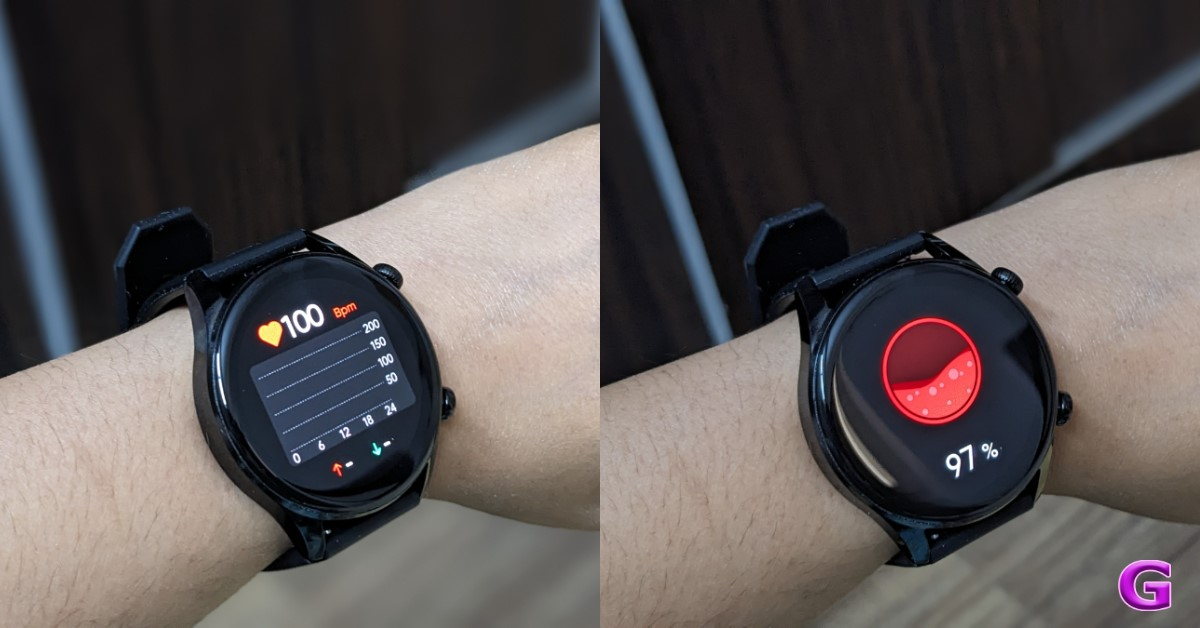
In terms of health tracking, we tested heart rate, SpO2, and stress levels. Remember that this is a smartwatch, and while the health parameter readings are accurate they are only for reference and not for medical purposes. Though the smartwatch will provide consistent readings, the heart rate and SpO2 rating are very accurate.
In terms of fitness and workouts, the Lava Prowatch offers over 110 sports modes. By pressing the second button, you can access all of your workouts, but just 10 are available here. You must add them from the companion app. When you start an exercise, you can see the duration, heart rate, distance, calories, pace, and other metrics.
In the Pro Spot companion app, you can check your watch pairing, battery percentage, watch faces, steps, heart rate, and access all of your health and fitness data. You now have a large assortment of watch faces to download. You can also set your goals on the app according to your preferences. Then, if you return to the settings, you will see the battery percentage and notifications.
The app allows you to set your alarm and camera shutter, both of which you can do on the watch itself. You can add and remove sports mode.
Lava has included a 350mAh battery in the ProWatch Zn. It is touted to provide up to 20 days of standby time and up to eight days of battery life under normal usage. With Bluetooth calling enabled, the battery is said to last up to three days. According to Lava, the wearable requires one hour to fully charge its battery.
In our tests, the battery lasted 6 to 7 days without BT calling. If you use this option, your battery will last up to 3 to 4 days. The good news is that the smartwatch charges quickly, in under an hour (as said).
If we had to pick a flaw, we’d say the lack of built-in GPS, but that’s a minor quibble. One feature that stands out is its brightness. It is a vital feature for a smartwatch to have since if the brightness is low outside, you will be unable to see anything. The Lava Prowatch features everything you look for in a quality wristwatch, including a metal design, an outstanding display, always-on mode, health tracking, crisp Bluetooth calls, a fluid interface, and Corning Gorilla Glass 3 protection, which is not found on other smartwatches.
It also includes four built-in games, a calculator, and a rotating crown. Another advantage is that it has IP68 certification. So there’s no need to remove the watch while swimming or bathing.
The battery life varies according to your usage pattern, however, we were able to acquire 3 to 4 days of endurance. It is Lava’s first smartwatch, and we believe they did an excellent job. Overall, Lava’s smartwatch is good value for money.
Its pricing starts at Rs 2,599 for the silicon and Rs 2,999 for the metal variant is highly recommended.
If you use more than one Android device, you can get your emails delivered to all of them at once. Not only that, but you can access all the emails in your inbox on all devices. This is made possible through syncing, and it is one of the integral features of Gmail. If you are not able to receive new emails on your device, it is likely because the syncing function is suspended or broken. Today, we bring you the top 11 ways to fix the ‘emails not syncing’ issue on your Android phone.
If the Gmail app isn’t syncing new emails to your phone, it could be due to one of the following reasons:
Faulty internet connection
Syncing is turned off on the Gmail app
Syncing is turned off in device settings
Lack of storage space
Gmail app is outdated
Check the internet connection
A faulty internet connection can suspend all email functions on your phone. You won’t be able to send or receive emails, and the incoming emails won’t sync to your device. Move to an area with better network reception or switch to a different WiFi connection.
Restart your device
The first thing you should do when you notice that emails aren’t syncing on your Android phone is to restart the device. A quick restart can resolve any background issues that may be causing this issue. Long-press the side button and select ‘Restart’ from the power menu. If long-pressing the side button triggers the voice assistant, press it along with the volume-up key to launch the power menu.
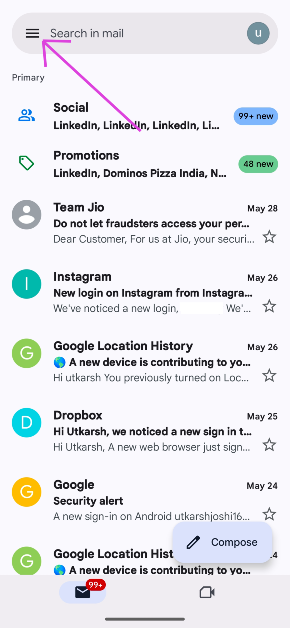
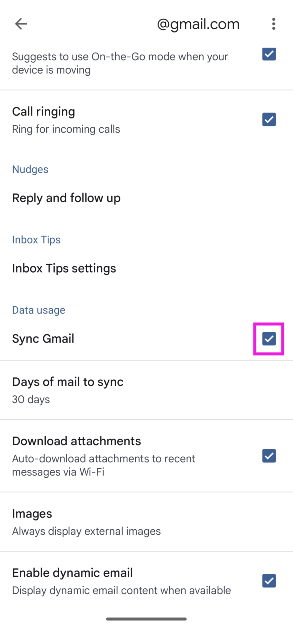
Step 2: Hit the hamburger menu at the top right corner of the screen.
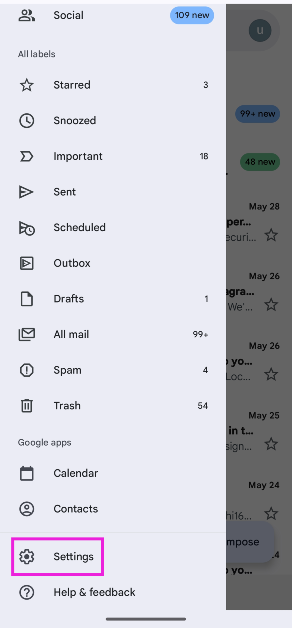
Step 3: Tap on Settings and select your account.
Step 4: Tap the checkbox for Sync Gmail.
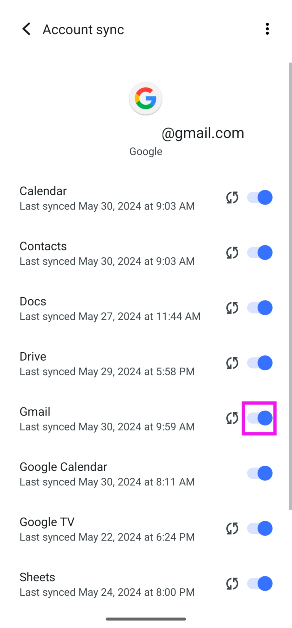
Check device settings
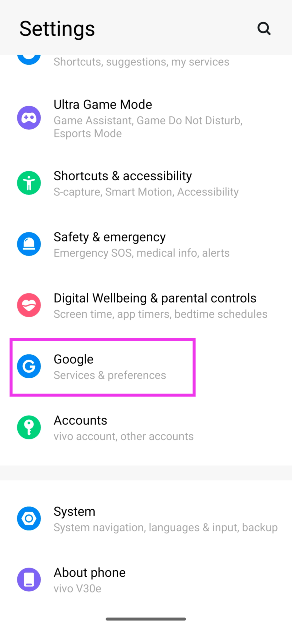
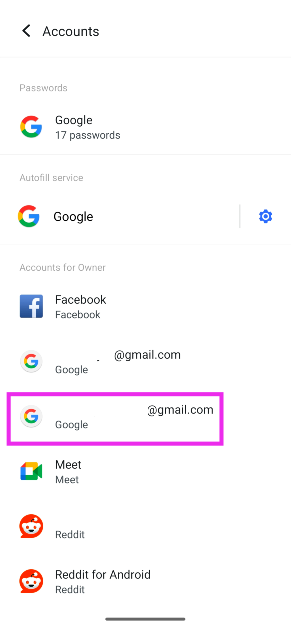
Step 1: Go to Settings and select Accounts.
Step 2: Select your Gmail account.
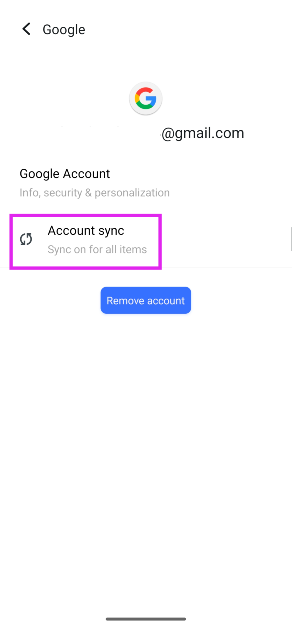
Step 3: Tap on Account sync.
Step 4: Turn on the toggle switch for Gmail.
Update Gmail
An older or outdated version of Gmail may have bugs that keep it from syncing new emails. To update the app, go to the Google Play Store, search for Gmail, and hit the Update button on the app’s page.
Check the device’s storage
If your Android phone is running out of internal storage, it will stop syncing new emails. Delete some files from your phone to make more storage space or transfer them to a memory card or an online storage service. You can check your phone’s storage by going to Settings>RAM & Storage space.
Enable Gmail notifications
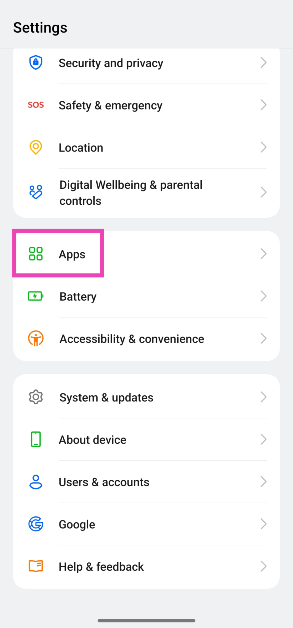
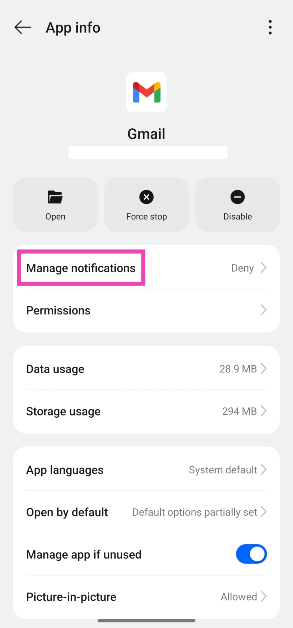
Step 1: Go to Settings and select Apps.
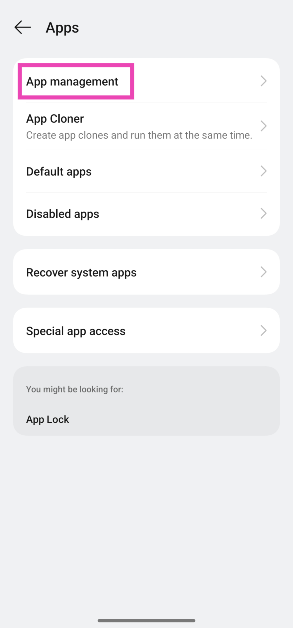
Step 2: Tap on App Management.
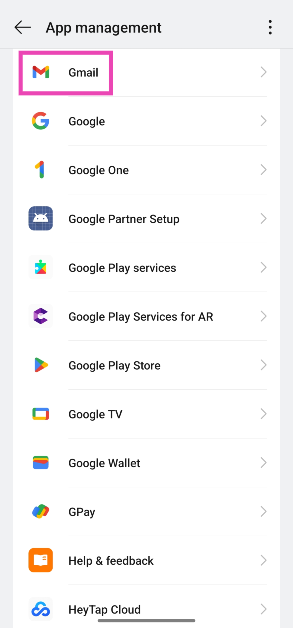
Step 3: Scroll down and select Gmail.
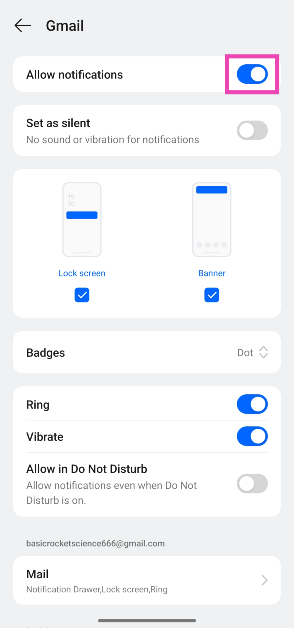
Step 4: Tap on Manage notifications.
Step 5: Turn on the toggle switch next to Allow notifications.
Make sure Gmail is allowed to use data in the background
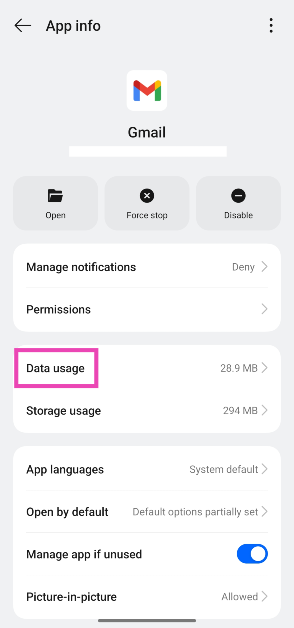
Step 1: Go to Settings and select Apps.
Step 2: Tap on App Management.
Step 3: Scroll down and select Gmail.
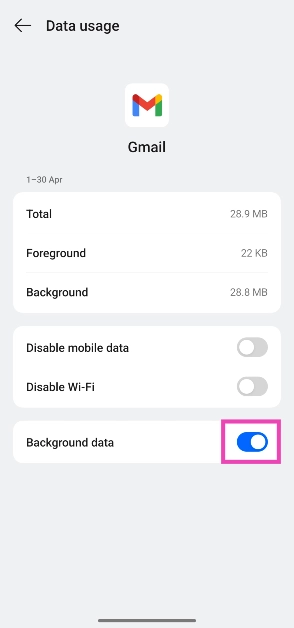
Step 4: Tap on Data usage.
Step 5: Turn on the toggle switch next to Background data.
Clear Gmail’s cache
Step 1: Go to Settings and select Apps.
Step 2: Tap on App Management.
Step 3: Scroll down and select Gmail.
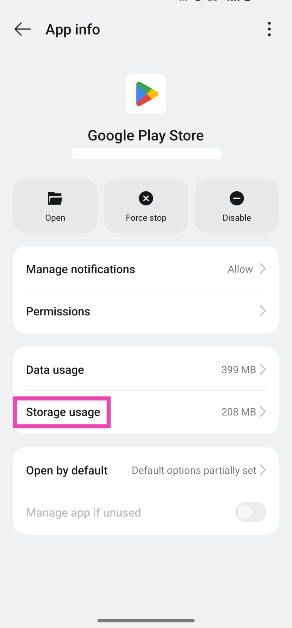
Step 4: Tap on Storage usage.
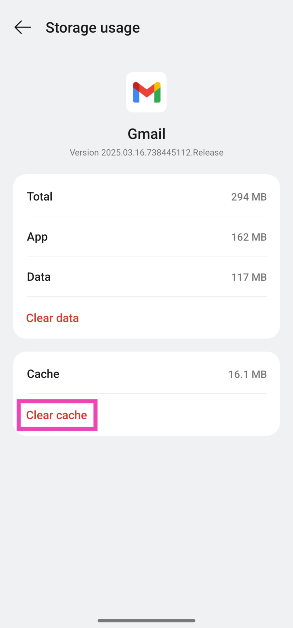
Step 5: Hit Clear cache.
Log out and log into Gmail
If the issue is account-related, logging out and then logging back in may resolve it. To remove a Gmail account from your phone, go to Settings>Accounts, select the account, and tap on ‘Remove account’. Now, launch the Gmail app, go to Settings, select ‘Add account’, and use the proper credentials.
Update your phone’s OS
Step 1: Go to Settings and select Software update.
Step 2: Tap on Download and install.
Step 3: Select Install now.
Frequently Asked Questions (FAQs)
Why can’t I see new emails on the Gmail app on my phone?
You won’t see new emails on the Gmail app on your phone if your device isn’t connected to the internet or you are running out of storage space.
Why can’t I see old emails on the Gmail app on my phone?
If email syncing is turned off on your phone, you won’t be able to view old emails on the Gmail app. Go to account settings on your phone or the Gmail app to fix this.
How do I sync Gmail on my phone?
Go to the Gmail app, tap the hamburger menu, go to Settings, and tap the checkbox next to ‘Sync Gmail.
How do I allow Gmail access to data usage in the background?
Go to Settings>Apps>Gmail>Data usage, and turn on the toggle switch next to ‘Background data’.
How do I log out of Gmail on my phone?
Go to Settings>Account, select your account, and hit ‘Remove’.
These are the top 11 ways to fix the ‘emails not syncing’ error on your Android phone. As a last-ditch measure, you can try clearing the Gmail app’s data, but this will delete your drafts, ringtones, signatures, and other saved info within the app. If you know of any other methods to resolve this issue, let us know in the comments!
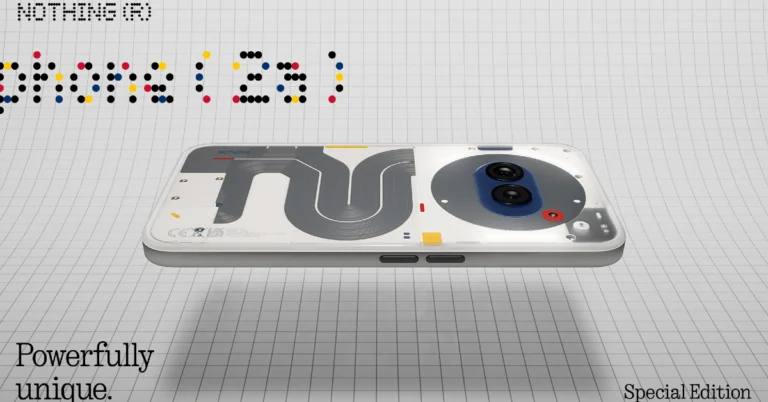
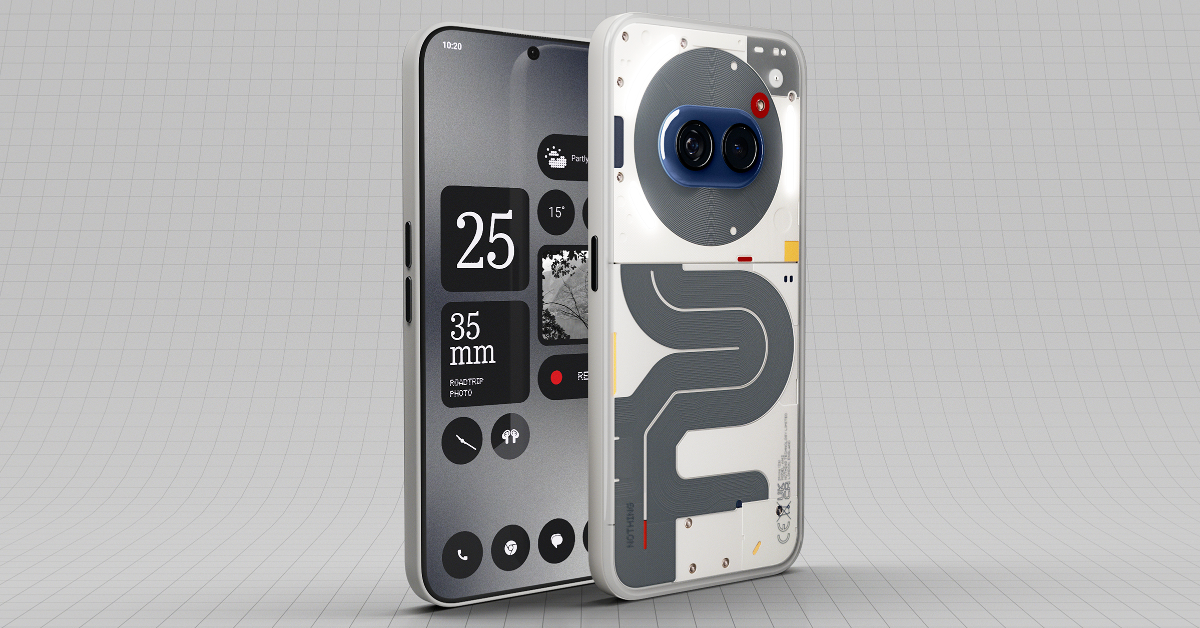
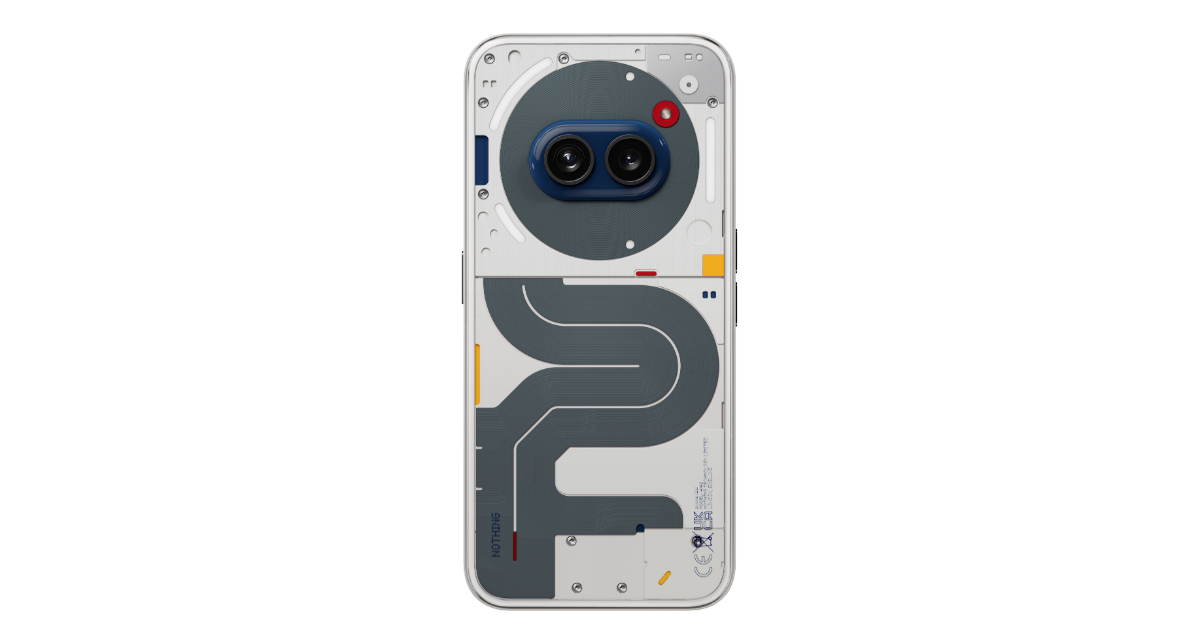
The Nothing Phone (2a) Special Edition, featuring a unique red, yellow, and blue colour scheme, launched in India. The new variant comes with 12GB RAM and 256GB storage and is set to go on sale in the country next week. The Nothing Phone 2a Special Edition’s hardware specs are the same as those of the regular Phone 2a, only the red, yellow, and blue colour palette has been used for its design to give it a distinctive look. The device was originally launched in March this year.
The Nothing Industrial Design Team in London has created a unique new colourway for their Nothing Phone (2a) Special Edition, celebrating the primary colours red, yellow, and blue.
Red, yellow, and blue colour accents create a “story of colour” pattern on the back panel of the Nothing Phone 2a Special Edition. Unlike other Nothing audio devices, this is the first time these colours have been employed on a single device.
All three colours have never before resided in the same house: up until now, the red was utilised in the right earbud of Every Nothing audio device, the yellow in the new Ear (a), and the blue most recently seen in Phone (2a) Blue.
Adam Bates, Design Director at Nothing said, “We are very happy to unveil the Phone (2a) Special Edition. The first product to explore our palette of the primary colours; red, blue and yellow. Its overall aesthetic references some of our design heroes from the past, whilst creating a new expression for a smartphone. Elevating a functional device into a striking piece of art.”
Nothing Phone 2a Special Edition price in India, sale details
The Phone (2a) Special Edition costs ₹27,999 for a variant with 12GB RAM and 256GB of storage. Customers using cards can receive an instant 1,000 discount, making the effective price Rs. 26,999 for only a limited period. Limited to 500 units, this unique smartphone will be available for purchase on Flipkart starting on June 5.
The price of the Nothing Phone (2a) starts at Rs 23,999 for 8GB RAM with 128GB storage. The price of the 8GB RAM with 256GB storage and 12GB RAM with 256GB storage is set at Rs 25,999 and Rs 27,999 respectively.
The phone comes with a 6.7-inch FHD+ AMOLED 120Hz display with an adaptive refresh rate ranging from 30Hz to 120Hz. The phone comes with Corning Gorilla Glass 5 protection. The device is powered by MediaTek Dimensity 7200 Pro SoC paired with up to 12GB of RAM and up to 256GB of storage. The dual rear camera setup on the phone includes a 50-megapixel main camera (with OIS and EIS) and a 50-megapixel ultra-wide sensor. In addition to this, there is a 32-megapixel selfie camera. The handset runs on Nothing OS 2.5 based on Android 14. It also packs a 5,000mAh with 45W fast charging technology.
Garena Free Fire Max is a battle royale game with regular awards and tournaments to keep players interested. If you play Garena Free Fire, you should be aware of the redeem codes that are released on a daily basis. However, because the battle royale game is banned in India, players from other countries can use the Free Fire Redeem codes daily. If you’re unfamiliar with the Garena Free Fire redeem codes or don’t know how to get them, we’ve put together a step-by-step guide to help you redeem them. Check out Garena Free Fire Max Redeem Codes for 30 May 2024.
The Free Fire Max redeem codes are a great way to get free stuff. These are 12-digit codes that contain alphabets and numbers, as well as an expiration date and time. Because the Garena FF redeem codes cannot be used more than once, you should hurry to the redemption page to claim your free reward before someone else does. To get a free reward, all you have to do is go to reward.ff.garena.com/en, which is the official redemption page. Also, keep an eye on this space for daily updates on Garena Free Fire Max redemption codes and rewards.
30 May 2024: New Amazon Quiz is now available. Customers from different parts of the country are participating in the daily quiz. The quiz starts at midnight today and will be live until 11:59 PM tonight. By successfully answering every question, participants in the quiz have the chance to win wonderful rewards. A Rs 500 Amazon Pay Balance is up for grabs to participants today.
One wrong answer could eliminate you from the quiz. You have a chance to win Rs 500 Amazon Pay Balance if you successfully answer every question. Users of the app only have the opportunity to take the quiz. Check Out 30 May 2024 Amazon Quiz Answers.
Only app users are eligible to play the Amazon quiz every morning from 12 AM to 11:59 PM. The quiz is not available on the desktop. For those who are unaware of how to play the Amazon quiz, below are the steps, you can follow to take the quiz.
We have written an explainer above, you can refer to that.
When are the winners of the Amazon Quiz and contest announced or declared?
The announcement of today’s Amazon quiz winner will take place Tomorrow. As for the Special Quiz and “Spin & Win” Contest, the winners will be declared once the Quiz Contest comes to an end. To find out who the lucky winner is, you can refer to the Amazon Quiz Winners List or visit the Amazon Winners tab in the Amazon App.
How to participate in the Daily Amazon Quiz?
That is very easy, just got to the Amazon app and scroll to the bottom of the page and you will find the Quiz section. Click on it (usually it is called the fun zone) and you can enter the Amazon Today Quiz Contest.
Are there any other quizzes or contests running on Amazon daily?
Yes, there are many running on a daily basis. These range from spinning the wheel to answering the questions correctly. All are located in the Fun Zone.
What are the criteria for selecting a winner in the Daily Amazon Quiz?
When a qualified player submits correct answers to all the questions, they will automatically be entered into a lucky draw. This draw will include all participants who answered all the questions correctly. Amazon randomly selects the final winners from the pool of eligible participants who gave the right answers.
Which Types of Questions are asked within Amazon Daily Quiz?
These are very simple and straightforward questions. These are mainly related to general knowledge.
Where should I look for Amazon Daily Quiz answers?
You can bookmark this page as we will help you every day with the Amazon Daily Quiz. We bring you fresh answers every day for the Amazon Daily Quiz and Contest.
What time does Amazon Announce previous winners?
The previous winner’s name will be announced today at 12 PM (noon).
Spotify is one of the biggest music streaming platforms in the world but what most people don’t know is that it also doubles up as a media player for the local audio files on your device. If you constantly switch back and forth between the saved songs on your phone and streaming on Spotify, you can access all of them in one convenient place instead. Today, we bring you the top 2 ways to add local files to Spotify.
Adding your local library of music to Spotify has its perks
While Spotify has an impressive collection of songs and artists, you may have come across an album or song that is absent from its library. This is largely due to issues with record labels, but in some cases, an artist may choose to take down their music from the platform. If you like keeping local downloads of your favourite songs on your device, you can easily sync them to Spotify.
Once the songs have been synced, you can access and play them on the app. Spotify’s media player will display the song title, artist name, and album art just like it does for other songs on the platform. Your local files can only be accessed on the device you added them from. If you are logged into your Spotify account on multiple devices, you won’t be able to view these songs on all of them.
Once synced to Spotify, these songs can be added to your playlists. Since they can only be accessed by you, other users will not be able to play these songs when they open your playlist.
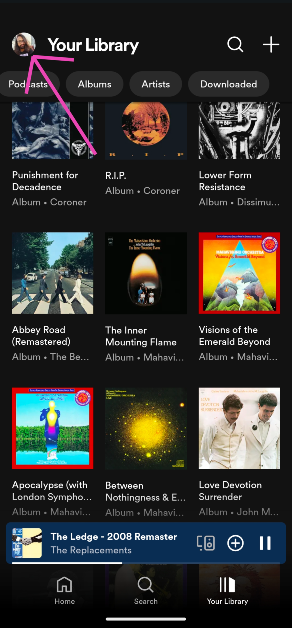
Step 2: Tap your profile picture at the top left corner of the screen.
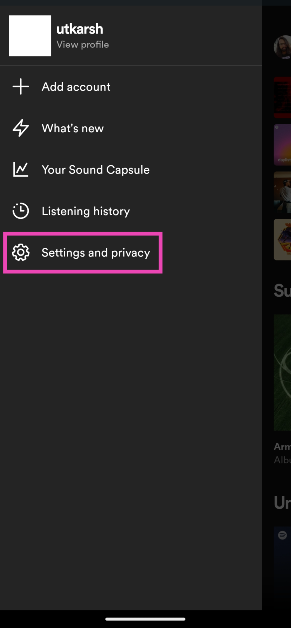
Step 3: Select Settings and privacy.
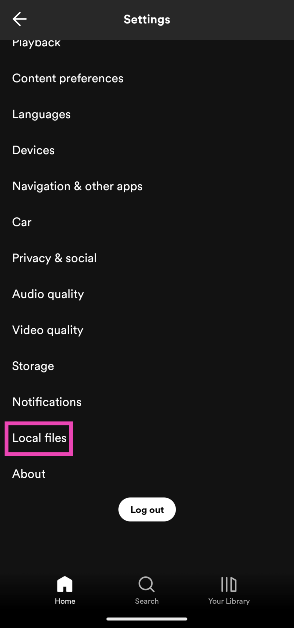
Step 4: Scroll down and tap on Local files.
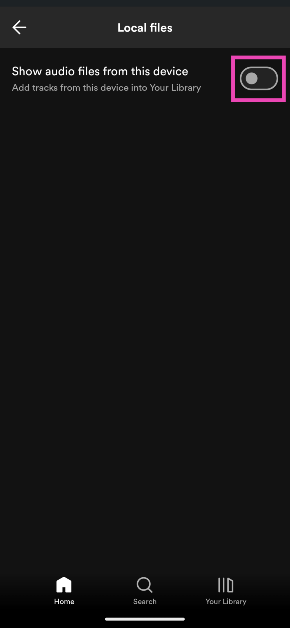
Step 5: Turn on the toggle switch for Show audio files from this device.
Add local files to Spotify on a PC
Step 1:Launch the Spotify app on your PC.
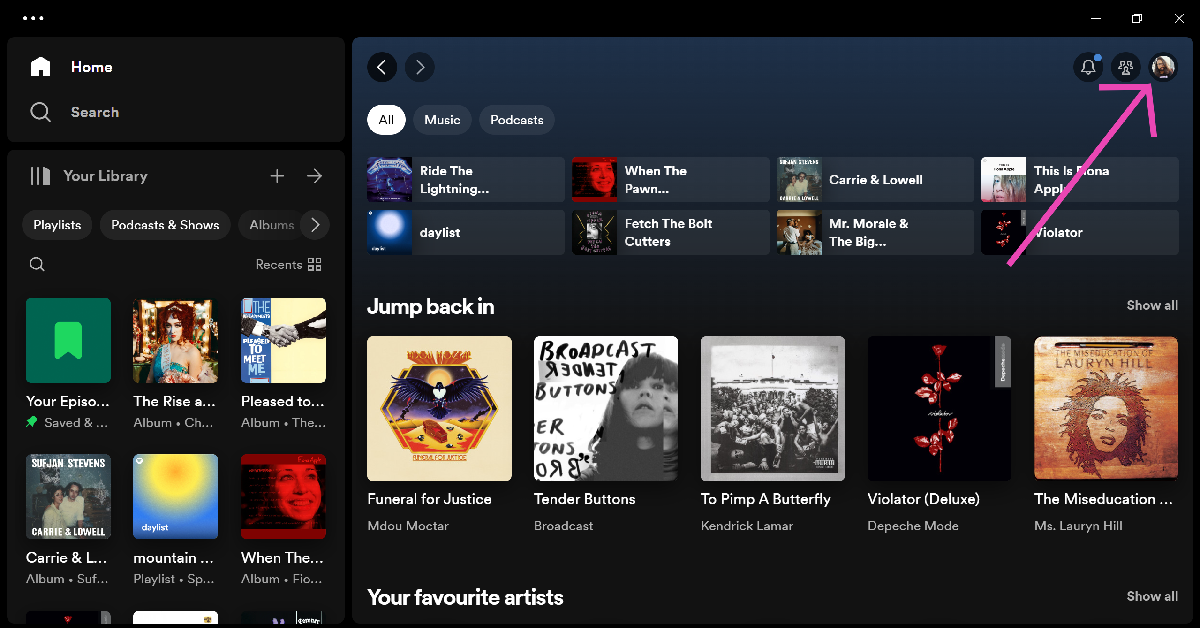
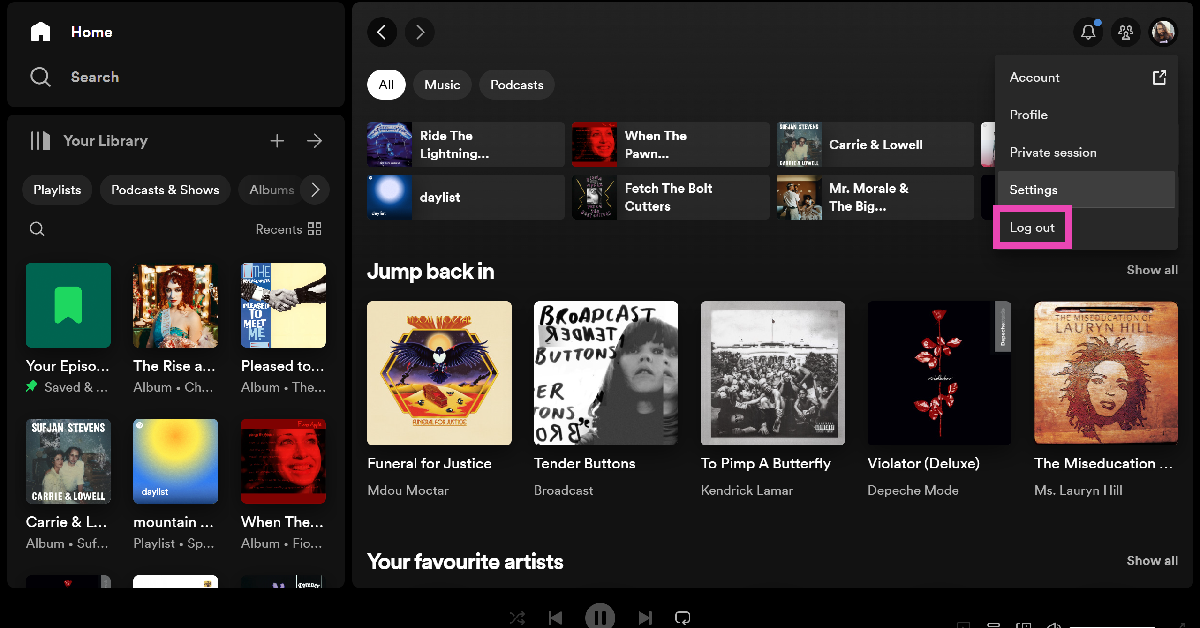
Step 2: Click on your profile picture at the top right corner of the screen and select Settings.
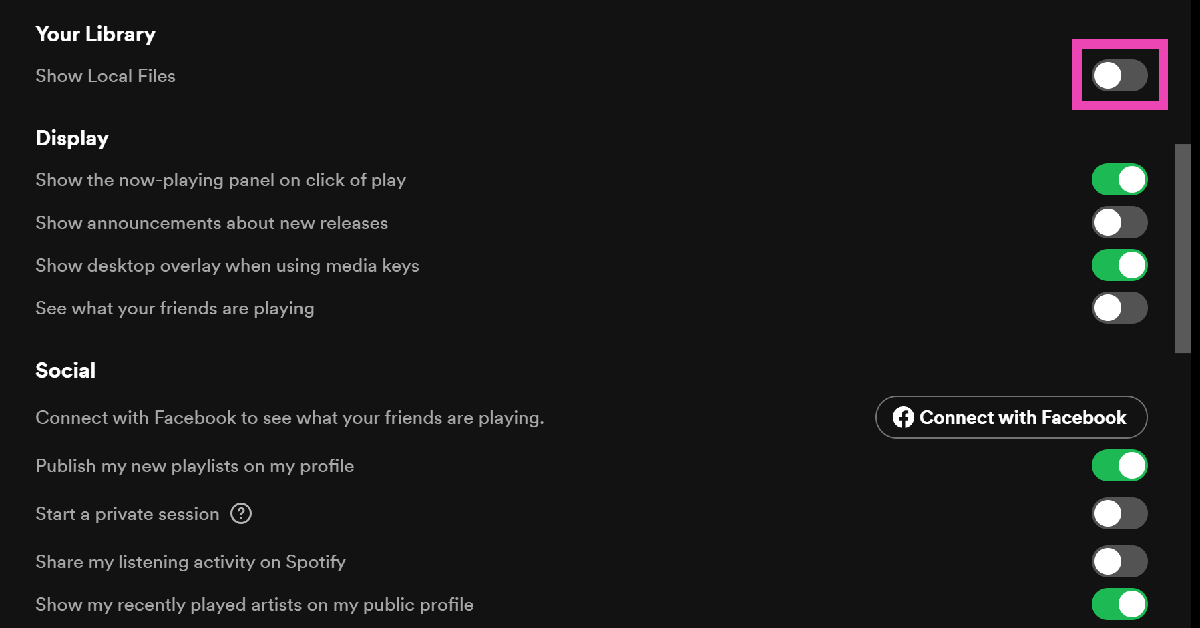
Step 3: Turn on the toggle switch for Show Local Files.
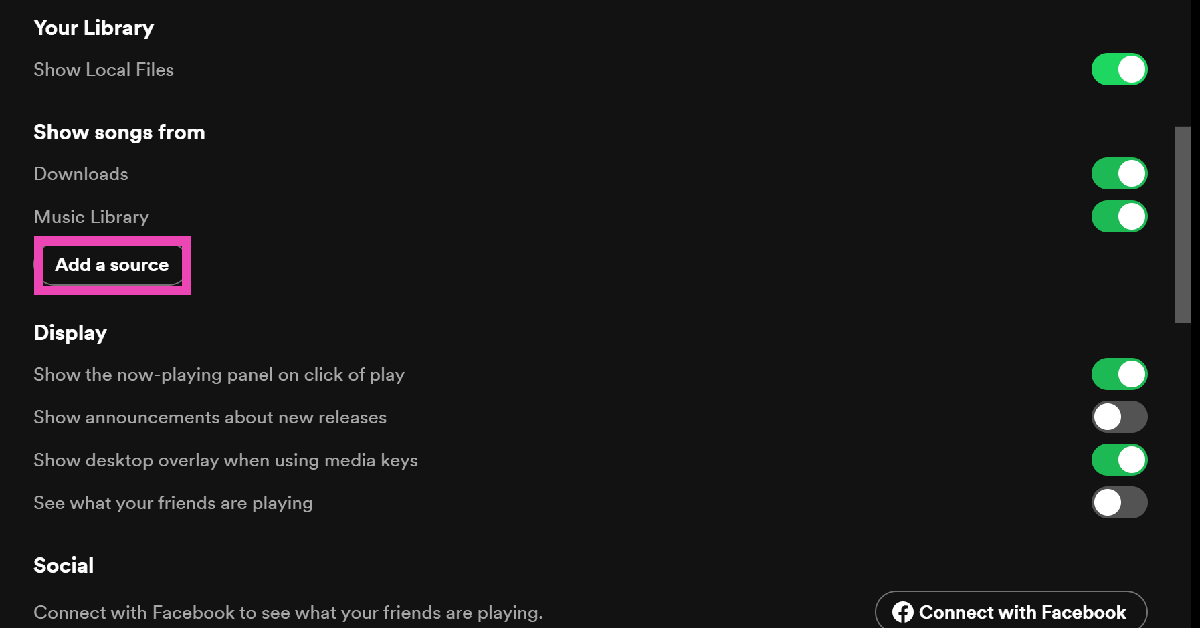
Step 4: Click on Add a source.
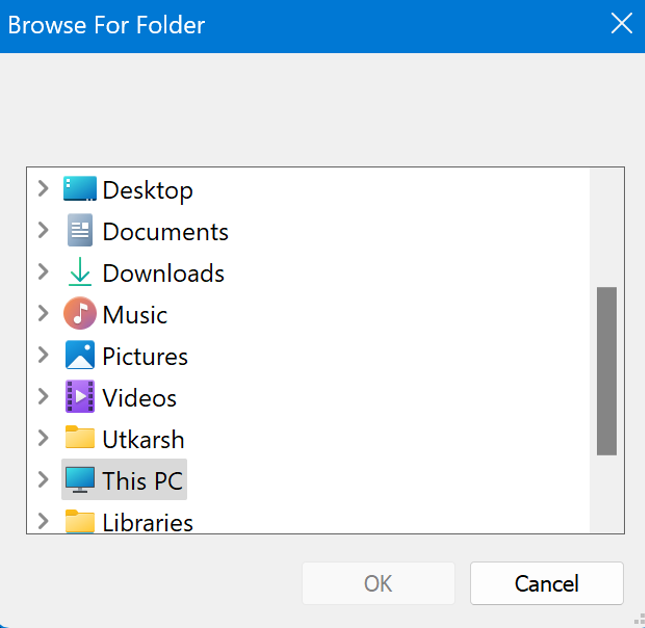
Step 5: Select the folder from which you want to add the audio files and hit Ok.
Frequently Asked Questions (FAQs)
How do I add local files to the Spotify app?
Go to Settings and privacy>Local Files and turn on the toggle switch for ‘Show audio files from this device’.
Can I add local audio files on my device to my Spotify playlist?
Once the local audio files have been added to Spotify, you can add them to your playlists. However, other people will not be able to access those songs on their devices.
Do I need an active internet connection to add local audio files from my device to Spotify?
Since you are not uploading the songs to Spotify, you don’t need an internet connection to simply add them to the app.
These are the top 2 ways to add local files to Spotify. Once the songs have been added to Spotify, you can view them in the ‘Downloads’ tab in your library. These songs can only be viewed on the device from which they have been added. If you have any other questions related to this task, let us know in the comments!
After releasing the Buds 5 in February, Redmi added an affordable alternative to the TWS last month. This TWS is a successor to last year’s Redmi Buds Active which left a good impression on us. Priced at Rs 1,500, the Redmi Buds 5A brings Active Noise Cancellation company’s budget offering, something that was missing from last year’s Buds 4 Active. Excited to see what the TWS had in store for us, we used it as our primary audio device for a week. Here is our Redmi Buds 5A review.
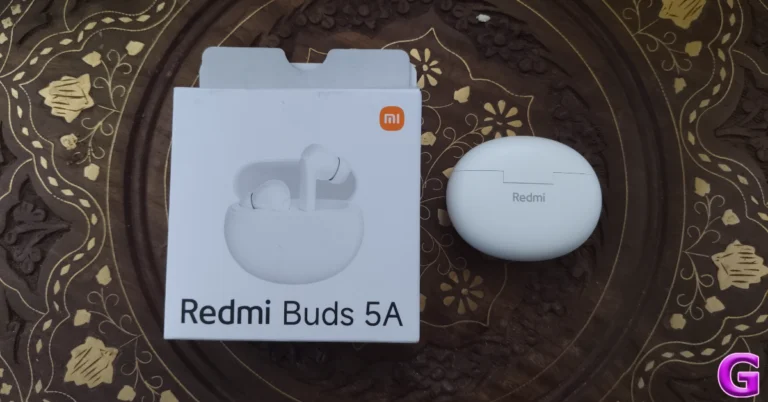
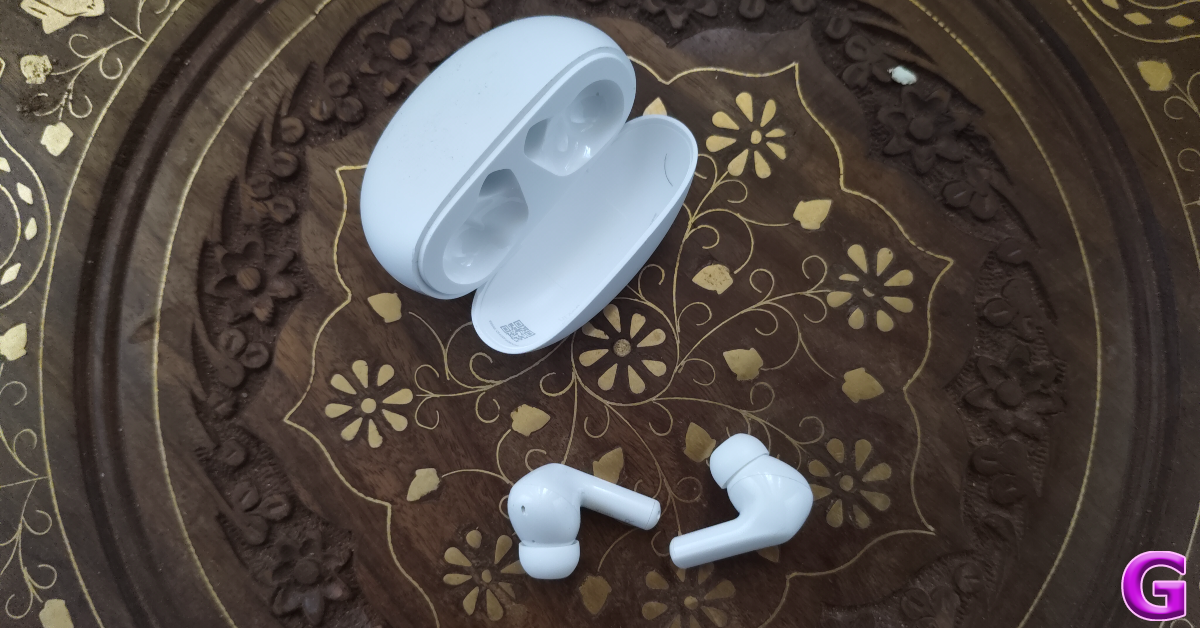
Here’s what you get inside the Redmi Buds 5A retail box:
Charging case with earbuds
2 pairs of extra ear tips
User manual
Much like the Buds 4 Active, the Buds 5A do not ship with a USB cable.
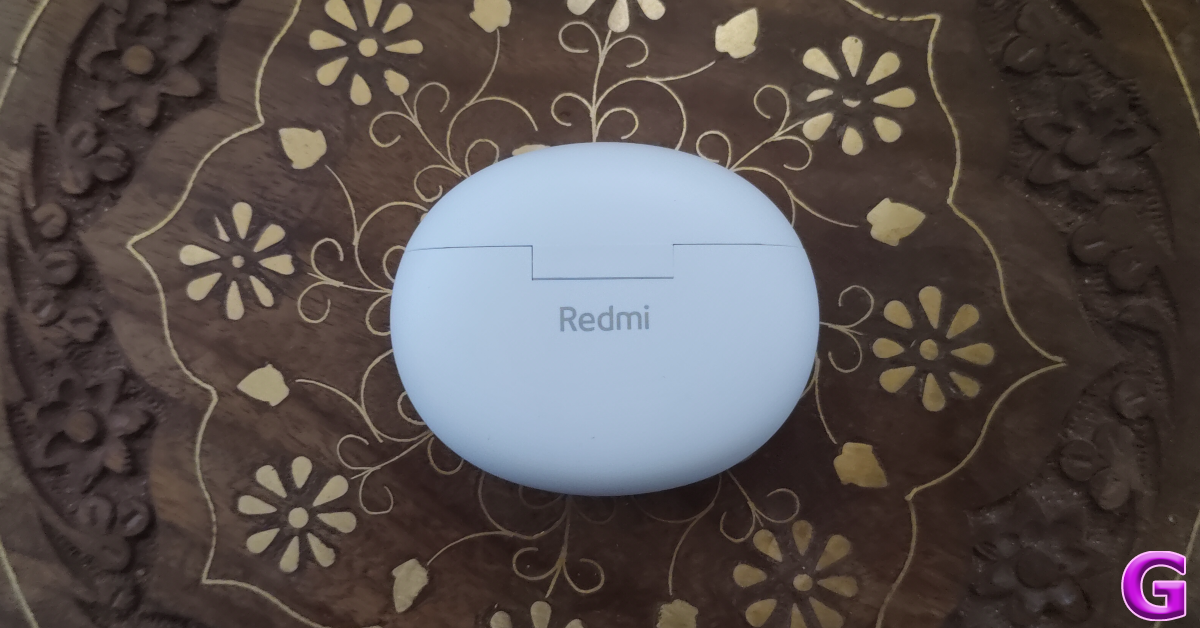
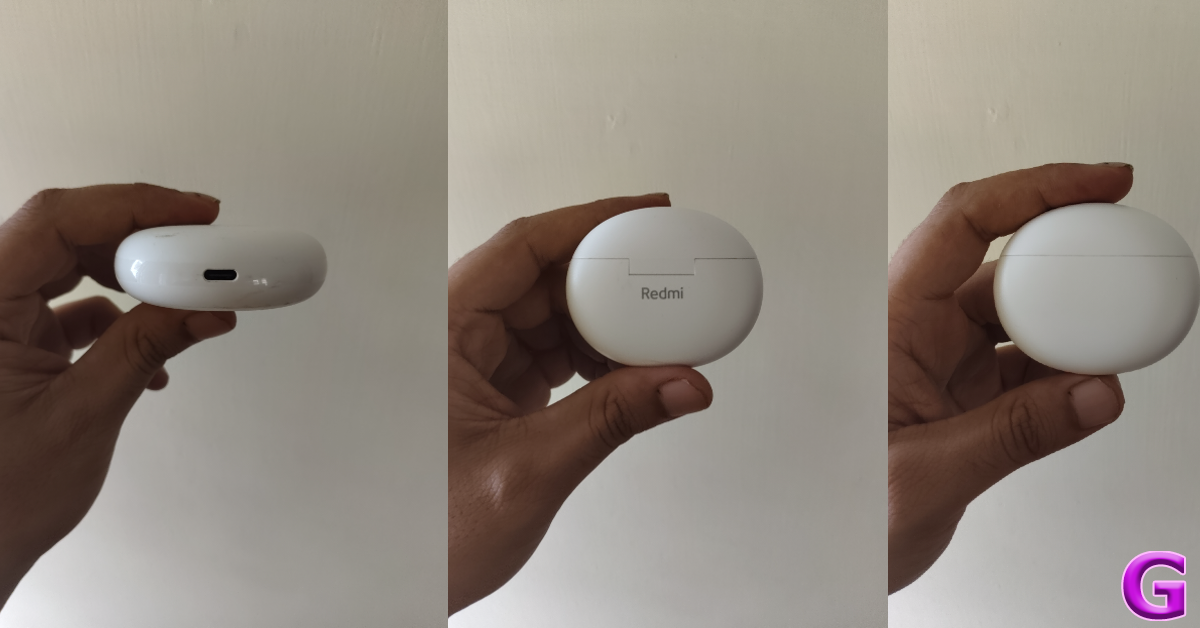
Redmi has not deviated from the design language it introduced on the Buds 4 Active. The Buds 5A sports a pebble-shaped plastic charging case with a matte finish. It is lightweight and compact, which makes it easy to carry around. A glossy strip runs around the case, offering a nice contrast to the matte finish on the body panel. The charging case was frequently placed in pockets with keys and loose change and it proved to be quite resistant to scratches.
The bottom of the charging case houses the USB Type-C port and a white LED notification light. The Redmi branding is printed on the back panel of the case, right below the hinge. The flexibility of the hinge allows the case to be opened with one finger. We were happy with its strength as it did not show any signs of tear or loosening even after being fidgeted with regularly.
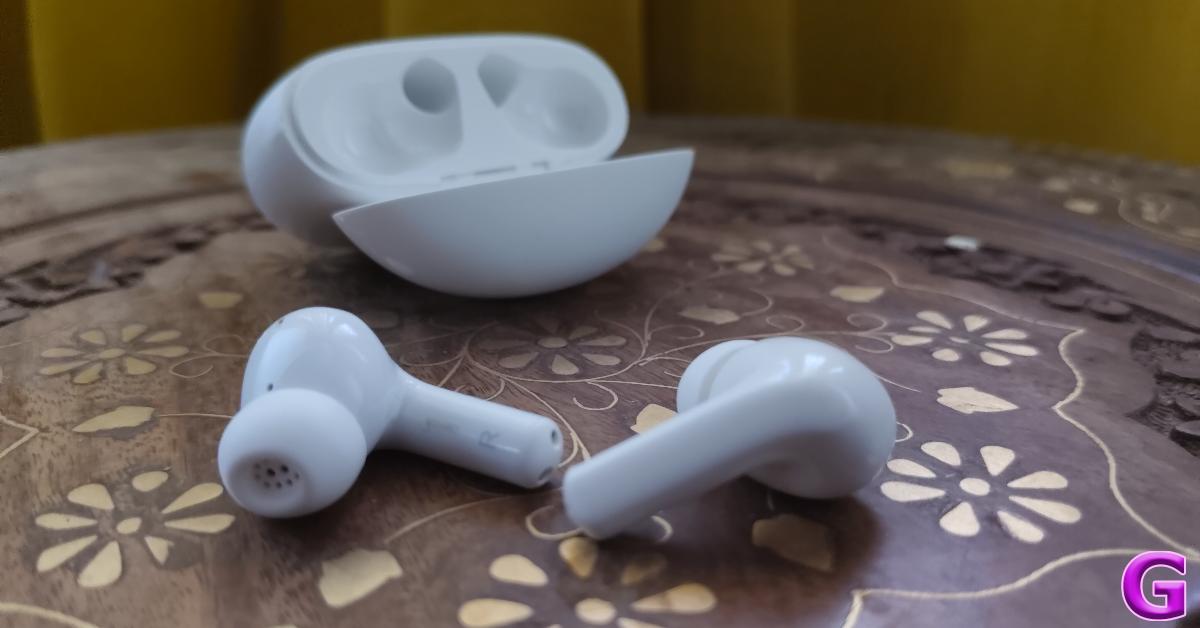
The earbuds follow the in-ear design language. The stems are equipped with tiny notification lights and the inner panel receives a glossy finish. The off-white colour of the ear tips matches that of the body. The design and the colour pattern of the earbuds and the charging case are simple and safe which will certainly appeal to mainstream sensibilities, but it would be nice for Redmi to shake things up every once in a while, especially when their product looks so similar to its predecessor.
The Buds 5A has an IPX4 rating for dust and water resistance. We used these earbuds while working out and were satisfied with their fit and resistance to sweat. However, the touch controls on the earbuds need more work. They were largely hit or miss for us.
Redmi Buds 5A Review: Performance
Delivering the audio output on the Buds 5A are two 12mm dynamic drivers. The TWS supports Bluetooth 5.4 and Google Fast Pair. The latter allows you to connect the TWS to your devices by simply popping the lid. Support for the AAC codec is still missing from the earbuds.
An envelope of bass surrounds the audio output produced by the Buds 5A. Despite the heavy focus on the low end, the mid and high frequencies also get good representation on the soundstage. The output relayed the crispness of the guitar chords while listening to funk numbers and the subtle hits of the clapper were noticeable while listening to rock tunes.
Good mix of frequencies aside, there are some clarity issues with the audio output. Even in lower volumes, the audio output feels a little rough. It could have used more tuning. This situation is exacerbated when you breach the 80% volume level.
The biggest highlight for us on the Redmi Buds 5A is Active Noise Cancellation. The earbuds may only be able to cancel out 25dB of surrounding noise, but it is a great feature in this price bracket. By turning ANC on in an indoor setting, we were able to tune out the ambient noises. The earbuds also offer a transparency mode.
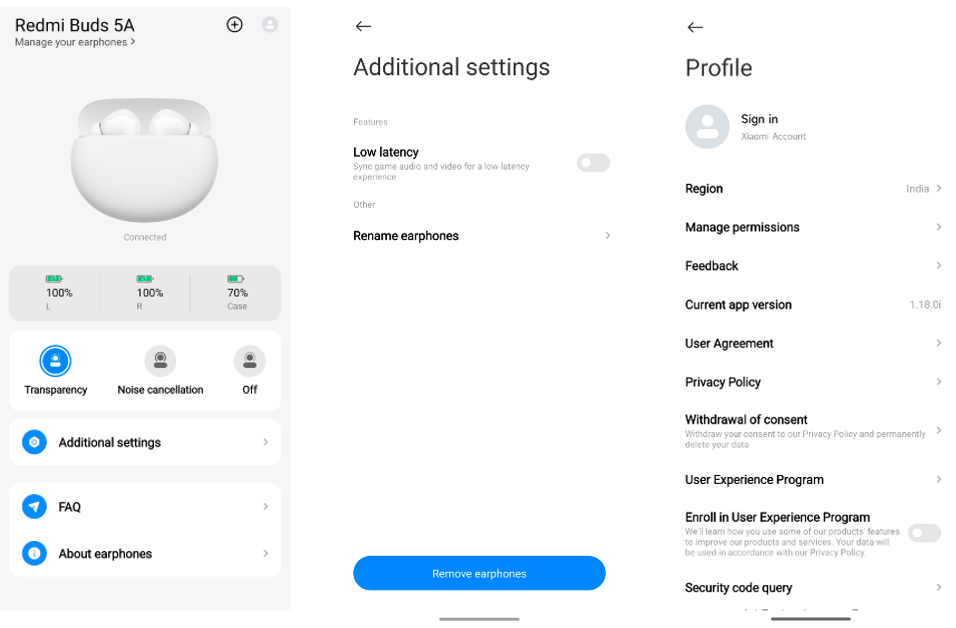
App support for wireless earbuds is something we rate very highly. While the Redmi Buds 5A can be managed via the Xiaomi Earbuds app, the range of functions available for the TWS is very limited. The app allows you to view the battery level of the case and earbuds, toggle between transparency and ANC modes, toggle the Low Latency mode, and change the name of the earbuds. Apart from renaming the earbuds, all other actions can be carried out without the app as well.
We played gaming titles like Call of Duty Mobile and Asphalt 9 with the low latency mode turned on. Even with 60ms latency, the earbuds weren’t able to completely eliminate the audio lag. We were happy with the crispness of the gaming audio relayed by the earbuds, but the audio lag marred our gaming experience. If gaming is a big part of your routine, we suggest looking at other gaming-focused TWS options.
Making calls with the Redmi Buds 5A in an indoor setting was satisfactory. The earbuds do a fine job of extracting the speaker’s sound from the surrounding ambient noise and relaying it to the recipient. However, like every other TWS in this category, the Buds 5A struggles with calls made in an outdoor setting. If a certain threshold of surrounding noise is breached, reverting to the phone’s microphones becomes a necessity.
With the ANC turned off and volume set at 50%, Redmi claims a battery life of 5 hours on the earbuds and another 25 hours in the case. With the ANC turned on, these numbers fall down to 3.5 hours and 23 hours. With mixed usage, the total charge on the earbuds and the case lasted us 5 days. During the review period, we used the Redmi Buds 5A for 4-5 hours every day, primarily for listening to music and making audio calls. It took us just under an hour to charge the TWS.
The Redmi Buds 5A are a good TWS option under Rs 1,500. Its compact design and lightweight body make it ideal for travelling. The audio output is above average, although it could have been a little more clear. What makes this TWS worth its price tag is Active Noise Cancellation. You won’t find this feature in a lot of wireless earbuds in this price range.
BenQ has introduced the SW242Q monitor in India today, designed to meet the colour accuracy and precision demands of professional photographers, videographers, and creative artists. The 24.1-inch 2K display uses BenQ’s proprietary AQCOLOR technology. The display supports HDR10 support and compatibility with various video formats.
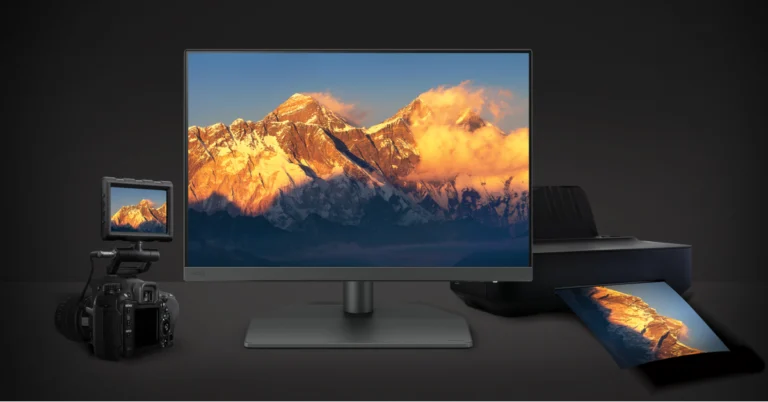
With a 24.1-inch 2K IPS Panel, 99% Adobe RGB, 98% DCI-P3, and 100% sRGB colour gamut coverage, the brand-new BenQ SW242Q monitor boasts a resolution of 2560 x 1600. The screen has wide viewing angles and a 16:10 aspect ratio. It is certified by Calman Verified and has 16-bit 3D LUT with a colour accuracy of ΔE ≤ 1.5. With precise soft-proofing made possible by the monitor’s highly coated, anti-glare surface, photographers may accurately preview printed colours on-screen prior to final printing.
The display is equipped with BenQ’s third-generation Uniformity Technology, which ensures perfect uniformity from corner to corner by flawlessly calibrating colour and brightness over hundreds of screen zones. The HDR10 capability of the monitor, together with its compatibility with AJA and Blackmagic SDI devices, and its support for many video formats, including 4:4:4, 4:2:2, and 4:2:0, meet the high-end requirements of professional videographers. It uses the new Palette Master Ultimate software for precise and efficient colour calibration, maintaining colour accuracy over time.
The BenQ SW242Q monitor integrates seamlessly with AJA and Blackmagic SDI to HDMI devices. The device has a leatherette base for securely placing cameras and lenses, an easy-carry handle for portability, and improved cable management for a tidy workspace. It also includes a 5-way navigation key with a dedicated information button for efficient colour evaluation during retouching.
BenQ SW242Q monitor price in India and availability
The BenQ SW242Q monitor has been launched in India with a price tag of Rs 38,500. The display can be purchased via BenQ India E-store, Amazon India and leading photography retail outlets across India.
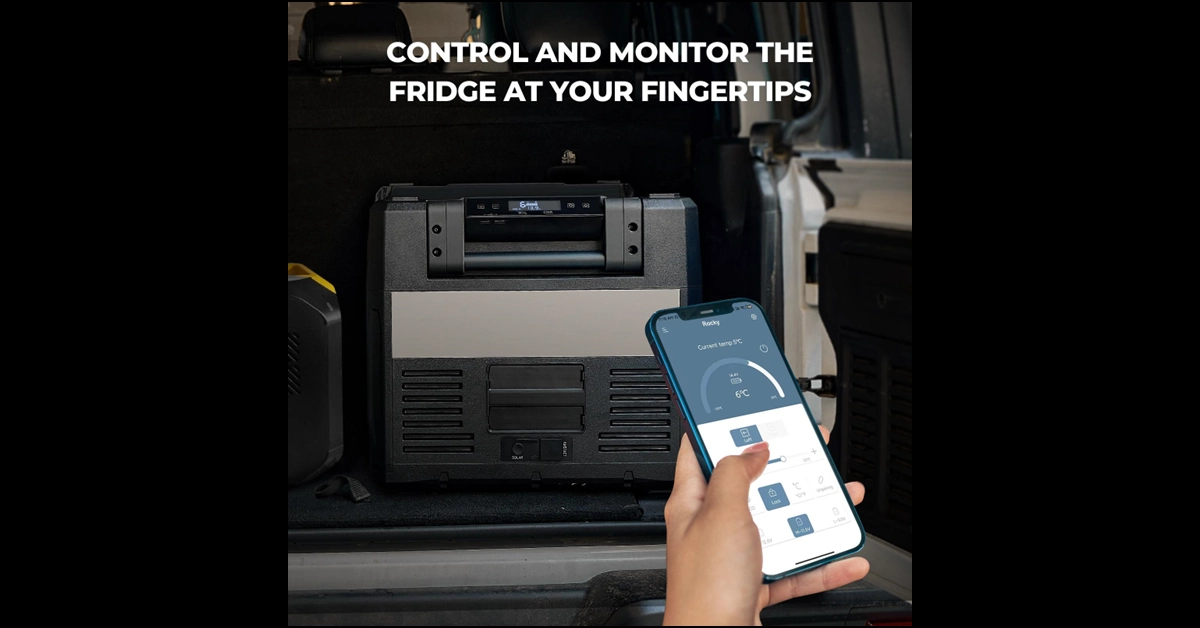
As summer approaches, outdoor enthusiasts and adventurers are gearing up for their next big trip. A crucial piece of equipment for these excursions is a reliable portable fridge that keeps food and drinks fresh and cold. BougeRV’s Rocky Portable Fridge is perfect to accomplish this, offering a blend of durability, efficiency, and convenience that makes it stand out in the crowded market of overlanding refrigerators.
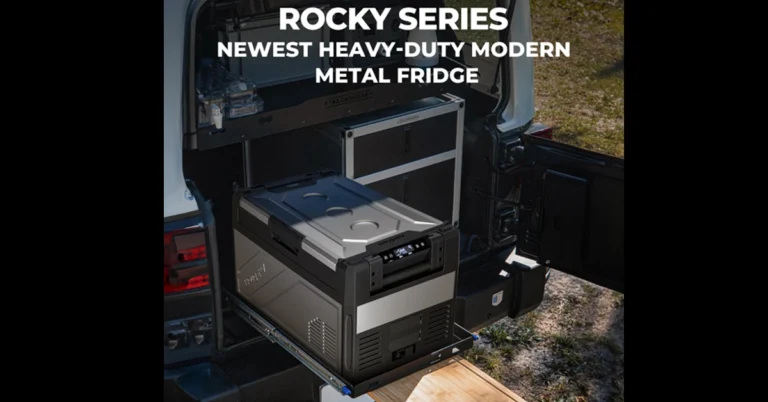
The Rocky Portable Fridge is constructed with heavy-duty materials, ensuring it can withstand the demands of outdoor use. Its rugged design includes reinforced edges and sturdy handles, making it resilient against bumps and impacts during travel. Also, the stainless steel exterior is rustproof and easy to clean, adding to the fridge’s longevity and making maintenance simple even in the toughest conditions. Even more, the anti-slip pads enhance stability, ensuring the fridge stays right in place during transit, no matter how uneven the terrain.
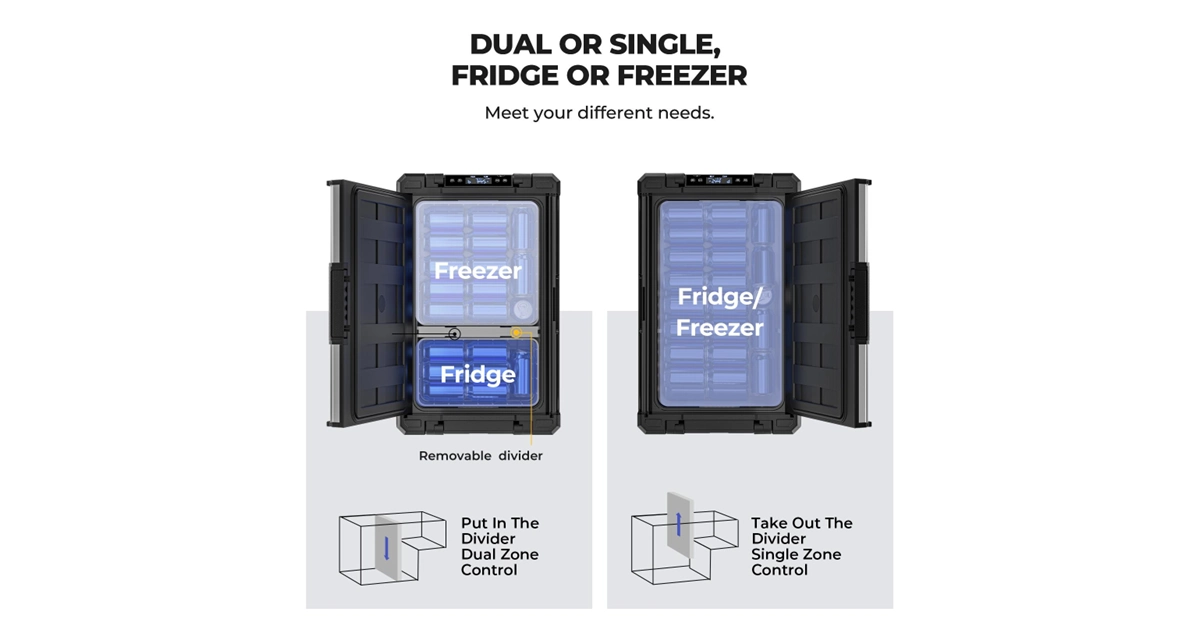
Its advanced compressor cooling technology is at the heart of the Rocky Portable Fridge. This powerful system allows the fridge to reach temperatures as low as -4°F, providing reliable cooling performance even in the hottest summer climates. The dual-zone feature is particularly noteworthy– it lets users set one compartment as a fridge and the other as a freezer. This flexibility is perfect for storing various items at their optimal temperatures, from fresh produce to drinks to frozen goods, making the Rocky an indispensable addition for extended trips.
Energy consumption is a critical factor for portable fridges, especially for those venturing off-grid. The Rocky Portable Fridge excels in energy efficiency, designed to operate with minimal power draw. It supports both AC and DC power inputs, offering versatility for different settings. Moreover, its compatibility with solar power solutions aligns with the importance of sustainable living, enabling users to harness renewable energy to keep their fridges running. This feature not only reduces the environmental impact but also ensures that adventurers can stay off-grid longer without having to worry about power supplies.
Ease of use is a significant advantage of the Rocky Portable Fridge. It features a bright LED display for easy monitoring and adjustment of temperature settings. Additionally, a mobile app allows for remote control, adding convenience by enabling users to adjust settings from their smartphones. The unique two-way door design and convenient grab handles on both sides enhance accessibility, letting you reach items easily even in confined spaces. These thoughtful design elements make the Rocky a practical and user-friendly option for any outdoor enthusiast.
Whether planning a weekend camping trip, a cross-country road journey, or an overlanding expedition, the Rocky Portable Fridge is designed to meet a wide range of needs. Its spacious interior, complete with a removable divider and nested basket, provides ample storage and organizational flexibility. The fridge’s ability to switch seamlessly between AC and DC power makes it suitable for various environments, from vehicles to campsites, ensuring that your food and beverages are always kept at the desired temperature.
BougeRV is dedicated to promoting sustainable outdoor living and providing high-quality, reliable products for outdoor enthusiasts. The Rocky Portable Fridge clearly shows this commitment, combining durability, efficiency, and user-friendly features to enhance the outdoor experience. BougeRV’s focus on sustainability and innovation is evident in its product design, making it a trusted name in the outdoor gear market.
As summer unfolds, the Rocky Portable Fridge by BougeRV should be an essential part of your outdoor adventures, ensuring that your food and drinks remain fresh and cool, no matter where your journey takes you.
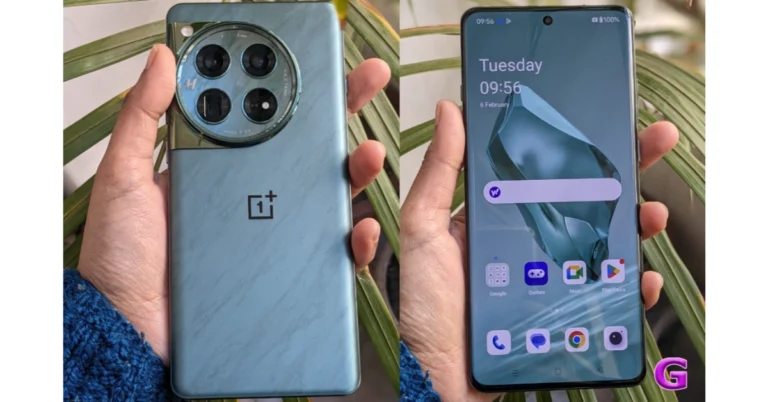
OnePlus 12 is set to launch in India in a new colour option, marking the third colourway after Flowy Emerald and Silky Black. The launch date is not yet announced, but expected soon. The specifications won’t change. The device is powered by the Snapdragon 8 Gen 3 SoC. The phone also has an LTPO OLED screen that supports a refresh rate of 120 Hz. It comes with a triple rear camera setup that includes a 50-megapixel primary sensor. It runs on Android 14-based ColorOS 14 out of the box.
A new metallic silver colour with a shimmering camera finish has been hinted at by OnePlus India for the OnePlus 12. It was a colour that was only accessible in China; it was dubbed “Glacial White,” perhaps. The Glacial White option might be introduced to India by the firm, and it could also be offered to other regions. The OnePlus 12 was launched in two colourways Flowy Emerald and Silky Black.
OnePlus 12 (Review) features a 6.82-inch quad-HD+ LTPO OLED with 1,440 x 3,168 pixels of resolution. The front panel has an adaptive refresh rate ranging between 1Hz and 120Hz. Additionally, 4,500 nits of screen brightness is supported. The smartphone also has an IP65 rating that protects it from dust and water. Under the hood sits Qualcomm’s 4nm Snapdragon 8 Gen 3 SoC. Up to 12GB of LPDDR5X RAM and up to 512GB of UFS 4 internal storage are available for the device.
The device comes with a triple rear camera setup powered by Hasselblad which includes a Sony LYT-808 sensor with a 50-megapixel primary camera (OIS, and f/1.6 aperture), 64-megapixel telephoto secondary lens (OIS, 3X optical zoom and f/2.6 aperture) and 48-megapixel ultra-wide-angle lens (114-degree field-of-view). The 32-megapixel front-facing camera (f/2.4 aperture) is provided for video calling and selfies.
The phone sports a 5,400mAh battery with compatibility for 100W SuperVOOC wired, 50W wireless, and 10W reverse wireless charging.
The phone also includes a Dual Cryo-velocity VC Cooling System, featuring a 3D capillary dissipation structure and a dual VC design to significantly reduce overheating.
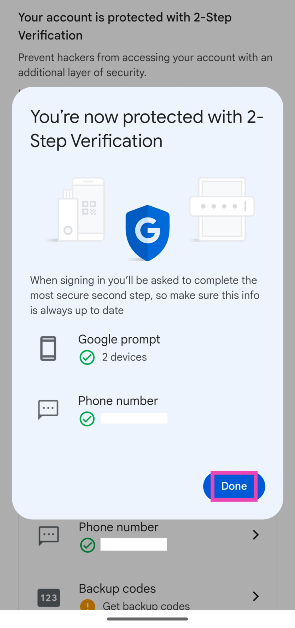
Turning on 2-factor authentication is one of the best ways to secure your Google Account and ensure that no one is able to gain unauthorised access to it. Every time you try to log into your Google Account on a new device you will be asked to verify yourself before you are signed in. The verification process is easy and there are multiple ways to go about it, ranging from OTPs to backup codes. So, let’s take a quick look at how you can enable 2-step verification for your Google Account.
Google offers a bunch of methods to verify yourself when you hit the 2-step verification wall. While choosing the medium of authentication, you must consider their feasibility in different situations. For example, if you don’t have your phone on you and need to log into your Google Account on a public PC, passkeys, prompts, phone numbers, and authenticator apps won’t work.
In order to access your account without relying on your phone to verify yourself, Google lets you use backup codes. You can generate these codes on the 2-Factor Verification page. Once generated, save these codes someplace safe. Better yet, memorise some of them so you don’t have to look for them when you’re trying to log into your Google Account.
Turn on 2-factor authentication for your Google Account on your PC
Step 3: Scroll down and click on 2-Step Verification.
Step 4: Enter your password.
Step 5: Choose the second step for verification.
Step 6: Click on Turn on 2-Step Verification.
Step 7: Hit Done.
Turn on 2-factor authentication for your Google Account on Android
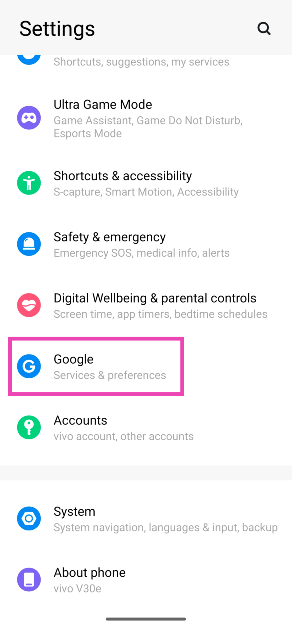
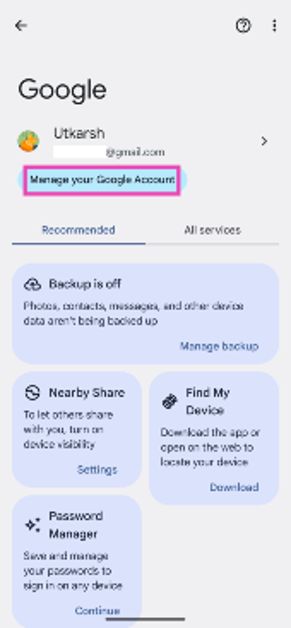
Step 1: Go to Settings and select Google.
Step 2: Tap on Manage your Google Account.
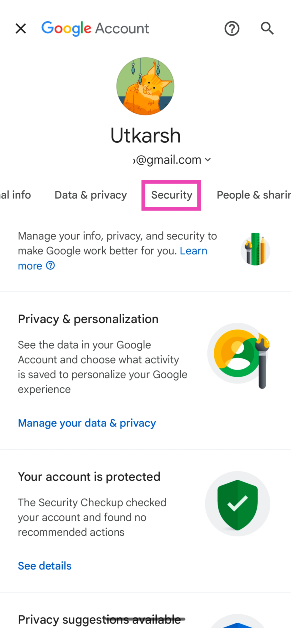
Step 3: Switch to the Security tab.
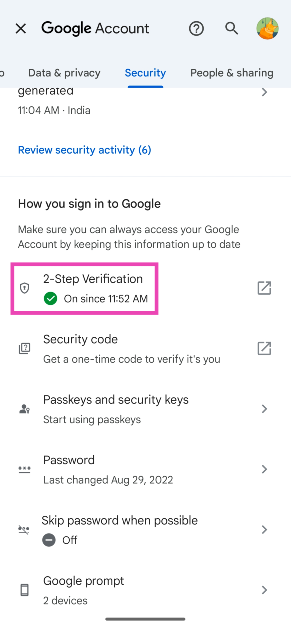
Step 4: Scroll down and tap on 2-Step Verification.
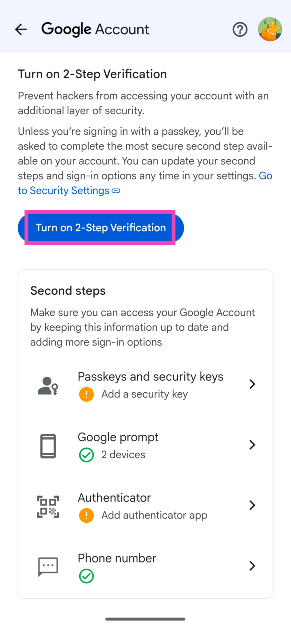
Step 5: Choose your preferred Second steps.
Step 6: Tap on Turn on 2-Step Verification.
Step 7: Hit Done.
Frequently Asked Questions (FAQs)
How do I turn on 2-Step Verification for my Google Account?
Go to Settings>Google>Manage your Google Account>Security>2-Factor Verification and select Turn on ‘2-Factor Verification’.
What options does Google offer for 2-Factor Verification?
Google lets you verify yourself using passkeys, prompts, the Google Authenticator app, your phone number, and backup codes.
Is there a way to bypass 2-Factor Verification for my Google Account?
If you use a passkey to sign into your Google Account, it bypasses the 2-step authentication process because it verifies that you are using your account.
These are the top 2 ways to turn on or enable 2-step authentication for your Google Account. Check out this article to learn how to do the same for Twitter. If you have any questions related to 2FA, let us know in the comments!
The date and time of Apple’s WWDC 2024 keynote address, which is anticipated to highlight new software updates and AI developments, have been confirmed. What developers and tech aficionados might anticipate at WWDC 2024 has been disclosed as well by the firm. The following is anticipated to be revealed:
At WWDC 2024, Apple is scheduled to hold its keynote, with an emphasis on AI developments and new software updates. The main keynote will be delivered on June 10 at 10 AM PT or 10:30 PM IST in India. The event will run from June 10 to June 14. The Apple event can be streamed live across many platforms including Apple’s website, the Apple Developer app, the Apple TV app, and the Apple YouTube channel. On-demand playback will be available after the conclusion of the stream.
The Platforms State of the Union, which takes place after the Keynote, will let Apple developers explore the latest iOS, iPadOS, macOS, tvOS, visionOS, and watchOS advancements and new tools. Both the Apple Developer website and the Apple Developer app will stream the Platforms State of the Union. Following the end of the stream, playback can be accessed on the YouTube channel, website, and Apple Developer app.
Apple Developer Program members and Enterprise Program members can access Apple experts through online labs, in-depth consultations, and live Apple Developer Forums for guidance on implementing the latest technologies, best practices, and app and game enhancement.
Apple continues to support developers through the Swift Student Challenge, with 50 Distinguished Winners recognized for outstanding submissions. These winners will visit Apple Park for a three-day experience during WWDC, promoting tech innovation.
The release of the associated device’s iOS 18, iPadOS 18, watchOS upgrade, and macOS versions will also take place during the event. As it purports to be developing its own version of GenAI features for the upcoming iPhone 16 models, Apple is also anticipated to talk about AI in public for the first time. Significant changes to iOS 18 are also anticipated from the business, including a new Siri avatar and enhanced home screen customisation options. Additionally, Apple is in discussions for an agreement with Google and OpenAI to run their AI apps on iPhones.
Garena Free Fire is a battle royale game with regular awards and tournaments to keep players interested. If you play Garena Free Fire, you should be aware of the redeem codes that are released on a daily basis. However, because the battle royale game is banned in India, players from other countries can use the Free Fire Redeem codes daily. If you’re unfamiliar with the Garena Free Fire redeem codes or don’t know how to get them, we’ve put together a step-by-step guide to help you redeem them. Check out Garena Free Fire Redeem Codes for 29 May 2024.
The Free Fire redeem codes are a great way to get free stuff. These are 12-digit codes that contain alphabets and numbers, as well as an expiration date and time. Because the Garena FF redeem codes cannot be used more than once, you should hurry to the redemption page to claim your free reward before someone else does. To get a free reward, all you have to do is go to reward.ff.garena.com/en, which is the official redemption page. Also, keep an eye on this space for daily updates on Garena Free Fire redemption codes and rewards.
29 May 2024: New Amazon Quiz is now available. Customers from different parts of the country are participating in the daily quiz. The quiz starts at midnight today and will be live until 11:59 PM tonight. By successfully answering every question, participants in the quiz have the chance to win wonderful rewards. A Rs 500 Amazon Pay Balance is up for grabs to participants today.
One wrong answer could eliminate you from the quiz. You have a chance to win Rs 500 Amazon Pay Balance if you successfully answer every question. Users of the app only have the opportunity to take the quiz. Check Out 29 May 2024 Amazon Quiz Answers.
Only app users are eligible to play the Amazon quiz every morning from 12 AM to 11:59 PM. The quiz is not available on the desktop. For those who are unaware of how to play the Amazon quiz, below are the steps, you can follow to take the quiz.
We have written an explainer above, you can refer to that.
When are the winners of the Amazon Quiz and contest announced or declared?
The announcement of today’s Amazon quiz winner will take place Tomorrow. As for the Special Quiz and “Spin & Win” Contest, the winners will be declared once the Quiz Contest comes to an end. To find out who the lucky winner is, you can refer to the Amazon Quiz Winners List or visit the Amazon Winners tab in the Amazon App.
How to participate in the Daily Amazon Quiz?
That is very easy, just got to the Amazon app and scroll to the bottom of the page and you will find the Quiz section. Click on it (usually it is called the fun zone) and you can enter the Amazon Today Quiz Contest.
Are there any other quizzes or contests running on Amazon daily?
Yes, there are many running on a daily basis. These range from spinning the wheel to answering the questions correctly. All are located in the Fun Zone.
What are the criteria for selecting a winner in the Daily Amazon Quiz?
When a qualified player submits correct answers to all the questions, they will automatically be entered into a lucky draw. This draw will include all participants who answered all the questions correctly. Amazon randomly selects the final winners from the pool of eligible participants who gave the right answers.
Which Types of Questions are asked within Amazon Daily Quiz?
These are very simple and straightforward questions. These are mainly related to general knowledge.
Where should I look for Amazon Daily Quiz answers?
You can bookmark this page as we will help you every day with the Amazon Daily Quiz. We bring you fresh answers every day for the Amazon Daily Quiz and Contest.
What time does Amazon Announce previous winners?
The previous winner’s name will be announced today at 12 PM (noon).
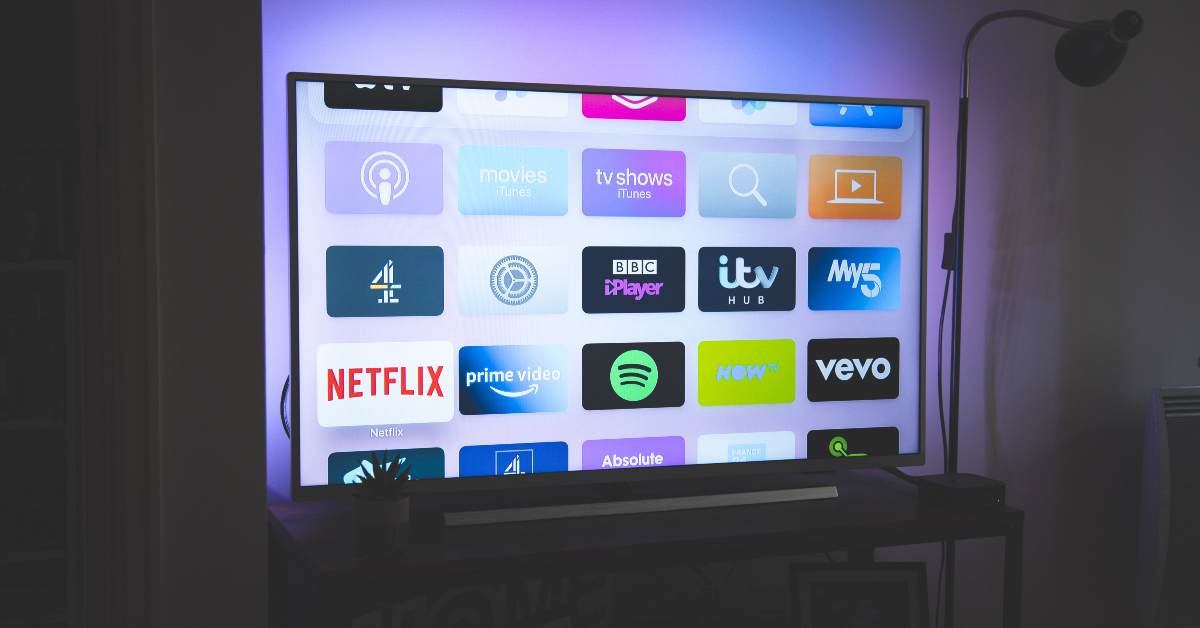
Just like your smartphone, it is recommended that you keep your Smart TV updated at all times. If your TV feels glitchy or starts lagging while carrying out the smallest of tasks, updating the software will help in fixing this issue. Most manufacturers make it easy to update their TVs. However, if you’re doing it for the first time it can be hard to locate the option in settings. Today, we bring you the top 2 ways to update your Android TV’s firmware.
Keeping your Android TV updated to the latest OS version has a lot of advantages. To begin with, it gets rid of any annoying bugs and glitches that may be plaguing the older versions. Newer software versions look better and are generally more optimised to function faster. New features are also rolled out with software updates. Lastly, the latest software versions also have the best security attributes while older versions may have certain flaws that make them more vulnerable to malicious attacks.
Updating your Android TV is an easy task. You just need to navigate through the system settings to carry out an over-the-air update. If your TV isn’t connected to the internet, you can download the firmware package on your PC, transfer it to a USB drive, and use it to update your TV.
Update Android TV firmware (OTA)
Step 1:Turn on your TV and go to the homepage.
Step 2: Hit the Settings icon on the homepage.
Step 3: Click on Status & Diagnostics.
Step 4: Select System software update.
Step 5: Hit Software update.
Your Android TV will update over the air.
Update Android TV firmware (USB)
Step 1: Go to the support page of your TV manufacturer and select your TV model.
Step 2: Go to the Downloads section and find the latest firmware.
Step 3: Download the upgrade file (USB type).
Step 4:Unzip the file and transfer it to a USB drive.
Step 5: Plug the USB drive into your TV.
Step 6: Go to Settings>Software Update>Update Now.
Step 7: Allow your TV to search the USB drive for firmware updates.
Turn on auto-updates
Step 1: Press the menu button on your TV’s remote and go to Settings.
Step 2: Go to Support.
Step 3: Select Software update.
Step 4: Turn on the toggle switch next to Automatically check for updates.
Frequently Asked Questions (FAQs)
How do I update my Android TV?
Go to Settings>Status & Diagnostics>System software update and select ‘Software update’.
Why am I not able to update my Android TV firmware using a USB drive?
If you’re using a USB drive to update your Android TV’s firmware, make sure that it contains the unzipped firmware package. Also, ensure that you download the firmware file corresponding to your TV model.
How do I enable automatic software updates for my Smart TV?
Go to Settings>Support>Software Update and turn on the toggle switch next to ‘Automatically check for updates’.
How do I clear my Smart TV’s cache?
Go to Settings>Apps, select the app, click on details, and select ‘Clear Cache’.
How do I sideload apps on my Smart TV?
Download the APK file for the app using a third-party marketplace, transfer it to a USB drive, connect it to your TV, go to Settings>Security and Restrictions and enable ‘Unknown sources for app installation’. Now, install the APK file on your TV.
These are the top 3 ways of updating your Android TV’s firmware. After downloading the firmware package from the OEM’s website, make sure you unzip it before transferring it to the USB drive. If you know any other way of going about this task, let us know in the comments!
Xiaomi 14 Civi is scheduled to launch in India on June 12, marking the first Xiaomi Civi smartphone in India. The smartphone is rumoured to be a rebranded variant of Civi 4 Pro which was launched in China in March this year. Ahead of the official release the price of the upcoming smartphone has surfaced on the web. The device is expected to be priced at around Rs 50,000. In addition to this, the sale date as well as bank offers of the device have also been revealed.
Recently, a picture of the Xiaomi 14 Civi was leaked online, providing a detailed look at its bank offers and sale date. The tipster Sudhanshu also disclosed the device’s anticipated price range. The smartphone will launch on June 20th, according to an offline advertisement that tipster Sudhanshu snapped off a banner outside of an electronics store. The phone will probably cost about Rs 50,000 in India.
Additionally, the poster offers a Rs 3,000 instant cashback with certain bank cards. Buyers may also receive a Rs 3,000 exchange incentive when they purchase the Xiaomi 14 Civi. Whereas the EMIs will begin at Rs 2,389 per month, and customers have the option to use Xiaomi Easy Finance.
The advertisement also revealed the design details of the Civi smartphone. The device can be seen in two colour options- Matcha Green and Cruise Blue. A vegan leather strip is part of the dual design at the back. Upfront on top, one can see the tiny, pill-shaped notch that houses the two selfie cameras.
The Xiaomi 14 Civi is speculated to be a rebadged variant of the Xiaomi Civi 4 Pro that was launched in March this year.
If the rumours about the Xiaomi 14 Civi are accurate then the upcoming smartphone will be powered by a Snapdragon 8s Gen 3 CPU with up to 16GB of LPDDR5X RAM and up to 512GB of UFS 4.0 storage. It will flaunt a 6.55-inch full-HD+ OLED display with Gorilla Glass 2 protection and a refresh rate of 120Hz.
The Xiaomi Civi 4 Pro is equipped with three rear cameras, so the Xiaomi 14 Civi is likely to have a similar camera module led by a 50-megapixel primary lens with a Leica Summilux lens and optical image stabilisation (OIS). Furthermore, it is expected to include a 50-megapixel portrait sensor along with a 12-megapixel ultra-wide-angle sensor. It may also include two 32-megapixel selfie cameras as part of a dual-camera arrangement on the front.
In addition to this, it might also sport a 4,700mAh battery that can be charged quickly at 67W.
Samsung Galaxy F55 5G debuted in India on Monday. The smartphone is priced under Rs 30,000 and is currently available for purchase via Flipkart in the country. The handset features a triple rear camera setup and a 120Hz AMOLED Plus screen. Under the hood, there is a Snapdragon 7 Gen 1 SoC and runs on One UI 6.0 based on the Android 14 out of the box. Additionally, it is backed by a 5,000mAh battery with fast charging capability. Before choosing the Galaxy F55 5G as your next smartphone companion, make sure to look at these alternatives.
Samsung Galaxy F55 5G has launched in India at Rs 26,999 for the 8GB RAM with 128GB storage option, whereas the price of the 8GB RAM with 256GB storage option will be available with a price tag of Rs 29,999. Lastly, the price of the 12GB RAM with 256GB storage is set at Rs 32,999. The device is offered in two colour variants available: Apricot Crush (with leather finish) and Raisin Black.
The device will be available for purchase via the company’s official website and Flipkart and across select retail stores.
Motorola Edge 50 Fusion is a mid-range phone available in two variants: 8GB RAM with 128GB storage and 12GB RAM with 256GB storage, priced at Rs 22,999 and Rs 24,999 respectively. It features a 6.7-inch full-HD+ pOLED curved display with Corning Gorilla Glass 5 protection and runs on Android 14. Under the hood, there is a Qualcomm Snapdragon 7s Gen2 SoC. The device has a dual rear camera setup that includes a 50-megapixel Sony LYT-700C sensor, a 13-megapixel ultra-wide angle camera which also acts as a macro sensor and a 32-megapixel front-facing camera. It is powered by a 5,000mAh battery and has connectivity options like 5G, 4G LTE, Wi-Fi 6, Bluetooth 5.2, GPS, NFC, and USB Type-C port.
OnePlus 11R
The OnePlus 11R is priced at Rs 39,999 for 8GB RAM with 128GB storage and Rs 44,999 for 16GB RAM with 256GB storage. It comes in Sonic Black and Galatic Silver colours and features a 6.74-inch Full-HD+ curved AMOLED display with 2772 x 1240 pixel resolution. It is powered by the Snapdragon 8+ Gen 1 5G CPU and has three back cameras, including a 50MP Sony IMX890 primary sensor and a 16MP front camera. The device supports 5G, 4G, Wi-Fi, Bluetooth 5.3, NFC, GPS, and other connectivity options.
Redmi Note 13 Pro Plus
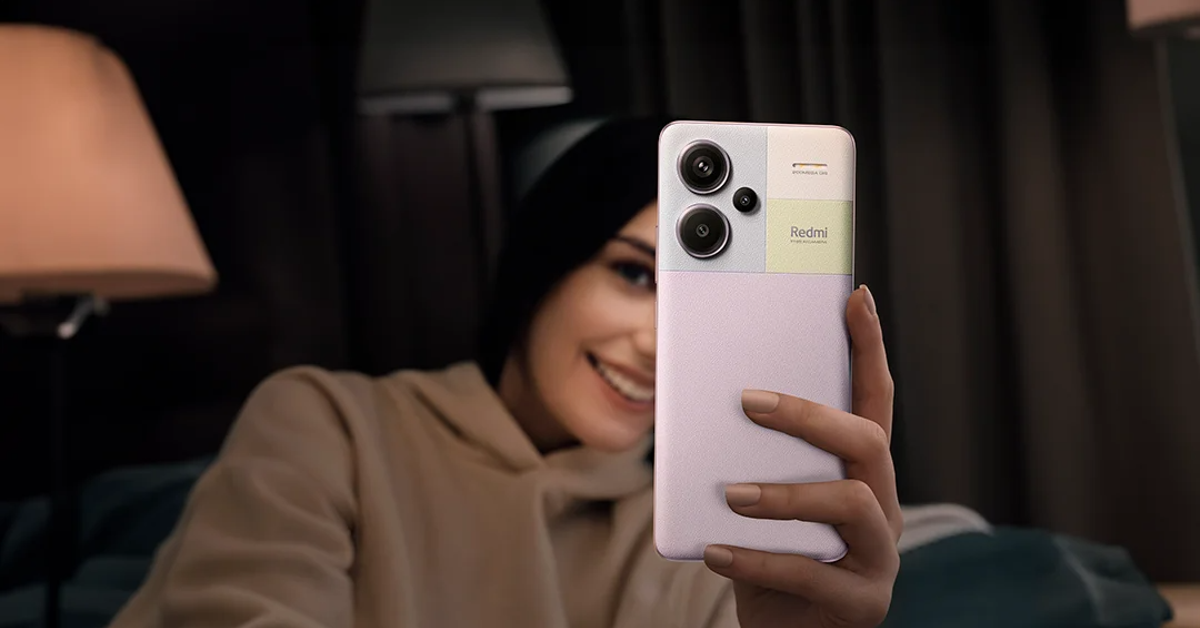
The Redmi Note 13 Pro+ 5G is another Galaxy F55 5G alternative having a 6.67-inch 1.5K full-HD+ AMOLED screen with Corning Gorilla Glass Victus protection, powered by MediaTek Dimensity 7200 Ultra SoC. The device runs on runs MIUI 14 OS. There is a triple rear camera setup on the phone that includes a 200MP primary sensor (f/1.65 aperture and OIS), an 8MP ultra-wide angle lens (f/2.2 aperture), and a 2MP macro lens (f/2.4 aperture). The device is backed by a 5,000mAh battery with 120W fast charging support.
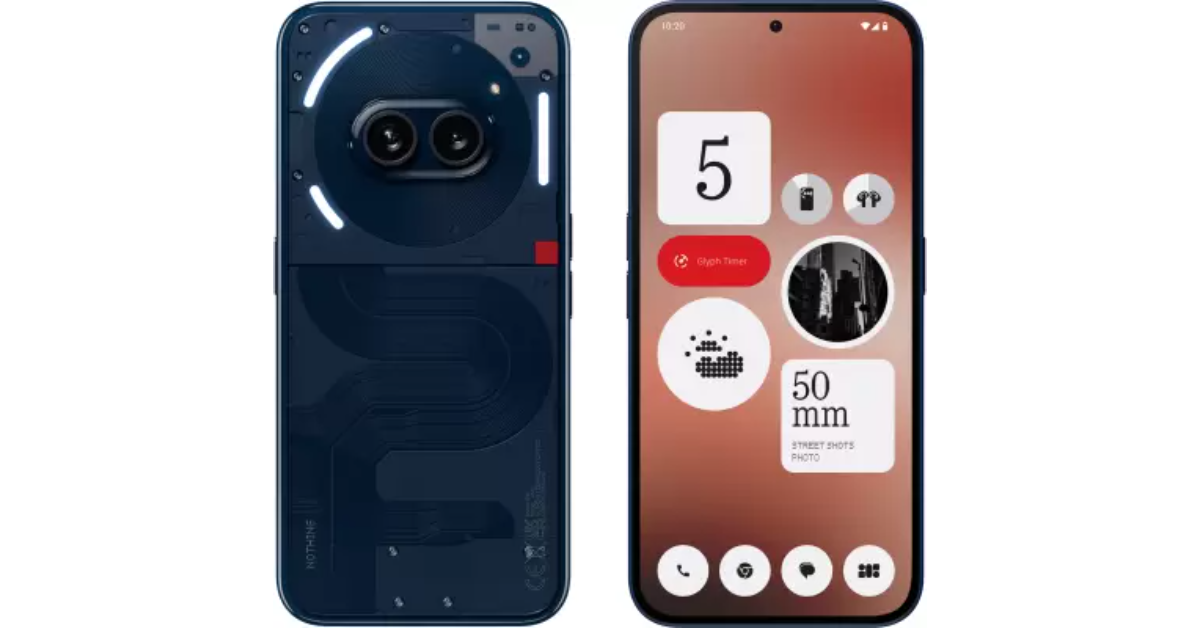
The Nothing Phone 2a is priced at Rs 23,999 for 8GB RAM with 128GB storage, Rs 25,999 for 8GB RAM with 256GB storage, and Rs 27,999 for 12GB RAM with 256GB storage. It features a 6.7-inch FHD+ AMOLED 120Hz display, Corning Gorilla Glass 5 protection, MediaTek Dimensity 7200 Pro SoC, dual rear cameras, and runs on Nothing OS 2.5 based on Android 14.
OnePlus Nord CE4
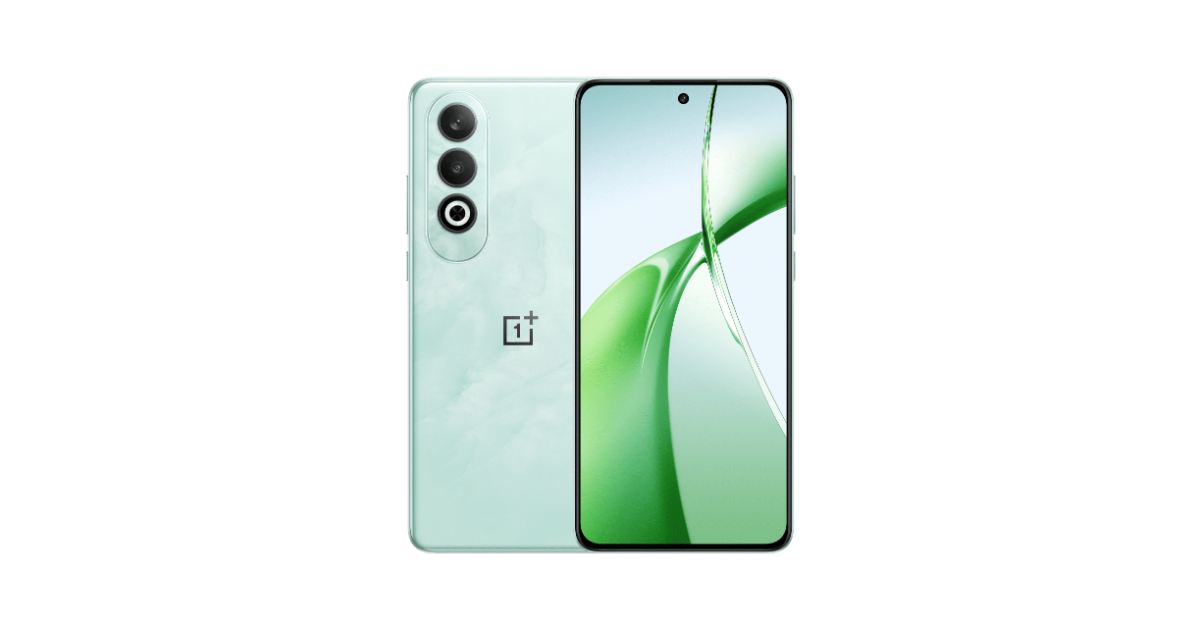
The OnePlus Nord CE 4 is now available in India in two variants: 8GB RAM with 128GB storage at Rs 24,999 and 8GB RAM with 256GB storage at Rs 26,999. The phone features a 6.7-inch FHD+ AMOLED display with 2160Hz PWM dimming technology, a Qualcomm Snapdragon 7 Gen 3 chipset, and up to 256GB UFS3.1 storage. It runs on Android 14-based OxygenOS 14 and has a dual rear camera setup with a 50-megapixel Sony LYT600 primary sensor and an 8-megapixel Sony IMX355 ultra-wide camera. In addition to this, there is a 16-megapixel front-facing camera for taking selfies. The 5,500mAh battery on the smartphone supports 100W SUPERVOOC charging.
Screenshots make it easy to quickly save and easily access important information on your phone. Instead of manually copying the information on a page, you can take a screenshot and access it anytime you want. But what if you want to save an entire webpage to read later? There are a bunch of apps that can do that for you, but if you don’t want to install a third-party app on your phone, long screenshots can accomplish the same task. Today, we show you how to take a long screenshot of an entire webpage on your iPhone.
Where can you find full screenshots on your iPhone?
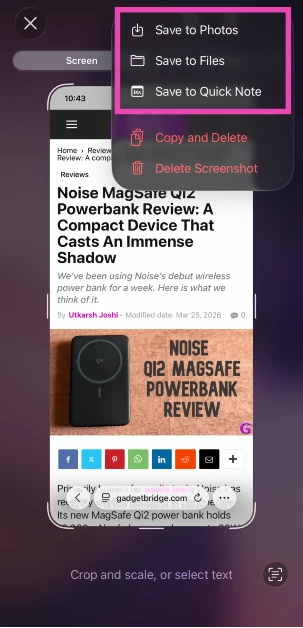
As you will see later, taking a full screenshot is not a tricky task at all. However, finding it on your iPhone can get confusing if you don’t pay attention while saving it. Contrary to a regular screenshot, full-page screenshots are saved in the ‘Files’ app on your iPhone. You can choose to create a new folder for the screenshot or save it in iCloud.
Long screenshots get saved as PDFs. This is the reason why they aren’t saved in the Photos app on your iPhone. Regular screenshots can be saved in the Files app too. Once saved, you can convert them to PDFs through the pop-up menu. If you want your screenshot to show up in the Photos app, save it as an image.
Take a screenshot of an entire webpage on an iPhone
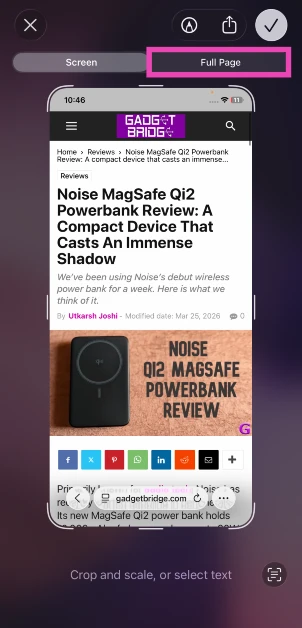
Step 1: Go to the webpage and press the side button and volume up button at the same time.
Step 2: Tap the screenshot preview icon at the bottom right corner of the screen.
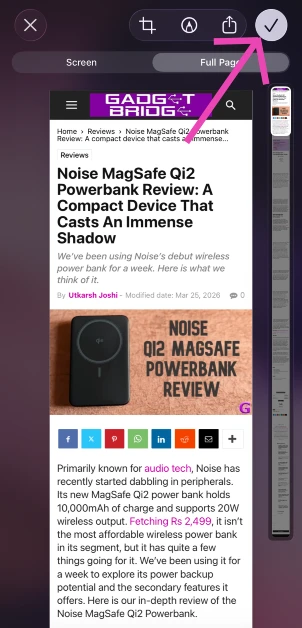
Step 3: Tap on Full Page.
Step 4: Hit the tick icon.
Step 5: Choose how you want to save the screenshot.
Bonus Tip: Take a screenshot of an entire webpage on Android
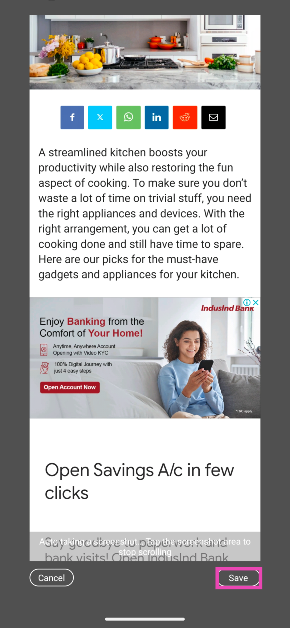
Step 1: Go to the webpage and press the side button along with the volume down button to take a screenshot.
Step 2: Tap on the Long screenshot option below the screenshot preview.
Step 3: Your phone will automatically start scrolling down the webpage to take a screenshot. Hit Savewhenever you want to end the screenshot.
Frequently Asked Questions (FAQs)
How do I take a full-page screenshot on an iPhone?
Press the side button and the volume up key to take a screenshot, tap on the preview, select ‘Full Page’, and hit ‘Done’. All full-page screenshots get saved as PDFs.
How do I save a screenshot as a PDF on my iPhone?
Press the side button and the volume up key to take a screenshot, tap on the preview, hit ‘Done’, and select ‘Save to Files’. Go to Files, long-press the screenshot, and select ‘Create PDF’.
How do I take a long screenshot on an Android phone?
Press the side button with the volume down key to take a screenshot, then tap on the ‘Long screenshot’ option below the screenshot preview.
This is how you can take a long screenshot of an entire webpage on your iPhone. Full-page screenshots get saved as PDFs in the Files folder by default. You can choose to convert a regular screenshot into a PDF by saving it in Files and selecting ‘Create PDF’ in its pop-up menu.
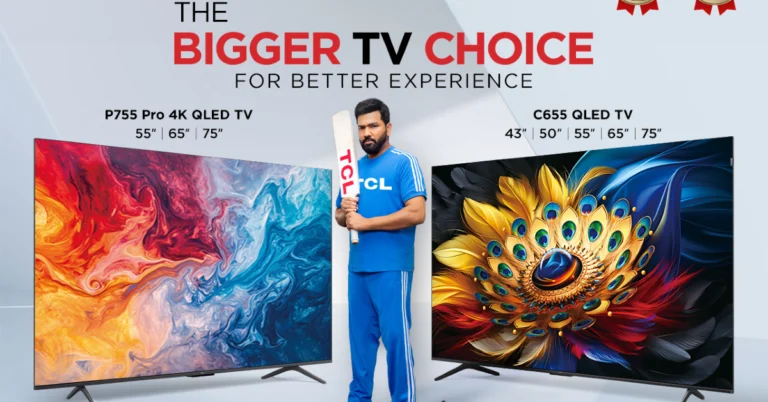
TCL has launched its Google QLED, 4K QLED & 4K UHD TVs range, offering a range of models starting from Rs 36,990. The range includes the C655, P755Pro, P755, P655 and S5500. The models are powered by the AiPQ Processor, which optimises colour contrast and image for an exceptional gaming and entertainment experience.
TCL has launched its latest 4K QLED TV range, the P755 and Pro, featuring T-Screen technology and available in different screen sizes- 43-inch and 50-inch variants in P755 and 55-inch, 65 inch and 75-inch models in P755 Pro. It comes with a viewing angle of greater than 178 degrees, a 3x contrast increase, and 16% less energy use. TCL has made use of the specialised MEMC technology to maintain sharpness without blurring in fast-paced, action-packed situations. Thanks to TCL’s newest Dual Line Gate (DLG) technology, which employs special algorithms to deliver a lower latency and a greater refresh rate while gaming. The P755, P755Pro, and P655 have standard Wi-Fi connectivity, Bluetooth 5.0, 2GB and 16GB RAM, and 3 HDMI ports (2.1, 2.0, and 1.4).
The C655 is powered by Google TV OS and offers a Uni-body ultra-slim design for improved visual effects and optimised space utilisation. It is available in 55-inch screen size. The 4K UHD TV provides more than 8 million pixels in film-grade clarity with a horizontal resolution of 3840 x 2160 pixels. Additionally, HDR 10 offers users a more vibrant and realistic image experience. Its Hybrid Log Gamma (HLG) features also give viewers access to a variety of streaming options. The C655 has 2GB and 32GB RAM in addition to standard Wi-Fi connectivity, Bluetooth 5.0, and 3 HDMI ports (2.1, 2.0, and 1.4).
The S5500 has a 178-degree viewing angle, 1920 x 1080 pixel Full HD resolution, and a 60Hz refresh rate for more fluid motion. Dolby Atmos audio with downward-firing speakers is also included. It is available in multiple screen sizes – 43 inch, 50 inch, 55 inch, 65 inch and 75 inch. The TVs are outfitted with 4K Quantum Dot Pro.
The C655 and P755 Pro are integrated with 35W with ONKYO 2.1 Ch and P655, S5500 comes with a 24W speaker system. Each model’s dynamic colour enhancement has a 1.07 billion colour rendering.
The TCL Google QLED, 4K QLED & 4K UHD TVs range includes four models C655, P755Pro, P755, P655 & S5500, all priced at Rs. 36,990, Rs. 46,990, Rs. 33,990, and Rs. 42,990, respectively. All the TCL televisions are available for purchase at offline retail and brand stores including Reliance Digital and Croma. Customers can also shop these offerings online at Amazon and Flipkart.
A streamlined kitchen boosts your productivity while also restoring the fun aspect of cooking. To make sure you don’t waste a lot of time on trivial stuff, you need the right appliances and devices. With the right arrangement, you can get a lot of cooking done and still have time to spare. Here are our picks for the must-have gadgets and appliances for your kitchen.
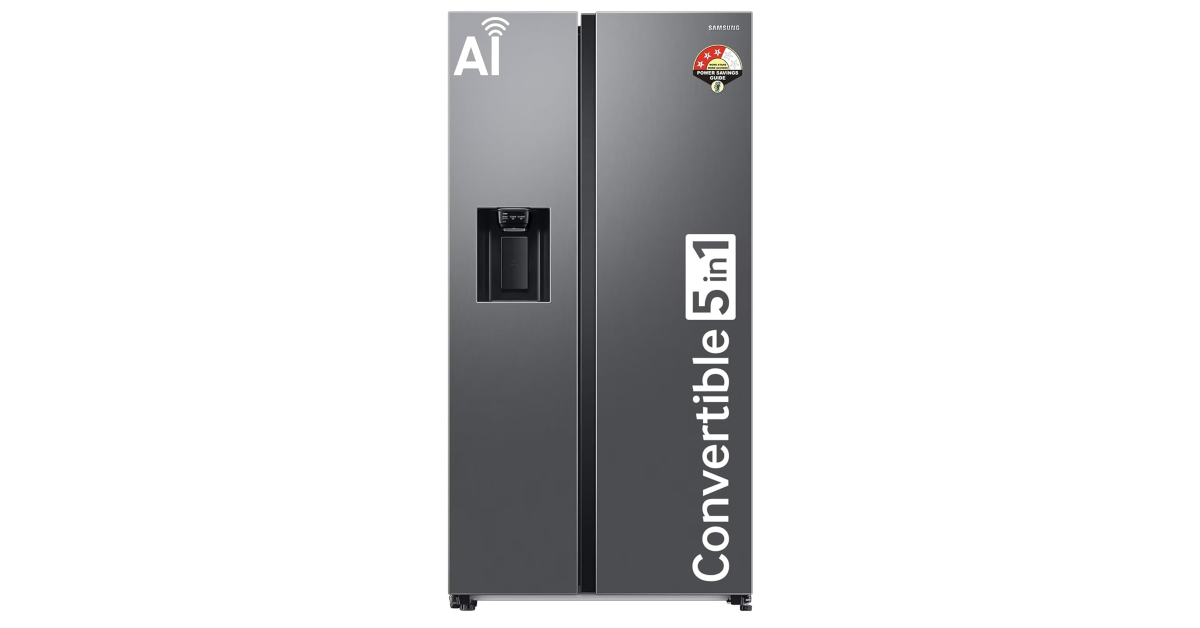
The Samsung Double Door RS78CG8543S9HL refrigerator has a capacity of 633 litres and has an integrated water and ice dispenser. The convertible storage of this refrigerator can be set to five modes – Normal Mode, Extra Fridge Mode, Seasonal Mode, Vacation Mode, and Home Alone Mode. The refrigerator has WiFi integration which allows it to be controlled through the Samsung SmartThings app.
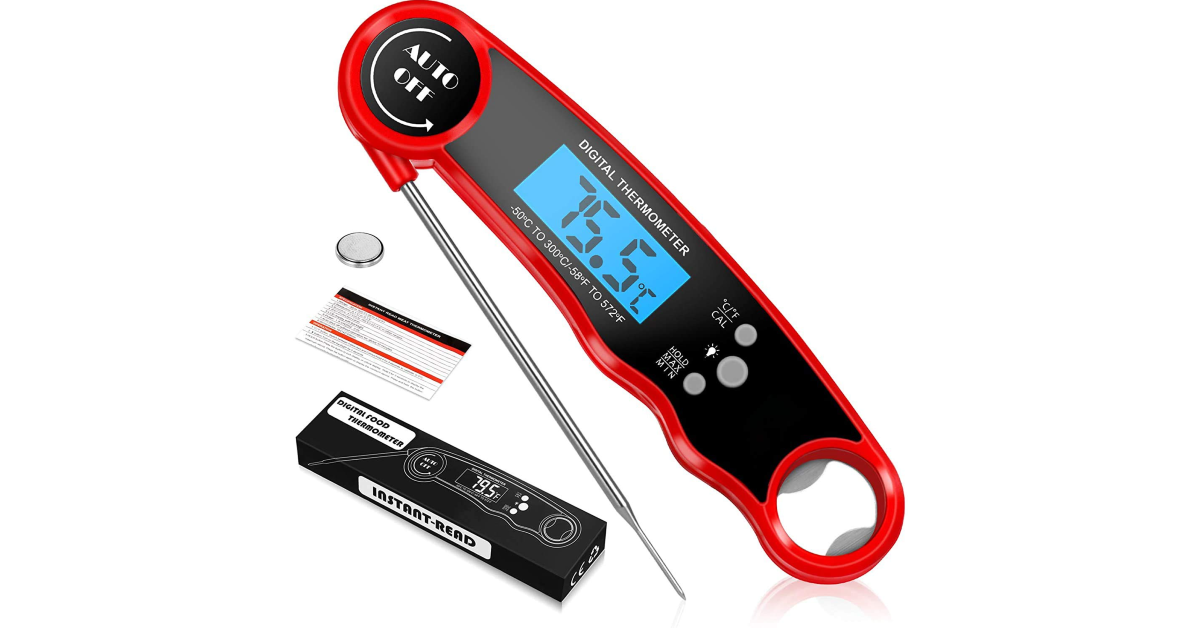
This digital meat thermometer from Cason has an LCD display and takes an accurate reading within 2-3 seconds. It is rated IP67 for dust and water resistance, which means you can wash it under a tap without worrying about damaging it. If you often work with different cuts of meat, a kitchen thermometer is the best way to ensure that it is cooked all the way through.
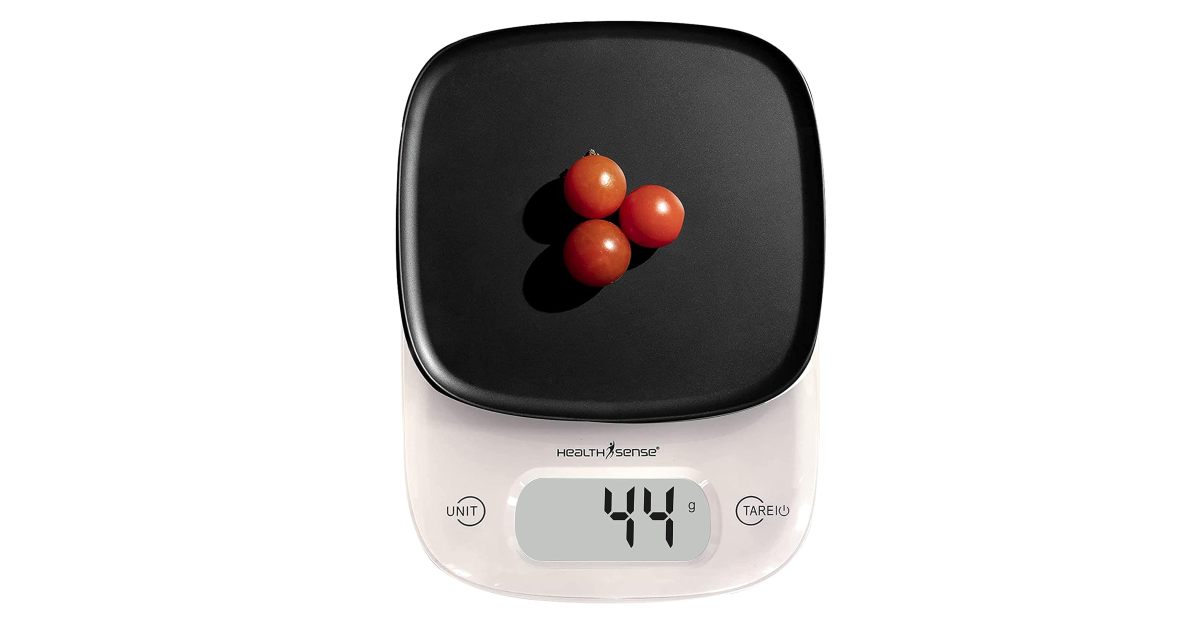
If you’re trying to watch what you eat, you should certainly invest in a kitchen scale. This weight machine from Health Sense can measure within a range of 1-5000g. The machine supports unit conversion, which makes it easy to measure liquids in grams as well as millilitres. The LCD display on the scale is bright enough to be legible in well-lit conditions. With just one press of a button, you can cancel the weight of the container from the final reading.
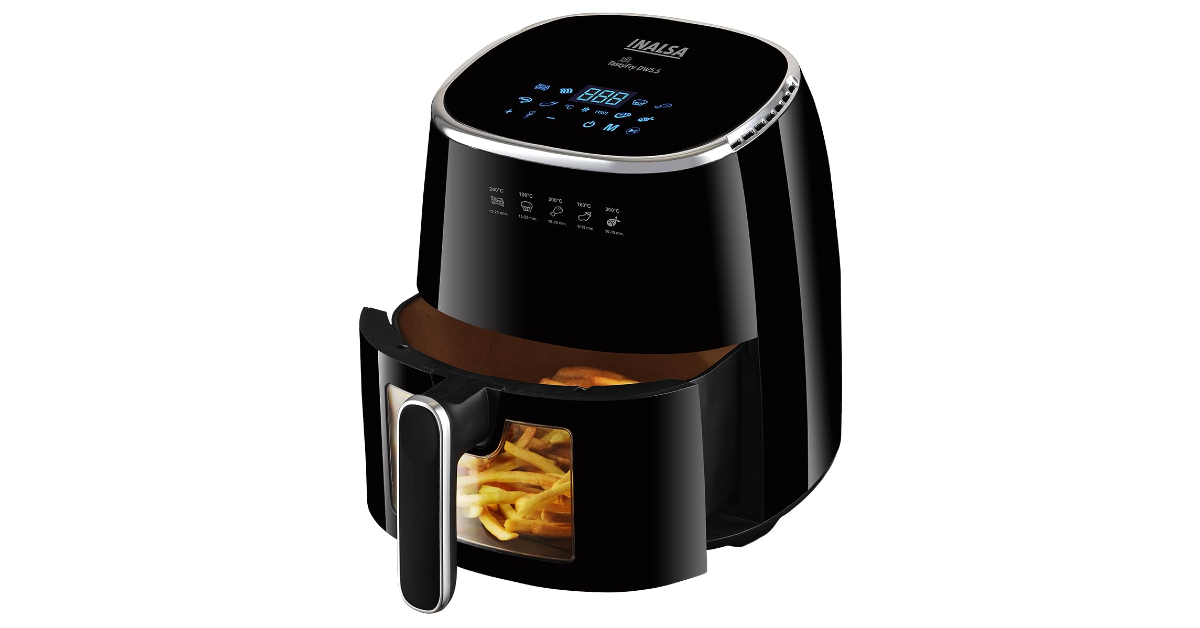
If you’re trying to cut down on oil, an air fryer is what you need in your kitchen. This air fryer from Inalsa has a 5.5-litre capacity and can reach a maximum temperature of 200°C. Its 360° hot air convection system shortens the cooking time by a considerable factor. The design of the cooking tray has a transparent panel which allows you to watch your food while it is being cooked. The touch display on top of the device lets you choose from 8 cooking functions.
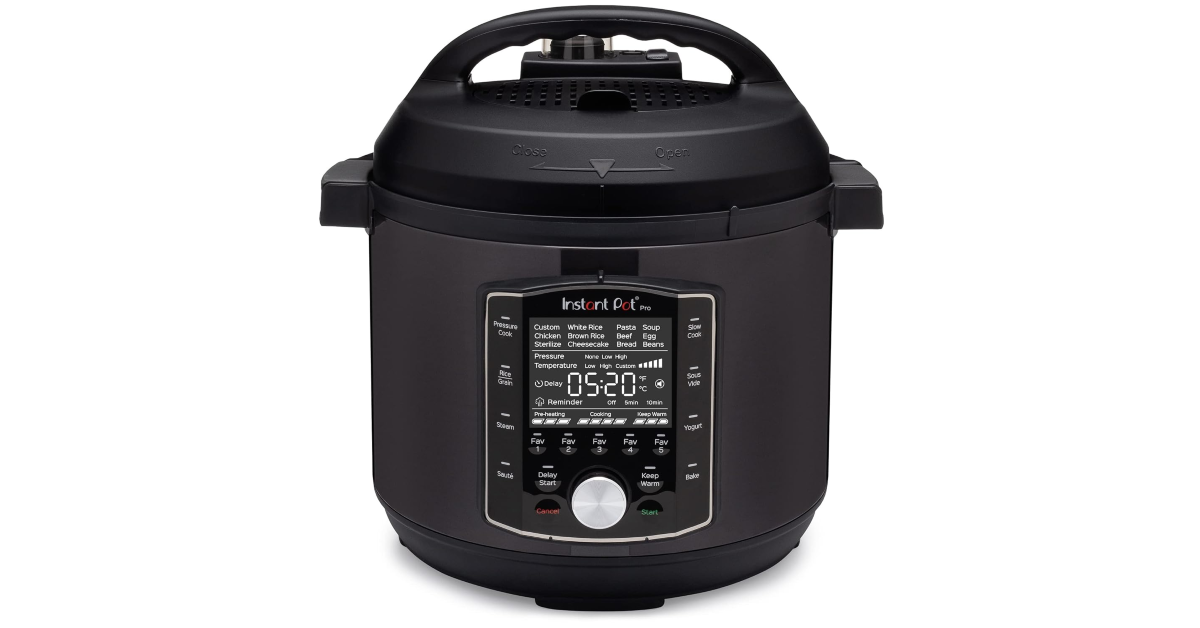
There may be more affordable alternatives to the Instant Pot Pro, but they cannot match its superior build quality and seamless functionality. This electric pot can be used to saute, slow cook, pressure cook, and more. You can choose to cook rice in it, or slow cook any kind of meat. With programmable modes on board, you can save up to 5 recipes on this device. The Instant Pot Pro lets you know which stage of cooking the food is in and uses up to 60% less energy.
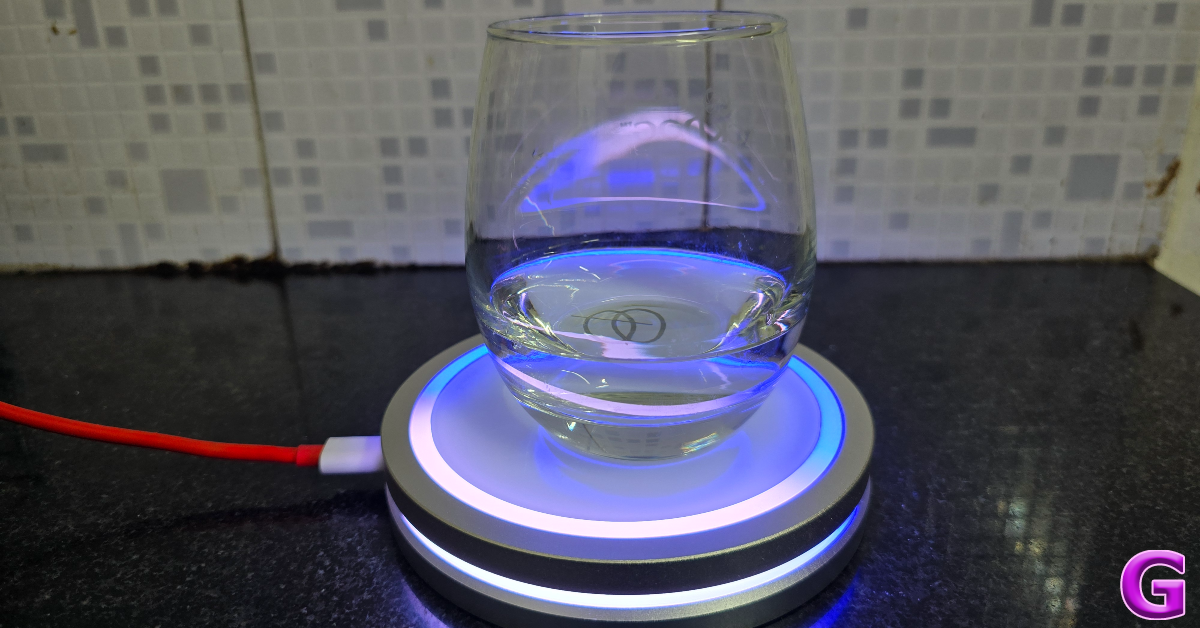
The Barsys coaster is a flashy little device that helps you make cocktails with ease. Simply follow the recipes on the Barsys app and pour the ingredients into the glass while it is placed on the coaster. When the LED ring around the coaster turns green, it is time to stop pouring. The ring also acts as a progress bar, letting you know how much you need to pour before moving on to the next ingredient. Check out our full review of the Barsys Coaster 2.0 here. If you’re looking for a gadget that attracts eyeballs, the Barsys Coaster will be a great addition to your kitchen.
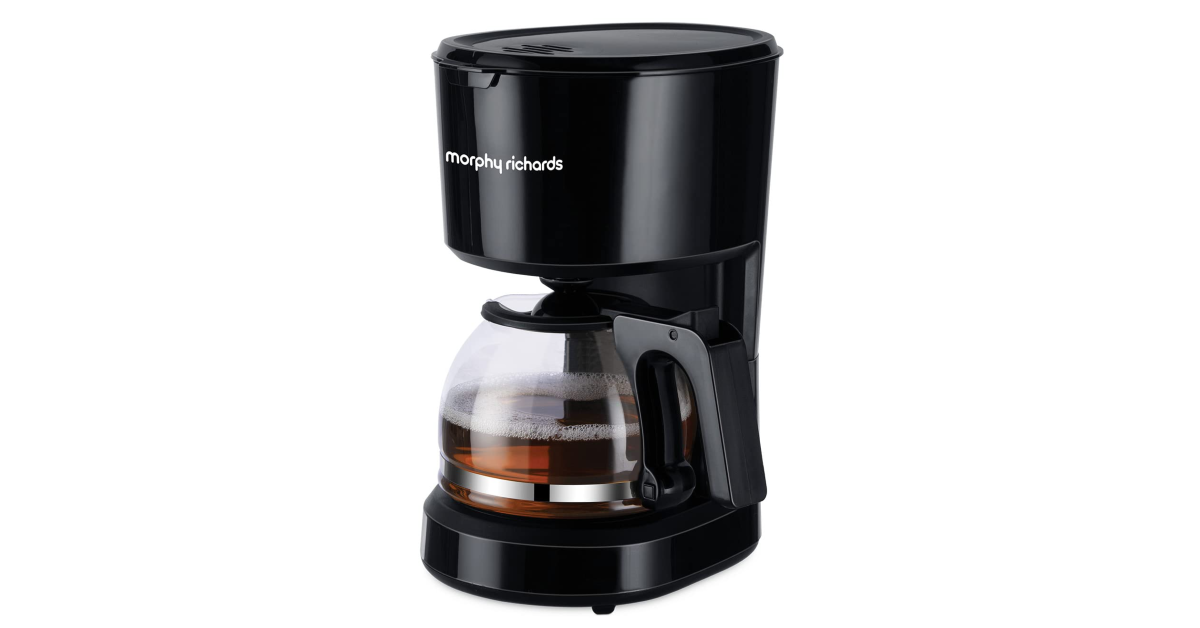
The inexpensive and no-nonsense coffee maker from Morphy Richards has a capacity of 600 ml and can make up to 6 cups of coffee at a time. Its anti-drip function ensures that it doesn’t leave a sticky mess on your counter while brewing coffee. Once the coffee has been brewed, the warming plate keeps it from cooling down. The process to remove and change the filter on this machine is very intuitive and easy to follow. On top of that, this device comes with a 2-year warranty. Certainly one of the best appliances you can add to your kitchen.
These are our picks for the best gadgets and appliances for your kitchen. While you’re here check out this list of the best microwave ovens you can buy for under Rs 5,000. If you’re interested in buying affordable food processors, here are our picks for the best ones around.
The launch date of Xiaomi’s 14 Civi smartphone—which is allegedly a repackaged Civi 4 Pro—in India has been revealed. It is known that the phone will launch on June 12. The device was teased by the firm last week. In China, Xiaomi’s Civi series is well-liked. The teaser video was released last week that pokes fun with Apple’s Crush advertisement for its newest iPad series by emphasising that creativity cannot be crushed and features enigmatic “Cinematic Vision” text.
On X, formerly known as Twitter, Xiaomi’s official account announced that its next device will be launched in the country on June 12. Additionally, a photo of the phone that showcased its camera module was posted.
The back of the phone features a circular camera module. A metallic ring will encircle the circular module which appears to have triple camera lenses bearing the Leica branding.
Although there isn’t much information available about the Xiaomi 14 Civi, it is believed to be a reincarnated Civi 4 Pro that made its debut in China in March.
If the rumours about the Xiaomi 14 Civi are accurate then the upcoming smartphone will be powered by a Snapdragon 8s Gen 3 CPU with up to 16GB of LPDDR5X RAM and up to 512GB of UFS 4.0 storage. It will flaunt a 6.55-inch full-HD+ OLED display with Gorilla Glass 2 protection and a refresh rate of 120Hz.
The Xiaomi Civi 4 Pro is equipped with three rear cameras so the the Xiaomi 14 Civi is likely to have a similar camera module led by a 50-megapixel primary lens with Leica Summilux lens and optical image stabilisation (OIS). Furthermore, it is expected to include a 50-megapixel portrait sensor along with a 12-megapixel ultra-wide-angle sensor. It may also include two 32-megapixel selfie cameras as part of a dual-camera arrangement on the front.
In addition to this, it might also sport a 4,700mAh battery that can be charged quickly at 67W.
The device was initially hinted at by the business last week in a short video teaser that parodied Apple’s Crush advertisement for its most recent iPad lineup. In order to unveil the new iPad Pro model, Apple used a hydraulic press to crush a variety of instruments and art supplies in their advertisement. Similar events occur at the beginning of the Xiaomi video, but instead of the hydraulic press breaking down while it is moving downward, Cinematic Vision text appears on the screen demonstrating how creativity is invincible.
Garena Free Fire is a battle royale game with regular awards and tournaments to keep players interested. If you play Garena Free Fire, you should be aware of the redeem codes that are released on a daily basis. However, because the battle royale game is banned in India, players from other countries can use the Free Fire Redeem codes daily. If you’re unfamiliar with the Garena Free Fire redeem codes or don’t know how to get them, we’ve put together a step-by-step guide to help you redeem them. Check out Garena Free Fire Redeem Codes for 28 May 2024.
The Free Fire redeem codes are a great way to get free stuff. These are 12-digit codes that contain alphabets and numbers, as well as an expiration date and time. Because the Garena FF redeem codes cannot be used more than once, you should hurry to the redemption page to claim your free reward before someone else does. To get a free reward, all you have to do is go to reward.ff.garena.com/en, which is the official redemption page. Also, keep an eye on this space for daily updates on Garena Free Fire redemption codes and rewards.