NYT Wordle Answer and Hints Today (November 1) #1596

Are you looking for today’s Wordle answer for November 1, 2025? The problem is difficult to solve, so if you need assistance, we’ve included hints and the clue to today’s Wordle Quiz. Below, we have made it simple for everyone to understand how to get to the Wordle Answer today.

Hints and Answers for Today’s Wordle November 1

Before answering directly, please check the Wordle Hints first.

Hint 1: Today’s Wordle answer includes two vowels.
Hint 2: The answer for today has no repeating letters.
Hint 3: Meaning- a hotel near a main road for people who are travelling by car

What word does today’s Wordle begin with?

Do you need help with today’s Wordle answer’s initial letter?

The first letter in today’s Wordle is “M”

Today’s Wordle Answer 

The answer to Wordle #1596 on November 1, 2025, is — MOTEL

Also Read: Meta launched Candle, a new submarine cable connecting East Asia and Southeast Asia

What is Wordle?

Wordle: A Five-Letter Word Guessing Game
• The game allows six guesses of a five-letter word.
• Provide feedback on the guessed letters’ placement in the puzzle.
• The New York Times purchased the game in 2022.
• Created by Josh Wardle for his partner, narrowing down 12,000 English words to 2,500.
• Named after the word “word.”

How To Play Wordle?

Wordle is a New York Times word puzzle game that allows users to guess a five-letter word in six attempts. The letters are highlighted in Yellow and Green, indicating whether the word is present in the answer or not, and Green letters indicate the correct guess.

Also Read: WhatsApp is testing a username feature similar to Facebook and Instagram, which allows chats without providing phone numbers: Report

Wordle Tips and Tricks
  • Select a powerful starting word: Avoid using unusual words, as they frequently do not match common letters. A good opening word has plenty of benefits.
  • Repeating letters: Don’t be afraid of repeating letters; they appear frequently in words. The answer may contain one or two repeated letters.
  • Use the Wordlebot: The NYT’s Wordlebot analyses and compares replies to itself. This challenge can assist you in enhancing your guessing skills and highlighting areas for development.

Lava Agni 4 India launch teased, to feature a metal body

Lava plans to introduce the Agni 4 in India soon. This upcoming smartphone will be a follow-up to the Agni 3, which launched in October 2024. Teasers for the phone reveal an update in look, with a metal body and metallic-finished buttons, a break from prior generations’ aesthetics. The new product is expected to cost approximately Rs 25,000. The gadget is rumoured to include a unique horizontal pill-shaped back camera module and be powered by the MediaTek Dimensity 8350 SoC.

Lava International has announced the introduction of its new smartphone, the Lava Agni 4, which will be available in India this November. Recent promo posts on x.com stress the phone’s structure, implying that it would be made of metal rather than plastic, indicating a more premium and robust design than previous versions. This change to a metal body represents a significant improvement in the device’s looks and tactile quality, boosting the whole user experience as the firm strives to entice customers by focusing on higher-end materials.

Also Read: Canva introduced its new Creative Operating System, AI features and more

The accompanying image in the post highlights features like the metallic-finished power button and volume rocker. There is also a peek of the device’s rear, which shows a horizontally oriented pill-shaped camera island with a metallic finish, indicating a consistent design language that prioritises durability and style.

Also Read: Samsung Wallet enabled UPI Onboarding, PIN-free biometric authentication, and more features in India

More details regarding the forthcoming phone have yet to be disclosed, although it is rumoured to contain a 4nm MediaTek Dimensity 8350 processor, as well as UFS 4.0 internal storage for efficient data management and speed. It is anticipated to include a 6.78-inch Full-HD+ display with a 120Hz refresh rate, ensuring flawless visual performance. It may include a dual 50-megapixel camera arrangement on the back, which would improve customers’ photographic skills. Furthermore, it is speculated to have a large battery capacity of over 7,000mAh, allowing for continuous use without the need for regular charging.

As far as pricing is concerned, the smartphone is anticipated to be priced at approximately Rs 25,000 in India.

WhatsApp now allows passkey-encrypted chat backups: Here’s how

0

WhatsApp has been on top of the privacy game for a very long time. It was one of the first private messengers to offer end-to-end encryption for messages. The voice and video calls on the platform are secured by end-to-end encryption as well. In 2021, it rolled out password protection for chat backups. Users can choose to secure their backed-up chat logs using a password or a 64-digit encryption key. In the most recent update, passkeys have been added to the mix. So, let’s take a quick look at how you can encrypt your WhatsApp chat backup with a passkey.

Read Also: Soon WhatsApp users will be able to set cover photo on their profile: Details

Here’s why you should encrypt your chat backup

While dealing with personal chats and messages, you should always pay special attention to security. While WhatsApp ensures that no one else but the sender and recipient can see the messages between them, malicious entities can always get a hold of your account and go through your conversations. An easy way of making sure that this doesn’t happen is by enabling 2-factor authentication for your WhatsApp account. Whenever you log into your account on another device, you are required to enter a code to verify yourself.

Encrypting chat backup ensures that no one but you can recover your conversations from the cloud. Even if someone manages to get past 2FA, they won’t be able to get a hold of your chat logs if they are encrypted. Typically, a password would work just fine. However, a unique password is hard to remember, especially when it isn’t used as often. This is why a passkey is always the better option. It provides top-notch security without compromising accessibility.

Encrypt your WhatsApp chat backup with a password

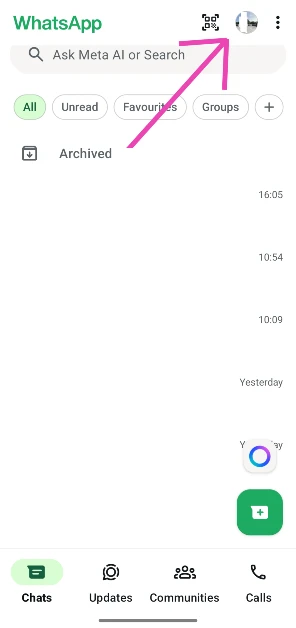
Step 1: Launch WhatsApp Messenger on your phone and tap your profile picture at the top of the screen.

Step 1: Launch WhatsApp Messenger on your phone and tap your profile picture at the top of the screen.

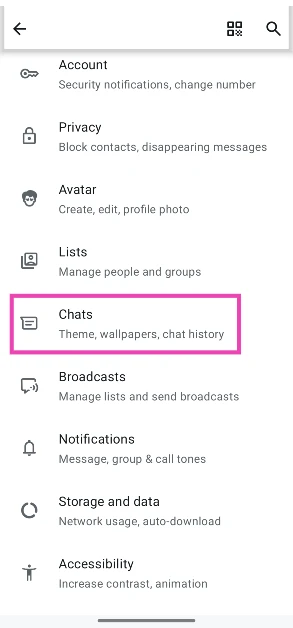
Step 2: Go to Chats.

Step 2: Go to Chats.

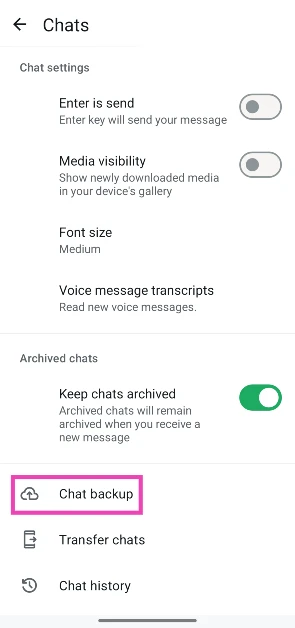
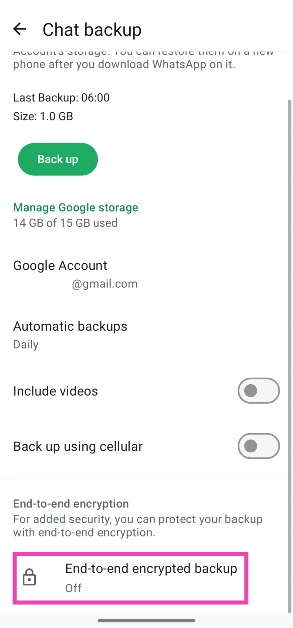
Step 3: Scroll down and tap on Chat backup.

Step 3: Scroll down and tap on Chat backup.

Step 4: Scroll down and tap on End-to-end encrypted backup.

Step 4: Scroll down and tap on End-to-end encrypted backup.

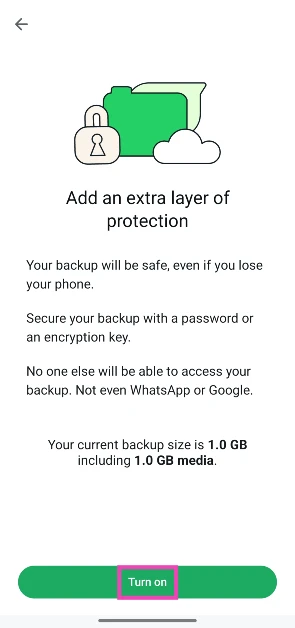
Step 5: Tap on Turn on.

Step 5: Tap on Turn on.

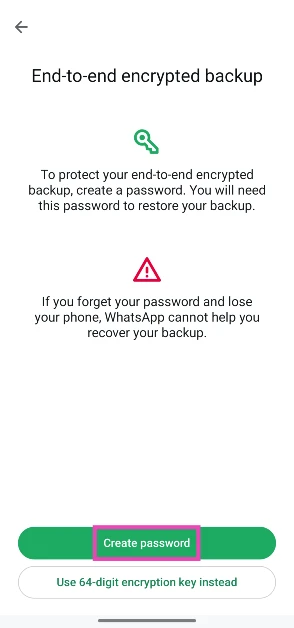
Step 6: Tap on Create password.

Step 6: Tap on Create password.

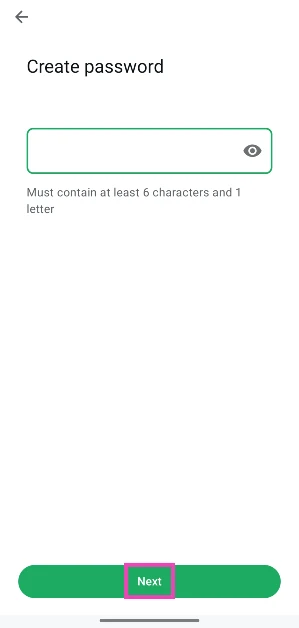
Step 7: Enter your preferred password and confirm it by re-entering it.

Step 7: Enter your preferred password and confirm it by re-entering it.

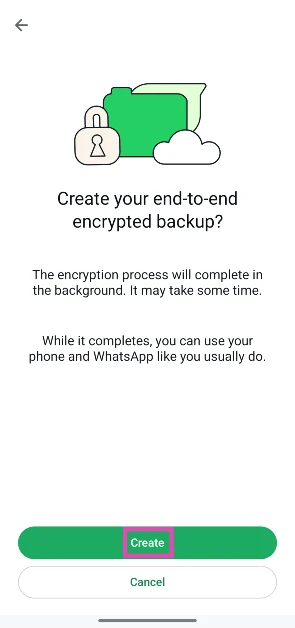
Step 8: Hit Create.

Step 8: Hit Create.

Your chat backup will become password-protected.

Encrypt your WhatsApp chat backup with a passkey

Step 1: Launch WhatsApp Messenger on your phone and tap your profile picture at the top of the screen.

Step 1: Launch WhatsApp Messenger on your phone and tap your profile picture at the top of the screen. WhatsApp now allows passkey-encrypted chat backups: Here’s how

Step 2: Go to Chats.

Step 2: Go to Chats. WhatsApp now allows passkey-encrypted chat backups: Here’s how

Step 3: Scroll down and tap on Chat backup.

Step 3: Scroll down and tap on Chat backup. WhatsApp now allows passkey-encrypted chat backups: Here’s how

Step 4: Scroll down and tap on End-to-end encrypted backup.

Step 4: Scroll down and tap on End-to-end encrypted backup. WhatsApp now allows passkey-encrypted chat backups: Here’s how

Step 5: Tap on Turn on.

Step 5: Tap on Turn on. WhatsApp now allows passkey-encrypted chat backups: Here’s how

Step 6: Tap on Use passkey.

Step 6: Tap on Use passkey.

Step 7: Select Create passkey.

Step 7: Select Create passkey.

Step 7: Use your fingerprint, face scan, or screen lock code to create the passkey.

Step 8: Hit Create.

Step 8: Hit Create.

Frequently Asked Questions (FAQs)

Are WhatsApp chats encrypted?

WhatsApp was one of the first private messengers to offer end-to-end encryption for its chats. This means your chats are only visible to you and the receiver.

Are WhatsApp chat backups encrypted?

WhatsApp offered encryption for chat backups back in 2021. Initially, you could secure the backups using a password or a 64-digit encryption key. Now, you can encrypt them using passkeys as well.

How do I encrypt my WhatsApp chat backup using a passkey?

Go to WhatsApp>Profile>Chats>Chat backup>End-to-end encrypted backup and select ‘Passkey’.

Are phone calls end-to-end encrypted on WhatsApp?

Yes, voice and video calls are end-to-end encrypted on WhatsApp.

How do I back up my WhatsApp chats?

Go to WhatsApp>Profile>Chats>Chat backup, select a Google account, and hit ‘Back up’.

Read Also: Galaxy AI expands language support to twenty-two, now supports Gujarati

Final Thoughts

As mentioned earlier, this feature is being rolled out in a phased manner. In the meantime, you can encrypt your chat backup using a password or a 64-digit encryption key. To add an extra layer of security, enable 2-factor authentication for your WhatsApp account as well. If you have any questions, let us know in the comments!

2 ways to scan and send documents on WhatsApp (Android and iOS)

0

Earlier this year, WhatsApp added an option to natively scan documents within the app and send them to their intended recipients instantly. The catch was that this option was only available to iPhone users. Now, it is being rolled out for Android devices as well. If you have a habit of exchanging digital copies of notes, you no longer need to rely on third-party apps to scan them. Here is how you can scan and send documents on Android and iOS devices.

Read Also: Upcoming smartphones in November 2025

Tips to get the perfect scan

While scanning documents on your phone, keep these tips in mind to get the ideal scans.

  • Make sure the physical document is well-lit.
  • Rest the physical document on a flat surface.
  • Position your phone’s camera directly on top of the document. Scanning it from an angle can create distracting slants.
  • Let the document fill the frame.
  • Once the document is scanned, crop its edges to focus on the text.
  • Use a markup or eraser tool to get rid of the paper stains on the scanned document.

Scan and send documents on WhatsApp (Android)

Step 1: Launch the WhatsApp Messenger on your phone and open a conversation.

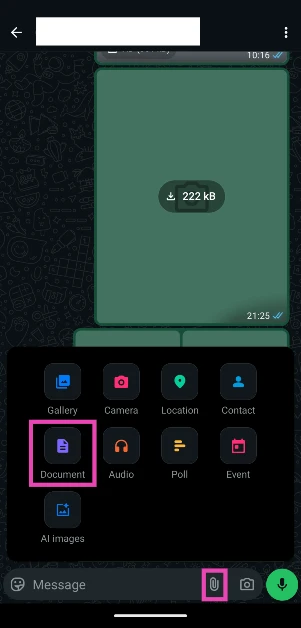
Step 2: Hit the clip icon in the text box.

Step 2: Hit the clip icon in the text box.

Step 3: Tap on Document.

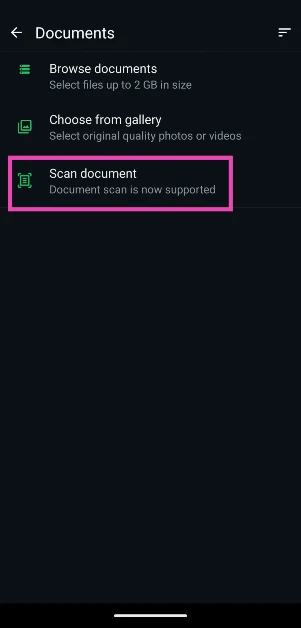
Step 4: Select Scan document.

Step 4: Select Scan document.

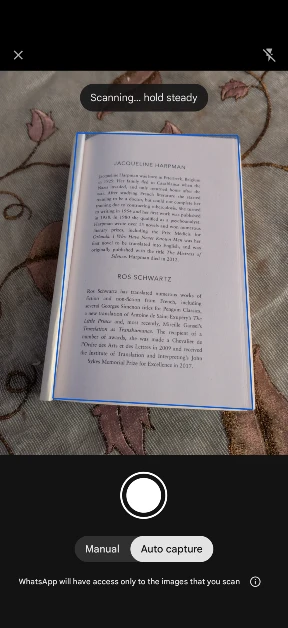
Step 5: Choose Manual or Auto Capture.

Step 5: Choose Manual or Auto Capture. 2 ways to scan and send documents on WhatsApp (Android and iOS)

Step 6: When a page is scanned, hit the plus icon to scan another.

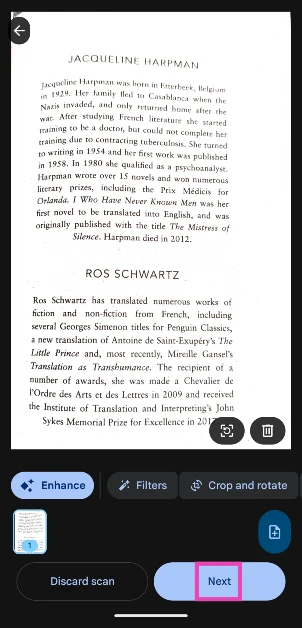
Step 7: When you’re done, hit Next.

Step 7: When you’re done, hit Next. 2 ways to scan and send documents on WhatsApp (Android and iOS)

Step 8: Hit the green icon to send it.

Step 8: Hit the green icon to send it. 2 ways to scan and send documents on WhatsApp (Android and iOS)

Scan and send documents on WhatsApp (iOS/iPhone)

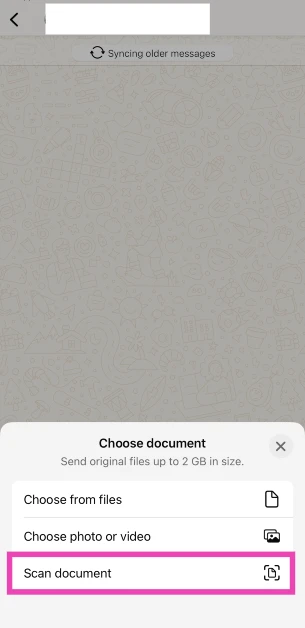
Step 1: Launch the WhatsApp Messenger on your iPhone and open a conversation.

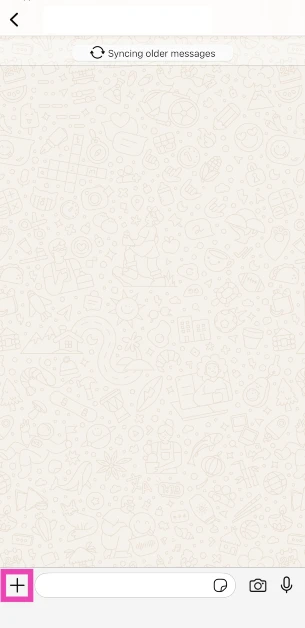
Step 2: Tap the plus icon in the bottom right corner of the screen.

Step 2: Tap the plus icon in the bottom right corner of the screen.

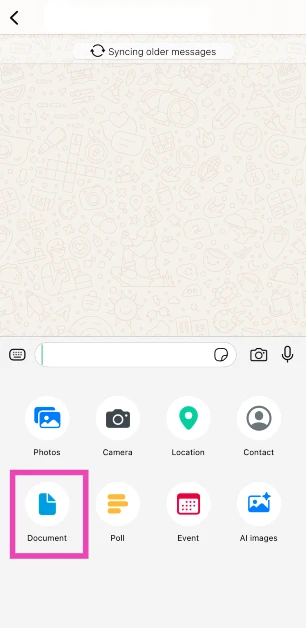
Step 3: Tap on Document.

Step 3: Tap the document icon.

Step 4: Select Scan Document.

Step 4: Select Scan Document.

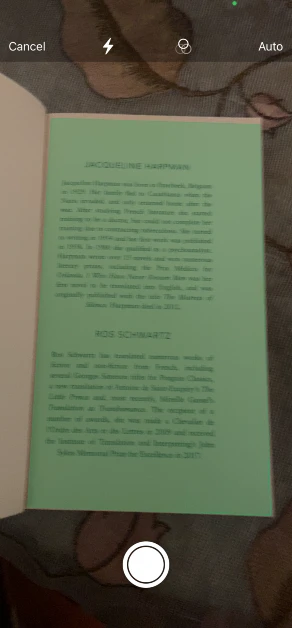
Step 5: Scan the document using your iPhone’s camera.

Step 5: Scan the document using your iPhone’s camera.

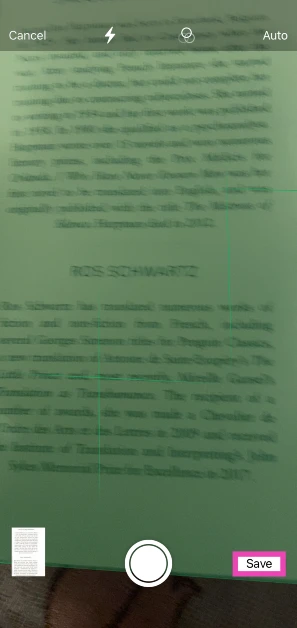
Step 6: Hit Save.

Step 6: Hit Save. 2 ways to scan and send documents on WhatsApp (Android and iOS)

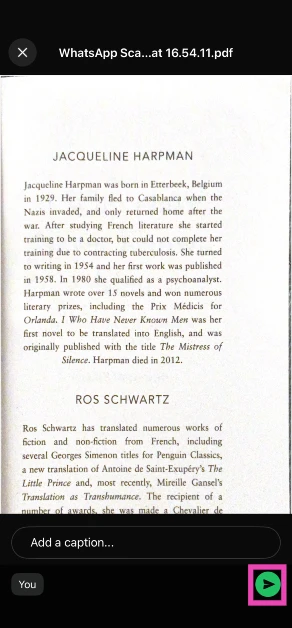
Step 7: The document will be saved as a PDF. Add a caption to the file and hit the green icon to send it.

Step 7: The document will be saved as a PDF. 2 ways to scan and send documents on WhatsApp (Android and iOS)

Frequently Asked Questions (FAQs)

How do I scan a document on my Android phone?

Enable the Text Scanner mode on your phone’s native Camera app or use a third-party app like Microsoft Lens to scan a document.

How do I scan a document on my iPhone?

Launch the Notes app, tap the Plus icon, and select ‘Scan Documents’. Point the camera at the document. Once the scan is complete, tap the tick icon in the top right corner of the screen. Go to the target folder and hit ‘Save’. You can access the native document scanner in the Files and Preview apps as well.

Does WhatsApp have a document scanner?

Yes, WhatsApp allows you to scan and send documents. Open your conversation with the person to whom you want to send the file, tap the clip icon (plus icon for iPhone users), and go to Document>Scan document. Point the camera at the page(s), make the necessary edits, and hit ‘Send’.

How do I scan a QR code using WhatsApp?

If you want to make a UPI payment using WhatsApp, hit the barcode icon at the top of the screen and point the camera at the QR code.

How do I summarise unread WhatsApp messages?

Tap the ‘unread messages’ indicator in a chat to summarise them. WhatsApp uses Meta AI for this process.

Read Also: Creators can edit their YouTube shorts on the Adobe Premiere app: Details

Final Thoughts

The native document scanner on WhatsApp lets you apply filters and clean up the marks or stains on the scanned file. If you want more editing options, a dedicated third-party scanning app would be more up your alley. If you have any questions, let us know in the comments!

Canva introduced its new Creative Operating System, AI features and more

0

Canva has introduced a new Creative Operating System that includes an improved Visual Suite, a unique AI design model, and complete tools to help brands flourish. Key improvements include a world-first AI model capable of grasping complex design elements, a new design assistant to aid users during the design process, and a redesigned video editing tool for quicker professional content creation. Canva Grow is a powerful marketing tool for designing and distributing compelling commercials. In addition, customers may continue to utilise an all-new affinity app built by expert designers for free. The platform also allows for the construction of interactive forms, a drag-and-drop email design editor for simple export, and the option to link interactive widgets to Canva Sheets for real-time data integration.

The newly released Creative Operating System includes a transformational Visual Suite that substantially improves functionality across several mediums, including video, email, code, and forms. This unique suite empowers customers by easing the process of turning ideas into reality, allowing for more effective goal attainment than before.

Canva’s Creative Operating System contains unique solutions meant to improve user experience and expedite content production. Notably, Video 2.0 is an extensive overhaul of the video editing process that incorporates professional-grade capabilities while maintaining Canva’s user-friendliness. This improved editor enables the speedy creation of compelling videos across platforms by employing AI technologies to automate cuts and effects, as well as offering a revamped timeline for easy cutting, synchronising, and stacking of content. The inclusion of Magic Video and a variety of popular themes improves content development by allowing users to create professional videos from a single prompt.

Another notable update is the Email Design function, which integrates email creation within the Canva platform. This feature makes it easier for marketing teams to develop, tweak, and export completely branded emails quickly, without the need for coding or switching between apps. Users may export their designs as HTML files for easier dissemination via preferred email platforms.

Canva has also included a new Forms feature, which allows users to easily collect feedback, RSVPs, and data. Users can use branded forms into their designs, such as websites, to ensure consistency with their visual style. The gathered responses are instantly loaded into Canva Sheets, streamlining data management into a single location.

Furthermore, Canva Code is now linked with Canva Sheets, allowing users to connect their Sheets to other works. This feature allows users to create dynamic, data-driven widgets like live dashboards, calculators, and educational tools. The seamless integration of sheets and design tools means that modifications occur in real time as data changes.

Canva is introducing a new generation of AI technology created exclusively for creativity, including the world’s first AI model trained to understand design intricacies. This major development offers a huge step forward in the interface of creativity and technology, improving how AI can support creative goals. Canva’s AI layer includes the Canva Design Model, which is an advanced model that understands design logic and creates editable content efficiently. Furthermore, AI is now incorporated throughout the design process, allowing users to generate diverse assets, such as images and graphics, right on the canvas, with enhanced style-matching capabilities for seamless design integration. The ‘Ask @Canva’ function allows users to receive real-time design feedback and suggestions for increasing their creative output without interruption.

Also Read: Samsung Wallet enabled UPI Onboarding, PIN-free biometric authentication, and more features in India

Canva is evolving into a holistic marketing platform, with new capabilities like Canva Grow that combines creation, publishing, and performance tracking, allowing teams to create and launch advertisements, evaluate real-time analytics, and improve campaigns with AI assistance. Furthermore, the Brand System automates the implementation of brand guidelines within the editor, improving uniformity in branding initiatives. Canva is also releasing Canva Business, which is geared at individuals and small teams and includes powerful AI, analytics, and scalable capabilities, filling the gap between Canva Pro and Canva Enterprise.

Also Read: Galaxy AI expanded language support to twenty-two, now supports Gujarati

Canva has also released Affinity, a new product that combines professional design tools with daily creativity. Affinity combines vector editing, image manipulation, and complex layout design into a single application and file format, reducing the need for switching between features. Users may design assets in Affinity and then effortlessly upload them to Canva for collaboration and publication. Notably, Affinity is now free, allowing a wider audience to use high-quality design tools.

Upcoming smartphones in November 2025

November is gearing up to be a busy month for flagship releases this year. This time of the year is typically dominated by Chinese tech outfits like Oppo, Vivo, iQOO, and Xiaomi. However, this year, OnePlus is also joining the party, giving an early release to its newest flagship phone. Let’s take a look at all the upcoming smartphones in November 2025.

Read Also: Creators can edit their YouTube shorts on the Adobe Premiere app: Details

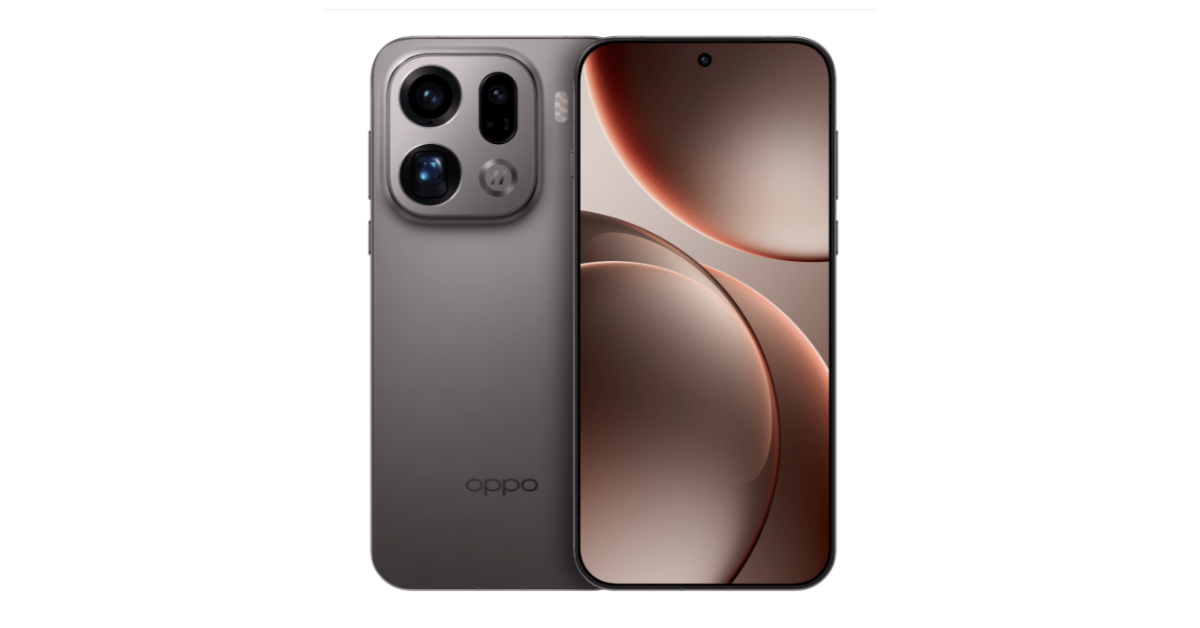
Oppo Find X9 Series

Oppo Find X9 Pro, Oppo Find X9 launched globally

Oppo took the wraps off its flagship Find X9 series this month. It is set to go on sale in November. The two models in this series are powered by the MediaTek Dimensity 9500 chipset and are rated IP68/IP69 for dust and water resistance. The Pro model flaunts a 6.78-inch LTPO AMOLED display with a 120Hz refresh rate and a peak brightness of 3,600 nits. Its triple camera comprises a 50MP primary shooter, a 200MP telephoto lens with 3x optical zoom, and a 50MP ultrawide lens. The 7,500mAh battery pack supports 80W wired and 50W wireless charging. Meanwhile, the vanilla model packs a smaller 6.59-inch AMOLED display and a 7,025mAh battery pack.

Expected Launch: Mid-November

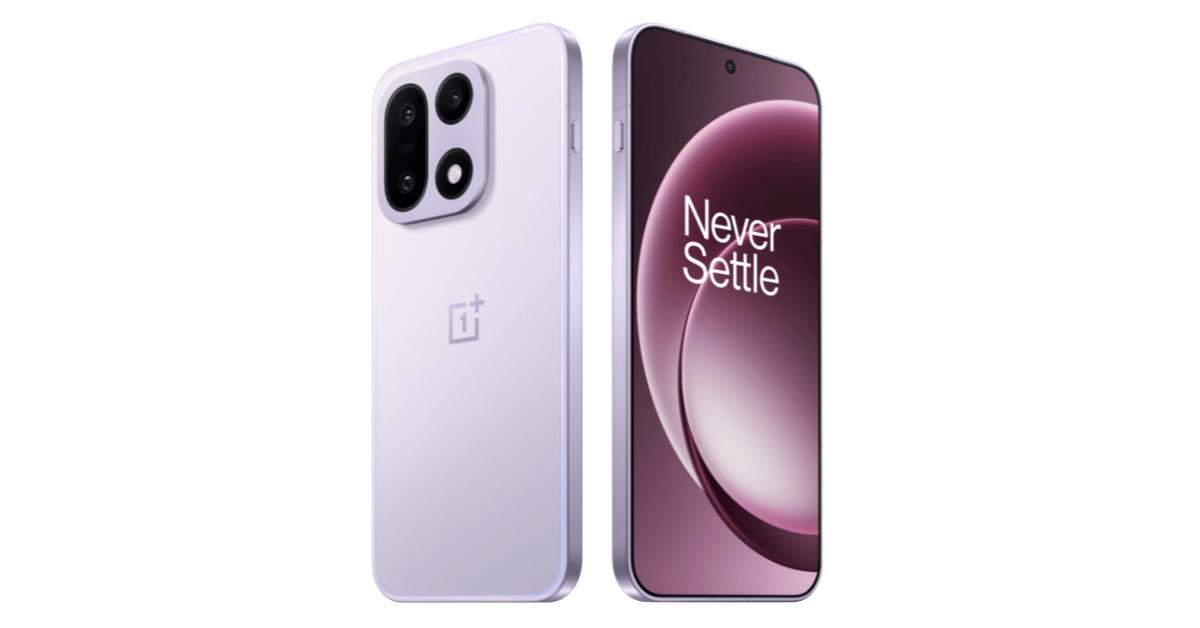
OnePlus 15

The OnePlus 15 has been released in China, succeeding the OnePlus 13. It's powered by Qualcomm's Snapdragon 8 Elite Gen 5 processor.

The new OnePlus flagship will launch a couple of months earlier than its typical January release window. The OnePlus 15 is powered by the Snapdragon 8 Elite Gen 5 chipset, which is set to be Qualcomm’s flagship processor for the larger part of 2026. The smartphone is rated IP68/IP69K for dust and water resistance. Its 6.78-inch LTPO AMOLED display can reach 1,800 nits in High Brightness Mode. The rear camera panel houses three 50MP sensors, one each for the primary shooter, telephoto lens (with 3.5x optical zoom), and ultrawide lens. A 32MP front-facing camera is nestled in a punch-hole cutout on the display. The massive 7,300mAh Si/C battery pack supports 120W wired and 50W wireless charging. There’s support for 10W reverse wireless and 5W reverse wired charging as well.

Launch Date: November 13

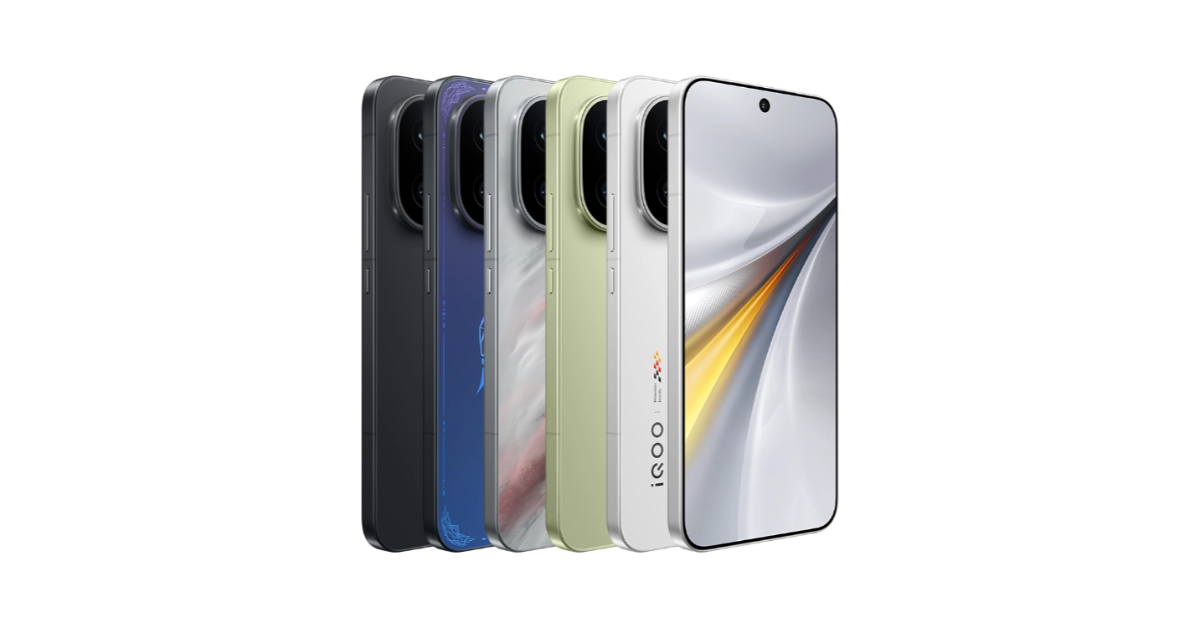
iQOO 15

iQOO 15 with Snapdragon 8 Elite Gen 5 CPU, 7,000mAh battery launched

The gaming-centric iQOO 15 is set to go on sale later this month. It will be powered by the 3nm Snapdragon 8 Elite Gen 5 SoC, along with iQOO’s in-house Supercomputing Chip Q3. Its 6.85-inch LTPO AMOLED display has a 144Hz refresh rate and can hit a peak brightness of 6,000 nits. Being a performance-oriented smartphone, it packs LPDDR5X Ultra RAM and UFS 4.1 storage. There is a large 8,000mm2 cooling chamber on board. OS duties are handled by the brand-new OriginOS 6 out of the box. The rear camera island retains the dynamic lighting and houses three 50MP sensors, one each for the primary shooter, 3x telephoto lens, and ultrawide lens. The 7,000mAh Si/C battery pack supports 100W wired and 40W wireless charging.

Launch Date: November 26

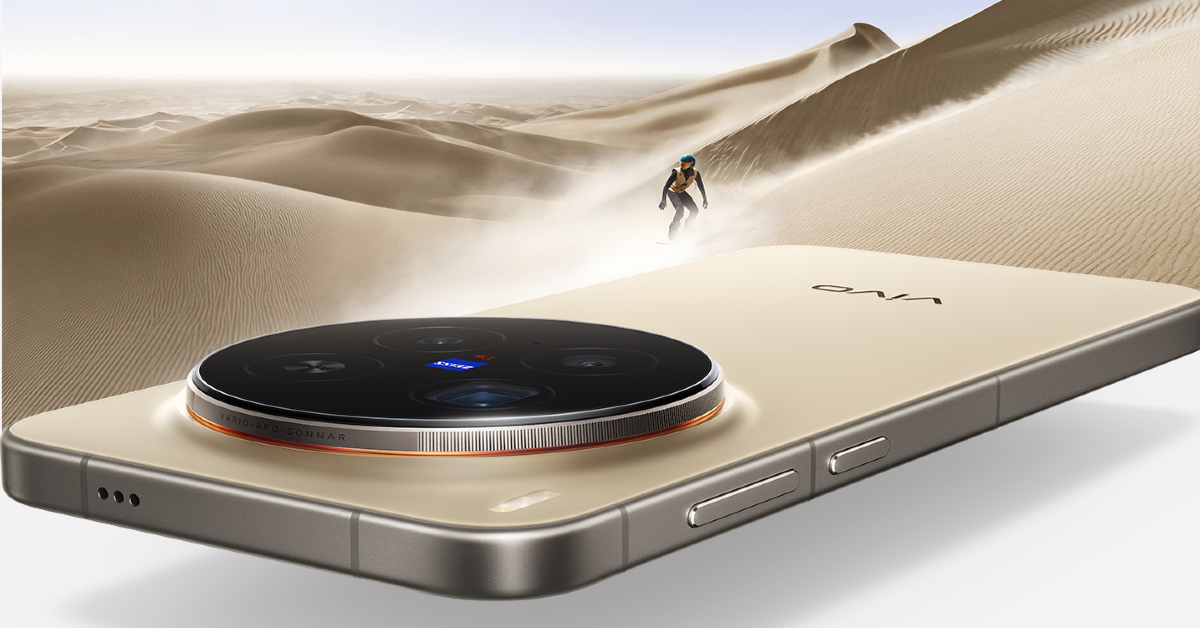
Vivo X300 Series

Vivo X300 series featuring MediaTek Dimensity Processors launched

The Vivo X300 Series was launched in China earlier this month. It is expected to go on sale in India in November. Both models in this series are powered by the MediaTek Dimensity 9500 SoC and are rated IP68/IP69 for dust and water resistance. The Pro variant has a 6.78-inch LTPO AMOLED display with a 120Hz refresh rate and a peak brightness of 4,500 nits. Its triple rear camera array comprises a 50MP primary shooter, a 200MP periscope telephoto lens with 3.7x optical zoom, and a 50MP ultrawide lens. Meanwhile, the vanilla variant features a 200MP sensor for the primary shooter, a 50MP periscope telephoto lens with 3x optical zoom, and a 50MP ultrawide lens. Both smartphones run the Android 16-based OriginOS 6 out of the box.

Expected Launch: Late November.

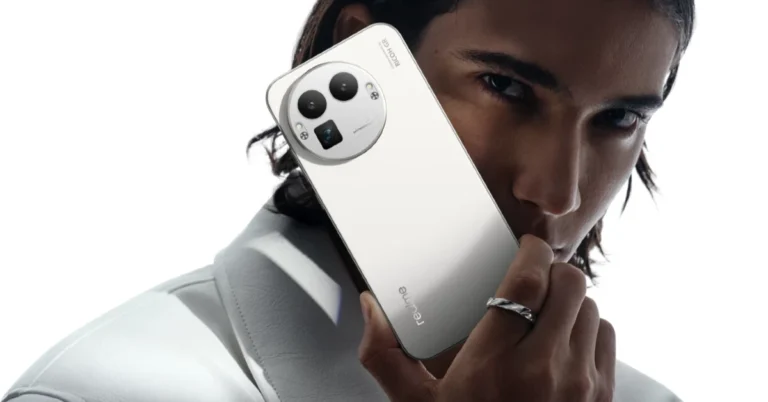
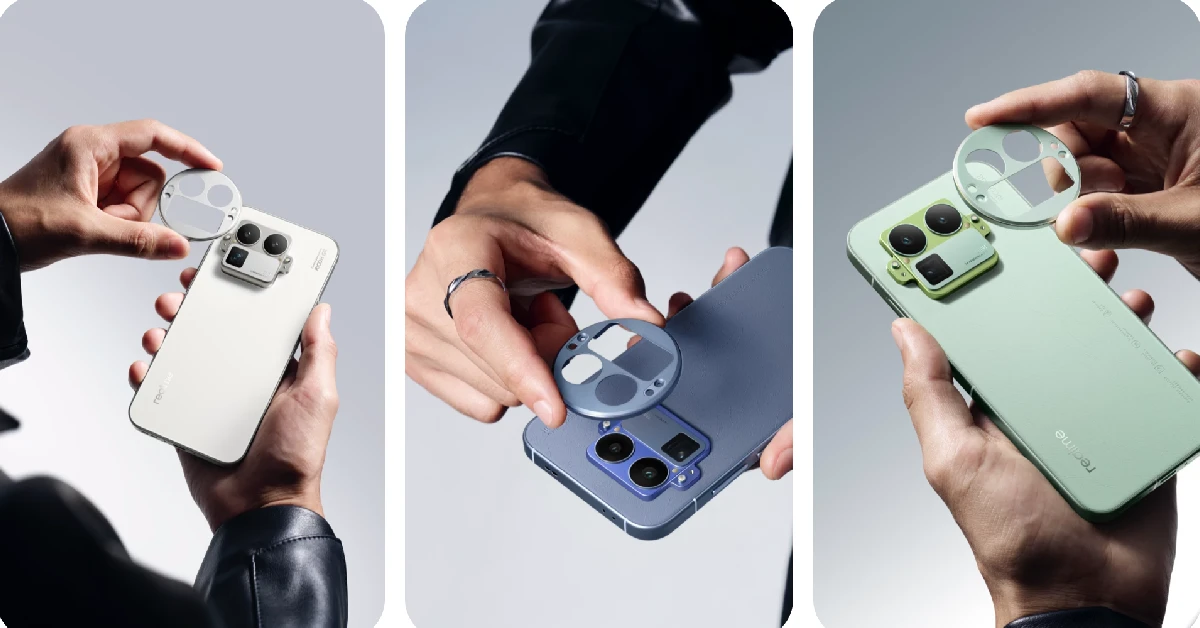
Realme GT 8 Pro

Realme GT 8 Pro Upcoming smartphones in November 2025

The Realme GT 8 Pro will be the most economical flagship phone to come out this year. It will be powered by the Snapdragon 8 Elite Gen 5 SoC and run the Android 16-based Realme UI 7 out of the box. The rear camera panel of this phone has a removable outer bezel that can be swapped with other modules. This camera panel houses a 50MP primary shooter, a 200MP periscope telephoto lens with 3x optical zoom, and a 50MP ultrawide lens. The 6.79-inch LTPO AMOLED display has a 144Hz refresh rate and can reach a peak brightness of 7,000 nits. The 7,000mAh battery pack supports 120W wired and 50W wireless charging.

Expected Launch: Early to Mid-November.

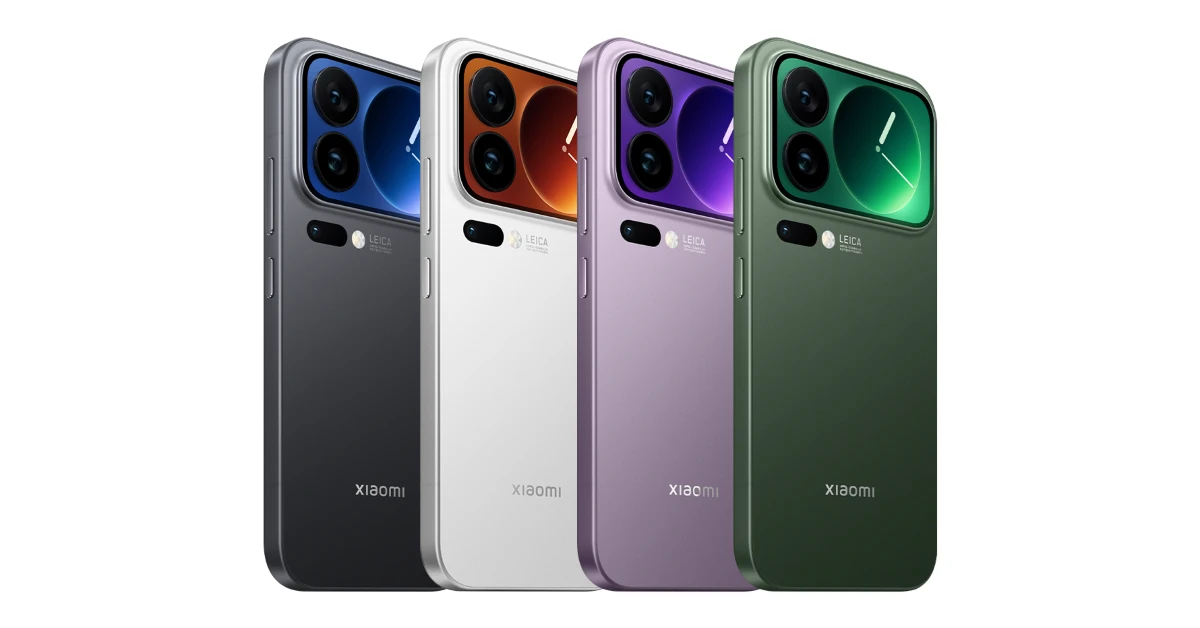
Xiaomi 17 Series

Upcoming smartphones in October 2025 Upcoming smartphones in November 2025

After making its China debut in September, the Xiaomi 17 Series is expected to make its way to India in November. The top-spec ‘Pro Max’ variant in this series features a 6.9-inch LTPO AMOLED display with a 120Hz refresh rate and a peak brightness of 3,500 nits. It also has a secondary display on the back panel. This 2.9-inch LTPO AMOLED panel also has a 120Hz refresh rate and can reach a peak brightness of 3,500 nits. It can be used to quickly glance at unread notifications, capture selfies with the rear camera by acting as a viewfinder, go through widgets, and more. Powering this phone is the Snapdragon 8 Elite Gen 5 SoC. It runs the Android 16-based HyperOS 3 out of the box. The rear camera panel consists of three 50MP sensors, one each for the primary shooter, a periscope telephoto lens with 5x optical zoom, and an ultrawide lens.

Expected Launch: Mid to Late November.

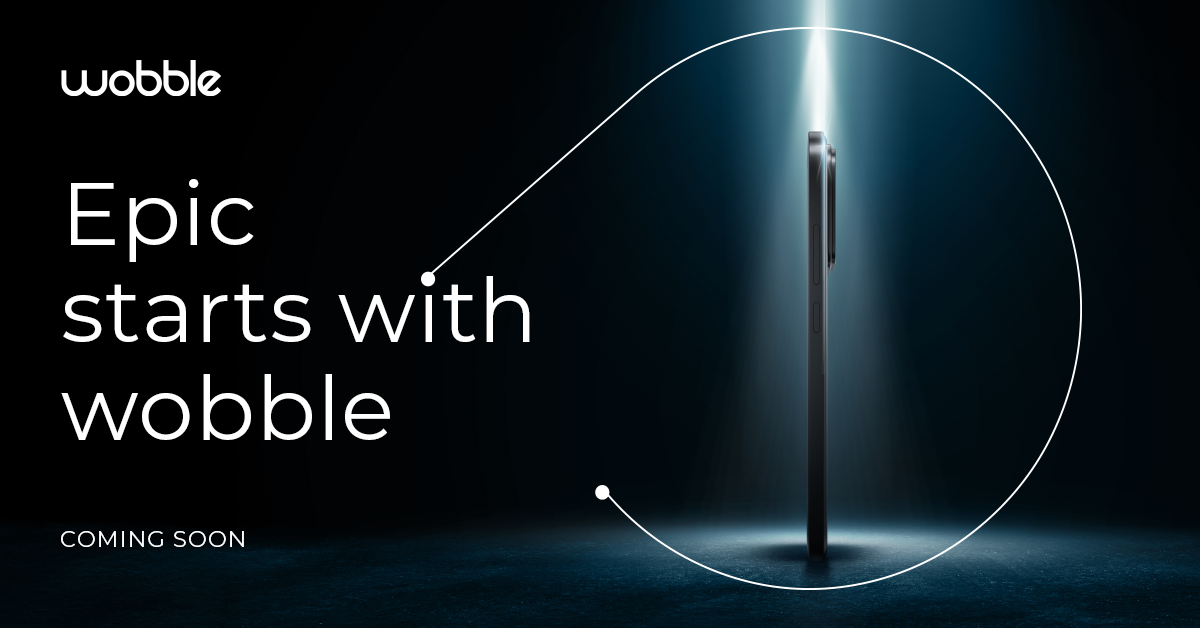
Wobble

Wobble to launch its first smartphone in India soon; launch date announced Upcoming smartphones in November 2025

Wobble, an India-based tech outfit owned by Indkal Technologies, is gearing up to launch its debut smartphone this month. While not much is known about this smartphone as of now, we can confirm that it will be a midranger powered by the MediaTek Dimensity 7400 SoC. It will have a sleek profile and a slightly raised camera panel. The smartphone will run Android 15 out of the box. There will be 8GB of RAM on board. More details are awaited as we inch closer to launch.

Launch Date: November 19.

Read Also: Top 10 gaming monitors under Rs 20,000

Final Thoughts

These upcoming smartphones will be released in November 2025. Come January, we will be looking at new flagship releases from Samsung. If you don’t want to wait to get your hands on a new device, check out the best premium phones on sale right now. If you have any questions, let us know in the comments!

Samsung Wallet enabled UPI Onboarding, PIN-free biometric authentication, and more features in India

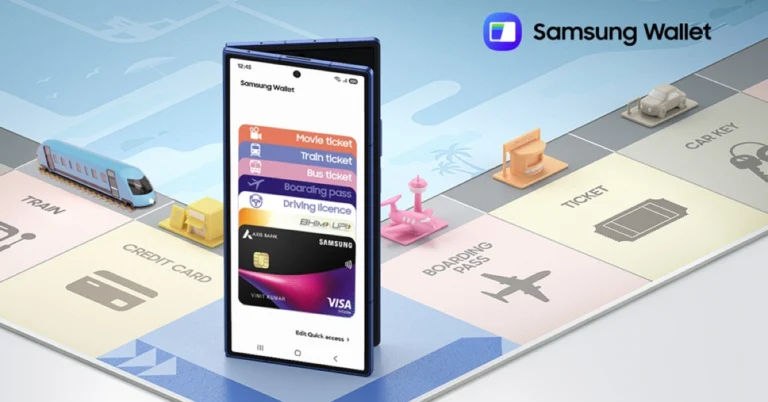
Samsung has upgraded Samsung Wallet to improve its capabilities for Galaxy smartphone customers in India. The new capabilities include onboarding for Unified Payments Interface (UPI) at first device setup, allowing consumers to make payments immediately after activating their new Galaxy phone, streamlining the process. The app now allows biometric identification without the need for a PIN and enhances Tap & Pay capabilities, particularly for Forex cards.

Samsung has made substantial improvements to Samsung Wallet, a complete platform that allows Galaxy users to store multiple digital assets such as keys, payment methods, and identity cards in a single secure application. The newly released capabilities are intended to change device setup, payment management, and digital transactions for millions of consumers. Key innovations include seamless Unified Payments Interface (UPI) onboarding integrated into the device setup process, biometric authentication that eliminates the need for a PIN, and improved Tap & Pay functionalities that support both foreign exchange (FOREX) and online card payments. These advances are part of Samsung’s continued efforts to promote Samsung Wallet as a global and secure gateway to customers’ digital lives.

Samsung has become the first Original Equipment Manufacturer (OEM) to enable the onboarding of Unified Payments Interface (UPI) accounts using Samsung Wallet during the first setup of Galaxy handsets. This integration enables consumers to be payment-ready as soon as they switch on their new Galaxy smartphone, providing a simple and frictionless experience that increases the adoption of UPI. As a result, this project improves digital payments in India and speeds the process of unpacking to payment readiness.
Samsung Wallet has upgraded its authentication process by incorporating biometric verification, which allows users to use the app and make UPI payments without entering a PIN. This feature improves access while boosting security and convenience by reducing manual input and friction during transactions. The new functionality makes safe payments as simple as unlocking your phone.

Also Read: Galaxy AI expanded language support to twenty-two, now supports Gujarati

Samsung Wallet’s functionality will be enhanced by letting users utilise their saved credit and debit cards for online transactions at a variety of popular retailers. This feature will allow customers to pay for products and services using securely tokenised cards in their Samsung Wallet, removing the need for manual card entry and allowing a faster and more secure checkout procedure.

Also Read: Soon WhatsApp users will be able to set cover photo on their profile: Details

Samsung Wallet improves its digital payments experience by enabling FOREX cards for overseas purchases, which is made possible by WSFx Global Pay Limited. This functionality enables Galaxy users to conduct smooth Tap & Pay transactions throughout the world. Furthermore, Samsung has included AU Bank cards in its services, broadening its network of financial partners and approved card issuers.

Garena Free Fire Max Redeem Codes Today 31 October 2025: Here is how to claim them

Garena Free Fire (GFF) Max is a battle royale game with regular awards and tournaments to keep players interested. If you play GFF, you should be aware of the redeem codes that are released on a daily basis. However, because the battle royale game is banned in India, players from other countries can use the Free Fire Redeem codes daily. If you’re unfamiliar with the codes or don’t know how to get them, we’ve put together a step-by-step guide to help you redeem them. Check out Garena Free Fire Max Redeem Codes for 31 October 2025.

These codes are a great way to get free items in the game. The 12-digit codes contain letters and numbers, as well as an expiration date and time. Because the Garena FF redeem codes cannot be used more than once, you should hurry to the redemption page to claim your free reward before someone else does. To get a free reward, all you have to do is go to reward.ff.garena.com/en, which is the official redemption page. Also, keep an eye on this space for daily updates on Gadget Bridge on GFF Max redemption codes and rewards.

Also Read: CERT-In identified multiple high-risk vulnerabilities in Android: Details

Garena Free Fire Max Redeem Codes Today 

N8MK3Q9LV2RJ
J1QP7M2KR5LV
J1QP7M2KR5LV
E5QH4L8MK9PJ
S6MJ2Q1LV8RP
E5QH4L8MK9PJ
S6MJ2Q1LV8RP
B7QH2L4MR8PJ
M5MJ8Q3KV6RP
G9QK1M7LN4PJ
Y2PL5Q8MR3VK
B7QH2L4MR8PJ
M5MJ8Q3KV6RP
G9QK1M7LN4PJ
Y2PL5Q8MR3VK
D4QJ9K6LN7PV
D4QJ9K6LN7PV
N8MK3Q9LV2RJ

Also Read: IFA 2025: Lenovo introduced Legion Pro 7 (2025) and Lenovo Legion Go with AMD’s Ryzen 9000 HX series processors

How to Get Free Fire Max Redeem Keys for Garena?

  • Visit the game’s official website at reward.ff.garena.com.
  • Use your Facebook, Google, VK, Apple ID, Huawei ID, or Twitter account to log in.
  • You’ll be taken to a valid redemption code (s)
  • Copy and paste the 12-digit redemption code into the text box.
  • On the screen, a dialogue box will appear.
  • ‘Ok’ should be selected.

Amazon Quiz Answers Today 31 October 2025: Participate to win Up To Rs 500 Amazon Pay Balance

Amazon Quiz 31 October 2025: The New Daily Quiz is now available. Customers from different parts of the country are participating in the daily quiz. The quiz starts at midnight today and will be live until 11:59 PM tonight. By successfully answering every question, participants in the quiz have the chance to win wonderful rewards. Up to Rs 500 Amazon Pay Balance is up for grabs to participants today.

One wrong answer could eliminate you from the quiz. You have a chance to win up to Rs 500 Amazon Pay Balance if you successfully answer every question. Users of the app only have the opportunity to take the quiz. Check Out the 31 October 2025 Quiz.

Are you not able to find Amazon FunZone? Click below and participate.

Click here to enter the Amazon FunZone Quiz and play today.

Today’s Prize: Rs 500 Amazon Pay Balance

Quiz Date: 31 October 2025

Daily Timing: 12 AM to 11:59 PM

Previous Winners Announcement: Today 12 PM Noon

Amazon Daily Quiz Answers Today: Win Up To ₹ 500 Amazon Pay Balance

Question 1: Who became the 17th Indian to score a century in a Test debut?

Answer: Yashasvi Jaiswal

Question 2: S Pangnon Konyak is the lone MP from which state in the Upper House of the Indian Parliament?

Answer: Nagaland

Question 3: Scoop is based on the real-life tale of which crime reporter, who was framed for the murder of a fellow journalist?

Answer: Jigna Vora

Question 4: What was the name of the animal of this species that became the first mammal to be cloned?

Answer: Dolly

Question 5: These mosaics are located in which city?

Answer: Istanbul

Also Read: CERT-In identified multiple high-risk vulnerabilities in Android: Details

How To Play Amazon Daily Quiz Today

Only app users are eligible to play the Amazon quiz every morning from 12 AM to 11:59 PM. The quiz is not available on the desktop. For those who are unaware of how to play the Amazon quiz, below are the steps you can follow to take the quiz.

  • First, download the Amazon app from the Google Play Store or App Store or go here to download the Amazon App
  • Now fill in the required information through the Sign-Up option.
  • To find the Amazon Daily Quiz banner, log in to the Amazon app and scroll down to the home screen.
  • Tap on the banner and tap on the Start button to start the Quiz.
  • Now you will get 5 questions and you need to answer them correctly. One wrong answer will eliminate you from the Quiz.
  • After answering all the questions correctly, you are now eligible for a Lucky Draw.
  • The previous winner’s name will be announced today at 12 PM.

Amazon Daily Quiz Answers from the previous few days.

Here are all the answers from the previous 5 days of the Amazon Daily Quiz and Contest.

30 October 2025

Question 1: The latest venue in Test cricket is the Civil Service Cricket Ground in which city?

Answer: Belfast

Question 2: Nitanshi Goel stars as the lead character of Phool Kumari in which movie was produced by Aamir Khan?

Answer: Laapataa Ladies

Question 3: Vinod Khosla and Bill Joy were two of the founders of which famous technology company is currently headquartered in Santa Clara?

Answer: Sun Microsystems

Question 4: This is the ancient Roman theatre of Kom El Deka in Alexandria, in which country?

Answer: Egypt

Question 5: Which famous singer is shown here?

Answer: Bruce Springsteen

29 October 2025

Question 1: The latest venue in Test cricket is the Civil Service Cricket Ground in which city?

Answer: Belfast

Question 2: Nitanshi Goel stars as the lead character of Phool Kumari in which movie was produced by Aamir Khan?

Answer: Laapataa Ladies

Question 3: Vinod Khosla and Bill Joy were two of the founders of which famous technology company is currently headquartered in Santa Clara?

Answer: Sun Microsystems

Question 4: This is the ancient Roman theatre of Kom El Deka in Alexandria, in which country?

Answer: Egypt

Question 5: Which famous singer is shown here?

Answer: Bruce Springsteen

28 October 2025

Question 1: Which famous badminton player is one India’s flagbearer for the 2024 Paris Olympics

Answer: PV Sandhu

Question 2: What is the latest edition of the Bad Boys movie franchise?

Answer: Bad Boys: Ride or Die

Question 3: Nobel Prize winner Ernest Rutherford was born in which country?

Answer: New Zealand

Question 4: This is the Taj-ul-Masajid in which city?

Answer: Bhopal

Question 5: This is a bust of which famous ruler from history?

Answer: Alexander the Great

27 October 2025

Question 1: Which of these batters scored a century during India’s recent 5-match T20I series against Zimbabwe?

Answer: Abhishek Sharma

Question 2: In May 2025, the ___ edition of the Mission Impossible movie franchise is going to be released. Fill in the blanks

Answer: 8th

Question 3: In which present-day Indian state was the Battle of Buzar, which saw the East India  Company emerged victorious, fought?

Answer: Bihar

Question 4: This view of the City Palace in which Indian state?

Answer: Jaipur

Question 5: Valletta is the capital of which country, whose flag is shown here?

Answer: Malta

25 October 2025

Question 1: What is the name of the mascot of the 2024 Paris Olympics?

Answer: Phryge

Question 2: Who is playing the character of Harley Quinn in the movie ‘Joker: Folie a Deux/ Joker 2’?

Answer: Lady Gaga

Question 3: Who succeeded the 19th Mughal emperor Akbar Shah II to the throne?

Answer: Bahadur Shah Zafar

Question 4: Which Nobel laureate is shown here?

Answer: Marie Curie

Question 5: The flag of which country is shown here?

Answer: Armenia

24 October 2025

Question 1: Who was the top scorer for India in the T20 World Cup final 2024?

Answer: Virat Kohli

Question 2: The Last Dance is the tag line of the 3rd of a series of movies with whom as the central character?

Answer: Venom

Question 3: British Shorthair, Ragdoll and Abyssinian are types of what animal?

Answer: Cat

Question 4: Which famous place in the UK is shown here?

Answer: Trafalgar Square

Question 5: Which famous person is depicted in this statue?

Answer: Napoleon Bonaparte

23 October 2025

Question 1: Who beat Novak Djokovic in the final to win his 2nd consecutive Wimbledon men’s singles title?

Answer: Carlos Alcaraz

Question 2: In Captain America: Brave New World, scheduled to be released in 2025, which legendary actor plays the role of Thaddeus Thunderbolt Ross?

Answer: Harrison Ford

Question 3: Which place in South India is also known as the Scotland of India?

Answer: Coorg

Question 4: This is a picture taken in which African country?

Answer: Morocco

Question 5: What is the name given to the profession of the man in the picture?

Answer: Gondolier

Also Read: IFA 2025: Lenovo introduced Legion Pro 7 (2025) and Lenovo Legion Go with AMD’s Ryzen 9000 HX series processors

Frequently Asked Questions (FAQs)

Where can I check the previous winners? Did I win? How to check?

You can head over to this link on your mobile or desktop to check the winners of the Amazon Daily Quiz Contest.

How to Play Amazon Daily Quiz or Contest?

We have written an explainer above; you can refer to that.

When are the winners of the Quiz and contest announced or declared?

The announcement of today’s quiz winner will take place Tomorrow. As for the Special Quiz and “Spin & Win” Contest, the winners will be declared once the Quiz Contest comes to an end. To find out who the lucky winner is, you can refer to the Winners List or visit the Amazon Winners tab in the Amazon App.

How to participate in the Daily Amazon Quiz?

That is very easy, just got to the Amazon app and scroll to the bottom of the page and you will find the Quiz section. Click on it (usually it is called the fun zone) and you can enter the Amazon Today Quiz Contest. 

Are there any other quizzes or contests running on Amazon daily?

Yes, there are many running daily. These range from spinning the wheel to answering the questions correctly. All are located in the Fun Zone. 

What are the criteria for selecting a winner in the Daily Amazon Quiz?

When a qualified player submits correct answers to all the questions, they will automatically be entered into a lucky draw. This draw will include all participants who answered all the questions correctly. Amazon randomly selects the final winners from the pool of eligible participants who gave the right answers.

Which Types of Questions are asked within the Amazon Daily Quiz?

These are very simple and straightforward questions. These are mainly related to general knowledge. 

Where should I look for Amazon Daily Quiz answers?

You can bookmark our website www.gadgetbridge.com as we will help you every day with the Amazon Daily Quiz. We bring you fresh answers every day for the Amazon Daily Quiz and Contest. 

What time does Amazon announce previous winners?

The previous winner’s name will be announced today at 12 PM (noon).

NYT Wordle Answer and Hints Today (October 31) #1595

Are you looking for today’s Wordle answer for October 31, 2025? The problem is difficult to solve, so if you need assistance, we’ve included hints and the clue to today’s Wordle Quiz. Below, we have made it simple for everyone to understand how to get to the Wordle Answer today.

Hints and Answers for Today’s Wordle October 31

Before answering directly, please check the Wordle Hints first.

Hint 1: Today’s Wordle answer includes two vowels.
Hint 2: The answer for today has no repeating letters.
Hint 3: Meaning- to hate something very much

What word does today’s Wordle begin with?

Do you need help with today’s Wordle answer’s initial letter?

The first letter in today’s Wordle is “A”

Today’s Wordle Answer 

The answer to Wordle #1595 on Oct 31, 2025, is — ABHOR

Also Read: Meta launched Candle, a new submarine cable connecting East Asia and Southeast Asia

What is Wordle?

Wordle: A Five-Letter Word Guessing Game
• The game allows six guesses of a five-letter word.
• Provide feedback on the guessed letters’ placement in the puzzle.
• The New York Times purchased the game in 2022.
• Created by Josh Wardle for his partner, narrowing down 12,000 English words to 2,500.
• Named after the word “word.”

How To Play Wordle?

Wordle is a New York Times word puzzle game that allows users to guess a five-letter word in six attempts. The letters are highlighted in Yellow and Green, indicating whether the word is present in the answer or not, and Green letters indicate the correct guess.

Also Read: WhatsApp is testing a username feature similar to Facebook and Instagram, which allows chats without providing phone numbers: Report

Wordle Tips and Tricks
  • Select a powerful starting word: Avoid using unusual words, as they frequently do not match common letters. A good opening word has plenty of benefits.
  • Repeating letters: Don’t be afraid of repeating letters; they appear frequently in words. The answer may contain one or two repeated letters.
  • Use the Wordlebot: The NYT’s Wordlebot analyses and compares replies to itself. This challenge can assist you in enhancing your guessing skills and highlighting areas for development.

Creators can edit their YouTube shorts on the Adobe Premiere app: Details

Adobe has announced a partnership with YouTube to improve the Premiere app, including dedicated editing capabilities for YouTube Shorts. The Create for YouTube feature was presented during the Adobe Max 2025 event, where it was stated that the application will have additional effects, presets, and transitions designed just for Shorts creators. This news corresponds with the launch of new artificial intelligence functionality across Adobe’s platforms.

Adobe and YouTube announced a collaboration to improve the video production experience for creators globally. The partnership integrates Adobe Premiere’s powerful video editing features with YouTube Shorts’ vast reach. A new tool called Create for YouTube Shorts will soon be accessible in the Premiere mobile app, allowing creators to effortlessly create and post videos to YouTube Shorts. This specialised platform will allow users to use Adobe’s high-quality video editing tools, save and create templates, and share their works on YouTube Shorts, encouraging creativity and new trends among creators. During the MAX event, Scott Silver from YouTube and Ely Greenfield from Adobe announced their collaboration to serve the worldwide creative community.

The “Create for YouTube Shorts” content creation function in Adobe Premiere Mobile is intended to improve creative experiences directly on YouTube. By tapping the “Edit in Adobe Premiere” icon in YouTube Shorts, users will be taken to a specific content creation setting with advanced features.

Also read: Galaxy AI expanded language support to twenty-two, now supports Gujarati

This tool enables creators to use exclusive effects, transitions, and title presets to make their videos visually appealing and unique. It also includes ready-to-use templates with professional transitions and effects, guaranteeing that the content looks clean and refined. Furthermore, users may build and share personalised templates that not only inspire but also have the ability to define new trends in the YouTube community.

Also Read: Soon WhatsApp users will be able to set cover photo on their profile: Details

One of the primary advantages of this association is the ability to share finished videos straight to YouTube Shorts with a single tap, therefore reducing the content distribution process and improving user comfort.

Adobe Premiere mobile, which was released in September, provides creators with full video editing capabilities, including professional-grade tools and studio-quality audio improved with Generative Sound Effects. It also has AI-driven functions that use Firefly to develop unique assets.

Galaxy AI expanded language support to twenty-two, now supports Gujarati

Samsung’s Galaxy AI is making advancements in mobile artificial intelligence through expanding its language support to 22 languages, including Gujarati and Filipino, which were just added. This endeavour is part of Samsung’s overall objective of making mobile AI experiences more accessible and meaningful, allowing for seamless cross-border communication. Key features, including Live Translate, Interpreter, Chat Assist, and Note Assis,t are intended to improve users’ communication and productivity, allowing them to connect successfully regardless of location. Galaxy AI is expected to reach over 400 million devices by the end of 2025, demonstrating its rapid acceptance and growing importance in the worldwide market.

Samsung has announced that its Galaxy AI will now support two new languages: Filipino and Gujarati, starting October 29. This update brings the total number of supported languages to 22, demonstrating Samsung’s dedication to lowering language barriers and bringing better mobile AI experiences to a larger audience.

Also Read: Soon WhatsApp users will be able to set cover photo on their profile: Details

As Galaxy AI grows, it expands its intelligent capabilities to a larger spectrum of users, with an emphasis on improving communication and productivity in daily tasks. The Gujarati and Filipino language models were produced in close collaboration with Samsung Research centres in India and Indonesia. Their ongoing attempts to advance localised language models have a significant impact on Galaxy AI’s global implementation.

Samsung reports that more than 70% of Galaxy S25 users use Galaxy AI and Google Gemini capabilities on a regular basis. In India, this percentage jumps to an astonishing 91%. Almost half of customers (47%) use AI for a variety of routine tasks. Samsung’s commitment to democratising mobile AI is seen in its rapid global adoption, with many people using Galaxy AI in their communication, learning, and productivity. Since its premiere with the Galaxy S24 series, Galaxy AI has achieved 200 million devices and is expected to hit 400 million by the end of 2025. Additionally, new language packs for Galaxy AI will be available for download through the Settings app beginning October 29.

Also Read: Honor rolls out MagicOS 10 featuring new UI design, AI features and more

Giridhar Jakki, Senior Director and Head of Language Al Team at Samsung R&D Institute India, Bengaluru, said, “The addition of Gujarati to Galaxy AI is a significant milestone in our mission to democratise Al in India, which has a diverse linguistic landscape. By adding Gujarati to our spectrum, we are enabling the native speakers to seamlessly use popular Galaxy AI features such as Call Assist and Interpreter – all powered by our advanced on-device Al technology. As we continue expanding Galaxy Al’s linguistic reach, we remain committed to creating technology that serves India’s multilingual heritage while empowering communities to thrive in an interconnected world.”

Soon WhatsApp users will be able to set cover photo on their profile: Details

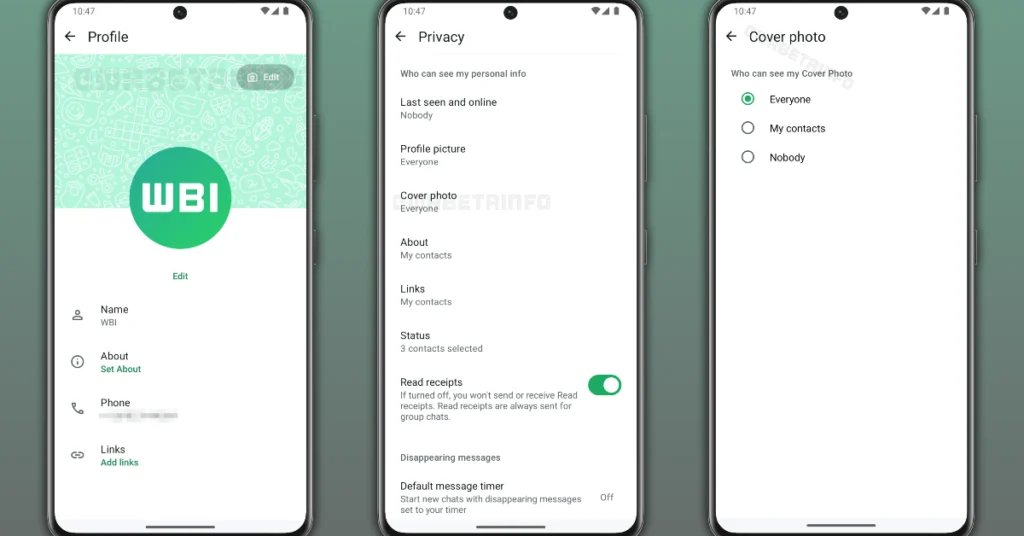
WhatsApp is planning to add a feature that allows users to decide on a profile cover photo, similar to those on Facebook and LinkedIn. This feature, available for WhatsApp Business accounts since 2022, allows users to show a cover image at the top of their profile. Users may make their cover photo available to everyone, which improves the customisation of their social networking experience. The feature is part of Meta’s larger push to expand profile customisation for all users.

According to a report, WhatsApp intends to add cover photos to its app, allowing normal users to personalise their profiles similarly to business accounts. The capability was found following the release of the most recent WhatsApp beta for Android 2.25.32.2, which is now accessible on the Google Play Store. This update attempts to improve user engagement by allowing for more personal expression.

This feature allows businesses to display a banner photo at the top of their profiles that highlights their brand or important information. Currently, normal users are unable to modify their accounts in this manner. However, recent modifications to the beta version indicate that WhatsApp is preparing to expand this capability to all users in a future release. This improvement aims to give a more personalised and visually attractive profile experience to WhatsApp’s whole user base.

Soon WhatsApp users will be able to set cover photo on their profile: Details
Image Courtesy: WABetaInfo

Once implemented, the new WhatsApp feature will allow users to display a cover photo that reflects their style, identity, or current mood. This cover photo will be prominently displayed at the top of the profile page, acting as a unique banner that adds character to each user’s profile. This design mimics the cover layouts prevalent on social media sites such as Facebook and LinkedIn, providing a familiar and visually attractive feature to user profiles.

Also Read: Nothing Phone 3a Lite launched globally: Here is everything about the new mid-ranger

WhatsApp allows users to control who may view their cover photo. The options under testing include “Everyone,” which grants access to all WhatsApp users regardless of contact status; “My contacts,” which restricts visibility to those saved in the user’s address book; and “Nobody,” which fully hides the cover photo from all users. This last option is very useful for people who desire to keep their cover photo but do not want it to be seen temporarily.

WhatsApp does not yet provide the option “My contacts except,” which allows users to restrict select contacts from accessing specified features, such as cover photos. This limitation may change in the future as the platform improves its functionality based on user input from beta testing. This limitation underscores WhatsApp’s dedication to user control and privacy while expanding customisation options.

Also Read: Honor rolls out MagicOS 10 featuring new UI design, AI features and more

The upcoming feature, which allows users to pick a cover photo for their WhatsApp profile, is still under development and will be accessible following internal testing and optimisation. A global release is planned soon, assuming that quality standards are reached. Updates will be provided once the functionality becomes available to beta testers.

Honor rolls out MagicOS 10 featuring new UI design, AI features and more

Honor has released MagicOS 10, its most recent version of a modified Android interface based on Android 16, which contains various enhancements targeted at improving user experience. Notably, the update enhances the capabilities of Honor’s AI assistant, Yoyo, which can now be accessed in real time via a dedicated button on the new Magic 8 series smartphones. Additionally, MagicOS 10 is differentiated by its transparent UI design, which aims to provide consumers with a more basic interface. MagicOS 10 introduces one-touch transfer capability across many devices, allowing for smooth data transfer between Honor smartphones and other platforms such as iPhone models and Mac PCs. Security enhancements, together with connectivity advancements, guarantee a more robust user experience.

The Honor Magic 8 and Honor Magic 8 Pro are the first devices to receive the MagicOS 10 upgrade, which will be available in October. This update will also be available to a number of other Honor smartphones, including the Magic V5, Magic 6 Ultimate Edition, Magic 7 RSR (Porsche Design), and Magic 6 RSR (Porsche Design). In addition, the Honor Magic 6 series, Magic 7 series, Honor 400 series, Honor GT Pro, and Honor Magic Pad 3 have been confirmed to receive the update this month.

The rollout is scheduled to continue in November, with the Magic V3, Magic Vs3, Magic 5 series, Magic 5 Ultimate Edition, and Honor Pad GT 2 Pro included. The update will be released in December for the Honor Magic V2 RSR, Tablet GT Pro, Magic V2 Ultimate Edition, Tablet GT, Magic V2, Tablet V9, and MagicPad 2.

Also Read: Nothing Phone 3a Lite launched globally: Here is everything about the new mid-ranger

Furthermore, other models, including the Honor 100 series, 300 series, 200 series, 90 GT, Power, and others, are expected to receive the MagicOS 10 upgrade in the first quarter of next year.

MagicOS 10 moves away from simple device-cloud coordination and toward an agent-centric model that improves intelligence and enables a connected ecosystem through AI collaboration. MagicOS 10 is built around an updated version of YOYO, which has agentic skills that allow it to perceive, remember, and execute tasks, using HONOR’s patented MagicLM 3.0 technology. Users may use YOYO with a single tap to handle daily tasks and creative activities, such as AI-assisted color grading via Magic Color, advanced command-driven picture editing, and actions like ordering meals, shopping, and hailing rides.

It is believed to be the first operating system that eliminates platform barriers, allowing for the seamless transfer of photographs, videos, and documents between HONOR, iOS, Android, and Windows devices. This cross-platform capability improves both user comfort and operational efficiency. The OS incorporates Zero-Gravity Transparency Design, which provides system-wide transparent visual effects without increasing power consumption, establishing a harmonic balance between aesthetic appeal and performance. Furthermore, MagicOS 10 includes improved AI Deepfake Detection, which accurately detects counterfeit voices, deepfake visuals, and scam scripts, assuring user safety and security.

Also Read: Wobble to launch its first smartphone in India soon; launch date announced

HONOR is moving forward with the HONOR AI Connect platform, evolving from interconnect to intelligent connect with substantial AI integration. This change is intended to streamline the partner onboarding process and reduce development expenses for developers. The platform has advanced multimodal user interface capabilities, including voice and vision, allowing developers to use these features without having to reconstruct complicated underlying systems. It also delivers cross-scenario AI collaborative services. By gradually improving intelligent connectivity capabilities, HONOR AI Connect enables intelligence sharing, entry sharing, and ecosystem sharing, allowing each gadget to function intelligently.

HONOR has formed alliances with over 200 ecosystem partners and introduced a program that provides free IoT connectivity to increase value. Through initiatives like the HONOR Alpha Flagship Store and extended store access programs, the firm provides considerable resources and growth support to its partners, establishing a collaborative, human-centred innovation ecosystem.

Garena Free Fire Max Redeem Codes Today 30 October 2025: Here is how to claim them

Garena Free Fire (GFF) Max is a battle royale game with regular awards and tournaments to keep players interested. If you play GFF, you should be aware of the redeem codes that are released on a daily basis. However, because the battle royale game is banned in India, players from other countries can use the Free Fire Redeem codes daily. If you’re unfamiliar with the codes or don’t know how to get them, we’ve put together a step-by-step guide to help you redeem them. Check out Garena Free Fire Max Redeem Codes for 30 October 2025.

These codes are a great way to get free items in the game. The 12-digit codes contain letters and numbers, as well as an expiration date and time. Because the Garena FF redeem codes cannot be used more than once, you should hurry to the redemption page to claim your free reward before someone else does. To get a free reward, all you have to do is go to reward.ff.garena.com/en, which is the official redemption page. Also, keep an eye on this space for daily updates on Gadget Bridge on GFF Max redemption codes and rewards.

Also Read: CERT-In identified multiple high-risk vulnerabilities in Android: Details

Garena Free Fire Max Redeem Codes Today 

F7A1S5D9F2G6H3J7
F2Z6X3C7V1B5N8M4
F5H9J1K8L4P2O6I3
F8S3D7F4G1H5J9K2
F3H8J4K1L7P5O2I9
F6Q1W5E9R3T7Y2U4
F9A4S8D2F6G3H7J1
F1Z5X9C3V7B2N6M8
F9S2D6F3G7H1J4K8
F1L5P9O3I7U2Y4T8
F4Q8W2E6R1T5Y9U3
F3L7P2O6I4U8Y1T5

Also Read: IFA 2025: Lenovo introduced Legion Pro 7 (2025) and Lenovo Legion Go with AMD’s Ryzen 9000 HX series processors

How to Get Free Fire Max Redeem Keys for Garena?

  • Visit the game’s official website at reward.ff.garena.com.
  • Use your Facebook, Google, VK, Apple ID, Huawei ID, or Twitter account to log in.
  • You’ll be taken to a valid redemption code (s)
  • Copy and paste the 12-digit redemption code into the text box.
  • On the screen, a dialogue box will appear.
  • ‘Ok’ should be selected.

Amazon Quiz Answers Today 30 October 2025: Participate to win Up To Rs 500 Amazon Pay Balance

Amazon Quiz 30 October 2025: The New Daily Quiz is now available. Customers from different parts of the country are participating in the daily quiz. The quiz starts at midnight today and will be live until 11:59 PM tonight. By successfully answering every question, participants in the quiz have the chance to win wonderful rewards. Up to Rs 500 Amazon Pay Balance is up for grabs to participants today.

One wrong answer could eliminate you from the quiz. You have a chance to win up to Rs 500 Amazon Pay Balance if you successfully answer every question. Users of the app only have the opportunity to take the quiz. Check Out the 30 October 2025 Quiz.

Are you not able to find Amazon FunZone? Click below and participate.

Click here to enter the Amazon FunZone Quiz and play today.

Today’s Prize: Rs 500 Amazon Pay Balance

Quiz Date: 30 October 2025

Daily Timing: 12 AM to 11:59 PM

Previous Winners Announcement: Today 12 PM Noon

Amazon Daily Quiz Answers Today: Win Up To ₹ 500 Amazon Pay Balance

Question 1: The latest venue in Test cricket is the Civil Service Cricket Ground in which city?

Answer: Belfast

Question 2: Nitanshi Goel stars as the lead character of Phool Kumari in which movie was produced by Aamir Khan?

Answer: Laapataa Ladies

Question 3: Vinod Khosla and Bill Joy were two of the founders of which famous technology company is currently headquartered in Santa Clara?

Answer: Sun Microsystems

Question 4: This is the ancient Roman theatre of Kom El Deka in Alexandria, in which country?

Answer: Egypt

Question 5: Which famous singer is shown here?

Answer: Bruce Springsteen

Also Read: CERT-In identified multiple high-risk vulnerabilities in Android: Details

How To Play Amazon Daily Quiz Today

Only app users are eligible to play the Amazon quiz every morning from 12 AM to 11:59 PM. The quiz is not available on the desktop. For those who are unaware of how to play the Amazon quiz, below are the steps you can follow to take the quiz.

  • First, download the Amazon app from the Google Play Store or App Store or go here to download the Amazon App
  • Now fill in the required information through the Sign-Up option.
  • To find the Amazon Daily Quiz banner, log in to the Amazon app and scroll down to the home screen.
  • Tap on the banner and tap on the Start button to start the Quiz.
  • Now you will get 5 questions and you need to answer them correctly. One wrong answer will eliminate you from the Quiz.
  • After answering all the questions correctly, you are now eligible for a Lucky Draw.
  • The previous winner’s name will be announced today at 12 PM.

Amazon Daily Quiz Answers from the previous few days.

Here are all the answers from the previous 5 days of the Amazon Daily Quiz and Contest.

29 October 2025

Question 1: The latest venue in Test cricket is the Civil Service Cricket Ground in which city?

Answer: Belfast

Question 2: Nitanshi Goel stars as the lead character of Phool Kumari in which movie was produced by Aamir Khan?

Answer: Laapataa Ladies

Question 3: Vinod Khosla and Bill Joy were two of the founders of which famous technology company is currently headquartered in Santa Clara?

Answer: Sun Microsystems

Question 4: This is the ancient Roman theatre of Kom El Deka in Alexandria, in which country?

Answer: Egypt

Question 5: Which famous singer is shown here?

Answer: Bruce Springsteen

28 October 2025

Question 1: Which famous badminton player is one India’s flagbearer for the 2024 Paris Olympics

Answer: PV Sandhu

Question 2: What is the latest edition of the Bad Boys movie franchise?

Answer: Bad Boys: Ride or Die

Question 3: Nobel Prize winner Ernest Rutherford was born in which country?

Answer: New Zealand

Question 4: This is the Taj-ul-Masajid in which city?

Answer: Bhopal

Question 5: This is a bust of which famous ruler from history?

Answer: Alexander the Great

27 October 2025

Question 1: Which of these batters scored a century during India’s recent 5-match T20I series against Zimbabwe?

Answer: Abhishek Sharma

Question 2: In May 2025, the ___ edition of the Mission Impossible movie franchise is going to be released. Fill in the blanks

Answer: 8th

Question 3: In which present-day Indian state was the Battle of Buzar, which saw the East India  Company emerged victorious, fought?

Answer: Bihar

Question 4: This view of the City Palace in which Indian state?

Answer: Jaipur

Question 5: Valletta is the capital of which country, whose flag is shown here?

Answer: Malta

25 October 2025

Question 1: What is the name of the mascot of the 2024 Paris Olympics?

Answer: Phryge

Question 2: Who is playing the character of Harley Quinn in the movie ‘Joker: Folie a Deux/ Joker 2’?

Answer: Lady Gaga

Question 3: Who succeeded the 19th Mughal emperor Akbar Shah II to the throne?

Answer: Bahadur Shah Zafar

Question 4: Which Nobel laureate is shown here?

Answer: Marie Curie

Question 5: The flag of which country is shown here?

Answer: Armenia

24 October 2025

Question 1: Who was the top scorer for India in the T20 World Cup final 2024?

Answer: Virat Kohli

Question 2: The Last Dance is the tag line of the 3rd of a series of movies with whom as the central character?

Answer: Venom

Question 3: British Shorthair, Ragdoll and Abyssinian are types of what animal?

Answer: Cat

Question 4: Which famous place in the UK is shown here?

Answer: Trafalgar Square

Question 5: Which famous person is depicted in this statue?

Answer: Napoleon Bonaparte

23 October 2025

Question 1: Who beat Novak Djokovic in the final to win his 2nd consecutive Wimbledon men’s singles title?

Answer: Carlos Alcaraz

Question 2: In Captain America: Brave New World, scheduled to be released in 2025, which legendary actor plays the role of Thaddeus Thunderbolt Ross?

Answer: Harrison Ford

Question 3: Which place in South India is also known as the Scotland of India?

Answer: Coorg

Question 4: This is a picture taken in which African country?

Answer: Morocco

Question 5: What is the name given to the profession of the man in the picture?

Answer: Gondolier

Also Read: IFA 2025: Lenovo introduced Legion Pro 7 (2025) and Lenovo Legion Go with AMD’s Ryzen 9000 HX series processors

Frequently Asked Questions (FAQs)

Where can I check the previous winners? Did I win? How to check?

You can head over to this link on your mobile or desktop to check the winners of the Amazon Daily Quiz Contest.

How to Play Amazon Daily Quiz or Contest?

We have written an explainer above; you can refer to that.

When are the winners of the Quiz and contest announced or declared?

The announcement of today’s quiz winner will take place Tomorrow. As for the Special Quiz and “Spin & Win” Contest, the winners will be declared once the Quiz Contest comes to an end. To find out who the lucky winner is, you can refer to the Winners List or visit the Amazon Winners tab in the Amazon App.

How to participate in the Daily Amazon Quiz?

That is very easy, just got to the Amazon app and scroll to the bottom of the page and you will find the Quiz section. Click on it (usually it is called the fun zone) and you can enter the Amazon Today Quiz Contest. 

Are there any other quizzes or contests running on Amazon daily?

Yes, there are many running daily. These range from spinning the wheel to answering the questions correctly. All are located in the Fun Zone. 

What are the criteria for selecting a winner in the Daily Amazon Quiz?

When a qualified player submits correct answers to all the questions, they will automatically be entered into a lucky draw. This draw will include all participants who answered all the questions correctly. Amazon randomly selects the final winners from the pool of eligible participants who gave the right answers.

Which Types of Questions are asked within the Amazon Daily Quiz?

These are very simple and straightforward questions. These are mainly related to general knowledge. 

Where should I look for Amazon Daily Quiz answers?

You can bookmark our website www.gadgetbridge.com as we will help you every day with the Amazon Daily Quiz. We bring you fresh answers every day for the Amazon Daily Quiz and Contest. 

What time does Amazon announce previous winners?

The previous winner’s name will be announced today at 12 PM (noon).

NYT Wordle Answer and Hints Today (October 30) #1594

Are you looking for today’s Wordle answer for October 30, 2025? The problem is difficult to solve, so if you need assistance, we’ve included hints and the clue to today’s Wordle Quiz. Below, we have made it simple for everyone to understand how to get to the Wordle Answer today.

Hints and Answers for Today’s Wordle October 30

Before answering directly, please check the Wordle Hints first.

Hint 1: Today’s Wordle answer includes two vowels.
Hint 2: The answer for today has no repeating letter.
Hint 3: Meaning- a machine that shapes pieces of wood or metal by holding and turning them against a fixed cutting tool

What word does today’s Wordle begin with?

Do you need help with today’s Wordle answer’s initial letter?

The first letter in today’s Wordle is “L”

Today’s Wordle Answer 

The answer to Wordle #1594 on Oct 30, 2025, is — LATHE

Also Read: Meta launched Candle, a new submarine cable connecting East Asia and Southeast Asia

What is Wordle?

Wordle: A Five-Letter Word Guessing Game
• The game allows six guesses of a five-letter word.
• Provide feedback on the guessed letters’ placement in the puzzle.
• The New York Times purchased the game in 2022.
• Created by Josh Wardle for his partner, narrowing down 12,000 English words to 2,500.
• Named after the word “word.”

How To Play Wordle?

Wordle is a New York Times word puzzle game that allows users to guess a five-letter word in six attempts. The letters are highlighted in Yellow and Green, indicating whether the word is present in the answer or not, and Green letters indicate the correct guess.

Also Read: WhatsApp is testing a username feature similar to Facebook and Instagram, which allows chats without providing phone numbers: Report

Wordle Tips and Tricks
  • Select a powerful starting word: Avoid using unusual words, as they frequently do not match common letters. A good opening word has plenty of benefits.
  • Repeating letters: Don’t be afraid of repeating letters; they appear frequently in words. The answer may contain one or two repeated letters.
  • Use the Wordlebot: The NYT’s Wordlebot analyses and compares replies to itself. This challenge can assist you in enhancing your guessing skills and highlighting areas for development.

Nothing Phone 3a Lite launched globally: Here is everything about the new mid-ranger

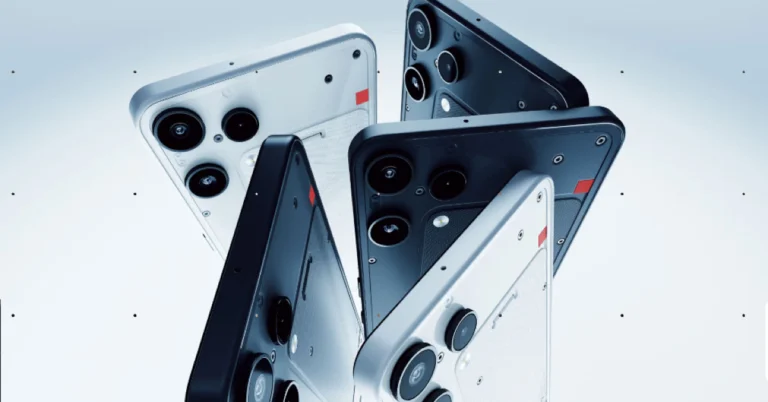
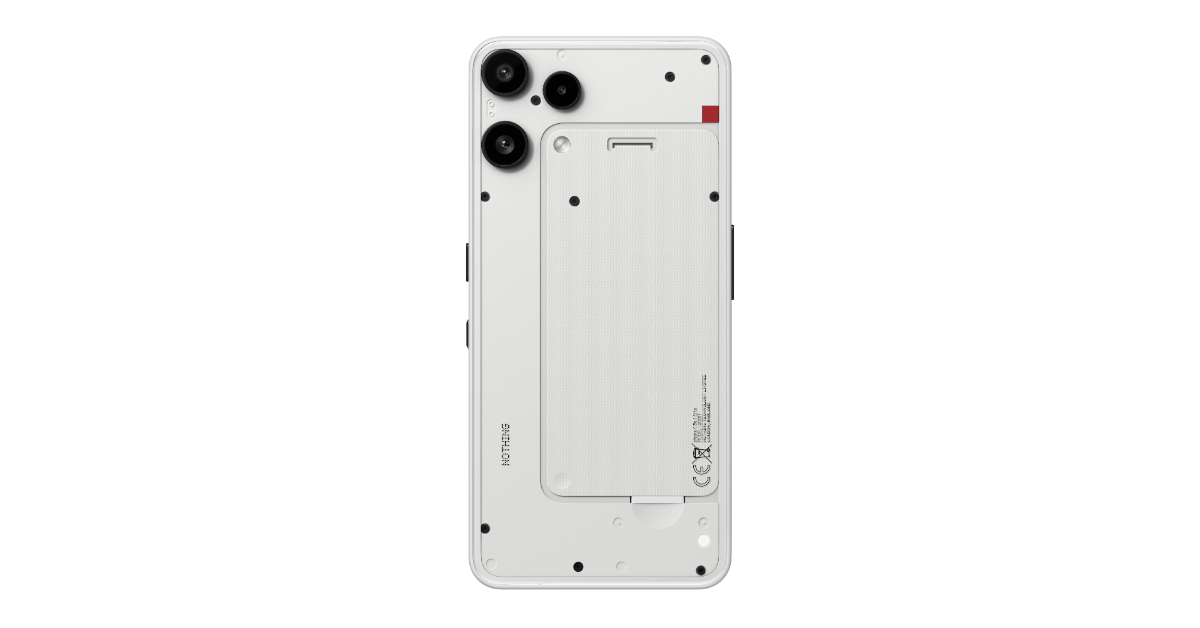
Nothing Phone 3a Lite has been released globally as a new mid-range smartphone. The gadget has a clean appearance and comes in two colour options. The smartphone is powered by an octa-core MediaTek Dimensity 7300 Pro processor. The stunning triple-rear camera array features a 50-megapixel main sensor and an 8-megapixel ultrawide camera, allowing for high-quality photography.

Pricing and Availability

The Nothing Phone 3a Lite is a big step forward in the company’s dedication to offering innovative technology at affordable prices, appealing to cost-conscious consumers seeking advanced smartphone functionality. The Nothing Phone is priced differently in different countries, with the entry-level edition starting at EUR 249 (about Rs 25,600) and including 8GB of RAM and 128GB of internal storage. This model costs GBP 249 in the UK, which is equivalent to roughly Rs 29,000. For those looking for more storage space, the premium edition with 256GB costs EUR 279 (roughly Rs 28,700). In the United Kingdom, this setup costs GBP 279, which is around Rs 32,500.

Nothing Phone 3a Lite launched globally: Here is everything about the new mid-ranger

It will be available in both white and black colors. The 128GB variant is available through Nothing’s online shop and different retail partners, while the 256GB version will only be offered on the company’s website.

Specifications, Features

The Nothing Phone 3a Lite features a 6.77-inch Full-HD+ display with a resolution of 1,080×2,392 pixels. This Flexible AMOLED screen has an adjustable refresh rate of up to 120Hz, boosting visual fluidity while in use. It also offers a phenomenal peak brightness of 3,000 nits, a pixel density of 387 pixels per inch (ppi), and an amazing 1,000Hz touch sampling rate, resulting in a snappy and dynamic user experience. Furthermore, the display can render 1.07 billion colours and uses a 2,160Hz PWM dimming technology, making it both visually appealing and easy on the eyes after extended use.

Also Read: Wobble to launch its first smartphone in India soon; launch date announced

The Phone 3a Lite is powered by an octa-core 4nm MediaTek Dimensity 7300 Pro processor with 8GB of RAM. It has a maximum capacity of 256GB and can be expanded up to 2TB via a MicroSD card slot, making it ideal for those who need plenty of space for apps, movies, and other items. In addition, the Phone 3a Lite has a unique Glyph Light notification indication on the back panel, which adds a different touch to user alerts and improves the entire user experience. The phone is dust and splash-resistant with an IP54 rating, and the front and rear surfaces are protected by Panda Glass.

Nothing Phone 3a Lite launched globally: Here is everything about the new mid-ranger

The device runs Android 15 with Nothing OS 3.5. The manufacturer has committed to providing three years of major Android upgrades and six years of security patches, assuring long-term software support for consumers.

The device includes a powerful triple-rear camera setup that highlights its optical capabilities. The primary camera is a 50-megapixel shooter with a 1/1.57-inch Samsung sensor and an aperture of f/1.88. This camera has both optical image stabilisation (OIS) and electronic image stabilisation (EIS), resulting in crisper and more stable photographs, even in demanding settings. An 8-megapixel ultrawide camera with an aperture of f/2.2 complements the primary lens and provides a 119.5-degree field of view.

Also Read: Epson launched EcoTank L6360, L6370 and L6390 Printers in India

However, the company has not revealed any details about the third back camera’s functioning or capabilities. The gadget includes a 16-megapixel front-facing camera with an aperture of f/2.45, which is conveniently positioned within a hole-punch display cutout.
It is equipped with a powerful 5,000mAh battery that supports 33W wired fast charging for speedy power refill. Furthermore, it supports 5W wired reverse charging, allowing users to charge other devices with the phone’s battery.

Additionally, there is Wi-Fi 6, Bluetooth 5.3, and various GPS systems (GLONASS, BDS, Galileo, OZSS). It includes an in-display fingerprint sensor, accelerometer, electronic compass, gyroscope, proximity sensor, and ambient light sensor.

Top 10 gaming monitors under Rs 20,000

If you’re thinking of upgrading your gaming rig, the monitor is a good place to start. Generally, monitors aren’t the most expensive part of the gaming setup, but they do require some intelligent investment. You don’t really have the flexibility of making routine upgrades on a monitor, as you do with a mouse or a headset. The good news is that if you have a decent, midrange budget, you have a lot of buying options at your disposal. So, let’s take a look at the top 10 gaming monitors priced under Rs 20,000 right now.

Read Also: Epson launched EcoTank L6360, L6370 and L6390 Printers in India

Acer Nitro (XV272U)

Acer Nitro (XV272U)

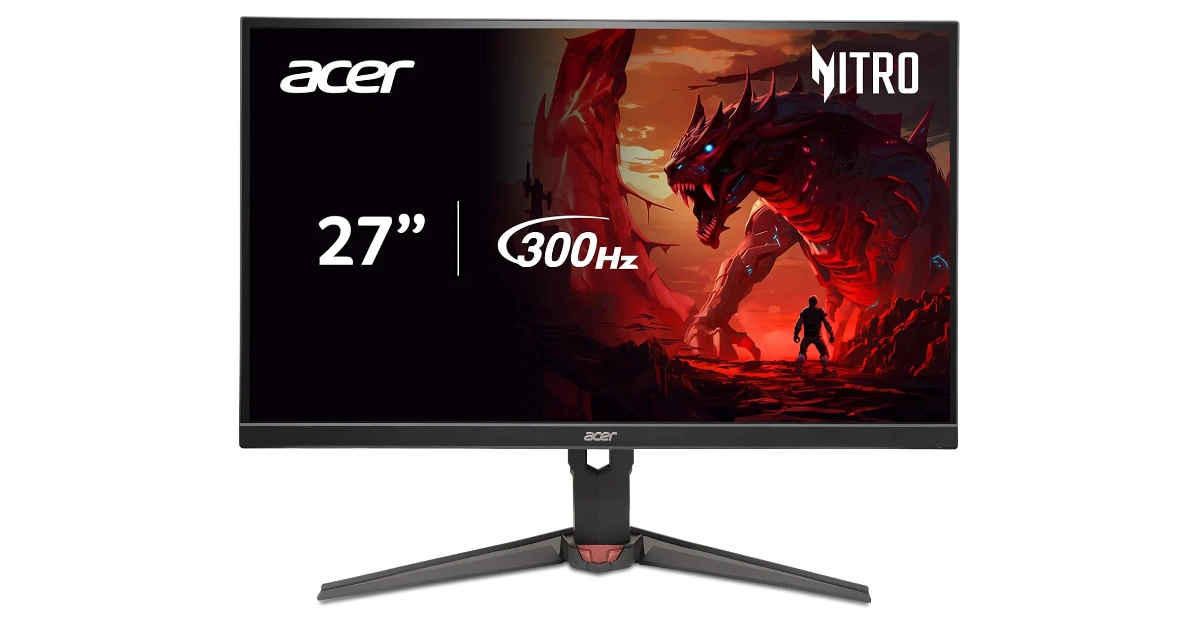
The Acer Nitro XV272U is one of the best deals out there when it comes to gaming monitors. Its 27-inch IPS WQHD display has a 2,560 x 1,440p resolution and can hit 400 nits of brightness. There’s HDR400 support on board. The 300Hz refresh rate ensures that the images remain fluid and there are no frame drops while gaming. The 0.5ms response time limits ghosting, smearing effect, and elimination blur. There are 2 HDMI 2.1 ports on this monitor, along with 1 DisplayPort (1.4). It comes with HDMI and DP cables in the box. The Ergostand has pivot and swivel movement mechanisms.

Buy on Amazon for Rs 19,999

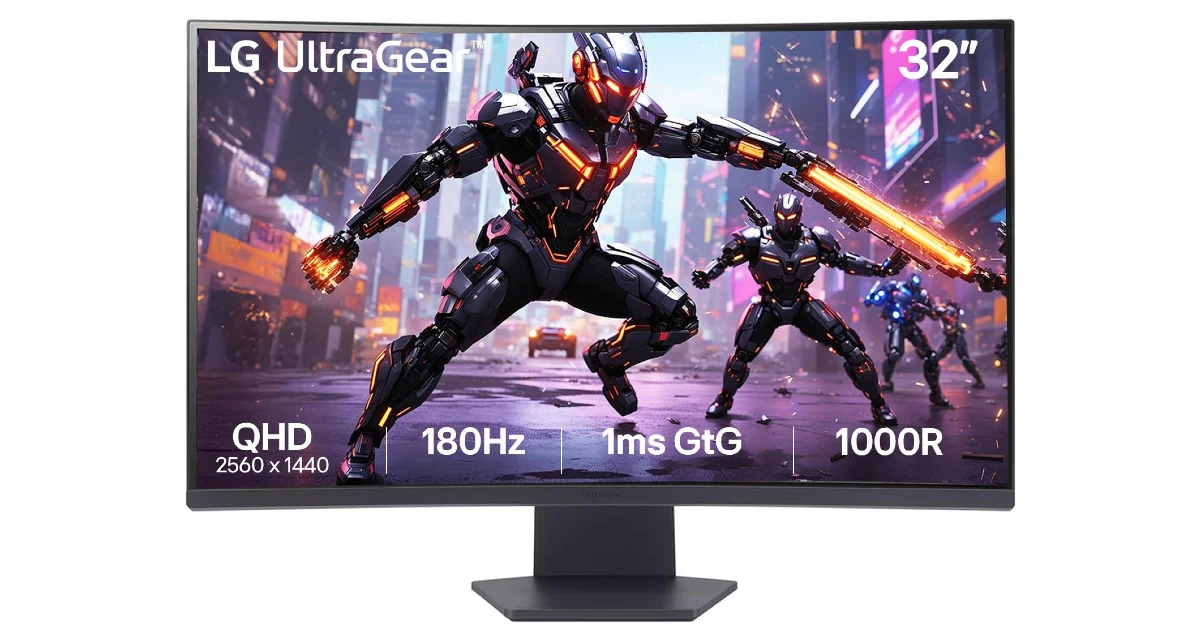
LG Ultragear (32GS60QC)

LG Ultragear (32GS60QC)

The Ultragear from LG has a 32-inch QHD 1000R curved display. It has a 180Hz refresh rate and a 1ms (GtG) response time. The display supports HDR10 and sRGB 99% colour gamut. Thin bezels surround the screen on three sides, resulting in an immersive viewing and gaming experience. The desk stand for the monitor supports -5° to +15° tilt movement. There is 1 display and 2 HDMI ports on this monitor. Other features include Dynamic Action Sync, Black Stabiliser, and FPS Counter.

Buy on Amazon for Rs 19,649

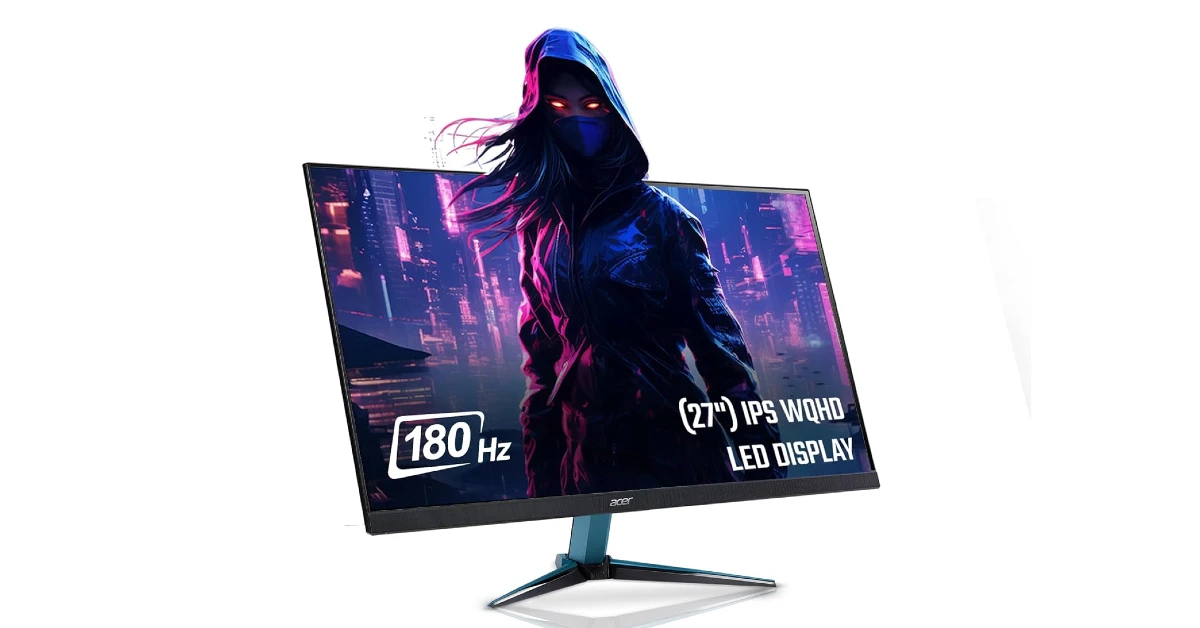
Acer Nitro (VG271U)

Acer Nitro (VG271U)

The VG series gaming monitor from Acer is slightly more affordable than its VZ counterpart. Its 27-inch IPS WQHD (2,560 x 1,440p) display has a 180Hz refresh rate and supports DCI-P3 95% colour gamut. There’s support for HDR10 as well. The monitor offers a 0.5ms response time, which ensures little to no ghosting. There are 2 HDMI (2.0) and 1 Display (1.2) ports on board. The integrated AMD FreeSync tech reduces lag and eliminates screen tearing. The display widget lets the user customise the monitor with ease.

Buy on Amazon for Rs 14,999

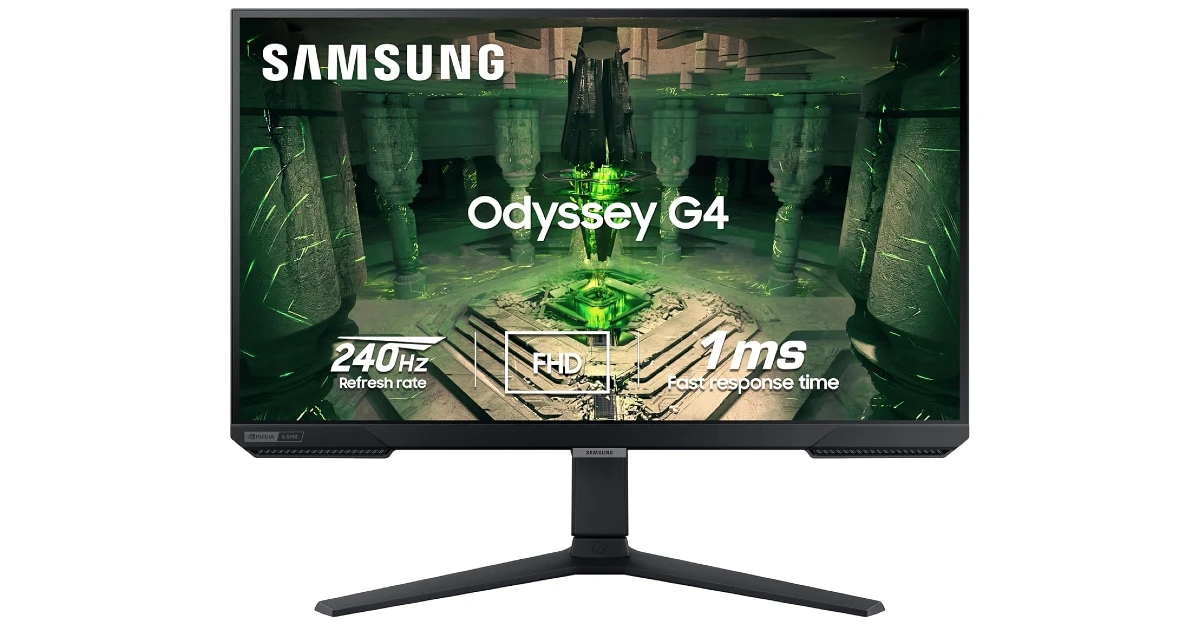
Samsung Odyssey G4 (27-inch)

Samsung Odyssey G4 (27-inch)

The Odyssey G4 from Samsung is a great deal under Rs 20,000. Its 27-inch IPS display has a 1,920 x 1,080p resolution and a 240Hz refresh rate. The response time of 1ms (GtG) takes care of unnecessary lag and delays. The NVIDIA G-Sync compatibility keeps the monitor synced up with the GPU to reduce screen tear and general choppiness. The Auto Source Switch+ detects active input devices and instantly switches the monitor to the source signal. The 178° wide viewing angle ensures that you don’t need to move your monitor to maximise the viewing experience. The ergonomic stand supports tilt and swivel movements. 

Buy on Amazon for Rs 20,799

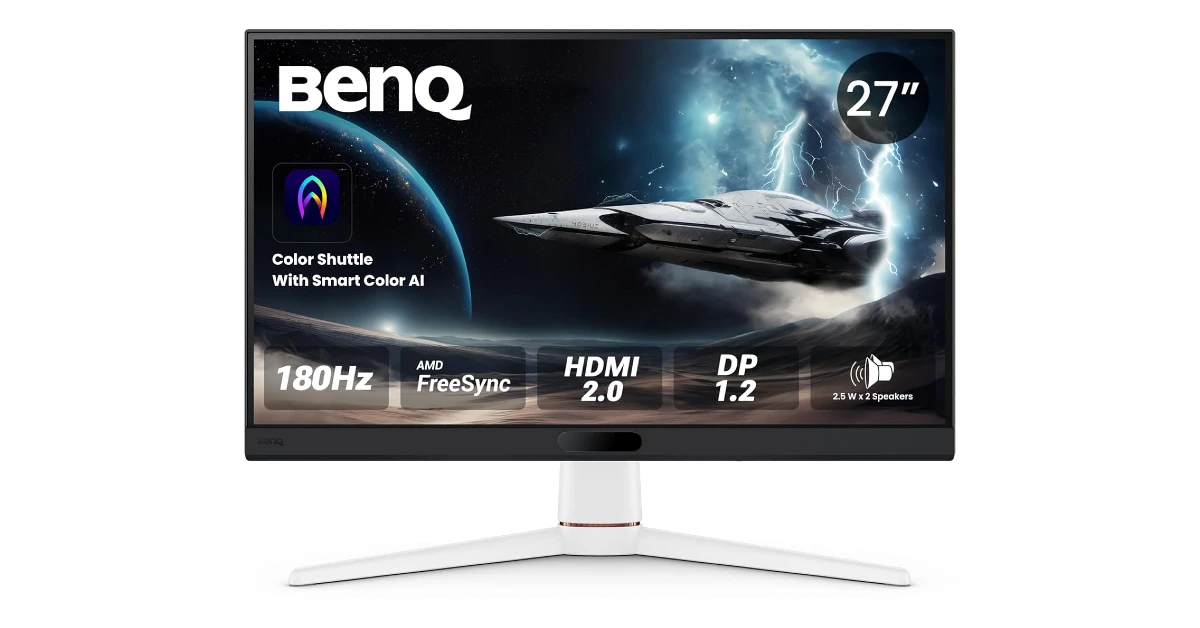
BenQ MOBIUZ EX271

BenQ MOBIUZ EX271

The EX271 from BenQ has a 27-inch IPS FHD (1,080p) display with a 180Hz refresh rate. The 1ms response time and AMD FreeSync support ensure that there are no screen tears, delays, or lag in gameplay. The monitor has 2 HDMI ports (2.0 and 1.0), 1 DisplayPort (1.2), 1 USB 3.2 Gen1 Type-C, and 1 3.5mm headphone jack on board. Additionally, there are two 2.5W speakers built into the monitor. You also get multiple colour profiles, modes, and presets to customise the ideal viewing experience.

Buy on Amazon for Rs 15,511

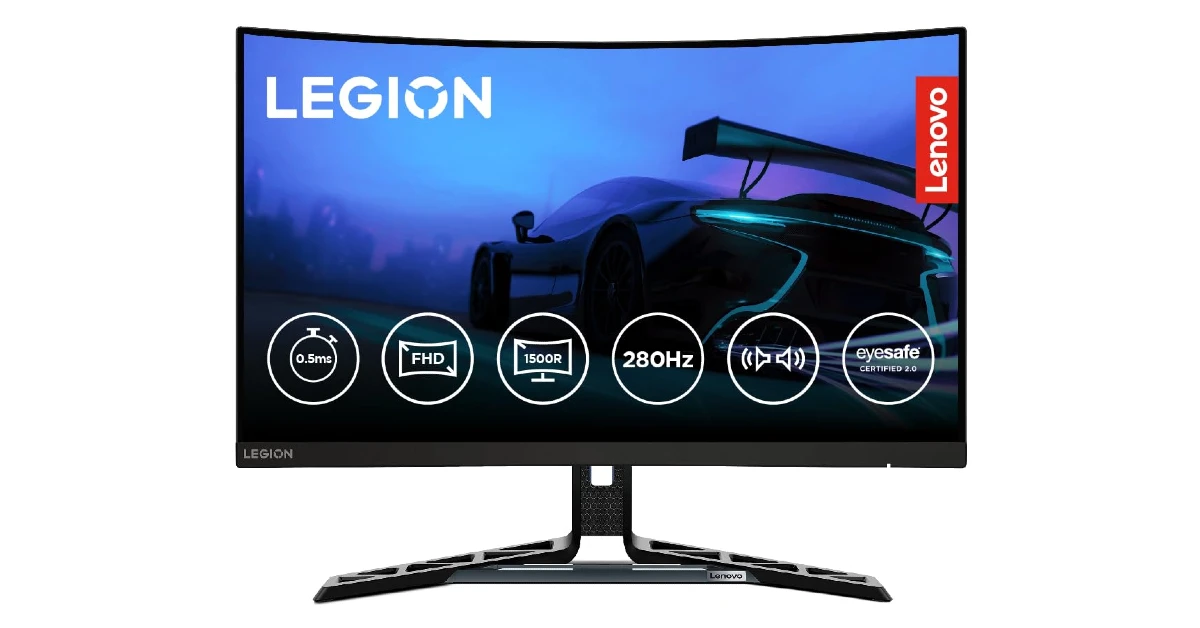
Lenovo Legion (R27fc-30)

Lenovo Legion (R27fc-30) Top 10 gaming monitors under Rs 20,000

The Legion gaming monitor from Lenovo has a 27-inch curved (1500R) FHD (1080p) display. It has a maximum refresh rate of 280Hz. The display supports HDR10, 16.7 million colours, 99% sRGB, and 90% DCI-P3 colour gamut. Its peak brightness is capped at 350 nits. With AMD FreeSync, VESA Adaptive Sync, and NVIDIA G-Sync compatible with this monitor, there are no lags or screen tears to be seen in the gameplay. The 0.5ms response time maintains seamless input. There are 2 HDMI 2.1 ports and 1 DisplayPort (1.4) on offer. The desk stand supports tilt movement from -5° to +22°.

Buy on Amazon for 16,698

Samsung Odyssey G3 (DG302)

Samsung Odyssey G3 (DG302) Top 10 gaming monitors under Rs 20,000

The Samsung Odyssey G3 has a 27-inch display with a 1,920 x 1,080p resolution and a 180Hz refresh rate. Its brightness peaks at 250 nits. The 1ms response time limits input lag, ensuring seamless gameplay. The AMD FreeSync support takes care of screen tears and frame drops. The display also supports HDR10 and sRGB 95% colour gamut, curating an excellent viewing experience. There is a DisplayPort, an HDMI port, and a headphone jack on board. The ergonomic stand has tilt, swivel, and pivot functions.

Buy on Amazon for Rs 13,697

Dell (SE2725HG)

Dell (SE2725HG) Top 10 gaming monitors under Rs 20,000

Dell’s 27-inch FHD (1,080p) gaming monitor has a 200Hz refresh rate and a 1ms response time. The display can reach a peak brightness of 300 nits, making it ideal for rooms that let in a lot of natural light during the day. The 99% sRGB support makes sure that the picture is vibrant and punchy. The AMD FreeSync Premium technology creates a smoother channel between the monitor and the GPU, effectively weeding out pesky screen tears and frame drops in tense gaming scenarios. The thin bezels on three sides of the screen facilitate an immersive viewing experience. There are 2 HDMI ports, 1 DisplayPort, and 1 3.5mm headphone jack on this monitor. It comes with power and HDMI cables in the box. The desk stand supports tilt movement.

Buy on Amazon for Rs 14,099 

MSI MAG (275QF)

MSI MAG (275QF) Top 10 gaming monitors under Rs 20,000

The ‘Arsenal Gaming’ series monitor from MSI has a 27-inch IPS display with a 2,560 x 1,440p (QHD) resolution. This display has a maximum refresh rate of 180Hz and 0.5ms response time. It presents a wide colour gamut and supports HDR. The ‘Console Mode’ lets you connect your Xbox or PlayStation directly to the monitor. There are 2 HDMI 2.0 ports, 1 DisplayPort (1.2a), and 1 3.5mm headphone jack on board. 

Buy on Amazon for Rs 17,511

Kreo Obsidian (27-inch)

Kreo Obsidian (27-inch) Top 10 gaming monitors under Rs 20,000

Ending this list is the Kreo Obsidian. This gaming monitor has a 27-inch IPS display with a 2,560 x 1,440p resolution and a 200Hz refresh rate. It can reach a peak brightness of 400 nits. The support for 100% sRGB, 95% AdobeRGB, and 97% DCI-P3 make this monitor ideal for video and photo editing. The HDR10 support is pivotal in producing an amazing viewing experience. When it comes to input options, this monitor has 2 HDMI and 2 Display ports. The ergonomic stand offers tilt, pivot, and height adjustment functions.

Buy on Amazon for Rs 16,999

Read Also: Samsung Galaxy S25 FE Review: The dark horse of 2025?

Final Thoughts

These are the top 10 gaming monitors that you can buy under Rs 20,000 right now. If you’re looking for something high-end, we recommend checking out Samsung’s Odyssey G5 series. While you’re here, check out our picks for the best gaming laptops. If you have any questions, let us know in the comments!

How to remove sensitive information from screenshots in Windows 11

0

If you’re in a rush and need to hide your personal information in a screenshot before sharing it with someone, the Snipping Tool in Windows 11 has got you covered. The native screenshot tool on your Windows PC has a bunch of editing options to customise the screengrab and extract text from it. These options come in quite handy when you don’t want to seek the help of a photo-editing app to make quick tweaks. Here is how you can remove sensitive information from screenshots in Windows 11.

Read Also: Wobble to launch its first smartphone in India soon; launch date announced

Before you begin

There are 2 broad ways you can go about hiding personal information in your screenshots. The first method is the traditional way of using a pen, brush, or highlighter tool to conceal the text in the image. You don’t need to go to a different photo-editing app to make the edit. The Snipping Tool has its own ballpoint pen tool that can cover text with ease. There are options to select the colour and size of the strokes.

The other method is quicker and more straightforward, but limited in its functionality. The ‘Quick redact’ option in Snipping Tool is designed to quickly erase your personal information from your screenshots. The redactions look neat and professional. The downside is that this option works on email addresses and phone numbers only. Names, physical addresses, and other sensitive information are not covered by this feature.

Use Quick Redact in Snipping Tool

Step 1: Take a screenshot using the Windows + Shift + S keyboard shortcut on your Windows 11 laptop or PC.

Step 2: Click the preview pop-up to open the screenshot in Snipping Tool.

Step 3: Hit the text actions icon in the top row.

Step 3: Hit the text actions icon in the top row.

Step 4: Hit the arrow icon next to Quick redact and select Phone numbers and Email addresses.

Step 4: Hit the arrow icon next to Quick redact and select Phone numbers and Email addresses.

Step 5: Click on Quick redact.

Step 5: Click on Quick redact.

Step 6: Hit the save icon to save the screenshot on your device.

Step 6: Hit the save icon to save the screenshot on your device. How to remove sensitive information from screenshots in Windows 11 windows snipping tool quick redact

Use the Ballpoint Pen in Snipping Tool

Step 1: Take a screenshot using the Windows + Shift + S keyboard shortcut on your Windows 11 laptop or PC.

Step 2: Click the preview pop-up to open the screenshot in Snipping Tool.

Step 3: Click the ballpoint pen icon in the top row.

Step 3: Click the ballpoint pen icon in the top row. How to remove sensitive information from screenshots in Windows 11 windows snipping tool quick redact

Step 4: Select a colour and stroke size.

Step 4: Select a colour and stroke size. How to remove sensitive information from screenshots in Windows 11

Step 5: Drag the cursor over the information you wish to redact.

Step 5: Drag the cursor over the information you wish to redact. How to remove sensitive information from screenshots in Windows 11 windows snipping tool quick redact

Step 6: Hit the save icon to save the screenshot on your device.

Frequently Asked Questions (FAQs)

How do I hide details in Snipping Tool?

You can hide sensitive information on your screenshots by using Quick Redact in Snipping Tool. Open the screenshot preview, click the text actions icon, hit the arrow icon next to ‘Quick redact’, and select ‘Remove all redactions’. As of now, this tool only removes phone numbers and email addresses.

How do I hide sensitive information in Snipping Tool?

Open your screenshot in Snipping Tool, select the ballpoint pen tool in the top row, choose a colour and size for the tool, and drag the cursor over the content that you wish to hide.

What is the keyboard shortcut to take a screenshot in Windows 11?

Press Windows key + Shift + S on your keyboard to take a screenshot in Windows 11.

Where are the screenshots stored in Windows 11?

You can find your screenshots by opening the File Explorer and going to Pictures>Screenshots.

How do I change the Snipping Tool’s save location in Windows 11?

Launch the Snipping Tool, hit the ellipses, go to Settings, and click on ‘Change’ next to ‘Screenshots are saved to’. Go to your preferred destination and click on ‘Select Folder’.

Read Also: How to check your watch history on Instagram

Final Thoughts

The editing and redaction options in Snipping Tool may be limited, but they are enough to strike out sensitive information from your screenshots. If you want to hide certain information by blurring or pixelating it, click the ‘Edit in Paint’ option in Snipping Tool’s preview window.

Wobble to launch its first smartphone in India soon; launch date announced

Wobble has announced that it will launch its first smartphone in India next month. While the device’s exact name and features are unknown, it is likely to have 8GB of RAM and run the most recent version of Android 15. The smartphone is said to be powered by the MediaTek Dimensity 7400 5G processor, indicating that it focuses on high performance and connectivity. The phone’s design is expected to be sleek, in line with contemporary smartphone aesthetics.

Wobble, a brand owned by Indkal Technologies, will launch its first smartphone in India on November 19. This is a huge expansion for the brand into the smartphone market.

Anand Dubey, CEO of Indkal Technologies, said: “Wobble is a celebration of India’s design, innovation, and creative spirit. After establishing Wobble as a trusted name in displays, we’re excited to step into the smartphone space with a device that’s bold, powerful, and deeply connected to the needs of today’s young, expressive consumers. The smartphone is designed for those who create, express, and live unapologetically.”

Also Read: Nothing Phone 3a Lite launching today: Expected specs, pricing

Wobble has revealed a teaser image that shows the side view of a forthcoming phone, stressing its sleek design. The phone has a compact profile and a flat frame, which adds to its overall modern look. Furthermore, a prominent camera module is located on the rear, indicating a focus on photographic abilities. The device’s side frame features power and volume controls, which add to its minimalist design.

Also Read: Epson launched EcoTank L6360, L6370 and L6390 Printers in India

Last month, reports circulated about a new smartphone called the Wobble. This smartphone was allegedly recorded in the IMEI database and appeared on Geekbench under the model number WB25SPMTA15P2, which supplied information about its chipset and the version of the Android operating system it may be running. The Wobble smartphone, said to be called Wobble 1, is believed to have the MediaTek Dimensity 7400 5G processor. It is also said to include 8GB of RAM and run the Android 15 operating system, showcasing its ability to give efficient performance and current features.

How to check your watch history on Instagram

0

If you’ve ever scrolled past a Reel that you want to watch again, but can’t find it anymore, Instagram has added a new feature that will make the search easy. Like YouTube, the social media platform has added a ‘Watch history’ section that compiles all your viewing activity in one place. As of now, it only logs your watched Reels in the last 30 days. Here’s how you can check your watch history on Instagram.

Read Also: Nothing Phone 3a Lite launching today: Expected specs, pricing

Use these filters to make your search easier

While a personal watch history is a valuable addition, looking for a specific Reel in a sea of short videos can turn into a tedious task. Luckily, Instagram has a few sorting filters to make the search easier.

Chronology: You can sort your watched Reels by ‘Oldest to newest’ or ‘Newest to oldest’. Since your watch history only covers the last 30 days, you won’t have to scroll a lot to land on your desired Reel.

Date: If you have a better idea of when you watched the Reel, filtering your history by date range is the better option. Instagram lets you sort the history log by week, month, or a custom date range.

Author: If you remember the author or creator who posted the Reel, simply tap their name in the ‘Author’ filter to bring up the content you’ve viewed on their account in the last 30 days.

Check watch history on Instagram

Step 1: Launch Instagram on your phone and tap your profile picture in the bottom right corner of the screen.

Step 1: Launch the Instagram app on your smartphone and tap your profile picture in the bottom right corner of the screen.

Step 2: Hit the hamburger menu icon in the top right corner of the screen.

Step 2: Hit the hamburger menu in the top right corner of the screen. How to check someone’s username history on Instagram?

Step 3: Go to Your activity.

Step 4: Go to Your activity. Alternatively, tap on Time management.

Step 4: Scroll down and select Watch history in the How you use Instagram section.

Step 4: Scroll down and select Watch history in the How you use Instagram section.

Step 5: You can sort your watched reels by viewing order, date range, and author.

Step 5: You can sort your watched reels by viewing order, date range, and author.

Remove a Reel from your Instagram watch history

Step 1: Launch Instagram on your phone and tap your profile picture in the bottom right corner of the screen.

Step 1: Launch the Instagram app on your smartphone and tap your profile picture in the bottom right corner of the screen.

Step 2: Hit the hamburger menu icon in the top right corner of the screen.

Step 2: Hit the hamburger menu in the top right corner of the screen. How to check someone’s username history on Instagram?

Step 3: Go to Your activity.

Step 4: Go to Your activity. Alternatively, tap on Time management.

Step 4: Scroll down and select Watch history in the How you use Instagram section.

Step 4: Scroll down and select Watch history in the How you use Instagram section.

Step 5: Hit Select in the top right corner of the screen.

Step 5: Hit Select in the top right corner of the screen.

Step 6: Hit the checkbox on the Reel(s) you want to remove from your watch history.

Step 6: Hit the checkbox on the Reel(s) you want to remove from your watch history.

Step 7: Hit Remove.

Step 7: Hit Remove.

Frequently Asked Questions (FAQs)

Can you see your watch history on Instagram?

Yes, you can view the record of the Reels you have watched on Instagram. The social media platform collects your 30-day watch history.

How to see recently viewed Reels?

Launch Instagram, go to your profile, and hit the menu icon. Go to Your activity>Watch history to see your recently viewed Reels.

Can I see my activity history on Instagram?

Yes, you can see your activity history on Instagram by going to your profile, tapping the menu icon, and selecting ‘Your history’. This is where you’ll find the content you’ve posted, viewed, interacted with, deleted, and archived.

How do I delete a Reel from my Instagram history?

Go to Profile>Menu>Your activity>Watch history>Select, hit the checkbox on the Reel you wish to delete from the record, and hit ‘Remove’.

How do I view my liked Reels on Instagram?

Go to Profile>Menu>Your activity>Likes to view your liked Reels and other content.

Read Also: Samsung Galaxy S25 FE Review: The dark horse of 2025?

Final Thoughts

If you can’t find the ‘Watch history’ option on your account, update the Instagram app on your phone. Once the app is updated to its newest version, you will be able to access other new features like Maps and message doodles as well. If you have any questions, let us know in the comments!

Nothing Phone 3a Lite launching today: Expected specs, pricing

Nothing Phone 3a Lite is launching today in India and globally. This device is part of the Nothing Phone 3 series and is positioned as the most affordable option after the Phone 3a; however, exact specs have not been disclosed. Unlike its predecessors, it will not include the Glyph Interface; instead, it will have a single LED light at the rear.

As of now, the firm has not stated whether this launch would be part of an event or a discreet launch, raising some questions about the format of the announcement. The Nothing Phone 3a Lite will be launched today at 1 p.m. GMT, or 6:30 p.m. IST in India.

According to reports, the Nothing Phone 3a Lite will have a huge 6.77-inch Full HD+ AMOLED display with a high refresh rate of 120Hz, which will improve the fluidity of visual content. The gadget is expected to have a MediaTek Dimensity 7300 processor, indicating an emphasis on performance efficiency and processing power. This chipset will be combined with a Mali-G615 MC2 GPU, which is designed to boost users’ graphical capabilities. Furthermore, the Phone 3a Lite is believed to include 8GB of RAM, which could improve multitasking and overall device performance, as well as 128GB of internal storage for storing applications, media, and other things.

Also Read: Oppo Find X9 Pro, Oppo Find X9 launched globally

The upcoming Nothing device is said to include an advanced dual back camera configuration that combines a 50-megapixel main camera and a 50-megapixel telephoto lens. The gadget may also include a 32-megapixel front-facing camera, which is intended to improve selfie and video call quality.

Also Read: Epson launched EcoTank L6360, L6370 and L6390 Printers in India

The phone is expected to be available for purchase in Europe on November 4, with a single version of 8GB RAM and 128GB storage. Additionally, the handset is planned to be available in two colours: black and white. According to reports, the Nothing Phone 3a Lite would be available in France for EUR 249.99, which is comparable to around Rs 25,700. However, prices might differ by location, with potential offers as low as EUR 239.99 (about Rs 24,700) in certain countries.

Epson launched EcoTank L6360, L6370 and L6390 Printers in India

Epson India has introduced three new models to its EcoTank printer line: the L6360, L6370, and L6390. These printers are especially developed for small and medium businesses  (SMBs) and corporate settings, focusing on high-volume, cost-effective, and environmentally friendly printing solutions.

Engineered for great efficiency and affordability, the new EcoTank models are designed to deliver ultra-low printing costs, with black prints starting at 13 paise and colour prints at 43 paise, making them an affordable solution for those concerned about printing expenses. The printers have a high page yield, capable of producing up to 8,500 pages in black and 6,500 pages in colour per refill, increasing productivity and lowering operational costs associated with ink refills. Fast print rates are a prominent feature, with speeds of up to 18 pages per minute (ipm, ISO), allowing users to achieve short turnaround times for their printing requirements.

Epson launched EcoTank L6360, L6370 and L6390 Printers in India

These printers are powered by Epson’s revolutionary Heat-Free Technology, which delivers reliable and energy-efficient performance. This technique helps to minimise energy consumption and the environmental impact of printing. Additionally, the EcoTank models have network connectivity, duplex printing, Wi-Fi, and USB capability. The EcoTank L6370 model supports duplex scanning using an Automatic Document Feeder (ADF), which improves the functioning of these printers. The EcoTank L6390 variant also has fax capabilities. These printers come with a one-year guarantee or a maximum of one lakh pages, whichever comes first, giving users confidence and security for their investment.

Also Read: Oppo Find X9 Pro, Oppo Find X9 launched globally

Epson launched EcoTank L6360, L6370 and L6390 Printers in India

Automatic Duplex Printing is added to increase paper handling efficiency, allowing for double-sided printing while conserving resources. The printers are also built with a small and attractive appearance, making them appropriate for modern office settings and allowing them to fit comfortably even in tighter places.

Also Read: iQOO 15 India launch date revealed: Details inside

Sivakumar, Senior General Manager, Sales and Marketing, Epson India Pvt. Ltd said, “With the new EcoTank L6360, L6370, and L6390, we are taking EcoTank’s efficiency, value and performance to the next level. These printers combine ultra-low running costs with advanced features like duplex printing and duplex scanning with ADF, making them powerful allies for SMBs and corporates. They embody Epson’s commitment to delivering printing solutions that are not just economical but also reliable, connected, and sustainable. This expansion reinforces our leadership in the Ink Tank segment and empowers businesses to achieve higher productivity with lower environmental impact.”

Garena Free Fire Max Redeem Codes Today 29 October 2025: Here is how to claim them

Garena Free Fire (GFF) Max is a battle royale game with regular awards and tournaments to keep players interested. If you play GFF, you should be aware of the redeem codes that are released on a daily basis. However, because the battle royale game is banned in India, players from other countries can use the Free Fire Redeem codes daily. If you’re unfamiliar with the codes or don’t know how to get them, we’ve put together a step-by-step guide to help you redeem them. Check out Garena Free Fire Max Redeem Codes for 29 October 2025.

These codes are a great way to get free items in the game. The 12-digit codes contain letters and numbers, as well as an expiration date and time. Because the Garena FF redeem codes cannot be used more than once, you should hurry to the redemption page to claim your free reward before someone else does. To get a free reward, all you have to do is go to reward.ff.garena.com/en, which is the official redemption page. Also, keep an eye on this space for daily updates on Gadget Bridge on GFF Max redemption codes and rewards.

Also Read: CERT-In identified multiple high-risk vulnerabilities in Android: Details

Garena Free Fire Max Redeem Codes Today 

F1L5P9O3I7U2Y4T8

F4Q8W2E6R1T5Y9U3

F7A1S5D9F2G6H3J7

F6Q1W5E9R3T7Y2U4

F9A4S8D2F6G3H7J1

F1Z5X9C3V7B2N6M8

F2Z6X3C7V1B5N8M4

F5H9J1K8L4P2O6I3

F2Q7W1E5R9T3Y6U4

F5A9S3D7F1G4H8J2

F6Z1X5C2V8B4N9M3

F3H8J4K1L7P5O2I9

F9S2D6F3G7H1J4K8

F8S3D7F4G1H5J9K2

F3L7P2O6I4U8Y1T5

Also Read: IFA 2025: Lenovo introduced Legion Pro 7 (2025) and Lenovo Legion Go with AMD’s Ryzen 9000 HX series processors

How to Get Free Fire Max Redeem Keys for Garena?

  • Visit the game’s official website at reward.ff.garena.com.
  • Use your Facebook, Google, VK, Apple ID, Huawei ID, or Twitter account to log in.
  • You’ll be taken to a valid redemption code (s)
  • Copy and paste the 12-digit redemption code into the text box.
  • On the screen, a dialogue box will appear.
  • ‘Ok’ should be selected.