How to install an APK on Android? (2024)

0

One of the biggest advantages of using an Android phone is that you can sideload apps on the device. Sideloading is the process of downloading apps from sources other than the Google Play Store. Unlike the Play Store, third-party marketplaces do not automatically install the apps on your device. This is a safety measure implemented by Android to reduce your device’s exposure to malware. Instead, third-party platforms offer APK (Android Package Kit) files which can be manually installed on the device. Here’s how you can install an APK file on your Android smartphone.

Read Also: Vivo Y18t with 50-megapixel dual rear camera setup launched in India

Don’t want to use the Google Play Store? Here are some alternatives

While Google Play Store is a trustworthy and exhaustive source of apps, you may not always find what you’re looking for there. Some indie developers prefer other platforms in favour of more revenue. The Play Store also cracks down on the free versions of paid apps very harshly. While we do not recommend using pirated apps for several reasons, you can easily find them on independent platforms. Other than that, if you’re looking for a specific version of an app, you’ll need to resort to third-party sources.

If you don’t wish to install an app from the Google Play Store, here are some alternatives you can use.

OEM app platforms: Most smartphone manufacturers have their own app stores which act similarly to the Play Store. The advantage of using these app stores is that they directly install the app on your device. If you own a Samsung smartphone, look for the Galaxy Store in the app drawer. Similarly, Vivo and iQOO users can try the V-Appstore.

Third-party marketplaces: Websites like APKMirror, APKPure, Aptoide, F-Droid, and APKHere are great third-party sources for apps. These platforms use cryptographic signatures to identify verified developers and perform routine malware checks.

Install an APK file on your Android phone

Step 1: Go to a trusted third-party app marketplace and install an APK file.

Step 2: If your Android phone notifies you with a ‘File might be harmful’ message, tap Download anyway in the popup box.
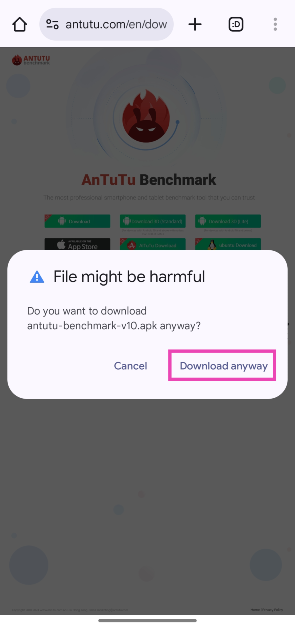
Step 2: If your Android phone notifies you with a ‘File might be harmful’ message, tap Download anyway in the popup box.

Step 3: Go to Settings and tap on Security and privacy.
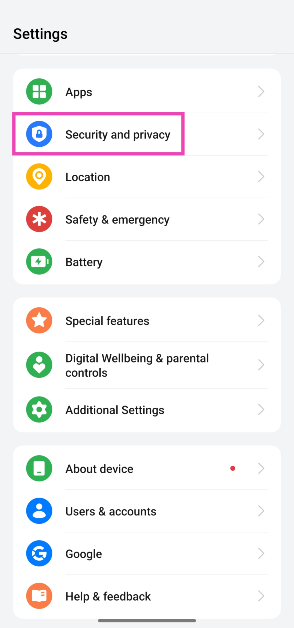
Step 3: Go to Settings and tap on Security and privacy.

Step 4: Scroll down and tap on More security and privacy.
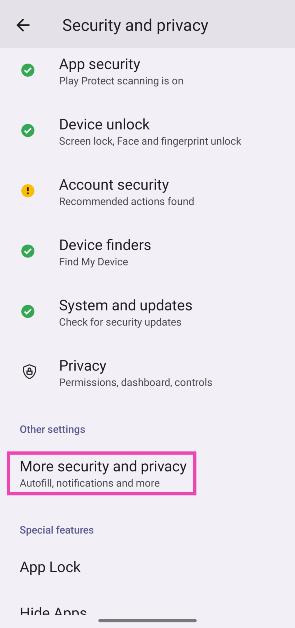
Step 4: Scroll down and tap on More security and privacy.

Step 5: Tap on Installation sources.
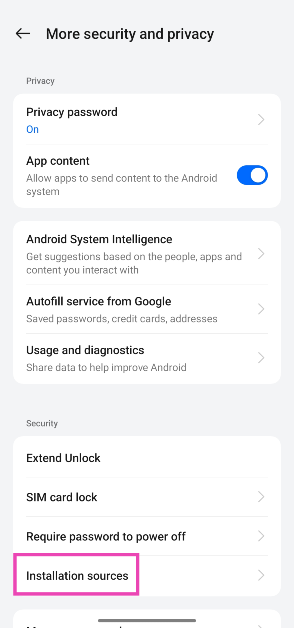
Step 5: Tap on Installation sources. How to install an APK on Android? (2024)

Step 6: Turn on the toggle switch next to the browser/source you used to install the APK.
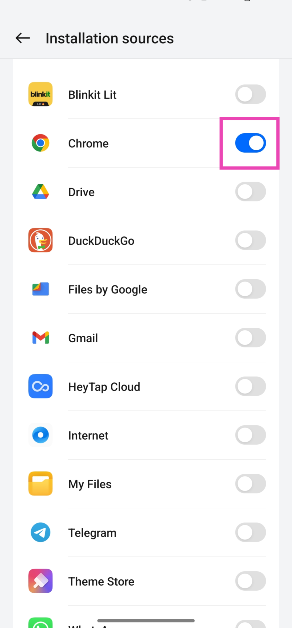
Step 6: Turn on the toggle switch next to the browser/source you used to install the APK. How to install an APK on Android? (2024)

Step 7: Go back to the web browser and open the downloaded APK.
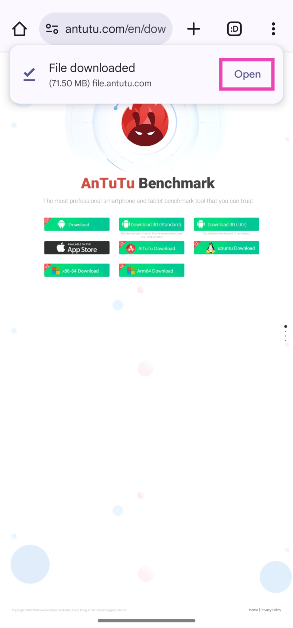
Step 7: Go back to the web browser and open the downloaded APK. How to install an APK on Android? (2024)

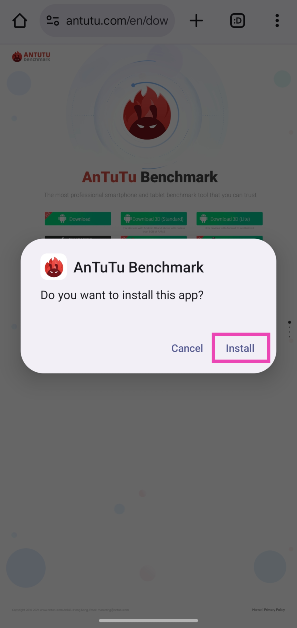
Step 8: Hit Install.

Step 8: Hit Install. How to install an APK on Android? (2024)

Step 9: Go to the app drawer and tap the app’s icon to open it.

Note: If you can’t find the ‘Installation sources’ option in the ‘Security and privacy’ settings, go to Settings>Apps>Special app access>Install from unknown sources and turn on the toggle switch next to the source you used to download the APK.

Install an APK file on your phone using a PC

How to Connect your Android Device to a PC with a USB Cable?

Step 1: Download the APK file on your PC using a trusted third-party source.

Step 2: Turn on Developer Mode on your smartphone and enable USB Debugging.

Step 3: Connect your smartphone to your PC using a USB cable.

Step 4: Send the APK file to your phone’s storage by accessing its temporary storage drive on your PC.

Step 5: Safely disconnect your phone from your PC.

Step 6: Using the steps mentioned in the previous method, allow the File Explorer on your phone to install apps.

Step 7: Open the APK using the File Explorer on your PC.

Step 8: Hit Install.

Use Minimal ADB and Fastboot

Use Minimal ADB and Fastboot

Use this tool on your PC if you can’t install an APK on your smartphone.

Step 1: Download the APK file on your PC using a trusted third-party source.

Step 2: Turn on Developer Mode on your smartphone and enable USB Debugging.

Step 3: Connect your smartphone to your PC using a USB cable.

Step 4: Download and install Minimal ADB and Fastboot on your PC.

Step 5: Launch the tool. It will open the Command Prompt window.

Step 6: Type adb devices and hit Enter.

Step 7: If the Command Prompt window recognises your smartphone, move on to the next step.

Step 8: Go to the location of the APK and copy the file.

Step 9: Go to the Minimal ADB and Fastboot folder in Program Files (x86). Paste the APK.

Step 10: Rename the APK to something short and accessible. This will make it easy to type it in the Command Prompt window. For the sake of this tutorial, let’s assume you renamed it to ‘dwld’.

Step 11: Go to the Command Prompt window and enter the following command:

adb install dwld.apk

Step 12: Once the APK has been installed, the Command Prompt window will display ‘Success’.

Frequently Asked Questions (FAQs)

How do I install an APK file on my Android phone?

Before you begin, go to Settings>Apps>Special app access>Install from unknown sources and turn on the toggle switch next to the web browsing you used to download the APK file. Now, go to the Downloads section of the browser, open the APK, and hit ‘Install’.

Why can’t I install an APK file on my Android phone?

Your Android phone won’t install APK files from any source other than Google Play Store unless it is given explicit permission. If you’re still unable to download the APK file, check if it was downloaded correctly. Additionally, make sure that your phone has optimum storage space for app installation.

How do I install an app without the Google Play Store?

You can use third-party app marketplaces like APKMirror, APKPure, and F-Droid to install apps without using the Google Play Store. Some OEMs like Samsung and Vivo have their own app stores which kill the dependence on Play Store as the sole app source.

How to download an APK file from the Google Play Store?

Install the APK Extractor and Analyzer app using the Google Play Store, then download the app you want as an APK file. Once that’s done, launch the APK Extractor app and select the app you just installed. Hit ‘Extract App’ followed by ‘Save’ to get its APK.

Is APKPure safe?

APKPure is one of the safest third-party app marketplaces. It regularly checks for malware on the platform and ensures that app developers provide the appropriate signature before posting an app.

Read Also: 8 Ways to Fix a Broken Laptop Screen

Final Thoughts

This is how you can install an APK file on your Android phone. If you’re facing trouble with the installation process, download the APK file from a different platform and try again. If you have any questions, let us know in the comments!
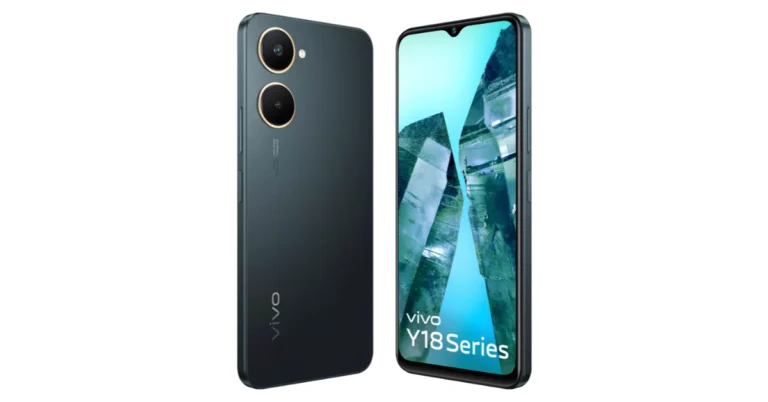
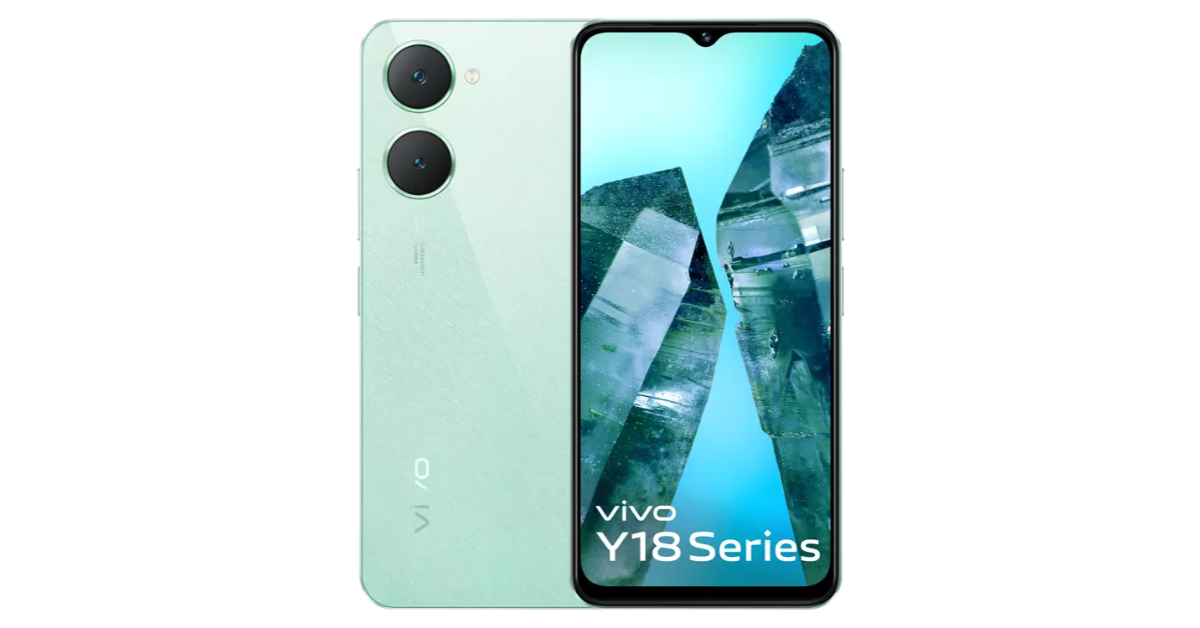
Vivo Y18t with 50-megapixel dual rear camera setup launched in India

Vivo today officially released Vivo Y18t in the Indian market. The new device is priced under 10k. It is powered by Unisoc T612 chipset and operates on Funtouch OS 14 based on Android 14. The device features a dual rear camera setup led by a 50-megapixel main camera. The smartphone also has a side-mounted fingerprint sensor and packs a 5,000mAh battery.

Vivo Y18t price in India and availability

The Vivo Y18t will be available in a single 4GB RAM with 128GB storage priced at Rs 9,499. The device is being offered in two colour options Gem Green and Space Black. The newly launched smartphone can be purchased via Flipkart as well as via the company’s official website in the country.

Also Read: Samsung Galaxy Z Flip FE is rumoured to include a powerful processor like the Galaxy S24

Vivo Y18t price in India and availability

Vivo Y18t Specifications

Vivo Y18t features a 6.56-inch HD+ LCD display with 720×1,612 pixels of resolution. The screen has support for up to 90Hz refresh rate and a peak brightness level of 840nits. It also comes with 269ppi pixel density. The phone comes pre-installed with Android 14-based Funtouch OS 14 out of the box. Under the hood, there is a Unisoc T612 chipset along with 4GB of LPDDR4X RAM and eMMC 5.1. The internal storage can be extended via a microSD card, while the RAM can also be expanded up to 8GB virtually.

Also Read: WhatsApp released a chat message draft feature for iOS users

For the photos and videos Vivo Y18t is highlighted with a dual rear camera setup that includes a 50-megapixel primary sensor and a 0.08-megapixel secondary camera along with a flashlight. The device also includes an 8-megapixel camera on the front for selfies and video calling.

The Vivo Y18t houses a 5,000mAh battery with 15W fast charging support.

Pre-Registrations For CookieRun India Are Now Open

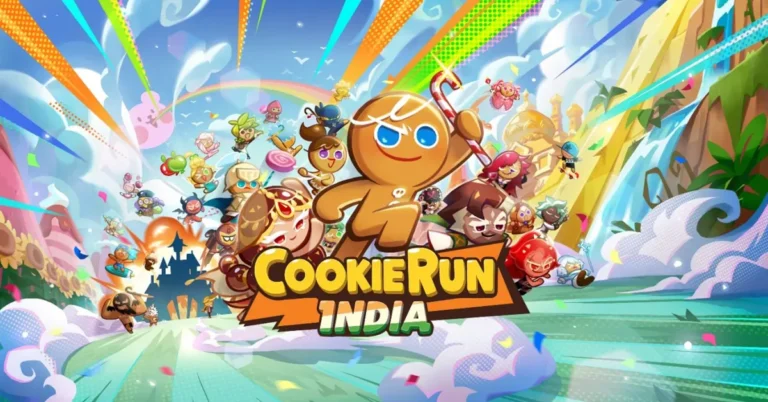
KRAFTON India has officially opened pre-registrations for CookieRun India, marking the arrival of the year’s most anticipated casual game. Developed in collaboration with Devsisters, this localized version of the globally popular CookieRun series is tailored specifically for the Indian audience. The game introduces Indian-themed Cookie characters inspired by local sweets and offers localized in-game events, promising an immersive and culturally resonant gaming experience.

Players can look forward to embarking on thrilling cookie adventures adorned with a stunning art style and engaging game modes. With deliciously sweet and challenging levels, CookieRun India aims to deliver an unforgettable gaming experiencCookieRune for all age groups. The game blends casual gameplay with fun, offering intuitive controls that make it easy for anyone to jump in and play, while still providing challenging gameplay that will test even the best players.

Read Also: Google Chrome brings new privacy and third-party cookie controls

“We are excited to introduce CookieRun India, KRAFTON’s first casual runner game in the country, designed with Indian players in mind,” said Sean Hyunil Sohn, CEO of KRAFTON India. “Through this partnership with Devsisters, we are committed to offering an engaging and culturally resonant experience for the Indian audience. With exclusive Indian-themed characters and events, we aim to bring all the sweet fun of the CookieRun world in a gaming environment that feels familiar yet excitingly new for Indian players.”

The game not only brings a fresh take on the beloved CookieRun series but also enriches it with India-specific content. Players can expect to see Cookie characters inspired by traditional Indian sweets like gulab jamun and jalebi, adding a delightful local twist to the gameplay. Localized in-game events will further enhance the player experience, offering unique challenges and rewards that resonate with Indian culture.

CookieRun India also plans to host community events and competitions to foster a vibrant gaming community. With plans to support multiple Indian languages, the game aims to be accessible to a wide range of players across the country.

Read Also: Dyson Purifier Hot+Cool Gen1 With Intelligent Sensor Launched In India

It’s refreshing to see international developers like KRAFTON India and Devsisters making a concerted effort to cater to local tastes. By integrating Indian themes into a globally recognized game, they’re not just localizing content but celebrating cultural diversity. It remains to be seen how well the game will be received, but the blend of familiar gameplay with culturally relevant content is a promising recipe.

9 Ways to Fix a Broken Laptop Screen

0

Faulty displays are the bane of productivity. Even a few dead pixels can cause you to make adjustments in your daily workflow. Not to mention, they can be very distracting. A small crack on your laptop’s screen can ruin the viewing experience. While there’s not much you can do in case of hardware damage, you can fix some technical faults at home by yourself. Today, we bring you the top 9 ways to fix a broken laptop screen at home.

Read Also: Dyson Purifier Hot+Cool Gen1 With Intelligent Sensor Launched In India

What does a ‘broken’ screen mean?

A ‘broken’ screen doesn’t necessarily mean it is physically damaged, although the term does cover that condition. It refers to any faulty behaviour, unresponsiveness, quirk, or glitch caused by the PC or laptop’s display. Typically, it is used when the display refuses to turn on, rendering all tasks inactive. Your laptop’s screen can showcase faulty behaviour for a multitude of reasons. Here are some of the common ones.

  • Outdated video drivers
  • Faulty sensor
  • Dead pixels
  • Poor connectors
  • Damage due to impact

Restart your laptop

find laptop serial number

The fastest way to fix a broken laptop screen is by restarting the device. Rebooting your laptop is the first thing you should do whenever you encounter a problem with the device. If you notice that the screen is glitching, a simple restart may put the issue to bed right away. Restarting your PC or laptop simply refreshes the system drivers and resolves minor background issues. Hit the Windows icon in the taskbar, followed by the power icon in the pop-up menu and select ‘Restart’.

Inspect the lid sensor

Diwali Gifting Guide 2024: Best laptops to gift this season Top 8 Ways to Fix a Broken Laptop Screen (2024)

Your laptop’s display shuts off when you close it. It does this by using a proximity sensor. This sensor is typically located on the upper bezel of the display. If your laptop’s screen refuses to turn on, it could be because of a faulty sensor. Clean the display along with the bezels. Make sure there is no dirt or grime around the lid sensor. Once that’s done, restart your laptop and check if the screen is working.

Update the video card drivers

If your laptop is running on outdated video card drivers, its display will stop working after a while. Here’s how you can update the drivers.

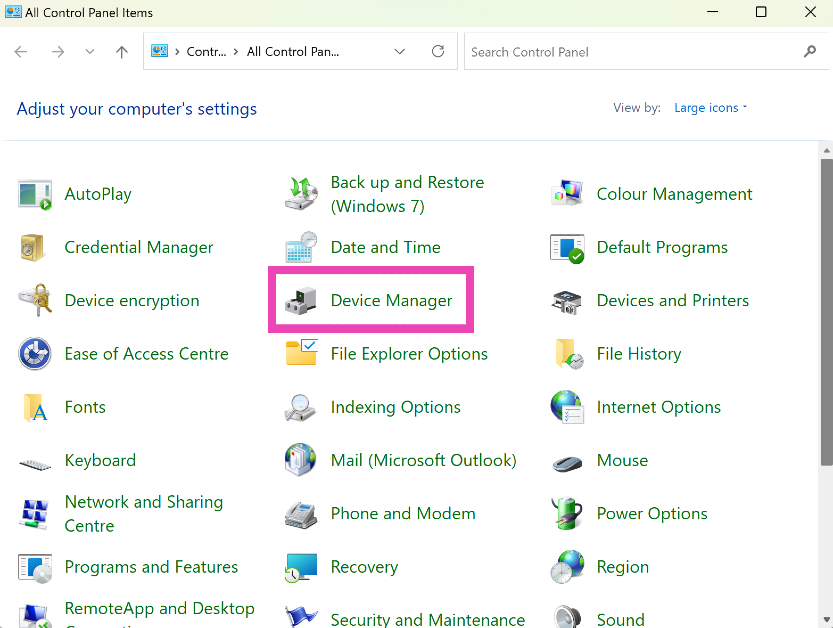
Step 1: Go to Control Panel and select Device Manager.

Step 1: Go to Control Panel and select Device Manager. Top 8 Ways to Fix a Broken Laptop Screen (2024)

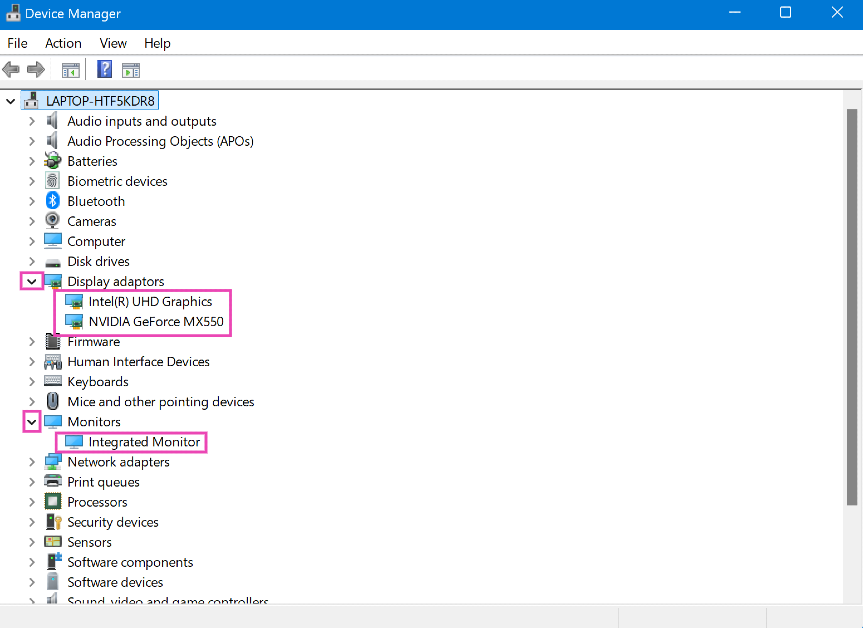
Step 2: Hit the arrow next to Display adaptors to expand the options.

Step 3: Right-click on the video driver and select Update driver. Update the driver for the Integrated Monitor as well.

Step 3: Right-click on the video driver and select Update driver. Update the driver for Integrated Monitor as well. Top 8 Ways to Fix a Broken Laptop Screen (2024)

Step 4: Choose whether you want Windows to automatically search your computer for available drivers or manually select a driver from your device.

Step 5: If you choose the first option, Windows will automatically update your computer’s video drivers. If no changes are made, the drivers are updated to the latest version.

Check the screen connectors

Your laptop’s display is connected to the rest of the device through a set of cables and connectors. If the laptop suffered a harsh impact recently, one of the connectors might have dislodged. To fix this, you need to open the screen and inspect the display. Countless tutorials on YouTube show you how to remove the bezel, cover and other parts of the screen (it differs from each manufacturer). Find a tutorial for your laptop model and follow the instructions to fix the

Fix dead pixels

Fix the dead pixels White dots appearing on your laptop’s screen? Try these 4 fixes (2024)

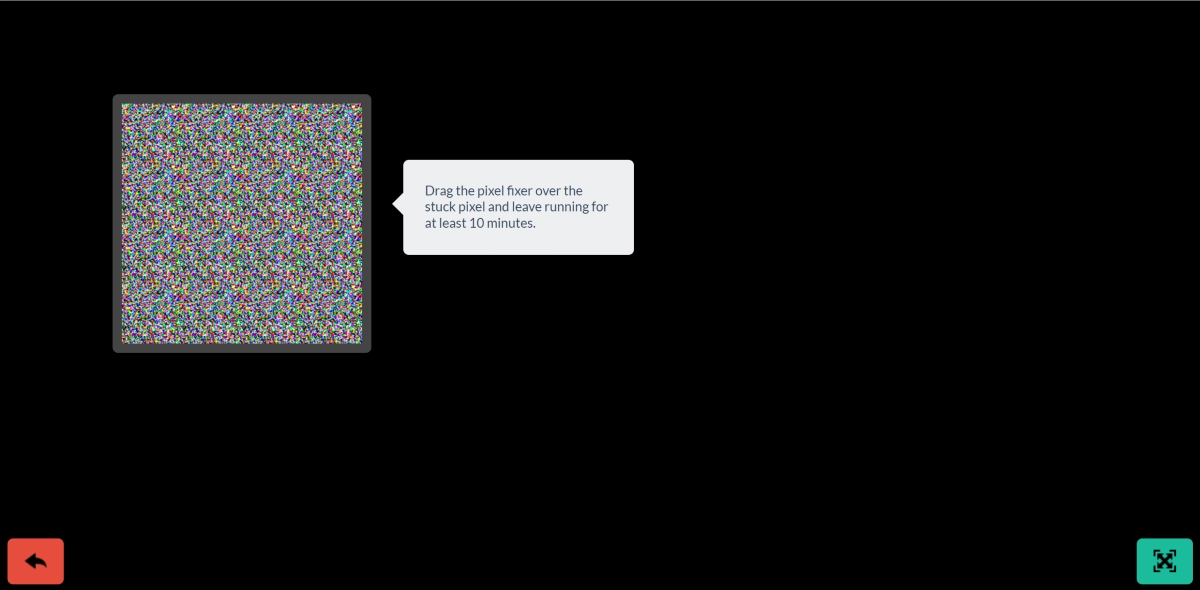
If a few pixels on your laptop’s display are slightly off, you can fix them with the help of an app. Use this LCD tool to run a dead pixel test on your laptop. Once dead pixels have been confirmed, use JScreenFix to fix it. This will require dragging the pixel fixer to the affected area and leaving it there undisturbed for 10 minutes.

Fix screen burn-in

White dots appearing on your laptop’s screen? Try these 4 fixes (2024)

This issue used to be more prevalent on old TV sets, but it may arise in some laptops, too. A ‘burn-in’ refers to screen damage caused by the visuals on the screen. In most cases, the shadow of an image keeps lingering on the display even after it has been turned off. While this cannot be completely fixed, you can reduce its effect by running a completely white video on the device. You can find many videos on YouTube to help with the issue (it differs from each manufacturer). Putting on a white wallpaper will help too.

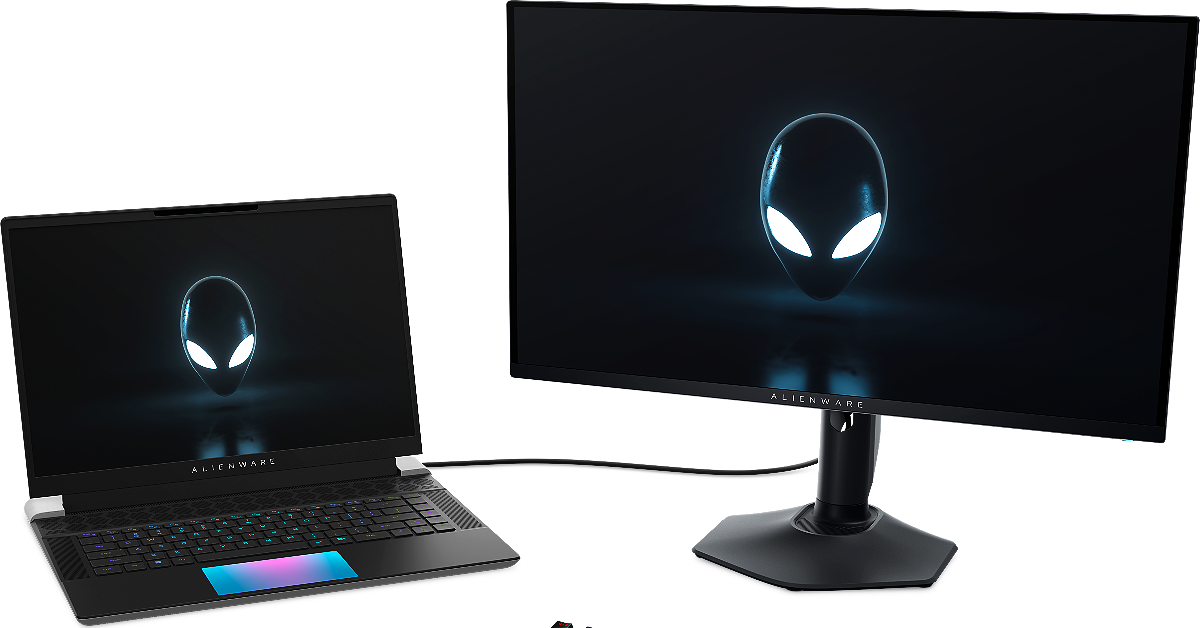
Connect your laptop to an external monitor

Alienware 27 360Hz QDOLED Gaming Monitor (AW2725DF)

If the above-mentioned fixes do not work for you, the problem may be caused by hardware damage to the display. You can confirm this by connecting an external monitor to your laptop. If the monitor works fine, it means that the fault lies with your laptop’s hardware.

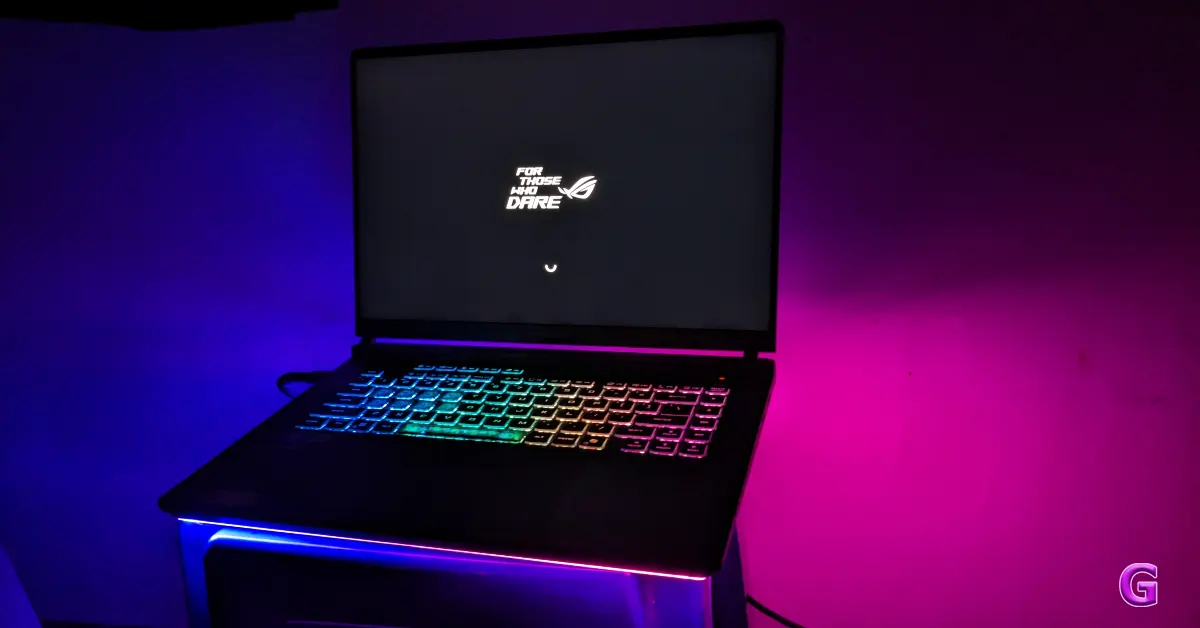
Clean the screen

Asus ROG Strix G16 G615LR Laptop Review: Brilliant Performance

Depending on the latching mechanism, dust and grime collection can hamper the functioning of your laptop’s screen. Dirt particles can find their way into deep crevices and create all sorts of unexpected issues. Give your laptop a thorough wipe to resolve this problem. Routinely cleaning the laptop with a dry microfibre cloth is highly encouraged.

Take your laptop to a service centre

Once you have confirmed that the issue is caused by faulty hardware, take your laptop to an authorised service centre for further diagnosis. If the damage wasn’t caused by an accident, it will be fixed without any cost. In case of accidental damage, you would need to pay for the replacement display unless you have an accidental damage warranty.

Frequently Asked Questions (FAQs)

How much does it cost to replace a laptop’s screen?

Depending on the model, LCD screens cost anywhere between Rs 3,000 – Rs 9,000 to replace. This cost goes significantly higher for AMOLED displays.

Are broken laptop screens worth fixing?

If your laptop has an LCD screen, you can get it repaired or replaced at an affordable price. If the cost of repair is ~50% of the price of the laptop, it is better to purchase a new device.

Can I fix my laptop screen?

If you have a replacement display on hand, you can follow YouTube tutorials to install it on your laptop.

Is it OK to use a cracked laptop screen?

It is completely okay to use cracked laptop screens as long as they are not exposed to water. Make sure you keep the display dust-free to avoid any functional issues.

How to fix a crack in a laptop?

Cracked displays can only be fixed by installing a new replacement unit.

Read Also: Truke BTG Crystal TWS Review: Hits all the right notes

Final Thoughts

These are the top 9 ways to fix a broken laptop screen. If your laptop refuses to boot, do not assume that the issue lies with the display. Plug in its charger and wait for at least 15 minutes before turning it on again. If the issue still persists, take it to an authorised service centre for further diagnosis.

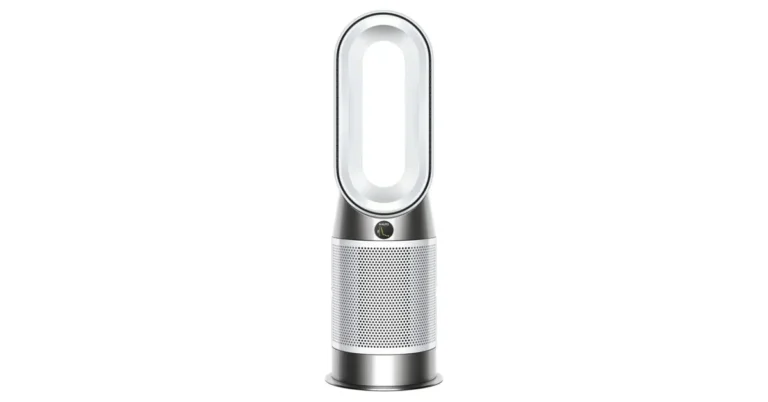
Dyson Purifier Hot+Cool Gen1 With Intelligent Sensor Launched In India

In a world where indoor air quality often goes unnoticed, Dyson steps up with its latest indoor air purifier, the Dyson Purifier Hot+Cool Gen1. This versatile machine not only purifies the air but also heats and cools your room evenly, making it a year-round companion.

Sensing the Invisible

Indoor air pollution is a silent invader. The Dyson Purifier Hot+Cool Gen1 is designed to sense pollution events automatically, so you don’t have to lift a finger. Equipped with an intelligent particle sensor, it detects pollutants like dust and pollen in real time, displaying levels on its LCD screen. Whether you’re cooking, cleaning, or just moving around, this device keeps tabs on the air you breathe.

Dyson Hot+Cool Gen1 price

Read Also: Dyson Purifier Hot+Cool review (HP07): Keeping it clean

Capturing Ultrafine Particles

At the heart of the purifier lies Dyson’s core filtration technology. Its fully sealed HEPA filter captures up to 99.95% of ultrafine particles as small as 0.1 microns. From pet dander to mould spores, what goes inside stays inside. This ensures that the air projected back into the room is as clean as it gets.

Projecting Clean Air Across the Room

Powered by Dyson Air Multiplier technology, the device delivers over 290 litres per second of smooth, powerful airflow. Its adjustable oscillation airflow ensures that purified air reaches every corner of the room. Tested under real-world conditions, it promises optimal performance for whole-room purification.

A Machine for All Seasons

Beyond its purification prowess, the Dyson Purifier Hot+Cool Gen1 offers thermal comfort all year round. It keeps you warm during chilly winters and provides refreshing cooling in the summer, all while continuously purifying the air. For light sleepers, the Night Mode purifier operates on quieter settings with a dimmed display, ensuring an undisturbed night’s sleep.

Read Also: Dyson launches multifunctional, all year use Pure Hot+Cool air purifier

Priced at Rs 56,900 the Dyson Purifier Hot+Cool Gen1 seems to be a comprehensive solution for indoor air quality and comfort. Its ability to sense, capture, and project makes it stand out in a crowded market. While it promises a lot, only time will tell how it performs in the average household. But for those looking to invest in their indoor environment, this device might just be worth considering.

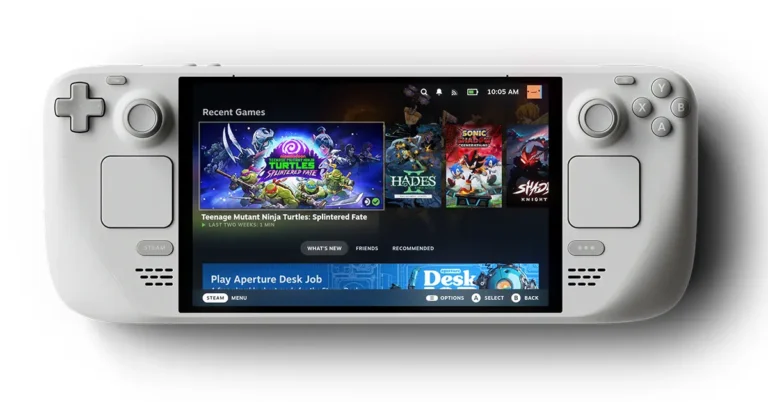
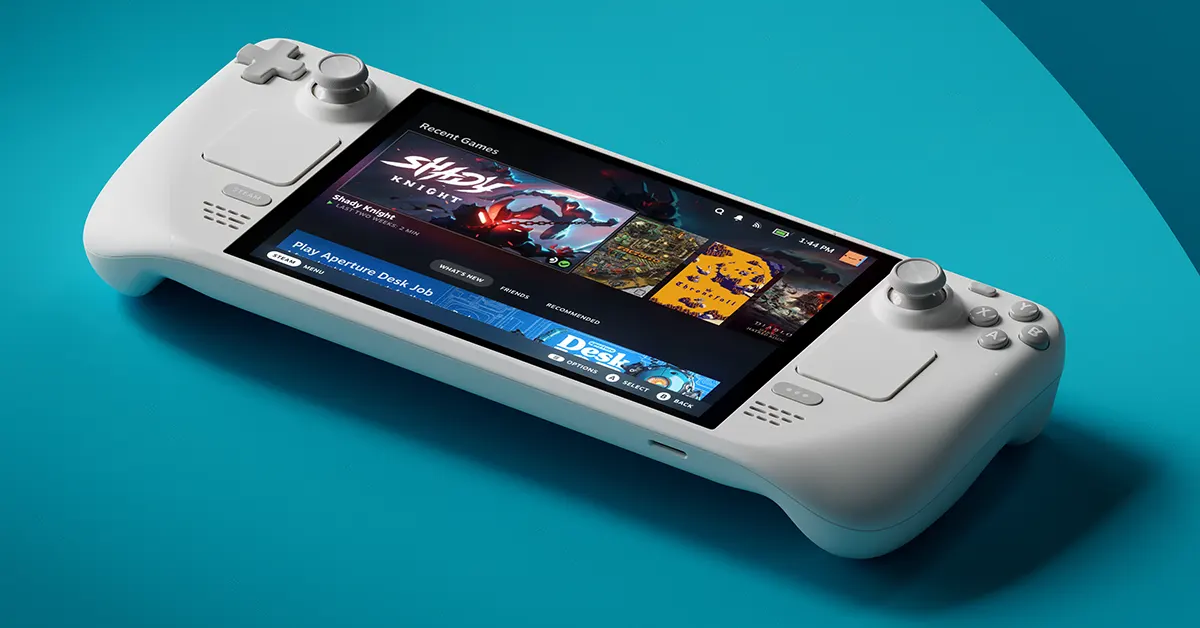
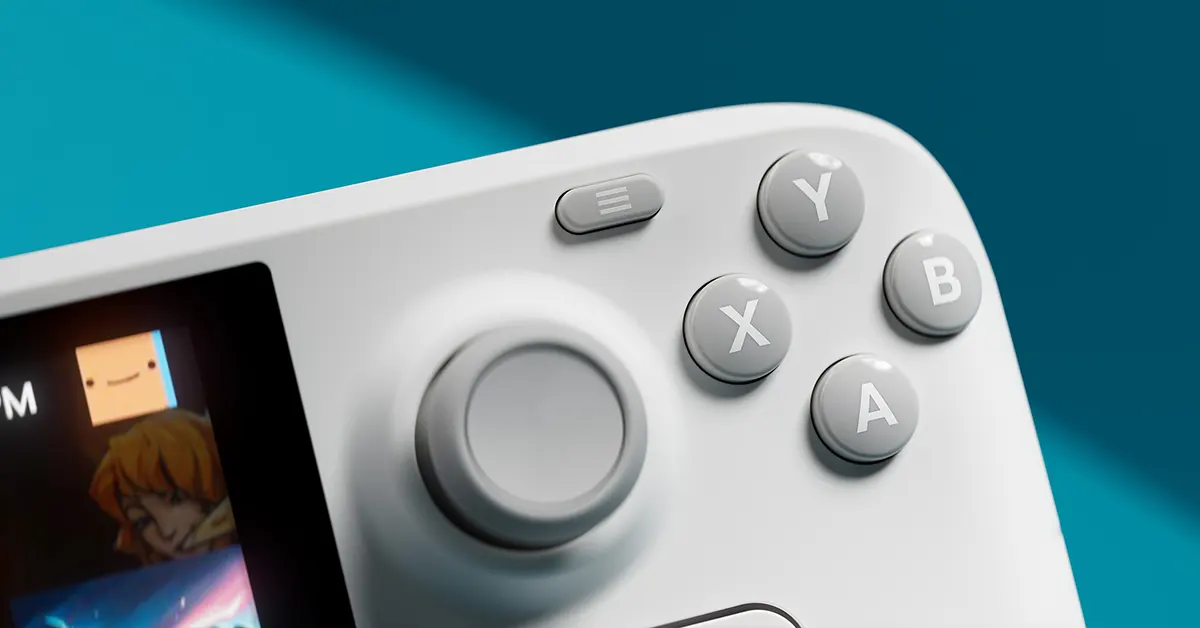
Valve Unveils Limited Edition White Steam Deck OLED

In a move that’s sure to delight handheld gaming enthusiasts worldwide, Valve has announced the Limited Edition White Steam Deck OLED, set to launch globally on November 18th. This fresh take on the popular Steam Deck not only offers a sleek, snowy aesthetic but also comes bundled with an exclusive white carrying case.

The Limited Edition White Steam Deck OLED by Valve retains all the impressive specs of the 1TB model but adds a dash of style that sets it apart from the standard black version. Priced at £599 / $679 / €719 (Rs 54,000 approx upwards), it’s a slight uptick from its monochrome sibling, but fans may find the unique colourway and bundled accessories worth the extra notes.

“Last year, we tested the waters with a smoky translucent edition in North America, and the response was overwhelmingly positive,” said Valve’s communications chief, Kaci Aitchison Boyle. “This time, we’re excited to offer the Limited Edition White to all regions where the Steam Deck is available. We’re eager to see how gamers embrace this new look.”

Read Also: Valve’s Steam Link application has finally made its way to Apple’s App

But act fast—Valve has emphasized that this edition is truly limited. Once the initial stock is gone, it’s gone for good. Purchases are restricted to one unit per account, and eligible accounts must have made a Steam purchase before November 2024 and be in good standing.

For those concerned about the pristine white exterior collecting smudges or stains, it might be a trade-off for the exclusivity and style. However, for many, the allure of a white handheld that stands out in a sea of black devices is too enticing to pass up.

The Steam Deck has been a game-changer since its original release in 2022, offering gamers the ability to play their favourite titles on the go. The OLED version improved upon the original with a superior screen and better battery life, solidifying its place in the handheld market.

Looking ahead, Valve hinted at the possibility of more colour variants in the future. “We’re using this release to inform our decisions about potential new colour variants down the line,” Boyle added. While a full-fledged Steam Deck 2 might not be on the immediate horizon, these new editions keep the excitement alive.

Read Also: How to Share games on Steam using the Family Sharing feature?

In our opinion, the introduction of the Limited Edition White Steam Deck OLED is a savvy move by Valve. It not only refreshes the product line but also tests the market’s appetite for variety. If this snowy edition is any indication, we might see even more vibrant options in the future, adding a splash of colour to our gaming adventures.

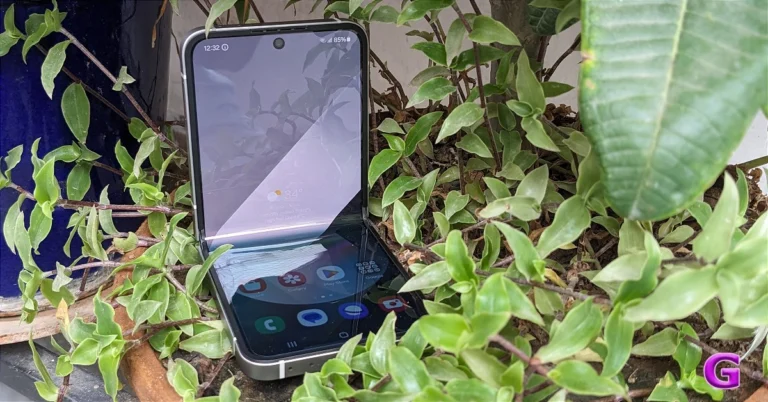
Samsung Galaxy Z Flip FE is rumoured to include a powerful processor like the Galaxy S24

Samsung is rumoured to release a Fan Edition of Galaxy Z foldable, offering affordable versions of the flagship models. Although it is not yet available, a Galaxy Z Flip FE is likely to be on the cards, featuring a flagship-level chipset.

The Samsung Galaxy Z Flip FE will use an Exynos 2400 CPU, according to a leak. The same processor powers the Galaxy S24 series this year.

Given that the FE (Fan Edition) phones are mid-range devices, it would be surprising to see the Z Flip FE acquire a powerful processor like the S24, presuming the rumours are true. To keep prices down, the rumoured smartphone, which is anticipated to debut in 2025 as a less expensive variant of the Galaxy Z Flip series, is anticipated to have more subdued internal components.

Also Read: WhatsApp released a chat message draft feature for iOS users

According to rumour mills, Samsung is working on a Galaxy Z Flip 7 with an Exynos 2500 processor, perhaps switching from Qualcomm to its proprietary chipsets in some areas. The Samsung Galaxy S25 Slim and another model in the Galaxy Z Fold 7 series are rumoured to be the company’s next inexpensive foldable.

Samsung Galaxy Z Flip 6 Specs

For the lesser known, here are the Z Flip 6 specs. The Galaxy Z Flip 6 has a 3.4-inch FHD IPS cover display with a 60Hz refresh rate. The 6.6-inch FHD+ Dynamic AMOLED 2X 120Hz Infinity Flex main display supports a 120Hz refresh rate. It also comes with the same IP48 rating. It has a side fingerprint sensor. The Flip phone has a Snapdragon 8 Gen 3 processor that offers 12GB of RAM and up to 512GB of storage. It is powered by Android 14 and runs One UI 6.1.1.

Also Read: Oppo Find X8 Series India launch date revealed, arriving with ColorOS 15

The Z Flip 6 comes with a 12MP ultra-wide camera on the cover display in addition to a 50MP primary camera with 2X digital zoom while offering AI zoom for an advanced shooting experience with up to 10x zoom. It also features a 10MP front camera.

It is equipped with a 4,000mAh battery, which is an improvement over the 3,700mAh one seen in the previous edition. It also has 25W fast charging support.

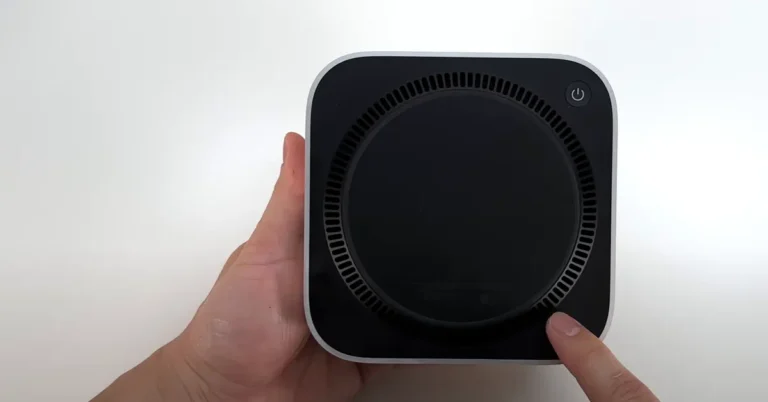
Mac Mini 2024 Teardown Reveals Sealed Secrets

The Mac Mini 2024 teardown has arrived, and it appears that Apple’s petite powerhouse is keeping its secrets tightly sealed. YouTube creator Brandon Geekabit delved into the guts of the base 16GB RAM and 256GB SSD M4 model, and the findings may disappoint DIY enthusiasts hoping for post-purchase tinkering.

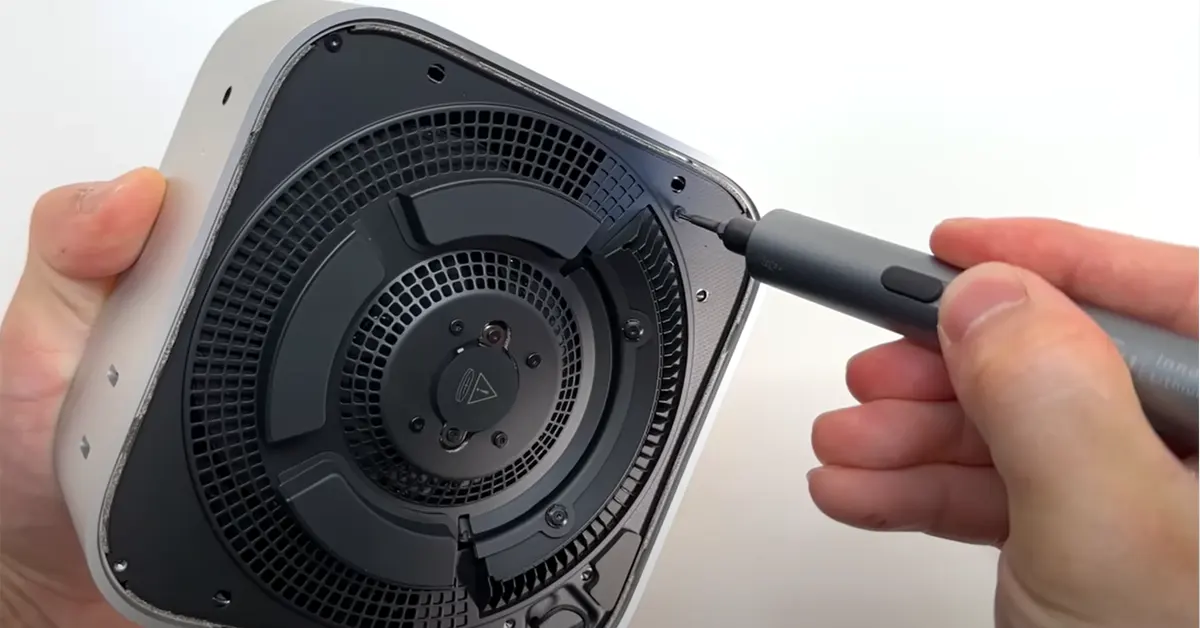
As with previous iterations, entry into the Mac Mini begins at the bottom—literally. The plastic panel hides any screws, so you’ll need to coax it open with a spudger. Once inside, you’re greeted by a metal bracket adorned with ventilation openings and a conveniently accessible button-cell battery. This little power source keeps the clock ticking even when the Mini is unplugged, and thankfully, it’s the one component that won’t make you jump through hoops to replace it.

Read Also: Apple’s New Mac Mini Packs Big Power into a Tiny Package

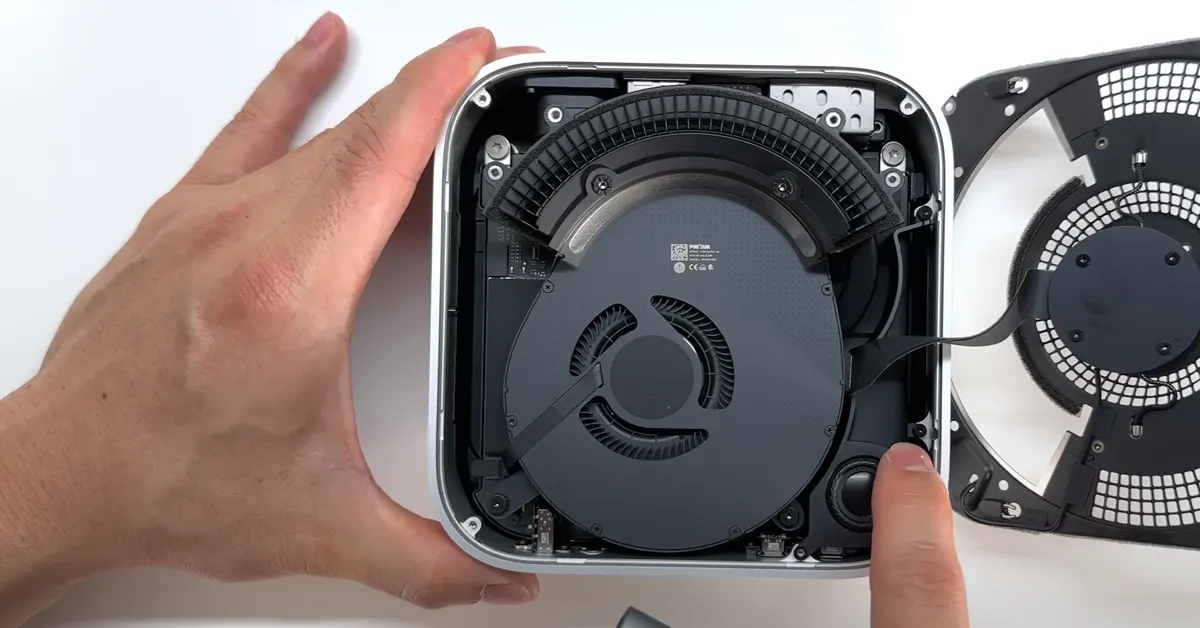
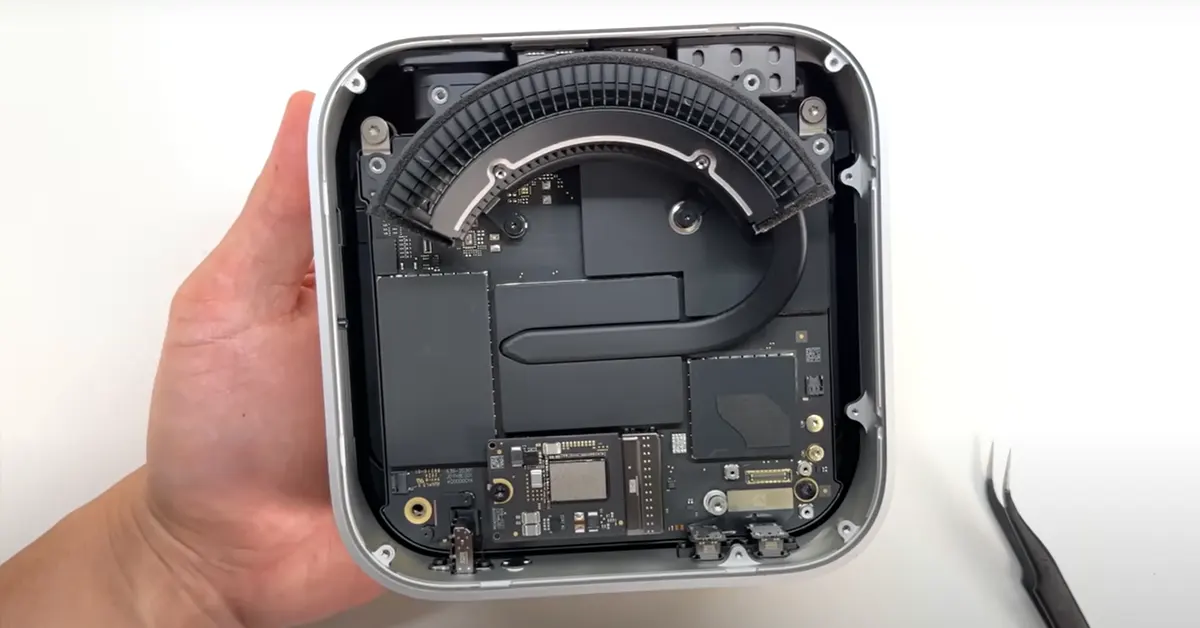
But don’t let the fancy metal grate fool you; it’s more than just a vent. Wired to the motherboard, it doubles as an antenna for Wi-Fi and Bluetooth. Beneath it lies the cooling system—a centrifugal fan paired with an arced heatsink and a single heat pipe. It’s a minimalist approach, but given the efficiency of the M4 chip, it seems adequate. Nestled in the corner is the solitary speaker, reminding us that the Mac Mini isn’t exactly built for audiophiles.

Digging deeper, we reach the motherboard and the much-anticipated SSD. At first glance, it looks like a standard M.2 2230 SSD. However, Apple wouldn’t be Apple without adding its own twist—a different pin count and a custom SSD controller that’s nowhere to be found in off-the-shelf components. So, if you were dreaming of a simple storage upgrade, think again. While some daring souls have tried soldering higher-capacity memory modules onto Apple’s SSD with success, it’s not a path for the faint-hearted. For most users, an external SSD remains the most practical solution for additional storage.

Continuing the teardown, we encounter the internal power supply—a feature that sets the Mac Mini apart from other micro PCs that rely on external bricks. Positioned at the top of the system (when right-side up), it likely uses the aluminium shell to dissipate heat, as it doesn’t benefit from direct airflow from the fan.

Read Also: Apple releases a brand-new Mac mini with M2 and M2 Pro

A moment of appreciation is warranted here. The design and aesthetics of the PSU and internal components are remarkably polished, especially considering they’re meant to remain unseen. It’s a level of attention to detail that surpasses many visible PC components on the market.

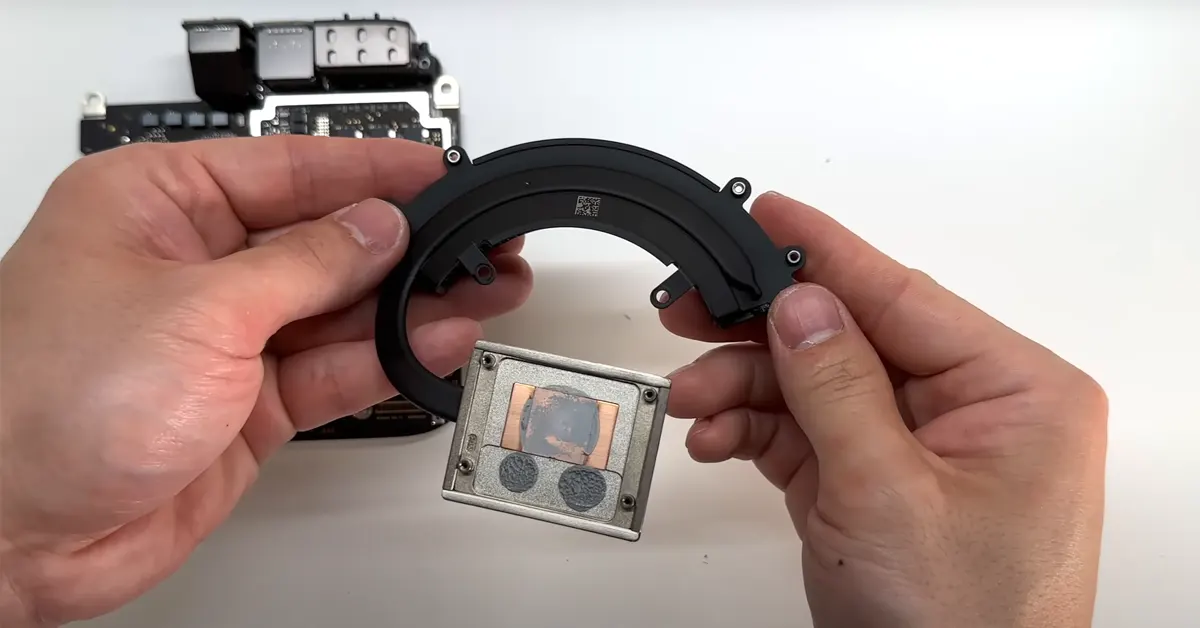
Finally, we arrive at the heatsink covering the M4 chip. It’s modest in size, but given the chip’s efficiency, it’s more about sustaining peak performance under heavy loads than basic cooling. The fanless MacBook Air models could take a lesson here, as they often throttle under prolonged strain.

In conclusion, the Mac Mini 2024 remains true to Apple’s ethos of sealed systems. If you’re in the market for this compact desktop, it’s wise to configure it to your needs upfront. Upgrading internal components post-purchase is, for all practical purposes, off the table. While it’s a marvel of engineering and design, the lack of user-upgradable parts is a letdown for those who like to get their hands dirty.

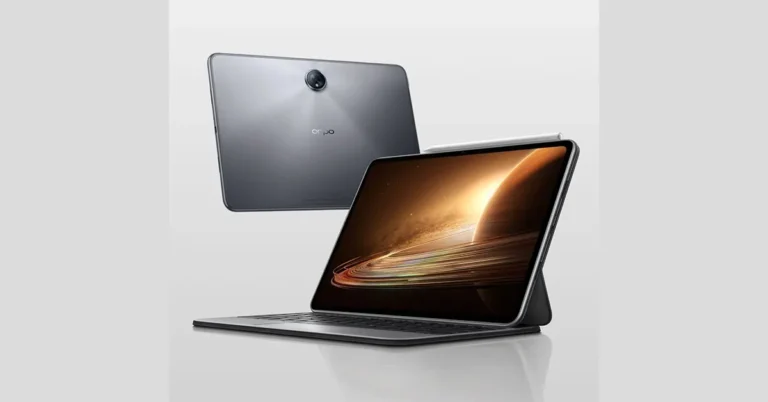
OPPO Pad 3 Leak Reveals 2.8K Display and Dimensity 8350 Chipset

It seems OPPO is gearing up to make a splash in the tablet market once again. The latest OPPO Pad 3 leak has surfaced, revealing a host of tantalizing specifications that could give competitors a run for their money. If the rumours hold true, we might be looking at an affordable yet feature-packed device that’s set to debut alongside the OPPO Reno 13 series later this month.

A Display to Rival the Best

The OPPO Pad 3 is expected to sport an LCD screen that is 11.6-inch 2.8K, similar to its predecessor. While OLED enthusiasts might sigh, the high-resolution display should still offer crisp visuals and vibrant colours. There’s even speculation about a 144Hz refresh rate, which would make scrolling and gaming smoother than butter on a hot pancake.

Read Also: Mi Pad 5, Mi Pad 5 Pro tablets launched: Specifications and pricing

Oppo Pad 3 Under the Hood

Switching gears from the previous Dimensity 9000 SoC, the Pad 3 is rumoured to house the Dimensity 8350 chipset. While it might not break any benchmark records, this processor should provide ample power for everyday tasks and moderate gaming. Interestingly, the upcoming OPPO Reno 13 Pro is also said to feature the same chip, suggesting a unified strategy in OPPO’s mid-range lineup.

Battery Life That Keeps on Going

Battery anxiety might be a thing of the past with the Pad 3. The tablet is expected to retain a hefty 9510mAh battery, supporting 67W SuperVOOC fast charging. That’s enough juice to binge-watch an entire season of your favourite show—and then some. Plus, at 533 grams and just 6.29mm thick, it’s both lighter and slimmer than the previous OPPO Pad 2.

Additional Bells and Whistles

Running on Android 15-based ColorOS 15 out of the box, the Pad 3 should offer the latest in software enhancements. Audiophiles can look forward to quad speakers with Dolby Atmos support, while video enthusiasts might appreciate the inclusion of Dolby Vision features. The tablet is also expected to support keyboard and stylus accessories, making it a potential candidate for both work and play.

Read Also: Top 3 ways to reboot an Android TV

The Waiting Game

While official details are still under wraps, the OPPO Pad 3 is rumoured to launch on November 25th in China, alongside the OPPO Reno 13 series. As with all leaks, it’s wise to take this information with a grain of salt until the company makes an official announcement.

If the leaked specs are accurate, the OPPO Pad 3 could be a compelling option for those seeking a feature-rich tablet without breaking the bank. However, the switch to the MediaTek Dimensity 8350 SoC might raise eyebrows among power users. Only time will tell if OPPO’s latest tablet will live up to the hype or fade into the background of an already crowded market.

Garena Free Fire Max Redeem Codes Today 12 November 2024: Here is how to claim them

Garena Free Fire Max is a battle royale game with regular awards and tournaments to keep players interested. If you play Garena Free Fire, you should be aware of the redeem codes that are released on a daily basis. However, because the battle royale game is banned in India, players from other countries can use the Free Fire Redeem codes daily. If you’re unfamiliar with the Garena Free Fire redeem codes or don’t know how to get them, we’ve put together a step-by-step guide to help you redeem them. Check out Garena Free Fire Max Redeem Codes for 12 November 2024.

The Free Fire Max redeem codes are a great way to get free stuff. These are 12-digit codes that contain alphabets and numbers, as well as an expiration date and time. Because the Garena FF redeem codes cannot be used more than once, you should hurry to the redemption page to claim your free reward before someone else does. To get a free reward, all you have to do is go to reward.ff.garena.com/en, which is the official redemption page. Also, keep an eye on this space for daily updates on Garena Free Fire Max redemption codes and rewards.

Also Read: Sennheiser Accentum Plus wireless headphones with Hybrid Adaptive Noise Cancellation launched

Garena Free Fire Max Redeem Codes Today 12 November 2024

NTFYW7QPXN2K

AJEBVGL3ZYTKNUS
68SZRP57IY4T2AH
V8CI2B3TL6QYXG7
WOPLMFJ4NTDHR3V
FW9SFV2MFTCK
590XATDKPVRG28N
2W9FVBM36O5QGTK
CT6P42J7GRH50Y8
YW2B64F7V8DHJM5
VQRB39SHXW10IM8
BMD8FUSQO4ZGINA
O74JF9YC6HXKGDU
4PAS6TQ87CXMLNV
NRD8L6Y7M4E29U1

How to Get Free Fire Max Redeem Codes for Garena on 12 November 2024?

  • Visit the Garena Free Fire Max game’s official website at reward.ff.garena.com.
  • Use your Facebook, Google, VK, Apple ID, Huawei ID, or Twitter account to log in.
  • You’ll be taken to a valid redemption code (s)
  • Copy and paste the 12-digit redemption code into the text box.
  • On the screen, a dialogue box will appear.
  • ‘Ok’ should be selected.

For the latest gadget and tech news, and gadget reviews, follow us on TwitterFacebook and Instagram. For newest tech & gadget videos subscribe to our YouTube Channel. You can also stay up to date using the Gadget Bridge Android App. You can find the latest car and bike news here.

NYT Wordle Answer and Hints Today (November 12)

Are you looking for today’s Wordle for November 12, 2024? The problem is difficult to solve, so if you need assistance, we’ve included hints and the answer to the November 12 Wordle.

Hints and Answers for Today’s Wordle November 12

Before answering directly, please check the November 12 Wordle Hints first.

Hint 1: Today’s Wordle answer includes one vowel.
Hint 2: The answer for today has no repeating letter.
Hint 3: past participle of fly

What word does today’s Wordle begin with?

Do you need help with today’s Wordle answer’s initial letter?

The first letter in today’s Wordle is “F”

Today’s Wordle Answer November 12 #1242

The answer to Wordle #1242 on November 12, 2024, is — FLOWN

Also Read: Ranveer Allahbadia got his YouTube Channels back, videos restored

What is Wordle?

Wordle: A Five-Letter Word Guessing Game
• The game allows six guesses of a five-letter word.
• Provide feedback on guessed letters’ placement in the puzzle.
• The New York Times purchased the game in 2022.
• Created by Josh Wardle for his partner, narrowing down 12,000 English words to 2,500.
• Named after the word “word.”

How To Play Wordle?

Wordle is a New York Times word puzzle game that allows users to guess a five-letter word in six attempts. The letters are highlighted in Yellow and Green, indicating whether the word is present in the answer or not, and Green letters indicate the correct guess.

Also Read: Samsung Galaxy Tab S10+, Galaxy Tab S10 Ultra with Galaxy AI launched in India

Wordle Tips and Tricks

  • Select a powerful starting word: Avoid using unusual words, as they frequently do not match common letters. A good opening word has plenty of benefits.
  • Repeating letters: Don’t be afraid of repeating letters; they appear frequently in words. The answer may contain one or two repeated letters.
  • Use the Wordlebot: The NYT’s Wordlebot analyses and compares replies to itself. This challenge can assist you enhance guessing skills and highlight areas for development.

Amazon Quiz Answers Today 12 November 2024: Participate to win Rs 500 Amazon Pay Balance

12 November 2024: New Amazon Quiz is now available. Customers from different parts of the country are participating in the daily quiz. The quiz starts at midnight today and will be live until 11:59 PM tonight. By successfully answering every question, participants in the quiz have the chance to win wonderful rewards. A Rs 500 Amazon Pay Balance is up for grabs to participants today.

One wrong answer could eliminate you from the quiz. You have a chance to win Rs 500 Amazon Pay Balance if you successfully answer every question. Users of the app only have the opportunity to take the quiz. Check Out 12 November 2024 Amazon Quiz Answers.

Amazon Quiz Today Prize: Rs 500 Amazon Pay Balance

Quiz Date: 12 November 2024

Daily Timing: 12 AM to 11:59 PM

Previous Amazon Quiz Winners Announcement: Today 12 PM Noon

Amazon Quiz Answers Today 12 November 2024: Win ₹ 500 Amazon Pay Balance

Question 1: Italy’s football authorities banned the use of which number on jerseys due to its association with the Nazi slogan ‘Heil Hitler’?

Answer: 88

Question 2: For which film did Tom cruise rode a bike off a cliff, pulled the parachute open and landed on a moving train?

Answer: Mission: Impossible – Dead Reckoning Part One

Question 3: Which city annually sees the Nathan’s Fourth of July hot dog eating competition at Coney Island?

Answer: New York City

Question 4: Which country is the main breeding ground for this bird species?

Answer: Canada

Question 5: Where is the headquater of this airline company located?

Answer: Malaysia

How To Play Amazon Quiz Today

Only app users are eligible to play the Amazon quiz every morning from 12 AM to 11:59 PM. The quiz is not available on the desktop. For those who are unaware of how to play the Amazon quiz, below are the steps, you can follow to take the quiz.

  • First, download the Amazon app from the Google Play Store or App Store or go here to download the Amazon App
  • Now fill in the required information through the Sign-Up option.
  • You need to log in to the Amazon app and scroll down on the home screen to find the Amazon Quiz banner.
  • Tap on the Amazon Quiz banner and tap on the Start button to start the Quiz.
  • Now you will get 5 questions and you need to answer them correctly. One wrong answer will eliminate you from the Quiz.
  • After answering all the questions correctly you are now eligible for a Lucky Draw.
  • The previous winner’s name will be announced today at 12 PM.

Amazon Daily Quiz Answers from the previous few days.

Here are all the answers from the previous 5 days of the Amazon Daily Quiz and Contest.

Amazon Quiz Answers Today 11 November 2024: Win ₹ 500 Amazon Pay Balance

Question 1: After 38 years as Prime Minister of which country did Hun Sen announce to step down in 2023?

Answer: Cambodia

Question 2: Selvamani Selvaraj’s new web series delves into the ‘unseen and unheard’ aspects of the 17-year manhunt to catch whom?

Answer: Veerappan

Question 3: Which Indian food item has been named the world’s second-best flatbread by TasteAtlas?

Answer: Butter garlic naan

Question 4: This bird was the symbol of which English Monarch?

Answer: Elizabeth I

Question 5: When did this site became a UNESCO World Heritage site?

Answer: 1989

Amazon Quiz Answers Today 9 November 2024: Win ₹ 500 Amazon Pay Balance

Question 1: Sabyasachi made masks of what for King Charles and Queen Camilla’s Animal Ball in 2023?

Answer: Shola

Question 2: In August 2023, ‘Bandit King’ Malkhan Singh joined the Congress party in which state?

Answer: Madhya Pradesh

Question 3: Microsoft has changed the default font for its Office apps to what after 16 years?

Answer: Aptos

Question 4: Why is this animal not considered a big cat?

Answer: Lack of Roar

Question 5: This drink comes from which place?

Answer: Cuba

Amazon Quiz Answers Today 8 November 2024: Win ₹ 500 Amazon Pay Balance

Question 1: Fatma Samoura became the first woman, first black person, first -European to be which organization’s secretary general?

Answer: FIFA

Question 2: The Central Government has agreed to investigate the Havana Syndrome. It originated in which country?

Answer: Cuba

Question 3: Across Parliament’s history we have had 28 of what in India

Answer: No confidence motions

Question 4: What is the only place outside of Africa, where this primate is found?

Answer: Grenada

Question 5: This vegetable was worshipped by the ancient Egyptians as a symbol of what?

Answer: Eternal Life

Amazon Quiz Answers Today 7 November 2024: Win ₹ 500 Amazon Pay Balance

Question 1: The Tata Steel Chess tournament played in the classical format is being held in which country?

Answer: Netherlands

Question 2: Which actor in the show Criminal Justice stars as the central character of lawyer Madhav Mishra?

Answer: Pankaj Tripathi

Question 3: The Amroha Dholak is a musical instrument from which the state got a GI tag in 2023.

Answer: Uttar Pradesh

Question 4: Which country is this ancient temple located in?

Answer: Egypt

Question 5: This statue is located at which famous educational institution?

Answer: IISC Bangalore

Amazon Quiz Answers Today 6 November 2024: Win ₹ 500 Amazon Pay Balance

Question 1: Which of these West Indies bowlers took the wicket of Steve Smith with his first ball in Test cricket?

Answer: Shamar Joseph

Question 2: At the 2024 Emmy Awards which series won the award for Best Drama Series?

Answer: Succession

Question 3: Sharmistha Mukherjee has recently written a book titled ‘_____ My Father: A Daughter Remembers’. Fill in the blanks

Answer: Pranab

Question 4: Name the famous freedom fighter, whose statue is in the middle

Answer: Bhagat Singh

Question 5: Name this famous person who had cameos in several Marvel movies

Answer: Stan Lee

Amazon Quiz Answers Frequently Asked Questions (FAQs)

Where can I check the previous winners? Did I win how to check?

You can head over to this link on your mobile or desktop to check the winners of the Amazon Daily Quiz Contest.

How to Play Amazon Daily Quiz or Contest?

We have written an explainer above, you can refer to that.

When are the winners of the Amazon Quiz and contest announced or declared?

The announcement of today’s Amazon quiz winner will take place Tomorrow. As for the Special Quiz and “Spin & Win” Contest, the winners will be declared once the Quiz Contest comes to an end. To find out who the lucky winner is, you can refer to the Amazon Quiz Winners List or visit the Amazon Winners tab in the Amazon App.

How to participate in the Daily Amazon Quiz?

That is very easy, just got to the Amazon app and scroll to the bottom of the page and you will find the Quiz section. Click on it (usually it is called the fun zone) and you can enter the Amazon Today Quiz Contest. 

Are there any other quizzes or contests running on Amazon daily?

Yes, there are many running on a daily basis. These range from spinning the wheel to answering the questions correctly. All are located in the Fun Zone. 

What are the criteria for selecting a winner in the Daily Amazon Quiz?

When a qualified player submits correct answers to all the questions, they will automatically be entered into a lucky draw. This draw will include all participants who answered all the questions correctly. Amazon randomly selects the final winners from the pool of eligible participants who gave the right answers.

Which Types of Questions are asked within Amazon Daily Quiz?

These are very simple and straightforward questions. These are mainly related to general knowledge. 

Where should I look for Amazon Daily Quiz answers?

You can bookmark this page as we will help you every day with the Amazon Daily Quiz. We bring you fresh answers every day for the Amazon Daily Quiz and Contest. 

What time does Amazon Announce previous winners?

The previous winner’s name will be announced today at 12 PM (noon).

Truke BTG Crystal TWS Review: Hits all the right notes

Truke’s Born To Game TWS series has a new addition. The BTG Crystal TWS was launched last month at a special price of Rs 999. Currently, these earbuds are retailing for Rs 1,099. Operating in the entry-level segment, the BTG Crystal packs interesting features like multi-point connection and quad-mic ENC. There’s also a low latency mode on these earbuds since they’re designed for gaming. We’ve been using these earbuds for the last week as our primary gaming TWS. Here is our in-depth review of the Truke BTG Crystal TWS.

Read Also: 3 Ways to Send Blank Messages on WhatsApp, Instagram, & Telegram (2024)

Truke BTG Crystal TWS Review: Design

Here’s what you get inside Truke BTG Crystal’s retail box:

  • Charging case
  • Earbuds
  • Extra eartips
  • USB Type-A to Type-C cable
  • Quick start guide
  • Warranty card

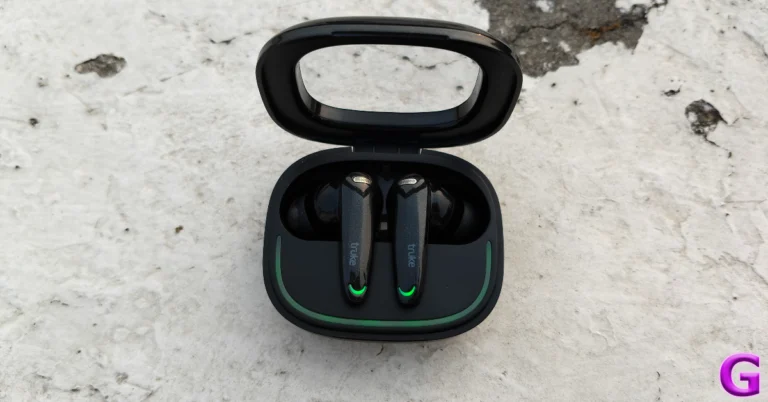
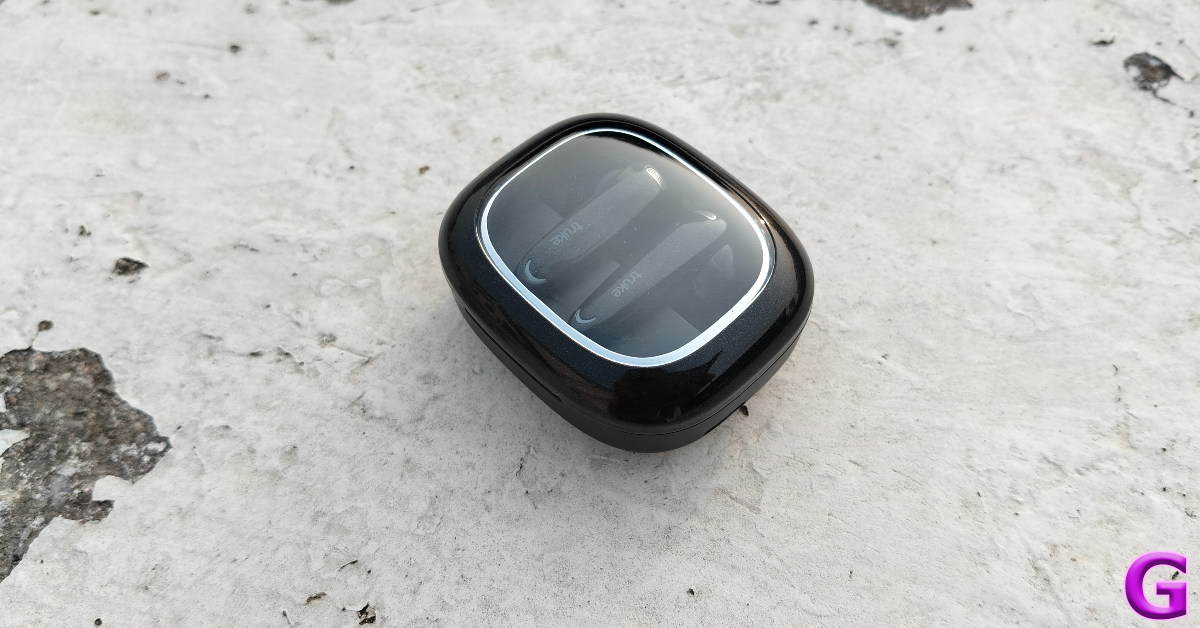
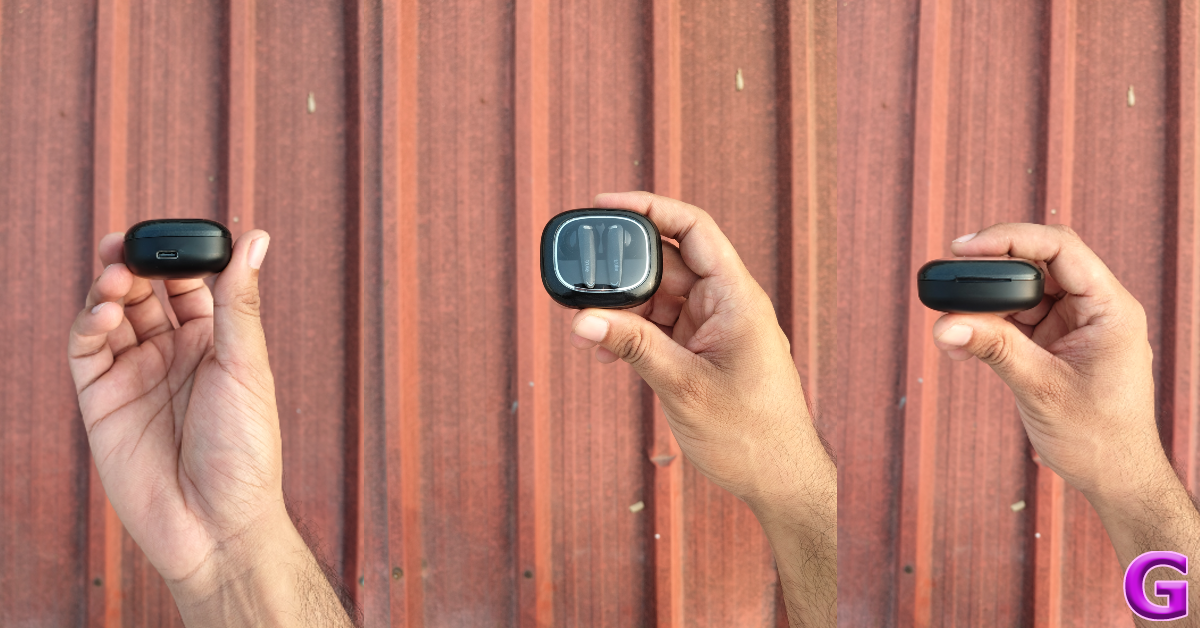
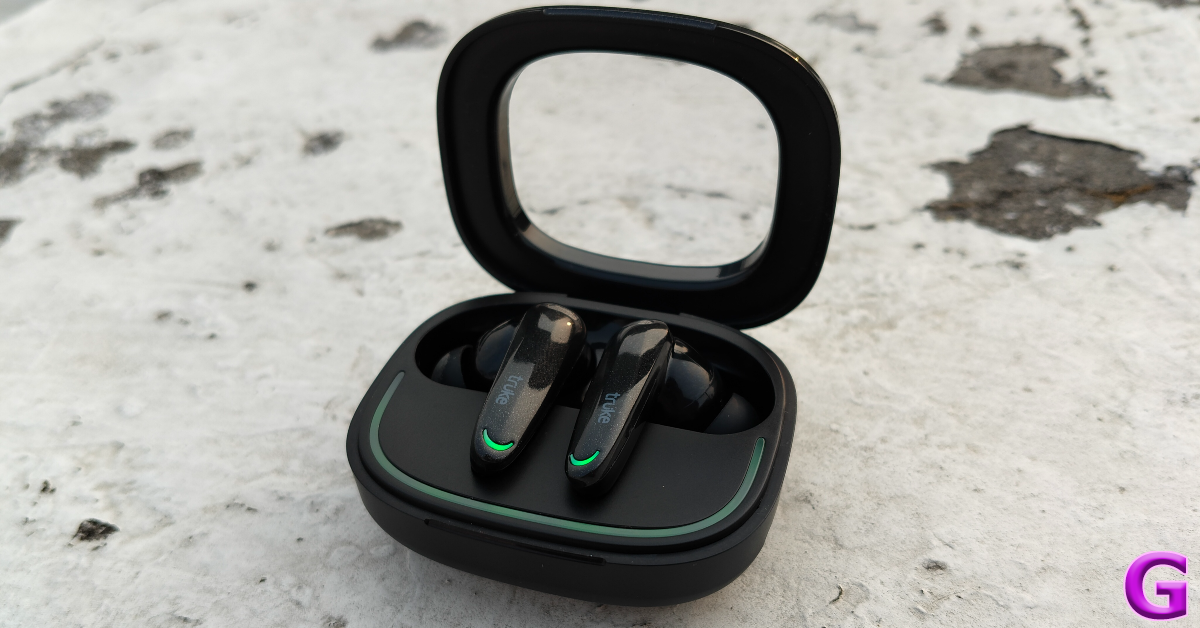
For a gaming TWS, Truke has a very minimalist aesthetic. What we like about its charging case is that it doesn’t go overboard with gaudy RGBs. Instead, it sticks with a traditional form factor and adds tasteful LED lighting to the mix. The lid of the case has a see-through plastic panel that gives you a glimpse of the two earbuds nestled in their cutout. This panel tends to attract fingerprints very easily.

Truke BTG Crystal TWS Review: Design

Even though the BTG Crystal is an entry-level TWS, its build quality is quite sturdy. The plastic does not feel flimsy to the touch and the hinge isn’t loose. The notch under the lid makes it open to flip open the case using one finger. The charging port is positioned on the right side of the case. Interestingly, there is no ‘Truke’ branding on the case.

design

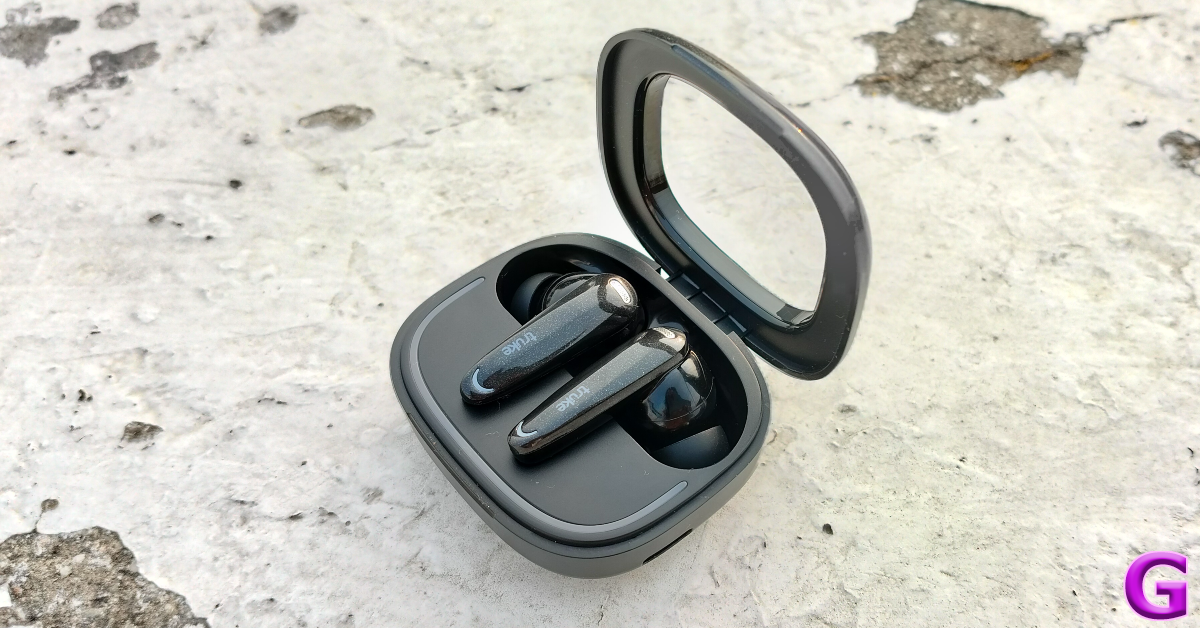
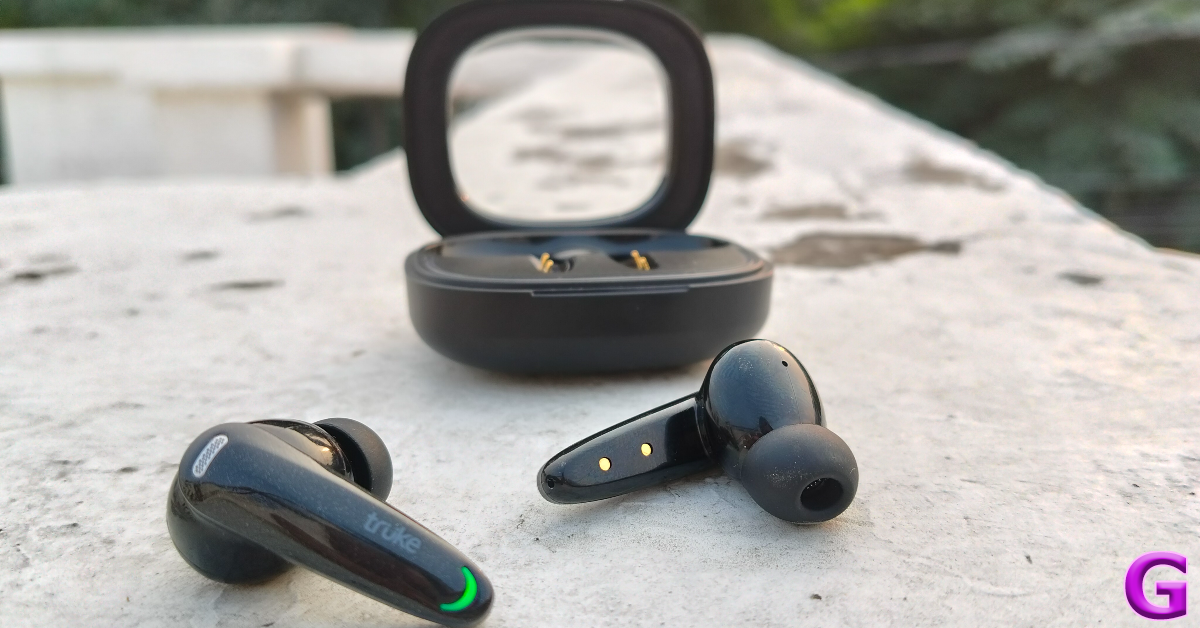
Flipping open the case, you will notice a sleek LED bar running through the bottom of the inlay. This LED bar changes its colour when the case is low on battery. The two earbuds have small LED lights at the bottom of their stems. The earbuds follow the traditional in-ear design. There are extra silicone tips provided in the box to cater to different ear sizes.

design

The BTG Crystal earbuds offer a comfortable fit and do not cause major ear fatigue after being worn for multiple hours. Our only gripe with the earbuds is that their inner panel has a glossy finish. While the earbuds don’t slip out in sweaty conditions, they do require periodic adjustment. The earbuds have an IPX5 rating, which means they remain unfazed by sweat and water splashes. The touch-sensitive zones on the buds are tuned nicely and accidental triggers are a rare occurrence.

Truke BTG Crystal TWS Review: Performance

BTG Crystal earbuds deliver the audio output through 13mm dynamic drivers. The TWS supports Bluetooth 5.4 which makes the pairing process easy and seamless. There’s support for 360-degree Spatial Audio as well.

The soundstage offered by these earbuds is very impressive for the price. We are used to entry-level earbuds being heavy on the bass and low-range frequencies but the Truke BTG Crystal surprised us with its focus on a balanced soundstage. The mid and high frequencies get a lot of room on the soundstage to express themselves. However, we wish they had a ‘pop’ to them. Certain background elements like subtle clapper hits tend to drown in the mix.

Truke BTG Crystal TWS Review: Performance

The audio quality on offer here is satisfactory. Of course, its richness pales in comparison to midrange earbuds, but this is as good as it gets in this price bracket. We would recommend sticking within the 40-80% volume range to get the best out of these earbuds.

Our favourite thing about the BTG Crystal is its dual pairing chops. This feature is typically found in midrange wireless earbuds. Its presence on this TWS adds a lot of value to its price tag. It takes 4 taps on the left earbud to get the TWS into Dual Pairing Mode. Once the earbuds are connected to two devices, you can seamlessly switch between them. If you get a call while playing a game on your PC, you will be able to hear your ringtone. You don’t need to disconnect the buds from your PC to pick up the call. The TWS immediately switches to your phone as soon as you accept the call.

performance

Since the BTG Crystal is primarily designed for gaming, there is a dedicated gaming mode on the TWS. This mode can be enabled by tapping 3 times on the left earbud. This pulls down the latency to 40ms, ensuring that the audio remains synced to the gaming visuals. We played Call of Duty Mobile while wearing these earbuds as were happy with the audio quality and lack of lag.

Another facet where the Truke BTG Crystal pulls ahead of its peers is the calling experience. These earbuds are equipped with Quad Mic ENC, which is successfully able to extract the voice of the caller from the surrounding noise and relay it to the listener. In indoor conditions, this feature worked flawlessly. The voice of the speaker remained ‘crystal’ clear and there were no audio discrepancies whatsoever. However, in loud, outdoor conditions, the Quad Mic ENC wasn’t enough to stop the noise from creeping in.

The two earbuds are packed with a 40mAh battery while the case can hold an additional 400mAh of charge. Truke claims a total battery life of 68 hours on these headphones. During the week-long review period, we used the Truke BTG Crystal for 4-5 hours every day. We weren’t able to deplete the charging case by the end of the week. Since Truke doesn’t have a companion app for its TWS products yet, there is no way of finding out the charge remaining in the case.

Read Also: Instagram no longer supports automatic feed refresh, removes “rug pull” feature

Verdict

For an entry-level gaming TWS, the Truke BTG Crystal is as good as it gets. It hits all the right notes for us, be it the minimalistic design, tasteful RGBs, or the balanced soundstage. This is the ideal affordable TWS for folks who do not like their music listening experience to be overpowered by a blanket of bass. If you’re a gamer, you will certainly enjoy the low latency mode on this TWS. The lack of a companion app is a bit of a downer, but the smooth touch controls ensure that you don’t miss it too much.

Truke BTG Crystal: Pros

  • Clean design
  • Tasteful RGBs
  • Balanced sound
  • Multi-point connection
  • Affordable

Truke BTG Crystal: Cons

  • Does not have a companion app

Top 4 ways to reboot an Android TV

0

Rebooting your TV is one of the easiest tasks you can perform on the device. Hitting the power button on the remote can turn off and turn on the device. However, an Android TV can be rebooted using the device’s software as well. You may not feel the need to use this option all the time, but it is nice to have an extra tool in your arsenal. So, without further ado, here are the top 4 ways to reboot or restart your Android TV.

Read Also: WhatsApp released a chat message draft feature for iOS users

Reboot vs Hard reboot vs Factory reset: What’s the difference?

The terminology around restarting and resetting your TV can get pretty confusing. Typically, ‘restart’ and ‘reboot’ refer to the same process – turning off the device and turning it back on. Your TV’s interface allows you to do this with ease. However, if your TV is unresponsive, you may have to perform a hard reboot. A hard reboot shuts off the power from the device completely. Oftentimes, it relies on long-pressing the power button until the device shuts down. In the case of your Android TV, you can use the electrical outlet to carry out this process.

A ‘factory reset’ means wiping all the data from the device and resetting all of its settings. When the factory reset is complete, the device goes back to the state it was in when you unboxed it. All the settings are reset to their default state, earning the name ‘factory reset’. If you don’t want to lose your personal data, it is recommended that you create a backup before resetting your device.

Use the power menu to reboot your Android TV

3 Ways to Play Video Games on Roku, Android TV and Fire TV

Step 1: Use your TV’s remote to hit the gear icon in the top right corner of the screen.

Step 2: Scroll down and select Restart.

Use device settings to reboot your Android TV

How to install new apps on Android Smart TV

Step 1: Hit the gear icon in the top right corner of the screen.

Step 2: Scroll down and select Device Preferences.

Step 3: Click on About.

Step 4: Select Restart.

Use the power button to reboot your Android TV

Acer-P-Series-Android-TV-remote

Step 1: Point the remote control towards the TV and long-press the power button for 3-5 seconds.

Step 2: In the pop-up menu, select Restart.

Perform a hard reboot

Acer-P-Series-Android-TV-screen

Step 1: Turn off the TV using the remote control.

Step 2: Locate the electrical outlet and unplug the TV’s power cord.

Step 3: Wait for 1-2 minutes.

Step 4: Replug the TV’s power cord and turn it on using the remote control.

Bonus Tip: How to factory reset your Android TV?

Step 1: Use the remote to hit the gear icon in the top right corner of the screen.

Step 2: Scroll down and select Device Preferences.

Step 3: Scroll down and click About.

Step 4: Select Reset/Factory Reset.

Step 5: Confirm your selection.

Frequently Asked Questions (FAQs)

How do I reboot my Android Smart TV?

Hit the cog wheel icon in the top right corner of the screen and select ‘Restart’. If you don’t see the restart option on the list, go to Device Preferences>About>Restart.

How do I reboot my TV?

Use the remote control to turn off your TV, unplug its power cord, and wait for a couple of minutes. Once a couple of minutes have passed by, re-plug the cord and turn on the TV using the remote.

How do I reboot my Android TV without a remote?

If you don’t have a remote at hand, you can reboot your Android TV by using the power button on the device or by directly unplugging and re-plugging the power cord.

How do I factory reset my Android TV?

Press the gear icon, go to Device Preferences>About>Factory Reset, and hit ‘Confirm’.

How do I schedule my Android TV to reboot at a particular time?

To schedule your Android TV to reboot at a particular time, go to Pro Settings, select ‘Periodic restart’, and turn on its toggle switch. Set the time and set the reboot frequency.

Read Also: OnePlus 12R Receives OxygenOS 15 Stable Update Globally

Final Thoughts

This is how you can reboot or restart your Android TV. Before performing a factory reset on your TV, make sure you have synced the data to your Google account. Once the TV has been reset, you will lose all your apps and data on the device. If you have any questions regarding the process, let us know in the comments!

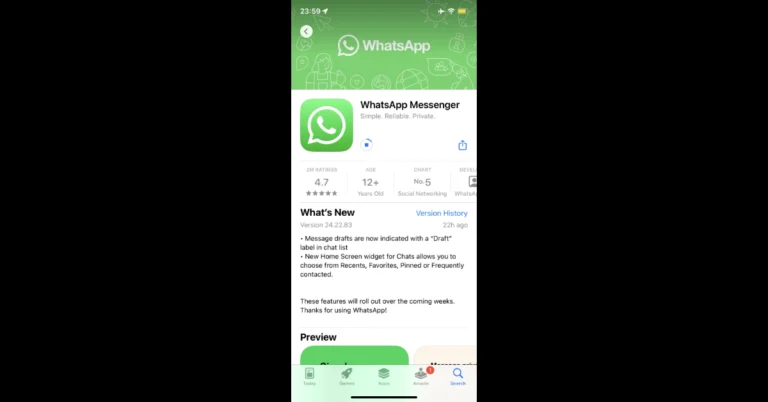
WhatsApp released a chat message draft feature for iOS users

WhatsApp for iOS 24.22.83 has a new draft label feature that allows users to quickly locate drafted and unsent messages without visiting particular chats. The functionality refreshes data in real-time using the iOS widget API. Users may easily locate an incomplete message without having to navigate through the chat list by seeing the new draft label next to it. Additionally, WhatsApp has released a new widget that lets users search for chats by category on the iPhone home screen.

With the WhatsApp for iOS 24.22.83 update now accessible on the App Store, WaBetaInfo reports that WhatsApp has included new capabilities to help user organisation and communication, such as better draft labelling. WhatsApp is extensively introducing a chat message draft capability to all users, according to the official changelog.

WhatsApp has added additional chat-related Home Screen widgets, such as Frequently Contacted, Pinned, Favourites, and Recents. With their tighter integration with system functions and real-time data updates, these widgets—which were initially included in the WhatsApp for iOS 24.21.82 update—improve conversation accessibility on the Home Screen.

Also Read: Oppo Find X8 Series India launch date revealed, arriving with ColorOS 15

The official changelog also mentions that message drafts are now marked with a new “Draft” label in the chat list. As per the report the feature shows the text of any incomplete message in the chat list, tagged with the “Draft” label, allowing users to read what they were writing without entering the discussion.

“For users who often get interrupted or distracted while typing, this feature serves as a reminder, reducing the chance of leaving messages unsent.”

Unlike in the past, when users had to recall or check each chat individually, the new “Draft” label now indicates which discussions include incomplete texts at a glance.

Also Read: Instagram no longer supports automatic feed refresh, removes “rug pull” feature

iOS users who download the most recent WhatsApp update from the App Store will have access to a chat message draft capability. According to the official changelog, WhatsApp users may see new features in the coming weeks.

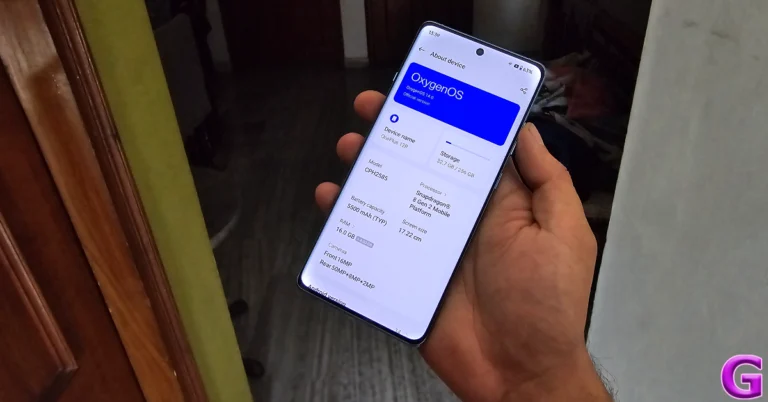
OnePlus 12R Receives OxygenOS 15 Stable Update Globally

Just when you thought your OnePlus 12R couldn’t get any better, the OnePlus 12R OxygenOS 15 update has started rolling out globally, adding a fresh coat of paint and a bag full of tricks to your favourite device.

Global Rollout After Beta Testing

Following last month’s beta update, OnePlus is now releasing the stable OxygenOS 15, based on Android 15, for the OnePlus 12R worldwide. This comes hot on the heels of the same update for the OnePlus 12. The company has confirmed that while the update began yesterday, it will roll out in batches throughout this week. So, if you’re eagerly checking your phone every five minutes, patience is a virtue—or so they say.

Read Also: OnePlus 12R to go on sale for the first time in India today: Sale offers details

AI Features Coming Soon

OnePlus has also teased that AI features will begin rolling out to its products by the end of November. However, these fancy new features are not part of the current update. For those in North America feeling left out, OnePlus assures that the update will be available later this week. Hang tight and maybe practice some breathing exercises in the meantime.

New Animations and Visual Effects

The update brings a state-of-the-art system graphics engine that promises superior rendering and animation performance. Driven by advanced parallel processing, it ensures smooth visuals even when multitasking or running resource-intensive apps. The home screen gets a refreshed design with newly crafted icons, achieving a balanced look with enhanced proportions and vibrant colours.

Themes and Customization

For the personalization aficionados, the new flux themes offer a broad selection of high-quality options. Extensive customization features are available for the Always-On Display, Lock screen, and Home screen. Fluid and seamless transition animations across these screens enhance visual consistency.

Enhanced Features and Privacy

The updated Fluid Cloud enhances app compatibility, now supporting a wider range of applications like Spotify, Swiggy, and Zomato. Photo editing gets a boost with globally reversible photo editing capabilities. Privacy isn’t left behind either, with optimizations to the Private Safe and a new home screen shortcut for hidden apps.

Battery and Charging Improvements

The new “Charging limit” feature halts charging at 80%, aiming to extend battery life and minimize degradation. A battery protection reminder activates the Charging limit feature if the device remains charging for too long. This is great news for those who have a habit of leaving their phones plugged in overnight.

Read Also: OnePlus 12R new 8GB RAM, 256GB storage variant now available in India

Rollback Option Available?

For those who like to live dangerously—or cautiously—OnePlus has provided a rollback option to Android 14 for those who wish to go back. But with all these new features, why would you?

The OnePlus 12R OxygenOS 15 update brings a host of exciting features and enhancements that aim to improve user experience significantly. While the AI features are still on the horizon, the current update offers enough to keep users engaged. As always, OnePlus seems committed to delivering timely updates and listening to user feedback.

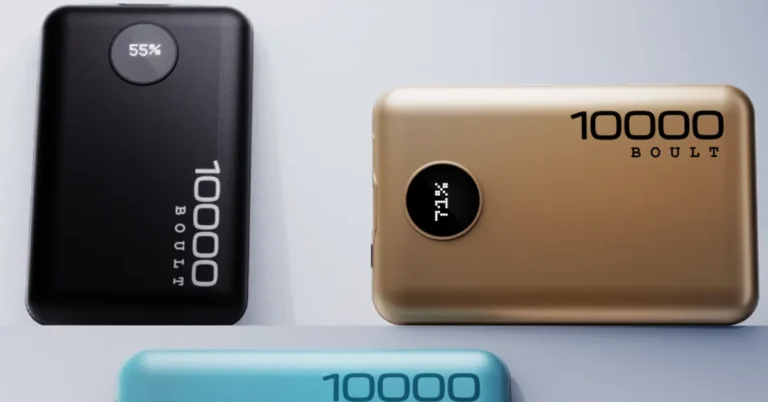
BOULT Unveils AmpVault V10 & V20: A Charge Above the Rest

BOULT has stepped into the power solutions arena with the launch of its AmpVault V10 and AmpVault V20 power banks. For those constantly on the move, these high-capacity power banks promise to keep devices charged with a blend of speed, safety, and style.

The AmpVault V20 boasts a massive 20,000 mAh capacity with 22.5W fast charging capabilities. According to BOULT, this means it can charge an iPhone 15 up to 4.9 times, a OnePlus Nord up to 6 times, and a Samsung Galaxy S24 up to 4.1 times. Multiple ports—including Micro USB, Type-C (input/output), and USB—allow users to charge several devices simultaneously, whether it’s smartphones, tablets, smartwatches, or wireless earbuds.

Read Also: One Plus launches 10,000 mAh power bank for Rs 1,399

Not to be outdone, the AmpVault V10 offers a more compact option with a 10,000 mAh capacity while retaining the same 22.5W boosted speed charging and multi-layer protection features as its larger sibling. It’s ideal for those seeking a portable yet powerful charging solution without any performance compromises.

Both models come with a premium metallic finish and are available in Teal, Red, and Pure Black, adding a touch of elegance to their robust functionality. An LED digital display keeps users informed of the remaining battery life, and advanced protection features like overcurrent protection, short circuit protection, and smart shutdown ensure devices are charged safely.

Varun Gupta, Co-Founder of BOULT, commented on the launch: “Power banks have become an essential part of our lives, whether you’re heading to the office or travelling. Our new AmpVault series aims to provide fast, efficient charging with the safety features and design our customers expect.”

Read Also: Dhanteras Special 2024: Devices that are an investment

The AmpVault V10 and V20 are now available exclusively on Flipkart, Amazon.in, and the official BOULT website, priced at Rs 1,099 for the V10 and Rs 1,499 for the V20.

In a market flooded with charging options, BOULT’s entry into power banks adds a compelling choice for consumers. Their combination of high capacity, fast charging, and sleek design might just set a new standard for portable power solutions.

Oppo Find X8 Series India launch date revealed, arriving with ColorOS 15

Oppo is set to introduce its next line of smartphones in India soon. The Oppo Find X8 series and ColorOS 15 globally as well as India launch dates have been officially announced by the company today. The gadget will replace the Find X7 Series, which has already made its debut in China.

Oppo Find X8 Series India launch date and ColorOS 15 global debut is set for November 21. The launch event will be held in Bali, Indonesia at 10:30 AM IST.

Pete Lau, SVP and Chief Product Officer at OPPO said, “Until now, flagship camera phones with ultra-zoom, power, battery life, and AI tools have been weighed down by thick, heavy designs, but Find X8 Series changes the game. The Find X8 is a thin and light powerhouse with a sterling battery life and a periscope zoom. The Find X8 Pro takes Zoom further, delivering ultra-grade experiences without the bulk. And with ColorOS 15’s smart and smooth experience, the Find X8 Series is set to mark an exciting shift for the smartphone industry.”

Also Read: Instagram no longer supports automatic feed refresh, removes “rug pull” feature

In addition to disclosing the launch date, the firm has provided some details about the main features of the next portfolio. According to the manufacturer, the Oppo Find X8 is a thin, light smartphone that weighs 193g and has a 7.85mm periscope zoom camera. In Star Grey and Space Black, it has a fingerprint-resistant diffuse coating and a 6.59-inch screen with a 1.45mm symmetrical bezel.

On the other hand, the Find X8 Pro will include a 6.78-inch display with quad-curved glass on both sides. Along with introducing OPPO’s dual-periscope telephoto camera for international markets, it comes in two distinct pearlescent patterns: Space Black and Pearl White.

Both phones will include Oppo’s Hasselblad Master Camera System with AI Telescope Zoom, which can zoom up to 10x and more, and Lightning Snap, which can take up to seven pictures per second without sacrificing flagship-level photo processing.

Also Read: Are you a WhatsApp beta user experiencing green screen issues? Here’s the fix

Oppo’s Find X8 and Find X8 Pro use a MediaTek Dimensity 9400 SoC for longer-lasting performance and are powered by 5630mAh and 5910mAh batteries, respectively. They will come pre-installed with ColorOS 15.

4 Ways to Send Blank Messages on WhatsApp, Instagram, & Telegram

0

Most instant messaging apps do not let you send an empty space as a text. Once you hit the spacebar, you need to type at least one character to send the message. This is why receiving an empty message is quite confusing. If done right, it could work as a hilarious prank on your friends. The method to send empty texts varies among different apps. Today, we bring you the top 4 ways to send blank messages on WhatsApp, Instagram, Telegram and more.

Read Also: Instagram no longer supports automatic feed refresh, removes “rug pull” feature

Which method should you use?

Depending on the messaging app, you will need to use a specific method to send blank texts. Apps like WhatsApp and Telegram make it very hard to send empty characters to your contacts. Meanwhile, Instagram does not perform any checks and lets users send blank texts with ease.

If you’re an Instagram user, you can simply copy an empty character from anywhere on the Internet, paste it into the text field, and DM it to anyone you want. The app won’t restrict the message, and the user will see a blank text on their screen. However, doing the same on WhatsApp triggers the ‘Cannot send blank message’ notification. Telegram withholds the message and lets you know that it isn’t able to send it.

There are a bunch of third-party apps you can use to send blank messages on WhatsApp. These apps do not require access to your account. All you need to do is copy the character or simply hit the WhatsApp icon to forward it to a chat thread. Sadly, this method doesn’t work for Telegram. If you’re a Telegram user, you will need to use a special empty symbol to send as blank text.

Send a blank message on Instagram by copying the empty/invisible character

Step 1: Search Google for an empty/invisible/whitespace character or copy it from here – ‘⠀’.

Step 2: Launch Instagram and go to your DMs.

Step 3: Open a conversation and paste the blank character. 4 Ways to Send Blank Messages on WhatsApp, Instagram, & Telegram

Step 3: Open a conversation and paste the blank character.

Step 3: Open a conversation and paste the blank character.

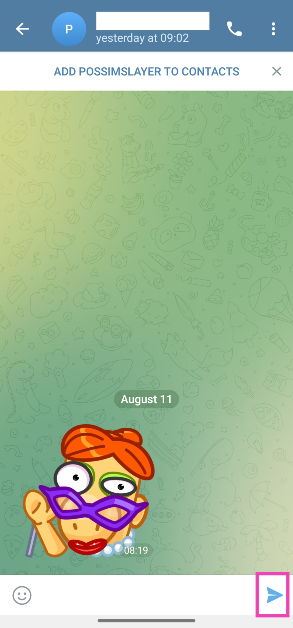
Step 4: Hit Send.

Note: This method only works for Instagram. To send a blank message on WhatsApp and Telegram, check out the methods listed below.

Use this character for Telegram and WhatsApp

Step 1: Copy this character to your phone’s clipboard – ‘ㅤ’.

Step 2: Launch WhatsApp or Telegram and open a chat.

Step 2: Launch WhatsApp or Telegram and open a chat.

Step 3: Paste the character into the text field.

Step 3: Paste the character into the text field.

Step 4: Hit Send.

Send a blank message on WhatsApp and Instagram using a third-party app

Step 1: Download the install the Blank Text & Invisible Text app on your smartphone.

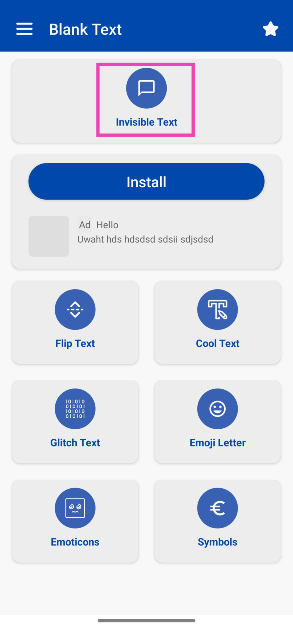
Step 2: Tap on Invisible Text.

Step 2: Tap on Invisible Text. 3 Ways to Send Blank Messages on WhatsApp, Instagram, & Telegram (2024)

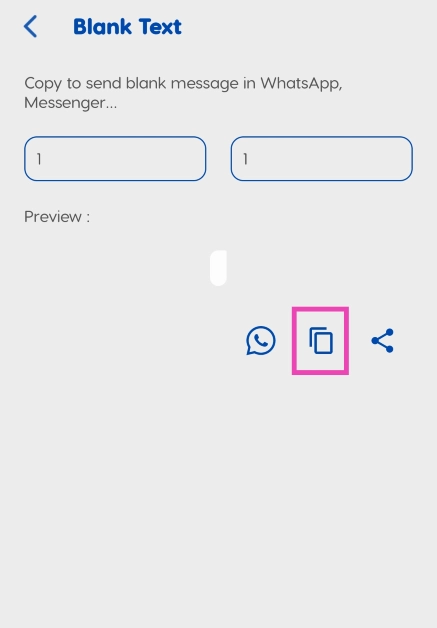
Step 3: Enter 1 and 1 in the row number and char number fields.

Step 3: Enter 1 and 1 in the row number and char number fields. 3 Ways to Send Blank Messages on WhatsApp, Instagram, & Telegram (2024)

Step 4: Hit the Copy icon.

Step 5: Launch WhatsApp/Instagram on your smartphone and open a chat.

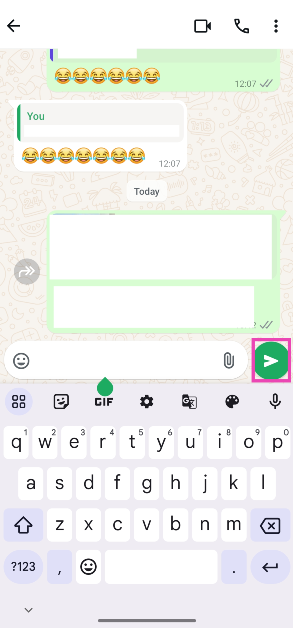
Step 6: Paste the blank character into the text box.

Step 6: Paste the blank character into the text box. 3 Ways to Send Blank Messages on WhatsApp, Instagram, & Telegram (2024)

Step 7: Hit Send.

Use Empty Text!

Step 1: Download the Empty Text! app from the Google Play Store.

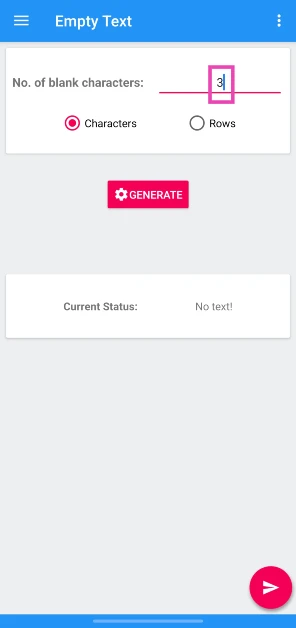
Step 2: Launch the app and enter the number of blank characters you want.

Step 2: Launch the app and enter the number of blank characters you want. 4 Ways to Send Blank Messages on WhatsApp, Instagram, & Telegram

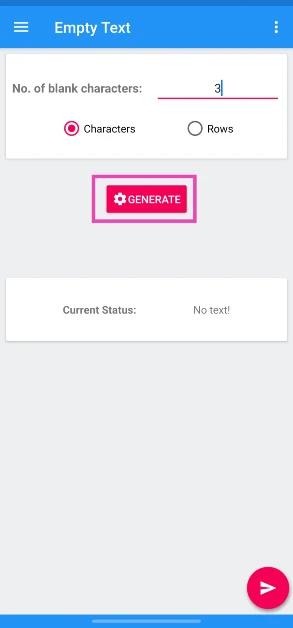
Step 3: Hit Generate.

Step 3: Hit Generate. 4 Ways to Send Blank Messages on WhatsApp, Instagram, & Telegram

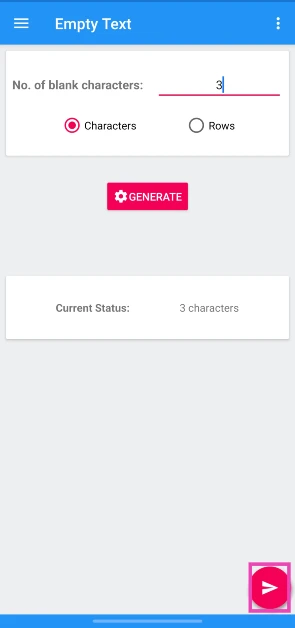
Step 4: Hit the arrow icon in the bottom right corner of the screen.

Step 4: Hit the arrow icon in the bottom right corner of the screen. 4 Ways to Send Blank Messages on WhatsApp, Instagram, & Telegram

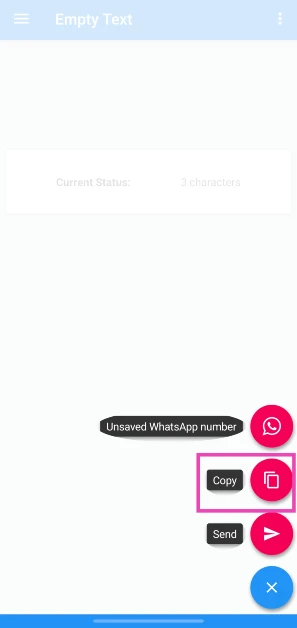
Step 5: Tap on Copy.

Step 5: Tap on Copy. 4 Ways to Send Blank Messages on WhatsApp, Instagram, & Telegram

Step 6: Go to the Instagram conversation, paste the character from the clipboard, and hit the Send icon.

Frequently Asked Questions (FAQs)

How do I send a blank message?

Copy a blank or invisible character (⠀) to the clipboard and paste it into the box to send a blank message. You can also use a third-party app like Blank Text.

How do I send a blank text on WhatsApp?

Paste this character into the text box (ㅤ) and hit send or generate a blank character from the Blank Text app.

How do you send a vanishing text on WhatsApp?

Open a chat on WhatsApp, tap the contact’s name at the top of the screen, scroll down, select ‘Disappearing messages’, and set a time limit.

Read Also: Are you a WhatsApp beta user experiencing green screen issues? Here’s the fix

Final Thoughts

This is how you can send blank messages on Instagram, WhatsApp, and Telegram. While you’re here, check out how you can set a blank status or bio on WhatsApp. If you have any questions, let us know in the comments!
Instagram no longer supports automatic feed refresh, removes “rug pull” feature

In an effort to enhance user experience, Instagram dropped the “rug pull” feature, which causes the feed to instantly refresh when the app is opened. Users can view the posts that initially come up on their screen since the platform will wait for them to scroll before displaying anything new. This modification follows Instagram’s deliberate lowering of story and reel quality in order to save processing power for videos with high user viewing counts.

Adam Mosseri, the boss of Instagram, announced that the Rug pull, an Automatic Feed Refreshing function, is no longer being used by the platform. When a user opens the app, the feed is automatically refreshed, a part of the user interface that consumers were previously aware of. During an Ask Me Anything (AMA), the change was made public.

Also Read: Are you a WhatsApp beta user experiencing green screen issues? Here’s the fix

In an effort to increase user engagement, Mosseri said the app was trying to load content and show the latest posts and videos that had been downloaded. The firm representative acknowledged that it was “annoying” when consumers had to manually scroll down since the first-appearing content went and vanished.

Instagram is lowering the quality of videos that don’t get many views, as Instagram Head Adam Mosseri previously declared. All video formats—including Stories, lengthier videos, and Reels—are covered by this decision, which makes sure that videos with a lot of traffic are given priority when it comes to encoding.

Older Stories saved as Highlights are automatically reduced in quality to reserve computation resources for videos viewed by a large number of users,” Mosseri, the head of Instagram, revealed. This makes sure that, after a while, the Highlights and Reels of smaller creators look poor. It may take a few days to a few weeks for the interest cycle of a recent upload to subside before the quality drop is implemented.

Are you a WhatsApp beta user experiencing green screen issues? Here’s the fix

Users of the WhatsApp beta have reported an issue that causes the app to unexpectedly close, turning green and rendering it useless. There have been complaints and reports of the screen becoming completely green, leaving the cause unclear.

The entire screen becoming green is probably a bug affecting WhatsApp users on beta version 2.24.24.5. The messaging app must work and detect the root of the problem in order to be considered functional. According to Android Authority “This issue isn’t simply tinting the screen green; rather, the entire screen is just a solid block of green, making the app usable. It appears the issue is triggered when clicking on any chat.”

According to Android Police, a writer experienced a similar issue with the app forcibly quitting on launch, despite several attempts to recreate the fault.

Also Read: ViewSonic LX700-4K RGB Laser Projector with RGB laser technology launched in India

The WhatsApp green screen issue is limited to beta version 2.24.24.5, and the most recent stable build should work with your app. The best course of action is to go back to an earlier version, however, this might be difficult because WhatsApp betas are distributed as app bundles rather than regular APKs.

Hemanthreddy_03, a Reddit user, has offered a short-term fix for testers who encounter annoying problems with app beta versions. This entails deleting your chat history, uninstalling the most recent stable version, and unsubscribing from the beta program.

A flaw that many online users have noticed has been confirmed by WhatsApp, and it is presently being reported on its X account for app updates. Some users are still unable to access their chats, even though a representative from the company indicated that the problem has been fixed.

If you use WhatsApp every day, you should remain with the stable version. Until Meta fixes the green screen problem, workarounds should help keep everything functioning properly.

Also Read: Nikon Z50II mirrorless camera featuring 4K video capture launched in India

To address the WhatsApp green screen issue on Android handsets, go to the WhatsApp beta website on Google Play, unsubscribe from the beta program, backup chats, uninstall WhatsApp, click the Google Play banner on the official page, log in, and then restore chats.

Garena Free Fire Max Redeem Codes Today 11 November 2024: Here is how to claim them

Garena Free Fire Max is a battle royale game with regular awards and tournaments to keep players interested. If you play Garena Free Fire, you should be aware of the redeem codes that are released on a daily basis. However, because the battle royale game is banned in India, players from other countries can use the Free Fire Redeem codes daily. If you’re unfamiliar with the Garena Free Fire redeem codes or don’t know how to get them, we’ve put together a step-by-step guide to help you redeem them. Check out Garena Free Fire Max Redeem Codes for 11 November 2024.

The Free Fire Max redeem codes are a great way to get free stuff. These are 12-digit codes that contain alphabets and numbers, as well as an expiration date and time. Because the Garena FF redeem codes cannot be used more than once, you should hurry to the redemption page to claim your free reward before someone else does. To get a free reward, all you have to do is go to reward.ff.garena.com/en, which is the official redemption page. Also, keep an eye on this space for daily updates on Garena Free Fire Max redemption codes and rewards.

Also Read: Sennheiser Accentum Plus wireless headphones with Hybrid Adaptive Noise Cancellation launched

Garena Free Fire Max Redeem Codes Today 11 November 2024

WOPLMFJ4NTDHR3V

YW2B64F7V8DHJM5

VQRB39SHXW10IM8

CT6P42J7GRH50Y8

68SZRP57IY4T2AH

NRD8L6Y7M4E29U1

590XATDKPVRG28N

YW2B64F7V8DHJM5

CT6P42J7GRH50Y8

FM1C5Z9S3O7X2H4Q

590XATDKPVRG28N

O74JF9YC6HXKGDU

2W9FVBM36O5QGTK

BMD8FUSQO4ZGINA

WOPLMFJ4NTDHR3V

How to Get Free Fire Max Redeem Codes for Garena on 11 November 2024?

  • Visit the Garena Free Fire Max game’s official website at reward.ff.garena.com.
  • Use your Facebook, Google, VK, Apple ID, Huawei ID, or Twitter account to log in.
  • You’ll be taken to a valid redemption code (s)
  • Copy and paste the 12-digit redemption code into the text box.
  • On the screen, a dialogue box will appear.
  • ‘Ok’ should be selected.

For the latest gadget and tech news, and gadget reviews, follow us on TwitterFacebook and Instagram. For newest tech & gadget videos subscribe to our YouTube Channel. You can also stay up to date using the Gadget Bridge Android App. You can find the latest car and bike news here.

NYT Wordle Answer and Hints Today (November 11)

Are you looking for today’s Wordle for November 11, 2024? The problem is difficult to solve, so if you need assistance, we’ve included hints and the answer to the November 11 Wordle.

Hints and Answers for Today’s Wordle November 11

Before answering directly, please check the November 11 Wordle Hints first.

Hint 1: Today’s Wordle answer includes two vowels.
Hint 2: The answer for today has no repeating letter.
Hint 3: suffering pain or difficulty without complaining

What word does today’s Wordle begin with?

Do you need help with today’s Wordle answer’s initial letter?

The first letter in today’s Wordle is “S”

Today’s Wordle Answer November 11 #1241

The answer to Wordle #1241 on November 11, 2024, is — STOIC

Also Read: Ranveer Allahbadia got his YouTube Channels back, videos restored

What is Wordle?

Wordle: A Five-Letter Word Guessing Game
• The game allows six guesses of a five-letter word.
• Provide feedback on guessed letters’ placement in the puzzle.
• The New York Times purchased the game in 2022.
• Created by Josh Wardle for his partner, narrowing down 12,000 English words to 2,500.
• Named after the word “word.”

How To Play Wordle?

Wordle is a New York Times word puzzle game that allows users to guess a five-letter word in six attempts. The letters are highlighted in Yellow and Green, indicating whether the word is present in the answer or not, and Green letters indicate the correct guess.

Also Read: Samsung Galaxy Tab S10+, Galaxy Tab S10 Ultra with Galaxy AI launched in India

Wordle Tips and Tricks

  • Select a powerful starting word: Avoid using unusual words, as they frequently do not match common letters. A good opening word has plenty of benefits.
  • Repeating letters: Don’t be afraid of repeating letters; they appear frequently in words. The answer may contain one or two repeated letters.
  • Use the Wordlebot: The NYT’s Wordlebot analyses and compares replies to itself. This challenge can assist you enhance guessing skills and highlight areas for development.

Amazon Quiz Answers Today 11 November 2024: Participate to win Rs 500 Amazon Pay Balance

11 November 2024: New Amazon Quiz is now available. Customers from different parts of the country are participating in the daily quiz. The quiz starts at midnight today and will be live until 11:59 PM tonight. By successfully answering every question, participants in the quiz have the chance to win wonderful rewards. A Rs 500 Amazon Pay Balance is up for grabs to participants today.

One wrong answer could eliminate you from the quiz. You have a chance to win Rs 500 Amazon Pay Balance if you successfully answer every question. Users of the app only have the opportunity to take the quiz. Check Out 11 November 2024 Amazon Quiz Answers.

Amazon Quiz Today Prize: Rs 500 Amazon Pay Balance

Quiz Date: 11 November 2024

Daily Timing: 12 AM to 11:59 PM

Previous Amazon Quiz Winners Announcement: Today 12 PM Noon

Amazon Quiz Answers Today 11 November 2024: Win ₹ 500 Amazon Pay Balance

Question 1: After 38 years as Prime Minister of which country did Hun Sen announce to step down in 2023?

Answer: Cambodia

Question 2: Selvamani Selvaraj’s new web series delves into the ‘unseen and unheard’ aspects of the 17-year manhunt to catch whom?

Answer: Veerappan

Question 3: Which Indian food item has been named the world’s second-best flatbread by TasteAtlas?

Answer: Butter garlic naan

Question 4: This bird was the symbol of which English Monarch?

Answer: Elizabeth I

Question 5: When did this site became a UNESCO World Heritage site?

Answer: 1989

How To Play Amazon Quiz Today

Only app users are eligible to play the Amazon quiz every morning from 12 AM to 11:59 PM. The quiz is not available on the desktop. For those who are unaware of how to play the Amazon quiz, below are the steps, you can follow to take the quiz.

  • First, download the Amazon app from the Google Play Store or App Store or go here to download the Amazon App
  • Now fill in the required information through the Sign-Up option.
  • You need to log in to the Amazon app and scroll down on the home screen to find the Amazon Quiz banner.
  • Tap on the Amazon Quiz banner and tap on the Start button to start the Quiz.
  • Now you will get 5 questions and you need to answer them correctly. One wrong answer will eliminate you from the Quiz.
  • After answering all the questions correctly you are now eligible for a Lucky Draw.
  • The previous winner’s name will be announced today at 12 PM.

Amazon Daily Quiz Answers from the previous few days.

Here are all the answers from the previous 5 days of the Amazon Daily Quiz and Contest.

Amazon Quiz Answers Today 9 November 2024: Win ₹ 500 Amazon Pay Balance

Question 1: Sabyasachi made masks of what for King Charles and Queen Camilla’s Animal Ball in 2023?

Answer: Shola

Question 2: In August 2023, ‘Bandit King’ Malkhan Singh joined the Congress party in which state?

Answer: Madhya Pradesh

Question 3: Microsoft has changed the default font for its Office apps to what after 16 years?

Answer: Aptos

Question 4: Why is this animal not considered a big cat?

Answer: Lack of Roar

Question 5: This drink comes from which place?

Answer: Cuba

Amazon Quiz Answers Today 8 November 2024: Win ₹ 500 Amazon Pay Balance

Question 1: Fatma Samoura became the first woman, first black person, first -European to be which organization’s secretary general?

Answer: FIFA

Question 2: The Central Government has agreed to investigate the Havana Syndrome. It originated in which country?

Answer: Cuba

Question 3: Across Parliament’s history we have had 28 of what in India

Answer: No confidence motions

Question 4: What is the only place outside of Africa, where this primate is found?

Answer: Grenada

Question 5: This vegetable was worshipped by the ancient Egyptians as a symbol of what?

Answer: Eternal Life

Amazon Quiz Answers Today 7 November 2024: Win ₹ 500 Amazon Pay Balance

Question 1: The Tata Steel Chess tournament played in the classical format is being held in which country?

Answer: Netherlands

Question 2: Which actor in the show Criminal Justice stars as the central character of lawyer Madhav Mishra?

Answer: Pankaj Tripathi

Question 3: The Amroha Dholak is a musical instrument from which the state got a GI tag in 2023.

Answer: Uttar Pradesh

Question 4: Which country is this ancient temple located in?

Answer: Egypt

Question 5: This statue is located at which famous educational institution?

Answer: IISC Bangalore

Amazon Quiz Answers Today 6 November 2024: Win ₹ 500 Amazon Pay Balance

Question 1: Which of these West Indies bowlers took the wicket of Steve Smith with his first ball in Test cricket?

Answer: Shamar Joseph

Question 2: At the 2024 Emmy Awards which series won the award for Best Drama Series?

Answer: Succession

Question 3: Sharmistha Mukherjee has recently written a book titled ‘_____ My Father: A Daughter Remembers’. Fill in the blanks

Answer: Pranab

Question 4: Name the famous freedom fighter, whose statue is in the middle

Answer: Bhagat Singh

Question 5: Name this famous person who had cameos in several Marvel movies

Answer: Stan Lee

Amazon Quiz Answers Today 5 November 2024: Win ₹ 500 Amazon Pay Balance

Question 1: Which former champion did Caroline Garcia knock out in the first round of the 2024 Australian Open?

Answer: Naomi Osaka

Question 2: Lily Gladstone won the ‘Best female actor in a film- drama’ at the 2024 Golden Globes for which film?

Answer: Killers of the Flower Moon

Question 3: Nigar Shahji is the project director of which ISRO mission that was launched on 2nd September, 2023?

Answer: Aditya- L1

Question 4: In which city is this famous museum located?

Answer: Bilbao

Question 5: This famous shoe brand was founded in which country?

Answer: Germany

Amazon Quiz Answers Today 4 November 2024: Win ₹ 500 Amazon Pay Balance

Question 1: Recently which of these New Zealand batters equalled the record for most sixes in a T20I innings?

Answer: Finn Allen

Question 2: Which movie won the Best Film- Drama award at the 2024 Golden Globes?

Answer: Oppenheimer

Question 3: The Tangail sarees from which state recently got a GI tag?

Answer: West Bengal

Question 4: Which university is shown here that is attended by Mark Zuckerberg?

Answer: Harvard University

Question 5: What breed of dog is shown here?

Answer: Shih Tzu

Amazon Quiz Answers Today 3 November 2024: Win ₹ 500 Amazon Pay Balance

Question 1: The Yonex Sunrise India Open 2024 badminton tournament is being held in which city?

Answer: New Delhi

Question 2: The upcoming movie ‘LSD2’ is directed by which famous director?

Answer: Dibakar Banerjee

Question 3: Zeba: Breaking the mould: Reimagining India’s Economic Future’ is a book written by which former RBI Governor?

Answer: Raghuram Rajan

Question 4: This visual depicts which famous ruler and his court?

Answer: Genghis Khan

Question 5: This is the Virupaksha Temple in which UNESCO World Heritage Site?

Answer: Hampi

Amazon Quiz Answers Today 2 November 2024: Win ₹ 500 Amazon Pay Balance

Question 1: Who scored half centuries for India in both the first 2 T20Is against Afghanistan in 2024?

Answer: Shivam Dube

Question 2: The upcoming movie ‘Section 108’ stars which of these actors in a lead role?

Answer: Nawazuddin Siddiqui

Question 3: Zeba: An Accidental Superhero’ is a science fiction book written by which famous actress?

Answer: Huma Qureshi

Question 4: This famous museum is located in which city?

Answer: Amsterdam

Question 5: Which superhero is shown in this visual?

Answer: Mr Fantastic

Amazon Quiz Answers Frequently Asked Questions (FAQs)

Where can I check the previous winners? Did I win how to check?

You can head over to this link on your mobile or desktop to check the winners of the Amazon Daily Quiz Contest.

How to Play Amazon Daily Quiz or Contest?

We have written an explainer above, you can refer to that.

When are the winners of the Amazon Quiz and contest announced or declared?

The announcement of today’s Amazon quiz winner will take place Tomorrow. As for the Special Quiz and “Spin & Win” Contest, the winners will be declared once the Quiz Contest comes to an end. To find out who the lucky winner is, you can refer to the Amazon Quiz Winners List or visit the Amazon Winners tab in the Amazon App.

How to participate in the Daily Amazon Quiz?

That is very easy, just got to the Amazon app and scroll to the bottom of the page and you will find the Quiz section. Click on it (usually it is called the fun zone) and you can enter the Amazon Today Quiz Contest. 

Are there any other quizzes or contests running on Amazon daily?

Yes, there are many running on a daily basis. These range from spinning the wheel to answering the questions correctly. All are located in the Fun Zone. 

What are the criteria for selecting a winner in the Daily Amazon Quiz?

When a qualified player submits correct answers to all the questions, they will automatically be entered into a lucky draw. This draw will include all participants who answered all the questions correctly. Amazon randomly selects the final winners from the pool of eligible participants who gave the right answers.

Which Types of Questions are asked within Amazon Daily Quiz?

These are very simple and straightforward questions. These are mainly related to general knowledge. 

Where should I look for Amazon Daily Quiz answers?

You can bookmark this page as we will help you every day with the Amazon Daily Quiz. We bring you fresh answers every day for the Amazon Daily Quiz and Contest. 

What time does Amazon Announce previous winners?

The previous winner’s name will be announced today at 12 PM (noon).