

- OnePlus 12, OnePlus 12R launch in India will take place on January 23.
- Both the upcoming smartphones’ RAM and storage options were leaked before the official release.
OnePlus 12, OnePlus 12R price in India, RAM, storage option and more leaked ahead of launch

Key Highlights
4 Easy Ways to Delete Voicemails on iPhone (2024)
Once one of the primary modes of communication, voicemails have now been partially replaced by voice notes. This is mostly due to the popularity of instant messaging apps like Facebook Messenger and WhatsApp. However, if you’re unable to reach someone and you’re certain they don’t have to the Internet, sending a voicemail is still your best bet. Like any typical inbox, you should routinely clear voicemails to make space for new ones. Smartphones offer an easy and intuitive way to manage your voicemail inbox. Today, we bring you the top 4 easy ways to delete voicemails on an iPhone.
Read Also: Telegram rolls out new features: Replies 2.0, Account Colours, and more
 Step 1: Launch the Phone app.
Step 2: Tap on the Voicemail tab at the bottom right corner of the screen.
Step 3: Swipe left on a voicemail to delete it.
Step 1: Launch the Phone app.
Step 2: Tap on the Voicemail tab at the bottom right corner of the screen.
Step 3: Select a voicemail.
Step 4: Tap the trashcan icon to delete it.
Read Also: 4 Easy Fixes for YouTube Links Not Opening on Android
There is no way to delete all the voicemails on your iPhone at once. You can, however, select multiple voicemails and delete them. Here’s how.
Step 1: Launch the Phone app.
Step 2: Tap on the Voicemail tab at the bottom right corner of the screen.
Step 3: Tap on the Edit button at the top right corner of the screen.
Step 4: Select the voicemails that you want to remove.
Step 5: Hit the Delete button at the bottom right corner of the screen.
Once you delete a voicemail on your iPhone, it goes to the ‘Deleted’ folder. To permanently remove the deleted voicemails from your device, clear this folder as well. Here’s how.
Step 1: Launch the Phone app.
Step 2: Tap on the Voicemail tab at the bottom right corner of the screen.
Step 3: Scroll to the bottom of the page and select Deleted Messages.
Step 4: Hit the Clear All option at the top right corner of the screen.
Step 5: Confirm your selection in the popup box.
Step 1: Launch the Phone app.
Step 2: Tap on the Voicemail tab at the bottom right corner of the screen.
Step 3: Swipe left on a voicemail to delete it.
Step 1: Launch the Phone app.
Step 2: Tap on the Voicemail tab at the bottom right corner of the screen.
Step 3: Select a voicemail.
Step 4: Tap the trashcan icon to delete it.
Read Also: 4 Easy Fixes for YouTube Links Not Opening on Android
There is no way to delete all the voicemails on your iPhone at once. You can, however, select multiple voicemails and delete them. Here’s how.
Step 1: Launch the Phone app.
Step 2: Tap on the Voicemail tab at the bottom right corner of the screen.
Step 3: Tap on the Edit button at the top right corner of the screen.
Step 4: Select the voicemails that you want to remove.
Step 5: Hit the Delete button at the bottom right corner of the screen.
Once you delete a voicemail on your iPhone, it goes to the ‘Deleted’ folder. To permanently remove the deleted voicemails from your device, clear this folder as well. Here’s how.
Step 1: Launch the Phone app.
Step 2: Tap on the Voicemail tab at the bottom right corner of the screen.
Step 3: Scroll to the bottom of the page and select Deleted Messages.
Step 4: Hit the Clear All option at the top right corner of the screen.
Step 5: Confirm your selection in the popup box.
Before you begin
Let’s be honest, the only time you think about deleting voicemails is when they clog the inbox and start occupying too much space. When your inbox hits peak capacity, any incoming voicemails will be put on hold. To receive new messages, you will need to create space by deleting the old ones. Here arises the main problem. Quite surprisingly, your iPhone does not give you the option to delete all your voicemails at once. At best, you can select multiple messages for deletion, but the ‘Select All’ option is weirdly missing from the page. If you want to mass delete voicemails to create space for new ones, you will have to manually select them one by one before putting them up for deletion. If you want to permanently save a voicemail on your iPhone, you can always email it to yourself. If you use WhatsApp, select the app from the sharing options and send the voicemail to yourself. The message will be sent as an audio file.Delete a voicemail on your iPhone
 Step 1: Launch the Phone app.
Step 2: Tap on the Voicemail tab at the bottom right corner of the screen.
Step 3: Swipe left on a voicemail to delete it.
Step 1: Launch the Phone app.
Step 2: Tap on the Voicemail tab at the bottom right corner of the screen.
Step 3: Swipe left on a voicemail to delete it.
Another way to delete a voicemail on your iPhone
 Step 1: Launch the Phone app.
Step 2: Tap on the Voicemail tab at the bottom right corner of the screen.
Step 3: Select a voicemail.
Step 4: Tap the trashcan icon to delete it.
Read Also: 4 Easy Fixes for YouTube Links Not Opening on Android
Step 1: Launch the Phone app.
Step 2: Tap on the Voicemail tab at the bottom right corner of the screen.
Step 3: Select a voicemail.
Step 4: Tap the trashcan icon to delete it.
Read Also: 4 Easy Fixes for YouTube Links Not Opening on Android
Delete multiple voicemails on your iPhone
 There is no way to delete all the voicemails on your iPhone at once. You can, however, select multiple voicemails and delete them. Here’s how.
Step 1: Launch the Phone app.
Step 2: Tap on the Voicemail tab at the bottom right corner of the screen.
Step 3: Tap on the Edit button at the top right corner of the screen.
Step 4: Select the voicemails that you want to remove.
Step 5: Hit the Delete button at the bottom right corner of the screen.
There is no way to delete all the voicemails on your iPhone at once. You can, however, select multiple voicemails and delete them. Here’s how.
Step 1: Launch the Phone app.
Step 2: Tap on the Voicemail tab at the bottom right corner of the screen.
Step 3: Tap on the Edit button at the top right corner of the screen.
Step 4: Select the voicemails that you want to remove.
Step 5: Hit the Delete button at the bottom right corner of the screen.
Delete voicemails from the recycle bin
 Once you delete a voicemail on your iPhone, it goes to the ‘Deleted’ folder. To permanently remove the deleted voicemails from your device, clear this folder as well. Here’s how.
Step 1: Launch the Phone app.
Step 2: Tap on the Voicemail tab at the bottom right corner of the screen.
Step 3: Scroll to the bottom of the page and select Deleted Messages.
Step 4: Hit the Clear All option at the top right corner of the screen.
Step 5: Confirm your selection in the popup box.
Once you delete a voicemail on your iPhone, it goes to the ‘Deleted’ folder. To permanently remove the deleted voicemails from your device, clear this folder as well. Here’s how.
Step 1: Launch the Phone app.
Step 2: Tap on the Voicemail tab at the bottom right corner of the screen.
Step 3: Scroll to the bottom of the page and select Deleted Messages.
Step 4: Hit the Clear All option at the top right corner of the screen.
Step 5: Confirm your selection in the popup box.
Frequently Asked Questions (FAQs)
How do I save a voicemail on my iPhone before deleting it from my inbox?
To save a voicemail, select it and hit the ‘Share’ icon. Send it to yourself as a text or WhatsApp message or simply store it in your email drafts.How do I recover a deleted voicemail on my iPhone?
To recover a deleted voicemail on your iPhone, go to the Voicemail tab in the Phone app, scroll down, and select Deleted Messages. Select the voicemail you want to restore and hit the undelete icon.Why am I not able to receive new voicemails on my iPhone?
If your voicemail inbox is full, you won’t be able to receive any new messages. Delete some voicemails to make space for new ones. Read Also: Logitech Pebble 2 Keyboard and Mouse Review: Attractive, snappy, and a whole lot of fun!Conclusion
These are the top 4 ways to delete voicemails on your iPhone. When you delete a voicemail from your inbox, your phone won’t ask you to confirm your selection. The message will be deleted right away. Luckily, you can always find them in the ‘deleted’ folder in case you deleted the wrong message and want to retrieve it. If you’re an Android user, check out these methods to fix any voicemail-related issues on your device. If you know of any other ways to delete voicemails on your iPhone, let us know in the comments!Garena Free Fire Redeem Codes Today 1 January 2024: Here is how to claim them

Garena Free Fire is a battle royale game with regular awards and tournaments to keep players interested. If you play Garena Free Fire, you should be aware of the redeem codes that are released on a daily basis. However, because the battle royale game is banned in India, players from other countries can use the Free Fire Redeem codes daily. If you’re unfamiliar with the Garena Free Fire redeem codes or don’t know how to get them, we’ve put together a step-by-step guide to help you redeem them. Check out Garena Free Fire Redeem Codes for 1 January 2024.
The Free Fire redeem codes are a great way to get free stuff. These are 12-digit codes that contain alphabets and numbers, as well as an expiration date and time. Because the Garena FF redeem codes cannot be used more than once, you should hurry to the redemption page to claim your free reward before someone else does. To get a free reward, all you have to do is go to reward.ff.garena.com/en, which is the official redemption page. Also, keep an eye on this space for daily updates on Garena Free Fire redemption codes and rewards.
Garena Free Fire Redeem Codes Today 1 January 2024
FF7MUY4ME6SC 8F3QZKNTLWBZ WEYVGQC3CT8Q GCNVA2PDRGRZ FFAC2YXE6RF2 4ST1ZTBE2RP9 J3ZKQ57Z2P2P FFCMCPSBN9CU FFBBCVQZ4MWA 3IBBMSL7AK8G X99TK56XDJ4X B3G7A22TWDR7XHow to Get Free Fire Redeem Codes for Garena on 1 January 2024?
- Visit the Garena Free Fire game’s official website at reward.ff.garena.com.
- Use your Facebook, Google, VK, Apple ID, Huawei ID, or Twitter account to log in.
- You’ll be taken to a valid redemption code (s)
- Copy and paste the 12-digit redemption code into the text box.
- On the screen, a dialogue box will appear.
- ‘Ok’ should be selected.
iPhone 14 is available for as low as Rs 35,649: Check the details
Key Highlights
- The iPhone 14 is discounted on Flipkart.
- The e-commerce is offering up to Rs 22,350 off on the purchase of the iPhone.
Apple iPhone 14 specifications
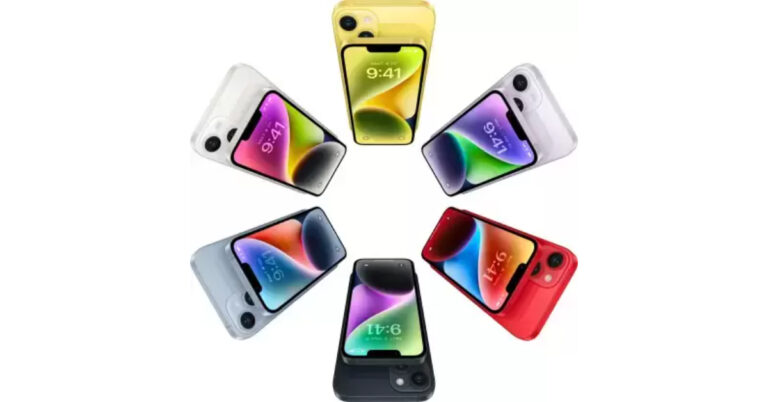
Apple iPhone 14 features a 6.1-inch Super Retina XDR OLED screen which offers a wide colour gamut, HDR, and 1200 nits of brightness. The display has a pixel density of 460 ppi and supports a 60Hz refresh rate. The screen has a tough Ceramic Shield front cover that is water and dust-resistant. The iPhone 14 also includes Face ID and is built to IP68 water and dust protection standards. Under the hood, there is an Apple A15 Bionic SoC and up to 512GB of internal storage. The device runs on iOS 16. The iPhone 14 is highlighted with a dual rear camera setup with a primary 12MP wide-angle sensor with a bigger f/1.5 aperture, sensor-shift OIS, and a secondary 12MP ultra-wide-angle sensor. The Ultra Wide camera provides a distinctive viewpoint for broader views and enhances low-light images using a Photonic Engine. For selfies and video calls, the front camera has a 12MP sensor with autofocus.Garena Free Fire Redeem Codes Today 31 December 2023: Here is how to claim them

Garena Free Fire is a battle royale game with regular awards and tournaments to keep players interested. If you play Garena Free Fire, you should be aware of the redeem codes that are released on a daily basis. However, because the battle royale game is banned in India, players from other countries can use the Free Fire Redeem codes daily. If you’re unfamiliar with the Garena Free Fire redeem codes or don’t know how to get them, we’ve put together a step-by-step guide to help you redeem them. Check out Garena Free Fire Redeem Codes for 31 December 2023.
The Free Fire redeem codes are a great way to get free stuff. These are 12-digit codes that contain alphabets and numbers, as well as an expiration date and time. Because the Garena FF redeem codes cannot be used more than once, you should hurry to the redemption page to claim your free reward before someone else does. To get a free reward, all you have to do is go to reward.ff.garena.com/en, which is the official redemption page. Also, keep an eye on this space for daily updates on Garena Free Fire redemption codes and rewards.
Garena Free Fire Redeem Codes Today 31 December 2023
FFIC33NTEUKA FFICJGW9NKYT VNY3MQWNKEGU ZZATXB24QES8 U8S47JGJH5MG XUW3FNK7AV8NHow to Get Free Fire Redeem Codes for Garena on 31 December 2023?
- Visit the Garena Free Fire game’s official website at reward.ff.garena.com.
- Use your Facebook, Google, VK, Apple ID, Huawei ID, or Twitter account to log in.
- You’ll be taken to a valid redemption code (s)
- Copy and paste the 12-digit redemption code into the text box.
- On the screen, a dialogue box will appear.
- ‘Ok’ should be selected.
Top 5 Ways to Update an App on iPhone or iPad
iPhones and iPads are very easy to work with. Their intuitive OS makes it easy for the user to find what they are looking for within seconds. If you need to update an app, you know exactly where to go. But, you’d be surprised at just how many options you have to go about this task. In case the regular process does not work, it is always nice to have other options. So, here are the top 5 ways to update an app on your iPhone or iPad.
Read Also: Top 5 Ways to detect if someone has remote access to your iPhone
 Step 3: Scroll down to the Available Updates section.
Step 4: Hit the Update button next to an app to update it.
Step 3: This will take you to the Available Updates section on your profile.
Step 4: Hit the Update button next to the app you want to update. You can also choose to update all apps at once.
Read Also: Smartphone clicking things on its own? Here are 8 ways to fix Ghost touches on Android
Step 3: Search for the app you want to update.
Step 3: Scroll down to the Available Updates section.
Step 4: Hit the Update button next to an app to update it.
Step 3: This will take you to the Available Updates section on your profile.
Step 4: Hit the Update button next to the app you want to update. You can also choose to update all apps at once.
Read Also: Smartphone clicking things on its own? Here are 8 ways to fix Ghost touches on Android
Step 3: Search for the app you want to update.
 Step 4: If there are any new updates available for the app, you will see ‘Update’ next to it instead of ‘Open’. Hit the Update button.
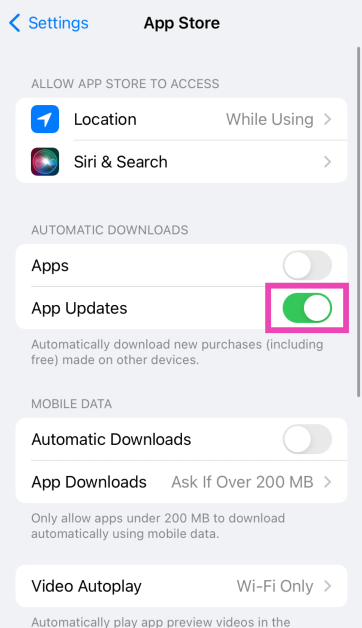
 Step 3: Turn on the toggle switch for App Updates under Automatic Downloads.
 Step 1: Open the App Store.
Step 2: Click Updates in the sidebar.
Step 3: Click Update next to the app you want to update. If you want to update all apps, click on Update All.
Step 1: Launch the App Store on your Apple Watch and scroll down to the bottom.
Step 2: Tap on Account.
Step 3: Hit Updates.
Step 4: Tap Update next to an app to update it manually or Update All to update all apps.
Step 1: Open the App Store.
Step 2: Click Updates in the sidebar.
Step 3: Click Update next to the app you want to update. If you want to update all apps, click on Update All.
Step 1: Launch the App Store on your Apple Watch and scroll down to the bottom.
Step 2: Tap on Account.
Step 3: Hit Updates.
Step 4: Tap Update next to an app to update it manually or Update All to update all apps.
Here’s why you should keep the apps on your iPhone updated
Keeping the apps on your phone updated is crucial to the device’s functioning. If an app starts malfunctioning out of the blue, it is likely because you’re using an older version that is riddled with bugs. Developers are quick to publish updates that resolve these bugs. Other than functional issues, app updates also take care of any security flaws. This is particularly true for web browsers and financial apps. If you’re running the latest version of the app, you can be assured that its security modules are up to date. This is also the reason why it is recommended that you keep your phone updated to its latest OS version. Older devices are more prone to malware attacks because there are gaping security loopholes in their OS. Developers also push updates to roll out new features for the app. If you can’t find a recently announced feature on an app, simply download its latest version and you will be able to use it right away. As an app gets new updates, it is also slowly phased out for older devices.Update an app on your iPhone or iPad from the App Store
Step 1: Launch the App Store on your iPhone or iPad. Step 2: Tap the profile icon at the top right corner of the screen.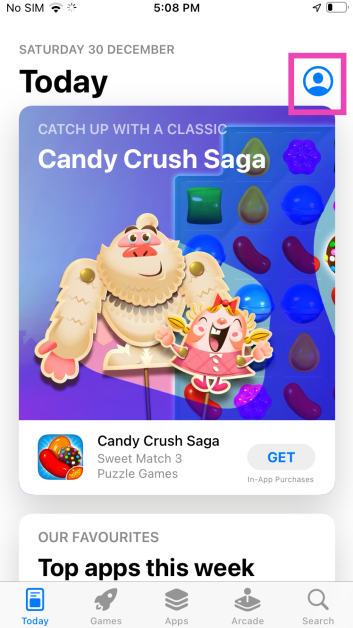 Step 3: Scroll down to the Available Updates section.
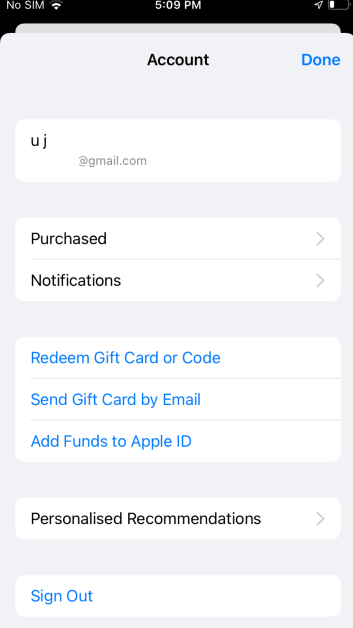 Step 4: Hit the Update button next to an app to update it.
Use the popup menu
Step 1: Long press the App Store icon on your iPhone or iPad’s home page. Step 2: Select Updates from the popup menu.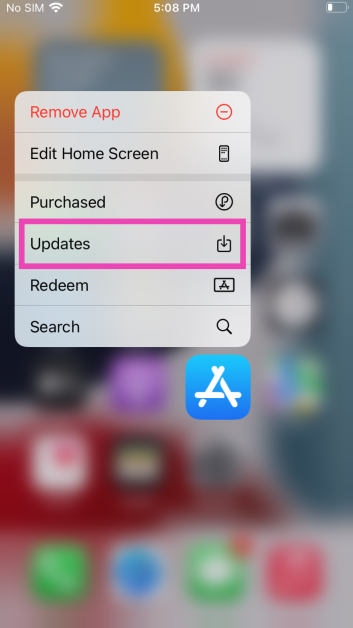 Step 3: This will take you to the Available Updates section on your profile.
Step 4: Hit the Update button next to the app you want to update. You can also choose to update all apps at once.
Read Also: Smartphone clicking things on its own? Here are 8 ways to fix Ghost touches on Android
Step 3: This will take you to the Available Updates section on your profile.
Step 4: Hit the Update button next to the app you want to update. You can also choose to update all apps at once.
Read Also: Smartphone clicking things on its own? Here are 8 ways to fix Ghost touches on Android
Search for the app on the App Store
Step 1: Launch the App Store on your iPhone or iPad. Step 2: Tap the Search tab at the bottom right corner of the screen.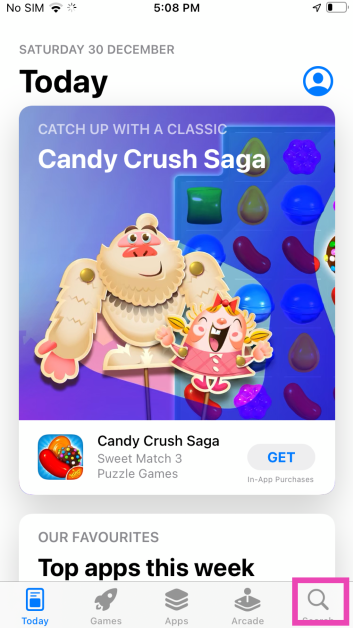 Step 3: Search for the app you want to update.
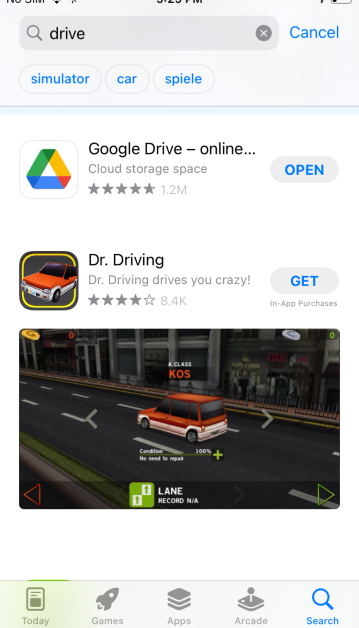 Step 4: If there are any new updates available for the app, you will see ‘Update’ next to it instead of ‘Open’. Hit the Update button.
Ask Siri to check for updates
If you want to go hands-free, simply ask Siri to do it. While Siri can’t manually update the app, it can take you to the app’s page on the App Store. After that, all you need to do is hit the Update button. Simply say “Hey Siri, check the update for (app name)” or “Hey Siri, open the (app name) on App Store”.Turn on automatic app updates on your iPhone or iPad
Step 1: Go to Settings. Step 2: Select App Store.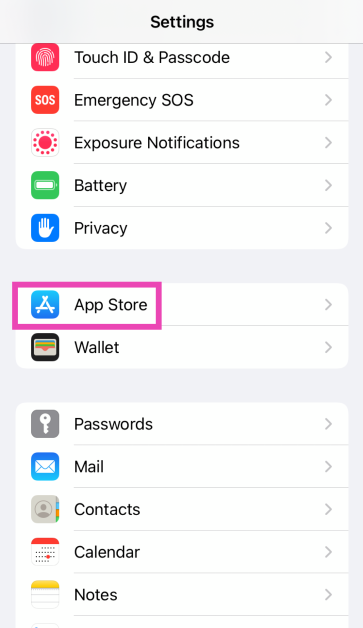 Step 3: Turn on the toggle switch for App Updates under Automatic Downloads.
Bonus Tip: Update apps on your Mac
 Step 1: Open the App Store.
Step 2: Click Updates in the sidebar.
Step 3: Click Update next to the app you want to update. If you want to update all apps, click on Update All.
Step 1: Open the App Store.
Step 2: Click Updates in the sidebar.
Step 3: Click Update next to the app you want to update. If you want to update all apps, click on Update All.
Bonus Tip: Update apps on your Apple Watch
 Step 1: Launch the App Store on your Apple Watch and scroll down to the bottom.
Step 2: Tap on Account.
Step 3: Hit Updates.
Step 4: Tap Update next to an app to update it manually or Update All to update all apps.
Step 1: Launch the App Store on your Apple Watch and scroll down to the bottom.
Step 2: Tap on Account.
Step 3: Hit Updates.
Step 4: Tap Update next to an app to update it manually or Update All to update all apps.
Frequently Asked Questions (FAQs)
Where can I find the pending updates for the apps on my iPhone?
Go to App Store>Profile and scroll down to ‘Available Updates’ to view the pending updates.How do I get a refund for an app I purchased on the App Store?
Go to App Store>Profile>Purchased>App>Report a Problem and select ‘I would like to request a refund’ on the following page.How long does it take for the App Store to issue a refund?
It takes around 48 hours for Apple to process your refund request. The time required to refund the amount back to your account varies depending on your location.How do I automatically update apps on my iPhone?
Go to Settings>App Store and turn on the toggle switch next to App Updates under Automatic Downloads.Why are apps not updating on my iPhone?
If you’re unable to update apps on your iPhone, it could be due to internet connection issues with the network or lack of storage on your device. Sometimes, background software issues can also keep the apps from updating on your iPhone. Read Also: iPhone 15 Pro Max: A Revolution in Mobile GamingConclusion
These are the top 5 ways to update an app on your iPhone or iPad. Once an app is updated, you cannot switch back to its older version. Make sure you are connected to a WiFi network while updating a bunch of apps at once. If you found this article helpful, let us know in the comments section!Best of 2023: Top 5 tablets of the year

Even though Apple did not release any iPads this year, the Android tablet market saw a lot of activity. As is tradition, Samsung’s Galaxy S series offerings were the most powerful tablets this year. OnePlus also stepped into the tablet market with its debut Pad along with the affordable alternative, Pad Go. Xiaomi’s Pad 6 continued to be a gritty device in the midrange category. So, let’s take a quick look at our favourite releases this year. Here are our top 5 picks for the best tablets of 2023.
Read Also: Gadget Bridge Awards 2023 Winners: The Biggest, Best Consumer Technology and Gadget Awards
Key Specs
The Samsung Galaxy S9 Ultra is the most specced out tablet on the market right now. It features a massive 14.6-inch Dynamic AMOLED display with a refresh rate of 120Hz. Powering the tablet is this year’s flagship Snapdragon 8 Gen 2 SoC. With an aspect ratio of 16:10, the tablet is ideally meant to be used in landscape orientation. There are two selfie cameras on this powerful device, a 12MP wide sensor and another 12MP ultrawide lens. The rear camera module comprises a 13MP wide lens and an 8MP ultrawide lens. Easily one of the best tablets launched in 2023.
Key Specs
OnePlus’ debut pad created waves in the Android tablet sphere this year. In true OnePlus fashion, the tablet offers great specs for its price tag. We reviewed the OnePlus Pad when it came out and were pleased by its build quality and the large display. Its design closely mimics the OnePlus 11 and the unique 7:5 aspect ratio is suitable for both portrait and landscape use. The single 13MP wide camera at the rear takes good quality shots while the 8MP selfie camera up front is ideal for video calls. Another great thing about buying the OnePlus Pad is that you don’t have to break the bank for its accessories. If you’re looking for a more affordable alternative, check out the OnePlus Pad Go.
Read Also: 6 Easy Ways to Create a GIF From Any YouTube Video
Key Specs
The Xiaomi Pad 6 offers incredible value for its price. The new metal back panel on this tablet feels very premium and elevates its in-hand feel. The rear camera panel follows the design language of the one on the Xiaomi 13 Pro. The 11-inch IPS LCD display has a refresh rate of 144Hz and supports HDR10. The tablet’s accessories aren’t expensive either. The keyboard folio case costs Rs 5,000 and the smart pen fetches Rs 6,000. With an 8,840mAh battery pack on board, the Xiaomi Pad 6 can last for 2 days on normal use. Check out our Xiaomi Pad 6 review to know more.
Key Specs
Samsung’s affordable alternative to its flagship S9 range of tablets, the S9 FE packs some interesting specs. It gets a 10.9-inch IPS LCD display with a 90Hz refresh rate and 1440 x 2304p resolution. The tablet’s 16:10 aspect ratio mimics that of the S9 Ultra. Powering the S9 ‘Fan Edition’ is Samsung’s in-house Exynos 1380 SoC. This chipset is also found on Samsung’s 2023 midrange smartphone offering, Galaxy A54. In terms of camera specs, the Galaxy Tab S9 FE gets a 12MP ultrawide selfie camera and an 8MP wide sensor for the rear camera. Unlike its primary rivals, the Galaxy Tab S9 FE gets a side-mounted fingerprint scanner. Without a doubt, one of the best tablets of 2023.
Key Specs
The Lenovo Tab P12 has a 12.7-inch IPS LCD display with an 1840 x 2944p resolution and 16:10 aspect ratio. The octa-core MediaTek Dimensity 7050 is a decent chipset for a tablet in this price bracket. The 8MP main camera can record 4K videos at 30fps. The tablet also gets a 13MP ultrawide selfie camera up front. The quad speakers on the P12 tab have been tuned by JBL. It also gets a side-mounted fingerprint scanner, 10,200mAh battery, and 30W charging support.
Read Also: FIU IND issued show cause notices to nine offshore Virtual Digital Assets Service Providers (VDA SPs)
Samsung Galaxy Tab S9 Ultra
Price: Rs 1,08,999 at Samsung.in Key Specs
| Display | 14.6-inch Dynamic AMOLED 2X |
| Chipset | Snapdragon 8 Gen 2 |
| RAM | 12GB |
| Storage | 256GB, 512GB |
| Battery | 11,200 mAh |
OnePlus Pad
Price: Rs 36,499 at OnePlus.in Key Specs
| Display | 11.61-inch IPS LCD |
| Chipset | MediaTek Dimensity 9000 |
| RAM | 8GB, 12GB |
| Storage | 128GB, 256GB |
| Battery | 9,510 mAh |
Xiaomi Pad 6
Price: Rs 28,999 at Mi.com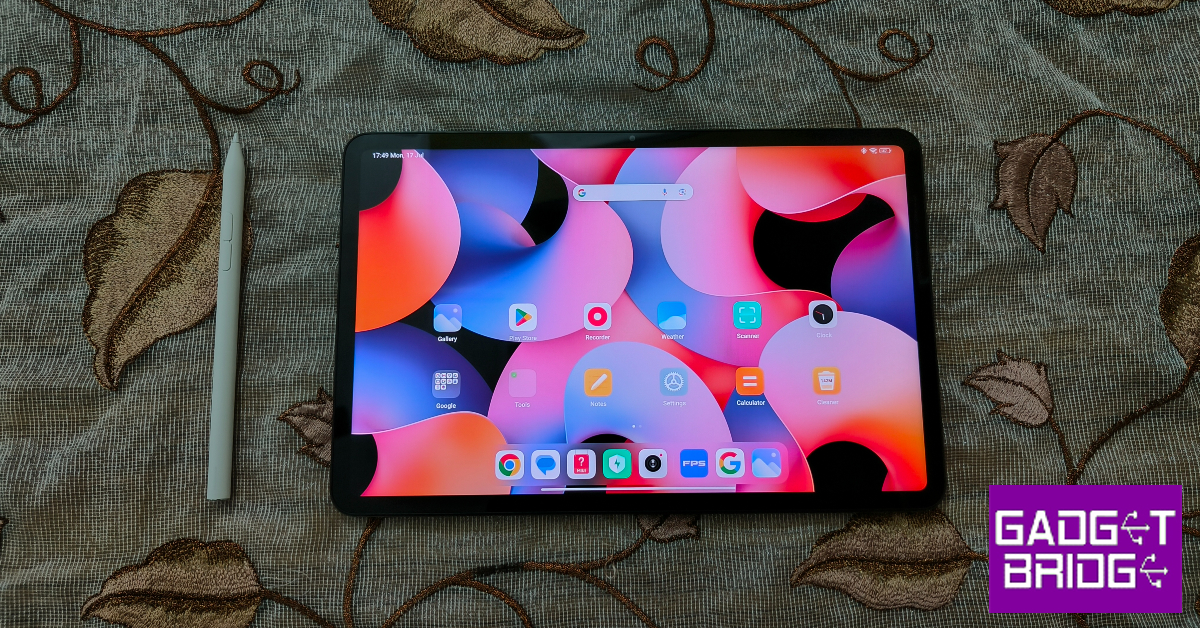 Key Specs
| Display | 11-inch IPS LCD |
| Chipset | Snapdragon 870 5G |
| RAM | 6GB, 8GB |
| Storage | 128GB, 256GB |
| Battery | 8,840 mAh |
Samsung Galaxy Tab S9 FE
Price: Rs 36,999 at Samsung.in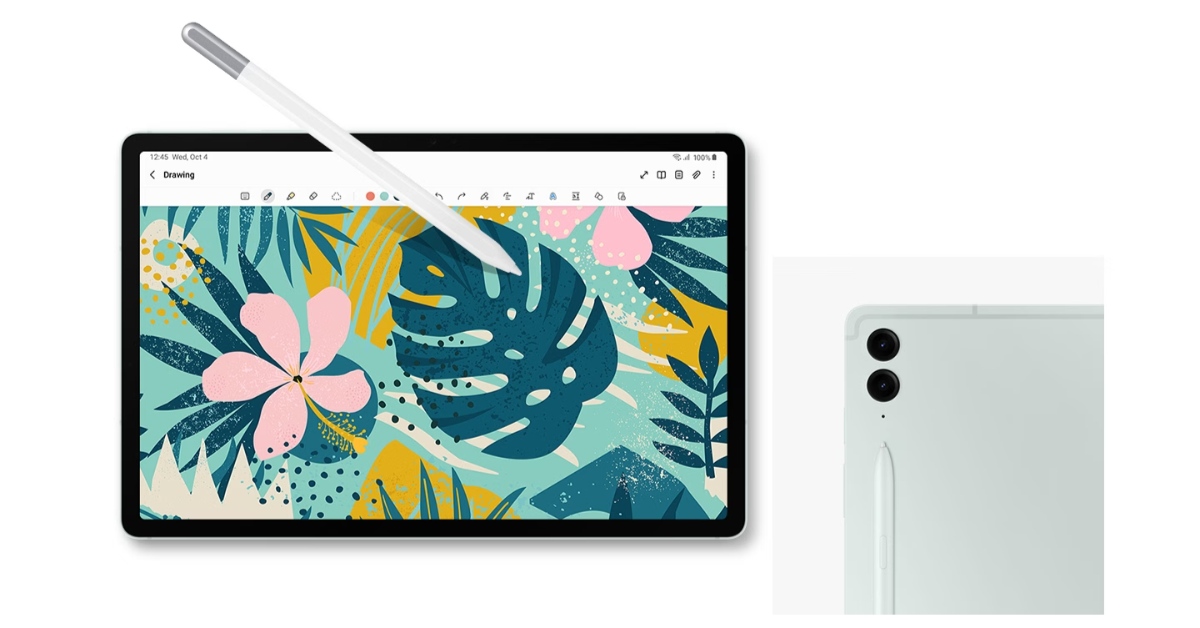 Key Specs
| Display | 10.9-inch IPS LCD |
| Chipset | Exynos 1380 |
| RAM | 6GB, 8GB |
| Storage | 128GB, 256GB |
| Battery | 8,000 mAh |
Lenovo Tab P12
Price: Rs 29,000 at Lenovo.com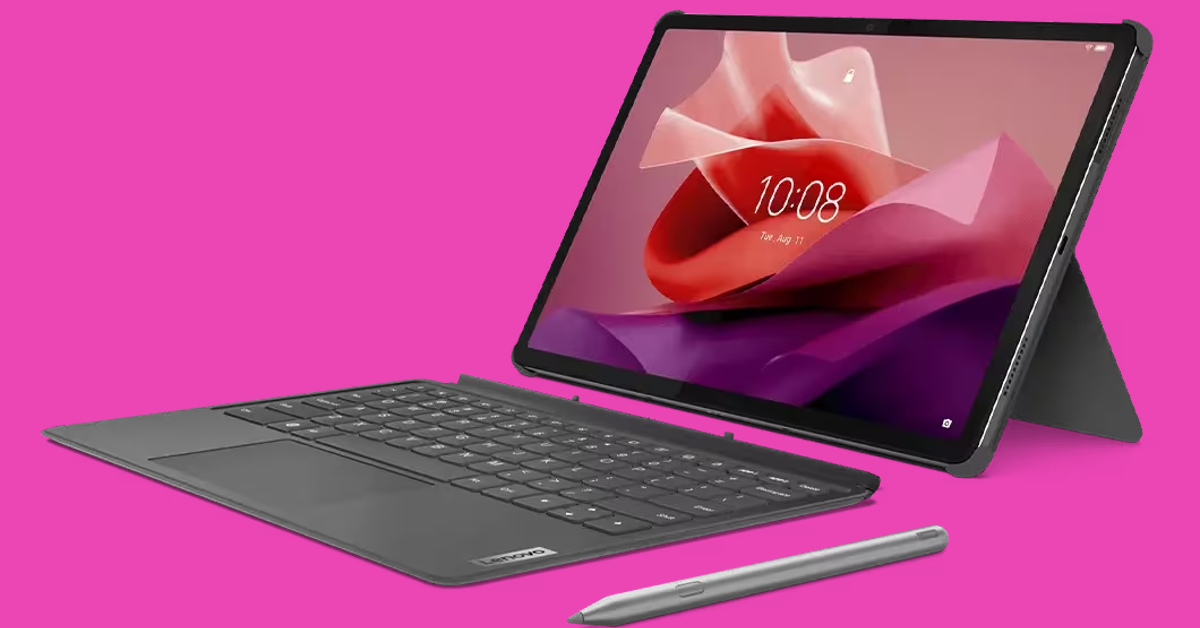 Key Specs
| Display | 12.7-inch IPS LCD |
| Chipset | MediaTek Dimensity 7050 |
| RAM | 8GB |
| Storage | 256GB |
| Battery | 10,200 mAh |
Conclusion
These are our top 5 picks for the best tablets launched in 2023. Let us know what you think of our picks. If you think we missed out on a tablet, give it a shout-out in the comments! Make sure you check out the winners of Gadget Bridge Awards 2023 as well!OnePlus Nord 3 gets a significant price cut of Rs 4,000 on Amazon and Flipkart

Key Highlights
- OnePlus Nord 3 is now getting a discount of Rs 4,000.
- The discount is available on Flipkart and Amazon.
- The smartphone was launched in India in July this year.
OnePlus Nord 3 specifications
OnePlus Nord 3 features a 6.74-inch AMOLED screen with a dynamic refresh rate that may vary between 40Hz and 120Hz and has a 450ppi pixel density. It runs on OxygenOS 13 with Android 13. Under its hood is an octa-core MediaTek Dimensity 9000 SoC with up to 16GB of LPDDR5X RAM and up to 256GB of internal UFS 3.1 storage. The device comes with a triple rear camera setup for photos and videos, including a 50-megapixel Sony IMX890 sensor with OIS support. Additionally, there is an 8-megapixel ultra-wide angle Sony IMX355 sensor with a 112-degree FoV and a 2-megapixel macro lens. The phone has a 16-megapixel front-facing camera for selfies and video chats. Also, there is a 5,000mAh battery that supports 80W SuperVOOC charging.iPhone 15 price in India dropped massively: Here is how much it costs now
Key Highlights
- iPhone 15 is getting a discount of Rs 5,000.
- The discount is available on Amazon.
- The iPhone was launched at a starting price of Rs 79,990 in India.
iPhone 15 specifications
The iPhone 15 comes with a 6.1-inch Super Retina XDR OLED display. The display is protected with a Ceramic Shield for protection. The handset features an IP68 classification for dust and water protection. The A16 Bionic chip which powered Apple’s iPhone 14 Pro models last year, is found in the new iPhone 15. Also Read: Google Pixel 8 Long-Term Review: A Mixed Bag The main camera of the iPhone 15 is a 48-megapixel wide-angle camera with a 2um quad-pixel sensor and an f/1.6 aperture. Additionally, the device has a 12-megapixel ultra-wide camera with sensor-shift stabilisation and an f/1.6 aperture. On the front, there is a 12-megapixel TrueDepth camera for selfies and video calls. The device features a USB Type-C port instead of the company’s exclusive Lightning connector.Garena Free Fire Redeem Codes Today 30 December 2023: Here is how to claim them

Garena Free Fire is a battle royale game with regular awards and tournaments to keep players interested. If you play Garena Free Fire, you should be aware of the redeem codes that are released on a daily basis. However, because the battle royale game is banned in India, players from other countries can use the Free Fire Redeem codes daily. If you’re unfamiliar with the Garena Free Fire redeem codes or don’t know how to get them, we’ve put together a step-by-step guide to help you redeem them. Check out Garena Free Fire Redeem Codes for 30 December 2023.
The Free Fire redeem codes are a great way to get free stuff. These are 12-digit codes that contain alphabets and numbers, as well as an expiration date and time. Because the Garena FF redeem codes cannot be used more than once, you should hurry to the redemption page to claim your free reward before someone else does. To get a free reward, all you have to do is go to reward.ff.garena.com/en, which is the official redemption page. Also, keep an eye on this space for daily updates on Garena Free Fire redemption codes and rewards.
Garena Free Fire Redeem Codes Today 30 December 2023
X99TK56XDJ4X FF10GCGXRNHY 8F3QZKNTLWBZ FF10617KGUF9 FF119MB3PFA5 ZYPPXWRWIAHD MCPTFNXZF4TA FF11HHGCGK3B FF11WFNPP956 ZRJAPH294KV5 Y6ACLK7KUD1N W0JJAFV3TU5E PCNF5CQBAJLK SARG886AV5GR FF1164XNJZ2V B6IYCTNH4PV3 YXY3EGTLHGJX FF11DAKX4WHV WLSGJXS5KFYR FF11NJN5YS3EHow to Get Free Fire Redeem Codes for Garena on 30 December 2023?
- Visit the Garena Free Fire game’s official website at reward.ff.garena.com.
- Use your Facebook, Google, VK, Apple ID, Huawei ID, or Twitter account to log in.
- You’ll be taken to a valid redemption code (s)
- Copy and paste the 12-digit redemption code into the text box.
- On the screen, a dialogue box will appear.
- ‘Ok’ should be selected.