BGMI redeem codes for 29 September 2023, claim and receive rewards and benefits

After being banned for nearly ten months, Battleground Mobile India, aka BGMI, is officially available again in India. BGMI fans are looking for ways to improve their game experience and one such method is the usage of redemption codes, which offers a variety of rewards and advantages using BGMI redeem codes players can gain access to new skins, outfits, loot crates, weapons and free UC and diamonds. As mentioned earlier, these codes give users the chance to earn unique rewards and gain extra benefits while playing the game. This includes GUN SKINS (M4, AKM, M416, AWM, M24, UZI, KAR98K), free character voucher, Andy, Carlo, Sara, Victor character for free, free Anna Character on completing the mission and UC or Royal Pass Discount. So here we have gathered a list of the most recent BGMI redeem codes as of 29 September 2023. Also, redeem these codes asap as these are only valid for a limited duration.

BGMI Redeem Codes for 29 September 2023

updating soon…

How to get free Redeem Codes for BGMI on 29 September 2023?

  • Launch BGMI on your device.
  • Then select the Redeem Code option from the main menu.
  • Next, click on the Redeem code tab.
  • A new window will open, requesting the redemption code.
  • Now enter your BGMI code.
  • Confirm and click on the “Redeem” tab.
  • If your redeem code is valid then you will get a message confirming that your rewards were successfully redeemed.
(Note that these codes are case-sensitive, so be sure to type them correctly to prevent any errors.) For the latest gadget and tech news, and gadget reviews, follow us on TwitterFacebook and Instagram. For newest tech & gadget videos subscribe to our YouTube Channel. You can also stay up to date using the Gadget Bridge Android App. You can find the latest car and bike news here.

Garena Free Fire Redeem Codes Today 29 September 2023: Here is how to claim them

Garena Free Fire is a battle royale game with regular awards and tournaments to keep players interested. If you play Garena Free Fire, you should be aware of the redeem codes that are released on a daily basis. However, because the battle royale game is banned in India, players from other countries can use the Free Fire Redeem codes daily. If you’re unfamiliar with the Garena Free Fire redeem codes or don’t know how to get them, we’ve put together a step-by-step guide to help you redeem them. Check out Garena Free Fire Redeem Codes for 29 September 2023. The Free Fire redeem codes are a great way to get free stuff. These are 12-digit codes that contain alphabets and numbers, as well as an expiration date and time. Because the Garena FF redeem codes cannot be used more than once, you should hurry to the redemption page to claim your free reward before someone else does. To get a free reward, all you have to do is go to reward.ff.garena.com/en, which is the official redemption page. Also, keep an eye on this space for daily updates on Garena Free Fire redemption codes and rewards.

Garena Free Fire Redeem Codes Today 29 September 2023

updating soon…

How to Get Free Fire Redeem Codes for Garena on 29 September 2023?

  • Visit the Garena Free Fire game’s official website at reward.ff.garena.com.
  • Use your Facebook, Google, VK, Apple ID, Huawei ID, or Twitter account to log in.
  • You’ll be taken to a valid redemption code (s)
  • Copy and paste the 12-digit redemption code into the text box.
  • On the screen, a dialogue box will appear.
  • ‘Ok’ should be selected.
For the latest gadget and tech news, and gadget reviews, follow us on TwitterFacebook and Instagram. For newest tech & gadget videos subscribe to our YouTube Channel. You can also stay up to date using the Gadget Bridge Android App. You can find the latest car and bike news here.

Safety Tips to Remember When Playing Online Poker

Online poker has reached a new height of popularity these days. Since it provides convenience and accessibility to players across the world, more and more players are joining this digital platform. However, just like any online activity involving money, players need to exercise caution and implement smart safety practices. There are lots of scams online that are waiting to trap new players. Plus, players can get carried away when playing this card game. So, here are some important safety tips that players can use to be safe when playing poker online.

Use Unique and Complex Passwords

One of the first lines of defence is creating strong passwords that are unique for each poker site. Avoid using simple passwords based on dictionary words, names, birthdays, or patterns like “123456”. Ideal passwords are 12-14 characters long, with a mix of random letters, numbers, and symbols. Consider using a password manager app to generate and store complex passwords. Enable two-factor authentication as an added layer of security.

Limit Personal Information Shared

When signing up on poker sites, provide only necessary personal details like name, email, and contact number. Avoid sharing sensitive information like government IDs, social security numbers, or financial documents unless absolutely mandatory for legal compliance. Be wary of random requests for personal data. Check the authenticity and security of payment options before entering your credit card or bank details.

Use E-Wallet Services for Transactions

When you want to play poker hands at an online poker platform, you should use e-wallets as a payment option. Linking poker site accounts directly to bank accounts or cards can expose your financial information. For deposits and withdrawals, use intermediary e-wallet services like PayPal, Neteller, or Skrill. This adds a layer of separation between gambling transactions and personal accounts. Keep a limit on the e-wallet balance to contain losses.

Install Antivirus and Firewall Software

Reputable antivirus software like Norton or McAfee and a firewall are essential to guard against viruses, malware, and cyberattacks aimed at stealing personal data. Schedule regular scans to detect threats. Keep software updated and enable auto-updates. On mobile, only use official poker apps from Google Play Store or Apple App Store. Avoid sideloading risky third-party apps. Plus, check the website name carefully as scammers tweak a few alphabets to pose as a reputable site.

Be Wary of Suspicious Links and Downloads

Exercise caution before clicking on links or downloading attachments sent via chat on poker sites. These could direct to phishing sites or contain malware. Verify the sender’s identity before engaging. Check the URL for misspellings or odd domains. Scan files using antivirus software before opening. When in doubt, delete immediately. Fraudsters lure players with exciting bonuses and promotional offers. One should check all terms and conditions and the genuineness of the bonuses before hitting that sign-up button.

Activate VPN Protection

Activating a Virtual Private Network (VPN) encrypts your internet traffic and masks your IP address and location. Use VPNs when playing on mobile phones. This prevents snooping on your online activities and blocks geo-restricted poker sites. VPNs also provide malware and phishing protection. Look for premium VPNs that do not store user logs or activity data. There are lots of free VPN services, but we suggest using the premium to get assured protection.

Avoid Public Wi-Fi for Poker Apps

Public Wi-Fi hotspots like cafes are extremely risky for playing poker apps or accessing accounts. Avoid logging in or making transactions, as the connection is unsecured and prone to eavesdropping or man-in-the-middle attacks. Never access sensitive information or online platforms, including monetary transactions, on such unsecured networks. Only play poker on reputable private Wi-Fi or secure cellular data.

Monitor Your Credit Reports

Routinely check credit reports from Equifax, Experian, and TransUnion for any unrecognized accounts or transactions related to identity theft. Place a credit freeze if needed. Immediately report unauthorized activity or accounts opened in your name. Additionally, keep checking your poker account for suspicious withdrawals.

Research the Reputation of Poker Sites

Only create accounts and play on regulated online poker sites with transparent ownership, licensing, and responsible gambling policies. Research sites on forums for red flags. Registered sites display licensing details on their home pages. Be wary of brand-new sites with no reputation – these have higher risks. This doesn’t mean that new poker sites are reputable. However, one should do detailed research and read real customer reviews and YouTube videos before wagering real money.

Gamble Responsibly Within Your Budget

Never play with rent or grocery money in hopes of winning big. Only use discretionary income that would not severely impact your life if lost completely. Set a strict budget for poker spending and loss limits. Take regular breaks, and do not chase losses irrationally. Seek help if gambling becomes unhealthy. Online poker offers an addictive rush but also requires players to implement prudent safety measures. From strong passwords to protected internet connections and gambling budgeting, various steps can help minimize the risks involved. Being informed is key – diligently follow these tips here for a secure, responsible, and enjoyable online poker experience. For the latest gadget and tech news, and gadget reviews, follow us on TwitterFacebook and Instagram. For newest tech & gadget videos subscribe to our YouTube Channel. You can also stay up to date using the Gadget Bridge Android App. You can find the latest car and bike news here.

Blaupunkt 43-inch QLED and 55-inch 4K Google TV launched in India

The popular German brand, Blaupunkt, has announced to launch of a brand-new model of QLED and Google TV in India. The company has introduced 43-inch QLED and 55-inch 4K Google TV. Both the television will be available for Flipkart Customers at heavy discounts.

Blaupunkt 43-inch QLED and 55-inch 4K Google TV price in India, sale details

The price of the Blaupunkt 43-inch QLED TV (43QD7050) launched in India at Rs 28,999. Whereas the price of the 55-inch 4K Google TV (55CSGT7023) is set at Rs 34,999. As per the company, the newly launched TV can be purchased via Flipkart. Both the TVs will come in attractive festive sale prices this launch. Buyers can get a 10% instant discount when using ICICI, Kotak, and Axis Bank Cards. Also Read: Itel S23+ with 3D curved AMOLED display launched in India
Blaupunkt 43-inch QLED TV

Blaupunkt 43-inch QLED TV

As the name suggests the Blaupunkt 43-inch QLED TV comes with a QLED 4K display. The screen has support for HDR10+ and Dolby Vision. In addition to this, it offers 1.1 billion colour options, a sophisticated black design, and Dolby-certified audio with Dolby Atmos and Dolby Digital Plus. The Television can be connected wirelessly with Bluetooth 5.0 and Dual-Band Wi-Fi, and navigate more easily with the Google Assistant-enabled remote. There is built-in Airplay and Chromecast allowing users to access more than 1000 apps. With DTS TruSurround sound, a 50-watt speaker the TV provides an immersive and personalised watching experience. Blaupunkt 55-inch Google TV

Blaupunkt 55-inch Google TV

Blaupunkt’s 55-inch Google TV is ideal for customers looking for an immersive experience. The Televison features a bezel-less design and comes with a metal stand. The 4K display offers HDR10+ with 1.1 billion colours. With the help of Dolby Digital Plus and a powerful 60W stereo box speaker system with DTS TruSurround technology, it produces audio with a cinematic quality.  The Google Assistant-powered remote allows you to navigate with ease. The TV can be connected wirelessly over Bluetooth 5.0 and Dual-Band Wi-Fi. The Blaupunkt 55-inch Google TV supports Airplay and Chromecast offering access to more than 10,000 apps. For connectivity, there are three HDMI connectors (with ARC and CEC), two USB ports, and compatibility with DVB-C, DVB-T, and T2. The television is powered by an MT9062 processor with Mali-G52 GPU paired with 2GB of RAM and 16GB of ROM. For the latest gadget and tech news, and gadget reviews, follow us on TwitterFacebook and Instagram. For newest tech & gadget videos subscribe to our YouTube Channel. You can also stay up to date using the Gadget Bridge Android App. You can find the latest car and bike news here.

Itel S23+ with 3D curved AMOLED display launched in India

Itel S23+ is a Chinese company’s latest offering in India. The latest budget smartphone comes with a 3D curved AMOLED display. The device is powered by Unisoc T616 4G SoC and has Dynamic RAM Expansion technology. The smartphone includes a dual rear back camera and a 5,000mAh battery as well.

Itel S23+ price in India, sale details

Itel S23+ has been launched in India with a price tag of Rs 13,999 for the single 8GB RAM with 256GB storage option. The budget phone is offered in two colour options of Elemental Blue and Lake Cyan. Itel S23+ price in India, sale details The smartphone is scheduled to go on sale on October 6 in the country via Amazon, with retail availability in the last week of the same month. Buyers can register their interest through the “Notify Me” link on Amazon. The device is available on Consumer finance options with leading NBFC (Bajaj & Home Credit) and payment aggregators (Pine labs, PayTM and Ezetap).

Itel S23+ specifications

Itel S23+ is highlighted with a 6.78-inch full HD+ 3D curved AMOLED display. The screen offers 1,080×2,400 pixels of resolution and 93 percent ultra-high screen-to-body ratio. The AMOLED display has 500 nits of peak brightness and 99 percent DCI-P3 colour gamut. In addition to this, the curved display is protected with Corning Gorilla Glass 5. The device runs on Itel OS 13 on top of Android 13. Under the hood, there is a 12nm Unisoc T616 SoC, coupled with up to 8GB of RAM and up to 256GB of internal storage. The phone also features dynamic RAM Expansion technology. Also Read: Vivo Y16 and Vivo Y02T price in India dropped by Rs 500 The Itel S23+ has a 5,000mAh battery with 18W wired charging support. The phone includes a dual rear camera setup that consists of a 50-megapixel sensor with an f/1.6 aperture and an AI camera sensor. Additionally, the budget smartphone features a 32-megapixel front-facing camera for taking selfies and video calling. In terms of connectivity, there is Wi-Fi, Bluetooth, GPS, 4G, a 3.5mm audio jack, and a USB Type-C port. The phone also includes an in-display fingerprint sensor to unlock the device. For the latest gadget and tech news, and gadget reviews, follow us on TwitterFacebook and Instagram. For newest tech & gadget videos subscribe to our YouTube Channel. You can also stay up to date using the Gadget Bridge Android App. You can find the latest car and bike news here.

Vivo Y16 and Vivo Y02T price in India dropped by Rs 500

The price of Vivo Y16 and Vivo Y02T has been reduced. Both smartphones are seeing a price cut of Rs 500. This is not the first time that both phones have received a price cut. Vivo Y16 price was revised in June while the price of Vivo Y02T was reduced to Rs 1,000 earlier this month. After price revision, the Vivo Y16 is available at Rs 10,499 for the 4GB RAM with 64GB storage option whereas the price of 4GB RAM with 128GB storage will be selling at Rs 11,999. Before the price cut the phone was available at Rs 10,999 and Rs 12,499 respectively. The device comes in two colour options Drizzling Gold and Stellar. On the other hand, the Vivo Y02T can not be purchased at a reduced price of Rs 8,999 dropping from 9,999 for the single 4GB RAM with 64GB storage option. It is also seeing a price of Rs 500. Also Read: Itel P55 5G budget smartphone launched in India The smartphones with the new effective price will be available for purchase at vivo India e-store, Flipkart, Amazon and across all partner retail stores. Vivo Y16 launched in India at Rs 9,999

Vivo Y16 specifications

Vivo Y16 is highlighted with a 6.51-inch HD+ IPS LCD screen with 720×1,600 pixels of resolution. Additionally, by successfully filtering blue light and changing the screen’s colours to warmer ones, the Eye Protection Mode helps to lessen eye strain. The phone runs on Funtouch OS 12 on top of Android 12 out of the box. Under the hood, there is MediaTek Helio P35 SoC with up to 4GB RAM with a 128GB storage option. The device comes with a dual rear camera setup that includes a 13-megapixel primary sensor and a 2-megapixel secondary sensor. A 5-megapixel front-facing camera for selfies and video chats is also included. The device has capabilities including Time-Lapse, Live Photo, Face Beauty, and Panorama. Vivo Y16 packs a 5,000mAh battery with 10W wired charging. The handset has a side-mounted fingerprint sensor and 2.5D curved corners. Additionally, it adds Multi Turbo and Ultra Game Mode, which offer the smartphone’s gaming performance an additional boost. For the latest gadget and tech news, and gadget reviews, follow us on TwitterFacebook and Instagram. For newest tech & gadget videos subscribe to our YouTube Channel. You can also stay up to date using the Gadget Bridge Android App. You can find the latest car and bike news here.

From Classroom to Digital Campus: The Role of Virtual Reality in Modern Education

In recent years, the world of education has seen a profound and transformative shift. From traditional classroom settings to the dynamic landscape of digital learning. One of the most revolutionary technologies driving this transformation is Virtual Reality (VR). This article explores in-depth the transformative impact of virtual reality in the classroom. And its pivotal role in creating immersive, engaging, and effective learning experiences. We will delve into various applications of VR in the classroom. But also the benefits of virtual reality. And its boundless potential to reshape the modern educational landscape.

The Power of Immersion: A New Dimension of Learning

Virtual reality is, at its core, an immersive technology. It enables educators to transcend the limitations of traditional teaching methods. How? By creating experiences that immerse students in the subject matter. Through VR headsets, students can embark on virtual field trips to historical sites. They can explore distant planets. Or journey back in time to witness pivotal historical events. This level of immersion fosters a deep emotional connection with the material. And empowers educators to turn learning into an unforgettable adventure. Which is something every educator from a college or university should do. Indeed, students have essays to write on these topics. They can get help and pay for essay when they need guidance. But Virtual Reality would help them see with their eyes what they are reading about in books.

Interactive Learning and Hands-On Experiences: Learning by Doing

One of the core advantages of VR in education is its ability to ease interactive learning. Students can engage in immersive simulations that were before inaccessible. Or too costly to arrange in the real world. For example, in the field of science, VR enables students to conduct intricate experiments. In a safe and controlled virtual environment. Where they can make mistakes and learn from them without real-world consequences. Medical students can practice surgical procedures without any risks to patients. This hands-on approach enhances comprehension. It enhances retention and the development of practical skills. Which are essential for real-world applications.

Enhanced Student Engagement and Motivation: Active Participation

Traditional lectures often struggle to maintain student engagement, leading to passive learning experiences. VR addresses this challenge by making education captivating and exciting. With virtual reality, students become active participants in their learning journeys. They can explore complex subjects through gamified experiences. They can solve interactive puzzles, and collaborate with peers in virtual spaces. The result is higher motivation. Increased participation, and a deeper understanding of the material. Moreover, VR allows educators to design scenarios. Scenarios that challenge students to think critically. To problem-solve, and apply knowledge in real-world contexts.

Personalized Learning: Tailoring Education to Individual Needs

VR technology enables personalized learning experiences. Students can learn at their own pace. They can revisit challenging topics or progress through familiar ones. Moreover, VR systems can adapt content based on individual learning styles. Ensuring that each student receives personalized instruction. This individualized approach fosters a deeper understanding of subjects. And helps educators cater to the diverse needs and learning preferences of their students. VR’s data analytics can also provide valuable insights into student performance. Which helps educators make data-driven instructional decisions.

Notable Examples of VR Integration

Many educational institutions and organizations have embraced VR technology. So that it enhances their teaching methodologies. For instance, the Stanford Virtual Human Interaction Lab utilizes VR. How? To create empathy-building experiences. Which is allowing students to walk in others’ shoes. And gain a deeper understanding of various perspectives. In the realm of history, The Anne Frank House offers a virtual tour of the secret annexe. The annexe where Anne Frank and her family hid during World War II. Which is providing an immersive and impactful history lesson.

Challenges and Future Potential

While the potential of VR in education is undeniable, it comes with its own set of challenges. Cost remains a significant barrier, as high-quality VR equipment can be expensive. Ensuring fair access for all students, regardless of their socioeconomic backgrounds, is crucial. It is essential so that we avoid creating educational disparities. Additionally, the development of educational VR content requires collaboration between educators and technologists. As well as ongoing research to assess its effectiveness. Looking forward, the future of education seems poised to embrace virtual reality. VR technology has become more accessible and affordable. And its integration into classrooms across the globe will likely continue to grow. Augmented reality (AR) and mixed reality (MR) come with new possibilities. And make the possibilities for immersive learning experiences limitless. Education is evolving. From the confines of traditional classrooms to encompass dynamic digital campuses. Where virtual reality is leading the way, redefining how we teach and learn in the 21st century. Virtual reality is not a tool; it represents a paradigm shift in education. Its capacity to immerse students in rich, interactive environments. To enhance engagement. And to personalize learning experiences marks a new era in modern education. While challenges exist, the potential benefits far outweigh them. We transition from traditional classrooms to digital campuses. Virtual reality is taking centre stage. It’s reshaping the educational landscape. And revolutionizing the way we teach and learn in the 21st century. It is a journey from the classroom to a digital campus. Where the boundaries of learning are boundless. For the latest gadget and tech news, and gadget reviews, follow us on TwitterFacebook and Instagram. For newest tech & gadget videos subscribe to our YouTube Channel. You can also stay up to date using the Gadget Bridge Android App. You can find the latest car and bike news here.

BGMI redeem codes for 28 September 2023, claim and receive rewards and benefits

After being banned for nearly ten months, Battleground Mobile India, aka BGMI, is officially available again in India. BGMI fans are looking for ways to improve their game experience and one such method is the usage of redemption codes, which offers a variety of rewards and advantages using BGMI redeem codes players can gain access to new skins, outfits, loot crates, weapons and free UC and diamonds. As mentioned earlier, these codes give users the chance to earn unique rewards and gain extra benefits while playing the game. This includes GUN SKINS (M4, AKM, M416, AWM, M24, UZI, KAR98K), free character voucher, Andy, Carlo, Sara, Victor character for free, free Anna Character on completing the mission and UC or Royal Pass Discount. So here we have gathered a list of the most recent BGMI redeem codes as of 28 September 2023. Also, redeem these codes asap as these are only valid for a limited duration.

BGMI Redeem Codes for 28 September 2023

updating soon…

How to get free Redeem Codes for BGMI on 28 September 2023?

  • Launch BGMI on your device.
  • Then select the Redeem Code option from the main menu.
  • Next, click on the Redeem code tab.
  • A new window will open, requesting the redemption code.
  • Now enter your BGMI code.
  • Confirm and click on the “Redeem” tab.
  • If your redeem code is valid then you will get a message confirming that your rewards were successfully redeemed.
(Note that these codes are case-sensitive, so be sure to type them correctly to prevent any errors.) For the latest gadget and tech news, and gadget reviews, follow us on TwitterFacebook and Instagram. For newest tech & gadget videos subscribe to our YouTube Channel. You can also stay up to date using the Gadget Bridge Android App. You can find the latest car and bike news here.

Garena Free Fire Redeem Codes Today 28 September 2023: Here is how to claim them

Garena Free Fire is a battle royale game with regular awards and tournaments to keep players interested. If you play Garena Free Fire, you should be aware of the redeem codes that are released on a daily basis. However, because the battle royale game is banned in India, players from other countries can use the Free Fire Redeem codes daily. If you’re unfamiliar with the Garena Free Fire redeem codes or don’t know how to get them, we’ve put together a step-by-step guide to help you redeem them. Check out Garena Free Fire Redeem Codes for 28 September 2023. The Free Fire redeem codes are a great way to get free stuff. These are 12-digit codes that contain alphabets and numbers, as well as an expiration date and time. Because the Garena FF redeem codes cannot be used more than once, you should hurry to the redemption page to claim your free reward before someone else does. To get a free reward, all you have to do is go to reward.ff.garena.com/en, which is the official redemption page. Also, keep an eye on this space for daily updates on Garena Free Fire redemption codes and rewards.

Garena Free Fire Redeem Codes Today 28 September 2023

updating soon…

How to Get Free Fire Redeem Codes for Garena on 28 September 2023?

  • Visit the Garena Free Fire game’s official website at reward.ff.garena.com.
  • Use your Facebook, Google, VK, Apple ID, Huawei ID, or Twitter account to log in.
  • You’ll be taken to a valid redemption code (s)
  • Copy and paste the 12-digit redemption code into the text box.
  • On the screen, a dialogue box will appear.
  • ‘Ok’ should be selected.
For the latest gadget and tech news, and gadget reviews, follow us on TwitterFacebook and Instagram. For newest tech & gadget videos subscribe to our YouTube Channel. You can also stay up to date using the Gadget Bridge Android App. You can find the latest car and bike news here.
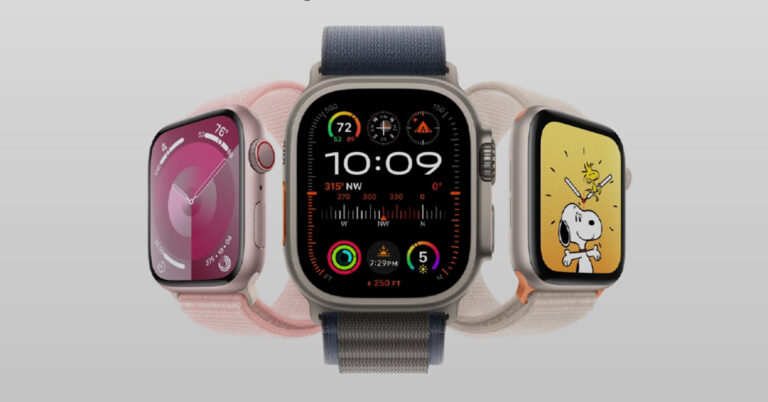
12 Ways to Make Your Apple Watch Vibrate for Notifications

If you’ve always got your Apple Watch strapped around your wrist, you probably don’t need to turn on sound notifications for it. The haptic feedback on your Apple Watch works like a charm to alert you of any incoming notifications. Sound alerts can get annoying very quickly if you’ve got your iPhone nearby as well. In this article, we bring you the top 12 ways to make your Apple Watch vibrate for notifications. Read Also: How to delete your X (Twitter) account on Android, iOS, and PC?

Haptic Feedback on Apple Watch

If you’re not a fan of putting your iPhone in the ‘Loud’ sound profile, your Apple Watch can help you get through the day with haptic alerts. It is quite common to miss vibrational notifications on your smartphone, especially if it isn’t in direct contact with your body. This is where the Apple Watch comes in quite handy. If you keep the smartwatch strapped around your wrist throughout the day, you’ll never miss a haptic alert. Once you’ve set up the haptic alerts for your Apple Watch, you can put your iPhone on silent and get notified about calls, messages, emails, and other things with vibrational feedback on your wrist. You can even customise the notification settings for each app on your phone. For example, if you don’t like the constant notifications from Uber, you can silence the notifications from the app while receiving alerts from other apps.

Enable Haptic Alerts on your Apple Watch

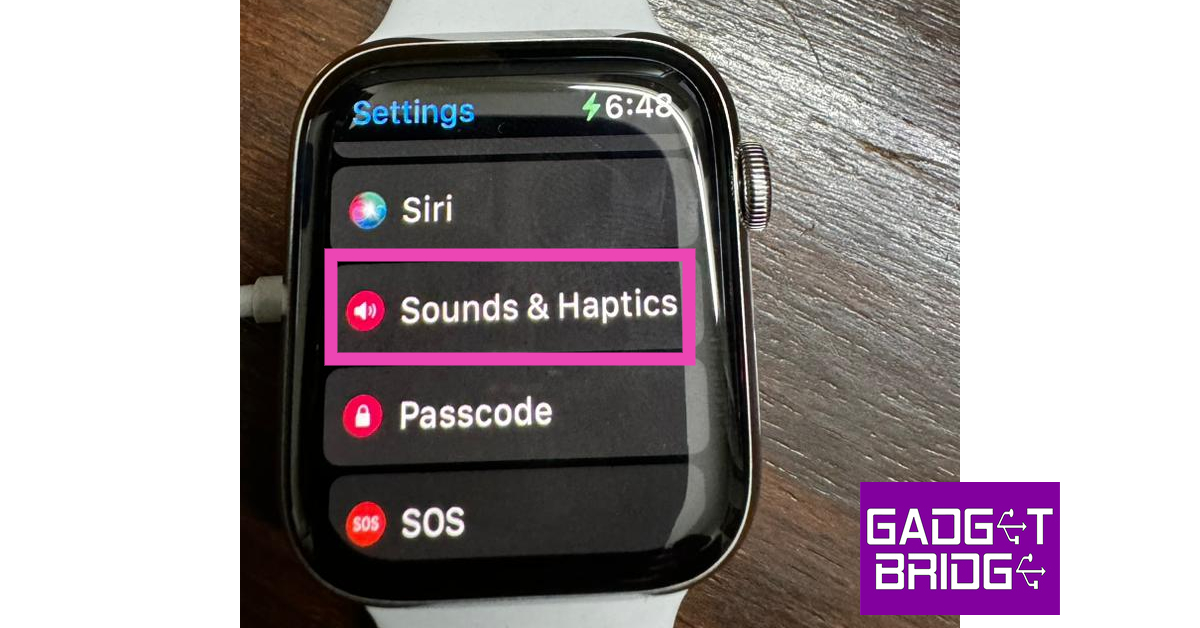
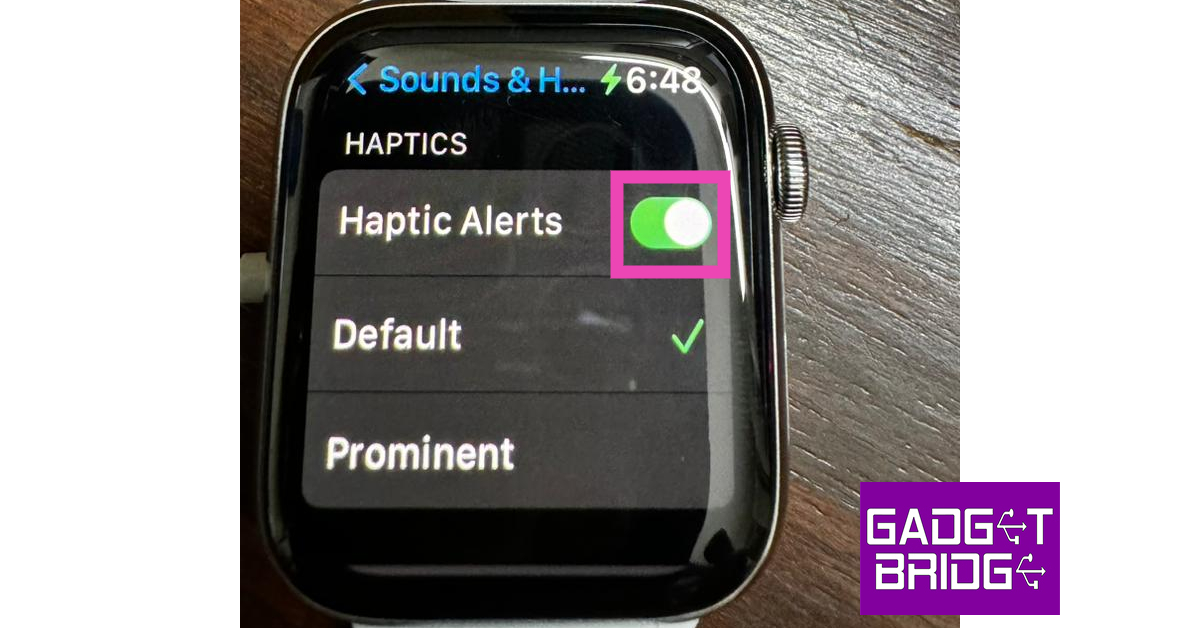
Step 1: Launch the Settings app on your Apple Watch. Step 2: Tap on Sounds & Haptics. Step 2: Tap on Sounds & Haptics. Step 3: Turn on the toggle switch for Hapic Alerts. Step 3: Turn on the toggle switch for Hapic Alerts.

Enable Haptic Alerts from the Apple Watch app on your iPhone

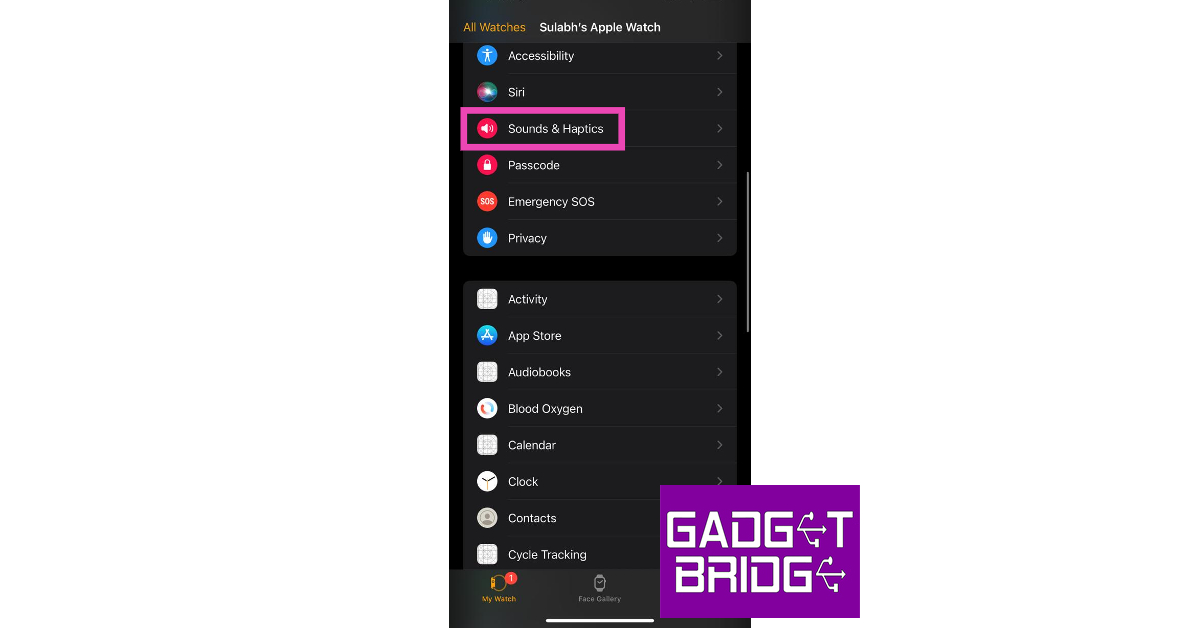
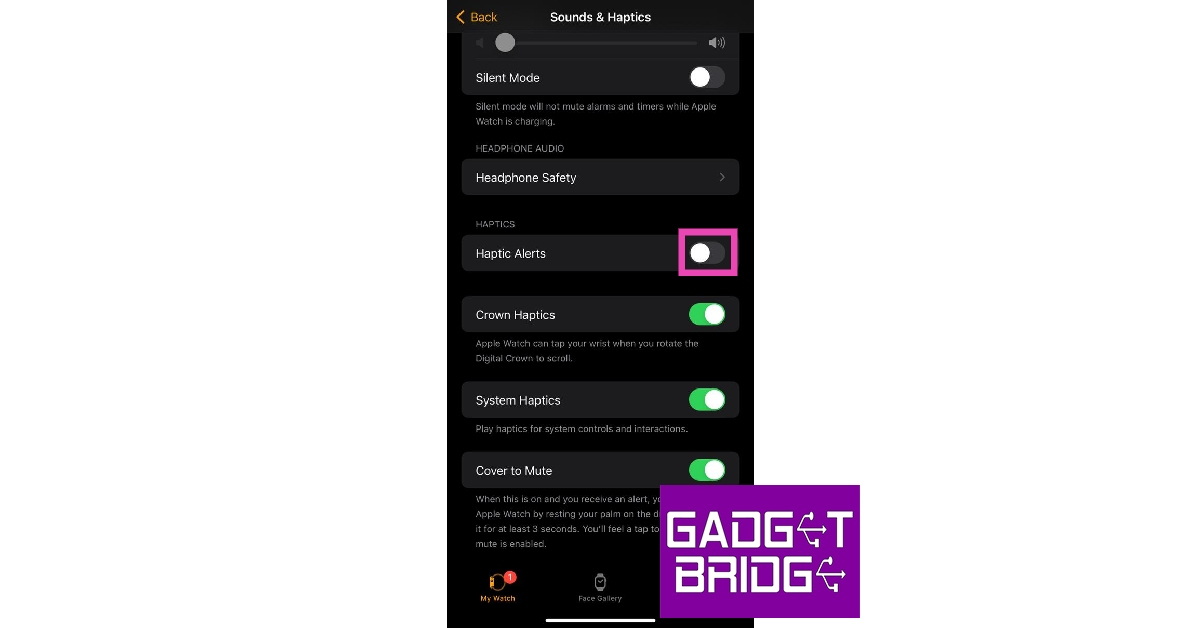
Step 1: Launch the Apple Watch app on your iPhone. Make sure the Watch and your iPhone are connected. Step 2: Tap on Sounds & Haptics. Step 2: Tap on Sounds & Haptics. Step 3: Turn on the toggle switch for Haptic Alerts. Step 3: Turn on the toggle switch for Haptic Alerts.

Increase the intensity of notification vibrations on your Apple Watch

Step 1: Launch the Settings app on your Apple Watch. Step 2: Tap on Sounds & Haptics. Step 2: Tap on Sounds & Haptics. Top 4 Ways to Make Your Apple Watch Vibrate for Notifications Step 3: Under the Haptics section, tap on Prominent. Step 3: Under the Haptics section, tap on Prominent. Top 4 Ways to Make Your Apple Watch Vibrate for Notifications

Increase the intensity of vibrations on your Apple Watch using your iPhone

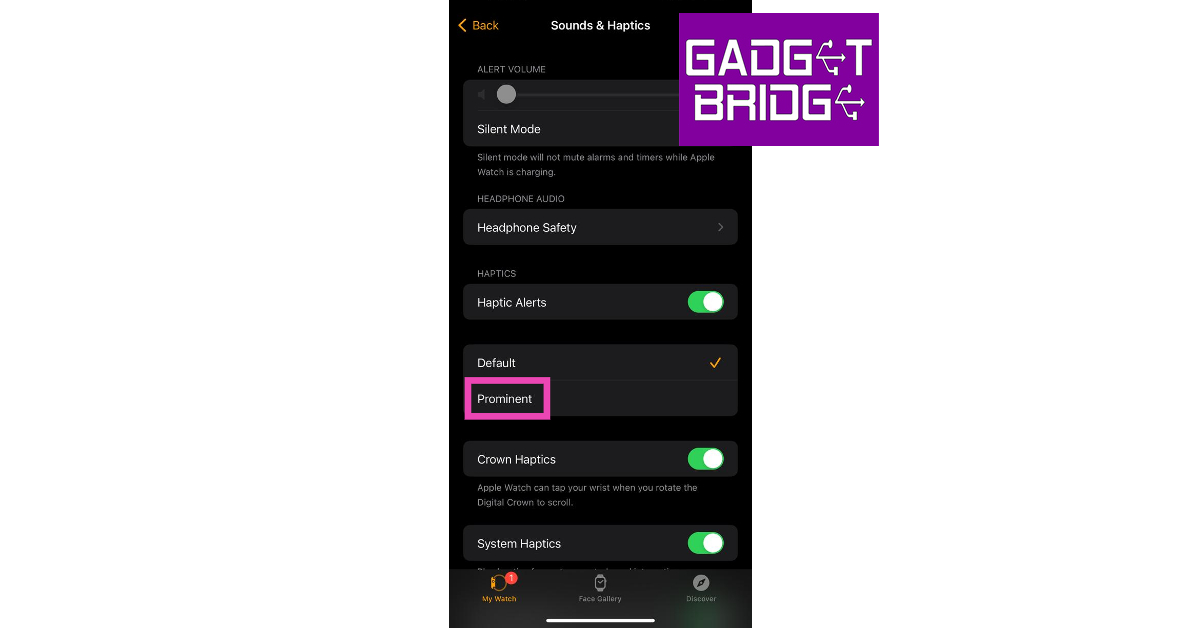
Step 1: Launch the Apple Watch app on your iPhone. Make sure the Watch and your iPhone are connected. Step 2: Tap on Sounds & Haptics. Step 2: Tap on Sounds & Haptics. Top 4 Ways to Make Your Apple Watch Vibrate for Notifications Step 3: Select Prominent under the Haptics section. Step 3: Select Prominent under the Haptics section. Top 4 Ways to Make Your Apple Watch Vibrate for Notifications

Enable System Haptics on your Apple Watch

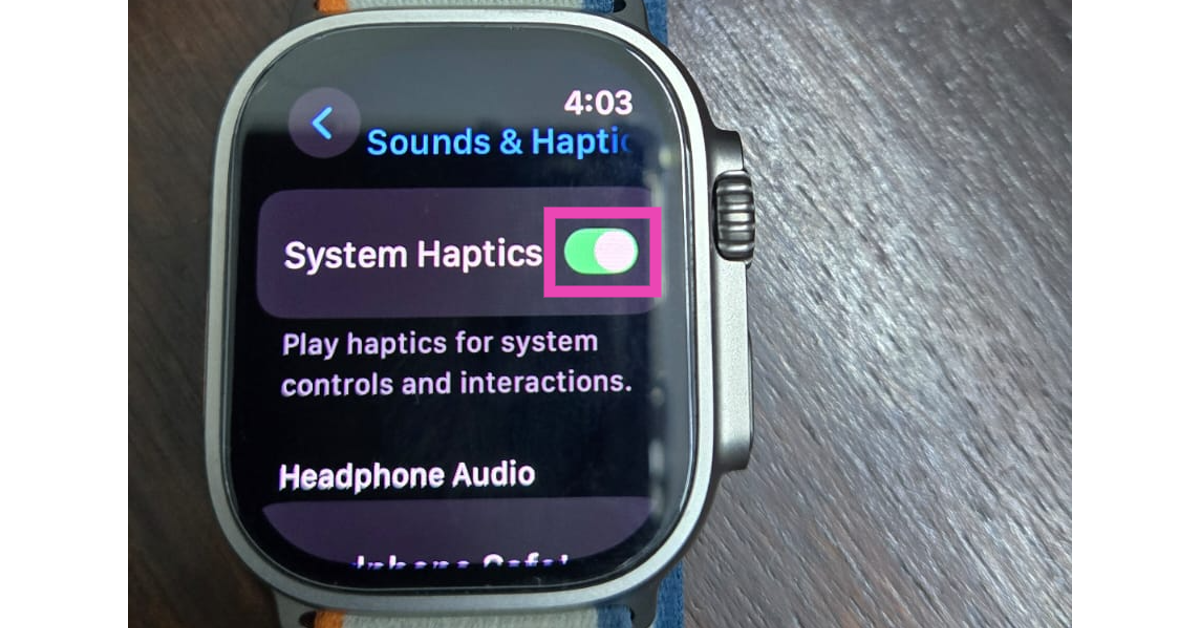
Step 1: Go to Settings on your Apple Watch. Step 2: Tap on Sound & Haptics. Step 2: Tap on Sounds & Haptics. Step 3: Turn on the toggle switch next to System Haptics. Step 3: Turn on the toggle switch next to System Haptics.

Enable System Haptics on your Apple Watch using your iPhone

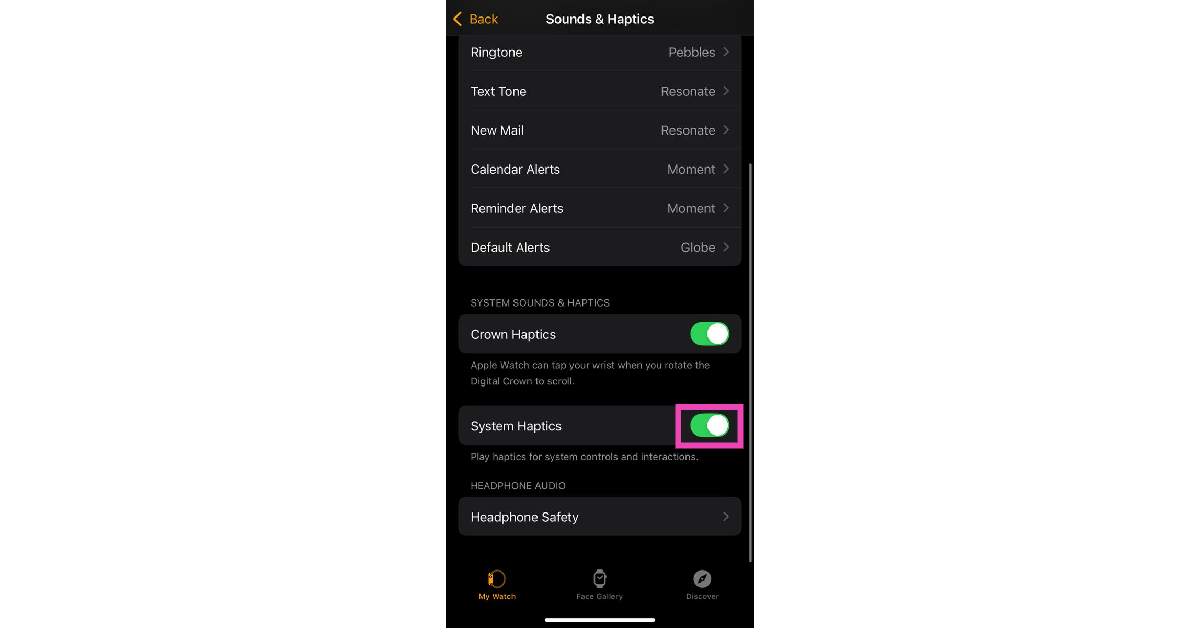
Step 1: Launch the Apple Watch app on your iPhone. Ensure that your watch and smartphone are connected. Step 2: Tap on Sound & Haptics. Step 2: Tap on Sounds & Haptics. Top 4 Ways to Make Your Apple Watch Vibrate for Notifications Step 3: Scroll down and turn on the toggle switch next to System Haptics. Step 3: Scroll down and turn on the toggle switch next to System Haptics.

Set your Apple Watch to Vibrate Only

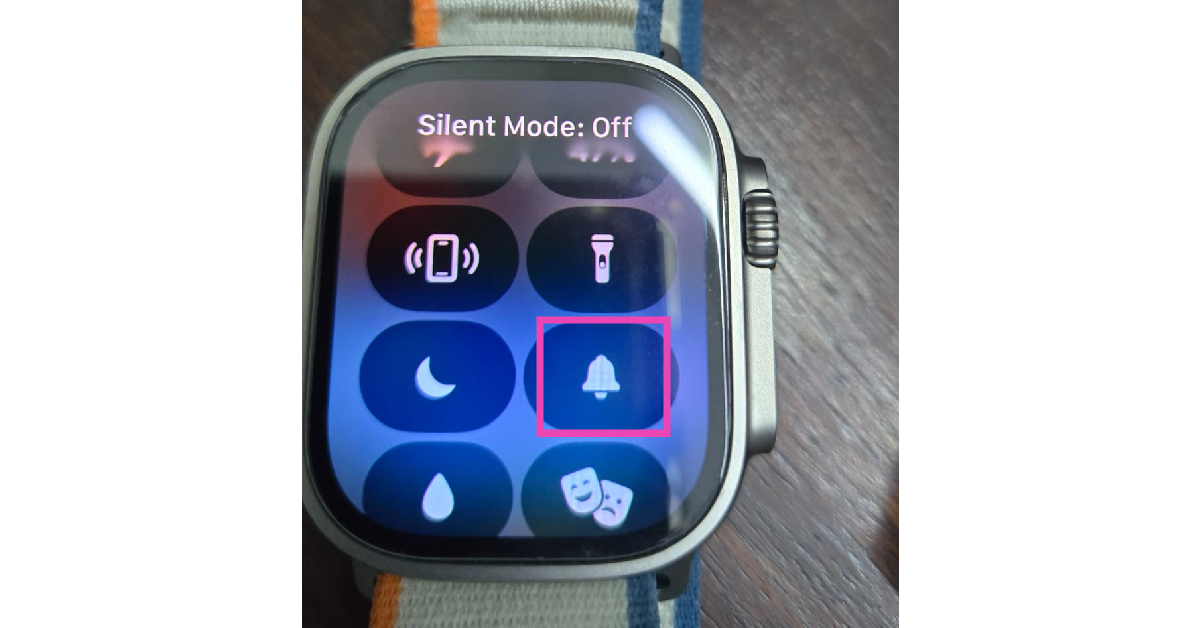
If you enable Silent Mode on your Apple Watch while the Haptic Alerts are turned on, it will be set to ‘Vibrate Only’. Use the methods mentioned above to enable Haptic Alerts on your watch. Once that’s done, use these steps to turn on Silent Mode. Step 1: Swipe up from the watch face to access the Control Centre. Step 2: Tap the bell icon to enable Silent Mode. Step 2: Tap the bell icon to enable Silent Mode. Alternatively, you can go to Settings>Sound & Haptics and turn on the toggle switch next to Silent Mode.
Set your Apple Watch to Vibrate Only using your iPhone

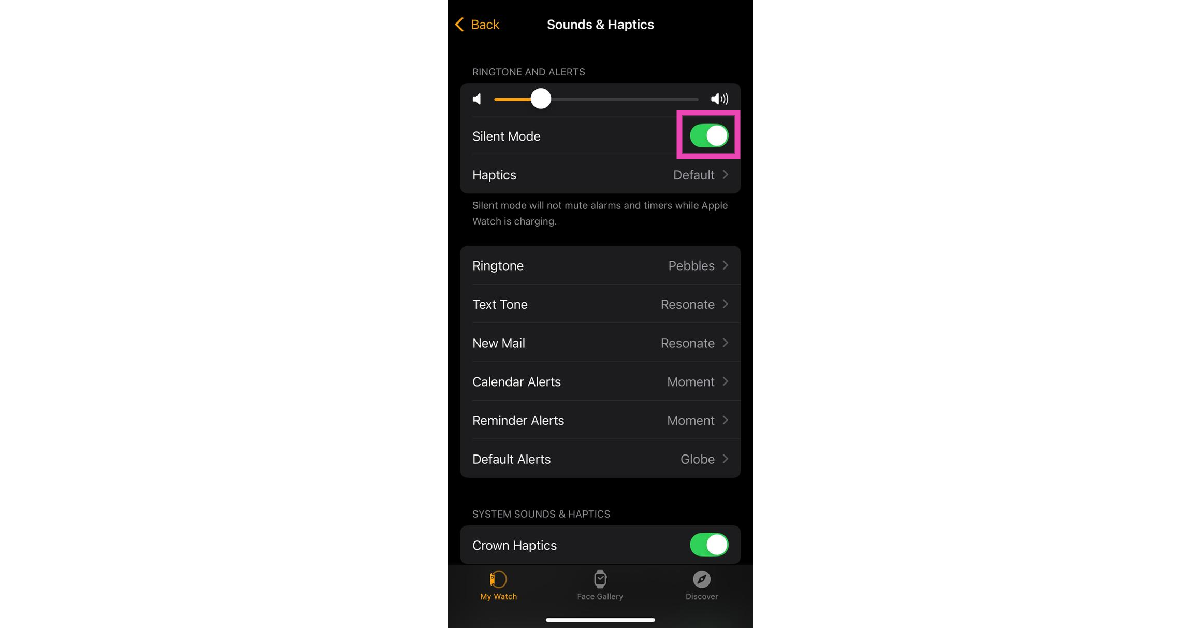
Step 1: Launch the Watch app on your iPhone. Make sure your smartwatch and smartphone are connected. Step 2: Go to Sound & Haptics. Step 2: Tap on Sounds & Haptics. Top 4 Ways to Make Your Apple Watch Vibrate for Notifications Step 3: Turn on the toggle switch next to Silent Mode. Step 3: Turn on the toggle switch next to Silent Mode.

Enable vibrational notifications for a specific app

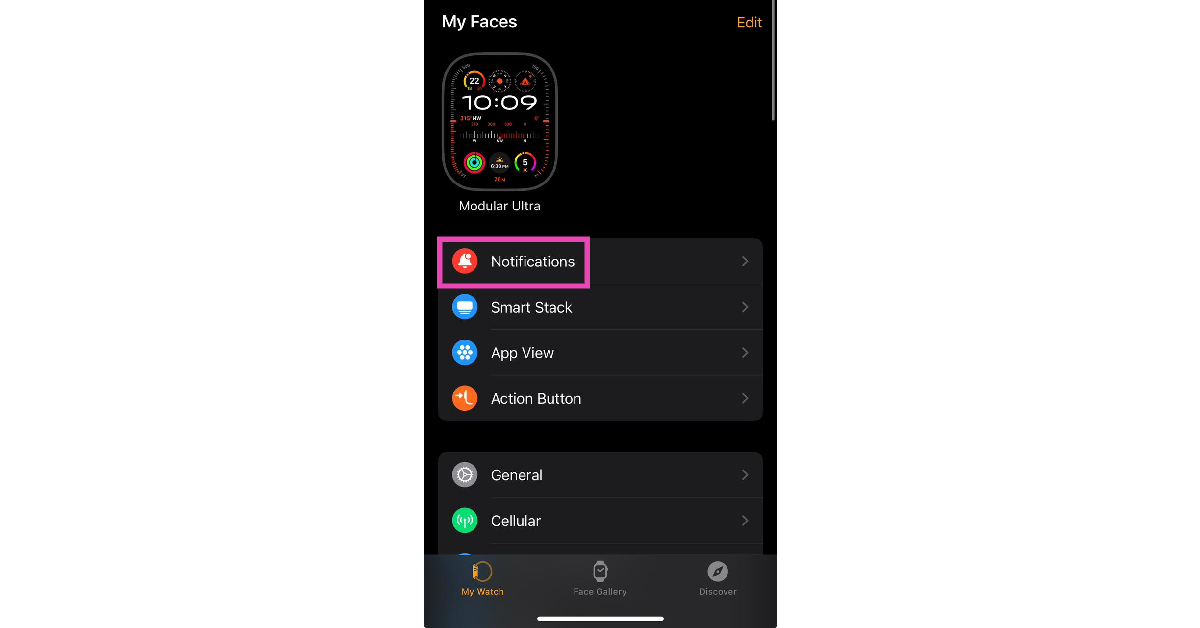
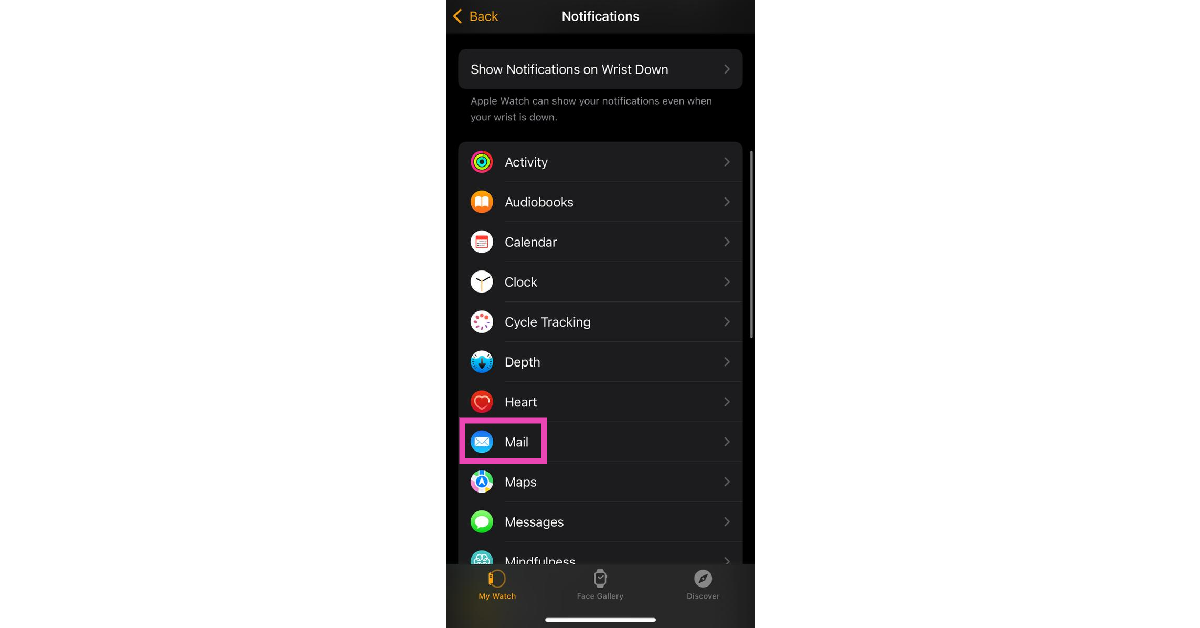
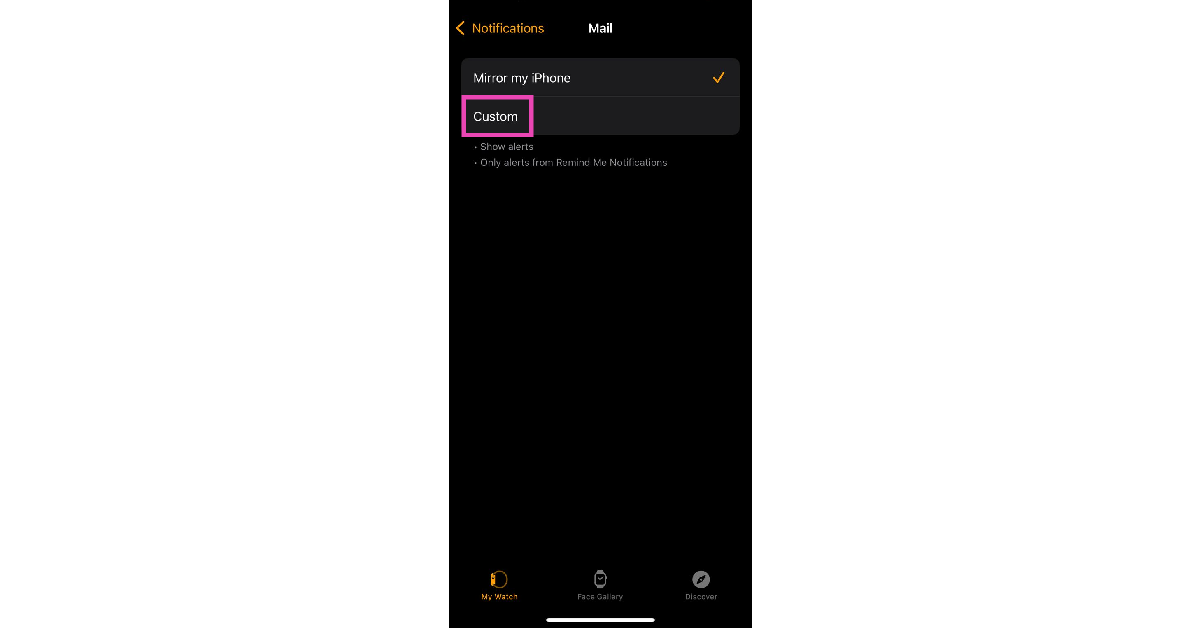
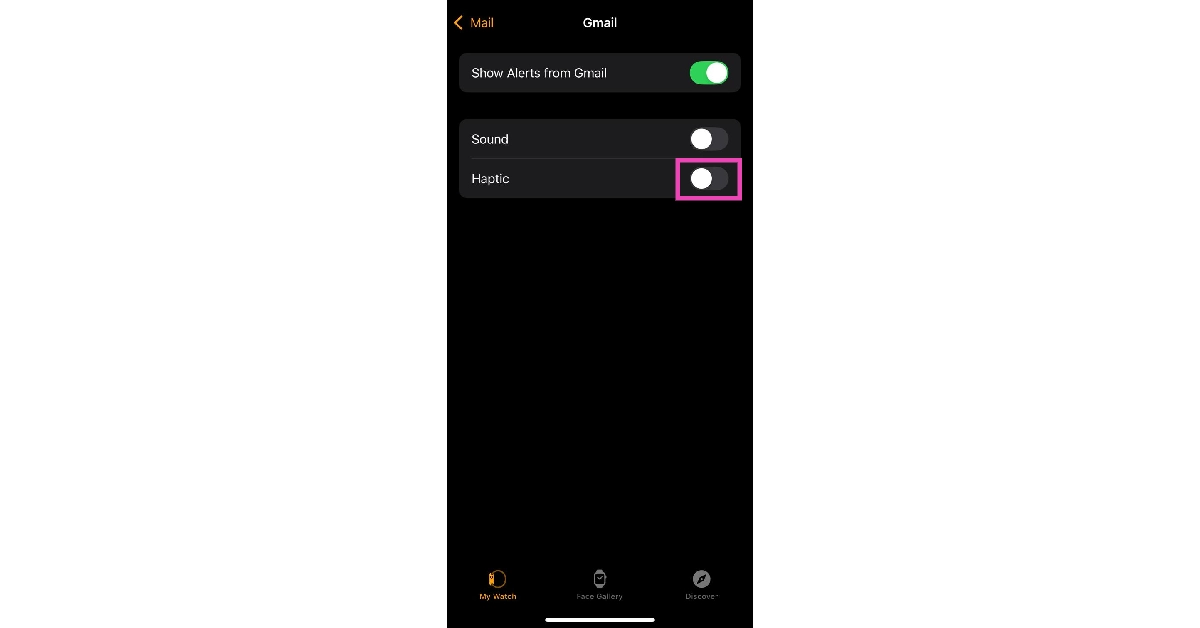
If turning on Haptic Alerts doesn’t do the trick, here’s how you can individually turn on the vibrational alerts for apps. Step 1: Launch the Watch app on your iPhone. Make sure your smartphone and smartwatch are connected. Step 2: Tap on Notifications. Step 2: Tap on Notifications. Step 3: Select an app. Step 3: Select an app. Step 4: Tap on Custom. Step 4: Tap on Custom. Step 5: Make sure there’s a tick next to Allow Notifications. Step 6: Scroll down and turn on the toggle switch next to Haptic.   Step 5: Make sure there's a tick next to Allow Notifications.
Receive only haptic alerts from a particular app

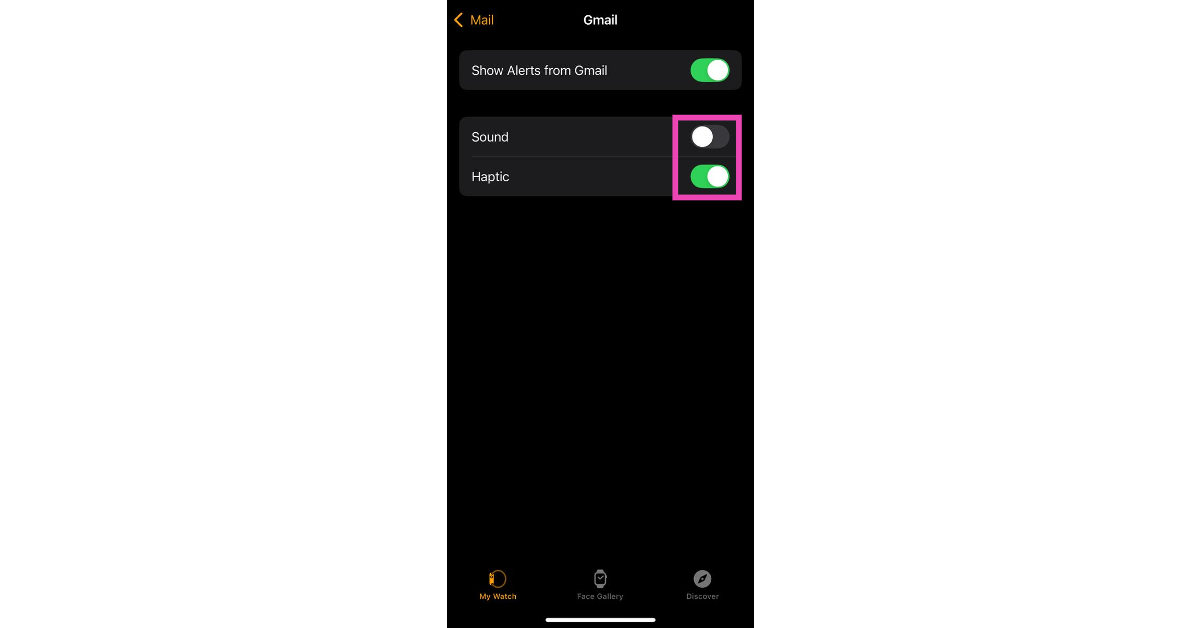
Step 1: Launch the Watch app on your iPhone. Make sure your smartphone and smartwatch are connected. Step 2: Tap on Notifications. Step 2: Tap on Notifications. Step 3: Select an app. Step 3: Select an app. Step 4: Tap on Custom. Step 4: Tap on Custom. Step 5: Make sure there’s a tick next to Allow Notifications. Step 6: Turn on the toggle switch next to Haptic and turn off the toggle switch next to Sound. Step 6: Scroll down and turn on the toggle switch next to Haptic. 12 Ways to Make Your Apple Watch Vibrate for Notifications
Enable Haptic Alerts for notifications but not for calls

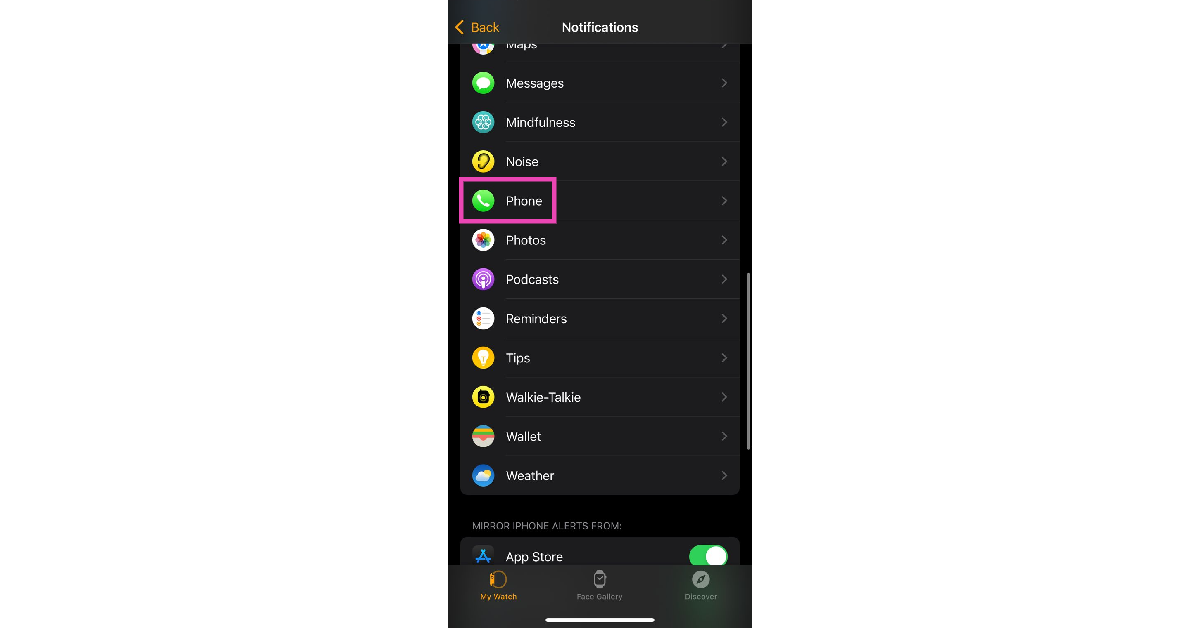
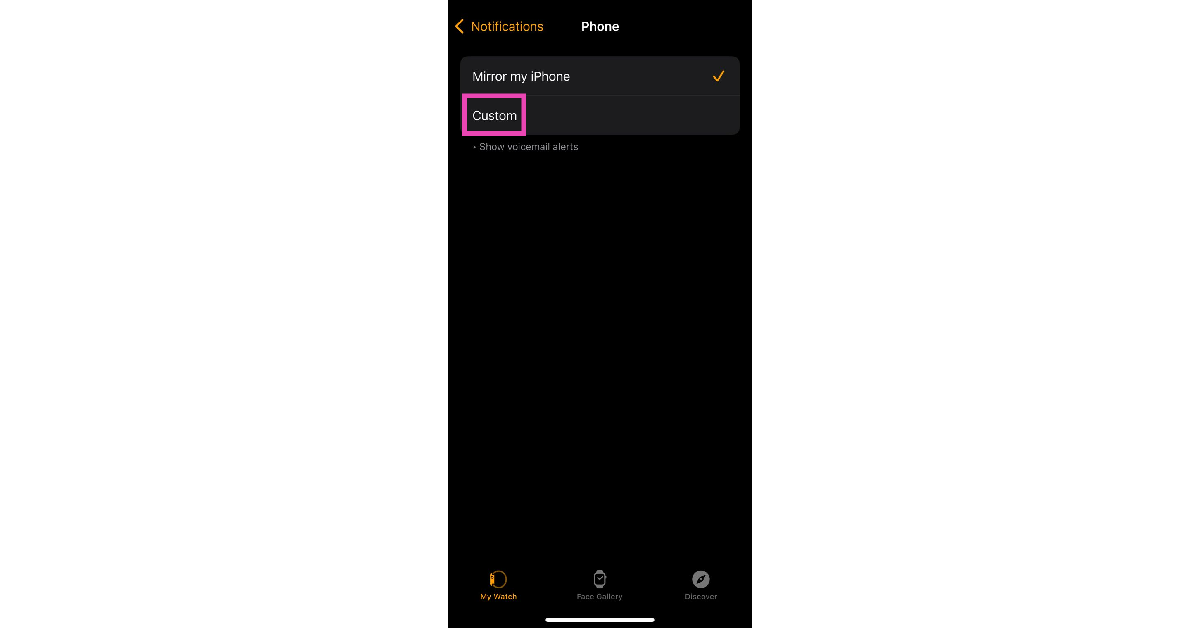
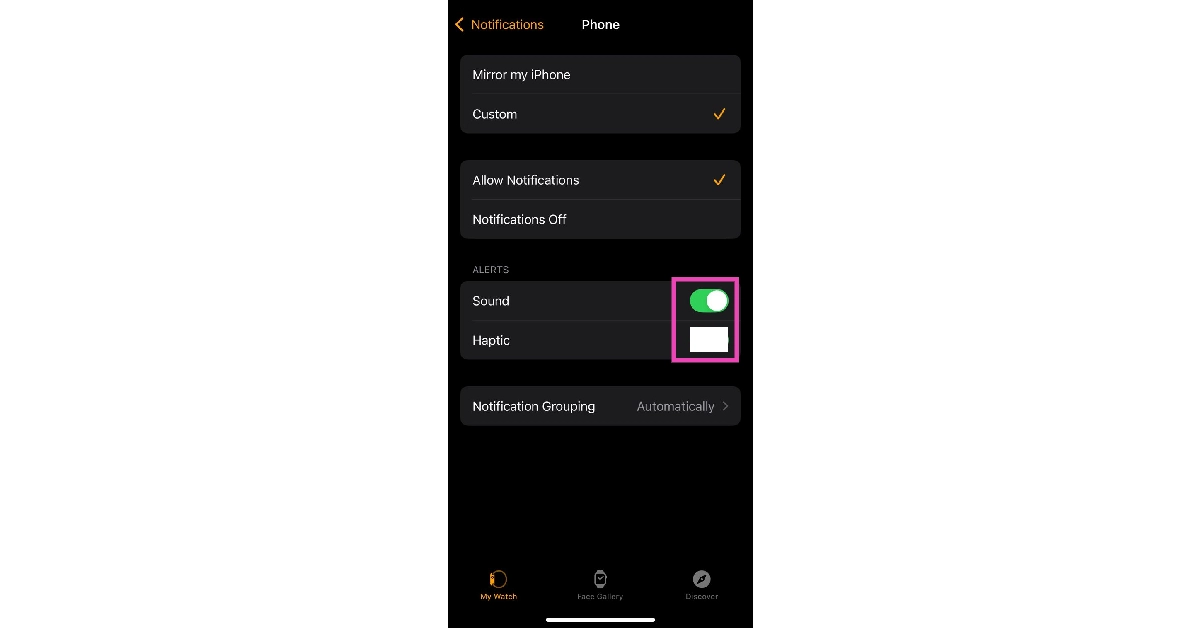
Step 1: Launch the Watch app on your iPhone. Make sure your smartphone and smartwatch are connected. Step 2: Tap on Notifications. Step 2: Tap on Notifications. 12 Ways to Make Your Apple Watch Vibrate for Notifications Step 3: Select the Phone app. Step 3: Select the Phone app. 12 Ways to Make Your Apple Watch Vibrate for Notifications Step 4: Tap on Custom. Step 4: Tap on Custom. 12 Ways to Make Your Apple Watch Vibrate for Notifications Step 5: Turn on the toggle switch next to Sound and turn off the toggle switch next to Haptic. Step 5: Turn on the toggle switch next to Sound and turn off the toggle switch next to Haptic. 12 Ways to Make Your Apple Watch Vibrate for Notifications
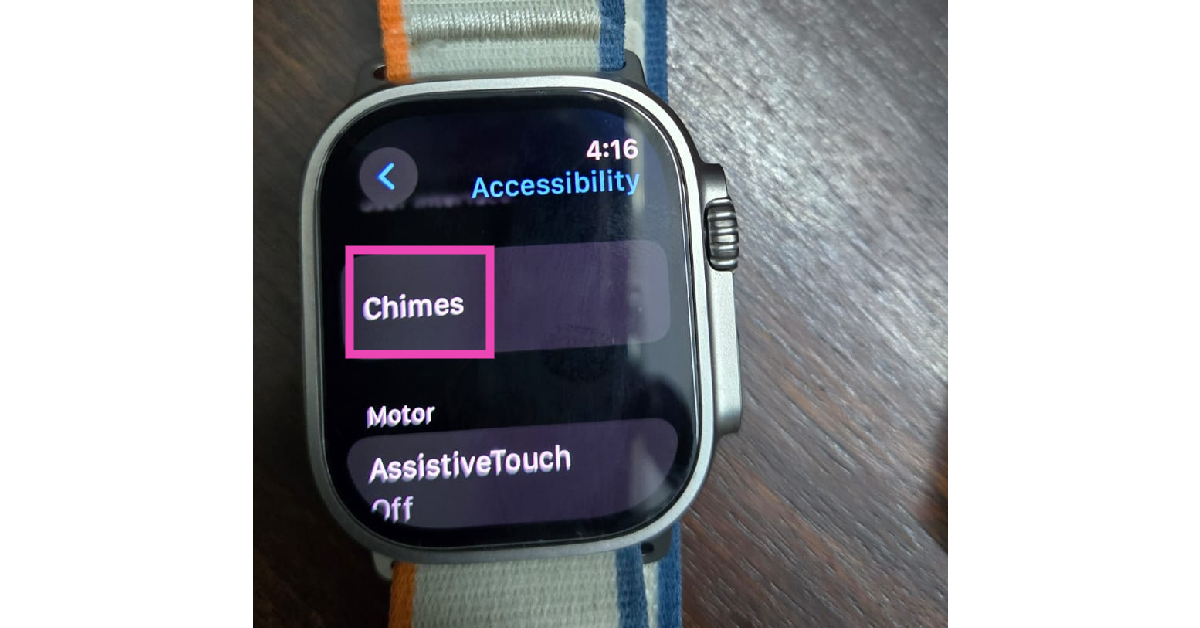
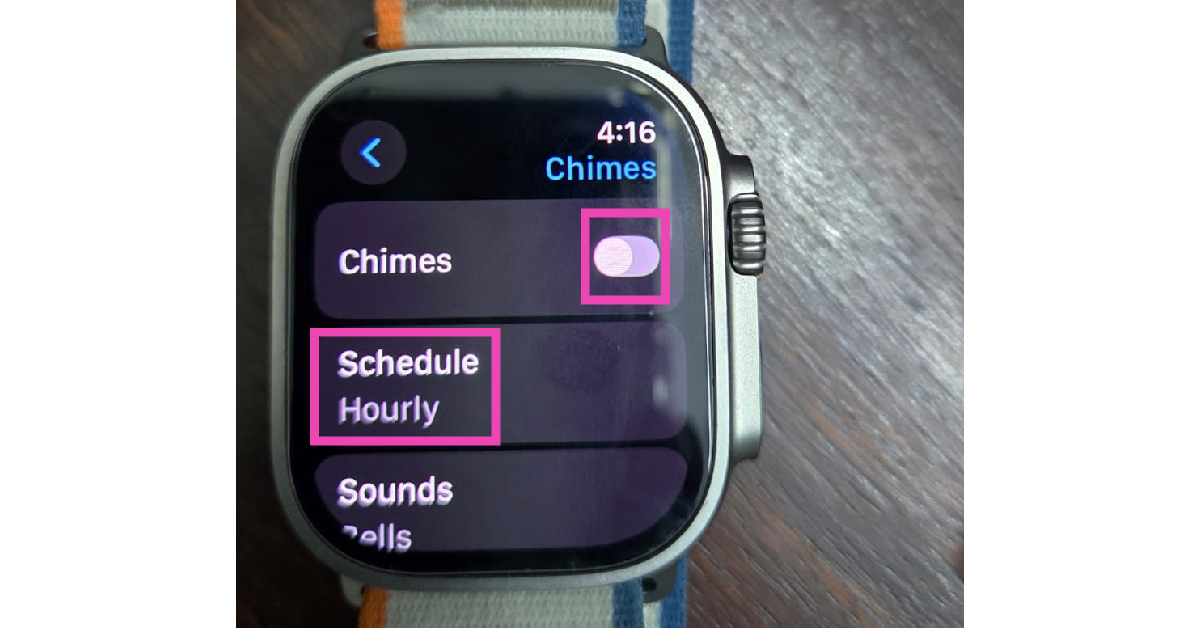
Set periodic vibrational alerts on your Apple Watch

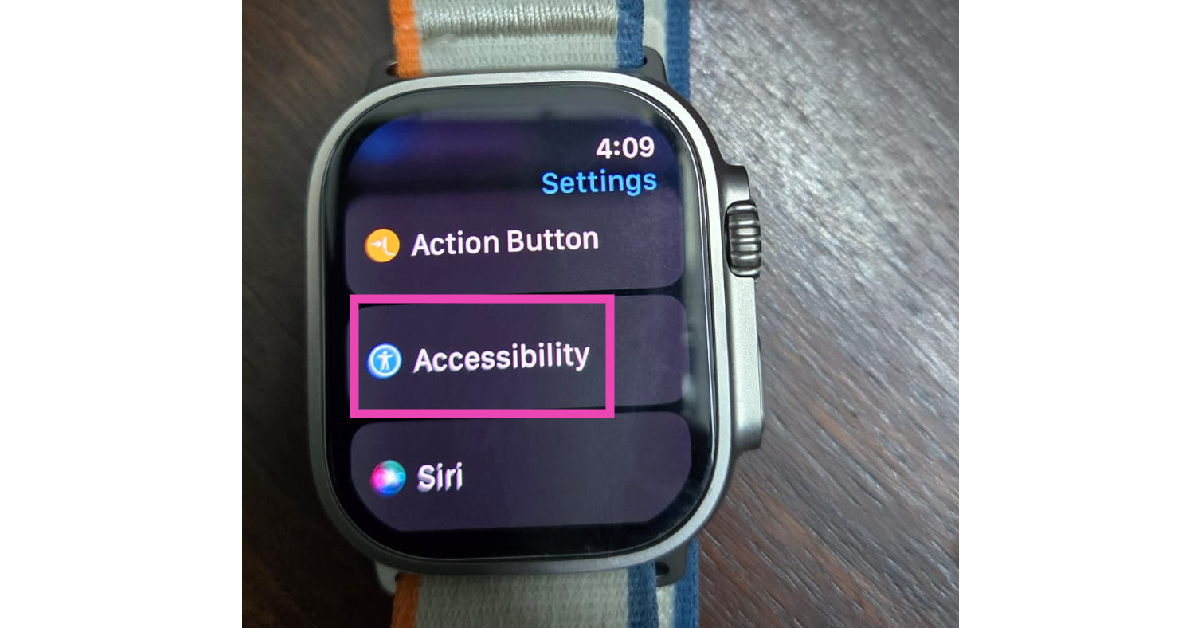
You can get your Apple Watch to vibrate at regular intervals. Here’s how. Step 1: Go to Settings and tap on Accessibility. Step 1: Go to Settings and tap on Accessibility. 12 Ways to Make Your Apple Watch Vibrate for Notifications Step 2: Tap on Chimes. Step 2: Tap on Chimes. 12 Ways to Make Your Apple Watch Vibrate for Notifications Step 3: Turn on the toggle switch next to Chimes. Step 3: Turn on the toggle switch next to Chimes. 12 Ways to Make Your Apple Watch Vibrate for Notifications Step 4: Tap on Schedule. Step 5: Set the frequency for vibrational alerts.
Frequently Asked Questions (FAQs)

How do I turn on the vibrational feedback on my Apple Watch?

Go to Settings>Sound & Haptics and turn on the toggle switch for Haptic Alerts on your Apple Watch.

How do I turn off the vibrational feedback for a particular app on my Apple Watch?

If you don’t want vibrational feedback for the notifications from a particular app, simply launch the Apple Watch app on your iPhone and select the app in question in the Notifications settings. Tap on Custom and turn off the toggle switch for Haptic.

How do I put my Apple Watch on vibrate only?

If you don’t want any sound alerts for your Apple Watch, go to Settings>Sound & Haptics and turn on the toggle switch for Silent Mode. This will not turn off haptic alerts.

Why is my Apple Watch not vibrating?

Your Apple Watch stops vibrating as soon as ‘Haptic Alerts’ are turned off. Go to Settings>Sound & Haptics, and turn on the toggle switch next to System Haptics.

Does the Apple Watch vibrate on calls?

You can set your Apple Watch to vibrate on calls by going to the Watch app on your iPhone, navigating to Notifications>Phone and turning on the toggle switch next to ‘Haptics’. Read Also: Poco M6 Pro 5G Review: One of the best affordable 5G smartphones

Conclusion

These are the top 12 ways to make your Apple Watch vibrate for notifications. If your Apple Watch mirrors your iPhone’s notification settings, the large volume of alerts can get annoying. Go to the Apple Watch app on your iPhone and use the notifications settings to limit the apps that can send you alerts on your Watch.