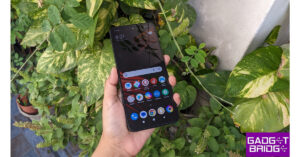
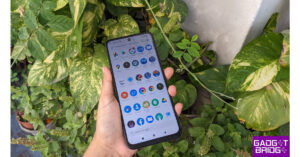
The Chinese smartphone company, Itel, owned by Transsion Holding has announced the launch of the latest budget smartphone in the Indian market. The company has introduced Itel P55 5G powered by MediaTek Dimensity 6080 SoC. The device comes with an Android 13 out of the box. It features an HD display and packs a 5,000mAh battery. Keep on reading to know more about the budget phone.
Itel P55 5G price in India, sale details
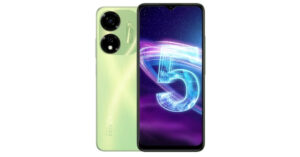
Itel P55 5G price in India has been set at Rs 9,999 for a single 8GB RAM with 128GB storage option. The budget smartphone by the Chinese tech company will be offered in two colour options of Blue and Green. The device is scheduled to go on sale via Amazon starting October 4.For the consumers purchasing the itel P55 5G from retail, the smartphone is available on Consumer finance options with leading NBFC (Bajaj & Home Credit) and payment aggregators (Pine labs, PayTM and Ezetap).
Itel P55 5G specifications
When it comes to specifications, Itel P55 5G features a 6.6-inch HD+ display with 1600 x 700 pixels of resolution. The screen supports a refresh rate of 90Hz. The budget smartphone operates on Android 13 out of the box. Under the hood, there is an octa-core MediaTek Dimensity 6080 SoC coupled with an ARM Mali-G57 MC2 GPU. The phone comes in a single 8GB of RAM and 128GB of storage. The internal storage can be further expanded to 256GB using a microSD card.For the photos and videos Itel P55 5G sports a dual rear camera setup. The camera system includes a 50-megapixel primary sensor and an AI secondary camera. For taking selfies and video calling the handset consists of an 8-megapixel front-facing sensor.The Itel P55 comes equipped with a 5,000mAh battery along with 18W wired fast charging support. For connectivity 5G, 4G VoLTE, Wi-Fi, Bluetooth 5.1, GPS, a 3.5mm jack and USB Type-C port for charging. In addition to this, there is a side-mounted fingerprint sensor for authentication.Commenting on the launch, CEO, itel India, Mr. Arijeet Talapatra, said, “itel has been at the forefront in driving the digital revolution in Bharat, successfully facilitating seamless transition of customers from 2G to 4G. As India is poised to welcome approximately 150 million 5G users by 2024, flagging off a big digital revolution, we are determined to democratize 5G technology making it accessible and affordable for the masses in Bharat. The itel P55 Power 5G redefines technology supremacy under 10K segment by offering 5G connectivity with NRCA technology, combined with the powerful MediaTek D6080 chipset, creating a perfect synergy of swift connectivity and outstanding performance. With its ground-breaking features, we aim to elevate the smartphone experience for our valued customers,” said Arijeet.
For the latest gadget and tech news, and gadget reviews, follow us on Twitter, Facebook and Instagram. For newest tech & gadget videos subscribe to our YouTube Channel. You can also stay up to date using the Gadget Bridge Android App. You can find the latest car and bike news here.
iOS 17 brings a new intuitive method of exchanging contact information with other iPhone users. You may have already seen videos of this new feature doing the rounds on the Internet. While it may seem fun at first, it can get annoying pretty quickly if you own two iPhones. If you’re tired of accidentally triggering NameDrop every time you put your iPhones together, here’s how you can disable the feature on iOS 17.Read Also:Poco M6 Pro 5G Review: One of the best affordable 5G smartphones
What is NameDrop?
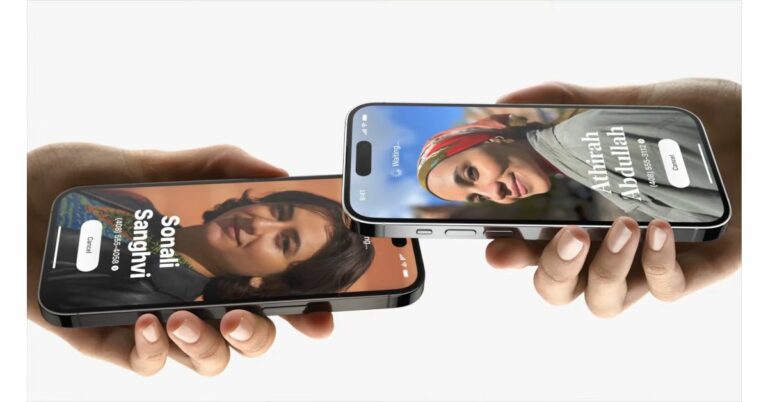
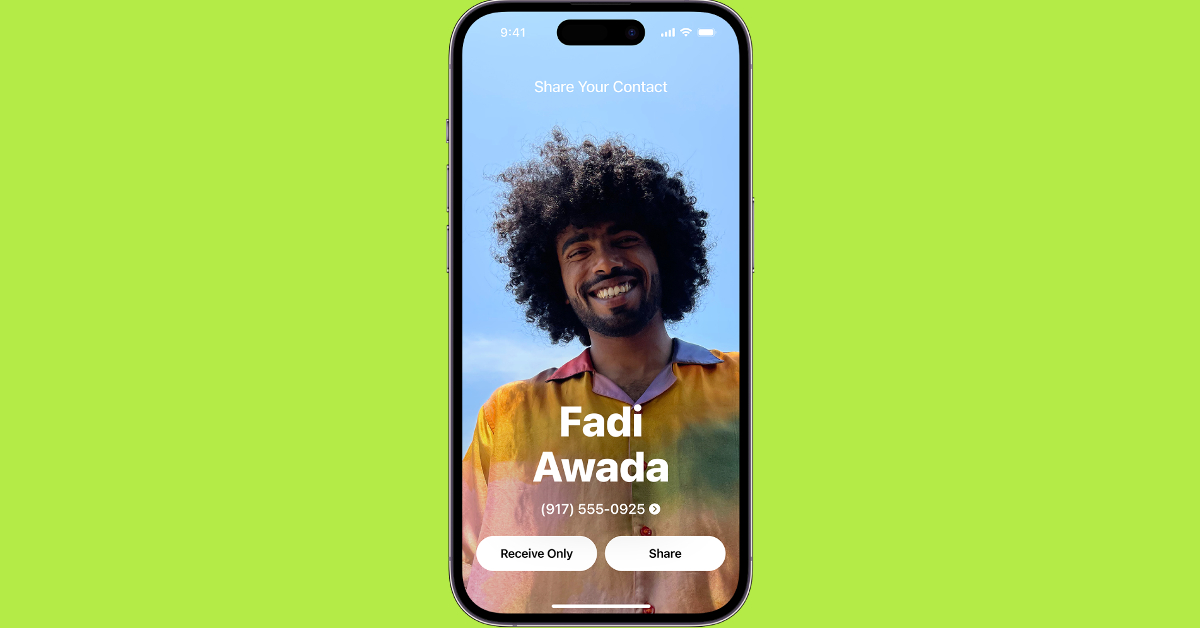
Making its debut on the new iOS 17, NameDrop is Apple’s new contact-sharing feature. In order to share your contact card with another iPhone user, all you need to do now is bring the top part of the two iPhones together. When NameDrop is initiated, a special glow animation plays on the two devices. The two users can choose to share their contact information with each other or simply receive the other person’s contact card.While it may seem like sorcery, NameDrop simply makes use of AirDrop to exchange contact information between two devices. While it is a nifty little feature, it can get accidentally triggered when two iPhones are placed together with their top sides facing each other. This can get annoying for people who own more than one iPhone.Luckily, you don’t have to turn off AirDrop entirely to disable NameDrop. If you navigate to your iPhone’s settings, you will find a separate option to put a halt to the NameDrop trigger. At this point, iOS 17 does not have the option to mute the trigger for devices that have already swapped contact information previously. But if you want to disable NameDrop completely, check out how you can go about it below.
Here’s how you can disable NameDrop on iOS 17
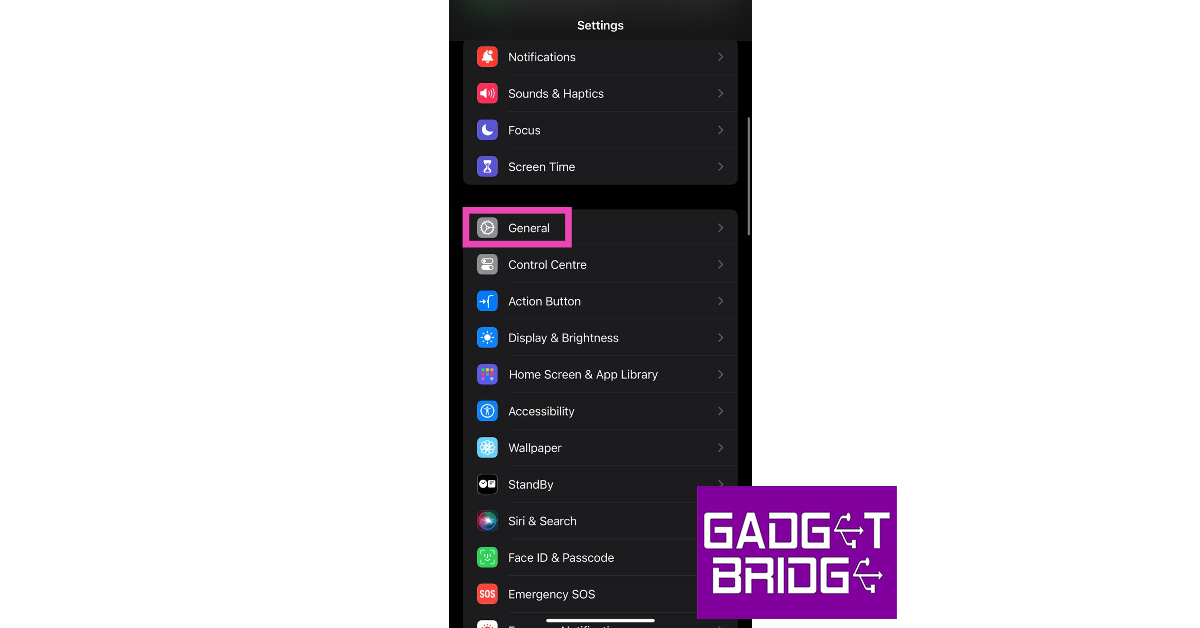
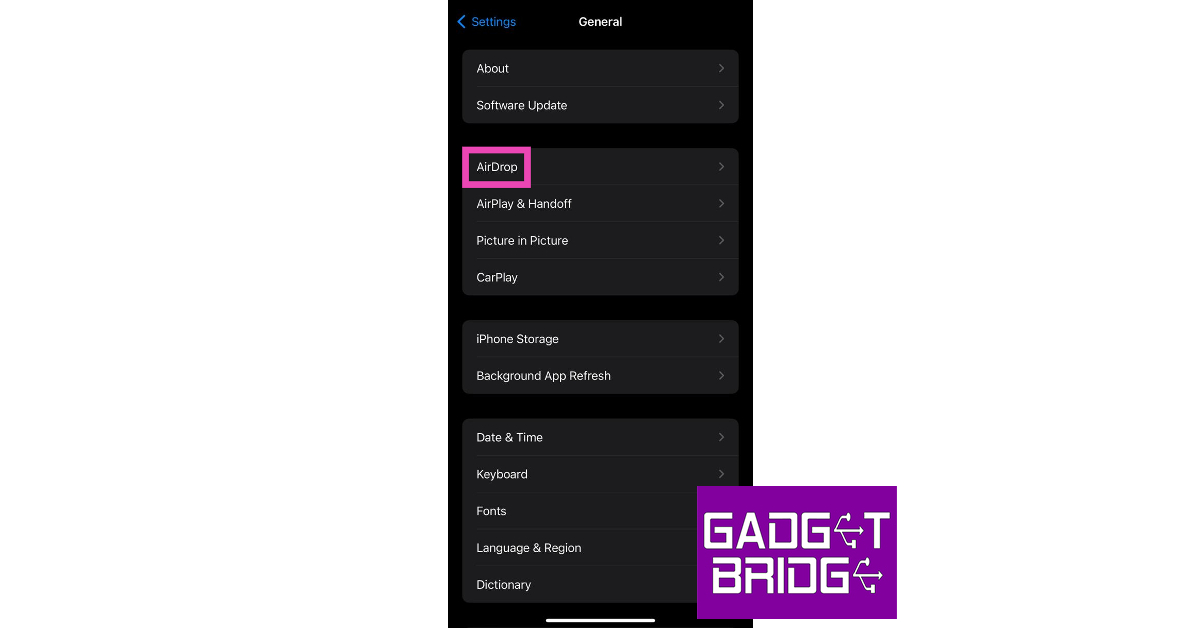
Step 1: Go to Settings and select General.Step 2: Tap on AirDrop.Step 3: Turn off the toggle switch for Bringing Devices Together under the ‘Start Sharing By’ section.
Frequently Asked Questions (FAQs)
How does NameDrop work on iOS 17?
NameDrop uses AirDrop to share contact information between two iPhones when their top side are brought close to each other.
How do I make a Contact Poster on iOS 17?
To create your Contact Poster on iOS 17, launch the Contacts app and tap on My Card at the top of the screen. Tap on Contact Photo and Poster to set it up.
After launching Sony WF-1000XM5 TWS Earbuds in the US the company has now announced the launch of the new TWS earbuds in India today. The earphones are a successor to the Sony WF-1000XM4 that debuted in 2021. The device is powered by V2 and QN2e Active Noise Cancellation Chip. In addition to this, there is the new Dynamic Driver X. The audio device comes with an IPX4 rating and offers quick charging.
Sony WF-1000XM5 price in India and availability
Sony WF-1000XM5 price in India has been set at Rs 24,990. But customers can now pre-book it at a special price of Rs. 21,990 which also includes a cashback of Rs 3,000. The buyers are also eligible to get an SRS-XB100 portable speaker worth Rs 4,990 free under the pre-book offer.The pre-booking will begin today and will open till October 15. The TWS earbuds will be available in Black and Platinum silver colour options via all online and offline channels such as Sony Center, major electronic stores and e-commerce portals in India starting October 18.Also Read:Vivo V29 Series India launch set to take place on this date
Sony WF-1000XM5 specifications
The Sony WF-1000XM5 is powered by Sony’s Integrated Processor V2 chip and the QN2e processors. The chipset helps in improving the performance of Active Noise Cancellation. The TWS comes equipped with an 8.4mm Dynamic Driver X with polyurethane foam-made ear tips. In addition to this, each earbud has bone conduction sensors fitted together with deep neural network (DNN) processing. This helps to enhance voice quality during phone calls. Along with ANC, the wind noise reduction structure minimises any wind noise.Additionally, these earbuds are approximately 25% smaller and approximately 20% lighter than their predecessor. The Sony WF-1000XM5 features Adaptive Sound Control and Speak-to-Chat as well as Multipoint Connect which lets you pair two Bluetooth devices simultaneously. In addition to this, the device can also control voice assistant and Auto Play for an operation-free listening experience.The music timing on the earbuds can be customised as per your liking and the device also provides audio notifications. The device can be linked with Spotify, Endel and Apple Music to access music.Sony WF-1000XM5 are IPX4 rated for protection against splashes and sweat. As per the company, the TWS can last you up to 8 hours and with just 3 minutes of quick charge, it can provide 60 minutes of playtime. While Qi tech support offers easy wireless charging.
For the latest gadget and tech news, and gadget reviews, follow us on Twitter, Facebook and Instagram. For newest tech & gadget videos subscribe to our YouTube Channel. You can also stay up to date using the Gadget Bridge Android App. You can find the latest car and bike news here.
Of late, Instagram users are facing a very annoying bug that makes it very difficult for them to watch content on the platform that is shared with them on a different instant messaging platform. You may have faced this problem yourself after clicking on a link to a Reel sent by a friend on WhatsApp but landing on a completely different Reel altogether on the Instagram app. We have tackled this issue in the past but thought we’d bring you some more ways of handling this situation. So, without further ado, here are the top 12 ways to fix the ‘Instagram opening the wrong link’ problem on your smartphone.Read Also:Top 3 ways to hide a chat on Telegram for Android, iOS, and Desktop
Why aren’t Instagram links working correctly on your device? Some possible answers
Sometimes, the most basic problems are the hardest to diagnose. This is because there could be a multitude of reasons causing them. In this scenario, you’re left with the hit-and-trial approach to getting to the bottom of the issue. To ease your task, here are some of the most common culprits that may be causing Instagram to open wrong links.
The Instagram link is broken: Links go rogue all the time. Sometimes, clicking on a link may throw a 404 error, which means that it redirects to an empty page with no content. It is also possible that the person who sent you the link may have accidentally mistyped it.
The content may have been taken down: Instagram users and creators take down their content all the time. If your friend sent you a post or a Reel that has since been deleted, Instagram may either show an error or open a recommended post.
Instagram took down the content: If the link sent to you had objectionable content that violated Instagram’s Terms of Service, it is possible that the platform took it down.
You are blocked from viewing the content: If the account that posted the content has blocked you on Instagram, you won’t be able to view it from your account.
Corrupt cache: Instagram occupies a large portion of cached memory on your phone. These temporary files are prone to corruption. A corrupt cache can lead to malfunctions within the app.
Software glitches: It is possible that the issue doesn’t lie with Instagram, but your device. The easiest way to check this is by loading the link on another device.
Disable Instagram from opening supported links
Since this is an app-related issue, you can fix it by opening the link in a web browser. If your phone opens the Instagram app as soon as you click on a link, here’s how you can disable it.
Step 1: Go to Settings and select Apps.
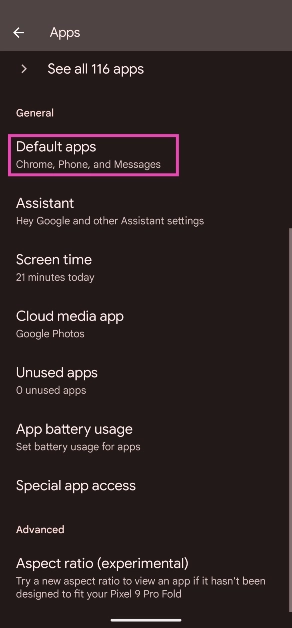
Step 2: Select Default apps.
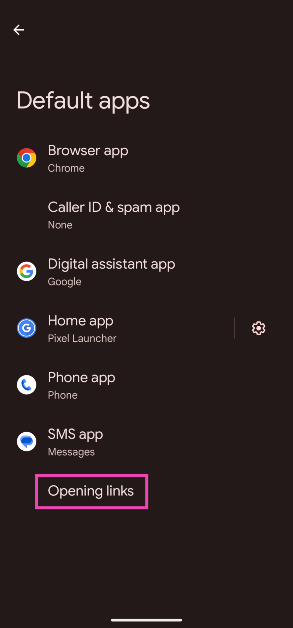
Step 3: Tap on Opening links.
Step 4: Scroll down and select Instagram.
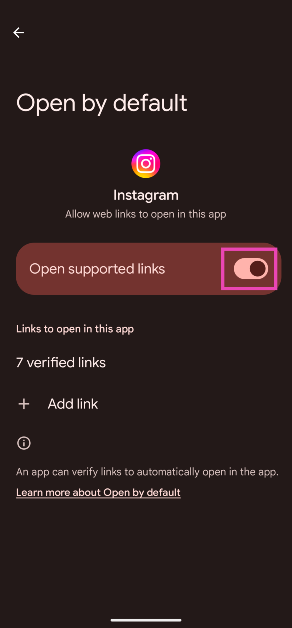
Step 5: Turn off the toggle switch next to Open supported links.
Load the link on a web browser
If you don’t want to disable Instagram from opening supported links, you can simply copy the link that your friend sent to you and open it in a web browser. Press and hold the link (not the card) to copy it to your phone’s clipboard. Now, launch the Google Chrome (or your preferred browser) app and paste the link in the address box. Hit enter. The correct Reel or Video will load in the active tab.
Clear Instagram’s app cache
Step 1: Go to Settings and select Apps.Step 2: Scroll down and select Instagram.Step 3: Tap on Storage.Step 4: Select Clear Cache from the toolbar at the bottom of the screen.
Remove Instagram from the app switcher
The main reason why Instagram loads a different video or Reel every time you click on a link is because of its faulty temporary memory. Clearing the cache fixes this to some extent, but if you’re still experiencing the issue, simply remove Instagram from the app switcher. Doing this will force the app to refresh once you click on a link. Use the gesture controls or tap the app switcher icon on the bottom controls and swipe up on Instagram’s card to remove it from the list of active apps.
Force Stop the Instagram app
If removing Instagram from the app switcher doesn’t work, try force-stopping it instead. This will stop all background operations for the app. Here’s how you can go about it.Step 1: Go to Settings.Step 2: Scroll down and select Apps.Step 3: Scroll down and select Instagram.Step 4: Select Force Stop from the bottom menu.
Hit the back button
If you have already been watching Reels on Instagram before clicking on a link sent to you by a friend, it is possible that Instagram picks up from where you left off instead of loading the Reel from the link. One of the quickest ways to load the correct Reel is by hitting the back button. If this doesn’t work, try swiping up and down. This will refresh the app and land you on the Reel that was sent to you.
Swipe down on the Reel
A common bug in Instagram opens the next recommended Reel instead of the Reel you clicked. You can bypass this issue by swiping down on the Reel that opens up on the screen. This will play the previous Reel, the one that was sent to you.
Use Instagram Lite
The ‘Lite’ version of Instagram does not have the bug that keeps the main Instagram app from loading the correct video. To make sure you land on the right video every time you click on a link, switch to the Instagram Lite app. This stripped-down version of Instagram also saves your mobile data by not pre-loading the content beforehand. The downside is that you may not get a seamless content-watching experience as every Reel and Story will load only when you swipe to it.
Update the Instagram app
Oftentimes, an older version of an app can create issues that are no longer prevalent in the updated version. This applies to Instagram as well. Try updating the app and see if the issue still persists after that. Go to the Google Play Store and search for Instagram. On the app page, hit Update.
Uninstall and Reinstall the app
If you are already using the updated version of the Instagram app, try uninstalling and then reinstalling it. To uninstall the app go to Settings>Apps>Instagram and hit Uninstall or simply long press its icon on the app drawer and tap on Remove.
Restart your phone
If the fixes mentioned above did not work for you, it is possible that the issue lies with your phone. Software glitches are all too common on smartphones. Luckily, they can be resolved with a quick restart. Press the side button along with the volume-up key to access the power menu. Hit ‘Restart’. Once your phone has rebooted, tap the link again to check if it redirects you to the correct post or Reel.
Ask your friend to share the content within the Instagram app
To bypass the issue of Instagram opening the wrong Reel or Video link, you can simply ask your friend to send you the content within the Instagram app itself. Instagram makes it really easy to share posts, Reels, Stories, and Videos via DMs. All one needs to do is hit the arrowhead icon next to the post and hit the Send button next to the name of the person they want to share it with.
Frequently Asked Questions (FAQs)
Why does Instagram keep opening the wrong link every time I click on it?
Due to a recent bug within the app, Instagram sometimes does not load the correct content corresponding to the link that is sent to you on a different platform. You may have noticed it when someone sent you a link to a Reel on WhatsApp or Telegram. To bypass this issue, you can load the link on a web browser or the Instagram Lite app.
How do I make Instagram load the correct link?
To fix the issue of Instagram not loading the correct link, try clearing its cache and force-stopping it from settings. If that doesn’t work, update the app.
Why are my Instagram links not working?
Instagram links may stop working due to a corrupt cache, bugs within the app, software glitches, and unresponsive servers.
How do I clear my Instagram cache?
Go to Settings>Apps>Instagram>Storage and tap on ‘Clear Cache’.
These are the top 12 ways to fix the ‘Instagram opening the wrong link’ issue on your smartphone. If these fixes didn’t work out for you, try contacting Instagram support. If you found this article helpful, let us know in the comments!
Vivo launched Vivo V29e in India in August this year. Now more smartphones are going to join the device under the Vivo V29 Series. The company is likely to introduce 2 new smartphones a regular Vivo V29 5G model and Vivo V29 Pro 5G next week. The base model has already made its global debut earlier this year so we can expect the specs of the phone to be similar to the global model. To know more keep reading.
Vivo is all set to introduce Vivo V29 Series in India next week on October 4. Note that on the same day, Google will also unveil its flagship Pixel 8 Series globally. The upcoming smartphone series by the company is likely to have two models Vivo V29 and V29 Pro. However, the company is yet to reveal how many devices will make their debut in the nation.
To recall the standard V29 was launched globally earlier this year whereas the Pro model is expected to be exclusive to the Indian market. The launch event will begin at 12 noon. As per the company, the phone will go on sale via its official website in the country, offline stores as well as via Flipkart.
As we already mentioned the base model has already made its global debut so the specs of the Indian variant will be the same. The Vivo V29 is expected to be made available with a colour-changing back panel. It could be offered in Himalayan Blue, Majestic Red, and Space Black, with the red colour options.
The Vivo V29 might come with a full-HD+ curved AMOLED display measuring 6.78-inch. The screen may support a 120Hz refresh rate. The phone will run on FuntouchOS 13 based on Android 13. Under the hood, it could include a Qualcomm Snapdragon 778G SoC.
For the photos, the Vivo V29 is likely to feature a triple rear camera setup having a 50-megapixel primary sensor, an 8-megapixel ultra-wide angle lens and a 2-megapixel camera. On the front, there will be a 50-megapixel selfie camera.
The device could also pack a 4,600mAh battery with 80W fast charging support. The device is IP68 rated for dust and water resistance. The phone will have an in-display fingerprint sensor for biometrics.
For the latest gadget and tech news, and gadget reviews, follow us on Twitter, Facebook and Instagram. For newest tech & gadget videos subscribe to our YouTube Channel. You can also stay up to date using the Gadget Bridge Android App. You can find the latest car and bike news here.
Microblogging website X (formerly Twitter) is one of the major drivers of news, culture, and discourse on the Internet today. However, since its takeover by Elon Musk last year, the platform has seen a slew of policy changes that may not suit everyone. Over the last few months, alternatives like Bluesky, Threads, and Mastodon have also popped up, offering a semblance of the old Twitter experience. If you’re done with X (Twitter) for good, here is how you can delete your account on Android, iOS, and PC.Read Also:Top 3 ways to hide a chat on Telegram for Android, iOS, and Desktop
Delete your X (Twitter) account on Android and iOS
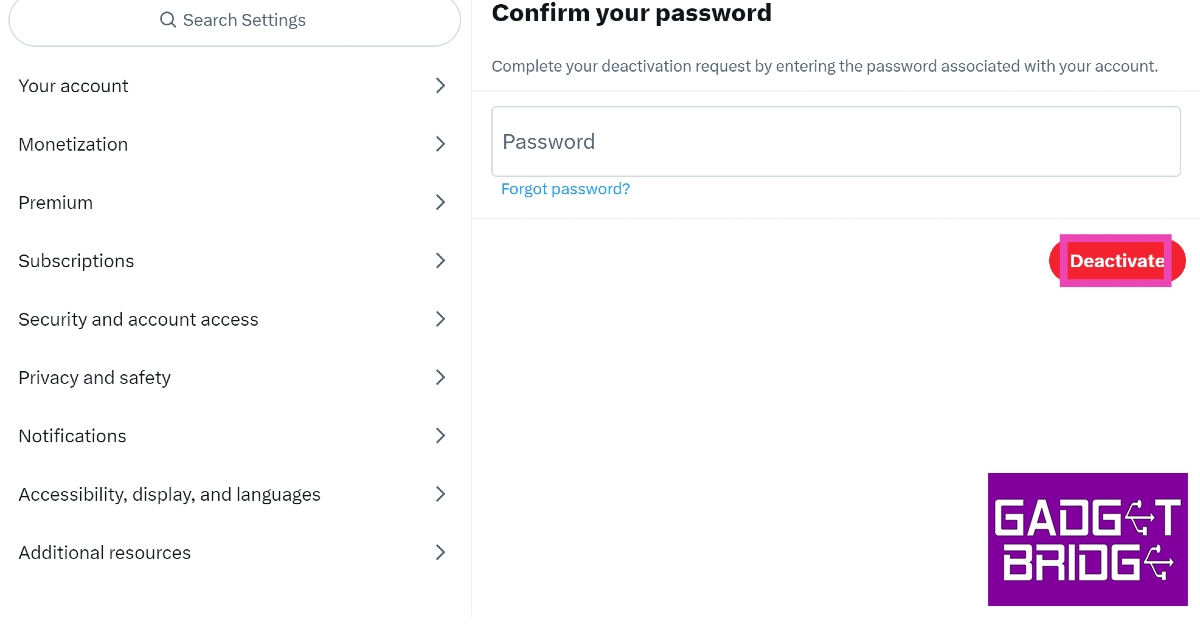
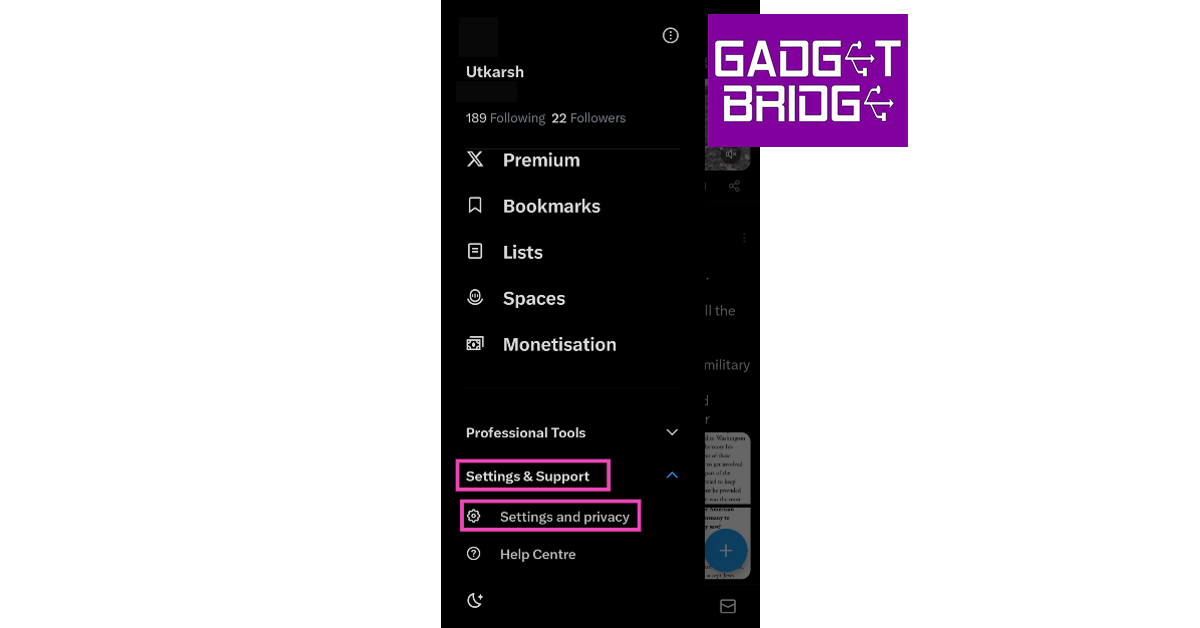
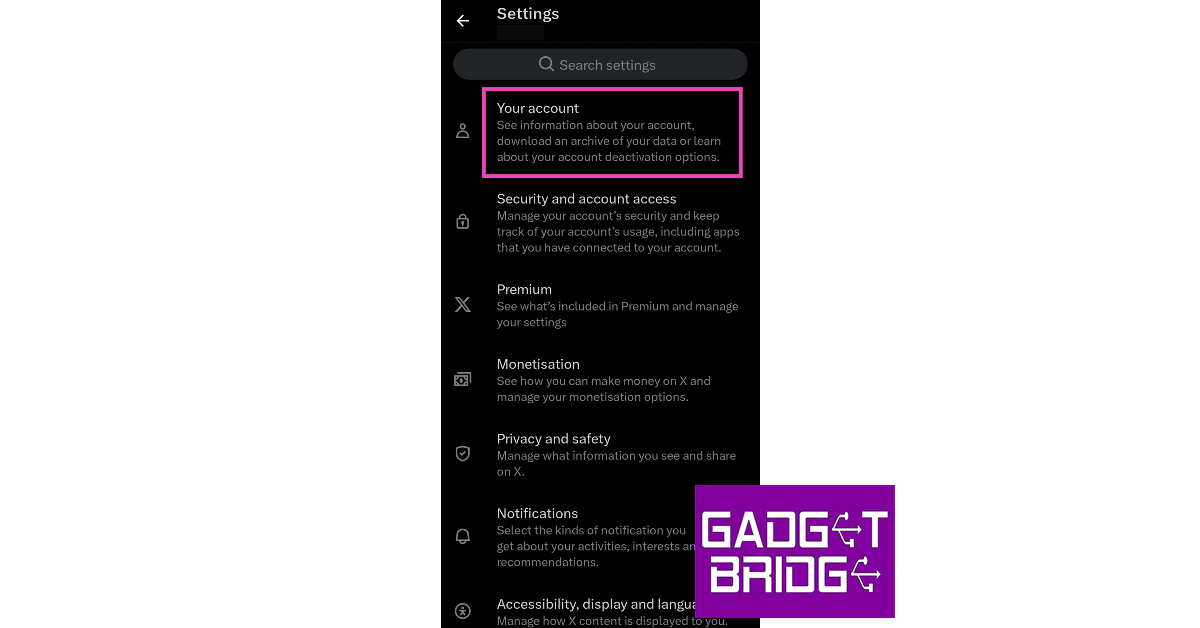
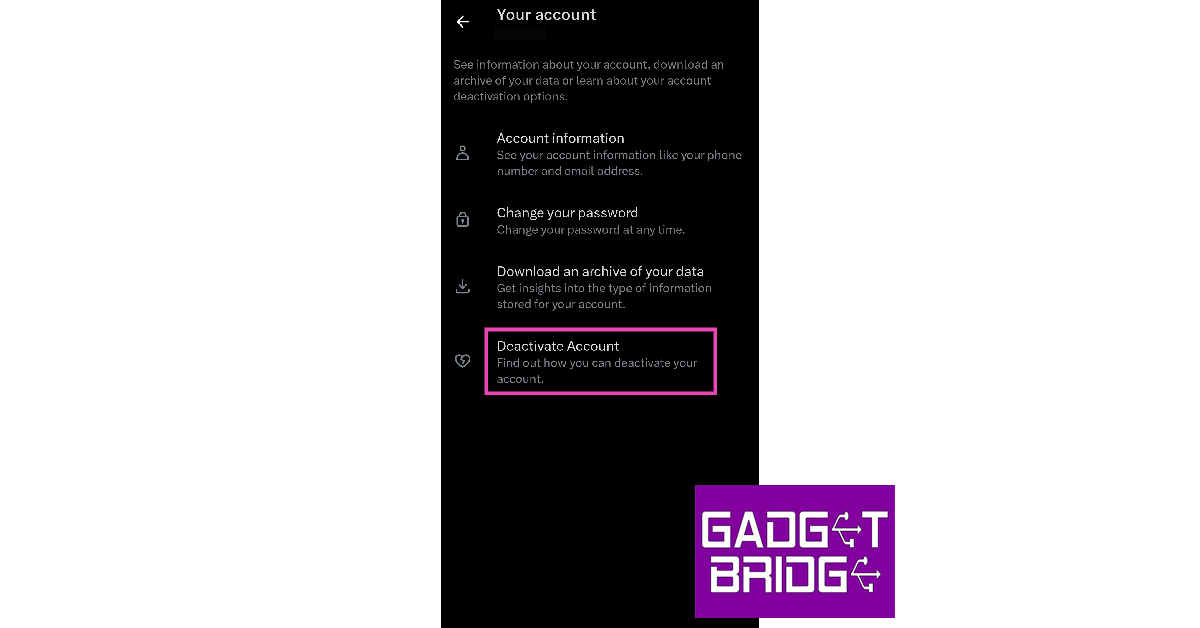
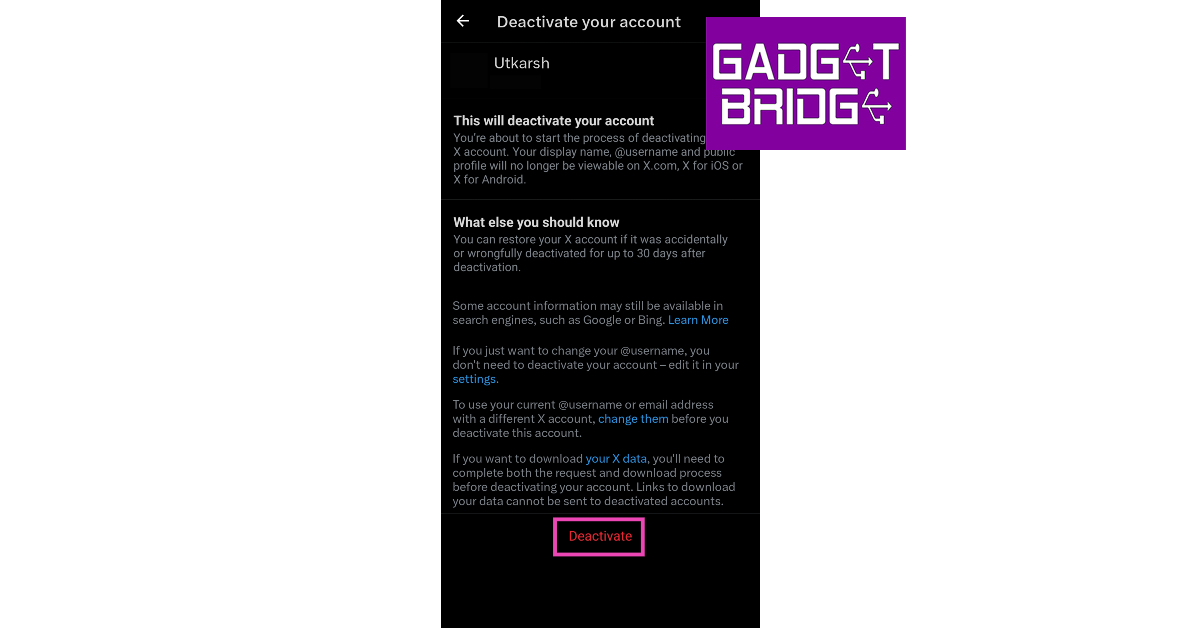
Step 1:Launch the X app on your iPhone or Android smartphone.Step 2:Swipe right to reveal the menu.Step 3: Tap on Settings & Support and select Settings and privacy.Step 4: Tap on Your Account.Step 5: Select Deactivate Account.Step 6: Hit the Deactivate option at the bottom of the page.Step 7: Enter your X password and hit Deactivate again.Your profile will be deactivated. If you don’t log in within 30 days, it will be permanently deleted.
Delete your X (Twitter) account on a PC
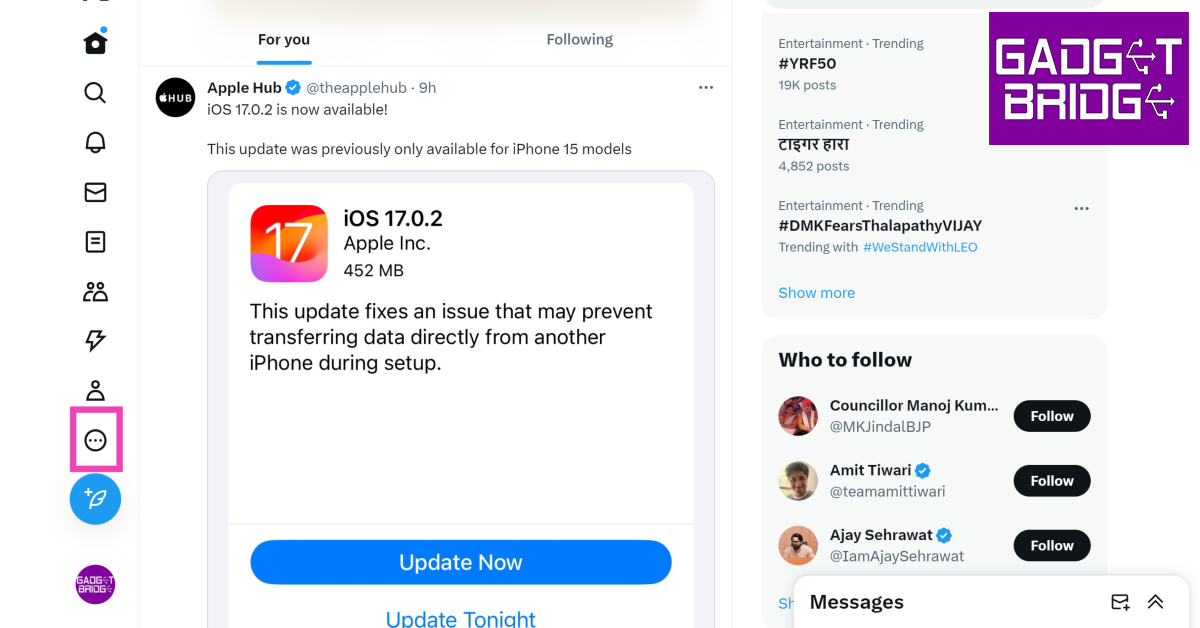
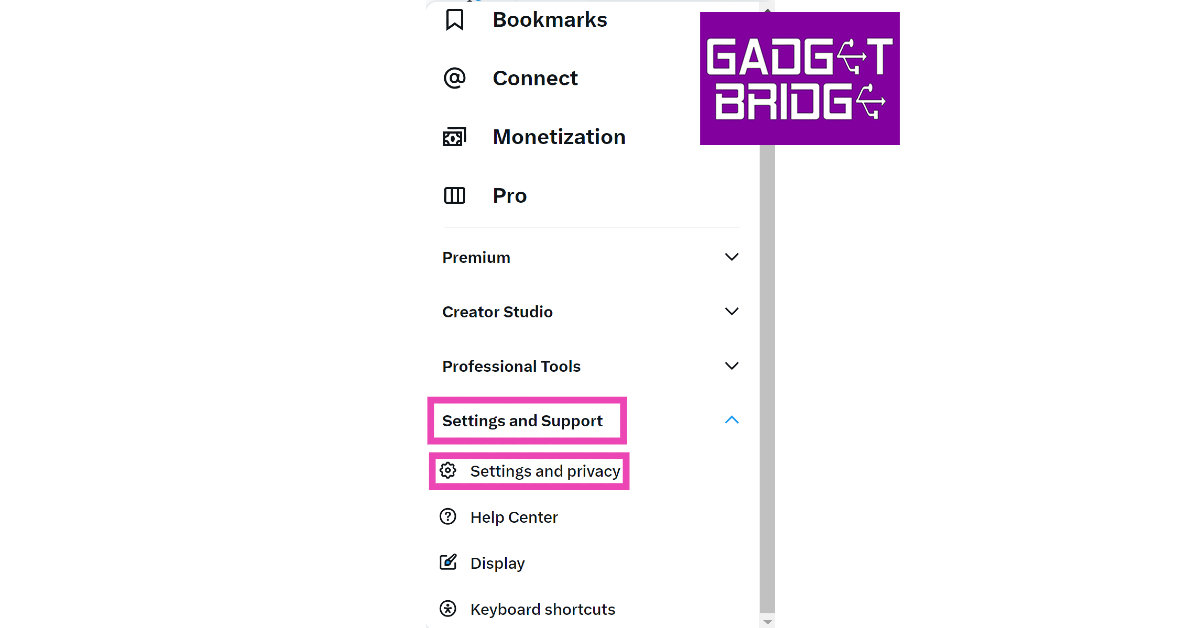
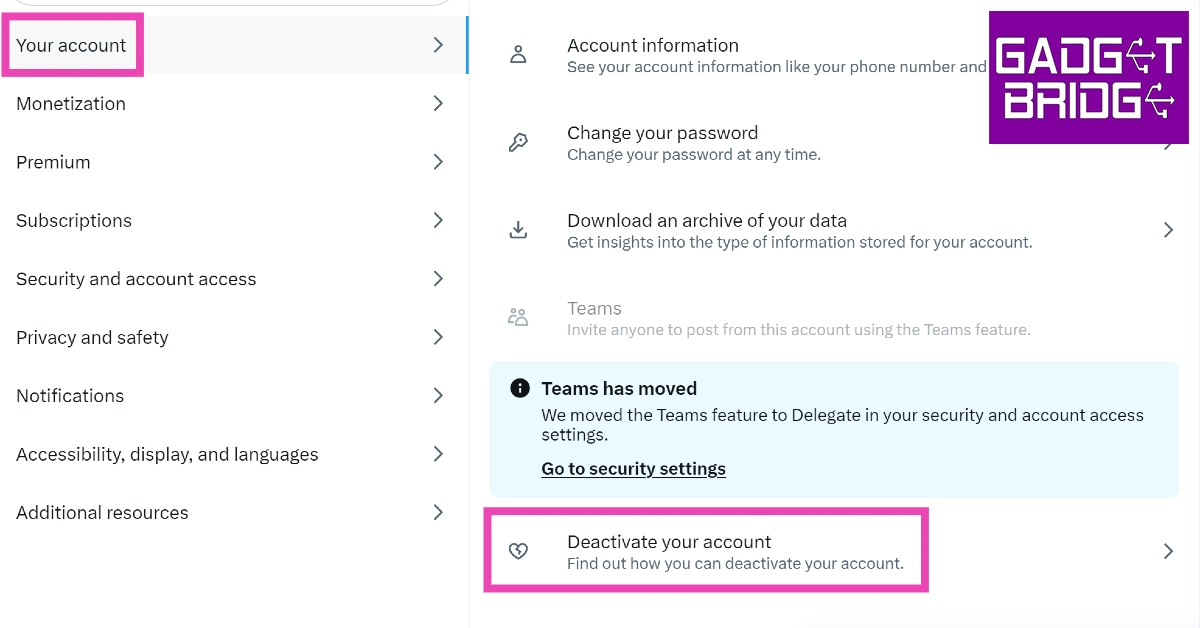
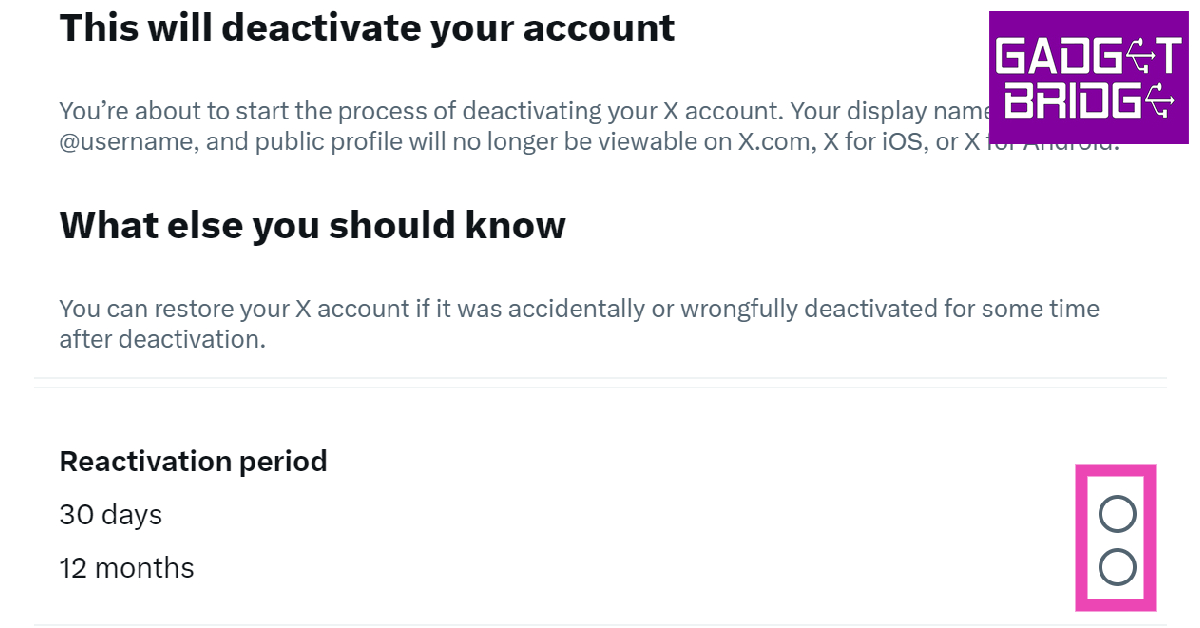
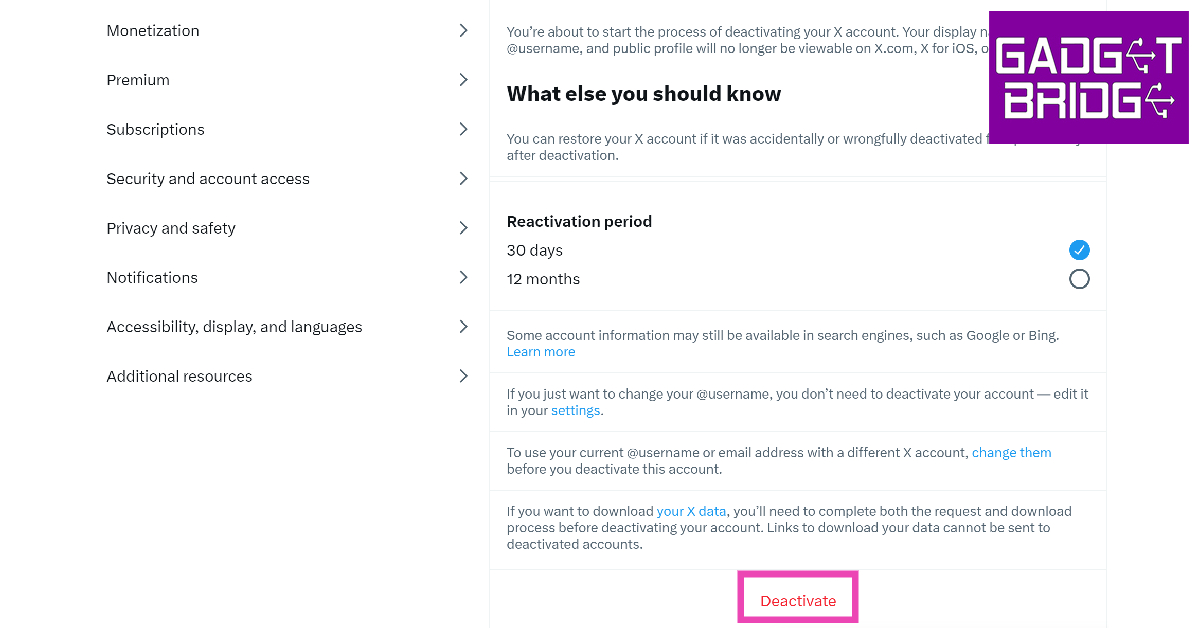
Step 1: Log in to the official X website using the account you want to delete.Step 2: Click on the ellipses icon on the side menu.Step 3: Click on Settings and Support, then select Settings and privacy.Step 4: Click on Your Account, then select Deactivate your account.Step 5: Choose a reactivation period.Step 6: Hit Deactivate.Step 7: Enter your X password and select Deactivate again.
Frequently Asked Questions (FAQs)
How do I permanently delete my X or Twitter account on my phone?
Launch the X app and swipe right to reveal the side menu. Then go to Settings & Support>Settings and privacy>Your Account>Deactivate Account>Deactivate. Once your account has been deactivated, it will be permanently deleted after 30 days of inactivity.
Will someone else be able to use my username once I delete my Twitter account?
Once you delete your X account, your username cannot be used by anyone else on the platform. If you plan on returning to X, change your username before you delete your account. Twitter will soon start making old, inactive usernames available to other users on the platform.
How do I collect my profile data before deleting my X account?
Telegram introduced Stories features for all the users last month in August. For those who are not aware it was initially made available to premium users only. With the latest update, the company has extended the functionality to Channels as well. So from now onwards users will be able to post stories for Telegram Channels as well. This feature is similar to how Instagram and Facebook stories work.Telegram has launched a new update which now allows its users to share stories to Channels but it requires to get boosts from their users.Also Read:CMF Buds Pro, Watch Pro, Power 65W GaN debuts in India: Details insideFor Telegram Stories users have the capability to grant permission to their favorite channels to post stories by giving them boosts. As per the company, Telegram Premium has one boost that can be provided to any channel.As they receive more boosts, channels level up. For each level, they will be able to post 1 additional story per day to their subscribers’ story feeds. Whereas the users get to decide which admins of channels can spam them with food photos — and even the number of meals per day.Subscribers have the ability to boosts using a special link like t.me/durov?boost. To do that for your channel go to Channel Info > More > Statistics > Boosts. When you reach level 10 your channel +15 troll resistance and unlocks exclusive admin skins. Note that Boosts will remain on the Telegram Channel unless users choose to move them elsewhere. Admins who have the rights to a Telegram Premium subscription can post by tapping the Post Story Icon on the Channel Info page once your channel has enabled Stories. Admins will also see a ‘Post Story As’ option when posting stories from their chat list.In addition to this Telegram Stories also gains reaction stickers and the option to add your own music. Everyone can add 1 reaction sticker to each story, while Premium users are able to add up to 5. Not just that, View Once similar to WhatsApp is now also being made available to users with better login alerts. So now you haven’t logged in on a new device, tap ‘No, it’s not me!’ to instantly secure your account.
For the latest gadget and tech news, and gadget reviews, follow us on Twitter, Facebook and Instagram. For newest tech & gadget videos subscribe to our YouTube Channel. You can also stay up to date using the Gadget Bridge Android App. You can find the latest car and bike news here.
Poco M6 Pro 5G has launched in India and is likely to be the cheapest 5G smartphone to come with all the capabilities you’d expect from a sub-Rs 15,000 phone. To be exact, this 5G smartphone is priced at Rs 10,999. It has a 4nm Snapdragon 4 Gen 2 5G Processor and the device further features a 6.79-inch Dot Display with 90Hz Adaptive Sync. In addition to this, there is a glass-back design as well as a dual rear camera unit. The phone has a 5,000mAh battery as well. What more do you need in a budget smartphone? Here is our in-depth Poco M6 Pro 5G review.
Poco M6 Pro 5G review: Design and Display
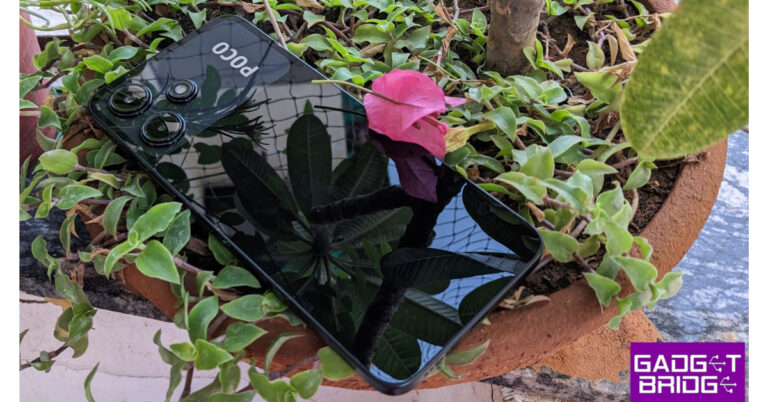
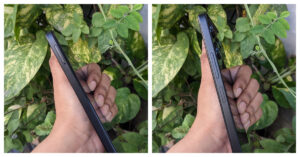
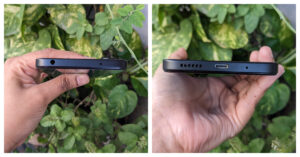
At just Rs 10,999 Poco M6 Pro 5G’s construction and finish are excellent. For the review, we have the Power Black colour variant but you can also choose the Forest Green colour option. It has a premium glass back design and is not very thick. The Poco design is recognisable, with a black island holding camera modules at the back. Yes, the back is glass, but it also comes with a high-quality frosted TPU case to protect it. The good news is that the front and back of the device are protected by Gorilla Glass 3. However, we suggest you use a case because the rear is a fingerprint magnet.One thing of all these Chinese manufacturers’ products that we really like is the fact that they supply their products with a charging brick in addition to a back cover, which is something that most high-end manufacturers like Samsung, Apple, and Google don’t do. So, you will find these in the box of this Poco smartphone, too.The in-hand feel of the Poco M6 Pro 5G is very good, however, the device is slightly large. If you have big hands then you will feel comfortable, but if small ones like ours then one hand operation might be a problem. Also, the device is not very heavy and it weighs 199 grams. This phone, which is rated IP53, features a splashproof build.Moving on, the side frames are flat. The right side of the frame has a side-mounted fingerprint sensor integrated inside the power button just above the volume rocker. On the other side, there is a SIM card tray. Note that there is a hybrid slot in this handset. This allows you to use two nano SIMs/one nano SIM and one microSD card. At the bottom, there is a microphone, a USB Type C port and a speaker grille. With that, there is a 3.55 jack on the top along with an IR sensor. We also noticed that there is no noise-cancelling microphone provided on the phone.Another eye-catching feature of the Poco M6 Pro 5G is its 6.79-inch FHD+ display. The smartphone’s display has a 90Hz Adaptive Sync with a 240Hz touch sampling rate and is SGS-Low Blue Light certified, which makes sure to reduce blue light emissions for better eye health and sleep quality, as well as 10x Super Resolution Touch.The bezels on the sides of the display are not very large nor thin in size, while the chin is quite noticeable. For this price, the display quality is decent and the viewing angles are also good. The display is easily visible outdoors thanks to the 550 nits of brightness, which is a respectable brightness. Moreover, the mobile phone has Widevine L1 support, so you can do full HD streaming. It has loud, good-quality mono speakers. The POCO M6 Pro 5G guarantees a fluid and vivid viewing experience thanks to its large 90Hz display.Also Read:Tecno Pova 5 Pro 5G Review: A good value-for-money smartphone
Poco M6 Pro 5G review: Performance and Cameras
Poco M6 Pro 5G comes with a Qualcomm Snapdragon 4 Gen 2 processor that clocks at up to 2.2GHz, which is quite powerful. It also supports 7 5G bands. There is an 6GB LPDDR4X RAM and 128GB UFS 2.2 storage on board. The company also offers a Turbo RAM feature that helps improve performance.As a result, the performance is really smooth all thanks to the powerful and efficient processor. It was able to handle gaming quite well and you can run heavy apps on it.In terms of gaming, you can play most games at 30 frames per second on high HD settings, which is once again amazing for the price.Geekbench 6 CPU Benchmark Result
Single Core Score: 863
Multi-Core Score: 1893
Geekbench 6 GPU Benchmark ResultThe new Poco smartphone operates on MIUI 14 based on Android 13. Because it is a Poco phone, it includes an MIUI dialer, and the manufacturer promises 2 major Android updates and 3 years of security updates. In addition to this, you can now enjoy FM radio on this phone.And like most budget smartphones, there is bloatware on this device too. When switching between apps, this smartphone performs well and therefore offers flawless multitasking capabilities.The Poco M6 Pro 5G features a dual rear camera setup for the optics, one with a 50-megapixel AI sensor and the other with a 2-megapixel depth sensor. An 8-megapixel camera up front is available for selfies and video calls. It permits shooting videos in 1080p@30 frames per second.The camera is of above-average quality. You can take extremely good pictures when there is good lighting. In low light, you won’t get very excellent shots.PortraitThe UI of the camera app is simple and uncluttered. It offers night mode, timelapse, portrait, and more. There is also a photo mode, although no wide-angle setting is available. There are a total of 7 film filters available in the camera app, allowing you to use different filters.50MPThe sound and microphone both have excellent quality. The Poco M6 Pro 5G’s 5,000mAh battery offers a battery life of one and a half days or you can even stretch that to 2 days depending on your usage. It comes with 18W charging support, but the company ships a 22W charger inside the box.Also Read:Samsung Galaxy Watch6 Review: Still ahead of the pack
Verdict
These days finding a gadget that strikes a mix between price and capability can feel like a difficult task. Overall, we are quite pleased with the Poco M6 Pro 5G’s performance. You can have fantastic cameras, a glass-back design, a great display, and top-notch gaming performance for under Rs 11,000. A massive 5,000mAh battery powers the POCO M6 Pro 5G, allowing for several hours of fun, gaming, or browsing that won’t sacrifice performance, aesthetics, or usability.
After being banned for nearly ten months, Battleground Mobile India, aka BGMI, is officially available again in India. BGMI fans are looking for ways to improve their game experience and one such method is the usage of redemption codes, which offers a variety of rewards and advantages using BGMI redeem codes players can gain access to new skins, outfits, loot crates, weapons and free UC and diamonds.As mentioned earlier, these codes give users the chance to earn unique rewards and gain extra benefits while playing the game. This includes GUN SKINS (M4, AKM, M416, AWM, M24, UZI, KAR98K), free character voucher, Andy, Carlo, Sara, Victor character for free, free Anna Character on completing the mission and UC or Royal Pass Discount. So here we have gathered a list of the most recent BGMI redeem codes as of 27 September 2023. Also, redeem these codes asap as these are only valid for a limited duration.
BGMI Redeem Codes for 27 September2023
updating soon…
How to get free Redeem Codes for BGMI on 27 September2023?
Launch BGMI on your device.
Then select the Redeem Code option from the main menu.
Next, click on the Redeem code tab.
A new window will open, requesting the redemption code.
Now enter your BGMI code.
Confirm and click on the “Redeem” tab.
If your redeem code is valid then you will get a message confirming that your rewards were successfully redeemed.
Garena Free Fire is a battle royale game with regular awards and tournaments to keep players interested. If you play Garena Free Fire, you should be aware of the redeem codes that are released on a daily basis. However, because the battle royale game is banned in India, players from other countries can use the Free Fire Redeem codes daily. If you’re unfamiliar with the Garena Free Fire redeem codes or don’t know how to get them, we’ve put together a step-by-step guide to help you redeem them. Check out Garena Free Fire Redeem Codes for 27 September 2023.The Free Fire redeem codes are a great way to get free stuff. These are 12-digit codes that contain alphabets and numbers, as well as an expiration date and time. Because the Garena FF redeem codes cannot be used more than once, you should hurry to the redemption page to claim your free reward before someone else does. To get a free reward, all you have to do is go to reward.ff.garena.com/en, which is the official redemption page. Also, keep an eye on this space for daily updates on Garena Free Fire redemption codes and rewards.
Garena Free Fire Redeem Codes Today 27 September2023
updating soon…
How to Get Free Fire Redeem Codes for Garena on 27 September2023?



 For the consumers purchasing the itel P55 5G from retail, the smartphone is available on Consumer finance options with leading NBFC (Bajaj & Home Credit) and payment aggregators (Pine labs, PayTM and Ezetap).
 Step 2:
  Step 3: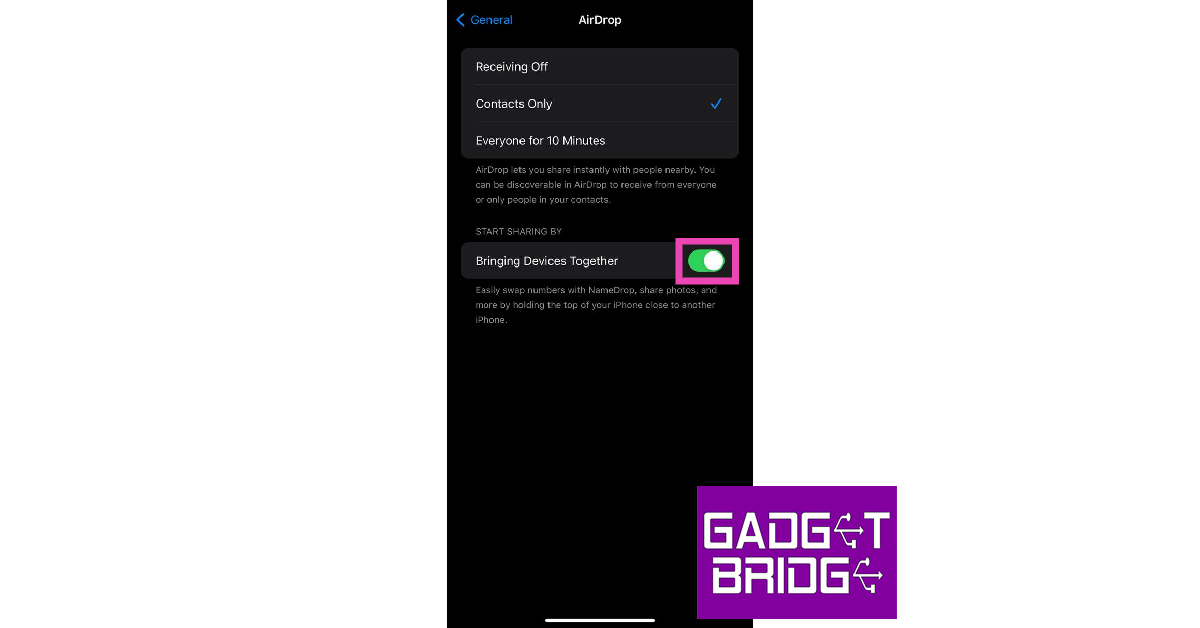



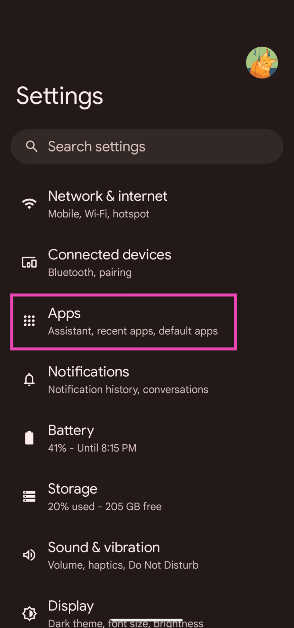 Step 2: Select Default apps.
 Step 3: Tap on Opening links.
 Step 4: Scroll down and select Instagram.
Step 5: Turn off the toggle switch next to Open supported links.
Step 4: Scroll down and select Instagram.
Step 5: Turn off the toggle switch next to Open supported links.
 Step 2:
 Step 3:
 Step 4: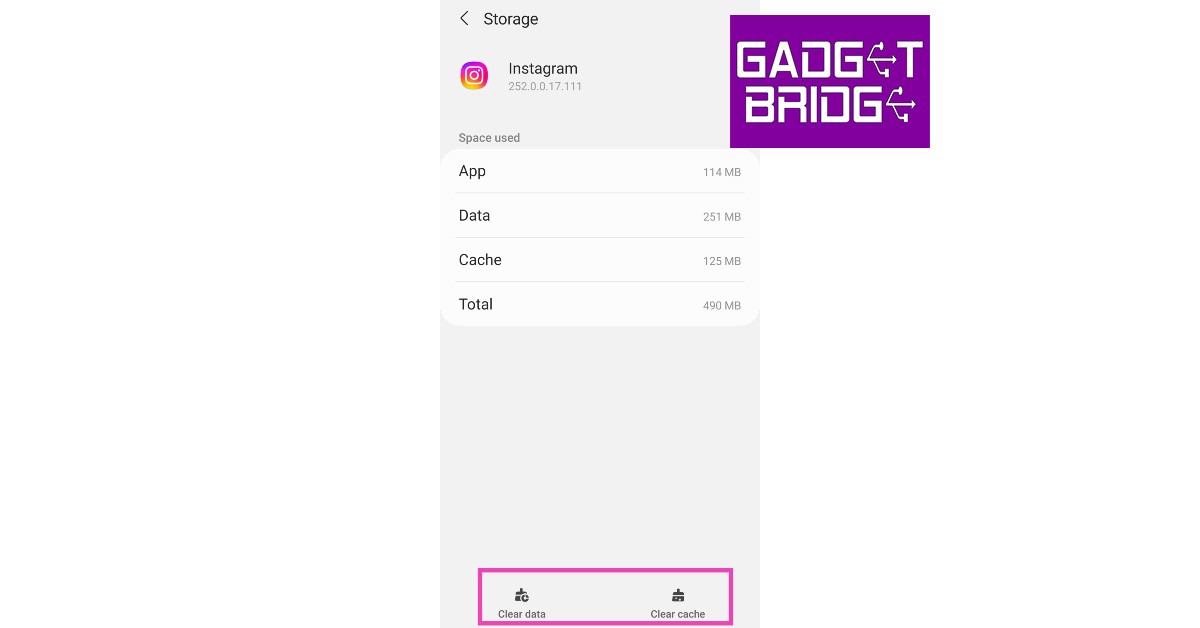



 If the fixes mentioned above did not work for you, it is possible that the issue lies with your phone. Software glitches are all too common on smartphones. Luckily, they can be resolved with a quick restart. Press the side button along with the volume-up key to access the power menu. Hit ‘Restart’. Once your phone has rebooted, tap the link again to check if it redirects you to the correct post or Reel.


 Step 4:
 Step 5:
 Step 6:
 Step 7: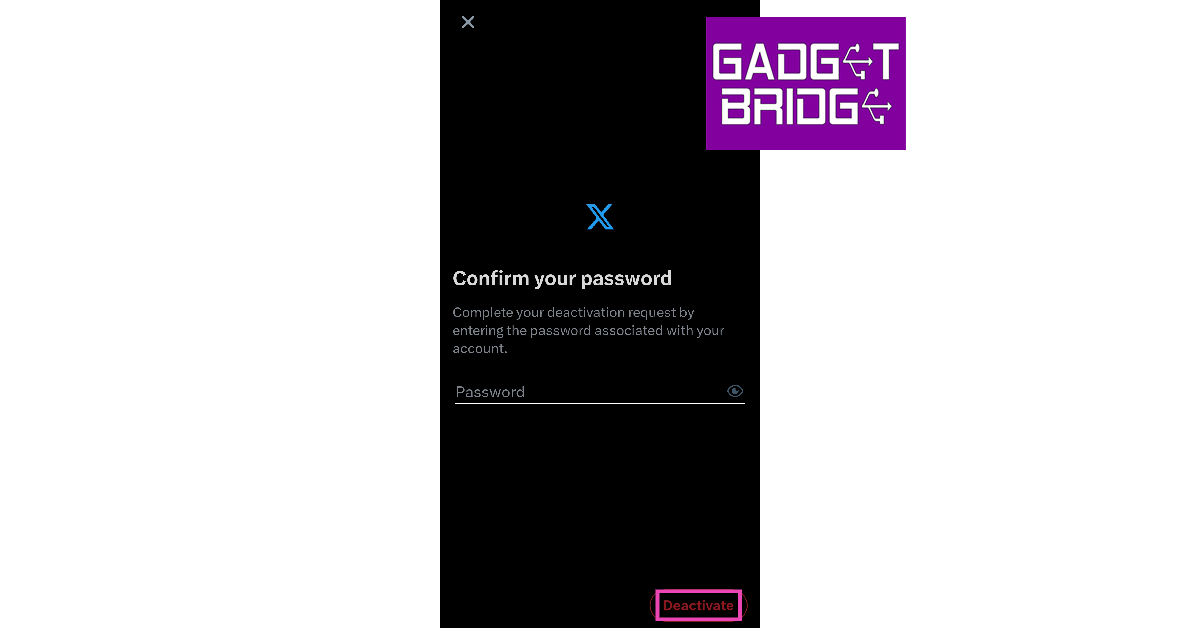
 Step 3:
 Step 4:
 Step 5:
 Step 6:
 Step 7: