Top 3 ways to hide a chat on Telegram for Android, iOS, and Desktop

1
While it is not as popular as WhatsApp, Telegram has always matched it when it comes to essential IM features and even surpassed it in other aspects. One of the main reasons why people prefer Telegram over WhatsApp is because of the higher file-sharing capacity and the ability to hide your phone number from other users. When it comes to privacy, both platforms offer end-to-end encryption. However, of late, WhatsApp has added a few exciting features to its platform that Telegram doesn’t have an answer for yet. One of them is the ‘chat lock’ feature that allows users to password-protect their conversations within the app. While you may not be able to lock your chats on Telegram, you can certainly hide them. In this article, we bring you the top 3 ways to hide a personal chat on Telegram for Android, iOS, and PC. Read Also: World Tourism Day 2023: Best websites to get inexpensive airline and hotel deals

Hide a Chat on Telegram by archiving it

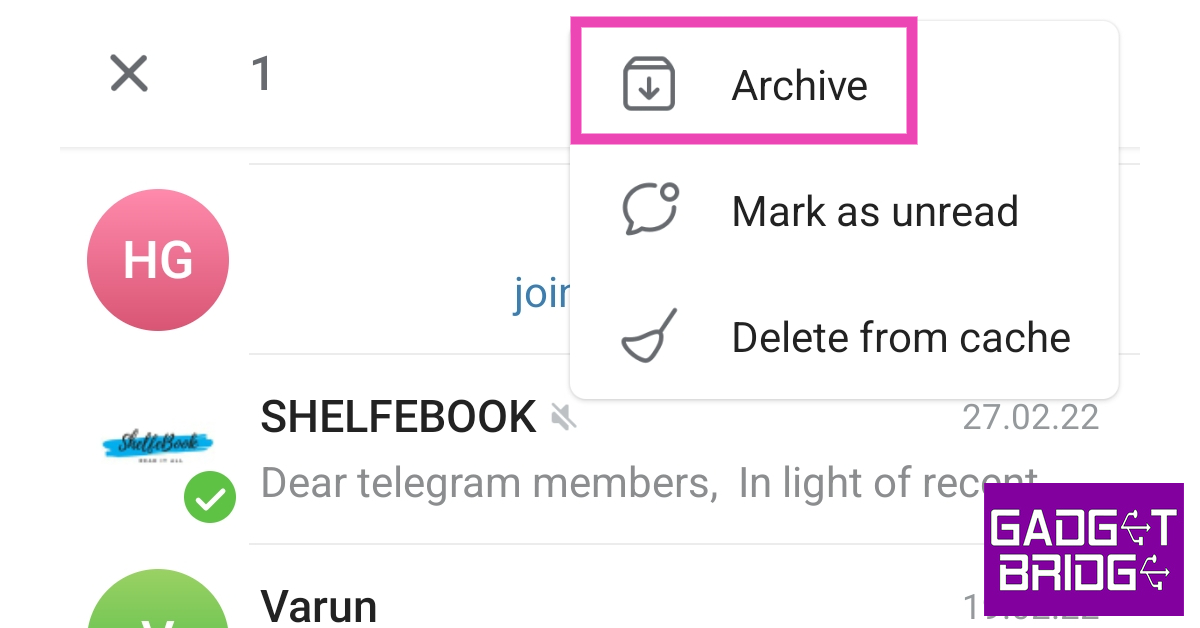
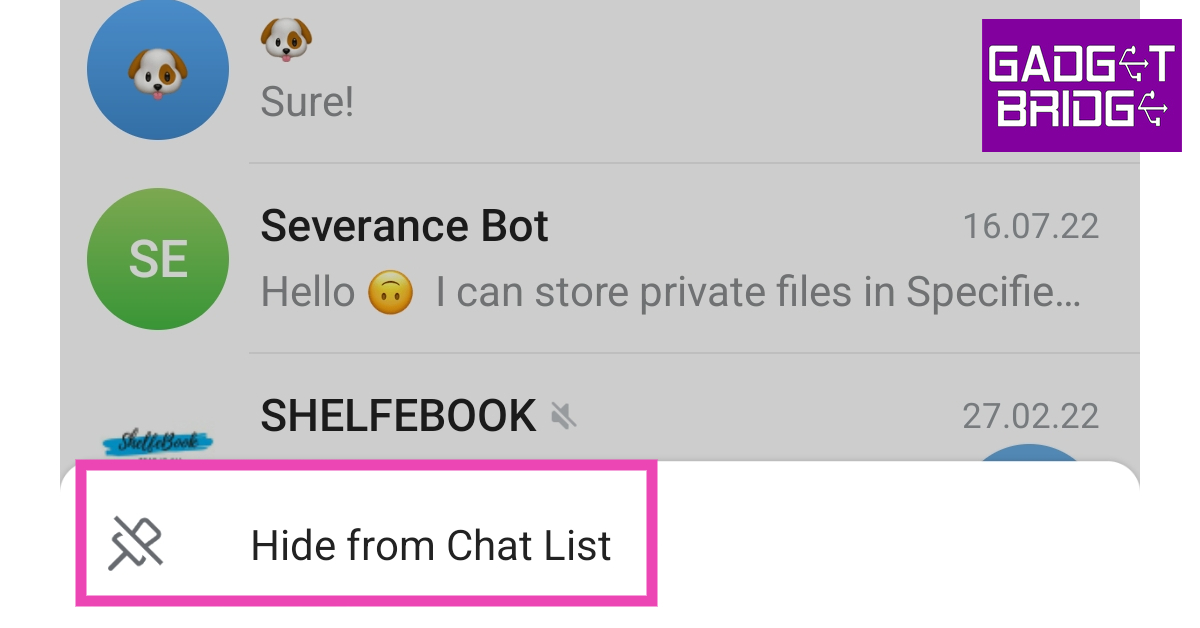
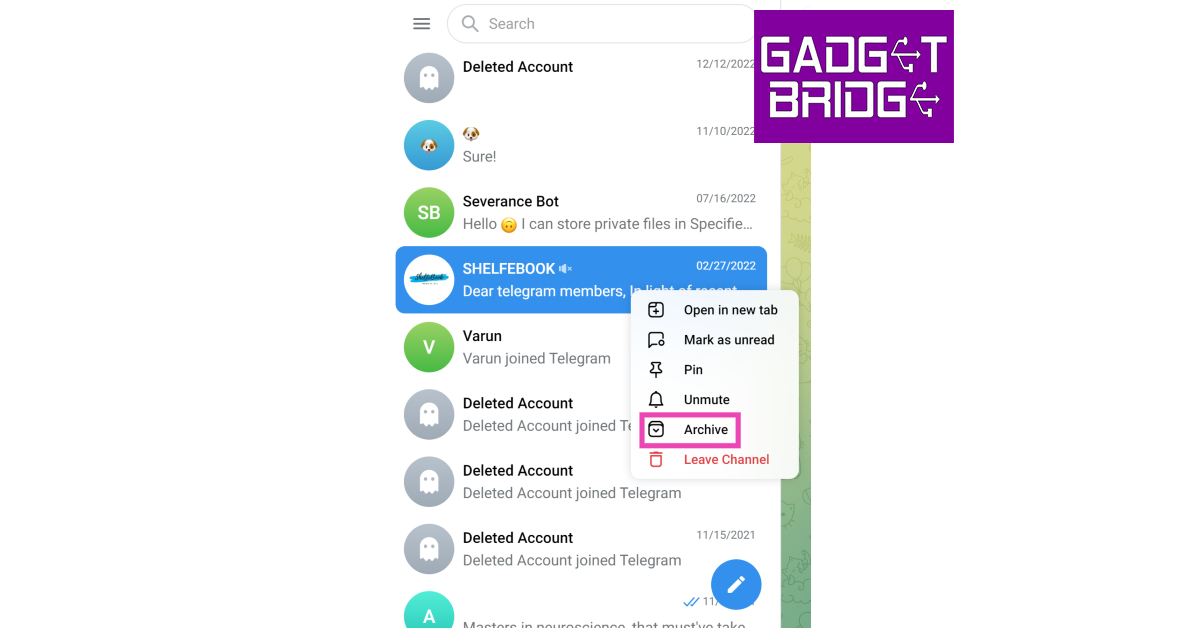
Step 1: Before you archive a chat, make sure it is muted. This is because every time you receive a new message on an unmuted chat, it will pop out of the Archive folder and appear on your main chat screen. To mute a chat, simply hit the ellipses at the top right corner of the chat window and select Mute. Step 2: Once the chat has been muted, go back to the main screen and long-press the chat to select it. If you want to archive chats, tap them once to select them. Step 3: Hit the ellipses at the top right corner of the screen. Step 3: Hit the ellipses at the top right corner of the screen. Top 3 ways to hide a chat on Telegram for Android, iOS, and Desktop Step 4: Select Archive. The chat(s) will be moved to the Archived Chats folder. Step 4: Select Archive. The chat(s) will be moved to the Archived Chats folder. Top 3 ways to hide a chat on Telegram for Android, iOS, and Desktop Step 5: Once you archive your first chat, the Archived Chats folder appears at the top of the main screen. To hide this folder, simply long-press it and select Hide from Chat List. Step 5: Once you archive your first chat, the Archived Chats folder appears at the top of the main screen. To hide this folder, simply long-press it and select Hide from Chat List. Top 3 ways to hide a chat on Telegram for Android, iOS, and Desktop Step 6: To make sure your unmuted chats stay archived every time you receive a new message, go to the Archived Chats folder, hit the ellipses, select Settings, and turn on the toggle switch for Always keep archived.

Hide a Chat on Telegram by moving it to a new folder

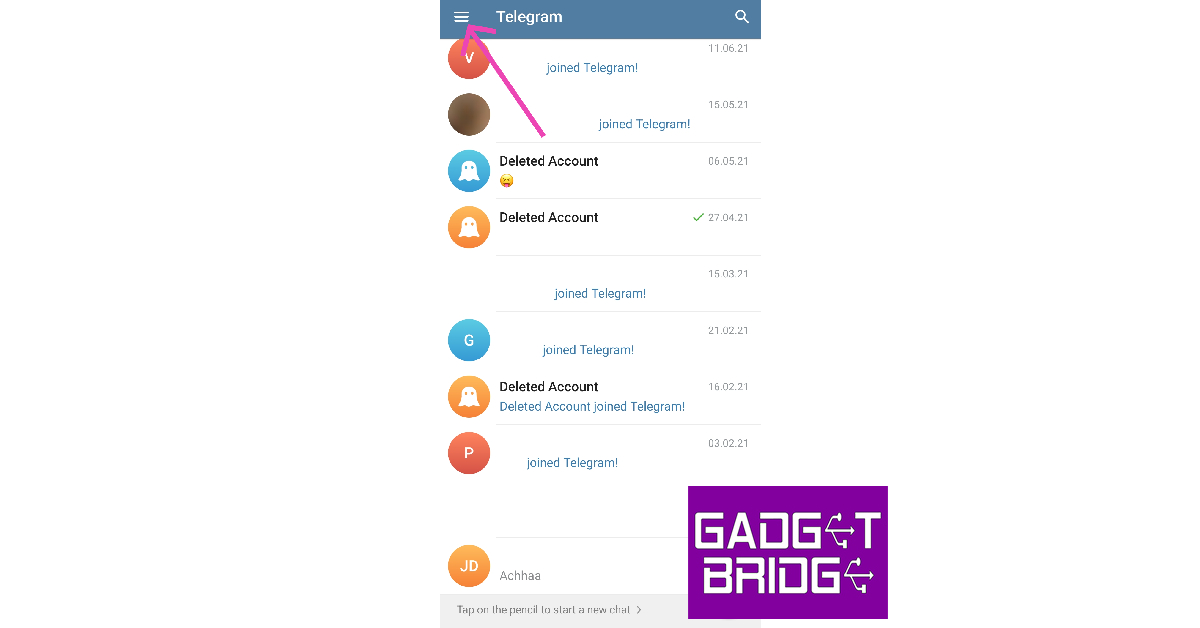
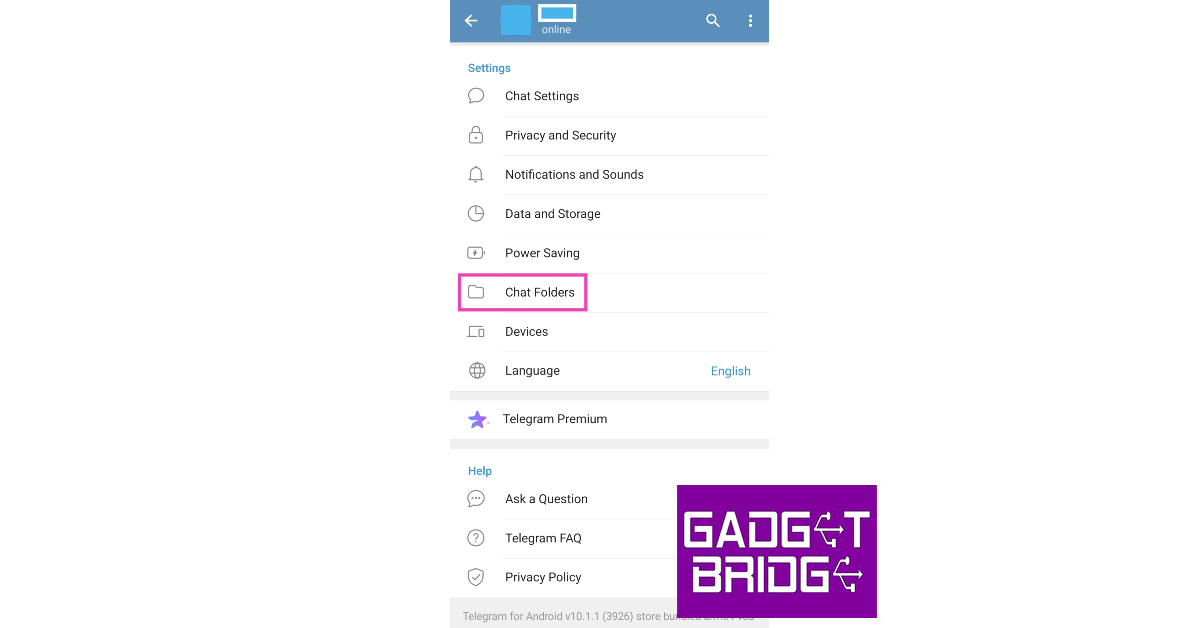
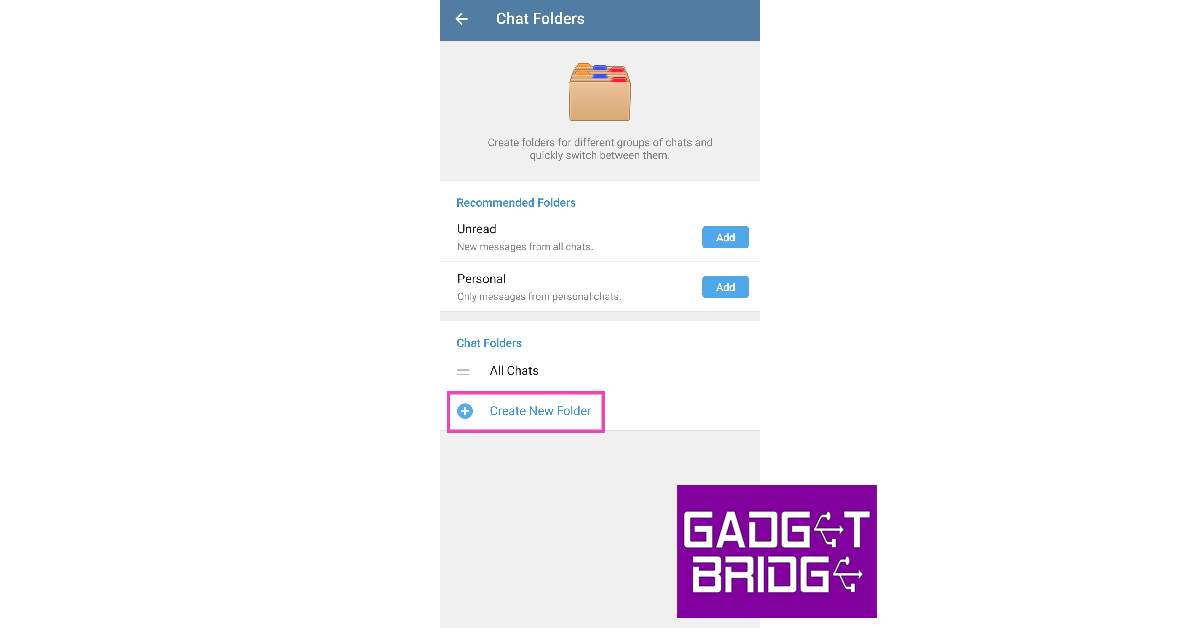
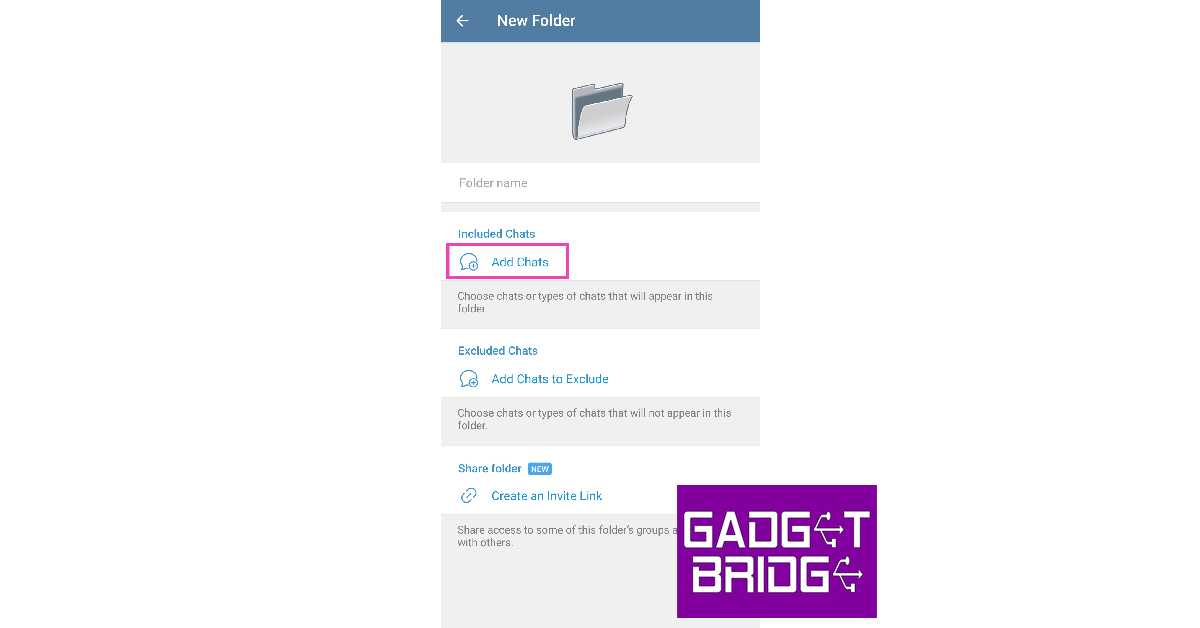
Telegram allows users to organise their chats in different folders. Once you move your chat to a new folder, it is hidden from the main screen. Here’s how you can go about it. Step 1: Launch the Telegram app and tap the hamburger menu at the top left corner of the screen. Step 2: Tap the hamburger menu icon at the top left corner of the screen. Top 3 ways to hide a chat on Telegram for Android, iOS, and Desktop Step 2: Tap on Chat Settings. Step 3: Select Settings. How to delete your Telegram account? 2 Quick Methods Step 3: Select Chat Folders. Step 3: Select Chat Folders. Step 4: Hit Create New Folder. Step 4: Hit Create New Folder. Step 5: Give the folder a name and tap on Add Chats. Step 5: Give the folder a name and tap on Add Chats. Step 6: Select the chat you want to hide. Step 7: Tap on Save at the top right corner of the screen. Step 7: Tap on Save at the top right corner of the screen. Once the chat has been moved to the folder, it will disappear from Telegram’s main page. You can access the folder by switching the tab on the main chats page.

Hide a message by saving it

Telegram also allows you to save a message to a different folder. This is slightly different from moving an entire chat to a different folder. You can only save individual messages and not entire chats. To save a message, simply press and hold it, then tap the forward icon and select Saved Messages as the destination folder. Once the message has been saved, delete it from the main chat to hide it. The only downside to this solution is that you won’t be able to restore the message in the original chat thread.

Hide a chat on Telegram for Desktop

Step 1: Launch the Telegram desktop app or login to the web portal. Step 2: Right-click on the chat that you want to hide. Step 3: Click on Archive. Step 3: Click on Archive. Top 3 ways to hide a chat on Telegram for Android, iOS, and Desktop

Hide a chat on Telegram for iOS

Step 1: Launch the Telegram app on your iPhone. Step 2: Swipe left on the conversation that you want to hide. Step 3: Hit the Archive option. The chat will be moved to the Archived folder.

Frequently Asked Questions (FAQs)

Can I password-protect a chat on Telegram?

Telegram does not offer password protection for your personal chats, but you can hide them in the archived section, or create an entirely new folder.

How do I hide a chat on Telegram?

To hide a chat on Telegram, you can simply add it to the Archived Chats folder. Tap and hold the chat on the main screen, then hit the ellipses and select Archive. You can also hide a chat by going to Settings>Chat Folders and creating a new folder for the conversation.

How do I keep the unmuted chats from coming out of the Archived folder on Telegram?

Open the Archived Chats folder, hit the ellipses, select Settings, and turn on the toggle switch for Always keep archived. Read Also: Google Pixel 8, Pixel 8 Pro full specifications leaked ahead of the official launch

Conclusion

This is how you can hide your personal chats on Telegram for Android, iOS, and PC. While the archived folder is a very handy tool for hiding your chats from the main page, anyone who knows how to work their way around the app can access your chats in a matter of seconds. For more privacy, password-protect the entire Telegram app instead. For the latest gadget and tech news, and gadget reviews, follow us on Twitter, Facebook and Instagram. For newest tech & gadget videos subscribe to our YouTube Channel. You can also stay up to date using the Gadget Bridge Android App. You can find the latest car and bike news here.

CMF Buds Pro, Watch Pro, Power 65W GaN debuts in India: Details inside

CMF by Nothing has officially made its debut in India today. The company will offer access to more reasonably priced gadgets, starting with a smartwatch and some earbuds. Under the brand three highly anticipated products were launched namely CMF Buds Pro, CMF Watch Pro and CMF Power 65W GaN. While announcing its new products Akis Evangelidis, Co-founder of Nothing stated, “With CMF, we aim to democratise great design in a market segment that has often been overlooked. Through our inaugural products, including Buds Pro, Watch Pro, and Power 65W GaN, we’re combining elevated design with advanced technology to deliver an uncompromised user experience at a relatively accessible price point.” CMF Buds Pro

CMF Buds Pro

Starting with the new True Wireless Earbuds– CMF Buds Pro which offers 45 dB Hybrid Active Noise Cancellation using six high-definition microphones, Clear Voice Technology for clear calls, and a powerful Dynamic Bass Boost driver. As per the company, the CMF earphones can filter out an extensive frequency range of sounds, up to 5000 Hz. In addition to this there is a total of an advanced Wind Noise Reduction algorithm, combined with two optimally positioned openings at the top of each earbud for wind to pass through, which ensures minimal sound interference caused by wind. Also Read: Sonic Lamb headphones launched in India The microphones on the CMF Buds Pro use Clear Voice Technology – an AI noise reduction algorithm developed and trained on over 20 million sound samples which cancels out background noise during a voice call. The audio device comes equipped with a custom driver with Ultra Bass Technology, a software algorithm that detects and enhances low-frequency sounds in real-time. The custom-designed diaphragm, made from Liquid Crystal Polymer (LCP) and Polyurethane (PU), improves elasticity, offering better and more powerful bass output. In addition to this, there is an enlarged exhaust vent in the rear chamber which enhances airflow within the driver, resulting in richer low to mid frequencies and crisper high frequencies. The device can be paired with the Nothing X app for customisation controls, switch between ANC levels, or personalise your listening experience using the equaliser. Activate Low Lag Mode to reduce latency when gaming on your smartphone. In terms of battery, each bud comes with a 55mAh battery which is claimed to offer up to 11 hours of music playback on a single charge (with ANC off) or extend their listening time to up to 39 hours with the charging case. The fast charging feature provides a 5-hour listening session after just 10 minutes of charging. CMF Watch Pro

CMF Watch Pro

CMF Watch Pro is another device that Nothing has introduced under its new brand. It comes with an aluminium alloy frame. The smartwatch features a 1.96-inch AMOLED display with 410×502 pixels of resolution. It has 600+ nit of peak brightness and a 58 fps refresh rate. Also, the smartwatch is IP68 rated for water resistance, it can withstand rainy and wet conditions easily. The CMF smartwatch offers 110 sports modes. It has a built-in GPS for accurate location data. There is support for multiple satellite positioning systems that can obtain accurate location, trace, and distance data for activities such as running, cycling, walking, and hiking. The CMF smartwatch provides 24-hour health monitoring which includes real-time heart rate and blood oxygen saturation monitoring, sleep and stress monitoring, hydration and movement reminders, and personalised goals to track your performance. Also using AI technology CMF Watch Pro is said to have real call clarity. It allows you to access the contact list with the dial pad and can make and receive calls on the go. The built-in microphone and speaker reduce background noise and enhance speech quality. CMF Watch Pro equips a 340mAh battery, providing up to 13 days of battery life with typical usage. CMF Power 65W GaN

CMF Power 65W GaN

Lastly, CMF has launched a power bank– Power 65W GaN. It is a portable power bank which uses nitrogen and gallium materials instead of silicon for efficient charging. It has robust thermal conductivity and high-temperature resistance and is claimed to charge a Nothing Phone (2) to 50 per cent in just 25 minutes. The CMF power bank has two USB-C ports and a USB-A port that can charge phones and laptops to earbuds and tablets. It is compatible with all major fast charging protocols, including PD3.0, QC4.0+/3.0/2.0, SCP, FCP, PPS, AFC, Samsung 9V2A, DCP, and Apple 2.4A. Additionally, it works with MFI-certified cables and supports a wide voltage range of 100-240V.

Pricing and Availability

The price of the CMF Watch Pro comes with a price tag of Rs 4,999. The smartwatch will be offered in Metallic Grey and Dark Grey colour options. The CMF Buds Pro comes in three colour options Dark Grey, Light Grey, and Orange can be purchased for Rs 3,499. The CMF Power 65W GaN charger will be available at Rs 2,999. The power bank will come in two colour options Dark Grey and Orange. CMF Buds Pro and Watch Pro will be available for purchase starting September 30 with Limited drops at their Delhi store with special launch prices of up to Rs 500 off. CMF Buds Pro, Watch Pro, and Power 65W GaN will also be selling during the limited drop sale on Flipkart and Myntra at a special launch price of INR 2,999 for CMF Buds Pro, INR 3,999 for Watch Pro (Dark Grey), INR 4,499 for Watch Pro (Metallic Grey) and INR 2,699 for Power 65W GaN (Orange). Customers with Blind Drop Pre-order passes can redeem the pass on either CMF Buds Pro, Watch Pro, or Power 65W GaN on Flipkart. They are also eligible for pre-order offers like a special launch price, extra Rs. 500 Flipkart voucher and priority delivery. These device will also be sold through offline stores including Vijay Sales and leading retail partners. For the latest gadget and tech news, and gadget reviews, follow us on TwitterFacebook and Instagram. For newest tech & gadget videos subscribe to our YouTube Channel. You can also stay up to date using the Gadget Bridge Android App. You can find the latest car and bike news here.

These iOS and Android phones will stop running WhatsApp from next month: Check if yours is on the list

0
Every year, older versions of Android and iOS lose support for some major apps. With new versions of the two mobile operating systems being rolled out every year, it is challenging for app developers to ensure uniform support for the older versions as well. Messaging apps like WhatsApp also need to stay on top of security at all times. Older operating systems are generally more vulnerable to malicious attacks, making it hard for developers to plug all the holes. As a result, WhatsApp pulls out support for some older Android and iOS versions entirely every year. This year, this action is being meted out to Android 4.0 and iOS 11 (and lower) on October 24. Read Also: Modern gadgets for film lovers that enhance the movie experience

Eligibility criteria for using WhatsApp on Android and iOS

To use WhatsApp on your smartphone, the device must meet the following criteria.
  • Android smartphones must run Android 5.0 OS or higher.
  • iPhones must run iOS 12 or higher.
  • JioPhones must run KaiOS 2.5.0 or higher.

These phones will stop running WhatsApp from October 24

These phones will stop running WhatsApp from October 24 These are some of the popular Android phones that will not be able to run WhatsApp from October 24.
  • Sony Xperia Z
  • Sony Xperia S2
  • LG Optimus G Pro
  • LG Optimus 2X
  • Samsung Galaxy S
  • Samsung Galaxy S2
  • Samsung Galaxy Nexus
  • HTC One
  • HTC Desire HD
  • HTC Sensation, and more.
To check the software version your smartphone is running, go to Settings>About device. Apart from the Android phones mentioned above, these iPhones will also lose support for WhatsApp.
  • iPhone 5
  • iPhone 5S
  • iPhone 5C
  • iPhone 4
  • iPhone 4S
Read Also: Creating Compelling Twitter Threads: Your Comprehensive Guide

Conclusion

As you can tell from the lists above, most of the phones losing support for WhatsApp are very rarely in use among the general audience. Apart from updating the app for these versions that are used by a handful of people, WhatsApp developers think it is more practical to pull support altogether. For the latest gadget and tech news, and gadget reviews, follow us on Twitter, Facebook and Instagram. For newest tech & gadget videos subscribe to our YouTube Channel. You can also stay up to date using the Gadget Bridge Android App. You can find the latest car and bike news here.
Sonic Lamb headphones launched in India

Rapture Innovations Labs Pvt Ltd., an audio tech start-up from Hubballi, Karnataka has announced the launch of their first offering – headphones designed, engineered and manufactured in India – Sonic Lamb Headphones. As per the company the newly launched headset is designed to cater to all your home entertainment and audio needs working seamlessly across genres. Sonic Lamb Headphones have debuted in India. The audio device comes with patented ‘Hybrid Driver Technology’ that is claimed to provide fully immersive sound akin to live music or on a HiFi system. Sonic Lamb with its patented Hybrid Driver Technology, combines traditional sound wave transmission for mid and high frequencies (vocals and instruments) with their proprietary Impulse driver for low frequency that translates audio signals into mechanical impulse. Sonic Lamb headphones launched in India As per the company the headset is tested and tuned in Denmark at Sound Hub. The Hi-fi systems on the Sonic Lamb Headphones make use of a Subwoofer to reproduce this sound adding to a life-like and immersive sound experience. The headphones are claimed to lack the technology to reproduce this physical aspect of sound which compromises the audio experience. In addition to this, it also limits their fidelity or immersion thereby impacting their effectiveness for wide music genres and use-cases. Sonic Lamb Headphones include a total of four modes Hear for a balanced sound signature ideal for soft music like instrumental and classical along with use cases like audio books, podcasts as well as calls and meetings. While the Feel mode allows users to feel every beat in the music. Immersive mode offers enhanced bass great for bass-heavy genres like EDM, Trance, Hip hop, Rap and the like. Lastly, Beast mode is for the cinematic and gaming experience. The controls are provided on the right earcup for easy access. Not just music you can use the device for hearing podcasts or audio books, attending calls or meetings and being immersed in movies or playing games. It comes with a Digital Audio Interface that at the same time allows charging and a high-resolution wired audio connection for studio-grade audio streaming at 24-bit, 96kHz. There is a detachable boom microphone for gaming enthusiasts and professionals. It comes with multipoint connectivity so you can connect two Bluetooth devices simultaneously. Sonic Lamb App allows optimisations and a two-minute hearing test enables custom-tuned sound profiles based on an individual’s hearing sensitivity. Sonic Lamb headphones have been launched in India with a price tag of Rs 19,999. However the company is offering the headset at a launch price of Rs 15,999. The device comes in three colour options of Obsidian Black, Ember Gray, and Moonstone White. You can purchase the headphones through the company’s official site in the country. For the latest gadget and tech news, and gadget reviews, follow us on TwitterFacebook and Instagram. For newest tech & gadget videos subscribe to our YouTube Channel. You can also stay up to date using the Gadget Bridge Android App. You can find the latest car and bike news here.

Which Song Is This? Top 5 Ways to Identify a Song (2024)

Have you ever been seated at a bar or a restaurant and heard a familiar song come on but just can’t recall what it’s called? We can relate to your situation. Luckily, you can easily scratch that itch in your brain if you have your smartphone on you. What’s even more impressive is that you can use your phone to figure out a song that’s stuck in your head simply by humming the tune on the mic. In this article, we bring you the top 5 ways to identify a song playing in the background or simply by humming it. Read Also: Vivo Y56 5G now available in new 4GB RAM with 128GB storage variant

Use Google Assistant to identify a song just by humming it

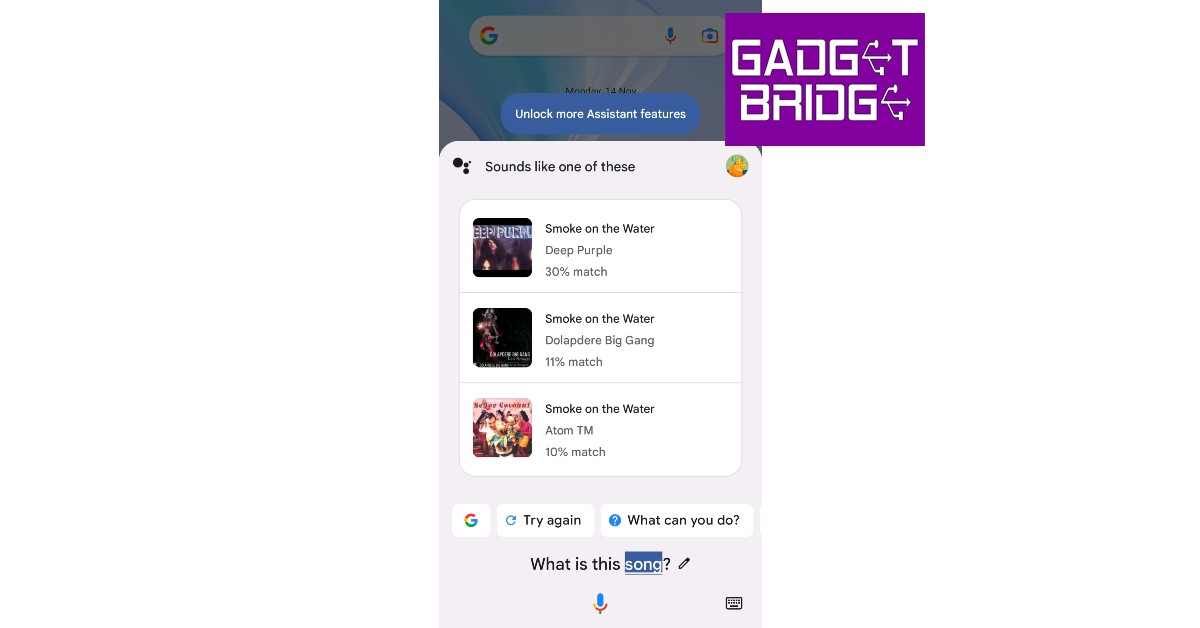
Step 1: Tap the microphone icon on the Google widget or simply say ‘Hey Google’ to trigger Google Voice Assistant. Step 2: Ask ‘Which song is this? Step 1: Tap the home icon or say ‘Hey Google’ to trigger Google Voice Assistant. Step 3: Play the song on another device or simply hum or sing it yourself. Step 3: Play the song on another device or hum its melody or lyrics.  Step 4: Google will search for the song using the melody and bring up matching results. Step 4: Google will search for the song using the melody and bring up matching results. find song by sound

Use Shazam

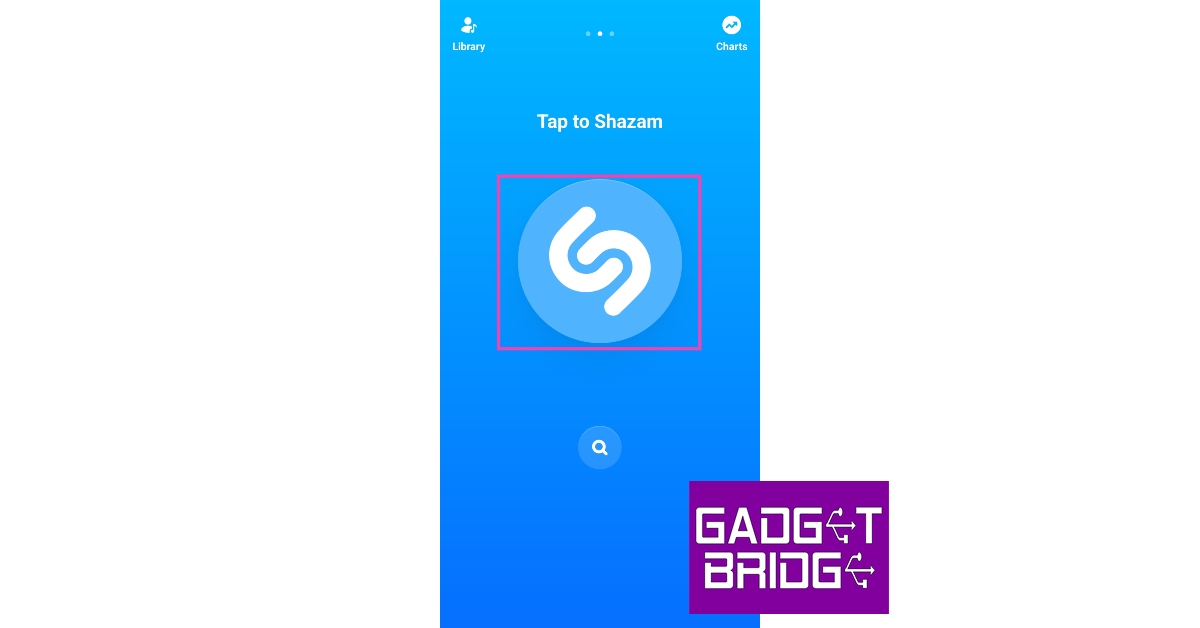
Step 1: Install the Shazam app on your smartphone. Step 2: Launch the app and tap the Shazam icon on the screen. Step 2: Launch the app and tap the Shazam icon on the screen. Step 3: Bring your phone closer to the song that’s playing nearby. Step 3: Bring your phone closer to the song that’s playing nearby. Step 4: Shazam will identify the song. You can share the song with your friends or play it using Apple Music. Step 4: Shazam will identify the song. You can share the song with your friends or play it using Apple Music.

Use Soundhound

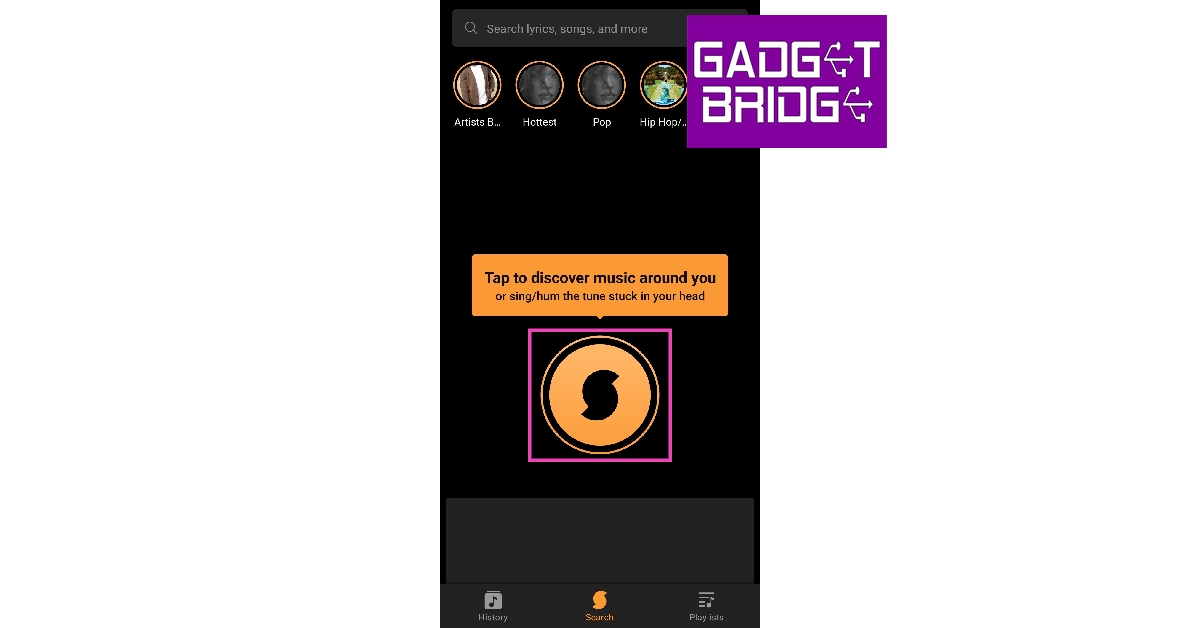
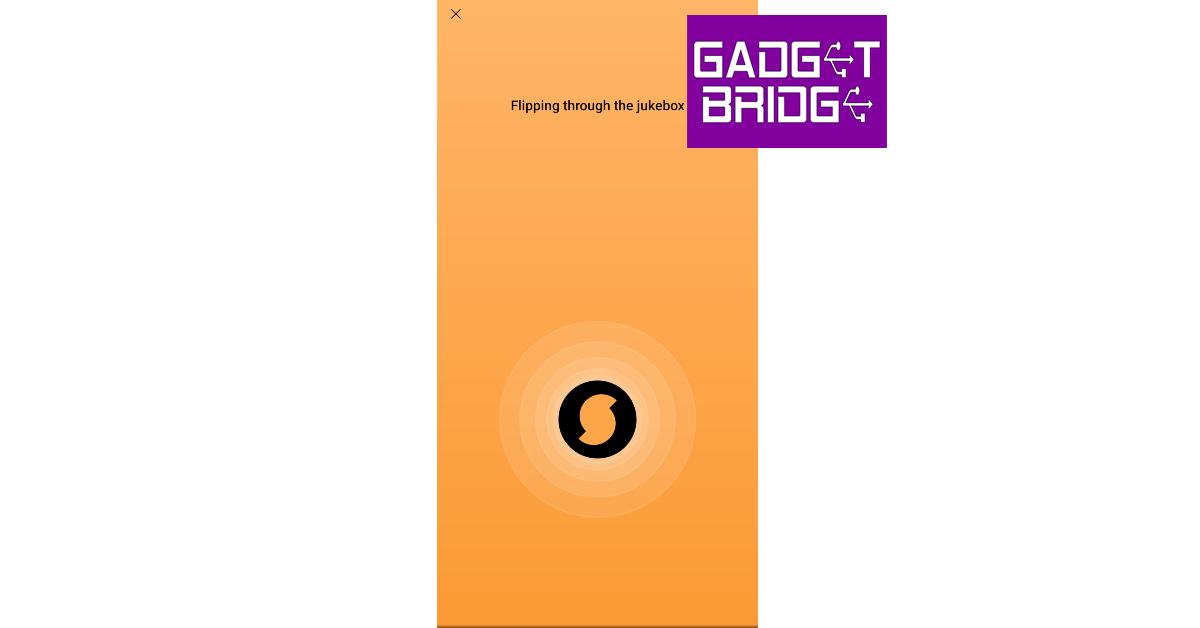
Step 1: Install the Soundhound app on your smartphone. Step 2: Launch the app on your phone and give it the necessary permissions. Step 3: Tap the Soundhound icon. Step 3: Tap the Soundhound icon. Step 4: Bring your phone closer to the song playing near you. You can also sing or hum a song to identify it. Step 4: Bring your phone closer to the song playing near you. You can also sing or hum a song to identify it. Step 5: Soundhound will identify the song for you. You can play it using Spotify and YouTube, or listen to a 30-second snippet on the Soundhound app itself. Soundhound also lets you view the lyrics to the song. Soundhound will identify the song for you.

Use Circle to Search

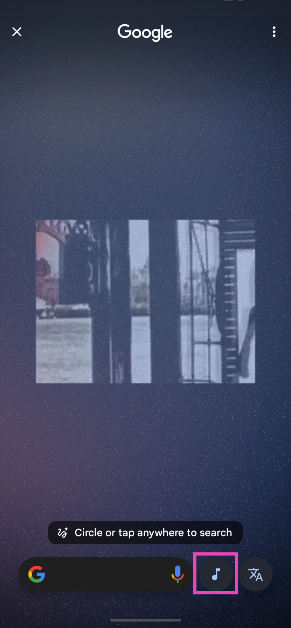
Step 1: Go to the page where the song is playing. If the song is playing on an external speaker, bring your phone closer to the source. Step 2: Long-press the home button or the navigation bar on your phone. Step 3: Tap the musical note icon. Step 3: Tap the musical note icon. Step 4: Your phone will listen to the song for a few seconds and then open the Google search results for the song title. Step 4: Your phone will listen to the song for a few seconds and then open the Google search results for the song title.
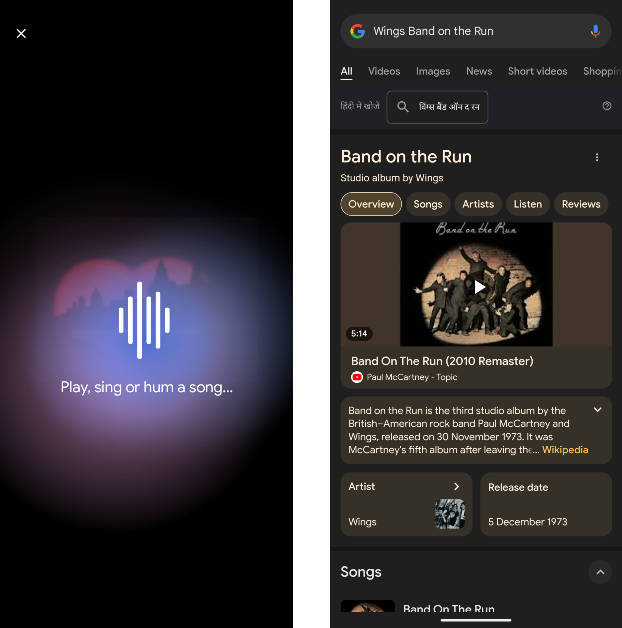

Search for the lyrics on Google to identify the song

If you don’t want to install any app on your device solely for the purpose of identifying a song, you can simply search for its lyrics on Google. You don’t need to know the exact lyrics either. If you can decipher a couple of lines from the song and search for them, Google will likely present matching results.

Frequently Asked Questions (FAQs)

How do I identify a song that is playing near me?

You can use apps like Shazam, Soundhound, or even Google Assistant to identify any song that is playing near you.

How does Shazam work?

Shazam, like other music identification apps, uses the ‘audio fingerprint’ of the song sample gained by using your phone’s microphone to match it against a known catalogue of songs.

Is Shazam free to use?

Yes, the music identification feature of Shazam is free to use. Read Also: Top 5 ways to fix a broken Amazon Firestick remote (2023)

Conclusion

These are the best ways to identify a song playing near you. If you own a Google Pixel smartphone, it can automatically identify the song playing near you and display it on the home screen. Go to Settings>Sound and vibration>Now Playing and turn on the toggle switch for Identify songs playing nearby.

World Tourism Day 2023: Best websites to get inexpensive airline and hotel deals

As we enter into the fall season, tourist destinations across the world are gearing up for the busiest period of the year. If you’ve been thinking of escaping the rut and giving yourself a break, now would be the time to do it. Since September 27 happens to be World Tourism Day, we thought we’d bring you our picks for the best websites to get inexpensive airline and hotel deals. Read Also: Top 5 ways to fix a broken Amazon Firestick remote (2023)

Skyscanner

Skyscanner With more than 100 million monthly active users, Skyscanner is one of the best travel websites in the world. Skyscanner cuts out the complicated stuff and offers a very accessible way of planning your vacation. You can book flight tickets, select your desired hotels, and rent a car on the same website. Skyscanner connects you with trusted partners that ensure everything from the journey to the stay is seamless and hassle-free.

Google Flights

Google Flights Simple, reliable, and accessible, Google Flights is a great platform to get inexpensive airline deals. To access Google Flights quickly on your web browser, you can simply perform a Google search for flight tickets between the two locations and get quick access to all the departing flights and their prices in the search results. The website for Google Flights is minimal and very easy to navigate. Once you set the departure and arrival locations, you can browse the calendar, and view the cheapest flight tickets under each date. Google Flights does not bombard you with ads and inflated travel packages. Instead, it keeps things simple and lets you take control of your plans. Need to book a hotel at your destination? Simply switch over to the Hotels tab and follow the same process.

Booking.com

Booking.com Established in 1996, Booking.com is one of the oldest players in the hotel booking services arena. It is also one of the most popular travel websites among global tourists. Apart from hotel bookings, the website also lets you book airline deals at nominal prices and rent cars and airport taxis with ease. What we really like about the website is that it lets you sort accommodations by property type. If you don’t want to stay in a hotel, you can look for homestays, apartments, and more.

Agoda

Agoda World Tourism Day 2023: Best websites to get inexpensive airline and hotel deals Headquartered in Singapore, Agoda majorly caters to tourists in the Asia-Pacific region. What we really like about the website is its bundle packages for flights and hotels. If you like to be thorough with your plans and make all your accommodation bookings beforehand, these bundle packages will help you save a significant amount of money. Apart from bookings, you can also use Agoda to check out the popular attractions of the place you’re visiting. If you find an interesting experience or activity, you can book it from the website itself.

MakeMyTrip

MakeMyTrip World Tourism Day 2023: Best websites to get inexpensive airline and hotel deals MakeMyTrip is the biggest name in the travel booking industry in India. The website takes care of all your travel needs, be it flight tickets, train reservations, accommodation bookings, and more. You can grab tons of offers on MakeMyTrip, right from the home page. What we really like about MMT is its comprehensive approach to the travel experience. Apart from booking flight tickets and making hotel reservations, you can also use the website for Forex and travel insurance.

Momondo

Momondo World Tourism Day 2023: Best websites to get inexpensive airline and hotel deals If you’re not used to searching for or booking airline deals online on a regular basis, you’ve probably never heard of Momondo. It is one of the best flight search engines to look up cheap tickets and big savings deals. Momondo has a very simple interface that lets you browse and select flights with ease. You can also use the side menu to switch to hotel booking and car rentals. You can also use the website to track flights and get alerted when your preferred tickets are available for cheap. Read Also: Xiaomi UniBlade Trimmer Review: Perfect match of precision and portability

Conclusion 

These are our picks for the best websites to get inexpensive airline and hotel deals. Think there’s a great flight search engine that didn’t make it to the list? Let us know in the comments! Since it is World Tourism Day, we also suggest you check out our list of the best gadgets to carry on your next vacation. For the latest gadget and tech news, and gadget reviews, follow us on Twitter, Facebook and Instagram. For newest tech & gadget videos subscribe to our YouTube Channel. You can also stay up to date using the Gadget Bridge Android App. You can find the latest car and bike news here.

Google Pixel 8, Pixel 8 Pro full specifications leaked ahead of the official launch

Google Pixel 8, and Pixel 8 Pro are all set to launch globally on October 4. The device’s key specs, design and other features have already been leaked. But ahead of the official announcement all the specs and pricing of the upcoming series have now surfaced on the internet. Recently the renders of the phone leaked which revealed the colour options for the phones and the complete camera specs of both the Pixel 8 phones were also revealed through a leaked promo video and via leakster. Also Read: Vivo Y56 5G now available in new 4GB RAM with 128GB storage variant The well-known tipster who also leaked the promo video and the complete camera specifications of the Google Pixel 8 series has now revealed the full specification and expected pricing of the Google Pixel 8, and Pixel 8 Pro. She took to X (formerly Twitter) to reveal a full list of specifications and expected pricing of the Pixel 8 Series. According to her the price of the Pro variant is likely to come with a starting price of $899 which translates to Rs 74,800. On the other hand, the vanilla model is expected to come with a price tag of $699 which converts to Rs 51,800. It is said that the standard version would be made available in Obsidian, Hazel and Rose colour whereas the Pro variant could come in Obsidian, Porcelain and Bay shades. The tipped pricing of the vanilla option is in contrast to the previously tipped price of $599 on the other hand, the Pixel 8 Pro will cost $999. Therefore there will be a $100 price increase for all models in the US. As per the tipster Pixel 8 might feature a 6.17-inch full-HD+ OLED display. Whereas Pixel 8 Pro could be highlighted with a 6.71-inch LTPO QHD OLED display. Both the screens will have a layering of Corning Gorilla Glass Victus 2. We are already aware that the Tensor G3 SoC will power both the model but as per the tipster the devices will be available with 8GB RAM with 12GB storage and 128GB RAM with 256GB storage. The new Pixel phone will obviously run on the latest edition of Android software, Android 14 with Pixel-exclusive features onboard. In terms of photography, the tipster has previously revealed that the Pixel 8 phones will use the same camera sensor on the front as well as on the rear (primary). On the rear, it is likely to provide a primary 50MP Octa PD sensor. The rear camera will have a 1.2 μm pixel width, f/1.68 aperture, 82-degree field of view, 1/1.31″ image sensor size and Super Res Zoom up to 8x (exclusive to vanilla variant). The secondary camera on the standard variant will feature a 12 MP ultrawide camera with auto-focus, 1.25 μm pixel width, f/2.2 aperture, 125.8-degree field of view as well as a Lens correction feature. On the other hand, the pro variant will have a 48 MP Quad PD ultrawide camera with autofocus, 0.8 μm pixel width, f/1.95 aperture, 125.5-degree field of view and a Lens correction feature. The Pro camera is said to have a third 48 MP Quad PD telephoto camera, 0.7 μm pixel width, f/2.8 aperture, 21.8-degree field of view, 5x optical zoom and Super Res Zoom up to 30x. Upfront Google Pixel 8, Pixel 8 Pro will have a similar 10.5 MP Dual PD selfie camera, 1.22 μm pixel width, f/2.2 aperture and 95-degree field of view. The selfie camera on the vanilla variant will have a fixed focus while the Pro version will have an auto focus. Finally, the Pixel 8 will probably include a 4,485mAh battery with 24W wired and 12W wireless fast charging support. Whereas, the Pixel 8 Pro is likely to boast a 4,950mAh battery along with 27W wired fast and 12W wireless charging support. For the latest gadget and tech news, and gadget reviews, follow us on TwitterFacebook and Instagram. For newest tech & gadget videos subscribe to our YouTube Channel. You can also stay up to date using the Gadget Bridge Android App. You can find the latest car and bike news here.  

Modern gadgets for film lovers that enhance the movie experience

Movies have the incredible power to transport us to different worlds, evoke emotions and provide us with unforgettable experiences. For avid film lovers, the journey doesn’t stop at the screen. Thanks to modern technology, there’s a treasure trove of gadgets that can elevate your movie-watching escapades before, during and after the show. From immersive VR headsets to high-quality sound systems, let’s dive into these innovations that are revolutionizing the way we enjoy movies.

Virtual reality headsets: Diving into the cinematic universe

Imagine stepping right into the heart of your favourite movie, surrounded by its characters and landscapes. VR headsets have made this fantasy a reality. These futuristic gadgets let you explore the film’s world like never before, turning your living room into the ultimate private cinema. Strap on a VR headset, and suddenly you’re strolling through Middle-earth or navigating the bustling streets of a sci-fi metropolis. The level of immersion is astounding, and it’s an experience every film enthusiast should indulge in.

Immersive sound systems: Crystal clear sound

No cinematic experience is complete without impeccable audio. Modern sound systems are designed to recreate the theatre-like sound quality right in your home. The rumble of explosions, the gentle rustle of leaves — every sound is crisp and dynamic. These systems provide an added layer of depth, making you feel as though you’re in the heart of the action. So, grab your popcorn and get ready to be transported by both visuals and sound.

Portable projectors: Watch a movie anywhere

Why be confined to your TV when you can take the big screen wherever you go? Portable projectors have made outdoor movie nights a breeze. Whether you’re at a picnic, camping or simply enjoying your backyard, these nifty gadgets can turn any flat surface into a cinema screen. Invite friends and family, grab some comfy blankets, and let the movie magic unfold under the stars. They can even be used with other devices, which means you can even browse your favourite shopping website, game site or casino blog on a bigger screen if you want to!

Inflatable movie screen: Simple yet effective

Speaking of outdoor movie nights, an inflatable movie screen takes the experience up a notch. Picture this: a warm summer evening, a gentle breeze and a colossal inflatable screen in your backyard. It’s the perfect setting for a cozy movie marathon. The screen size is just right, ensuring everyone gets a clear view, and the experience is akin to attending a film festival in the comfort of your own home.

Noise-canceling headphones: Whisk yourself away to a new world

Sometimes, the outside world’s distractions can interfere with the cinematic journey. Noise-cancelling headphones are the solution. Slip them on, and suddenly the bustling city or the neighbor’s lawnmower becomes a distant memory. With crystal-clear audio and minimal background interference, you can lose yourself completely in the film’s narrative, regardless of the environment.

Final thoughts

In a world where technology is advancing faster than ever, film lovers are being treated to a smorgasbord of gadgets that enhance their movie experience. From the immersive wonders of VR headsets to the nostalgic charm of outdoor inflatable screens, it’s incredible how far we’ve come from the classic cinema experience! For the latest gadget and tech news, and gadget reviews, follow us on TwitterFacebook and Instagram. For the newest tech & gadget videos subscribe to our YouTube Channel. You can also stay up to date using the Gadget Bridge Android App. You can find the latest car and bike news here.

BGMI redeem codes for 26 September 2023, claim and receive rewards and benefits

After being banned for nearly ten months, Battleground Mobile India, aka BGMI, is officially available again in India. BGMI fans are looking for ways to improve their game experience and one such method is the usage of redemption codes, which offers a variety of rewards and advantages using BGMI redeem codes players can gain access to new skins, outfits, loot crates, weapons and free UC and diamonds. As mentioned earlier, these codes give users the chance to earn unique rewards and gain extra benefits while playing the game. This includes GUN SKINS (M4, AKM, M416, AWM, M24, UZI, KAR98K), free character voucher, Andy, Carlo, Sara, Victor character for free, free Anna Character on completing the mission and UC or Royal Pass Discount. So here we have gathered a list of the most recent BGMI redeem codes as of 26 September 2023. Also, redeem these codes asap as these are only valid for a limited duration.

BGMI Redeem Codes for 26 September 2023

updating soon…

How to get free Redeem Codes for BGMI on 26 September 2023?

  • Launch BGMI on your device.
  • Then select the Redeem Code option from the main menu.
  • Next, click on the Redeem code tab.
  • A new window will open, requesting the redemption code.
  • Now enter your BGMI code.
  • Confirm and click on the “Redeem” tab.
  • If your redeem code is valid then you will get a message confirming that your rewards were successfully redeemed.
(Note that these codes are case-sensitive, so be sure to type them correctly to prevent any errors.) For the latest gadget and tech news, and gadget reviews, follow us on TwitterFacebook and Instagram. For newest tech & gadget videos subscribe to our YouTube Channel. You can also stay up to date using the Gadget Bridge Android App. You can find the latest car and bike news here.

Creating Compelling Twitter Threads: Your Comprehensive Guide

Twitter, often called the heartbeat of the internet, thrives on brevity. But what if your thoughts overflow, craving more space than a single tweet allows? The threads are your ticket to breaking free from that character limit. Imagine this scenario: You’re excited and eager to post your epic story, a groundbreaking idea, or a detailed step-by-step guide with Twitter. You eagerly tap on your keyboard, pouring your thoughts into that tweet box. But suddenly, it happens – Twitter’s character limit slams down on your creativity like a heavy gate, leaving you feeling utterly frustrated. It’s like trying to fit a whale into a goldfish bowl. Now, here’s where the enchantment of Twitter threads sweeps in to save the day. They enable you to chop your composition into bite-sized tweets, creating a seamless narrative flow. In this guide, we’ll dive deep into crafting captivating Twitter threads that capture your viewers and unlock your storytelling potential.

Setting the Stage

Before we dive into Twitter threads, the first order of business is having a Twitter account. Once you’re set-up, understanding Twitter’s character limit is crucial. When you create a thread, each tweet builds on the previous one, providing a smooth reading experience. Writing engaging content isn’t a walk in the park. Sometimes, you need honed skills to craft the perfect piece. Do not faint when you are at this point. You get professional support from online writers. A simple text to WriteMyEssays service can connect you with expert writers for help.

Identify Your Thread’s Drive and Topic

Before you touch the keyboard, pinpoint why you must create a Twitter thread. Is it to offer your experience, expert insights, or entertain? Define your goal unmistakably.

Structuring Your Piece

For your thread to shine, it needs a coherent flow. Outline the key ideas or subtopics you intend to cover. This ensures your thread remains coherent and easy to follow.

Develop a Catchy Title

Your thread’s first tweet serves as the title. Make it irresistible, informative, and enticing enough for readers to crave more.

Writing Your Twitter Thread

This step is paramount, ensuring you communicate effectively. Remember, it’s not about creating anything; it’s about appealing to your audience and sharing your thoughts coherently.

Crafting a Captivating Opening Tweet

Your first tweet should charm your audience immediately. Pose a thought-provoking query, share an intriguing fact, or start with a bold proclamation. Grab them from the get-go.

Breaking Down Your Content

Divide your piece into bite-sized segments. Each tweet should convey a single idea or piece of information. Keep it concise and laser-focused.

Adding Value

Every tweet should contribute value to the thread. Whether it’s a fresh perspective, a supporting example, or a counterargument, ensure it enriches the overall narrative.

Using Visuals

Twitter threads featuring visuals tend to perform better. Incorporate images, GIFs, or polls to involve your audience visually.

Posting Your Twitter Thread

After composing your masterpiece, think of your audience and their availability. These factors can make or break this section of your thread.

Timing and Audience Considerations

Think about when your specific audience is most lively on Twitter. Timing matters, as it can significantly impact your thread’s visibility.

Hashtags and Mentions

Upsurge your thread’s discoverability by using pertinent hashtags. Mention users or handles when appropriate, but remember not to overdo it.

Thread Features

Leverage Twitter’s thread features to your advantage. Easily add new tweets to the thread by replying to your previous tweet.

Charming with Your Audience

This is a critical aspect often overlooked by many. To excel in this area, consider these valuable tips.

Monitor Replies and Interactions

Pay attention to rejoinders, likes, and retweets. These interactions offer treasured feedback and allow you to connect with your audience effectively.

Responding to Comments

Be responsive to comments and questions. Encourage meaningful discussions within the thread.

Encourage Engagement

Motivate your readers to engage with your thread. Ask questions, seek opinions, or invite them to share their experiences.

Promoting Your Twitter Thread

Your Twitter thread is a labour of love. Make it count by following these tips.

Share on Other Platforms

Extend your reach by cross-promoting your thread on other social media platforms.

Collaborate with Influencers

If possible, collaborate with influencers or accounts with a significant following to retweet your thread and broaden its reach.

Analytics

Measure your thread’s success using Twitter’s analytics. Learn from what works and apply those insights to future threads.

Tips and Best Practices

You can do everything right and fail to see immediate results.  Relax and learn from these tips.

Consistency

Maintain a consistent style throughout your Twitter thread, whether it’s humor, storytelling, or data-driven insights.

Engagement

Stay engaged with your audience in the thread. Recognize and appreciate their contributions.

Shun Common Blunders

Watch out for common pitfalls like excessive self-promotion or an overabundance of hashtags. To navigate this digital landscape effectively, read more blogs on excellent tweeting and examine successful threads like the one below. Thread Title: “Decoding the Science Behind Climate Change” This thread masterfully simplifies complex scientific concepts related to climate change into easily digestible tweets. It involves the audience with clear explanations and captivating visuals.

Conclusion

When creating a Twitter thread, your purpose acts as the guiding star. But having a great purpose isn’t enough; you need structure. Organize your thoughts logically to maintain a smooth narrative flow. Each tweet should build on another, contributing to the foundation of your story. And don’t forget to develop a captivating title that lures readers in, just like an intriguing book cover. Visual elements are your secret weapon. With lots of texts, images, GIFs, and polls can be the lifebuoys that keep your audience involved. Employ them strategically to match your content and make your thread visually appealing. When it’s time to post your thread, timing is everything. Consider your audience’s time zone and habits. Use appropriate hashtags to cast a wider net and reach potential readers beyond your followers. And don’t forget to tag relevant users or handles when it adds value to your content. For the latest gadget and tech news, and gadget reviews, follow us on TwitterFacebook and Instagram. For newest tech & gadget videos subscribe to our YouTube Channel. You can also stay up to date using the Gadget Bridge Android App. You can find the latest car and bike news here.