After being banned for nearly ten months, Battleground Mobile India, aka BGMI, is officially available again in India. BGMI fans are looking for ways to improve their game experience and one such method is the usage of redemption codes, which offers a variety of rewards and advantages using BGMI redeem codes players can gain access to new skins, outfits, loot crates, weapons and free UC and diamonds.As mentioned earlier, these codes give users the chance to earn unique rewards and gain extra benefits while playing the game. This includes GUN SKINS (M4, AKM, M416, AWM, M24, UZI, KAR98K), free character voucher, Andy, Carlo, Sara, Victor character for free, free Anna Character on completing the mission and UC or Royal Pass Discount. So here we have gathered a list of the most recent BGMI redeem codes as of 16 September 2023. Also, redeem these codes asap as these are only valid for a limited duration.
BGMI Redeem Codes for 16 September2023
updating soon…
How to get free Redeem Codes for BGMI on 16 September2023?
Launch BGMI on your device.
Then select the Redeem Code option from the main menu.
Next, click on the Redeem code tab.
A new window will open, requesting the redemption code.
Now enter your BGMI code.
Confirm and click on the “Redeem” tab.
If your redeem code is valid then you will get a message confirming that your rewards were successfully redeemed.
Garena Free Fire is a battle royale game with regular awards and tournaments to keep players interested. If you play Garena Free Fire, you should be aware of the redeem codes that are released on a daily basis. However, because the battle royale game is banned in India, players from other countries can use the Free Fire Redeem codes daily. If you’re unfamiliar with the Garena Free Fire redeem codes or don’t know how to get them, we’ve put together a step-by-step guide to help you redeem them. Check out Garena Free Fire Redeem Codes for 16 September 2023.The Free Fire redeem codes are a great way to get free stuff. These are 12-digit codes that contain alphabets and numbers, as well as an expiration date and time. Because the Garena FF redeem codes cannot be used more than once, you should hurry to the redemption page to claim your free reward before someone else does. To get a free reward, all you have to do is go to reward.ff.garena.com/en, which is the official redemption page. Also, keep an eye on this space for daily updates on Garena Free Fire redemption codes and rewards.
Garena Free Fire Redeem Codes Today 16 September2023
updating soon…
How to Get Free Fire Redeem Codes for Garena on 16 September2023?
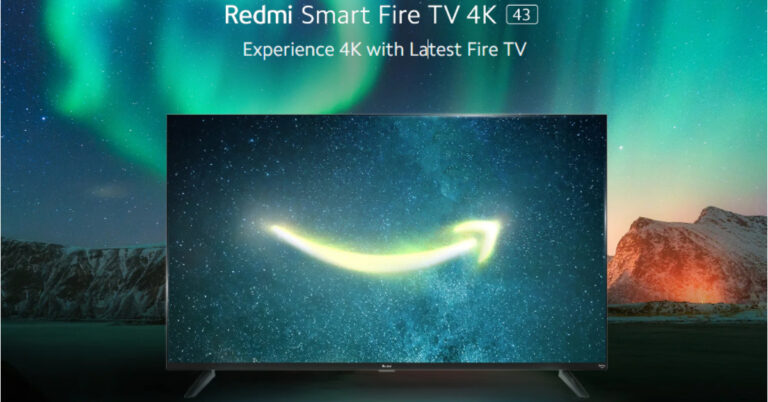
Redmi has officially announced the launch of a brand-new smart TV in India. The Chinese electronics company has introduced a new smart TV, known as Redmi Smart Fire TV 4K, which will run on Amazon Fire OS. It is said to provide a true-to-life viewing experience with 4K Ultra HD resolution along with HDR support. The device will be available in a single 43-inch screen size and supports Dolby Audio DTS: Virtual X and DTS-HD technology.
Redmi Smart Fire TV 4K 43-inch price in India and availability
Xiaomi India unveiled a 43-inch Redmi Smart Fire TV4K model. It will have a screen size of 43 inches. With HDR 10 and HLG compatibility, the Redmi Smart Fire TV 4K offers 4K Ultra-High Definition for the most accurate colour and contrast.It has the in-house Reality Flow MEMC engine from Xiaomi India, which scans image frames and interpolates frames to produce smooth, blur-free visuals when consuming frantic material. The brand-new television has a potent 24-Watt speaker system that supports DTS: Virtual X, Dolby Audio, and DTS-HD technologies, allowing users to experience unprecedented levels of clarity, depth, and detail across a larger sound stage.A Quad Core A55 Processor powers the Redmi Smart Fire TV 4K 108cm, enabling jitter-free and seamless video watching.By integrating live TV from customers’ DTH set-top boxes on the home screen, Redmi Smart Fire TV 4K enables users to instantly navigate between DTH TV channels and OTT apps by just asking Alexa. This eliminates the need to change TV inputs, use the set-top box remote control, or connect additional IR connections. The new TV also supports Miracast and Apple Airplay, enabling casting from Android and Apple iPhones, respectively.Customers may monitor feed from their Alexa-compatible security cameras on the TV in full screen or Picture-in-Picture on top of their video thanks to Picture-in-Picture technology found in the Redmi Smart Fire TV 4K 43-inch.With Amazon’s Fire TV built-in, consumers of the recently released Redmi Smart Fire TV 4K 43-inch model may stream more than a million movies and TV episodes from 12,000+ applications, including Prime Video, Netflix, Disney+ Hotstar, Jio Cinema, Zee5, and others (subscriptions may be necessary). Customers may also view prominent live channels like Aaj Tak, Zed News, India Today, and more for free via Zee5, DD National via nexGTV, Kids First, Red Bull TV, and other platforms. Amazon miniTV is also available for streaming. Customers may simply view TV serials, live news, or browse the channel guide all in one spot with the help of the Live tab and On Now row.Additionally, it has unrestricted connectivity choices such as Dual-Band Wi-Fi, Bluetooth 5.0 connectivity, an optical port, 3 HDMI ports, 2 USB ports, an AV port, and an earphone port. The television also comes with a brand-new remote control that makes it simple to use for a variety of controls and functionalities. TV Guide, Playback controls, Channel up/down, Mute, and shortcuts to well-known apps are among the buttons.
For the latest gadget and tech news, and gadget reviews, follow us on Twitter, Facebook and Instagram. For newest tech & gadget videos subscribe to our YouTube Channel. You can also stay up to date using the Gadget Bridge Android App. You can find the latest car and bike news here.
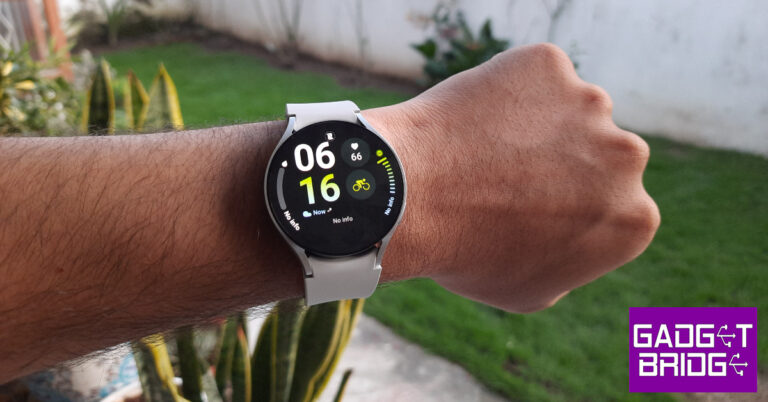
The second Galaxy Unpacked event of the year saw the release of Samsung’s new line of foldables along with the new Galaxy Watch series. The Samsung Galaxy Watch6 Classic (read our review here) brought back the crowd-favourite physical bezel and featured some minor upgrades under the hood. The base variant of the Galaxy Watch6 sticks with the digital bezel of the previous generation but gets the vital processor upgrade and a minor boost to the RAM. We’ve been using this smartwatch for the last week, here is our in-depth Samsung Galaxy Watch6 review.Read Also:Vivo T2 Pro 5G confirmed to launch in India on September 22
Samsung Galaxy Watch6 review: Design and Display
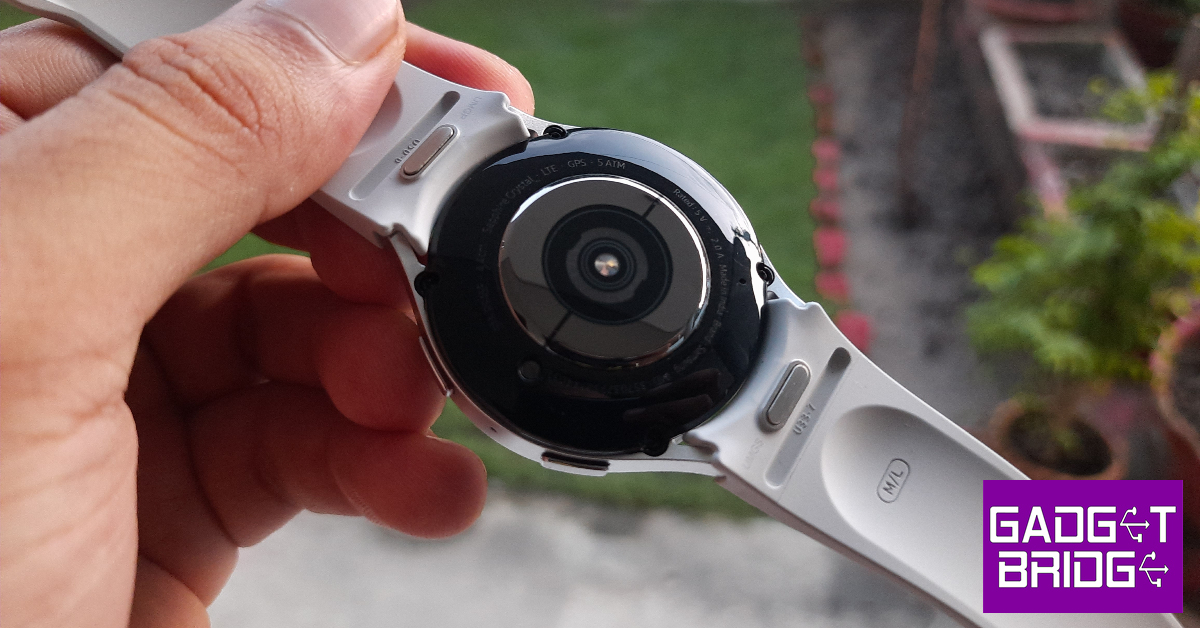
The unboxing experience of the Watch6 is similar to the Classic variant. Inside the sleek rectangular box, you’ll find the smartwatch with the bands attached to it. You also get the wireless charger and some reading material along with the device. The Galaxy Watch6 is available in two size variants – 40mm and 47mm. You can also choose between LTE and Bluetooth connectivity options.There are no major design changes on the Galaxy Watch6. The smartwatch carries forward the simple, minimalistic features of the previous generation. After having used the Watch6 Classic for a week, we really enjoyed how lightweight the regular variant is. The 44mm size variant weighs 33g. In comparison, the 47mm Watch6 Classic weighs 59g. We preferred the base variant for sleep tracking because it was very comfortable to wear to bed. While you eventually get used to the weight of the Watch6 Classic, wearing it to sleep can be challenging.The silicone watch band of the Samsung Galaxy Watch6 uses the traditional pin and buckle design. Instead of resting in an adjustable loop, the watch band goes under the strap after being buckled. Unlike the Watch6 Classic, the watch band on the regular variant does not get a faux leather finish. This should not bother the users who plan on putting the watch through rugged use.As always, the Super AMOLED display is the star of the show. The sapphire glass protection ensures that this display can absorb a few good knocks. The smartwatch did not register any scratches on the display during the time we used it. The 1.5-inch display is slightly larger than the 1.4-inch unit on the Watch5 (read our review here). Since there is no physical bezel around the display, the edge controls are much smoother. The touch-sensitive digital bezel on the Watch6 covers the same range of functionalities as the physical one on the Classic variant. While it can’t replicate the feel of a physical rotation, it is still a nice addition.At the bottom panel of the dial lie the all-familiar heart rate, temperature, and SpO2 sensors. The microphone and the speaker grille flank the sides of this panel. There are two buttons on the right edge of the frame. The top button can be used to trigger Bixby or go to the home screen. The bottom button acts as a back shortcut key. These buttons also contain the BioActive sensors.Samsung Galaxy Watch6 is rated IP68 for dust and water resistance. It can also withstand any water damage up to 50m. Swimming in deep waters should not present any problems to the smartwatch. We had it strapped while hiking, swimming, and working out. Not only was the Watch6 unfazed by any amount of water or sweat, but it also provided a very comfortable fit across the board.
Samsung Galaxy Watch6 review: Performance
The Samsung Galaxy Watch6 gets its biggest upgrade under the hood since the Watch4 series. The smartwatch is now powered by the Exynos W930 chipset. The RAM has been bumped up to 2GB as well. The internal storage of 16GB is optimum for running all the necessary apps on the watch. OS duties are handled by Android Wear OS 4 with One UI Watch 5. The updates to the OS are very minor.The upgraded chipset is a welcome addition to the Watch6. The smartwatch is snappier than ever before and navigating through the widgets and health functions is a very seamless process. The flat display surface does not feel awkward to use or type on at all. Taking calls and responding to WhatsApp messages on the watch was a breeze. While the onscreen keyboard is still limited in its functionality due to the screen’s real estate, its voice typing feature is a lifesaver.There are no major changes to the OS, which is a bit disappointing. Samsung is a victim of its own success here because at this point there is not a lot it can do to improve the UI of the smartwatch or add any out-of-the-world features to it. Instead, it has made the OS more refined and easier to use. You can now connect your Galaxy Watch to two smartphones, which is good news for people who use multiple mobile devices at once.For those who are reading this review after watching the Apple Watch Series 9 presentation, you’d be pleased to know that the Galaxy Watch has features similar to the Double Tap gesture on the Apple Watch. After turning on the gesture controls, you can shake your arm twice to pick up a call and rotate your wrist to hang up. You can also nod your fist twice to open any health-tracking function or app of your choice.The health and fitness tracking features of the Samsung Galaxy Watch6 remain ahead of the competition. The smartwatch is ultra-efficient at tracking your steps and distance covered while walking. You can track most gym workouts, dance routines, and sports using the Watch6. It even gives you the option to create your own workout routine.The Samsung Galaxy Watch6 series also has the best set of sensors we’ve seen on any Android smartwatch. Readings from the heart rate monitor and SpO2 sensor were on par with medical-grade equipment. The blood pressure tracking feature is still not available in India, which is disappointing. The BioActive sensors on the two buttons on the dial can calculate your body fat percentage. While we can’t really speak to the accuracy of these figures, you can use them as a metric to track your progress rather than an actual representation of your body composition.The app support for the Samsung Galaxy Watch6 is phenomenal as well. You will need the Samsung Wearable app to manage the smartwatch and customise its settings. The Samsung Health app is dedicated to diving deep into the health and fitness metrics that the watch tracks for you. We really liked the detailed sleep reports that the watch generated for us. You can even track your snoring activity (the watch uses your smartphone’s mic to record them) for a more comprehensive report. The sleep reports display your heart rate and blood SpO2 levels while sleeping and break down the cycle into deep sleep and REM sleep periods.The new Samsung Galaxy Watch6 packs a 425mAh battery, which is slightly larger than the one on the Watch5. The smartwatch easily lasts an entire day, but there is still room for improvement. With Always On Display turned on, the battery life takes a hit. On days we used the watch to track workouts for a couple of hours, we had to charge it for a while just to ensure it didn’t die out while tracking the sleeping cycle.Read Also:CMF by Nothing officially confirmed to launch in India on September 26
Verdict
The Samsung Galaxy Watch6 is the ideal Android smartwatch for people who place efficiency and performance above everything else. Sure, it misses out on the physical bezel and the flashy watch band of the Watch6 Classic, but we feel that it works in its favour. Being lighter than the Watch6 Classic, you wouldn’t mind wearing this watch to bed to track your sleep activity. Its minimal design and comfortable no-nonsense strap are perfect for rugged use. The price tag of Rs 29,999 is a bit steep, but you’re getting the best smartwatch that Android has to offer.
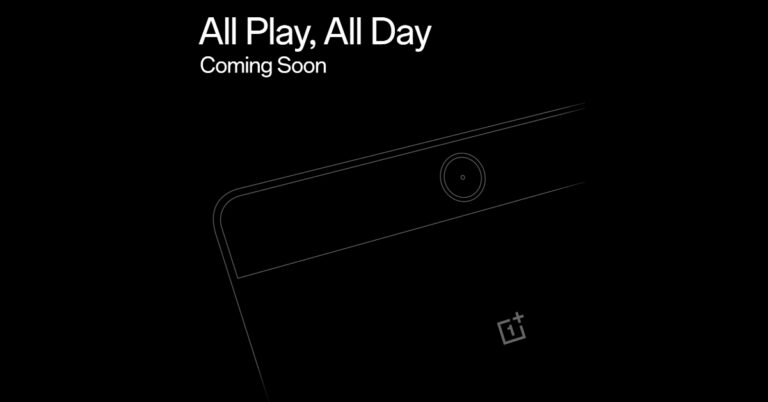
Soon, OnePlus plans to introduce its new Android tablet in India. The company hinted at the upcoming launch and also listed the device on the e-commerce platform Flipkart. According to rumours and leaks the company is likely to launch the OnePlus Pad Go which was previously speculated to arrive next year along with a new series of OnePlus devices specifically the OnePlus 12 Series. It is said to be an affordable option for the consumers.OnePlus took to X, to announce the upcoming launch of its next product which is likely to be an Android tablet. The company has not yet provided any details on the device but it has been listed on Flipkart. Rumours suggest that the upcoming device could be the OnePlus Pad Go. The company and the online store have not yet disclosed any information about the putative OnePlus Pad Go’s features, characteristics, or cost.Also Read:CMF by Nothing officially confirmed to launch in India on September 26The product was earlier predicted to go on sale in the first few months of 2024 along with new OnePlus earphones and the rumoured OnePlus 12 and OnePlus 12R smartphones. The tablet might, however, show out sooner than anticipated. The OnePlus Pad Go is anticipated to emerge as a less expensive substitute for the OnePlus Pad, which was introduced earlier this year however it went on sale in May.The OnePlus Android Tablet was also listed on the BIS website bearing model numbers OPD2304 and OPD2305. There are rumours that it will be available in cellular and Wi-Fi versions.
OnePlus Pad price and specifications
The OnePlus Pad was launched in India at Rs 37,999 for the 8GB RAM with 128GB storage and Rs 39,999 for the 12GB RAM with 256GB storage option.The device features an 11.61-inch display with a refresh rate of 144Hz. It is powered by MediaTek Dimensity 9000 chipset, which supports up to 12GB of LPDDR5 RAM. The tablet operates on Android 13 out of the box. OnePlus Pad includes a quad-speaker system with Dolby Atmos and Dolby Vision support. In addition to this, there is an 8-megapixel selfie camera and a single 13-megapixel back camera with an LED flash. Lastly, the tablet has a 9,510mAh battery with 67W SUPERVOOC capability.
For the latest gadget and tech news, and gadget reviews, follow us on Twitter, Facebook and Instagram. For newest tech & gadget videos subscribe to our YouTube Channel. You can also stay up to date using the Gadget Bridge Android App. You can find the latest car and bike news here.
Instagram does not reveal the algorithm it uses to suggest content to users on its platform. But it is easy to guess certain things that influence the kind of content you see on the Explore page. Your Explore page is curated solely for you. The content you see on there is based on your interactions (likes and comments), the accounts you follow, your search history, and what your followers are interacting with, among other things. If you don’t wish to see certain kinds of posts on your Explore page, there are some steps you can take to tune the suggestions. In this article, we bring you the top 5 ways to reset and better curate your Instagram Explore page.Read Also:Vivo T2 Pro 5G confirmed to launch in India on September 22
Which method should you use?
Recently, Instagram added a native option to set your Explore page to its default state by resetting the content suggestions provided by the platform. This option can be found in the ‘Content preferences’ section in your profile. However, Instagram is still rolling out this feature to users across the world. Since it is a phased rollout, this feature may take some time to become available to all users. Make sure the Instagram app on your phone is updated to its latest version so you don’t miss the drop.
If the feature hasn’t arrived on your device yet, there are a few things you can do to reset the Explore page. Since this page is a reflection of what you like to browse, view, like and interact with on the app, you can retrain the algorithm. This can be done by interacting with stuff you want to see on the Explore page. Similarly, flag stuff you don’t want to see by tagging ‘Not interested’. Unfollowing the creators who post content you don’t want to see helps the algorithm as well.
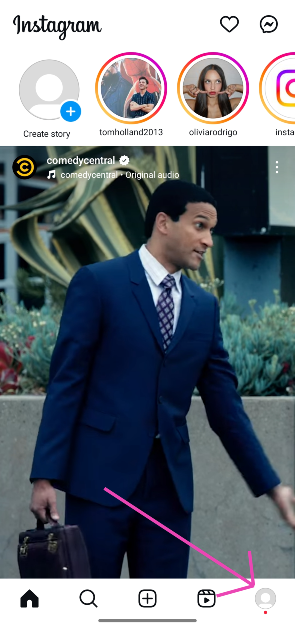
Reset your Instagram content suggestionsStep 1:Launch the Instagram app on your phone and tap your profile picture thumbnail in the bottom right corner of the screen.
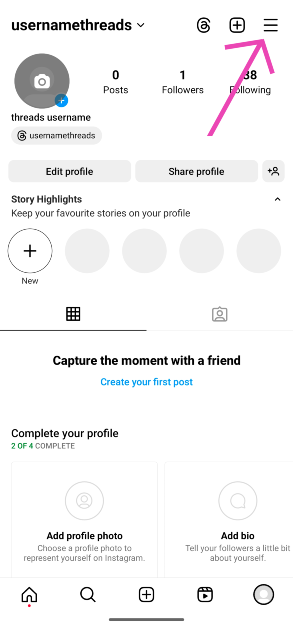
Step 2: Tap the hamburger menu icon in the top right corner of the screen.
Step 3: Tap on Content preferences.
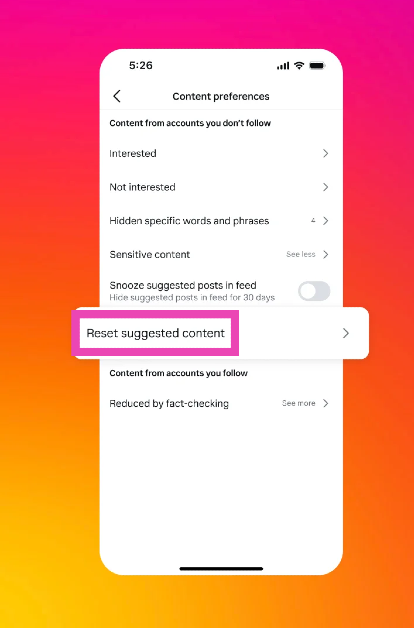
Step 4: Select Reset suggested content.
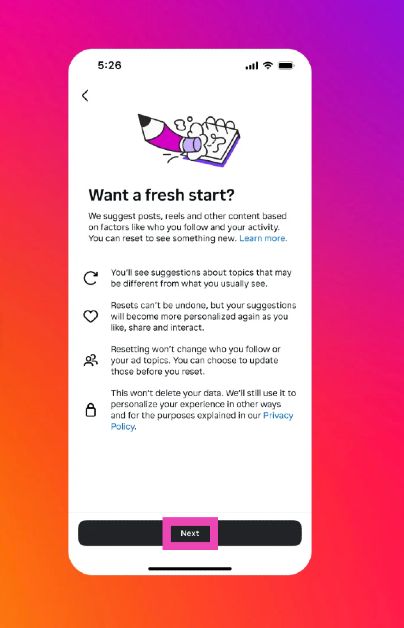
Step 5: Hit Next on the popup page.
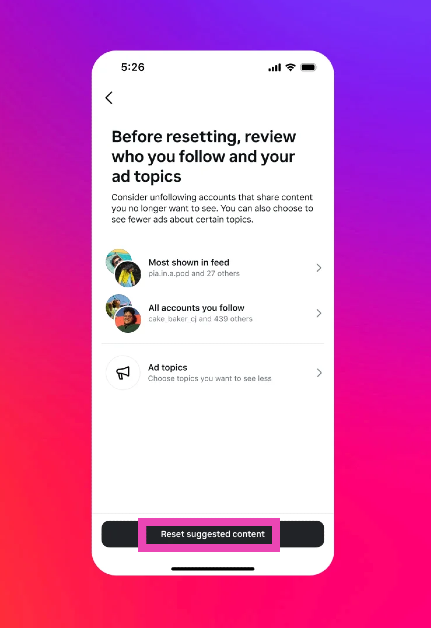
Step 6: Hit Reset suggested content.
Reset your Instagram Page by filtering content you don’t like
While there is no direct way to reset your Instagram Explore page, you can curate it by filtering out the content you don’t like. For example, if you don’t like food-related content all over your Explore page, simply let Instagram know that you’re not interested in watching it. Here’s how you can go about it.Step 1: Launch the Instagram app on your phone and tap the search icon to go to the Explore page.Step 2: Open the post that you want to filter out from your Explore page.Step 3: Tap the ellipses at the top right corner of the screen.Step 4: Select Not Interested.The post will be hidden from your Explore page. Instagram will also make note of the kind of content you don’t want to see on the Explore page and curate your suggested content accordingly. Go to Settings and privacy>Suggested content to know more.
Clear your search history
Another way of tuning your Instagram Explore page is by clearing your search history. Instagram’s algorithm uses the things you search to suggest new content along similar lines. Clearing your search history can prevent those suggestions from showing up on your feed. Here’s how you can do that.Step 1: Launch the Instagram app on your device and go to your profile.Step 2: Tap the hamburger menu at the top right corner of the screen.Step 3: Select Your activity.Step 4: Scroll down and select Recent Searches.Step 5: Hit Clear All.
Unfollow the accounts responsible for the suggested content you don’t want to see
One of the big factors that influences the content you see on your Explore page is your following list. A lot of your content suggestions are directly based on the accounts you follow on Instagram. You can even find out why Instagram suggested you a particular post. If you don’t want to see that genre of posts again, simply unfollow the account responsible for that suggestion. Here’s how.Step 1: Launch the Instagram app on your phone and tap the search icon to go to the Explore page.Step 2: Open the post that you want to filter out from your Explore page.Step 3: Tap the ellipses at the top right corner of the screen.Step 4: Select ‘Why you’re seeing this post’.Step 5: Instagram will reveal the account that the suggestion is based on. Go to the account page and unfollow it to reduce that particular genre of posts from your Explore page.
Clear the app data and cache for Instagram
Clearing Instagram’s cache and app data can refresh the Explore page with new content. Here’s how you can go about it.Step 1: Go to Settings and select Apps.Step 2: Scroll down and select Instagram.Step 3: Tap on Storage.Step 4: Select Clear Data and Clear Cache from the menu at the bottom of the screen.
Frequently Asked Questions (FAQs)
Can you refresh your Instagram Explore page?
If you want new content to show up on your Instagram Explore page, simply pull the page down from the top and release it to refresh the feed.
How do I reset my Instagram Explore page?
Go to your profile, tap the hamburger menu, select ‘Content preferences’, and tap on ‘Reset suggested content’ to reset your Instagram Explore page.
How do I reset the algorithm on Instagram?
You can reset the algorithm by resetting suggested content in the ‘Content preferences’ section on your profile settings. Once the algorithm has reset, you can re-train it by interacting with the kind of content you want to see.
How do I restore my Explore page on Instagram?
Once reset, the Explore page cannot be restored.
How do I reset my Instagram search history?
To clear your Instagram search history, go to Profile>Menu>Your Activity>Recent Searches>Clear All.
This is how you can reset and curate your Instagram Explore page. Once you’ve applied these measures, it can take some time for Instagram to suggest new content. Keep interacting with the posts you like so Instagram can suggest similar content on the Explore page. If you found this article helpful, let us know in the comments!
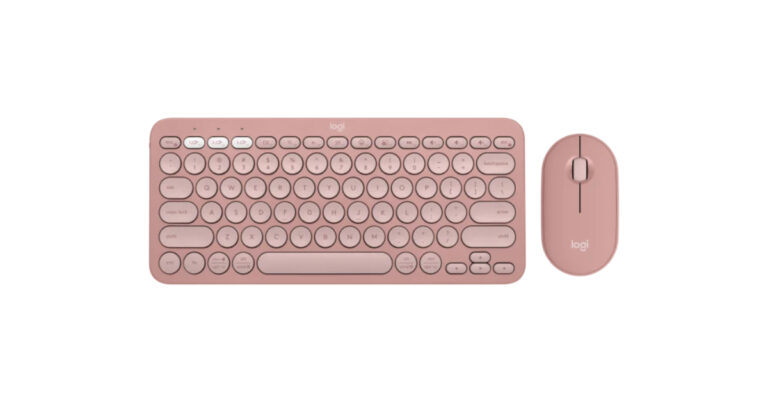
In the Indian market, Logitech has announced the launch of its brand-new Pebble 2 Collection, which includes the company’s renowned keyboard and mouse. The Pebble Keys 2 K380s and Pebble Mouse 2 M350s are part of Logitech’s new Pebble 2 Combo. Both products are constructed of recyclable plastic and will be offered in a variety of colours. The Pebble Mouse 2 M350s boasts a long battery life and includes programmable buttons. The Pebble Keys 2 K380s, on the other hand, has circular keys and FN keys that can be customised.Also Read:WhatsApp Channels now rolling out to 150 nations including IndiaIn India, the Logitech Pebble 2 Collection has debuted. The package includes three different keyboard configurations the Pebble Keys 2 K380s, or the Pebble Mouse 2 M350s. Additionally, purchase the Pebble 2 Combo, which comes with both items, to save money.Priced separately at Rs 5,995, Rs 4,195, and Rs 2,295 are the Pebble 2 Combo, Pebble Keys 2 K380s, and Pebble Mouse 2 M350s from the collection. There is also a specific Pebble 2 Combo for Mac.Pebble Keys 2 K380sTonal Graphite, Tonal White, and Tonal Rose are the three colours available for this collection, which is constructed from at least 49% recycled plastic. You can switch between devices at the push of a button, work, browse, and talk as you like with this ultra-portable pair. Round keys, a laptop-like typing experience, and comfortable and joyful typing are all features of the Pebble Keys 2 K380s.To save time and accomplish more, use the Fn hotkeys to rapidly access the search, screenshot, emoji menu, and many other features. You can also personalise the 10 Fn keys with the Logi Options+ App, such as by having the most often used applications open instantly as per the company.Pebble Mouse 2 M350sOn the other hand, Pebble Mouse 2 M350s is the most portable mouse available. It is round like a pebble and has a thin, light design that fits well in your hand. Thanks to Silent Touch technology, 90% of click noise is eliminated. With the Logi Options+ App, users may personalise the middle mouse button to perform common tasks like showing or hiding the desktop, taking screenshots, and more, or to create shortcuts to their favourite programmes like WhatsApp or Spotify.
For the latest gadget and tech news, and gadget reviews, follow us on Twitter, Facebook and Instagram. For newest tech & gadget videos subscribe to our YouTube Channel. You can also stay up to date using the Gadget Bridge Android App. You can find the latest car and bike news here.
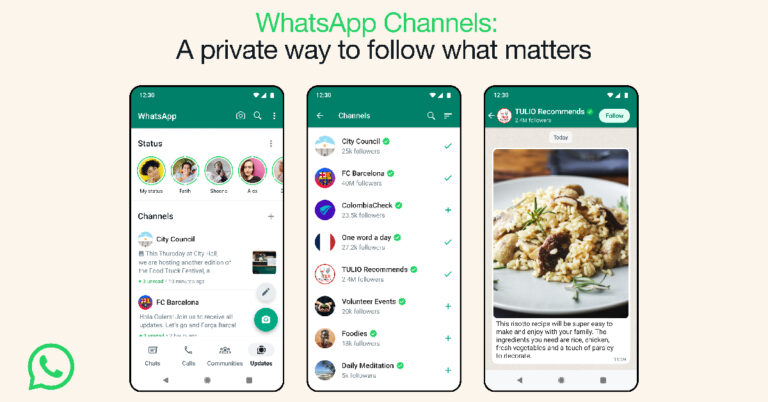
WhatsApp has been on a feature rollout spree this year. After launching screen sharing and video messaging features on the platform, the messenger now allows users to join and create channels. Users can now create a channel to broadcast important updates to their audience. Once you join a channel, your contact information is kept hidden from other channel members. The communication in a WhatsApp Channel is strictly one-way, which means that the members cannot contribute to the discussion at all. However, they can react to the updates using emojis. In this article, we show you how to create a WhatsApp Channel and share it with other people.Read Also: How to copy unselectable text from apps on Android?
Create your WhatsApp Channel
Step 1:Launch the WhatsApp app on your phone and switch to the Updates tab.Step 2: Tap the plus sign and select New Channel.Step 3: Tap on Get Started.Step 4:Name your channel. Make sure it is within the character limit. The Channel name can be changed later.Step 5: Add a description and icon for the Channel. You can choose to do this later as well.Step 6: Tap on Create Channel.Your WhatsApp Channel will be created!
Share your WhatsApp Channel
If you want to share your WhatsApp Channel with your friends on other social media platforms, you can simply copy the link to the channel and post it in the appropriate place. Here’s how you can access and copy your WhatsApp Channel’s link.Step 1: Tap the Channels icon.Step 2: Tap your channel name.Step 3: Tap on Copy Link.
Frequently Asked Questions (FAQs)
How do I get Channels on WhatsApp?
You can access your subscribed channels on WhatsApp by switching to the Updates tab in the app. If you don’t see the Updates tab on WhatsApp, update the app and try again. Since this feature is being rolled out in a phased manner, it may take some time for it to be made available on your device.
What are WhatsApp Channels?
Channels are a way for people to communicate with their audience. You can broadcast important updates using a channel. Communication on a channel is strictly one-way. People subscribed to the channel can react to the updates but not contribute to them.
After being banned for nearly ten months, Battleground Mobile India, aka BGMI, is officially available again in India. BGMI fans are looking for ways to improve their game experience and one such method is the usage of redemption codes, which offers a variety of rewards and advantages using BGMI redeem codes players can gain access to new skins, outfits, loot crates, weapons and free UC and diamonds.As mentioned earlier, these codes give users the chance to earn unique rewards and gain extra benefits while playing the game. This includes GUN SKINS (M4, AKM, M416, AWM, M24, UZI, KAR98K), free character voucher, Andy, Carlo, Sara, Victor character for free, free Anna Character on completing the mission and UC or Royal Pass Discount. So here we have gathered a list of the most recent BGMI redeem codes as of 15 September 2023. Also, redeem these codes asap as these are only valid for a limited duration.
Garena Free Fire is a battle royale game with regular awards and tournaments to keep players interested. If you play Garena Free Fire, you should be aware of the redeem codes that are released on a daily basis. However, because the battle royale game is banned in India, players from other countries can use the Free Fire Redeem codes daily. If you’re unfamiliar with the Garena Free Fire redeem codes or don’t know how to get them, we’ve put together a step-by-step guide to help you redeem them. Check out Garena Free Fire Redeem Codes for 15 September 2023.The Free Fire redeem codes are a great way to get free stuff. These are 12-digit codes that contain alphabets and numbers, as well as an expiration date and time. Because the Garena FF redeem codes cannot be used more than once, you should hurry to the redemption page to claim your free reward before someone else does. To get a free reward, all you have to do is go to reward.ff.garena.com/en, which is the official redemption page. Also, keep an eye on this space for daily updates on Garena Free Fire redemption codes and rewards.
Garena Free Fire Redeem Codes Today 15 September2023
F767-T1BE-456Y
FFCM-CPSJ-99S3
BR43-FMAP-YEZZ
XZJZ-E25W-EFJJ
V427-K98R-UCHZ
MCPW-2D1U-3XA3
FF7M-J31C-XKRG
FFPO-8BS5-JW2D
PJNF-5CQB-AJLK
F7AC-2YXE-6RF2
FHLO-YFDH-E34G
FFCM-CPSE-N5MX
HNC9-5435-FAGJ
6KWM-FJVM-QQYG
MCPW-3D28-VZD6
EYH2-W3XK-8UPG
XGW4-FNK7-ATON
FEIC-JGW9-NKYT
KEYV-GQC3-CT8Q
FVRT-NJ45-IT8U
F4BH-K6LY-OU9I
FFAC-2YXE-6RF2
FFCM-CPSB-N9CU
NPYF-ATT3-HGSQ
FFCM-CPSG-C9XZ
MCPW-2D2W-KWF2
ZZZ7-6NT3-PDSH
How to Get Free Fire Redeem Codes for Garena on 1 September2023?










 Step 2: Tap the hamburger menu icon in the top right corner of the screen.
 Step 3: Tap on Content preferences.
Step 4: Select Reset suggested content.
Step 3: Tap on Content preferences.
Step 4: Select Reset suggested content.
 Step 5: Hit Next on the popup page.
 Step 6: Hit Reset suggested content.
 Step 2:
 Step 3:
 Step 4:
 Step 3:
 Step 4:
 Step 5:
 Step 5:
 Step 2:
 Step 3:
 Step 4: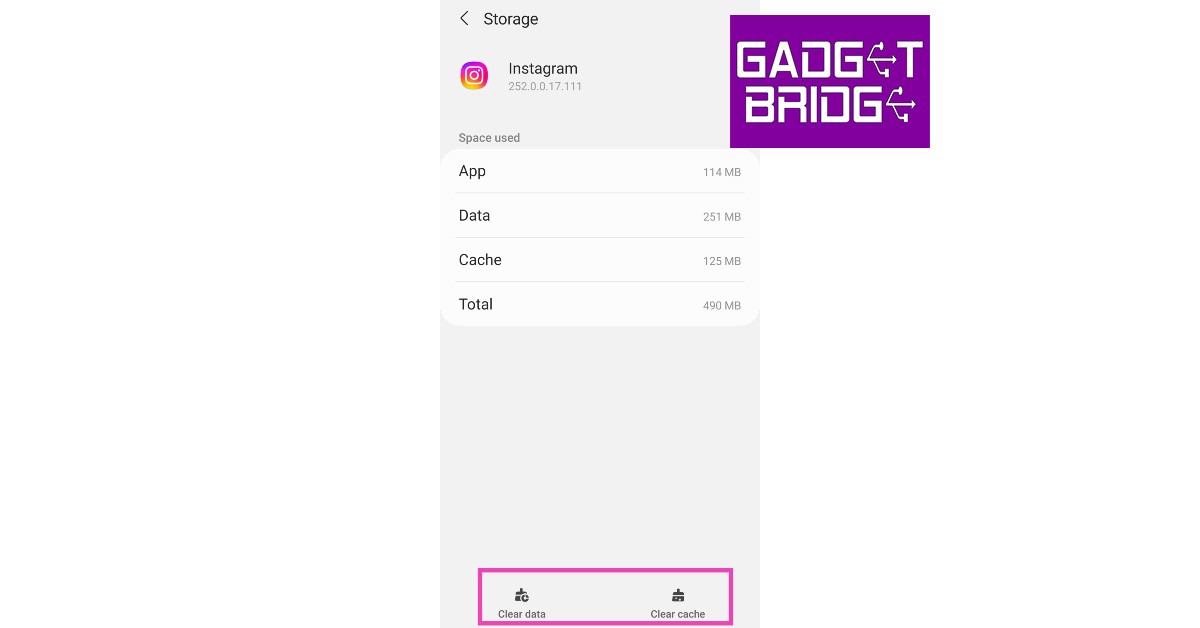


 Step 1: Launch