OnePlus Nord 4 Review: Bang For Your Buck

The new Nord 4 by OnePlus was just released in the mid-range segment. For the price range, this mobile has pretty nice hardware. One of the device’s best features is its design along with a better OS update cycle, a larger battery, and a quick charging time. Therefore, considering the hardware it delivers, this is a rather nice package. However, in terms of experience, does it truly end up being a decent package? Let’s find out in this detailed OnePlus Nord 4 review.

OnePlus Nord 4 Review: Design and Display

The retail box ships the following:

  • The phone itself
  • A charging brick
  • A USB Type-A to USB Type-C Red Cable
  • A translucent TPU cover
  • Quick Start Guide
  • SIM tool

OnePlus Nord 4 Review: Design and Display

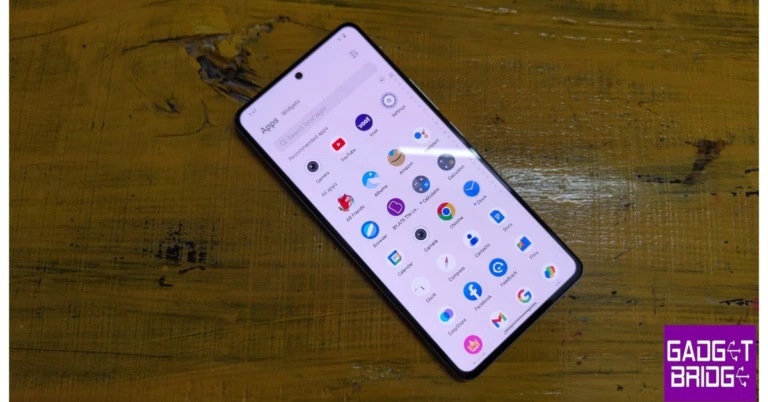
Right off the bat, the OnePlus Nord 4’s design has wowed us. Simply put, the phone’s metal design is gorgeous. It has been a very long time since we have seen or used a metal phone in this price bracket, and now that we have, it feels so nice. It is just a premium mobile handset. 

Alright, so the Nord 4 has an all-metal unibody design, which implies that the back panel and frame are seamlessly integrated into a single piece of aluminium metal. The smartphone is incredibly smooth to the touch and hold. 

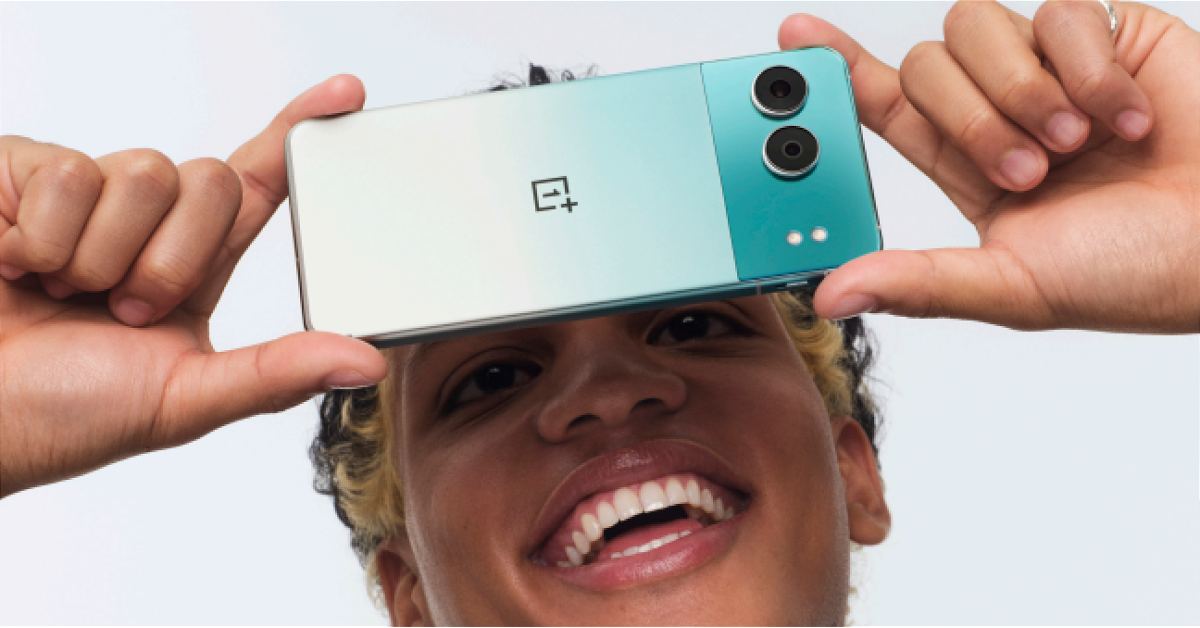
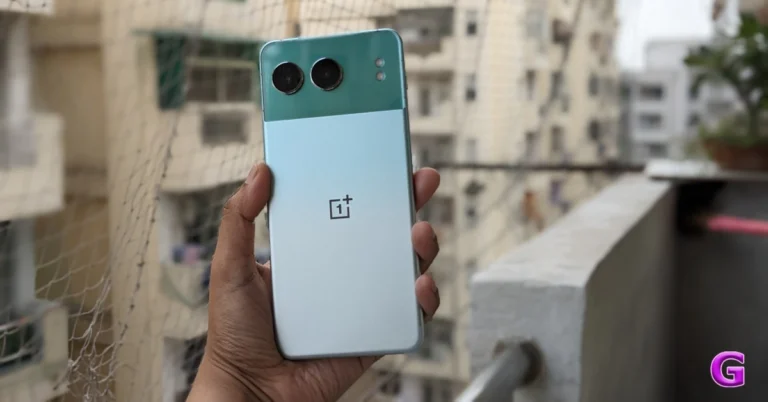
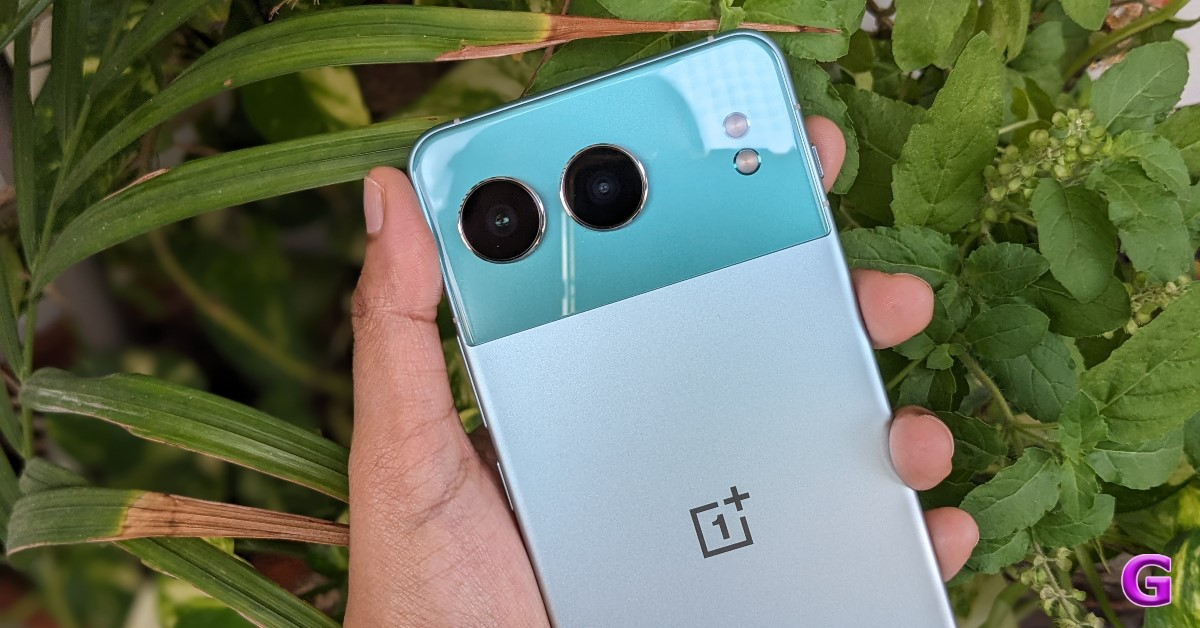
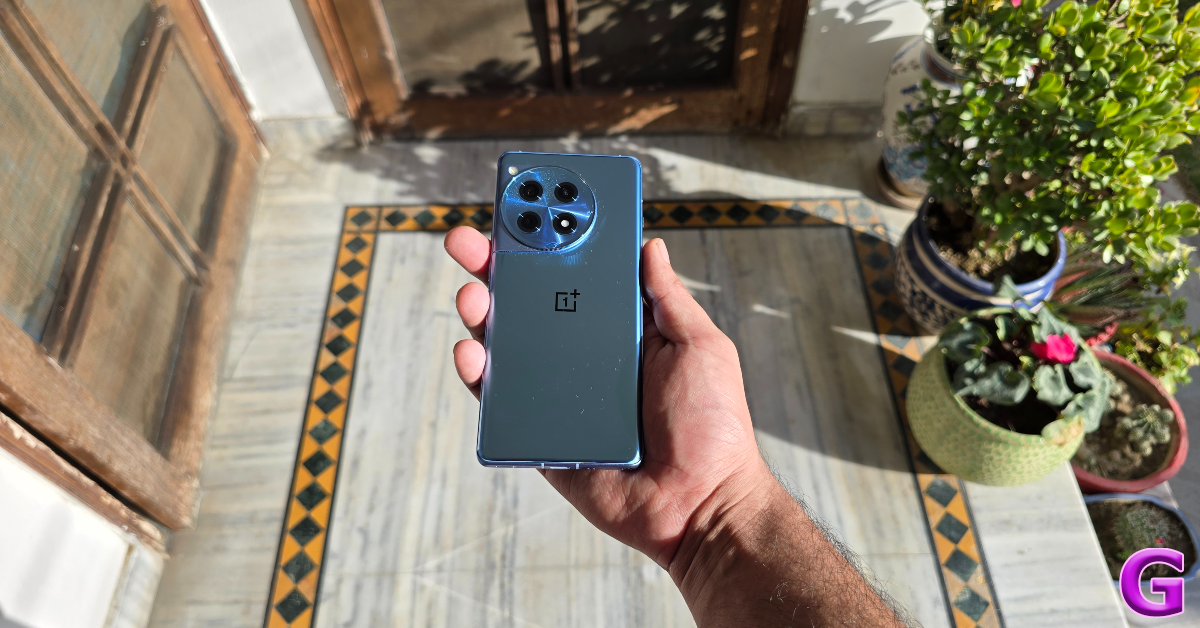
The device has a rear panel with a dual-tone design; however, the company offers three distinct designs that they refer to as Nordtones. We were sent the special edition Oasis Green colour variant to review. This striking two-tone colour scheme is sure to draw your attention because of its vivid appearance.


Obsidian Midnight and Mercurial Silver are the other two shades. We thought the latter one, with its dual-pattern design and 2D laser-etched design moulded from more than 28,000 nano-laser cuts, was the most beautiful.

Also Read: Samsung Galaxy Z Fold 6 Review: Unfolding The Future, One Upgrade At A Time

The green version features bevelled edges in addition to flat sides and a fully flat back surface. With a revised camera arrangement, all three finishes highlight the new design language. OnePlus Nord 4  features two horizontally aligned cameras with LED flash modules positioned on the same plane but at a distance. The camera island has a smooth, glass-like glossy texture, whereas the lower half has a pastel-green appearance.

In addition, the manufacturer added two antenna lines on all four edges of the handset to ensure that the signal is not compromised. Earlier phones, in 3G and 4G brackets, had lower signal requirements; thus, using metal was pointless due to signal loss. Now that 5G is available, there is a greater demand for improved signals.
OnePlus Nord 4 Review: Design and Display

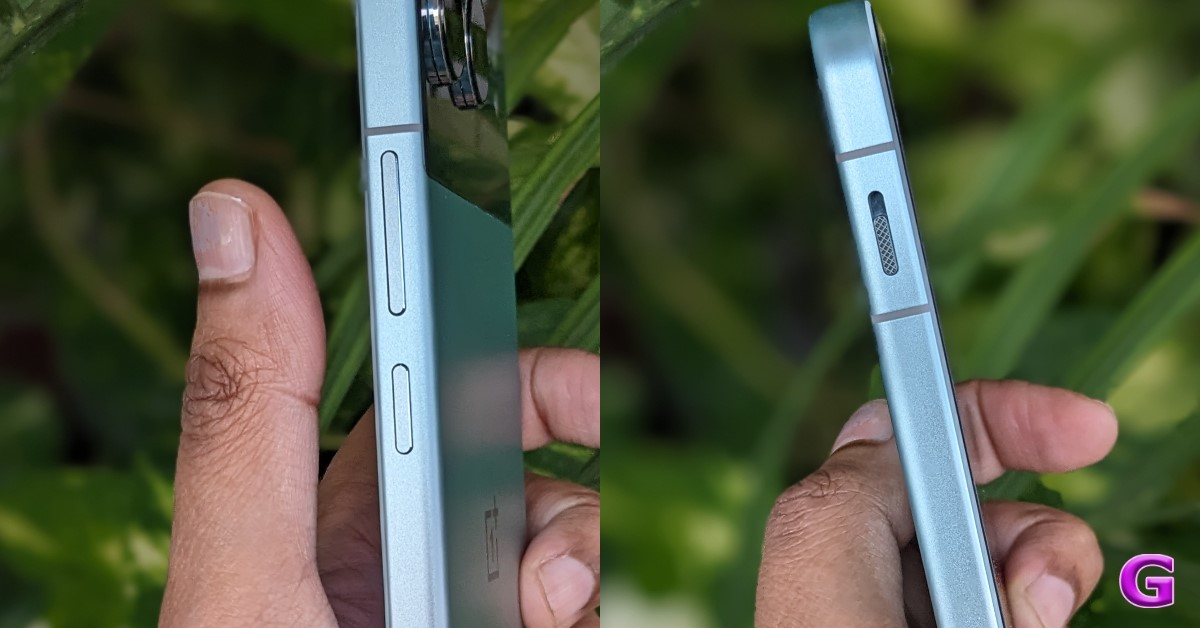
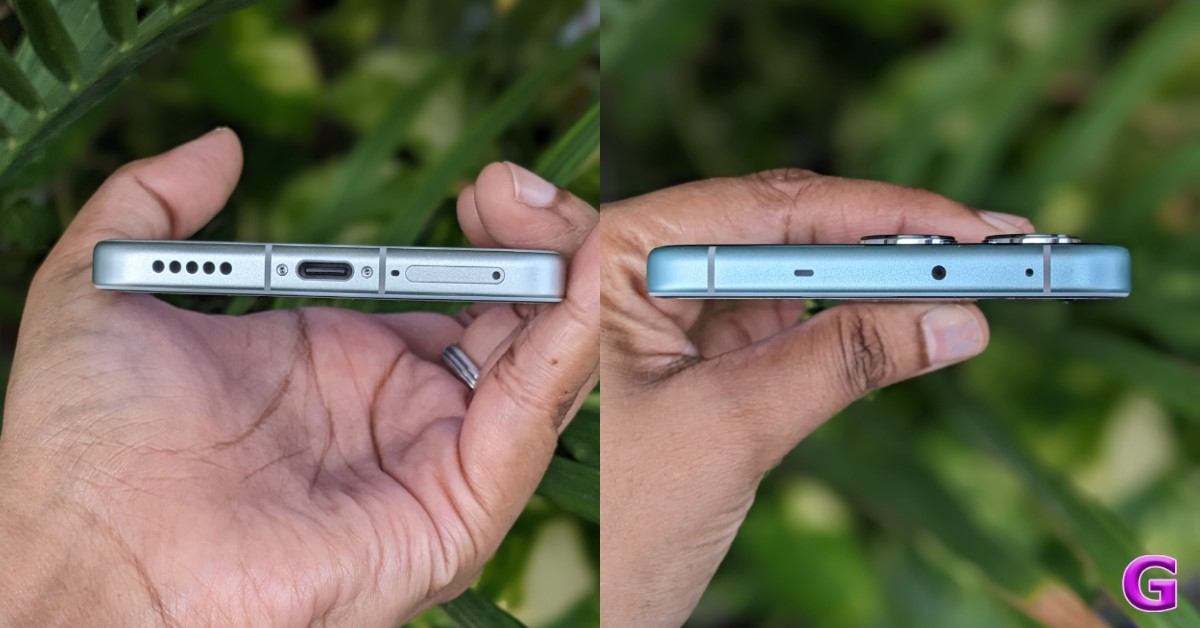
On the left side of the frame, a three-stage alert slider switch is also present, carrying over from its inclusion in premium (non-CE) Nord smartphones. It offers three modes: ring, silent, and vibrate. The controls for power and volume are located on the right side. A microphone and an infrared (IR) transmitter are positioned at the upper edge of the Nord 4. The phone features a USB Type-C connector and a speaker grille and microphone at the bottom.
OnePlus Nord 4 Review: Design and Display

Additionally, the buttons on the sides provide excellent tactile feedback. Over that, the bezels are kept very slim. 

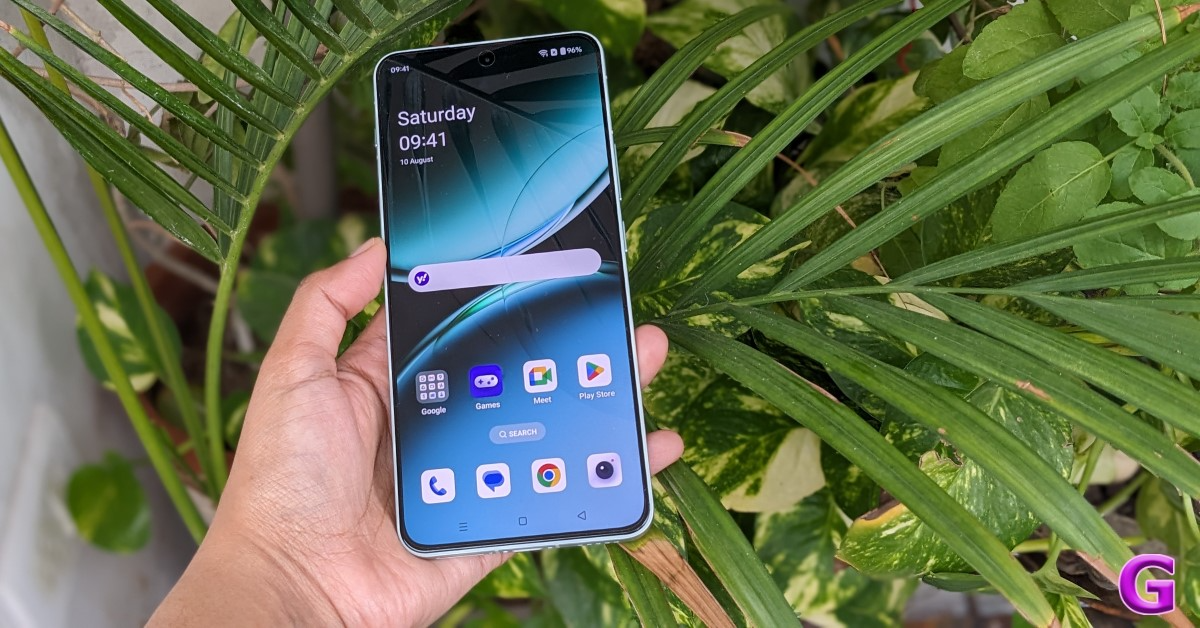
A 6.74-inch Super Fluid AMOLED screen with support for Ultra HDR and a pixel resolution of 2,772 x 1,240 pixels is available on the OnePlus Nord 4. The display is incredibly bright for this price range, supporting a peak brightness of 2,150 nits and a refresh rate of up to 120 Hz. With the help of AquaTouch technology, you can use your phone even if the screen is wet.
OnePlus Nord 4 Review: Design and Display

Additionally, ProXDR technology (which debuted on the OnePlus 12 Series) is present in the display. Its task is to analyse the photos and videos in your gallery and make the necessary brightness and clarity adjustments to present them in the best possible light in any setting you choose. 

However, the fingerprint scanner situated at the bottom would certainly work better if it were positioned a little higher. The screen has excellent haptic feedback. Additionally, this has really good touch responsiveness. The display appears to be of good quality overall; the colours are vibrant. The multimedia experience seemed rather good, too. The hues are vibrant in 4K videos, so you’ll love watching OTT and YT shows on this one.

The screen looks excellent even in bright daylight. This phone has improved audio quality as well, and we enjoyed watching movies and series on it a lot. But we think there’s still room for audio quality enhancement, especially in the bass and treble departments. But coming to think of it, you won’t likely have many issues if you’re not an audiophile.

Also Read: OnePlus Nord CE4 Lite Review: Can it hang with the best in its category?

OnePlus Nord 4 Review: Performance and Cameras

On to the performance. Qualcomm Snapdragon 7+ Gen 3 CPU, coupled with up to 16GB of LPDDR5X RAM and up to 512GB of UFS 4.0 storage, powers the OnePlus Nord 4. The phone will come with 256GB or 512GB of storage and 8, 12, or 16GB of RAM.
The mid-range chipset, the Snapdragon 7+ Gen 3, is incredibly potent. In terms of the performance experience, this has been excellent. 

We are particularly impressed with OnePlus’s attention to detail. For example, there is soft vibration feedback that generates a unique sensation when you browse through the multitasking tiles. Everything seems to work well, and typing is precise enough.

All of us are aware of how well metal conducts heat. It is therefore reasonable to anticipate a heating problem, even during long gaming sessions like Asphalt. The smartphone, for instance, becomes rather hot after a half hour of gaming, but because of its metal construction, it cools down fast, too. During our tests, all of the games worked fine; the screen warmed up naturally, but there was no throttling while playing. The frame rates were constant as well.

Also Read: Samsung Galaxy Z Flip 6 Review: Foldable with AI Features? What a fantastic combo!

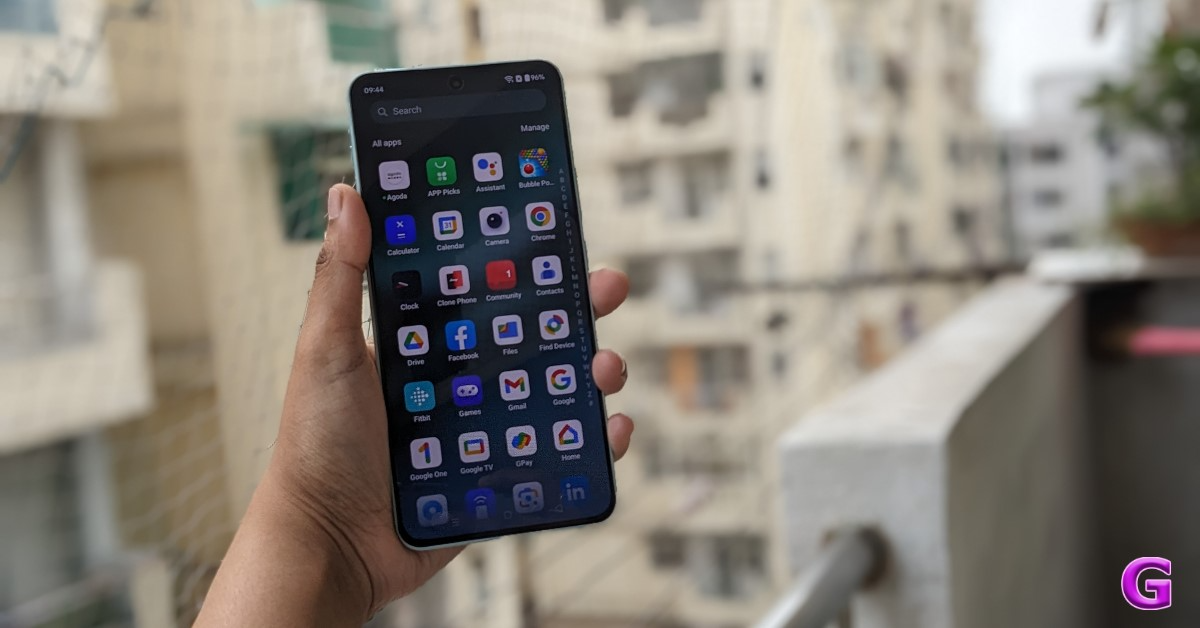
The phone runs Android 14, topped with OxygenOS 14.1. The Nord 4 will receive four years of Android upgrades and six years of security patch updates, according to OnePlus. Guaranteeing that the phone will be compatible with Android releases up to Android 18. Given that you are gaining almost five years of updates with software on average, this is undoubtedly one of its strongest features. So that’s one good thing.
OnePlus Nord 4 Review: Design and Display

Except for a few bundled pre-installed apps that should have been avoided, the software experience on this OnePlus Phone continues to be the same. Overall, it is a rather clean experience. Nevertheless, you can tidy up the UI and eliminate these applications by uninstalling them. Aside from that, you have all the usual option playthroughs and animations, which elevate the software experience to a whole new level. 

Overall, the user experience is good. The way apps expand when you open and close them, the quality of the animations, and the fact that there haven’t been any problems with widget scaling thus far, all work for OnePlus.

In addition, the Nord 4 has AI capabilities that we tested, such as AI speak, which you can enable from the sidebar. Assuming you are reading an article, you can instruct AI to read it from start to finish, but there’s a catch: it reads the entire website. The problem is that it reads the entire webpage without knowing which section to focus on. In other words, time is wasted as a result, making it less useful. However, there is a workaround: users may select which specific passage needs to be read on the OnePlus Nord 4. Also, it is able to read in Hindi too.

An AI summary is available in the sidebar below the AI Speak option, and it functions effectively. Similarly, you get a tool called AI Recording Summary inside the voice recording app. Provided you have recorded something, it does more than just translate it—it also summarises it.

Additionally, AI Perfect Shot features like AI Best Face and AI Clear Face are available in Nord 4. The way that these two functions function is that, for instance, if you take a group selfie, your squad’s eyes can be adjusted just after the photo is taken. It will sharpen someone’s blurry face and eliminate blinking and looking off-camera.

With the aid of artificial intelligence, the AI Eraser functions flawlessly and can eliminate undesired objects in any image.
OnePlus Nord 4 Review: Design and Display

The brand has supplied a dual rear camera arrangement for images and videos, comprising a 50-megapixel Sony LYT 600 primary sensor with optical image stabilisation (OIS) and electronic image stabilisation (EIS) with f/1.8 aperture, as well as a 112-degree 8-megapixel ultra-wide lens. The primary camera can now record in 4K at both 60 and 30 frames per second. It boasts a 16-megapixel front-facing camera with an aperture of f/2.0. So let’s see how wonderful the camera experience is at this price range.

OnePlus Nord 4 Review: Design and Display

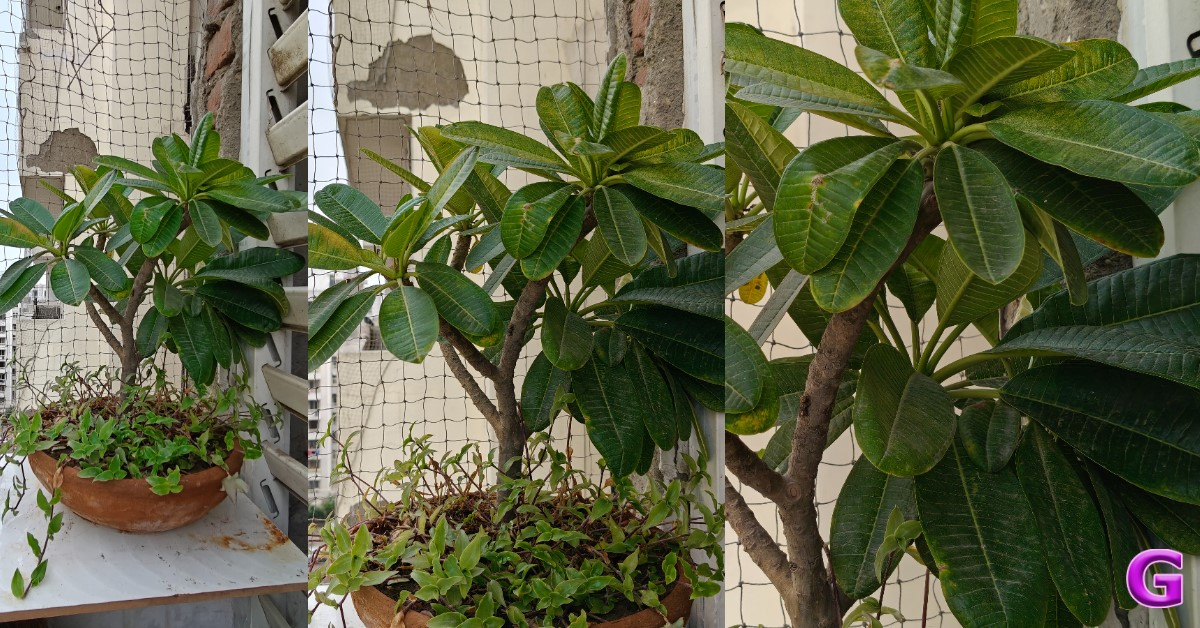
Looking at the daylight images, you can see that there are a lot of details on offer. The dynamic range is particularly impressive, and the colours are done quite well, despite being slightly deeper in tone but not saturated. They look beautiful, and the sky colours and HDR rendering are quite good. 

However, the shadows are occasionally crushed, which is not a serious worry. Overall, we believe the details and sharpness levels are adequate, even when zoomed in on the image. So, owing to the Sony sensor, the daytime images appear great.

OnePlus Nord 4 Review: Design and Display

We did not notice any serious problems, and the overall quality appears good even though the primary sensor is less powerful than the previous model.

Now let’s talk about the ultra-wide sensor. The details and sharpness levels are fairly acceptable, and the colours are pretty close to the primary camera, but the shooter is, in our opinion, kind of average. Thus, even though the ultra-wide-angle camera’s sharpness isn’t very great right now, you can still use it occasionally.
OnePlus Nord 4 Review: Design and Display

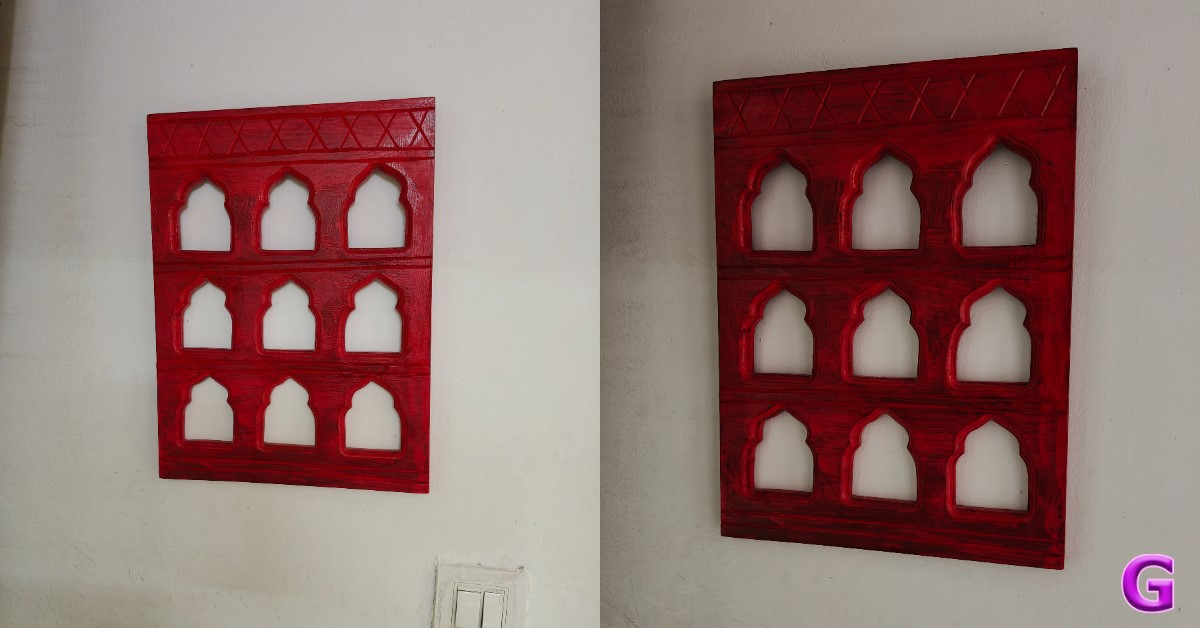
Let’s move on to the close-up images. The OnePlus Nord 4 does a great job of capturing details and sharpness levels here, maintaining saturation concerns, and achieving excellent colour reproduction. All things considered, we think the background blur appears accurate and pleasing when shooting up close.

Both 1x and 2x zoom are available for taking portraits; the 2x zoom is simply the in-sensor zoom and is not telephoto. The two photographs appear excellent; the skin tones are executed quite skilfully, the dynamic range is appealing, and the edge detection is pleasing. We found the portrait images to be very appealing. Regarding the portraits, what are your thoughts? Tell us in the comments below.

OnePlus Nord 4 Review: Design and Display

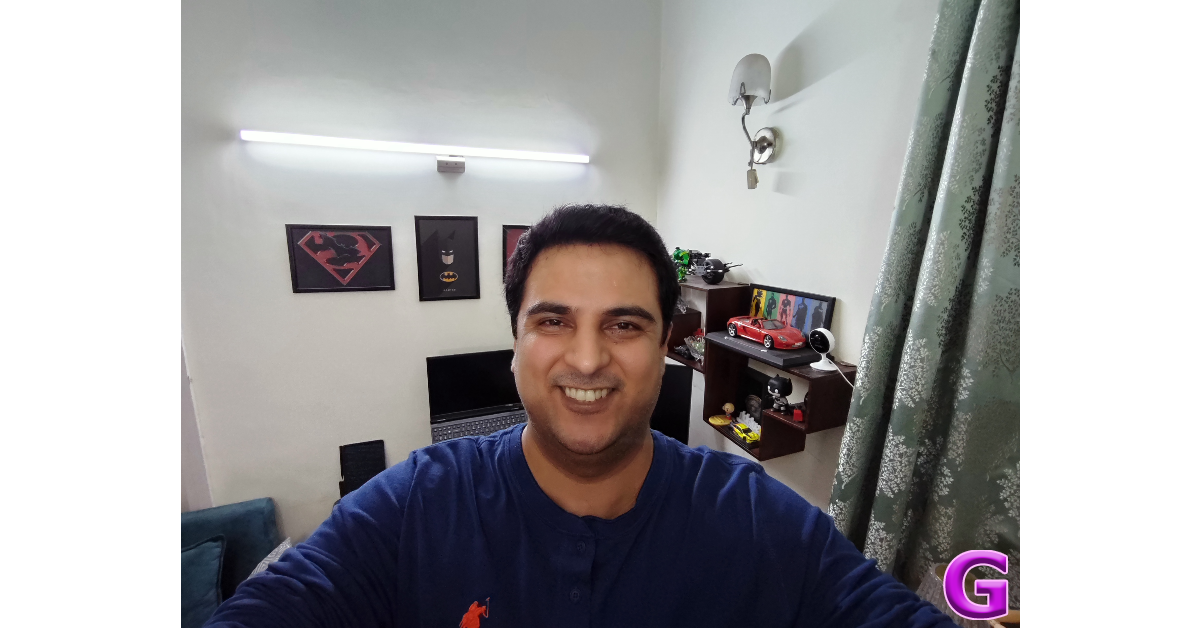
You can see that the OnePlus Nord 4 performs a fantastic job with OIS available in low light. Both the dynamic range and the details are nicely rendered. There is a good deal of detail, even in very low light, and the sky colours are done fairly nicely. Noise reduction is done fairly effectively, and there is very little noise in the low-light photos. When it comes to selfies, the 16-megapixel camera can produce some great shots. Both the skin tones and the colour scheme are done very proficiently. Although there is sometimes a reddish tone to the skin, this is not a serious issue. The self-portraits turned out pretty well. Edge detection is still well implemented, despite its imperfections. The selfies taken in low light also ended up being really good.
OnePlus Nord 4 Review: Design and Display

The phone can capture videos at 60 frames per second in 4K. It appears good and maintains the dynamic range and details. Additionally, the colours are done fairly well. You don’t have to be concerned about unsteady videos because there is an OIS and EIS combo. The 4K 30 frames per second video footage has excellent clarity and comparable details. The results from the 1080p, 30 and 60 frames per second footage are almost identical. For those seeking a phone in this budget range with a decent camera for capturing videos, the OnePlus Nord 4 is unquestionably a worthy option.

With its ultra-wide-angle camera, the device can capture videos in 1080p resolution, which is quite average and has decent detail. Moreover, 1080p selfie videos with stabilisation enabled can be captured.

Also Read: OnePlus Nord CE4 Lite Review: Can it hang with the best in its category?

Thus, this is the OnePlus Nord 4’s detailed camera performance.

Finally coming to endurance. As per the firm, the OnePlus Nord 4 can charge from 1% to 100% in just 28 minutes with its 5,500mAh battery that supports 100W SUPERVOOC fast charging.

The device’s battery life was good during our testing, and it took about 30 minutes to charge fully. The Nord 4 offers excellent battery life, with over 8 to 9 hours of (continuous) screen time. On average daily use, it should last you a or slightly more.

Verdict

With its mid-range Nord series in India, OnePlus has been able to strike a balance between design and functionality. To keep the phone at a competitive price, the firm has always scaled back on design and cameras; however, the most recent Nord 4 model has jarred this balance.
OnePlus Nord 4 Review: Design and Display

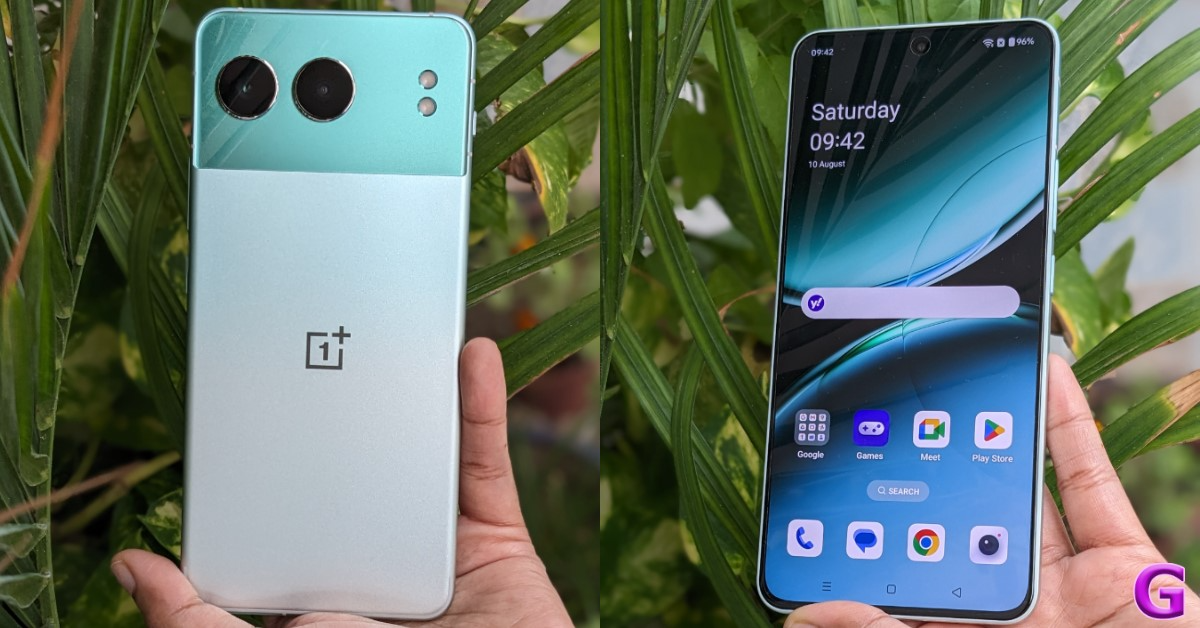
Due to its all-metal body, this phone’s design has proven to be its most notable feature. We haven’t seen a metal body in this price range for a very long time. Even in high-end flagship smartphones, glass finishes are the norm; nevertheless, this is a nice shift as the chassis is made entirely of metal. It has a dual-tone finish and a fairly attractive appearance, with curved corners. The rear panel is also quite nice.

It boasts one of the best displays available at this price. Therefore, we have no issues regarding the display, even with regular usage and media consumption.

How good is the camera on the Nord 4?

Particularly with the 16-megapixel selfie camera and the primary 50-megapixel Sony sensor, we think this is a rather impressive camera. Both sensors performed wonderfully, particularly in terms of taking pictures in low light and during the day. Additionally, the video recording performed fairly well. Actually, this is one of the better cameras in this price range, with respectable recording quality. However, the 8-megapixel camera is mediocre at best.

In a group shot with three or more people, you can use the AI Best Face and AI Clear Face to instantly fix any blinking.
Its user interface is quite tidy, except for a few pre-installed apps. Since we’ve been using this phone for around three to four weeks, there haven’t been any glitches, problems, or crashes, and the performance has also been rather good. This is an excellent deal because it can be your partner for a very long time thanks to the four-year software upgrade.

With a price tag under Rs 30,000 and excellent overall performance, it is highly recommended. We were quite fond of this phone, particularly its metal construction. This is what we think. What are your thoughts, guys?

Buy Here

OnePlus Nord 4 Pros

  • Flawless design and metal build
  • Snappy
  • Quick charging
  • Getting a fast charger in the box
  • Four years of software upgrades
  • Excellent cameras

OnePlus Nord 4 Cons

  • Bloatware
  • ultra-wide-angle camera is not the best

Amazon Quiz Answers Today 12 August 2024: Participate to win Rs 500 Amazon Pay Balance

12 August 2024: New Amazon Quiz is now available. Customers from different parts of the country are participating in the daily quiz. The quiz starts at midnight today and will be live until 11:59 PM tonight. By successfully answering every question, participants in the quiz have the chance to win wonderful rewards. A Rs 500 Amazon Pay Balance is up for grabs to participants today.

One wrong answer could eliminate you from the quiz. You have a chance to win Rs 500 Amazon Pay Balance if you successfully answer every question. Users of the app only have the opportunity to take the quiz. Check Out 12 August 2024 Amazon Quiz Answers.

Amazon Quiz Today Prize: Rs 500 Amazon Pay Balance

Quiz Date: 12 August 2024

Daily Timing: 12 AM to 11:59 PM

Previous Amazon Quiz Winners Announcement: Today 12 PM Noon

Amazon Quiz Answers Today 12 August 2024: Win ₹ 500 Amazon Pay Balance

Question 1: Who has been elected unopposed as the new president of the New Development Bank in 2023?

Answer: Dilma Rousseff

Question 2: Adani Group acquired the Karaikal Port in which Union Territory for Rs 1,485 crores?

Answer: Puducherry

Question 3: India’s first semi-high-speed regional rail service is named what?

Answer: RapidX

Question 4: Which species of this animal has the widest range of all non-human primates?

Answer: Rhesus Macaque

Question 5: The phenomenon of El Nino affects which ocean?

Answer: Pacific

Also Read: Noise Buds Verve, budget TWS with up to 45 hours of playback launched in India

How To Play Amazon Quiz Today

Only app users are eligible to play the Amazon quiz every morning from 12 AM to 11:59 PM. The quiz is not available on the desktop. For those who are unaware of how to play the Amazon quiz, below are the steps, you can follow to take the quiz.

  • First, download the Amazon app from the Google Play Store or App Store or go here to download the Amazon App
  • Now fill in the required information through the Sign-Up option.
  • You need to log in to the Amazon app and scroll down on the home screen to find the Amazon Quiz banner.
  • Tap on the Amazon Quiz banner and tap on the Start button to start the Quiz.
  • Now you will get 5 questions and you need to answer them correctly. One wrong answer will eliminate you from the Quiz.
  • After answering all the questions correctly you are now eligible for a Lucky Draw.
  • The previous winner’s name will be announced today at 12 PM.

Amazon Daily Quiz Answers from the previous few days.

Here are all the answers from the previous 5 days of the Amazon Daily Quiz and Contest.

Amazon Quiz Answers Today 8 August 2024: Win ₹ 500 Amazon Pay Balance

Question 1: Which of these batters scored a century during India’s recent 5-match T20I series against Zimbabwe?

Answer: Abhishek Sharma

Question 2: In May 2025. the ___ edition of the Mission Impossible movie franchise is going to be released. Fill in the blanks

Answer: 8th

Question 3: In which present-day Indian state was the Battle of Buxar, which saw the East India Company emerge victorious fought?

Answer: Bihar

Question 4: This is a view of the City Palace in which Indian city?

Answer: Jaipur

Question 5: Valletta is the capital of which country, whose flag is shown here?

Answer: Malta

Amazon Quiz Answers Today 7 August 2024: Win ₹ 500 Amazon Pay Balance

Question 1: Which of these sportspeople would be one of the flagbearers for the USA at the 2024 Paris Olympics?

Answer: Coco Gauff

Question 2: The upcoming Bollywood movie ‘Deva’ stars Pooja Hegde along with which famous actor?

Answer: Shahid Kapoor

Question 3: Alcazar, Exter, Palisade and Tucson are car models from which brand?

Answer:  Hyundai

Question 4: This is a statue of which saint in Belfast, is associated with a day that is a holiday in some places?

Answer:  St Patrick

Question 5: What is the musical instrument shown here?

Answer: Pan flute

Amazon Quiz Answers Today 6 August 2024: Win ₹ 500 Amazon Pay Balance

Question 1: What is the name of the mascot of the 2024 Paris Olympics?

Answer: phryge

Question 2: Who is playing the character of Harley Quinn in the movie ‘Joker: Folie a Deux/ Joker 2’?

Answer: Lady Gaga

Question 3: Who succeeded the 19th Mughal emperor Akbar Shah II to the throne?

Answer: Bahadur shah zafar

Question 4: Which Nobel laureate is shown here?

Answer: Marie Curie

Question 5: The flag of which country is shown here?

Answer: Armenia

Amazon Quiz Answers Today 5 August 2024: Win ₹ 500 Amazon Pay Balance

Question 1: Who was the top scorer for India in the T20 World Cup final 2024?

Answer: Virat Kohli

Question 2: The Last Dance’ is the tagline of the 3rd of a series of movies with whom as the central character?

Answer: Venom

Question 3: British Shorthair, Ragdoll and Abyssinian are types of what animal?

Answer:  Cat

Question 4: Which famous place in the UK is shown here?

Answer:  Trafalgar Square

Question 5: Which famous person is depicted in this statue?

Answer: Napoleon Bonaparte

Amazon Quiz Answers Today 4 August 2024: Win ₹ 500 Amazon Pay Balance

Question 1: Who beat Novak Djokovic in the final to win his 2nd consecutive Wimbledon men’s singles title?

Answer: Carlos Alcaraz

Question 2: In ‘Captain America” Brave New World’ scheduled to be released in 2025, which legendary actor plays the role of Thaddeus ‘Thunderbolt’ Ross?

Answer: Harrison Ford

Question 3: Which place in South India is also known as the ‘Scotland of India’?

Answer: Coorg

Question 4: This is a picture taken in which African country?

Answer: Morocco

Question 5: This is Bletchley Park, the main centre of Allied code-breaking during World War II. Who among these was part of the team of codebreakers? What is the name given to the profession of the man in the picture?

Answer: Gondoliere

Amazon Quiz Answers Frequently Asked Questions (FAQs)

Where can I check the previous winners? Did I win how to check?

You can head over to this link on your mobile or desktop to check the winners of the Amazon Daily Quiz Contest.

How to Play Amazon Daily Quiz or Contest?

We have written an explainer above, you can refer to that.

When are the winners of the Amazon Quiz and contest announced or declared?

The announcement of today’s Amazon quiz winner will take place Tomorrow. As for the Special Quiz and “Spin & Win” Contest, the winners will be declared once the Quiz Contest comes to an end. To find out who the lucky winner is, you can refer to the Amazon Quiz Winners List or visit the Amazon Winners tab in the Amazon App.

How to participate in the Daily Amazon Quiz?

That is very easy, just got to the Amazon app and scroll to the bottom of the page and you will find the Quiz section. Click on it (usually it is called the fun zone) and you can enter the Amazon Today Quiz Contest. 

Are there any other quizzes or contests running on Amazon daily?

Yes, there are many running on a daily basis. These range from spinning the wheel to answering the questions correctly. All are located in the Fun Zone. 

What are the criteria for selecting a winner in the Daily Amazon Quiz?

When a qualified player submits correct answers to all the questions, they will automatically be entered into a lucky draw. This draw will include all participants who answered all the questions correctly. Amazon randomly selects the final winners from the pool of eligible participants who gave the right answers.

Which Types of Questions are asked within Amazon Daily Quiz?

These are very simple and straightforward questions. These are mainly related to general knowledge. 

Where should I look for Amazon Daily Quiz answers?

You can bookmark this page as we will help you every day with the Amazon Daily Quiz. We bring you fresh answers every day for the Amazon Daily Quiz and Contest. 

What time does Amazon Announce previous winners?

The previous winner’s name will be announced today at 12 PM (noon).

For the latest gadget and tech news, and gadget reviews, follow us on TwitterFacebook and Instagram. For newest tech & gadget videos subscribe to our YouTube Channel. You can also stay up to date using the Gadget Bridge Android App. You can find the latest car and bike news here.

2 ways to remove the screen rotation icon on your Android phone (2024)

0

One of the most annoying experiences while using an Android phone is hitting the screen rotate icon on the navigation that pops up as soon as you tilt your phone. You may have encountered this situation when you’re lying down on your bed and browsing on your phone. This icon cannot be moved from its position. However, it can be disabled. Here are the top 2 ways to remove or disable the screen rotation icon from the navigation bar of your Android phone.

Read Also: Top 6 ways to fix the ‘Not Registered on Network’ error on Samsung Galaxy phones (2024)

Before you begin

Samsung is the only Android OEM that offers a native option to remove the screen rotation icon. If you own a different phone, you will need to take some additional steps. This includes installing the ADB package on your PC and running a command that removes the icon for good.

If you don’t want to go the ADB route, your only option is to wait for Android to add an option to remove the icon in a future update. If this option isn’t available on the upcoming Android 15, it is possible that some Android OEMs may add it to their OS skins anyway.

Remove the screen rotation icon on your Samsung Galaxy phone

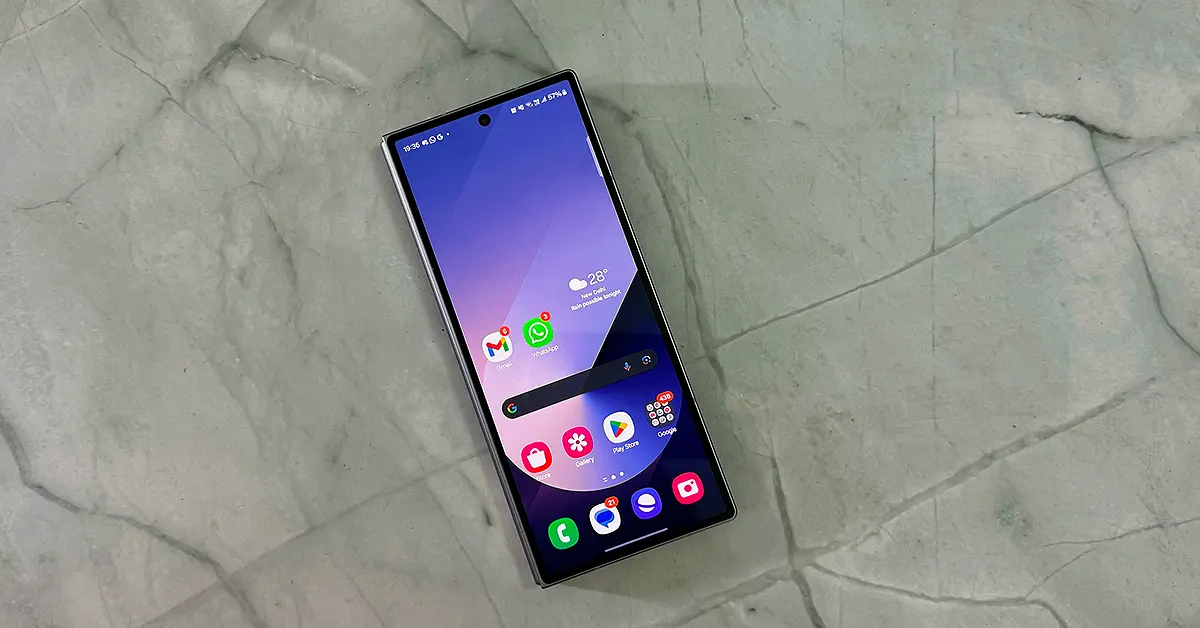
Samsung Galaxy Z Fold 6 review

Samsung Galaxy smartphones have a native option to disable the screen rotation icon that pops up at the bottom of the page every time you rotate your phone.

Step 1: Swipe down from the status bar to reveal the Quick Settings Menu.

Step 2: Long-press the portrait/landscape orientation tile.

Step 3: Turn off the toggle switch for Show Rotate button on navigation bar.

Remove the screen rotation icon on your Samsung Galaxy phone

If you don’t own a Samsung Galaxy phone, you will need ADB to remove the screen rotation icon from the navigation bar. Here’s how you can go about it.

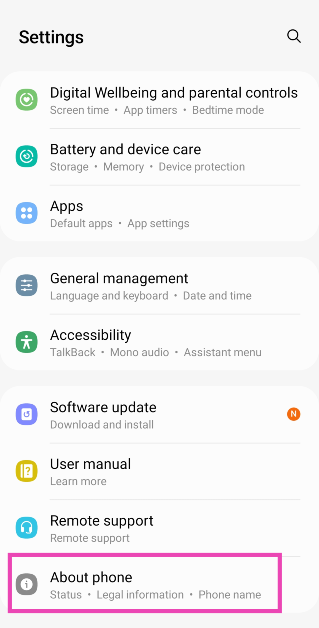
Step 1: Go to Settings and select About Phone.

Step 1: Go to Settings and select About Phone. Top 5 Ways To Remove Apps That Android Won't Let You Uninstall (2024)

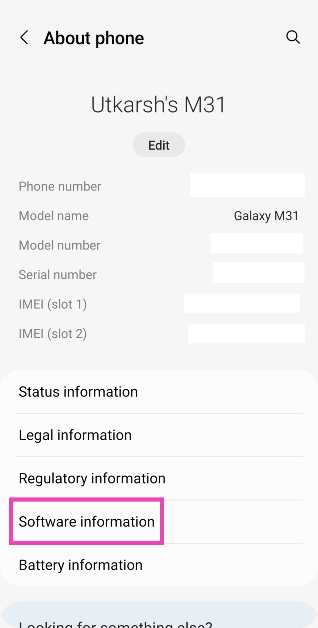
Step 2: Tap on  Software Information.

Step 2: Tap on Software Information. Top 5 Ways To Remove Apps That Android Won't Let You Uninstall (2024)

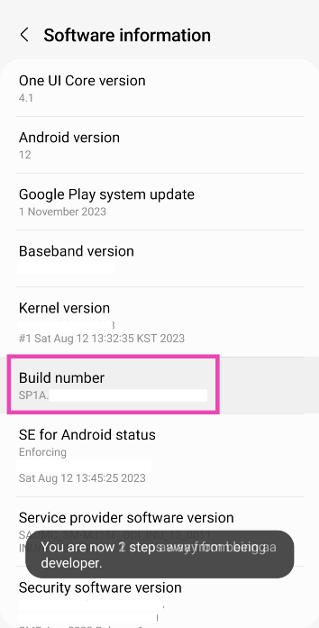
Step 3: Find the Build Number and tap on it 7 times. You will then enter Developer Mode.

Step 3: Find the Build Number and tap on it 7 times. You will then enter Developer Mode. Top 5 Ways To Remove Apps That Android Won't Let You Uninstall (2024)

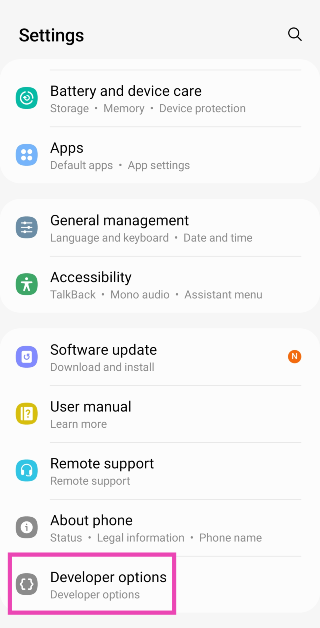
Step 4: Go back to Settings and select Developer Options.

Step 4: Go back to Settings and select Developer Options. Top 5 Ways To Remove Apps That Android Won't Let You Uninstall (2024) Here are the top 7 ways to remove or disable the Android setup notification on your phone. 2 ways to remove the screen rotation icon on your Android phone (2024)

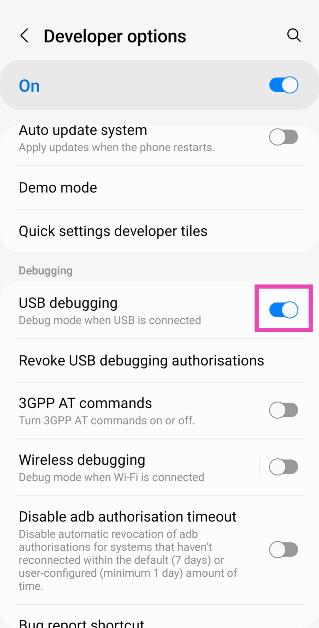
Step 5: In the Debugging section, turn on the toggle switch for USB Debugging.

Step 5: In the Debugging section, turn on the toggle switch for USB Debugging. Here are the top 7 ways to remove or disable the Android setup notification on your phone. 2 ways to remove the screen rotation icon on your Android phone (2024)

Step 6: Connect your smartphone to your PC via a USB cable. A popup box will appear on your phone. Confirm that you want to allow USB Debugging.

Step 7: Download the official ADB driver package for your PC from this page.

Step 8: Extract the package to your preferred location. Press Shift + right-click and select Open PowerShell window here.

Shift + right-click anywhere. how to fix can't delete apps on android Here are the top 7 ways to remove or disable the Android setup notification on your phone. 2 ways to remove the screen rotation icon on your Android phone (2024)

Step 9: Enter the following command:

adb shell settings put secure show_rotation_suggestions 0

Frequently Asked Questions (FAQs)

How do I remove the screen rotate icon on my Samsung Galaxy phone?

Long-press the orientation tile in the Quick Settings Menu and turn off the toggle switch next to the ‘Show Rotate button on navigation bar’ option.

Do Android phones have the option to remove the screen rotate icon from the navigation bar?

One Samsung Galaxy phones have the option to disable the screen rotate icon. If you own a smartphone from some other Android OEM, you will need to use ADB and run this command – adb shell settings put secure show_rotation_suggestions 0.

How do I turn off the auto-rotate function from settings?

Go to Settings>Display and brightness and turn off the toggle switch next to Auto-Rotate.

Read Also: 2 Methods to Disable Floating Notification Bubbles on Android (2024)

Conclusion

These are the top 2 ways to remove or disable the screen rotation icon from the navigation bar on your Android phone. Try these fixes if you can’t get the screen on your Android phone to rotate automatically. If you have any other questions, let us know in the comments!

10 ways to fix the ‘Not Registered on Network’ error on Samsung Galaxy phones

0

Your Android smartphone displays different error messages when you’re out of network reception, depending on the nature of the outage. If you’re seeing the ‘Login to mobile network’ error on your phone, it means you need to recharge your account. The ‘Not Registered’ error message is slightly trickier to resolve. Let’s take a look at the top 10 ways to fix the ‘Not Registered on Network’ error on Samsung Galaxy phones.

Read Also: 2 Methods to Disable Floating Notification Bubbles on Android (2024)

What’s causing the ‘Not Registered on Network’ issue?

It’s not easy to pinpoint the reason behind a vague network issue. However, most of the time, network-related issues are caused by one of the following reasons:

  • Network congestion
  • Software glitches
  • Customised network settings create roadblocks
  • Dirt and grime on the SIM tray
  • Outdated SIM card
  • Network provider is out of service

Turn the Airplane Mode off and on

Turn on the Airplane Mode

If you’re facing network-related issues on your Samsung Galaxy phone, the first thing you should do is toggle the Airplane Mode. This performs a network refresh on your smartphone and fixes any possible background issues that may be causing this problem. Turn on the Airplane Mode by swiping down from the status bar and tapping the tile with the Airplane icon. Wait for 10-15 seconds, then tap the tile again to turn off the Airplane Mode. You can also toggle the Airplane Mode by going to Settings>Connections.

Toggle the active SIM on and off

Putting your phone in Airplane Mode not only disables the network reception but also turns off other connections like WiFi and Bluetooth. If you don’t want to disconnect from paired devices, you can simply disable the SIM and turn it on again. Go to Settings>Connections, tap on SIM Manager, and turn off the toggle switch next to the active SIM. Wait for 10-15 seconds and turn on the toggle switch again.

Restart your phone

Restart Your Phone Top 6 ways to fix the ‘Not Registered on Network’ error on Samsung Galaxy phones (2024)

A simple restart can fix the background issues causing the ‘Not Registered on Network’ error on your Samsung Galaxy phone. Long-press the side button and select the Restart option from the power menu. If long-pressing the side button triggers Bixby on your device, press it along with the volume-up key to access the power menu.

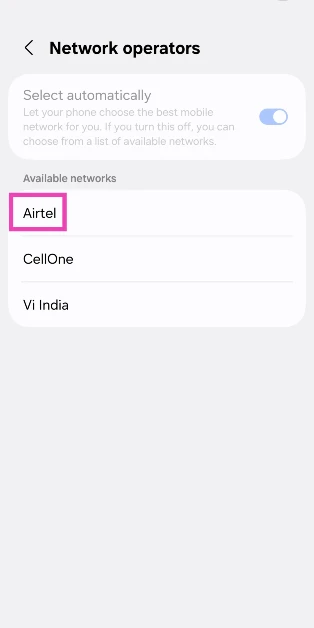
 Manually select a network operator

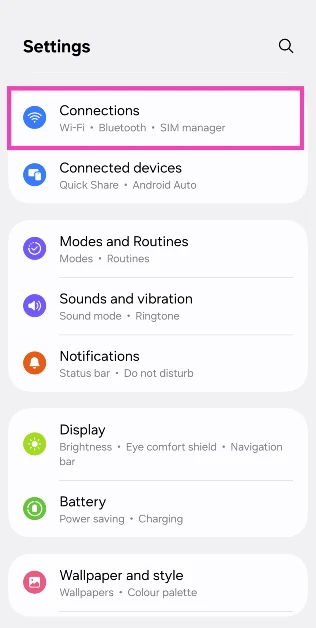
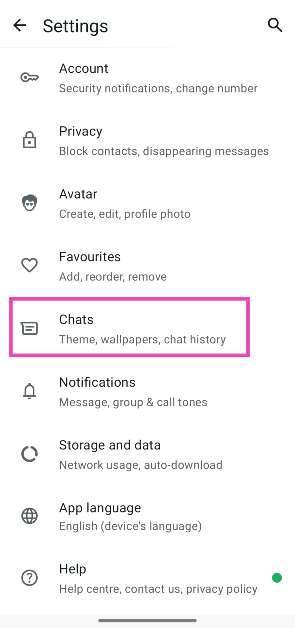
Step 1: Go to Settings and select Connections.

Step 1: Go to Settings and select Connections.

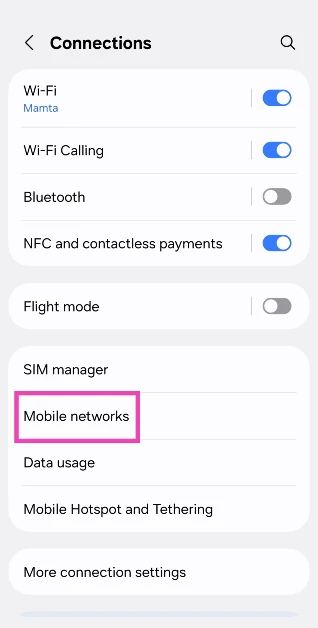
Step 2: Tap on Mobile networks.

Step 2: Tap on Mobile networks.

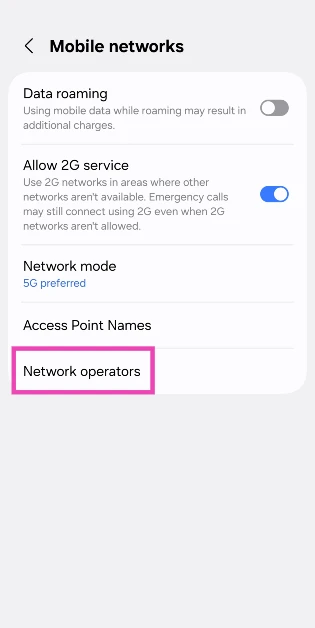
Step 3: Tap on Network operators.

Step 3: Tap on Network operators.

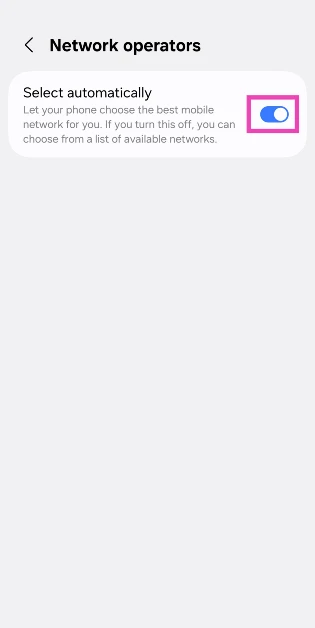
Step 4: Turn off the toggle switch next to Select automatically.

Step 4: Turn off the toggle switch next to Select automatically.

Step 5: Select a network operator from the list.

Step 5: Select a network operator from the list.

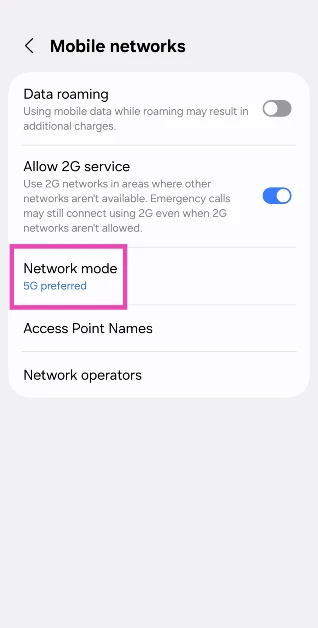
Shift to a 4G or 3G network

If there’s no 5G coverage in your area, shift to a 4G or 3G network. Here’s how.

Step 1: Go to Settings and select Connections.

Step 1: Go to Settings and select Connections. 10 ways to fix the ‘Not Registered on Network’ error on Samsung Galaxy phones

Step 2: Tap on Mobile networks.

Step 2: Tap on Mobile networks. 10 ways to fix the ‘Not Registered on Network’ error on Samsung Galaxy phones

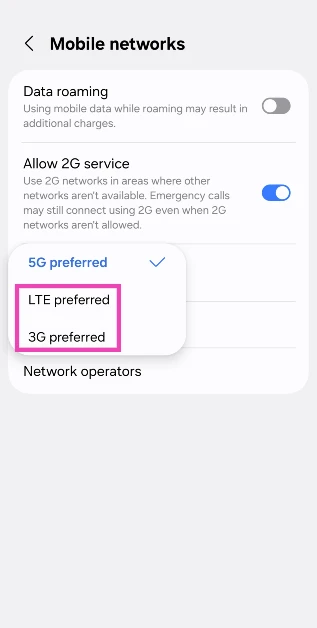
Step 3: Tap on Network mode.

network mode 10 ways to fix the ‘Not Registered on Network’ error on Samsung Galaxy phones

Step 4: Select LTE preferred or 3G preferred.

Step 4: Select LTE preferred or 3G preferred. 10 ways to fix the ‘Not Registered on Network’ error on Samsung Galaxy phones

Reset Network Settings

A complete reset of the network settings restores them to out-of-the-box settings. This means all the paired Bluetooth devices and WiFi networks will be forgotten by your phone, and you will need to pair them again. Use this as a last-ditch effort if you can’t fix the network issue at hand.

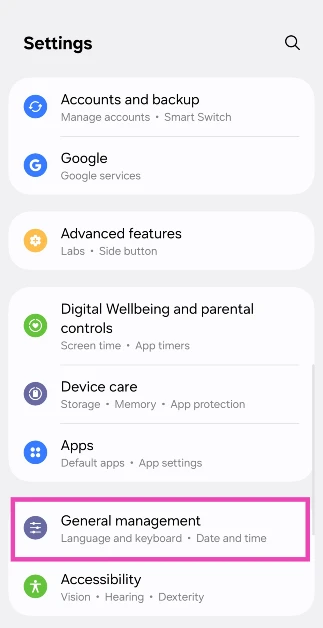
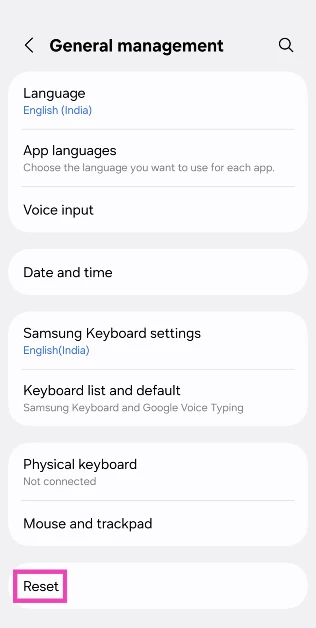
Step 1: Go to Settings and select General management.

Step 1: Go to Settings and select General management. 10 ways to fix the ‘Not Registered on Network’ error on Samsung Galaxy phones

Step 2: Scroll down and select Reset.

Step 2: Scroll down and select Reset. 10 ways to fix the ‘Not Registered on Network’ error on Samsung Galaxy phones

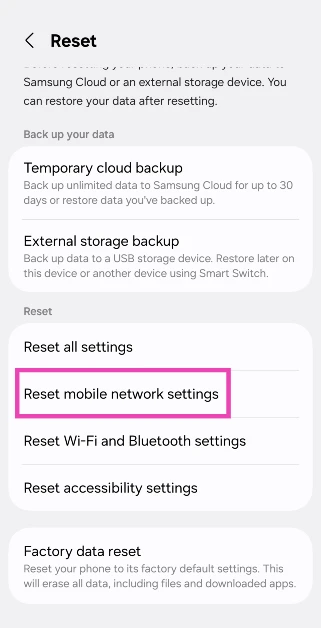
Step 3: Tap on Reset mobile network settings.

Step 3: Tap on Reset mobile network settings. 10 ways to fix the ‘Not Registered on Network’ error on Samsung Galaxy phones

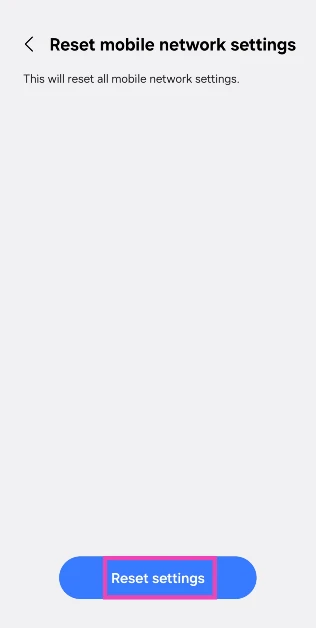
Step 4: Select Reset settings.

Step 4: Select Reset settings. 10 ways to fix the ‘Not Registered on Network’ error on Samsung Galaxy phones

Step 5: Enter your PIN to confirm your selection.

Update your phone’s OS

Step 1: Go to Settings and select Software update.

Go to Settings and select Software update.  Top 8 ways to fix the ‘SIM not provisioned MM2’ error on Android

Step 2: Tap on Download and install.

Top 8 ways to fix the ‘SIM not provisioned MM2’ error on Android

Step 3: Select Install now.

Select Install now. Top 8 ways to fix the ‘SIM not provisioned MM2’ error on Android

Clean the SIM tray

Top 6 ways to fix the ‘Not Registered on Network’ error on Samsung Galaxy phones (2024)

Over a period of time, dust and grime can collect on your device’s SIM tray, causing the SIM to stop functioning entirely. This can be fixed with a quick wipe. Use a SIM ejector tool to pop out the SIM tray and clean it with a microfiber cloth. Give the SIM card a quick wipe as well. Blow some air in the SIM cavity on your phone and re-insert the tray.

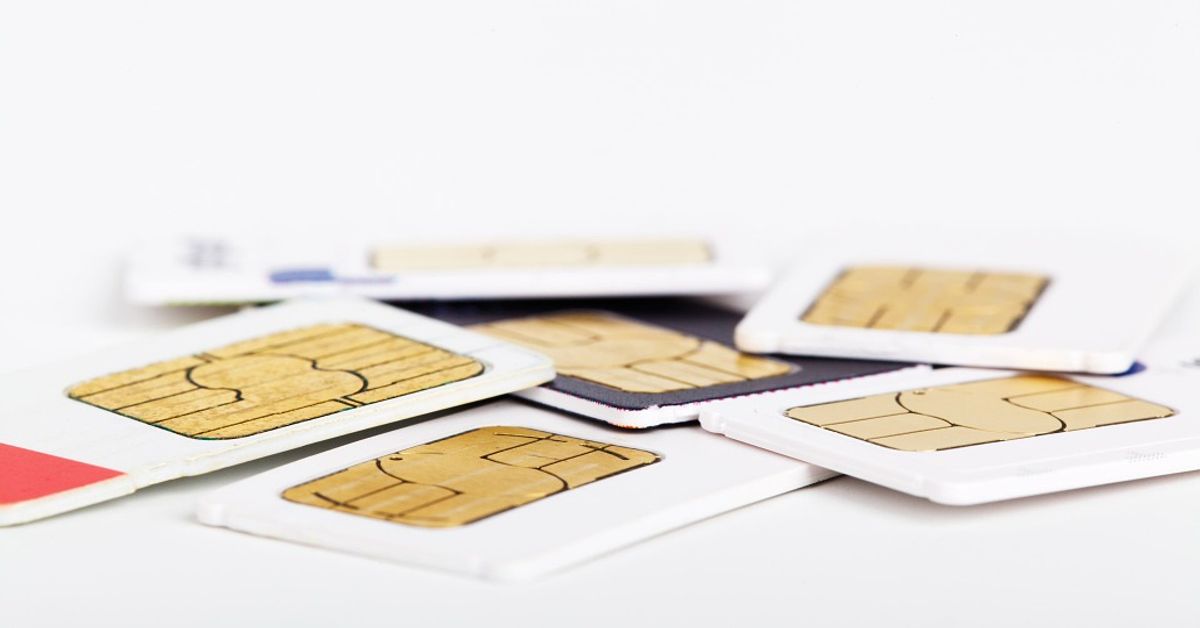
Get a new SIM card

sim card Top 6 ways to fix the ‘Not Registered on Network’ error on Samsung Galaxy phones (2024)

If you’re using an old SIM card, chances are that it is no longer compatible with your phone. This is certainly not a common occurrence and only happens with SIMs that are close to a decade old. Go to your network provider’s local customer service centre and request a new SIM card. You will need to provide proper user identification documents to be issued a new SIM card.

Contact your network provider

Airtel introduced new all-in-one OTT entertainment package for prepaid subscribers

If you can’t get the mobile network to work after trying all the steps mentioned above, contact your network provider for more guidance. Dial the customer helpline and explain your situation to a customer executive. You can also walk into your network provider’s local customer care outlet and get help regarding this issue.

Frequently Asked Questions (FAQs)

What does the ‘Not Registered on Network’ error mean on Samsung Galaxy phones?

If you encounter the ‘Not Registered on Network’ error message on your Samsung smartphone, it means the SIM is unable to receive network coverage.

How do I disable the SIM on my Samsung phone?

Go to Settings>Connections>SIM Manager and turn off the toggle switch next to the SIM you want to disable.

How do I manually select a mobile network on my Samsung phone?

Go to Settings>Connections>Mobile networks>Network operators, turn off the toggle switch next to ‘Select automatically’, then select a network from the list.

How do I change my phone’s mobile data connection to 4G or 3G?

Go to Settings>Connections>Mobile networks, tap on ‘Network mode’, and select ‘3G preferred’ or ‘LTE preferred’.

How do I check if my cellular network provider is facing a service outage?

Go to Downdetector.in and enter the name of your network provider. If you notice a spike in user reports, it means that the service is currently down.

Read Also: International Youth Day: Best smartphones under Rs 40,000 for the younger generation

Conclusion

These are the top 10 ways to fix the ‘Not Registered on Network’ error on Samsung Galaxy phones. While you’re here, check out how you can resolve the invalid SIM card error on your Android phone. If you have any other questions related to this problem, let us know in the comments!

2 Methods to Disable Floating Notification Bubbles on Android (2024)

0

Managing notifications on your Android phone can be an uphill battle at times. From the lock screen to the status bar, notifications are everywhere. If you have a lot of apps installed on your phone, constant notifications can be a big distraction from tasks that demand your immediate attention. Luckily, your Android phone not only lets you mute notifications but also gives you a say in which kind of notifications you want to block. So, here are the top 2 ways to disable floating notification bubbles on your Android phone.

Read Also: International Youth Day: Best smartphones under Rs 40,000 for the younger generation

What are floating notification bubbles on Android phones?

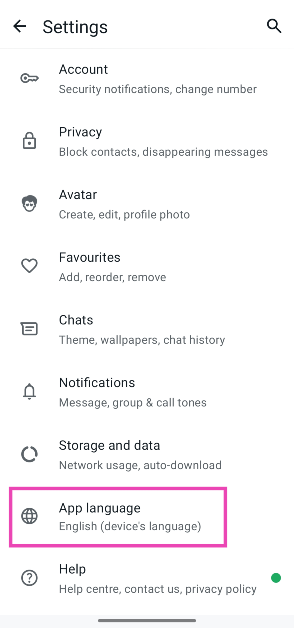
As an Android user, you may already be familiar with home screen and lock screen notifications. You can decide which apps get to display what kind of content on those screens. If you don’t like constant pings, you can choose to have those notifications delivered silently. Android also delivers ‘bubble’ notifications on supported apps. These notifications are mostly supported by instant messaging apps.

A ‘bubble’ notification appears as a pinhead icon on your phone’s screen to remind you of an incoming message. Tapping on the icon opens the conversation in picture-in-picture mode. You can quickly respond to the message and dismiss the bubble. The problem with bubble notifications is that they can clutter your screen if they are left unattended. While notifications from multiple conversations pop up on your phone, it can get annoying to dismiss each individual bubble. This is why your Android phone lets you disable them entirely.

Disable floating notification bubbles for all apps on Android

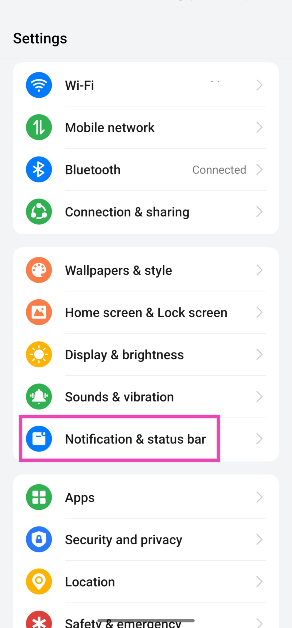
Step 1: Go to Settings and select Notification & status bar.

Step 1: Go to Settings and select Notification & status bar.

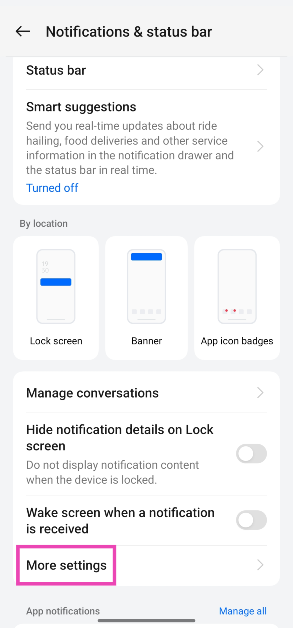
Step 2: Tap on More settings.

Step 2: Tap on More settings.

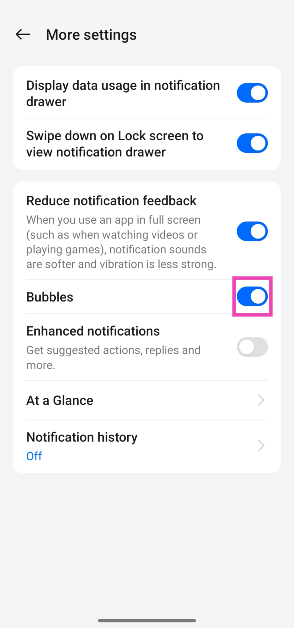
Step 3: Turn off the toggle switch for Bubbles.

Step 3: Turn off the toggle switch for Bubbles.

Disable floating notification bubbles for a particular app

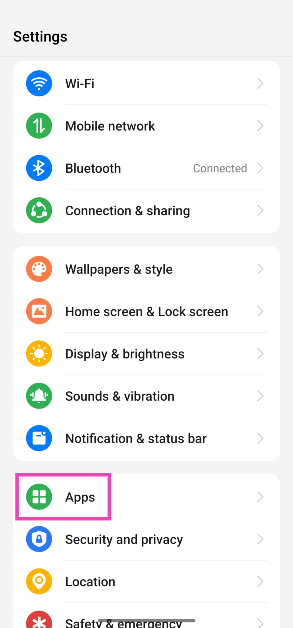
Step 1: Go to Settings and select Apps.

Step 1: Go to Settings and select Apps.

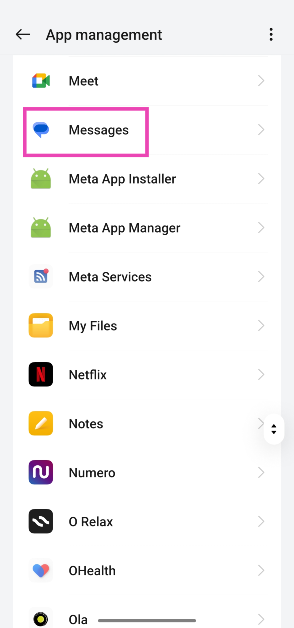
Step 2: Select the app for which you want to turn off floating bubble notifications.

Step 2: Select the app for which you want to turn off floating bubble notifications. 2 Methods to Disable Floating Notification Bubbles on Android

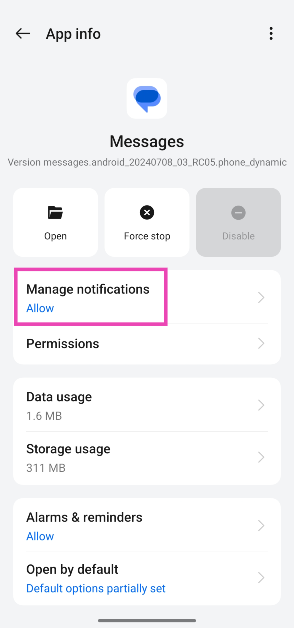
Step 3: Tap on Manage notifications.

Step 3: Tap on Manage notifications. 2 Methods to Disable Floating Notification Bubbles on Android

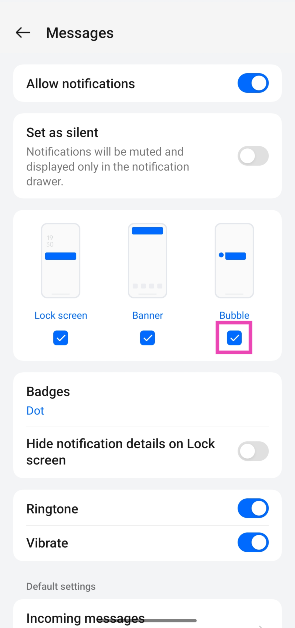
Step 4: Uncheck the box below Bubble.

Step 4: Uncheck the box below Bubble. 2 Methods to Disable Floating Notification Bubbles on Android

Frequently Asked Questions (FAQs)

How do I disable all the notifications for an app?

Go to Settings>Apps, select the app, tap on ‘Manage Notifications’, and turn off the toggle switch next to ‘Disable Notifications’.

How do I disable the promotional and offer notifications from food delivery apps?

Go to Settings>Apps, select the food delivery app, tap on ‘Manage Notifications’, scroll down and turn off all the notifications except ‘Important delivery alerts’.

How do I turn off floating bubble notifications on my Android phone?

Go to Settings>Notification & status bar>More settings and turn off the toggle switch next to ‘Bubbles’.

Read Also: Samsung Galaxy S24 price in India slashed for a limited period: Details Inside

Conclusion

These are the top 2 ways to disable or turn off floating notification bubbles on your Android phone. While you’re here, check out how you can block unwanted popups and notifications on your Android phone. If you have any other questions, let us know in the comments!

International Youth Day: Best smartphones under Rs 40,000 for the younger generation

The United Nations observes August 12 as International Youth Day. This year’s theme for International Youth Day is ‘Youth Digital Pathways for Sustainable Development’. It celebrates the digital contribution of young people in accelerating sustainable development and leading innovation. It also seeks to make technology inclusive to everyone and break down the barriers that young people may face while adopting digital technologies. If you’re a young student, splurging upwards of Rs 1 lakh on an expensive flagship smartphone is probably not an option for you. So, let’s take a look at the best smartphones priced under Rs 40,000 for the younger generation.
Read Also: How to upgrade an old PC to Windows 11 (2024)

OnePlus 12R

Price: Rs 40,000 on OnePlus.com

12r

Key Specs

Display 6.74-inch LTPO4 AMOLED
Chipset Snapdragon 8 Gen 2
RAM 8GB, 16GB
Storage 128GB, 256GB
Battery 5,500 mAh

The 8GB RAM + 128GB Storage variant of the OnePlus 12R is priced at Rs 40,000, making it one of the best flagship alternatives out there. The smartphone packs last year’s flagship Snapdragon 8 Gen 2 chipset and flaunts a 6.74-inch LTPO4 curved AMOLED display. The rear camera array of the 12R is composed of a 50MP primary shooter, an 8MP ultrawide lens, and a 2MP macro sensor. The OnePlus 12R is one of the fastest-charging smartphones out there, supporting 100W charging. For more details regarding the smartphone’s performance, read our review of the OnePlus 12R.
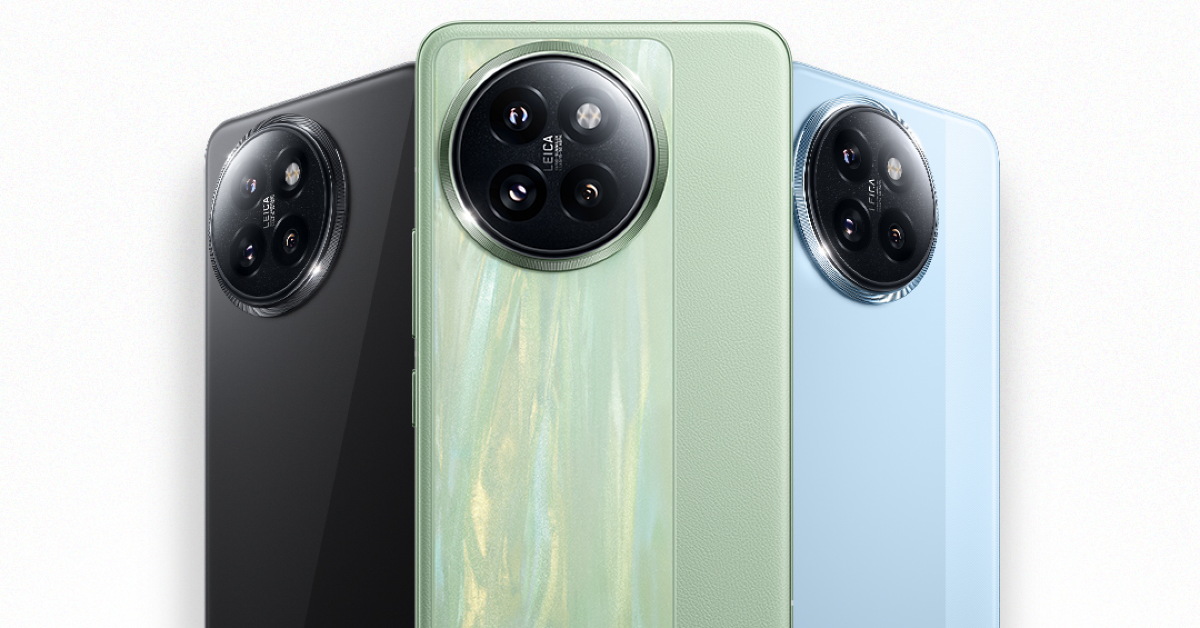
Xiaomi 14 Civi

Price: Rs 40,000 on Amazon

Xiaomi 14 Civi India launch today: Livestream, expected pricing and specs details

Key Specs

Display 6.55-inch AMOLED
Chipset Snapdragon 8s Gen 3
RAM 8GB, 12GB
Storage 256GB, 512GB
Battery 4,700 mAh

Xiaomi’s flagship alternative, Civi 14, is one of the best smartphones priced under Rs 40,000 in India right now. Xiaomi 14 Civi’s photography experience is in the mould of the company’s flagship smartphone. The Civi relies on two 50MP wide and telephoto lenses along with a 12MP telephoto camera to get the job done. It is powered by the Snapdragon 8s Gen 3 SoC and features an Adreno 735 GPU. Its 6.55-inch AMOLED display has a 120Hz refresh rate. The 4,700mAh battery pack inside the smartphone supports 67W charging.
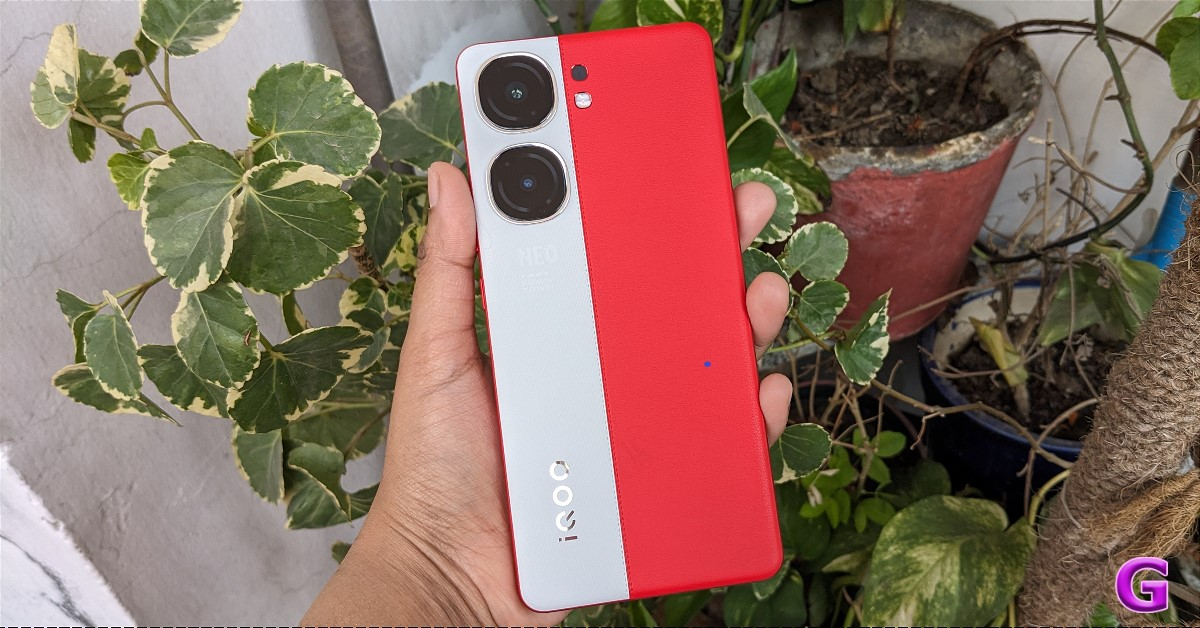
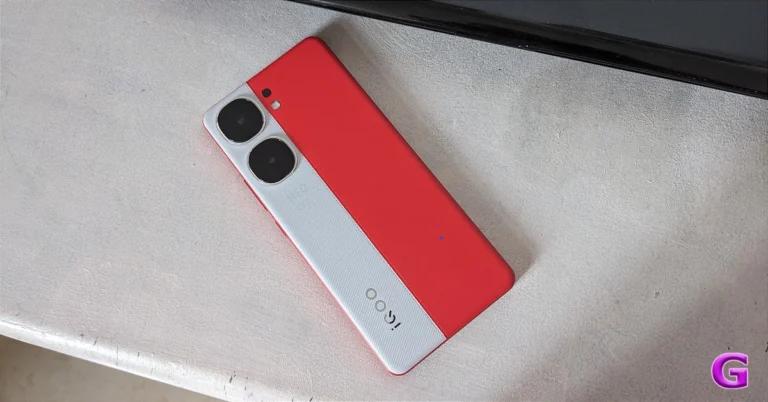
iQOO Neo 9 Pro

Price: Rs 34,000 on iQOO.com


iQOO Neo 9 Pro Review

Key Specs

Display 6.78-inch LTPO AMOLED
Chipset Snapdragon 8 Gen 2
RAM 8GB, 12GB
Storage 128GB, 256GB
Battery 5,160 mAh

The iQOO Neo 9 Pro is a sensational smartphone for serious gamers. The smartphone packs last year’s flagship Snapdragon 8 Gen 2 chipset along with iQOO’s in-house Supercomputing Chip Q1. The result is a powerhouse performance that is easily the best in its price category. The Neo 9 Pro also flaunts a 6.78-inch LTPO AMOLED display and a massive 5,160mAh battery pack. It supports 120W fast charging and comes with a power brick inside the box. There are two rear cameras on offer – a 50MP primary shooter and an 8MP ultrawide lens. Here’s our full review of the iQOO Neo 9 Pro.
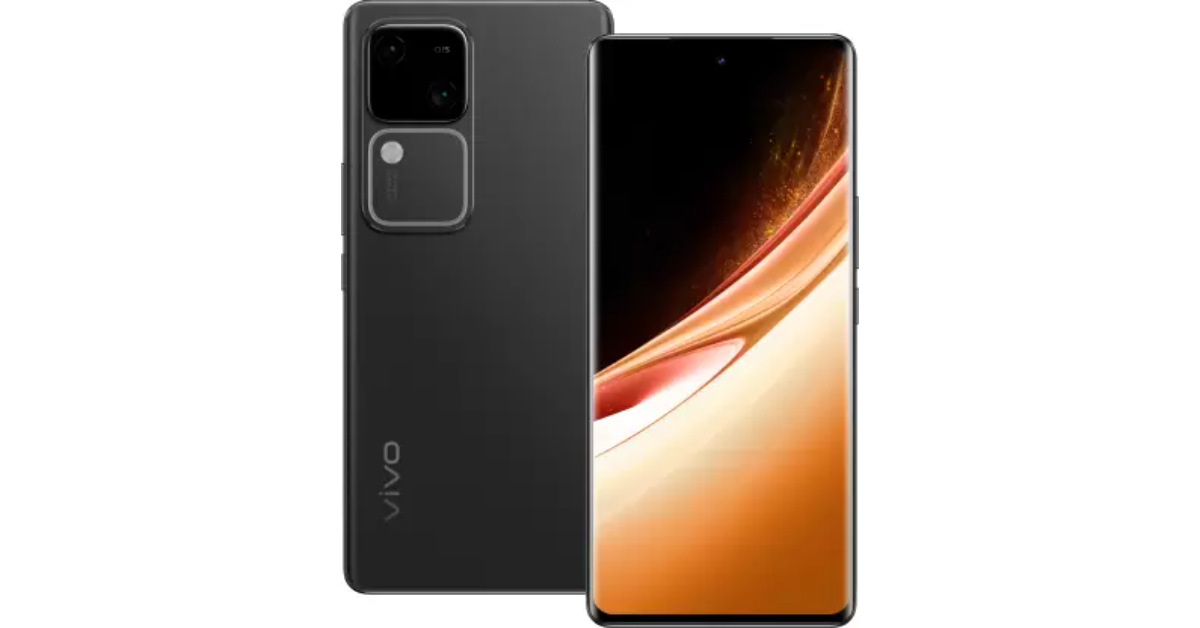
Vivo V30

Price: Rs 32,000 on Vivo.com

The Vivo V30 is now available in India, with prices starting at Rs 31,999 for the 8GB RAM with 128GB storage variation, Rs 33,999 for the 8GB RAM with 256GB storage option, and Rs 35,999 for the 12GB RAM with 256GB storage. These rates are lower than the launch prices of Rs 33,999, Rs 35,999, and Rs 37,999, respectively.

Key Specs

Display 6.78-inch AMOLED
Chipset Snapdragon 7 Gen 3
RAM 8GB, 12GB
Storage 128GB, 256GB
Battery 5,000 mAh

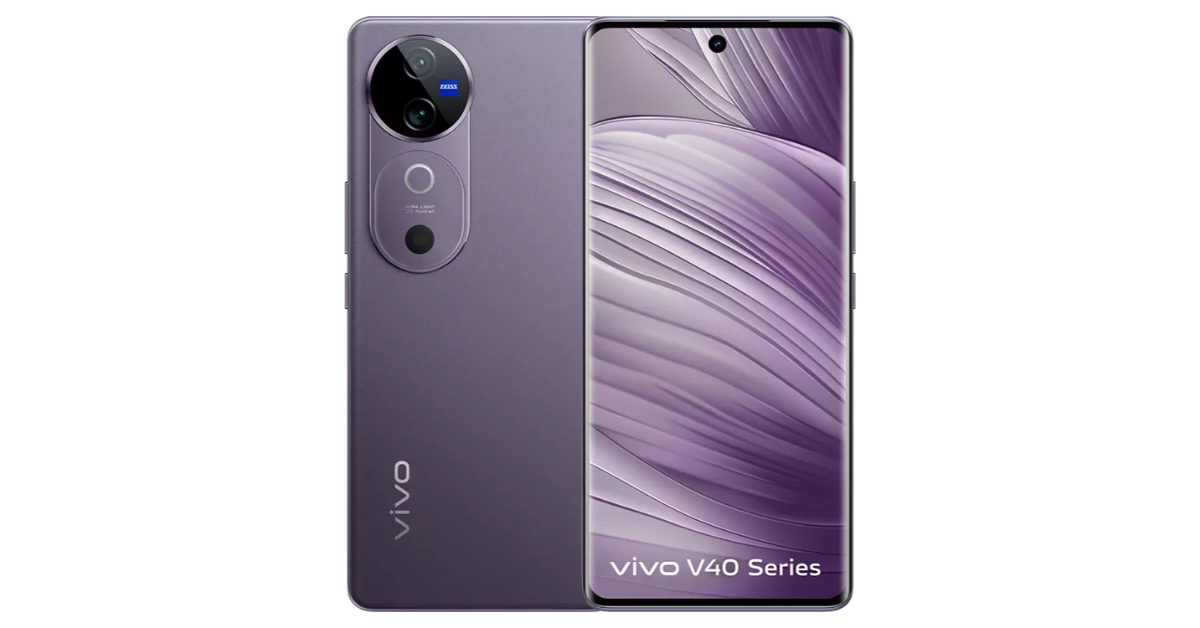
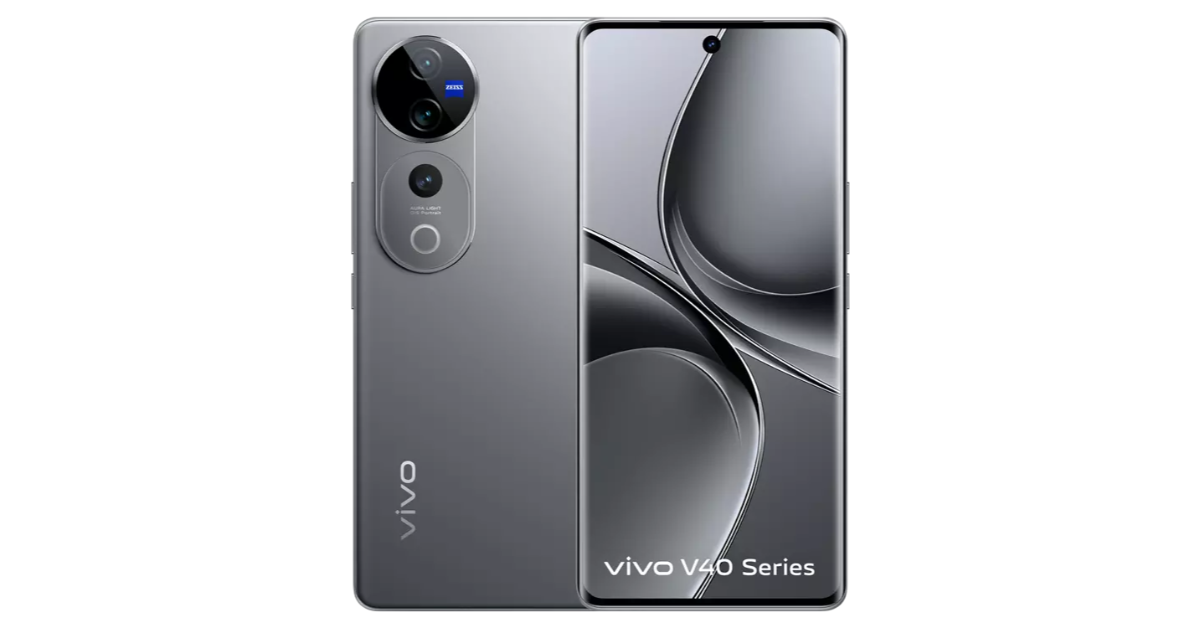
Vivo’s V Series is known for its spectacular camera systems. Earlier this year, the Chinese manufacturer put out the powerful Vivo V30, which rocks two 50MP sensors in its rear camera array for wide and ultrawide shooters. Powering the smartphone is the Snapdragon 7 Gen 3 SoC. Ahead of the launch of the new V40 Series, Vivo dropped the prices for the entry-level V40 to Rs 32,000. Expect the Vivo V30 Pro to also get its prices slashed in the coming weeks.

Samsung Galaxy A55

Price: Rs 40,000 on Samsung.com

Key Specs

Display 6.6-inch Super AMOLED
Chipset Exynos 1480
RAM 8GB, 12GB
Storage 128GB, 256GB
Battery 5,000 mAh

If you’re a Samsung loyalist, the Galaxy A55 is the best smartphone you can get under Rs 40,000. While the Galaxy A35 may be the more affordable option, we prefer the A55 for its faster processor, sleeker form factor, and better overall camera system. When we reviewed the Galaxy A55, we were impressed by the performance of the 50MP primary shooter even though it has been carried forward from the previous iteration of the smartphone. Samsung’s ultra-smooth and rich display is also one of the reasons why you should consider buying this smartphone.
Google Pixel 7

Price: Rs 33,000 on Flipkart

review of Pixel 7 Pro

Key Specs

Display 6.3-inch AMOLED
Chipset Google Tensor G2
RAM 8GB
Storage 128GB, 256GB
Battery 4,355 mAh

The vanilla variant in the Google Pixel 7 Series is one of the best smartphones priced under Rs 40,000 in India right now. Pixels are known for their superior photoprocessing skills and the Pixel 7 does not disappoint in this regard. It relies on a 50MP primary shooter and a 12 ultrawide lens to take stunning photos in a diverse range of lighting conditions. The smartphone is powered by the Google Tensor G2 processor, the same as its Pro sibling. Although the smartphone came out in 2022, it is guaranteed to get five years of software updates. Check out our review of the smartphone.
OnePlus Nord 4

Price: Rs 30,000 on OnePlus.in

OnePlus Nord 4 design and specifications International Youth Day: Best smartphones under Rs 40,000 for the younger generation

Key Specs

Display 6.74-inch Fluid AMOLED
Chipset Snapdragon 7+ Gen 3
RAM 8GB, 12GB
Storage 128GB, 256GB
Battery 5,500 mAh

The newly launched OnePlus Nord 4 sports an all-metal body and an exciting design. In true ‘Nord’ fashion, it offers a big bang for your buck. The smartphone has a 6.74-inch Fluid AMOLED display and is powered by the Snapdragon 7+ Gen 3 chipset. Its dual rear camera array comprises a 50MP primary shooter and an 8MP ultrawide lens. The smartphone packs a massive 5,500 mAh battery and supports 100W fast charging. The power adapter for the smartphone is provided in the retail box. OnePlus claims that this power brick can fully charge the smartphone in 28 minutes.

Poco F6

Price: Rs 28,000 on Flipkart

Poco F6, Poco X6 Pro and more smartphones discounted during ongoing Flipkart GOAT and Amazon Prime Day Sales International Youth Day: Best smartphones under Rs 40,000 for the younger generation

Key Specs

Display 6.67-inch AMOLED
Chipset Snapdragon 8s Gen 3
RAM 8GB, 12GB
Storage 256GB, 512GB
Battery 5,000 mAh

Xiaomi’s subsidiary Poco is known for its high-performance devices. The Poco F6 is no different. This smartphone is powered by the Snapdragon 8s Gen 3 chipset, making it ideal for heavy gaming and other power-intensive tasks. There’s also a cooling system (Poco IceLoop) onboard which makes sure the smartphone doesn’t hit alarming internal temperatures in the middle of rigorous gaming sessions. The 6.67-inch AMOLED display has a 120Hz refresh rate. The 5,000 mAh battery pack supports 90W charging. Check out our in-depth review of the Poco F6.

Redmi 13

Price: Rs 14,000 on Mi.com

Redmi 13 5G Review: The camera phone to get under Rs 15,000 International Youth Day: Best smartphones under Rs 40,000 for the younger generation

Key Specs

Display 6.79-inch IPS LCD
Chipset Snapdragon 4 Gen 2 AE
RAM 6GB, 8GB
Storage 128GB
Battery 5,030 mAh

When it comes to budget smartphones, the Redmi 13 sets the benchmark in camera performance. The 108MP primary camera on this smartphone produces very impressive results in outdoor daylight conditions. There’s also a 2MP macro sensor onboard for closeups. One of our favourite things about the Redmi 13 is that it runs Xiaomi’s next-gen HyperOS out of the box. Powering the device is the Snapdragon 4 Gen 2 ‘Accelerated Edition’ SoC. The general performance of the smartphone may not be cutting-edge, but it handles everyday tasks with ease. You can read more about it in our review of the smartphone.

CMF Phone 1

Price: Rs 16,000 on Flipkart

CMF Phone 1 Review: The ultimate budget smartphone? International Youth Day: Best smartphones under Rs 40,000 for the younger generation

Key Specs

Display 6.67-inch AMOLED
Chipset MediaTek Dimensity 7300
RAM 6GB, 8GB
Storage 128GB, 256GB
Battery 5,000 mAh

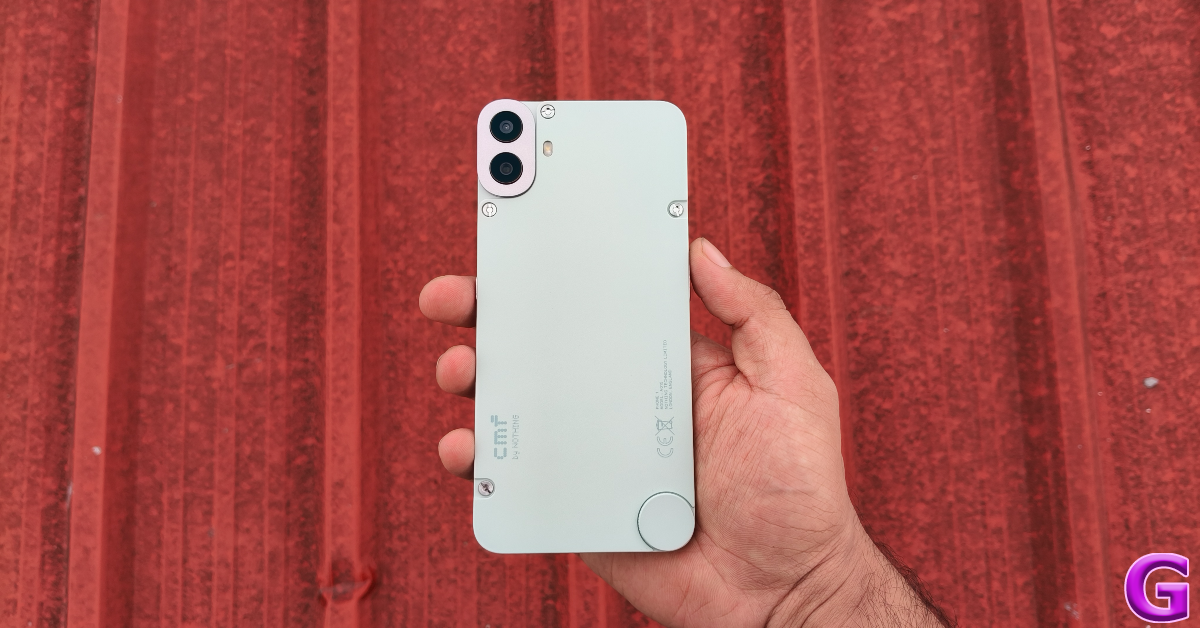
Nothing’s subsidiary brand CMF put out its debut smartphone this year. The CMF Phone 1 grabbed the headlines for its modular design and additional accessories but its performance is its most undervalued attribute. A smartphone powered by the MediaTek Dimensity 7300 SoC in this price segment is bound to set itself apart from the competition. On top of that, the CMF Phone 1 flaunts a stunning 6.67-inch AMOLED display. The rear camera panel of the smartphone comprises a 50MP primary shooter and a 2MP depth sensor. It packs a 5,000mAh battery and supports 33W charging.

Read Also: Samsung Galaxy Z Fold 6 Review: Unfolding The Future, One Upgrade At A Time

Conclusion

These are our picks for the best smartphones under Rs 40,000 for the younger generation on International Youth Day 2024. These smartphones can handle power-intensive tasks like gaming while also being ideal for everyday use. If you have any other devices to add to this list, let us know in the comments!
How to upgrade an old PC to Windows 11 (2024)

0

Microsoft recently announced that it will stop rolling out security upgrades for Windows 10 PCs from October 14, 2025. This leaves users with two options. They can either join Microsoft’s Extended Security Updates program (the prices for which increase sharply over time) or simply upgrade their PCs to Windows 11. The latter is the more sensible choice but some users may face a big roadblock. According to Microsoft’s minimum system requirements for Windows 11, the PC must have Trusted Platform Module 2.0. PCs manufactured in the early 2010s typically sport TPM 1.2, leaving them incompatible with Windows 11. Luckily, there is one workaround to this issue. Here’s how you can upgrade your old PC to Windows 11.

Read Also: Samsung Galaxy Z Fold 6 Review: Unfolding The Future, One Upgrade At A Time

Minimum system requirements for installing Windows 11

  • Processor: 1GHz or faster with 2 or more cores on a 64-bit processor
  • RAM: 4GB or more
  • Storage: 64GB or more
  • System firmware: UEFI, Secure Boot
  • TPM: Trusted Platform Module 2.0
  • Graphics card: DirectX 12 or later with WDDM 2.0 driver
  • Display: 720p HD display greater than 9 inches diagonally, 8 bits per colour channel

Upgrade an old incompatible PC to Windows 11

Step 1: Click on the search bar in the taskbar and type ‘Registry Editor’. Select the first result from the list.

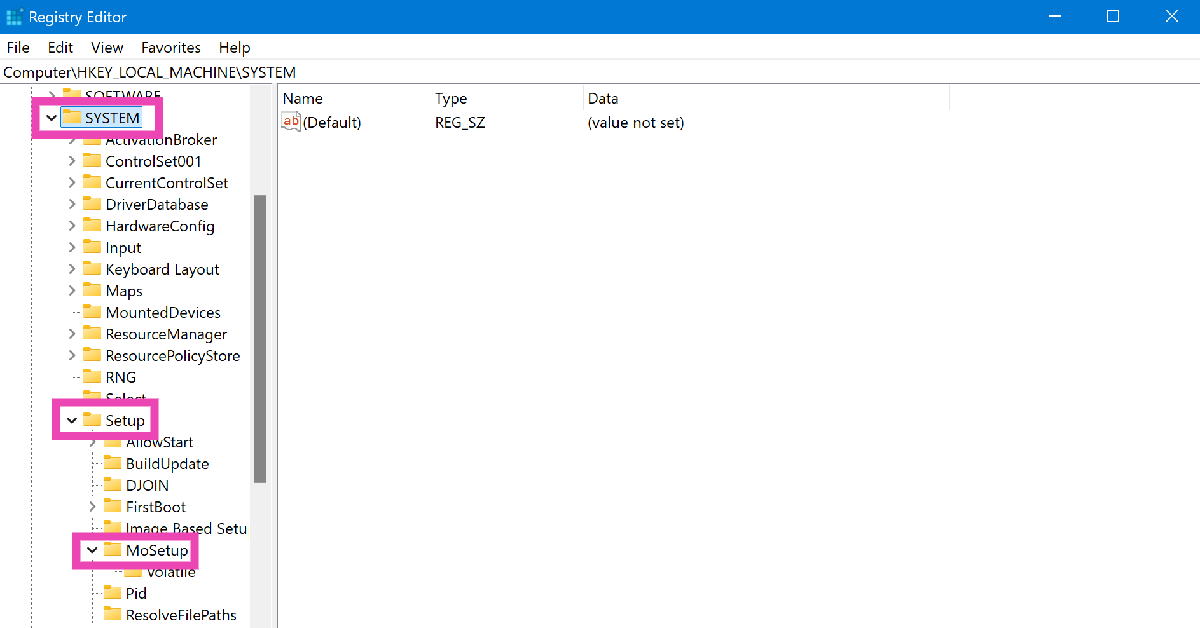
Step 2: Use the sidebar to navigate to HKEY_LOCAL_MACHINE>System>Setup>MoSetup.

Step 2: Use the sidebar to navigate to HKEY_LOCAL_MACHINE>System>Setup>MoSetup.

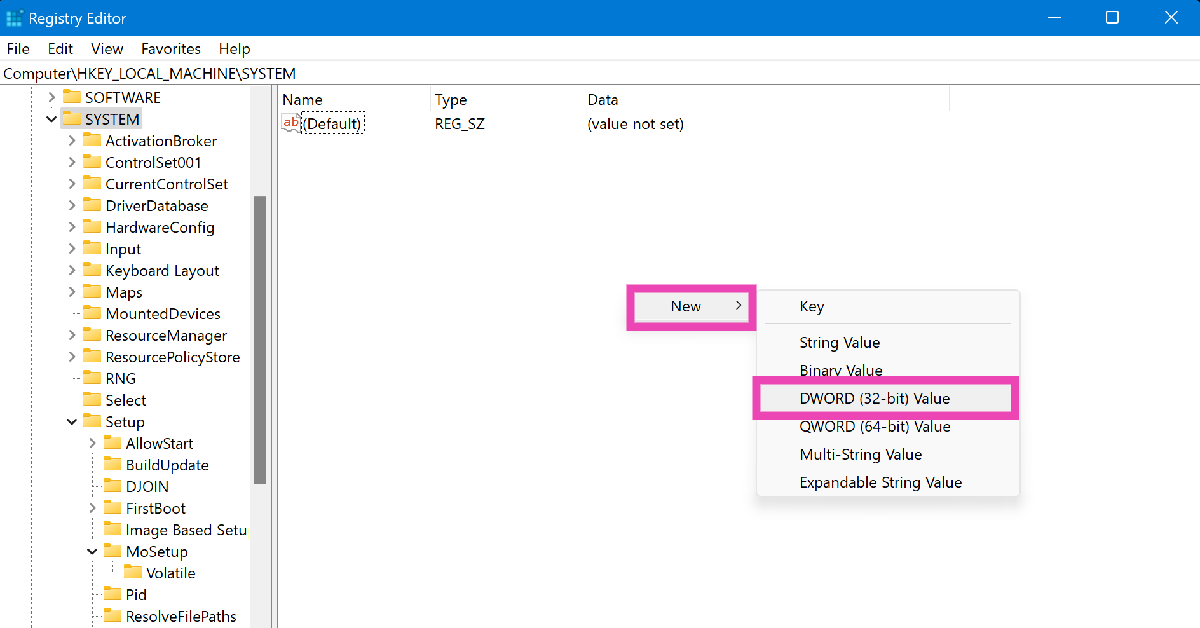
Step 3: Right-click on an empty spot and select New>DWORD (32-bit) value.

Step 3: Right-click on an empty spot and select New>DWORD (32-bit) value.

Step 4: Enter AllowUpgradesWithUnsupportedTPMorCPU in the Value name field and type 1 in the Value data field.

Step 5: Hit OK.

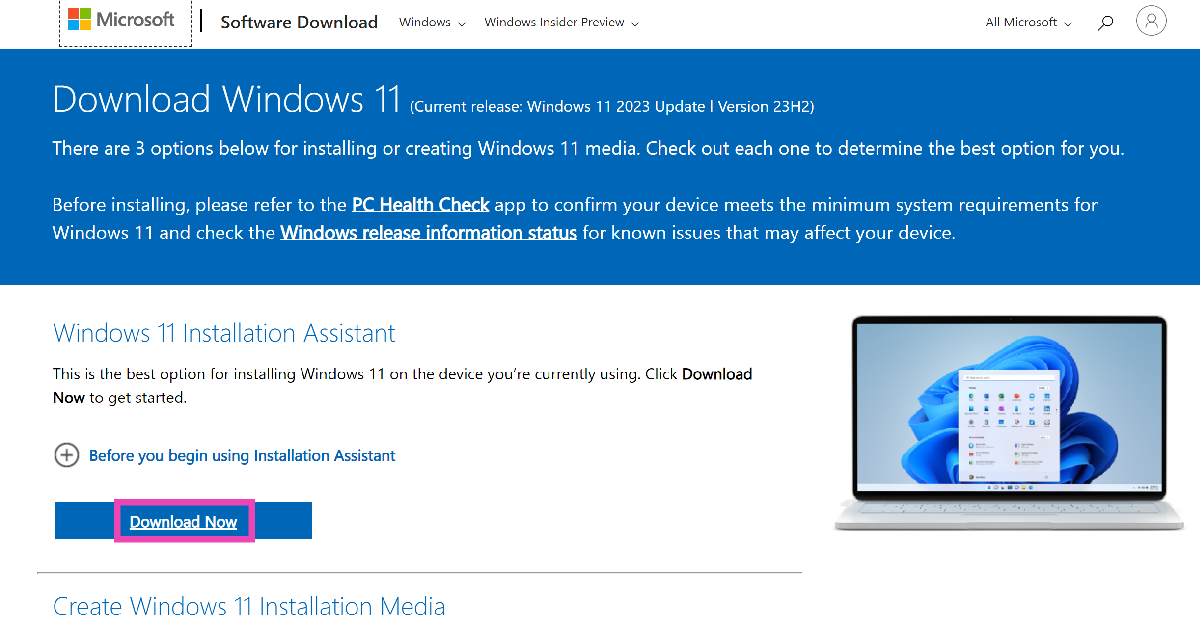
Step 6: Go to the official Windows 11 download page and download its ISO file for x64 devices.

Step 6: Go to the official Windows 11 download page and download its ISO file for x64 devices.

Step 7: Launch the ISO file once it has been downloaded.

Step 8: Select Setup.exe from the File Explorer and hit OK to upgrade your PC to Windows 11.

Frequently Asked Questions (FAQs)

When will Windows 10 PCs stop receiving security updates?

Microsoft has announced that it will stop rolling out security updates for Windows 10 PC after October 14, 2025.

How can I check if my PC meets Windows 11 requirements?

Download the PC Health Check app and run it on your PC to learn if it is compatible with Windows 11.

Where can I download the Windows 11 ISO file?

The Windows 11 ISO file can be downloaded from the official Microsoft website.

Read Also: Redmi Pad Pro 5G Review: A reliable midrange Android tablet that will serve you well

Conclusion

This is how you can download Windows 11 on an old PC that doesn’t meet the system requirements. If you have any other questions for us, let us know in the comments! While you’re here, check out how you can fix the 0xc00000e error code on a Windows 10 PC.

Samsung Galaxy Z Fold 6 Review: Unfolding The Future, One Upgrade At A Time

Imagine if your favourite sci-fi movie had a baby with your smartphone—and it inherited all the best genes and more. Samsung Galaxy Z Fold 6 is that baby.  It isn’t just a phone; it’s the kind of futuristic gadget that makes you want to put your other devices in a yard sale. With a screen that folds like origami and tech that feels straight out of tomorrow, this device is as much a conversation starter as it is a productivity powerhouse. We have been using the Fold 6 for over two weeks and this is what we could make of the futuristic device.
Samsung Galaxy Z Fold 6 Review: Design and Display

Let’s quickly start with the in-box contents, you get:

  • The smartphone
  • USB Type-C to Type-C charging cable
  • SIM Tool
  • Warranty info and smartphone guide.

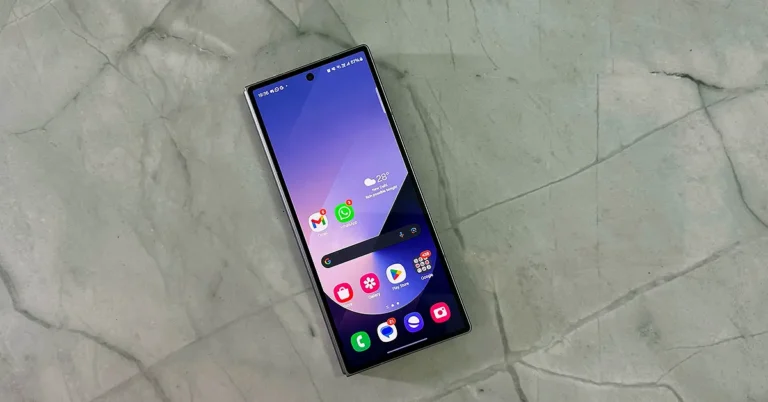
Out of the box, the Samsung Galaxy Z Fold 6 might at first seem similar to the previous generation, but a lot has changed. Now you get more squarish corners and the phone shuts seamlessly as the company has introduced a new hinge mechanism in this mobile, which leaves no gaps (when folded). The outer display is 6.3 inches and has Corning Gorilla Glass Victus 2 on it. It is an AMOLED display with up to 120 Hz refresh rate.

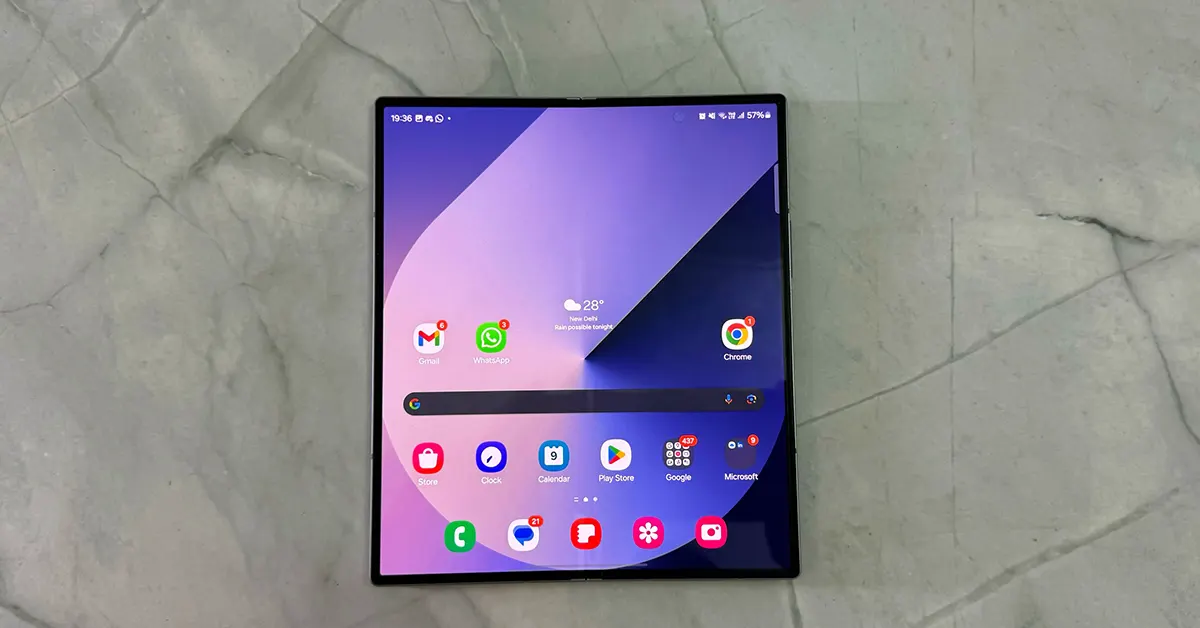
Samsung Galaxy Z Fold 6 big screen

Unfold it and you get to see a 7.6-inch AMOLED display that too has a 120Hz refresh rate, supports HDR 10+ and has a resolution of 2,160 x 1,856 pixels. Both displays support 2,600 nits of peak brightness. These displays are built to perform and we will talk about it in just a moment.

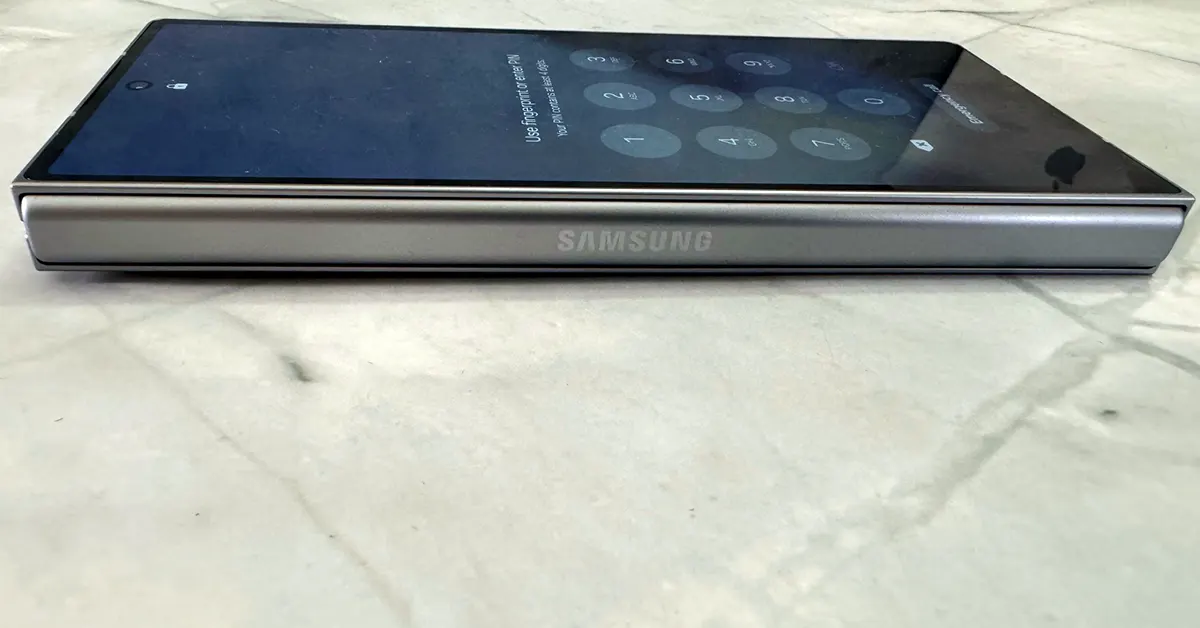
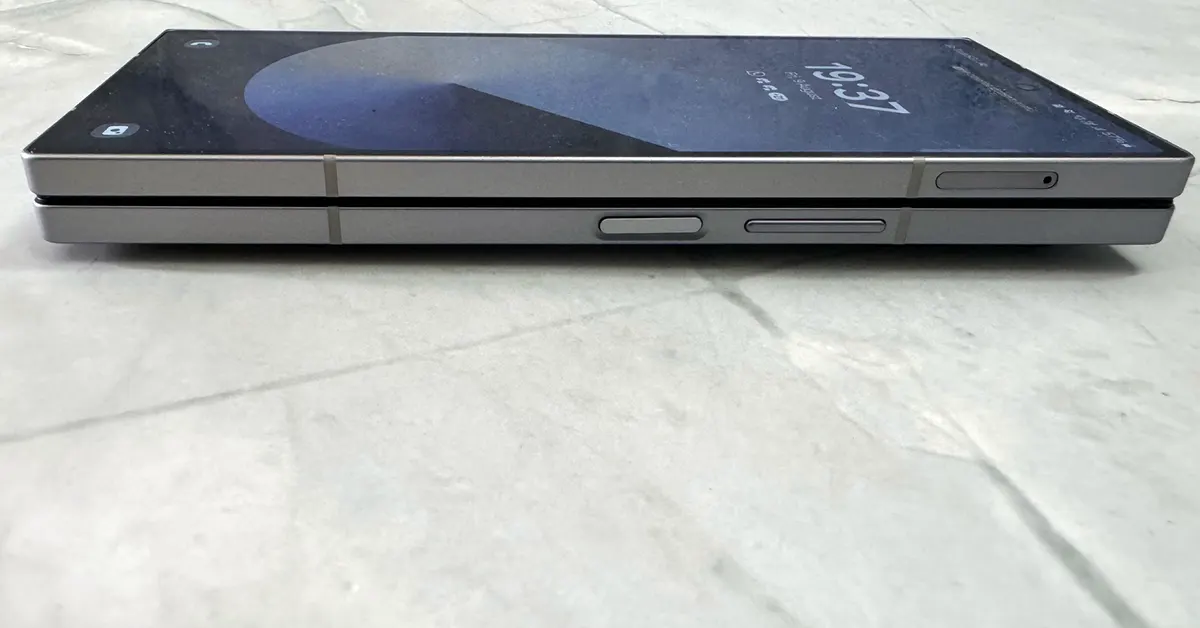
Further talking about the build quality, Samsung has used a lot of metal on this smartphone. From the back to the spine to the frame, everything is built of premium-grade metal. When folded, the right side has the power button (which also is a fingerprint sensor) and right above it is the volume rocker key. You will also find the SIM tray here on the upper side (which becomes the left side when unfolded).

Samsung Galaxy Z Fold 6 side

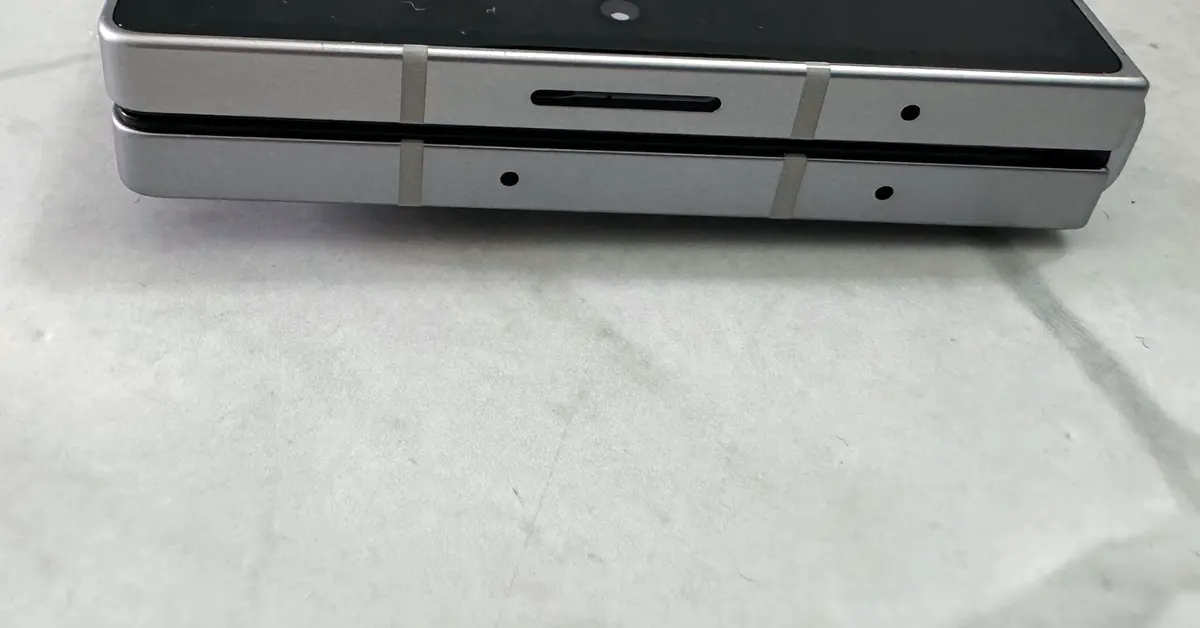
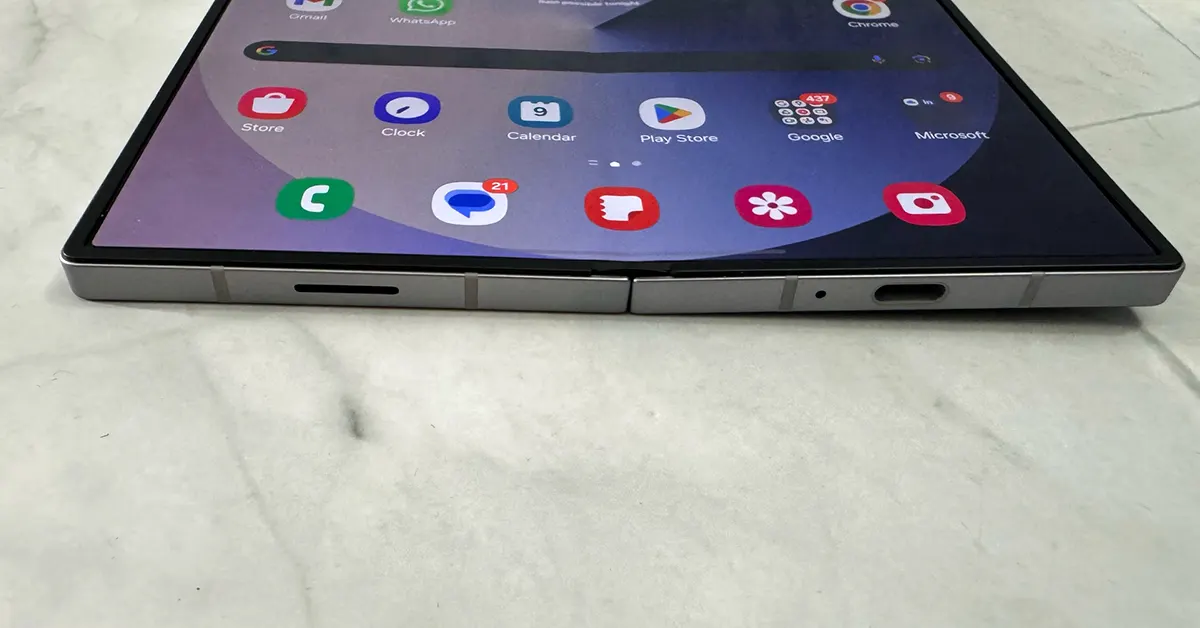
At the top, users get multiple microphones and a loudspeaker grille. At the bottom the company has placed the primary loudspeaker, USB Type-C charging port and the primary microphone. The metal spine can be found on the left side that has the Samsung branding etched on it.

Samsung Galaxy Z Fold 6 top

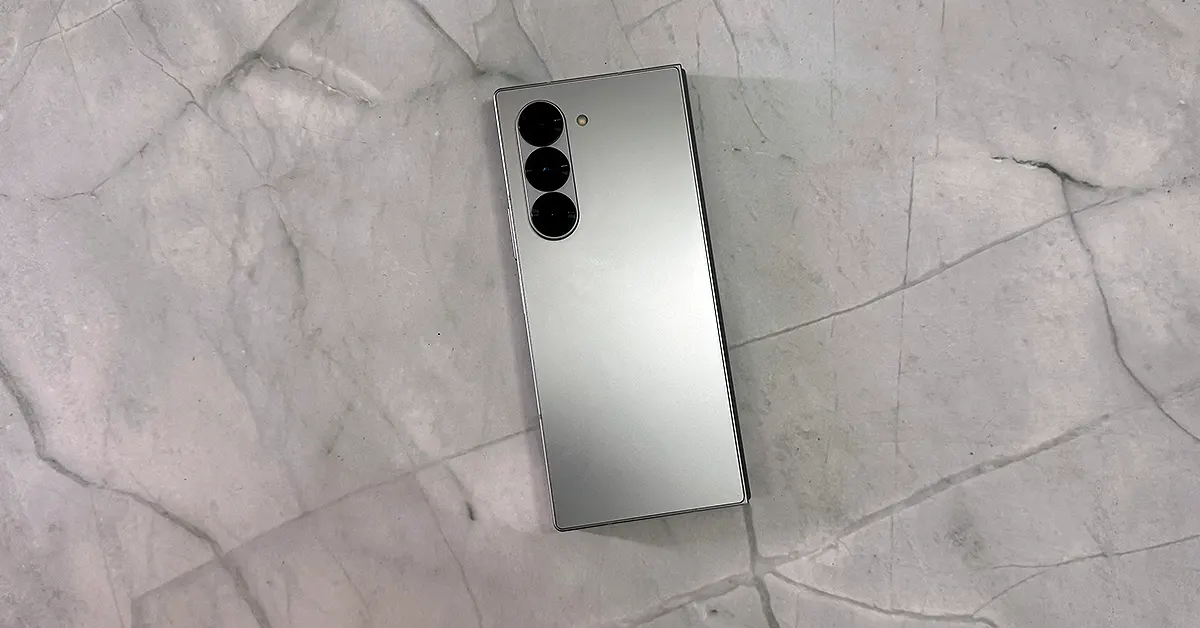
Spin it around and you will find a traffic signal-shaped camera island with three sensors on it. Right next to them is the LED flash. Since the camera system is in 2 steps, it does make the phone wobble when kept flat on a table. So, we do recommend purchasing a good cover for the smartphones, as that will keep the smartphone not only stable but will protect it from nasty bumps and thuds.

Read Also: Samsung Galaxy Z Fold 5 review (long term): A foldable delight

The smartphone also features two selfie cameras, one located on the front screen as a punch-hole system and the other one behind the larger display at the top right of the screen.

Moving to the display and how well it runs. We were very, very happy with both the displays of the Samsung Galaxy Z Fold 6. Coming from Samsung Galaxy Z Fold 5, this display has become better and crisper when compared. Some might argue that the Fold 5 had a more vibrant screen, we would suggest keeping the display brightness a little higher (by say 10%) on the Fold 6 and you will be much happier with this one.

We watched a lot of content on this smartphone and loved every bit of it. We pushed out some tough 4K content and both displays delivered in style. The colours portrayed are vivid and the imagery is sharp, even when watching dark OTT content. The display is partnered with stereo loudspeakers that have become much better when compared to its predecessor. These are tuned by AKG and not once did we feel like picking up the wireless earphones for better reception. Since the inside screen is large enough, two people can also easily watch a show together.

All in all, Samsung gets full marks when it comes to the design and display of the Samsung Galaxy Z Fold 6. At 239 grammes, the in-hand feel of the smartphone is very nice. With the metal body, the smartphone feels well crafted, and it not only gets the job done but also catches a lot of attention.

Samsung Galaxy Z Fold 6 Review: Performance and Cameras

To tell you the truth, we have had very high expectations from the Samsung Galaxy Z Fold 6, when it comes to its performance. And on most counts, it delivered. Under the hood, this smartphone has a Qualcomm Snapdragon 8 Gen 3 multi-core CPU with a max clock speed of 3.39 GHz. This is paired with Adreno 750 as GPU and 12GB of RAM. Users can pick from three storage variants – 256 GB, 512 GB and 1TB. The storage supports UFS 4.0 and there is no expansion slot in this smartphone.

Read Also: Samsung Galaxy Z Fold 4 review: The best just got better

We had a gala time with this masterpiece. The operating system is Android 14 on which Samsung’s own OS 6.1.1 runs. The interface is clean and there is minimal bloatware. We did a lot of multitasking and ran heavy-duty apps and games (like COD Mobile) on the device. Not once did it give us a chance to bicker. In fact, we even threw the bathroom sink at it and the smartphone did not duck and took it like a champ.

The Z Fold 6 isn’t just a phone; it’s a seven-year commitment to staying cutting-edge. This foldable beauty promises to keep you in the software and security loop until you’ve probably moved on to holographic devices.

One UI shines brighter than a competitor’s at maximizing the Z Fold 6’s expansive screen real estate. Imagine juggling eight apps at once, transforming the Fold into a mini-laptop in various flex modes, and doing everything your tablet can—and then some.

On top of that, there is an abundance of AI tools and enhancements added to the Samsung Galaxy Z Fold 6. Google is now bringing a lot of its AI tools first to Samsung phones, which we have seen this year starting from the Samsung Galaxy S24 Ultra (launched earlier this year).

So, what AI innovations does this one bring in? With Google’s Gemini AI chatbot, Circle to Search, voice transcription and translation services, AI summarization, and a keyboard that proofreads better than your grammar-obsessed friend, you’ll feel like you’ve got a personal assistant in your pocket.

And let’s talk fun: the new photo assist tool on this big screen makes the Flip 6 look like a toy. Turn your doodles into lifelike objects in your photos, adding a playful twist to your creativity.

Jumping over to its cameras, the Samsung Galaxy Z Fold 6 pulls in the tried-and-true five-camera setup, including the same 4-megapixel under-display selfie camera that’s perfect for video calls and maybe a few selfies.

From the main rear shooter

On the flip side, you’ve got a 50MP main camera, a 12MP ultra-wide, and a 10MP 3x telephoto. We tested these cams out and we found a lot of depth now being added to almost all of them. In good light, they’re like your personal photography dream team—great portraits, solid low-light shots, but just 3x zoom? It’s a bit shy compared to the newer 5x zooms out there. We found the 3x to be slightly noisy, but compared to its competition it does a fine job. But still, as the saying goes, yeh dil mange more (the heart wants more).

Low Light Shot
Low Light Shot
Night Shot

For a device that costs as much as a small car, you might expect more, but the Fold 6’s cameras are almost on par with the S24 models from January when it comes to videography. You can shoot 8K at 30FPS, but we recommend 4K at 60FPS as that brings lot of vividness to the shots and also they seemed to be much more stable thanks to EIS.

The exterior selfie camera does its job, but why settle? You can always use the main cameras for your selfies, thanks to the cover screen acting as a viewfinder. And don’t forget the Fold’s party tricks: it’ll even take your photo when you show it your palm. Which we loved!

All in all, the Z Fold 6’s cameras are good and will come in handy whenever you want a good daylight portrait or a nighttime party shot.

When it comes to the (4,400 mAh) battery life, we got the same results when compared to the Fold 5. When battery saver is on, you end up getting over a day of battery life. With battery saver off, around 18-19 hours. This included our full 10-hour work day, a bit of gaming here and there and yes lots of calls and WhatsApp messaging.

Verdict

The Samsung Galaxy Z Fold 6 is definitely on the richer side of things. While the lower-end version costs Rs 1,64,999 the top-end 1TB variant will set you back by a little over 2 lacs of Indian rupees. So is the price justified? In a lot of ways yes. You end up getting cutting-edge design, the latest AI innovations and camera improvements over the last generations. The folding mechanism has become better, and the screens are more desirable. Over that, you get the absolute latest machinery inside, which is great for office work, play time and also me time. If you can afford it, we see no reason to not buy it.

Samsung Galaxy Z Fold 6 Pros

Great Screen

A lot of AI features

Primary camera

Metal Body

Samsung Galaxy Z Fold 6 Cons

A higher mAh battery would have been great

The price might pinch a few

Redmi Pad Pro 5G Review: A reliable midrange Android tablet that will serve you well

Xiaomi made a splash in the tablet market last year with the launch of the Pad 6. Along with the OnePlus Pad, the Xiaomi Pad 6 was one of the best Android tablets to come out in 2023. Last month, the Chinese manufacturer launched a new tablet under the Redmi banner. While Redmi is supposed to be an affordable subsidiary of Xiaomi, the 5G variant of the Pad Pro matches the price of the Xiaomi Pad 6. The WiFi-only variant is Rs 3,000 cheaper. If you’re browsing Xiaomi’s catalogue and can’t decide which tablet to go for, this review of the Redmi Pad Pro 5G will make your choice easier. We also recommend reading our review of the Xiaomi Pad 6. So, without further ado, let’s get into it!
Read Also: Samsung Galaxy S24 price in India slashed for a limited period: Details Inside

Redmi Pad Pro 5G Review: Design and Display

One of the better things about buying a Xiaomi or Redmi product is that it doesn’t skimp on the essential accessories. Here’s what you get inside Redmi Pad Pro’s retail box:

  • Tablet
  • 33W adapter
  • USB Type-A to Type-C cable
  • SIM ejector
  • Quick start guide

Redmi Pad Pro 5G Review: Design and Display

The flip cover for this tablet costs Rs 1,500 while the Bluetooth keyboard and Smart Pen fetch Rs 4,000 each. In comparison, the Xiaomi Pad 6’s keyboard and Smart Pen (2nd-gen) cost Rs 5,000 and Rs 6,000 respectively. The flip covers for the two tablets cost the same amount.

design

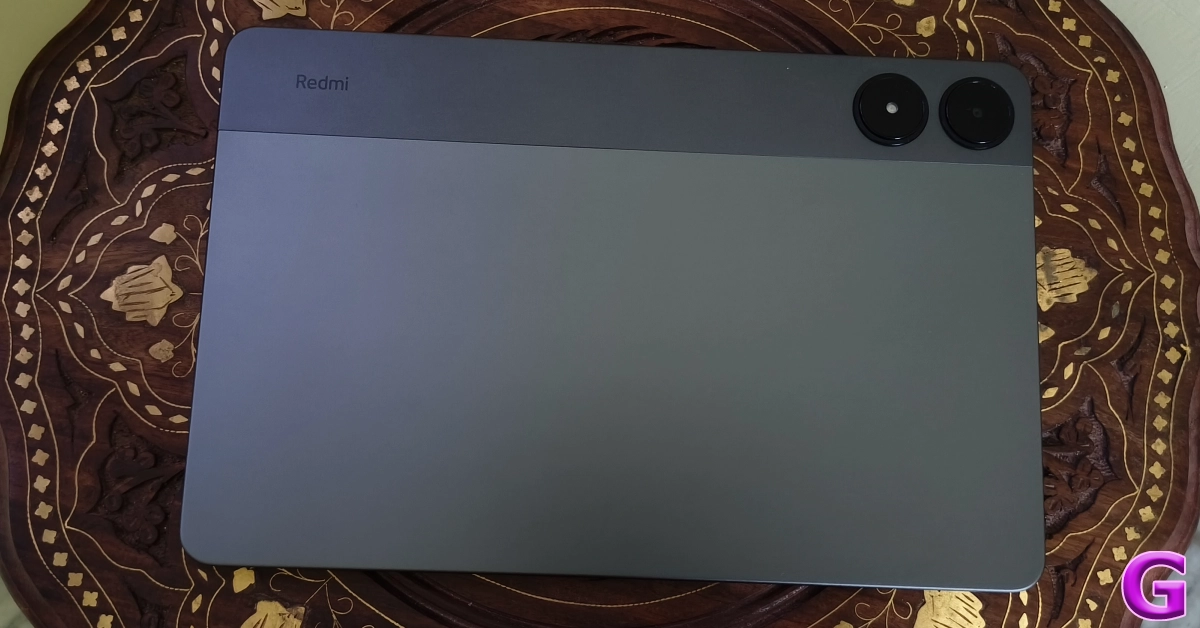
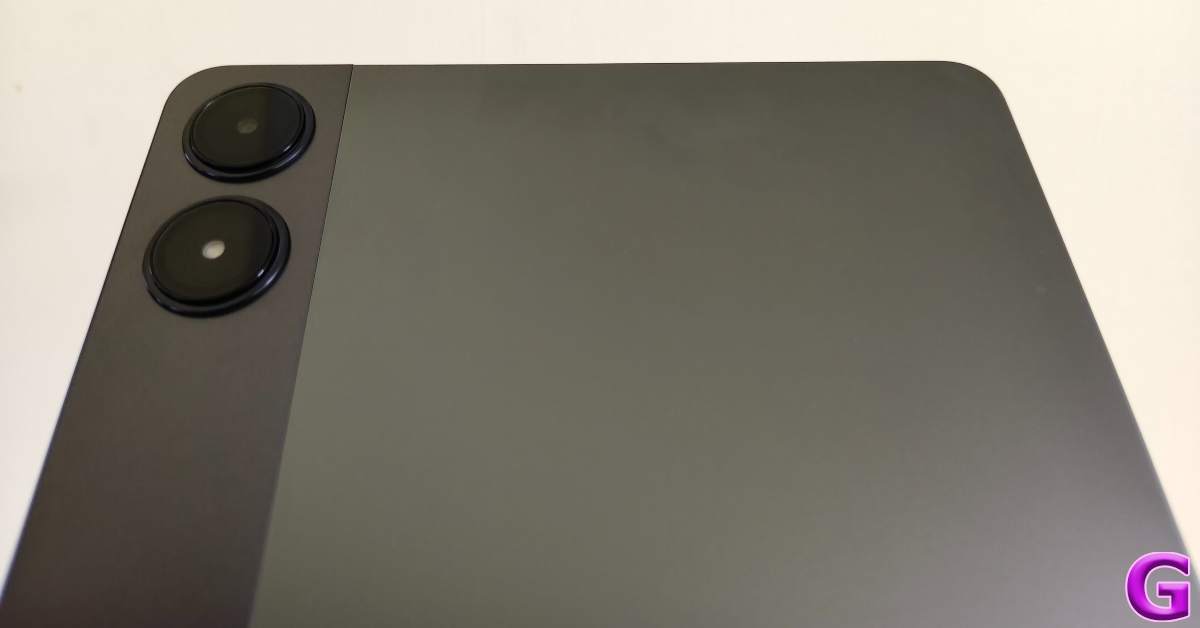
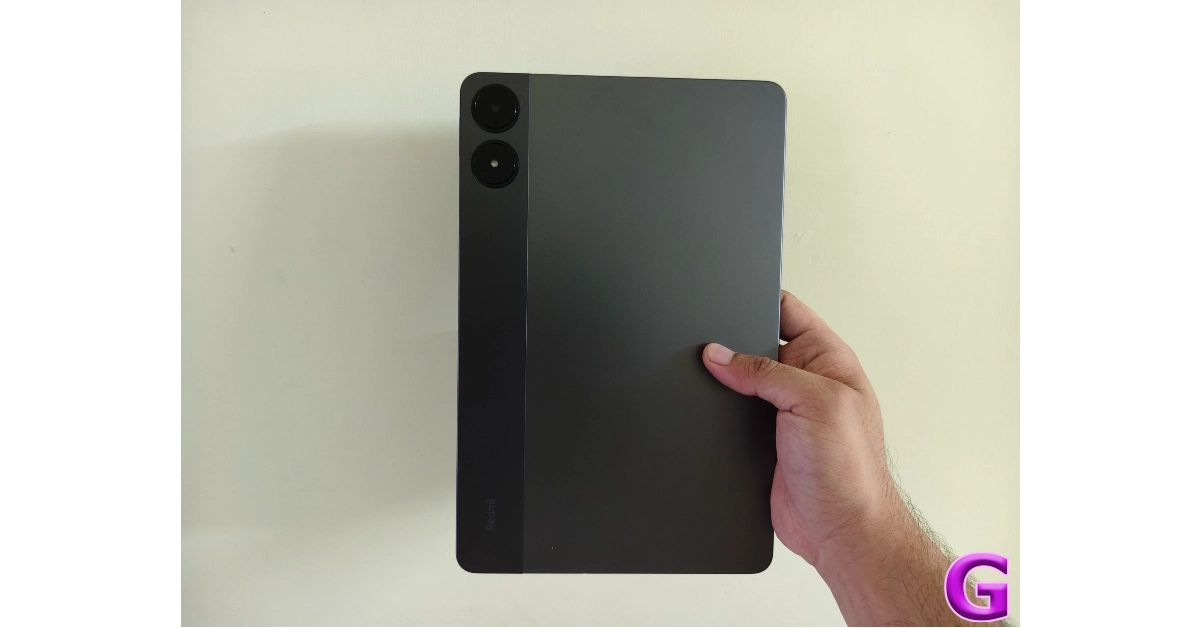
Redmi Pad Pro’s design language is different from that of its Xiaomi counterpart. It has a segmented back panel and two individual cutouts for the camera and LED flash. A polycarbonate strip runs around these cutouts, covering 1/5th of the width of the tablet. The rest of the back panel is made out of aluminium. Both segments have a matte texture, which elevates the in-hand feel of the device.

Redmi Pad Pro 5G Review: Design and Display

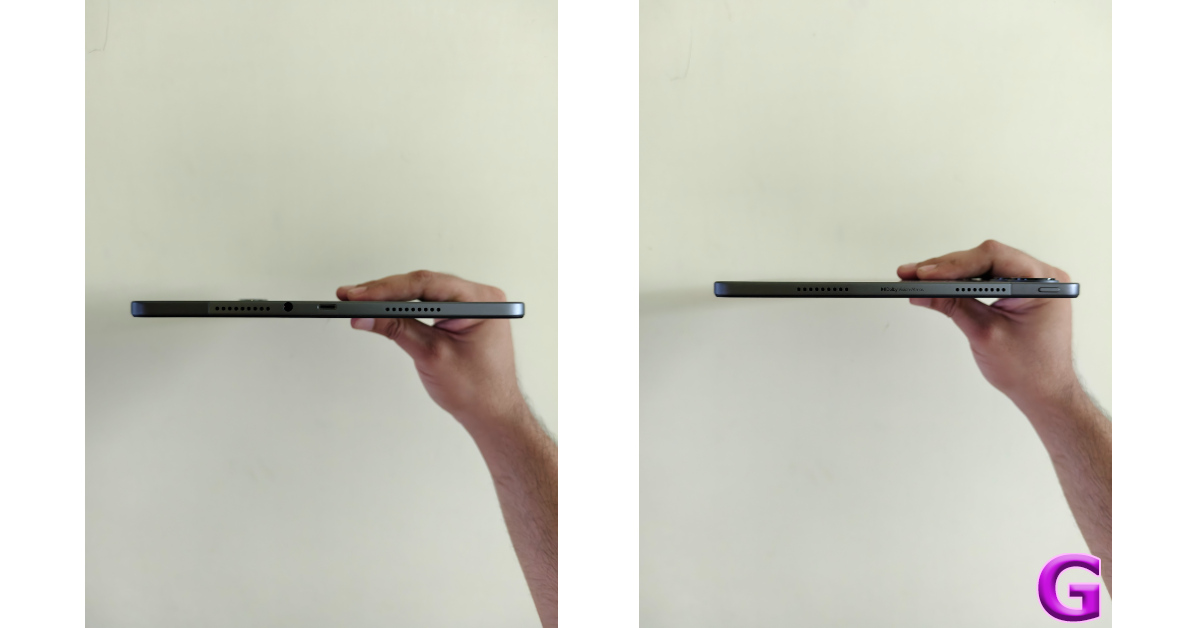
The aluminium frame houses the quad speaker setup along its shorter edges. The USB Type-C port and 3.5mm headphone jack are positioned between the two speaker grilles on the right edge while the power button is placed on the top half on the left edge. This power button does not double up as a fingerprint scanner. The tablet does not have an under-display fingerprint scanner either. The bottom edge of the Pad Pro is keyless while the top edge has the volume rocker keys, primary and secondary microphones, and the hybrid SIM tray.

design

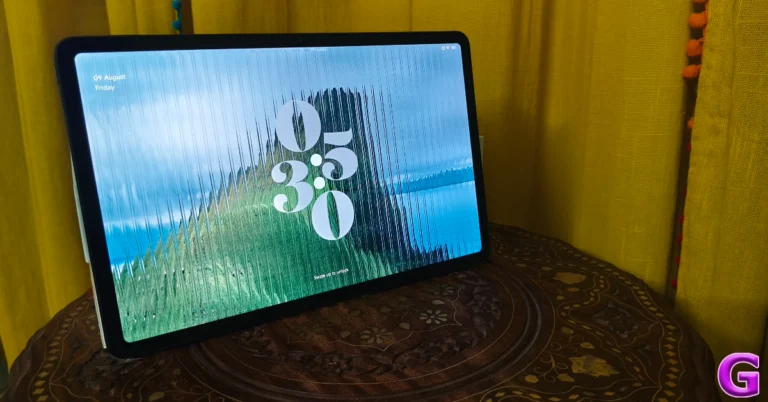
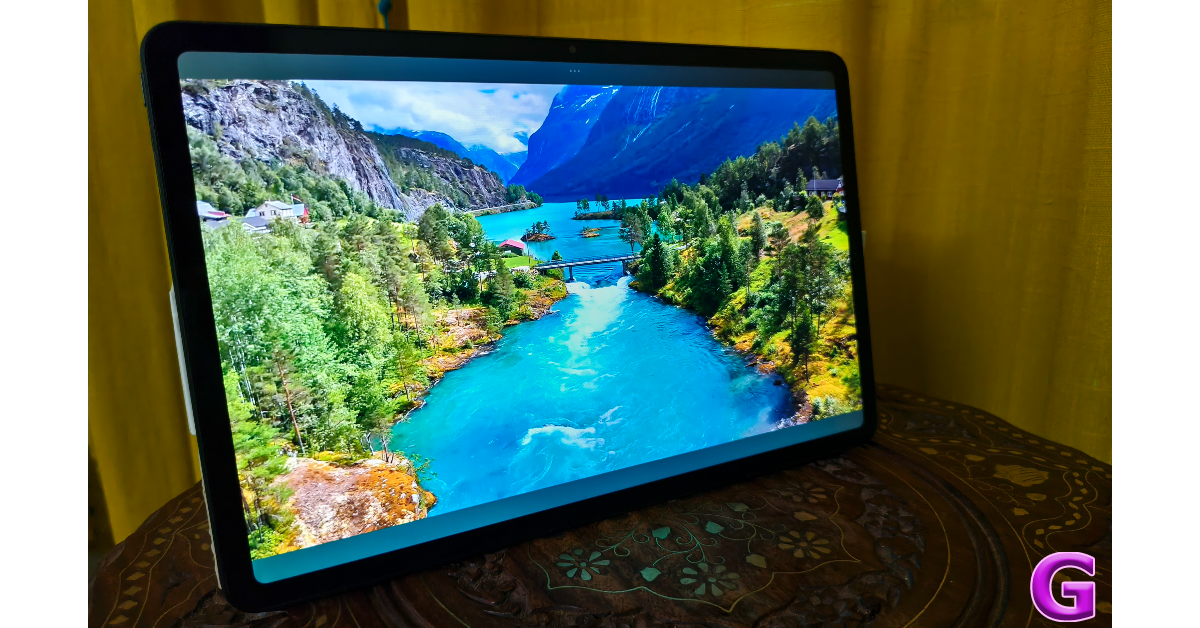
The 12.1-inch IPS LCD panel has a 120Hz refresh rate and can reach 600 nits in High Brightness Mode. The 16:10 aspect ratio of the tablet makes it more suited for use in landscape mode. There are thick, uniform bezels around the display. These bezels prevent accidental touches while holding the tablet with both hands. The LCD panel offers a snappy touch response and a smooth browsing experience thanks to its refresh rate.

Redmi Pad Pro 5G Review: Design and Display

We were treated to a fine viewing experience by the Redmi Pad Pro. We streamed several titles across platforms like Netflix, Prime Video, and Disney+ Hotstar and were pleased by the colour richness and the image quality replicated on the screen. Of course, the blacks produced by this display aren’t as deep as its AMOLED counterparts, but that is a limiting factor on all LCD panels. The quad-speaker setup, on the other hand, leaves a little more to be desired. While it produces an output loud enough to fill the room, it lacks the optimum low-end frequencies to make the audio well-rounded.

display

In comparison to the Xiaomi Pad 6, the Redmi Pad Pro has a couple of advantages. It has a larger and brighter display which immediately bumps the viewing experience. While the Pad 6 may have a higher refresh rate, the difference doesn’t create a world of a difference in standard usage. The Pad Pro also earns brownie points for sporting a 3.5mm headphone jack. On the flipside, the Pad 6 has HDR10 support, which is strangely missing from the Pad Pro.

Redmi Pad Pro 5G Review: Performance and Cameras

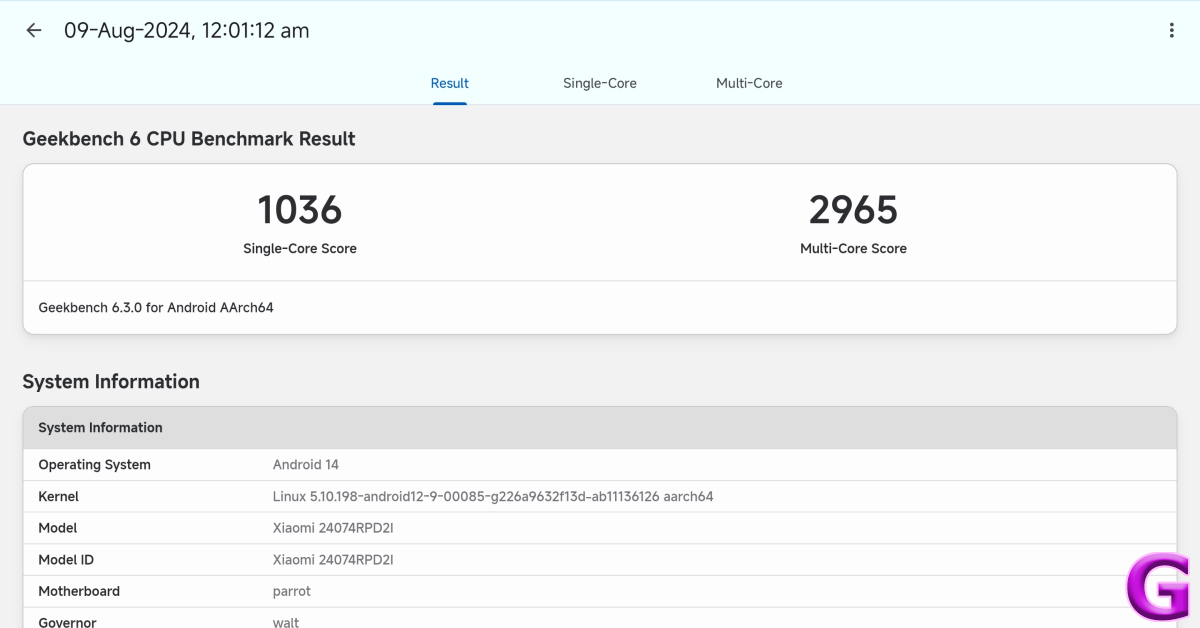
The Snapdragon 7s Gen 2 chipset lies at the heart of the Redmi Pad Pro. In Qualcomm’s hierarchy of processors, this chipset sits below the Snapdragon 870 SoC which powers the Xiaomi Pad 6. On the Geekbench 6 app, the Redmi Pad Pro scored 1,036 points in the single-core test and 2,965 points in the multi-core test. The Pad 6 scored 1,259 and 3,033 points respectively when we reviewed the tablet last year.

Redmi Pad Pro 5G Review: Performance and Cameras

Redmi Pad Pro uses LPDDR4X RAM and UFS 2.2 Storage. Meanwhile, the Xiaomi Pad 6 makes use of LPDDR5 RAM and UFS 3.1 Storage. The difference in the performance of the two tablets is small but noticeable. The apps take a fraction of a second longer to load on the Pad Pro and juggling multiple apps is much smoother on the Pad 6. Having said that, the Pad Pro is fun to work with. We used our review unit of the Redmi Pad Pro to stream movies, send emails, make video calls, and browse the web. The seamless and stutter-free experience offered by the tablet was ideal.

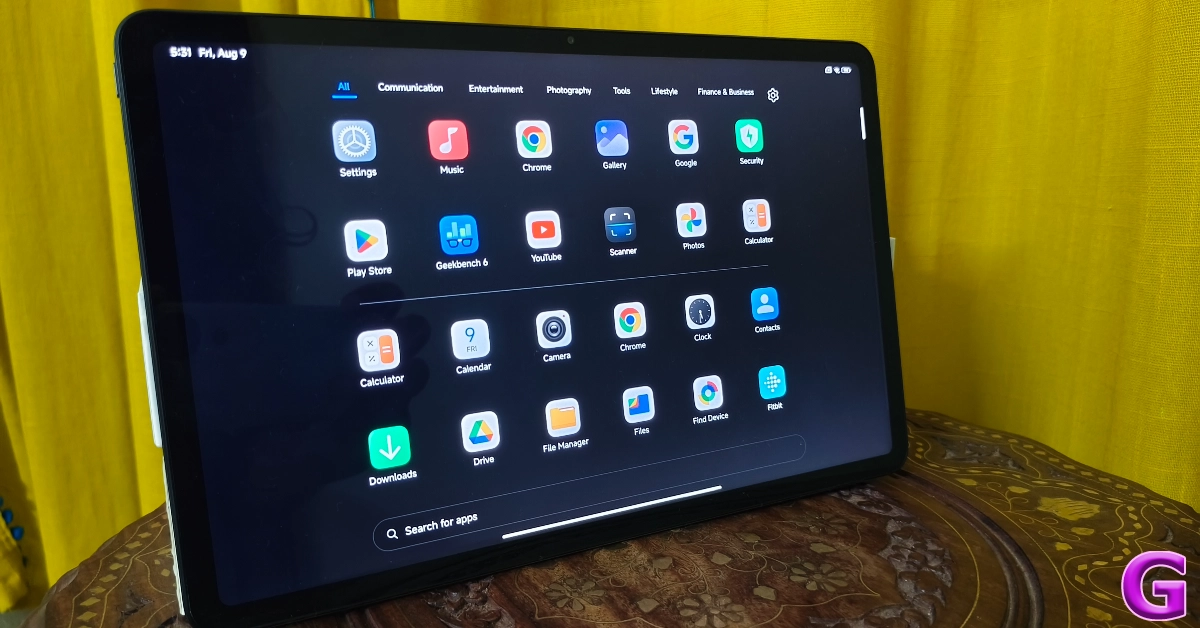
app drawer

We even tried a bit of gaming on the Pad Pro, playing titles like Call of Duty Mobile and Asphalt Legends Unite. On average graphics, the tablet produced a satisfying gaming experience, devoid of any lags or frame drops. The device’s back panel started warming up after hitting the 30-minute mark. The tablet’s long form factor elevates the gaming experience in landscape mode. But if it’s high-end graphics that you’re after, you’ll need to shop in a higher price category.

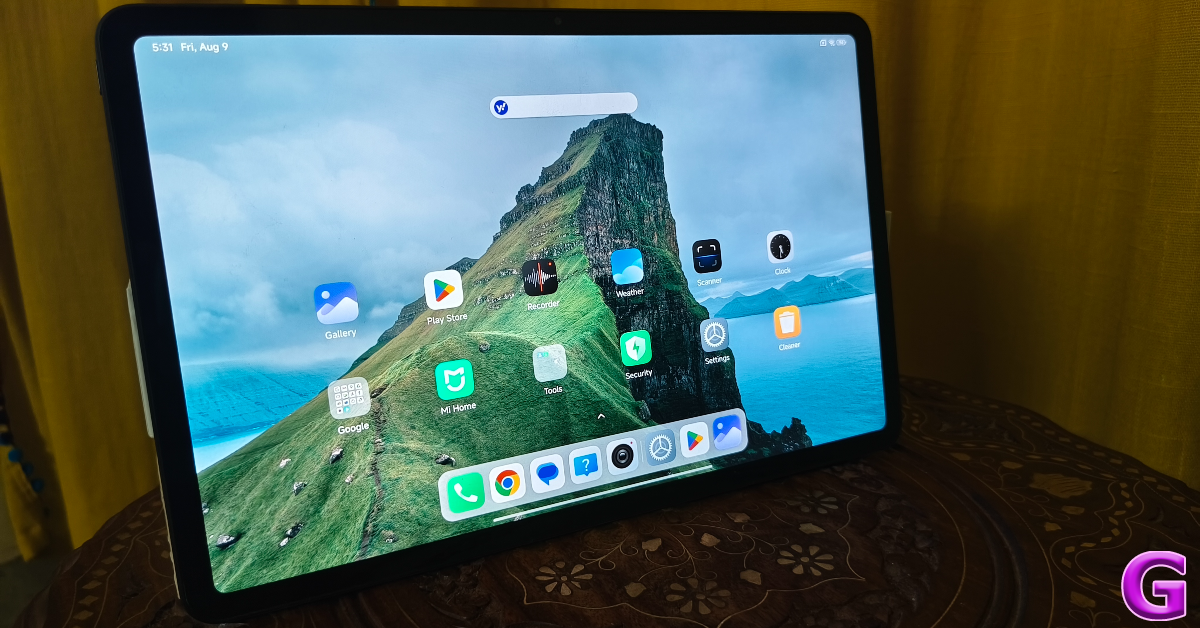
Xiaomi’s HyperOS carries out the software duties on this tablet. Right off the bat, we were pleased to see no bloatware on the device. A clean and ad-free software experience always earns extra points from us. The next-gen HyperOS gets the most out of the tablet’s screen real estate and makes multitasking more fun.

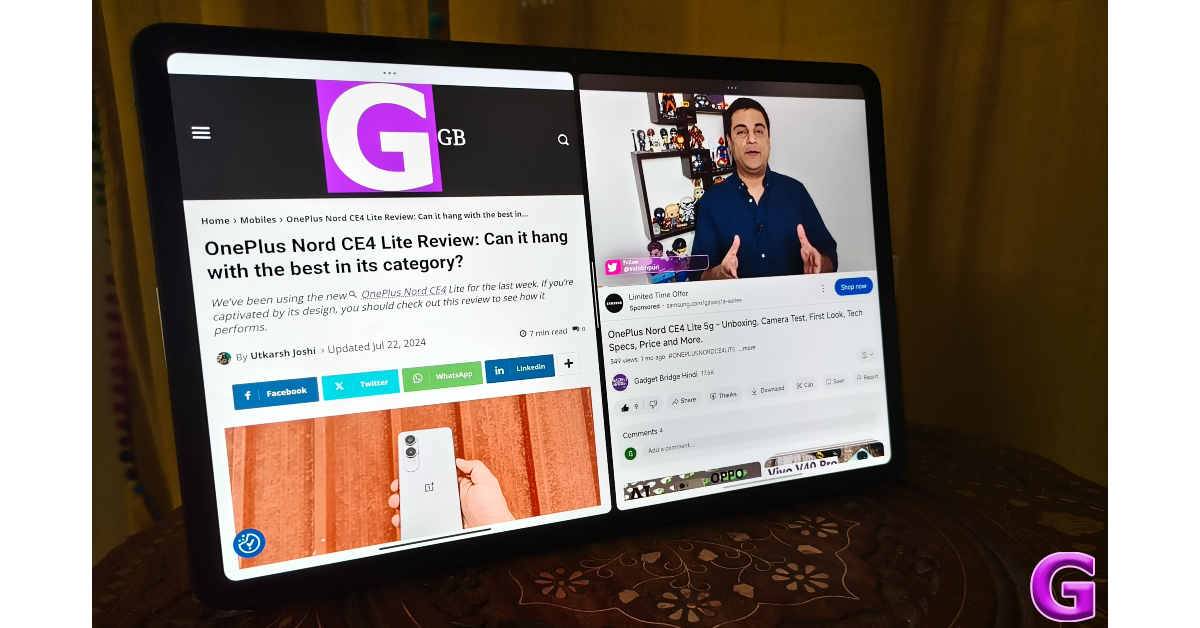
multi tasking

For starters, you can use two apps in split-screen mode on this tablet. Watching a football game while reading its match thread on Reddit at the same time was a very fun experience for us on this tablet. You can also open up to two apps in popup windows at one time. The HyperOS offers a bunch of ‘Interconnectivity’ options for Xiaomi users. If you own a Xiaomi smartphone, you can mirror its home screen on the tablet and interact with its apps without needing to install a third-party app. You can also receive your phone notifications on the tablet and share the clipboard between the two devices.

Redmi Pad Pro 5G Review: Performance and Cameras

Android OS for tablets at large still struggles with the old familiar issues. Some apps are just stretched-out versions of their smartphone counterparts, failing to utilise the large display on offer. We hope more developers follow Instagram and WhatsApp and adapt their apps to the larger form factor.

Moving on, the 10,000mAh battery pack on this tablet is sufficient enough to take it through two days of standard usage. During the week-long review period, we used the Redmi Pad Pro for tasks like video calling, media streaming, instant messaging, emailing, social media browsing and gaming. We spent an average of 2 hours with the tablet every day. After two days of use, the tablet hit the 15% battery mark. The 33W power adapter provided in the box took just under 2 hours to fully charge the device.

Redmi Pad Pro 5G Review: Performance and Cameras

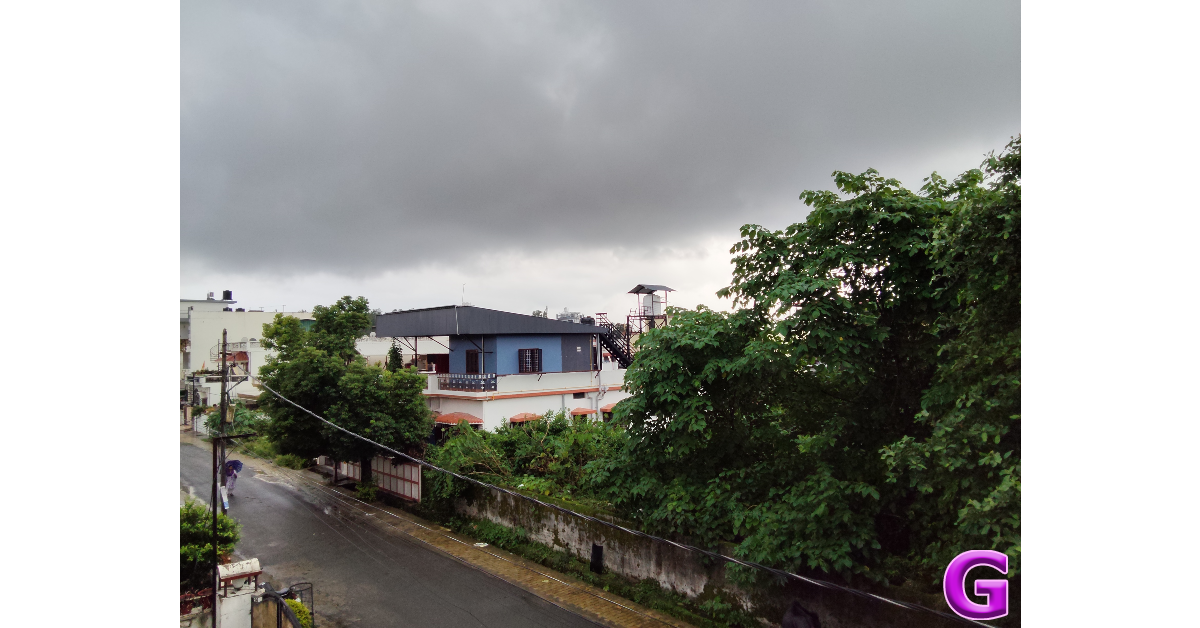
Redmi Pad Pro’s camera performance is nothing out of the ordinary and we are fine with it. A state-of-the-art camera system is not our biggest priority on a tablet. The 8MP rear camera on this tablet takes decent images in outdoor daylight conditions. The results showcase vibrant colours. The pictures are noticeably soft and do not have the best dynamic range but they’re passable for a tablet.
Redmi Pad Pro 5G Review: Performance and Cameras

The front-facing 8MP camera takes good selfies but applies a smoothening effect to the skin texture. However, its performance in indoor and outdoor lighting is satisfactory. What we want out of a tablet’s camera system is its ability to hold up well on video calls and the Redmi Pad Pro handled this task expertly. The selfie camera on this tablet is placed on the top bezel, which means you need to hold it in landscape mode during video calls. The camera relays a steady and well-composed video feed, which is what we want out of the device.

selfie

Read Also: Vivo Y58 price in India reduced by Rs 1,000

Verdict

The Redmi Pad Pro is a rock-solid midrange Android tablet that is ideal for home use. The tablet handles media streaming with expertise and provides a satisfying viewing experience. The Snapdragon 7s Gen 2 chipset ensures that the device isn’t out of its depth while multitasking and handling demanding tasks. Sure, it is not the most powerful tablet out there, but if you’re not concerned with heavy gaming, the Redmi Pad Pro will serve you well.

Redmi Pad Pro 5G: Pros

  • Big display
  • Premium build quality
  • 3.5mm headphone jack
  • Good software experience

Redmi Pad Pro 5G: Pros

  • Does not support HDR10
  • No fingerprint scanner

Samsung Galaxy S24 price in India slashed for a limited period: Details Inside

Key Highlights

  • Samsung’s Galaxy S24 price dropped in India.
  • The device was launched in India in January for Rs 79,999.
  • The company is offering a limited-time Freedom Sale that offers no-cost EMI options.

Samsung has dropped the price of the Galaxy S24, which was launched in India in January for Rs 79,999. The limited-time Freedom Sale provides no-cost EMI options and is valid till next week. The Galaxy S24 has a triple back camera arrangement, including a 50-megapixel primary sensor, and an IP68 classification for dust and water protection. The gadget is powered by the Snapdragon 8 Gen 3 Mobile Platform for Galaxy. It comes with Android 14-based One UI 6.1.

Samsung is offering a Freedom Sale offer in India, which includes a price reduction of Rs 12,000 for the Galaxy S24. On the Samsung online store with a 24-month no-cost EMI offer starting at Rs 5,666 per month, the base variant with 8GB RAM and 128GB storage is currently available for Rs 62,999.

Prices for the 256GB and 512GB storage variants are currently Rs 67,999 and Rs 77,999, respectively. While Flipkart sells the base version of the Galaxy S24 for Rs 74,999, Amazon lists it for Rs 55,850.

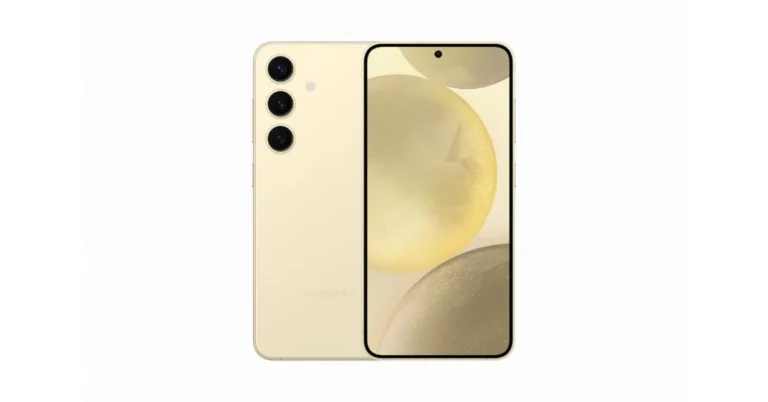
Samsung Galaxy S24 was previously available at Rs 74,999 for the 128GB model. 8GB RAM with 256GB storage and 8GB RAM with 512GB storage models were priced at Rs 79,999 and Rs 89,999, respectively. S24 is available in Amber Yellow, Cobalt Violet, Onyx, and Black colour options.

Also Read: iQOO TWS launch teased, coming soon to India

The Samsung Galaxy S24 is highlighted with a 6.2-inch FHD+ and 6.7-inch QHD+ Dynamic AMOLED 2X display with 120Hz refresh rate. The screen has a layer of Corning Gorilla Armor for protection. The Phone includes Samsung Knox, Knox Vault, and Passkeys. The device is powered by Exynos 2400 SoC. It runs on Android 14 with UI 6.1. The company will provide seven generations of OS upgrades and seven years of security updates.

The Galaxy S24 features a triple rear camera setup that includes a 12MP Ultra-Wide Camera (F2.2, FOV 120˚), 50MP Wide Camera (OIS F1.8, FOV 85˚) and a 10MP Telephoto Camera (3x Optical Zoom, F2.4, FOV 36˚). All the models come with a 12MP selfie camera (F2.2, FOV 80˚).
The smartphone includes Live Translate, Interpreter, Chat Assist, Note Assist, Transcript Assist, and Circle to Search, powered by built-in AI features.

The Samsung Galaxy S24 is backed by a 4,000mAh battery that supports Wireless PowerShare technology in addition to 25W wired and 15W wireless charging. In addition, it has IP68 dust and splash resistance and supports 5G, 4G LTE, Wi-Fi 6E, Bluetooth 5.3, Wi-Fi direct, and USB Type-C connectivity.

Garena Free Fire Max Redeem Codes Today 9 August 2024: Here is how to claim them

Garena Free Fire Max is a battle royale game with regular awards and tournaments to keep players interested. If you play Garena Free Fire, you should be aware of the redeem codes that are released on a daily basis. However, because the battle royale game is banned in India, players from other countries can use the Free Fire Redeem codes daily. If you’re unfamiliar with the Garena Free Fire redeem codes or don’t know how to get them, we’ve put together a step-by-step guide to help you redeem them. Check out Garena Free Fire Max Redeem Codes for 9 August  2024.

The Free Fire Max redeem codes are a great way to get free stuff. These are 12-digit codes that contain alphabets and numbers, as well as an expiration date and time. Because the Garena FF redeem codes cannot be used more than once, you should hurry to the redemption page to claim your free reward before someone else does. To get a free reward, all you have to do is go to reward.ff.garena.com/en, which is the official redemption page. Also, keep an eye on this space for daily updates on Garena Free Fire Max redemption codes and rewards.

Also Read: Sennheiser Accentum Plus wireless headphones with Hybrid Adaptive Noise Cancellation launched

Garena Free Fire Max Redeem Codes Today 9 August 2024

FGHJ-KLOP-AB12
GHJK-OLKI-JU34
HJKL-TYUI-OP56
IUYT-REWS-DF78
JUKI-OLPW-QA90
AGTY-KLOP-Q12X
BNVG-FTYJ-SW34
NOPQ-HYUI-MJ78
OPLK-JHGF-WS90
PQRS-TYUI-OK12
QRST-FGVB-HJ34
CRFD-GBNH-ZX56
DSEW-RTYH-UJ78
ERTY-BVGF-ER90
KLOP-BVGF-DS12
LMNO-CXZA-SQ34
MNOP-DEFR-GT56

How to Get Free Fire Max Redeem Codes for Garena on 9 August 2024?

  • Visit the Garena Free Fire Max game’s official website at reward.ff.garena.com.
  • Use your Facebook, Google, VK, Apple ID, Huawei ID, or Twitter account to log in.
  • You’ll be taken to a valid redemption code (s)
  • Copy and paste the 12-digit redemption code into the text box.
  • On the screen, a dialogue box will appear.
  • ‘Ok’ should be selected.

For the latest gadget and tech news, and gadget reviews, follow us on TwitterFacebook and Instagram. For newest tech & gadget videos subscribe to our YouTube Channel. You can also stay up to date using the Gadget Bridge Android App. You can find the latest car and bike news here.

Amazon Quiz Answers Today 9 August 2024: Participate to win Rs 500 Amazon Pay Balance

9 August 2024: New Amazon Quiz is now available. Customers from different parts of the country are participating in the daily quiz. The quiz starts at midnight today and will be live until 11:59 PM tonight. By successfully answering every question, participants in the quiz have the chance to win wonderful rewards. A Rs 500 Amazon Pay Balance is up for grabs to participants today.

One wrong answer could eliminate you from the quiz. You have a chance to win Rs 500 Amazon Pay Balance if you successfully answer every question. Users of the app only have the opportunity to take the quiz. Check Out 9 August 2024 Amazon Quiz Answers.

Amazon Quiz Today Prize: Rs 500 Amazon Pay Balance

Quiz Date: 9 August 2024

Daily Timing: 12 AM to 11:59 PM

Previous Amazon Quiz Winners Announcement: Today 12 PM Noon

Amazon Quiz Answers Today 9 August 2024: Win ₹ 500 Amazon Pay Balance

Question 1: Which famous badminton player is one of India’s flagbearers for the 2024 Paris Olympics?

Answer: PV Sindhu

Question 2: What is the latest edition of the ‘Bad Boys’ movie franchise?

Answer:  Bad boys: ride or die

Question 3: Nobel Prize winner Ernest Rutherford was born in which country?

Answer:  New Zealand

Question 4: This is the Taj-ul-Masajid in which city?

Answer:  Bhopal

Question 5: This is a bust of which famous ruler from history?

Answer: Alexander the Great

Also Read: Noise Buds Verve, budget TWS with up to 45 hours of playback launched in India

How To Play Amazon Quiz Today

Only app users are eligible to play the Amazon quiz every morning from 12 AM to 11:59 PM. The quiz is not available on the desktop. For those who are unaware of how to play the Amazon quiz, below are the steps, you can follow to take the quiz.

  • First, download the Amazon app from the Google Play Store or App Store or go here to download the Amazon App
  • Now fill in the required information through the Sign-Up option.
  • You need to log in to the Amazon app and scroll down on the home screen to find the Amazon Quiz banner.
  • Tap on the Amazon Quiz banner and tap on the Start button to start the Quiz.
  • Now you will get 5 questions and you need to answer them correctly. One wrong answer will eliminate you from the Quiz.
  • After answering all the questions correctly you are now eligible for a Lucky Draw.
  • The previous winner’s name will be announced today at 12 PM.

Amazon Daily Quiz Answers from the previous few days.

Here are all the answers from the previous 5 days of the Amazon Daily Quiz and Contest.

Amazon Quiz Answers Today 8 August 2024: Win ₹ 500 Amazon Pay Balance

Question 1: Which of these batters scored a century during India’s recent 5-match T20I series against Zimbabwe?

Answer: Abhishek Sharma

Question 2: In May 2025. the ___ edition of the Mission Impossible movie franchise is going to be released. Fill in the blanks

Answer: 8th

Question 3: In which present-day Indian state was the Battle of Buxar, which saw the East India Company emerge victorious fought?

Answer: Bihar

Question 4: This is a view of the City Palace in which Indian city?

Answer: Jaipur

Question 5: Valletta is the capital of which country, whose flag is shown here?

Answer: Malta

Amazon Quiz Answers Today 7 August 2024: Win ₹ 500 Amazon Pay Balance

Question 1: Which of these sportspeople would be one of the flagbearers for the USA at the 2024 Paris Olympics?

Answer: Coco Gauff

Question 2: The upcoming Bollywood movie ‘Deva’ stars Pooja Hegde along with which famous actor?

Answer: Shahid Kapoor

Question 3: Alcazar, Exter, Palisade and Tucson are car models from which brand?

Answer:  Hyundai

Question 4: This is a statue of which saint in Belfast, is associated with a day that is a holiday in some places?

Answer:  St Patrick

Question 5: What is the musical instrument shown here?

Answer: Pan flute

Amazon Quiz Answers Today 6 August 2024: Win ₹ 500 Amazon Pay Balance

Question 1: What is the name of the mascot of the 2024 Paris Olympics?

Answer: phryge

Question 2: Who is playing the character of Harley Quinn in the movie ‘Joker: Folie a Deux/ Joker 2’?

Answer: Lady Gaga

Question 3: Who succeeded the 19th Mughal emperor Akbar Shah II to the throne?

Answer: Bahadur shah zafar

Question 4: Which Nobel laureate is shown here?

Answer: Marie Curie

Question 5: The flag of which country is shown here?

Answer: Armenia

Amazon Quiz Answers Today 5 August 2024: Win ₹ 500 Amazon Pay Balance

Question 1: Who was the top scorer for India in the T20 World Cup final 2024?

Answer: Virat Kohli

Question 2: The Last Dance’ is the tagline of the 3rd of a series of movies with whom as the central character?

Answer: Venom

Question 3: British Shorthair, Ragdoll and Abyssinian are types of what animal?

Answer:  Cat

Question 4: Which famous place in the UK is shown here?

Answer:  Trafalgar Square

Question 5: Which famous person is depicted in this statue?

Answer: Napoleon Bonaparte

Amazon Quiz Answers Today 4 August 2024: Win ₹ 500 Amazon Pay Balance

Question 1: Who beat Novak Djokovic in the final to win his 2nd consecutive Wimbledon men’s singles title?

Answer: Carlos Alcaraz

Question 2: In ‘Captain America” Brave New World’ scheduled to be released in 2025, which legendary actor plays the role of Thaddeus ‘Thunderbolt’ Ross?

Answer: Harrison Ford

Question 3: Which place in South India is also known as the ‘Scotland of India’?

Answer: Coorg

Question 4: This is a picture taken in which African country?

Answer: Morocco

Question 5: This is Bletchley Park, the main centre of Allied code-breaking during World War II. Who among these was part of the team of codebreakers? What is the name given to the profession of the man in the picture?

Answer: Gondoliere

Amazon Quiz Answers Frequently Asked Questions (FAQs)

Where can I check the previous winners? Did I win how to check?

You can head over to this link on your mobile or desktop to check the winners of the Amazon Daily Quiz Contest.

How to Play Amazon Daily Quiz or Contest?

We have written an explainer above, you can refer to that.

When are the winners of the Amazon Quiz and contest announced or declared?

The announcement of today’s Amazon quiz winner will take place Tomorrow. As for the Special Quiz and “Spin & Win” Contest, the winners will be declared once the Quiz Contest comes to an end. To find out who the lucky winner is, you can refer to the Amazon Quiz Winners List or visit the Amazon Winners tab in the Amazon App.

How to participate in the Daily Amazon Quiz?

That is very easy, just got to the Amazon app and scroll to the bottom of the page and you will find the Quiz section. Click on it (usually it is called the fun zone) and you can enter the Amazon Today Quiz Contest. 

Are there any other quizzes or contests running on Amazon daily?

Yes, there are many running on a daily basis. These range from spinning the wheel to answering the questions correctly. All are located in the Fun Zone. 

What are the criteria for selecting a winner in the Daily Amazon Quiz?

When a qualified player submits correct answers to all the questions, they will automatically be entered into a lucky draw. This draw will include all participants who answered all the questions correctly. Amazon randomly selects the final winners from the pool of eligible participants who gave the right answers.

Which Types of Questions are asked within Amazon Daily Quiz?

These are very simple and straightforward questions. These are mainly related to general knowledge. 

Where should I look for Amazon Daily Quiz answers?

You can bookmark this page as we will help you every day with the Amazon Daily Quiz. We bring you fresh answers every day for the Amazon Daily Quiz and Contest. 

What time does Amazon Announce previous winners?

The previous winner’s name will be announced today at 12 PM (noon).

For the latest gadget and tech news, and gadget reviews, follow us on TwitterFacebook and Instagram. For newest tech & gadget videos subscribe to our YouTube Channel. You can also stay up to date using the Gadget Bridge Android App. You can find the latest car and bike news here.

Vivo Y58 price in India reduced by Rs 1,000

Key Highlights

  • The price of Vivo Y58 has been cut down by Rs 1,000.
  • The smartphone is powered by Qualcomm Snapdragon 4 Gen 2.
  • It features a 50-megapixel primary sensor.

The Vivo Y58, launched in India in June this year is getting a price cut. The price of the smartphone has been reduced by Rs 1,000 in India. The device packs a massive 6,000mAh battery. It also features a 50-megapixel primary camera and a 120Hz display. The device is powered by the Snapdragon 4 Gen 2 SoC and it runs Android 14 with Funtouch OS 14.

After receiving a price reduction of Rs 1,000 the Vivo Y58 is currently available at Rs 18,499. The device was launched in June at Rs 19,499. It is available in a single 8GB RAM and 128GB internal storage. The phone can be purchased via Flipkart in Sundarbans Green and Himalayan Blue colour options.

Also Read: iQOO TWS launch teased, coming soon to India

Vivo Y58 5G Specifications

Vivo Y58 5G features a 6.72-inch Full HD+ LCD screen with 2408×1080 pixels of resolution. The display supports a 120Hz refresh rate, up to 1024 nits peak brightness and an 83% NTSC Color Gamut. The display is certified by TUV Rheinland Low Blue Light Eye Care, which ensures the protection of users’ eyes. 

It sports a 2.5D display. Under the hood, there is an octa-core Snapdragon 4 Gen 2 4nm Mobile Platform with Adreno 613 GPU. It is available with 8GB LPDDR4x RAM and 128GB of UFS 2.2 storage. The internal memory can be expanded up to 1TB using microSD. The handset operates on Android 14-based Funtouch OS 14 out of the box.

Also Read: Amazon Titan Image Generator v2 AI Model Introduced With New Features In Amazon Bedrock

For the optics, the Vivo Y58 flaunts a dual rear camera setup led by a 50-megapixel primary sensor with f/1.8 aperture and a 2-megapixel portrait camera with f/2.4 aperture. Upfront there is an 8-megapixel selfie camera with f/2.05 aperture and with Aura Light screen.

The smartphone is integrated with a side-mounted fingerprint sensor. The phone is IP64-rated for dust and water resistance. In terms of connectivity, there is 5G SA/NSA, Dual 4G VoLTE, Wi-Fi 802.11 ac (2.4GHz + 5GHz), Bluetooth 5.1, GPS/ GLONASS/ Beidou, USB Type-C and 3.5mm audio jack. Y58 boasts a 6000mAh battery with 44W fast charging.

iQOO TWS launch teased, coming soon to India

Key Highlights

  • iQoo has officially teased its upcoming TWS earphones for the Indian market.
  • The device is rumoured to be a rebranded variant of the iQOO TWS 1e or the Vivo TWS 3e.
  • The Vivo TWS 3e debuted in India this week alongside the Vivo V40 series.

The iQOO TWS earphones, which are the brand’s first earbuds, will formally debut in India. It is believed to be a rebranded version of the Vivo TWS 3e or the iQOO TWS 1e. A few weeks ago, the earphones were found on BIS, indicating that the firm is planning to launch its first TWS in the nation.

iQoo Vivo’s sub-brand is prepping up to launch its first TWS earphones in India. The company’s head Nipun Marya took to X.com to tease the arrival of the upcoming earphones. Although the earbuds’ specifications are still unknown, it’s rumoured that the iQoo TWS will be a rebranded version of either the Vivo TWS 3e or the iQOO TWS 1e.

Looking at the teaser image the upcoming device will feature a black and yellow colour scheme. The charging case sports the company’s logo and an LED charging indicator.
The iQOO TWS earbuds, on the other hand, have an in-ear design with stems similar to Apple AirPods Pro.

Also Read: Amazon Titan Image Generator v2 AI Model Introduced With New Features In Amazon Bedrock

Vivo TWS 3e Earbuds Specs

Vivo TWS 3e features a round case with ear tips designed for various ear shapes and sizes. The earphones have Smart touch controls for playback, pause, and voice assistant wakeup.
It comes equipped with 11mm drivers and a bionic composite cashmere biofiber diaphragm for high-quality sound. Offers up to 30dB ANC for background noise cancellation and AI call noise reduction. The earbuds have an 88ms low latency for lag-free gaming and streaming.

The TWS earphones offer DeepX 3.0 Sound Effects for deeper bass and clearer voice. It also has an AI-backed call noise reduction algorithm that reduces ambient noise.
The device delivers up to 36 hours of battery with noise reduction and 42 hours with noise reduction off. Additionally, there is Support for fast-charging technology for 3 hours of playback with 10 minutes of charging.

Also Read: OnePlus Open Apex Edition in a new Crimson Shadow colour launched in India

IP54 rating for water splash and dust resistance. Furthermore, it includes a dual-device connection with Bluetooth v5.3 connectivity.

Vivo TWS 3e comes with Google Fast Pair support, hands-free Google Assistant and features Find My Earphones feature for lost earbuds. The Vivo TWS 3e has Wearing detection for music pauses and resumes when earphones are removed.

Amazon Titan Image Generator v2 AI Model Introduced With New Features In Amazon Bedrock

Amazon has launched the Titan Image Generator v2 AI model, which provides expanded capabilities for enterprise customers. The model is intended to ensure brand style and subject consistency. It is currently limited to select US regions that offer image conditioning, editing, preset colour palettes, and other features.

Amazon in its announcement said, “Today, we are announcing the general availability of the Amazon Titan Image Generator v2 model with new capabilities in Amazon Bedrock. With Amazon Titan Image Generator v2, you can guide image creation using reference images, edit existing visuals, remove backgrounds, generate image variations, and securely customise the model to maintain brand style and subject consistency. This powerful tool streamlines workflows, boosts productivity, and brings creative visions to life.”

Amazon Titan Generator v2 is currently available on Amazon Bedrock in the US East (North Virginia) and US West (Oregon) regions. To access Amazon Titan models, open the Amazon Bedrock console and select Model Access from the bottom left pane. For the most recent models, request access to Amazon Titan Image Generator G1 v2.

Amazon Titan Image Generator v2 introduces several new features, complementing all of the features of v1, including:

Image conditioning

The Amazon Titan Image Generator offers two types of image conditioning: Canny edge and segmentation. Canny Edge extracts significant edges from a reference image and creates a map to help the generator through the generating process. This allows users to “draw” the foundations of their intended image, and the model will fill in details, textures, and the final aesthetic based on their instructions. Segmentation offers a finer level of control, allowing users to specify specific sections or objects within the image and instructing the generator to generate material corresponding to those selected regions. This provides fine control over the arrangement and depiction of characters, objects, and other essential elements. The image conditioning tool enables users to mould their works precisely and intentionally.

Also Read: OnePlus Open Apex Edition in a new Crimson Shadow colour launched in India

Image guidance with colour palette

The Amazon Titan Image Generator v2 gives designers control over the colour palette of created images by including a list of hex codes beside the text prompt. This tool is very handy for companies creating photos that follow colour branding rules. The generator can also create an image using the provided hex colours and style from a reference image, ensuring that the resulting image reflects both the text prompt content and the colour scheme.

Background removal

Amazon Titan Image Generator v2 is a tool that automatically removes background from photographs with lots of stuff. It can be used to combine photographs with a solid colour backdrop or to layer them over another scene. The tool can intelligently recognise and divide several foreground objects, ensuring that complex scenes with overlapping features are separated. For example, the model can recognise an iguana as the dominant item and replace the woodland background with a translucent one, making the iguana shine.

Also Read: Vivo TWS 3e With ANC And DeepX 3.0 Sound Effects Launched in India

Subject consistency

The Amazon Titan model can be fine-tuned to retain a certain subject in generated photographs, allowing for their seamless integration into visually appealing scenarios. This can be accomplished through examining reference photographs to learn the particular properties of the chosen subject. Once fine-tuned, a written prompt can be provided, and the Amazon Titan Generator will generate photos with a consistent depiction of the subject, enabling a variety of inventive contexts in marketing, advertising, and visual storytelling.

OnePlus Open Apex Edition in a new Crimson Shadow colour launched in India

Key Highlights

  • OnePlus Open Apex Edition launched in India
  • The smartphone is offered in a new colour and configuration.
  • It is powered by the Snapdragon 8 Gen 2 SoC.

In India, the OnePlus Open Apex Edition has made its debut. The gadget has new software capabilities as well as a new RAM with storage options. The phone features a 6.31-inch AMOLED cover screen and a 7.82-inch foldable inner display, powered by the Snapdragon 8 Gen 2 SoC. For increased privacy, it also has a VIP mode. The OnePlus Open was launched in October last year and has a 4,805mAh battery.

OnePlus Open Apex Edition price in India, availability

  • OnePlus Open Apex Edition is priced at Rs 1,49,999 and includes 1TB of storage in addition to 16GB of RAM.
  • It comes with a leather back panel and is available in the new colour Crimson Shadow.
  • The original OnePlus Open is available with 16GB RAM and 512GB storage priced at Rs 1,39,999.
  • The colours Emerald Dusk and Voyager Black are available.

OnePlus Open Apex Edition price in India, availability

Also Read: Vivo V40 and V40 Pro with Zeiss-branded cameras launched in India

OnePlus Open Apex Edition specifications, features

  • OnePlus Open Apex Edition features a 7.82-inch 2K Flexi-fluid LTPO 3.0 AMOLED inner display with 2,268×2,440 pixels of resolution.
  • The 6.31-inch 2K LTPO 3.0 Super Fluid AMOLED cover screen offers 1,116×2,484 pixels of resolution.
  • The new foldable phone by OnePlus runs on Android 14-based OxygenOS 14.
  • The device is equipped with Qualcomm Snapdragon 8 Gen 2 SoC with 16GB LPDDR5X RAM and 1TB UFS 4.0 storage.
  • The original OnePlus Open has 16GB RAM and 512GB internal storage.
  • Onboard RAM can be expanded up to 12GB on the new model.
  • Apex Edition highlights Hasselblad-tuned triple camera setup: 48-megapixel Sony LYT-T808 CMOS primary camera, 64-megapixel OmniVision OV64B sensor, 48-megapixel Sony IMX581 ultra wide-angle camera.
  • There is a 20-megapixel primary selfie camera, and a 32-megapixel secondary camera.
  • Toggles VIP mode for privacy, blocking access to cameras, microphones, etc.
  • Offers 5G, 4G LTE, Wi-Fi 7, Bluetooth 5.3, GPS, GLONASS, Galileo, Beidou, A-GPS, QZSS, and USB Type-C port.
  • Includes an X-axis motor.
  • Sensors include accelerometer, gyroscope, proximity sensor, e-compass, flick-detect sensor, and ambient light sensor.
  • Features a side-mounted fingerprint sensor and face unlock feature.

Garena Free Fire Max Redeem Codes Today 8 August 2024: Here is how to claim them

Garena Free Fire Max is a battle royale game with regular awards and tournaments to keep players interested. If you play Garena Free Fire, you should be aware of the redeem codes that are released on a daily basis. However, because the battle royale game is banned in India, players from other countries can use the Free Fire Redeem codes daily. If you’re unfamiliar with the Garena Free Fire redeem codes or don’t know how to get them, we’ve put together a step-by-step guide to help you redeem them. Check out Garena Free Fire Max Redeem Codes for 8 August  2024.

The Free Fire Max redeem codes are a great way to get free stuff. These are 12-digit codes that contain alphabets and numbers, as well as an expiration date and time. Because the Garena FF redeem codes cannot be used more than once, you should hurry to the redemption page to claim your free reward before someone else does. To get a free reward, all you have to do is go to reward.ff.garena.com/en, which is the official redemption page. Also, keep an eye on this space for daily updates on Garena Free Fire Max redemption codes and rewards.

Also Read: Sennheiser Accentum Plus wireless headphones with Hybrid Adaptive Noise Cancellation launched

Garena Free Fire Max Redeem Codes Today 8 August 2024

FF11-CC42-AA53
FF99-ZZ77-YY11
FF22-XX33-WW55
FF66-GH78-JJ90
FF00-PP12-QQ23
FF56-A7UI-JK8O
FFB3-VC56-TY89
FF76-VB89-RE21
FF32-AS45-DF65
FF18-ZX34-CV56
FF24-QW23-ER45
FFE4-BN78-UI54
FF88-KM90-OL76
FFH7-GF65-RT56
FF45-SS67-DD89
FF34-EE56-TT77
FF09-YY65-HH43

How to Get Free Fire Max Redeem Codes for Garena on 8 August 2024?

  • Visit the Garena Free Fire Max game’s official website at reward.ff.garena.com.
  • Use your Facebook, Google, VK, Apple ID, Huawei ID, or Twitter account to log in.
  • You’ll be taken to a valid redemption code (s)
  • Copy and paste the 12-digit redemption code into the text box.
  • On the screen, a dialogue box will appear.
  • ‘Ok’ should be selected.

For the latest gadget and tech news, and gadget reviews, follow us on TwitterFacebook and Instagram. For newest tech & gadget videos subscribe to our YouTube Channel. You can also stay up to date using the Gadget Bridge Android App. You can find the latest car and bike news here.

Amazon Quiz Answers Today 8 August 2024: Participate to win Rs 500 Amazon Pay Balance

8 August 2024: New Amazon Quiz is now available. Customers from different parts of the country are participating in the daily quiz. The quiz starts at midnight today and will be live until 11:59 PM tonight. By successfully answering every question, participants in the quiz have the chance to win wonderful rewards. A Rs 500 Amazon Pay Balance is up for grabs to participants today.

One wrong answer could eliminate you from the quiz. You have a chance to win Rs 500 Amazon Pay Balance if you successfully answer every question. Users of the app only have the opportunity to take the quiz. Check Out 8 August 2024 Amazon Quiz Answers.

Amazon Quiz Today Prize: Rs 500 Amazon Pay Balance

Quiz Date: 8 August 2024

Daily Timing: 12 AM to 11:59 PM

Previous Amazon Quiz Winners Announcement: Today 12 PM Noon

Amazon Quiz Answers Today 8 August 2024: Win ₹ 500 Amazon Pay Balance

Question 1: Which of these batters scored a century during India’s recent 5-match T20I series against Zimbabwe?

Answer: Abhishek Sharma

Question 2: In May 2025. the ___ edition of the Mission Impossible movie franchise is going to be released. Fill in the blanks

Answer: 8th

Question 3: In which present-day Indian state was the Battle of Buxar, which saw the East India Company emerge victorious fought?

Answer: Bihar

Question 4: This is a view of the City Palace in which Indian city?

Answer: Jaipur

Question 5: Valletta is the capital of which country, whose flag is shown here?

Answer: Malta

Also Read: Noise Buds Verve, budget TWS with up to 45 hours of playback launched in India

How To Play Amazon Quiz Today

Only app users are eligible to play the Amazon quiz every morning from 12 AM to 11:59 PM. The quiz is not available on the desktop. For those who are unaware of how to play the Amazon quiz, below are the steps, you can follow to take the quiz.

  • First, download the Amazon app from the Google Play Store or App Store or go here to download the Amazon App
  • Now fill in the required information through the Sign-Up option.
  • You need to log in to the Amazon app and scroll down on the home screen to find the Amazon Quiz banner.
  • Tap on the Amazon Quiz banner and tap on the Start button to start the Quiz.
  • Now you will get 5 questions and you need to answer them correctly. One wrong answer will eliminate you from the Quiz.
  • After answering all the questions correctly you are now eligible for a Lucky Draw.
  • The previous winner’s name will be announced today at 12 PM.

Amazon Daily Quiz Answers from the previous few days.

Here are all the answers from the previous 5 days of the Amazon Daily Quiz and Contest.

Amazon Quiz Answers Today 7 August 2024: Win ₹ 500 Amazon Pay Balance

Question 1: Which of these sportspeople would be one of the flagbearers for the USA at the 2024 Paris Olympics?

Answer: Coco Gauff

Question 2: The upcoming Bollywood movie ‘Deva’ stars Pooja Hegde along with which famous actor?

Answer: Shahid Kapoor

Question 3: Alcazar, Exter, Palisade and Tucson are car models from which brand?

Answer:  Hyundai

Question 4: This is a statue of which saint in Belfast, is associated with a day that is a holiday in some places?

Answer:  St Patrick

Question 5: What is the musical instrument shown here?

Answer: Pan flute

Amazon Quiz Answers Today 6 August 2024: Win ₹ 500 Amazon Pay Balance

Question 1: What is the name of the mascot of the 2024 Paris Olympics?

Answer: phryge

Question 2: Who is playing the character of Harley Quinn in the movie ‘Joker: Folie a Deux/ Joker 2’?

Answer: Lady Gaga

Question 3: Who succeeded the 19th Mughal emperor Akbar Shah II to the throne?

Answer: Bahadur shah zafar

Question 4: Which Nobel laureate is shown here?

Answer: Marie Curie

Question 5: The flag of which country is shown here?

Answer: Armenia

Amazon Quiz Answers Today 5 August 2024: Win ₹ 500 Amazon Pay Balance

Question 1: Who was the top scorer for India in the T20 World Cup final 2024?

Answer: Virat Kohli

Question 2: The Last Dance’ is the tagline of the 3rd of a series of movies with whom as the central character?

Answer: Venom

Question 3: British Shorthair, Ragdoll and Abyssinian are types of what animal?

Answer:  Cat

Question 4: Which famous place in the UK is shown here?

Answer:  Trafalgar Square

Question 5: Which famous person is depicted in this statue?

Answer: Napoleon Bonaparte

Amazon Quiz Answers Today 4 August 2024: Win ₹ 500 Amazon Pay Balance

Question 1: Who beat Novak Djokovic in the final to win his 2nd consecutive Wimbledon men’s singles title?

Answer: Carlos Alcaraz

Question 2: In ‘Captain America” Brave New World’ scheduled to be released in 2025, which legendary actor plays the role of Thaddeus ‘Thunderbolt’ Ross?

Answer: Harrison Ford

Question 3: Which place in South India is also known as the ‘Scotland of India’?

Answer: Coorg

Question 4: This is a picture taken in which African country?

Answer: Morocco

Question 5: This is Bletchley Park, the main centre of Allied code-breaking during World War II. Who among these was part of the team of codebreakers? What is the name given to the profession of the man in the picture?

Answer: Gondoliere

Amazon Quiz Answers Today 3 August 2024: Win ₹ 500 Amazon Pay Balance

Question 1: Which team did Spain beat in the final to win the Euro 2024 football tournament?

Answer: England

Question 2: Who plays the lead character of Bhairava in the movie ‘Kalki 2898 AD’?

Answer: Prabhas

Question 3: The Beaver is the national animal of which country?

Answer:  Canada

Question 4: An airport named after this famous artist and polymath is located in which city?

Answer:  Rome

Question 5: This is Bletchley Park, the main centre of Allied code-breaking during World War II. Who among these was part of the team of codebreakers?

Answer: Alan Turing

Amazon Quiz Answers Frequently Asked Questions (FAQs)

Where can I check the previous winners? Did I win how to check?

You can head over to this link on your mobile or desktop to check the winners of the Amazon Daily Quiz Contest.

How to Play Amazon Daily Quiz or Contest?

We have written an explainer above, you can refer to that.

When are the winners of the Amazon Quiz and contest announced or declared?

The announcement of today’s Amazon quiz winner will take place Tomorrow. As for the Special Quiz and “Spin & Win” Contest, the winners will be declared once the Quiz Contest comes to an end. To find out who the lucky winner is, you can refer to the Amazon Quiz Winners List or visit the Amazon Winners tab in the Amazon App.

How to participate in the Daily Amazon Quiz?

That is very easy, just got to the Amazon app and scroll to the bottom of the page and you will find the Quiz section. Click on it (usually it is called the fun zone) and you can enter the Amazon Today Quiz Contest. 

Are there any other quizzes or contests running on Amazon daily?

Yes, there are many running on a daily basis. These range from spinning the wheel to answering the questions correctly. All are located in the Fun Zone. 

What are the criteria for selecting a winner in the Daily Amazon Quiz?

When a qualified player submits correct answers to all the questions, they will automatically be entered into a lucky draw. This draw will include all participants who answered all the questions correctly. Amazon randomly selects the final winners from the pool of eligible participants who gave the right answers.

Which Types of Questions are asked within Amazon Daily Quiz?

These are very simple and straightforward questions. These are mainly related to general knowledge. 

Where should I look for Amazon Daily Quiz answers?

You can bookmark this page as we will help you every day with the Amazon Daily Quiz. We bring you fresh answers every day for the Amazon Daily Quiz and Contest. 

What time does Amazon Announce previous winners?

The previous winner’s name will be announced today at 12 PM (noon).

For the latest gadget and tech news, and gadget reviews, follow us on TwitterFacebook and Instagram. For newest tech & gadget videos subscribe to our YouTube Channel. You can also stay up to date using the Gadget Bridge Android App. You can find the latest car and bike news here.

Data Drain and Online Gaming: Keeping Your Mobile Data Usage in Check

Can you even imagine your life without online gaming? They offer immersive experiences and unlimited entertainment. You can carry your favourite games in your pocket and play a round or two whenever possible. It could be between your classes, work meetings, lunch breaks, or even when you are standing in a queue at the bank or at Starbucks. For example, with the Rummy app download, you can carry your favourite Rummy game wherever you go. Whenever you are bored, simply tap on the Rummy game app, and entertainment will be at your fingertips.

While gaming on your mobile phone is a lot of fun, and it lets you stay connected with your friends across the globe, the joy can quickly turn sour when you realize your mobile data is on the brink of exhaustion. Although online gaming doesn’t consume as much mobile data as streaming your favourite TV shows or movies, it makes sense to keep your mobile data usage in check. You wouldn’t want to be left without mobile data while travelling or even go overboard with your monthly mobile bill payment budget.

How Much Data Does Online Gaming Consume?

The amount of mobile data consumed while gaming differs based on the following factors:

  • The type of game you are playing. Action-packed games like battle royales or first-person shooters feature high-quality graphics, and they tend to be data-hungry. On the other hand, strategy or skill-based games like Rummy may consume less data. Depending on your data pack, you can choose which game to download.
  • The graphics setting on your device can significantly affect mobile data consumption. To reduce data usage, you can lower the graphics quality.
  • Updating games regularly consumes substantial data, especially if the game file is too large.

On average, you can expect to use 50MB to 200MB of mobile data per hour for online gaming. However, please note that this can fluctuate depending on the factors above.

Tips to Keep Your Mobile Data Usage in Check While Gaming

●     Connect to Wi-Fi Whenever you can

Connect to a Wi-Fi network whenever possible. This is the most effective way to save mobile data.

It is easy to forget to connect to an available Wi-Fi network manually. So, you can set up auto-connect where you spend the most time – the office, at home, or your go-to coffee shop.

However, please be cautious when connecting to public Wi-Fi networks. To avoid being a scam victim, don’t use banking applications or make any transactions online. You can also use a reliable VPN service to encrypt your Internet traffic.

●     Optimize the Game Settings

Most games you install on your device will let you adjust the graphics settings. You can lower the texture quality, resolution, and other visual effects that increase mobile data usage. Reducing these settings won’t impact gameplay but will help reduce data consumption.

●     Watch Out for Background Apps Consuming Data

If you are wondering why your mobile data is being consumed so fast, it might be because your phone is using data in the background. You might not even know these apps are running in the background and draining your mobile data. You try to tweak the game settings and connect to Wi-Fi for most of your playtime, but to no avail.

Your phone constantly updates applications in the background to ensure they run correctly, even when you are not using them. For instance, your email or messaging apps like WhatsApp keep updating in the background and searching for new messages or messages.

You must close background apps and turn off data fetching to reduce mobile data consumption.

Here’s How You Can Turn Off Background Apps –

  1. Android – Go to Settings > click Connections > choose Data Usage > click Data Saver.
  2. iPhone – Go to Settings > General > Turn off Background App Refresh.

Staying alert of what’s happening in the background can help reduce mobile data usage.

●     Disable Auto-Updates

When games are allowed to update automatically, they do it whenever there’s a new update, and this consumes precious data. Turn off auto-updates and manually update the gaming apps when connected to Wi-Fi.

You can also tweak the settings on your device to only download and update apps when connected to the Wi-Fi.

●     Limit in-Game Features

Video streaming, voice chat, and downloading in-game content are some of the in-game features that can consume a lot of data. Make sure to use these features judiciously or only when connected to Wi-Fi.

●     Consider Offline Gaming

If you are worried about using too much mobile data, you can download games offering offline modes. Take advantage of such games when you are low on data and there’s no option for Wi-Fi.

●     Set Data Limits

Most smartphones allow users to set data limits to prevent unexpected overages.

●     Upgrade your Data Plan

Are you a heavy gamer? If so, the best solution would be to upgrade your data plan or opt for unlimited data options. Then, you would never have to worry about draining your mobile data.
Through the implementation of the aforementioned tips, you can enjoy your favourite games without worrying about draining your mobile data plan.

Remember, a little awareness and planning can go a long way in optimizing your gaming experience.

Read Also: How To Transfer LINE from Android to iPhone

Bonus Tip: Which Internet Plan is Best for Online Gaming?

If you plan to take full advantage of gaming on your mobile devices, make sure to choose the right Internet plan. Consider the following factors:

  • Low Latency – A low latency or ping is critical for smooth online gaming. Choose data plans with low latency.
  • Stability – A consistent, reliable Internet connection is crucial to avoid interruptions during gaming sessions.
  • Unlimited or High Data – As mentioned, online gaming can consume vast amounts of data. If you are a prolific gamer, unlimited data plans are the best option.
  • High Speed – 5G has entered the market. If your device supports it, nothing can be better than 5G connectivity because good speed is required for playing multiplayer games.

So, don’t be afraid of playing online games using your mobile data. Just keep the tips mentioned here in mind and have fun.

Top 3 ways to disable Meta AI on WhatsApp

Back in June, Meta rolled out its AI chatbot on WhatsApp. While the response to AI integration on WhatsApp has been positive for the most part, users have also pointed out the lack of on-device computation as a potential threat to privacy. The Meta AI chatbot uses external servers to carry out the computational tasks based on your prompts. While Meta has assured that personal chats on the messaging platform will remain end-to-end encrypted, its history of handling user data is rife with controversy. If you’re cynical about the chatbot, here are the top 3 ways to disable Meta AI on WhatsApp.

Read Also: Titan Celestor Smartwatch Review: A well-rounded smartwatch under Rs 10,000

What are your options?

If you don’t want Meta AI on your WhatsApp account, there is only one native method to hide the chatbot. This option can be found in chat settings. While it doesn’t completely remove the chatbot from the app, it will hide its icon on the Chats tab and disable its integration with the search bar. You won’t be able to see the ‘Imagine’ option in the attachment menu either.

If the native option to disable Meta AI is not available on WhatsApp on your phone, you are left with two workarounds. You can either change the app’s language to something other than English or sideload an older version of the app which doesn’t have Meta AI. We advise against using the latter workaround unless it is absolutely necessary.

Disable Meta AI on WhatsApp using app settings

Step 1: Launch WhatsApp on your phone and hit the ellipses at the top right corner of the screen.

Step 2: Hit the ellipses at the top right corner of the screen. How to share your WhatsApp Status on Instagram?

Step 2: Select Settings.

Step 3: Go to Settings. How to share your WhatsApp Status on Instagram? Top 4 Ways to Block Spam on WhatsApp? (2024)

Step 3: Tap on Chats.

Step 3: Tap on Chats.

Step 4: Turn off the toggle switch for Show Meta AI Button.

Change the app’s language

We’ve noticed that if you remove English as WhatsApp’s default language, it can hide the Meta AI button from the app. We tried this workaround with a bunch of languages and were able to disable Meta AI using Gujarati, Marathi, Tamil, Urdu, Chinese, Dutch, Finnish, and more. However, using French, Portuguese, Italian, and other languages did not disable the chatbot. Here’s how you can change WhatsApp’s language on your phone.

Step 1: Launch WhatsApp on your phone and hit the ellipses at the top right corner of the screen.

Step 2: Hit the ellipses at the top right corner of the screen. How to share your WhatsApp Status on Instagram? Top 3 ways to disable Meta AI on WhatsApp

Step 2: Select Settings.

Step 3: Go to Settings. How to share your WhatsApp Status on Instagram? Top 4 Ways to Block Spam on WhatsApp? (2024) Top 3 ways to disable Meta AI on WhatsApp

Step 3: Tap on Language.

Step 3: Tap on Language. Top 3 ways to disable Meta AI on WhatsApp

Step 4: Select a language from the list.

Step 4: Select a language from the list. Top 3 ways to disable Meta AI on WhatsApp

Use an older version of WhatsApp

Live translation and voice note transcription coming to WhatsApp soon

If the option to hide Meta AI hasn’t been rolled out on your device yet, you can always uninstall WhatsApp on your phone and use an older version of the app without the chatbot. This will require sideloading the messenger from a third-party marketplace.

Before you begin, make sure you back up all your chats by going to Settings>Chats>Chat Back up and hitting the green ‘Back up’ button. Failure to do this will result in loss of your chat history when you uninstall the app from your device. Once the chats are backed up, use a third-party app marketplace to download the APK file of an older version of WhatsApp (before Meta AI was rolled out). Install the app on your smartphone and log in using your registered phone number.

The biggest drawback of using this method is that it hampers app security. Updated versions of apps not only offer the latest features but also elevate the level of security and make sure your device isn’t targeted by malicious entities. Sticking with an older version of WhatsApp is bound to make your device vulnerable to online attacks after a certain period.

Frequently Asked Questions (FAQs)

How do I disable Meta AI on WhatsApp?

Go to Settings>Chats and turn off the toggle switch for ‘Show Meta AI Button’. If you don’t see this option, change the app language to get rid of the chatbot. You can also sideload an older version of the app without Meta AI integration.

How do I change WhatsApp’s language on my phone?

By default, WhatsApp follows your device’s language. You can change this by going to WhatsApp Settings>Langauges.

How do I create an image using Meta AI on WhatsApp?

Open a chat, tap the paperclip icon, select Imagine, enter the prompt for the image and hit Enter.

Read Also: Samsung To Soon Launch India-Specific AI Washing Machine

Conclusion

These are the top 3 ways to disable Meta AI on WhatsApp. While you’re here check out how you can create events in WhatsApp groups. If you have any questions related to WhatsApp, let us know in the comments!

Titan Celestor Smartwatch Review: A well-rounded smartwatch under Rs 10,000

Titan is a brand that needs no introduction. The watchmaker has been operating in India for the last four decades. A household name when it comes to traditional watches, Titan also flaunts an impressive smartwatch portfolio. Last month, Titan launched the Celestor smartwatch at the price of Rs 9,995. The smartwatch crossed out desks earlier this month and we have been using it to track our health and fitness metrics for the last week. Here is our review of the Titan Celestor smartwatch.

Read Also: Which is the newest iPhone in 2024? When is the best time to buy an iPhone?
Titan Celestor Review: Design and Display

Here’s what you get inside Tata Celestor’s retail box:

  • Smartwatch
  • Magnetic clip charger
  • Quick start guide
  • QR code card
  • Warranty and registration card

Titan Celestor Review: Design and Display

The Celestor’s design is sleek and tasteful. The round dial has a thickness of just 10.8mm. The brushed finish on the metal case exudes a very premium feel. The dual-tone beige and grey colour scheme of the liquid silicone rubber strap complements the metal case really well. Overall, the smartwatch’s design is very versatile. It doesn’t seem out of place at the gym or at a formal gathering. There are three colour options on offer – Beige, Black, and Blue.

design

The right side of the metal case houses the two physical controls on the smartwatch – a crown and a dedication action button. Both buttons have orange accents. The speaker grille is positioned on the left edge of the frame. The charging port, microphone, and sensor array are placed on the bottom panel. The circular bezel is marked with minute measurements. This adds to the aesthetic value of the watch and also serves a functional purpose when an analog watch face is in use.

Titan Celestor Review: Design and Display

The 1.43-inch AMOLED display has a 60Hz refresh rate and can reach up to 750 nits of peak brightness. The display was legible in outdoor conditions under varying degrees of sunlight intensity. The touch response offered by the AMOLED display is smooth and snappy. The brightness of the display in conjunction with the vibrant colours elevates the navigation and browsing experience.

display

The liquid silicon rubber strap is stretchy and snug. It wraps nicely around the wrist and the pin & buckle mechanism is easy to use. Even after wearing the Celestor for multiple days, we did not feel any itchiness or discomfort. The comfort factor alone makes it a worthy investment as it is something that the more affordable smartwatches fail to offer. The Celestor remained unfazed by sweat when we used it while working out. In fact, it can handle up to 3ATM water pressure, making it ideal for swimming. This isn’t something that the more affordable smartwatches can boast about.

Titan Celestor Review: Performance

Pairing the Celestor to a smartphone requires installing the Titan Smart World app. The process to add the smartwatch to your phone is quick and seamless. Once paired, the smartwatch automatically syncs the health and fitness data to the app.

Titan Celestor Review: Performance

During the review period, we used the Titan Celestor to track our workout routine and sleep cycle along with routine background tasks like recording the step count, blood oxygen level, and resting heart rate. On top of the sensor array, the smartwatch also has a built-in altimeter, barometer, and compass.

The measurements recorded by Titan Celestor were accurate and reliable. Its SpO2 and heart rate readings were consistent with medical-grade equipment. The step count was off by 4-5%, but that is an acceptable margin of error. The built-in GPS ensures that you don’t need to rely on your smartphone to map your runs and hikes.

performance

Accessing the different sports modes on the Titan Celestor is super easy. Pressing the lower button on the right side of the frame takes you to the exercise menu. You can use the crown button to scroll through the modes and select the one that suits your exercise routine. The barometer and compass tools are integrated into the outdoor exercise modes. You can also wear this watch while swimming. Once you’re done with the swim, the water lock can be turned off to unlock the smartwatch and eject water from the speaker grille.

Titan Celestor Review: Performance

Titan’s companion app for its smart wearables gives it an edge over the competition. Its interface is very accessible to the average user and its breakdown of health and fitness data is easy to read and analyse. The app breaks down your sleep cycle into four stages – Deep sleep, Light sleep, REM, and Awake. Based on the quality of sleep, it assigns you a sleep score. You can also use the app to take a look at the SpO2, heart rate, and stress charts. 

app

The app also assigns you a score based on your daily activity and workouts. This score determines your rank in local and global user charts. You can also link your smartwatch to your Strava account. The app also offers a good range of watch faces across several genres like Casual, Vibes, Sporty, and more. You can also use a picture from your phone’s gallery to create a customised watch face.

app

Titan Celestor can also be used to make and receive calls using your phone’s cellular plan. The call quality is acceptable in indoor conditions but takes a hit outdoors. You can also receive notifications on the smartwatch. While you can read incoming messages on WhatsApp, there is no option to respond to them. While receiving notifications is a good feature, the smartwatch even delivers the alerts that are muted on your phone. Hopefully, Titan will fix this issue in a future update.

Titan Celestor Review: Performance

Titan Celestor does not run Wear OS, which means it misses out on the full range of Android apps available for smartwatches. However, its proprietary OS delivers a solid user experience. The touch gestures are tuned nicely and make the UI easy to navigate. We particularly like the ‘Today’s Highlights’ panel which can be accessed after swiping right on the home screen. You can get a brief glimpse of your ‘wellness’ metrics on this panel. This includes your step count, burnt calories, heart rate, blood oxygen level and more.

Titan Celestor Review: Performance

The Celestor also features tools like a remote camera shutter, flashlight, compass, barometer, world clock, phone finder, stopwatch, timer, alarm, breath monitor, and more.

Titan claims a battery life of up to 7 days on the Celestor. During the review period, we used our Titan Celestor unit with the AOD turned on during the day and the background heart rate & SpO2 monitoring in full effect around the clock. The smartwatch was always connected to our phone via Bluetooth to receive incoming calls and notifications. It took us almost 4 days to completely deplete the Celestor’s battery life. This is a pretty impressive feat since the smartwatch was firing on all cylinders. You can push the battery life to 7 days if you are more conservative with your usage. Using the magnetic charger provided in the box, it took us just under 2 hours to fully charge the smartwatch.

Read Also: Vivo TWS 3e With ANC And DeepX 3.0 Sound Effects Launched in India

Verdict

With the Celestor, Titan has managed to strike the perfect balance between style and performance. The dual-tone liquid silicon strap exudes a smart look while also providing a very snug fit. The Celestor is easily one of the most comfortable smartwatches we’ve worn in this price category. The smartwatch is very reliable when it comes to health and fitness tracking. Tools like the altitude barometer and compass are the icing on an already delicious cake. At the price of Rs 9,995, you’d be hard-pressed to find better smartwatches than the Celestor.

Titan Celestor: Pros

  • Attractive design
  • Comfortable fit
  • Swimming mode
  • Great battery life

Titan Celestor: Cons

  • Doesn’t have a quick reply feature for incoming messages

Vivo TWS 3e With ANC And DeepX 3.0 Sound Effects Launched in India

Key Highlights

  • Vivo Announces TWS- Vivo TWS 3e in India.
  • The device offers Bluetooth 5.3 connectivity, touch controls, and a bionic composite cashmere biofiber diaphragm.
  • It also delivers low latency of 88ms, dual device connectivity, and active noise cancellation.

Along with the Vivo V40 Series, today Vivo also announced its new TWS- Vivo TWS 3e in India. The new audio device comes with an in-ear design and has an IP54-certified build. The earbuds offer Bluetooth 5.3 connectivity, and touch controls, and come with a bionic composite cashmere biofiber diaphragm. In addition to this, it delivers low latency of 88ms, dual device connectivity and active noise cancellation (ANC).

Vivo TWS 3e price in India, availability

  • Vivo TWS 3e has been launched in India with a price tag of Rs 1,899. The TWS will be offered in Dark Indigo and Bright White colour options.
  • The date of availability is yet to be announced but the device can be purchased via Flipkart in the country.

Vivo TWS 3e price in India, availability

Vivo TWS 3e Earbuds Overview

  • Vivo TWS 3e features a round case with ear tips designed for various ear shapes and sizes.
  • The earphones have Smart touch controls for playback, pause, and voice assistant wakeup.
  • It comes equipped with 11mm drivers and a bionic composite cashmere biofiber diaphragm for high-quality sound.
  • Offers up to 30dB ANC for background noise cancellation and AI call noise reduction.
  • The earbuds have an 88ms low latency for lag-free gaming and streaming.
  • Features DeepX 3.0 Sound Effects for deeper bass and clearer voice.
  • AI-backed call noise reduction algorithm reduces ambient noise.
  • The device delivers up to 36 hours of battery with noise reduction and 42 hours with noise reduction off.
  • Supports fast-charging technology for 3 hours of playback with 10 minutes of charging.
  • IP54 rating for water splash and dust resistance.
  • Includes dual-device connection with Bluetooth v5.3 connectivity.
  • Offers Google Fast Pair support and hands-free Google Assistant.
  • Features Find My Earphones feature for lost earbuds.
  • The Vivo TWS 3e has Wearing detection for music pauses and resumes when earphones are removed.

Samsung To Soon Launch India-Specific AI Washing Machine

Key Highlights

  • Samsung is getting ready to launch its next AI washing machine in India.
  • The upcoming AI washing machine is designed specifically for the Indian market.

Samsung has announced to soon unveil its AI-powered washing machine in India, aiming to revolutionise the laundry experience. The machine will integrate advanced technology into daily routines, making laundry more efficient and easier. Some months ago Samsung launched its first AI-enabled bi-lingual washing machine with Hindi and English user interface, fully automatic with front door functionality, and integrated with EcoBubble and QuickDrive technology, offering 45% extra fabric care and saving time and power.

Samsung’s AI-Powered Laundry Specialist for the Indian Market

  • Samsung will be launching an AI-powered laundry specialist for the Indian market.
  • The machine will integrate advanced technology into daily routines, transforming laundry efficiency.
  • The launch aligns with Samsung’s vision to redefine convenience and empower consumers to “do less and live more.”
  • The machine is expected to launch at the end of this month.

While announcing its India-specific AI washing machine Samsung said, “Samsung is set to revolutionise the laundry experience of Indian consumers. The new, AI-powered washing machine will seamlessly blend advanced technology into daily routines, promising to transform the way laundry is done by making it easier and more efficient.”

Also Read: Vivo V40 and V40 Pro with Zeiss-branded cameras launched in India

Samsung has a long history of innovation in washing machines, starting with its first automatic machine in 1974. In 1997, it introduced the front-loading washing machine, which improved garment care. In 2008, it introduced the Ecobubble washing machine, the first to use bubble technology for powerful cleaning. In 2014, it introduced the Activ Dualwash technology, making pre-treatment easier. In 2017, it introduced the FlexWash™ washing machine, offering flexibility with dual washers. In 2021, it launched India’s first AI-enabled Ecobubble washing machine, redefining the laundry experience.

A few months back Samsung introduced its first artificial intelligence (AI) enabled bi-lingual washing machine with Hindi and English user interface. Samsung AI washing machine is fully automatic with front door functionality. These automatic front-load washing machines come integrated with the EcoBubble and QuickDrive technology that is claimed to save time and power while providing 45% extra fabric care.

Also Read: Samsung Galaxy S24 FE launch rumours: Launch imminent as support page went live

The washing machine lineup includes 21 new models which also ensures hygienic cleaning as it comes integrated with Hygiene Steam technology that is capable of removing ingrained dirt and 99.9% of bacteria and allergens. In addition to this, the loT enabled Samsung Washing machine offers connectivity with Galaxy smartphones Smart TVs and Family Hub refrigerators. Furthermore, the devices are voice-enabled and are compatible with Alexa and Google Home for a hands-free experience.

Vivo V40 and V40 Pro with Zeiss-branded cameras launched in India

Key Highlights

  • Vivo V40 Series includes two smartphones: Vivo V40 and V40 Pro.
  • Both smartphones feature a similar 1.5K AMOLED display.
  • They both are IP68 rated.

Vivo V40 and V40 Pro have officially debuted in India today. The photography-focused mid-range smartphone series features a Zeiss-tuned camera setup. A Qualcomm chipset powers the vanilla model whereas the Pro variant is equipped with a MediaTek Dimensity processor. Moreover, the phone runs on Funtouch OS 14 based on Android 14.

Vivo V40 and V40 Pro price in India, sale details

The price of the Vivo V40 is as follows:

  • 8GB + 128GB- Rs 34,999
  • 8GB + 256GB- Rs 36,999
  • 12GB + 512GB- Rs 41,999

The device will be available from August 19 in Ganges Blue, Lotus Purple, and Titanium Grey colour options.

The price of Vivo V40 Pro is provided below:

  • 8GB + 256GB- Rs 49,999
  • 12GB + 512GB- Rs 55,999

The pro model comes in two colourways Ganges Blue and Titanium Grey which is scheduled to go on sale from August 13.

Vivo V40 and V40 Pro price in India, sale details

Vivo V40 Features and Specifications

  • Vivo V40 is highlighted with a 6.78-inch 1.5K AMOLED display with 2800 x 1260 pixels, 20:9 aspect ratio, 120Hz refresh rate, up to 4,500 nits peak brightness, and 93% screen-to-body ratio
  • Under the hood, there is a Qualcomm Snapdragon 7 Gen 3 with Adreno 720 GPU.
    Runs on Android 14-base Funtouch OS.
  • Three configurations: 8GB 128GB, 8GB + 256GB, and 12GB + 512GB.
  • The phone packs a 5,500mAh battery with 80W fast charging support.
  • The dual camera setup includes a 50-megapixel Zeiss primary camera with OIS, f/1.88 aperture, smart Aura Light, and a 50-megapixel wide-angle lens.
  • There is a 50-megapixel front camera for selfies and video calling.
  • Connectivity options include 5G, 4G LTE, dual-band Wi-Fi, Bluetooth 5.4, GPS, and USB Type-C port.
  • The device comes with an IP68 rating and a fingerprint sensor.

Vivo V40 Pro Features and Specifications

Vivo V40 Pro Features and Specifications

  • Vivo V40 Pro features a 6.78-inch 1.5K AMOLED display with 2800 x 1260 pixels, 20:9 aspect ratio, 120Hz refresh rate, up to 4,500 nits peak brightness, and 93% screen-to-body ratio.
  • A MediaTek Dimensity 9200+ SoC powers it.
  • The smartphone will be avaiable with 8GB + 256GB and 12GB + 512GB RAM and storage options.
  • Operates on Android 14-based Funtouch OS custom skin.
  • The triple rear camera setup includes a Zeiss-powered 50-megapixel primary Sony IMX921 sensor, a 50-megapixel Zeiss wide-angle lens, and a 50-megapixel AF Sony IMX816 telephoto portrait camera.
  • Features a 50-megapixel selfie camera on the front.
  • The device sports a 5,500mAh battery with 80W fast charging support.
  • In-display fingerprint sensor for security and IP68 rating.

Which is the newest iPhone in 2024? When is the best time to buy an iPhone?
It’s easy to forget which iteration the iPhone currently is in, especially when you don’t keep track of Apple’s annual releases. If you’re thinking of buying a new iPhone right now, our suggestion would be to wait for a month as the new iPhone 16 Series will be launched in September. As of now, the newest iPhone in 2024 is the iPhone 15. Let’s take a look at the upgrades that the iPhone 16 will get over its predecessor and whether it is worth the wait.
Read Also: Samsung Galaxy S24 FE launch rumours: Launch imminent as support page went live

iPhone 16: Release date, specs, and more

According to a leaked report, the new iPhone 16 Series will be launched on September 10, 2024. This is in line with Apple’s fall release pattern for the new iPhone. Last year, the iPhone 15 Series was launched on September 12. Apple will put out 4 new iPhones this year – iPhone 16, iPhone 16 Plus, iPhone 16 Pro, and iPhone 16 Pro Max.
Shifting away from the recent trend of equipping the non-Pro models with the previous generation’s processor, Apple will offer all the new iPhone models with the latest A18 chip. The Pro models may receive the more powerful ‘A18 Pro’ chip.

The iPhone 16 series, with its vertically orientated lenses and revamped camera island, has been leaked. In contrast to the pastel colours of the iPhone 15, the renders feature dummy units in black, blue, green, pink, and white hues that are more intense.
Image Courtesy: X.com/@SonnyDickson

Talking about the design, the iPhone 16 Series will sport a new ‘Capture’ button. This will be a dedicated shutter button to click images. Half-pressing the button will focus the camera on the subject in front of it. The Action button, which was previously only available on the iPhone 15 Pro models, will now be offered as a standard feature on the iPhone 16.

The diagonal camera layout on the back panel will now be reverted to a vertical setup. This is because a vertical layout facilitates spatial video recording for the Apple Vision Pro. In terms of hardware upgrades, the iPhone 16 Pro will get a 48MP ultrawide camera while the Pro Max variant will feature a ‘Super telephoto’ lens with increased zoom capacity.

AI is the talk of the town these days, making its way into smartphones at a rapid pace. Apple will also be integrating its in-house Apple Intelligence on the latest iPhone 16 Series. Apple’s AI suite will include features like Writing Tools, Image Wand, Genmoji, and more. These AI features are worth upgrading to the latest iPhone. Only the iPhone 15 Pro and Pro Max will get Apple Intelligence as a part of the upcoming iOS 18 update.

Tech critic Sonny Dickson posted a picture of the Black Titanium, Natural Titanium, and White Titanium colour options for the iPhone 16 Pro Max model—variants that were also offered for the iPhone 15 Pro flagship.
Image Courtesy: X.com/@SonnyDickson

Pricing is another thing to consider while buying the latest iPhone on the block. Since Apple hiked the prices for the iPhone last year, we don’t expect it to raise prices by a considerable factor this year. The entry-level iPhone 16 variant may cost up to Rs 5,000 more than its predecessor. This means the iPhone 16 Series will start at Rs 85,000. The iPhone 16 Pro could fetch up to Rs 1,35,000.

Ahead of the launch of the new iPhones, Apple has also slashed the prices for the iPhone 15. On Vijaya Sales, last year’s iPhone 15 can be had for Rs 69,690 after an unconditional one-time discount of Rs 10,210. ICICI and SBI banks are also offering an additional Rs 4,000 discount on purchases made using their respective credit cards, bringing the price down to Rs 65,690. The iPhone 15 Plus is priced at Rs 77,190 after the cash discount. After applying the bank offers, it is available at Rs 73,190.

Read Also: Top 3 Ways to Go Full Screen on Windows 11

Conclusion

These are all the major upgrades you can expect on the latest iPhone Series for 2024. If you already own a Pro model from the iPhone 15 Series, we wouldn’t recommend jumping to the iPhone 16 right away. However, if you don’t want to miss out on the AI hype, it is worth switching to the newest iPhone from your non-Pro iPhone 15 (or older). Do you think the iPhone 16 is worth the upgrade? Let us know in the comments!