

10 features of Android P you must know about
Google has unveiled the Android P Beta at its i/O Conference 2018. It is now available for Google Pixel devices and select smartphones including Essential PH-1, Nokia 7 Plus, OnePlus 6, Oppo R15 Pro, Sony Xperia XZ2, Vivo X21, Vivo X21 UD, and Xiaomi Mi Mix 2S. While it may take some time before it reaches your phone, here are some features of Android P you must know about:
Changes in UI: Google brings changes in UI with every new version of Android. And Android P is not an exception. Since the notch is becoming a popular theme for smartphone designs, Android P will come with a top bar that is black in colour. On pulling down the notification panel, you would see an option ‘Manage Notifications.’ This has been added to give users complete control of app notifications. Other than this, Quick toggles have been updated to circular elements and various icons in Settings are now coloured and more visually appealing.
Adaptive Battery: As the name suggests, the feature prioritizes battery for the apps and services that user engages with the most. In other words, with this feature the battery of the smartphone will be used only where it’s required the most and the rest will be saved. As this feature runs on AI, it will take some time to learn the usage before it begins showing results. So this feature can be counted upon to lessen our battery woes.
Adaptive Brightness: Using this feature, the smartphone can learn how the user keeps the brightness levels in different conditions and then starts adjusting brightness levels automatically. Like Adaptive Battery, Adaptive Brightness also runs on AI and shows results only after it learns the preferences of the user.
App actions: Anyone who has used a device with Android Oreo would know that Google suggests apps that you are most likely to use. With Android P, Google goes one step ahead and also suggests the action you’ll be taking with an app. For instance, if you have been in a text conversation with a friend, you would be able to see a suggestion to message them when you go to App drawer.
Slices: A lot of daily tasks are going to become a cakewalk with Slices. But, this feature is only limited to Google Search for now. So if a user types Lyft in Google Search, and Search will then prompt the app shortcut, and see options of booking a cab to home or office. The Search will also show the price, distance and ETA.
More control over audio: The update is getting a shortcut for users to toggle between ringer profiles and select the one that they like. Till now, one could only rely on volume rocker buttons to do this. In fact, the position of the slider has also changed and it no longer appears on the top of the screen. You’ll now be able to find it on the side of the screen where the hardware buttons for controlling volume are present. Users can now also hold the power and volume up buttons together to switch to vibrate mode.
Shush and Wind Down: With Shush and Wind Down, Google is actually reminding users of the need to disconnect from their smartphones for a few hours every day. Wind Down begins to switch the display to greyscale at a set time every day, so that users remember that it’s time to put their phones down and get ready to sleep instead. It automatically switches off in the morning. Shush is a simpler feature that activates DND on the smartphone when it’s kept screen down. However, some assigned contacts will still be able to reach the user.
Android Dashboard: The Dashboard will basically showcase the usage of the device. It will include information like what apps have been used and for how long, the number of notifications the device has got, and more.
App Timer: This feature will come in handy for users who are addicted to apps like Facebook or Snapchat. One can set a time limit to certain apps. So, if a user limits their Snapchat usage to 10 minutes during office hours, they won’t be able to access Snapchat after 10 minutes are up.
Updated navigation: With this update, Android is getting gesture based navigation. Users now have the option of switching to a single bar in place of the traditional navigation controls. This will enable them to use gesture controls for navigation. On swiping up, the bar will open recent apps and on swiping up again, users can access the app drawer. It is notable that the traditional three buttons for navigation will also be available.
Walmart is the new owner of Flipkart, buys 77% share with 16 Billion dollars

Well, well, well look what the cat just dragged in. The news was doing the rounds since quite some time and it has finally happened. Walmart has finally bought Flipkart for a whooping sum of USD 16 Billion. That is 4-5 Billion more than what Amazon had offered Flipkart. The deal has finally come through and it is said to be the biggest e-commerce acquisition ever to happen in the world.
With this the current Flipkart Co-founder and chairman, Sachin Bansal, will also step down and move on from the home grown online commerce business. The American giant who has been fighting toe to toe with Amazon on the American soil has picked up 77% share in the company valuing the business at almost $21 billion.
“India is one of the most attractive retail markets in the world, given its size and growth rate, and our investment is an opportunity to partner with the company that is leading transformation of e-commerce in the market,” said Walmart chief executive officer Doug McMillon.
In just one year Flipkart has seen a major jump in its valuation from 10.2 Billion USD to 21 Billion USD. On the buyout investors such as Accel Partners, Tiger Global Management, Nasper and Softbank who holds more than 20% stake in the firm are positioned to gain a lot. Reports also suggest that Flipkarts other Co-founder, Binny Bansal, will retain a certain part of the shareholding.
Some reports did suggest that Alphabet, Google’s parent company, will also partner with Walmart to acquire Flipkart. Those reports are true and Alphabet is a strategic partner in the acquisition. The Flipkart sale seems to come at the right time, when the Indian startup economy was feeling low as there was less cash flow and investment. This will encourage more people to start new businesses hoping to get better money deals in the end.
Google i/O 2018: Key announcements: Gmail, Maps, Photos and more

At Google i/O 2018, the technology giant announced a slew of features for its most popular services including Gmail, Maps, Photos, Assistant, News and Lens. Google has integrated these services better with AI in an attempt to make everyday tasks simpler for users.
Here are the new features that Google’s services will be getting over the next few months:
Gmail will be able to compose emails for you (almost)
Google’s email service just recently got a make-over. But, the technology giant had a surprise for us at its i/O conference. In the next few weeks, Gmail will be getting a feature called ‘Smart Compose.’ As the name suggests, with Smart Compose, AI will be helping users draft an email faster. So as you begin typing an email, the feature will give you various options that you can use to complete your sentence. Speaking about Smart Compose, Google said in a blogpost, “Because it operates in the background, you can write an email like you normally would, and Smart Compose will offer suggestions as you type. When you see a suggestion that you like, click the “tab” button to use it.”
Google will also be rolling out this feature for G Suite users, so one will also be able to draft emails more efficiently at work.
Google Photos can now colourize old photos
Do you have a collection of black and white photos at home? You can add colour to them now, using Google Photos. Yes, that can really happen. All you would have to do is take a picture of the old photo with your phone and Google Photos, with its AI powered feature, will be able to add colour to it after it analyses it. In addition to this, Google claims that Photos can now distinguish between an object and its background. With the new photo creation tool, users can now have the object of their photo in colour and background in black and white. That’s not all, if you often take pictures of documents, Google Photos will now be able to convert them into PDFs.
Google Assistant will be able to make phone calls on your behalf
The most jaw-dropping moment of Google i/O 2018’s keynote was when CEO Sundar Pichai was talking about Google Assistant. The Assistant will soon be getting a new feature called Duplex, with which it will be able to make phone calls and make reservations on behalf of the user. Google even demonstrated it in the keynote, where in it played a conversation between two people. One of the two wanted to book a hair salon appointment for her client. This ‘person’ was later introduced as Google Assistant.
Another key announcement was that Google Assistant — using the WaveNet technology — will soon be able to support 6 voices, including John Legend’s. Furthermore, users wouldn’t always have to say ‘Ok Google’ going forward, as Google Assistant is getting a feature called ‘Continued Conversation.’ So you’ll be able to give multiple commands to it, and Assistant will be able to execute it.
Google Assistant will also be getting a feature called ‘Smart Display’. With this feature, users will be able to see previous responses of Google Assistant, so they’ll be able to see in a snapshot how their day looks like coupled with suggestions based on factors like their location, time of the day and more.
Google Assistant meets Google Maps
The integration of Google Assistant in Google Maps means that you can share your ETA with someone, change the music that is being played, access YouTube’s extensive library while driving, with just your voice command. The Assistant will be available on both iOS and Android versions of Google Maps.
Google Maps will now help you ‘Explore’ better
Till now, we used Google Maps for getting directions to get our desired destination. With new AI-powered features, it will help us do a lot more. Google Maps will soon get a ‘For You’ tab that will have recommendations customized for the user. Users can now also ‘Follow’ certain neighbourhoods and cites. By doing this, Google Maps will send the user updates about that area. Going forward, if you search for a particular place on the Map, you’ll be able to see trending restaurants, places of visit and events from the area too.
Google News got more personalised
Google aims to offer users a more personalised experience with News app. To put it in words of Trystan Upstill — Google News Engineer and product lead — with deeper AI integration, Google News will be able to “to take a constant flow of information as it hits the web, analyse it in real time and organize it into storylines.”
Google News will now have a ‘For You’ section, where users will be getting news updated about their topics of interest. So users will see stories that Google News curated for them – a mix of important headlines, local news and updates from topics they have shown interest in.
There will also be a ‘Full Coverage’ feature that will show the same news from various sources. So if you are interested in a piece of news and want to delve deeper into it, this is the feature that will help.
Google Lens is moving into the camera apps of some phones
A key announcement about Google Lens is that now, it will come built-in inside cameras of certain smartphones. Google Pixel 2 and LG 7 ThinQ devices and smartphones from Moto, Xiaomi, Sony, HMD/Nokia, OnePlus, and more will see this change coming. With this integration, Google Lens will be able to tell you what your camera is pointing at. So if you try and take a picture of a dress, it will tell you the brand if it recognizes it, and may also give you a certain shopping link you can follow to buy. Similarly, if you point your camera towards books or building, it will give you additional information on them.
Microsoft Build 2018: Five major announcements

Microsoft’s Build 2018 – the technology giant’s this year’s developer conference – has begun. The software giant has made a slew of announcements revolving around Cortana, Alexa, Microsoft 365 and more. Here are the major stuff from Microsoft Build 2018:
Cortana Meets Alexa
Yes, you read that right. Microsoft’s Cortana will now be able to work with Amazon’s Alexa. The software giant even showcased this on Day One of its conference. Although it was reported earlier that the two companies were working on this alliance, the collaboration really happening is a big development. It basically means various day to day things becoming easier for users. For instance, one would now be able to hail an Uber using Alexa on their Windows 10 laptop.
Your Phone app
This is one app that will come very handy to a lot of people. It basically mirrors your Android or iOS device on your Windows 10 device. This enables users to manage various apps on your Android/iOS device directly from your laptop or desktop. It is worth noting that Android smartphone users can access a lot more features on their device that iOS users. As of now, the app will be available to Windows Insider beta testers and will roll out to all users only with the Fall update.
Microsoft Layout
Microsoft Layout is the technology giant’s latest step towards mixed reality. It enables users to visualize and design real-world spaces with their Microsoft HoloLens headset. Even if users have a third party mixed reality headset, this would work. This functionality will prove particularly beneficial for architects, designers and engineers as they can then visualize and see their ideas using a headset. For instance, an architect would be able to create a layout of a room and then move around models of furniture on it to see where is it best placed.
Using Microsoft for meetings
At its Build Conference, office productivity did seem to be Microsoft’s focus. In a demonstration, the technology company used a Surface Hub smart screen, smart speaker and internet connected cameras. Microsoft’s AI can build up a real time record of the meeting by using the data from the microphones and cameras. This means that the entire conversation gets recorded and displayed just seconds after the words are spoken. Furthermore, the transcript has distinguished users written on it and can also be translated into different languages. Microsoft also showcased integration with Hololens, which enables a user to pair it with Surface Hub and use virtual reality to see images or other data. Meanwhile, everyone else can see what they are looking at.
Investment in Artificial Intelligence
The technology giant announced its AI for Accessibility program, with which it intends to explore ways in which artificial intelligence can be used to improve lives of those who are differently abled. In order to do this Microsoft has pledges $25 million to developers, universities, and NGOs working on this. However, it will be using this fund over the next 5 years.
Oppo F7 Diamond Black: Cricket Limited Edition launched in India
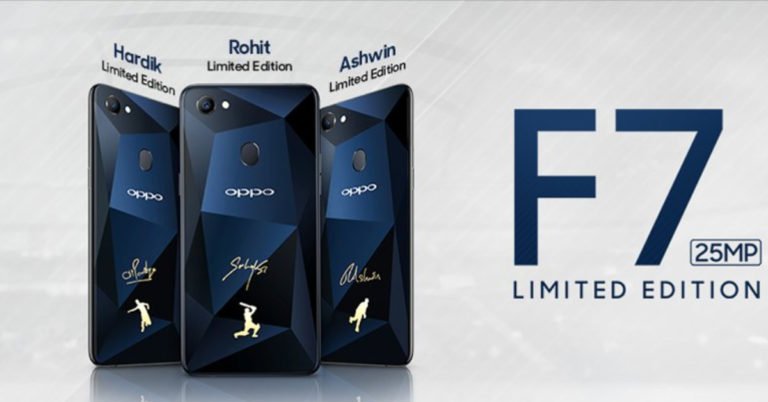
With IPL 2018 going on, this is surely an exciting time for cricket lovers in the country. And adding to the IPL fever, Chinese smartphone maker Oppo has launched a limited edition smartphone for cricket fans – Oppo F7 Diamond Black: Cricket Limited Edition. The limited edition smartphones will be available across Oppo retail stores and Flipkart starting May 14.
Oppo F7 Diamond Black: Cricket Limited Edition is priced at Rs 21,990 – same as the standard model of the smartphone. To recall, Oppo had already launched a Diamond Black colour of the F7 in India. However, what makes the limited edition Oppo F7 Diamond Black special is the fact that three of its units will have signatures of cricketers and Oppo brand ambassadors Hardik Pandya, R. Ashwin, and Rohit Sharma. The rest of them will come with a fancy case cover.
The specifications of the smartphone remain the same as Oppo F7, but the limited cricket edition of Oppo F7 will only be available in 4GB RAM/64GB storage variant. The standard variant was also launched in 6GB RAM/128GB storage variant.
For the unaware, the Oppo F7 runs Android 8.1 Oreo skinned with ColorOS 5.0. The dual-sim smartphone features a 6.23-inch Super Full-Screen display with full HD+ resolution and comes with an aspect ratio of 19:9. Powered by 64-bit MediaTek Helio P60 octa-core processor, the smartphone is available in two storage variants. However, like we mentioned earlier, Oppo F7 Diamond Black: Cricket Limited Edition is only available in 4GB RAM/64GB storage variant. The smartphone can also hold microSD cards of up to 256GB.
For imaging duties, the smartphone sports 16MP rear camera that comes with AI scene recognition features. On the front panel, there is a 25MP camera that comes with real-time HDR capabilities. The smartphone also comes with the AI Beauty 2.0 app which – according to Oppo – can scan 296 facial recognition points. The company further said that because of AI Beauty 2.0 app, facial recognition is more precise and accurate. The app is also claimed to detect the age, gender, skin colour and more of up to four people.
Oppo’s device offers 4G VoLTE, Wi-Fi, Bluetooth, USB OTG, and GPS as connectivity options and houses a 3,400mAh battery.
Panasonic P95 with face-unlock feature launched at Rs 4,999: Specs and more
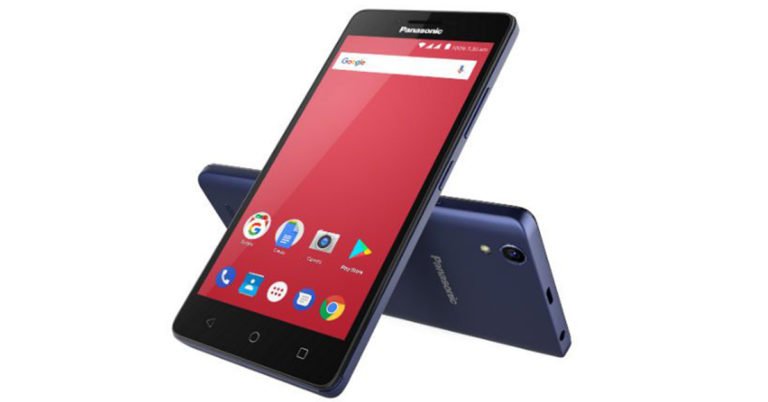
The entry level segment of smartphones is already a crowded one. But, that didn’t stop Panasonic from launching its P95 smartphone. The latest in the company’s line of smartphones, Panasonic P95 is priced at Rs 4,999 and will exclusively be available on Flipkart. At the given price, Panasonic P95 will be competing with the likes of handsets from Xiaomi, Xolo, Lava and Intex.
Panasonic P95 has been launched just days before Flipkart Big Shopping Days Sale, which is scheduled to begin on May 13th. If you buy the smartphone during the sale, which will continue till May 16, you will be able to avail a special discount of Rs 1,000.
The main highlight of Panasonic P95 is that it comes with support for face-unlock and runs Qualcomm Snapdragon processor, in spite of being a smartphone in the affordable segment.
The dual SIM smartphone features a 5-inch HD (720×1280) display and is powered by 1.3GHz quad-core Snapdragon 210 processor coupled with 1GB of RAM. It offers 16GB of internal storage and can hold microSD cards of up to 128GB. Panasonic P95 smartphone runs Android 7.1.2 Nougat and houses a 2300mAh battery.
For imaging duties, Panasonic P95 sports an 8MP rear camera and comes with auto-focus and LED flash. For selfies and video calls, there is a 5MP front facing snapper. The camera of Panasonic P95 comes with ‘zero shutter lag’ and a Professional mode that enables user to control exposure and a feature for red-eye reduction.
Connectivity options of the smartphone include 4G VoLTE, Wi-Fi, Bluetooth 4.1, GPS, and FM.
The smartphone is available in Blue, Gold, and Dark Grey colour options.
Speaking about the launch of Panasonic P95, Pankaj Rana, Business Head – Mobility Division, Panasonic India said, “The price point at which it is available, we are confident that it will be a success with the millennials, without being heavy on their pockets.”
Epson EH-TW650 Projector Review: Picture Perfect
We have been great fanboys of home projectors, especially when it comes to watching sports, playing games or viewing movies in the house. It is a great way to unwind and enjoy some quality time with family or friends. There are a lot of good projectors out there in the Indian market and joining the ranks is the latest by Epson EH-TW650. We got to play with it and this is what we could make of the projector designed for everyday use.
Design and Blueprint
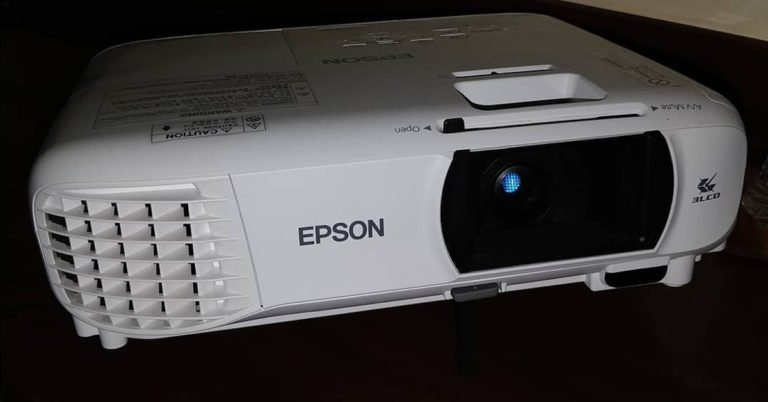
Out of the box the Epson EH-TW650 looks like any other Epson projector with its curved body and contours. The front is dominated by the not-so-large lens, which has a shutter on top of it that can be opened or closed with the help of slider above it. This helps keeping the dust out when the projector is not in use. The top has all the keys that can be found on the supplied IR remote as well. These include, home, power, source, keystone and volume buttons. A neat kick-stick is also available for height adjustment under the lens that can be brought down by pressing the button above it. To its right is the IR receiver. Also on top, (towards the lens) Epson has placed lens focus and enlargements dials, just like the ones found on other models by Epson. This projector can throw a screen of up to 300-inches, more on that in the performance section. Couple of LED lights are also placed on top indicating, power lamp status and temperature.
Turn it around and you will find all the connectivity ports. Epson EH-TW650 is a Full HD projector, so we were expecting couple of HDMI ports. Well, it has not got many but two of them. These are partnered with 1 VGA, 1 Composite, 1 USB A and 1 USB-B video ports. The rear also has the 2-watt speaker. A fan is also inside Epson EH-TW650 projector to keep the lamp and inside machinery cool. Dressed in whitest white, this projector does look modern.
Performance and Features
Epson must be proud of this machine as it has some of the best in class features one can ask from in the price range. To start with, the Epson EH-TW650 hardly takes any time to setup. Just unwrap, place it and power-up. Epson also supplies a HDMI cable in-the-box so you can easily connect laptops or HD set top boxes to it.
Epson EH-TW650 has a 3,100 lumens lamp (with a life of 7,500 hours) that can throw an image of up to 300-inches. We went to 200-inches and loved every bit of it. The colours are vivid with deep blacks. Best part we did not turn off the light or use a white screen to watch. We used the light yellow wall and the colours were inch perfect. We ran everything from a HD video to a Xbox game and were not disappointed. Keystone correction is available and works well on all counts.
The Epson EH-TW650 also supports the Epson iProjection app that enables users to project wirelessly, after connecting the projector to Wi-Fi. Setting this up took some time, but once up we did not find any kinks. Moving to the on-board sound, this is a place where we felt the projector was under powered. The 2-watt single speaker does not do justice to the Full HD (1080p) spectacle this projector provides. Also, since Epson EH-TW650 does not have a standalone 3.5mm audio port you will not be able to connect those speakers. One would need speakers that support composite ports. Luckily we had one and with the external surround sound the whole experience grew multiple folds.
Verdict and Final Thoughts
At a price of Rs 58,999 The Epson EH-TW650 falls in the budget segment of projectors. But, provides features found in mid to high segment of projectors. We loved every bit of the play, however could not get past the weak speaker. Yes, once connected to external speakers the TV, Movie and Gaming experience became much better. So like most projectors in the market the users would need to spend a little more to get good speakers, unless you have one lying at home. Hence, the Epson EH-TW650 projector does not lose much points there. All in all, a great projector to own if you are setting up your new living room and want a large screen experience.
Pros: Good features, excellent colours and price
Cons: Sound
Tech Specs:
Also on top, (towards the lens) Epson has placed lens focus and enlargements dials, just like the ones found on other models by Epson. This projector can throw a screen of up to 300-inches, more on that in the performance section. Couple of LED lights are also placed on top indicating, power lamp status and temperature.
Turn it around and you will find all the connectivity ports. Epson EH-TW650 is a Full HD projector, so we were expecting couple of HDMI ports. Well, it has not got many but two of them. These are partnered with 1 VGA, 1 Composite, 1 USB A and 1 USB-B video ports. The rear also has the 2-watt speaker. A fan is also inside Epson EH-TW650 projector to keep the lamp and inside machinery cool. Dressed in whitest white, this projector does look modern.
Performance and Features
Epson must be proud of this machine as it has some of the best in class features one can ask from in the price range. To start with, the Epson EH-TW650 hardly takes any time to setup. Just unwrap, place it and power-up. Epson also supplies a HDMI cable in-the-box so you can easily connect laptops or HD set top boxes to it.
Epson EH-TW650 has a 3,100 lumens lamp (with a life of 7,500 hours) that can throw an image of up to 300-inches. We went to 200-inches and loved every bit of it. The colours are vivid with deep blacks. Best part we did not turn off the light or use a white screen to watch. We used the light yellow wall and the colours were inch perfect. We ran everything from a HD video to a Xbox game and were not disappointed. Keystone correction is available and works well on all counts.
The Epson EH-TW650 also supports the Epson iProjection app that enables users to project wirelessly, after connecting the projector to Wi-Fi. Setting this up took some time, but once up we did not find any kinks. Moving to the on-board sound, this is a place where we felt the projector was under powered. The 2-watt single speaker does not do justice to the Full HD (1080p) spectacle this projector provides. Also, since Epson EH-TW650 does not have a standalone 3.5mm audio port you will not be able to connect those speakers. One would need speakers that support composite ports. Luckily we had one and with the external surround sound the whole experience grew multiple folds.
Verdict and Final Thoughts
At a price of Rs 58,999 The Epson EH-TW650 falls in the budget segment of projectors. But, provides features found in mid to high segment of projectors. We loved every bit of the play, however could not get past the weak speaker. Yes, once connected to external speakers the TV, Movie and Gaming experience became much better. So like most projectors in the market the users would need to spend a little more to get good speakers, unless you have one lying at home. Hence, the Epson EH-TW650 projector does not lose much points there. All in all, a great projector to own if you are setting up your new living room and want a large screen experience.
Pros: Good features, excellent colours and price
Cons: Sound
Tech Specs:
 Also on top, (towards the lens) Epson has placed lens focus and enlargements dials, just like the ones found on other models by Epson. This projector can throw a screen of up to 300-inches, more on that in the performance section. Couple of LED lights are also placed on top indicating, power lamp status and temperature.
Turn it around and you will find all the connectivity ports. Epson EH-TW650 is a Full HD projector, so we were expecting couple of HDMI ports. Well, it has not got many but two of them. These are partnered with 1 VGA, 1 Composite, 1 USB A and 1 USB-B video ports. The rear also has the 2-watt speaker. A fan is also inside Epson EH-TW650 projector to keep the lamp and inside machinery cool. Dressed in whitest white, this projector does look modern.
Also on top, (towards the lens) Epson has placed lens focus and enlargements dials, just like the ones found on other models by Epson. This projector can throw a screen of up to 300-inches, more on that in the performance section. Couple of LED lights are also placed on top indicating, power lamp status and temperature.
Turn it around and you will find all the connectivity ports. Epson EH-TW650 is a Full HD projector, so we were expecting couple of HDMI ports. Well, it has not got many but two of them. These are partnered with 1 VGA, 1 Composite, 1 USB A and 1 USB-B video ports. The rear also has the 2-watt speaker. A fan is also inside Epson EH-TW650 projector to keep the lamp and inside machinery cool. Dressed in whitest white, this projector does look modern. Performance and Features
Epson must be proud of this machine as it has some of the best in class features one can ask from in the price range. To start with, the Epson EH-TW650 hardly takes any time to setup. Just unwrap, place it and power-up. Epson also supplies a HDMI cable in-the-box so you can easily connect laptops or HD set top boxes to it.
Epson EH-TW650 has a 3,100 lumens lamp (with a life of 7,500 hours) that can throw an image of up to 300-inches. We went to 200-inches and loved every bit of it. The colours are vivid with deep blacks. Best part we did not turn off the light or use a white screen to watch. We used the light yellow wall and the colours were inch perfect. We ran everything from a HD video to a Xbox game and were not disappointed. Keystone correction is available and works well on all counts.
The Epson EH-TW650 also supports the Epson iProjection app that enables users to project wirelessly, after connecting the projector to Wi-Fi. Setting this up took some time, but once up we did not find any kinks. Moving to the on-board sound, this is a place where we felt the projector was under powered. The 2-watt single speaker does not do justice to the Full HD (1080p) spectacle this projector provides. Also, since Epson EH-TW650 does not have a standalone 3.5mm audio port you will not be able to connect those speakers. One would need speakers that support composite ports. Luckily we had one and with the external surround sound the whole experience grew multiple folds.
Verdict and Final Thoughts
At a price of Rs 58,999 The Epson EH-TW650 falls in the budget segment of projectors. But, provides features found in mid to high segment of projectors. We loved every bit of the play, however could not get past the weak speaker. Yes, once connected to external speakers the TV, Movie and Gaming experience became much better. So like most projectors in the market the users would need to spend a little more to get good speakers, unless you have one lying at home. Hence, the Epson EH-TW650 projector does not lose much points there. All in all, a great projector to own if you are setting up your new living room and want a large screen experience.
Pros: Good features, excellent colours and price
Cons: Sound
Tech Specs:
Performance and Features
Epson must be proud of this machine as it has some of the best in class features one can ask from in the price range. To start with, the Epson EH-TW650 hardly takes any time to setup. Just unwrap, place it and power-up. Epson also supplies a HDMI cable in-the-box so you can easily connect laptops or HD set top boxes to it.
Epson EH-TW650 has a 3,100 lumens lamp (with a life of 7,500 hours) that can throw an image of up to 300-inches. We went to 200-inches and loved every bit of it. The colours are vivid with deep blacks. Best part we did not turn off the light or use a white screen to watch. We used the light yellow wall and the colours were inch perfect. We ran everything from a HD video to a Xbox game and were not disappointed. Keystone correction is available and works well on all counts.
The Epson EH-TW650 also supports the Epson iProjection app that enables users to project wirelessly, after connecting the projector to Wi-Fi. Setting this up took some time, but once up we did not find any kinks. Moving to the on-board sound, this is a place where we felt the projector was under powered. The 2-watt single speaker does not do justice to the Full HD (1080p) spectacle this projector provides. Also, since Epson EH-TW650 does not have a standalone 3.5mm audio port you will not be able to connect those speakers. One would need speakers that support composite ports. Luckily we had one and with the external surround sound the whole experience grew multiple folds.
Verdict and Final Thoughts
At a price of Rs 58,999 The Epson EH-TW650 falls in the budget segment of projectors. But, provides features found in mid to high segment of projectors. We loved every bit of the play, however could not get past the weak speaker. Yes, once connected to external speakers the TV, Movie and Gaming experience became much better. So like most projectors in the market the users would need to spend a little more to get good speakers, unless you have one lying at home. Hence, the Epson EH-TW650 projector does not lose much points there. All in all, a great projector to own if you are setting up your new living room and want a large screen experience.
Pros: Good features, excellent colours and price
Cons: Sound
Tech Specs:
| Item Weight | 2.7 Kg |
| Product Dimensions | 25.2 x 9.2 x 30.2 cm |
| Item model number | EH-TW650 |
| Resolution | 1920 x 1080 |
| Included Components | Remote Control, Batteries, Warranty Card, Manual |
| Number Of Items | 1 |
| Display Technology | LCD |
| Display Resolution Maximum | 1920 x 1080 |
| Audio Wattage | 2 Watts |
| Power Source | AC |
Smartron tbook flex Windows 10 2-in-1 laptop launched: Details, specs and price
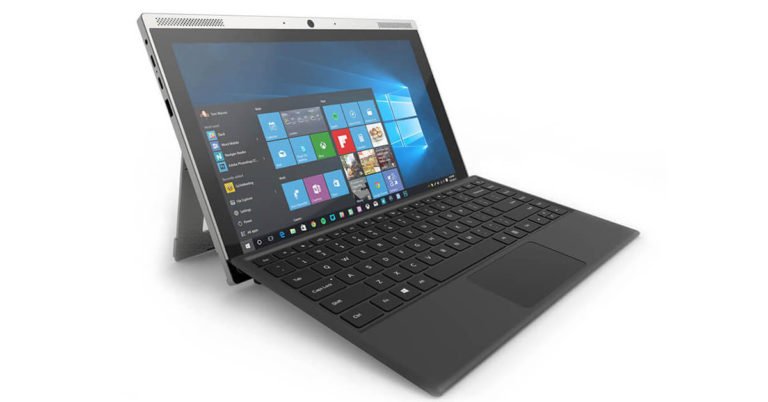
Smartron is one technology company that even sports fans are interested in, given its association with Sachin Tendulkar. The company, which has a few smartphones and a Smartbook in its portfolio already, has launched tbook flex in India. With tbook flex, Smartron has expanded its laptop line-up in the country.
The 2-in-1 notebook comes with a detachable keyboard, which means that it can also be used as a tablet. Smartron tbook flex will go on sale exclusively on Flipkart starting May 13 midnight.
The notebook is available in two colour variants – Orange & Grey and Black & Grey. It comes in Core m3 and Core i5 versions priced at Rs 42,990 and Rs 52,990 respectively.
The company has also initiated a launch campaign for its tbook flex — #TheFlexperience. The campaign has been started to highlight the flexibility that the device offers. According to the company, the laptop has been designed for people who are always on the move and need a multipurpose and multifunctional device with them.
Coming to specifications, the Smartron tbook flex features a 12.2-inch WQXGA (2560x1600pixels) display with an aspect ratio of 16:10. The laptop sports a 2MP front snapper and a 5MP rear camera along with speakers, a dual mic and a dual band Wi-Fi. Both the variants of tbook flex are powered by a 7th generation Intel Core 15 7Y54 processor coupled with 4GB of RAM. The Windows 10 laptop offers 128GB of SSD storage and if users want more storage, they can install SD cards.
The device also comes a flexstand, which adds the ability to flex up to 150 degrees. Smartron tbook flex also has a backlit keyboard that has Bluetooth connectivity. This means that users can type from a distance even in places that are not well-lit.
This device also has a fingerprint scanner and Thunderbolt 3 USB Type C port. According to Smartron, the port enables users to transfer data at rates up to 40Gbps. Besides this, tbook has a type C fast charging port and two USB 3.0 ports for connectivity.
4 features coming to Instagram soon

Keep updating your Instagram Stories every few hours? Or do you click photos to post on Instagram? In other words, if you are an Instagram lover, you would be happy to know that the photo-sharing app is adding some new features for its users. So here’s what you can look forward to in the next few months:
Share to Stories from other apps
Instagram is now giving users the option of sharing content from other apps to Instagram Stories. Apps like Spotify and GoPro will soon be getting a share button for Stories and on pressing it, what you’re listening to or your action shots will directly be pulled into Instagram’s camera where you can edit it before you share it. Basically, you don’t have to connect Instagram to other apps in order to do this.
Video chat with your friends
Soon, users will be able to make video calls on Instagram. The feature is currently being tested and will roll out globally soon. Users will be able to call each other one-on-one or chat with each other in groups. To start a video chat, one will have to tap the camera icon at the top of a Direct thread.
A redesigned Explore
The Explore section in Instagram is where we discover content that may interest us. Going forward, content will get organised into topic channels like Animals, Photography, Architecture, and more. The redesigned Explore will reach your app in the next few weeks.
Camera Effects Platform for Instagram
Taking advantage of Facebook’s Camera Effects Platform, Instagram is adding AR effects to its filters. Using these, one will be able to add Kylie Jenner’s favourite lip colour to their selfie or add hearts with Jiff the Pomeranian to their video. Moreover, when users see a new effect on someone else’s Story, they can add it to their tray of effects by tapping ‘Try it on.’
Facebook is set to change in these 5 ways this year

Facebook undoubtedly is the most popular social media platform today. And in an attempt to become more user friendly, it has announced a slew of changes at its annual developer conference – F8. Post the recent data scandal, Facebook was expected to make certain announcements at the event that would rebuild users trust on the platform. And Facebook did not disappoint us.
Here are all the changes that Facebook has announced:
Clear History
With this new feature, users will now be able to see what information they are sharing when they use various apps and websites. Users can delete this information and they can also get the option of turning off Facebook’s ability to store it in future.
Sharing to Stories
It will now be easier for you to share Facebook and Instagram Stories. On just tapping on the share button on apps like Spotify, you’ll be able to share whatever you are doing directly into the camera. From there, users can edit to share it as Stories or as a picture on Feed. There’s no longer a need to connect other apps to Facebook or Instagram to do this.
A feature for ‘Dating’
Facebook is taking on Tinder with this new feature. With this, people will be able to create a dating profile, which will be different from their regular profile, on Facebook. Facebook will then suggest potential matches based on dating preferences, things in common, and mutual friends. Facebook would also give users the option to discover others with Groups or Events. And in order to protect their privacy, Facebook will not be sharing what users are doing on their dating profiles with their friends.
Crisis Response
Announced last year, Crisis Response enables users to get information about recent crises and access Safety Check, Community Help and Fundraisers. And now, people who are affected by a crisis will be able to share timely updates of things like roadblocks, photos and videos of the damage, and more, so that others can get this information real-time.
Blood Donations
In September 2017, Facebook launched a new feature in India, Bangladesh and Pakistan which enabled users to register themselves as blood donors. With Blood Donations, Facebook will be informing blood donors about nearby blood donation camps, requests for donations and blood banks.