Blox Fruits Codes (May 2026): Get free EXP and Beli

One Piece is one of the most popular anime shows around right now. Consequently, it has a thriving group of game adaptations on Roblox. Blox Fruits is considered to be the best of the lot by a large portion of the fanbase. It puts you on a journey across the ocean and throws challenging battles your way. As you overcome each battle, your enemies get tougher to beat. To have a fighting chance in these scuffles, you need to train and upgrade your skills. The game offers some special codes to help you along the way. Here are all the Blox Fruits codes that are up for grabs in May 2026. Read Also: NYT Strands Today Answers and Hints for Monday, May 18, 2026 (Puzzle #806)

Current fruits in the game

  • Rocket
  • Spin
  • Blade
  • Spring
  • Bomb
  • Smoke
  • Spike
  • Flame
  • Ice
  • Sand
  • Dark
  • Eagle
  • Diamond
  • Light
  • Rubber
  • Ghost
  • Magma
  • Quake
  • Buddha
  • Love
  • Creation
  • Spider
  • Sound
  • Phoenix
  • Portal
  • Lightning
  • Pain
  • Blizzard
  • Gravity
  • Mammoth
  • T-Rex
  • Dough
  • Shadow
  • Venom
  • Gas
  • Spirit
  • Tiger
  • Yeti
  • Kitsune
  • Control
  • Dragon

How to redeem a code in this game

How to redeem a code in Blox Fruits
  1. Launch Blox Fruits in Roblox.
  2. Hit the gift box icon on the left side of the home page.
  3. Enter your code in the text box.
  4. Hit Redeem.

List of active codes (May 2026)

  • EASTEREXP: 2x EXP for 20 minutes.
  • LIGHTNIGHTABUSE: 2x EXP for 20 minutes.
  • 1LOSTADMIN (one space at the end of the code): 2x EXP for 20 Minutes.
  • KITT_RESET: Stat Reset.
  • CHANDLER: 0 Beli (Joke Code).
  • SUB2CAPTAINMAUI: 2x EXP for 20 Minutes.
  • Enyu_is_Pro: 2x EXP for 20 Minutes.
  • Starcodeheo: 2x EXP for 20 Minutes.
  • Sub2Fer999: 2x EXP for 20 Minutes.
  • Magicbus: 2x EXP for 20 Minutes.
  • JCWK: 2x EXP for 20 Minutes.
  • kittgaming: 2x EXP for 20 Minutes.
  • Bluxxy: 2x EXP for 20 Minutes.
  • fudd10_v2: 2 Beli.
  • SUB2GAMERROBOT_EXP1: 2x EXP for 30 Minutes.
  • SUB2GAMERROBOT_RESET1: Stat Reset.
  • Sub2UncleKizaru: Stat Reset.
  • Axiore: 2x EXP for 20 Minutes.
  • Sub2Daigrock: 2x EXP for 20 Minutes.
  • Bignews: ‘Big News’ Title.
  • Sub2NoobMaster123: 2x EXP for 20 Minutes.
  • StrawHatMaine: 2x EXP for 20 Minutes.
  • TantaiGaming: 2x EXP for 20 Minutes.
  • TheGreatAce: 2x EXP for 20 Minutes.
  • Fudd10: 1 Beli.
  • Sub2OfficialNoobie: 2x EXP for 20 Minutes.

List of expired codes

These codes can no longer be redeemed.
  • ADMIN_TROLL
  • TRIPLEABUSE
  • NOOB2ADMIN
  • BANEXPLOIT
  • 15B_BESTBROTHERS
  • NOEXPLOITER
  • ADMINFIGHT
  • CODE_SERVICIO
  • krazydares
  • SECRET_ADMIN
  • ADMIN_STRENGTH
  • FIGHT4FRUIT
  • 24NOADMIN
  • DRAGONABUSE
  • CODESLIDE
  • ADMINHACKED
  • ADMINDARES
  • NOOB2PRO
  • BossBuild
  • Gifting_hours
  • GetPranked
  • EARN_FRUITS
  • NEWTROLL
  • rewardfun
  • DEVSCOOKING
  • SEATROLLING
  • E_SERVICIO
  • NOMOREHACK
Read Also: OxygenOS 16 rollout stopped; a bug caused serious boot loop issues for OnePlus devices

Final Thoughts

Can’t get enough of One Piece on Roblox? We recommend checking out other adaptations like One Fruit Simulator, King Legacy, and Fruit Battlegrounds. While you’re here, take a look at the latest Pokémon Bronze Forever codes. If you have any questions, let us know in the comments!

Frequently Asked Questions (FAQs)

Why is my code not working in this game?

If you can’t get your code to work, check it for typos and make sure its letters are in the correct case.

Why am I not able to redeem my code in this game?

If your code has expired, it can no longer be redeemed in Roblox.

How do I get free EXP?

Use codes EASTEREXP and LIGHTNINGABUSE to get 2x EXP in Blox Fruits.

Where can I find the latest Roblox codes?

Keep checking the Gadget Bridge home page for the latest Roblox code drops.

Bosch announced top-load washing machines in India with PowerWave Wash technology

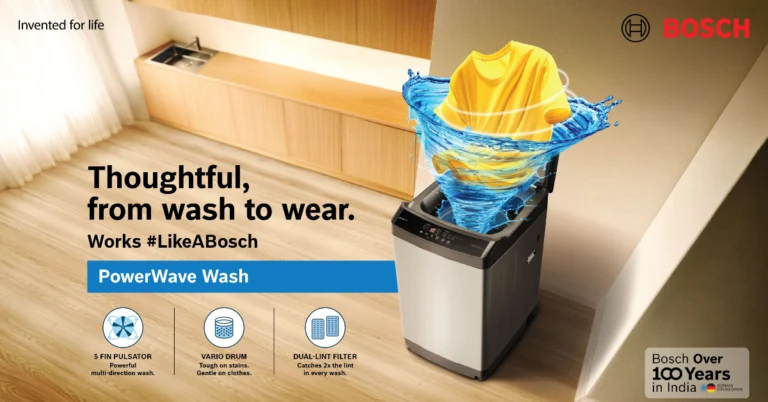
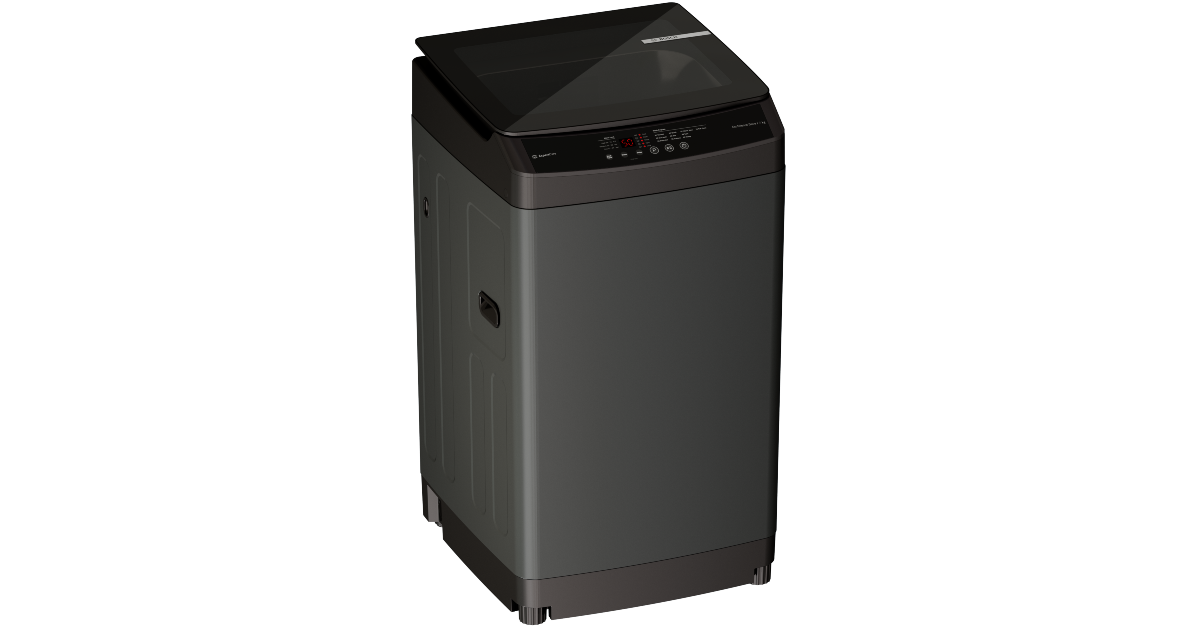
BSH Home Appliances has announced a new line of Bosch top-load washing machines in India in the capacity range of 7 kg to 12 kg. The new series includes PowerWave Wash Technology for gentle cleaning, 10 Intelligent Wash Programs for fabric care, a contemporary display interface and user-friendly controls. Developed under the “Make in India, for India” initiative, it caters to the evolving needs of consumers. Bosch is expanding its Bosch Top Load Washing Machine range in India significantly by offering models in the capacity range of 7 kg to 12 kg. The effort aims to improve customer convenience via smart features and a next-gen user experience. By 2026, BSH wants to triple the volume of Above-the-Line (ATL) advertising and increase its market share in the high-volume ATL segment. Also Read: Realme 16T 5G confirmed to feature a 50MP Sony IMX852 AI camera ahead of its India launch The strategic expansion is targeting one of the fastest-growing laundry segments in India and includes a wide variety of products across value and premium pricing ranges. The trend of convenience and premiumisation is fuelling the use of ATL machines with the support of modern technology. Bosch reported strong growth in the top-load segment in the first quarter of 2026, with the entire laundry category seeing a significant 50% gain. Bosch announced top-load washing machines in India with PowerWave Wash technology The new line of ATL washing machines has advanced wash technology, featuring PowerWave Wash technology, for efficient but gentle cleaning. It also has 10 Intelligent Wash Programs that enable customised laundry care for different fabric types as well as meet the ever-changing demands of customers. Also Read: OxygenOS 16 rollout stopped; a bug caused serious boot loop issues for OnePlus devices Bosch’s top loaders provide a new level of innovation to the user experience with next-generation interfaces and easy controls, dramatically boosting the efficiency and seamlessness of common laundry routines. The Bosch Top Load Washing Machines have a Dual Lint Filter, which efficiently traps twice the lint, resulting in cleaner laundry, and a Vario Drum, which not only handles stubborn stains but is also gentle on fabrics, keeping their quality. The soft-close tempered glass lid improves safety, and the entire design is streamlined, with glass lids and chrome finishes that appeal to current aesthetics. Furthermore, these washing machines include an enhanced display interface that enhances use and adds to a more premium laundry experience. They are available in a variety of appealing colours, including dark lake, black pearl, and grey, which enhances their aesthetic appeal. Smart control features, such as a daylight visibility display and feather-light button controls, add to the ease of use, guaranteeing that the Bosch top loaders are developed with the user experience in mind. Also Read: Over 1 billion images created on ChatGPT Images 2.0 in India: Here is why Commenting on the launch, Saif Khan, MD & CEO, BSH Home Appliances, said, “India’s laundry category is evolving rapidly, BSH Home Appliances is well-positioned to lead the charge with a stronger and more balanced portfolio. With the expansion of our Top Load range, we are making premium Bosch technology accessible across price formats, reaching consumers in high-growth Tier 2 and Tier 3 markets where the shift from semi-automatic to fully automatic is accelerating at pace. Built on our ‘Make in India, for India’ approach, this range is engineered for the modern Indian household — intelligent, powerful, and built to perform. Our ambition is clear: triple our ATL volumes, double our market share, and own the category.”

Over 1 billion images created on ChatGPT Images 2.0 in India: Here is why

Indians have created over 1 billion images with ChatGPT Images 2.0 since its introduction in April 2026, making India the biggest market for image creation and exceeding the United States in user engagement. The updated version includes numerous significant enhancements, including multilingual text rendering, better prompt comprehension, improved image consistency, advanced layout creation, and increased editing accuracy. This fast uptake has piqued the interest of OpenAI CEO Sam Altman. Altman posted on X. “ChatGPT Images 2.0 loves India. Already more than 1 billion images created there; awesome to see.”

Why is ChatGPT Images 2.0 so popular in India?

The model is good at generating advanced images, creating text and handling multilingual prompts. The reason for its success in India is the country’s lively creative culture and active interaction with online aesthetics and pop culture. Here are some reasons why this model is gaining popularity so fast: It’s embedded directly into ChatGPT, so there’s no need to work with a separate app or workflow. It has a good understanding of natural language, including Hinglish and Indian cultural contexts. It can generate, edit and improve images while you chat in real time. The outputs are often ready for social media without further editing. It has better text rendering capabilities than previous AI image models. It’s easy to make iterations on your phone. Also Read: Realme 16T 5G confirmed to feature a 50MP Sony IMX852 AI camera ahead of its India launch With “Images 2.0” from OpenAI, the barrier for users to convert ideas into actionable images has been lowered, demonstrating usage scenarios such as art, memes, wedding invites, ads for startups, school projects, anime edits, YouTube thumbnails, resumes, WhatsApp stickers, architecture ideas, and regional language content for social media. Also Read: Garena Free Fire Max Redeem Codes Today May 18: Claim Post-Tournament Rewards!

ChatGPT Images 2.0 features that set it apart

  1. Conversational Image Editing: Now, users can edit images using natural language commands like “Make it more cinematic” or “Change outfit to formal”, which makes the editing process easier than before.
  2. Conversational Image Editing: New AI methods are useful for generating readable text in diverse situations, which simplifies designing posters, menu cards, advertisements, invitation cards, presentation slides and comic panels. One example is to create a bilingual café poster.
  3. Improved Regional and Cultural Awareness: The tools demonstrate a deeper understanding of Indian cultural markers such as weddings, cricket, Bollywood style and traditional wear. This insight has caused virality on social media across India.
  4. Image Consistency: Users may ask for consistency across many pictures, improving the usability of features like comics, branding, or storyboards.
  5. Strong Prompt Understanding: It allows for more informal scene descriptions instead of formal AI prompt syntax and understands things like composition and mood.
  6. Multi-Purpose Workflow: The power of these tools has enabled users to swap out many apps (like Canva and basic logo design tools) for one, easing the creative process for casual creators.
Also Read: OxygenOS 16 rollout stopped; a bug caused serious boot loop issues for OnePlus devices

Best Practices:

  • Use “Camera Language”: Phrases such as “shot on DSLR” and “cinematic lighting” enhance realism.
  • Control Styles Explicitly, using specific style requirements produces better outcomes.
  • Ask for variations: Requesting multiple variants might improve outcomes without requiring complete regeneration.
  • Use Layered Prompts: Structured prompt formats improve output quality. Subject + Environment + Style + Lighting + Camera + Mood
  • Use negative instructions: Specifying what to avoid is important for improving outcomes. No extra fingers, no blurry text, no watermark, and no distortion.
  • Design like a professional: Telling the AI to behave like a designer may improve the quality of the results.
  • Generate Transparent Assets: Useful for creators who want adaptive designs. Create a clean sticker-style mascot with a plain white background.
  • Establish Consistent Branding: Users may create cohesive social media images. As an example, you may command: Create an Instagram carousel style with black and gold and minimalist text. Then continue: Create slide 2 using the same design method.
  • Reference-Image Iteration: Using reference pictures may provide more focused results.
  • Storytelling Prompts: Creating narrative-based prompts may improve emotional resonance in visuals. For example, an exhausted journalist is sipping tea alone at 2 a.m. while writing an article during monsoon rain.

How to Hide or Disable Instants in your Instagram DMs (and Undo Accidental Shares)

Instagram’s new photo-sharing feature, Instants, has everyone in a frenzy. Built around ephemerality, it lets you take snapshots that disappear as soon as they are viewed by your audience. The images are shared as soon as you tap the shutter icon. This has not gone down well with some users, as they want the option to preview the images before sharing them. If you’re in the same camp and don’t want to see the feature in your DMs, you can get it out of your sight. Here’s how you can hide Instants in your Instagram DMs.  Read Also: The Advantages of a 2-way intercom headset communication system for Modern Teams

Instants Explained

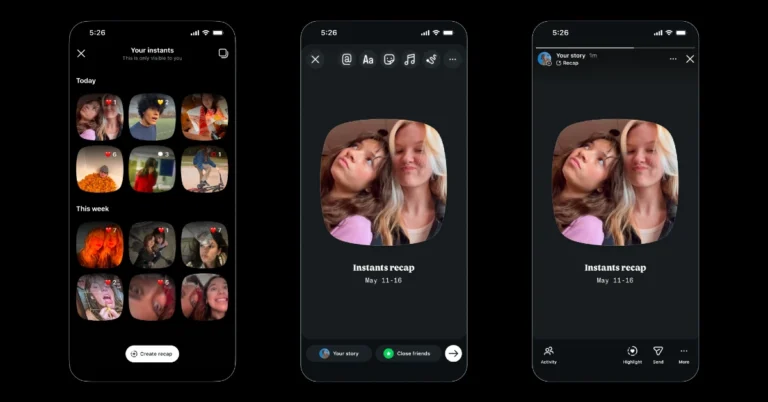
Instants make it easy to share spontaneous and casual snapshots with your friends on Instagram. An Instant vanishes once it is viewed. Instagram does not let you see who viewed your snapshot. It does let you choose between two audience groups: mutual followers or close friends. You need to enter the caption before taking the picture. This is because the Instant gets shared as soon as you hit the shutter button. There is an undo button in place, in case you want to recall an image. If you want to post an Instant, you need to go through the ones that your friends have shared before getting to the camera. The pending Instants appear in the form of a stack at the bottom of the DMs page. You can react with an image before moving to the next one. If you’re not a fan of the feature and don’t want to see the image stack in your DMs, a simple right-swipe can hide it temporarily. If you want to hide it forever, follow the steps mentioned below.

Hide Instagram Instants

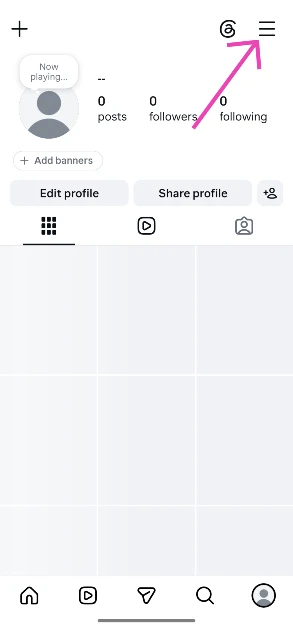
  1. Launch the Instagram app on your phone and go to your profile.
  2. Hit the hamburger menu icon in the top right corner of the screen. Hit the hamburger menu icon in the top right corner of the screen.
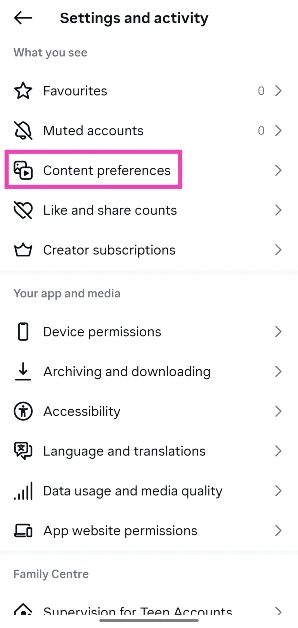
  3. Tap on Content preferences. Tap on Content preferences.
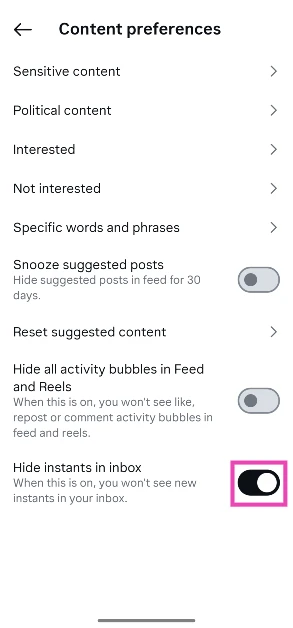
  4. Turn on the toggle switch next to Hide instants in inbox. Turn on the toggle switch next to Hide instants in inbox.

Tired of seeing Instants in your phone’s notification shade? Here’s how you can disable them

  1. Launch the Instagram app on your phone and go to your profile.
  2. Tap the hamburger menu icon in the top right corner of the screen. Hit the hamburger menu icon in the top right corner of the screen.
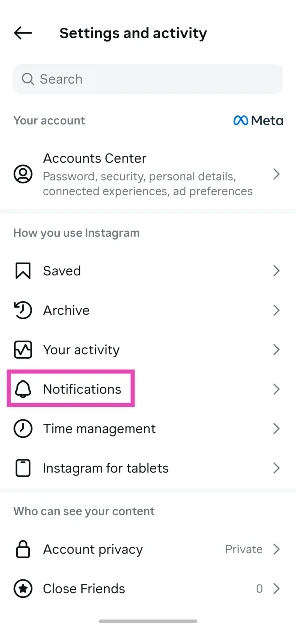
  3. Select Notifications. Select Notifications.
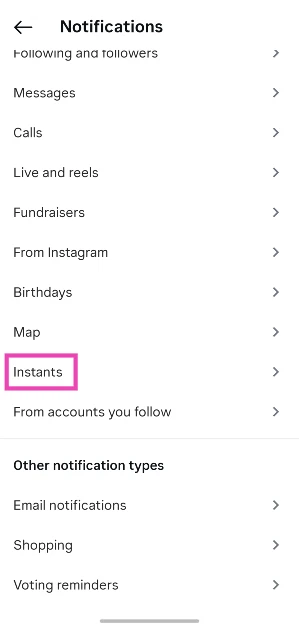
  4. Scroll down and tap on Instants. Scroll down and tap on Instants.
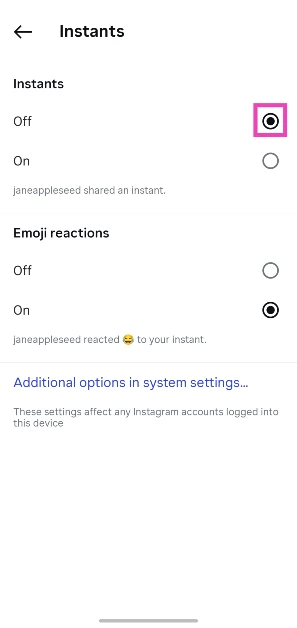
  5. Select Off under Instants. Select Off under Instants.
  6. If you don’t want to receive notifications about others reacting to your Instant, select Off under Emoji reactions.

Accidentally shared an image as an Instant? There’s one handbrake you can pull

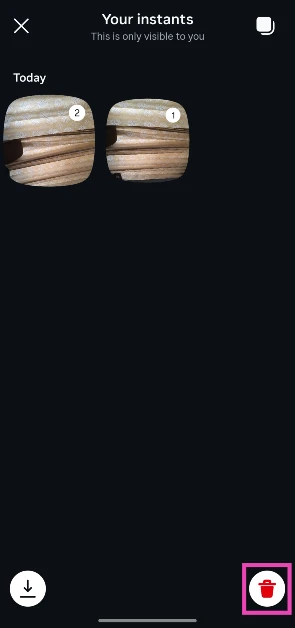
A lot of Instagram users are understandably upset about their Instants reaching their audience without any preview. As soon as you hit the shutter button, the camera takes a picture, and the image gets sent to your audience (mutual followers or close friends, depending on what you’ve chosen). Thankfully, as soon as you take a picture, an ‘Undo’ button appears at the bottom of the screen. You can recall the picture by tapping this button. The Undo button goes away when you move to another page. You can still recall the image by visiting your Instant archives. Here’s how.
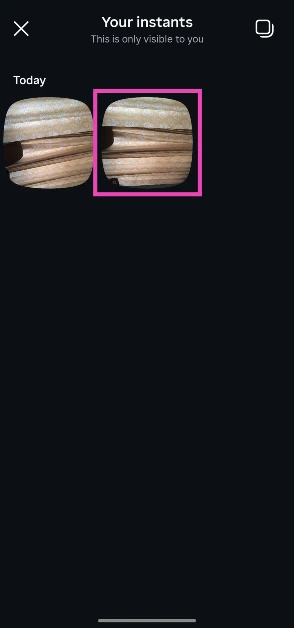
  1. Go to your Instagram DMs and tap the Instants icon. Go to your Instagram DMs and tap the Instants icon.
  2. Tap the archives icon in the bottom left corner of the screen.Tap the archives icon in the bottom left corner of the screen.
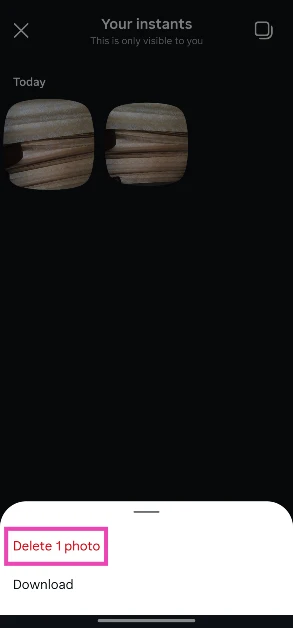
  3. Long-press an Instant. Long-press an Instant.
  4. Hit Delete 1 photo. Hit Delete 1 photo.
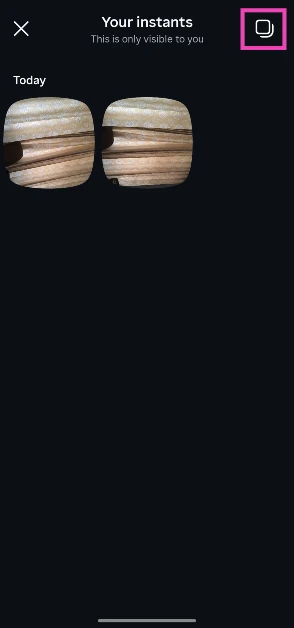
  5. To delete multiple images, tap the icon in the top right corner of the screen. To delete multiple images, tap the icon in the top right corner of the screen.
  6. Select the images you want to delete. Select the images you want to delete.
  7. Hit the bin icon in the bottom left corner of the screen.

Frequently Asked Questions (FAQs)

Who can see Instants?

Your Instants can only be viewed by your close friends or mutual followers. You can choose the audience before posting a snapshot.

How do I post an Instant on Instagram?

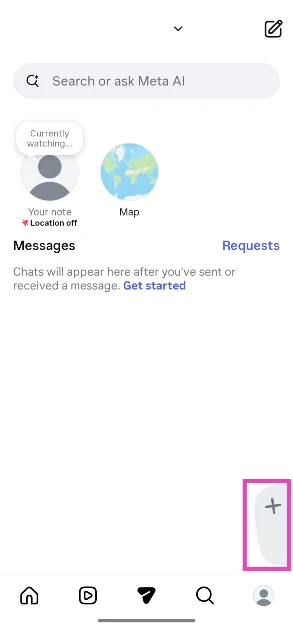
Go to your Instagram inbox, hit the plus icon at the bottom of the screen, choose your audience, and click a picture. The picture instantly gets delivered to the Instants stack in your friends’ DMs tab.

Can I delete an Instant?

You can hit the Undo button to take back an Instant immediately. You can also go to the archive to delete previous Instants.

How do I disable Instants on Instagram?

While you can’t fully disable Instants, you can hide them by going to ‘Content preferences’ in settings and turning on the toggle switch next to ‘Hide instants in inbox’.

Can you see who viewed your Instants on Instagram?

No, Instagram does not let you see who viewed your Instants.

Read Also: Alexa for Shopping replaces Rufus AI on Amazon

Final Thoughts

Instagram has also launched a standalone Instants app to make photo-sharing more seamless. Instead of going through the pending stack of Instants in your DMs to get to the camera, you can use it directly from this app. The app is currently available in selected countries only.

Realme 16T 5G confirmed to feature a 50MP Sony IMX852 AI camera ahead of its India launch

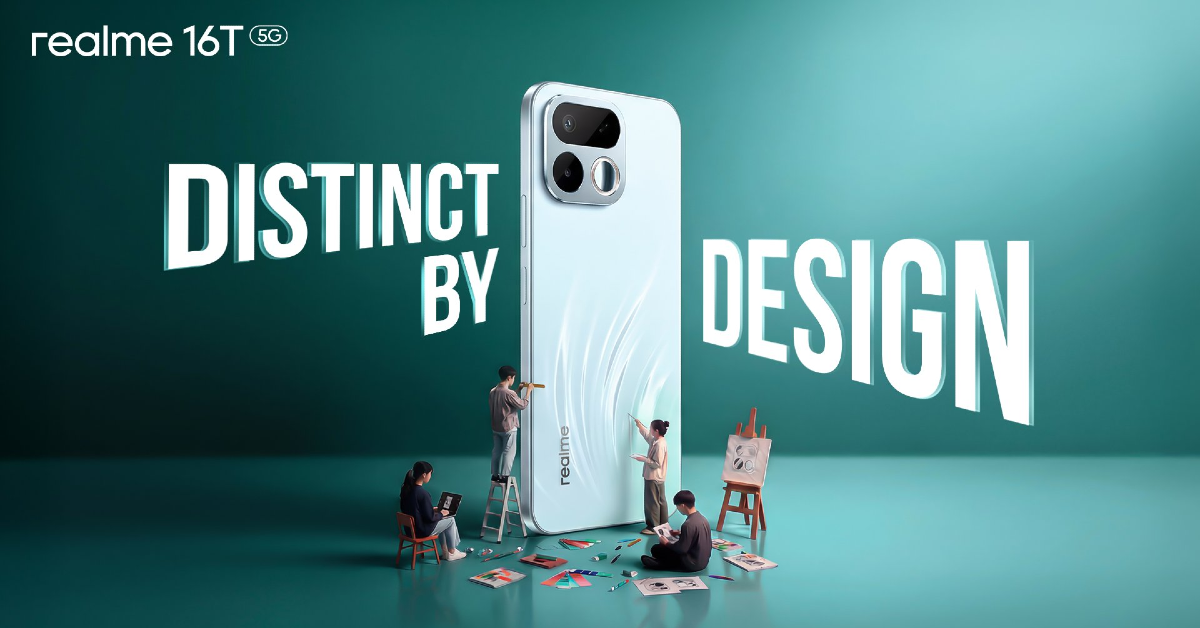
Realme is expanding its 16 Series in India with the launch of Realme 16T 5G. The launch is scheduled for May 22 and is said to be available in three colour options. Ahead of the official release, the company has given a full reveal of the smartphone’s back panel design as well as confirmed the key specs. The Realme 16 Series is set to welcome its fourth member, the Realme 16T 5G, in the lineup, which already includes the Realme 16, Realme 16 Pro, and Realme 16 Pro+. The device’s launch is set to take place in India on May 22 at noon. The firm has not shared many details regarding the launch event, but it is confirmed to be available for purchase via Flipkart and the Realme India online store post arrival.

Realme 16T 5G Design Details (confirmed)

Realme 16T 5G Design Details (confirmed) As mentioned earlier, the upcoming phone will come in three colour options, namely, Starlight Black, Starlight Red, and Blue. Furthermore, the design showcases a bold yet clean redesign of the handset. Also Read: OxygenOS 16 rollout stopped; a bug caused serious boot loop issues for OnePlus devices The teaser images reveal a flat-frame industrial design with metallic-looking sides that add to a premium contemporary appeal. It has a slightly elevated square rear camera module with rounded sides, made of an aluminium alloy holding a vertical dual-camera setup. The design also has a tiny integrated back ‘selfie mirror’ that allows users to capture selfies using the primary rear camera, in line with Realme’s design trends. The gadget is slim, measuring about 8.8mm thick, even though it has a large 8,000mAh battery. Also, it’s coming with a wide, flat display with slim bezels and a punch-hole selfie camera at the centre. The display size is expected to be approximately 6.8 inches. Also Read: Garena Free Fire Max Redeem Codes Today May 18: Claim Post-Tournament Rewards!

Realme 16T 5G Camera specs (confirmed)

Besides this, the company has confirmed that the Realme 16T 5G would be packing a high-end 50MP Sony IMX852 AI camera with an F1.8 aperture. The built-in LumaColor IMAGE engine uses AI to improve portrait quality, boosting skin texture, tone, and lighting balance. Advanced RAW HDR processing and unique white balance tuning enhance highlights and shadows for immersive lighting in portraiture. The device is also going to come with AI-powered editing features for social media users. The AI Popout Collage tool provides dynamic compositions with subjects that go beyond the usual picture frame. In addition, AI StyleMe features, such as AI Profile Portrait and AI Football Star, enable users to create professional and stylised portraits with ease. With AI Instant Clip, you can turn photographs and videos into compelling short-form content in around 10 seconds.  Also Read: Amazon Quiz Answers Today 18 May 2026: Participate to win Up To Rs 500 Amazon Pay Balance AI Portrait Glow further boosts low-light shooting capabilities with smart brightness adjustments that preserve skin texture and authenticity. Users may pick between flash, rim light, natural light, and studio lighting modes for diverse portrait capture.

Realme 16T 5G Battery Specs (Confirmed)

The on-board 8,000mAh battery also promised to provide three days of operation on a single charge. The company claims it will provide 4.3 hours of gaming, 34 hours of social media browsing, and 21.9 hours of navigation. It’s designed to last, with a battery life of up to 7 years. It also supports different charging functions, such as bypass charging, wired reverse charging, and 45W wired fast charging.

All the Hints, Clues, and Answers you need to crack NYT Connections #1,072 (May 18, 2026)

Can’t find a way through today’s Connections puzzle? We’re here to help. First, we’ll give you some spoiler-free hints to nudge you in the right direction of the answers. If that isn’t enough, you can have one word from each category. Then, we’ll reveal the list of themes, followed by all of the answers. So, without further ado, here are all the hints, clues, and answers to today’s NYT Connections (#1,072, May 18, 2026) Read Also: Alexa for Shopping replaces Rufus AI on Amazon

What is Connections?

After Wordle, Connections is the New York Times’ most popular word game. The rules are simple, and the puzzle is very fun to solve. You are provided with a 4×4 grid where 4 common themes connect the 16 words. To solve the puzzle, you must find the common themes and sort the words into 4 groups of 4. The grid is designed with an increasing level of difficulty. The Yellow group is the easiest to spot, followed by Green, Blue, and Purple. The misdirects and red herrings can trip you up, but they also make the puzzle more fun. You can play the game on the NYT Games app or the official NYT website.

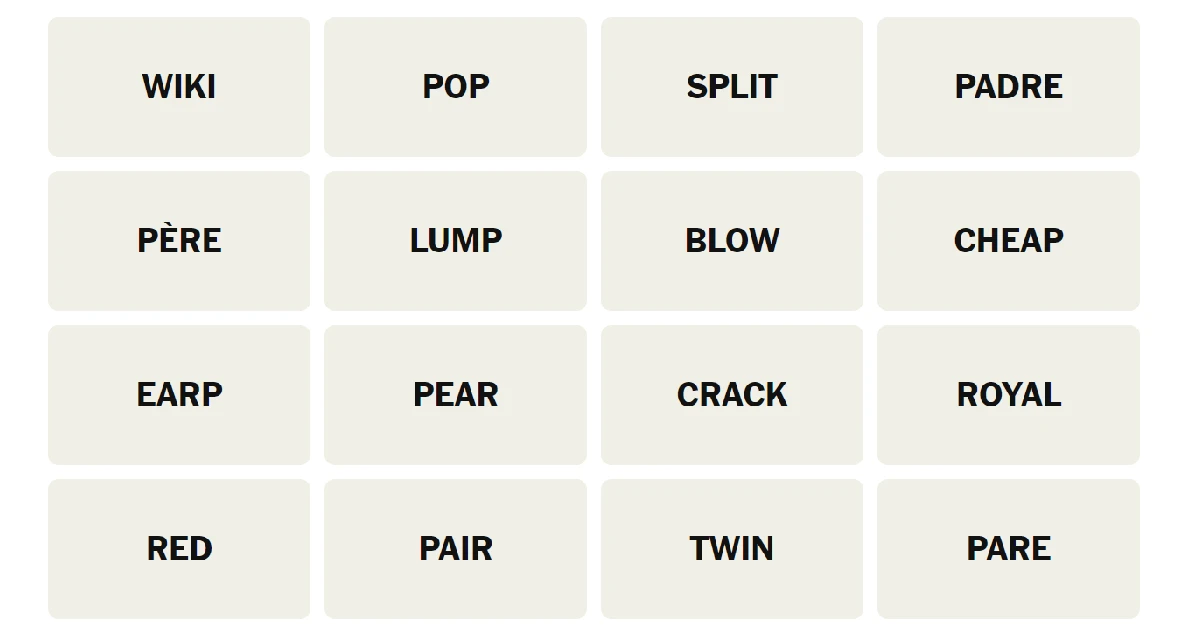
Here’s your grid for today

Here’s your grid for today
  • WIKI
  • POP
  • SPLIT
  • PADRE
  • PERE
  • LUMP
  • BLOW
  • CHEAP
  • EARP
  • PEAR
  • CRACK
  • ROYAL
  • RED
  • PAIR
  • TWIN
  • PARE

Hints for NYT Connections (#1,072) May 18, 2026

Let’s get you started with some general, spoiler-free hints.
  • 🟡Yellow Group: They sound alike.
  • 🟢Green Group: Break.
  • 🔵Blue Group: Famous names in a popular American sport.
  • 🟣Purple Group: When unscrambled, these words make a great salad.

One Word Per Category (Contains Spoilers)

Can’t seem to find an in? We’ll give you one word from each category.
  • 🟡Yellow Group: Pair.
  • 🟢Green Group: Blow.
  • 🔵Blue Group: Padre.
  • 🟣Purple Group: Cheap.

List of Themes (Major Spoilers)

Maybe getting to know the common themes among the words will help you spot them faster. Here are all the categories for today.
  • 🟡Yellow Group: Homphones.
  • 🟢Green Group: Rupture.
  • 🔵Blue Group: MLB Player.
  • 🟣Purple Group: Fruit Anagrams.

Answers to NYT Connections (#1,072) Today (May 18, 2026)

Close to waving the white flag? Fine, we’ll give you the answers.

🟡Yellow Group: Pair, Pare, Pear, Pere. (Homphones)

These answers were pretty straightforward and could be spotted right away. Pere and Padre are a misdirect.

🟢Green Group: Blow, Crack, Pop, Split. (Rupture)

This one didn’t require a lot of thinking either. Pretty standard verbs used to describe breaking something.

🔵Blue Group: Padre, Red, Royal, Twin. (MLB Player)

This is where it got dicey. Connected by a US-specific theme, these words refer to Major League Baseball (MLB) teams – San Diego Padres, Cincinnati Reds, Kansas City Royals, and Minnesota Twins.

🟣Purple Group: Cheap, Earp, Lump, Wiki. (Fruit Anagrams)

We hadn’t seen anagrams in Connections for a while, and this one sent us for a spin. Once arranged in the right order, these words come out as Peach, Pear, Plum, and Kiwi.

Answers to yesterday’s puzzle

  • 🟡Yellow Group: Duct, Line, Main, Pipe. (Conduit) 
  • 🟢Green Group: Fleece, Hose, Squeeze, Stiff. (Swindle)
  • 🔵Blue Group: Boil, Pour, Steep, Strain. (Tea-Making Verbs)
  • 🟣Purple Group: Grade, Grammar, High, Primary. (‘School’ Modifiers)

Answers to NYT Connections (#1,070, May 16, 2026)

  • 🟡Yellow Group: Coupe, Flute, Stein, Tumbler. (Glassware)  
  • 🟢Green Group: Fiddle, Mess, Play, Tinker. (Mess Around With)
  • 🔵Blue Group: Allegro, Forte, Largo, Piano. (Music Performance Directions)
  • 🟣Purple Group: Bassoon, Belfast, Nesquick, Thermostat. (Ending in Synonyms for “ASAP”)

Answers to NYT Connections (#1,069, May 15, 2026)

  • 🟡Yellow Group: Cross, Ford, Traverse, Wade. (Navigate Through, As A River.)
  • 🟢Green Group: Bird, Curry, James, Jordan. (Multi-time NBA MVPs.)
  • 🔵Blue Group: Able, Elba, Saw, Was. (Non-palindromic Words In A Famous Palindrome.)
  • 🟣Purple Group: Ciao, Palm, Peek, Pitt. (Homophones Of Kinds Of Dogs, Familiarly.)
Read Also: Hunty Zombie Codes (May 2026): All Working Codes for Free Spins, Traits, and More

How did other solvers do today?

NYT’s early testers rated today’s Connection puzzle 2.2 out of 5. This puts it in the medium difficulty level. Let us know how you fared in the comments!

NYT Strands Today Answers and Hints for Monday, May 18, 2026 (Puzzle #806)

If you opened the NYT Games app this Monday morning and found yourself staring blankly at a jumble of letters that seemed to mock you silently, welcome to the club. NYT Strands puzzle 806 answers for May 18, 2026 are all about one of nature’s zestiest fruit families, and the theme clue “The daily rind” is just sharp enough to make you feel both clever and slightly foolish at the same time. Yes, today is a citrus kind of day.

What Is NYT Strands and How Does It Work?

For anyone still getting acquainted with this addictive little game, here is a quick primer. Strands is a free daily word game from the New York Times where players are handed a six-by-eight grid of letters and asked to find all the hidden theme words plus one special “spangram” that defines the entire puzzle’s concept. Every single letter in the grid gets used. Nothing is wasted. No letter is left behind.

If you get stuck mid-solve, the game lets you earn hints by finding valid four-letter or longer words that are not part of the theme. Every three such words you uncover lights up a hint token. The first hint highlights the letters of an answer without showing you how they connect, and a second hint walks you through it step by step. The catch is that your hint usage shows up in your final score, so power players tend to ration them carefully.

Read Also: NYT Strands Hints and Answers Today: Puzzle #805 for Sunday, May 17, 2026

Like Wordle and Connections, Strands resets at midnight every day. One puzzle. One shot. Come back tomorrow.

Today’s Theme: The Daily Rind

The theme clue for puzzle #806 is “The daily rind,” which is a wonderfully punny little phrase that nods both to the outer peel of a citrus fruit and the daily ritual of sitting down to knock out a word puzzle before your first coffee even finishes brewing. The words you are hunting are all members of a famously tangy, vitamin C-packed fruit family.

Think acidic. Think fragrant peels. Think of fruits that belong in a fruit bowl, a cocktail, or a very good marmalade.

Hints for NYT Strands #806 (Spoiler-Free)

Before the full reveal, here are some gentle nudges to help you crack today’s puzzle on your own.

The six theme words all come from the same botanical category. Some of them are grocery store regulars that you see every single week. Others are slightly more exotic entries that will make you pause, squint at the grid, and then feel very satisfied when they finally click.

Here are some non-theme words hidden in today’s grid that you can use to unlock in-game hints without burning your answers:

CAME

LENT

ROLE

POLE

ROOM

TOTE

GEAR

RATE

TINS

Play any of these to start building up your hint tokens. They are all valid words sitting in the grid, just waiting to be found.

For the spangram, here is what you need to know. It has six letters. It starts on the left side of the board in the third row and travels diagonally down to the right side of the board by the eighth row. That diagonal drift is a useful visual cue when you are scanning the grid.

NYT Strands Puzzle #806 Full Answers (Spoilers)

Right, this is the moment of truth. If you are here for the complete solution, scroll no further until you are ready.

Today’s six theme words are:

LIME

ORANGE

POMELO

TANGERINE

CLEMENTINE

KUMQUAT

Today’s spangram is CITRUS. It begins with the C in the third row and runs diagonally down to the S in the final row, spanning the full width of the board in true spangram fashion.

The Star Turns: Kumquat and Pomelo

Today’s puzzle earned an “easy” rating overall, but it had a couple of genuinely interesting curveballs tucked inside the grid. The most notable absence is the lemon. Yes, the lemon, arguably the most famous citrus fruit on the planet, did not make the cut today. That single omission instantly made the puzzle a notch trickier than it might have been.

In lemon’s place, puzzle #806 introduced two less commonly seen entries. The kumquat is a tiny, oval citrus fruit that is eaten whole, rind and all, and is widely used in marmalades and preserves. It looks like a miniature orange and packs a surprisingly punchy flavour for something so small.

The pomelo is the other standout. It is the largest citrus fruit in the world, bigger than a grapefruit, with a thick pale rind, a mildly sweet interior, and a devoted following among people who genuinely believe it deserves far more supermarket shelf space than it gets. If you have never tried one, today’s puzzle is a good excuse to pick one up on your next grocery run.

Recent NYT Strands Puzzle Answers

Here is a handy look back at recent puzzles in case you need to catch up:

Sunday, May 17, Puzzle #805: Theme was a bowling alley. Theme words included SCOREBOARD, PINS, LANES, ARCADE, BALLS and LOUNGE. Spangram was BOWLINGALLEY.

Saturday, May 16, Puzzle #804: Theme was a French bakery. Words included MACARON, MERINGUE, CROISSANT, ECLAIR and MOUSSE. Spangram was FRENCHBAKERY.

Friday, May 15, Puzzle #803: Theme was mustelids. Words included POLECAT, OTTER, MARTEN, WOLVERINE, BADGER and FERRET. Spangram was MUSTELIDS.

Thursday, May 14, Puzzle #802: Theme was Robin Hood. Words included ARCHERY, FOREST, FRIAR, SHERIFF and DISGUISE. Spangram was ROBINHOOD.

Wednesday, May 13, Puzzle #801: Theme was what it takes. Words included NERVE, PLUCK, GRIT, FIBER, HEART, GUMPTION and SPUNK. Spangram was WHATITTAKES.

Tips for Solving NYT Strands Faster

A few strategies that experienced Strands players swear by are worth keeping in your back pocket. Start with the longest words first, as they tend to carve out larger chunks of the grid and make the remaining letters easier to work with. Pay attention to unusual letter combinations, since words like KUMQUAT and CLEMENTINE have distinctive letter patterns that stand out once you know what you are looking for. And when in doubt, let the theme guide you. Once you have a solid read on the category, you can mentally filter the grid for words that fit rather than randomly hunting.

Read Also: NYT Connections Today: Hints, Clues and Answers for Sunday, May 17, 2026 (Puzzle #1071)

What We Think

Today’s puzzle was a bright, breezy Monday morning win. Swapping out the lemon for kumquat and pomelo was a genuinely smart design call. It kept the puzzle accessible without making it feel lazy, and discovering that pomelo holds the title of the world’s largest citrus fruit is the kind of small, satisfying fact that makes a word game feel like it actually taught you something. More puzzles like this one, please.

OxygenOS 16 rollout stopped; a bug caused serious boot loop issues for OnePlus devices

OnePlus has paused the release of OxygenOS upgrades for version 16.0.7.XXX and 16.0.5.XXX after receiving complaints from users about boot loops and device resets. The problem surfaced on a few smartphones, including the OnePlus 13, the OnePlus 12, and the Nord series. In response to these OxygenOS 16 update issues, the firm is currently investigating issues and reviewing its testing methods to avoid repeat incidents.

OxygenOS 16 update issue

Users of OnePlus smartphones have been having serious issues with frequent reboot cycles following the most recent firmware upgrades (16.0.7.XXX and 16.0.5.XXX). The result was that the gadgets became unusable, and there was a lot of user disappointment. OnePlus publicly acknowledged the problem on its Community forum in reaction to these concerns and swiftly decided to pause the deployment of the upgrades to avoid any further issues. Also Read: Garena Free Fire Max Redeem Codes Today May 18: Claim Post-Tournament Rewards! The company confirmed that only a limited number of devices were affected by these irregular restart and boot issues and reiterated its commitment to device stability and improved customer experience. OnePlus has not released a full list of devices affected by its latest upgrades. OxygenOS 16.0.7.XXX has been optimised for the OnePlus 15 series, with a focus on major markets like India and the United States. Meanwhile, OxygenOS version 16.0.5.XXX has been scheduled to support a larger variety of devices, including the OnePlus 13, OnePlus 12, OnePlus 12R, OnePlus Nord 5, OnePlus Nord 4, OnePlus Nord CE 5 and OnePlus Nord CE 4. The business said the decision was taken until the technical team analyses the fundamental cause of the issues and sets up a fix. The investigation is being regarded as a high priority, and once the problem is rectified and the builds are tested for stability and dependability, the rollout will restart. Updates will be shared via official means. Also Read: Amazon Quiz Answers Today 18 May 2026: Participate to win Up To Rs 500 Amazon Pay Balance Most significantly, OnePlus recognised and apologised for the inconvenience and concern caused to consumers by this situation and is taking it very seriously. Additionally, there will be a full assessment and improvement of testing and quality assurance procedures to minimise the possibility of such incidents going forward.

What is the bug?

The latest OxygenOS upgrades (16.0.7.XXX and 16.0.5.XXX) have caused boot loops, unexpected restarts, and freezing during boot, leaving devices locked on the OnePlus logo. Due to these issues, OnePlus has paused these upgrades. 

Possible causes include:

The reasons for the breakdown might be the following: corrupted system partition after the OTA update, kernel or boot image mismatch, unsuccessful optimisation on the initial boot, rollback protection error, and memory and process management problems in OxygenOS 16. There have been more user reports of UI slowness, overheating, app freezing, animation stutters, and random system hangs prior to rebooting. Also Read: Wordle #1794 Hints: Monday’s Solution Means ‘Extremely Unwilling’ (May 18)

How to fix it?

  1. To fix the problem, if you haven’t updated yet, don’t install versions 16.0.7.xxx or 16.0.5.xxx. The safest option is to wait for a patched release from OnePlus.
  2. To fix a rebooting but still usable phone, follow these steps in order: first, clear the cache partition. Next, turn the phone off. Then, to enter Recovery Mode, press the Power and Volume Down keys simultaneously. Select “Wipe cache” and then reset the device. This process may resolve issues usually caused by corrupted cache files after an upgrade.
  3. Disabling RAM expansion temporarily may assist in stabilising some OxygenOS builds that have instability concerns. To accomplish this, go to Settings, then About Device, then RAM, and then RAM Expansion. Turn off the option and restart the device to implement the changes.
  4. To reset app optimisation, go to Settings and then click Apps & App Management. Clear the caches of the System Launcher, System UI, and Google Play Services. After completing these instructions, reboot your smartphone.
  5. If your OnePlus phone is stuck on the logo and entering a boot loop, try executing a force restart. To do this, press and hold the power button for 15-20 seconds. If the device restarts normally, back up your data right away and avoid restarting the phone to avoid recurrence issues.
  6. If the boot loop persists, turn off the device and enter Recovery Mode by holding the Power and Volume Down buttons simultaneously. Once in Recovery Mode, try the following options: Option A is to reboot the system and retry. Option B includes erasing the cache, which is a more secure option. Option C is a factory reset, which should only be used as a last option since it erases all data from the device.

Safest current advice

The safest current recommendation about OxygenOS 16.0.5 / 16.0.7 is to avoid installation for the time being. If the software is already installed and stable, users should avoid doing a factory reset unless absolutely required and downgrading unless there is an approved option available. It is suggested that data be backed up immediately. A fix is expected to come as a patched OTA update from the OnePlus Community after validation is completed. [Latest update on OxygenOS 16 issues: As per the latest OnePlus community post, following an exhaustive investigation, the firm has re-initiated the rollout for versions 16.0.7.xxx and 16.0.5.xxx. It addressed the issue which was mentioned above. Internal monitoring identified abnormal behaviour in a build not yet publicly available, leading to a preventive pause in the rollout. The company said the move was to focus on device reliability and improve the user experience. The thorough verification processes ensured no effect on external users, who may continue to use their devices without a hitch. The roll-out began to restart gradually today.]

Garena Free Fire Max Redeem Codes Today May 18: Claim Post-Tournament Rewards!

Recent developments after the conclusion of the FFMAI 2026 Spring South Asia Play-ins have resulted in a significant surge in player engagement on the India server. Active survivors are aggressively exploring the Bermuda map, putting professional strategies observed during the tournament to the test. However, advanced tactical strategies often need a significant investment in diamonds. In addition, on May 18, a new daily redemption code went live, allowing free-to-play gamers to get premium weapon cosmetics and character costumes for free. These codes are a great way to get free items in the game. The 12-digit codes contain letters and numbers, as well as an expiration date and time. Because the Garena FF redeem codes cannot be used more than once, you should hurry to the redemption page to claim your free reward before someone else does. To get a free reward, all you have to do is go to reward.ff.garena.com/en, which is the official redemption page. Also, keep an eye on this space for daily updates on Gadget Bridge on GFF Max redemption codes and rewards. Today’s Garena Free Fire MAX Redeem Codes May 19 are now live. Also Read: Amazon Quiz Answers Today 18 May 2026: Participate to win Up To Rs 500 Amazon Pay Balance

Active Garena Free Fire Max Redeem Codes for May 18

BR43FMAPYEZZ ​UPQ7X5NMJ64V ​S9QK2L6VP3MR ​FFR4G3HM5YJN ​6KWMFJVMQQYG ​FZ5X1C7V9B2N FA3S7D5F1G9H ​FK3J9H5G1F7D ​FU1I5O3P7A9S ​F7F9A3B2K6G8 ​FE2R8T6Y4U1I ​FQ9W2E1R7T5Y FFSGT7KNFQ2X ​FPSTQ7MXNPY5 4N8M2XL9R1G3 ​H8YC4TN6VKQ9 ​FF6YH3BFD7VT ​B1RK7C5ZL8YT ​4ST1ZTBZBRP9 ​FT4E9Y5U1I3O ​FP9O1I5U3Y2T ​FM6N1B8V3C4X

Also Read: Wordle #1794 Hints: Monday’s Solution Means ‘Extremely Unwilling’ (May 18)  Most of today’s code setup is based on the seasonal storyline of Eclipse Rise, introducing the new character Ray. Players want to don visual enhancements that complement Ray’s Inky Tracker tracking ability. Codes such as FFSGT7KNFQ2X and FPSTQ7MXNPY5 have been popularised by the community for custom Gloo Wall skins and complex Grenade animations, usually attainable by players who achieve level 80 in the Chisel Dream’s Booyah Pass. The Garena Redemption Portal is experiencing heavy server load as a result of the recent tournament, and it is possible that popular items such as the Rebel Academy Weapon Loot Crates, redeemable via codes starting with BR43 or FFCB, could hit the 5,000 redemptions cap before noon. So it’s best to set up your connected platform profiles and focus on redeeming your weapon box vouchers before you try to collect any general rewards.

Archive: Recent Garena Free Fire Max Redeem Codes

View May 17, 2026 GFF Max codes View May 16, 2026 GFF Max codes View May 15, 2026 GFF Max codes View May 14, 2026 GFF Max codes View May 13, 2026 GFF Max codes View May 12, 2026 GFF Max codes View May 11, 2026 GFF Max codes

How to Get Free Fire Max Redeem Keys for Garena?

  • Visit the game’s official website at reward.ff.garena.com.
  • Use your Facebook, Google, VK, Apple ID, Huawei ID, or Twitter account to log in.
  • You’ll be taken to a valid redemption code (s)
Also Read: Alexa for Shopping replaces Rufus AI on Amazon
  • Copy and paste the 12-digit redemption code into the text box.
  • On the screen, a dialogue box will appear.
  • ‘Ok’ should be selected.

Amazon Quiz Answers Today 18 May 2026: Participate to win Up To Rs 500 Amazon Pay Balance

The new Amazon Daily Quiz has arrived. Customers from different parts of the country are participating in the daily quiz. The quiz starts at midnight today and will be live until 11:59 PM tonight. By successfully answering every question, participants in the quiz have the chance to win wonderful rewards. Up to Rs 500 Amazon Pay Balance is up for grabs for participants today. One wrong answer could eliminate you from the quiz. You have a chance to win up to Rs 500 Amazon Pay Balance if you successfully answer every question. Users of the app only have the opportunity to take the quiz. Check Out the 18 May 2026 Quiz. Update: Quickly check out Amazon Quiz Answers Today 19 May 2026 Also Read: Wordle #1794 Hints: Monday’s Solution Means ‘Extremely Unwilling’ (May 18)

Are you not able to find Amazon FunZone? Click below and participate.

Click here to enter the Amazon FunZone Quiz and play today. Today’s Prize: Rs 50 Amazon Pay Balance Quiz Date: 18 May 2026 Daily Timing: 12 AM to 11:59 PM Previous Winners Announcement: Today 12 PM Noon

Amazon Daily Quiz Answers Today: Win Up To ₹ 500 Amazon Pay Balance

Question 1: Who became the 17th Indian to score a century in Test debut. Answer: Yashasvi Jaiswal Question 2: S Phangnon Konyak is the lone MP from which state in the Upper House of Indian Parliament? Answer: Nagaland Question 3: ‘Scoop’ is based on the real-life tale of which crime reporter, who was framed for the murder of a fellow journalist? Answer: Jigna Vora Also Read: Oppo F33 Pro 5G Review: The Marathon Runner Question 4: What was the name of the animal of this species that became the first mammal to be cloned? Answer: Dolly Question 5: These mosaics are located in which city? Answer: Istanbul

Amazon Daily Quiz Answers from the previous few days.

Here are all the answers from the previous 5 days of the Amazon Daily Quiz and Contest.

How To Play Amazon Daily Quiz Today

Only app users are eligible to play the Amazon quiz every morning from 12 AM to 11:59 PM. The quiz is not available on the desktop. For those who are unaware of how to play the Amazon quiz, below are the steps you can follow to take the quiz.
  • First, download the Amazon app from the Google Play Store or App Store or go here to download the Amazon App
  • Now fill in the required information through the Sign-Up option.
  • To find the Amazon Daily Quiz banner, log in to the Amazon app and scroll down to the home screen.
  • Tap on the banner and tap on the Start button to start the Quiz.
  • Now you will get 5 questions, and you need to answer them correctly. One wrong answer will eliminate you from the Quiz.
  • After answering all the questions correctly, you are now eligible for a Lucky Draw.
  • The previous winner’s name will be announced today at 12 PM.

Amazon Daily Quiz Frequently Asked Questions (FAQs)

Where can I check the previous winners? Did I win? How to check?

You can head over to this link on your mobile or desktop to check the winners of the Amazon Daily Quiz Contest.

How to Play Amazon Daily Quiz or Contest?

We have written an explainer above; you can refer to that.

When are the Winners announced?

The announcement of today’s quiz winner will take place Tomorrow at 12 PM (noon). As for the Special Quiz and “Spin & Win” Contest, the winners will be declared once the Quiz Contest comes to an end. To find out who the lucky winner is, you can refer to the Winners List or visit the Amazon Winners tab in the Amazon App. Also Read: Amazon Daily Quiz Answers Today 16 May 2026: Win Up To Rs 500 Amazon Pay Balance

How to participate in the Daily Amazon Quiz?

That is very easy, just got to the Amazon app and scroll to the bottom of the page and you will find the Quiz section. Click on it (usually it is called the fun zone) and you can enter the Amazon Today Quiz Contest. 

Are there any other quizzes or contests running on Amazon daily?

Yes, there are many running daily. These range from spinning the wheel to answering the questions correctly. All are located in the Fun Zone. 

What are the criteria for selecting a winner in the Daily Amazon Quiz?

When a qualified player submits correct answers to all the questions, they will automatically be entered into a lucky draw. This draw will include all participants who answered all the questions correctly. Amazon randomly selects the final winners from the pool of eligible participants who gave the right answers. Also Read:

Which Types of Questions are asked within the Amazon Daily Quiz?

These are very simple and straightforward questions. These are mainly related to general knowledge.