The company showcased energy storage solutions and product concepts in Dubai.
Acer has joined the RE100 initiative and committed to sourcing 100% renewable electricity by 2035.
Acer has officially announced its “Conscious Technology” vision for technology that is created and developed concerning the future. In addition to this it also provided updates on its ongoing climate efforts along with two new energy storage solutions and a climate exhibition featuring technology and the public was also given access to product concepts.Acer joined the RE100 initiative and has pledged to source 100% renewable electricity by 2035. It further committed to attain net-zero emissions by 2050. The company aims to increase positive impacts on the environment through collaborative efforts; 60% of its critical suppliers have committed to RE100 or set science-based carbon reduction targets (SBT).According to the company it aims to make use of 20-30% post-consumer recycled plastic in its computers and monitors by 2025, for which 17% use was achieved in 2022. In addition to this Acer also discussed a number of its initiatives including its Vero line of products made with a high percentage of recycled materials. Another programme the Project Humanity initiative educates and unites its employees around the world to take greener actions. While, the Earthion platform further unites its supply chain partners, including their employees, to address environmental challenges through innovative and integrated solutions.Among the projects under Earthion are using biofuel to reduce Acer’s Sea logistics emissions with biofuel and researching sustainable packaging materials with manufacturing partners.The firm further revealed that it is growing its footprint in the energy storage market as part of its net-zero commitment by offering solutions across the supply chain, from household to industrial use, manufacturing to application, and front-of to behind-the-meter solutions to contribute to the energy transition. Acer has also expanded its range by introducing new energy storage solutions through its investment in battery cell technologies.Conscious Technology for a Brighter Tomorrow Exhibition also highlights Acer’s continuous efforts to combat climate change technology designed and made with consideration for the future. The company presented goods and services categorised under four lifestyle concepts.Also Read:Best smartphones under Rs 35000 in India: Checkout our recommendationsConcept for Working – An on-demand subscription service to Acer’s vast product portfolio with subscription package upgrades, services, and repairs that can be made available with the click of a button. Customers can actively become part of a system that stretches the life of a digital device, lessening the use of new resources.Concept for Learning – Computer hardware and software that help schools reduce their carbon footprint. Students can learn in a climate-positive environment using refurbished laptops along with tools to enable conscious use.Concept for Moving – A network of mobility stations with charging hubs, nimble e-bikes, and e-scooters available to ease journeys, along with tools such as data-informed urban planning and prediction of micro-mobility infrastructure, helping to increase transportation access for more people and support infrastructure planning within smart cities.Concept for Living – A hyper-compatible system with a mobile app that enables the use of both existing and new smart appliances to make homes more climate resilient. The app lets users manage their energy consumption more efficiently and increases visibility on the energy distribution of appliances.
Are you looking for a mid-range smartphone for yourself which comes with premium features and you do not have to spend a lot to buy it? So here we are going to recommend some mid-range phones that won’t break the bank and include nearly all of the features of their higher-end parallels. Here is a list of the best smartphones you can buy under Rs 35000 in India.
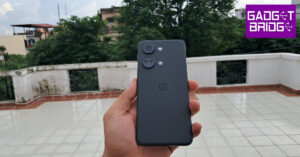
OnePlus Nord 3 5G
OnePlus Nord 3 5G is highlighted with a 6.74-inch AMOLED screen with a dynamic refresh rate that may vary between 40Hz and 120Hz. The device runs on OxygenOS 13 with Android 13. Under the hood, there is an octa-core MediaTek Dimensity 9000 SoC with Mali-G710 MC10 GPU. The smartphone features a triple rear camera setup that includes a 50-megapixel Sony IMX890 sensor with OIS support. Additionally, there is an 8-megapixel ultra-wide angle Sony IMX355 sensor with a 112-degree FoV, and a 2-megapixel macro lens. The device is equipped with a 16-megapixel front-facing camera for selfies and video chats. It is backed by a 5,000mAh battery with an 80W SuperVOOC charging support.
Price starts at Rs 33,999
Poco F5 5G
Poco F5 5G comes with a 6.67-inch Full HD+ Flow AMOLED display which supports a 120Hz refresh rate and 240Hz touch sampling rate. The device is powered by a Snapdragon 7+ Gen 2 paired with an Adreno GPU. The phone operates on Android 13-based MIUI 14 for Poco. For photos and videos, the triple rear camera setup includes a 64-megapixel primary sensor, an 8-megapixel ultra-wide lens and a 2-megapixel macro lens. There is a 16-megapixel front-facing camera for taking selfies and video calling. In addition, there is a 5,000mAh battery with a 67W turbocharger.
Price starts at Rs 26,999
NothingPhone 1
The Nothing Phone 1 features a 6.55-inch, 10-bit OLED display with a maximum brightness of 1200 nits, HDR10+, and 402PPI. The device runs on Nothing OS, an Android 12-based operating system. The device is powered by a Snapdragon 778G CPU with Adreno 642L GPU. The handset includes a 4500mAh battery with 33W cable charging, 15W wireless charging, and 5W reverse wireless charging support. In addition to this, there are two 50MP cameras: a primary Sony IMX766 sensor with OIS and EIS, and a secondary Samsung JN1 ultrawide sensor with a 140-degree field of view. When video recording is active, a red LED on the back of the phone will light up. For selfies, there is a 16MP Sony IMX471 sensor and 2.45 aperture on the front.
Price starts at Rs 29,999
iQoo Neo 7 Pro 5G
iQoo Neo 7 Pro 5G is powered by a Snapdragon 8+ Gen 1 chip. The phone operated on Funtouch OS 13 on top of Android 13. It comes with a 6.78-inch full-HD+ AMOLED screen that supports a 120Hz refresh rate and a 300Hz touch sampling rate. The device includes a triple rear camera setup consisting of a 50-megapixel primary Samsung GN5 sensor with an f/1.88 aperture, an 8-megapixel ultra-wide-angle camera with an f/2.2 aperture and a 2-megapixel macro camera with an f/2.2 aperture. The handset also features a 16-megapixel front-facing camera. The iQoo Neo 7 Pro boasts a 5,000mAh battery with 120W Flash Charge support.Price starts at Rs 32,999
Samsung Galaxy F54 5G
The Samsung Galaxy F54 5G features a 6.7-inch full-HD+ Super AMOLED Plus display with a refresh rate of 120Hz. The phone runs on Android 13 with One UI 5.1 OS and is powered by an octa-core 5nm Exynos 1380 SoC. It sports a triple rear camera setup that includes a 108-megapixel primary sensor with OIS, an 8-megapixel sensor ultra wide-angle camera and a 2-megapixel macro lens. In addition to this, there is a 32-megapixel sensor front-facing camera for taking selfies. The Galaxy F54 5G houses a 6,000mAh battery that comes with 25W wired fast charging.
Price starts at Rs 31,999
Redmi Note 12 Pro+ 5G
The Redmi Note 12 Pro+ 5G has a 6.67-inch full-HD OLED display has an up to 120Hz refresh rate. The smartphone is powered by an octa-core 6nm MediaTek Dimensity 1080 SoC with Mali-G68 GPU. The triple rear camera unit includes a 200-megapixel primary sensor with OIS. A 2-megapixel macro lens and an 8-megapixel ultra wide-angle camera are also part of the arrangement. The phone’s 16-megapixel front camera sensor is used for taking selfies. Additionally, the handset houses a 5,000mAh battery that enables 120W fast charging.
Price starts at Rs 27,999
Samsung Galaxy S21 FE
The Samsung Galaxy S21 FE incorporates a Samsung Galaxy S21 FE 5G Snapdragon 888 SoC with Adreno 660 GPU. It has a 6.4-inch FHD+ Dynamic AMOLED 2X Display with a 240Hz touch sampling rate and 120Hz refresh rate. The triple rear camera on the Samsung Galaxy S21 FE includes a 12-megapixel primary sensor a 12-megapixel ultra-wide sensor and an 8-megapixel telephoto sensor. It also includes a 32-megapixel front camera with an f/2.2 aperture. The Galaxy S21 FE 5G offers wireless power sharing, wireless fast charging 2.0, and 25W Super-Fast charging capabilities.
Price starts at Rs 33,989
Vivo V29
Vivo V29 comes with a 6.78-inch full-HD+ curved AMOLED display with 120Hz refresh rate support. It operates on FuntouchOS 13 based on Android 13. Under the hood, there is a Qualcomm Snapdragon 778G SoC. The triple rear camera setup includes a 50-megapixel primary sensor, an 8-megapixel ultra-wide angle lens and a 2-megapixel monochrome camera. On the front, there is a 50-megapixel selfie camera. The smartphone packs a 4,600mAh battery with 80W fast charging support.
Price starts at Rs 32,999
Garena Free Fire is a battle royale game with regular awards and tournaments to keep players interested. If you play Garena Free Fire, you should be aware of the redeem codes that are released on a daily basis. However, because the battle royale game is banned in India, players from other countries can use the Free Fire Redeem codes daily. If you’re unfamiliar with the Garena Free Fire redeem codes or don’t know how to get them, we’ve put together a step-by-step guide to help you redeem them. Check out Garena Free Fire Redeem Codes for 8 December 2023.The Free Fire redeem codes are a great way to get free stuff. These are 12-digit codes that contain alphabets and numbers, as well as an expiration date and time. Because the Garena FF redeem codes cannot be used more than once, you should hurry to the redemption page to claim your free reward before someone else does. To get a free reward, all you have to do is go to reward.ff.garena.com/en, which is the official redemption page. Also, keep an eye on this space for daily updates on Garena Free Fire redemption codes and rewards.
Garena Free Fire Redeem Codes Today 8 December 2023
Recently here at GadgetBridge we looked at how older participants are part of the tech boom, as people over the age of 65 in Australia have widely embraced gaming. Indeed, these silver gamers have doubled in volume over the last four years, reaching 40% within the 65+ age demographic.
This was an intriguing data point featured in the Australia Plays report for 2023, published by the Interactive Games & Entertainment Association, which is the leading advocate organisation for the games industry in the Oceania region. They also highlighted that 81% of all Australians now enjoy gaming, which is up from 67% indicated by the 2021 surveys and research. But what about the industry itself in terms of revenues generated?
Well, that’s where things get a little more complicated. What’s generally referred to as “mainstream” gaming relates to video games, along with associated hardware and devices. Meanwhile, there‘s also the “iGaming” sector, which refers to online betting and casino gaming, although that also falls under the mandate of different legislatures and regulations.
Only by looking at both individually can we get a true picture, as we seek to understand how much Australians actually spend overall on gaming entertainment.
Australian Video Game Revenues
More often than not, the video games industry is how mainstream gaming is most commonly known. Earlier this year, IGEA published the most complete revenue statistics for the sector, covering the financial year from 1 July 2022 to 30 June 2023. This provided a snapshot of Australian consumer video game sales, indicating continued and sustained growth across all segments.
The IGEA report incorporated total sales numbers for games, hardware, and peripherals, which produced a total overall spend by Australians of AUD 4.21 billion, which marks a rise of 5% compared to previous to the previous 2021-2022 financial year figures. But aside from the total sales, this report also provided interesting data for how that sum was reached.
Mobile gaming now accounts for the biggest share, having reached AUD 1.56 billion in revenues, while digital downloads and online gaming achieved AUD 1.5 billion in sales. But what’s also fascinating is that compared to elsewhere around the world, Australia bucked the trend for declining traditional retail video game sales, which rose by 7% in 2023 to AUD 1.15 billion.
Read also:How to Play Wordle: Tips & Tricks to Become a Pro At WordleOnline Casino Gaming Revenues
Now as we mentioned earlier, the iGaming sector falls under the remit of different licensing and regulations, compared to mainstream gaming. But essentially, this covers the kind of online casino games and sites that Aussies will find at TopAustralianGambling reviews and guides. These include everything from pokies to roulette, plus card games like poker and blackjack, among a diverse and wide range of games available to players these days.
Proving that Australia genuinely is a nation which thoroughly enjoys gambling, this hugely popular leisure activity generated AUD 6.82 billion in revenues in 2022, rising by 7.09% to AUD 7.3 billion in 2023. Based on the numbers calculated by imarcgroup analysis, this growth is projected to continue at a sustained rate over the next several years, despite the introduction of increasingly stringent legislature and regulations Down Under.
By comparison, revenues for offline casino gaming have steadily fallen over the last few years, dropping to around AUD 5.8 billion in 2023. Inevitably, the biggest hit came during the pandemic, when physical gambling venues and casinos were forced to close their doors, and in the meantime, the growth of online casino gaming has accelerated and taken over.
Combined Total Revenues
Such numbers unequivocally prove that right now, the iGaming sector is already significantly larger than the video games sector, indicating that in truth, both are genuinely “mainstream” in nature. Taking the combined figures we now have, Aussies have spent AUD 11.51 billion on their overall gaming pastimes, which is more per head of the population than anywhere else in the world.
If you often work from home, you must be aware of Remote Desktop Connection. RDC is a Windows application that lets you remotely access your PC with the proper credentials. Typically, the Remote Desktop Connection application can be accessed from the Windows Start Menu. If you use it quite often, you may want it pinned to a more accessible location. So, let’s take a look at the top 4 ways to create a Remote Desktop Connection Shortcut on a Windows 11 PC.Read Also:Top 7 Ways to Run Command Prompt as an Administrator in Windows 11
How do I enable Remote Desktop Connection on my Windows 11 PC?
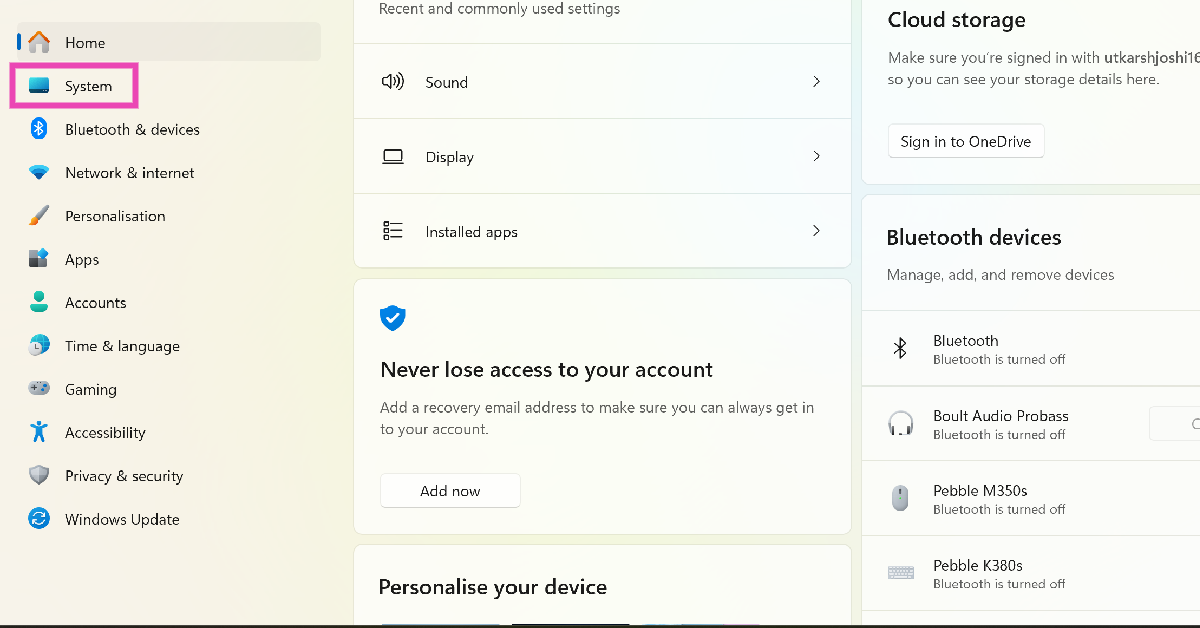
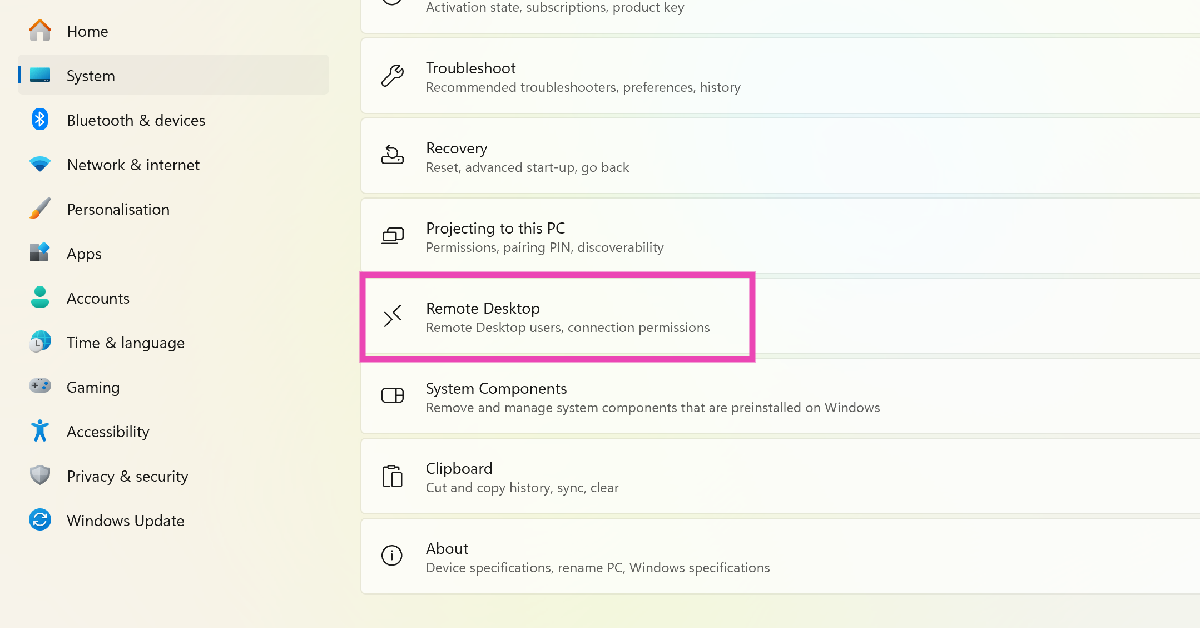
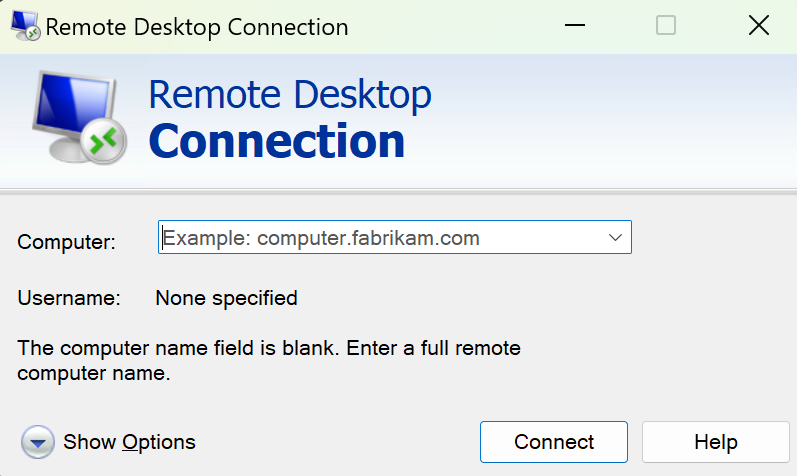
To use RDC on your PC, you will need the Pro Edition of Windows. This feature is not available on Windows 11 Home Edition. To enable RDC, follow these steps.Step 1: Go to Settings and select System.Step 2: Select Remote Desktop and turn on its toggle switch.Step 3: Note down the name of the PC.Step 4: Launch the Remote Desktop Connection app on your local Windows PC.Step 5: Type the name of the PC you noted down earlier and hit Connect.
Save a Remote Desktop Connection Shortcut
Step 1: Type ‘Remote Desktop Connection’ in the taskbar search box.Step 2:Open the Remote Desktop Connection app.Step 3: Click on Show Options.Step 4: Enter your login credentials for the remote computer and hit Save As.Step 5: Select the location for the shortcut and hit Save.
Create a desktop shortcut for Remote Desktop Connection in Windows 11
Step 1: Type ‘Remote Desktop Connection’ in the taskbar search box.Step 2: Select the Open file location option in the right panel.Step 3:Right-click on Remote Desktop Connection and select Show more options.Step 4: Select Send To>Desktop (create shortcut).
Another way to create a desktop shortcut for RDC
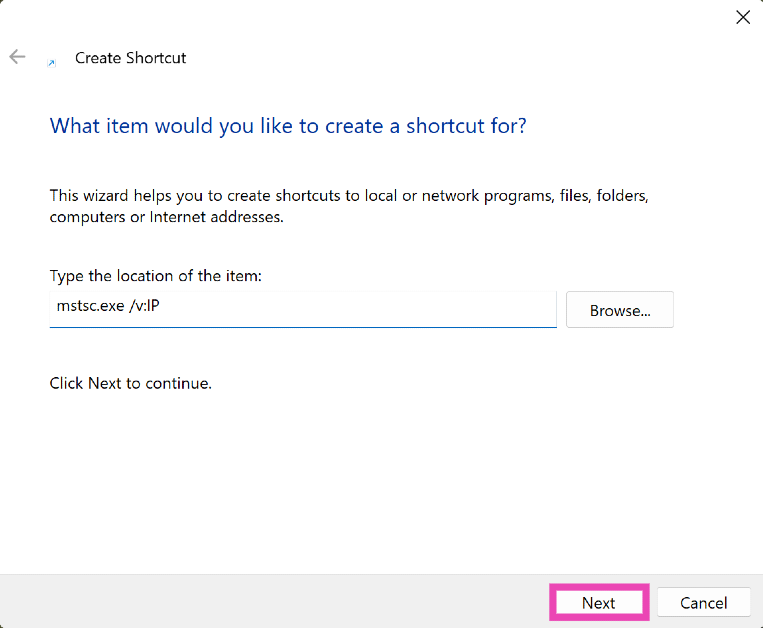
Step 1:Right-click anywhere on the desktop and select New>Shortcut.Step 2: Click on Browse and navigate to RDC’s file location. Alternatively, you can type mstsc.exe /v:PC-name or mstsc.exe /v:IP.Step 3: Click Next.Step 4: Type a name for the shortcut and hit Finish.
Pin Remote Desktop Connection to the taskbar
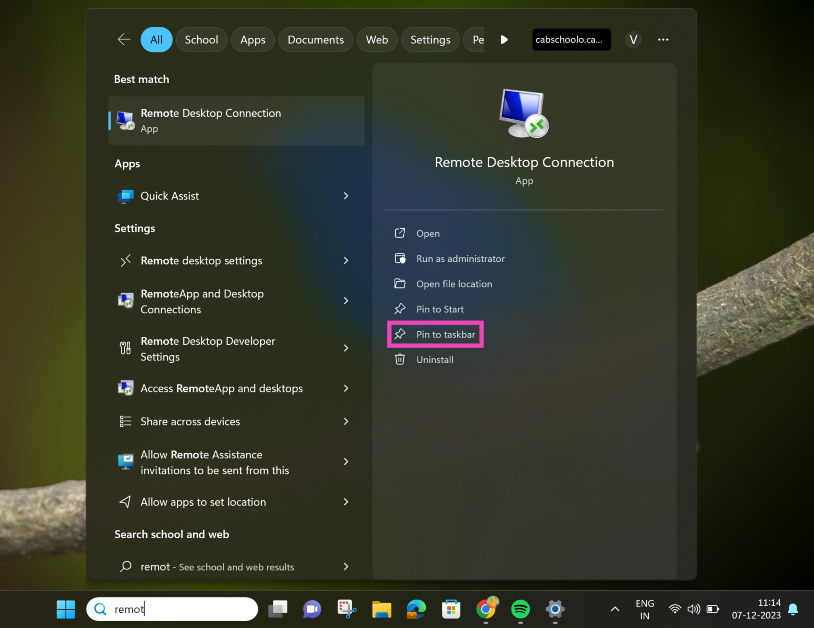
Step 1: Type ‘Remote Desktop Connection’ in the taskbar search box.Step 2: Select the Pin to taskbar option in the right panel.
Frequently Asked Questions (FAQs)
How do I create a shortcut for Remote Desktop Connection for a particular PC on Windows 11?
Launch RDC, click on Show Options, enter the login credentials for your remote computer, and hit Save as. Enter the location for the shortcut and select Save.
How do I create a desktop shortcut for Remote Desktop Connection?
You can create a desktop shortcut for RDC by right-clicking its icon in its file location and selecting Show more options>Send to>Desktop. Alternatively, you can also right-click on the desktop itself and select New>Shortcut. In the following window, enter the file location of RDC and hit Next.
These are the top 4 ways to create a Remote Desktop Connection shortcut on your Windows 11 PC. If you don’t like your desktop cluttered with dozens of shortcuts, you can pin RDC to the taskbar instead. Doing so will provide you instant access to the application with just a single click. Know a better way to go about this task? Let us know in the comments!
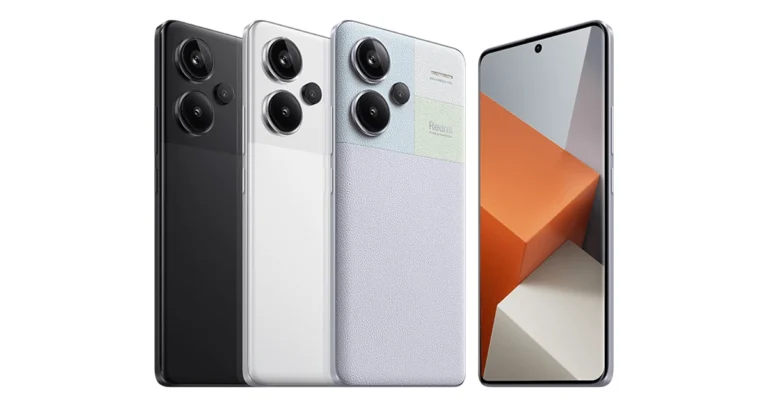
The latest Redmi Note Series includes three devices- Redmi Note 13, Redmi Note 13 Pro, and Redmi Note 13 Pro+.
The smartphones feature a 6.67-inch 1.5K full-HD+ AMOLED display.
Snapdragon 7s Gen 2 SoC powers the Redmi Note 13.
The Redmi Note 13 and Redmi Note 13 Pro+ are powered by MediaTek Dimensity SoC.
All three of the devices in the lineup come with a 16-megapixel selfie camera.
The upcoming year will be exciting for tech enthusiasts, a tonne of smartphones and other tech gadgets are planned for 2024. Though some brands have kept their secrets close to the vest on what they have in store for us, many brands have already revealed their plans. Xiaomi has announced the Redmi Note 13 series’ introduction in India, while there are still a few weeks till the new year begins. According to the company, it will host its next tech event in January 2024. The information about the upcoming launch was shared during the launch of Redmi 13C 5G.Xiaomi has not yet disclosed the official launch date but it has confirmed that the Redmi Note 13 series will launch in India in January.Also Read:OnePlus 12 could launch in January 2024, company confirmsNote that the Redmi Note 13 series was launched in September in China. The lineup includes the Redmi Note 13, Redmi Note 13 Pro, and Redmi Note 13 Pro+.
Redmi Note 13 Series specifications
Redmi Note 13 comes with a 6.67-inch AMOLED display with a refresh rate of 120Hz. The phone comes integrated with Android 13-based MIUI 14 and is powered by MediaTek Dimensity 6080 SoC.It has a dual rear camera setup that includes a 100MP main sensor and a 2MP macro sensor. Note that all three phones feature a 16MP selfie camera. The smartphone houses a 5,000mAh battery and comes with 33W wired fast charging support.On the other hand, the Note 13 Pro is highlighted with a 6.67-inch 1.5K full-HD+ AMOLED screen with 120Hz refresh rate. The phone is powered by Qualcomm Snapdragon 7s Gen 2 and runs MIUI 14 OS. There is a triple rear camera setup on the phone that includes a 200MP main sensor, an 8MP ultra-wide angle lens, and a 2MP macro lens. The device is backed by a 5,100mAh battery with 67W fast charging support.Lastly, Redmi Note 13 Pro+ has the same display as the Pro model and it is powered by MediaTek Dimensity 7200 Ultra SoC. The device has a 5,000mAh battery that supports 120W fast charging.
Garena Free Fire is a battle royale game with regular awards and tournaments to keep players interested. If you play Garena Free Fire, you should be aware of the redeem codes that are released on a daily basis. However, because the battle royale game is banned in India, players from other countries can use the Free Fire Redeem codes daily. If you’re unfamiliar with the Garena Free Fire redeem codes or don’t know how to get them, we’ve put together a step-by-step guide to help you redeem them. Check out Garena Free Fire Redeem Codes for 7 December 2023.The Free Fire redeem codes are a great way to get free stuff. These are 12-digit codes that contain alphabets and numbers, as well as an expiration date and time. Because the Garena FF redeem codes cannot be used more than once, you should hurry to the redemption page to claim your free reward before someone else does. To get a free reward, all you have to do is go to reward.ff.garena.com/en, which is the official redemption page. Also, keep an eye on this space for daily updates on Garena Free Fire redemption codes and rewards.
Garena Free Fire Redeem Codes Today 7 December 2023
If you grew up in the late 90s and early 2000s you must be aware of the painstaking task of installing the relevant driver package before connecting a PC accessory or hardware to your computer. Even early smartphones used to come with a small disc containing the relevant PC suite. Over the years, ‘plug-and-play’ has become the norm but this does not mean that drivers do not exist. The important drivers come bundled with the OS, facilitating a seamless connection when the computer is connected to the relevant hardware. You can always uninstall these drivers or swap them for new ones. Today, we bring you the top 4 ways to install or update the WiFi driver on a Windows 11 PC.Read Also:Google Messages rolls out Photomoji: Here is how you can use it
When should I update the WiFi Driver on my Windows 11 PC?
Updating the WiFi driver on your Windows PC is not something you should do often. If your PC is connected to the WiFi adapter and is receiving a strong signal, there is no need to meddle with the driver package. As you may already know, a driver is a piece of software that establishes communication between your PC’s OS and the hardware connected to it.The need to update the driver package arises when the hardware stops responding or something goes awry. As a part of troubleshooting a particular problem, you should check the drivers associated with it. If your PC fails to connect to the WiFi network, it is a good idea to check whether its WiFi driver package is updated. To make sure there’s nothing wrong with it, you can also try uninstalling and then reinstalling the WiFi drivers.
Use Device Manager to install or update the WiFi driver on Windows 11
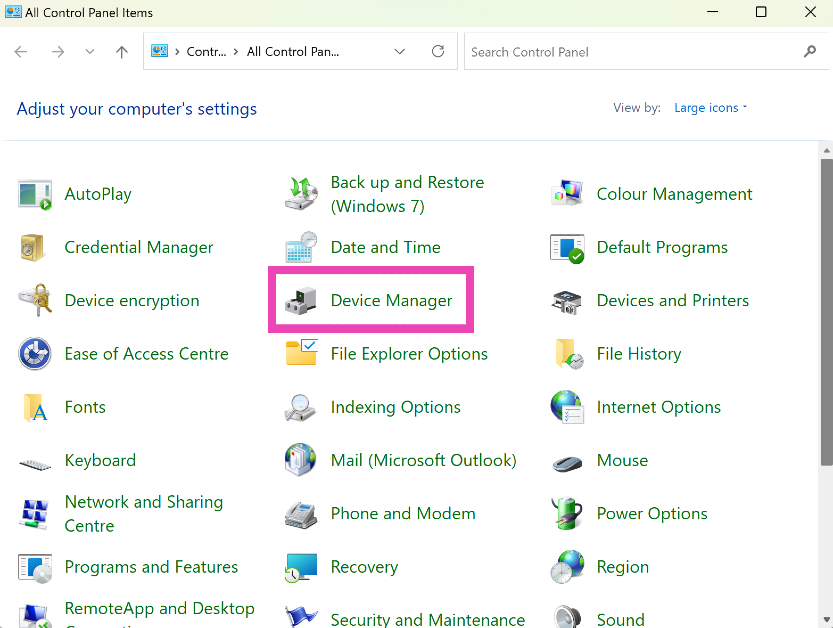
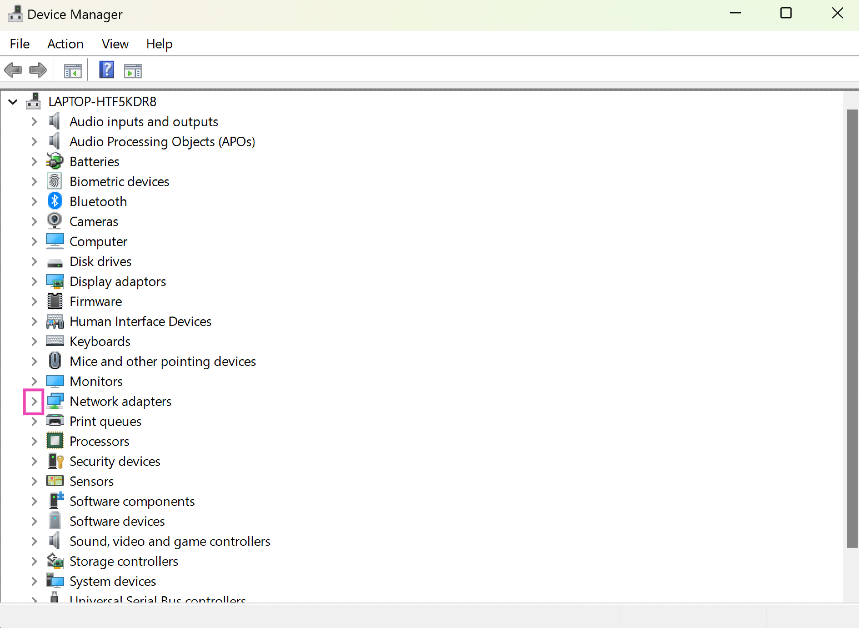
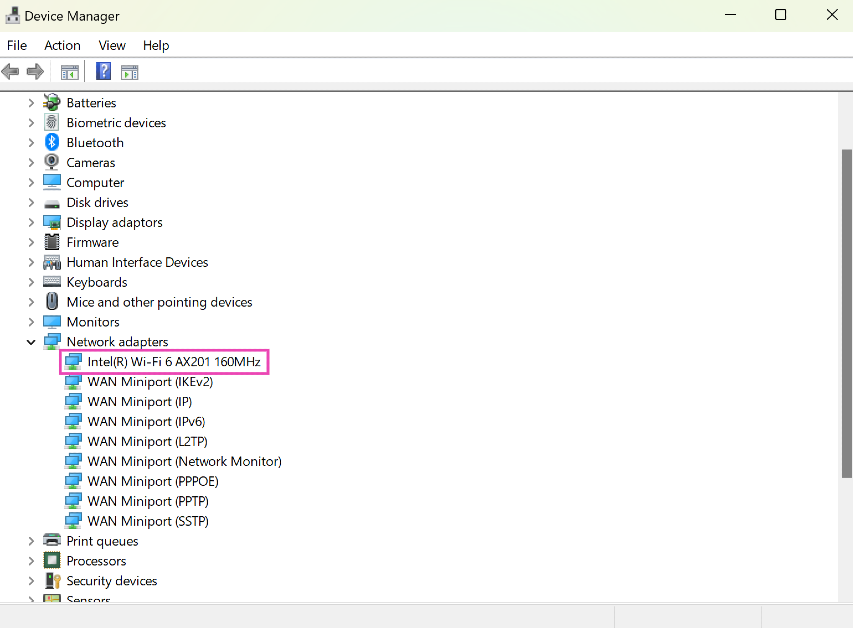
Step 1: Go to Control Panel and select Device Manager.Step 2: Hit the arrow next to Network adapters.Step 3: Right-click on the WiFi adapter and hit Update driver.Step 4: Choose whether you want Windows to automatically search for an updated driver or manually select the driver from your computer’s storage.The WiFi driver will be updated on your computer.
Update the WiFi using Windows Update
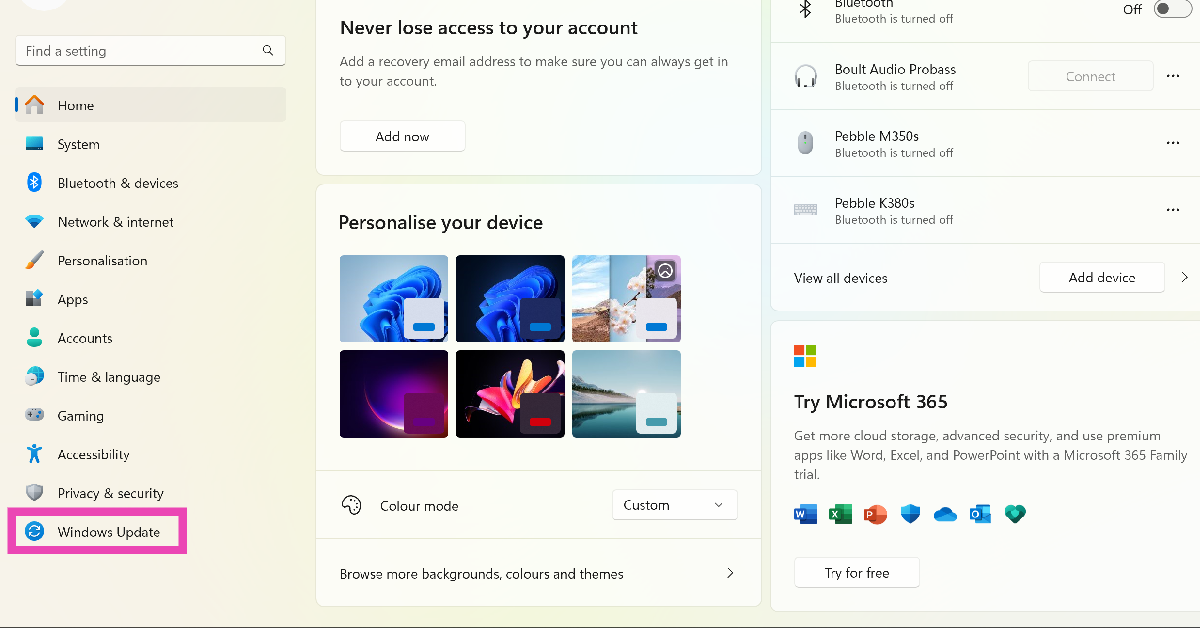
Step 1: Go to Settings and select Windows Update from the side menu.Step 2: Click on Advanced Options.Step 3: Select Optional Updates.Step 4: Click on the checkbox for the WiFi driver and hit Download and install.
Use the CD that came with the WiFi adapter
Most PC accessories and peripherals are plug-and-play. However, manufacturers make sure to provide a CD that contains the driver package for the device. Use this CD to install the driver package on your computer. If you can’t find the disc in the adapter’s retail package, you may need to download the driver from the manufacturer’s website. Take a look at the next method to learn how you can do that.
Download and install the WiFi adapter driver from the manufacturer’s website
Another quick way of installing the WiFi driver on your Windows 11 PC is by visiting the manufacturer’s website and downloading the driver package. Here’s how you can go about it.Step 1: Visit the WiFi adapter manufacturer’s website and search for the latest driver for Windows 11. You may find this option in the Services and Support section. Make sure that the driver package is meant for your adapter’s model.Step 2: Download and install the driver package on your computer.Step 3: Locate the package in the Downloads folder and open it.Step 4: Follow the onscreen instructions to install the WiFi driver package on your device.Step 5: Double-check that the correct WiFi driver has been installed by going to Device Manager and viewing the wireless adapter properties.
Frequently Asked Questions (FAQs)
How do I uninstall my Windows 11 PC’s WiFi driver?
Go to Control Panel>Device Manager>View>Devices by driver. Right-click on oem20.inf (netwtw08.inf) and select Remove Driver. In the popup box, select both checkboxes and hit Remove.
How do I update the WiFi driver on my Windows 11 PC?
Updating the WiFi driver on your Windows 11 PC is fairly easy. Simply go to Control Panel>Device Manager>Network Adapters, right click on the wireless adapter and hit Update.
My WiFi adapter did not come with the disc that contains the driver package. What do I do now?
If you can’t find the CD with the driver package in the retail package of your WiFi adapter, you don’t need to worry. Simply go to the Services/Support section on the manufacturer’s website and download the driver package for your adapter.Read Also:Best gaming phones under Rs 20000 in India
Conclusion
These are the top 4 ways to install or update the WiFi driver on your Windows 11 PC. Microsoft works with a lot of third-party hardware manufacturers and bundles their driver packages in its update. This process is quite seamless and saves you the hassle of downloading the package from the manufacturer’s website.
OnePlus 12 features a Hasselblad-branded triple rear camera system led by a Sony LYT-808 sensor with a 50-megapixel primary camera.
The phone has an LTPO OLED screen with 120Hz refresh rate support.
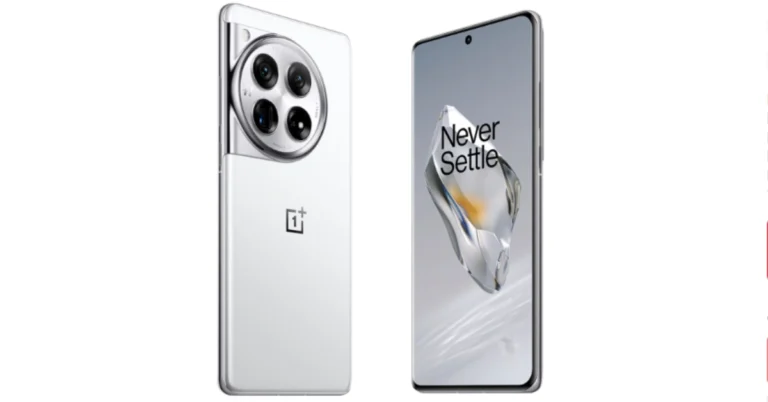
OnePlus 12 debuted in China on Tuesday and now is all set to hit the India stores soon. The device is highlighted with a 120Hz LTPO OLED and is powered by Snapdragon 8 Gen 3 SoC. It has a triple camera setup tuned by Hasselblad. The handset comes with IP65 protection. The Chinese tech firm has officially confirmed to launch its latest flagship in India and Globally. Here is when it will launch in India. OnePlus 12 microsite went live in India including other nations like the USA and the UK. But now the company has revealed the launch timeline for India and the global market. According to the company’s latest revelation, the OnePlus 12 will make its global debut in India and across the world in early 2024.The information has been shared on the UK page in the campaign’s Terms and Conditions section. However, there is no such information shared on the Indian microsite. However, the company has a tradition of launching most of its phones in India and China first so we are pretty are much sure the India launch is next on the cards. As mentioned the UK content page for the upcoming phone suggests launch in late January because the contest would run from November 27 to January 23. The end date of the campaign therefore raises the possibility that January 24 could be the debut date.OnePlus 12 specificationsOnePlus 12 features a 6.82-inch quad-HD+ LTPO OLED screen with an adaptive refresh rate ranging between 1Hz and 120Hz. The screen supports 4,500 nits of screen brightness. The device is IP65 rated for dust and water resistance.The device is powered by Qualcomm- 4nm Snapdragon 8 Gen 3 SoC. The device is offered with up to 24GB of LPDDR5X RAM and up to 1TB of UFS 4 inbuilt storage. The phone is endowed with a Hasselblad branded triple rear camera with a Sony LYT-808 sensor with a 50-megapixel primary camera (OIS, and f/1.6 aperture), a 64-megapixel telephoto secondary lens (OIS, 3X optical zoom and f/2.6 aperture) and a 48-megapixel ultra-wide-angle lens (114-degree field-of-view). Lastly, there is a 32-megapixel front-facing camera (f/2.4 aperture) for taking selfies and video calling.The flagship phone is fueled by a 5,400mAh battery with 100W SuperVOOC wired, 50W wireless and 10W reverse wireless charging support.
The use of digital cameras is now limited only to professionals. Nowadays, most people prefer to take photos using their phones since they can easily fit them in their pockets or bags. If you have an interest in photography and don’t want to spend a lot of money and are looking for a camera-focused phone for yourself then you have come to the right place.Customers have a set budget under which they want to get maximum features like the best camera sensor, fast CPU, long battery life, good design and build that lasts longer. We have done research and prepared a list in which most of the camera phones mainly fall under Rs 25000. We think this list will be very helpful to you in making the proper choice when purchasing a new camera phone, so check it out if you want to buy one with the best features available.
OnePlus Nord CE 2 5G
OnePlus Nord CE 2 5G is endowed with a 6.43-inch Full-HD+ Fluid AMOLED display with a refresh rate of 90Hz. The device is powered by Android 11, with OxygenOS 11 and is equipped with MediaTek Dimensity 900 SoC and ARM Mali-G68 GPU. The triple rear camera setup includes a 64-megapixel main camera, an 8-megapixel ultra-wide-angle camera and a 2-megapixel macro camera. Upfront there is a 16-megapixel Sony IMX471 selfie camera. The OnePlus phone includes a 4,500mAh battery with 65W fast charging support.Price starts at Rs 24,999
iQOO Z7 Pro 5G
iQoo Z7 Pro 5G comes with a 6.78-inch full-HD+ AMOLED display with 120Hz refresh rate. The device boots FuntouchOS 13 with Android 13. It is powered by MediaTek Dimensity 7200 SoC with Mali-G610 MC4 GPU. The phone features a dual rear camera setup that includes a 64-megapixel Samsung GW3 primary sensor and a 2-megapixel depth sensor. It also has a ring LED light. Additionally, a 16-megapixel front-facing sensor is there for taking selfies and video calling. The 4,600mAh battery in the iQoo Z7 Pro supports 66W wired fast charging.Price starts at Rs 23,999
Xiaomi 11i 5G
The Xiaomi 11i has a 6.67-inch full-HD+ Super AMOLED display with 120Hz refresh rate support. It runs on Android 11 with MIUI 12.5 Enhanced version on top. The handset is powered by a MediaTek Dimensity 920 SoC. It includes a triple rear camera arrangement with a 108-megapixel primary Samsung HM2 sensor with an f/1.89 aperture, an 8-megapixel ultra-wide lens, and a 2-megapixel macro sensor. There is a 16-megapixel selfie camera sensor with an f/2.45 aperture on the front. The device equips a 4,500mAh dual-cell lithium polymer battery with 67W fast charging.Price starts at Rs 17,999
Samsung Galaxy M34 5G
Samsung Galaxy M34 5G on the other hand features a Full HD+ 6.5-inch display. The device runs OneUI 5.1, an Android 13-based operating system. The phone is driven by an Exynos 1280 SoC with a Mali-G68 MP4 GPU. It has a triple rear camera setup that includes a 50-megapixel primary sensor, a 2-megapixel macro sensor and an 8-megapixel ultra-wide angle camera. For selfies, there is a 13-megapixel sensor front-facing camera. A 6,000mAh battery powers the device.Price starts at Rs 19,999
Poco X5 Pro 5G
Poco X5 Pro highlights a 6.67-inch Xfinity AMOLED Display on the Poco X5 Pro 5G has a 120Hz adaptive refresh rate. It operates on MIUI 14 for Android 12 and is powered by a Snapdragon 778G SoC and an Adreno 642L GPU. The device includes a triple rear camera setup with a 108-megapixel ISOCELL HM2 main sensor. A 2-megapixel macro camera and an 8-megapixel ultra-wide angle lens are also included. On the front, there is a 16-megapixel selfie camera. Moreover, the phone is backed by a 5,000mAh battery with 67W fast charging and 5W wired reverse charging capabilities.Price starts at Rs 18,999
OnePlus Nord CE 3 Lite
OnePlus Nord CE 3 Lite 5G is highlighted with a 6.72-inch full-HD+ LCD having a dynamic refresh rate of 120Hz. The device is shipped with OxygenOS 13.1 on top of Android 13 out of the box. Under its hood, there is an octa-core Snapdragon 695 SoC with Adreno 619 GPU for graphics. The 5G smartphone features a triple rear camera setup consisting of a 108-megapixel Samsung HM6 sensor with an f/1.75 aperture and EIS support. It also includes a 2-megapixel macro lens and another 2-megapixel depth sensor. For selfies, there is a 16-megapixel front-facing camera. The phone further sports a 5,000mAh battery that supports 67W SuperVOOC fast charging.Price starts at Rs 19,999
Redmi K50i 5G
The Redmi K50i has a 6.6-inch full HD+ liquid FFS (Field Fringe Switching) Display that supports a 144Hz refresh rate. There is a MediaTek Dimensity 8100 processor. It runs on MIUI 13, which is based on Android 12. It has a triple camera setup at the back, including a 64-megapixel Samsung JW1 sensor that is supported by an 8-megapixel and a 2-megapixel ultrawide lens. A 16MP selfie camera is located up front. The phone boasts a 5080mAh battery and comes with 67W Turbo Charger.Price starts at Rs 25,999
Vivo V25 5G
Vivo V25 runs on Android 12, Funtouch OS 12. It has a 6.44-inch full-HD+ AMOLED screen with a refresh rate of 90Hz and a touch sampling rate of 180Hz. The device is powered by MediaTek Dimensity 900 SoC. It features a triple rear camera arrangement consisting of a 64-megapixel sensor with an f/1.79 aperture and optical image stabilisation. Additionally, there is a 2-megapixel macro lens with an f/2.4 aperture and an 8-megapixel wide-angle lens. A 50-megapixel selfie camera with Eye Autofocus and an f/2.0 aperture is located up front. The phone is fuelled by a 4,500mAh battery with 44W fast charging support.Price starts at Rs 23,940
Oppo F21s Pro 5G
Oppo F21s Pro 5G features a 6.43-inch full-HD+ AMOLED display that supports a 90Hz refresh rate. The phone runs on ColorOS 12.1 skinned on Android 12. It is powered by an octa-core Qualcomm Snapdragon 680 SoC. There is a triple rear camera setup that includes a 64-megapixel primary sensor, a 2-megapixel macro camera and a 2-megapixel depth sensor. Also, it comes with a 32-megapixel front-facing camera for selfies. In addition to this, the smartphone boasts a 4,500mAh battery with support for 33W SuperVOOC charging.Price starts at Rs 25,999
Oppo F23 5G
Oppo F23 5G features a 6.72-inch full-HD+ LTPS LCD with 120Hz refresh rate support and 240Hz touch sampling rate. The 5G phone runs on ColorOS 13.1 on top of Android 13. It is driven by an octa-core Qualcomm Snapdragon 695 5G SoC. For optics, there is a triple rear camera setup that includes a 64-megapixel primary sensor (autofocus and f/1.7 aperture), a 2-megapixel mono sensor (f/2.4 aperture), and a 2-megapixel micro sensor (f/3.3 aperture). Additionally, it includes a 32-megapixel front-facing camera for selfies and video calling.The Oppo F23 5G sports a 5,000mAh battery with 67W SuperVOOC charging support.Price starts at Rs 22,999



 The firm further revealed that it is growing its footprint in the energy storage market as part of its net-zero commitment by offering solutions across the supply chain, from household to industrial use, manufacturing to application, and front-of to behind-the-meter solutions to contribute to the energy transition. Acer has also expanded its range by introducing new energy storage solutions through its investment in battery cell technologies.
Conscious Technology for a Brighter Tomorrow Exhibition also highlights Acer’s continuous efforts to combat climate change technology designed and made with consideration for the future. The company presented goods and services categorised under four lifestyle concepts.
Also Read: Best smartphones under Rs 35000 in India: Checkout our recommendations
Concept for Working – An on-demand subscription service to Acer’s vast product portfolio with subscription package upgrades, services, and repairs that can be made available with the click of a button. Customers can actively become part of a system that stretches the life of a digital device, lessening the use of new resources.
Concept for Learning – Computer hardware and software that help schools reduce their carbon footprint. Students can learn in a climate-positive environment using refurbished laptops along with tools to enable conscious use.
Concept for Moving – A network of mobility stations with charging hubs, nimble e-bikes, and e-scooters available to ease journeys, along with tools such as data-informed urban planning and prediction of micro-mobility infrastructure, helping to increase transportation access for more people and support infrastructure planning within smart cities.
Concept for Living – A hyper-compatible system with a mobile app that enables the use of both existing and new smart appliances to make homes more climate resilient. The app lets users manage their energy consumption more efficiently and increases visibility on the energy distribution of appliances.
The firm further revealed that it is growing its footprint in the energy storage market as part of its net-zero commitment by offering solutions across the supply chain, from household to industrial use, manufacturing to application, and front-of to behind-the-meter solutions to contribute to the energy transition. Acer has also expanded its range by introducing new energy storage solutions through its investment in battery cell technologies.
Conscious Technology for a Brighter Tomorrow Exhibition also highlights Acer’s continuous efforts to combat climate change technology designed and made with consideration for the future. The company presented goods and services categorised under four lifestyle concepts.
Also Read: Best smartphones under Rs 35000 in India: Checkout our recommendations
Concept for Working – An on-demand subscription service to Acer’s vast product portfolio with subscription package upgrades, services, and repairs that can be made available with the click of a button. Customers can actively become part of a system that stretches the life of a digital device, lessening the use of new resources.
Concept for Learning – Computer hardware and software that help schools reduce their carbon footprint. Students can learn in a climate-positive environment using refurbished laptops along with tools to enable conscious use.
Concept for Moving – A network of mobility stations with charging hubs, nimble e-bikes, and e-scooters available to ease journeys, along with tools such as data-informed urban planning and prediction of micro-mobility infrastructure, helping to increase transportation access for more people and support infrastructure planning within smart cities.
Concept for Living – A hyper-compatible system with a mobile app that enables the use of both existing and new smart appliances to make homes more climate resilient. The app lets users manage their energy consumption more efficiently and increases visibility on the energy distribution of appliances. 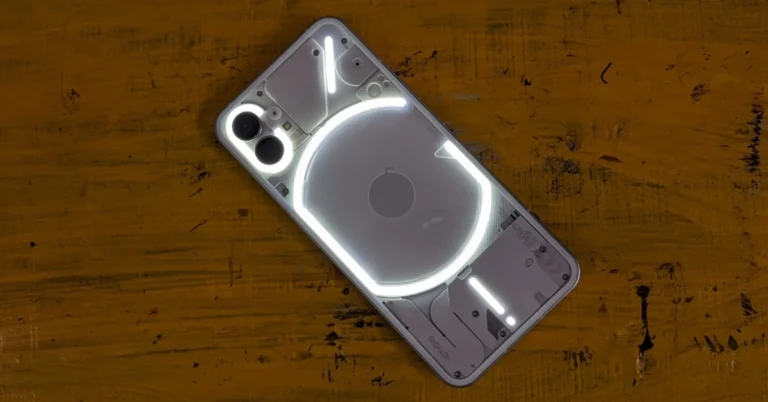








 More often than not, the video games industry is how mainstream gaming is most commonly known. Earlier this year,
  Now as we mentioned earlier, the iGaming sector falls under the remit of different licensing and regulations, compared to mainstream gaming. But essentially, this covers the kind of online casino games and sites that Aussies will find at
 Step 2:
 Step 3:
 Step 5:
 Step 4:
 Step 5:
 Step 3: Right-click
 Step 4: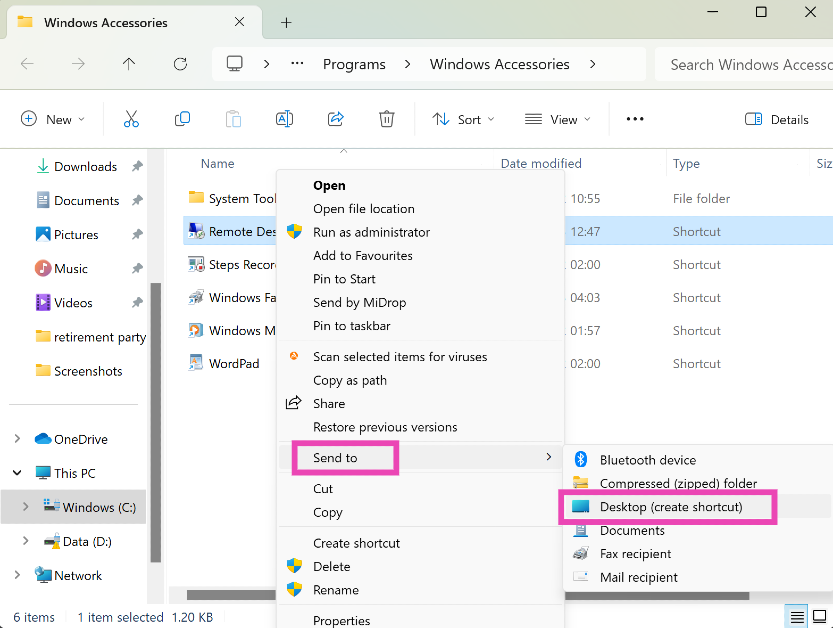
 Step 2:
 Step 3: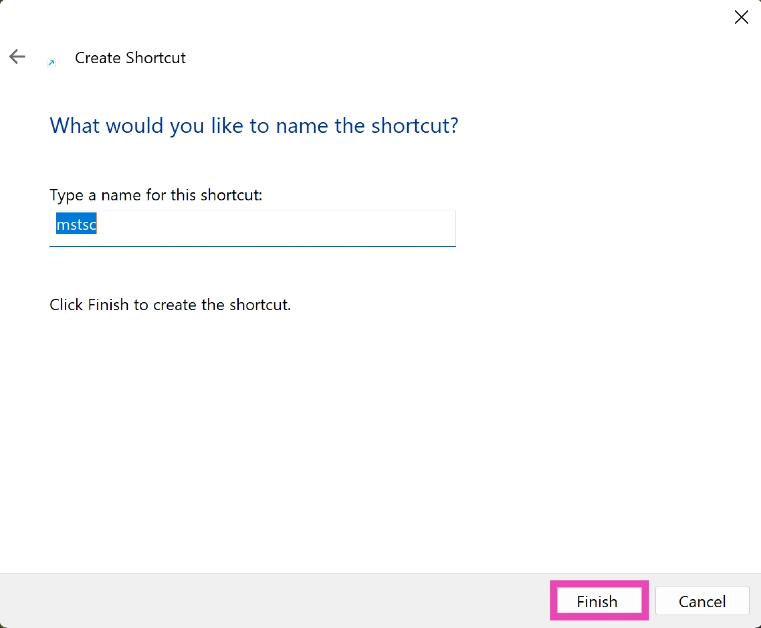


 Step 2:
 Step 3:
  Step 4:
  Step 2:
 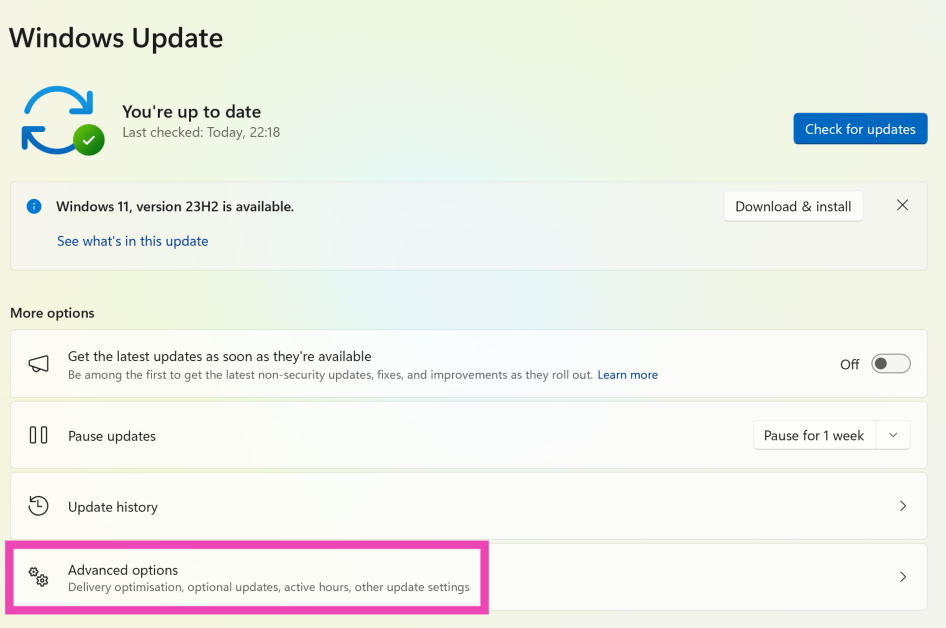 Step 3:
 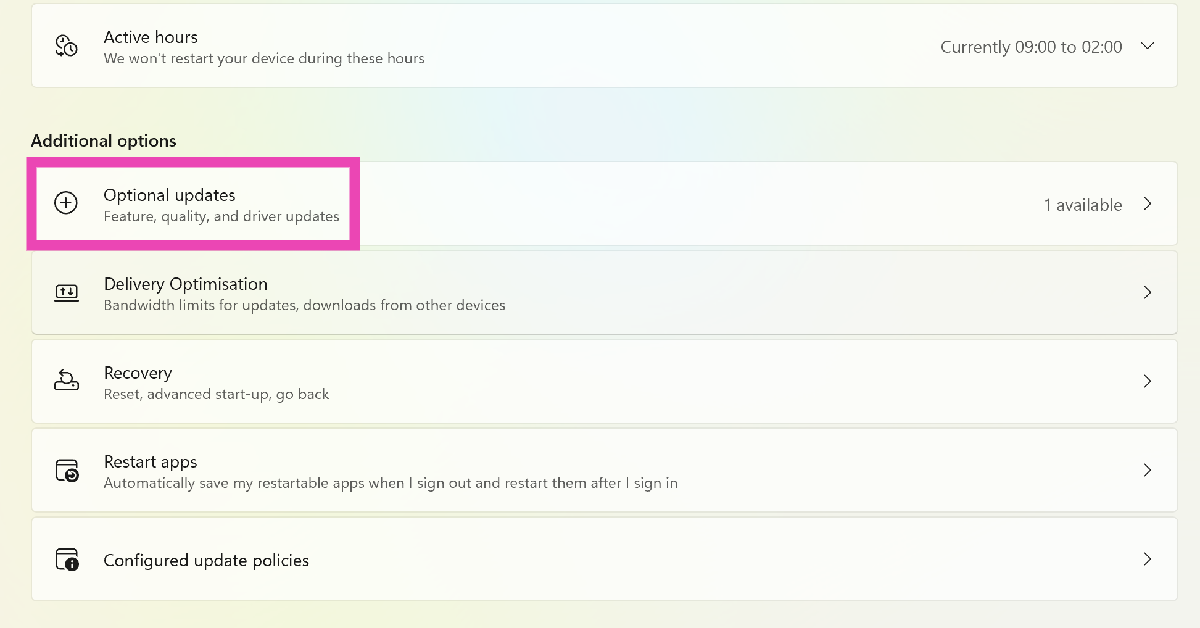 Step 4: