2 Best Ways to Find Archived Emails in Gmail

0
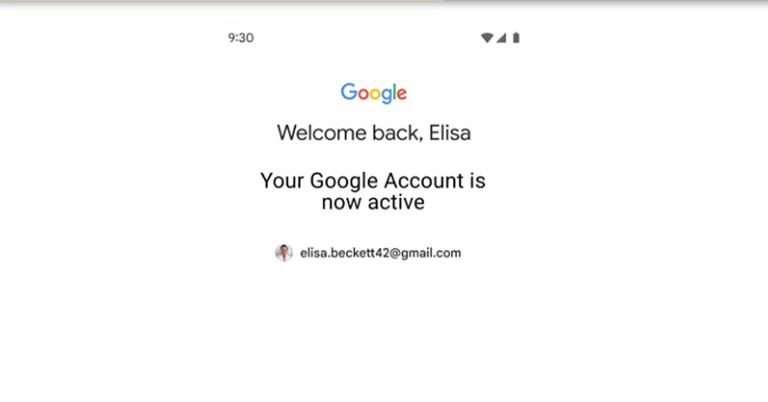
If you like your email inbox to be clean and free of all clutter, archiving older emails is one technique that you should add to your routine. If you don’t want to delete every email after you’re done going through it, you can simply archive it instead. It will be removed from your primary inbox but can be easily accessed whenever you want. But here’s the tricky part, Gmail does not have an archived folder. In this article, we show you the 2 best ways to find archived emails in Gmail. Read Also: Starting December, Google will begin deleting your Google Account: Here is how to avoid this

Find archived emails in Gmail on your PC

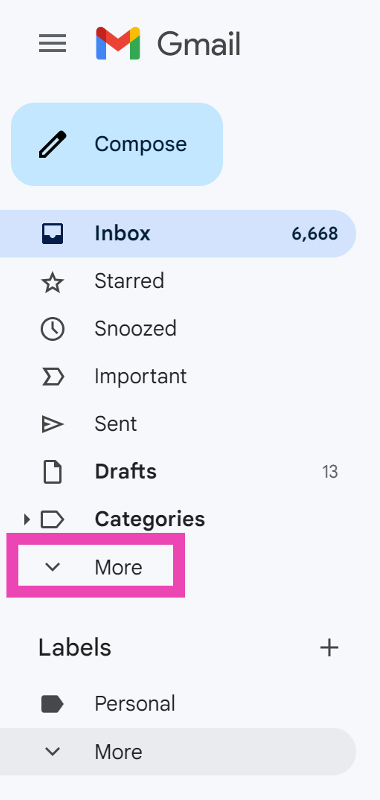
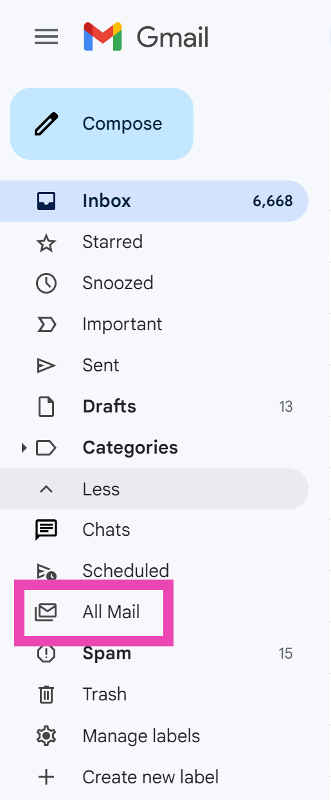
Step 1: Launch your preferred web browser and go to Gmail. Step 2: On the menu to the left of the screen, click on More. Step 2: On the menu to the left of the screen, click on More. Step 3: Select All Mail. Step 3: Select All Mail. This is where you will find all your emails, including the ones you have archived.
Find archived emails in the Gmail app

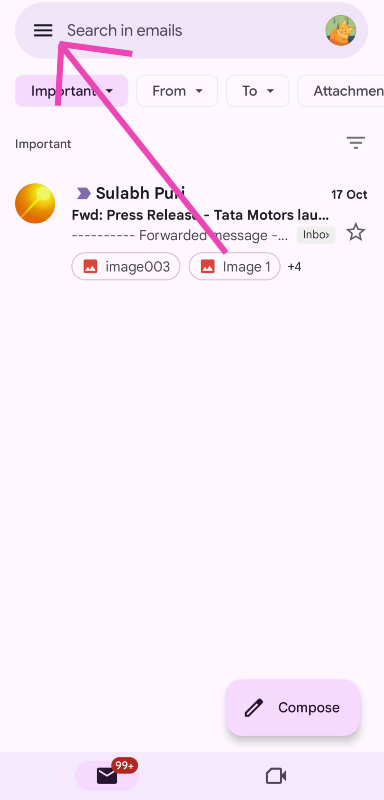
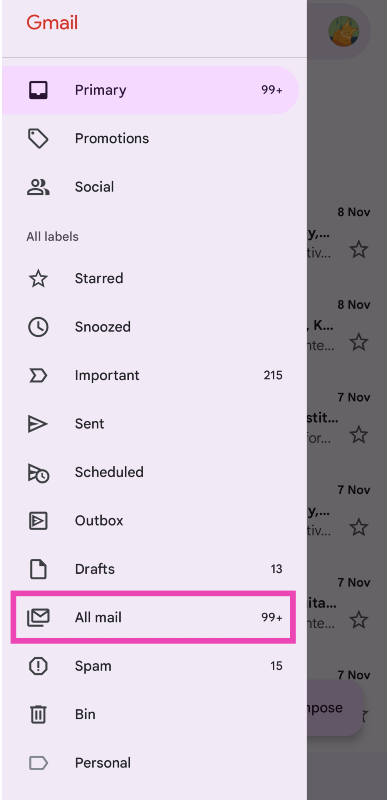
Step 1: Launch the Gmail app on your smartphone. Step 2: Tap the hamburger menu icon at the top right corner of the screen. Step 2: Tap the hamburger menu icon at the top right corner of the screen. Step 3: Scroll down and select All Mail. Step 3: Select All Mail.
Bonus Tip: How do I archive an email on Gmail?

On PC

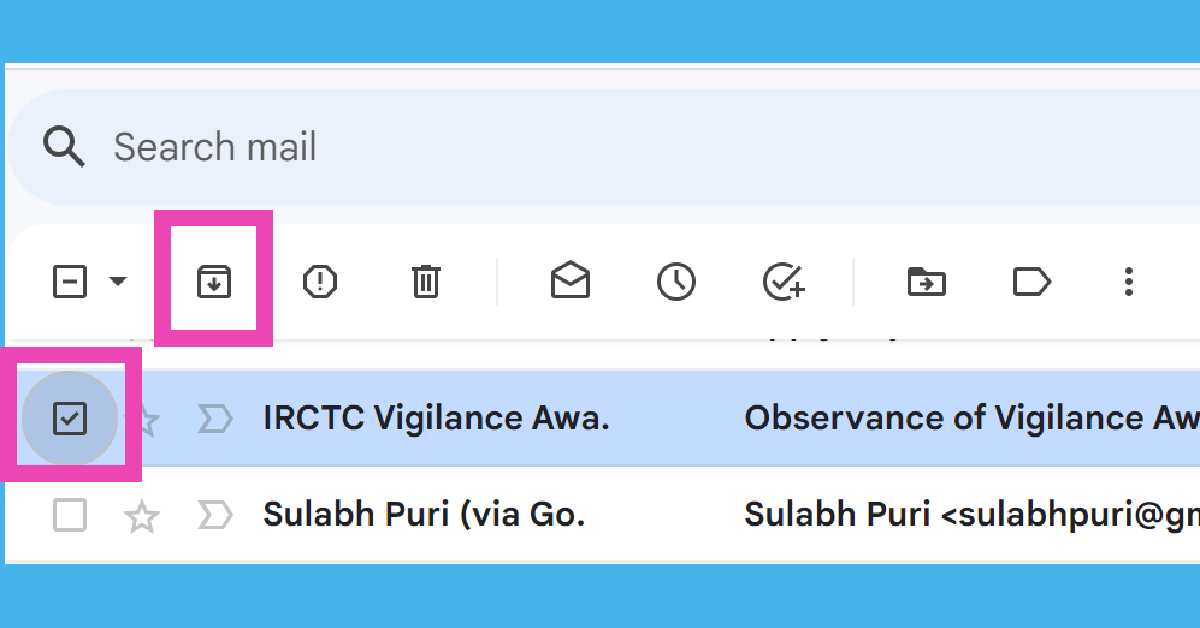
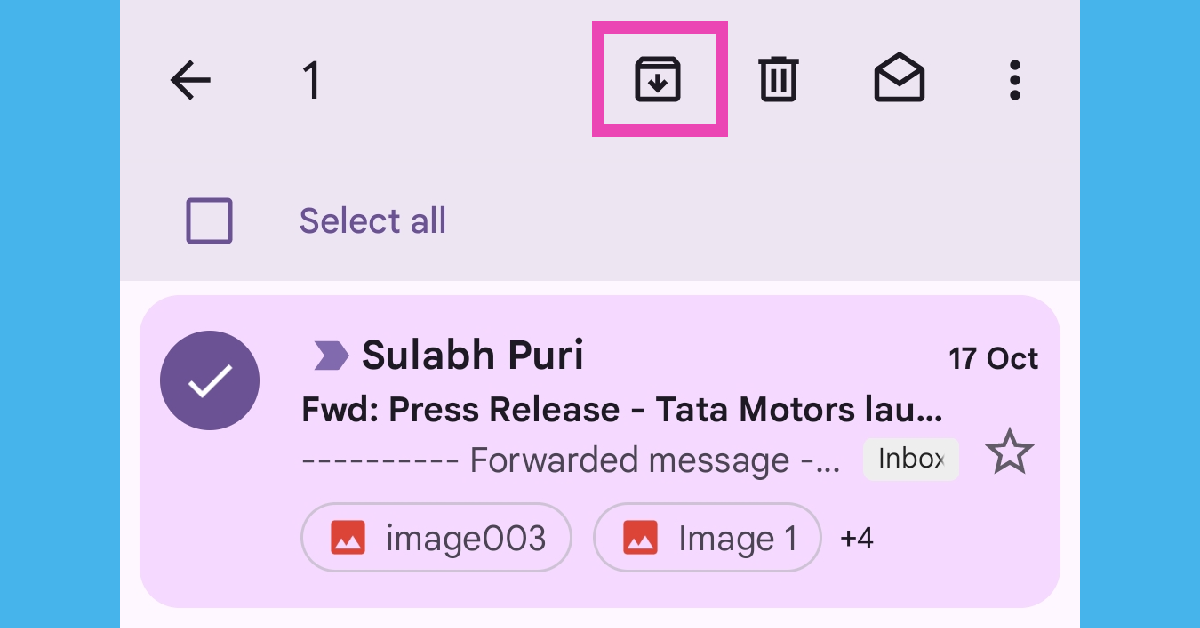
Step 1: Launch your preferred web browser and go to Gmail. Step 2: Click on the check box next to the email you want to archive. Step 3: Alternatively, long-press the email and hit the archive icon (downward arrow inside a box) at the top of the screen. Step 3: Hit the archive icon (downward arrow inside a box) in the toolbar right below the search box.
On mobile

Step 1: Launch the Gmail app on your smartphone.  Step 2: Swipe right on the email you want to archive. Step 2: Click on the check box next to the email you want to archive. Step 3: Alternatively, long-press the email and hit the archive icon (downward arrow inside a box) at the top of the screen.

Frequently Asked Questions (FAQs)

What is the purpose of archiving an email?

Archiving an email hides it from your primary inbox. If you want the landing page of your Gmail account to be clutter-free, you can archive the emails that are not as important anymore.

How do I archive an email?

To archive an email on Gmail, simply click the check box next to it and hit the archive icon in the toolbar at the top. On your smartphone, simply swipe right on an email to archive it.

How do I find archived emails in Gmail?

Gmail does not have a dedicated archived folder. To view archived emails, you will need to access the ‘All Mail’ folder from the side menu. Read Also: WhatsApp introduced Protect IP Address for calls: Here is how it works

Conclusion

This is how you can find archived emails in Gmail. If you want all your archived emails in one place, simply label them as ‘Archives’. You will be able to filter all the archived emails from the label section at the bottom of the side menu. Tired of spam emails? Archiving them won’t fix the issue. Check out this article to learn how to deal with spam emails.

Top 4 Ways to Check the Word Count in Microsoft Word

0
Whether you’re writing a college assignment or composing a quick report, you should always check the word count of the document before turning it in. Brief, concise documents always stand a higher chance of impressing the reader rather than bloated and drawn-out passages. While you’re editing your work, keeping a constant check on the word count helps a lot. Here are the top 4 ways to check the word count in Microsoft Word. Read Also: WhatsApp introduced Protect IP Address for calls: Here is how it works

Word count not working? Try these quick fixes

If you know how to view the word count on MS Word but can’t get it to work, try the following quick fixes.
  • Reboot your PC
  • Close and re-open Microsoft Word
  • Run Microsoft Word as administrator
  • Enable word count in status bar customisations
  • Launch Microsoft Word in Safe Mode
  • Disable corrupt Add-Ins
  • Update Microsoft Word to its latest version

Check the Word Count section in Microsoft Word

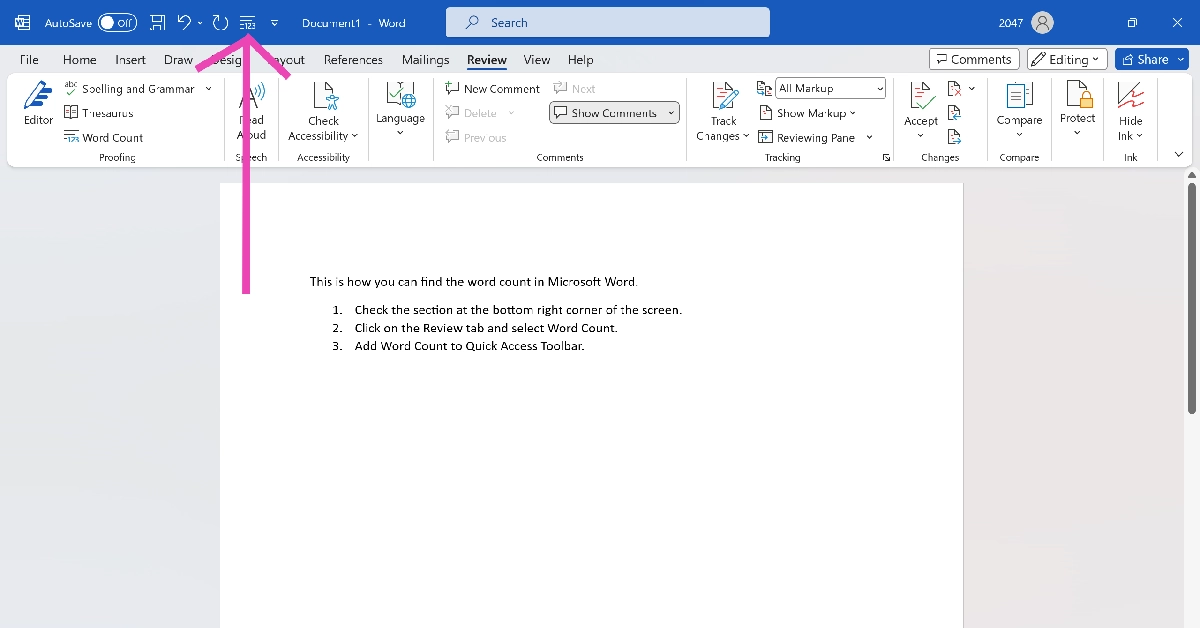
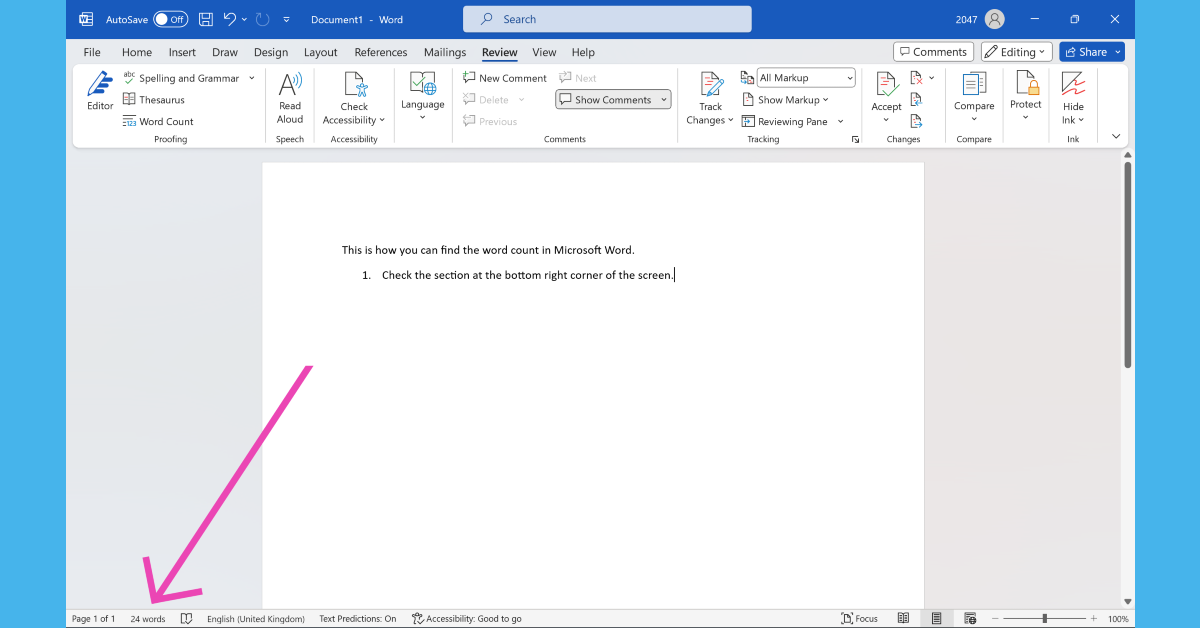
Check the Word Count section in Microsoft Word Microsoft Word lets you view the live word count while you’re typing on the page. Simply check the bottom left section of the screen to view how many words you have typed so far. This section also lets you know the page you’re currently on out of all the pages in the document. Clicking on the word count will give you detailed specs like the number of pages in the document, the total number of characters (with and without spaces), and the number of lines and paragraphs.

Check word count for selected text

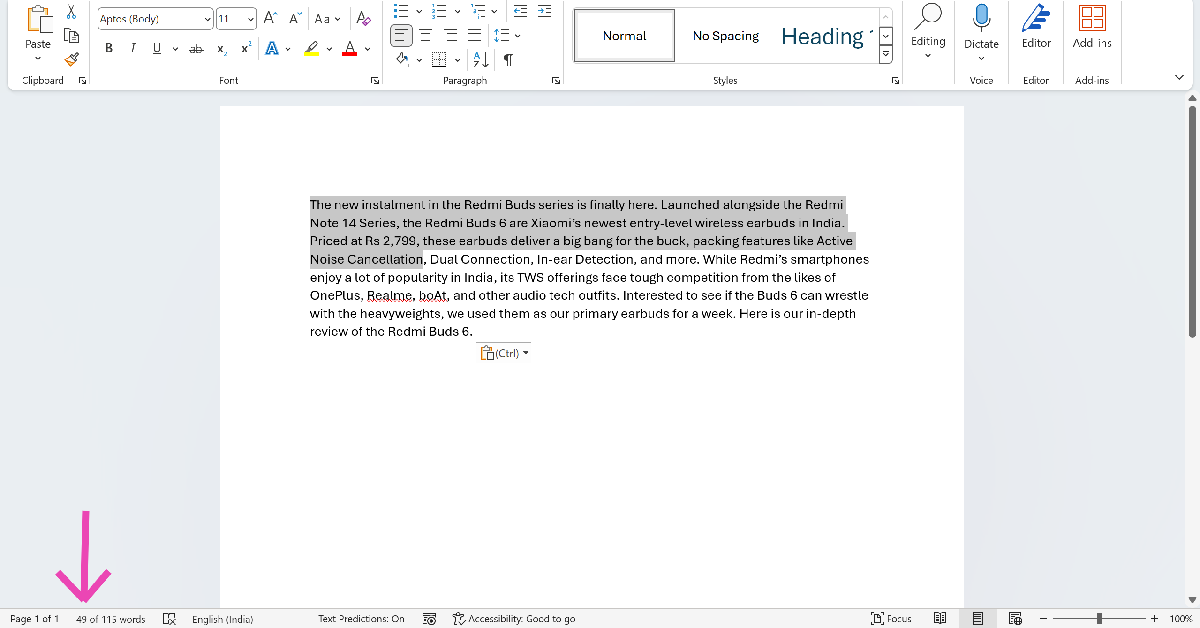
Check word count for selected text If you wish to know the word count of a particular line or paragraph, simply highlight it using your keyboard or mouse and check the counter at the bottom of the screen. The word counter will display the number of selected words and the total number of words. This trick helps when you want to trim only a certain section of the text.
Use the Review tab

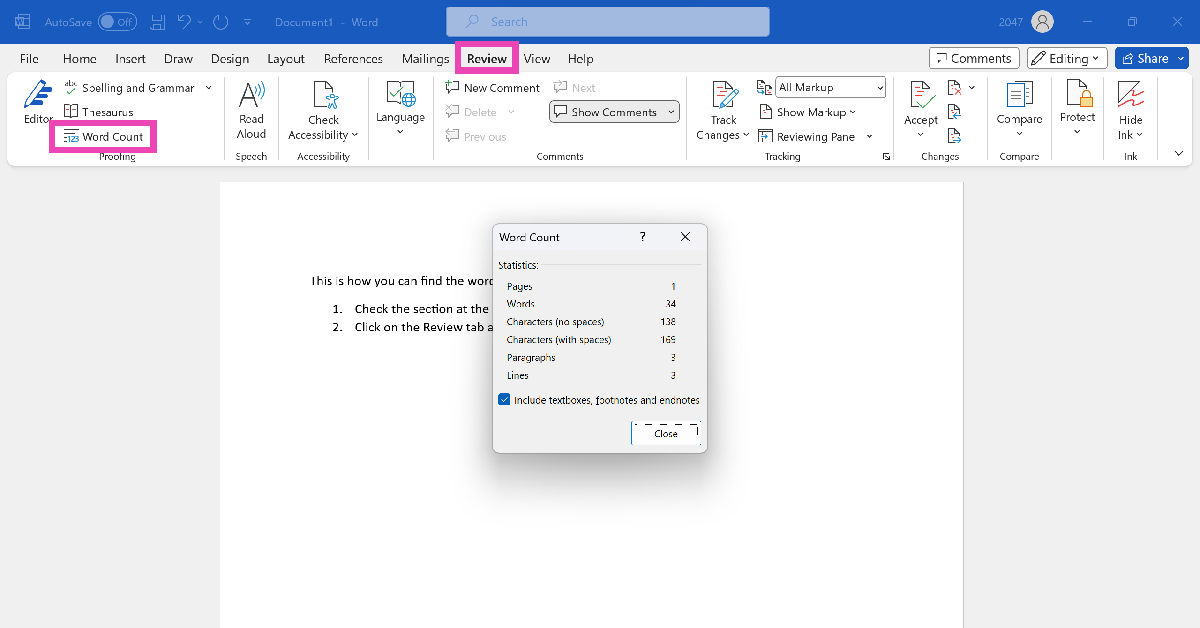
Use the Review tab You can also view the word count in any Microsoft Word document from the Review tab on top of the editing section. Hit the Review tab and click on ‘Word Count’. You’ll find this option on the left side of the drop-down menu. Clicking on this option will give you detailed specs like the ones mentioned in the previous method.

Add the Word Count option to the Quick Access Toolbar

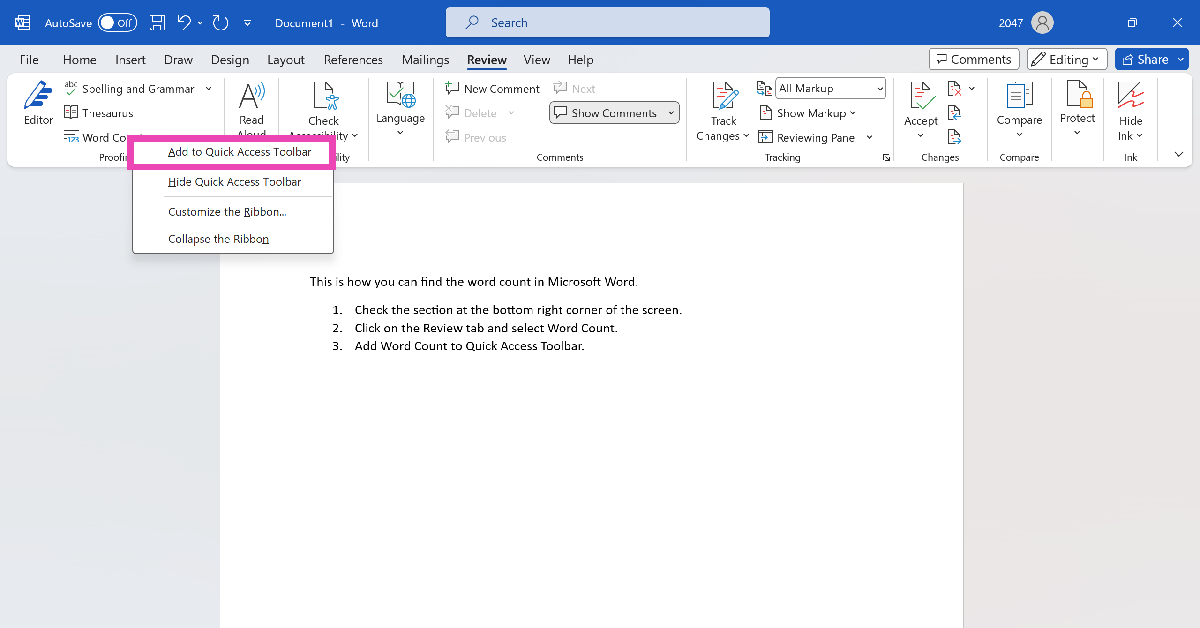
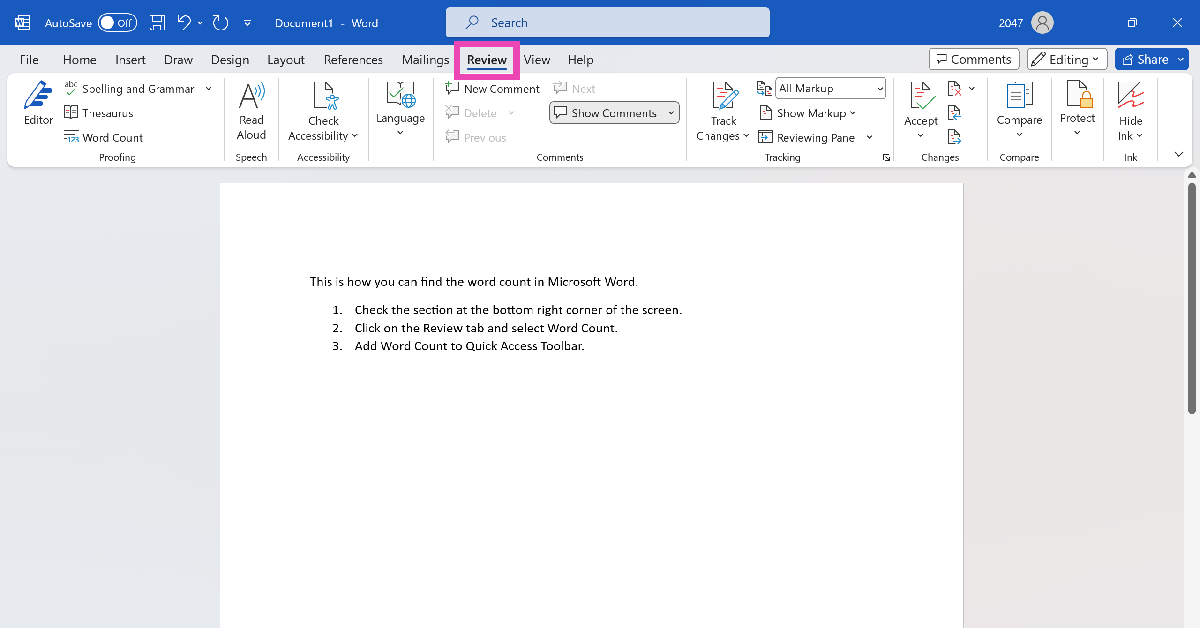
Another quick way to know the word count on MS Word is by adding its tile to the Quick Access Toolbar. Here’s how you can go about it. Step 1: Click on the Review tab at the top of the screen. Step 1: Click on the Review tab at the top of the screen. Step 2: Right-click on Word Count. Step 3: Select Add to Quick Access Toolbar. Step 2: Right-click on Word Count. Step 4: Click the 123 tile on the Quick Access Toolbar to view the word count of the document at any given point. Step 4: Click on the 123 tile on the Quick Access Toolbar to view the word count of the document at any given point.

Bonus Tip: Use the keyboard shortcut

If you don’t like relying on your mouse, you can use the keyboard shortcut for word count on MS Word. Simply press Ctrl + Shift + G to find out how many words you have typed so far in the document. If you want to find the number of words in a particular passage, simply highlight it and use this keyboard shortcut. The other methods mentioned in this article also work with this technique.

Frequently Asked Questions (FAQs)

How do I find the number of words in a selected passage on Microsoft Word?

Highlight the passage and press Ctrl + Shift + G to find the number of words in it. The word count is also displayed at the bottom right section of the screen. You can also view it from the Review tab.

How do I view the word count on a Google Doc?

To find the number of words in a Google Doc, go to Tools>Word Count or simply press Ctrl + Shift + C.

How do I add the word count option to the Quick Access Toolbar on MS Word?

Go to the Review tab, right-click on Word Count, and select Add to Quick Access Toolbar.

What is the shortcut for word count?

The keyboard shortcut for word count is Ctrl + Shift + C on Windows and Command + Shift + C on Mac.

How do I check my word count online?

Go to https://wordcounter.net/ and paste the text in the box to find out the word and character count. Read Also: iQoo 12 Series with Snapdragon 8 Gen 3 SoC launched

Conclusion

These are the top 4 ways to find the word count of any Microsoft Word document. While you’re here, also check out these 15 advanced keyboard shortcuts for Microsoft Word. Got any other methods for us? We’d love to know in the comments.

Samsung Galaxy S23 FE now available in new exclusive colour options

Key Highlights
  • The special edition colours for Galaxy S23 FE will be available online.
  • There are more colour options for the phone.
  • The device was launched in India in October.
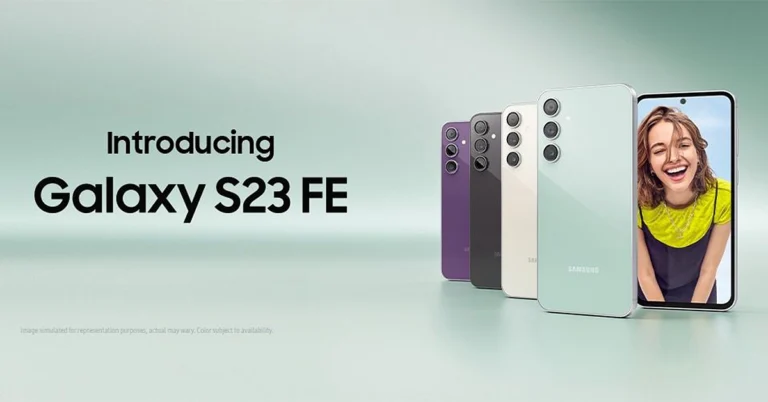
Samsung Galaxy S23 FE was recently launched in India. The South Korean Electronics brand has now introduced new colour options for the smartphone. The company has launched two new exclusive shades, joining the other three colour variants. The device is a toned-down variant of Galaxy S23 powered by Exynos and Snapdragon processors. However, in India, it is powered by Exynos 2200 chipset. Samsung Galaxy S23 FE now available in new exclusive colour options Samsung Galaxy S23 FE is now available in two more colour options Indigo and Tangerine. The Samsung Galaxy S23 FE’s new exclusive colours can only be bought through the company’s official website in India. In October when S23 FE was launched the firm introduced it in Cream, Graphite, Mint, and Purple colour options. The price of the special edition colours will remain the same. Also Read: Samsung Galaxy S23 FE Review: The flagship killer of the year? The Samsung Galaxy S23 FE was launched in India at Rs 59,999 for the 8GB RAM with 128GB storage option. The 12GB RAM with 256GB storage option comes with a price tag of Rs 64,999.

Samsung Galaxy S23 FE specifications

Samsung Galaxy S23 FE features a 6.4-inch FHD+ Dynamic AMOLED display with 2340 x 1080 pixels resolution. The display comes with a variable refresh rate of 60 to 120Hz. The screen is protected with Corning Gorilla Glass 5. The phone is powered by a Samsung Exynos 2200 4nm processor with Samsung Xclipse 920 GPU in India. It comes with up to 12GB RAM and 256GB storage. The phone runs on Android 13 with One UI 5 out of the box. For photos and videos, the Samsung Galaxy S23 FE has a triple rear camera set-up that includes a 50-megapixel main camera with f/1.8 aperture and OIS, a 12-megapixel ultra-wide-angle sensor, and an 8-megapixel telephoto lens with OIS and 3X Optical Zoom. For selfies, there will be a 10-megapixel front-facing camera. The device is IP68 rated for water resistance. The stereo speakers on the phone include Dolby Atmos support. There is 5G SA/NSA, 4G VoLTE, Wi-Fi 6E, Bluetooth 5.3, GPS + GLONASS, NFC, and a USB 3.1 port for connectivity. The S23 FE also includes an in-display fingerprint sensor for biometrics. The handset packs a 4500mAh battery with 25W wired fast charging and support for wireless charging, and wireless power share.

Garena Free Fire Redeem Codes Today 10 November 2023: Here is how to claim them

Garena Free Fire is a battle royale game with regular awards and tournaments to keep players interested. If you play Garena Free Fire, you should be aware of the redeem codes that are released on a daily basis. However, because the battle royale game is banned in India, players from other countries can use the Free Fire Redeem codes daily. If you’re unfamiliar with the Garena Free Fire redeem codes or don’t know how to get them, we’ve put together a step-by-step guide to help you redeem them. Check out Garena Free Fire Redeem Codes for 10 November 2023. The Free Fire redeem codes are a great way to get free stuff. These are 12-digit codes that contain alphabets and numbers, as well as an expiration date and time. Because the Garena FF redeem codes cannot be used more than once, you should hurry to the redemption page to claim your free reward before someone else does. To get a free reward, all you have to do is go to reward.ff.garena.com/en, which is the official redemption page. Also, keep an eye on this space for daily updates on Garena Free Fire redemption codes and rewards.

Garena Free Fire Redeem Codes Today 10 November 2023

J3ZKQ57Z2P2P 3IBBMSL7AK8G B3G7A22TWDR7X 8F3QZKNTLWBZ B61YCTNH4PV3 X99TK56XDJ4X WEYVGQC3CT8Q FFCMCPSBN9CU SARG886AV5GR 4ST1ZTBE2RP9 WLSGJXS5KFYR FFPLFMSJDKEL FFTILM659NZB ESX24ADSM4K 3IBBMSL7AK8G FF7MUY4ME6SC GCNVA2PDRGRZ 4ST1ZTBE2RP9 FFBCAC836MAC FFBCLY4LNC4B WOJJAFV3TU5E FFBCLLP5S98AW  

How to Get Free Fire Redeem Codes for Garena on 10 November 2023?

  • Visit the Garena Free Fire game’s official website at reward.ff.garena.com.
  • Use your Facebook, Google, VK, Apple ID, Huawei ID, or Twitter account to log in.
  • You’ll be taken to a valid redemption code (s)
  • Copy and paste the 12-digit redemption code into the text box.
  • On the screen, a dialogue box will appear.
  • ‘Ok’ should be selected.
For the latest gadget and tech news, and gadget reviews, follow us on TwitterFacebook and Instagram. For newest tech & gadget videos subscribe to our YouTube Channel. You can also stay up to date using the Gadget Bridge Android App. You can find the latest car and bike news here.

Top 10 smartphones under Rs 25,000 with large batteries

Budget and midrange smartphones are often very surprising when it comes to battery size and performance. One of the better aspects of having a smaller chipset is that the device is able to accommodate a bigger battery. If you think that 5,000 mAh is the ceiling for battery capacity, there are several smartphones that will prove you wrong. In this article, we bring you the top 10 smartphones under Rs 25,000 with large batteries. Read Also: Will Bitcoin experience a new drop or will it start gaining?

Samsung Galaxy M34

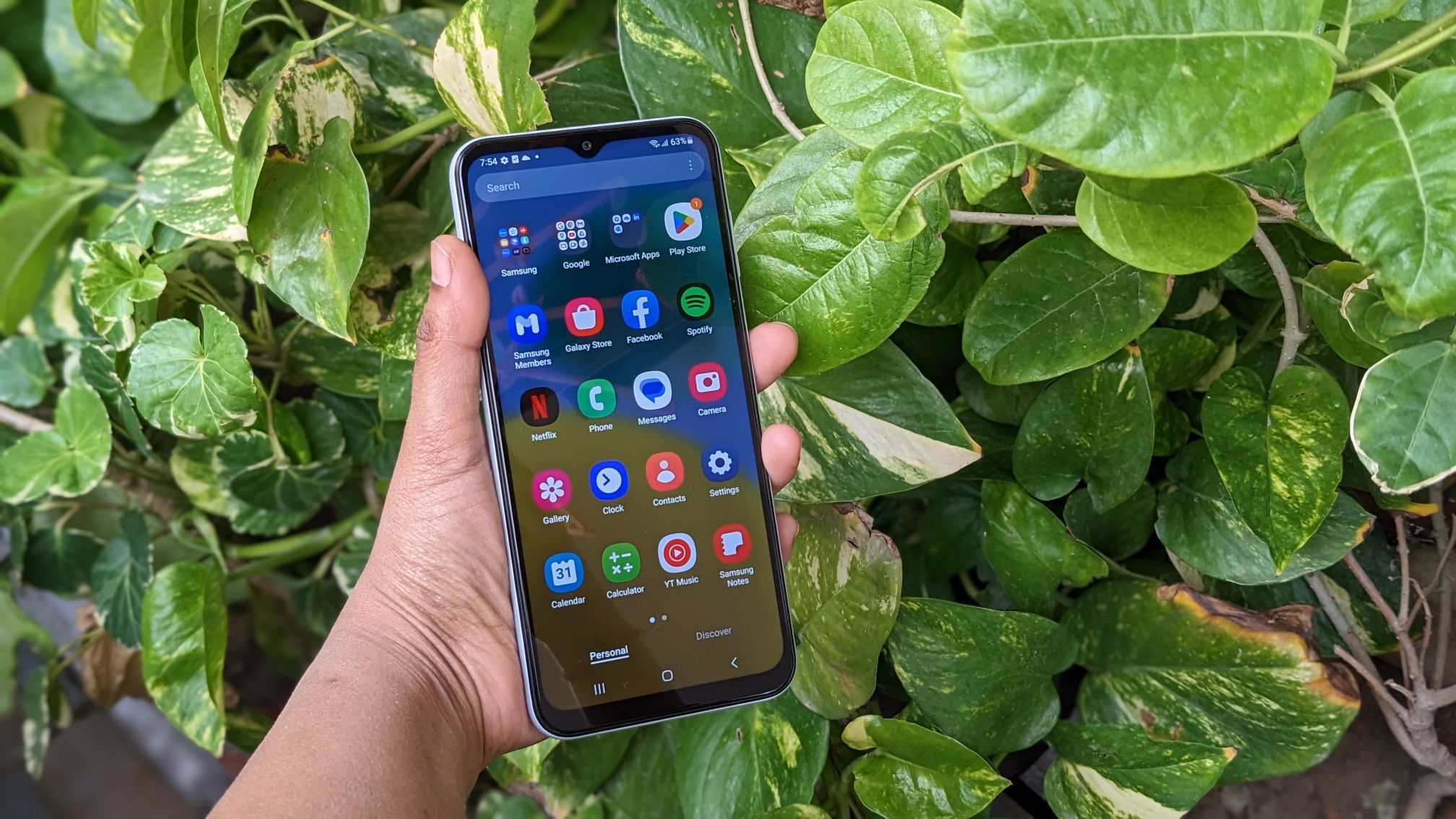
Price: Rs 16,499 on Samsung.in Samsung Galaxy M34 Review: Ticks all the essential boxes Key Specs
Display 6.5-inch Super AMOLED
Chipset Exynos 1280
RAM 6GB, 8GB
Storage 128GB
Battery 6,000 mAh
Samsung’s M series smartphones are known for their big battery packs and high performance. When we tested the Galaxy M34, it easily lasted 2 days on moderate usage. The smartphone supports 25W wired charging, which takes 2 hours to fully charge the 6,000 battery pack. Apart from amazing battery specs, the M34 also features a great 50MP primary lens that takes vibrant and punchy images in well-lit conditions. An 8MP ultrawide lens and a 2MP macro sensor complete the three-lens vertical camera array.

Samsung Galaxy F54

Price: Rs 24,999 on Samsung.in Samsung Galaxy F54 Review: A rock-solid smartphone with impressive cameras Key Specs
Display 6.7-inch Super AMOLED
Chipset Exynos 1380
RAM 8GB
Storage 256GB
Battery 6,000 mAh
Like the Galaxy M series, Samsung’s F series also gets a large 6,000 mAh battery pack. This year, the Samsung Galaxy F54 stands ahead of the pack with its crisp display, amazing cameras, versatile processor, and of course, a long-lasting battery. The smartphone lasted an entire day for us on heavy usage. Our daily usage included multiple gaming sessions, watching content across different platforms for a couple of hours, and social media browsing. Users who are more conservative with their smartphone usage will be able to push the F54’s battery to two days. To see how the smartphone performed in other aspects, read our Samsung Galaxy F54 review.

Samsung Galaxy M14

Price: Rs 11,990 on Samsung.in   Samsung Galaxy M14 5G review: Design and display Key Specs
Display 6.6-inch PLS LCD
Chipset Exynos 1330
RAM 4GB, 6GB
Storage 64GB, 128GB
Battery 6,000 mAh
Samsung’s budget M series offering has got a lot going on for it. Firstly, it does not compromise on the battery pack, retaining the 6,000 mAh unit from the higher-placed M series models. This battery pack can easily last for 2 days on the M14. The smartphone also supports 25W charging. The 50MP primary camera on this smartphone takes detailed, rich, and vibrant pictures with very punchy colours. At this price point, there aren’t many devices that can beat the Galaxy M14. Read our full review of the smartphone here.

Redmi Note 12 Pro

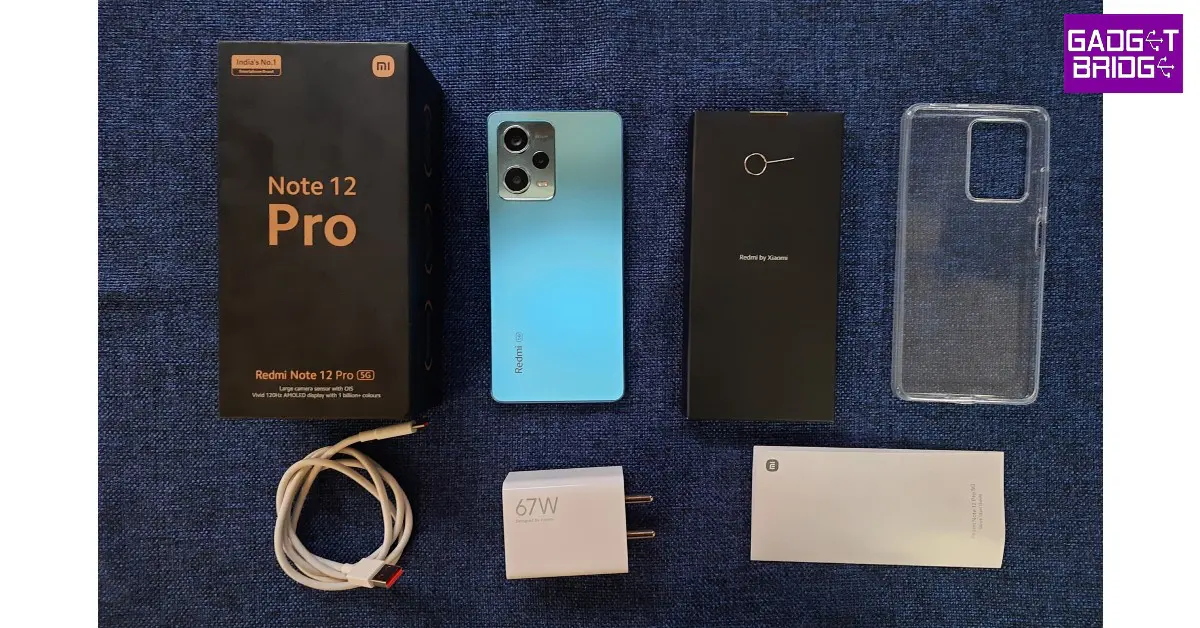
Price: Rs 25,999 on Mi.com Redmi Note 12 Pro review: Design and Display Key Specs
Display 6.67-inch OLED
Chipset MediaTek Dimensity 1080
RAM 6GB, 8GB, 12GB
Storage 128GB, 256GB
Battery 5,000 mAh
The Redmi Note 12 Pro was one of the first smartphones to come out this year. We reviewed the device as soon as it was released and were thoroughly impressed by its performance across the board. The Note 12 Pro gets a massive 5,000 mAh that can easily last an entire day. The 67W power adapter that comes inside the box, can charge the smartphone from 10-50% in under 20 minutes. It takes just under 50 minutes to fully charge the device. The Note 12 Pro+ variant comes with a 200MP primary camera and support for 120W charging. It retains the 5,000 mAh battery pack. 

OnePlus Nord CE3 Lite

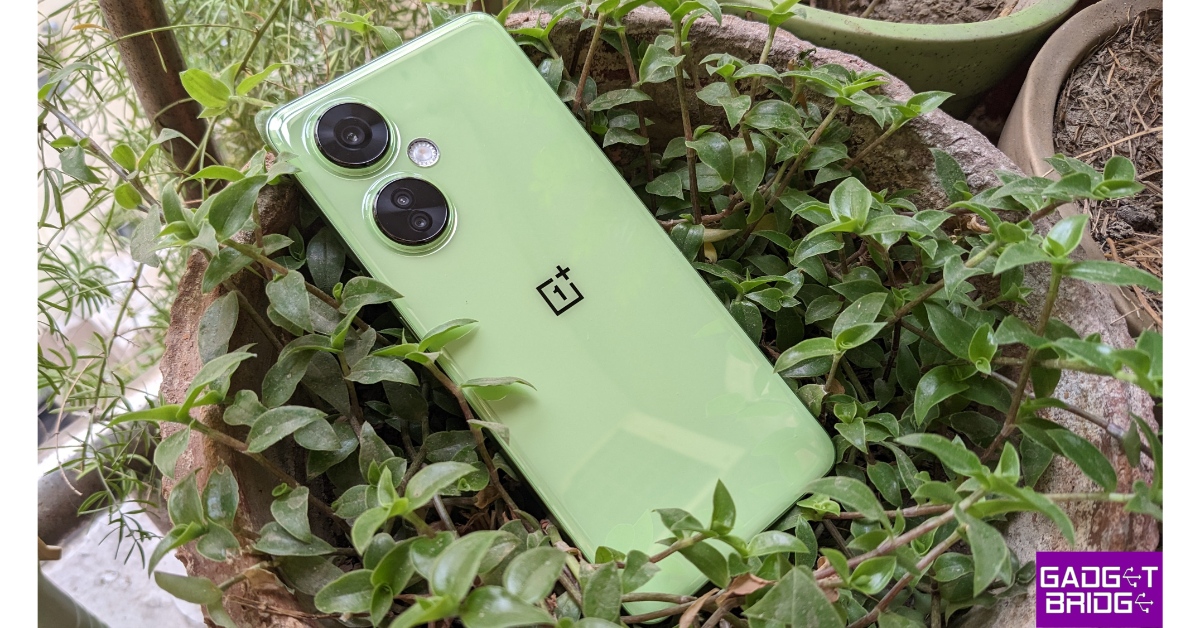
Price: Rs 19,999 on OnePlus.in OnePlus Nord CE 3 Lite review: Design and Display Key Specs
Display 6.72-inch IPS LCD
Chipset Snapdragon 695
RAM 8GB
Storage 128GB, 256GB
Battery 5,000 mAh
OnePlus’ most affordable phone in India, the Nord CE3 Lite follows the design language of the rest of the series. It has a pastel-coloured plastic back and two individual cutouts for the rear cameras. The CE3 Lite is powered by the Snapdragon 695 under the hood, which is a decent chipset in this price range. The 5,000 mAh battery pack on this device lasts an entire day with absolute ease. Also included in the box is an 80W SuperVOOC charger. The smartphone, however, only supports wired charging up to 67W. Read our review of the OnePlus Nord CE3 Lite here.

Infinix GT 10 Pro

Price: Rs 21,999 on Flipkart Infinix GT 10 Pro review: Design and Display Top 10 smartphones under Rs 25,000 with large batteries Key Specs
Display 6.67-inch AMOLED
Chipset MediaTek Dimensity 8050
RAM 8GB
Storage 256GB
Battery 5,000 mAh
The Infinix GT 10 Pro was one of the better gaming smartphones to come out this year. There aren’t many smartphones in its price range that can match the GT 10 Pro’s gaming performance. The smartphone’s 5,000 mAh battery pack can easily last an entire day even after multiple gaming sessions. Infinix GT 10 Pro also has a ‘Bypass Charging’ feature that directly charges the motherboard while gaming, leading to less heat generation. Read our full review here.

Tecno Pova 5 Pro

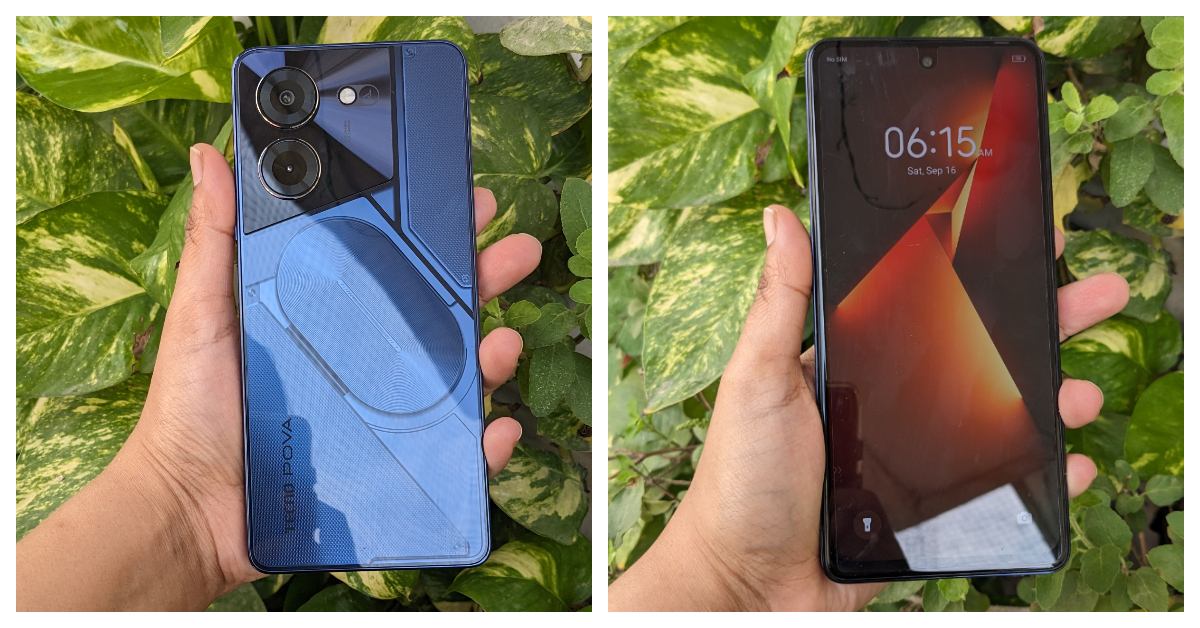
Price: Rs 14,999 on Amazon Tecno Pova 5 Pro 5G Review: Design and Display Top 10 smartphones under Rs 25,000 with large batteries Key Specs
Display 6.78-inch IPS LCD
Chipset MediaTek Dimensity 6080
RAM 8GB
Storage 128GB, 256GB
Battery 5,000 mAh
The new Tecno Pova 5 Pro gets an experimental back design, with RGB lighting around the camera module and a see-through back panel. The ‘Nothing’ influence is palpable here. The MediaTek Dimensity 6080 SoC can expertly handle everyday tasks and even puts an admirable gaming performance. While testing the Pova 5 Pro, the 5,000 mAh battery pack lasted a full day for us.

Nokia C32

Price: Rs 8,999 on Nokia.com Nokia C32 review: Design and Display Top 10 smartphones under Rs 25,000 with large batteries Key Specs
Display 6.5-inch IPS LCD
Chipset Unisoc SC9863A1
RAM 3GB, 4GB
Storage 64GB, 128GB
Battery 5,000 mAh
Moving on to the budget offerings, the Nokia C32 is one of the standout phones of its segment. While we truly believe that Nokia needs to move on from the Unisoc chip, the C32 has some surprises that play the balancing act to its processor. The first is an extraordinary glass back, which is a very rare sight in this price range. The 50MP primary camera on the smartphone delivers a great performance under optimum lighting. Lastly, the 5,000 mAh battery is a total stunner, easily lasting more than a day even after heavy usage. Read our Nokia C32 review here.

Poco M6 Pro

Price: Rs 9,999 on Flipkart Poco M6 Pro 5G review: Design and Display Top 10 smartphones under Rs 25,000 with large batteries Key Specs
Display 6.79-inch IPS LCD
Chipset Snapdragon 4 Gen 2
RAM 4GB, 6GB
Storage 64GB, 128GB
Battery 5,000 mAh
The Poco M6 Pro is one of the best budget smartphones you can buy right now. It gets a 6.79-inch IPS LCD display with a Snapdragon 4 Gen 2 SoC under the hood. The 90Hz refresh rate of the LCD display is an attractive selling point as well. The rear camera unit of the M6 Pro comprises a 50MP primary shooter and a 2MP depth sensor. The 5,000 mAh battery puts up a good performance as well. You can stretch the battery life on this device to 2 days on minimal usage. To know more about the M6 Pro, read our review of the smartphone.

Redmi A2+

Price: Rs 7,499 on Amazon Redmi A2+ review: Design and Display Top 10 smartphones under Rs 25,000 with large batteries Key Specs
Display 6.52-inch IPS LCD
Chipset MediaTek Helio G36
RAM 2GB, 3GB, 4GB
Storage 32GB, 64GB, 128GB
Battery 5,000 mAh
Ending this list is the ultra-affordable Redmi A2+. The smartphone gets a pastel-coloured plastic back with a rear-mounted fingerprint scanner. The two-step camera cutout houses an 8MP primary shooter and a 0.08MP depth sensor. The MediaTek Helio G36 chipset handles all the basic tasks without breaking a sweat. You can easily push the battery life on this smartphone to 2 days. If your tasks only involve texting and calling, the 5,000 mAh battery pack on the Redmi A2+ can last up to 3 days. Read our full review here. Read Also: How to measure the distance between two points on Google Maps?

Conclusion

These are our picks for the top 10 smartphones under Rs 25,000 with large batteries. While buying a smartphone, you should also take into account the charging speed specs of the device. While Samsung phones aren’t known for their fast charging, you can get pretty good speeds out of Xiaomi devices. Think there’s a smartphone that deserves a spot on this list? Let us know in the comments!

WhatsApp introduced Protect IP Address for calls: Here is how it works

Key Highlights
  • The feature is said to improve users’ privacy during calls, as the name suggests.
  • The functionality will protect both outgoing and incoming calls by routing calls through the company rather than establishing a direct connection.
  • This is slated to protect your IP address by not disclosing it to another person.
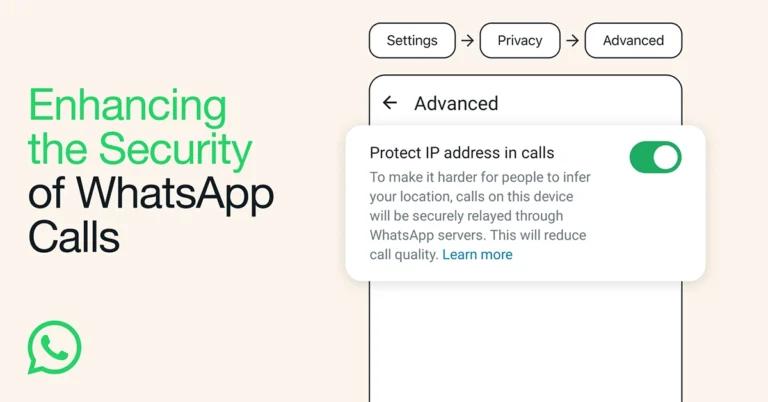
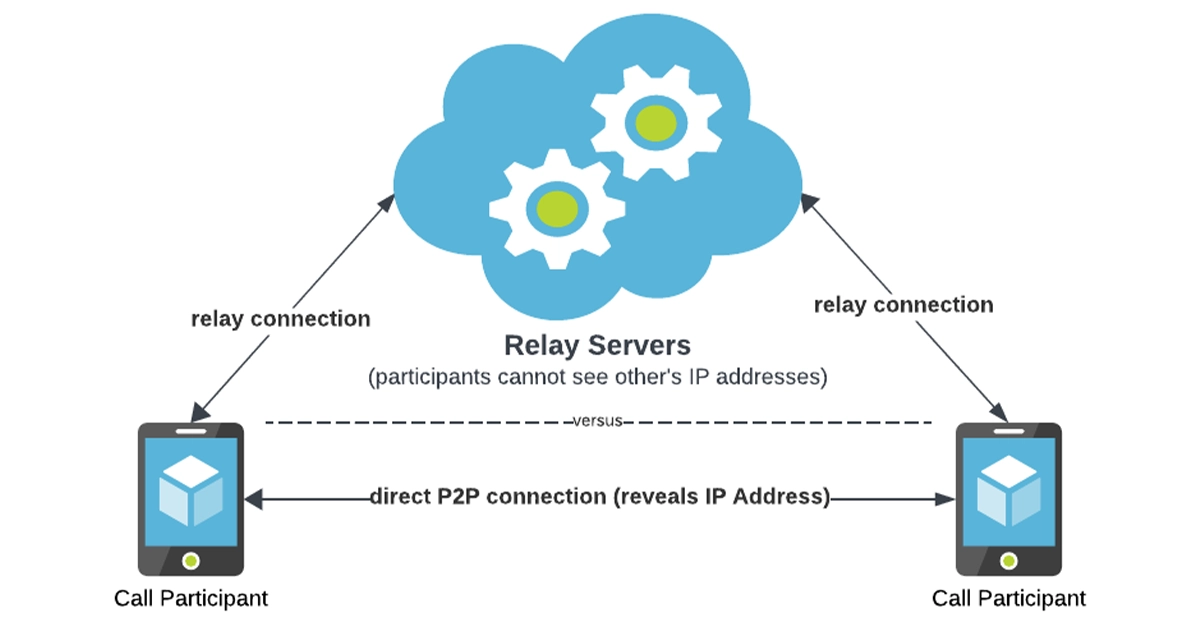
WhatsApp launched Silence Unknown Callers in June of this year. When the feature is turned on, all calls from unknown numbers do not ring your phone. Now it has introduced Protect IP Address in Calls, which hides your IP from the other party by relaying calls through WhatsApp servers. Meta, through its Engineering at Meta blog post, revealed that it keeps working on improving and protecting the privacy of WhatsApp calls. WhatsApp chats come with end-to-end encryption protection for private communications. But for calls, it introduced Protect IP Address in Calls, which is optional in settings. Also Read: iQoo 12 Series with Snapdragon 8 Gen 3 SoC launched As per the Meta engineers calling products an attractive vector for cyber attacks, PJSIP and WebRTC, have a long history of vulnerabilities. But on WhatsApp, they facilitate peer-to-peer connections between participants, allowing both callers to view each other’s IP addresses. WhatsApp introduced Protect IP Address for calls: Here is how it works “This direct connection allows for faster data transfers and better call quality, but it also means that participants need to know each other’s IP addresses so that call data packets can be delivered to the correct device, meaning that the IP addresses are visible to both callers on a 1:1 call. IP addresses may contain information that some of our most privacy-conscious users are mindful of, such as broad geographical location or internet provider.” In order to allay this worry, WhatsApp introduced Protect IP Address in Calls, which lets you protect your IP address while on calls. When the feature is turned on, all of your calls will be routed through WhatsApp’s servers, protecting your IP address. So the other caller cannot see your IP address. But WhatsApp cannot hear your calls, even if a call is relayed through WhatsApp servers, because your calls are end-to-end encrypted like chats.

iQoo 12 Series with Snapdragon 8 Gen 3 SoC launched

Key Highlights
  • The smartphone series includes two models: iQoo 12 and iQoo 12 Pro.
  • Both phones are powered by the same Snapdragon 8 Gen 3 processor.
  • They run on Android 14.
iQoo 12 Series has officially made its debut in China. The latest lineup includes two gaming smartphones iQoo 12 and iQoo 12 Pro. Both devices share a lot of similarities. Both are powered by Snapdragon 8 Gen 3 SoC. They feature a 144Hz AMOLED displays. In addition to this, the phones have a triple rear camera setup led by a 50-megapixel primary sensor and support 120W wired fast charging.

iQoo 12 specifications and price

iQoo 12 is highlighted with a 6.78-inch 1.5K AMOLED display with 1,260×2,800 pixels of resolution. The screen supports a variable refresh rate of 144Hz and a 20:9 aspect ratio. In addition to this, the display comes with HDR10+ support. The device runs on OriginOS 4 on top of Android 14. It is powered by a 4nm Snapdragon 8 Gen 3 SoC processor.
iQoo 12 specifications and price
iQoo 12
For selfies, the device features a 16-megapixel front-facing camera with f/2.45 aperture. The triple rear camera setup includes the following:
  • A 1/1.3-inch 50-megapixel primary sensor (f/1.68 aperture)
  • A 64-megapixel periscope telephoto (f/2.57 aperture and 100X digital zoom)
  • A 50-megapixel ultra wide-angle sensor (f/2.0 aperture)
iQoo 12 packs a 5,000mAh battery, with 120W fast charging support. Also, there is an in-display fingerprint sensor for biometrics. Also Read: Vivo announces Diwali offers for Vivo X90 Series, Vivo V29 Series, and more The phone is made available in three colour options. In terms of pricing iQoo 12 comes with a starting price of:
  • 12GB RAM with 256GB storage: CNY 3,999
  • 16GB RAM with 512GB storage: CNY 4,299
  • 16GB RAM with 1TB storage: CNY 4,699

iQoo 12 Pro specifications and price

The iQoo 12 Pro features a 6.78-inch 2K AMOLED E7 display with 1,440×3,200 pixels of resolution. The screen has a 92.42 percent screen-to-body ratio. In addition to this, it supports up to 144Hz refresh rate, HDR and 20:9 aspect ratio. The software and processor are the same as mentioned above.
iQoo 12 Pro specifications and price
iQoo 12 Pro
It has a 16-megapixel selfie with f/2.45 aperture. The triple rear camera setup includes:
  • A 1/1.3-inch 50-megapixel primary sensor (f/1.68)
  • A 64-megapixel periscope telephoto lens (100X digital zoom and f/2.57 lens)
  • A 50-megapixel ultra-wide angle lens (f/2.0)
Apart from this, the device includes a 5,100mAh battery with 120W fast wired support and 50W wireless charging support. The iQoo 12 Pro offers an in-display fingerprint sensor along with an accelerometer, ambient light sensor, e-compass, gyroscope, and proximity sensor. For connectivity, there is 5G, Wi-Fi 7, Bluetooth 5.4, USB OTG, NFC, Beidou, USB Type-C port, GPS, GLONASS and GALILEO. The price of iQoo 12 Pro starts at:
  • 16GB RAM with 256GB storage: CNY 4,999
  • 16GB RAM with 512GB storage: CNY 5,499
  • 16GB RAM with 1TB storage: CNY 5,999

Garena Free Fire Redeem Codes Today 9 November 2023: Here is how to claim them

Garena Free Fire is a battle royale game with regular awards and tournaments to keep players interested. If you play Garena Free Fire, you should be aware of the redeem codes that are released on a daily basis. However, because the battle royale game is banned in India, players from other countries can use the Free Fire Redeem codes daily. If you’re unfamiliar with the Garena Free Fire redeem codes or don’t know how to get them, we’ve put together a step-by-step guide to help you redeem them. Check out Garena Free Fire Redeem Codes for 9 November 2023. The Free Fire redeem codes are a great way to get free stuff. These are 12-digit codes that contain alphabets and numbers, as well as an expiration date and time. Because the Garena FF redeem codes cannot be used more than once, you should hurry to the redemption page to claim your free reward before someone else does. To get a free reward, all you have to do is go to reward.ff.garena.com/en, which is the official redemption page. Also, keep an eye on this space for daily updates on Garena Free Fire redemption codes and rewards.

Garena Free Fire Redeem Codes Today 9 November 2023

FXDYHJTF67JUHGH F5GBDTYHR6Y7UYH FRFUJKGY8UIHRUJ FTFTUJMGMYH96RF FADYHR67YU66YCV FIRERTF65TV7RUH FYJHUY4H5BG6NYH FMKOUYJ6550TDEB FTHGR6YHR56DF6T FIYUJY6HR6RYDSU F7FGYHFT6Y7H6HK FIHYYHR67YU8FHF FYHTHFT6Y5R6Y53 FNRH67UTHTN7BYV FNCTYHR67BHGQED F2UJT78KI7YI8CR FRBYHTF67UJTFVE FTYHFY7JT6756YB

How to Get Free Fire Redeem Codes for Garena on 9 November 2023?

  • Visit the Garena Free Fire game’s official website at reward.ff.garena.com.
  • Use your Facebook, Google, VK, Apple ID, Huawei ID, or Twitter account to log in.
  • You’ll be taken to a valid redemption code (s)
  • Copy and paste the 12-digit redemption code into the text box.
  • On the screen, a dialogue box will appear.
  • ‘Ok’ should be selected.
For the latest gadget and tech news, and gadget reviews, follow us on TwitterFacebook and Instagram. For newest tech & gadget videos subscribe to our YouTube Channel. You can also stay up to date using the Gadget Bridge Android App. You can find the latest car and bike news here.

Will Bitcoin experience a new drop or will it start gaining?

Bitcoin, the world’s most popular cryptocurrency, has been navigating a challenging time, with prices that continue stagnating. Investors have continued to buy Bitcoin on exchanges such as Binance, convinced that digital gold remains resilient and able to maintain its value. The continuous presence of cryptocurrencies remains essential during times of economic volatility and higher inflation rates. People want the certainty that there’s something they can rely on in case fiat currency starts struggling with devaluation.

Rise or fall

Recent data shows that BTC is still 60% down compared to its all-time high in November 2021. These figures have created apprehension among traders, who are unsure of what they can expect over the following months. Bitcoin has always been changeable, but it seems now that it’s almost impossible to figure out its direction. Bitcoin remains under the yoke of a bullish reversal. After hitting a new low in November 2022, when it went below $17,000, BTC started gaining, taking back approximately 70% of its previous value. It was an astronomic climb, and BTC moved against the woes of macroeconomics and hike rates and was primarily fueled by optimism regarding the possibility of the exchange-traded fund approval. However, investors didn’t manage to hold the momentum to hold the price in the $30k area and managed to surpass these levels. Now, many expect that the price will start picking up speed shortly, owing to the approach of the next Bitcoin halving.

Fibonacci fractal 

Looking at it from a technical standpoint, Bitcoin has been stabilized around the 0.236 Fib line of the Fibonacci retracement graph. This tool is used within the Bitcoin ecosystem, similar to how it is in stocks, and many investors have started looking to it for guidance. The graph is drawn from the $69,000 swing high, representing the top of the market, to the swing low, the market bottom of $15,900. There’s a historical precedent for the current price stagnation witnessed during the Bitcoin price correction in 2018. Back then, the Bitcoin/dollar pair managed to stabilize somewhere around the 0.236 Fib line, or $6,790, for several months. Afterward, it dropped to the $3,000 level in December. This also coincided with the multiyear ascending support. Bitcoin is, as of September, around halfway through that same tendency. The price has been flatlining, and a breakdown could mean that the values could drop as low as $21,500. That means that Bitcoin could go down by almost 20% compared to its current levels.

Continuous stagnation

Over the course of September 2023, Bitcoin experienced something akin to a decline, as neither the bulls nor the bears were able to support any cohesive trend. This isn’t surprising, as the first fall month is typically associated with plummeting prices. Large-volume investors have elected to remain on the sidelines, so the area around $26k became increasingly popular for BTC as the year progressed. Currently, the spot price is surrounded by trendlines, and analysts believe that this has contributed to inhibiting volatility. The trend began in August when BTC suddenly lost around 10% of its price in one fell swoop. However, it’s also noteworthy to remember that the price cycles have acted differently over the last four years than in the more distant past. In March 2020, Bitcoin was below the 200-week MA but still maintained its support. BTC managed to form an accumulation zone. It recently got into new resistance, suggesting that the price could also remain beneath the MA during the upcoming weeks.

Dollar strength 

The relationship between cryptocurrencies and traditional finance has historically been a challenging one. The DXY, which measures the strength of the greenback against several other currencies, is currently at the highest level it has recorded since November 2022. That’s no small feat, especially given that the US Dollar Index has been negatively correlated with Bitcoin throughout the current year. The Federal Reserve’s interest rate decision on September 20th has only accelerated the decision, so the DXY is currently in its 11th consecutive green candle. Bitcoin’s prospects could become even more limited if the dollar continues growing. Read Also: Twitter adds Bitcoin support to Tips, now allows Spaces users to record

Old Bitcoin 

The on-chain metrics paint a convoluted portrait of Bitcoin’s current and future movements. The CDD metric, which aims to measure long-term actions, had a momentary spike on September 19th, showing that some hodlers have moved their coins. This could indicate repositioning and profit-taking, but investors should be particularly mindful of these movements since they have typically preceded value declines. The Bitcoin reserves have continued to decline across exchanges, pointing towards a gradual but consistent and considerably-sized movement towards hodling to the detriment of speculative activities. This is no surprise, especially since the latest data shows that price fluctuations have caused short-term holders to incur losses of nearly 100% while long-term holders have emerged largely unscathed.

Expert opinions 

Analysts are divided on how the Bitcoin price could change in the future. While some anticipate a considerable decline before the next rally, others are more optimistic. Some predictions include the possibility of Bitcoin climbing to $30,000 in October. One of the critical indicators for this movement is the thin ask liquidity around $27k, which could signify a breakout. Nonetheless, the beaker estimations go even below those supported by the Fib line and show that Bitcoin might slump as far down as $18,000 as part of the pre-halving fractal action. The next one hundred days are crucial for the dollar-cost-averaging levels, and if Bitcoin is to retract, it will most likely be during this timeframe.

Mining costs 

Miners can face some issues as well, and the consequences in the aftermath of the 2024 halving could be severe. The competition is becoming more intense as hash rates reach record-high levels. This shows unprecedented conditions for the miners. So far, Ordinal inscriptions have managed to help by turning empty blockspace into returns, but as the demand increases, the miners will also be affected. The income received from these fees has been between 1% and 4%, which is low compared to historical standards but quite elevated when considering the previous bear markers. Things haven’t been easy for Bitcoin, but investors are convinced that things will ultimately change. After all, BTC experienced slowdowns before but always managed to return to its former strength.