Soon YouTube will integrate generative AI technology into its platform for creators. The video-sharing platform will bring some new AI-powered features like AI insights, dubbing, dream screen and more. According to the company, this technology will empower anyone to create on YouTube.YouTube via Blog Post said, “We are constantly amazed by how they take every new feature, technology or trend and turn it into something we could never have imagined. And today at Made On YouTube, we’re unveiling a suite of products and features that will enable people to push the bounds of creative expression yet again — by making the difficult things simple, and the impossible dreams possible.”YouTube has announced new tools on its platform making it simpler than ever for anyone to express any idea and bring it to life on Shorts. YouTube will begin to test a new experimental feature called Dream Screen. This tool will let users create AI-generated video or image backgrounds for their Shorts simply by typing an idea into a prompt. As per the company, the company Dream Screen will let creators make fresh fantastic settings for their Shorts that are only limited by what they can imagine. This tool will be accessible to select creators before it is released broadly next year.Also Read:Apple to start shipping iPhone 15 series today, sale in India beginsThe company says that these new features will enable anyone to quickly rethink their videos by simply entering in a suggestion for how to edit their content or remix existing YouTube videos and create them into something entirely new.To streamline the process of editing YouTube is also launching a new mobile app called YouTube Create. This will allow anyone to create and share videos right on YouTube. However, this app is under beta on Android in select markets right now. Also, it will be free of charge and designed to make video production for Shorts or longer videos simpler and easier.YouTube Create app will provide video editing tools including precision editing and trimming, automatic captioning, voiceover capabilities and access to a library of filters, effects and transitions. In addition to this royalty-free music with beat-matching technology will also be accessible.As we mentioned in the beginning YouTube is bringing AI technology to its platform providing more efficient tools to creators and helping them generate new ideas. YouTube will offer tools like AI-powered insights to users next year. The insights are said to be personalized for each channel and based on what audiences are already watching on YouTube.With Assistive Search in Creator Music, users will be able to search for a soundtrack for their videos. Simply type in a description of your content and AI will suggest the right music at the right price. Whereas Automatic dubbing with Aloud will allow dubbing professionally as the name suggests.
For the latest gadget and tech news, and gadget reviews, follow us on Twitter, Facebook and Instagram. For newest tech & gadget videos subscribe to our YouTube Channel. You can also stay up to date using the Gadget Bridge Android App. You can find the latest car and bike news here.
The default iPhone keyboard on the iPhone has come a long way from the earlier iOS version and now accommodates almost all the major languages in the world. Apart from different languages, the iPhone keyboard also has an exhaustive set of scripts you can use to type the text you want. In this article, we show you how to use the Hindi keyboard on an iPhone.Read Also:Acer Nitro V with RTX 4050 launched in India
Use the Hindi Keyboard on an iPhone
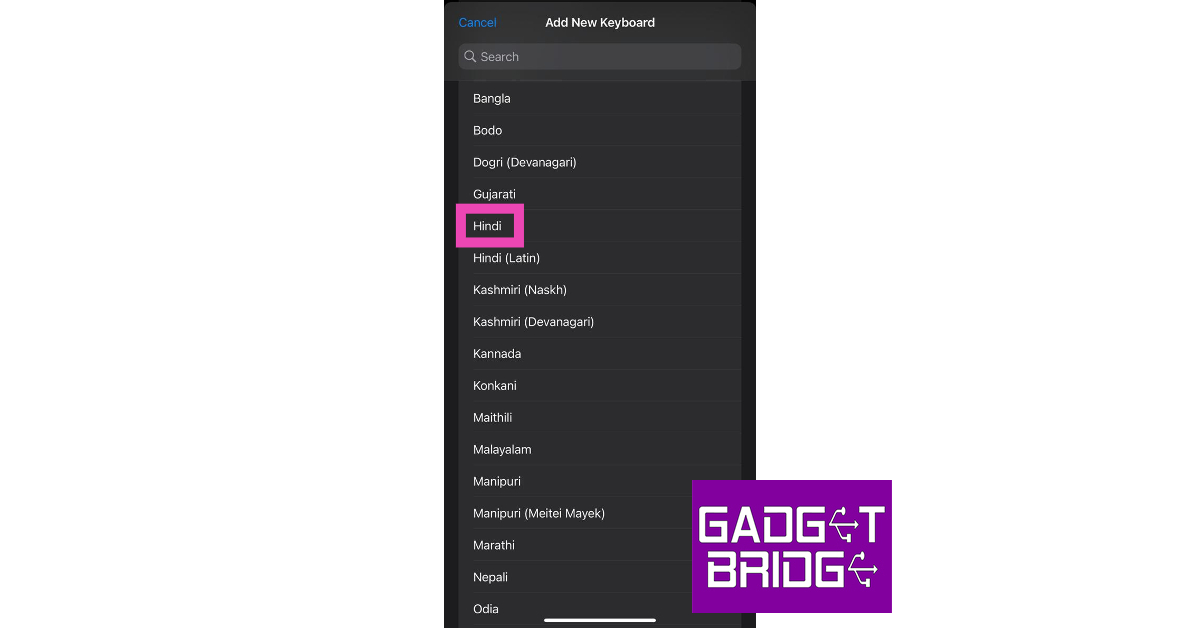
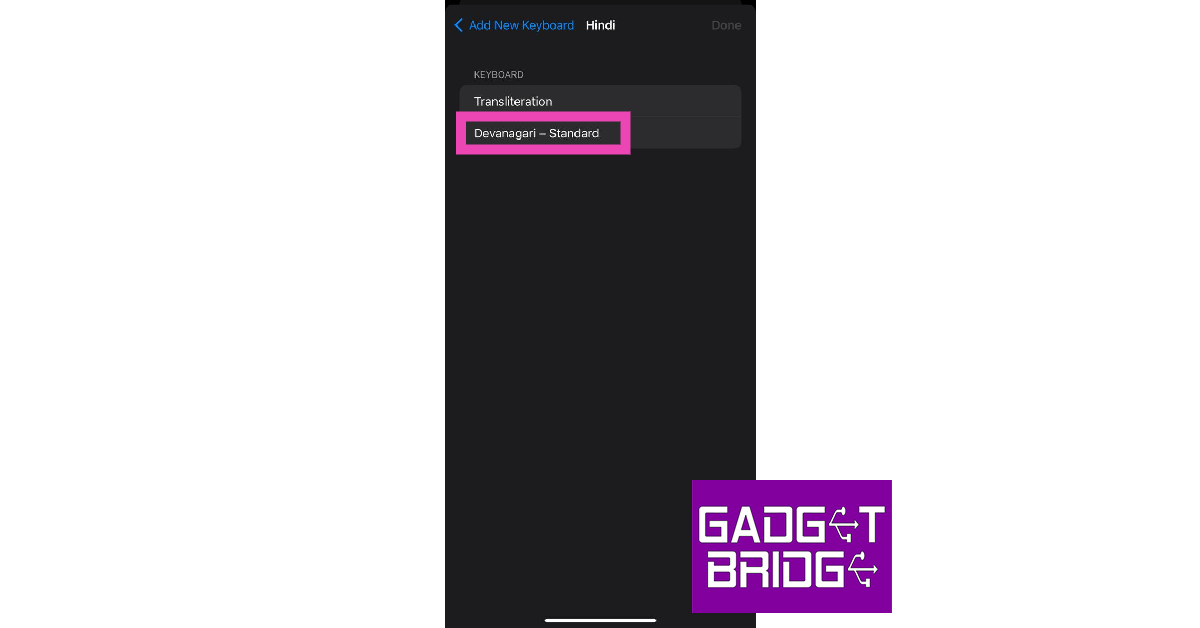
Step 1: Go to Settings and select General.Step 2: Tap on Keyboard and select Keyboards.Step 3: Tap on Add New Keyboard.Step 4: Select Hindi from the list.Step 5: Choose the Devanagari script if you want to type Hindi characters on your iPhone. If you want to transliterate your texts from English to the Devanagari script, hit Transliteration.Step 6: Tap on a text box to trigger the keyboard.Step 7: Press and hold the globe key on the keyboard.Step 8: Select Hindi from the list.You will now be able to type in Hindi on your iPhone.
Bonus Tip: How to type in Hindi on an Android phone?
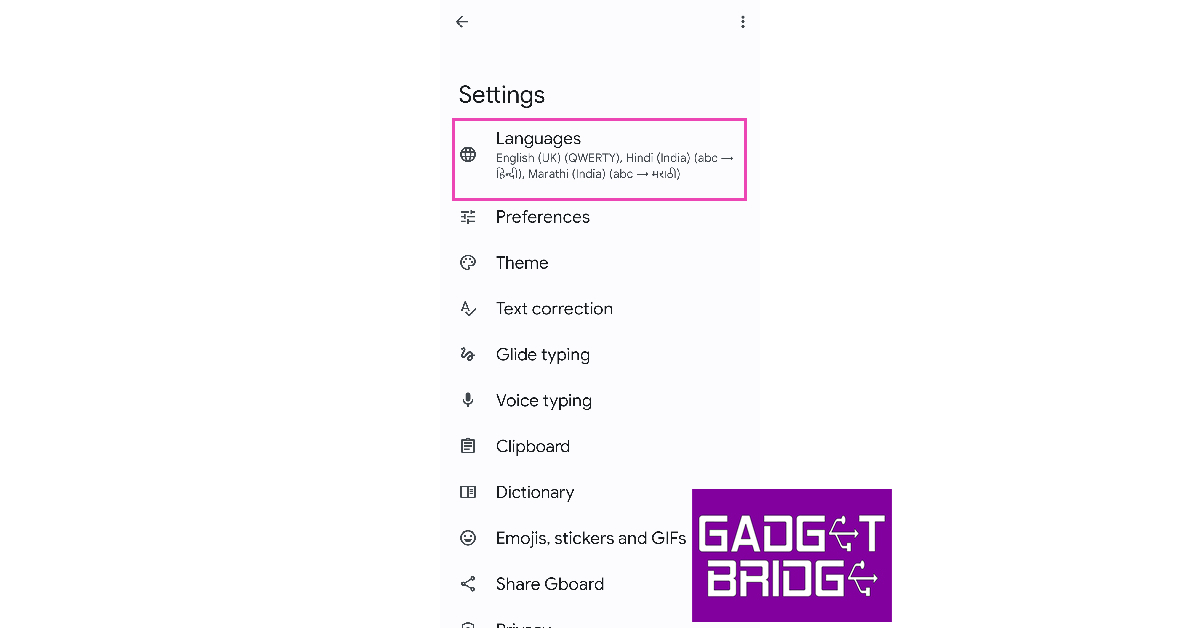
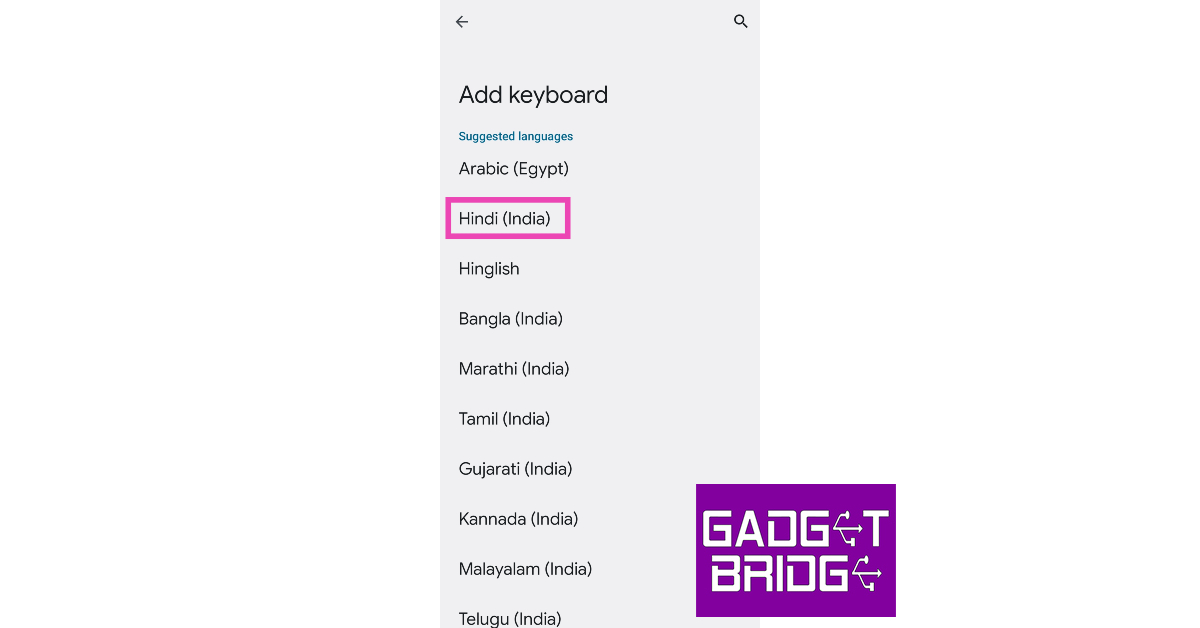
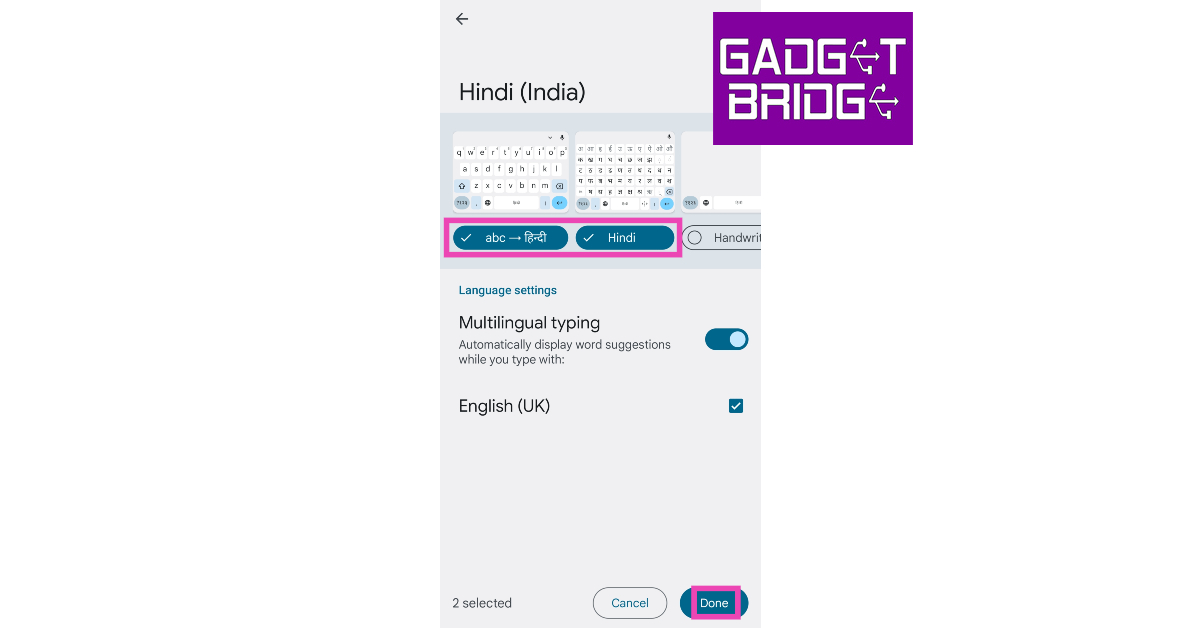
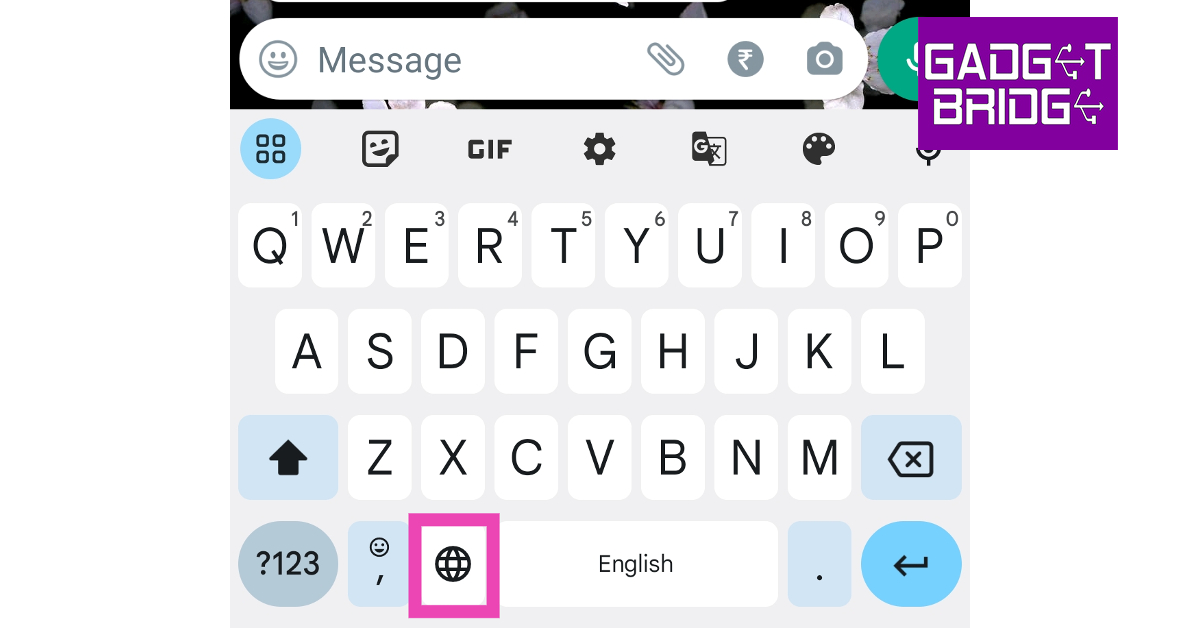
Step 1: Go to Settings and select General Management.Step 2: Tap on Keyboard list and default. Select Gboard as your default keyboard.Step 3: Go back and tap on Gboard settings.Step 4: Tap on Languages.Step 5: Select Add Keyboard.Step 6: Scroll down and tap on Hindi.Step 7: Select whether you want to translate the text or type in the Devanagari script. You can also choose both.Step 8: Hit Done at the bottom of the screen.Step 9: Tap a text box to trigger the keyboard.Step 10: Tap and hold the globe icon.Step 11: Select Hindi from the list of languages.You will now be able to type in Hindi on your Android smartphone.
Frequently Asked Questions (FAQs)
How do I use the Hindi keyboard on an iPhone?
Go to Settings>General>Keyboard>Keyboards>Add New Keyboard and select Hindi. Now, press and hold the globe key on the keyboard and select Hindi from the list.
How do I type in Hindi on my Android phone?
Go to Settings>General Management>Gboard Settings>Languages>Add Keyboard and select Hindi. Tap and hold the globe key on the Gboard and select the Hindi keyboard from the list.
How do I transliterate text from English to Hindi on my phone?
If you’re always seeking the help of a Photoshop-savvy friend to carry out the basic editing tasks, you will be pleased to know that there are several apps and online tools that make the photo editing process more accessible to the average user. With just a few taps and clicks you can get the desired results. These apps are designed to be easy to use and they are able to replicate the performance of a fancy photo editing software. In this article, we show you how to quickly change the background of a picture on an image on your PC and smartphone.Read Also:OnePlus Open confirmed to launch soon, October 19 launch date tipped
Change the background of a picture using Fotor
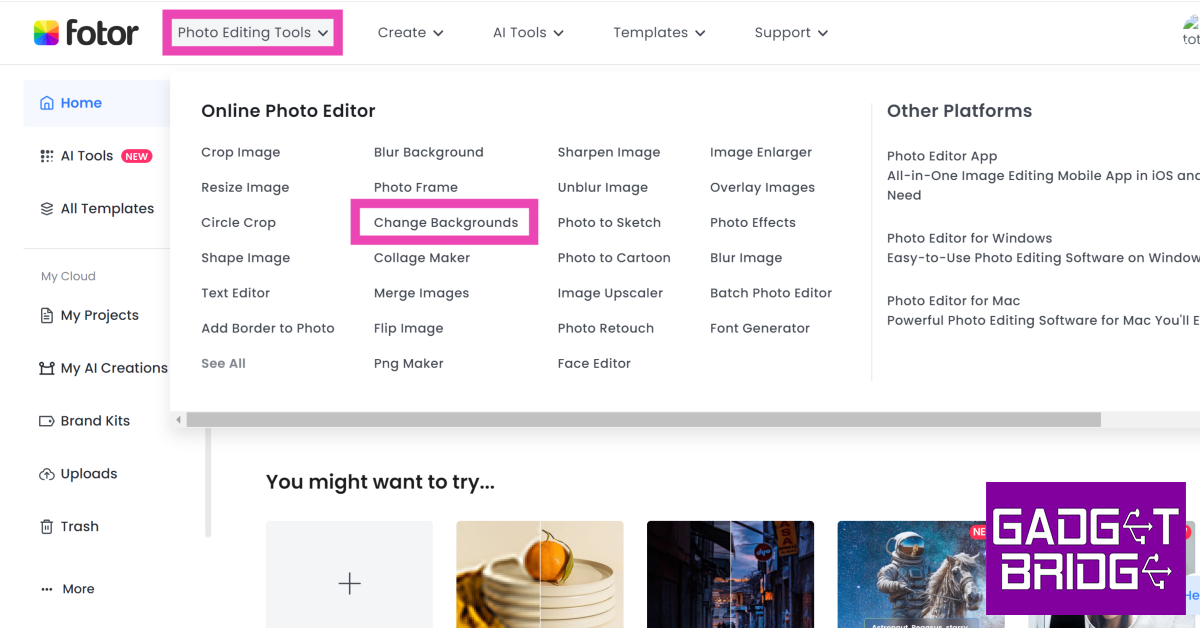
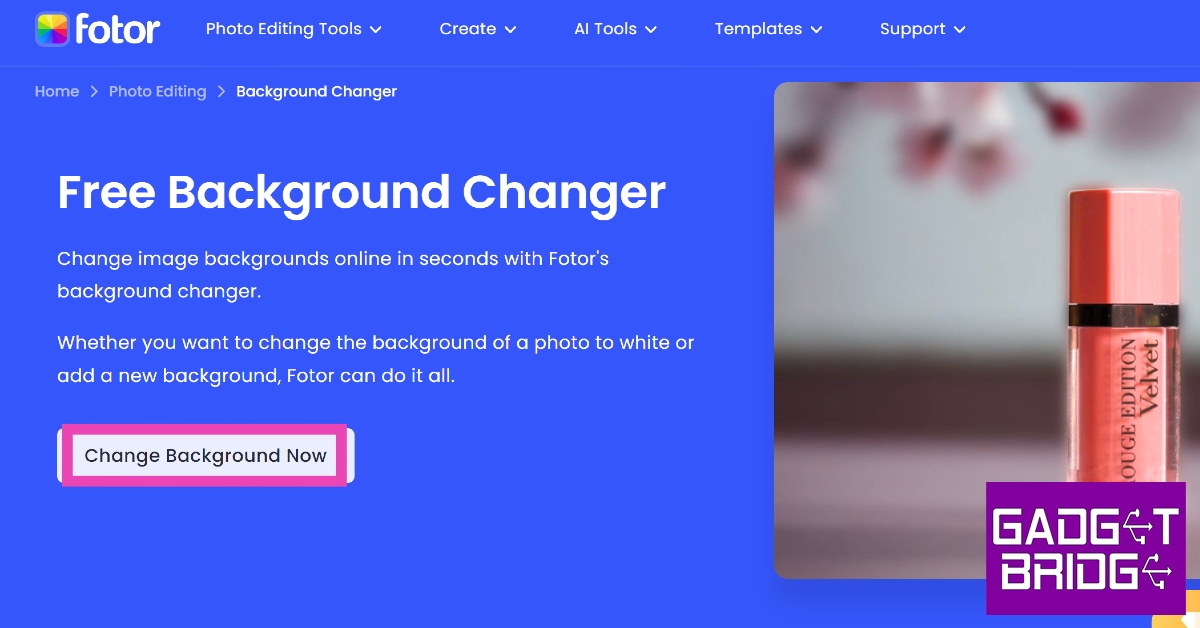
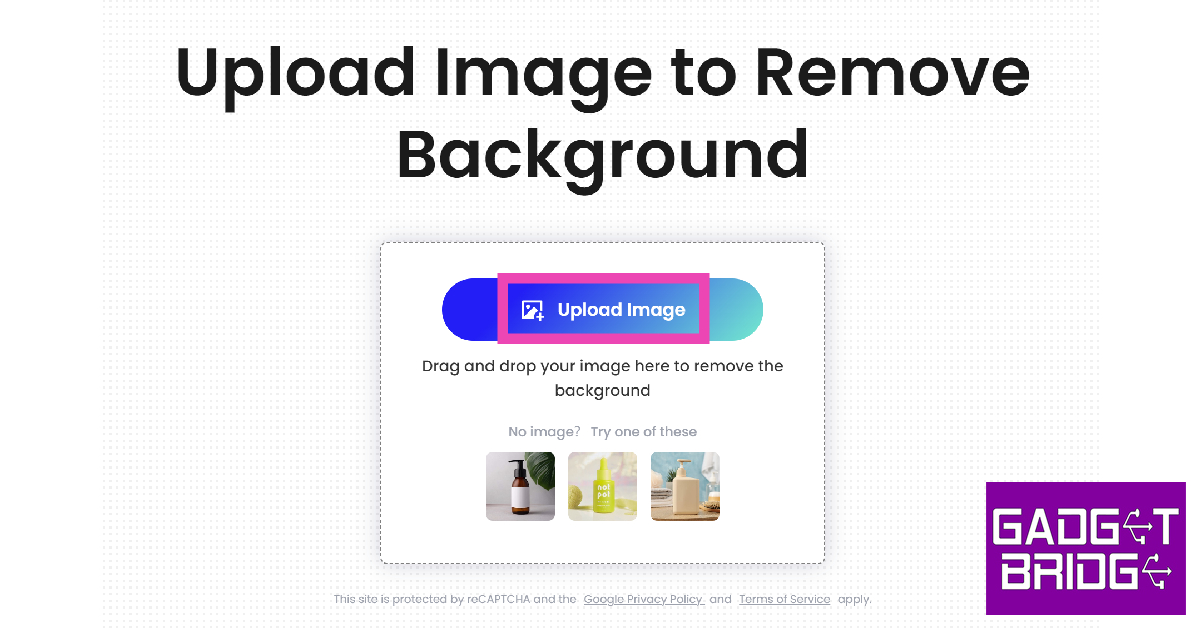
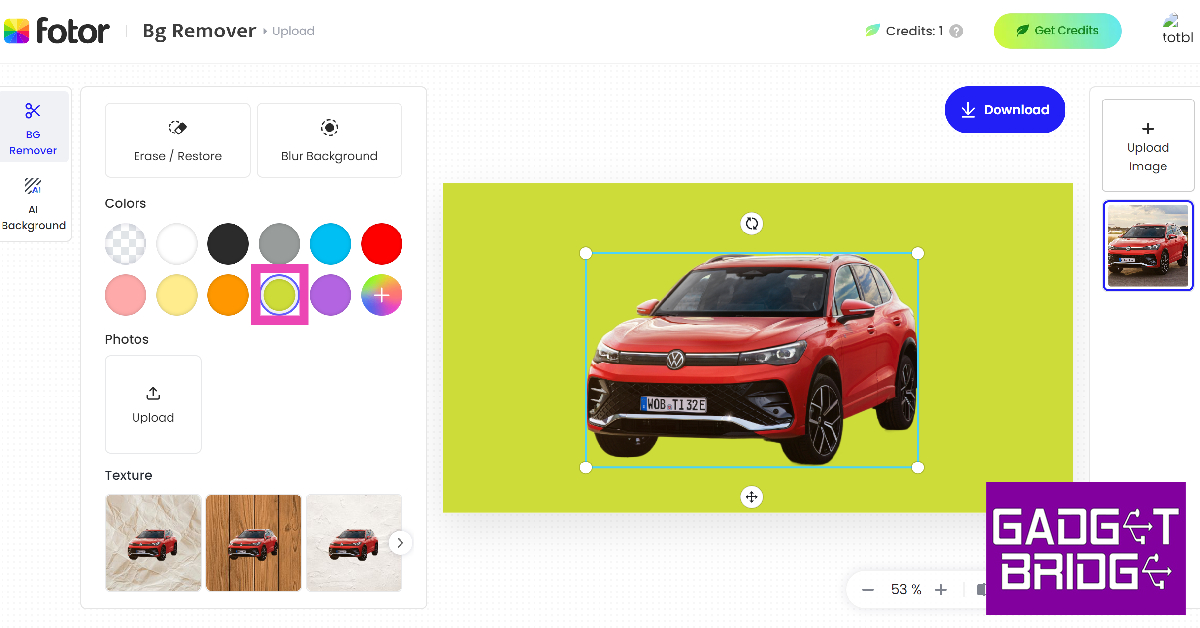
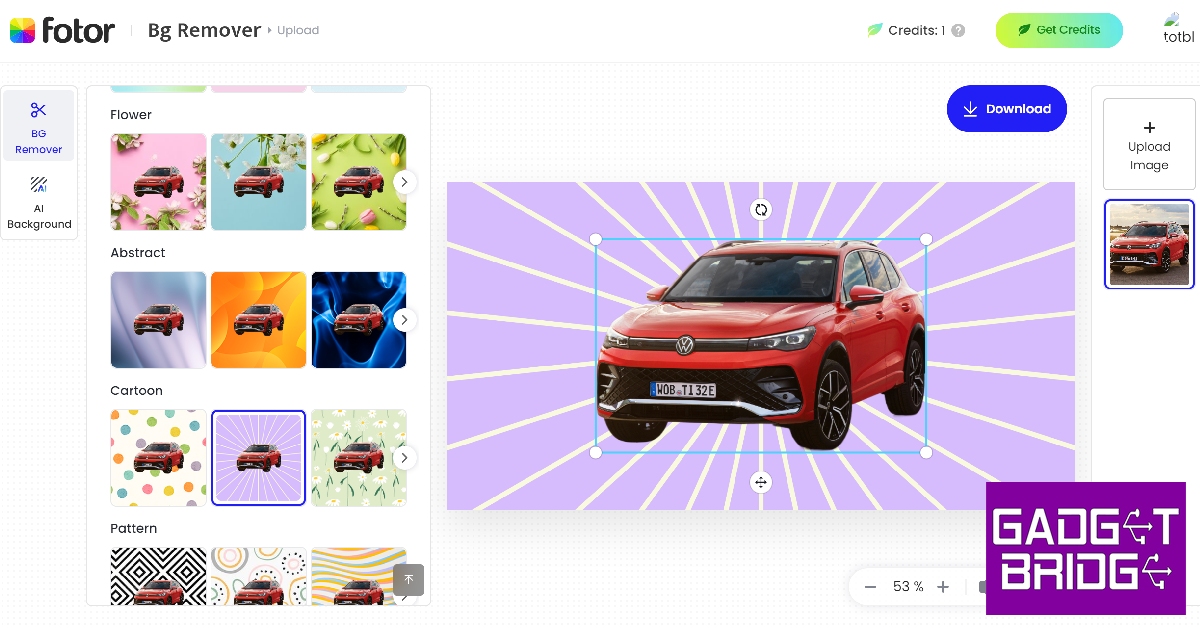
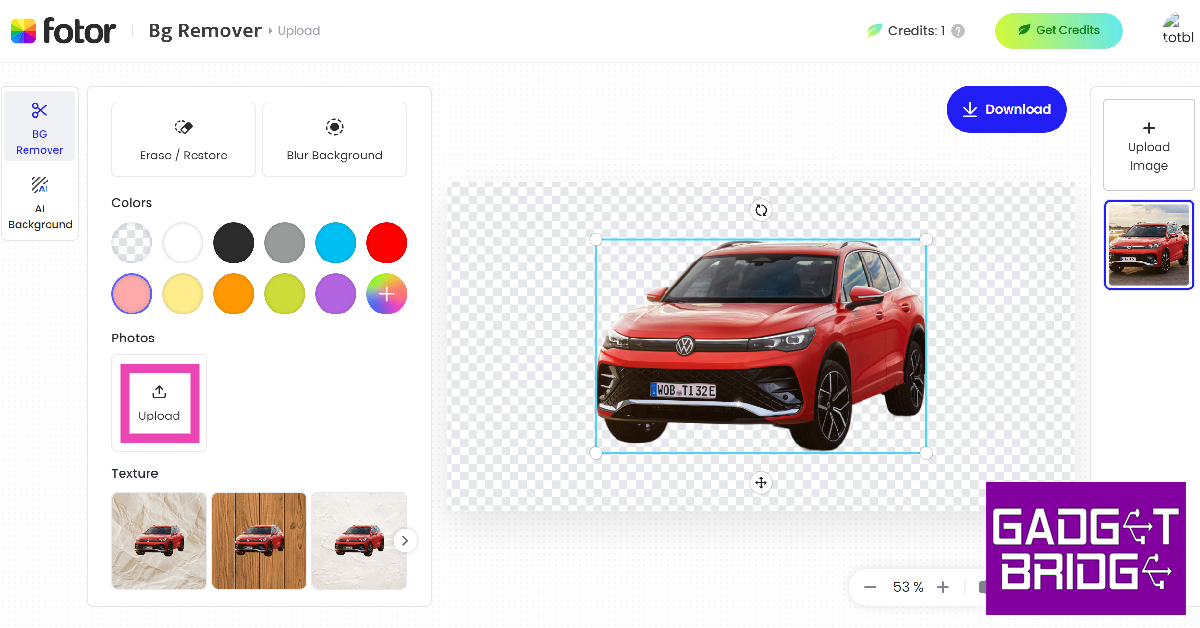
Step 1: Launch the web browser on your PC/smartphone and go to Fotor.com.Step 2: Hover the cursor over Photo Editing Tools and select Change Background.Step 3: Click on Change Background Now.Step 4:Upload the image for which you want to change the background.Step 5: Fotor will automatically remove the background of the image as soon as it is uploaded.Step 6: If you want a monochromatic background, choose one of the colours from the toolbar on the left.Step 7: Scroll through the toolbar for more background templates.Step 8: If you want your own custom image as the background, hit Upload.Step 9:Upload a picture from your device.Step 10: The background will be changed to your image. Hit Download at the top right corner of the editing window to save the image to your device.
Change the image background using Remove.bg
Step 1: Launch your device’s web browser and go to remove.bg.Step 2: Hit Upload image and select an image from your device.Step 3: The tool will automatically remove the background of the image.Step 4: Tap on Edit at the top right corner of the image.Step 5: Choose a background from the list of templates. You can also upload an image from your device to set it as the background.Step 6: Once you’re happy with the result, hit the Download icon at the top right corner of the screen and save it on your device. You can also directly share the image from this page.
Use the native photo editor on your Android smartphone
Step 1:Launch the native Photos app on your Android smartphone.
Step 2: Open the image you wish to edit.
Step 3:Long press the subject until you see the splash effect.
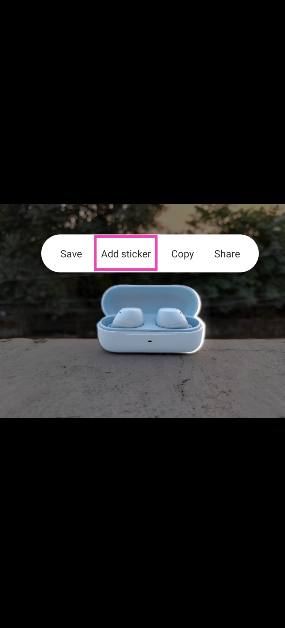
Step 4: Tap Add Sticker in the pop-up menu.
Step 5: Open the image that you wish to set as the background.
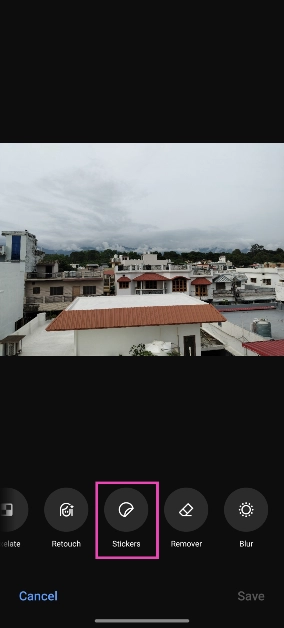
Step 6: Hit Edit at the bottom of the screen.
Step 7: Scroll through the tools and select Stickers.
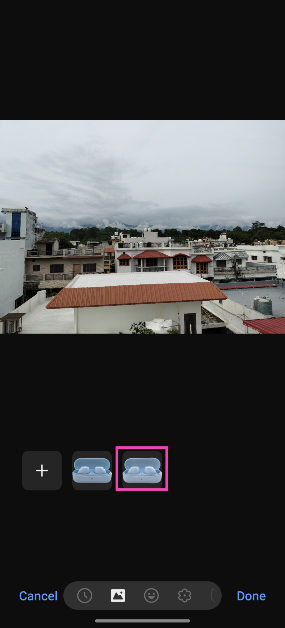
Step 8: Select the sticker you just created.
Step 9: Adjust its size and place it in the ideal spot.
Step 10: Hit Save.
Use AI to change the background of your Instagram Story
Step 1:Launch the Instagram app and tap on Create Story in the top left corner of the screen.
Step 2: Take a picture or upload an image from your phone’s gallery.
Step 3: Tap the Stickers icon and select Backdrop.
Step 4: Hit Next.
Step 5: Enter a prompt for the background.
Step 6: Instagram will generate a new background based on your prompt. If you like it, hit Next.
Step 7: Follow the remaining steps to upload the image as your story.
Frequently Asked Questions (FAQs)
How do I change the background of a picture?
You can easily change the background of a picture, but uploading it to Fotor’s background removal tool and then selecting a template background or uploading one from your device.
Which is the best app to change the background of an image?
Apps like Fotor, Canva, Remove.bg, and PhotoRoom are some of the best tools you can use to remove and change the background of an image.
These are the 4 quick ways you can use to change the background of any picture or image on your smartphone or PC. Instead of using Fotor and Remove.bg’s online tools, you can also use their respective apps. Looking for a good photo editor for your phone? Here is our list of the top 5 photo editing apps for Android.
iPhone 15 Series was launched in India and across the globe last week. The company was open for iPhone 15 reservations till now in the country along with along with 40 other countries, but today the new iPhone lineup will go on sale in India for the first time. The devices will be up for grabs at the online and offline Apple stores.
iPhone 15, iPhone 15 Plus, iPhone 15 Pro and iPhone 15 Pro Max price in India and offer details
Today Apple will begin shipping iPhone 15 series preorders, also the phones will now be available for purchase via the Apple Store in India both offline and online. On September 15, the Apple iPhone 15 series became available for pre-order in more than 40 nations including India. However, it will be shipped in Macao, Malaysia, Turkey, Vietnam, and other nations beginning September 29.The devices will be made available in India at Apple’s official retail outlets in Mumbai (BKC) and Delhi (Saket), and also at its Online Store. The price of the iPhone 15 and iPhone 15 Plus starts at Rs 79,900 and Rs 89,000 respectively. These two models will come in 128GB, 256GB, and 512GB variants and will be offered in Black, Blue, Green, Pink, and Yellow colour options.Also Read:Here are the best offers on the iPhone 15 series: DetailsWhereas, the iPhone 15 Pro and iPhone 15 Pro Max will start selling at Rs 1,39,900 and Rs 1,59,000 respectively. 256GB, 512GB, and 1TB storage options will be there for both the Pro models and will be available in Blue Titanium, White Titanium, Natural Titanium, and Black Titanium.The customers using HDFC credit cards and EMI transactions to purchase the new iPhones will be able to avail of an instant discount of up to Rs 6,000.As per the company, HDFC card users can receive a Rs 5,000 discount if they buy the iPhone 15 and the Plus variant. After the instant discount the price of iPhone 15 and Plus will come down to Rs 74,900 for its initial price of Rs 79,900 and Rs 84,900 as opposed to the device’s actual price of Rs 89,900.While the Pro model buyers will get an immediate discount of Rs 6,000. After this discount both iPhone 15 Pro and iPhone 15 Pro Max will be available at Rs 1,28,900 and Rs 1,53,900 down from their launch price of Rs 1,34,900 and Rs 1,59,900.Notably this discount is only accessible to HDFC Bank card customers making their purchases through the Apple India website, Apple Saket in Delhi and Apple BKC in Mumbai.
For the latest gadget and tech news, and gadget reviews, follow us on Twitter, Facebook and Instagram. For newest tech & gadget videos subscribe to our YouTube Channel. You can also stay up to date using the Gadget Bridge Android App. You can find the latest car and bike news here.
After being banned for nearly ten months, Battleground Mobile India, aka BGMI, is officially available again in India. BGMI fans are looking for ways to improve their game experience and one such method is the usage of redemption codes, which offers a variety of rewards and advantages using BGMI redeem codes players can gain access to new skins, outfits, loot crates, weapons and free UC and diamonds.As mentioned earlier, these codes give users the chance to earn unique rewards and gain extra benefits while playing the game. This includes GUN SKINS (M4, AKM, M416, AWM, M24, UZI, KAR98K), free character voucher, Andy, Carlo, Sara, Victor character for free, free Anna Character on completing the mission and UC or Royal Pass Discount. So here we have gathered a list of the most recent BGMI redeem codes as of 22 September 2023. Also, redeem these codes asap as these are only valid for a limited duration.
BGMI Redeem Codes for 22 September2023
UKUZBZGWF – Free Fireworks
TIFZBHZK4A – Free Outfit
RNUZBZ9QQ – AKM Glacier Skin
PGHZDBTFZ95U – M416 Skin
BTOQZHZ8CQ – New!
TQIZBZ76F – Vehicle Skin
TQIZBz76F – 3 Free Motorcycle
BMTFZBZQNC – Free Drifter Set
SD14G84FCC – Free Skin for KAR98 Sniper Gun
RNUZBZ9QQ – AKM Glacier Skin
5FG10D33 – Falcon and Free Emotes
GPHZDBTFZM24U – UMP9 Skin
KARZBZYTR – Free Outfit
JJCZCDZJ9U – Golden Pan
R89FPLM9S – Companion
BMTCZBZMFS – Pretty in Pink set and Pretty in Pink Headpiece
5FG10D33 – Outfit for Free
How to get free Redeem Codes for BGMI on 22 September2023?
Launch BGMI on your device.
Then select the Redeem Code option from the main menu.
Next, click on the Redeem code tab.
A new window will open, requesting the redemption code.
Now enter your BGMI code.
Confirm and click on the “Redeem” tab.
If your redeem code is valid then you will get a message confirming that your rewards were successfully redeemed.
Garena Free Fire is a battle royale game with regular awards and tournaments to keep players interested. If you play Garena Free Fire, you should be aware of the redeem codes that are released on a daily basis. However, because the battle royale game is banned in India, players from other countries can use the Free Fire Redeem codes daily. If you’re unfamiliar with the Garena Free Fire redeem codes or don’t know how to get them, we’ve put together a step-by-step guide to help you redeem them. Check out Garena Free Fire Redeem Codes for 22 September 2023.The Free Fire redeem codes are a great way to get free stuff. These are 12-digit codes that contain alphabets and numbers, as well as an expiration date and time. Because the Garena FF redeem codes cannot be used more than once, you should hurry to the redemption page to claim your free reward before someone else does. To get a free reward, all you have to do is go to reward.ff.garena.com/en, which is the official redemption page. Also, keep an eye on this space for daily updates on Garena Free Fire redemption codes and rewards.
Garena Free Fire Redeem Codes Today 22 September2023
The Taiwanese computer manufacturing giant, Acer, expanded its gaming laptops line in India with the launch of a brand new model of Acer Nitro V. The gaming laptop is powered by the latest 13th Gen Intel Core i5 processor. The latest laptop comes with NVIDIA GeForce RTX 4050 graphics with a dedicated 6GB GDDR6 VRAM. The device features a 15-inch display with a refresh rate of 144Hz.
Acer Nitro V price in India and availability
The Acer Nitro V has been launched in India with a starting price of Rs 76,990 for the 8GB RAM with 512GB of storage. On the other hand, the price of the 16GB RAM with 512GB is set at Rs 79,990. The affordable gaming laptop will be available for purchase via Acer’s online and offline stores in the country. In addition to this, it will be available at Amazon, Flipkart and at Multi-brand outlets.Also Read:OnePlus Open confirmed to launch soon, October 19 launch date tipped
Acer Nitro V specifications, features
Acer Nitro V features a 15.6-inch Full HD+ IPS (In-Plane Switching) display. The screen of the gaming laptop supports a 144Hz refresh rate and has a quick response time of 3 milliseconds which increases the sense of immersion during gaming sessions. The V logo on the laptop glows.The Nitro V is powered by the latest 13th Gen Intel Core i5 processor paired with an NVIDIA GeForce RTX4050 GPU with 6GB dedicated VRAM. The gaming laptop is offered with up to 16GB DDR5 RAM expandable up to 32GB and 512GB SSD storage.Furthermore, it includes dual-fan, dual-intake cooling technology that maximises its cooling capacities to prevent throttling and ensure maximum CPU and GPU utilisation, ensuring top performance while gaming. There is Acer Purified View and Purified Voice noise reduction technology powered by AI. As per the company, this technology allows gamers to immerse themselves in the virtual world with exceptional sound precision, creating an experience akin to being at the helm of a spaceship command centre.Also Read: Acer Nitro 15 for gaming with up to NVIDIA 4060 graphics card launched in IndiaThe Acer Nitro V also has support for Wi-Fi 6, HDMI 2.1, and Thunderbolt 4 for connectivity. Additionally, the laptop’s memory slots and DDR5 storage slots improve its speed by allowing for quicker data access and transfer rates.Sudhir Goel, Chief Business Officer at Acer India, shared his excitement about the Nitro V Series: “The Nitro gaming series has garnered immense popularity within the gaming community, standing as a testament to its exceptional blend of power, performance, and aesthetic appeal. With the introduction of Nitro V, Acer continues to push the boundaries of what mainstream gamers can expect from their laptops. This latest addition is a perfect synergy of enhanced capabilities, additional features, and an unparalleled immersive experience, all bundled within an affordable price range. We are delighted to give gamers the resources they need to succeed by reimagining the potential of gaming laptops with the Nitro V Series.”
For the latest gadget and tech news, and gadget reviews, follow us on Twitter, Facebook and Instagram. For newest tech & gadget videos subscribe to our YouTube Channel. You can also stay up to date using the Gadget Bridge Android App. You can find the latest car and bike news here.
OnePlus has officially confirmed its first foldable phone OnePlus Open will be launching soon. According to leaks, the foldable device is likely to launch on October 19. The company has not officially confirmed however the rumour indicated the upcoming launch. Last month Pete Lau, the co-founder of OnePlus, provided an update on its next product. In addition, some tech specs of the upcoming device have also been leaked. Here is everything we know related to the OnePlus Open.OnePlus at the TechCrunch Disrupt 2023 event in San Francisco revealed the impending release of its first-ever foldable smartphone. During the event, the company confirmed that its device will provide flagship-level experiences in a compact foldable form factor. In addition, the company didn’t provide an exact timeline instead it has revealed that it will be available soon on the company’s website and its social media platforms.Also Read: Compare: Samsung Galaxy S23 Ultra Vs iPhone 14 Pro MaxPreviously the device was rumoured to launch in August but OnePlus Open is now tipped to launch on October 19. Last month Pete Lau posted a picture of the hinge for its folding screen on X. The OnePlus foldable is said to have some features of the Oppo Find N. The OnePlus Open is also likely to run on Android 13 out of the box.Previous leaks suggested that the OnePlus Open will have an outward folding design and will be available in Black and Green colours. Reports suggest that the phone might have a 7.8-inch 2K AMOLED primary display and a 6.3-inch AMOLED cover screen with a 120Hz refresh rate. Both the display will probably support a 120Hz refresh rate.The foldable smartphone is likely to come equipped with Qualcomm Snapdragon 8 Gen 2 SoC with 8GB RAM and 256GB of internal storage. The phone is also expected to have a 4800mAh battery.For the photos, the OnePlus Open might feature a 50MP primary storage with Optical Image Stabilization (OIS), a 48MP secondary sensor having an ultra-wide lens, 32MP tertiary sensor equipped with a periscope lens at the rear. The front camera is expected to house two 32MP sensors.OnePlus Open will launch in China at the end of September first. It will launch in the rest of the countries either at the end of the year or early next year.
For the latest gadget and tech news, and gadget reviews, follow us on Twitter, Facebook and Instagram. For newest tech & gadget videos subscribe to our YouTube Channel. You can also stay up to date using the Gadget Bridge Android App. You can find the latest car and bike news here.
Amazon at its Fall 2023 event announced the upgraded lineup of Echo devices. In addition to the new Echo Show 8, the company has introduced third-gen Echo Frames, home security cameras, Fire TV a lot more. All these devices will now use generative AI to boost the performance of Alexa.
Alexa gets generative AI features
First, Alexa is getting generative AI, and Amazon will now use the power of LLMMs to provide practical answers to its consumers. The new generative AI features will be compatible with all currently available Echo devices. At its Amazon Fall 2023 event, the e-commerce platform showcased the even smarter, and more conversational Alexa, powered by generative AI.As per the company it is based on a new large language model that’s specially created and optimised for voice interactions, Today, we shared a preview of an even smarter, and more conversational Alexa, powered by generative AI. It’s based on a new large language model that’s been custom-built and specifically optimized for voice interactions, and the things we know our customers love—getting real-time information, efficient smart home control, and maximising their home entertainment.Customers in the US will be the first to get a preview to test these new generative AI features by just saying, “Alexa, let’s chat” to their existing Echo devices. Using the voice command your echo device will turn on the chatbot mode which is created upon a large language model (LLM).Amazon believes that with the power of new generative AI speaking to Alexa will feel more natural and conversational than ever before, and Alexa’s ability to reason, infer customer intent, and understand complex requests will remarkably improve.In addition to this, Alexa is also getting 18 new features including Eye Gaze Mode, Call Translation, Alexa Emergency Assist, Game Start Routines, Email to Alexa, Top Connections, Profile-level Voice Customization, AI Art on Fire TV and a lot more.
3rd gen Echo Frames
The all-new smart glasses from Amazon have also been updated. The 3rd gen Echo Frames now have better battery life and have been redesigned. They now look more like regular spectacles thanks to the slimmer profile and have improved audio quality which is said to be less distorted now. Did you know the Echo Frames are been upgraded for the first time in two years? The Echo Frames and Carrera Smart Glasses now come in variants to match your style and they all come with multiple lens options, including sunglass lenses with UV400 protection, prescription-ready, or blue light lenses.In addition to this Echo Frames are now IPX4 splash and scratch resistant. Talking about battery life, Amazon claims that its upgraded smart glasses will now last you for up to six hours of continuous media playback or talk time, or up to 14 hours of moderate usage on a full battery charge—up to 40% more audio playback and 80% more talk time than the previous generation. In addition to this, the new Echo Frames can be charged wirelessly with an all-new charging stand. Not to forget that also have hands-free access to Alexa. The price of the new Echo Frames begins at $269.99.Echo Show 8
Echo Show 8 and New Echo Hub
Echo Show 8, Amazon’s new smart display has also been upgraded. With the improved processor, the display responses are quicker with audio with spatial audio, room acoustic sensing, and noise reduction technology. It features a new proximity sensor which is now able to adjust its UI. It identifies acoustics around it easily to adjust the sound output and the front-facing camera comes with a physical switch to turn off the mic. Not just that it has an in-built smart home hub for seamless compatibility. With an upgraded design it has edge-to-edge glass and a centered camera. Echo Show 8 price starts at $149.New Echo HubOn the other hand, the Echo Hub smart home control panel costs $179.99. It is Amazon’s first wall-mountable smart home control panel powered by Alexa. It features an 8-inch touchscreen and a customizable dashboard for all your smart home devices. Moreover, you can use it as your security system, start a Routine, turn on the fan, or change the volume on your Echo and view multiple live camera feeds at the same time. There is support for more than 140,000 smart devices and all major connectivity standards, including Matter and Thread on the Echo Hub.New Fire TV devices
New Fire TV devices
Amazon has also announced new models of new Fire TV devices including new Fire TV Stick and Fire TV Soundbar. The new Fire TV Stick will be available in Fire TV Stick 4K and Fire TV Stick 4K Max models. The Stick 4K is claimed to be 30% more powerful than the previous generation and now includes support for Wi-Fi 6. Fire TV Stick 4K price starts at $49.99.Fire TV Stick 4K Max (2nd Gen) on the other has Fire TV Ambient Experience which transforms the TV into a always-smart display by replacing blank screens with information like your family calendar, local weather forecast, and reminders on your screen when you’re not streaming.It is also the first-ever streaming stick to support Wi-Fi 6E resulting in lower latency and faster speeds. The new 4K Max comes with support for Dolby Vision, HDR, and HDR10+, and immersive Dolby Atmos audio. The Fire TV Stick 4K Max (2nd Gen) is now available for pre-order for $59.99.While the Fire TV Soundbar is 24-inch is size soundbar. It has support for DTS Virtual:X and Dolby Audio. It can be paired with all Fire TV streaming media players and TVs. The Fire TV Soundbar is available for $119.99.Blink Outdoor 4 Floodlight Camera
Amazon Security cameras
Blink Outdoor 4 Floodlight Camera is the latest addition to the company’s home security portfolio. It is basically a wireless outdoor camera with motion-triggered LED lighting and up to two years of battery life, based on default settings. Its outdoor security camera has accurate motion alerts which use radar technology to track people. It comes with several accessories Sync Module Pro, wireless floodlight mount and a battery extender do those who already have Blink Outdoor 4.Blink Outdoor 4 Floodlight Camera is available in the U.S. and Canada for $159.98. The Floodlight Mount accessory can be purchased for $39.99, the Blink Sync Module Pro for $49.99 and the Blink Outdoor 4 Battery Extension pack at $29.99. For the latest gadget and tech news, and gadget reviews, follow us on Twitter, Facebook and Instagram. For newest tech & gadget videos subscribe to our YouTube Channel. You can also stay up to date using the Gadget Bridge Android App. You can find the latest car and bike news here.
Garena Free Fire is a battle royale game with regular awards and tournaments to keep players interested. If you play Garena Free Fire, you should be aware of the redeem codes that are released on a daily basis. However, because the battle royale game is banned in India, players from other countries can use the Free Fire Redeem codes daily. If you’re unfamiliar with the Garena Free Fire redeem codes or don’t know how to get them, we’ve put together a step-by-step guide to help you redeem them. Check out Garena Free Fire Redeem Codes for 21 September 2023.The Free Fire redeem codes are a great way to get free stuff. These are 12-digit codes that contain alphabets and numbers, as well as an expiration date and time. Because the Garena FF redeem codes cannot be used more than once, you should hurry to the redemption page to claim your free reward before someone else does. To get a free reward, all you have to do is go to reward.ff.garena.com/en, which is the official redemption page. Also, keep an eye on this space for daily updates on Garena Free Fire redemption codes and rewards.
Garena Free Fire Redeem Codes Today 21 September2023
updating soon…
How to Get Free Fire Redeem Codes for Garena on 21 September2023?


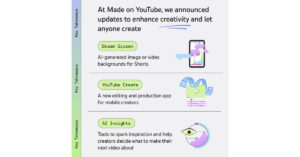 YouTube has announced new tools on its platform making it simpler than ever for anyone to express any idea and bring it to life on Shorts. YouTube will begin to test a new experimental feature called Dream Screen. This tool will let users create AI-generated video or image backgrounds for their Shorts simply by typing an idea into a prompt. As per the company, the company Dream Screen will let creators make fresh fantastic settings for their Shorts that are only limited by what they can imagine. This tool will be accessible to select creators before it is released broadly next year.
Also Read: Apple to start shipping iPhone 15 series today, sale in India begins
The company says that these new features will enable anyone to quickly rethink their videos by simply entering in a suggestion for how to edit their content or remix existing YouTube videos and create them into something entirely new.
YouTube has announced new tools on its platform making it simpler than ever for anyone to express any idea and bring it to life on Shorts. YouTube will begin to test a new experimental feature called Dream Screen. This tool will let users create AI-generated video or image backgrounds for their Shorts simply by typing an idea into a prompt. As per the company, the company Dream Screen will let creators make fresh fantastic settings for their Shorts that are only limited by what they can imagine. This tool will be accessible to select creators before it is released broadly next year.
Also Read: Apple to start shipping iPhone 15 series today, sale in India begins
The company says that these new features will enable anyone to quickly rethink their videos by simply entering in a suggestion for how to edit their content or remix existing YouTube videos and create them into something entirely new.
 To streamline the process of editing YouTube is also launching a new mobile app called YouTube Create. This will allow anyone to create and share videos right on YouTube. However, this app is under beta on Android in select markets right now. Also, it will be free of charge and designed to make video production for Shorts or longer videos simpler and easier.
YouTube Create app will provide video editing tools including precision editing and trimming, automatic captioning, voiceover capabilities and access to a library of filters, effects and transitions. In addition to this royalty-free music with beat-matching technology will also be accessible.
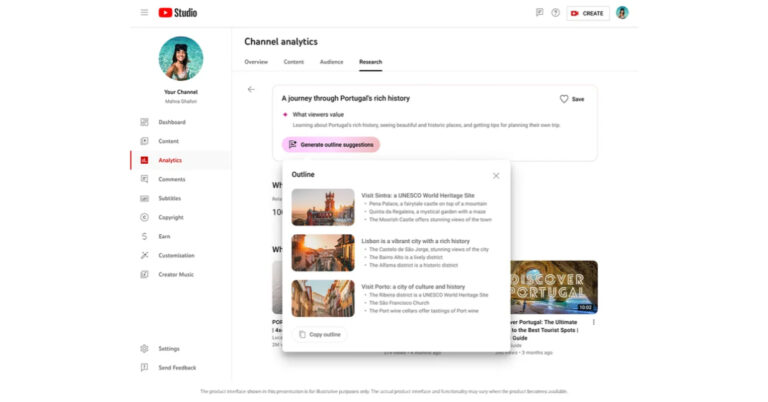
As we mentioned in the beginning YouTube is bringing AI technology to its platform providing more efficient tools to creators and helping them generate new ideas. YouTube will offer tools like AI-powered insights to users next year. The insights are said to be personalized for each channel and based on what audiences are already watching on YouTube.
With Assistive Search in Creator Music, users will be able to search for a soundtrack for their videos. Simply type in a description of your content and AI will suggest the right music at the right price. Whereas Automatic dubbing with Aloud will allow dubbing professionally as the name suggests.
For the latest gadget and tech news, and gadget reviews, follow us on Twitter, Facebook and Instagram. For newest tech & gadget videos subscribe to our YouTube Channel. You can also stay up to date using the Gadget Bridge Android App. You can find the latest car and bike news here.
To streamline the process of editing YouTube is also launching a new mobile app called YouTube Create. This will allow anyone to create and share videos right on YouTube. However, this app is under beta on Android in select markets right now. Also, it will be free of charge and designed to make video production for Shorts or longer videos simpler and easier.
YouTube Create app will provide video editing tools including precision editing and trimming, automatic captioning, voiceover capabilities and access to a library of filters, effects and transitions. In addition to this royalty-free music with beat-matching technology will also be accessible.
As we mentioned in the beginning YouTube is bringing AI technology to its platform providing more efficient tools to creators and helping them generate new ideas. YouTube will offer tools like AI-powered insights to users next year. The insights are said to be personalized for each channel and based on what audiences are already watching on YouTube.
With Assistive Search in Creator Music, users will be able to search for a soundtrack for their videos. Simply type in a description of your content and AI will suggest the right music at the right price. Whereas Automatic dubbing with Aloud will allow dubbing professionally as the name suggests.
For the latest gadget and tech news, and gadget reviews, follow us on Twitter, Facebook and Instagram. For newest tech & gadget videos subscribe to our YouTube Channel. You can also stay up to date using the Gadget Bridge Android App. You can find the latest car and bike news here. 
 Step 2:
 Step 3:
 Step 4:
 Step 5:
 Step 6:
 Step 2:
  Step 3:
 Step 4:
  Step 5:
 Step 6:
 Step 7:
 Step 8:
 Step 11: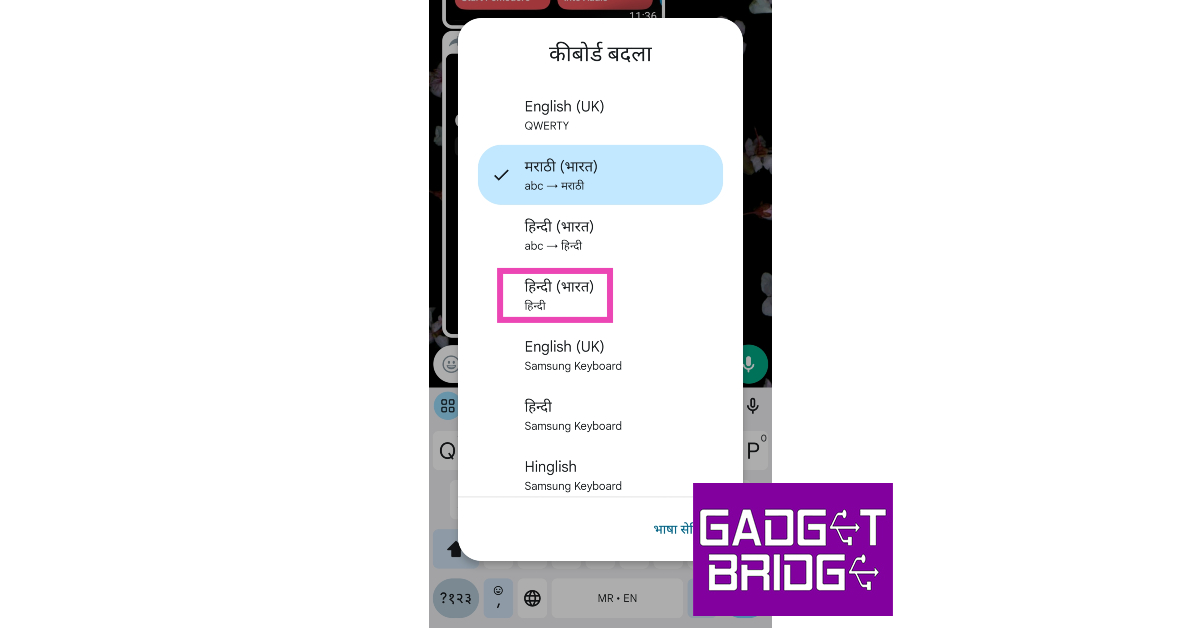

 Step 3:
 Step 4: Upload
 Step 5:
 Step 7:
 Step 8:
 Step 9: Upload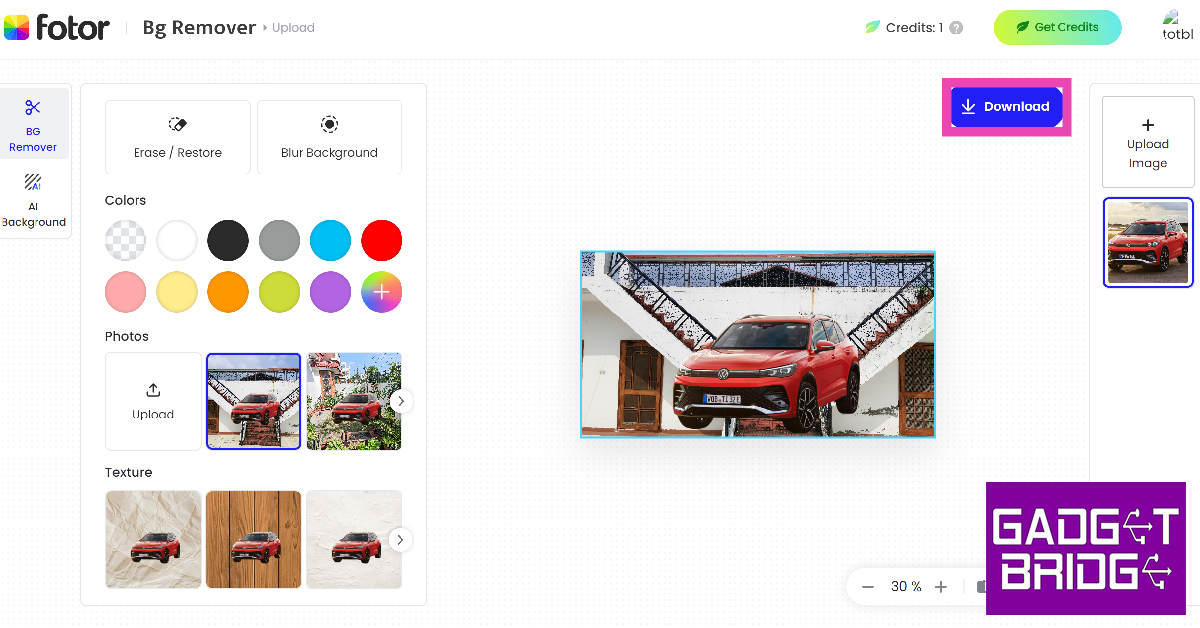
 Step 3:
 Step 5:
 Step 6:
 Step 4: Tap Add Sticker in the pop-up menu.
 Step 5: Open the image that you wish to set as the background.
Step 6: Hit Edit at the bottom of the screen.
Step 5: Open the image that you wish to set as the background.
Step 6: Hit Edit at the bottom of the screen.
 Step 7: Scroll through the tools and select Stickers.
 Step 8: Select the sticker you just created.
 Step 9: Adjust its size and place it in the ideal spot.
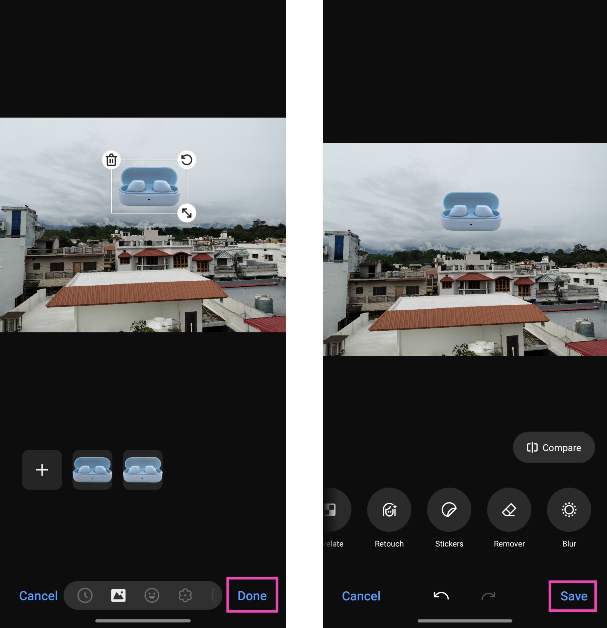 Step 10: Hit Save.
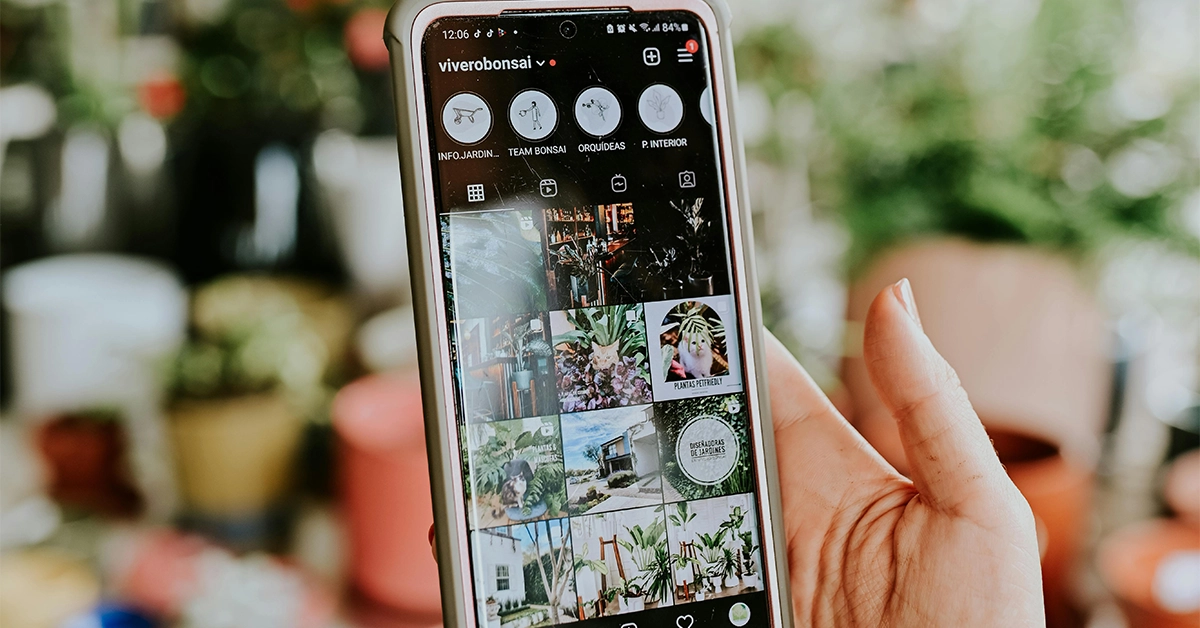 Step 1: Launch the Instagram app and tap on Create Story in the top left corner of the screen.
Step 2: Take a picture or upload an image from your phone’s gallery.
Step 3: Tap the Stickers icon and select Backdrop.
Step 4: Hit Next.
Step 5: Enter a prompt for the background.
Step 6: Instagram will generate a new background based on your prompt. If you like it, hit Next.
Step 7: Follow the remaining steps to upload the image as your story.
Step 1: Launch the Instagram app and tap on Create Story in the top left corner of the screen.
Step 2: Take a picture or upload an image from your phone’s gallery.
Step 3: Tap the Stickers icon and select Backdrop.
Step 4: Hit Next.
Step 5: Enter a prompt for the background.
Step 6: Instagram will generate a new background based on your prompt. If you like it, hit Next.
Step 7: Follow the remaining steps to upload the image as your story.