Best 7 Methods to Tell If An Image is AI-Generated

AI-based tech is slowly finding its way into consumer products. Image generators like Midjourney and Dall-E are already accessible to the masses. While AI is great at what it does, its ethical boundaries are yet to be determined. As of now, there aren’t any clear regulations on the usage of AI image generators. This has already led to a number of harassment and abuse cases. If you come across an image that seems like it was created to get a reaction out of people, there are a few methods you can employ to tell if it is AI-generated. Check them out below. Read Also: Top 6 Ways to Fix ‘No Sound on iPhone’ (2024)

Observe the fingers of the subject

Observe the fingers of the subject AI image generators may be good at producing pictures of people but they still struggle to get the minute details right. If you suspect that an image of a person is AI-generated, pay close attention to their fingers. If you see any additional, crooked, or fused fingers, chances are that the image is AI-generated.

Pay close attention to the facial features

Pay close attention to the facial features Best 7 Methods to Tell If An Image is AI-Generated Miscreants who devise AI images to spread misinformation are aware of AI’s shortcomings in rendering human fingers. This is why the hands of the subject are cropped out in AI-generated images. The good news is that you can tell whether an image is AI-generated by closely focussing on the subject’s face. The signs you need to look out for are smoothened skin, overly glossy eyeballs, different eye colours, and inconsistent wrinkles.

Look at the signs, billboards, banners, or any text in the image

Look at the signs, billboards, banners, or any text in the image Best 7 Methods to Tell If An Image is AI-Generated Another thing that AI image generators struggle with is rendering text in the images. Oftentimes, the text on an AI-generated image is total gibberish resembling English or any other language. Pay attention to the signs, banners, and other places with text. If you notice any inconsistencies, it is possible that the image is AI-generated.

Check if the objects in the image are real

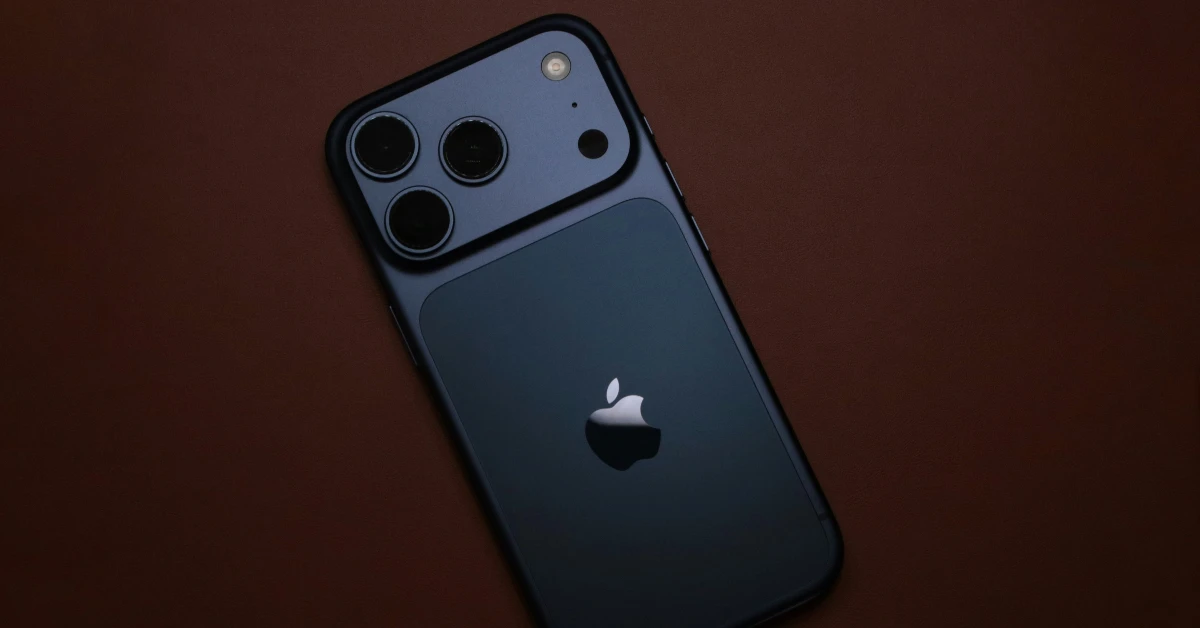
Check if the objects in the image are real Best 7 Methods to Tell If An Image is AI-Generated If the person in the image is holding a phone, check if it is a real phone. Look for the company label or marking. If it resembles an iPhone, check the legitimacy of the Apple logo. If there’s a fridge in the background, look for the name of its manufacturer. Most AI generators are unable to create the exact model of a product.

Focus on the background

If you don’t see anything with the subject, it is time to observe the background. The devil is in the details and AI image generators often mess up the details. Look for any weird-looking objects in the background that make no contextual sense. Oftentimes, AI fills up the background with just one object. When told to create an image of a living room, the AI generator will make the common mistake of filling up the walls with a lot of paintings. Always place the background in the proper context while looking at an image.

Perform a reverse image search

If you’re looking at an artwork and want to make sure it is not AI-generated, simply perform a reverse image search to find the artist who created it. If you can’t find the art posted anywhere else, chances are that it was created by AI. If you’re lucky, the search will lead you to the place where the image was first posted. You can ask the original poster if the image is AI-generated.

Use the Hive AI Detector extension

If you still can’t judge whether an image is AI-generated or not, simply get the Hive AI Detector to do it for you. You can find this extension in the Chrome Web Store. Once the extension has been installed, right-click on an image and select ‘Hive AI Detector’. The extension will let you know the likelihood of the image being AI-generated. Read Also: Apple Beats Solo Buds and Beats Solo 4 with support USB Type-C charging launched

Conclusion

These are the top 7 methods you can use to tell if an image is AI-generated. If you come across an image that seems incendiary or provocative, do not believe them right away. If you’re a Twitter user, always look out for Community Notes. Read this article to learn how you can spot a deepfake video.

Garena Free Fire Redeem Codes Today 4 May 2024: Here is how to claim them

Garena Free Fire is a battle royale game with regular awards and tournaments to keep players interested. If you play Garena Free Fire, you should be aware of the redeem codes that are released on a daily basis. However, because the battle royale game is banned in India, players from other countries can use the Free Fire Redeem codes daily. If you’re unfamiliar with the Garena Free Fire redeem codes or don’t know how to get them, we’ve put together a step-by-step guide to help you redeem them. Check out Garena Free Fire Redeem Codes for 4 May 2024. The Free Fire redeem codes are a great way to get free stuff. These are 12-digit codes that contain alphabets and numbers, as well as an expiration date and time. Because the Garena FF redeem codes cannot be used more than once, you should hurry to the redemption page to claim your free reward before someone else does. To get a free reward, all you have to do is go to reward.ff.garena.com/en, which is the official redemption page. Also, keep an eye on this space for daily updates on Garena Free Fire redemption codes and rewards. Also Read: Sennheiser Accentum Plus wireless headphones with Hybrid Adaptive Noise Cancellation launched

Garena Free Fire Redeem Codes Today 4 May 2024

FDO6D1H3S2Q8E9Y4 FRI3B7G8R4C6U2N9 FFQ1K5V3E4J7M6W2 FX3E5G2L17J1F4U9 FFU4P5N9M3D7V2F6 FFS2A8C9O3I6G7R1 FY6M4B11N3P8O2C7 FEF7M4N2Z1T6U5I8 FFL8Y9T2S6A3H1X7 P1OS2I3U4Y5T6W7 FN4Y8Q6U5EDD61B3 FFB2M0A5U9O18R7F F13X4N6Q3R8WUU2H FFE6C8G3X18N4S9H FFC8H5E7Y0JDD4S1 FFM3FDDP1N9V2W7T6

How to Get Free Fire Redeem Codes for Garena on 4 May 2024?

  • Visit the Garena Free Fire game’s official website at reward.ff.garena.com.
  • Use your Facebook, Google, VK, Apple ID, Huawei ID, or Twitter account to log in.
  • You’ll be taken to a valid redemption code (s)
  • Copy and paste the 12-digit redemption code into the text box.
  • On the screen, a dialogue box will appear.
  • ‘Ok’ should be selected.
For the latest gadget and tech news, and gadget reviews, follow us on TwitterFacebook and Instagram. For newest tech & gadget videos subscribe to our YouTube Channel. You can also stay up to date using the Gadget Bridge Android App. You can find the latest car and bike news here.

Apple Beats Solo Buds and Beats Solo 4 with support USB Type-C charging launched

Key Highlights
  • The Beats Solo 4 and Beats Solo 4 come with a USB Type-C port.
  • The Beats Solo 4 has an upgraded design.
  • The Beats Solo Buds offer one-touch pairing.
Apple has refreshed its audio portfolio with the launch of two new generations of wireless audio devices- Beats Solo Buds and Beats Solo 4. Both earphones are compatible with iOS and Android devices. The Beats Solo 4 wireless headphones have 40mm drivers whereas Beats Solo Buds have dual-layer drivers. Beats Solo 4 features Spatial Audio with dynamic head tracking.

Apple Beats Solo 4 headphones, Beats Solo Buds price and availability

The Apple Beats Solo 4 is set to retail for $199.99 which translates to Rs 16,700. It comes in Transparent Red, Arctic Purple, Storm Grey, and Matte Black colour options. Whereas, the Apple Beats Solo Buds are available for $79.99, or roughly Rs 6,700. The company is offering it in Slate Blue, Cloud Pink, and Matte Black colour options. In terms of availability, Beats Solo 4 is available for purchase via the official Apple website in the US. On the other hand, the TWS will go on sale in the US in June of this year. Also Read: Pixel 8a fifth colour option and pricing tipped ahead of the launch

Apple Beats Solo 4 Specifications

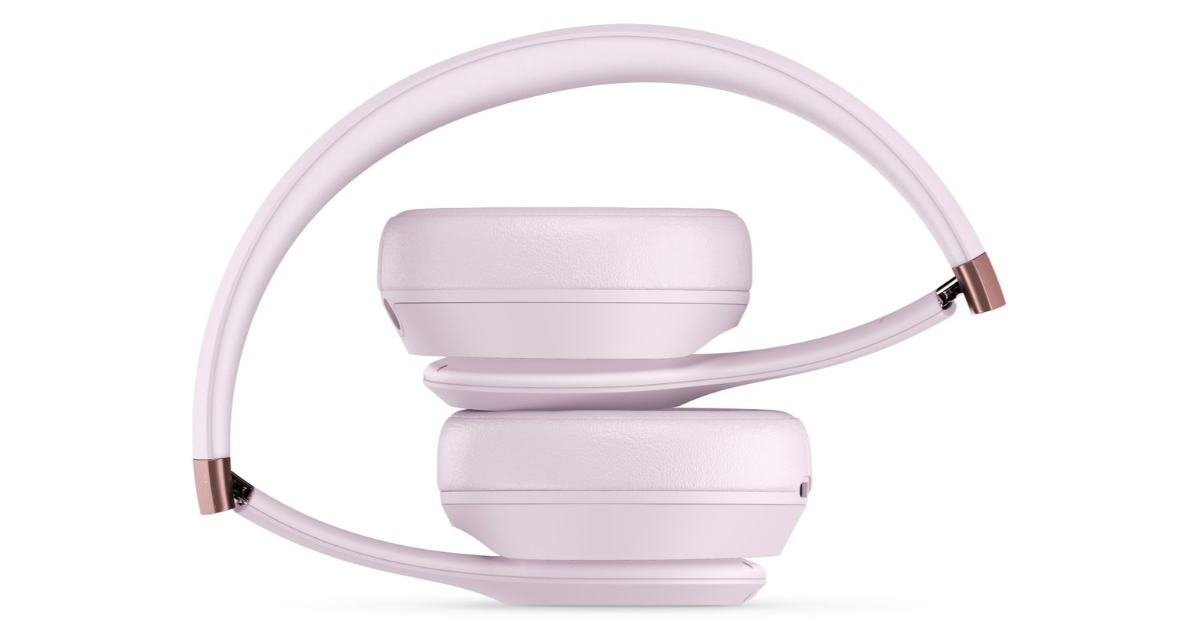
Apple Beats Solo 4 Specifications The 40mm drivers on the Apple Beats Solo 4 allow for dynamic head tracking and customised spatial audio. In addition to angled earcups, the headphones have adjustable sliders. The ‘b’ button lets users manage calls, start voice assistants, and adjust the volume and playing of music. It can connect via Bluetooth 5.3. Additionally, the headphones offer one-touch pairing with both iOS and Android smartphones. A 3.5mm audio cable can be used to establish a wired connection. Additionally, the wireless headphones have a built-in DAC for lossless music. Up to 50 hours of battery life are promised for the headphones, and five hours of listening are promised after just ten minutes of charging.

Beats Solo Buds specifications

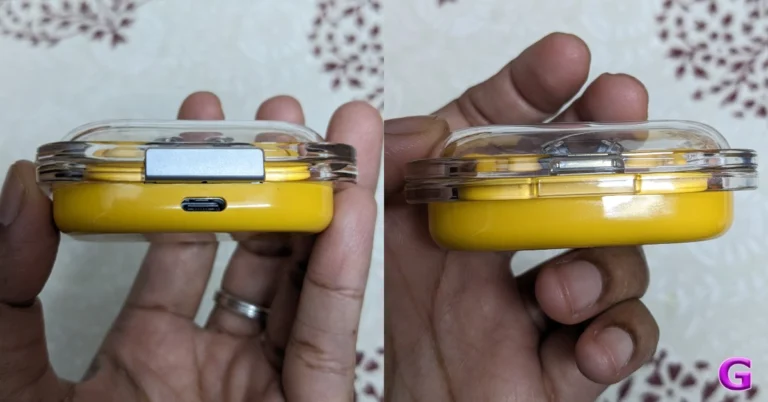
The dual-layer drivers and laser-cut vents on Beats Solo Buds are supposed to enhance music quality. The unique dual-layer transducers are said to reduce micro-distortions. The new Apple Beats Solo Buds include an acoustic nozzle that is ergonomically oriented. The four ear tip sizes that they come in are XS, S, M, and L. Also Read: Samsung Galaxy S24 now available in 128GB variant in India The earphones are also compatible with Google’s Find My Device and Apple’s Find My, allowing for a one-touch connection with iOS and Android smartphones. Beats Solo Buds specifications The ‘b’ button on the earphones also enables configurable on-ear features, enabling users to push it to switch between music and voice assistants, answer and end calls and adjust the volume. The Beats mobile app allows you to manage these customisations as well as other features. USB Type-C is supported by the Beats Solo Buds charging case. A battery life of up to eighteen hours is promised. Over that, it is claimed that five minutes of charging will give the earbuds an hour of playback time.

Top 8 Ways to Fix ‘No Sound on iPhone’

0
If you can’t figure out why you can’t hear any sounds on your iPhone, you have landed on the right page. While this issue is uncommon on newer iPhones, older devices with failing hardware and outdated OS are prone to it. If your iPhone took a dip in the water or faced the full impact of a hard surface fall, it would explain its erroneous behaviour. If that is not the case, here are the top 8 ways you can fix the ‘no sound on iPhone’ issue. Read Also: Top 10 Gaming Keyboards under Rs 15,000 in India (2024)

Why is the sound not working on your iPhone?

If your iPhone isn’t able to play any sounds, it could be due to one of the following reasons:
  • You accidentally set your iPhone to mute.
  • The Do Not Disturb mode is still turned on.
  • Your iPhone is connected to a Bluetooth audio device.
  • Background software issues are keeping the iPhone from producing sounds.
  • Your iPhone’s speakers are damaged.

Check if your iPhone is on mute

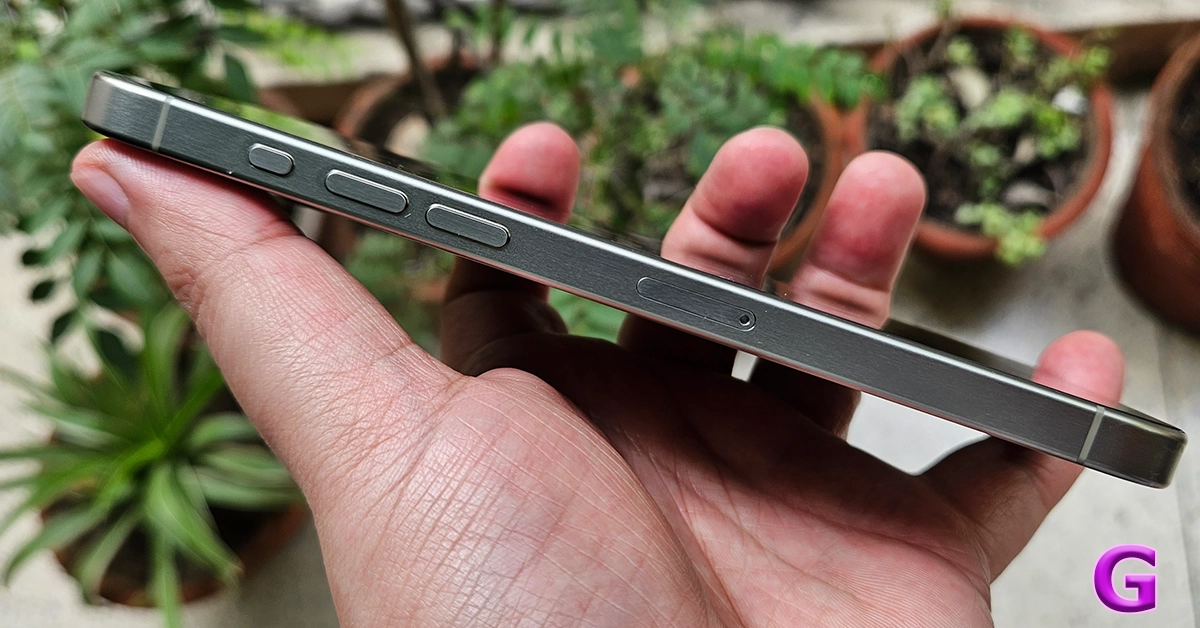
iphone 15 pro max action key If your iPhone is on mute, it won’t produce any sound. This may seem like a pretty obvious thing to check, but you’d be surprised how many times people fret about the lack of sound after accidentally putting their iPhones on mute. Use the ringer switch on the left edge of the iPhone to put it on loud. If your iPhone has an Action Button that is customised to switch audio profiles, use it to select the loud profile.

Set the volume to the highest level

WhatsApp starts rolling out Hide Muted Status Updates feature Your iPhone’s speakers can deteriorate over a period of time. If you’re using an older iPhone, make sure to set its volume at the highest level so you don’t miss any alerts. Go to Settings>Sounds & Haptics and move the slider under ‘Ringer and Alerts’ all the way to the right.

Disconnect your AirPods/TWS

Apple's special Diwali offer: Here is how to get 50% off on Apple AirPods If your iPhone is connected to your AirPods or any other audio output device, it will not produce sounds from its own speakers. Disconnecting an audio device from your iPhone after you’re done using it is easy to forget. Go to Settings>Bluetooth to unpair the device. You can also turn off Bluetooth from the Control Centre to quickly unpair your iPhone from the wireless audio device. This will fix the ‘no sound’ issue on your iPhone.

Turn off DND

If your iPhone is set to Do Not Disturb, it will completely mute any incoming notifications, calls, and alerts. Here’s how you can turn it off. Step 1: Go to Settings and select Focus. Step 2: Tap on Do Not Disturb. Step 3: Turn off its toggle switch.

Clean your iPhone’s speaker

3 ways to scan a document on an iPhone The speaker grille on your iPhone can accumulate dust and grime over a period of time. This causes the audio output to take a hit. Luckily, you can fix it by gently brushing the grille and removing the dirt. Tap the device gently on the desk to get the dirt off the speaker. Use isopropyl alcohol if necessary.

Inspect the phone case

Remove the phone cover If you use a case for your iPhone, make sure it isn’t pressing the volume rocker. This problem doesn’t arise with official Apple cases, but third-party manufacturers often get the measurements wrong. The case may start pressing against the volume down button, thereby muting your iPhone.

Restart your iPhone

Restart your iPhone A quick reboot of your iPhone resolves the background issues that may be keeping it from working properly. You should try this when your iPhone isn’t producing any sound. Simply press the side key along with a volume key and drag the power slider across the screen. Once the phone has shut down, wait for a few seconds and start it again by long-pressing the side key.

Update iOS

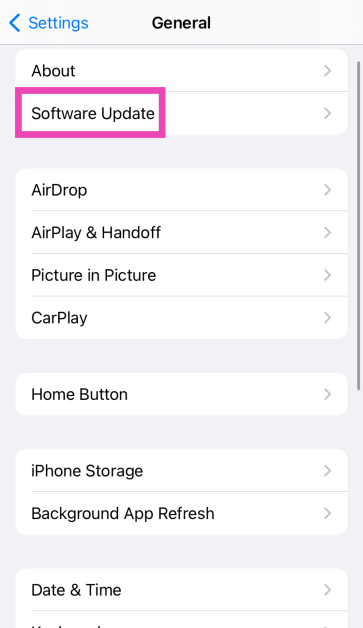
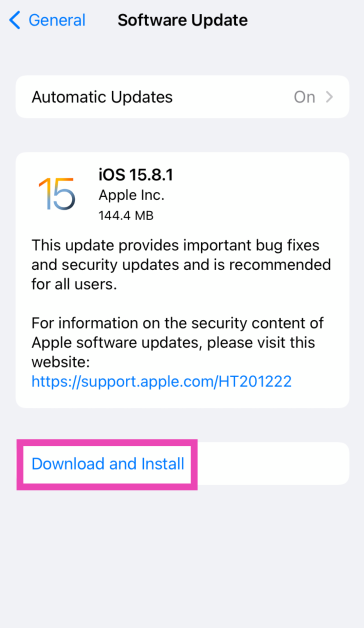
Step 1: Make sure your iPhone is connected to a WiFi network and plug in its charger. Step 2: Go to Settings and select General. Step 1: Go to Settings and select General. Top 11 Ways to Fix 'Message Blocking is Active' on iPhone Step 3: Select Software Update. Step 3: Select Software Update. Top 11 Ways to Fix 'Message Blocking is Active' on iPhone Step 4: Tap on Download and Install. Step 4: Tap on Download and Install. Top 11 Ways to Fix 'Message Blocking is Active' on iPhone

Frequently Asked Questions (FAQs)

How do I change the ringtone on my iPhone?

Go to Settings>Sounds & Haptics>Ringtone and select a new tone. You can also purchase a new tone from Apple’s Tone Store.

How do I change the volume of an alarm on an iPhone?

The alarms you set on your iPhone follow the standard volume of the phone. You can change it by going to Settings>Sound and Haptics and dragging the slider under Ringtone and Alert Volume.

How do I change WhatsApp’s notification sound on my iPhone?

Launch WhatsApp, go to Settings>Notifications>Sound and select a new tone. Read Also: Pixel 8a fifth colour option and pricing tipped ahead of the launch

Conclusion

These are the top 8 ways to fix the ‘no sound on iPhone’ issue. If these fixes don’t work for you, it is possible that your iPhone’s speakers are damaged. Book an appointment at the Genius Bar to go to your nearest Apple-authorised service centre to get the speakers fixed.

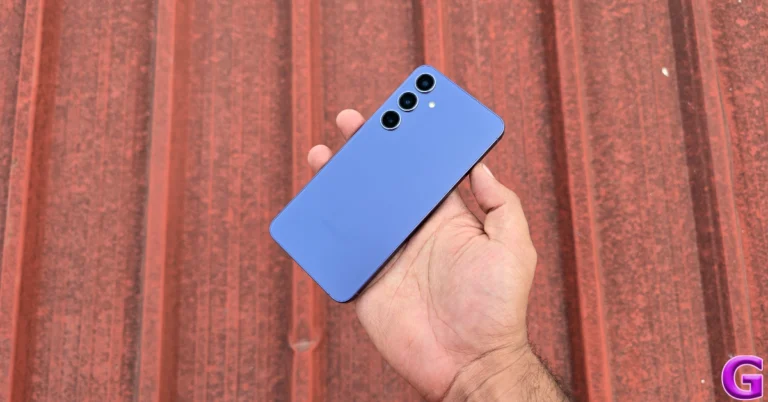
Samsung Galaxy S24 now available in 128GB variant in India

Samsung has officially announced the launch of the Samsung Galaxy S24 128GB storage variant in India. The company introduced two RAM and storage options and the 256GB storage variant was the base model when the phone was launched in the country earlier this year. The device is powered by Snapdragon 8 Gen 3 Mobile Platform for Galaxy. It is shipped with Android 14-based One UI 6.1. Indian customers can now get the Samsung Galaxy S24 128GB storage model. The new variant 128GB model is priced at Rs 74,999. The new options will be available for purchase via the Samsung e-store in the country. Samsung Galaxy S24 was introduced in India in January this year in two different configurations: 8GB RAM with 256GB storage and 8GB RAM with 512GB storage models are priced at Rs 79,999 and Rs 89,999, respectively. S24 is available in Amber Yellow, Cobalt Violet, Onyx, and Black colour options. Also Read: Pixel 8a fifth colour option and pricing tipped ahead of the launch The Samsung Galaxy S24 is highlighted with a 6.2-inch FHD+ and 6.7-inch QHD+ Dynamic AMOLED 2X display with 120Hz refresh rate. The screen has a layer of Corning Gorilla Armor for protection. The Phone includes Samsung Knox, Knox Vault, and Passkeys. The device is powered by Exynos 2400 SoC. It runs on Android 14 with UI 6.1. The company will provide seven generations of OS upgrades and seven years of security updates. The Galaxy S24 features a triple rear camera setup that includes a 12MP Ultra-Wide Camera (F2.2, FOV 120˚), 50MP Wide Camera (OIS F1.8, FOV 85˚) and a 10MP Telephoto Camera (3x Optical Zoom, F2.4, FOV 36˚). All the models come with a 12MP selfie camera (F2.2, FOV 80˚). Also Read: Apple Arcade reveals three new game titles for May 2024 The smartphone includes Live Translate, Interpreter, Chat Assist, Note Assist, Transcript Assist, and Circle to Search, powered by built-in AI features. The Samsung Galaxy S24 is backed by a 4,000mAh battery that supports Wireless PowerShare technology in addition to 25W wired and 15W wireless charging. In addition, it has IP68 dust and splash resistance and supports 5G, 4G LTE, Wi-Fi 6E, Bluetooth 5.3, Wi-Fi direct, and USB Type-C connectivity.

Pixel 8a fifth colour option and pricing tipped ahead of the launch

Key Highlights
  • Google Pixel 8a leaked renders suggest five colour options.
  • The price of the upcoming phone is also tipped ahead of the launch.
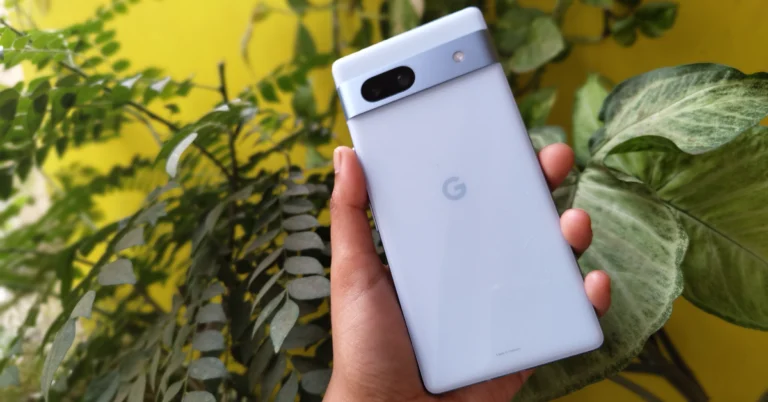
Details of the Pixel 8a have been leaked multiple times in recent weeks. Recently a promo video surfaced on the internet and now new renders along with pricing have leaked. Previously it was revealed through leaked renders that the device would be supplied in four colour options and now a fifth colour choice for the upcoming device has been revealed in additional renders that a source has shared. In addition to providing images of Pixel phone’s covers, a report has revealed the US pricing. There are rumours that the Google Pixel 8a will launch on May 14 at the company’s yearly Google I/O conference. With the anticipated release date drawing near, additional details regarding the Pixel 8a have emerged on the internet. Tipster @MysteryLupin shared 8a’s cases revealing the fifth colour option. Previously he revealed the phone in four colours— Bay, Mint, Obsidian, and Porcelain. As per the leaked images a fifth coral pink colorway exists as well. According to him, this colourway was left out of the earlier renders. Also Read: Apple Arcade reveals three new game titles for May 2024

Pixel 8a Price expected

According to a recent report by Smartprix, there won’t be any price increases for the 8a in the US. The upcoming Pixel Phone will retail for $499, or about Rs. 41,600, for the 128GB internal storage model and $599, or around Rs. 50,000, for the 256GB option. Earlier online sightings of the rumoured Pixel 8a price indicate that consumers may need to shell out a little more money to buy it. According to PassionateGeekz, the 128GB storage model of the Pixel 8a will cost CAD 708.99, or roughly Rs 42,830, in Canada, where the phone was listed by a store. The 256GB variation will cost CAD 792.99, or around Rs 47,900. The identity of the Canadian vendor who carried both  Pixel 8a models was withheld by the media. The price of the Pixel 8a could increase by much to Rs 2,000 in India this year. Also Read: Meta has released new features to organise events on WhatsApp Communities

Pixel 8a specifications expected

The  Google Pixel 8a is anticipated to include a 6.1-inch FHD+ 90Hz display. It will likely use the same Tensor G3 processor that debuted in the Pixel 8. Additionally, it may come equipped with a 4,500mAh battery. A 64-megapixel primary camera and a 13-megapixel ultrawide sensor should be included in terms of cameras. Some AI (artificial intelligence)-related capabilities are also anticipated for the 8a.

Top 10 Gaming Keyboards under Rs 15,000 in India (2024)

Picking the right gaming keyboard can be an arduous and confusing task. Before diving into a keyboard search, you should know the kind of form factor, switch type, and customisation options you are looking for. This will narrow your choices and help you find the keyboard that’s suited to your needs. If you’re willing to spend up to Rs 15,000 on a gaming keyboard, here are your best options. Read Also: Apple Arcade reveals three new game titles for May 2024

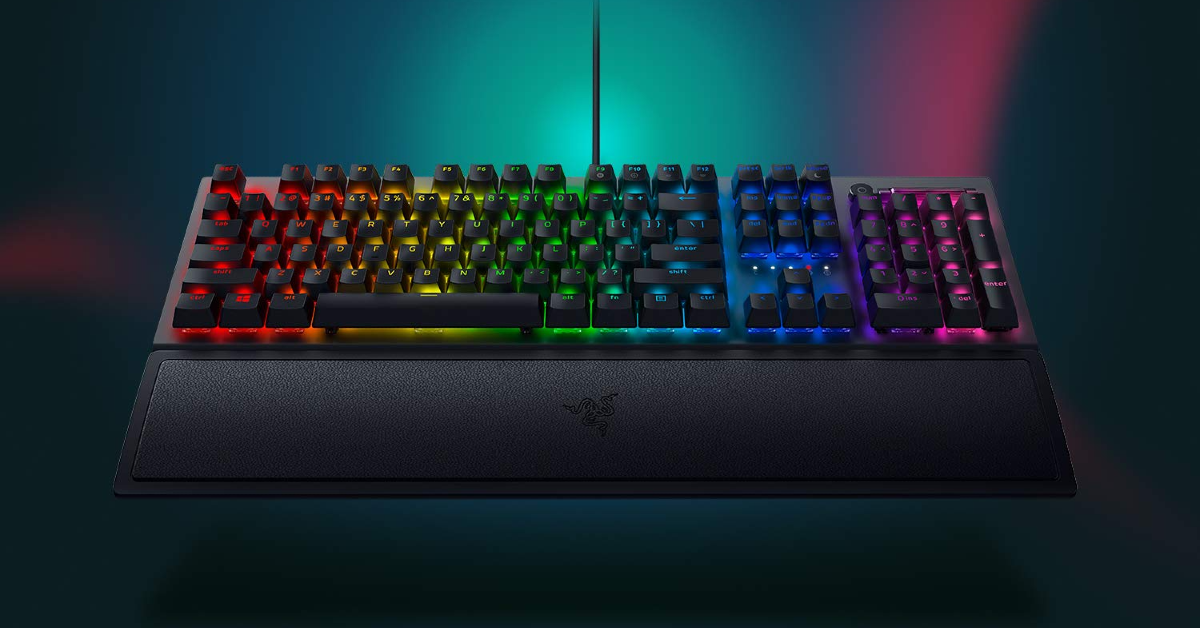
Razer BlackWidow V4

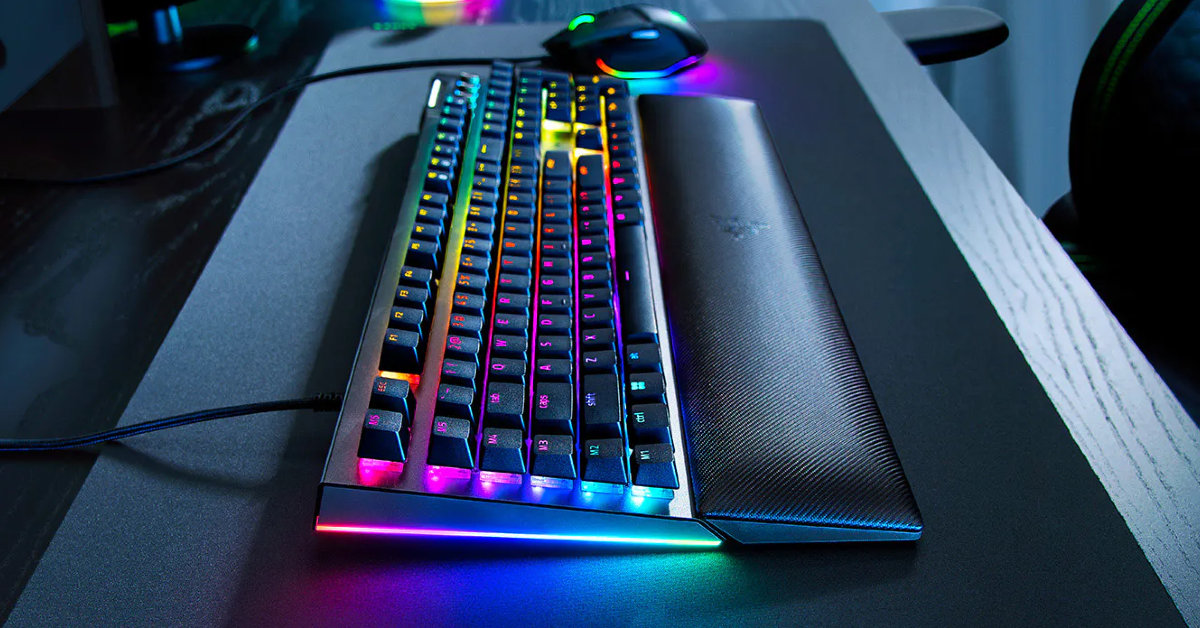
Price: Rs 15,648 on Amazon Razer BlackWidow V4 The Razer BlackWidow V4 is priced just above Rs 15,000 but it is one of the best gaming keyboards you can buy right now in this price range. You can choose between Green and Yellow switches for this keyboard. Both switches have their distinct feel and ‘clickiness’. On top of that, 6 macro keys on this keyboard can be customised by the user. You can program these keys to carry out specific tasks during gameplay. The BlackWidow V4 flaunts RGB lighting for the keys as well as side underglows to elevate the aesthetic of your gaming setup.

Corsair K70 RGB Pro

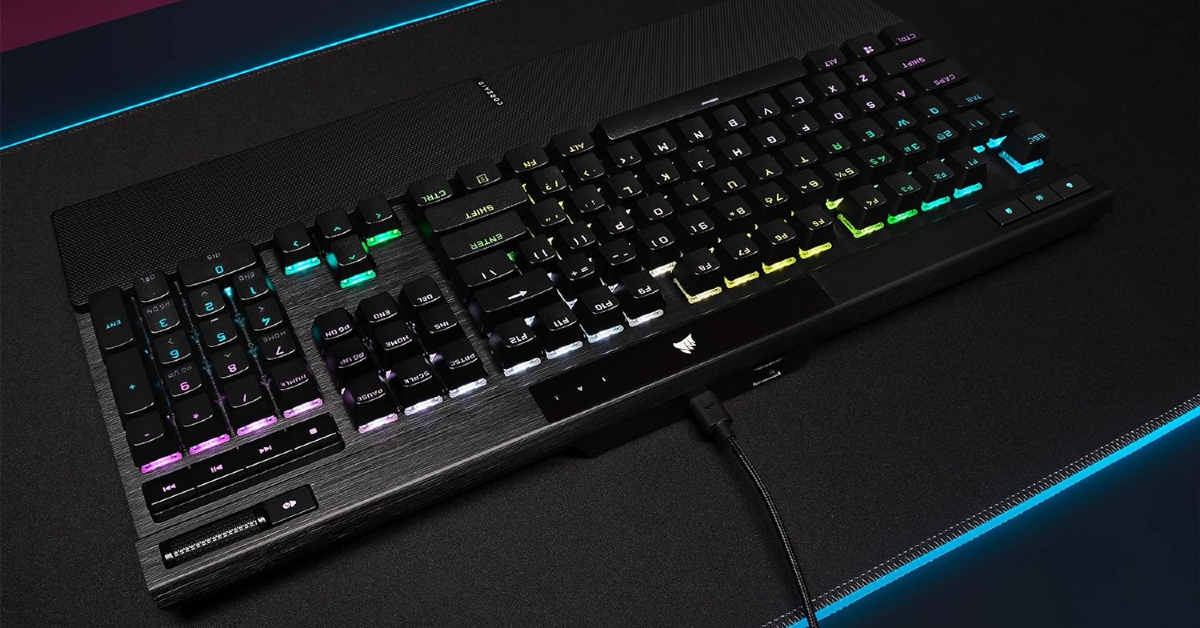
Price: Rs 12,448 on Amazon Corsair K70 RGB Pro The Corsair K70 RGB Pro ticks all the essential boxes for an exquisite gaming keyboard. It rocks Cherry MX Speed RGBSilver switches which have an actuation distance of 1.2mm. The PBT double-shot keycaps feel solid and wear-resistant. You also get a soft-touch palm rest with the keyboard that can be magnetically attached to its shell with ease. The per-key RGB backlights on this keyboard are not in-your-face and can be set to a static profile when you need to focus on gameplay.

MSI Vigor GK30

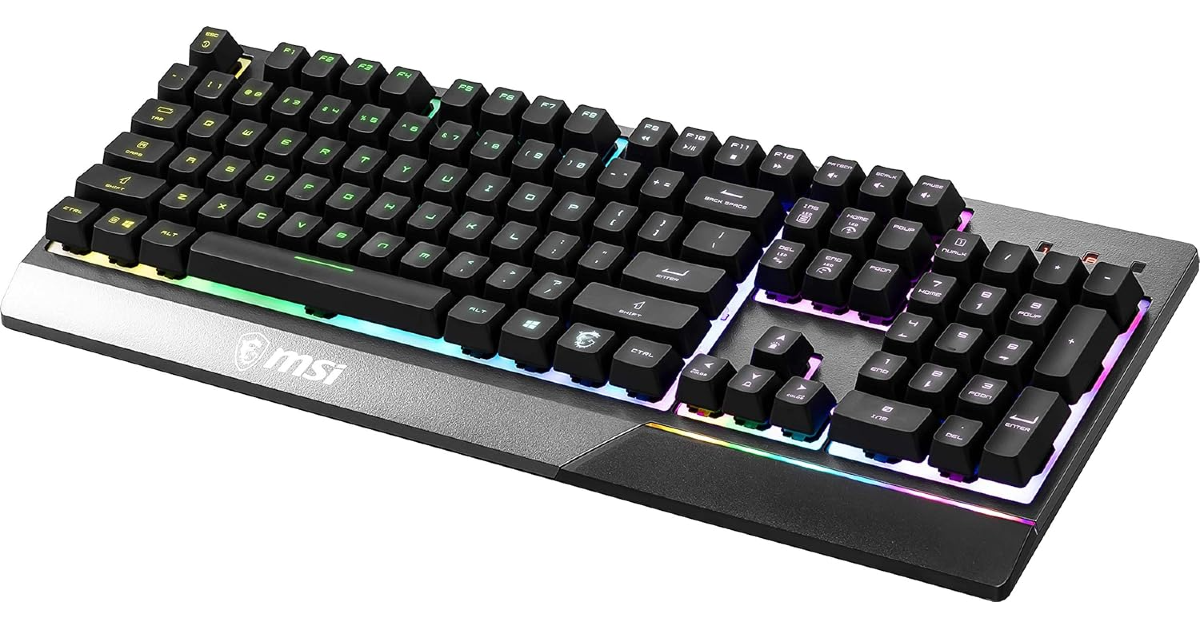
Price: Rs 11,579 on Amazon MSI Vigor GK30 The MSI Vigor GK30 has mecha-membrane switches which replicate the tactile feel of a mechanical keyboard while reducing the sound. If you’re looking for a muted gaming keyboard, this is the one for you. Another reason why you should consider buying the GK30 is its water-resistance chops. This keyboard has a drain hole that lets the liquids out of the shell if you accidentally drop a drink on it. Talking about the aesthetics, this keyboard has 6 RGB zones which can be customised by the user.

Razer Huntsman Mini

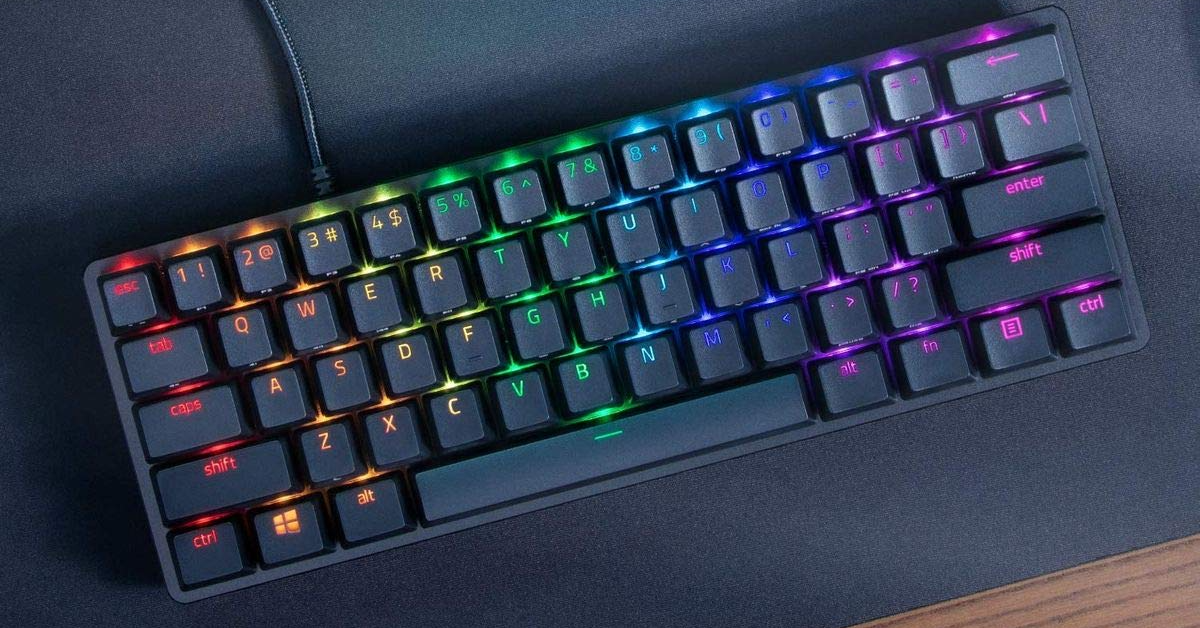
Price: Rs 15,000 on Amazon Razer Huntsman Mini This portable gaming keyboard from Razer has a 60% form factor and is suited for gamers who want more desk space. The Huntsman Mini achieves this form factor by getting rid of the function keys, home cluster, and numpad. The media controls, function keys, macros, brightness control, and other functionalities can be accessed from the regular keys. The shell of the Huntsman Mini is made out of aluminium and has a matte finish. It also features Razer Optical Switches (Clicky, Linear, Analog) and Doubleshot PBT keycaps.

Redragon RED-K550

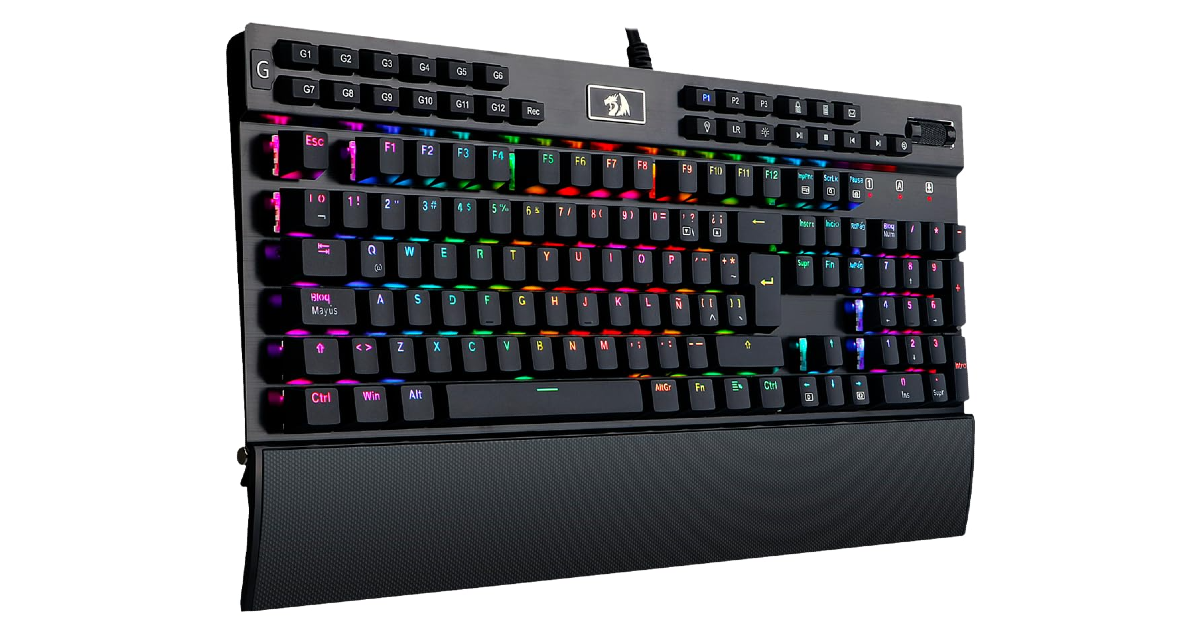
Price: Rs 14,900 on Amazon Redragon RED-K550 Redragon is one of the biggest players in the gaming peripherals industry. Its RED-K550 mechanical gaming keyboard is one of the best you can buy under Rs 15,000. Its casing is made out of aircraft-grade aluminium (as claimed by Redragon) and the user-replaceable mechanical switches can withstand rough use. The switches on this keyboard do not produce an overtly clicky sound, making it ideal for shared spaces. To top it off, there are 12 programmable macro keys on this keyboard along with 18 backlight modes. 

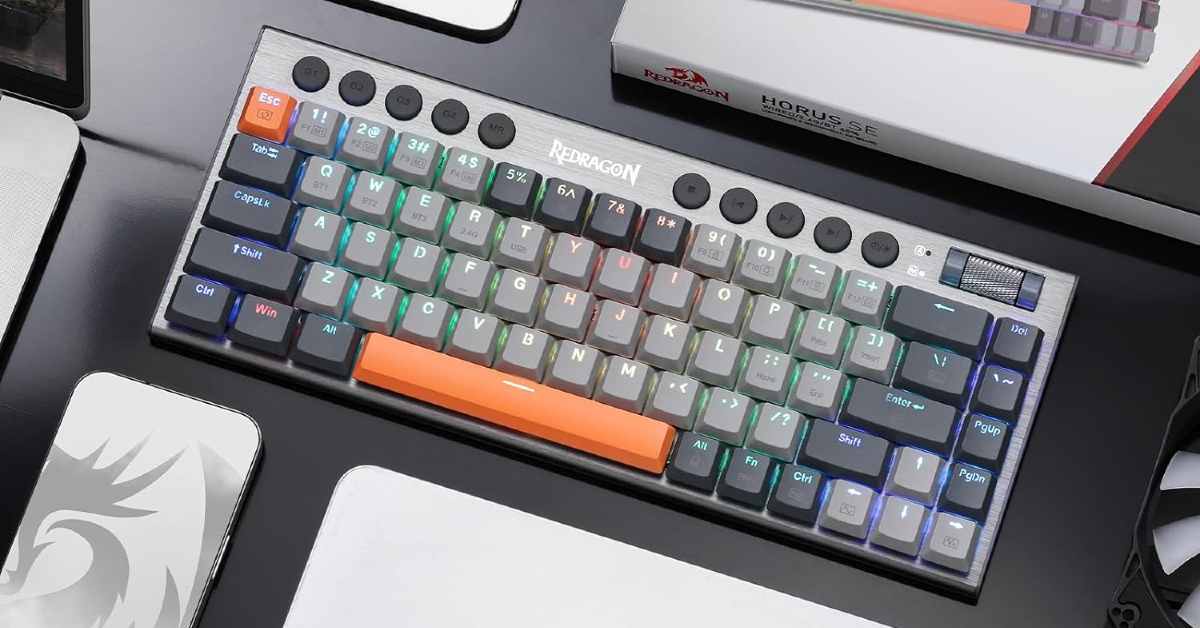
Redragon HORUS K609

Price: Rs 14,606 on Amazon Redragon HORUS K609 The Redragon HORUS K609 has a 68-key layout which reduces its form factor to 65%, making it ideal for smaller desks. There are dedicated media keys on the keyboard but no vertical numpad. The volume scroller on the keyboard case is a nice addition as well. The keycaps on this keyboard are slimmer than their traditional counterparts and the low-profile red switches offer a good response. Talking about connectivity, you can pair the K606 to your PC using a USB Type-C cable, Bluetooth 3.0/5.0, and a 2.4GHz wireless receiver. 

Razer BlackWidow V3

Price: Rs 14,779 on Amazon Razer BlackWidow V3 Top 10 Gaming Keyboards under Rs 15,000 in India (2024) The Razer BlackWidow V3 features Green and Yellow mechanical switches. The former offers tactile and clicky feedback along with an accurate response. The latter is suited for a muted response and smoother keystrokes with no tactile bump. The UV coating on the keycaps makes them resistant to wear. The digital roller on the keyboard can be used to adjust the volume and carry out other customised tasks. The RGB lighting on this keyboard looks stunning, mostly due to the transparent switch housing.

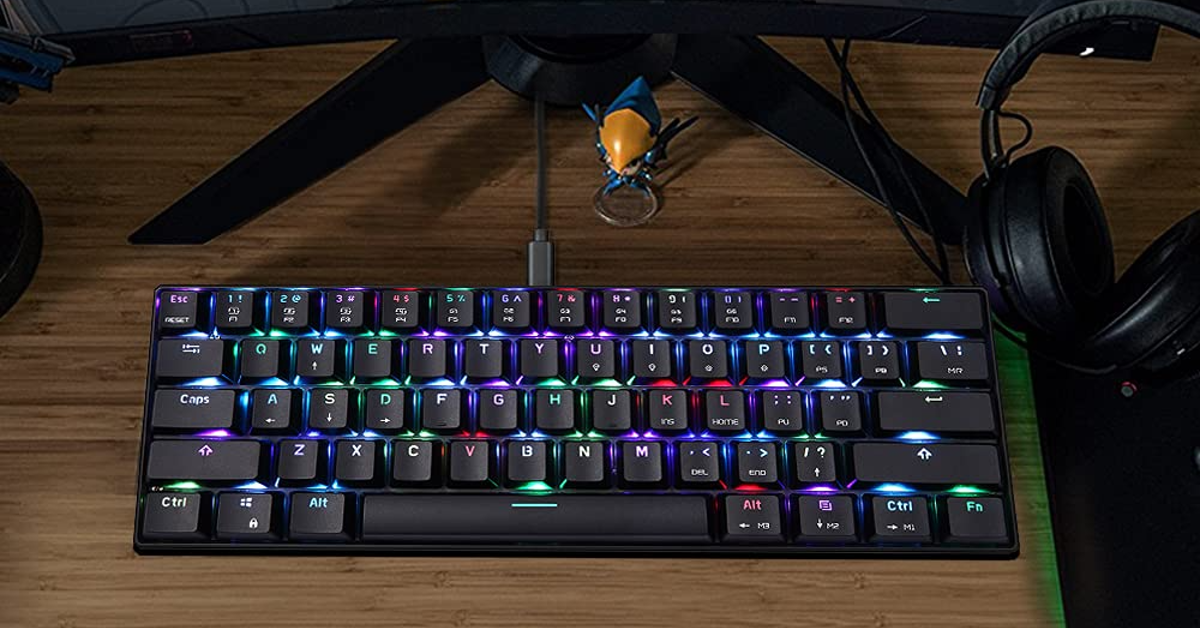
Adium CK61 RGB

Price: Rs 14,978 on Amazon Adium CK61 RGB Top 10 Gaming Keyboards under Rs 15,000 in India (2024) This portable gaming keyboard has 61 keys that make use of advanced mechanical Blue switches. The Red Switch variant costs upwards of Rs 17,000. The per-key lighting on this keyboard looks amazing. If we’re only considering the RGB lighting design, the Adium CK61 makes the case for being the best-looking gaming keyboard under Rs 15,000. It can adapt its lighting to match the mood of the game. On top of that, the CK61 is durable and can easily withstand rough use. 

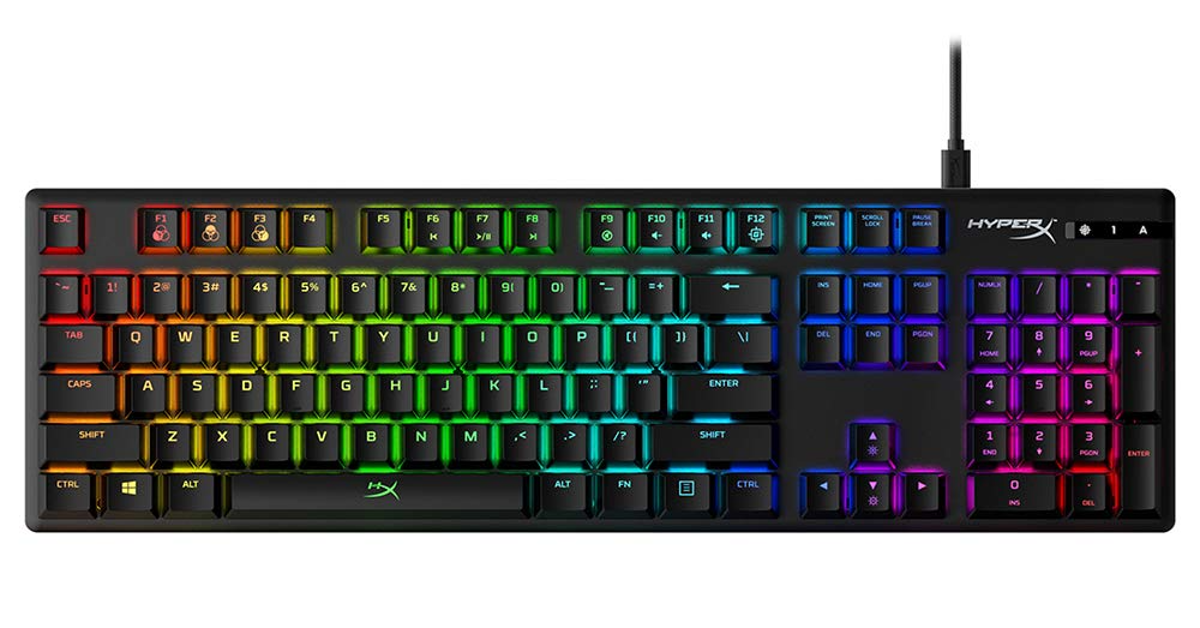
HP HyperX Alloy Origins

Price: Rs 9,490 on Amazon HP HyperX Alloy Origins Top 10 Gaming Keyboards under Rs 15,000 in India (2024) The HP HyperX Alloy Origins mechanical gaming keyboard can be had in three mechanical switch variants – HyperX Aqua, HyperX Blue, and HyperX Red. The Red Switch variant fetches Rs 9,490. We suggest looking into the different switch types on offer and figuring out which one works best for you. The HyperX’s body is made out of aircraft-grade aluminium, giving it a premium feel while also being very rigid. You can connect the keyboard to your PC using a USB Type-C cable which can be easily detached from its body. On top of that, you can save up to 3 light profiles on the keyboard.

Logitech G Pro

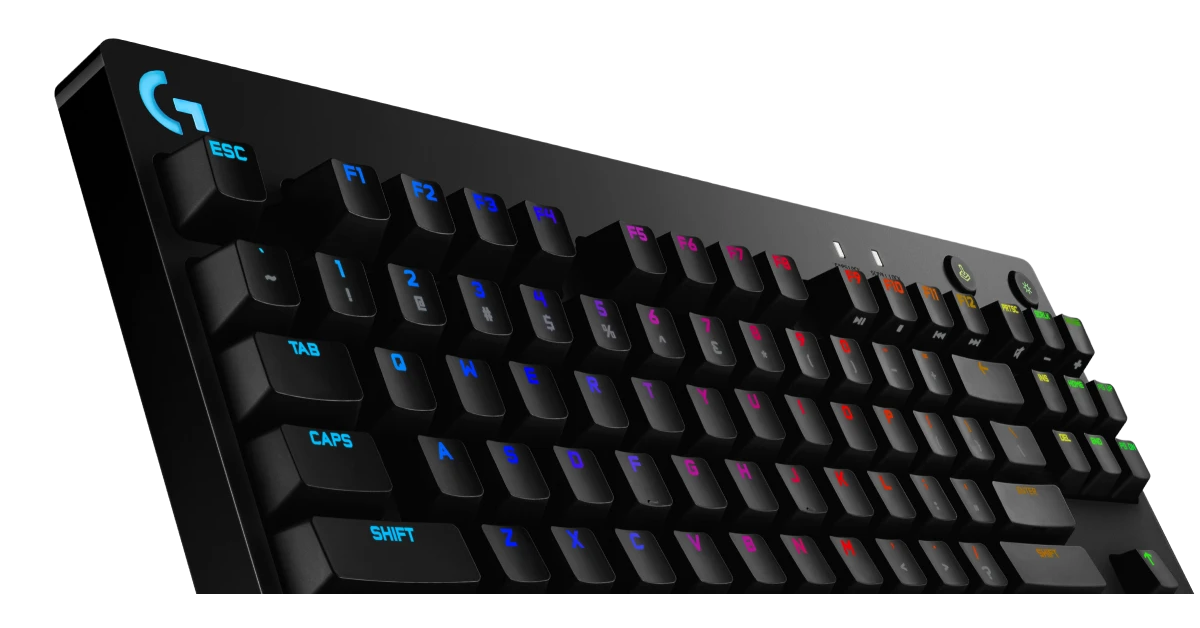
Price: Rs 10,994 on Amazon Logitech G Pro Top 10 Gaming Keyboards under Rs 15,000 in India (2024) The last entry on this list is the ol’ reliable Logitech G Pro mechanical keyboard. If you’re looking for a mechanical gaming keyboard with good switches and subtle RGB backlighting at a relatively affordable price, the G Pro should be right up your alley. The GX Blue switches on this keyboard offer tremendous tactile feedback and sublime response. Its tenkeyless design is suited for small desks where you need more room for the movement of the mouse. On top of that, this keyboard supports Logitech G Hub, which allows users to customise the lighting and animation on the device. Read Also: Top 3 Ways to Turn off Incognito Mode on Android? (2024)

Conclusion

These are our picks for the top 10 gaming keyboards under Rs 15,000 in India. If you think we missed a keyboard that deserves to be on this list, let us know in the comments! 

Apple Arcade reveals three new game titles for May 2024

Key Highlights
  • Apple Arcade has added three new games to its library.
  • The game subscription service has introduced- Slight Chance of Sawblades+, Dicey Dungeons+, and Summer Pop+
Apple Arcade now offers more titles. The game subscription service has revealed three new Apple Arcade games for May 2024. A Slight Chance of Sawblades+, Dicey Dungeons+, and Summer Pop+ are the three new games to Apple Arcade.

Slight Chance of Sawblades+

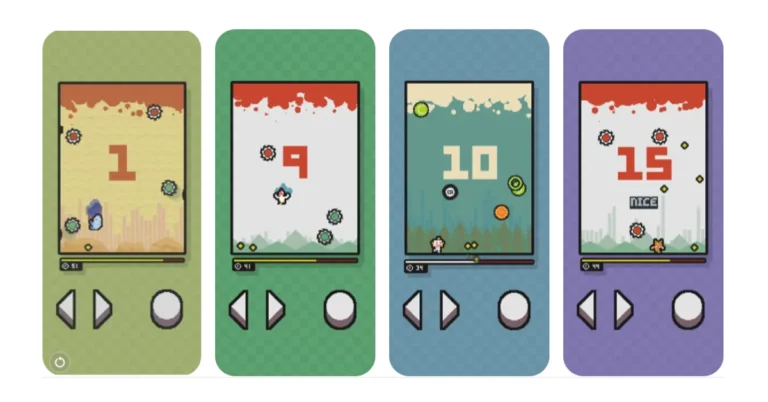
Singaporean single developer Yong Kian Chin’s A Slight Chance of Sawblades+. It is an oddball yet difficult retro 2D pixelated platformer game. To survive the fatal storm and achieve the highest possible score, players will need to dodge, jump, and somersault over razor-sharp sawblades in the new Apple Arcade game, which has skill-based score-chasing action, fast arcade gameplay, and catchy 8-bit music. Players can also compete in the global leaderboard to earn the top spot as the best blade jumper.

Dicey Dungeons+ by Distractionware

In Dicey Dungeons+, players construct decks and engage in rogue-like gameplay. This latest Apple Arcade title lets you battle monsters, find amazing treasure, and advance your heroes’ levels in an attempt to defeat Lady Luck herself. To master this game, players must balance carefully planned strategies against the unknown of a dice roll. Also Read: Meta has released new features to organise events on WhatsApp Communities

Beach Paradise Adventure Summer Pop+

The match-three adventure game Beach Paradise Adventure Summer Pop+ joins Apple Arcade. Happy Elements, a Beijing-based game studio, created the well-known match-three title, which has hundreds of entertaining puzzles to solve. Players will use magical abilities and boosts to progress through challenging stages, matching animals and creating incredible combinations to unleash amazing effects. Players can go fishing with Lemon Remon, gather supplies to make fruit ice cream and juice with Coffee Lot, and gather candy and dolls for Rosy Mona and Purple Amy. They can also team up with Green Idol to defeat the Octopus Boss. Also Read: Redmi Note 13 Series price in India drops, now starts at Rs 15,499 Note that all three game titles are also available on the App Store and users have free access to a large selection of games from its library. Members of Apple’s subscription service are free from advertisements and in-app purchases.

Top 3 Ways to Turn off Incognito Mode on Android? (2024)

0
If you value anonymous and private web browsing, you must be familiar with Incognito Mode on Google Chrome. Other web browsers offer this feature as well, albeit under different names. In Microsoft Edge, incognito tabs are called InPrivate tabs. YouTube, being a Google product, also has an Incognito Mode of its own. If you own an Android smartphone, you can also browse your phone anonymously. In this article, we bring you the top 3 ways to turn off or disable Incognito Mode on Android. Read Also: Meta has released new features to organise events on WhatsApp Communities

Can you use your phone in Incognito Mode?

While web browsers like Google Chrome and Microsoft Edge have a dedicated mode for anonymous browsing, your Android smartphone does not have an explicit ‘Incognito Mode’. However, this does not mean that you cannot use your phone anonymously. Android devices have a super handy ‘Guest Mode’ which creates an entirely new interface devoid of the user’s personal data. If you wish to hand over your phone to someone else, you can put your phone in Guest Mode. This mode can also be used as an incognito interface as the activity you carry out in it does not reflect on your main (admin) account. You can download apps, browse social media, take pictures, and carry out a bunch of tasks on the Guest Mode. OnePlus/Oppo devices have a ‘System Cloner’ which works similarly. To turn on the Guest Mode on your Android smartphone, go to Settings>Users & accounts>Multiple users and turn on its toggle switch. To exit the Guest profile, go to the Quick Settings Menu, tap on the user icon at the top and select your main profile.

Turn off Incognito Mode in Google Chrome for Android

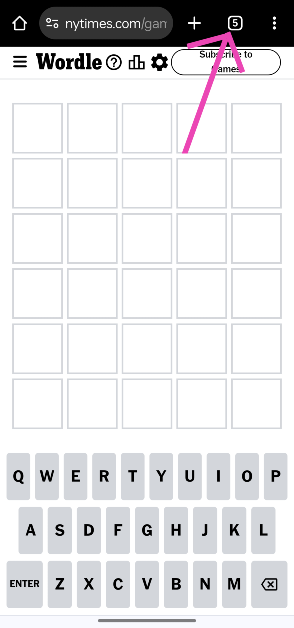
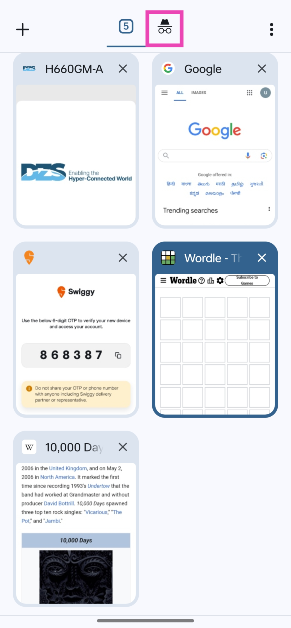
Step 1: Launch the Google Chrome web browser on your smartphone and hit the tabs icon on the toolbar at the top. Step 1: Launch the Google Chrome web browser on your smartphone and hit the tabs icon on the toolbar at the top. Step 2: Tap the hat and glasses icon at the top to switch to the incognito tabs. Step 2: Tap the hat and glasses icon at the top to switch to the incognito tabs. Step 3: Swipe left or hit the cross icon on the incognito tab you wish to close.

Turn off Incognito Mode on YouTube for Android

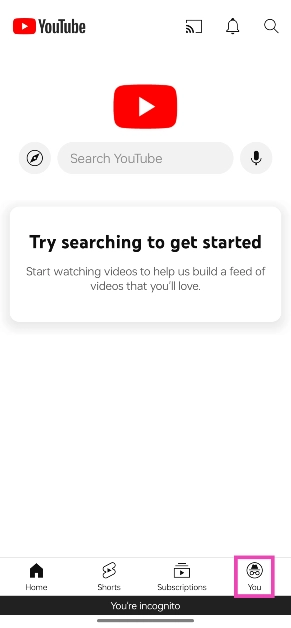
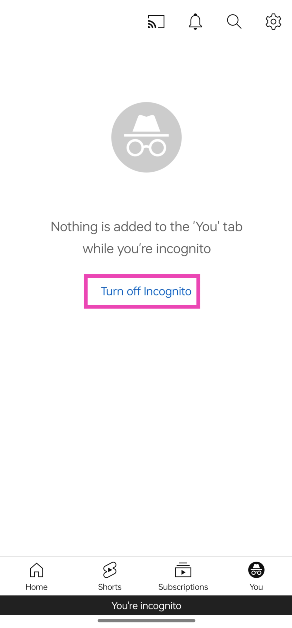
Step 1: Launch the YouTube app on your Android smartphone. Step 2: Switch to the You tab. Step 2: Switch to the You tab. Step 3: Tap on Turn off Incognito. Step 3: Tap on Turn off Incognito.

Turn off Incognito Mode in Microsoft Edge for Android

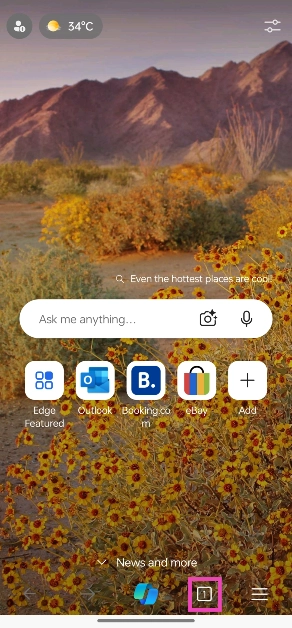
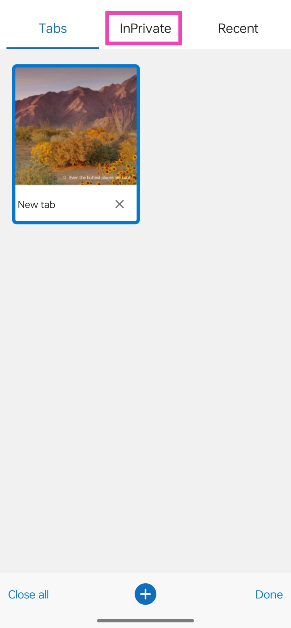
Step 1: Launch the Microsoft Edge browser on your Android smartphone. Step 2: Tap the tabs icon on the bottom toolbar. Step 2: Tap the tabs icon on the bottom toolbar. Top 3 Ways to Turn off Incognito Mode on Android? (2024) Step 3: Switch to the InPrivate tab. Step 3: Switch to the InPrivate tab. Top 3 Ways to Turn off Incognito Mode on Android? (2024) Step 4: Swipe left or hit the cross icon on the tab you wish to close. Tap on Close all at the bottom left corner of the screen to close all InPrivate tabs.

Frequently Asked Questions (FAQs)

How do I switch from Guest Mode to Admin profile on Android?

Swipe down on the home page to access the Quick Settings Menu, tap on the user icon at the top of the screen, and select the Admin profile.

How do I turn off Incognito Mode in Google Chrome?

Tap the tabs icon, switch to the incognito section, and swipe left on the incognito tabs you wish to close.

How do I turn off Incognito Mode on YouTube?

Switch to the ‘You’ tab and select ‘Turn off Incognito’. You will be redirected to your personalised YouTube home page. Read Also: Redmi Note 13 Series price in India drops, now starts at Rs 15,499

Conclusion

These are the top 3 ways to disable or turn off incognito mode on an Android smartphone. To turn off the ‘multiple users’ feature altogether, go to Settings>Users & accounts>Multiple Users and turn off its toggle switch. If you know any other ways to go about this task, let us know in the comments!

Meta has released new features to organise events on WhatsApp Communities

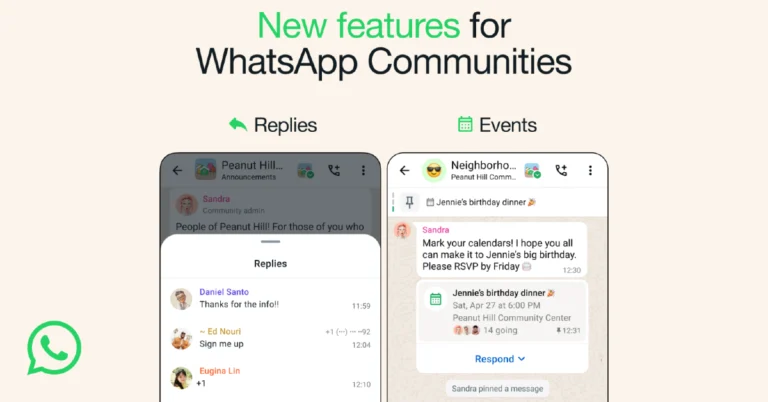
WhatsApp has started to roll out new features for Communities allowing users to organise events. The instant messaging platform by Meta brings a new Events feature and enables replies in Announcement Groups. With the addition of new ways of organising events, the WhatsApp Communities will become more engaging. Group members may create any kind of event using events, and other participants can subsequently register their attendance or absence. In addition, WhatsApp will send out a notification as the event gets closer. Meta, via a blog post, said, “Since launching WhatsApp Communities, we’ve seen neighbourhoods, school associations, hobbyists, and more use the feature to keep groups connected and organised. To help bring communities even closer together, we’re adding a new way for people to organise events on WhatsApp, and we’re introducing organised replies in Announcement Groups so members can respond to important updates from admins.” Also Read: Redmi Note 13 Series price in India drops, now starts at Rs 15,499 

Organising events on WhatsApp gets easier

WhatsApp is making it simple for users to organise events like a birthday dinner or a virtual meeting straight in WhatsApp. As per Meta, anyone can create an event to which others can reply, allowing everyone in the group to be aware of who is attending. The event will also be listed on the group’s information page, and attendees will receive an alert as it approaches. As of now, Events will initially be available to groups that are members of a community, and over the next few months, they will be extended to all groups. Also Read: Poco X6 5G Skyline Blue colour variant introduced in India

Replies to Announcement Groups

Additionally, WhatsApp Communities offers the ability for users to respond to announcements from group administrators, which facilitates maintaining group communication. This feature allows administrators to receive feedback from their members and maintains the convenience of being able to quickly learn about events within your community. Moreover, notifications are muted for everyone, and replies are put together and minimised so you can see what others have said in context.

Garena Free Fire Redeem Codes Today 3 May 2024: Here is how to claim them

Garena Free Fire is a battle royale game with regular awards and tournaments to keep players interested. If you play Garena Free Fire, you should be aware of the redeem codes that are released on a daily basis. However, because the battle royale game is banned in India, players from other countries can use the Free Fire Redeem codes daily. If you’re unfamiliar with the Garena Free Fire redeem codes or don’t know how to get them, we’ve put together a step-by-step guide to help you redeem them. Check out Garena Free Fire Redeem Codes for 3 May 2024. The Free Fire redeem codes are a great way to get free stuff. These are 12-digit codes that contain alphabets and numbers, as well as an expiration date and time. Because the Garena FF redeem codes cannot be used more than once, you should hurry to the redemption page to claim your free reward before someone else does. To get a free reward, all you have to do is go to reward.ff.garena.com/en, which is the official redemption page. Also, keep an eye on this space for daily updates on Garena Free Fire redemption codes and rewards. Also Read: Sennheiser Accentum Plus wireless headphones with Hybrid Adaptive Noise Cancellation launched

Garena Free Fire Redeem Codes Today 3 May 2024

N3O7P5Q2R6S8T4 B1C9D4E7F2G5H8 U3V8W2X5Y7Z4A6 I2J5K8L1M3N9O4 P7Q2R5S9T6U3V8 E1F6G4H9I3J7K2 W5X2Y8Z6A3B1C7 A5B1C9D3F6K2L4 M7N5O1P4Q8R2S6 T6U9V2W8X4Y7Z1 H5I2J8K3L6M4N9 Q3R6S9T2U5V7W1 F8G1H4I7J5K9L2 T9U3V7X5Y1Z4W2 G6H8I2J4K3L9M1 L4M9N6O3P1Q7R5 S2T8U5V1W4X6Y9 D7E3F1G5H2I8J4 Z6A9B3C7D2E8F5 K1L4M7N2O5P3Q8

How to Get Free Fire Redeem Codes for Garena on 3 May 2024?

  • Visit the Garena Free Fire game’s official website at reward.ff.garena.com.
  • Use your Facebook, Google, VK, Apple ID, Huawei ID, or Twitter account to log in.
  • You’ll be taken to a valid redemption code (s)
  • Copy and paste the 12-digit redemption code into the text box.
  • On the screen, a dialogue box will appear.
  • ‘Ok’ should be selected.
For the latest gadget and tech news, and gadget reviews, follow us on TwitterFacebook and Instagram. For newest tech & gadget videos subscribe to our YouTube Channel. You can also stay up to date using the Gadget Bridge Android App. You can find the latest car and bike news here.

Gaming in the Digital Age: How Tech Enhances the Canadian iGaming Experience

The casino and gambling industry is constantly evolving due to the constant introduction of new technologies. The industry adopts new technologies to provide players with the best gaming experience possible and Canadian casinos have not been left behind. These technological advances provide numerous benefits, such as better games, and better gambling services and easier access. Here are the various ways technology has affected Canadian online casinos and improved player experiences.

Convenience and Accessibility

Technology has improved the ease and accessibility of cassinos. Thanks to the emergence of online casinos, gamblers can enjoy all their favourite games without ever leaving the comfort of their own homes. This means you don’t have to worry about operating times. Additionally, it opens up a whole new world of possibilities by allowing players from all over the world to play at Canadian online casinos such as Mega Moolah Casinos in Canada. Technology has also made it possible to access casinos via websites and mobile apps, which is even more convenient. Users can, therefore, access their favourite casinos and play whenever they choose, regardless of where they are.

Real-Time Assistance with AI Chatbots

A reliable customer support system is essential for an enhanced gaming experience. It ensures that players always have access to help, which is a major plus. Artificial intelligence chatbots have been a game-changer, allowing almost every casino to provide Canadian players with round-the-clock immediate help. This frees players from having to adjust to the time zones of other nations. AI-powered chatbots use natural language processing (NLP) to understand and respond to player questions in real-time. They provide accurate and relevant answers to player inquiries on account information, game regulations, and payment methods. This real-time assistance improves the gaming experience while freeing up real people to handle more complicated customer service issues.

More Personalised Experiences

Many casinos now monitor player actions to provide a better gambling experience both on and off the floor. They often look for things such as players’ preferred slot machines, how long players play for or how much they wager at the table, and what they buy at the gift shop. Players are then rewarded for their continued commitment with perks like enhanced hotel rooms, food, vouchers, and other upgrades. Additionally, casinos gain from the collected data since it shows them which slot machines are the most popular, how to keep customers on the floor for longer, and which parts of the casino are busiest and least busy. All of this information is analysed to make the casino better for everyone. By tracking player preferences, casinos can better understand how to adapt their services to meet customer demand.

Immersive Experience with Virtual-Reality

The Canadian online gaming industry has seen a remarkable transformation driven by the advent of virtual reality technology. VR provides an immersive and engaging experience reminiscent of classic casinos. These cutting-edge technologies provide 3D environments where players can interact with in-game characters and objects. The casino industry is seeing an overwhelming demand for virtual reality gaming. However, the integration of virtual-reality in online gaming experiences is still in its early stages, which is why there are few VR games. Even yet, you can enjoy the immersive experience of VR with games such as Casino VR Poker, VR Blackjack, Apollo Slots VR, and Bullet VR Roulette.

Improved Sports Betting

Sports betting at Canadian casinos is becoming more popular thanks to recent technological advancements. There has never been an easier time to place a bet on sports events. Nowadays, players can wager on their phones via apps or casino websites. With an increasing number of cutting-edge sportsbooks, betting kiosks, and in-play betting alternatives, players can now personalise their wagers according to their favourite games. This technology has been out for some time in Europe, but it is just now making its way to Canada. As the country embraces new technologies, both within and outside of casinos, sports betting is expected to continue growing in popularity.

Enhanced Security

It is standard practice for online casinos to request personal identification information from players to access their accounts. However, it would be best if you were cautious when disclosing personal information to prevent it from falling into the wrong hands. There has been an increase in cyberattacks, with online casinos being one of the most likely targets, and your personal information might be in danger. Thanks in large part to technology, online gaming platforms are becoming more secure. Today, you don’t have to worry about any of your personal information being compromised when you join and play at online casinos. This has mainly been made possible by the rise of two-factor authentication, which online casinos are using to further safeguard player accounts and private information. Enhanced security measures ensure your information on the site is secure and that no unauthorised users can access it.

Advanced Fraud Detection Mechanisms

Another noteworthy advancement is the ability of artificial intelligence to detect possible fraud. Fraud issues have persisted for quite some time in the casino industry, but AI has helped to alleviate them. AI uses trained algorithms to identify possible cases of fraud before they become serious. The algorithms analyse large amounts of data and identify strange behavioural patterns. With enhanced fraud detection mechanisms, Canadian players can be assured of a high level of security at all times. As a result, they can play their preferred games with confidence, knowing that there are procedures in place that are purposefully protecting their interests.

Quality Graphics and Audio

The audio and visual quality of online casino games has greatly improved over the last several decades. These days, it’s difficult to find an online casino without a sleek, contemporary design that players love. The games include improved sound effects and soundtracks that match their theme. In terms of graphics, technological advancements in this area have made games far more lifelike. Nowadays, casino games often have stunningly animated characters and symbols that give them a one-of-a-kind visual appeal. I can’t think of anything that would make these games more enjoyable to play.

Conclusion

Canada’s casino industry has greatly benefited from technology. They provide a far more thrilling and realistic gaming experience than they did a few years back. With live dealer games, upgraded visuals and gameplay, smartphone compatibility, and virtual reality, there’s never been a better moment to start playing casino games online. What does the future look like? Thanks to technology’s ever-evolving nature, there will undoubtedly be even more groundbreaking developments in the online gambling sector. These improvements will benefit both players and casinos, so they are something to anticipate. It will be interesting to see how this sector develops in the years to come.

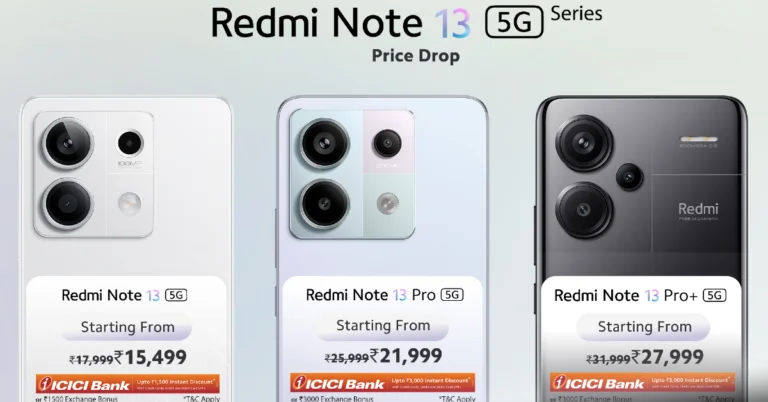
Redmi Note 13 Series price in India drops, now starts at Rs 15,499

In celebration of Xiaomi’s tenth anniversary, the company has announced a price reduction on the Redmi Note 13 Series lineup. The price of the series now starts at Rs 15,499 in India. The price cut applies to all three phones in the lineup- the Redmi Note 13 5G, the Note 13 Pro 5G, and the Note 13 Pro+ 5G. The series debuted in the country earlier this year. Redmi Note 13 5G will now be available at a net effective price of INR 15,499 for 6GB+128GB, INR 17,499 for 8GB+256 GB and INR 19,499 for 12GB+256GB inclusive of offers. Also Read: Poco X6 5G Skyline Blue colour variant introduced in India Redmi Note 13 Pro 5G can be purchased at a net effective price of INR 21,999 for 8GB+128GB, 8GB+256GB for INR 23,999 and INR 25,999 for 12GB+256GB, inclusive of offers. Redmi Note 13 Pro+ 5G now comes at a net effective price of INR 27,999 for 8GB+256GB, INR 29,999 for 12GB+256GB and INR 31,999 for 12GB+512GB inclusive of offers. The pricing has been revised on all the online platforms Mi.com, Amazon, Flipkart, Xiaomi Home and Xiaomi Retail.

Redmi Note 13 Series specifications

Redmi Note 13 5G has a 6.67-inch AMOLED display with 1,080×2,400 pixels of resolution. Over that,  it has a refresh rate of 120Hz and a peak brightness of 1,000 nits. It also supports 1,920Hz pulse width modulation (PWM dimming) and includes Corning Gorilla Glass 5 protection. The phone is integrated with Android 13-based MIUI 14 and powered by MediaTek Dimensity 6080 SoC. It has a dual rear camera setup that includes a 108MP primary sensor (f/1.7 aperture) and a 2MP macro sensor(f/2.4 aperture). All three phones feature a 16MP selfie camera. The smartphone houses a 5,000mAh battery and comes with 33W wired fast charging support. It comes with a side-mounted fingerprint scanner for unlocking. Also Read: Vivo V30e launched in India, price starts at Rs 27,999 The Redmi Note 13 Pro 5G features a 6.67-inch 1.5K full-HD+ AMOLED screen with 1,220×2,712 pixels resolution. The display has a 120Hz refresh rate and supports up to 1,800 nits of peak brightness. The screen comes with Corning Gorilla Glass Victus protection. The device is powered by Qualcomm Snapdragon 7s Gen 2 and runs MIUI 14 OS. There is a triple rear camera setup on the phone that includes a 200MP primary sensor (f/1.65 aperture and OIS), an 8MP ultra-wide angle lens (f/2.2 aperture), and a 2MP macro lens (f/2.4 aperture). A 5,100mAh battery with 67W fast charging support backs the device. Lastly, Redmi Note 13 Pro+ 5G has the same display as the Pro model and however, it is powered by MediaTek Dimensity 7200 Ultra SoC. The device has a 5,000mAh battery that supports 120W fast charging. The camera sensor on the rear and front are also similar to the Pro variant.

Poco X6 5G Skyline Blue colour variant introduced in India

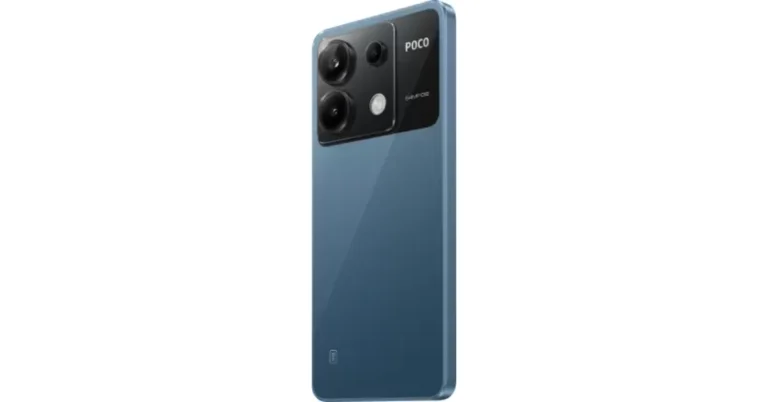
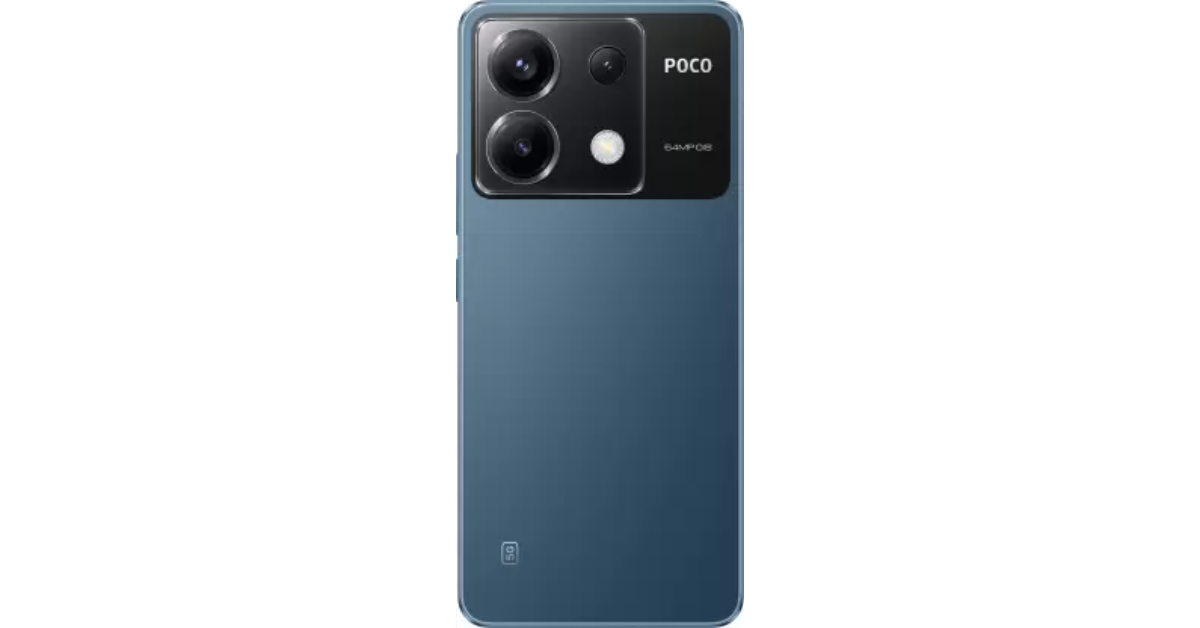
Poco X6 5G is now available in a new colour variant. Xiaomi’s spin-off has introduced the Skyline Blue colour variant for the smartphone. The device was previously made available in two colour options but now buyers will get three colour choices. The handset includes a triple rear camera setup and a 120Hz display. The phone is powered by the Snapdragon 7s Gen 2 chip. It runs on new HyperOS software and supports 67W fast charging.

Poco X6 5G Skyline Blue price in India

Poco X6 5G Skyline Blue will be available at Rs 21,999 for the base 8GB RAM with 256GB storage. The price of the 12 GB RAM with 256GB storage and 12GB RAM with 512GB storage model is set at Rs 23,999 and Rs 24,999. In January this phone was introduced in Mirror Black and Snowstorm White colour options. The new colour variant along with the existing ones will be available for purchase via Flipkart in the country. Also Read: Best smartphone deals to look out for during Amazon Great Summer Sale Poco X6 5G Skyline Blue price in India

Poco X6 5G specifications

The Poco X6 5G comes with a 6.67-inch AMOLED display with a resolution of 1.5K – 2712 x 1220. The display panel has a screen-to-body ratio of 94.27% and a pixel density of 446 PPI. It has a colour gamut of 100% DCI-P3 (typ), showcasing a colour depth of over 68.7 Billion+ colours. The display also features a refresh rate of 120Hz and supports Dolby Vision. The device runs on the new HyperOS on top of Android 14 and is powered by Snapdragon 7s Gen 2 SoC with up to 12GB RAM and 512GB storage. Also Read: Vivo V30e launched in India, price starts at Rs 27,999  The device features a triple rear camera setup that includes a 64-megapixel main camera lens with OIS, an 8-megapixel ultra-wide-angle lens and a 2-megapixel macro camera. For selfies, the handset includes a 16-megapixel front-facing camera. The Poco X6 5G (Review) is backed by a 5,100mAh battery with 67W fast charging support. For connectivity, there is 5G, 4G LTE, Bluetooth, NFC, GPS, and a USB Type-C port for charging. The 3.5mm jack is missing on the pro model whereas the standard model has. The sensors on the phones include an accelerometer, gyroscope, proximity sensor and e-compass.

Vivo V30e launched in India, price starts at Rs 27,999

Key Highlights
  • Vivo V30e features an AMOLED display.
  • The handset comes equipped with a Snapdragon 6 Gen 1 processor.
  • The Vivo phone is backed by a 5,500mAh battery.
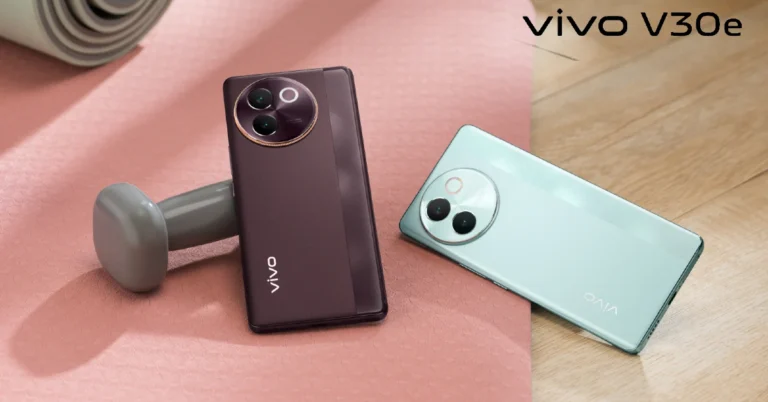
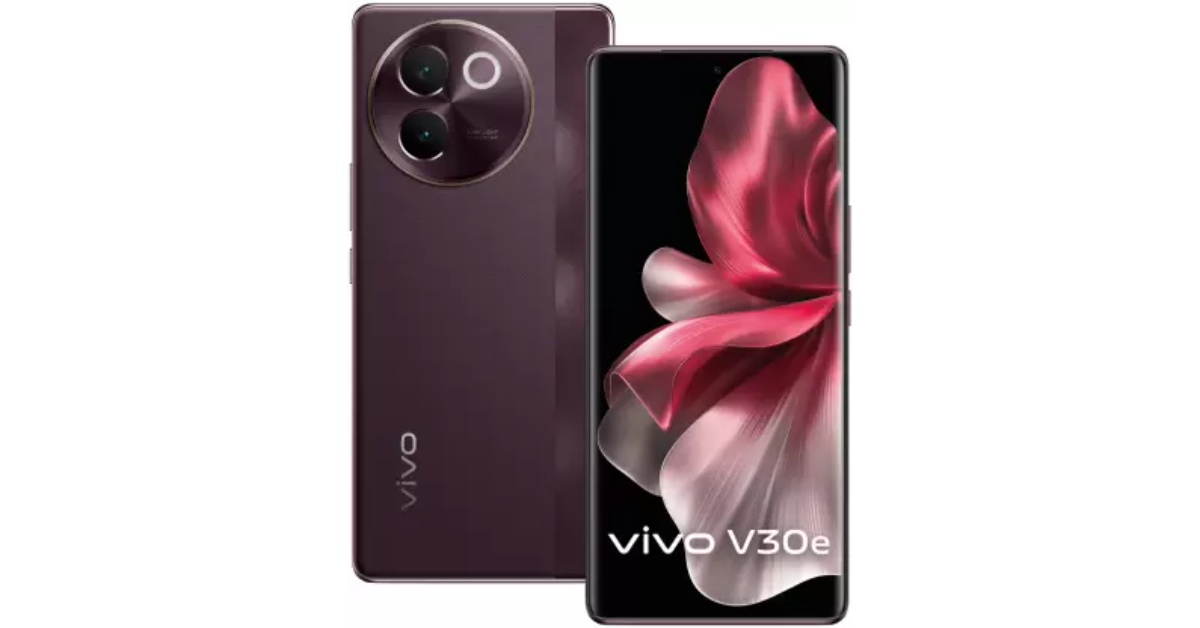
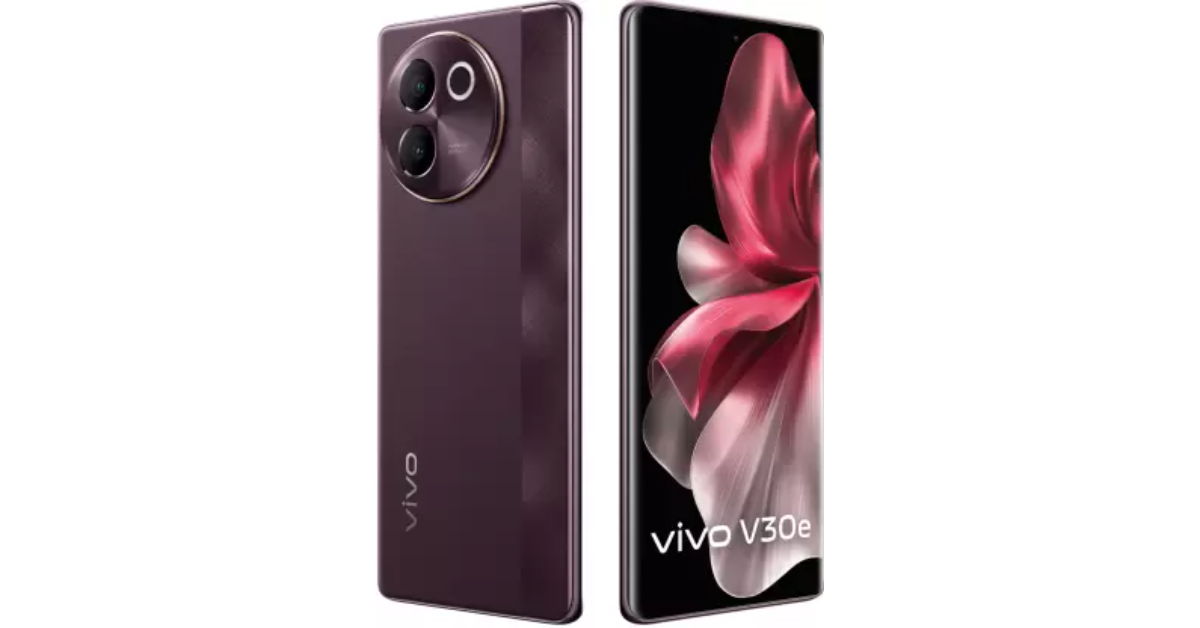
Vivo has expanded its V30 Series in India with the launch of the Vivo V30e smartphone. The device is a toned-down variant of the standard V30 smartphone in the series. The phone features an ultra-slim 3D curved display. The smartphone is powered by Snapdragon 6 Gen 1 SoC. It comes with a 50MP Sony IMX882 OIS main camera and a 50MP EYE AF selfie camera. The device has a Studio Quality Aura Light and supports 4K video recording capabilities. Additionally, it packs a 5,500mAh battery.

Vivo V30e price in India, availability details

Vivo V30e price in India starts at Rs 27,999 for the base 8GB RAM with 128GB storage model. The price of the 8GB RAM with 256GB storage is set at Rs 29,999. Vivo will be offering its brand-new phone in two colour options: Velvet Red and Silk Blue. Vivo V30e price in India, availability details The device is scheduled to go on sale via Flipkart, vivo India e-store, and all partner retail stores starting May 9 in the country. The pre-booking window has opened today and the buyers will be able to avail of a flat 10% Instant Discount with ICICI, SBI, IndusInd, IDFC, and other banks through offline retailers. In addition, there will be a 12 months zero down payment option with select NBFC partners. Online buyers will be able to get a flat 10% Instant Discount with HDFC and SBI banks. Also Read: Best smartphone deals to look out for during Amazon Great Summer Sale

Vivo V30e specifications

The Vivo V30e features a 6.78-inch ultra-slim 3D curved display and a screen-to-body ratio of 93.3%. The display supports a 120Hz refresh rate. Under the hood, there is, Qualcomm Snapdragon 6 Gen 1 SoC paired with an Adreno GPU for graphics. The phone comes with 8GB RAM which further gets up to 12GB extended RAM and up to 256GB of internal storage that can be expanded further via microSD card. Vivo V30e price in India, availability details The handset is shipped with FunTouch OS 14 and the company is promising 3 generations of Android updates and 4 years of security updates. Also Read: Buy Galaxy S23 FE for as low as Rs 33,999 during Flipkart’s Big Saving Days Sale For photos and videos, Vivo V30e features a dual rear camera setup that includes a 50MP OIS Sony IMX 882 sensor which also doubles up as a 50mm prime-focal length portrait lens and an 8MP ultrawide angle lens. There is Studio Quality Smart Aura Light which can adjust its brightness and colour temperature based on the surrounding ambient light varying from 1000 Kelvin to 9000+ Kelvin. It also houses a 50MP Eye Autofocus Selfie camera. The camera offers a host of other features including a Color Adaptive Border, which adds another layer of personalization for images, 4k recording in front and rear cameras, Ultra-stable video, and a dedicated Vlog Movie Creator Mode to simplify every stage of vlog production. The mobile phone sports a 5500mAh battery coupled with 44W Flash Charge.

Best smartphone deals to look out for during Amazon Great Summer Sale

The Amazon Great Summer Sale is now open to the public offering some exclusive discounts and deals across a number of categories. The sale kicked off early for Prime Members at midnight and will be live for non-Prime members from today at noon. Check out the best smartphone deals on Amazon’s Great Summer Sale. Amazon is offering some excellent discounts on a variety of smartphones, laptops, refrigerators, ACs, washing machines and more. There will be some great deals on smartphones from well-known companies like Apple, Samsung, OnePlus, Xiaomi, Vivo, Oppo, and more, so now is the ideal time to buy a new smartphone. Consumers can expect a variety of cost-effective financing options, such as exchange offers, exciting promotions from other top credit/debit cards, 10% instant bank discount on ICICI Bank, BOBCARD and OneCard Credit/Debit Cards & Credit EMI transactions; No-Cost EMI on Debit & Credit cards and Bajaj FinServ. Customers can get up to 40% off on smartphones and accessories during the Amazon Great Summer Sale. You can take advantage of instant bank discounts of up to Rs 8,000, exchange deals worth up to Rs 10,000 on certain handsets, and extra savings of up to Rs 5,000 with Amazon coupons. One can also upgrade for just Rs 9,999 to a 5G smartphone. Customers can also take advantage of a No-Cost EMI offer for up to six months. The price of an iPhone 13 with bank offers is Rs 47,499, inclusive. On OnePlus smartphones, customers can receive an instant bank discount of up to Rs 3,000 as well as No-Cost EMI for up to a year. In addition, bank discounts let you purchase the OnePlus Nord CE 4 for just Rs 22,999, and take advantage of No-Cost EMI. Purchase the recently released OnePlus 12R for a reduced Rs 37,999, which includes all incentives. Get the OnePlus 11R for Rs 29,999 with bank offers. Also Read: Vivo V30e India launch today: Here is how to watch the launch event During this summer sale, Samsung smartphones on Amazon will come with an instant bank discount of up to Rs 6,000. Starting at Rs 9,499, you may purchase a Samsung smartphone. With further bank discounts applied, the price of the Samsung M15 5G will be Rs 10,999. The Samsung S24 Ultra and Samsung Galaxy S24 5G smartphones will also be eligible for additional deals, such as exchanges up to Rs 6,000 and up to 9 months of No-cost EMI. During the Amazon Sale, customers purchasing iQOO smartphones can receive an instant bank discount of up to Rs 3,000. The price of the iQOO Z7s 5G is set to be Rs 13,999. After applying the additional promotion, the iQOO Z7 Pro will also be available at a price of Rs 20,999. After an instant 1,000 bank discount, purchase the iQOO Neo 7 Pro 5G for just Rs 29,999. The iQOO Z6 Lite, will retail for Rs 10,999 after applying a bonus offer. To help customers finance their purchases, iQOO smartphones are also available for up to six months of No-cost EMI on some models. Take advantage of instant bank discounts of up to Rs 5,000 and coupon offers worth up to Rs 200 on Redmi phones during the Amazon Great Summer Sale. After using the additional offer, the Redmi 125G will be offered for the lowest price ever—Rs 9,999. Similarly, upgrade to the Xiaomi 14 for Rs 64,999. Get a Redmi 125G for just Rs 1,916 a month for a maximum of six months of No-cost EMI. Redmi 13C 5G will retail at Rs 9,499, with a discount included. Use Amazon coupons and bank discounts to reduce the cost of your smartphone purchase. Also Read: Buy Galaxy S23 FE for as low as Rs 33,999 during Flipkart’s Big Saving Days Sale As per Amazon during the sale period, one can get a Poco smartphone at a starting price of Rs 6,799 after applying offers. Poco M6 Pro 5G will retail at 8,999 while Poco C65 at Rs 6,799. Tecno smartphones on the other hand will start at Rs 6,120 after applying for bank discounts. Tecno Pova 5 Pro 5G will be available for Rs 12,499 after applying bank discounts. Tecno Phantom V Fold will be available at just Rs 58,999. Customers will be able to avail additional discounts with bank offers to make smartphone purchases more affordable this summer sale.

Vivo V30e India launch today: Here is how to watch the launch event

Vivo is expanding its V-Series lineup with the introduction of Vivo V30e in India today. In March the company launched the Vivo V30 series in India including Vivo V30 and V30 Pro. The upcoming handset will be a reasonably priced phone in the lineup. Ahead of the official announcement Vivo revealed the phone’s key features, colour choices, and overall design. Check out the live stream and other details.

How to watch Vivo V30e launch event live

Vivo V30e will be launching in India today at 12 noon. The company will be hosting a dedicated launch event that will be live-streamed via the company’s official YouTube Channel. The event will also be streamed through the company’s official social media channel. We have embedded a watch link below for your convenience.

Vivo V30e price in India expected

We anticipate that the Vivo V30e would cost less than Rs 30,000 in India. The anticipated pricing is similar to its predecessor and below the standard model Vivo V30 which comes with a price of Rs 33,999 for the 8GB RAM with 128GB storage option. The phone will be available for purchase via Vivo’s online shop and the e-commerce site Flipkart after launch.

Vivo V30e features expected

Vivo V30e will come in two colourways- Velvet Red and Silk Blue. The device has a dual pattern design with a vertically oriented patterned stripe extending down the right side of the rear panel. On the right side of the phone are the volume rockers and a power button. With a 5,500mAh battery, the phone is also said to be the slimmest in its class. The phone is 7.69 mm thick. It houses an Aura Light unit in addition to two camera sensors. The camera unit includes a 50-megapixel Sony IMX882 portrait sensor with a 50mm prime focal length and 2x optical zoom. It has thin bezels and a 50-megapixel AI-backed front camera hole-punch with autofocus in the middle of the top.

Garena Free Fire Redeem Codes Today 2 May 2024: Here is how to claim them

Garena Free Fire is a battle royale game with regular awards and tournaments to keep players interested. If you play Garena Free Fire, you should be aware of the redeem codes that are released on a daily basis. However, because the battle royale game is banned in India, players from other countries can use the Free Fire Redeem codes daily. If you’re unfamiliar with the Garena Free Fire redeem codes or don’t know how to get them, we’ve put together a step-by-step guide to help you redeem them. Check out Garena Free Fire Redeem Codes for 2 May 2024. The Free Fire redeem codes are a great way to get free stuff. These are 12-digit codes that contain alphabets and numbers, as well as an expiration date and time. Because the Garena FF redeem codes cannot be used more than once, you should hurry to the redemption page to claim your free reward before someone else does. To get a free reward, all you have to do is go to reward.ff.garena.com/en, which is the official redemption page. Also, keep an eye on this space for daily updates on Garena Free Fire redemption codes and rewards. Also Read: Sennheiser Accentum Plus wireless headphones with Hybrid Adaptive Noise Cancellation launched

Garena Free Fire Redeem Codes Today 2 May 2024

U9Y0ST1R2E3W4Q5 H6J7K8L9Z1X2SC3 2E4C7V0B5N6M1Z8 I2O3A4S5D62F7G8 A8S9D0F1G2J3K4 M4N5B6SV7F8G9H0 P1OS2I3U4Y5T6W7 FN4Y8Q6U5EDD61B3 FFB2M0A5U9O18R7F F13X4N6Q3R8WUU2H FFE6C8G3X18N4S9H FFC8H5E7Y0JDD4S1 FFM3FDDP1N9V2W7T6

How to Get Free Fire Redeem Codes for Garena on 2 May 2024?

  • Visit the Garena Free Fire game’s official website at reward.ff.garena.com.
  • Use your Facebook, Google, VK, Apple ID, Huawei ID, or Twitter account to log in.
  • You’ll be taken to a valid redemption code (s)
  • Copy and paste the 12-digit redemption code into the text box.
  • On the screen, a dialogue box will appear.
  • ‘Ok’ should be selected.
For the latest gadget and tech news, and gadget reviews, follow us on TwitterFacebook and Instagram. For newest tech & gadget videos subscribe to our YouTube Channel. You can also stay up to date using the Gadget Bridge Android App. You can find the latest car and bike news here.

Top 3 Ways to Schedule a Text Message on an iPhone

0
If you have a hard time remembering birthdays and anniversaries, scheduling a text in advance is one of the best things you can do with your iPhone. Not only does this ensure that the recipient is greeted on the correct date, but it also gives you enough time to think about the message. Using your iPhone, you can also send recurring messages at a pre-set frequency. So, here are the top 3 ways to schedule a text message on an iPhone. Read Also: Buy Galaxy S23 FE for as low as Rs 33,999 during Flipkart’s Big Saving Days Sale

Can you schedule a text message directly on your iPhone?

Scheduling a text is one of the features that is often missing from common messaging apps like WhatsApp. While those platforms may incorporate that feature in future, right now your options are pretty limited. Luckily, Apple’s native Messages and Shortcut apps let you schedule a text and send it to however many recipients you want. You can also use third-party apps like Moxy Messenger, Scheduled, and Carrier Messaging for this task. These apps are totally legitimate and can be downloaded from the App Store. However, modded apps like GB WhatsApp that claim to offer this feature are very much illegal, and we do not recommend downloading them.

Schedule a text in the Messages app on your iPhone

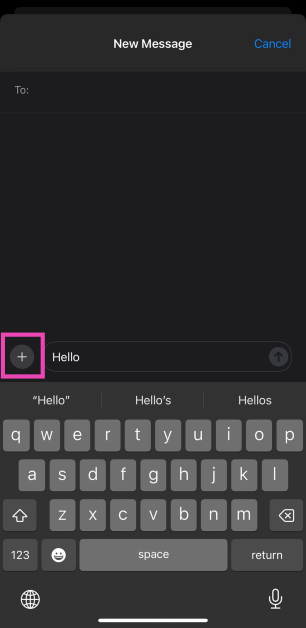
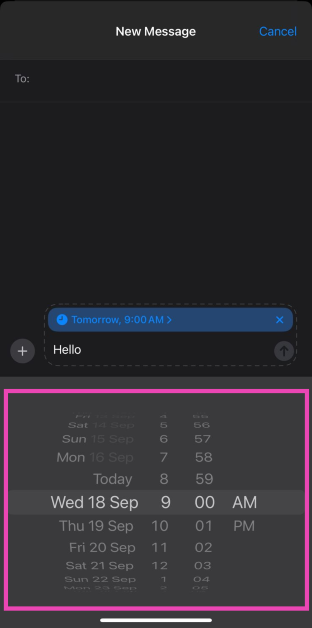
Step 1: Launch the Messages app on your iPhone. Step 2: Enter your message in the text field. Step 3: Hit the Plus icon on the left side of the text box. Step 3: Hit the Plus icon on the left side of the text box. Step 4: Select Send Later. Step 4: Select Send Later. How to schedule a message on your iPhone to send later (iOS 18) Step 5: Set the time and the date.
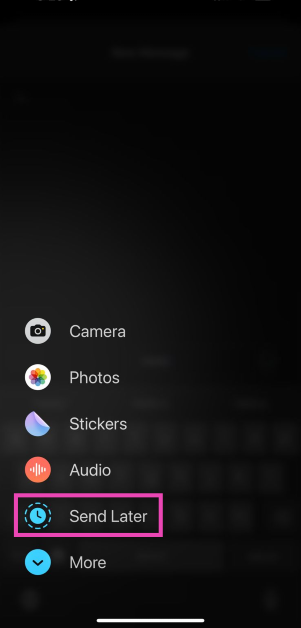
Step 5: Set the time and the date. How to schedule a message on your iPhone to send later (iOS 18) Step 6: The scheduled date and time of delivery will appear on top of the text box. Hit the arrow icon.
Schedule a text message on an iPhone using the Shortcuts app

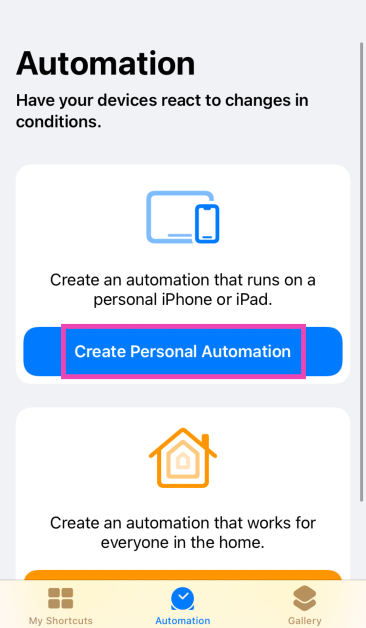
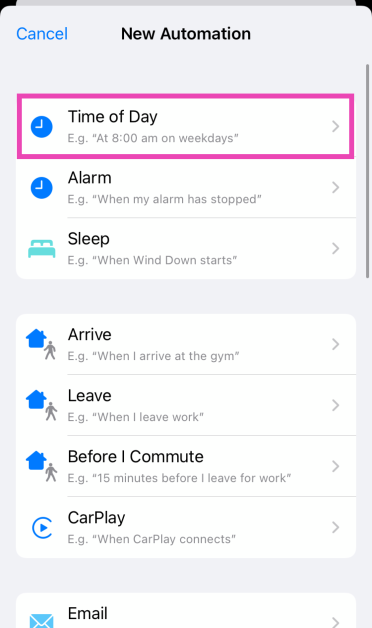
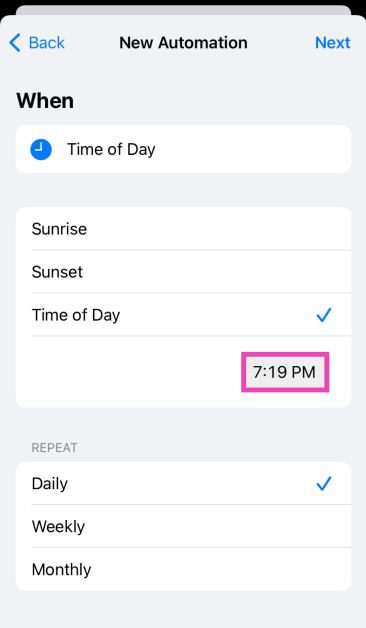
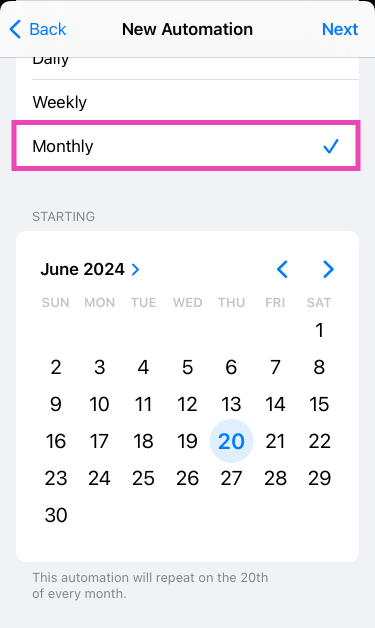
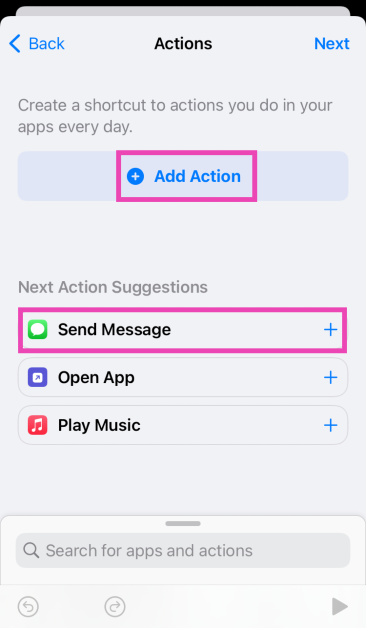
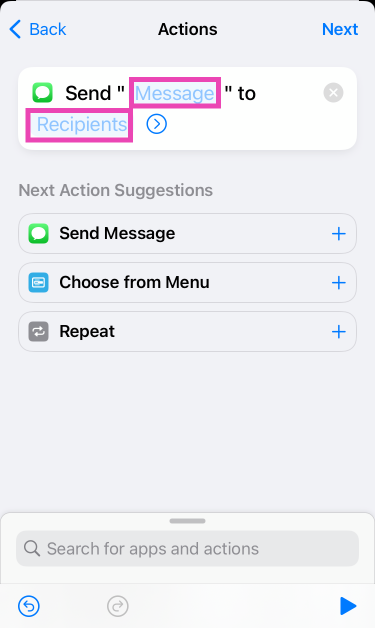
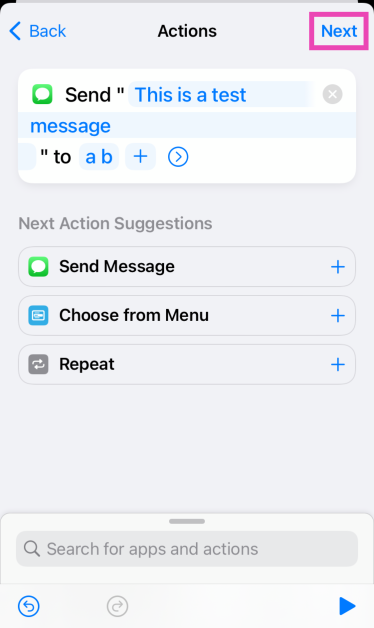
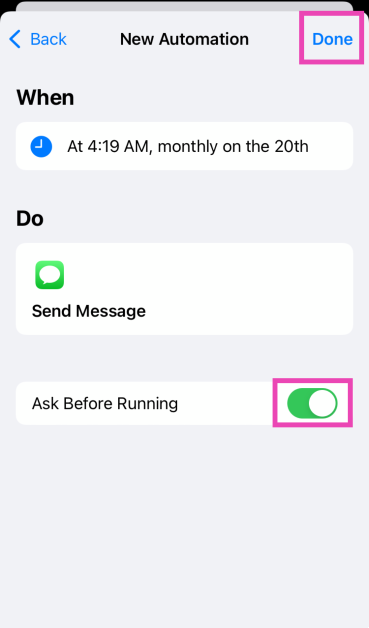
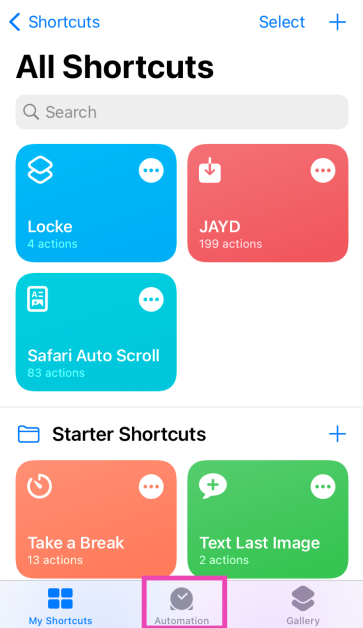
Step 1: Launch the Shortcuts app on your iPhone and switch to the Automation tab. Step 1: Launch the Shortcuts app on your iPhone and switch to the Automation tab. Step 2: Tap on Create Personal Automation. Step 2: Tap on Create Personal Automation. Step 3: Select Time of Day. Step 3: Select Time of Day. Step 4: Tap on the time in the ‘Time of Day’ section and enter the time at which you want to send the message. Step 4: Tap on the time in the ‘Time of Day’ section and enter the time at which you want to send the message. Step 5: Tap on Monthly and select the date on which you wish to send the message. You should know that the Shortcuts app will automate this action monthly, so remember to delete this automation once its purpose has been fulfilled. Step 5: Tap on Monthly and select the date on which you wish to send the message. You should know that the Shortcuts app will automate this action monthly, so remember to delete this automation once its purpose has been fulfilled. Step 6: Hit Next. Step 7: Tap on Add Action and select Send Message. Or you can directly select Send Message from the list of suggestions. Step 7: Tap on Add Action and select Send Message. Or you can directly select Send Message from the list of suggestions. Top 2 Ways to Schedule a Text Message on an iPhone (2024) Step 8: Tap on the Message field and enter the message you wish to send. Step 8: Tap on the Message field and enter the message you wish to send. Top 2 Ways to Schedule a Text Message on an iPhone (2024) Step 9: Now, tap on the Recipients field and select the contact to whom you wish to send the message. You can select multiple recipients. Hit Next. Step 10: On the following page, turn off the toggle switch for Ask Before Running if you want this action to be completely automated. Step 10: On the following page, turn off the toggle switch for Ask Before Running if you want this action to be completely automated. Top 2 Ways to Schedule a Text Message on an iPhone (2024) Step 11: Hit Done at the top right corner of the screen. Step 11: Hit Done at the top right corner of the screen. Top 2 Ways to Schedule a Text Message on an iPhone (2024)

Use a third-party app

The downside of using the Shortcuts app to send a scheduled text is that it repeats the action every month. If you don’t remember to delete the automation after the message has been sent, it will lead to some very confused recipients. Luckily, there are some third-party apps that offer a solution to this problem. However, there is a small catch. Most free third-party apps remind you to send the text instead of sending the text itself. Reminderbase has the option to send texts at a scheduled time, but only through virtual numbers. If you want to schedule a text message on your iPhone and send it from your number, you will need to subscribe to the Scheduled app.

Frequently Asked Questions (FAQs)

Does the Messages app have the option to schedule a text?

Yes, you can schedule a text using the Messages app, but your iPhone needs to be updated to iOS 18 (or a later version).

How do I schedule a text message on my iPhone?

Go to the Messages app, enter a message, hit the plus icon, select Send Later, enter the date and time, and hit the send icon to schedule the text.

How do I schedule a text message on Instagram?

Go to the DMs tab and open a conversation. Type a message and long-press the send button to set its delivery date & time.

Can you schedule a text message on WhatsApp?

WhatsApp does not offer the option to schedule text messages yet. However, you can use the Shortcut or Scheduled app to send a text at a pre-set time.

What are the best apps for scheduling text messages on an iPhone?

Scheduled is the best app you can use to send a non-recurring text message at a pre-defined date and time. Carrier Messaging, Moxy Messenger, and Reminderbase are also good apps for this task. Read Also: Samsung Galaxy M55 5G Review: A serious contender under Rs 30,000

Conclusion 

These are the top 3 ways to schedule a text message on an iPhone. If you know any other way to go about this task, let us know in the comments! If your business requires scheduling text messages quite often, we suggest paying for a premium subscription to the Scheduled app.

Buy Galaxy S23 FE for as low as Rs 33,999 during Flipkart’s Big Saving Days Sale

Samsung and Flipkart have revealed a fascinating collaboration for the Big Saving Days sale, which begins on May 2. Samsung recently revealed a Rs 20,000 price cut on the Samsung Galaxy S23 FE smartphone. The device was launched in India last year. Customers now have the opportunity to get the high-end Samsung Galaxy S23 FE smartphone from the company for a discounted price of Rs 33,999. Samsung’s JB Park and Flipkart’s Kalyan Krishnamurthy starred in a digital short that revealed an intriguing collaboration between the two companies for Flipkart’s Big Saving Days. In the movie, the two leaders use Galaxy AI’s Live Translate feature to communicate with one another in their native tongue, overcoming linguistic obstacles. Galaxy S23 FE, which was initially priced at Rs 54999, will be available for an incredible price of Rs 33999 as part of Flipkart’s Big Saving Days Sale. This incredible deal incorporates a bank cashback of Rs 1000. Note that this offer on Galaxy S23 FE will go live on Flipkart starting May 2 for a limited period. Also Read: Flipkart’s Big Saving Days Sale is set to bring about massive discounts on Blaupunkt Smart TVs: exclusive deals revealed

Samsung Galaxy S23 FE specifications

Samsung Galaxy S23 FE features a 6.4-inch FHD+ Dynamic AMOLED display with 2340 x 1080 pixels resolution. The screen supports a variable refresh rate of 60 to 120Hz. The front panel is protected with Corning Gorilla Glass 5. The device is powered by a  Samsung Exynos 2200 4nm processor with  Samsung Xclipse 920 GPU. The phone runs on Android 13 with One UI 5 out of the box. For photography and videography, the handset features a triple rear camera set-up that includes a 50-megapixel main camera with f/1.8 aperture and OIS, a 12-megapixel ultra-wide-angle sensor, and an 8-megapixel telephoto lens with OIS and 3X Optical Zoom. For selfies, there will be a 10-megapixel front-facing camera. Also Read: SPPL reveals deals and offers on Kodak TVs, ahead of Amazon Great Summer Sale and Flipkart Big Saving Days Sale In terms of connectivity, there is 5G SA/NSA, 4G VoLTE, Wi-Fi 6E, Bluetooth 5.3, GPS + GLONASS, NFC, and a USB 3.1 port for charging. The  S23 FE also includes an in-display fingerprint sensor for biometrics. The handset packs a 4500mAh battery with 25W wired fast charging and support for wireless charging, and wireless power share. It comes with an IP68 rating for water resistance and the stereo speakers on the phone support Dolby Atmos.

Samsung Galaxy M55 5G Review: A serious contender under Rs 30,000

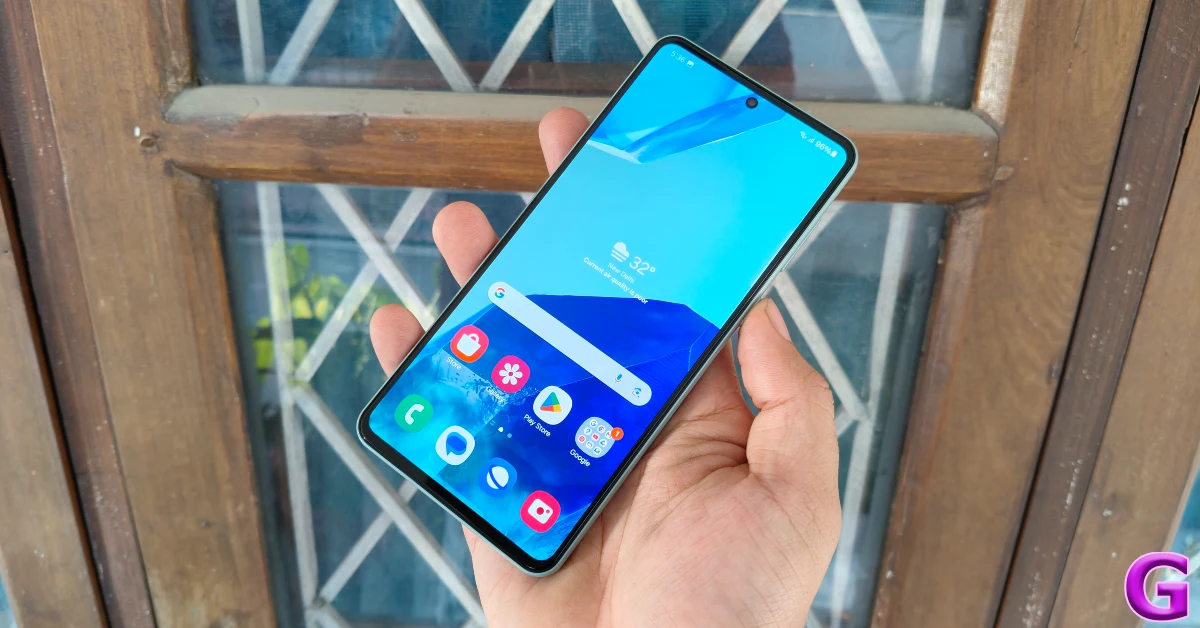
While Samsung’s flagship smartphones are considered the best Android devices, its midrange offerings are generally weighed down by the mediocre in-house Exynos chipsets. Enter the Samsung Galaxy M55 with its stunning Super AMOLED+ display, 45W fast charging, and the new Snapdragon 7 Gen 1 processor, all for the price of Rs 27,000.  At this price point, the Galaxy M55 not only rivals the likes of Nothing Phone (2a) (read our Nothing Phone (2a) review here) and OnePlus Nord CE4 (read our OnePlus Nord CE4 review here) but also its Samsung mid-range sibling, Galaxy A35 (read our Galaxy A35 review here). On paper, it certainly looks like this device will make a lot of smartphone enthusiasts happy. But how well does it perform when put through rigorous everyday use? Has Samsung made some tradeoffs to keep the smartphone’s price in check? Here’s our in-depth review of the Samsung Galaxy M55 to answer all your questions. Read Also: SPPL reveals deals and offers on Kodak TVs, ahead of Amazon Great Summer Sale and Flipkart Big Saving Days Sale

Samsung Galaxy M55 5G review: Design and Display

The Galaxy M55’s retail box isn’t as sleek as its A and S series counterparts. You would think this is a good thing because all that room could only mean additional accessories inside the box. Sadly, the unboxing experience here falls flat. Here are the contents of the M55’s retail box.
  • Smartphone
  • USB Type-C to Type-C cable
  • SIM ejector
  • Regional Lock Guide
  • Quick Start Guide
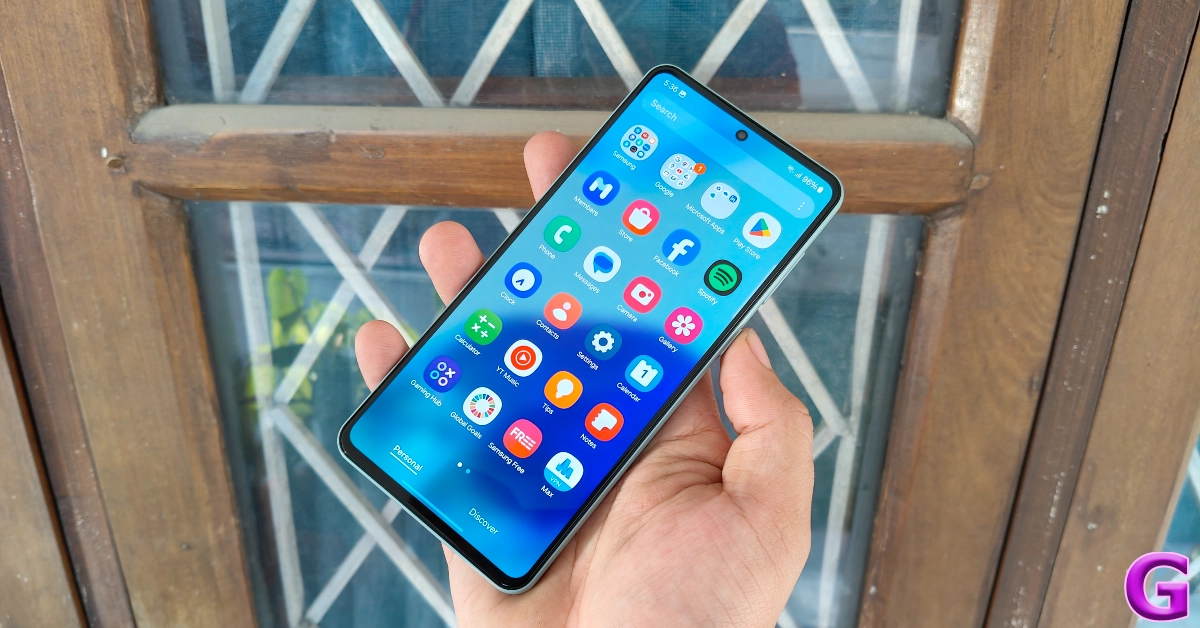
Samsung Galaxy M55 review: Design and Display The lack of a power adapter inside the box is disappointing for two reasons. The Galaxy M55 is one of the rare Samsung smartphones to support 45W charging. Even the entry-level Galaxy S24 can only charge at a 25W speed. If you’re making a step up from an older smartphone, this means splurging some extra cash on a 45W power brick. Secondly, the USB cable provided in the box is Type-C on both ends. This means if your existing charger has a Type-A slot, this cable will not be of much use to you. Samsung Galaxy M55 review: Design and Display The homogeneous design language we’ve been seeing from Samsung for almost 2 years is also present on the Galaxy M55. The rear camera array is arranged in a vertical layout. The back panel is made out of plastic, which is not something you want in a Rs 27,000 smartphone. But, on the bright side, the smartphone weighs just 180g because of it. In comparison, the Galaxy A35 lifts the needle to 209g on the weighing scale. The plastic back panel curves slightly towards the edges. Its matte finish lends it a pleasant in-hand feel and ensures that it doesn’t collect excessive fingerprints or smudges. The finish on the rails is smoother than the back. The right edge of the smartphone houses the volume rocker keys and the side button. The rocker is positioned slightly higher than what we’re used to. You’ll find the primary microphone, USB port, and primary speaker slot on the bottom edge. The hybrid SIM slot is positioned on the left rail while the secondary microphone makes its way to the top. The M55’s earpiece acts as the secondary speaker outlet. display Samsung always delivers when it comes to displays and the Galaxy M55 is no different. The stunning 6.7-inch Super AMOLED+ display has a 120Hz refresh rate and can hit a peak brightness of 1,000 nits under direct sunlight. While this isn’t the brightest display we’ve ever used, it does a good job of maintaining its legibility in outdoor conditions. The bezels surrounding the display are slightly more pronounced around the chin, but overall, they are slimmer than the Galaxy A35 and A55. display While the Samsung Galaxy M55 has Widevine L1 certification, it doesn’t support HDR playback on Netflix. This didn’t bother us too much as the AMOLED display produced vivid colours and rendered exquisite details while streaming OTT content. The audio output from its stereo speakers is a little tinny and lacking in the low-end department, but it can go loud.

Samsung Galaxy M55 5G Review: Performance and Cameras

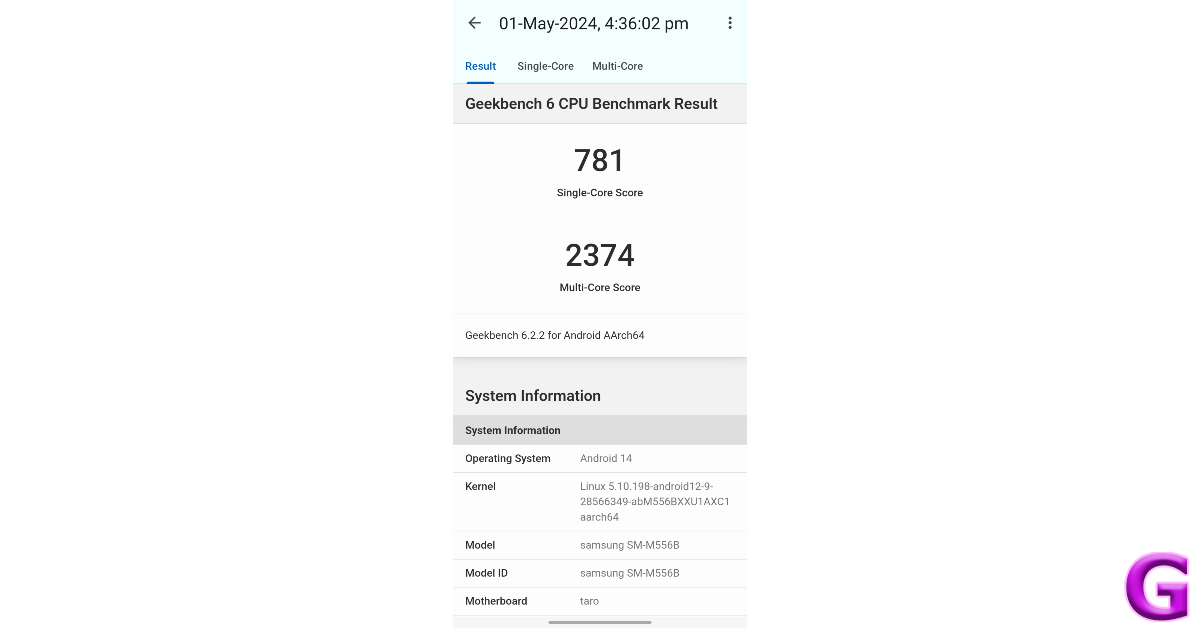
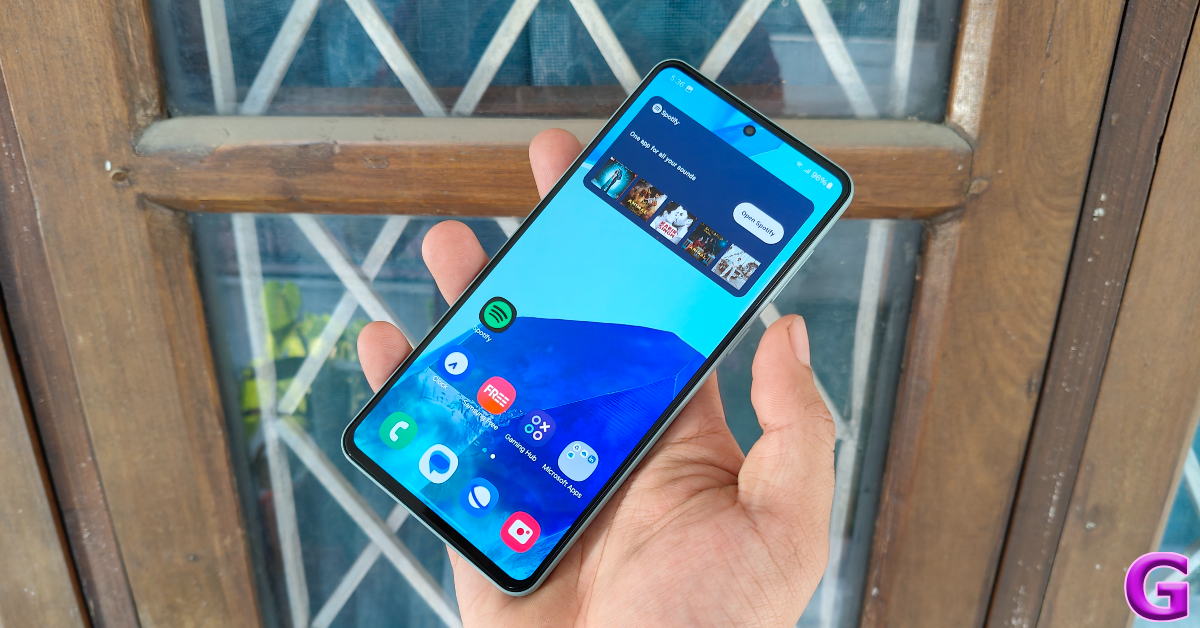
Powering the Samsung Galaxy M55 is the Snapdragon 7 Gen 1 SoC, a welcome respite from the Exynos chipsets that Samsung keeps shoehorning in its midrange (and in some cases, flagship) smartphones. In the Geekbench 6 test, the Galaxy M55 scored 781 points in the single-core test and 2,374 points in the multi-core test. Samsung Galaxy M55 Review: Performance and Cameras Using the smartphone as our daily driver for a week, there’s nothing bad we can say about its everyday performance. The apps load quickly, the touch response is snappy, and multitasking on the device is a breeze. During the review period, the Samsung Galaxy M55 did not once bother us with any unexpected malfunction. Our experience was entirely jitter-free. The gaming experience offered by the Galaxy M55 is satisfactory. We stuck to a 60fps frame rate and were happy with the seamless gameplay experience on titles like Call of Duty Mobile and Asphalt 9. The internal temperature of the smartphone started rising after hitting the 30-minute mark, but it braved through and provided relatively stutter-free gameplay. With that being said, if you prioritise the frame rate and elite in-game graphics, there are better smartphones out there than the M55. There is not much to complain about on the software front either, as you get the full OneUI 6.1 experience on this device. Gone are the days when affordable M Series smartphones were bogged down by the ‘Core’ version of the OS. You get Knox security on this device. Certain flagship-exclusive features like Galaxy AI and Samsung DeX are missing from the device, but that is also the case with the midrange A Series smartphones. software The presence of bloatware apps does marr the software experience, but thankfully all of the additional apps can be uninstalled from the device. Samsung’s ‘Shelf’ widget is also ridden with ads, but you can remove and replace the sponsored panel with useful widgets. Putting a neat bow on the OS experience is Samsung’s promise of 4 major updates and 5 years of security patches for the M55. You won’t find better future-proofing from any other OEM in this category. Samsung’s M Series is known for its versatile battery performance and the M55 carries forward the mantle passed on to it by last year’s M54. Although it is equipped with a smaller 5,000 mAh battery pack (the M54 had a 6,000 mAh battery), it was still able to clock 6-7 hours of Screen on Time with ease. Our daily tasks on the Samsung Galaxy M55 during the review period consisted of video calling, social media browsing, IMing, navigation, media streaming, and gaming. 45W charging support is also a welcome upgrade as the M55 takes just under 50 minutes to fully charge. In comparison, it took us 90 minutes to charge the Galaxy A35. Moving on, the camera performance on offer here is certainly above average but not something that sets the benchmark for the category. The rear camera setup comprises a 50MP primary shooter, an 8MP ultrawide lens, and a 2MP macro sensor. A 50MP sensor fulfils the role of the selfie camera. camera In outdoor daylight conditions, the 50MP primary shooter captures balanced pictures without subjecting them to excessive processing. The dynamic range is good, the shadows are crisp, and the images pack a lot of detail. While the colours certainly ‘pop’, they lack the tuning found in other Samsung smartphones. This isn’t a dealbreaker for us, but if you’re expecting colour science in the mould of A55 and A35, you will be left wanting more here. Samsung Galaxy M55 Review: Performance and Cameras camera Images taken with the 8MP ultrawide lens are good, but there is a noticeable shift in the vibrancy of colours. We were happy with the field of view captured by this lens, but it didn’t enthral us with anything special. The macro sensor completes the triple camera layout, but it fails to leave a lasting impression.
ultrawide
Ultrawide Shot
Samsung Galaxy M55 Review: Performance and Cameras
Ultrawide Shot
Images taken in limited lighting using the primary shooter are well-composed and brightened to the right degree. The Night Mode plays a part in artificially brightening the subject and the phone does a good job of assigning colours to the images. The only downside is that shooting pictures in Night Mode requires holding the phone still for 8 seconds. Samsung Galaxy M55 Review: Performance and Cameras
ultrawide shot
Ultrawide Shot
In Portrait Mode, the M55 does a good job of separating the subject from its background and applying the optimum level of blur. The 50MP selfie camera also captures good images but tends to brighten the skin tone of the subject. The good thing is that this front-facing camera can record 4K videos at 30fps. The primary shooter can accomplish this task as well.
Portrait
Portrait Shots
Read Also: Top 5 Ways to Fix Yahoo Mail Not Working On iPhone (2024)

Verdict

The Samsung Galaxy M55 is a great buy at Rs 27,000 if you’re willing to make certain tradeoffs. The glass back panel or IP67 rating of its A series cousins are missing from the M55, but its Snapdragon 7 Gen 1 chipset ensures smooth functioning for casual and heavy users alike. When it comes to battery performance, the M55 has the A35 (and even the A55) comfortably beat. And while its pictures may not be in line with Samsung’s signature shots, the M55’s camera is still incredibly fun to use.

Samsung Galaxy M55 5G: Pros

  • Great display
  • Slim bezels
  • Good processor
  • 4 major OS upgrades + 5 years of security patches
  • 45W fast charging

Samsung Galaxy M55 5G: Cons

  • Plastic back
  • Does not ship with a charger inside the box

Flipkart’s Big Saving Days Sale is set to bring about massive discounts on Blaupunkt Smart TVs: exclusive deals revealed

Eight days long, the Flipkart Big Saving Days Sale will begin tomorrow. Just ahead of the summer sale Blaupunkt has revealed exclusive discounts and offers across its product portfolio. The company will be offering great discounts on its Smart TV starting from May 2 and running till May 9. In addition to this Plus members gain exclusive early access to these discounted offerings. At Flipkart’s Big Saving Days Sale, Blaupunkt will be offering a number of smart TVs at significant discounts. Customers who use credit cards or EMI transactions can expect to receive big savings on Blaupunkt Smart TVs from May 2nd to May 9th, 2024. The price of the Blaupunkt 24Sigma707 drops to Rs 5,999 from Rs 6,499 during the Flipkart Big Saving Days Sale, while the 32CSA7101 remains the same at Rs 9,999. The price of the 32CSG7111 model has been lowered from Rs 10,499 to Rs 10,299 in India. The price of the 40Sigma703 BL has been reduced from Rs 14,499 to Rs 13,999. While the 43CSA7070 will retail for Rs 24,999, the 42CSA7707 will continue to be offered for sale at a price of Rs 16,999. Also Read: SPPL reveals deals and offers on Kodak TVs, ahead of Amazon Great Summer Sale and Flipkart Big Saving Days Sale While the 43CSG7105 will be discounted to Rs 16,999 from Rs 17,499, the 43CSA7121 will continue to be priced at Rs 17,499 in India. The 43QD7050 will now retail for Rs 21,999 instead of Rs 22,999, and the 50CSGT7022 will now cost Rs 25,999 instead of Rs 26,999. The 55QD7020 will continue to retail for Rs 33,999. Also Read: Poco smartphones goes on sale, offers revealed ahead of the Flipkart and Amazon Sale Reduced from Rs 42,999 to Rs 39,999, the 65QD7030 will be available for Rs 47,999, and the 65CSGT7024 for Rs 49,999. The 43-inch (43QD7050) Quantum Dot Series 4K Ultra HD QLED Google TV from Blaupunkt will cost Rs 21,999. The 55-inch Quantum Dot Series 4K Ultra HD QLED Google TV (55QD7020) from Blaupunkt will retail for Rs 33,999. The 55CSGT7023 will continue to be priced at Rs 29,999, while the 50QD7010 will decrease in price from Rs 29,999 to Rs 28,999. The 75QD7040, is now priced at Rs 89,999 instead of Rs 99,999.

SPPL reveals deals and offers on Kodak TVs, ahead of Amazon Great Summer Sale and Flipkart Big Saving Days Sale

This can be the ideal moment for you to buy a smart TV if you have been waiting to do so. Significant discounts and offers on the Kodak HD LED Television have been announced by SPPL, the official brand licensee of Kodak, ahead of the Flipkart Big Saving Days Sale and the Amazon Great Summer Sale. Interesting deals for Kodak’s CA PRO, 9XPRO, and KODAK Matrix QLED Series have been revealed. Kodak is providing customers with amazing discounts on its full range of televisions during the Flipkart Big Saving Days Sale and the Amazon Great Summer Sale in an effort to make the ongoing IPL season more enjoyable for them. Sales on both platforms will begin on May 2, 2024. The initial price of the television is Rs 5,555. When making EMI purchases and using an ICICI, Bank of Baroda, or OneCard card, Amazon offers a 10% instant discount. Flipkart is providing an instant 10% discount while using EMI and SBI Bank cards. Also Read: Poco smartphones goes on sale, offers revealed ahead of the Flipkart and Amazon Sale KODAK QLED televisions will be available in three screen sizes—50, 55, and 65 inches—and will start at Rs 21,999. The Google TV has a QLED 4K display with 1.1 billion colours, DTS TruSurround sound, Dolby Atmos, Dolby Vision, HDR 10+ with 2GB RAM, and 16GB of internal storage. A custom home screen for every user, manual and voice control for smart home devices, and support for multiple adult and kid user accounts are just a few of the enhanced features that come with these televisions. KODAK 75-inch 4K QLED TV (75MT5044), on the other hand, will be available at a starting price of Rs 99,999. It offers DTS TruSurround, Dolby MS12, HDR 10+, QLED 4K display with 1.1 billion colours, 2GB RAM, and 16GB of internal storage. In addition to having an air-slim and bezel-less design, the televisions also feature built-in Chromecast and Airplay, which supports over 1000 apps, HDR10+, DOLBY ATMOS, DOLBY VISION, and DOLBY DIGITAL PLUS. Whereas model numbers 43MT5055 and 55MT5022 will be available at an exciting pricing of Rs 21,999 and Rs 30,999. The KODAK CA PRO series of televisions will come at a starting price of Rs 25,499 during the Flipkart Big Saving Days Sale and the Amazon Great Summer Sale. They offer a Google TV interface, a 4K HDR10 display, Dolby Digital Plus, and DTS TruSurround. Also Read: Redmi Note 13 Pro+ 5G World Champions Edition launched in India KODAK 9XPRO TV line of high-end televisions can be purchased at Rs 9,899 for the 32-inch variant. The hero models 439X5081 and 429X5071 connected to this series are currently on sale and will be available at Rs 16,999 and Rs 15,499 respectively. Here are the prices of KODAK TVs during the sales-
Model Sale Prices
24HDX100S 5,555
329X5051 9,899
32HDX7XPRO 9,499
32HDX900s 7,999
429X5071(Hero Model) 15,499
439X5081 (Hero Model) 16,999
43UHDX7XPROBL 19,999
50CAPROGT5012(Hero Model) 25,499
50MT5011 28,999
50UHDX7XPROBL 25,999
55CAPROGT5014 29,499
55MT5022(Hero Model) 30,999
55UHDX7XPROBL 27,999
65CAPRO5099 42,999
65MT5033 46,999
75MT5044 99,999
24SE5002 5,999
32SE5001BL 8,499
409X5061 14,999
43SE5004BL(Hero Model) 14,999
43MT5055(Hero Model) 21,999
40SE5003BL 13,999

Top 8 Ways to Fix Yahoo Mail Not Working On iPhone

0
The native Mail app on your iPhone is well-equipped to manage email hosts across the spectrum. Functional issues with the Mail app are rare, but they can be annoying when you come across them. Oftentimes, Yahoo Mail users report not being able to send or receive emails using the Mail app. So here are the top 8 fixes for the ‘Yahoo Mail not working’ issue on an iPhone. Read Also: Poco smartphones goes on sale, offers revealed ahead of the Flipkart and Amazon Sale

Why is Yahoo Mail not working on my iPhone?

If you can’t get Yahoo Mail to work on your iPhone, it could be due to one of the following reasons.
  • Your Yahoo account is incompatible with the Mail app.
  • Your iPhone is facing connectivity issues.
  • The Yahoo Mail app on your iPhone is not updated to the latest version.
  • Your Yahoo account has been handed a ban.
  • Yahoo’s servers are down.

Use the Yahoo Mail app instead of the native Mail app

If you’re unable to send or receive new emails using the default Mail app on your iPhone, install the Yahoo Mail app. Log in using your Yahoo account and turn on the push notifications to ensure you don’t miss another email. Move on to other fixes if you want to make your Yahoo account work on the default Mail app.

Make sure your Yahoo account is synced with the Mail app

Step 1: Go to Settings and select Mail. Step 1: Go to Settings and select Mail. Step 2: Tap on Accounts. Step 2: Tap on Accounts. Step 3: Select Yahoo. Step 3: Select Yahoo. Step 4: Turn on the toggle switch for Mail. Step 4: Turn on the toggle switch for Mail. Top 5 Ways to Fix Yahoo Mail Not Working On iPhone (2024)

Remove your account and add it back

Step 1: Go to Settings and select Mail. Step 1: Go to Settings and select Mail. Top 5 Ways to Fix Yahoo Mail Not Working On iPhone (2024) Step 2: Tap on Accounts. Step 2: Tap on Accounts. Top 5 Ways to Fix Yahoo Mail Not Working On iPhone (2024) Step 3: Select Yahoo. Step 3: Select Yahoo. Top 5 Ways to Fix Yahoo Mail Not Working On iPhone (2024) Step 4: Tap on Delete Account. Step 4: Tap on Delete Account. Step 5: Go back to the Accounts page and select Add Account. Step 5: Go back to the Accounts page and select Add Account. Step 6: Use your login credentials to sign into your Yahoo account.

Generate a third-party app password

Step 1: Go to your Yahoo Account Security Page. Step 2: Click on Generate app password. Step 2: Click on Generate app password. Top 5 Ways to Fix Yahoo Mail Not Working On iPhone (2024) Step 3: Click on Get Started. Step 3: Click on Get Started. Top 5 Ways to Fix Yahoo Mail Not Working On iPhone (2024) Step 4: Enter ‘Mail’ in the app name field and hit Generate password. Step 4: Enter ‘Mail’ in the app name field and hit Generate password. Top 5 Ways to Fix Yahoo Mail Not Working On iPhone (2024) Step 5: Hit Done and sign into the Mail app using the single-use password displayed on the screen. Step 5: Hit Done and sign into the Mail app using the single-use password displayed on the screen. Top 5 Ways to Fix Yahoo Mail Not Working On iPhone (2024)

Check if Yahoo’s servers are down

It is possible that Yahoo Mail is not working on your iPhone due to a server outage. To make sure that is the case, go to DownDetector.in and enter Yahoo Mail. If you see a spike in user reports, it means that Yahoo is currently experiencing a server outage.

Check your internet connection

Check Internet Connection It is possible that the problem lies with your WiFi network or mobile data instead of Yahoo Mail. To confirm whether this is the case, open a random webpage in Chrome or Safari. If the page loads seamlessly, your internet connection is fine. Run an internet speed test to check the consistency of the connection and signal strength your device is receiving. Connect to a different network if you notice an issue with the internet.

Restart your iPhone

Restart your iPhone A quick restart can fix any background issues that are causing the Mail app to malfunction. Press the side key along with a volume key to get access to the power slider. Drag the slider across the screen to turn off your iPhone. Wait for 10-15 seconds, then long-press the side key to restart the device.

Update your iPhone

Older iOS versions may have trouble fetching your emails. Make sure your iPhone is updated to the latest software version to overcome this issue. Step 1: Make sure your iPhone is connected to a WiFi network and plug in its charger. Step 2: Go to Settings and select General. Step 1: Go to Settings and select General. Top 11 Ways to Fix 'Message Blocking is Active' on iPhone Step 3: Select Software Update. Step 3: Select Software Update. Top 11 Ways to Fix 'Message Blocking is Active' on iPhone Step 4: Tap on Download and Install. Step 4: Tap on Download and Install. Top 11 Ways to Fix 'Message Blocking is Active' on iPhone

Frequently Asked Questions (FAQs)

How do I link my Yahoo account to the Mail app on my iPhone?

Go to Settings>Mail>Accounts>Yahoo and log in using the proper credentials. Make sure the toggle switch for Mail is turned on.

How do I generate a third-party app password for my Yahoo account?

Go to your Yahoo Account Security page, click on ‘Generate app password’, enter the name of the app, and copy the single-use password presented on the screen.

How do I check if Yahoo’s servers are down?

Go to DownDetector.in, enter Yahoo, and see if there is a spike in user reports. A surge in reports suggests the service is down.

How do I check the internet speed on my iPhone?

Go to the Ookla Speed Test website and hit ‘Go’ to run the test. Once the test has finished, you will be able to view the internet speed, signal strength and other metrics.

Why can’t I see my Yahoo Mail inbox on my iPhone?

If you can’t update your Yahoo inbox, unlink the account from the native mail app and then add it again. Additionally, make sure your internet connection is working as intended. Read Also: Redmi Note 13 Pro+ 5G World Champions Edition launched in India

Final Thoughts

These are the top 8 ways to fix the ‘Yahoo Mail not working’ issue on your iPhone. If you know of any other ways to fix this issue, let us know in the comments! While you’re here, check out this article to learn how to send a text via email.

Garena Free Fire Redeem Codes Today 1 May 2024: Here is how to claim them

Garena Free Fire is a battle royale game with regular awards and tournaments to keep players interested. If you play Garena Free Fire, you should be aware of the redeem codes that are released on a daily basis. However, because the battle royale game is banned in India, players from other countries can use the Free Fire Redeem codes daily. If you’re unfamiliar with the Garena Free Fire redeem codes or don’t know how to get them, we’ve put together a step-by-step guide to help you redeem them. Check out Garena Free Fire Redeem Codes for 1 May 2024. The Free Fire redeem codes are a great way to get free stuff. These are 12-digit codes that contain alphabets and numbers, as well as an expiration date and time. Because the Garena FF redeem codes cannot be used more than once, you should hurry to the redemption page to claim your free reward before someone else does. To get a free reward, all you have to do is go to reward.ff.garena.com/en, which is the official redemption page. Also, keep an eye on this space for daily updates on Garena Free Fire redemption codes and rewards. Also Read: Sennheiser Accentum Plus wireless headphones with Hybrid Adaptive Noise Cancellation launched

Garena Free Fire Redeem Codes Today 1 May 2024

FT3O823G5V1M43I2 FFL5D9Q81T7G2N0E FA1P0HX2K9D7L34Y FQ1QK3R7CF9B8L5F FN4Y8Q6U5EDD61B3 FFB2M0A5U9O18R7F F13X4N6Q3R8WUU2H FFE6C8G3X18N4S9H FFC8H5E7Y0JDD4S1 FFM3FDDP1N9V2W7T6

How to Get Free Fire Redeem Codes for Garena on 1 May 2024?

  • Visit the Garena Free Fire game’s official website at reward.ff.garena.com.
  • Use your Facebook, Google, VK, Apple ID, Huawei ID, or Twitter account to log in.
  • You’ll be taken to a valid redemption code (s)
  • Copy and paste the 12-digit redemption code into the text box.
  • On the screen, a dialogue box will appear.
  • ‘Ok’ should be selected.
For the latest gadget and tech news, and gadget reviews, follow us on TwitterFacebook and Instagram. For newest tech & gadget videos subscribe to our YouTube Channel. You can also stay up to date using the Gadget Bridge Android App. You can find the latest car and bike news here.