


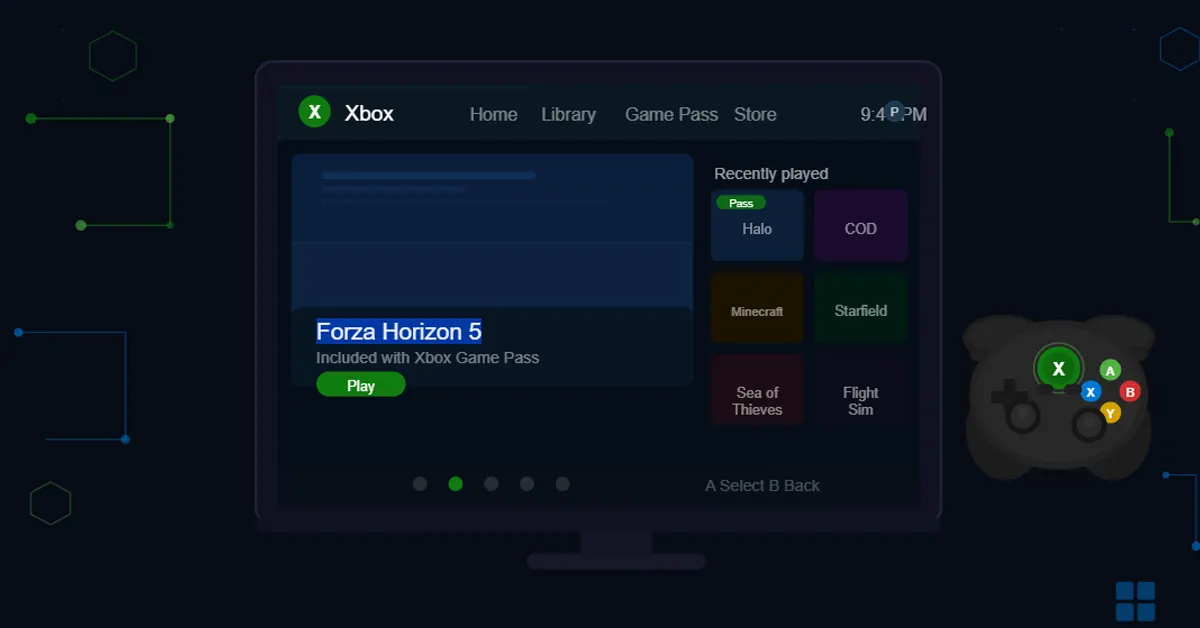

If you have ever wished your Windows PC could boot up looking more like an Xbox than a cluttered desktop, Microsoft has been reading your mind. The company has officially started rolling out Xbox Mode for Windows 11, a bold new full-screen gaming interface designed to make PC gaming feel as slick and streamlined as sitting in front of a console. The Microsoft Xbox Mode for Windows 11 is not just a cosmetic facelift. It is a genuine attempt to rethink how gamers interact with their PCs.
In This Article
What Exactly Is Xbox Mode for Windows 11?
At its core, Xbox Mode is a dedicated, full-screen gaming environment built natively into the Windows 11 operating system. When you launch it, your sprawling, notification-heavy desktop disappears and is replaced by a clean, controller-friendly interface that puts your game library front and centre. Think of it as your PC putting on a tuxedo specifically for gaming night.
Read Also: Netflix introduces Clips, a new vertical video feed
The interface is designed so that you can navigate everything with a standard game controller, no mouse or keyboard required. Whether you want to browse your installed titles, check what is new on Xbox Game Pass, or jump straight into a recent favourite, the whole experience is built around thumbsticks and buttons rather than mouse clicks.
Key Features That Make Xbox Mode Stand Out
Controller Navigation sits at the heart of the experience. The entire user interface has been built from the ground up to work seamlessly with a game controller, making it ideal for living room setups, couch gaming sessions, or anyone who simply prefers a controller over a keyboard and mouse.
Seamless Switching is another headline feature. Users can flick between Xbox Mode and the standard Windows 11 desktop freely and without restarting. You get the best of both worlds, a lean gaming environment when you want it, and the full power of Windows when you need it.
An Aggregated Game Library brings all your installed titles together in a single hub. Games from multiple storefronts are gathered under one roof alongside the full Xbox Game Pass catalogue, so you spend less time hunting through different launchers and more time actually playing.
From Handheld to Desktop: The Story Behind the Feature
Xbox Mode did not appear out of thin air. Microsoft originally introduced a version of this interface on Windows-based gaming handhelds under the working name “full screen experience.” The feedback gathered from handheld users on those devices directly shaped what Xbox Mode has become for the broader Windows 11 ecosystem. It is a relatively rare example of a company genuinely listening to its users and using that input to build something better.
The move also fits into Microsoft’s wider strategy of unifying the Xbox experience across different types of hardware. Whether you own an Xbox Series X, a gaming handheld, or a standard Windows laptop, Microsoft wants the feel and functionality of your gaming experience to remain consistent.
Read Also: Google Photos gets an AI-driven wardrobe feature to virtually mix and match outfits
How to Get Xbox Mode on Your Windows 11 PC Right Now
The rollout is gradual at the moment. Microsoft is being cautious, distributing the update to a limited number of users in select markets first to keep an eye on stability before opening the floodgates. Wider availability is expected to expand over the coming weeks.
If you want to get Xbox Mode as early as possible, here is what to do. Open Settings on your Windows 11 PC, go to Windows Update, and turn on the option that reads “Get the latest updates as soon as they are available.” Once the corresponding update downloads and installs, you will be able to launch directly into Xbox Mode.
Microsoft has also confirmed that the interface will keep evolving based on user feedback, so what you see today is not the finished product. Consider it an exciting work in progress.
Will Xbox Mode Change PC Gaming for Good?
The honest answer is: it could. PC gaming has always been powerful but famously fiddly. You need to manage multiple launchers, battle with desktop notifications mid-game, and wrestle with settings that were clearly designed for a mouse. Xbox Mode cuts through a lot of that friction. For casual PC gamers, families sharing a computer in the living room, or anyone who wants a simpler path to play, it is genuinely useful. For hardcore desktop users, the ability to switch back to standard Windows instantly means nobody is forced to give anything up. Whether this becomes the default way millions of people start their gaming sessions or remains a niche feature for enthusiasts remains to be seen, but one thing is clear: Microsoft is finally treating the PC as a first-class citizen in the Xbox universe, and that is long overdue.


