The iPhone 17 series has been the subject of numerous leaks and surprises, raising user and fan interest. A recent leak shows new dummies for the iPhone 17 series, adding to the already extensive information available about the phone. New iPhone 17 series dummies have leaked online, displaying the phone’s overall design as well as metal and glass chassis components.Sonny Dickson leaked a fresh image displaying dummy units of the rumoured iPhone 17, iPhone 17 Pro, iPhone 17 Air, and iPhone 17 Pro Max, providing insight into the design improvements on the Pro versions, as opposed to previous metal dummies posted by the same person. Ring magnets on the back of all four models in the series are used for MagSafe application and alignment. The Two Pro models, which have tall and wide camera islands, have the most modifications.Also Read:Apple’s WWDC 2025 event date announced: Here is everythingThe iPhone 17 Pro and iPhone 17 Pro Max will have a new rear camera design, with a larger glass portion and a metal-framed rear panel. This design differs from their predecessors, which had glass-only rear panels. The phone’s durability is further enhanced by its smooth single-piece frame and back panel of aluminium and glass. The lower half of the handset, including the MagSafe region, will be covered in glass, with the elevated camera module surrounded by aluminium.According to CNET, Apple plans to release an ultra-thin iPhone 17, potentially with a thickness of under 5.5mm. Also Read:HDR10+ streaming is now available on NetflixThe iPhone 17 is believed to have no substantial improvements in design over the current iPhone 16 model, and it could be the only phone in the series with a vertical camera configuration. The iPhone 17 Air is expected to replace the iPhone 16 Plus and will have a single rear camera.According to Bloomberg, the phone may be fully port-free, which would represent a substantial shift in the industry’s existing status.Previously released photographs of metal dummies from the iPhone 17 series suggested that the iPhone 17 and iPhone 17 Pro could share the same 6.3-inch display. The iPhone 17 Air and iPhone 17 Pro Max appear bigger, with the latter being the largest.
Just when you thought your ears had enough tech treats, Sony comes along with another set of wireless earbuds. Introducing the new Sony WF-C710N TWS earbuds, now with upgraded dual-mic noise-canceling technology. The successor to the WF-C510, these buds claim to silence your chaotic surroundings better than ever, so you can finally enjoy your playlist without overhearing your neighbor’s overly detailed coffee order.
In This Article
Comfort Meets Clarity
These Sony earbuds aren’t just another pretty face in a crowded market. The WF-C710N earbuds are built around a compact, ergonomic design aimed at all-day wearability. Weighing only 5.2 grams each, they’re crafted for users who forget they’re even wearing earbuds (until someone tries talking to them).
At the heart of these tiny tech wonders is a 5mm driver unit, complemented by Sony’s famed Digital Sound Enhancement Engine (DSEE). This combination promises well-balanced audio with robust bass and crisp vocals, perfect for music lovers and podcast junkies alike.
Read Also:4 Working Methods to Silence WhatsApp Calls from Unknown
Silence the Noise, Amplify the Good
Sony is particularly proud of their revamped Dual Noise Sensor technology. Using dual microphones, the earbuds intelligently filter ambient noise, helping you drown out distractions whether you’re commuting or escaping into a musical paradise. Plus, with 20-level adjustable Ambient Sound mode, you can control exactly how much of the outside world you allow in—perfect when you’re waiting for your cappuccino or dodging traffic.
Smarter Calls, Easier Controls
No one wants to repeat themselves five times on a call. Fortunately, the WF-C710N earbuds include AI-powered voice pickup for crystal-clear calls, even in noisy environments. Additionally, multipoint connectivity allows seamless switching between devices, which is handy when juggling a smartphone, tablet, or laptop.
Touch controls ensure everything you need is at your fingertips—from adjusting volume to managing your music and answering calls. With Bluetooth 5.3, expect reliable and smooth connectivity with support for SBC and AAC codecs.
Splashy Looks and Splash-Proof Build
Sony doesn’t shy away from making a fashion statement. The WF-C710N earbuds come in trendy shades, including Glass Blue, Pink, Black, and White, adding a pop of personality to your tech collection. With an IPX4 rating, they’re also ready to withstand workouts and rainy-day runs.
Battery Life Worth Mentioning
Battery anxiety? Relax; Sony’s got you covered. These earbuds deliver up to 8.5 hours of continuous playback, extending to an impressive total of 30 hours when combined with their charging case. Even better, if you’re in a rush, a quick 5-minute charge yields a solid hour of playback—perfect for when you’ve inevitably forgotten to charge overnight.
Read Also:Top 4 Ways to Block Spam on WhatsApp?
Pricing and Availability
Priced at USD 119.99 (Rs 10,500 approx) in the US and approximately €120/£100 (Rs 11,500–11,800 approx) in Europe, the Sony WF-C710N earbuds are now available to pre-order from Sony’s website.
Quick Take
While the wireless earbuds space is crowded, Sony’s WF-C710N TWS offers solid upgrades at a competitive price. Their blend of comfort, sound quality, and customizable noise cancellation could make them an attractive pick for both casual listeners and audiophiles looking for affordable yet sophisticated audio gear.
In what could be music to every gamer’s ears, the highly anticipated Nintendo Switch 2 release date is reportedly set for June, according to fresh insider leaks. Nintendo appears to be playing it strategically this time, launching the new console alongside an ambitious three-phase rollout of games designed to keep players glued all year long.
The information, sourced from a detailed Insider Gaming report, reveals Nintendo’s carefully orchestrated plan kicking off with the June launch. This initial phase is expected to feature a lineup headlined by Nintendo’s beloved first-party titles. And yes—Mario fans, hold onto your steering wheels—the next-gen Mario Kart game teased in the reveal trailer will reportedly race into the spotlight at launch.
Notably, respected industry analyst Daniel Ahmad chimed in via X (formerly Twitter), confirming that numerous developers already possess Switch 2 development kits, with a wider distribution scheduled for June. This expanded dev kit rollout strongly suggests that Nintendo aims to foster extensive third-party game development right out of the gate.
Read Also:Mario Kart Tour available on iOS and Android is already downloaded
In This Article
A Strategic Three-Phase Game Plan
After the big summer splash, Nintendo‘s second rollout phase arrives between October and November. During this crucial window, expect a wave of third-party games to flood the console, significantly broadening the Switch 2’s library. Details on exactly which titles are inbound remain under wraps, but anticipation is already running high.
The third and final phase is earmarked for the busy holiday season. Traditionally gaming’s most lucrative period, the holidays will bring even more titles to the Switch 2, rounding out what Nintendo clearly hopes to be a blockbuster debut year.
Upcoming Nintendo Direct Events
Adding fuel to the speculative fire, Nintendo has scheduled a dedicated Nintendo Switch 2 Direct event for April 2. Interestingly, another Nintendo Direct could happen as soon as this week, though it reportedly centers exclusively on titles still coming to the original Nintendo Switch—including the long-awaited Metroid Prime 4: Beyond. Fans recently got their hands on the Xenoblade Chronicles X: Definitive Edition, uncovering a hidden 60 FPS mode—possibly a teaser of what’s achievable on the Switch 2.
Read Also:Nintendo Switch may get 12 new games this year
A Game-Changer for Nintendo?
Nintendo’s original Switch has enjoyed remarkable success, selling over 130 million units worldwide. However, with emerging competition and increasingly demanding graphics performance, expectations for the Switch 2 are sky-high. If the rumored specs and games lineup hold true, Nintendo might just have another winning formula ready to dominate living rooms—and backpacks—across the globe.
In the end, as Nintendo continues to drip-feed details through strategic reveals and Directs, gamers can only speculate—and perhaps dream—about what surprises lie ahead. Here’s hoping the Switch 2 lives up to its already monumental hype.
Garena Free Fire Max is a battle royale game with regular awards and tournaments to keep players interested. If you play Garena Free Fire, you should be aware of the redeem codes that are released on a daily basis. However, because the battle royale game is banned in India, players from other countries can use theFree Fire Redeem codes daily. If you’re unfamiliar with the Garena Free Fire redeem codes or don’t know how to get them, we’ve put together a step-by-step guide to help youredeem them. Check out Garena Free Fire Max Redeem Codes for 26 March 2025.The Free Fire Max redeemcodes are a great way to get free stuff. These are 12-digit codes that contain alphabets and numbers, as well as an expiration date and time. Because the Garena FF redeem codes cannot be used more than once, you should hurry to the redemption page to claim your free reward before someone else does. To get a free reward, all you have to do is go toreward.ff.garena.com/en, which is the official redemption page. Also, keep an eye on this space for daily updates on Garena Free Fire Max redemption codes and rewards.Also Read: Sennheiser Accentum Plus wireless headphones with Hybrid Adaptive Noise Cancellation launched
In This Article
Garena Free Fire Max Redeem Codes Today 26 March 2025
Last year, Nothing stepped into the midrange segment instead of putting out a flagship product. The Phone (2a) retained the core design philosophy associated with Nothing products, without going all out on the Glyph lighting like its elder sibling, the Phone (2) (our review here). Nothing soon updated it with a ‘Plus’ variant (our review here). As we stepped into 2025, a new Nothing flagship was presumed to be on the horizon, but the London-based tech outfit surprised us with a successor to the (2a) series. While the Phone (3) is still expected to launch this summer, the spring is a tiny bit more interesting with the Phone (3a) series. We spent a week with the Nothing Phone (3a); here is our in-depth review of the smartphone.Read Also:How to disable the toolbar on your Android phone’s keyboard
In This Article
Nothing Phone (3a) Review: Design and Display
Here’s what you get inside the Nothing Phone (3a)’s retail box:
Smartphone
USB Type-C to Type-C cable
Safety and warranty information booklet
The Nothing Phone (3a) retains the core design elements of its predecessor. The back panel is still see-through, and the segmented Glyph lighting surrounds the camera array. The horizontal camera panel sees the addition of a new telephoto lens, taking the total number of sensors to three. The design of the maze pattern in the bottom half of the back panel has been slightly tweaked.The more notable design changes have been reserved for the Pro variant. However, Nothing has upped the ante when it comes to the base variant’s hardware specs. The new glass back panel elevates the in-hand feel of the device. Despite its see-through design, the glass panel does not attract a lot of fingerprints. Another thing we like about this smartphone is its flat form factor with rounded corners.The plastic frame houses the side button along with the new ‘Essential’ key on its right edge. We’ll get into the functions of the Essential key later in the review, but its positioning is something that deserves more critique. Ideally, it should have been placed above the side key since the latter is used more frequently. It took us a few days to get accustomed to the new layout. The volume rocker keys are positioned on the left edge, while the SIM tray, primary microphone, USB Type-C port, and speaker grille make their way to the bottom. Up top lies the solitary secondary microphone. The earpiece doubles as the secondary speaker.The 6.77-inch AMOLED display has a 120Hz refresh rate and can reach a peak brightness of 3,000 nits. In High Brightness Mode, this display can hit 1,300 nits. Using the smartphone in bright outdoor conditions is not a hassle as the display easily overcomes the surrounding light and maintains its legibility. The touch response is smooth, and the optical fingerprint scanner is snappy. The bezels surrounding the display are sleek and uniform.The viewing experience on the Nothing Phone (3a) is taken to the next level with HDR10+ support. The detailed images are packed with vibrant colours. There are plenty of good viewing angles, and you don’t need to worry about propping the device in a particular position to get the best visuals. The AMOLED panel brings out the best in the deep blacks. However, what seals the deal for us is the loud and comprehensive audio output.The Phone (3a) is rated IP64 for dust and water resistance. It can survive minor water splashes, but anything more than that can hamper its performance. We’d like to see a more comprehensive IP67 rating in the next iteration of the (a) series.
Nothing Phone (3a) Review: Performance and Cameras
Powering the Nothing Phone (3a) is the Snapdragon 7s Gen 3 chipset. It is available in 2 storage variants with a fixed 8GB RAM:
128GB: Rs 24,999
256GB: Rs 26,999
We ran the Geekbench 6 app on the smartphone, and it scored 1,157 and 3,263 points in the single-core test and multi-core tests, respectively. The Snapdragon 7s Gen 3 processor puts in a good shift in this smartphone. It crushes daily tasks like instant messaging, emailing, audio and video calling, social media browsing, and media streaming. The linear haptic motor provides smooth feedback. Apps take minimal time to load, and multitasking does not throw any complications. After a week-long review period, we can confidently say that the Nothing Phone (3a)’s everyday performance is unbeatable in this price segment.The gaming performance on offer here isn’t out of the world, but casual gamers will not have any room for complaints. We played games like Call of Duty Mobile and Asphalt Legends Unite on this device and were pleased to see a consistent and jitter-free gameplay. The frame rate is restricted to 60fps for most games, but the graphics come through very nicely. The 4,500mm² steel vapour chamber does a good job of keeping the phone’s internal temperature in check.Nothing Phone (3a) runs the Android 15-based Nothing OS 3.1 out of the box. Nothing has promised 3 major OS upgrades and 6 years of security patches for the (3a) series. There is no bloatware on the device. The dot matrix design, Nothing’s signature icon pack, and home screen widgets give the device its unique flair. We also like the customisation options for the home screen folders and the lock screen clock face. The design of the Gallery and Camera apps has been tweaked as well.The new ‘Essential’ key has been integrated nicely into the OS. A single click takes a screenshot and lets you add a voice memo or text note on top of it. Long-pressing the button automatically starts recording the voice memo and grabs the frame on the screen. The screenshots are stored in the ‘Essential Space’, which can be accessed by double-pressing the Essential key. Nothing OS 3.1 uses AI to summarise the content of the screenshots and voice memos. You can create Collections for different projects. The Essential Space reminds us of the Screenshots app on the new Pixel 9 series. It is still in its infancy, and it’ll be interesting to see where Nothing takes this idea.Essential SpaceThe Nothing Phone (3a) offered a pretty standard battery experience during the review period. We were able to coast through a day of heavy use with ease. After racking up a screen time of 6 hours, we were left with a 15% charge in the tank. The 5,000mAh battery pack supports 50W wired charging and takes almost an hour to charge fully.Nothing Phone (3a)’s rear camera panel features a new 50MP telephoto lens with 2x optical zoom, which is a rarity in this price segment. Joining this sensor is a 50MP primary shooter and an 8MP ultrawide lens. The 32MP front-facing camera lies inside a punch-hole cutout on the display.The 50MP primary shooter takes good pictures in outdoor daylight conditions. The pictures pack a lot of detail and showcase rich colours. We were quite happy to see the crisp shadows in the images, along with sharp subjects. In limited lighting conditions, the smartphone makes good use of its TrueLens Engine 3.0 to deliver clear images with minimal noise.Images taken with the 8MP ultrawide lens are slightly softer, but their colour profile is on point. The pictures pack a good dynamic range. The field of view on offer is remarkable. The quality takes a bigger hit in limited lighting conditions, as the final results appear dim and noisy.Ultrawide lensUltrawide lensThe new 50MP telephoto lens has 2x optical zoom. Images taken with this camera are very detailed and clear. The colours are nicely tuned and do justice to the scene. The difference in quality is noticeable when you compare these results with images taken with a 2x digital zoom. This makes the 2x telephoto lens a nice camera to have in your arsenal.1x v 2xPortraits: 1x v 2xAnother advantage of having a telephoto camera is that it breathes new life into 2x portraits. The portrait shots taken using the Nothing Phone (3a) are detailed and well-focused. We would have liked some more background blur, but its absence isn’t a deal breaker. The camera app offers up to 4x zoom for portraits, but the image quality takes a hit. The 32MP front-facing camera takes good selfies with minimal tone and texture correction. However, this camera’s video recording chops are limited to 1,080p @ 30fps. Meanwhile, the primary shooter and telephoto lens can record 4K videos @ 30fps.Primary Shooter v UltrawideRead Also: Top 4 Ways to Reach the Control Centre on Your iPhone Easily
Verdict
If we were to brainstorm ideas for a perfect midrange smartphone, the Nothing Phone (3a) is one of the few devices that would come close to our expectations. It is an amazing feat that a tech outfit can churn out a device with a smooth display, bloatware-free OS, unique design, versatile cameras, and the much-needed X factor while keeping the price tag below Rs 25,000. If you’re tired of the plateau that modern smartphones seem to have hit, now would be a perfect time to get your hands on a Nothing device.
Your Android phone’s keyboard can accomplish a lot of tasks. Apart from correcting your spelling and providing text predictions, it can also help you translate your messages and generate AI responses to texts. These features can be accessed from the handy toolbar at the top of the keyboard. However, if you want a cleaner look for your keyboard, removing this toolbar is the way to go. Here’s how you can disable the toolbar on your Android phone’s keyboard.Read Also:Apple’s WWDC 2025 event date announced: Here is everything
In This Article
Before you begin
The toolbar on Gboard is a part of its ‘suggestion strip’. This means that when you disable the toolbar, you will lose the predictive text suggestions as well. This should not be a problem if a cleaner look for your keyboard is your biggest priority. On a Samsung keyboard, the predictive text bar remains functional when the toolbar is disabled.The toolbar and predictive text bar are two different entities on the Microsoft SwiftKey keyboard. You can easily hide or unhide the toolbar by hitting the arrow icon on the predictive text bar. However, if you want a completely clean look for the keyboard, you are bound to hit a roadblock since the predictive text bar cannot be disabled on the SwiftKey keyboard.
Disable the toolbar on Gboard
Step 1: Hit the settings icon on the keyboard. Alternatively, go to Settings>System>Keyboard & input method>Manage keyboards>Gboard.Step 2: Tap on Text correction.Step 3: Turn off the toggle switch next to Show suggestion strip.
Disable the toolbar on the Samsung keyboard
Step 1: Tap the settings icon on the Samsung keyboard’s toolbar. Alternatively, go to Settings>General management>Samsung Keyboard settings.Step 2: Turn off the toggle switch next to Keyboard toolbar.
Disable the toolbar on Microsoft SwiftKey
Step 1: Trigger the Microsoft SwiftKey keyboard by tapping a text box.Step 2: Once the keyboard appears on the screen, tap the arrow icon next to the suggested words to hide the toolbar. Tap the arrow again to view the toolbar.
Frequently Asked Questions (FAQs)
How do I disable the Gboard toolbar?
Hit the settings icon on the toolbar, go to Text correction and turn off the toggle switch next to ‘Show suggestion strip’.
How do I disable the toolbar on the Samsung keyboard?
Go to Settings>General management>Samsung keyboard settings and turn off the toggle switch next to ‘Keyboard toolbar’.
How do I disable the toolbar on Microsoft SwiftKey?
The toolbar on the Microsoft SwiftKey keyboard can be hidden by tapping the arrow icon on the left corner of the predictive text bar.
Can I disable the predictive text bar on Microsoft SwiftKey?
No, you cannot disable the predictive text bar on your Microsoft Swifkey keyboard.
How do I change Gboard’s theme?
Tap the palette icon on Gboard’s toolbar and pick a new theme from the list. Alternatively, go to Settings>System>Keyboard & input method>Manage keyboards>Gboard, tap on ‘Theme’ and select a theme from the list.Read Also:Top 4 Ways to Reach the Control Centre on Your iPhone Easily
Final Thoughts
This is how you can disable the toolbar on your Android phone’s keyboard. Can’t get the keyboard on your Samsung phone to work? Try these 13 fixes. If you have any questions, let us know in the comments!
Apple intends to gather for its Worldwide Developers Conference (WWDC 2025) from June 9 to 13, mostly online, with select developers and students attending in person. The conference will include video sessions and interactive labs where developers may engage with Apple engineers and designers.Apple will hold its annual Worldwide Developers Conference (WWDC) online from June 9 to 13, 2025, and in person at Apple Park on June 9. In addition, Apple will kick off WWDC with a limited-capacity in-person event at Apple Park, where developers can watch Keynote and Platforms State of the Union, meet with Apple experts in one-on-one and group labs, and engage in unique activities.Also Read:HDR10+ streaming is now available on NetflixWWDC25, the Apple Developer Conference, will include Keynote sessions, video sessions, and online labs where developers and students may learn about the most recent Apple software and innovations. The event will also be broadcast on Apple’s Developer app, website, and YouTube channel.Apple has launched the Swift Student Challenge to help the next generation of developers. Applicants will be informed on March 27, and winners will be invited to a special event at Apple Park. 50 Distinguished Winners will be flown to Cupertino, California, for a three-day event.However, Apple plans to provide additional conference details in advance of WWDC25 via the Apple Developer app and WWDC25 website.Also Read:Lava Shark with 50MP AI rear camera launched in IndiaSusan Prescott, Apple’s vice president of Worldwide Developer Relations said, “We’re excited to mark another incredible year of WWDC with our global developer community. We can’t wait to share the latest tools and technologies that will empower developers and help them continue to innovate.”
Are you looking for today’s Wordle for March 26, 2025? The problem is difficult to solve, so if you need assistance, we’ve included hints and the answer to the March 26 Wordle.
In This Article
Hints and Answers for Today’s Wordle March 26
Before answering directly, please check the March 26 Wordle Hints first.Hint 1: Today’s Wordle answer includes two vowels.Hint 2: The answer for today has no repeating letter.Hint 3: The part in the middle of the arm where it bends.
What word does today’s Wordle begin with?
Do you need help with today’s Wordle answer’s initial letter?The first letter in today’s Wordle is “E”
Wordle: A Five-Letter Word Guessing Game• The game allows six guesses of a five-letter word.• Provide feedback on guessed letters’ placement in the puzzle.• The New York Times purchased the game in 2022.• Created by Josh Wardle for his partner, narrowing down 12,000 English words to 2,500.• Named after the word “word.”
How To Play Wordle?
Wordle is a New York Times word puzzle game that allows users to guess a five-letter word in six attempts. The letters are highlighted in Yellow and Green, indicating whether the word is present in the answer or not, and Green letters indicate the correct guess.
Wordle Tips and Tricks
Select a powerful starting word: Avoid using unusual words, as they frequently do not match common letters. A good opening word has plenty of benefits.
Repeating letters: Don’t be afraid of repeating letters; they appear frequently in words. The answer may contain one or two repeated letters.
Use the Wordlebot: The NYT’s Wordlebot analyses and compares replies to itself. This challenge can assist you enhance guessing skills and highlight areas for development.
26 March 2025: New Amazon Quiz is now available. Customers from different parts of the country are participating in the daily quiz. The quiz starts at midnight today and will be live until 11:59 PM tonight. By successfully answering every question, participants in the quiz have the chance to win wonderful rewards. Up to Rs 500 Amazon Pay Balance is up for grabs to participants today.One wrong answer could eliminate you from the quiz. You have a chance to win up to Rs 500 Amazon Pay Balance if you successfully answer every question. Users of the app only have the opportunity to take the quiz. Check Out 26 March 2025 Amazon Quiz Answers.
In This Article
Are you not able to find Amazon FunZone? Click below and participate.
Click here to enter the Amazon FunZone Quiz and play today.Amazon Quiz Today Prize: Rs 500 Amazon Pay BalanceQuiz Date: 26 March 2025Daily Timing: 12 AM to 11:59 PMPrevious Amazon Quiz Winners Announcement: Today 12 PM Noon
Amazon Quiz Answers Today 26 March 2025: Win Up To ₹ 500 Amazon Pay Balance
Question 1: In MP’s Kuno Park, what prey is taking up more bite power from the Cheetahs?
Answer: ChitalQuestion 2: Ayam Goreng is ranked #1 and Chicken 65 is ranked #10 on a major Top 10 list about what food?
Answer: Fried ChickenQuestion 3: What name, derived from the Sanskrit for ‘wisdom’, is given to the lunar rover of Chandrayaan-3?
Answer: PragyanQuestion 4: The name of this animal came from ghosts of which culture?Answer: RomansQuestion 5: Who has designed this logo?
Answer: Rob Janoff
Now fill in the required information through the Sign-Up option.
To find the Amazon Quiz banner, log in to the Amazon app and scroll down to the home screen.
Tap on the Amazon Quiz banner and tap on the Start button to start the Quiz.
Now you will get 5 questions and you need to answer them correctly. One wrong answer will eliminate you from the Quiz.
After answering all the questions correctly you are now eligible for a Lucky Draw.
The previous winner’s name will be announced today at 12 PM.
Amazon Daily Quiz Answers from the previous few days.
Here are all the answers from the previous 5 days of the Amazon Daily Quiz and Contest.
Amazon Quiz Answers Today 25 March 2025: Win Up To ₹ 5,000 Amazon Pay Balance
Question 1: Which country has the highest life expectancy?
Answer: Hong KongQuestion 2: Aureolin is a shade of what colour?
Answer: YellowQuestion 3: How many dots appear on a pair of dice?
Answer: 42Question 4: What is acrophobia a fear of?Answer: HeightQuestion 5: What company was initially known as Blue Ribbon Sports?
Answer: Nike
Amazon Quiz Answers Today 24 March 2025: Win Up To ₹ 5,000 Amazon Pay Balance
Question 1: Where is Taj Mahal located?
Answer: AgraQuestion 2: In which state is the International Kite Festival celebrated?
Answer: GujaratQuestion 3: Which state is also known as the fruit bowl of India?
Answer: Himachal PradeshQuestion 4: Which state in India has the highest population?Answer: Uttar PradeshQuestion 5: Jaipur is called the Pink City in India. True or False?
Answer: True
Amazon Quiz Answers Today 23 March 2025: Win Up To ₹ 500 Amazon Pay Balance
Question 1: National Rifle Association of India is associated with which sport?Answer: ShootingQuestion 2: Paul Di’Anno, who passed away in 2024, was the lead vocalist for which band from 1978 to 1981?
Answer: Iron MaidenQuestion 3: M.A. Yusuff Ali founded which business group that started with a hypermarket in Abu Dhabi in 1990?
Answer: LuLu GroupQuestion 4: This cathedral is located in which region?Answer: HelsinkiQuestion 5:This cathedral is located in which region?
Answer: Barcelona
Amazon Quiz Answers Today 22 March 2025: Win Up To ₹ 500 Amazon Pay Balance
Question 1: Which of these players retired from tennis after the 2024 Vienna Open?Answer: Dominic ThiemQuestion 2: Jensen Huang is the president and chief executive officer of the world’s largest semiconductor company. Name the company.
Answer: NvidiaQuestion 3: Aitana Bonmati won which award in women’s category for the second year in a row?
Answer: Ballon d’OrQuestion 4: The paragliding capital of India is located in which state?Answer: Himachal PradeshQuestion 5: Who is the founder of this garden in Chandigarh?Answer: Nek Chand
Amazon Quiz Answers Today 21 March 2025: Win Up To ₹ 500 Amazon Pay Balance
Question 1: Ligue 1 is the top national league in which country?Answer: FranceQuestion 2: Tom Hardy played which fictional character in three films?
Answer: VenomQuestion 3: Which grand prix takes place in the interlagos neighbourhood?
Answer: Brazilian Grand PrixQuestion 4: This castle is located on the banks which lake?Answer: GenevaQuestion 5: When was this statue completed?Answer: 1920
Amazon Quiz Answers Today 20 March 2025: Win Up To ₹ 500 Amazon Pay Balance
Question 1: Who became the first Indian woman to score 50 international goals in 2024?Answer: Bala DeviQuestion 2: Which of these is a large language model developed by Meta?
Answer: Llama
Question 3: At the 2024 Ballon d’Or, Emiliano Martinez of which club was named the world’s best goalkeeper for the second year in a row?
Answer: Aston VillaQuestion 4: This site was dominated by which civilisation?Answer: MayansQuestion 5: The character of Ron Weasley in this book belongs to which house?Answer: Gryffindor
We have written an explainer above, you can refer to that.
When are the winners of the Amazon Quiz and contest announced or declared?
The announcement of today’s Amazon quiz winner will take place Tomorrow. As for the Special Quiz and “Spin & Win” Contest, the winners will be declared once the Quiz Contest comes to an end. To find out who the lucky winner is, you can refer to the Amazon Quiz Winners List or visit the Amazon Winners tab in the Amazon App.
How to participate in the Daily Amazon Quiz?
That is very easy, just got to the Amazon app and scroll to the bottom of the page and you will find the Quiz section. Click on it (usually it is called the fun zone) and you can enter the Amazon Today Quiz Contest.
Are there any other quizzes or contests running on Amazon daily?
Yes, there are many running on a daily basis. These range from spinning the wheel to answering the questions correctly. All are located in the Fun Zone.
What are the criteria for selecting a winner in the Daily Amazon Quiz?
When a qualified player submits correct answers to all the questions, they will automatically be entered into a lucky draw. This draw will include all participants who answered all the questions correctly. Amazon randomly selects the final winners from the pool of eligible participants who gave the right answers.
Which Types of Questions are asked within Amazon Daily Quiz?
These are very simple and straightforward questions. These are mainly related to general knowledge.
Where should I look for Amazon Daily Quiz answers?
You can bookmark our website www.gadgetbridge.com as we will help you every day with the Amazon Daily Quiz. We bring you fresh answers every day for the Amazon Daily Quiz and Contest.
What time does Amazon Announce previous winners?
The previous winner’s name will be announced today at 12 PM (noon).
One of our biggest pet peeves about using an iPhone is that the Control Centre is hard to reach with one hand. If you have small hands, reaching the top right corner of the screen with your thumb while holding the device can be an arduous task. You always risk dropping your phone while carrying out this operation. Luckily, there are some ways to get around this issue. Here are 4 ways to reach the Control Centre on your iPhone easily with one hand.Read Also:HDR10+ streaming is now available on Netflix
In This Article
Which method is the best for you?
Like its Android counterparts, the iPhone has a one-handed mode to help users reach the top edges of the screen with relative ease. This feature is called ‘Reachability’ and is tucked away in device settings. Once this feature is enabled, you can trigger it by swiping down on the bottom edge of the screen. The only downside to this feature is that it is easy to trigger it accidentally. Some users may also find it frustrating that it takes 2 steps to reach the Control Centre instead of 1.All of these issues can be resolved by using Back Tap. You can program this function to give you access to the Control Centre when you tap your iPhone’s back panel twice. It is easy and gets the job done right away. If you’re not too keen on using this feature, you can always use the Shortcuts app to create a home screen icon for the Control Centre. Furthermore, you can program the Action Button on your iPhone to trigger this shortcut every time you press it.
Use Reachability for one-handed use
The ‘Reachability’ feature on your iPhone pulls down the screen so you can reach the edges easily with one hand. You can use it to access the Control Centre more easily.Step 1: Go to Settings and select Accessibility.Step 2: Tap on Touch.Step 3: Turn on the toggle switch next to Reachability.Step 4: Once Reachability has been enabled, swipe down on the bottom edge of the screen. This will bring down the page, making it easier to reach the Control Centre with one hand.
Use Back Tap
Instead of using Reachability, you can program the Back Tap feature on your iPhone to open the Control Centre. Here’s how.Step 1: Go to Settings and select Accessibility.Step 2: Tap on Touch.Step 3: Select Back Tap.Step 4: Tap on Double Tap.Step 5: Select Control Centre from the list.Step 6:Double tap the back panel of your iPhone to summon the Control Centre.
Create a home screen shortcut for the Control Centre
Step 1:Launch the Shortcuts app and hit the plus icon in the top right corner of the screen.Step 2: Hit the search bar and search for Control Centre.Step 3: Select Show Control Centre from the list.Step 4: Tap the arrow icon and select Add to Home Screen.Step 5: Hit Done.Step 6: Tap the Control Centre icon on the home screen whenever you want to access it.
Use the Action Button
If your iPhone has an Action button, you can use it to access the Control Centre. Here’s how.Step 1: Follow Steps 1-3 mentioned in the previous method.Step 2: Tap on Show and select Toggle.Step 3: Hit Done.Step 4: Go to Settings and select Action Button.Step 5:Swipe through the panels until you land on the shortcut you just created.Step 6: Once the Action Button controls have been set, press it to view the Control Centre.
Frequently Asked Questions (FAQs)
How do I enable one-handed mode on my iPhone?
Go to Settings>Accessibility>Touch and turn on the toggle switch next to Reachability.
Can I use Back Tap to open the Control Centre on my iPhone?
Go to Settings>Accessibility>Touch>Back Tap>Double Tap and select Control Centre. Now, tap the back panel twice to access the Control Centre.
How do I program the Action Button to open the Control Centre?
First, create a home screen shortcut for the Control Centre using the Shortcuts app on your iPhone. Then, go to Settings>Action Button and swipe through the panels till you reach that shortcut.
How do I add a tile to the Control Center?
Swipe down from the top right corner of the screen to go to the Control Centre, tap the plus icon, select ‘Add a Control’, and choose your preferred tile.
How do I add another page on the Control Center?
Swipe down from the top-right corner of the screen, tap the plus icon, hit the dotted circle under the connectivity icon, and choose your preferred controls for the new page.Read Also:Top 5 ways to block spam calls and messages on WhatsApp
Final Thoughts
This is how you can reach the Control Centre on your iPhone easily with one hand. While you’re here, check out how you can customise the Control Centre. If you have any questions, let us know in the comments!
Netflix recently introduced HDR10+ streaming to improve the picture clarity as well as detail in TV series and movies. Netflix intends to grow its HDR10+ content catalogue and employ the AV1 media codec for optimal bandwidth utilisation. Users must have a Netflix Premium subscription to access HDR10+ content.
According to Netflix’s most recent blog post, the company is releasing HDR10+ content for AV1-enabled devices, improving the viewing experience for certified HDR10+ devices. The dynamic metadata in HDR10+ content improves image quality and accuracy.
Also Read:Lava Shark with 50MP AI rear camera launched in India
The blog post says, “We are excited to announce that we are now streaming HDR10+ content on our service for AV1-enabled devices, enhancing the viewing experience for certified HDR10+ devices, which previously only received HDR10 content. The dynamic metadata included in our HDR10+ content improves the quality and accuracy of the picture when viewed on these devices.”
According to the video streaming platform, HDR streaming has increased by 300% over the last five years. Since introducing HDR with Marco Polo, Netflix has added over 11,000 hours of HDR content for members to enjoy. It is now introducing support for HDR10+ to strengthen its HDR ecosystem and create a more immersive viewing experience.
Those who are unaware. the industry recognizes three popular formats: Dolby Vision, HDR10, and HDR10+ using metadata embedded in content to guide playback devices on image display.
Netflix has set up HDR10+ on their platform with the AV1 video codec, which was standardised by the Alliance for Open Media in 2018. This efficient codec is said to improve visual quality, reduce playback delay, and boost streaming resolution. AV1-SDR is already the second most-streamed codec on Netflix, trailing only H.264/AVC. With HDR10+ streaming available to AV1, it is likely to quickly become the most streamed format.
It has expanded HDR10+ streaming for both new and popular HDR content, which now account for 50% of eligible viewing hours. The company plans to provide an HDR10+ experience for all titles by the end of the year.
Also Read:The iPhone 16’s price has dropped massively on Amazon
Requirements
To receive HDR10+, a Netflix Premium plan subscription is necessary, as the title is offered in HDR10+ format. Member devices that support AV1 and HDR10+ include smart TVs, mobile phones, tablets, source devices, and HDMI-connected HDR10+ compliant displays. To enable HDR, make sure the HDR toggle is turned on in the Netflix application settings for TV or streaming devices. Compatible devices include set-top boxes, streaming devices, and MVPDs.
Indian smartphone brand Lava has added a new smartphone to its portfolio. The company today rolled out Lava Shark featuring a 50MP AI rear camera with 8MP front camera and 120Hz refresh rate display. The device is powered by UNISOC T606 octa-core processor and boasts a 5000mAh battery and 18W Type-C charging. Interestingly with these features the device is priced under 7K. So let’s quickly checkout detailed specs and pricing of the newly arrived phone.
In This Article
Lava Shark price in India and availability
The price of the Lava Shark in India is set at Rs 6,999 for the single 4GB + 64GB RAM and storage option. The device will come in two colour options: Titanium Gold and Stealth Black. The phone will be up for purchase at the company’s official website. On the purchase of the smartphone the company will not only provide 1-year warranty but free service at home.Also Read:The iPhone 16’s price has dropped massively on Amazon
Lava Shark specifications and features
The Lava Shark features a 6.7-inch HD+ screen with punch-hole and 720 x 1,612 pixels of resolution. The display comes with a pixel density of 269ppi and 120Hz refresh rate support. Side mounted fingerprint sensor, face unlock is provided for authentication. It comes with a face unlock time of 0.68 seconds and a fingerprint unlock time of 0.28 seconds. The device has an IP54 rating for water and dust resistance.The Shark runs on Android 14 and is powered by an octa-core Unisoc T606 SoC along with 4GB of RAM and 64GB internal storage. It supports an additional 4GB virtual RAM for lag-free multitasking while the internal storage is expandable up to 256GB via microSD card.For the optics the Lava Shark includes a 50MP AI Rear Camera system along with an LED flash. The 8MP front camera takes care of selfies and video calling. The camera system includes features like AI Mode, Portrait, Pro Mode, and HDR.Also Read:Here are the five best PUP-approved interactive pet toys available on AmazonThe budget smartphone packs a 5,000mAh battery with 18W charging support. According to the company, it takes 158 minutes to completely charge the phone. It delivers up to 45 hours of talk time, 376 hours of standby time, and 550 minutes of YouTube playback.
The pricing of the iPhone 16 has fallen significantly. Therefore, now is definitely the best time to get a premium iPhone model if you were waiting for the next sale where you could get a decent discount on the phone. The phone is now available for a remarkably low price.It is quite rare that the latest iPhones experience a price drop. The iPhone 16 is currently available at a significant discount. On Amazon, it is now selling for as low as 73,400. The device was introduced in October with a starting price of Rs 79,900. To sweeten the deal, the e-commerce portal provides bank and exchange offers. You can enjoy an instant Rs 4,000 discount on SBI, ICICI Bank, and Kotak Bank credit card transactions.Also Read:Here are the five best PUP-approved interactive pet toys available on AmazonIf you want to save as much money as possible, you can reduce the cost by up to Rs 22,800. You may replace your old devices for extra discounts through Amazon’s exchange programme. Note that the best exchange offer depends on the condition of your old device.
iPhone 16 specifications
The iPhone 16 features a 6.1-inch Super Retina XDR OLED display with up to 2,000 nits of peak brightness, and improved Ceramic Shield protection. It comes with an IP68 rating for dust and water resistance along with a new Camera control button and an Action button.Also Read:Samsung Galaxy A26 5G with 5000mAh battery launched in IndiaThe device is powered by 3nm octa-core A18 chipset, Apple Intelligence support, and up to 512GB of built-in storage. It comes with dual rear cameras with a redesigned setup, including a 12-megapixel ultra-wide camera and a 48-megapixel wide-angle camera. The ultrawide camera can take macro photos, while a 12-megapixel TrueDepth camera is available for selfies and video calls.
Garena Free Fire Max is a battle royale game with regular awards and tournaments to keep players interested. If you play Garena Free Fire, you should be aware of the redeem codes that are released on a daily basis. However, because the battle royale game is banned in India, players from other countries can use theFree Fire Redeem codes daily. If you’re unfamiliar with the Garena Free Fire redeem codes or don’t know how to get them, we’ve put together a step-by-step guide to help youredeem them. Check out Garena Free Fire Max Redeem Codes for 25 March 2025.The Free Fire Max redeemcodes are a great way to get free stuff. These are 12-digit codes that contain alphabets and numbers, as well as an expiration date and time. Because the Garena FF redeem codes cannot be used more than once, you should hurry to the redemption page to claim your free reward before someone else does. To get a free reward, all you have to do is go toreward.ff.garena.com/en, which is the official redemption page. Also, keep an eye on this space for daily updates on Garena Free Fire Max redemption codes and rewards.Also Read: Sennheiser Accentum Plus wireless headphones with Hybrid Adaptive Noise Cancellation launched
In This Article
Garena Free Fire Max Redeem Codes Today 25 March 2025
If you’ve noticed a rise in spam on WhatsApp lately, you’re not alone. Whether it is promotional messages or scam calls, constant unwanted alerts from WhatsApp can ruin the instant messaging experience. The good thing is that the messaging platform has incorporated some tools to help you battle spam. Here are the top 6 ways to block spam calls and messages on WhatsApp.Read Also:How to Enable Two-Factor Authentication for Your Instagram Account?
In This Article
How does WhatsApp tackle spam?
As more malicious entities have started pushing spam on WhatsApp, the instant messaging platform has risen to the occasion and incorporated some tools to tackle the issue. Needless to say, Meta does not want spam to be a constant fixture in its flagship messaging app. Scam calls are one of the biggest sources of spam on WhatsApp. You may be aware of the ‘digital arrest’ scam that has been doing the rounds lately. One of the easiest ways to bypass these calls is by filtering unknown callers on the app. Once you turn on this feature, you will only be alerted about calls from people in your contact list.The instant messaging platform has a similar feature for text messages. It can automatically block texts from unknown numbers. However, this tool does not work for promotional messages. There is no way to automatically block annoying texts from brands. You can either unsubscribe from their texting list or manually block each brand on the platform. If either step seems too harsh, you can move their messages to the archive folder.
Block spam calls on WhatsApp
One of the easiest ways to avoid spam calls from unknown numbers on WhatsApp is by muting their incoming call alerts. Doing this also keeps the scammers at bay. Here’s how you can go about it.Step 1:Launch the WhatsApp app on your phone and hit the ellipses in the top-right corner of the screen.Step 2: Tap on Settings.Step 3: Select Privacy.Step 4: Go to Calls.Step 5: Turn on the toggle switch next to Silence unknown callers.
Block spam messages on WhatsApp
If you’re tired of the daily spam on WhatsApp, here’s how you can filter messages from people who aren’t in your contact list.Step 1: Launch the WhatsApp app on your phone and hit the ellipses in the top-right corner of the screen.Step 2: Tap on Settings.Step 3: Select Privacy.Step 4: Go to Advanced.Step 5: Turn on the toggle switch next to Block unknown account messages.
Prevent unknown numbers from adding you to group chats
WhatsApp group chats can be a very annoying source of spam as they aren’t muted by default. Here’s how you can prevent unknown numbers from adding you to WhatsApp groups.Step 1:Launch the WhatsApp app on your phone and hit the ellipses in the top-right corner of the screen.Step 2: Tap on Settings.Step 3: Select Privacy.Step 4: Go to Groups.Step 5: Tap on My contacts under Who can add me to groups.
Unsubscribe from promotional messages
Promotional messages from random brands can be a very big source of spam on WhatsApp. Here’s how you can unsubscribe from them.Step 1: Launch the WhatsApp app on your phone and open a promotional message sent to you by a brand.Step 2: Type ‘STOP’ as a reply and hit Send.Step 3: If there’s no option to unsubscribe, tap on Block.
Manually block a user sending you spam
If someone you know is flooding your device with spam texts, here’s how you can block them on WhatsApp.Step 1:Launch the WhatsApp app on your phone and open your conversation with the contact or number sending you routine spam.Step 2: Tap the contact name/number at the top of the screen.Step 3: Scroll down and tap on Block.
Mute messages from a contact
Step 1:Launch WhatsApp on your phone and open a conversation.
Step 2: Hit the ellipses in the top right corner of the screen.
Step 3: Tap on Mute notifications.
Step 4: Select the duration for which you want to mute the messages.
Step 5: Hit OK.
Frequently Asked Questions (FAQs)
How do I block calls from unknown numbers on WhatsApp?
You can mute calls from unknown numbers on WhatsApp by going to Settings>Privacy>Calls and turning on the toggle switch next to ‘Silence unknown callers’.
How do I block messages from unknown numbers on WhatsApp?
Go to Settings>Privacy>Advanced and turn on the toggle switch next to ‘Block unknown account messages’.
How do I unsubscribe from promotional messages on WhatsApp?
Open a promotional text and reply ‘STOP’ in the thread to unsubscribe from the routine alerts.
How do I block WhatsApp spam without opening it?
If a spam message notification shows up on your lock screen, hit the arrow on the alert and select ‘Block’.
These are the top 6 ways to block spam calls and messages on WhatsApp. Can’t get the WhatsApp notifications to work? Try these quick fixes. If you have any further questions related to WhatsApp spam, let us know in the comments!
Nothing is worse than a bored pet- consider using interactive games and toys to keep your pet’s mind engaged. Your fur babies will be entertained for hours with these interactive toys. They also maintain their mental and physical stimulation in addition to providing pleasure. The time has come for you to get your pet one or more of these toys.
In This Article
Interactive Rolling Ball Dog Toy
Interactive Rolling Ball Dog ToyYour dogs and cats will be captivated by this toy and excited for hours!Made of sturdy materials, this interactive rolling dog ball toy moves rotates and shakes to entice your pooch. Its sturdy construction ensures pet protection by withstanding sharp teeth and claws. In order to provide safe and easy play both indoors and outdoors, the toy cleverly changes direction or backs up when it encounters obstructions or confined places.
Buy HereAlso Read:Best gadgets for your furry friends at home
Pawsindia Original Wobble Wag Interactive Fun Dog Toy
Pawsindia Original Wobble Wag Interactive Fun Dog ToyIf your furkids, like us, enjoy interactive toys, you should get them this. They might get hooked on it and attempt to nip you if you try to take it away, but what matters most is that they have fun.Suitable for dogs of all ages and sizes, the Wobble Wag Giggle Ball has six clutch pockets that make it easy for your dog to pick up during playtime. It is a fun and entertaining toy for your pet because it has an internal tube noisemaker, makes attractive “play-with-me” sounds, and doesn’t require batteries.
Buy Here
COALITION Pet Food Feeder Toys Dogs & Cat Treat Dispenser Bowl BallUse this treat dispenser to keep your pets entertained. It will keep them occupied for a long time if you simply fill it with kibble or their favourite treats. They are going to love it.This toy is made with a transparent grain bin top that you can open to fill it with snacks or pet food. Pets will push or move the toy, causing it to spin around. Food will fall through the toy’s central spilling hole while it is swinging, making it more enjoyable for pets and enabling them to get food rewards while they play.
Buy HereAlso Read: Top 3 Websites for Pet Adoptions in the USA: Floof Up Your Life Now
Bestie toys Plastic Barking, Wagging Tail, Walking PuppyThe toy puppies are your dog’s new best friend. They are ideal for plays and cuddles, and you can see the affection on their face as they walk, bark, and wag their tail in glee. The toy is made to endure rough play, so your pet can enjoy hours of fun with it.
Buy Here
KUTKUT Dura Squeak Dog Ball Interactive Dog Toy
Your dog’s inner wolf can be let loose with squeaky toys, which also stimulate the mind and may fool you into playing. It is more interactive for dogs and pet owners, stronger than tennis balls, and easier to clean than tennis balls, which are covered in slobber and grime.
Buy HereAnd yes every dog has a play type! Your pets deserve all the love and fun. Which one best fits your pet, do let us know in the comments section below.
Are you looking for today’s Wordle for March 25, 2025? The problem is difficult to solve, so if you need assistance, we’ve included hints and the answer to the March 25 Wordle.
In This Article
Hints and Answers for Today’s Wordle March 25
Before answering directly, please check the March 25 Wordle Hints first.Hint 1: Today’s Wordle answer includes one vowel.Hint 2: The answer for today has no repeating letter.Hint 3: A long flat piece of wood, glass, etc. that is fixed to a wall or in a cupboard, used for putting things on.
What word does today’s Wordle begin with?
Do you need help with today’s Wordle answer’s initial letter?The first letter in today’s Wordle is “S”
Wordle: A Five-Letter Word Guessing Game• The game allows six guesses of a five-letter word.• Provide feedback on guessed letters’ placement in the puzzle.• The New York Times purchased the game in 2022.• Created by Josh Wardle for his partner, narrowing down 12,000 English words to 2,500.• Named after the word “word.”
How To Play Wordle?
Wordle is a New York Times word puzzle game that allows users to guess a five-letter word in six attempts. The letters are highlighted in Yellow and Green, indicating whether the word is present in the answer or not, and Green letters indicate the correct guess.
Wordle Tips and Tricks
Select a powerful starting word: Avoid using unusual words, as they frequently do not match common letters. A good opening word has plenty of benefits.
Repeating letters: Don’t be afraid of repeating letters; they appear frequently in words. The answer may contain one or two repeated letters.
Use the Wordlebot: The NYT’s Wordlebot analyses and compares replies to itself. This challenge can assist you enhance guessing skills and highlight areas for development.
25 March 2025: New Amazon Quiz is now available. Customers from different parts of the country are participating in the daily quiz. The quiz starts at midnight today and will be live until 11:59 PM tonight. By successfully answering every question, participants in the quiz have the chance to win wonderful rewards. Up to Rs 5,000 Amazon Pay Balance is up for grabs to participants today.One wrong answer could eliminate you from the quiz. You have a chance to win up to Rs 500 Amazon Pay Balance if you successfully answer every question. Users of the app only have the opportunity to take the quiz. Check Out 25 March 2025 Amazon Quiz Answers.
In This Article
Are you not able to find Amazon FunZone? Click below and participate.
Click here to enter the Amazon FunZone Quiz and play today.Amazon Quiz Today Prize: Rs 5,000 Amazon Pay BalanceQuiz Date: 25 March 2025Daily Timing: 12 AM to 11:59 PMPrevious Amazon Quiz Winners Announcement: Today 12 PM Noon
Amazon Quiz Answers Today 25 March 2025: Win Up To ₹ 5,000 Amazon Pay Balance
Question 1: Which country has the highest life expectancy?
Answer: Hong KongQuestion 2: Aureolin is a shade of what colour?
Answer: YellowQuestion 3: How many dots appear on a pair of dice?
Answer: 42Question 4: What is acrophobia a fear of?Answer: HeightQuestion 5: What company was initially known as Blue Ribbon Sports?
Answer: Nike
Now fill in the required information through the Sign-Up option.
To find the Amazon Quiz banner, log in to the Amazon app and scroll down to the home screen.
Tap on the Amazon Quiz banner and tap on the Start button to start the Quiz.
Now you will get 5 questions and you need to answer them correctly. One wrong answer will eliminate you from the Quiz.
After answering all the questions correctly you are now eligible for a Lucky Draw.
The previous winner’s name will be announced today at 12 PM.
Amazon Daily Quiz Answers from the previous few days.
Here are all the answers from the previous 5 days of the Amazon Daily Quiz and Contest.
Amazon Quiz Answers Today 24 March 2025: Win Up To ₹ 5,000 Amazon Pay Balance
Question 1: Where is Taj Mahal located?
Answer: AgraQuestion 2: In which state is the International Kite Festival celebrated?
Answer: GujaratQuestion 3: Which state is also known as the fruit bowl of India?
Answer: Himachal PradeshQuestion 4: Which state in India has the highest population?Answer: Uttar PradeshQuestion 5: Jaipur is called the Pink City in India. True or False?
Answer: True
Amazon Quiz Answers Today 23 March 2025: Win Up To ₹ 500 Amazon Pay Balance
Question 1: National Rifle Association of India is associated with which sport?Answer: ShootingQuestion 2: Paul Di’Anno, who passed away in 2024, was the lead vocalist for which band from 1978 to 1981?
Answer: Iron MaidenQuestion 3: M.A. Yusuff Ali founded which business group that started with a hypermarket in Abu Dhabi in 1990?
Answer: LuLu GroupQuestion 4: This cathedral is located in which region?Answer: HelsinkiQuestion 5:This cathedral is located in which region?
Answer: Barcelona
Amazon Quiz Answers Today 22 March 2025: Win Up To ₹ 500 Amazon Pay Balance
Question 1: Which of these players retired from tennis after the 2024 Vienna Open?Answer: Dominic ThiemQuestion 2: Jensen Huang is the president and chief executive officer of the world’s largest semiconductor company. Name the company.
Answer: NvidiaQuestion 3: Aitana Bonmati won which award in women’s category for the second year in a row?
Answer: Ballon d’OrQuestion 4: The paragliding capital of India is located in which state?Answer: Himachal PradeshQuestion 5: Who is the founder of this garden in Chandigarh?Answer: Nek Chand
Amazon Quiz Answers Today 21 March 2025: Win Up To ₹ 500 Amazon Pay Balance
Question 1: Ligue 1 is the top national league in which country?Answer: FranceQuestion 2: Tom Hardy played which fictional character in three films?
Answer: VenomQuestion 3: Which grand prix takes place in the interlagos neighbourhood?
Answer: Brazilian Grand PrixQuestion 4: This castle is located on the banks which lake?Answer: GenevaQuestion 5: When was this statue completed?Answer: 1920
Amazon Quiz Answers Today 20 March 2025: Win Up To ₹ 500 Amazon Pay Balance
Question 1: Who became the first Indian woman to score 50 international goals in 2024?Answer: Bala DeviQuestion 2: Which of these is a large language model developed by Meta?
Answer: Llama
Question 3: At the 2024 Ballon d’Or, Emiliano Martinez of which club was named the world’s best goalkeeper for the second year in a row?
Answer: Aston VillaQuestion 4: This site was dominated by which civilisation?Answer: MayansQuestion 5: The character of Ron Weasley in this book belongs to which house?Answer: Gryffindor
We have written an explainer above, you can refer to that.
When are the winners of the Amazon Quiz and contest announced or declared?
The announcement of today’s Amazon quiz winner will take place Tomorrow. As for the Special Quiz and “Spin & Win” Contest, the winners will be declared once the Quiz Contest comes to an end. To find out who the lucky winner is, you can refer to the Amazon Quiz Winners List or visit the Amazon Winners tab in the Amazon App.
How to participate in the Daily Amazon Quiz?
That is very easy, just got to the Amazon app and scroll to the bottom of the page and you will find the Quiz section. Click on it (usually it is called the fun zone) and you can enter the Amazon Today Quiz Contest.
Are there any other quizzes or contests running on Amazon daily?
Yes, there are many running on a daily basis. These range from spinning the wheel to answering the questions correctly. All are located in the Fun Zone.
What are the criteria for selecting a winner in the Daily Amazon Quiz?
When a qualified player submits correct answers to all the questions, they will automatically be entered into a lucky draw. This draw will include all participants who answered all the questions correctly. Amazon randomly selects the final winners from the pool of eligible participants who gave the right answers.
Which Types of Questions are asked within Amazon Daily Quiz?
These are very simple and straightforward questions. These are mainly related to general knowledge.
Where should I look for Amazon Daily Quiz answers?
You can bookmark our website www.gadgetbridge.com as we will help you every day with the Amazon Daily Quiz. We bring you fresh answers every day for the Amazon Daily Quiz and Contest.
What time does Amazon Announce previous winners?
The previous winner’s name will be announced today at 12 PM (noon).
Two-factor authentication is a simple security measure that prevents hackers from gaining access to your accounts. Most social media platforms, including Instagram, support two-factor authentication either via OTP sent to your mobile number or temporary codes generated by authentication apps. By adding this security measure, you can ensure that no one gets access to your account without prior authorisation. Here is how you can enable two-factor authentication for your Instagram account.Read Also:Google Pixel 9a alternatives in India
In This Article
Before you begin
Instagram supports the 2 major forms of two-factor authentication – One Time Passwords (OTP) and authentication apps. The former is pretty self-explanatory. Once you enter your Instagram password, the social media platform will send you an OTP as a text or as a WhatsApp message. When you enter this OTP in the app, you will be given access to your account.Using an authentication app follows a slightly different process. Firstly, you need to install an authentication app like Google Authenticator, Microsoft Authenticator, Stratum, Duo Mobile, or 2FAS on your device. Once that’s done, you can set it to generate temporary codes for your Instagram account by adding a security key from your Instagram profile’s settings. The temporary code generated by the authentication app lasts 30 seconds. You need to paste it into the Instagram app or web portal after every login attempt to gain access to your account.
Enable Two-Factor Authentication for Your Instagram Account
Step 1:Launch the Instagram app on your phone and tap your profile picture in the bottom-right corner of the screen.Step 2: Hit the hamburger menu in the top-right corner of the screen.Step 3: Go to Accounts Centre.Step 4: Tap on Password and security.Step 5: Select Two-factor authentication.Step 6: Tap your IG profile.Step 7: Choose an authentication method and hit Next. For explanatory purposes, we’re using the Google Authenticator app.Step 8: Make sure that Google Authenticator (or any other authentication app) is installed on your device. Tap on Copy key and hit Next.Step 9:Launch the Google Authenticator app and tap the plus icon in the bottom-right corner of the screen.Step 10: Tap on Enter a setup key.Step 11: Paste the setup key in the relevant box and type Instagram in the Code name box. Hit Add.Step 12: Once the code is added to Google Authenticator, copy the authentication code and paste it into the Instagram app. Hit Next.Step 13: Hit Done.
Frequently Asked Questions (FAQs)
Does Instagram support 2-factor authentication?
Yes, Instagram supports 2-factor authentication via OTP and authentication apps.
How do I enable 2-factor authentication for my Instagram account?
Go to Instagram>Profile>Accounts Centre>Passwords and security>Profile and choose an authentication method. If you’re using an authenticator app, copy the setup key and use it to create an authentication code. Enter the code on the following page and hit ‘Next’ to confirm.
How do I find out which devices are logged into my Instagram account?
Launch the Instagram app on your phone, go to your profile, tap the hamburger menu, and go to Accounts Centre>Password and security>Where you’re logged in to view which devices are currently logged into your Instagram account.
How do I log out of Instagram on all devices at once?
Go to Instagram>Accounts Centre>Password and security>Where you’re logged in. Select your Instagram account and tap on ‘Select devices to log out’. Select all devices and hit ‘Log Out’.
How do I log into my Instagram account if I can’t go through the 2-step verification process?
If you’re unable to complete the 2-step verification process, you can get Instagram to send you a login request on your primary device. Alternatively, you can use a ‘Backup Code’ to log in. You can view your backup codes by going to Accounts Centre>Passwords and security>Two-factor authentication>Additional methods>Backup codes.Read Also:How to check if your AADHAAR card is safe?
Final Thoughts
This is how you can enable 2-factor authentication for your Instagram account. Changing your Instagram password and enabling 2-factor authentication logs you out of all devices currently using your account. If you have any questions, let us know in the comments!
The Samsung Galaxy A26 5G is now available in India, powered by an octa-core Exynos 1380 SoC. It runs on Android 15 with One UI 7 and features a 6.7-inch 120Hz full-HD+ AMOLED display with Corning Gorilla Glass Victus+ protection. The device comes with a 50-megapixel triple rear camera setup.
In This Article
Samsung Galaxy A26 5G Price in India, Sale Details
The price of Samsung Galaxy A26 5G starts at Rs 24,999 for the base 8GB RAM with 128GB storage variant. The 8GB RAM with 256GB storage model comes with a price tag of Rs 27,999. The device will be available in four colour options: Awesome Peach, Awesome Mint, Awesome White and Awesome Black.There will be a Rs 2,000 Bank cashback on HDFC and SBI transactions. Additional offer includes Samsung Care+: 1 year Screen Protection at just Rs 999 worth Rs 1,699. There will also be up to 12 months of no cost EMI.
The device will be available for purchase via Flipkart and company’s official website in the country.
Also Read:Must check out Google Pixel 9a alternatives in India
Samsung Galaxy A26 5G specifications
The Samsung Galaxy A26 5G flaunts a 6.7-inch full-HD+ AMOLED display with 1,080×2,340 pixels of resolution. The panel has 120Hz refresh rate support and has Corning Gorilla Glass Victus+ protection. The device comes with IP67 water and dust resistance rating, making Galaxy A26 5G resilient against spills, splashes, and dust. The device runs on One UI 7 skinned on Android 15. The company is promising 6 years of Android and security updates. In addition to this, the Knox Vault provides a fortified layer of protection, while features like Theft Detection and Knox Matrix allow easy management and customization. The Intelligent AI Suite enhances user experience with Google’s Circle to Search, AI Select, Object Eraser, and My Filters.The smartphone features a triple rear camera setup that includes a 50-megapixel main sensor with optical image stabilisation, an 8-megapixel ultrawide lens, and a 2-megapixel macro sensor. The phone comes with a 13-megapixel front camera for taking selfies and video calling.Also Read:Best phones under Rs 15000 (March 2025)The handset is backed by a 5000mAh battery with 25W fast charging support. There is a 3.7 times larger vapour chamber for handling thermals.
Google just launched the Pixel 9a, which may appeal to many Google fans looking for a stock Android experience with AI capabilities at a lower price. It offers a new design and improved functionality without the higher price tag of its more expensive brothers. The smartphone costs under Rs 50,000 and will be available in the country next month. If you want to find the finest overall alternative to the Pixel 9a, we’ve got you covered, here are some alternatives worth looking into.
In This Article
OnePlus 13R
The OnePlus 13R (Review)features a 6.78-inch full-HD+ LTPO display with up to 120Hz adaptive refresh rate support. The device runs on Android 15 with OxygenOS 15.0 and is powered by the Snapdragon 8 Gen 3 chipset. It comes with a triple rear camera setup that includes a 50-megapixel Sony LYT-700 1/1.56-inch primary sensor, a 50-megapixel S5KJN5 telephoto camera and an 8-megapixel ultra wide-angle lens. The device also boasts a 16-megapixel selfie camera. It also houses a 6,000mAh battery with 80W fast charging support.
Samsung Galaxy S24 FE
The Samsung Galaxy S24 FE sports a 6.7-inch full-HD+ Dynamic AMOLED 2X display with 120Hz Adaptive refresh rate (60/120Hz) support. The phone runs on One UI 6.1 with Android 14. Under the hood, there is a 4nm deca-core Exynos 2400e SoC. The triple rear camera set of the Samsung Galaxy S24 FE has a 50-megapixel main sensor with optical image stabilisation (OIS), a 12-megapixel sensor with an ultra-wide lens and an 8-megapixel telephoto camera with 3x optical zoom and OIS. There is a 10-megapixel sensor for taking selfies and making video calls. The Galaxy S24 FE comes with a 4,700mAh battery that supports 25W wired charging.Also Read:Best phones under Rs 15000 (March 2025)
iPhone 15
The iPhone 15 is highlighted with a 6.1-inch Super Retina XDR OLED display. The device is powered by an A16 Bionic chip. The iPhone 15 has a 48-megapixel wide-angle camera as its main sensor with a 2um quad-pixel sensor and an f/1.6 aperture. Additionally, the device has a 12-megapixel ultra-wide camera with sensor-shift stabilisation and an f/1.6 aperture. On the front, there is a 12-megapixel TrueDepth camera for selfies and video calls.
Nothing Phone 3a Pro
The Nothing Phone 3a Pro is one of the best Google Pixel 9a alternatives in India featuring a 6.7-inch flexible AMOLED screen with 120Hz adaptive refresh rate support. The smartphone also features a Glyph Interface with 26 customizable zones. The device comes pre-installed with Android 15-based NothingOS 3.1 out of the box. Under the hood, there is the Qualcomm Snapdragon 7s Gen 3 SoC. The handset comes with a triple rear camera setup that includes a 50-megapixel Samsung 1/1.56-inch main sensor, a 50-megapixel Sony 1/1.95-inch periscope telephoto lens and an 8-megapixel ultra wide-angle camera. There is a 32-megapixel front camera for taking selfies. The mobile phone is backed by a 5,000mAh battery with 50W wired fast charging support.Also Read:Acer TravelLite TL15-53M series laptops 13th Gen Intel Core processors launched in India
Samsung Galaxy S25
The Samsung Galaxy S25 is another Google Pixel 9a alternatives in India featuring a 6.2-inch Full-HD+ Dynamic AMOLED 2X display with a refresh rate of 120Hz and a peak brightness of 2,600nits. The device is powered by an octa-core Snapdragon 8 Elite processor and runs in Android 15. The triple rear camera configuration on both phones consists of a 10MP Telephoto lens (3x Optical Zoom, F2.4, FOV 36), a 12MP Ultra Wide sensor with 120 degrees of field of view, and a 50MP sensor with OIS. A 12MP front-facing device camera is used for video calls and selfies. It has a 4,000 mAh that supports 25W wired charging.
Your Aadhaar card is an important document that acts as proof of identification and helps you avail benefits from government schemes. Therefore, it is of utmost importance that your Aadhaar card doesn’t fall into malicious hands. Not only should you keep the physical card safe, but you should also ensure that its details aren’t accessible to malicious actors. Here’s how you can check if your Aadhaar card is safe.Read Also:Best smartphones under Rs 10,000
In This Article
Tips to prevent your Aadhaar card from being misused
If you don’t want malicious actors to get access to your Aadhaar card, you need to stay more vigil while using it. Here are some tips that will help.Use masked Aadhaar wherever necessary: A masked Aadhaar card hides the first 8 digits of your unique Aadhaar number. It can be used as proof of identity in hotels, airports, public transportation, and other situations. Check out how you can download your masked Aadhaar card.Do not share photocopies of your Aadhaar card: If you don’t have a masked Aadhaar card, avoid depositing photocopies of your Aadhaar card to third parties. It is a good idea to keep your unique Aadhaar number as private as possible.Never share your Aadhaar OTP: UIDAI relies on OTP as a mode of Aadhaar authentication. Never share your OTP with anyone. Malicious entities can use it to make transactions on your behalf.Update your mobile number: If you changed your mobile number, make sure you update it on your Aadhaar card to retain OTP authentication privileges.
Check your Aadhaar authentication history
Every transaction you make using your Aadhaar card is recorded and logged by UIDAI. Each transaction is assigned an ID and response code. UIDAI lets you view the last 50 transactions made using your Aadhaar in the last 6 months. If you suspect that your Aadhaar was used by someone else, you can view the detailed logs on the UIDAI website. If you notice any inconsistencies or unauthorised transactions, it means that your Aadhaar card is compromised.Step 1: Go to the official AADHAAR portal.Step 2: Move the cursor to My Aadhaar and click on Aadhaar Authentication History.Step 3: Click on Login.Step 4: Enter your Aadhaar card number along with the captcha displayed on the screen.Step 5: An OTP will be sent to your registered mobile number. Enter the OTP in the portal. Hit Login.Step 6: Click on Authentication History.Step 7: Select All in the Modality dropdown menu and provide a date range.Step 8: Click on Fetch Authentication History.Step 9: Scroll down to view your Aadhaar authentication history.Step 10: Go through the list of authentications. If you notice any log of unauthorised access, it means that your Aadhaar card is not safe.
Notice an unauthorised transaction? Here’s what you can do
If you notice an unauthorised transaction made using your Aadhaar card, check the name of the Authentication User Agency next to it. Use this list to contact that agency and report the transaction. Additionally, you can call UIDAI’s toll-free helpline number (1947) to report your issue. You can also contact UIDAI via email – help@uidai.gov.in.
Lock your Aadhaar biometrics
You can safeguard your biometric data registered on your Aadhaar card. However, this will prevent you from using your biometric information for Aadhaar transactions.Step 1: Go to the official AADHAAR portal.Step 2: Move the cursor to My Aadhaar and click on Lock/Unlock Biometrics.Step 3: Click on Login.Step 4: Enter your Aadhaar card number and the captcha displayed on the screen.Step 5: An OTP will be sent to your registered mobile number. Enter the OTP in the portal. Hit Login.Step 6: Click on Lock/Unlock Biometrics.Step 7: Hit Next.Step 8: Click the checkbox next to the cautionary message and hit Next.
Frequently Asked Questions (FAQs)
How can I download my Aadhaar card?
Go to the UIDAI portal and click on ‘Download Aadhaar’ under ‘My Aadhaar’. Log in using your Aadhaar number, EID, or VID. Enter the OTP sent to you on your mobile number. Click on ‘Verify & Download’.
What is a masked Aadhaar card?
A masked Aadhaar card hides the first 8 digits of your Aadhaar number. You can use it as proof of identification without sharing the entirety of your unique Aadhaar number with third parties.
How do I view my Aadhaar transaction history and check if my card is safe?
Go to the official UIDAI portal, click on My Aadhaar>Aadhaar Authentication History, and click on ‘Login’. Log into the portal using your Aadhaar number. Once you’re logged in, click on ‘Authentication History’ select ‘All’ in Modality, enter a date range, and hit ‘Fetch Authentication History’.
How do I lock my Aadhaar biometrics?
Go to the UIDAR portal, select My Aadhaar>Lock/Unlock Biometrics, and log in using your Aadhaar number. Click on ‘Lock/Unlock Biometrics’ in the dashboard. Click on ‘Next’. Select the checkbox next to the cautionary message and click on ‘Next’ again. Your biometric information will be locked.
This is how you can check if your Aadhaar card is safe. While you’re here, check out how you can change the address on your Aadhaar card. If you have any questions, let us know in the comments!
Garena Free Fire Max is a battle royale game with regular awards and tournaments to keep players interested. If you play Garena Free Fire, you should be aware of the redeem codes that are released on a daily basis. However, because the battle royale game is banned in India, players from other countries can use theFree Fire Redeem codes daily. If you’re unfamiliar with the Garena Free Fire redeem codes or don’t know how to get them, we’ve put together a step-by-step guide to help youredeem them. Check out Garena Free Fire Max Redeem Codes for 24 March 2025.The Free Fire Max redeemcodes are a great way to get free stuff. These are 12-digit codes that contain alphabets and numbers, as well as an expiration date and time. Because the Garena FF redeem codes cannot be used more than once, you should hurry to the redemption page to claim your free reward before someone else does. To get a free reward, all you have to do is go toreward.ff.garena.com/en, which is the official redemption page. Also, keep an eye on this space for daily updates on Garena Free Fire Max redemption codes and rewards.Also Read: Sennheiser Accentum Plus wireless headphones with Hybrid Adaptive Noise Cancellation launched
In This Article
Garena Free Fire Max Redeem Codes Today 24 March 2025
Over the years, budget smartphones have become more powerful and dynamic. Gone are the days when a Rs 10,000 budget could only get you a chunky, compact device with a dodgy chipset. Modern entry-level smartphones are designed to serve you for years. Whether you’re making your first smartphone purchase or looking for a secondary device to supplement your daily driver, these phones will get the job done. Here are the top 10 smartphones you can buy under Rs 10,000.Read Also:Top 9 ways to fix ‘Camera Control button not working’ on iPhone 16
In This Article
Poco M7 5G
Poco M7 is one of the most affordable 5G smartphones around. It is powered by the Snapdragon 4 Gen 2 SoC and rocks a 6.88-inch IPS LCD panel. This display has a 120Hz refresh rate and can reach 600 nits in High Brightness Mode. The giant camera cutout on the back panel houses a 50MP primary shooter and an LED flash. The 8MP selfie camera is placed in a waterdrop notch on the display. Poco M7 5G runs the Android 14-based HyperOS out of the box. It is promised to receive 2 major OS upgrades. The 5,160mAh battery pack under its hood supports 18W wired charging. Read our Poco M7 5G review to find out how the smartphone performs in daily use. It is currently priced at Rs 10,999 but the asking price often dives below the Rs 10,000 mark.Pros
Redmi 14C 5G is one of the best-looking budget smartphones out there. Its ‘Starlight Blue’ colour variant with a celestial trail pattern is our favourite out of the lot. The smartphone is powered by the Snapdragon 4 Gen 2 chipset. Its 6.88-inch IPS LCD panel has a 120Hz refresh rate and can hit 600 nits in High Brightness Mode. We found this display ideal for watching content when we reviewed the smartphone earlier this year. The device’s rear camera panel comprises a 50MP primary shooter, an auxiliary lens, and an LED flash. The 13MP selfie camera is housed in a waterdrop notch on the display. The 5,160mAh battery pack can last a day with ease and supports 18W wired charging.Pros
Samsung’s entry-level smartphone in its portfolio is a gritty performer. It is powered by the MediaTek Helio G12 SoC and is available in 2 storage configurations – 64GB and 128GB. The hybrid SIM slot supports microSD cards with up to 1TB storage. The 6.7-inch PLS LCD panel has a 720p resolution. The plastic back panel has individual cutouts for the 50MP primary shooter and the 2MP depth sensor. The 8MP selfie camera lies in a waterdrop notch on the display. The Galaxy A06 is equipped with a 5,000mAh battery pack and supports 25W wired fast charging.Pros
The Motorola Moto G45 5G is equipped with the powerful Snapdragon 6s Gen 3 Soc. Its 6.5-inch IPS LCD panel has a 120Hz refresh rate. The silicone polymer (or eco-leather) variant is our pick in this smartphone’s lineup. It has a nice in-hand feel – something that is very rare in this segment. The smartphone’s dual rear camera setup comprises a 50MP primary shooter and a 2MP macro lens. The 16MP selfie camera is housed in a punch-hole cutout on the display. The smartphone rocks a 5,000mAh battery pack and supports 18W wired charging.
Pros
Redmi A4 5G is similar to its brand cousin, Redmi 14C. It is powered by the Snapdragon 4s Gen 2 chipset and flaunts a massive 6.88-inch IPS LCD panel. This display has a 120Hz refresh rate and can reach 600 nits in High Brightness Mode. The smartphone runs the Android 14-based HyperOS out of the box and is promised to receive 2 major OS upgrades. Its rear camera panel houses a 50MP primary shooter, an auxiliary lens, and an LED flash. The 5MP selfie camera is placed in a waterdrop notch on the display. The 5,160mAh battery pack supports 18W charging. For more details, read our in-depth Redmi A4 5G review.
Pros
Realme C63 is one of the best smartphones priced under Rs 10,000 right now. It packs a Unisoc Tiger T612 processor and comes in 2 storage variants – 64GB and 128GB. Additionally, the smartphone has a dedicated microSD slot in the SIM tray. The iPhone-inspired rear camera panel houses a 50MP primary shooter, an auxiliary lens, and an LED flash. The 6.75-inch IPS LCD panel has a 90Hz refresh rate and can reach 560 nits in High Brightness Mode. The 5,000mAh battery pack supports 45W wired charging.Pros
Samsung’s entry-level M series smartphone is a great deal under Rs 10,000. It is powered by the MediaTek 6300 chipset, which is an excellent processor in this price range. Additionally, it flaunts a 6.74-inch PLS LCD panel with a 90Hz refresh rate. This display can reach 800 nits in High Brightness Mode. The Galaxy M06 is one of the few entry-level smartphones that runs Android 15 OS out of the box. Samsung’s proprietary One UI Core 7 OS skins the Android 15 OS on this device. What seals the deal for us is 4 years of major OS upgrades. No other smartphone manufacturer in this segment offers better software support.
Pros
Poco C75 hits the nail on the head with its segment-defining specs and affordable pricing. The smartphone is powered by the 4nm Snapdragon 4s Gen 2 chipset. It runs the Android 14-based HyperOS out of the box and is promised to receive 2 major OS upgrades. Its 6.88-inch IPS LCD panel has a 120Hz refresh rate and can hit 600 nits in High Brightness Mode. The rear camera panel houses a 50MP primary shooter, an auxiliary lens, and an LED flash. The 5MP front-facing camera rests in a waterdrop notch and takes great selfies. The 5,160mAh battery pack supports 18W wired charging. For more details, read our review of the Poco C75 5G.Pros
The Infinix Smart 9 HD trades some of the benchmark numbers for a cool aesthetic and an affordable price tag. This is a great tradeoff in our books. We reviewed the smartphone earlier this year and found it to be reliable for everyday use. We were impressed by its clean design and smooth display. Unlike other smartphones in this category, the Smart 9 HD has a punch-hole cutout for its selfie camera. This cutout expands to deliver live alerts, much like the Dynamic Island on the iPhone. The rear camera panel comprises a 13MP primary shooter, a depth sensor, and an LED flash. The 5,000mAh battery pack supports 10W charging.Pros
Ending this list is the Tecno Pop 9 5G. It is undeniably one of the best smartphones priced under Rs 10,000 right now. Powering this smartphone is the heavy-duty octa-core MediaTek Dimensity 6300 chipset. The 6.6-inch IPS LCD panel has a 120Hz refresh rate. The rear camera panel houses a 48MP primary shooter, an auxiliary lens, and a dual-LED flash. The Pop 9 is rated IP54 for dust and water resistance. Its 5,000mAh battery pack supports 18W charging.Pros
These are the best smartphones you can buy under Rs 10,000. If your biggest priority is an AMOLED display, you will need to increase your budget to at least Rs 15,000. Check out our top 10 smartphone picks under Rs 15,000 for more recommendations. Got any questions? Let us know in the comments!
Do you want to upgrade your smartphone on a budget, preferably under Rs 15000? Here are our top picks for the best phones under Rs 15000, offering detailed specs to help simplify choosing the best phone for your needs.
In This Article
Vivo T4x
The Vivo T4x 5G features a 6.72-inch full-HD+ LCD screen with 120Hz refresh rate support. The smartphone runs on FuntouchOS 15 based on Android 15 out of the box. It is powered by MediaTek Dimensity 7300 SoC. It also offers smart features like Live Text, Circle to Search, and AI Screen Translation. The dual rear camera setup includes a 50-megapixel main sensor and a 2-megapixel depth sensor. For selfies and video calling, the display’s punch hole plays house to an 8-megapixel selfie shooter. The camera also includes features like AI Erase, AI Photo Enhance, AI Document Mode and Night Mode. The phone can record 4K videos at 30 fps. The phone is backed by a 6,500mAh battery with 44W wired fast charging support.
Pros:
Realme P3 5GThe Realme P3 5G includes a 6.67-inch AMOLED display with a 120Hz refresh rate. It comes with a Snapdragon 6 Gen 4 processor and runs on Android 15-based Realme UI 6.0. The Realme P3 5G sports a 50-megapixel primary rear sensor and a 2-megapixel secondary sensor. There is a 16-megapixel front-facing camera for clicking selfies. The 6,000mAh battery on the device supports 45W wired fast charging.Pros
The Samsung Galaxy A14 5G (Review) is highlighted with a 6.6-inch full-HD+ PLS LCD screen with 90Hz refresh rate support. The device is powered by an Exynos 1330 SoC. It packs a battery capacity of 5,000mAh. The Galaxy A14 5G comes equipped with three cameras on the back: a 50-megapixel primary camera, a 2-megapixel macro camera, and a 2-megapixel depth sensor. A 13-megapixel front-facing selfie camera is also included.Pros
The iQoo Z9x 5G (Review)is powered by an octa-core 4nm Snapdragon 6 Gen 1 SoC. It runs Android 14-based Funtouch OS 14. The device sports a 6.72-inch full-HD+ LCD screen with 120Hz refresh rate support. The handset comes equipped with a dual rear camera setup that includes a 50-megapixel rear camera and a 2-megapixel depth sensor. There is an 8-megapixel selfie camera on the front. It comes equipped with a 6,000mAh battery with 44W Flash Charge support.Pros
Great form factor
Snappy performance
Good for gaming
Big battery and fast charging
Great for taking pictures in limited lighting
Affordable
Poco M7 Pro 5G (Review) features a 6.67-inch full-HD+ Super AMOLED screen with up to 120Hz refresh rate support. In terms of software, the phone runs on HyperOS skinned on Android 14 out of the box. Under the hood, there is MediaTek Dimensity 7025 Ultra SoC. For the optics, Poco M7 Pro 5G is highlighted with a dual rear camera setup that includes a 1/1.95-inch 50-megapixel Sony LYT-600 primary sensor and a secondary 2-megapixel depth sensor. Additionally, the handset has a 20-megapixel front-facing camera for taking selfies and video calling. The mobile phone houses a 5,110mAh battery with 45W wired fast charging support.Pros
CMF Phone 1 (Review) features a 6.7-inch full-HD+ AMOLED LTPS display with 1,080×2,400 pixels of resolution. The screen supports up to 120Hz adaptive refresh rate and 240Hz touch sampling rate. It comes with an octa-core MediaTek Dimensity 7300 5G processor. It is available with up to 8GB of RAM and up to 256GB of storage.There is a dual 50-megapixel main and portrait sensor with EIS support. For selfies, it includes a 16-megapixel front-facing camera. The Phone 1 has a 5,000mAh battery that supports 33W fast and 5W reverse wired charging.Pros
The Samsung Galaxy F34 5G is a smartphone with a 6.46-inch full-HD+ Super AMOLED display with a resolution of 2340 x 1080 pixels. It runs on OneUI 5.1 and Android 13. The device has an octa-core Exynos 1280 SoC, 8GB of RAM, and 128GB of internal storage. It features a triple rear camera setup with an LED flash, a 50-megapixel primary sensor, an 8-megapixel sensor, an ultra-wide-angle lens, a 2-megapixel macro sensor, and a 13-megapixel front camera for selfies. The phone has a 6,000mAh battery and supports 5G, GPS, NFC, Wi-Fi, Bluetooth v5.3, and a USB Type-C port for charging.Pros
The Poco M6 Plus 5G (Review) is a smartphone launched in India with a 6.79-inch full-HD+ display with 120Hz adaptive refresh rate support The Qualcomm Snapdragon 4 Gen 2 CPU will power the M6 Plus 5G. It operates on HyperOS, an Android 14 operating system. A dual rear camera setup with ring LED is featured on the back of the phone, along with a dual-tone design. The camera setup includes a 108-megapixel Samsung ISOCELL HM6 primary sensor with f/1.75 aperture and support for a 3x in-sensor zoom. The phone will also include a 13-megapixel front camera with f/1.75 aperture for taking selfies and making video calls. Both cameras support 1080p and 720p video recording at 30fps.The Poco M6 Plus 5G is equipped with a 5030mAh battery that supports 33W fast charging technology.Pros
The Lava Storm 5G has a 6.78-inch full-HD+ IPS 2.5D display with 1,080×2,460 pixels resolution. It comes pre-installed with Android 14 and promises two years of security updates. The phone has a MediaTek Dimensity 6080 SoC, 8GB RAM, and 128GB storage. It has a dual rear camera setup with a 50-megapixel primary sensor, an 8-megapixel ultra wide-angle lens, an LED flashlight, and a 16-megapixel front-facing camera with screen flash. It has a 5,000mAh battery.Pros
The Redmi 13 5G (Review)sports a 6.79-inch Full-HD+ IPS LCD screen with 120Hz AdaptiveSync refresh rate support. The phone runs on Android 14-based HyperOS. Under the hood, there is a Qualcomm Snapdragon 4 Gen 2 AE SoC. The Redmi 13 5G features a dual rear camera with a 108-megapixel Samsung ISOCELL HM6 sensor with an f/1.75 aperture and 3x in-sensor zoom along with a 2-megapixel macro lens. Upfront there is a 13-megapixel selfie camera.Pros


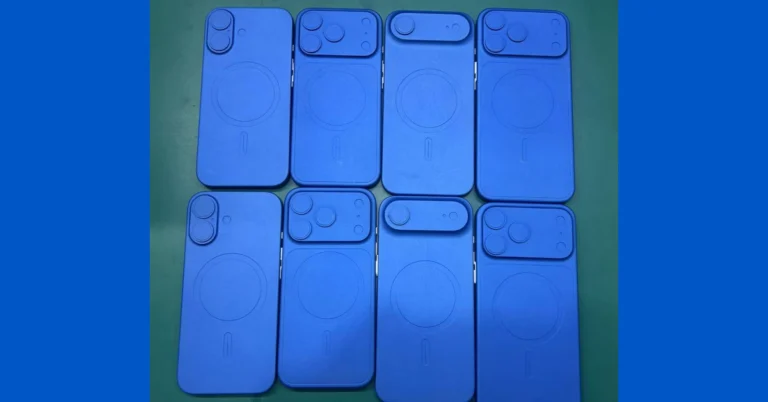

 Touch controls ensure everything you need is at your fingertips—from adjusting volume to managing your music and answering calls. With Bluetooth 5.3, expect reliable and smooth connectivity with support for SBC and AAC codecs.
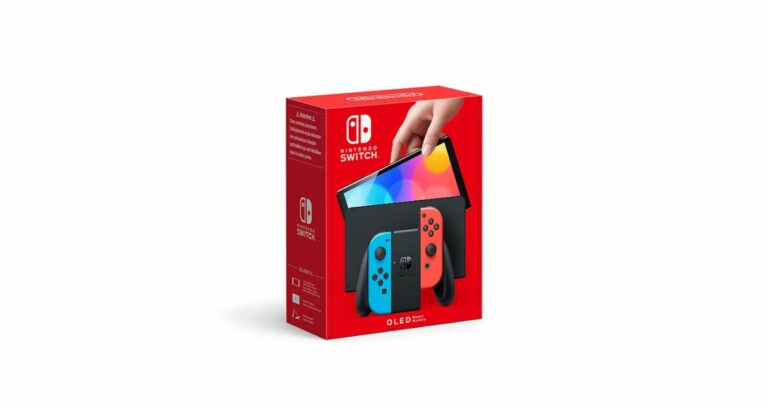

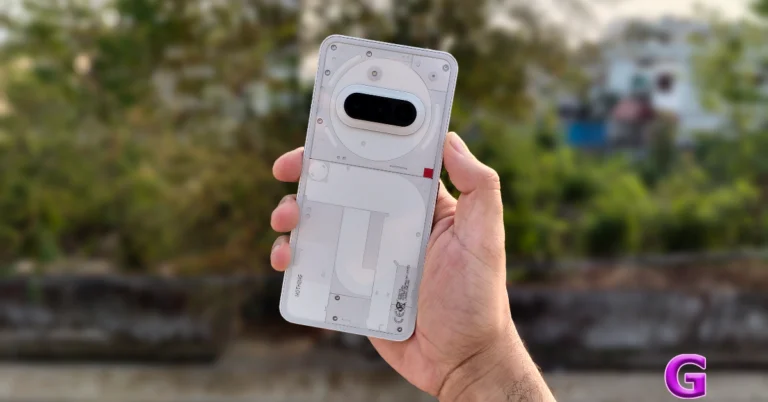
 The more notable design changes have been reserved for the Pro variant. However, Nothing has upped the ante when it comes to the base variant’s hardware specs. The new glass back panel elevates the in-hand feel of the device. Despite its see-through design, the glass panel does not attract a lot of fingerprints. Another thing we like about this smartphone is its flat form factor with rounded corners.
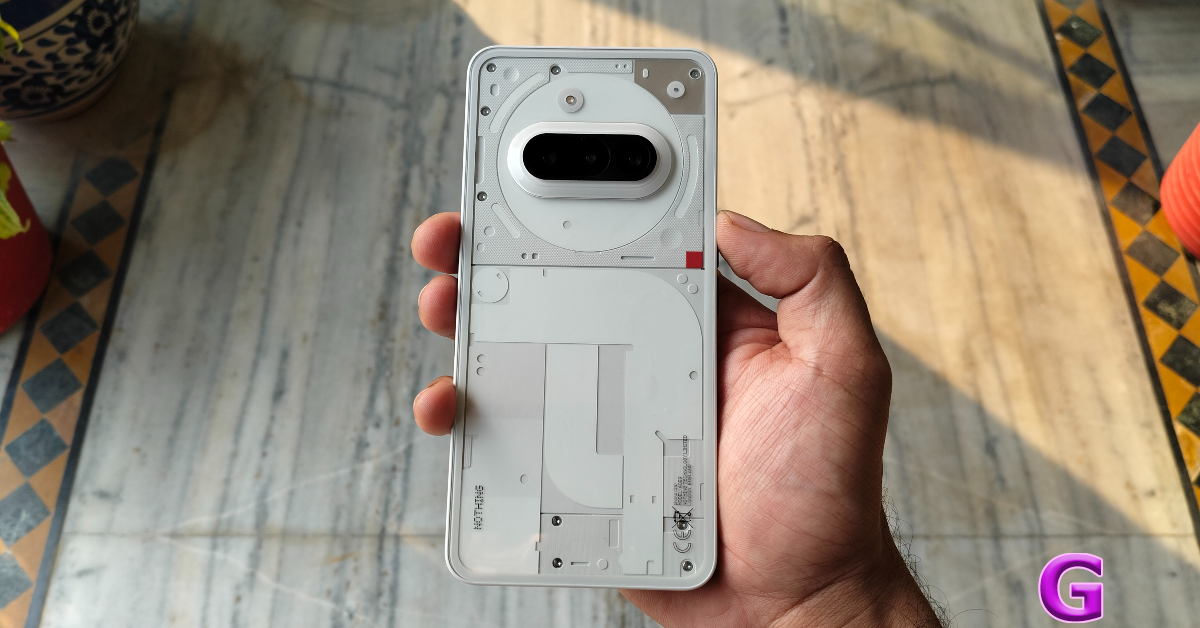 The more notable design changes have been reserved for the Pro variant. However, Nothing has upped the ante when it comes to the base variant’s hardware specs. The new glass back panel elevates the in-hand feel of the device. Despite its see-through design, the glass panel does not attract a lot of fingerprints. Another thing we like about this smartphone is its flat form factor with rounded corners.
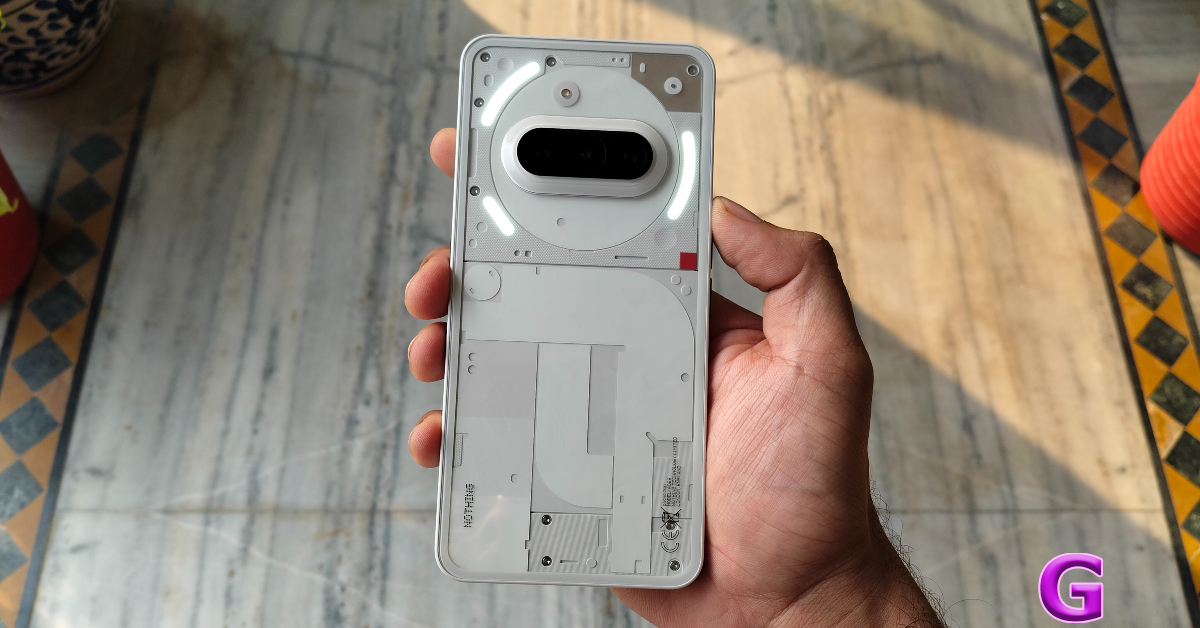 The plastic frame houses the side button along with the new ‘Essential’ key on its right edge. We’ll get into the functions of the Essential key later in the review, but its positioning is something that deserves more critique. Ideally, it should have been placed above the side key since the latter is used more frequently. It took us a few days to get accustomed to the new layout. The volume rocker keys are positioned on the left edge, while the SIM tray, primary microphone, USB Type-C port, and speaker grille make their way to the bottom. Up top lies the solitary secondary microphone. The earpiece doubles as the secondary speaker.
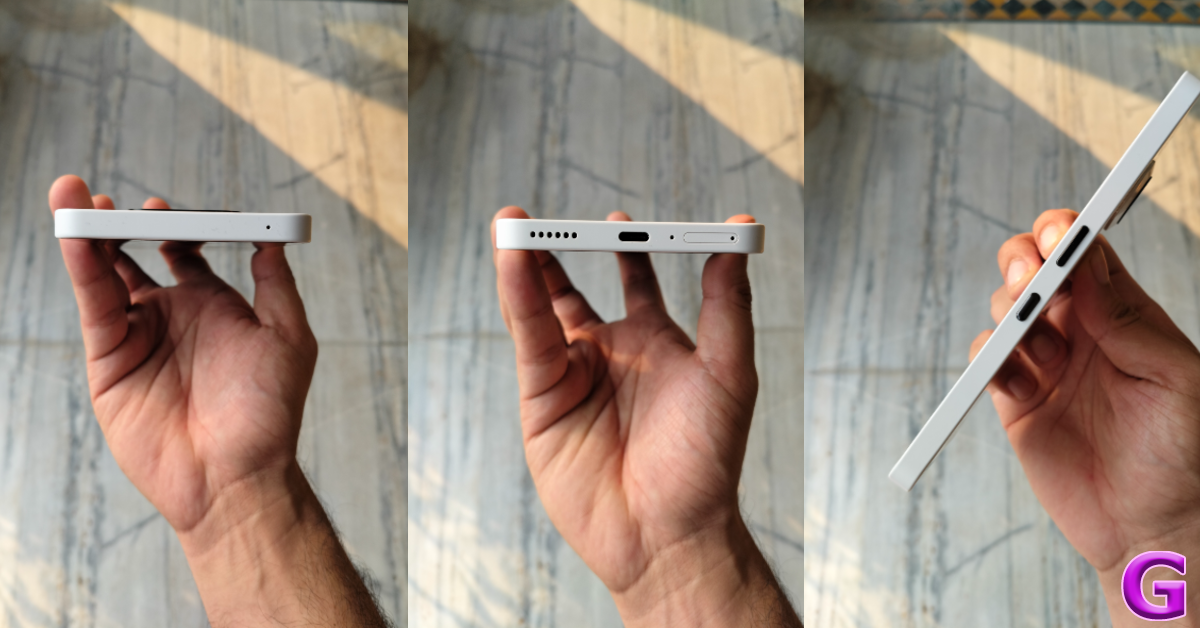 The 6.77-inch AMOLED display has a 120Hz refresh rate and can reach a peak brightness of 3,000 nits. In High Brightness Mode, this display can hit 1,300 nits. Using the smartphone in bright outdoor conditions is not a hassle as the display easily overcomes the surrounding light and maintains its legibility. The touch response is smooth, and the optical fingerprint scanner is snappy. The bezels surrounding the display are sleek and uniform.
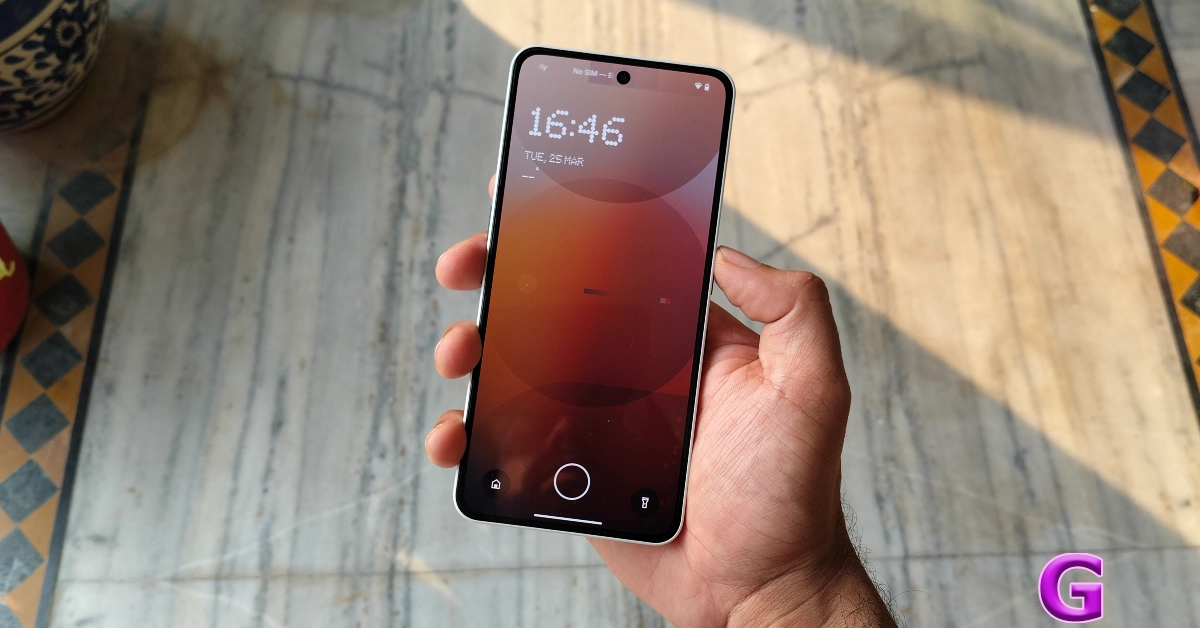 The viewing experience on the Nothing Phone (3a) is taken to the next level with HDR10+ support. The detailed images are packed with vibrant colours. There are plenty of good viewing angles, and you don’t need to worry about propping the device in a particular position to get the best visuals. The AMOLED panel brings out the best in the deep blacks. However, what seals the deal for us is the loud and comprehensive audio output.
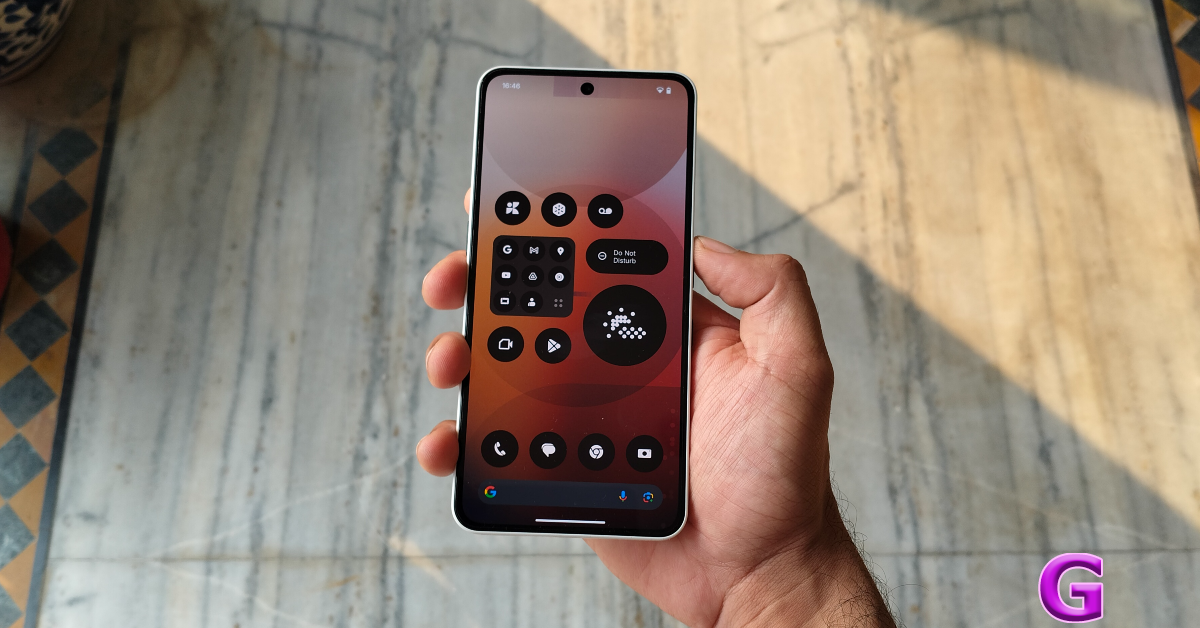 The Phone (3a) is rated IP64 for dust and water resistance. It can survive minor water splashes, but anything more than that can hamper its performance. We’d like to see a more comprehensive IP67 rating in the next iteration of the (a) series.
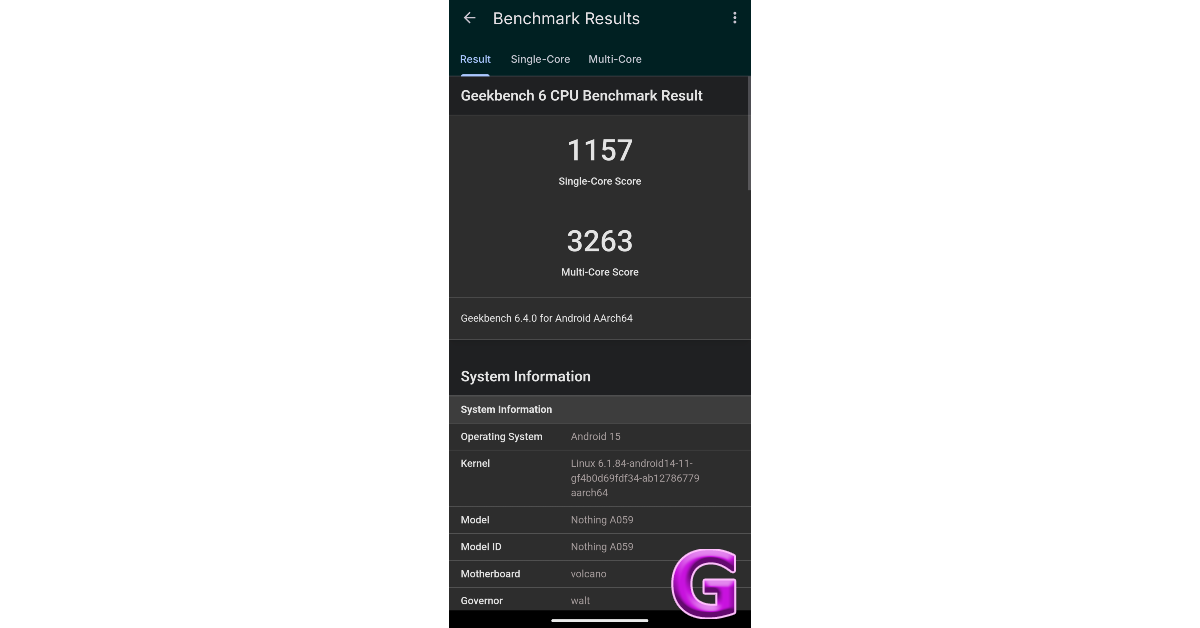 We ran the Geekbench 6 app on the smartphone, and it scored 1,157 and 3,263 points in the single-core test and multi-core tests, respectively. The Snapdragon 7s Gen 3 processor puts in a good shift in this smartphone. It crushes daily tasks like instant messaging, emailing, audio and video calling, social media browsing, and media streaming. The linear haptic motor provides smooth feedback. Apps take minimal time to load, and multitasking does not throw any complications. After a week-long review period, we can confidently say that the Nothing Phone (3a)’s everyday performance is unbeatable in this price segment.
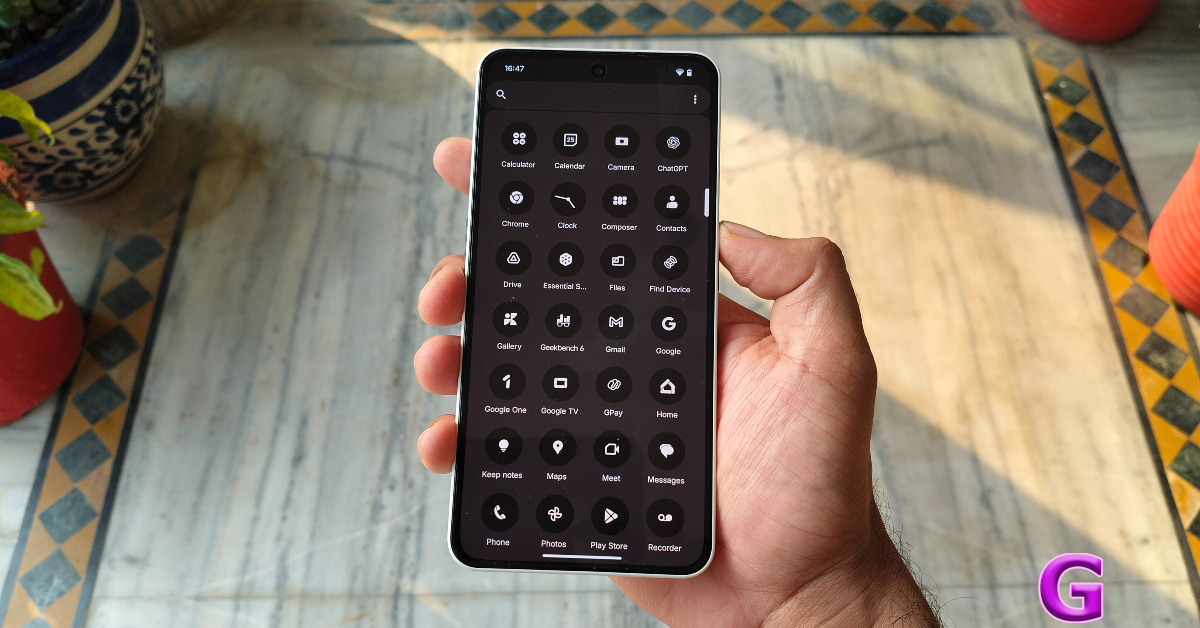 The gaming performance on offer here isn’t out of the world, but casual gamers will not have any room for complaints. We played games like Call of Duty Mobile and Asphalt Legends Unite on this device and were pleased to see a consistent and jitter-free gameplay. The frame rate is restricted to 60fps for most games, but the graphics come through very nicely. The 4,500mm² steel vapour chamber does a good job of keeping the phone’s internal temperature in check.
Nothing Phone (3a) runs the Android 15-based Nothing OS 3.1 out of the box. Nothing has promised 3 major OS upgrades and 6 years of security patches for the (3a) series. There is no bloatware on the device. The dot matrix design, Nothing’s signature icon pack, and home screen widgets give the device its unique flair. We also like the customisation options for the home screen folders and the lock screen clock face. The design of the Gallery and Camera apps has been tweaked as well.
The gaming performance on offer here isn’t out of the world, but casual gamers will not have any room for complaints. We played games like Call of Duty Mobile and Asphalt Legends Unite on this device and were pleased to see a consistent and jitter-free gameplay. The frame rate is restricted to 60fps for most games, but the graphics come through very nicely. The 4,500mm² steel vapour chamber does a good job of keeping the phone’s internal temperature in check.
Nothing Phone (3a) runs the Android 15-based Nothing OS 3.1 out of the box. Nothing has promised 3 major OS upgrades and 6 years of security patches for the (3a) series. There is no bloatware on the device. The dot matrix design, Nothing’s signature icon pack, and home screen widgets give the device its unique flair. We also like the customisation options for the home screen folders and the lock screen clock face. The design of the Gallery and Camera apps has been tweaked as well.
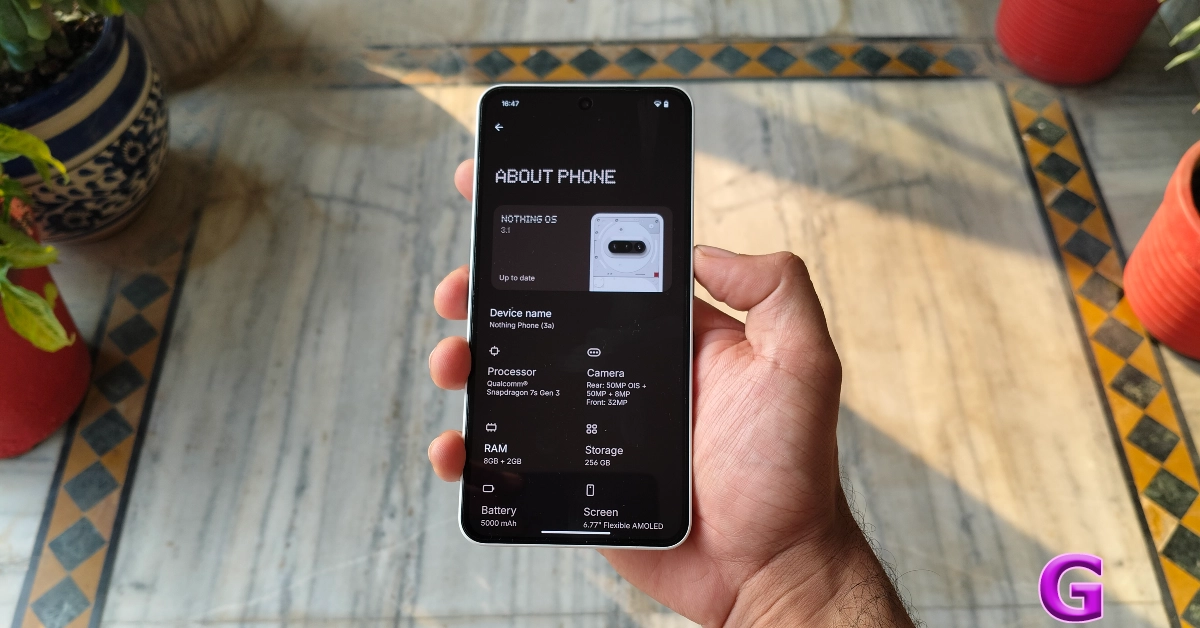 The new ‘Essential’ key has been integrated nicely into the OS. A single click takes a screenshot and lets you add a voice memo or text note on top of it. Long-pressing the button automatically starts recording the voice memo and grabs the frame on the screen. The screenshots are stored in the ‘Essential Space’, which can be accessed by double-pressing the Essential key. Nothing OS 3.1 uses AI to summarise the content of the screenshots and voice memos. You can create Collections for different projects. The Essential Space reminds us of the Screenshots app on the new Pixel 9 series. It is still in its infancy, and it’ll be interesting to see where Nothing takes this idea.
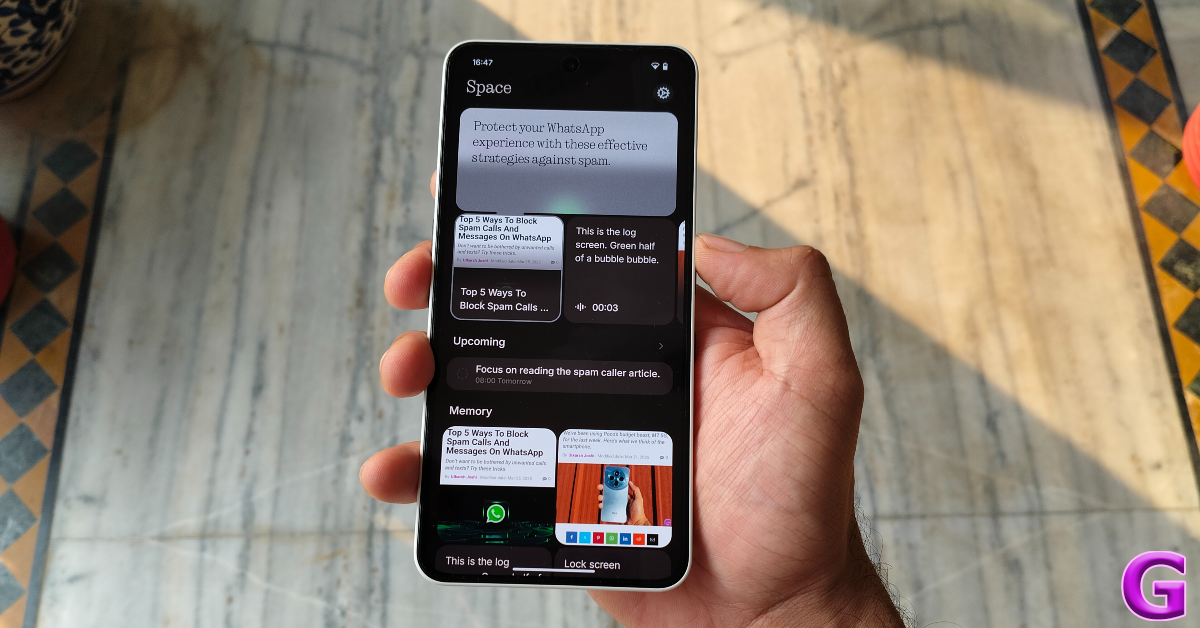
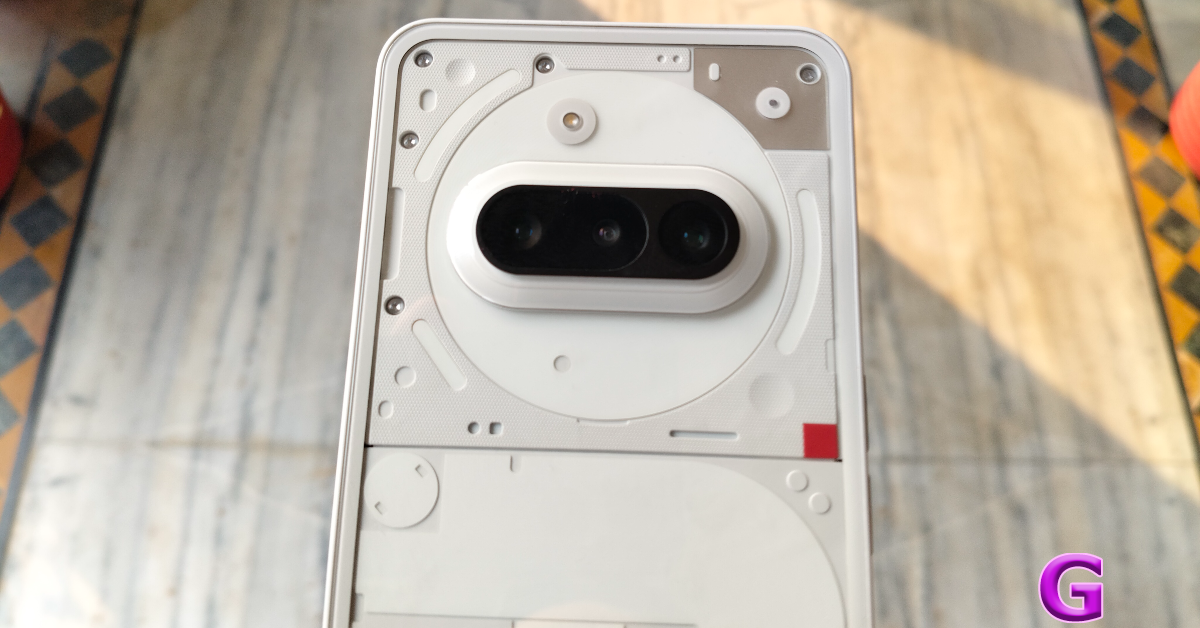 The 50MP primary shooter takes good pictures in outdoor daylight conditions. The pictures pack a lot of detail and showcase rich colours. We were quite happy to see the crisp shadows in the images, along with sharp subjects. In limited lighting conditions, the smartphone makes good use of its TrueLens Engine 3.0 to deliver clear images with minimal noise.
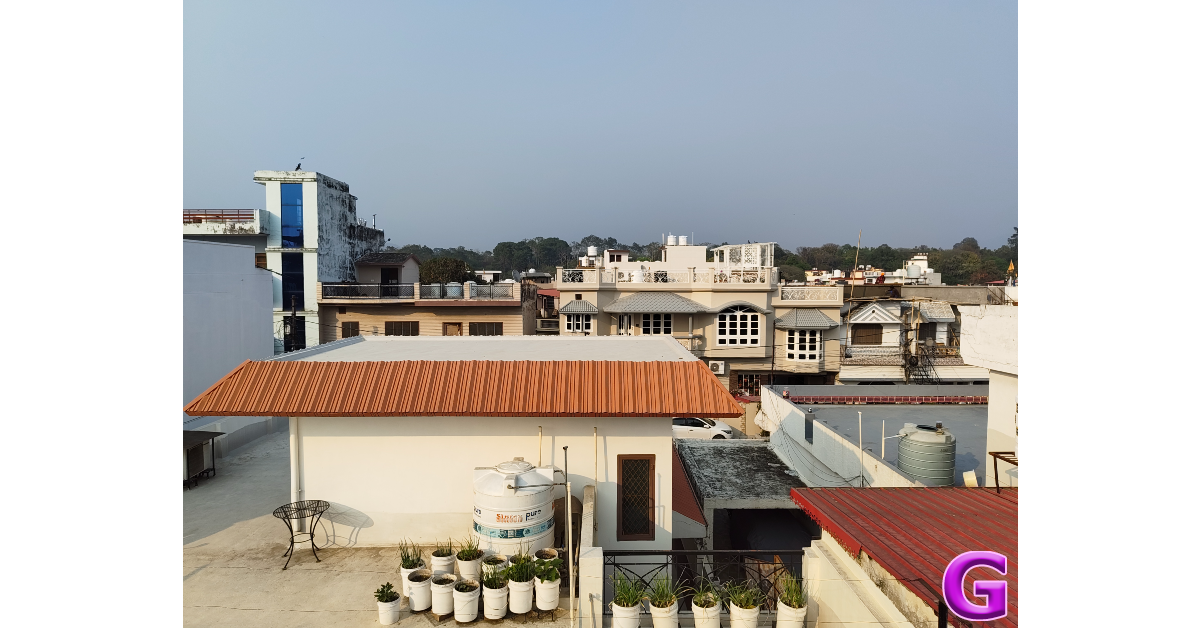
 Images taken with the 8MP ultrawide lens are slightly softer, but their colour profile is on point. The pictures pack a good dynamic range. The field of view on offer is remarkable. The quality takes a bigger hit in limited lighting conditions, as the final results appear dim and noisy.


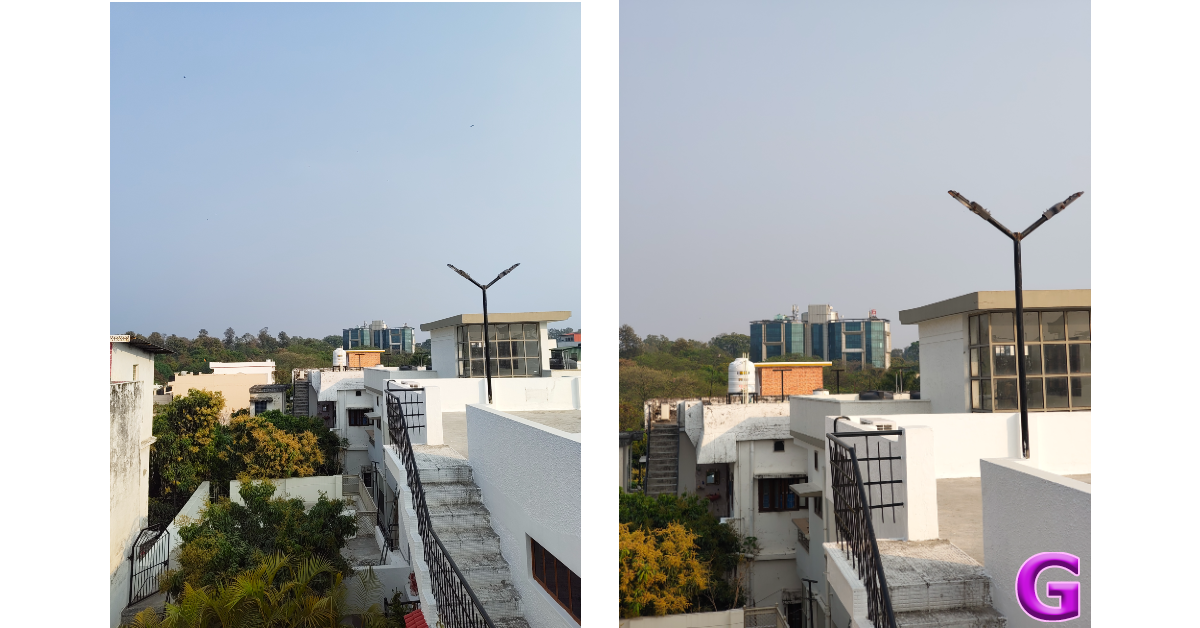

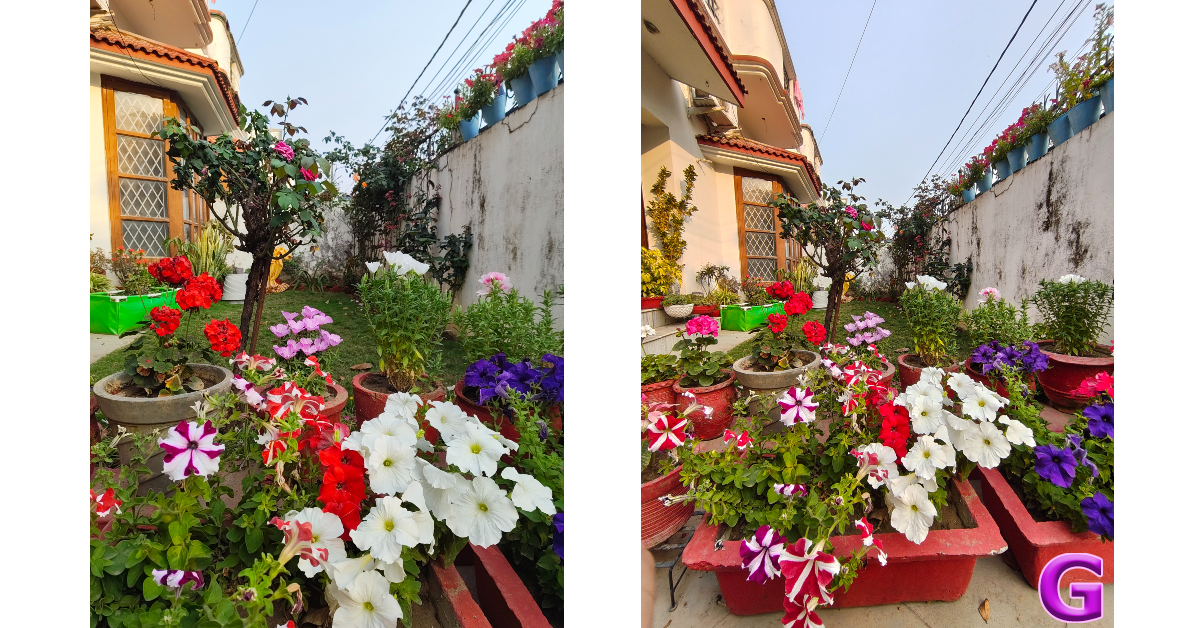
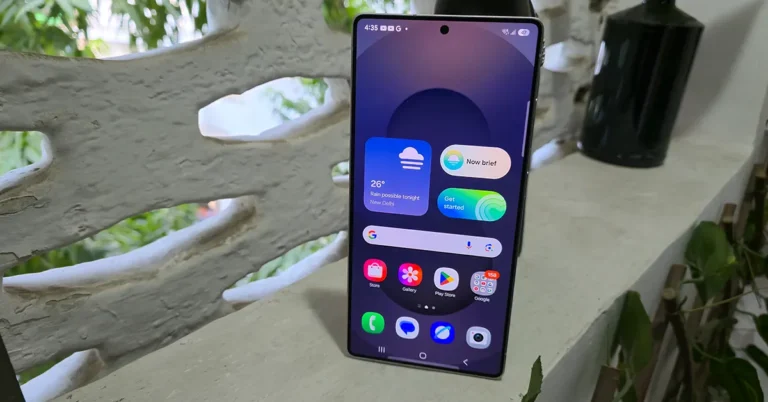
 Step 2: Tap on Text correction.

 Step 2: Turn off the toggle switch next to Keyboard toolbar.

 Step 2: Once the keyboard appears on the screen, tap the arrow icon next to the suggested words to hide the toolbar. Tap the arrow again to view the toolbar.
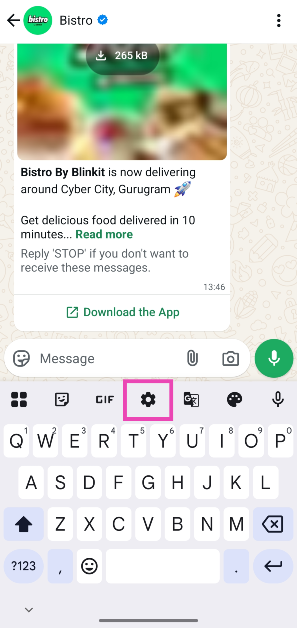 Step 2: Tap on Text correction.
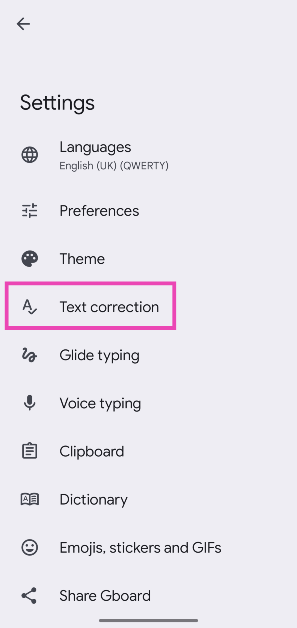 Step 3: Turn off the toggle switch next to Show suggestion strip.
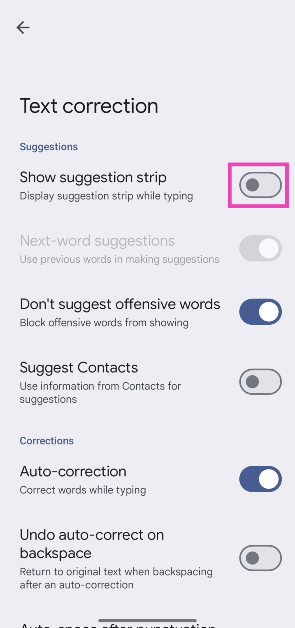
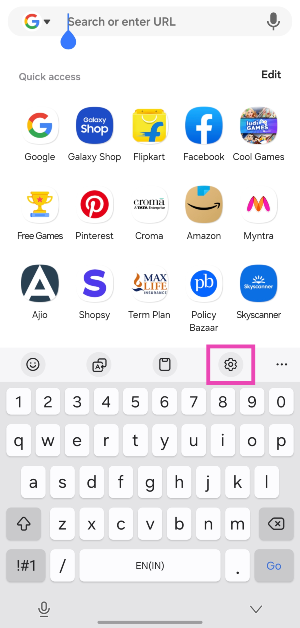 Step 2: Turn off the toggle switch next to Keyboard toolbar.
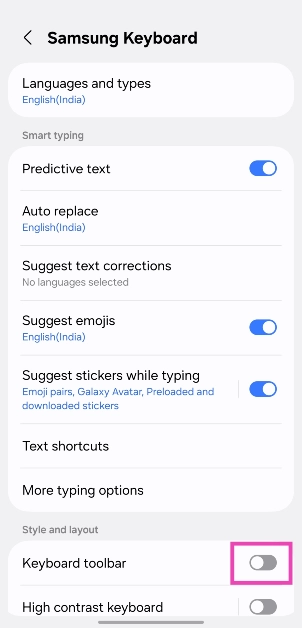
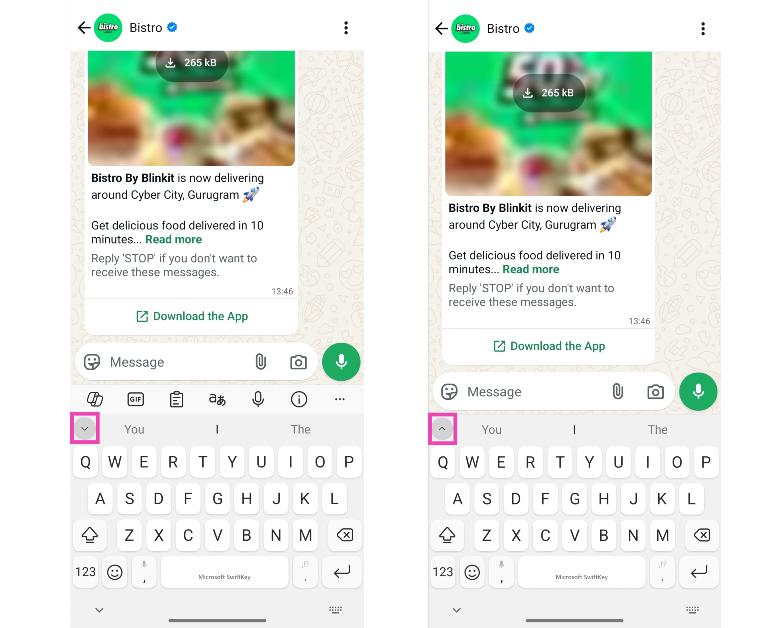 Step 2: Once the keyboard appears on the screen, tap the arrow icon next to the suggested words to hide the toolbar. Tap the arrow again to view the toolbar.



 Step 2: Tap on Touch.
 Step 3: Turn on the toggle switch next to Reachability.
 Step 4: Once Reachability has been enabled, swipe down on the bottom edge of the screen. This will bring down the page, making it easier to reach the Control Centre with one hand.
 Step 4: Tap on Double Tap.
 Step 2: Hit the search bar and search for Control Centre.
 Step 3: Select Show Control Centre from the list.
Step 4: Tap the arrow icon and select Add to Home Screen.
Step 5: Hit Done.
Step 3: Select Show Control Centre from the list.
Step 4: Tap the arrow icon and select Add to Home Screen.
Step 5: Hit Done.
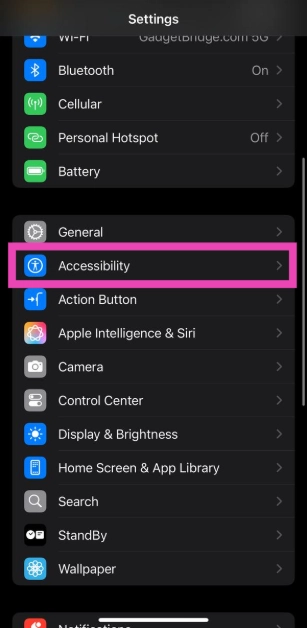 Step 2: Tap on Touch.
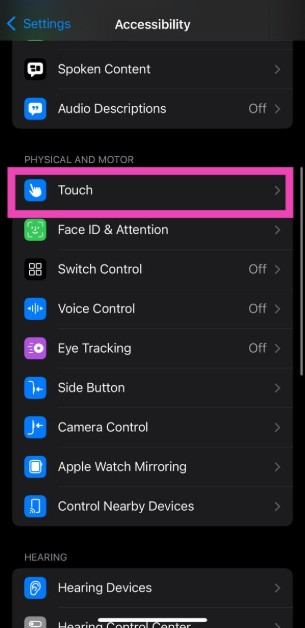 Step 3: Turn on the toggle switch next to Reachability.
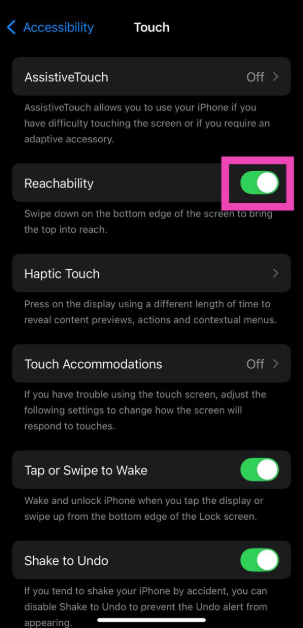 Step 4: Once Reachability has been enabled, swipe down on the bottom edge of the screen. This will bring down the page, making it easier to reach the Control Centre with one hand.
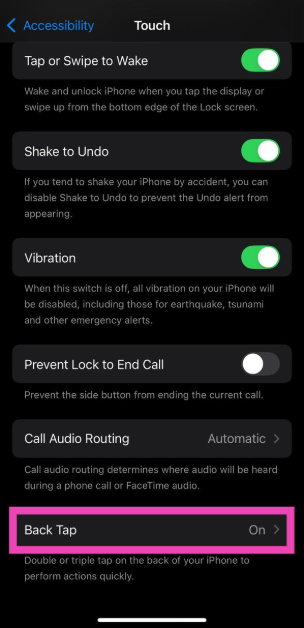 Step 4: Tap on Double Tap.
 Step 5: Select Control Centre from the list.
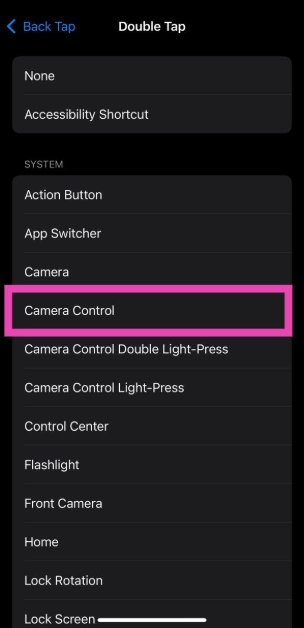 Step 6: Double tap the back panel of your iPhone to summon the Control Centre.
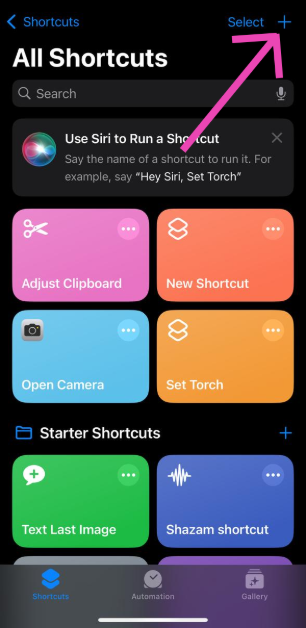 Step 2: Hit the search bar and search for Control Centre.
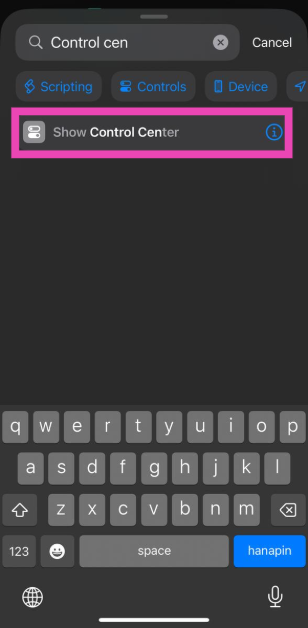 Step 3: Select Show Control Centre from the list.
Step 4: Tap the arrow icon and select Add to Home Screen.
Step 5: Hit Done.
Step 3: Select Show Control Centre from the list.
Step 4: Tap the arrow icon and select Add to Home Screen.
Step 5: Hit Done.
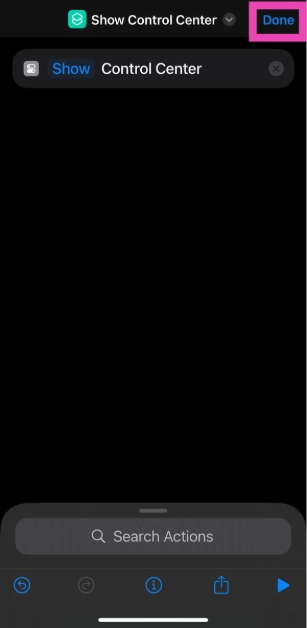 Step 6: Tap the Control Centre icon on the home screen whenever you want to access it.
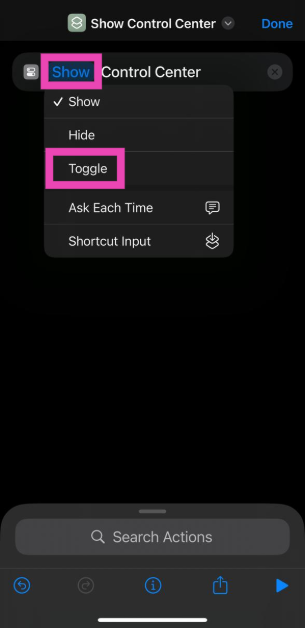 Step 3: Hit Done.
Step 4: Go to Settings and select Action Button.
Step 3: Hit Done.
Step 4: Go to Settings and select Action Button.
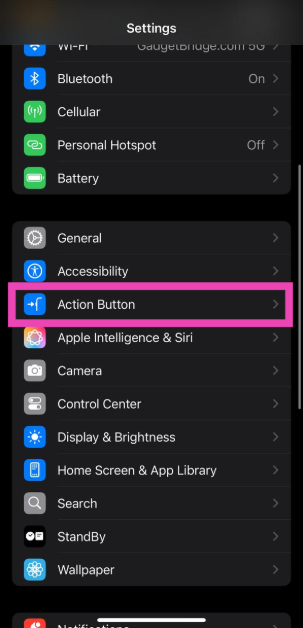 Step 5: Swipe through the panels until you land on the shortcut you just created.
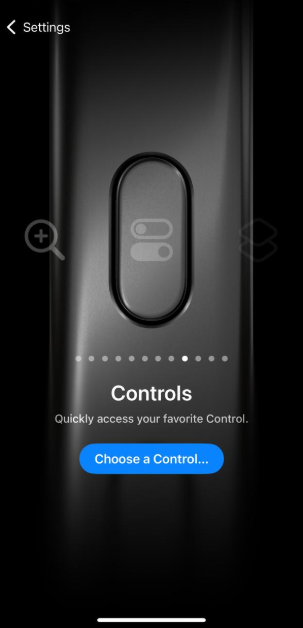 Step 6: Once the Action Button controls have been set, press it to view the Control Centre.

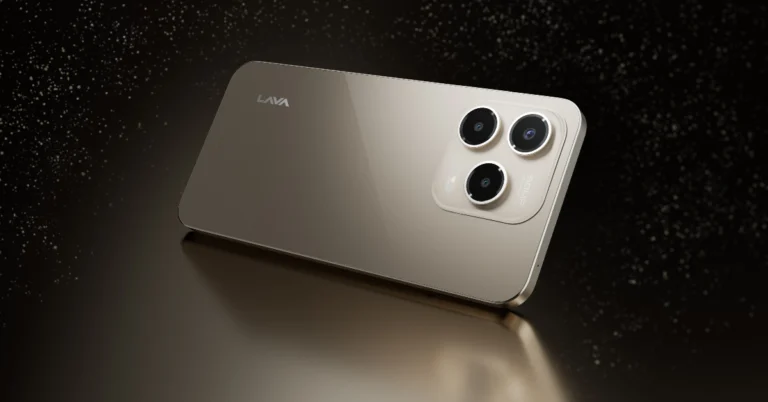
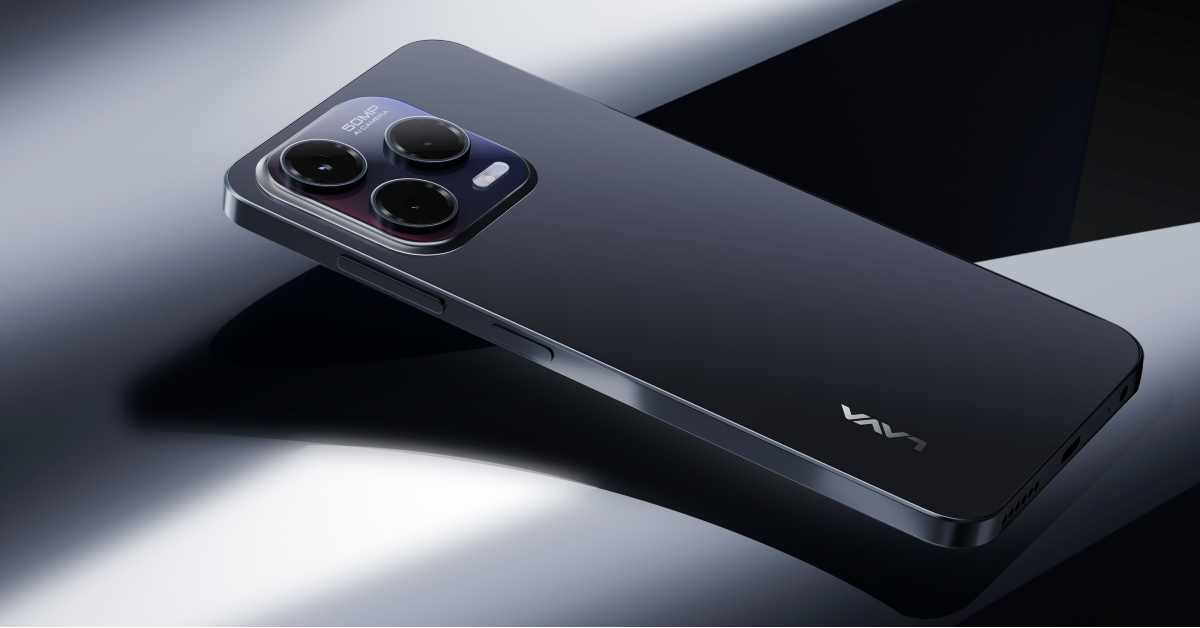 The Shark runs on Android 14 and is powered by an octa-core Unisoc T606 SoC along with 4GB of RAM and 64GB internal storage. It supports an additional 4GB virtual RAM for lag-free multitasking while the internal storage is expandable up to 256GB via microSD card.
For the optics the Lava Shark includes a 50MP AI Rear Camera system along with an LED flash. The 8MP front camera takes care of selfies and video calling. The camera system includes features like AI Mode, Portrait, Pro Mode, and HDR.
Also Read: Here are the five best PUP-approved interactive pet toys available on Amazon
The budget smartphone packs a 5,000mAh battery with 18W charging support. According to the company, it takes 158 minutes to completely charge the phone. It delivers up to 45 hours of talk time, 376 hours of standby time, and 550 minutes of YouTube playback.
The Shark runs on Android 14 and is powered by an octa-core Unisoc T606 SoC along with 4GB of RAM and 64GB internal storage. It supports an additional 4GB virtual RAM for lag-free multitasking while the internal storage is expandable up to 256GB via microSD card.
For the optics the Lava Shark includes a 50MP AI Rear Camera system along with an LED flash. The 8MP front camera takes care of selfies and video calling. The camera system includes features like AI Mode, Portrait, Pro Mode, and HDR.
Also Read: Here are the five best PUP-approved interactive pet toys available on Amazon
The budget smartphone packs a 5,000mAh battery with 18W charging support. According to the company, it takes 158 minutes to completely charge the phone. It delivers up to 45 hours of talk time, 376 hours of standby time, and 550 minutes of YouTube playback. 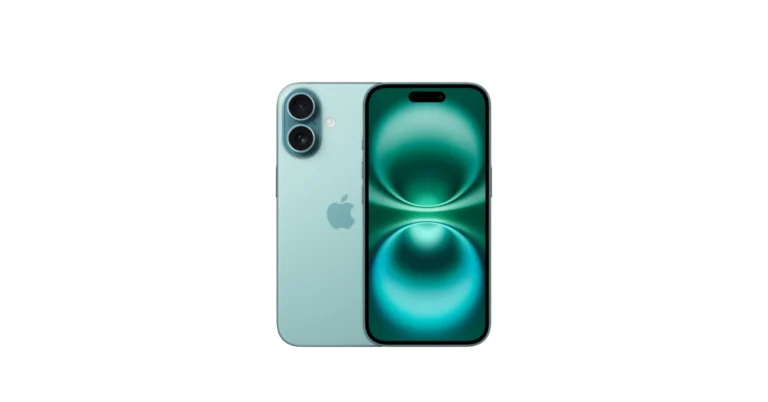


 Step 2: Tap on Settings.
 Step 3: Select Privacy.
 Step 4: Go to Calls.
 Step 5: Turn on the toggle switch next to Silence unknown callers.

 Step 5: Turn on the toggle switch next to Block unknown account messages.
 Step 3: Scroll down and tap on Block.

 Step 2: Tap on Settings.
 Step 3: Select Privacy.
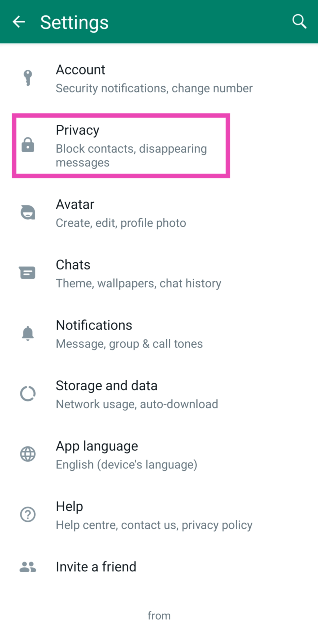 Step 4: Go to Calls.
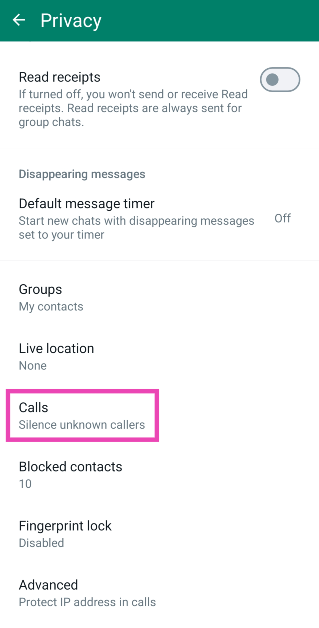 Step 5: Turn on the toggle switch next to Silence unknown callers.
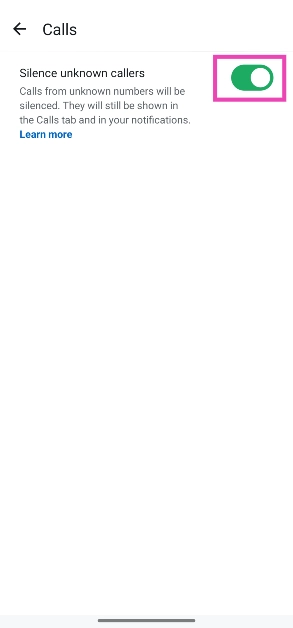
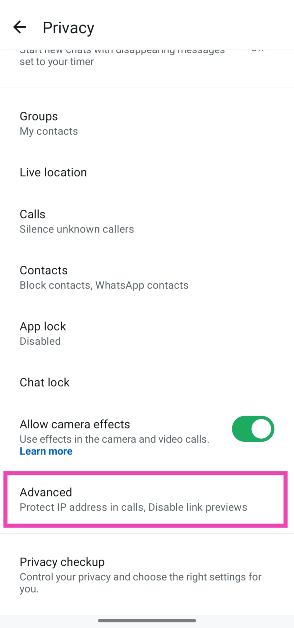 Step 5: Turn on the toggle switch next to Block unknown account messages.
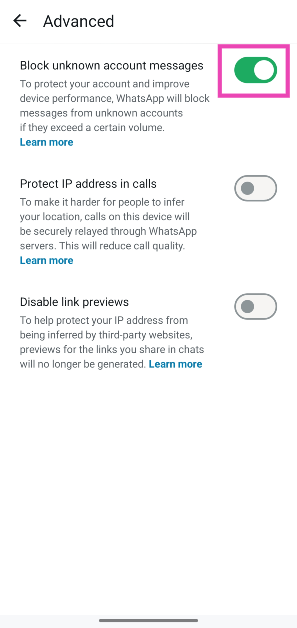
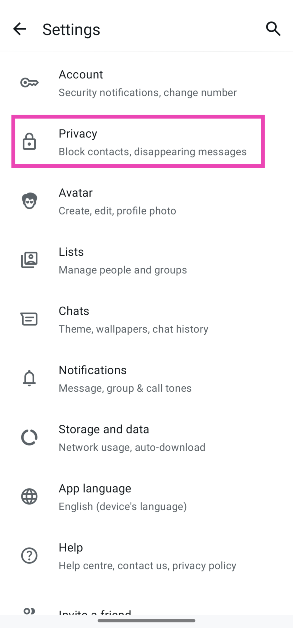 Step 4: Go to Groups.
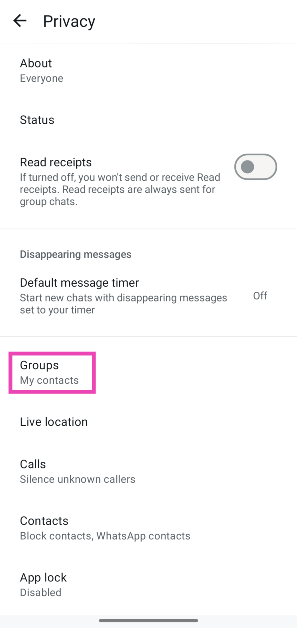 Step 5: Tap on My contacts under Who can add me to groups.
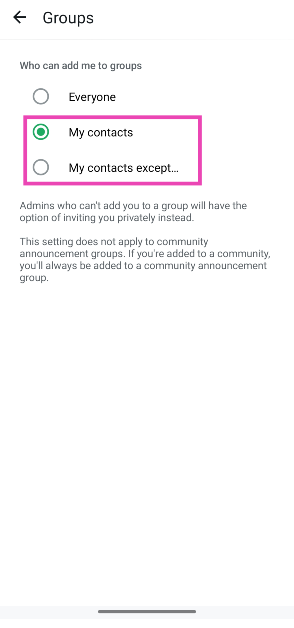
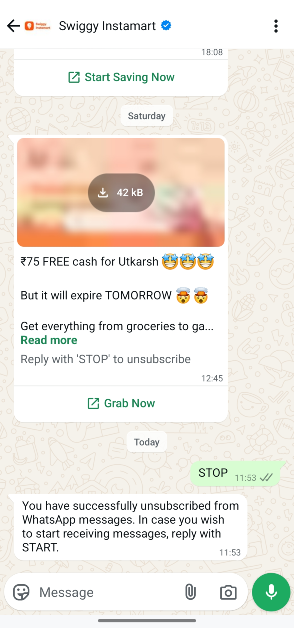 Step 3: If there’s no option to unsubscribe, tap on Block.
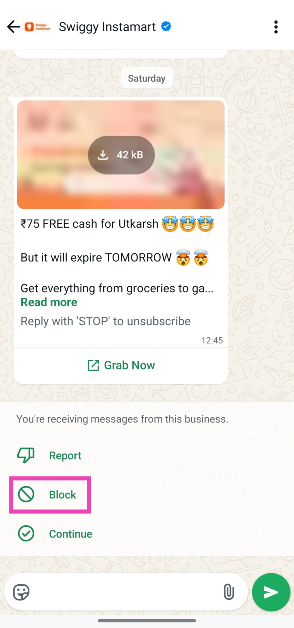
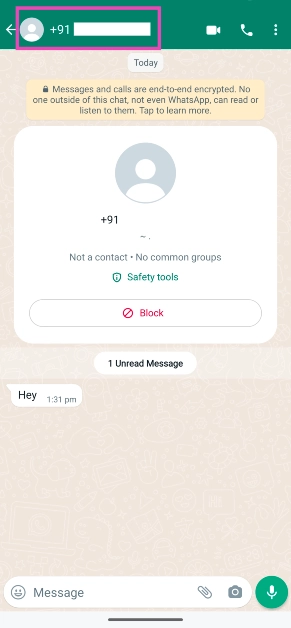 Step 3: Scroll down and tap on Block.
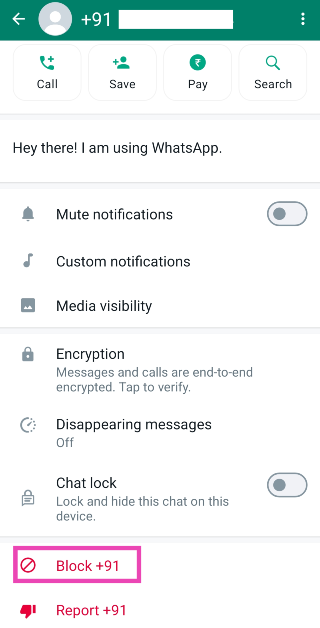
 Step 3: Tap on Mute notifications.
 Step 4: Select the duration for which you want to mute the messages.
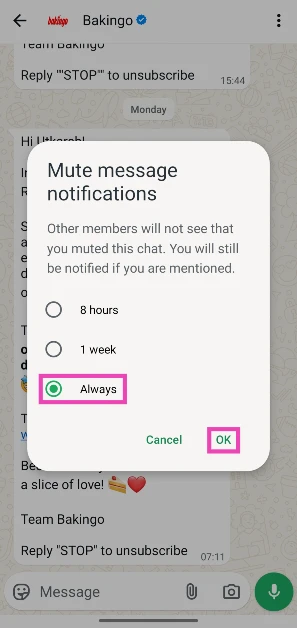 Step 5: Hit OK.





 Your dog’s inner wolf can be let loose with squeaky toys, which also stimulate the mind and may fool you into playing. It is more interactive for dogs and pet owners, stronger than tennis balls, and easier to clean than tennis balls, which are covered in slobber and grime.
Buy Here
And yes every dog has a play type! Your pets deserve all the love and fun. Which one best fits your pet, do let us know in the comments section below.
Your dog’s inner wolf can be let loose with squeaky toys, which also stimulate the mind and may fool you into playing. It is more interactive for dogs and pet owners, stronger than tennis balls, and easier to clean than tennis balls, which are covered in slobber and grime.
Buy Here
And yes every dog has a play type! Your pets deserve all the love and fun. Which one best fits your pet, do let us know in the comments section below. 


 Step 6: Tap your IG profile.
Step 7: Choose an authentication method and hit Next. For explanatory purposes, we’re using the Google Authenticator app.
Step 6: Tap your IG profile.
Step 7: Choose an authentication method and hit Next. For explanatory purposes, we’re using the Google Authenticator app.
 Step 2: Hit the hamburger menu in the top-right corner of the screen.
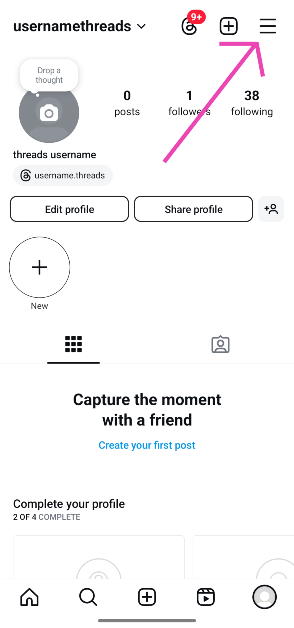 Step 3: Go to Accounts Centre.
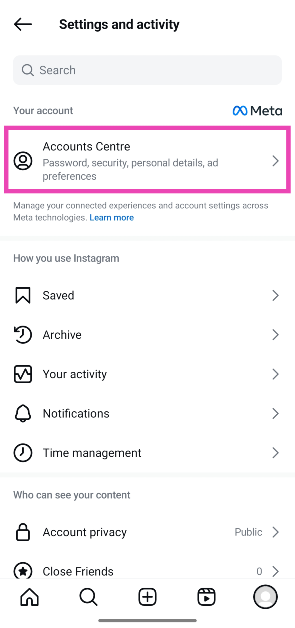 Step 4: Tap on Password and security.
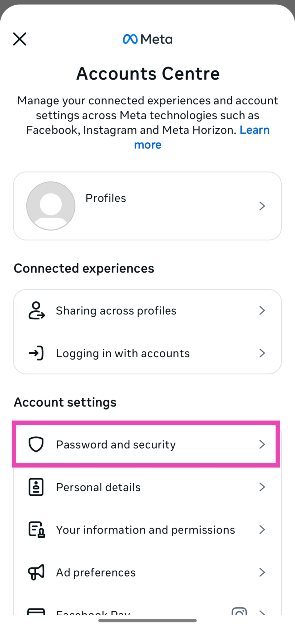 Step 5: Select Two-factor authentication.
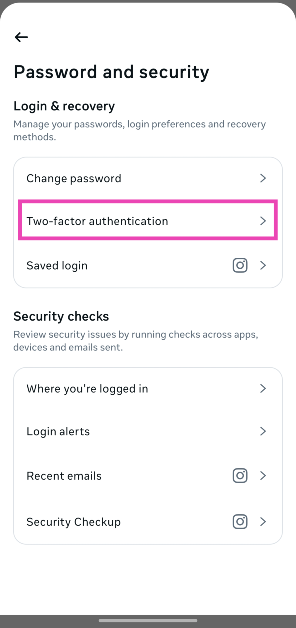 Step 6: Tap your IG profile.
Step 7: Choose an authentication method and hit Next. For explanatory purposes, we’re using the Google Authenticator app.
Step 6: Tap your IG profile.
Step 7: Choose an authentication method and hit Next. For explanatory purposes, we’re using the Google Authenticator app.
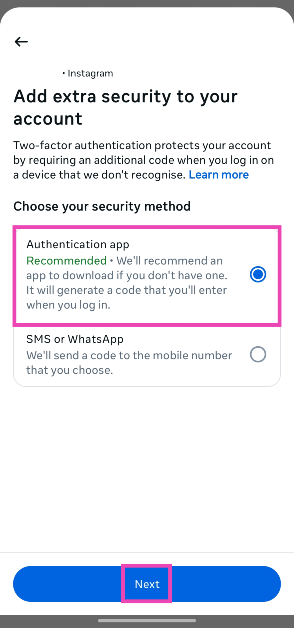 Step 8: Make sure that Google Authenticator (or any other authentication app) is installed on your device. Tap on Copy key and hit Next.
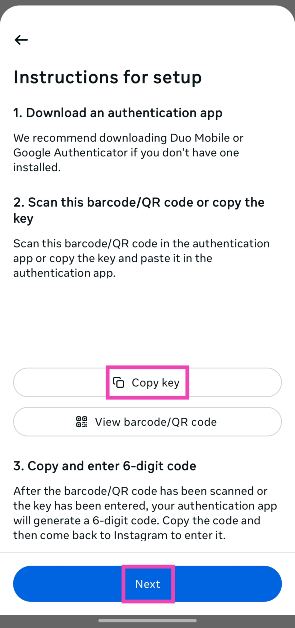 Step 9: Launch the Google Authenticator app and tap the plus icon in the bottom-right corner of the screen.
Step 10: Tap on Enter a setup key.
Step 11: Paste the setup key in the relevant box and type Instagram in the Code name box. Hit Add.
Step 9: Launch the Google Authenticator app and tap the plus icon in the bottom-right corner of the screen.
Step 10: Tap on Enter a setup key.
Step 11: Paste the setup key in the relevant box and type Instagram in the Code name box. Hit Add.
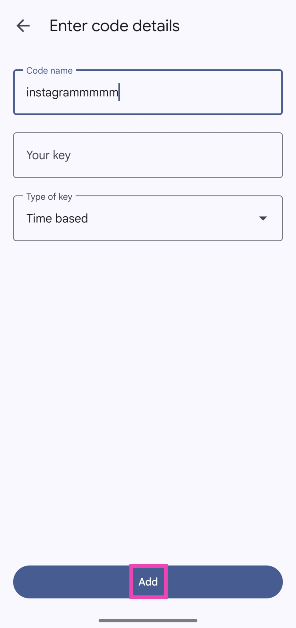 Step 12: Once the code is added to Google Authenticator, copy the authentication code and paste it into the Instagram app. Hit Next.
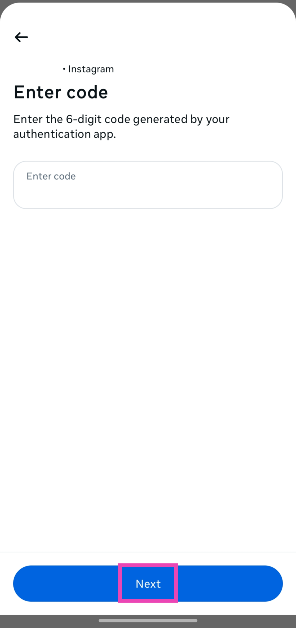 Step 13: Hit Done.
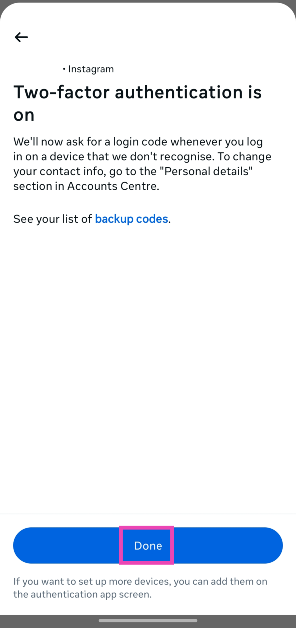
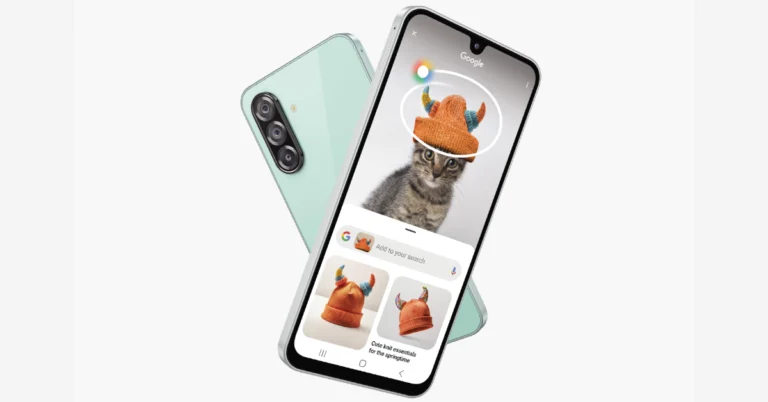
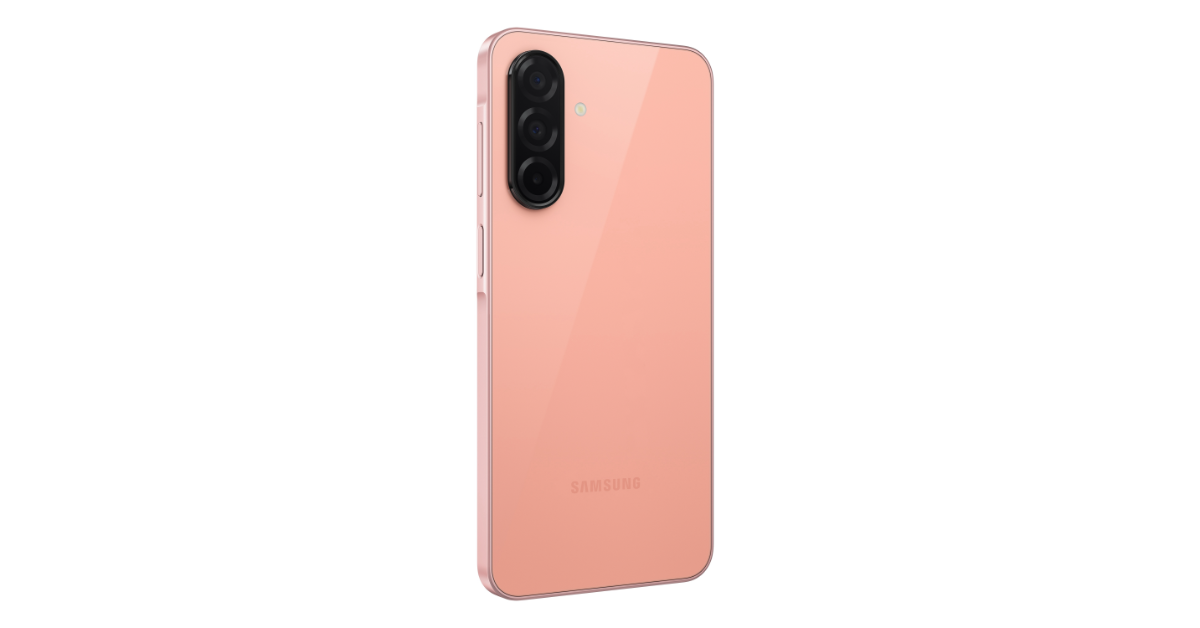 There will be a Rs 2,000 Bank cashback on HDFC and SBI transactions. Additional offer includes Samsung Care+: 1 year Screen Protection at just Rs 999 worth Rs 1,699. There will also be up to 12 months of no cost EMI.
The device will be available for purchase via Flipkart and company’s official website in the country.
Also Read: Must check out Google Pixel 9a alternatives in India
There will be a Rs 2,000 Bank cashback on HDFC and SBI transactions. Additional offer includes Samsung Care+: 1 year Screen Protection at just Rs 999 worth Rs 1,699. There will also be up to 12 months of no cost EMI.
The device will be available for purchase via Flipkart and company’s official website in the country.
Also Read: Must check out Google Pixel 9a alternatives in India
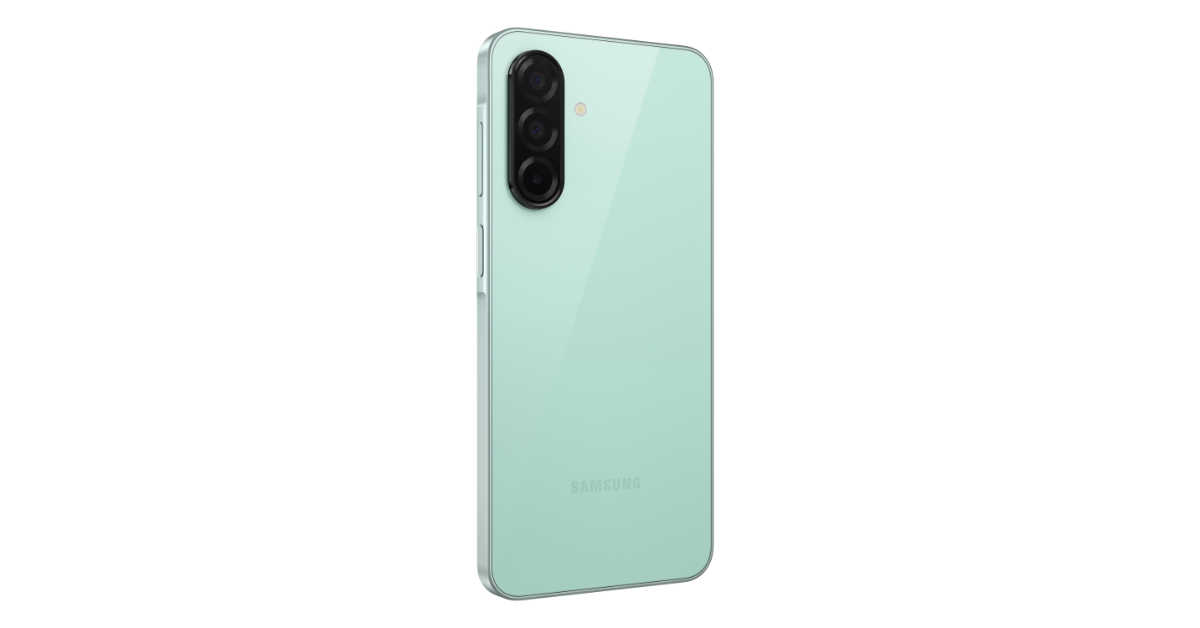 The smartphone features a triple rear camera setup that includes a 50-megapixel main sensor with optical image stabilisation, an 8-megapixel ultrawide lens, and a 2-megapixel macro sensor. The phone comes with a 13-megapixel front camera for taking selfies and video calling.
Also Read: Best phones under Rs 15000 (March 2025)
The handset is backed by a 5000mAh battery with 25W fast charging support. There is a 3.7 times larger vapour chamber for handling thermals.
The smartphone features a triple rear camera setup that includes a 50-megapixel main sensor with optical image stabilisation, an 8-megapixel ultrawide lens, and a 2-megapixel macro sensor. The phone comes with a 13-megapixel front camera for taking selfies and video calling.
Also Read: Best phones under Rs 15000 (March 2025)
The handset is backed by a 5000mAh battery with 25W fast charging support. There is a 3.7 times larger vapour chamber for handling thermals. 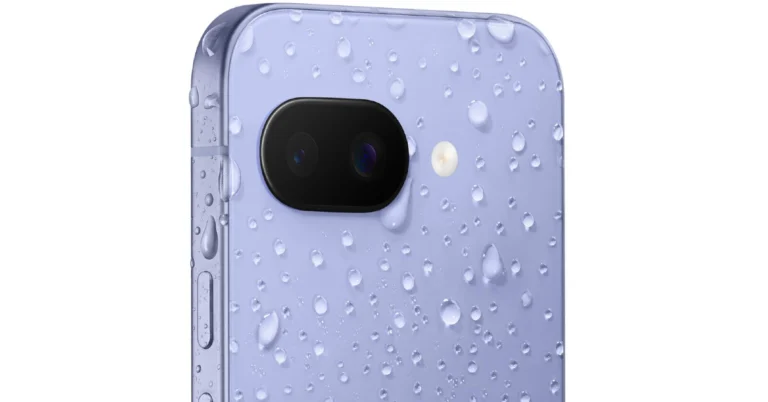
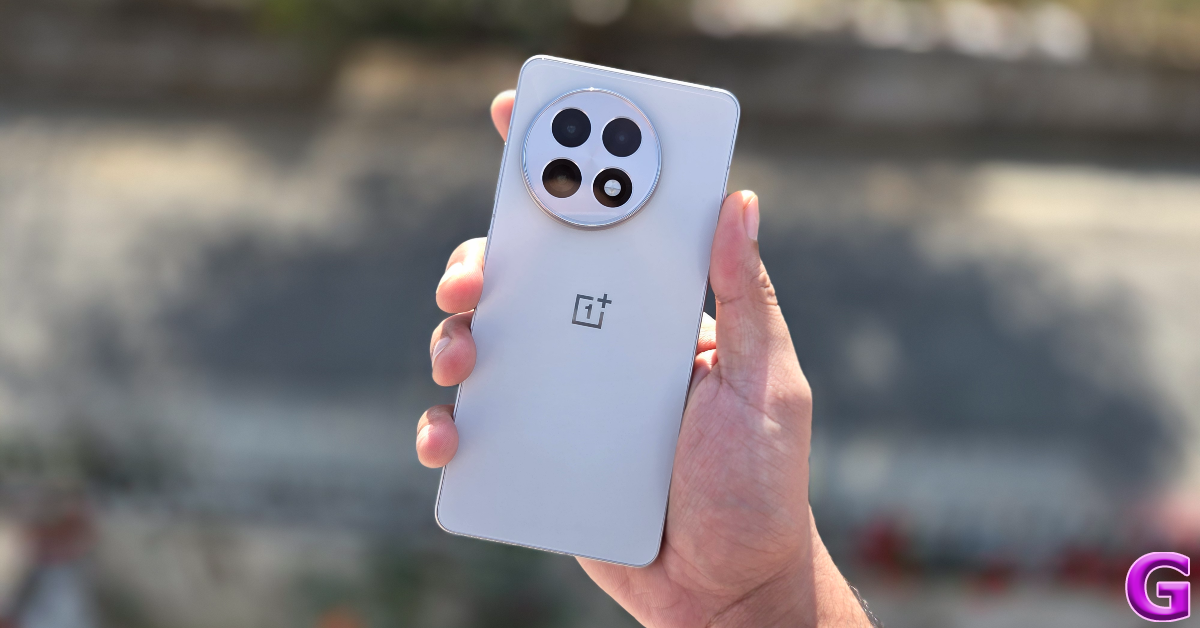 The OnePlus 13R (Review)features a 6.78-inch full-HD+ LTPO display with up to 120Hz adaptive refresh rate support. The device runs on Android 15 with OxygenOS 15.0 and is powered by the Snapdragon 8 Gen 3 chipset. It comes with a triple rear camera setup that includes a 50-megapixel Sony LYT-700 1/1.56-inch primary sensor, a 50-megapixel S5KJN5 telephoto camera and an 8-megapixel ultra wide-angle lens. The device also boasts a 16-megapixel selfie camera. It also houses a 6,000mAh battery with 80W fast charging support.
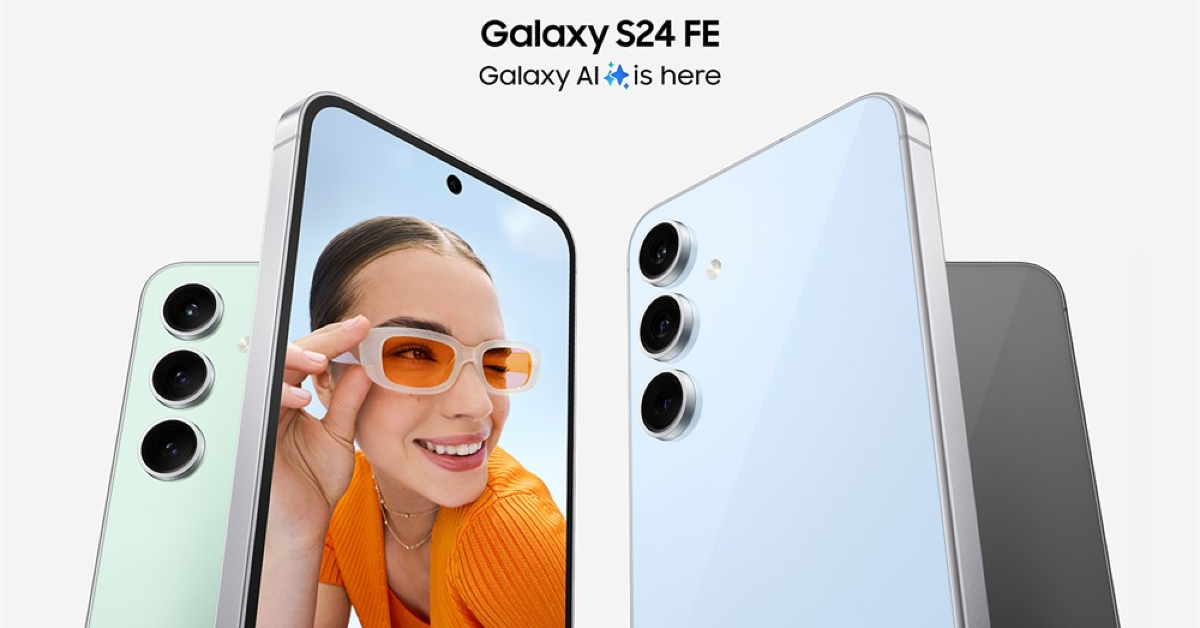 The Samsung Galaxy S24 FE sports a 6.7-inch full-HD+ Dynamic AMOLED 2X display with 120Hz Adaptive refresh rate (60/120Hz) support. The phone runs on One UI 6.1 with Android 14. Under the hood, there is a 4nm deca-core Exynos 2400e SoC. The triple rear camera set of the Samsung Galaxy S24 FE has a 50-megapixel main sensor with optical image stabilisation (OIS), a 12-megapixel sensor with an ultra-wide lens and an 8-megapixel telephoto camera with 3x optical zoom and OIS. There is a 10-megapixel sensor for taking selfies and making video calls. The Galaxy S24 FE comes with a 4,700mAh battery that supports 25W wired charging.
Also Read: Best phones under Rs 15000 (March 2025)
The Samsung Galaxy S24 FE sports a 6.7-inch full-HD+ Dynamic AMOLED 2X display with 120Hz Adaptive refresh rate (60/120Hz) support. The phone runs on One UI 6.1 with Android 14. Under the hood, there is a 4nm deca-core Exynos 2400e SoC. The triple rear camera set of the Samsung Galaxy S24 FE has a 50-megapixel main sensor with optical image stabilisation (OIS), a 12-megapixel sensor with an ultra-wide lens and an 8-megapixel telephoto camera with 3x optical zoom and OIS. There is a 10-megapixel sensor for taking selfies and making video calls. The Galaxy S24 FE comes with a 4,700mAh battery that supports 25W wired charging.
Also Read: Best phones under Rs 15000 (March 2025)
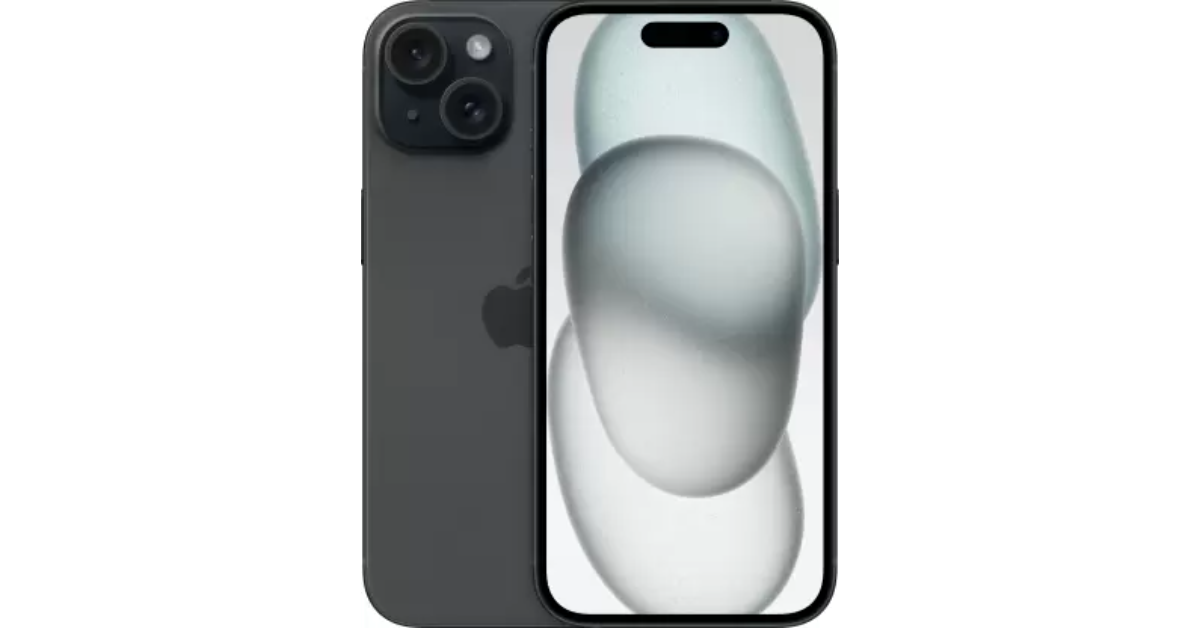 The iPhone 15 is highlighted with a 6.1-inch Super Retina XDR OLED display. The device is powered by an A16 Bionic chip. The iPhone 15 has a 48-megapixel wide-angle camera as its main sensor with a 2um quad-pixel sensor and an f/1.6 aperture. Additionally, the device has a 12-megapixel ultra-wide camera with sensor-shift stabilisation and an f/1.6 aperture. On the front, there is a 12-megapixel TrueDepth camera for selfies and video calls.
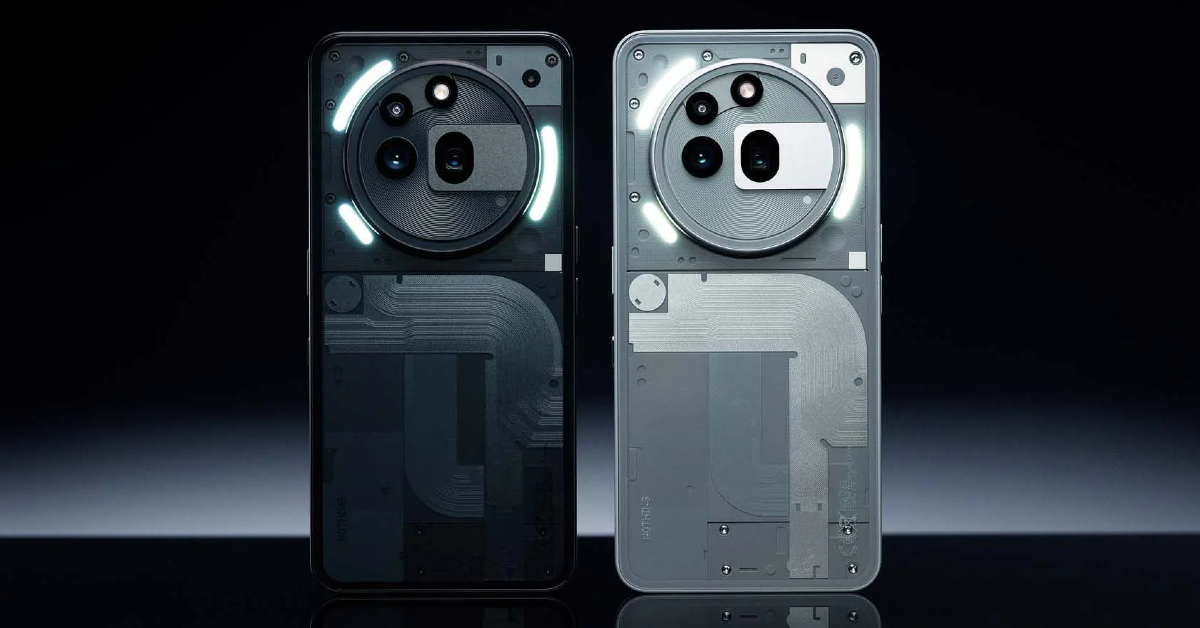 The Nothing Phone 3a Pro is one of the best Google Pixel 9a alternatives in India featuring a 6.7-inch flexible AMOLED screen with 120Hz adaptive refresh rate support. The smartphone also features a Glyph Interface with 26 customizable zones. The device comes pre-installed with Android 15-based NothingOS 3.1 out of the box. Under the hood, there is the Qualcomm Snapdragon 7s Gen 3 SoC. The handset comes with a triple rear camera setup that includes a 50-megapixel Samsung 1/1.56-inch main sensor, a 50-megapixel Sony 1/1.95-inch periscope telephoto lens and an 8-megapixel ultra wide-angle camera. There is a 32-megapixel front camera for taking selfies. The mobile phone is backed by a 5,000mAh battery with 50W wired fast charging support.
Also Read: Acer TravelLite TL15-53M series laptops 13th Gen Intel Core processors launched in India
The Nothing Phone 3a Pro is one of the best Google Pixel 9a alternatives in India featuring a 6.7-inch flexible AMOLED screen with 120Hz adaptive refresh rate support. The smartphone also features a Glyph Interface with 26 customizable zones. The device comes pre-installed with Android 15-based NothingOS 3.1 out of the box. Under the hood, there is the Qualcomm Snapdragon 7s Gen 3 SoC. The handset comes with a triple rear camera setup that includes a 50-megapixel Samsung 1/1.56-inch main sensor, a 50-megapixel Sony 1/1.95-inch periscope telephoto lens and an 8-megapixel ultra wide-angle camera. There is a 32-megapixel front camera for taking selfies. The mobile phone is backed by a 5,000mAh battery with 50W wired fast charging support.
Also Read: Acer TravelLite TL15-53M series laptops 13th Gen Intel Core processors launched in India
 The Samsung Galaxy S25 is another Google Pixel 9a alternatives in India featuring a 6.2-inch Full-HD+ Dynamic AMOLED 2X display with a refresh rate of 120Hz and a peak brightness of 2,600nits. The device is powered by an octa-core Snapdragon 8 Elite processor and runs in Android 15. The triple rear camera configuration on both phones consists of a 10MP Telephoto lens (3x Optical Zoom, F2.4, FOV 36), a 12MP Ultra Wide sensor with 120 degrees of field of view, and a 50MP sensor with OIS. A 12MP front-facing device camera is used for video calls and selfies. It has a 4,000 mAh that supports 25W wired charging.
 Step 4: Enter your Aadhaar card number along with the captcha displayed on the screen.
 Step 5: An OTP will be sent to your registered mobile number. Enter the OTP in the portal. Hit Login.
Step 6: Click on Authentication History.
Step 5: An OTP will be sent to your registered mobile number. Enter the OTP in the portal. Hit Login.
Step 6: Click on Authentication History.
 Step 7: Select All in the Modality dropdown menu and provide a date range.
Step 8: Click on Fetch Authentication History.
Step 7: Select All in the Modality dropdown menu and provide a date range.
Step 8: Click on Fetch Authentication History.
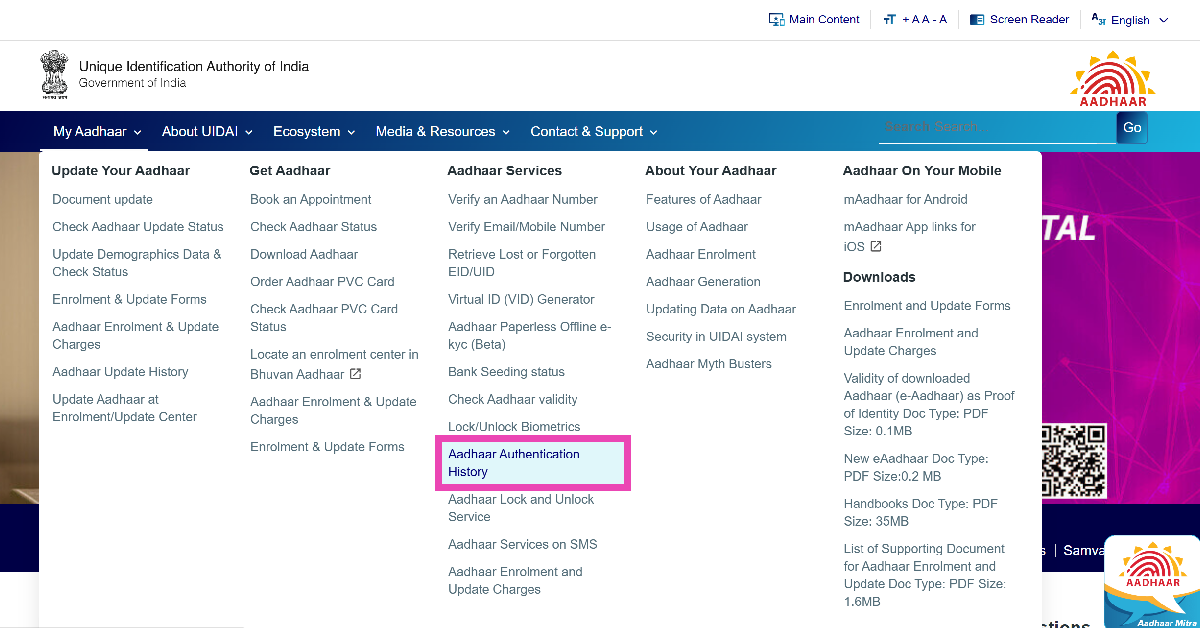 Step 3: Click on Login.
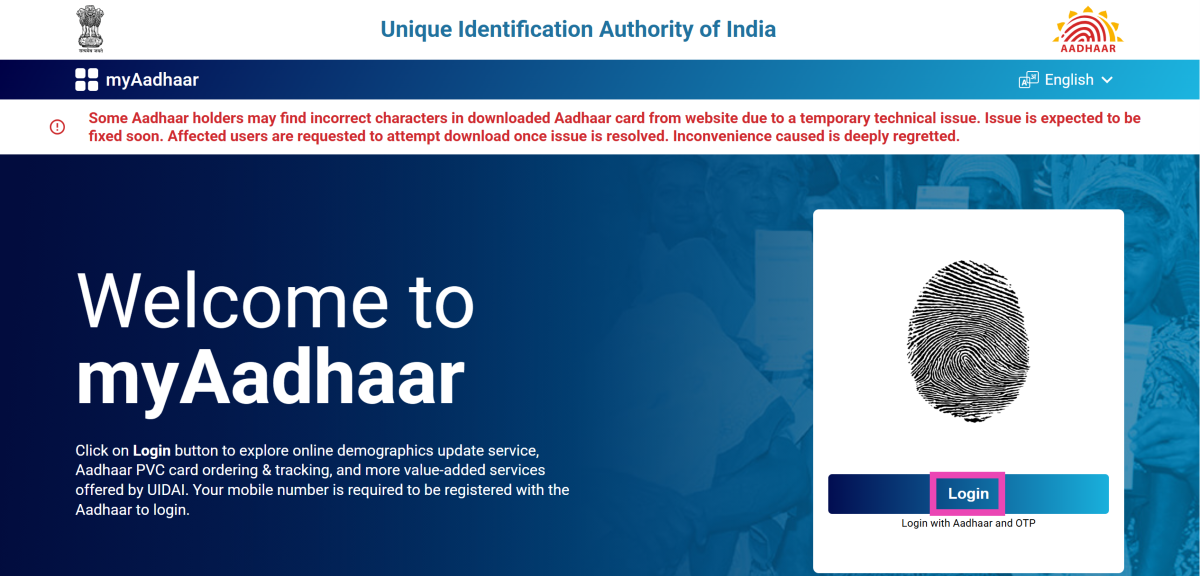 Step 4: Enter your Aadhaar card number along with the captcha displayed on the screen.
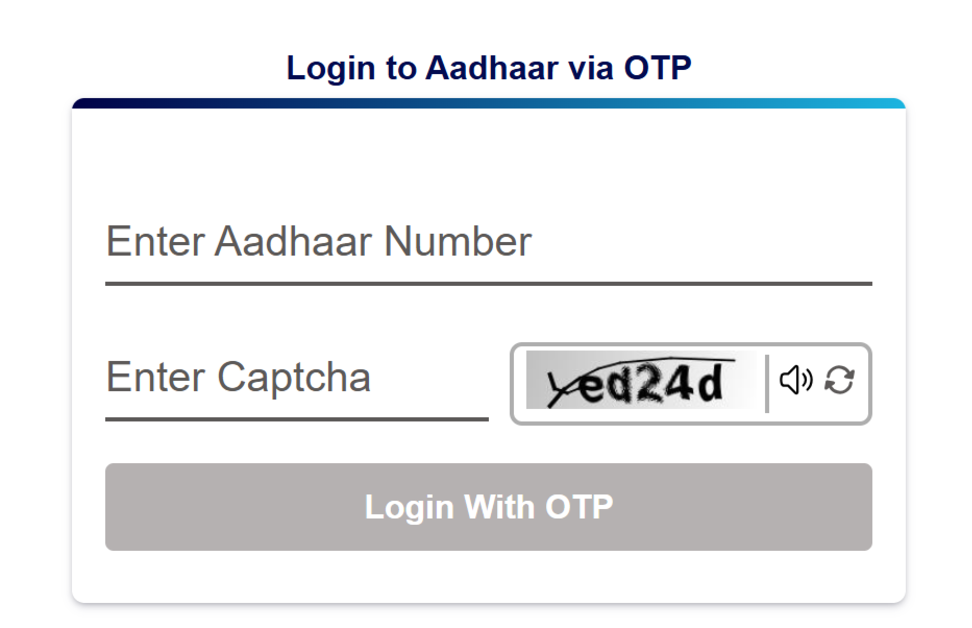 Step 5: An OTP will be sent to your registered mobile number. Enter the OTP in the portal. Hit Login.
Step 6: Click on Authentication History.
Step 5: An OTP will be sent to your registered mobile number. Enter the OTP in the portal. Hit Login.
Step 6: Click on Authentication History.
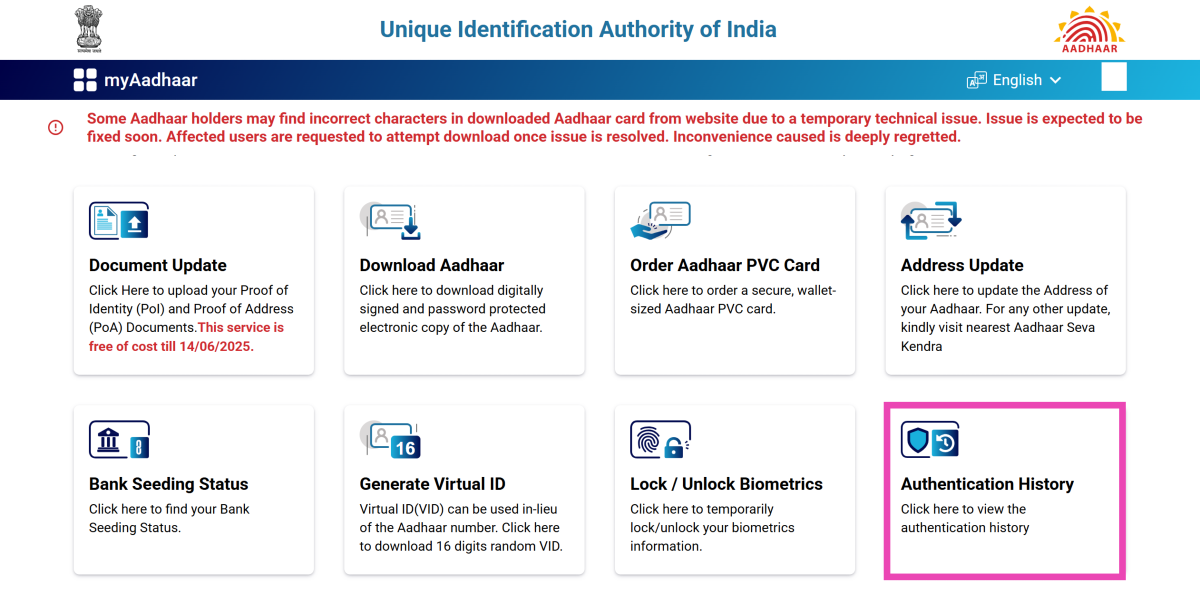 Step 7: Select All in the Modality dropdown menu and provide a date range.
Step 8: Click on Fetch Authentication History.
Step 7: Select All in the Modality dropdown menu and provide a date range.
Step 8: Click on Fetch Authentication History.
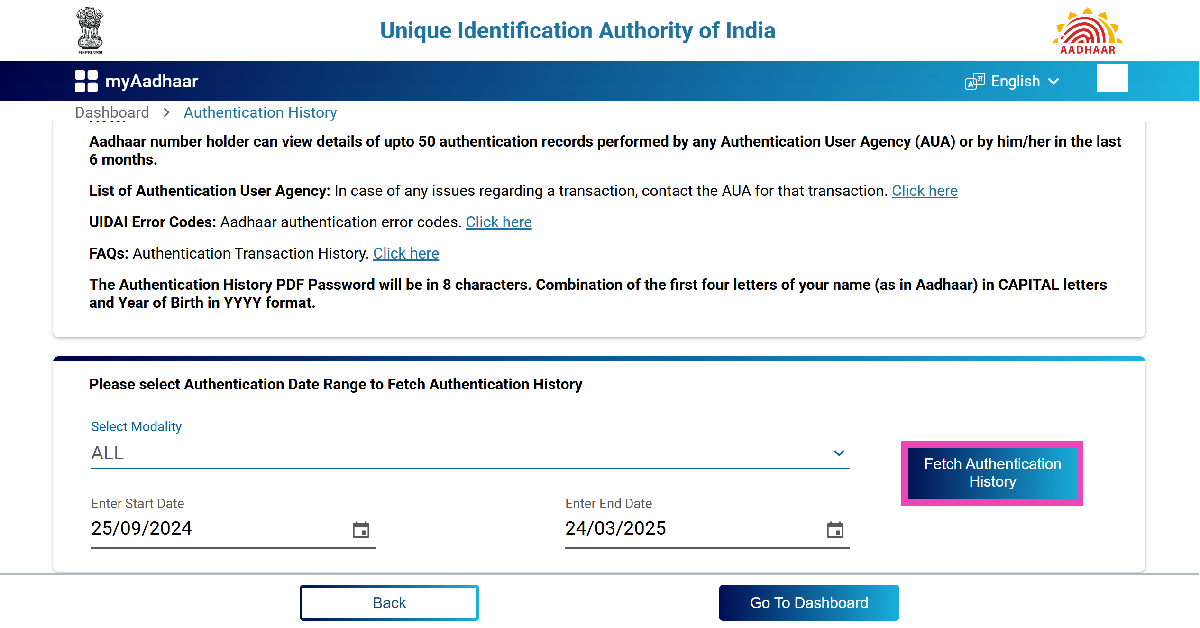 Step 9: Scroll down to view your Aadhaar authentication history.
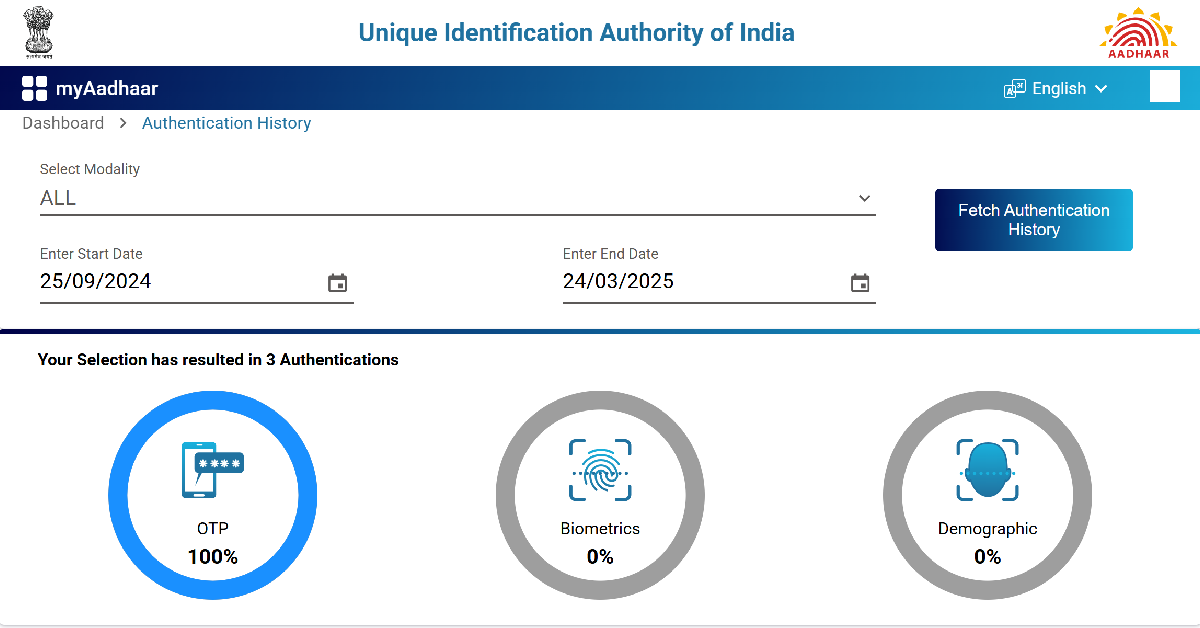 Step 10: Go through the list of authentications. If you notice any log of unauthorised access, it means that your Aadhaar card is not safe.
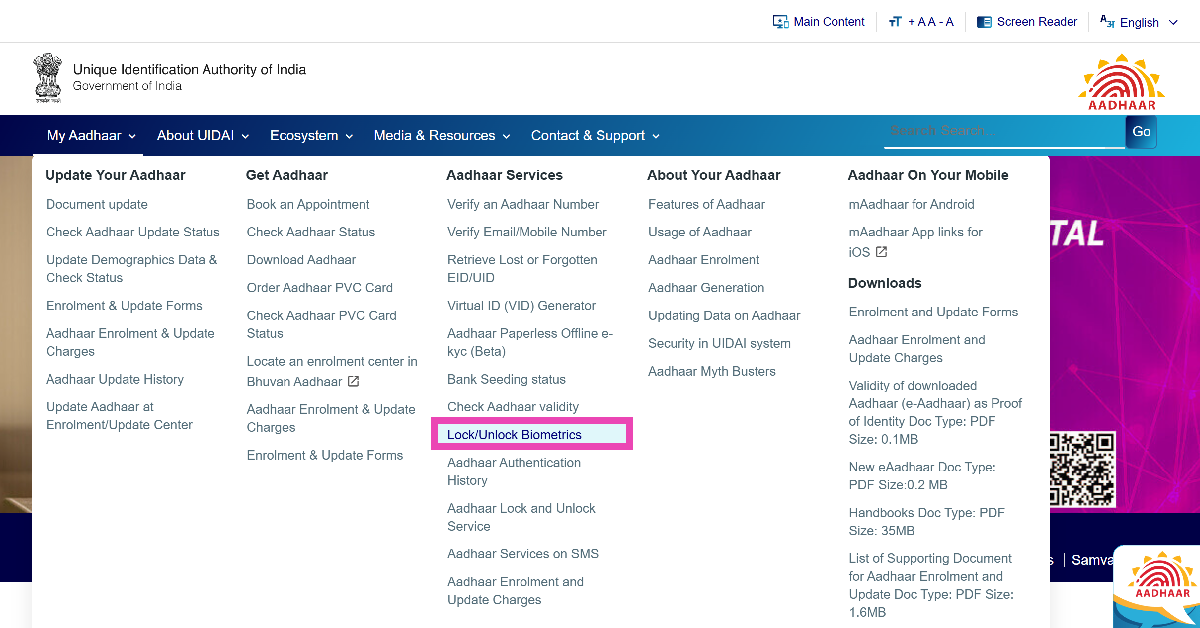 Step 3: Click on Login.
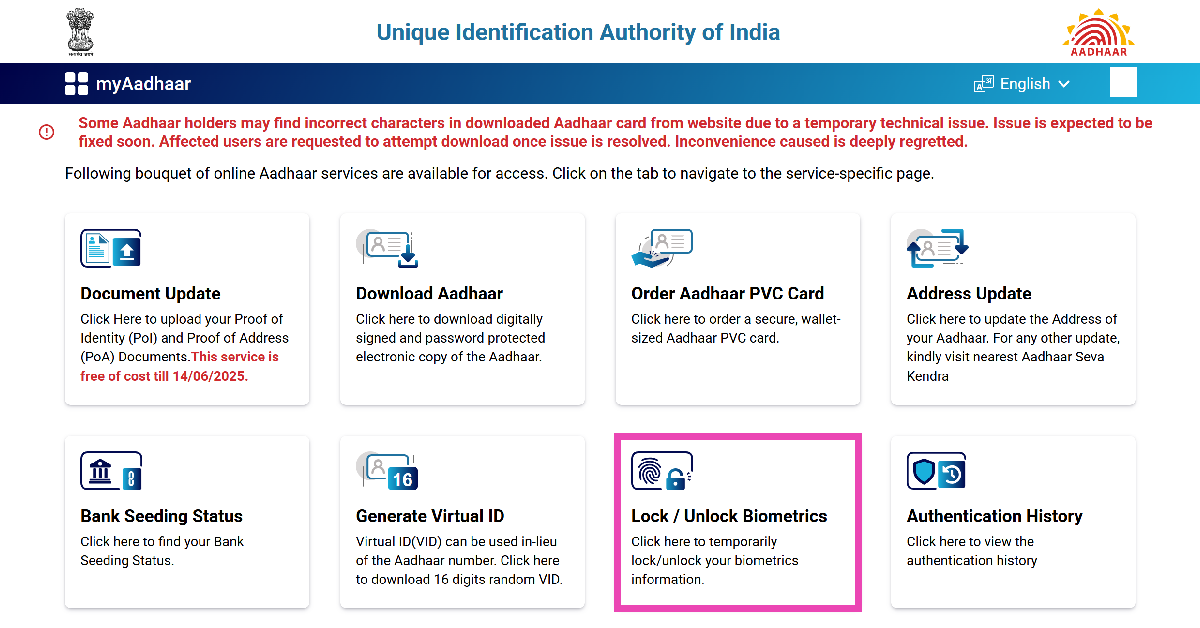 Step 7: Hit Next.
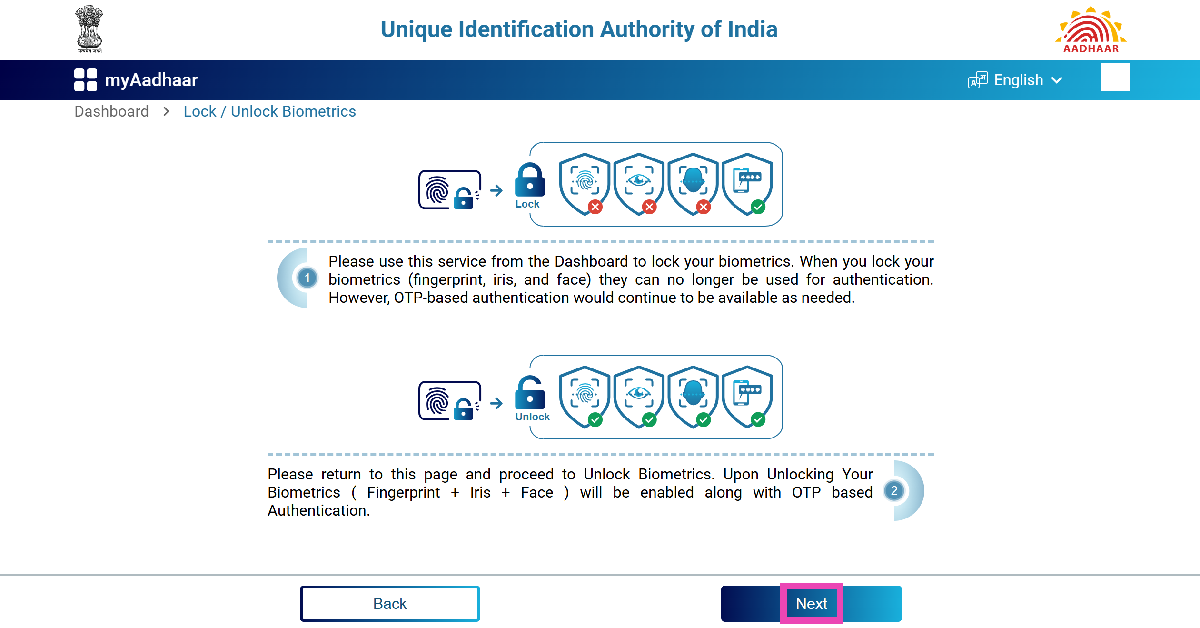 Step 8: Click the checkbox next to the cautionary message and hit Next.
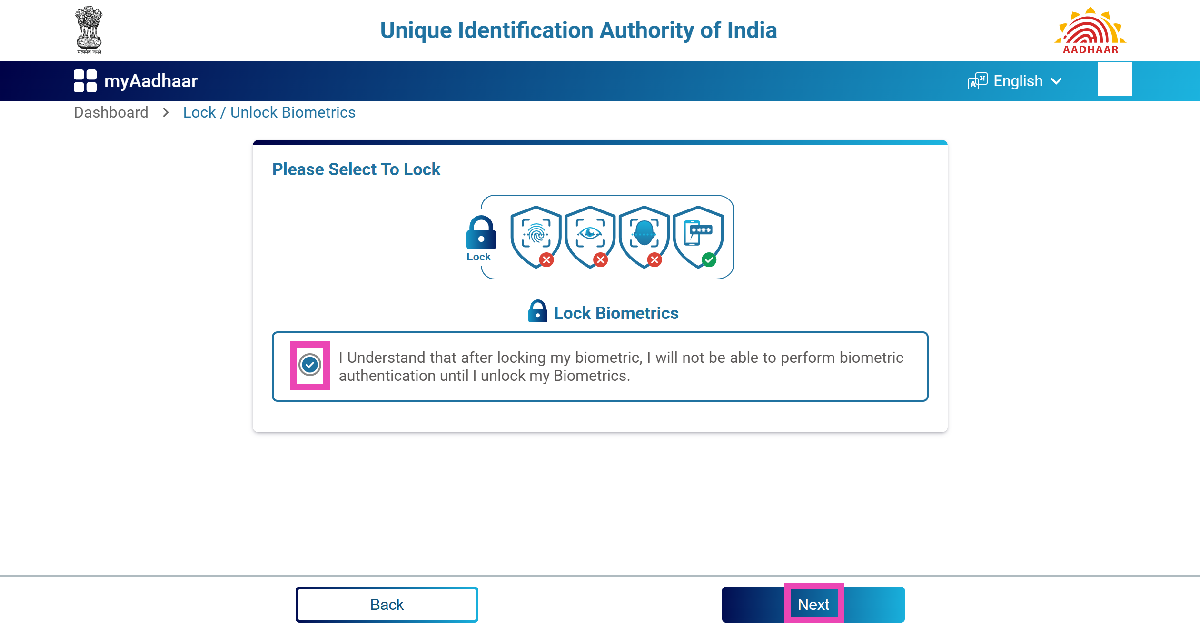

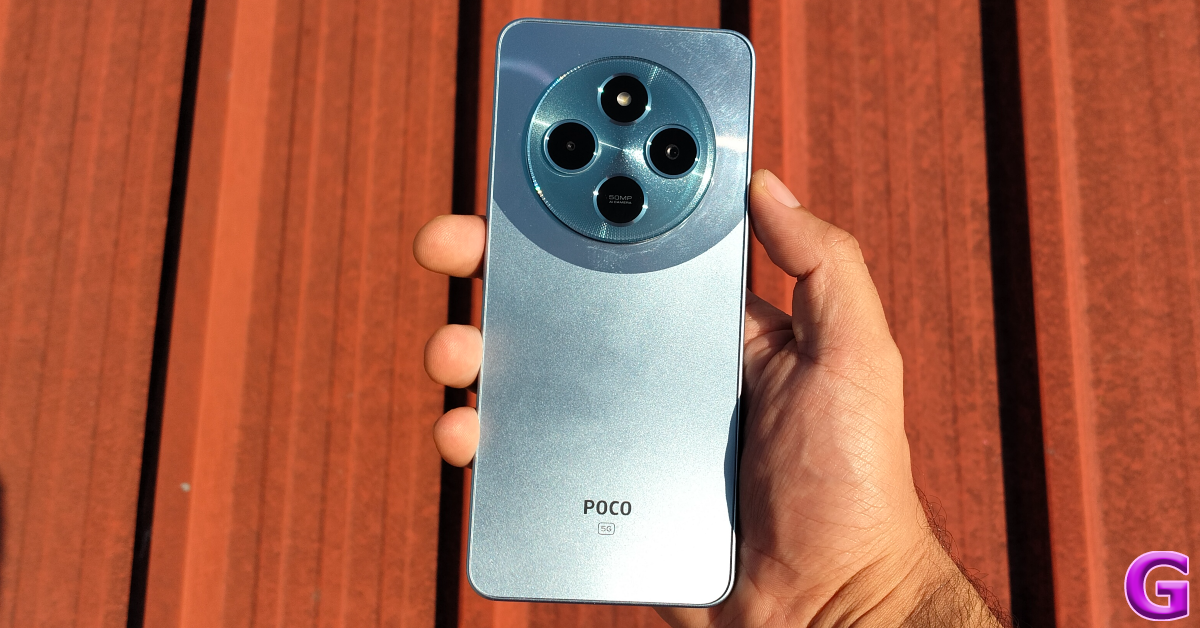 Poco M7 is one of the most affordable 5G smartphones around. It is powered by the Snapdragon 4 Gen 2 SoC and rocks a 6.88-inch IPS LCD panel. This display has a 120Hz refresh rate and can reach 600 nits in High Brightness Mode. The giant camera cutout on the back panel houses a 50MP primary shooter and an LED flash. The 8MP selfie camera is placed in a waterdrop notch on the display. Poco M7 5G runs the Android 14-based HyperOS out of the box. It is promised to receive 2 major OS upgrades. The 5,160mAh battery pack under its hood supports 18W wired charging. Read our Poco M7 5G review to find out how the smartphone performs in daily use. It is currently priced at Rs 10,999 but the asking price often dives below the Rs 10,000 mark.
Pros
Poco M7 is one of the most affordable 5G smartphones around. It is powered by the Snapdragon 4 Gen 2 SoC and rocks a 6.88-inch IPS LCD panel. This display has a 120Hz refresh rate and can reach 600 nits in High Brightness Mode. The giant camera cutout on the back panel houses a 50MP primary shooter and an LED flash. The 8MP selfie camera is placed in a waterdrop notch on the display. Poco M7 5G runs the Android 14-based HyperOS out of the box. It is promised to receive 2 major OS upgrades. The 5,160mAh battery pack under its hood supports 18W wired charging. Read our Poco M7 5G review to find out how the smartphone performs in daily use. It is currently priced at Rs 10,999 but the asking price often dives below the Rs 10,000 mark.
Pros
 Redmi 14C 5G is one of the best-looking budget smartphones out there. Its ‘Starlight Blue’ colour variant with a celestial trail pattern is our favourite out of the lot. The smartphone is powered by the Snapdragon 4 Gen 2 chipset. Its 6.88-inch IPS LCD panel has a 120Hz refresh rate and can hit 600 nits in High Brightness Mode. We found this display ideal for watching content when we reviewed the smartphone earlier this year. The device’s rear camera panel comprises a 50MP primary shooter, an auxiliary lens, and an LED flash. The 13MP selfie camera is housed in a waterdrop notch on the display. The 5,160mAh battery pack can last a day with ease and supports 18W wired charging.
Pros
Redmi 14C 5G is one of the best-looking budget smartphones out there. Its ‘Starlight Blue’ colour variant with a celestial trail pattern is our favourite out of the lot. The smartphone is powered by the Snapdragon 4 Gen 2 chipset. Its 6.88-inch IPS LCD panel has a 120Hz refresh rate and can hit 600 nits in High Brightness Mode. We found this display ideal for watching content when we reviewed the smartphone earlier this year. The device’s rear camera panel comprises a 50MP primary shooter, an auxiliary lens, and an LED flash. The 13MP selfie camera is housed in a waterdrop notch on the display. The 5,160mAh battery pack can last a day with ease and supports 18W wired charging.
Pros
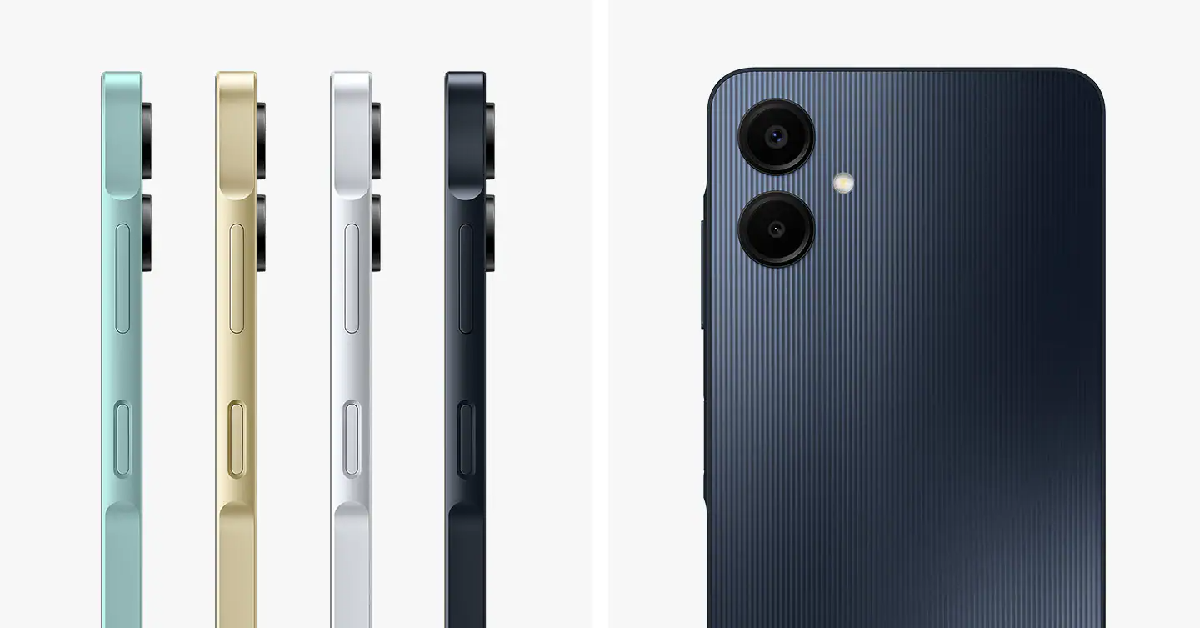 Samsung’s entry-level smartphone in its portfolio is a gritty performer. It is powered by the MediaTek Helio G12 SoC and is available in 2 storage configurations – 64GB and 128GB. The hybrid SIM slot supports microSD cards with up to 1TB storage. The 6.7-inch PLS LCD panel has a 720p resolution. The plastic back panel has individual cutouts for the 50MP primary shooter and the 2MP depth sensor. The 8MP selfie camera lies in a waterdrop notch on the display. The Galaxy A06 is equipped with a 5,000mAh battery pack and supports 25W wired fast charging.
Pros
Samsung’s entry-level smartphone in its portfolio is a gritty performer. It is powered by the MediaTek Helio G12 SoC and is available in 2 storage configurations – 64GB and 128GB. The hybrid SIM slot supports microSD cards with up to 1TB storage. The 6.7-inch PLS LCD panel has a 720p resolution. The plastic back panel has individual cutouts for the 50MP primary shooter and the 2MP depth sensor. The 8MP selfie camera lies in a waterdrop notch on the display. The Galaxy A06 is equipped with a 5,000mAh battery pack and supports 25W wired fast charging.
Pros
 The Motorola Moto G45 5G is equipped with the powerful Snapdragon 6s Gen 3 Soc. Its 6.5-inch IPS LCD panel has a 120Hz refresh rate. The silicone polymer (or eco-leather) variant is our pick in this smartphone’s lineup. It has a nice in-hand feel – something that is very rare in this segment. The smartphone’s dual rear camera setup comprises a 50MP primary shooter and a 2MP macro lens. The 16MP selfie camera is housed in a punch-hole cutout on the display. The smartphone rocks a 5,000mAh battery pack and supports 18W wired charging.
Pros
The Motorola Moto G45 5G is equipped with the powerful Snapdragon 6s Gen 3 Soc. Its 6.5-inch IPS LCD panel has a 120Hz refresh rate. The silicone polymer (or eco-leather) variant is our pick in this smartphone’s lineup. It has a nice in-hand feel – something that is very rare in this segment. The smartphone’s dual rear camera setup comprises a 50MP primary shooter and a 2MP macro lens. The 16MP selfie camera is housed in a punch-hole cutout on the display. The smartphone rocks a 5,000mAh battery pack and supports 18W wired charging.
Pros
 Redmi A4 5G is similar to its brand cousin, Redmi 14C. It is powered by the Snapdragon 4s Gen 2 chipset and flaunts a massive 6.88-inch IPS LCD panel. This display has a 120Hz refresh rate and can reach 600 nits in High Brightness Mode. The smartphone runs the Android 14-based HyperOS out of the box and is promised to receive 2 major OS upgrades. Its rear camera panel houses a 50MP primary shooter, an auxiliary lens, and an LED flash. The 5MP selfie camera is placed in a waterdrop notch on the display. The 5,160mAh battery pack supports 18W charging. For more details, read our in-depth Redmi A4 5G review.
Pros
Redmi A4 5G is similar to its brand cousin, Redmi 14C. It is powered by the Snapdragon 4s Gen 2 chipset and flaunts a massive 6.88-inch IPS LCD panel. This display has a 120Hz refresh rate and can reach 600 nits in High Brightness Mode. The smartphone runs the Android 14-based HyperOS out of the box and is promised to receive 2 major OS upgrades. Its rear camera panel houses a 50MP primary shooter, an auxiliary lens, and an LED flash. The 5MP selfie camera is placed in a waterdrop notch on the display. The 5,160mAh battery pack supports 18W charging. For more details, read our in-depth Redmi A4 5G review.
Pros
 Realme C63 is one of the best smartphones priced under Rs 10,000 right now. It packs a Unisoc Tiger T612 processor and comes in 2 storage variants – 64GB and 128GB. Additionally, the smartphone has a dedicated microSD slot in the SIM tray. The iPhone-inspired rear camera panel houses a 50MP primary shooter, an auxiliary lens, and an LED flash. The 6.75-inch IPS LCD panel has a 90Hz refresh rate and can reach 560 nits in High Brightness Mode. The 5,000mAh battery pack supports 45W wired charging.
Pros
Realme C63 is one of the best smartphones priced under Rs 10,000 right now. It packs a Unisoc Tiger T612 processor and comes in 2 storage variants – 64GB and 128GB. Additionally, the smartphone has a dedicated microSD slot in the SIM tray. The iPhone-inspired rear camera panel houses a 50MP primary shooter, an auxiliary lens, and an LED flash. The 6.75-inch IPS LCD panel has a 90Hz refresh rate and can reach 560 nits in High Brightness Mode. The 5,000mAh battery pack supports 45W wired charging.
Pros
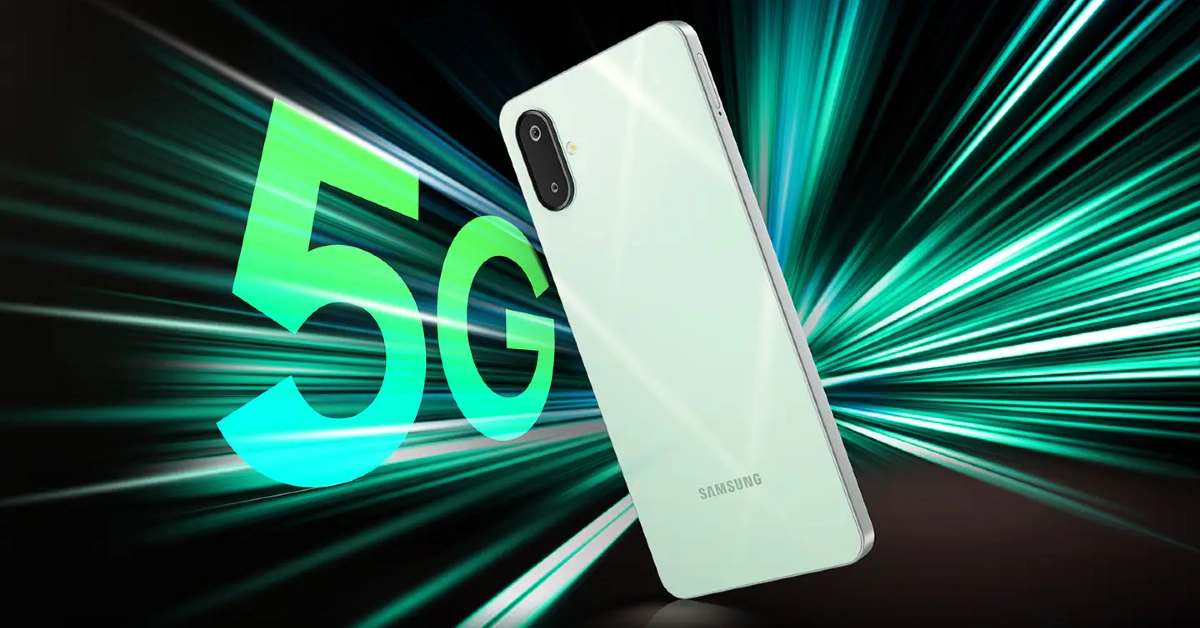 Samsung’s entry-level M series smartphone is a great deal under Rs 10,000. It is powered by the MediaTek 6300 chipset, which is an excellent processor in this price range. Additionally, it flaunts a 6.74-inch PLS LCD panel with a 90Hz refresh rate. This display can reach 800 nits in High Brightness Mode. The Galaxy M06 is one of the few entry-level smartphones that runs Android 15 OS out of the box. Samsung’s proprietary One UI Core 7 OS skins the Android 15 OS on this device. What seals the deal for us is 4 years of major OS upgrades. No other smartphone manufacturer in this segment offers better software support.
Pros
Samsung’s entry-level M series smartphone is a great deal under Rs 10,000. It is powered by the MediaTek 6300 chipset, which is an excellent processor in this price range. Additionally, it flaunts a 6.74-inch PLS LCD panel with a 90Hz refresh rate. This display can reach 800 nits in High Brightness Mode. The Galaxy M06 is one of the few entry-level smartphones that runs Android 15 OS out of the box. Samsung’s proprietary One UI Core 7 OS skins the Android 15 OS on this device. What seals the deal for us is 4 years of major OS upgrades. No other smartphone manufacturer in this segment offers better software support.
Pros
 Poco C75 hits the nail on the head with its segment-defining specs and affordable pricing. The smartphone is powered by the 4nm Snapdragon 4s Gen 2 chipset. It runs the Android 14-based HyperOS out of the box and is promised to receive 2 major OS upgrades. Its 6.88-inch IPS LCD panel has a 120Hz refresh rate and can hit 600 nits in High Brightness Mode. The rear camera panel houses a 50MP primary shooter, an auxiliary lens, and an LED flash. The 5MP front-facing camera rests in a waterdrop notch and takes great selfies. The 5,160mAh battery pack supports 18W wired charging. For more details, read our review of the Poco C75 5G.
Pros
Poco C75 hits the nail on the head with its segment-defining specs and affordable pricing. The smartphone is powered by the 4nm Snapdragon 4s Gen 2 chipset. It runs the Android 14-based HyperOS out of the box and is promised to receive 2 major OS upgrades. Its 6.88-inch IPS LCD panel has a 120Hz refresh rate and can hit 600 nits in High Brightness Mode. The rear camera panel houses a 50MP primary shooter, an auxiliary lens, and an LED flash. The 5MP front-facing camera rests in a waterdrop notch and takes great selfies. The 5,160mAh battery pack supports 18W wired charging. For more details, read our review of the Poco C75 5G.
Pros
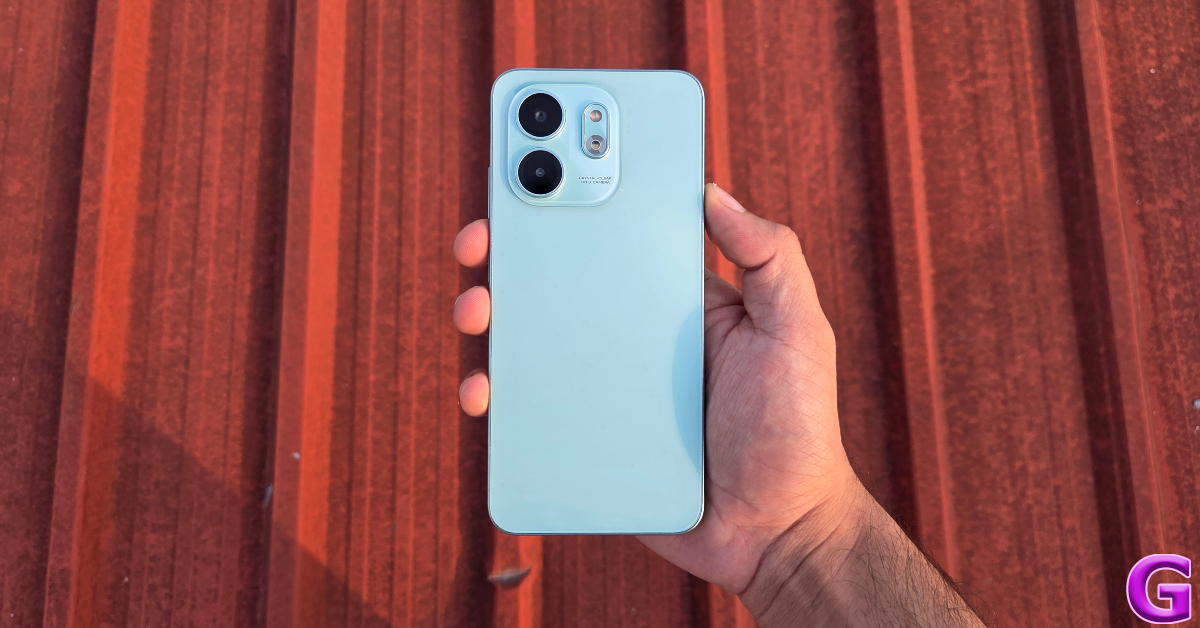 The Infinix Smart 9 HD trades some of the benchmark numbers for a cool aesthetic and an affordable price tag. This is a great tradeoff in our books. We reviewed the smartphone earlier this year and found it to be reliable for everyday use. We were impressed by its clean design and smooth display. Unlike other smartphones in this category, the Smart 9 HD has a punch-hole cutout for its selfie camera. This cutout expands to deliver live alerts, much like the Dynamic Island on the iPhone. The rear camera panel comprises a 13MP primary shooter, a depth sensor, and an LED flash. The 5,000mAh battery pack supports 10W charging.
Pros
The Infinix Smart 9 HD trades some of the benchmark numbers for a cool aesthetic and an affordable price tag. This is a great tradeoff in our books. We reviewed the smartphone earlier this year and found it to be reliable for everyday use. We were impressed by its clean design and smooth display. Unlike other smartphones in this category, the Smart 9 HD has a punch-hole cutout for its selfie camera. This cutout expands to deliver live alerts, much like the Dynamic Island on the iPhone. The rear camera panel comprises a 13MP primary shooter, a depth sensor, and an LED flash. The 5,000mAh battery pack supports 10W charging.
Pros
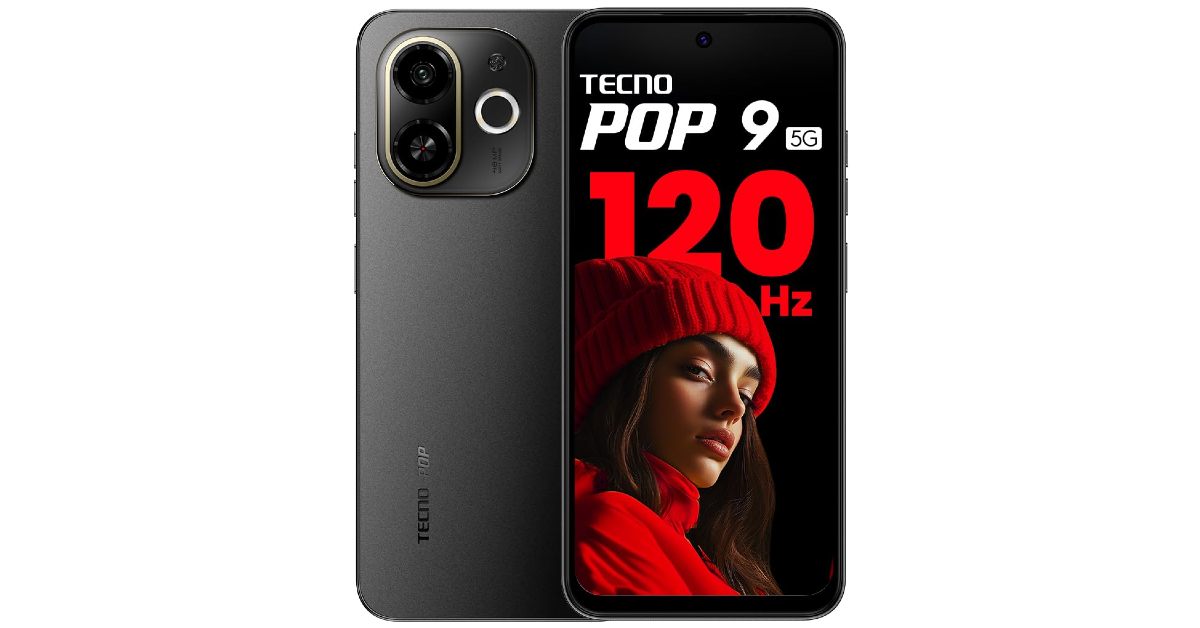 Ending this list is the Tecno Pop 9 5G. It is undeniably one of the best smartphones priced under Rs 10,000 right now. Powering this smartphone is the heavy-duty octa-core MediaTek Dimensity 6300 chipset. The 6.6-inch IPS LCD panel has a 120Hz refresh rate. The rear camera panel houses a 48MP primary shooter, an auxiliary lens, and a dual-LED flash. The Pop 9 is rated IP54 for dust and water resistance. Its 5,000mAh battery pack supports 18W charging.
Pros
Ending this list is the Tecno Pop 9 5G. It is undeniably one of the best smartphones priced under Rs 10,000 right now. Powering this smartphone is the heavy-duty octa-core MediaTek Dimensity 6300 chipset. The 6.6-inch IPS LCD panel has a 120Hz refresh rate. The rear camera panel houses a 48MP primary shooter, an auxiliary lens, and a dual-LED flash. The Pop 9 is rated IP54 for dust and water resistance. Its 5,000mAh battery pack supports 18W charging.
Pros
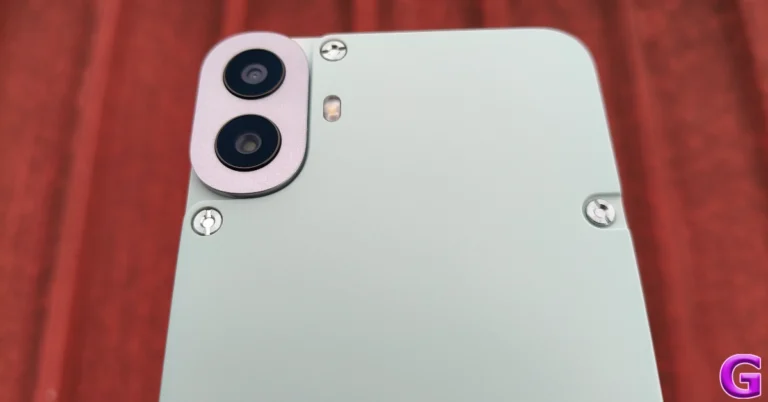
 The Redmi 13 5G (Review)sports a 6.79-inch Full-HD+ IPS LCD screen with 120Hz AdaptiveSync refresh rate support. The phone runs on Android 14-based HyperOS. Under the hood, there is a Qualcomm Snapdragon 4 Gen 2 AE SoC. The Redmi 13 5G features a dual rear camera with a 108-megapixel Samsung ISOCELL HM6 sensor with an f/1.75 aperture and 3x in-sensor zoom along with a 2-megapixel macro lens. Upfront there is a 13-megapixel selfie camera.
Pros
The Redmi 13 5G (Review)sports a 6.79-inch Full-HD+ IPS LCD screen with 120Hz AdaptiveSync refresh rate support. The phone runs on Android 14-based HyperOS. Under the hood, there is a Qualcomm Snapdragon 4 Gen 2 AE SoC. The Redmi 13 5G features a dual rear camera with a 108-megapixel Samsung ISOCELL HM6 sensor with an f/1.75 aperture and 3x in-sensor zoom along with a 2-megapixel macro lens. Upfront there is a 13-megapixel selfie camera.
Pros
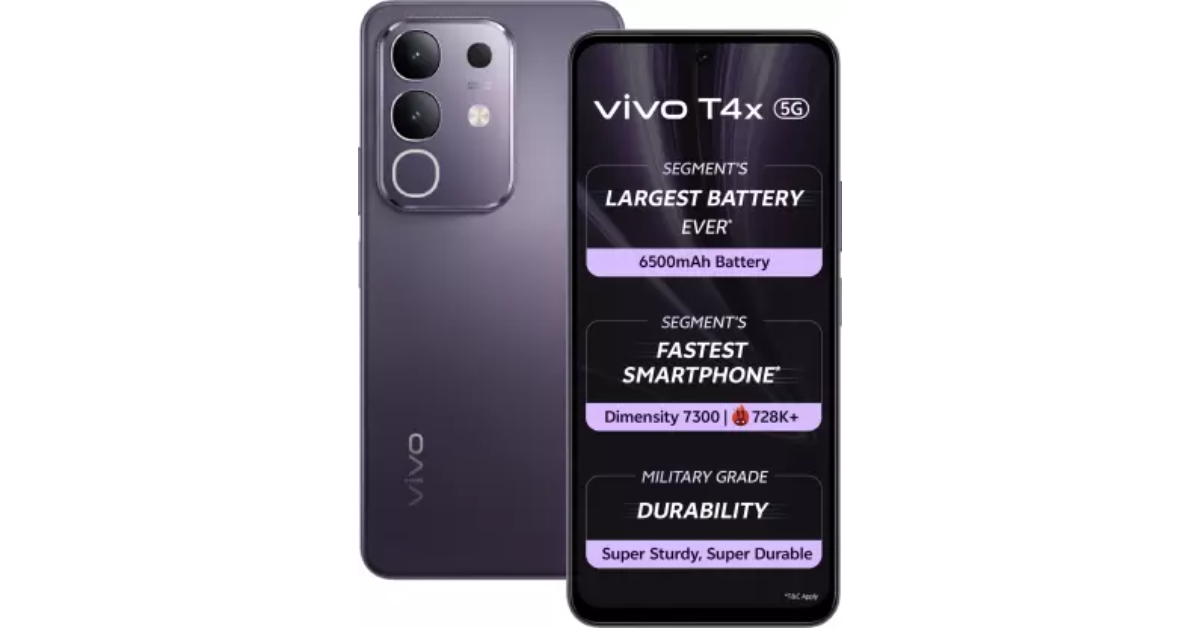 The Vivo T4x 5G features a 6.72-inch full-HD+ LCD screen with 120Hz refresh rate support. The smartphone runs on FuntouchOS 15 based on Android 15 out of the box. It is powered by MediaTek Dimensity 7300 SoC. It also offers smart features like Live Text, Circle to Search, and AI Screen Translation. The dual rear camera setup includes a 50-megapixel main sensor and a 2-megapixel depth sensor. For selfies and video calling, the display’s punch hole plays house to an 8-megapixel selfie shooter. The camera also includes features like AI Erase, AI Photo Enhance, AI Document Mode and Night Mode. The phone can record 4K videos at 30 fps. The phone is backed by a 6,500mAh battery with 44W wired fast charging support.
Pros:
The Vivo T4x 5G features a 6.72-inch full-HD+ LCD screen with 120Hz refresh rate support. The smartphone runs on FuntouchOS 15 based on Android 15 out of the box. It is powered by MediaTek Dimensity 7300 SoC. It also offers smart features like Live Text, Circle to Search, and AI Screen Translation. The dual rear camera setup includes a 50-megapixel main sensor and a 2-megapixel depth sensor. For selfies and video calling, the display’s punch hole plays house to an 8-megapixel selfie shooter. The camera also includes features like AI Erase, AI Photo Enhance, AI Document Mode and Night Mode. The phone can record 4K videos at 30 fps. The phone is backed by a 6,500mAh battery with 44W wired fast charging support.
Pros:
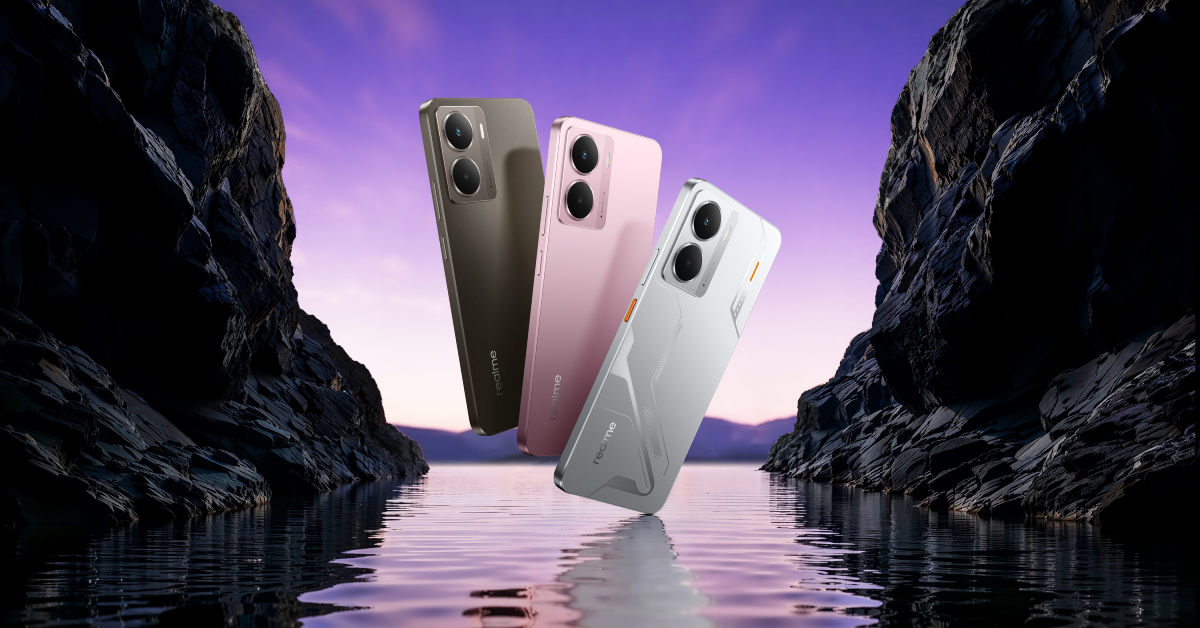
 The Samsung Galaxy A14 5G (Review) is highlighted with a 6.6-inch full-HD+ PLS LCD screen with 90Hz refresh rate support. The device is powered by an Exynos 1330 SoC. It packs a battery capacity of 5,000mAh. The Galaxy A14 5G comes equipped with three cameras on the back: a 50-megapixel primary camera, a 2-megapixel macro camera, and a 2-megapixel depth sensor. A 13-megapixel front-facing selfie camera is also included.
Pros
The Samsung Galaxy A14 5G (Review) is highlighted with a 6.6-inch full-HD+ PLS LCD screen with 90Hz refresh rate support. The device is powered by an Exynos 1330 SoC. It packs a battery capacity of 5,000mAh. The Galaxy A14 5G comes equipped with three cameras on the back: a 50-megapixel primary camera, a 2-megapixel macro camera, and a 2-megapixel depth sensor. A 13-megapixel front-facing selfie camera is also included.
Pros
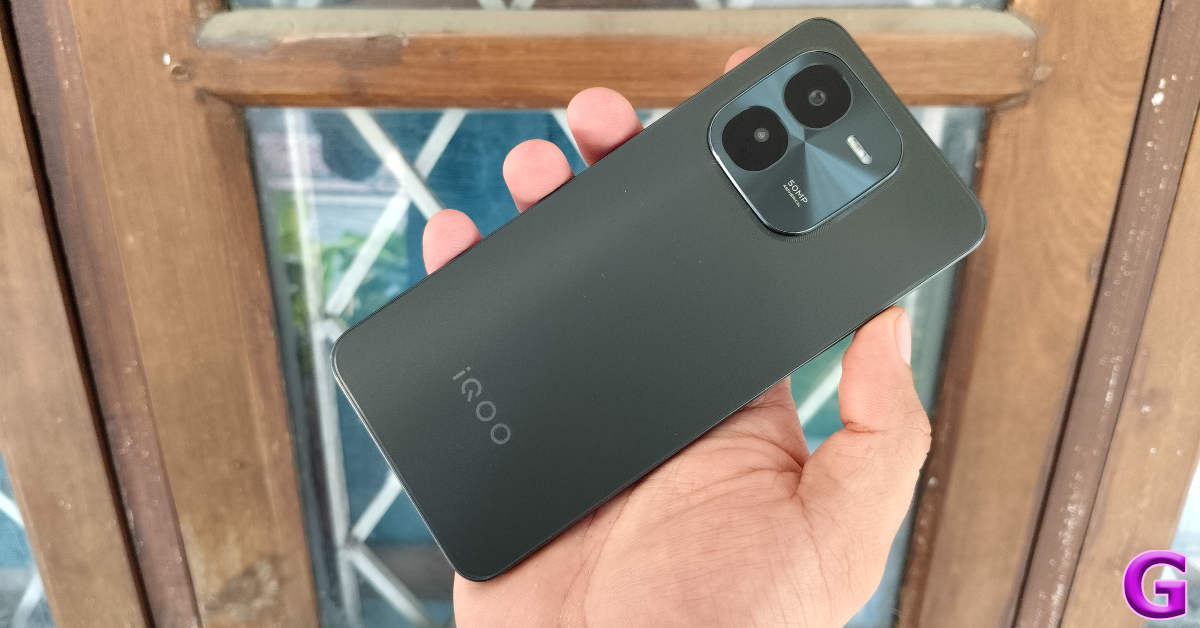 The iQoo Z9x 5G (Review)is powered by an octa-core 4nm Snapdragon 6 Gen 1 SoC. It runs Android 14-based Funtouch OS 14. The device sports a 6.72-inch full-HD+ LCD screen with 120Hz refresh rate support. The handset comes equipped with a dual rear camera setup that includes a 50-megapixel rear camera and a 2-megapixel depth sensor. There is an 8-megapixel selfie camera on the front. It comes equipped with a 6,000mAh battery with 44W Flash Charge support.
Pros
The iQoo Z9x 5G (Review)is powered by an octa-core 4nm Snapdragon 6 Gen 1 SoC. It runs Android 14-based Funtouch OS 14. The device sports a 6.72-inch full-HD+ LCD screen with 120Hz refresh rate support. The handset comes equipped with a dual rear camera setup that includes a 50-megapixel rear camera and a 2-megapixel depth sensor. There is an 8-megapixel selfie camera on the front. It comes equipped with a 6,000mAh battery with 44W Flash Charge support.
Pros
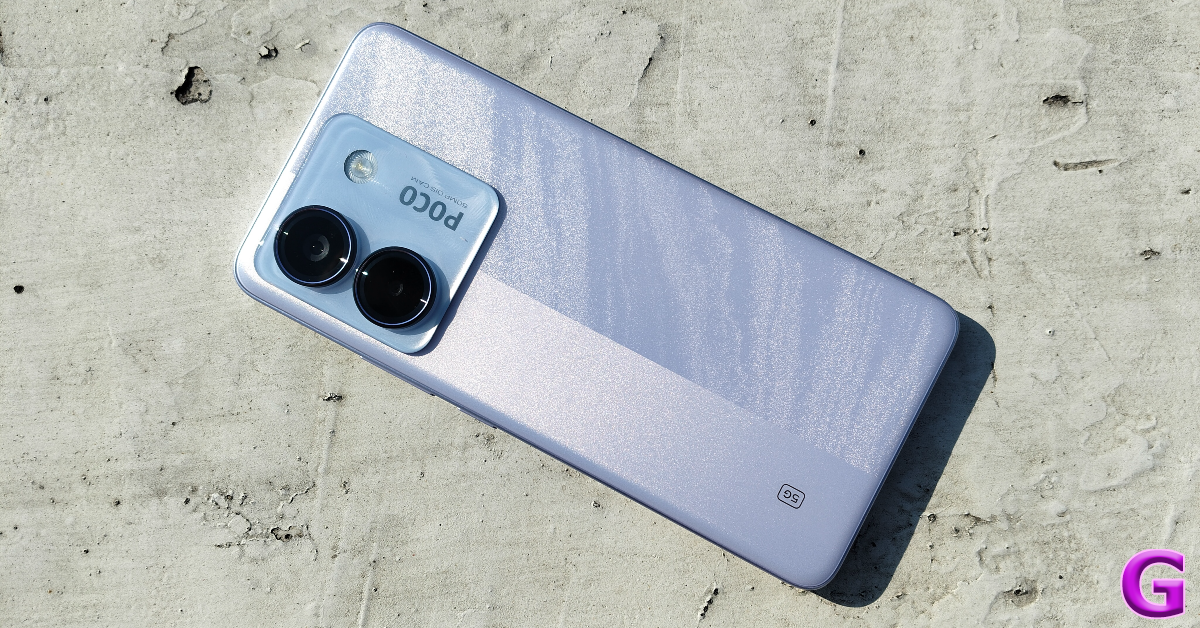 Poco M7 Pro 5G (Review) features a 6.67-inch full-HD+ Super AMOLED screen with up to 120Hz refresh rate support. In terms of software, the phone runs on HyperOS skinned on Android 14 out of the box. Under the hood, there is MediaTek Dimensity 7025 Ultra SoC. For the optics, Poco M7 Pro 5G is highlighted with a dual rear camera setup that includes a 1/1.95-inch 50-megapixel Sony LYT-600 primary sensor and a secondary 2-megapixel depth sensor. Additionally, the handset has a 20-megapixel front-facing camera for taking selfies and video calling. The mobile phone houses a 5,110mAh battery with 45W wired fast charging support.
Pros
Poco M7 Pro 5G (Review) features a 6.67-inch full-HD+ Super AMOLED screen with up to 120Hz refresh rate support. In terms of software, the phone runs on HyperOS skinned on Android 14 out of the box. Under the hood, there is MediaTek Dimensity 7025 Ultra SoC. For the optics, Poco M7 Pro 5G is highlighted with a dual rear camera setup that includes a 1/1.95-inch 50-megapixel Sony LYT-600 primary sensor and a secondary 2-megapixel depth sensor. Additionally, the handset has a 20-megapixel front-facing camera for taking selfies and video calling. The mobile phone houses a 5,110mAh battery with 45W wired fast charging support.
Pros
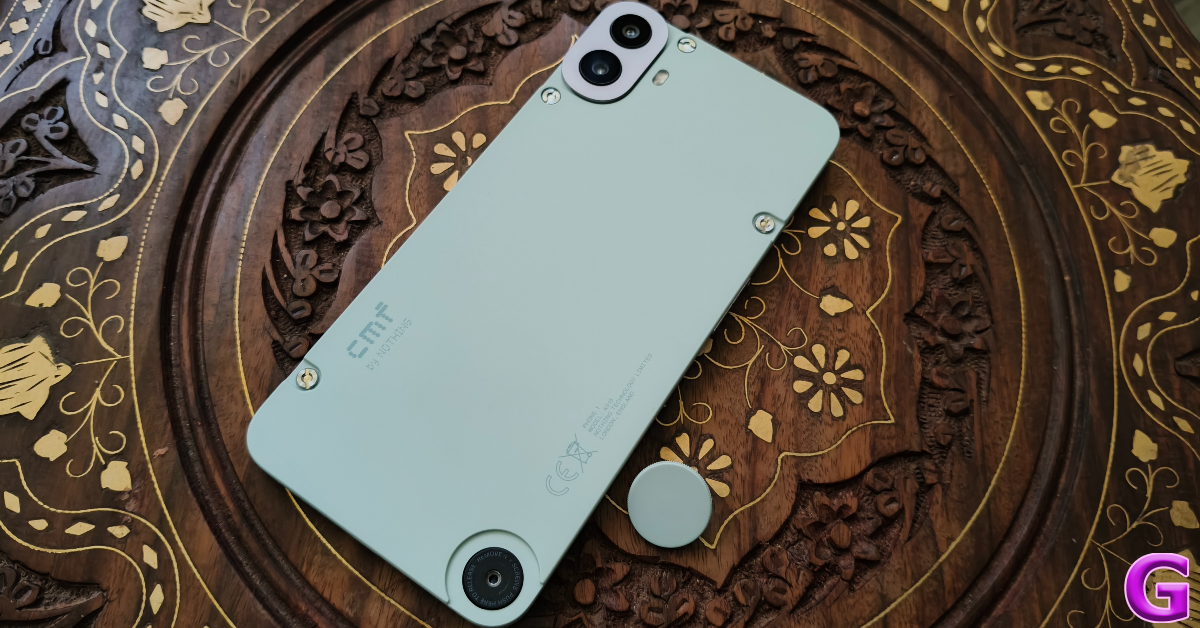 CMF Phone 1 (Review) features a 6.7-inch full-HD+ AMOLED LTPS display with 1,080×2,400 pixels of resolution. The screen supports up to 120Hz adaptive refresh rate and 240Hz touch sampling rate. It comes with an octa-core MediaTek Dimensity 7300 5G processor. It is available with up to 8GB of RAM and up to 256GB of storage.
There is a dual 50-megapixel main and portrait sensor with EIS support. For selfies, it includes a 16-megapixel front-facing camera. The Phone 1 has a 5,000mAh battery that supports 33W fast and 5W reverse wired charging.
Pros
CMF Phone 1 (Review) features a 6.7-inch full-HD+ AMOLED LTPS display with 1,080×2,400 pixels of resolution. The screen supports up to 120Hz adaptive refresh rate and 240Hz touch sampling rate. It comes with an octa-core MediaTek Dimensity 7300 5G processor. It is available with up to 8GB of RAM and up to 256GB of storage.
There is a dual 50-megapixel main and portrait sensor with EIS support. For selfies, it includes a 16-megapixel front-facing camera. The Phone 1 has a 5,000mAh battery that supports 33W fast and 5W reverse wired charging.
Pros
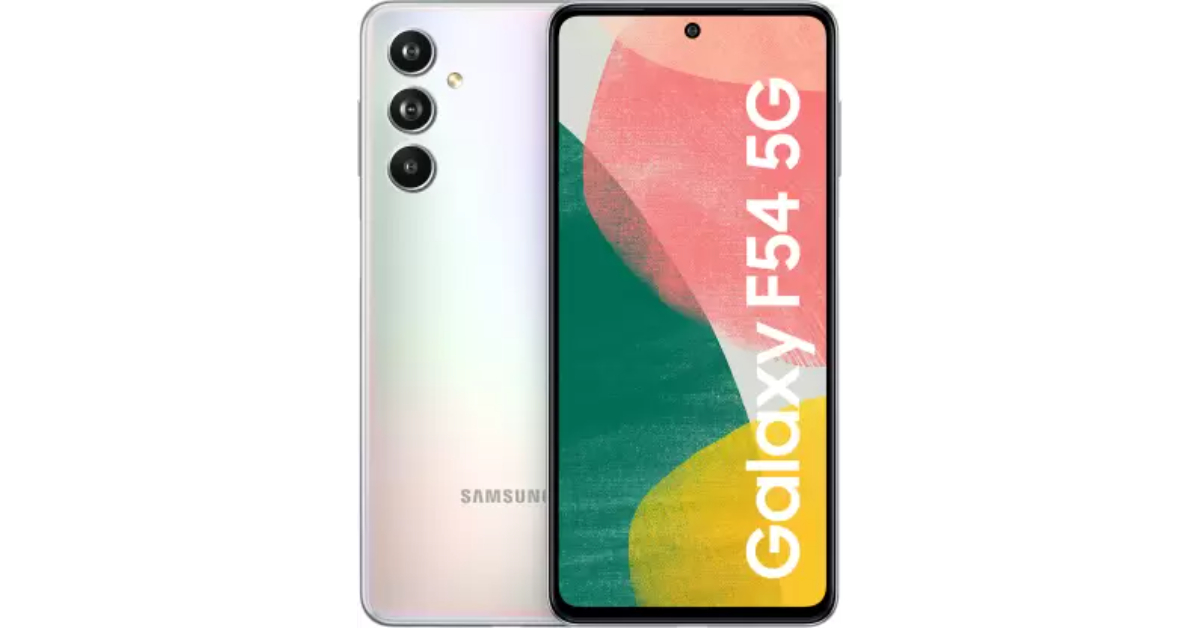 The Samsung Galaxy F34 5G is a smartphone with a 6.46-inch full-HD+ Super AMOLED display with a resolution of 2340 x 1080 pixels. It runs on OneUI 5.1 and Android 13. The device has an octa-core Exynos 1280 SoC, 8GB of RAM, and 128GB of internal storage. It features a triple rear camera setup with an LED flash, a 50-megapixel primary sensor, an 8-megapixel sensor, an ultra-wide-angle lens, a 2-megapixel macro sensor, and a 13-megapixel front camera for selfies. The phone has a 6,000mAh battery and supports 5G, GPS, NFC, Wi-Fi, Bluetooth v5.3, and a USB Type-C port for charging.
Pros
The Samsung Galaxy F34 5G is a smartphone with a 6.46-inch full-HD+ Super AMOLED display with a resolution of 2340 x 1080 pixels. It runs on OneUI 5.1 and Android 13. The device has an octa-core Exynos 1280 SoC, 8GB of RAM, and 128GB of internal storage. It features a triple rear camera setup with an LED flash, a 50-megapixel primary sensor, an 8-megapixel sensor, an ultra-wide-angle lens, a 2-megapixel macro sensor, and a 13-megapixel front camera for selfies. The phone has a 6,000mAh battery and supports 5G, GPS, NFC, Wi-Fi, Bluetooth v5.3, and a USB Type-C port for charging.
Pros
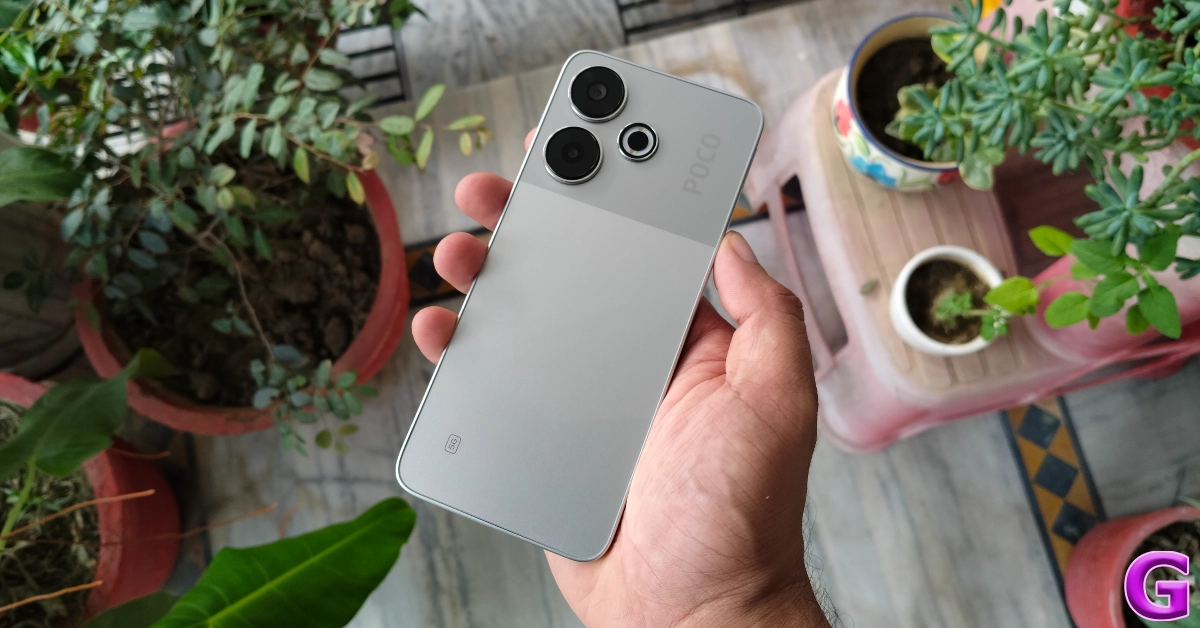 The Poco M6 Plus 5G (Review) is a smartphone launched in India with a 6.79-inch full-HD+ display with 120Hz adaptive refresh rate support The Qualcomm Snapdragon 4 Gen 2 CPU will power the M6 Plus 5G. It operates on HyperOS, an Android 14 operating system. A dual rear camera setup with ring LED is featured on the back of the phone, along with a dual-tone design. The camera setup includes a 108-megapixel Samsung ISOCELL HM6 primary sensor with f/1.75 aperture and support for a 3x in-sensor zoom. The phone will also include a 13-megapixel front camera with f/1.75 aperture for taking selfies and making video calls. Both cameras support 1080p and 720p video recording at 30fps.
The Poco M6 Plus 5G is equipped with a 5030mAh battery that supports 33W fast charging technology.
Pros
The Poco M6 Plus 5G (Review) is a smartphone launched in India with a 6.79-inch full-HD+ display with 120Hz adaptive refresh rate support The Qualcomm Snapdragon 4 Gen 2 CPU will power the M6 Plus 5G. It operates on HyperOS, an Android 14 operating system. A dual rear camera setup with ring LED is featured on the back of the phone, along with a dual-tone design. The camera setup includes a 108-megapixel Samsung ISOCELL HM6 primary sensor with f/1.75 aperture and support for a 3x in-sensor zoom. The phone will also include a 13-megapixel front camera with f/1.75 aperture for taking selfies and making video calls. Both cameras support 1080p and 720p video recording at 30fps.
The Poco M6 Plus 5G is equipped with a 5030mAh battery that supports 33W fast charging technology.
Pros
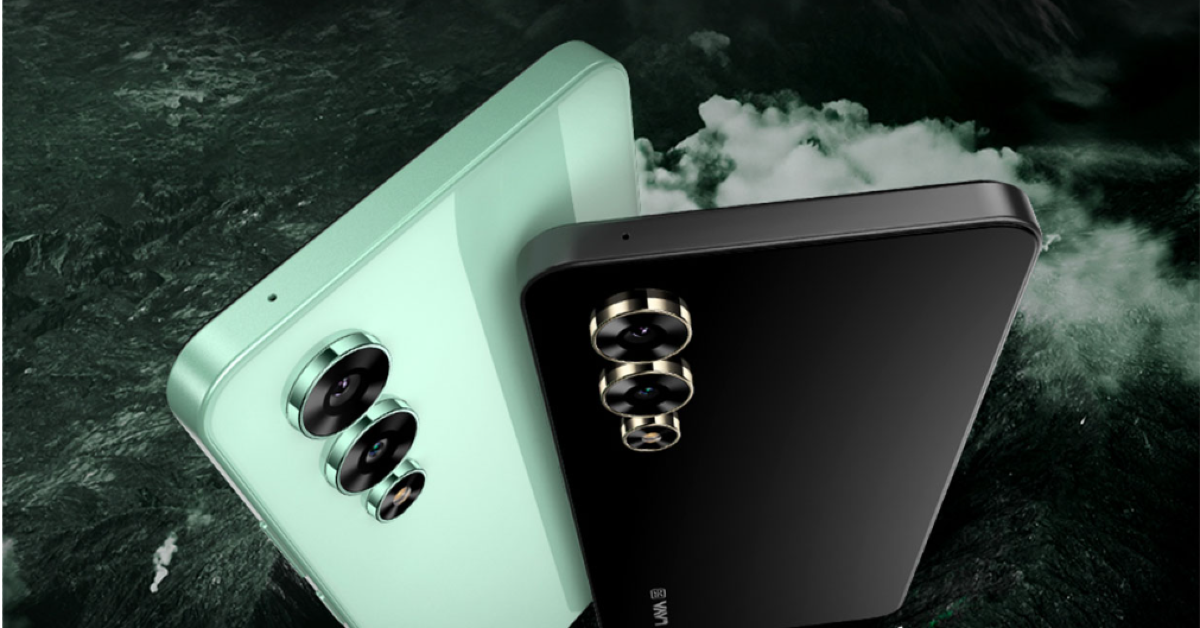 The Lava Storm 5G has a 6.78-inch full-HD+ IPS 2.5D display with 1,080×2,460 pixels resolution. It comes pre-installed with Android 14 and promises two years of security updates. The phone has a MediaTek Dimensity 6080 SoC, 8GB RAM, and 128GB storage. It has a dual rear camera setup with a 50-megapixel primary sensor, an 8-megapixel ultra wide-angle lens, an LED flashlight, and a 16-megapixel front-facing camera with screen flash. It has a 5,000mAh battery.
Pros
The Lava Storm 5G has a 6.78-inch full-HD+ IPS 2.5D display with 1,080×2,460 pixels resolution. It comes pre-installed with Android 14 and promises two years of security updates. The phone has a MediaTek Dimensity 6080 SoC, 8GB RAM, and 128GB storage. It has a dual rear camera setup with a 50-megapixel primary sensor, an 8-megapixel ultra wide-angle lens, an LED flashlight, and a 16-megapixel front-facing camera with screen flash. It has a 5,000mAh battery.
Pros
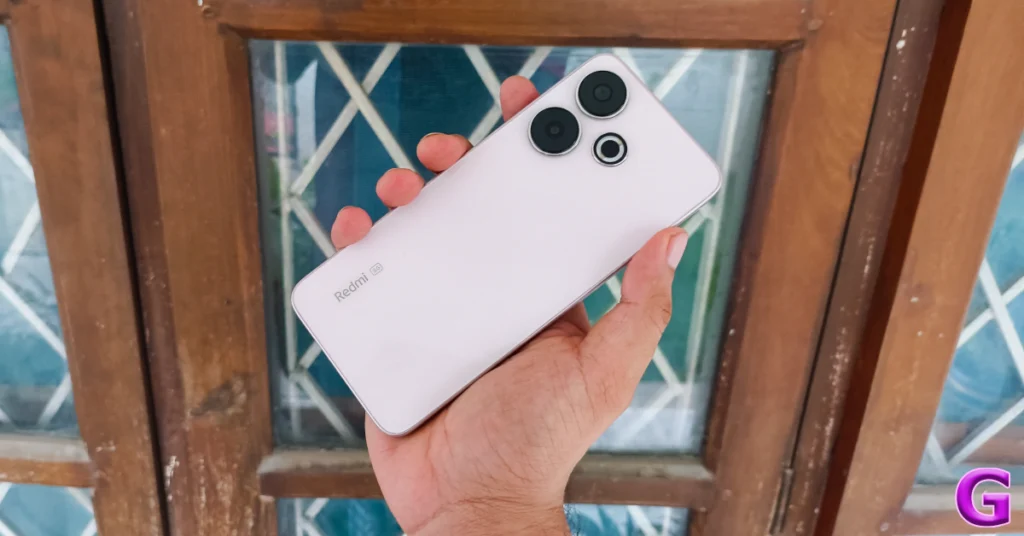 The Redmi 13 5G (Review)sports a 6.79-inch Full-HD+ IPS LCD screen with 120Hz AdaptiveSync refresh rate support. The phone runs on Android 14-based HyperOS. Under the hood, there is a Qualcomm Snapdragon 4 Gen 2 AE SoC. The Redmi 13 5G features a dual rear camera with a 108-megapixel Samsung ISOCELL HM6 sensor with an f/1.75 aperture and 3x in-sensor zoom along with a 2-megapixel macro lens. Upfront there is a 13-megapixel selfie camera.
Pros
The Redmi 13 5G (Review)sports a 6.79-inch Full-HD+ IPS LCD screen with 120Hz AdaptiveSync refresh rate support. The phone runs on Android 14-based HyperOS. Under the hood, there is a Qualcomm Snapdragon 4 Gen 2 AE SoC. The Redmi 13 5G features a dual rear camera with a 108-megapixel Samsung ISOCELL HM6 sensor with an f/1.75 aperture and 3x in-sensor zoom along with a 2-megapixel macro lens. Upfront there is a 13-megapixel selfie camera.
Pros