Google has been adding new customisation features to Chrome since last year. The new feature drop for the web browser lets users customise the toolbar. You can now add tools like Reading Mode, Google Lens, and Google Password Manager to the toolbar at the top. This makes it easy to access certain functions which would usually require navigating through browser settings. Here’s how you can add your favourite tools and functions to Google Chrome’s toolbar.
Which tools can be added to the Google Chrome toolbar?
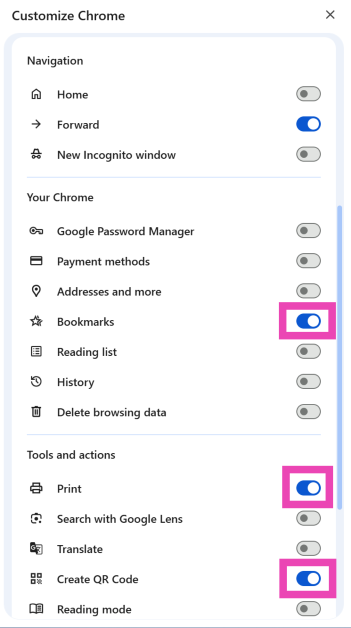
Here is a complete list of tools and functions that can be added to the toolbar on Google Chrome. The web browser does not impose a limit on how many tools you can to the toolbar.
Navigation
Home
Forward (turned on by default)
New Incognito window
Your Chrome
Google Password Manager
Payment methods
Addresses and more
Bookmarks
Reading list
History
Delete browsing data
Tools and actions
Print
Search with Google Lens
Translate
Create QR Code
Reading mode
Copy link
Send to your devices
Task manager
Developer tools
Customize the Google Chrome toolbar
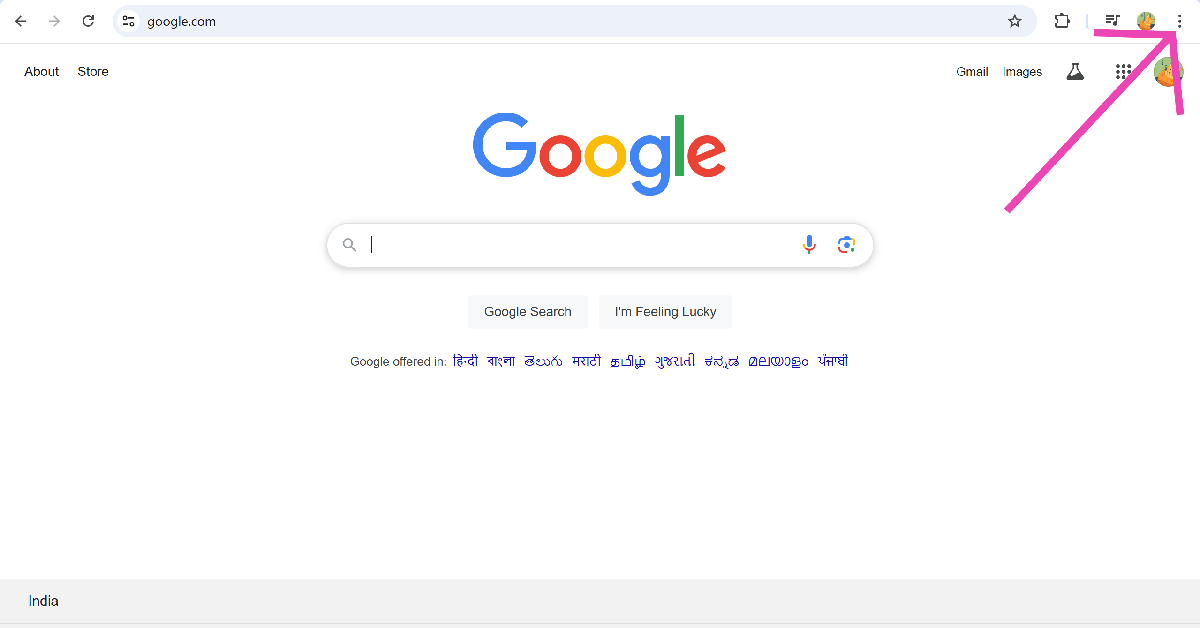
Step 1:Launch Google Chrome on your PC and hit the ellipses in the top-right corner of the screen.
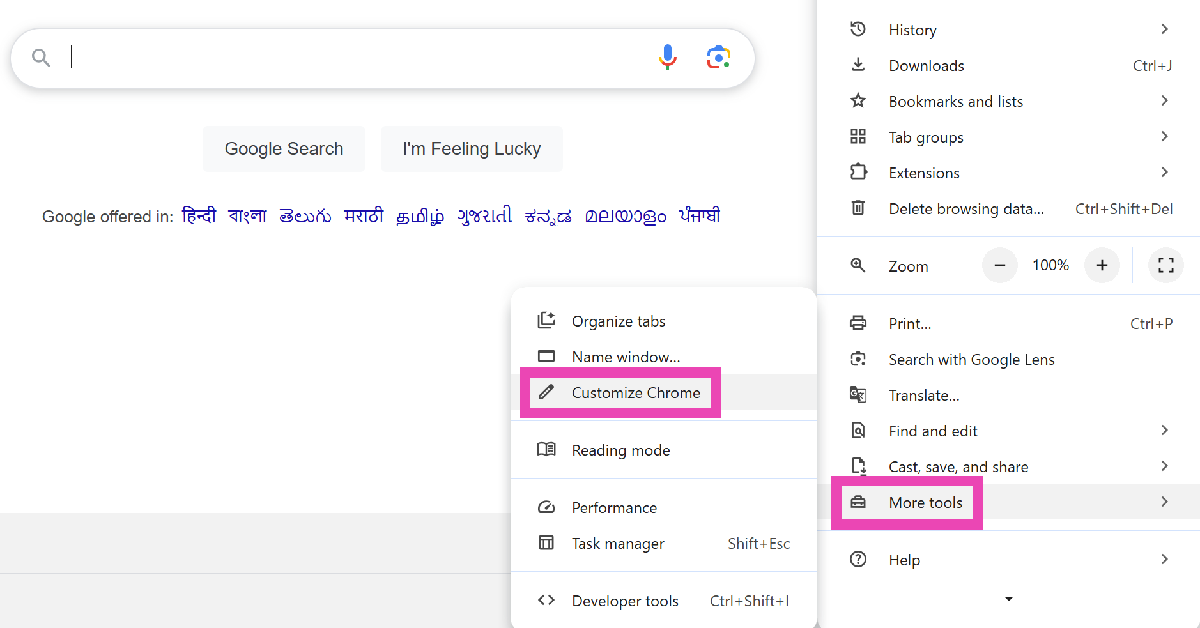
Step 2: Move the cursor to More Tools and select Customize Chrome.
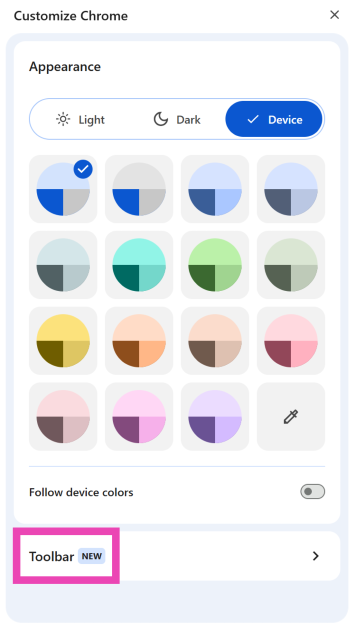
Step 3: Click on Toolbar.
Step 4: Turn on the toggle switch next to the function you want to add to the toolbar.
Step 5: The icons for the new functions will be sandwiched between the extensions icon and your profile picture in the top right corner of the screen.
Frequently Asked Questions (FAQs)
How do I get back the toolbar on Google Chrome?
Google Chrome hides the toolbar when you go full screen. Press and hold the Escape key on your keyboard to exit fullscreen and get the toolbar back. Alternatively, you can press Fn + F11 to exit fullscreen.
How do I unhide the menu bar on Google Chrome?
Press Ctrl + Shift + B to hide or unhide the menu bar on Google Chrome.
How do I customize the toolbar on Google Chrome?
Click the ellipses, go to More Tools>Customize Chrome and click on Toolbar to make changes to it.
How do I add the Translate button on Google Chrome’s toolbar?
Click the ellipses, go to More Tools>Customize Chrome>Toolbar, and turn on the toggle switch next to Translate.
How do I get a closed tab back on Google Chrome?
To reopen a tab that you closed accidentally, press Ctrl + Shift + T.
This is how you can add more tools to the Google toolbar. As we mentioned earlier, there is no limit to the number of tools you can add to the toolbar. The web browser also lets you create custom themes using AI. If you have any questions, let us know in the comments!
Tim Cook, CEO of Apple, addressed India’s significance during the company’s Q1 2025 earnings call. For the fiscal 2025 first quarter that ended on December 28, 2024, it announced a 10% increase in diluted earnings per share of $2.40 and a 4% year-over-year increase in quarterly revenue of $124.3 billion, despite a decline in net iPhone sales. Apple Music and iCloud services continued to be successful, while sales of Macs and iPads also increased significantly.
Tim Cook, Apple’s CEO said, “Today Apple is reporting our best quarter ever, with revenue of $124.3 billion, up 4 percent from a year ago. We were thrilled to bring customers our best-ever lineup of products and services during the holiday season. Through the power of Apple silicon, we’re unlocking new possibilities for our users with Apple Intelligence, which makes apps and experiences even better and more personal. And we’re excited that Apple Intelligence will be available in even more languages this April.”
According to Tim Cook, Apple Intelligence will be accessible in additional languages in April, including simplified Chinese, French, German, Italian, Portuguese, Spanish, Japanese, Korean, and localised English for Singapore and India.
According to a recent Kantar study, he also disclosed that the iPhone Active Install Base hit a record high across all geographic categories and that the model established a record for upgraders. The best-selling model during the December quarter was the iPhone.
Tim highlighted the company’s strong expansion in emerging nations, especially India, where the iPhone topped sales for the quarter. Tim intends to open four more stores in India, where the December quarter hit a record. Tim thinks there is a lot of room for growth in India, one of the many developing markets with enormous promise, even though his market share is small.
He said, “We have great results in a number of emerging markets, and as you know from past calls, particularly keen on India. India set a December-quarter record during the quarter, and we’re opening more stores there, we’ve announced that we’re going to open four new stores there. The iPhone was the top-selling model in India for the quarter, and it’s the second-largest smartphone market in the world and the third-largest for PCs and tablets, and so there’s a huge market, and we have very modest share in these markets, and so I think there’s lots of upside there, and that’s just one of the emerging markets.”
According to Kevan Parekh, Apple’s CFO, companies are increasing the use of Apple products and services in the business sector. In addition to releasing the newest MacBook Air as a standard for their mortgage lending division, Deutsche Bank started its Mac As Choice program for developers. In the United States, top companies like SAP are using Apple Intelligence to improve the experiences of their customers and employees. Macs are also in high demand in emerging markets, such as Zomato in India. For distant collaboration and education, Cisco’s innovative Spatial Meetings provides a completely immersive video conferencing experience.
“Our record revenue and strong operating margins drove EPS to a new all-time record with double-digit growth and allowed us to return over $30 billion to shareholders,” said Kevan Parekh, Apple’s CFO. “We are also pleased that our installed base of active devices has reached a new all-time high across all products and geographic segments.”
Apple’s board of directors has announced a cash dividend of $0.25 per share of the company’s common stock, payable on February 13, 2025, to shareholders as of February 10, 2025.
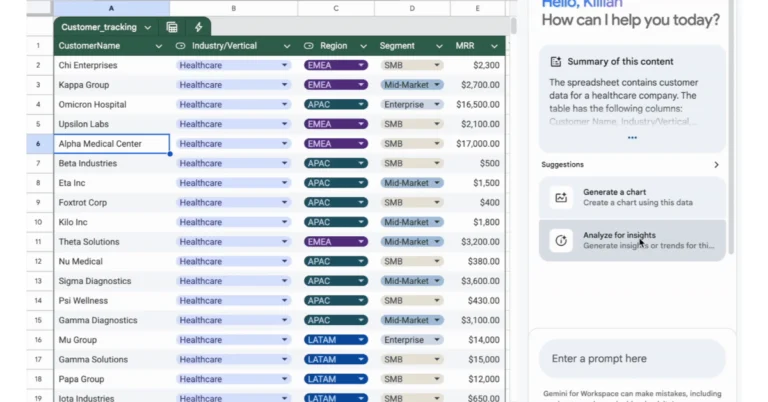
Google Sheets is getting a significant update that will allow the AI tool, Gemini, to analyse and visualise user data. The upgrade is available to Google Workspace members as well as Google One AI Premium plan holders. Gemini can now turn user prompts into Python code, find contextual trends, patterns, and correlations, and make charts using user data.
“Building data visualizations and identifying trends in data is a critical business function, however, it can be time-consuming and oftentimes overwhelming. To improve upon this experience, we’re making it easier for Sheets users, ranging from small business owners to marketing analysts, to visualize and analyze data using Gemini in Sheets,” the company said in a blog post.
Gemini in Sheets has boosted its intelligence by converting requests into Python code, running them, and analysing the results for multi-layered analyses. According to the company, this will allow users to quickly find top-performing products and evaluate their sales trends without having to write a single line of code.
Therefore, with the new upgrade, Gemini in Sheets can conduct actions or answer questions to address a variety of contexts, offering information such as contextual trends, patterns, and variable correlations. Moreover, it can also create charts from your data and insert them as static images over cells in your spreadsheet. A marketing manager can request insights on their top three channels based on conversion rate, a small business owner can use historical data to predict net income for the next quarter, and a financial analyst can look for anomalies in inventory levels for a product to identify supply chain issues or unusual demand trends.
Make sure your data is consistent, has clear headers, and has no missing values for more reliable results. Gemini in Sheets is said to perform best in files with fewer than one million cells, so be particular when you ask it to examine your data. Gemini in Sheets may use formulas instead of Python code to handle basic data queries. Charts can be added to your sheet and are created as static images, but they cannot be changed and are not connected to the data on your sheet.
To access Gemini in the Workspace apps’ side panel, Admins must enable smart features and personalization. Users can set default settings in the Admin console. End users can access Gemini for Sheets by clicking the “Ask Gemini” button in the top right corner of Sheets.
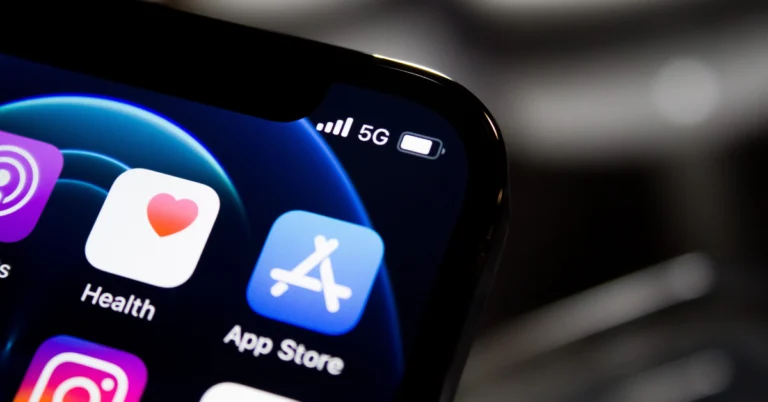
Keeping the apps on your iPhone updated to their latest versions may use a lot of data, but it also brings you the latest features and gets rid of any annoying bugs. On top of that, the latest app versions are more secure and stable. You can choose to update apps automatically when your device is connected to the WiFi network or manually update them whenever you want. If the apps on your iPhone are not updating, you should check out these 15 fixes.
If your iPhone is struggling to update apps, it could be due to one of several reasons. The issue may be tied to your network connection, device software, or internal storage. Here are some of the common culprits behind this issue.
Automatic updates are turned off
Poor network connection
Not enough available storage on your iPhone
App Store server issue
You’re using the wrong Apple ID
Usage restrictions on your iPhone
Incorrect date and time
Software issues
Update the app manually
If an app won’t auto-update in the background, you can always update it manually. Here’s how.
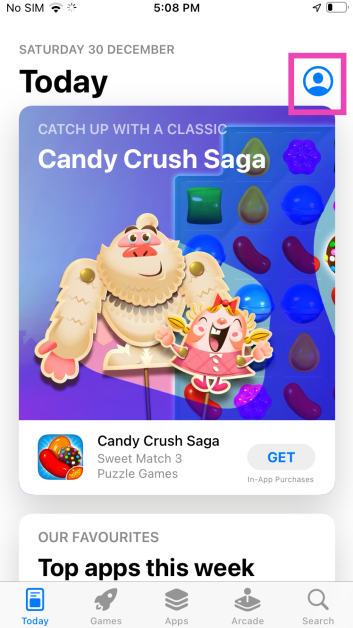
Step 1:Launch the App Store on your iPhone.
Step 2: Tap the profile icon at the top right corner of the screen.
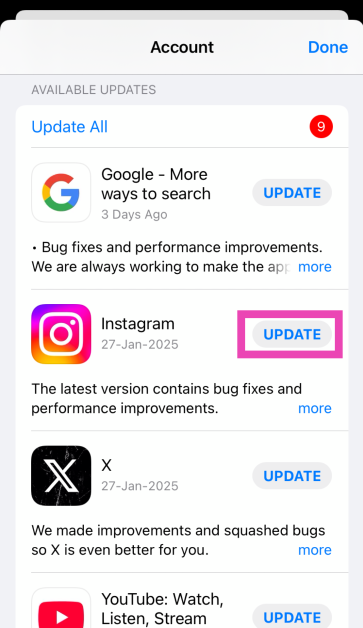
Step 3: Scroll down to the Available Updates section.
Step 4: Hit the Update button next to an app to update it to its latest version. You can also choose to update all apps at once by hitting Update All.
Pause and resume the update
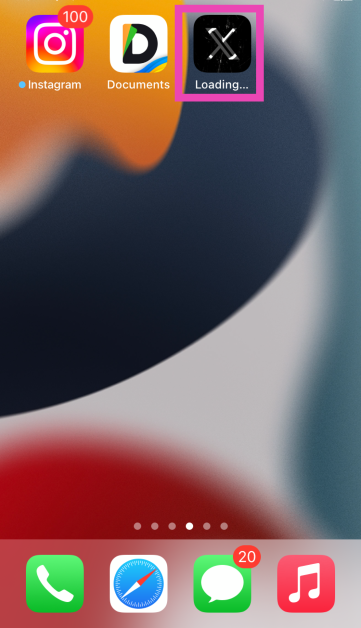
If an app isn’t making any progress while getting updated, pause the download and resume it. Here’s how.
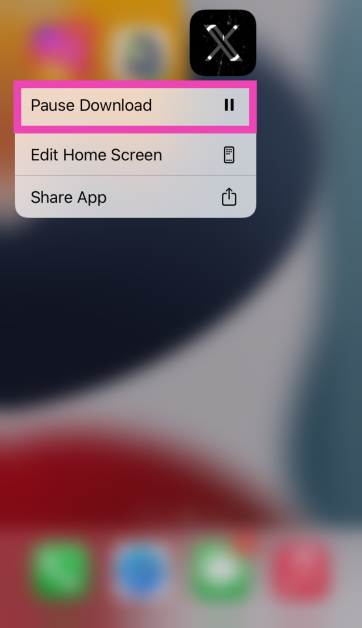
Step 1:Long-press the app icon while it’s updating.
Step 2: Tap on Pause Download.
Step 3: Tap the icon again to resume the download.
Make sure you’re using the correct Apple ID
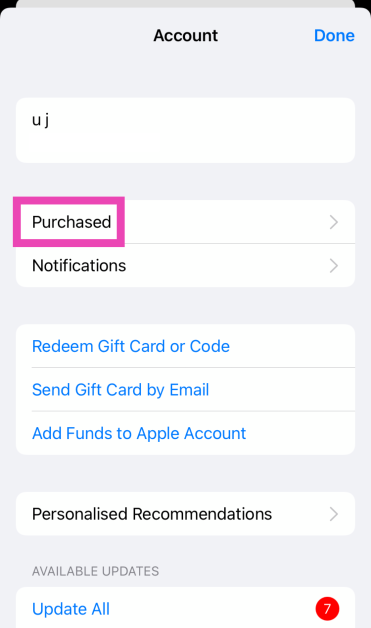
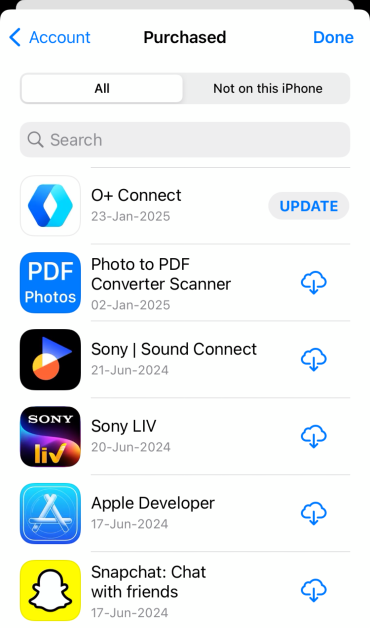
Your app downloads are linked to your Apple ID. If you’re trying to update an app that you didn’t download using the current Apple ID, it won’t be able to download the new version. Here’s how you can check whether you downloaded the app using your current Apple ID.
Step 2: Tap the profile picture in the top right corner of the screen.
Step 3: Hit Purchased.
Step 4: Find the app you’re trying to update. If you can’t find the app on the list, you need to log in using the Apple ID that you used to download it.
Turn on automatic app updates
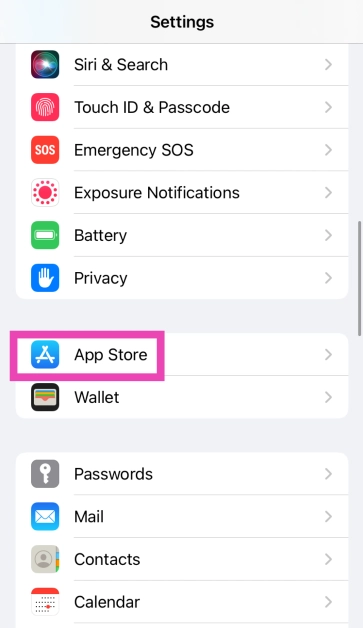
Step 1: Go to Settings and select App Store.
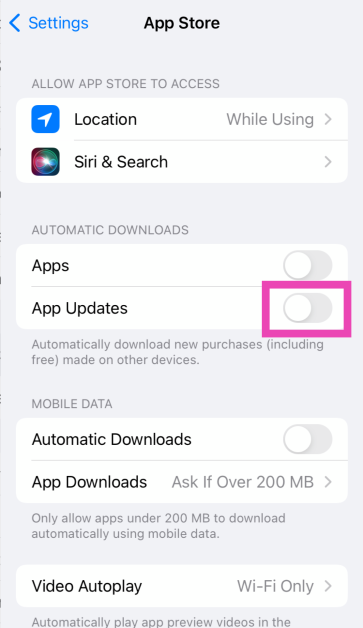
Step 2: Turn on the toggle switch next to App Updates.
Turn off restrictions
The ‘Restrictions’ feature on your iPhone is used to limit access to certain apps and websites. It is typically used by parents to control what their kids can access on their phones. If you accidentally turned this feature on, it may have caused the app updates to pause. Here’s how you can disable it.
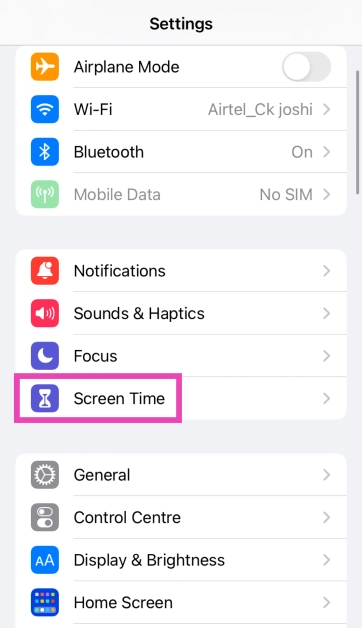
Step 1: Go to Settings and select Screen Time.
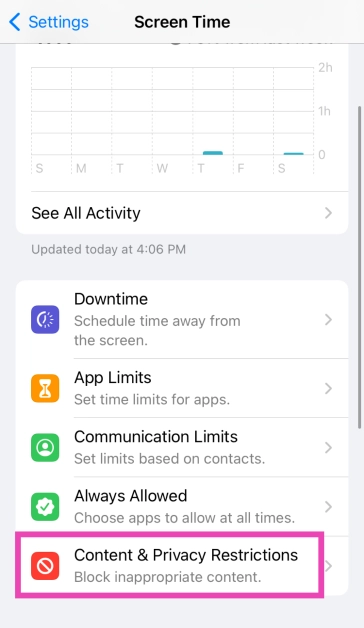
Step 2: Tap on Content & Privacy Restrictions.
Step 3: Enter the Screen Timecode.
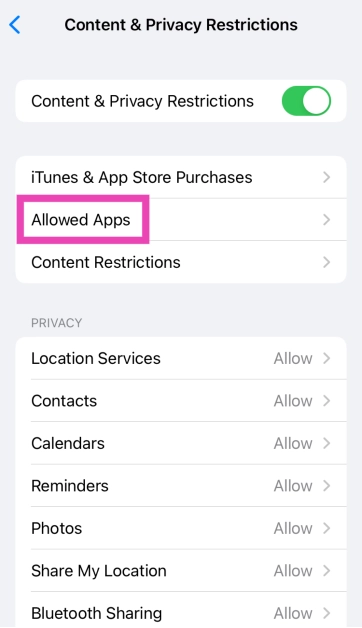
Step 4: Tap on Allowed Apps.
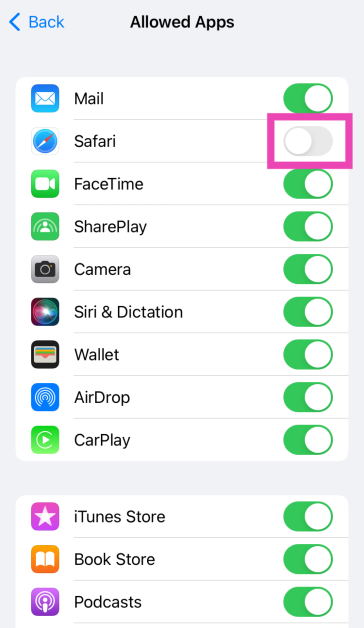
Step 5: Turn on the toggle switch for the restricted app.
Check your internet connection
If there’s something wrong with your network connection, your iPhone won’t be able to update apps. Run a speed test on your device to check the strength of the signal. If you’re having trouble loading a webpage, it means your internet connection is shoddy. Switch to mobile data or move to a different WiFi network to resume downloading apps.
Sign out and sign in to the App Store
If account-related issues are keeping you from updating the apps on your iPhone, sign out of the App Store and sign back in. Launch the App Store, tap the profile icon in the top right corner of the screen, scroll to the bottom, and hit ‘Sign Out’. Now, sign back in using your Apple ID.
Check your iPhone’s storage
If your iPhone is running low on storage capacity, it won’t be able to install new app updates. Go to Settings>General>iPhone Storage to check the remaining free space on your phone’s internal storage. If the device is full to the brim, delete some heavy files to make space for the app updates.
Check the date and time
An error in the date and time data on your iPhone can pause some of its essential functions, including app updates. Here’s how you can correct it.
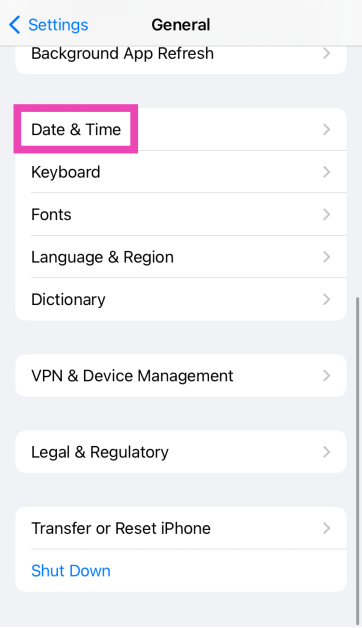
Step 1: Go to Settings and select General.
Step 2: Tap on Date & Time.
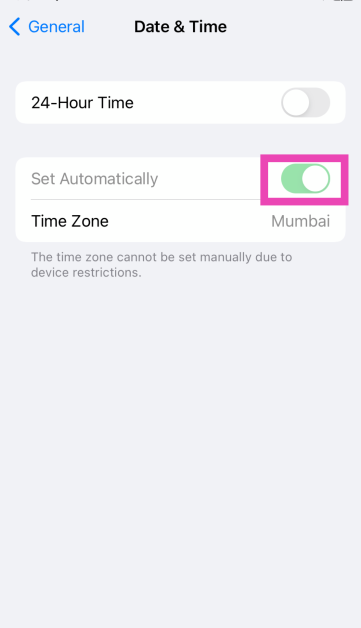
Step 3: Turn on the toggle switch next to Set Automatically.
Uninstall and reinstall the app
If an app is installed incorrectly, your iPhone will struggle to update it to its latest version. To resolve this issue, uninstall the app and install it again. When you install the app, you will get access to its latest version. Long-press the app icon on the home screen and select ‘Remove App’. Once that’s done, go to the App Store, search for the app, and hit ‘Get’.
Update the apps using iTunes
Step 1:Launch iTunes on your PC.
Step 2: Select Apps from the dropdown menu.
Step 3: Switch to the Updates tab.
Step 4: Click the app you wish to update.
Step 5: Select Update.
Step 6:Sync your iPhone with iTunes.
Restart your iPhone
Sometimes, background software issues can keep the apps from updating on your iPhone. This can be resolved with a quick restart. Press the side button along with the volume or volume down button. Drag the power slider across the screen to turn off your iPhone. Long-press the side button to turn on the smartphone.
Update your iPhone
Step 1: Make sure your iPhone is connected to a WiFi network and plug in its charger.
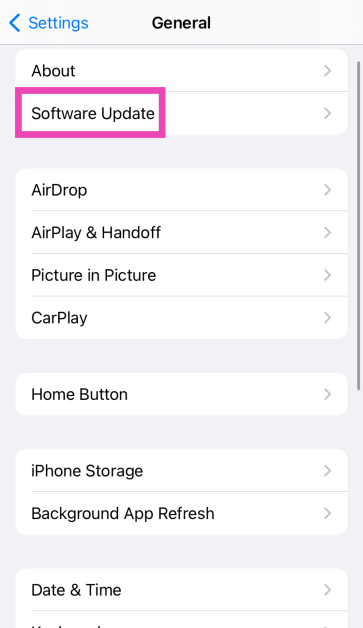
Step 2: Go to Settings and select General.
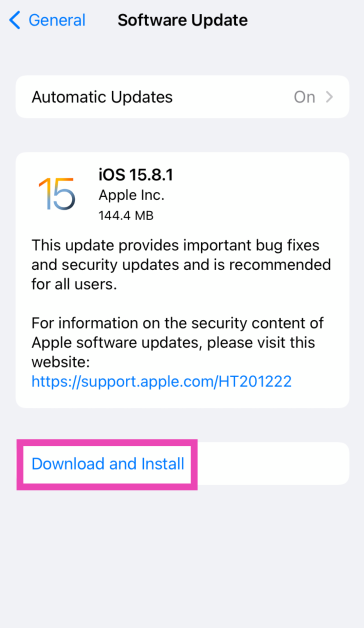
Step 3: Select Software Update.
Step 4: Tap on Download and Install.
Reset all settings
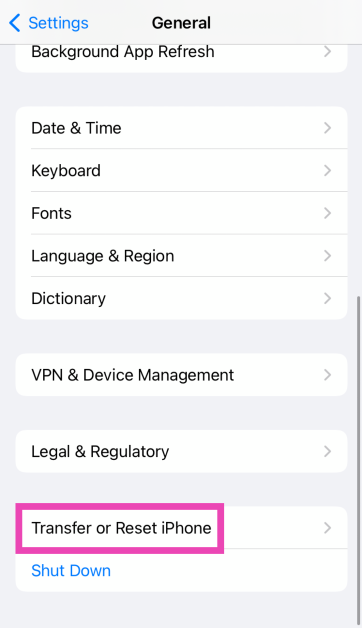
Step 1: Go to Settings and select General.
Step 2: Tap on Transfer or Reset iPhone.
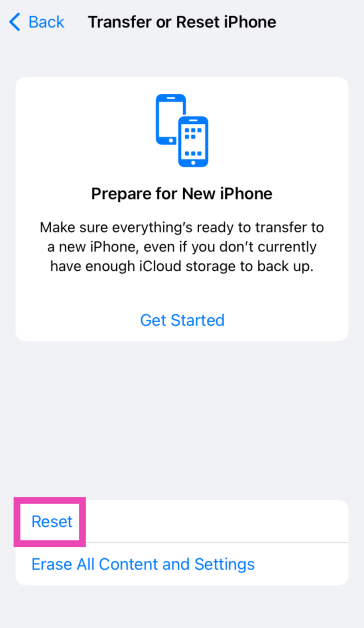
Step 3: Hit Reset.
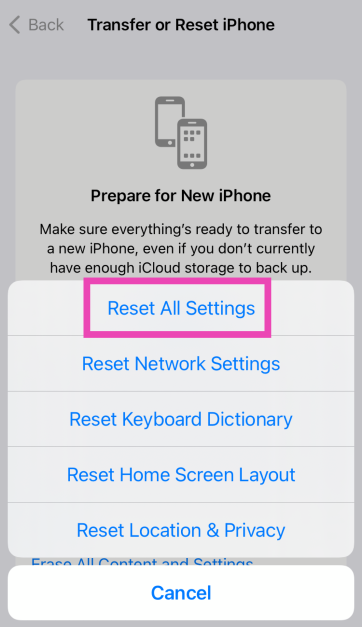
Step 4: Select Reset All Settings. Enter the passcode to confirm your decision.
Factory reset your iPhone
A factory reset will restore your iPhone to its out-of-the-box conditions. However, it will clear all your personal data on the device.
Step 1: Go to Settings and select General.
Step 2: Tap on Transfer or Reset iPhone.
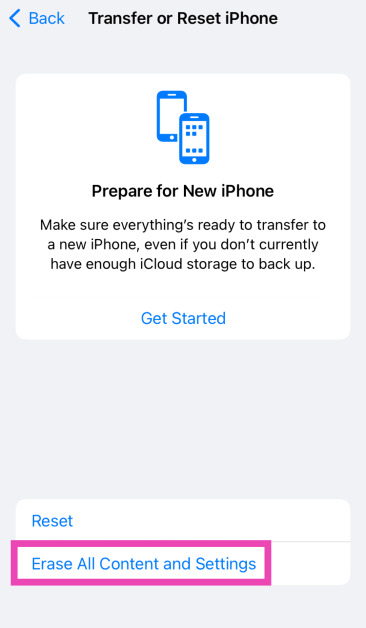
Step 3: Hit Erase All Content And Settings.
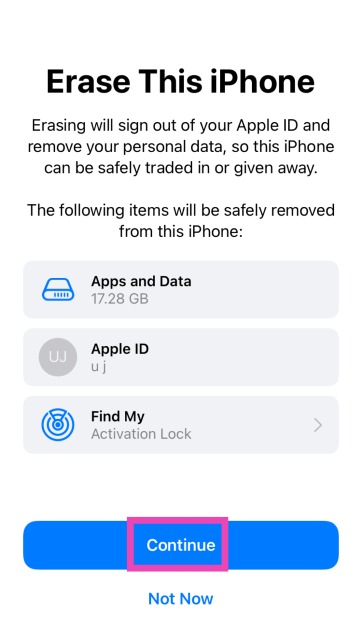
Step 4: Tap on Continue and enter the passcode to reset your iPhone to its factory settings.
Frequently Asked Questions (FAQs)
Why won’t apps update on my iPhone?
If your iPhone is unable to update apps, it could be due to low storage space, poor network connection, software glitches, or account-related issues.
What to do if apps are not updating on iPhone?
You can manually update apps by going to the App Store or update them using iTunes. Check your network connection and the iPhone’s storage space to make sure they’re not causing any trouble. Sign out and sign back into the App Store to resolve any account-related issues.
How do I force all apps to update on my iPhone?
Go to the App Store, tap the profile icon, scroll down and tap on ‘Update All’ to update all the apps on your iPhone.
How do I turn on automatic updates on my iPhone?
Go to Settings>App Store and turn on the toggle switch next to App Updates to turn on automatic app updates.
How do I unrestrict an app on my iPhone?
Go to Settings>Content & Privacy Restrictions>Allowed Apps and turn on the toggle switch next to the app you want to unrestrict.
This is how you can fix the ‘apps not updating’ issue on your iPhone. If you can’t find the App Store on your device, check out how you can get it back. If you have any questions, let us know in the comments!
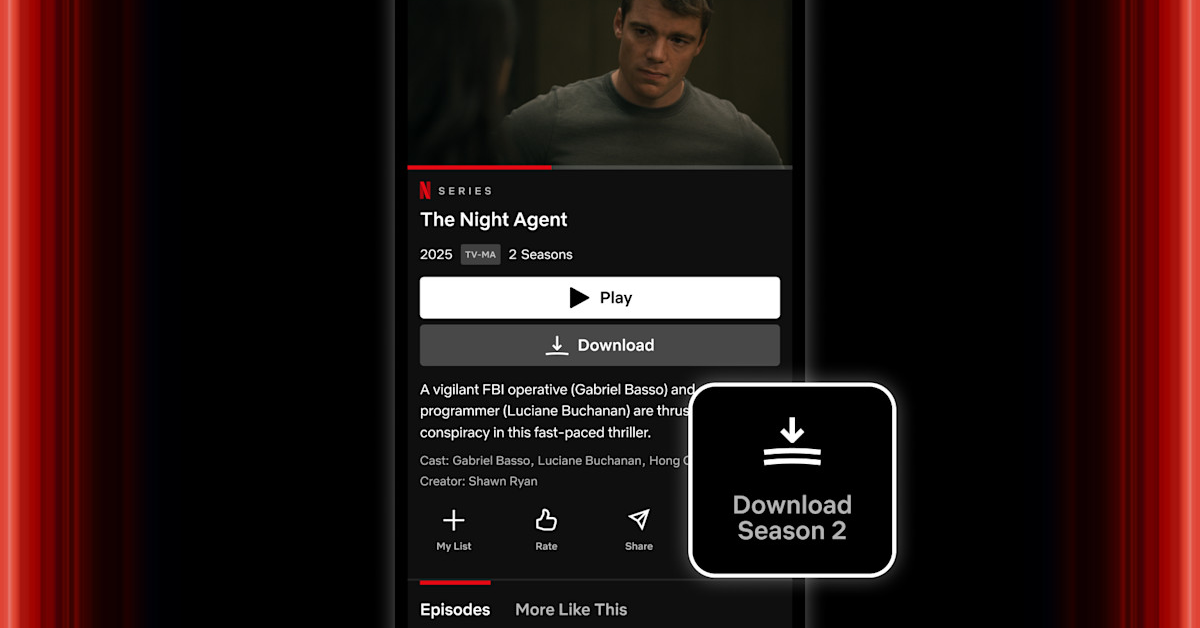
For iPhone and iPad users, Netflix has added a new “Season Download” button that allows them to download a season with just one press. If they are enrolled in one of the platform’s ad-supported or ad-free plans, viewers can have up to 100 active downloads. Since Android already has this capability, the button is not brand-new to the streaming service.
Netflix recently introduced a “Season Download” button to its iPhone and iPad app, which eliminates the need for a software update. There is a server-side switch that activates the change.
The video streaming platform Netflix via blog post announced the new feature. It said, “Today, we’re adding a much-requested Season Download button for all iPhone and iPad users. This feature, which Android users already know and love, allows you to download every episode in a season with just one tap.”
On a show’s display page, the “Download Season” button on Netflix is located to the right of the “Share” option. By tapping on the new button, users can start the automatic download of every episode in that season.
There are restrictions on the Season Download button. Ad-free plans permit up to 100 downloads per device, but the devices that can download content vary throughout plans. In some locations but not in India Netflix offers ad-supported plans with a 15-episode download limit. This means that customers can only download up to 23 episodes of a particular TV show, not a whole season.
How to automatically download a season of a show on Netflix?
To automatically download a season of a show, tap the Share button next to the Share option on the show’s display page. To manage your downloads, navigate to the Downloads section under the My Netflix tab.
Garena Free Fire Max is a battle royale game with regular awards and tournaments to keep players interested. If you play Garena Free Fire, you should be aware of the redeem codes that are released on a daily basis. However, because the battle royale game is banned in India, players from other countries can use theFree Fire Redeem codes daily. If you’re unfamiliar with the Garena Free Fire redeem codes or don’t know how to get them, we’ve put together a step-by-step guide to help youredeem them. Check out Garena Free Fire Max Redeem Codes for 31 January 2025.
The Free Fire Max redeemcodes are a great way to get free stuff. These are 12-digit codes that contain alphabets and numbers, as well as an expiration date and time. Because the Garena FF redeem codes cannot be used more than once, you should hurry to the redemption page to claim your free reward before someone else does. To get a free reward, all you have to do is go toreward.ff.garena.com/en, which is the official redemption page. Also, keep an eye on this space for daily updates on Garena Free Fire Max redemption codes and rewards.
Are you looking for today’s Wordle for January 31, 2025? The problem is difficult to solve, so if you need assistance, we’ve included hints and the answer to the January 31 Wordle.
In This Article
Hints and Answers for Today’s Wordle January 31
Before answering directly, please check the January 31 Wordle Hints first.
Hint 1: Today’s Wordle answer includes two vowels. Hint 2: The answer for today has a repeating letter. Hint 3: A thin piece of bread that is heated on both sides to make it brown.
What word does today’s Wordle begin with?
Do you need help with today’s Wordle answer’s initial letter?
The first letter in today’s Wordle is “T”
Today’s Wordle Answer January 31 #1322
The answer to Wordle #1322 on January 31, 2025, is — TOAST
Wordle: A Five-Letter Word Guessing Game • The game allows six guesses of a five-letter word. • Provide feedback on guessed letters’ placement in the puzzle. • The New York Times purchased the game in 2022. • Created by Josh Wardle for his partner, narrowing down 12,000 English words to 2,500. • Named after the word “word.”
How To Play Wordle?
Wordle is a New York Times word puzzle game that allows users to guess a five-letter word in six attempts. The letters are highlighted in Yellow and Green, indicating whether the word is present in the answer or not, and Green letters indicate the correct guess.
Select a powerful starting word: Avoid using unusual words, as they frequently do not match common letters. A good opening word has plenty of benefits.
Repeating letters: Don’t be afraid of repeating letters; they appear frequently in words. The answer may contain one or two repeated letters.
Use the Wordlebot: The NYT’s Wordlebot analyses and compares replies to itself. This challenge can assist you enhance guessing skills and highlight areas for development.
31 January 2025: New Amazon Quiz is now available. Customers from different parts of the country are participating in the daily quiz. The quiz starts at midnight today and will be live until 11:59 PM tonight. By successfully answering every question, participants in the quiz have the chance to win wonderful rewards. Up to Rs 500 Amazon Pay Balance is up for grabs to participants today.
One wrong answer could eliminate you from the quiz. You have a chance to win up to Rs 500 Amazon Pay Balance if you successfully answer every question. Users of the app only have the opportunity to take the quiz. Check Out 31 January 2025 Amazon Quiz Answers.
In This Article
Are you not able to find Amazon FunZone? Click below and participate.
Now fill in the required information through the Sign-Up option.
To find the Amazon Quiz banner, log in to the Amazon app and scroll down to the home screen.
Tap on the Amazon Quiz banner and tap on the Start button to start the Quiz.
Now you will get 5 questions and you need to answer them correctly. One wrong answer will eliminate you from the Quiz.
After answering all the questions correctly you are now eligible for a Lucky Draw.
The previous winner’s name will be announced today at 12 PM.
Amazon Daily Quiz Answers from the previous few days.
Here are all the answers from the previous 5 days of the Amazon Daily Quiz and Contest.
Amazon Quiz Answers Today 30 January 2025: Win Up To ₹ 500 Amazon Pay Balance
Question 1: Who was the top scorer for India in the T20 World Cup final 2024?
Answer: Virat Kohli
Question 2: The Last Dance’ is the tagline of the 3rd of a series of movies with whom as the central character?
Answer: Venom
Question 3: British Shorthair, Ragdoll and Abyssinian are types of what animal?
Answer: Cat
Question 4: Which famous place in the UK is shown here?
Answer: Trafalgar Square
Question 5: Which famous person is depicted in this statue?
Answer: Napoleon Bonaparte
Amazon Quiz Answers Today 29 January 2025: Win Up To ₹ 500 Amazon Pay Balance
Question 1: Who was the top scorer for India in the T20 World Cup final 2024?
Answer: Virat Kohli
Question 2: The Last Dance’ is the tagline of the 3rd of a series of movies with whom as the central character?
Answer: Venom
Question 3: British Shorthair, Ragdoll and Abyssinian are types of what animal?
Answer: Cat
Question 4: Which famous place in the UK is shown here?
Answer: Trafalgar Square
Question 5: Which famous person is depicted in this statue?
Answer: Napoleon Bonaparte
Amazon Quiz Answers Today 28 January 2025: Win Up To ₹ 500 Amazon Pay Balance
Question 1: Who beat Novak Djokovic in the final to win his 2nd consecutive Wimbledon men’s singles title?
Answer: Carlos Alcaraz
Question 2: In ‘Captain America” Brave New World’ scheduled to be released in 2025, which legendary actor plays the role of Thaddeus ‘Thunderbolt’ Ross?
Answer: Harrison Ford
Question 3: Which place in South India is also known as the ‘Scotland of India’?
Answer: Coorg
Question 4: This is a picture taken in which African country?
Answer: Morocco
Question 5: What is the name given to the profession of the man in the picture?
Answer: Gondoliere
Amazon Quiz Answers Today 27 January 2025: Win Up To ₹ 500 Amazon Pay Balance
Question 1: Achanta Sharath Kamal represents India in which sport?
Answer: Table tennis
Question 2: Which date is to be celebrated as Hyderabad Liberation Day?
Answer: 17-Sep
Question 3: In which sport did India win its first two medals at the 2024 Paris Olympics?
Answer: Shooting
Question 4: This painting was created in which historical period?
Answer: Renaissance
Question 5: Where is the headquarter of this brand in USA?
Answer: Atlanta
Amazon Quiz Answers Today 26 January 2025: Win Up To ₹ 500 Amazon Pay Balance
Question 1: Achanta Sharath Kamal represents India in which sport?
Answer: Table tennis
Question 2: Which date is to be celebrated as Hyderabad Liberation Day?
Answer: 17-Sep
Question 3: In which sport did India win its first two medals at the 2024 Paris Olympics?
Answer: Shooting
Question 4: This painting was created in which historical period?
Answer: Renaissance
Question 5: Where is the headquarter of this brand in USA?
Answer: Atlanta
Amazon Quiz Answers Today 25 January 2025: Win Up To ₹ 500 Amazon Pay Balance
Question 1: In 2024, who became the youngest person to win two Oscars?
Answer: Billie Eilish
Question 2: The D. B. Patil International Airport is located in which place?
Answer: Navi Mumbai
Question 3: Which country had the first-ever married couple to serve as flag bearers at the Paris Olympic Opening Ceremony?
Answer: Romania
Question 4: When was this app launched?
Answer: 2011
Question 5: Which is the smallest monkey in the world?
Answer: Pygmy marmoset
Amazon Quiz Answers Today 24 January 2025: Win Up To ₹ 500 Amazon Pay Balance
Question 1: Complete the title of this 2024 film: “Chhota Bheem and the Curse of ________”.
Answer: Damyaan
Question 2: What regal title does Yaduveer Krishnadatta hold?
Answer: Maharaja of Mysore
Question 3: Which John Lennon and Yoko Ono song has been sung at six Olympic Opening Ceremonies, including Paris 2024?
Answer: Imagine
Question 4: Who is the architect of this cathedral?
Answer: Filippo Brunelleschi
Question 5: In the English edition of this game, how many word tiles are there?
We have written an explainer above, you can refer to that.
When are the winners of the Amazon Quiz and contest announced or declared?
The announcement of today’s Amazon quiz winner will take place Tomorrow. As for the Special Quiz and “Spin & Win” Contest, the winners will be declared once the Quiz Contest comes to an end. To find out who the lucky winner is, you can refer to the Amazon Quiz Winners List or visit the Amazon Winners tab in the Amazon App.
How to participate in the Daily Amazon Quiz?
That is very easy, just got to the Amazon app and scroll to the bottom of the page and you will find the Quiz section. Click on it (usually it is called the fun zone) and you can enter the Amazon Today Quiz Contest.
Are there any other quizzes or contests running on Amazon daily?
Yes, there are many running on a daily basis. These range from spinning the wheel to answering the questions correctly. All are located in the Fun Zone.
What are the criteria for selecting a winner in the Daily Amazon Quiz?
When a qualified player submits correct answers to all the questions, they will automatically be entered into a lucky draw. This draw will include all participants who answered all the questions correctly. Amazon randomly selects the final winners from the pool of eligible participants who gave the right answers.
Which Types of Questions are asked within Amazon Daily Quiz?
These are very simple and straightforward questions. These are mainly related to general knowledge.
Where should I look for Amazon Daily Quiz answers?
You can bookmark our website www.gadgetbridge.com as we will help you every day with the Amazon Daily Quiz. We bring you fresh answers every day for the Amazon Daily Quiz and Contest.
What time does Amazon Announce previous winners?
The previous winner’s name will be announced today at 12 PM (noon).
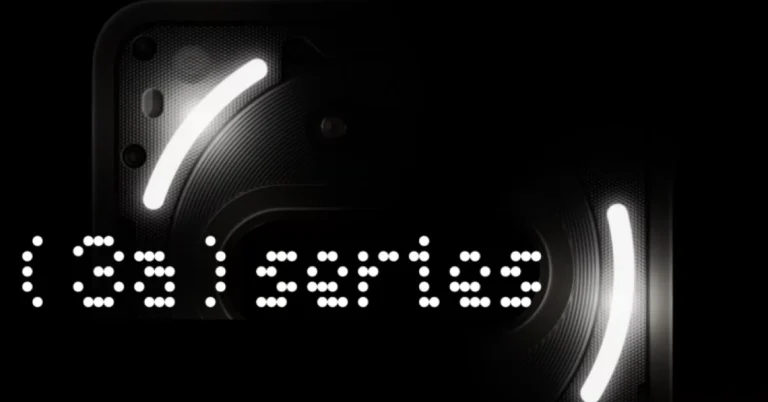
On March 4, the UK tech firm Nothing is scheduled to introduce some fresh products. It was previously predicted that the company would release the Nothing Phone 3, its flagship smartphone. However, the company has now stated that it would launch the Nothing Phone 3a Series, which is expected to come with a base and a Pro variant, similar to the Nothing Phone 2a and 2a Plus from the previous year. Alleged hands-on photos are among the many revelations about the new phones that have leaked online. A Snapdragon 7s Gen 3 SoC, a triple back camera unit, and 45W fast charging are anticipated features of the Nothing Phone 3a.
Nothing has officially confirmed that on March 4 it will be launching the Nothing Phone 3a series. The upcoming lineup has also been listed on Flipkart to confirm the availability. The specs and design details of the upcoming phones are yet to be confirmed by the company.
In This Article
Nothing Phone 3a Design Expected
A hands-on image of the Nothing Phone 3a on X has been revealed by tipster Sanju Choudhary. It shows a black design, a hardcover, and a triple rear camera unit orientated horizontally. Compared to the dual back camera module of the Nothing Phone 2a, this is a major change. The protective casing conceals the Glyph design, and the LED flash is positioned above the module. Over the next few weeks, the brand is anticipated to provide fresh teasers on the product debut.
On March 4th, the Nothing Phone 3a and Phone 3a Pro are likely to debut. While the Pro edition will only have one 12GB RAM with 256GB storage option, the vanilla model will have two RAM and storage configurations: 8GB RAM with 128GB storage and 12GB RAM with 256GB storage. With a Snapdragon 7s Gen 3 SoC, a 6.8-inch 120Hz full-HD+ AMOLED screen, and a 5,000mAh battery that supports 45W charging, the phone will come in black and white.
The Nothing Phone 3a is anticipated to feature a 50-megapixel primary sensor, a 50-megapixel telephoto lens with 2x optical zoom, an 8-megapixel ultra wide-angle camera, and a 32-megapixel selfie camera. It might have NFC capabilities.
To enhance the gifting experience, Telegram has included six new features. Users can now send gifts to channels, transfer gifts to the blockchain, and display collected gifts as emoji status updates. This is Telegram’s second significant update of the month of January, improving digital asset management enabled by blockchain technology and user interaction.
With the most recent Telegram update, upgraded gifts to collectables can now be used as unique emoji status, complementing the collectable’s backdrop and symbol and adding a sparkling star effect to your profile. To wear a gift, select ‘Wear’ after tapping it in My Profile > Gifts. If removed, your profile will return to its original appearance.
Gifts can now be transferred or put up for auction on Telegram using the TON blockchain, providing owners with permanent control even in the event that they lose access to or delete their Telegram account. This enables users to link to external services, such as platforms that offer perks for collectibles or auction sites. Go to Settings > My Profile > Gifts, then press on one of your Gifts to transfer it to the blockchain.
Users of Telegram can now celebrate holidays and achievements by giving gifts to channels. Before sending, they can enhance the Gifts with Stars, giving the recipient the opportunity to convert it into a unique collectible for free. Tap the gift icon in the lower corner of the channel to send a gift. Channel owners have the option to sell gifts on the blockchain or give them to other users. This feature can be used by charities and content creators to generate money for noteworthy initiatives and worthy causes. Channel-specific gifts will be introduced progressively, so they might not be accessible everywhere at once.
You can send collectible presents from your profile to your Telegram story, which will create an animated preview that will highlight your artwork and lucky numbers. To do this, select Share > Post to Story after tapping one of your gifts under Settings > My Profile > Gifts. Every gift comes with a special URL that you may upload to a channel or share with friends.
Users can categorise gifts by value, collectible status, date of receipt, and collection using the ‘Gifts’ tab on Telegram channel profiles. In order to ensure effective and well-organised gift Admins can also enable notifications to track gifts sent to their channels.
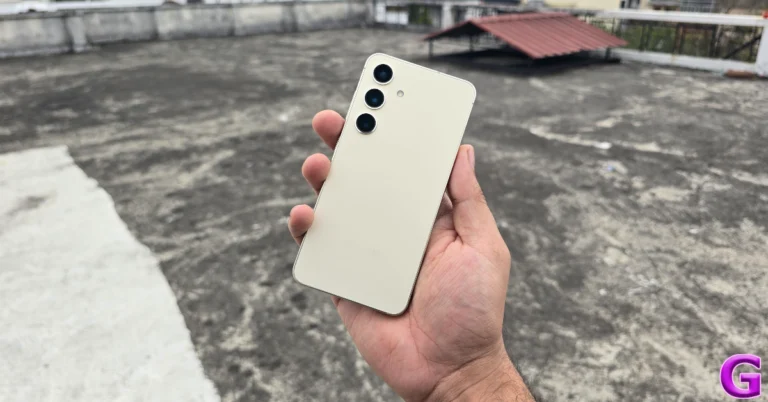
Launched in India in January 2024, Samsung Galaxy S24 offers similar features as the newly launched S25, with a few small performance upgrades. The phone is powered by Qualcomm’s Snapdragon 8 Gen 3 whereas the Galaxy S25 series includes Snapdragon 8 Elite chipsets. The company’s official website and popular e-commerce platforms both show that the Galaxy S24’s pricing has dropped in India.
After the price reduction the price of the Samsung Galaxy S24 has come down to Rs 64,999 for the base 8GB RAM with 128GB storage option. It was previously priced at Rs 74,999. Whereas, the price of both 256GB and 512GB storage options has reduced to Rs 70,999 and Rs 82,999 respectively. Earlier both the models were selling at Rs 79,999 and Rs 89,999 respectively.
Similarly the device is also seeing a price drop on both the leading e-commerce platforms. On Amazon the 256GB and the 512GB storage variant are priced at Rs 58,500 and Rs 69,999 respectively.
Whereas on Flipkart the 128GB, 256GB and 512GB are available at Rs 54,999, 57,999 and Rs 89,999 respectively.
S24 is available in Amber Yellow, Cobalt Violet, Onyx, and Black colour options. Samsung is providing HDFC Credit Card holders an instant discount of Rs.10,000 on the Galaxy S24, along with no-cost EMI options and exchange discounts of up to Rs 10,000.
Price of Galaxy S25
12GB RAM with 512GB storage: Rs 92999
12GB RAM with 256GB storage: Rs 80999
Samsung Galaxy S24 specs
The Samsung Galaxy S24 features a 6.2-inch FHD+ and 6.7-inch QHD+ Dynamic AMOLED 2X display with 120Hz refresh rate. The screen has a layer of Corning Gorilla Armor for protection. The Phone includes Samsung Knox, Knox Vault, and Passkeys. The device is powered by Exynos 2400 SoC. It runs on Android 14 with UI 6.1. The company will provide seven generations of OS upgrades and seven years of security updates.
The Galaxy S24 comes with a triple rear camera setup that includes a 12MP Ultra-Wide Camera (F2.2, FOV 120˚), 50MP Wide Camera (OIS F1.8, FOV 85˚) and a 10MP Telephoto Camera (3x Optical Zoom, F2.4, FOV 36˚). All the models come with a 12MP selfie camera (F2.2, FOV 80˚).
The smartphone includes Live Translate, Interpreter, Chat Assist, Note Assist, Transcript Assist, and Circle to Search, powered by built-in AI features.
The Samsung Galaxy S24 is backed by a 4,000mAh battery that supports Wireless PowerShare technology in addition to 25W wired and 15W wireless charging. In addition, it has IP68 dust and splash resistance and supports 5G, 4G LTE, Wi-Fi 6E, Bluetooth 5.3, Wi-Fi direct, and USB Type-C connectivity.
Are you looking for today’s Wordle for January 30, 2025? The problem is difficult to solve, so if you need assistance, we’ve included hints and the answer to the January 30 Wordle.
In This Article
Hints and Answers for Today’s Wordle January 30
Before answering directly, please check the January 30 Wordle Hints first.
Hint 1: Today’s Wordle answer includes two vowels. Hint 2: The answer for today has no repeating letter. Hint 3: To make dull or stupid.
What word does today’s Wordle begin with?
Do you need help with today’s Wordle answer’s initial letter?
The first letter in today’s Wordle is “B”
Today’s Wordle Answer January 30 #1321
The answer to Wordle #1321 on January 30, 2025, is — BESOT
Wordle: A Five-Letter Word Guessing Game • The game allows six guesses of a five-letter word. • Provide feedback on guessed letters’ placement in the puzzle. • The New York Times purchased the game in 2022. • Created by Josh Wardle for his partner, narrowing down 12,000 English words to 2,500. • Named after the word “word.”
How To Play Wordle?
Wordle is a New York Times word puzzle game that allows users to guess a five-letter word in six attempts. The letters are highlighted in Yellow and Green, indicating whether the word is present in the answer or not, and Green letters indicate the correct guess.
Select a powerful starting word: Avoid using unusual words, as they frequently do not match common letters. A good opening word has plenty of benefits.
Repeating letters: Don’t be afraid of repeating letters; they appear frequently in words. The answer may contain one or two repeated letters.
Use the Wordlebot: The NYT’s Wordlebot analyses and compares replies to itself. This challenge can assist you enhance guessing skills and highlight areas for development.
Garena Free Fire Max is a battle royale game with regular awards and tournaments to keep players interested. If you play Garena Free Fire, you should be aware of the redeem codes that are released on a daily basis. However, because the battle royale game is banned in India, players from other countries can use theFree Fire Redeem codes daily. If you’re unfamiliar with the Garena Free Fire redeem codes or don’t know how to get them, we’ve put together a step-by-step guide to help youredeem them. Check out Garena Free Fire Max Redeem Codes for 30 January 2025.
The Free Fire Max redeemcodes are a great way to get free stuff. These are 12-digit codes that contain alphabets and numbers, as well as an expiration date and time. Because the Garena FF redeem codes cannot be used more than once, you should hurry to the redemption page to claim your free reward before someone else does. To get a free reward, all you have to do is go toreward.ff.garena.com/en, which is the official redemption page. Also, keep an eye on this space for daily updates on Garena Free Fire Max redemption codes and rewards.
30 January 2025: New Amazon Quiz is now available. Customers from different parts of the country are participating in the daily quiz. The quiz starts at midnight today and will be live until 11:59 PM tonight. By successfully answering every question, participants in the quiz have the chance to win wonderful rewards. Up to Rs 500 Amazon Pay Balance is up for grabs to participants today.
One wrong answer could eliminate you from the quiz. You have a chance to win up to Rs 500 Amazon Pay Balance if you successfully answer every question. Users of the app only have the opportunity to take the quiz. Check Out 30 January 2025 Amazon Quiz Answers.
In This Article
Are you not able to find Amazon FunZone? Click below and participate.
Now fill in the required information through the Sign-Up option.
To find the Amazon Quiz banner, log in to the Amazon app and scroll down to the home screen.
Tap on the Amazon Quiz banner and tap on the Start button to start the Quiz.
Now you will get 5 questions and you need to answer them correctly. One wrong answer will eliminate you from the Quiz.
After answering all the questions correctly you are now eligible for a Lucky Draw.
The previous winner’s name will be announced today at 12 PM.
Amazon Daily Quiz Answers from the previous few days.
Here are all the answers from the previous 5 days of the Amazon Daily Quiz and Contest.
Amazon Quiz Answers Today 29 January 2025: Win Up To ₹ 500 Amazon Pay Balance
Question 1: Who was the top scorer for India in the T20 World Cup final 2024?
Answer: Virat Kohli
Question 2: The Last Dance’ is the tagline of the 3rd of a series of movies with whom as the central character?
Answer: Venom
Question 3: British Shorthair, Ragdoll and Abyssinian are types of what animal?
Answer: Cat
Question 4: Which famous place in the UK is shown here?
Answer: Trafalgar Square
Question 5: Which famous person is depicted in this statue?
Answer: Napoleon Bonaparte
Amazon Quiz Answers Today 28 January 2025: Win Up To ₹ 500 Amazon Pay Balance
Question 1: Who beat Novak Djokovic in the final to win his 2nd consecutive Wimbledon men’s singles title?
Answer: Carlos Alcaraz
Question 2: In ‘Captain America” Brave New World’ scheduled to be released in 2025, which legendary actor plays the role of Thaddeus ‘Thunderbolt’ Ross?
Answer: Harrison Ford
Question 3: Which place in South India is also known as the ‘Scotland of India’?
Answer: Coorg
Question 4: This is a picture taken in which African country?
Answer: Morocco
Question 5: What is the name given to the profession of the man in the picture?
Answer: Gondoliere
Amazon Quiz Answers Today 27 January 2025: Win Up To ₹ 500 Amazon Pay Balance
Question 1: Achanta Sharath Kamal represents India in which sport?
Answer: Table tennis
Question 2: Which date is to be celebrated as Hyderabad Liberation Day?
Answer: 17-Sep
Question 3: In which sport did India win its first two medals at the 2024 Paris Olympics?
Answer: Shooting
Question 4: This painting was created in which historical period?
Answer: Renaissance
Question 5: Where is the headquarter of this brand in USA?
Answer: Atlanta
Amazon Quiz Answers Today 26 January 2025: Win Up To ₹ 500 Amazon Pay Balance
Question 1: Achanta Sharath Kamal represents India in which sport?
Answer: Table tennis
Question 2: Which date is to be celebrated as Hyderabad Liberation Day?
Answer: 17-Sep
Question 3: In which sport did India win its first two medals at the 2024 Paris Olympics?
Answer: Shooting
Question 4: This painting was created in which historical period?
Answer: Renaissance
Question 5: Where is the headquarter of this brand in USA?
Answer: Atlanta
Amazon Quiz Answers Today 25 January 2025: Win Up To ₹ 500 Amazon Pay Balance
Question 1: In 2024, who became the youngest person to win two Oscars?
Answer: Billie Eilish
Question 2: The D. B. Patil International Airport is located in which place?
Answer: Navi Mumbai
Question 3: Which country had the first-ever married couple to serve as flag bearers at the Paris Olympic Opening Ceremony?
Answer: Romania
Question 4: When was this app launched?
Answer: 2011
Question 5: Which is the smallest monkey in the world?
Answer: Pygmy marmoset
Amazon Quiz Answers Today 24 January 2025: Win Up To ₹ 500 Amazon Pay Balance
Question 1: Complete the title of this 2024 film: “Chhota Bheem and the Curse of ________”.
Answer: Damyaan
Question 2: What regal title does Yaduveer Krishnadatta hold?
Answer: Maharaja of Mysore
Question 3: Which John Lennon and Yoko Ono song has been sung at six Olympic Opening Ceremonies, including Paris 2024?
Answer: Imagine
Question 4: Who is the architect of this cathedral?
Answer: Filippo Brunelleschi
Question 5: In the English edition of this game, how many word tiles are there?
We have written an explainer above, you can refer to that.
When are the winners of the Amazon Quiz and contest announced or declared?
The announcement of today’s Amazon quiz winner will take place Tomorrow. As for the Special Quiz and “Spin & Win” Contest, the winners will be declared once the Quiz Contest comes to an end. To find out who the lucky winner is, you can refer to the Amazon Quiz Winners List or visit the Amazon Winners tab in the Amazon App.
How to participate in the Daily Amazon Quiz?
That is very easy, just got to the Amazon app and scroll to the bottom of the page and you will find the Quiz section. Click on it (usually it is called the fun zone) and you can enter the Amazon Today Quiz Contest.
Are there any other quizzes or contests running on Amazon daily?
Yes, there are many running on a daily basis. These range from spinning the wheel to answering the questions correctly. All are located in the Fun Zone.
What are the criteria for selecting a winner in the Daily Amazon Quiz?
When a qualified player submits correct answers to all the questions, they will automatically be entered into a lucky draw. This draw will include all participants who answered all the questions correctly. Amazon randomly selects the final winners from the pool of eligible participants who gave the right answers.
Which Types of Questions are asked within Amazon Daily Quiz?
These are very simple and straightforward questions. These are mainly related to general knowledge.
Where should I look for Amazon Daily Quiz answers?
You can bookmark our website www.gadgetbridge.com as we will help you every day with the Amazon Daily Quiz. We bring you fresh answers every day for the Amazon Daily Quiz and Contest.
What time does Amazon Announce previous winners?
The previous winner’s name will be announced today at 12 PM (noon).
The iGaming market is no stranger to change. Over the past 10 years, it has grown from a few humble online casinos into tech-driven giants, offering players convenience like no other. But guess who is a new player in town? Cryptocurrency. Yes, the same questionable coins we saw come to market years ago are now being utilized by online casinos and changing how people play, pay and win. Let’s dive into the good and the bad surrounding an invention with such mysterious origins.
In This Article
Match Made In Heaven?
In our humble opinion, crypto and iGaming are a match made in digital heaven. Let us explain. There is a cryptocurrency for every kind of player, ranging from Bitcoin and Ethereum to Litecoin and Dogecoin, each with special benefits and features. Cryptocurrencies have become a game-changer in online casinos, especially for Indian players looking for secure and fast payment options. It is giving players exactly what they want—speed, privacy and less to worry about. It allows for almost instantaneous withdrawals around the clock, with no bank holidays or weekends stopping it. Privacy is another well-loved advantage. There is no need to share personal details about yourself, and players can keep their gaming private with anonymous transactions. On top of that, fewer fees are nibbling at players’ funds.
Bitcoin Was Not a First, Shocker
You thought that Bitcoin, created by a mysterious group or individual Satoshi Nakamoto, was the first attempt, right? Wrong. It was heavily influenced by similar projects coming to life way before 2009. While Bitcoin is the longest-surviving cryptocurrency, it was not the first attempt at such technology. The first such attempt, which closely resembles today’s crypto, was introduced in the late 1980s by cryptographer David Chaum. After first coming out with a ‘’binding formula’’ that would pass encrypted information between individuals, he turned this concept into real-world application. The first cryptographic electronic money was called eCash.
In his steps, Dr. Douglas Jackson and Barry Downey created electronic money tied to the price of gold in 1996. That project didn’t work out as planned, as it unintentionally became a tool for money launderers looking for anonymity. Around the same time, Nick Szabo, one of the earliest pioneers in the world of crypto, came out with Bit Gold. This concept used many of the same key elements we see today: peer-to-peer networks, mining, cryptography and a ledger registry. While it never became a functional currency, it’s believed to be the Bitcoins’ predecessor.
We Low-Key Like Our Privacy
One of the most loved perks of using crypto in iGaming is its security. Blockchain, as revolutionary as it is, can be a bit hard to understand if you’re not a seasoned tech bro. Imagine a giant leathery ledger (like in those mafia boss movies) but it’s digital and in the cloud. Every transaction that is ever entered into it can’t be changed or erased. This means no one can mess with the records or ‘’cook the books’’. What’s even cooler, is that this ledger won’t be stored in one place, rather shared across a network of computers all over the world. If someone tries to hack or alter the records, the rest of the network won’t support it and the change will be rejected. This makes blockchain technology extremely secure. Players can also independently verify the fairness of each game result using cryptographic algorithms, a level of trust traditional casinos often struggle to match. It offers peace of mind, knowing your deposits and withdrawals are safe and protected from fraud.
Let’s Take It a Step Further
People also love their anonymity. It’s like the next level in a game of ‘’how secure can my online information possibly be’’. For gamblers who don’t want their gaming habits showing up on bank statements, using casinos that operate on crypto is a blessing. But like with all things in life, there’s a flip side. While staying anonymous protects player’s identities, it can also make it harder to track suspicious activities like fraud or money laundering. For casinos, this creates a tricky situation, they want to offer the maximum level of privacy, but they also need to comply with laws and regulations to keep their businesses licensed and secure. You need to be aware that many crypto-only casinos are not licensed, and most don’t have traditional banking options. That does not automatically mean that you are at a higher risk of getting scammed, but it does mean you need to do your homework before playing. Don’t forget to check the reviews, feedback, and any proof of fairness to make sure that you’re choosing a trustworthy casino.
No More Barriers
Speaking of enhancing player experience, crypto is making iGaming more accessible than ever. According to the Word Bank survey, around 1.5 billion adults worldwide are unbanked, yet they have access to smartphones. By accepting crypto, iGaming platforms can tap into this new market, offering online gambling to a whole new demographic. People value the rebellious collapse of barriers that traditional banking often puts up. Crypto opens the door to gaming platforms in such countries where gambling is heavily regulated, or there are limited payment options. No bank approvals or declining credit cards. Just instantaneous crypto transactions, and you’re in the game. Since cryptocurrencies work around the globe, there is more good news – it’s the same everywhere. This means players can join international casinos without worrying about exchange rates or delays. Since operators can bypass the banks and make transactions cheaper, it’s a win-win for everybody involved.
While there are still challenges, like unregulated markets and volatility, the benefits of crypto are hard to ignore. As the online payment industry evolves, crypto continues to pave the way for more innovative, transparent, and global gaming experiences. Digital currencies are here to stay, so you might want to dive deeper into the topic to determine what are the right solutions for you. Do your research diligently and don’t fall for any promises that sound too good to be true. Happy exploring!
If you’re not on Instagram, you’re missing out on a world of content. Ever since the photo-sharing platform introduced Reels, its popularity has elevated massively. Bite-sized content is not only popular on Instagram but also unavoidable on other platforms as well. If you’re remotely online, your friends may have sent links to Reels your way. If you’re not an Instagram user, here are 5 ways to view public posts, stories, and reels without an account.
Here’s what you can do while using Instagram anonymously
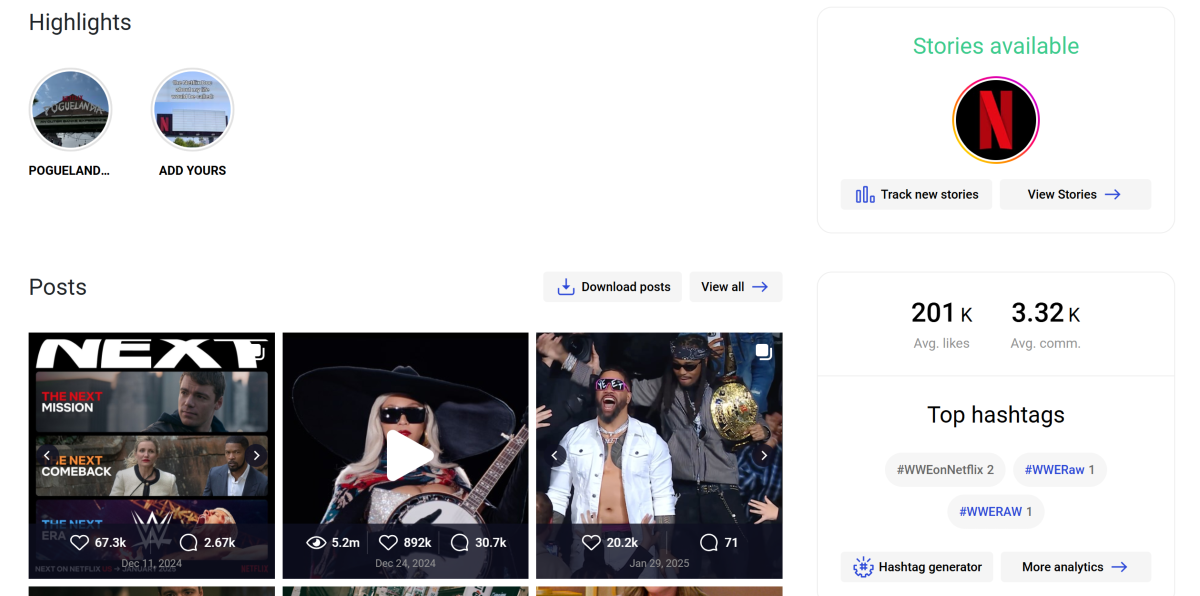
There are a bunch of online tools that allow you to view Instagram without an account. Here’s what you can do on the platform without logging in.
View posts
Browse comments
Watch stories
Watch reels
Download posts, stories, and reels
Go through followers and following lists (depending on the tool)
View profile insights (depending on the tool)
Here’s what you cannot do while using Instagram anonymously
Like posts
Comment on posts
Follow an account
DM a user
View suggested content
Post content of your own
Use Incognito mode to view an Instagram account
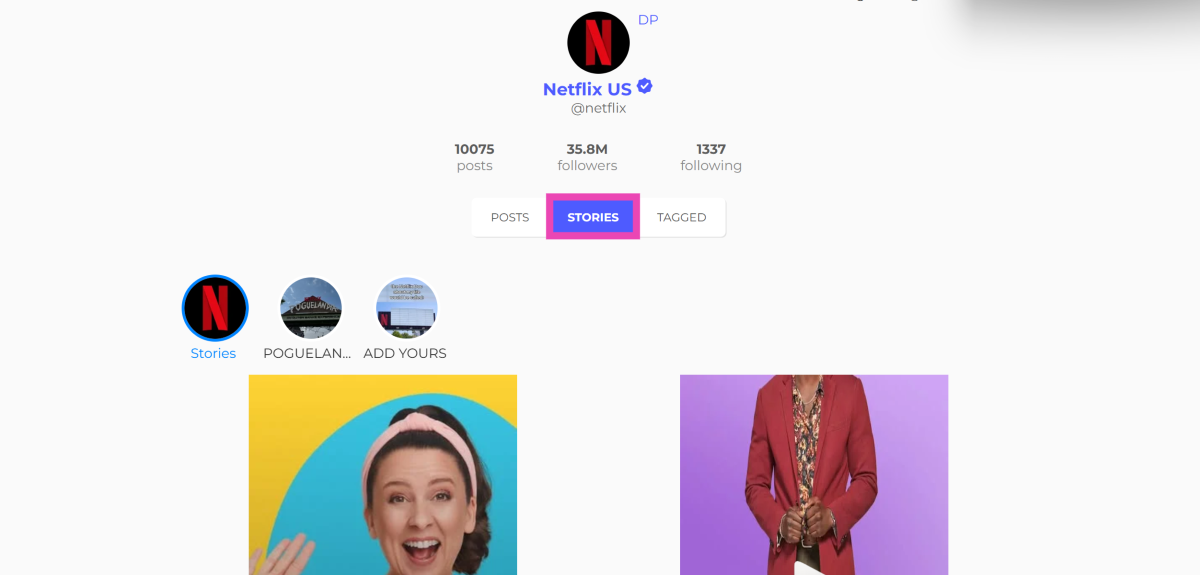
If you don’t want to view someone’s Instagram feed through your profile, use the incognito mode on your preferred web browser. On Google Chrome, you can trigger the incognito mode by pressing Ctrl + Shift + N. Once you’re on the incognito tab, enter instagram.com/[username]. For example, if you want to view Netflix’s Instagram feed, go to instagram.com/netflix. To view a post, right-click on it and select ‘Open link in new tab’.
Pros
Does not require a third-party website
Cons
Does let you view all the posts on the profile
Cannot expand posts on the same tab without logging in
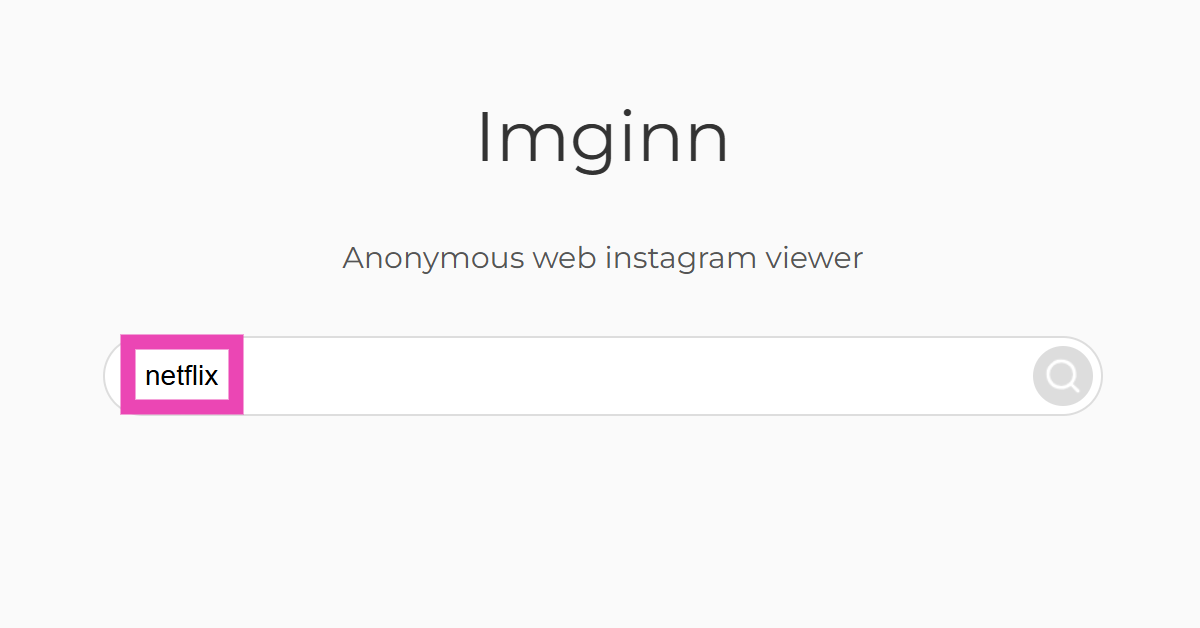
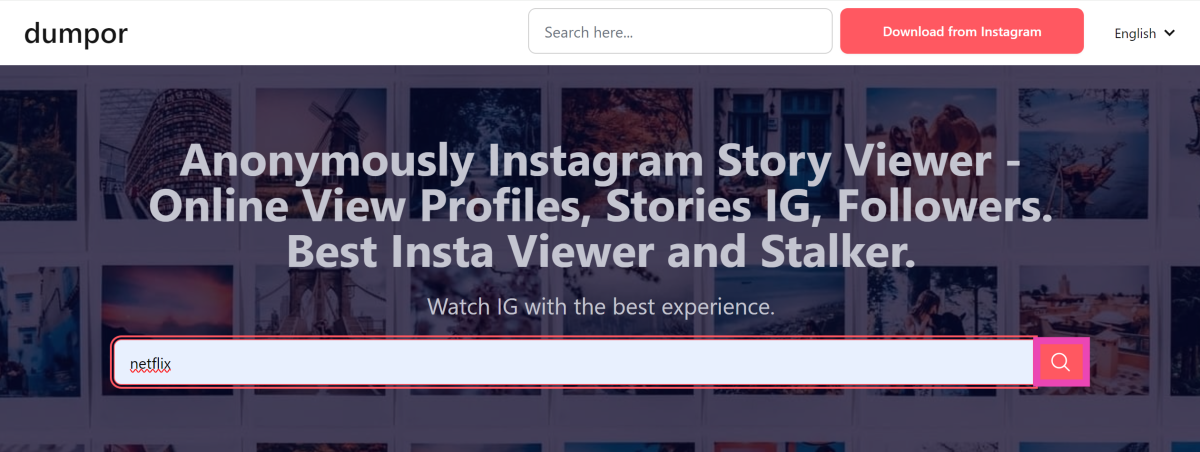
Use Imginn to view Instagram without an account
Imginn is our favourite third-party tool to view Instagram content without logging into the app. Here’s how you can use it.
Step 2: Enter the username in the search box and hit Enter.
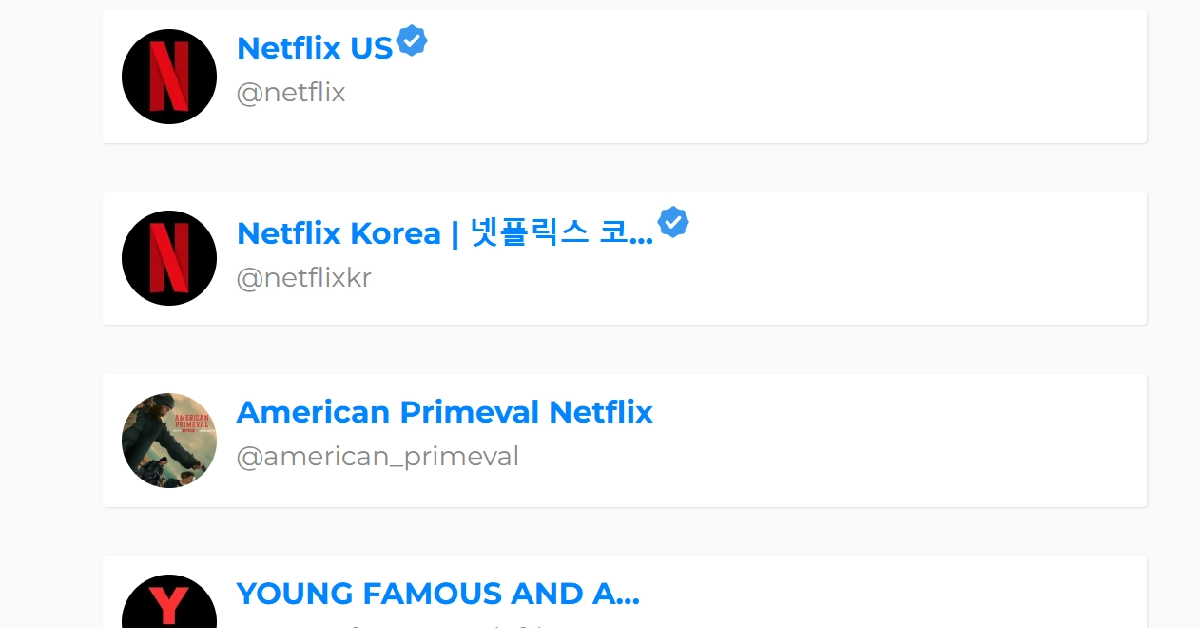
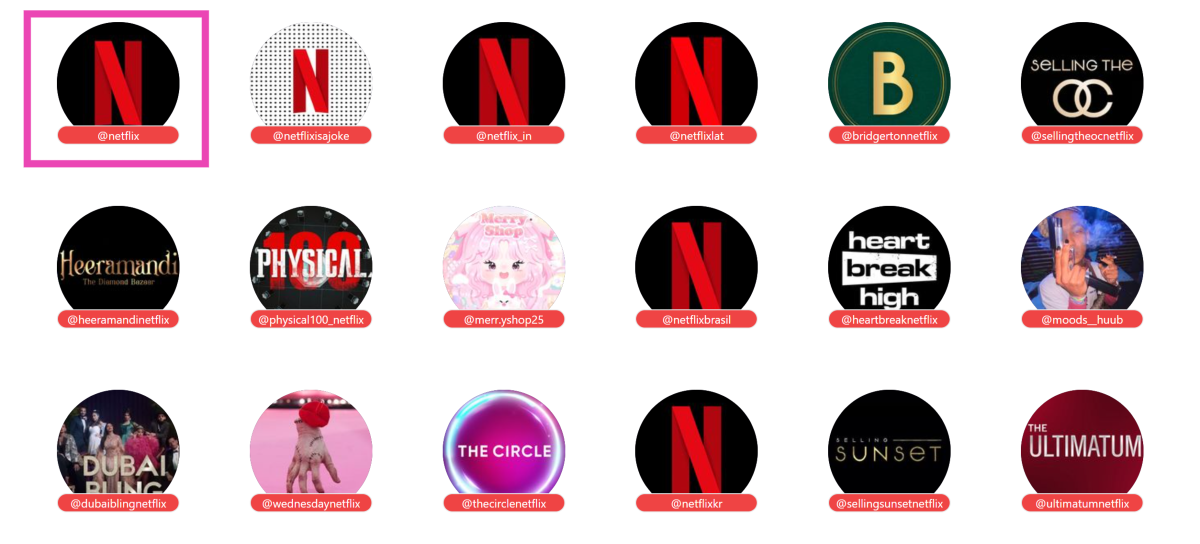
Step 3: Scroll down and select the profile.
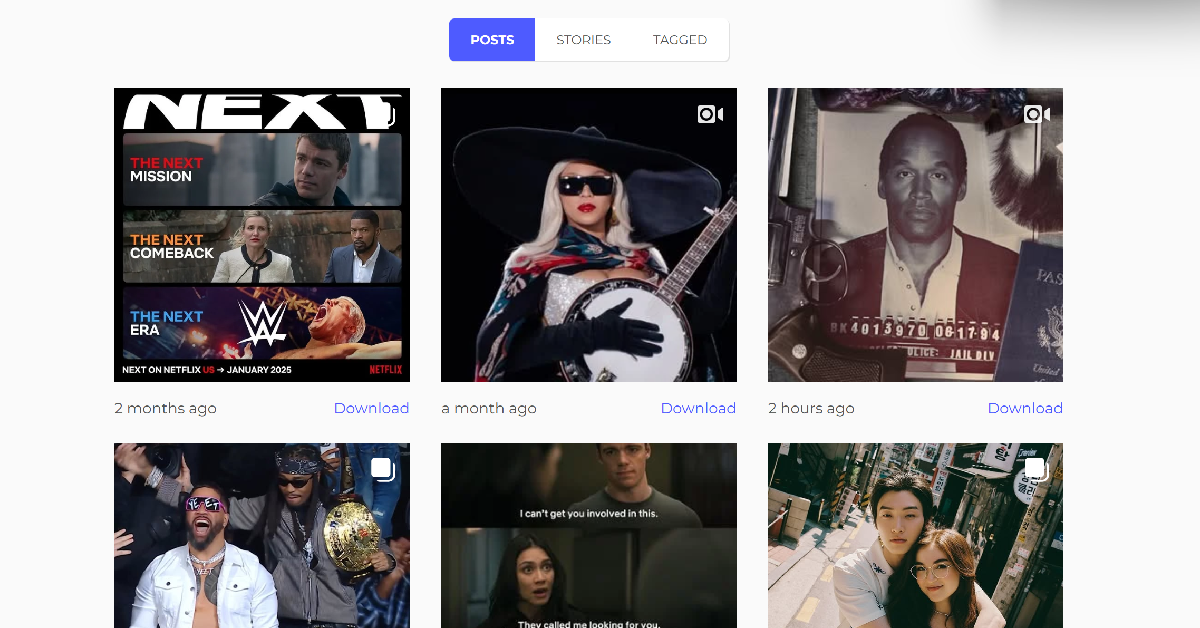
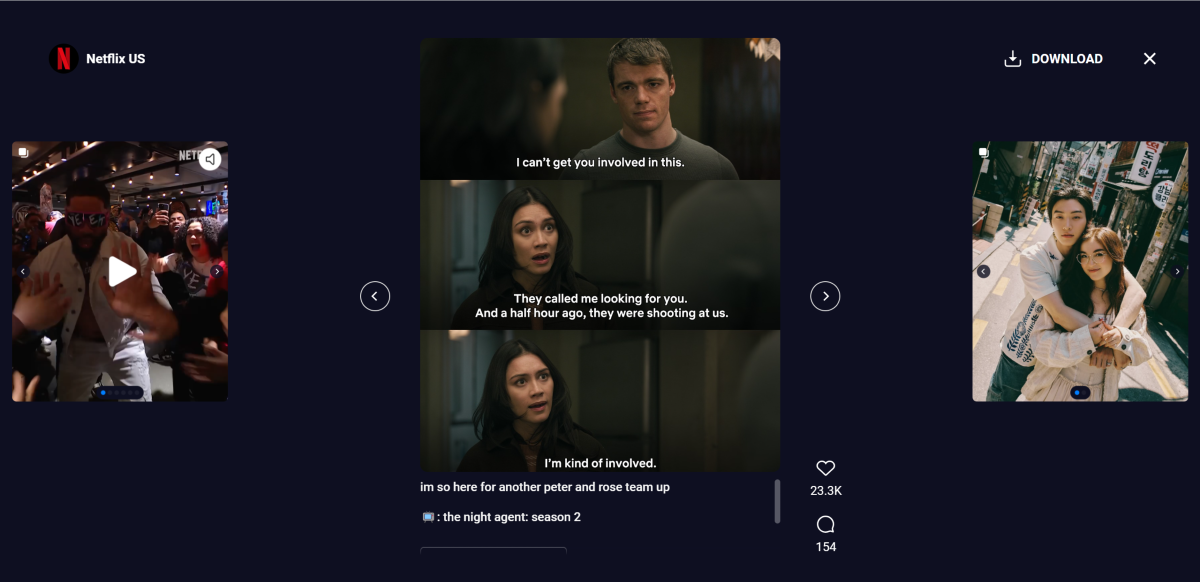
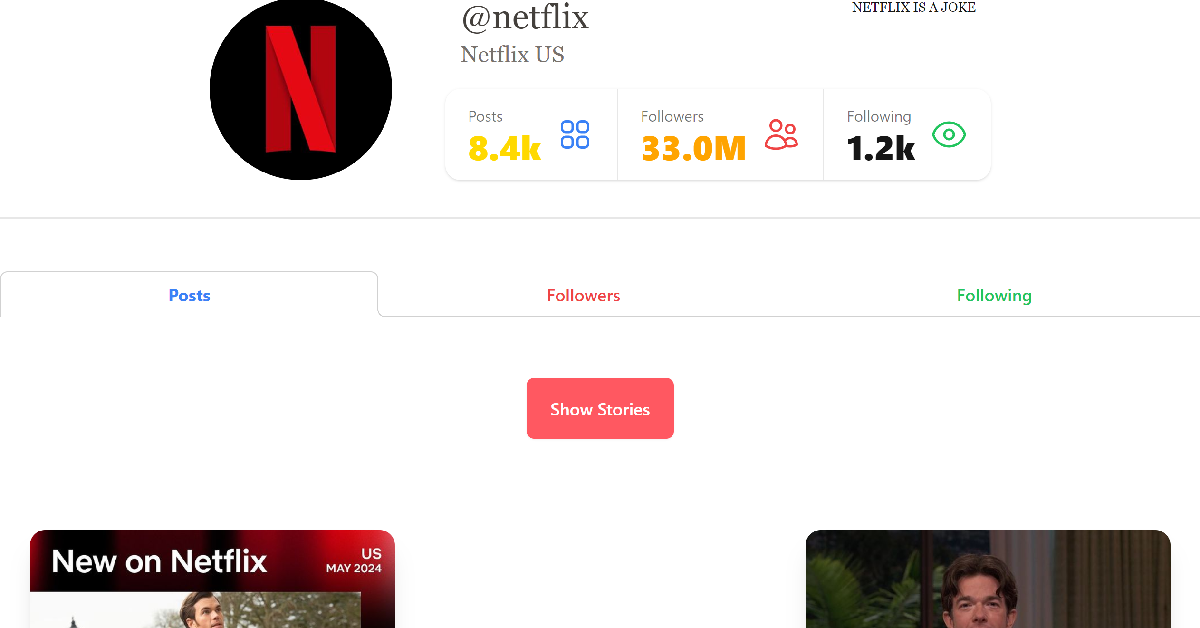
Step 4: Click on a post to view it.
Pros
Very accessible design
Lets you view followers/following
Cons
Slower than other profile viewers
Create a clone app
If you want to view Instagram posts anonymously without ditching the app’s interface, create a throwaway account. You can control a throwaway profile using the email registered with your primary account or create a new account altogether using a new email. If you want to choose the latter option, we recommend creating a clone app for Instagram. Here’s how you can go about it.
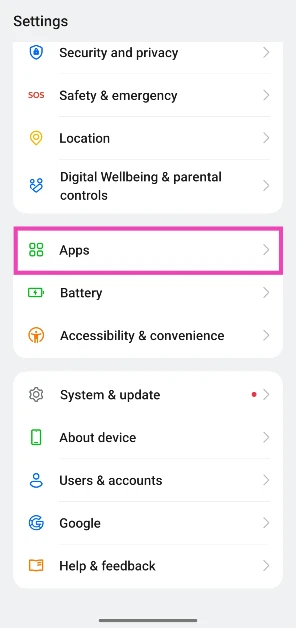
Step 1: Go to Settings and select Apps.
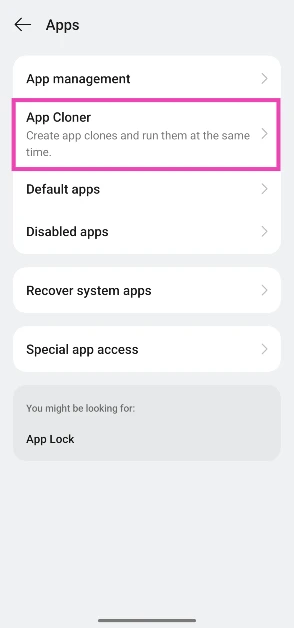
Step 2: Tap on App Cloner.
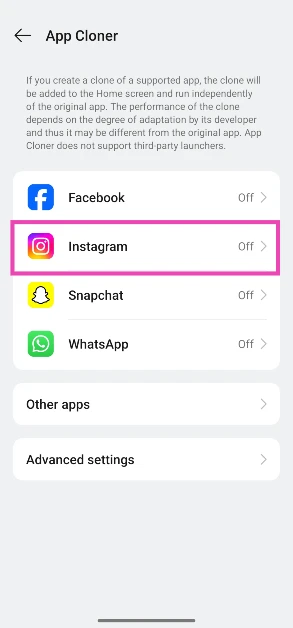
Step 3: Select Instagram.
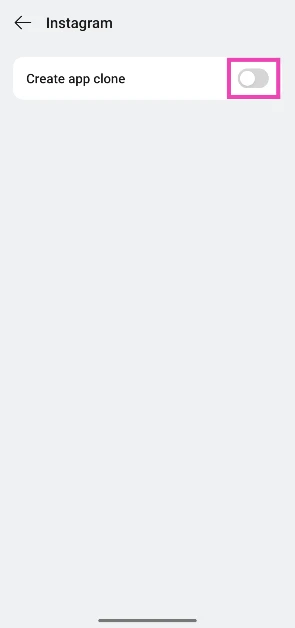
Step 4: Turn on the toggle switch next to Create app clone.
Step 5: Launch the clone app and create a new Instagram account using a throwaway email.
Pros
Don’t have to leave Instagram’s interface
Let’s you engage with Instagram posts anonymously
Cons
Takes extra effort
Frequently Asked Questions (FAQs)
Can someone see if I viewed their Instagram account?
No, Instagram users cannot view who visited their profile.
Can you view an Instagram story without an account?
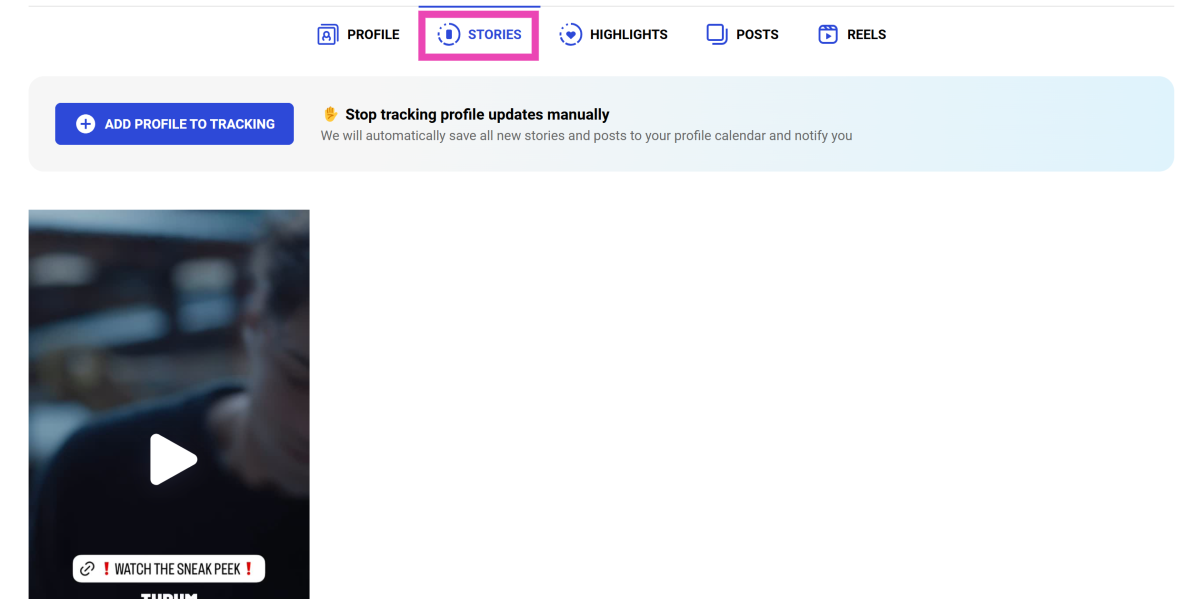
You need an Instagram account to view someone’s story on the app. However, you can use tools like Imginn and Dumpor to view public stories anonymously.
Can I view Instagram without an account?
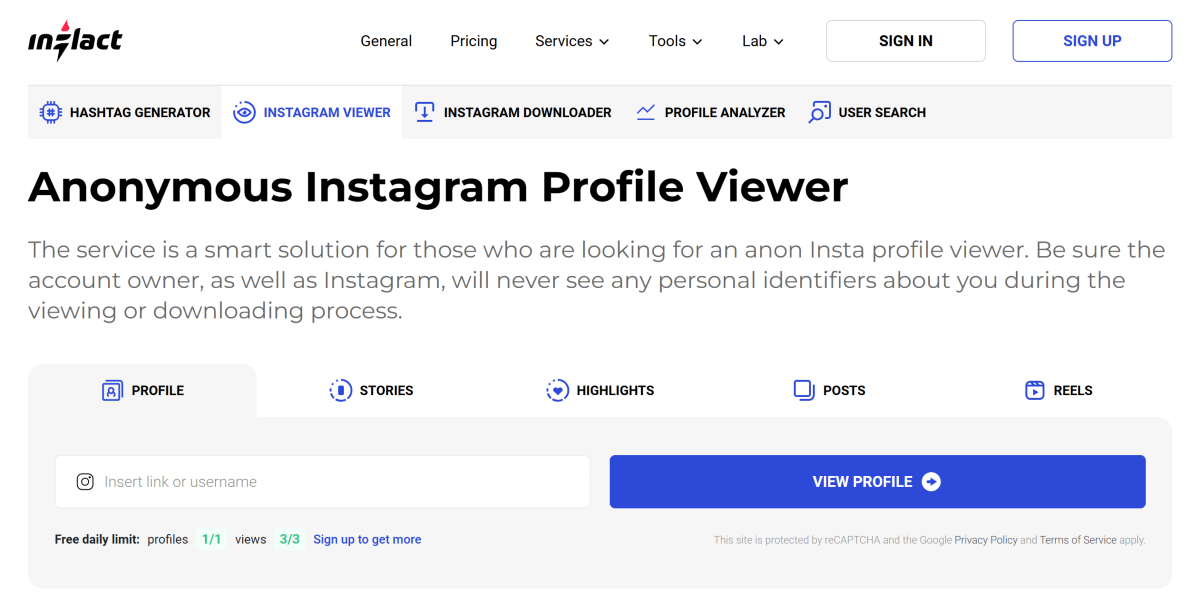
You view public Instagram accounts anonymously using tools like Imginn, Dumpor, and Inflact.
Is Imginn legit?
Yes, Imginn is one of the finest tools to view public Instagram posts and stories without making an Instagram account.
How do I check if someone blocked me on Instagram?
If someone has blocked you on Instagram, their profile picture will turn blank and their profile name will be changed to Instagram User.
This is how you can view Instagram posts and stories without making an account. While you’re here, check out how you can send HD images on Instagram DMs. If you have any questions, let us know in the comments!
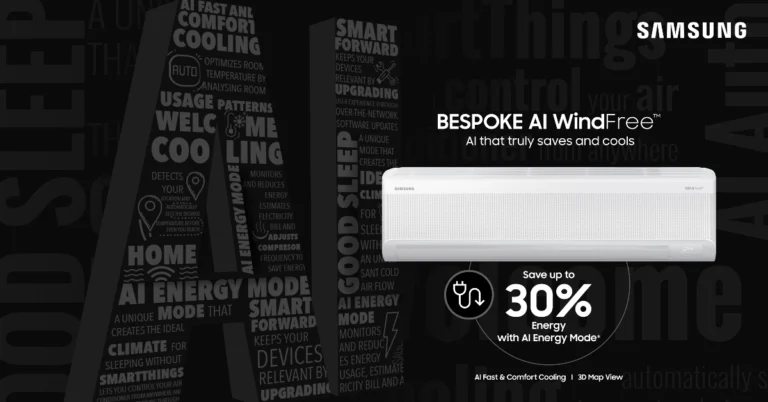
Samsung has unveiled its BESPOKE AI WindFree AC line, which includes 19 high-end models that provide quick and comfortable cooling. The WindFree Cooling technology guarantees efficient cooling without causing discomfort, and the ACs have a ‘Windfree wearable Good Sleep’ mode that activates automatically when linked to the Galaxy Watch series or ring, promoting restful sleep by regulating temperature based on sleep stages.
Samsung launched 2025 BESPOKE AI WindFree Air Conditioners in India. The 19 models meet Indian consumers’ growing demands for intelligent cooling, energy efficiency, and connected living. WindFree Cooling technology prevents drafts by spreading air through 23,000 micropores.
The Bespoke AI WindFree ACs use advanced AI technology to improve cooling efficiency. The AI Energy Mode meets consumer demand for energy-efficient appliances without sacrificing comfort by saving up to 30% on energy. Rapid room temperature reduction is achieved by the AI Fast & Comfort Cooling function, which subsequently transitions to WindFree Mode for steady cooling. In India, the AI Digital Inverter control provides dependable cooling even during the hottest summers.
Using features like Welcome Cooling, Map View, and Quick Remote, Samsung’s SmartThings platform seeks to revolutionise how people interact with air conditioners. Quick Remote removes the need for a physical remote by enabling users to adjust temperature, power, mode, and air volume from their smartphone. A virtual 3-D representation of the house is offered by Map View, enabling remote monitoring and management of important parameters including energy usage, air quality, and room temperature. Bixby, Alexa, and Google Assistant compatibility guarantees smooth and simple interaction.
The WindFree Good Sleep function of the Bespoke AI WindFree air conditioners optimises the temperature and humidity in the bedroom, avoiding sudden shifts that can disrupt sleep.
The Copper Anti-bacterial Filter on the Bespoke AI WindFree ACs is a simple and effective air conditioner maintenance solution that allows for easy removal and cleaning without the need to open covers or apply force. Made of dense mesh, it catches dust and decreases airborne bacteria by up to 99%, resulting in a cleaner, healthier indoor environment.
The new range of Bespoke AI air conditioners, priced at Rs 32990, is now available in leading retail outlets and online platforms like Flipkart, Amazon, and Samsung.com.
The Bespoke AI WindFree ACs come with a 5-year warranty and a 10-year warranty on the AI Inverter compressor, with Durafin Ultra coating for long-term performance and durability.
While your YouTube search history is not displayed publicly on your profile, it plays an essential part in what you see on your feed. YouTube uses your search entries and previously watched videos to suggest new content. Furthermore, when you initiate a new search, YouTube suggests your past searches in the dropdown box. If you don’t want these entries to appear in the search bar, you look into deleting the search history. Here are 2 ways to clear or delete your YouTube search history on your phone and PC.
Your Google account contains your search entries from the very first time you used YouTube. This data comes in handy when you’re looking for a previously watched video but can’t remember its title. Deleting the entire search history seems like an excessive step unless you don’t want Google to keep any kind of activity record on your profile.
If you don’t want embarrassing entries to show up in the search bar every time you tap the search icon, you can remove them individually. On PC, each entry has a remove option next to it. On a smartphone, you can access this option by long-pressing your entry.
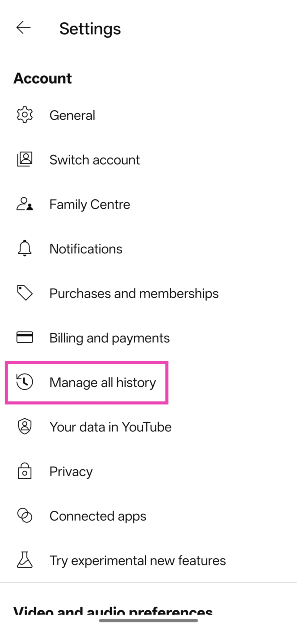
If you’re fine with Google keeping a record of your past entries, but don’t want it to save any future searches, go to the You tab on the YouTube app, navigate to Settings>Manage all history>Saving your YouTube History and tap on ‘Turn off’. You can also set the history to auto-delete after a certain period of time. If you don’t want to go through the process of deletion, we’d recommend using the Incognito mode on YouTube.
Clear YouTube search history on your PC
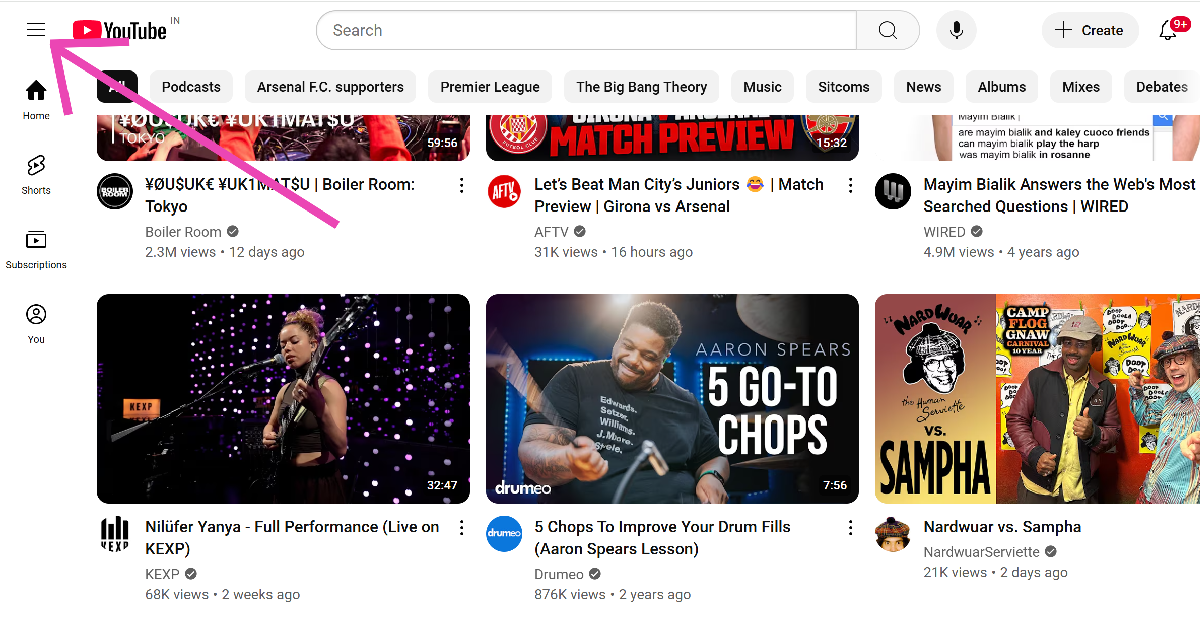
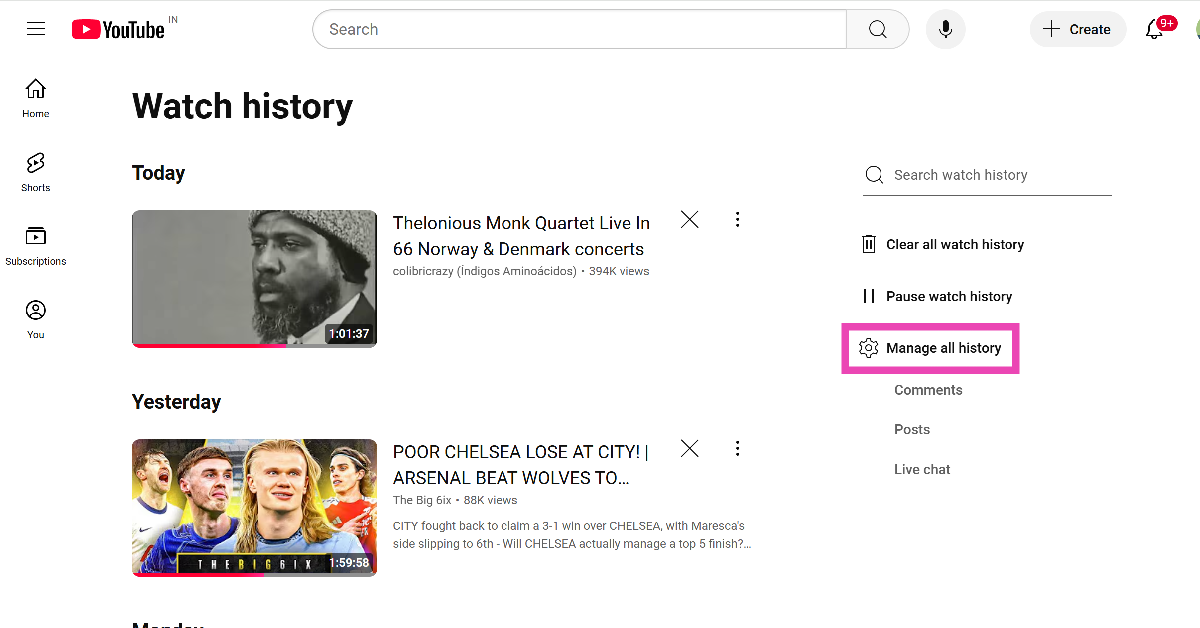
Step 1: Go to YouTube and hit the hamburger menu in the top left corner of the screen.
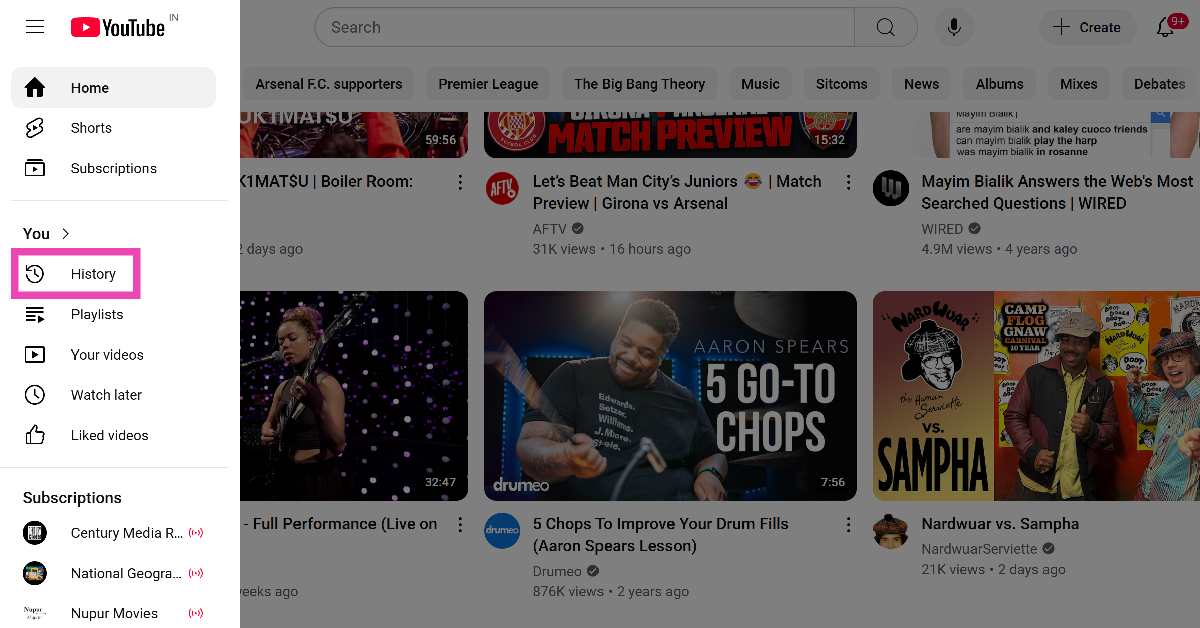
Step 2: Select History from the side panel.
Step 3: Click on Manage all history.
Step 4: Scroll down to view your YouTube search and watch history.
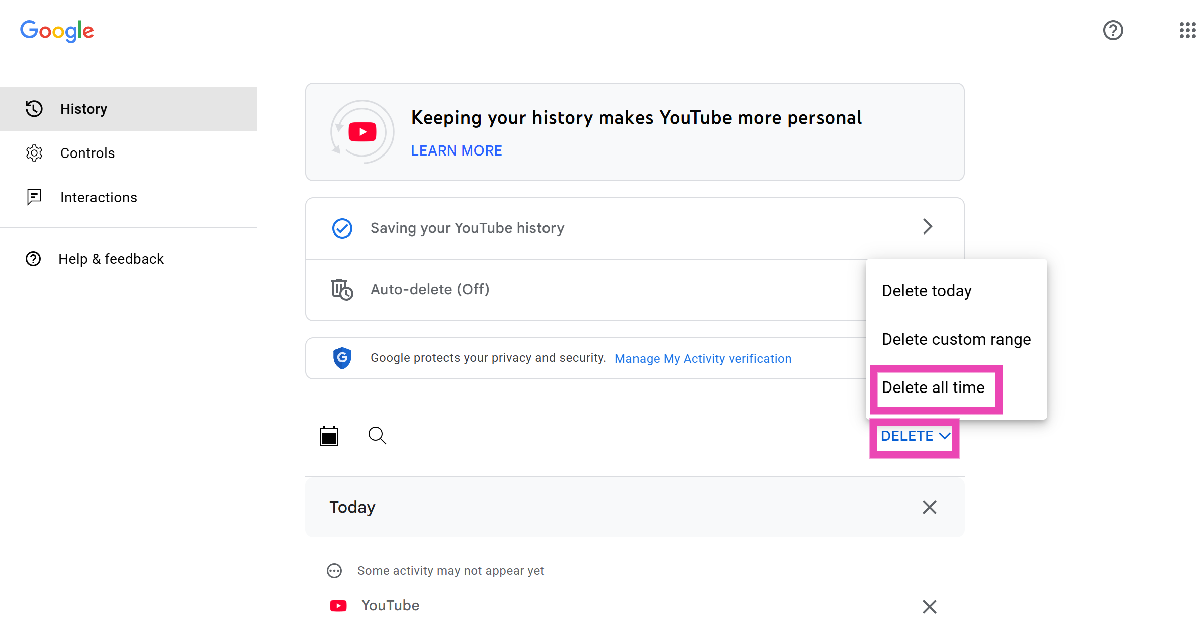
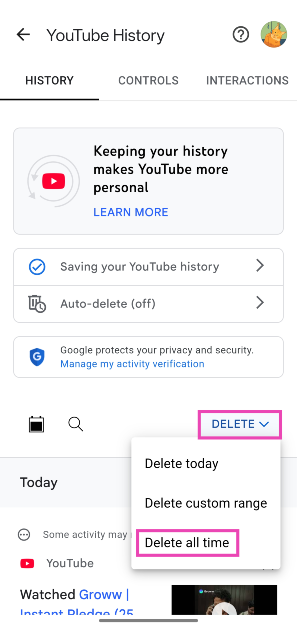
Step 5: To clear all search history, hit the Delete option and select Delete all time.
Step 6: You can also delete an individual entry by clicking the cross icon next to it.
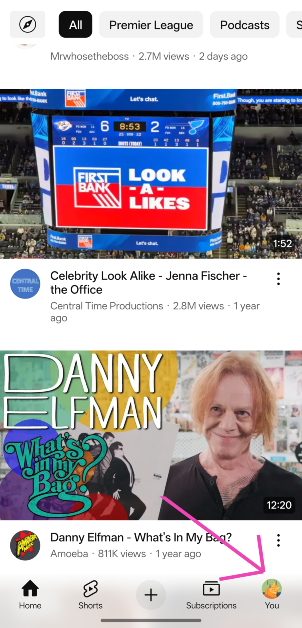
Step 2: Switch to the You tab by tapping your profile picture in the bottom right corner of the screen.
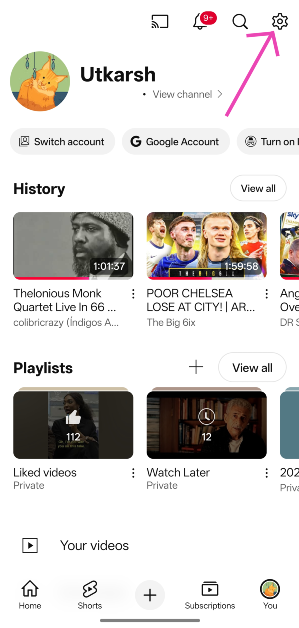
Step 3: Hit the cog wheel icon in the top right corner of the screen.
Step 4: Tap on Manage all history.
Step 5: Hit the Delete option and select Delete all time.
Step 6: Alternatively, you can hit the cross icon next to an entry to delete it.
Frequently Asked Questions (FAQs)
How do I delete my YouTube search history?
Launch the YouTube app, go to You>Settings>Manage all history>Delete and select ‘Delete all time’.
How do I clear my YouTube search feed?
You can clear your YouTube search feed by deleting your search history from account settings or long-pressing an entry in the suggested options and selecting ‘Remove’.
Can people see my YouTube history?
Your YouTube search and watch history is not visible publicly anywhere on your profile. You can access and delete it from settings.
How do I go incognito on YouTube?
Go to the You tab and tap on ‘Turn on incognito’ to open Incognito Mode on YouTube. The videos you watch in this mode will not be registered on your account.
Can I stop YouTube from recording my search history?
Launch the YouTube app and go to You>Settings>Manage all history>Saving your YouTube History and tap on ‘Turn off’.
This is how you can clear your YouTube search history on your phone and PC. While you’re here, check out how you can use incognito mode on YouTube. If you have any questions, let us know in the comments!
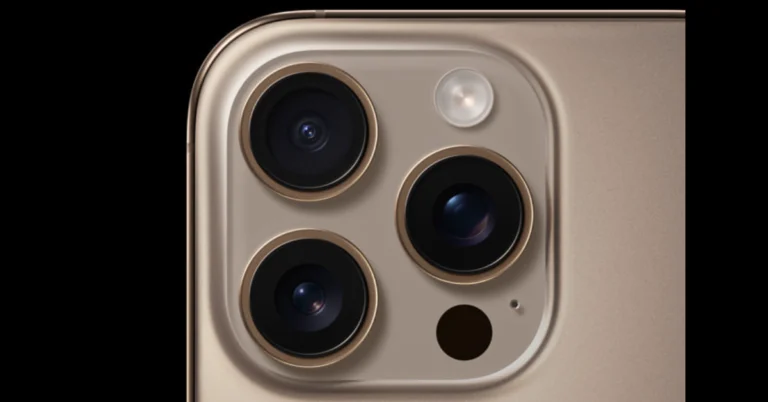
Apple is likely to launch the iPhone SE 4 soon. It will be the third-generation model, succeeding the one that was introduced in 2022. It is predicted that the next low-cost iPhone will have significant improvements. An A18 chip and a single rear camera are also anticipated features of the iPhone SE 4. The phone may resemble the iPhone 16 based on recently leaked photos.
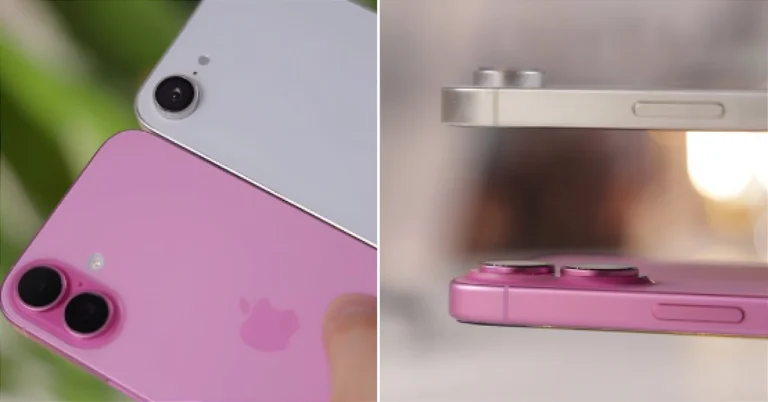
Two pictures of the alleged iPhone SE 4 along with the iPhone 16 were leaked by tipster @MajinBuOfficial. According to the tipster, a dummy unit of the iPhone SE 4 was used, and the rear panel did not have Apple’s logo. The images show that the SE 4 has a single rear camera and a taller camera bump than the iPhone 16. The power button is also visible on the right side of the display, just like its predecessor.
A major design change is anticipated for the iPhone SE 4, which will ditch the conventional Touch ID button in favour of a notch-based design that will match Apple’s current flagship aesthetics and feature Face ID for the first time. Additionally, a larger 6.1-inch OLED display with thinner bezels is expected to be a highlight of the gadget.
According to rumours, the SE 4 will run on the latest A18 Bionic processor and will offer Apple Intelligence features, such as an updated Siri with AI capabilities.
The SE 4 is expected to include a larger battery and USB Type-C charging, and the tech community is betting on a 48MP rear camera, akin to Apple’s premium handsets, which might feature Smart HDR, better Night Mode, and higher-quality video recording.
Although it is not an official confirmation, LG Innotek has alluded to mass production of camera components for the SE 4, which gave the rumours more weight.
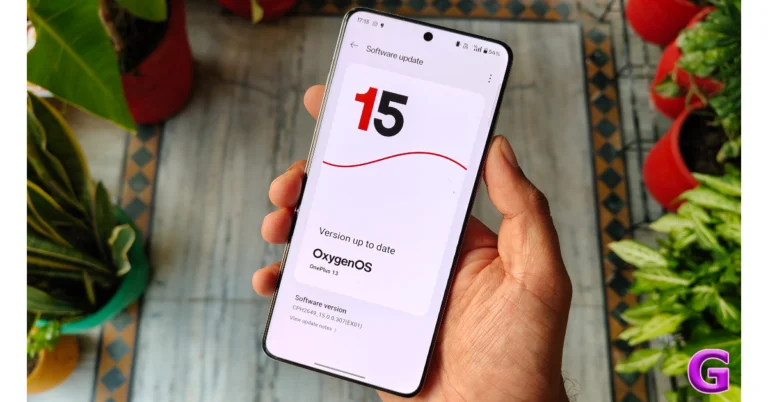
The latest OS update for OnePlus smartphones is not just an incremental one. The new OxygenOS 15 brings exciting design changes and helpful features to OnePlus devices. While it may share a lot of similarities with Oppo’s ColorOS 15, OxygenOS 15 carves out a special place for itself with its light, responsive UI and snappy operation. We’ve been using the OxygenOS 15 on the new OnePlus 13 (our review here) for a month, here are our 10 favourite features.
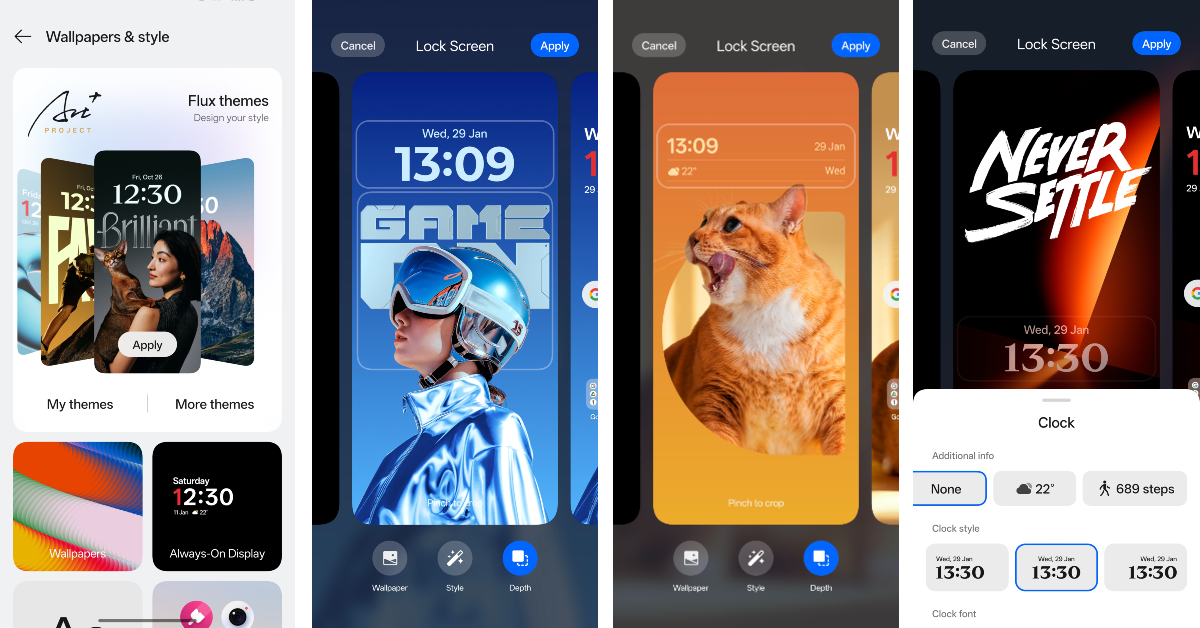
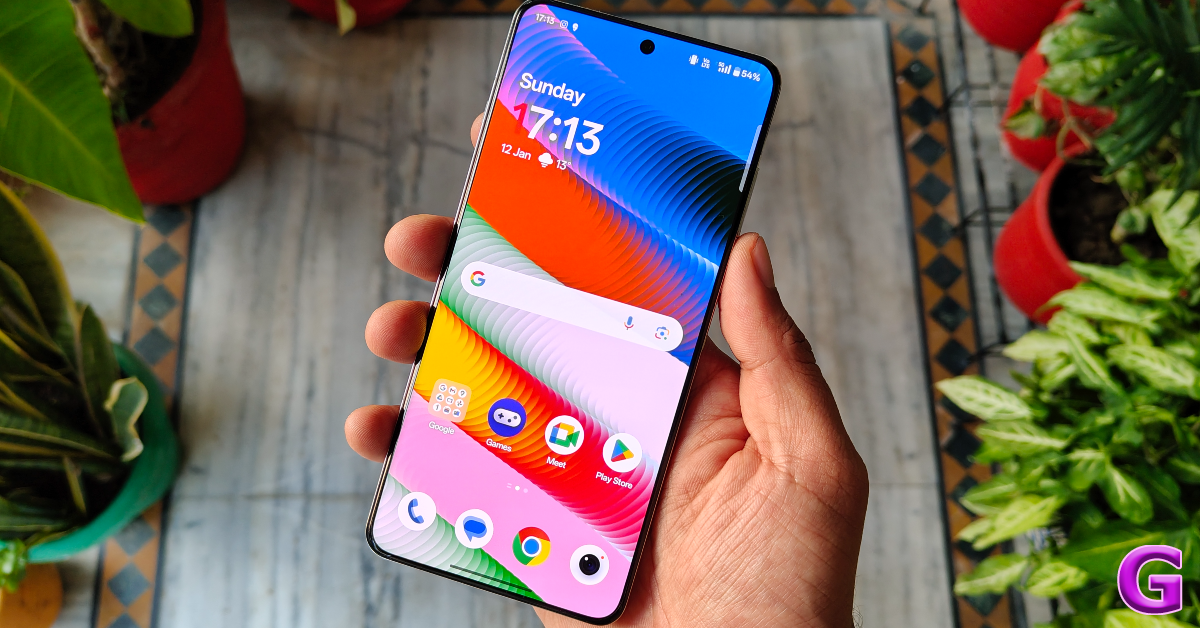
OxygenOS 15 brings new lock screen customisations for OnePlus smartphones, the biggest one being the depth effect for the lock screen wallpaper. Inspired by iOS, Xiaomi was the first Android OEM to introduce this feature in its OS skin. Oppo and OnePlus followed the path this year on ColorOS 15 and OxygenOS 15 respectively. You can use the Flux Themes for your lock screen and customise the wallpaper by adding an image from your phone’s gallery. OxygenOS lets you change the clock style/font and add weather and step count widgets to the lock screen as well.
Live Alerts
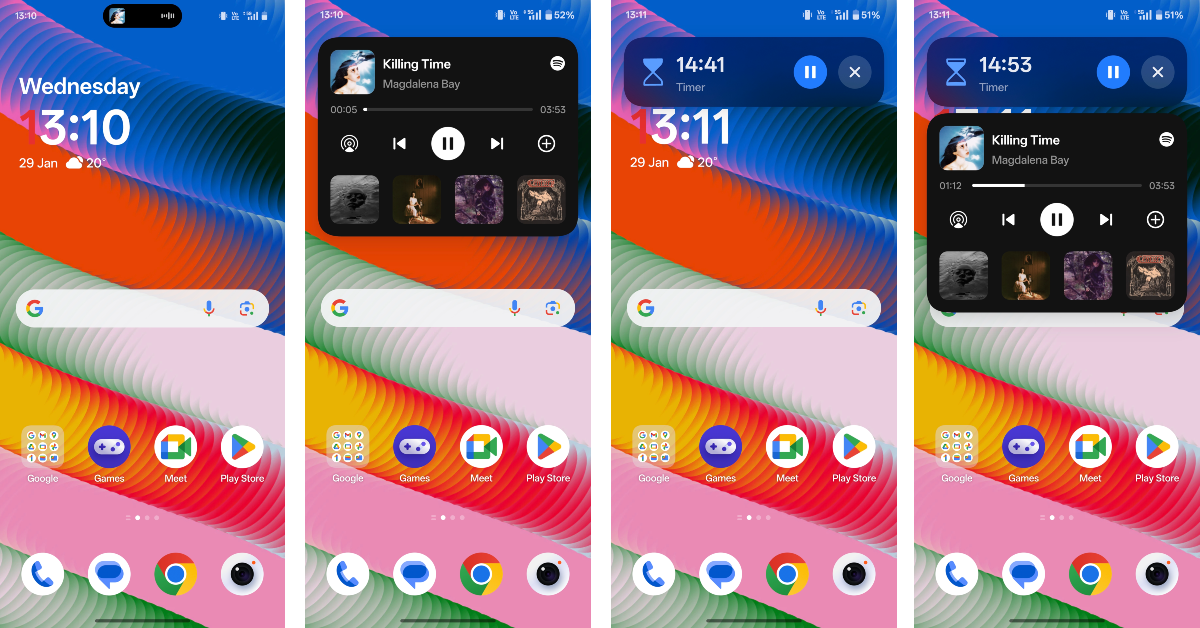
The punch-hole cutout on your smartphone’s display now expands into a pill-shaped animation to display information related to certain tasks. These tasks include media playback (supported by Spotify and Apple Music), real-time alerts (supported by Swiggy and Zomato), screen recording, timer, data sharing via personal hotspot, and more. Much like the Dynamic Island on the iPhone, tapping on the pill animation brings up the app card. You can swipe on the pill to view the different tasks taking place in the background.
Share with iPhone
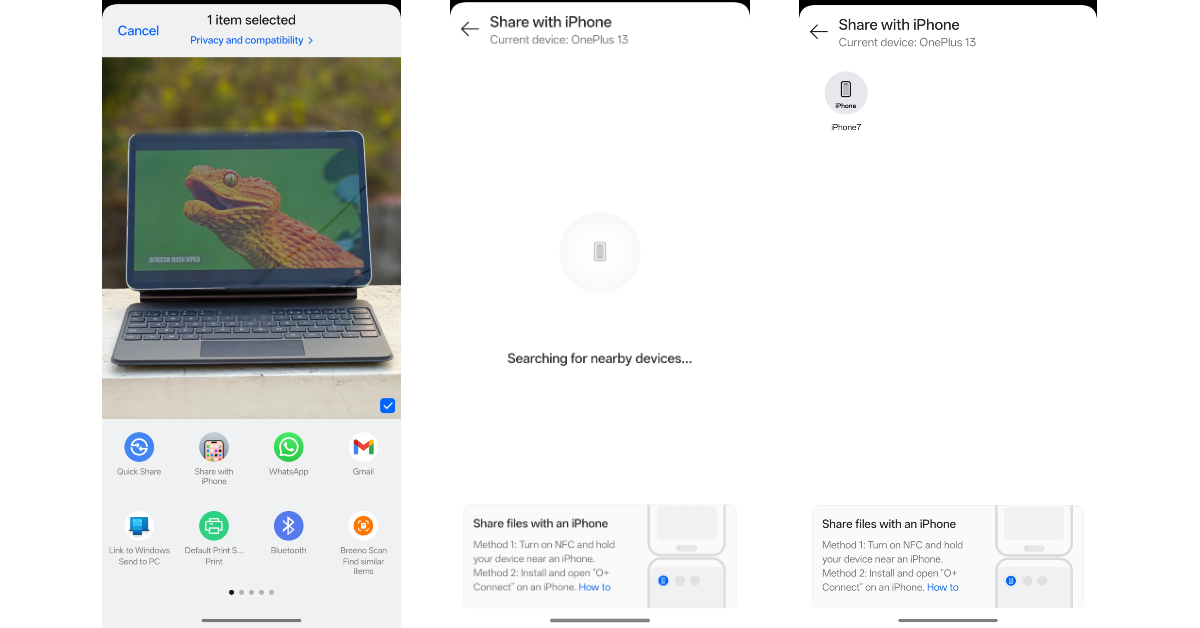
Since AirDrop is exclusive to Apple devices, file-sharing between Android and iOS is very challenging. OxygenOS 15 gets around this problem with its new ‘Share with iPhone’ feature. You’ll find this option next to the Quick Share tile upon hitting the share icon in the bottom menu of a file. The sharing interface is simple and accessible, but the transfer process requires installing the O+ Connect app on the target iPhone.
Notification Shade + Quick Settings
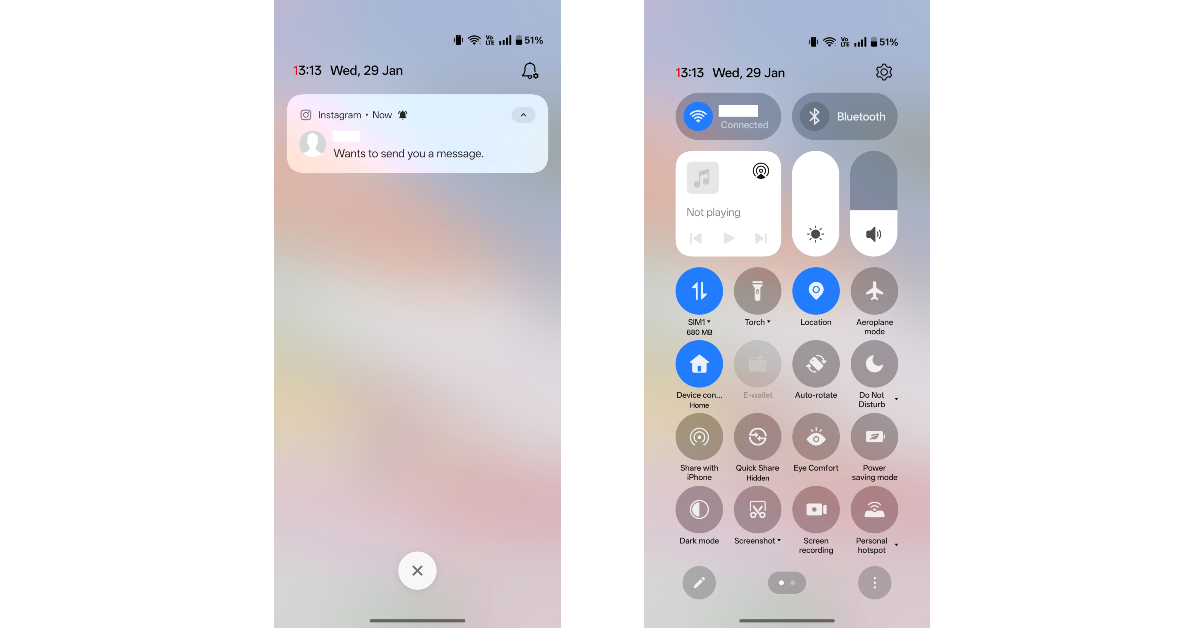
The bifurcation of the notification shade and the quick settings menu is another design element that OxygenOS 15 has borrowed from its Apple counterpart. Swiping down on the status bar (or the home page) from the left side of the selfie camera now reveals the lone notification shade. Meanwhile, swiping down from the right side gives access to the quick setting menu. You can always restore the previous layout using device settings. The quick controls for WiFi, Bluetooth, Brightness, and Volume now have rounded tiles. Since there is no notification at the bottom of the quick menu, the tiles now extend to the bottom of the screen.
Private Safe
The private safe on your OnePlus smartphone is a practical locker for sensitive files, documents, images, and videos. On OxygenOS 15, the private safe lets you create new folders for better organisation. By default, the media files are categorised into images and videos.
Hidden Folder
The hidden folder on OxygenOS 15 now appears as an app on the home screen. You can customise its icon and name to make it as inconspicuous as possible. The older option of punching in the special code in the dialer to access hidden apps still exists in the new iteration of OxygenOS.
Open Canvas
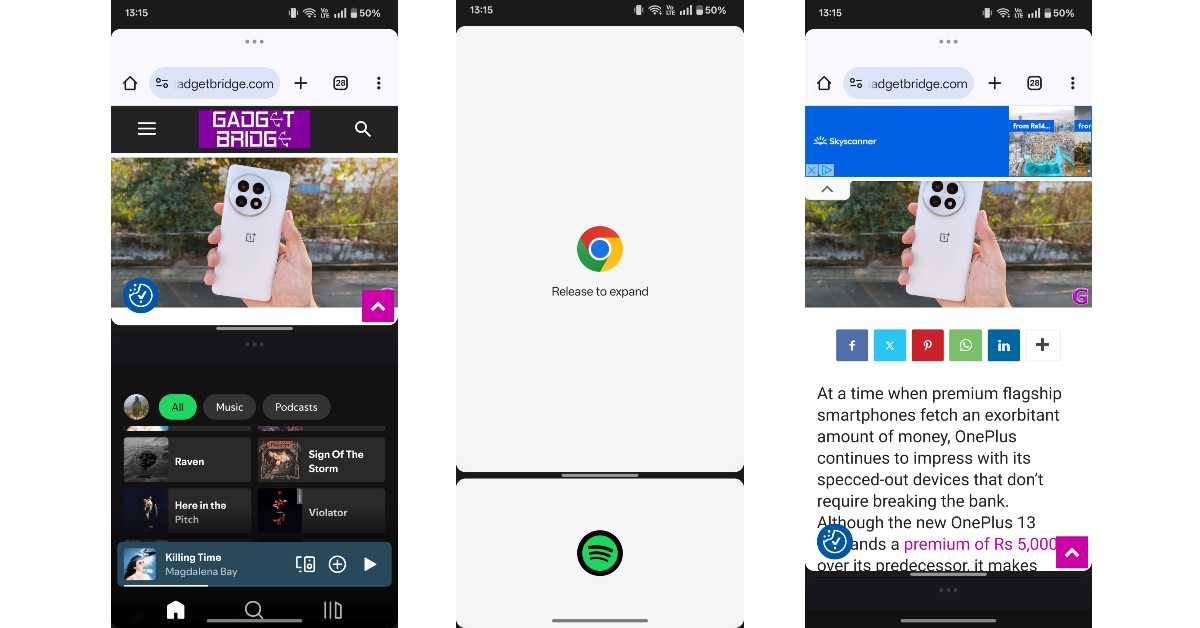
OnePlus’ split-screen view has gotten a major boost in OxygenOS 15, making it one of our favourite features of the OS. You can now adjust the size of the app windows to the point where one is barely visible. A simple tap on the app brings it back into focus. This is useful when you occasionally want to use the other app but don’t want to minimise it. OxygenOS 15 also allows you to save app pairs and switch an app with another at any given time.
AI Reply
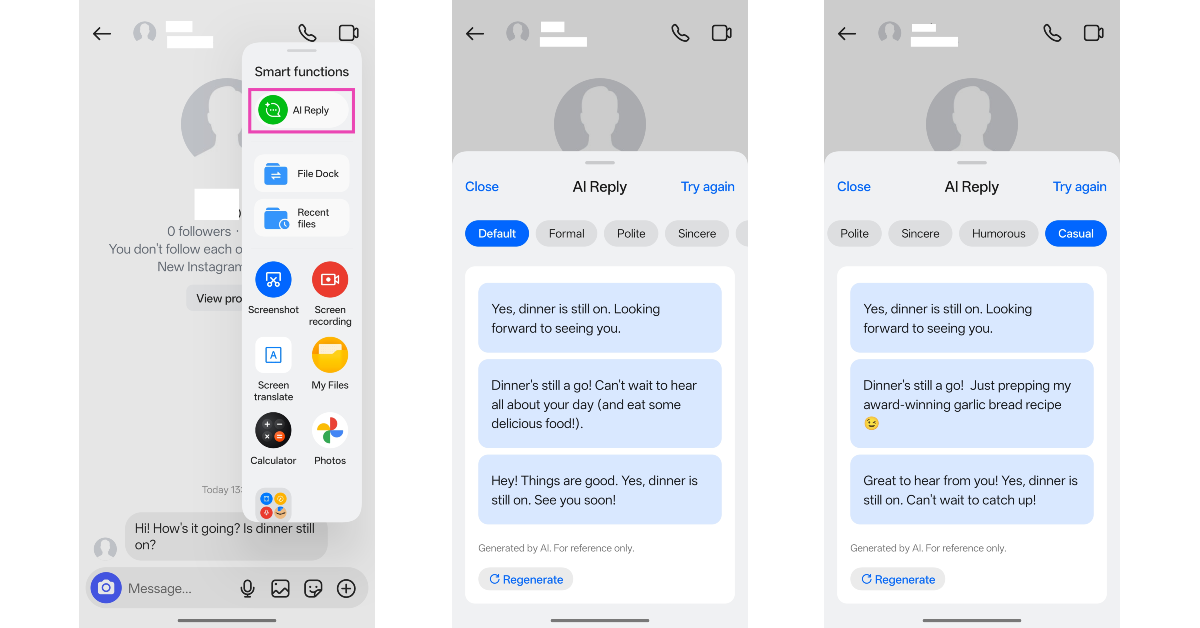
OnePlus has made improvements to OxygenOS 15’s AI features. The AI Reply tool is our favourite of the lot. You can access this feature from the Smart Sidebar as soon as you open a conversation thread. AI Reply reads the screen and comes up with a response that is relevant to the conversation. You can edit this response by changing its tone or adding more context to it before hitting send.
AI Reflection Eraser
Have you ever taken pictures through the window of a moving vehicle but were unimpressed with the results? Even if your phone camera’s shutter speed froze the motion correctly, the reflection on the window glass may have ensured that the photo remains in your phone’s gallery. You can now fix these images using the AI reflection tool on OxygenOS 15. This tool is a part of the AI editor in the native Photos app. It intelligently recognises the reflections falling on a glass surface and wipes them out of the picture.
Translate app
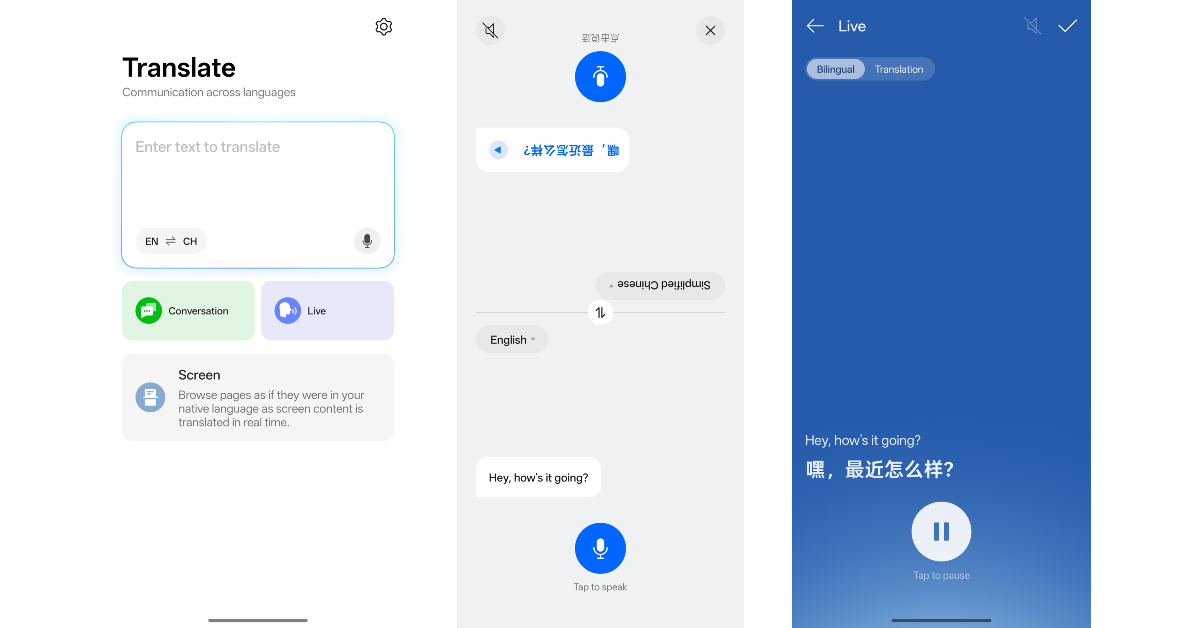
OnePlus now has a standalone translation app of its own. And it is pretty good. You can use the Conversation mode in this app to have in-person conversations in another language. Its split-screen mode makes it easy for the listener to look at the translated text on the display. On top of that, the Translate app can work in the background and translate the text within any app to your selected target language.
These are our top 10 favourite OxygenOS 15 features. The OS also incorporates essential Android 15 features like Theft Protection, Gemini Assistant, Circle to Search, and more. Which is your favourite feature on OxygenOS 15? Let us know in the comments!
With iOS 18.3 for iPhone, Apple has made a small modification to Notification Summaries, a function that was previously criticised for producing inaccurate summaries of news headlines. The update now enables Visual Intelligence to add events to the Calendar from posters, and it makes changes to the Calculator app and Apple Intelligence’s opt-in method.
iOS 18.3 Update
With the iOS 18.3 update, Notification Summaries are no longer available for the News & Entertainment category and are now disabled by default. The most recent version warns users that it may contain errors and disables the feature by default. Users who choose to use it will be able to do so once it has been restored.
Apple added the notification summaries feature to iOS 18.1, which condenses information from notifications for fast scanning. This is an opt-in functionality that allows users to select which app notifications should be summarised.
However, since its inception, the AI feature has been observed to produce inaccurate summaries of notifications from news apps. The BBC alerted Apple in December 2024 about false information being added to AI summaries in response to Apple Intelligence‘s incorrect claim of Luigi Mangione’s suicide. A user provided a screenshot in which an AI tool misinterpreted a New York Times article, claiming that Israeli Prime Minister Benjamin Netanyahu had been arrested, despite the fact that the original news notification stated that an arrest warrant had been issued by the International Criminal Court.
Aside from that, Apple updated notification summaries to include italicised text for improved clarity.
Apple has also improved its Visual Intelligence function, which allows users to add events from posters or flyers to their Calendars and identify a larger range of plant and animal species. This feature is only available on iPhone 16 models and can be accessed via the Camera Control button.
Apple restored the ability to repeat the last mathematical operation by tapping the equals icon in the Calculator app, which was discontinued in iOS 18.3, as well as bug fixes for Genmoji, HealthKit, and Writing Tools.
Additionally, users who do not wish to use the AI suite must actively opt out of Apple Intelligence, which is accessible through Settings.
Users must go to the Apple Intelligence & Siri Settings pane and disable the Apple Intelligence toggle in order to disable Apple Intelligence. This will turn off their device’s Apple Intelligence features.
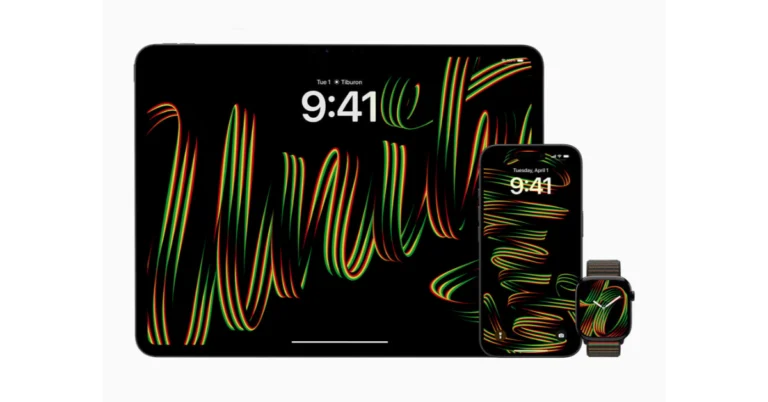
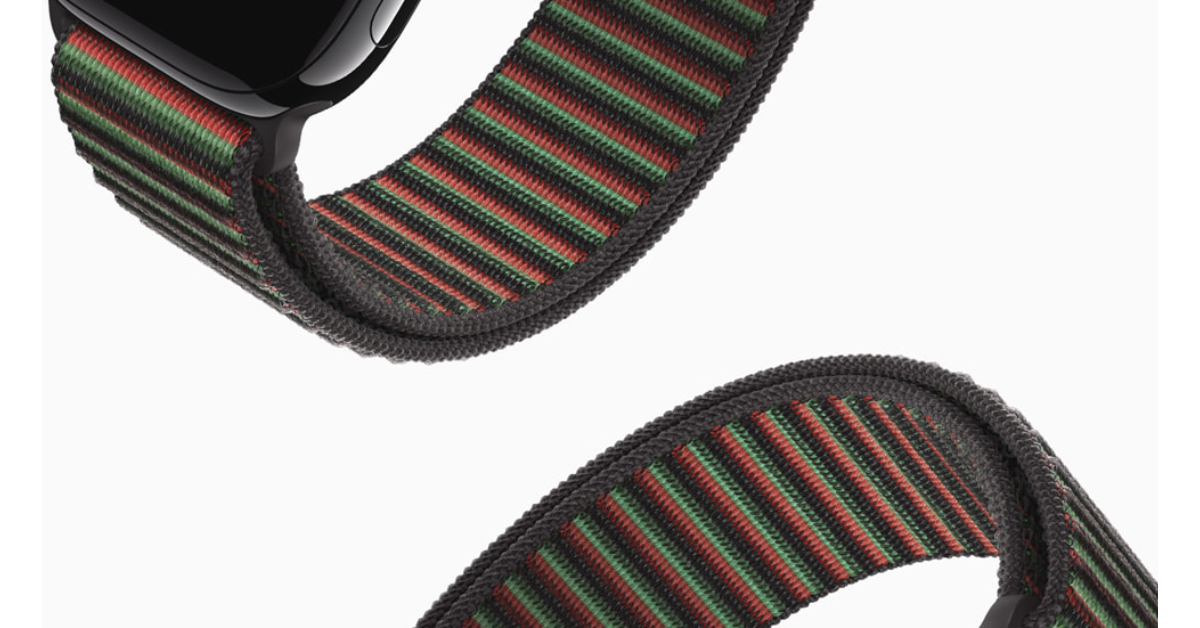
To commemorate Black History Month, Apple has released a Black Unity Collection that includes new iPhone and iPad wallpapers, a matching Unity Rhythm watch face, and a limited-edition Black Unity Sport Loop for the Apple Watch. While the Unity Rhythm watch face chimes every hour and half hour and shows numerals in red, green, and yellow, the Loop has a unique design that changes colour in response to wrist movement.
In This Article
Apple’s 2025 Black Unity Collection
In the honour of Black History Month and to highlight Black culture and community, Apple has announced a Black Unity Collection. The set consists of iPhone and iPad wallpapers, a matching watch face, and a limited-edition Apple Watch Black Unity Sport Loop.
Black, green, and red are the colours of the Pan-African flag and are included in Apple’s latest collection, Unity Rhythm. The Black Unity Sport Loop has a lenticular look thanks to its unique raised and recessed loop pattern. Wearing it causes the colours to change dynamically, with yellow appearing during the transition like magic. Black creatives and Apple allies collaborated on the collection.
The unique Unity Rhythm watch face has bespoke numerals composed of entwined red, green, and yellow threads. When the wrist is elevated, it responds to the gyroscope by creating digits. Additionally, the watch face chimes rhythmically every hour and a half.
Custom lettering with the word “Unity” that shifts orientation when the device is locked and unlocked is a feature of Unity Rhythm iPhone and iPad wallpapers.
The Ellis Marsalis Centre for Music in New Orleans, Battersea Arts Centre in London, Music Forward Foundation in Los Angeles, Art Gallery of New South Wales in Sydney, and The National Museum of African American Music in Nashville are just a few of the international organisations that Apple is collaborating with; these partnerships emphasise the company’s dedication to expanding economic, educational, and creative opportunities worldwide.
The Black Unity Sport Loop, available in 42mm and 46mm sizes, will be offered to purchase on the Apple Store online and in stores beginning this week for Rs 4,500. It is compatible with Apple Watch Series 4 and newer, Apple Watch SE, Apple Watch Ultra, and Apple Watch Ultra 2 (46mm band only).
The Unity Rhythm watch face and wallpapers will be available in a future software update for Apple Watch Series 6 or later and iPhone Xs or later. The wallpapers will also be available for iPhone XS and later, iPad Pro (M4), 12.9-inch iPad Pro (3rd generation and later), 11-inch iPad Pro (1st generation and later), iPad Air (M2), iPad (7th generation and later), and iPad mini (5th generation and later).
Garena Free Fire Max is a battle royale game with regular awards and tournaments to keep players interested. If you play Garena Free Fire, you should be aware of the redeem codes that are released on a daily basis. However, because the battle royale game is banned in India, players from other countries can use theFree Fire Redeem codes daily. If you’re unfamiliar with the Garena Free Fire redeem codes or don’t know how to get them, we’ve put together a step-by-step guide to help youredeem them. Check out Garena Free Fire Max Redeem Codes for 29 January 2025.
The Free Fire Max redeemcodes are a great way to get free stuff. These are 12-digit codes that contain alphabets and numbers, as well as an expiration date and time. Because the Garena FF redeem codes cannot be used more than once, you should hurry to the redemption page to claim your free reward before someone else does. To get a free reward, all you have to do is go toreward.ff.garena.com/en, which is the official redemption page. Also, keep an eye on this space for daily updates on Garena Free Fire Max redemption codes and rewards.
Are you looking for today’s Wordle for January 29, 2025? The problem is difficult to solve, so if you need assistance, we’ve included hints and the answer to the January 29 Wordle.
In This Article
Hints and Answers for Today’s Wordle January 29
Before answering directly, please check the January 29 Wordle Hints first.
Hint 1: Today’s Wordle answer includes two vowels. Hint 2: The answer for today has a repeating letter. Hint 3: To move a railway train from one track to another.
What word does today’s Wordle begin with?
Do you need help with today’s Wordle answer’s initial letter?
The first letter in today’s Wordle is “U”
Today’s Wordle Answer January 29 #1320
The answer to Wordle #1320 on January 29, 2025, is — UDDER
Wordle: A Five-Letter Word Guessing Game • The game allows six guesses of a five-letter word. • Provide feedback on guessed letters’ placement in the puzzle. • The New York Times purchased the game in 2022. • Created by Josh Wardle for his partner, narrowing down 12,000 English words to 2,500. • Named after the word “word.”
How To Play Wordle?
Wordle is a New York Times word puzzle game that allows users to guess a five-letter word in six attempts. The letters are highlighted in Yellow and Green, indicating whether the word is present in the answer or not, and Green letters indicate the correct guess.
Select a powerful starting word: Avoid using unusual words, as they frequently do not match common letters. A good opening word has plenty of benefits.
Repeating letters: Don’t be afraid of repeating letters; they appear frequently in words. The answer may contain one or two repeated letters.
Use the Wordlebot: The NYT’s Wordlebot analyses and compares replies to itself. This challenge can assist you enhance guessing skills and highlight areas for development.
29 January 2025: New Amazon Quiz is now available. Customers from different parts of the country are participating in the daily quiz. The quiz starts at midnight today and will be live until 11:59 PM tonight. By successfully answering every question, participants in the quiz have the chance to win wonderful rewards. Up to Rs 500 Amazon Pay Balance is up for grabs to participants today.
One wrong answer could eliminate you from the quiz. You have a chance to win up to Rs 500 Amazon Pay Balance if you successfully answer every question. Users of the app only have the opportunity to take the quiz. Check Out 29 January 2025 Amazon Quiz Answers.
In This Article
Are you not able to find Amazon FunZone? Click below and participate.
Now fill in the required information through the Sign-Up option.
To find the Amazon Quiz banner, log in to the Amazon app and scroll down to the home screen.
Tap on the Amazon Quiz banner and tap on the Start button to start the Quiz.
Now you will get 5 questions and you need to answer them correctly. One wrong answer will eliminate you from the Quiz.
After answering all the questions correctly you are now eligible for a Lucky Draw.
The previous winner’s name will be announced today at 12 PM.
Amazon Daily Quiz Answers from the previous few days.
Here are all the answers from the previous 5 days of the Amazon Daily Quiz and Contest.
Amazon Quiz Answers Today 28 January 2025: Win Up To ₹ 500 Amazon Pay Balance
Question 1: Who beat Novak Djokovic in the final to win his 2nd consecutive Wimbledon men’s singles title?
Answer: Carlos Alcaraz
Question 2: In ‘Captain America” Brave New World’ scheduled to be released in 2025, which legendary actor plays the role of Thaddeus ‘Thunderbolt’ Ross?
Answer: Harrison Ford
Question 3: Which place in South India is also known as the ‘Scotland of India’?
Answer: Coorg
Question 4: This is a picture taken in which African country?
Answer: Morocco
Question 5: What is the name given to the profession of the man in the picture?
Answer: Gondoliere
Amazon Quiz Answers Today 27 January 2025: Win Up To ₹ 500 Amazon Pay Balance
Question 1: Achanta Sharath Kamal represents India in which sport?
Answer: Table tennis
Question 2: Which date is to be celebrated as Hyderabad Liberation Day?
Answer: 17-Sep
Question 3: In which sport did India win its first two medals at the 2024 Paris Olympics?
Answer: Shooting
Question 4: This painting was created in which historical period?
Answer: Renaissance
Question 5: Where is the headquarter of this brand in USA?
Answer: Atlanta
Amazon Quiz Answers Today 26 January 2025: Win Up To ₹ 500 Amazon Pay Balance
Question 1: Achanta Sharath Kamal represents India in which sport?
Answer: Table tennis
Question 2: Which date is to be celebrated as Hyderabad Liberation Day?
Answer: 17-Sep
Question 3: In which sport did India win its first two medals at the 2024 Paris Olympics?
Answer: Shooting
Question 4: This painting was created in which historical period?
Answer: Renaissance
Question 5: Where is the headquarter of this brand in USA?
Answer: Atlanta
Amazon Quiz Answers Today 25 January 2025: Win Up To ₹ 500 Amazon Pay Balance
Question 1: In 2024, who became the youngest person to win two Oscars?
Answer: Billie Eilish
Question 2: The D. B. Patil International Airport is located in which place?
Answer: Navi Mumbai
Question 3: Which country had the first-ever married couple to serve as flag bearers at the Paris Olympic Opening Ceremony?
Answer: Romania
Question 4: When was this app launched?
Answer: 2011
Question 5: Which is the smallest monkey in the world?
Answer: Pygmy marmoset
Amazon Quiz Answers Today 24 January 2025: Win Up To ₹ 500 Amazon Pay Balance
Question 1: Complete the title of this 2024 film: “Chhota Bheem and the Curse of ________”.
Answer: Damyaan
Question 2: What regal title does Yaduveer Krishnadatta hold?
Answer: Maharaja of Mysore
Question 3: Which John Lennon and Yoko Ono song has been sung at six Olympic Opening Ceremonies, including Paris 2024?
Answer: Imagine
Question 4: Who is the architect of this cathedral?
Answer: Filippo Brunelleschi
Question 5: In the English edition of this game, how many word tiles are there?
We have written an explainer above, you can refer to that.
When are the winners of the Amazon Quiz and contest announced or declared?
The announcement of today’s Amazon quiz winner will take place Tomorrow. As for the Special Quiz and “Spin & Win” Contest, the winners will be declared once the Quiz Contest comes to an end. To find out who the lucky winner is, you can refer to the Amazon Quiz Winners List or visit the Amazon Winners tab in the Amazon App.
How to participate in the Daily Amazon Quiz?
That is very easy, just got to the Amazon app and scroll to the bottom of the page and you will find the Quiz section. Click on it (usually it is called the fun zone) and you can enter the Amazon Today Quiz Contest.
Are there any other quizzes or contests running on Amazon daily?
Yes, there are many running on a daily basis. These range from spinning the wheel to answering the questions correctly. All are located in the Fun Zone.
What are the criteria for selecting a winner in the Daily Amazon Quiz?
When a qualified player submits correct answers to all the questions, they will automatically be entered into a lucky draw. This draw will include all participants who answered all the questions correctly. Amazon randomly selects the final winners from the pool of eligible participants who gave the right answers.
Which Types of Questions are asked within Amazon Daily Quiz?
These are very simple and straightforward questions. These are mainly related to general knowledge.
Where should I look for Amazon Daily Quiz answers?
You can bookmark our website www.gadgetbridge.com as we will help you every day with the Amazon Daily Quiz. We bring you fresh answers every day for the Amazon Daily Quiz and Contest.
What time does Amazon Announce previous winners?
The previous winner’s name will be announced today at 12 PM (noon).