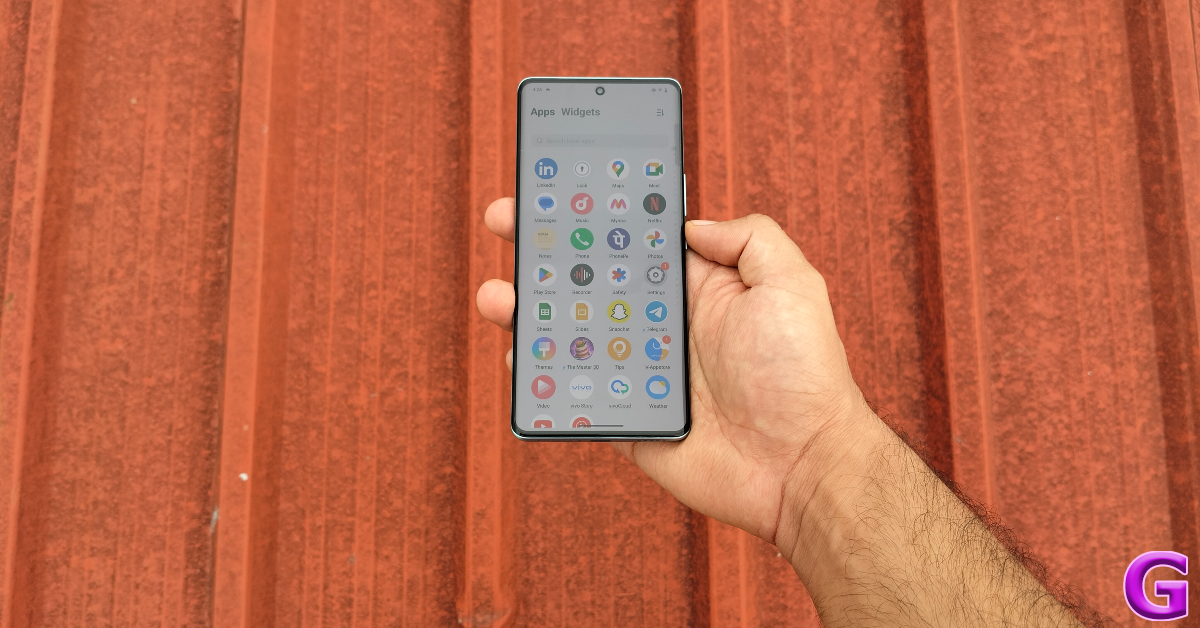
Xiaomi’s sub-brand Poco has launched its first tablet- Poco Pad 5G in the Indian market today. The Poco Tab features a 12.1-inch screen with an adaptive refresh rate of 120Hz. The device is powered by the Snapdragon 7s Gen 2 SoC. It packs a 10,000mAh battery and quad speakers that support Dolby Atmos. Additionally, the tablet supports the Poco Smart Pen and Poco Keyboard. The gadget runs on Android 14-based HyperOS.
In This Article
Poco Pad 5G Price in India, Sale Details
The Poco Pad 5G has launched in India with a starting price of Rs 23,999 for the base 8GB RAM with 128GB storage option. The price of 8GB RAM with 256GB storage is set at Rs 25,999. The tab will come in two colour options Cobalt Blue and Pistachio Green.
On August 27, starting at noon, Flipkart will begin selling the Poco Pad 5G. It was disclosed by the corporation that customers using bank cards from SBI, HDFC, and ICICI will be entitled to a discount of Rs 3,000. Poco will offer a further Rs. 1,000 student discount. The first day of the sale is the only time these deals are valid.
The Poco Pad tablet has a 12.1-inch 2.5K LCD screen with 2,560 x 1,600 pixels of resolution. The display comes with an aspect ratio of 16:10 and supports a 120Hz adaptive refresh rate. Additionally, the panel has 600 nits of peak brightness, TÜV Rheinland triple certification and Dolby Vision support. It has Corning Gorilla Glass protection as well.
Under the hood, there is a 4nm octa-core Snapdragon 7s Gen 2 SoC, Qualcomm Adreno GPU, 8GB LPDDR4x RAM, and 256GB UFS 2.2 internal storage. The storage is expandable up to 1.5TB using a microSD card. The device operates on HyperOS with Android 14 out of the box.
Also Read:boAt Wanderer Smart Kids’ Smartwatch launched in India For photos and video calling the tablet has an 8-megapixel sensor on the back and front. Moreover, the quad-speaker system on the Pad 5G supports Dolby Atmos, The 10,000mAh battery on the device comes with 33W fast charging support. The tablet weighs 571 grams and dimensions 280 x 181.85 x 7.52 mm. It supports 33W wired fast charging using a USB Type-C connection, Wi-Fi 6, and Bluetooth 5.2 connectivity.
Instagram has rolled out a new feature that allows users to add music to their profiles. This new feature can be accessed in the profile editor. Users can add a 30-second snippet of any song (as long as it is in Instagram’s library). Profile visitors can play the song by hitting the play button. The song won’t be visible to the public if your profile is private. So, let’s look at how you can add a song to your Instagram profile.
The concept of adding music to social media profiles has existed since the days of MySpace. However, in recent years, social media platforms like TikTok and Instagram have come to directly contribute to the virality of a song and influence its position in the charts. Allowing users to add songs to their profiles will not only give them a new personalisation option but also help musicians in marketing their music.
Apart from adding music to your Instagram profile, you can use up to 20 songs to create Reels. Of course, these songs can only be picked from Instagram’s music library. Both of these features are being rolled out in a phased manner. If they haven’t reached your device yet, make sure your Instagram app is updated to its latest version.
Add music to your Instagram profile
Step 1: Launch the Instagram app on your phone and tap the profile picture icon at the bottom right corner of the screen.
Step 2: Tap on Edit Profile.
Step 3: Tap on Add music to your profile.
Step 4: Hit the plus icon.
Step 5: Pick a trending song from the For You section or switch to the Browse tab to go through different themes and genres.
Step 6: If you can’t find your preferred song from the list, simply type it in the search bar at the top of the screen.
Step 7: Hit the play icon next to the song to preview it.
Step 8: Tap the song title to select it.
Step 9: Use the seek bar at the bottom to select the part of the song that you want to add to your profile. You can select a 30-second segment.
Step 10: Tap the red dots in the play bar to select the most preferred segments.
Step 11: Hit the tick icon once you’re happy with the segment you’ve selected.
Step 12: Tap the blue tick icon at the top right corner of the screen to add the song to your profile.
Frequently Asked Questions (FAQs)
How do I add a song to my Instagram profile?
Go to your Instagram profile and select Edit profile>Add music to your profile>Pick a song for your profile. Search a song or pick one from the For you/Browse tab. Use the seek bar to select a 30-second segment from the song. Hit the tick icon in the popup box followed by the tick icon at the top right corner of the page.
This is how you can add music to your Instagram profile. Once you add a song, only the visitors to your profile can view it. The social media platform also allows you to use up to 20 songs on your Reels. Which song are you going to pick for your profile? Let us know in the comments!
Apple and Kim Kardashian have teamed up to introduce a limited-edition version of the Beats Studio Pro wireless headphones in India. Being the most sophisticated headphones produced by Beats to date, the Beats Studio Pro Kim Special Edition comes in three colours. Presently available in seven colour variations, the headphones were first introduced in July 2023 in four colours.
The Beats Studio Pro Kim Special Edition is priced at Rs 37,900 in India and is available in three colours: Moon, Dune, and Earth. It should soon be available via the Apple Store online and authorised retail outlets.
The over-ear design of the headphones is identical to that of the standard model. A carrying bag matching Kim’s colours and specially woven wires incorporating her three colours are also included with the limited edition headphones. Active Noise Cancelling (ANC) and Transparency mode are included in the Over-ear Headphones, which also include unique 40mm drivers with almost no distortion—an 80% improvement over the Beats Studio 3Active. Voice-targeting microphones and three sound profiles are included for clear call performance. Additionally, there is a volume rocker and a “b” button for calling and music controls. EQ modes, power, pairing, and listening modes are all controlled via multifunction buttons.
You can use the Beats Studio Pro for up to 40 hours on a single charge and 24 hours in Transparency or ANC mode. A 10-minute charge also grants you four hours of fun. With the Beats Studio Pro, you can enjoy surround sound with Dolby Atmos and cinema-quality sound with Spatial Audio. Additionally, you may customise Spatial Audio with your iPhone and it features dynamic head-tracking. The headphones support Apple One-Touch Pairing and Google Fast Pair for Android out of the box.
Connectivity options include USB-C audio, Class 1 Wireless Bluetooth, and a 3.5mm audio connector. Four hours of playback can be obtained from a 10-minute quick charge on the gadget.
If you’re embarking on a long journey and don’t have enough charge on your Kindle, it is valid to feel concerned about its remaining battery life. If you don’t have enough time to charge the device, the next sensible step would be to turn it off entirely and only power it on when you need to use it. This will give a boost to the battery life and make sure that it lasts the trip. Here are the top 2 ways to turn off a Kindle Paperwhite properly.
Kindles aren’t designed to be turned off. This is largely because their e-ink displays aren’t power-hungry like smartphones. When a Kindle’s screen is locked, it displays a screensaver. This doesn’t use too much power. In fact, your Kindle can easily last a few weeks in standby mode. After 4-5 hours of daily use, it can still last you a week.
If you’re running out of charge, the best thing you can do is turn off the screen. However, if you’re dealing with a background software issue, there is a way to restart your Kindle. Simply press and hold the power button for 5-7 seconds and hit ‘Restart’ in the popup box.
Turn off the screen
While it is not possible to completely turn off a Kindle Paperwhite, you can conserve its battery but turning off its screen. Here’s how.
Step 1: Long-press the power button for 5-7 seconds.
Step 2: Select Screen Off from the popup box.
Typically the Kindle puts on a screensaver when you lock its display. In standby mode, the Kindle can last for weeks, but a minor battery drain still takes place. Turning off the screen completely extends the battery life by a significant factor.
Turn on Airplane Mode
Since you cannot completely turn off your Kindle Paperwhite, you can put it in Airplane Mode to extend its battery life. Here’s how.
Step 1: Unlock your Kindle Paperwhite and swipe down from the status bar.
Step 2: Tap the airplane icon.
Step 3: The Airplane Mode will turn on when the airplane tile is highlighted.
Frequently Asked Questions (FAQs)
Is it possible to completely turn off a Kindle Paperwhite?
You cannot completely turn off or shut down a Kindle Paperwhite. At best, you can enable the Airplane Mode and turn off its screen to conserve the battery life.
How do I turn off my Kindle Paperwhite’s screen?
Press and hold the power-button for 5-7 seconds and hit the Screen Off option in the popup box.
How do I factory reset my Kindle?
Go to Settings>Device Options>Reset to factory reset your Kindle.
This is how you can turn off your Kindle Paperwhite. You can also enable Power Saver from Kindle settings to extend its battery life. Can’t get your Kindle to turn on after months of inactivity? Check out these fixes. If you have any questions, let us know in the comments!
Garena Free Fire Max is a battle royale game with regular awards and tournaments to keep players interested. If you play Garena Free Fire, you should be aware of the redeem codes that are released on a daily basis. However, because the battle royale game is banned in India, players from other countries can use the Free Fire Redeem codes daily. If you’re unfamiliar with the Garena Free Fire redeem codes or don’t know how to get them, we’ve put together a step-by-step guide to help you redeem them. Check out Garena Free Fire Max Redeem Codes for 23 August 2024.
The Free Fire Max redeem codes are a great way to get free stuff. These are 12-digit codes that contain alphabets and numbers, as well as an expiration date and time. Because the Garena FF redeem codes cannot be used more than once, you should hurry to the redemption page to claim your free reward before someone else does. To get a free reward, all you have to do is go to reward.ff.garena.com/en, which is the official redemption page. Also, keep an eye on this space for daily updates on Garena Free Fire Max redemption codes and rewards.
23 August 2024: New Amazon Quiz is now available. Customers from different parts of the country are participating in the daily quiz. The quiz starts at midnight today and will be live until 11:59 PM tonight. By successfully answering every question, participants in the quiz have the chance to win wonderful rewards. A Rs 500 Amazon Pay Balance is up for grabs to participants today.
One wrong answer could eliminate you from the quiz. You have a chance to win Rs 500 Amazon Pay Balance if you successfully answer every question. Users of the app only have the opportunity to take the quiz. Check Out 23 August 2024 Amazon Quiz Answers.
Only app users are eligible to play the Amazon quiz every morning from 12 AM to 11:59 PM. The quiz is not available on the desktop. For those who are unaware of how to play the Amazon quiz, below are the steps, you can follow to take the quiz.
We have written an explainer above, you can refer to that.
When are the winners of the Amazon Quiz and contest announced or declared?
The announcement of today’s Amazon quiz winner will take place Tomorrow. As for the Special Quiz and “Spin & Win” Contest, the winners will be declared once the Quiz Contest comes to an end. To find out who the lucky winner is, you can refer to the Amazon Quiz Winners List or visit the Amazon Winners tab in the Amazon App.
How to participate in the Daily Amazon Quiz?
That is very easy, just got to the Amazon app and scroll to the bottom of the page and you will find the Quiz section. Click on it (usually it is called the fun zone) and you can enter the Amazon Today Quiz Contest.
Are there any other quizzes or contests running on Amazon daily?
Yes, there are many running on a daily basis. These range from spinning the wheel to answering the questions correctly. All are located in the Fun Zone.
What are the criteria for selecting a winner in the Daily Amazon Quiz?
When a qualified player submits correct answers to all the questions, they will automatically be entered into a lucky draw. This draw will include all participants who answered all the questions correctly. Amazon randomly selects the final winners from the pool of eligible participants who gave the right answers.
Which Types of Questions are asked within Amazon Daily Quiz?
These are very simple and straightforward questions. These are mainly related to general knowledge.
Where should I look for Amazon Daily Quiz answers?
You can bookmark this page as we will help you every day with the Amazon Daily Quiz. We bring you fresh answers every day for the Amazon Daily Quiz and Contest.
What time does Amazon Announce previous winners?
The previous winner’s name will be announced today at 12 PM (noon).
Whether making a quick video for Instagram or a professional project, selecting the right software is key. This guide will show you the best free video editors for Mac, perfect for newbies and pros alike.
We’ll walk you through the options that balance powerful features with ease of use. We will ensure you don’t waste money by investing in the wrong tool.
So, are you ready to turn your video ideas into reality without emptying your pocket? Let’s find the perfect Mac video editor for your needs and get started!
In This Article
Part 1. What Makes the Best Video Editing Software for Macbook?
Discovering the best editing software for your Mac can be tough, mainly if you’re unsure where to begin. Keep in mind a few key factors to narrow down your options. This approach helps you focus on the features that matter most.
● Skill Level
Beginners should opt for editing software with an easy interface. Learning the essentials this way is easier before advancing to harder tools.
Advanced software might be a better fit for experienced professionals. It should enhance your workflow and support your creativity, allowing you to edit efficiently.
● Editing Tools
Different software offers various editing tools. Consider what you need, such as color correction, templates, or filters.
For short videos, like those for social media, you might only need a few tools. For example, background music, a clipping tool, and transitions. Longer projects, like documentaries or podcasts, may require more features.
● Price
Budget is also an important factor. There are great free video editing options for Mac users, ideal for those with a tight budget or beginners.
Paid options vary in price. Some require a subscription. While others can be purchased outright. Decide how much you’re willing to invest. A temporary subscription might be more cost-effective if you only have a few short projects.
Next, let’s look at the best video editing software for Mac.
Part 2. What are the Best Video Editors for Mac to Create Videos in Minutes?
Let’s explore the top 5 video editors for Mac that can help you create videos in minutes. These editors offer a range of features suited to different skill levels and project types.
1. Wondershare Filmora
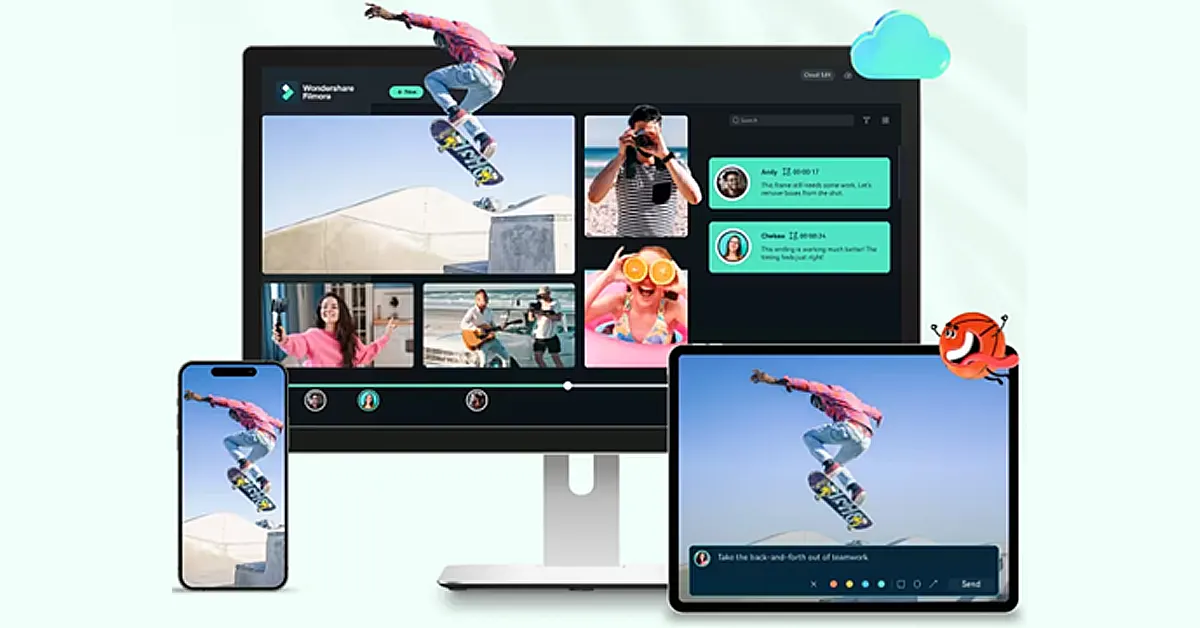
Wondershare Filmora stands out as the best video editor for Mac users. Its simple drag-and-drop interface is great for beginners.
Cool effects, smooth transitions, and background music can add more fun to your videos. The software supports 4K edits, ensuring high-quality visuals.
Features like motion tracking and keyframing allow for detailed animations. Filmora also offers a rich selection of pre-made templates, making complex video projects easier.
This Macbook movie editor is ideal for creating standout content for social media or professional use.
Pros
Continuously updated with new features and improvements, including AI techniques.
Ideal for beginners with its intuitive drag-and-drop functionality.
Enhances video quality with support for 4K resolution editing.
Offers a vast array of effects, transitions, and filters to enhance video projects.
Allows for advanced editing with motion tracking capabilities.
Provides detailed animation options through keyframing.
Packed with a variety of pre-designed templates to streamline video creation.
Offers a reasonable pricing structure compared to other professional video editing software.
Cons
The free version adds a watermark on videos, which requires a paid upgrade to remove.
It can be demanding on system resources, potentially slowing down older or less powerful computers.
Pricing
Freemium
Let’s move to the next Mac video clip editor on our list.
2. OpenShot
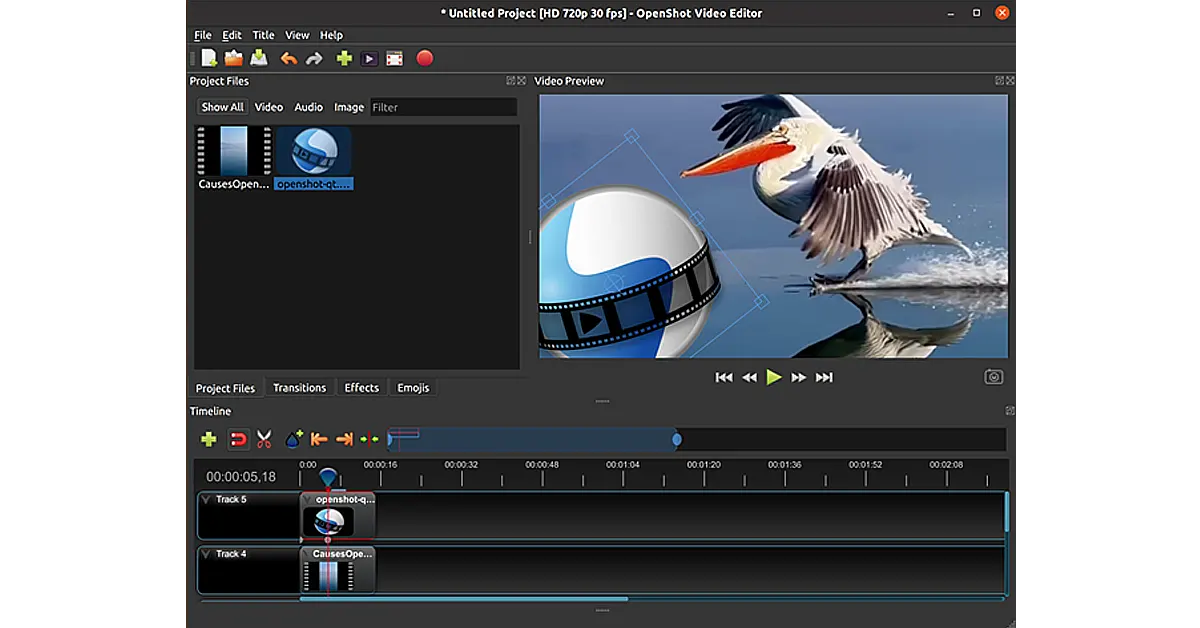
OpenShot is a free movie editing software for Mac. It is super easy to use for beginners and powerful enough for professionals. It supports many audio, video, and image formats.
Thus, the software allows users to mix media types easily. It also provides drag-and-drop editing, making video creation quick and intuitive.
Key features include unlimited tracks/layers, clip resizing, scaling, trimming, snapping, and rotation. OpenShot offers real-time previews, which help users make adjustments on the fly.
It also has various video effects to spice up your project. Plus, OpenShot supports 3D animated titles and effects, giving videos a professional touch.
The tool is cross-platform, working on Windows, Mac, and Linux.
Pros
Free and open-source, reducing costs for users.
Intuitive drag-and-drop interface simplifies video editing.
Supports a wide range of video, audio, and image formats.
Features like unlimited tracks and 3D animation enhance creative possibilities.
Cross-platform compatibility with Windows, Mac, and Linux.
Cons
May experience stability issues with larger projects.
Limited professional features compared to industry-standard software.
Occasional bugs and glitches can disrupt editing.
Limited customer support options due to its open-source nature.
Pricing
OpenShot video editor for Mac is free and open-source software.
Let’s keep up our pace and explore another video editor for Mac below.
3. Apple iMovie
It is a free video editing tool exclusive to Apple devices. Its intuitive interface makes it the best choice for beginners yet sufficiently robust for pros.
The software supports high-definition and 4K video editing. Hence, it ensures high-quality project outcomes. iMovie offers various pre-set themes and templates that simplify creating polished videos.
Its drag-and-drop interface allows for straightforward editing. Features include picture-in-picture and split-screen effects, which are great for more complex projects. Plus, iMovie integrates seamlessly with iTunes and GarageBand.
That’s why it provides extensive soundtracks and audio editing options. This software also makes it easy to share videos directly to social media or export them to other Apple devices.
Pros
User-friendly, clean interface.
Effective green-screen tool.
Specialized support for iPhone video enhancements.
High-quality movie templates.
Exceptionally straightforward to operate.
Cons
No support for media tagging.
Missing Multicam and motion tracking features.
Restricted to using only two video tracks.
Pricing
iMovie is free.
Want to know about another easy-to-use video editor for Mac? Keep reading to find out!
4. KineMaster
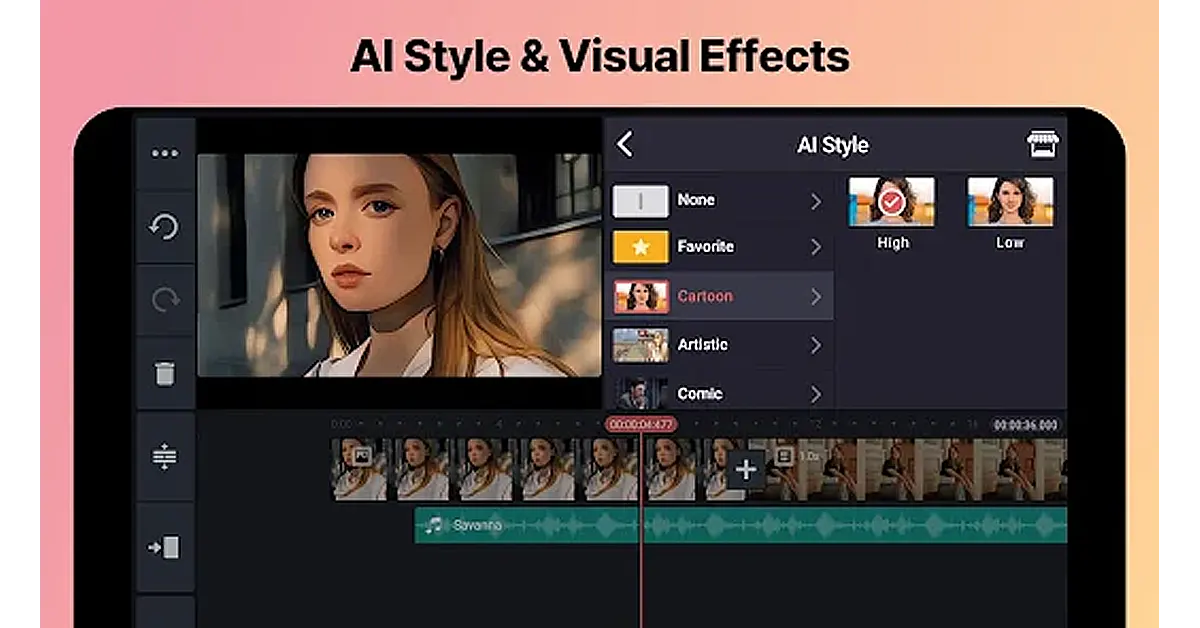
KineMaster stands out as a mobile video editing app. It is perfect for both novice and seasoned editors. It enables multi-layer editing. Thus, allowing users to blend videos, images, and text seamlessly.
The app offers real-time previews. So edits can be viewed immediately. KineMaster has various transition effects, animations, and visual enhancements to elevate video projects. Additionally, it provides detailed audio controls and filters to optimize sound directly within the app.
Users can export their final products in high-quality formats, including 4K. It is compatible with both Android and iOS. Hence, it facilitates editing on the move, making it a versatile choice for video creators.
Pros
Supports multi-layer editing for combining videos, images, and text.
Real-time previews allow instant viewing of edits.
Wide range of transition effects and animations.
Precise audio controls and filters for sound optimization.
High-quality export options, including 4K resolution.
Compatible with Android and iOS, suitable for editing on the go.
Cons
Can be complex for complete beginners.
Subscription is required for full feature access and to remove watermarks.
Some users report performance issues on lower-end devices.
Limited desktop support, primarily designed for mobile use.
Consumes significant battery life during intensive editing tasks.
Pricing
There are both free and paid versions of KineMaster. The free version has limitations. Meanwhile, the paid version costs $8.99 monthly or $44.99 annually.
If you don’t want to invest in KineMaster, worry not! We have another best video creator for Mac that you can try below.
5. Lightworks
Lightworks is a powerful video editing tool. It supports 4K, HD, and SD formats. You can trim and edit clips easily. The interface is user-friendly. It has multi-cam editing. You can add effects in real time. It offers color correction tools.
The timeline is flexible and allows drag-and-drop. Lightworks supports direct uploads to YouTube and Vimeo. It also has advanced audio tools. The software includes royalty-free music and stock videos.
You can export in different formats. It has customizable shortcuts for faster editing. Lightworks is available on Windows, Mac, and Linux. It also offers a free version with essential features.
Pros
Supports 4K video resolution.
User-friendly interface.
Real-time effects and color correction.
Multi-cam editing feature.
Direct export to YouTube and Vimeo.
Cons
Steep learning curve for beginners.
Limited features in the free version.
Some advanced tools are complex.
Requires a good system for smooth performance.
Pricing
Free version.
Paid version: $13.99 per month
Paid version: $139.99 per year.
So, there you have it! A complete rundown of the 5 best video editors for Mac. Confused about which one you should use? Let us help you in this regard.
Part 3. What Video Editing Software Features Should I Look Out For?
The next thing to consider is what features you need in a video editor for Mac. Here are some key ones:
● Filters and Overlays
Filters and overlays can make your videos look more polished. Options range from basic color fixes to advanced effects.
● Cutting and Splicing
Cutting and splicing clips are essential for trimming unwanted parts or combining different videos into one.
● Scene Transitions
Smooth scene transitions are important when working with videos shot in various locations. You can use simple fades or more elaborate effects.
● Text and Titles
Adding text and titles can improve your videos. Thus making them more engaging and professional. Simple text options and more complex animations are available.
● Exporting and Sharing
After editing, save your video in a popular format like MP4 or AVI for easy sharing.
● Stock Videos and Sounds
Some editors include a library of stock videos and sounds to save time and add a professional touch to your projects.
● Aspect Ratio
Aspect ratio refers to how wide and tall your video is. The 16:9 ratio is standard for most videos, but some editors let you adjust this to fit different screens.
Hopefully, the above features will help you choose the best Mac video clip editor. Let’s conclude our discussion.
Final Words!
Choosing the right video editor for Mac can be a game-changer, whether you’re just starting or are a seasoned pro. Free options like iMovie and OpenShot offer great tools for beginners.
While more advanced software like Wondershare Filmora provides powerful features for professionals, each editor has strengths and suits different needs.
Focus on what you require—be it basic edits or detailed animations. You can turn your creative imagination into reality without breaking the bank with the right choice.
So, explore these top video editors and find the one that best suits your style and projects. Happy editing with your new video editor for Mac!
Dreame Technology has introduced a line of robotic and smart vacuum cleaners in India. The D10 Plus Gen 2, D9 Max Gen 2, and L10 Prime robot vacuums and mop trios have powerful suction, customisable cleaning options, and excellent navigation and mapping technology. The H12 Dual wet and dry vacuum features four operating modes, an edge-to-edge cleaning brush, a high-speed brushless motor and a 6×4,000mAh battery. The Mova J10, J20, and J30 cordless stick vacuums have a brushless motor, an LED light, a multi-surface brush head, and a 97% efficiency rating.
Amazon India will start selling the Dreame vacuum robots and mops on August 22. The cost of the L10 Prime is Rs 45,999, the D10 Plus Gen 2 is Rs. 39,999, and the D9 Max Gen 2 is Rs 29,999. The cost of the H12 Dual Wet and Dry Vacuum is Rs 36,999. The Mova J10, J20, and J30 cordless stick vacuums are available for 7,999, 10,999, and 13,999 rupees, respectively.
In This Article
Robot Vacuum and Mop: L10 Prime, D10 Plus Gen 2 and Dreame D9 Max Gen 2
L10 Prime
Built for ease of use and effective cleaning, the L10 Prime is a self-cleaning robot vacuum and mop. Its two rotary mop pads ensure a silent, clean floor by rotating at 180 RPM while applying downward pressure. To keep floors and rugs dry, the mop is lifted up to 7mm upon returning to the base station. It extracts hair, dust, and debris from carpets, hard floors, and crevices using a 4,000Pa suction and a bristleless rubber brush. To achieve effective cleaning, the vacuum takes advantage of LiDAR navigation and ultrasonic carpet identification to generate 3D floor maps. Users may adjust the boundaries and cleaning schedule with the Dreamehome app.
With a high-performance motor, 6,000Pa suction power, and a unique floating rubber brush for pet hair removal, the D10 Plus Gen 2 is an Auto-Empty Robot Vacuum and Mop. It is a 2-in-1 dual-action system with Smart Pathfinder technology for full coverage and adjustable moisture levels. Cleaning habits are made more convenient and easy with the DreameApp and voice control sync with Alexa, Google, and Siri. The 4L dust bag provides up to 90 days of continuous cleaning.
Dreame D9 Max Gen 2
Using Smart Pathfinder technology and high-precision motion sensors, the Dreame D9 Max Gen 2 is an entry-level robot vacuum that can sweep and mop at the same time. Four adjustable levels allow for customised cleaning pressure, and it boasts a strong 6,000Pa Vormax Suction. The Carpet Boost function and rubber floating brush keep hair from getting stuck in the vacuum, which improves the efficiency and durability of carpet cleaning.
H12 Dual: Wet and Dry Vacuum
The H12 Dual is a potent 4-in-1 cleaning equipment that cleans vehicles, couches, hard floors, and curtains among other surfaces with ease. Its sophisticated dirt and mess detecting systems and high-speed brushless motor enable it to wipe the floor 520 times per minute, while its smart sensor modifies the settings for thorough cleaning. Hard-to-reach areas are cleaned with the aid of the 900mL clean water tank and edge-to-edge cleaning brush. The H12 Dual has multiple operating modes that may be switched between, including as Standard and Turbo Modes for handheld vacuuming, Auto Mode for complete cleaning, and Suction Mode for liquid removal. The brush goes through a 30-minute hot air drying process at 55°C after self-cleaning in order to get rid of mould, mildew, and bad odours.
With its long-lasting 6×4,000mAh battery pack, the H12 Dual may be used for wet and dry cleaning for more than 30 minutes, and for handheld vacuuming for 60 minutes. Real-time information on cleaning optimisation is provided via its LED display and clever speech prompts.
A 450W brushless motor powers the robust Mova J30 vacuum, which can clean for up to 60 minutes. Hard floor stains and dry particles can be effectively removed with its simultaneous mop and vacuum function. Accessing low areas and tight corners is made simple by its foldable tube. The interchangeable nozzles provide specialised tools for different jobs, while the multi-surface brush brightens areas that are shadowed. 97% efficiency is attained by the multi-layered filtration system, which makes it a useful instrument for a variety of cleaning jobs.
The Mova J20 vacuum cleaner comes with a 250W brushless motor, a 97% efficiency filtration system, and LED lights for dim spaces. Its folding tube design makes it easy to clean hard-to-reach areas on carpeted and wooden floors.
With its 150W brushless motor, the Mova J10 can clean for up to 35 minutes. It is perfect for low-angle areas and corners because of its folding tube, wide combination tool, and crevice nozzle. LED light is used by the lighting multi-surface brush head to provide effective cleaning. With an efficiency of up to 97%, the advanced multi-layer filtration system collects fine dust and particles.
The boAt Wanderer Smart Kids’ Smartwatch features a 1.4-inch Full Touch HD display with a 2MP front-facing camera.
Parental controls: Study Mode, Remote Camera, Voice Monitoring, Unknown Call Restriction, Auto Answer, and Auto Answer.
Supports HD video, voice calls, and real-time text/voice messaging.
It has a Geo-fencing feature for virtual limits and immediate notifications.
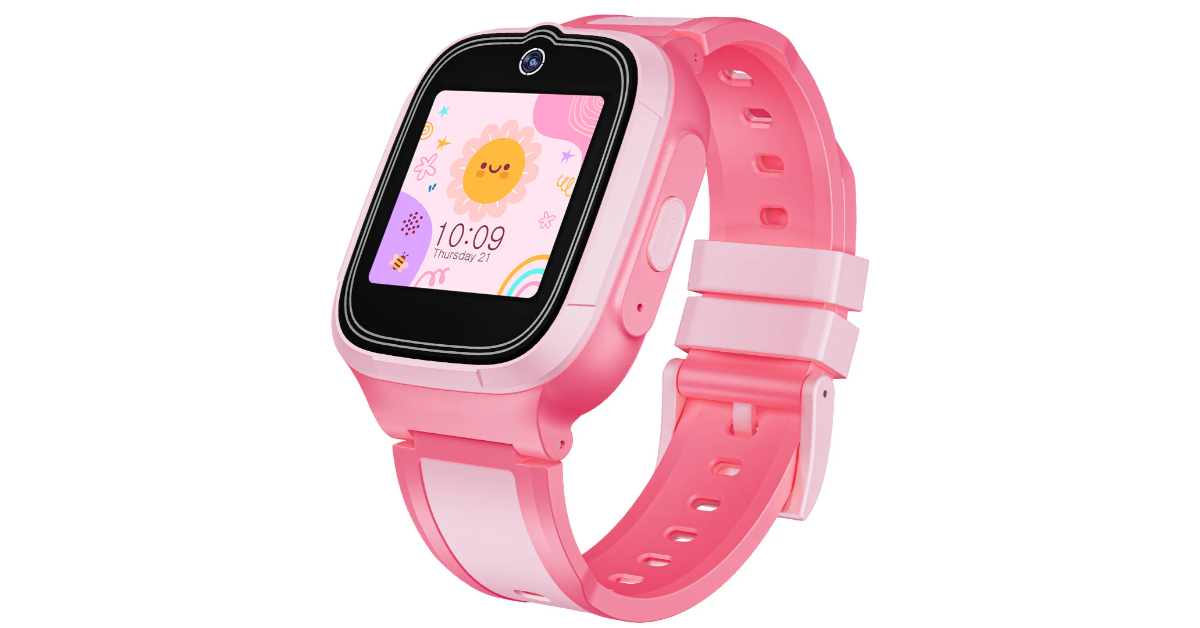
BoAt has introduced the boAt Wanderer Smart Smartwatch, a 4G wearable designed for child safety. It features real-time GPS tracking, geo-fencing, voice and video calling, and SOS alerts. This innovative tool ensures parental peace of mind.
The Wanderer Smart is a fashionable and durable smartwatch featuring a 1.4-inch Full Touch HD display, a 2MP front-facing camera, and step tracking. It comes in Candy Pink, Sky Blue, and Sunshine Yellow, with an IP68 water resistance rating and a 2-day battery life. It also includes Power Saving Mode for prolonged use.
The Wanderer Smart has complete parental controls to manage your child’s device usage. It has Study Mode to reduce distractions during school hours, Remote Camera and Voice Monitoring to monitor the surroundings, Unknown Call Restriction and Auto Answer for safety, and Auto Answer for continuous call responding.
The device has GPS, Wi-Fi, and 4G connectivity, so parents can track their child’s location in real-time. It also features a geo-fencing feature, which creates virtual limits around important locations and sends notifications if the child leaves these zones. In an emergency, the SOS button sends immediate notifications, enabling quick action.
The Wanderer Smart is a smartwatch that supports HD video and voice calls, as well as real-time text and voice messaging, allowing parents to stay in touch with their children both indoors and outside.
The boAt Wanderer Smart Kids’ Smartwatch is available in three colours: Candy Pink, Sunshine Yellow, and Sky Blue, with a limited-time deal ending on August 22nd. It is available at an introductory price of Rs 5,499. The price will increase to Rs 5,999 from tomorrow. Available online from boAt-lifestyle.com, Flipkart, Amazon, Reliance Digital, and Croma.
Acer Nitro V 16 company’s first AI Gaming Laptop launched in India.
The PC is Equipped with AMD Ryzen 7 8845HS series processor and NVIDIA RTX 4060 GPU.
It comes integrated with Windows 11’s Copilot.
The machine features a 16-inch display with a 165Hz refresh rate.
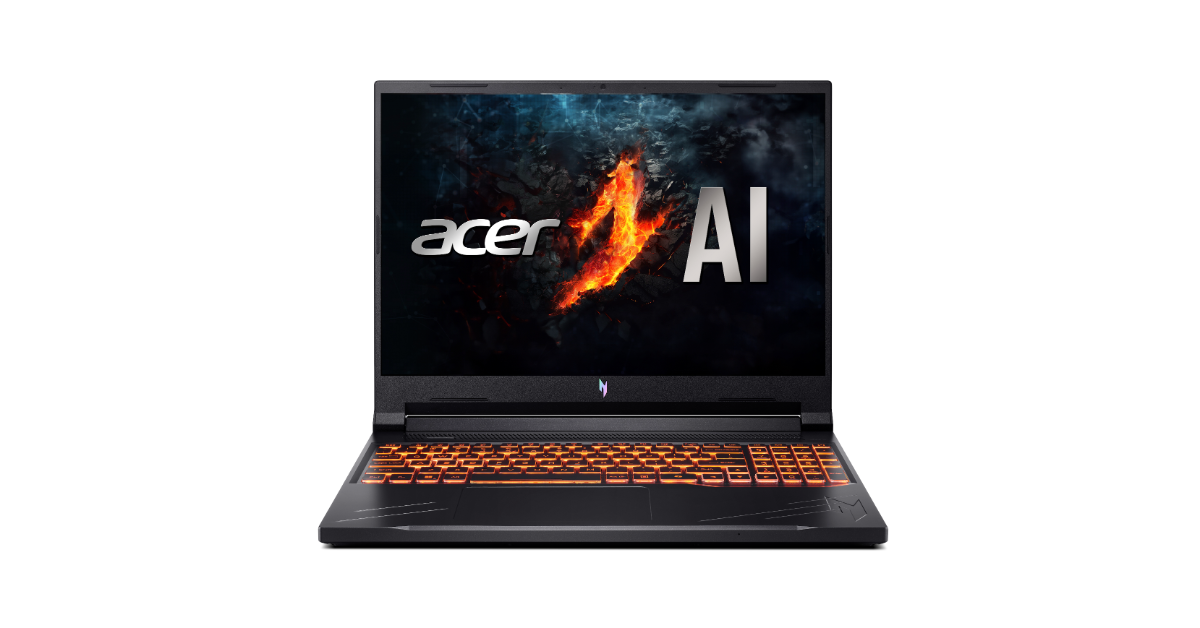
Acer has released its first AI gaming laptop, the Nitro V 16, in India. The gadget is equipped with an AMD Ryzen 7 8845HS series processor and an NVIDIA RTX 4060 GPU. The machine is integrated with Windows 11’s Copilot. It also has a 16-inch display with a 165Hz refresh rate.
The Acer Nitro V 16 is the company’s first fully AI gaming laptop. With AMD Ryzen R7 8845HS Series processors and NVIDIA GeForce 4060 series AI graphics, 16GB DDR5 RAM and a 1TB SSD with Windows 11 integrated, this potent gadget is packed with features.
Its 16-inch screen has 100% sRGB colour accuracy, a high brightness screen with a refresh rate of 165 Hz, and a vibrant 16:10 WQXGA resolution. It is a game-changer in gaming and technology because it also has sophisticated AI interactions and intelligent battery management.
Copilot is an AI-powered assistant that improves efficiency and creativity, and it comes with the Nitro V 16 laptop. For crystal-clear audio during video calls and games, Purified Voice 2.0 eliminates background noise. Users may easily configure camera and microphone sets thanks to the Acer Quick Panel, which also simplifies controlling Purified View and PurifiedVoice AI settings. With its great entertainment value, gaming capabilities, and affordable gaming experience, this laptop is appropriate for a broad spectrum of customers, including multimedia aficionados, college students, and mainstream gamers.
The laptop’s quad-intake, quad-exhaust, dual-fan cooling technology provides the best possible performance for the CPU and GPU. Via vents, it releases heat while drawing cold air from the keyboard and button cover. Using the NitroSense key, users may control the cooling system and choose between Eco, Quiet, Balance, and Performance settings. Additionally, it provides seamless connectivity via USB 4 40Gbps, Gigabit Ethernet, and Wi-Fi 6E.
With high-impedance headphones, DTS Ultra Audio, and a MUX switch that makes switching between integrated and discrete GPUs simple, the Nitro V 16 laptop provides an immersive experience.
The AI-powered Acer Nitro V 16 is priced at Rs 1,09,999 and can be purchased exclusively at Acer outlets.
Garena Free Fire Max is a battle royale game with regular awards and tournaments to keep players interested. If you play Garena Free Fire, you should be aware of the redeem codes that are released on a daily basis. However, because the battle royale game is banned in India, players from other countries can use the Free Fire Redeem codes daily. If you’re unfamiliar with the Garena Free Fire redeem codes or don’t know how to get them, we’ve put together a step-by-step guide to help you redeem them. Check out Garena Free Fire Max Redeem Codes for 22 August 2024.
The Free Fire Max redeem codes are a great way to get free stuff. These are 12-digit codes that contain alphabets and numbers, as well as an expiration date and time. Because the Garena FF redeem codes cannot be used more than once, you should hurry to the redemption page to claim your free reward before someone else does. To get a free reward, all you have to do is go to reward.ff.garena.com/en, which is the official redemption page. Also, keep an eye on this space for daily updates on Garena Free Fire Max redemption codes and rewards.
22 August 2024: New Amazon Quiz is now available. Customers from different parts of the country are participating in the daily quiz. The quiz starts at midnight today and will be live until 11:59 PM tonight. By successfully answering every question, participants in the quiz have the chance to win wonderful rewards. A Rs 500 Amazon Pay Balance is up for grabs to participants today.
One wrong answer could eliminate you from the quiz. You have a chance to win Rs 500 Amazon Pay Balance if you successfully answer every question. Users of the app only have the opportunity to take the quiz. Check Out 22 August 2024 Amazon Quiz Answers.
Only app users are eligible to play the Amazon quiz every morning from 12 AM to 11:59 PM. The quiz is not available on the desktop. For those who are unaware of how to play the Amazon quiz, below are the steps, you can follow to take the quiz.
We have written an explainer above, you can refer to that.
When are the winners of the Amazon Quiz and contest announced or declared?
The announcement of today’s Amazon quiz winner will take place Tomorrow. As for the Special Quiz and “Spin & Win” Contest, the winners will be declared once the Quiz Contest comes to an end. To find out who the lucky winner is, you can refer to the Amazon Quiz Winners List or visit the Amazon Winners tab in the Amazon App.
How to participate in the Daily Amazon Quiz?
That is very easy, just got to the Amazon app and scroll to the bottom of the page and you will find the Quiz section. Click on it (usually it is called the fun zone) and you can enter the Amazon Today Quiz Contest.
Are there any other quizzes or contests running on Amazon daily?
Yes, there are many running on a daily basis. These range from spinning the wheel to answering the questions correctly. All are located in the Fun Zone.
What are the criteria for selecting a winner in the Daily Amazon Quiz?
When a qualified player submits correct answers to all the questions, they will automatically be entered into a lucky draw. This draw will include all participants who answered all the questions correctly. Amazon randomly selects the final winners from the pool of eligible participants who gave the right answers.
Which Types of Questions are asked within Amazon Daily Quiz?
These are very simple and straightforward questions. These are mainly related to general knowledge.
Where should I look for Amazon Daily Quiz answers?
You can bookmark this page as we will help you every day with the Amazon Daily Quiz. We bring you fresh answers every day for the Amazon Daily Quiz and Contest.
What time does Amazon Announce previous winners?
The previous winner’s name will be announced today at 12 PM (noon).
Before you begin posting on Facebook, it is crucial to understand how its privacy settings work. By default, the things you post on Facebook are public and can be viewed by anyone on the platform. If someone has a link to your post, they can view it without needing to create a Facebook profile. You can choose to make your Facebook profile private if you only want your friends to see what you post. Check out these two quick ways to do that.
There are two ways you can go about ensuring your privacy on Facebook. Locking your profile is the simplest way to make sure that no one but your friends can view your posts, photos, videos, and other content on your profile. When someone who isn’t your friend on Facebook visits your profile, they will see a blank timeline. While your profile picture will be visible to the user, they will not be able to maximise it.
Using ‘Audience settings’ in the Privacy Centre, you can further limit who gets access to the content on your profile. You can create custom lists to limit your audience to a few chosen friends. You can also choose to keep information like your email, birth date, friend list, and more hidden from everyone else.
Make your Facebook profile private using the mobile app
Step 1:Launch the Facebook app on your smartphone.
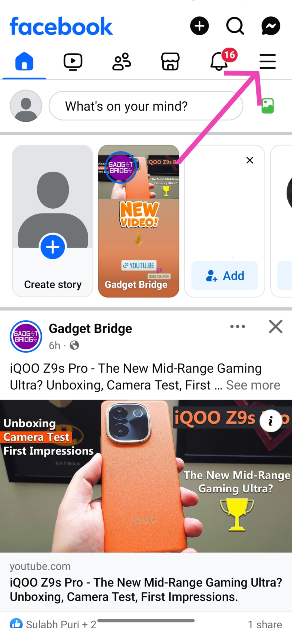
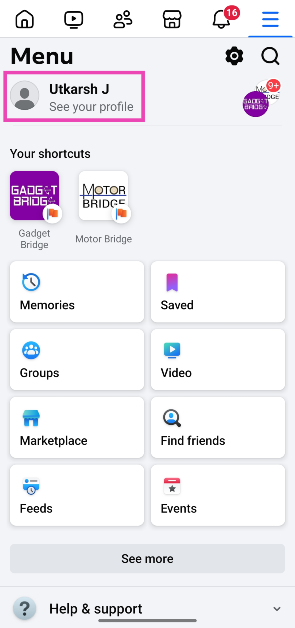
Step 2: Hit the hamburger menu icon at the top right corner of the screen.
Step 3: Tap on your profile name.
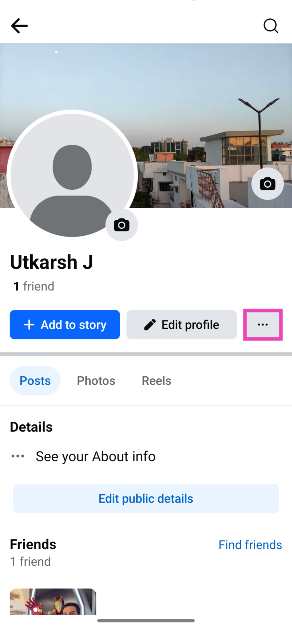
Step 4: Hit the ellipses next to Edit profile.
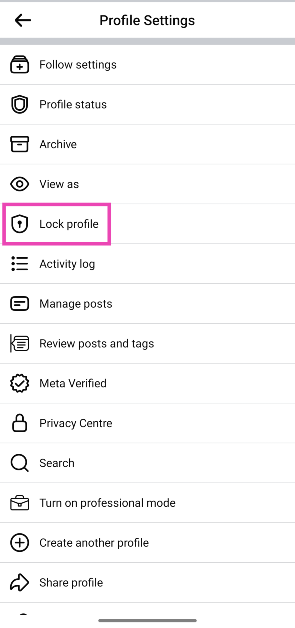
Step 5: Tap on Lock profile.
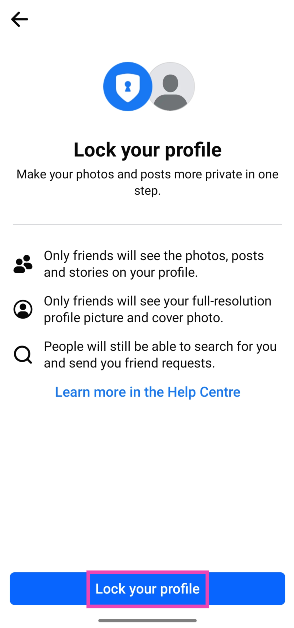
Step 6: Select Lock your profile.
Make your Facebook profile private on PC
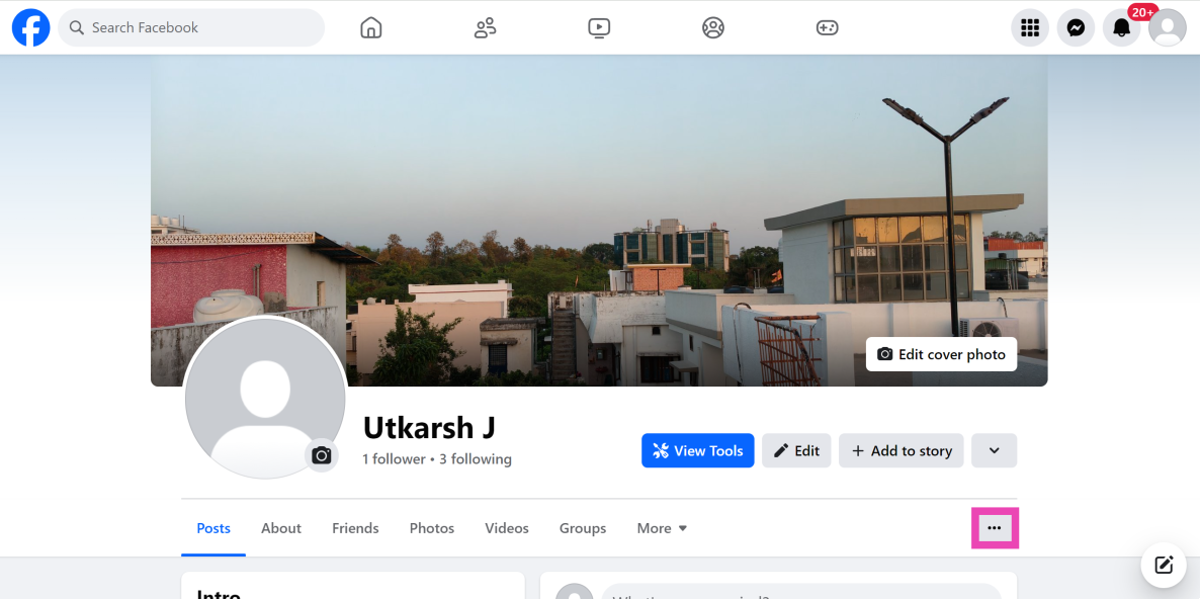
Step 1:Open Facebook on your PC’s web browser.
Step 2: Hit the profile picture icon next to the status bar.
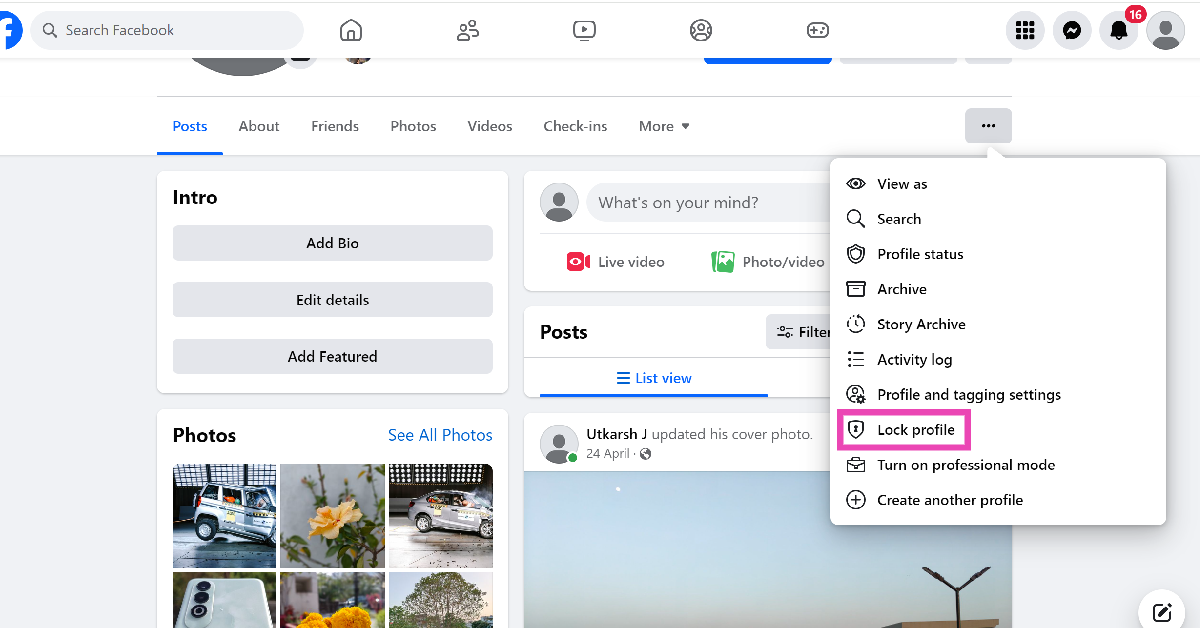
Step 3: Tap the ellipses next to More.
Step 4: Click on Lock profile.
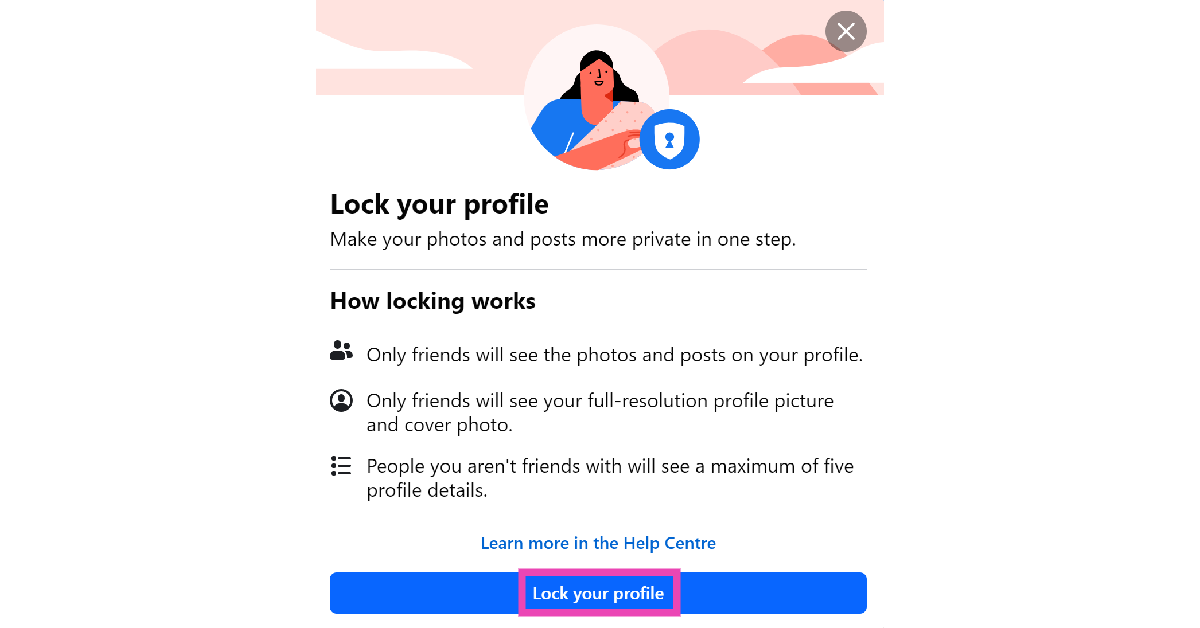
Step 5: Select Lock your profile.
Frequently Asked Questions (FAQs)
How do I lock my Facebook profile?
Go to your Facebook profile on the mobile app or PC, hit the ellipses near ‘Edit profile’, select ‘Lock profile’, then click on ‘Lock your profile’.
What does locking a Facebook profile do?
Locking your Facebook profile makes it private and limits the visibility of your posts, videos, photos, and other content to the people in your friend list. People who are not your friends on Facebook will not be able to view your posts.
This is how you can make your Facebook profile private on PC and mobile. Once your profile is private, only the people in your friend list will be able to view your posts. While you’re here, check out how you can remove your phone number from Facebook. If you have any other questions, let us know in the comments!
The smartphone features a 6.5-inch phone with 120Hz adaptive refresh rate.
Qualcomm Snapdragon 6s Gen 3 SoC powers the device.
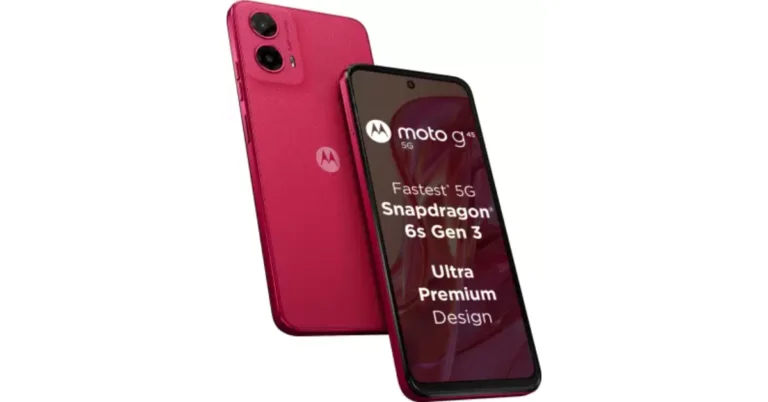
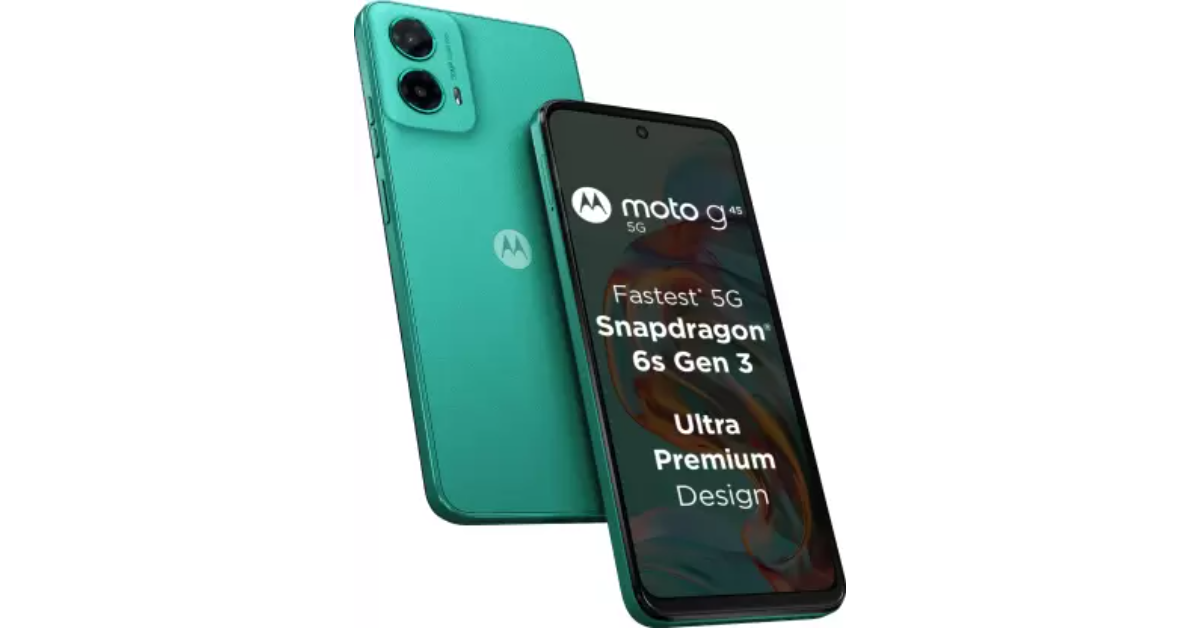
Lenovo-owned brand, Motorola, launched the Moto G45 5G in India today. The 6.5-inch phone has a 120Hz adaptive refresh rate. The new smartphone is powered by Qualcomm Snapdragon 6s Gen 3 SoC and runs on Android 14. The handset features a 50-megapixel dual rear camera setup. In addition to this, the phone packs a 5,000mAh battery and is IP52 rated.
In This Article
Moto G45 5G price in India, sale details
The price of Moto G45 5G in India is set at Rs 10,999 for the 4GB RAM with 128GB storage option. The price of the 8GB RAM with 128GB storage will be available at Rs 12,999. The device will be offered in two colour options: Brilliant Blue, Brilliant Green, and Viva Magenta.
The device is scheduled to go on sale from August 28 at noon via Flipkart, and Motorola.in and select retail stores.
Customers who purchase the Moto G45 5G with an Axis Bank credit card, an IDFC First bank credit card, or credit card EMI transactions are eligible for an instant bank discount of Rs 1,000. This promotion is good through September 10th. Purchasers can also receive offers depending on Reliance Jio. Benefits from Reliance Jio are also available to purchasers.
Moto G45 5G features a 6.5-inch HD+ LCD display with 720 x 1,600 pixels of resolution and a 20:9 aspect ratio. The screen offers a 120Hz adaptive refresh rate, 240Hz touch sampling rate and 269ppi pixel density. The screen has Gorilla Glass 3 protection as well. Under the hood, there is a Snapdragon 6s Gen 3 SoC with up to 8GB LPDDR4x RAM (RAM can be virtually expanded up to 16GB) and 128GB of UFS 2.2 internal storage.
For the photos and video, the device includes a dual rear camera setup that consists of a 50-megapixel primary sensor with f/1.8 aperture and a 2-megapixel macro lens with f/2.4 aperture. For selfies, it has a 16-megapixel front-facing camera.
For phone unlocking, there is a fingerprint sensor installed on the side and a face unlock feature. The handset comes with stereo speakers with Dolby Atmos support. The Motorola smartphone packs a 5,000mAh battery that supports 20W wired fast charging.
iQOO TWS 1e features AI-based noise cancellation of up to 30dB for clear calls.
IP54-certified, offers up to 42 hours of battery life.
Intelligent active noise cancellation of up to 30dB.
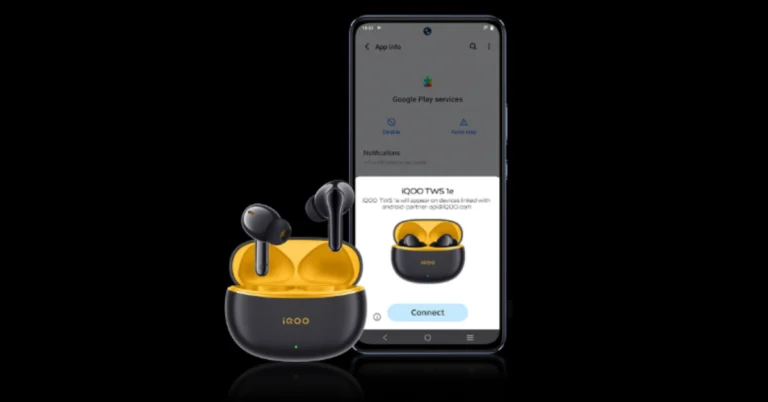
Along with the iQOO Z9s series, the company has also introduced its first-ever iQOO TWS 1e. These in-ear earbuds feature an IP54-certified build, offering up to 42 hours of battery life. The earbuds also offer intelligent active noise cancellation of up to 30dB.
In This Article
iQOO TWS 1e price in India, sale details
The iQOO TWS 1e has been introduced in India with a price tag of Rs 1,899. The device is offered in a lone vibrant Flame Yellow colour. It will be available for sale on Amazon.in starting August 23 at 12 PM.
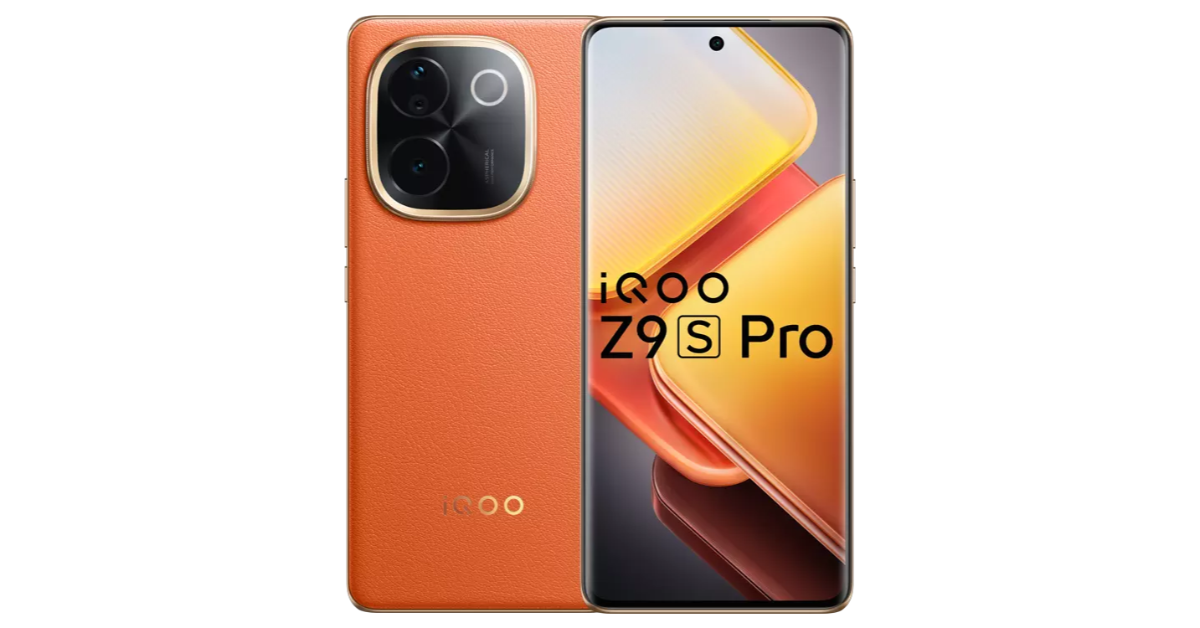
On the other hand, the iQOO Z9s Pro 5G has been launched in India with a price tag of Rs 24,999 for the 8GB RAM with 128GB storage option. The 8Gb RAM with 256GB storage is priced at Rs 26,999. Lastly, the 12GB RAM with 256GB storage will be available at Rs 28,999. The device comes in two colour variants: Flamboyant Orange and Luxe Marble.
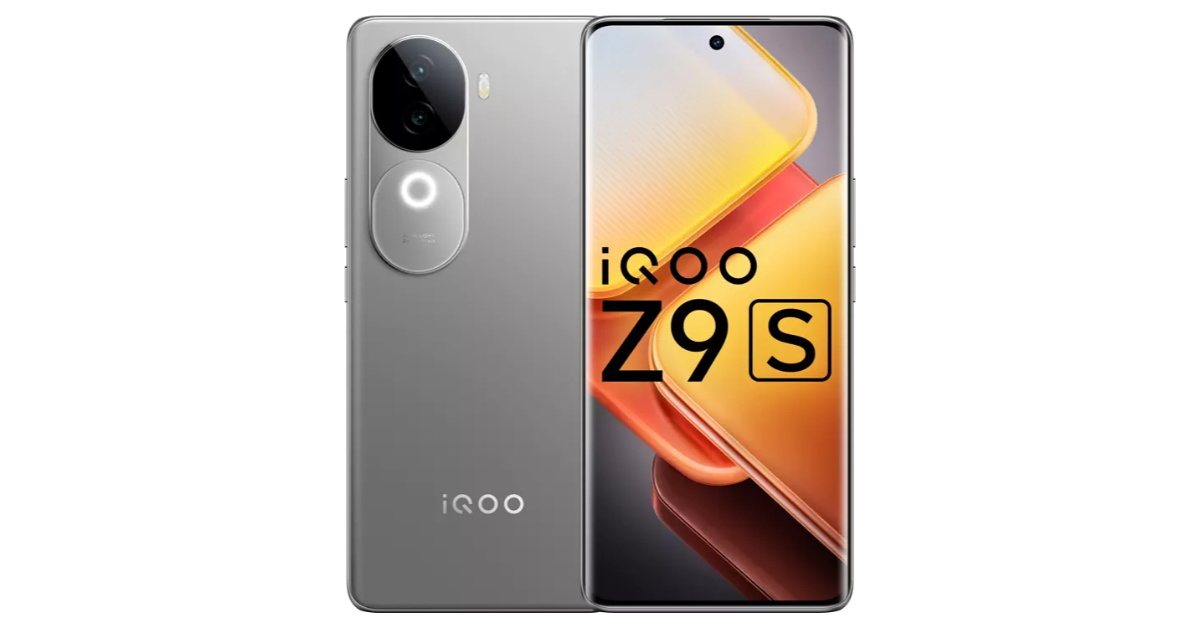
iQOO Z9s 5G comes with a starting price of Rs 19,999 for the 8GB RAM with 128GB storage. The price of the 8GB RAM with 256GB storage and 12GB RAM with 256GB storage option is set at Rs 21,999 and Rs 23,999 respectively. The handset will be available in Onyx Green and Titanium Matte colour options.
iQOO TWS 1e specifications
The iQOO TWS 1e earbuds feature an 11mm high-resolution speaker driver that has been optimised by the Golden Ear Acoustics Team and DeepX 3.0 Stereo Sound Effects. provides Intelligent Active Noise Cancellation up to 30dB with a mix of AI for clearer calls. This efficiently blocks out external noise, giving much-needed tranquillity and greatly improving speech quality during calls. It also comes with a Transparency Mode for easy local sound detection.
The iQOO TWS 1e is a must-have for gamers thanks to its Monster Sound feature, which provides exhilarating sound effects that complement gaming action for an immersive experience.
It guarantees continuous listening all day long with a 42-hour battery life, made possible by power-efficient wireless processors, and a 10-minute fast charge that allows for 3-hours of music playback. With its IP54 rating, the earphones are shielded from perspiration and dust.
The iQOO TWS 1e’s useful features include Dual Device Connection via Bluetooth 5.3, smart features like Google Fast Pair, Google Assistant, Wearing Detection, Find My Earphones, and easy play/pause touch controls for calls, music, and noise cancellation.
The production quality of even the most basic YouTube videos has grown significantly in the last few years. Creators are very particular about the soundtrack they use for their videos and the manner in which it is edited to draw out the desired response. Since most music is copyrighted, creators rely on royalty-free resources to get access to music that won’t get their videos copystriked. If you come across a catchy song in a video, it can be tricky to identify it right away. So here are the top 3 ways to identify songs in YouTube videos.
The standard song identification techniques work for YouTube videos as well. These include asking your phone’s voice assistant (Siri, Bixby, or Google Assistant) to listen to a part of the song and ID it or going the third-party route by using apps like SoundHound and Shazam. If you can make out the lyrics to the song, you can Google them to find the song title and artist.
If these methods don’t work, you can always seek the help of other viewers in the comments. If that leads to a dead end, try contacting the creator for help. You can also perform a search for the video on Reddit and see if anyone else found the answer to the query before you.
Check the video description
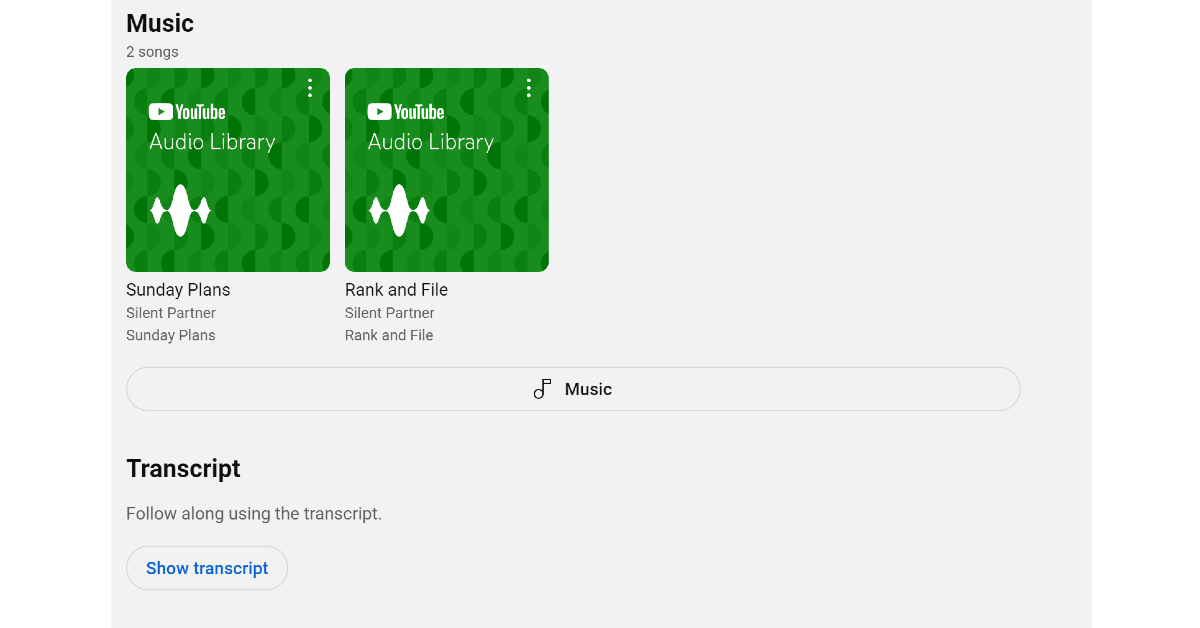
The easiest way to find the song played in the background of the YouTube video is by checking the video description. The description is where creators often post the credits to the music they use in the video. If the music is copyrighted, the description may contain a link to its source. You can also find the royalty-free music from YouTube Audio Libray used in the video by checking its description. The ‘music’ section is typically at the end of the video description.
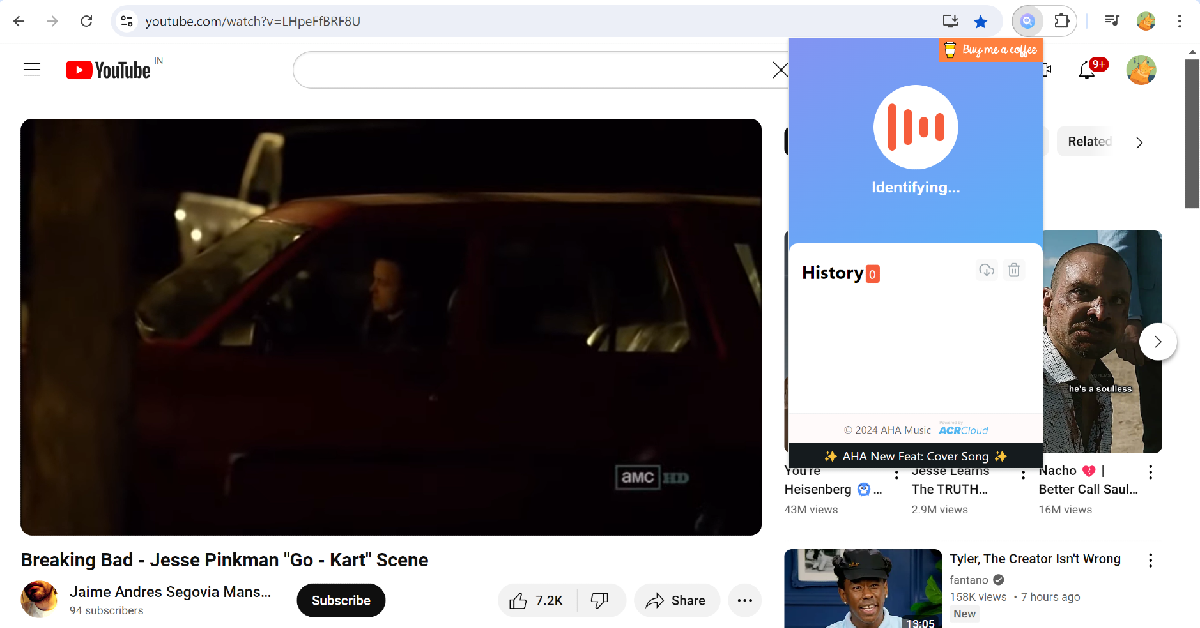
Step 2:Play the YouTube video which contains the song you want to identify.
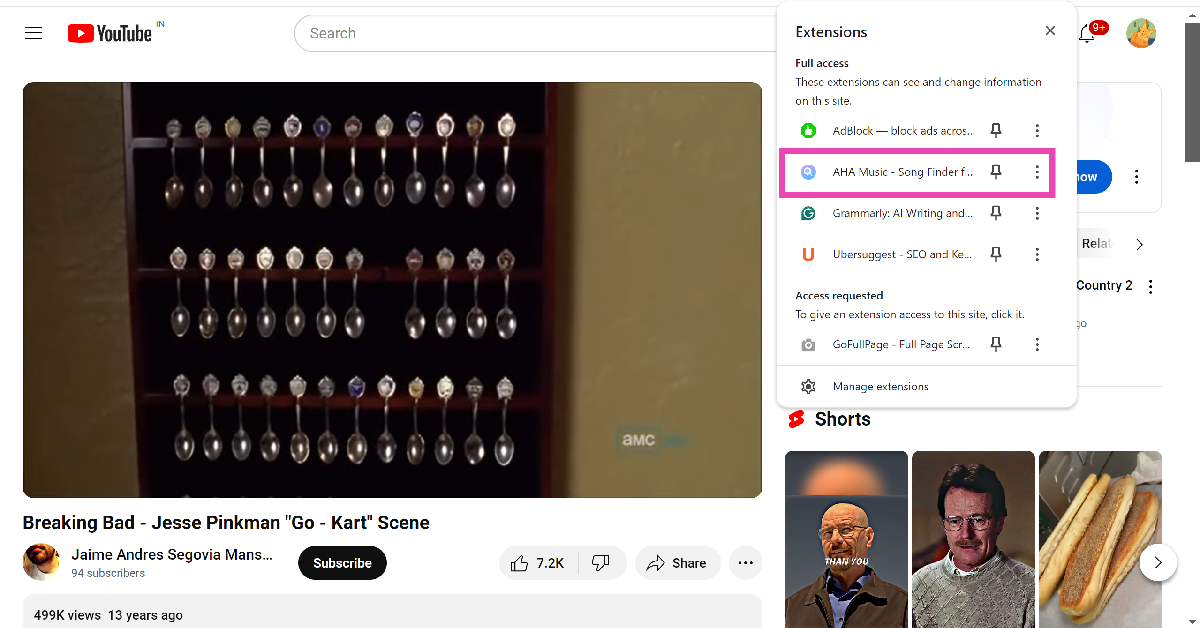
Step 3: Hit the puzzle icon next to the address bar and click on the AHA Music extension.
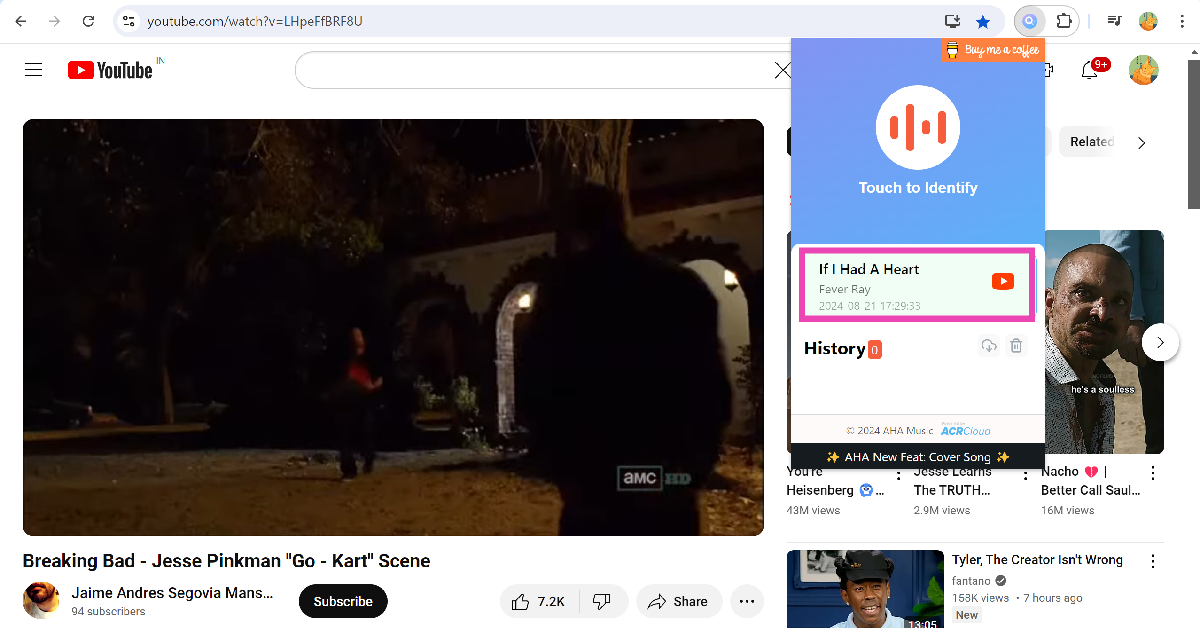
Step 4:Browse to the part of the video with the song in the background. AHA Music will take some time to identify the song.
Step 5: Once the song has been identified, its title and artist will appear in the extension’s box. Click on the song to view its streaming options.
Identify the song using Google Assistant
If you can’t find the name of the song in the video description, use a third-party app like Shazam and SoundHound to identify it. You can even use Google Assistant for this task.
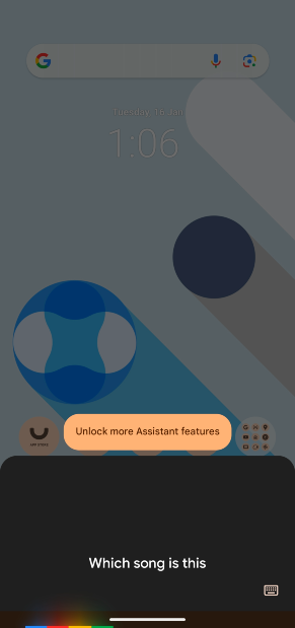
Step 1: Say “Hey Google, which song is this?”
Step 2:Play the part of the YouTube video where the song is used.
Step 3: Google will produce the likely matches.
You can also use this feature by going to the Google app and selecting ‘Identify Song By Listening’.
Frequently Asked Questions (FAQs)
How do I identify songs in YouTube videos?
Check the video description or use services like AHA Music, Google Assistant, Shazam, and SoundHound to identify the song in the background of a music video.
Where can I find royalty-free songs to use as the background music for my YouTube videos?
YouTube Audio Library is the best source of royalty-free songs for your YouTube videos. You can also use resources like Storyblocks, Free Music Archive, and Audiojungle for royalty-free music.
Which is the best website to find song lyrics?
Genius, Musixmatch, and AZLyrics are the best websites to find song lyrics.
These are the top 3 ways to identify songs in YouTube videos. Generally, creators give credit to the artists they use for their background score. If that’s not the case, these three methods will come in very handy. If you know any tricks to identify songs from videos, let us know in the comments!
User comments are an integral part of public discourse on YouTube. If you notice that a video or ‘Short’ doesn’t allow user comments it is likely because the creator has disabled them on purpose. Videos that are made for kids do not support comments either. It is pretty rare for comments to be disabled throughout the app, but it is known to happen. So, let’s take a look at the top 7 ways to fix the ‘can’t view comments on YouTube Shorts’ issue.
If you’re unable to view or access comments on YouTube Shorts, it could be due to one of the following reasons.
The creator has disabled comments on the video
The video is made for kids
Restricted Mode is enabled on your YouTube app
YouTube’s app cache is corrupted
Your internet connection is faulty
You are using an old, bug-ridden version of YouTube
Disable Restricted Mode
Turning on Restricted Mode in the YouTube app hides mature videos and disables comments across the app. This setting only applies to your device and not your account. Here’s how you can turn it off.
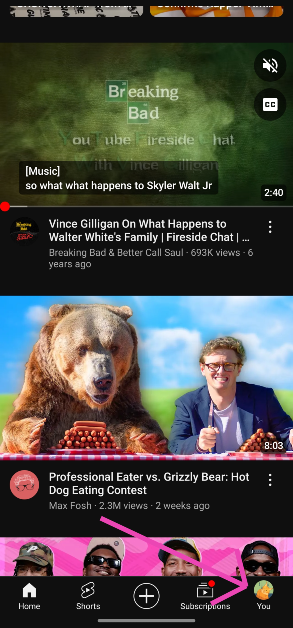
Step 1: Launch the YouTube app on your phone and tap your profile picture at the bottom right corner of the screen.
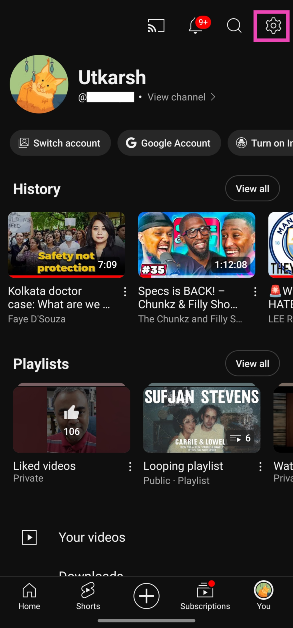
Step 2: Hit the cog wheel icon at the top right corner of the screen.
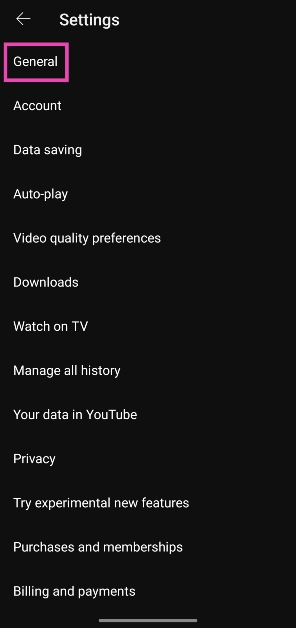
Step 3: Tap on General.
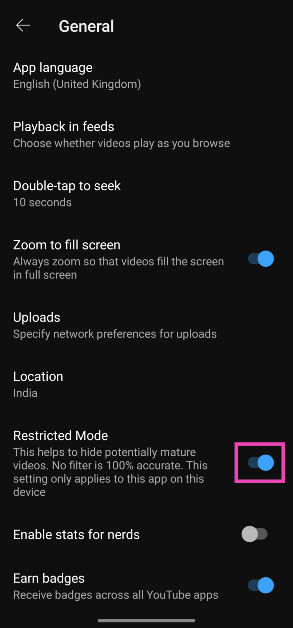
Step 4: Scroll down and turn off the toggle switch for Restricted Mode.
Clear YouTube’s cache
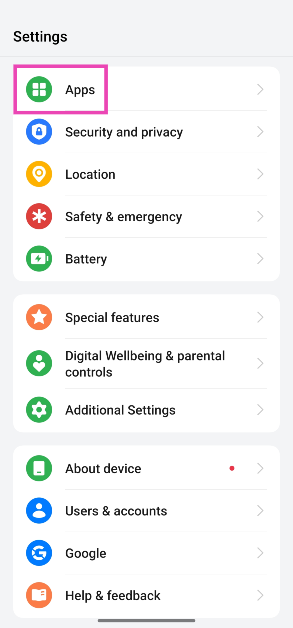
Step 1: Go to Settings and select Apps.
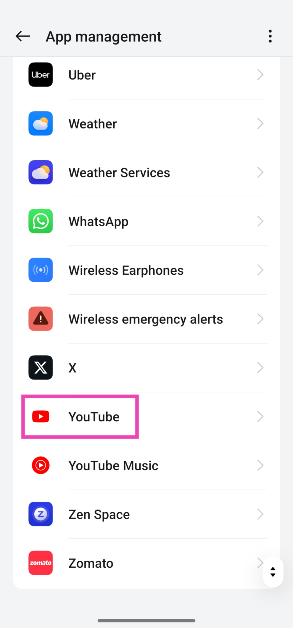
Step 2: Tap on YouTube.
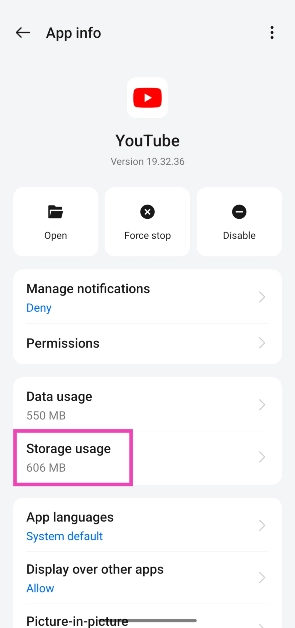
Step 3: Select Storage.
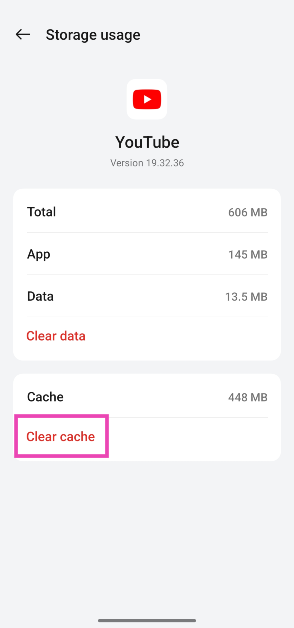
Step 4: Tap on Clear cache.
Update the YouTube app
If you’re using an old version of YouTube on your smartphone, chances are that it isn’t showing comments due to a bug-related issue. This can be fixed by simply updating the YouTube app. Go to the Google Play Store, search for YouTube, open the app’s page, and hit ‘Update’. Similarly, if you first encountered the problem after updating the app, uninstall the new update and reinstall it from the app’s page on the Play Store.
Check if the content is age-appropriate
Content that’s made for kids does not have a comment section on YouTube. This includes YouTube Shorts. If you’re unable to view comments on a Shorts video from a channel that exclusively makes content for children, it is by design.
Check if comments are disabled for the video
Creators on YouTube have the option to turn off comments for their videos and shorts. If you notice that the video says ‘Comments are disabled’, there is nothing much you can do. If the comment section is disabled due to Restricted Mode, it will explicitly say so. To make sure this is not the case, open a random YouTube video or short and check if you’re able to view the comments. If you can access the comments on all videos but one, it is likely that the creator has disabled them on that particular piece of content.
Use the web browser on your phone
If a bug on the YouTube app is keeping you from viewing comments in Shorts, switch to the web browser. Launch Chrome on your smartphone, go to YouTube, and switch to the Shorts tab. The viewing experience on a web browser is identical to the YouTube app. You can easily browse Shorts by swiping up and down. Tapping the conversation cloud icon will reveal the comments.
Disable browser extensions
If you’re unable to see YouTube Shorts comments on your PC, try disabling any YouTube-related extensions on your web browser. The usual suspects in this case are video downloading and ad-blocking extensions. Click the puzzle piece icon next to the address bar on Google Chrome, hit the ellipses next to the extension, and select ‘Remove from Chrome’.
Frequently Asked Questions (FAQs)
Why can’t I view comments on YouTube?
YouTube restricts comments in videos made for kids. Creators on YouTube are allowed to disable comments on their videos as well. On top of that, turning on Restricted Mode disables comments across all YouTube videos and Shorts.
How do I disable Restricted Mode on YouTube?
Launch the YouTube app, go to Profile>Settings>General and turn off the toggle switch for Restricted Mode.
Is there a YouTube Lite app?
YouTube does not have a Lite app yet. However, you can download YouTube for Kids if you want to make sure the content on your feed is age-appropriate for children.
How do I get the desktop version of YouTube on my smartphone?
Launch Chrome, go to YouTube, tap the ellipses in the top-right corner of the screen, and select ‘Desktop site’.
How do I download YouTube Shorts on my Android phone?
This is how you can fix the ‘can’t view YouTube Shorts comments’ issue. While you’re here, check out how you can use Hum to Search to find a song on YouTube Music. If you know of any other ways to resolve the comments issue, let us know in the comments!
The smartphones are equipped with a 5,500mAh battery.
Vanilla variant powered by MediaTek Dimensity 7300 chipset.
The pro model comes with a Snapdragon 7 Gen 3 chipset.
The iQOO Z9s Pro 5G and iQOO Z9s 5G have been launched in India, featuring 6.77-inch AMOLED screens with a 120Hz refresh rate. Both smartphones are equipped with a 5,500mAh battery. The vanilla variant is powered by MediaTek Dimensity 7300 chipset whereas the Pro model comes with a Snapdragon 7 Gen 3 chipset. Additionally, the smartphone also includes a 50-megapixel Sony IMX882 sensor.
In This Article
iQOO Z9s Pro 5G price in India and specifications
The iQOO Z9s Pro 5G has been launched in India with a price tag of Rs 24,999 for the 8GB RAM with 128GB storage option. The 8Gb RAM with 256GB storage is priced at Rs 26,999. Lastly, the 12GB RAM with 256GB storage will be available at Rs 28,999. The device comes in two colour variants: Flamboyant Orange and Luxe Marble.
The iQOO Z9s Pro 5G features a 6.77-inch Full-HD+ AMOLED screen with 1,080×2,392 pixels of resolution. The display offers a refresh rate of 120Hz and 387ppi pixel density. The phone runs on Funtouch OS 14 with Android 14 out of the box. Under the hood, there is a Qualcomm Snapdragon 7 Gen 3 SoC with up to 12GB of LPDDR4X RAM and up to 256GB of UFS 2.2 storage.
The Pro model flaunts a dual rear camera setup that includes a 50-megapixel Sony IMX882 sensor with an f/1.7 aperture, and an 8-megapixel ultra-wide angle camera with f/2.2 aperture. Upfront there is a 16-megapixel selfie camera. In terms of connectivity, there is 5G, 4G LTE, Wi-Fi 6, Bluetooth 5.4, GPS, and a USB Type-C port for charging. The smartphone is equipped with a 5,500mAh battery which has 80W FlashCharge support.
iQOO Z9s 5G price in India and specifications
iQOO Z9s 5G comes with a starting price of Rs 19,999 for the 8GB RAM with 128GB storage. The price of the 8GB RAM with 256GB storage and 12GB RAM with 256GB storage option is set at Rs 21,999 and Rs 23,999 respectively. The handset will be available in Onyx Green and Titanium Matte colour options.
In terms of specification, the vanilla model has a similar display as its elder sibling. The mobile phone is powered by a MediaTek Dimensity 7300 SoC. The phone has a dual rear camera setup that includes a 50-megapixel primary camera with a Sony IMX882 sensor and a 2-megapixel depth sensor. The selfie camera is the same as the Pro version. The 5,500mAh battery on the smartphone supports 44W fast charging.
The iQOO Z9s Pro 5G will go on sale on August 23 whereas the standard variant from August 29 via Amazon and iQOO’s e-store. Customers who purchase the phone via HDFC Bank and ICICI Bank cards will receive a Rs 3,000 and Rs 2,000 discount respectively.
Modern smartphones can charge at ridiculously fast speeds. The OnePlus 10T, launched in 2022, supports up to 150W charging and comes with a 130W brick inside the box. However, power adapters being a part of the retail package are a rarity outside of the smartphones from Chinese manufacturers. Apple and Samsung stopped shipping chargers a few years ago and more brands are jumping on the bandwagon every year. If you want a good fast charger, it can easily cost you in the thousands. Depending on the charging speed you’re after, here are some of the best fast chargers for smartphones you can buy in India right now.
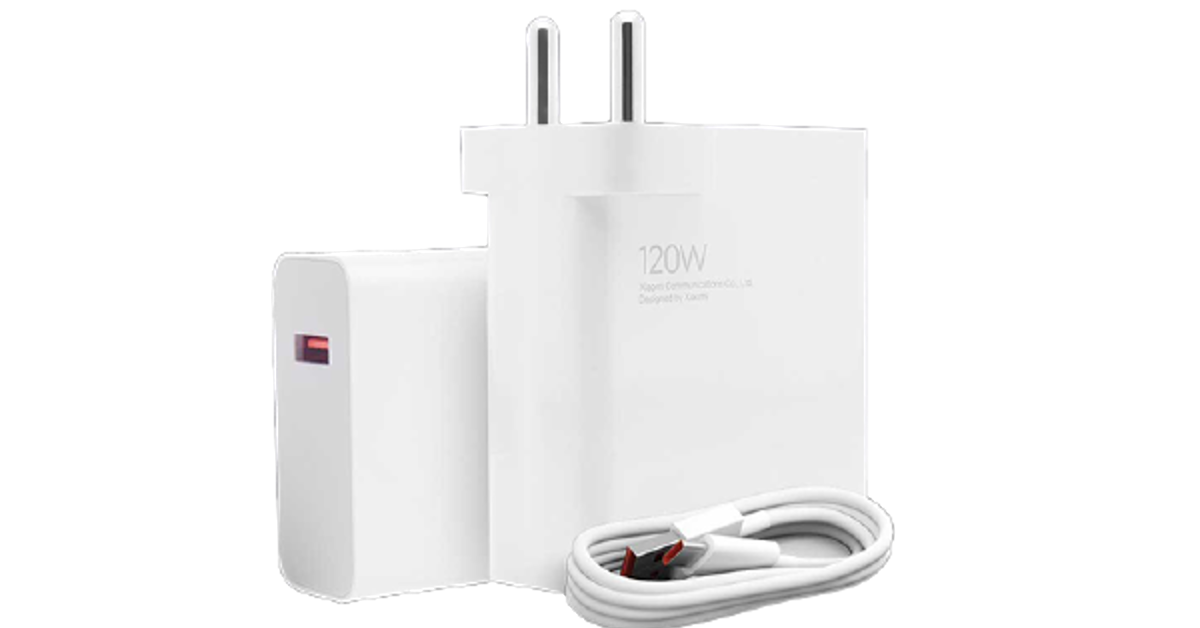
The 120W fast charger from Xiaomi is an absolute unit. One of the fastest chargers we’ve seen, the 120W HyperCharge adapter from Xiaomi can charge any device – be it your laptop, smartphone, gaming console, or tablet. You also get a 100cm, 6A Type-A to Type-C charging cable inside the box. The adapter has a single Type-A slot on it. For a 120W charger, Xiaomi’s adapter is quite compact. It is built in with Surge Protection. It is BiS-certified as well. Also onboard is a 10-layer chip safety protection which takes care of over/under voltage, overheating, channel impedance, short-circuiting, and more.
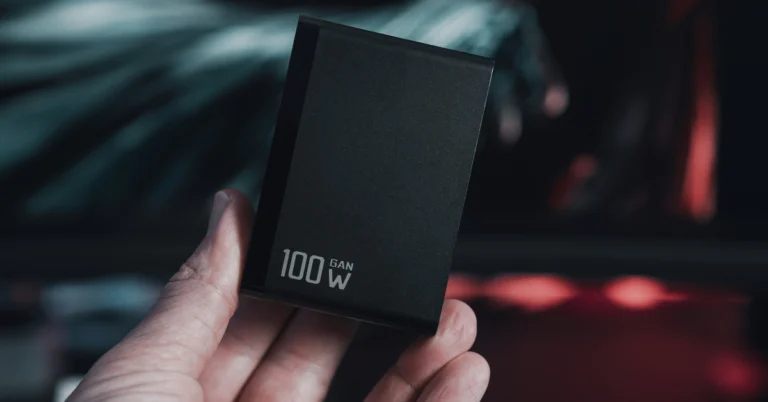
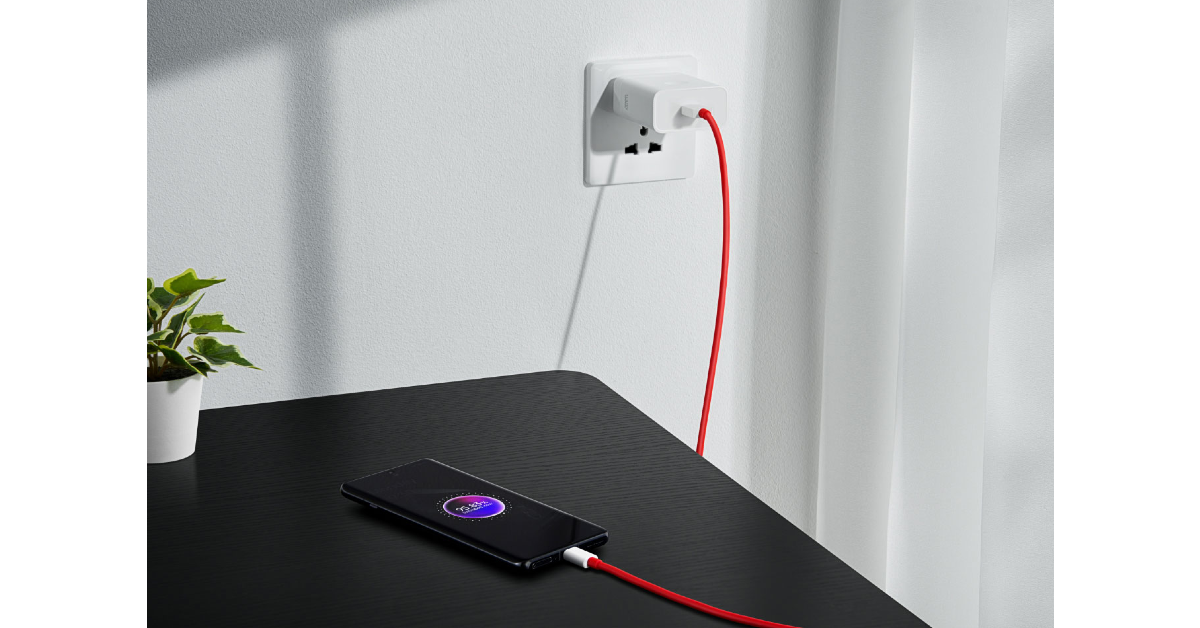
The powerful 100W SUPERVOOC charger takes just 26 minutes to fully charge the 5,400mAh battery on the OnePlus 12. It produces similar results on smartphones that support 100W charging. The adapter supports voltages between AC 100V-200V, which means you can take it around the world with you. There are 10 safety measures in place to protect the adapter and the device against overheating, overcurrent, over/under voltage, path impedance anomaly, and more.
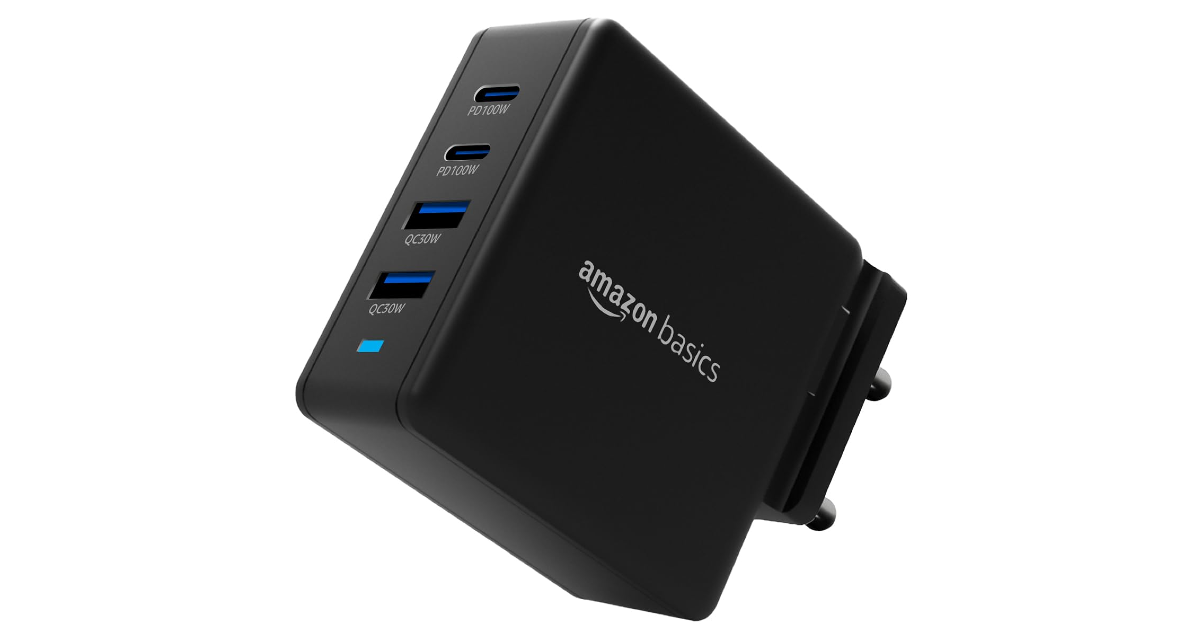
If you want to go the third-party route, this 100W unit from Amazon Basics is one of the best fast chargers in the game. This GaN charger has 4 ports on it – 2x PD100W Type-C and 2x QC30W Type-A. You will need a USB Type-C to Type-C cable to charge your smartphone using the 100W port. This charger is also compatible with laptops, tablets, and gaming consoles. You can charge your laptop and smartphone at the same time using this GaN charger. The pins and the plug of the adapter are foldable. This makes it ideal for travelling. There are built-in safeguards to protect your device against overheating, overcurrent, voltage fluctuation, and more.
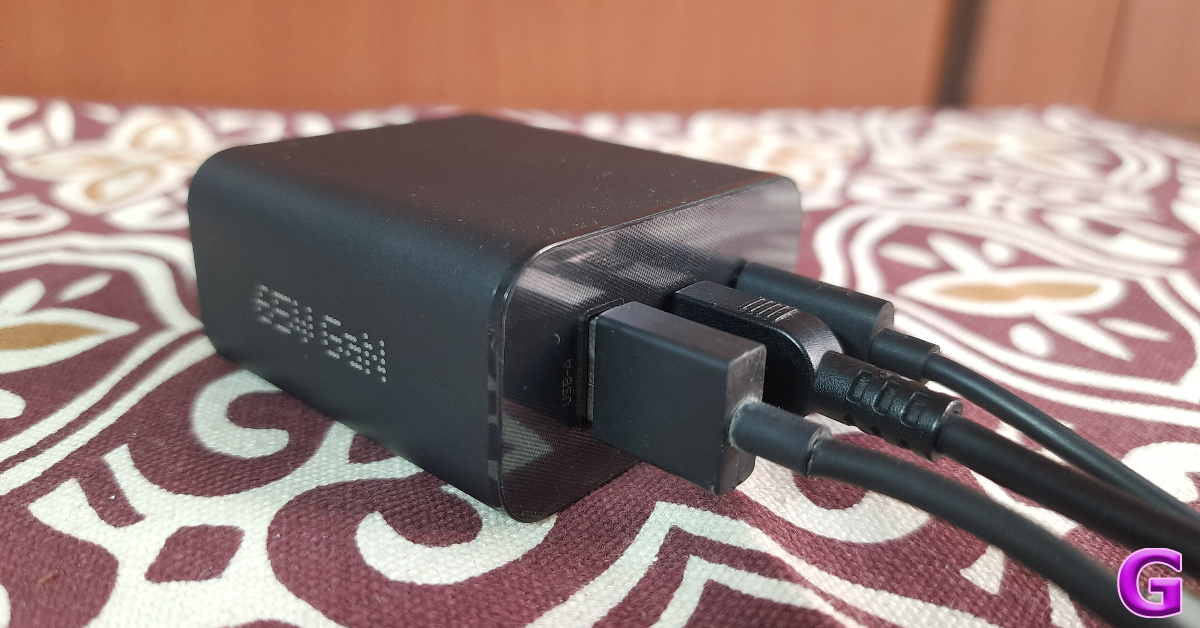
The 65W GaN charger from CMG is compact and portable, making it easy to pack into your luggage while travelling. There are two USB Type-C ports and one USB Type-A port on this adapter. The Type-C ports can charge at 65W while the speed for the Type-A port has been limited to 36W. This adapter supports a diverse range of fast-charging protocols, including D3.0, QC4.0+/3.0/2.0, SCP, FCP, PPS, AFC, Apple 2.4A, Samsung 9V2A, and DCP-enabled devices. You can charge your laptop and tablet with this adapter too. Read our in-depth review of the CMF 65W GaN charger here.
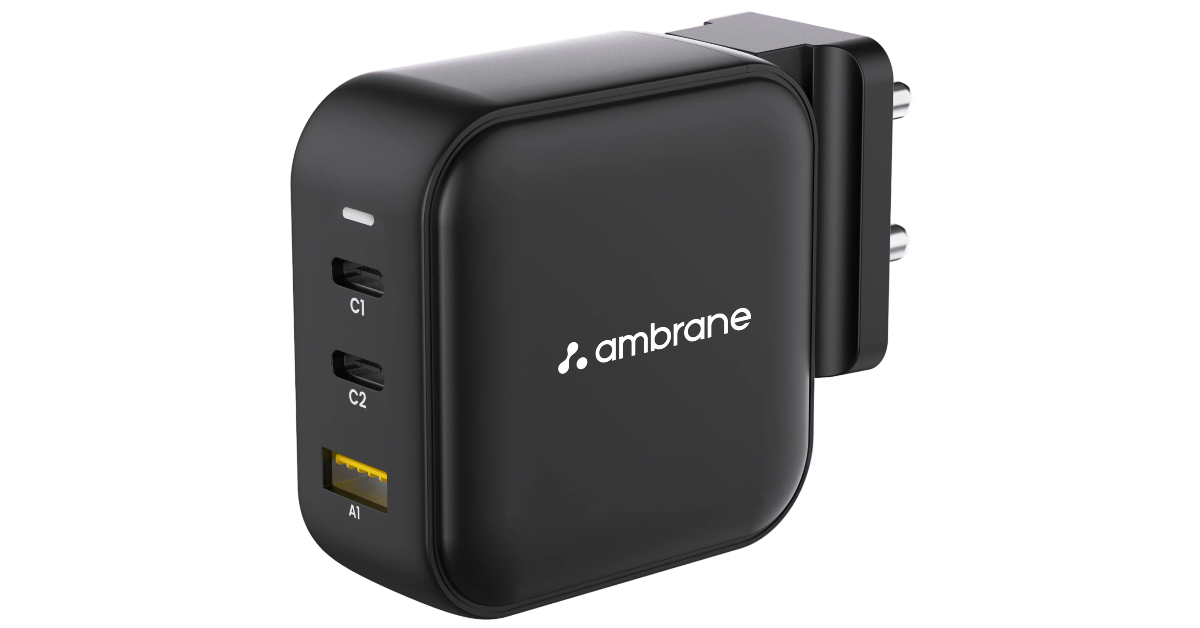
The 65W GaN charger from Ambrane contains two Type-C ports and one Type-A port. It can fully charge a Macbook Air in 1 hour and 40 minutes. The adapter uses GaNMAX technology to maximise its charging efficiency and cut down the bulkiness. The pins on this adapter are removable. You can change the connectors depending on the country you’re in. The multi-layer protection on this charger protects your devices against overheating, overcharging, and short-circuiting. The Type-C ports on this adapter can charge at a speed of 65W while the output from the Type-A port is limited to 36W.
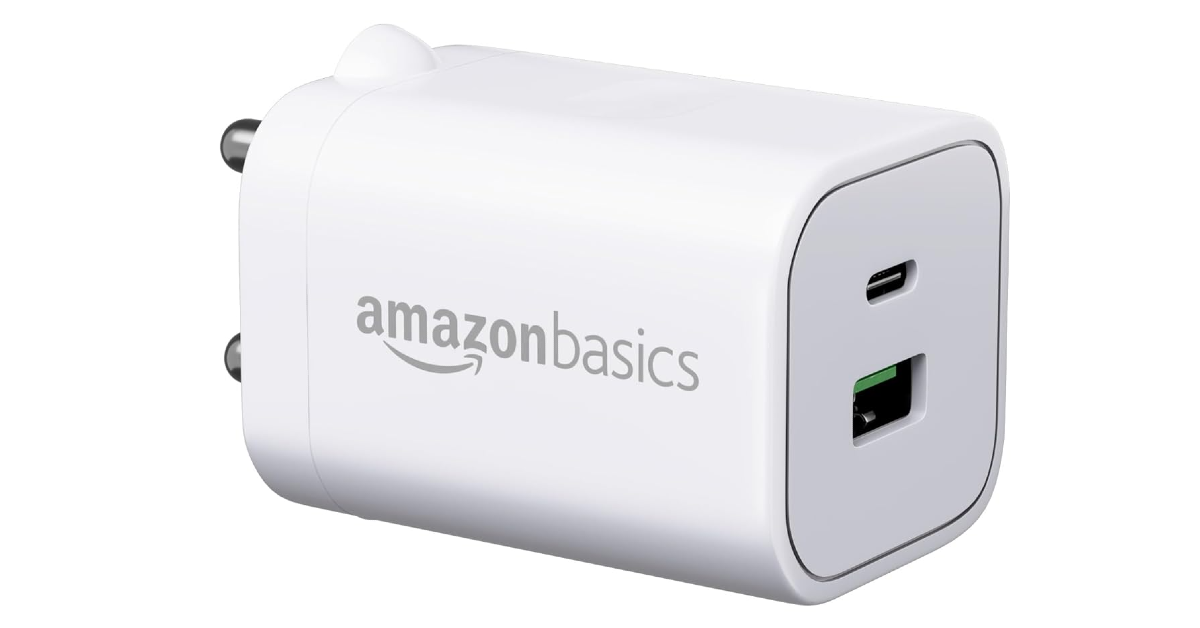
The 33W GaN charger from Amazon Basics can charge an average smartphone (that supports fast charging) up to 50% in 30 minutes. Being a GaN charger, this adapter is compact and easily fits inside travel pouches and pockets. The device is BiS-certified and boasts 9 layers of protection. This safeguards your device against overheating, overcharging, voltage fluctuations, short-circuiting, and more.
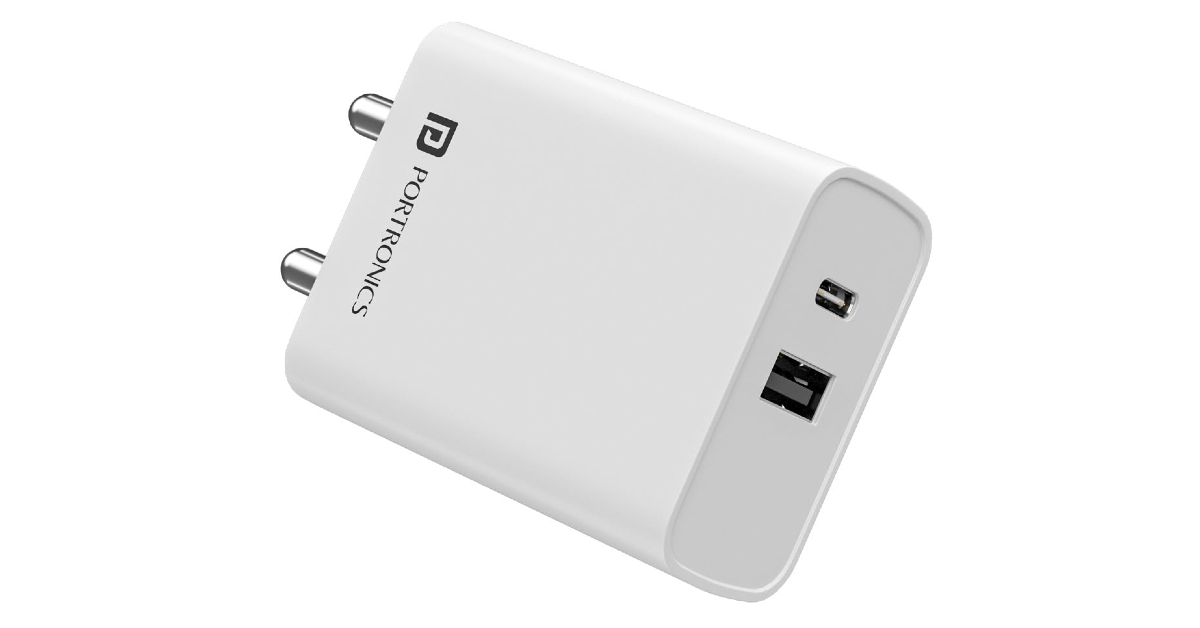
The Portronics Adapto 70 is an efficient 33W charger with Type-C and Type-A output. Both ports pump out 33W of power, but when they’re used simultaneously, the output is divided into 15W (Type-A) + 18W (Type-C). The intelligent chip inside this adapter matches the current flow to the charging speed supported by your device. There are 6 safety features onboard as well. These include short circuit protection, overcurrent protection, over-voltage protection, over-temperature protection, and more.
These are the best fast chargers you can buy for your smartphones in India right now. Before you purchase a fast charger, make sure your smartphone supports its charging speed. You wouldn’t want to overspend on an adapter that charges at a greater speed than your smartphone can support.
Oppo F27 5G comes with MediaTek Dimensity 6300 chipset and 8GB LPDDR4X RAM.
It runs on ColorOS 14 based on Android 14.
The device features a 6.67-inch Full-HD+ AMOLED screen.
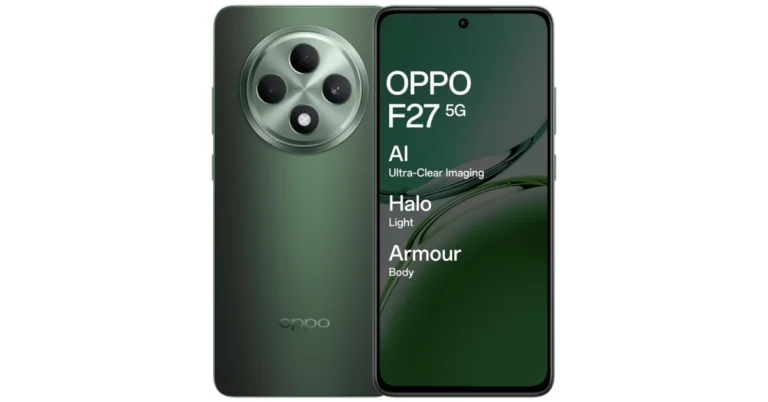
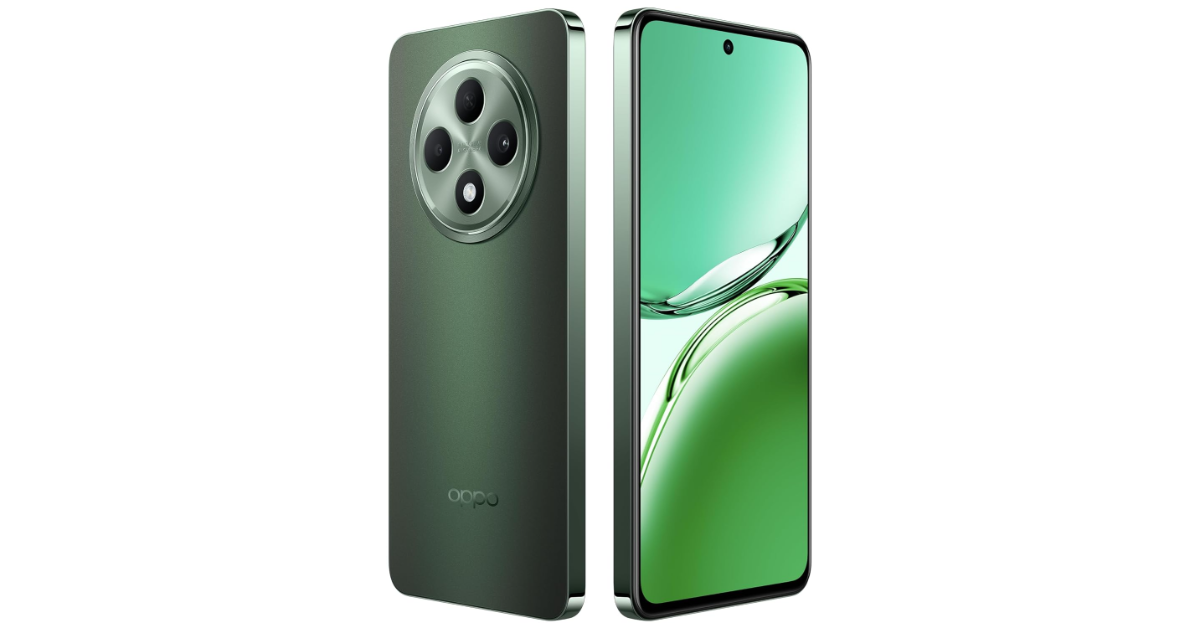
The Oppo F27 5G, launched in India, is the latest addition to the F series. It features a 6.67-inch AMOLED screen with a 120Hz refresh rate. The device is powered by a MediaTek Dimensity 6300 SoC and runs on Android 14 with the ColorOS 14. The phone has a 50-megapixel primary camera and a 32-megapixel selfie camera. The smartphone packs a 5,000mAh battery, supporting 45W fast charging.
In This Article
Oppo F27 5G price in India, sale details
The price of Oppo F27 5G starts at Rs 22,999 for the 8GB of RAM and 128GB of storage variant. Additionally, it costs Rs 24,999 for an 8GB RAM and 256GB storage option. When buying the smartphone from the company’s store with credit and debit card transactions from HDFC Bank, ICICI Bank, SBI, OneCard, Federal Bank, and Bank of Baroda, you can receive an instant discount worth Rs 2,500 on the F27 5G.
Amber Orange and Emerald Green are the available colour options for this handset.
As stated by the firm, Oppo’s web shop, Flipkart, and Amazon will be the places where customers can buy the F27 5G. Additionally, retail stores around the nation will sell it.
Specifications, features
Oppo F27 5G has a 6.67-inch Full-HD+ AMOLED screen with a resolution of 1,080 by 2,400 pixels. The display has a refresh rate of 120 Hz and a maximum brightness of 2,100 nits. A MediaTek Dimensity 6300 chipset with 8GB of LPDDR4X RAM powers the device. The device comes with up to 256GB of UFS 2.2 storage, that can be further expanded via a MicroSD card. ColorOS 14 based on Android 14 is the operating system for the smartphone.
The F27 5G has two cameras for taking pictures and recording videos: a 50-megapixel camera with an f/1.8 aperture and a 2-megapixel depth sensor with an f/2.4 aperture. A 32-megapixel selfie camera with an f/2.4 aperture is located on the front.
The F27 5G from Oppo has a 5,000mAh battery that supports 45W SuperVOOC charging. Oppo claims the F27 5G can be fully charged in 44 minutes. The phone features an in-display fingerprint reader for biometrics.
The F27 5G has 5G, 4G LTE, Wi-Fi 6, Bluetooth 5.3, GPS, and a USB Type-C connector among its connectivity options. It is rated IP64 for dust and splash protection.
iQOO Z9s and iQOO Z9s Pro launch event can be watched on our website.
The smartphones have identical specifications.
Both smartphones will get a triple rear camera setup.
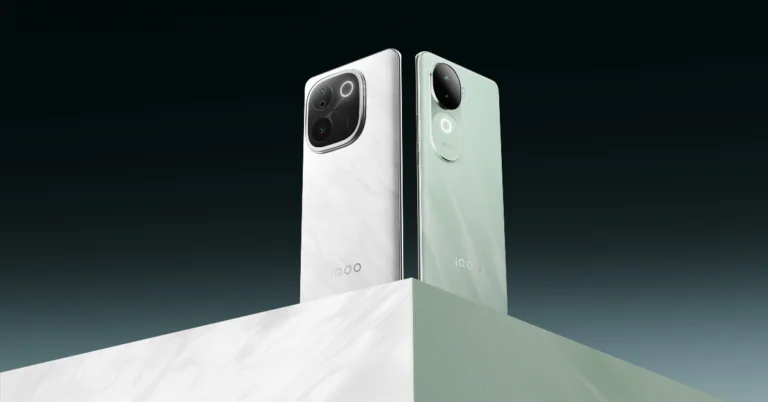
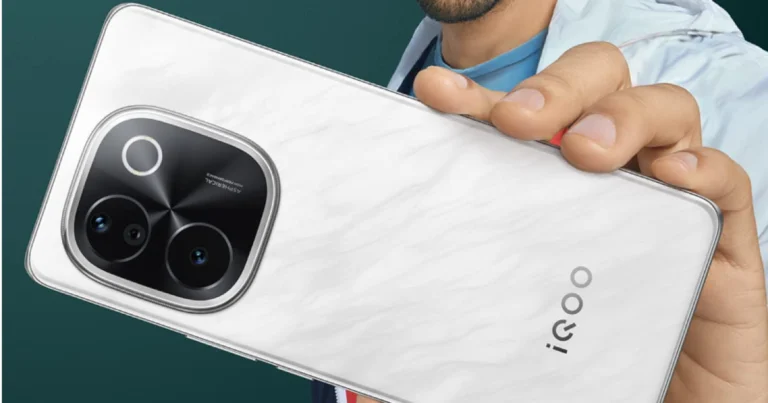
Vivo’s sub-brand iQOO is all set to launch Z9s Series in India today. The upcoming series is confirmed to include two devices- iQOO Z9s and iQOO Z9s Pro. The devices will feature a curved screen with a higher refresh rate and a triple rear camera setup. The phone will come with a white marble-like pattern on the rear panel with IP64-rated builds.
iQOO Z9s Series is scheduled to launch in India today. The company will be hosting a launch event to unveil iQOO Z9s and iQOO Z9s Pro. The launch will begin at noon and will be live-streamed through the company’s social media channels via its official YouTube channel. We have embedded the watch link below for your convenience.
iQOO has announced the design, colour options, and chipset specifications for its next smartphones, the iQOO Z9s and iQOO Z9s Pro. In addition, the company has revealed further details like the display, camera, battery, charging capacity, and IP rating. The company’s website has revealed that the MediaTek Dimensity 7300 will power Z9s whereas the Pro version will be powered by the Snapdragon 7 Gen 3 processor.
The 3D curved AMOLED screens on the iQOO Z9s and iQOO Z9s Pro will have a refresh rate of 120Hz and a maximum brightness of 4,500nits. Their thickness is 7.49mm, and they have an IP64 rating for dust and splash resistance. While the iQOO Z9s’ charge capacity is still unknown, both models include 5,500mAh batteries and 80W wired fast charging. Both the iQOO Z9s and Z9s Pro will include dual back cameras, each with a 50-megapixel primary sensor and support for optical image stabilisation (OIS). The Pro version will feature an 8-megapixel ultrawide camera, while the standard model will have a 2-megapixel depth sensor. Both variants come with AI features and 4K OIS-supported video recording.
The Pro version will be available in Flamboyant Orange and Luxe Marble, while the vanilla model will be available in Onyx Green and Titanium Matte.
With an AnTuTu benchmark test score of 8.2 lakh, the iQOO Z9s series is expected to launch in India for less than Rs 25,000. The standard iQOO Z9 is anticipated to go on sale for about Rs 19,999.
Garena Free Fire Max is a battle royale game with regular awards and tournaments to keep players interested. If you play Garena Free Fire, you should be aware of the redeem codes that are released on a daily basis. However, because the battle royale game is banned in India, players from other countries can use the Free Fire Redeem codes daily. If you’re unfamiliar with the Garena Free Fire redeem codes or don’t know how to get them, we’ve put together a step-by-step guide to help you redeem them. Check out Garena Free Fire Max Redeem Codes for 21 August 2024.
The Free Fire Max redeem codes are a great way to get free stuff. These are 12-digit codes that contain alphabets and numbers, as well as an expiration date and time. Because the Garena FF redeem codes cannot be used more than once, you should hurry to the redemption page to claim your free reward before someone else does. To get a free reward, all you have to do is go to reward.ff.garena.com/en, which is the official redemption page. Also, keep an eye on this space for daily updates on Garena Free Fire Max redemption codes and rewards.
21 August 2024: New Amazon Quiz is now available. Customers from different parts of the country are participating in the daily quiz. The quiz starts at midnight today and will be live until 11:59 PM tonight. By successfully answering every question, participants in the quiz have the chance to win wonderful rewards. A Rs 500 Amazon Pay Balance is up for grabs to participants today.
One wrong answer could eliminate you from the quiz. You have a chance to win Rs 500 Amazon Pay Balance if you successfully answer every question. Users of the app only have the opportunity to take the quiz. Check Out 21 August 2024 Amazon Quiz Answers.
Only app users are eligible to play the Amazon quiz every morning from 12 AM to 11:59 PM. The quiz is not available on the desktop. For those who are unaware of how to play the Amazon quiz, below are the steps, you can follow to take the quiz.
We have written an explainer above, you can refer to that.
When are the winners of the Amazon Quiz and contest announced or declared?
The announcement of today’s Amazon quiz winner will take place Tomorrow. As for the Special Quiz and “Spin & Win” Contest, the winners will be declared once the Quiz Contest comes to an end. To find out who the lucky winner is, you can refer to the Amazon Quiz Winners List or visit the Amazon Winners tab in the Amazon App.
How to participate in the Daily Amazon Quiz?
That is very easy, just got to the Amazon app and scroll to the bottom of the page and you will find the Quiz section. Click on it (usually it is called the fun zone) and you can enter the Amazon Today Quiz Contest.
Are there any other quizzes or contests running on Amazon daily?
Yes, there are many running on a daily basis. These range from spinning the wheel to answering the questions correctly. All are located in the Fun Zone.
What are the criteria for selecting a winner in the Daily Amazon Quiz?
When a qualified player submits correct answers to all the questions, they will automatically be entered into a lucky draw. This draw will include all participants who answered all the questions correctly. Amazon randomly selects the final winners from the pool of eligible participants who gave the right answers.
Which Types of Questions are asked within Amazon Daily Quiz?
These are very simple and straightforward questions. These are mainly related to general knowledge.
Where should I look for Amazon Daily Quiz answers?
You can bookmark this page as we will help you every day with the Amazon Daily Quiz. We bring you fresh answers every day for the Amazon Daily Quiz and Contest.
What time does Amazon Announce previous winners?
The previous winner’s name will be announced today at 12 PM (noon).
Every year, Vivo puts out two V Series smartphones that set the benchmark for photography in midrange smartphones. Earlier this year, we reviewed the V30 Pro and were impressed not just by its camera system but also by its sleek form factor and clean design. The newly launched V40 Pro makes slight tweaks to the design but carries forward the ‘camera expert’ reputation. The smartphone is currently priced at Rs 50,000. We used it as our daily driver for a week to test every aspect of its performance. Here is our comprehensive review of the Vivo V40 Pro.
Here’s what you get inside Vivo V40 Pro’s retail box:
Smartphone
Power adapter
USB Type-A to Type-C cable
Clear plastic case
SIM ejector
Quick start guide
Warranty card
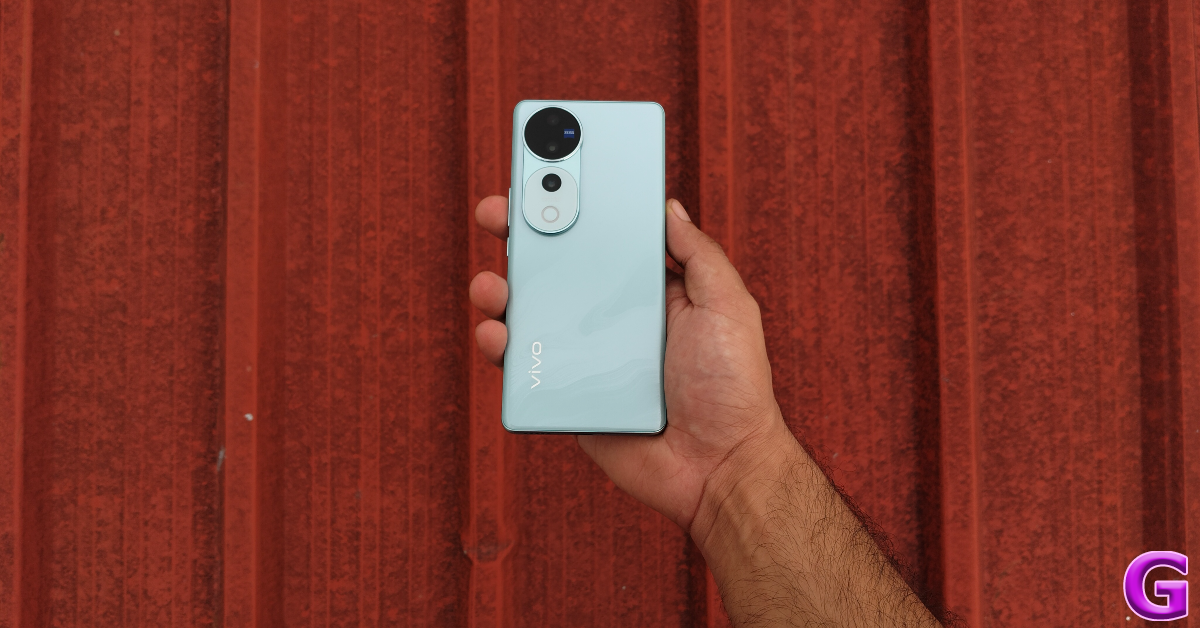
The Vivo V40 Pro is available in two colours/finishes – Titanium Grey (matte) and Ganges Blue (glossy). We got our hands on the latter variant. It features the familiar 3D pattern that we’re used to seeing on Vivo’s smartphone. On the V40 Pro, the pattern resembles the waviness of a river, earning it the ‘Ganges Blue’ name. Even though this back panel has a glossy finish, it does not attract a lot of fingerprints. It is curved around the edges, making it easy to grip.
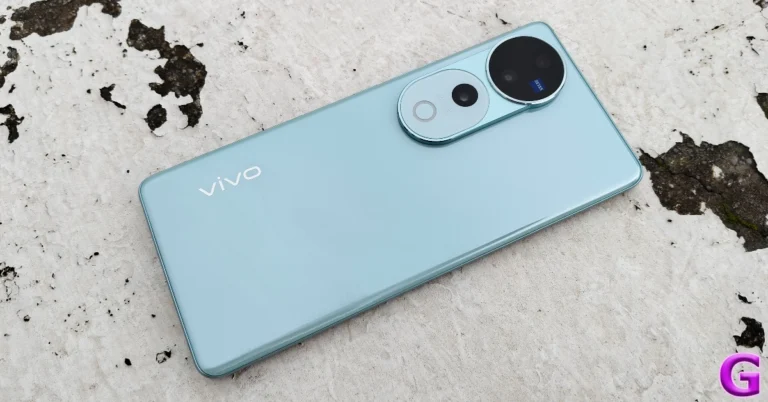
The big design change on the Vivo V40 Pro lies in the camera panel. The rectangular array on the V30 Pro has been replaced with a circular unit with a cylindrical extension. The circular cutout houses the primary sensor and the ultrawide lens. The attachment at the bottom of this cutout houses the telephoto lens and the ring LED flash. It gives the entire array a cylindrical shape. The LED flash, or the ‘Aura’ light, is smaller than its V30 Pro’s counterpart. The latter had a squarish shape and housed a smaller LED flash within its perimeter.
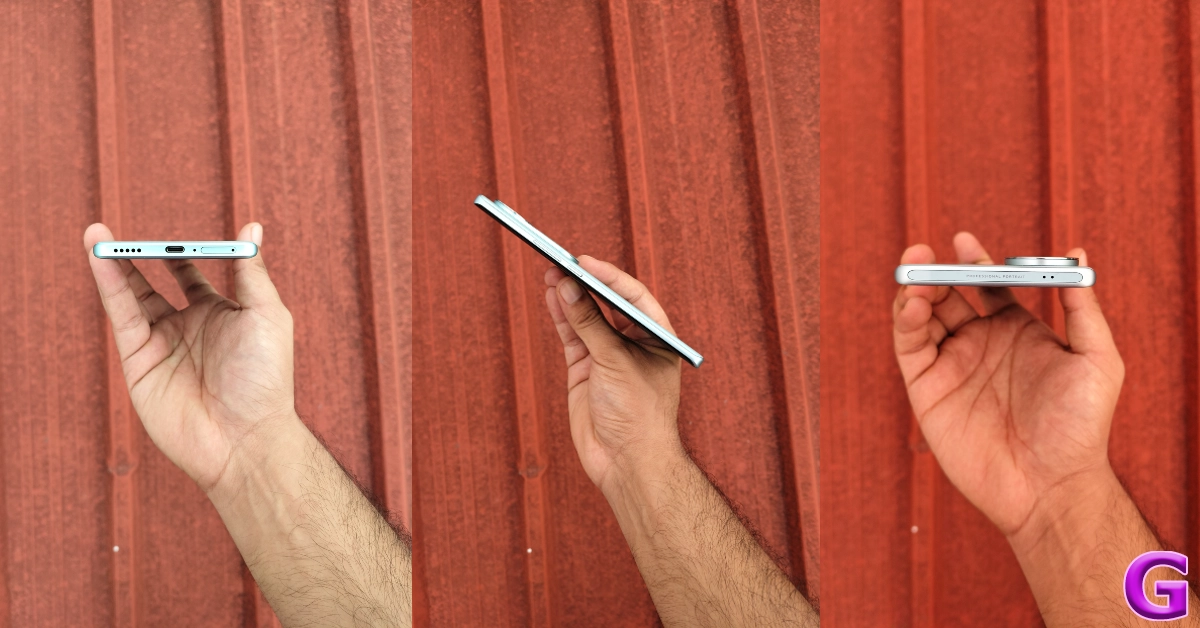
Overall, we like the design of the V40 Pro although the V30 Pro looked smarter and more refined. However, design preference is subjective and it is nice to see manufacturers shake things up every year. In terms of dimensions, the V40 Pro stands at 164.3mm x 75.1mm x 7.5mm. This is similar to its previous avatar. The curved frame of the smartphone houses the volume rocker keys and the side button on its right edge and the SIM tray, primary microphone, USB Type-C port, and speaker grille on the bottom edge. The secondary microphone is positioned on the top edge. The earpiece also doubles up as the secondary speaker.
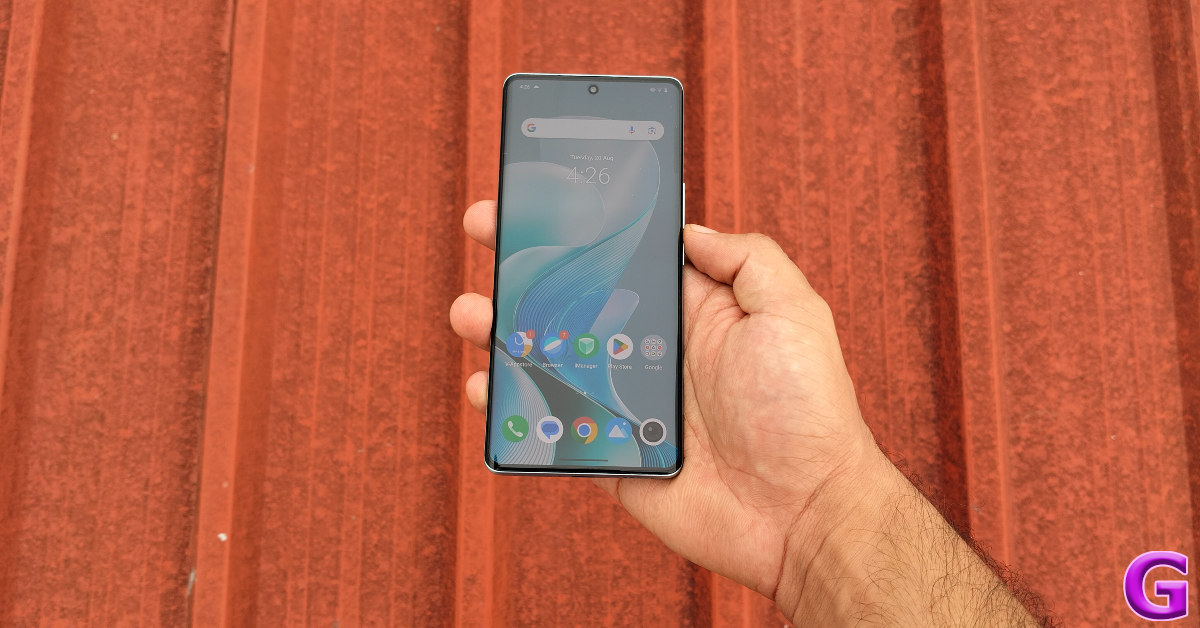
The 6.78-inch curved AMOLED display has a 120Hz display and can reach a peak brightness of 4,500 nits. There’s support for HDR10+ onboard. The touch response is smooth and the smartphone is able to eliminate any accidental touches to the curved section of the display.
We streamed several titles on platforms like Netflix, Disney+ Hotstar, and Prime Video. The vibrant colours and detailed images produced by the display elevated the viewing experience. The audio output was satisfactory, although we would have liked a more pronounced low end.
One of the bigger upgrades on the Vivo V40 Pro is IP68 protection. Its predecessor had an IP54 rating. You can whip out this smartphone in heavy rainfall and not worry about any water damage. It can survive being submerged up to 1.5m for 30 minutes.
Vivo V40 Pro Review: Performance and Cameras
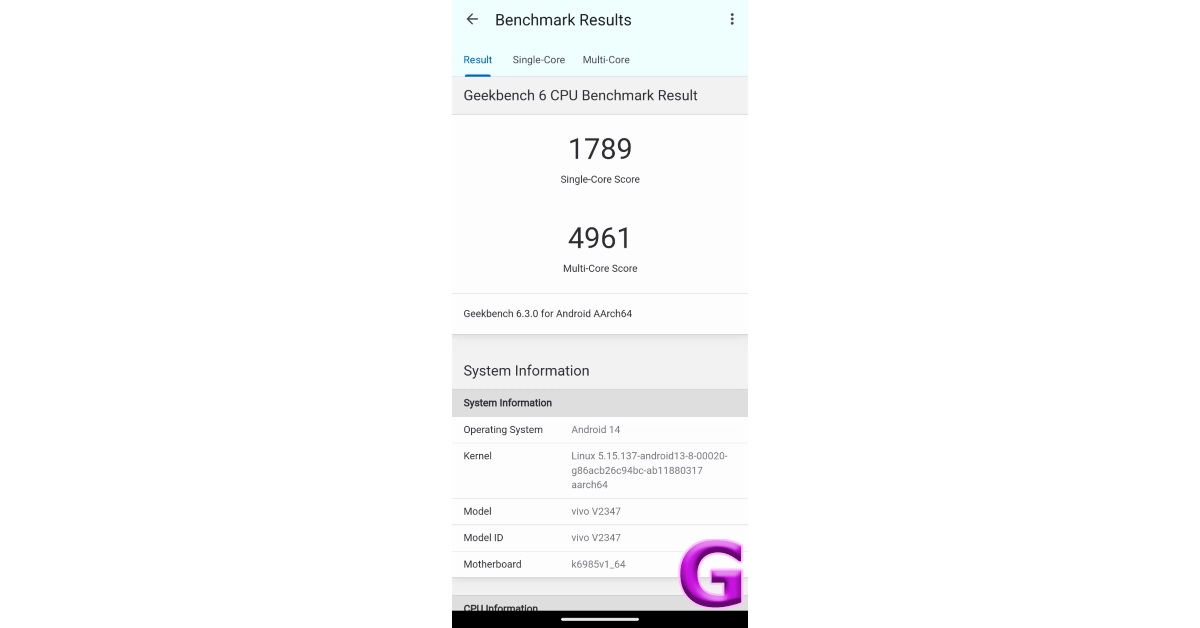
Powering the Vivo V40 Pro is the MediaTek Dimensity 9200+ chipset. This chipset sits just below the flagship Dimenity 9300 in MediaTek’s hierarchy of SoCs. There are two RAM + Storage variants on offer – 8GB + 256GB and 12GB + 512GB. We ran the Geekbench 6 test on the smartphone and it garnered a single-core score of 1,789 points and a multi-core score of 4,961 points.
We used our review unit of the Vivo V40 Pro for everyday tasks like video calling, social media browsing, emailing, media streaming, and more. The smartphone handled whatever we threw at it. We did not encounter any lags or annoying stutters. We launched a dozen apps in the background to see if it caused the smartphone to slow down, but the device handled them expertly without any noticeable drop in speed. The apps loaded instantly and the overall usage experience was as smooth as it gets on a smartphone.
We played gaming titles like Call of Duty and Asphalt Legends Unite on the Vivo V40 Pro and were satisfied with its performance. The gaming experience is not the best in this category, but for a camera-centric smartphone, the V40 Pro does an excellent job of delivering a consistent performance. On medium graphics, we did not experience any frame drops or unwanted lags. The smoothness and touch response was excellent. The VC Smart Cooling System inside the smartphone did a great job of dissipating the heat. We were able to play games on this device for an hour straight without feeling any significant heat on the back panel.
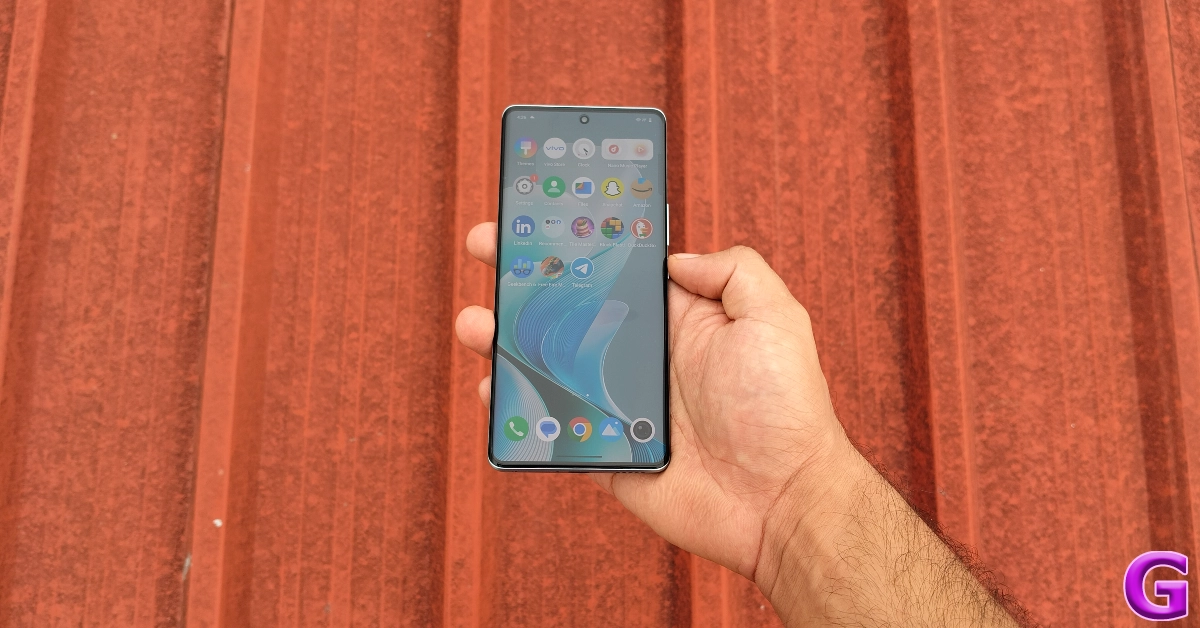
The Android 14-based Funtouch 14 is not our favourite mobile OS, but it offers a decent software experience. There are a handful of bloatware apps on the device, which is not a good sign when you’re paying Rs 50,000 for it. Funtouch OS’ strongest suit is its customisation options. You can change the AOD skin, fingerprint icon design, charging animation, USB insertion animation, home screen transitions, and ambient lighting on the device. The latest iteration of the OS has AI editing features that let you erase objects and ‘Beautify’ your pictures.
The V40 Pro packs a massive 5,500 mAh battery pack. On a full charge, the smartphone lasts an entire day with ease. During the review period, we were able to squeeze a steady screen on time of 7 hours on the Vivo V40 Pro. Even after performing several power-intensive tasks and streaming media for multiple hours, the smartphone did not run out of juice sooner than expected. The V40 Pro supports 80W charging and we were able to replenish its battery in 40 minutes.
V40 Pro’s biggest highlight is undoubtedly its exquisite camera system. Every camera on this smartphone utilises a 50MP sensor. It is also one of the few midrange smartphones to feature a telephoto lens in its rear camera array. This telephoto lens now features OIS as well. The V40 Pro’s camera system is tuned by Zeiss.
The 50MP Sony IMX921 primary shooter delivers an exceptional performance in every lighting condition. In daylight conditions, the images taken with this camera showcased vibrant and punchy colours with good dynamic range and amazing contrast. We were pleased by the level of detail that this sensor was able to capture. There are three colour profiles to choose from – Vivid, Textured, and Zeiss Natural.
Primary Shooter: Without Night Mode vs With Night ModePrimary Shooter in Night Mode
In limited lighting conditions, the primary shooter did a great job of brightening the subject and assigning it accurate colours. We were impressed with the way the smartphone exposed the sky. The images taken in Night Mode have minimal grain. Vivo’s photo processing engine paired with its high-end sensor produces excellent results in limited lighting.
Ultrawide ShotUltrawide Shot
The 50MP ultrawide sensor does not miss a beat and replicates the primary camera’s performance in outdoor daylight conditions. We’re used to seeing a colour shift while using the ultrawide camera on most midrange smartphones but that is not the case here. The colours produced by this sensory are just as deep, vibrant, and rich as the primary shooter. This could possibly be the best ultrawide sensor in this price range, given how it even manages to keep the sharpness intact.
Ultrawide lens: Without Night Mode vs With Night ModeUltrawide Night Shot
In limited lighting conditions, the ultrawide sensor does well to illuminate the images and assign the proper colours to the scene. The versatility of this ultrawide sensor earns a brownie point from us. As good as other ultrawide sensors in this price range may be, they fail to replicate the colour balance and brightness of the V40 Pro.
1x vs 2x zoom10x vs 50x zoom
The 50MP Sony IMX816 telephoto lens offers 2x optical zoom. This telephoto lens means business and isn’t just present to fill up an entry on the spec sheet. We were very happy with the image composition after 10x zoom. Even with the maximum 50x zoom in effect, the smartphone was able to resolve the text on far-away billboards.
Portrait Shots: 24mm vs 35mmPortrait Shots: 85mm vs 100mm
Portrait shots taken with the Vivo V40 Pro are a cut above the rest. The smartphone intelligently separates the object from the background and applies a good amount of background blur. You can take portrait shots in 5 focal lengths – 24mm, 35mm, 50mm, 85mm, and 100mm. The 50MP selfie camera also puts up a solid display, replicating accurate skin tones and keeping the skin smoothening effects to a minimum.
The Vivo V40 Pro is the best midrange camera smartphone out there right now. Its well-rounded camera performance sets the benchmark for other midrange smartphones. The primary shooter can easily hang with the flagships. The ultrawide sensor isn’t too far behind as it replicates the colour accuracy and sharpness of the primary camera. When most midrange phones have to contend with a macro lens, the telephoto camera on the V40 Pro puts up a splendid display. The MediaTek Dimensity 9200+ processor at the heart of this smartphone ensures that it handles power-intensive tasks without any hassle. The build and form factor of the device has the ‘premium’ touch. Overall, the Vivo V40 Pro is an amazing deal at Rs 50,000.
OnePlus Buds Pro 3 offers up to 50dB of Adaptive Noise Cancellation.
They offer a massive 43 hours of listening time.
A ten-minute charge will give you over 5 hours of battery life.
OnePlus has announced the debut of its third generation Buds Pro series, the Buds Pro 3, in India today. Dynaudio, a well-known Danish audio company, powers the audio equipment. The newest TWS provides up to 50dB of improved noise cancellation. It also delivers immersive spatial audio and sound quality. These are also equipped with dual drivers, including an 11mm woofer and a 6mm tweeter, and are claimed to have a battery life of up to 43 hours.
In This Article
OnePlus Buds Pro 3 Price in India, Sale Details
The price of the OnePlus Buds Pro 3 in India starts at Rs 11,999. The premium TWS earphones will go on sale from August 23 in the country via the company’s official website in the country. They are offered in two colours: Midnight Opus and Lunar Radiance.
In Europe, the device is priced at €199 (£199 in the UK) and in North America at $179.99. They are currently up for purchase in both markets.
OnePlus Buds Pro 3 Specifications, Features
The OnePlus Buds Pro 3 features a new charging case. They come in Midnight Opus and Lunar Radiance colours, with an ergonomic leather-look case and a distinct two-tone design on each bud.
The OnePlus Buds Pro 3 builds on the Buds Pro 2’s dual driver technology, adding two magnets to the 11mm woofer and a new ceramic-metal composite diaphragm. The 6mm tweeter also has an enhanced diaphragm and a 35-micrometre flat voice coil, which ensures even the smallest high-frequency details reach the ear.
The OnePlus Buds Pro 3 have similar controls to earlier models, enabling users to change volume, music, and noise cancellation. They also use Google Spatial Audio, which is compatible with a variety of audio devices. Furthermore, the Buds Pro 3 are easy to use; simply squeeze to activate adaptive noise reduction.
The Buds Pro 3 have dual DACs, which provide powerful bass, clear treble, and a wide soundstage. The device is masterfully crafted by Dynaudio, to provide amazing sound. The dual DAC technology enables one DAC to focus on each earbud’s woofer and the other on its tweeter, resulting in excellent audio performance at both ends of the audio spectrum with no crosstalk or interference.
The device also supports Bluetooth 5.4 and Google Fast Pair, making it simple to connect to a variety of devices. The Buds Pro 3 now includes Google Spatial Audio for immersive listening experiences.
The Buds Pro 3 have Adaptive Noise Cancellation technology, which can provide up to 50dB of noise cancellation. This technology enables users to customise the level of ANC, ensuring that it responds immediately to changes in the surroundings, such as going to a noisy street. This feature also improves sound and comfort because the ANC level is not set too high when not required. Furthermore, Adaptive Noise Cancellation enhances the battery’s performance, letting the gadget last longer. A ten-minute charge provides over 5 hours of battery life, while a full charge provides 43 hours of listening time between the Buds Pro 3 and their case.


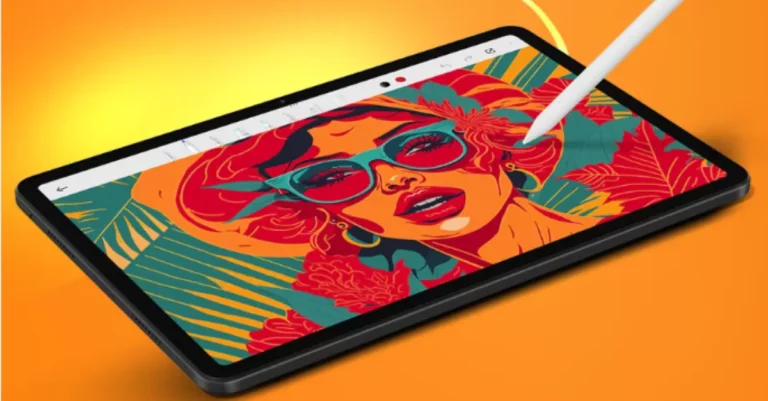

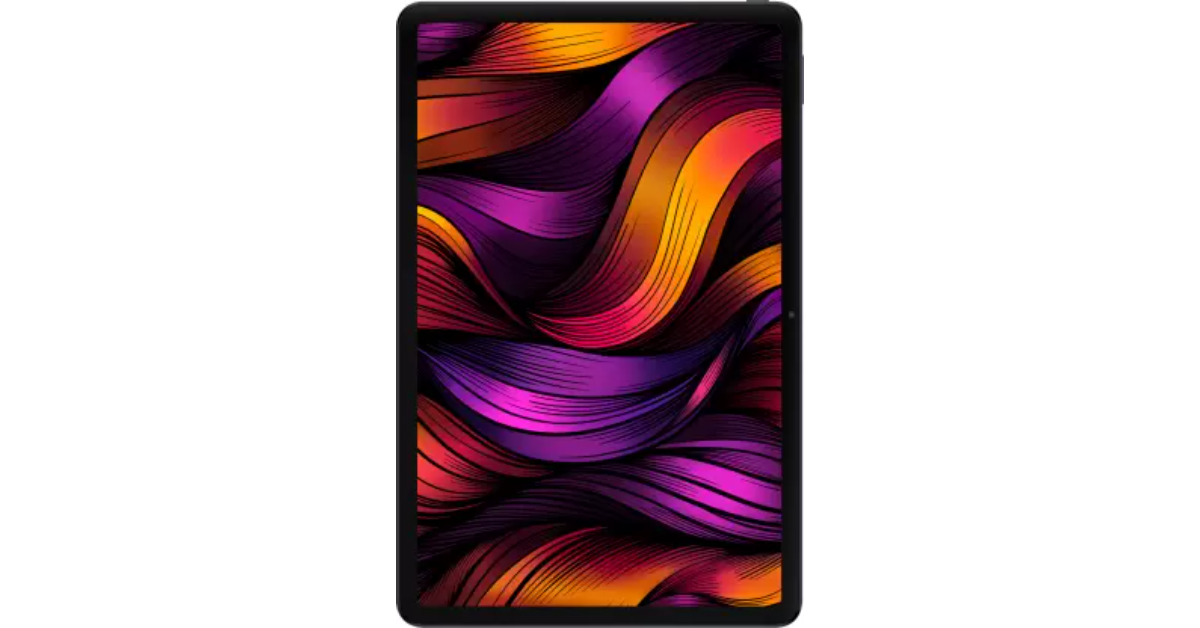
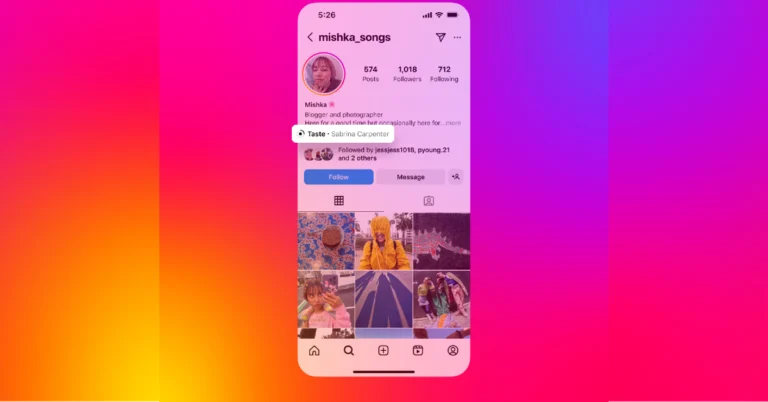
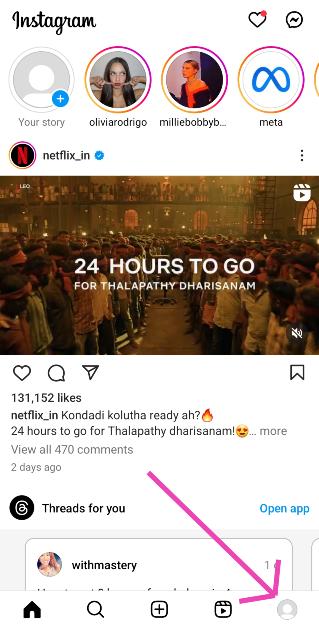
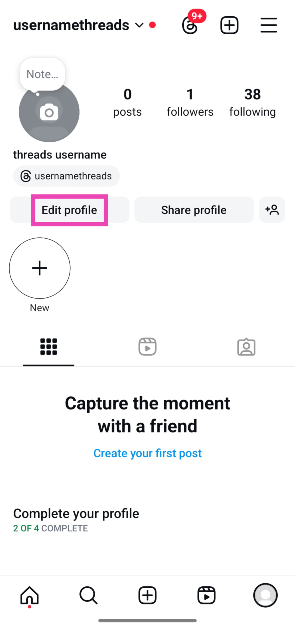
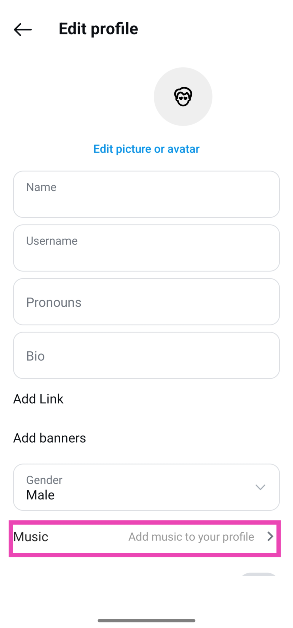
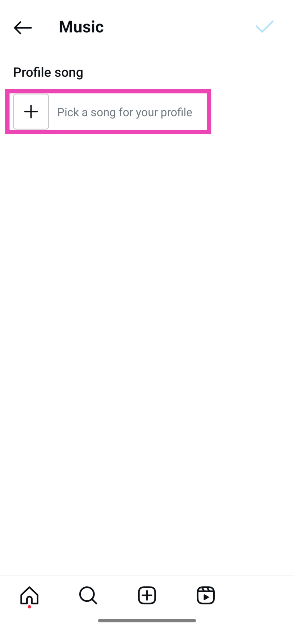
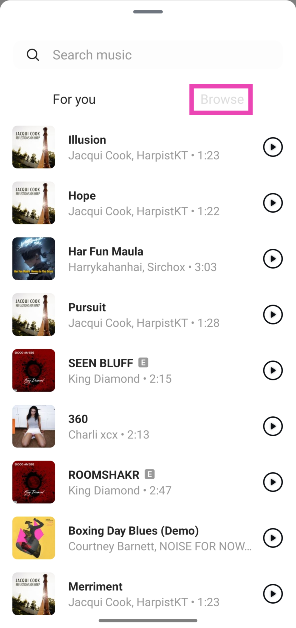
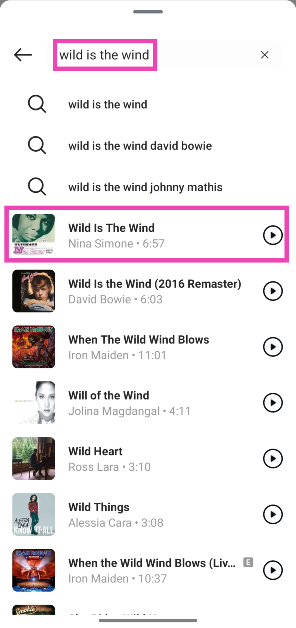
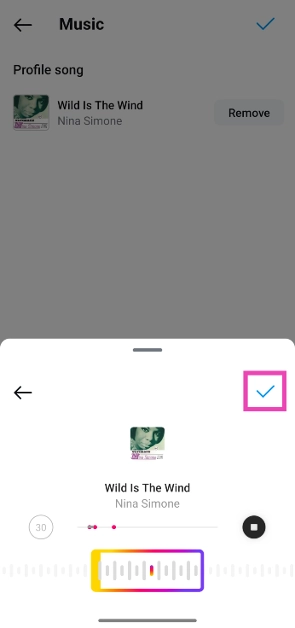
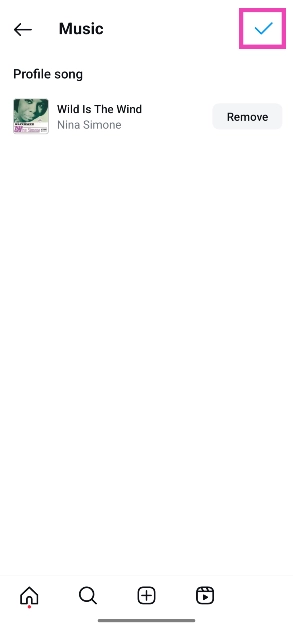

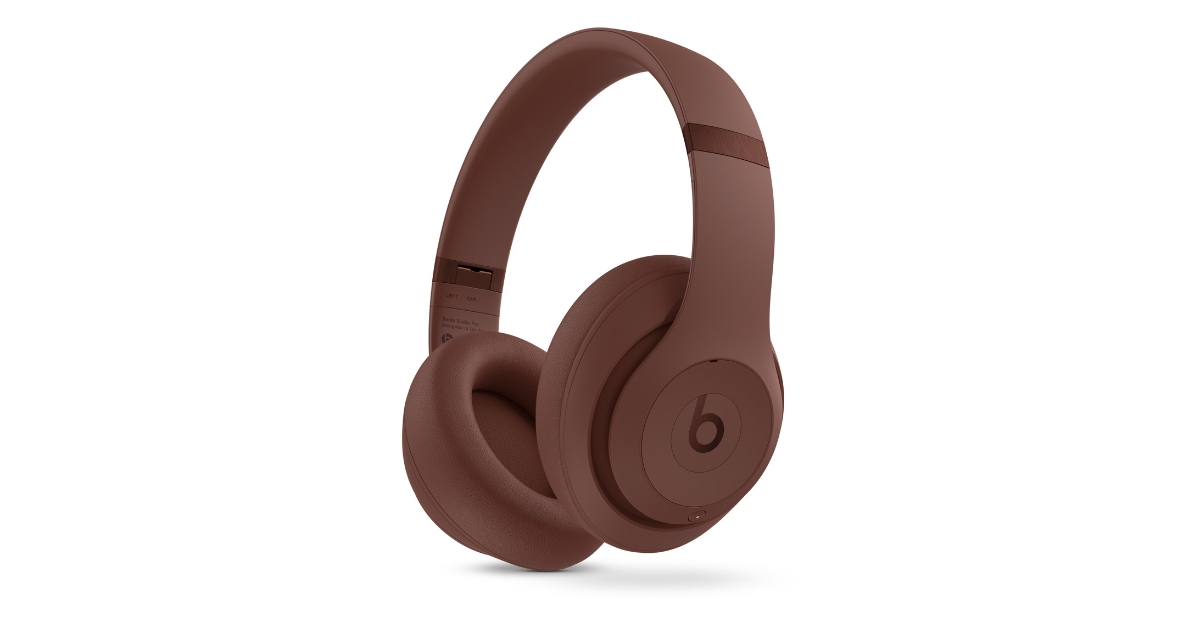
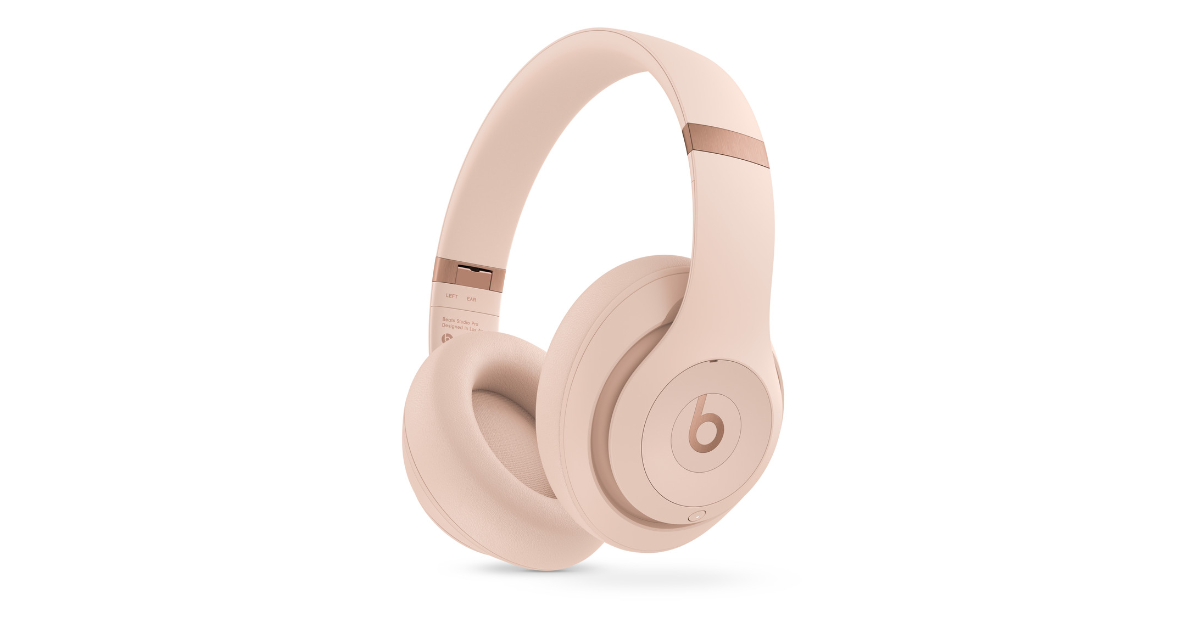





![Find Out the Best Video Editor for Mac [Updated New 2024]](https://www.gadgetbridge.com/wp-content/uploads/2024/08/1-1-768x402.webp "Find Out the Best Video Editor for Mac [Updated New 2024]")