10 ways to fix ‘Connection Problem or Invalid MMI Code’ error on Android

0

MMI Codes serve an important role in your phone. You can use them to toggle certain functions, find out the status of your current data plan, and other tasks. Users often report encountering the ‘Connection Problem or Invalid MMI Code’ error on their Android phones. While it may seem there are no workarounds to this issue, there are some things you can do to resolve this error. Here are some of the fixes.

Read Also: Colorful EPOCH Series laptops with 13th Gen Core i9 processors announced

What is an MMI Code?

A Man Machine Interface (MMI) Code starts with an asterisk or pound sign and can be used to execute certain actions to find out key information about your device. There are four main types of MMI Codes:

  • Supplementary Service (SS) Codes
  • Unstructured Supplementary Service Data (USSD) Codes
  • Manufacture Man-Machine Interface (MMI) Codes
  • SIM Control Codes

Every kind of MMI Code serves a unique purpose. While SS codes take care of tasks like call forwarding, voicemail, etc., USSD codes can be used to check the talk time, data balance, and other network provider-related inquiries.

Check the MMI code

MMI Codes vary among different models and network providers. If you encounter the ‘Connection Problem or Invalid MMI Code’ error on your Android smartphone, double-check the code and try again. Always use the MMI Codes that are specific to your OEM. While some codes (like *#06# for IMEI number) may be universal, others are unique to the manufacturer of the device.

Clear the dialer’s cache

Step 1: Go to Settings and select Apps.
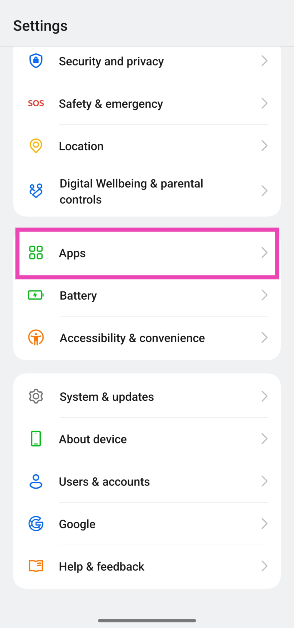
Step 1: Go to Settings and select Apps.

Step 2: Select the dialer app.
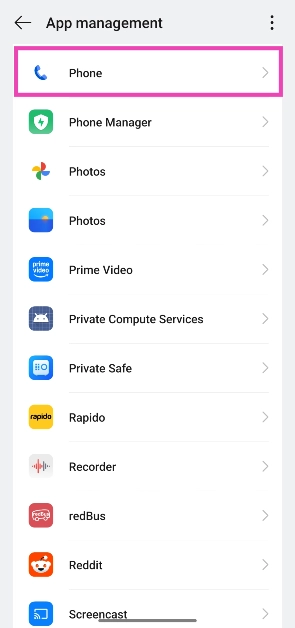
Step 2: Select the dialer app.

Step 3: Tap on Storage.
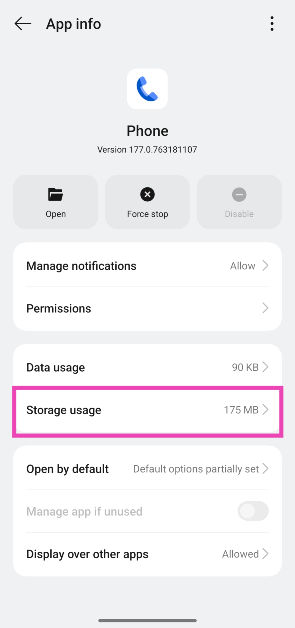
Step 3: Tap on Storage.

Step 4: Hit Clear cache.
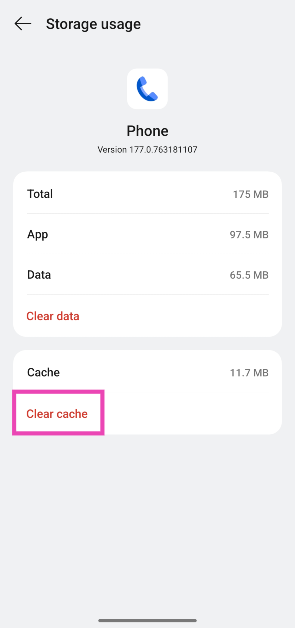
Step 4: Hit Clear cache.

Restart your device

Restart Your Phone

A quick restart can fix the background issues that may be causing the MMI Code error on your Android device. Long-press the side key and select ‘Restart’ from the power menu. If the side key triggers the voice assistant, press it along with the volume-up key to access the power menu.

Toggle the Airplane Mode

airplane mode Top 6 ways to fix ‘Connection Problem or Invalid MMI Code’ error on Android (2024)

Toggle the Airplane Mode on your phone on and off to refresh the network. Swipe down from the status bar to access the Quick Settings Menu and tap on the tile with the airplane icon. Wait for a few seconds and tap it again to turn off Airplane Mode.

Dial the MMI Code in Safe Mode

Reboot your phone in Safe Mode Top 6 ways to fix ‘Connection Problem or Invalid MMI Code’ error on Android (2024)

The third-party apps on your smartphone are known to go rogue and interfere with its functioning. If you don’t know which app is causing problems in the background, simply put your phone in Safe Mode. Long-press the ‘Power off’ tile in the power menu, then tap on the Safe Mode pop-up. Once your phone is in Safe Mode, turn off the Airplane Mode and dial the MMI code again.

Add a comma at the end of the MMI code

If your smartphone is not processing an MMI code that you know is valid, add a comma at the end and run it again. A comma bypasses any error message presented by your phone and forces it to process the code. For example, if you can’t get your phone to run the *#9900# code, use *#9900#, instead.

Toggle the SIM off and on

Step 1: Go to Settings and select Network & internet.
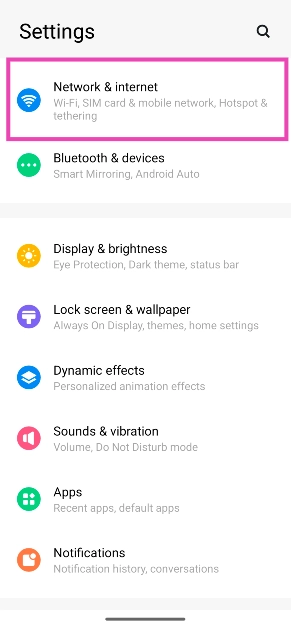
Step 1: Go to Settings and select Network & internet. Top 6 ways to fix ‘Connection Problem or Invalid MMI Code’ error on Android (2024)

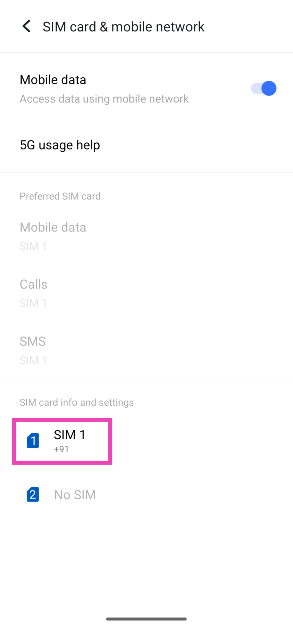
Step 2: Tap on SIM card & mobile network.
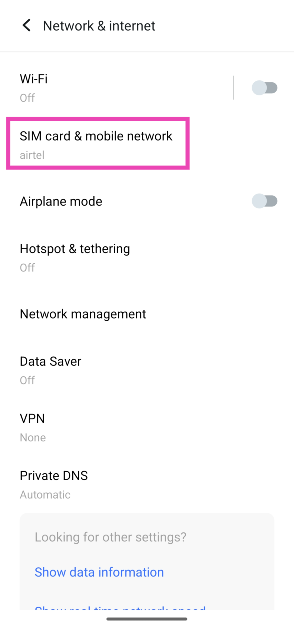
Step 2: Tap on SIM card & mobile network. Top 6 ways to fix ‘Connection Problem or Invalid MMI Code’ error on Android (2024)

Step 3: Select your SIM card.

Step 3: Select your SIM card. Top 6 ways to fix ‘Connection Problem or Invalid MMI Code’ error on Android (2024)

Step 4: Turn off the toggle switch for Enable SIM card. Wait for a few seconds then turn it back on.
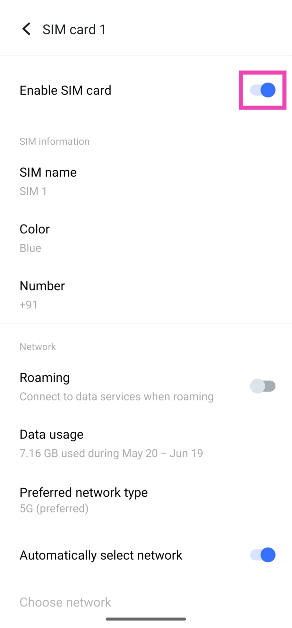
Step 4: Turn on the toggle switch for Enable SIM card. Top 6 ways to fix ‘Connection Problem or Invalid MMI Code’ error on Android (2024)

Check your SIM card

If your SIM card is physically damaged, the MMI codes won’t work on your phone. Use a SIM ejector to pull out the SIM tray. Inspect the SIM card for any kind of physical damage. If you notice any wear, request your network provider to issue you a duplicate SIM card. If there’s no physical damage, clean the card thoroughly and reinsert it in its correct position.

Reset Network Settings

Step 1: Go to Settings and General Management.
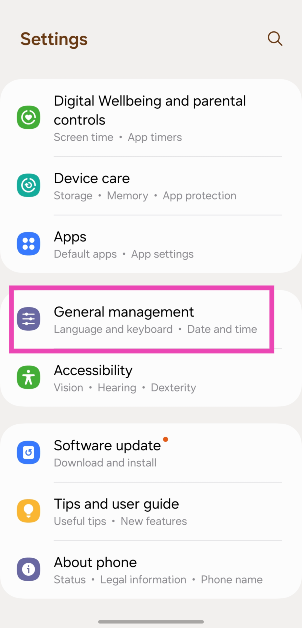
Step 1: Go to Settings and General Management. Top 8 Ways to Fix an Android Phone That Can't Make or Receive Calls Top 8 ways to fix the ‘Emergency Calls Only’ error message on Android (2024)

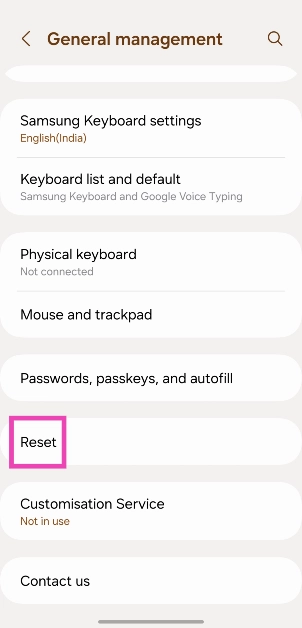
Step 2: Tap on Reset.

Step 2: Tap on Reset. Top 8 Ways to Fix an Android Phone That Can't Make or Receive Calls Top 8 ways to fix the ‘Emergency Calls Only’ error message on Android (2024)

Step 3: Select Reset mobile network settings.
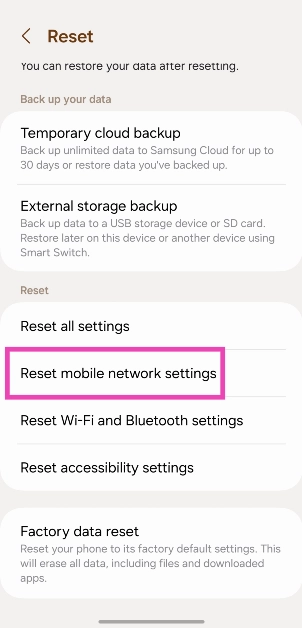
Step 3: Select Reset mobile network settings. Top 8 Ways to Fix an Android Phone That Can't Make or Receive Calls Top 8 ways to fix the ‘Emergency Calls Only’ error message on Android (2024)

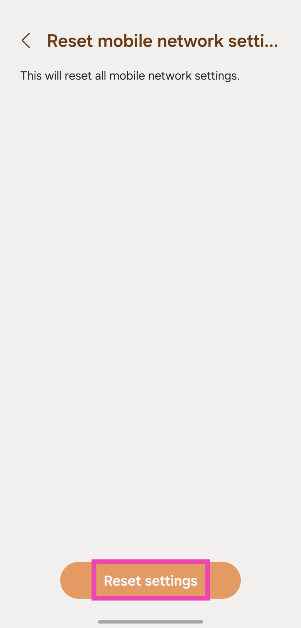
Step 4: Hit Reset settings.

Step 4: Hit Reset settings. Top 8 Ways to Fix an Android Phone That Can't Make or Receive Calls Top 8 ways to fix the ‘Emergency Calls Only’ error message on Android (2024)
Update your phone’s OS

Step 1: Go to Settings and select Software update.

Go to Settings and select Software update.  Top 8 ways to fix the ‘SIM not provisioned MM2’ error on Android

Step 2: Tap on Download and install.

Top 8 ways to fix the ‘SIM not provisioned MM2’ error on Android

Step 3: Select Install now.

Select Install now. Top 8 ways to fix the ‘SIM not provisioned MM2’ error on Android

Frequently Asked Questions (FAQs)

Why is my Android phone showing the ‘Invalid MMI code’ error?

This error message usually pops up when you enter the wrong MMI code on your phone’s dialer. Double-check the code and try again. If the problem is network-related, restart the phone and reset the network settings.

What is the MMI code for finding out the IMEI number of my phone?

Dial *#06# on your phone to find out its IMEI code.

What do MMI Codes do?

MMI Codes are used to execute certain commands or find out more information about your device.

What is the *#21# MMI code used for?

If you want to stop your phone calls from being forwarded to another number, dial *#21#.

How do I check which number my calls are being forwarded to?

The *#67 MMI code lets you know if your phone calls are forwarded to another number when your line is busy. It also lists the number that the calls are being forwarded to.

Read Also: Top 7 ways to fix Android phone not scanning QR code (2024)

Conclusion

These are the top 10 ways to fix the ‘Connection Problem or Invalid MMI Code’ error on your Android smartphone. Check out these MMI Codes for your Samsung smartphone. Which MMI Codes do you use regularly? Let us know in the comments!

10 ways to fix Android phone not scanning QR code

0

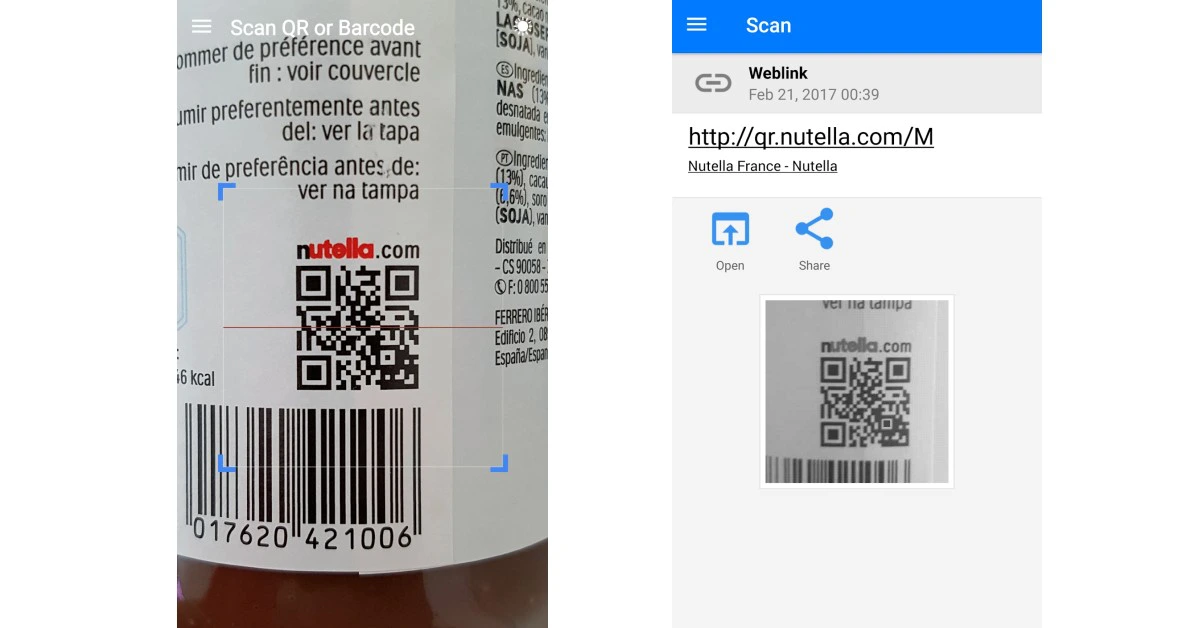
QR codes are everywhere. From accessing restaurant menus to making online payments, QR codes help with a lot of tasks. Most Android OEMs design their camera apps to support QR codes. Things can come to a head when your Android phone is unable to scan a QR code. Luckily, there are a few quick fixes to this annoying problem.

Read Also: 6 things to check before buying a refurbished smartphone (2024)

Reasons why your Android is not scanning QR codes

If you can’t get your phone to scan a QR code, it could be due to one of the following reasons.

  • The QR code is damaged
  • Your phone’s camera is dirty
  • QR code no longer exists
  • Bad lighting around the QR code
  • Software issues with the camera app

Inspect the QR Code

5 Simple Ways to Scan a QR Code on Google Pixel Phones

If the QR Code is damaged, blurred, faded, or obfuscated, your Android phone will be unable to scan it. Try removing any objects that may be obstructing the code or ask the retailer for a better copy of the QR code. If the QR sticker has any smudges on it, wipe it clean and try scanning it again.

Clean your phone’s lens

Best Camera Phone Of The Year 2023: Our recommendations

It is possible that the fault lies with your phone’s camera and not the physical QR code. If the camera lens on your phone is dirty, it will fail to read the code in front of it. Most camera apps display a warning to let the user know they need to wipe the lens for a clearer picture.

Check the lighting

Bad lighting is another hindrance that you need to overcome to scan a QR code. Use the flashlight on your phone to scan the code if your surroundings are pitch dark. Most UPI apps automatically trigger the flashlight while scanning a QR code in limited lighting.

Adjust your camera’s focus

The QR code needs to be in your camera’s focus for your phone to scan it. Locking the focus can be tricky when your phone is placed too close to the code. Take a few steps back, tap the QR code on the viewfinder to lock the focus, and wait for your phone to scan it. This process may require a couple of attempts before you get it right.

Use the Scan QR tile/Google Lens

Use the QR Code tile from the drop-down menu

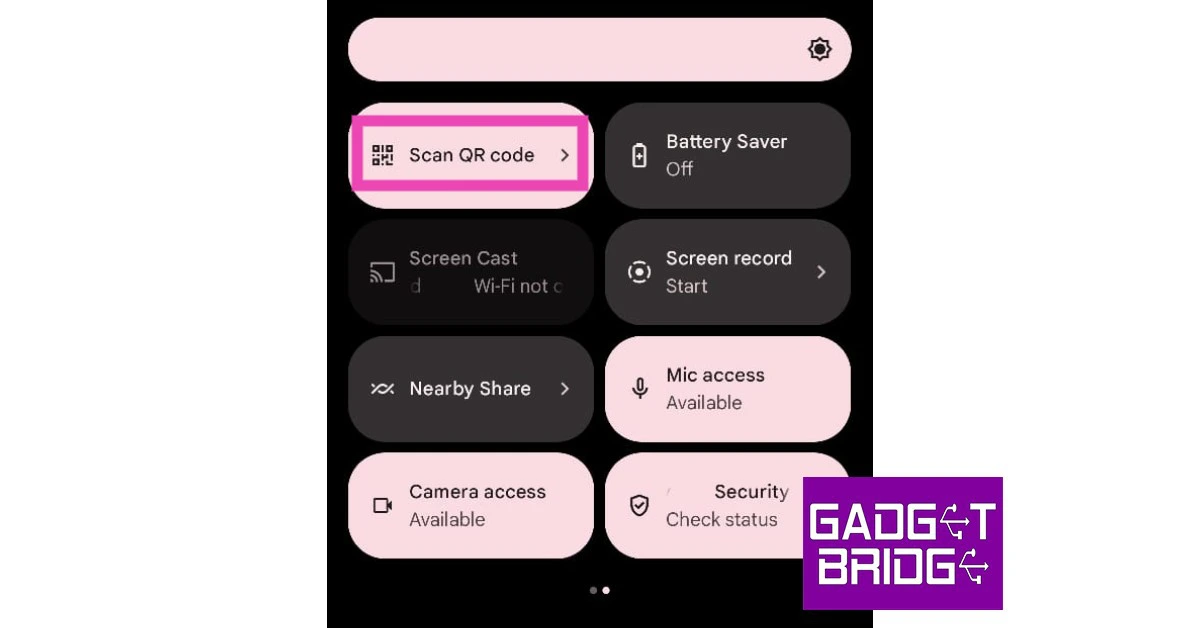
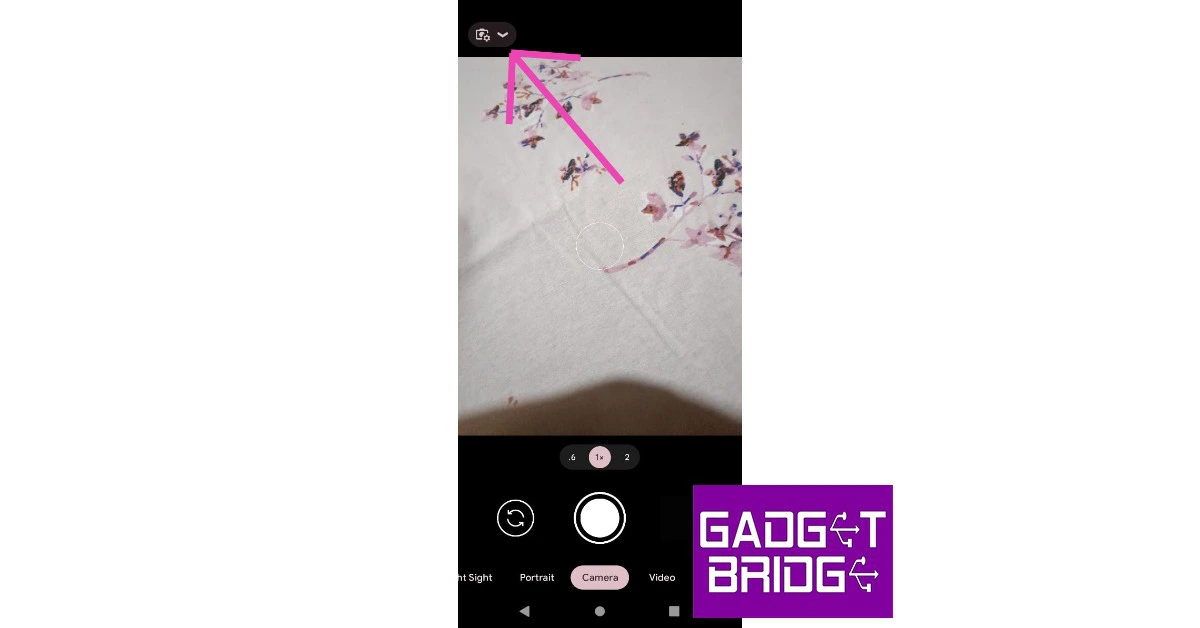
If the native camera app on your phone is unable to scan QR codes, use Google Lens instead. You can trigger Google Lens by tapping the ‘Scan’ tile in the Quick Settings Menu or going to the Google app and tapping the camera icon. Once you’re in Google Lens, tap the ‘Search with your camera’ option to scan the code.

Turn on Google Lens suggestions

Stock Android users can auto-scan QR codes by turning on Google Lens suggestions in the native camera app. Here’s how.

Step 1: Launch the Camera app and tap the settings icon.

Step 2: Tap the gear icon to access the camera settings. 

Step 2: Tap on More settings.

Step 3: Select ‘More Settings’ and turn the toggle bar on for ‘Google Lens suggestions’.

Step 3: Turn on the toggle switch for Google Lens suggestions.

Enable QR code scanning

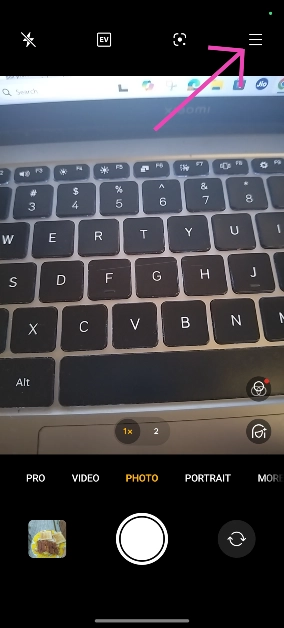
Step 1: Launch the native Camera app on your phone.

Step 2: Hit the hamburger menu in the top right corner of the screen.

Step 2: Hit the hamburger menu in the top right corner of the screen.

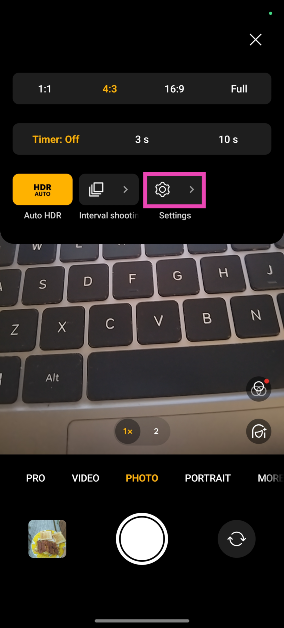
Step 3: Go to Settings.

Step 3: Go to Settings.

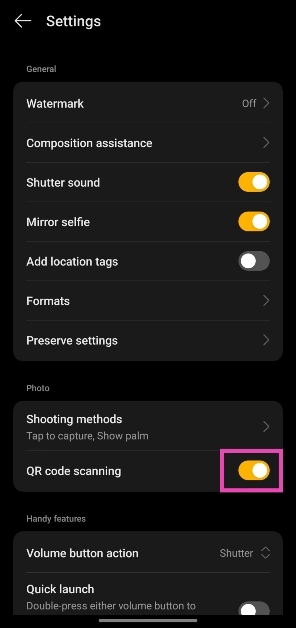
Step 4: Turn on the toggle switch next to QR code scanning.

Step 4: Turn on the toggle switch next to QR code scanning.

Save the QR code as an image

If your phone’s camera is not able to scan a QR code, simply take a picture of it and scan it using Google Lens in the Photos app. This is also how you can scan QR codes which are sent to you through WhatsApp. Open the image in the Google Photos app, and tap the Lens icon in the bottom toolbar. The Google Lens app will scan the QR code in the image.

Use a third-party app

Use a third-party app. how to scan a qr code on google pixel

If everything else fails, use a third-party app to scan the QR code. There are a plethora of scanning apps on the Google Play Store. Our favourite out of the lot is the QR and Barcode Scanner app. Launch the app and give it the appropriate permissions to function as required. When the app triggers the rear camera, use the viewfinder to point your phone at the QR code.

Update your phone’s OS

Step 1: Go to Settings and select Software update.

Go to Settings and select Software update.  Top 8 ways to fix the ‘SIM not provisioned MM2’ error on Android

Step 2: Tap on Download and install.

Top 8 ways to fix the ‘SIM not provisioned MM2’ error on Android

Step 3: Select Install now.

Select Install now. Top 8 ways to fix the ‘SIM not provisioned MM2’ error on Android

Frequently Asked Questions (FAQs)

How do I scan a QR code without an app?

Turn on the option to scan QR codes in your phone’s native camera app. Point the camera at a QR code to scan it.

Why is my Android phone not scanning QR codes?

Your Android phone may struggle to scan QR codes if its camera resolution is low or the lens is dirty. You also need to make sure that the QR code is in focus and is well lit.

How do I scan a QR code from my phone’s gallery?

Open the image of the QR code in the Google Photos app and tap the lens icon at the bottom of the screen to scan it.

Are there any good third-party apps that can scan QR codes?

Use apps like QR and Barcode Scanner, FreeScan, and Orca Scan to read QR codes using your smartphone.

How do I create a QR code?

You can create a QR code using online tools like ME-QR and QRCode Monkey.

Read Also: OnePlus Nord 3 5G price in India dropped massively

Conclusion

These are the top 10 ways to fix the ‘Android phone not scanning QR code’ problem on your device. Read this article to learn how to scan a QR code without using an app. If you have any other tips, share them with us in the comments!

Colorful EPOCH Series laptops with 13th Gen Core i9 processors announced

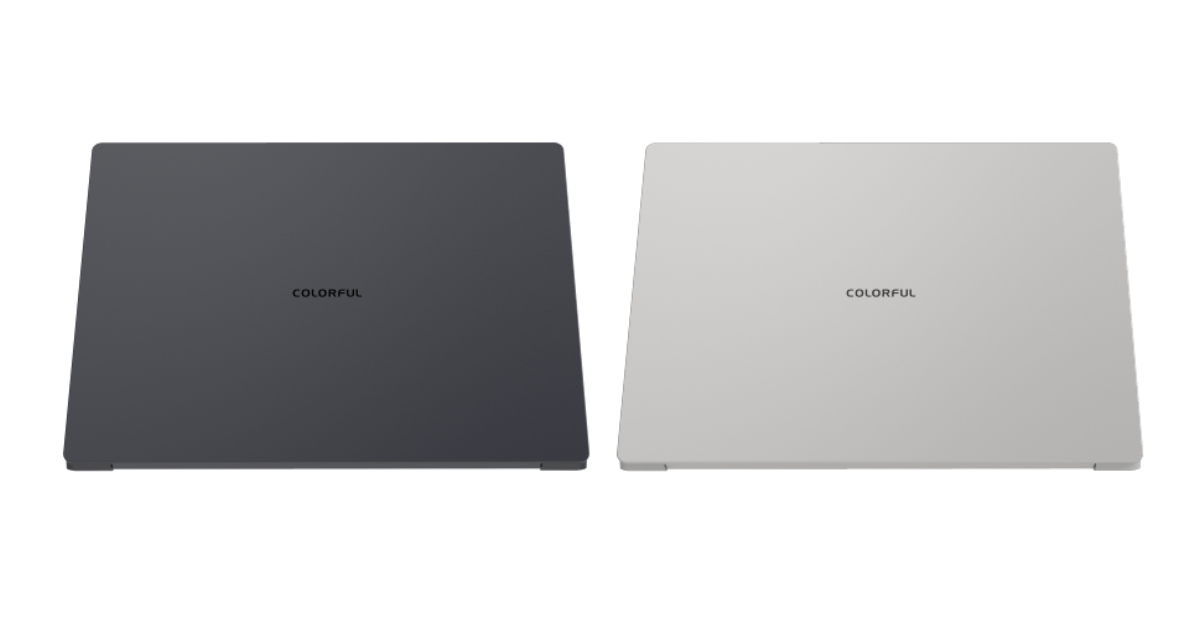
Colorful Technology Company Limited today unveiled the new EPOCH Series laptops. The new EPOCH Series is aimed at business and content creation with its slim and lightweight design. Powered by a 13th Gen Core i9 processor and NVIDIA GeForce RTX 4070 Laptop GPU the notebook is designed to enhance your computing experience with AI in gaming, creative work, business, and more.

The chassis of the EPOCH 14 is made entirely of metal, and it weighs only 1.5 kg. It is 17.9 mm thick. The laptop features a white LED-lit keyboard with three brightness settings, a tempered glass touchpad, and an aluminium unibody chassis that has been CNC-machined. With an NVIDIA GeForce RTX 4070 laptop GPU and a potent Intel 13th Gen Core i9 processor, the EPOCH Series is built for creative workloads improved by AI experiences. With Tensor Cores—a specialised AI hardware that leverages TensorRT software to further accelerate performance—the laptop offers up to 686 AI TOPS. It has NVMe PCIe Gen 4×4 1TB storage and 16GB/32GB LPDDR5 RAM.

Colorful EPOCH Series laptops with 13th Gen Core i9 processors announced

The EPOCH N14 has a 14-inch QHD display with DCI-P3 100% coverage and a maximum brightness of 500 nits. It comes in Deep Ocean Blue and Silvery White colours. It is preconfigured to run on Windows 11. Additionally, the laptop has a high-speed USB-C connector with support for 100W PD fast charging and HDMI output for multi-monitor setups. It features Bluetooth 5.2 and WiFi 6E for wireless connectivity. The laptop comes with a 150W adaptor and a 58Wh+ battery.

Also Read: OnePlus Nord 3 5G price in India dropped massively

The COLOURFUL EPOCH Series is a line of robust, thin notebooks made to improve AI computing experiences for a variety of uses, including gaming, creative work, business, and more.

A 1.0 MP HD video camera is also included for video conferences.

EPOCH Series laptops price

The starting price for the colourful EPOCH 14 is USD 1359 which translates to Rs 1,13,315.

According to the company, it is currently developing its own AI software to be revealed sometime in the future.

OnePlus Nord 3 5G price in India dropped massively

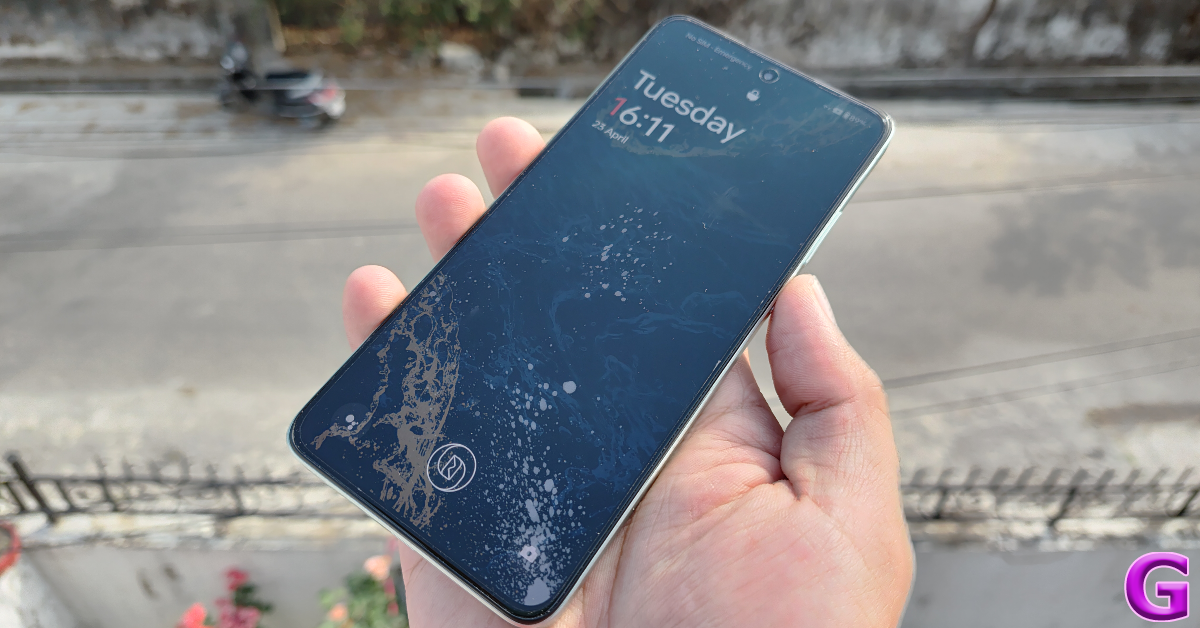
Soon new Nord phones by OnePlus will arrive in India but before their launches, several existing ones are already on sale in India. The OnePlus Nord 3 is now considerably less expensive. The cost of the gadget has been lowered by Rs 13,000 on Amazon. The smartphone was launched in India in July of last year. The Nord 3 comes with a 6.74-inch AMOLED display. The device also includes a 50-megapixel Sony IMX890 triple back camera and a 5,000mAh battery.

Right now, Amazon India has the OnePlus Nord 3 5G for the lowest price ever. There is a 38% reduction on the device’s original price. The price has been reduced to Rs 13,000. After the discount is up for sale at Rs 20,999. Over that, Amazon is offering a Rs 1,000 coupon discount that will further bring down the pricing to Rs 19,999. The OnePlus Nord 3 was previously selling at an initial price of Rs 33,999.

Also Read: OnePlus Nord 4 5G and Nord CE 4 Lite 5G price in India leaked

OnePlus Nord 3 5G specifications

OnePlus Nord 3 features a 6.74-inch AMOLED screen with a dynamic refresh rate that may vary between 40Hz and 120Hz and has a 450ppi pixel density. It runs on OxygenOS 13 with Android 13. Under its hood is an octa-core MediaTek Dimensity 9000 SoC with up to 16GB of LPDDR5X RAM and up to 256GB of internal UFS 3.1 storage.

Also Read: Samsung Galaxy Watch FE support page goes live, renders and specs leaked

The device has a triple rear camera setup for photos and videos, including a 50-megapixel Sony IMX890 sensor with OIS support. Additionally, there is an 8-megapixel ultra-wide angle Sony IMX355 sensor with a 112-degree FoV and a 2-megapixel macro lens. The phone has a 16-megapixel front-facing camera for selfies and video chats. Also, there is a 5,000mAh battery that supports 80W SuperVOOC charging.

8 things to check before buying a refurbished smartphone

Flagship smartphones are getting pricier every year. Instead of splurging upwards of Rs 1,00,000 on a premium device, you’re bound to get more value by spending almost half that amount on an older flagship. The trend of minimal upgrades on flagship devices across OEMs ensures that your refurbished device’s performance won’t be that far from its current-year counterpart. However, there are certain things that must be kept in mind when buying a refurbished smartphone. Let’s take a look.

Read Also: OnePlus Nord 4 5G and Nord CE 4 Lite 5G price in India leaked

Verify the seller

Verify the seller 6 things to check before buying a refurbished smartphone (2024)

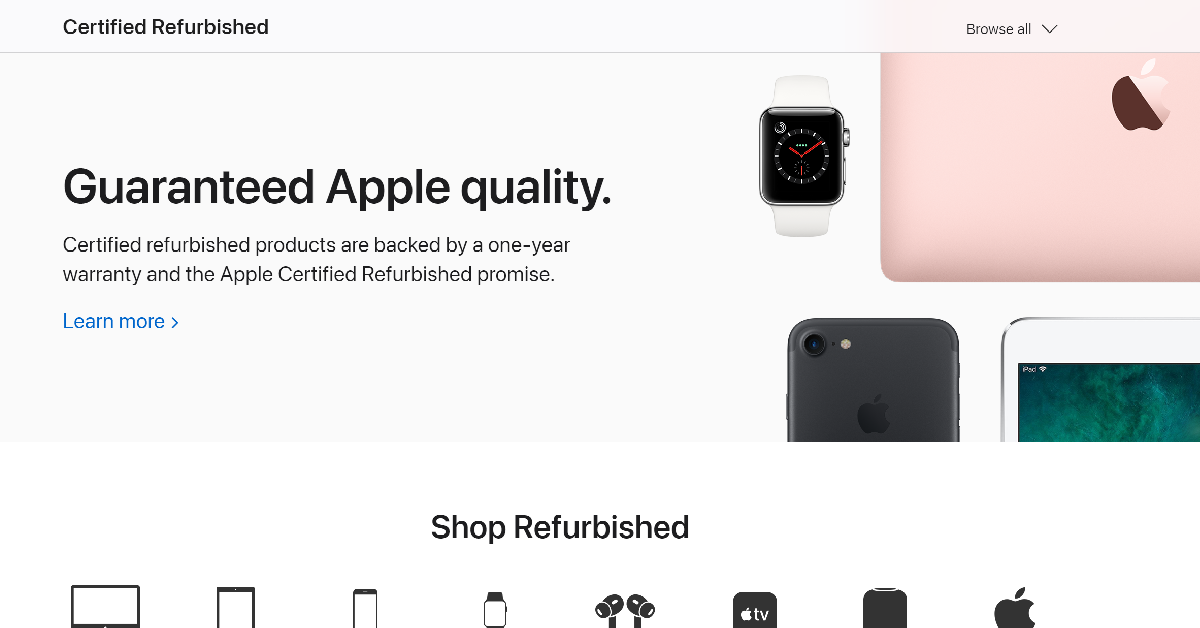
The internet is rife with fraudulent e-sellers that routinely push stolen and fake products as ‘refurbished’ smartphones. As a general rule, stick to established sellers that conduct business transparently. Before buying the device, perform a quick Google Search for the seller’s name and check if any buyer has had a bad experience dealing with them in the past. If you’re thinking of buying a refurbished iPhone, we would recommend checking out Apple’s certified refurbished store

Check the warranty

OnePlus Nord CE4 Review: Design and Display 6 things to check before buying a refurbished smartphone (2024)

Renowned sellers of refurbished goods typically offer a warranty on their products. A small premium for the warranty is a good investment to make when buying a refurbished smartphone. Apple offers a 1-year warranty on its refurbished products. If you’re purchasing the device from an independent seller, it is a good idea to check the manufacturer’s warranty coverage. 

Ask for the invoice and verify the IMEI number

7 simple methods to find the IMEI number of your Android phone or tablet 6 things to check before buying a refurbished smartphone (2024)

As we mentioned earlier, malicious entities on the internet are constantly peddling stolen smartphones as ‘refurbished devices’. To confirm that you’re buying a legitimate device, always demand the invoice or bill from the seller. Additionally, use the IMEI number to check the phone’s authentication status on the CEIR website. To find out the IMEI number of the device, launch the phone app and dial *#06#.

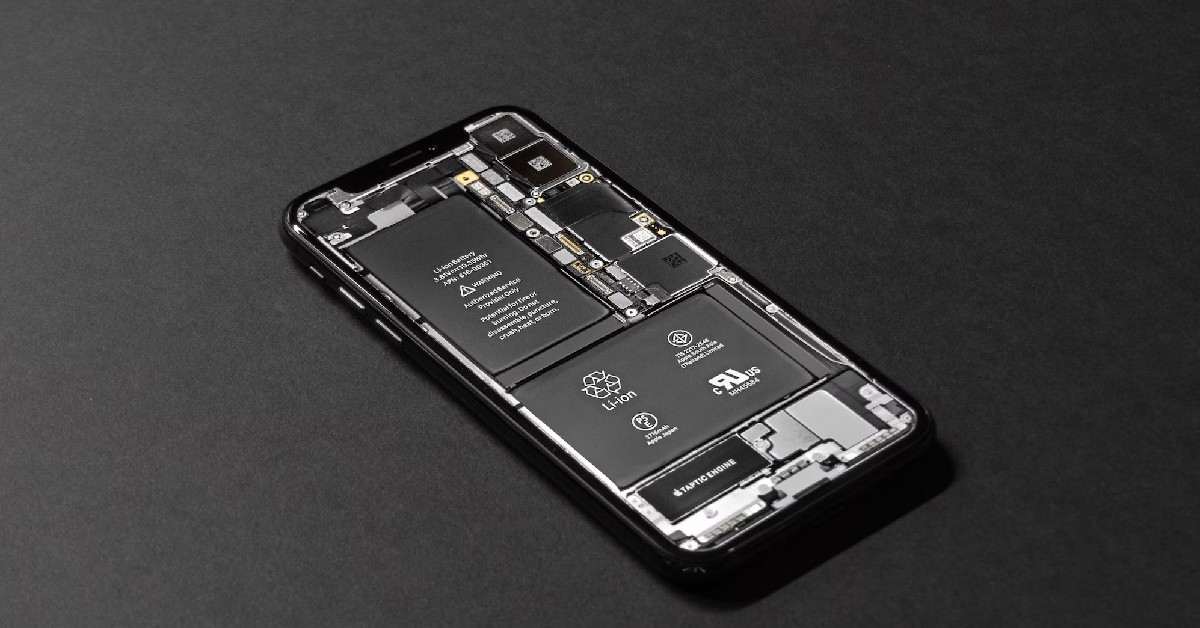
Check the battery life

How to replace iPhone battery in India and in USA?

The battery life of a smartphone is crucial to its performance. Credible sellers equip their refurbished devices with new batteries to enhance their performance and add more years to their lives. If the refurbished smartphone you’ve selected does not have a new battery pack, go to its settings and check its battery health. If the device has been put through multiple years of use, you should ask the seller to replace its battery or go for a relatively newer unit.

Software updates and security patches

Android 15 will bring a host of new features with it

The software and security coverage promised by the OEM often go under the radar while shopping for refurbished devices, but it is a very important parameter that should not be overlooked. A device that routinely receives security updates is more impervious to malware and other malicious threats. Software updates are equally important as they usher in new features and make the device future-proof.

Check the accessories

OnePlus 10T review: Super fast speed at an attractive price, should you buy it?

Smartphone manufacturers like OnePlus, Oppo, Xiaomi, and Vivo supplement their devices with essential accessories like the power adapter, charging cable, and phone cover. If the phone you’re buying comes with accessories, make sure that they’re present in the retail box. If you’re buying a device that does not come with accessories in the box, make sure the compatible add-ons are available online.

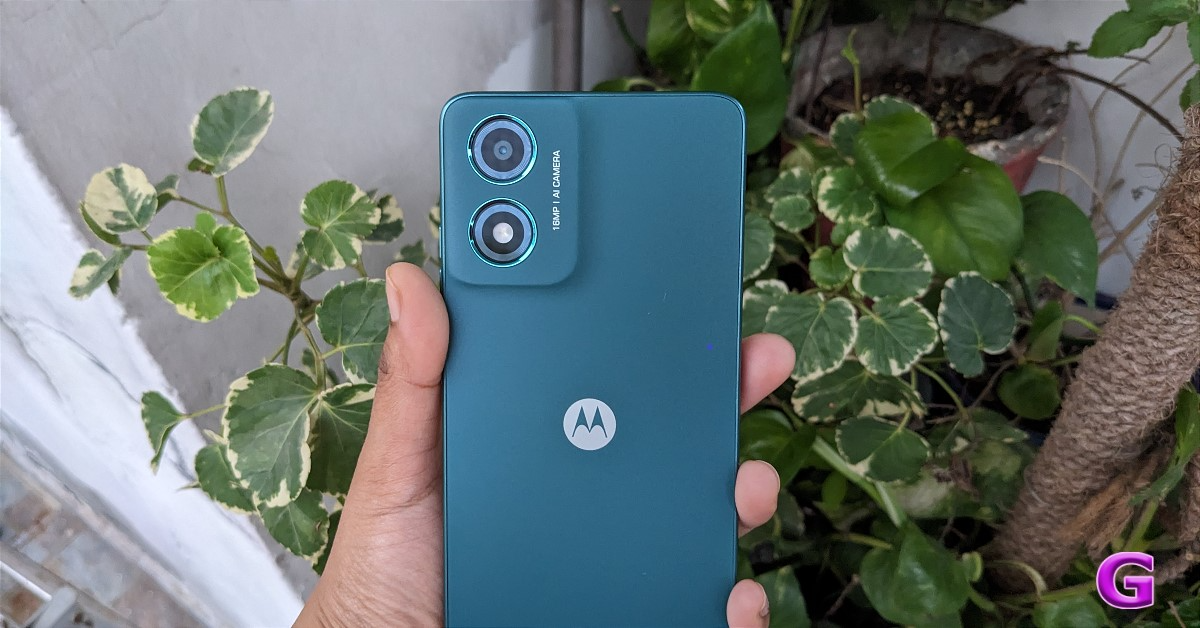
Assess the hardware

Moto G04 Review: The most affordable Android 14 smartphone

If you’re buying a refurbished smartphone, you will have to make some compromises on the hardware front. This includes minor scuffs and scratches. Apart from hardware damage on the surface, you should also check the device’s headphone jack, SIM slot, microSD slot, and physical buttons for any damage. If there are any functional issues with the device, notify the seller and ask for a better unit.

Pricing

Best gaming smartphone to purchase in India right now

Using the parameters mentioned above, try to get the right price for the product. If the smartphone is expected to receive OS upgrades and security patches in future, a small premium on its price is justified. A healthy battery pack warrants a higher price, too. Cross-check the prices with online retailers before making a decision.

Frequently Asked Questions (FAQs)

Where can I buy a refurbished iPhone in India?

Apple’s refurbished store is the best place to buy refurbished iPhones in India. Sahi Value, Electronics Bazaar, ShopClues, and Amazon also deal in refurbished goods.

Do refurbished smartphones come with a warranty?

Warranty coverage for refurbished smartphones is decided by the seller. While most reputable dealers offer a warranty on their refurbished devices, it may not be the case when buying smartphones from independent sellers.

How do I find the IMEI number of a used smartphone?

To find the IMEI number of any smartphone, go to the phone app and dial *#06#.

What should I check in a refurbished smartphone before buying it?

Before buying a used or refurbished smartphone, check its warranty coverage, promised OS upgrades, physical condition, and battery health. Additionally, run its IMEI number on the CEIR website to make sure it’s not a stolen product.

Are refurbished phones worth buying?

Refurbished phones from verified retailers are a good alternative to expensive smartphones. If the retailer has replaced the battery with a new unit, a refurbished phone can last a long time.

Read Also: How to change the details and address on your Aadhaar Card online?

Conclusion

These are the 8 things you must look out for when buying a refurbished smartphone. Online platforms like Blynk, Sahi Value, and Amazon offer a good variety of refurbished smartphones at competitive prices. You may also want to check out the prices at your local sellers before making a purchase. If you have any questions, let us know in the comments!
OnePlus Nord 4 5G and Nord CE 4 Lite 5G price in India leaked

The OnePlus Nord CE 4 Lite 5G, likely to launch soon, will be the follow-up to the OnePlus Nord CE 3 Lite 5G, which debuted in April 2023 in India. The certification websites, such as the NBTC, and Bluetooth SIG website, have both the OnePlus Nord 4 5G and CE 4 Lite 5G listed. The important features, price range, and launch schedule for the CE 4 Lite 5G have been leaked by a tipster. Neither handset’s debut date has been officially confirmed by the business. But both the phones are anticipated to arrive together.

With the CPH2621 product number, the OnePlus Nord CE 4 Lite 5G has been seen on the NBTC certification website, suggesting that it may soon be available in Thailand and other nations around the world.

The upcoming smartphone’s name and 5G capability are verified on the certification page. With the identical model number, the Nord CE 4 Lite 5G was recently discovered on the IMDA and Geekbench certification websites, suggesting an upcoming release. Nothing more has come to light.

Also Read: Samsung Galaxy Watch FE support page goes live, renders and specs leaked

Tipster Sanju Choudhary has stated that the CE 4 Lite 5G will be available in June. According to him, the device may cost less than Rs 20,000 in India. The suggested pricing is comparable to the Rs 19,999 launch price of the OnePlus Nord CE 3 Lite 5G. further revealed the OnePlus Nord 4 5G is likely to be priced at Rs 31,999. It may launch in July next month.

Prior to the device’s official release, the tipster also disclosed the OnePlus Nord CE 4 Lite 5G’s specifications. A 6.67-inch 120Hz full-HD+ AMOLED screen is probably what it will have. The handset is said to come equipped with Snapdragon 6 Gen 1 SoC. The phone is expected to come pre-installed with Android 14. Along with three years of security patches, it might receive two years of OS updates.

Also Read: iPad Air 2024 specs downgraded, check out the details

The dual back camera unit on the CE 4 Lite 5G is supposed to be included. The camera setup is expected to sport a 50-megapixel primary sensor and a -megapixel depth sensor. Probably a 16-megapixel sensor will be found in the front camera.
It is likely to house a 5,500mAh battery. It is anticipated to include an in-display fingerprint sensor.

How to change the details and address on your Aadhaar Card online?

0

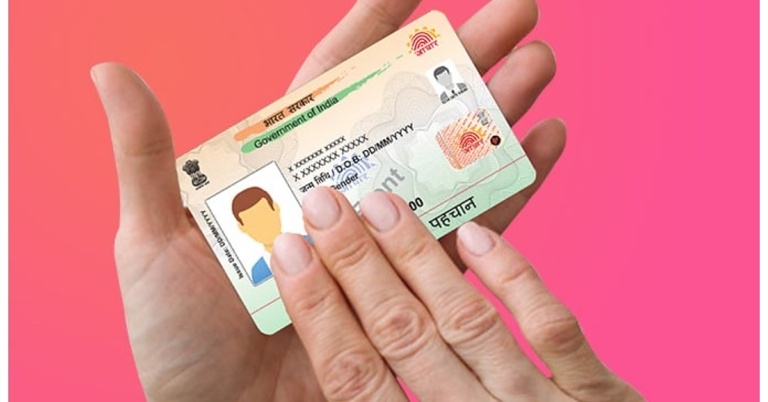
Your Aadhaar Card is crucial for accessing government services and aid as well as making financial transactions using your bank account. Apart from your name, DOB, and gender, your Aadhaar Card also displays your address. Unlike the first three categories, changes to the address are much more common. If you recently changed your residence, you should update your Aadhaar as soon as you can. Additionally, UIDAI has extended the window to update your Proof of Address and Proof of Identity for free until June 14, 2024. So, let’s take you through the process of changing the address on your Aadhaar Card online and updating your documents.

Read Also: How to remove the widgets from the Windows 11 lock screen? (2024)

Which documents do you need to change the address on your Aadhaar Card?

Changing or updating your address on your Aadhaar Card requires a Proof of Address (PoA). The MyAadhaar portal accepts a diverse range of documents as PoA. Here are some of the major ones.

  • Ration Card
  • Voter Card
  • Passport
  • Bank Statement
  • Insurance policy
  • Water/Electricity/Gas/Landline telephone bill (Not older than 3 months)

Change AADHAR Card address online

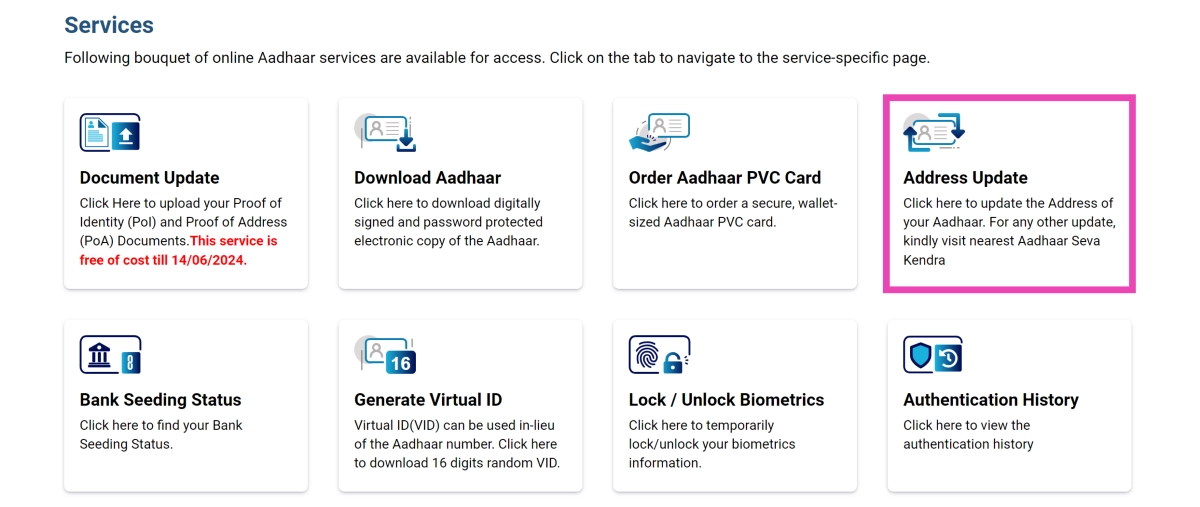
Step 1: Log into the MyAadhaar portal using your AADHAaR number.

Step 2: Click on Address Update.

Step 2: Click on Address Update.

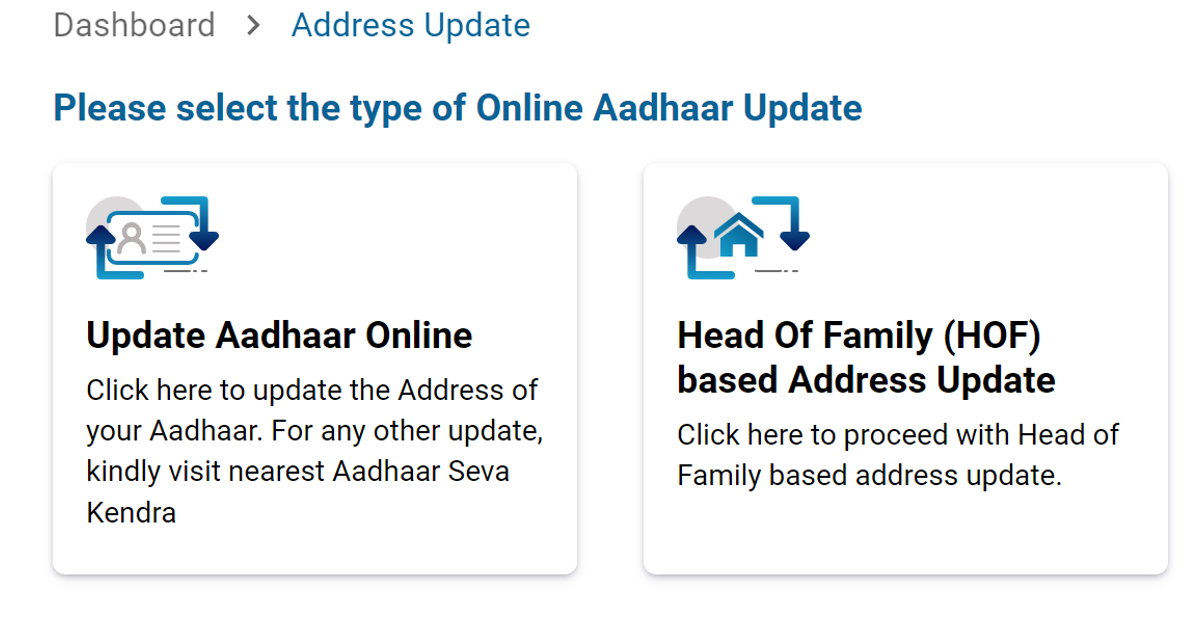
Step 3: Select Update Aadhaar online.

Step 3: Select Update Aadhar online.

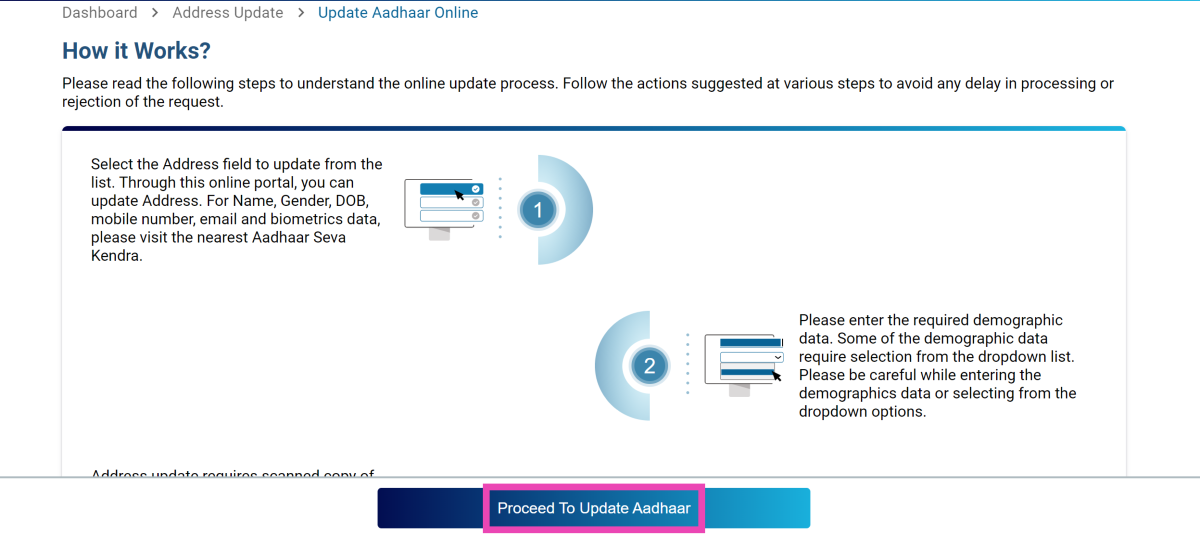
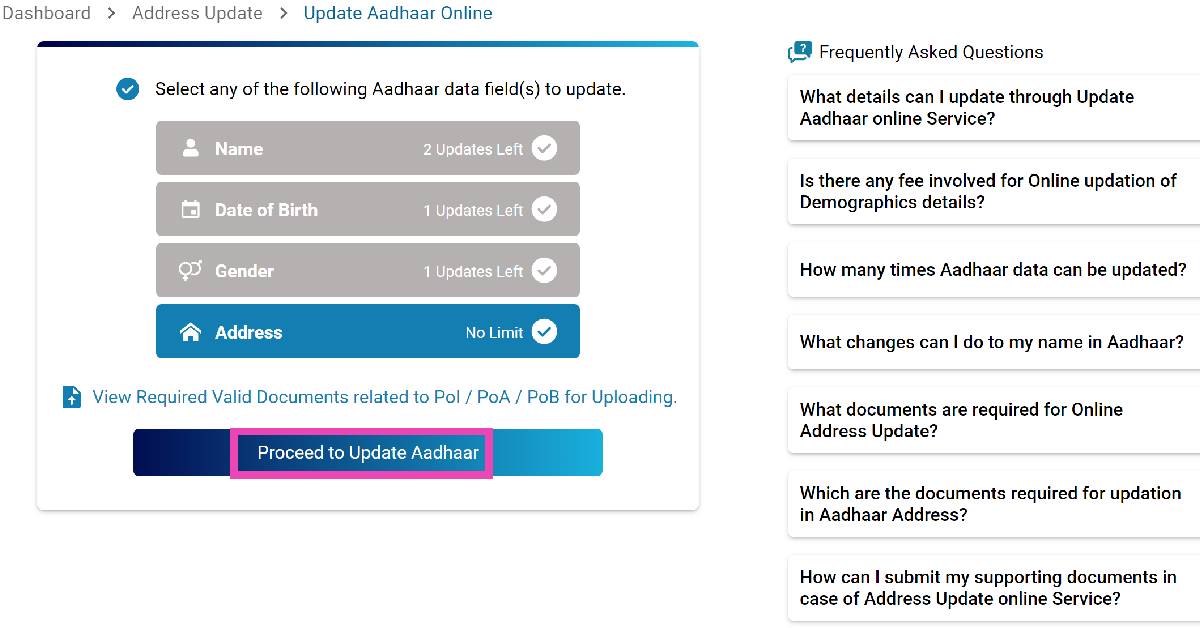
Step 4: Click on Proceed To Update Aadhaar.

Step 4: Click on Proceed To Update Aadhar.

Step 5: Select the field you wish to update (in this case, address).

Step 5: Select the field you wish to update (in this case, address). How to change the details and address on your Aadhar Card online?

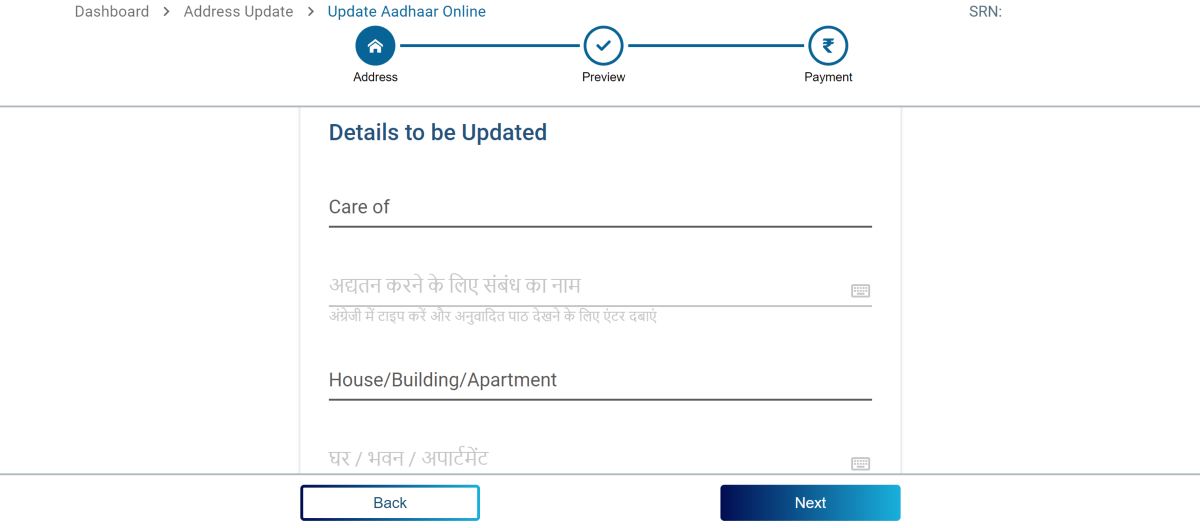
Step 6: Enter your new address along with the relevant supplementary information and proof of address

Step 6: Enter your new address along with the relevant supplementary information and proof of address.  How to change the details and address on your Aadhar Card online?

Step 7: Double-check the details and pay the Rs 50 fee.

Step 8: Save the Service Request Number to track the update progress.

Update Aadhar Card documents

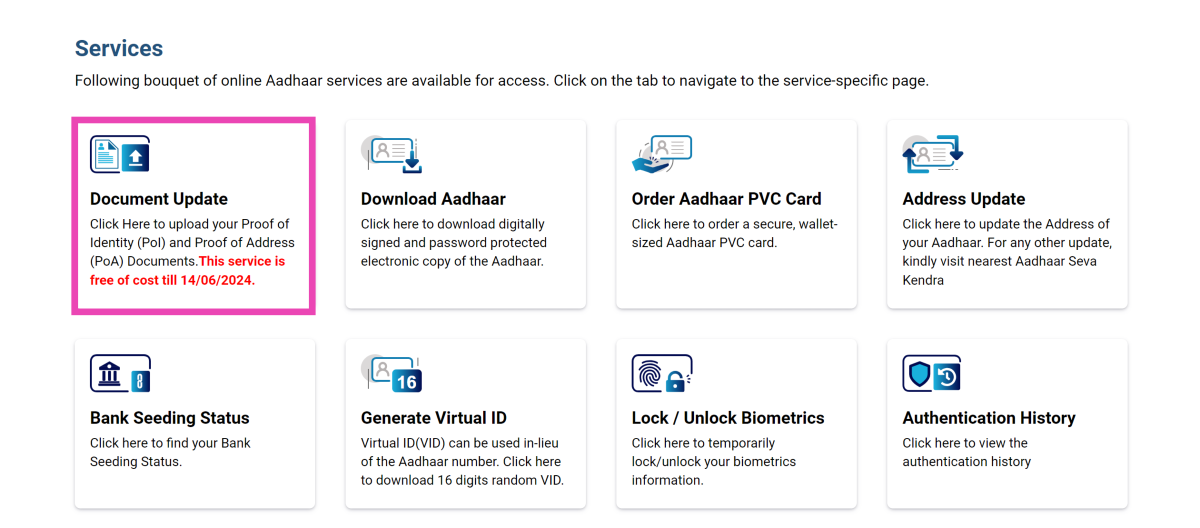
Step 1: Log into the MyAadhaar portal using your AADHAAR number.

Step 2: Click on Update Documents.

Step 2: Click on Update Documents. How to change the details and address on your Aadhar Card online?

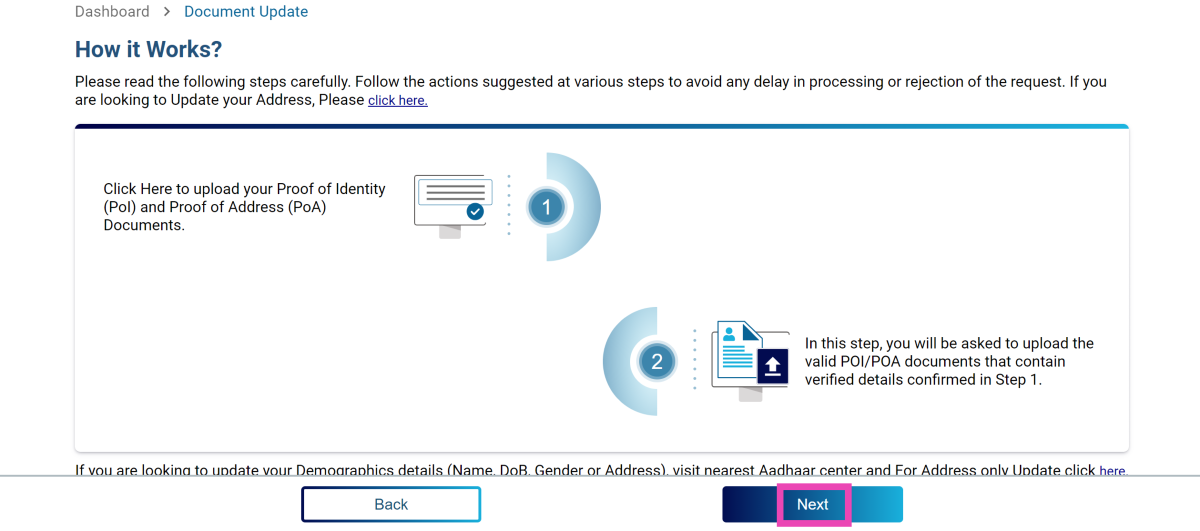
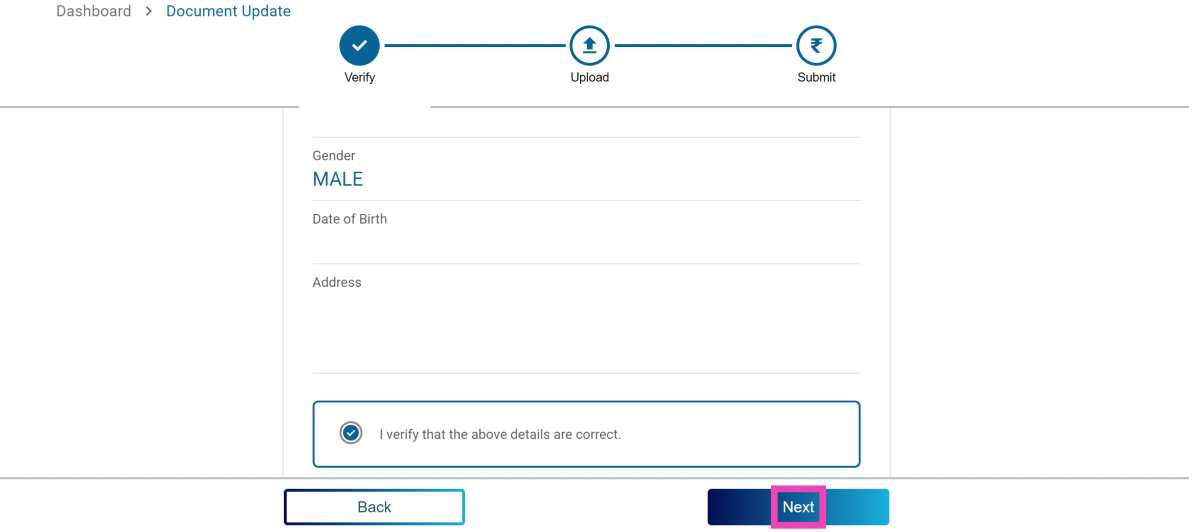
Step 3: Verify your demographic details and hit Next.

Step 3: Verify your demographic details and hit Next. How to change the details and address on your Aadhar Card online?

Step 4: Upload the valid documents and hit Next.

Step 4: Upload the valid documents and hit Next. How to change the details and address on your Aadhar Card online?

Step 5: Submit the request.

Frequently Asked Questions (FAQs)

What is the cost of changing the address on my Aadhaar Card online?

You can change the address on your Aadhaar Card online after paying a Rs 50 fee.

How many times can I change the address on my Aadhaar Card?

There is no limit on changing the address on your Aadhaar card. However, you can change your name on your Aadhaar twice in your lifetime and your gender only once.

What is the last date to link Proof of Identity and Address documents to my Aadhar Card?

You can link your Proof of Identity (PoI) and Proof of Address (PoA) documents to your Aadhaar Card for free until June 14, 2024.

Read Also: Samsung Galaxy Watch FE support page goes live, renders and specs leaked

Conclusion

This is how you can update details and change the address on your Aadhaar Card online. You can also visit your nearest Aadhaar Enrolment Center to update the address or other details on the card. If you know any other way to update the details on your Aadhaar, let us know in the comments!
Garena Free Fire Max Redeem Codes Today 5 June 2024: Here is how to claim them

Garena Free Fire Max is a battle royale game with regular awards and tournaments to keep players interested. If you play Garena Free Fire, you should be aware of the redeem codes that are released on a daily basis. However, because the battle royale game is banned in India, players from other countries can use the Free Fire Redeem codes daily. If you’re unfamiliar with the Garena Free Fire redeem codes or don’t know how to get them, we’ve put together a step-by-step guide to help you redeem them. Check out Garena Free Fire Max Redeem Codes for 5 June 2024.

The Free Fire Max redeem codes are a great way to get free stuff. These are 12-digit codes that contain alphabets and numbers, as well as an expiration date and time. Because the Garena FF redeem codes cannot be used more than once, you should hurry to the redemption page to claim your free reward before someone else does. To get a free reward, all you have to do is go to reward.ff.garena.com/en, which is the official redemption page. Also, keep an eye on this space for daily updates on Garena Free Fire Max redemption codes and rewards.

Also Read: Sennheiser Accentum Plus wireless headphones with Hybrid Adaptive Noise Cancellation launched

Garena Free Fire Max Redeem Codes Today 5 June 2024

T7L6G3EM1P4K8F5N

M9U3V5T2J7B1ED8P

Q1V2X5ED8S6B7L4R

N9Z2W1V4U7F6EH3J

R9D3XE2T1P4J7K6M

V3Y7L8N9W1T5EK2S

C6T5P8EB3D7S1V2N

F2A8L6Z7Q3N9JE5R

U5B9D1WE8T2L7J6M

P7Z2Q3B9N4S6XE8T

H5W4Z3JE8V2D1S7M

G6C3PE7N1J5F8R9L

K8J3T2EW4P1V6S9U

X2G4H7Y3L5F1EN9T

Y1B2T5L8N7H6ES4W

S2J5C3ED1N4M8P7K

F3Z4P8T6S1L5BE7D

9R6Y4W8J7L2BE5S1

P5H1NE8U3M2D4Z9E

L3G7T1X6V4M9YE5S

How to Get Free Fire Max Redeem Codes for Garena on 5 June 2024?

  • Visit the Garena Free Fire Max game’s official website at reward.ff.garena.com.
  • Use your Facebook, Google, VK, Apple ID, Huawei ID, or Twitter account to log in.
  • You’ll be taken to a valid redemption code (s)
  • Copy and paste the 12-digit redemption code into the text box.
  • On the screen, a dialogue box will appear.
  • ‘Ok’ should be selected.

For the latest gadget and tech news, and gadget reviews, follow us on TwitterFacebook and Instagram. For newest tech & gadget videos subscribe to our YouTube Channel. You can also stay up to date using the Gadget Bridge Android App. You can find the latest car and bike news here.

Samsung Galaxy Watch FE support page goes live, renders and specs leaked

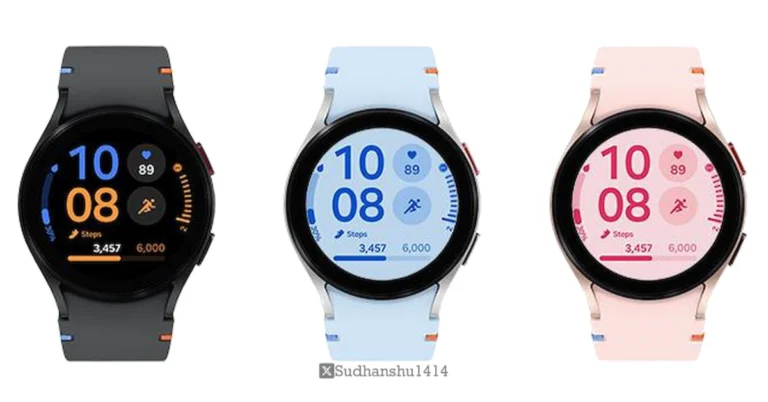
Samsung will likely unveil the Galaxy Watch FE soon; support pages for the wearable have been discovered on websites in the UK and Latin America. Like the previous Galaxy Watch 4 model, the forthcoming wristwatch is anticipated to have a 1.2-inch Super AMOLED screen, 1.5GB RAM, and 16GB storage.

Although Samsung is keeping quiet about the impending smartwatch, the official Galaxy Watch FE support page surfaced in the UK and other regions.

MySmartPrice noticed that Samsung’s official websites display a Galaxy Watch with the model number SM-R861. A while ago, the Galaxy Watch FE showed up on the TDRA certification page.

Rumour has it that Samsung will introduce the Galaxy Watch FE on July 10th at the Galaxy Unpacked event in Paris. Alongside the Galaxy Watch 7 and the Galaxy Watch 7 Ultra, the device is anticipated to be released in the UK and North America. Samsung is anticipated to release other next-generation gadgets, such as tablets, the Galaxy Ring, flip and foldable phones, and more.

Also Read: iPad Air 2024 specs downgraded, check out the details

A 1.2-inch Super AMOLED screen, 1.5GB of RAM, and 16GB of storage are among the features and characteristics of the rumoured Galaxy Watch FE that are revealed in the images leaked by a popular tipster. The Galaxy Watch FE shares many internal parts with the previous generation Galaxy Watch 4, which was released in 2021.

The device, which is similar to the Galaxy Watch 6 series, appears in the renders in the colours pink, blue, and black with a circular dial. It is visible with pronounced bezels. It is rumoured to have an aluminium body with a 5 ATM water-resistant construction and IP68 certification.

Leaks indicate that the Galaxy Watch FE’s 1.2-inch Super AMOLED display has a resolution of 396×396 pixels. It might be powered by Samsung’s Exynos W920 chipset, which has 16GB of storage and 1.5GB of RAM. Wear OS, based on One UI Watch 5, is rumoured to come pre-installed.

Also Read: Xiaomi 14 Civi key specs revealed ahead of June 12 India launch

This source also disclosed that a 247mAh battery will be included in the Galaxy Watch FE. It is said to provide a battery life of up to 30 hours. The smartwatch will probably enable magnetic wireless charging. Wi-Fi, Bluetooth 5.0, NFC, and GPS connectivity options are rumoured to be included. It could include a geomagnetic sensor, gyroscope, barometer, accelerometer, and more.

Amazon Quiz Answers Today 5 June 2024: Participate to win Rs 500 Amazon Pay Balance

5 June 2024: New Amazon Quiz is now available. Customers from different parts of the country are participating in the daily quiz. The quiz starts at midnight today and will be live until 11:59 PM tonight. By successfully answering every question, participants in the quiz have the chance to win wonderful rewards. A Rs 500 Amazon Pay Balance is up for grabs to participants today.

One wrong answer could eliminate you from the quiz. You have a chance to win Rs 500 Amazon Pay Balance if you successfully answer every question. Users of the app only have the opportunity to take the quiz. Check Out 5 June 2024 Amazon Quiz Answers.

Amazon Quiz Today Prize: Rs 500 Amazon Pay Balance

Quiz Date: 5 June 2024

Daily Timing: 12 AM to 11:59 PM

Previous Amazon Quiz Winners Announcement: Today 12 PM Noon

Amazon Quiz Answers Today 5 June 2024: Win ₹ 500 Amazon Pay Balance

Question 1: The Los Angeles Lakers were eliminated by which team, the defending champions, in Round 1 of the NBA playoffs?

Answer:  Denver Nuggets

Question 2: Which actress stars in the lead role of Solene in the movie ‘The Idea of You’?

Answer: Anne Hathaway

Question 3: In which country is the Angel Falls located?

Answer:  Venezuela

Question 4: This is the flag of which European country?

Answer:  Moldova

Question 5: Which of these is a famous brand of guitar from this company?

Answer: Stratocaster

Also Read: Noise Buds Verve, budget TWS with up to 45 hours of playback launched in India

How To Play Amazon Quiz Today

Only app users are eligible to play the Amazon quiz every morning from 12 AM to 11:59 PM. The quiz is not available on the desktop. For those who are unaware of how to play the Amazon quiz, below are the steps, you can follow to take the quiz.

  • First, download the Amazon app from the Google Play Store or App Store or go here to download the Amazon App
  • Now fill in the required information through the Sign-Up option.
  • You need to log in to the Amazon app and scroll down on the home screen to find the Amazon Quiz banner.
  • Tap on the Amazon Quiz banner and tap on the Start button to start the Quiz.
  • Now you will get 5 questions and you need to answer them correctly. One wrong answer will eliminate you from the Quiz.
  • After answering all the questions correctly you are now eligible for a Lucky Draw.
  • The previous winner’s name will be announced today at 12 PM.

Amazon Daily Quiz Answers from the previous few days.

Here are all the answers from the previous 5 days of the Amazon Daily Quiz and Contest.

Amazon Quiz Answers Today 4 June 2024: Win ₹ 500 Amazon Pay Balance

Question 1: The Estadio Manolo Santana and the Estadio Arantxa Sanchez Vicario are courts used for which ATP Masters series event?

Answer: Madrid Masters

Question 2: The movie ‘Murder Mubarak’ is based on the novel ‘Club You to Death’ written by whom?

Answer: Anuja Chauhan

Question 3: Who is the current Duke of York?

Answer: Prince Andrew

Question 4: This is a statue of the lead vocalist of which iconic band?

Answer: Queen

Question 5: This is a famous monument in which city?

Answer: Lucknow

Amazon Quiz Answers Today 3 June 2024: Win ₹ 500 Amazon Pay Balance

Question 1: Who are Bayern Munich facing in the semi final of the 2023-24 UEFA Champions League?

Answer: Real Madrid

Question 2: Which of these movies starring Zendaya is about a former tennis prodigy turned coach?

Answer: Challengers

Question 3: It is the fourth highest mountain on earth. Its name means ‘South Peak’ in Tibetan. Name the mountain

Answer: Lhotse

Question 4: This is the flag of which island country in the Indian Ocean?

Answer: Seychelles

Question 5: Identify this type of pasta also known as ‘Bow tie pasta’

Answer: Farfalle

Amazon Quiz Answers Today 2 June 2024: Win ₹ 500 Amazon Pay Balance

Question 1: Which team swept the Phoenix Suns 4-0 in the first round of the 2023-24 NBA Playoffs?

Answer: Minnesota Timberwolves

Question 2: The movie ‘Main Atal Hoon’ stars which actor in the role of former Prime Minister Atal Bihari Vajpayee?

Answer: Pankaj Tripathi

Question 3: The Iguazu falls in South America is situated on a border of which two countries?

Answer: Argentina and Brazil

Question 4: This picture was taken in which European capital?

Answer: Bern

Question 5: What bird is shown in the visual?

Answer: Vulture

Amazon Quiz Answers Today 1 June 2024: Win ₹ 500 Amazon Pay Balance

Question 1: The Bharat Ratna Shri Atal Bihari Vajpayee Ekana Cricket Stadium is the home ground of which IPL team?

Answer:  Lucknow Super Giants

Question 2: The recent movie ‘Ae Watan Mere Watan’ is based on the true story of which freedom fighter?

Answer: Usha Mehta

Question 3: A sequel to a very popular work of children’s literature- ‘Through the Looking Glass’ is a book written by whom?

Answer:  Lewis Carroll

Question 4: This monument was built to commemorate the landing of which king for his coronation as the Emperor of India?

Answer:  George V

Question 5: What spice is derived from this flower?

Answer: Saffron

Amazon Quiz Answers Today 31 May 2024: Win ₹ 500 Amazon Pay Balance

Question 1: Who scored a brilliant century as Punjab Kings successfully chased down a target of 262 against Kolkata Knight Riders in IPL 2024?

Answer: Jonny Bairstow

Question 2: The movie Article 370 stars which actress in the lead role of Zooni Haksar

Answer: Yami Gautam

Question 3: The famous Chamundeshwari temple located on the top of Chamundi Hills is in which Indian state?

Answer: Karnataka

Question 4: This is a view of the beautiful city of Queenstown in which country?

Answer: New Zealand

Question 5: ‘Let it Be’ is the name of a famous song released by which famous band in 1970?

Answer: Beatles

Amazon Quiz Answers Today 30 May 2024: Win ₹ 500 Amazon Pay Balance

Question 1: Who scored a half century in just 15 balls in a losing effort against Sunrisers Hyderabad in IPL 2024 for Delhi Capitals?

Answer: Jake Fraser- Mcgurk

Question 2: The Amazon Prime series- ‘A Gentleman in Moscow’ stars which famous actor in the lead role of Alexander Rostov?

Answer: Ewan Mcgregor

Question 3: The Achyutraya temple, the Virupaksha temple and the Vithala temple are located in which UNESCO World Heritage Site?

Answer: Hampi

Question 4: This is the logo of a famous automobile company headquartered in which country?

Answer: France

Question 5: This visual shows which dwarf planet as seen from the New Horizons spacecraft in 2015?

Answer: Pluto

Amazon Quiz Answers Frequently Asked Questions (FAQs)

Where can I check the previous winners? Did I win how to check?

You can head over to this link on your mobile or desktop to check the winners of the Amazon Daily Quiz Contest.

How to Play Amazon Daily Quiz or Contest?

We have written an explainer above, you can refer to that.

When are the winners of the Amazon Quiz and contest announced or declared?

The announcement of today’s Amazon quiz winner will take place Tomorrow. As for the Special Quiz and “Spin & Win” Contest, the winners will be declared once the Quiz Contest comes to an end. To find out who the lucky winner is, you can refer to the Amazon Quiz Winners List or visit the Amazon Winners tab in the Amazon App.

How to participate in the Daily Amazon Quiz?

That is very easy, just got to the Amazon app and scroll to the bottom of the page and you will find the Quiz section. Click on it (usually it is called the fun zone) and you can enter the Amazon Today Quiz Contest. 

Are there any other quizzes or contests running on Amazon daily?

Yes, there are many running on a daily basis. These range from spinning the wheel to answering the questions correctly. All are located in the Fun Zone. 

What are the criteria for selecting a winner in the Daily Amazon Quiz?

When a qualified player submits correct answers to all the questions, they will automatically be entered into a lucky draw. This draw will include all participants who answered all the questions correctly. Amazon randomly selects the final winners from the pool of eligible participants who gave the right answers.

Which Types of Questions are asked within Amazon Daily Quiz?

These are very simple and straightforward questions. These are mainly related to general knowledge. 

Where should I look for Amazon Daily Quiz answers?

You can bookmark this page as we will help you every day with the Amazon Daily Quiz. We bring you fresh answers every day for the Amazon Daily Quiz and Contest. 

What time does Amazon Announce previous winners?

The previous winner’s name will be announced today at 12 PM (noon).

For the latest gadget and tech news, and gadget reviews, follow us on TwitterFacebook and Instagram. For newest tech & gadget videos subscribe to our YouTube Channel. You can also stay up to date using the Gadget Bridge Android App. You can find the latest car and bike news here.

How to remove the widgets from the Windows 11 lock screen? (2024)

0

The latest Windows 11 update has ushered in some changes that haven’t gone down well among a lot of core users. The recent introduction of ‘Recall’, a feature that takes regular screenshots of your PC, was quite unpopular among Windows users. The slew of new updates also includes widgets for the lock screen. While this may not be as unpopular as the other new features, some people may prefer the clean background over a cluttered lock screen. If you fall in that camp, here’s how you can remove the widgets from your Windows 11 lock screen.

Read Also: iPad Air 2024 specs downgraded, check out the details

Before you begin

If you’re not a fan of widgets on your lock screen, Windows 11 has the option to remove them (for now). However, there are a couple of widgets that you may want to try out before dismissing the idea for good. By default, your lock screen displays the weather and stock market infographic. You can change this to Mail, Quick Share, Calendar, and Dev Home.

If you want to stick to the weather widget, you may want to customise it for more relevant forecasts. You can change the unit of measurement (Fahrenheit or Celcius) and set an accurate location. You can also follow and track the weather of multiple locations on this widget.

Remove widgets from your Windows 11 lock screen

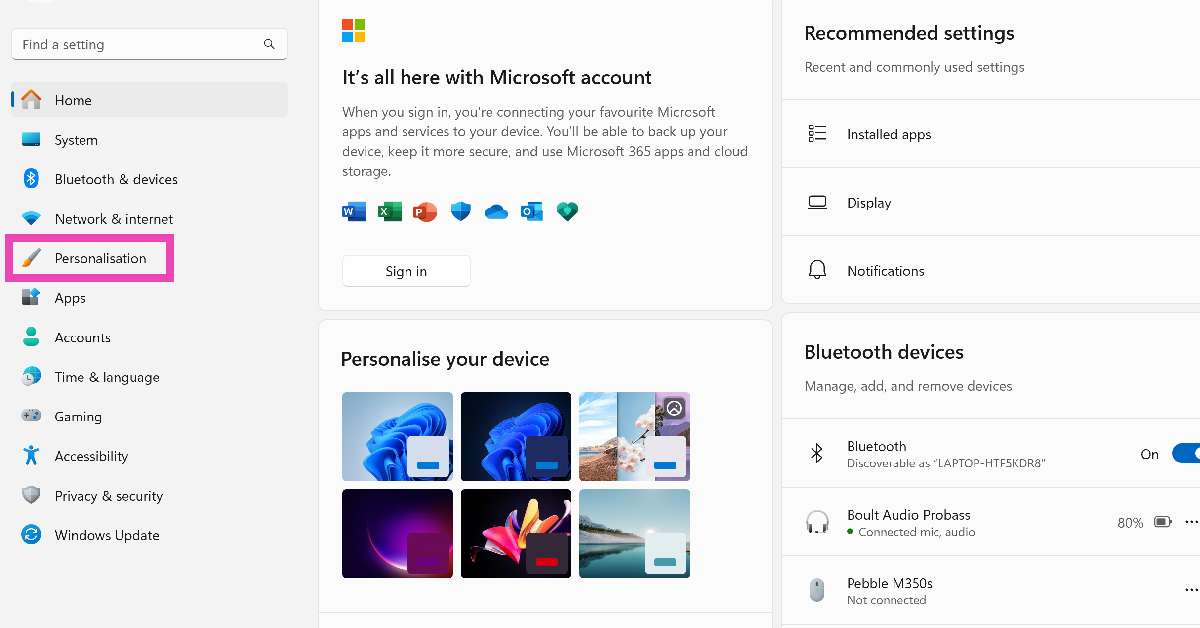
Step 1: Go to Settings and switch to the Personalisation tab.

Step 2: Switch to the Personalisation tab. How to disable Copilot and Recall on Windows 11?

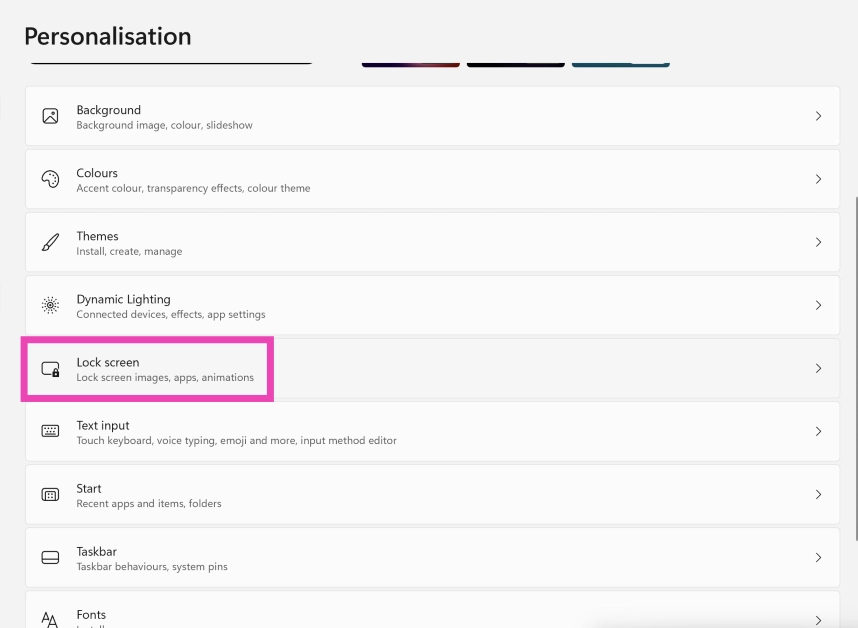
Step 2: Select Lock Screen.

Step 2: Select Lock Screen.

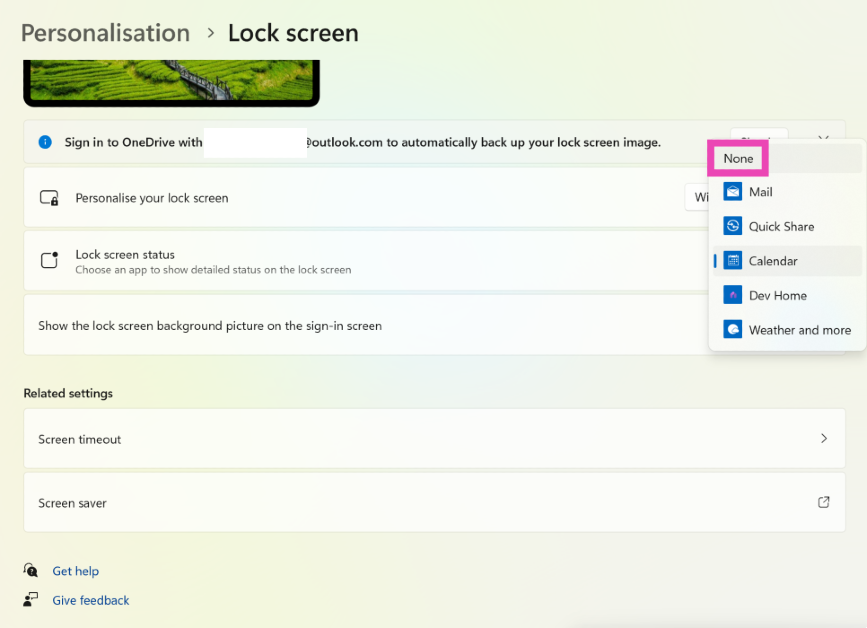
Step 3: Click on the dropdown menu next to Lock screen status and select None.

Step 3: Click on the dropdown menu next to Lock screen status and select None.

Customise the weather widget on Windows 11

Unlike the stock market updates, traffic incidents, and ads masquerading as Microsoft Store app recommendations, the weather widget enjoys a lot of popularity among Windows 11 users. If you don’t want to do away with this helpful widget, here are a few customisation tips that will make it better.

Step 1: Click on the bottom left corner of the screen to launch the widget board.

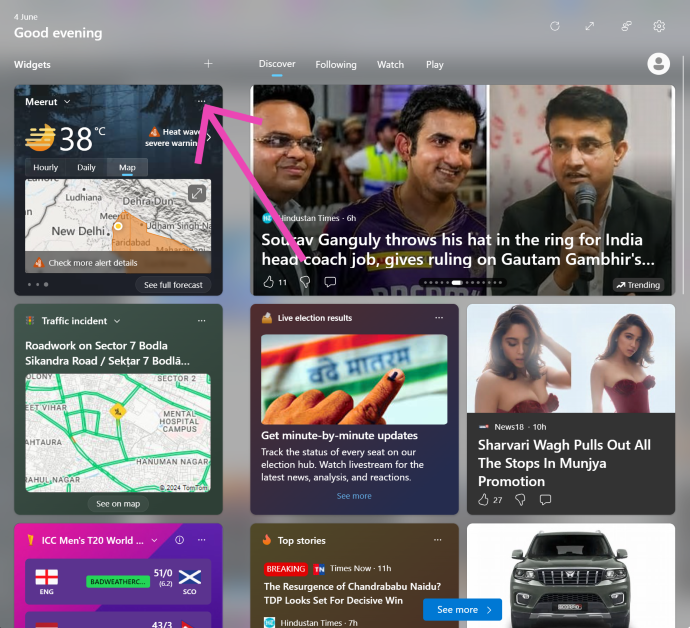
Step 2: Hit the ellipses on the top right corner of the weather widget.

Step 2: Hit the ellipses on the top right corner of the weather widget.

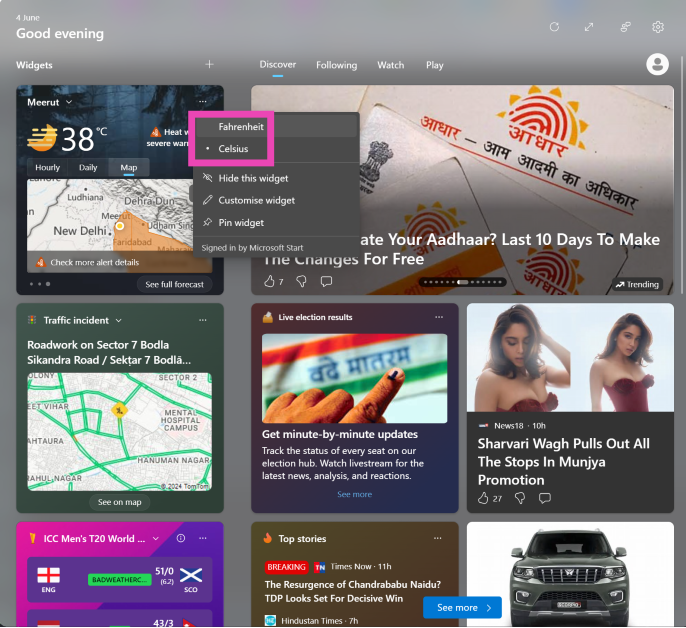
Step 3: Select your preferred unit of measurement (Fahrenheit or Celcius).

Step 3: Select your preferred unit of measurement (Fahrenheit or Celcius).

Step 4: Click on Customise widget and enter your exact location to get more relevant updates.

Frequently Asked Questions (FAQs)

How do I remove the widgets from my Windows 11 lock screen?

Go to Settings>Personalisation>Lock Screen>Lock screen status and select None.

How do I change the unit of measurement in the weather widget from Celcius to Fahrenheit?

Click on the widget board at the bottom right corner of the screen, hit the ellipses on the weather widget, and select Fahrenheit.

How do I disable Recall on Windows 11?

Go to Settings>Privacy & security>Recall & snapshots and turn off the toggle switch for ‘Save snapshots’.

Read Also: How to create a Gmail account without using a phone number (2024)

Conclusion

This is how you can remove the widgets from your Windows 11 lock screen. Read this article to learn how to disable Copilot and Recall on your Windows 11 PC. Got a widget that you like using on your PC? Tell us what it is in the comments!
iPad Air 2024 specs downgraded, check out the details

The iPad Air 2024, which made its debut at Apple’s “Let Loose” event on May 7, now has revised specs. Instead of a 10-core GPU, the tablet now has a 9-core GPU; the number of CPU cores and Neural Engine cores is the same. For the first time, Apple is offering a device with a 9-core GPU; additionally, there have been rumours that this GPU is a reworked version of the 10-core one that powers other Apple products.

Apple stealthily downgraded the iPad Air 2024’s technical specifications. The tablet with the M2 SoC now has a 9-core GPU instead of a 10-core one, according to an updated specifications page on the Apple website.

When the iPad Air 2024 was launched last month, its processor had a 16-core Neural Engine, an 8-core CPU, and 8GB of RAM. Although Apple originally said that the GPU has 10 cores, they have now amended the iPad’s technical specifications page which now states that the iPad Air (2024) is powered by a 9-core GPU.

Also Read: Nothing is dropping hints about its upcoming phone, likely to be Phone 3 

As said earlier, there are rumours that the GPU is a reworked version of the 10-core model that drives other Apple products, like the MacBook Air (2022).

The all-new iPad Air 2024 sports a 10.9-inch and 13-inch Liquid Retina (LCD) display. An octa-core M2 processor with a Neural Engine for on-device AI workloads powers it. The tablet comes pre-installed with iPadOS 17.

It has a 12-megapixel ultra-wide angle forward-facing camera with a landscape orientation. A 12-megapixel wide-angle camera with image stabilisation and support for Smart HDR is also located on the back. Additionally, the camera can capture videos in 4K quality at up to 60 frames per second or in slow motion at up to 1080p at up to 240 frames per second. The device supports Apple’s Centre Stage technology, which automatically changes the camera angle as you walk, in addition to FaceTime.

Also Read: Xiaomi 14 Civi key specs revealed ahead of June 12 India launch

The price of the iPad Air 2024 with Wi-Fi connectivity and 128GB of storage in India is Rs 59,900. For Rs 79,990, you can also buy it in the Wi-Fi + Cellular version. Whereas, the 13.9-inch iPad Air model’s Wi-Fi and Wi-Fi + Cellular versions cost Rs 74,900 and Rs 94,900 respectively.

Top 3 ways to add a time stamp to your photos on Android

0

The metadata of an image records when and where it was clicked. Looking up the details of an image in the gallery app reveals its date, time, and location. However, if you want the date and time to appear on the image, you need to tweak its watermark settings. In case your Android smartphone does not have this feature, there are other tricks you can use. So, let’s take a quick look at the top 3 ways to add a time stamp to your photos on Android.

Read Also: Xiaomi 14 Civi key specs revealed ahead of June 12 India launch

Watermarking on an Android smartphone

Most native camera apps on Android smartphones allow users to add a watermark to their images. This watermark can be tweaked to integrate the date and time as well. Some OEMs like Vivo let the user change the watermark design, background image, font, and size as well.

If your Android smartphone does not have customisation options for the watermark in its native camera app, you will need to download a third-party camera app that specialises in time stamps.

Of course, you can also design a watermark using a photo-editing app and manually add it to your photos, but this process takes a lot of time. Instead, it is much better to let the camera app on your phone automatically apply the time stamp on the images you click.

Add a time stamp to photos on Android

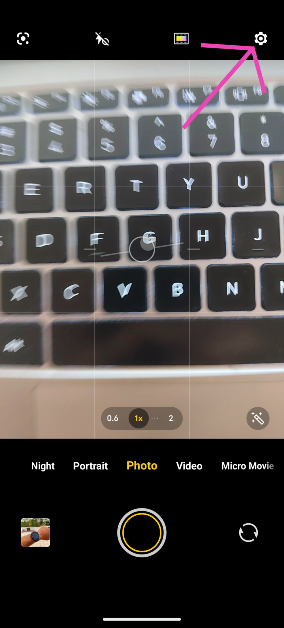
Step 1: Launch the Camera app on your phone.

Step 2: Hit the Settings icon at the top right corner of the screen.

Step 2: Hit the Settings icon at the top right corner of the screen.

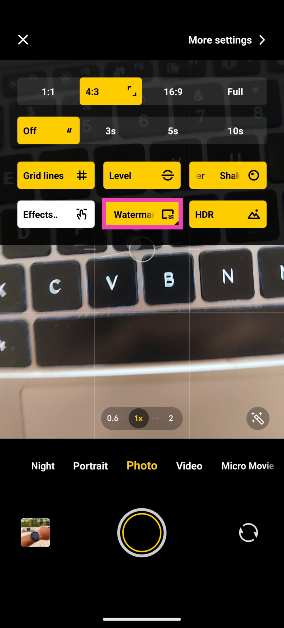
Step 3: Tap on Watermark and select On.

Step 3: Tap on Watermark and select On.

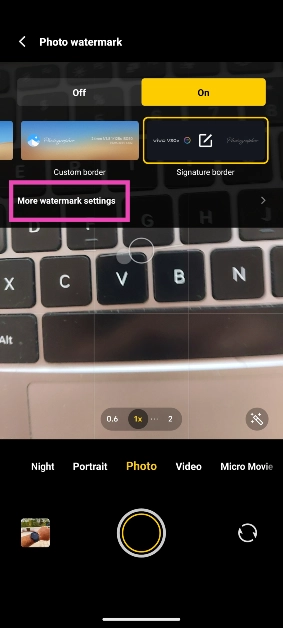
Step 4: Tap on More watermark settings.

Step 4: Tap on More watermark settings.

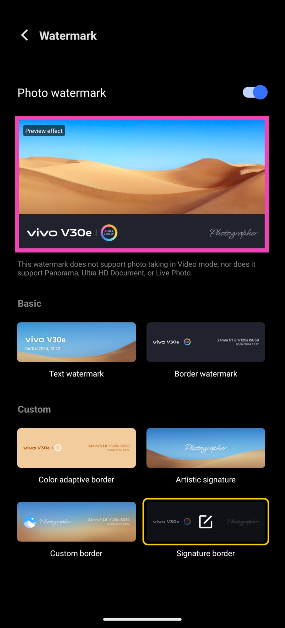
Step 5: Tap on the preview image for the watermark.

Step 5: Select the preview image for the watermark.

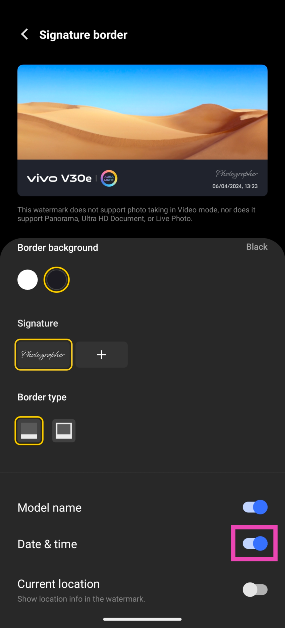
Step 6: Turn on the toggle switch for date and time.

Step 6: Turn on the toggle switch for date and time. Top 2 ways to add a time stamp to your photos on Android (2024)

Use a third-party app (Timestamp Camera)

If the native camera app on your Android phone does not support timestamps, download the Timestamp Camera app from the Google Play Store for this task.

Step 1: Install the Timestamp Camera app on your smartphone.

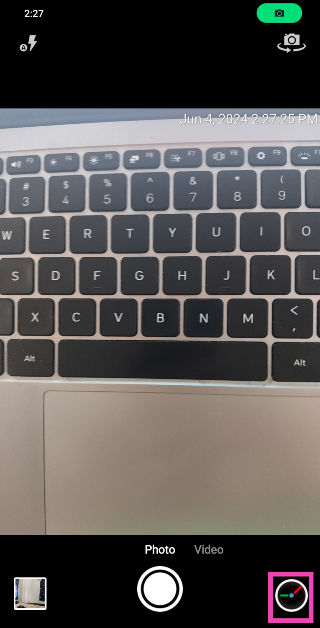
Step 2: Launch the app and tap the settings icon at the bottom right corner of the screen.

Step 2: Launch the app and tap the settings icon at the bottom right corner of the screen. Top 2 ways to add a time stamp to your photos on Android (2024)

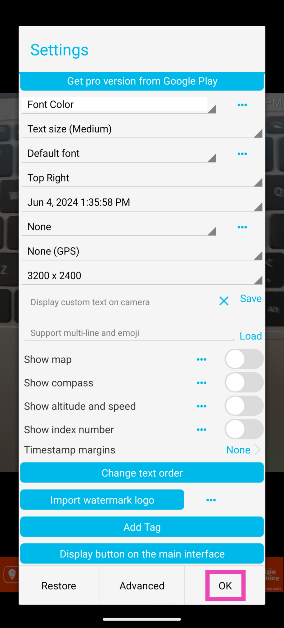
Step 3: Select the onscreen position of the time stamp along with the size, font, colour, and format. Hit OK when you’re done.

Step 3: Select the onscreen position of the time stamp along with the size, font, colour, and format. Hit OK when you’re done. Top 2 ways to add a time stamp to your photos on Android (2024)

Pictures taken with the Timestamp Camera app will appear in the camera folder in the Gallery app on your phone.

Add a timestamp using your phone’s photo editor

This method will come in handy when you want to add a watermark or timestamp to an existing picture on your phone. Here’s how you can go about it.

Step 1: Open the image in your phone’s native gallery app.

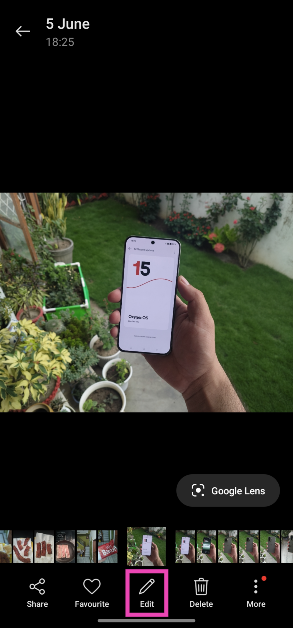
Step 2: Hit the Edit button at the bottom of the screen.

Step 2: Hit the Edit button at the bottom of the screen.

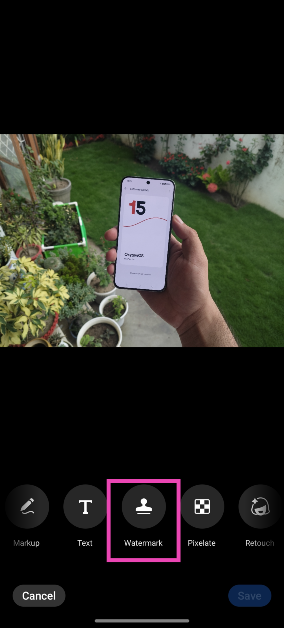
Step 3: Scroll through the tiles and select Watermark.

Step 3: Scroll through the tiles and select Watermark.

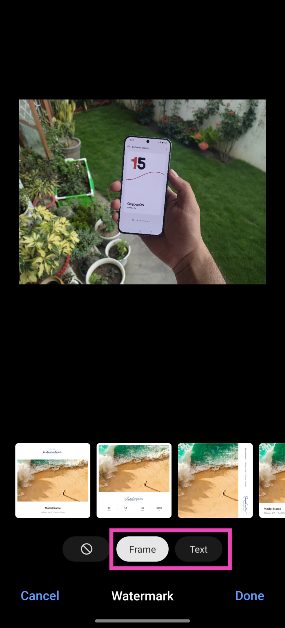
Step 4: Choose whether you want to add a frame to the photograph or simply want to overlay text on it.

Step 4: Choose whether you want to add a frame to the photograph or simply want to overlay text on it.

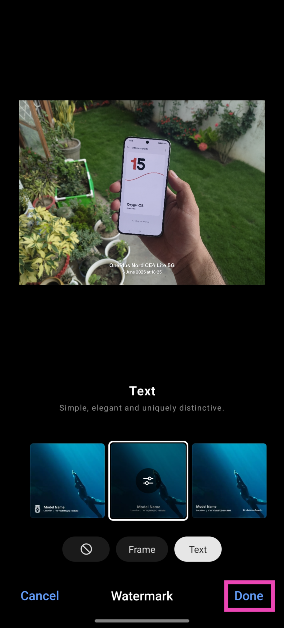
Step 5: Select an option that displays the time and date.

Step 6: Hit Done.

Step 6: Hit Done.

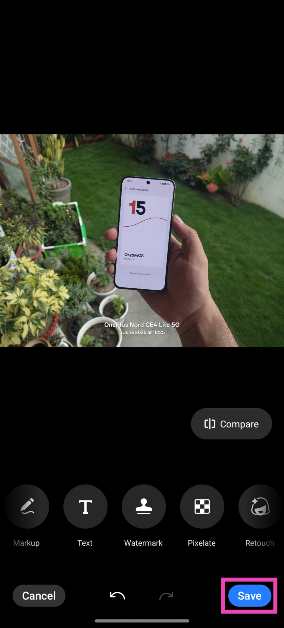
Step 7: Tap on Save.

Step 7: Tap on Save.

Frequently Asked Questions (FAQs)

How do I add time stamps to pictures on my Android phone?

Launch the Camera app, go to Settings>Watermark>Preview Watermark, and turn on the toggle switch for date and time.

How do I find out the date and time when an image was taken?

Go to your phone’s gallery app, open an image, hit the ellipses, and select ‘Details’. The image metadata, which includes the date and time when it was clicked, will appear on the next page.

Can I change the date and time of an image after it has been captured?

You can edit the metadata of an image after it has been captured and saved to your phone’s gallery. This includes its date and time.

Can I add a timestamp to an image in my phone’s gallery?

Open the image in your phone’s gallery, access the photo editor, go to the Watermark section, and choose an option with the date and time.

Is there a good third-party to take images with timestamps?

You can use the Timestamp Camera and Open Camera apps to take images with timestamps.

Read Also: How to view Lok Sabha 2024 election results online?

Conclusion

These are the top 3 ways to add a time stamp to your photos on Android. If your phone’s native photo editor does not offer the option to add a timestamp, use a photo editing app like Canva, Snapseed, or Picsart. Read this article to learn how you can change the photo date and time on your Android phone.

Xiaomi 14 Civi key specs revealed ahead of June 12 India launch

Xiaomi 14 Civi India launch is scheduled for June 12. It is anticipated that the phone will be a rebranded variant of the Xiaomi Civi 4 Pro, which made its debut in China in March. Ahead of the official announcement the firm has confirmed its key specifications, including colour possibilities. Although, the price and design of the upcoming phone have already been teased by the company.

The Xiaomi 14 Civi, a rebranded Xiaomi Civi 4 Pro, is scheduled to debut in India on June 12. The key specifications of the phone have now been listed on its microsite. The phone will include a 1.5K AMOLED screen with a refresh rate of 120Hz, powered by HyperOS, an Android 14 operating system, and Qualcomm’s Snapdragon 8s Gen 3 processor.

It will have two 32-megapixel front camera sensors and a triple rear camera configuration supported by Leica. A 4,700mAh battery that can withstand up to 1,600 charge cycles and 67W of wired fast charging will power the phone. The Cruise Blue, Matcha Green, and Shadow Black colour options are available for the upcoming phone. It is confirmed that the phone’s frame is made of metal and that its thickness is 7.4 mm.

Previously an image of the Xiaomi 14 Civi was leaked online, providing a detailed look at its bank offers and sale date. The tipster Sudhanshu also disclosed the device’s anticipated price range. The smartphone will launch on June 20th, according to an offline advertisement that tipster Sudhanshu snapped off a banner outside of an electronics store. The phone will probably cost about Rs 50,000 in India.

Also Read: Nothing is dropping hints about its upcoming phone, likely to be Phone 3

In addition to this, the poster offers a Rs 3,000 instant cashback with certain bank cards. Buyers may also receive a Rs 3,000 exchange incentive when they purchase the Xiaomi 14 Civi. Whereas the EMIs will begin at Rs 2,389 per month, and customers have the option to use Xiaomi Easy Finance.

There are rumours that the Xiaomi 14 Civi is a rebranded version of the Xiaomi Civi 4 Pro, which was released in March of this year. If speculations regarding the device are to be believed then along with Snapdragon 8s Gen 3 CPU the device will include up to 512GB of UFS 4.0 storage. It will have a 6.55-inch full-HD+ OLED display with a refresh rate of 120Hz and Gorilla Glass 2 protection.

Given that the Xiaomi Civi 4 Pro has three back cameras, it is expected that the Xiaomi 14 Civi will also contain a camera module with three lenses, the primary one being a 50-megapixel Leica Summilux lens with optical image stabilisation (OIS). In addition, a 12-megapixel ultra-wide-angle sensor and a 50-megapixel portrait sensor.

How to view Lok Sabha 2024 election results online?

0

After a seven-phase voting period spanning six weeks, the polling for the 2024 Lok Sabha general elections ended on June 1. The counting of votes is currently underway and the results can be tracked online. You can tune into the media coverage of the results online or track the progress on your phone. Don’t know any reliable places to view the results online? Let’s take a quick look at how you can watch the Lok Sabha 2024 election results online.

Read Also: Nothing is dropping hints about its upcoming phone, likely to be Phone 3

View Lok Sabha 2024 election results on ECI’s website

The official ECI website is the most reliable place to track the general election results. Here’s how you can go about it.

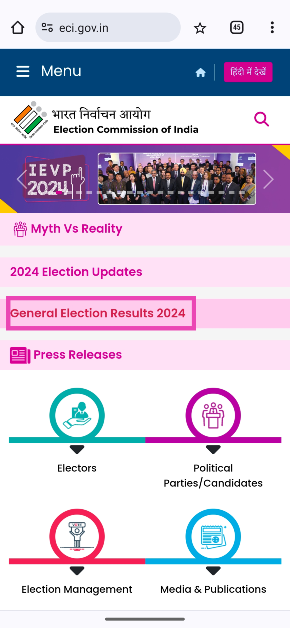
Step 1: Go to https://www.eci.gov.in/.

Step 2: Tap on General Election Results 2024.

Step 2: Tap on General Election Results 2024.

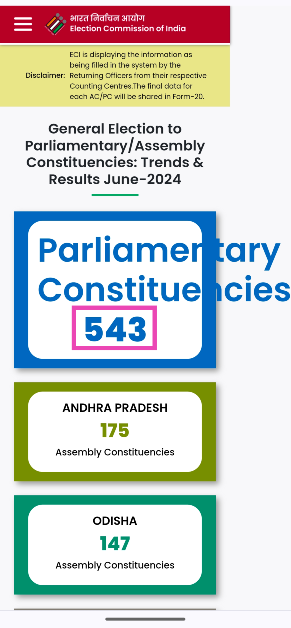
Step 3: Select Parliamentary Constituencies.

Step 3: Select Parliamentary Constituencies.

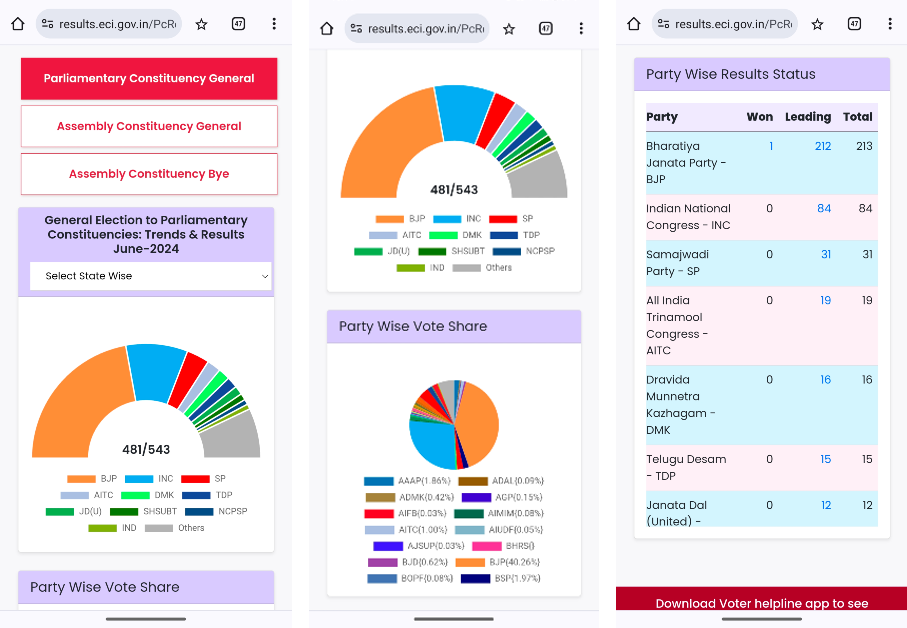
Step 4: The results will appear on the next page. Scroll down to view the detailed breakdown.

Step 4: The results will appear on the next page. Scroll down to view the detailed breakdown.

Step 5: To view the results from a particular state, tap the dropdown menu labelled Select State Wise and select the state. The results will appear on the next page. You can further view the results from a particular constituency by clicking the dropdown menu on the next page.

Use the official ECI app

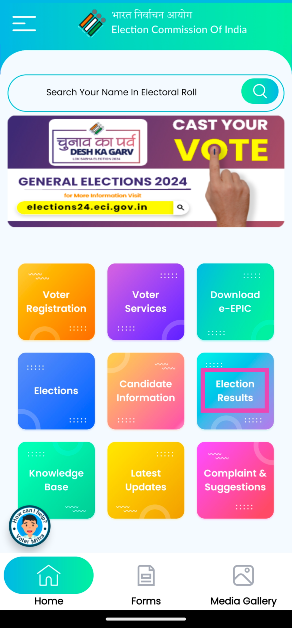
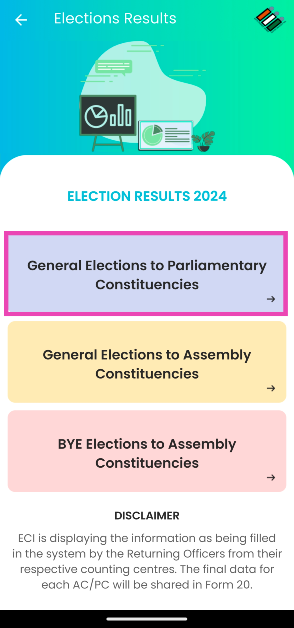
Step 1: Download and install the official ECI app (Voter Helpline) on your phone.

Step 2: Launch the app and tap on Election Results.

Step 2: Launch the app and tap on Election Results.

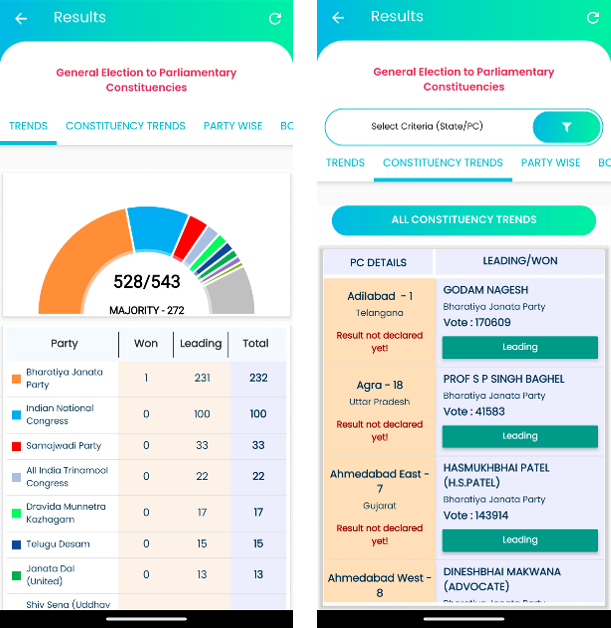
Step 3: Select General Elections to Parliamentary Constituencies.

Step 3: Select General Elections to Parliamentary Constituencies.

The results will be displayed on the next page.

The results will be displayed on the next page.

Tune into the result coverage on YouTube

You can tune into the live media coverage of the election results on YouTube. Every major news media channel live streams its election coverage on the video-streaming app. For quick and succinct updates, go to DD News’ YouTube channel and select their election results live stream.

Frequently Asked Questions (FAQs)

How do I view the results for a particular constituency?

Go to ECI’s website, click on Election Results, select Parliamentary Constituencies, click on Select State Wise, select a state, click on Select Constituency, and choose one to view the voting report for all the candidates from that constituency.

When will the Lok Sabha 2024 general election results be declared?

The counting of votes for the 2024 LS election began at 8 am on June 4. The results will be declared by the end of the day.

How do I track the LS election results on my phone?

Go to ECI’s website or download the Voter Helpline app on your phone to track the election results.

Read Also: How to find your Facebook username? Top 2 Ways (2024)

Conclusion

This is how you can view the Lok Sabha 2024 election results online. A simple Google Search for ‘Lok Sabha results’ brings up ECI’s vote count progress as the features snipped. You wouldn’t need to tap on any result to view it. For reliable numbers and results, stick to ECI’s metrics.

Nothing is dropping hints about its upcoming phone, likely to be Phone 3

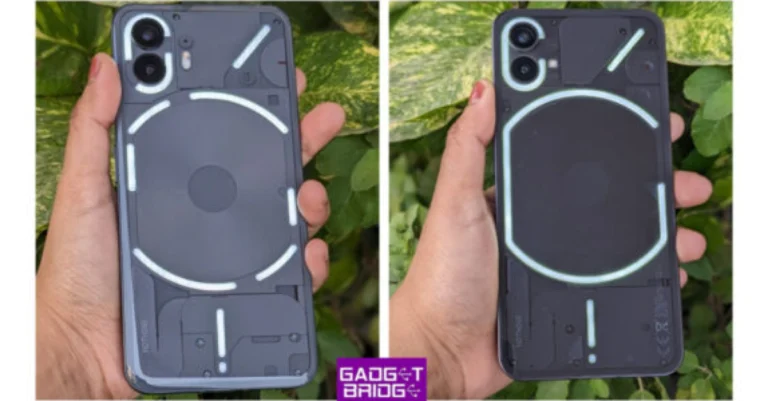
UK-based tech firm Nothing appears to indicate the release of its upcoming product. Though the Nothing Phone 3 is anticipated to be the Phone 2’s successor, the brand has not released any official information about it. Qualcomm’s Snapdragon 8s Gen 3 SoC most likely powers it. Expected features of the phone include a Glyph LED interface and a transparent rear. The phone is expected to be released in July.

On social media, the Carl Pei-led company Nothing has begun to tease the release of a new product. Although the company hasn’t released any information, we currently don’t know any specifics on Nothing’s upcoming announcement. But based on recent reports and the history of Nothing phone launches, we may presume that the Nothing Phone 3 will probably be released soon. The expected phone’s release date is still unknown, however, based on the company’s past launches, July is most likely the launch time frame.

Also Read: OnePlus 12 Glacial White debuts in India 

A mysterious teaser, the brand Nothing released a picture on X that hinted at the release of a new product. The image displays the side of a device, but it’s still unknown which phone or what kind of device it might be. The Nothing Phone 1, Phone 2, and Phone 2a are the three phones in the brand’s lineup.

Although the phone’s features and specs are a mystery to us, a previous report has revealed some information regarding its CPU and price range in India. Qualcomm’s latest Snapdragon 8s Gen 3 SoC is expected to power the Nothing Phone 3. In India, the phone is expected to cost between Rs 40,000 and Rs 45,000.

When the Nothing Phone 2 was first released, the 8GB RAM with 128GB storage model cost Rs. 44,999. The 12GB RAM with 256GB storage and the 12GB RAM with 512GB storage versions cost Rs. 49,999 and Rs. 54,999, respectively. White and Dark Grey are the available colour options for the phone.

Also Read: OnePlus 12R price in India dropped on Flipkart

According to the report, the UK-based OEM wants to establish itself in the Rs. 20,000–Rs. 40,000 bracket and has no immediate plans to enter the high-end handset market. Therefore this is also probably the reason Nothing isn’t anticipated to use a more advanced chipset.

Garena Free Fire Max Redeem Codes Today 4 June 2024: Here is how to claim them

Garena Free Fire Max is a battle royale game with regular awards and tournaments to keep players interested. If you play Garena Free Fire, you should be aware of the redeem codes that are released on a daily basis. However, because the battle royale game is banned in India, players from other countries can use the Free Fire Redeem codes daily. If you’re unfamiliar with the Garena Free Fire redeem codes or don’t know how to get them, we’ve put together a step-by-step guide to help you redeem them. Check out Garena Free Fire Max Redeem Codes for 4 June 2024.

The Free Fire Max redeem codes are a great way to get free stuff. These are 12-digit codes that contain alphabets and numbers, as well as an expiration date and time. Because the Garena FF redeem codes cannot be used more than once, you should hurry to the redemption page to claim your free reward before someone else does. To get a free reward, all you have to do is go to reward.ff.garena.com/en, which is the official redemption page. Also, keep an eye on this space for daily updates on Garena Free Fire Max redemption codes and rewards.

Also Read: Sennheiser Accentum Plus wireless headphones with Hybrid Adaptive Noise Cancellation launched

Garena Free Fire Max Redeem Codes Today 4 June 2024

W8J5F2Z6K9HP7V3T

Q2F9W6N5VXK1HZ4D

T4H1J7X5K3Z6D8QV

G0N6W3Z5R2X8V9DQ

Z3K7H5V9W4X1N8RJ

3HJ7N9D2KLZX8F5W

P6YB1Q4C9DXV7GKR

R3Q8D2X9J5V7N4WZ

X6V9Z2R4W8Q7D1JF

N5W8H3X1V7J4Q9ZD

M7Z2B8F6H0KN3XVJ

Y9C4R1Q8H7V2BNXZ

D2W7V5F6J1R4Z9XN

B8N3Z5H6X2V9F4WJ

V5J2X6F1H4R9D8QZ

K9F5H7X1V8J2R3ZD

L6W8FY2Q3N9E4X1S

H5G2M7D9R1B3FK6P

FQ6C9T2M5G7X3R8W

FV3S6D9N2B4J7R1K

FG5X8V2K4H6M1Q3F

FN9B2M4R7G1W3C5T

FP2R5K9D3N7J1F4G

X1TF4H9R2G6F3C7V

M3S6X9N2V5G1FP4J

D7L9FW2B4K8Q1C3A

A4U1KF3D5H7M2Q9V

B9F3J7C2T4P1FR5G

FY4O7H1M5S9J2G6D

FR1P4J8V3N5B2F6T

How to Get Free Fire Max Redeem Codes for Garena on 4 June 2024?

  • Visit the Garena Free Fire Max game’s official website at reward.ff.garena.com.
  • Use your Facebook, Google, VK, Apple ID, Huawei ID, or Twitter account to log in.
  • You’ll be taken to a valid redemption code (s)
  • Copy and paste the 12-digit redemption code into the text box.
  • On the screen, a dialogue box will appear.
  • ‘Ok’ should be selected.

For the latest gadget and tech news, and gadget reviews, follow us on TwitterFacebook and Instagram. For newest tech & gadget videos subscribe to our YouTube Channel. You can also stay up to date using the Gadget Bridge Android App. You can find the latest car and bike news here.

Amazon Quiz Answers Today 4 June 2024: Participate to win Rs 500 Amazon Pay Balance

4 June 2024: New Amazon Quiz is now available. Customers from different parts of the country are participating in the daily quiz. The quiz starts at midnight today and will be live until 11:59 PM tonight. By successfully answering every question, participants in the quiz have the chance to win wonderful rewards. A Rs 500 Amazon Pay Balance is up for grabs to participants today.

One wrong answer could eliminate you from the quiz. You have a chance to win Rs 500 Amazon Pay Balance if you successfully answer every question. Users of the app only have the opportunity to take the quiz. Check Out 4 June 2024 Amazon Quiz Answers.

Amazon Quiz Today Prize: Rs 500 Amazon Pay Balance

Quiz Date: 4 June 2024

Daily Timing: 12 AM to 11:59 PM

Previous Amazon Quiz Winners Announcement: Today 12 PM Noon

Amazon Quiz Answers Today 4 June 2024: Win ₹ 500 Amazon Pay Balance

Question 1: The Estadio Manolo Santana and the Estadio Arantxa Sanchez Vicario are courts used for which ATP Masters series event?

Answer: Madrid Masters

Question 2: The movie ‘Murder Mubarak’ is based on the novel ‘Club You to Death’ written by whom?

Answer: Anuja Chauhan

Question 3: Who is the current Duke of York?

Answer: Prince Andrew

Question 4: This is a statue of the lead vocalist of which iconic band?

Answer: Queen

Question 5: This is a famous monument in which city?

Answer: Lucknow

Also Read: Noise Buds Verve, budget TWS with up to 45 hours of playback launched in India

How To Play Amazon Quiz Today

Only app users are eligible to play the Amazon quiz every morning from 12 AM to 11:59 PM. The quiz is not available on the desktop. For those who are unaware of how to play the Amazon quiz, below are the steps, you can follow to take the quiz.

  • First, download the Amazon app from the Google Play Store or App Store or go here to download the Amazon App
  • Now fill in the required information through the Sign-Up option.
  • You need to log in to the Amazon app and scroll down on the home screen to find the Amazon Quiz banner.
  • Tap on the Amazon Quiz banner and tap on the Start button to start the Quiz.
  • Now you will get 5 questions and you need to answer them correctly. One wrong answer will eliminate you from the Quiz.
  • After answering all the questions correctly you are now eligible for a Lucky Draw.
  • The previous winner’s name will be announced today at 12 PM.

Amazon Daily Quiz Answers from the previous few days.

Here are all the answers from the previous 5 days of the Amazon Daily Quiz and Contest.

Amazon Quiz Answers Today 3 June 2024: Win ₹ 500 Amazon Pay Balance

Question 1: Who are Bayern Munich facing in the semi final of the 2023-24 UEFA Champions League?

Answer: Real Madrid

Question 2: Which of these movies starring Zendaya is about a former tennis prodigy turned coach?

Answer: Challengers

Question 3: It is the fourth highest mountain on earth. Its name means ‘South Peak’ in Tibetan. Name the mountain

Answer: Lhotse

Question 4: This is the flag of which island country in the Indian Ocean?

Answer: Seychelles

Question 5: Identify this type of pasta also known as ‘Bow tie pasta’

Answer: Farfalle

Amazon Quiz Answers Today 2 June 2024: Win ₹ 500 Amazon Pay Balance

Question 1: Which team swept the Phoenix Suns 4-0 in the first round of the 2023-24 NBA Playoffs?

Answer: Minnesota Timberwolves

Question 2: The movie ‘Main Atal Hoon’ stars which actor in the role of former Prime Minister Atal Bihari Vajpayee?

Answer: Pankaj Tripathi

Question 3: The Iguazu falls in South America is situated on a border of which two countries?

Answer: Argentina and Brazil

Question 4: This picture was taken in which European capital?

Answer: Bern

Question 5: What bird is shown in the visual?

Answer: Vulture

Amazon Quiz Answers Today 1 June 2024: Win ₹ 500 Amazon Pay Balance

Question 1: The Bharat Ratna Shri Atal Bihari Vajpayee Ekana Cricket Stadium is the home ground of which IPL team?

Answer:  Lucknow Super Giants

Question 2: The recent movie ‘Ae Watan Mere Watan’ is based on the true story of which freedom fighter?

Answer: Usha Mehta

Question 3: A sequel to a very popular work of children’s literature- ‘Through the Looking Glass’ is a book written by whom?

Answer:  Lewis Carroll

Question 4: This monument was built to commemorate the landing of which king for his coronation as the Emperor of India?

Answer:  George V

Question 5: What spice is derived from this flower?

Answer: Saffron

Amazon Quiz Answers Today 31 May 2024: Win ₹ 500 Amazon Pay Balance

Question 1: Who scored a brilliant century as Punjab Kings successfully chased down a target of 262 against Kolkata Knight Riders in IPL 2024?

Answer: Jonny Bairstow

Question 2: The movie Article 370 stars which actress in the lead role of Zooni Haksar

Answer: Yami Gautam

Question 3: The famous Chamundeshwari temple located on the top of Chamundi Hills is in which Indian state?

Answer: Karnataka

Question 4: This is a view of the beautiful city of Queenstown in which country?

Answer: New Zealand

Question 5: ‘Let it Be’ is the name of a famous song released by which famous band in 1970?

Answer: Beatles

Amazon Quiz Answers Today 30 May 2024: Win ₹ 500 Amazon Pay Balance

Question 1: Who scored a half century in just 15 balls in a losing effort against Sunrisers Hyderabad in IPL 2024 for Delhi Capitals?

Answer: Jake Fraser- Mcgurk

Question 2: The Amazon Prime series- ‘A Gentleman in Moscow’ stars which famous actor in the lead role of Alexander Rostov?

Answer: Ewan Mcgregor

Question 3: The Achyutraya temple, the Virupaksha temple and the Vithala temple are located in which UNESCO World Heritage Site?

Answer: Hampi

Question 4: This is the logo of a famous automobile company headquartered in which country?

Answer: France

Question 5: This visual shows which dwarf planet as seen from the New Horizons spacecraft in 2015?

Answer: Pluto

Amazon Quiz Answers Today 29 May 2024: Win ₹ 500 Amazon Pay Balance

Question 1: Which team did Real Madrid beat on penalties in the quarter finals of the 2023-24 UEFA Champions League?

Answer: Manchester City

Question 2: The series ‘Mayor of Kingstown’ stars which of these actors famous for his role in Marvel movies?

Answer: Jeremy Renner

Question 3: The Gaur, the Ruby Throated Yellow Bulbul and the Matti are the state animal, bird and tree respectively of which state?

Answer: Goa

Question 4: This picture is taken in the capital city of which European country?

Answer:  Poland

Question 5: By what name are these flowers popularly known?

Answer: Cherry blossom

Amazon Quiz Answers Frequently Asked Questions (FAQs)

Where can I check the previous winners? Did I win how to check?

You can head over to this link on your mobile or desktop to check the winners of the Amazon Daily Quiz Contest.

How to Play Amazon Daily Quiz or Contest?

We have written an explainer above, you can refer to that.

When are the winners of the Amazon Quiz and contest announced or declared?

The announcement of today’s Amazon quiz winner will take place Tomorrow. As for the Special Quiz and “Spin & Win” Contest, the winners will be declared once the Quiz Contest comes to an end. To find out who the lucky winner is, you can refer to the Amazon Quiz Winners List or visit the Amazon Winners tab in the Amazon App.

How to participate in the Daily Amazon Quiz?

That is very easy, just got to the Amazon app and scroll to the bottom of the page and you will find the Quiz section. Click on it (usually it is called the fun zone) and you can enter the Amazon Today Quiz Contest. 

Are there any other quizzes or contests running on Amazon daily?

Yes, there are many running on a daily basis. These range from spinning the wheel to answering the questions correctly. All are located in the Fun Zone. 

What are the criteria for selecting a winner in the Daily Amazon Quiz?

When a qualified player submits correct answers to all the questions, they will automatically be entered into a lucky draw. This draw will include all participants who answered all the questions correctly. Amazon randomly selects the final winners from the pool of eligible participants who gave the right answers.

Which Types of Questions are asked within Amazon Daily Quiz?

These are very simple and straightforward questions. These are mainly related to general knowledge. 

Where should I look for Amazon Daily Quiz answers?

You can bookmark this page as we will help you every day with the Amazon Daily Quiz. We bring you fresh answers every day for the Amazon Daily Quiz and Contest. 

What time does Amazon Announce previous winners?

The previous winner’s name will be announced today at 12 PM (noon).

For the latest gadget and tech news, and gadget reviews, follow us on TwitterFacebook and Instagram. For newest tech & gadget videos subscribe to our YouTube Channel. You can also stay up to date using the Gadget Bridge Android App. You can find the latest car and bike news here.

How to find your Facebook username? Top 2 Ways (2024)

0

Your username on Facebook serves as a unique identifier for your profile. No two profiles on the platform can have the same username. Users can land on your profile by simply suffixing Facebook’s URL with your username. This is a great way to share your profile with someone who is not on the platform. It makes your profile URL look much neater. If you don’t remember your Facebook username, here are the top 2 ways to find it.

Read Also: OnePlus 12 Glacial White debuts in India

Why you should have a username for your Facebook profile

Setting up a username for your profile is not mandatory on Facebook. On other platforms like Instagram and Twitter, your username is a vital part of your profile. If someone wants to look you up on Facebook, they can simply search for you by your name. However, if your name is super common, the user will have to go through a lot of results before landing on your profile.

This is one of the major reasons why having a username for your profile comes in handy. Other users can land on your page within seconds just by using your username. You can choose any name or string as long as it is not taken by someone else. Sharing your profile with other users becomes much easier when you’ve got a unique username on Facebook.

Don’t have a Facebook username? Here’s how you can make one

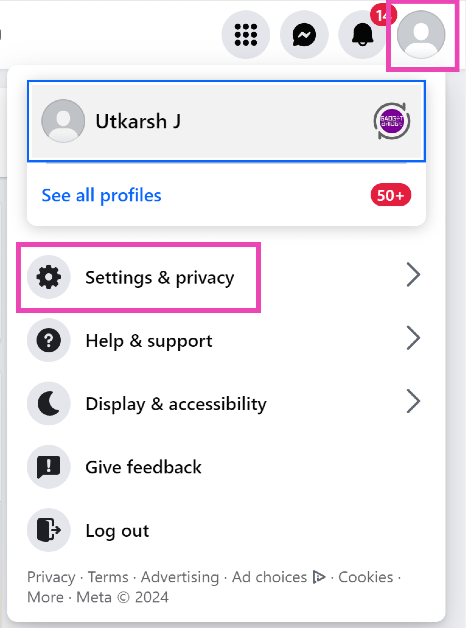
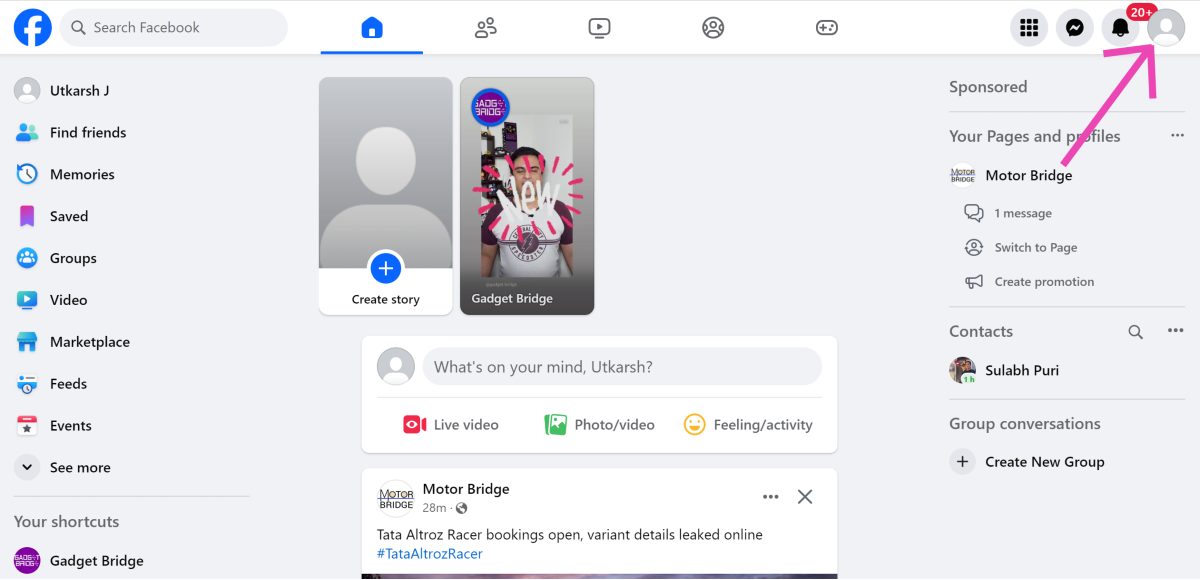
Step 1: Go to Facebook and click on your profile picture at the top right corner of the screen.

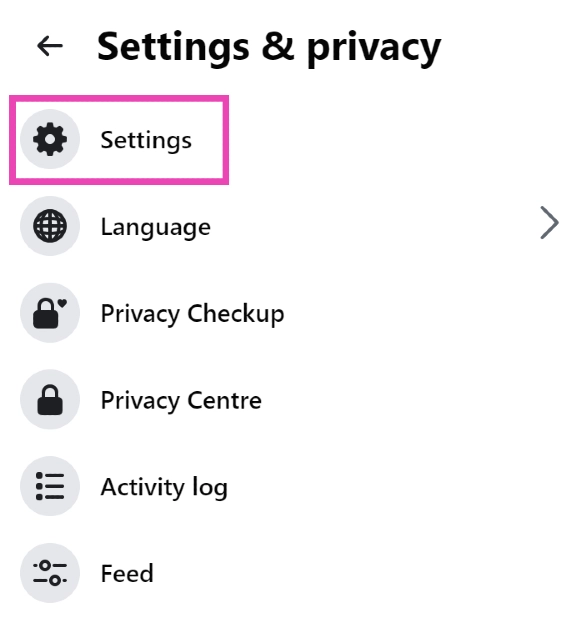
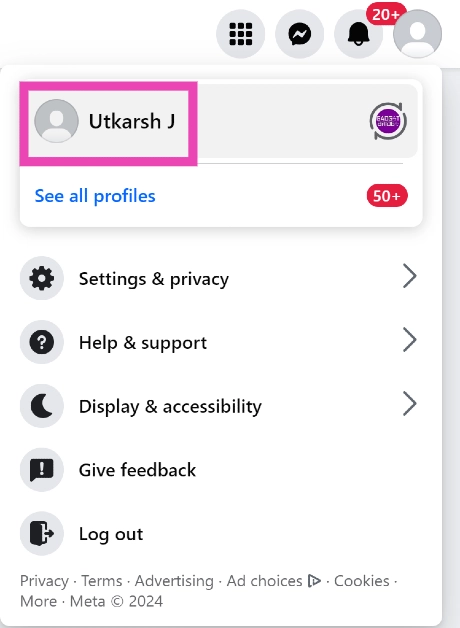
Step 2: Hit the Profile icon at the top right corner of the screen and select Settings and privacy.

Step 2: Click on Settings and privacy and select Settings.

Step 3: Click on Settings.

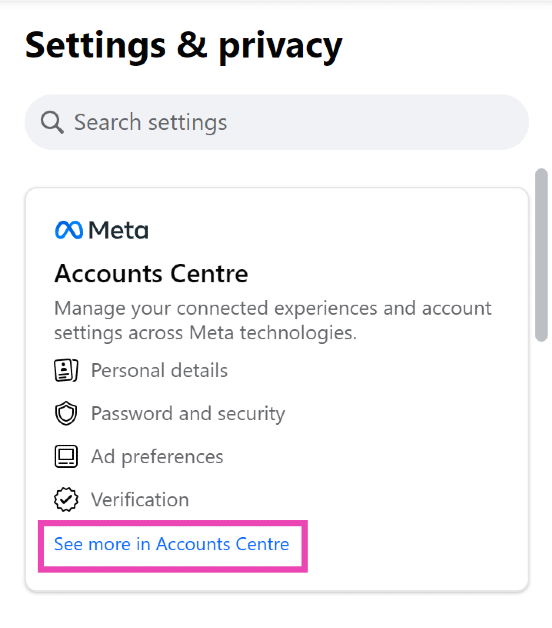
Step 3: Select See more in Accounts Centre from the sidebar.

Step 4: Open the Accounts Centre by clicking See more in its sidebar section.

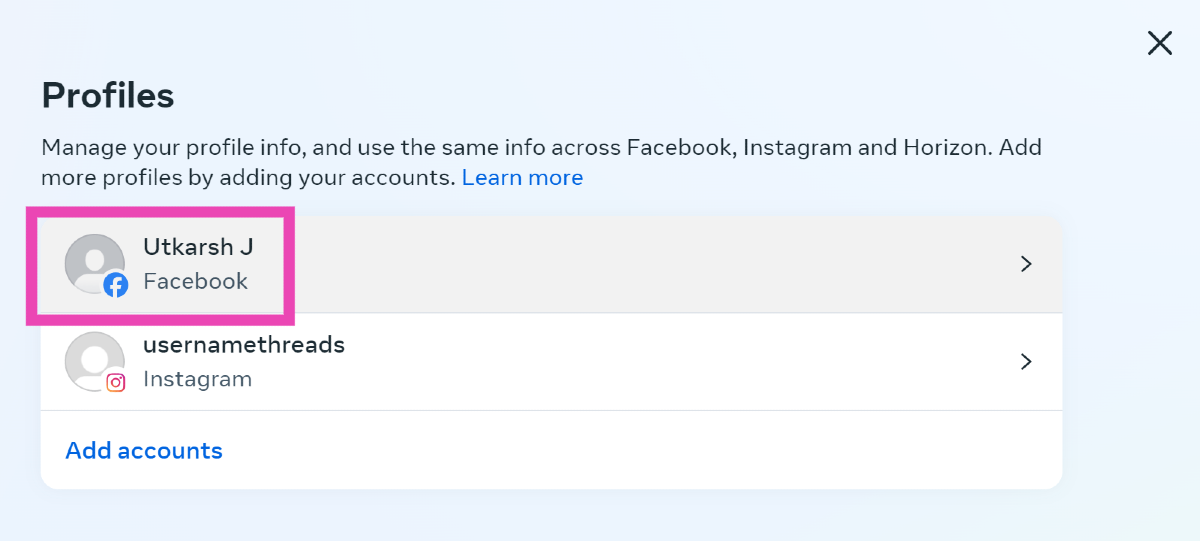
Step 4: Select your Facebook profile.

Step 4: Select your Facebook profile.

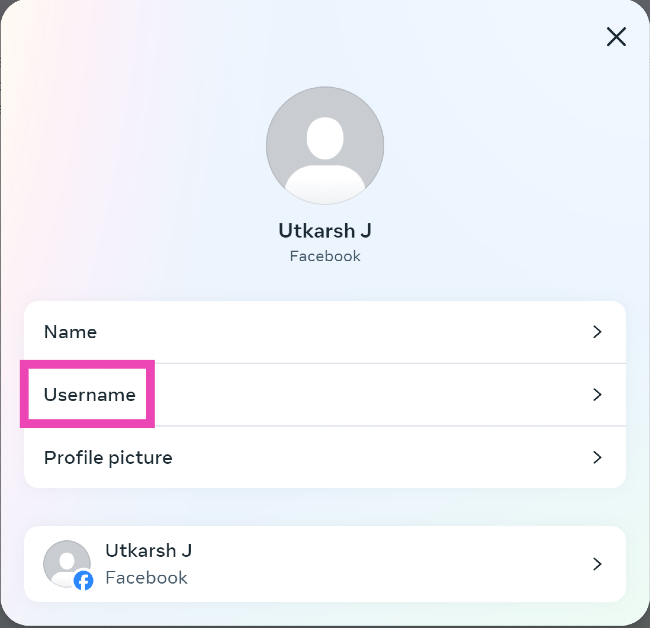
Step 5: Click on Username.

Step 5: Click on Username.

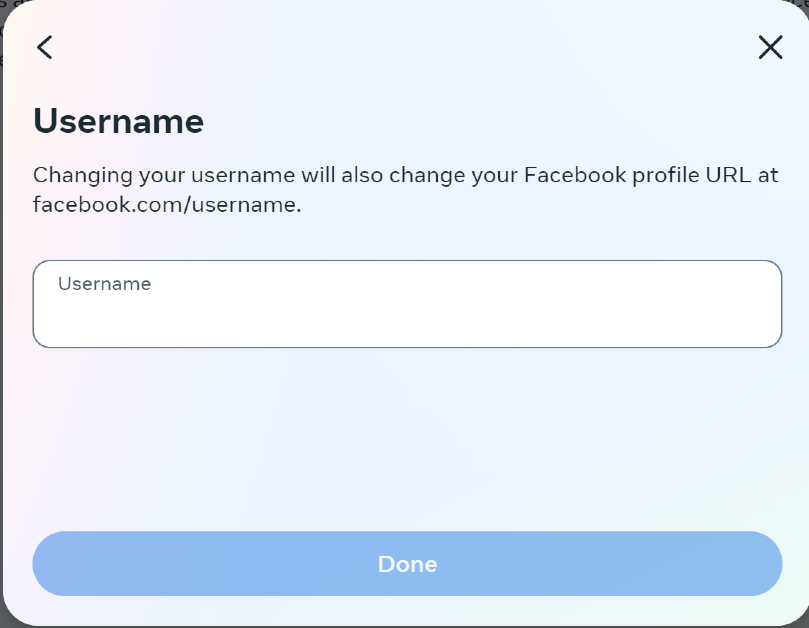
Step 6: Enter your preferred username and hit Done.

Step 6: Enter your preferred username and hit Done.

Find your Facebook username on PC

Step 1: Log into your Facebook account on your PC.

Step 2: Click on your profile picture at the top right corner of the screen.

Step 2: Click on your profile picture at the top right corner of the screen.

Step 3: Select your profile.

Step 3: Select your profile. How to find your Facebook username? Top 2 Ways (2024)

Step 4: Once you’re on your profile page, look at the address bar on your browser. The text after www.facebook.com/ is your username.

Step 4: Once you’re on your profile page, look at the address bar on your browser. The text after www.facebook.com/ is your username. How to find your Facebook username? Top 2 Ways (2024)

Find your Facebook username on mobile

Step 1: Launch the Facebook app on your smartphone.

Step 2: Hit the hamburger menu at the top right corner of the screen and tap on your profile name.

Step 2: Hit the hamburger menu at the top right corner of the screen and tap on your profile name. How to find your Facebook username? Top 2 Ways (2024)

Step 3: Hit the ellipses on your profile.

Step 3: Hit the ellipses on your profile. How to find your Facebook username? Top 2 Ways (2024)

Step 4: Tap on Copy Profile Link and paste it into a text box. The text after www.facebook.com/ is your username.

Step 4: Tap on Copy Profile Link and paste it into a text box. The text after www.facebook.com/ is your username. How to find your Facebook username? Top 2 Ways (2024)

Frequently Asked Questions (FAQs)

Is it mandatory to create a username on Facebook?

Unlike Instagram, it is not mandatory to create a username for your Facebook profile.

What is the purpose of a Facebook username?

Your Facebook username is a unique identifier for your profile and can be used to instantly find and access your profile on the platform.

How do I create a username for my Facebook profile?

Go to Settings and privacy>Settings>Accounts Centre, select your Facebook profile, click on username, enter a username, and hit ‘Done’.

Read Also: Fastrack Xtreme Pro Review: An exciting smartwatch under Rs 4,000

Conclusion

These are the top 2 ways to find and view your Facebook username. Once you set up your username on Facebook, you can always change it from the Accounts Centre. When you switch to a username, the old one is kept on hold for a while before being made available to other users on the platform.

OnePlus 12 Glacial White debuts in India

After a social media tease and confirmation, the OnePlus 12 has now made its official debut in India in a new colourway, sporting the shade Glacial White. This colour variant was previously exclusive to China. The Silky Black and Flowy Emerald variants are now joined by the Glacial White version on the OnePlus India website. The remaining specifications of the OnePlus 12 have not changed.

The OnePlus 12 has launched in India in a third limited-edition colour, Glacial White, alongside the Flowy Emerald and Silky Black options. OnePlus 12 Glacial White costs Rs 64,999 in India. The new variant is available in a single 12GB RAM with 256GB storage. The sale is scheduled to take place on June 6 via OnePlus’s website in the country, Amazon OnePlus Experience stores, and all major partner stores.

OnePlus 12 Glacial White debuts in India

The company is providing an exclusive Rs 2,000 coupon discount from June 6 to June 20 on the purchase of the OnePlus 12 Glacial White. In addition to this, there will be an instant bank discount of Rs 3,000 from select partner banks. Additionally, customers are eligible for up to a Rs 12,000 exchange bonus. Moreover, there will be up to 12 months of no-cost EMI also available.

Also Read: OnePlus 12R price in India dropped on Flipkart

OnePlus 12 specifications

OnePlus 12 features a 6.82-inch quad-HD+ LTPO OLED with 1,440 x 3,168 pixels of resolution. The front panel has an adaptive refresh rate ranging between 1Hz and 120Hz. Additionally, 4,500 nits of screen brightness is supported. The smartphone also has an IP65 rating that protects it from dust and water. Under the hood sits Qualcomm’s 4nm Snapdragon 8 Gen 3 SoC. Up to 12GB of LPDDR5X RAM and up to 512GB of UFS 4 internal storage are available for the device.

The device comes with a triple rear camera setup powered by Hasselblad which includes a Sony LYT-808 sensor with a 50-megapixel primary camera (OIS, and f/1.6 aperture), 64-megapixel telephoto secondary lens (OIS, 3X optical zoom and f/2.6 aperture) and 48-megapixel ultra-wide-angle lens (114-degree field-of-view). The 32-megapixel front-facing camera (f/2.4 aperture) is provided for video calling and selfies.

Also Read: Samsung Big TV Days 2024 announced, to offer free Serif TV and Soundbar on the purchase of Samsung Televisions

The phone sports a 5,400mAh battery with compatibility for 100W SuperVOOC wired, 50W wireless, and 10W reverse wireless charging.

The phone also includes a Dual Cryo-velocity VC Cooling System, featuring a 3D capillary dissipation structure and a dual VC design to significantly reduce overheating. 

OnePlus 12R price in India dropped on Flipkart

Smartphone maker OnePlus has reduced the price of its flagship OnePlus 12R in India. On Flipkart, the OnePlus 12R is now significantly less expensive. On the other hand, its predecessor OnePlus 11R is also getting a massive price cut on Amazon whereas the OnePlus 12R smartphone is exclusively available at a launch price on Amazon.

On Amazon, the OnePlus 12R is currently up for sale at its launch price of Rs 39,999 for the base 8GB RAM with 128GB storage. Whereas, the same variant is right now being made available at a reduced price of Rs 36,296. The price of the phone has been reduced by Rs 3,633.

The 8GB RAM with 256GB storage model is also discounted and is currently selling at Rs 40,107. Its original price is Rs 42,999.

The price of the 16GB RAM with 256GB variant has also come down to Rs 42,618 which was earlier available at a launch price of Rs 45,999.

The handset will be available in two colourways Iron Gray and Cool Blue.

As we mentioned above the company has also reduced the price of OnePlus 11R by Rs 12,000. The device is currently available on Amazon for as low as Rs 27,999.

Also Read: OnePlus 11R can now be purchased on Amazon for less than Rs 30,000 after a huge price reduction

OnePlus 12R Specifications

The OnePlus 12R flaunts a 6.78-inch Oriental AMOLED LTPO display with 1,264×2,780 pixels of resolution. The OLED screen supports up to 120Hz adaptive refresh rate, 360Hz touch sampling rate and 2160Hz instant touch sampling rate. The display also has 4,500 nits peak brightness and comes with Corning Gorilla Glass Victus 2 protection. Under the hood, there is an octa-core 4nm Snapdragon 8 Gen 2 SoC, along with an Adreno 740 GPU. The device comes with up to 8GB of LPDDR5x RAM options and 256TB storage.

Also Read: Best Car Dash Cams in India for safe and comfortable driving

The triple rear camera setup on the phone includes a 50-megapixel Sony IMX890 primary sensor with an f/1.8 aperture and OIS, an 8-megapixel ultra wide-angle sensor with f/2.2 aperture and a 2-megapixel macro camera with f/2.4 aperture. The device sports a 16-megapixel front-facing camera with f/2.4 aperture for taking selfies.

The stereo speaker setup on the phone supports Dolby Atmos.

Samsung Big TV Days 2024 announced, to offer free Serif TV and Soundbar on the purchase of Samsung Televisions

Samsung has announced exciting offers on its premium TVs, including the Neo QLED, OLED, and Crystal 4K UHD TVs, during ‘Big TV Days’ for the T20 Cricket World Cup. Customers purchasing Samsung TVs during ‘Big TV Days’ will receive a free Serif TV worth or a Soundbar, depending on the TV purchased. They can also avail easy EMI starting INR 2990 and cashback up to 20%.

The ‘Big TV Days’ campaign by the company aligns with the T20 Cricket World Cup in an effort to cater to the increasing consumer demand for premium watching experiences and larger screen sizes. The offers will be available between June 1 and June 30, 2024. Offers are valid on a few models of Neo QLED, OLED, and Crystal 4K UHD TVs in the 98-inch, 85-inch, 83-inch, 77-inch, 75-inch, and other sizes.

Also Read: OnePlus 11R can now be purchased on Amazon for less than Rs 30,000 after a huge price reduction

Customers who buy Samsung TVs on “Big TV Days” will receive a free Serif TV (value INR 89990) or a free Soundbar (worth INR 79990), depending on the model of TV they buy. Customers can also benefit from discounts of up to 20% along with easy EMIs starting at INR 2990. Customers around the country will find the offers convenient as they will be accessible on Samsung.com, top retail locations, and numerous other online platforms.
Along with offering a variety of services like gaming, entertainment, education, and fitness on these televisions, Samsung has also curated localised smart experiences for Indian users.

Users of the cloud gaming service can play AAA games without the need for a console or PC—just plug and play. With the aid of Samsung Education Hub, users may enjoy live lessons on a large screen, enhancing the engaging and immersive learning experience for your children. Also, customers can transmit material directly through the cloud with TV Key Cloud service, eliminating the requirement for a set-top box. With over 100 channels available for free, Samsung TV Plus gives users fast access to entertainment, movies, news, and more.

Also Read: Best Car Dash Cams in India for safe and comfortable driving

Mohandeep Singh, Senior Vice President, Visual Display Business, Samsung India said, “Our ‘Big TV Days’ campaign coincides with the T20 Cricket World Cup to meet the growing demand for larger screen sizes and premium viewing experiences. By offering our ultra-premium range of TVs including Neo QLED, OLED and Crystal 4K UHD TVs with exciting offers, we aim to bring the immersive experience of a stadium directly to our customers’ homes. With our state-of-the-art AI-powered televisions, customers can expect exceptional picture quality, immersive audio and sleek designs. Furthermore, the addition of AI provides an unparalleled cricket viewing experience for consumers with features like 8K AI Upscaling and AI Motion Enhancer Pro working together to bring exceptional clarity during a live match with minimal ball distortion and blurring.”

Fastrack Xtreme Pro Review: An exciting smartwatch under Rs 4,000

Fastrack’s transition from being a major player in sporty analog watches to a needle-mover in the smartwatch category has been amazing. Its smartwatch portfolio boasts 5 collections, covering over 80 products. Most of these smartwatches have commonalities with the products of Fastrack’s parent company, Titan. But unlike Titan, Fastrack’s offerings are affordable and sportier. We recently got our hand on Fastrack’s newly launched Xtreme Pro smartwatch. Priced at Rs 4,000, it offers a bang for your buck. After using it for a week, we can safely say that it is one of the best smartwatches in this price range. Here is our in-depth review of the Fastrack Xtreme Pro.

Read Also: Top 10 Curved Gaming Monitors (2024)

Fastrack Xtreme Pro Review: Design and Display

Inside the Xtreme Pro’s retail box, you get the smartwatch, a magnetic charger, a warranty registration card, a Quick Start Guide, a card with the QR code for the Smart World companion app, and another card with the QR code for Fastrack’s Instagram page. The smartwatch is available in three colour options – Black, Blue, and Beige.

Fastrack Xtreme Pro Review: Design and Display

The design of the Fastrack Xtreme Pro is simple yet effective. It features a standard circular dial with a plastic bezel around it. This bezel lends it a rugged look. The polycarbonate case exudes strength and can absorb light knocks with ease. On the right side of the case lie the menu/scroll and sports buttons. The former acts as a rotating crown and back button. The sports button does not serve any other functional purpose other than triggering the sports options when you’re on the home screen. We would’ve preferred it to double as the selection button as well. The left side is buttonless and the bottom of the dial houses the health sensors and the magnetic charging port.

design

The 3.6 cm AMOLED display on this smartwatch is very responsive and bright. It does a good job of registering the more subtle touches. In bright outdoor settings, the display gets bright enough to be perfectly legible. The only downside is that it lacks adaptive brightness, much like the majority of smartwatches in this price category.

AOD
Always On Display

The silicone strap follows the pin-and-buckle lock mechanism. Even in the thick of summer, the strap did not get itchy when things got sweaty. The fit was comfortable and snug. Fastrack Xtreme Pro has an IP68 rating which makes it dust and water-resistant. Putting the smartwatch through intense, sweaty workouts and wearing it in the rain did not affect its performance at all. Despite its IP68 rating, we wouldn’t recommend wearing the smartwatch while swimming due to two major reasons – the manufacturer has not mentioned its depth resistance and there is no swimming mode in the smartwatch’s sports menu.

Fastrack Xtreme Pro Review: Performance

The process to pair the Fastrack Xtreme Pro to your smartphone is as simple as it gets. Install the Fastrack Smart World app on your phone and use it to scan the QR code on the watch. Once the two devices have been paired, you can view your health and fitness metrics on the phone and use the companion to customise your smartwatch.


performance

The SpO2 and heart rate readings measured by the Xtreme Pro are accurate and reliable. To check the validity of the blood oxygen readings, we used a home SpO2 machine alongside the smartwatch. The measurements were consistent and reliable. However, the same cannot be said about the step counter. While it records the accurate number of steps while walking, we did notice that it registered ghost steps while we were sitting still. This doesn’t throw off the metrics altogether, but we’d like to see a firmware update resolve this issue soon.

Performance

The smartwatch supports over 100 sports and workout routines including Cricket, Basketball, Table Tennis, Outdoor walk/run, Elliptical, Yoga, Latin Dance, Skating, and more. The watch records your pace and distance covered but there is no GPS support on the device. If you want to chart your runs on a map, this watch is not for you. Having said that, it is a great device for basic fitness tracking.

performance

One of the ‘smart’ functions of the Fastrack Xtreme Pro is ‘Bluetooth calling’. Once the watch is paired to your device, you can use it to make and receive calls. It does a good job of extracting the speaker’s voice and relaying it to the recipient. However, the watch’s audio output is tinny and lacks the optimum low-end. We would have liked it to be a little louder as well.

smart world app

The Fastrack Smart World app is similar to its Titan counterpart in terms of design, layout, and customisation options. The watch face library on the app is diverse and filled with exciting options. You can save up to 5 watch faces on the Xtreme Pro. The ‘Community’ tab on the app pits you against other Fastrack users and lets you view your fitness ranking in your city and across the world. These rankings are assigned based on the points you rack up by completing active tasks and other workouts on the app. The ‘FitVerse’ option from the Titan smartwatches is not present here.

Fastrack Xtreme Pro Review: Performance

Fastrack does not mention the battery capacity for the Xtreme Pro, but during the week-long review period, we did not feel the need to charge the watch. We charged the smartwatch right after taking it out of the box. Once fully charged, we used the smartwatch with AOD turned on at all times. We tracked around 1-2 hours of workouts on the watch every day. At the end of the week, the watch had hit a 10% battery level.

Read Also: OnePlus 11R can now be purchased on Amazon for less than Rs 30,000 after a huge price reduction

Conclusion

Fastrack Xtreme Pro has a lot of cool things going for it but at the same time, it is dragged down by the limitations of the price category it belongs to. The AMOLED display is snappy, responsive, and fun to use, but the lack of adaptive brightness is a little chink in its armour that we can’t ignore. The lack of GPS support is another thing that we would have liked on this watch. However, these issues plague this price bracket and are not exclusive to the Xtreme Pro.

The smartwatch impresses with its simple yet attractive design, superior build, and versatile battery life. Fastrack’s companion app exceeds its peers in terms of design and range of functionality. Its watch face library has something in it for every kind of user. Overall, the Fastrack Xtreme Pro is a great buy at Rs 4,000.

Fastrack Xtreme Pro: Pros

  • Great display
  • Rugged design
  • Superior app support
  • Versatile battery life

Fastrack Xtreme Pro: Cons

  • No adaptive brightness
  • No GPS support

OnePlus 11R can now be purchased on Amazon for less than Rs 30,000 after a huge price reduction

With this huge discount, OnePlus’ flagship phone, the OnePlus 11R, is now available on Amazon for less than Rs 30,000. Due to the release of the OnePlus 12r, the phone, which was once offered at a starting price of Rs 39,999 last year, has seen a price reduction.

OnePlus launched the OnePlus 11R in India last year. The smartphone’s price was set at Rs 39,999 for the base 8GB RAM with 128GB storage option. After a Rs 12,000 price reduction, the device will be available at just Rs 27,999 on Amazon.

Those who use an Amazon Pay ICICI Bank credit card can receive a cashback of Rs 1,399 on their purchase, which helps to further cut costs. This implies that the phone will actually cost Rs 26,660. Users also have the opportunity to purchase the phone with an exchange offer, which entitles them to an extra Rs 24,500.

Also Read: Best Car Dash Cams in India for safe and comfortable driving

OnePlus 11R specifications

The OnePlus 11R’s 6.74-inch Full-HD+ curved AMOLED display has a 2772 x 1240 pixel resolution. The dynamic adaptive refresh rate of the screen goes from 40Hz to 120Hz. It also has 450 ppi and a 1,450-nit maximum brightness. The display’s touch response rate can reach 1000Hz. The OnePlus 11R is powered by the Snapdragon 8+ Gen 1 5G CPU, up to 16GB of RAM, and up to 256GB of internal storage.

Also Read: Samsung to bring Galaxy AI features to its Galaxy Watches soon

The OnePlus 11R has a triple rear camera setup that includes a 50MP Sony IMX890 primary sensor. Along with another 4 cm macro camera with a 120-degree ultra-wide lens and an 8 Megapixel ultra wide-angle sensor. The device lacks optical zooming capabilities but has a 10x digital zoom. The   OnePlus 11R’s rear camera is shake-free and supports both electronic and optical image stabilisation, allowing it to record videos in 4K quality at 30 frames per second. The 16MP front camera is located in a notch at the top of the display.

The device has 5G, 4G, Wi-Fi, Bluetooth 5.3, NFC, GPS, and other connectivity options. The  OnePlus 11R’s 5,000mAh battery supports 100W SUPERVOOC flash fast charging.