Amazon is back with another quiz on its mobile platform. The daily quiz is now live on the Amazon App and today’s Amazon Quiz will give you a chance to win Rs 15,000 Amazon pay Balance. The participants can play the 18 April 2022 Amazon Quiz from 12 AM to 11:59 PM. For those who are unaware of the quiz, the e-commerce platform brings a fresh quiz on a daily basis which consists of five questions related to general knowledge and current affairs.The participants need to answer all the questions correctly and their names will be selected for a lucky draw. The winner will be announced at the end of the month. One wrong answer could eliminate you from the quiz. Only app users are eligible to participate in the Quiz. In today’s Amazon Quiz the participants will get a chance to win Rs 10,000 Amazon Pay Balance. Check Out 18 April 2022 Amazon Quiz Answers.Amazon Quiz Today Prize – Rs 15,000 Amazon Pay BalanceQuiz Date – 18 April 2022Daily Timing – 12 AM to 11:59 PMWinner Announcement – Today 12 PM
In This Article
Amazon Quiz Answers Today 18 April 2022
Question 1: Who defeated Rafael Nadal in the final to win the Indian Wells Masters title in 2022?
Answer: Taylor Fritz
Question 2: In the upcoming movie ‘Morbius’, who plays the titular character of Dr Michael Morbius?
Answer: Jared Leto
Question 3: In the last year, people of which country comprised the largest chunk of foreign nationals who got the skilled worker visa in UK?
Answer: India
Question 4: This famous museum is located in which European country?
Answer: France
Question 5: This preparation of rice was created in which country?
Answer: Italy
How To Play Amazon Quiz
Only app users are eligible to play the Amazon quiz every morning from 12 AM to 11:59 PM. The quiz is not available on the desktop. For those who are unaware of how to play the Amazon quiz below are the steps, you can follow to take the quiz.
Firstly download the Amazon app from Google Play Store or App Store
Now fill in the required information through the Sign Up option.
You need to log in to the Amazon app and scroll down on the home screen to find the Amazon Quiz banner.
Tap on the Amazon Quiz banner and tap on the Start button to start the Quiz.
Now you will get 5 questions and you need to answer them correctly. One wrong answer will eliminate you from the Quiz.
After answering all the questions correctly you are now eligible for a Lucky Draw.
The winner’s name will be announced today at 12 PM.
Garena Free Fire is a battle royale game with regular awards and tournaments to keep players interested. If you play Garena Free Fire, you should be aware of the redeem codes that are released on a daily basis. However, because the battle royale game is banned in India, players from other countries can use the Free Fire Redeem codes daily. If you’re unfamiliar with the Garena Free Fire redeem codes or don’t know how to get them, we’ve put together a step-by-step guide to help you redeem them.The Free Fire redeem codes are a great way to get free stuff. These are 12-digit codes that contain alphabets and numbers, as well as an expiration date and time. Because the Garena FF redeem codes cannot be used more than once, you should hurry to the redemption page to claim your free reward before someone else does. To get a free reward, all you have to do is go to reward.ff.garena.com/en, which is the official redemption page. Also, keep an eye on this space for daily updates on Garena Free Fire redemption codes and rewards.
In This Article
Garena Free Fire Redeem Codes for April 18
X99TK56XDJ4X
GCNVA2PDRGRZ
FF7MUY4ME6SC
SARG886AV5GR
8F3QZKNTLWBZ
WEYVGQC3CT8Q
4ST1ZTBE2RP9
3IBBMSL7AK8G
J3ZKQ57Z2P2P
B3G7A22TWDR7X
FFICJGW9NKYT
FF9MJ31CXKRG
FFCO8BS5JW2D
How to Get Free Fire Redeem Codes for Garena on April 18?
Vijay Sales has announced Apple Days Sale on its eCommerce platform and retail stores. The sale is now live and will be offering the lowest priced offers on Apple devices including iPhone 13, iPhone 12, and more. The iPhone 13, which normally costs Rs. 79,900, will be reduced to an all-time low of Rs. 58,900. In addition to this, there are discounts on other devices like MacBooks, iPads, AirPods and HomePods. The sale is now live and will run till April 21.The 128GB model is priced at 71,900 during the Apple Days sale period. With flat cashback of Rs. 5000 on HDFC Bank cards, the deal becomes even more lucrative. In addition, if you want to exchange your existing smartphone and it has a minimum exchange value of Rs. 5000, Vijay Sales will give you an extra Rs 3,000. This brings the total discount to Rs. 21,000, bringing the iPhone 13’s final price to just Rs 58,900. Vijay Sales is also giving away a free wireless charging pad with every iPhone 13 and 13 Pro purchase.Other iPhones, Apple Watches, Airpods 2nd & 3rdGen, Airpods Pro with Magsafe charging, MacBooks, iPads, Home Pod Mini, and Apple Care + are also on sale. Vijay Sales has revised pricing for all Apple products as part of its Apple Days campaign. Furthermore, with cashback offers on HDFC Bank cards, customers can take advantage of incredible deals at competitive prices.During the Apple Days Sale, the iPhone 13 Pro will be available for Rs 16,300 and HDFC Bank Cards will receive an additional Rs 4000 cashback. The iPhone 13 Pro Max costs Rs 126, 000 and comes with a flat Rs 4000 cashback on HDFC Bank Cards.The iPhone 11 starts at Rs. 47, 490, with HDFC Bank Cards offering an additional cashback of Rs 3000. The iPhone 12 costs Rs 57,900, and HDFC Bank Cards will get you an additional Rs 4000 cashback. Starting at Rs 42,100, the iPhone SE 3rd Gen comes with a flat Rs 2000 cashback on HDFC Bank Cards. Purchases of Apple Care + with any iPhone will also receive a flat 10% discount in stores.The iPad 9th Gen, on the other hand, starts at Rs 29,900 and comes with an additional cashback of Rs 3000 on HDFC Bank Cards; the iPad Air 5th Gen, on the other hand, starts at Rs 53,800 and comes with an additional cashback of Rs 4000 on HDFC Bank Cards. iPad Air 4th Gen starts at Rs 47,400 and comes with an additional cashback of Rs 4000 on HDFC Bank Cards; iPad Pro starts at Rs 68,700 and comes with an additional cashback of Rs 4000 on HDFC Bank Cards. Buyers will receive a flat 10% discount in stores when purchasing Apple Care + with any iPad.MacBook Air With M1 Chip (Rs 83, 900) will be offered with an Additional Cashback Flat 6000 on HDFC Bank Cards; Macbook Pro With M1 Chip (Rs 1,10, 690) will be offered with an Additional Cashback Flat 7000 on HDFC Bank Cards; Macbook Pro With Latest M1 Pro Chip will be offered with an Additional Cashback Flat 7000 on HDFC Bank Cards; Macbook Pro With Latest M1 Pro Chip will be offered with an Additional Cashback Flat On HDFC Bank Cards, you can get an additional cashback of up to Rs 10000. When you buy Apple Care + with any Macbook, you’ll get a flat 10% discount in stores.More deals can be found further down the page.
For the latest gadget and tech news, and gadget reviews, follow us on Twitter, Facebook and Instagram. For newest tech & gadget videos subscribe to our YouTube Channel. You can also stay up to date using the Gadget Bridge Android App. You can find the latest car and bike news here.
The Chinese smartphone company Infinix today announced the launch of its budget smartphone in the Indian market. The Infinix Hot 11 2022 model has been launched in the country. The device features a dual rear camera set up and is powered by an octa-core Unisoc SoC. The smartphone is the successor of Infinix Hot 11 which was launched last year.
In This Article
Infinix Hot 11 2022 price in India, sale details
The price of the Infinix Hot 11 2022 in India is Rs 8,999 for the single 4GB RAM with 64GB storage variant. The smartphone will be available in three colours: Aurora Green, Polar Black, and Sunset Gold. It will be available for purchase through Flipkart starting April 22.Note that the current price is an introductory one, implying that pricing may change in the days ahead.To recall, last year Infinix Hot 11 was launched with a price tag of Rs 8,999 for the single 4GB RAM with 64GB of storage option. It comes in four colour options of 7 Degree Purple, Silver Wave, Emerald Green and Polar Black.
Infinix Hot 11 2022 specifications
The Infinix Hot 11 2022 features a 6.7-inch full-HD+ IPS display with 1,080×2,400 pixels of resolution. The screen comes with a 20:9 aspect ratio and a screen-to-body ratio of 89.53 percent. The device runs on Android 11 with XOS 7.6 on top. The smartphone is powered by an octa-core Unisoc T610 SoC and 4GB of RAM with 64GB of internal storage and a dedicated slot for microSD card expansion to up to 1TB.A 13-megapixel primary sensor with an f/2.0 aperture as well as a 2-megapixel depth sensor, are included in the phone’s dual rear camera setup. The Infinix Hot 11 2022 has an 8-megapixel selfie camera with an f/2.0 aperture on the front for selfies and video chats.The device houses a 5,000mAh battery with 10W charging support. On a 4G network, the phone is expected to provide up to 22 hours of talk time.The Infinix Hot 11 2022 has 4G LTE, Wi-Fi 802.11 a/b/g/n, Bluetooth v5.1, GPS/ A-GPS, and a USB Type-C port for connectivity. An accelerometer, ambient light, and a proximity sensor are among the onboard sensors. The phone also has a fingerprint sensor on the side.
For the latest gadget and tech news, and gadget reviews, follow us on Twitter, Facebook and Instagram. For newest tech & gadget videos subscribe to our YouTube Channel. You can also stay up to date using the Gadget Bridge Android App. You can find the latest car and bike news here.
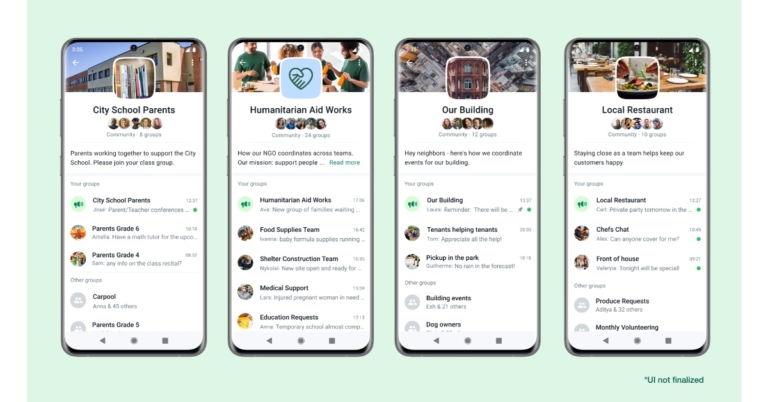
WhatsApp has reportedly been testing the Communities feature for the past few months. Now in a fresh update, the Meta owned instant messaging platform has announced Communities. It will allow users to have multiple groups and lets them receive updates from all of them on a single screen without having to scroll through multiple chats. In addition to this WhatsApp has also increased the file sharing limit, brought reaction and the ability to create group audio calls with up to 32 people at once.While announcing WhatsApp communities the company said, Today we are excited to share our vision for a new feature we are adding to WhatsApp called Communities. Since WhatsApp launched in 2009, we’ve been focused on how we can help people have the next best thing to an in-person conversation when they want to talk to an individual or a group of friends or family. We also frequently hear from people who are using WhatsApp to communicate and coordinate within a community.”With the introduction of WhatsApp communities, people will be able to bring together different groups under one umbrella. People can easily organise smaller discussion groups on topics that are important to them and receive updates sent to the entire Community. Administrators will have access to a number of new tools, including the ability to send out mass announcements and control over which groups can be included in communities.Schools, local clubs, and non-profit organisations now rely on WhatsApp to communicate securely and get things done. Communities will make it easier for a school principal to bring all of the school’s parents together to share important information and form groups focused on specific classes, extracurricular activities, or volunteer needs.“We think these will help people share in new ways and reduce overload in larger chats,” WhatsApp said.These features will be available in the coming weeks, allowing users to test them out before Communities are ready. WhatsApp also stated that its end-to-end encryption will continue to protect messages in Communities.WhatsApp is also providing new tools that will help administrators manage conversations within their private groups. Admins are in charge of creating and managing WhatsApp Communities. By forming new groups or linking pre-existing groups, they can choose which groups become part of their Community. Community administrators will also be able to unlink groups from the Community and completely remove individual members. Furthermore, group admins will have the ability to delete inappropriate or abusive chats or media for all group members. We’ll provide resources for administrators on how to make the most of these new features.While users Users can choose who can add them to a group using our existing settings, which will also apply to Communities. Users will be able to report abuse, block accounts, and leave Communities that they no longer want to be a part of with ease. The ability to leave a group silently, so no one in the group is notified if someone decides the conversation isn’t for them anymore.Only Community admins will be able to send messages to all Community members, which is referred to as the announcement group for the community, in order to reduce noise and overload. Messages that have already been forwarded will only be able to be forwarded to one group at a time with the introduction of Communities, rather than the current limit of five. Your phone number will be hidden from the rest of the Community and only visible to Community admins and others in your same group to help protect user privacy. This will help prevent unwanted contact and reduce the risk of phone numbers being scraped.Emoji reactions are now available in WhatsApp groups, in addition to Communities. people can quickly share their opinion without flooding chats with new messages. While Group admins will be able to remove errant or problematic messages from everyone’s chats. WhatsApp has also increased file sharing to support files up to 2 gigabytes so people can easily collaborate on projects. Additionally,, voice calling for up to 32 people with an all-new design for those times when talking live is better than chatting has also been introduced.
For the latest gadget and tech news, and gadget reviews, follow us on Twitter, Facebook and Instagram. For newest tech & gadget videos subscribe to our YouTube Channel. You can also stay up to date using the Gadget Bridge Android App. You can find the latest car and bike news here.
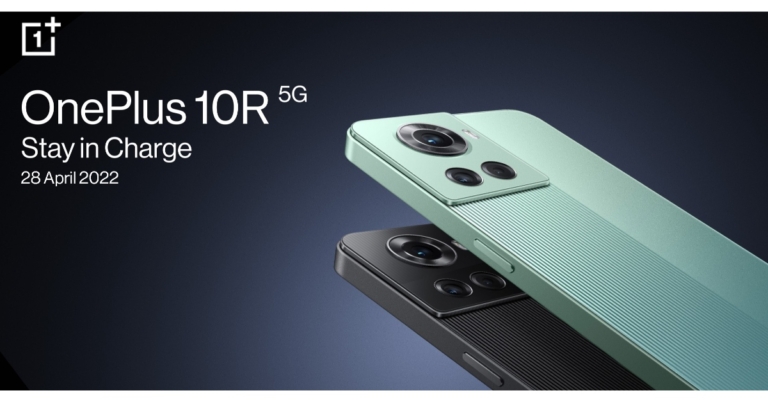
Recently the OnePlus 10R Amazon India advertisement was spotted ahead of the official announcement. Now the company has confirmed its official launch date in India. The device is going to launch in the country on April 28. The phone will be announced alongside OnePlus Nord CE 2 Lite 5G. The company has confirmed that the upcoming phone will feature 150W SuperVOOC charging technology. On the other hand, the OnePlus Nord CE 2 Lite 5G will get 33W fast charging support.The OnePlus 10R, as well as the OnePlus Nord CE 2 Lite 5G and OnePlus Nord Buds, are set to launch in India on April 28. Recently Amazon’s OnePlus 10R advertisement has surfaced online ahead of the official announcement. Additionally, the presence of a MediaTek Dimensity 8000-series chipset on the upcoming OnePlus 10R was recently confirmed by the OnePlus India CEO. The device is rumoured to be a rebranded variant of the Realme GT Neo 3.According to OnePlus, the OnePlus 10R 5G will be equipped with 150W SUPERVOOC charging technology. It will allow the phone to be fully charged in 17 minutes. On the other hand, the base model will also support 80W SUPERVOOC charging.As per the company, the OnePlus Nord CE 2 Lite 5G will also have a 5,000mAh battery and a 33W SUPERVOOC rapid charging system that can charge the battery from 0 to 50% in just 30 minutes.Reportedly 10R will be available in three colours: Arctic Glow, Green, and Sierra Black. Whereas the OnePlus Nord CE 2 Lite 5G smartphone is expected to be released in Black and Jade Fog colour options.The OnePlus 10R smartphone is likely to come with a 6.7-inch full-HD+ E4 AMOLED hole-punch display with a 120Hz refresh rate. Moreover, the phone is expected to be powered by Dimensity 8100 octa-core SoC with up to 12GB of LPDDR5 RAM and 256GB of UFS 3.1 storage. A triple camera system with a 50-megapixel Sony IMX766 primary sensor could be included on the back of the phone.Moreover, the OnePlus Nord CE 2 Lite 5G is said to have a 6.58-inch full-HD+ LCD display with a refresh rate of 120Hz. It could be powered by a Qualcomm Snapdragon 695 processor with 6GB/ 8GB of RAM and 128GB of storage. The handset is expected to have a triple rear camera setup, with the primary sensor being a 64-megapixel sensor. A 2-megapixel mono camera and a 2-megapixel macro camera are said to be included. For selfies and video calls, the OnePlus Nord CE 2 Lite could get a 16-megapixel camera.
For the latest gadget and tech news, and gadget reviews, follow us on Twitter, Facebook and Instagram. For newest tech & gadget videos subscribe to our YouTube Channel. You can also stay up to date using the Gadget Bridge Android App. You can find the latest car and bike news here.
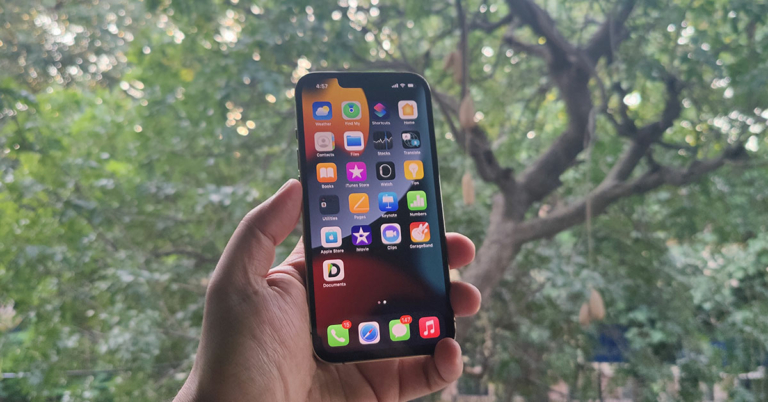
We receive a lot of messages and photos on our iPhones every day. Sometimes, a lot of them aren’t useful. So, to clear up the clutter, we start deleting them. However, sometimes we mistakenly delete something that is important. The problem is that there is no simple way of recovering it, even in the latest iPhone 13.
So, it is important to learn how to retrieve deleted messages on iPhone. The first way is to use iCloud (we will mention the steps below). And if that doesn’t work, we will show you another way to recover deleted data using a trustworthy third-party tool.
In This Article
Recover Deleted Messages Using iCloud
Apple hasn’t provided us with any direct method to recover deleted messages from iPhone 13, but we can try using iCloud to get them back.
Note: For this to work, you need to regularly take iCloud backups.
Here is how you can recover deleted messages using iCloud.
Step 1: Go to Settings and click on your name located on top of the screen. Then, click on iCloud > Manage Storage > Backups. See whether a backup was taken before you had deleted your messages.
Step 2: After this, you need to reset your iPhone. This will remove everything that is present in your device. So, make sure that you have taken a backup of all your stuff.
Go to Settings > General > Transfer or Reset iPhone > Erase All Content and Settings.
Your phone will ask for confirmation about whether you want to take an iCloud backup before you erase. Click on Erase Now as we will be using the older backup where the deleted messages are located.
Step 3: This process will reboot your iPhone 13. After that, it will start the setup process.
Once you select the device language, it will ask you how you want to transfer apps and data to your iPhone. Click on Restore from iCloud Backup.
Then log in to your Apple account and select the backup where the deleted messages are located.
Note: If you want to recover deleted photos from iPhone 13 without erasing all your data and content, then you need to recover them using iCloud.com.
Recover Deleted Messages Using icloud.com
Step 1: Go to icloud.com and log into your account with your Apple ID. Then, click on the Setting button. Go to the Advanced section and click on Restore.
Step 2: Go to Text Messages (or Photos based on what type of file you are recovering). These options will be visible only if you have turned on backups in your iPhone.
Step 3: A new window will open up, where you will see the list of backups that are present on your iCloud. Select the suitable backup and click on the Restore option. The process will take a few minutes to complete, and you will get a message after completion.
Now, this procedure will allow you to keep both your existing and deleted messages. However, the process is long, and it won’t work if your iCloud has been backed up recently. This is because if you have taken too many backups after you have deleted your messages, then the older backups might not be present on icloud.com, and you won’t be able to recover deleted data from iPhone 13. Also, deleted photos stay in iCloud for just 30 days. So, if you are too late, you may lose those photos.
Recover Deleted Messages Using iTunes
You can also use iTunes by connecting your iPhone 13 to your PC. But there are a few drawbacks.
There is a chance that it might overwrite the data present in your phone.
It can only recover messages that are backed up. For photos, you need to rely on the solutions above.
It will recover everything that you had on your device before the backup. So, it will clog up your space.
Your iTunes should be updated to the latest version, and you should have an uninterrupted network connection. Else, you may end up with recovery errors and lose your data permanently.
You need to sync your computer with your device and iTunes if you want to recover contacts from iPhone 13.
Step 1: Connect your iPhone 13 to the PC that is synced with iTunes. Click on your iPhone 13 icon and select Restore Backup.
Step 2: Next, it will show you the list of backups that are present in iCloud. Choose the backup that was done before you deleted your messages. Click on Restore and confirm the action.
It is going to ask for your password before it restores all your data. Plus, once all the data is restored, your iPhone will restart once.
Recover Deleted Messages from iPhone Using Wondershare Dr.Fone
The methods given above to recover deleted data from iPhone 13 are complex, and all of them have some drawbacks. If you want a simple and fast solution that will recover exactly the messages and photos you need, you need to use Wondershare Dr.Fone. This software supports a lot of formats for messages and photos and is fully compatible with the latest versions of iOS.
Here are the steps you need to follow to recover deleted messages from iPhone 13 using Wondershare Dr.Fone.
Step 1: Download Dr.Fone from the link given above and install it on your PC or Mac. After that, click on Data Recovery.Step 2: Connect your iPhone to the computer. Make sure that the USB connection is secure and you have all the necessary drivers installed on your PC.
Step 3: Click on Recover iOS Data. Then, click on the scan option.
It will start scanning to recover deleted data from iPhone 13. The time taken to scan will depend on the storage size.
Step 4: Once the scanning process is complete, it will show you all the files that Dr.Fone was able to recover from your iPhone. Now, if you want to recover messages, go to the Messages tab on the right side. If you want to recover contacts from iPhone 13, go to the Contacts section. The same goes for recovering photos.
Step 5: Once you have selected the files or messages that you want to recover, click on Restore to Device. If you want, you can even save these messages and photos on your computer.
It will take a few minutes for Dr.Fone to recover all your files to your iPhone.
Wrapping Up
You may mistakenly delete some photo or important message from your iPhone. So, it is important to learn how to recover deleted messages from iPhone 13.
The methods provided by Apple are effective, but they are way too complex, lengthy and have a lot of conditions and drawbacks.
Meanwhile, Wondershare Dr.Fone doesn’t have any. You can find all the deleted files in a matter of minutes. You can recover only the files that you need and ignore the rest, which saves you a lot of storage space.
Plus, you don’t have to worry about synchronization, stable internet connection, or data loss as everything is done using just a USB cable, and none of your existing data gets replaced.
So, this is the best way to recover deleted photos and messages from iPhone 13.
For the latest gadget and tech news, and gadget reviews, follow us on Twitter, Facebook and Instagram. For newest tech & gadget videos subscribe to our YouTube Channel. You can also stay up to date using the Gadget Bridge Android App. You can find the latest car and bike news here.
Garena Free Fire is a battle royale game with regular awards and tournaments to keep players interested. If you play Garena Free Fire, you should be aware of the redeem codes that are released on a daily basis. However, because the battle royale game is banned in India, players from other countries can use the Garena Free Fire Redeem codes daily. If you’re unfamiliar with the Garena Free Fire redeem codes or don’t know how to get them, we’ve put together a step-by-step guide to help you redeem them.The Garena Free Fire redeem codes are a great way to get free stuff. These are 12-digit codes that contain alphabets and numbers, as well as an expiration date and time. Because the Garena FF redeem codes cannot be used more than once, you should hurry to the redemption page to claim your free reward before someone else does. To get a free reward, all you have to do is go to reward.ff.garena.com/en, which is the official redemption page. Also, keep an eye on this space for daily updates on Garena Free Fire redemption codes and rewards.
In This Article
Garena Free Fire Redeem Codes for April 15
How to Get Free Fire Redeem Codes for Garena on April 15?
Amazon is back with another quiz on its mobile platform. The 15 April 2022 Amazon Quiz is now live on its platform and today’s Amazon Quiz will give you a chance to win Rs 25,000 Amazon pay Balance.Every day Amazon brings a fresh questionnaire that comprises 5 questions. These questions are based on current affairs and general knowledge. The quiz can be played from 8 AM to 11:59 PM and the contestants need to answer correctly to enter into a lucky draw. In today’s Amazon Quiz the participants will get a chance to win Rs 25,000 Amazon Pay Balance.Today’s Amazon Quiz Prize – Rs 25,000 Amazon Pay BalanceQuiz Date – 15 April 2022Daily Timing – 12 AM to 11:59 PMWinner Announcement – Today at 12 PM
In This Article
Amazon Quiz Answers Today 15 April 2022
Question 1: Bangladesh recently won their first-ever ODI against South Africa in South Africa. At which venue did this happen?
Answer: Supersport Park
Question 2: In the movie ’83’, Tahir Raj Bhasin plays the role of which famous cricketer?
Answer: Sunil Gavaskar
Question 3: The COVID-19 vaccine from Novavax Inc is manufactured and marketed in India by the Serum Institute of India under what brand name?
Answer: Covovax
Question 4: Name this character in the Marvel Cinematic Universe
Answer: Crow Castle
Question 5: This animal belongs to which genus of animals?
Answer: Cervus
How To Play Amazon Quiz
Only app users are eligible to play the Amazon quiz every morning from 12 AM to 11:59 PM. The quiz is not available on the desktop. For those who are unaware of how to play the Amazon quiz below are the steps, you can follow to take the quiz.
Firstly download the Amazon app from Google Play Store or App Store
Now fill in the required information through the Sign Up option.
You need to log in to the Amazon app and scroll down on the home screen to find the Amazon Quiz banner.
Tap on the Amazon Quiz banner and tap on the Start button to start the Quiz.
Now you will get 5 questions and you need to answer them correctly. One wrong answer will eliminate you from the Quiz.
After answering all the questions correctly you are now eligible for a Lucky Draw.
The winner’s name will be announced today at 12 PM.
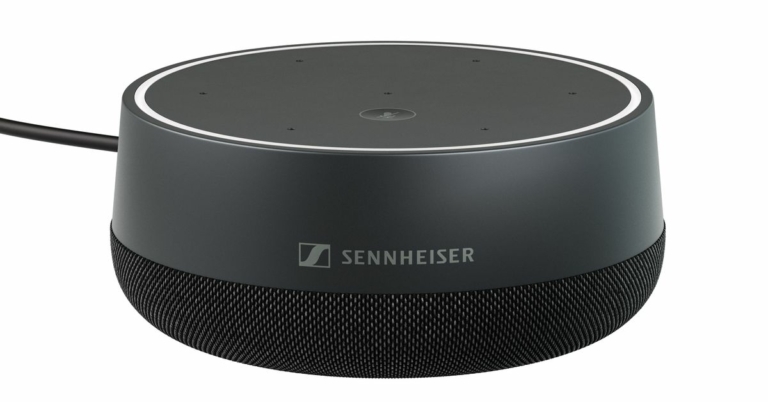
Sennheiser today announced the TeamConnect Intelligent Speaker, a Microsoft Teams-certified intelligent speaker in the market. The device works in real-time with Microsoft Teams’ automatic meeting transcript, identifying individuals speaking by name. The smart speaker features seven beamforming microphones and is compatible with Microsoft Teams auto transcription and Cortana voice assistance.Sennheiser officially confirmed the TeamConnect Intelligent Speaker, a Microsoft Teams-certified intelligent speaker, today. While announcing the device Mridul Jain, Director- Sales BizCom, at Sennheiser India said, “Sennheiser is known for our industry-leading TeamConnect Ceiling 2 microphone with TruVoicelift. This addition to our TeamConnect family offers an opportunity for us to expand into a different sized meeting room, at a price point that some might not expect from Sennheiser.”The TeamConnect Intelligent Speaker is the ultimate new audio solution for up to ten people in mid-sized Microsoft Teams rooms. It was created to give teams a whole new way to collaborate in hybrid meetings: smart, focused, inclusive, and as if everyone were in the same room. Intelligent solutions, such as the built-in Cortana voice recognition software, render product operation obsolete. Remote and hard-of-hearing participants can benefit from an inclusive meeting experience thanks to automatic meeting notes. The product includes an omnidirectional speaker that covers a 3.5m radius and 7 integrated beamforming microphones as an integral part of the room and is equipped with the latest technology.Microsoft Teams provides an automatic meeting transcript in real-time through this Intelligent speaker, identifying the individual people speaking by name if they have enrolled their voices. This ensures that remote and hard-of-hearing attendees are included in meetings.Intelligent solutions, such as integrated Cortana voice recognition software and automatic meeting notes, enable remote and hard-of-hearing participants to participate in inclusive meetings. The TeamConnect Intelligent Speaker offers a simple and flexible installation experience with multiple mounting options, long cables, and a variety of country-specific power plug adapters.Microsoft Teams Rooms combines Microsoft Teams‘ virtual workspace with physical meeting rooms equipped with AV equipment from Microsoft-certified hardware partners.
For the latest gadget and tech news, and gadget reviews, follow us on Twitter, Facebook and Instagram. For newest tech & gadget videos subscribe to our YouTube Channel. You can also stay up to date using the Gadget Bridge Android App. You can find the latest car and bike news here.





 For the latest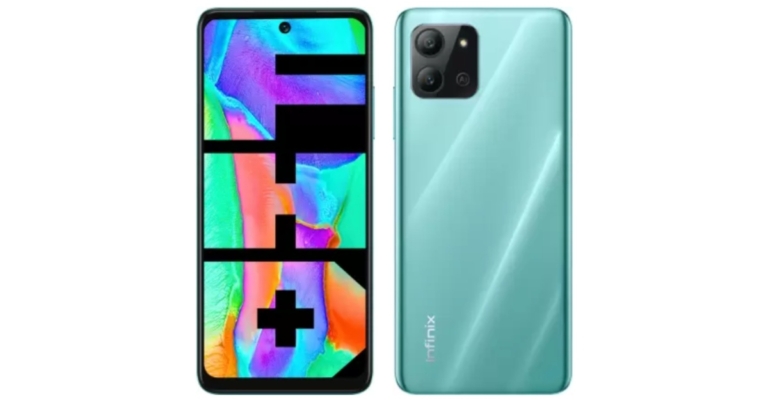

 Step 2: After this, you need to reset your iPhone. This will remove everything that is present in your device. So, make sure that you have taken a backup of all your stuff.
Go to Settings > General > Transfer or Reset iPhone > Erase All Content and Settings.
Step 2: After this, you need to reset your iPhone. This will remove everything that is present in your device. So, make sure that you have taken a backup of all your stuff.
Go to Settings > General > Transfer or Reset iPhone > Erase All Content and Settings.
 Your phone will ask for confirmation about whether you want to take an iCloud backup before you erase. Click on Erase Now as we will be using the older backup where the deleted messages are located.
Step 3: This process will reboot your iPhone 13. After that, it will start the setup process.
Your phone will ask for confirmation about whether you want to take an iCloud backup before you erase. Click on Erase Now as we will be using the older backup where the deleted messages are located.
Step 3: This process will reboot your iPhone 13. After that, it will start the setup process.
 Once you select the device language, it will ask you how you want to transfer apps and data to your iPhone. Click on Restore from iCloud Backup.
Then log in to your Apple account and select the backup where the deleted messages are located.
Note: If you want to recover deleted photos from iPhone 13 without erasing all your data and content, then you need to recover them using iCloud.com.
Once you select the device language, it will ask you how you want to transfer apps and data to your iPhone. Click on Restore from iCloud Backup.
Then log in to your Apple account and select the backup where the deleted messages are located.
Note: If you want to recover deleted photos from iPhone 13 without erasing all your data and content, then you need to recover them using iCloud.com.
 Step 3: A new window will open up, where you will see the list of backups that are present on your iCloud. Select the suitable backup and click on the Restore option. The process will take a few minutes to complete, and you will get a message after completion.
Now, this procedure will allow you to keep both your existing and deleted messages. However, the process is long, and it won’t work if your iCloud has been backed up recently. This is because if you have taken too many backups after you have deleted your messages, then the older backups might not be present on icloud.com, and you won’t be able to recover deleted data from iPhone 13. Also, deleted photos stay in iCloud for just 30 days. So, if you are too late, you may lose those photos.
Step 3: A new window will open up, where you will see the list of backups that are present on your iCloud. Select the suitable backup and click on the Restore option. The process will take a few minutes to complete, and you will get a message after completion.
Now, this procedure will allow you to keep both your existing and deleted messages. However, the process is long, and it won’t work if your iCloud has been backed up recently. This is because if you have taken too many backups after you have deleted your messages, then the older backups might not be present on icloud.com, and you won’t be able to recover deleted data from iPhone 13. Also, deleted photos stay in iCloud for just 30 days. So, if you are too late, you may lose those photos.
 Step 2: Next, it will show you the list of backups that are present in iCloud. Choose the backup that was done before you deleted your messages. Click on Restore and confirm the action.
 It is going to ask for your password before it restores all your data. Plus, once all the data is restored, your iPhone will restart once.
 Step 2: Connect your iPhone to the computer. Make sure that the USB connection is secure and you have all the necessary drivers installed on your PC.
 Step 3: Click on Recover iOS Data. Then, click on the scan option.
 It will start scanning to recover deleted data from iPhone 13. The time taken to scan will depend on the storage size.
Step 4: Once the scanning process is complete, it will show you all the files that Dr.Fone was able to recover from your iPhone. Now, if you want to recover messages, go to the Messages tab on the right side. If you want to recover contacts from iPhone 13, go to the Contacts section. The same goes for recovering photos.
Step 5: Once you have selected the files or messages that you want to recover, click on Restore to Device. If you want, you can even save these messages and photos on your computer.
It will take a few minutes for Dr.Fone to recover all your files to your iPhone.
It will start scanning to recover deleted data from iPhone 13. The time taken to scan will depend on the storage size.
Step 4: Once the scanning process is complete, it will show you all the files that Dr.Fone was able to recover from your iPhone. Now, if you want to recover messages, go to the Messages tab on the right side. If you want to recover contacts from iPhone 13, go to the Contacts section. The same goes for recovering photos.
Step 5: Once you have selected the files or messages that you want to recover, click on Restore to Device. If you want, you can even save these messages and photos on your computer.
It will take a few minutes for Dr.Fone to recover all your files to your iPhone.