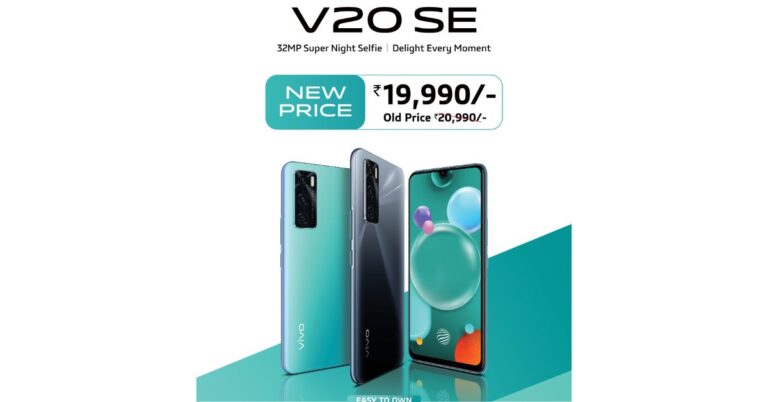
In November last year, Vivo introduced Vivo V20 SE smartphone in India. The device is the cheapest variant to the latest V-series smartphones in the country and in a new development the company has slashed down its price by Rs 1,000. The device runs Funtouch OS 11 based on Android 10 out of the box and is also powered by Qualcomm Snapdragon 765G Snapdragon 665 SoC. Furthermore, it includes a waterdrop-style notch display and a 33W FlashCharge fast charging tech.Vivo V20 SE: Pricing and availability detailsVivo V20 SE will now be available with a new price tag of Rs 19,990. The 8GB RAM with 128GB storage has received a price cut of Rs 1000, therefore, bringing down the retail cost of the device. This price change shall be applicable across all mainline partners, retail stores pan India, Vivo India E-store, Flipkart,Amazon.in and other major e-commerce platforms.In addition to this on the purchase of the smartphone, the customers can avail of attractive offers such as up to 2000 HDFC bank cashback on CC/DC EMI & CC regular transactions. There will be a triple zero down payment offer with Bajaj Finance whereas IDFC First Bank, HDB, Home Credit, ICICI Bank, TVS credit will be offering zero down payment on the purchase of the phone along with 12 months of extended warranty to Vi subscribers in the country.Vivo V20 SE: SpecificationsVivo V20 SE features a 6.44-inch full-HD+ AMOLED display with 1,080×2,400 pixels of resolution with a 20:9 aspect ratio. It runs Funtouch OS 11 on top of Android 10 and is powered by an octa-core Qualcomm Snapdragon 665 processor with 8GB of RAM and 128GB of storage. The storage can be expanded up to 1TB using a microSD card.There is a triple rear camera setup that includes a 48-megapixel primary lens with f/1.8 aperture. Further assisted by an 8-megapixel wide-angle lens with an aperture of f/2.2 and a 2-megapixel bokeh lens with f/2.4 aperture. It supports Super Night Mode, Live Photo, AR Stickers, and 4K video recording. While on the front there is a 32-megapixel selfie sensor with f/2.0 aperture. The camera supports Portrait Mode, Super Night Selfie, Selfie Fill Light, and a Video Face Beauty.The device packs a 4,100mAh battery that supports 33W FlashCharge fast charging tech.
For the latest gadget and tech news, and gadget reviews, follow us on Twitter, Facebook and Instagram. For newest tech & gadget videos subscribe to our YouTube Channel. You can also stay up to date using the Gadget Bridge Android App.
Today, learning is not restricted to schools and universities. Moreover, the COVID-19 pandemic has incentivised the online method of gaining knowledge. There are several websites where you can learn a variety of skills in desired languages. The robust feedback mechanism and user community make the learning experience indulging. Here are the top 7 websites that will help you gain knowledge from any part of the world.
1) TEDEd
TED-Ed is a website that sparks ideas and knowledge-sharing of teachers and students around the world. It has a growing video library of original animated lessons to help curious students around the world. TED-Ed has a global network of over 250,000 teachers. TED-Ed has grown into an award-winning education platform that serves millions of teachers and students around the world. Every TED-Ed Original signifies a creative collaboration between specialists in their field. Such experts include TED Speakers, educators, designers, animators, screenwriters, directors, and academic researchers.
TEDEd
2) Investopedia
Investopedia is an American website that presents investing and finance education featured with reviews, ratings, and comparisons of various financial outcomes including brokerage accounts. The website endeavours to simplify complex financial topics and decisions for the readers providing them the confidence to handle every aspect of their financial life. Investopedia currently consists of more than 32,000 articles and has a reach of millions of unique monthly viewers.
Investopedia
3) CodeAcademy
Codecademy is an online interactive platform providing free coding classes across 12 programming languages including Python, Java, Go, JavaScript, Ruby, C++, C#, Swift, and Sass. The site also comes with a ‘Pro’ option where you can get access to personalized learning and realistic projects. The website creates an interactive way of learning by making the process of learning flexible and accessible. The platform also offers courses for learning command lines and Git. Over that, the website has received positive reviews from big names like The New York Times and TechCrunch. It is a great and quick way of learning code.
CodeAcademy
4) Zenpencils
Zenpencils is a website where you can find inspirational quotes from famous people adapted in the form of cartoons. It is a form of an online gallery of cartoonist Gavin Aung Than’s comic strips offering instances of famous quotations in a visual style to narrate stories along with the quotes. Zen Pencils converge on adding to distinguished quotes being displayed into visual metaphors to make inspiring comics for the users. The website was first launched in 2012 and is based in Melbourne, Victoria, Australia.
Zenpencils
5) Duolingo
Duolingo is a language-learning website, mobile app, and digital language proficiency assessment exam. It offers 106 different language courses across 38 languages and has over 300 million registered users across the globe. Duolingo lessons adjust to your learning curve. The exercises are crafted to help you learn and interpret vocabulary effectively. You receive immediate grading to see which answers you got correct. Whenever you skip a challenge, the website automatically helps you how to improve on it.
Duolingo
6) FastCompany.com
FastCompany.com is a website that focuses on technology, business, and design. You can get an editorial focus on innovation in technology, leadership, world-changing ideas, creativity, and design. In 1997, Fast Company created an online social network, the “Company of Friends”. Abandoning the old concepts of business, FastCompany set out to account how growing companies create and compete, to highlight new business applications, and to showcase the teams and individuals who are inventing the future and reinventing business.
FastCompany.com
7) Khan Academy
Khan Academy is a distance learning platform where you get tutorials in an informal style designed for building knowledge. Several lessons are given as an electronic blackboard where users can keep records of their progress. The website is meant to be used as a supplement to the videos because it offers features like progress tracking, practice exercises, and teaching tools. You can also access the material through mobile applications. Khan Academy is part of a continuing trend to make educational resources freely available online for users across the globe.
Khan Academy
For the latest gadget and tech news, and gadget reviews, follow us on Twitter, Facebook and Instagram. For newest tech & gadget videos subscribe to our YouTube Channel. You can also stay up to date with the Gadget Bridge Android App.
The e-commerce website Flipkart is hosting Daily Trivia Quiz. Every day it brings a bunch of new questions for its users. By answering them correctly you can win exciting prizes. The questionnaire is based on questions related to general knowledge. Also, the users can win free vouchers and super coins, among other offers via the daily quiz. February 26 Flipkart Daily Trivia Quiz Answers has already gone live on its platform.
The participant should be at least 18 years old and should have a valid login ID. The Quiz is available on the mobile platform and not the web version. E-commerce conducts the quiz on daily basis and goes live at 12:00 AM IST and runs till 11:59 PM IST. The winners are announced within 15 days from the date of participation that can be viewed under the Gems/Rewards section in the app.
How to participate in the Flipkart Daily Trivia Quiz
To participate download the Flipkart app on your phone. Then open the Flipkart app then head to Game Zone. Now click on the Daily Trivia Banner or search for Daily Trivia. Enter the game and answer all 5 questions with correct answers.
February 26 Flipkart Daily Trivia Quiz Answers
Question 1: Which Of These Popular Mobile Apps Is Not Owned By Google?
Answer: Facebook
Question 2: What Part Of The Plant Do We Eat When We Eat Carrots?
Answer: Root
Question 3: Which Country Has Shifted Its Capital 7 Times With The Current One Since 1990?
Answer: Germany
Question 4: Who Was The Foreign Minister In Mughal Emperor Akbar’s Court?
Answer: Birbal
Question 5: What Google Developed AI Identifies “Potentially Unsafe” Restaurants?
Answer: FINDER
Amazon Quiz is getting more popular these days as more people have started participating in the quiz in the hope to win free gadgets as well as Amazon Pay Balance. The e-commerce platform brings Amazon Quiz on its mobile platform every day. The quiz can be played every day from 12 AM to 11:59 PM. Today you can stand a chance to win Philips Air Fryer.
The Amazon Quiz has gone live on its platform. Every day it brings a new questionnaire to which the participants have to answer correctly. It consists of a total of five questions to which you have to answer correctly to enter the lucky draw. All the questions are based on general knowledge and current affairs. Amazon will announce the result of the quiz at the end of the month. Only app users are eligible to participate in the Quiz. To help our readers to clear the Amazon Quiz successfully, every day we update all the Amazon Quiz questions with their correct answers on our website to let you win Philips Air Fryer. You can increase your chances of winning prizes by daily participating from 12 AM to 11:59 PM. We have already updated all the answers to today’s quiz below.
February 26 Amazon Quiz Answers
Question 1: In March 2021, Govt. of India plans to sell what in the 700, 800, 900, 1,800, 2,100, 2,300, and 2,500 MHz frequency bands?
The answer is- Spectrum for 4G
Question 2: Complete the title of the book recently released by Ravi Shastri: “India’s 71-Year Test: The Journey to Triumph in _______”?
The answer is- Australia
Question 3: Marking 50 years of the 1971 war, a 122-member contingent of which country’s Armed Forces participated in the 2021 Republic Day parade?
The answer is- Bangladesh
Question 4: In the version of the sport titled ‘League’, how many players are there in each team?
The answer is- 13
Question 5: What is the chemical formula for this common condiment?
The answer is- NaCl
In an interconnected world that revolves around sharing, it’s evident that devices can also mimic each other. Today, we have the technology by which smartphone screens can be displayed onto a smart TV screen. This technology, commonly known as ‘screen-mirroring is of great utilisation. It enhances the effectiveness of a video call of watching movies. Android and Apple phones have different sets of connectivity requirements. Thus we will deal with them separately.
Case 1: Android smartphone
Using Google Home appto display your smartphone screen on a TV
Casting your Android screen allows you to mirror your Android device screen to the TV so that you can enjoy your content exactly as you see it on your smartphone.
Step 1. Get started
It is important to note that Casting your Android screen works only for devices running Android 5.0 or later.
Casting your Android screen is not supported on iOS or Windows devices.
Turn off “Power Saving Mode” on your Android device. Power Saving Mode can restrict the processing power of your smartphone which might inhibit the performance of the Cast Screen feature.
Tun on the “Microphone” permission in the Google Play Services app to successfully use the “Cast Screen / Audio” feature with Chromecast. To turn on microphone permissions:
Scroll down and tap Apps> Google Play Services > Permissions.
Look for “Microphone” and turn the slider On.
Step 2. Cast your screen from your Android device
Ensure that your smartphone or tablet is connected to the same Wi-Fi network as your Chromecast device, say, Smart TV.
Open the Google Home app.
Tap the device you want to cast your screen to.
TapCast my screen > Cast screen.
Step 3. Adjust the volume when casting your Android screen
Open the Google Home app.
Tap your device, then adjust the volume.
Step 4. Stop casting your screen from your Android device
Make sure your mobile phone or tablet is on the same Wi-Fi network as your Chromecast device.
Open the Google Home app.
Tap your device > Stop mirroring.
Case 2: iPhone / iPad
Using AirPlay to display your smartphone screen on a TV
A) Ensure that your device is connected to the same Wi-Fi network as your Apple TV or AirPlay 2-compatible smart TV.
B) Find the video that you want to stream.
C) Tap the AirPlay icon. In some third-party apps, you might require to tap a different icon first.* In the Photos app, tap stram icon, then tap the AirPlay icon.
D) Choose your Apple TV or AirPlay 2-compatible smart TV.
E) To stop streaming, tap the AirPlay icon in the app that you’re streaming from, then tap your iPhone, iPad, or iPod touch from the list.
For the latest gadget and tech news, and gadget reviews, follow us on Twitter, Facebook and Instagram. For newest tech & gadget videos subscribe to our YouTube Channel. You can also stay up to date with the Gadget Bridge Android App.
When you try to turn on your camera, you might encounter an error message saying “We can’t find your camera”. There may be several reasons if your laptop’s camera is not working. The problem usually pops up when you update your windows or your laptop is quite old. Windows 10 has an in-built feature that disables the internal webcam for sake of privacy and security. However, this often turns into a problem if you toggle this feature by mistake. Here are the easiest and fastest methods to fix your camera.
Fix 1: Give your apps permission
If your Windows 10 recently got updated, you might need to permit apps to use the camera. To let your device access the camera, select Start, then select Settings > Privacy > Camera. In Allow access to the camera on this device, if Camera access for this device is turned off, select Change and turn on Camera access for this device.
Give your apps permission
Fix 2: Check for an incompatible camera driver
Old cameras or webcams are not always compatible with Windows 10 or the latest drivers. Follow these steps to check if your camera is compatible:
A) Select Start, enter device manager.
B) In Device Manager, search for your camera under Cameras, Imaging devices orSound, video, and game controllers.
C) Right-click the name of your camera, and then choose Properties.
Select the Driver tab, and then select the Driver Details button. Seek the file name that includes stream.sys. If it’s there, you will need to replace it with a newer camera or an external camera
Check for an incompatible camera driver
Fix 3: Rollback the camera driver
If your camera stopped working after an update, you can follow these steps:
A) Select Start, enter device manager.
B) In Device Manager, right-click your camera and select Properties.
C) Select the Driver tab, select Roll Back Driver, and then choose Yes.
D) Once the rollback is complete, restart your device, and then try opening the Camera app again.
If rolling back didn’t work or isn’t available, continue to the next steps.
Rollback the camera driver
Fix 4: Uninstall your camera driver and scan for hardware changes
A) Select Start, enter device manager.
B) In Device Manager, right-click your camera and select Properties.
C) Select the Driver tab and choose Uninstall Device. Select the check box for Delete the driver software for this device, then click OK.
D) In Device Manager, on the Action menu, choose Scan for hardware changes.
E) Wait for it to scan and reinstall updated drivers, restart your PC, and then try opening the Camera app again.
Uninstall your camera driver and scan for hardware changes
For the latest gadget and tech news, and gadget reviews, follow us on Twitter, Facebook and Instagram. For newest tech & gadget videos subscribe to our YouTube Channel. You can also stay up to date with the Gadget Bridge Android App.
Technology has enhanced the way we listen to music. There are several applications that enable you to listen to high-quality music from different genres and languages. With their compatibility with echo devices, you can play music on the go. These apps adjust to your listening preferences and suggest you accordingly. Here are the top 5 websites or apps to stream or download music of your choice.
1) Jio Saavn
Jio Saavn provides is ad-supported music streaming app having access to millions of songs from different languages like English, Hindi, Telugu, Tamil, Punjabi, Marathi, Gujarati, Bengali, Kannada, Bhojpuri, Malayalam, Urdu, Haryanvi, Rajasthani, Oriya, and Assamese. Apart from free music streaming, you get complimentary access to JioSaavn Pro for three months. JioSaavn works on different platforms like Android, iOS, and Windows 10. You get full compatibility with Apple CarPlay, Android Auto, Alexa, and Google Assistant for streaming music through smart speakers.
Jio Saavn
2) Apple Music
Apple Music is one of the best places to listen to music online. There is an option to download music from the service as well and listen to it offline. You will find all the latest popular national and international artists on it. The interface is very simple to navigate through and one can easily find top songs, new songs, new artists and more on the home page. The service is free to try for the first three months after that there is an inexpensive charge of Rs 99 per month. Here you will also find a lot of exclusive independent artists, too. The Apple Music library has over 70 million songs. Moreover, the sound quality you here on Apple Music is like no other.
Apple Music
3) Amazon Music
Another great place to goto for your daily musical needs is Amazon Music. If you are an Amazon Prime user, this service is completely free as it is part of Rs 999 per year package which comes with Amazon Prime membership, which most of us already are. Besides the good audio quality, the thing we love about Amazon Music is that it has a very-very large audio library ranging from around th world. No matter which song you are looking for from any part of the world, chances are you will find it on Amazon Music. From old Hindi and English track to new-age millenial pop tunes, you will find everything here. And oh yes, the interface is breeze to work with.
Amazon Music
4) Spotify
Spotify is one of the most preferred streaming services in the world, owing to its comprehensive music library. It gives ad-supported music for the free tier and perfectly runs on Android, iOS, Windows, Linux, Xbox, PlayStation, Android TV, tvOS, Fire TV, and Smart TVs. Spotify is also fully compatible with Alexa, Google Assistant, CarPlay, Android Auto, and AirPlay. Spotify’s free subscription offers 96kbps sound quality on mobile and 160kbps on desktop. This music streaming service comes with an outstanding library of playlists that suit your music genre or favourite artists.
Spotify
5) Wynk
Wynk is a music streaming platform owned by Airtel that is available on Android, iOS, and the web. It has a giant library with 30 million songs across fourteen languages i.e. Assamese, Bengali, Bhojpuri, English, Gujarati, Haryanvi, Hindi, Kannada, Malayalam, Marathi, Oriya, Punjabi, Rajasthani, Telugu, and Tamil. Airtel Wynk premium comes free of cost for Airtel Gold subscribers. However, you can enjoy the free tier of Wynk without an Airtel Gold plan. Android users can subscribe to Airtel Wynk Plus without paying anything but the app is not compatible with Android Auto and Apple CarPlay.
Wynk
6) Hungama Music
Hungama Music’s library covers over ten million songs and music videos from different languages like English, Hindi, Marathi, Kannada, Tamil, Telugu, Malayalam, Bengali, Bhojpuri, Gujarati, Rajasthani, and Oriya. Hungama is available on Android, iOS, smart TVs, Fire TV, and Android TV. It is also compatible with smart speakers through Alexa. You can listen to high-quality music (320kbps) without ads by subscribing to a premium plan. Hungama offers features like dynamic lyrics, Chromecast, playlists, and radio stations. You get a dark theme to run the app without straining your eyes in low-light conditions.
Hungama Music
For the latest gadget and tech news, and gadget reviews, follow us on Twitter, Facebook and Instagram. For newest tech & gadget videos subscribe to our YouTube Channel. You can also stay up to date with the Gadget Bridge Android App.
When it comes to memory management tasks like data fetching and feeding, there is no comparison for Solid State Drives (SSD). Conventional Hard Drives are mechanical storage devices made of moving parts. As a result, they are susceptible to shocks, wear/tear and drops. On the other hand, Solid-State Drives are made of several memory chips installed on a circuit board. This enhances the longevity of SSD. It’s just a myth that SSD are costly. Here are the top 10 SSDs you can buy under Rs. 5,000.
1) Samsung 860 Evo 250GB SATA III Internal Solid State Drive
This SSD comes with a total memory capacity of 250GB and the measurement is 2.5inch. If you like gaming or video editing then this Samsung SSD will go a long way with you. The read velocity of this SSD drive is 550MB/sec and the write velocity is up to 520MB/sec. you get a 512MB dedicated SDRAM for lightning-fast performance. The device uses AES 256-bit encryption technology for the security of your data against cyber threats. You can get 4K video rendered without any lag and game loading time will be faster than ever before.
Samsung 860 Evo 250GB SATA III Internal Solid State Drive
Price: ₹ 3,499
Buy at Amazon
2) WD Green 120GB Internal Solid State Drive (WDS120G1G0A)
This Western Digital SSD comes with shock-resistance storage that requires ultra-low-power thereby elongating the battery life of your laptop. You get SLC (single-level cell) caching boosts to enhance performance and quickly execute everyday tasks. The SSD is available in 2.5-inch and M.2 2280 variants to adjust a majority of devices. The free WD SSD dashboard allows you to monitor the state of your drive. It includes shock resistance and WD Lab certifications for trust and compatibility.
WD Green 120GB Internal Solid State Drive (WDS120G1G0A)
Price: ₹ 2,390
Buy at Amazon
3) HP S700 120GB 2.5-inch Internal SATA SSD
This is one of the most preferred SSD that you can get under Rs. 5,000 as it is lightweight and functions in various read/write modes with a fabulous performance. The S700 series comes with a dual-core HP controller along with four flash memory channels to support NANDXtend ECC and have DRAM Cache for swift and steady performance. It maximises your device’s performance and smoothens the response. Since there are no moving parts, there will nothing to wear out. As a result, you get faster load times for video games.
HP S700 120GB 2.5-inch Internal SATA SSD
Price: ₹ 2,040
Buy at Amazon
4) ADATA SP580 Premier 120GB Internal SSD
ADATA is also one of the most preferred SSD available in this budget range. It comes to some really good caching techniques and power-saving means that ultimately improve the performance of your device. This SSD card sports a built-in memory of 120GB, which allows you to store data securely. The drive uses a high-speed Marvell controller to support intelligent SLC (Single-level cell) caching functionality and effectively enhance the read/write process. You get TBW support to analyse the card’s endurance level.
ADATA SP580 Premier 120GB Internal SSD
Price: ₹ 2,556
Buy at Amazon
5) Crucial MX500 500GB SATA 6.0Gb/s 2.5-inch 7mm Internal SSD
This SSD comes with a storage size is 500GB and the SSD dimension is 2.5inch. It uses 3D NAND technology for a faster data transfer speed up to 560MB/sec and a write speed up to 510MB/sec. You get 256-bit hardware-based encryption support for security against cyber threats. The drive helps boot your system in seconds ensuring instant performance and perpetual security that comes with solid-state storage. So, you can confidently upgrade with the Crucial MX500 SSD and get the built-quality, speed, and security.
Crucial MX500 500GB SATA 6.0Gb/s 2.5-inch 7mm Internal SSDBuy at Amazon
6) Kingston SSDNow A400 480GB Internal Solid State Drive
This SSD from Kingston has a total storage size of 480GB and a dimension of 2.5inch means you can install this SSD drive on your laptop. This SSD comes with backward compatibility so you can utilise SATA Rev. 2.0 supported motherboard. The weight of this SSD drive is light so you confidently go for your laptop upgrade. Kingston’s A400 solid-state drive improves the response time of your existing system with the enhanced boot, loading, and transfer times in contrast to mechanical hard drives.
Kingston SSDNow A400 480GB Internal Solid State Drive
Price: ₹ 4,898
Buy at Amazon
7) Western Digital WD Green WDS480G2G0A 480 GB Solid State Drive
This SSD comes with a storage capacity of 480GB and is 2.5Inch in size. You get a read transfer rate of 545MB/sec that will boost your laptop’s performance. This drive enables the system to smoothly handle tasks like gaming, video, or browsing. The lightweight and shock-resistant features ensure longevity. The WD Green SSD employs no moving parts thereby keeps your data safe from the loss due to mechanical shocks like bumps and drops. WD Green SSDs are among the lowest energy-consuming drives in the industry ensuring that your laptop runs for longer.
Western Digital WD Green WDS480G2G0A 480 GB Solid State Drive
Price: ₹ 4,949
Buy at Amazon
8) Western Digital 250GB Internal Solid State Drive
This SSD comes with a total storage capacity is 250GB and the size is 2.5 inches. The 3D NAND technology provides enhanced reliability with an active power consumption of up to 25% lower than other drives. Thus, you can work longer without recharging your laptop achieving sequential read speeds up to 560MB/s and sequential write speeds up to 530MB/s resource-demanding application. You also get a free WD SSD Dashboard software with a 5-year limited warranty. Thus, you can confidently upgrade your laptop or even desktop with this drive.
Western Digital 250GB Internal Solid State Drive
Price: ₹ 3,980
Buy at Amazon
9) A-DATA Ultimate SU650 3D NAND 120GB Solid State Drive
The Ultimate Solid State Drive SU650 is a perfect companion for players, gamers, overclockers, and graphic designers/professionals. This drive allows you to get faster performance with a read/write speed as high as 520/450 MB per second for seamless boot, file transfers, and downloads. The SU650 supports ECC (error correction code) technology to detect and fix errors. It also ensures data integrity and elongates the lifespan of Solid State Drive and hence your PC. The SSC can achieve the MTBF (mean time between failures) of 2 million hours or 25% more as compared to 2D NAND SSDs.
A-DATA Ultimate SU650 3D NAND 120GB Solid State Drive
Price: ₹ 1,901
Buy at Amazon
The XPG S40G SSD runs on 3D NAND technology and PCIe NVMe interface and comes with an RGB lighting heatsink to get an enhanced computing experience. S40G can achieve sequential read up to 3,500MB/s and write up to 3,000MB/s. This outstanding speed will boost the overall responsiveness and minimise the application loading time. Thus, this SSD is perfect for a variety of purposes including enhanced gaming, video editing, 3D modeling, and data analysis, artificial intelligence, and other intensive applications.
XPG S40G 256GB RGB 3D NAND PCIe Gen3x4 NVMe 1.3 M.2 2280 Internal SSD
Price: ₹ 4,419
Buy at Amazon
For the latest gadget and tech news, and gadget reviews, follow us on Twitter, Facebook and Instagram. For newest tech & gadget videos subscribe to our YouTube Channel. You can also stay up to date with the Gadget Bridge Android App.
In an era when brands are competing against each other to offer the latest specifications, Samsung has decided to enhance the perspective that other brands often tend to evade. That is long-term software support. Samsung Electronics recently declared that it will be elongating the software security support to its smartphones that were launched in 2019 and later. These devices will now get four years of security updates including Samsung’s Flagship S, Z, Fold series, Note series, the A-series, and M-series.
Are security updates of Samsung the same as Android OS updates?
It is important to acknowledge that these are security updates for Samsung and not Android OS updates. Although you will not receive the subsequent four Android variants on your smartphone, four years of security patches will still be important for keeping your device secure for a long time. However, the recurrence of updates for all the compatible devices may not be identical. While you may get monthly security patch updates, others may receive updates in three months.
According to Seungwon Shin, VP & Head of Security Team at Mobile Communications Business, Samsung Electronics, “At Samsung, our number one priority is offering the best and most secure mobile experience to our users, and we’re constantly optimizing the security of our products and services. Mobile devices play such an important role in our lives, it’s only natural that we want to hold onto them longer. That’s why, thanks to the latest technology advancements, we’re committing to securing Galaxy devices for even longer, so that everything that should be kept protected stays protected.”
Are security updates of Samsung the same as Android OS updates?
What will be Samsung’s approach to Mobile Security?
Samsung believes in the concept of openness and collaboration to present the best smartphone experience that people can rely on. Samsung claims to have worked with over 1,000 partners to install security standards for all Android devices, which includes its regular security update program in 2015. The company collaborated with the security research fellowship to guarantee consumers get the most secure mobile experience.
According to Samsung, “the company worked closely with its OS and chipset partners and carriers across the globe to bring Galaxy owners timely updates.”
Which Samsung devices will get 4 years of security support?
Amongst a plethora of Samsung smartphones, the Galaxy Fold, Fold 5G, Z Fold2, Z Fold2 5G, Z Flip, and Z Flip 5G will be compatible for extended security.
In the S series, The Galaxy S10, S10+, S10e, S10 5G, S10 Lite, S20, S20 5G, S20+, S20+ 5G, S20 Ultra, S20 Ultra 5G, S20 FE, S20 FE 5G, S21 5G, S21+ 5G, and S21 Ultra 5G will be supported.
As for The Note Series, the Samsung Galaxy Note 10, Note 10 5G, Note 10+, Note 10+ 5G, Note 10 Lite, Note 20, Note 20 5G, Note 20 Ultra, and Note 20 Ultra 5G will get the extended security updates.
In the mid-range, Samsung will offer support to the Galaxy A10, A10e, A10s, A20, A20s, A30, A30s, A40, A50, A50s, A60, A70, A70s, A80, A90 5G, A11, A21, A21s, A31, A41, A51, A51 5G, A71, A71 5G, A02s, A12, A32 5G, and A42 5G.
The Galaxy M10s, M20, M30, M30s, M40, M11, M12, M21, M31, M31s, M51 will also get support for 4 years of security updates.
Which Samsung devices will get 4 years of security support?
For the latest gadget and tech news, and gadget reviews, follow us on Twitter, Facebook and Instagram. For newest tech & gadget videos subscribe to our YouTube Channel. You can also stay up to date with the Gadget Bridge Android App.
Android smartphones have become a crucial part of the lives of many people. We perform several tasks on our smartphones such as calling, texting, sending or receiving emails, and surfing social media. For a seamless web browsing experience, you need a fast yet robust browser application on your smartphone. Although, it’s straightforward to keep using the browser that comes pre-installed on your device. But we decided to think out of the box and set out on testing several browsers including third-party applications to find the fastest one.
How we test the speeds of the browser?
To get an unbiased result, we execute a standard web benchmark test named Basemark 3.0 across several smartphone browsers. Basemark 3.0 is a platform-independent service that tests the ability of a browser to manage modern web applications and functionalities. The test also includes graphical examinations and is harmonious with all the latest standards and technologies. There is also stress analysis for knowing how efficiently a specific platform will provide a resource-intensive website.
Here are the top three winners of our tests.
1) Puffin Web Browser by CloudMosa, Inc.
The “Puffin Web Browser” by CloudMosa, Inc. is the winner and according to us the fastest browser for Android. One of the essential characteristics that make this application faster than others is by moving the workload from your smartphone to the cloud servers. Puffin has achieved over 50 million downloads on the Google Play store. This app is also one of the most preferred third-party browsers that you can get on Android.
Puffin Web Browser by CloudMosa, Inc.
Pros
Adobe Flash on the Cloud
Cloud Servers
Encrypted Packets
2) DuckDuckGo Privacy Browser by DuckDuckGo
The DuckDuckGo Privacy Browser application is one of the most consistent performers throughout our tests. The app offers you dozens of features like ‘Brave Browser’, ‘Fire Button’, and ‘Privacy Protection’ without any cost. The DuckDuckGo Privacy Browser has over 5 million downloads and is the simplest web browser you can expect for Android smartphones. Moreover, you can get this app on Amazon if you use an Amazon Fire Tablet.
DuckDuckGo Privacy Browser by DuckDuckGo
Although you might not have heard much about the Cake Web Browser application, it has performed way beyond our expectations. On our benchmarks, this app was consistently performing and stood only second to Puffin. The memorable feature of this app is its user experience. Other applications focus more on the security and speed aspects. The Cake Web Browser app prioritizes the user experience. You get features like patent-pending technology i.e. fetching results through swipes, in-built ad blocker, and pop-up blocker.
Cake Web Browser by Cake Technologies Inc.








 Using AirPlay to display your smartphone screen on a TV
 Using AirPlay to display your smartphone screen on a TV