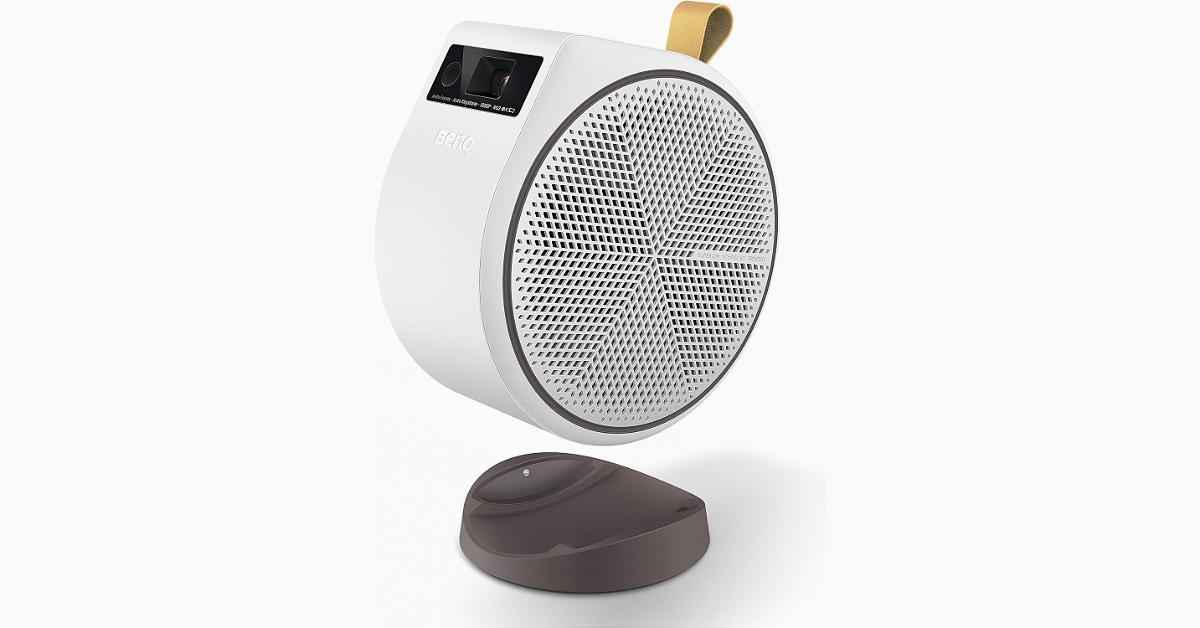
BenQ GV31 Portable Projector with in-built Android TV featuring Netflix launched

Key Highlights
  • BenQ GV31 Portable Projector is equipped with Full HD 1080p resolution.
  • It also supports up to 4K resolution.
  • It comes with a 135-degree projection angle.
BenQ a popular brand that deals in digital projectors, monitors, interactive large-format displays, and lighting solutions introduced a new portable projector. The tech company announced BenQ GV31 Portable Projector offering immersive FHD projections. It comes with an in-built Android TV featuring Netflix so you can stay entertained anywhere. The BenQ GV31 Portable Projector is made to provide instant access to entertainment, as it can project anytime, anywhere. The GV31 projector can project a screen up to 120 inches in FHD (1080P) 1920 x 1080 pixels Resolution and 100,000:1 contrast ratio. 4K content is also supported by the projector. The device has 300 ANSI lumens brightness. The projector offers a total of six picture modes Bright, Cinema, Day Time, Game, Living Room and Sports. BenQ GV31 Portable Projector with in-built Android TV featuring Netflix launched The BenQ GV31 Portable Projector offers Free Angle Projection allowing up to 135 degrees of flexibility, allowing users to enjoy their preferred media even when they’re lying in bed thanks to its Free Angle Projection feature. Also Read: Poco X6 Series is to be shipped with HyperOS out of the box, Poco India confirms The portable projector comes equipped with 16W (two 8W) 2.1 channel speakers with enhanced bass. Additionally, the projector functions as a Bluetooth speaker. As mentioned earlier the projector comes with Android TV 11.0 built-in and Netflix pre-installed. To ensure you stay up to date, the USB-C connection features a reversible design and supports data transfer, power delivery, and DisplayPort Alternate Mode. The device has fast autofocus and automated vertical keystone correction for hassle-free setup. The device also includes Chromecast, AirPlay, and Google Assistant support. The BenQ GV31 Portable Projector is claimed to offer up to 3 hours of video playback and 6 hours of music playback. In terms of connectivity, there is Bluetooth 5.0; Wi-Fi 802.11a/b/g/n/ac/ax(2.4GHz/5GHz), two HDMI, a USB Type A, and USB Type C (Display Port/ PD in 15V-3A; 20V-2.25A to 3.25A/ PD out 5V-2A, 9V-2A, 12V-1.5A, 15V1.2A). Also Read: Itel 70 sale in India begins, price starts at Rs 6,299 According to Mr. Rajeev Singh, Managing Director of BenQ India, “The arrival of our GV31 projector marks a step up from the GV30, transforming how Indians indulge in entertainment. BenQ’s commitment to innovative projection technology integrated with Android TV, and high-fidelity audio-visual experience aims to redefine how families and individuals experience and customise their modes of entertainment.”

How to disable Link History on Facebook? (Android and iOS)

Facebook’s new ‘Link History’ is now live and rolling out to mobile devices in a phased manner. If you don’t see it on your device, you may need to update the app. While it may be a helpful feature for some users, in true Facebook fashion, it comes with a bunch of privacy concerns. Facebook’s long history of handling user data does not inspire confidence in its new feature. So, let’s take a quick look at what Link History is and how you can disable it on Facebook. Read Also: Essential Wallet and Smartphone Care Tips for Longevity

What is Link History on Facebook?

Facebook recently started unrolling the ‘Link History’ feature in a phased manner. This feature allows users to view all the links they have visited on Facebook’s mobile browser within the app. The links are deleted after 30 days. If you can’t find a video or a product link that you recently clicked on, this is where you need to go to locate it. On some devices, this option may be turned on by default. While it may seem like a convenient feature, it does have a massive downside. Facebook has made it clear that it uses your link history to suggest better ads for you across all Meta platforms. This implies a sordid exchange of personal data between Facebook and third-party advertisers, which may not be okay with a lot of users. Luckily, there is an option to opt out of your feature and keep your Facebook activity relatively out of reach from prying eyes.

Disable Link History on Facebook for Android

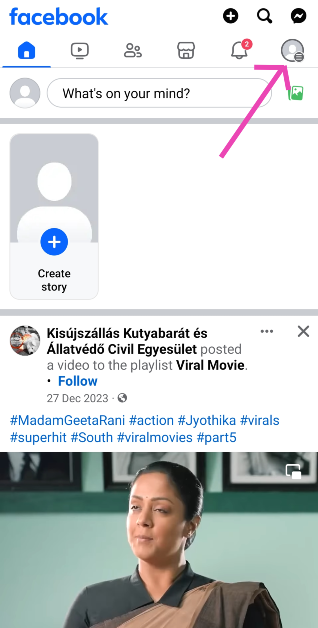
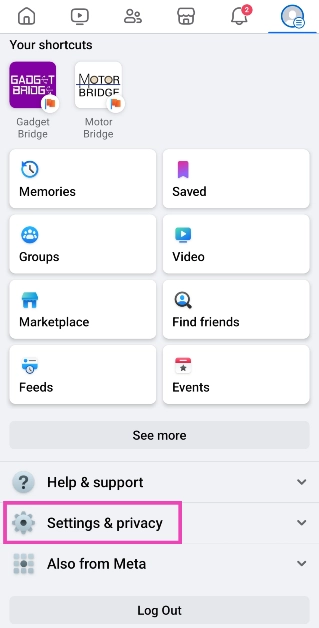
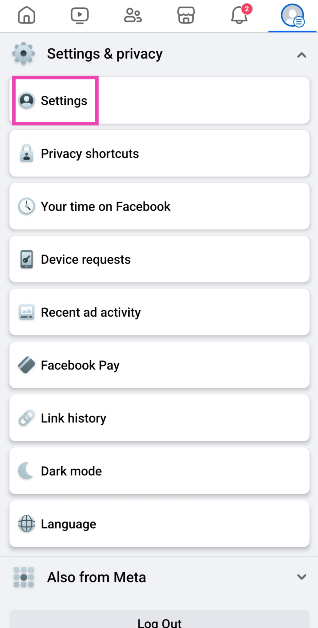
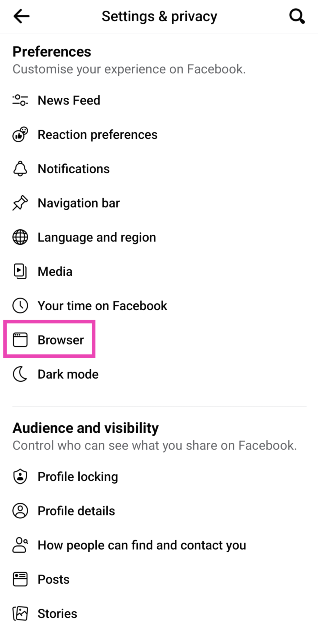
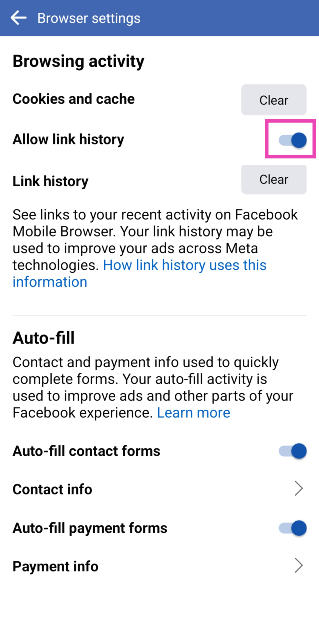
Step 1: Launch the Facebook app on your Android smartphone. Step 2: Hit your Profile icon at the top right corner of the screen. Step 2: Hit your Profile icon at the top right corner of the screen. Step 3: Tap on Settings and privacy. Step 3: Tap on Settings and privacy. Step 4: Select Settings. Step 4: Select Settings. Step 5: Scroll down and select Browser. Step 5: Scroll down and select Browser. Step 6: Turn off the toggle switch for Allow link history. Step 6: Turn off the toggle switch for Allow link history. Read Also: What you need to get a license in the iGaming business?

Disable Link History on Facebook for iOS

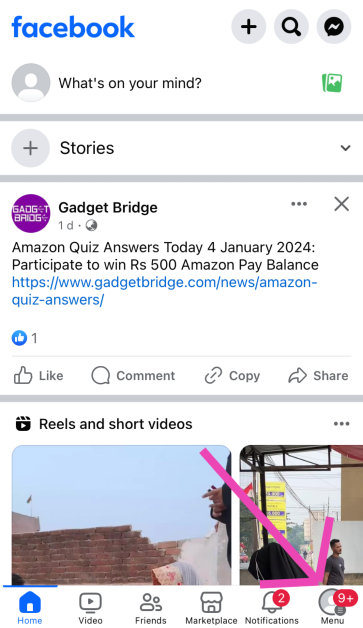
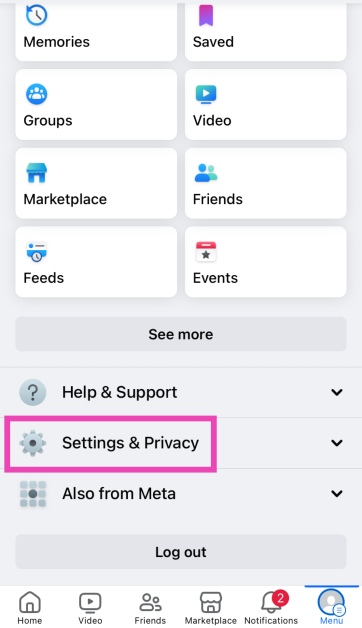
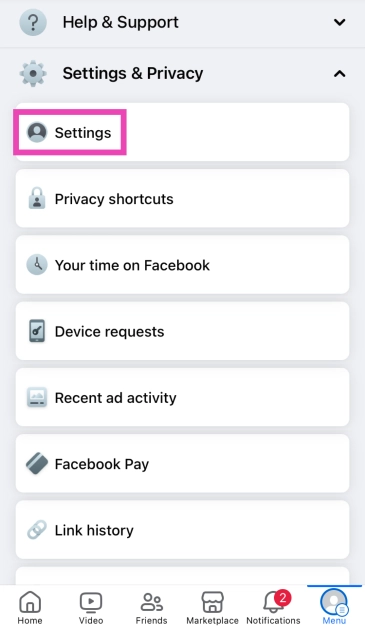
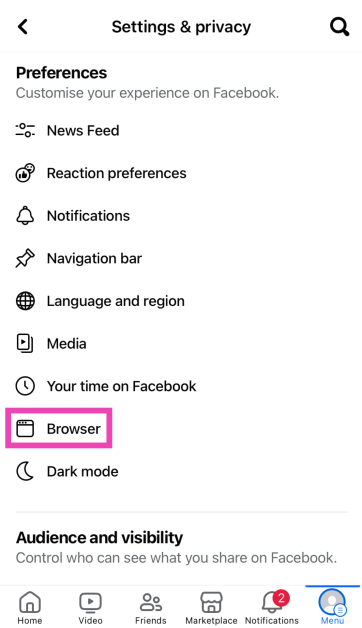
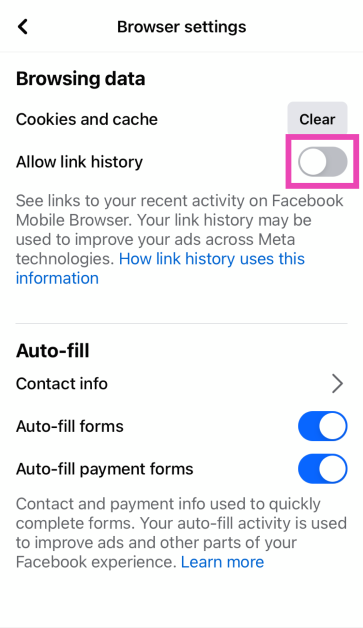
Step 1: Launch the Facebook app on your iPhone. Step 2: Hit the Menu icon at the bottom right corner of the screen. Step 2: Hit the Menu icon at the bottom right corner of the screen. How to disable Link History on Facebook? (Android and iOS) Step 3: Tap on Settings and privacy. Step 3: Tap on Settings and privacy. How to disable Link History on Facebook? (Android and iOS) Step 4: Select Settings. Step 4: Select Settings. How to disable Link History on Facebook? (Android and iOS) Step 5: Scroll down and select Browser. Step 5: Scroll down and select Browser. How to disable Link History on Facebook? (Android and iOS) Step 6: Turn off the toggle switch for Allow link history. Step 6: Turn off the toggle switch for Allow link history How to disable Link History on Facebook? (Android and iOS)

Frequently Asked Questions (FAQs)

What is Facebook’s new link history feature?

Facebook’s new link history feature records all the links that you have clicked on within the platform in one place.

How long are the links kept in Facebook’s link history?

All links recorded in the ‘link history’ folder are auto-deleted after 30 days.

How do I turn off link history on Facebook?

Go to Menu>Settings and privacy>Settings>Browser and turn off the toggle switch for ‘Allow Link History’. Read Also: 2 Easy Ways to Copy and Share LinkedIn Profile Link

Conclusion

This is how you can disable the link history feature on Facebook. To maintain your privacy across the internet, always turn down cookie requests when you visit a website and make sure your web browser enforces HTTPS encryption for all web pages. Use a secure browser like DuckDuckGo to make sure your privacy remains intact.

Garena Free Fire Redeem Codes Today 6 January 2024: Here is how to claim them

Garena Free Fire is a battle royale game with regular awards and tournaments to keep players interested. If you play Garena Free Fire, you should be aware of the redeem codes that are released on a daily basis. However, because the battle royale game is banned in India, players from other countries can use the Free Fire Redeem codes daily. If you’re unfamiliar with the Garena Free Fire redeem codes or don’t know how to get them, we’ve put together a step-by-step guide to help you redeem them. Check out Garena Free Fire Redeem Codes for 6 January 2024. The Free Fire redeem codes are a great way to get free stuff. These are 12-digit codes that contain alphabets and numbers, as well as an expiration date and time. Because the Garena FF redeem codes cannot be used more than once, you should hurry to the redemption page to claim your free reward before someone else does. To get a free reward, all you have to do is go to reward.ff.garena.com/en, which is the official redemption page. Also, keep an eye on this space for daily updates on Garena Free Fire redemption codes and rewards.

Garena Free Fire Redeem Codes Today 6 January 2024

FKY89OLKJFH56GRG FUTYJT5I78OI5CF2 FUKTY7UJIE56RYHI FBVFTYJHR67UY4IT FYHJTY7UKJT678U4 FYHDBGTDTYHGR5FH FV7CYTGDRTUNMJEK FDYHGBNE5RDTGE87 FRJNTR67UH675Y4E FKJIT67UWEYHT4H4 FRYHGVTWFBUE45HS FOGFUYJN67UR6OBI FYHJMKRT76HYR56C F6Y6FHRTJ67YHR57 FR45TEYHBTGFEDG3 FTGBHFTHYR566GRK F6GHTR6YHR6GRGYU FVYHFT6HYJT67LYP

How to Get Free Fire Redeem Codes for Garena on 6 January 2024?

  • Visit the Garena Free Fire game’s official website at reward.ff.garena.com.
  • Use your Facebook, Google, VK, Apple ID, Huawei ID, or Twitter account to log in.
  • You’ll be taken to a valid redemption code (s)
  • Copy and paste the 12-digit redemption code into the text box.
  • On the screen, a dialogue box will appear.
  • ‘Ok’ should be selected.
For the latest gadget and tech news, and gadget reviews, follow us on TwitterFacebook and Instagram. For newest tech & gadget videos subscribe to our YouTube Channel. You can also stay up to date using the Gadget Bridge Android App. You can find the latest car and bike news here.

Poco X6 Series is to be shipped with HyperOS out of the box, Poco India confirms

Key Highlights
  • The upcoming series may include two devices: the Poco X6 and the Poco X6 Pro.
  • The Pro variant is likely to be a rebadged variant of the Redmi K70E.
  • Redmi K70E was launched in China in November last year.
Poco X6 Series is confirmed to launch in India on January 11. The lineup is likely to include two models Poco X6 and the Poco X6 Pro that is said to succeed the Poco X5 and Poco X5 Pro launched last year. But today it revealed that its upcoming lineup will be shipped with the new HyperOS out of the box. Poco India has officially announced that on January 11 it will also launch HyperOS along with Poco X6 Series. Note that the company introduced its latest Android skin in China while announcing the Xiaomi 14 series in China. Expressing his excitement, Himanshu Tandon, Country Head, of POCO India said, “The integration of Xiaomi HyperOS with the upcoming POCO X6 Pro, marks an exciting milestone for us. Xiaomi HyperOS’ capabilities align with our vision to deliver peak performance and seamless connectivity, enhancing the overall user experience in the POCO X6 Pro.” Also Read: Itel 70 sale in India begins, price starts at Rs 6,299 The company has further confirmed that the Poco X6 Series global launch event will be held on January 11 at 5.30 PM. It will be available on Flipkart post-launch. The device has also been listed on the e-commerce platform to tease its availability and key features. Poco India has revealed that Poco X6 Pro will be equipped with MediaTek Dimensity 8300-Ultra SoC. The company said, “In addition to the groundbreaking Xiaomi HyperOS, the POCO X6 Pro will also mark the India debut of the MediaTek Dimensity 8300-Ultra SoC. This powerful chipset is set to revolutionise smartphone performance, offering lightning-fast speeds, enhanced multitasking capabilities, and outstanding AI capabilities. With the addition of Xiaomi HyperOS, POCO X6 Pro users can expect an unparalleled smartphone experience.” Rumours suggest the Poco X6 Pro will be a rebranded variant of the Redmi K70E which was launched in China in November 2023. This means Poco X6 Pro will come with a 6.67-inch OLED 1.5K display having 1,220×2,712 pixels of resolution. The OLED screen will support up to 120Hz refresh rate and 2160Hz touch sampling rate. The display may also offer 1,800 nits of peak brightness and 1920Hz PWM dimming. The phone is expected to include an under-display fingerprint sensor. Also Read: Vivo X100 and Vivo X100 Pro with Dimensity 9300 SoC and 8 LTPO AMOLED displays launched in India The Poco X6 Pro will be the first handset to debut in India with a 4nm MediaTek Dimensity 8300 Ultra chipset. It is likely to include up to 16GB of LPDDR5x RAM, and up to 1TB of UFS4.0 storage. For the optics, the upcoming gaming phone may feature a triple rear camera setup consisting of a 64-megapixel primary camera with OIS, an 8-megapixel ultra-wide-angle sensor, and a 2-megapixel macro lens. The device could feature a 16-megapixel front-facing camera for taking selfies. It is expected to boast a 5,500mAh battery with support for 90W wired fast charging support.

Itel A70 sale in India begins, price starts at Rs 6,299

Key Highlights
  • The Itel A70 comes with a 6.6-inch HD+ display.
  • The screen features a Dynamic bar offering a simplified and seamless user interface.
  • The device packs a 5,000mAh battery.
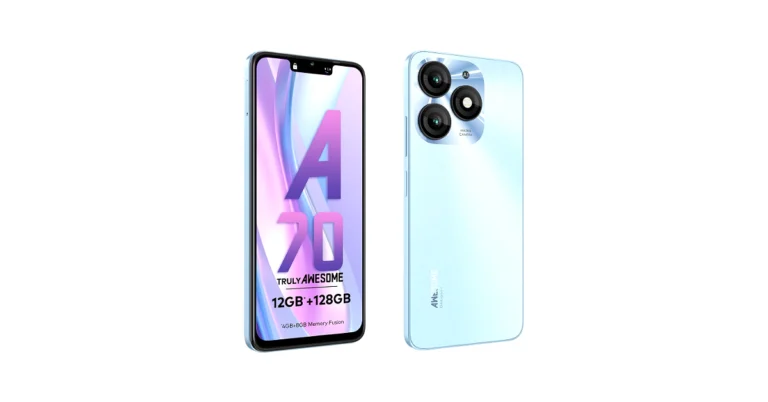
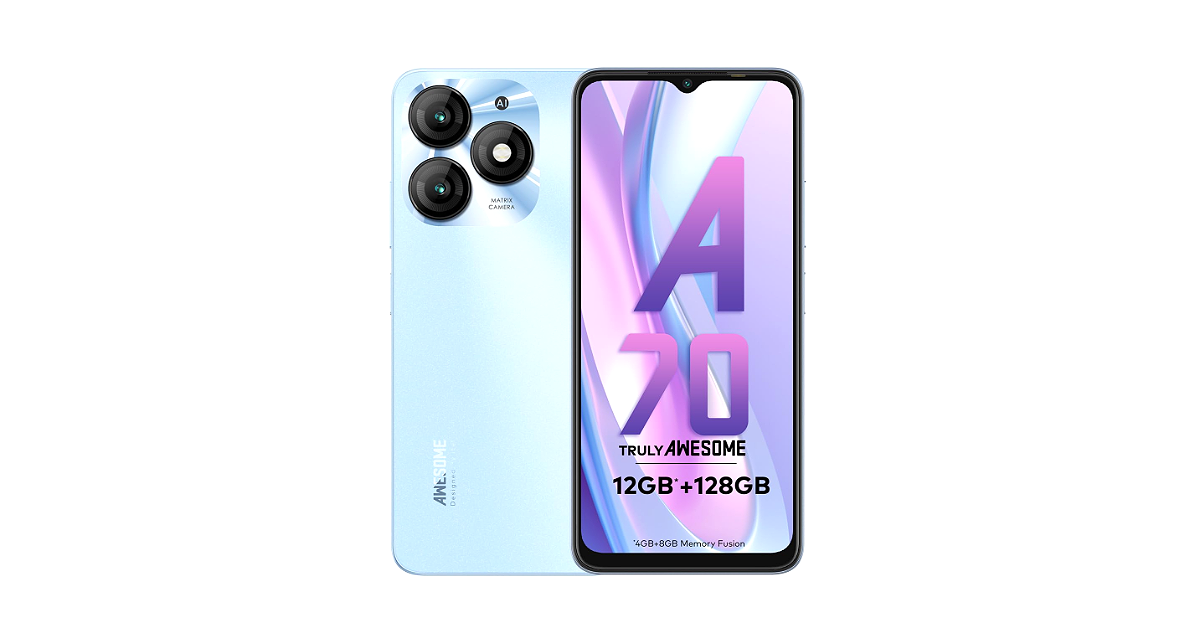
Itel A70 has officially made its debut in India recently. The first sale of the newly arrived phone has today begun in the country. An octa-core Unisoc T603 SoC powers the device. It comes with a Dynamic Bar feature and a 13-megapixel dual rear camera setup. The device also features an 8-megapixel front camera for selfies.

Itel A70 price in India and sale details

Itel A70 price in India has been set at Rs 6,299 for the base 4GB RAM with 64GB storage. The price of the 4GB RAM with 128GB storage is set at Rs 6,799 whereas the 4GB RAM with 256GB storage comes with a price tag of Rs 7,299. The phone is being offered in three colour options Azure Blue, Brilliant Gold, Field Green, and Stylish Black. The device is currently up for sale via Amazon and offline stores in the country. Itel 70 sale in India begins, price starts at Rs 6,299

Itel A70 specifications

Itel A70 features a 6.6-inch HD+ display with 1,612 x 720 pixels of resolution. The screen supports a 120Hz refresh rate and 500 nits of peak brightness. The display has an interactive Dynamic Bar on top that is said to manage screen space for notifications without obstructing the main viewing area. Also Read: Dell XPS 13, XPS 14, and XPS 16 powered by Intel Core Ultra launched during CES 2024 For the software, the device comes pre-installed with Android 13 Go Edition-based ItelOS 13 out of the box. Under the hood, there is an octa-core Unisoc T603 SoC with 4GB of RAM and up to 256GB of storage. The device has a feature to virtually expand the RAM by an additional 8GB to up to 12 GB. Also, the internal memory can be further expanded to 2TB using a microSD card. Itel A70 features a dual rear camera setup that includes a 13-megapixel main sensor and an unnamed AI secondary sensor. The device also includes an 8-megapixel front-facing camera for selfies and video calling. Also Read: Vivo X100 and Vivo X100 Pro with Dimensity 9300 SoC and 8 LTPO AMOLED displays launched in India In terms of connectivity, the phone includes 4G, Wi-Fi 802.11, Bluetooth 5.0, GPS/GLONASS, and a USB Type-C port for charging. The handset also boasts a 5,000mAh battery and a side-mounted fingerprint sensor.

Top 10 Apps for Redmi Note 13 Pro+

As is tradition, Redmi has launched its powerful midrange ‘Note’ series early in the year. Xiaomi’s subsidiary brand unveiled the Note 13 Series yesterday. The three smartphones in the lineup will go on sale on January 10. The entry-level Redmi Note 13 is priced at Rs 17,999 while the Note 13 Pro and Note 13 Pro+ fetch Rs 25,999 and Rs 33,999 respectively. The top-spec Pro+ variant has a 200MP primary shooter and is powered by the MediaTek 7200 Ultra SoC. Like every year, this is the mid-range smartphone that other companies need to beat. If you’re thinking about making the purchase on January 10, here are the top 10 apps you should download first on your new Redmi Note 13 Pro+. Read Also: Gaming Mobiles: Are They Really Worth It?

Snapseed

Download from Google Play Store Snapseed Developed by Google, Snapseed is one of the best photo editing apps you can download on your new Redmi Note 13 Pro+. It is perfectly optimised for the Android platform and is very accessible to the average user trying their hand at editing for the first time. Its exhaustive tools and filters are easy to use and bring the best out of your pictures. You can elevate your pictures by changing their exposure, making them more detailed by bringing out the surface structures, aligning the skewed lines to perfection, and more. 

THAP: Your Happiness Gym

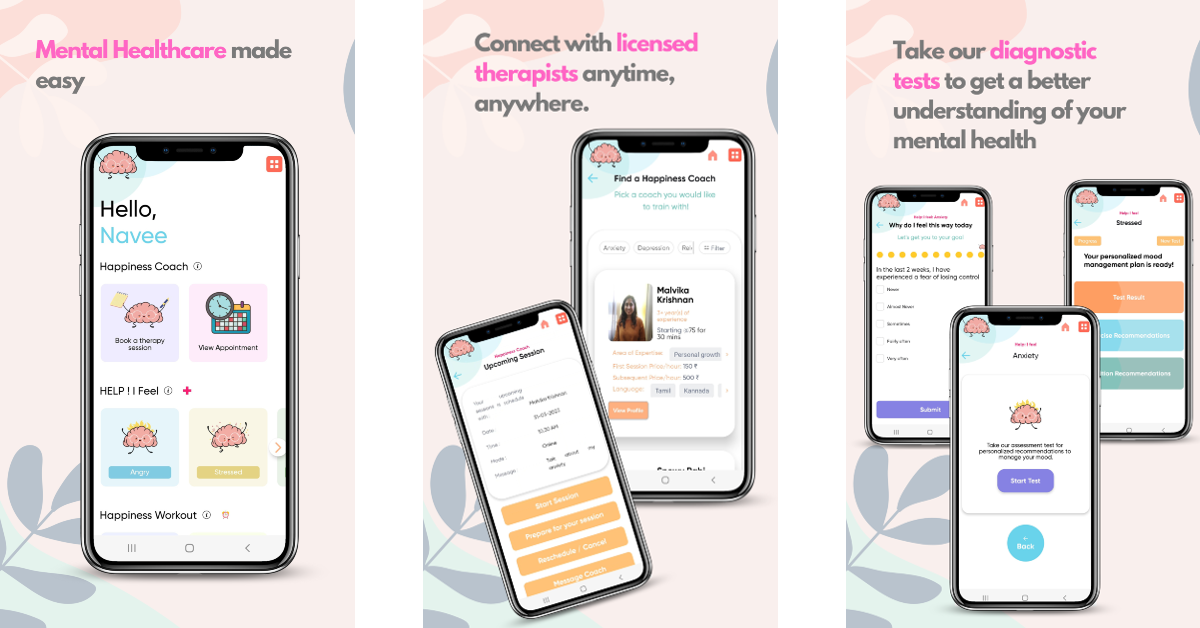
Download from Google Play Store THAP: Your Happiness Gym THAP was named the Users’ Choice App for 2023 by Google. Also known as The Happiness Project, THAP offers daily mental wellness workouts and cultivates a peace of mind that is unbothered by distractions. You can journal your inner thoughts, try out self-therapy modules, sign up for online therapy and counselling, and use psychological first-aid tools to manage symptoms of anxiety and depression. Tracking your daily moods and journaling your emotions can have a calming effect on your mental health over a period of time.

SwiftChat by ConveGenius

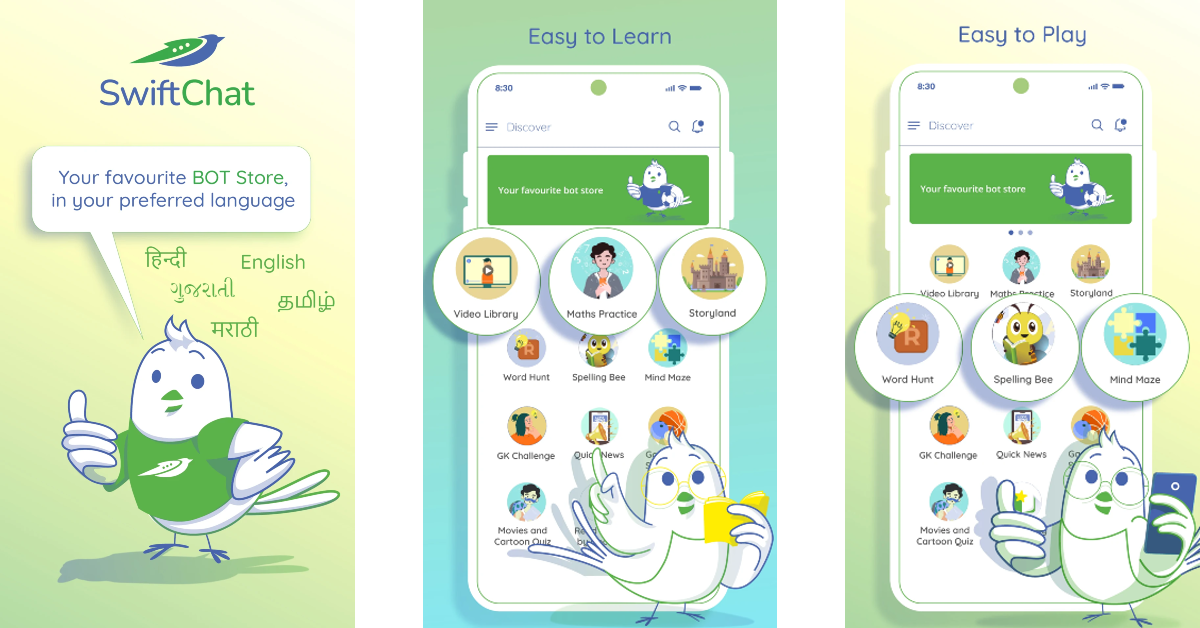
Download from Google Play Store SwiftChat by ConveGenius SwiftChat is a one-stop app to get news updates, play mind-exercising games, watch educational videos, challenge your knowledge, and do a whole lot more with fun chatbots. The best thing about this app is that it supports multiple Indian languages. This app will make learning more fun for your kids. The library of educational content on the app is organised into different subjects and grades, making it easy for the user to select their level.

Call of Duty Mobile

Download from Google Play Store Call of Duty Mobile Over the years, Call of Duty Mobile has remained consistent in offering immersive gameplay and cutting-edge graphics while keeping things fresh with new maps and challenges. If you’re into FPS gaming, you simply cannot miss out on this title. Multiplayer modes like Team Deathmatch, Domination, and Kill-Confirmed bring a whole lot of intensity and exhilarating gameplay. Once you install the app, you can play as a guest or set up an account to save your progress across devices.

Bitwarden

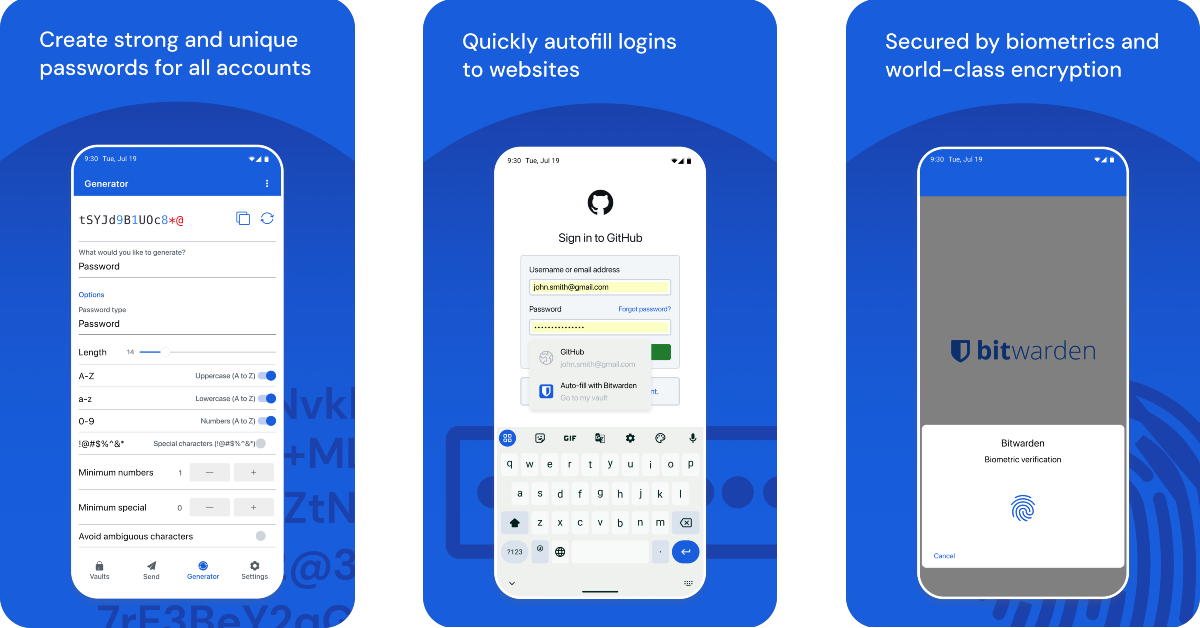
Dowload on Google Play Store Bitwarden Top 10 Apps for Redmi Note 13 Pro+ Bitwarden is one of the best password manager apps you can download on your new Redmi Note 13 Pro+. The passwords you store in this app are protected by end-to-end encryption (AES-256 bit, salted hashtag, and PBKDF2 SHA-256), ensuring no one gets access to them. Your login to the app can be secured by Two-Factor Authentication. The ease and seamless experience that Bitwarden brings to everyday life is unparalleled. You can use the app to create strong passwords for your accounts and access them across all your devices without worrying about any third party getting illegitimate access to them. Read Also: How to Go Live on Instagram and Facebook in 2023: Step by step guide

Microsoft SwiftKey AI Keyboard

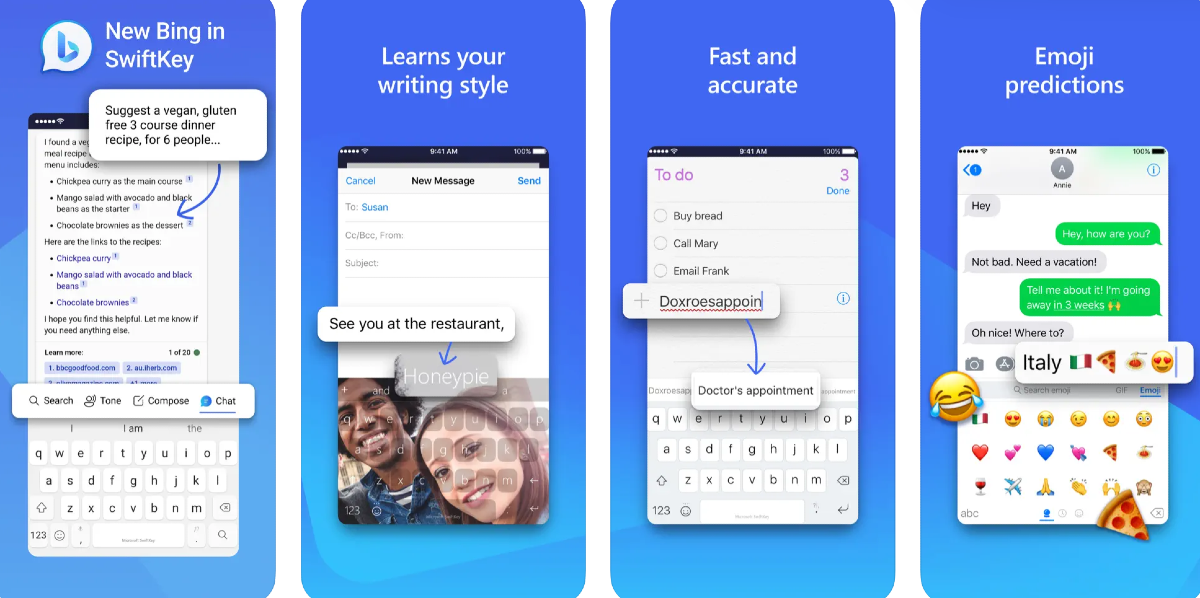
Download from Google Play Store Use Microsoft SwiftKey Keyboard If Microsoft SwiftKey isn’t your choice of keyboard, its recent AI-powered features may change your mind. Now integrated with Bing AI, you can use SwiftKey to change the tone of your text to something casual, friendly, polite, professional, or social. On top of that, you can access the Bing AI chatbot from the keyboard itself. You can use it to create emails on the fly or perform quick and precise web searches. AI features aside, we also enjoy the customisation options that SwiftKey has to offer. You can choose from over a hundred themes or set your own photo as the keyboard background.

Todoist

Download from Google Play Store Todoist Top 10 Apps for Redmi Note 13 Pro+ Todoist helps you simplify your daily tasks and makes it easier to collaborate with colleagues or friends on common projects. You can sync the app with your calendar, voice assistant, and other tools like Slack, Outlook, and Gmail to encompass all the areas where you carry out your tasks. While collaborating with other people on a particular task, you can leave voice notes and comments, and even attach the necessary files at the right places. Todoist is one of the few apps to have perfectly made the transition apps to smart wearables as well. 

TrackWallet: Expense Tracker

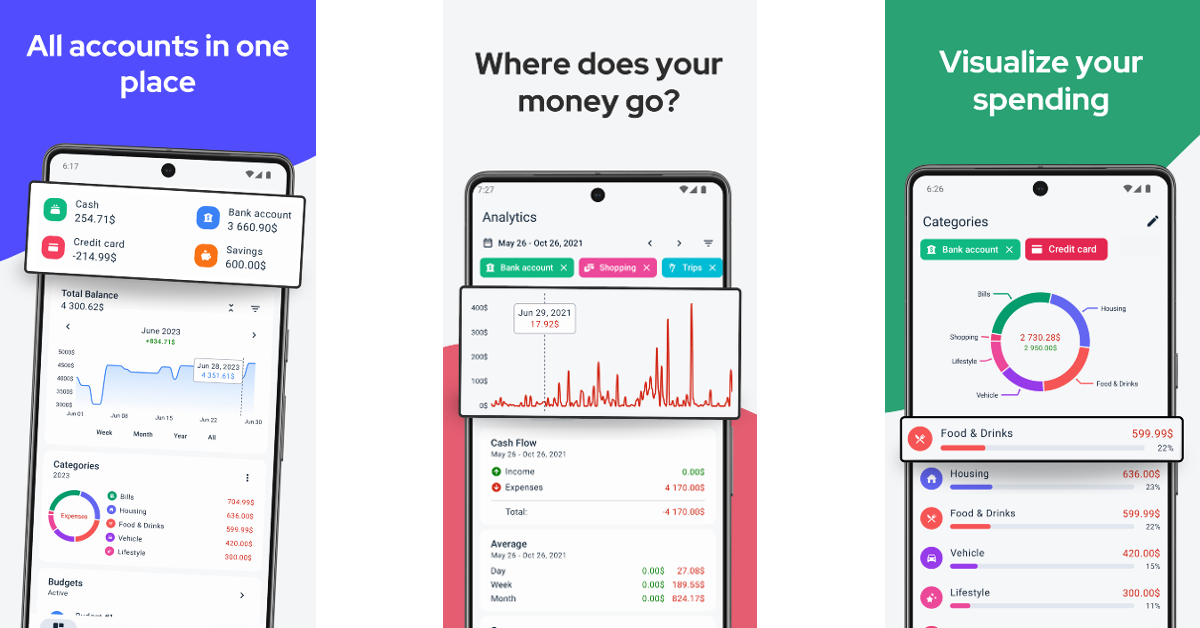
Download from Google Play Store TrackWallet: Expense Tracker Top 10 Apps for Redmi Note 13 Pro+ Always find some month left at the end of the money? TrackWallet can help you turn things around. This expense tracker gives you incisive visual and graphical illustrations of where you spend your money, making it easier to determine where you need to cut back to save more. You can add multiple accounts on the app and manage your monthly bills on services like Netflix, Disney+, and others. If you’re planning to save for a vacation, TrackWallet can come up with realistic budgeting plans. The app has a clean look and isn’t riddled with intrusive ads.

Spotify

Download from Google Play Store How To See Your Stats On Spotify In 2022? Top 10 Apps for Redmi Note 13 Pro+ One of the biggest music platforms in the world, Spotify is home to over 80 million songs and 4 million podcasts. More recently, Spotify has also started adding audiobooks to its platform, with its current library containing over 300,000 titles. Features like daily playlists, made-for-you recommendations, and lyrics integration elevate the user experience on the app. On top of that, at the end of every year, you get to look back at your listening activity on Spotify Wrapped.

Brave Browser

Download from Google Play Store Brave Private Web Browser Top 10 Apps for Redmi Note 13 Pro+ Brave Browser keeps your privacy in mind without compromising on the speed. This web browser auto-rejects cookie requests from websites and removes the tracking codes from URLs when you paste them into the address bar. It comes with an in-built ad and pop-up blocker, without charging any extra fee. It also forces websites to use HTTPS encryption, ensuring third parties don’t snoop on your web activity while you’re on a public network. Read Also: How to fix phone call echo on Android?

Conclusion

These are the top 10 apps for the new Redmi Note 13 Pro+. Let us know your favourite apps in the comments! The smartphone will go on sale on January 10. Buyers can avail an instant discount of Rs 2000 with ICICI Credit and Debit cards. Existing Xiaomi users get an additional loyalty bonus of Rs 2,500 on the smartphone.

Top 10 Apps You Should Download First on Vivo X100 Pro

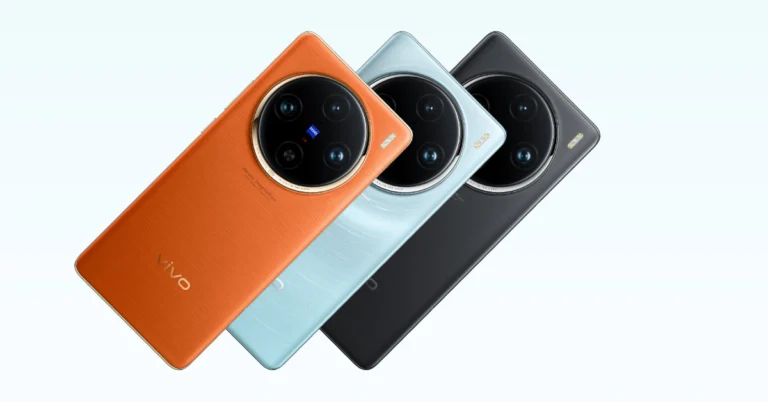
The new Vivo X100 Pro was finally launched in India yesterday, 2 months after being unveiled overseas. Known for its incredible set of cameras, Vivo’s flagship smartphone features three 50MP sensors for the wide, ultrawide, and periscope telephoto lenses. Under the hood, it gets the MediaTek 9300 SoC with Vivo’s in-house V3 chip. This chip plays a big role in nighttime photography. The smartphone is currently priced at Rs 89,999, while its non-Pro variant fetches Rs 63,999. If you’ve already pre-booked the Vivo X100 Pro, here are the top 10 apps that you should download first when you get your hands on it. Read Also: Redmi Smart Fire TV 4K 43-inch with Fire TV built-in launched in India

Adobe Lightroom

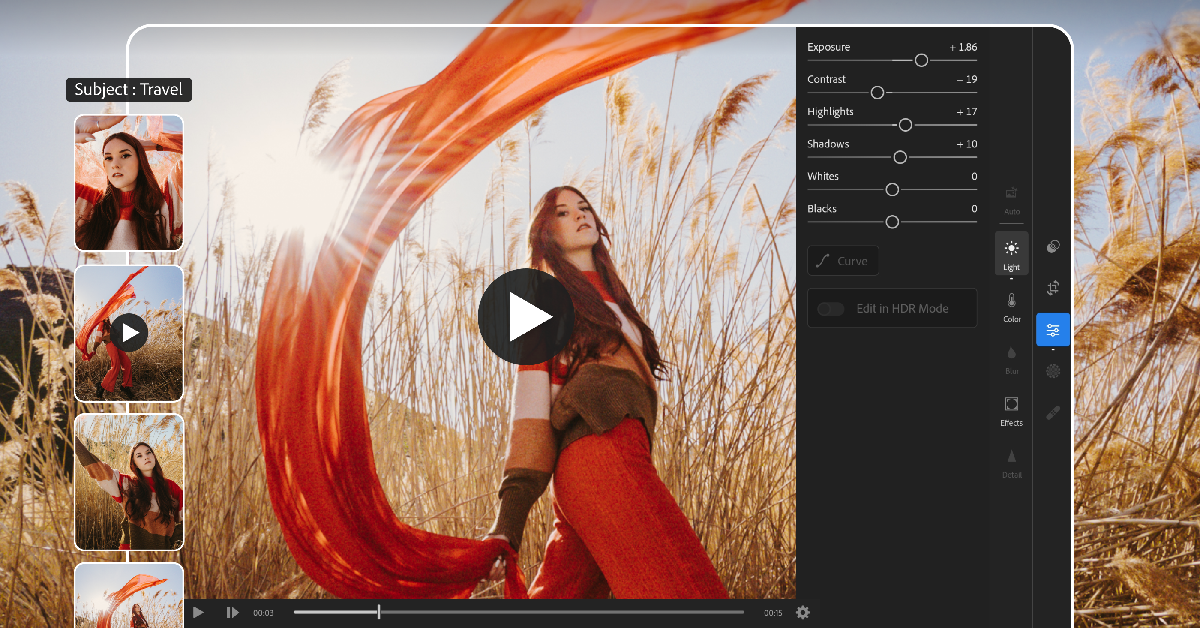
Download from Google Play Store Adobe Lightroom Vivo X100 Pro is an excellent camera-centric smartphone, which is why you need a photo-editing app that is always up for the task. Adobe Lightroom is one such app. It strikes the perfect balance between accessibility and range of functionality, making it an excellent app to edit your media. The newly introduced AI-powered enhancements on the app let you make quick edits like applying the bokeh effect, retouching the colours, finding the appropriate filters, and more. Apart from photo editing, Adobe Lightroom also lets you capture images and videos with its pro-grade camera.

ReLens Camera

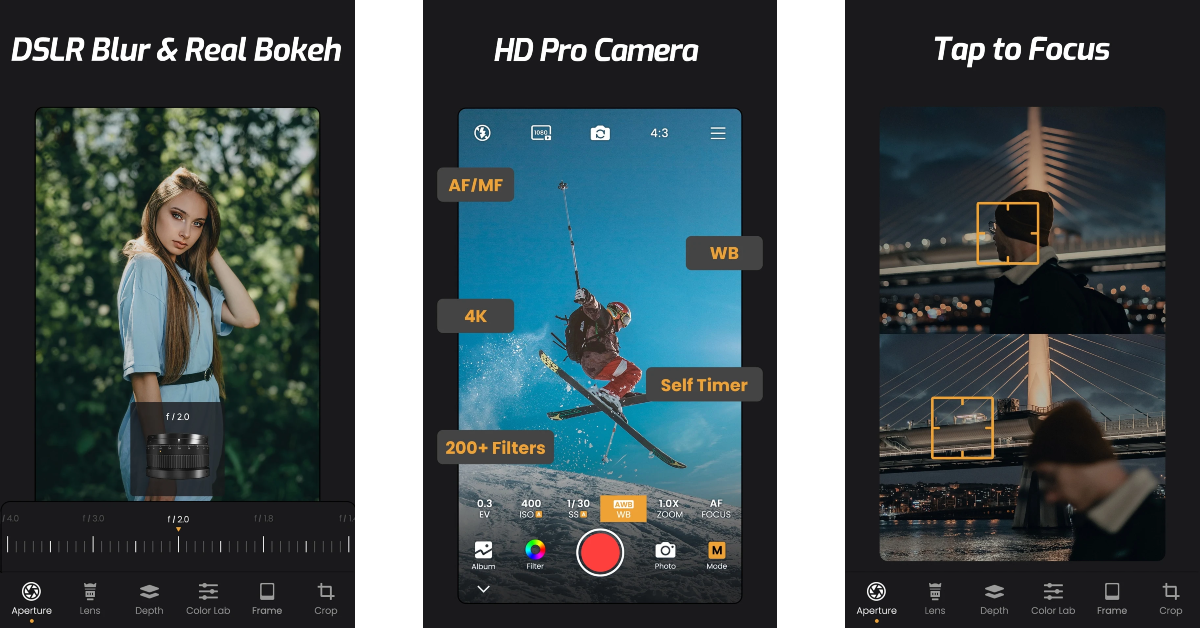
Download from Google Play Store ReLens Camera If you want more control over the pictures you take on your Vivo X100, you should download a pro camera app. ReLens Camera is one of the best ones around. You can easily get DSLR-like shots on your smartphone using this app. It can also reproduce the results of classic SLR lenses like the 50mm 1.4 fixed focal length lens, M35mm f/1.4 “King of Bokeh”, and the Burn 35 known for its swirly Bokeh. ReLens Camera uses AI to calculate the depth of field and applies the appropriate Bokeh effect. In manual mode, you can control the exposure, shutter speed, ISO, and White Balance. On top of that, there are dozens of tools and filters on this app that make it the complete package.

Link to Windows

Download from Google Play Store Link to Windows Link to Windows is one of our favourite apps on the Android platform. As the name suggests, it lets you connect your phone to your Windows PC and carry out tasks like answering calls, responding to texts, checking apps, and more without needing to pick up your phone. Since it is created by Microsoft, it does this better than any other interface or third-party tool for the two platforms. The seamlessness in user experience is why this app takes the cake for us. Transferring images, videos, and files between your phone and PC becomes easy with this app installed on your phone. You can simply drag and drop the files without needing to connect your phone to your PC using a USB cable. 

Imprint: Learn Visually

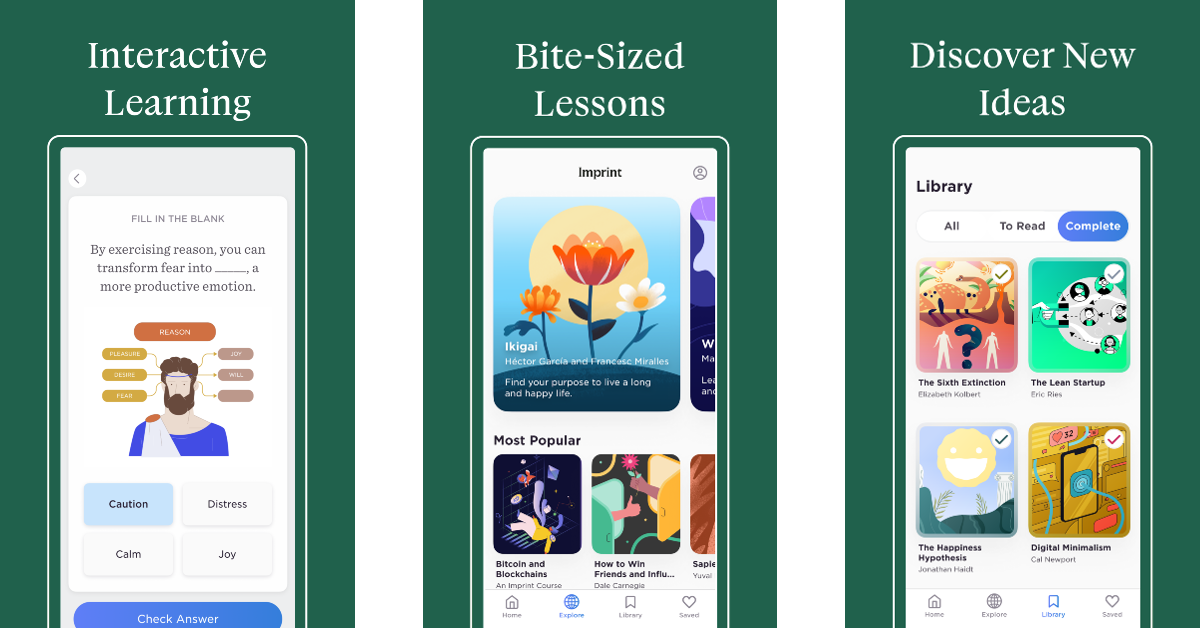
Download from Google Play Store Imprint: Learn Visually Named by Google as the ‘Best App of the Year (2023)’, Imprint is a must-download app for anyone looking to expand their knowledge in a manner that isn’t exhausting. Imprint makes learning fun with its bite-sized lessons that are presented in a fun, colourful module. The app breaks down complex concepts into more accessible fragments, making them easier to learn. Once you’re finished with a chapter, you can take a quiz to see what you’ve retained. On Imprint, you will find courses based on Philosophy, History, Psychology, and more.

ChatGPT

Download from Google Play Store How to use ChatGPT without registering with OpenAI? Top 5 ways What can we say about ChatGPT that hasn’t been said a million times before? The AI chatbot took the world by storm last year, paving the way for AI integration into tools and hardware. ChatGPT’s Android app took some time to arrive on the scene, but now that it’s here, you can have a lot of fun with it. The possibilities are endless. The chatbot can write a piece of code, a sonnet, or both at the same time! Simply feed your prompt to the app and it will come up with an appropriate response. Excited to learn something new? Ask ChatGPT to recommend the best books on the subject along with their concise summaries. You will have your answer within seconds. Read Also: All You Should Know about the Software behind Online iGaming

Pocket: Save. Read. Grow.

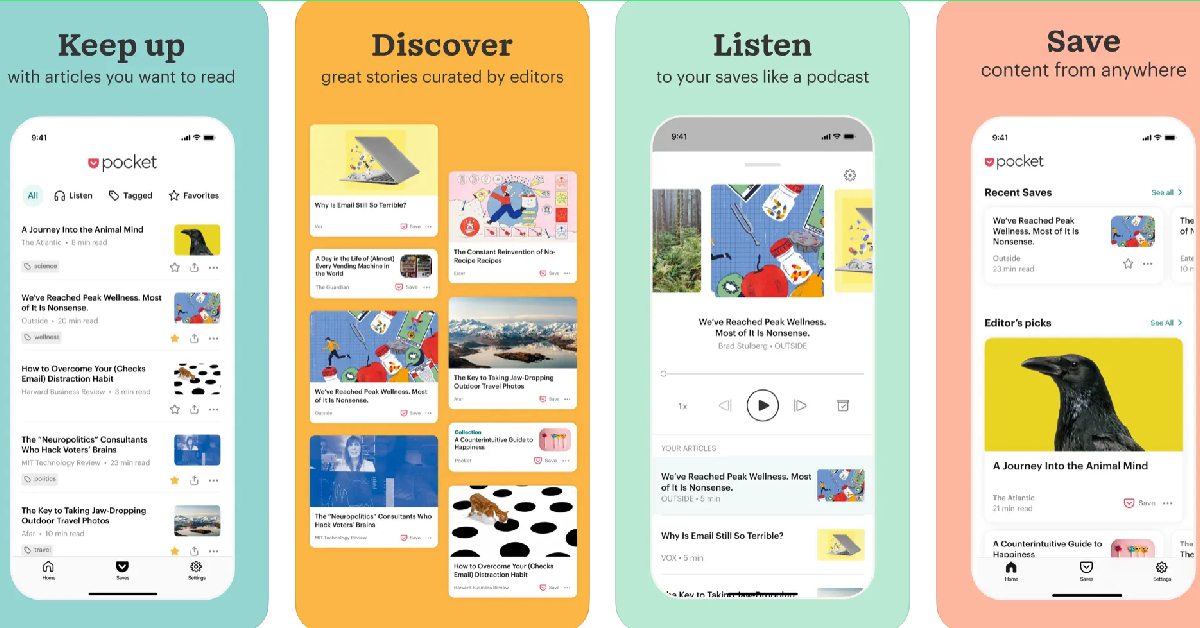
Download from Google Play Store Pocket Top 10 Apps You Should Download First on Vivo X100 Pro Pocket is one of our favourite Android apps which unsurprisingly ends up on a lot of lists like this. You can use the app to save articles, blogs, web pages, videos, tweets, and more to read later. If you’re at work and don’t have the time to read the interesting article that you just came across, simply save it on Pocket with just a couple of taps and get back to it later in the day. The app’s clean interface gets rid of all the clutter in the article and provides an easy reading experience. The text-to-speech feature lets you listen to saved articles while you’re commuting to work.  

Pocket Casts

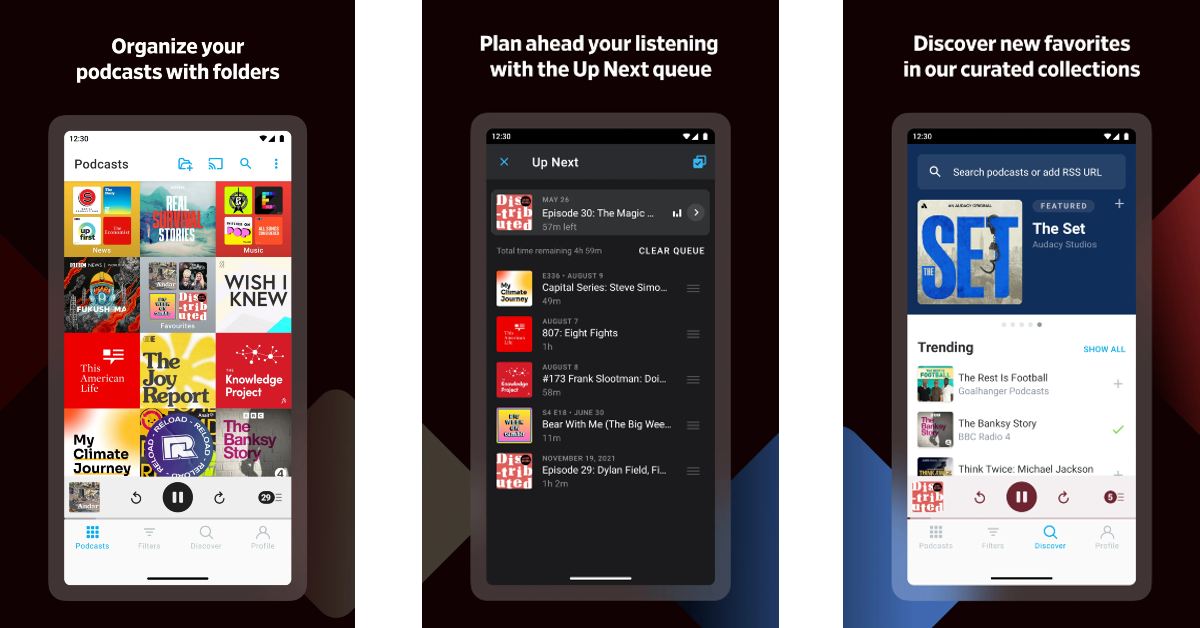
Download from Google Play Store Pocket Casts Top 10 Apps You Should Download First on Vivo X100 Pro Pocket Casts is one of the best and most popular podcast players for Android. Its Material design makes the interface aesthetically pleasing and very accessible to the user. You can customise the app with different themes as well. Android Auto, Chromecast, Alexa, Sonos, and Wear OS support make the app extremely versatile. You can use it whether you’re in your bedroom or on the go. Features like silence trim, variable speed, volume boost, chapters, and sleep timer are helpful additions that serve to increase your podcast intake.

Nova Launcher

Download from Google Play Store   Nova Launcher Top 10 Apps You Should Download First on Vivo X100 Pro If you want to give your new Vivo X100 Pro a personalised appearance that sets it apart from other Android devices, then Nova Launcher is one of the best apps you can download on it. This app completely reimagines your phone’s home screen, letting you customise the app grid, create colour-coded icons, apply page effects, place icons and widgets in between grid cells, and more. The more time you spend on the app, the more personality you can lend to your device. The best part of using Nova Launcher is that it doesn’t slow your phone down.

DuckDuckGo

Download from Google Play Store DuckDuckGo Top 10 Apps You Should Download First on Vivo X100 Pro If you care about your privacy on the Internet, you need to install DuckDuckGo on your smartphone. This private web browser blocks most of the tracking cookies that follow you around once you click on a website. The trackers that collect your private data are also blocked by the browser, bringing much-needed protection to your web experience. It also forces websites to use an encrypted connection (HTTPS), leaving no room for snoopers and third-party entities to look into your web activity. Its ‘App Tracking Protection’ feature protects your privacy while browsing other apps by providing a VPN connection.

1Password

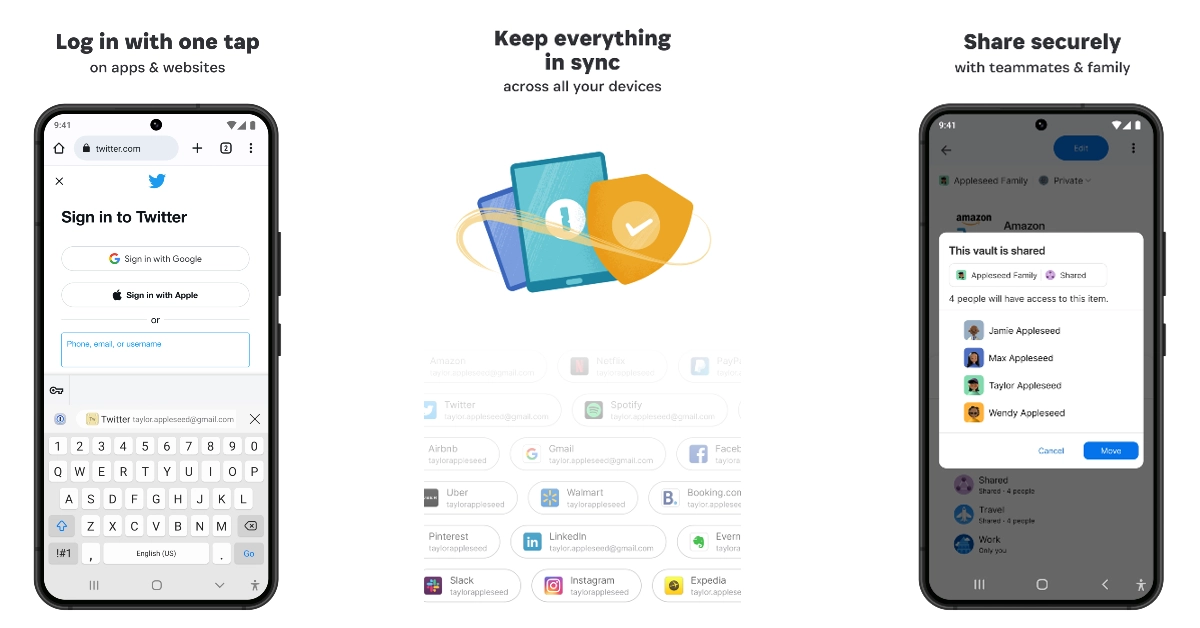
Download from Google Play Store 1Password Top 10 Apps You Should Download First on Vivo X100 Pro Keep forgetting your passwords? Check out the 1Password password manager app. With just one tap save all your passwords in a secure place and deploy them whenever necessary. Apart from remembering all your passwords, 1Password also helps you create new ones and makes sure they are available across all your devices. If you want to share your Netflix or WiFi password with family and friends, you can easily do so within the app itself. The app also stores important documents like your driver’s license, banking info, and more. Read Also: Sony Float Run WI-OE610 wireless headphones for runners and athletes launched in India

Conclusion

These are the top 10 apps you should download first on your new Vivo X100 Pro. While all of the apps on this list are free to use, some may require a paid subscription to unlock certain premium features. Think there’s an app that deserves to be on this list? Let us know in the comments!

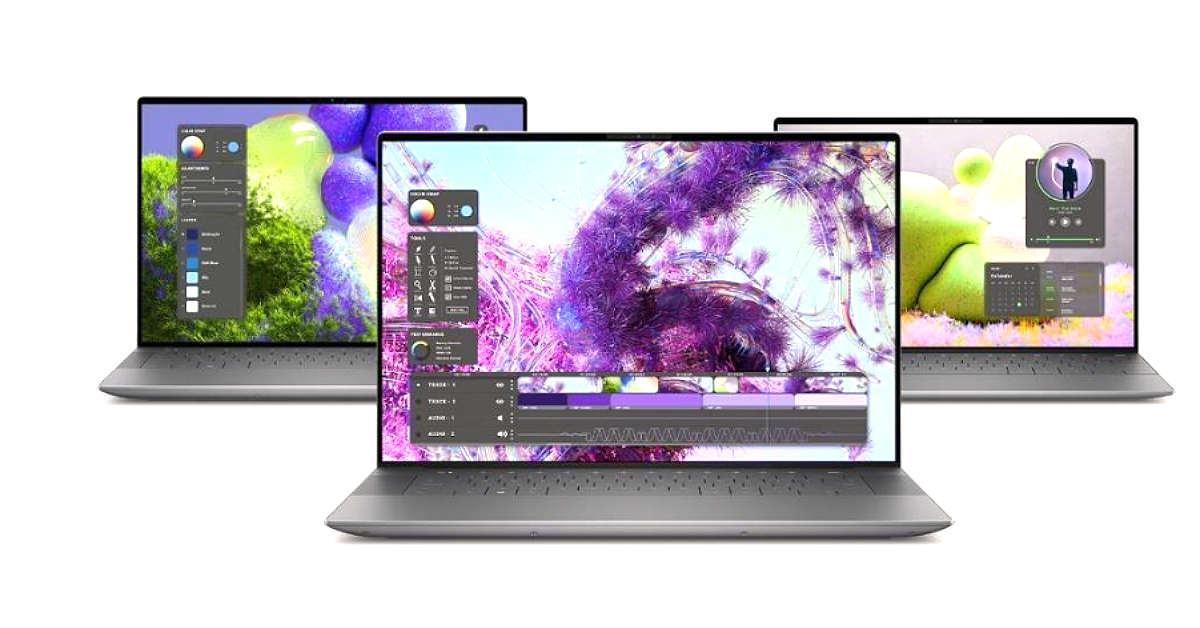
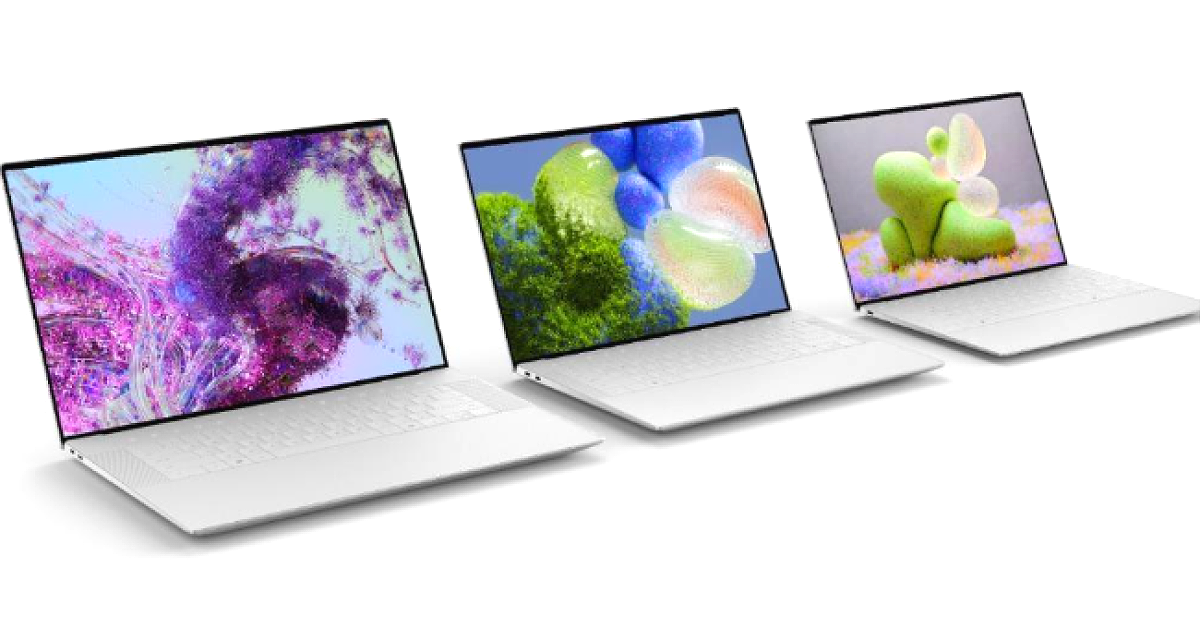
Dell XPS 13, XPS 14, and XPS 16 powered by Intel Core Ultra launched during CES 2024

Key Highlights
  • The Dell XPS 13, XPS 14, and XPS 16 laptops feature a sleek design.
  • The device has a glass touchpad.
  • All the laptops are made of CNC-machined aluminium and Gorilla Glass 3.
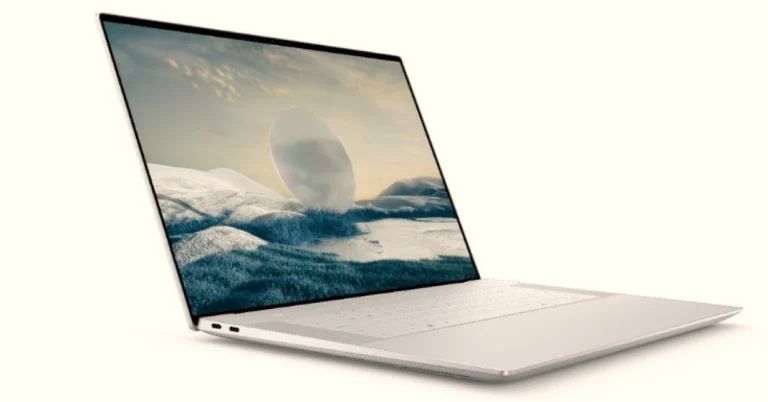
Dell has officially unveiled a new series of XPS laptops with a dedicated AI engine ahead of CES 2024. The new XPS lineup includes the gorgeous-looking laptops Dell XPS 13, XPS 14, and XPS 16. Windows Copilot and other machine learning-based operations are powered by an AI engine. The laptops come equipped with Intel Core Ultra processors.

Pricing and Availability

The price of the XPS 13 starts at $1,299.99 in the US which translates to Rs 1,08,166 and $1,749 (CA). The XPS 14 will come with a starting price of $1,699 (US) which converts to Rs Rs 1,41,474 and $2,299 (CA). The XPS 16 in the US will come at $1,899.99 (US) or approx Rs 1,58,127.83 and $2,549 (CA). According to the company, all will be available soon however sale is expected to start in Q1 2024. Dell XPS 13, XPS 14, and XPS 16 powered by Intel Core Ultra launched during CES 2024 Also Read: Viewsonic introduced a new range of gaming monitors with up to 180Hz refresh rate

Dell XPS series specifications

Dell XPS 16 features a 16.3-inch FHD+ non-touch LCD screen or 4K+ OLED panel. Whereas the Dell XPS 14 will come with a 14.5-inch FHD+ non-touch LCD or 3.2K OLED screen and the Dell XPS 13 is highlighted with a 13.4-inch FHD+ non-touch or QHD+ touch or 3K OLED panel. The 16-inch XPS laptop is powered by Intel Core Ultra 7 155H or 165H processors paired with NVIDIA GeForce RTX 4050, RTX 4060 or RTX 4070 GPU for graphics. The model will be offered in three RAM and storage options of: 6GB/32GB/64GB RAM and 512GB/1TB/2TB/4TB PCIe4 SSD storage. The Dell XPS 14 will come equipped with Intel Core Ultra 7 155H or 165H processors with NVIDIA GeForce RTX 4050 or Intel Arc graphics. It will come in 16GB/32GB/64GB RAM with 512GB/1TB/2TB/4TB PCIe 4 SSD options. The Dell XPS 13 will include an Intel Core Ultra 5 125H or Ultra 7 155H or 165H processors. Intel Arc graphics will be available on this laptop with 8GB/16GB/32GB/64GB RAM and 512GB/1TB/2TB/4TB PCIe 4 SSD options. In terms of software the XPS 16, 14 and 13 will come preinstalled with Windows 11 Home as well as the Pro option. Dell XPS 13, XPS 14, and XPS 16 powered by Intel Core Ultra launched during CES 2024 The new XPS portfolio has an AI-enabled feature that improves creativity and productivity while also providing better performance and longer battery life. Both XPS 16 and XPS 14 are NVIDIA Studio-validated systems that can handle creative tasks such as 3D rendering, video editing and live streaming very well, while offering exclusive access to the Studio AI-powered suite of tools and enhanced stability with NVIDIA Studio Drivers. Also Read: Redmi Note 13 5G Series with up to 200MP camera set up launched in India The XPX 16 boasts a 99.5WHr battery with 130W charging support. The XPS 14 has a 69.5WHr battery with a 60W charger with the Intel Arc variant or a 100W charger with the NVIDIA variant. The XPS 13 is backed by a 50WHr battery with 60W charger support. ExpressCharge recharges 80% of battery life in just 60 minutes, so you can keep your creative flow going. All the laptop models will also feature an FHD webcam paired with a quad-speaker setup and dual mic. In terms of connectivity, there will be Wi-Fi 7, Bluetooth 5.4, a 3.5mm jack, 3x Thunderbolt 4 with DisplayPort 2.1 as well as Power Delivery, microSDXC card reader, and a USB-C to USB-A v3.0 and HDMI v2.0 adapter.

Viewsonic introduced a new range of gaming monitors with up to 180Hz refresh rate

Key Highlights
  • Viewsonic has launched VX3219-2K-PRO-2, VX2758A-2K-PRO-2, and VX79 series-FHD gaming monitors in India.
  • The gaming monitors offer a 1ms response time.
  • The display comes with up to 180Hz refresh rate support.
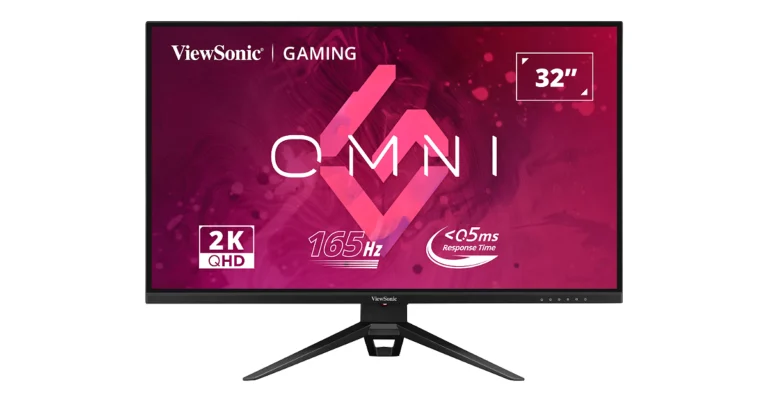
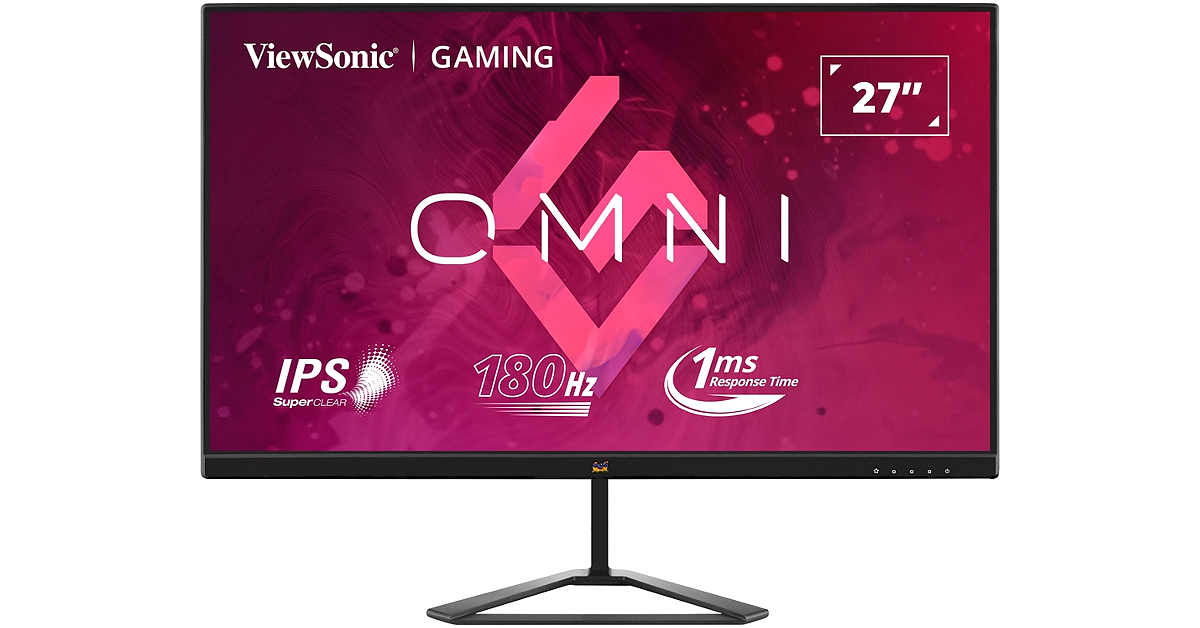
Viewsonic has announced the launch of a new range of Gaming Monitors in India. The California-based company has introduced a total of four models VX3219-2K-PRO-2, VX2758A-2K-PRO-2, and VX79 series-FHD. The latest Viewsonic gaming monitors support up to 180Hz refresh rate. In addition to this, the IPS panel on the monitors offers a 1ms response time for a great gaming experience. The Viewsonic VX2479-HD-PRO gaming monitor has been launched in India at Rs 15,990, whereas the VX2779-HD-PRO comes with a price tag of Rs 19,990. The VX2758A-2K-PRO-2 model is priced at Rs 40,000 and the VX3219-2K-PRO-2 will be available at Rs 50,000. All the models can be purchased via Amazon and Flipkart in the country. Also Read: Sony Float Run WI-OE610 wireless headphones for runners and athletes launched in India Viewsonic introduced a new range of gaming monitors with up to 180Hz refresh rate The Viewsonic VX3219-2K-PRO-2 gaming monitor is said to have very little input latency. It comes with 165Hz refresh rate support. The AMD FreeSync Premium will provide a fluid gaming experience and there will be no stuttering and screen tearing. The device has a response time of less than 0.5 milliseconds. Furthermore, ViewSonic’s unique ViewMode presets are included, enabling optimal screen performance for a variety of home entertainment applications, such as gaming, editing, and movie watching. For connectivity, the VX3219-2K-PRO-2 is provided with HDMI inputs and DisplayPort. Whereas, the Viewsonic VX2758A-2K-PRO-2 gaming monitor supports a 170Hz refresh rate. Gamers will get smooth animations and minimal input lag, and the variable refresh rate technology prevents screen tearing and stuttering to provide a responsive and fluid gaming experience. Also Read: Redmi Note 13 5G Series with up to 200MP camera set up launched in India The VX79 series includes two models VX2479-HD-PRO and VX2779-HD-PRO. The Viewsonic’s VX2479-HD-PRO gaming monitor features a 24-inch FHD screen featuring SuperClear IPS technology. The monitor has a fast refresh rate of 165 Hz guarantees fluid graphics and little input latency. Whereas, VX2779-HD-PRO is a 27-inch FHD monitor featuring HDMI and SuperClear IPS technology. It supports a refresh rate of 180Hz guaranteeing minimal input lag. Both the monitors have a fast refresh rate and 1 ms MPRT response time. Through the use of variable refresh rate technology, which minimises stuttering and removes screen tearing. While the HDR10, is said to produce incredibly accurate contrast and colour, the displays are intended to enhance the visual experience. For connectivity, both the gaming monitors include HDMI and DisplayPort input.

Garena Free Fire Redeem Codes Today 5 January 2024: Here is how to claim them

Garena Free Fire is a battle royale game with regular awards and tournaments to keep players interested. If you play Garena Free Fire, you should be aware of the redeem codes that are released on a daily basis. However, because the battle royale game is banned in India, players from other countries can use the Free Fire Redeem codes daily. If you’re unfamiliar with the Garena Free Fire redeem codes or don’t know how to get them, we’ve put together a step-by-step guide to help you redeem them. Check out Garena Free Fire Redeem Codes for 5 January 2024. The Free Fire redeem codes are a great way to get free stuff. These are 12-digit codes that contain alphabets and numbers, as well as an expiration date and time. Because the Garena FF redeem codes cannot be used more than once, you should hurry to the redemption page to claim your free reward before someone else does. To get a free reward, all you have to do is go to reward.ff.garena.com/en, which is the official redemption page. Also, keep an eye on this space for daily updates on Garena Free Fire redemption codes and rewards.

Garena Free Fire Redeem Codes Today 5 January 2024

FUTYJT5I78OI5CF2 FUKTY7UJIE56RYHI FBVFTYJHR67UY4IT FYHJTY7UKJT678U4 F6GHTR6YHR6GRGYU FVYHFT6HYJT67LYP FDYHGBNE5RDTGE87 FYHJMKRT76HYR56C FKJIT67UWEYHT4H4 FRYHGVTWFBUE45HS FOGFUYJN67UR6OBI FV7CYTGDRTUNMJEK F6Y6FHRTJ67YHR57 FR45TEYHBTGFEDG3 FKY89OLKJFH56GRG FTGBHFTHYR566GRK FYHDBGTDTYHGR5FH FRJNTR67UH675Y4E

How to Get Free Fire Redeem Codes for Garena on 5 January 2024?

  • Visit the Garena Free Fire game’s official website at reward.ff.garena.com.
  • Use your Facebook, Google, VK, Apple ID, Huawei ID, or Twitter account to log in.
  • You’ll be taken to a valid redemption code (s)
  • Copy and paste the 12-digit redemption code into the text box.
  • On the screen, a dialogue box will appear.
  • ‘Ok’ should be selected.
For the latest gadget and tech news, and gadget reviews, follow us on TwitterFacebook and Instagram. For newest tech & gadget videos subscribe to our YouTube Channel. You can also stay up to date using the Gadget Bridge Android App. You can find the latest car and bike news here.