Garena Free Fire is a battle royale game with regular awards and tournaments to keep players interested. If you play Garena Free Fire, you should be aware of the redeem codes that are released on a daily basis. However, because the battle royale game is banned in India, players from other countries can use the Free Fire Redeem codes daily. If you’re unfamiliar with the Garena Free Fire redeem codes or don’t know how to get them, we’ve put together a step-by-step guide to help you redeem them. Check out Garena Free Fire Redeem Codes for 4 January 2024.The Free Fire redeem codes are a great way to get free stuff. These are 12-digit codes that contain alphabets and numbers, as well as an expiration date and time. Because the Garena FF redeem codes cannot be used more than once, you should hurry to the redemption page to claim your free reward before someone else does. To get a free reward, all you have to do is go to reward.ff.garena.com/en, which is the official redemption page. Also, keep an eye on this space for daily updates on Garena Free Fire redemption codes and rewards.
Garena Free Fire Redeem Codes Today 4 January 2024
Vivo X100 Series was globally launched in December 2023.
The series includes two models-X100 and X100 Pro.
The devices feature a 32-megapixel selfie camera.
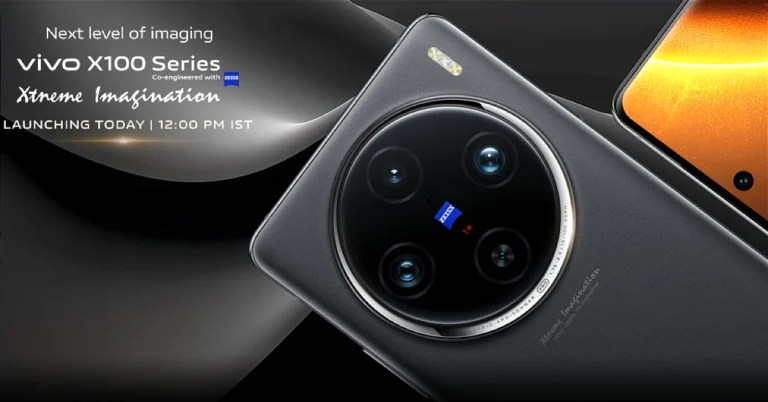
Vivo X100 Series is all set to make its India debut today. The camera-focused smartphone lineup will succeed the existing X90 series. The lineup is confirmed to include two phones- Vivo X100 and Vivo X100 Pro. The smartphone series was launched last year in November in China and globally in December. The Vivo X100 and Vivo X100 Pro are powered by the same MediaTek Dimensity 9300 SoC. They feature a triple rear camera setup with Zeiss optics.
How to watch the live stream of the Vivo X100 Series
Vivo X100 Series India launch is scheduled for today. The launch event will start at 12 noon IST. The event is going to stream live via the company’s official website in the country, in addition to all its social media channels Facebook/Twitter and YouTube channel. We have embedded the link below you can also watch it live here on our website.
Vivo X100 Series price in India expected
The Vivo X100 and Vivo X100 Pro will launch in India today. There is no information on the Indian pricing which will be revealed at the time of the launch. But the Vivo X100 Series price in India has leaked ahead of today’s official release. The price of both variants was revealed in a report by The Tech Outlook. The base 12GB RAM with 256GB storage edition of the X100 is reportedly expected to cost Rs 63,999, while the 16GB RAM with 512GB storage option will be offered at Rs 69,999. On the other hand, Vivo X100 Pro is likely to cost Rs 89,999 for 16GB RAM with a 512GB storage model.Also Read:Redmi Note 13 Series launching in India today: Expected pricing and specs detailsThe company has confirmed that both smartphones will be available in three colour options Asteroid Black, Startrail Blue, and Sunset.The Vivo X100 was launched in December at a starting price of HK$5,998, which converts to Rs 63,917 for the 12GB RAM with 256GB storage. On the other hand, the price of the X100 Pro with 16GB of RAM and 512GB of storage is set at HK$7,998, which is around Rs 85,224.
Vivo X100 Series specifications
Vivo X100 and the Vivo X100 Pro come with a 6.78-inch AMOLED 8T LTPO curved display with a 120Hz refresh rate and 3000 nits of peak brightness. The phones operate on OriginOS 4 with Android 14 and are powered by a MediaTek Dimensity 9300 SoC with a Vivo V3 chip.Both come with a triple-camera setup powered by Zeiss optics. The Vivo X100 Pro includes a 50-megapixel Sony IMX989 1-inch type sensor with OIS (100x digital zoom), a 50-megapixel ultra-wide-angle sensor, and a 50-megapixel Zeiss APO super-telephoto lens with OIS (4.3x optical zoom and 100x digital zoom).The regular model includes a Sony IMX920 VCS bionic 50-megapixel primary sensor with OIS, a 50-megapixel ultra-wide-angle lens, and a 64-megapixel Zeiss super-telephoto lens (100x clear zoom). Both smartphones come with a 32-megapixel selfie camera. The pro model comes with the latest V3 imaging chip while the vanilla model settles for the previous-gen V3 chip.
The latest Redmi Note Series will include three devices- Redmi Note 13, Redmi Note 13 Pro, and Redmi Note 13 Pro+.
Snapdragon 7s Gen 2 SoC powers the Redmi Note 13.
The Redmi Note 13 and Redmi Note 13 Pro+ are powered by MediaTek Dimensity SoC.
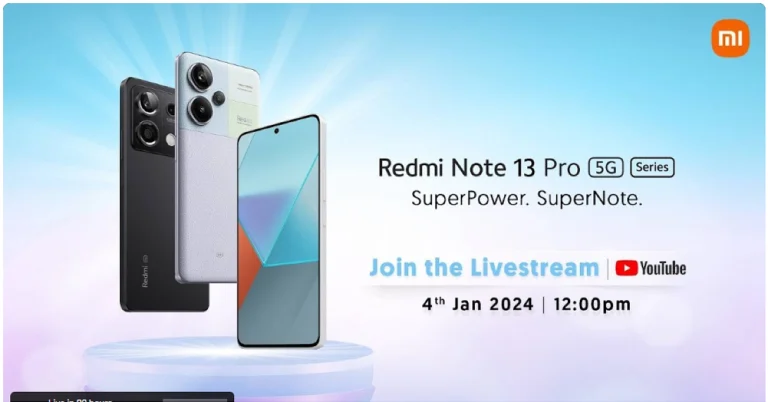
Redmi Note 13 Series is all set to launch in India today. The most eagerly awaited smartphone series is among the first to launch in the country in 2024. The smartphone series may include all three devices- Redmi Note 13, Redmi Note 13 Pro, and Redmi Note 13 Pro+. Read on to know its expected pricing and live stream details.
How to watch the Redmi Note 13 series launch live?
Redmi Note 13 series launch will take place in India today. The company will be hosting a launch event that will begin at 12 noon. The launch event will be going live via the company’s official website in the country. It will also be live-streamed on the company’s social media channels via the official YouTube channel. We have embedded a link below you can also watch it here on our website
Redmi Note 13 Series price in India (expected)
Just ahead of the launch Indian tipster Abhishek Yadav (@yabhishekhd) shared the price leak on X. According to the leaks, the Redmi Note 13 price in India will begin at Rs 10,999 for the base 6GB RAM with 128GB storage option. Whereas the 8GB RAM with 256GB storage will be priced at Rs 22,999 and the 12GB RAM with 256GB storage model at Rs 24,999. The phone is likely to be available in Prism Gold, Arctic White, and Stealth Black options.On the other hand, the Redmi Note 13 Pro 5G price is expected to start at Rs 28,999 for the base 8GB RAM with 128GB storage and Rs 32,999 for the 12GB RAM with 256GB storage. The is expected to come in three colour options Arctic White, Coral Purple, and Midnight Black.Also Read:Oppo officially starts teasing the Reno 11 Series in IndiaAs per the leak, the Redmi Note 13 Pro+ 5G may be priced at 8GB RAM with 256GB storage at Rs 33,999, 12GB RAM with 256GB storage at Rs 35,999 and 12GB RAM with 512GB at Rs 37,999. The company may offer the phone in Fusion White, Fusion Purple, and Fusion Black colour options.
Redmi Note 13 Series specifications (expected)
Redmi Note 13 comes with a 6.67-inch AMOLED display with a refresh rate of 120Hz. The phone comes integrated with Android 13-based MIUI 14 and is powered by MediaTek Dimensity 6080 SoC. It has a dual rear camera setup that includes a 100MP main sensor and a 2MP macro sensor. Note that all three phones feature a 16MP selfie camera. The smartphone houses a 5,000mAh battery and comes with 33W wired fast charging support.The Note 13 Pro is highlighted with a 6.67-inch 1.5K full-HD+ AMOLED screen with 120Hz refresh rate. The phone is powered by Qualcomm Snapdragon 7s Gen 2 and runs MIUI 14 OS. There is a triple rear camera setup on the phone that includes a 200MP main sensor, an 8MP ultra-wide angle lens, and a 2MP macro lens. The device is backed by a 5,100mAh battery with 67W fast charging support.Redmi Note 13 Pro+ has the same display as the Pro model and it is powered by MediaTek Dimensity 7200 Ultra SoC. The device has a 5,000mAh battery that supports 120W fast charging.
A throwaway Facebook profile has its own benefits. If you’re blocked by someone on the platform, you can use an alternate profile to see their posts. Another crucial benefit of having a throwaway account is that you can interact with Facebook communities and pages that you don’t want to be linked to your main account. Constantly switching back and forth between accounts can be a tiresome process. To make things easier, here is how you can add multiple Facebook accounts on your iPhone.Read Also:3 Great Reasons To Buy The New itel S23+
Adding multiple Facebook accounts vs adding multiple profiles
You need to create a Facebook account to make friends and interact with other people on the platform. Once you sign up for Facebook, you get to create your main profile. This profile can only be deleted if you delete your Facebook account. Facebook also lets you create multiple profiles for different tasks. If you engage in different communities on the platform, you can set up a different profile for every one of them. These profiles can have their own privacy settings, usernames, and friend lists.The one key concern that users often have about multiple profiles for one account is how Facebook manages the personal data from each profile. Meta uses the data from all the profiles to personalise the ads you see on the platform, curate friend suggestions and more. You cannot set up different payment methods for individual profiles. If you want your throwaway Facebook account to be completely free from your main account, you will need to create a new account with a new email address.
Add multiple Facebook accounts on iPhone
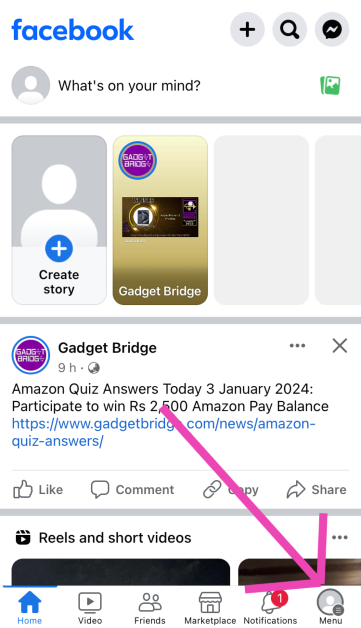
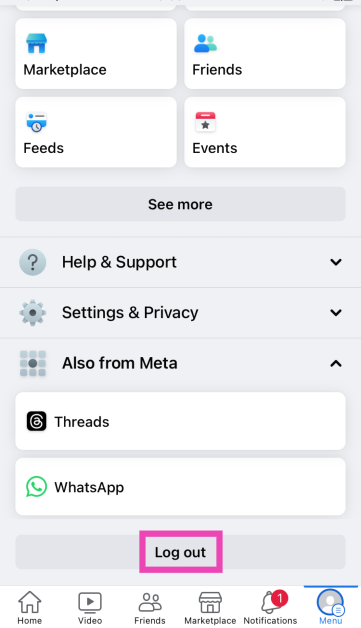
Step 1:Launch the Facebook app on your iPhone.Step 2: Hit the Menu icon at the bottom right corner of the screen.Step 3: Scroll down and select Log Out.Step 4: Select Log in to another account.Step 5:Enter the login credentials for your second account and hit Log In.Step 6:Save your login info to easily switch between the two profiles.Read Also:From Classroom to Digital Campus: The Role of Virtual Reality in Modern Education
Create multiple profiles for your Facebook account
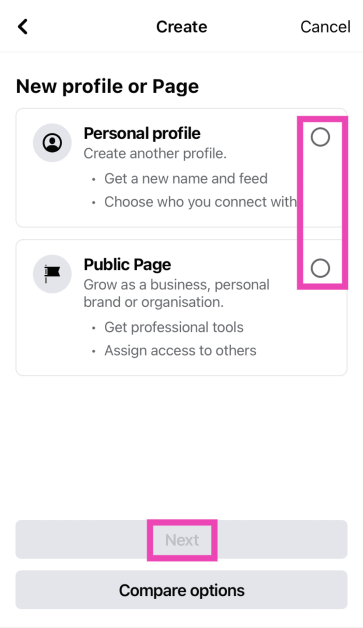
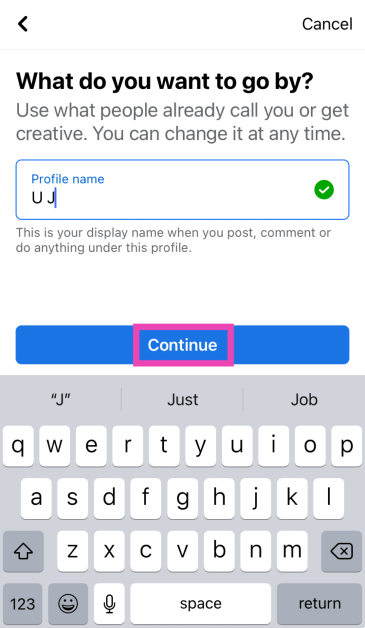
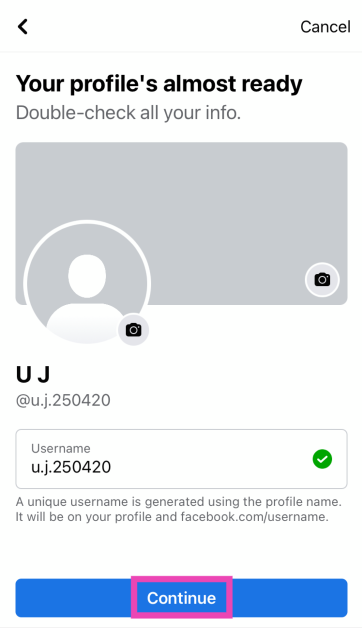
Instead of using multiple Facebook accounts, you can create multiple profiles for one account. You can use one profile to engage with your family members and the other for work. If you want to share your art or personal stuff with a handful of people, you can create a different profile for them. Here’s how you can go about it.Step 1:Launch the Facebook app on your iPhone.Step 2: Switch to the Menu tab.Step 3: Tap the arrow icon next to your profile name.Step 4: Tap on Create Facebook Profile.Step 5: Choose whether you want to create a personal profile or a public page. Hit Next.Step 6: Enter your profile name and hit Continue. Step 7: Set up a profile picture, cover picture, and username. Hit Continue.Step 8: On the following page, select Create Profile.
Frequently Asked Questions (FAQs)
Can I add more than one Facebook account to the Accounts Centre?
No, you can only add one Facebook account to the Accounts Centre. You can add multiple accounts to the Facebook app on your smartphone.
How do I add another account on the FB app for iPhone?
Go to Menu>Log Out and log in using the other account. Make sure to save the login credentials for both profiles to easily switch between them.
How many Facebook profiles can I have for one account?
This is how you can add multiple Facebook accounts on your iPhone. Similar to Facebook, you can add multiple accounts to the Instagram app. You can also add multiple Instagram accounts on the Accounts Centre portal. This is not something that you can do with Facebook. If you know any way to get around this issue, let us know in the comments!
The lineup was introduced in China last year in November.
The company is expected to launch the lineup in India and globally on the same day.
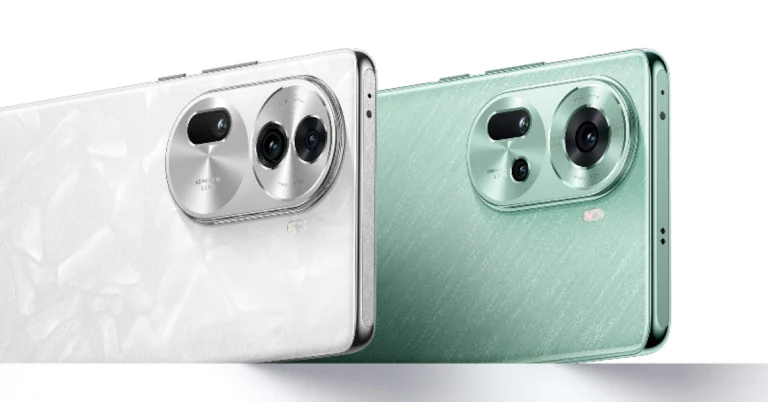
Oppo Reno 11 Series will soon launch in India. The company has confirmed that its latest smartphone lineup will arrive in the country. The series was launched in China in November last year. The lineup includes two phones- Oppo Reno 11 Pro and Reno 11. Both the phones run on ColorOS 14 on top of Android 14. The device also features a 50-megapixel triple rear camera. The Pro variant is powered by Snapdragon 8+ Gen 1 SoC. The vanilla model comes equipped with MediaTek Dimensity 8200 SoC.Oppo has officially revealed that its Oppo Reno 11 Series will soon arrive in India. The company has not yet revealed the exact day of the launch which is expected to be announced soon. The upcoming smartphone series will include two phones- Oppo Reno 11 Pro and Reno 11.According to a tipster, the Oppo 11 Series is expected to be released in India and globally on January 11.Also Read:Telegram Update: Colourful Calls, Thanos Snap Effect and Epic Update for Bots Introduced
Oppo Reno 11 Series specifications
Oppo Reno 11 Pro comes with a 6.74-inch 1.5K OLED curved display with 1,240×2,772 pixels of resolution. The screen supports up to 120Hz refresh rate. On the other hand, Oppo Reno 11 features a 6.70-inch OLED curved display with 1,080×2,412 pixels of resolution and supports an adaptive refresh rate (1Hz to 120Hz).Oppo Reno 11 Pro is equipped with an octa-core Snapdragon 8+ Gen 1 SoC whereas the standard model is powered by MediaTek Dimensity 8200 SoC.Both phones include a triple rear camera setup that is led by a 50-megapixel primary sensor with OIS and includes the same 32-megapixel RGBW Sony IMX709 front-facing camera for selfies.The Pro variant sports a 4,700mAh battery with 80W Super Flash Charge support whereas the vanilla model packs a 4,800mAh battery that comes with 67W Super Flash Charge support.
The latest Telegram update brings message reactions, oversees reactions, manages quotes and links, and even sends replies to other chats or topics to the Bots platform.
With the latest update, the call quality has also been improved.
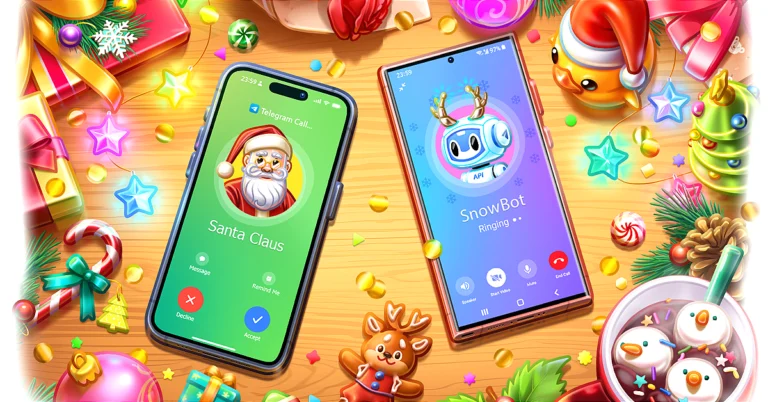
The company has redesigned the calling interface
Instant chatting app Telegram has rolled out a new update. With the Telegram 10.5.0 update, the messaging platform has added new features like Colorful Calls, Thanos Snap Effect for deleted messages and the largest Bot update.While rolling out the update Telegram said, “In its most recent update, instant messaging app Telegram (which has over 800 million monthly active users) has unveiled its highly anticipated 10th and last update of 2023, featuring a range of exciting enhancements aimed at elevating user experience across the board. The update introduces colourful calls, a visually stunning Thanos Snap Effect for deleted messages, and the largest Bot update, marking the most extensive in Telegram’s history.”Telegram has released a 10.5.0 update which will bring improvement to the call, new animation and updates for Bots. The company has redesigned the calling interface featuring new animations and beautiful backgrounds that adapt to the call’s status — whether it’s ringing, active, or concluded. Not only it will look appealing to users but also provide extended battery life and improved functionality on older devices. The company has fixed bugs and interface glitches for a better user experience. Additionally, call quality has been improved, and plans are in place to make further improvements to connection and audio quality by 2024.With the Telegram 10.5.0 update, the company has also added Thanos Snap Effect for Message Deletion which now appears whenever a message is deleted. The feature is being made available to both iOS and Android.Telegram is also updating its bot platform that adds message reactions, oversees reactions, manages quotes and links, and even sends replies to other chats or topics.As per the company, “The enhancements extend further, allowing bots to retrieve information about giveaways and boosts in channels where they hold administrative roles. For those eager to explore the world of bot development, Telegram encourages developers to peruse the Bot Guide. This resource offers additional information and a step-by-step tutorial tailored for beginners, ensuring a smooth entry into the realm of bot creation.”
Dreame vacuum cleaners make cleaning more accessible and effective.
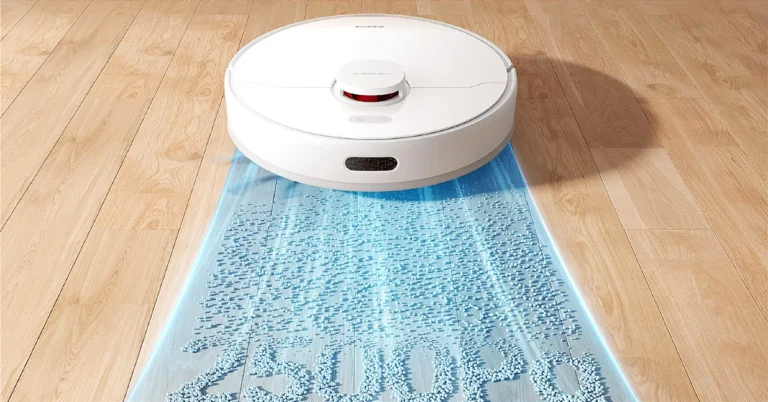
F9 Pro cleaning robot is a 2-in-1 vacuuming and mopping device.
H12 Core is a wet and dry vacuum cleaner.
Dreame Technology, a brand that focuses on smart home cleaning appliances has announced the launch of a new range of Vacuum cleaners: F9 Pro cleaning robot, U10 cordless vacuum, and H12 Core wet Core in India.
Dreame F9 Pro cleaning robot
Dreame F9 Pro cleaning robot is a 2-in-1 vacuuming and mopping device. The robot vacuum cleaner does quick and accurate mapping of the house. For easy and hands-free cleaning the cleaning device supports Google Assistant, Alexa, and Siri. It comes equipped with a 4-level powerful suction and a robust dual-action brush system that loosens and captures dirt and dust on all surfaces. The high-efficiency filter traps even the finest allergens, ensuring deep cleaning. In addition to this, it boasts a 3200 mAh battery that also supports fast charging. Users can also remotely control or schedule cleaning while at work.The price of the Dreame F9 Pro cleaning robot is set at Rs 24,999.
Dreame U10 cordless vacuum cleaner
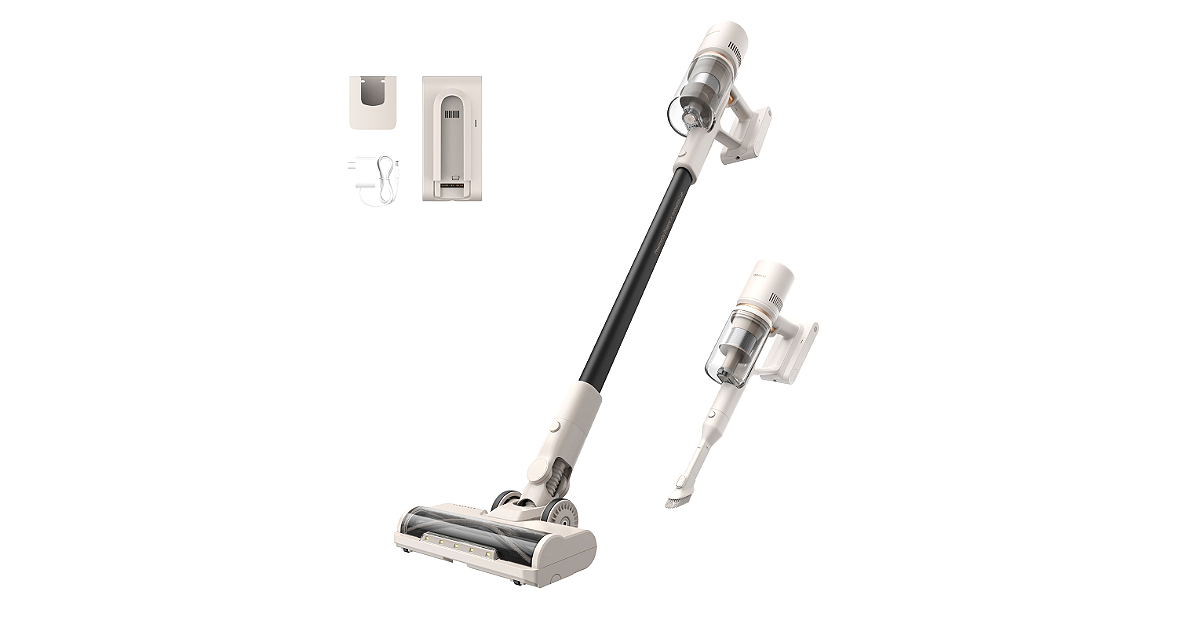
Dreame U10 cordless vacuum cleaner is a lightweight cleaning device with 100AW suction power and a 100,000 RPM high-speed brushless motor. It is backed by a 7x2000mAh battery pack offering a 40-minute runtime on a single charge. The cleaner also has a multi-surface brush head with LED lightsThe price of the Dreame U10 cordless vacuum cleaner is set at Rs 14,999.
Dreame H12 Core wet and dry vacuum cleaner
The Dreame H12 Core wet and dry vacuum cleaner can do both wet and dry cleaning. There are smart sensors with automatic dirt detection that adjust the suction for deep cleaning, while the 900ml water tank lets you mop alongside. The Auto mode on the cleaner for hands-free cleaning or the Suction mode for targeted power. It has a suction power of 200W and features a Mess detection technology.H12 Core will be available on Amazon at Rs 24,999.
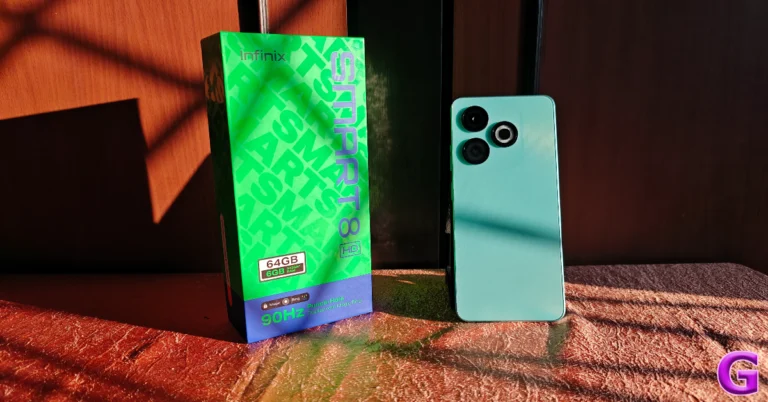
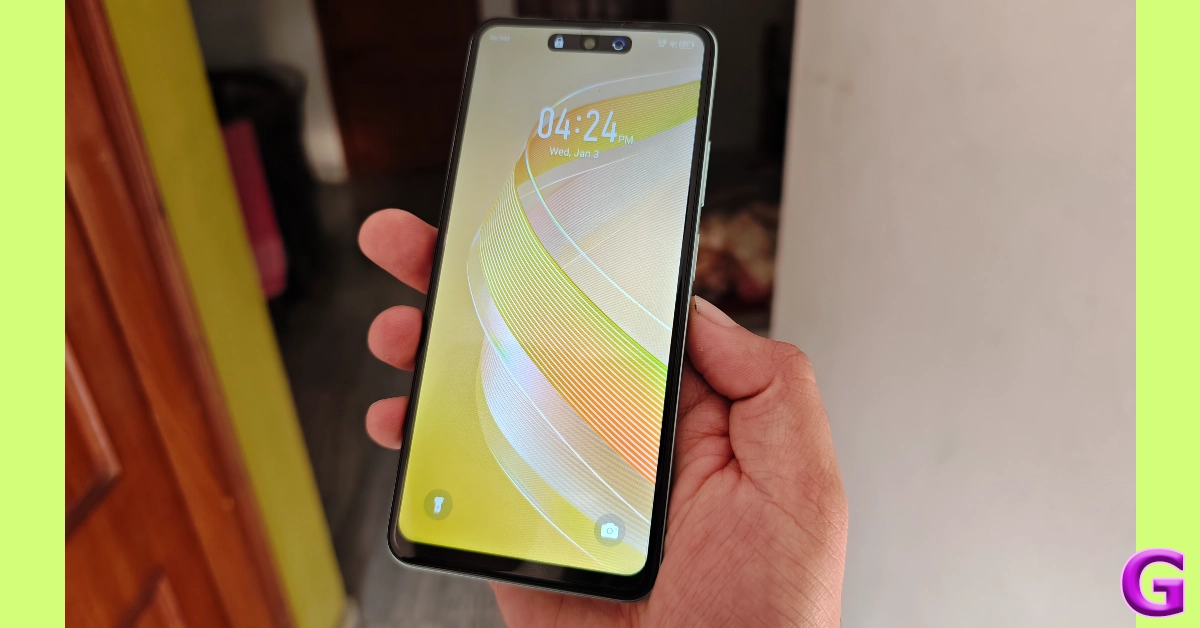
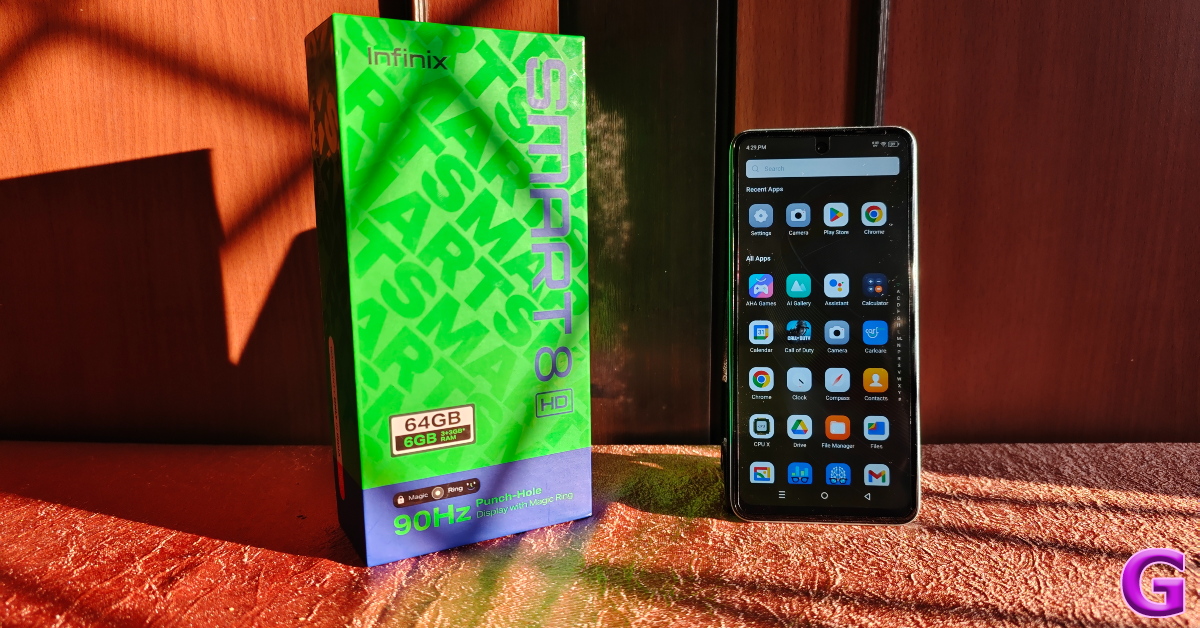
At the end of 2023, Infinix launched its latest budget smartphone, the Smart 8 HD. Currently priced at Rs 6,299, the smartphone seems like a steal when you take a look at its spec sheet and unique features. In this price category, a 90Hz display with a punch hole cutout for the selfie camera is unheard of. Things get even more interesting when you realise this punch hole cutout, or ‘Magic Ring’ as Infinix prefers to call it, employs some software tricks to mimic the behaviour of Apple’s Dynamic Island. Oh, did we mention the LED notification light on top of the display that also serves as the front flash? Excited to try these unique features on a budget smartphone, we used the Infinix Smart 8 HD as our primary driver for a week – here is our in-depth review.Read Also:Top 3 Ways to Check If Your Smartphone Supports Reverse Wireless Charging
Infinix Smart 8 HD review: Design and Display
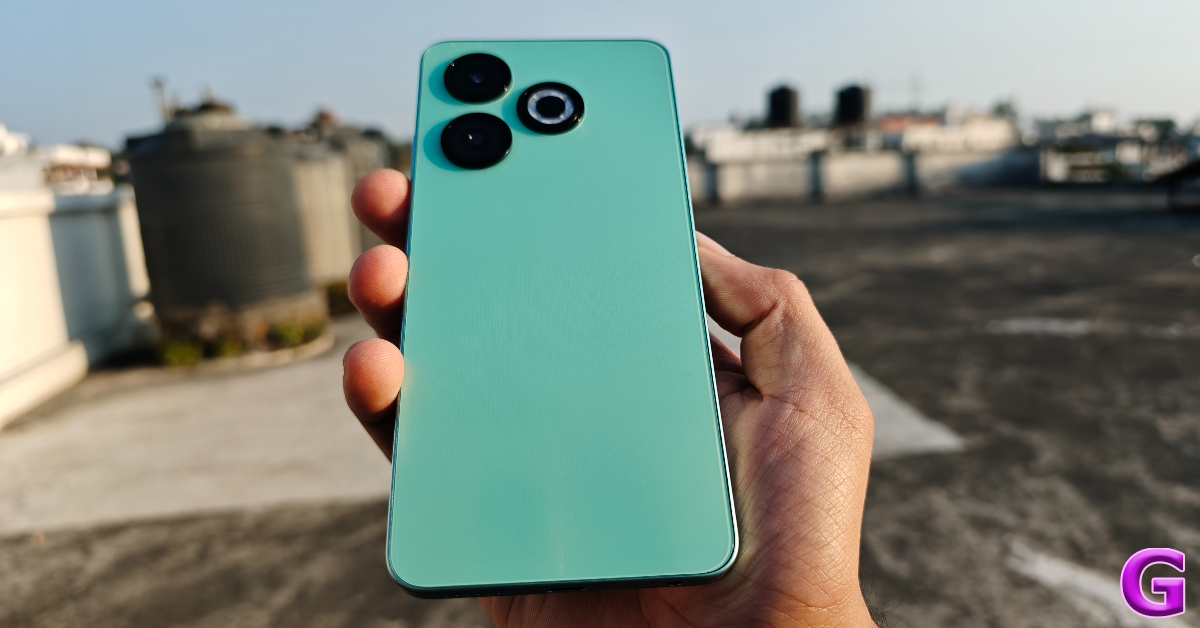
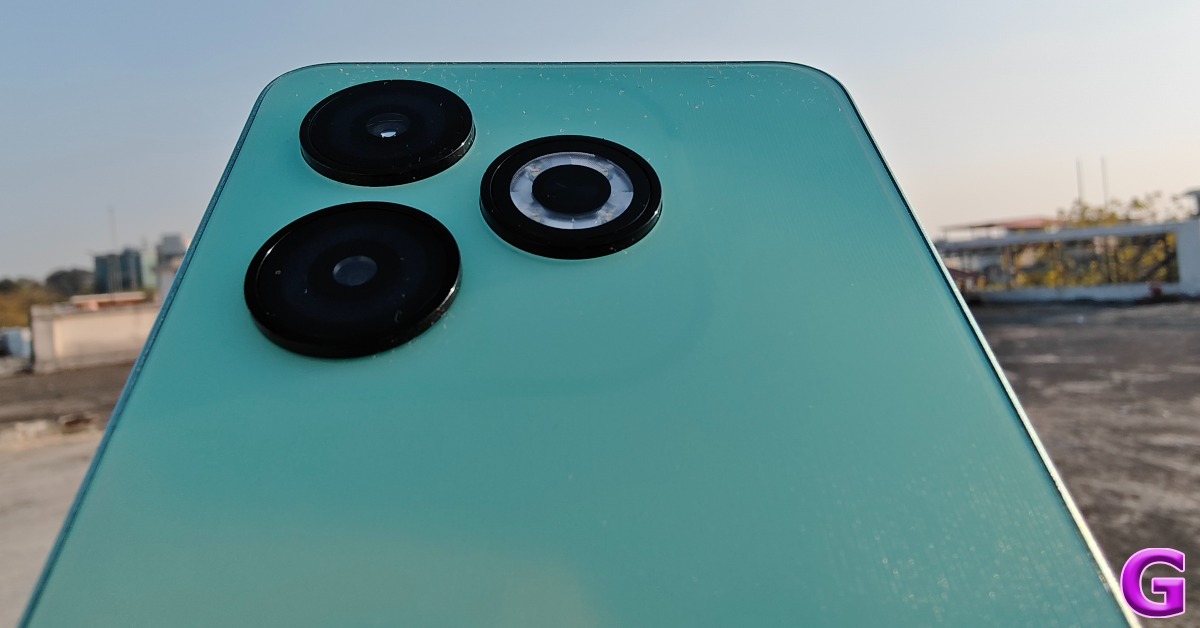
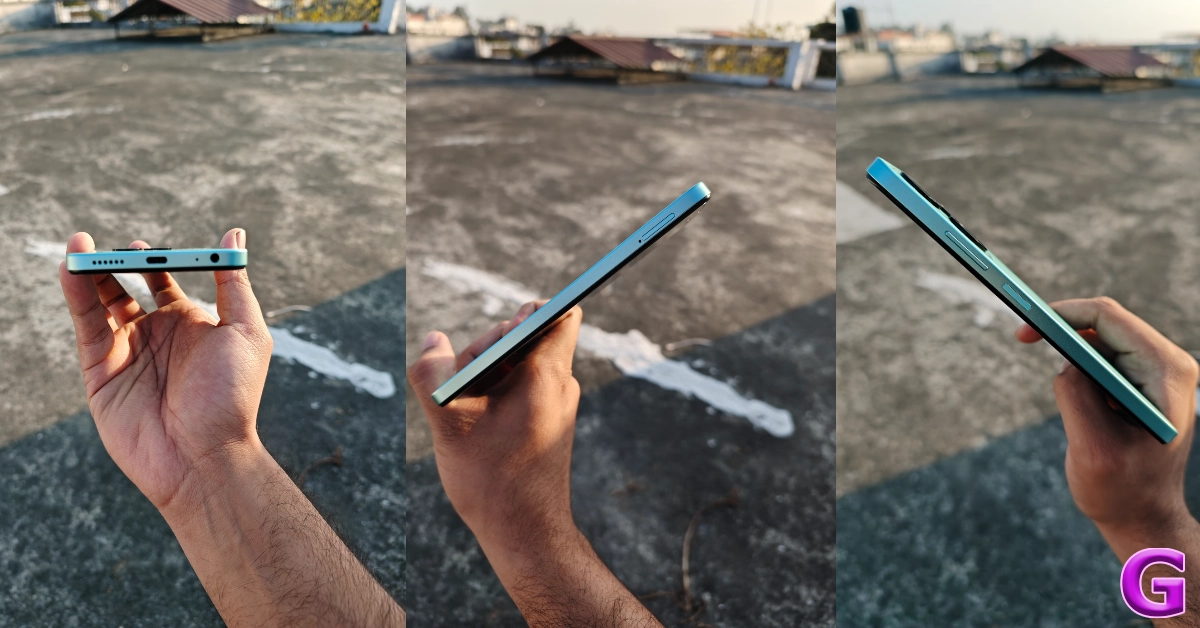
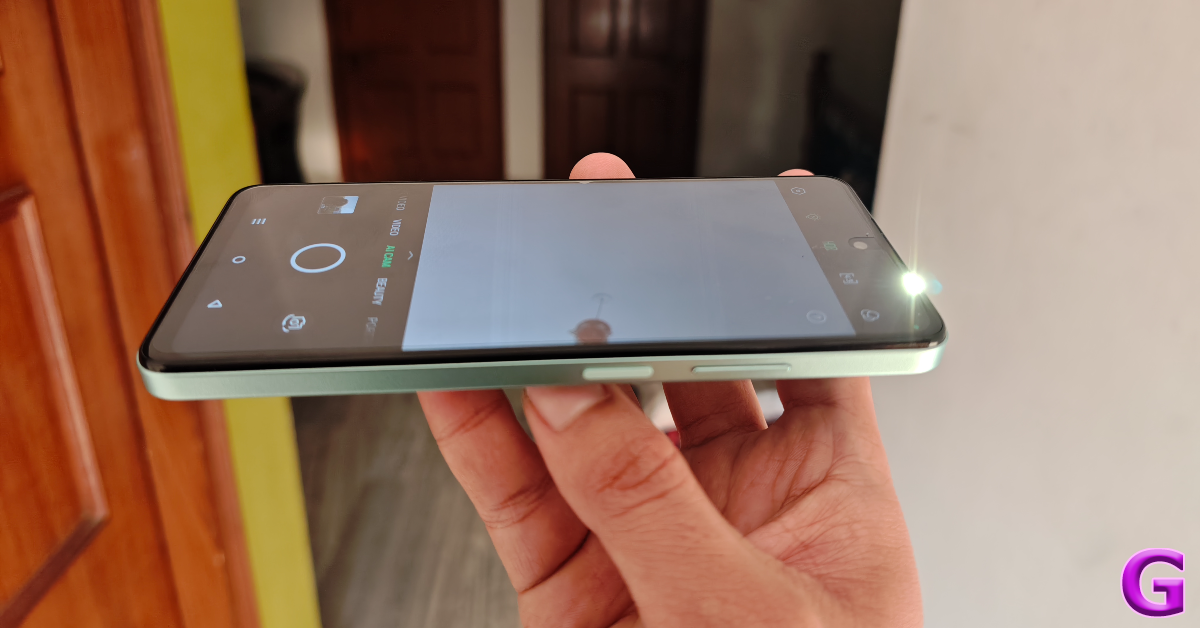
The unboxing experience of the Infinix Smart 8 HD is pretty standard. Inside the retail box, you get the smartphone, a 10W power adapter, a USB Type-C charging cable, a hard plastic case, a SIM ejector tool, a user manual, and a warranty card. The clear plastic case has a ‘glasstick’ feel to it. It is a nice upgrade over the soft plastic covers that most smartphones usually ship with.The smartphone’s design draws clear inspiration from the recent crop of iPhones. The dual camera array along with the ring LED flash looks similar to the iPhone’s triple camera arrangement. The plastic back has a ridged texture. The ‘glasstic’ case provided in the box bumps up its in-hand feel. We also like the flat edges of the plastic frame.The right edge of the frame houses the volume rocker keys and the side key that also doubles up as the fingerprint scanner. Side-mounted fingerprint scanners are a rarity in this price bracket, so it’s nice to see Infinix breaking the mould. It is no gimmick either – this fingerprint scanner is ultra-fast and responsive. On the bottom edge, you’ll find the 3.5mm headphone jack, the primary microphone, USB Type-C port, and the speaker grille. The left edge gets the hybrid SIM tray. The top edge does not contain a secondary microphone/speaker or an IR blaster.The 6.6-inch IPS LCD panel is certainly the biggest highlight of this smartphone. The 90Hz refresh rate makes the display very smooth to use. Its touch response is also the best we have seen in this segment. Browsing through apps and navigating the phone’s interface presents no hiccups. We never once felt any lag while working with the phone. The 90Hz refresh rate remains consistent in Google’s suite of apps along with others, which is something not many smartphones can boast.Magic RingWatching HD content on this 710 x 1612p display was a treat. It produced punchy colours and detailed images with a good amount of contrast. We were also pleased with the optimum viewing angles on offer. The single speaker grille is a bit tinny and lacking on the low end, but it is passable if you want to watch a quick video. For watching movies and listening to music, we’d suggest plugging in a pair of headphones.Front-facing FlashThe punch hole cutout is a brilliant addition to the screen, instantly separating the Infinix Smart 8 HD from its peers. We hope more smartphones in this category adopt it as the norm. The application of certain animations around the cutout makes it behave like Apple’s Dynamic Island. These animations can be managed from the ‘Special Function’ section in the settings. The ‘Magic Ring’, as Infinix calls it, notifies you about Face Unlock, Background Call, Charging, Charge Completion, and Low Battery. There is also an LED light above the upper bezel that serves as a status alert and front flash.Read Also:Bitcoin’s Revolutionary Influence on the Gaming World
Infinix Smart 8 HD review: Performance and Cameras
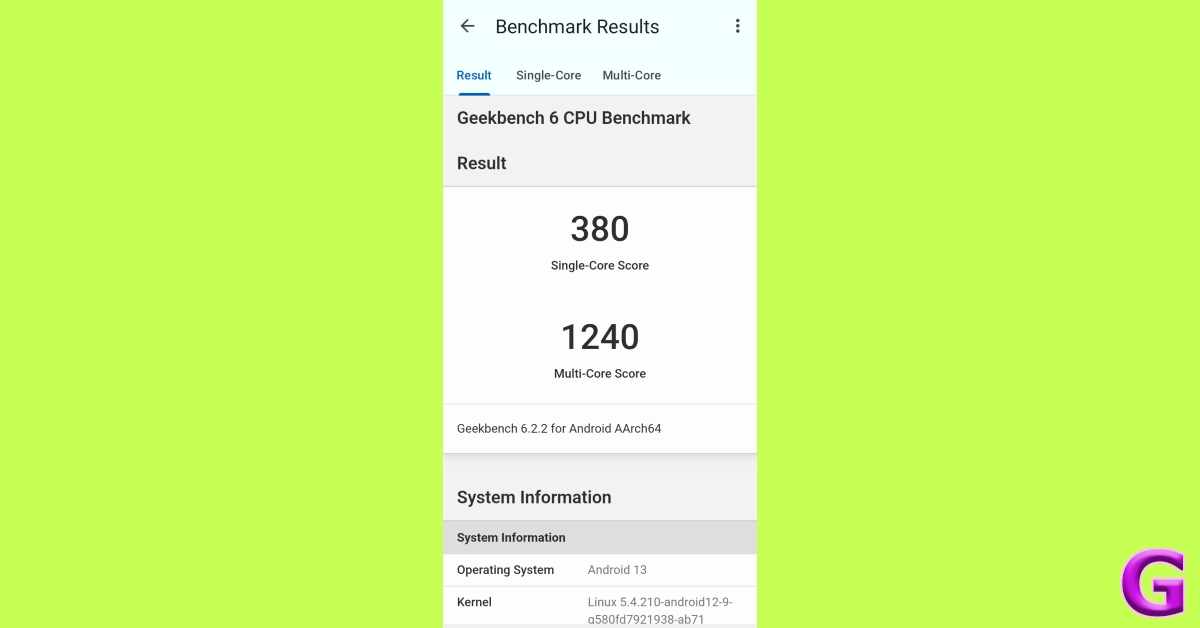
Powering the Infinix Smart 8 HD is the Unisoc T606 chipset. The smartphone is available in a single 3GB RAM + 64GB storage variant in India. The ‘MEMFusion’ feature allows the device to use an additional 3GB of internal storage as the RAM. If 64GB of internal storage isn’t enough for you, you can always expand it up to 1TB using a memory card.We used the Infinix Smart 8 HD for a week during the review period and were pretty satisfied with its performance. It handles basic tasks like calling calling, video streaming, web browsing, and more with relative ease. Other smartphones in this price bracket often start lagging when a couple of tasks are thrown at them at once. As we mentioned earlier, the smooth touch response facilitated by the 90Hz display plays its part in fostering a seamless user experience. One of the more underrated things about the smartphone is its haptic feedback, which isn’t as dialled up as other budget devices.Like all budget smartphones, the Infinix Smart 8 HD struggled to provide a satisfying gaming experience while playing demanding titles. The smartphone can run games like Call of Duty Mobile and Free Fire Max, but the gameplay is marred by frequent jitters and lags. However, the phone does a great job of running basic games like Candy Crush and Coin Master. On the Geekbench 6 app, the Smart 8 HD scored 380 points on the single-core test and 1,240 points on the multi-core test.OS duties on the Infinix Smart 8 HD are handled by Android 13 Go Edition with XOS 13 on top. Apart from a couple of apps, there is no bloatware on this device. Infinix’s XOS 13 for this smartphone holds back certain features as it is based on the Android 13 Go Edition. This means you won’t get features like Peek Mode for WhatsApp, App Cloner, or App Lock. However, you do get the Digital Wellbeing package along with a handful of personalisation options for the lock screen and the home page.The 5,000 mAh battery pack on this smartphone delivers a solid one-day power backup. On an average day that comprised tasks like instant messaging, video calling, web browsing, and watching, the smartphone was left with a 15-20% charge at sundown. The only letdown is the lack of fast charging. The smartphone takes almost 3 hours to fully charge.The rear camera arrangement of the Infinix Smart 8 HD looks very flashy but it consists of a simple 13MP primary shooter along with a 0.08MP auxiliary lens and a Ring-LED flash. This camera takes good pictures in bright daylight conditions. The colours are well-tuned and the level of detail is satisfactory for the price you are paying for the smartphone. Infinix calls its native camera app the ‘AI Camera’. This is pretty much a gimmick as the only ‘AI’ powered thing it can do is basic scene detection.In limited lighting, the primary shooter takes soft and grainy images, which aren’t up to par at all. This is something that is expected of every smartphone in this category. The 8MP selfie camera takes decent shots but overcorrects the skin tone. While we aren’t too fond of skin tone correction, the smartphone gets brownie points for its front-facing LED flash.Read Also:An Exploration of Cryptocurrencies in Aerospace and Defence
Verdict
We don’t say this about most smartphones, but the Infinix Smart 8 HD is an absolute steal at Rs 6,299. Its 90Hz display is comfortably ahead of the competition in its segment. The punch hole cutout for the selfie camera is a great addition to this display as well. Features like the Magic Ring and front-facing LED flash are good contributions to the overall package. The design choices alone make this smartphone a heavyweight in its price bracket. Our only complaint is the lack of fast charging, as the 10W power adapter takes up to 3 hours to fully charge the device.
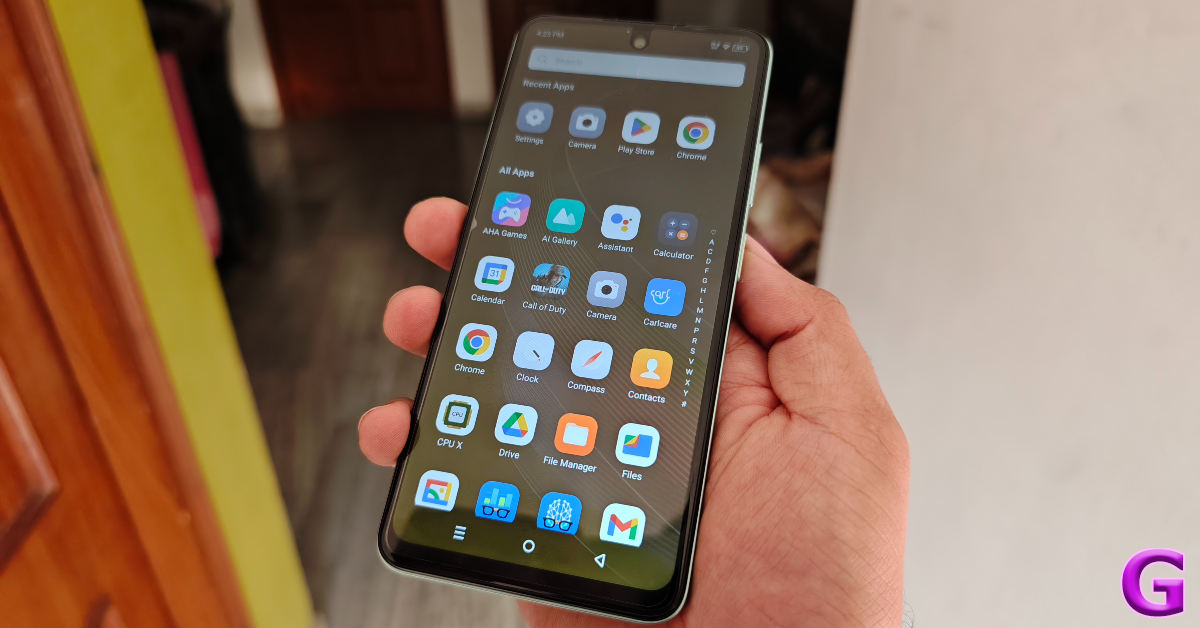
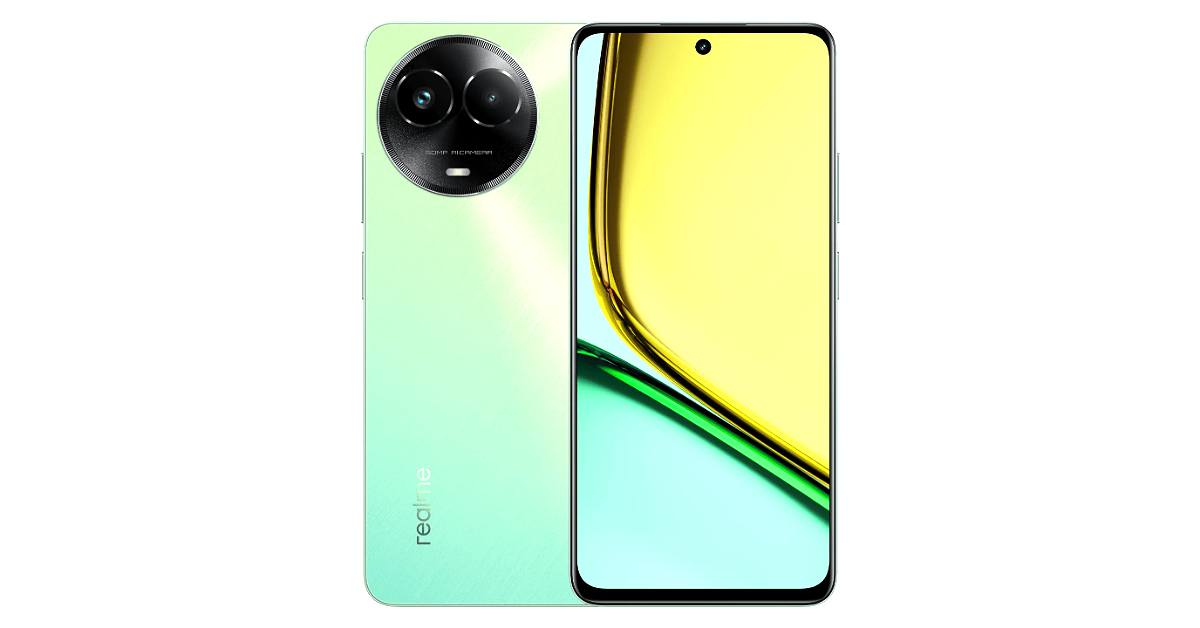
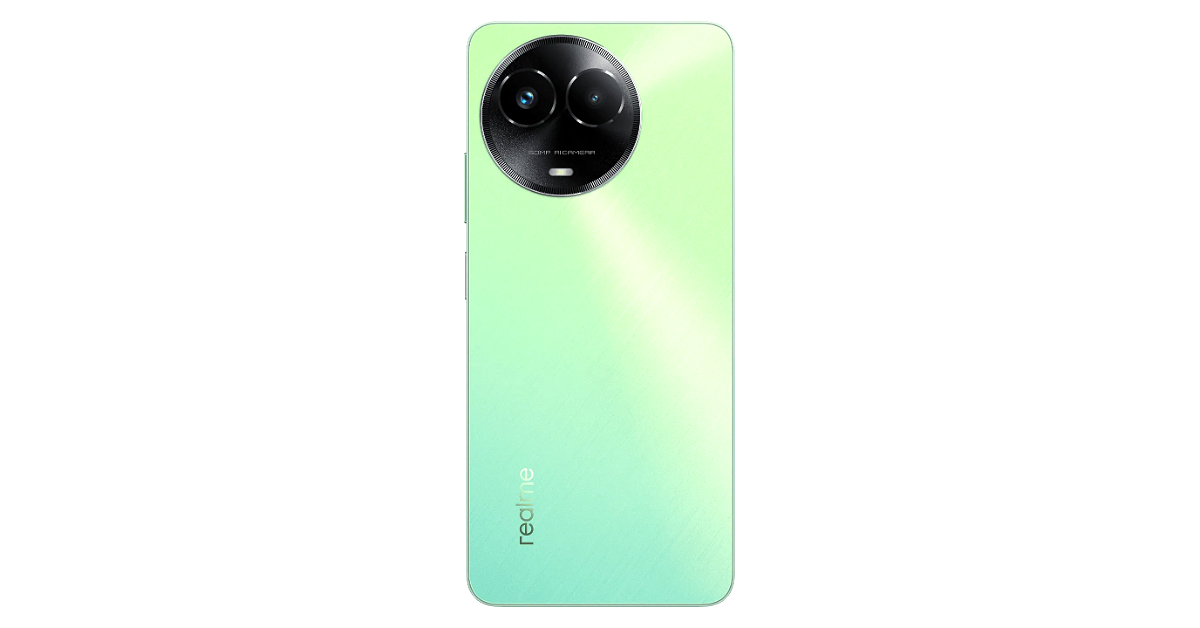
Realme C67 5G was launched in India in mid-December. The 5G smartphone is now up for sale in the country. The device is the first 5G phone to be introduced under the company’s C-Series. The smartphone is powered by MediaTek Dimensity 6100+ SoC and comes with a Mini Capsule 2.0. It features a circular camera module consisting of dual sensors and an LED flashlight.
Realme C67 5G price in India, availability details
Realme C67 5G has gone on sale in India. The device comes in two colour options of Dark Purple and Sunny Oasis. The price of the handset is set at:
4GB + 128GB: Rs 13,999
6GB + 128GB: Rs 14,999
As per the company, the 5G smartphone is currently available for purchase till January 31 in stores near you.Also Read:Galaxy Unpacked 2024: Samsung Galaxy S24 Series launch date announced, pre-reservations now openTill January 31 buyers can get up to Rs 2000 on the 4GB + 128GB with Rs 1000 flat off and offers from select banks worth Rs 1000 in mainline stores near them. The online customers can start buying the device on January 5, 9 and 13 to January 19. Consumers are eligible to avail of a discount coupon of Rs 1000 and offers from select banks of up to Rs 1000 on the 4GB + 128GB on realme.com and Flipkart.
Realme C67 5G specifications
In terms of specifications, Realme C67 5G is powered by 6nm MediaTek Dimensity 6100+ SoC with a virtual RAM expansion feature (up to 6GB). It runs on Android 13-based Realme UI 4.0. It has an IP54 rating for dust and splash resistance. The 5G phone features a 6.72-inch full-HD+ display with 1080 x 2400 pixels. The screen has up to 120Hz refresh rate and a peak brightness level of 680 nits. This display supports Dynamic Refresh Rate in 6 stages and the system will intelligently select the best stage for your scenarios. It also features the revamped Mini Capsule 2.0 which displays various features such as Description of functional scenarios, Animation Design Instructions, Demand time node and Claim Collection.For the photos and videos, the device includes a dual rear camera setup consisting of a 50-megapixel primary lens and a 2-megapixel portrait sensor. There is an 8-megapixel front-facing camera for taking selfies and video calling. The Realme C67 5G houses a 5,000mAh battery with 33W fast charging support
An unresponsive remote is one of the most annoying things to deal with while watching TV. Luckily, most Smart TVs can be controlled with a dedicated smartphone app, but you may not always want to rely on your phone to work the TV. Some users may not be comfortable with handing over their phone to someone else if they want to control the TV functions. If the ol’ slap to the back of the remote does not yield any results either, it is time to look for other fixes. Luckily, we’ve got some for you. Today, we bring you the top 11 ways to fix ‘Apple TV Remote Not Working’.Read Also:Free Tips to Simplify Your Digital Expenditure
Why is my Apple TV remote not working?
The Apple TV remote developing functional issues is not a rare circumstance. Most of the time, it is likely due to the device running out of charge. Since the remote only needs to be charged a couple of times a year, it is easy to forget that a lack of charge may be causing the remote to malfunction. Your Apple TV does send you a notification when the battery level hits a certain threshold, but sometimes battery-related issues may arise before the charge drops to that level.Another common cause that people overlook is ‘interference’. If any wireless device or gadget is in your remote’s vicinity, it may interfere with its Bluetooth signal. This is a very rare phenomenon, but it is known to occur. If the problem is related to software or firmware issues, a quick update can take care of that. Lastly, damage to your Apple TV remote’s hardware can also be the reason why it isn’t working. Even though the remote is built to last, if someone knocks it down with force, it can cause some functional issues.
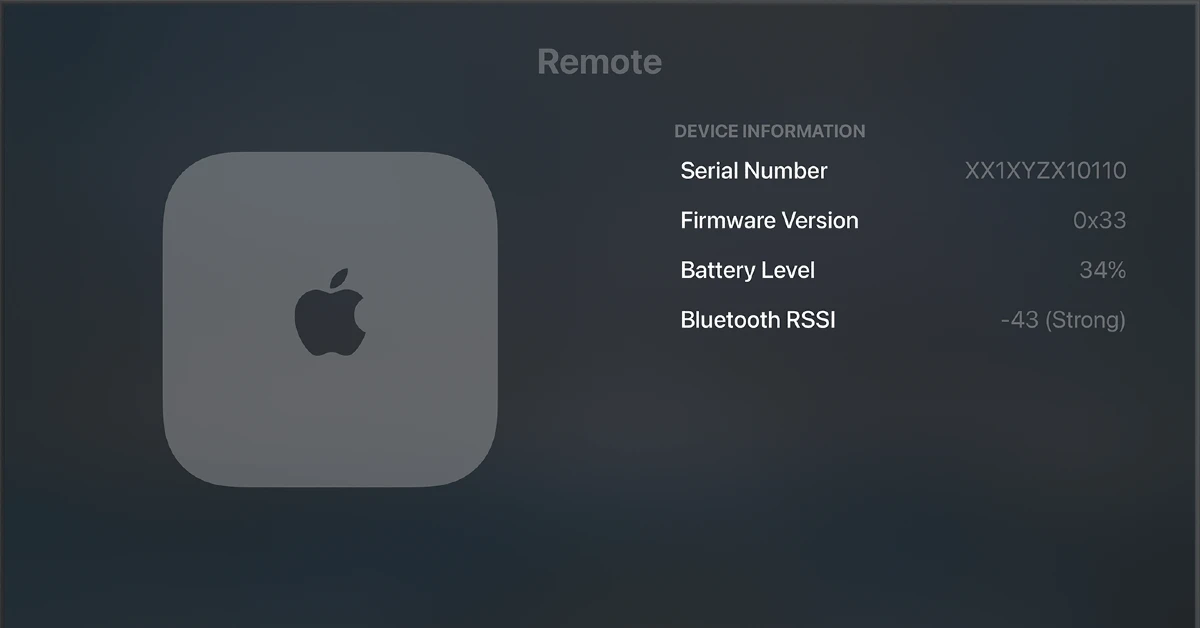
Check the remote’s signal strength
Step 1: Go to the Settings section on your Apple TV.
Step 2: Select Remotes and Devices.
Step 3: Go to Remote.
Step 4: Check the reading next to Bluetooth Remote Signal Strength Indicator (RSSI).
Step 5: If the indicator says that the signal is weak, move to the next to methods in this list.
Make sure you are in functional distance
For the Apple TV remote to work as intended, it needs to be within the functional distance of the TV. Make sure you are within 6 metres (20 feet) of your Apple TV and nothing is directly blocking your path. If the remote still doesn’t work, move closer and point it directly at the TV. No luck? Move on to the other fixes.
Remove any devices that may be interfering with the remote
Your Apple TV remote relies on a Bluetooth connection to communicate with the TV. Sometimes, a Bluetooth or WiFi device in its path may cause an interference with the signal, causing the remote to malfunction. Make sure that devices like WiFi routers, Bluetooth headsets, and other wireless gadgets are not in the path of the TV and the remote.
Restart the Apple TV remote
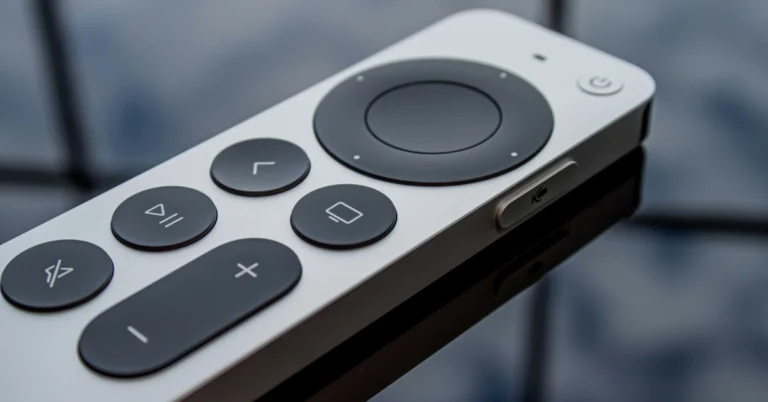
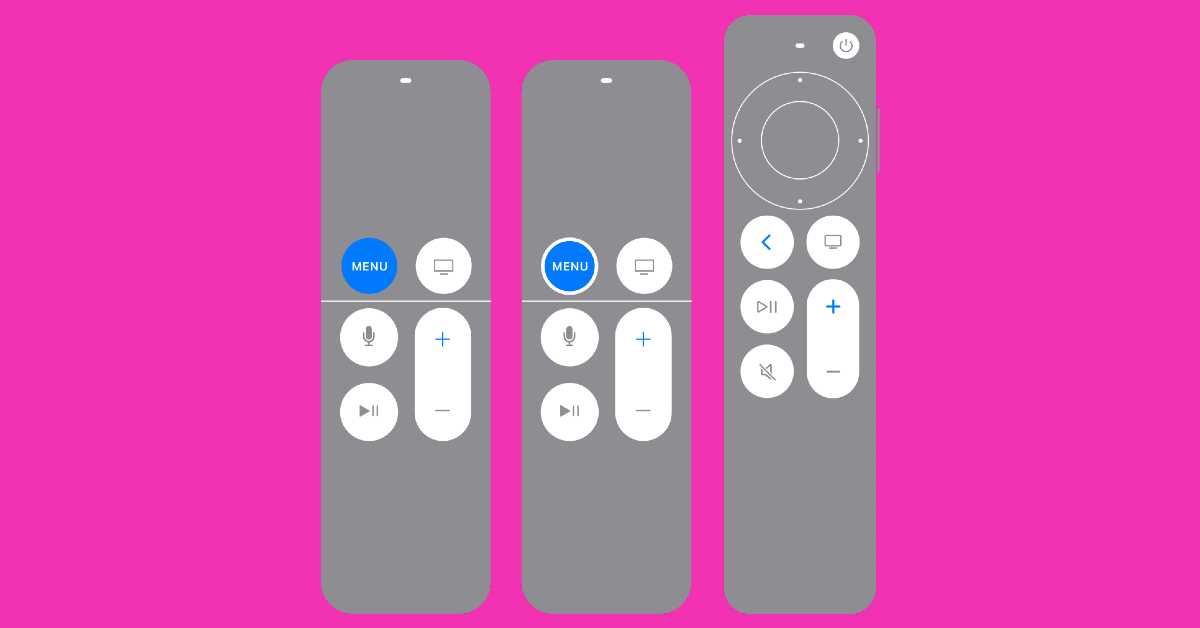
A quick restart should fix any temporary issues with your remote. Here’s how you can go about it.Step 1: Press and hold the TV/Control Centre and the Volume Down (-) buttons simultaneously for about 5 seconds.Step 2: Wait for the status light on your Apple TV to turn off and on again.Step 3:Release the buttons and wait for the Connection Lost notification to appear on the TV.Step 4: Your phone will restart and connect automatically to the Apple TV. Once the Connected notification appears on the TV display, you can start using it again.
Restart your Apple TV
If restarting the remote didn’t work, try restarting the Apple TV instead. Unplug the TV from the wall outlet, wait for 5-10 seconds, and then plug it back in. If the remote is working sluggishly, go to Apple TV Settings and select System>Restart.Read Also:Top 4 ways to hide apps on an Android smartphone (2023)
Charge your Apple TV Remote
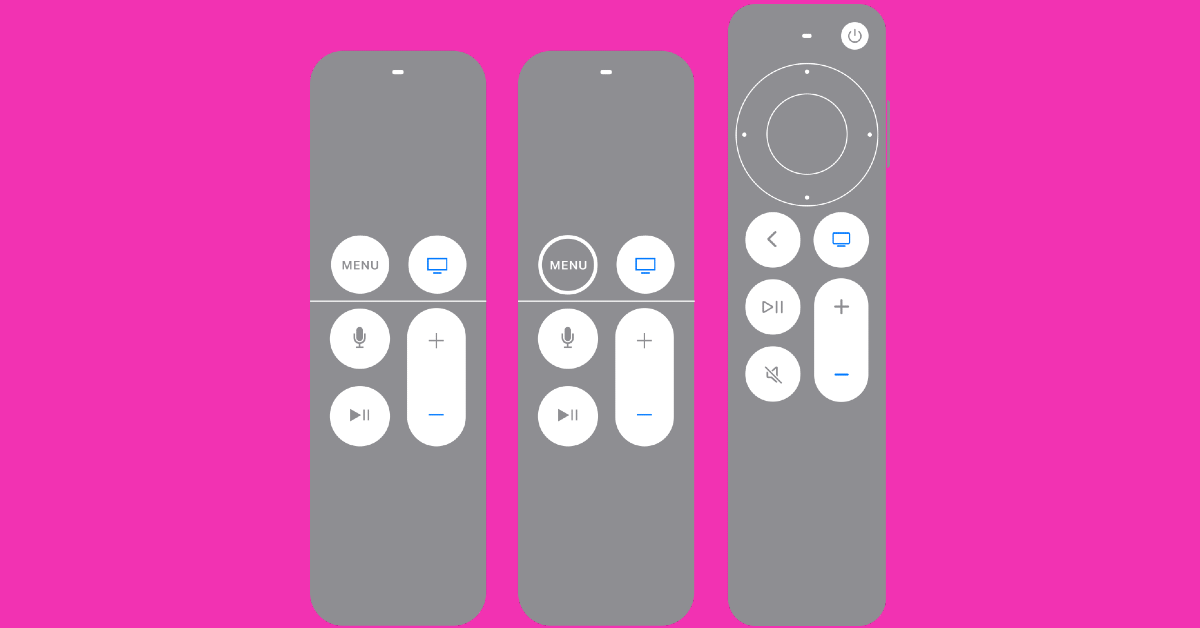
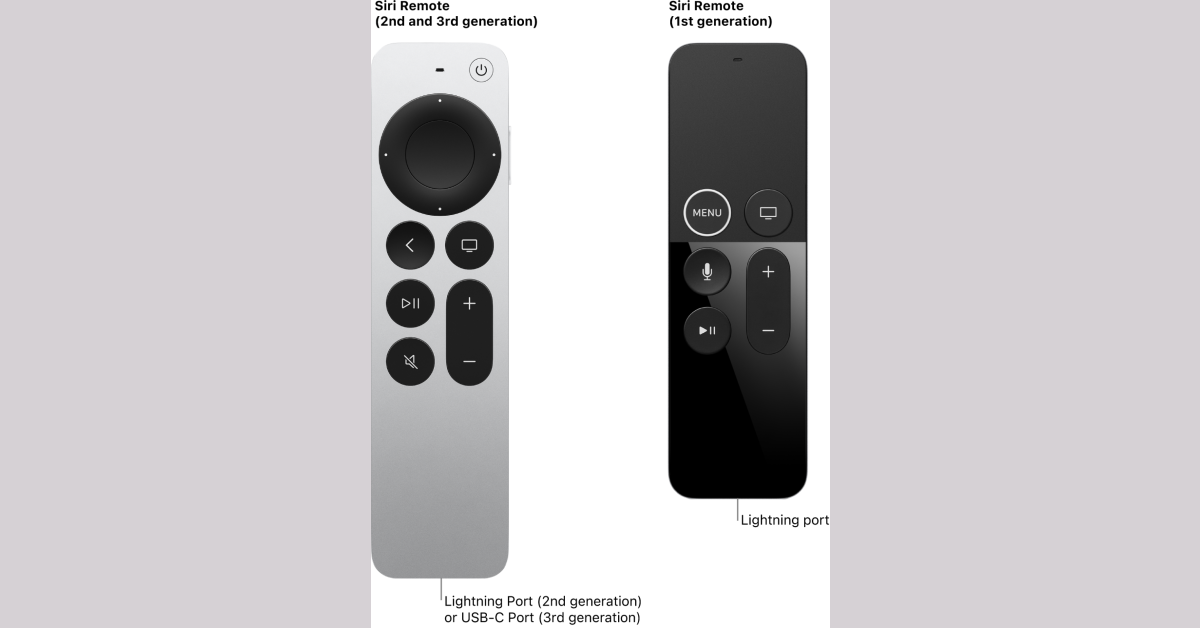
If your Apple TV remote is out of charge, it will stop working. Its performance may also take a hit when it is running low on battery. When the remote feels a bit sluggish, it is a good idea to check its battery level. The Apple TV remote only needs to be charged a few times a year, so it’s easy to forget about it. Typically, your Apple TV alerts you when the remote is running out of charge. You can also check the battery level in Settings. Use a lightning cable to charge your Gen 1 or Gen 2 Apple TV remote. Meanwhile, Gen 3 remotes can be charged using a USB Type-C cable. It will take almost 3 hours for the remote to fully charge.
Pair the remote to your TV again
Re-pairing the Apple TV remote may fix the functional issues you’re currently facing. Here’s how you can do it.Step 1:Point the remote towards the TV and make sure it is within a range of 7.5cm.Step 2: Hold the Back (<) or Menu buttons for 5 seconds.Step 3: Place the remote on top of the Apple TV if you are asked to do so.
Change the Volume Control settings
Use this method if your Apple TV remote isn’t able to change the volume of the media playing on the TV.
Step 1: On your Apple TV, go to Settings.
Step 2: Select Remotes and Devices.
Step 3: Select Volume Control.
Step 4: Select TV via IR.
Use your iPhone as a remote
To determine whether the fault lies with the remote or your Apple TV, try using your iPhone as the remote. You can do this by installing a universal remote app from the App Store. iPhones running iOS 16 do not need to install any remote app as it is natively available in the Control Centre. Hit the remote icon and check if you can control your Apple TV from your iPhone. If you’re unable to control anything, the problem lies with your TV and not the remote.
Update your Apple TV
Sometimes, an unexpected bug or background issue can cause the Apple TV to not register the commands from a remote. You can fix this issue by updating the tvOS to its latest version. Here’s how.Step 1: Go to Settings.Step 2: Select System and click on Software Updates.Step 3: Select Update Software.
Check if it is a hardware issue
If your Apple TV remote stopped working after taking a knock, it may have damaged the hardware. This is likely the case when some buttons on your remote work normally while others are unresponsive. You can either get the remote repaired by a trusted professional or buy a new unit. In the meantime, you can use your iPhone to control your Apple TV.
Frequently Asked Questions (FAQs)
How do I fix my Apple TV remote if it is not working?
Make sure the remote is charged and there is no interference between it and the Apple TV. Restart both devices and pair them again. If the problem still persists, update your Apple TV.
How do I update my Apple TV?
To update your Apple TV go to Settings>System>Software Updates and hit Update Software.
How do I use my iPhone as the Apple TV remote?
Tap the remote icon from the Control Centre to use your iPhone as an Apple TV remote. This is a native feature on iPhones with iOS 16 and above.
How long does an Apple TV remote last?
An Apple TV remote lasts up to a month on a full charge. It takes up to 2 hours to fully charge.
These are the top 11 ways to fix ‘Apple TV remote not working’. If you know any other way to resolve this problem, let us know in the comments! If your iPhone does not have the Remote tile in the Control Centre, you can install a universal remote app from the App Store. The official Apple TV Remote app is not available for Android, but there are dozens of regular IR remote apps you can use to control your TV.




 Step 3:
 Step 4:
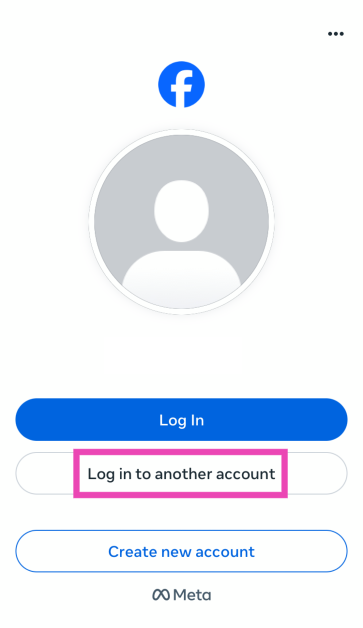 Step 5: Enter
 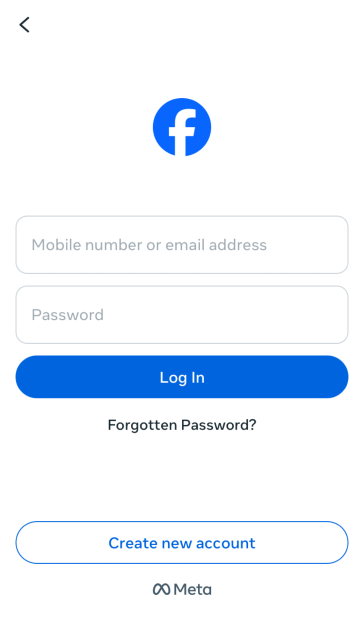 Step 6: Save
 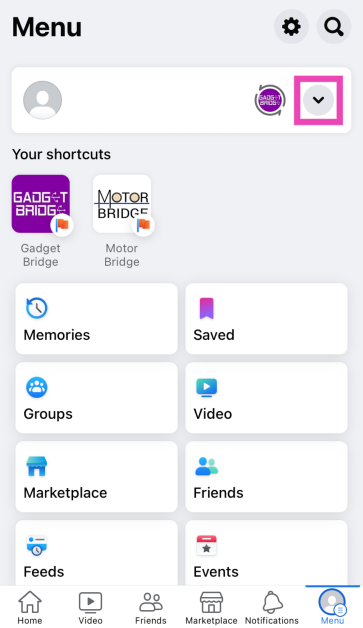 Step 4:
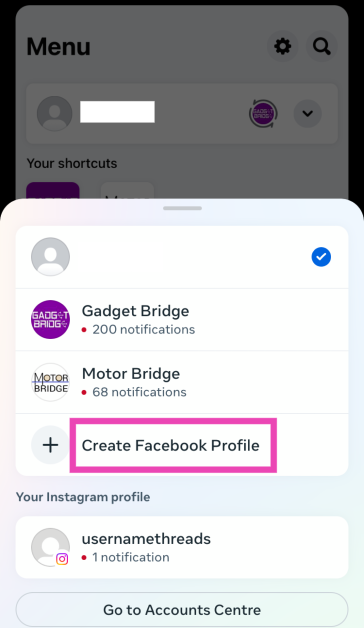 Step 5:
 Step 6:
 Step 7:
 Step 8: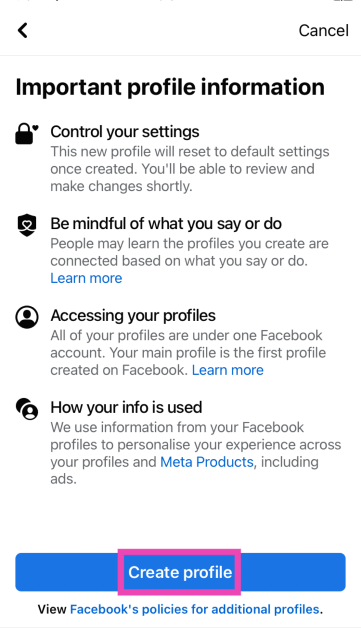







 Step 1: Go to the Settings section on your Apple TV.
Step 2: Select Remotes and Devices.
Step 3: Go to Remote.
Step 4: Check the reading next to Bluetooth Remote Signal Strength Indicator (RSSI).
Step 5: If the indicator says that the signal is weak, move to the next to methods in this list.
Step 1: Go to the Settings section on your Apple TV.
Step 2: Select Remotes and Devices.
Step 3: Go to Remote.
Step 4: Check the reading next to Bluetooth Remote Signal Strength Indicator (RSSI).
Step 5: If the indicator says that the signal is weak, move to the next to methods in this list.
 Use this method if your Apple TV remote isn’t able to change the volume of the media playing on the TV.
Step 1: On your Apple TV, go to Settings.
Step 2: Select Remotes and Devices.
Step 3: Select Volume Control.
Step 4: Select TV via IR.
Use this method if your Apple TV remote isn’t able to change the volume of the media playing on the TV.
Step 1: On your Apple TV, go to Settings.
Step 2: Select Remotes and Devices.
Step 3: Select Volume Control.
Step 4: Select TV via IR.