How to delete your Threads profile without deleting your Instagram account?

0
One of the biggest factors that kept people from joining Threads at the time of its launch was its deletion process. Upon signing up for the app, users soon realised that they could not delete their Threads profile without also deleting their Instagram. This garnered immediate backlash from the users. After several months, Meta has now changed the deletion process for Threads. In this article, we show you how to delete your Threads profile without deleting the Instagram account linked to it. Read Also: Soon your WhatsApp chat history and media backup to occupy your Google Account storage

Delete Threads profile without deleting Instagram account

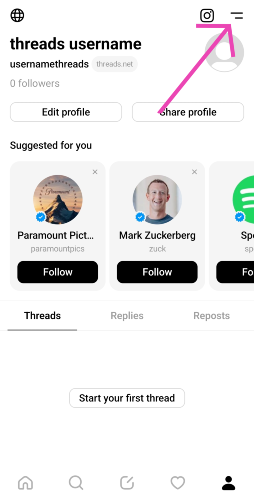
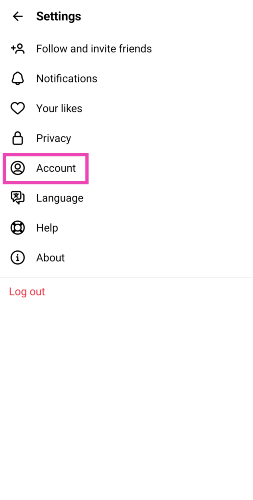
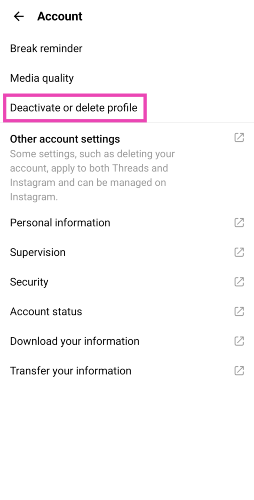
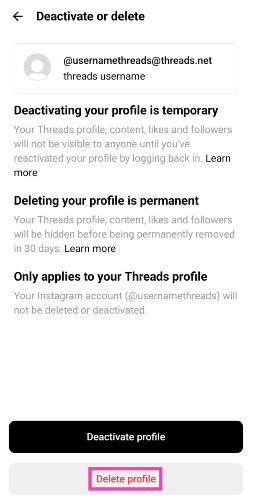
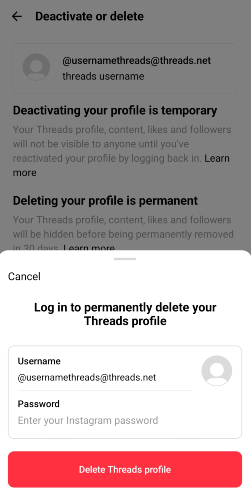
Step 1: Launch the Threads app and log in using your Instagram account. Step 2: Hit the profile icon at the bottom right corner of the screen. Step 2: Hit the profile icon at the bottom right corner of the screen. Step 3: Hit the menu icon at the top right corner of the screen. Step 3: Hit the menu icon at the top right corner of the screen. Step 4: Tap on Account. Step 4: Tap on Account. How to delete your Threads profile without deleting your Instagram account? Step 5: Tap on Deactivate or delete profile. Step 5: Tap on Deactivate or delete profile. How to delete your Threads profile without deleting your Instagram account? Step 6: Select Delete profile. Step 5: Tap on Deactivate or delete profile.  How to delete your Threads profile without deleting your Instagram account? Step 7: Enter your Threads password to confirm account deletion. Step 7: Enter your Threads password to confirm account deletion.

Frequently Asked Questions (FAQs)

Can I delete my Threads profile without deleting my Instagram account?

Yes, you can delete your Threads profile while retaining your Instagram account. Meta recently added this feature to its newest social media platform after receiving a lot of backlash from users.

How do I delete my Threads profile?

Go to your Threads profile, tap the menu icon at the top right corner of the screen and then select Account>Deactivate or delete profile>Delete profile. Enter your account password to confirm the deletion process.

Can I make a Threads profile without an Instagram account?

There is no way to make a profile on Threads if you don’t have an Instagram account. If you don’t want your Threads to be linked to your Instagram account, you can make a throwaway Instagram account for this exclusive task. Read this article to learn how you can go about it. Read Also: WhatsApp’s new feature allows one-on-one voice chats in large groups

Conclusion

This is how you can delete Threads without deleting your Instagram account. Among other changes, Meta also added the option to edit a post on Threads. Unlike Twitter, this feature is available to all users for free. The social media giant is also bringing Twitter-like hashtags to its micro-blogging app.

Instagram announced new content creation tools and improved Reels insights for users

Key Highlights
  • New tools like Undo/Redo to help creators edit their clips easily are being introduced.
  • The new update also brings the ability to create memes using clips with audio.
  • Users can now turn their photos or videos into a custom sticker.
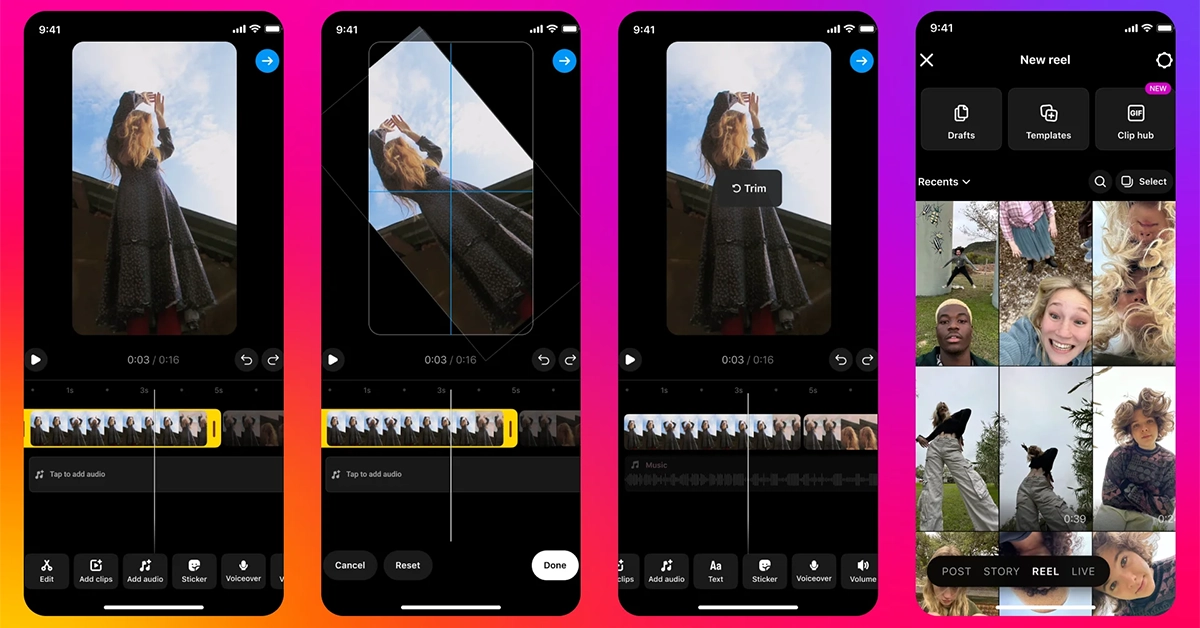
Meta, the parent company of Instagram, has announced the rollout of a couple of new content creation tools to support content creators on the platform. The newly announced features are said to not only help creators express their creativity but also connect with their viewers more efficiently. Instagram introduced a new content creation tool that brings improvement to feed photos & carousels, Stories, and new insights. The features will save the editing time for videos, allow creators to make memes using clips with audio and a lot more. Instagram announced new content creation tools and improved Reels insights for users Instagram has started to test out the feature that will help you in scaling, cropping, and rotating individual clips for Reels. The company will be rolling out undo and redo features that will help save time during editing. In addition to this finding tools is also getting easier. Instagram will allow users to create new memes adding clips with audio to your Reels from our new Media Clip hub. “Try connecting with your fans by playing with memes and inviting them to create their own remix,” the blog post said. 10 new English text-to-speech voices to select from are now being introduced but this will only be available in select markets. Users will be able to make their videos more creative with six new text fonts and styles available in hundreds of languages. In addition to this, one can now add outlines for better clarity and highlighting the text. New ways to access the audio browser or trending audio have also been brought to the platform. Instagram’s draft surface has also been revamped. It now gives you a streamlined view of all your saved drafts and soon creators will be able to preview your drafts, rename them, and schedule them in advance. Instagram will also bring the ability to create custom stickers from your own photos and videos in your Camera Roll, or from eligible photos and videos you see on Instagram. New photo filters for your feed photos are also coming. The upcoming update would also bring the ability to edit your photos and carousels with the latest filters. “From subtle colour edits to options for expressive styles, these updates make it easy for you to try various looks for your posts.” To help you evaluate your Reel performance better Meta has introduced a new Reels metric called “Replays” and has updated the definition of Reel “Plays” to also include “Replays” in addition to “Initial Plays” for both Instagram and Facebook. According to the company, one might notice an increase in Reels Plays because of this. Over that,  content creators will soon be able to check real-time data on Reel viewership as the company will provide access to an interactive Retention Chart in the coming months.

Garena Free Fire Redeem Codes Today 17 November 2023: Here is how to claim them

Garena Free Fire is a battle royale game with regular awards and tournaments to keep players interested. If you play Garena Free Fire, you should be aware of the redeem codes that are released on a daily basis. However, because the battle royale game is banned in India, players from other countries can use the Free Fire Redeem codes daily. If you’re unfamiliar with the Garena Free Fire redeem codes or don’t know how to get them, we’ve put together a step-by-step guide to help you redeem them. Check out Garena Free Fire Redeem Codes for 17 November 2023. The Free Fire redeem codes are a great way to get free stuff. These are 12-digit codes that contain alphabets and numbers, as well as an expiration date and time. Because the Garena FF redeem codes cannot be used more than once, you should hurry to the redemption page to claim your free reward before someone else does. To get a free reward, all you have to do is go to reward.ff.garena.com/en, which is the official redemption page. Also, keep an eye on this space for daily updates on Garena Free Fire redemption codes and rewards.

Garena Free Fire Redeem Codes Today 17 November 2023

FFBBCVQZ4MWA VNY3MQWNKEGU FFAC2YXE6RF2 FFIC33NTEUKA ZZATXB24QES8 FFCMCPSBN9CU U8S47JGJH5MG

How to Get Free Fire Redeem Codes for Garena on 17 November 2023?

  • Visit the Garena Free Fire game’s official website at reward.ff.garena.com.
  • Use your Facebook, Google, VK, Apple ID, Huawei ID, or Twitter account to log in.
  • You’ll be taken to a valid redemption code (s)
  • Copy and paste the 12-digit redemption code into the text box.
  • On the screen, a dialogue box will appear.
  • ‘Ok’ should be selected.
For the latest gadget and tech news, and gadget reviews, follow us on TwitterFacebook and Instagram. For newest tech & gadget videos subscribe to our YouTube Channel. You can also stay up to date using the Gadget Bridge Android App. You can find the latest car and bike news here.

Threads is testing hashtags like Tags on its platform to allow users to tag topics

Key Highlights
  • User can tag topics on Threads to categorize their posts by interest or theme.
  • The feature is now being tested in Australia.
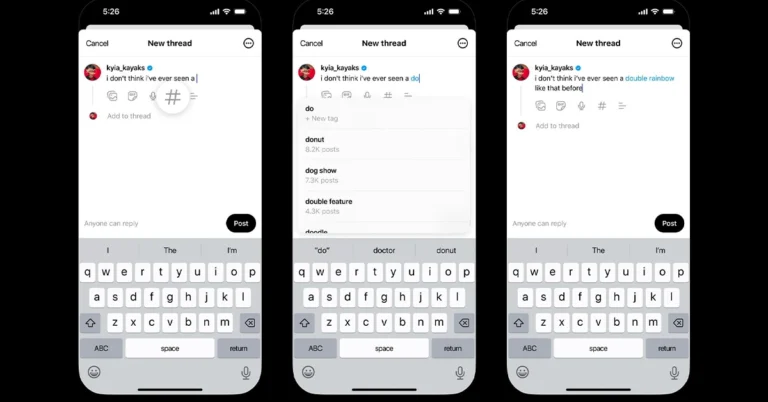
To stay ahead of its competitors, Threads is launching many features these days. Recently it rolled out the option to delete Threads profile without deleting Instagram account altogether. Now the microblogging platform has revealed it has begun testing support for tags just like hashtags on X (formerly known as Twitter). Adam Mosseri, Instagram Chief announced that it has now started testing Tags in order to categorise posts by interest or theme. He said, “By popular demand… we’re rolling out a test in Australia that lets you tag topics on Threads to categorize your posts by interest or theme. Hope this makes it easier to join and follow conversations you care about. In the test? Let us know your feedback.” Also Read: Now Threads profiles can be deleted separately from the Instagram account The feature is currently being Tested in Australia. The Threads Tags can be based on theme or area of interest, indicating that they will function similarly to Twitter hashtags but without a hash. While sharing the news he also shared three screenshots where a Hash icon can be seen among other options just next to the mic icon to the right. While writing a post on Threads tapping the hash icon will begin typing a word and the app will suggest tags to add. The word will then be highlighted in blue similar to hyperlinks on the post. Also when you click on the highlighted or the hyperlink will open more posts tagged. Because Threads profiles are connected to individual Instagram accounts recently Threads also introduced the feature to delete your profile on Threads without removing your Instagram account. To delete your Threads profile, visit Settings → Account → Delete or Deactivate Profile, then select delete. An additional feature that allows users to see Threads posts directly on Facebook and Instagram was introduced too. This will help expand your audience and grow your reach.

YouTube brings new policies regarding AI content, will remove AI-generated content: More on this

Key Highlights
  • YouTube will begin informing viewers when the content they’re seeing is synthetic.
  • A new label will be added that will indicate that some of the content was altered or synthetic.
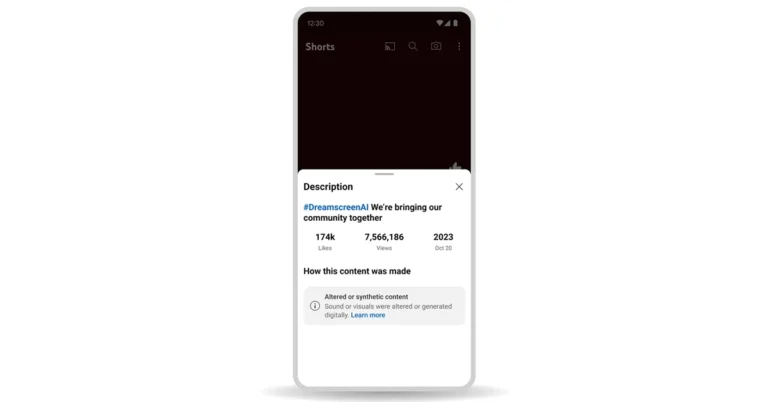
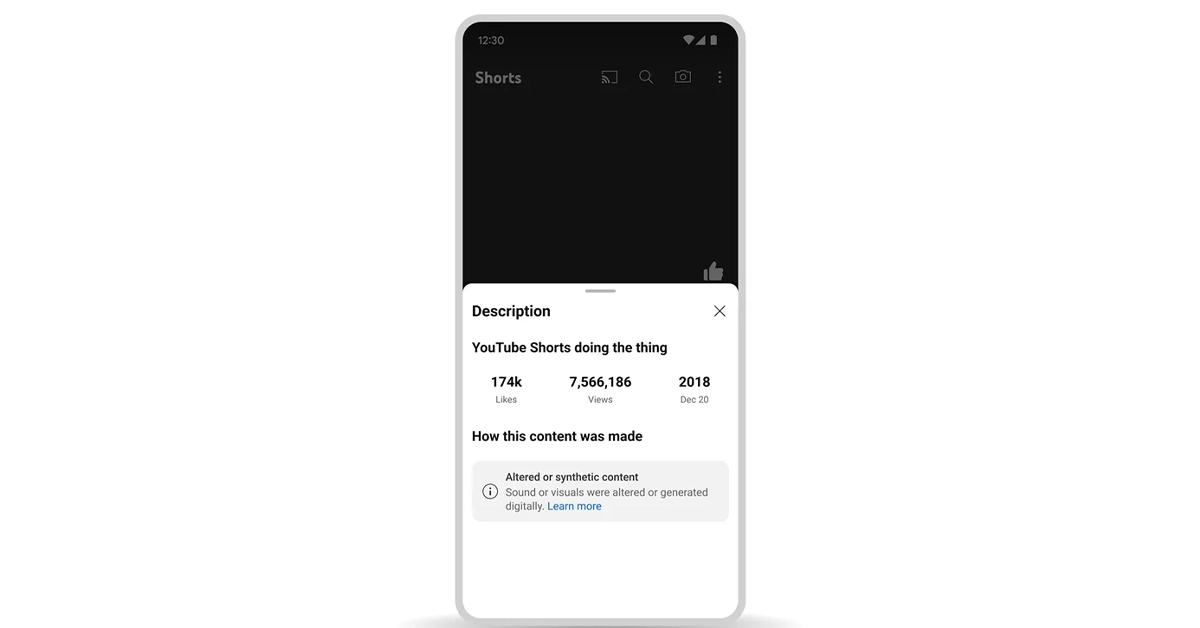
In order to ensure the ethical use of AI, YouTube has brought new policies. It will remove all the AI-generated Deepfake Videos and content that is likely to spread misinformation, content imitating others and more. By setting these standards on the platform the company will tackle difficulties that AI brings on the platform and will inform users on the platform that the content they are viewing is synthetic. YouTube will roll out updates over the coming months and into the new year to protect viewers from AI-generating content uploaded on the platform introducing new risks. The video-sharing platform via its blog post says, “Generative AI has the potential to unlock creativity on YouTube and transform the experience for viewers and creators on our platform. But just as important, these opportunities must be balanced with our responsibility to protect the YouTube community. All content uploaded to YouTube is subject to our Community Guidelines—regardless of how it’s generated—but we also know that AI will introduce new risks and will require new approaches. YouTube brings new policies regarding AI content, will remove AI-generated content: More on this We’re in the early stages of our work and will continue to evolve our approach as we learn more. Here’s a look at what YouTube will roll out over the coming months and into the new year.” The technically manipulated content generated by AI could endanger viewers or mislead them if they don’t know that the video has been edited or is artificially produced. To address this concern, over the coming months, YouTube will begin informing viewers when the content they’re seeing is synthetic. YouTube will as the content creators notify users when they have used artificial intelligence (AI) tools to produce altered or synthetic content. The company will add new options for creators to select when uploading content, allowing them to flag content that includes realistic altered or synthetic material. Note that content creators who choose not to disclose this information may be subject to content removal, suspension from the YouTube Partner Program, or other penalties. YouTube will inform viewers that the content may be altered or synthetic in two ways:
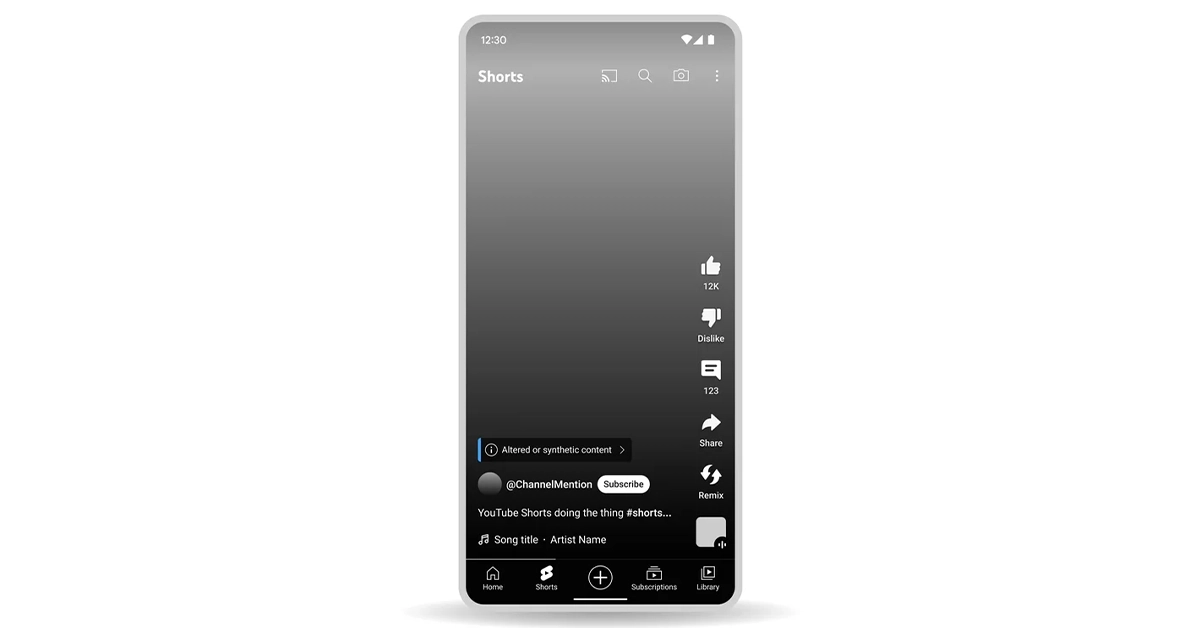
  • A new label will be added that will indicate that some of the content was altered or synthetic.
  • YouTube will apply a more prominent label to the video player for select content about sensitive topics.
YouTube brings new policies regarding AI content, will remove AI-generated content: More on this “We’ve heard continuous feedback from our community, including creators, viewers, and artists, about the ways in which emerging technologies could impact them. This is especially true in cases where someone’s face or voice could be digitally generated without their permission or to misrepresent their points of view,” YouTube said. Soon it would be possible to request the removal of AI-generated or other synthetic or altered content that simulates an identifiable individual, including their face or voice, using our privacy request process. As per YouTube not all content will be removed from YouTube it considers a variety of factors when evaluating these requests. In addition to this music partners can also request the removal of AI-generated music content that mimics an artist’s unique singing or rapping voice. Labels or distributors representing artists participating in YouTube’s early AI music experiments will be able to request these removals. 

WhatsApp’s new feature allows one-on-one voice chats in large groups

Key Highlights
  • This feature is widely available on WhatsApp for Android and iOS
  • Users can start one-on-one communication without ringing the other users in the group chat.
  • Other members of the group will receive a silent push notification.
WhatsApp has released voice chats for large groups to everyone. The feature is compatible with iOS and Android users. The functionality allows users to start calls in private without disturbing others in a large group, therefore conversations between individuals are made easier. WhatsApp took to X to announce that it has started rolling out a voice chat feature for large groups. Also, the feature was revealed by Will Cathcart through his official WhatsApp channel followed by WhatsApp. It is currently available to everyone with the latest versions of WhatsApp for iOS and Android. By introducing this new function WhatsApp is letting users initiate voice chats in group chats without bothering other members of the group. WhatsApp is widely rolling out this functionality to everyone. After updating to the latest versions of WhatsApp for iOS and Android one can join voice chats at any moment. Users can start one-on-one communication without ringing the other users in the group chat. Also Read: Now Threads profiles can be deleted separately from the Instagram account The voice chat will automatically finish after 60 minutes if no one joins. Nevertheless, a new voice chat can be started at any time. As mentioned earlier this feature is accessible for large groups with 33 to 128 members. However, Voice Chats was also tested for smaller groups during the beta testing stage. Note that linked devices do not have access to it. The major benefit of this feature is one can start individual voice chats without ringing all member’s phones in a group. However, another member of the group will receive a silent push notification and those not participating will know who has joined the call directly from the Calls tab and the chat header. But they may also additionally join and exit the call at any moment. As mentioned other members would know about the active call through push notification but they cannot listen to voice chats. Also to protect the privacy of users voice chats in large groups in WhatsApp are end-to-end encrypted.

Garena Free Fire Redeem Codes Today 16 November 2023: Here is how to claim them

Garena Free Fire is a battle royale game with regular awards and tournaments to keep players interested. If you play Garena Free Fire, you should be aware of the redeem codes that are released on a daily basis. However, because the battle royale game is banned in India, players from other countries can use the Free Fire Redeem codes daily. If you’re unfamiliar with the Garena Free Fire redeem codes or don’t know how to get them, we’ve put together a step-by-step guide to help you redeem them. Check out Garena Free Fire Redeem Codes for 16 November 2023. The Free Fire redeem codes are a great way to get free stuff. These are 12-digit codes that contain alphabets and numbers, as well as an expiration date and time. Because the Garena FF redeem codes cannot be used more than once, you should hurry to the redemption page to claim your free reward before someone else does. To get a free reward, all you have to do is go to reward.ff.garena.com/en, which is the official redemption page. Also, keep an eye on this space for daily updates on Garena Free Fire redemption codes and rewards.

Garena Free Fire Redeem Codes Today 16 November 2023

FU5YHGBTNYG9MBK FLOVI8C7DYETG4B FN6MY7LJPNO9BIU FV7YFHDN4M56LYP FU0HLKBVCPYO987 FFYUFJU78SU7YTG FBRNHMKIUYSTGF2 F3BG4N5MTKYLHOI FBVYHDNEK46O5IT FUGYHVBCXMSOUE4 FV7CYTGDBWNMJEK FL5O9YHD87BYVTC FGDEN4M5KVLYHI7 FDYHR6Y7UR674U3 FSY6TGF3BNRMFCI FU7Y6T5SRFRWVB4 FN5TKYLHROVMKLS FOE497MURKNLOBI

How to Get Free Fire Redeem Codes for Garena on 16 November 2023?

  • Visit the Garena Free Fire game’s official website at reward.ff.garena.com.
  • Use your Facebook, Google, VK, Apple ID, Huawei ID, or Twitter account to log in.
  • You’ll be taken to a valid redemption code (s)
  • Copy and paste the 12-digit redemption code into the text box.
  • On the screen, a dialogue box will appear.
  • ‘Ok’ should be selected.
For the latest gadget and tech news, and gadget reviews, follow us on TwitterFacebook and Instagram. For newest tech & gadget videos subscribe to our YouTube Channel. You can also stay up to date using the Gadget Bridge Android App. You can find the latest car and bike news here.

3 Easy Ways to View Your Google Search History

0
With constant connectivity to the internet and the incredible volume of data flowing through our devices, it can get tricky to locate a search query you made months ago. Most people rely on Google to autofill the prompt, but it can prove to be futile if you recently erased your browser’s history. Luckily, your Google Account still maintains a record of past queries. In this article, we bring you the 3 easy ways to view your Google Search History on a PC, iPhone, and Android phone. Read Also: Now Threads profiles can be deleted separately from the Instagram account

View your Google Search History on a PC

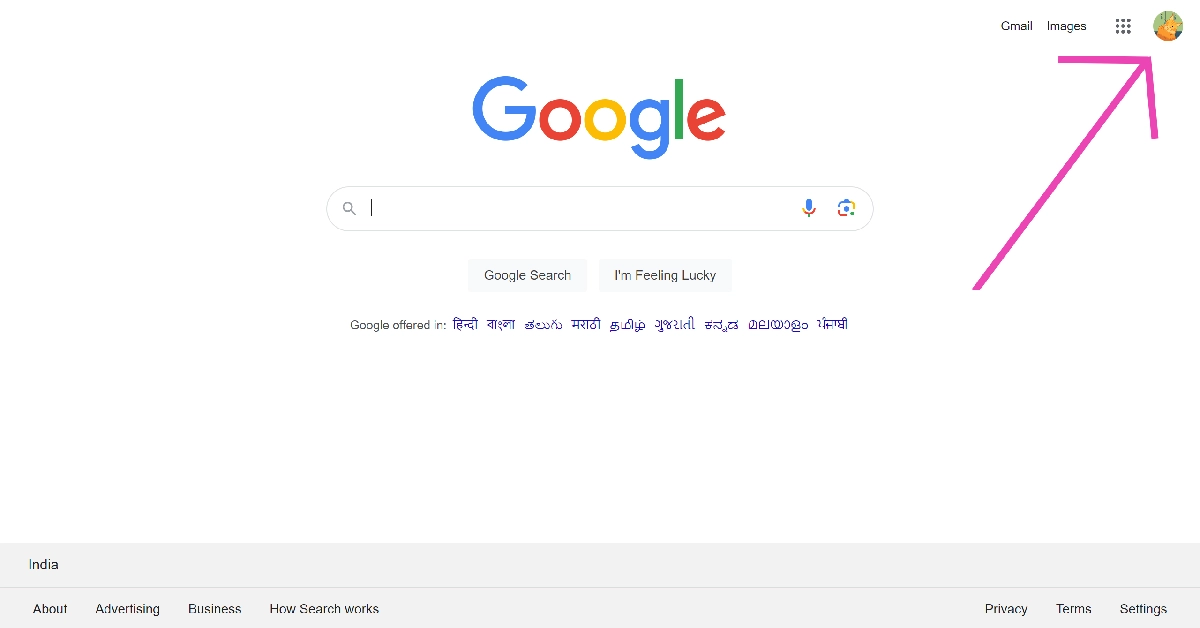
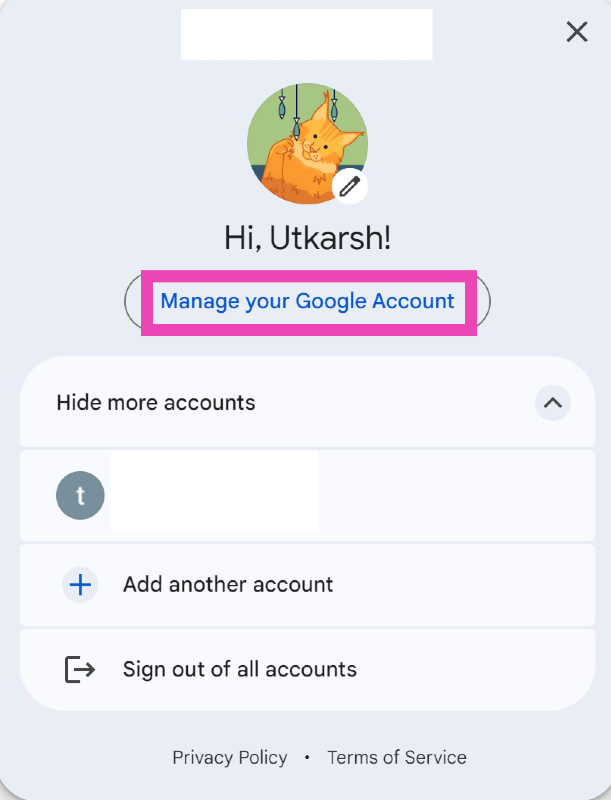
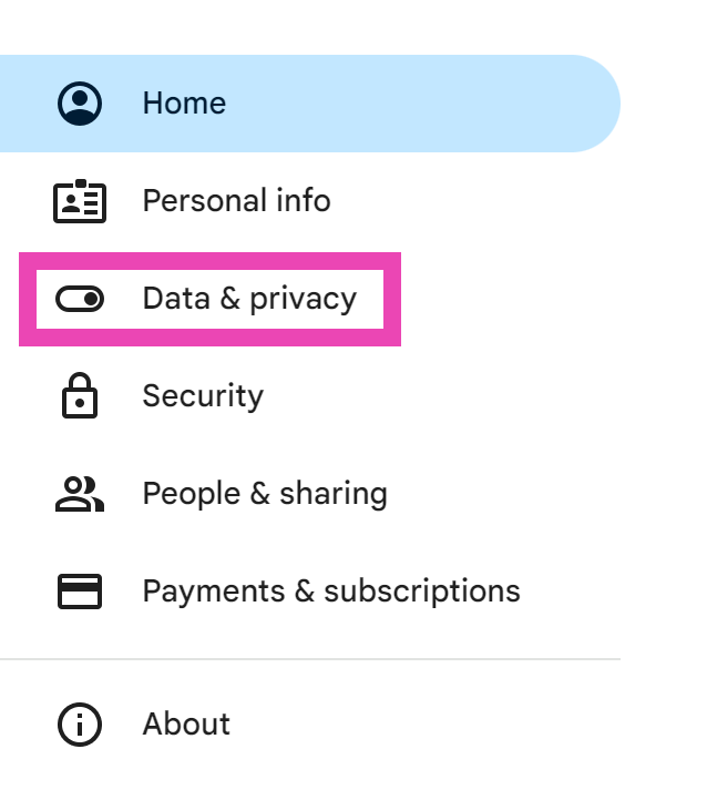
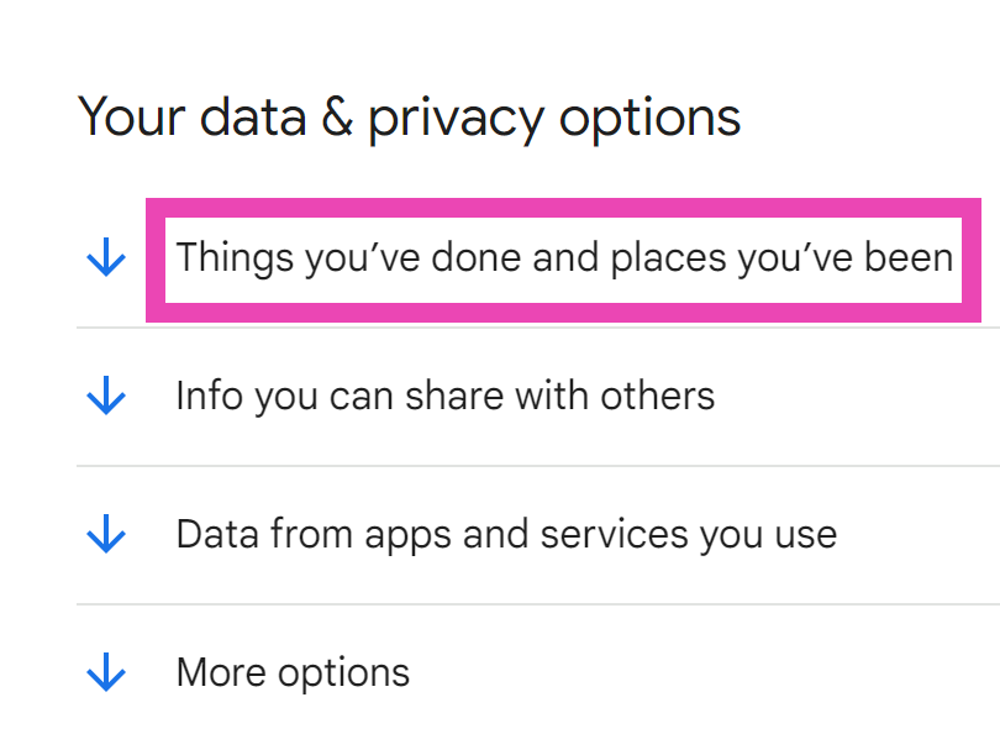
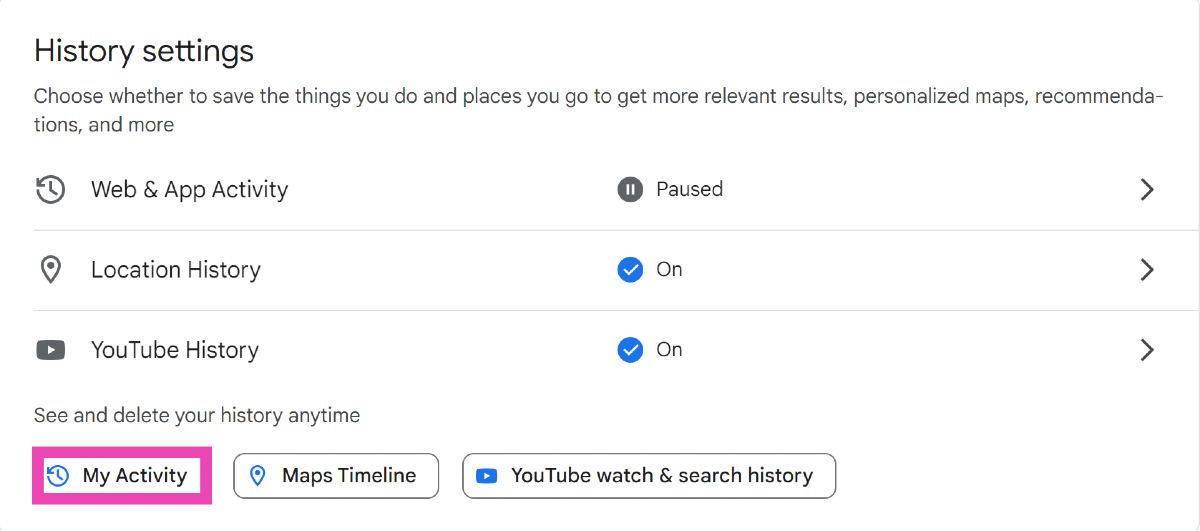
Step 1: Launch your preferred web browser and go to the Google homepage. Step 1: Launch your preferred web browser and go to the Google homepage. Step 2: Click on your profile icon at the top right corner of the screen and select Manage your Google Account. Step 2: Click on your profile icon at the top right corner of the screen and select Manage your Google Account. Step 3: Switch to the Data and privacy tab. Step 3: Switch to the Data and privacy tab. Step 4: Click on ‘Things you’ve done and places you’ve been’. Step 4: Click on ‘Things you’ve done and places you’ve been’. Step 5: Select My Activity. Step 5: Select My Activity. This is where you’ll find your search and watch history.

View your Google Search History on Android

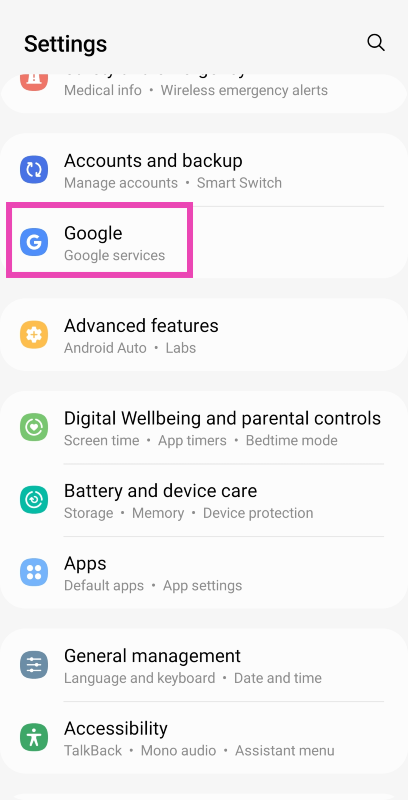
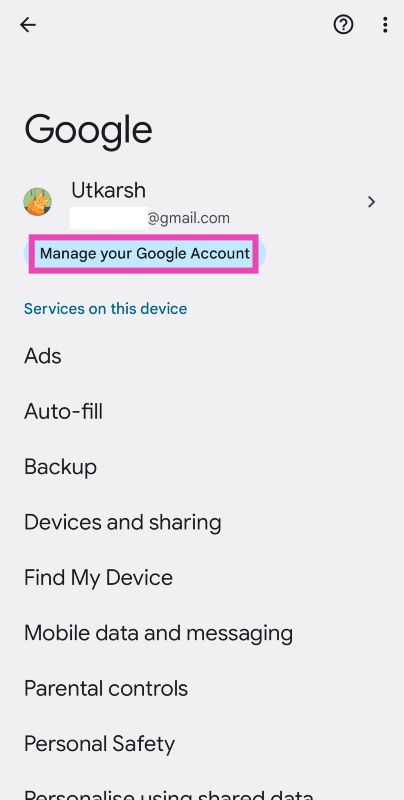
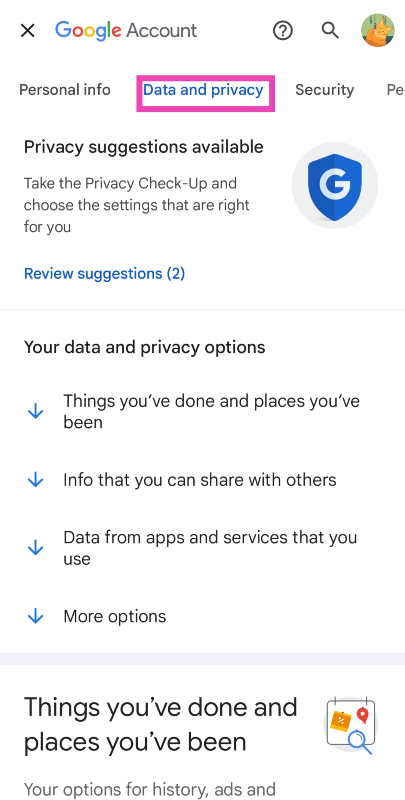
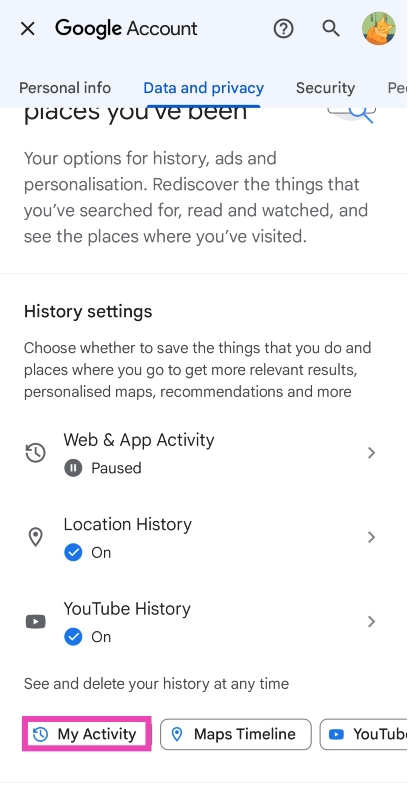
Step 1: Go to Settings and select Google. Step 1: Go to Settings and select Google. 3 Easy Ways to View Your Google Search History Step 2: Tap on Manage your Google Account. Step 2: Tap on Manage your Google Account. 3 Easy Ways to View Your Google Search History Step 3: Switch to the Data and privacy tab. Step 3: Switch to the Data and privacy tab. 3 Easy Ways to View Your Google Search History Step 4: Scroll down and tap on My Activity. Step 4: Scroll down and tap on My Activity. 3 Easy Ways to View Your Google Search History

View your Google Search History on an iPhone

Excessive data usage Step 1: Launch the Google Chrome app and hit the gear icon at the bottom of the screen. Step 2: Select Manage Activity. This is where you’ll find your Google Search History.

Frequently Asked Questions (FAQs)

What activity does my Google Account record other than my search history?

Your Google Account records your web & app history, location history, and YouTube history. You can delete them from the ‘My Activity’ page on your Google Account.

How do I view my Search History on an Android phone?

Go to Settings>Google>Manage your Google Account and tap My Activity.

How do I view my Google Search History on my iPhone?

Launch the Chrome app on your iPhone, hit the gear icon at the bottom of the screen, and select Manage Activity to view your  Search History. Read Also: iQoo 12 listed on Amazon ahead of December 12 India launch

Conclusion 

This is how you can view your Google Search History on a PC, Android phone, and an iPhone. You can also filter the history by date and mass delete the search results from that time period. If you don’t want your Google Account to record your location and search results, simply turn them off from the My Activity page.

Nothing chats launched, allows Phone 2 users to send iMessage via blue bubbles

Key Highlights
  • Nothing Chats can be downloaded from the Google Play Store.
  • Nothing Phone 2 will allow users to send messages from Android to iOS.
  • Messages will be shown in blue bubbles.
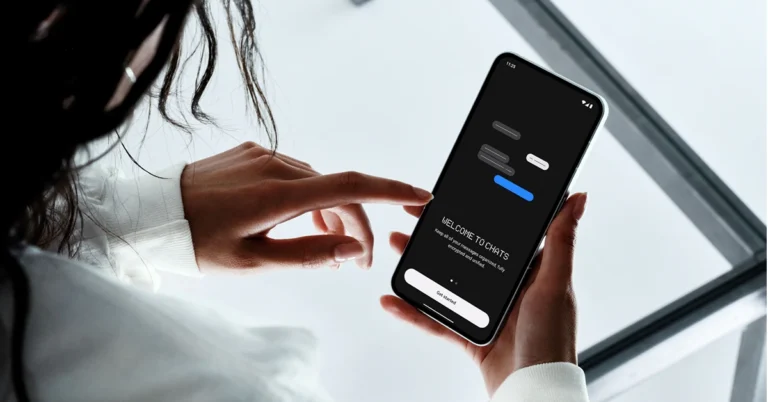
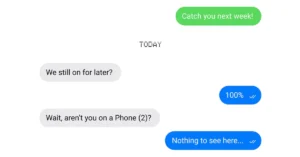
Nothing introduced a new app called Nothing Chats with a blue bubble for text messages to make it compatible with iMessage. The newly arrived feature will let Nothing Phone 2 users send out messages that will appear as blue bubbles just like those in iMessage. The tech firm via its blog post revealed that the newly announced Nothing Chats app is under beta testing. It is said to be made available for Nothing Phone 2 users in select regions at this time. Nothing chats are powered by Sunbird, which allows you to directly message other phone users from your Nothing phone via blue bubbles. While making this announcement Nothing said, “Nothing is the first mobile company to offer a solution to one of the biggest frustrations between Android and iOS users.” Nothing chats launched, allows Phone 2 users to send iMessage via blue bubbles Now that you already know Nothing Chats comes with Blue Bubbles so when you text from Nothing Phone 2 to an iOS device your text will appear in Blue Bubble much like they do with iMessage. Otherwise, when you text from another Android Phone to an iPhone it is shown in a green bubble. Also Read: Now Threads profiles can be deleted separately from the Instagram account According to the company Nothing Chat with blue bubbles will be available to a limited number of Nothing Phone 2 users in the US, Canada, UK, and EU from November 17. Nevertheless, the feature will reach to more regions in the coming weeks or months. The blog post said, “We believe in windows, not walls. If messaging services are dividing phone users, then we want to break those barriers down. Nothing Chats is an app developed in partnership with Sunbird, which allows you to message other users via blue bubbles. We are currently in a Beta phase, which means more features and improvements are coming down the line. Stay in the loop by signing up for updates.” Nothing Phone 2 users will be able to the messaging app from the Google Play Store. Log in with your existing Apple ID username or create a new account to start sending and receiving blue bubbles. Also, all Chat messages are end-to-end encrypted, which means neither we nor Sunbird can access the messages you’re sending and receiving. As per the company Messages are not stored on Sunbird’s servers and are only live on your device – once a message is delivered, it can only be recovered locally from your personal device.