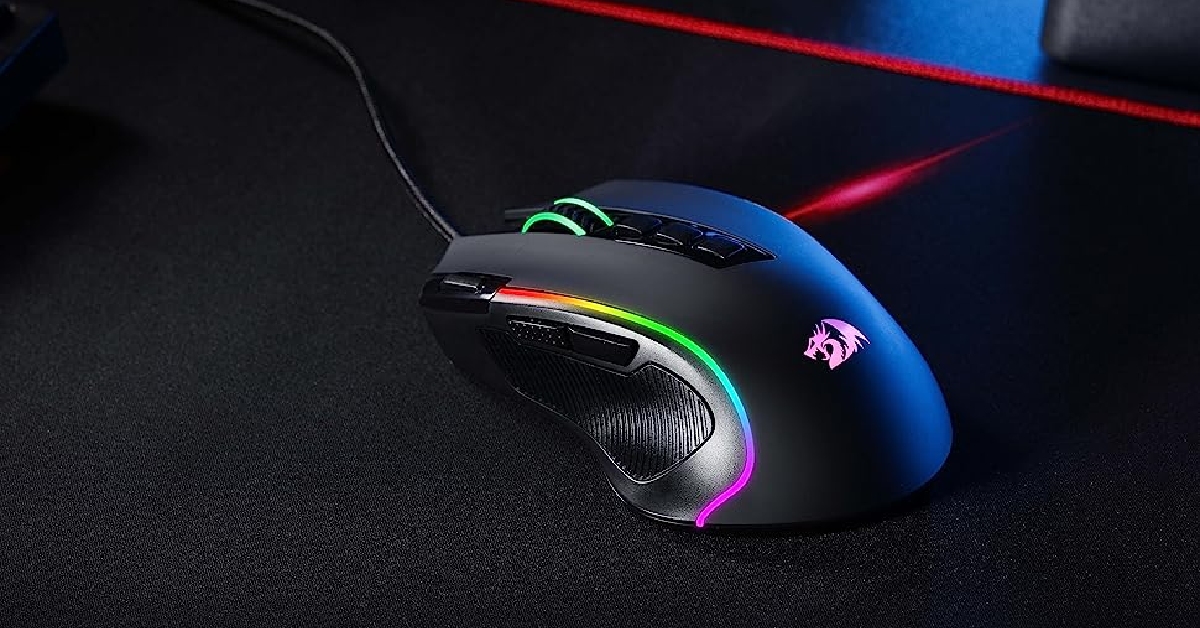
HP announces Pavilion Plus 16 and Plus 14 laptops with AI features in India

HP today introduced a new range of Pavilion Plus laptops in India. The series includes Pavilion Plus 16 and Pavilion Plus 14 laptops. They are powered by the latest 13th Gen Intel Core processors and up to NVIDIA RTX 3050 graphics. In addition to this, they have an IMAX-enhanced display for a superior viewing experience. They are equipped with HP Presence 2.0 for smart AI features plus a 5MP IR camera with a manual camera shutter enhances privacy and security in the hybrid world.

HP Pavilion Plus 16 and Pavilion Plus 14 price in India

The price of the HP Pavilion Plus 16 Laptop starts at Rs 1,24,999. It will come in two colour options of Warm Gold and Natural Silver. On the other hand, the HP Pavilion Plus 14 Laptop price in India starts at Rs 91,999. This model will come in Moonlight Blue and Natural Silver colour options. HP Pavilion Plus 16 and Pavilion Plus 14 price in India Also Read: Apple introduces new affordable Apple Pencil with USB-C: Here is what you should know about the new Apple Pencil

HP Pavilion Plus 16 specifications

The HP Pavilion Plus 16 comes with a 16-inch WQXGA IPS display with 2560 x 1600 pixels of resolution. The screen supports a refresh rate of 120Hz. It has a screen-to-body ratio of 89.74% and a peak brightness of 400 nits. The HP laptop runs on Windows Home 11 and is powered by a 13th Gen Intel Core i7-13700H processor with up to Nvidia GeForce RTX 3050 graphics. The machine is available with 16 GB LPDDR5x RAM, up to 1TB PCIe Gen4 NVMe TLC M.2 SSD storage and 1TB PCIe Gen4 NVMe TLC M.2 SSD storage. The HP Pavilion Plus 16 comes equipped with a 68Wh battery. It has Wi-Fi 6E AX211 (2×2) and Bluetooth 5.3 for wireless connectivity along with Thunderbolt 4 with USB Type-C, port, 1 USB Type-C port, two USB Type-A ports, a 3.5mm audio jack, an AC smart pin, an HDMI 2.1 port for connectivity.

HP Pavilion Plus 14 specifications

HP Pavilion Plus 14 features a 14-inch IMAX enhanced 2.8K OLED display with 2880 x 1800 pixels of resolution. The screen has a 16:10 aspect ratio along with 88% screen-to-body ratio. It supports up to 120Hz refresh rate and 400nits (SDR) and 500 (HDR) brightness. The laptop comes pre-installed with Windows 11 Home Edition. Under the hood, there is a 13th gen Intel Core i7 1355U processor/ up to an AMD Ryzen 7 7840H processor with Intel Iris Xe graphics. It comes with up to 16 GB LPDDR5x RAM and 1 TB PCIe NVMe M.2 SSD. The HP Pavilion Plus 14 is fuelled by a 68Wh battery that supports fast charging. The device comes with a manual camera shutter along with Windows Hello for added privacy.  For the latest gadget and tech news, and gadget reviews, follow us on TwitterFacebook and Instagram. For newest tech & gadget videos subscribe to our YouTube Channel. You can also stay up to date using the Gadget Bridge Android App. You can find the latest car and bike news here.

What Do the Different Icons and Symbols Mean in Google Maps?

3
Google Maps is one of the most important apps on your phone. You can never be truly lost if you know how to use this app. While the app is simple to use, all the symbols and signs on the map can be hard to decipher at times. It doesn’t help that new signs are constantly added to the app. To make things easier, here is the meaning behind all the major icons and symbols on Google Maps. Read Also: Best smartwatch deals to look out for under Rs 5,000 on Amazon

Map Page Icons

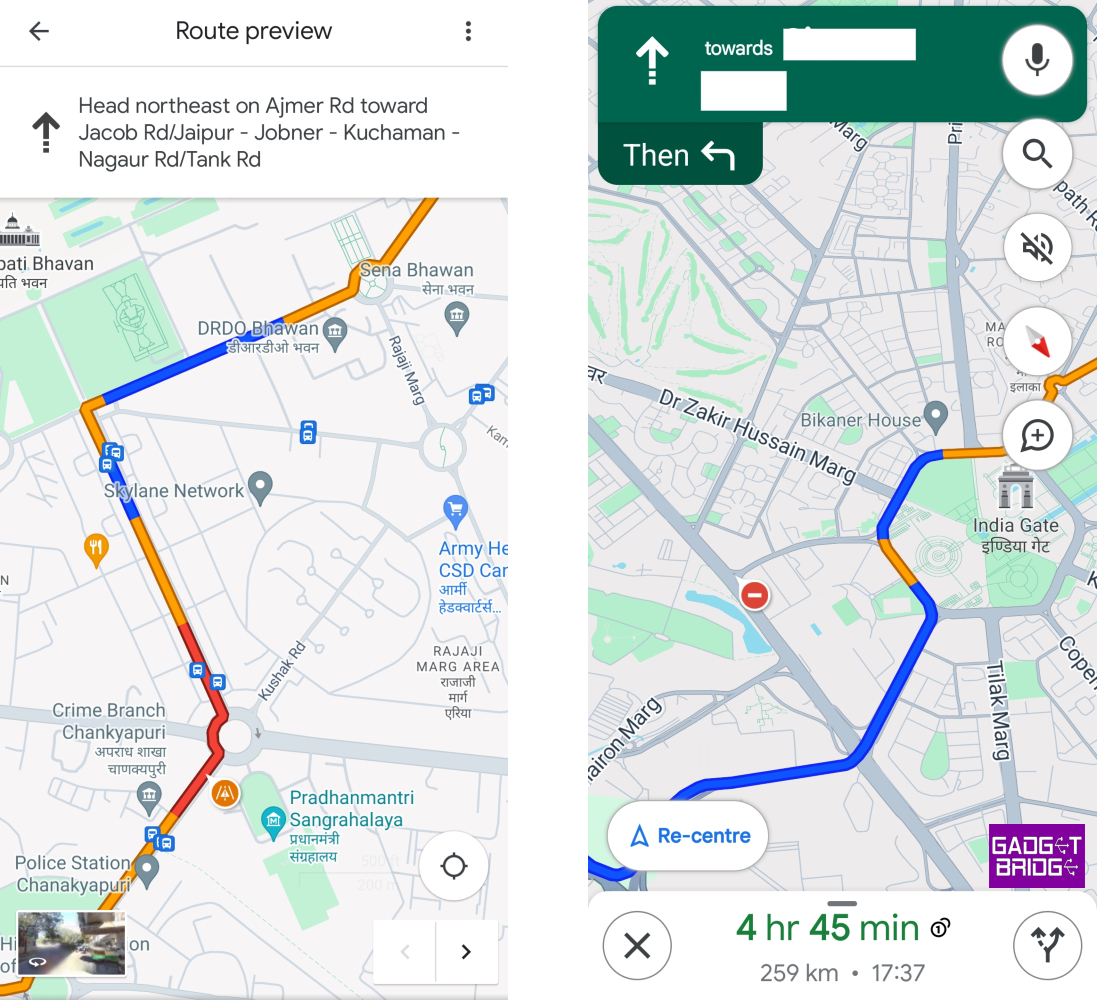
Map Page Icons Target icon: The icon shaped like an aim or a target is the Recentre button that takes you to your current location as soon as it is pressed. Blue icon with an arrow: This icon is placed right below the target icon. Tapping this icon takes you to the journey page, where you can find the route by setting your current location and destination. Compass icon: This is pretty self-explanatory. The red end of the compass points towards the North. Tapping on this compass realigns the map in the proper direction. Layer icon: This icon is placed above the compass icon on the map page. Tapping it lets you change the style of the map. If you want to access Google Street View or Satellite View, this is the button you should hit.

Journey Icons

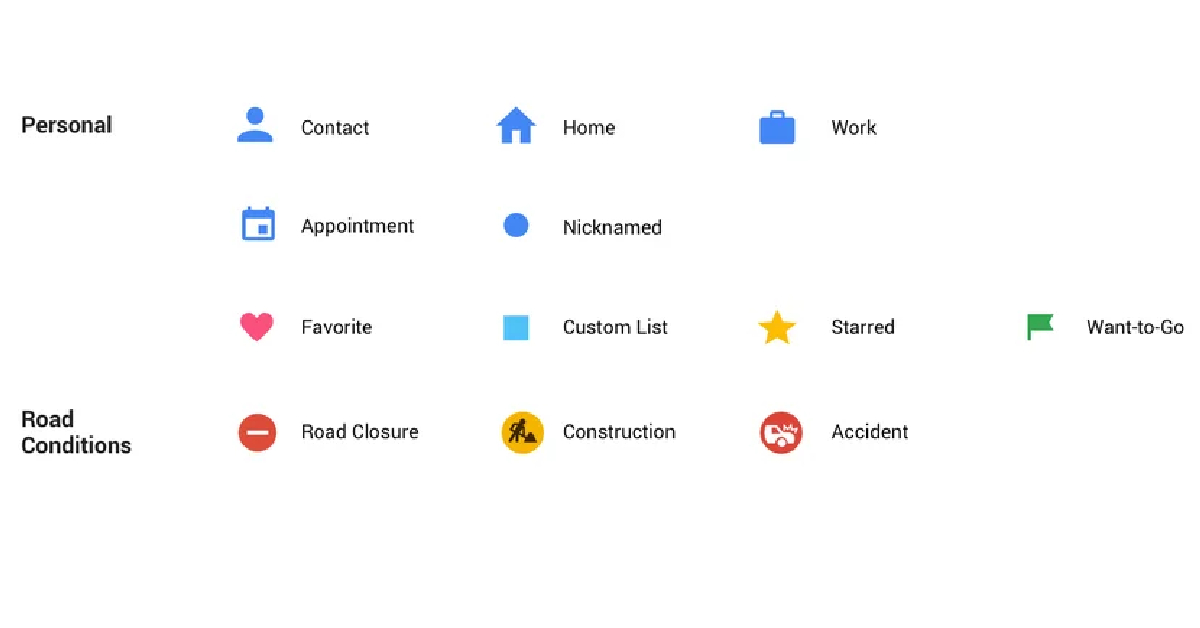
Journey Icons Yellow road: State and national highways are represented with a yellow road on the map. Colour-coded road passage: A blue passage on the map represents that there is minimal traffic on that stretch of the road. Meanwhile, an orange passage means there’s mild traffic on the road and a red passage symbolises stagnant traffic. Red car icon: When you see this icon, it means that there has been a crash or a collision on the road. Exclamation Mark: This icon means that the road ahead is closed. Shovel sign: This icon comes up when the road ahead is under construction. Red icon with a minus sign: This means that the road ahead is closed. Two arrows: Tap this icon to see the bird’s eye view of the route to your destination. Loudspeaker icon: This icon can be used to mute the voice directions. Magnifying glass icon: Searches locations along the route. Plus icon in a chat bubble: This button can be used to add a report about a collision, congestion, roadwork, or any other event along the way. Recentre: This button takes you to your current location.

Icons and Symbols for places on Google Maps

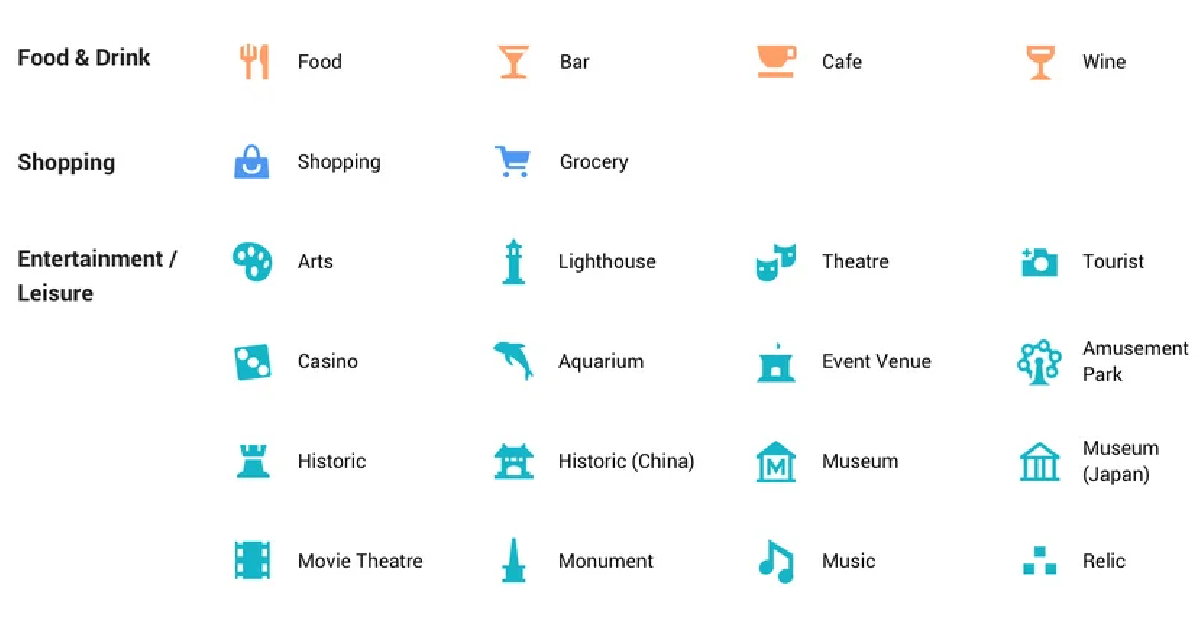
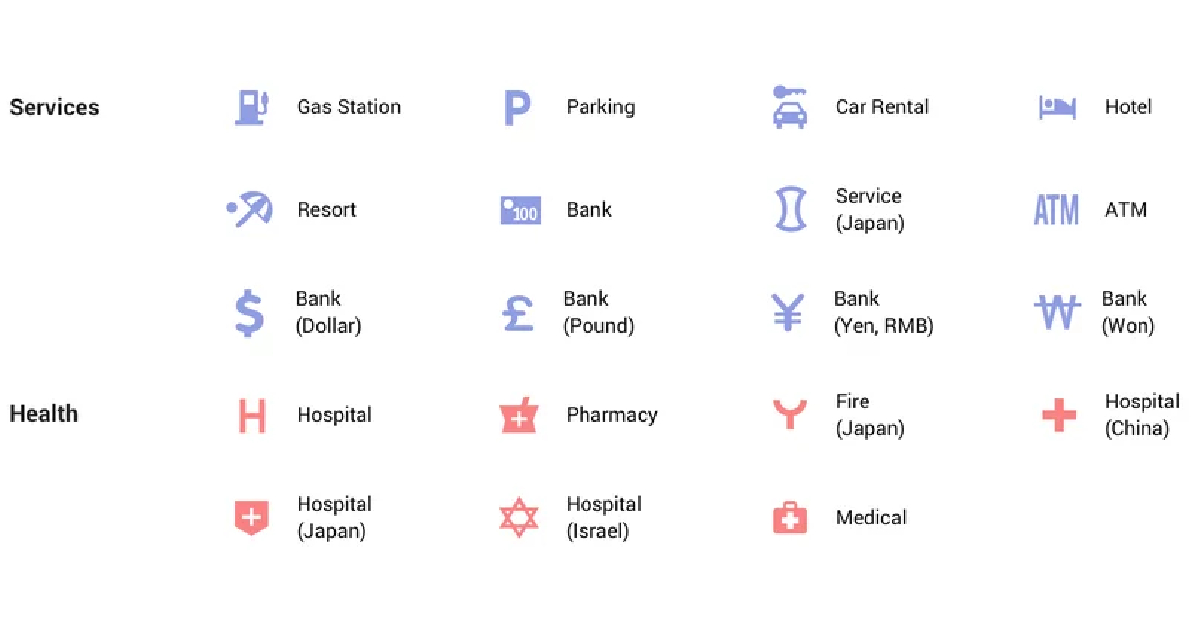
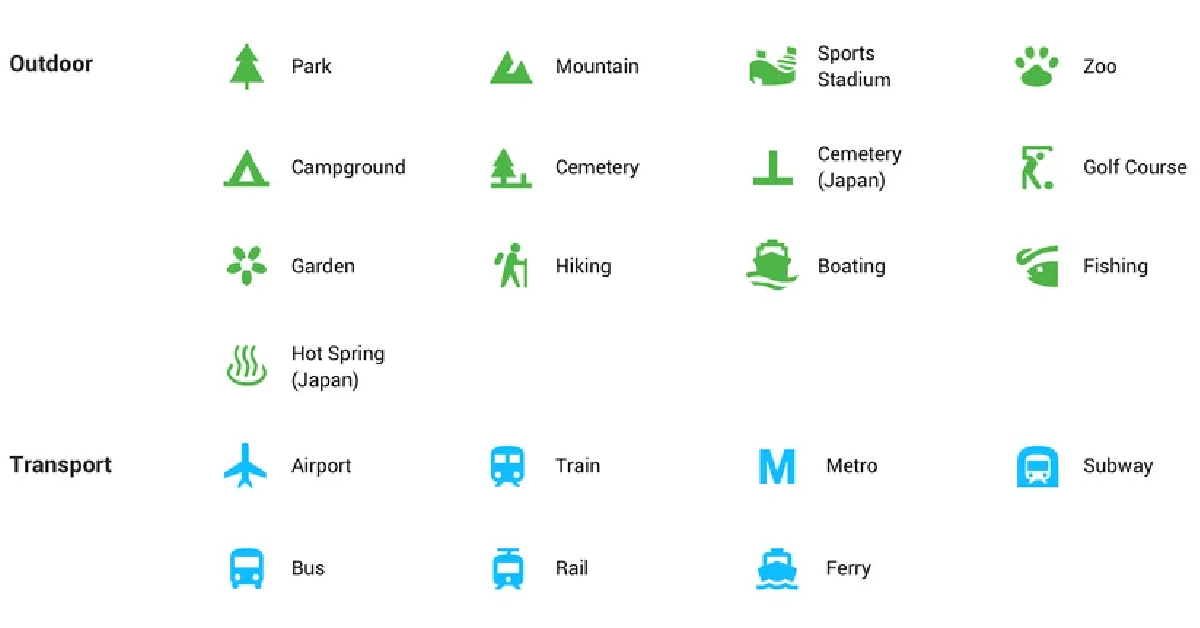
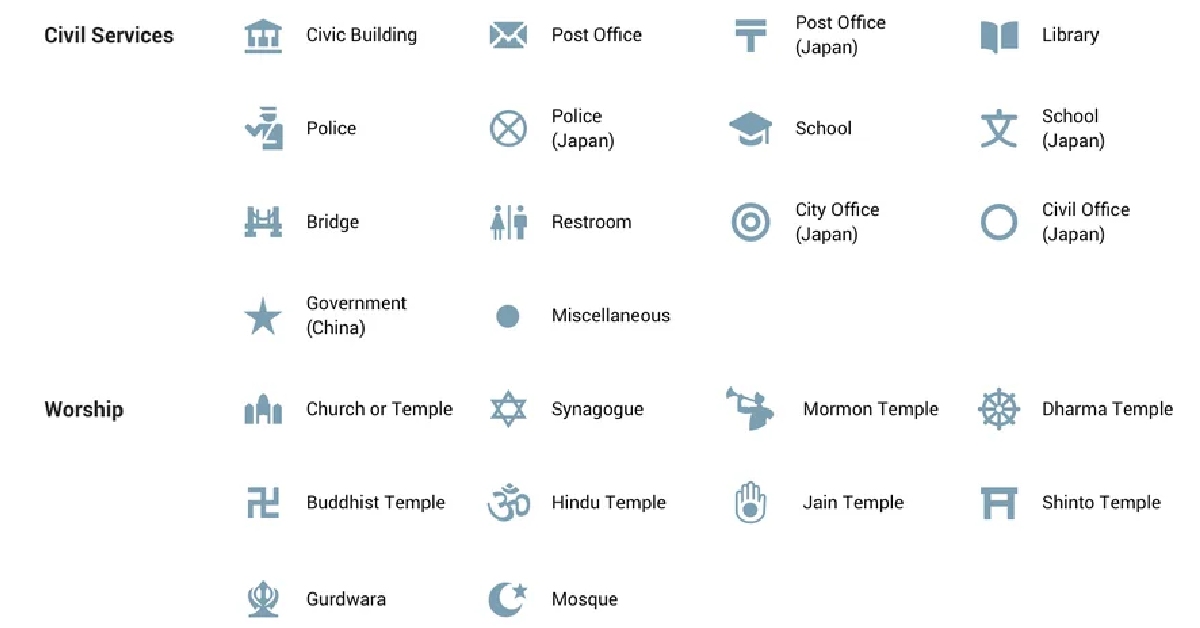
Icons for places Yellow pin with a star: All your saved locations on the map will be marked by this pin. Fork and Knife pin: This pin marks any restaurant or eatery in the area. Tap on the pin to learn more about the restaurant. You can even set it as a destination.  Icons for places What Do the Different Icons and Symbols Mean in Google Maps? Man sleeping on bed pin: This pin is used to mark all the hotels, motels, and hostels on the map. Tap on this pin to get to know all the details about the hotel including availability, price, etc. Academic cap pin: This pin is used for schools, colleges, and other places of learning. Icons for places What Do the Different Icons and Symbols Mean in Google Maps? Gas pump pin: This pin marks all the petrol pumps on the map. Shopping bag pin: Marks the convenience stores, grocery stores, and shopping malls on the map. Icons for places What Do the Different Icons and Symbols Mean in Google Maps? Shopping cart pin: Used for denoting local markets on the map. H pin: Hospitals and medical clinics. Icons for places What Do the Different Icons and Symbols Mean in Google Maps? Places like banks, tourist spots, post offices, parks, sports stadiums, and other places have their exclusive pins too.

Frequently Asked Questions (FAQs)

How do I use navigation on Google Maps to find a route to my desired destination?

Launch the Google Maps app on your phone and tap the blue icon with a right arrow to set your current location and destination. Once that’s done, tap Start to begin navigation.

How do I report a car crash on Google Maps?

To report a car crash on Google Maps, tap the chat bubble icon with a plus icon and select ‘Crash’.

How do I save a location on Google Maps?

To save a location on Google Maps, simply tap on it to drop the pin and hit ‘Save’. Read Also: How to create and disable a passkey for WhatsApp?

Conclusion

These are the major icons, signs, and symbols you will encounter on Google Maps and their respective meanings. If there’s any symbol missing from this list that you can’t decipher on the app, let us know in the comments and we’ll get back to you! For the latest gadget and tech news, and gadget reviews, follow us on Twitter, Facebook and Instagram. For newest tech & gadget videos subscribe to our YouTube Channel. You can also stay up to date using the Gadget Bridge Android App. You can find the latest car and bike news here.

Apple introduces new affordable Apple Pencil with USB-C: Here is what you should know about the new Apple Pencil

Apple has officially announced the launch of an affordable version of Apple Pencil but limited features. Now what’s new about this stylus is that it comes with a USB-C port for charging. Also, it is specially designed for students to take notes on their iPads. It has no pressure sensitivity or double tap to change tools as these features are specifically for artists or designers. Also, it lacks wireless pairing and free engraving. It still attaches magnetically to your iPad but cannot charge wirelessly. New Apple Pencil with USB price in India

New Apple Pencil price in India and sale details

The new affordable Apple Pencil has been launched in India with a price tag of Rs 7,990. However, students will be able to purchase the device at Rs 6,990. It is said to go on sale in the country starting in November. Also Read: Oppo Festive offer announced, purchase an Oppo smartphone to win 5 cash prizes of Rs 10 lakh each

New Apple Pencil features

The new Apple Pencil is an affordable variant of Apple Pencil (2nd gen). The device is even cheaper than Apple Pencil (1st gen). It works with all iPad models that have a USB-C port. The device is attached magnetically to the iPad thanks to the flat edge. However, it cannot be charged wirelessly unlike the upper variant of the Stylus. So one needs to pair and charge it to the iPad using a USB cable by sliding the cap on the top. The new Apple Pencil also has a matte finish. According to the company, the device when magnetically attached to an iPad for storage, enters into a sleep state to preserve battery life. Apple-Pencil-USB-C It can be used for note-taking, sketching, annotating, journaling, and more but cannot be used by artists or designers. That’s because it lacks some important features like pressure sensitivity or double tap-to-change tools. It also works with iPadOS features like Scribble, and Quick Note, and when collaborating with others in Freeform. Users can sketch and illustrate with even greater precision when used with M2 models of iPad Pro, the new Apple Pencil supports hover. The newly launched Apple Pencil is also compatible with iPad (10th generation) and can also be paired with all iPad models that have a USB-C port, including iPad Pro, iPad Air, and iPad mini. For the latest gadget and tech news, and gadget reviews, follow us on TwitterFacebook and Instagram. For newest tech & gadget videos subscribe to our YouTube Channel. You can also stay up to date using the Gadget Bridge Android App. You can find the latest car and bike news here.
Garena Free Fire Redeem Codes Today 18 October 2023: Here is how to claim them

Garena Free Fire is a battle royale game with regular awards and tournaments to keep players interested. If you play Garena Free Fire, you should be aware of the redeem codes that are released on a daily basis. However, because the battle royale game is banned in India, players from other countries can use the Free Fire Redeem codes daily. If you’re unfamiliar with the Garena Free Fire redeem codes or don’t know how to get them, we’ve put together a step-by-step guide to help you redeem them. Check out Garena Free Fire Redeem Codes for 18 October 2023. The Free Fire redeem codes are a great way to get free stuff. These are 12-digit codes that contain alphabets and numbers, as well as an expiration date and time. Because the Garena FF redeem codes cannot be used more than once, you should hurry to the redemption page to claim your free reward before someone else does. To get a free reward, all you have to do is go to reward.ff.garena.com/en, which is the official redemption page. Also, keep an eye on this space for daily updates on Garena Free Fire redemption codes and rewards.

Garena Free Fire Redeem Codes Today 18 October 2023

updating soon…

How to Get Free Fire Redeem Codes for Garena on 18 October 2023?

  • Visit the Garena Free Fire game’s official website at reward.ff.garena.com.
  • Use your Facebook, Google, VK, Apple ID, Huawei ID, or Twitter account to log in.
  • You’ll be taken to a valid redemption code (s)
  • Copy and paste the 12-digit redemption code into the text box.
  • On the screen, a dialogue box will appear.
  • ‘Ok’ should be selected.
For the latest gadget and tech news, and gadget reviews, follow us on TwitterFacebook and Instagram. For newest tech & gadget videos subscribe to our YouTube Channel. You can also stay up to date using the Gadget Bridge Android App. You can find the latest car and bike news here.

How to Access Your Home WiFi Router Remotely? Top best ways

0
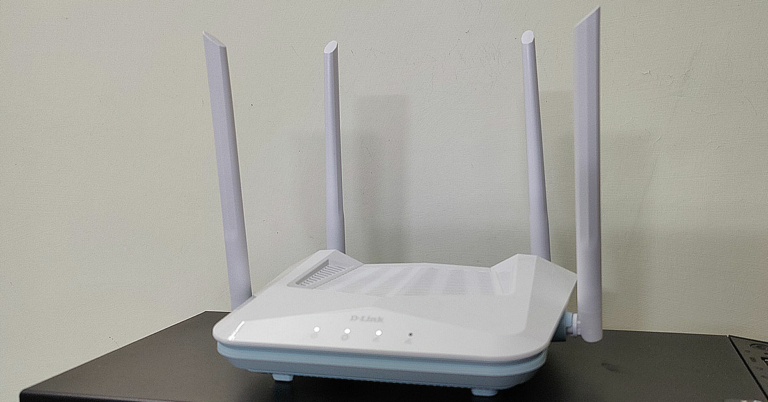
One of the most underrated features of your home WiFi router is remote management. This function allows you to access the router no matter where you are. You don’t need to be connected to the home network to change the router’s password or monitor who is actively using the network. If you’ve got elderly parents at home who don’t know how to navigate their way around the router’s settings, this feature will come in extremely handy. So, without further ado, here are the best ways to access your home WiFi router remotely. Read Also: How to Create a Link for PDF with SwifDoo PDF?

Turn on Remote Management on your WiFi Router’s gateway

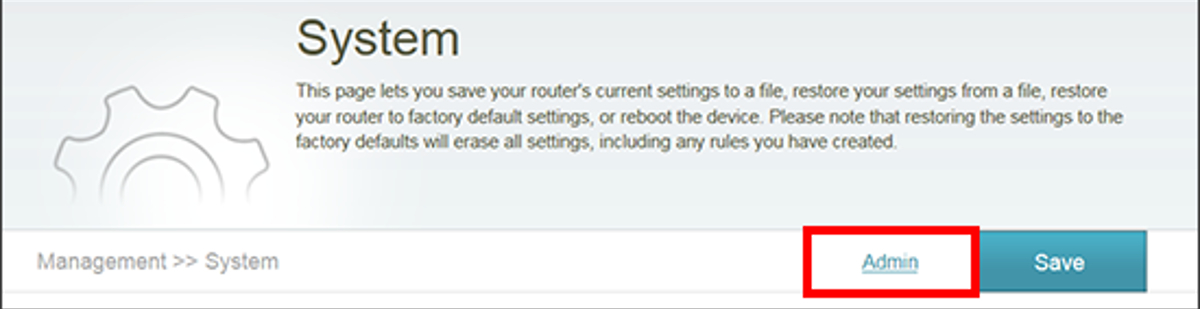
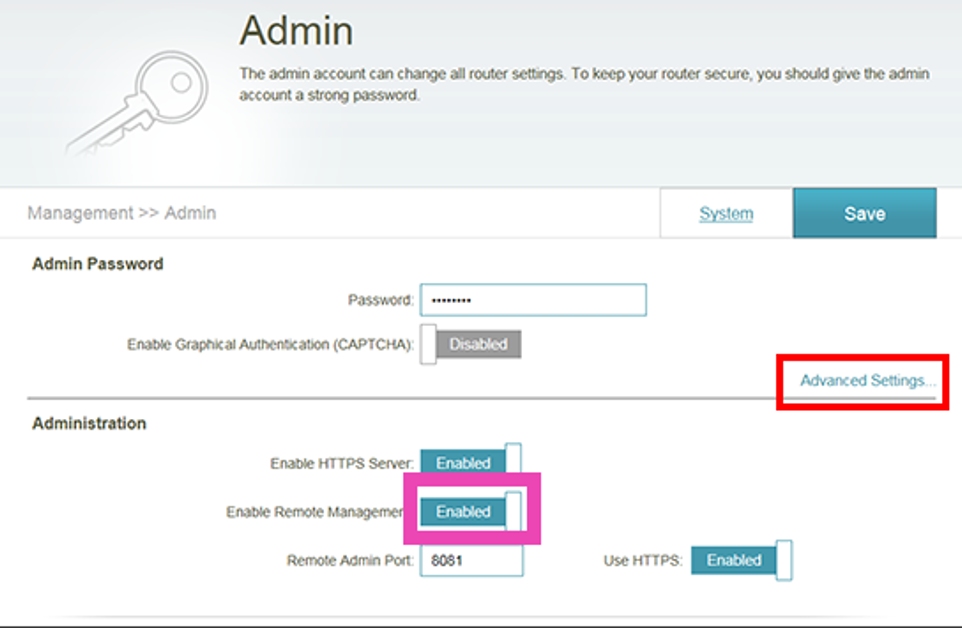
Step 1: Type http://192.168.1.1/ on your web browser and hit Enter to access your WiFi router‘s gateway page. Step 2: Log in using the valid credentials. Step 3: Go to the Management tab and click on System Admin. Then select Admin. Step 3: Go to the Management tab and click on System Admin. Then select Admin. Step 4: Turn on the toggle switch for Enable Remote Management. Step 4: Turn on the toggle switch for Enable Remote Management. How to Access Your Home WiFi Router Remotely? Top best ways Step 5: Note your Remote Admin Port Number. Step 6: Hit Save. Step 7: Launch the web browser on another device that is not connected to your WiFi. Step 8: Enter the IP address of your router followed by ‘:Remote Admin Port number’ and hit Enter. For example, if your IP address is 192.168.1.254 and the Management Port number is 8080, type 192.168.1.254:8080 in the address bar and hit Enter. Make sure your Management Port number and login credentials are unique so no one else can log into your WiFi network.

Use Dynamic DNS to access your WiFi router remotely

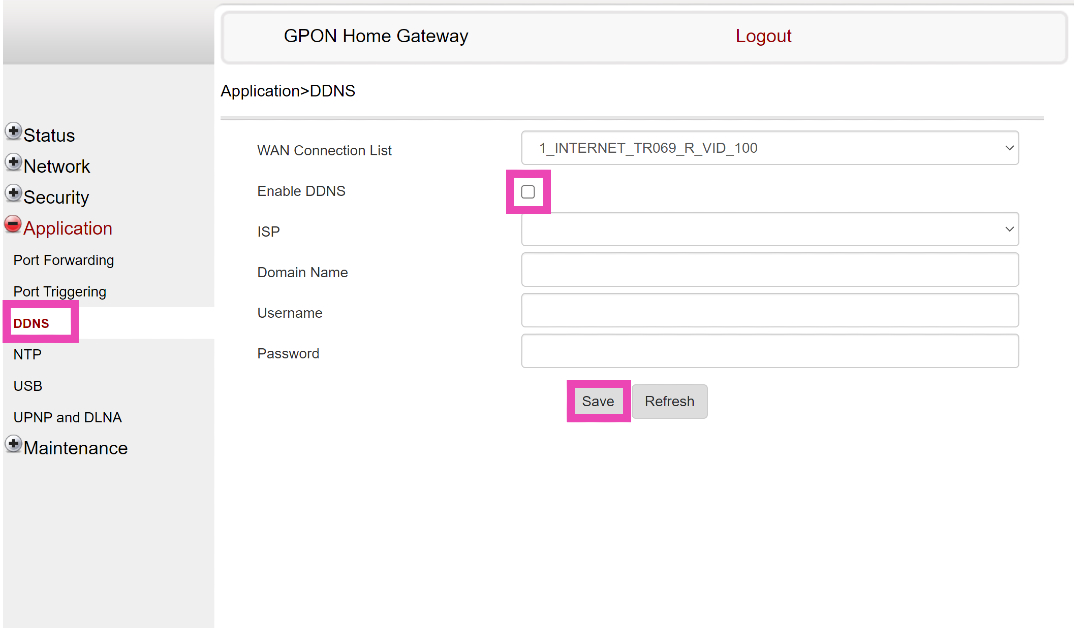
Step 1: Log in to your WiFi router’s gateway using the proper credentials. Step 2: In the Application section, select DDNS. The placement of the DDNS page may vary among different router gateways. Step 3: Click on Enable DDNS and set it up by entering the ISP, Domain name, username, and password. Step 3: Click on Enable DDNS and set it up by entering the ISP, Domain name, username, and password. How to Access  and manage Your Home WiFi Router Remotely? Top best ways Step 4: Enter the domain name on another device that isn’t connected to your WiFi network to manage your router.

Frequently Asked Questions (FAQs)

Is it possible to manage my WiFi router even if I am not connected to the network?

Yes, you can remotely manage your WiFi router by enabling Remote Management from Admin Settings on your WiFi’s gateway page or by setting up a Dynamic DNS.

How do I access my WiFi router remotely?

After enabling Remote Management on your WiFi router’s gateway page, enter its IP address in the web browser followed by ‘:’ and the Remote Admin Port number.

How do I set up Dynamic DNS for my WiFi router?

Go to your WiFi router’s gateway page and select Application>DDNS. Enter the domain name, ISP, username, and password to set it up. Read Also: Instagram not sharing to Facebook? Try these 5 easy fixes

Conclusion 

These are the two easy ways to access your home WiFi router remotely. While setting up the remote management feature on your WiFi’s gateway page, make sure you change the login credentials to something unique, so as to not risk anyone else getting access to your router. For the latest gadget and tech news, and gadget reviews, follow us on Twitter, Facebook and Instagram. For newest tech & gadget videos subscribe to our YouTube Channel. You can also stay up to date using the Gadget Bridge Android App. You can find the latest car and bike news here.

Oppo Festive offer announced, purchase an Oppo smartphone to win 5 cash prizes of Rs 10 lakh each

Oppo has officially revealed the Oppo Festive Offer on its platform ahead of Diwali. Customers will get exciting discounts on its smartphones including till November 19. According to the company, those purchasing devices during the sale period will automatically qualify for a bumper Diwali raffle and other incredible prizes. Oppo has announced ‘OPPO Festive Offer’ from October 16 to November 19 in India. The company will be offering discounts up to Rs 6000 on its smartphones with a 10% instant discount. As per Oppo buyers can save up to Rs 13000 on IoT products. In addition to this, there will be up to 83 percent off on accessories. Oppo Reno 10, Oppo A18, Oppo A38, Oppo A58 and Oppo A78 are some of the smartphones that will be part of the festive deals. Also Read: Best smartwatch deals to look out for under Rs 5,000 on Amazon As mentioned earlier those making purchases during the Oppo Festive Offer Sale will be eligible for a special Diwali raffle and win exciting prizes. Oppo customers have the chance to win 5 cash prizes of Rs 10 lakh each. The grand prize of Rs 10 lakhs will be credited to the winner’s account after verification, with applicable TDS deductions according to IT Act regulations. Also, two lucky winners can win 2 motorbikes. Oppo will also be giving away 9 tickets to the ICC semi-final or final match. There are also chances to win 10 gold coins and 5 Oppo Pads. Consumers can also win 500+ coupons, ranging from Rs 50 to Rs 100. 100 reward points on every purchase, which can be used in the OPPO Store. Note that the names of all winners will be announced on the My OPPO app. Lucky winners will be notified through email. Physical rewards will be delivered to the provided customer addresses. How to Qualify for the Campaign? To participate, simply follow the steps below:
  • Purchase any Oppo smartphone during the campaign period
  • Then you need to create a My OPPO account
  • Receive an assured giveaway on-device activation and be entered into the raffle
  • Check the activation date in ‘Me-E-Warranty’ on My OPPO
For the latest gadget and tech news, and gadget reviews, follow us on TwitterFacebook and Instagram. For newest tech & gadget videos subscribe to our YouTube Channel. You can also stay up to date using the Gadget Bridge Android App. You can find the latest car and bike news here.

Best smartwatch deals to look out for under Rs 5,000 on Amazon

Great Indian Festival sale on Amazon is currently live. Smartwatches and other products are heavily discounted on the e-commerce platform. So this is the right time to upgrade your smartwatch. So that you don’t miss out on these excellent deals we have listed down a few smartwatch offers under Rs 5,000 that you may keep an eye out for during the festive sale on Amazon

Here are the top deals on smartwatches available.


OnePlus Nord Watch

OnePlus Nord Watch price in India, sale details The original cost of the OnePlus Nord Watch in India is set at Rs 4,999. But at Amazon during the Great Indian Festival Sale, the device can be purchased for Rs 3,999. It comes in Deep Blue and Midnight Black colour variants. The OnePlus Nord Watch features a 1.78-inch HD AMOLED touchscreen display which supports a 60Hz refresh rate and a maximum brightness of 500 nits. It runs on RTOS and is powered by an SF32LB555V4O6 chipset. The smartwatch comes with 105 sports modes and includes heart rate and stress monitoring, as well as measuring SpO2 and sleep. The GPS functionality is embedded into the smartwatch. The device has a 230mAh battery which is said to last up to 10 days and a standby time of up to 30 days. Additionally, it is compatible with both Android smartphones and iPhone models running iOS 11 and later, as well as Android 6 on Android devices.

Redmi Watch 3 Active

Redmi Watch 3 Active price in India and sale details Redmi Watch 3 Active was launched at Rs 2,999 but on Amazon, it can be purchased at Rs 2,599. The company offers it in two colour options – Platinum Grey and Charcoal Black and Olive Green strap. The Redmi Watch 3 Active comes with a 1.83-inch LCD screen and 450-nit screen brightness. The device is 5ATM water resistant. It includes over 100 sports modes. Apart from this, it includes blood oxygen level sensors, heart rate monitors, and sleep-tracking technology. There is a 289mAh battery on the watch which is said to last up to 12 days with moderate use and up to 8 days under heavy use. It can be paired with Android 6.0 and iOS 12 mobile devices. Additionally, the Redmi watch can store up to 10 contacts and allows users to view recent call logs with up to 20 entries.

Redmi Watch 2 Lite

Xiaomi Redmi Watch 2 Lite Review: Elegant Design With A Thorough Health Check System Redmi Watch 2 Lite arrived in India with a price tag of Rs 4,999. But currently, it is selling at Rs 1,799 during the Amazon Great Indian Festival Sale. It is offered in Ivory, Black, and Blue colour variants. The Redmi Watch 2 Lite comes with a 1.55-inch TFT display with a maximum brightness of 450 nits. There are 100 fitness modes on the smartwatch. It is only compatible with Android devices. Also, the watch is water-resistant up to 50 metres and supports snorkelling, diving, and rafting. Also Read: Samsung Galaxy Z Flip 5 is now available in a new shade: The price of the new colour variant The Redmi watch includes built-in GPS tracking. There is a blood oxygen saturation level (SpO2) scanner, 24-hour heart rate monitoring, sleep and stress monitoring, and other features. The Redmi Watch 2 Lite sports a 262mAh battery that is touted to last for 14 hours with continuous GPS-enabled and up to 10 days when turned off.

Amazfit Bip 3 Pro

Amazfit Bip 3 Pro is now selling at Rs 3,999 on Amazon. The Amazfit Bip 3 Pro comes with a 1.69-inch TFT display with 2.5D tempered glass with anti-fingerprint coating protection. The smartwatch includes 0 sports modes including indoor and outdoor workouts. The smart wearable supports GPS tracking. It includes all the health-related features such as heart rate monitoring, blood oxygen saturation (SpO2) monitoring, stress and sleep tracking, breathing exercises, and female health tracking. The 280mAh battery on the watch is claimed to offer up to 14 days of battery life on a single charge. It is compatible with iOS and Android.

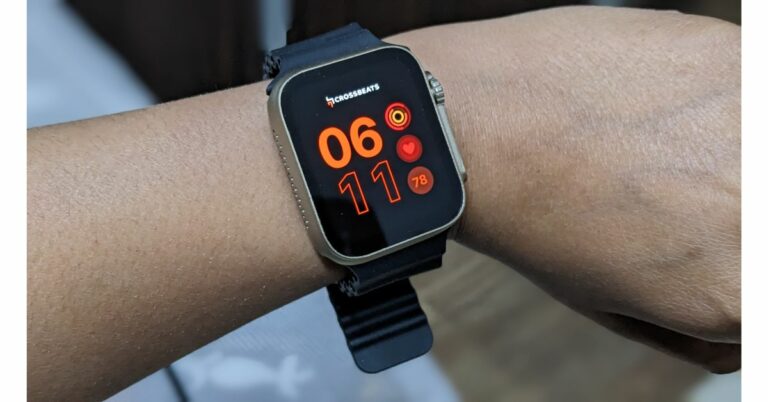
CrossBeats Ignite Surge

review of Crossbeats Ignite Surge The CrossBeats Ignite Surge is priced at Rs 3,499 but currently, it is available at Rs 2,999 on Amazon. There are three colour options for the watch Black, Gold and Silver. CrossBeats Ignite Surge includes a 1.8-inch edge-to-edge AMOLED display with 1,000 nits of screen brightness. It comes with more than 00 interchangeable watch faces. The smartwatch is compatible with iOS and Android devices. There are 25 training modes and AI health monitoring on the smartwatch. It comes with a 300mAh battery that provides up to five days of battery life. For the latest gadget and tech news, and gadget reviews, follow us on TwitterFacebook and Instagram. For newest tech & gadget videos subscribe to our YouTube Channel. You can also stay up to date using the Gadget Bridge Android App. You can find the latest car and bike news here.

How to create and disable a passkey for WhatsApp?

0
Passkey authentication is quickly becoming the norm for app security. Back in June, Google rolled out passkey support for the wider audience, allowing users to log into their Google Account using their fingerprint, lock screen PIN, or face unlock. Passkeys save the trouble of remembering multiple passwords for the different apps and services you use on your device. Since passkeys are stored on your device itself, they are harder to reach for hackers. WhatsApp is the most recent platform to adopt passkey support. In this article, we show you how to create and disable a passkey on WhatsApp. Read Also: Vivo Y200 confirmed to launch in India on October 23

Create a passkey on WhatsApp

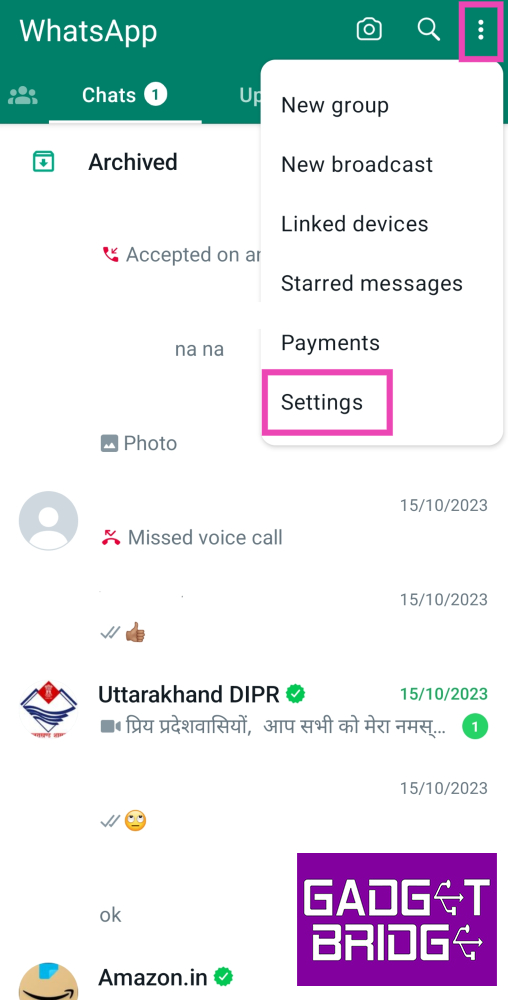
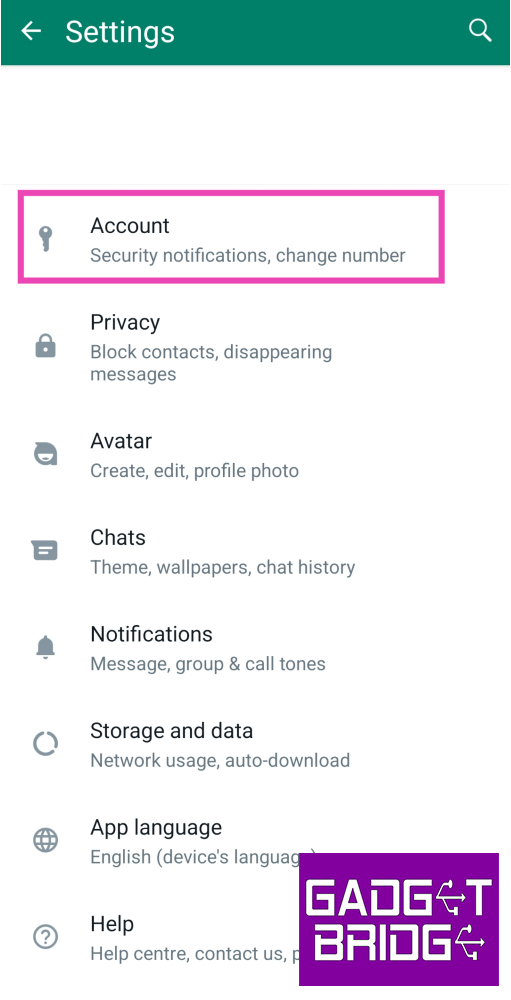
WhatsApp Feature: WhatsApp Testing Multi-Account Feature For Android beta Step 1: Launch the WhatsApp app on your device and tap the ellipses at the top right corner of the screen. Step 2: Tap on Settings. Step 2: Tap on Settings. How to create and disable a passkey for WhatsApp? Step 3: Select Account. Step 3: Select Account. How to create and disable a passkey for WhatsApp? Step 4: Tap on Passkeys. Step 5: Select Create a Passkey. Step 6: Choose what kind of passkey you want to create. You can set up a PIN, fingerprint, or face unlock. You can set up the same PIN as your phone’s lock screen or choose a different code. If you already use fingerprint or face unlock for your phone’s lock screen, you won’t have to set them up again for the passkey. Step 7: To disable a passkey on WhatsApp, simply go back to Passkeys in Account settings and hit Revoke.

Frequently Asked Questions (FAQs)

What is a passkey on WhatsApp?

A passkey allows you to access your WhatsApp account using your fingerprint, face unlock, or lock screen PIN.

How is a passkey different from an app lock?

An app lock is specific to the app on your phone, meanwhile, a passkey is a security feature for your account. If you log into WhatsApp on another device, you will need to authenticate it using your passkey.

How do I create a passkey for WhatsApp?

To create a passkey for WhatsApp go to Settings>Account>Passkey and select what kind of authentication you want to set up. Read Also: Best Flip Phones in India (2023) to buy this festive season

Conclusion

This is how you can create or disable a passkey for WhatsApp. To learn how to do the same for your Google Account, read this article. Apart from Passkeys, WhatsApp also lets users protect their private chats using chat lock. For now, the messenger also has two-factor authentication, but it may be entirely replaced by passkeys in future. For the latest gadget and tech news, and gadget reviews, follow us on Twitter, Facebook and Instagram. For newest tech & gadget videos subscribe to our YouTube Channel. You can also stay up to date using the Gadget Bridge Android App. You can find the latest car and bike news here.

Top 5 Gaming Mice under $50 for Counter-Strike 2

The much-awaited Counter-Strike 2 is finally here and it can easily be deemed an instant success. If you haven’t dived into the game yet, it’s best to do so with a dedicated gaming mouse that can handle the demands of intense FPS gaming. For new gamers, an expensive gaming accessory may be out of the question. So, today we bring you the top 5 gaming mice under $50 for playing Counter-Strike 2. Read Also: Best Flip Phones in India (2023) to buy this festive season

SteelSeries Rival 3

Price: $39.99 on SteelSeries.com SteelSeries Rival 3 Wireless. best gaming mice under $100 SteelSeries Rival 3 is one of the best gaming mice under $50 that you can buy for playing Counter-Strike 2 right now. This gaming mouse gets a ‘TrueMove’ sensor that has an adaptable sensitivity within a range of 200 to 8,500 CPI. The Rival 3 weighs just 77g and has an ergonomic design that doesn’t strain your hand or arm during extended gaming sessions. You can save the polling rate, keybinds, and up to 5 CPIs directly on the mouse.

Logitech G203 Lightsync

Price: $29.99 on Logitechg.com Logitech G203 Lightsync If you’re looking for a complete gaming mouse under $30, the Logitech G203 Lightsync is an excellent choice. It gets 6 customisable buttons, an adaptable resolution of up to 8,000 DPI, onboard memory to save your customisations on the device itself, and clean RGB lighting bordering the mouse. Logitech also offers a 2-year limited hardware warranty on this mouse.

Razer DeathAdder Essential

Price: $24.58 on Amazon Razer DeathAdder Essential The Razer DeathAdder Essential gaming mouse has a 6,400 DPI gaming sensor, an ergonomic design, and 5 programmable buttons. The DPI can be adjusted using one of the dedicated keys on the mouse. The durable mechanical switches on this device are tested to support up to 10 million clicks. Razer also offers a 2-year warranty on these switches. In true DeathAdder fashion, this gaming mouse gets minimal RGB lighting that doesn’t look too gaudy.

EVGA X12

Price: $19.99 on Amazon EVGA X12 The EVGA X12 may just be one of the best-looking gaming mice in this price range. It gets a LOD (Lift Off Distance) sensor along with a Pixart 3389 optical sensor. It has a maximum sensitivity of 16K DPI, a tracking speed of 400 IPS, an 8000 Hz polling rate, and 50g acceleration. There are 8 programmable buttons on this mouse and it can store up to 5 profiles on the device itself. The 3-zone RGB lighting on the mouse can also be customised using the Unleash RGB software.

Redragon M612 Predator

Price: $13.99 on Amazon Redragon M612 Predator The Redragon M612 Predator is one of the most affordable gaming mice you can buy right now for playing Counter-Strike 2. It gets 5 adjustable DPI levels – 500, 1,000, 2,000, 3,000, and 4,000. The 11 buttons on this mouse are all customisable. One of the best features of this mouse is its ergonomic design and the skin-friendly finish with satisfying texture on the left side for the thumb. The RGB lighting on this mouse has 5 backlit modes for different situations. Read Also: CMF Watch Pro Review: A ‘Nothing’ special rather than nothing special

Conclusion

These are the top 5 gaming mice under $50 you can buy right now for playing Counter-Strike 2. While buying a cheap gaming mouse, always look out for the warranty on the switches offered by the manufacturer. If there’s any other affordable mouse that you think deserves to be on this list, let us know in the comments! For the latest gadget and tech news, and gadget reviews, follow us on Twitter, Facebook and Instagram. For newest tech & gadget videos subscribe to our YouTube Channel. You can also stay up to date using the Gadget Bridge Android App. You can find the latest car and bike news here.

Samsung Galaxy Z Flip 5 is now available in a new shade: The price of the new colour variant

The South Korean brand Samsung has introduced its new Flip phone in a new colour variant. Samsung Galaxy Z Flip 5 was introduced in India two months ago. At the time of the launch, four colours were introduced but a new colour has been added to the collection. The new Yellow shade for Galaxy Z Flip 5 is now available with the existing Cream, Graphite, Mint, and Lavender colour variants.

Samsung Galaxy Z Flip 5 new colour variant price in India

The Samsung Galaxy Z Flip 5 has been released in a new Yellow colour variant. The device was earlier available in four different colour options — Cream, Graphite, Mint, and Lavender. The price of the new shade remains the same as the previous ones. Samsung Galaxy Z Flip 5 new colour variant price in India The Samsung Galaxy Z Flip 5 is available in two distinct configurations: 8GB RAM with 256GB storage and 8GB RAM with 512GB storage. Both versions are priced at Rs 99,999 and Rs 109,999 in India, respectively. Also Read: Best Flip Phones in India (2023) to buy this festive season  The company will be offering 5% off (Rs 5200 Cart discount) when you buy a Flipsuit case with Galaxy Z Flip5. In addition to this, there will be a Rs 7000 Instant bank discount along with Samsung Assured Buyback included free of cost with your purchase. Also, there will be an upgrade bonus of Rs 7,000 on the Flip phone.

Samsung Galaxy Z Flip 5 specifications

Samsung Galaxy Z Flip 5 has a 6.7-inch FHD+ Dynamic AMOLED 2X Infinity Flex primary display along with a 3.4-inch Super AMOLED cover screen. The new Flex Window is 3.78 times larger than the previous version and includes a variety of both old and new capabilities. The device operates on Android 13 with OneUI 5. The Galaxy Z Flip 5 is powered by the Snapdragon 8 Gen 2 Mobile Platform for Galaxy and 8GB of RAM. With two storage options, the Z Flip 5 has an internal storage capacity of up to 512GB. The storage capacity cannot be increased using MicroSD cards. There is a dual rear camera setup on the Flip Phone that includes a 12-megapixel ultra-wide primary sensor and a 12-megapixel wide-angle camera. A 10-megapixel selfie camera for selfies is featured on the front of the foldable display of the Galaxy Z Flip 5. The foldable device packs a 3,700mAh battery with 25W rapid charging. For the latest gadget and tech news, and gadget reviews, follow us on TwitterFacebook and Instagram. For newest tech & gadget videos subscribe to our YouTube Channel. You can also stay up to date using the Gadget Bridge Android App. You can find the latest car and bike news here.