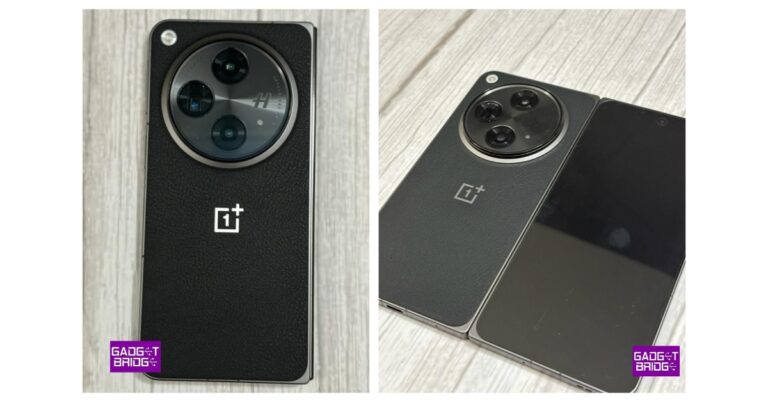
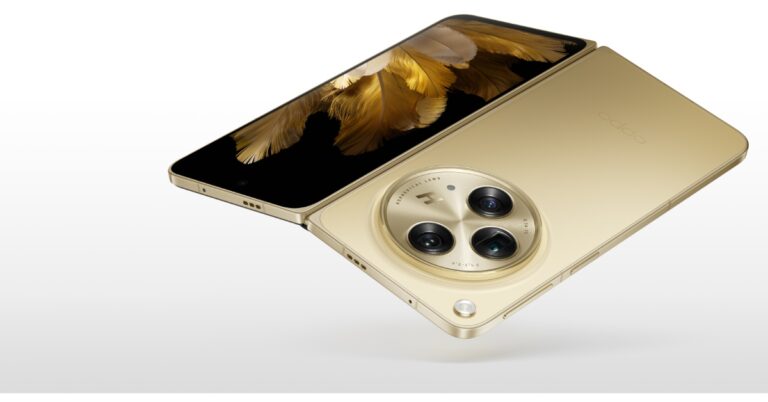
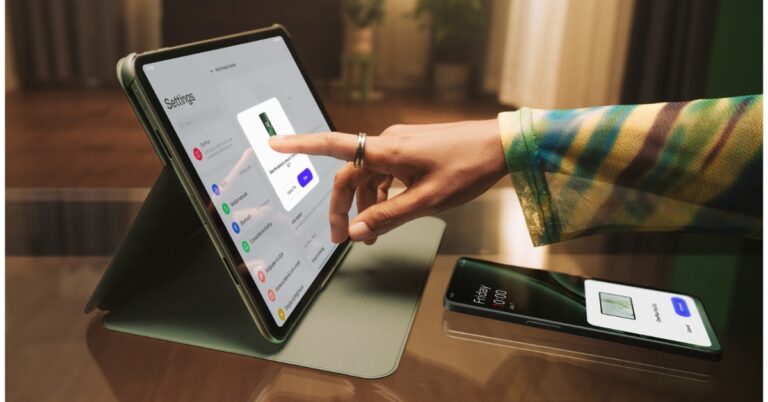
OnePlus Open has made its debut in India today. It is the company’s first foldable phone and it resembles the Oppo Find N3 only that both bear the logo of the respective companies. The OnePlus Phablet features 120Hz displays. It is powered by Qualcomm Snapdragon 8 Gen 2 SoC. Also, there are Hasselblad-branded triple rear cameras.
OnePlus Open specifications, features
OnePlus Open is highlighted with a 7.82-inch LTPO 3.0 Flexi-fluid AMOLED primary display with 2440×2268 pixels of resolution. The screen offers a 2K resolution with 426 ppi pixel density. It has an aspect ratio of 1.0758: 1 and a screen-to-body ratio of 89.6%. The screen supports a dynamic refresh rate ranging between 1-120Hz and a touch response rate of up to 240Hz. 1400 nits is a typical screen brightness and 2800 nits are the peak brightness. The display also supports sRGB, DCI-P3, 10-bit Color Depth and TÜV Rheinland Intelligent Eye Care protection.
On the other hand, the secondary display features Super Fluid AMOLED with LTPO 3.0 measuring 6.31 inches. The 2K display has 2484×1116 pixels of resolution. The rest of the outer display details are same as the inner display. The company has used Ultra Thin Glass on the primary and Ceramic Guard protection on the secondary display.
Also Read:Samsung Galaxy Z Fold 5 review (long term): A foldable delight
Other display features include Nature tone display; Eye comfort; Image sharpener; Video color enhancer; Screen color mode; Colour personalization; Color vision enhancement; Auto brightness; Manual brightness; Screen color temperature; Bright HDR video mode; Night mode; multi-brightness and color calibration.
On the software front, the book-style foldable phone comes with OxygenOS 13.2 based on Android 13. Dual splits and fast focus, Drag and drop sharing, Triple splits are some of the features. Under its hood, there is a Qualcomm Snapdragon 8 Gen 2 Mobile Platform with Adreno 740 GPU. It comes with 16GB LPDDR5X with RAM-Vita and 512GB UFS 4.0 storage.
Coming to endurance the OnePlus Open includes a Dual-cell 4,805 mAh battery with 67W SUPERVOOC Charging support.
Also Read:Oppo Find N3 foldable phone with Hasselblad cameras launched
In terms of photography, the foldable device has a triple rear camera setup tuned by Hasselblad. The camera unit includes a 1/1.43” 48MP Sony LYTIA-T808 “Pixel Stacked” CMOS primary sensor with Autofocus (1.12 μm, f/1.7 aperture, 85° FoV and OIS). There is a 1/2” 48MP Ultra-Wide lens (0.8 μm, 114° FoV, f/2.2 and EIS) and OmniVision OV64B 64MP Telephoto with OIS, 3X optical (0.7 μm, f/2.6, Up to 120X digital zoom). The camera features a Hasselblad Camera for Mobile, Nightscape, Dolby Vision, Smart Scene Recognition, Portrait Mode, Pro Mode, Panorama, Tilt-Shift mode, Long Exposure, Dual-View Video, Retouch, Movie Mode, XPan Mode, Focus Peaking etc. For videography, there is support for 4K video at 30/60 fps, 1080p video at 30/60 fps, 720p video at 30/60 fps, Dolby Vision HDR at 4K, 30 fps and more.
The company has provided two cameras for selfies 20MP primary (inner) and 32MP secondary (outer).
In terms of connectivity, there is WiFi, Bluetooth 5.3, NFC, GPS, (L1+L5 Dual Band), GLONASS, Galileo (E1+E5a Dual Band), Beidou, A-GPS and QZSS. The sensors onboard include Side-mounted Fingerprint Sensor, Accelerometer, M-sensor Electronic Compass, Gyroscope, Ambient Light Sensor, Proximity Sensor, Sensor Core, Flick-detect Sensor, Infrared Sensor and USB Type C Port.
OnePlus Open comes with IPX4 certification for water resistance. According to the company, it has dispersive waterproof protection applied to critical components inside the phone. Drainage holes are given on the hinge to both sides of the spindle. The hinge’s spine plate is made of zirconium-based amorphous alloy. According to the company, a liquid metal material is used for creating artificial bones in the medical arena.
The phablet features OnePlus’s iconic Alert Slider which has been redesigned. OnePlus previously revealed that Pete Lau Founder of OnePlus and Senior Vice President and Chief Product Officer of OPPO directed his teams at OnePlus and OPPO to work together to bring the best of both brands to the new phone. This is why both OnePlus Open and Oppo Find N3 look similar.
OnePlus Open price in India, sale details
OnePlus Open price in India has been set at Rs 1,39,999 for a single 16GB RAM with 512GB storage. The device is available in two colourways Emerald Dusk and Voyager Black. The Pre-order window for the foldable is now open with open sale starting on October 27. The company will be offering an additional Rs 8,000 exchange bonus on selected models. You can also avail benefits worth Rs 15,000 with Jio Plus Rs 699 post paid plan. ICICI and One Card users will get an instant discount of Rs 5,000 and 12 month no-EMI plans at leading banks.
The phablet will be available for purchase via OnePlus India online store, Amazon, Reliance digital and selected retail stores in the country.
For the latest gadget and tech news, and gadget reviews, follow us on Twitter, Facebook and Instagram. For newest tech & gadget videos subscribe to our YouTube Channel. You can also stay up to date using the Gadget Bridge Android App. You can find the latest car and bike news here.
The newly launched Sony WF-1000XM5 offers some interesting upgrades over its predecessor, WF-1000XM4, which is pretty unanimously considered to be the best TWS on the block. The XM4 ushered in some significant changes to the wireless earbuds’ design and form factor. These changes have been perfected on the WF-1000XM5. This TWS also features a new 8.4mm driver dubbed ‘Dynamic Driver X’ as well as the new V2 chip and the HD noise-cancelling QN2e processor. We’ve been using these earbuds for the last week and they may just be the finest ones we have tested yet. Here is our Sony WF-1000XM5 review.Read Also:Dyson Purifier Big+Quiet with HEPA H13-grade particle filter launched in India
Sony WF-1000XM5 review: Design
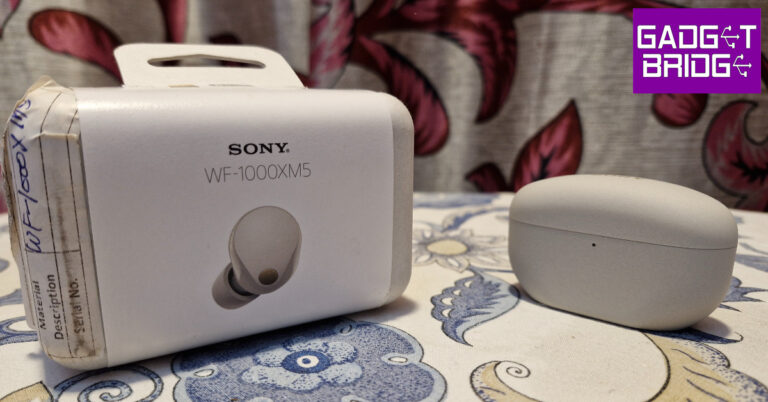
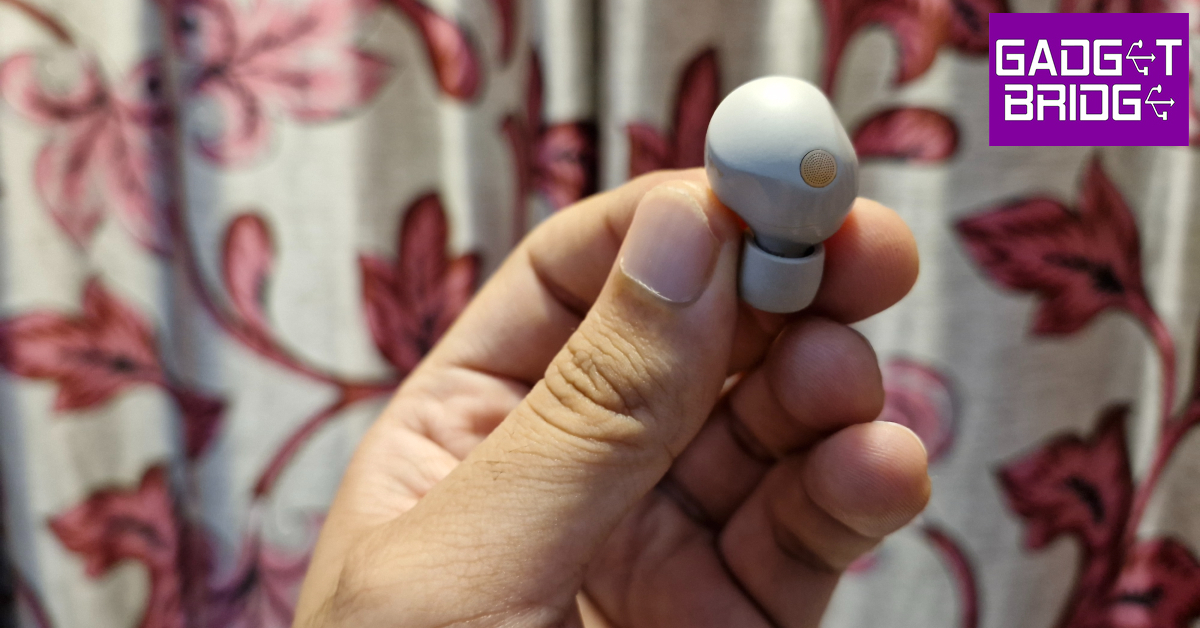
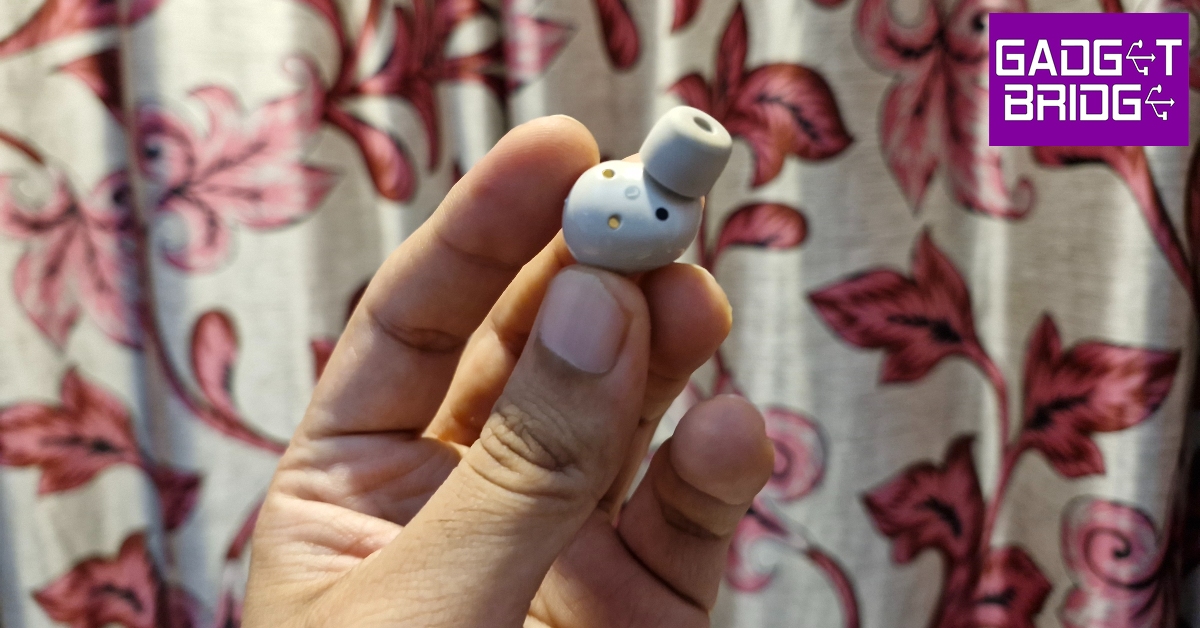
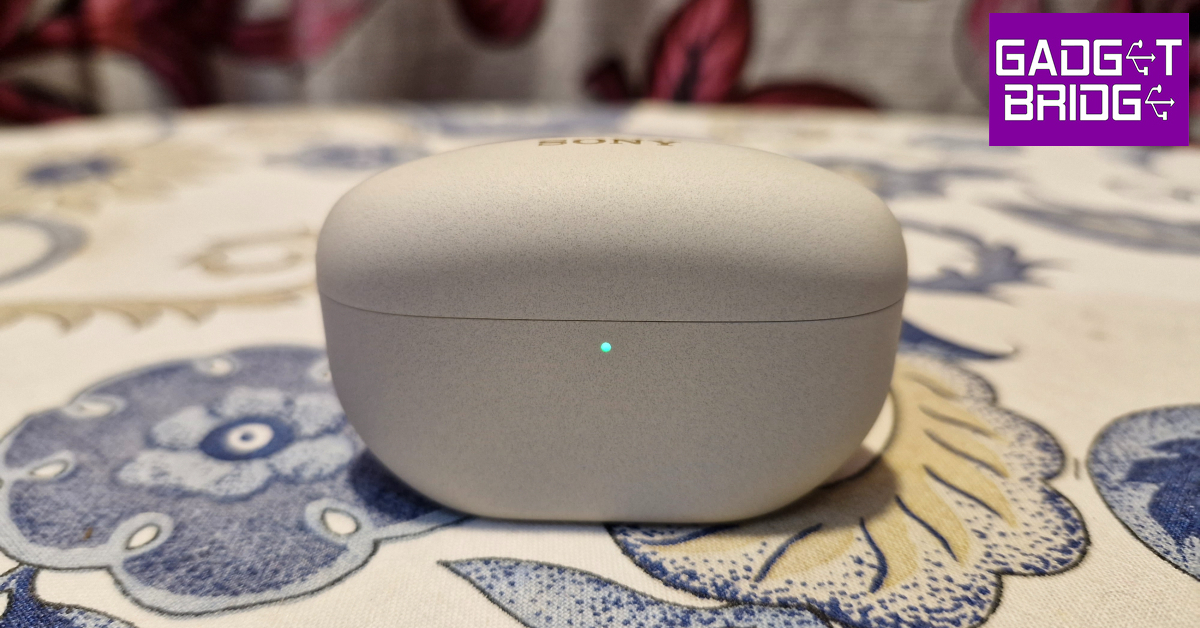
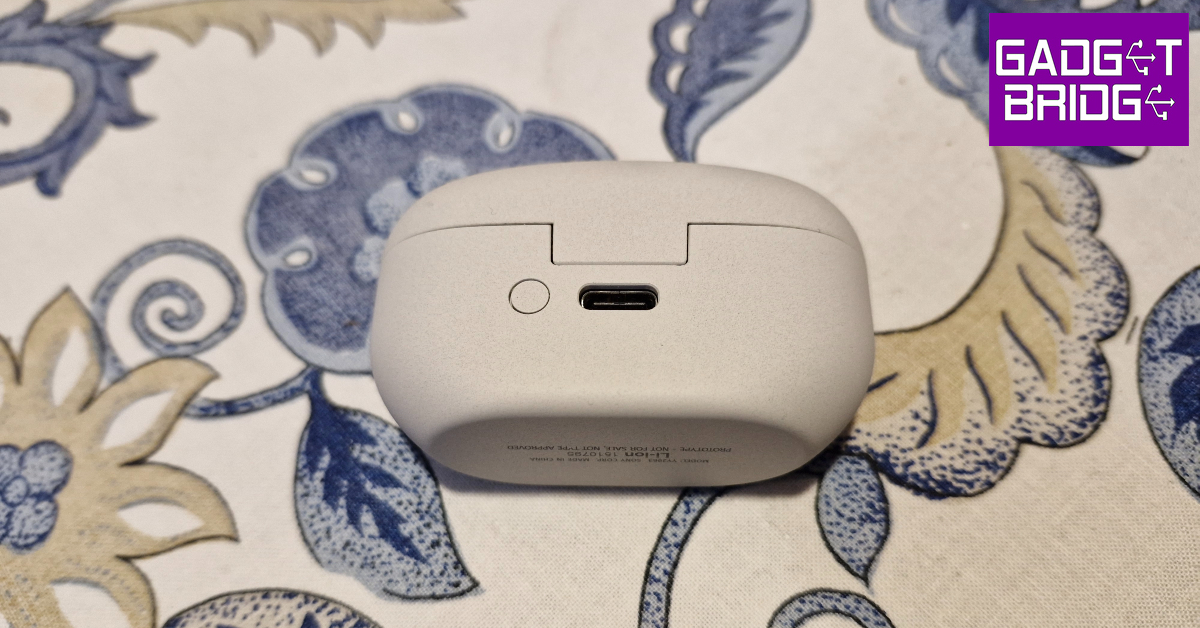
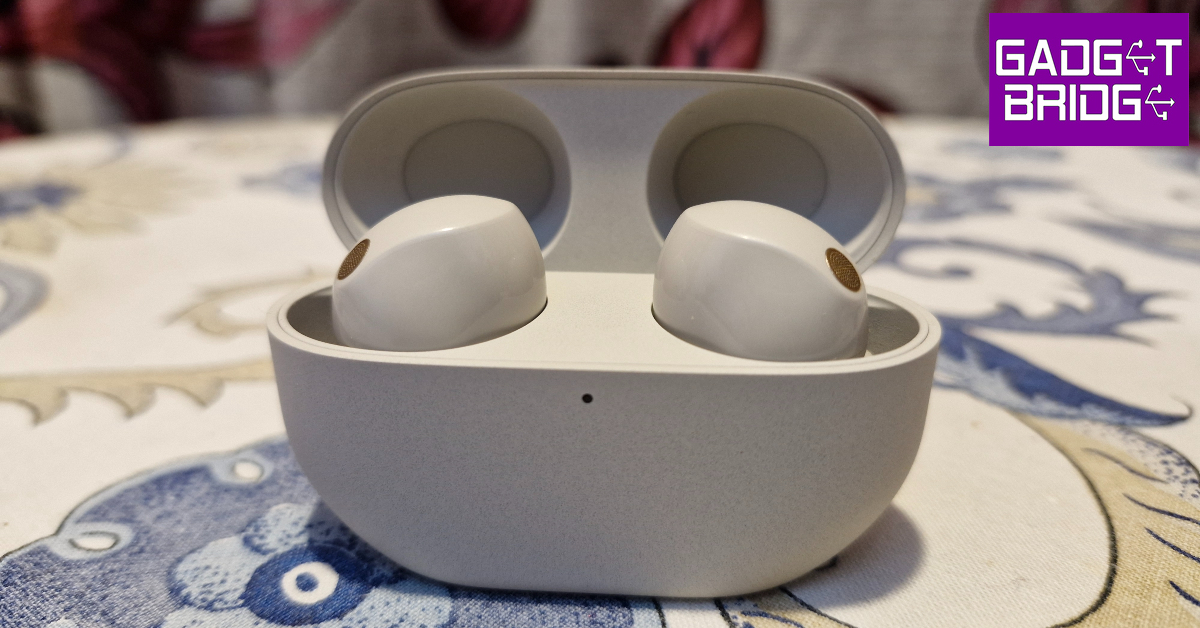
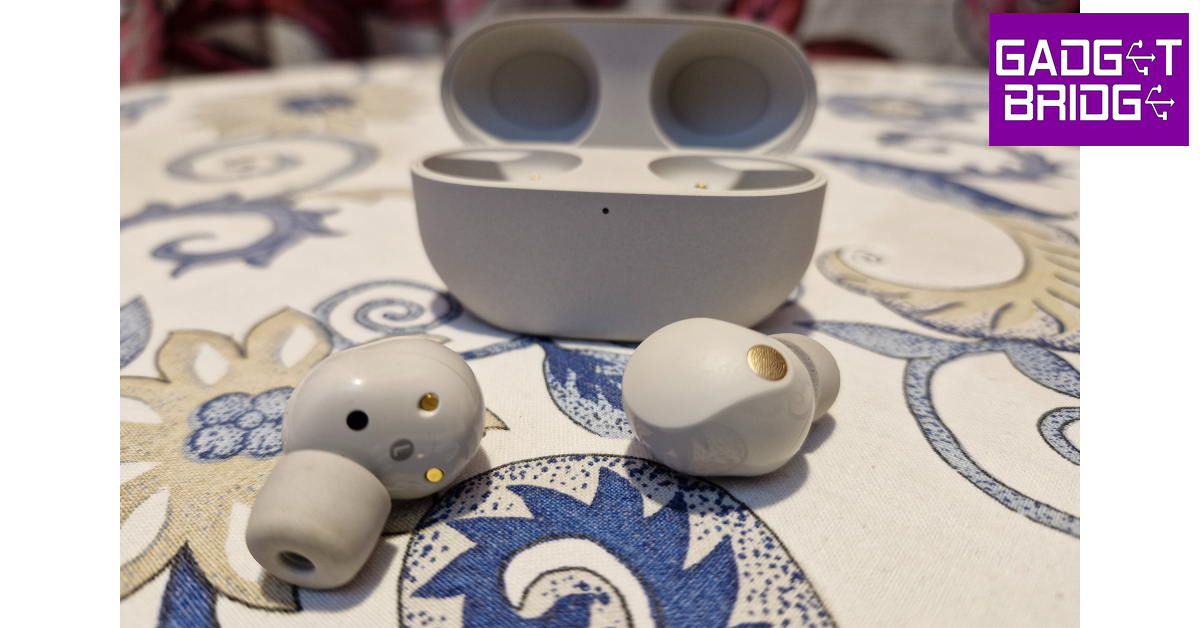
Sony WF-1000XM5’s retail package is crafted out of environmentally conscious paper material made out of bamboo, sugarcane fibres, and post-consumer recycled paper. Sony calls it ‘Original Blended Paper’. Inside the box, you will find the charging case, two wireless earbuds, a USB Type-C charging cable, and three extra ear tips in SS, S, and L sizes.The WF-1000XM5 refines the design that we saw on the XM4. These earbuds are 25% smaller and 20% lighter. The concentric copper accents on the earbuds have now been replaced by copper grilles for the microphones. The matte finish on the touch panels offers a nice contrast to the glossiness of the rest of the body. We like how these panels blend into the body instead of being bordered by a visible line. If the XM4s were more elaborate in their design, the XM5 would be best defined as polished and minimal.There are three microphones on either earbud. The rubber ear tips are cushy and provide an ideal fit. Even with ANC turned off, these earbuds can passively nullify a decent level of surrounding noise. Out of the box, the earbuds come with medium-sized ear tips attached to them. The overall fit is very comfortable and we didn’t feel any kind of ear fatigue even after wearing the buds for hours on end.The XM5’s charging case retains the rectangular design but is more compact than the previous model. The small LED lamp under the lid has been replaced by a notification light. The USB Type-C charging port is positioned at the back of the case, with the pairing button right next to it. The gold Sony branding can be found on top of the lid. This case also supports Qi wireless charging.Sony WF-1000XM5 is rated IPX4 for dust and water resistance, which means the earbuds can survive minor water splashes. We wore the XM4 while working out and they did not present any issues under sweaty conditions. The fit remained secure despite the inner panels of the earbuds being glossy.
Sony WF-1000XM5 review: Performance
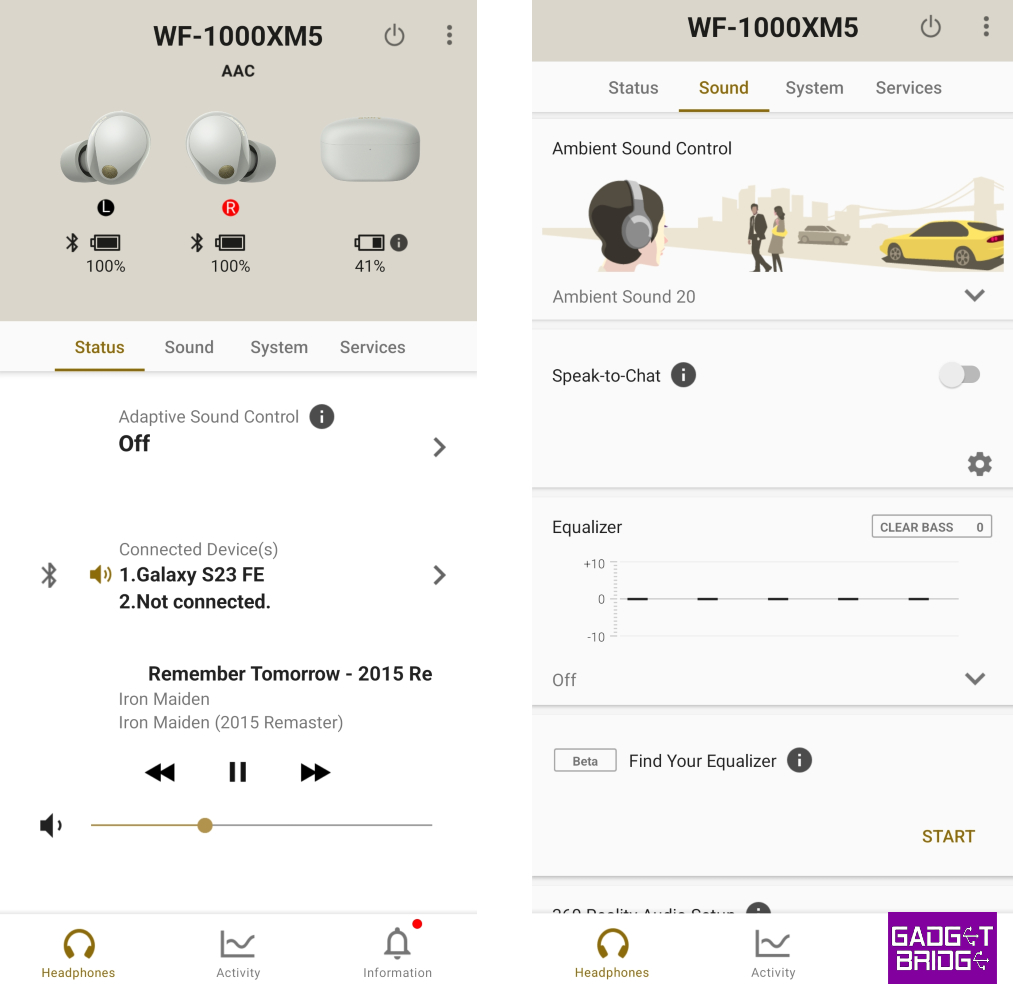
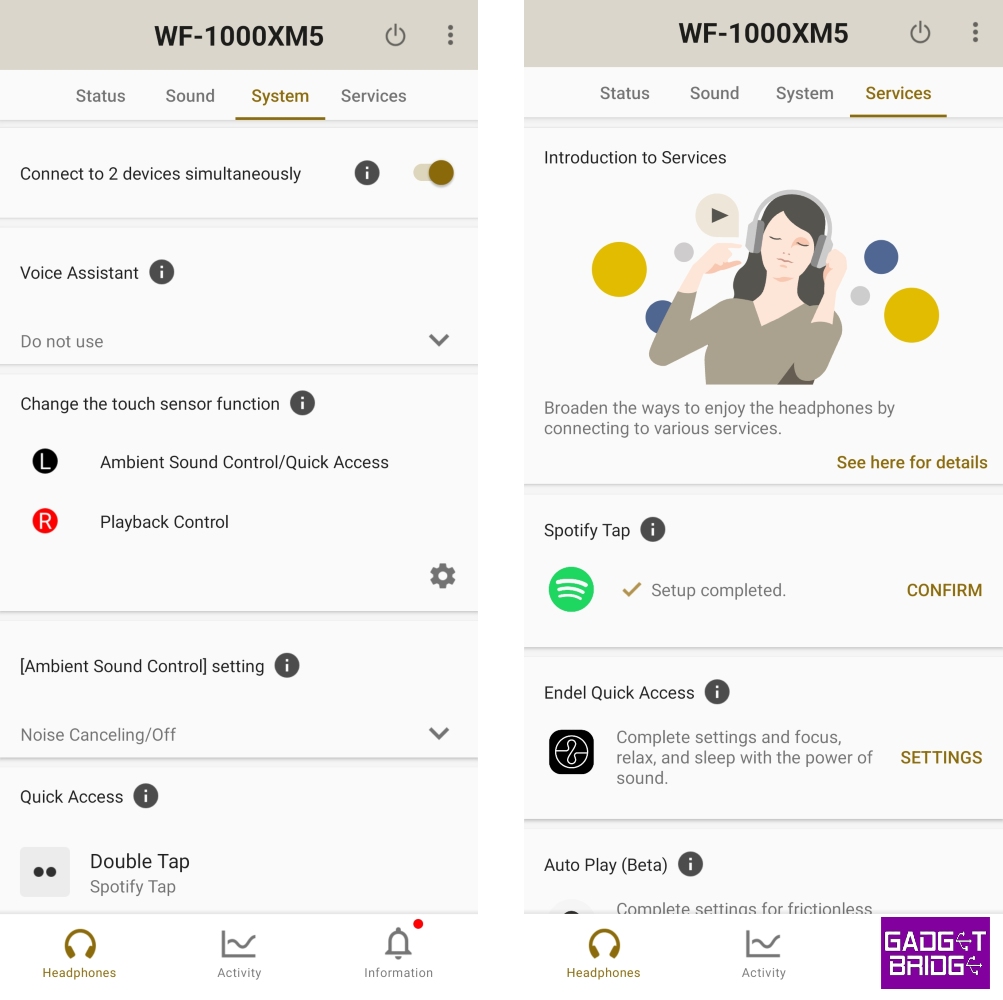
The Sony WF-1000XM5 uses the new 8.4mm Dynamic Driver X on either earbud to deliver the audio output. It also gets a chip upgrade in the form of the Integrated V2 processor. On top of that, it features a dedicated HD Noise Cancelling QN2e processor. There is support for SBC, AAC, and LC3 (low latency) codecs along with Sony’s exclusive LDAC codec.Let’s get down to the brass tacks. The soundstage offered by Sony WF-1000XM5 solidifies its place in the upper echelon of audio products. The XM5 upholds the reputation of Sony’s flagship 1000X series, which means they are certainly the best-sounding earbuds on the market right now.The soundstage is close to neutral while carrying that ever-so-subtle Sony signature. The lows, mids, and highs are well represented on the soundstage and do not shroud each other. The overall output is very ripe and detailed. We played a diverse range of genres on the Sony WF-1000XM5 during the review period and the earbuds did justice to every single track. The low end is tuned to perfection. It provides the right level of warmth to the mix without muffling the higher frequencies. If you’re switching from a midrange headset, you will certainly notice new details in the songs that previously went under the radar.The mids and highs blend very well on the soundstage. We were particularly impressed with how well every hit of the clapper and snare drum was presented on the output without sounding too harsh. Even the guitar riffs sound crispier than usual on the XM5s. Cranking up the volume to the maximum level, we did not notice any significant distortion in the mix. The output remained well-balanced and uniform.The brilliance of XM5’s soundstage is matched by its spectacular ANC capability. As we mentioned earlier, even without ANC being turned on, the rubber tips on these earbuds do a great job of passively nullifying a good degree of surrounding noise. With ANC turned on, you can completely nullify the ambient noises from the air conditioner, ceiling fan, and distant traffic. If you struggle with taking naps on airplanes and crowded buses, these earbuds can reduce the surrounding noise by a significant factor and bring much-needed calm.While the state-of-the-art ANC and elite soundstage put the XM5 ahead of the competition, its smartphone app lets it down. For a TWS that’s replete with cutting-edge features, you need an app that makes them easily accessible. The Sony Headphones Connect app feels like it is a few good updates away from doing that. The UI of the app can be quite confusing to navigate. For starters, it doesn’t need a section for the audio player. Instead of drop-down menus for essential functions like ANC and Equaliser, a dedicated tab would have been much more useful. For now, they are bundled together with secondary features like Head Tracking, Reality Audio, and others.The Sony WF-1000XM5 is equipped with a host of features and some beta services. The ‘Adaptive Sound Control’ feature studies how you use your headphones in certain situations. For example, it will turn on Noise Cancellation when you’re sitting down and automatically switch to Transparent Mode when you start walking or running. If you’re inside a vehicle, ANC will be switched back on. Apart from your actions, the WF-1000XM5 can also take your location into account and switch to the appropriate ANC/Transparency level. We like this feature in theory, but it wasn’t as seamless as we had hoped. But we’re certain that it will get better with future updates.Features like multi-point connection, speak-to-chat, and auto-pause work as intended. You can also press and hold the left earbud to switch to transparency mode. The earbuds revert to ANC mode as soon as you release your finger. You can choose Playback and Sound Control/Quick Access controls for either earbud. These are preset controls that cannot be customised by the user.The XM5 puts up a great performance on audio and video calls. With the help of ‘bone conduction sensors’ and AI-based noise reduction algorithms, the earbuds are able to extract your voice perfectly from the surrounding noise and relay it to the receiver. Even in outdoor conditions, these earbuds isolated the voice from surrounding traffic noises almost perfectly. A shining performance where most TWS products fail badly.Talking about the battery life, we were able to get 7-8 hours out of the Sony WF-1000XM5 during the review period. We used Active Noise Cancellation intermittently, depending on the surroundings. With the ANC turned off completely, we were able to get 10-11 hours of playtime on a single charge. The charging case takes 1.5 hours to fully charge using a USB Type-C cable. You can get two full charge cycles out of this case.Read Also:YouTube app keeps crashing on your iPhone? Here are 9 easy fixes
Verdict
The Sony WF-1000XM5 is ahead of the curve in all the important aspects. Once you get used to its stellar soundstage, it will be very hard to go back to a regular pair of headphones. The ANC prowess of the XM5 puts nearly every other TWS to shame. At Rs 29,990, Sony WF-1000XM5 is certainly the best pair of wireless earbuds you can buy. Apart from the superior audio output, features like multi-point connection, adaptive sound, and speak-to-chat give the XM5 an edge over its counterparts.
Oppo has finally unveiled its new foldable phone- Oppo Find N3. The new smartphone is successor to Find N2 which was launched last year. The phone has an AMOLED display on the outside and the inside. Both screens support a 120Hz refresh rate. Under the hood, there is a Snapdragon 8 Gen 2 processor. The foldable phone has a total of five cameras three on the rear and two for selfies.
Oppo Find N3 specifications
The Oppo Find N3 features a 6.31-inch 2K AMOLED cover display with 1,116×2,484 pixels of resolution. The screen supports a refresh rate of 120HZ along with 431ppi pixel density. It also boasts a 7.82-inch 2K LTPO 3.0 AMOLED screen with 2,268 x 2,440 pixels of resolution. The primary display supports a 120Hz dynamic refresh rate and 240Hz touch response rate. The AMOLED display has a peak brightness of 2,800Hz and a 426ppi pixel density. The front panel comes with Ultra-Thin Glass (UTG).
The Oppo Find N3 operates on ColorOS 13 on top of Android 13. At its heart, there is an octa-core Snapdragon 8 Gen 2 SoC with an Adreno 740 GPU for graphics. The device is offered with 16GB of LPDDR5X RAM and 512GB of UFS 4.0 storage.
The foldable phone by Oppo includes a triple rear camera setup powered by Hasselblad. The circular camera module includes a 48-megapixel Sony LYTIA-T808 1/1.43-inch sensor with OIS and EIS, a 64-megapixel OmniVision OV64B lens with 3X optical zoom and a 48-megapixel Sony IMX581 lens. The company provided a 20-megapixel sensor on the primary display and a 32-megapixel lens on the outer display for taking selfies and video calling.
The Oppo Find N3 sports a 4,805mAh battery that supports 67W SuperVOOC 2.0 fast charging. In addition to this, the handset includes a tri-state alert slider and a side-mounted fingerprint sensor. Also, there is an under-screen colour temperature sensor along with an ambient light sensor, an accelerometer, a gyroscope, a hall sensor, a proximity sensor and a geomagnetic sensor.
For connectivity, there is a USB Type-C port, 5G, 4G LTE, Wi-Fi 7, Bluetooth 5.3, GPS/ A-GPS, NFC, Beidou, GPS, GLONASS, Galileo and QZSS.
Samsung has officially announced the launch of a new smartphone in the Indian market. The company has introduced Samsung Galaxy A05s in the country. The handset is powered by a Snapdragon 680 SoC and runs on Android 13 with OneUI. The 4G phone features a 6.7-inch full-HD+ LCD display. Moreover, the smartphone packs a 5,000mAh battery.
Samsung Galaxy A05s price in India, sale details
Samsung Galaxy A05s has been launched in India with a price tag of Rs 17,499 for the lone 6GB RAM with 128GB storage option. However, the device is currently available at Rs 14,999. In addition to this SBI Bank credit card EMI transactions will get Rs 1,000 instant discount to the customers. The smartphone is offered in three colour options of Black, Light Green, and Light Violet. The phone can be purchased via the company’s website in the country.
Samsung Galaxy A05s specifications
The Samsung Galaxy A05s is powered by an octa-core Snapdragon 680 SoC with 6GB RAM and a 128GB storage option. The storage can be expanded up to 1TB using a microSD card. The device has an Adreno 610 GPU for graphics. The device comes with One UI 5.1 with Android 13 out-of-the-box.
Also Read:OnePlus Open India launch today: How to watch the live stream
The smartphone features a 6.7-inch full-HD+ PLS LCD with 1,080×2,4000 pixels of resolution. The bezels on the sides are slim while the chin is noticeable.
For photos and videos, the device comes with a triple rear camera set up positioned vertically at the left corner along with a circular LED flash unit. The camera setup includes a 50-megapixel primary shooter with an f/1.8 aperture. Furthermore, the system includes a secondary 2-megapixel macro lens with an f/2.4 aperture and a tertiary 2-megapixel depth sensor with an f/2.4 aperture. For selfies, the smartphone features a 13-megapixel front-facing camera with f/2.0 aperture housed inside a centre-aligned waterdrop notch.
The Samsung Galaxy A05s comes equipped with a 5,000mAh battery with 25W charging support. In terms of connectivity, the phone includes a 3.5mm audio jack, 4G LTE, dual-band Wi-Fi, Bluetooth 5.1, GPS, and a USB Type-C port. Along with a fingerprint sensor the handset includes an accelerometer, light sensor and proximity sensor.
One of the main reasons why Google Chrome is the go-to browser for most people is the comprehensive support it provides for extensions. The Chrome Webstore is a goldmine for useful extensions that can make your routine tasks easier and provide a boost to your productivity. Unfortunately, Google Chrome’s Android app does not offer extension support yet. But that doesn’t mean you can’t use browser extensions on your smartphone. In this article, we bring you the top 3 ways to use Google Chrome extensions on your Android phone.Read Also:YouTube app keeps crashing on your iPhone? Here are 9 easy fixes
Use Yandex Browser
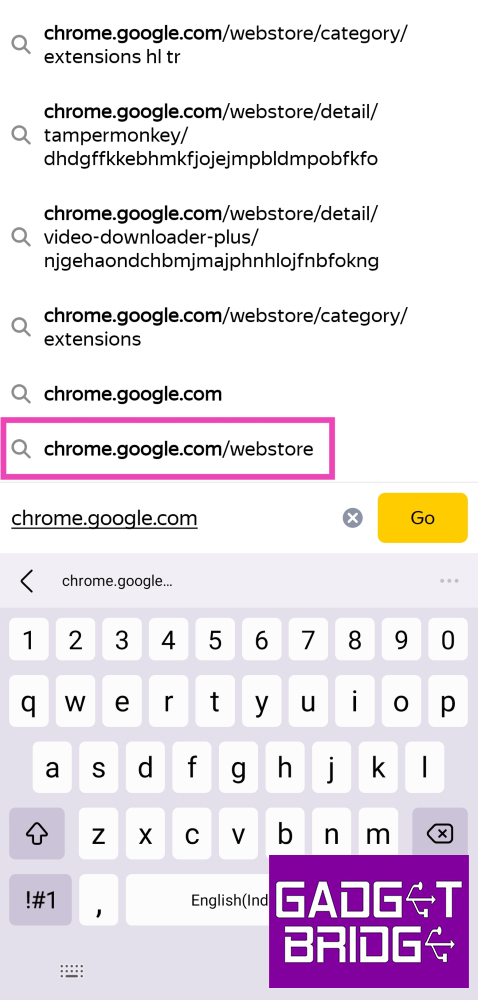
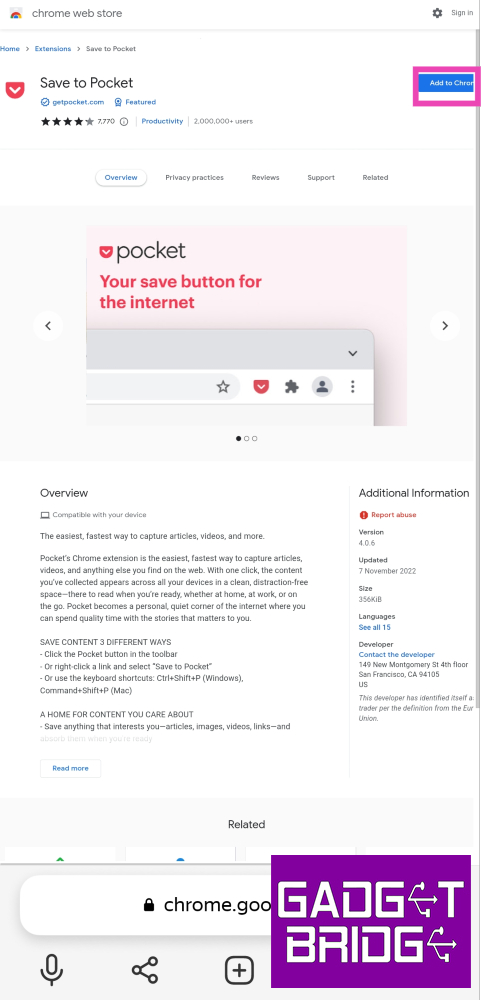
Step 1:Install Yandex Browser on your Android phone from the Google Play Store.Step 2:Launch the web browser and type https://chrome.google.com/webstore in the address bar. Hit Enter.Step 3:Search for the extension you want to add to the browser.Step 4: Open the extension’s page and select Add to Chrome. Confirm your selection in the popup box.Step 5: Tap the hamburger menu at the bottom right corner of the screen and select Extensions to view all your installed extensions and enable them.
Install Kiwi Browser to use Google Chrome extensions on Android
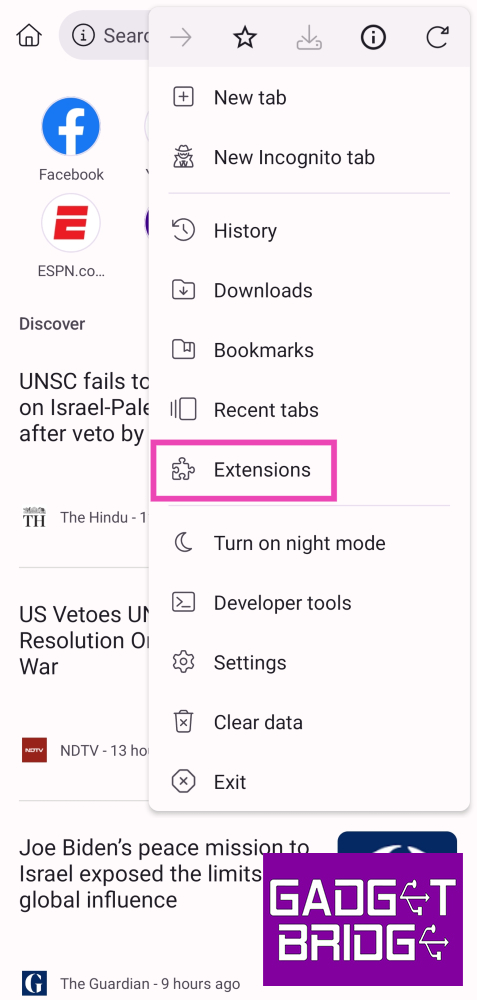
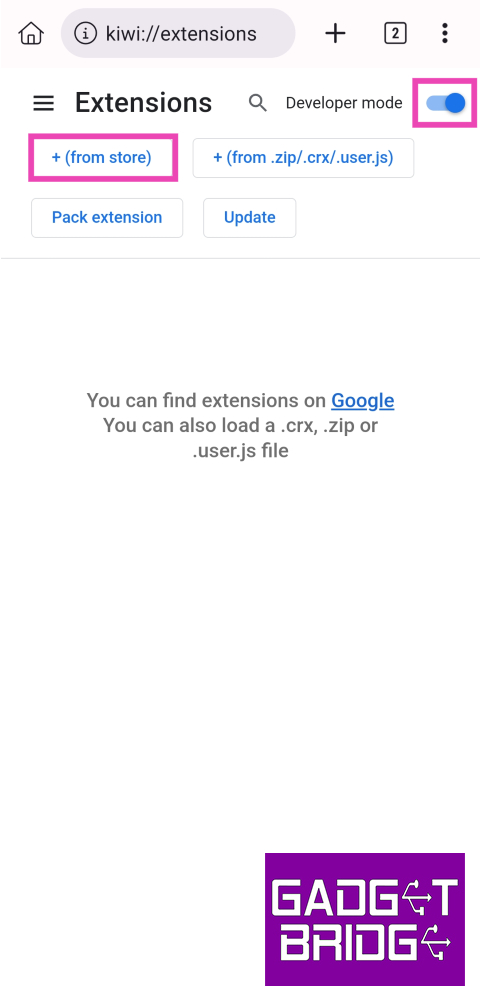
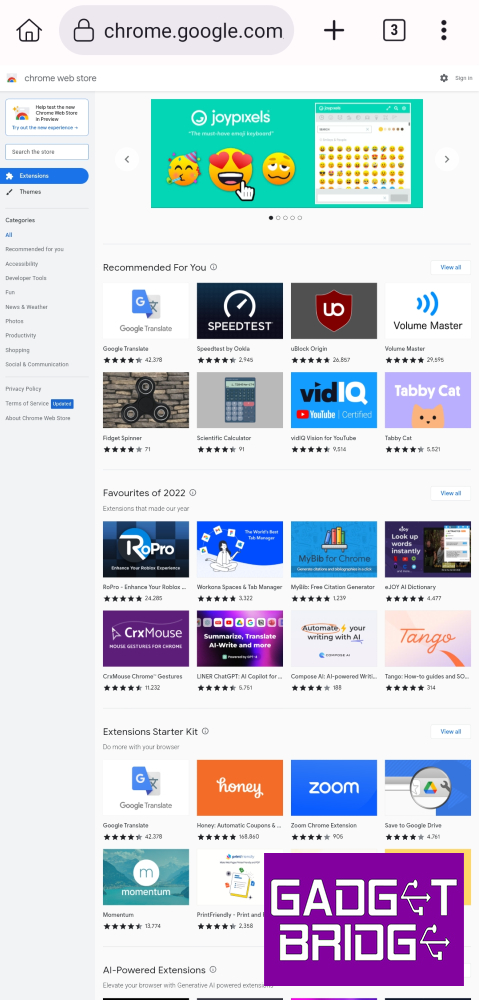
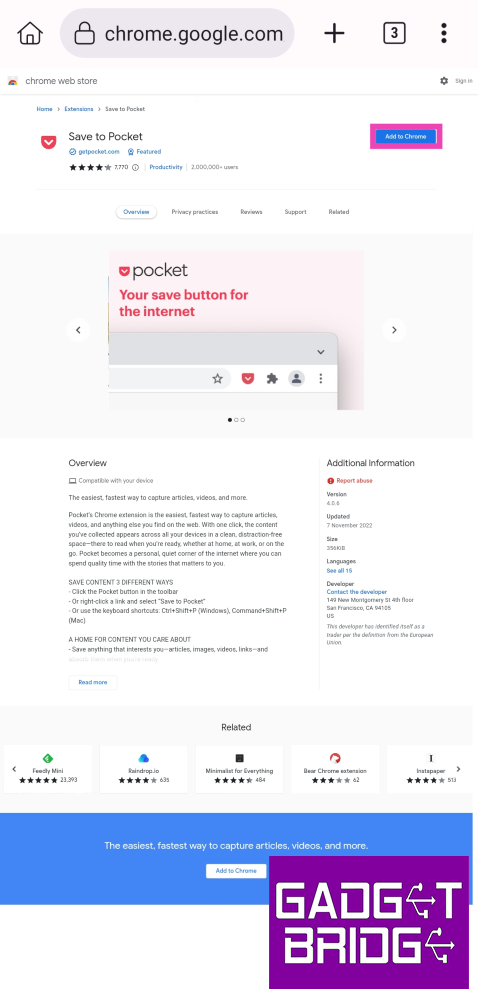
Step 1:Install Kiwi Browser on your device.Step 2: Launch the browser and tap the ellipses at the top right corner of the screen.Step 3: Select Extensions.Step 4: Turn on the toggle switch for Developer Mode and tap on ‘+(from store)’.Step 5:Search for the extension you want to install on the browser.Step 6: Select Add to Chrome on the extension’s webstore page.Step 7: You can enable or remove your installed extensions from the Extensions tab.
Use Firefox
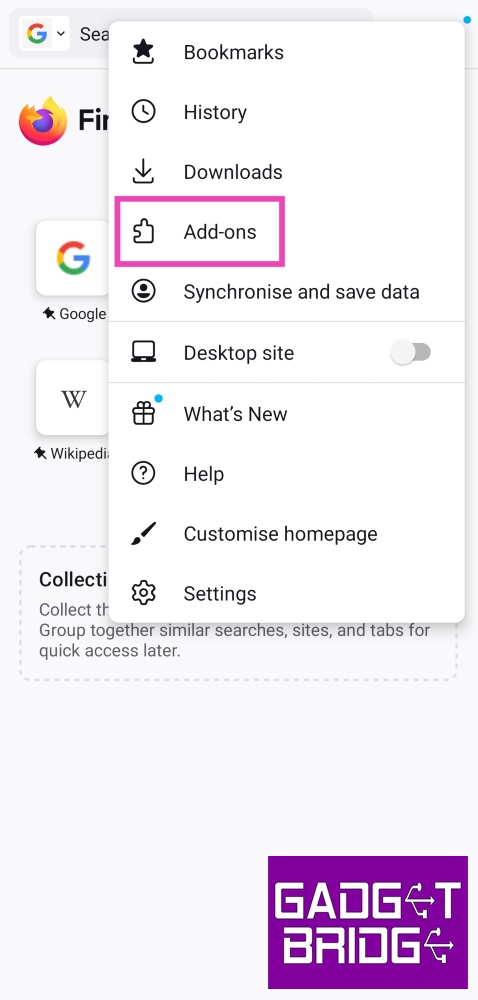
Step 1:Install Firefox on your device from the Google Play Store.Step 2: Tap on the ellipses at the top right corner of the screen and select Add-ons.Step 3: Go through the list of extensions (add-ons) and tap the plus icon next to the ones you want to install.Firefox has a limited number of add-ons for Android. For more options, stick to Kiwi and Yandex.
Frequently Asked Questions (FAQs)
Can I use Google Chrome extensions on my Android phone?
While Google Chrome does not allow extension support for its mobile apps yet, you can use Chromium-based browsers like Kiwi and Yandex for the same task. Mozilla Firefox also has add-on support, although there are only a few add-ons to choose from.
How do I use Google Chrome extensions on my Android phone?
Install Kiwi or Yandex browser on your phone, then go to chrome.google.com/webstore. Search and install the extension of your choice from the Chrome Webstore.
Do Kiwi and Yandex browsers support all PC extensions?
These are the top 3 ways to use Google Chrome extensions on Android. Kiwi and Yandex are Chromium-based browsers, which means they can run Google Chrome extensions on their respective mobile apps.Make sure you also check out our list of the best productivity extensions for Google Chrome. Is there a Chrome extension that you can’t function without? We’d love to hear from you in the comments.For the latest gadget and tech news, and gadget reviews, follow us on Twitter, Facebook and Instagram. For newest tech & gadget videos subscribe to our YouTube Channel. You can also stay up to date using the Gadget Bridge Android App. You can find the latest car and bike news here.
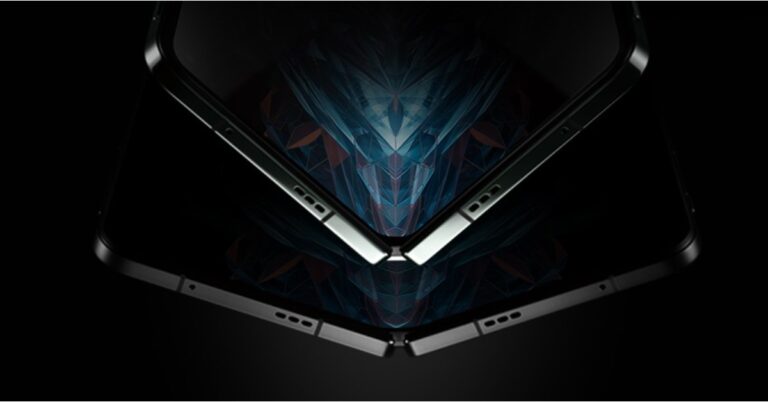
OnePlus’s first foldable- OnePlus Open will debut in India today. The specifications and design information of the device have been made public in part due to business disclosures, but primarily due to leaks of certain features. The upcoming foldable will feature OnePlus’ iconic alert slider. The hinge of the upcoming phone would be composed of high-quality material while the teasers showed off a typical OnePlus design.
How to watch the OnePlus Open India launch event live?
OnePlus Open India launch event will held today. According to the company the launch event will be hosted in Mumbai. The keynote will begin at 7.30 PM and will be livestreamed through the official YouTube channel. The event will also be live-streamed on OnePlus’s official media channels. The company has also created a dedicated Event Page to webcast the event. You can also watch the event live on our website, we have embedded the link below.
OnePlus Open specifications expected
OnePlus Open has been teased several times days before the official launch. While numerous leaks have revealed details about the foldable phone’s form factor features as well as colour options. But just ahead of the launch full camera specifications of the device surfaced on the internet that goes in line with what OnePlus has revealed.We are already aware that OnePlus Open will be featuring a triple rear camera set up but a tipster has revealed that the camera module will consist of below mentioned sensors:Rear camera:
– Primary 48MP Sony LYTIA-T808 sensor (1/1.43”, f/1.7) with OIS– Secondary 48MP Ultra-Wide lens (1/2”, f/2.2)– Third 64MP Telephoto with OIS, 3X optical (145mm, f/2.6)For selfie:
– 20MP (inner)– 32MP (outer)Note that OnePlus Open will be the first to use new Sony LYTIA sensor. The company has also confirmed that its upcoming foldable phone will feature Sony LYTIA-T808 sensor equipped with Sony’s Dual-layer Transistor Pixel technology.Furthermore, it has been leaked that for the inner display, the company may use an LTPO 3.0, 7.82-inch fluid AMOLED display. Also with 2,800 nits of peak brightness, the front panel will get Dolby Vision support. According to the tipster OnePlus will call it a ProXDR. In addition to this the display on the inside will fast and smooth because of the 120Hz refresh rate support.Leaks also suggest that the OnePlus Open will feature a 6.31-inch 2K AMOLED cover display. The outer screen will support a refresh rate of 120Hz along with 2,800 nits of peak brightness. For robustness, the company may use Ceramic Guard protection which is equivalent to Ceramic Shield screen protection which Apple uses on it iPhones.
OnePlus has confirmed that it foldable will include several third-party apps. OnePlus has made sure that the pre-installed apps are compatible with the foldable design for better user experience.
Garena Free Fire is a battle royale game with regular awards and tournaments to keep players interested. If you play Garena Free Fire, you should be aware of the redeem codes that are released on a daily basis. However, because the battle royale game is banned in India, players from other countries can use the Free Fire Redeem codes daily. If you’re unfamiliar with the Garena Free Fire redeem codes or don’t know how to get them, we’ve put together a step-by-step guide to help you redeem them. Check out Garena Free Fire Redeem Codes for 19 October 2023.The Free Fire redeem codes are a great way to get free stuff. These are 12-digit codes that contain alphabets and numbers, as well as an expiration date and time. Because the Garena FF redeem codes cannot be used more than once, you should hurry to the redemption page to claim your free reward before someone else does. To get a free reward, all you have to do is go to reward.ff.garena.com/en, which is the official redemption page. Also, keep an eye on this space for daily updates on Garena Free Fire redemption codes and rewards.
Garena Free Fire Redeem Codes Today 19 October2023
Updating…
How to Get Free Fire Redeem Codes for Garena on 19 October2023?
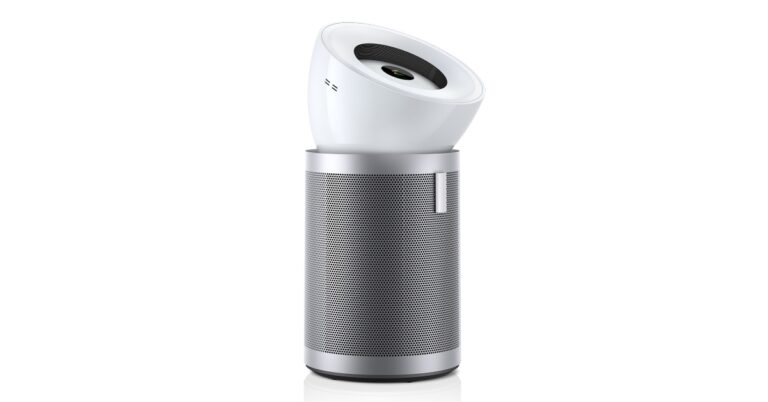
Winters have arrived in India and soon the air quality here specifically in Northern India will start to worsen. If you are looking to buy a new air purifier Dyson’s latest air purifier equipped with upgraded filtration has launched in India. The Dyson Purifier Big+Quiet is touted to deliver double the airflow compared to previous Dyson purifiers. It comes with a new airflow delivery system- Cone Aerodynamics. It has an improved three-phase filtration system that can capture up to 99.95% of ultrafine particles.
Dyson Purifier Big+Quiet price in India and sale details
Dyson Purifier Big+Quiet as the name suggests is the company’s most quietest yet powerful purifier. It produces just 56 decibels of noise. It is capable of purifying the air in spaces as large as 1000 sq.ft. It utilises Cone Aerodynamics which is a new airflow delivery system that offers more than double the airflow of previous models. It delivers a 10-meter projection at angles of 0 degrees, 25 degrees or 50 degrees depending on user preference.The Dyson Air purifier can capture VOCs, NO2 and ozone in the air produced by tobacco smoke, household cleaning products, building materials, and outdoor air pollution. It has a fully sealed filtration system to HEPA H-13 which locks the air pollutants in the filter. The HEPA H13-grade particle filter is made of 21 meters of borosilicate microfibres pleated 459 times. Also, it can capture 99.95% of particle pollutants, including dust and allergens as small as 0.1 microns, and lasts up to two years. It also captures benzene and household odours.The Dyson Purifier Big+Quiet has an array of integrated sensors monitoring particle and gas levels, allowing users to monitor indoor air quality through the live results on the LCD screen and in the MyDyson app. Dyson algorithm which cross-checks data every second, to analyse the air and automatically react to environmental changes to purify.
For the latest gadget and tech news, and gadget reviews, follow us on Twitter, Facebook and Instagram. For newest tech & gadget videos subscribe to our YouTube Channel. You can also stay up to date using the Gadget Bridge Android App. You can find the latest car and bike news here.
OnePlus Pad Go was launched in India earlier this month. Now the company has announced that the device will go on open sale on October 20 in the country. So if you are planning to buy the device the open sale will be accessible through the company’s official website as well as the e-commerce platform Amazon. Also, it is an affordable version of the OnePlus Pad which debuted a few months ago. The Pad Go comes with an 11.35-inch 2.4K display with 90Hz refresh rate support. It is powered by MediaTek Helio G99 octa-core SoC and includes a 13-megapixel rear camera with electronic image stabilisation (EIS) support.OnePlus Pad Go is scheduled to go on open sale in India on October 20. The Sale will begin at 12 noon through Amazon and the company’s website. Both the Wi-Fi and the LTE variants of the OnePlus Pad Go will go on sale in the Indian market. To recall, OnePlus Pad Go was launched in India with a starting price of Rs 19,999 for the base 18GB RAM with 128GB storage Wifi model. The LTE model of the tablet comes in two configurations 18GB RAM with 128GB storage and 8GB RAM with 256GB storage priced at Rs 21,999 and Rs 23,999.The OnePlus Pad Go will be available across Amazon, Flipkart, Oneplus.in, OnePlus Store App, OnePlus Experience Stores, Reliance, Croma and other key offline partner outlets.The CICI Bank & OneCard cards users can avail of an upto INR 2,000 off if purchased via OnePlus Pad Go in OnePlus Experience Stores, OnePlus.in & offline partner stores.Customers can also avail additional INR 1000 special price coupon discount on Oneplus.in. on 8 + 128GB WIFI variant. Amazon users can also get up to INR 2,000 Instant Bank Discount using SBI cards. Whereas on Flipkart buyers can avail an upto Rs 2,000 Instant Bank Discount using ICICI Bank cards.Students will receive Rs 2,000 off on 8GB+128GB WIFI and Rs 1,000 off on 8GB+128GB LTE and 8GB+256GB LTE models.RCC members are eligible to get benefits up to INR 1500 on the purchase of OnePlus Pad Go on OnePlus.in.
OnePlus Pad Go specifications
OnePlus Pad Go comes with an 11.35-inch 2.4K LCD display with 2408 x 1720 pixels of resolution. The panel has a 90Hz refresh rate, a 7.5 aspect ratio and a touch sampling rate of 180Hz. Moreover, the screen has a pixel density of 220ppi and a peak brightness of 400nits. The display comes with TuV Rheinland blue-light filter protection along with Dolby Vision and HDR10+ support.OnePlus Pad Go runs on Android 13-based OxygenOS 13.1. The tablet is powered by MediaTek Helio G99 octa-core SoC with Mali-G57 MP2 GPU. It will be available in Wi-Fi and LTE variants with up to 8GB LPDDR4X RAM with 256GB UFS 2.2 storage options.There is a single 13-megapixel rear camera lens with electronic image stabilisation (EIS) support on the back of the tablet along with up to 4K30 fps video recording. An 8-megapixel front-facing camera with up to 1080p 30fps video recording support is there for selfies.The OnePlus Pad Go includes an 8,000mAh with 33W SuperVOOC charging support. As per the company it provides up to 514 hours of standby time and 40 hours of music playback.
For the latest gadget and tech news, and gadget reviews, follow us on Twitter, Facebook and Instagram. For newest tech & gadget videos subscribe to our YouTube Channel. You can also stay up to date using the Gadget Bridge Android App. You can find the latest car and bike news here.
Over the years, YouTube has not only evolved to host a variety of content, but it also boasts one of the most accessible and fastest apps to watch video content on the Internet. The YouTube app for Android and iOS is perfectly optimised for the mobile platform and its video player does not take a long time to buffer the videos you want to watch. App crashes and other malfunctions are extremely rare for YouTube and can be easily fixed. In this article, we bring you the top 9 fixes for the ‘YouTube app keeps crashing’ issue on your iPhone.Read Also:How to Access Your Home WiFi Router Remotely? Top best ways
Restart your iPhone
A quick restart resolves the background issues that may be causing the YouTube app to malfunction. Press and hold the side key along with either volume key until the power slider appears on the screen. Drag the slider to the right to turn off your iPhone. Once the device has shut down, press and hold the side key to turn it on again.
Restart the app
Another quick way of fixing this issue is by closing and re-launching the YouTube app on your iPhone. Swipe up from the bottom of the screen and hold until you can access the App Switcher. Navigate to the YouTube card and swipe it up to close the app. Now, go to your iPhone’s home page and launch the YouTube app.
Check your iPhone’s storage to keep YouTube app from crashing
One of the most common reasons behind constant app crashes is the lack of internal storage. Apps need a certain amount of breathing space to run smoothly. If your phone’s storage is filled to the brim, it may cause certain apps to malfunction. To fix this, go to Settings>General>iPhone Storage and delete the files you don’t use.
Check your network reception
A weak internet connection can cause the YouTube app to crash on your iPhone. Check the network connection on the status bar to determine its strength. Perform an internet speed test to gauge if it is enough for YouTube to function. App crashes due to a faulty connection are rare but not improbable.
Update the YouTube app
If you’re using an old version of the YouTube app, it may be the reason why it keeps randomly crashing. Old app versions contain bugs that are creased out in future updates. On top of that, super old versions of apps are routinely phased out by developers, which means they no longer be functional. To update the YouTube app on your iPhone, go to the App Store, search for YouTube, and hit the Update option on the app’s page.
Turn on Background App Refresh
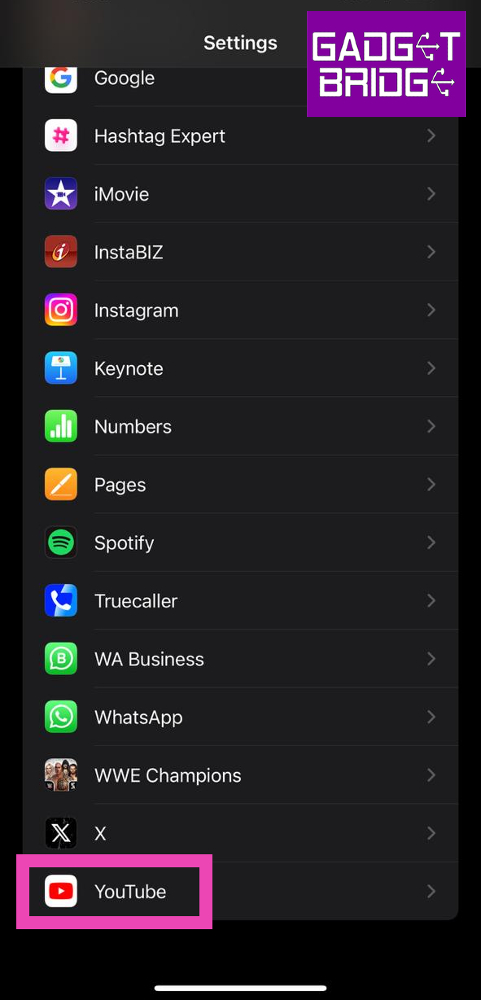
Turning on Background App Refresh ensures that the YouTube app stays updated and carries out its necessary functional tasks when you are not actively using it. It can be turned off after the app stabilises and does not crash at random.Step 1: Go to Settings and select YouTube.Step 2: Turn on the toggle switch for Background App Refresh.
Delete and Re-install the app
Another way to keep the YouTube app from crashing on your iPhone is by deleting it from the device and then re-installing it. To delete YouTube from your iPhone, press and hold its icon on the home screen and select ‘Delete App’ from the popup menu. Confirm your selection in the following dialogue box. Reinstall the app from its page on the App Store.
Update iOS
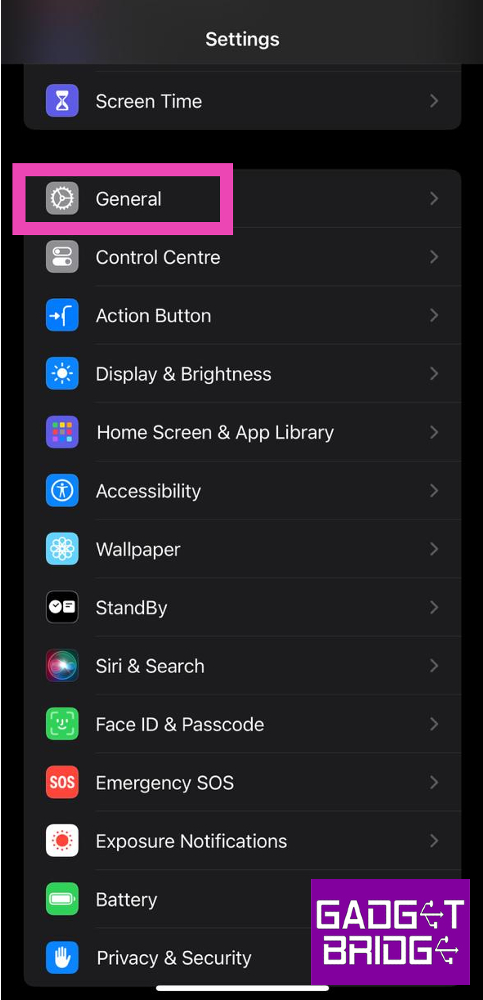
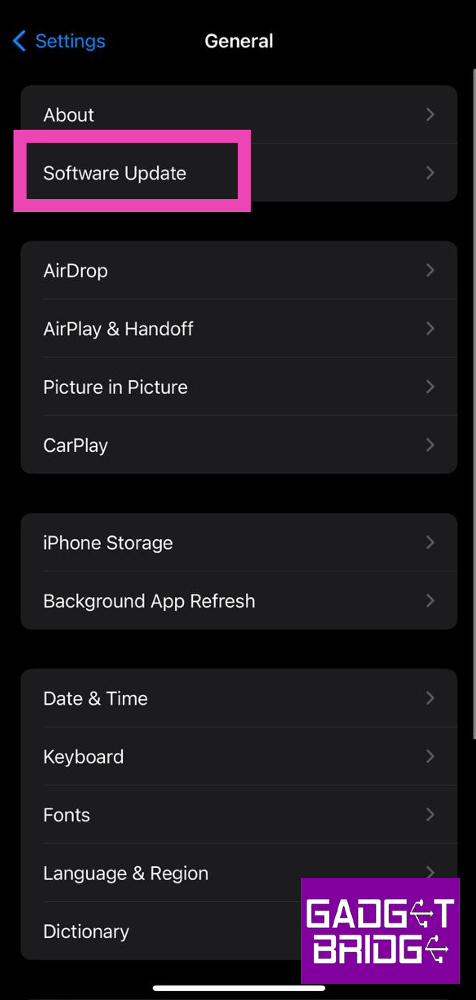
Step 1: Make sure your iPhone is connected to a WiFi network and plug in its charger.Step 2: Go to Settings and select General.Step 3: Select Software Update.Step 4: Tap on Download and Install.
Reset Network Settings
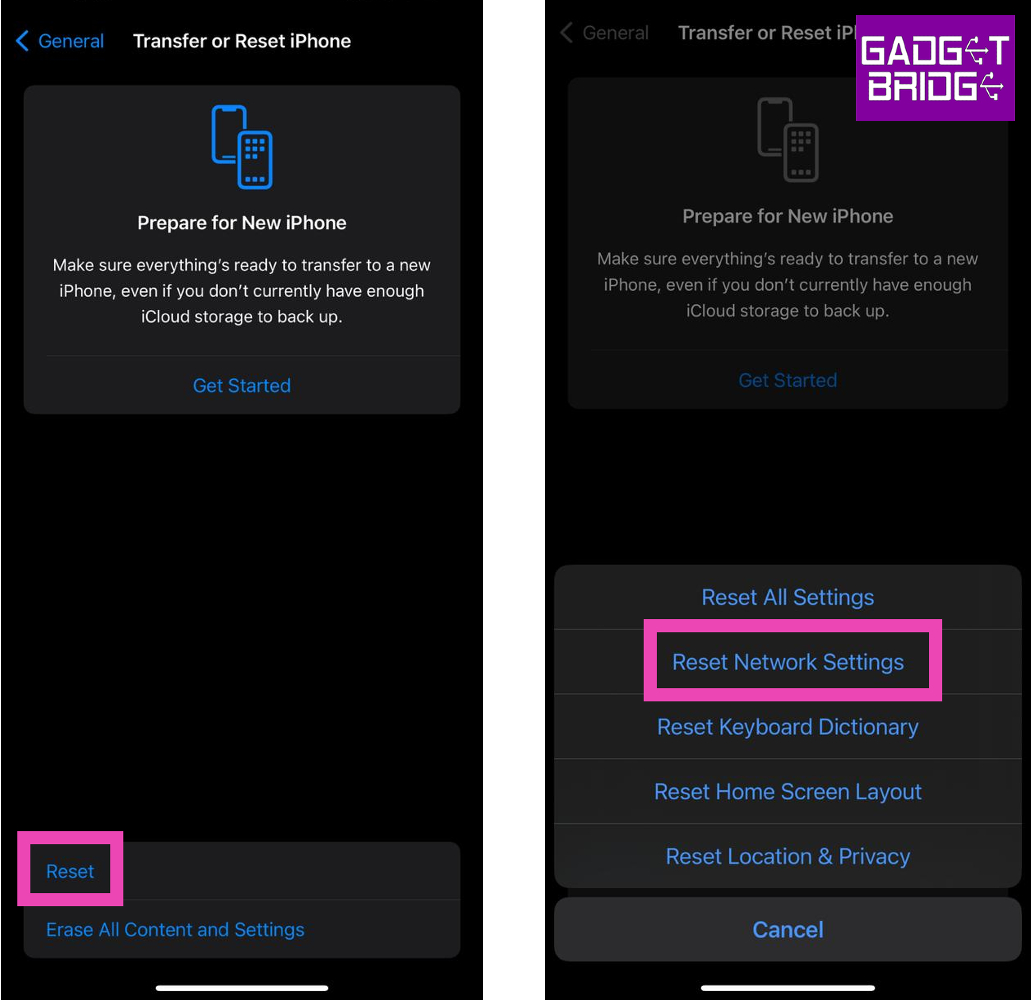
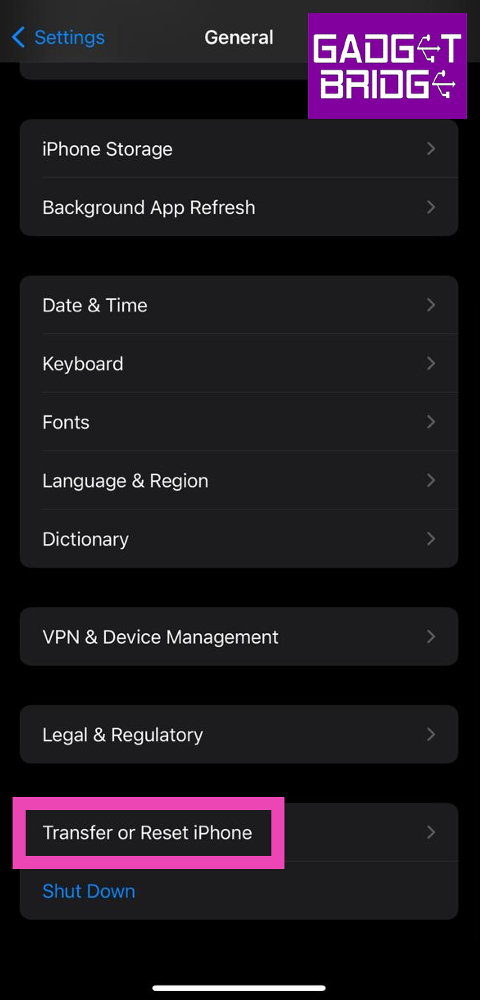
Step 1: Go to Settings and select General.Step 2: Scroll down and select Transfer or reset iPhone.Step 3: Select Reset followed by Reset Network Settings.
Frequently Asked Questions (FAQs)
Why does the YouTube app keep crashing on my iPhone?
Software-related issues, background glitches, bugs in the app, and lack of storage space are some of the common reasons behind app crashes on an iPhone.
How do I stop YouTube from crashing on my iPhone?
Make sure there’s enough storage space on your iPhone, update the app by deleting and reinstalling it, and restart your phone to fix this issue.
Can a faulty network cause the YouTube app to malfunction?


 On the other hand, the secondary display features Super Fluid AMOLED with LTPO 3.0 measuring 6.31 inches. The 2K display has 2484×1116 pixels of resolution. The rest of the outer display details are same as the inner display. The company has used Ultra Thin Glass on the primary and Ceramic Guard protection on the secondary display.
Also Read: Samsung Galaxy Z Fold 5 review (long term): A foldable delight
Other display features include Nature tone display; Eye comfort; Image sharpener; Video color enhancer; Screen color mode; Colour personalization; Color vision enhancement; Auto brightness; Manual brightness; Screen color temperature; Bright HDR video mode; Night mode; multi-brightness and color calibration.
On the software front, the book-style foldable phone comes with OxygenOS 13.2 based on Android 13. Dual splits and fast focus, Drag and drop sharing, Triple splits are some of the features. Under its hood, there is a Qualcomm Snapdragon 8 Gen 2 Mobile Platform with Adreno 740 GPU. It comes with 16GB LPDDR5X with RAM-Vita and 512GB UFS 4.0 storage.
On the other hand, the secondary display features Super Fluid AMOLED with LTPO 3.0 measuring 6.31 inches. The 2K display has 2484×1116 pixels of resolution. The rest of the outer display details are same as the inner display. The company has used Ultra Thin Glass on the primary and Ceramic Guard protection on the secondary display.
Also Read: Samsung Galaxy Z Fold 5 review (long term): A foldable delight
Other display features include Nature tone display; Eye comfort; Image sharpener; Video color enhancer; Screen color mode; Colour personalization; Color vision enhancement; Auto brightness; Manual brightness; Screen color temperature; Bright HDR video mode; Night mode; multi-brightness and color calibration.
On the software front, the book-style foldable phone comes with OxygenOS 13.2 based on Android 13. Dual splits and fast focus, Drag and drop sharing, Triple splits are some of the features. Under its hood, there is a Qualcomm Snapdragon 8 Gen 2 Mobile Platform with Adreno 740 GPU. It comes with 16GB LPDDR5X with RAM-Vita and 512GB UFS 4.0 storage.
 Coming to endurance the OnePlus Open includes a Dual-cell 4,805 mAh battery with 67W SUPERVOOC Charging support.
Also Read: Oppo Find N3 foldable phone with Hasselblad cameras launched
In terms of photography, the foldable device has a triple rear camera setup tuned by Hasselblad. The camera unit includes a 1/1.43” 48MP Sony LYTIA-T808 “Pixel Stacked” CMOS primary sensor with Autofocus (1.12 μm, f/1.7 aperture, 85° FoV and OIS). There is a 1/2” 48MP Ultra-Wide lens (0.8 μm, 114° FoV, f/2.2 and EIS) and OmniVision OV64B 64MP Telephoto with OIS, 3X optical (0.7 μm, f/2.6, Up to 120X digital zoom). The camera features a Hasselblad Camera for Mobile, Nightscape, Dolby Vision, Smart Scene Recognition, Portrait Mode, Pro Mode, Panorama, Tilt-Shift mode, Long Exposure, Dual-View Video, Retouch, Movie Mode, XPan Mode, Focus Peaking etc. For videography, there is support for 4K video at 30/60 fps, 1080p video at 30/60 fps, 720p video at 30/60 fps, Dolby Vision HDR at 4K, 30 fps and more.
Coming to endurance the OnePlus Open includes a Dual-cell 4,805 mAh battery with 67W SUPERVOOC Charging support.
Also Read: Oppo Find N3 foldable phone with Hasselblad cameras launched
In terms of photography, the foldable device has a triple rear camera setup tuned by Hasselblad. The camera unit includes a 1/1.43” 48MP Sony LYTIA-T808 “Pixel Stacked” CMOS primary sensor with Autofocus (1.12 μm, f/1.7 aperture, 85° FoV and OIS). There is a 1/2” 48MP Ultra-Wide lens (0.8 μm, 114° FoV, f/2.2 and EIS) and OmniVision OV64B 64MP Telephoto with OIS, 3X optical (0.7 μm, f/2.6, Up to 120X digital zoom). The camera features a Hasselblad Camera for Mobile, Nightscape, Dolby Vision, Smart Scene Recognition, Portrait Mode, Pro Mode, Panorama, Tilt-Shift mode, Long Exposure, Dual-View Video, Retouch, Movie Mode, XPan Mode, Focus Peaking etc. For videography, there is support for 4K video at 30/60 fps, 1080p video at 30/60 fps, 720p video at 30/60 fps, Dolby Vision HDR at 4K, 30 fps and more.
 The company has provided two cameras for selfies 20MP primary (inner) and 32MP secondary (outer).
In terms of connectivity, there is WiFi, Bluetooth 5.3, NFC, GPS, (L1+L5 Dual Band), GLONASS, Galileo (E1+E5a Dual Band), Beidou, A-GPS and QZSS. The sensors onboard include Side-mounted Fingerprint Sensor, Accelerometer, M-sensor Electronic Compass, Gyroscope, Ambient Light Sensor, Proximity Sensor, Sensor Core, Flick-detect Sensor, Infrared Sensor and USB Type C Port.
OnePlus Open comes with IPX4 certification for water resistance. According to the company, it has dispersive waterproof protection applied to critical components inside the phone. Drainage holes are given on the hinge to both sides of the spindle. The hinge’s spine plate is made of zirconium-based amorphous alloy. According to the company, a liquid metal material is used for creating artificial bones in the medical arena.
The company has provided two cameras for selfies 20MP primary (inner) and 32MP secondary (outer).
In terms of connectivity, there is WiFi, Bluetooth 5.3, NFC, GPS, (L1+L5 Dual Band), GLONASS, Galileo (E1+E5a Dual Band), Beidou, A-GPS and QZSS. The sensors onboard include Side-mounted Fingerprint Sensor, Accelerometer, M-sensor Electronic Compass, Gyroscope, Ambient Light Sensor, Proximity Sensor, Sensor Core, Flick-detect Sensor, Infrared Sensor and USB Type C Port.
OnePlus Open comes with IPX4 certification for water resistance. According to the company, it has dispersive waterproof protection applied to critical components inside the phone. Drainage holes are given on the hinge to both sides of the spindle. The hinge’s spine plate is made of zirconium-based amorphous alloy. According to the company, a liquid metal material is used for creating artificial bones in the medical arena.
 The phablet features OnePlus’s iconic Alert Slider which has been redesigned. OnePlus previously revealed that Pete Lau Founder of OnePlus and Senior Vice President and Chief Product Officer of OPPO directed his teams at OnePlus and OPPO to work together to bring the best of both brands to the new phone. This is why both OnePlus Open and Oppo Find N3 look similar.
 The Oppo Find N3 operates on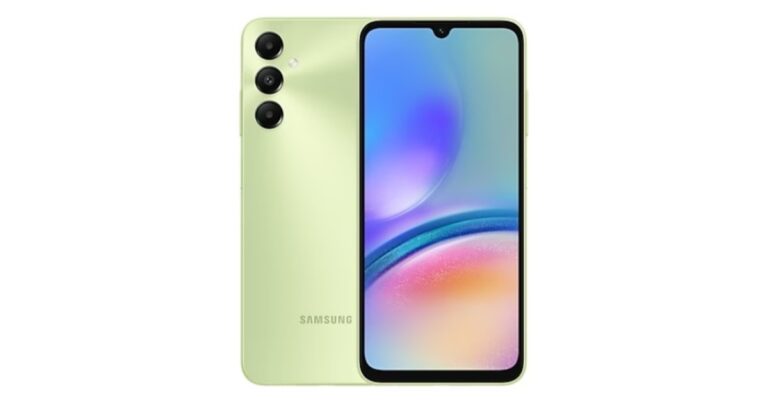

 Step 3: Search
 Step 5: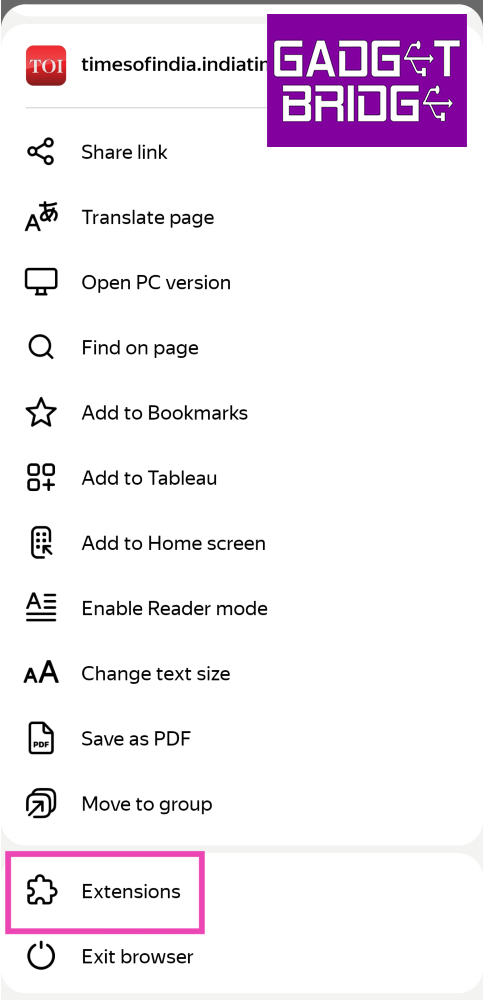
 Step 3:
 Step 4:
 Step 5: Search
 Step 6:
 Step 7:
 Step 3: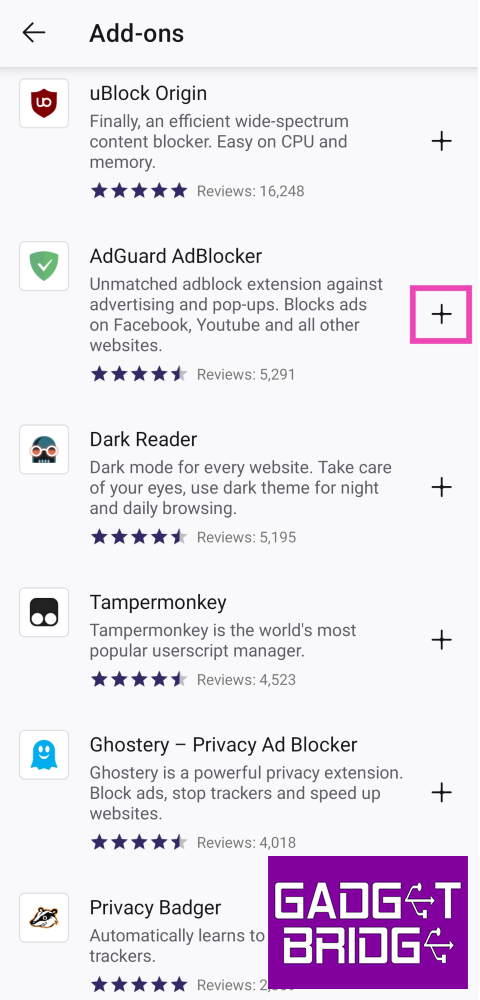







 Step 2: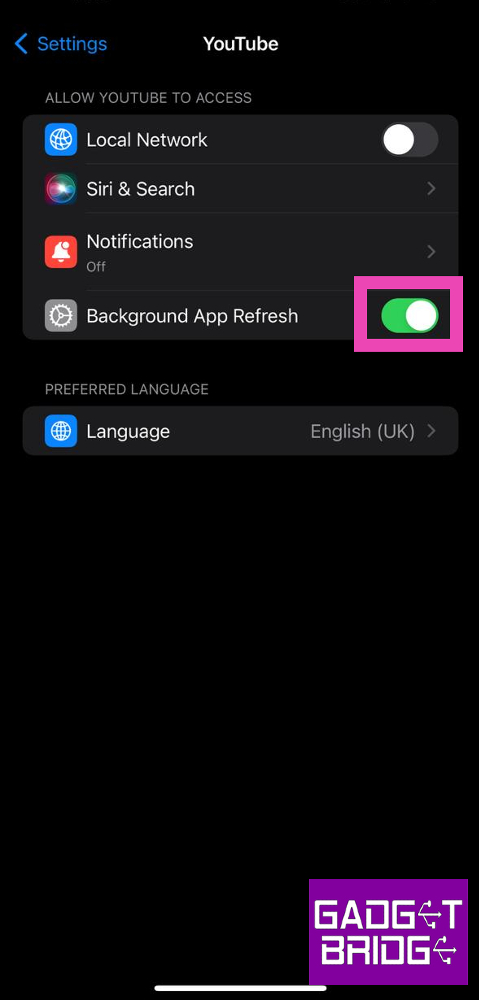
 Step 3:
 Step 4: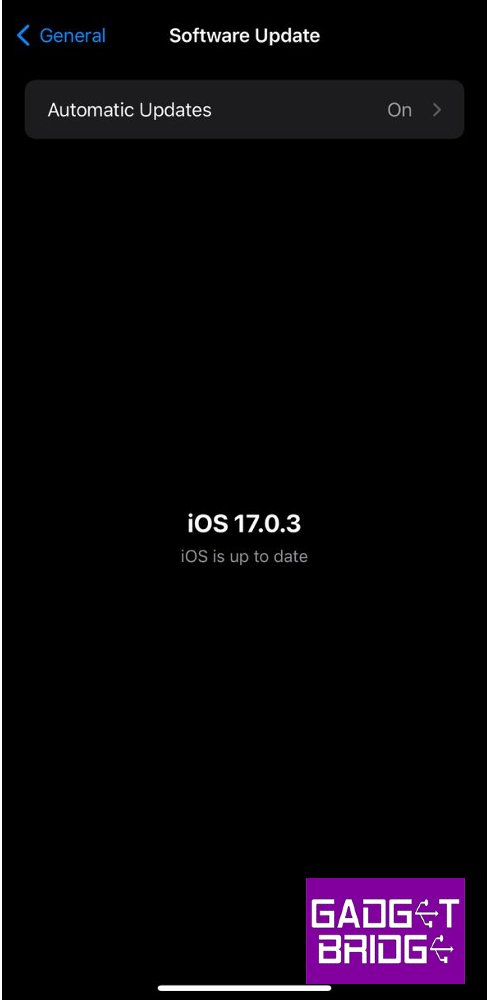
 Step 3: