Competitive gaming, often known as esports, has become a worldwide phenomenon, attracting players and viewers from all over the world. Having the correct gadgets can make a major difference in this highly competitive arena. The correct equipment, whether it’s a lightning-fast mouse, a responsive keyboard, or top-tier headphones, may offer gamers the advantage they need. With huge alternative markets like bitcoin betting at Cloudbet, there are plenty of reasons to get that competitive edge, and gadgets can help to bridge the gap here.
We’ll look at some of the greatest gadgets for competitive gaming and help evolve your game.
Gaming Mice
A high-performance gaming mouse is a must-have accessory for any competitive player. The precision and speed it provides can make or break a game in crucial moments. A mouse with a high DPI (dots per inch) sensor for precise tracking, programmable buttons for rapid operations, and a pleasant ergonomic design to prevent discomfort during lengthy gaming sessions are all desirable.
There are diminishing returns to be aware of as some popular brands step into the obscene price category, but there are some fantastic options that can be found on a reasonable budget.
Gaming Keyboard
For competitive gaming, a responsive and accurate gaming keyboard is essential. Many gamers prefer mechanical keyboards due to their tactile feedback and faster response times. Look for anti-ghosting (the ability to press several keys at the same time), configurable RGB illumination, and a comfortable layout.
Most importantly the keyboard has to stand up to a lot of punishment, a huge number of keystrokes and remain accurate. It’s certainly worth spending a little more here for a quality product that will last.
Gaming Headset
A good gaming headset is necessary for clear communication with teammates as well as an immersive gaming experience. For successful communication during intense gaming sessions, look for headphones with outstanding sound quality, a comfortable fit, noise cancellation, and a good microphone.
Depending on the game you play, a solid gaming headset could be your most valuable purchase with games like Valorant and Counter-Strike having sound as one of their most important aspects.
Gaming Monitor
Because the monitor serves as a window into the gaming environment, having a high-performance gaming monitor is essential for competitive play. Look for a monitor with a high refresh rate (144Hz or greater) for better pictures, a low input lag for less latency, and a fast response time to eliminate motion blur.
The monitor is often considered to be one of the most substantial upgrades any player can make, going from 60hz to 144hz cannot be understated in terms of how it impacts game performance, just remember to change your settings to enable the higher refresh rate!
Gaming Mouse Pad
A high-quality gaming mouse pad is often ignored, but it can make or break your gaming experience. It creates a smooth surface for precise mouse movements and can lengthen the life of your mouse feet.
A properly designed mouse mat will also help with mouse tracking, can impact things like lift height for the mouse, and just give space to move around. These are often much cheaper when it comes to making a change, so can be a fantastic place to start when comfort is the upgrade in mind.
Investing in the appropriate competitive gaming gear can drastically improve your performance and overall gaming experience. Whether it’s increasing precision with a high-performance mouse or increasing comfort with a high-quality gaming chair, the correct equipment can provide you with the competitive edge you need to excel in the fascinating world of competitive gaming.
For the latest gadget and tech news, and gadget reviews, follow us on Twitter, Facebook and Instagram. For the newest tech & gadget videos subscribe to our YouTube Channel. You can also stay up to date using the Gadget Bridge Android App. You can find the latest car and bike news here.
Today, PDFs are used in every organization due to their simplicity and compatibility. Sharing important information through PDFs is easier since they open with almost any device. However, the problem arises when you have a large amount of information and need to share it with multiple users in a busy workplace, as social platforms limit a specific file size.
But you need not fret. You can share your PDF documents as direct links without attachments.
Wonder how?
This post discusses all the details of creating a link for local and online PDFs on Windows computers without hassle in a short time to make your work easier. Stick around to learn the quick process.
Why Need to Create a URL for a PDF?
While you have the PDF file on your device, creating its URL (.pdf) is still necessary to make it accessible and downloadable for anyone with the link. Several other reasons include:
#1. Share with multiple users: URL saves time and effort to share PDF files and documents with multiple users. Simply create a link and share it with everyone simultaneously.
#2. Overcome file restrictions: Email and social media platforms generally impose restrictions and limits on large file sizes. But by creating a URL link, you can share it across multiple platforms without worries about file size restrictions.
#3. Easy sharing: Sharing large-sized PDF files is challenging. However, creating a link makes sharing easier and more convenient through online platforms for more extensive accessibility.
How to Make a URL Link for a PDF File or Document on Windows?
SwifDoo PDF is a compact, lightweight, powerful, fast PDF creator and editor that lets you perform all PDF-related functions. You can even create a link to a PDF within your file or document using the versatile PDF software.
Create a Local PDF Link
Check the quick steps to create a link to a local PDF within the PDF document.
Step 1: Install SwifDoo PDF software for free and open the PDF file for which you want to create a link. Either tap the Open button or drag and drop the desired PDF file into the software to open and access it.
Step 2: Tap Edit in the top menu bar and select the Link tab. Then click the Add or Edit link option from the drop-down menu.
Step 3: Draw a rectangle where you must create a URL, and a dialogue box for Add Links will appear.
Step 4: Choose Open a File at the bottom and browse your PC to select the target PDF. Click OK to create a link to your selected PDF document.
This way, you can not only add a link to a PDF but also create a link to a particular page in your PDF document. In fact, the SwifDoo PDF software also lets you link a PDF to multiple other file types and web pages and enables you to edit or delete the links at any time.
Create an Online PDF Link
SwifDoo PDF also lets you create a link to an online published PDF. Here’s how.
Step 1: Download and open the SwifDoo PDF app and open the PDF you want to create a URL for.
Step 2: Click Edit and select Link. Choose the Add or Edit link option.
Step 3: Draw an area where you want to add the link using your cursor and tap the Open a Web option.
Step 4: Type and enter the PDF link address or URL and click OK.
That’s it. Following the abovementioned process, you can create a link to open an online downloadable PDF document. Besides adding, the software also lets you remove links from PDFs.
After creating a link to the desired PDF file, select where the link is added, and the linked PDF will automatically open. Now, you can easily edit it despite the link being created on a PDF file stored on your system or the web.
Edit PDF Link
Here’s how to modify or edit a link with the SwifDoo PDF.
Step 1: Click the Edit option in the top menu bar and tap Link. Select the Add or Edit link option.
Step 2: Right-click the link to be modified and click Edit Link. Step 3: Change or remove the link as per your requirements.
Create a Link to a Specific PDF Page
Check out how to create a link to a specific PDF page than the whole PDF file/document.
Step 1: Tap the Go to a Page View option or Go to a Certain Page option in the link-adding dialogue.
Step 2: Type a page number. Alternatively, scroll to determine the specific page to be linked.
You can also use the SwifDoo PDF’s PDF to HTML converter feature to convert a PDF into an HTML file to share and open.
What else can SwifDoo PDF do for you?
SwifDoo PDF is the ultimate PDF file solution that performs all PDF functions from creation to editing. Instead, you can use its free templates to make greeting cards, add attachments, and add images, stickers, GIFs, and text to your PDF document.
Suppose you have a piece of critical information but in some other file type like Word, Excel, etc. In that case, the software also lets you convert PDF and vice versa with original formatting to add password protection and secure it from unauthorized access.
SwifDoo PDF software is an all-in-one PDF creator and editor for Windows users to view, edit, annotate, compress, merge, translate, add hyperlinks, and digitally sign a document. You can crop PDF pages, insert text boxes, search for a word, and replace everything in your PDF.
Final words
PDF is a widely used format to share documents due to its versatility, compatibility, and flexibility. You can easily upload your file to the website and easily share large amounts of information with unlimited users at once. We have already shared the necessary steps to create a link with SwifDoo PDF for easy sharing. Download and use SwifDoo PDF, as it is a secure and reliable PDF creator that guarantees your PDF security without data leaks. It lets you open your files in a flash and perform the necessary tasks as required.
For the latest gadget and tech news, and gadget reviews, follow us on Twitter, Facebook and Instagram. For newest tech & gadget videos subscribe to our YouTube Channel. You can also stay up to date using the Gadget Bridge Android App. You can find the latest car and bike news here.
Garena Free Fire is a battle royale game with regular awards and tournaments to keep players interested. If you play Garena Free Fire, you should be aware of the redeem codes that are released on a daily basis. However, because the battle royale game is banned in India, players from other countries can use the Free Fire Redeem codes daily. If you’re unfamiliar with the Garena Free Fire redeem codes or don’t know how to get them, we’ve put together a step-by-step guide to help you redeem them. Check out Garena Free Fire Redeem Codes for 17 October 2023.The Free Fire redeem codes are a great way to get free stuff. These are 12-digit codes that contain alphabets and numbers, as well as an expiration date and time. Because the Garena FF redeem codes cannot be used more than once, you should hurry to the redemption page to claim your free reward before someone else does. To get a free reward, all you have to do is go to reward.ff.garena.com/en, which is the official redemption page. Also, keep an eye on this space for daily updates on Garena Free Fire redemption codes and rewards.
Garena Free Fire Redeem Codes Today 17 October2023
updating soon
How to Get Free Fire Redeem Codes for Garena on 17 October2023?
Ever since Facebook (Meta Inc) acquired Instagram, the two platforms have come together to facilitate the seamless sharing of content. After linking the two profiles, you can easily log into Instagram using your Facebook account. Any post, story, or reel you upload on Instagram can also be shared automatically to your Facebook profile. If you’re facing issues with sharing, it may be due to one of several possible reasons. In this article, we bring you 5 easy fixes to the ‘Instagram not sharing to Facebook’ issue.Read Also:Top 4 ways to clear app and browser cache on iOS
Are your Instagram and Facebook profiles linked?
Sharing between Instagram and Facebook is only possible when the profiles are linked. Sometimes, the two profiles may disconnect from each other when you change the password to one of them. In this case, you will need to re-link your Facebook to your Instagram. Here’s how you can check whether your Instagram and Facebook profiles are connected.Step 1: Launch the Instagram app and tap on your profile picture at the bottom right corner of the screen.Step 2: Tap on the hamburger menu icon at the top right corner of the screen.Step 3: Select Settings and privacy.Step 4: Tap on Accounts Center.Step 5: Select Accounts.Step 6: Check if your Facebook account is displayed on the page. If it is not, re-link it to your Instagram profile.
Turn on automatic sharing for your Instagram content
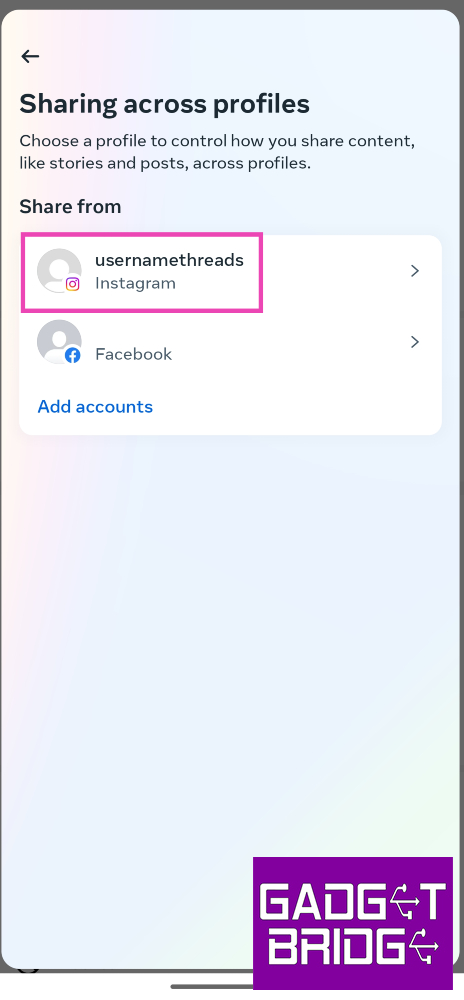
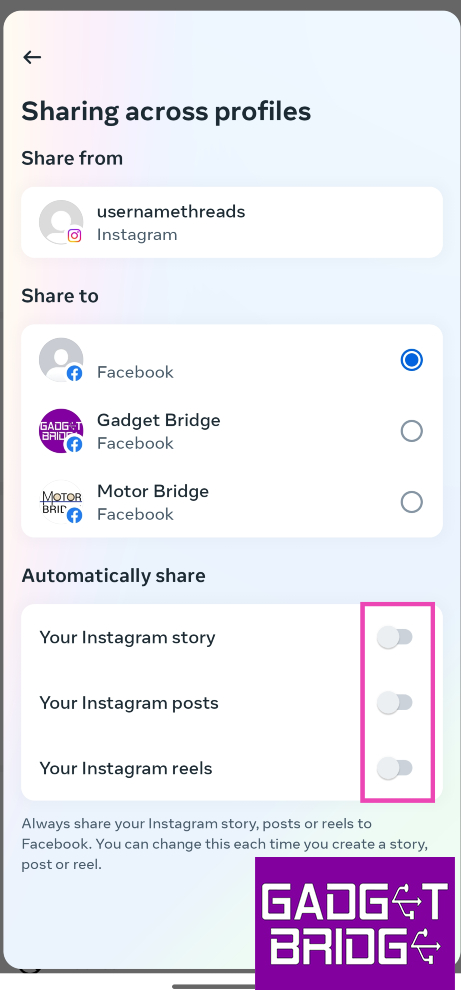
Step 1: Launch the Instagram app and tap on your profile picture at the bottom right corner of the screen.Step 2: Tap on the hamburger menu icon at the top right corner of the screen.Step 3: Select Settings and privacy.Step 4: Tap on Accounts Center.Step 5: Select Connected experiences.Step 6: Tap on Sharing across profiles.Step 7: Select your Instagram profile.Step 8: Turn on the toggle switches for Instagram story, posts, and reels.
Clear Instagram and Facebook’s app cache
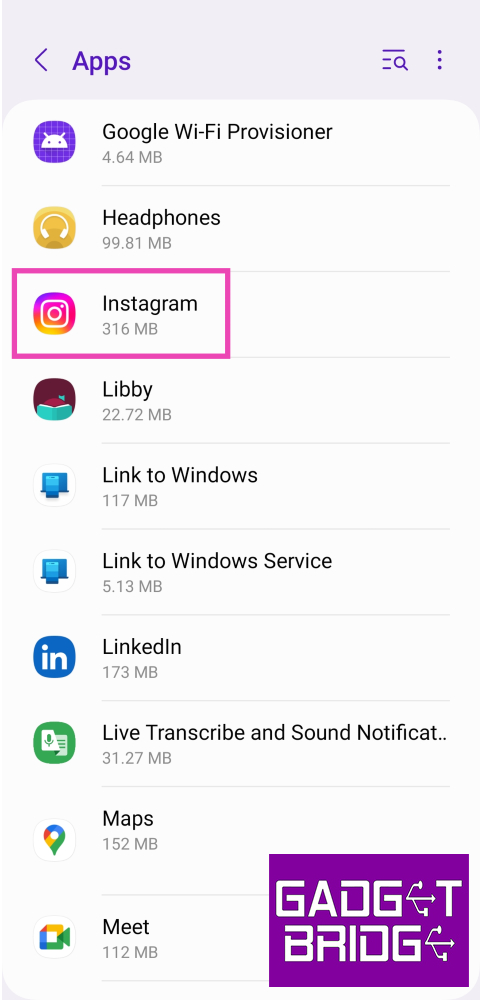
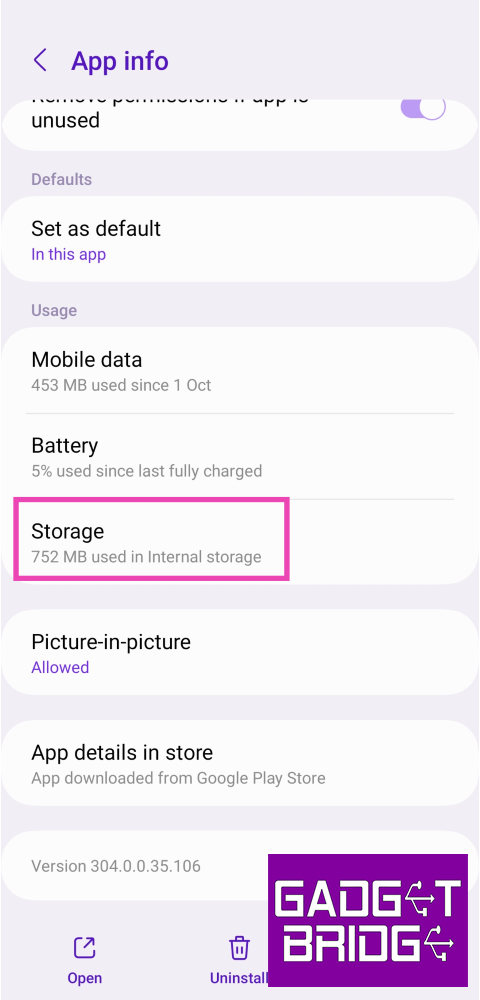
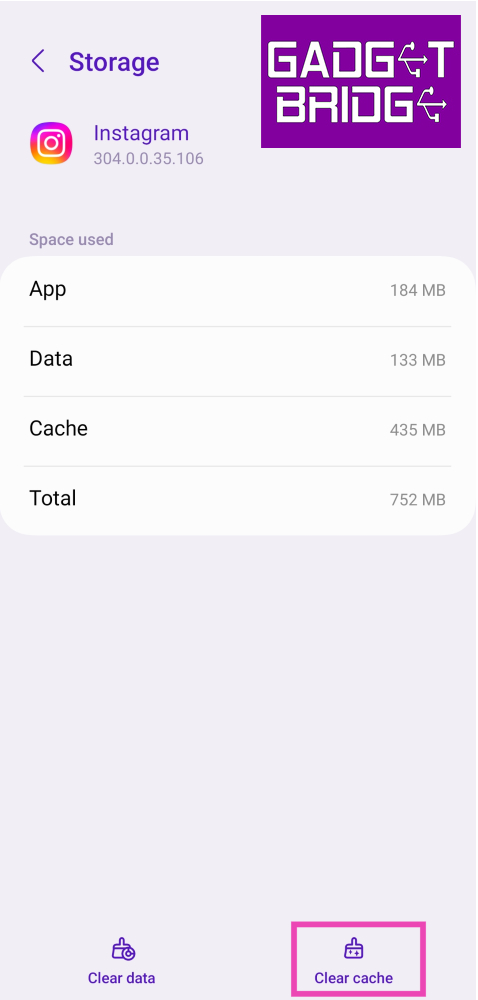
Step 1: Go to Settings and select Apps.Step 2: Select Instagram.Step 3: Tap on Storage.Step 4: Select Clear cache.Follow the same process for Facebook as well.
Log out and log in to Instagram
If you aren’t able to share your Instagram content on Facebook, it could be an account-related issue. Simply log out of Instagram and log back in to solve this problem. Here’s how.Step 1: Launch the Instagram app and tap on your profile picture at the bottom right corner of the screen.Step 2: Tap on the hamburger menu icon at the top right corner of the screen.Step 3: Select Settings and privacy.Step 4: Scroll all the way down and select Log out [profile handle].
Unlink and Re-link your Facebook account to your Instagram profile to facilitate sharing
Step 1: Launch the Instagram app and tap on your profile picture at the bottom right corner of the screen.Step 2: Tap on the hamburger menu icon at the top right corner of the screen.Step 3: Select Settings and privacy.Step 4: Tap on Accounts Center.Step 5: Select Accounts.Step 6: Tap the Remove button next to your Facebook account.Step 7: Finally, select Add accounts and re-add your Facebook account.
Frequently Asked Questions (FAQs)
How do I link my Facebook account to my Instagram profile?
On the Instagram app, go to Profile>Menu>Settings and privacy>Accounts Center>Accounts and add your Facebook account using the proper credentials.
Can I log into my Facebook account using my Instagram profile?
You can log into your Instagram profile using your Facebook account but not vice versa.
Why are my Instagram posts not being automatically shared on Facebook?
To enable automatic sharing between Instagram and Facebook, go to Profile>Menu>Settings and privacy>Accounts Center>Connected experiences>Sharing across profiles. Select your Instagram profile and turn on the toggle switches for story, posts, and reels.Read Also:Top 10 Ways to Fix YouTube App Crashing or Not Working On Android
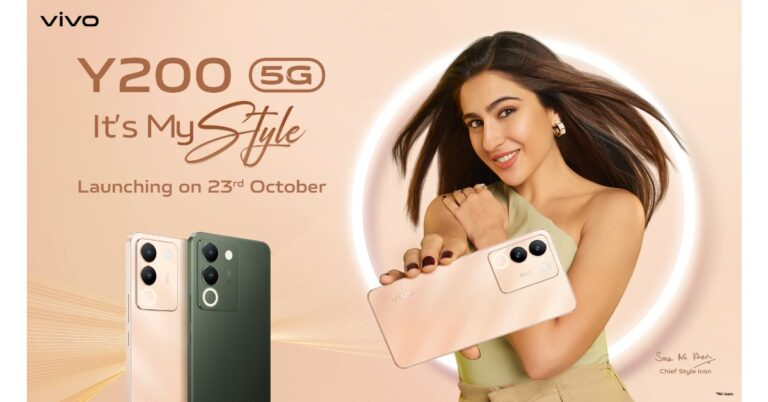
Vivo Y200 renders, design, specs and features are doing rounds on the web. The launch date for the said phone was not known but today it now has a launch date. The Chinese smartphone brand today announced that Vivo Y200 will make its India debut on October 23. The device’s colour option and design renders were leaked recently.Vivo today officially announced that its upcoming phone Vivo Y200 is set for a launch in India on October 23. The device is a predecessor of the Y100 that was launched last year. The company has not yet revealed the specs or its pricing. But the teaser image suggests the phone to arrive in two shades.Also Read: Best Flip Phones in India (2023) to buy this festive season Vivo Y200 is likely to come with a price tag of Rs 24,000 for the 8GB RAM with 128GB storage option.According to a report the Vivo Y200 is likely to come in two colour options of Desert Gold and Jungle Green. As we mentioned earlier the leaked design renders of the phone suggest an Aura Light feature which is basically a small ring light. Along with this, there is a dual rear camera setup and an LED flashlight.The alleged phone is said to have rounded corners and flat edges. The leaked renders also suggest a volume rocker and power button on the right side of the frame. Coming to the front, the panel has a punch-hole camera placed at the top centre.Previously the handset was rumoured to come with a 6.67-inch full-HD+ AMOLED display with 2,400 x 1,080 pixels of resolution. The upcoming phone may also include a Qualcomm Snapdragon 4 Gen 1 SoC and operate on Funtouch OS with Android 13 on top.In addition to this speculations also suggests a 64-megapixel primary sensor with OIS and a secondary 2-megapixel sensor. For selfies, it may also include a 16-megapixel front-facing camera.Moreover, the upcoming phone is likely to pack a 4,800mAh battery with 44W wired fast charging support.
For the latest gadget and tech news, and gadget reviews, follow us on Twitter, Facebook and Instagram. For newest tech & gadget videos subscribe to our YouTube Channel. You can also stay up to date using the Gadget Bridge Android App. You can find the latest car and bike news here.
Are you looking for a smartphone with a more compact form factor? Then you should look for Flip Phones, which are essentially foldable, and do come with that capability. When opened, they expand into a full-sized display and fold to fit in your pocket. As of now, the majority of the brands, including Samsung, Motorola, Xiaomi, Oppo, Vivo, and Tecno have foldable devices and soon, OnePlus, are jumping on board. Note that Apple the company behind the iPhone, the king of smartphones, has yet to enter the foldable phone market. So if you are looking to buy a new foldable phone here is a list of Flip Phones available in India.The festive sale is live on all the e-commerce platforms including Amazon and Flipkart in the country. Smartphone brands like Xiaomi, Vivo, Samsung, and Oppo are also hosting their individual sales on their platform. So this is the best time to buy a Flip Phone in India. If you are looking for one then here is a list of Flip Phones in India you can look out for this festive season.
Samsung Galaxy Z Flip 5
Samsung Galaxy Z Flip 5 (Review)is the first Flip phone on the list which you can absolutely go for without giving a second thought. It features a 6.7-inch FHD+ Dynamic AMOLED 2X Infinity Flex Display and a 3.4-inch Super AMOLED cover screen. The primary panel supports a 120Hz refresh rate and the external display has a refresh rate of 60Hz. The device comes with an IPX8 grade for water resistance.This Flip phone comes with a dual rear camera unit with a 12-megapixel ultra-wide main sensor and a 12-megapixel wide-angle camera. The Galaxy Z Flip 5 boasts a 10-megapixel selfie camera on the front of the folding display for selfies.In addition to this, the phone boasts a 3,700mAh battery that supports 25W quick charging.The new Flex Window offers a variety of both old and new capabilities and is now 3.78 times bigger than the previous iteration. It offers greater customization choices, including informative and graphical clocks that can match the face design of a user’s Galaxy Watch 6 series, as well as stylish frames. The device runs on OneUI 5.1.1 on top of Android 13.Samsung Galaxy Z Flip 5 is available in two different configurations 8GB RAM with 256GB storage and 8GB RAM with 512GB storage. The price of both variants in India is set at Rs 99,999 and Rs 109,999, respectively.
Oppo Find N3 Flip
Oppo Find N3 Flip features a 6.80-inch AMOLED primary display with a dynamic refresh rate that ranges between 1Hz to 120Hz. There is a 3.26-inch cover display vertically positioned. The device is powered by an octa-core MediaTek Dimensity 9200 SoC along with 256GB of UFS 4.0 internal storage and 12GB of LPDDR5X RAM. The device comes with colorOS 13 out of the box. The company is promising 4 years of major OS updates and 5 years of security patches.For photos and videos, there is a triple rear camera that includes a 32-megapixel telephoto sensor, an 8-megapixel ultra-wide-angle sensor, and a 50-megapixel Sony IMX890 main lens with OIS feature. The Flip Phone also sports a 32-megapixel front camera for taking selfies and making video calls.It packs a 4,300mAh battery with 44W supervooc wired charging support.The Oppo Find N3 Flip comes in a single 12GB RAM with 256GB storage option priced at Rs 94,999.
Tecno Phantom V Flip
Tecno Phantom V Flip features a 6.9-inch LTPO AMOLED primary screen with a 144Hz refresh rate. There is a 1.32-inch outer display. The device is powered by MediaTek Dimensity 8050 with 8GB RAM and 256GB storage. For photos and videos, the device includes a 64-megapixel primary camera and a 13-megapixel ultrawide camera. For selfies, it includes a 32-megapixel front-facing shooter.The Flip Phone by Tecno boasts a 4,000mAh battery that comes with 45W fast charging support. Also, this device is not IP-certified.The device comes with a price tag of Rs 49,999.
Motorola Razr 40 and Motorola Razr 40 Ultra
Motorola Razr 40, and Motorola Razr 40 Ultra features 6.9-inch foldable pOLED screens with a refresh rate of 165Hz. The Motorola Razr 40 Ultra model has a larger 1.5-inch cover display whereas the Razr 40 has a 3.6-inch pOLED outer screen. Both the devices are IP52 rated.The Motorola Razr 40 and Motorola Razr 40 Ultra are powered by Snapdragon 7 Gen 1 and Snapdragon 8+ Gen 1 processors respectively.The Motorola Razr 40 features a 64-megapixel primary sensor and a 12-megapixel ultra wide-angle camera. Whereas Razr 40 Ultra includes a 13-megapixel secondary ultra-wide-angle camera and a 12-megapixel primary sensor. However both the devices sport a 32-megapixel front-facing camera for selfies.There is a 3,800mAh and a 4,200mAh battery on the Motorola Razr 40 and Motorola Razr 40 Ultra, respectively.The Motorola Razr 40 Ultra comes with a price tag of Rs 89,999 for the 8GB RAM with 256GB storage model. On the other hand, Razr 40 price is set at Rs 59,999. For the latest gadget and tech news, and gadget reviews, follow us on Twitter, Facebook and Instagram. For newest tech & gadget videos subscribe to our YouTube Channel. You can also stay up to date using the Gadget Bridge Android App. You can find the latest car and bike news here.
A new player in the consumer tech world, Nothing has garnered a lot of praise and popularity with its smartphone and TWS releases. After launching the second iteration of the Nothing Phone this summer (our review here), the brand has come out with a fresh line of products under a new banner. CMF (Colour, Material, Finish) by Nothing ditches the brand’s iconic transparent design philosophy for a minimal and polished aesthetic. The subsidiary brand’s catalogue comprises affordable products meant for the average consumer. Consider it Nothing’s very own ‘Nord’, if you will. Eager to gauge CMF’s ambitions, we got our hands on its recently released Watch Pro and Buds Pro. Nothing fans expecting a transparent wearable may have to wait some more for a flagship release, but this smartwatch is certainly no pushover. We have been using the CMF Watch Pro for the last 10 days, here is our in-depth review.Read Also:Top 3 ways to clear app cache on Android
CMF Watch Pro review: Design and Display
Nothing’s novel approach to unboxing has been carried forward to its subsidiary brand as well. The CMF Watch Pro ships inside a sleek, squarish cardboard box which has three visible cutouts jutting out of the bottom end. Flipping open the package, you will find the smartwatch, the silicone watch strap, a magnetic clip charger, and a user guide inside.As far as looks go, the CMF Watch Pro looks like your average smartwatch. The square dial houses a 1.96-inch AMOLED display that can reach a peak brightness of 600+ nits. This display has a resolution of 410 x 502p and a pixel density of 332ppi. The touch response offered by this AMOLED display is very satisfying. We like that it isn’t super sensitive to light touches.Encasing this display is an aluminium alloy shell that is surprisingly light. The Watch Pro weighs just 47g with the silicone strap. The right edge of the aluminium frame houses the side key and the speaker grille. The dial’s underside houses the accelerometer, heart rate & blood oxygen saturation sensor, magnetic pin slots for charging, and a microphone. The entire shell has a matte finish, which feels quite premium and polished.Always On DisplayThe pin buckle silicone strap wraps snugly around the wrist, using the pin buckle mechanism to seal the fit. Once you fasten the buckle, the strap goes under the slit. We’ve struggled with this kind of fit in the past, especially while wearing the watch to bed, but the CMF Watch Pro is able to pull it off quite well. Wearing the watch for days on end, we did not experience any major discomfort. The watch is rated IP68 for dust and water resistance, which means it is dust and water resistant. However, it is not meant for swimming.
CMF Watch Pro review: Performance
Pairing the CMF Watch Pro to your smartwatch is a seamless process. The watch dial displays a QR code that directs you to the CMF Watch app download page. You can also install the app from the Google Play Store or App Store.Readings from the heart rate monitor and SpO2 sensor are consistent with medical-grade equipment. The Watch Pro routinely measures maximum, minimum, and resting heart rate throughout the day, accurately plotting it on a graph. You can view your daily, weekly, monthly, and yearly graphs on the CMF Watch app. The same goes for blood oxygen measurement. You can also set up low/high heart rate and low blood oxygen level alerts. The watch also gauges your stress level every thirty minutes. We cannot speak to the accuracy of the stress reading as CMF does not divulge its formula for assigning the score.Sport and fitness tracking on the Watch Pro is near impeccable, apart from one small issue. The watch does not auto-detect your workouts. We went on a few hikes and runs, and while the watch updated the daily step count, the numbers did not reflect as a part of an exercise. On the bright side, the Watch Pro has in-built GPS support, which means you can leave your phone at home and the watch will still be able to track your run on a map.The Watch Pro can track over 100 sports, exercises, and workout routines. This includes exercises like pilates, CrossFit, & strength training and leisure activities like Zumba, ballet, street dance, skating, kite flying, and more. The watch can accommodate up to 36 exercise and workout routines at one time. These exercises can be selected from the ‘Usual sports’ section in the CMF Watch app.Things take an interesting turn on the OS front as we finally get to see what makes this watch a Nothing product. The Watch Pro’s user interface is influenced by Nothing OS 2.0. Nothing’s black and orange colour palette dominates the look of the OS. The app grid is greyed out and the watch faces have a distinct ‘Nothingness’ to them. The dot matrix font further stamps Nothing’s personality on the device. You can’t customise the watch faces, which is probably something that the brand restricts on purpose so as to not throw off the aesthetic it has carefully curated.This minimality in design scores brownie points from us for several reasons. Firstly, a distinct look and personality is something that not a lot of devices can boast about, especially at a time when uniformity is taking over every smart device. The watches that do break the norm go towards the direction of simulating a smartphone experience for the wrist. This is where the CMF Watch Pro does justice to the genre. It keeps things simple and nails to perfection the things it sets out to do.Lastly, the battery life on this watch is nothing short of amazing. The 340mAh battery unit can power the smartwatch for 13 days, as claimed by Nothing. With the Always On Display turned on at all times, the CMF Watch Pro lasted 10 days during the review period. The watch has a cool Wrist Detection feature that turns off AOD and 24-hour heart rate and SpO2 tracking as soon as you take it off your wrist. This can push the battery life closer to its claimed range.Read Also:Top 10 Ways to Fix YouTube App Crashing or Not Working On Android
Conclusion
The CMF Watch Pro is undoubtedly a Nothing product through and through even though it doesn’t get the brand’s signature transparent design. For an average consumer who wants a finished product over a range of customisations, the Watch Pro is an excellent choice. It does a splendid job of health & fitness tracking and has great app support for smartphones. We would have liked to see features like automatic workout detection and customised watch faces, but their absence is certainly not a dealbreaker. At Rs 4,499 the CMF Watch Pro is one of the best smartwatches in its segment.
OnePlus Open is set to launch in India on October 19. But ahead of the official announcement the price of the OnePlus Open for India has leaked. In addition to this, the key specs of the foldable phone include the camera and display specifications. The device is likely to come with a triple rear camera setup. In addition to this, there will be a 2K resolution display. Keep reading to know more about the phone pricing and specs.According to a tipster, OnePlus Open is likely to be priced in India at Rs 1,39,999. The foldable phone is claimed to go on sale in India from October 27.Also Read:Apple India announces festive sale ahead of Diwali with up to Rs 10,000 savings on Apple productsOn the other hand, a Chinese tipster has shared the key specs of OnePlus Open. He took to Weibo to share the camera and display specs of the phone. According to him the foldable will be featuring a BOE panel with a 2K resolution. In addition to this, it may support a refresh rate of 120Hz and 1440Hz PWM dimming. The display will come with a peak brightness of 2,800 nits.Furthermore, the Chinese tipster has also shared that the OnePlus Open could include a triple rear camera setup. The camera module may include a 48-megapixel dual-layer transistor outsole primary lens. Moreover, it may also include a secondary 64-megapixel periscope lens with 3x optical zoom or 6x lossless zoom and a tertiary 48-megapixel ultrawide lens. TheThe foldable phone is said to come with OxygenOS 13 out of the box. The OnePlus Open is also claimed to support 67W fast charging however it might not get support for wireless charging. The device may ship with a 100W charger.OnePlus Open is confirmed to be available in a black colour option. The device will come with a volume rocker and a power button on the right side of the frame. Moreover, an Alert Slider on the left edge.According to leaks, the foldable may feature a 7.82-inch OLED primary display with 2,440×2,268 pixels of resolution. On the other hand, there could be a 6.31-inch OLED outer display with 1,116 x 2,484 pixels of resolution. Both the screen may support a refresh rate of 120Hz. The phone is expected to be powered by an octa-core Qualcomm Snapdragon 8 Gen 2 SoC along with 16GB of RAM and up to 1TB of storage. The upcoming device is expected to sport a 4,805mAh battery.
For the latest gadget and tech news, and gadget reviews, follow us on Twitter, Facebook and Instagram. For newest tech & gadget videos subscribe to our YouTube Channel. You can also stay up to date using the Gadget Bridge Android App. You can find the latest car and bike news here.
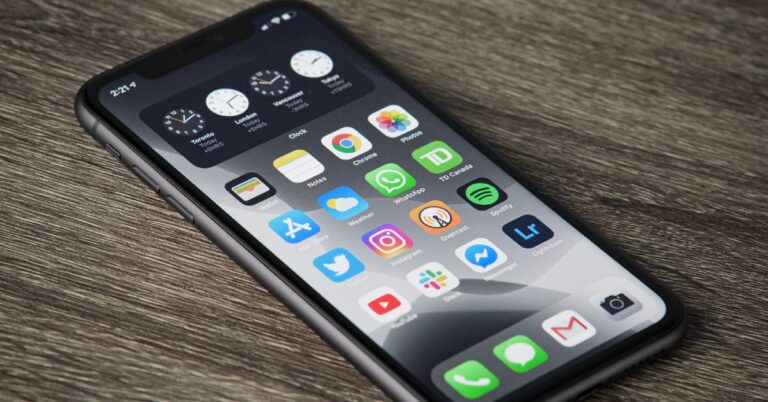
One of the easiest ways of freeing up the storage space on your iPhone is by clearing the cache of all the apps and web browsers you use. Offloading an app helps as well. The apps on your iPhone can add massively to the cache and occupy a significant portion of the storage space over a period of time. Wiping out the cached memory of all the apps can take some time since you will need to go through every app individually. But, it is a very easy process. In this article, we bring you the top 4 ways to clear app and browser cache on iOS.Read Also:Demystified: What Happens When You Remove or Block a Follower on Instagram?
Clear app cache on iOS
Step 1: Go to Settings and select the app for which you want to clear the cache.Step 2: Scroll down and select ‘Background App Refresh’.Step 3: Go back to the home page close and re-launch the app.The cache of the app will be cleared as soon as it is launched.
Offload an app on iOS
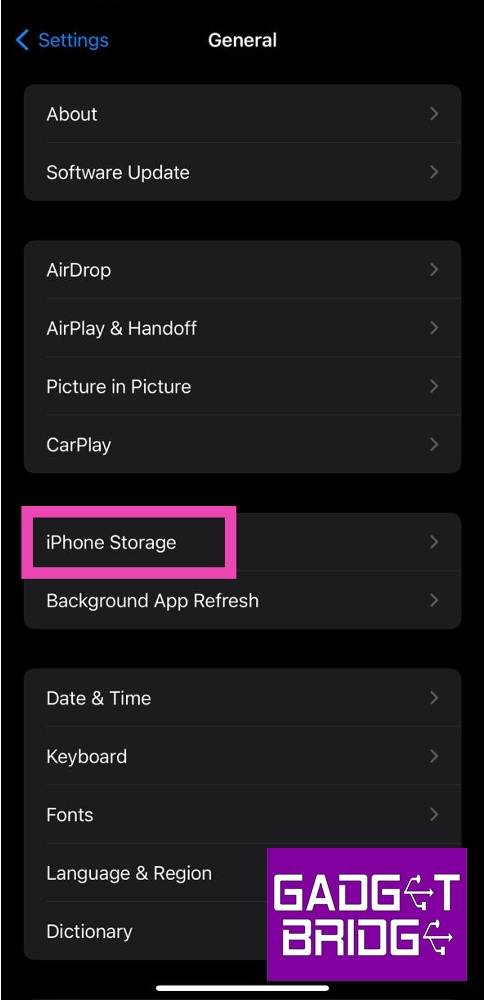
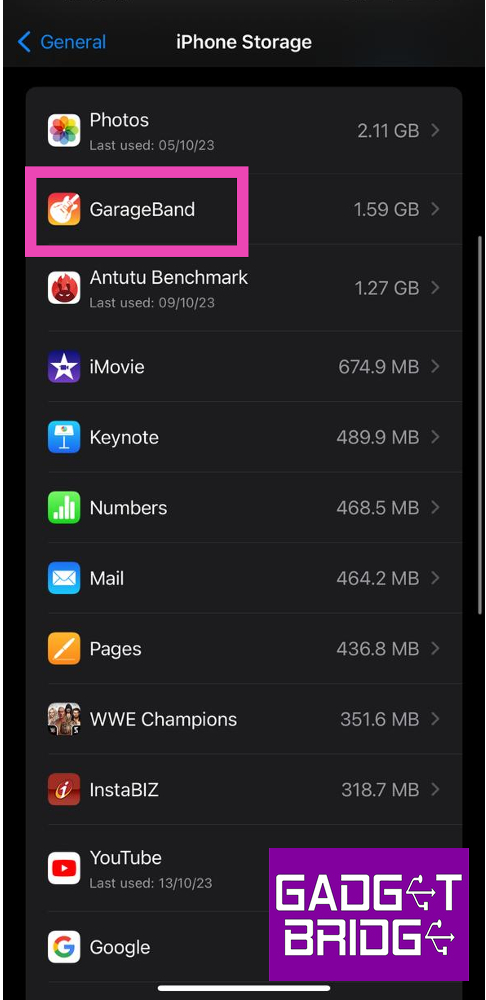
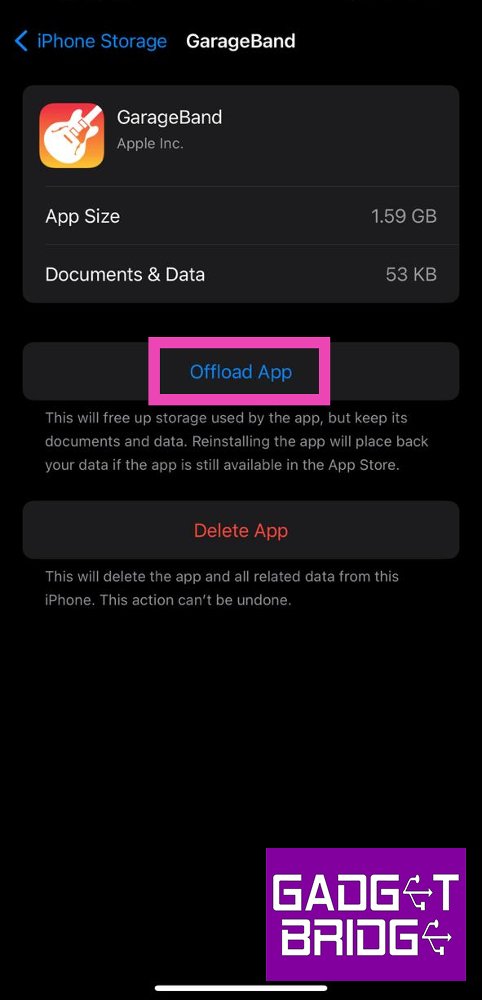
Step 1: Go to Settings and select General.Step 2: Tap on iPhone Storage.Step 3: Select the app for which you want to clear the cache.Step 4: Tap on Offload App.Step 5:Confirm your selection in the popup box.
Clear Safari’s app cache on iOS
Step 1: Go to Settings and select Safari.Step 2: Tap on Clear History and Website Data.Step 3:Confirm your selection in the popup box.
Clear Google Chrome’s app cache on iOS
Step 1:Launch the Google Chrome app on your iPhone.Step 2: Tap the ellipses at the bottom right corner of the screen.Step 3: Tap on Clear Browsing Data.Step 4: Set a Time Range. Make sure you select Cached Images and Files as one of the items you want to delete.Step 5: Hit Clear Browsing Data.
Frequently Asked Questions (FAQs)
What is the difference between Offloading an app and clearing its cache?
Offloading an app and clearing its cache are great ways to free up storage space on your device. Clearing an app’s cache deletes all the temporary files it has stored on your device. Offloading an app uninstalls it from your iPhone but retains its data in case you install it again.
What does cache mean?
A cache is a set of temporary files that an app or website stores on your device for instant access. This keeps it from downloading those files every time you visit the app or webpage.
How often should I clear the app cache on my iPhone?
If you haven’t used an app in a long time, you should clear its cache. Typically, you should clear the cache of every app once every two to three weeks.Read Also:Top 5 Gaming Mouse Under Rs 1,000 for Counter-Strike 2
Apple Festive Sale in India has begun and the company is offering exciting deals across its product portfolio ahead of Diwali. Apple iPhones, iPads, MacBooks and AirPods will be up on the official Apple Stores with good offers and discounts. In addition to this, the Cupertino-based company will also provide No-cost EMI for three or six months from leading banks.While announcing the Apple Festive Sale in India the tech firm said, “Get ready to celebrate this festive season with Apple. Exciting offers are coming your way on 15 October.”Apple will be offering up to Rs 10,000 off to those making payments using HDFC Bank credit cards. There will be discounts of up to Rs 5,000 on the latest iPhone 15 and iPhone 15 Plus models. In contrast, HDFC card owners can get an instant discount of Rs 6,000 on purchasing iPhone 15 Pro and iPhone 15 Pro Max.Also Read:Poco M6 Pro 5G Review: One of the best affordable 5G smartphonesThe last year’s iPhone 14 and iPhone 14 Plus will bring you a discount of Rs 4,000 if the transaction is made through an HDFC Bank card. Likewise, there will be discounts of Rs 10,000 on MacBooks including MacBook Air M2 13-inch and 15-inch models, MacBook Pro 13-inch, 14-inch, and 16-inch models, and Mac Studio.The HDFC Bank card holders can receive a discount of up to 2,000 in addition to 3-6 months of no-cost EMI on the purchase of Apple HomePod and AirPods Pro. Moreover, buyers can also get an additional subscription to Apple Music for 6 months.However, there are great deals on Amazon and Flipkart on iPhones but there are some perks of purchasing Apple products from the Apple Store. Buyers can get six months of Apple Music for free when they buy an iPhone, AirPods, or HomePod. In addition to this, shoppers will also get a chance to personalise their iPad, AirPods, AirTag, Apple Pencil (2nd gen), or AirTag Air for free. They can get engraved emojis, names, or numbers on their devices. Choose from Hindi, Bengali, Marathi, Tamil, Kannada, Gujarati, Telugu, and English.Apart from this, you can choose to pay in low monthly instalments with EMI. As a part of its festive sale, Apple will provide No-cost EMI offers for three or six months through leading banks in the country.On the website, the company says, “Exchange your current eligible device with Apple Trade-In, and get instant credit towards your new purchase.”Apple is also offering great trade-in deals to its customers during the sale. Customers can easily trade any qualified smartphone through Apple Trade in for instant credit toward a new iPhone where people can exchange their devices for up to Rs 67,800. Note that the offer cannot be combined with Apple Store for Education or Corporate Employee Purchase Plan pricing. To entice more customers.How Apple Trade In works:
Click here to evaluate the worth of the phone which you want to exchange.
Then select your new device and then answer a few questions to get your estimated trade-in value. You can use that value as instant credit to save on your new iPhone.
Apple will also provide doorstep pickup and delivery. Just exchange your smartphone when we deliver your new iPhone.
Delivery options
As mentioned earlier Apple is also offering doorstep delivery as well as pickup options to choose from. Express Delivery is available on in-stock items. In this option, your product will automatically ship as it becomes available. A signature may be required at the time of delivery. For prepaid orders, the courier will issue a One one-time password to the phone number provided at the time of checkout. The second option is Scheduled Delivery. However, this option is only applicable for specific PIN codes; you can choose a scheduled delivery method for each item on your order.
Apple is also offering a 3-month subscription to Apple TV+ and Apple Arcade for free on the purchase of Apple products.
Besides this Apple is also organising festive events at its retail locations in Mumbai as well as at Delhi.
From October 19 to November 14, Apple BKC is hosting “Light Up Mumbai” a series of free talks and workshops to spark the creativity of customers this festive season. Interested customers can sign up and learn from leading artists from the worlds of music, film, design and beyond and get creative on iPhone.
Session lineup at Apple BKC for October 2023:
Thursday, October 19
Talk: KING
Timing: 7:30 pm–9:00 pm
Join rap sensation KING at the Apple BKC where he’ll share the stories behind his music and upcoming album New Life.
Thursday, October 26
Talk: Behind Bollywood with Vikramaditya Motwane
Timing: 7:30 pm–9:00 pm
Filmmaker Vikramaditya Motwane will share screenings of his incredible back catalogue and the stories behind them — focusing on the role played by technology including the iPhone.
Tuesday, October 31
Workshop: Find Your Voice with NaadSadhana on iPhone
Timing: 7:30 pm–9:00 pm
Music-making app NaadSadhana creator Sandeep Ranade shares the thinking behind its collaborative design.
For the latest gadget and tech news, and gadget reviews, follow us on Twitter, Facebook and Instagram. For newest tech & gadget videos subscribe to our YouTube Channel. You can also stay up to date using the Gadget Bridge Android App. You can find the latest car and bike news here.




 Step 3: Draw a rectangle where you must create a URL, and a dialogue box for Add Links will appear.
 Step 4: Choose Open a File at the bottom and browse your PC to select the target PDF. Click OK to create a link to your selected PDF document.
This way, you can not only add a link to a PDF but also create a link to a particular page in your PDF document. In fact, the SwifDoo PDF software also lets you link a PDF to multiple other file types and web pages and enables you to edit or delete the links at any time.
Step 4: Choose Open a File at the bottom and browse your PC to select the target PDF. Click OK to create a link to your selected PDF document.
This way, you can not only add a link to a PDF but also create a link to a particular page in your PDF document. In fact, the SwifDoo PDF software also lets you link a PDF to multiple other file types and web pages and enables you to edit or delete the links at any time.
 Step 2: Right-click the link to be modified and click Edit Link.
Step 3: Change or remove the link as per your requirements.
Step 2: Right-click the link to be modified and click Edit Link.
Step 3: Change or remove the link as per your requirements.
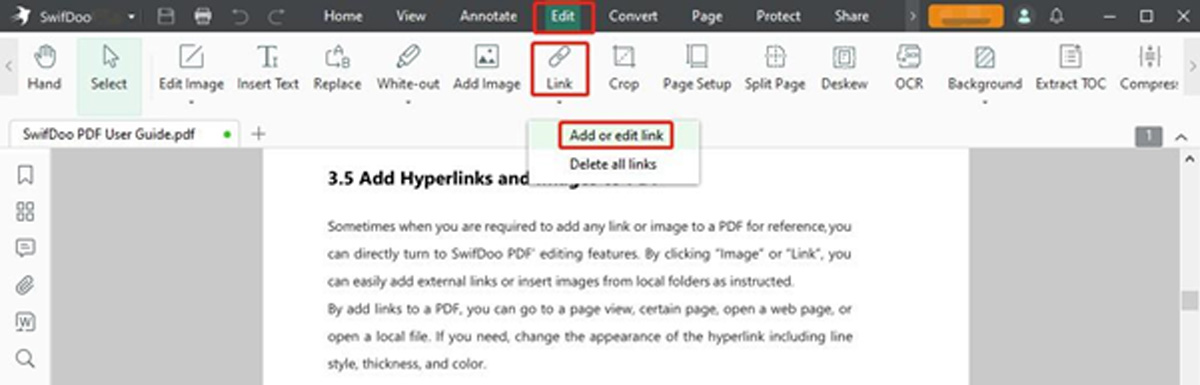 Step 3: Draw a rectangle where you must create a URL, and a dialogue box for Add Links will appear.
 Step 4: Choose Open a File at the bottom and browse your PC to select the target PDF. Click OK to create a link to your selected PDF document.
This way, you can not only add a link to a PDF but also create a link to a particular page in your PDF document. In fact, the SwifDoo PDF software also lets you link a PDF to multiple other file types and web pages and enables you to edit or delete the links at any time.
Step 4: Choose Open a File at the bottom and browse your PC to select the target PDF. Click OK to create a link to your selected PDF document.
This way, you can not only add a link to a PDF but also create a link to a particular page in your PDF document. In fact, the SwifDoo PDF software also lets you link a PDF to multiple other file types and web pages and enables you to edit or delete the links at any time.
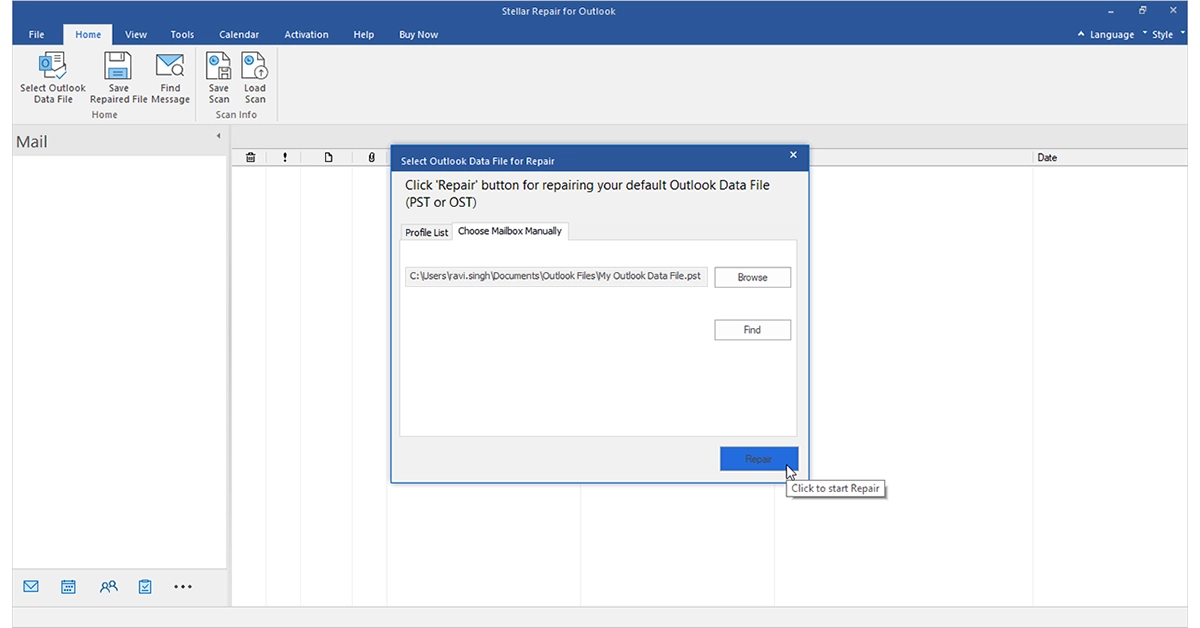 Step 2: Click Edit and select Link. Choose the Add or Edit link option.
Step 3: Draw an area where you want to add the link using your cursor and tap the Open a Web option.
Step 4: Type and enter the PDF link address or URL and click OK.
That’s it. Following the abovementioned process, you can create a link to open an online downloadable PDF document. Besides adding, the software also lets you remove links from PDFs.
After creating a link to the desired PDF file, select where the link is added, and the linked PDF will automatically open. Now, you can easily edit it despite the link being created on a PDF file stored on your system or the web.
Step 2: Click Edit and select Link. Choose the Add or Edit link option.
Step 3: Draw an area where you want to add the link using your cursor and tap the Open a Web option.
Step 4: Type and enter the PDF link address or URL and click OK.
That’s it. Following the abovementioned process, you can create a link to open an online downloadable PDF document. Besides adding, the software also lets you remove links from PDFs.
After creating a link to the desired PDF file, select where the link is added, and the linked PDF will automatically open. Now, you can easily edit it despite the link being created on a PDF file stored on your system or the web.
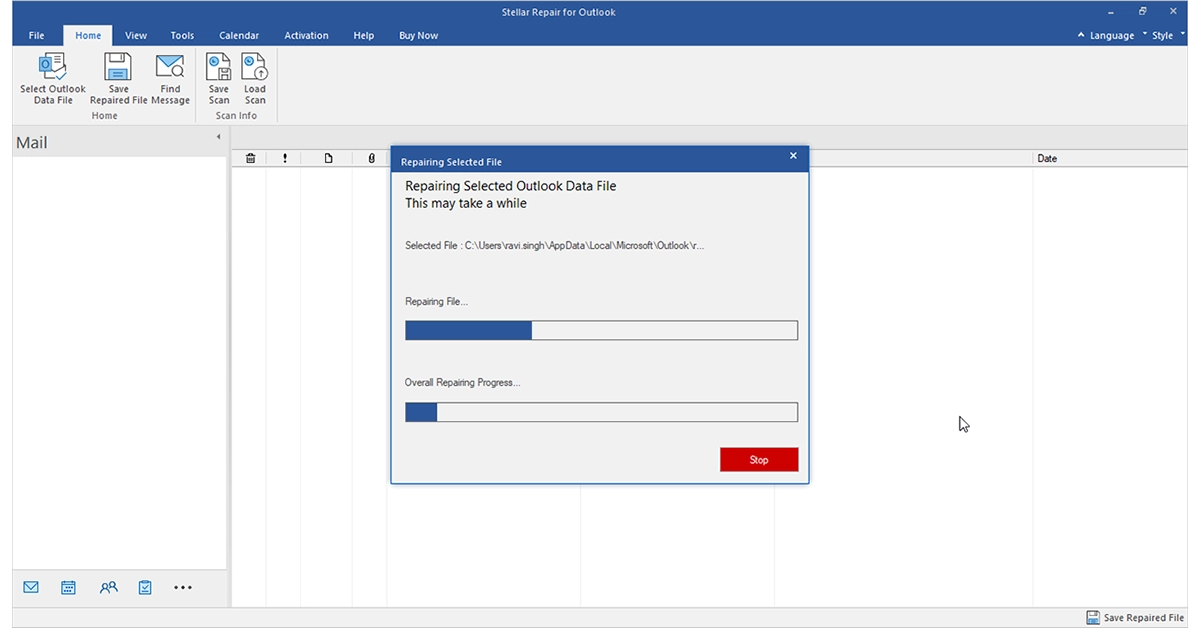 Step 2: Right-click the link to be modified and click Edit Link.
Step 3: Change or remove the link as per your requirements.
Step 2: Right-click the link to be modified and click Edit Link.
Step 3: Change or remove the link as per your requirements.
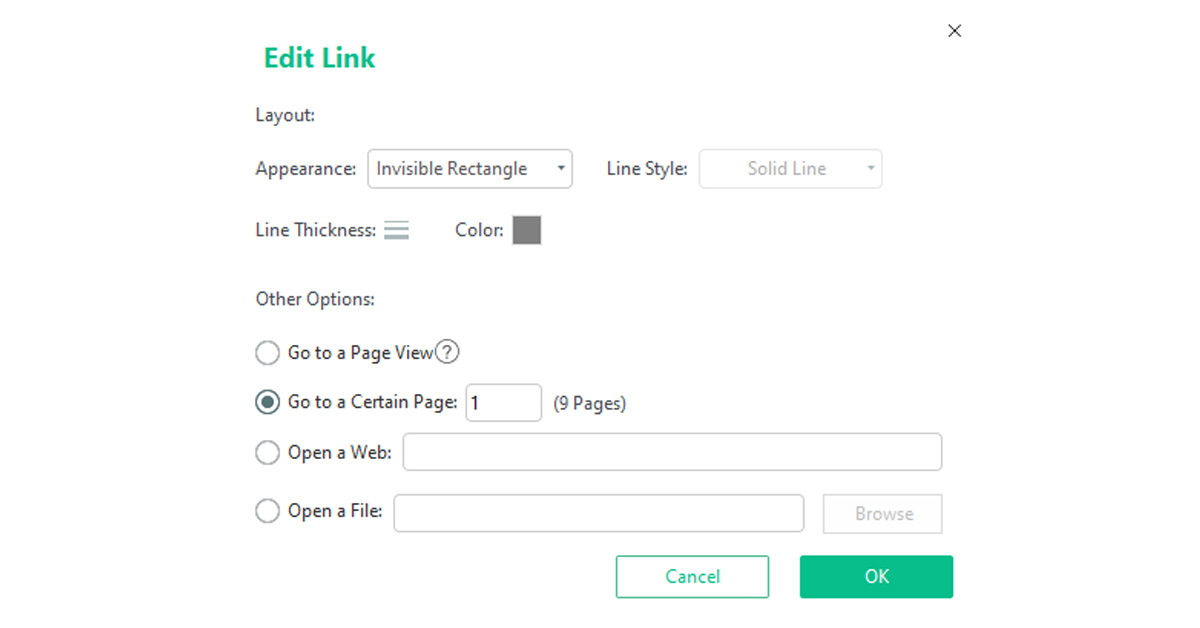 Step 2: Type a page number. Alternatively, scroll to determine the specific page to be linked.
You can also use the SwifDoo PDF’s PDF to HTML converter feature to convert a PDF into an HTML file to share and open.
Step 2: Type a page number. Alternatively, scroll to determine the specific page to be linked.
You can also use the SwifDoo PDF’s PDF to HTML converter feature to convert a PDF into an HTML file to share and open.


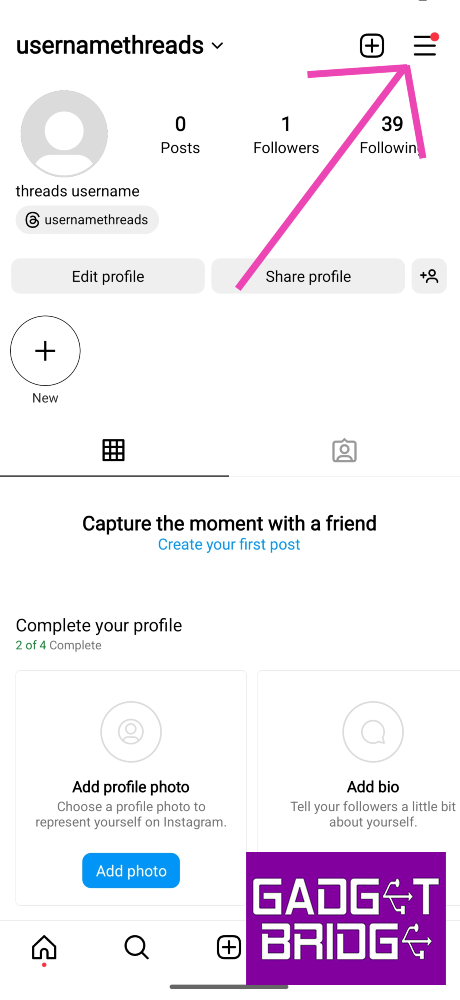
 Step 2: Tap on the hamburger menu icon at the top right corner of the screen.
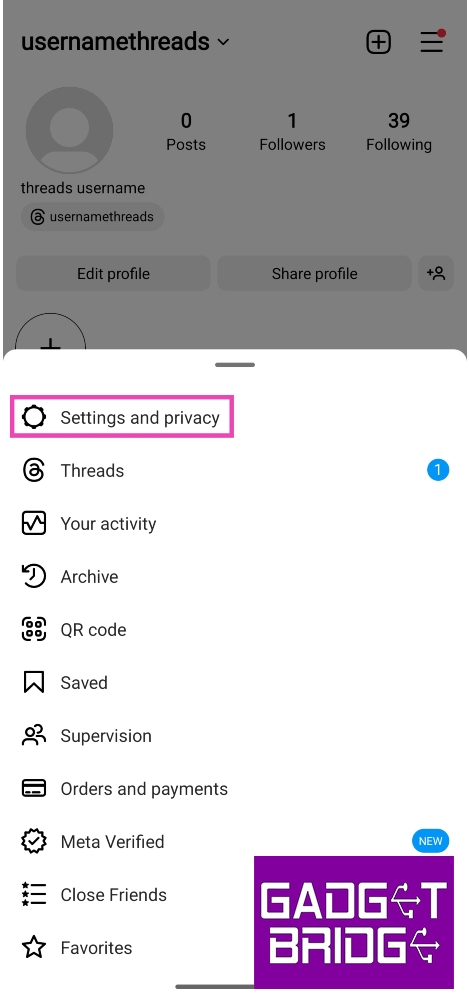
 Step 3: Select Settings and privacy.
 Step 5: Select Accounts.
 Step 6: Check if your Facebook account is displayed on the page. If it is not, re-link it to your Instagram profile.


 Step 2: Select Instagram.
 Step 3: Tap on Storage.
 Follow the same process for Facebook as well.
![Step 4: Scroll all the way down and select Log out [profile handle]. Instagram not sharing to Facebook? Try these 5 easy fixes](data:image/svg+xml,%3Csvg%20xmlns='http://www.w3.org/2000/svg'%20viewBox='0%200%20462%201000'%3E%3C/svg%3E)
 Step 7: Finally, select Add accounts and re-add your Facebook account.
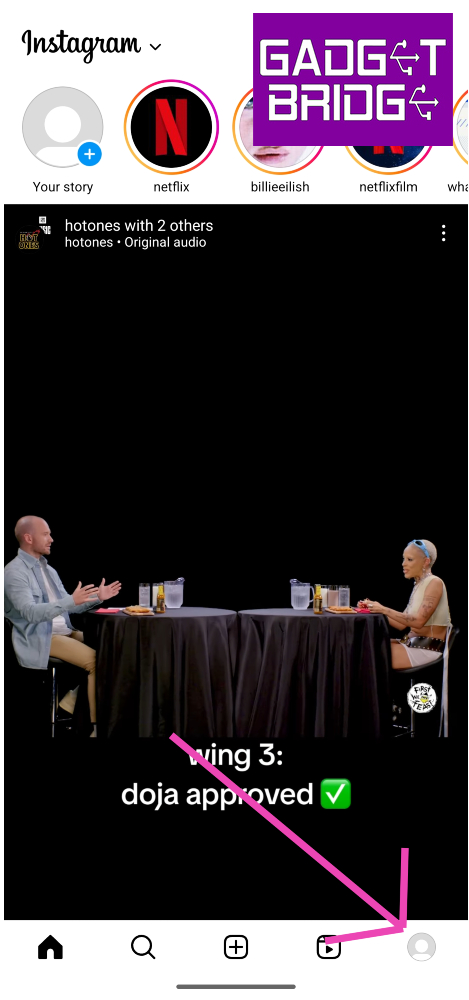 Step 2: Tap on the hamburger menu icon at the top right corner of the screen.
 Step 3: Select Settings and privacy.
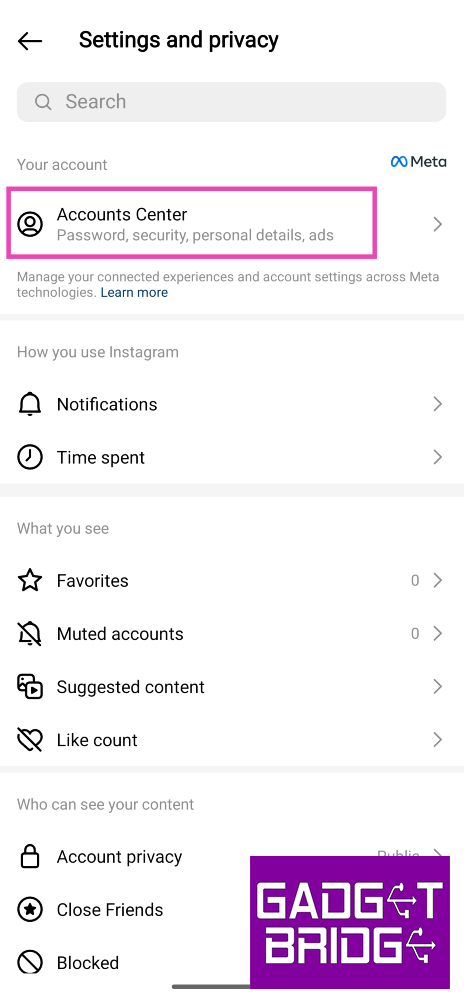
 Step 4: Tap on Accounts Center.
 Step 5: Select Accounts.
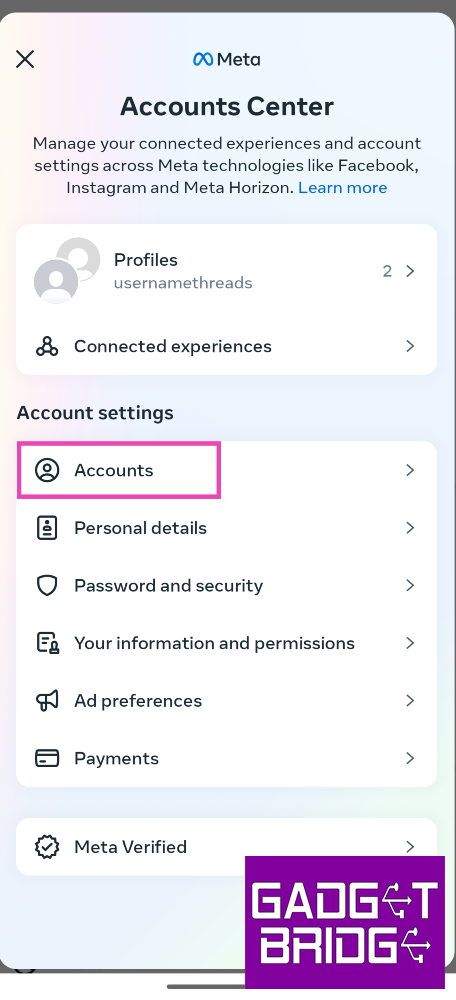 Step 6: Check if your Facebook account is displayed on the page. If it is not, re-link it to your Instagram profile.
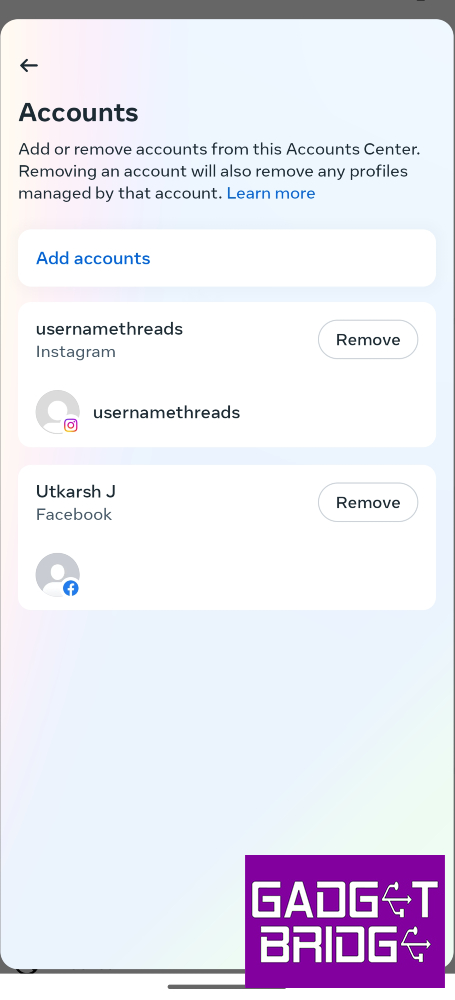
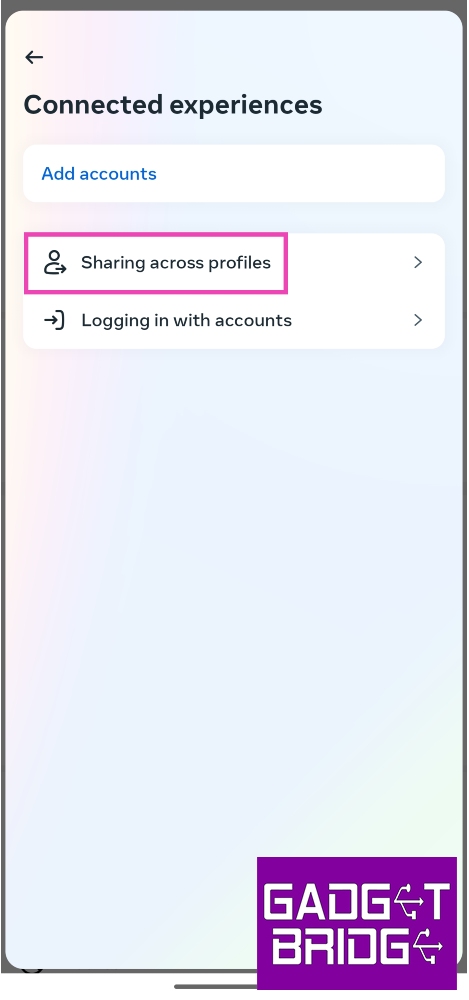 Step 7: Select your Instagram profile.
 Step 8: Turn on the toggle switches for Instagram story, posts, and reels.
 Step 2: Select Instagram.
 Step 3: Tap on Storage.
 Step 4: Select Clear cache.
 Follow the same process for Facebook as well.
![Step 4: Scroll all the way down and select Log out [profile handle]. Instagram not sharing to Facebook? Try these 5 easy fixes](https://www.gadgetbridge.com/wp-content/uploads/2023/10/infb11.jpg)
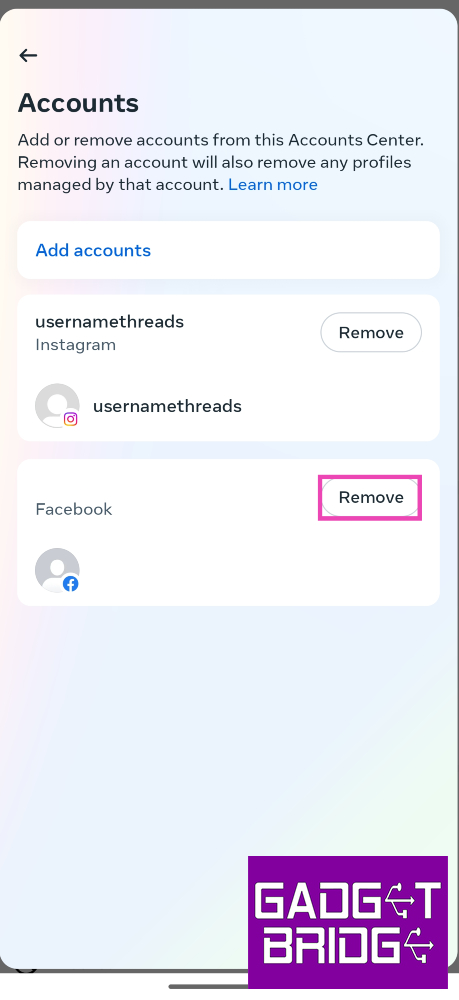 Step 7: Finally, select Add accounts and re-add your Facebook account.
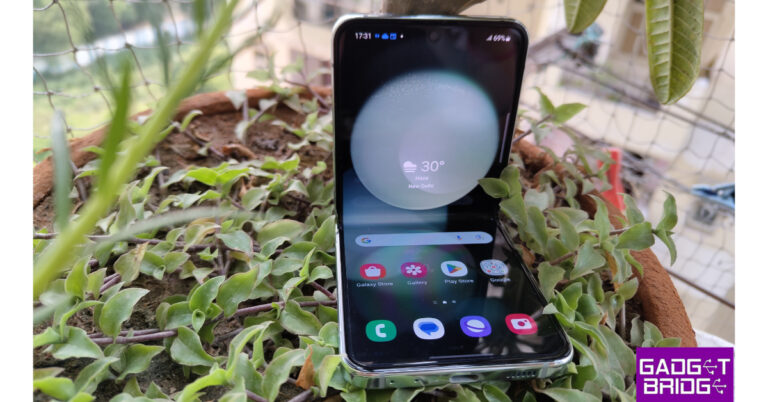
 Samsung Galaxy Z Flip 5 (Review)is the first Flip phone on the list which you can absolutely go for without giving a second thought. It features a 6.7-inch FHD+ Dynamic AMOLED 2X Infinity Flex Display and a 3.4-inch Super AMOLED cover screen. The primary panel supports a 120Hz refresh rate and the external display has a refresh rate of 60Hz. The device comes with an IPX8 grade for water resistance.
This Flip phone comes with a dual rear camera unit with a 12-megapixel ultra-wide main sensor and a 12-megapixel wide-angle camera. The Galaxy Z Flip 5 boasts a 10-megapixel selfie camera on the front of the folding display for selfies.
In addition to this, the phone boasts a 3,700mAh battery that supports 25W quick charging.
Samsung Galaxy Z Flip 5 (Review)is the first Flip phone on the list which you can absolutely go for without giving a second thought. It features a 6.7-inch FHD+ Dynamic AMOLED 2X Infinity Flex Display and a 3.4-inch Super AMOLED cover screen. The primary panel supports a 120Hz refresh rate and the external display has a refresh rate of 60Hz. The device comes with an IPX8 grade for water resistance.
This Flip phone comes with a dual rear camera unit with a 12-megapixel ultra-wide main sensor and a 12-megapixel wide-angle camera. The Galaxy Z Flip 5 boasts a 10-megapixel selfie camera on the front of the folding display for selfies.
In addition to this, the phone boasts a 3,700mAh battery that supports 25W quick charging.
 The new Flex Window offers a variety of both old and new capabilities and is now 3.78 times bigger than the previous iteration. It offers greater customization choices, including informative and graphical clocks that can match the face design of a user’s Galaxy Watch 6 series, as well as stylish frames. The device runs on OneUI 5.1.1 on top of Android 13.
Samsung Galaxy Z Flip 5 is available in two different configurations 8GB RAM with 256GB storage and 8GB RAM with 512GB storage. The price of both variants in India is set at Rs 99,999 and Rs 109,999, respectively.
The new Flex Window offers a variety of both old and new capabilities and is now 3.78 times bigger than the previous iteration. It offers greater customization choices, including informative and graphical clocks that can match the face design of a user’s Galaxy Watch 6 series, as well as stylish frames. The device runs on OneUI 5.1.1 on top of Android 13.
Samsung Galaxy Z Flip 5 is available in two different configurations 8GB RAM with 256GB storage and 8GB RAM with 512GB storage. The price of both variants in India is set at Rs 99,999 and Rs 109,999, respectively.
 Oppo Find N3 Flip features a 6.80-inch AMOLED primary display with a dynamic refresh rate that ranges between 1Hz to 120Hz. There is a 3.26-inch cover display vertically positioned. The device is powered by an octa-core MediaTek Dimensity 9200 SoC along with 256GB of UFS 4.0 internal storage and 12GB of LPDDR5X RAM. The device comes with colorOS 13 out of the box. The company is promising 4 years of major OS updates and 5 years of security patches.
For photos and videos, there is a triple rear camera that includes a 32-megapixel telephoto sensor, an 8-megapixel ultra-wide-angle sensor, and a 50-megapixel Sony IMX890 main lens with OIS feature. The Flip Phone also sports a 32-megapixel front camera for taking selfies and making video calls.
It packs a 4,300mAh battery with 44W supervooc wired charging support.
The Oppo Find N3 Flip comes in a single 12GB RAM with 256GB storage option priced at Rs 94,999.
Oppo Find N3 Flip features a 6.80-inch AMOLED primary display with a dynamic refresh rate that ranges between 1Hz to 120Hz. There is a 3.26-inch cover display vertically positioned. The device is powered by an octa-core MediaTek Dimensity 9200 SoC along with 256GB of UFS 4.0 internal storage and 12GB of LPDDR5X RAM. The device comes with colorOS 13 out of the box. The company is promising 4 years of major OS updates and 5 years of security patches.
For photos and videos, there is a triple rear camera that includes a 32-megapixel telephoto sensor, an 8-megapixel ultra-wide-angle sensor, and a 50-megapixel Sony IMX890 main lens with OIS feature. The Flip Phone also sports a 32-megapixel front camera for taking selfies and making video calls.
It packs a 4,300mAh battery with 44W supervooc wired charging support.
The Oppo Find N3 Flip comes in a single 12GB RAM with 256GB storage option priced at Rs 94,999.
 Tecno Phantom V Flip features a 6.9-inch LTPO AMOLED primary screen with a 144Hz refresh rate. There is a 1.32-inch outer display. The device is powered by MediaTek Dimensity 8050 with 8GB RAM and 256GB storage. For photos and videos, the device includes a 64-megapixel primary camera and a 13-megapixel ultrawide camera. For selfies, it includes a 32-megapixel front-facing shooter.
The Flip Phone by Tecno boasts a 4,000mAh battery that comes with 45W fast charging support. Also, this device is not IP-certified.
The device comes with a price tag of Rs 49,999.
Tecno Phantom V Flip features a 6.9-inch LTPO AMOLED primary screen with a 144Hz refresh rate. There is a 1.32-inch outer display. The device is powered by MediaTek Dimensity 8050 with 8GB RAM and 256GB storage. For photos and videos, the device includes a 64-megapixel primary camera and a 13-megapixel ultrawide camera. For selfies, it includes a 32-megapixel front-facing shooter.
The Flip Phone by Tecno boasts a 4,000mAh battery that comes with 45W fast charging support. Also, this device is not IP-certified.
The device comes with a price tag of Rs 49,999.
 Samsung Galaxy Z Flip 5 (Review)is the first Flip phone on the list which you can absolutely go for without giving a second thought. It features a 6.7-inch FHD+ Dynamic AMOLED 2X Infinity Flex Display and a 3.4-inch Super AMOLED cover screen. The primary panel supports a 120Hz refresh rate and the external display has a refresh rate of 60Hz. The device comes with an IPX8 grade for water resistance.
This Flip phone comes with a dual rear camera unit with a 12-megapixel ultra-wide main sensor and a 12-megapixel wide-angle camera. The Galaxy Z Flip 5 boasts a 10-megapixel selfie camera on the front of the folding display for selfies.
In addition to this, the phone boasts a 3,700mAh battery that supports 25W quick charging.
Samsung Galaxy Z Flip 5 (Review)is the first Flip phone on the list which you can absolutely go for without giving a second thought. It features a 6.7-inch FHD+ Dynamic AMOLED 2X Infinity Flex Display and a 3.4-inch Super AMOLED cover screen. The primary panel supports a 120Hz refresh rate and the external display has a refresh rate of 60Hz. The device comes with an IPX8 grade for water resistance.
This Flip phone comes with a dual rear camera unit with a 12-megapixel ultra-wide main sensor and a 12-megapixel wide-angle camera. The Galaxy Z Flip 5 boasts a 10-megapixel selfie camera on the front of the folding display for selfies.
In addition to this, the phone boasts a 3,700mAh battery that supports 25W quick charging.
 The new Flex Window offers a variety of both old and new capabilities and is now 3.78 times bigger than the previous iteration. It offers greater customization choices, including informative and graphical clocks that can match the face design of a user’s Galaxy Watch 6 series, as well as stylish frames. The device runs on OneUI 5.1.1 on top of Android 13.
Samsung Galaxy Z Flip 5 is available in two different configurations 8GB RAM with 256GB storage and 8GB RAM with 512GB storage. The price of both variants in India is set at Rs 99,999 and Rs 109,999, respectively.
The new Flex Window offers a variety of both old and new capabilities and is now 3.78 times bigger than the previous iteration. It offers greater customization choices, including informative and graphical clocks that can match the face design of a user’s Galaxy Watch 6 series, as well as stylish frames. The device runs on OneUI 5.1.1 on top of Android 13.
Samsung Galaxy Z Flip 5 is available in two different configurations 8GB RAM with 256GB storage and 8GB RAM with 512GB storage. The price of both variants in India is set at Rs 99,999 and Rs 109,999, respectively.
 Oppo Find N3 Flip features a 6.80-inch AMOLED primary display with a dynamic refresh rate that ranges between 1Hz to 120Hz. There is a 3.26-inch cover display vertically positioned. The device is powered by an octa-core MediaTek Dimensity 9200 SoC along with 256GB of UFS 4.0 internal storage and 12GB of LPDDR5X RAM. The device comes with colorOS 13 out of the box. The company is promising 4 years of major OS updates and 5 years of security patches.
For photos and videos, there is a triple rear camera that includes a 32-megapixel telephoto sensor, an 8-megapixel ultra-wide-angle sensor, and a 50-megapixel Sony IMX890 main lens with OIS feature. The Flip Phone also sports a 32-megapixel front camera for taking selfies and making video calls.
It packs a 4,300mAh battery with 44W supervooc wired charging support.
The Oppo Find N3 Flip comes in a single 12GB RAM with 256GB storage option priced at Rs 94,999.
Oppo Find N3 Flip features a 6.80-inch AMOLED primary display with a dynamic refresh rate that ranges between 1Hz to 120Hz. There is a 3.26-inch cover display vertically positioned. The device is powered by an octa-core MediaTek Dimensity 9200 SoC along with 256GB of UFS 4.0 internal storage and 12GB of LPDDR5X RAM. The device comes with colorOS 13 out of the box. The company is promising 4 years of major OS updates and 5 years of security patches.
For photos and videos, there is a triple rear camera that includes a 32-megapixel telephoto sensor, an 8-megapixel ultra-wide-angle sensor, and a 50-megapixel Sony IMX890 main lens with OIS feature. The Flip Phone also sports a 32-megapixel front camera for taking selfies and making video calls.
It packs a 4,300mAh battery with 44W supervooc wired charging support.
The Oppo Find N3 Flip comes in a single 12GB RAM with 256GB storage option priced at Rs 94,999.
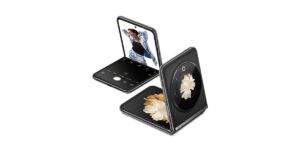 Tecno Phantom V Flip features a 6.9-inch LTPO AMOLED primary screen with a 144Hz refresh rate. There is a 1.32-inch outer display. The device is powered by MediaTek Dimensity 8050 with 8GB RAM and 256GB storage. For photos and videos, the device includes a 64-megapixel primary camera and a 13-megapixel ultrawide camera. For selfies, it includes a 32-megapixel front-facing shooter.
The Flip Phone by Tecno boasts a 4,000mAh battery that comes with 45W fast charging support. Also, this device is not IP-certified.
The device comes with a price tag of Rs 49,999.
Tecno Phantom V Flip features a 6.9-inch LTPO AMOLED primary screen with a 144Hz refresh rate. There is a 1.32-inch outer display. The device is powered by MediaTek Dimensity 8050 with 8GB RAM and 256GB storage. For photos and videos, the device includes a 64-megapixel primary camera and a 13-megapixel ultrawide camera. For selfies, it includes a 32-megapixel front-facing shooter.
The Flip Phone by Tecno boasts a 4,000mAh battery that comes with 45W fast charging support. Also, this device is not IP-certified.
The device comes with a price tag of Rs 49,999.
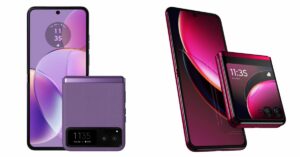 Motorola Razr 40, and Motorola Razr 40 Ultra features 6.9-inch foldable pOLED screens with a refresh rate of 165Hz. The Motorola Razr 40 Ultra model has a larger 1.5-inch cover display whereas the Razr 40 has a 3.6-inch pOLED outer screen. Both the devices are IP52 rated.
The Motorola Razr 40 and Motorola Razr 40 Ultra are powered by Snapdragon 7 Gen 1 and Snapdragon 8+ Gen 1 processors respectively.
The Motorola Razr 40 features a 64-megapixel primary sensor and a 12-megapixel ultra wide-angle camera. Whereas Razr 40 Ultra includes a 13-megapixel secondary ultra-wide-angle camera and a 12-megapixel primary sensor. However both the devices sport a 32-megapixel front-facing camera for selfies.
There is a 3,800mAh and a 4,200mAh battery on the Motorola Razr 40 and Motorola Razr 40 Ultra, respectively.
The Motorola Razr 40 Ultra comes with a price tag of Rs 89,999 for the 8GB RAM with 256GB storage model. On the other hand, Razr 40 price is set at Rs 59,999.
For the latest gadget and tech news, and gadget reviews, follow us on Twitter, Facebook and Instagram. For newest tech & gadget videos subscribe to our YouTube Channel. You can also stay up to date using the Gadget Bridge Android App. You can find the latest car and bike news here.
Motorola Razr 40, and Motorola Razr 40 Ultra features 6.9-inch foldable pOLED screens with a refresh rate of 165Hz. The Motorola Razr 40 Ultra model has a larger 1.5-inch cover display whereas the Razr 40 has a 3.6-inch pOLED outer screen. Both the devices are IP52 rated.
The Motorola Razr 40 and Motorola Razr 40 Ultra are powered by Snapdragon 7 Gen 1 and Snapdragon 8+ Gen 1 processors respectively.
The Motorola Razr 40 features a 64-megapixel primary sensor and a 12-megapixel ultra wide-angle camera. Whereas Razr 40 Ultra includes a 13-megapixel secondary ultra-wide-angle camera and a 12-megapixel primary sensor. However both the devices sport a 32-megapixel front-facing camera for selfies.
There is a 3,800mAh and a 4,200mAh battery on the Motorola Razr 40 and Motorola Razr 40 Ultra, respectively.
The Motorola Razr 40 Ultra comes with a price tag of Rs 89,999 for the 8GB RAM with 256GB storage model. On the other hand, Razr 40 price is set at Rs 59,999.
For the latest gadget and tech news, and gadget reviews, follow us on Twitter, Facebook and Instagram. For newest tech & gadget videos subscribe to our YouTube Channel. You can also stay up to date using the Gadget Bridge Android App. You can find the latest car and bike news here. 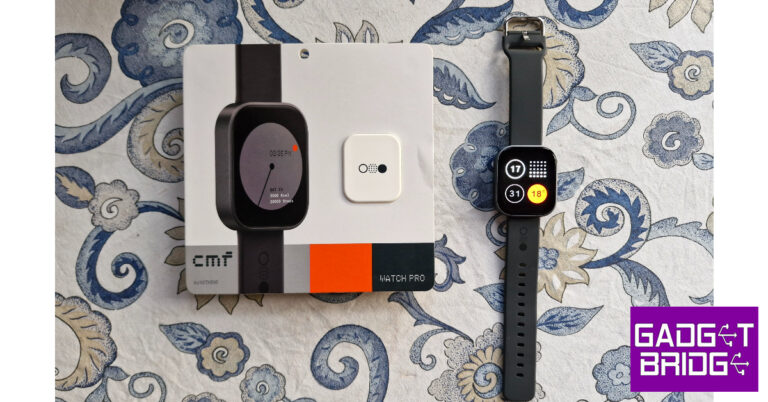
 Sport and fitness tracking on the Watch Pro is near impeccable, apart from one small issue. The watch does not auto-detect your workouts. We went on a few hikes and runs, and while the watch updated the daily step count, the numbers did not reflect as a part of an exercise. On the bright side, the Watch Pro has in-built GPS support, which means you can leave your phone at home and the watch will still be able to track your run on a map.
 Things take an interesting turn on the OS front as we finally get to see what makes this watch a Nothing product. The Watch Pro’s user interface is influenced by Nothing OS 2.0. Nothing’s black and orange colour palette dominates the look of the OS. The app grid is greyed out and the watch faces have a distinct ‘Nothingness’ to them. The dot matrix font further stamps Nothing’s personality on the device. You can’t customise the watch faces, which is probably something that the brand restricts on purpose so as to not throw off the aesthetic it has carefully curated.
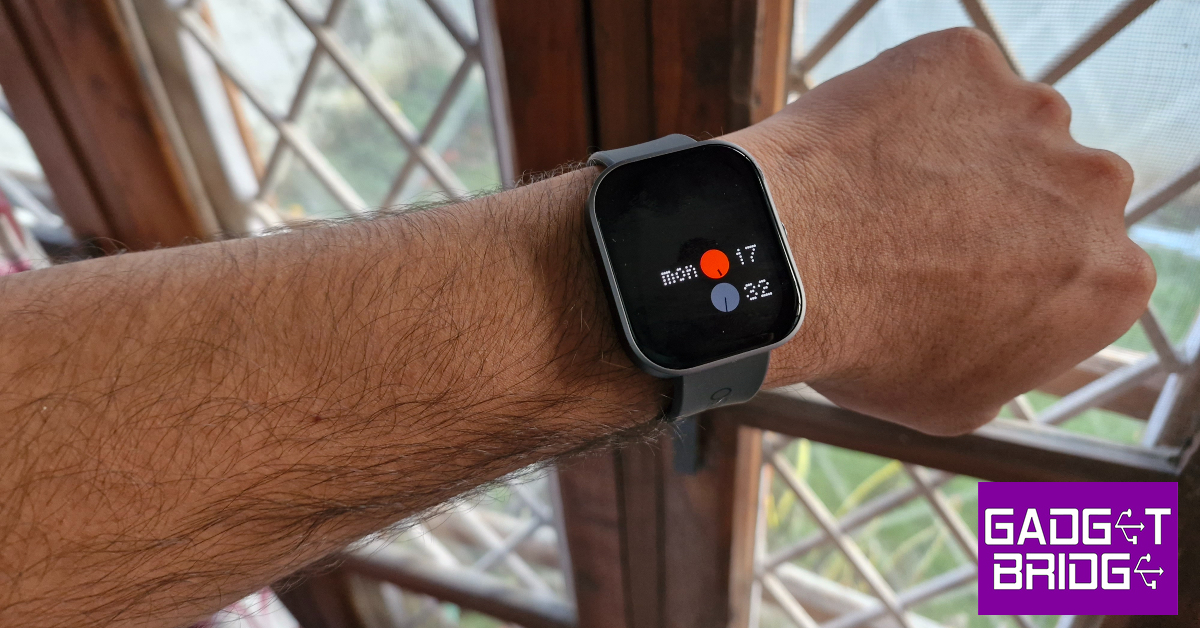
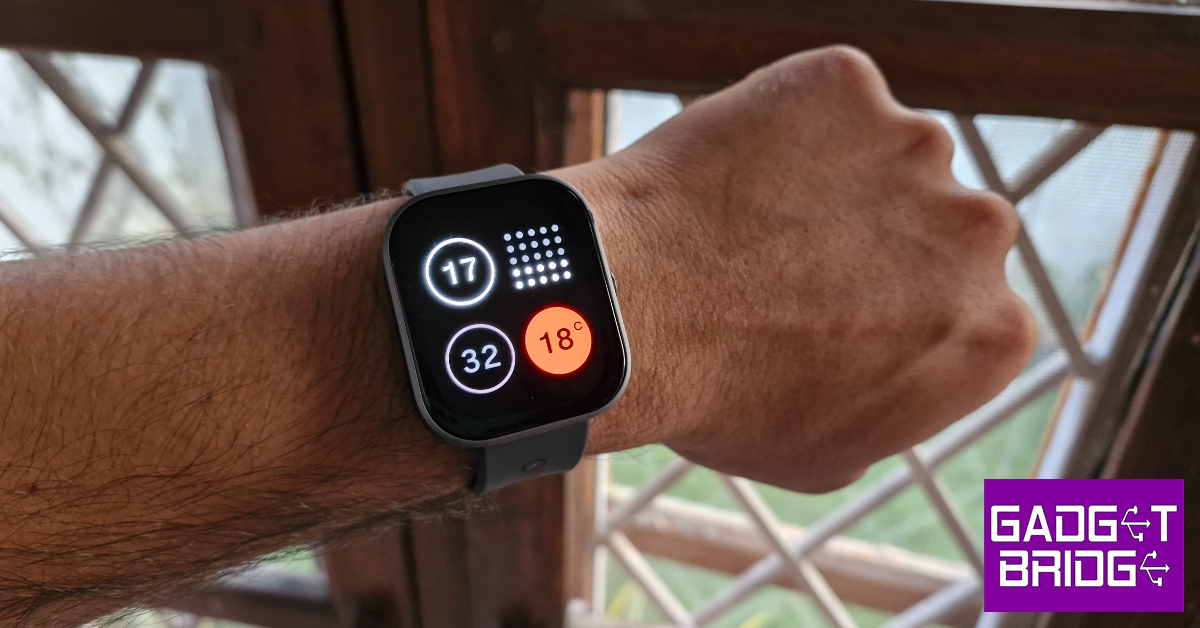 As far as looks go, the CMF Watch Pro looks like your average smartwatch. The square dial houses a 1.96-inch AMOLED display that can reach a peak brightness of 600+ nits. This display has a resolution of 410 x 502p and a pixel density of 332ppi. The touch response offered by this AMOLED display is very satisfying. We like that it isn’t super sensitive to light touches.
Encasing this display is an aluminium alloy shell that is surprisingly light. The Watch Pro weighs just 47g with the silicone strap. The right edge of the aluminium frame houses the side key and the speaker grille. The dial’s underside houses the accelerometer, heart rate & blood oxygen saturation sensor, magnetic pin slots for charging, and a microphone. The entire shell has a matte finish, which feels quite premium and polished.
As far as looks go, the CMF Watch Pro looks like your average smartwatch. The square dial houses a 1.96-inch AMOLED display that can reach a peak brightness of 600+ nits. This display has a resolution of 410 x 502p and a pixel density of 332ppi. The touch response offered by this AMOLED display is very satisfying. We like that it isn’t super sensitive to light touches.
Encasing this display is an aluminium alloy shell that is surprisingly light. The Watch Pro weighs just 47g with the silicone strap. The right edge of the aluminium frame houses the side key and the speaker grille. The dial’s underside houses the accelerometer, heart rate & blood oxygen saturation sensor, magnetic pin slots for charging, and a microphone. The entire shell has a matte finish, which feels quite premium and polished.
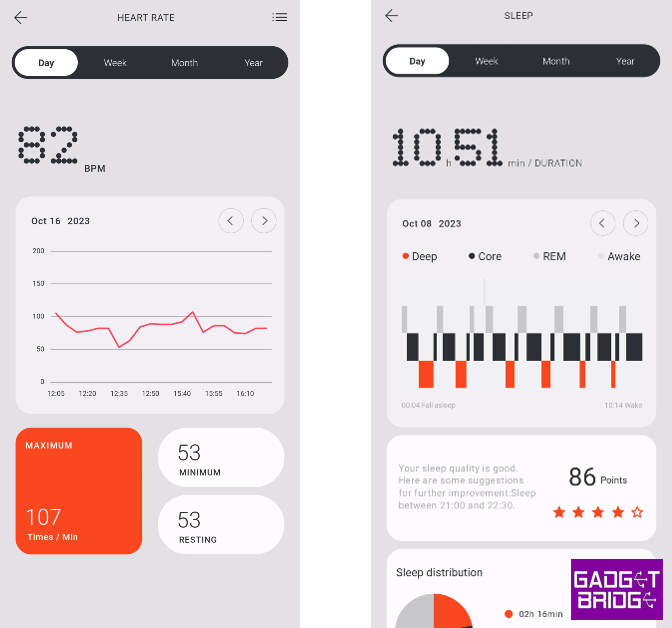
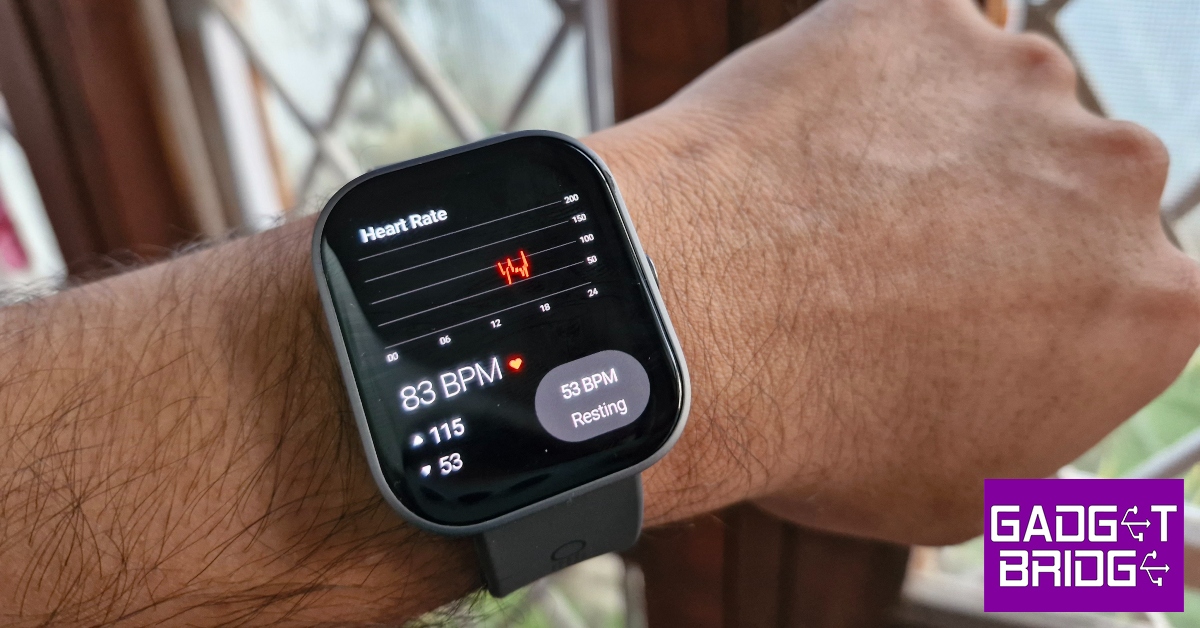 Readings from the heart rate monitor and SpO2 sensor are consistent with medical-grade equipment. The Watch Pro routinely measures maximum, minimum, and resting heart rate throughout the day, accurately plotting it on a graph. You can view your daily, weekly, monthly, and yearly graphs on the CMF Watch app. The same goes for blood oxygen measurement. You can also set up low/high heart rate and low blood oxygen level alerts. The watch also gauges your stress level every thirty minutes. We cannot speak to the accuracy of the stress reading as CMF does not divulge its formula for assigning the score.
 Sport and fitness tracking on the Watch Pro is near impeccable, apart from one small issue. The watch does not auto-detect your workouts. We went on a few hikes and runs, and while the watch updated the daily step count, the numbers did not reflect as a part of an exercise. On the bright side, the Watch Pro has in-built GPS support, which means you can leave your phone at home and the watch will still be able to track your run on a map.
 The Watch Pro can track over 100 sports, exercises, and workout routines. This includes exercises like pilates, CrossFit, & strength training and leisure activities like Zumba, ballet, street dance, skating, kite flying, and more. The watch can accommodate up to 36 exercise and workout routines at one time. These exercises can be selected from the ‘Usual sports’ section in the CMF Watch app.
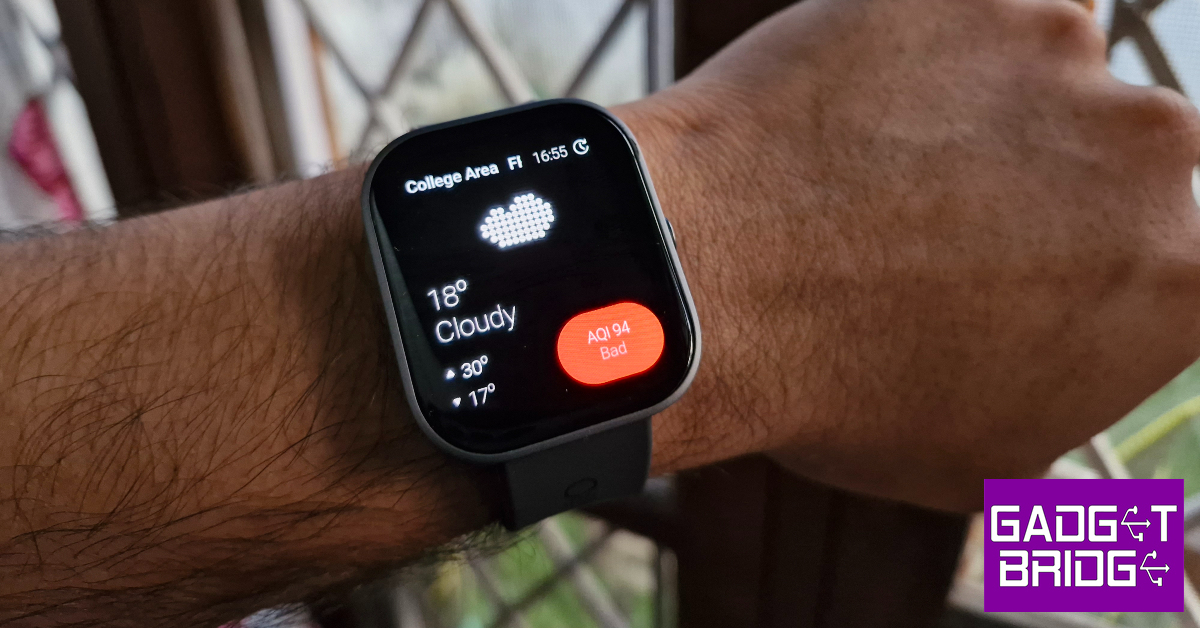
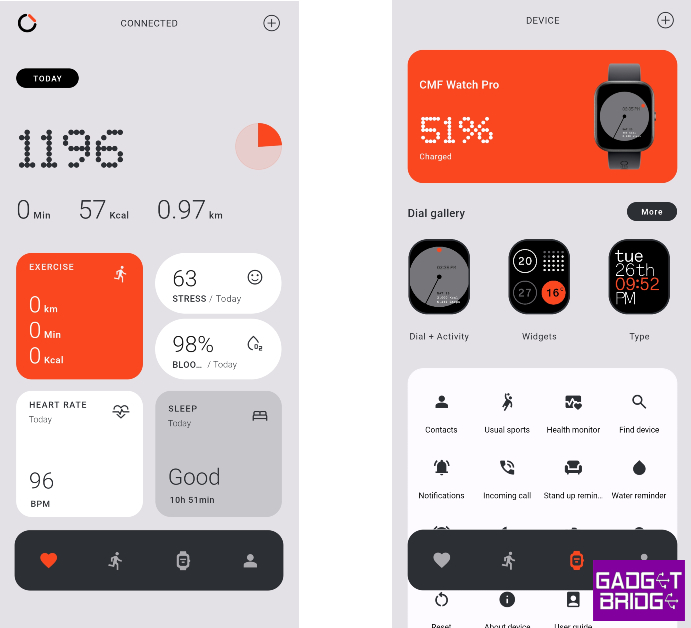 Things take an interesting turn on the OS front as we finally get to see what makes this watch a Nothing product. The Watch Pro’s user interface is influenced by Nothing OS 2.0. Nothing’s black and orange colour palette dominates the look of the OS. The app grid is greyed out and the watch faces have a distinct ‘Nothingness’ to them. The dot matrix font further stamps Nothing’s personality on the device. You can’t customise the watch faces, which is probably something that the brand restricts on purpose so as to not throw off the aesthetic it has carefully curated.
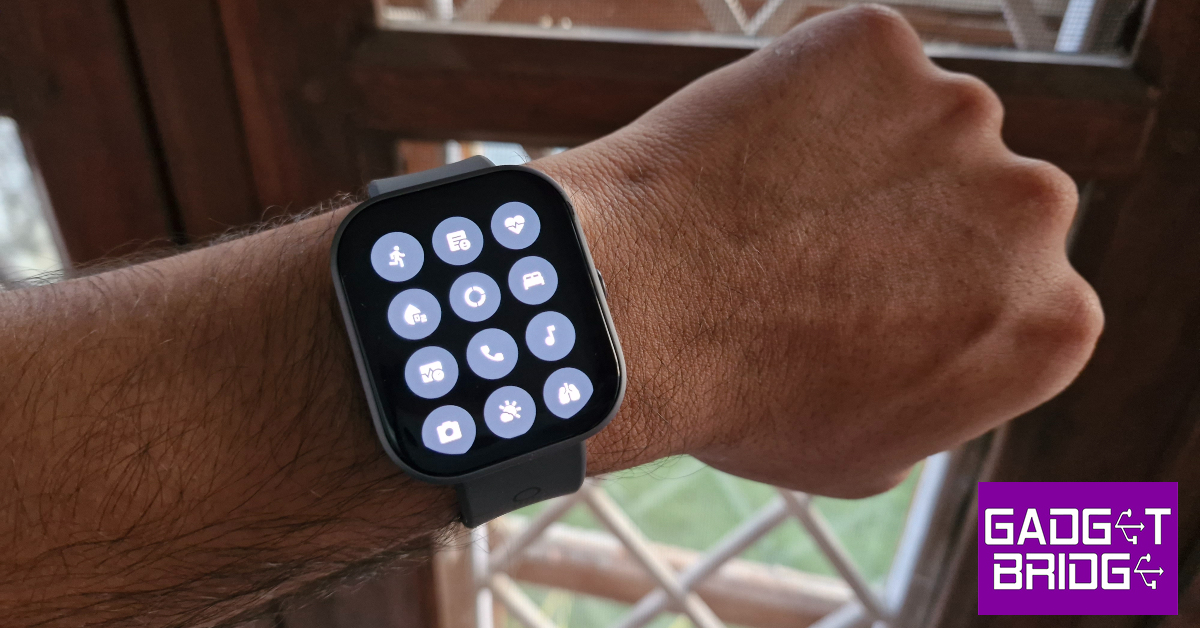 This minimality in design scores brownie points from us for several reasons. Firstly, a distinct look and personality is something that not a lot of devices can boast about, especially at a time when uniformity is taking over every smart device. The watches that do break the norm go towards the direction of simulating a smartphone experience for the wrist. This is where the CMF Watch Pro does justice to the genre. It keeps things simple and nails to perfection the things it sets out to do.
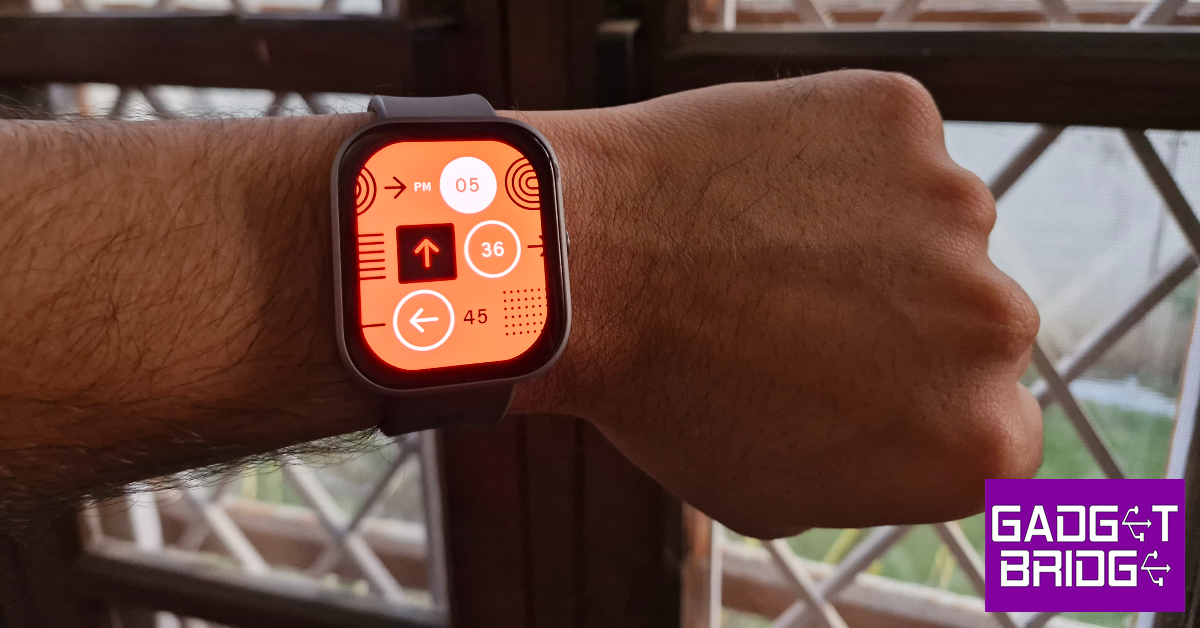 Lastly, the battery life on this watch is nothing short of amazing. The 340mAh battery unit can power the smartwatch for 13 days, as claimed by Nothing. With the Always On Display turned on at all times, the CMF Watch Pro lasted 10 days during the review period. The watch has a cool Wrist Detection feature that turns off AOD and 24-hour heart rate and SpO2 tracking as soon as you take it off your wrist. This can push the battery life closer to its claimed range.
Read Also: Top 10 Ways to Fix YouTube App Crashing or Not Working On Android
Lastly, the battery life on this watch is nothing short of amazing. The 340mAh battery unit can power the smartwatch for 13 days, as claimed by Nothing. With the Always On Display turned on at all times, the CMF Watch Pro lasted 10 days during the review period. The watch has a cool Wrist Detection feature that turns off AOD and 24-hour heart rate and SpO2 tracking as soon as you take it off your wrist. This can push the battery life closer to its claimed range.
Read Also: Top 10 Ways to Fix YouTube App Crashing or Not Working On Android
 Step 3: Go back to the home page close and re-launch the app.
The cache of the app will be cleared as soon as it is launched.
Step 3: Go back to the home page close and re-launch the app.
The cache of the app will be cleared as soon as it is launched.
 Step 2: Tap on iPhone Storage.
 Step 4: Tap on Offload App.
 Step 5: Confirm your selection in the popup box.
 Step 2: Tap on Clear History and Website Data.
 Step 5: Hit Clear Browsing Data.
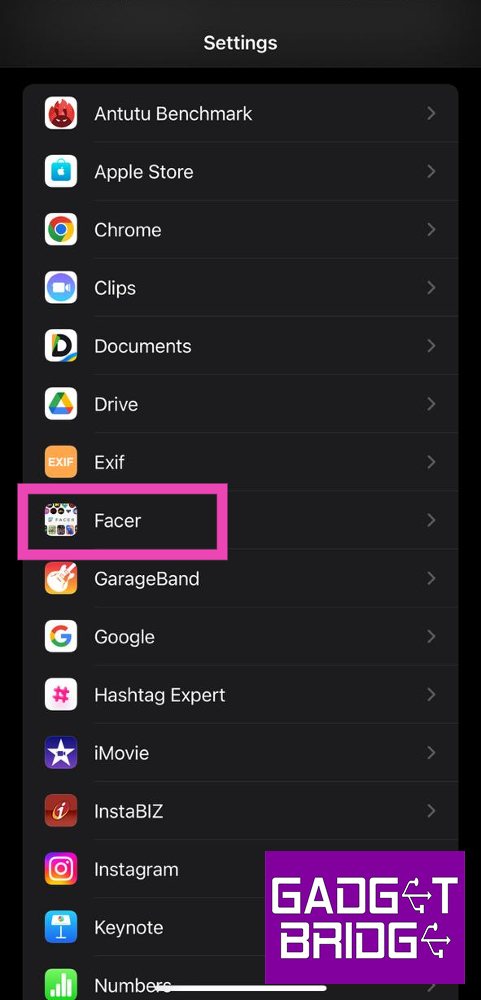 Step 2: Scroll down and select ‘Background App Refresh’.
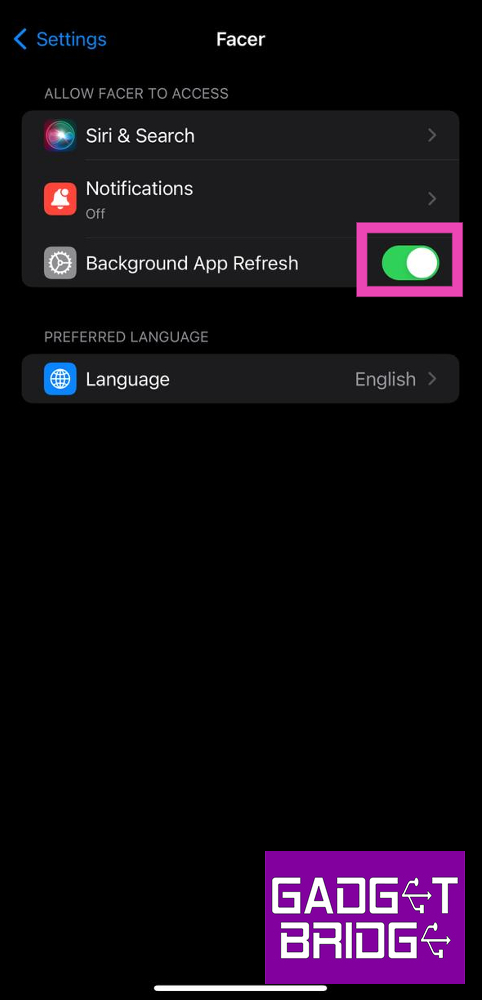 Step 3: Go back to the home page close and re-launch the app.
The cache of the app will be cleared as soon as it is launched.
Step 3: Go back to the home page close and re-launch the app.
The cache of the app will be cleared as soon as it is launched.
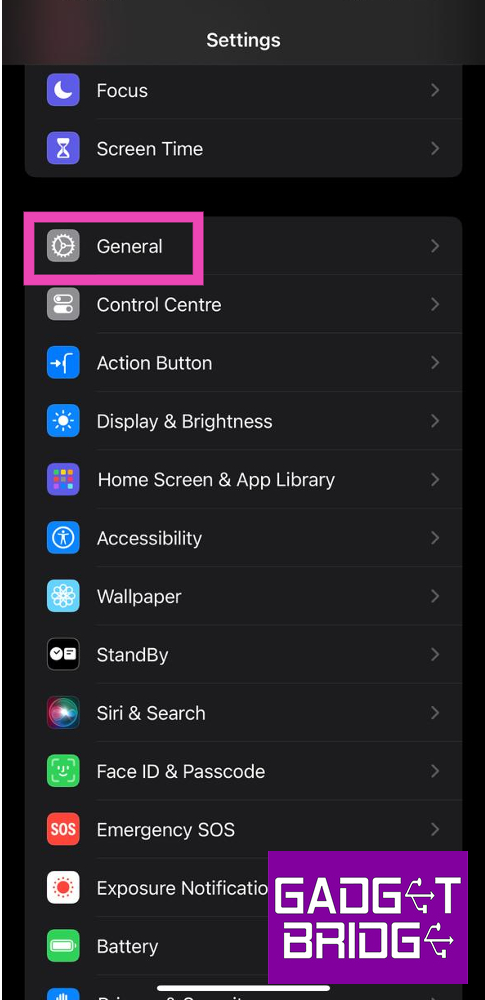 Step 2: Tap on iPhone Storage.
 Step 3: Select the app for which you want to clear the cache.
 Step 4: Tap on Offload App.
 Step 5: Confirm your selection in the popup box.
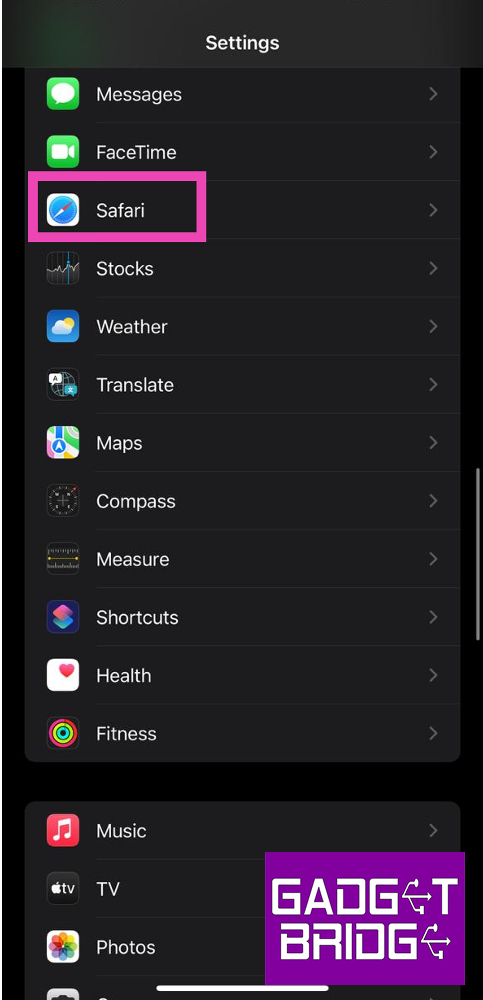 Step 2: Tap on Clear History and Website Data.
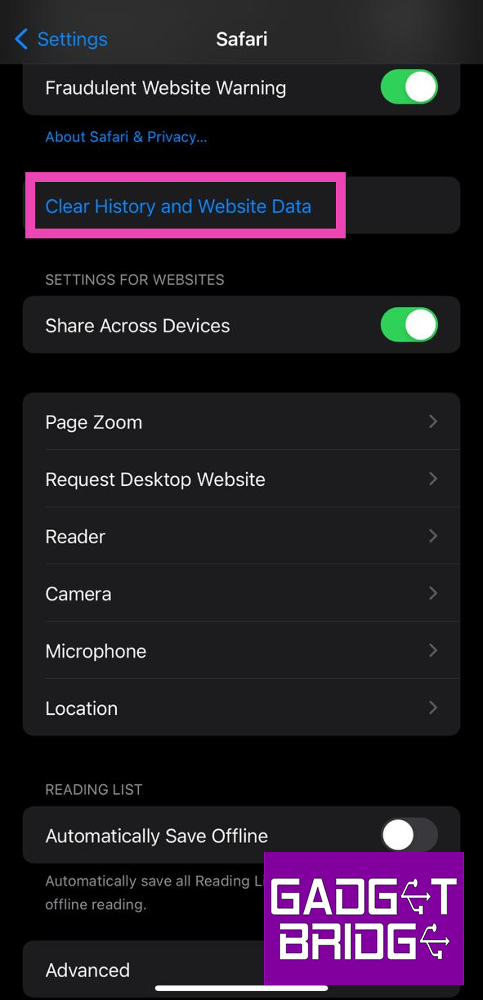 Step 3: Confirm your selection in the popup box.
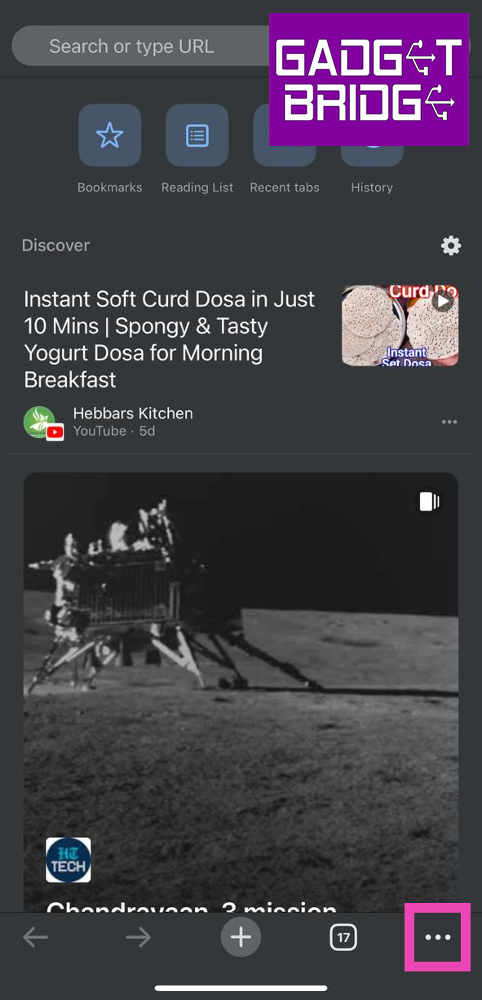 Step 3: Tap on Clear Browsing Data.
Step 4: Set a Time Range. Make sure you select Cached Images and Files as one of the items you want to delete.
Step 3: Tap on Clear Browsing Data.
Step 4: Set a Time Range. Make sure you select Cached Images and Files as one of the items you want to delete.
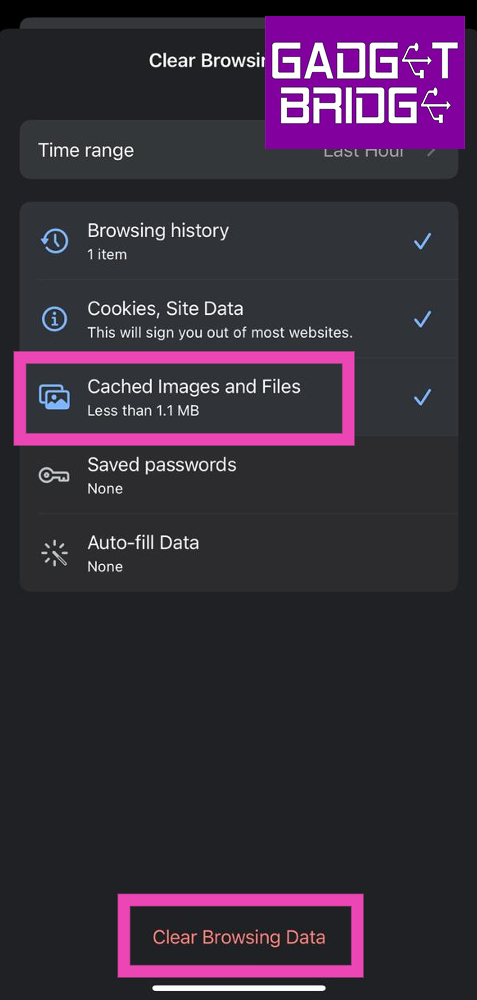 Step 5: Hit Clear Browsing Data.