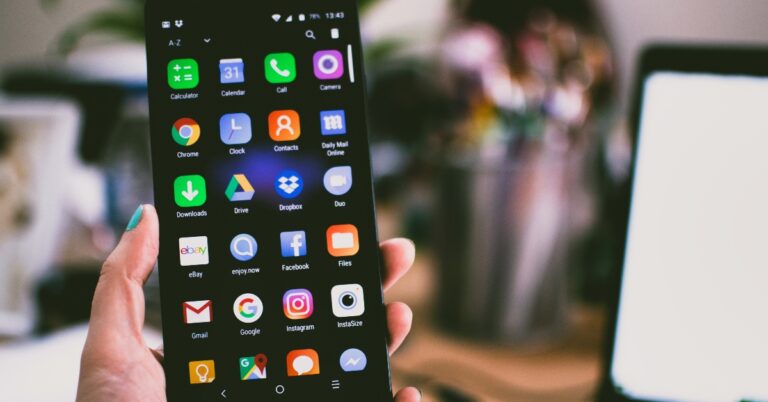
If you notice a decline in speed on your Android smartphone, it may be because of the multiple apps occupying RAM space. These background apps can also drain the battery quicker than usual. While your phone does a good job of managing apps in the background, it is not uncommon for apps to behave in an unusual manner. In this article, we bring you the 4 easy methods to stop Android apps from running in the background of your device.Read Also:Mivi Commando X9 review: Should you buy them for gaming?
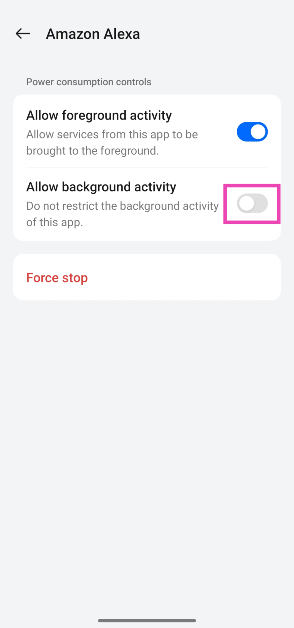
Disable the background activity of an app
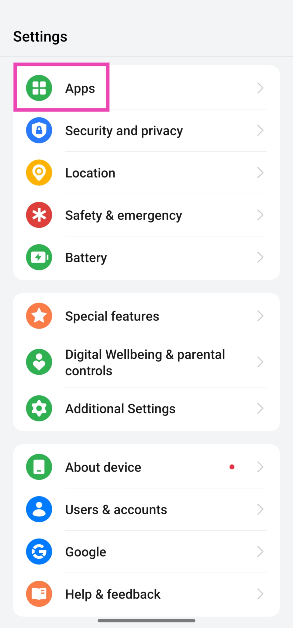
Step 1: Go to Settings and select Apps.
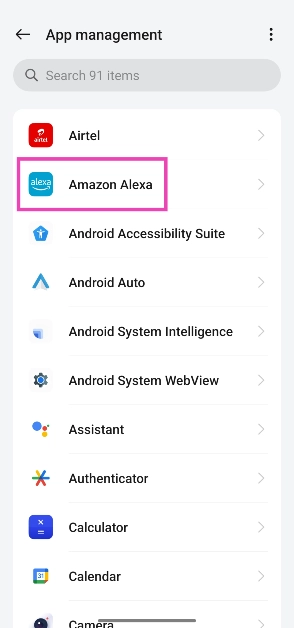
Step 2: Select the app.
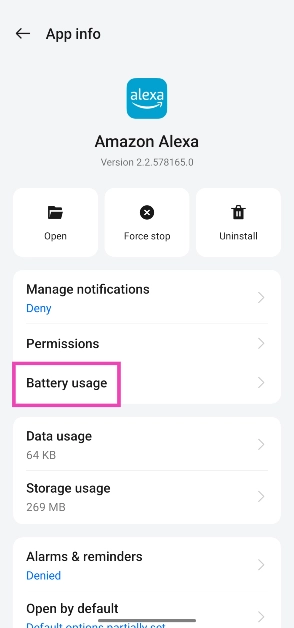
Step 3: Tap on Battery.
Step 4: Turn off the toggle switch next to Allow background activity.
Force Stop an App from Settings
Step 1: Go to Settings.Step 2: Scroll down and select Apps.Step 3: Scroll down and tap on the app you want to stop.Step 4: Select Force Stop from the bottom menu.
Stop a background app process from Developer Options
Using Developer Options, you can see which apps and processes are currently occupying the RAM on your device. You can stop an app’s process to clear some much-needed RAM space. But first, you will need to enable Developer Options from Settings. Here’s how you can go about the entire process.Step 1: Go to Settings and select About Phone.Step 2: Select Software Information.Step 3: Tap on Build Number 7 times to enter Developer Mode.Step 4: Go back to Settings, scroll all the way down, and select Developer options.Step 5: Tap on Running Services.Step 6: Here you will be able to see the current RAM status of your device.Step 7: Tap on an app to stop it from running in the background.Step 8: Tap on Stop.
Limit an app’s background usage from Battery settings
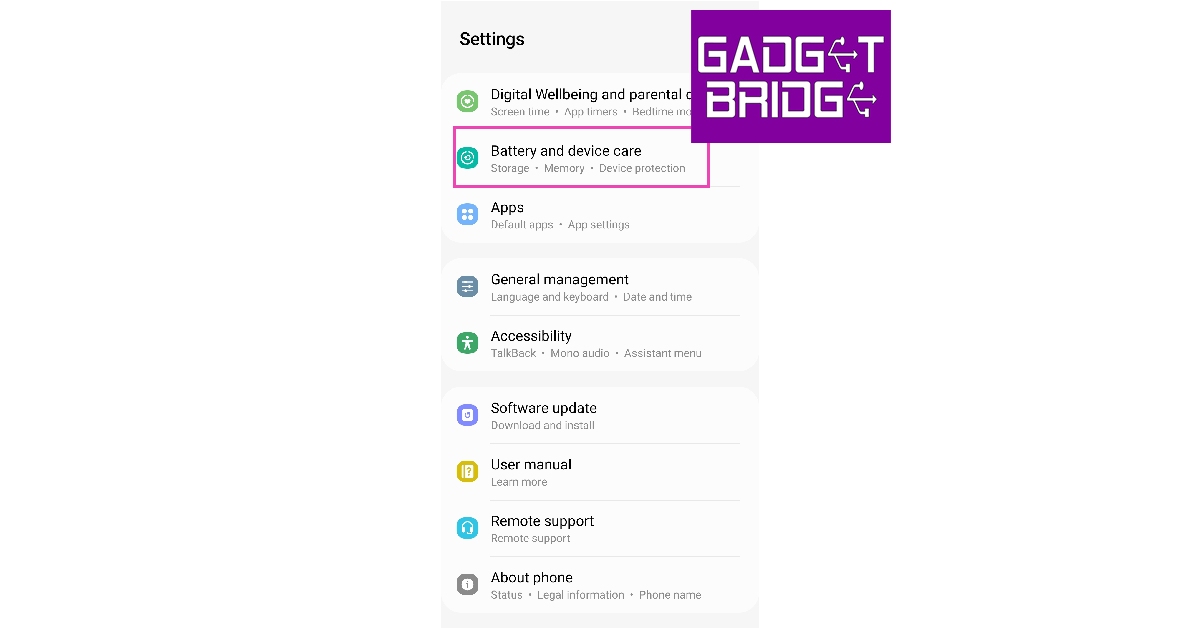
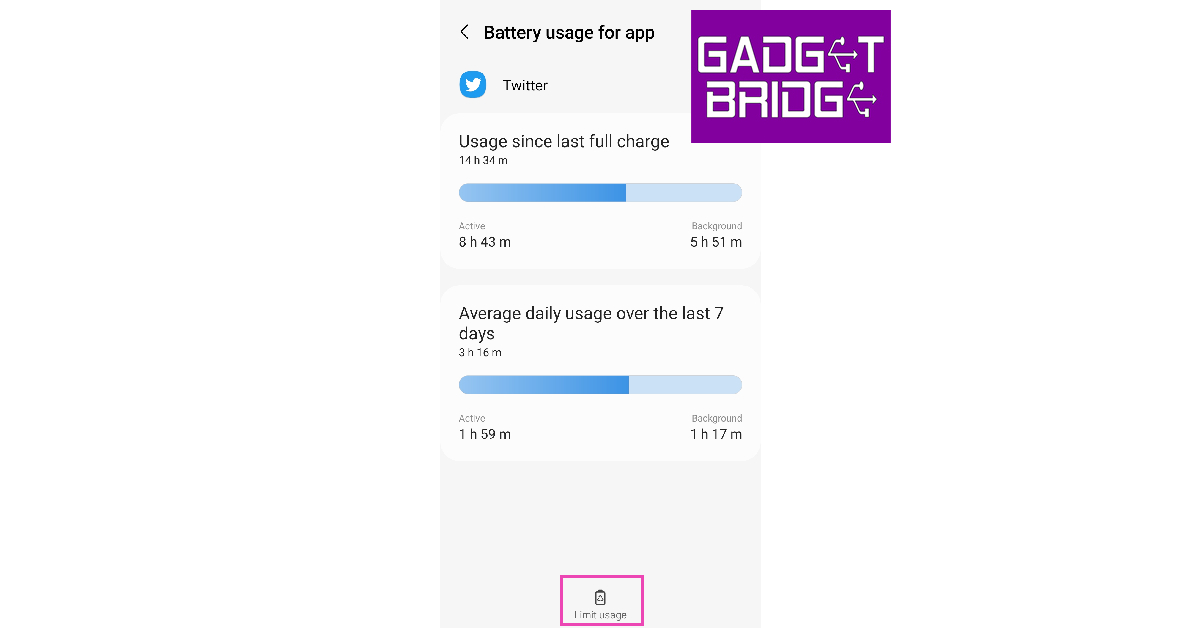
You can choose which apps you want to put to ‘deep sleep’. Doing this will limit all background activity of the app and you will not be able to receive any notifications from it. Here’s how you can do it.Step 1: Go to Settings and select Battery and device care.Step 2: Tap on Battery.Step 3: Scroll down and select the app you want to put to sleep.Step 4: Tap on Limit usage.Step 5: Select Put in deep sleep.
Frequently Asked Questions
How do I turn off background apps on Android?
You can either force-stop an app from App Settings or put it to deep sleep from Battery Settings on your Android device.
Is it good to remove background apps?
If an app is taking up a lot of RAM space, it is a good idea to stop it from functioning in the background. Apart from that, it is advised that you don’t remove apps from working in the background, as your phone’s CPU does a good job of optimising app usage and prioritising the apps running in the background.
These are the 4 ways you can stop Android apps from running in the background of your device. If an app isn’t occupying too much space on the RAM or actively draining the battery, it is a good idea to keep it running in the background. Modern smartphones are better equipped to shelve background apps and prioritise their running status.
If you find yourself constantly running out of mobile data, one of the things you can do to prevent that from happening is to turn off auto-play for YouTube videos on your device. Even the video previews on your YouTube feed can use a considerable amount of data. In this article, we bring you the top 3 ways to stop YouTube videos from auto-playing on your iPhone. Read Also:3 Simple Ways to Hide Your Watch History on Netflix (2023)
Stop Auto-play from YouTube’s media player
Step 1: Launch the YouTube app on your iPhone.Step 2: Play a random video. Step 3: Tap on the play icon slider on the video player. Check if the video player shows the pause icon instead of the play icon on the slider.Auto-play for YouTube will be turned off.
Stop Auto-play from YouTube app settings
Step 1: Launch the YouTube app on your iPhone.Step 2: Tap on your profile icon at the top right corner of the screen.Step 3: Tap on ‘Settings’.Step 4: Select Auto-play.Step 5: Switch off the slider for ‘Auto-play next video’.
Stop video previews from auto-playing on YouTube
Step 1: Launch the YouTube app on your iPhone.Step 2: Tap on your profile icon at the top right corner of the screen.Step 3: Tap on ‘Settings’.Step 4: Select General.Step 5: Tap on ‘Playback in feeds’.Step 6: Select ‘Off’.
Frequently Asked Questions
How can I turn off auto-play on YouTube?
To turn off auto-play on YouTube, simply tap on the play icon slider at the top of the media player. You can also go to Profile>Settings>Auto-play and turn it off.
Why can’t I see auto-play on YouTube?
Auto-play is turned off for users aged 14-17. Parental controls allow users to turn off auto-play for their kid’s account.
Japanese audio product manufacturer, Audio-Technica has announced the launch of ATH-SQ1TW truly wireless earbuds. It comes with an all-new square design and different colour options. They support Google Fast Pair and offer a quick charging feature. The audio device is IPX4 rated for water and dust resistance.
Audio-Technica ATH-SQ1TW price in India and availability
The Audio-Technica ATH-SQ1TW has been launched in India at Rs 8,710. The truly wireless earbuds will be available in 6 colour options of licorice/black, popcorn white, blueberry, caramel, popsicle red/navy, and cupcake pink/brown. The device can be purchased via Amazon in the country.
Audio-Technica ATH-SQ1TW specifications
The Audio-Technica ATH-SQ1TW truly wireless earbuds come with 5.8 mm drivers. It includes a low-latency mode that ensures minimal audio delay when watching videos or playing games. With Bluetooth, the device can be connected easily and support Google Fast Pair to readily connect with compatible Android devices. The earphone comes with a touch panel with allows users to control music playback, and make and receive phone calls without having to access their smartphone.Also Read:5 best 5G smartphones to buy under Rs 20,000The TWS automatically turn on when they’re removed from their supplied charging case and shut off and begin charging when they’re placed back. According to the company the ATH-SQ1TW can be used in either single-ear or dual-ear mode according to the user’s preference and needs.There is a hear-through function that allows in some ambient sound if desired, letting listeners stay aware of their surroundings. Additionally, a handy Voice Guidance function is available to provide notifications about remaining battery levels, pairing status and more.The earphones also include different sizes of ear tips to ensure a comfortable fit. Audio-Technica ATH-SQ1TW is claimed to offer 6.5 hours of battery life on a single charge and a total battery backup of up to 19.5 hours with the charging case. It includes a quick charging feature that provides 60 minutes of playback when the headphones are charged for just 15 minutes.
For the latest gadget and tech news, and gadget reviews, follow us on Twitter, Facebook and Instagram. For newest tech & gadget videos subscribe to our YouTube Channel. You can also stay up to date using the Gadget Bridge Android App. You can find the latest car and bike news here.
Mother’s Day falls on May 14th this year, and if this is how you found out then it is safe to assume that you haven’t purchased a gift year. Luckily, we’ve got you covered. You’ve still got a few days to get a great gift delivered to your doorstep. We have been keeping a close eye on all the tech releases in the last few months. So, without further ado, here are our picks for the best tech gifts for Mother’s Day 2023.Read Also:AGON PRO AG275QXL gaming monitor with 170Hz refresh rate launched in India
Samsung Galaxy Z Flip 4
Buy here.Samsung Galaxy Z Flip 4 has the coolest form factor out of any phone out there, making it the perfect device you can gift to your mom. This compact smartphone can slide into any pocket with ease. The 1.9-inch cover display lets you scroll through the notifications and control widgets. One of the coolest things you can do with this phone is take a selfie using the cover screen. When flipped open, the 6.7-inch main display offers a seamless touch response, sporting a refresh rate of 120Hz. The ‘Flex Mode’ on the Flip offers a unique app browsing experience when the phone is semi-folded. Read our full review here.
2022 Kindle
Buy here.For moms that love to read, there can’t be a better gift than a Kindle! With the 2022 Kindle, Amazon has bridged the gap between the entry-level e-reader and the flagship Paperwhite by a big margin. Priced at Rs 10,000, the 2022 Kindle has a resolution of 300ppi, which is the same as the Kindle Paperwhite and Oasis. The screen is lit up by 4 LEDs, which is optimum for reading at any time of the day. There are multiple dictionaries integrated within the OS and it also comes with Goodreads support, making it one of the best e-readers around. Read our review here.
Amazon Fire TV Cube
Buy here.The third-generation Amazon Fire TV Cube is certainly one of the best streaming devices available right now. We reviewed it recently and were really impressed by how well Alexa worked with the TV and other connected devices. For those that don’t know, the Fire TV Cube is a fusion of the Fire TV Stick and Echo Dot. Once you’ve set it up, you can turn on your TV with a voice command and play any title on any streaming service without touching the remote. Amazon’s UI is very easy to use and the device is incredibly fast.
Nothing Ear (2)
Buy here.The newly launched Nothing Ear (2) TWS retains the iconic transparent look of its predecessor but now comes in a more compact avatar. The Ear (2) Ear is easily one of the better-looking wireless earbuds on the market. The 11.6mm audio drivers on the earbuds deliver a stellar audio output. The default sound profile is slightly bass oriented, but you can switch to a different profile using the Nothing X app. There are a couple of things that make the Ear (2) a formidable device, in our opinion. First, pinch gestures are the best way to integrate controls on a TWS, completely taking out the chance of any accidental touches. Second, the earbuds feature muti-point connectivity which lets you pair the TWS to two devices at once. Read our full review here.
OnePlus Nord Watch
Buy here.A smartwatch is a no-brainer gift if your mom is into fitness. If she already uses a fitness tracker, then it’s time you got her an upgrade. The OnePlus Nord Watch has a lot of things going for it. The 1.78-inch AMOLED display is a breeze to work with. With a peak brightness of 500 nits, this watch is perfect to take along on hikes and outdoor workouts. What we really like about the Nord Watch is its battery life. Even when connected to a smartwatch, the OnePlus Nord Watch lasted a week without charge in our tests. The watch is capable of tracking up to 105 workout routines. It can also carry out essential health monitoring tasks like SpO2 calculation, stress monitoring, heart rate tracking, and sleep tracking. Read our review here.
EZVIZ C1C-B Indoor Smart Camera
Buy here.This indoor surveillance camera has all the essential features you need from a security device. It has a 108-degree field of view, a rotating neck, an LED indicator, a microphone, and a speaker. The microphone and speaker are able to facilitate a two-way conversation. You can fix a 256GB microSD card inside the camera to record every minute of footage. The EZVIZ app makes it possible for the user to monitor their house from anywhere. The camera can record in 1080p FHD resolution. Read our full review here.
Philips Hair Straightener
Buy here.This hair straightener from Philips has gathered a lot of praise from users across the spectrum. This device is incredibly easy to use at home, even for those who haven’t operated a hair straightener before. It can heat up in just 60 seconds and has a temperature range of 90-210°C. This is the optimal temperature range for styling your hair however you like it. The hair straightener comes with a 1.6m swivel cord that is flexible and prevents any annoying tangling.
iPhone 14 Plus
Buy here.Closing out this list is the iPhone 14 Plus. The bigger iPhone variant comes with a 6.7-inch Super Retina XDR OLED display, the A15 Bionic chip, and 12MP primary & ultrawide cameras. Even though it lacks the Dynamic Island and A16 Bionic chip, the iPhone 14 Plus is still a brilliant phone that makes for an excellent gift. It gets the biggest battery out of all the iPhones. You may also wanna check out the yellow colour variant that Apple put out recently.Read Also:3 Simple Ways to Hide Your Watch History on Netflix (2023)
Poco, Xiaomi’s spin-off brand is all set to launch a new smartphone in India today. The company has confirmed that Poco F5 5G will make its way to the Indian market. The Chinese smartphone company has also teased the arrival of the device via Twitter. The upcoming phone is the most anticipated device that is going to succeed the existing Poco F4. Before the official release, the company disclosed the key specifications of the upcoming smartphone. While the pricing and other features have already leaked online. The smartphone will be powered by Snapdragon 7+ Gen 2 SoC and feature a triple camera unit.The Poco F5 5G India launch is scheduled to take place today. Poco will be hosting an online launch event that will be live-streamed at 5.30 PM. The event will go live through Poco’s official YouTube channel in addition to multiple social media platforms including Facebook and Twitter.
Poco F5 5G series price in India expected
Poco F5 5G and Poco F5 Pro 5G are the two models that the series will be included in the lineup. Recently the upcoming Poco smartphone series was spotted listed on the Poco UAE website. As per the listing, the Poco F5 will be available in two different configurations of 8GB RAM with 256GB storage and 12GB RAM with 256GB storage. The device is said to come in three colour options of Blue, Black and White.On the other hand, Poco F5 Pro 5G may come in 8GB RAM with 256GB storage, 12GB RAM with 256GB memory and 12GB RAM with 512GB internal storage options. The phone is listed in two colour options of Black and White.According to a tipster, the Poco F5 series will be priced between 28,000 and Rs 29,000 for the base variants.
Poco F5 5G specifications
Poco F5 will be featuring a 6.67-inch Full HD+ Flow AMOLED display with 2,400 x 1,080 pixels of resolution. Its display will support a 120Hz refresh rate and 240Hz of touch sampling rate. The screen supports 1000nits of peak brightness and HDR10+ with Dolby Vision. In addition to this, the screen will be protected with Corning Gorilla Glass 5. Under the hood, there will be Snapdragon 7+ Gen 2 paired with an Adreno GPU. The phone will run on Android 13-based MIUI 14 for Poco.In terms of optics, the handset may include a triple rear camera setup comprising a 64-megapixel primary sensor, an 8-megapixel ultra-wide lens and a 2-megapixel macro lens. There will be a 16-megapixel front-facing camera for taking selfies and video calling. The smartphone will also sport a 5,000mAh battery with a 67W turbocharger.
Poco F5 Pro 5G specifications
On the other hand, Poco F5 Pro 5G will come with a 6.67-inch WQHD+ Flow AMOLED display with 3,200 x 1,440 pixels of resolution. The screen supports 1,400 nits of peak brightness and a 120Hz of refresh rate. It may further include a 240Hz touch sampling rate and 526ppi. This variant may be powered by an octa-core Snapdragon 8+ Gen 1 chipset with an Adreno GPU.In addition to this, the triple rear camera setup on the Poco F5 Pro is likely to include a 64-megapixel primary sensor, an 8-megapixel ultra-wide lens and a 2-megapixel macro lens. The selfie camera will be the same as the regular variant.In addition to this, the Pro variant will be fueled by a 5,160mAh battery that supports 67W wired fast charging, and 30W wireless charging.
For the latest gadget and tech news, and gadget reviews, follow us on Twitter, Facebook and Instagram. For newest tech & gadget videos subscribe to our YouTube Channel. You can also stay up to date using the Gadget Bridge Android App. You can find the latest car and bike news here.
Mivi Duopods F50 was sent to us for review a little while ago. The cost of the audio gadget was about Rs 2,000. The construction, style, and sound quality were much better than we anticipated in the price range. Mivi Commando X9 was launched recently. These gaming earphones have a 35ms low latency and support ENC. Let’s find out in the Mivi Commando X9 review if they can perform well for Rs 1,999.
Mivi Commando X9 Review: Design
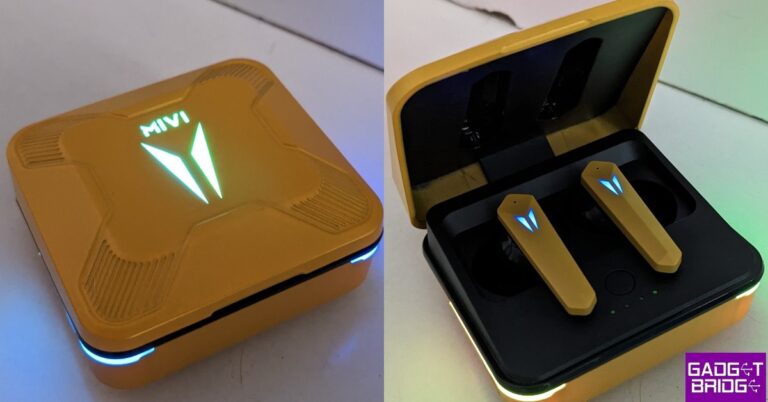
Let’s begin by talking about the design. The Mivi Commando X9’s casing has a square box-like design. Given the low cost of the TWS, they appear to be rather frail. The plastic charging case is bigger than the other ones we’ve seen so far. It includes an illuminated V sign on the top, as well as V-shaped RGB lighting (the firm calls these Aurora lights), bordered around both front sides. It is what makes this device unique.Seven modes, including static, breathing, waves, quick fade, flicker, cycle, and metamorphosis, are available with RGB Lights. There is a charging port on the case’s left side. As soon as you open the case, the lights begin to blink.Although the charging case is not of very high quality, it does not collect fingerprints. But because the hinge is of not great quality, the lid may become loose over time. Despite being made of plastic, the charging case may not be able to withstand accidental falls because it is not particularly sturdy.The affordable earphones are offered in four colours: white, black, pink, gold, and grey. Gold is the colour option we got for testing.The earphones are made of plastic and feature a stem-like shape. They are supplied with silicone ear tips that fit perfectly into the ear canal. An extra set of ear tips is included with these for a snug fit.The earphones are IPX4 rated, meaning they can survive splashes of water and sweat.On the left side of the charging case is where you’ll find the USB charging connector. After initial setup, you only need to remove the earbuds from the charging case, connect them to your device, and they will instantly pair. The Mivi earphones’ Bluetooth 5.3 technology has a 10-metre (30-foot) range of connectivity. So far, there have been no connectivity issues to report. It also has a touch panel on them for controlling and pausing/playing music.
Mivi Commando X9 Review: Performance
The 13mm drivers in the Mivi Commando X9 have a wide frequency range of 20Hz to 20KHz. To be completely honest, they are so loud that you cannot hear them at full power. This indicates that when the volume is turned all the way up, there is a bit of sound distortion. Although the sound separation is not to our taste, the highs are good. Therefore, we do not suggest using these headphones to listen to music, instead, they are marketed towards the gaming audience.We also put these to the test for gaming, and they are advertised as having a 35ms ultra-low latency. And we had no problems playing games with it. The latency is good but the mic quality could have been better. The other individual could not hear us clearly because of the low audio quality. The X9 claimed an 8-hour playback duration and a total battery life of 72 hours when used with the casing. This indicates that it can recharge your earbuds up to nine times. The battery could only hold a charge for 5 to 6 hours throughout our tests. It is stated to give 5 hours of uninterrupted music, gaming, and calls with just 10 minutes of rapid charging.
Verdict
Design can be compromised, but the company should offer construction of high quality. The hinge is of low quality, which we found to be odd as they have given better hinges before. We think the charging case might break easily or after a few falls because it cannot survive accidental falls from a good height. While the RGB lights are cool to look at, they have nothing to do with performance.Additionally, the mic quality is also not great, which is a disadvantage because e-sports players cannot utilise them. Furthermore, the music sound quality was not the best; the lyrics, the bass, and the treble were all mixed up. Additionally, the volume distorts at full volume. Due to the excellent latency, we might conclude that these earbuds are suitable for just gaming for people who are on a tight budget.Mivi Commando X9 Pros
Garena Free Fire is a battle royale game with regular awards and tournaments to keep players interested. If you play Garena Free Fire, you should be aware of the redeem codes that are released on a daily basis. However, because the battle royale game is banned in India, players from other countries can use the Free Fire Redeem codes daily. If you’re unfamiliar with the Garena Free Fire redeem codes or don’t know how to get them, we’ve put together a step-by-step guide to help you redeem them. Check out Garena Free Fire Redeem Codes for 9 May 2023.The Free Fire redeem codes are a great way to get free stuff. These are 12-digit codes that contain alphabets and numbers, as well as an expiration date and time. Because the Garena FF redeem codes cannot be used more than once, you should hurry to the redemption page to claim your free reward before someone else does. To get a free reward, all you have to do is go to reward.ff.garena.com/en, which is the official redemption page. Also, keep an eye on this space for daily updates on Garena Free Fire redemption codes and rewards.
Garena Free Fire Redeem Codes Today 9 May2023
F4N5JTIGUYVTRSV
FEBN5J6KIYUHNJD
FIUEYHNYJMKHO8U
FDR5YT7JY6T5RF3
F4V5BNTYJHIUFDV
FV3B4NTHUYGHND
FMKIJHNBUHYT7UT
FFGTUYT7U67I98US
FBRN5MK67YUIHJN
FMKIUAYTQR2C3VB
F7Y6ST5A4REQ2DC
How to Get Free Fire Redeem Codes for Garena on 9 May2023?
Amazon is back with another quiz on its mobile platform. The 9 May 2023 Amazon Quiz is now live on its platform and today’s Amazon Quiz will give you a chance to win Rs 500 Amazon pay Balance.Every day Amazon brings a fresh questionnaire that comprises 5 questions. These questions are based on current affairs and general knowledge. The quiz can be played from 8 AM to 11:59 PM and the contestants need to answer correctly to enter into a lucky draw. In today’sAmazon Quiz the participants will get a chance to win Rs 500 Amazon Pay Balance.Today’s Amazon Quiz Prize – Rs 500 Amazon Pay BalanceQuiz Date – 9 May 2023Daily Timing – 12 AM to 11:59 PMWinner Announcement – Today at 12 PM
Amazon Quiz Answers Today 9 May 2023
Question 1: The Great Pacific ________ Patch is a collection of marine debris in the North Pacific Ocean.Answer: GarbageQuestion 2: The third in-person Quad Summit will be held in which city?
Answer: SydneyQuestion 3: Who created history by becoming the first Indian woman to be named in Wisden Cricketers of the Year 2023?Answer: Harmanpreet KaurQuestion 4: Which species of this animal has the widest range of all non-human primates?
Answer: Rhesus MacaqueQuestion 5: In which year was this building formally opened?Answer: 2-Jul
How To Play Amazon Quiz
Only app users are eligible to play the Amazon quiz every morning from 12 AM to 11:59 PM. The quiz is not available on the desktop. For those who are unaware of how to play the Amazon quiz below are the steps, you can follow to take the quiz.
AGON by AOC in partnership with Riot Games announced the launch of a new gaming monitor in the Indian market. The brand has introduced AGON PRO AG275QXL – AGON League of Legends Edition. The AGON gaming monitor comes with features and design specially crafted for the MOBA experience. It has a 27-inch IPS screen with QHD resolution and a 120Hz refresh rate.
AGON PRO AG275QXL Monitor price and availability
AGON PRO AG275QXL Monitor has been launched in India with a price tag of Rs 28,501. The gaming monitor can be purchased via Amazon in the country.
AGON PRO AG275QXL Monitor specifications
The AGON PRO AG275QXL features a 27-inch IPS screen that boasts 2560×1440 Quad HD 2K resolution and comes with a refresh rate of 170Hz. The screen has a response time of 1ms GtG and supports Adaptive Sync with FreeSync Premium. The gaming monitor comes with VESA DisplayHDR 400, 94% DCI-P3 colour gamut, ShadowControl and the flicker-free mode as well. It has a Hextech-inspired design and includes features like the League of Legends Mode, the LoL QuickSwitch, exclusive power on/off sounds, Light FX Sync, and the LoL Signature OSD design.Also Read:5 best 5G smartphones to buy under Rs 20,000The chassis and stand of the AGON PRO AG275QXL are embellished with elements of the iconic Hextech design. It has a special Light FX that syncs up with other AGON gaming peripherals via the AOC G-Menu software for the ultimate gaming setup. The dedicated LoL mode ensures the view of Summoner’s Rift is seen with visual clarity in mind.In terms of connectivity, there is HDMI 1.4 x 2, DisplayPort 1.4 x 2, USB 3.1 (Gen 1), USB Downstream ports x4, 3.5mm headphone jack, and USB Fast charge port.Commenting on the launch of the new gaming monitor, Mr. Atul Jasra, Country Head-India, AOC (TPV Technology India Pvt. Ltd.) said “We are thrilled to introduce the AGON PRO AG275QXL gaming monitor to the Indian market. With its stunning display, lightning-fast refresh rate, and customizable features, the AGON PRO AG275QXL is the ultimate tool for gamers who demand nothing but the best. The collaboration with Riot Games has been exciting for us wherein we have merged our extensive knowledge of monitor technology with the enchantment of League of Legends. With this partnership, we aim to provide the League of Legends community with an unparalleled gaming experience that showcases the power of AOC Monitors.” For the latest gadget and tech news, and gadget reviews, follow us on Twitter, Facebook and Instagram. For newest tech & gadget videos subscribe to our YouTube Channel. You can also stay up to date using the Gadget Bridge Android App. You can find the latest car and bike news here.
One of the downsides of sharing a Netflix account is that everyone with access to the account can view your watch history and personalised suggestions. Even though Netflix allows you to use different profiles on the app, there is no way to lock a particular profile from other users. However, there is a way you can manage the ‘Continue Watching’ section on your profile. Here are 3 simple ways to hide your watch history on Netflix.Read Also:A new colour variant of Samsung Galaxy S23 is on its way
Hide Netflix Watch History using a PC
Step 1: Log in to Netflix on your PC’s web browser.Step 2: Hover the cursor on your profile icon at the top right corner of the screen.Step 3: Click on Account.Step 4: Scroll down and click on the downward arrow next to your profile.Step 5: Click on ‘View’ next to Viewing Activity.Step 6: You will be able to see all your recently watched titles. To hide a title, click on the crossed-out circle next to it.Step 7: Scroll down and click on ‘Hide All’ to hide your entire watch history.
Hide Netflix Watch History on Mobile
Step 1: Launch Google Chrome on your smartphone and log in to Netflix.Step 2: Tap the hamburger menu icon on the top right corner of the screen.Step 3: Select ‘Account’.Step 4: Scroll down and tap on the downward arrow next to your profile.Step 5: Go to the Viewing Activity section and tap on ‘View’.Step 6: Tap the crossed-out circle next to the title you want to hide.Step 7: Select ‘Hide All’ to hide your entire watch history.
Hide Netflix Watch History on TV
Step 1: Launch the Netflix app on your TV.Step 2: Click on the title you want to remove from the watch list.Step 3: Scroll down and select ‘Remove from Continue Watching’ from the list of options.The title will be hidden from your watch history.
Frequently Asked Questions
How do I hide my watch history on Netflix?
Login to the Netflix website and select ‘Account’. Scroll down to your profile and select your Viewing Activity. Scroll down and select ‘Hide All’ to hide your entire watch history.
Can others see my watch history on Netflix?
Other people sharing the Netflix account with you can view your watch history on Netflix.
How long does ‘Continue Watching’ stay on Netflix?


 Step 2: Select the app.
 Step 3: Tap on Battery.
 Step 4: Turn off the toggle switch next to Allow background activity.
 Step 3: Scroll down and tap on the app you want to stop.
 Step 4: Select Force Stop from the bottom menu.

 Step 2: Select Software Information.
 Step 3: Tap on Build Number 7 times to enter Developer Mode.
 Step 4: Go back to Settings, scroll all the way down, and select Developer options.
 Step 5: Tap on Running Services.
 Step 6: Here you will be able to see the current RAM status of your device.
Step 7: Tap on an app to stop it from running in the background.
Step 6: Here you will be able to see the current RAM status of your device.
Step 7: Tap on an app to stop it from running in the background.
 Step 8: Tap on Stop.

 Step 2: Tap on Battery.
 Step 3: Scroll down and select the app you want to put to sleep.
 Step 4: Tap on Limit usage.
 Step 5: Select Put in deep sleep.



 Step 3:
 Step 4:
 Step 5:
 Step 5:
 Step 6:














 Step 4:
 Step 5:
 Step 6:
 Step 7:
 Step 3:
 Step 4:
 Step 5:
 Step 6:
 Step 7: