

Nokia C12 Plus with 4,000mAh battery launched in India
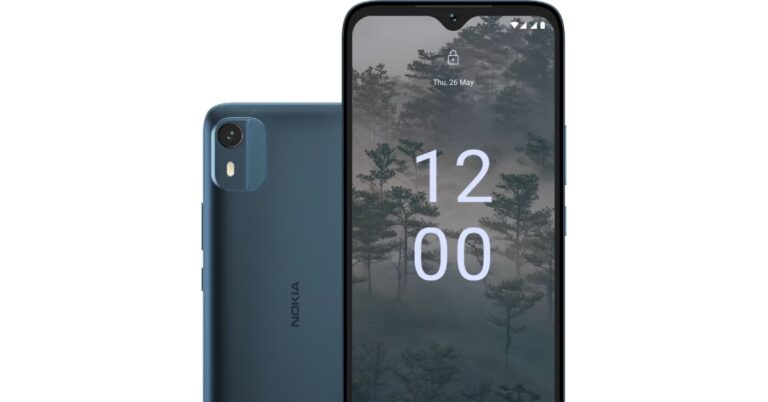
Nokia C12 debuted in India last month. The company has now announced Nokia C12 Plus. The latest smartphone by HMD Global is priced under Rs 8,000 and features an HD+ display. In addition to this, the phone is powered by an octa-core Unisoc SoC and it runs on Android 12 (Go Edition). The handset also houses a 4,000mAh battery and comes with a single rear camera.
OnePlus 11 Jupiter Rock limited edition likely to debut in India soon, upcoming launch tipped
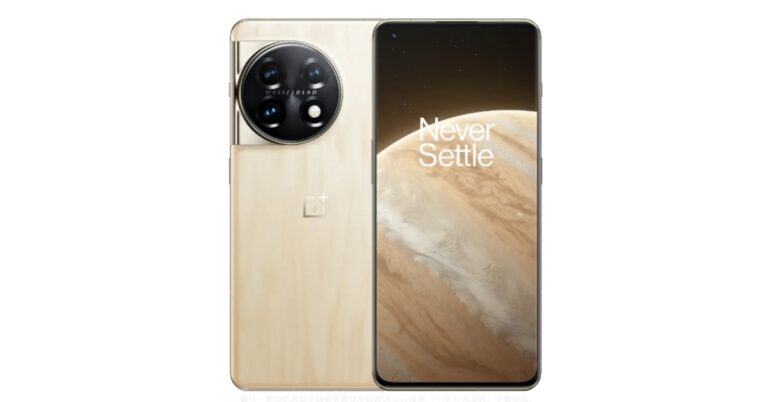
The OnePlus 11 series in India is all set to get a new member. The company is likely to announce the OnePlus 11 Jupiter Rock limited edition soon. The device features a back panel that resembles a surface similar to Jupiter. Moreover, the phone is built of a 3D microcrystalline rock substance that gives it the appearance of Jupiter’s surface. China will begin selling the phone on April 3 as it has already debuted there.
According to tipster Max Jambor, the OnePlus 11 Jupiter Rock limited edition will also be released in India. The company hasn’t confirmed the upcoming launch though. The rough texture on the back panel similar to Jupiter’s surface is the main highlight of the phone. It gives it the impression of natural rock formations.

OnePlus 11 Jupiter Rock limited edition price
The OnePlus 11 Jupiter Rock is scheduled to go on sale in China today, that is April 3. There it is available in a single 16 GB RAM with 512GB storage option priced at CNY 4,999 which translates to Rs 59,700.
OnePlus 11 Jupiter Rock limited edition Specification
According to the firm, OnePlus 11 Jupiter Rock limited edition is said to be built with a material crossover that had never previously been employed by anyone in the industry. It took over a year of research and development to design and produced the back panel of the phone. The phone features a 6.7-inch Quad-HD+ 10-bit LTPO 3.0 AMOLED display with 1,440×3,216 pixels of resolution. The screen also has a dynamic refresh rate of up to 120Hz. It is powered by Snapdragon 8 Gen 2 SoC with 16 GB RAM with 512GB storage. The device is fueled by a 5,000mAh battery with 100W SuperVOOC fast charging support. OnePlus 11 Jupiter Rock limited edition sports a triple camera setup that includes a 50-megapixel 1/1.56-inch Sony IMX890 sensor. The setup also includes a 48-megapixel 0.5-inch Sony IMX581 ultra-wide sensor and a 32-megapixel 1/2.74-inch Sony IMX709 telephoto lens. In addition to this, there is a 16-megapixel Sony IMX471 sensor for taking selfies. For the latest gadget and tech news, and gadget reviews, follow us on Twitter, Facebook and Instagram. For newest tech & gadget videos subscribe to our YouTube Channel. You can also stay up to date using the Gadget Bridge Android App. You can find the latest car and bike news here.Top 10 ways to fix the ‘Failed to obtain IP address’ error on Android (2024)
Two or more devices on a shared network use their unique IP addresses to communicate with one another. For a printer to carry out its task, it needs the IP address of your phone or PC to establish a connection. The same goes for your WiFi router. Sometimes, you may see an IP address error pop up on your phone after entering the password to a WiFi network. There may be several reasons behind this issue. In this article, we bring you the top 10 ways to fix the ‘Failed to obtain IP address’ error on Android.
Read Also: Mivi Commando X9 TWS with up to 72 hours of playtime launched in India
 Restarting your device should be the first step you take towards fixing any network issue. A simple restart resolves any background glitches and clears any corrupt files in the cache. To restart your smartphone, simply long-press the side key or press and hold the side key and volume key to access the power options. On your laptop or PC, click on the Windows icon and select ‘Restart’ from the power options.
If the issue persists after restarting your device, try restarting your router as well. To restart the router, turn off the power switch from the wall outlet that it is connected to. Wait for a couple of minutes for the router to restart, then connect your device to the WiFi and see if it works.
Step 2: Tap on WiFi, then tap on the gear icon next to your WiFi network.
Step 3: Tap on Forget at the bottom of the screen.
Now, go to the previous page and connect to the WiFi network again.
Step 2: Tap on WiFi, then tap on the gear icon next to your WiFi network.
Step 3: Tap on IP Settings and select Static.
Step 4: You will need to change the IP address. Select an IP Address within these ranges:
Step 2: Select Google Play Services.
Step 3: Tap on Storage.
Step 4: Select Clear Cache from the toolbar at the bottom and confirm your selection.
Restarting your device should be the first step you take towards fixing any network issue. A simple restart resolves any background glitches and clears any corrupt files in the cache. To restart your smartphone, simply long-press the side key or press and hold the side key and volume key to access the power options. On your laptop or PC, click on the Windows icon and select ‘Restart’ from the power options.
If the issue persists after restarting your device, try restarting your router as well. To restart the router, turn off the power switch from the wall outlet that it is connected to. Wait for a couple of minutes for the router to restart, then connect your device to the WiFi and see if it works.
Step 2: Tap on WiFi, then tap on the gear icon next to your WiFi network.
Step 3: Tap on Forget at the bottom of the screen.
Now, go to the previous page and connect to the WiFi network again.
Step 2: Tap on WiFi, then tap on the gear icon next to your WiFi network.
Step 3: Tap on IP Settings and select Static.
Step 4: You will need to change the IP address. Select an IP Address within these ranges:
Step 2: Select Google Play Services.
Step 3: Tap on Storage.
Step 4: Select Clear Cache from the toolbar at the bottom and confirm your selection.
 If you’ve tried all of the fixes on this list but are unable to fix the issue, you may want to reset your router. This will get rid of all the custom settings and reset it to factory settings. Record all the essential details like IP address, DNS address, and login credentials before resetting your router. To reset your router, simply press and hold the reset button at the back until it shuts down and starts again.
Step 2: Scroll down and select Reset.
Step 3: Tap on Reset Network Settings.
Step 4: Select Reset Settings.
Step 5: Enter your PIN to confirm your selection.
If you’ve tried all of the fixes on this list but are unable to fix the issue, you may want to reset your router. This will get rid of all the custom settings and reset it to factory settings. Record all the essential details like IP address, DNS address, and login credentials before resetting your router. To reset your router, simply press and hold the reset button at the back until it shuts down and starts again.
Step 2: Scroll down and select Reset.
Step 3: Tap on Reset Network Settings.
Step 4: Select Reset Settings.
Step 5: Enter your PIN to confirm your selection.
Restart your device
 Restarting your device should be the first step you take towards fixing any network issue. A simple restart resolves any background glitches and clears any corrupt files in the cache. To restart your smartphone, simply long-press the side key or press and hold the side key and volume key to access the power options. On your laptop or PC, click on the Windows icon and select ‘Restart’ from the power options.
Restart the router
 If the issue persists after restarting your device, try restarting your router as well. To restart the router, turn off the power switch from the wall outlet that it is connected to. Wait for a couple of minutes for the router to restart, then connect your device to the WiFi and see if it works.
Forget the WiFi network and add it again
Step 1: Go to Settings and select Connections. Step 2: Tap on WiFi, then tap on the gear icon next to your WiFi network.
 Step 3: Tap on Forget at the bottom of the screen.
 Now, go to the previous page and connect to the WiFi network again.
Use a Static IP Address
Step 1: Go to Settings and select Connections.
Step 2: Tap on WiFi, then tap on the gear icon next to your WiFi network.
Step 3: Tap on IP Settings and select Static.
 Step 4: You will need to change the IP address. Select an IP Address within these ranges:
10.0.0.0 to 10.255.255.255
172.16.0.0 to 172.31.255.255
192.168.0.0 to 192.168.255.255
Step 5: Tap on Save at the bottom of the page.
Clear Google Play Services cache
Step 1: Go to Settings and select Apps. Step 2: Select Google Play Services.
 Step 3: Tap on Storage.
 Step 4: Select Clear Cache from the toolbar at the bottom and confirm your selection.

Change your router’s network encryption
Some network encryption methods can keep the WiFi from properly connecting to your device and may throw up the ‘Failed to obtain IP address’ error. To fix this, simply change your router’s network encryption method. Go to your router’s web interface and select ‘Encryption Method’. If the encryption method is set to AES or TKIP, change it to WPA2-PSK. The WPA encryption type is compatible with most Android devices.Flush the DNS cache
The DNS cache keeps a record of the websites you have visited in the past. It gives your device instant access to the IP address of the website you’re trying to visit. The DNS cache is prone to corruption. This can lead to the ‘Failed to Obtain the IP Address’ error on your Android phone. Clearing the cache will solve this problem. Step 1: Launch Google Chrome on your Android phone and type the following command in the address box:chrome://net-internals/#dns
Step 2: Tap on Clear host cache.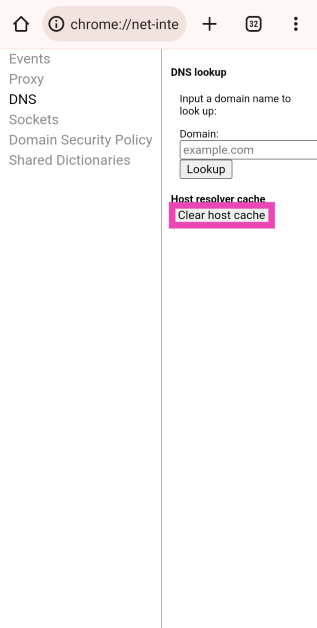
Turn off the MAC filter
If you’re using a friend’s WiFi network, they may have enabled the MAC filter on their network. A MAC filter gives Internet access to the devices with their MAC addresses on the whitelist. You can either ask for your device’s MAC address to be added to the whitelist or suspend MAC filtering altogether. This can be done under the ‘MAC filtering’ section on the router’s web interface.Reset the Router
 If you’ve tried all of the fixes on this list but are unable to fix the issue, you may want to reset your router. This will get rid of all the custom settings and reset it to factory settings. Record all the essential details like IP address, DNS address, and login credentials before resetting your router. To reset your router, simply press and hold the reset button at the back until it shuts down and starts again.
Reset Network Settings
Resetting the router didn’t work either? Try resetting your smartphone’s network settings. Here’s how. Step 1: Go to Settings and select General Management. Step 2: Scroll down and select Reset.
 Step 3: Tap on Reset Network Settings.
 Step 4: Select Reset Settings.
 Step 5: Enter your PIN to confirm your selection.
Frequently Asked Questions
What causes IP address issues?
The most common cause of IP address issues is two or more devices sharing the same IP address on a network.Why does my phone keep failing to obtain the IP address?
This may be due to a router-related issue. Try restarting your router or changing its encryption type.What is the meaning of ‘failed to obtain IP address’?
If you’re seeing ‘Failed to obtain IP address’ it means your phone isn’t able to get the IP address of the device it is trying to communicate with. This may apply to routers and printers. Read Also: Apple iPhone 14 available with discounts of up to Rs 15,000 on FlipkartConclusion
These are the top 10 ways to fix the ‘Failed to obtain IP address’ error on Android. If the issue persists after trying all the fixes mentioned above, you may need to replace your router. Try using a different router and see if the issue resolves itself.The most awaited smartphones to launch in April 2023: Here is a list
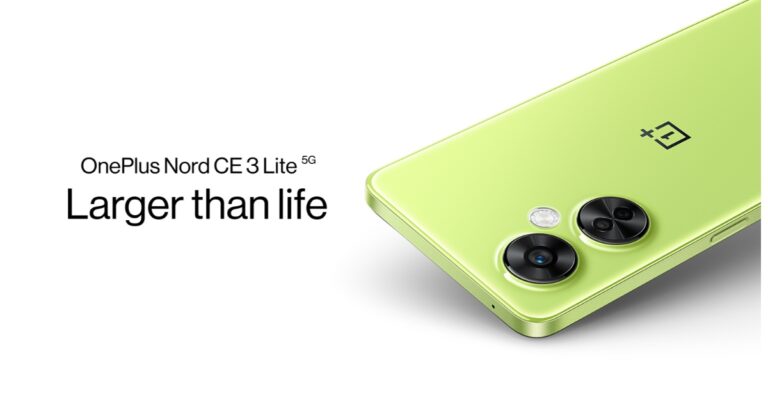
As already predicted this year we will see a lot of budget smartphones launching in the market. There will be a flurry of devices priced between Rs 6,000 and Rs 60,000 that will be introduced in the country over the course of the next two months. Here is a list of all the smartphones that will be released in April 2023 this month.
 The company is yet to confirm whether it will be an AMOLED or LCD panel. Note that its predecessor had a 6.59-inch LCD screen. For the optics, there will be a 108-megapixel primary camera with a 3x lossless zoom feature on the OnePlus Nord CE 3 Lite. The smartphone is also confirmed to house a 5,000mAh battery with 67W fast charging support. The devices will be made available in two colour options of Pastel Lime and Chromatic Gray colours.
The most awaited smartphones that will be launched in April 2023
OnePlus Nord CE 3 Lite
OnePlus Nord CE 3 Lite is all set to launch in India. The launch is scheduled to take place on April 4 in the country. The company has already confirmed some of the key specifications as well as design elements in its teasers. It is going to be a mid-range gaming device likely to be priced at Rs 21,999. The upcoming OnePlus phone is confirmed to be powered by a Snapdragon 695 SoC with up to 8GB of RAM and an option to expand the RAM virtually. Moreover, the OnePlus Nord CE 3 Lite will feature a 6.72-inch screen with 120Hz refresh rate support. The company is yet to confirm whether it will be an AMOLED or LCD panel. Note that its predecessor had a 6.59-inch LCD screen. For the optics, there will be a 108-megapixel primary camera with a 3x lossless zoom feature on the OnePlus Nord CE 3 Lite. The smartphone is also confirmed to house a 5,000mAh battery with 67W fast charging support. The devices will be made available in two colour options of Pastel Lime and Chromatic Gray colours.
Vivo X90 Series
Vivo X90 Series is also likely to come to India. The company hasn’t confirmed but the rumours suggest India launch this month. The lineup consists of three models: Vivo X90, X90 Pro, and X90 Pro+. The three models feature Carl Zeiss lenses. The price of the series is likely to start at Rs 42,500.POCO F5
Poco F5 is set to launch in India on April 6. The device will be powered by Qualcomm Snapdragon 7+ Gen 2 chipset. The device is likely to be a rebadged variant of the Redmi Note 12 Turbo that launched in China recently. The phone will also feature a .67-inch QHD+ AMOLED panel with a 120Hz refresh rate. A triple rear camera with a 50MP primary lens will be a part of the Poco F5. Moreover, the handset will sport a 5,000mAh battery with 67W fast charging support.Redmi Note 12 series
Redmi Note 12 series has already debuted in India and globally. On April 5 it will make its debut in Malaysia. Redmi Note 12, Note 12 Pro and Redmi Note 12 Pro+ will be part of the latest smartphone series. You can check out the full specs here.ASUS ROG Phone 7
ASUS ROG Phone 7 is scheduled to make its global debut on April 13. Reportedly the gaming handset will be powered by Qualcomm Snapdragon 8 Gen2 SoC. It is likely to feature a large 6.85-inch AMOLED display with 165Hz refresh rate support. Moreover, the phone will house a 6,000mAh battery with design elements almost similar to its predecessor. For the latest gadget and tech news, and gadget reviews, follow us on Twitter, Facebook and Instagram. For newest tech & gadget videos subscribe to our YouTube Channel. You can also stay up to date using the Gadget Bridge Android App. You can find the latest car and bike news here.IKODOO Buds One and Buds Z are now on sale, available exclusively on Amazon
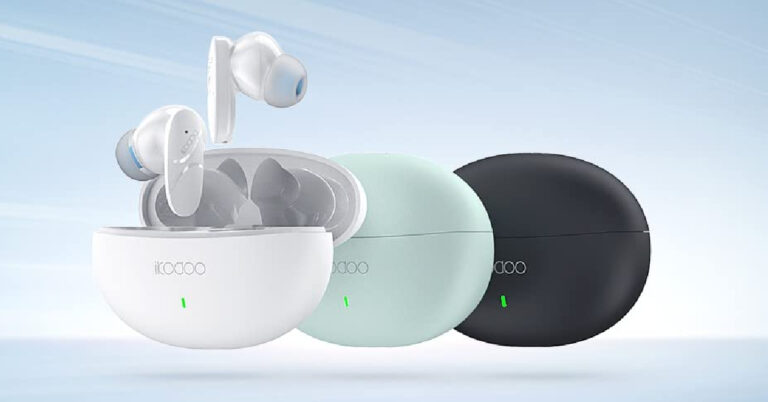
Consumer tech brand IKODOO has made its debut in India with the release of two TWS earbuds – Buds One and Buds Z. IKODOO Buds One is available at an introductory price of Rs 4,999 while Buds Z is priced at Rs 999. Both earbuds feature AI Environmental Noise Cancellation for audio calls and a lightweight design that allows users to wear them for an extended time. Both earbuds are exclusively available on Amazon, and the introductory offer will last till April 6.
Read Also: Mivi Commando X9 TWS with up to 72 hours of playtime launched in India
The premium TWS offering from IKODOO, Buds One, comes with features like Active Noise Cancellation up to 50dB, Wind Noise Reduction, Bluetooth 5.2 connectivity, AI ENC, and more. The earbuds offer a battery life of 27 hours and have wireless charging support. Fast charging support allows Buds One to offer 120 minutes of playtime with just 10 minutes of charge. With three microphones on board, IKODOO Buds One provides exceptional call quality. The smart anti-wind technology nullifies the sound of the wind, with a level 7 anti-wind noise algorithm allowing users to enjoy music without being bothered by the noise created by the wind. Buds One is also equipped with low-pitched sound enhancement technology and a distinguishable triple mode.
Read Also: Apple iPhone 14 available with discounts of up to Rs 15,000 on Flipkart
IKODOO’s affordable offering also comes with a lightweight design and AI ENC to reduce external noises during calls. A 3D soundstage offers an immersive listening experience to the users. Buds Z offers an impressive 28-hour battery backup and comes with fast charging support, offering 90 minutes of playtime with just 10 minutes of charge. The wireless earbuds are rated IPX4 for dust and water resistance. You can grab the TWS earbuds exclusively from Amazon. The Buds Z are available in three colour options – White, Black, and Green.
For the latest gadget and tech news, and gadget reviews, follow us on Twitter, Facebook and Instagram. For newest tech & gadget videos subscribe to our YouTube Channel. You can also stay up to date using the Gadget Bridge Android App. You can find the latest car and bike news here.
IKODOO Buds One
Price: Rs 4,999 The premium TWS offering from IKODOO, Buds One, comes with features like Active Noise Cancellation up to 50dB, Wind Noise Reduction, Bluetooth 5.2 connectivity, AI ENC, and more. The earbuds offer a battery life of 27 hours and have wireless charging support. Fast charging support allows Buds One to offer 120 minutes of playtime with just 10 minutes of charge. With three microphones on board, IKODOO Buds One provides exceptional call quality. The smart anti-wind technology nullifies the sound of the wind, with a level 7 anti-wind noise algorithm allowing users to enjoy music without being bothered by the noise created by the wind. Buds One is also equipped with low-pitched sound enhancement technology and a distinguishable triple mode.
Read Also: Apple iPhone 14 available with discounts of up to Rs 15,000 on Flipkart
The premium TWS offering from IKODOO, Buds One, comes with features like Active Noise Cancellation up to 50dB, Wind Noise Reduction, Bluetooth 5.2 connectivity, AI ENC, and more. The earbuds offer a battery life of 27 hours and have wireless charging support. Fast charging support allows Buds One to offer 120 minutes of playtime with just 10 minutes of charge. With three microphones on board, IKODOO Buds One provides exceptional call quality. The smart anti-wind technology nullifies the sound of the wind, with a level 7 anti-wind noise algorithm allowing users to enjoy music without being bothered by the noise created by the wind. Buds One is also equipped with low-pitched sound enhancement technology and a distinguishable triple mode.
Read Also: Apple iPhone 14 available with discounts of up to Rs 15,000 on Flipkart
IKODOO Buds Z
Price: Rs 999 IKODOO’s affordable offering also comes with a lightweight design and AI ENC to reduce external noises during calls. A 3D soundstage offers an immersive listening experience to the users. Buds Z offers an impressive 28-hour battery backup and comes with fast charging support, offering 90 minutes of playtime with just 10 minutes of charge. The wireless earbuds are rated IPX4 for dust and water resistance. You can grab the TWS earbuds exclusively from Amazon. The Buds Z are available in three colour options – White, Black, and Green.
For the latest gadget and tech news, and gadget reviews, follow us on Twitter, Facebook and Instagram. For newest tech & gadget videos subscribe to our YouTube Channel. You can also stay up to date using the Gadget Bridge Android App. You can find the latest car and bike news here.
IKODOO’s affordable offering also comes with a lightweight design and AI ENC to reduce external noises during calls. A 3D soundstage offers an immersive listening experience to the users. Buds Z offers an impressive 28-hour battery backup and comes with fast charging support, offering 90 minutes of playtime with just 10 minutes of charge. The wireless earbuds are rated IPX4 for dust and water resistance. You can grab the TWS earbuds exclusively from Amazon. The Buds Z are available in three colour options – White, Black, and Green.
For the latest gadget and tech news, and gadget reviews, follow us on Twitter, Facebook and Instagram. For newest tech & gadget videos subscribe to our YouTube Channel. You can also stay up to date using the Gadget Bridge Android App. You can find the latest car and bike news here. Garena Free Fire Redeem Codes Today 3 April 2023: Here is how to claim them

Garena Free Fire is a battle royale game with regular awards and tournaments to keep players interested. If you play Garena Free Fire, you should be aware of the redeem codes that are released on a daily basis. However, because the battle royale game is banned in India, players from other countries can use the Free Fire Redeem codes daily. If you’re unfamiliar with the Garena Free Fire redeem codes or don’t know how to get them, we’ve put together a step-by-step guide to help you redeem them. Check out Garena Free Fire Redeem Codes for 3 April 2023.
The Free Fire redeem codes are a great way to get free stuff. These are 12-digit codes that contain alphabets and numbers, as well as an expiration date and time. Because the Garena FF redeem codes cannot be used more than once, you should hurry to the redemption page to claim your free reward before someone else does. To get a free reward, all you have to do is go to reward.ff.garena.com/en, which is the official redemption page. Also, keep an eye on this space for daily updates on Garena Free Fire redemption codes and rewards.
Garena Free Fire Redeem Codes Today 3 April 2023
- FGRGTBCS01GBHY
- FGUK0POUYE4TGB
- FET5RYTK8O90ULO
- FGYUK8O90LJRHD
- FHGFYTU79OIHJG
- FGTY6UILKHMNBV
- ED22KT2GRQDY
- UBJJ2A7G23L6
- FCXAQ234RTGTYHY
- F7JUHGT5Y6U7IKJ
How to Get Free Fire Redeem Codes for Garena on 3 April 2023?
- Visit the Garena Free Fire game’s official website at reward.ff.garena.com.
- Use your Facebook, Google, VK, Apple ID, Huawei ID, or Twitter account to log in.
- You’ll be taken to a valid redemption code (s)
- Copy and paste the 12-digit redemption code into the text box.
- On the screen, a dialogue box will appear.
- ‘Ok’ should be selected.
Amazon Quiz Answers Today 3 April 2023: Participate to win Rs 500

3 April 2023 Amazon Quiz has gone live on its mobile app platform. The quiz can be played from 12 AM to 11:59. All you need to do is just answer five easy questions that the e-commerce website puts before you. Today you can stand a chance to win Rs 500 Amazon Pay Balance.
Every day Amazon posts a new questionnaire that consists of five simple questions about general knowledge and current events. To enter a lucky draw, participants must correctly answer the questions. One incorrect answer will result in your elimination from the quiz. Each month, only one person will be declared the winner and the results will be announced at the end of the month. Amazon customers who submit correct answers can win an Amazon Pay Balance worth up to Rs 50,000. To ensure that you answer all five questions correctly, Gadget Bridge updates all of the correct answers on a daily basis. Take a look at today’s answers:
Amazon Quiz Today Prize – Rs 500 Amazon Pay Balance
Quiz Date – 3 April 2023
Daily Timing – 12 AM to 11:59 PM
Winner Announcement – Today 12 PM
Amazon Quiz Answers Today 3 April 2023
Question 1: What cricket item appears on the logo of the newly launched production house ‘Dhoni Entertainment’?
Answer: BallQuestion 2: In 2022, who became the first South African batter to hit a century in an ICC T20 World Cup event?
Answer: Rilee RossouwQuestion 3: Who is replacing Henry Cavill in the role of Geralt of Rivia in the series ‘The Witcher’?
Answer: Liam HemsworthQuestion 4: What is the most populated area with these conditions?
Answer: Thar DesertQuestion 5: This river is formed by which river?
Answer: Fish RiverHow To Play Amazon Quiz
Only app users are eligible to play the Amazon quiz every morning from 12 AM to 11:59 PM. The quiz is not available on the desktop. For those who are unaware of how to play the Amazon quiz below are the steps, you can follow to take the quiz.- Firstly download the Amazon app from Google Play Store or App Store
- Now fill in the required information through the Sign Up option.
- You need to log in to the Amazon app and scroll down on the home screen to find the Amazon Quiz banner.
- Tap on the Amazon Quiz banner and tap on the Start button to start the Quiz.
- Now you will get 5 questions and you need to answer them correctly. One wrong answer will eliminate you from the Quiz.
- After answering all the questions correctly you are now eligible for a Lucky Draw.
- The winner’s name will be announced today at 12 PM.
Amazon Quiz Answers Today 2 April 2023: Participate to win Rs 2,500

Have you participated in the Amazon Quiz today? If not then participate in the 2 April 2023 Amazon Quiz as it has already gone live on the app. The daily quiz can be played from 12 AM to 11:59 every day on the mobile app platform. Today e-commerce is giving the chance to win Rs 2,500 Amazon Pay Balance.
Every day Amazon brings a fresh quiz for its customers. By participating in the quiz the participants can win an Amazon Pay Balance of up to Rs 50,000. The quiz can only be played on the mobile app as it is not available for the desktop platform. The quiz contains five easy questions and you have to answer all the questions correctly. The participants will then be shortlisted for a lucky draw to select a winner. Whereas the results are declared at the end of the month. Check out today’s Amazon quiz answers to win Rs 2,500.
Amazon Quiz Today Prize – Rs 2,500 Amazon Pay Balance
Quiz Date – 2 April 2023
Daily Timing – 12 AM to 11:59 PM
Winner Announcement – Today 12 PM
Amazon Quiz Answers Today 2 April 2023
Question 1: Which means of transport is considered the fastest? Answer: Air Question 2: Germany has launched the world’s first fleet of passenger trains powered by what? Answer: Hydrogen Question 3: Who was the most famous ruler of the Mughals? Answer: Akbar Question 4: Guess This Place Answer: Colosseum Question 5: Guess This Place Answer: Grand CanyonHow To Play Amazon Quiz
Only app users are eligible to play the Amazon quiz every morning from 12 AM to 11:59 PM. The quiz is not available on the desktop. For those who are unaware of how to play the Amazon quiz below are the steps, you can follow to take the quiz.- Firstly download the Amazon app from Google Play Store or App Store
- Now fill in the required information through the Sign Up option.
- You need to log in to the Amazon app and scroll down on the home screen to find the Amazon Quiz banner.
- Tap on the Amazon Quiz banner and tap on the Start button to start the Quiz.
- Now you will get 5 questions and you need to answer them correctly. One wrong answer will eliminate you from the Quiz.
- After answering all the questions correctly you are now eligible for a Lucky Draw.
- The winner’s name will be announced today at 12 PM.
Search chips added to Google Drive, will make it easier to narrow down user’s search results
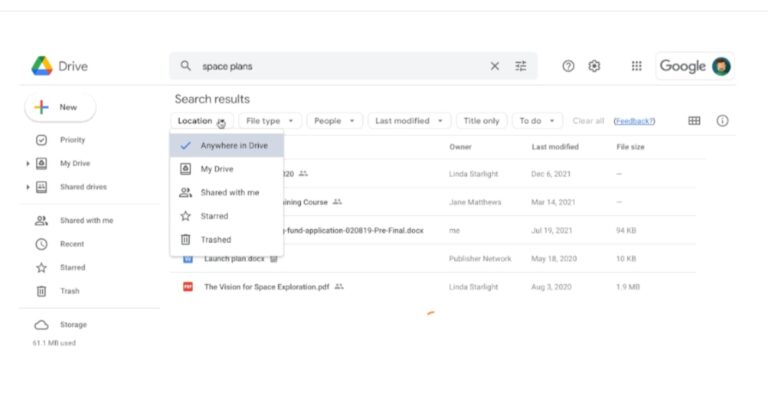
With Drive, Google has added a “search chips” feature. This functionality will allow users to filter content across the entire web app by criteria including file type, owner, and last edited date. According to the company, this feature will let users to more quickly refine their search and locate pertinent files across all Drive views.
For those who are unaware the “search chips” feature was formerly accessible in Google Drive search, however, this function is now accessible “across Drive.” This is similar to the functionality available in Gmail. So now onwards users don’t have to do multiple or repeated searches or filter through unnecessary results since Google Drive’s search chips make it simpler for them to identify relevant files more quickly.
According to Google all users can now generally access search chips. This includes all Google Workspace users, as well as previous G Suite Basic and Business users.
 “In November 2021, we announced a beta for search chips in Google Drive, which makes it easier for users to find relevant files faster and eliminates the need to perform multiple searches or sort through irrelevant results. Search chips are now generally available for all users,” while announcing the feature Google said.
A few keywords are generally used when searching in Drive to try to find the file such as “marketing plan” or “sales report,” which may return results that are too broad. Users can now use search chips to surface more relevant results based on File type, such as a Google Doc, PDF, or image, People, or Location, such as a shared drive or specific folder, When the document was last modified File titles only, Shared labels and Tasks after a query is entered.
The company in its blog post said that users will notice various other improvements like spelling suggestions along with search chips. Users can clear search chips on their own, or together with the query and additional date options for the “Last modified” chip.
For the latest gadget and tech news, and gadget reviews, follow us on Twitter, Facebook and Instagram. For newest tech & gadget videos subscribe to our YouTube Channel. You can also stay up to date using the Gadget Bridge Android App. You can find the latest car and bike news here.
“In November 2021, we announced a beta for search chips in Google Drive, which makes it easier for users to find relevant files faster and eliminates the need to perform multiple searches or sort through irrelevant results. Search chips are now generally available for all users,” while announcing the feature Google said.
A few keywords are generally used when searching in Drive to try to find the file such as “marketing plan” or “sales report,” which may return results that are too broad. Users can now use search chips to surface more relevant results based on File type, such as a Google Doc, PDF, or image, People, or Location, such as a shared drive or specific folder, When the document was last modified File titles only, Shared labels and Tasks after a query is entered.
The company in its blog post said that users will notice various other improvements like spelling suggestions along with search chips. Users can clear search chips on their own, or together with the query and additional date options for the “Last modified” chip.
For the latest gadget and tech news, and gadget reviews, follow us on Twitter, Facebook and Instagram. For newest tech & gadget videos subscribe to our YouTube Channel. You can also stay up to date using the Gadget Bridge Android App. You can find the latest car and bike news here.
 “In November 2021, we announced a beta for search chips in Google Drive, which makes it easier for users to find relevant files faster and eliminates the need to perform multiple searches or sort through irrelevant results. Search chips are now generally available for all users,” while announcing the feature Google said.
A few keywords are generally used when searching in Drive to try to find the file such as “marketing plan” or “sales report,” which may return results that are too broad. Users can now use search chips to surface more relevant results based on File type, such as a Google Doc, PDF, or image, People, or Location, such as a shared drive or specific folder, When the document was last modified File titles only, Shared labels and Tasks after a query is entered.
The company in its blog post said that users will notice various other improvements like spelling suggestions along with search chips. Users can clear search chips on their own, or together with the query and additional date options for the “Last modified” chip.
For the latest gadget and tech news, and gadget reviews, follow us on Twitter, Facebook and Instagram. For newest tech & gadget videos subscribe to our YouTube Channel. You can also stay up to date using the Gadget Bridge Android App. You can find the latest car and bike news here.
“In November 2021, we announced a beta for search chips in Google Drive, which makes it easier for users to find relevant files faster and eliminates the need to perform multiple searches or sort through irrelevant results. Search chips are now generally available for all users,” while announcing the feature Google said.
A few keywords are generally used when searching in Drive to try to find the file such as “marketing plan” or “sales report,” which may return results that are too broad. Users can now use search chips to surface more relevant results based on File type, such as a Google Doc, PDF, or image, People, or Location, such as a shared drive or specific folder, When the document was last modified File titles only, Shared labels and Tasks after a query is entered.
The company in its blog post said that users will notice various other improvements like spelling suggestions along with search chips. Users can clear search chips on their own, or together with the query and additional date options for the “Last modified” chip.
For the latest gadget and tech news, and gadget reviews, follow us on Twitter, Facebook and Instagram. For newest tech & gadget videos subscribe to our YouTube Channel. You can also stay up to date using the Gadget Bridge Android App. You can find the latest car and bike news here. Released in India: Redmi Note 12 5G new higher storage variant will be available from April 6

Redmi has announced the launch of a new storage option for the Redmi Note 12 5G. The device will soon be offered in a third storage option according to the company. The phone debuted in India in two different configurations alongside other models Note 12 Pro 5G and the Note 12 Pro+ 5G earlier this year. Let’s find out in this post how much the new, higher-end smartphone will cost and when it will be available for purchase in the country.