What are the benefits of using GPS? What are the alternatives to it?

If you use an Android smartphone, chances are that you are familiar with GPS. GPS (Global Positioning System) is a satellite navigation system that was launched by the US Department of Defence in 1978, five years after starting the project. Due to its popularity in modern gadgets and devices, GPS as a term is used synonymously with satellite navigation. But GPS is one of the several Global Navigation Satellite Systems (GNSS) currently in use across the world. You may have heard of NavIC, which is India’s very own satellite navigation system launched not too long ago. So what is it that GPS does apart from determining the location of your device? In this article, we bring you the benefits of using GPS and some alternatives to it. Read Also: How to View GoodNotes Notes on Android, Windows or Non-Apple devices?

Here are some of the benefits of using GPS

Navigation

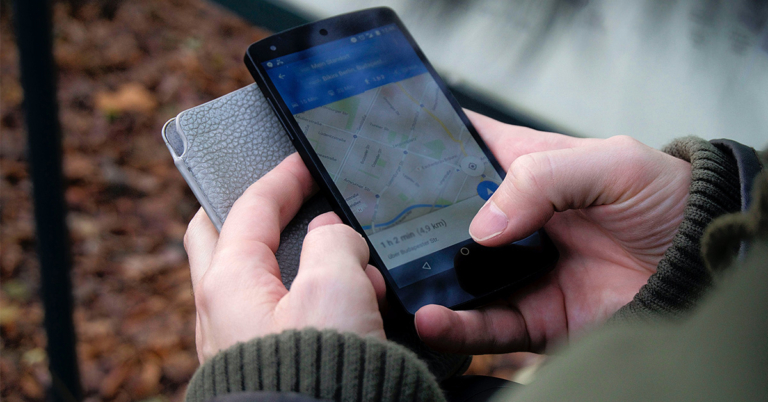
Can I track someone using their phone number on Google Maps? We don’t need to tell you this, but satellite navigation is one of the key areas where GPS is put into use. When paired with a detailed map, your smartphone can use the GPS to track your position and navigate you from point A to point B. One of the most popular navigation apps, Google Maps, uses GPS to give you directions to your destination as you drive. Other services like Apple Maps and Waze also utilise GPS to offer detailed navigation along with a bunch of other features.

Keep a check on your kids’ safety

Top 7 Life360 Alternatives for Location Sharing There are several GPS-based apps that let you monitor your children’s location in real-time. Apps like Family360, Glympse, and FamiSafe not only let you keep a tab on your family members’ location but also give you access to functions like creating safe circles on the map, tracking vehicle speed, and more. Here is our list of some of the best location-sharing apps you can download right now.

Find your lost phone

Use Google’s Find my Device to check the IMEI number. What are the benefits of using GPS? What are the alternatives to it? Finding a lost or stolen phone is made easy by GPS. Android users can simply log in to Google’s Find My Device page and track their phone’s live location if it is still switched on and connected to the internet. In case your phone is switched off, you can still get to know its last known location. Certain smartphone manufacturers like Samsung and Apple have tracking services of their own that can locate anything from smartphones to styluses and wireless earbuds.

Find services near you

All the petrol pumps in your area will be marked on the map with a red icon. What are the benefits of using GPS? What are the alternatives to it? Using GPS you can find services like hotels, restaurants, gas stations, ATMs, and more near you. Your current location made available via using GPS lets other apps give you a detailed list of the all services and attractions near you. Most navigation apps like Google Maps make use of this. If you’re travelling to a place you’ve never been before, you can use GPS to your benefit by checking out all the services available there. 

Get detailed stats about your workouts

OnePlus Nord Watch review: Performance. If you’re obsessed with fitness, you probably use a smartwatch or fitness band to track your workout routines. Your smartwatch uses GPS to track your runs, giving you a detailed account of the distance covered, average speed, and the route taken. If you’re looking to buy your first smartwatch, check out our list of the best smartwatches for fitness and health tracking here.

What are the alternatives to GPS?

Even though it is the most popular satellite network, GPS is not the only navigation system around. Here are some other Global Navigation Satellite Systems that are a good alternative to GPS.

GLONASS (Russia)

Global Navigation Satellite System (GLONASS) is a network of 27 satellites operated by the Russian Aerospace Defence Forces. It is currently the best alternative to GPS. GLONASS was launched in 1993. It wasn’t always a network of 27 satellites. In the beginning, GLONASS consisted of 12 satellites in 2 orbits around the Earth. GLONASS precision of 5-10 metres is very close to that of GPS (4-7 metres).

BeiDou (China)

BeiDou is China’s network of satellites and was first launched in 2000. This GNSS had humble beginnings, being a network of just 2 satellites on its launch. However, in 2012, China replaced it with BeiDou-2 which consists of 22 satellites, with plans of extending to accommodate 35 operational satellites. As of now, BeiDou is mostly used in China and its neighbouring regions. Its positioning accuracy is just as good as GPS, tracking location with a precision of 3-5 metres.

NavIC (India)

NavIC, formerly known as Indian Regional Navigation Satellite System (IRNSS), is the newest addition to the global network of satellites orbiting the planet. As of now, NavIC is only used to monitor India and its neighbouring regions. The constellation of 7 satellites provides position accuracy better than 20m. India plans on launching more satellites in future to join the NavIC network.

Quasi-Zenith (Japan)

Japan’s indigenous satellite navigation network is called Quasi-Zenith (QZSS) and is a constellation of four satellites. In Japanese, Quasi-Zenith is known as Michibiki. QZSS covers the Asia-Oceanic regions, where it provides better accuracy than GPS. As of now, QZSS works in tandem with GPS, providing the latter with additional data from the Asia-Oceanic region. This year, Japan plans to add seven more satellites to the network, making it completely autonomous.

Galileo (European Union)

Galileo was launched by the European Union in 2016 and currently consists of a network of 30 satellites, out of which 24 are operational. Galileo is operated by the European Union Agency for the Space Programme (EUSPA). This satellite network offers a position accuracy of 1 metre (public) and 20cm (on-demand) Read Also: Nokia C12 Plus with 4,000mAh battery launched in India

Conclusion 

Every smartphone user is aware of the benefits offered by GPS. But you would be surprised to know that your smartphone uses GPS interchangeably with GLONASS, BeiDou, and Galileo. Almost all of the major navigation apps like Google Maps don’t rely only on GPS for their positioning services. For the latest gadget and tech news, and gadget reviews, follow us on Twitter, Facebook and Instagram. For newest tech & gadget videos subscribe to our YouTube Channel. You can also stay up to date using the Gadget Bridge Android App. You can find the latest car and bike news here.

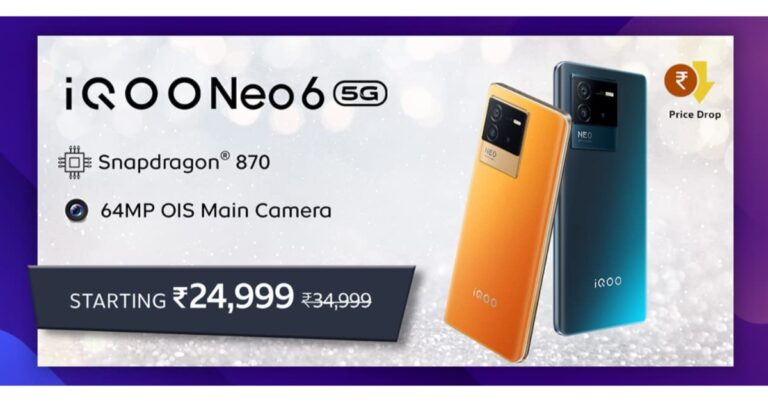
iQoo Neo 6 gets more affordable, price dropped by Rs 5,000: Deets inside

Vivo’s sub-brand iQoo has now reduced the cost of iQoo Neo 6 by Rs 5,000. The device was launched in India last year. The price revision comes just after the company introduced iQoo Neo 7. The device includes a 64-megapixel triple rear camera and a 6.62-inch E4 AMOLED display with a 120Hz refresh rate. Moreover, the phone is powered by Snapdragon 870 SoC and packs a 4700mAh battery with 80W fast charging support.

iQoo Neo 6 new price and sale details

iQoo Neo 6 has today received a price cut of Rs 5,000. After the price drops the 8GB RAM with 128GB storage model is available at Rs 24,999. Whereas the price of the 12GB RAM with 256GB storage option has been slashed to Rs 29,999. The device with revised pricing will be available via the company’s official website and Amazon. Note that the phone was launched in India at a starting price of Rs 29,999 for the 8GB RAM with 128GB storage option. The 12GB RAM with 256GB storage model is priced at Rs 33,999. The phone comes in two colour options of Cyber Rage and Dark Nova.

iQoo Neo 6 specifications

iQoo Neo 6 is highlighted with a 6.62-inch E4 AMOLED full-HD+ display with 1,080×2,400 pixels of resolution and 120Hz refresh rate with a 360Hz touch sampling rate. The device runs on Android 12-based Funtouch OS 12. Under the hood, there is Snapdragon 870 SoC with up to 12GB of RAM in the device and has up to 256GB of built-in UFS 3.1 storage. The triple rear camera on the iQoo Neo 6 includes a 64-megapixel Samsung ISOCELL GW1P primary sensor with an f/1.89 aperture and optical image stabilisation. There is a 2-megapixel macro camera with an f/2.4 aperture and an 8-megapixel wide-angle camera with an f/2,2 aperture. For selfies and video chats, the iQoo Neo 6 has a 16-megapixel sensor on the front with f/2.0 aperture. In addition to this, there is a 4,700mAh battery with support for 80W FlashCharge. The handset has 5G, 4G LTE, Wi-Fi, Bluetooth 5.2, GPS, and a USB Type-C connection for connectivity. An accelerometer, ambient light sensor, magnetometer, gyroscope, proximity sensor, and an in-display fingerprint sensor for biometric authentication are among the sensors on board. For better thermal control when gaming, it comes with a liquid cooling vapour chamber. For the latest gadget and tech news, and gadget reviews, follow us on TwitterFacebook and Instagram. For newest tech & gadget videos subscribe to our YouTube Channel. You can also stay up to date using the Gadget Bridge Android App. You can find the latest car and bike news here.

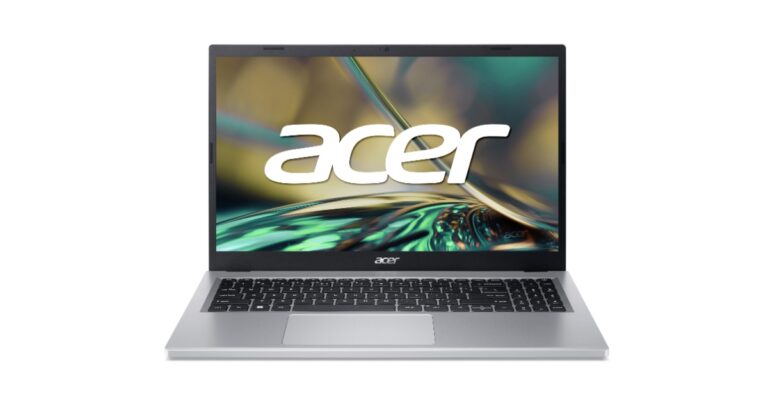
Acer Aspire 3 with latest Intel Core i3-N305 CPU launched in India

Acer has expanded its Aspire portfolio with the launch of Aspire 3 15 and Aspire 3 14 laptops in India. Both laptops are powered by the latest Intel Core i3-N305 CPU with 8GB LPDDR5 memory onboard. As the name suggests they have a 14 or 15.6-inch full HD display along with Acer PurifiedVoice and AI Noise Reduction audio system.

Acer Aspire 3 15 and Aspire 3 14 prices in India, sale details

The price of the Acer Aspire 3 15 and Aspire 3 14 starts at Rs 39,999 in India. They are available for purchase via Acer Exclusive Stores, Acer E-store, Vijay Sales, Amazon and Acer stores pan India. Acer Aspire 3 15 and Aspire 3 14 prices in India, sale details

Acer Aspire 3 15 and Aspire 3 14 specifications, features

According to the company, the Aspire 3 15 weighs only 1.7 kg and has an 18.9 mm thickness. Whereas the Aspire 3 14 with Metal A Cover weighs only 1.5 kg and has a thickness of 18.9 mm. Full-HD 1920×1080 pixel resolution is available in both sizes. Acer’s BlueLightShield is also available for the screen to block out blue light, perfect for casual web browsing and streaming videos, allowing for sharp, detailed images. There is a 78% increase in fan surface area which results in an improved thermal system and an additional 17% thermal capacity, allowing users to maintain optimum performance and prevent overheating while performing more work. Also Read: iQoo Neo 6 featuring a 120Hz E4 AMOLED display launched in India The all-new Aspire 3 laptops come with the most recent 2023 Intel Core i3 N-Series CPU with a max turbo clock speed of 3.8GHz perfect for multitasking. The CPU makes it ideal for navigating various learning tools and applications. There is 8GB of LPDDR5 RAM with either 256GB or 512GB of PCIe Gen3 (NVMe) SSD storage. The laptops come equipped with a 40WHr Lithium-Ion battery that provides up to 11 hours of battery life and Windows 11. While features like Microsoft Cortana with Voice and wake-on-voice provide convenience for the users. Additionally, there are stereo speakers and HD webcams on the device. In terms of connectivity, there is Wi-Fi 6, Bluetooth 5.1, HDMI, two USB 3.2 (Type-A), a USB Type-C, headphone and a microphone jack. For the latest gadget and tech news, and gadget reviews, follow us on TwitterFacebook and Instagram. For newest tech & gadget videos subscribe to our YouTube Channel. You can also stay up to date using the Gadget Bridge Android App. You can find the latest car and bike news here.
Best ways to use Netflix on your Android phone or tablet (2024)

0
If you just got your hands on a new Android mobile device, you probably want to start watching content on it. Netflix is one of the most popular OTTs around right now, with a vast library of movies and TV shows across different languages. Once the app is installed on your phone, it is a good idea to check whether the Netflix app on your phone supports HDR content before choosing a subscription plan. Here is a quick guide to using Netflix on your Android phone or tablet. Read Also: Nokia C12 Plus with 4,000mAh battery launched in India

Install Netflix on your Android phone or tablet

Install Netflix on your Android phone or tablet To get started with using Netflix on your Android phone or tablet, you will need to download and install the Netflix app from Google Play Store. Launch the Play Store app on your Android device and search for Netflix. Tap on ‘Install’. If you’re using an older version of Android, you may not be able to find the Netflix app on Google Play Store. In this case, download the app directly from Netflix by clicking on this link. Some Android devices may come with a pre-installed Netflix app. In this case, launch the app and proceed to sign in using your registered email account. If you haven’t signed up for Netflix yet, tap on ‘Get Started’ and choose a subscription plan.

Which Netflix plan should you choose for your Android device?

If you plan on using Netflix solely on your Android phone or tablet, then the ‘Mobile’ plan should be ideal for you. At Rs 149 per month, this is the most affordable subscription plan that Netflix offers in India. This plan allows you to watch Netflix content on one mobile device (phone or tablet) at a time. The only drawback is that you cannot watch content in HD using this plan. To watch content in 720p HD resolution, choose the ‘Basic’ plan which is currently priced at Rs 199 per month. One added advantage of this plan is that you can watch Netflix content on your TV and computer along with your mobile device. However, this plan still limits the user to watch on one screen at a time. To watch HDR content, subscribe to the ‘Premium’ plan, priced at Rs 649 per month. This plan allows you to watch Ultra HD content in 4K content across all devices. You can also watch content on 4 different devices at the same time on this plan, making it easier to share your subscription with your friends. There is also a ‘Standard’ plan on offer, which limits the resolution to full HD (1080p).

I’ve signed up for a Netflix plan. What’s next?

I’ve signed up for a Netflix plan. What's next? Now that you’ve settled on a Netflix plan, it’s time to quickly set up a profile and begin watching. This profile is neither a private account nor can it be used to log in to Netflix. This profile simply gives you a space to curate personalised Netflix recommendations and keep track of what you are watching. If you are sharing your account with your friends, they can set up their profiles as well. Once you’ve selected your profile, you can browse Netflix’s library of movies and TV shows. Use the search bar to look up a title that you want to watch. Switch to the ‘New & Hot’ tab to see trending and upcoming content on the platform.

How to check if my device supports HDR content?

How to check if my device supports HDR content? Not sure if your mobile Android device supports HDR content on Netflix. Simply launch the Netflix app and tap on your profile icon at the top right corner of the screen. Select ‘App Settings’ and scroll down to ‘Playback Specification’. Look for ‘HDR Capabilities’. This is where you can check whether your Android phone or tablet supports HDR content for Netflix.

How do I change the video playback quality in the Netflix app?

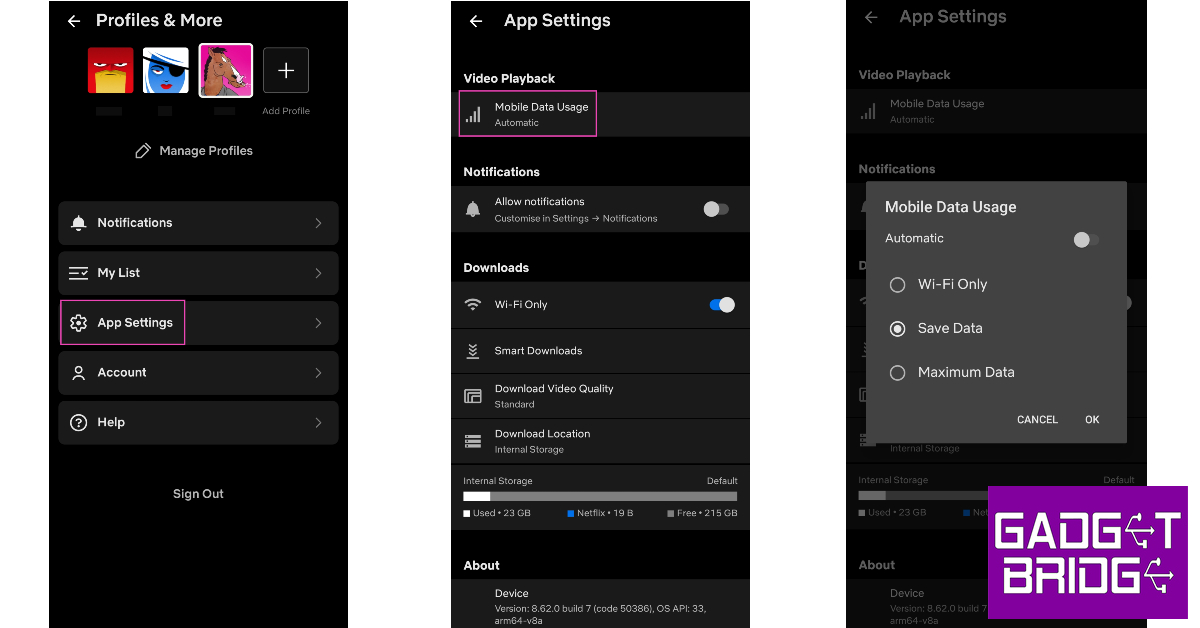
How do I change the video playback quality in the Netflix app? The Netflix app for Android does not let you change the video quality while you’re watching a movie or TV show. There is no option to adjust the playback quality in the video player itself. To select a different video resolution, tap on your profile icon and select ‘Mobile data usage’. Turn off the Automatic slider and select ‘Save Data’ to watch content in SD resolution or ‘Maximum Data’ for HD resolution. You can also change the resolution for your downloads by tapping on ‘Download Video Quality’ and selecting either ‘Standard’ or ‘High’. We would suggest downloading HD content only when you are connected to a WiFi network as it can use a significant amount of data.

How to save and download a movie or TV series to watch later?

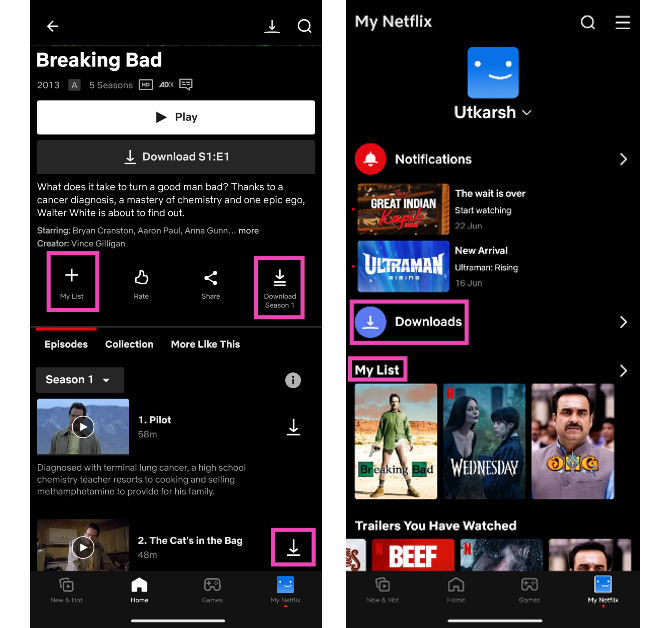
How to save a movie or TV series to watch later? If you can’t watch a title at the current moment, you can always save it for later on Netflix. There are two ways to save any piece of content on the streaming platform. You can add the movie or episode to your watch list, so you don’t forget to view it. If you’re going someplace where you won’t get internet connectivity, you can choose to download a title and watch it offline later. Both these options can be accessed after opening a title on the app. You can choose to download individual episodes or an entire season of a TV series. Hitting the plus icon adds it to your Watch List. Your downloaded content and watch list can be accessed from the ‘My Netflix’ tab.

Turn on subtitles

One of the better aspects of using Netflix is that you can watch movies and TV from different regions of the world, in different languages. Even if the content isn’t dubbed in your native language, you can generally find the English subtitles in the app itself. To turn on the subtitles for a particular movie or TV show, simply tap on ‘Audio & Subtitles’ and select the subtitles of your choice. If the title is dubbed in another language, this is where you can toggle its audio. Read Also: IKODOO Buds One and Buds Z are now on sale, available exclusively on Amazon

Conclusion 

These are the best ways to use Netflix on an Android phone or tablet. Tired of going through the same old movie suggestions on Netflix? Here are the top tips and tricks for discovering the best movies and TV shows on Netflix. Want to watch Netflix with your long-distance friends? Here’s how you can stream Netflix on Discord for a watch party.

Amazon reveals sale offers for the upcoming Home Shopping Spree

Amazon Home Shopping Spree has been officially announced to commence in India on April 6. The e-commerce platform has announced that its sale will bring discounts and offers across a wide range of Home and kitchen products including water bottles, lunch boxes, deep freezers, coolers, fans, inverters, bedsheets, curtain lines, water dispensers, and much more. Also, now is the perfect moment to update your house with the added benefit of 10% additional savings on home and kitchen appliances when you buy more. The Amazon Home Shopping Spree is scheduled to begin on April 6 and will run until April 9 in the country. According to the e-commerce platform the sale is sponsored by Prestige. There will be great offers and deals with discounts of up to 70% on Kitchen appliances and home stuff. Customers can avail of a 10% instant bank discount using the HDFC Bank credit card during the “Home Shopping Spree” on Amazon.in. Whereas Amazon Prime members are eligible to get additional benefits like coupons, combo offers, Buy more & save more offers, thrilling deals, and exchange offers, as well as up to Rs 250 off on minimum purchases of Rs 1000. Amazon customers can also benefit from discounts on some of the most well-known brands, like Prestige, Havells, Bajaj, Aqualean, Luminous, Blue Star, Rockwell, Urban Terrain, and many more. In addition to this, the customers can also take advantage of enticing savings of up to 80% off on Home and Kitchen clearance store items. Customers may also benefit from exciting deals on new launches from Home and Kitchen on top brands like Orient, Aurave, Tosaa, Urban Terrain, Cult sport, Yonex, Philips, and much more. Top offers on kitchen and home appliances There will be up to 50 percent off on water bottles and lunch boxes. The e-commerce platform will also offer up to 30 percent off on deep freezers and coolers. Top offers on home décor, furnishings There will be up to 60 percent off on fans and coolers, up to 35 percent off on inverters, up to 70 percent discount on bedsheets and curtain lines. Other offers The Amazon Home Shopping Spree will also bring up to 30 percent off on water dispensers and up to 70 percent off on pest control and cycles. For more such deals visit here. For the latest gadget and tech news, and gadget reviews, follow us on TwitterFacebook and Instagram. For newest tech & gadget videos subscribe to our YouTube Channel. You can also stay up to date using the Gadget Bridge Android App. You can find the latest car and bike news here.

How to View GoodNotes Notes on Android, Windows or Non-Apple devices?

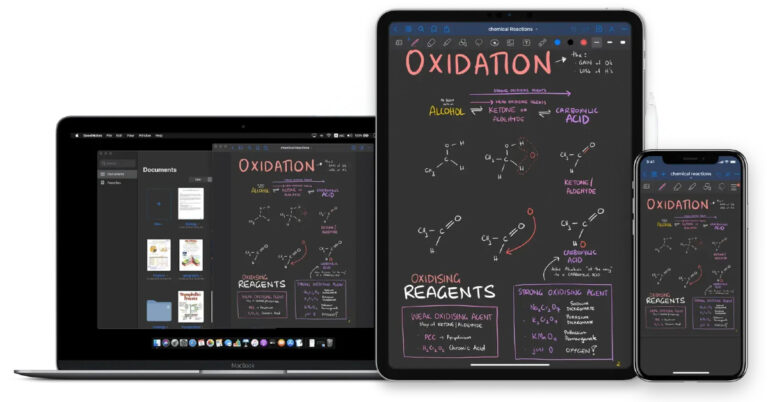
GoodNotes is one of the finest note-taking apps around. With helpful features like handwriting recognition, free annotation, audio recording for notes, and superior organisation tools, it is no wonder that most Apple users swear by GoodNotes. As of now, there is no GoodNotes app for Android or Windows, which makes it hard for Apple users to freely share their notes with their friends who use other platforms. Luckily, there are a couple of workarounds for this problem. In this article, we bring you two quick ways to view GoodNotes notes and documents on Android, Windows, or non-Apple devices. Read Also: Nokia C12 Plus with 4,000mAh battery launched in India

View GoodNotes documents on a web browser

One of the quickest ways to access a GoodNotes document on a non-Apple device is by sharing its link with the viewer. You can share the link with yourself and access the document on an Android or a Windows device. Here’s how. Step 1: Launch GoodNotes on your Apple device and select the document that you want to share. Step 2: Tap the Share icon. Step 3: Select ‘Share link to collaborate’. Step 3: Select ‘Share link to collaborate’. Step 4: Make sure you have enabled ‘Open document on Web’ in Share Settings. Step 4: Make sure you have enabled ‘Open document on Web’ in Share Settings. How to View GoodNotes Notes on Android, Windows or Non-Apple devices? Step 5: Mail the link to yourself so you can access it on another device. You can also share this link with a friend who uses an Android or Windows device. Once you click on the link from an Android or Windows device, the document will open in a web browser.

View GoodNotes documents by enabling automatic backup

GoodNotes allows you to back up your notes and documents to cloud storage. Once they are backed up, you can view them on any non-Apple device. You can turn on auto-backup to ensure GoodNotes periodically uploads your files to the cloud storage of your choice. Here’s how. Step 1: Launch the GoodNotes app and tap the gear icon on the top-right corner of the screen. Step 2: Tap on Settings and select Automatic Backup. Step 2: Tap on Settings and select Automatic Backup. How to View GoodNotes Notes on Android, Windows or Non-Apple devices? Step 3: Enable Auto-backup. Step 3: Enable Auto-backup. How to View GoodNotes Notes on Android, Windows or Non-Apple devices? Step 4: Customise the settings according to your liking and select Done. Any changes you make to your notes will be reflected in their backups. You can access these backed-up files using a Windows or Android device.  GoodNotes allows you to use cloud storage services like Google Drive, Dropbox, OneDrive, and Box. Read Also: The most awaited smartphones to launch in April 2023: Here is a list

Frequently Asked Questions

Is there a GoodNotes app for Android?

As of now, there is no GoodNotes app for Android. But GoodNotes will be coming to Android in 2023. 

Can I use GoodNotes on Android?

Currently, GoodNotes is undergoing beta trials for the Android platform. If you own an 8-inch or larger Samsung tablet with at least 3GB memory, you can download the GoodNotes app for Android from here.

How do I view GoodNotes documents on Android or Windows?

You can either share the link of your GoodNotes documents and open them on Android or Windows using the web browser, or you can back up your notes to cloud storage and access them using a non-Apple device.

Conclusion

This is how you can view GoodNotes notes on Android, Windows, or non-Apple devices. You may not have to rely on these tricks long enough as GoodNotes plans on coming out with an app for Android later this year. Using the GoodNotes app for Android, you will be able to sync your notes across all platforms.  For the latest gadget and tech news, and gadget reviews, follow us on Twitter, Facebook and Instagram. For newest tech & gadget videos subscribe to our YouTube Channel. You can also stay up to date using the Gadget Bridge Android App. You can find the latest car and bike news here.

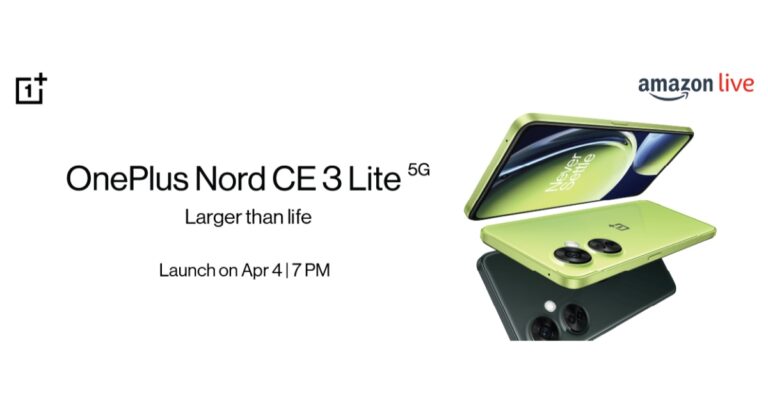
OnePlus Nord CE 3 Lite launching in India today: How to watch the livestream

Not much time has passed since OnePlus arrived with the OnePlus 11 series in India and is all geared up to land with another mid-range smartphone in the country. Today the company is going to launch OnePlus Nord CE 3 Lite. The Chinese smartphone manufacturer is also teasing the device on Amazon, confirming its availability on the e-commerce site. The device is said to be offered in the mid-range category and is going to succeed the Nord CE 2 that was launched last year. Through teasers, the company has already confirmed some of the key specs of the upcoming phone ahead of the official launch event.

Livestream details

The OnePlus Nord CE 3 Lite is all set to make its India debut today. The launch event will begin at 7 PM IST and will be live-streamed via the company’s official YouTube channel. However, OnePlus fans can also watch the event live on its social media platforms and on our website as well. We have embedded the link below.

OnePlus Nord CE 3 Lite price in India expected

Note that its predecessor Nord CE 2 Lite was released with a starting price of Rs 19,999. Rumour mills suggest that there will be a hike in the price of the upcoming phone. If the rumour is to be believed then the company is likely to raise the price by Rs 2,000. The price of the OnePlus Nord CE 3 Lite in India is tipped to start at Rs 21,999. Also Read: The most awaited smartphones to launch in April 2023: Here is a list Way before the official release OnePlus revealed the early bird benefits for the purchasers of the device. According to the firm, the OnePlus Nord CE 3 Lite buyers are eligible to get a free OnePlus product. In addition, they are qualified for an extended warranty plan with an exclusive discount offer. There will be more bank offers and discounts on the purchase of the product.

OnePlus Nord CE 3 Lite specs expected

The company has already confirmed some of the key specifications as well as design elements in its teasers. OnePlus Nord CE 3 Lite will be powered by a Snapdragon 695 SoC with up to 8GB of RAM and an option to expand the RAM virtually. In addition to this, the handset is also confirmed to feature a 6.72-inch screen with 120Hz refresh rate support. It has not yet been confirmed by the company whether it would be an AMOLED or LCD panel. Notably, the LCD display on its predecessor was 6.59 inches. The OnePlus North CE 3 Lite will have a 108-megapixel primary camera with a 3x lossless zoom function. The smartphone’s 5,000mAh battery with 67W fast charging capabilities is also verified. The devices will be offered in two colour options: Chromatic Gray and Pastel Lime. For the latest gadget and tech news, and gadget reviews, follow us on TwitterFacebook and Instagram. For newest tech & gadget videos subscribe to our YouTube Channel. You can also stay up to date using the Gadget Bridge Android App. You can find the latest car and bike news here.

Samsung Galaxy S23+ Review: Bigger, better, with a lot of good things going for it

Samsung is one of the major players to put out its flagship smartphone series early in the year. These smartphones are a routine fixture in the year-end lists, and at this point, it is hard to imagine Samsung coming out with a dud. Samsung has stuck to the regular lineup for the S series this year, offering a compact king in Galaxy S23, a slightly larger S23+, and the spec-ed out S23 Ultra. Most consumers either go for the S23 due to its compactness and relatively affordable pricing or the S23 Ultra for, well, being the best Android smartphone out there. This puts the Samsung Galaxy S23+ in a unique spot, where it is neither the affordable option nor the standout best. But it is there for a reason. The S23+ caters to a niche that wants a big smartphone that isn’t too bulky and has a flat-screen display. Sure, it may miss out on some of the extravagant features of the S23 Ultra, but it is without a doubt one of the best smartphones that Android has to offer. We previously reviewed the Samsung Galaxy S23 Ultra (read here) and were mighty pleased by its performance. Now we turn our attention to the S23+ and see what it has to offer. So, without further ado, here is our in-depth review of the Samsung Galaxy S23+. Read Also: IKODOO Buds One and Buds Z are now on sale, available exclusively on Amazon

Samsung Galaxy S23+ review: Design and Display

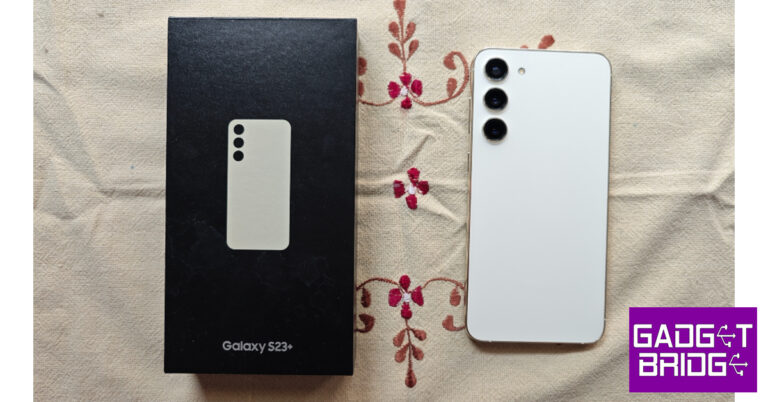
Samsung Galaxy S23+ comes in the standard compact rectangular box that the company uses for most of its smartphones. Samsung has used some recycled materials for this box. Inside, you will find the smartphone, a USB Type-C charging cable, a SIM ejector tool, and a quick start guide. There is no power adapter or phone cover inside the box. Samsung Galaxy S23+ review: Design and Display Samsung has kept the design of the S23+ clean and minimal. The smartphone gets a glass front and back panel with Victus 2 protection. The aluminium frame is slightly curved to provide a better grip. The flat glass black gets a matte texture and does not attract any fingerprints. The shiny aluminium frame tends to gather some prints and smudges. The in-hand feel of the device is exquisite. The flatness of the design complemented by the slightly curved edges gives the phone a premium feel without compromising on safety. There is no camera island on the S Series this year, something you may have noticed already. Samsung has applied S22 Ultra’s design language to all the variants of the S23. The three individual camera lenses are studded vertically on the back panel. Some may argue that Samsung has played it too safe, but we quite like the clean look. Samsung Galaxy S23+ review: Design and Display At the bottom of the frame, you will find the SIM tray, USB C port, microphones, and the primary speaker grille. The secondary speaker has been placed up top. On the right edge lie the power button and volume rocker keys. The left side of the frame is clean and keyless. The selfie camera is placed in a slim cutout in the middle of the display. There are six antenna bands on the device. Also, it is worth mentioning that Samsung has used a lot of recycled materials on this device, both on the outer casing and the internal components. Samsung Galaxy S23+ review: Design and Display The ‘Plus’ aspect of the phone is reflected in its display. The Samsung Galaxy S23+ comes with a 6.6-inch Dynamic AMOLED 2X display with a 120Hz maximum refresh rate. The compact S23 has a 6.1-inch display. The under-display ultrasonic fingerprint sensor is placed in the perfect position and is ridiculously fast. Since it is ultrasonic, you don’t need to turn on the display to use the fingerprint sensor. Samsung Galaxy S23+ review: Design and Display The display in itself is exemplary. This is something that we expect from Samsung and we are never left disappointed. The smoothness offered by this display simply cannot be replicated by any other smartphone. Every minute touch is registered efficiently. Browsing through apps and scrolling through your social media feed is a seamless experience. With a display like this, you would want to pick the bigger S23+ over the compact variant. A peak brightness of 1750 nits ensures that the display is perfectly legible under direct sunlight. The haptic experience is a bit dialled down, which is a smart decision as you want the smoothness of the display to take the centre stage. Samsung Galaxy S23+ review: Design and Display Before watching content on the S23+, you should check out the screen modes offered by Samsung. The ‘Natural’ mode produces cooler and well-balanced colour tones which are easy on the eyes. The ‘Vivid’ mode lets you control the colour temperature and white balance. This is the mode we stuck to, as it produces stunning images that are vibrant and truly ‘pop’. We watched HDR content across major OTT platforms, and the S23+ crushed it every single time. The level of detail that this 1080p display can produce is excellent. There are very slim bezels around the display but they do not affect the viewing experience in any major way. The stereo speaker maintains a great audio profile even at higher volumes. You don’t need to reach for your headphones every time you need to watch something on this phone. Most premium flagships these days opt for a curved display, so it’s nice to see Samsung put out a big smartphone with a flat front panel. If the accidental touches and the in-hand feel of a curved display keep you from buying a premium Android smartphone, the S23+ is the perfect device for you.

Samsung Galaxy S23+ review: Performance and Cameras

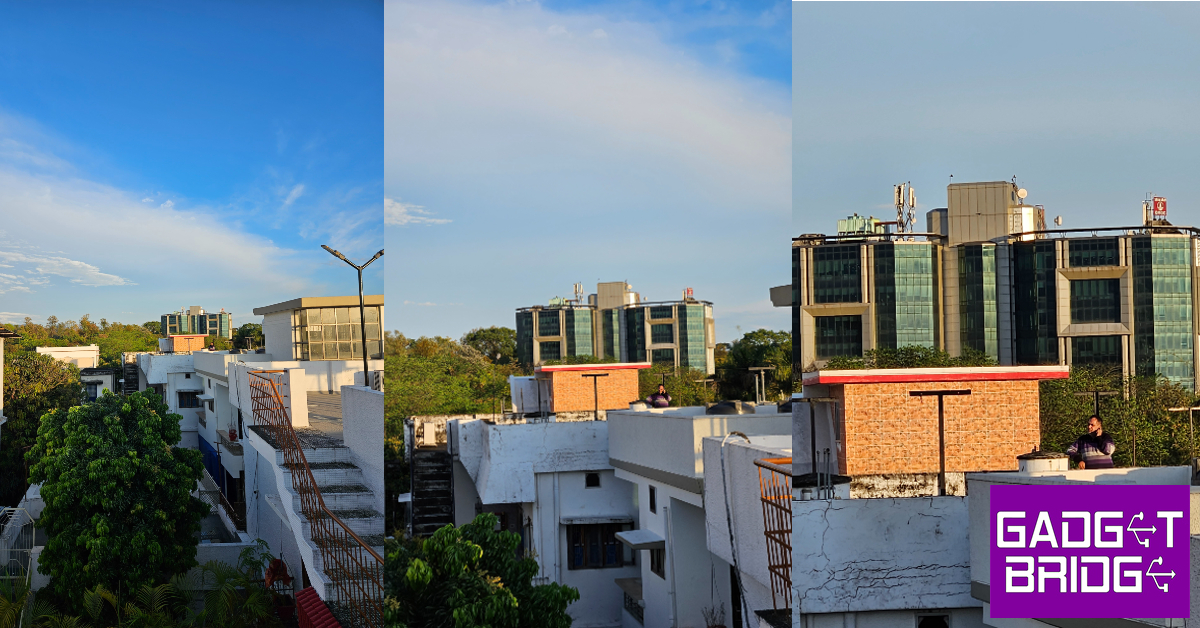
It shouldn’t come as a surprise, but Samsung’s S Series retains its title of the best-performing Android smartphone lineup. If you missed our review of the S23 Ultra, do give it a read to see how it performed. The Snapdragon 8 Gen 2 SoC remains a constant across the S Series, even for European markets (no more Exynos!). The S8G2 chip on the S Series comes with an added ‘for Galaxy’ title as it is slightly customised for higher clock speeds on Samsung’s flagship devices. Samsung Galaxy S23+ review: Performance and Cameras Samsung Galaxy S23+ is available in two storage variants (256GB and 512GB) that come with 8GB RAM. We threw the kitchen sink and more at the S23+ and it handled every task with absolute ease. The smartphone is extremely quick. You never feel like it is a step behind in terms of performance. Once you’ve familiarised yourself with the phone, you will be flying in no time. Samsung Galaxy S23+ review: Performance and Cameras We have no complaints on the gaming front either. We played Call of Duty Mobile on the highest settings and were very pleased by the experience. The touch reception of the display along with the 120Hz refresh rate elevates the gaming experience to new levels. There was slight heating around the camera array after 30 minutes of gaming, but we did not observe any throttling. After a 45-minute gaming session, the battery dropped by 6%. On Geekbench 6, the Samsung Galaxy S23+ scored 1,817 points in the single-core test and 4,579 points in the multi-core test. The software experience on the Samsung Galaxy S23+ leaves little room for complaints. One UI is one of the best skins for Android out there, and it introduces a couple of cool features in its latest iteration. Android 13’s Material You theme gives you greater control over the aesthetics of your phone, and One UI 5.1 makes perfect use of it.  There are a few helpful connectivity features on One UI. The biggest of them all is Samsung Dex, which lets you cast your phone’s display on a TV or PC monitor. Currently, this feature is only available on the S Series. You’re probably wondering how Samsung Dex is different from regular screen mirroring. With Dex, you can essentially use your Samsung device like a PC on a bigger screen. You can access your apps, gallery, and Play Store, and use the mouse for easy control. The layout on the monitor doesn’t mirror your phone’s UI, it is completely redesigned for the bigger screen. Don’t have a mouse? You can use your smartphone as a trackpad. Using ‘Multi Control’ you can link your S23+ to your Galaxy Book and drag and drop files between them. One UI has also incorporated Microsoft’s ‘Link to Windows’ as a native feature. One UI’s Gallery app now lets you use an ‘Object Eraser’ to remove unwanted objects from your pictures. For us, the object eraser was a hit or miss. It doesn’t work nearly as efficiently as Pixel’s magic eraser. There is also an option to remaster your pictures, which tunes them for social media usage. The Portrait Effect is quite handy and produces some good results. While One UI is one of the better skins to play around with, it comes with significant bloatware, even on S23+. There is an entire package of Microsoft apps on this device along with Netflix, Spotify, and Facebook. Not a good look on any flagship device, especially on an S23 smartphone that you’re paying close to Rs 1,00,000 for. Apart from third-party bloatware, some Samsung apps have no purpose being there. The smartphone uses Google Messages by default, but Samsung’s messaging app somehow finds its way into the phone. Apps like Samsung Free, Samsung Shop, and My Galaxy also feel unnecessary. The battery performance is another aspect that Samsung can improve upon. The 4,700mAh battery is bigger than the 3,900mAh unit found on the S23. With moderate usage, this battery can comfortably last a day. But if you’re used to clocking more than 6 hours of screen-on time then you will need to give the S23+ a little boost before the day ends. If you don’t use Always On Display and limit the refresh rate to 60Hz, you will get a significantly better battery life out of this device. The charging speed is limited to 45W, which isn’t too bad, but it isn’t extraordinary either. Samsung Galaxy S23+ has the same camera specs as its compact counterpart. The rear camera array gets a 50MP primary shooter, a 10MP telephoto lens, and a 12MP ultrawide lens. Upfront, you get a 12MP selfie camera. Overall, the camera performance on the S23+ is near-perfect, with each lens producing excellent results. Samsung Galaxy S23+ review: Performance and Cameras Samsung Galaxy S23+ review: Performance and Cameras We used the 50MP primary shooter in different lighting conditions. The outdoor shots taken in natural light had a superb richness to them. The colours were vivid and the objects were captured with a great level of detail. Even objects in the distant background were rendered perfectly in the images. The image processing is on point here. The images aren’t oversaturated and the level of contrast is optimum. 
Samsung Galaxy S23+ review: Performance and Cameras
Outdoor shot in overcast conditions.
Samsung Galaxy S23+ review: Performance and Cameras The ultrawide camera replicates this performance. We were pleased to see that it did not wash out the colours or drop the sharpness from the images. The results produced here are so good that you can use the two cameras interchangeably. 
Ultrawide shot.
Ultrawide shot.
Ultrawide shot in overcast conditions.
Ultrawide shot.
At night time, you are better off using the main 50MP sensor. We preferred turning off the Night Mode for low-light photography, as the main sensor lets in enough light to produce well-detailed images. With the Night Mode on, the processed images come out a little brighter than you want them to be. 
Low light shot.
Without Night Mode vs With Night Mode.
Night Mode.
Night Mode.
The telephoto lens is quite fun to play around with as well. The 3x optical zoom does a good job of retaining the image quality, but the results get diminished as you go higher. On paper, the telephoto lens can hit 30x, but the images produced were quite forgettable, to put it mildly. There is no space zoom available in the S23+, unlike the S23 Ultra. With the recent revelation of Samsung using AI algorithms to process images of the moon, you aren’t missing out on much.
Samsung Galaxy S23+ review: Performance and Cameras
Shot taken using telephoto lens.
7x zoom.
1x vs 3x vs 6.5x zoom.
The 12MP selfie camera takes good pictures too. The portrait mode gives you a bunch of options for the style of blur you want on the images. When it comes to image processing, the end result has a slightly higher contrast than what is seen on the viewfinder. We found this mildly annoying. One of the better features of this camera is Auto Framing, which alters the zoom to accommodate the people in the frame while taking a video.
Portrait Mode.
Talking about shooting videos, the Samsung Galaxy S23+ can take 8K resolution videos at 24/30fps, and 4K videos at 30/60 fps. The selfie camera can record 4K videos at 30/60 fps. The stabilisation mode does not work for 8K videos, but you will see great results while shooting in 4K. Read Also: Mivi Commando X9 TWS with up to 72 hours of playtime launched in India

Verdict

With the Samsung Galaxy S23+, you get a brilliant Android smartphone with a stellar flat display which is the undisputed best in its category. While the S23 is a great compact phone, using this display in a bigger size is a wonderful experience. The phone is ridiculously fast and can handle even the most demanding tasks with ease. If you want the best ‘big’ Android phone out there but don’t want to shell out an additional Rs 30,000 for the S23 Ultra, the S23+ is the smartphone to pick. At Rs 95,000, the Samsung Galaxy S23+ is a good buy.

Samsung Galaxy S23+: Pros

  • Big, stellar display
  • Lightning fast
  • Great camera performance

Samsung Galaxy S23+: Cons

  • Contains bloatware
  • Battery life could have been a little better
For the latest gadget and tech news, and gadget reviews, follow us on Twitter, Facebook and Instagram. For newest tech & gadget videos subscribe to our YouTube Channel. You can also stay up to date using the Gadget Bridge Android App. You can find the latest car and bike news here.

Garena Free Fire Redeem Codes Today 4 April 2023: Here is how to claim them

Garena Free Fire is a battle royale game with regular awards and tournaments to keep players interested. If you play Garena Free Fire, you should be aware of the redeem codes that are released on a daily basis. However, because the battle royale game is banned in India, players from other countries can use the Free Fire Redeem codes daily. If you’re unfamiliar with the Garena Free Fire redeem codes or don’t know how to get them, we’ve put together a step-by-step guide to help you redeem them. Check out Garena Free Fire Redeem Codes for 4 April 2023. The Free Fire redeem codes are a great way to get free stuff. These are 12-digit codes that contain alphabets and numbers, as well as an expiration date and time. Because the Garena FF redeem codes cannot be used more than once, you should hurry to the redemption page to claim your free reward before someone else does. To get a free reward, all you have to do is go to reward.ff.garena.com/en, which is the official redemption page. Also, keep an eye on this space for daily updates on Garena Free Fire redemption codes and rewards.

Garena Free Fire Redeem Codes Today 4 April 2023

Updating Soon…

How to Get Free Fire Redeem Codes for Garena on 4 April 2023?

  • Visit the Garena Free Fire game’s official website at reward.ff.garena.com.
  • Use your Facebook, Google, VK, Apple ID, Huawei ID, or Twitter account to log in.
  • You’ll be taken to a valid redemption code (s)
  • Copy and paste the 12-digit redemption code into the text box.
  • On the screen, a dialogue box will appear.
  • ‘Ok’ should be selected.
For the latest gadget and tech news, and gadget reviews, follow us on TwitterFacebook and Instagram. For newest tech & gadget videos subscribe to our YouTube Channel. You can also stay up to date using the Gadget Bridge Android App. You can find the latest car and bike news here.

Amazon Quiz Answers Today 4 April 2023: Participate to win Rs 1,250

Amazon Quiz for 4 April 2023 has gone live on the company’s mobile platform. The daily quiz contest brings an opportunity for Amazon users to win exciting prizes. In today’s Amazon Quiz the participants have the chance to win Rs 1,250 Amazon Pay Balance. All they have to do is answer all the questions correctly. A fresh question is posted on the Amazon app daily which consists of five simple questions based on general knowledge and current events. The quiz can be played on the Amazon App from 12 AM to 11:59 PM. You have to answer all the questions correctly. Then the participants will be shortlisted for a lucky draw. The result of the lucky draw will be announced at the end of the month. The participants can win Amazon Pay Balance to up to Rs 50,000. Check out the 4 April 2023 Amazon Quiz question and their answers to win Rs 1,250 Amazon Pay Balance. Amazon Quiz Today Prize – Rs 1,250 Amazon Pay Balance Quiz Date – 4 April 2023 Daily Timing – 12 AM to 11:59 PM Winner Announcement – Today 12 PM

Amazon Quiz Answers Today 4 April 2023

Question 1: Who is now UK’s first Indian first lady? Answer- Akshata Murty Question 2: Rihanna made her long-awaited return to solo music with “Lift Me Up” for which film? Answer- Black Panther: Wakanda Forever Question 3: Karthik Meiyappan from which country took the first hat-trick of the T20 World Cup 2022? Answer- Flavian dynasty Question 4: This structure was built by which dynasty of Roman Emperor? Answer- Flavian dynasty Question 5: This temple in Hampi is built in devotion of which God? Answer- Shiva

How To Play Amazon Quiz

Only app users are eligible to play the Amazon quiz every morning from 12 AM to 11:59 PM. The quiz is not available on the desktop. For those who are unaware of how to play the Amazon quiz below are the steps, you can follow to take the quiz.
  • Firstly download the Amazon app from Google Play Store or App Store
  • Now fill in the required information through the Sign Up option.
  • You need to log in to the Amazon app and scroll down on the home screen to find the Amazon Quiz banner.
  • Tap on the Amazon Quiz banner and tap on the Start button to start the Quiz.
  • Now you will get 5 questions and you need to answer them correctly. One wrong answer will eliminate you from the Quiz.
  • After answering all the questions correctly you are now eligible for a Lucky Draw.
  • The winner’s name will be announced today at 12 PM.
For the latest gadget and tech news, and gadget reviews, follow us on TwitterFacebook and Instagram. For newest tech & gadget videos subscribe to our YouTube Channel. You can also stay up to date using the Gadget Bridge Android App. You can find the latest car and bike news here.