Must Know: Secret codes for Samsung mobiles to check everything

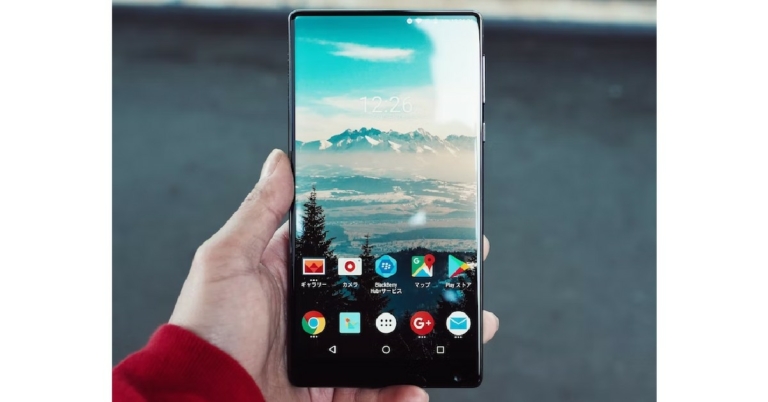
Did you know that your Samsung smartphone can show you detailed information about the device if you type in a few secret codes? You can check everything from battery status, USB settings, and software information to the condition of your phone’s sensors using these secret codes. So, without further ado, here is a complete list of secret codes for your Samsung smartphone that you must know to check everything about your device. Read Also: Western Digital announces seven SanDisk Professional SSDs for content creators in India

Test your Samsung mobile’s hardware

Step 1: Go to your smartphone’s phone app and dial *#0*#. Step 2: This will trigger the diagnostic mode of your smartphone. In this panel, you can check whether all the essential sensors and functions of your smartphone are working correctly. check whether all the essential sensors and functions of your smartphone are working correctly. secret codes for samsung smartphones Step 3: Tap on every function individually to check if it’s working properly. You can inspect your phone’s cameras, sensors, grip sensors, touchscreen, speaker, vibrator, and more. Hit the back key twice to go back to the main panel.

Here is a list of secret codes you can use to find out other essential information about your Samsung smartphone

Secret Code Function
*#06# IMEI number
*#0808# Change USB Settings
*#0228# Battery Status and other options
*#0011# GSM information
*#2222# Hardware version
*#1234# Software version
*#9090# Diagnostic configuration
*#9900# Dump mode
*#12580*369# Hardware & Software information, manufacturing date
*#0283# Audio loopback control
*#34971539# Update camera firmware
#7465625*638*# Network lock keycode
*#2663# Update TSP and TSK firmware
*#272IMEI#* View product code
*#272*IMEI#* View buyer code
*#1111# Software version
*43# Activate call waiting
#43# Deactivate call waiting
*#43# Call waiting status
*135# View your own phone number
**04*(old pin)*(new pin)*(new pin)# Change device pin
*#004*(number)# Call divert
*#004# Call divert status
#004# Deactivate call divert
##004# Delete call divert
Read Also: How to Easily Set a Different Wallpaper for Lock and Home Screen on iOS 16?

Conclusion

These are all the secret codes for your Samsung smartphone that you must know to check everything. These codes come in handy when you need to quickly access some important information for your device but cannot find the retail box or the function in your phone that displays the essential information. It is also a good idea to check the battery health and condition of your phone’s sensors from time to time. For the latest gadget and tech news, and gadget reviews, follow us on Twitter, Facebook and Instagram. For newest tech & gadget videos subscribe to our YouTube Channel. You can also stay up to date using the Gadget Bridge Android App. You can find the latest car and bike news here.

Nokia C31 budget smartphone with a 5,050mAh battery launched in India

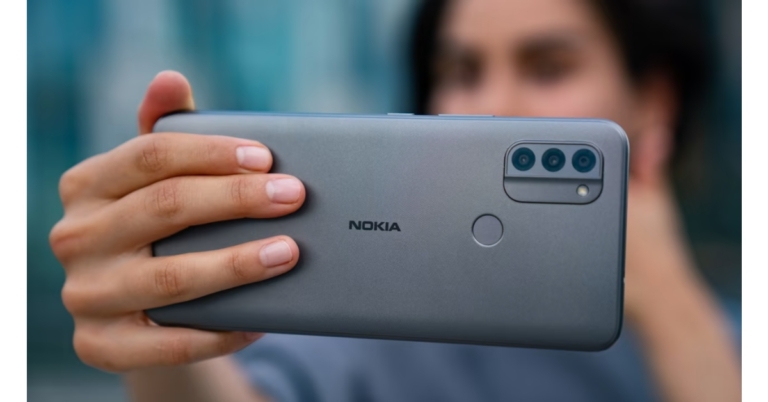
Nokia C31 is the newest smartphone in the C-Series lineup to be unveiled in India by HMD Global. With AI-powered battery-saving capabilities, it offers a three-day battery life. The device also features a 6.7-inch HD display and comes with Google-powered triple back, front, and selfie cameras. The device runs on Android TM 12 operating system, and dust and moisture resistance for even better defence.

Nokia C31 specifications

Nokia C31 features a 6.74-inch HD+ display with 720×1,600 pixels of resolution. The screen offers a 20:9 aspect ratio and boasts 2.5D glass protection. An octa-core Unisoc CPU with a peak frequency of 1.6Hz powers the phone. It has a maximum of 4GB of RAM and 128GB of inbuilt storage that can be increased by another 32GB using a special microSD card slot. The device runs on Android 12 out of the box. Along with having well-known programmes already pre-installed, the Nokia C31 also has Spotify for nonstop music and GoPro Quik so you can capture, edit, and share your creativity from anywhere. Nokia C31 budget smartphone with a 5,050mAh battery launched in India A 13-megapixel main sensor with autofocus, a 2-megapixel depth sensor, and a 2-megapixel macro lens make up the Nokia C31’s triple rear camera system. For selfies and video calls, there is a 5-megapixel sensor on the front. The Google-sponsored rear cameras are capable of using a variety of shooting settings. Additionally, the fingerprint sensor and facial unlock capabilities of the device allow for rapid and safe access even when wearing protective masks. You will receive two years of quarterly security updates as part of the standard inclusion of signature HMD Global security assurances. The 5,050mAh battery within the Nokia C31 supports 10W charging. On a single charge, it is said to have a battery life of up to three days. Additionally, it boasts a water-resistant IP52 construction. AGPS, Galileo, Wi-Fi 802.11 b/g/n, GPS, Bluetooth v4.2, a 3.5mm audio connector, and a micro-USB port are among the Nokia C31’s connectivity choices.

Nokia C31 price and availability details

The base model of the Nokia C31, which comes with 3GB of RAM and 32GB of storage, is priced at Rs. 9,999 in India. The phone will be available in two colour options of Charcoal and Mint. The cost of the 4GB RAM with 64GB storage model is Rs. 10,999. It is currently for sale on the Nokia India website. For the latest gadget and tech news, and gadget reviews, follow us on TwitterFacebook and Instagram. For newest tech & gadget videos subscribe to our YouTube Channel. You can also stay up to date using the Gadget Bridge Android App. You can find the latest car and bike news here.

Garena Free Fire Redeem Codes Today 16 December 2022: Here is how to claim them

Garena Free Fire is a battle royale game with regular awards and tournaments to keep players interested. If you play Garena Free Fire, you should be aware of the redeem codes that are released on a daily basis. However, because the battle royale game is banned in India, players from other countries can use the Free Fire Redeem codes daily. If you’re unfamiliar with the Garena Free Fire redeem codes or don’t know how to get them, we’ve put together a step-by-step guide to help you redeem them. Check out Garena Free Fire Redeem Codes for December 16. The Free Fire redeem codes are a great way to get free stuff. These are 12-digit codes that contain alphabets and numbers, as well as an expiration date and time. Because the Garena FF redeem codes cannot be used more than once, you should hurry to the redemption page to claim your free reward before someone else does. To get a free reward, all you have to do is go to reward.ff.garena.com/en, which is the official redemption page. Also, keep an eye on this space for daily updates on Garena Free Fire redemption codes and rewards.

Garena Free Fire Redeem Codes Today 16 December 2022

  • ZYPPXWRWIAHD
  • FF10617KGUF9
  • FF119MB3PFA5
  • WLSGJXS5KFYR
  • FF11WFNPP956
  • SARG886AV5GR
  • FF11HHGCGK3B
  • Y6ACLK7KUD1N
  • ZRJAPH294KV5
  • FF1164XNJZ2V
  • FF11DAKX4WH
  • YXY3EGTLHGJX
  • B6IYCTNH4PV3
  • FF11NJN5YS3E
  • MCPTFNXZF4TA
  • 8F3QZKNTLWBZ
  • FF10GCGXRNHY
  • X99TK56XDJ4X
  • W0JJAFV3TU5E

How to Get Free Fire Redeem Codes for Garena on December 16?

  • Visit the Garena Free Fire game’s official website at reward.ff.garena.com.
  • Use your Facebook, Google, VK, Apple ID, Huawei ID, or Twitter account to log in.
  • You’ll be taken to a valid redemption code (s)
  • Copy and paste the 12-digit redemption code into the text box.
  • On the screen, a dialogue box will appear.
  • ‘Ok’ should be selected.
For the latest gadget and tech news, and gadget reviews, follow us on TwitterFacebook and Instagram. For newest tech & gadget videos subscribe to our YouTube Channel. You can also stay up to date using the Gadget Bridge Android App. You can find the latest car and bike news here.
16 December 2022 Amazon Quiz today answers: Answer to win Rs 2,500 Amazon Pay Balance

Get ready to participate in the 16 December Amazon Quiz, as it is live on its mobile platform. In today’s quiz participants have a chance to win Rs 10,000 Amazon Pay Balance by answering all the questions correctly. The quiz can be played every day from 12 AM to 11:59. Check Out Amazon Quiz Answers Today 16 December 2022. The daily quiz conducted by the company brings an opportunity for the customers to win exciting prizes. Every day Amazon brings a fresh set of questions for its customers that contains five easy questions. The questionnaire consists of five questions related to general knowledge and current affairs. The participants need to answer all the questions correctly and their names will be selected for a lucky draw. The winner will be announced at the end of the month. Amazon quiz brings an opportunity for its customers to win Amazon Pay Balance ranging from Rs 10,000 to Rs 50,000. Only app users are eligible to participate in the Quiz as it is not accessible on the web platform. Amazon Quiz Today Prize – Rs 2,500 Amazon Pay Balance Quiz Date – 16 December 2022 Daily Timing – 12 AM to 11:59 PM Winner Announcement – Today 12 PM

Amazon Quiz Answers Today 16 December 2022

Question 1: Which actor who has played two Marvel superheroes was named People magazine’s Sexiest Man Alive? Answer: Chris Evans Question 2: Which race car driver won his second Formula One world championship after victory at the Japanese Grand Prix? Answer: Max Verstappen Question 3: In 2022, who became the first woman president of Indian Olympic Association? Answer: PT Usha Question 4: Which famous renaissance physicist experimented on this location? Answer: Galileo Galilei Question 5: This church was built to commemorate the conquest of what by Russia? Answer: Kazan and Astrakhan

How To Play Amazon Quiz

Only app users are eligible to play the Amazon quiz every morning from 12 AM to 11:59 PM. The quiz is not available on the desktop. For those who are unaware of how to play the Amazon quiz below are the steps, you can follow to take the quiz.
  • Firstly download the Amazon app from Google Play Store or App Store
  • Now fill in the required information through the Sign Up option.
  • You need to log in to the Amazon app and scroll down on the home screen to find the Amazon Quiz banner.
  • Tap on the Amazon Quiz banner and tap on the Start button to start the Quiz.
  • Now you will get 5 questions and you need to answer them correctly. One wrong answer will eliminate you from the Quiz.
  • After answering all the questions correctly you are now eligible for a Lucky Draw.
  • The winner’s name will be announced today at 12 PM.
For the latest gadget and tech news, and gadget reviews, follow us on TwitterFacebook and Instagram. For newest tech & gadget videos subscribe to our YouTube Channel. You can also stay up to date using the Gadget Bridge Android App. You can find the latest car and bike news here.

Oppo Air Glass 2 AR glasses, the OHealth H1 monitor, and MariSilicon Y SoC unveiled at Oppo Inno Day 2022

At the annual technological event, Oppo Inno Day 2022. During the event, the company introduced three new devices. The OHealth H1 family health monitor, Oppo’s first device under the OHealth brand, combined with its second in-house chip, the MariSilicon Y Bluetooth audio SoC, and Oppo Air Glass 2 were announced. Oppo conducted Oppo Inno Day 2022, its annual technological event, where it unveiled three new products. The Oppo Air Glass 2 aided reality (aR) glasses, the OHealth H1 family health monitor, and the MariSilicon Y SoC are among the products available. Oppo Air Glass 2 AR glasses, the OHealth H1 monitor, and MariSilicon Y SoC unveiled at Oppo Inno Day 2022 The OHealth H1 family health monitor, the first item under Oppo’s OHealth brand. It integrates six family-friendly health data monitoring features into a single gadget, including blood oxygen measurement, ECG, heart and lung auscultation, heart rate, body temperature, and sleep tracking. The OHealth H1 will assist customers in better managing the health of their entire family thanks to its high-precision sensors and sector-leading health algorithms. The OHealth H1 is a super-light device that weighs just 95g and has aesthetically pleasing rounded edges and a concentric oval design, in contrast to the industrial designs of conventional medical equipment. Users now find it simple to carry the OHealth H1 wherever they go, making it easier for them to incorporate routine health assessments into daily activities. Oppo Air Glass 2 AR glasses, the OHealth H1 monitor, and MariSilicon Y SoC unveiled at Oppo Inno Day 2022 At the occasion, Oppo announced the all-new MariSilicon Y Bluetooth audio SoC, the second member of the MariSilicon family after the first self-developed dedicated imaging NPU, MariSilicon X. The MariSilicon Y introduces a brand-new, internally created Pro Bluetooth Pack, one of the first SoCs to leverage the most cutting-edge N6RF process technology, which significantly boosts Bluetooth bandwidth when compared to the highest-spec Bluetooth SoCs available. The MariSilicon Y can transmit unprecedented 24-bit/192kHz ultra-clear lossless audio through Bluetooth for the first time ever thanks to the URLC codec technology and a dedicated NPU with up to 590 GOPS of on-device computing power. According to the company, this gives users all the advantages of wireless connectivity with the same audio quality as a wired connection and opens up new possibilities in spatial audio experiences. Users of MariSilicon Y-enabled wireless Bluetooth earbuds and headphones can take advantage of the best digital audio quality available. Oppo Air Glass 2 AR glasses, the OHealth H1 monitor, and MariSilicon Y SoC unveiled at Oppo Inno Day 2022 The Oppo Air Glass 2—the company’s most recent Assisted Reality glass—was also demonstrated at the occasion. The AR glass is lightweight and durable, weighing only about 38g, and it includes the first resin SRG-diffractive waveguide lens ever created. These lenses will allow for more customisation and vision correction, making them nearly invisible when compared to conventional spectacles. Calling, real-time translation, location-based navigation, voice-to-text conversion for hearing-impaired users, and many other intelligent experiences will all be possible with the Oppo Air Glass 2.  For the latest gadget and tech news, and gadget reviews, follow us on TwitterFacebook and Instagram. For newest tech & gadget videos subscribe to our YouTube Channel. You can also stay up to date using the Gadget Bridge Android App. You can find the latest car and bike news here.

Western Digital announces seven SanDisk Professional SSDs for content creators in India

For professionals and multimedia creators in India, Western Digital showcased new developments under the SanDisk Professional brand. DRIV Enterprise-Class Desktop Hard Drive, and PRO-DOCK 4, a 4-bay reader docking station are among the seven recently released Pro-Grade Storage Solutions in India. According to the company, these cutting-edge storage options are presented to assist content producers with one of today’s largest problems: content management. Because of the quick-paced, data-intensive workflows, content producers—whether they are working in high-end studios on the next big film or are experts working in the field gathering footage for a project or editing videos in post-production—need straightforward and adaptable storage options that will increase their productivity.

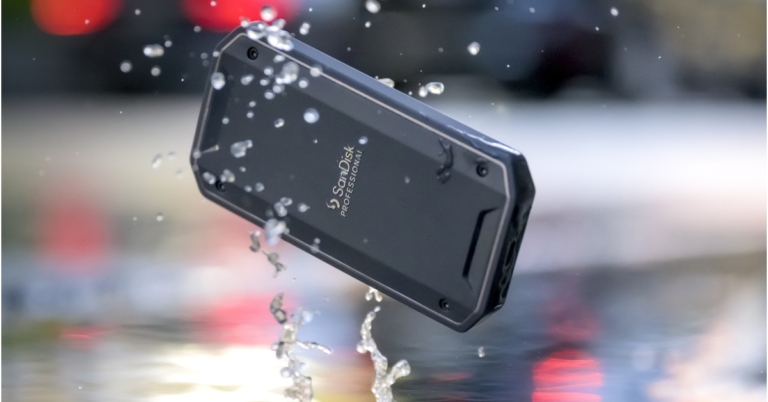
SanDisk Professional PRO-G40 SSD

The SanDisk PRO-G40 SSD is the company’s most durable product to date with a high-level IP68 rating. With a Thunderbolt 3 (40Gbps) interface, the SSD boasts blazing-fast read and write speeds of up to 2700MB/s and 1900MB/s, respectively. Power through even the most demanding tasks by moving up to 50GB in less than 30 seconds. In order to sustain lightning-fast transfer rates over time, the internal drive’s cold aluminium core draws heat away from it. Collaboration between devices is facilitated for maximum efficiency by its dual-mode compatibility with Thunderbolt 3 (40Gbps) and USB 3.2 Gen 2 (10Gbps) hosts through a single connection. A professional-grade casing and exceptional strength you can feel are features of the PRO-G40 SSD. The device is currently offered in India with a 5-year limited guarantee with an MSRP that starts at Rs 34999.

SanDisk Professional G-RAID Shuttle SSD

Content professionals may access vast storage with the G-RAID Shuttle SSD, a portable 8-bay hardware RAID SSD solution with Thunderbolt 3 (40Gbps) and USB-C (10Gbps) connectors. For the transmission of 4K, 8K, VR, HDR, and HFR footage in one location, up to 32TB5 of high-performance solid-state storage is available. It has transfer rates of up to 2800MB/s3 and uses Thunderbolt 3 to give exceptional speed. The equipment is designed to be portable between the on-location production site and the post-production studio. Additionally, the Dual Thunderbolt 3 ports enable daisy-chaining of up to five additional devices. Additionally, G-RAID SHUTTLE SSD is currently offered in India with an MSRP starting at Rs 3,99,999 and a 5-year limited guarantee.

SanDisk Professional G-DRIVE Enterprise-Class Desktop Hard Drive

The G-DRIVE Enterprise-Class Desktop Hard Drive offers USB-C (10Gbps) port, you can quickly backup or add more storage to your computer for all of your HD images, videos, and music with speeds of up to 280MB/s read3 and 280MB/s write3 (22TB capacity). It comes with a 7200RPM Ultrastar enterprise-class hard drive inside for all of your demanding workloads and mission-critical files. G-DRIVE Enterprise-Class Desktop Hard Drive is priced starting at Rs 19,999/- and comes with a 3-year limited guarantee. It is available in 4TB, 6TB, 12TB, 18TB, and 22TB capacities.

SanDisk Professional PRO-DOCK 4

Pro-DOCK 4 SanDisk Professional Offload up to 4 distinct SanDisk Professional PRO-READER devices quickly and concurrently (sold separately). With Thunderbolt (40Gbps) connectivity for lightning-fast data transfers, daisy-chaining, and power supply, this boosts your productivity. The SanDisk Professional PRO-DOCK 4 docking stations were designed for customisation and can be attached to a DIT Cart or other equipment to fulfil your production needs. The PRO-DOCK has a 3-year limited warranty and has an MSRP of Rs 34,999 in India right now.

Availability

You may get all of these recently released devices from the SanDisk Professional brand through distributors, authorised SanDisk Professional merchants, and the Western Digital Store in Andheri West. For the latest gadget and tech news, and gadget reviews, follow us on TwitterFacebook and Instagram. For newest tech & gadget videos subscribe to our YouTube Channel. You can also stay up to date using the Gadget Bridge Android App. You can find the latest car and bike news here.

How to Easily Set a Different Wallpaper for Lock and Home Screen on iOS 16?

0
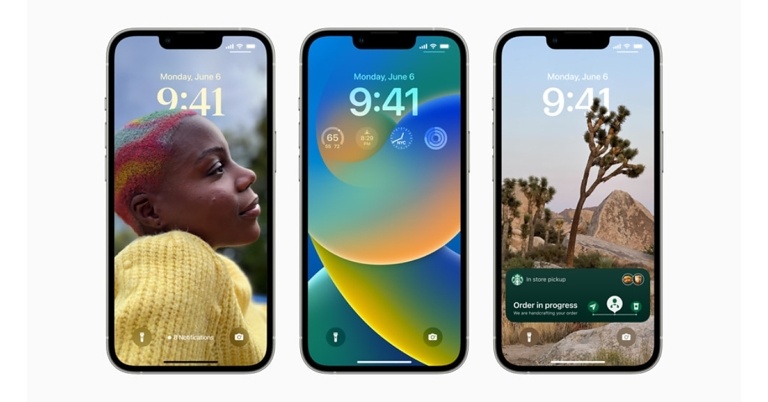
With iOS 16, Apple brought a new level of customisation for users, letting them manage multiple lock screens and adding dynamic transition effects and widgets into the mix. You can even control the font of the clock on the lock screen. Apple prefers users apply the same image as the lock screen and home screen wallpaper because it allows iOS 16 to add smoother transitions while unlocking the phone. This is not possible when you have a different home screen and lock screen wallpaper. However, if you still want a different wallpaper for the lock screen and home screen on iOS 16, here are some simple methods you can follow. Read Also: How to Find Casino Apps to Play Andar Bahar for Real Money

How to set a new wallpaper for the home screen and lock screen from Settings

Step 1: Go to Settings and select Wallpaper. Step 1: Go to Settings and select Wallpaper. Step 2: Tap on ‘Add new Wallpaper’ under the lock screen and home screen layout. Step 1: Go to Settings and select Wallpaper. Step 3: Tap on ‘Photos’ to pick an image for your lock screen wallpaper from your photo gallery. Step 4: Customise the lock screen by adding widgets. Step 5: Tap on ‘Add’ at the top right corner of the screen. Step 5: Tap on ‘Add’ at the top right corner of the screen. Step 6: In the following pop-up box, your iPhone will prompt you to add the wallpaper as a pair. Select ‘Customise Home Screen’ instead. Step 7: To set a different image as wallpaper for your home screen tap on ‘Photos.’ Step 8: After setting a new picture as your home screen wallpaper, you can use the blur effect to make sure the icons on your screen are visible and not masked by the wallpaper. Step 9: Tap on ‘Done’ at the top right corner of the screen. Once you’ve changed your home screen wallpaper for the first time, you can easily change it to another picture by going to Settings>Wallpaper and tapping on ‘Customise’ under the home screen layout. 

How to change the home screen wallpaper from the lock screen

Step 1: Tap and hold any empty space on the lock screen. Step 2: Go to the lock screen for which you want to change the home screen wallpaper. Step 3: Tap on the ‘Customise’ icon at the bottom of the screen. Step 5: Tap on the home screen layout window. Step 5: Tap on the home screen layout window. how to set a different home screen and lock screen wallpaper ios 16 Step 6: Tap on ‘Photos’ to select a wallpaper from your phone’s image gallery.  Step 6: Tap on ‘Photos’ to select a wallpaper from your phone’s image gallery. how to set a different home screen and lock screen wallpaper ios 16 Step 7: Add the blur effect according to your liking and tap on ‘Done’ at the top right corner of the screen when you’re happy with the result. Read Also: OnePlus announces Community Sale to celebrate its 9th Anniversary

Conclusion 

This is how you can easily set a different wallpaper for the lock screen and home screen on iOS 16. Use the same home screen and lock screen wallpaper for dynamic transition effects. There are a lot of presets to choose from. If you found this article helpful, let us know in the comments! For the latest gadget and tech news, and gadget reviews, follow us on Twitter, Facebook and Instagram. For newest tech & gadget videos subscribe to our YouTube Channel. You can also stay up to date using the Gadget Bridge Android App. You can find the latest car and bike news here.

Sony launches new lineup of native 4K SXRD laser home projectors in India

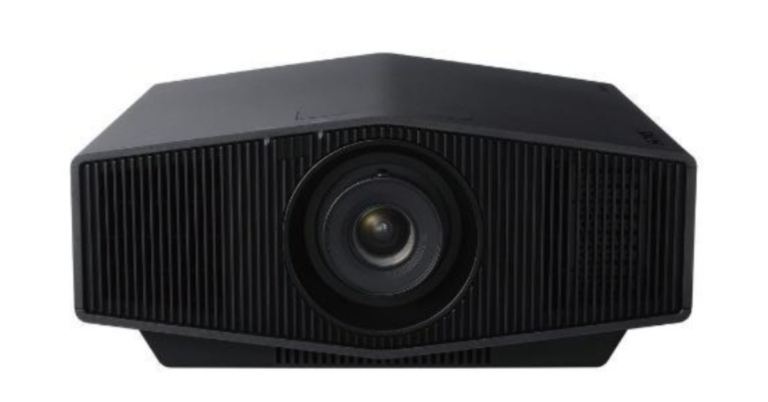
Sony VPL-XW7000ES & VPL-XW5000ES compact native 4K SXRD laser home projectors have been introduced in India. These are said to be the world’s smallest Native 4K SXRD 0.61-inch panel (3840 x 2160) and two new Native 4K SXRD (Silicon X-tal Reflective Display) Laser Home projectors from the company. The Sony VPL-XW7000ES and VPL-XW5000ES native 4K SXRD Laser Home Projectors demonstrate the company’s most cutting-edge innovations to provide the best viewing experience even in areas with high ambient light. The new XW range supports 2K 120Hz input with 13ms input lag. With 3,200lm of brilliant brightness and Live Color Enhancer, Sony’s new Native 4K HDR laser model in the VPL-XW7000ES makes it the ideal companion for immersing oneself in movies, sports, and games. Additionally, this model has a brand-new Advanced Crisp Focused (ACF) lens with a 70mm diameter, an aspherical front element, and a floating focus group that offers exceptional clarity for viewing on a large screen. The VPL-XW5000ES, a new addition to Sony’s range of home projectors, is a 2,000lm laser model that offers better contrast and resolution while using 30% less power per lumen. It also features object-based HDR remastering for potent real-time image processing. On the XW series, TRILUMINOS PRO with a 95% DCI-P3 Colour Gamut brings more than a billion colours to life. With 8.3 million pixels and 3,840 x 2,160 resolution, both models provide remarkably lifelike images. A reflective silicon layer in the new Native 4K SXRD screen improves light durability and reflectivity and offers greater light control for accurately delivered shadows and blacks. Due to the X1 Ultimate for projector’s processing capability, the contrast on both models is significantly improved when combined with the new laser output control, making HDR bright pictures brighter and HDR dark scenes darker. With the recently introduced object-based HDR remaster, more potent real-time image processing is now possible. This technology analyses the objects in each frame and creates unequalled HDR images for all items. The Sony VPL-XW7000ES provides crystal clear clarity throughout the entire screen, a wider 4K-level focus area thanks to a 70mm aspherical front lens, a floating focus system that produces more stable image performance from short to long throw distances, and extra low dispersion glass to reproduce the sharp image without colour deviation. The XW7000ES has a newly created “Live Colour Enhancer” that produces images that are more colourful and vibrant without sacrificing saturation when necessary (i.e.skin colour). The Sony VPL-XW7000ES & VPL-XW5000ES compact native 4K SXRD laser home projectors come with a price tag of Rs 16,00,000 and Rs 5,50,000 respectively. As of the end of December 2022, these home projectors will only be offered through Sony-authorised distributors in India. For the latest gadget and tech news, and gadget reviews, follow us on TwitterFacebook and Instagram. For newest tech & gadget videos subscribe to our YouTube Channel. You can also stay up to date using the Gadget Bridge Android App. You can find the latest car and bike news here.

The best and simple ways to stop SIM toolkit pop-ups or flash messages on Android

0
There is nothing more annoying than an endless stream of spam messages from your own network provider. While sometimes they may contain some lucrative offers, mostly it’s just meaningless spam. With major network providers rolling out their own interactive apps, you don’t need flash messages even to check your balance or find the best deals. In this article, we bring you the best and most simple ways to stop SIM toolkit pop-ups and flash messages on your Android smartphone. Read Also: OnePlus announces Community Sale to celebrate its 9th Anniversary

Turn off flash messages for Airtel 

Step 1: Open the airtel live! app on your smartphone. This is Airtel’s SIM toolkit app. Step 2: Select ‘airtel now!’ Step 2: Select ‘airtel now!’ Step 3: Tap on Start/Stop. Step 3: Tap on Start/Stop. Step 4: Select ‘Stop.’ Step 4: Select ‘Stop.’ Bonus: You can also text ‘STOP ANOW’ to 58234 to stop receiving flash messages on your phone.

Turn off flash messages for Vi (Vodafone Idea)

Turn off flash messages for Vi (Vodafone Idea) Step 1: Open the ‘Vodafone services’ app on your smartphone. This is Vodafone’s SIM toolkit app. Step 2: Tap on ‘Flash!’ Step 3: Select ‘Activation.’ Step 4: Tap on ‘Deactivate’ and confirm your selection. Bonus: You can also send these texts to stop receiving flash messages on your phone.
  • Prepaid users: ‘CAN FLASH’ to 144.
  • Postpaid users: ‘CAN FLASH’ to 199.

Turn off flash messages for Reliance Jio

Turn off flash messages for Reliance Jio. how to stop sim toolkit pop-ups and flash messages Reliance Jio users do not have the option to turn off the flash messages on their phones directly. However, deleting the My Jio app may help reduce the frequency of SIM toolkit pop-ups or flash messages. If that doesn’t work, you can try contacting the Jio customer helpline and ask them to stop flash messages for your number entirely.

Turn off flash messages for BSNL

Turn off flash messages for BSNL how to stop sim toolkit pop-ups and flash messages Step 1: Open the ‘BSNL Mobile’ app on your smartphone. Step 2: Tap on ‘BSNL Buzz Service.’ Step 3: Select ‘Activation.’ Step 4: Tap on ‘Deactivate’ and confirm your selection. Read Also: How to perform a Hard reset or Factory reset on Samsung smartphones?

Conclusion

These are the best and most simple ways to stop SIM toolkit pop-ups or flash messages on your Android smartphone. If these methods do not work for you, you can also try saving a flash message on your device and then blocking the sender. If you found this article helpful, let us know in the comments! For the latest gadget and tech news, and gadget reviews, follow us on Twitter, Facebook and Instagram. For newest tech & gadget videos subscribe to our YouTube Channel. You can also stay up to date using the Gadget Bridge Android App. You can find the latest car and bike news here.

Signify introduced Philips O-Bulb and Hexa-Bulb in India

Philips Hexa-Bulb and O-Bulb are two distinctively shaped LED bulbs that Signify, a well-known lighting company, has introduced in India. These distinctive circular and hexagonal-shaped LED bulbs give your house a classy feel. Additionally, the bulbs have a straightforward plug-and-play design that fits into existing LED bulb sockets.

Philips Hexa-Bulb and O-Bulb features

Commenting on the launch, Sumit Joshi, CEO & Managing Director, Signify (South Asia) said, “As the global leader in lighting, Signify has always been the pioneer in innovation. After successfully creating the T-Bulb category in India, we are delighted to launch our latest range of innovatively shaped LED bulbs – Philips Hexa-bulb and O-bulb. Their sleek design can elevate your home interiors while also being gentle on your eyes, thanks to our EyeComfort Technology.” The decorative lights in hexagonal and circular shapes can add a touch of elegance to your indoor area and set the ideal mood for entertaining guests or spending quality time alone with your loved ones. Both bulbs Philips Hexa-Bulb and O-Bulb have a simple plug-and-play design that makes them simple to install in LED bulb sockets that already have them. The bulbs, which are made to be comfy for your eyes, also provide a wider light dispersion than standard round-shaped LED bulbs. The Philips O-Bulb is now available in a 20W and 1800-lumen variant, while the Philips Hexa-bulb comes in a 16W and 1500-lumen variant. Both bulbs are available in warm and cool white hues.

Philips Hexa-Bulb and O-Bulb price in India and availability

In terms of pricing, the Philips Hexa-Bulb can be purchased with a price tag of Rs 999. On the other hand, the Philips O-Bulb price in India has been set at Rs 1,199. Both bulbs can be purchased across all small and large format retail stores and e-commerce platforms in the country. For the latest gadget and tech news, and gadget reviews, follow us on TwitterFacebook and Instagram. For newest tech & gadget videos subscribe to our YouTube Channel. You can also stay up to date using the Gadget Bridge Android App. You can find the latest car and bike news here.