

| S No. | Product | Variant | KSPs | Price | Discount | Offer price |
| 1 | Xiaomi 12 Pro | 8GB+256GB | India’s only 50MP + 50MP+50MP Flagship Camera | 62,999 | 15,000 | 47,999 |
| 12GB+256GB | 66,999 | 15,000 | 51,999 | |||
| 2 | Redmi A1 | 2GB+32GB | Most affordable Dual Camera smartphone | 6499 | 500 | 5999 |
| 3 | Redmi 11 Prime 5G | 4GB+64GB | Powerful MediaTek 700 for all round performance | 13999 | 2,000 | 11999 |
| 6GB+128GB | 15999 | 2,000 | 13999 | |||
| 4 | Redmi K50i | (6GB+128GB) | India’s fastest phone | 25999 | 5,000 | 20999 |
| 8GB+256GB | 28999 | 5,000 | 23999 | |||
| 5 | Xiaomi Beard Trimmer 2 | For the beard gang with ultimate charging and durability | 1,999 | 300 | 1,699 | |
| 6 | Xiaomi Smart TV 5A | 32 inch | Complete entertainment experience | 13,999 | 1000 | 12,999 |
| 40 inch | 21,999 | 1,750 | 20,249 | |||
| 7 | Xiaomi Smart TV X50 | 50 inch | Ultimate 4K resolution | 34,999 | 3,500 | 31,499 |
| 8 | Redmi Smart TV | 32 inch | HD Ready | 13,999 | 2,000 | 11,999 |
| 9 | Xiaomi Notebook Pro 120 | 120 Hz, 2.5K Resolution screen with latest 12th Gen Intel H processor for fast, fluid experience | 71,999 | 7,500 | 64,499 | |
| 10 | Xiaomi Notebook Pro 120G | 76,999 | 6,500 | 70,499 |
Xiaomi No. 1 Fan Festival Sale goes live in India with savings of up to Rs 8,000

The Xiaomi No. 1 Fan Festival sale has gone live in India. On Mi.com, the year-end sale will be accessible till December 21. The six-day sale features discounts and incentives on the top Xiaomi and Redmi goods in the categories of smartphones, smart televisions, smart homes, and IoT ecosystem.
The “No. 1 Mi Fan Festival” was announced by Xiaomi on Friday. The best Xiaomi and Redmi smartphones, laptops, smart TVs, and other gadgets are discounted and offered at special prices during the sale.
Customers will be able to purchase 5G smartphones from the Xiaomi and Redmi portfolios starting at a discount of INR 8,000 during the six-day special sale on Mi.com. Up to INR 7,500 off the company’s best-selling Xiaomi and Redmi smart televisions will be made accessible. Additionally, ICICI Bank Cards are instantly discounted up to Rs 5,000 during the event. You can receive an immediate discount of up to Rs 1,000 with HDFC Bank and SBI Bank Cards.
In order to reward its supporters and customers even more during the year-end sale, Xiaomi India will host a number of events that are available only through the Mi Store App. Daily at noon, the first 100 users can acquire a limited number of devices for a discount of INR 1,000 during the Fan Frenzy Sale. Users have the chance to win free goods by participating in Play & Win, including the Redmi 11 Prime 5G, Redmi Pad, Mi Watch Revolve Activ, and others. By sharing their “Craziest” Fan Story on Mi.com by December 18, 2022, fans can enter the Fan Fever promotion to win a variety of products.
Check out the ongoing offers on Xiaomi and Redmi smartphones:
For the latest gadget and tech news, and gadget reviews, follow us on Twitter, Facebook and Instagram. For newest tech & gadget videos subscribe to our YouTube Channel. You can also stay up to date using the Gadget Bridge Android App. You can find the latest car and bike news here.
SENS Dwinci QLED Google TV and Pikaso 4K UHD Android TVs launched in India

SENS has announced its entry into the Smart Television market with the debut of 7 new Smart TVs with various screen sizes in the Indian market. Dwinci QLED Google TV and Pikaso 4K UHD Android TV both come in two different sizes and will be available via the e-commerce platform, Flipkart.
The newest line of televisions from SENS will have custom “LumiSENS” and “FluroSENS” display panels. The televisions will include the most recent Google TV OS, which will give users access to a large variety of carefully selected content and a fluid watching experience. Additionally, owners of Smart TVs will be able to create “Kids” profiles that will only permit viewing of content that is appropriate for children. Customers will also benefit from an industry-leading TAT of 24 hours for installation.

SENS Dwinci QLED Google TV price and features
The 55-inch model of the Dwinci series will be offered at a special introductory price of INR 33,999, and the 65-inch model will cost INR 42,999. A line of QLED 4K Google TVs with the Dwinci series named after the well-known painter. The Television comes with a LumiSENS panel and a bezel-less design for the best viewing experience. The device also supports Dolby Vision. The experience of at-home entertainment is elevated thanks to Google TV’s benefits and the availability of over 10,000 apps. Customers are certain to see all of their favourite content because it is all curated in one place. The 20 Watt speakers and Dolby Atmos offer an unmatched sound experience to enhance the overall experience.
SENS Pikaso 4K UHD Android TV price and features
Pikaso’s 50-inch and 55-inch 4K Android TVs will have special introductory prices of INR 24,999 and INR 29,999, respectively. The Pikaso series, which is named after another well-known painter, has a FluroSENS panel that provides a dynamic viewing experience and is claimed to allow one to see even the smallest details with unparalleled depth. The Google Assistant-equipped smart remote that comes with the Android TV allows it to meet all content requirements. With the 20 W speakers and Dolby Audio & DTS included in the smart TVs, the customers will be able to hear every song and beat with crystal clarity. SENS is also introducing a line of 32-inch and 43-inch TVs that will feature a variety of operating systems, including Android TV and Google TV, in addition to the aforementioned series. For the latest gadget and tech news, and gadget reviews, follow us on Twitter, Facebook and Instagram. For newest tech & gadget videos subscribe to our YouTube Channel. You can also stay up to date using the Gadget Bridge Android App. You can find the latest car and bike news here.Instagram adds new Candid Stories, ‘Add Yours’ Nominations and more
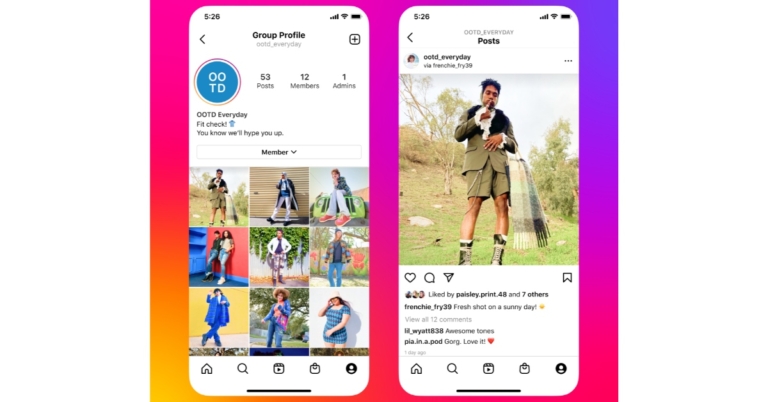
Instagram has announced the launch of numerous new features to help users feel more connected to the people they care about. Notes, candid stories, group profiles, collaborative collections, and other additional features have been added to make it easier for people to share moments. According to the company, Notes give people a casual and spontaneous way to express themselves and connect with each other.
Notes, a new way to express your thoughts and discover what your friends are up to, is now available on Instagram. Notes are short posts of up to 60 characters in length that only use text and emojis. Go to the top of your inbox, pick the followers you follow back or those on your Close Friends list, and your letter will appear at the top of their inbox for 24 hours. Replies to notes will come in your inbox as DMs.
 Instagram is also testing new features in Stories to make it easier for individuals to share in spontaneous, engaging ways, allowing them to form even closer bonds with their friends.
Add Yours nominations: Instagram is testing an update to Add Yours in which you can ask friends to join by hitting “pass it on” when prompted to do so.
Candid Stories: Instagram is testing Candid, a new way for you and your friends to capture and share what you’re doing right now in a story that only those who share their own see. Capture a candid using the stories camera, the multi-author story at the top of the feed, or the daily notification reminder, which begins after your first candid. You may easily turn off the daily notification reminder in your Settings if you don’t want to receive it. Similar functionality is also being tested on Facebook Stories.
Instagram is also testing new features in Stories to make it easier for individuals to share in spontaneous, engaging ways, allowing them to form even closer bonds with their friends.
Add Yours nominations: Instagram is testing an update to Add Yours in which you can ask friends to join by hitting “pass it on” when prompted to do so.
Candid Stories: Instagram is testing Candid, a new way for you and your friends to capture and share what you’re doing right now in a story that only those who share their own see. Capture a candid using the stories camera, the multi-author story at the top of the feed, or the daily notification reminder, which begins after your first candid. You may easily turn off the daily notification reminder in your Settings if you don’t want to receive it. Similar functionality is also being tested on Facebook Stories.
 Group Profiles: Instagram users will soon be able to create and join this new sort of profile to share updates and stories with friends in a dedicated, shared profile. When you share content to a Group Profile, it is only shared with group members rather than your followers, and it is put on the Group Profile rather than your own. Tap the “+” button and then pick Group Profiles to create a new group profile.
 Collaborative Collections: In addition, Instagram is testing a feature that allows users to connect with friends based on shared interests by saving posts to a collaborative collection in your group or 1:1 DMs. You can create or add to a collaborative collection by saving a post directly from the feed or by sharing a post with a friend via direct message and saving it from there.
For the latest gadget and tech news, and gadget reviews, follow us on Twitter, Facebook and Instagram. For newest tech & gadget videos subscribe to our YouTube Channel. You can also stay up to date using the Gadget Bridge Android App. You can find the latest car and bike news here.
Collaborative Collections: In addition, Instagram is testing a feature that allows users to connect with friends based on shared interests by saving posts to a collaborative collection in your group or 1:1 DMs. You can create or add to a collaborative collection by saving a post directly from the feed or by sharing a post with a friend via direct message and saving it from there.
For the latest gadget and tech news, and gadget reviews, follow us on Twitter, Facebook and Instagram. For newest tech & gadget videos subscribe to our YouTube Channel. You can also stay up to date using the Gadget Bridge Android App. You can find the latest car and bike news here.
 Instagram is also testing new features in Stories to make it easier for individuals to share in spontaneous, engaging ways, allowing them to form even closer bonds with their friends.
Add Yours nominations: Instagram is testing an update to Add Yours in which you can ask friends to join by hitting “pass it on” when prompted to do so.
Candid Stories: Instagram is testing Candid, a new way for you and your friends to capture and share what you’re doing right now in a story that only those who share their own see. Capture a candid using the stories camera, the multi-author story at the top of the feed, or the daily notification reminder, which begins after your first candid. You may easily turn off the daily notification reminder in your Settings if you don’t want to receive it. Similar functionality is also being tested on Facebook Stories.
Instagram is also testing new features in Stories to make it easier for individuals to share in spontaneous, engaging ways, allowing them to form even closer bonds with their friends.
Add Yours nominations: Instagram is testing an update to Add Yours in which you can ask friends to join by hitting “pass it on” when prompted to do so.
Candid Stories: Instagram is testing Candid, a new way for you and your friends to capture and share what you’re doing right now in a story that only those who share their own see. Capture a candid using the stories camera, the multi-author story at the top of the feed, or the daily notification reminder, which begins after your first candid. You may easily turn off the daily notification reminder in your Settings if you don’t want to receive it. Similar functionality is also being tested on Facebook Stories.
 Group Profiles: Instagram users will soon be able to create and join this new sort of profile to share updates and stories with friends in a dedicated, shared profile. When you share content to a Group Profile, it is only shared with group members rather than your followers, and it is put on the Group Profile rather than your own. Tap the “+” button and then pick Group Profiles to create a new group profile.
 Collaborative Collections: In addition, Instagram is testing a feature that allows users to connect with friends based on shared interests by saving posts to a collaborative collection in your group or 1:1 DMs. You can create or add to a collaborative collection by saving a post directly from the feed or by sharing a post with a friend via direct message and saving it from there.
For the latest gadget and tech news, and gadget reviews, follow us on Twitter, Facebook and Instagram. For newest tech & gadget videos subscribe to our YouTube Channel. You can also stay up to date using the Gadget Bridge Android App. You can find the latest car and bike news here.
Collaborative Collections: In addition, Instagram is testing a feature that allows users to connect with friends based on shared interests by saving posts to a collaborative collection in your group or 1:1 DMs. You can create or add to a collaborative collection by saving a post directly from the feed or by sharing a post with a friend via direct message and saving it from there.
For the latest gadget and tech news, and gadget reviews, follow us on Twitter, Facebook and Instagram. For newest tech & gadget videos subscribe to our YouTube Channel. You can also stay up to date using the Gadget Bridge Android App. You can find the latest car and bike news here. Garena Free Fire Redeem Codes Today 17 December 2022: Here is how to claim them

Garena Free Fire is a battle royale game with regular awards and tournaments to keep players interested. If you play Garena Free Fire, you should be aware of the redeem codes that are released on a daily basis. However, because the battle royale game is banned in India, players from other countries can use the Free Fire Redeem codes daily. If you’re unfamiliar with the Garena Free Fire redeem codes or don’t know how to get them, we’ve put together a step-by-step guide to help you redeem them. Check out Garena Free Fire Redeem Codes for December 17.
The Free Fire redeem codes are a great way to get free stuff. These are 12-digit codes that contain alphabets and numbers, as well as an expiration date and time. Because the Garena FF redeem codes cannot be used more than once, you should hurry to the redemption page to claim your free reward before someone else does. To get a free reward, all you have to do is go to reward.ff.garena.com/en, which is the official redemption page. Also, keep an eye on this space for daily updates on Garena Free Fire redemption codes and rewards.
Garena Free Fire Redeem Codes Today 17 December 2022
Updating SoonHow to Get Free Fire Redeem Codes for Garena on December 17?
- Visit the Garena Free Fire game’s official website at reward.ff.garena.com.
- Use your Facebook, Google, VK, Apple ID, Huawei ID, or Twitter account to log in.
- You’ll be taken to a valid redemption code (s)
- Copy and paste the 12-digit redemption code into the text box.
- On the screen, a dialogue box will appear.
- ‘Ok’ should be selected.
Amazon Quiz Answers Today 17 December 2022: Participate to win Rs 500

17 December 2022 Amazon Quiz has gone live on its platform. The quiz timings are 12 AM to 11:59 PM. The Amazon App users can participate in the quiz daily and all they have to do is submit correct answers to the questions asked on the e-commerce platform. Today’s participants can get a chance to win Rs 500 Amazon Pay Balance.
Amazon brings a fresh questionnaire that contains 5 questions daily. These questions are based on current affairs and general knowledge. The quiz can be played from 8 AM to 11:59 PM and the contestants need to answer correctly to enter into a lucky draw.
Only one person is declared as a winner and the results will be announced at the end of every month. And to make sure that you give correct answers to all the 5 questions Gadget Bridge everyday updates all the answers to the Amazon Quiz. Do check out 17 December 2022 Amazon Quiz Answers to win Rs 500 Amazon pay Balance.
Amazon Quiz Today Prize – Rs 500 Amazon Pay Balance
Quiz Date – 17 December 2022
Daily Timing – 12 AM to 11:59 PM
Winner Announcement – Today 12 PM
Amazon Quiz Answers Today 17 December 2022
Question 1: What are Olympic medals made of? Answer: All of the above Question 2: The northern lights are also known as the aurora borealis, occur in which location? Answer: Norway Question 3: What is the hardest natural substance in the world? Answer: Diamond Question 4: Guess this Nobel peace prize winner. Answer: Malala Yousafzai Question 5: Who is this 19 years old environmental activist? Answer: Greta ThunbergHow To Play Amazon Quiz
Only app users are eligible to play the Amazon quiz every morning from 12 AM to 11:59 PM. The quiz is not available on the desktop. For those who are unaware of how to play the Amazon quiz below are the steps, you can follow to take the quiz.- Firstly download the Amazon app from Google Play Store or App Store
- Now fill in the required information through the Sign Up option.
- You need to log in to the Amazon app and scroll down on the home screen to find the Amazon Quiz banner.
- Tap on the Amazon Quiz banner and tap on the Start button to start the Quiz.
- Now you will get 5 questions and you need to answer them correctly. One wrong answer will eliminate you from the Quiz.
- After answering all the questions correctly you are now eligible for a Lucky Draw.
- The winner’s name will be announced today at 12 PM.
YouTube launches an improved bot detection feature to alert users leaving violative comments

YouTube has made changes to its platform in order to increase spam and abuse detection in comments and live chat. The video streaming platform owned by Google has improved its procedures for detecting spam in comments and bots in live chats.
To identify and remove spam, YouTube has been trying to improve our automated detection systems and machine learning models. In fact, it has eliminated over 1.1 billion spam comments in the first six months of 2022. A new function has also been introduced that will issue a warning to users who are found to be breaking the platform’s Community Guidelines.
To keep bots out of live chats, YouTube has upgraded its spambot detection. ” We know bots negatively impact the live streaming experience, as the live chat is a great way to engage and connect with other users and creators. This update should make live streaming a better experience for everyone,” the company added.
YouTube is introducing a new feature that alerts users when some of their comments have been discovered and removed for breaching our Community Guidelines. Furthermore, if a user continues to leave abusive remarks, they may be timed out and temporarily unable to comment for up to 24 hours. As per the company, these warnings/timeouts have been found in our tests to lower the risk of users leaving violative comments again.
This notification is currently only available for English comments; it is intended that more languages will be added in the coming months.
YouTube via its official support page said, “Our goal is to both protect creators from users trying to negatively impact the community via comments, as well as offer more transparency to users who may have had comments removed to policy violations and hopefully help them understand our Community Guidelines. Of course our systems don’t always get it right, so users who receive these warnings can give feedback to help us know if we’ve gotten it wrong.”
For the latest gadget and tech news, and gadget reviews, follow us on Twitter, Facebook and Instagram. For newest tech & gadget videos subscribe to our YouTube Channel. You can also stay up to date using the Gadget Bridge Android App. You can find the latest car and bike news here.
Truecaller launches Family Plan supporting up to five users
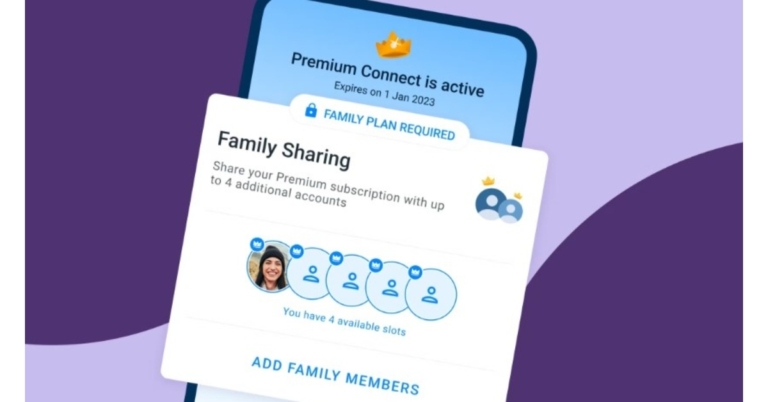
Popular Caller ID app Truecaller has introduced a new Family Plan feature to its platform. With this feature, Truecaller allows up to five people to enjoy its premium services with a single subscription. For those who want a little bit more from Truecaller, Premium Connect is a popular membership. In this plan, users will be able to take advantage of features like checking profile views and advance+d spam blocking on a single user account for a monthly subscription. Notably, this plan is currently only available to Android users in the United States.
According to the company, “We’ve come to realize that many want to bring in their nearest and dearest, and make sure that they’re protected from spam and scams as well.”
The newest option to acquire Truecaller Premium is through the Family Plan. With 5 accounts in one subscription, you may include your closest friends and family in your level of Premium spam protection.
The Family Plan makes it simple to include up to 4 individuals in your Truecaller family, who may then use the Premium Connect service’s cutting-edge features. But in brief, you receive a number of sophisticated features, such as:
- no ads
- who viewed my profile
- advanced spam blocking
- unlimited contact requests
- incognito mode
- announce calls (Android only)
- ghost calls (Android only)
Best ways to block a JIO SIM easily?
Did your smartphone get stolen? One of the first things you should do in this case is block your SIM card immediately. Since all your banking information and passwords are tied to your SIM card, it is very easy for someone to generate OTPs and log in to all your accounts using your phone number. If you use a Jio number, there are several ways you can block your SIM card. In this article, we bring you the most effective ways to block your Jio SIM easily.
Read Also: Sony launches new lineup of native 4K SXRD laser home projectors in India
 Step 2: Sign in using your Jio number.
Step 3: Click on the gear icon for Settings.
Step 4: Select ‘Suspend and Resume.’
Step 5: Select a reason for suspension and hit Submit.
Your Jio SIM will be blocked within a few minutes.
If you lost your mobile phone and cannot get the OTP on your number, follow these steps.
Step 1: Go to www.jio.com and click on Support.
Step 2: Scroll down and select lost SIM.
Step 3: Enter your Jio number and hit proceed.
Step 4: Verify your identity by providing your date of birth, registered email id, or registered alternate number.
Step 5: Follow the instructions to block your Jio SIM.
Read Also: Best of 2023: Top 8 midrange smartphones of the year
Step 2: Sign in using your Jio number.
Step 3: Click on the gear icon for Settings.
Step 4: Select ‘Suspend and Resume.’
Step 5: Select a reason for suspension and hit Submit.
Your Jio SIM will be blocked within a few minutes.
If you lost your mobile phone and cannot get the OTP on your number, follow these steps.
Step 1: Go to www.jio.com and click on Support.
Step 2: Scroll down and select lost SIM.
Step 3: Enter your Jio number and hit proceed.
Step 4: Verify your identity by providing your date of birth, registered email id, or registered alternate number.
Step 5: Follow the instructions to block your Jio SIM.
Read Also: Best of 2023: Top 8 midrange smartphones of the year
 Step 3: Select Profile & settings.
 Step 4: Tap on Lost SIM? Block or replace it.
Step 5: Enter your Jio phone number. Hit Proceed.
Step 6: Follow the onscreen instructions to block your SIM.
Step 4: Tap on Lost SIM? Block or replace it.
Step 5: Enter your Jio phone number. Hit Proceed.
Step 6: Follow the onscreen instructions to block your SIM.
Block your Jio SIM online
Step 1: Go to www.jio.com. Step 2: Sign in using your Jio number.
 Step 3: Click on the gear icon for Settings.
 Step 4: Select ‘Suspend and Resume.’
 Step 5: Select a reason for suspension and hit Submit.
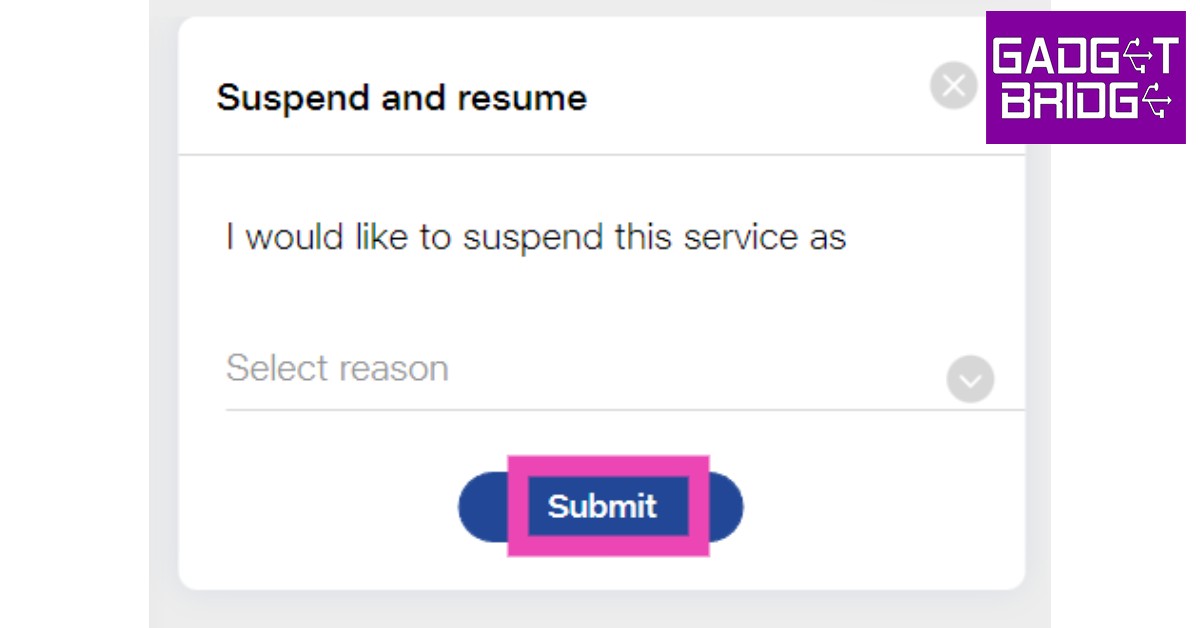 Your Jio SIM will be blocked within a few minutes.
If you lost your mobile phone and cannot get the OTP on your number, follow these steps.
Step 1: Go to www.jio.com and click on Support.
Your Jio SIM will be blocked within a few minutes.
If you lost your mobile phone and cannot get the OTP on your number, follow these steps.
Step 1: Go to www.jio.com and click on Support.
 Step 2: Scroll down and select lost SIM.
 Step 3: Enter your Jio number and hit proceed.
 Step 4: Verify your identity by providing your date of birth, registered email id, or registered alternate number.
 Step 5: Follow the instructions to block your Jio SIM.
Read Also: Best of 2023: Top 8 midrange smartphones of the year
Step 5: Follow the instructions to block your Jio SIM.
Read Also: Best of 2023: Top 8 midrange smartphones of the year
Use the My Jio app
Step 1: Launch the My Jio app on your phone. Step 2: Tap on Menu at the bottom right corner of the screen.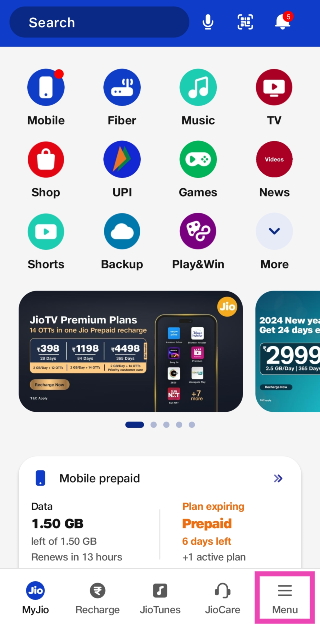 Step 3: Select Profile & settings.
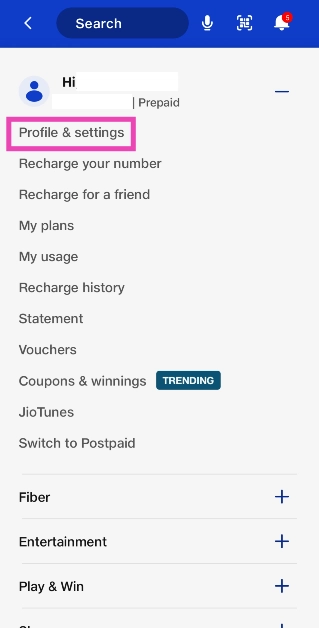 Step 4: Tap on Lost SIM? Block or replace it.
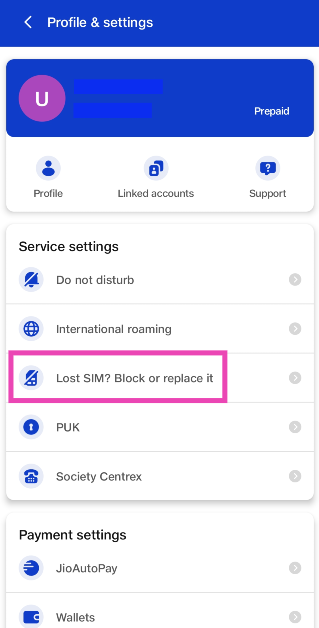 Step 5: Enter your Jio phone number. Hit Proceed.
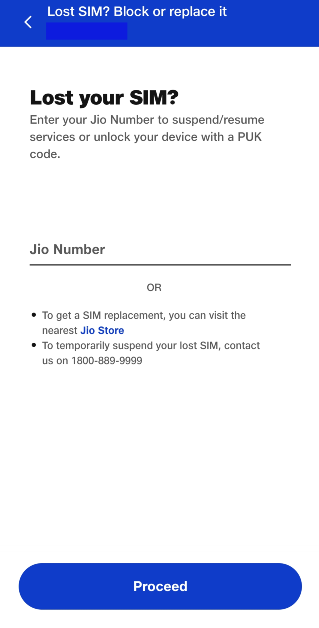 Step 6: Follow the onscreen instructions to block your SIM.
Block your Jio SIM by contacting customer care
You can block your Jio SIM through Jio customer care by dialling the helpline using any network provider. Here’s how. Step 1: Dial 1800-889-9999 and enter the necessary codes to talk to a customer executive. Step 2: Make a request to suspend your Jio number and provide the customer executive with the necessary details to verify your identity.Block your Jio SIM from the Jio Store
You can also walk into your nearest Jio Store and temporarily suspend your lost SIM. Make sure you carry the necessary documents to verify your identity. Once your SIM is suspended you can also request the staff to issue you a new SIM with the same number. You will have to make a small payment for the new SIM card and will have to provide the necessary documents like proof of identity and address.Frequently Asked Questions (FAQs)
How do I block my Jio SIM if I have lost my phone?
If you lost your phone, go to the official Jio website and select Support. Click on Lost SIM and follow the onscreen instructions to block it.How do I block my SIM using the My Jio app?
Go to Menu>Profile & settings>Lost SIM and enter your phone number. Follow the onscreen instructions to block it.Which documents do I need to block my Jio SIM card?
If you’re visiting a Jio Store to block your SIM, you will need a valid proof of identity like your AADHAR card or driving license. After paying a small fee, you will be issued a duplicate SIM. Read Also: Western Digital announces seven SanDisk Professional SSDs for content creators in IndiaConclusion
This is how you can block your Jio SIM easily. If you found your lost phone, you can easily unblock your Jio number from the website itself. However, if you’re using a duplicate SIM with the same number, this step won’t be necessary. If you found this article to be helpful, let us know in the comments!Acer introduces the Swift Edge, the world’s lightest 4K OLED laptop in India
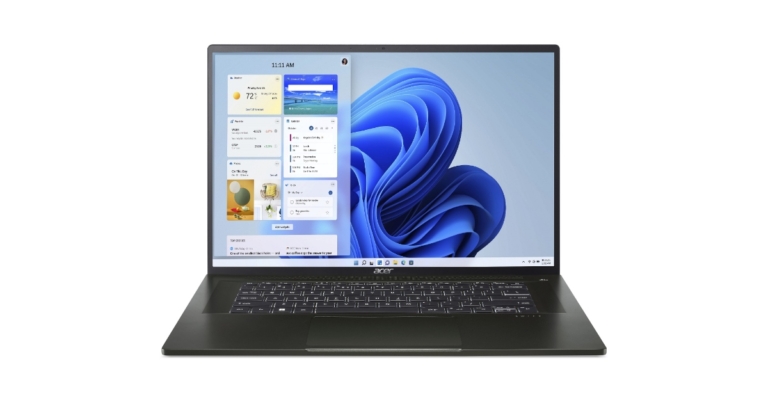
Acer Swift Edge was introduced in India. It is claimed to be the lightest 16-inch OLED laptop in the world. It is powered by AMD Ryzen 7 6800U processor, which has eight cores and a maximum turbo frequency of 4.7GHz. It is outfitted with a Microsoft Pluton security processor to aid in defending against increasingly complex cyberattacks.
 Acer’s TNR (Temporal Noise Reduction) technology is used by the FHD front-facing camera to provide high-quality images even in dim lighting. Acer PurifiedVoice with AI Noise Reduction makes video calling better than ever.
A 54Wh battery is available, and 65W USB Type-C rapid charging is supported. It has a USB Type-C port, a USB 3.2 port, and a USB 3.2 port with the capability for power-off charging. Wi-Fi 6E and Bluetooth v5.2 wireless communication are also supported by the laptop. The Swift Edge is constructed of an alloy that is 20% lighter and twice as robust as regular aluminium. It is sleek and beautiful.
“Swift series products have continuously taken first place in the thin and light category. With the launch of the brand-new Acer Swift Edge, we hope to provide our consumers with the ideal fusion of performance, security, and durability. The Swift Edge has precise linear structural characteristics that give the laptop a fashionable and premium feel. These features are an heir to the simple, clean design language of the Swift series. This new laptop is the best option for business achievers thanks to its superb software and security features.” Says Sudhir Goel, Chief Business Officer, Acer India
For the latest gadget and tech news, and gadget reviews, follow us on Twitter, Facebook and Instagram. For newest tech & gadget videos subscribe to our YouTube Channel. You can also stay up to date using the Gadget Bridge Android App. You can find the latest car and bike news here.
Acer’s TNR (Temporal Noise Reduction) technology is used by the FHD front-facing camera to provide high-quality images even in dim lighting. Acer PurifiedVoice with AI Noise Reduction makes video calling better than ever.
A 54Wh battery is available, and 65W USB Type-C rapid charging is supported. It has a USB Type-C port, a USB 3.2 port, and a USB 3.2 port with the capability for power-off charging. Wi-Fi 6E and Bluetooth v5.2 wireless communication are also supported by the laptop. The Swift Edge is constructed of an alloy that is 20% lighter and twice as robust as regular aluminium. It is sleek and beautiful.
“Swift series products have continuously taken first place in the thin and light category. With the launch of the brand-new Acer Swift Edge, we hope to provide our consumers with the ideal fusion of performance, security, and durability. The Swift Edge has precise linear structural characteristics that give the laptop a fashionable and premium feel. These features are an heir to the simple, clean design language of the Swift series. This new laptop is the best option for business achievers thanks to its superb software and security features.” Says Sudhir Goel, Chief Business Officer, Acer India
For the latest gadget and tech news, and gadget reviews, follow us on Twitter, Facebook and Instagram. For newest tech & gadget videos subscribe to our YouTube Channel. You can also stay up to date using the Gadget Bridge Android App. You can find the latest car and bike news here.
Acer Swift Edge price in India
The price of the 16GB RAM with 1TB SSD combination of the Acer Swift Edge is Rs 124,999. Only Olivine Black is available in it. The device will be available for purchase via both Amazon and the Acer India store.Acer Swift Edge features
The Acer Swift Edge features a 16-inch 4K OLED display with 3,840×2,400 pixels of resolution. The screen has a maximum brightness of 400 nits and supports 100% of the DCI-P3 colour gamut. For a durable and comfortable viewing experience, the new laptop’s display has received certification from VESA DisplayHD True Black 500 and TUV Rheinland Eyesafe. An AMD Ryzen 7 6800U CPU with an octa-core configuration and a base clock speed of 2.7GHz and a maximum turbo clock speed of 4.7GHz powers the Acer Swift Edge. AMD Radeon graphics are also built-in. This Acer laptop features 1TB of PCIe Gen 4 NVMe SSD storage and 16GB of LPDDR5 RAM. Additionally, customers can have strong security measures to protect personal information and conduct business securely thanks to AMD Ryzen Pro, Microsoft Pluton, and biometric authentication. Acer’s TNR (Temporal Noise Reduction) technology is used by the FHD front-facing camera to provide high-quality images even in dim lighting. Acer PurifiedVoice with AI Noise Reduction makes video calling better than ever.
A 54Wh battery is available, and 65W USB Type-C rapid charging is supported. It has a USB Type-C port, a USB 3.2 port, and a USB 3.2 port with the capability for power-off charging. Wi-Fi 6E and Bluetooth v5.2 wireless communication are also supported by the laptop. The Swift Edge is constructed of an alloy that is 20% lighter and twice as robust as regular aluminium. It is sleek and beautiful.
“Swift series products have continuously taken first place in the thin and light category. With the launch of the brand-new Acer Swift Edge, we hope to provide our consumers with the ideal fusion of performance, security, and durability. The Swift Edge has precise linear structural characteristics that give the laptop a fashionable and premium feel. These features are an heir to the simple, clean design language of the Swift series. This new laptop is the best option for business achievers thanks to its superb software and security features.” Says Sudhir Goel, Chief Business Officer, Acer India
For the latest gadget and tech news, and gadget reviews, follow us on Twitter, Facebook and Instagram. For newest tech & gadget videos subscribe to our YouTube Channel. You can also stay up to date using the Gadget Bridge Android App. You can find the latest car and bike news here.
Acer’s TNR (Temporal Noise Reduction) technology is used by the FHD front-facing camera to provide high-quality images even in dim lighting. Acer PurifiedVoice with AI Noise Reduction makes video calling better than ever.
A 54Wh battery is available, and 65W USB Type-C rapid charging is supported. It has a USB Type-C port, a USB 3.2 port, and a USB 3.2 port with the capability for power-off charging. Wi-Fi 6E and Bluetooth v5.2 wireless communication are also supported by the laptop. The Swift Edge is constructed of an alloy that is 20% lighter and twice as robust as regular aluminium. It is sleek and beautiful.
“Swift series products have continuously taken first place in the thin and light category. With the launch of the brand-new Acer Swift Edge, we hope to provide our consumers with the ideal fusion of performance, security, and durability. The Swift Edge has precise linear structural characteristics that give the laptop a fashionable and premium feel. These features are an heir to the simple, clean design language of the Swift series. This new laptop is the best option for business achievers thanks to its superb software and security features.” Says Sudhir Goel, Chief Business Officer, Acer India
For the latest gadget and tech news, and gadget reviews, follow us on Twitter, Facebook and Instagram. For newest tech & gadget videos subscribe to our YouTube Channel. You can also stay up to date using the Gadget Bridge Android App. You can find the latest car and bike news here. How to Easily Find or Check Your Facebook Password?

It is not uncommon to forget your Facebook password, especially when you have different passwords for every social media account. Sometimes you may simply want to view your password without changing it. Unfortunately, Facebook does not let you view your password on its app or website out of security concerns. However, there is a way you can check your Facebook password on your device. In this article, we show you how to easily find or check your Facebook password on Android, iOS, or desktop.
Read Also: Sony launches new lineup of native 4K SXRD laser home projectors in India
Step 2: Select ‘Manage your Google Account’ right under your profile name.
Step 3: Go to the ‘Security’ tab, scroll down and select Password Manager.
Step 4: Select Facebook and enter your unlock pin.
Step 5: Tap on the unhide icon in the password field to view your Facebook password.
Step 3: Select Password Manager.
Step 4: Click on the unhide icon next to your Facebook password.
Step 5: Enter the pin to your desktop. You will be able to view your Facebook password.
Step 2: Use Touch ID or enter your device passcode to access your saved passwords.
Step 3: Scroll down and tap on ‘facebook.com’.
You will be able to see your Facebook password.
Why doesn’t Facebook let me view my password?
In the early days of the Internet, you could view your password for any account or service you owned. However, over a period of time, this has changed drastically. These days, social media websites take extreme care of your login credentials to keep them from falling into malicious hands. The same is the case with Facebook. The social media giant does not let you view your password natively. This ensures that no one is able to view your password even when you forget to log out of a particular device. This is especially helpful for people who use public computers to log into their Facebook accounts. If they forget to log out, the next person to use the computer will not be able to extract the password from account settings. At worst, they will gain access to your account. This access can always be revoked by logging yourself out of all the devices remotely.How to check your Facebook password on Android
Step 1: Go to Settings, scroll down and select Google. Step 2: Select ‘Manage your Google Account’ right under your profile name.
 Step 3: Go to the ‘Security’ tab, scroll down and select Password Manager.
 Step 4: Select Facebook and enter your unlock pin.
 Step 5: Tap on the unhide icon in the password field to view your Facebook password.
How to check your Facebook password on your desktop
Step 1: Open Google Chrome on your desktop and click on the ellipses (three dots) at the top right corner of the browser. Step 2: Select Settings and click on ‘Autofill’ on the side menu. Step 3: Select Password Manager.
 Step 4: Click on the unhide icon next to your Facebook password.
 Step 5: Enter the pin to your desktop. You will be able to view your Facebook password.
How to check your Facebook password on iOS
Step 1: Go to Settings and select Passwords. Step 2: Use Touch ID or enter your device passcode to access your saved passwords.
 Step 3: Scroll down and tap on ‘facebook.com’.
You will be able to see your Facebook password.
Step 3: Scroll down and tap on ‘facebook.com’.
You will be able to see your Facebook password.