

Creating a Logo to Put Your Gadget on the Map

There is nothing a tech enthusiast loves more than a new gadget. Any items which provide new ways of interacting with the world and bring us further into the future are automatically exciting. For this reason, many inventors of gadgets assume that their product will sell itself. After all, is it not good enough to offer something totally unique?
Unfortunately, the answer is no. That’s not enough, but not because people aren’t interested. Rather, the market is so saturated that the vast majority of new gadgets are never seen by potential customers.
Consider how many gadgets you personally have done research about in the recent past. How many of them were made by big companies like Apple and Google? Chances are there are only a handful that were made by smaller companies, in spite of the existence of innumerable others.
Marketing is therefore incredibly important. And when you’re marketing a gadget, how you present your brand is crucial. A logo is a massive part of brand recognition, hence you should make sure to conduct strategic choices when designing it.
One time-efficient tool that you can use is a logo creator in order to create compelling logos without going through the hassle of gaining coding and design experience. This tool will not only provide you with ideas, it is your vision that ultimately determines how the logo will look.
Here are some of the things that make a great product logo.
Redmi Note 12 Pro 5G confirmed to launch in India on January 5
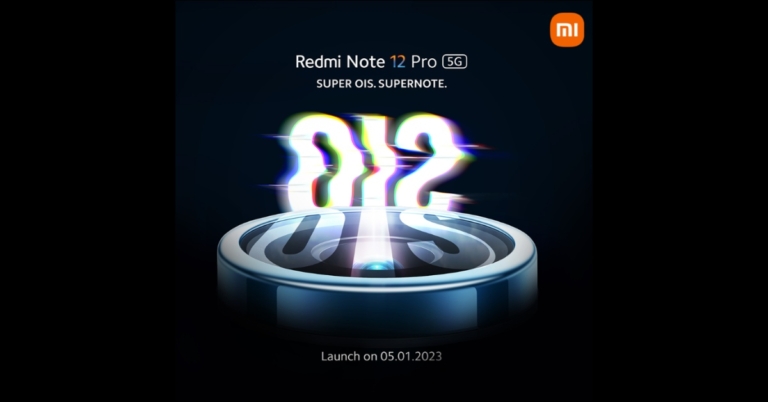
After announcing the official launch date for Redmi Note 12 Pro+ 5G India debut Xiaomi today officially confirmed that Redmi Note 12 Pro 5G will be released alongside the Pro+ variant. The launch date is set for January 5. The upcoming phone will be powered by MediaTek Dimensity 1080 SoC. The handset will also feature an AMOLED display with a 120Hz refresh rate.
The Redmi Note 12, Note 12 Pro, and Note 12 Pro Plus are all part of the Note 12 series, which debuted for the first time in China back in October. Out of which both the Pro variant is set to launch in India on January 5, the company has confirmed.
Apart from having a 120Hz AMOLED display and MediaTek Dimensity 1080 SoC the upcoming phone will be featuring a triple rear camera system. The 50-megapixel primary camera will also have optical image stabilisation functionality.
The smartphone maker promises that Redmi Note 12 Pro 5G users would be able to acquire a full day’s charge in 15 minutes.
Redmi Note 12 Pro 5G specifications
The Redmi Note 12 Pro has a 6.67-inch full-HD+ OLED screen with a 1,080 x 2,400 pixel resolution. The display is capable of supporting touch sampling rates of 240Hz, HDR10+, and refresh rates of up to 120Hz. It is powered by an octa-core Mali-G68 GPU, up to 12GB LPDDR4x RAM, and a MediaTek Dimensity 1080 SoC. The smartphone has a storage capacity of 256GB using UFS 2.2. The Redmi Note 12 Pro’s triple rear cameras have a 50-megapixel Sony IMX766 sensor that features optical image stabilisation. The camera kit also includes an 8-megapixel ultra wide-angle sensor and a 2-megapixel macro sensor. The handset also includes a 16-megapixel selfie sensor on the front. A 5,000mAh battery and 67W fast charging are features of the Redmi Note 12 Pro.Redmi Note 12 Pro 5G price
In China, the base 6GB RAM with 128GB storage Redmi Note 12 Pro costs CNY 1699, or roughly Rs 19,300, and the 8GB RAM with 128GB storage model costs CNY 1,799, or roughly Rs 20,400. Priced at CNY 1,999 for the 8GB model with 256GB storage and CNY 2,199 for the 12GB model with 256GB storage, respectively, these models are equivalent to about Rs 22,700 and Rs 24,900. For the latest gadget and tech news, and gadget reviews, follow us on Twitter, Facebook and Instagram. For newest tech & gadget videos subscribe to our YouTube Channel. You can also stay up to date using the Gadget Bridge Android App. You can find the latest car and bike news here.OnePlus 11 launch teased, to feature Hasselblad triple rear cameras
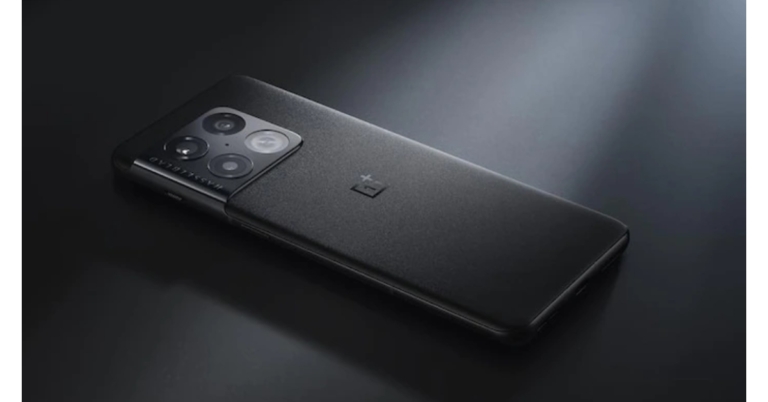
Prior to the release, OnePlus officially teased the OnePlus 11 via a trailer. Early in 2023 is when China is expected to receive the handset, and India may also get to see it. In a quick teaser video, OnePlus reveals the phone’s design and demonstrates its rear camera system.
OnePlus has unveiled the OnePlus 11’s first official trailer. Although the OnePlus 11’s specifications have been leaked online in the past, neither OnePlus nor the handset’s debut date has been made public. As per the official teaser, the OnePlus 11 will feature an alert slider with the volume controls on the left and the power button on the right side.
Additionally, the teaser also displays the triple back camera arrangement on the OnePlus 11 in addition to an LED flash. grading and higher overall quality. Compared to the existing phone, the rear camera appears to be round and to be of greater significance with Hasselblad branding.
The trailer also reveals that the OnePlus 11 will have a traditional Black and green colour finish. The back of this phone appeared to be made of glass with a shiny appearance. The phone will have a metal frame.
The smartphone’s other characteristics are not mentioned in the teaser, but a prior report claims that it will include a 6.7-inch 2K AMOLED screen with a hole-punch cutout. Recently, the smartphone received 3C certification. The device might feature 100-watt quick charging, according to the listing. It might have the ability to output electricity at 5V/2A and 5-11V/9.1A.
The phone is also anticipated to be released in 8GB RAM and 128GB storage and 16GB RAM and 256GB storage capacities. The phone’s display might have a 120Hz refresh rate. According to reports, the forthcoming device would be powered by the most recent Qualcomm Snapdragon 8+ Gen 2 processor.
It is believed to have a 50-MP primary IMX890 sensor for still images and movies, a 48-MP ultra-wide angle sensor, and a 32-MP tertiary sensor. The device reportedly has a 32-MP selfie and video calling camera.
For the latest gadget and tech news, and gadget reviews, follow us on Twitter, Facebook and Instagram. For newest tech & gadget videos subscribe to our YouTube Channel. You can also stay up to date using the Gadget Bridge Android App. You can find the latest car and bike news here.
How To Easily Hard or Factory Reset Xiaomi Smartphones?
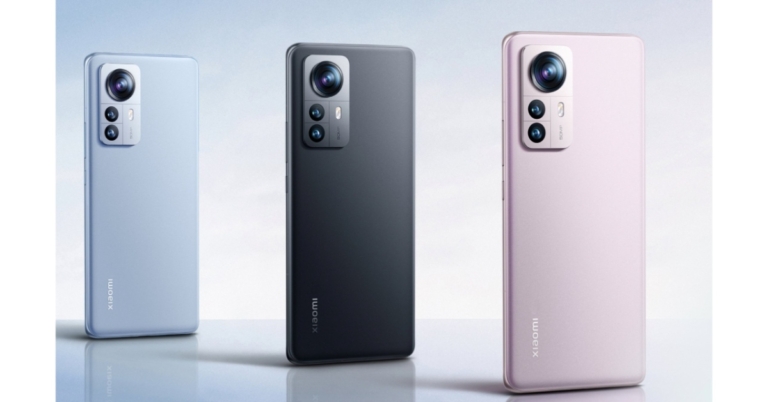
Thinking of selling your Xiaomi smartphone? You should reset it to its factory settings first. A hard reset or a factory reset erases all data from your smartphone and restores it to its ‘factory’ settings. In other words, your phone is reset to the settings it was shipped in. Once you perform a factory reset, you are logged out of all your accounts and all your personal data is deleted from the device. This makes it necessary to back up your data before resetting your phone. In this article, we show you how you can hard reset or factory reset your Xiaomi smartphone.
Read Also: SENS Dwinci QLED Google TV and Pikaso 4K UHD Android TVs launched in India
 Step 2: Select ‘Backup & reset’ and tap on ‘Erase all data (factory reset).’
Step 3: In the following window, select ‘Delete all data’ from the bottom of the screen.
Step 4: Enter your smartphone’s PIN, pattern, or password.
Step 5: Tap ‘OK’ on all backup warnings.
It will take a few minutes for your phone to reset. Following the factory reset, your smartphone will reboot and you will have to sign in using your Google account again.
Step 2: Select ‘Backup & reset’ and tap on ‘Erase all data (factory reset).’
Step 3: In the following window, select ‘Delete all data’ from the bottom of the screen.
Step 4: Enter your smartphone’s PIN, pattern, or password.
Step 5: Tap ‘OK’ on all backup warnings.
It will take a few minutes for your phone to reset. Following the factory reset, your smartphone will reboot and you will have to sign in using your Google account again.
How to factory reset a Xiaomi smartphone from Settings
Step 1: Go to Settings and select ‘About Phone.’ Step 2: Select ‘Backup & reset’ and tap on ‘Erase all data (factory reset).’
 Step 3: In the following window, select ‘Delete all data’ from the bottom of the screen.
 Step 4: Enter your smartphone’s PIN, pattern, or password.
Step 5: Tap ‘OK’ on all backup warnings.
Step 4: Enter your smartphone’s PIN, pattern, or password.
Step 5: Tap ‘OK’ on all backup warnings.
 It will take a few minutes for your phone to reset. Following the factory reset, your smartphone will reboot and you will have to sign in using your Google account again.
How to hard reset a Xiaomi smartphone
Can’t access your Xiaomi smartphone’s screen due to a faulty screen? Here’s how you can hard reset your device. Step 1: Switch off your Xiaomi smartphone and then press and hold the power key and volume up button. Step 2: Release the power key once the smartphone logo appears but keep holding the volume up button. Step 3: Once your phone boots in Recovery Mode, use the volume keys to scroll down to the ‘Wipe Data’ option. Step 4: Press the power key to select the ‘Wipe Data’ option. Step 5: Select ‘Wipe all data’ and press the power key again to confirm your selection. Step 6: Once the data has been wiped, select ‘Back to main menu.’ Step 7: Reboot your smartphone. It will be restored to factory settings. Read Also: Truecaller launches Family Plan supporting up to five usersConclusion
These are the two simple ways you can hard reset or factory reset a Xiaomi smartphone. A hard reset or factory reset deletes all data from your smartphone and restores it to its factory settings. This is why it is essential to create a backup of the data on your phone before performing a factory reset. If you found this article helpful, let us know in the comments! For the latest gadget and tech news, and gadget reviews, follow us on Twitter, Facebook and Instagram. For newest tech & gadget videos subscribe to our YouTube Channel. You can also stay up to date using the Gadget Bridge Android App. You can find the latest car and bike news here.How to Easily Copy and Share your Instagram Profile Link?

Oftentimes users report that Instagram does not display their profile when their friends search for their name. This is because your display name is not unique to your profile. Tons of other profiles may have the same display name. For more accurate results, your should always search by username. If you want to save your friends the hassle of looking you up on the Instagram app, you can simply send them a link to your profile. This also comes in handy when you want to share your profile with someone who is not on Instagram. In this article, we bring you the simplest ways to copy and share your Instagram profile link on Android, iOS, and Chrome.
Read Also: SENS Dwinci QLED Google TV and Pikaso 4K UHD Android TVs launched in India
Your Instagram profile link will be copied to the clipboard. You can also simply add your Instagram handle after www.instagram.com/ to direct people to your Instagram profile. For example, if your Instagram handle is ‘onetwothree’, your Instagram profile link will be www.instagram.com/onetwothree.
Step 3: Select ‘QR Code.’
Step 4: Instagram will show your profile card which contains your Instagram handle as well as a QR code which can be scanned to visit your profile. You can change the background of this card to display your Instagram avatar, a colour gradient, or another emoji. Tap the share icon at the top right corner of the screen to send this card to your friends.
Step 3: Select ‘Copy.’
Your Instagram profile link will be copied to your clipboard and can now be shared with your friends.
Read Also: Instagram adds new Candid Stories, ‘Add Yours’ Nominations and more
How to copy and share your Instagram profile link from the Android app
Since there is no direct way to copy and share your Instagram profile link from the Android app, you can use a simple workaround. For this method, you will need another Instagram account. Step 1: Log in to Instagram using your secondary account and search for your primary account. Step 2: Tap on the ellipses (three dots) at the top right corner of the screen and select ‘Copy Profile URL.’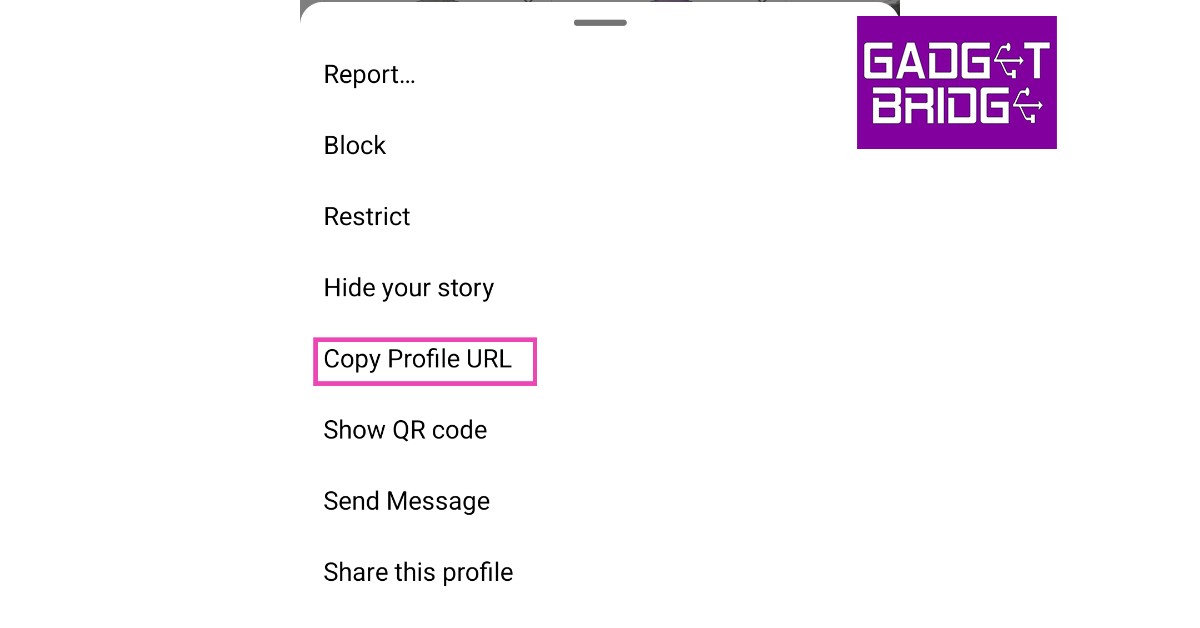 Your Instagram profile link will be copied to the clipboard. You can also simply add your Instagram handle after www.instagram.com/ to direct people to your Instagram profile. For example, if your Instagram handle is ‘onetwothree’, your Instagram profile link will be www.instagram.com/onetwothree.
How to copy and share your Instagram profile as a QR code
Step 1: Open the Instagram app and go to your profile Step 2: Tap on the hamburger menu at the top right corner of the screen. Step 3: Select ‘QR Code.’
 Step 4: Instagram will show your profile card which contains your Instagram handle as well as a QR code which can be scanned to visit your profile. You can change the background of this card to display your Instagram avatar, a colour gradient, or another emoji. Tap the share icon at the top right corner of the screen to send this card to your friends.

How to copy and share your Instagram profile link from the iOS app
Unlike the Android app, Instagram’s iOS app lets you copy your profile link. Here’s how. Step 1: Open the Instagram app and go to your profile Step 2: Tap on the hamburger menu at the top right corner of the screen. Step 3: Select ‘QR Code.’ Step 4: Tap the share icon at the top right corner of the screen. Step 5: Select ‘Copy.’ Your profile link will be copied to the clipboard. You can now share it with your friends.How to copy and share your Instagram profile link using Chrome
Step 1: Open your Instagram profile on Google Chrome. Step 2: Tap and long-press the link on the address bar. If you’re on a desktop, right-click on the link in the address bar. Step 3: Select ‘Copy.’
Your Instagram profile link will be copied to your clipboard and can now be shared with your friends.
Read Also: Instagram adds new Candid Stories, ‘Add Yours’ Nominations and more
Step 3: Select ‘Copy.’
Your Instagram profile link will be copied to your clipboard and can now be shared with your friends.
Read Also: Instagram adds new Candid Stories, ‘Add Yours’ Nominations and more
Conclusion
This is how you can easily copy and share your Instagram profile link. Always remember that if you change your Instagram handle, your profile link will change accordingly. Any previous links to your profile will not work as soon as you change your Instagram username. If you found this article helpful, let us know in the comments! For the latest gadget and tech news, and gadget reviews, follow us on Twitter, Facebook and Instagram. For newest tech & gadget videos subscribe to our YouTube Channel. You can also stay up to date using the Gadget Bridge Android App. You can find the latest car and bike news here.Tecno Phantom X2 5G launching in India soon
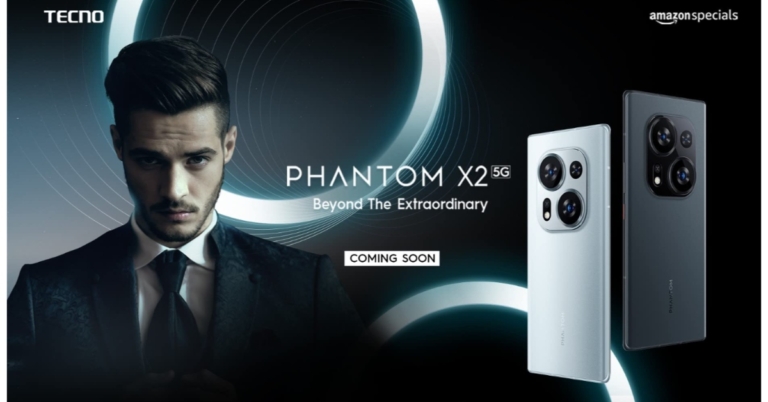
India will soon see the release of the Tecno Phantom X2 5G. The device will be available for pre-order on Amazon starting on January 2 and will go on sale starting on January 9. Prior to India’s release, the device debuted in the UAE recently. As per teasers, the upcoming phone will be powered by MediaTek Dimensity 9000 SoC. In addition to this, the handset will be featuring a 120Hz display and a triple rear camera setup.
The company took to Twitter to announce its upcoming smartphone Tecno Phantom X2 5G in India. The official launch date and price information for India have not yet been made public. To tease the arrival of the smartphone in India, Amazon has separately set up a special landing page on their website. The phone will be available for pre-order on January 2 through Amazon, and sales will begin on January 9.
Tecno Phantom X2 5G specifications
Tecno Phantom X2 5G features a 6.8-inch full-HD+ curved AMOLED display with 1080 x 2400 pixels screen resolution and 360HZ touch sampling rate. The screen has a refresh rate of 120Hz. The display also supports P3 Wide colour gamut with TUV SUD certification and Corning Gorilla Glass Victus protection. It runs on HiOS 12, an Android 12-based operating system. The MediaTek Dimensity 9000 SoC, along with 8GB of RAM and 256GB of storage, power it. A 64-megapixel primary camera with optical image stabilisation (OIS), a 13-megapixel secondary sensor, and a 2-megapixel sensor make up the triple rear camera configuration on the Tecno Phantom X2 5G. A 32-megapixel camera is available for selfies and video calls. Additionally, it incorporates a secure in-display fingerprint sensor and a vapour chamber cooling system. A 5,160mAh battery with 45W rapid charging capabilities powers it.Tecno Phantom X2 5G price
In the UAE the Phantom X2 costs SAR 2699 which is about Rs 59,200 for the 8GB RAM with 256GB storage configuration. The smartphone is offered in Stardust Grey and Moonlight Silver colour options. For the latest gadget and tech news, and gadget reviews, follow us on Twitter, Facebook and Instagram. For newest tech & gadget videos subscribe to our YouTube Channel. You can also stay up to date using the Gadget Bridge Android App. You can find the latest car and bike news here.How to create an AI-generated image of yourself
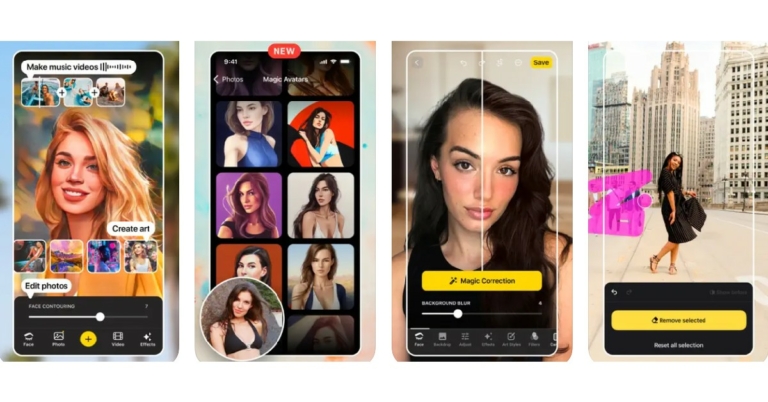
AI-generated images have been a significant part of the Internet trends this year. A few months back, Twitter was teeming with AI images created using Dall-E, a program that takes written prompts from the user and generates an image based on the description using an AI algorithm. Off late, your social media feed may have been filled with animated avatars of your friends. These avatars are created by AI as well and make use of millions of artworks across the internet to create stunning animated images. Wondering where to create one for yourself? In this article, we show you how to create an AI-generated animated image of yourself.
Read Also: SENS Dwinci QLED Google TV and Pikaso 4K UHD Android TVs launched in India
Step 3: Select 10-20 close-up selfies of yourself from different angles. These images will be uploaded to Lensa’s servers and deleted as soon as your magic avatar is ready.
Step 4: Select your gender.
Step 5: Purchase your desired Magic Avatar pack. Currently, this feature is not available for free.
Step 6: It will take the Lensa app at least 20-30 minutes to process your images. You can set a reminder within the app and minimise it until your images are done processing.
Step 7: When Lensa is finished processing your images, tap the smiley icon at the top left corner of the screen to access your magic avatar pack.
Step 8: Depending on the pack you subscribed to, Lena will present your AI-generated images under various categories like superhero, cyborg, etc.
Step 9: You can either save all images to your phone at once or go through the pack and save the images you like.
Step 2: Select ‘Text to image’ from the side menu.
Step 3: Add a description for the image you want to generate. Make sure your description is vivid.
Step 4: Choose the style of the image.
Step 5: Click on ‘Generate image.’
Step 6: Canva will generate 4 images based on your written prompt.
You can also use the Canva app to create AI-generated images.
Read Also: Instagram adds new Candid Stories, ‘Add Yours’ Nominations and more
Create an AI image using the Lensa app
Step 1: Download and install the Lensa app on your smartphone. Step 2: Select ‘Magic Avatars.’ Step 3: Select 10-20 close-up selfies of yourself from different angles. These images will be uploaded to Lensa’s servers and deleted as soon as your magic avatar is ready.
 Step 4: Select your gender.
 Step 5: Purchase your desired Magic Avatar pack. Currently, this feature is not available for free.
 Step 6: It will take the Lensa app at least 20-30 minutes to process your images. You can set a reminder within the app and minimise it until your images are done processing.
Step 7: When Lensa is finished processing your images, tap the smiley icon at the top left corner of the screen to access your magic avatar pack.
Step 8: Depending on the pack you subscribed to, Lena will present your AI-generated images under various categories like superhero, cyborg, etc.
Step 6: It will take the Lensa app at least 20-30 minutes to process your images. You can set a reminder within the app and minimise it until your images are done processing.
Step 7: When Lensa is finished processing your images, tap the smiley icon at the top left corner of the screen to access your magic avatar pack.
Step 8: Depending on the pack you subscribed to, Lena will present your AI-generated images under various categories like superhero, cyborg, etc.
 Step 9: You can either save all images to your phone at once or go through the pack and save the images you like.
Create an AI image from text using Canva
Canva allows users to generate AI images by typing in a description of the image they want to see. While you cannot upload an image of yourself and ask the editor to generate an animated avatar, it is still pretty interesting to see how the AI algorithm works when you only feed it words. Step 1: Go to https://www.canva.com/. Sign in and pick a template for your art. Step 2: Select ‘Text to image’ from the side menu.
 Step 3: Add a description for the image you want to generate. Make sure your description is vivid.
 Step 4: Choose the style of the image.
 Step 5: Click on ‘Generate image.’
 Step 6: Canva will generate 4 images based on your written prompt.
 You can also use the Canva app to create AI-generated images.
Read Also: Instagram adds new Candid Stories, ‘Add Yours’ Nominations and more
You can also use the Canva app to create AI-generated images.
Read Also: Instagram adds new Candid Stories, ‘Add Yours’ Nominations and more
Conclusion
This is how you can create an AI-generated image of yourself, but be careful there are a lot of AI-generated deepfake Videos out there to, so we have done a complete tutorial on how to detect AI-generated deepfake Videos, do check it out. Currently, Lensa’s Magic Avatar packs are priced at Rs 380 (for 50 unique avatars), Rs 590 (for 100 unique avatars), and Rs 790 (for 200 unique avatars) in India. If you found this article helpful, let us know in the comments! For the latest car and bike news, car reviews/bike reviews, and auto features follow us on Twitter and Facebook. You can find the latest gadget and tech news, and gadget reviews here.Netflix-themed Boat Stream Edition Nirvana 751 ANC, Airdopes 411 ANC and Rockerz 333 Pro audio devices launched in India
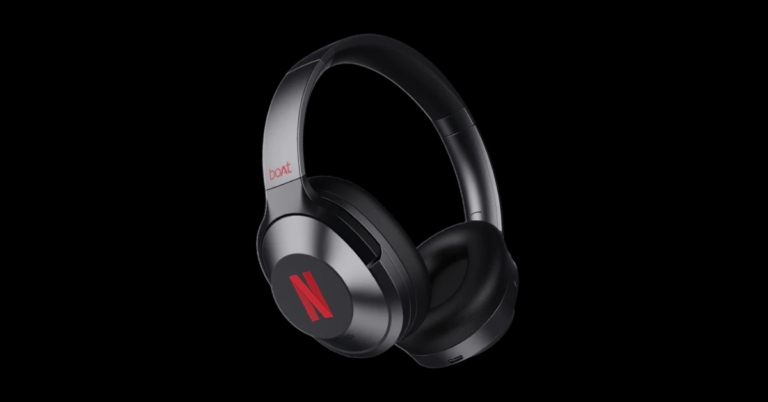
Boat announced the arrival of its “Stream Edition” headphones and earbuds in India. In partnership with the world’s largest streaming service, Netflix, the new audio devices were unveiled. Three limited-edition devices are included in the boAt X Netflix Stream Edition, the boAt Nirvana 751 ANC, the Airdopes 411 ANC, and the Rockerz 333 Pro. All of these devices support active noise cancellation (ANC) and are dust and water-resistant.
 A 37mAh battery powers each earbud, while a 320mAh battery powers the charging case. The Boat Airdopes 411 ANC earbuds are supposed to provide up to 17.5 hours of use on a single charge. A USB Type-C cable can be used to charge the case. The earphones take 1.5 hours to charge, compared to 2 hours for the case.
 Lastly, dual 10mm dynamic drivers power the Boat Rockerz 333 Pro neckband-style wireless headphones. The comes with a frequency response range of 20-20,000Hz and an impedance of 32 Ohms. The earphones are water and sweat resistant to IPX5 standards. They include Bluetooth v5.2 built in, which allows for pairing with neighbouring devices and connectivity out to a distance of ten metres. The magnetic switch on the wireless earphones makes connecting to devices simple and hassle-free.
In addition to a USB Type-C connector for charging, the Boat Rockerz 333 Pro headphones have a 150mAh battery. Approximately an hour is claimed to be needed for the entire charge process. The earphones may be used for up to 20 hours after a 10-minute charge
For the latest gadget and tech news, and gadget reviews, follow us on Twitter, Facebook and Instagram. For newest tech & gadget videos subscribe to our YouTube Channel. You can also stay up to date using the Gadget Bridge Android App. You can find the latest car and bike news here.
Lastly, dual 10mm dynamic drivers power the Boat Rockerz 333 Pro neckband-style wireless headphones. The comes with a frequency response range of 20-20,000Hz and an impedance of 32 Ohms. The earphones are water and sweat resistant to IPX5 standards. They include Bluetooth v5.2 built in, which allows for pairing with neighbouring devices and connectivity out to a distance of ten metres. The magnetic switch on the wireless earphones makes connecting to devices simple and hassle-free.
In addition to a USB Type-C connector for charging, the Boat Rockerz 333 Pro headphones have a 150mAh battery. Approximately an hour is claimed to be needed for the entire charge process. The earphones may be used for up to 20 hours after a 10-minute charge
For the latest gadget and tech news, and gadget reviews, follow us on Twitter, Facebook and Instagram. For newest tech & gadget videos subscribe to our YouTube Channel. You can also stay up to date using the Gadget Bridge Android App. You can find the latest car and bike news here.
Pricing and Availability
The Stream Edition Boat Nirvana 751 ANC wireless headphones have been launched in India with a price tag of Rs 3,999. The cost of the Boat Airdopes 411 ANC earbuds is set at Rs 2,999. Whereas the Boat Rockerz 333 Pro neckband earbuds are available for Rs 1,699. Pre-orders for these audio products are presently being taken. They will be available for purchase starting on December 20 across the nation via the corporate website and major e-commerce sites like Boat India website, Amazon, Flipkart, and Myntra. Also early purchasers of boAt X Netflix Stream Edition products will have the opportunity to win fun prizes from both boAt and Netflix.Specifications
With 40mm drivers, the Boat Nirvana 751 has a 20Hz to 20,000Hz frequency response range. For a superior audio experience, the over-ear headphones can be as loud as 33 dB. Additionally, they are 10ATM water-resistant certified. The device also supports active noise cancellation (ANC). The headphones have a 65-hour playback capacity and support USB Type-C charging. According to the company the Nirvana 751 ANC headphones allow for pairing with devices within a 10-meter range. On the other hand 10mm drivers power the Boat Airdopes 411 ANC TWS earphones. The earphones have touch controls that let users answer and decline calls and switch between songs. The earphones come with dust- and water-resistant IPX4 rating and ANC (up to 25 dB). A 37mAh battery powers each earbud, while a 320mAh battery powers the charging case. The Boat Airdopes 411 ANC earbuds are supposed to provide up to 17.5 hours of use on a single charge. A USB Type-C cable can be used to charge the case. The earphones take 1.5 hours to charge, compared to 2 hours for the case.
 Lastly, dual 10mm dynamic drivers power the Boat Rockerz 333 Pro neckband-style wireless headphones. The comes with a frequency response range of 20-20,000Hz and an impedance of 32 Ohms. The earphones are water and sweat resistant to IPX5 standards. They include Bluetooth v5.2 built in, which allows for pairing with neighbouring devices and connectivity out to a distance of ten metres. The magnetic switch on the wireless earphones makes connecting to devices simple and hassle-free.
In addition to a USB Type-C connector for charging, the Boat Rockerz 333 Pro headphones have a 150mAh battery. Approximately an hour is claimed to be needed for the entire charge process. The earphones may be used for up to 20 hours after a 10-minute charge
For the latest gadget and tech news, and gadget reviews, follow us on Twitter, Facebook and Instagram. For newest tech & gadget videos subscribe to our YouTube Channel. You can also stay up to date using the Gadget Bridge Android App. You can find the latest car and bike news here.
Lastly, dual 10mm dynamic drivers power the Boat Rockerz 333 Pro neckband-style wireless headphones. The comes with a frequency response range of 20-20,000Hz and an impedance of 32 Ohms. The earphones are water and sweat resistant to IPX5 standards. They include Bluetooth v5.2 built in, which allows for pairing with neighbouring devices and connectivity out to a distance of ten metres. The magnetic switch on the wireless earphones makes connecting to devices simple and hassle-free.
In addition to a USB Type-C connector for charging, the Boat Rockerz 333 Pro headphones have a 150mAh battery. Approximately an hour is claimed to be needed for the entire charge process. The earphones may be used for up to 20 hours after a 10-minute charge
For the latest gadget and tech news, and gadget reviews, follow us on Twitter, Facebook and Instagram. For newest tech & gadget videos subscribe to our YouTube Channel. You can also stay up to date using the Gadget Bridge Android App. You can find the latest car and bike news here. Garena Free Fire Redeem Codes Today 19 December 2022: Here is how to claim them

Garena Free Fire is a battle royale game with regular awards and tournaments to keep players interested. If you play Garena Free Fire, you should be aware of the redeem codes that are released on a daily basis. However, because the battle royale game is banned in India, players from other countries can use the Free Fire Redeem codes daily. If you’re unfamiliar with the Garena Free Fire redeem codes or don’t know how to get them, we’ve put together a step-by-step guide to help you redeem them. Check out Garena Free Fire Redeem Codes for December 19.
The Free Fire redeem codes are a great way to get free stuff. These are 12-digit codes that contain alphabets and numbers, as well as an expiration date and time. Because the Garena FF redeem codes cannot be used more than once, you should hurry to the redemption page to claim your free reward before someone else does. To get a free reward, all you have to do is go to reward.ff.garena.com/en, which is the official redemption page. Also, keep an eye on this space for daily updates on Garena Free Fire redemption codes and rewards.
Garena Free Fire Redeem Codes Today 19 December 2022
- HAYATOAVU76V
- PACJJTUA29UU
- TJ57OSSDN5AP
- RRQ3SSJTN9UK
- R9UVPEYJOXZX
- TFF9VNU6UD9J
- FFICDCTSL5FT
- FFPLUED93XRT
- FFBCLQ6S7W25
How to Get Free Fire Redeem Codes for Garena on December 19?
- Visit the Garena Free Fire game’s official website at reward.ff.garena.com.
- Use your Facebook, Google, VK, Apple ID, Huawei ID, or Twitter account to log in.
- You’ll be taken to a valid redemption code (s)
- Copy and paste the 12-digit redemption code into the text box.
- On the screen, a dialogue box will appear.
- ‘Ok’ should be selected.
Amazon Quiz Answers Today 19 December 2022: Participate to win Rs 5,000

19 December 2022 Amazon Quiz has gone live on its platform. The quiz timings are 12 AM to 11:59 PM. Interested users can participate in the Amazon daily quiz to win exciting prizes. The company puts up 5 questions based on general awareness. You can submit the correct answers from the four options. Today the participants have the chance to win a Rs 5,000 Amazon Pay Balance.
Daily the e-commerce platform Amazon brings a new set of questionnaires that includes five easy questions. The Amazon Quiz can be played from 12 AM to 11:59. The users have to answer all the questions correctly to enter into a lucky draw. The result of today’s quiz will be announced at the end of the month and only one person is declared a winner. We at Gadget Bridge update all the answers to the Amazon Quiz on our website for the convenience of our readers. Here are the answers of the 19 December 2022 Amazon Quiz that will make you win Rs 5,000 Amazon Pay Balance.
Amazon Quiz Today Prize – Rs 5,000 Amazon Pay Balance
Quiz Date – 19 December 2022
Daily Timing – 12 AM to 11:59 PM
Winner Announcement – Today 12 PM
Amazon Quiz Answers Today 19 December 2022
Question 1: In 2022, who became the first woman president of Indian Olympic Association? Answer: PT Usha Question 2: What is the plural of sheep? Answer: Sheep Question 3: How many grams is a kilogram? Answer: 1000 Question 4: Which is this wonder of the world located in Egypt? Answer: The pyramid of Giza Question 5: One of the seven wonders, Petra is located where? Answer: JordanHow To Play Amazon Quiz
Only app users are eligible to play the Amazon quiz every morning from 12 AM to 11:59 PM. The quiz is not available on the desktop. For those who are unaware of how to play the Amazon quiz below are the steps, you can follow to take the quiz.- Firstly download the Amazon app from Google Play Store or App Store
- Now fill in the required information through the Sign Up option.
- You need to log in to the Amazon app and scroll down on the home screen to find the Amazon Quiz banner.
- Tap on the Amazon Quiz banner and tap on the Start button to start the Quiz.
- Now you will get 5 questions and you need to answer them correctly. One wrong answer will eliminate you from the Quiz.
- After answering all the questions correctly you are now eligible for a Lucky Draw.
- The winner’s name will be announced today at 12 PM.