Garena Free Fire Redeem Codes Today 15 December 2022: Here is how to claim them

Garena Free Fire is a battle royale game with regular awards and tournaments to keep players interested. If you play Garena Free Fire, you should be aware of the redeem codes that are released on a daily basis. However, because the battle royale game is banned in India, players from other countries can use the Free Fire Redeem codes daily. If you’re unfamiliar with the Garena Free Fire redeem codes or don’t know how to get them, we’ve put together a step-by-step guide to help you redeem them. Check out Garena Free Fire Redeem Codes for December 15. The Free Fire redeem codes are a great way to get free stuff. These are 12-digit codes that contain alphabets and numbers, as well as an expiration date and time. Because the Garena FF redeem codes cannot be used more than once, you should hurry to the redemption page to claim your free reward before someone else does. To get a free reward, all you have to do is go to reward.ff.garena.com/en, which is the official redemption page. Also, keep an eye on this space for daily updates on Garena Free Fire redemption codes and rewards.

Garena Free Fire Redeem Codes Today 15 December 2022

Updating Soon

How to Get Free Fire Redeem Codes for Garena on December 15?

  • Visit the Garena Free Fire game’s official website at reward.ff.garena.com.
  • Use your Facebook, Google, VK, Apple ID, Huawei ID, or Twitter account to log in.
  • You’ll be taken to a valid redemption code (s)
  • Copy and paste the 12-digit redemption code into the text box.
  • On the screen, a dialogue box will appear.
  • ‘Ok’ should be selected.
For the latest gadget and tech news, and gadget reviews, follow us on TwitterFacebook and Instagram. For newest tech & gadget videos subscribe to our YouTube Channel. You can also stay up to date using the Gadget Bridge Android App. You can find the latest car and bike news here.

Amazon Quiz Answers Today 15 December 2022: Participate to win Rs 5,000

15 December 2022 Amazon Quiz has gone live. Customers from different parts of the country are participating in the daily quiz. The quiz begins from 12 AM to 11:59 PM. Those participating in the quiz can win exciting prizes by answering all the questions correctly. Today participants have a chance to win a Rs 5,000 Amazon Pay Balance. Amazon quiz brings an opportunity for its customers to win Amazon Pay Balance ranging from Rs 1,000 to Rs 50,000. The Quiz can be played from 12 AM to 11:59 PM. The e-commerce platform brings a fresh quiz on a daily basis which consists of five questions related to general knowledge and current affairs. The participants need to answer all the questions correctly and their names will be selected for a lucky draw. The winner will be announced at the end of the month. One wrong answer could eliminate you from the quiz. If you manage to answer all the questions correctly you can stand a chance to win a Rs 5,000 Amazon Pay Balance today. Only app users are eligible to participate in the Quiz. Check Out 15 December 2022 Amazon Quiz Answers. Amazon Quiz Today Prize – Rs 5,000 Amazon Pay Balance Quiz Date – 15 December 2022 Daily Timing – 12 AM to 11:59 PM Winner Announcement – Today 12 PM

Amazon Quiz Answers Today 15 December 2022

Question 1: Princess Martha Louise is no longer officially representing which country’s royal family? Answer: Norway Question 2: Which former chair of the US Federal Reserve was awarded a share of the 2022 Nobel Prize in economic sciences? Answer: Ben S Bernanke Question 3: Which African country saw a second military coup in 2022? Answer: Burkina Faso Question 4: These houses are specific to which northern country? Answer: Iceland Question 5: The bones of which Christian saint are buried here? Answer: Saint Peter

How To Play Amazon Quiz

Only app users are eligible to play the Amazon quiz every morning from 12 AM to 11:59 PM. The quiz is not available on the desktop. For those who are unaware of how to play the Amazon quiz below are the steps, you can follow to take the quiz.
  • Firstly download the Amazon app from Google Play Store or App Store
  • Now fill in the required information through the Sign Up option.
  • You need to log in to the Amazon app and scroll down on the home screen to find the Amazon Quiz banner.
  • Tap on the Amazon Quiz banner and tap on the Start button to start the Quiz.
  • Now you will get 5 questions and you need to answer them correctly. One wrong answer will eliminate you from the Quiz.
  • After answering all the questions correctly you are now eligible for a Lucky Draw.
  • The winner’s name will be announced today at 12 PM.
For the latest gadget and tech news, and gadget reviews, follow us on TwitterFacebook and Instagram. For newest tech & gadget videos subscribe to our YouTube Channel. You can also stay up to date using the Gadget Bridge Android App. You can find the latest car and bike news here.

How to Find Gaming Apps to Play Andar Bahar Games

The industry behind smartphones and mobile apps continue to develop to the extent many didn’t predict a few years ago. The expansion of usability and features available for Android and iOS devices is now at an all-time impressive stage, with big players like Google frequently releasing new products. Due to this, other industries have taken a new leap forward to maintain their competitiveness, and one excellent example of that is online casinos. Over the years, these platforms have become more user-friendly, intuitive, and fast, providing players with all the entertainment they could wish for in the palms of their hands. Indian players, in particular, seek out mobile casino apps where they can play Andar Bahar for real money and take advantage of all the features they can. The question that remains is: how can they find high-quality casino apps to play this game? Throughout this article, we’ll give tips on searching for the ideal online casino app for you and explain which aspects you should pay close attention to.

Live Dealer Andar Bahar

One of the most revolutionary changes in the online casino industry was the development of live dealer games. These games allow players to have a gaming experience similar to that they would enjoy at a brick-and-mortar casino while being in the comfort of their homes or wherever they want. Live dealer Andar Bahar works by pairing players with a live-streamed professional dealer who accepts chat communication from players. Many casino apps offer live dealer Andar Bahar, but some are still improving their collections. If you’re a fan of these games and enjoy their social aspect, we recommend you opt for casino apps with a solid collection of Andar Bahar live dealer titles. Since live dealer tables might not be open 24/7, opting for mobile casino apps with multiple tables might help you find more gaming options.

Live Dealer vs Video Andar Bahar

The gaming experience provided by video Andar Bahar is excellent, albeit it doesn’t offer the same social aspect players get from a live dealer version. The game’s rules remain the same in both options, with the main differences being associated with minimum and maximum wagers and playtime. The overall layout and graphics available at live dealer Andar Bahar games also tend to be better since these titles were developed more recently. Nonetheless, your pick will only depend on your interests regarding the game’s social aspect.

Payment Options

Apart from the type of Andar Bahar you want to play, which should lead to your choice in terms of the mobile casino app to use, there are other essential considerations you should make. The safety and variety of payment methods accepted for deposits and withdrawals are also crucial. Although most online casino apps now accept a broad range of payment options, including those sought after by Indian players, such as Skrill, UPI, and bank transfer, not all accept e-wallets or cryptocurrency. We also recommend you learn more about the minimum and maximum deposits and withdrawal limits, as these might impact your journey. The transaction processing times might also be faster or slower, depending on the online casino app. Due to this, players should always read about each casino app’s payments before registering an account.

Security & Licenses

One of the most critical aspects you should consider when selecting an online casino app to play Andar Bahar for real money is whether the platform has received an operating license. Several international gambling regulatory authorities audit online casinos and guarantee these meet the strict security and safety requirements to be legal operators. As such, before downloading and installing an online casino app, you should check if the platform has received a license from a regulatory entity, such as:
  • Malta Gaming Authority (MGA)
  • Curaçao Gaming Control Board
  • The Virgin Islands Casino Control Commission (CCC)
Furthermore, we also suggest you look into the casino app’s responsible gaming protocols and tools. Although playing Andar Bahar online should be considered a form of entertainment, some players might need assistance to keep track of their gambling habits. Some of these tools include deposit, wagering, loss, time limits, and self-exclusion periods. If you or someone you know struggles with online gambling, please get in touch with a support group or entity, such as Alpha Healing Center, to get the help you need.

Android vs iOS Andar Bahar

Finally, you should consider the quality and availability of mobile casino apps that offer Andar Bahar games. Although most online casinos have developed mobile apps for both iOS and Android devices, sometimes these apps work differently in both operating systems. Additionally, Google has strict online gambling guidelines, which might hinder the availability of certain online casinos on the Google Play Store. After you analyse all the points mentioned above, you should verify if the casino you picked offers a mobile app for both operating systems or only one. Regarding the quality of features, Android and iOS mobile casino apps have similar ratings on the app stores. As such, you can rest assured that you won’t be downloading an app with less quality because you use an Android or an iPhone.

Conclusion

Playing Andar Bahar at online casino apps for real money doesn’t need to be a challenging task. The essential aspects of your search should be the availability of the Andar Bahar version you prefer, the safety of the platform and its payment methods, and ensuring that you’re playing for fun. For the latest gadget and tech news, and gadget reviews, follow us on TwitterFacebook and Instagram. For newest tech & gadget videos subscribe to our YouTube Channel. You can also stay up to date using the Gadget Bridge Android App. You can find the latest car and bike news here.

Flipkart Big Saving Days Sale: Thomson reveals deals and offers on its entire range of Smart TVs

During the “Flipkart Big Savings Day Sale,” which runs from December 16 to December 21, 2022, Thomson once again pours incredible discounts on its whole line of Android TVs. Early access is available to Flipkart Plus members starting at midnight on December 15. Providing its best-selling items at discounted prices, Thomson is currently offering the 32ALPHA007BL at INR 7999, the 32TM3290 at INR 7799, the 43PATH0009 BL at INR 15999, and the brand’s HERO MODEL 55 OP MAX9055 at INR 29999. The entire Path Series by Thomson will be up for sale ranging from Rs 6,999 to Rs 84,999. On the other hand, Thomson Washing Machines will be available for sale. Enclosed is the list of Thomson Smart TVs and Thomson Washing Machines and their discounted price offers.
Model BAU Event
24TM2490 7999 6999
32ALPHA007BL 8999 7999
32PATH0011 10999 9999
32PATH0011BL 11499 10499
32TM3290 8799 7799
40PATH7777 ( 98 Cm ) 16999 15999
42PATH2121 17999 16999
43 OP MAX9099 24999 23999
43PATH0009 BL 16999 15999
43PATH4545BL 20999 19999
50 OP MAX9077 29999 27999
50PATH1010BL 27999 25999
55 OP MAX9055 31999 29999
55PATH5050BL 30999 28999
65 OATHPRO 2020 53999 50999
75 OATHPRO2121 88999 84999
Q50H1000 33999 33999
Q55H1001 40999 40999
Q65H1100 59999 59999

Brand Type Capacity Regular Prices Event Prices
Thomson Washer 7.0 KG 5,790 4,990
Thomson Semi Automatic Top Loading Washing Machine 6.5 kg 7,490 6,990
Thomson Semi Automatic Top Loading Washing Machine 7 kg 7,990 7,490
Thomson Semi Automatic Top Loading Washing Machine 7 Kg 8,490 7,790
Thomson Semi Automatic Top Loading Washing Machine 7.5 Kg 9,590 8,990
Thomson Semi Automatic Top Loading Washing Machine 8 KG 8,990 8,490
Thomson Semi Automatic Top Loading Washing Machine 9 kg 10,790 10,290
Thomson Semi Automatic Top Loading Washing Machine 10 kg 12,490 11,990
Thomson Fully Automatic Top Loading Washing Machine 6.5Kg 12,499 11,990
Thomson Fully Automatic Top Loading Washing Machine 7.5Kg 14,499 13,990
Thomson Fully Automatic Top Loading Washing Machine 8 kg 15,490 14,490
Thomson Fully Automatic Top Loading Washing Machine 8Kg 16,490 15,990
Thomson Fully Automatic Top Loading Washing Machine 9KG 17,490 16,990
Thomson Fully Automatic Top Loading Washing Machine 9 kg 16,990 15,990
Thomson Fully Automatic Front Loading Washing Machine 7.5 kg 18,990 17,990
Thomson Fully Automatic Front Loading Washing Machine 8.5Kg 21,990 20,990
Thomson Fully Automatic Front Loading Washing Machine 10.5 Kg 25,990 22,990
Thomson Fully Automatic Front Loading Washing Machine 10.5/ 8 KG 38,990 37,990

How to prevent a ransomware attack? What to do in case you are hit by ransomware?

0
Ransomware is a form of malware that gains access to your system and then locks you out of your computer until you pay a ‘ransom’ to gain back control. Ransomware can creep into your system or network through a malicious file or software and then encrypt the data on your devices until you make a payment to access the decryption key. Ransomware is quite frequent, which is why big organisations invest a lot of money in cybersecurity. In this article, we show you how you can prevent a ransomware attack and what to do in case you are hit by a ransomware attack. Read Also: JellyCar Worlds makes its Apple Arcade debut

How to prevent a ransomware attack

How to prevent a ransomware attack There are some measures you can take in advance to reduce the possibility of a ransomware attack. While big organisations are able to fund state-of-the-art cybersecurity, individuals and small business owners don’t usually go that route. Here are some steps you can take to prevent a ransomware attack.

Maintain regular backups

Since ransomware attacks the data on your device, you can easily nullify any leverage the attackers may have by maintaining regular backups of your data. Make sure you back up your data on another device or network. The frequency of data backups should depend on the rate at which you collect data. If you own a business, daily data backups are highly advised. As an individual user, you can schedule a weekly data backup for your system. With an updated backup of your data, you don’t have to pay if your system gets attacked by ransomware.

Practice basic cyber awareness

You’d be surprised how easily malware can creep into your computer. Always make sure you don’t click any suspicious links or download files from unverified sources on the Internet. Apart from that, you should also avoid plugging unknown USBs into your computer. Avoid using public WiFi networks, and if you have no other choice, use a trusted VPN. If you own an organisation, make sure all your employees are briefed on basic cyber awareness.

Use strong passwords and two-factor authorisation

Sometimes hackers use crafty tools to guess the password of your system. Make sure you use strong passwords for every system on your network. Routinely changing the passwords also bumps up security. Using two-factor authorisation also adds an extra layer of security to your system.

Use an anti-virus software

It is better to pay for premium anti-virus software than pay to get rid of ransomware. Good anti-virus software will routinely check your system for potential malware and will scan every file or software you download from the internet before installing it in the system.

Keep software and applications updated

Routinely check for software updates. Most security issues are patched with forthcoming updates, so it is essential you keep all the apps and software on your computer updated at all times. Old software is very vulnerable to ransomware attacks.

Keep admin privileges exclusive

Make sure you do not hand out admin privileges to every system on the network. The admin system can change security settings and has access to every configuration. If a lot of users have this privilege, it gives hackers more spots to attack.

What to do in case of a ransomware attack?

What to do in case of a ransomware attack? If your system or network is hit by a ransomware attack, you can carry out some steps to mitigate the effects. Here’s what you should do.

Don’t panic

Do not give in immediately to the ransomware’s demands. There are some ways to get out of a ransomware attack without paying upfront. Calm down and assess your options. Firstly, you need to take a picture of the message flashing on your screen so you can report it to the authorities. Take a screenshot, if possible.

Isolate the affected system(s)

Isolate the computer(s) affected by the ransomware attack if they are a part of a network. This will prevent the ransomware from spreading to other systems on the network. You will need to disable the WiFi and Bluetooth, unplug any external storage devices, and disconnect from the LAN network. Even if other systems do not show any sign of a ransomware attack, scan them for it as the malware may be dormant.

Identify the malware

There are several websites like ID Ransomware and No More Ransom that help you identify the ransomware strain. Identifying the variant will help you gain more information about the malware and could even help you get rid of it. Even if you are unable to ward off the ransomware, you will have more information to provide to the authorities. 

Report the ransomware to the authorities

Getting the authorities involved can help in identifying the attacker and even thwarting any future attacks they may be plotting. This comes at the cost of going public about the ransomware attack, which may bring negative light to your organisation. It is always a good idea to report the attack because it at least places the hackers on the radar of the authorities, thereby reducing the possibility of a future attack on someone else. 

Look up any decryption tools

Websites like No More Ransom and Trend Micro offer decryption tools for all kinds of ransomware. You can look up these websites for a tool that matches the variant you are affected by. Unfortunately, cybercriminals are aware of most of the decryption tools floating around and purposely craft malware that is impermeable.

Make an informed choice

Ultimately, it boils down to whether you want to pay to gain access to your data or not. You can either set the precedent and not give in to the demands or pay the money upfront to get rid of the malware. To start afresh, you will need to erase all data from your system, including all external storage devices connected to it. You will lose all your data but it is the only way to get rid of the malware. This is where maintaining regular backups comes in handy.  Read Also: OnePlus Monitor X27 and OnePlus Monitor E24 launched in India

Conclusion 

This is how you can safeguard yourself against ransomware and mitigate it in case you are hit with a ransomware attack. On a final note, we would suggest not giving in to the demands of cyber criminals in case of a ransomware attack. It is better to start fresh by setting a precedent. If more people follow this approach, it will discourage cybercriminals from using these malicious methods. If you found this article helpful, let us know in the comments! For the latest gadget and tech news, and gadget reviews, follow us on Twitter, Facebook and Instagram. For newest tech & gadget videos subscribe to our YouTube Channel. You can also stay up to date using the Gadget Bridge Android App. You can find the latest car and bike news here.

Users of iPhones in India now have access to 5G connectivity thanks to iOS 16.2

The new iPhone 14, iPhone 13, iPhone SE, and iPhone 12 lines now have support for 5G cellular connectivity. Customers would need to update to iOS 16.2 in order to enjoy a 5G connection with Jio and Airtel on an iPhone 12 model or later. Software upgrades for Apple’s iOS 16.2 and iPadOS 16.2 are currently rolling out to compatible iPhone and iPad models. For consumers in India, the new update also makes 5G network compatibility available on compatible iPhones. The latest update will offer notable 5G network functionality for iPhone users for Apple consumers in India. Use the physical SIM or eSIM that came with your new iPhone, advises the manufacturer. Use the SIM card from your prior iPhone if you can’t. If you want to utilise the SIM card from your old iPhone with a 5G network, you may need to get in touch with your carrier. According to your data plan, the 5G iPhone default settings are optimised for battery life and data usage. In some apps, you can change these settings for when to use 5G and how much data to use. Find these options by going to Settings > Cellular > Cellular Data Options or Settings > Mobile Data > Mobile Data Options. If you’re using Dual SIM, go to Settings > Cellular or Settings > Mobile Data and choose the number whose options you want to change. Apple iPhone customers are still waiting to use 5G, but the majority of Android phone users have already begun receiving 5G updates from their OEMs. A software update was required to enable improved connectivity in India after Airtel and Jio just launched 5G services, even though iPhone 12 and subsequent devices come equipped with 5G capability. Apple has already stated that the future iOS 16.2 update will include 5G functionality for iPhone customers in India. Major telecom companies like Jio and Airtel have begun deploying 5G services all over the nation. Since the upgrade is under beta, only participants in the beta programme will have access to the most recent iOS 16.2 update. This also implies that not all iPhone owners who qualify will have access to 5G support quite yet. Eligible iPhone owners will be allowed to use 5G on their handsets after the iOS 16.2 upgrade becomes available for stable-build users. The new Freeform app is available on Apple devices thanks to the iOS and iPadOS 16.2 updates. This would enable users to arrange their work or creative endeavours on a single whiteboard for sharing and collaboration with others. Moreover, the users would be able to collaborate and add files while on a FaceTime conversation. Another feature of the iOS 16.2 update that provides end-to-end encryption to several iCloud services is Advanced Data Protection, which extends end-to-end encryption to iCloud backups, photos, and more. In addition to this Apple Music users with compatible devices can use the Apple Music Sing feature, which adds a karaoke-like singalong function for a selection of music in the Apple Music app. For the latest gadget and tech news, and gadget reviews, follow us on TwitterFacebook and Instagram. For newest tech & gadget videos subscribe to our YouTube Channel. You can also stay up to date using the Gadget Bridge Android App. You can find the latest car and bike news here.

Logitech G413 TKL SE Review: A robust keyboard that doesn’t burn a hole in your pocket!

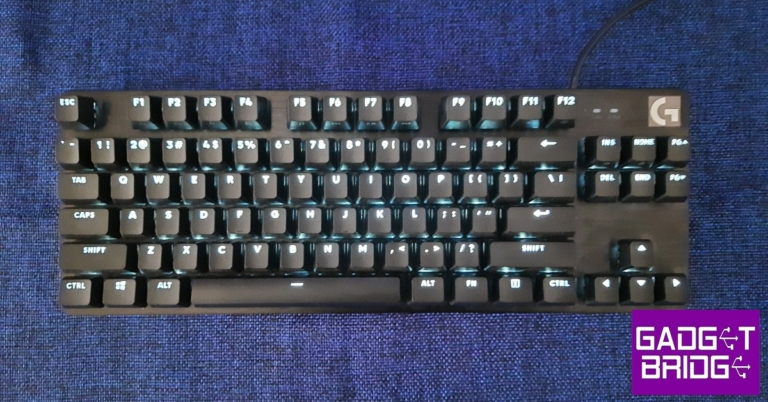
When you think of a gaming keyboard you imagine something extravagant that is just as pleasant to look at as it is powerful to work with. However, if you’re looking to build a gaming rig on a budget, extravagance usually takes a backseat in favour of a more performance-oriented device. Logitech’s recently released G413 TKL SE with its clean, minimal design and sturdy build offers just that. Currently priced at Rs 5,995, it is one of the more affordable mechanical gaming keyboards that still has a premium touch to it. We used the Logitech G413 TKL SE for a week, here is our review. Read Also: OnePlus Monitor X27 and OnePlus Monitor E24 launched in India

Logitech G413 TKL SE review: Design

Pulling the G413 TKL SE out of the box, you’ll immediately notice the clean design and robust build. Logitech has stripped the gaming keyboard to its bare essentials, getting rid of all the bells and whistles without compromising on the make and the form. Inside the box, you will also find the user documentation, a hotkey guide, and a Logitech sticker along with the mechanical keyboard. Logitech G413 TKL SE review: Design The ‘TKL’ stands for ‘tenkeyless’ which means that the G413 TKL SE does not have the number pad on the right side of the keyboard. This adds to the compactness of the keyboard and users who do not find much use for the Numpad will welcome this layout. If a Numpad is something you deem essential to a keyboard, you can go for the non-TKL G413 SE. There are also no macro keys, wrist rest, or dedicated media keys (although the F keys double up to serve some media functions). There are capslock and scroll lock indicators on the top right part along with the Logitech logo. Moving on, the G413 TKL SE feels like a rock-solid keyboard with the top case made out of a low-carbon aluminium alloy. It is a build that inspires confidence and leaves no questions about the case’s durability. The PBT plastic keypads are an upgrade over the ones found in the standard G413 and give the keyboard a more premium feel. The keys are stable, lacking a significant wobble, and can sustain heavy usage without showing any signs of wear. You can even pull out the pair of feet at the bottom to elevate the keyboard. The keys are individually illuminated by white LED backlights, with no other colour options. Logitech has not offered RGB lighting on this keyboard. The brightness can be directly controlled from the keyboard itself by using the ‘Fn + F2 or F3’ shortcut. Since the G413 TKL SE is not compatible with Logitech’s G Hub app, this feature does come in handy. Unlike the G413, the keycaps of the G413 TKL SE are swappable.

Logitech G413 TKL SE review: Performance

In terms of performance, the Logitech G413 TKL SE does exactly what it’s supposed to do. We didn’t expect any extra features that would knock our socks off but were anticipating a satisfactory experience while gaming and performing typing tasks. For those looking for an affordable gaming keyboard, the G413 TKL SE is a great place to start.  Logitech G413 TKL SE review: performance Perhaps the most important change in the G413 TKL SE is the presence of ‘Long Hua’ switches instead of the Romer-G switches found in its predecessor. The Long Hua is similar to Cherry MX switches but doesn’t replicate the exact performance of Romer-G. You will need a slightly stronger keypress while gaming and typing. However, it is something that you get used to pretty quickly and is an understandable change given the low cost of the keyboard. According to Logitech’s official numbers, the G413 TKL SE offers an Actuation distance of 0.07in with the Actuation force required being 50g. The total travel distance is 0.16in.  Logitech G413 TKL SE review: performance We played several different games like Apex Legends, Destiny 2, and DOOM Eternal using the G413 TKL SE. You don’t need a driver or installation software to use this keyboard, it is entirely ‘plug n play.’ The tactile switches performed decently but we were impressed by the degree to which Logitech has restored the low latency on this keyboard. The keypresses were registered immediately and we never felt like the keyboard was a step behind while gaming. With a 6-key rollover, you can press up to 6 keys at once and the keyboard will register your input correctly. We would highly recommend the G413 TKL SE to newbie gamers who are looking for a high-performing keyboard within a budget. Gaming performance aside, the typing experience on this keyboard was also very satisfactory. However, if you want to use it exclusively for non-gaming-related tasks, there are other more affordable choices you can go for. Unlike other Logitech keyboards, the G413 TKL SE is not compatible with the G Hub software. This means you cannot customise the keys or access any additional functions. Read Also: Sony HT-A5000 and HT-A3000 soundbars with 360 Spatial Sound Mapping launched in India

Verdict

At Rs 5,995, the Logitech G413 TKL SE is a decent entry-level mechanical gaming keyboard. There is no room for complaints when it comes to the durability and robustness of the keyboard. The performance while gaming and typing is also quite satisfactory and you can easily use the keyboard for long gaming sessions without feeling any fatigue. However, the lack of macro keys and G Hub compatibility limits the functionality a tiny bit.

Pros

Robustness, great build quality PBT keycaps Low latency while gaming Price

Cons

No dedicated macro keys Not compatible with G Hub For the latest gadget and tech news, and gadget reviews, follow us on Twitter, Facebook and Instagram. For newest tech & gadget videos subscribe to our YouTube Channel. You can also stay up to date using the Gadget Bridge Android App. You can find the latest car and bike news here.

OnePlus announces Community Sale to celebrate its 9th Anniversary

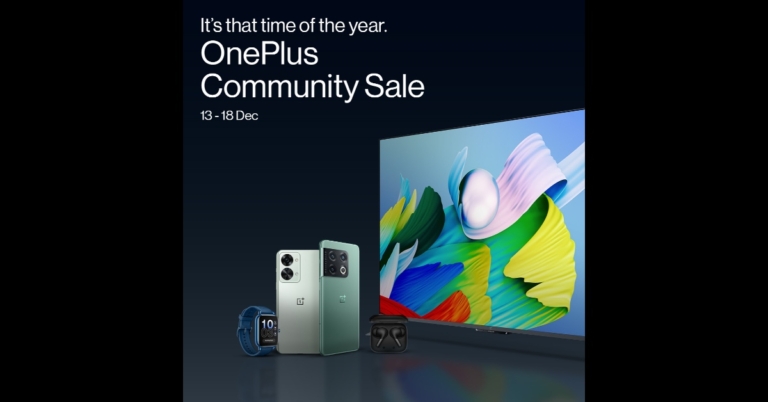
OnePlus has announced amazing deals across its line of 5G-ready Smartphones, Smart TVs, Audio, Wearables, and a newly introduced series of Monitors to commemorate its 9th anniversary. The OnePlus Community Sale is already live and users will be able to take advantage of a variety of discounts across all categories and channels. Customers can take advantage of attractive deals on the OnePlus 10 Series, OnePlus Nord Series, Smart TVs, and other ecosystem items. The is now live and will be accessible till December 25 in the country. Users may get an Rs 5000 discount on the OnePlus 10 Pro 5G via OnePlus.in, OnePlus Store App, OnePlus Experience Stores, Amazon.in, and Partner Stores. Customers can get an instant bank discount of up to Rs 5,000 on the OnePlus 10T 5G, up to Rs 6,000 on the OnePlus 10 Pro 5G, and up to Rs 5,000 on the OnePlus 10R 5G via ICICI Cards purchases on OnePlus.in, OnePlus Store App, OnePlus partner stores, OnePlus Experience stores, and Amazon.in. OnePlus and iOS users can also exchange their previous devices for an Rs 10,000 discount on both the OnePlus 10 Pro 5G and the OnePlus 10T 5G via OnePlus.in, OnePlus Store App, OnePlus Experience Stores, Amazon.in, and Partner Stores. Users can take advantage of the exchange offer between December 13th and December 20th, 2022. Customers using ICICI Cards and EMI transactions on OnePlus.in, OnePlus Store App, OnePlus Experience Stores, Amazon.in, and Partner Stores can get an instant bank discount of Rs 3,000 on the OnePlus Nord 2T 5G and Rs 1,500 on the OnePlus Nord CE2 Lite 5G. This promotion is valid till December 18. Customers can get an instant bank discount of Rs 2,000 on the OnePlus Nord 2T 5G via ICICI Cards and EMI transactions on OnePlus.in, OnePlus Store App, OnePlus Experience Stores, Amazon.in, and Partner Stores from the 19th to the 25th of December. ICICI cardholders can now enjoy an extra Rs 1,000 off the OnePlus Nord 2T using net banking on OnePlus.in. This promotion is valid from December 13th through December 18th. From the 19th to the 25th of December, ICICI cardholders can save Rs 700 on the OnePlus Nord 2T by making a net banking transaction on OnePlus.in. ICICI cardholders can get No Cost EMI for up to 3 months on OnePlus Nord 2T and OnePlus Nord CE2 Lite from December 13th to December 25th. The OnePlus Bullets Wireless Z2, OnePlus Nord Buds, OnePlus Nord Buds Z2, OnePlus Buds Pro, OnePlus Nord Buds CE, OnePlus Nord Wired Headphones, and OnePlus Nord Watch will be available for Rs 1699, Rs 2499, Rs 4499, Rs 8990, Rs 1899, Rs 599, and Rs 4499, respectively. Customers who use ICICI Cards can also get an Instant Bank Discount of Rs 1000, Rs 300, and Rs 150 on the OnePlus Buds Pro, OnePlus Buds Z2, and OnePlus Bullet Wireless Z2, respectively. Customers using ICICI Cards can get an Instant Bank discount of Rs 2,000, Rs 3,000, and Rs 2,000 on the OnePlus TV 32Y1, OnePlus TV 43Y1, and OnePlus TV 40Y1, respectively. Customers who purchase the OnePlus TV 43Y1S PRO, OnePlus 55Q1, or OnePlus 55Q1 PRO with ICICI Cards will receive an instant bank discount of Rs 1,000, Rs 4,000, or Rs 8,000, respectively. Furthermore, ICICI Cardholders can get an instant bank discount of Rs 3,000, Rs 3,000, and Rs 4,000 on the OnePlus TV 50 U1S, OnePlus TV 55 U1S, and OnePlus TV 65 U1S, respectively. For ICICI Card holders, the recently announced OnePlus Monitor X 27 will be available at a discount of Rs 1000. For the latest gadget and tech news, and gadget reviews, follow us on TwitterFacebook and Instagram. For newest tech & gadget videos subscribe to our YouTube Channel. You can also stay up to date using the Gadget Bridge Android App. You can find the latest car and bike news here.
How to perform a Hard reset or Factory reset on Samsung smartphones?

0
Performing a factory reset (also known as a hard reset) on your smartphone restores it to its ‘factory settings.’ Every customisation and setting gets reset to its default state and all your personal data is erased from the device. In other words, a factory reset turns your phone back to how it was when you pulled it out of the box. So, when should you perform a factory reset? Most users tend to utilise this option when they need to quickly erase all data from their device. If you’re selling your smartphone, a factory reset will remove all the pictures, files, login information, apps, and every other kind of personal data from your device. A factory reset also comes in handy when your phone is experiencing some issues but you cannot diagnose the problem. In this article, we show you how to perform a factory reset or a hard reset on a Samsung smartphone. Read Also: Best ways to block an Airtel SIM easily?

How to factory reset your Samsung smartphone from Settings

Before you perform a factory reset on your smartphone, make sure you back up all your data either on an external storage device or on an online data backup service. Once the factory reset is completed, all data will be erased from your smartphone. Step 1: Go to Settings, scroll down and select General management. Step 1: Go to Settings, scroll down and select General management. Step 2: Tap on ‘Reset.’ Step 2: Tap on ‘Reset.’ Step 3: Select ‘Factory data reset.’ Step 3: Select ‘Factory data reset.’ Step 4: Scroll down and tap on ‘Reset.’ Step 4: Scroll down and tap on ‘Reset.’

How to factory reset your Samsung smartphone using Find My Device

Google’s ‘Find My Device’ service helps you find your smartphone in case you lose it or it gets stolen. If you are logged in to your Google Account on your smartphone, you will be able to locate it even if it is switched off. One of the better features of ‘Find My Device’ is that it lets you remotely wipe out all the data from your device so it doesn’t fall into malicious hands. Here’s how you can do it. Step 1: Go to the ‘Find My Device’ webpage and log in using your Google Account. Step 2: Click on ‘Set up Secure and Erase.’ Find My Device Step 3: Click on ‘Erase’ in the popup dialogue box. Step 3: Click on ‘Erase’ in the popup dialogue box. How to perform a Hard reset or Factory reset on a Samsung smartphone? Step 4: After the factory reset is complete, the lock screen will appear on your screen. Select ‘Use my Google Account instead’ to log in to your device. Select ‘Use my Google Account instead’ How to perform a Hard reset or Factory reset on a Samsung smartphone?

How to factory reset your Samsung smartphone using ‘Find my Mobile’

Samsung’s very own ‘Find my Mobile’ service can also help you remotely erase all the data on your smartphone. Follow these steps to find out how.  Step 1: Go to https://findmymobile.samsung.com/ and sign in using your Samsung account. Step 2: Select ‘Erase data’ from the menu on the right side of the screen. Step 2: Select ‘Erase data’ from the menu on the right side of the screen. How to perform a Hard reset or Factory reset on a Samsung smartphone? Step 3: Enter the code sent to your smartphone to verify your identity. After you’ve entered the code, the factory reset process will begin. Read Also: How to Easily Download YouTube Shorts on any Smartphone – Android or iPhone

Conclusion 

This is how you can perform a  hard reset or factory reset on your Samsung smartphone. While performing a factory reset is the easiest way to restore your smartphone to factory settings, you don’t need to use it all the time. It is usually reserved for rare occurrences when you can’t diagnose the problem with your phone. If you are experiencing a network issue with your smartphone, you can try performing a network reset. Experiencing issues with the onscreen keyboard? Try resetting accessibility settings. Unlike a factory reset, these fixes will not erase your data. For the latest gadget and tech news, and gadget reviews, follow us on Twitter, Facebook and Instagram. For newest tech & gadget videos subscribe to our YouTube Channel. You can also stay up to date using the Gadget Bridge Android App. You can find the latest car and bike news here.

JellyCar Worlds makes its Apple Arcade debut

Apple Arcade released a new vintage driving game called JellyCar Worlds. According to Apple, the game features classic and unusual soft body mechanics and gameplay in the present era. It provides an ad-free gaming experience on supported iPhones, iPads, and Macs. Players must journey across several jelly-made worlds in a jelly-made automobile. Moreover, Sneaky Sasquatch, is also getting a major content update. Apple has added the all-new JellyCar Worlds to Arcade. The new edition is an updated version of the popular JellyCar Worlds game. JellyCar Worlds, from Walaber Entertainment, brings the iconic iOS game — with its nostalgic and characteristic soft body mechanics and gameplay — into the modern day. The idea is simple enough: you play as a jelly automobile, and deliciously gelatinous hijinks occur. JellyCar Worlds is an all-new modern take on the JellyCar game, with the same unusual soft body mechanics and gameplay. Travel across different jelly-made worlds on a jelly-made automobile. Players will use the gelatinous nature of the vehicle and environment to navigate levels, overcome obstacles, and find the exit. Players can even develop their own car designs and record their own sound effects. As previously stated, Sneaky Sasquatch is getting a huge content update. Sasquatch is running for mayor in this significant new update. Sasquatch’s home is once again in jeopardy, and only a successful election campaign to become mayor can rescue it. Players will be tasked with erecting signs, advertising on billboards, shaking hands with locals, befriending as many people as possible, and other tasks. Apple Arcade also added new holiday-themed content to Bloons TD 6+, including a new tower, a new Boss Bloon (Dreadbloon), and more. Whereas in Fruit Ninja Classic+, players can acquire the new Christmas Tree Blade during the Christmas Event, which runs from December 9 to December 27. This patch also introduces three new Blade abilities: Bamboo Shoot, Pixel Love, and Golden Ember Blade. SongPop Party now features a new Chat feature that enables participants to send messages and emotes to other players. Players may also check out five new festive playlists for SongPop Party’s in-game Christmas event, which runs from December 15 to December 25, as well as five new playlists for the game’s New Year event, which runs from December 26 to January 2. For the latest gadget and tech news, and gadget reviews, follow us on TwitterFacebook and Instagram. For newest tech & gadget videos subscribe to our YouTube Channel. You can also stay up to date using the Gadget Bridge Android App. You can find the latest car and bike news here.