Amazon Quiz Answers Today 2 November 2022: Participate to win Rs 5,000

Have you participated in the Amazon Quiz today? If not then participate in the 2 November 2022 Amazon Quiz as it has already gone live on the app. The daily quiz can be played from 12 AM to 11:59 every day on the mobile app platform. Today e-commerce is giving the chance to win Rs 5,000 Amazon Pay Balance. Every day Amazon brings a fresh quiz for its customers. By participating in the quiz the participants can win an Amazon Pay Balance of up to Rs 50,000. The quiz can only be played on the mobile app as it is not available for the desktop platform. The quiz contains five easy questions and you have to answer all the questions correctly. The participants will then be shortlisted for a lucky draw to select a winner. Whereas the results are declared at the end of the month. Check out today’s Amazon quiz answers to win Rs 5,000. Amazon Quiz Today Prize – Rs 5,000 Amazon Pay Balance Quiz Date – 2 November 2022 Daily Timing – 12 AM to 11:59 PM Winner Announcement – Today 12 PM

Amazon Quiz Answers Today 2 November 2022

Question 1: Which film won the Best Film (Drama) award at the Golden Globes 2022? Answer: The Power of the Dog Question 2: Which city has the world’s longest metro network? Answer: Shanghai Question 3: Kazhuveli Wetland was recently declared as the 16th Bird Sanctuary of which state? Answer: Tamil Nadu Question 4: This is the famous Jacques Cartier bridge in which city? Answer: Montreal Question 5: Which national park of India is known to have the highest population of this animal? Answer: Kaziranga

How To Play Amazon Quiz

Only app users are eligible to play the Amazon quiz every morning from 12 AM to 11:59 PM. The quiz is not available on the desktop. For those who are unaware of how to play the Amazon quiz below are the steps, you can follow to take the quiz.
  • Firstly download the Amazon app from Google Play Store or App Store
  • Now fill in the required information through the Sign Up option.
  • You need to log in to the Amazon app and scroll down on the home screen to find the Amazon Quiz banner.
  • Tap on the Amazon Quiz banner and tap on the Start button to start the Quiz.
  • Now you will get 5 questions and you need to answer them correctly. One wrong answer will eliminate you from the Quiz.
  • After answering all the questions correctly you are now eligible for a Lucky Draw.
  • The winner’s name will be announced today at 12 PM.
For the latest gadget and tech news, and gadget reviews, follow us on TwitterFacebook and Instagram. For newest tech & gadget videos subscribe to our YouTube Channel. You can also stay up to date using the Gadget Bridge Android App. You can find the latest car and bike news here.

Are Online Gaming In Singapore Legal?

As of now, Online Gambling in Singapore still remains illegal. Despite this, people in Singapore are showing a growing interest in wagering online, and there are now more and more sites offering online gaming in Singapore. The city-state is seeing a nearly daily increase in the number of residents participating in online gambling through a variety of websites. In spite of the fact that Singapore is a very small nation with a population of just more than 5.5 million, it is home to two of the most prestigious real-world casinos in all of Asia. In addition, it is illegal to gamble online in Singapore at online gambling sites that are not run by the government. If you are a resident of Singapore or are just visiting the country, then if you gamble online at an illegal casino that is based in Singapore, you do it at your own risk. Having said that, according to some extensive research regarding legalities surrounding the use of online casinos in Singapore, players do not need to worry about playing at the most reputable offshore online gambling platforms which are accessible to Singapore residents. This is because there are no laws around the use of establishments which operate offshore.

How To Narrow Down Your Options To The Safest Gambling Websites In Singapore

It is essential to select the top gambling sites available in Singapore. If you are gambling on a website that has a questionable reputation, and they steal your money, you will have no legal recourse and your money won’t be returned to you under any circumstances. Due to the existing legislative status of online gambling in Singapore, there are many fraudulent gambling websites in Singapore that are accessible to people living in the island city-state. If you do not play at one of the most reputable gambling websites in Singapore, you run the risk of suffering a significant loss. If you want to be absolutely certain that you will be playing with one of the most reputable online gambling sites in Singapore, and if you settle on going it alone, the following factors should guide your decision-making so that it is autonomous and well-informed.

Reputation

Gamble at Singapore online casinos with a good reputation both locally and internationally, making sure they are reputable and long-standing. Find websites that lawfully sponsor football teams and other sports tournaments. You may trust them with your money and personal information.

Licensing

Though not needed, any website that allows Singaporean players must hold a gaming license. You must verify cloned sites‘ license claims. If necessary, find websites with valid licenses from top-tier service providers like Malta, Gibraltar, or Curacao.

Payment Methods

Payments within Singapore’s online gaming accounts can be difficult to fund and withdraw from if you don’t use the proper payment method. Online gambling sites in Singapore don’t accept bank accounts, debit cards, or credit cards. Find Singapore online casinos that accept e-wallets and cryptocurrencies. This will simplify adding funds and withdrawing winnings.

Games

Find a trustworthy online gambling site that accepts Singaporeans and has many games. Choose an online gambling site with many baccarat and blackjack tables, since Singaporeans love live casino games. Benefits include roulette, sic bo, dragon tiger, and keno. If you prefer online slot machines, find a website that offers lots of them.

Safety & Security

Bets reveal account details. This implies sending sensitive data online. Thus, your online casino must keep your data secure. SSL-encrypted sites with robust privacy policies are best.

Sign-Up Incentives & Gambling Bonuses

If you win a lot, the bonus size, how it is put together, the wagering conditions, and how long you have to meet them are most essential. A high turnover rate on a consistent block of bonus money lowers its score. Whether the wagering restrictions apply to the bonus and the total amount complicates bonus decisions. Since turnover includes both your investment and your bonus, it doubles.

User Experience

No one appreciates a website with blinking animated GIFs, poor navigation, and difficult betting options. You must click the button five times to see if your bet worked. Even if the website merely has spaces, it must be searchable by person and firm. Site planning is essential. It should be easy to find if you simply remember part of the name. Avoid casinos with complicated websites.

Mobile App Experience

The mobile app should work well and provide the same games and odds as the desktop version. Flash-based slots have been discontinued since the turn of the century. Mobile shouldn’t have a different game catalogue than desktop. We merely claim to be playing on a mobile device to obtain bonus points. You should support earning more.

Customer Support

This area covers various types of support, including self-help tools like FAQ pages and contact forms. Most casinos have at least three ways to contact them to answer. Mail: It’s easy to ask a question and check on it whenever you want. Call or chat live: In a hurry, you need a phone number or live chat service. The FAQs may answer your question. If so, it’s probably easy.

Conclusion

Despite the fact that online gambling is not permitted in Singapore, this Southeast Asian nation is ranked by our authors as having the second-largest percentage of gamblers of any country in the world. This is quite possible due to the fact that Singapore is a very rich island city-state while having a relatively low population when compared to other countries in Asia. This article provides you with details to ensure that if you choose to take a risk like the millions of other people that do so here and bet online while in Singapore, you can do so without putting yourself at risk. For the latest gadget and tech news, and gadget reviews, follow us on TwitterFacebook and Instagram. For newest tech & gadget videos subscribe to our YouTube Channel. You can also stay up to date using the Gadget Bridge Android App. You can find the latest car and bike news here.

Key Technological Developments in the Micro Betting Industry

A quick search on micro betting will return article upon article about why is a game changer for the betting industry. Terms like “increased engagement” and “revenue driving” are often included in these articles. Despite these terms being perilously close to buzzwords, those righting them are not wrong. In this article, we will see how technology is the vehicle that drives increased engagement and revenue.

Quick Definitions

Essentially micro betting is a combination of live betting and prop betting. In a live betting scenario, a bet can be placed by the user while the game is still on. Prop betting allows the user to bet on a specific scenario occurring during the match. Prop bets need not relate to the final outcome, namely who won or lost, just that the specific event occurred. Micro betting allows the user to place a live bet on a specific outcome to occur while the game is on and is a development of keen interest to onlinegamblers.com. They are smaller in the time frame and resolve far faster than bets dependent on a final outcome. For instance, a user could bet on the outcome of the next drive in an NFL game or who the next batter is in an MBA inning. It is this speed of the win-loss cycle that increases both engagement and revenue.

Smartphone Apps

While the theory behind micro-betting has been established it is enabled at a massive scale by technology. One of the most important technological advancements that enabled micro-betting to become a reality was the smartphone and apps. Betting could now be done in the comfort of one’s home with a few simple finger presses on a smartphone’s display. Along with improved payment processing, the app can allow for the speedy topping up of digital wallets and withdrawals of winnings.

Cryptocurrency and BlockChain Technology

Increasingly, sportsbooks are looking to adopt cryptocurrencies as both a payment and withdrawal option for users. This has been welcomed by users for the increased security, privacy, and anonymity that these currencies offer. The user can feel more confident that their wallet won’t be hacked due to increased security features like multi-factor authentication. Further, users can keep their betting private as crypto-wallets do not store personal information. Related to cryptocurrency, in the sense that it provides the infrastructure on which the currency operates is the blockchain. Some sportsbooks have opted to create apps on these decentralized networks to cater to their more privacy focussed users. The Ethereum network if exploited correctly can open new target markets.

Conclusion

That is not the final word on technological developments for the micro-betting industry. Promising developments in virtual reality technology could be leveraged to increase the already high level of engagement micro betting enjoys. That being said, it is in smartphone apps and the blockchain technology that the most current and successful developments have occurred. For the latest gadget and tech news, and gadget reviews, follow us on TwitterFacebook and Instagram. For newest tech & gadget videos subscribe to our YouTube Channel. You can also stay up to date using the Gadget Bridge Android App. You can find the latest car and bike news here.

Mivi Duopods F50 Review: Doesn’t burn a hole in your pocket

The dominance of other well-known brands like Apple, Samsung, Xiaomi, Oppo, OnePlus, etc is being challenged by Indian tech companies when it comes to wireless earbuds. The Indian ones have a beautiful appearance and are fairly well-priced. However, there are times when their audio quality and overall performance miss the mark when compared to the well-known of industry leaders. The brand-new Mivi Duopods F50 wireless earphones, which cost roughly Rs 1,000, recently went on sale. Let’s look at the Mivi Duopods F50 review, which we have been using for over 10 days.

Mivi Duopods F50 Review: Design and Performance

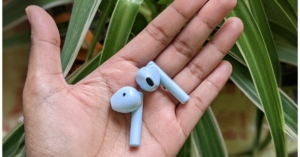
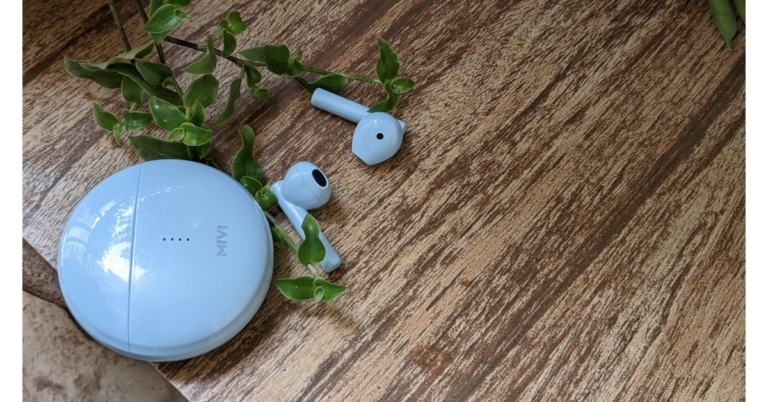
Let’s start by discussing the design. The casing of the Mivi Duopods F50 is fashioned like a pebble. They have four vertically positioned LEDs on the front that light and red and blue LEDs on the earbuds indicate pairing status and battery life, respectively. They are composed entirely of plastic. The housing of the earbuds is light yet strong enough to withstand accidental falls even though it is constructed of plastic. Mivi Duopods F50 Review India The affordable earbuds come in four different colours: white, black, blue, and coral. The option we have for testing is the colour blue. Both earbuds are open in shape and have a stem-like appearance. No matter how snugly they may fit, they don’t enter the ear canal. Since the earbuds lack rubber tips, we discovered that they never seem to comfortably fit into our ears and occasionally fell out. Background noise made it difficult to listen to music because the loose fit failed to successfully seal our ears. So, you have to keep the volume high to cut out the ambient noise. Mivi Duopods F50 Review India Due to the Mivi Duopods F50’s IPX4 rating, you may use them anywhere, including in the gym or while exercising in the rain. These earphones come with touch-sensitive controls that may be used for volume control and music switching. By double tapping the left earpiece, the voice assistant can be activated. To answer or end a call, you can also double-tap the right earpiece. The right earbud must be double-tapped to start or stop the music. Additionally, by pressing on the right bud, users can change the volume without constantly taking their phone out of their pocket. Mivi Duopods F50 Review India A USB-C port for charging can be found at the bottom of the case. After initial setup, simply take the earbuds out of the charging case and connect them to your device and it will automatically pair. The device features Bluetooth 5.1 capabilities with a 10-metre range. The duopods produce distortion-free music thanks to their 13mm dynamic drivers. The earphones are suitable for casual use but do not give professional-grade audio quality, therefore they do not sound amazing in terms of audio quality. Nice but not excessively deep bass response is received.  However, there is no issue with this in relation to vocals. They were distinct and clear, making them a fantastic option if you enjoy singing. Additionally, compared to other devices we’ve lately tried, the sound was much louder, as we uncovered. When it comes to gaming, there is a lag. Mivi Duopods F50 Review India One more thing about the sound: it’s recommended to keep it at 80% or lower because the music sounds a bit distorted when the volume is turned up all the way. However, the battery life of the Duopods F50 is remarkable. The 500mAh battery in these Mivi earphones provides 50+ hours of continuous use. The case can recharge the earphones five times, and it offers about 9 hours of talk time. With a short 10-minute charge, the battery backup may last for about 10 hours. We have to mention, the call quality on the Duopods F50 is excellent and the other person can hear you perfectly. Although passive noise cancellation technology aids in reducing background noise, they are nonetheless susceptible to it when you are commuting.

Verdict

Given the price, we believe that the Mivi Duopods F50 TWS is far better than some of the earbuds we have used in the same price bracket. We state in every review that the fit and audio quality are purely subjective. They cannot be compared to high-end TWS earbuds like Apple Airpods or Samsung Galaxy Buds. We can draw the conclusion that the sound and quality are suitable for casual use, such as watching movies or listening to podcasts and are ideal for the majority of listeners. For the latest gadget and tech news, and gadget reviews, follow us on TwitterFacebook and Instagram. For newest tech & gadget videos subscribe to our YouTube Channel. You can also stay up to date using the Gadget Bridge Android App. You can find the latest car and bike news here.

On beta versions of iOS and Android, WhatsApp is testing the “Message Yourself” feature

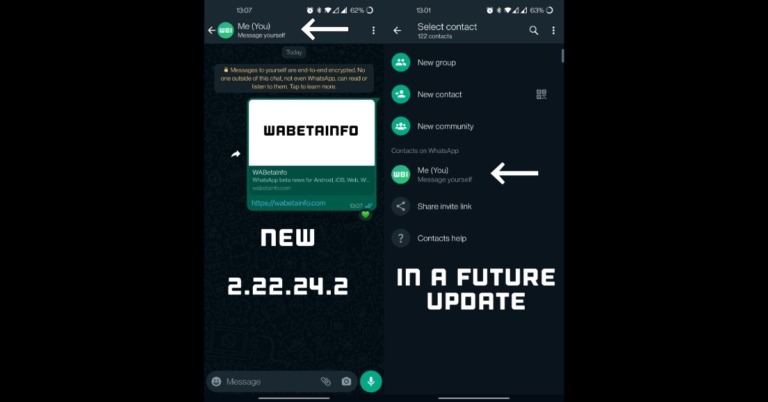
For some beta testers on the WhatsApp beta for Android and iOS, WhatsApp is currently testing several changes for sending messages to oneself. In a future update, the “Message Yourself” feature is anticipated to arrive on WhatsApp. According to a report, Android users are probably getting to use it first with the version 2.22.24.2 upgrade. In the future, WhatsApp plans to include the ability for users to message themselves. According to a report from WABetaInfo, WhatsApp is now rolling out the “Message Yourself” feature to a small group of beta testers as part of a test. It is necessary to clarify in order to prevent misunderstandings that sending messages to your own phone number has always been an option, however, WhatsApp for Android requires a click to open the message. As per the report, some beta testers found that WhatsApp is now promoting that chat by adding “message yourself” as the chat caption after switching to the most recent version of the Android app. There are no changes when sending texts to your personal phone number following the update. WhatsApp is just utilising a separate caption to highlight the communication that contains your personal phone number. As per the report, some beta testers may have noticed improved message synchronisation in the chat when using their own phone number for a while now: if you send a message to the chat using your phone number, it will always be synced with your other linked devices because it is no longer an unsupported feature when using multi-device. It will also be simpler for users to access their own chat if they still don’t have one in the conversations list because a future version of the Android app will make the chat with your phone number accessible within your contacts list as well. Your phone number is currently hidden in your contacts list; thus, you must open WhatsApp in order to see it. The WhatsApp feature tracker also noted that, for some beta testers who have installed the WhatsApp beta for iOS 22.23.0.70 upgrade, WhatsApp is also displaying the chat with your phone number by utilising the “message yourself” caption. For select beta testers, the chat with oneself is now highlighted by using a different caption, and it will be rolled out to more users over the next few days. A later version of the software will include the option to access your phone number in the contacts list. For the latest gadget and tech news, and gadget reviews, follow us on TwitterFacebook and Instagram. For newest tech & gadget videos subscribe to our YouTube Channel. You can also stay up to date using the Gadget Bridge Android App. You can find the latest car and bike news here.

How to Access iCloud on Your Android Phone?

0
If you just made the switch from an Apple iPhone to an Android device, transferring your data can be a tedious task. There is no way to transfer all your data at once between the two platforms. Even WhatsApp rolled out its chat migration feature earlier this year, which you can read about here. You will need to manually look up if different apps offer data migration between the two platforms. However, there are certain iCloud features that you can use on your Android device. In this article, we show you how to access iCloud on your Android phone. Read Also: Samsung 5G vs OnePlus 5G – Which Is better?

Access iCloud on your Android smartphone using the web browser

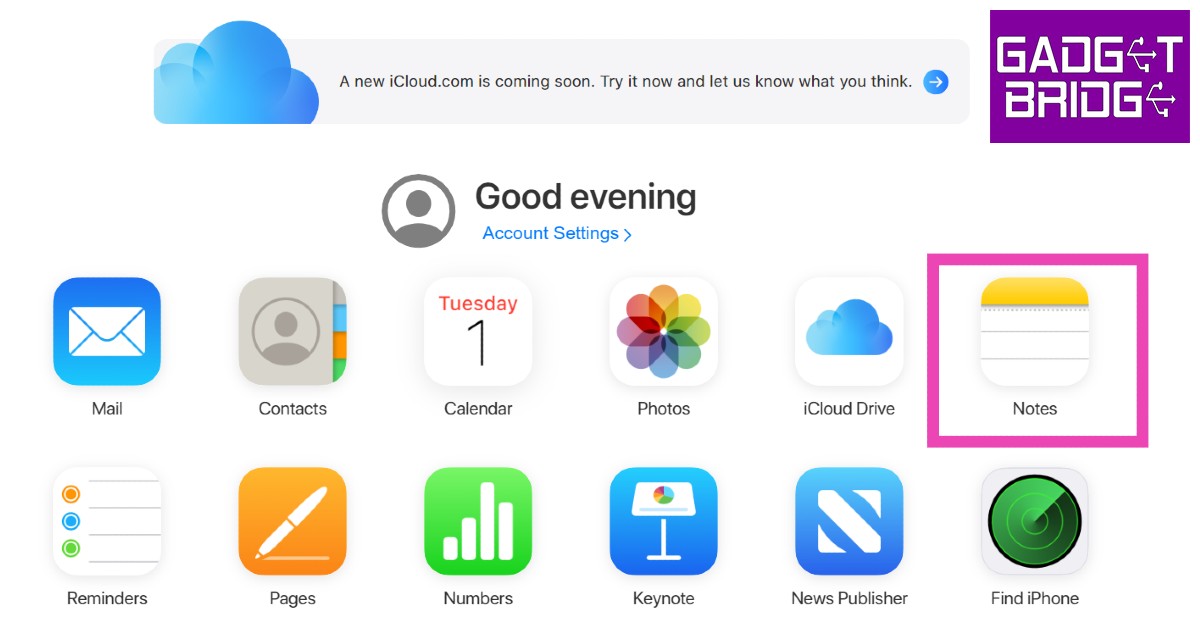
You can access your iCloud data on an Android device using the web browser. Simply go to www.icloud.com and log in using your Apple ID. Since there is very limited compatibility between Android and iOS platforms, you will not be able to use all the iCloud features on the Android device. iCloud’s functionality on an Android device is restricted to the very basics, and it offers only the essential features. Here’s how you can use iCloud on your Android device. Step 1: Go to www.icloud.com and sign in using your Apple ID. Step 1: Go to www.icloud.com and sign in using your Apple ID. Step 2: Open your Apple device and confirm your login attempt. This will give the Android device access to your iCloud account. Step 3: Enter the six-digit code for two-factor verification. Step 4: Tap on the ‘Trust’ button if you intend on using the Android device to access your iCloud account again. Doing this will disable the two-factor verification process for future login attempts. As we mentioned earlier, you can only access a few iCloud services on an Android device. These include:
  • Photos
  • iCloud Drive
  • Notes
  • Mail
  • Reminders
  • Find my iPhone

Access iCloud Mail on your Android device

Step 1: Go to the Gmail app on your Android smartphone. Step 1: Go to the Gmail app on your Android smartphone. Step 2: Tap on the menu at the top left corner of the screen and select Settings. Step 2: Tap on the menu at the top left corner of the screen and select Settings. Step 3: Tap on ‘Add account’ and select ‘Other’. Step 3: Tap on ‘Add account’ and select ‘Other’. Step 4: Type in your iCloud email address followed by the password. Step 4: Type in your iCloud email address followed by the password.  Your iCloud mail will be synced to the Gmail app on your Android device.

Sync iCloud contacts to your Android device

Step 1: Open and log in to the iCloud website on a PC.  Step 2: Click on Contacts. Step 2: Click on Contacts. Step 3: Select the contacts you want to sync to your Android device. You can select multiple contacts by pressing the Shift key and clicking on them. Step 4: Click on the Settings icon at the bottom left corner of the screen and select ‘Export vCard’. The contacts will be saved to your PC. Step 4: Click on the Settings icon at the bottom left corner of the screen and select ‘Export vCard’. The contacts will be saved to your PC. how to access icloud on android You can download these contacts to your Android device by using a USB cable for a physical transfer or by uploading them to Google Contacts or Google Drive and using your smartphone to access them.

View iCloud Notes on your Android device

Make sure your Notes are synced to iCloud by going to Settings>iCloud and turning the toggle bar on for Notes. The notes in the ‘On my iPhone’ folder in your Notes app will not be accessible on an Android device. Make sure you move these notes to another folder to access them on your Android smartphone. Now, follow these steps. Step 1: Open the iCloud website on your Android phone’s web browser and log in using your Apple ID. Step 2: Tap on Notes. You will be able to access the saved drafts from your Notes app. Step 2: Tap on Notes. You will be able to access the saved drafts from your Notes app. how to access icloud on android

View and download iCloud photos on your Android device

Step 1: Open the iCloud website on your Android phone’s web browser and log in using your Apple ID. Step 2: Click on ‘Photos’. Step 2: Click on ‘Photos’. how to access icloud on android You can either download the photos to your device one by one or select all and download them all at once. Read Also: iQOO Z6 Lite 5G Review: A powerful contender in the budget smartphone category

Conclusion

This is how you can access iCloud on your Android phone. The compatibility between the two platforms may be limited but you can still transfer your essential data between them. Compatibility may also vary for different functions. For example, if you make the switch from Apple to Android, you can still have full access to your Apple Music library since it has an Android app of its own. All you need to do is log in from the relevant ID and you will be able to access your music library on your Android device.
For the latest gadget and tech news, and gadget reviews, follow us on TwitterFacebook and Instagram. For newest tech & gadget videos subscribe to our YouTube Channel. You can also stay up to date using the Gadget Bridge Android App. You can find the latest car and bike news here.
Nokia G60 5G with 120Hz display launched in India

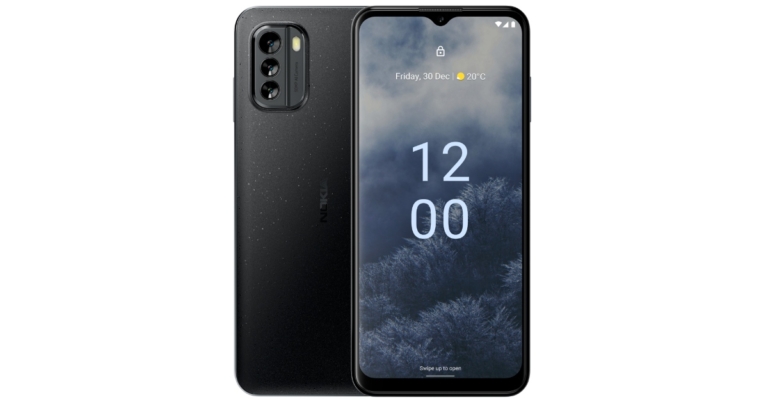
Today, HMD Global announced the debut of the Nokia G60 5G in the Indian market. The smartphone is powered by Snapdragon 695 5G SoC and features a 6.58-inch FHD+ display with a 120Hz refresh rate. Moreover, the company promises three years of OS upgrades and monthly security updates, as well as a two-year warranty—which helps users keep their phone for longer.

Nokia G60 5G specifications

The Nokia G60 5G is the most environmentally friendly member of the G-series to date thanks to its 60% recycled polycarbonate frame and 100% recycled polycarbonate back. Additionally, this Nokia smartphone features an IP52 grade for water and dust resistance. This smartphone features a 6.58-inch full-HD+ display with a resolution of 1,080×2,400 pixels. It boasts a 20:9 aspect ratio, a refresh rate of 120Hz and a maximum brightness of 500 nits. The screen is protected by Corning Gorilla Glass 5. A Snapdragon 695 5G SoC powers the G60 5G. The manufacturer has committed to up to three OS upgrades and up to three years of monthly Android security patches for the device, which runs on Android 12. The GoPro Quik App is also preinstalled on the Nokia G60 5G so you can capture, edit, and share your creativity from anywhere. The triple rear cameras on the G60 5G include a 50-megapixel primary sensor with an f/1.8 aperture. Additionally, there is a 2-megapixel depth sensor with an f/2.4 aperture and a 5-megapixel ultra-wide angle lens with an f/2.2 aperture. The device also has an 8-megapixel front camera with an f/2.0 aperture. A 4,500mAh battery with 20W fast charging capabilities is included in the Nokia G60 5G. A side-mounted fingerprint sensor is also included. In addition to supporting the 5G NSA architecture used by Indian telecoms, the G60 5G also supports the Jio True 5G SA network. Additionally, Jio True 5G’s largest and best spectrum mix at 700 MHz and 3500 MHz is supported by Nokia G60. Carrier Aggregation is also supported, allowing for the seamless fusion of various frequencies into a single robust “Data Highway” for unmatched speeds.

Nokia G60 5G price in India

The Nokia G60 5G will be available for pre-order on Nokia.com and at top retail locations from November 1 through November 7. Free Nokia Wired Buds worth INR 3599 are available for a short time. After that, on November 8, the product will be made available at a few chosen retail locations as well as online at Nokia.com. The price of the 6/128GB memory edition of the Nokia G60 5G is Rs 29999. It comes in Black and Ice colour options. For the latest gadget and tech news, and gadget reviews, follow us on TwitterFacebook and Instagram. For newest tech & gadget videos subscribe to our YouTube Channel. You can also stay up to date using the Gadget Bridge Android App. You can find the latest car and bike news here.

Redmi Note 12 Pro+ likely to be rebranded as the Xiaomi 12i HyperCharge in India

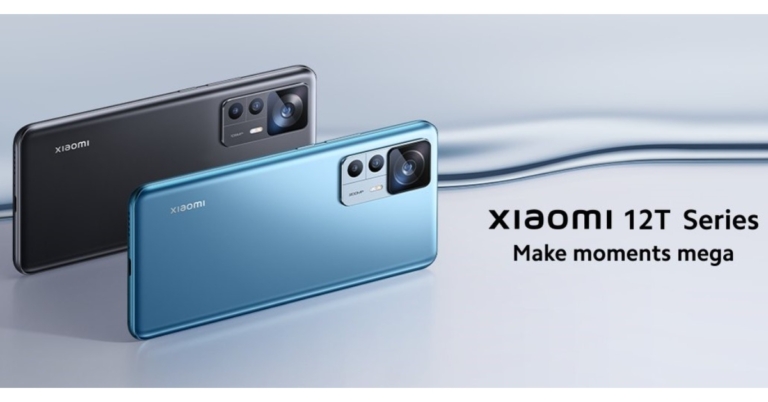
According to the latest speculation, the recently launched Redmi Note 12 Pro+ is expected to launch in India soon. Here the smartphone is likely to debut under a different name and with specifications that are also said to differ from the Chinese model. In the nation, the upcoming device is rumoured to be rebranded as Xiaomi 12i HyperCharge. It is anticipated that the Indian versions of the Redmi Note 12 series will have differing specifications from their Chinese equivalents. However, an MIUI tester asserted that the Xiaomi 12i HyperCharge will be sold in India instead of the Redmi Note 12 Pro+. Kacper Skrzypek (@kacskrz) said in a tweet that the company would introduce the Note 12 Pro+ as the Xiaomi 12i HyperCharge in India.

Redmi Note 12 Pro+ specifications

Last week, the Redmi Note 12 series made its debut in China. This lineup includes the Redmi Note 12, Note 12 Pro, and Note 12 Pro+. The Redmi Note 12 Pro+’s 6.67-inch full-HD OLED display has a refresh rate of up to 120Hz. The display supports a maximum brightness of 900 nits and a touch sampling rate of 240Hz. The display is compatible with HDR10+ and Dolby Vision. An octa-core 6nm MediaTek Dimensity 1080 SoC, up to 12GB LPDDR4X RAM, and a Mali-G68 GPU are found within the Note 12 Pro+. It comes pre-installed with MIUI 13 running on Android 12. The triple rear cameras of the Note 12 Pro+ have a 200-megapixel primary sensor with OIS. A 2-megapixel macro lens and an 8-megapixel ultra wide-angle camera are also part of the arrangement. Upfront the phone has a 16-megapixel front camera sensor for selfies. The new Redmi Pro+ smartphone is powered by a 5,000mAh battery that enables 120W rapid charging.

Redmi Note 12 Pro+ price

The Note 12 Pro+ is available in China for purchase for CNY 2,099, which equals around Rs 23,000 for the 8GB RAM with 256GB storage option, and CNY 2,299, which translates to about Rs 26,000 for the 12GB RAM with 256GB storage option. For the latest gadget and tech news, and gadget reviews, follow us on TwitterFacebook and Instagram. For newest tech & gadget videos subscribe to our YouTube Channel. You can also stay up to date using the Gadget Bridge Android App. You can find the latest car and bike news here.

How to Unlock a Samsung Phone Without the Password?

0
When it comes to device security, Samsung phones have come a long way. Back when Samsung smartphones were in their initial avatars, it was quite easy to get around the lock screen. Users frequently sought the help of various third-party apps that expertly managed to nullify any sort of protection on the device. With Samsung’s state-of-the-art security, it is almost impossible to do that now. However, there are still some legitimate ways to unlock your phone without the registered password. These methods come in handy when you don’t remember the password to your phone. In this article, we show you how to unlock a Samsung phone without the password. Read Also: Google increases the size of Workspace Individual storage from 15GB to 1TB

Use Samsung’s Find my Mobile

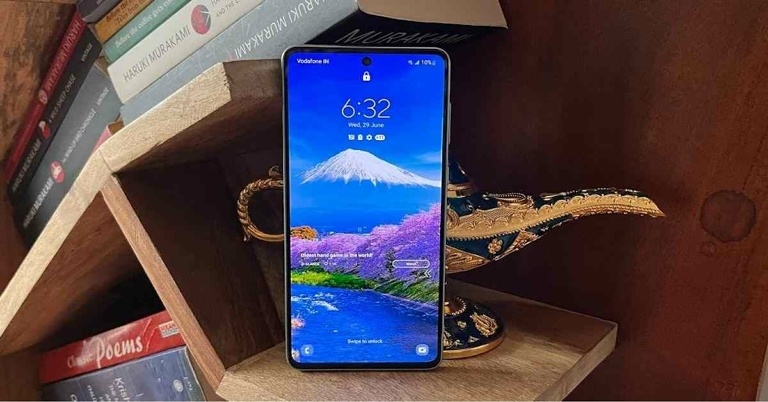
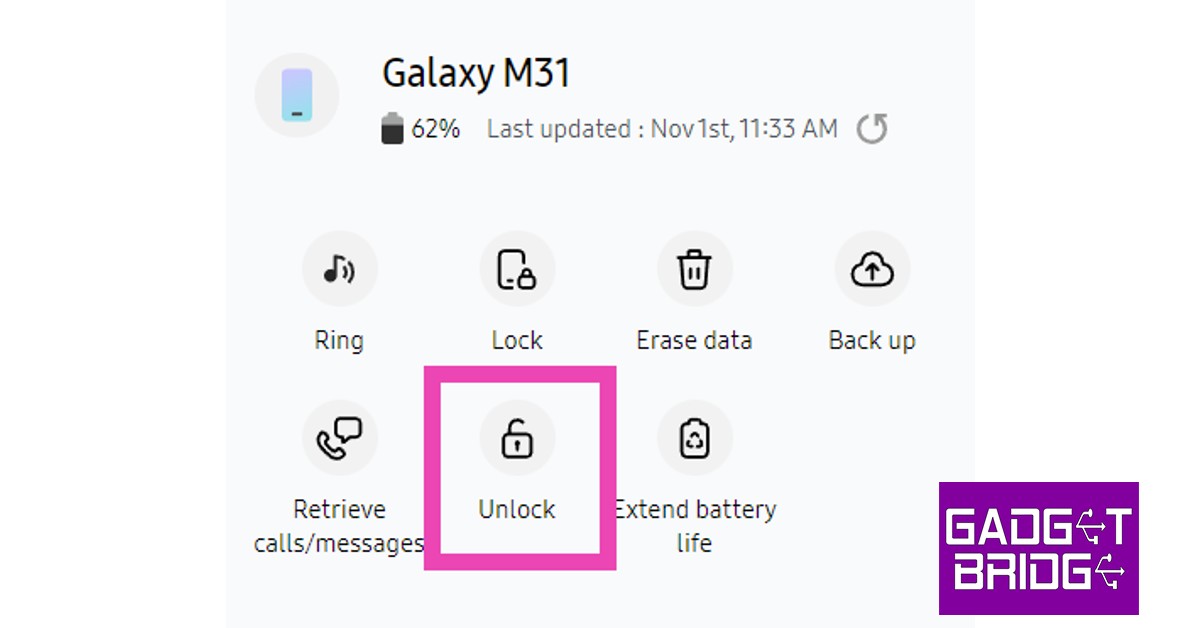
This method will only work if Remote Unlock is enabled on your device. Go to Settings>Samsung Account>Find My Mobile and turn the toggle bar on for Remote Unlock. Step 1: Go to https://findmymobile.samsung.com/ and sign in using your Samsung Account. Step 2: Select your Samsung smartphone from the left panel. Step 2: Select your Samsung smartphone from the left panel. Step 3: Click on the ‘Unlock’ icon on the right panel. You will be made to re-enter your Samsung password. After that, your smartphone’s screen will be unlocked. All the screen lock information including password, pin, and biometrics will be deleted from your phone after using this feature. Click on the ‘Unlock’ icon on the right panel.

Use Google’s Find My Device

For this method to work, you need to ensure that Google’s Find My Device is activated on your phone. Go to Settings>Google and turn on Find My Device. Also, make sure that Find My Device is set as the ‘Device admin app’. In order to do this, simply go to Settings>Biometrics and Security>Other security settings>Device admin apps and turn the toggle bar on for Find My Device.  Step 1: Go to https://www.google.com/android/find and select your Samsung smartphone from the left panel. Step 2: Select Secure Device from the left panel. You can also set up a recovery message if you want. Step 2: Select Secure Device from the left panel. You can also set up a recovery message if you want. Step 3: Find my device will lock your smartphone’s screen. Step 3: Find my device will lock your smartphone’s screen. how to unlock samsung phone without password Step 4: Follow the on-screen instructions to set up a new temporary password to unlock your device.  Step 5: Once your phone is unlocked, disable the temporary password from Settings.

Perform a Factory Reset on your device

Performing a factory reset on your smartphone is easy when the device is unlocked. However, it can get a bit tricky if you do not remember your password. Once you have performed a factory reset, you will lose all your data in the device, but you won’t need a password to unlock it anymore. Follow these simple steps to reset your phone without unlocking it.  Step 1: Turn off your smartphone by long pressing the power key and selecting ‘Power off’. how to unlock samsung phone without password Step 2: Turn your smartphone back on and press the power key until you see the Android logo on the screen. Step 3: The Android system recovery menu will appear on your screen. Since the touch controls don’t work in this mode, you will have to use the volume keys to scroll and the power key to confirm your selection.  Step 4: Scroll down to Wipe Data/Factory Reset and confirm your selection.  Step 5: Select Reboot System Now. Read Also: How to fix iOS 16.1 bug that randomly drops WiFi?

Conclusion

This is how you can unlock your Samsung phone without a password. There are a lot of third-party apps that claim they can get around the lock screen of any password-protected device, but given the kind of security smartphones are aided with these days, it is very unlikely that these apps will work. It is almost impossible to unlock a Samsung smartphone without a password unless the device has verified your identity.
For the latest gadget and tech news, and gadget reviews, follow us on TwitterFacebook and Instagram. For newest tech & gadget videos subscribe to our YouTube Channel. You can also stay up to date using the Gadget Bridge Android App. You can find the latest car and bike news here.