In This Article
Xiaomi 15 Review: Design and Display
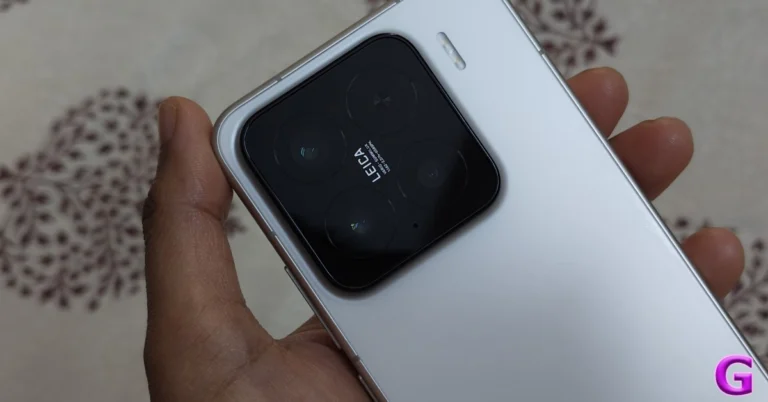
Although Xiaomi has maintained the design language of the previous generation, the Xiaomi 14‘s design is somewhat better. It features an aluminium chassis with a matte glass finish panel, which is good since it will prevent fingerprints and unintentional scratches. The ceramic shield glass protection on the front panel provides excellent protection. After that, you have a camera unit with three camera sensors. Again, the camera module is square, features the Leica logo, and rests between three lenses and a flash atop a glossy module housing.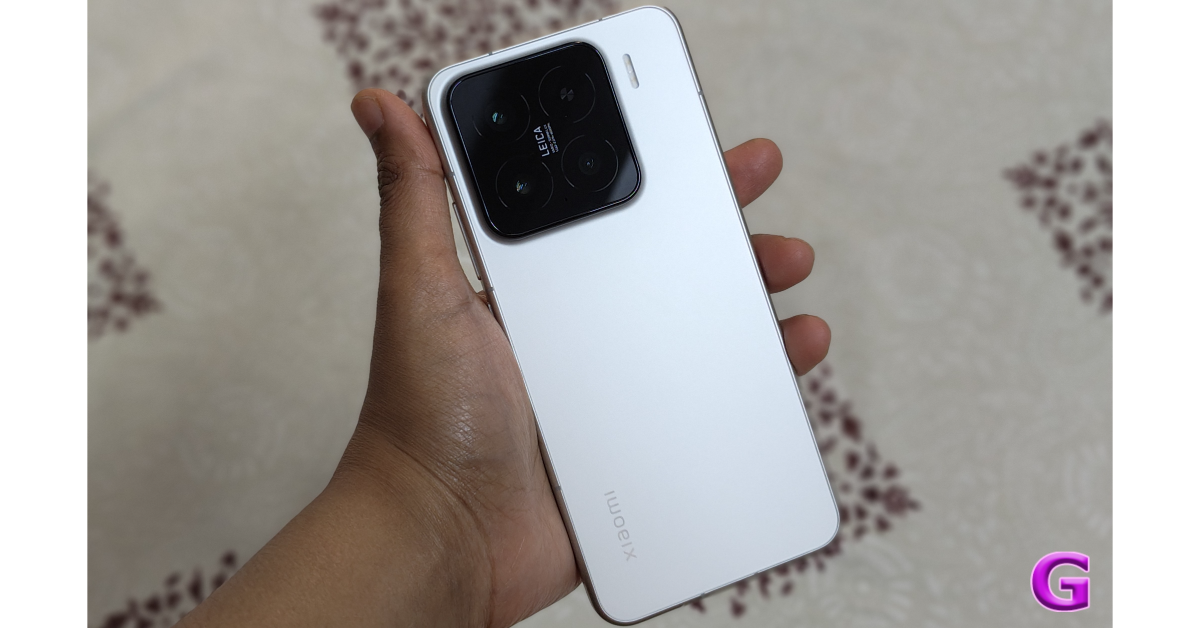 On the right are the controls for power and volume. It has a speaker unit at the bottom, a USB Type-C connector, and a dual SIM card slot.
For testing, we have the white version of the gadget. The company offers a 90W charger in the box. This little phone is unexpectedly capable of both 50W wireless and 90W cable fast charging. The charging brick is accompanied by a Type-A to Type-C cable.
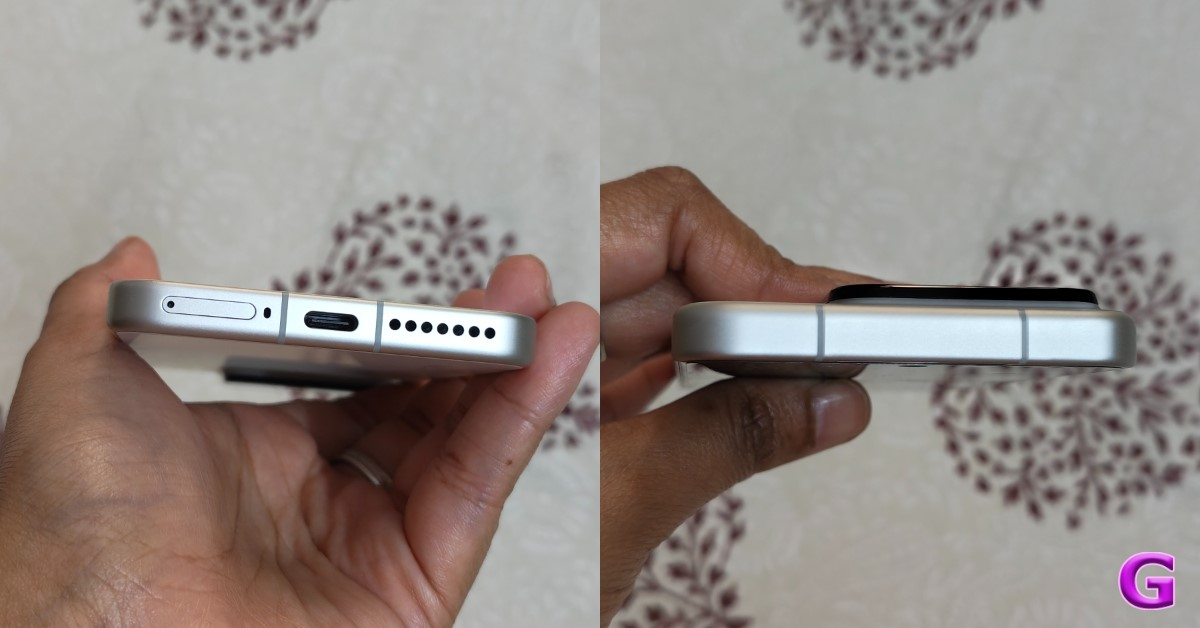
On the right are the controls for power and volume. It has a speaker unit at the bottom, a USB Type-C connector, and a dual SIM card slot.
For testing, we have the white version of the gadget. The company offers a 90W charger in the box. This little phone is unexpectedly capable of both 50W wireless and 90W cable fast charging. The charging brick is accompanied by a Type-A to Type-C cable.
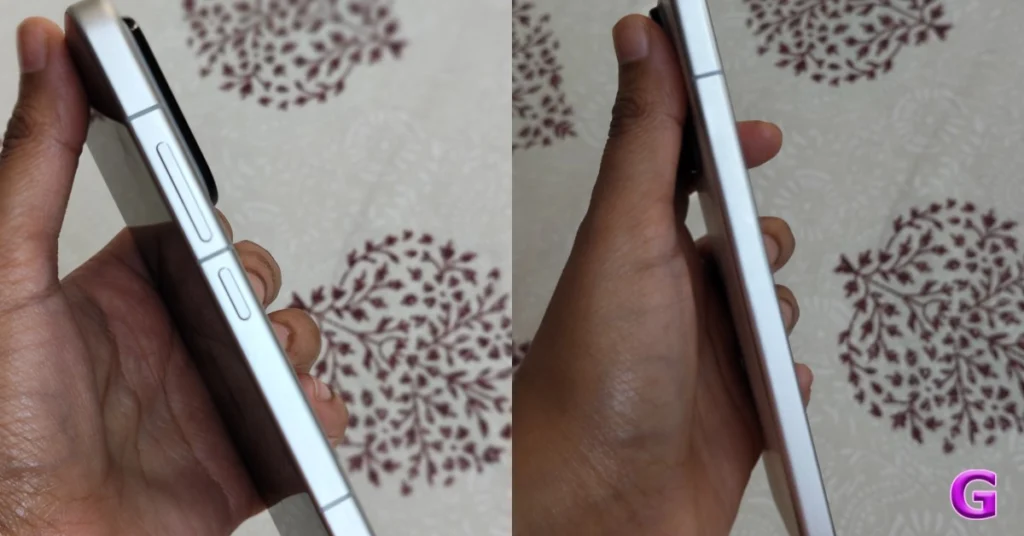 The phone is pretty comfortable to hold in one hand. The nicest part about owning a little smartphone is that it appears to be more stylish and is easy to carry in the pocket. Lightweight gadgets are also more comfortable to carry without straining your arms. The back of the phone feels a little slippery to the touch, even though it looks matte.
 To avoid unintentional drops or slips from your hand, we do suggest that you place a silicone cover over it. The glass-made rear panel will be protected, and you will have a tight grip if you use a back cover.
The back cover is included in the package, so unless you desire a different look, there’s no need to buy a new one.
To avoid unintentional drops or slips from your hand, we do suggest that you place a silicone cover over it. The glass-made rear panel will be protected, and you will have a tight grip if you use a back cover.
The back cover is included in the package, so unless you desire a different look, there’s no need to buy a new one.
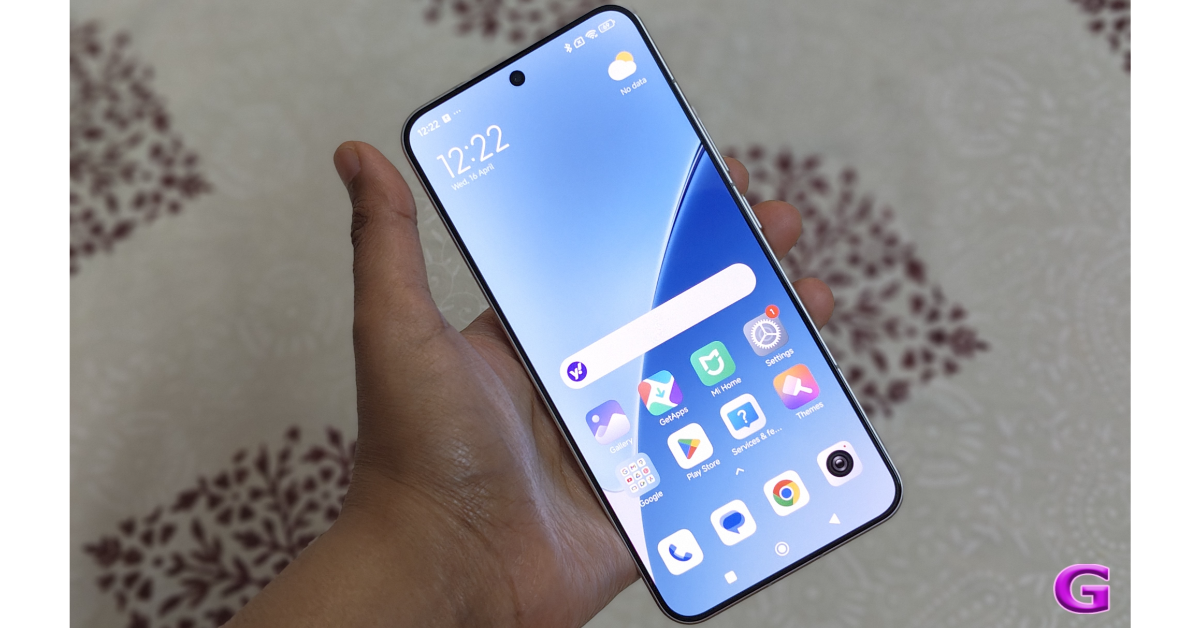 Furthermore, the edges have been curved and feature rounded corners. You have more real estate since the bezels are kept to a minimum, which looks fantastic.
Additionally, the metal frame and the gentle curves on both sides give it a high-end look and feel. The phone is not too wide for our little hands, so we could use it with one hand without any problems. The phone is water and dust resistant, with an IP68 rating.
Overall, the company’s choice to design it in a small, simple manner distinguishes it from other products on the market.
It’s time to talk about the display. The Xiaomi 15 has a 6.36-inch full-HD+ LTPO AMOLED screen with 1,200 x 2,670 pixels. The front panel’s adaptable refresh rate ranges from 1 Hz to 120 Hz. Additionally, a 3200 nit screen brightness.
Also Read: Nothing Phone (3a) Pro Review: The smartphone you can’t stop flaunting
The Xiaomi 15’s screen has precise and vibrant colours, and the text seems crisp. The screen also provides good viewing angles, and reading ability is unaffected by extreme viewing angles. It offers very realistic and fluid images for a great visual experience. Depending on user preferences and specific usage situations, the LTPO panel allows the display to automatically switch between a refresh rate of 1Hz and 120Hz while retaining a relatively low power consumption.
Furthermore, the edges have been curved and feature rounded corners. You have more real estate since the bezels are kept to a minimum, which looks fantastic.
Additionally, the metal frame and the gentle curves on both sides give it a high-end look and feel. The phone is not too wide for our little hands, so we could use it with one hand without any problems. The phone is water and dust resistant, with an IP68 rating.
Overall, the company’s choice to design it in a small, simple manner distinguishes it from other products on the market.
It’s time to talk about the display. The Xiaomi 15 has a 6.36-inch full-HD+ LTPO AMOLED screen with 1,200 x 2,670 pixels. The front panel’s adaptable refresh rate ranges from 1 Hz to 120 Hz. Additionally, a 3200 nit screen brightness.
Also Read: Nothing Phone (3a) Pro Review: The smartphone you can’t stop flaunting
The Xiaomi 15’s screen has precise and vibrant colours, and the text seems crisp. The screen also provides good viewing angles, and reading ability is unaffected by extreme viewing angles. It offers very realistic and fluid images for a great visual experience. Depending on user preferences and specific usage situations, the LTPO panel allows the display to automatically switch between a refresh rate of 1Hz and 120Hz while retaining a relatively low power consumption.
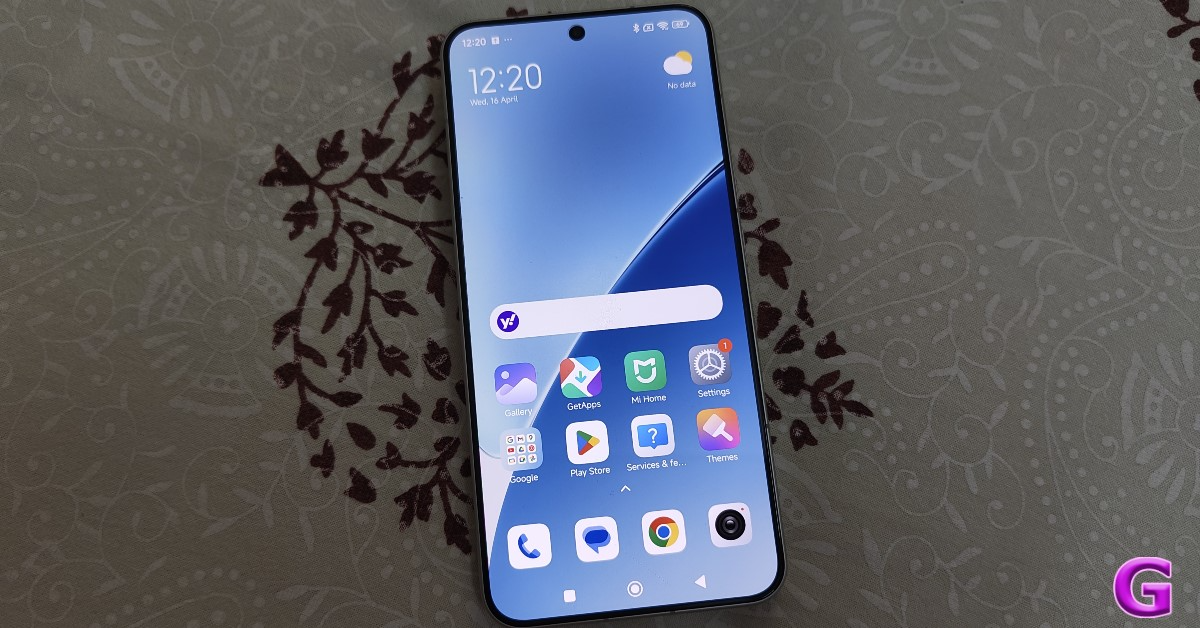 The display’s touch responsiveness is flawless. Because of the dual speakers, we had a great overall experience when watching a lot of content and YouTube videos. Dolby Atmos is supported, offering crystal-clear audio. We did not detect any distortion at maximum level, and the speakers are clean and powerful.
The display’s performance impressed us. Even though it is smaller than other devices, it is still quite capable of watching different stuff.
The smartphone has an in-display ultrasonic fingerprint sensor for security. Additionally, the fingerprint sensor is positioned well, is quite accurate, and unlocks the device quickly.
The display’s touch responsiveness is flawless. Because of the dual speakers, we had a great overall experience when watching a lot of content and YouTube videos. Dolby Atmos is supported, offering crystal-clear audio. We did not detect any distortion at maximum level, and the speakers are clean and powerful.
The display’s performance impressed us. Even though it is smaller than other devices, it is still quite capable of watching different stuff.
The smartphone has an in-display ultrasonic fingerprint sensor for security. Additionally, the fingerprint sensor is positioned well, is quite accurate, and unlocks the device quickly.
Xiaomi 15 Review: Performance and Cameras
We thought this little phone performed quite well in this area as well. Qualcomm’s Snapdragon 8 Elite octa-core SoCs power the Xiaomi 15. For high-end Android phones, this is one of the most powerful chipsets. The processor has been paired with up to 12GB of LPDDR5X RAM and 512GB of UFS 4.0 onboard storage. Every task and app is handled flawlessly by the smartphone. When it comes to online browsing, it loads every page with ease, and it was a buttery smooth experience. Check out the Geekbench 6 scores below:- Single-Core Score: 3,031
- Multi-Core Score: 9,214
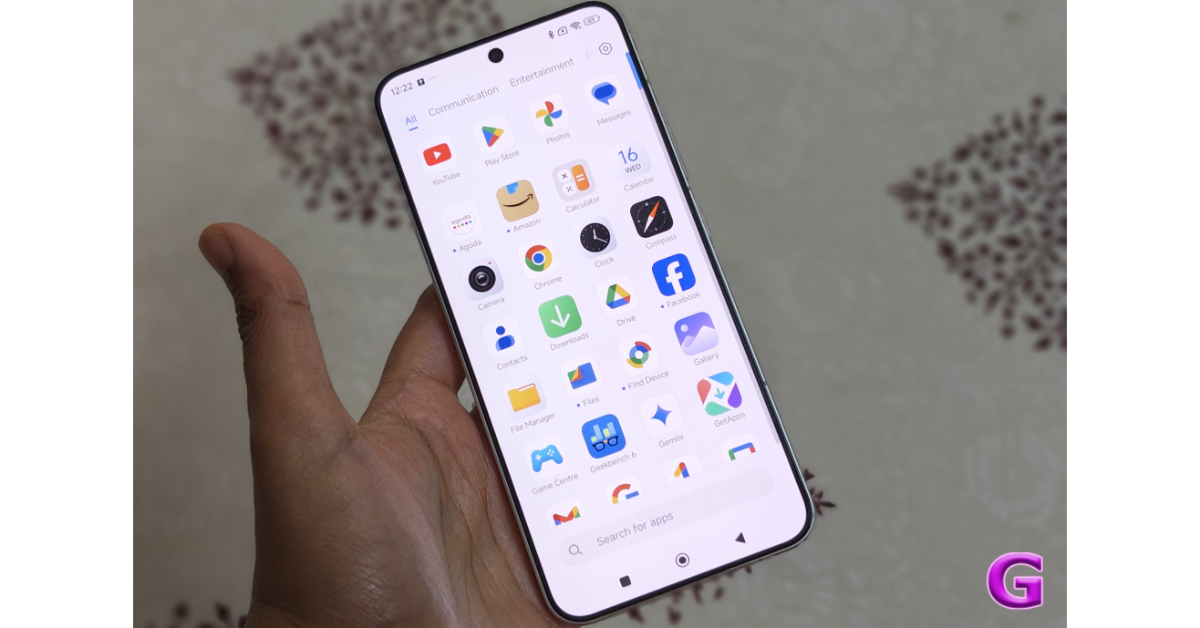 HyperOS 2.0, which is based on Android 15, is pre-installed on the Xiaomi 15. The smartphone comes with five years of security patches and four major Android upgrades, which is respectable, but it still lags behind Samsung and Google, who offer seven years of software updates.
Apart from this, the call quality is normally good, and there are no dropouts.
Let’s discuss the cameras now. The Xiaomi 15 has a Leica-tuned triple rear camera unit that includes a 50-megapixel telephoto camera with up to 3x optical zoom, a 50-megapixel ultrawide lens, and a 50-megapixel main sensor with OIS capability. A 32-megapixel front-facing camera handles both video calls and selfies.
HyperOS 2.0, which is based on Android 15, is pre-installed on the Xiaomi 15. The smartphone comes with five years of security patches and four major Android upgrades, which is respectable, but it still lags behind Samsung and Google, who offer seven years of software updates.
Apart from this, the call quality is normally good, and there are no dropouts.
Let’s discuss the cameras now. The Xiaomi 15 has a Leica-tuned triple rear camera unit that includes a 50-megapixel telephoto camera with up to 3x optical zoom, a 50-megapixel ultrawide lens, and a 50-megapixel main sensor with OIS capability. A 32-megapixel front-facing camera handles both video calls and selfies.
 The shots that come here are stunning. The camera produces natural-looking colour effects. The dynamic range is excellent, and the pictures are crisp in both well-lit and dimly lit environments.
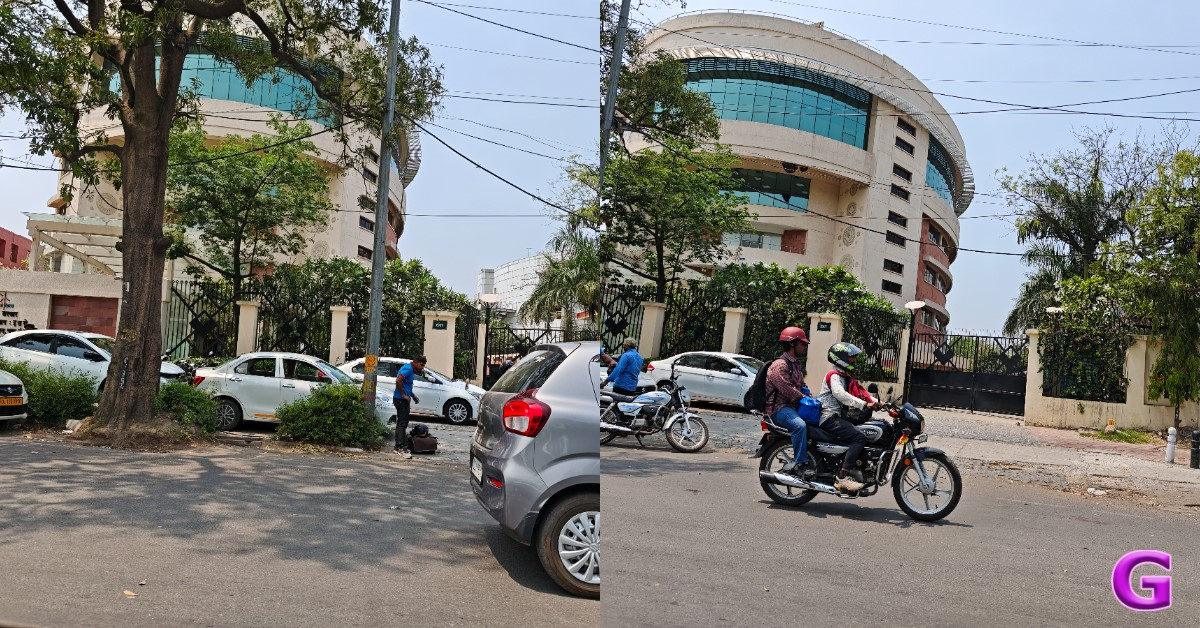 Under artificial indoor lighting, there are a lot of details, and the night mode also offers respectable details outdoors. The dynamic range is superb; neither overexposure nor overbrightening occurs.
Rich, gorgeous hues and superb details are delivered by the Xiaomi 15 camera. Zooming in allows you to see that the details are okay.
Under artificial indoor lighting, there are a lot of details, and the night mode also offers respectable details outdoors. The dynamic range is superb; neither overexposure nor overbrightening occurs.
Rich, gorgeous hues and superb details are delivered by the Xiaomi 15 camera. Zooming in allows you to see that the details are okay.







Verdict
The Xiaomi 15 has excellent hardware, a fantastic camera, and a long battery life. The compact phone performed well in all tasks, including daily usage and gaming. An outstanding experience was provided by the HyperOS optimisation, which almost eliminated slowness and errors. Based on user experience, we strongly suggest the Xiaomi 15. It is a fantastic all-around compact flagship phone. Xiaomi 15’s price in India starts at Rs 64,999. Buy Xiaomi 15 on AmazonXiaomi 15 Pros
- Compact and lightweight
- Excellent displays
- Excellent cameras
- Good battery life
Xiaomi 15 Cons
- Pricing is a little on the higher side
- It can heat up during long gaming sessions
 Step 3:
 Step 4: Swipe left
 Step 5:
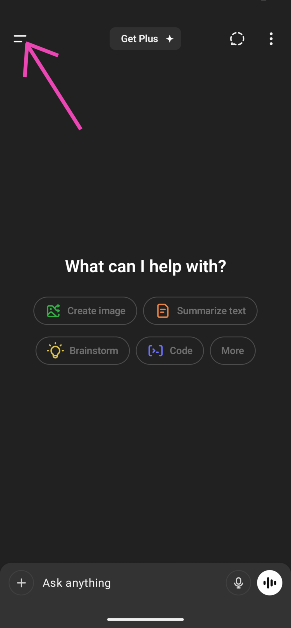 Step 3:
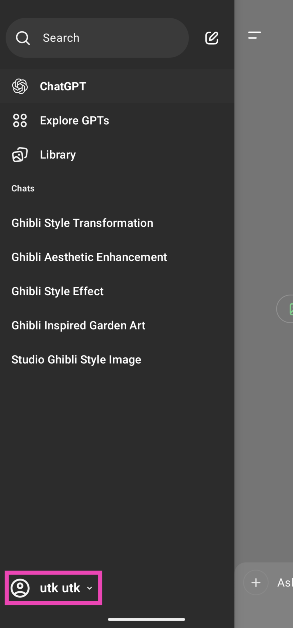 Step 4:
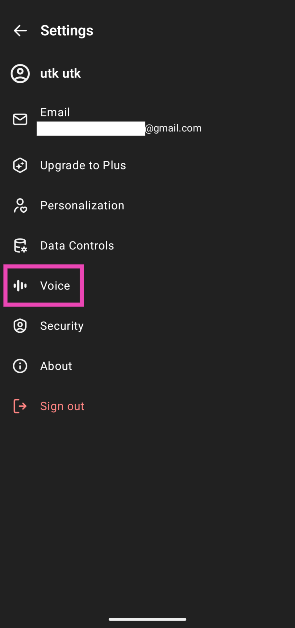 Step 5:
 Step 6: Swipe left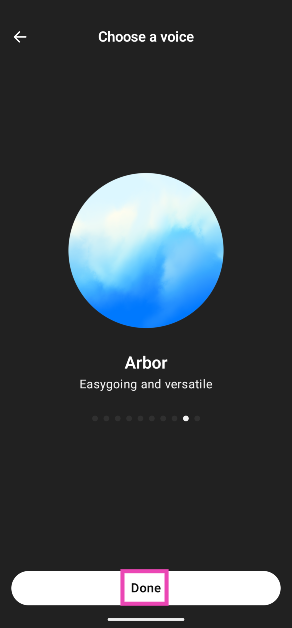
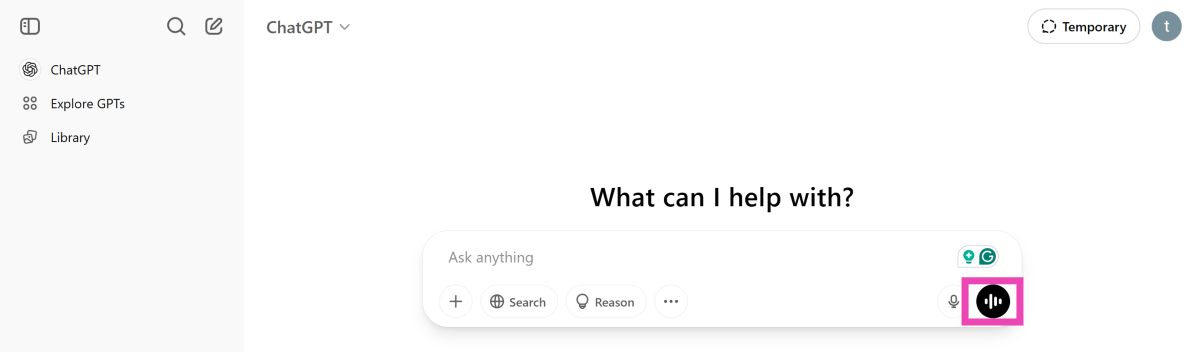 Step 3:
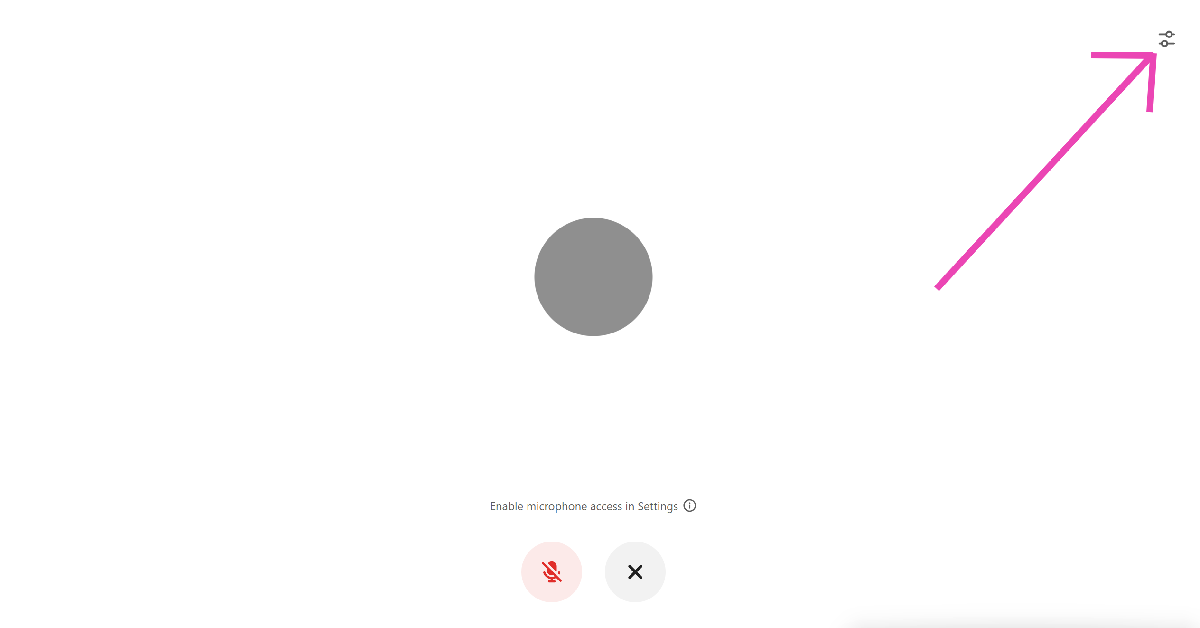 Step 4: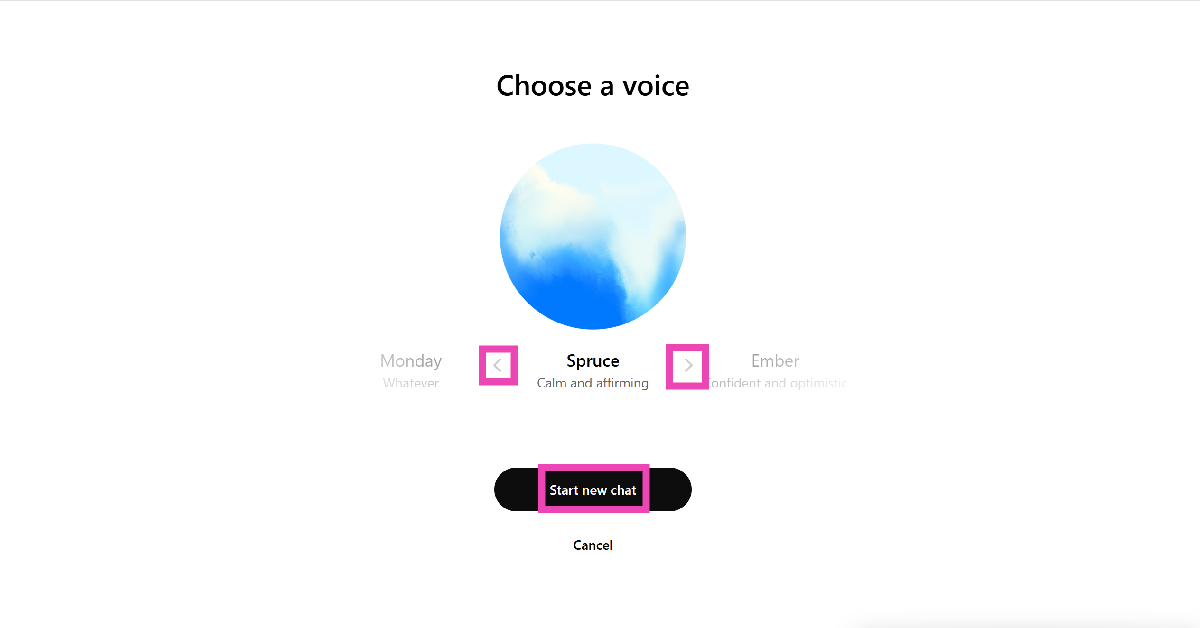
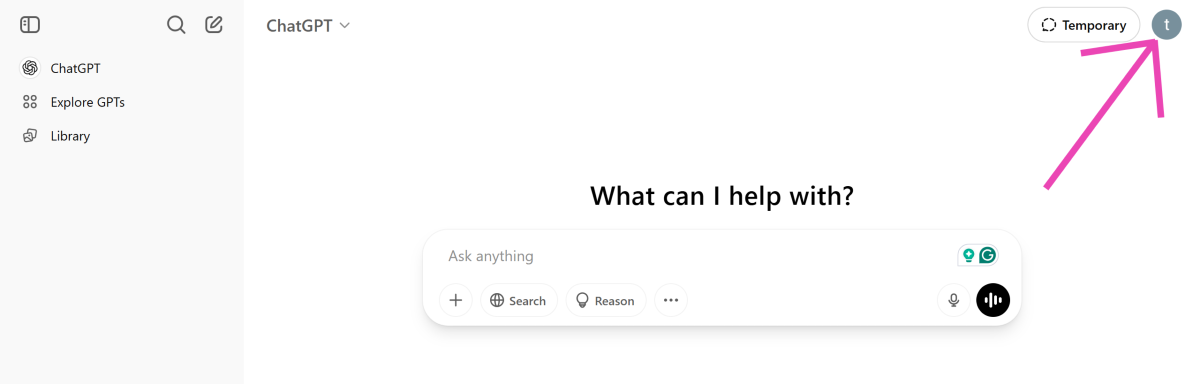 Step 3:
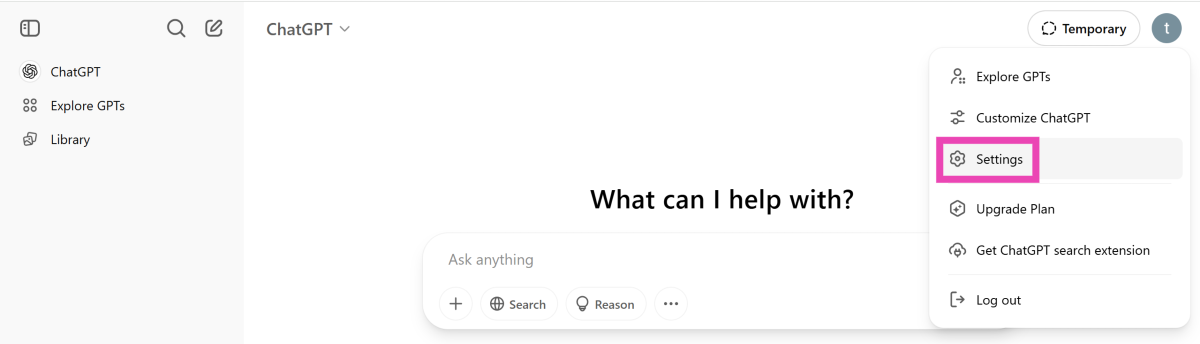 Step 4:
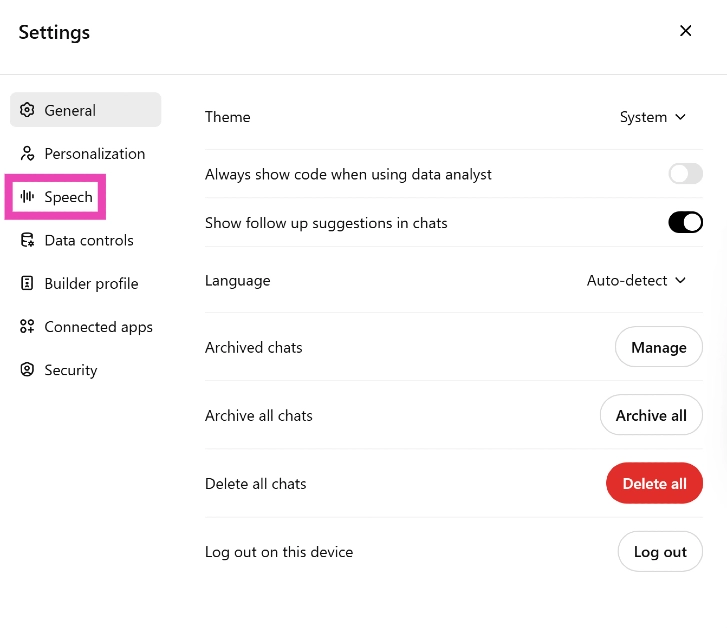 Step 5: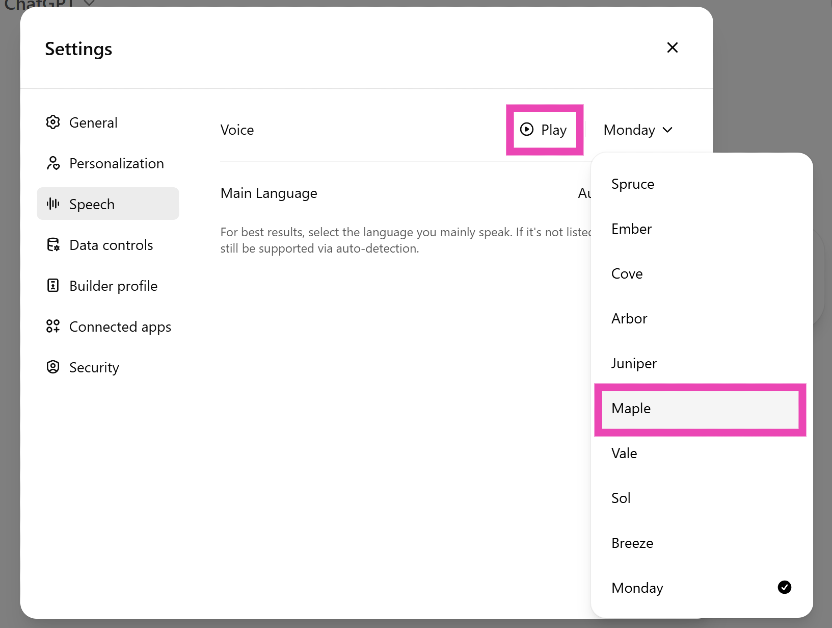
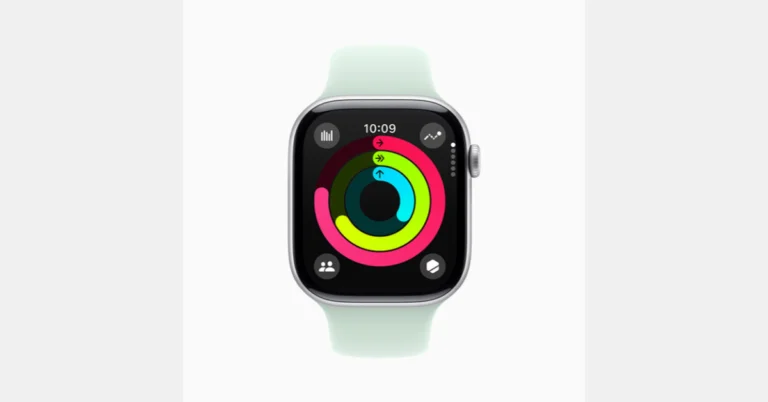





 Step 3:
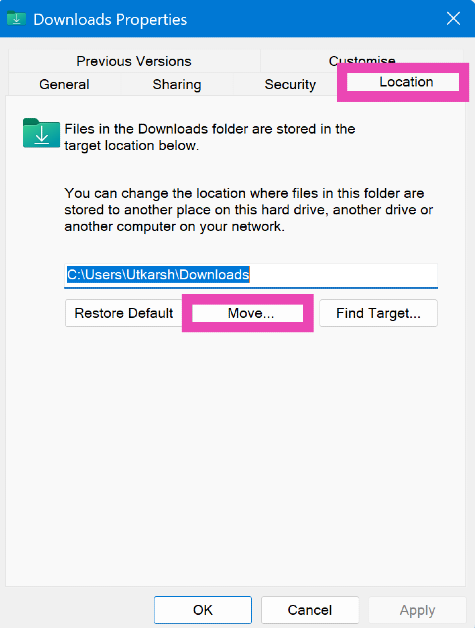 Step 4:
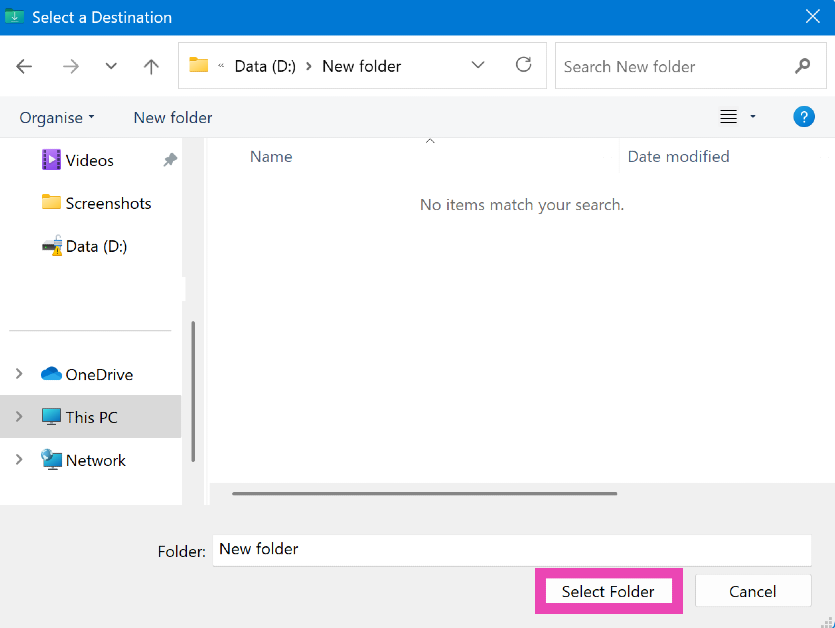 Step 5:
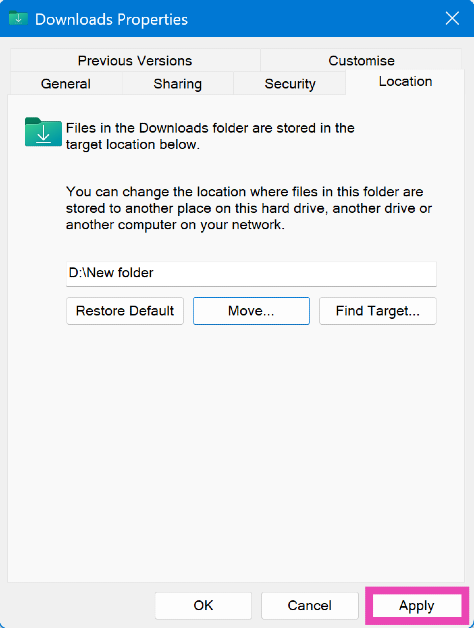 Step 6:
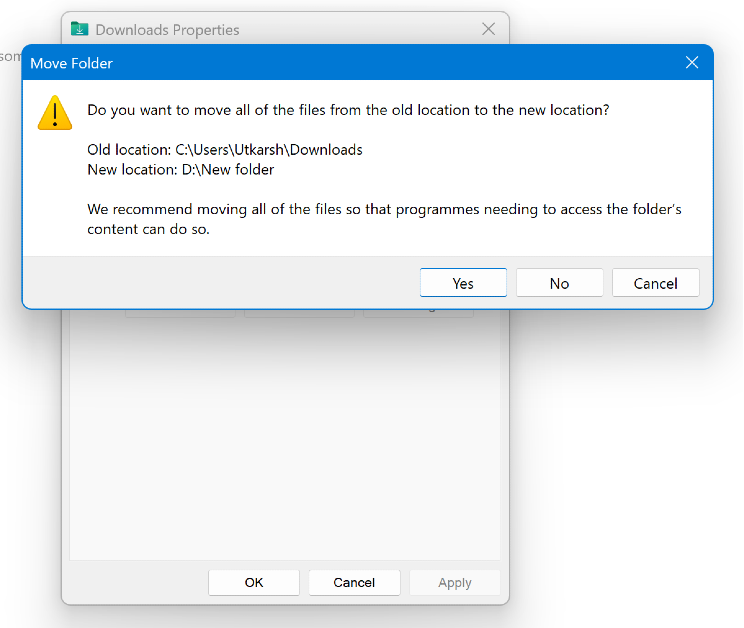 Step 7:
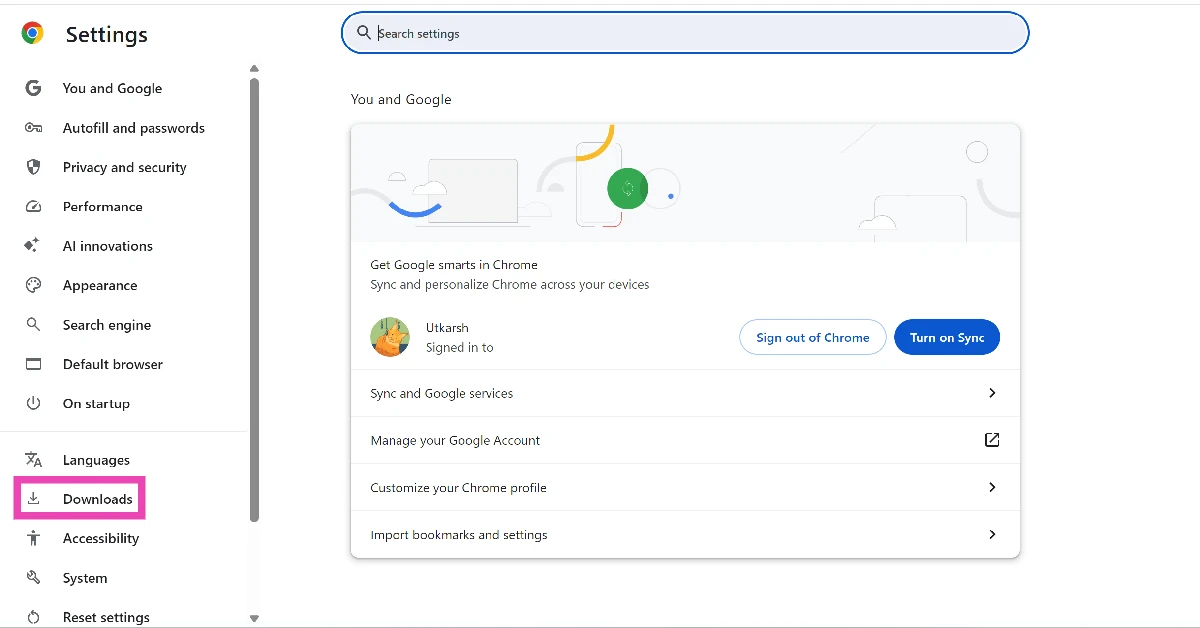
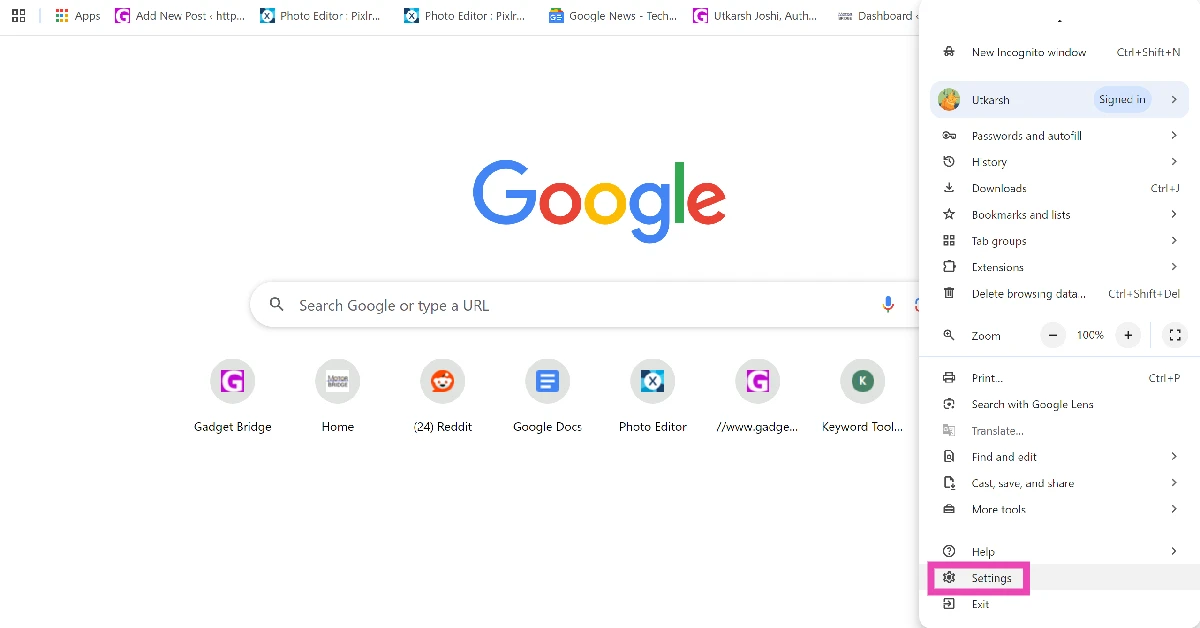 Step 2: Switch to the Downloads tab.
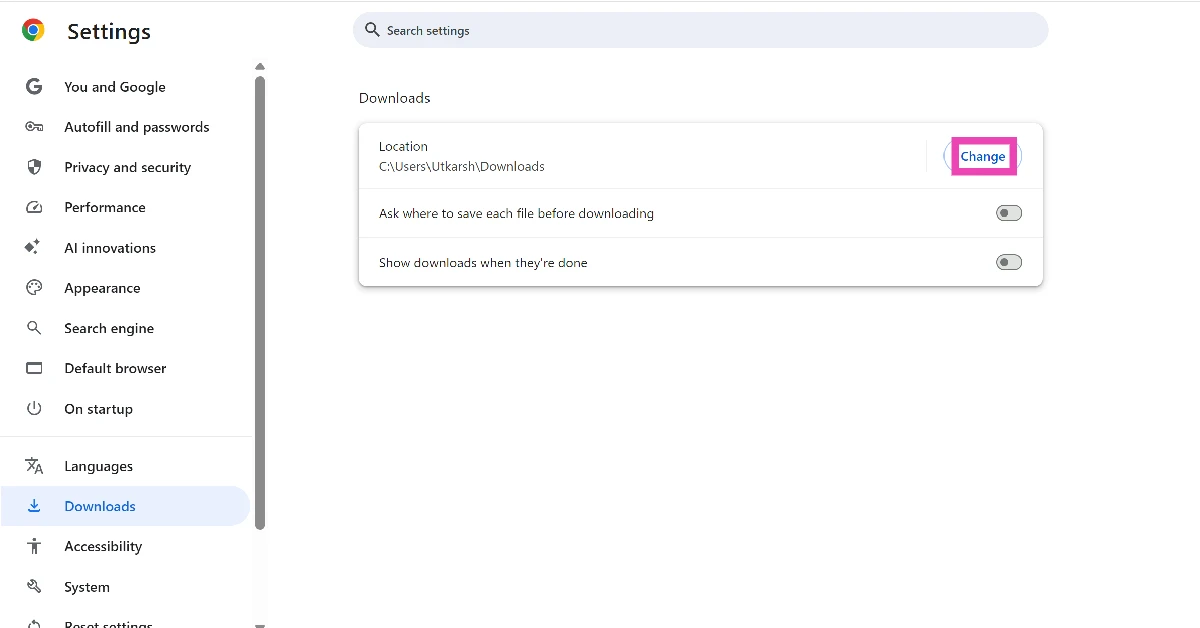
 Step 3: Hit Change next to the current download location.
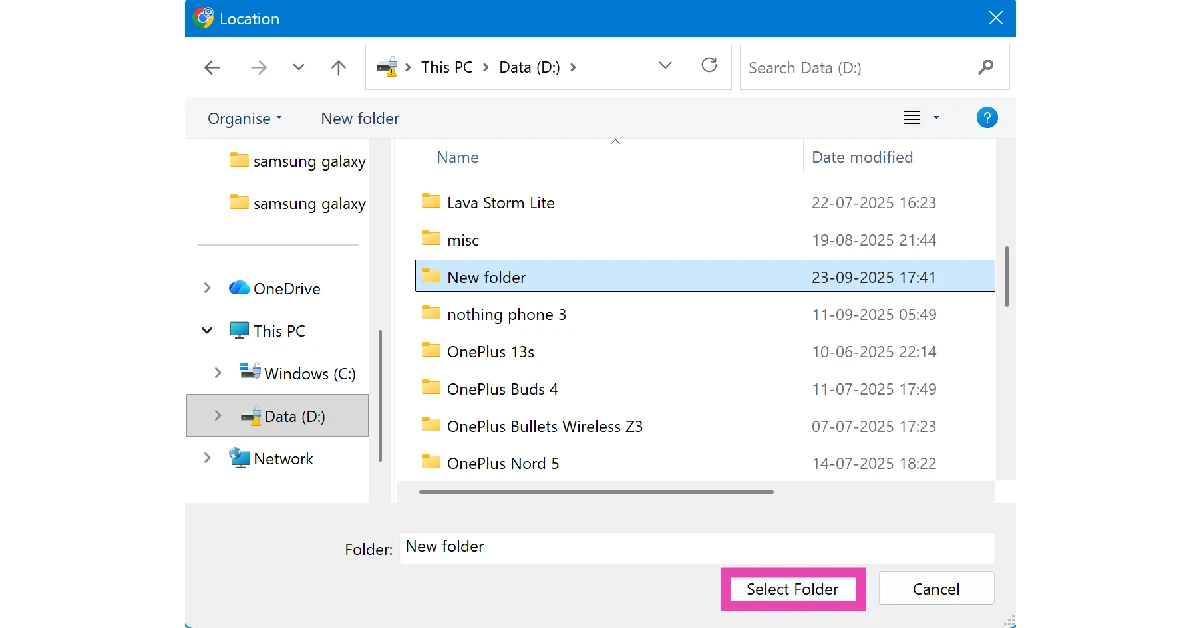
 Step 4: Choose your preferred destination and click on Select Folder.
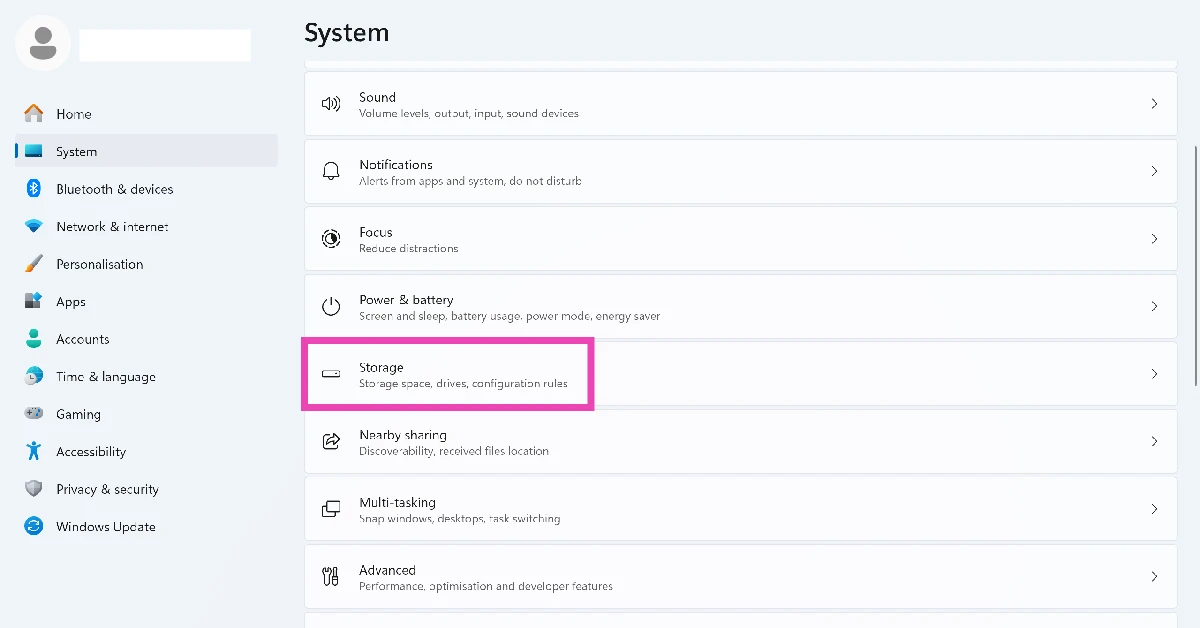
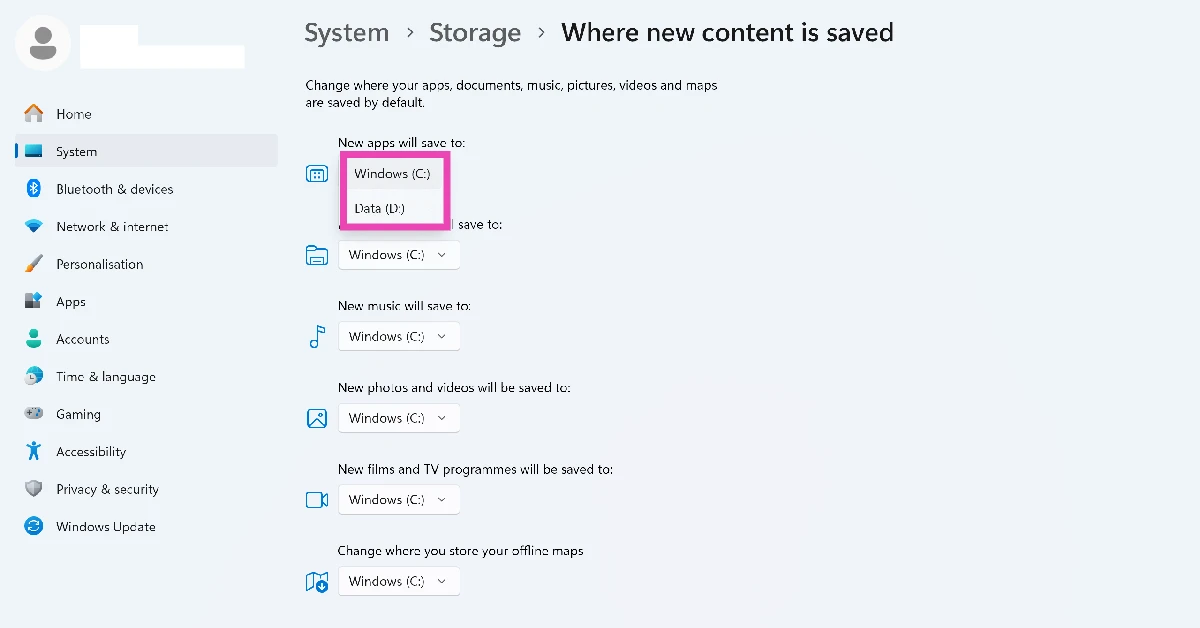
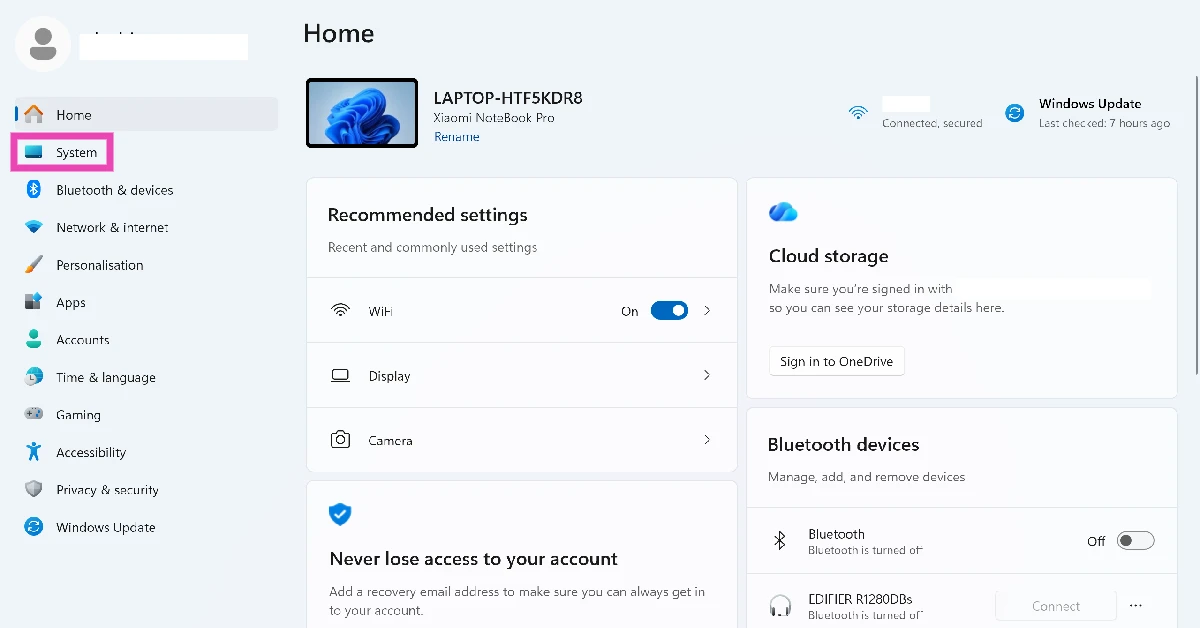 Step 2: Click on Storage.
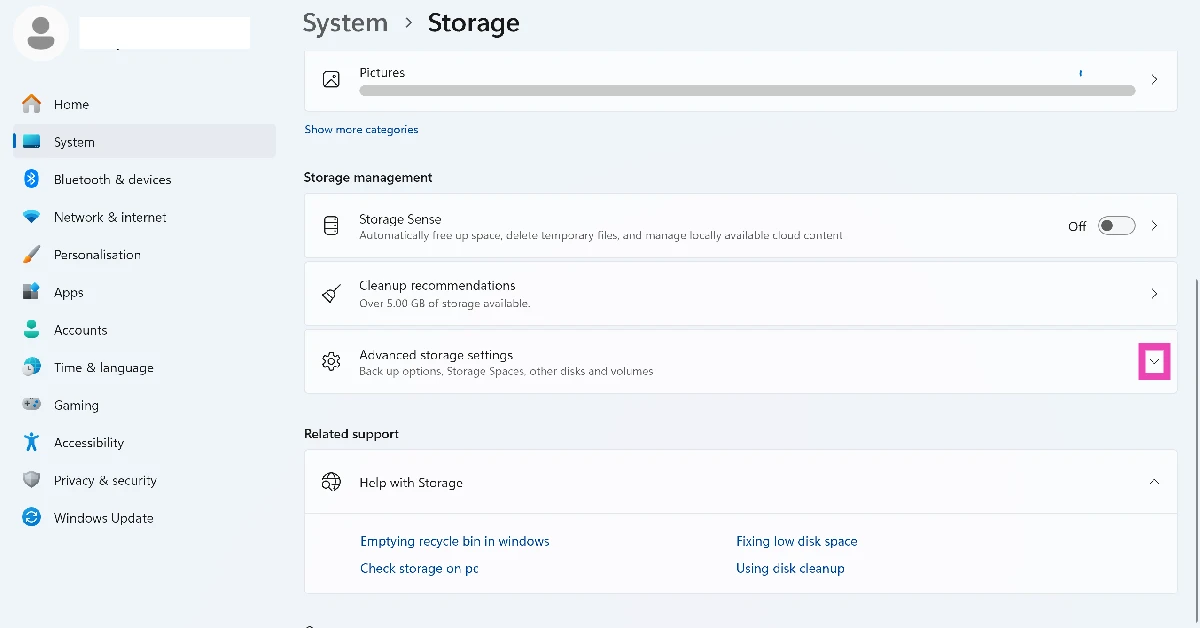
 Step 3: Hit the arrow next to Advanced storage settings to expand it.
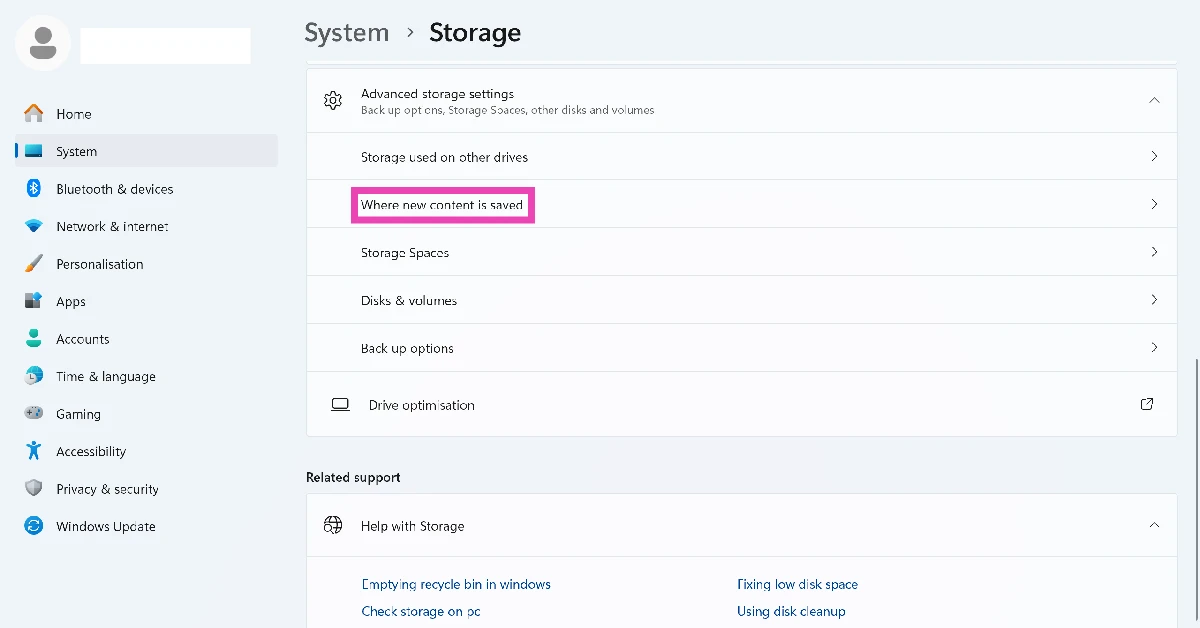
 Step 4: Click on Where new content is saved.
 Step 5: Hit the dropdown menu under New apps will save to and select a drive.

 Step 1: Start
  Step 1:
 Step 1: Download
 Step 2:
 Step 3:

 Step 3:
 Step 2:
 Step 3:




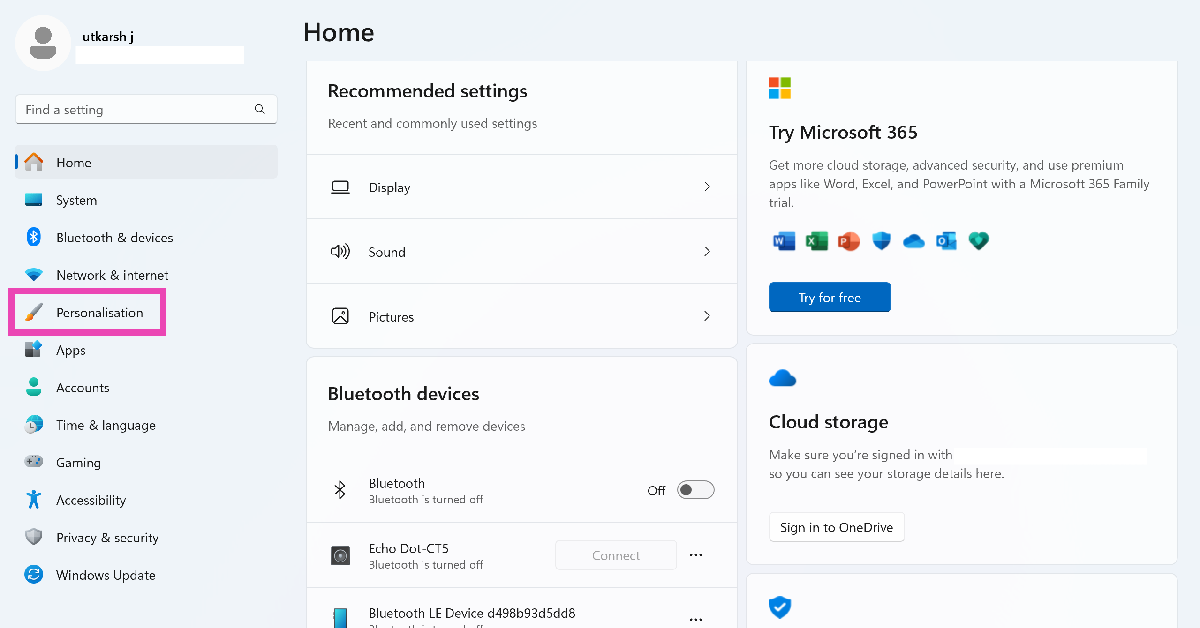 Step 2:
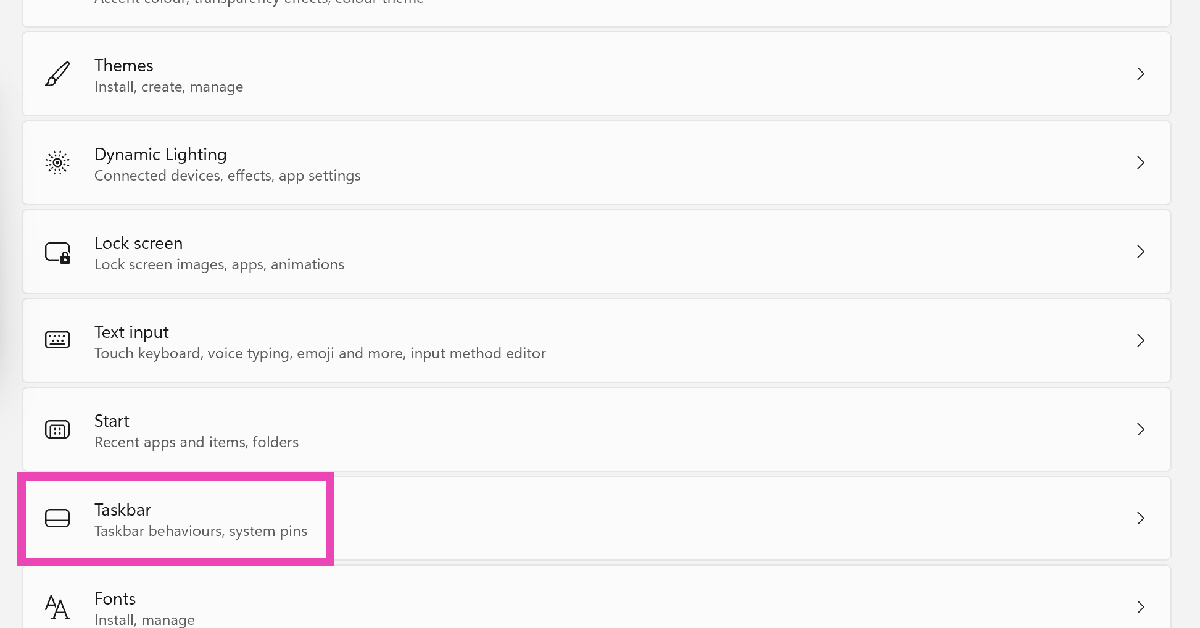 Step 3:
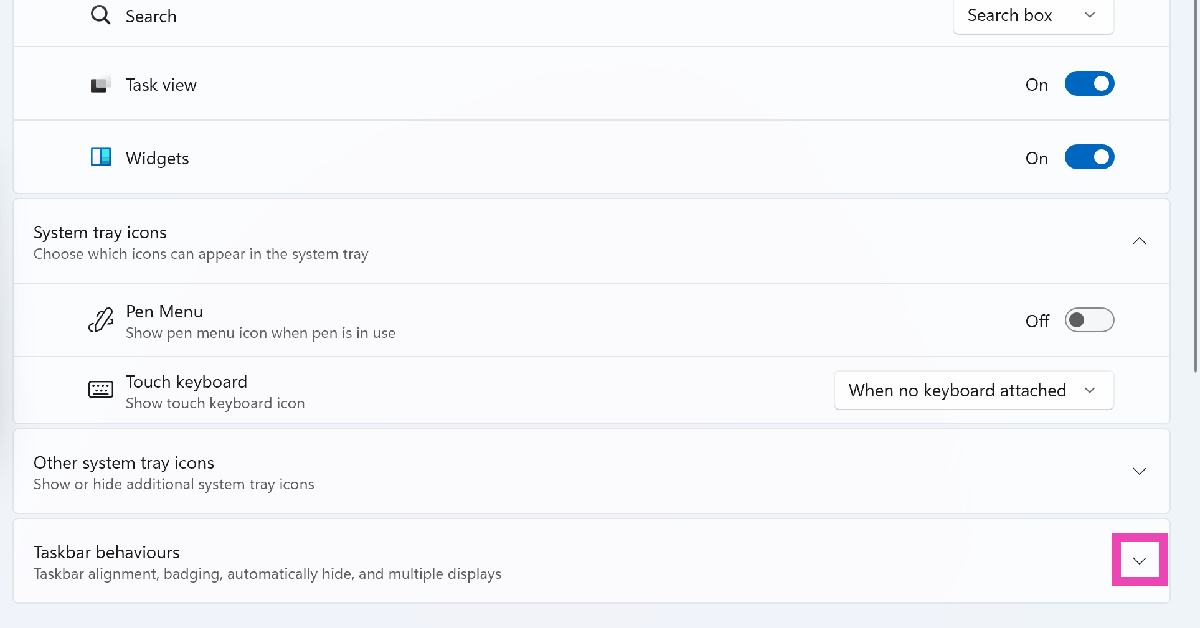 Step 4:
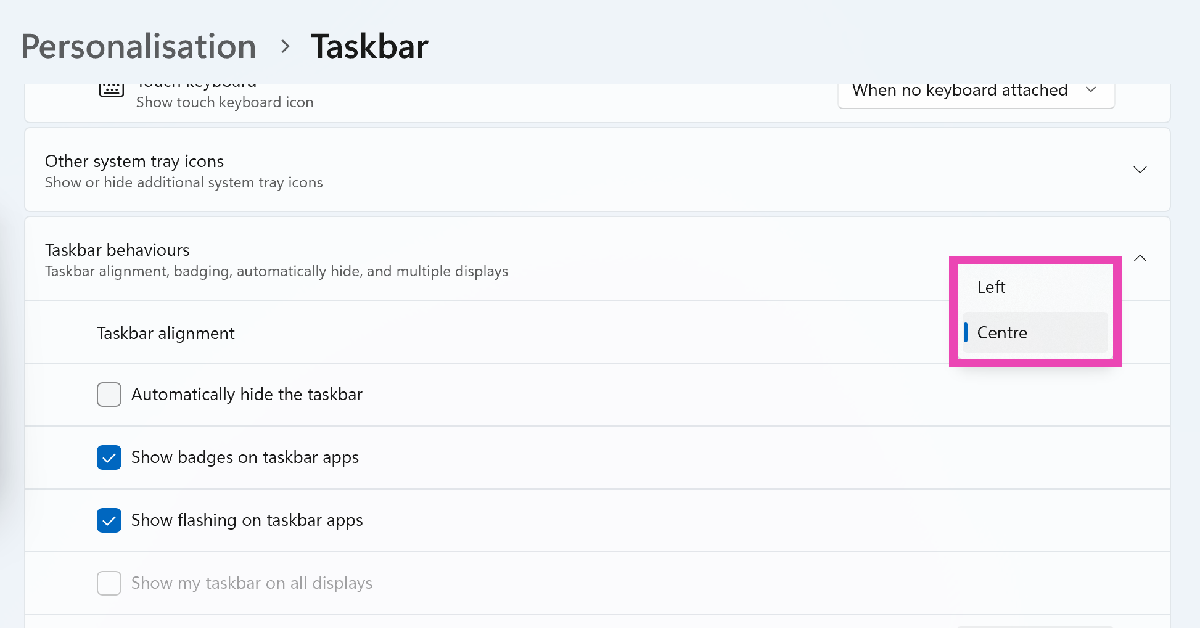 Step 5:
 Step 1: Right-click

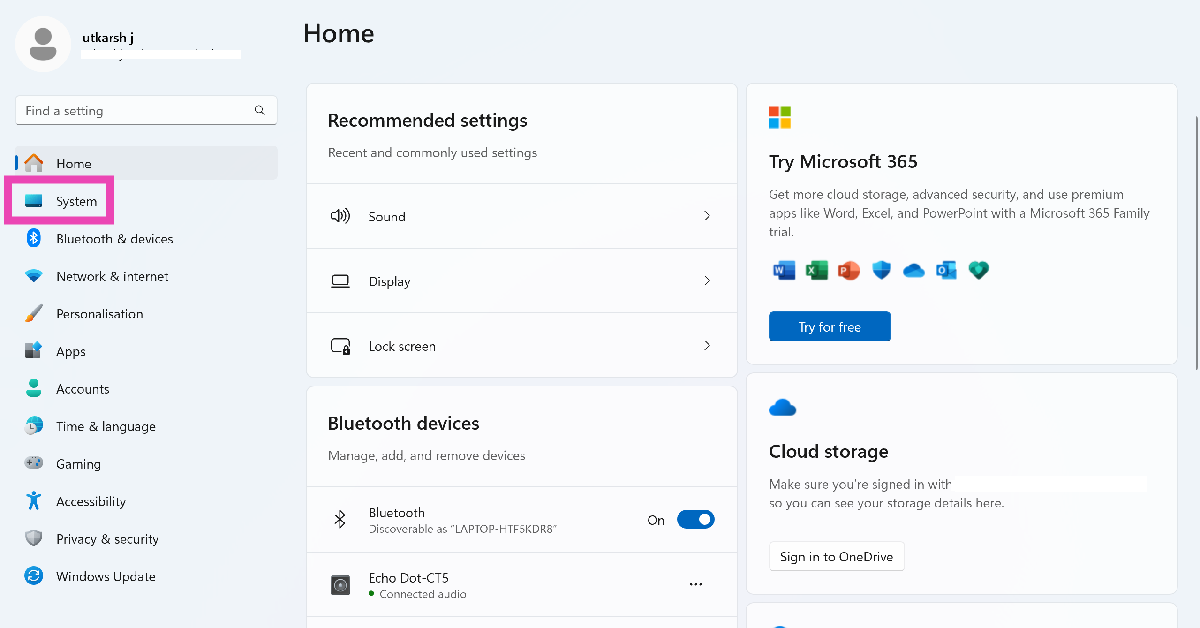 Step 2:
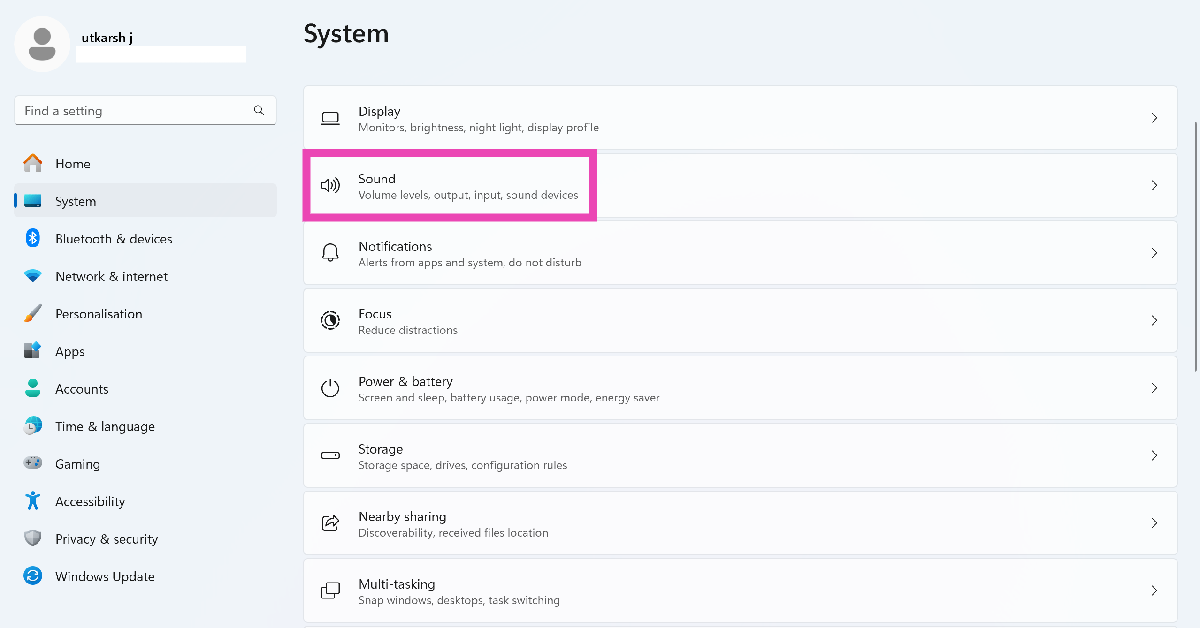 Step 3:
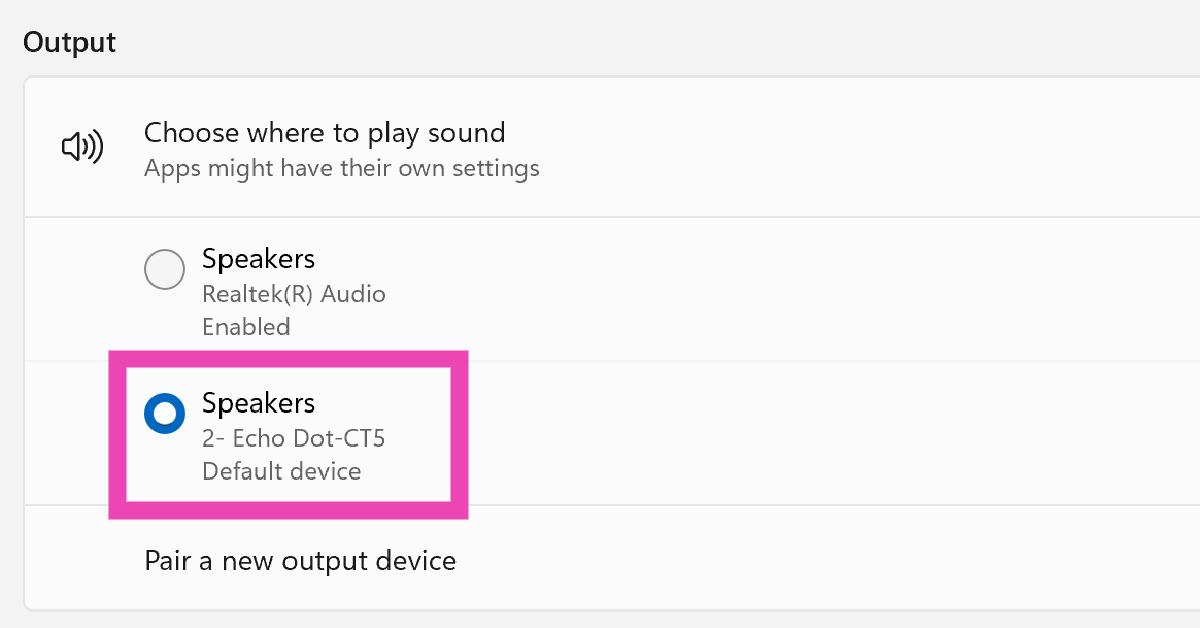 Step 4:
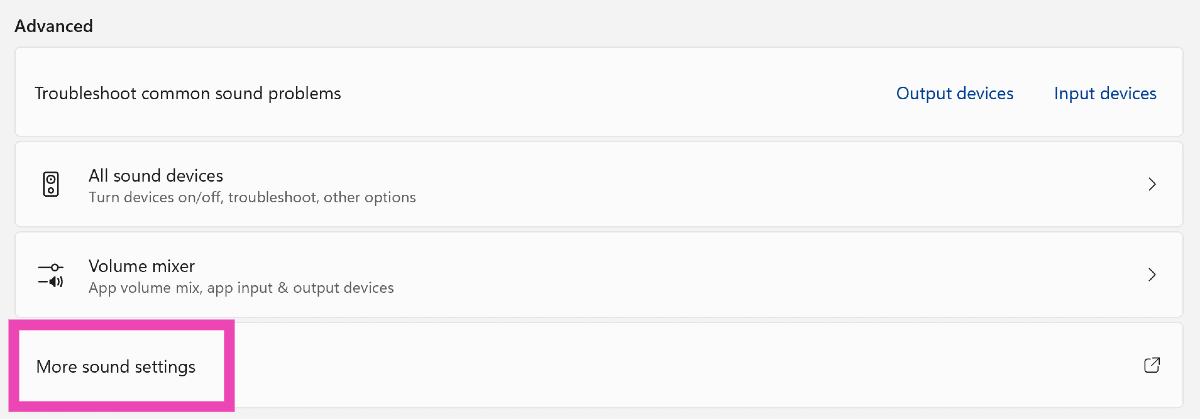 Step 5:
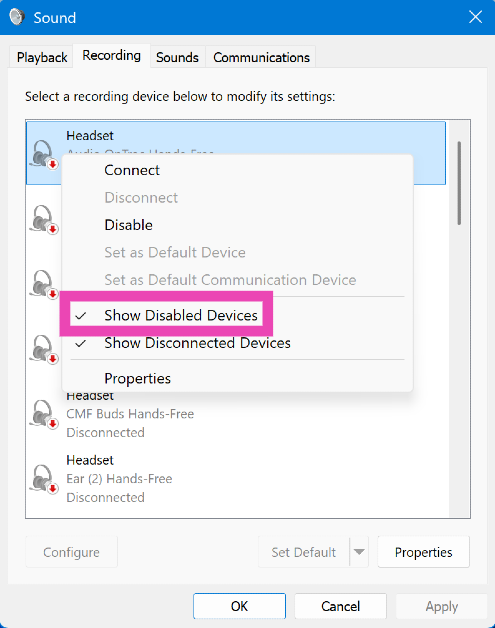 Step 6:
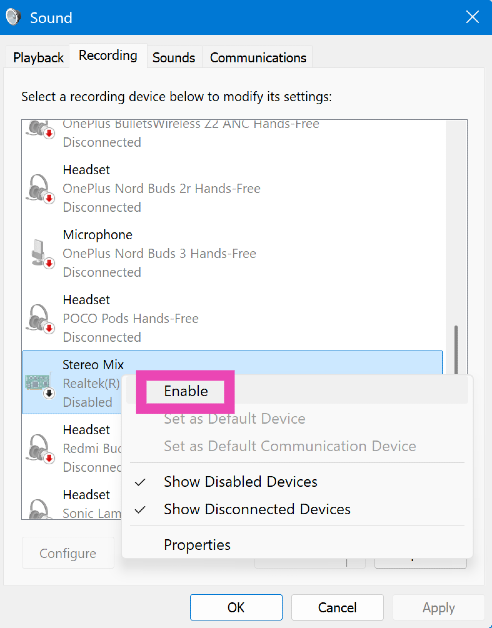 Step 7:
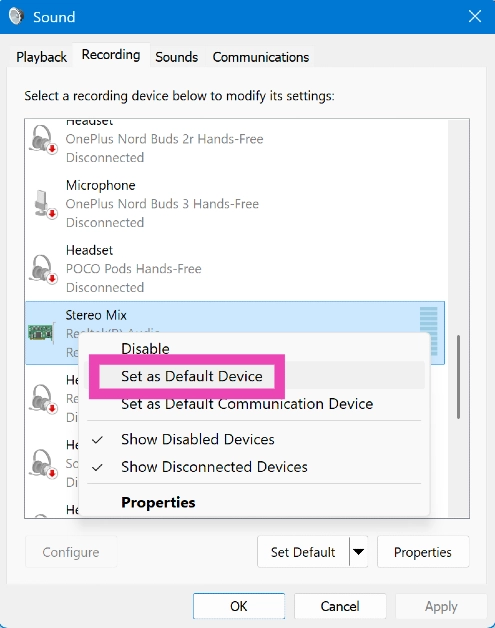 Step 8: Double-click
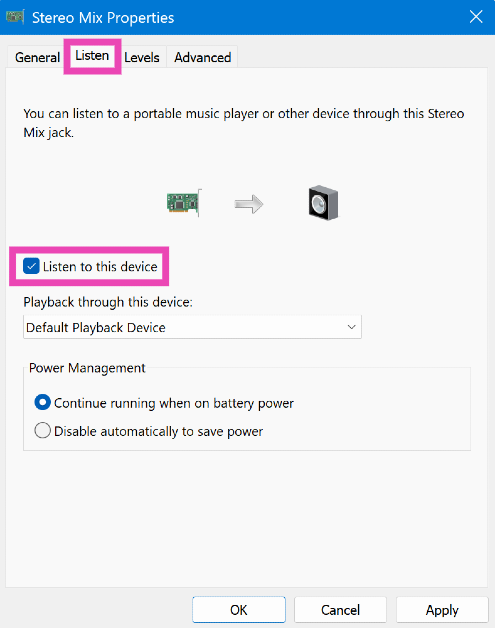 Step 10:
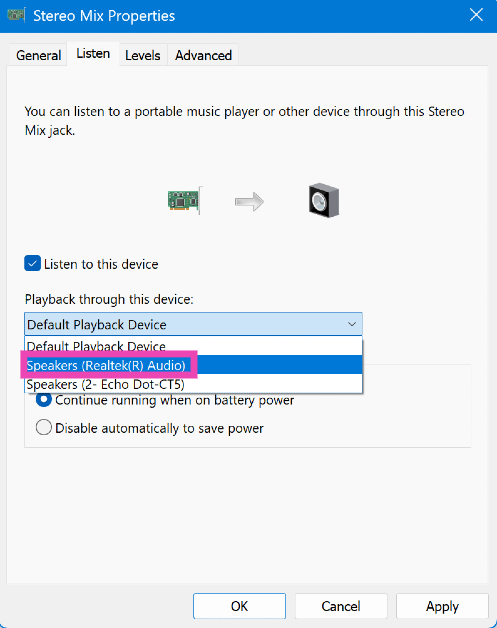 Step 11:
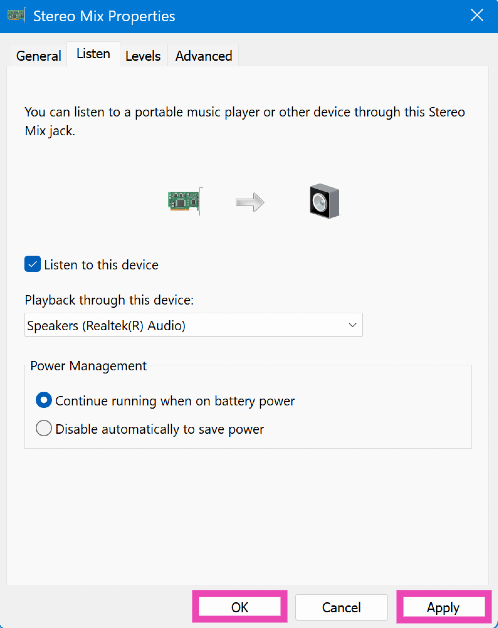 Note:
Note: