Top 4 ways to change the page size on Google Docs

0

Google Docs is one of the best online word processors around. It has a versatile set of customisation options and makes sharing documents easy. Its multi-device support and ease of accessibility give it an edge over its peers. The page size on Google Docs is set to A4 by default, but the word processor allows users to change it to their liking. Let’s take a look at the top 4 ways you can go about this task.

Read Also: Top 3 ways to stop an Android app from running in the background (2024)

Before you begin

There are three major ways to change the page size on Google Docs. The quickest way to go about this is by selecting the ‘Page Setup’ option in file settings. Using this option lets you change the layout and the size of the page before typing anything. You can also use the Page Sizer add-on for Docs and access it from the Extensions settings.

If you’re out of A4-size paper and want to urgently print a document, there’s no need to worry. The print preview window in Google Docs has a very handy option to change the paper size. Your options include Letter, Tabloid, Legal, Statement, Executive, A3, A4, A5, B4 (JIS), and B5 (JIS). Before you print the document, make sure the text is aligned with the layout.

Change the page size on Google Docs

Step 1: Go to Google Docs and open a document.

Step 2: Click on File and select Page setup.
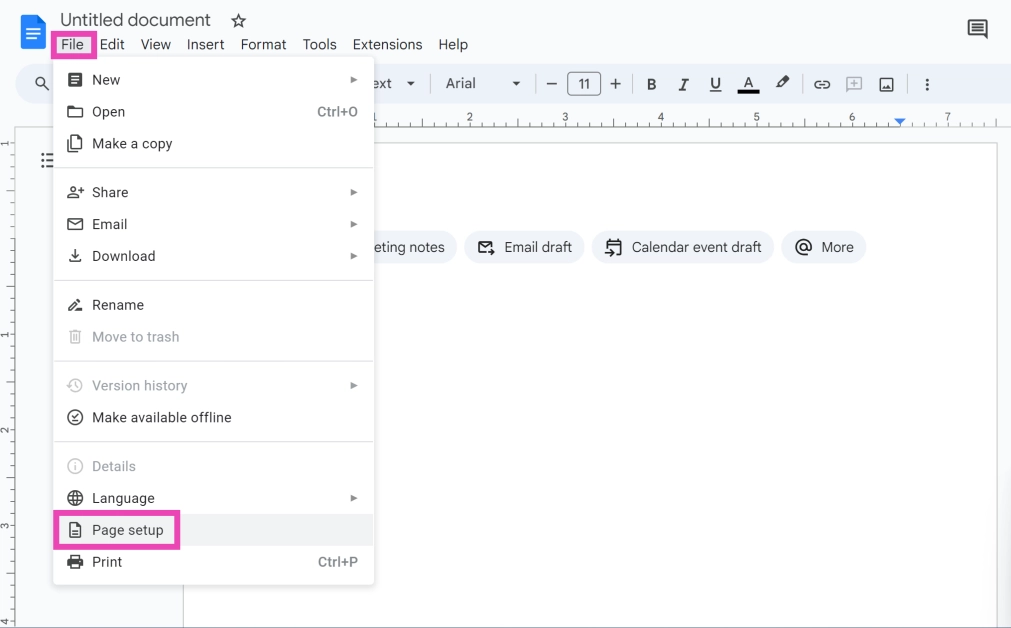
Step 2: Click on File and select Page setup.

Step 3: Click on the dropdown menu below Paper size and choose a size.
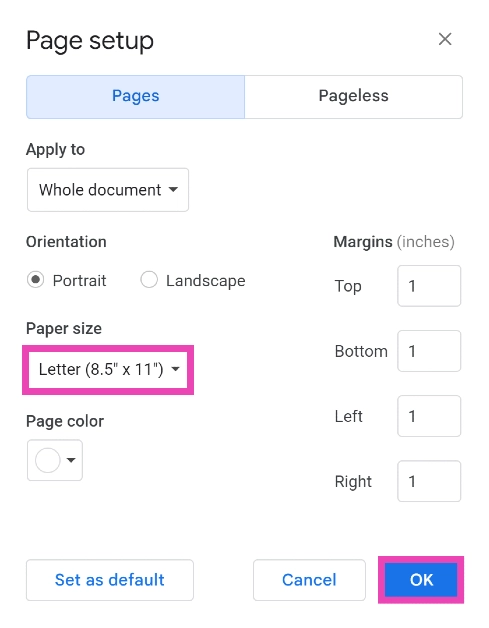
Step 3: Click on the dropdown menu below Paper size and choose a size.

Step 4: Change the margins by assigning them a value. Hit OK to save your changes.

Use an Add-on to change the page size on Google Docs

Step 1: Go to Google Docs and open a document.

Step 2: Click on Extensions and select Add-ons>Get add-ons.
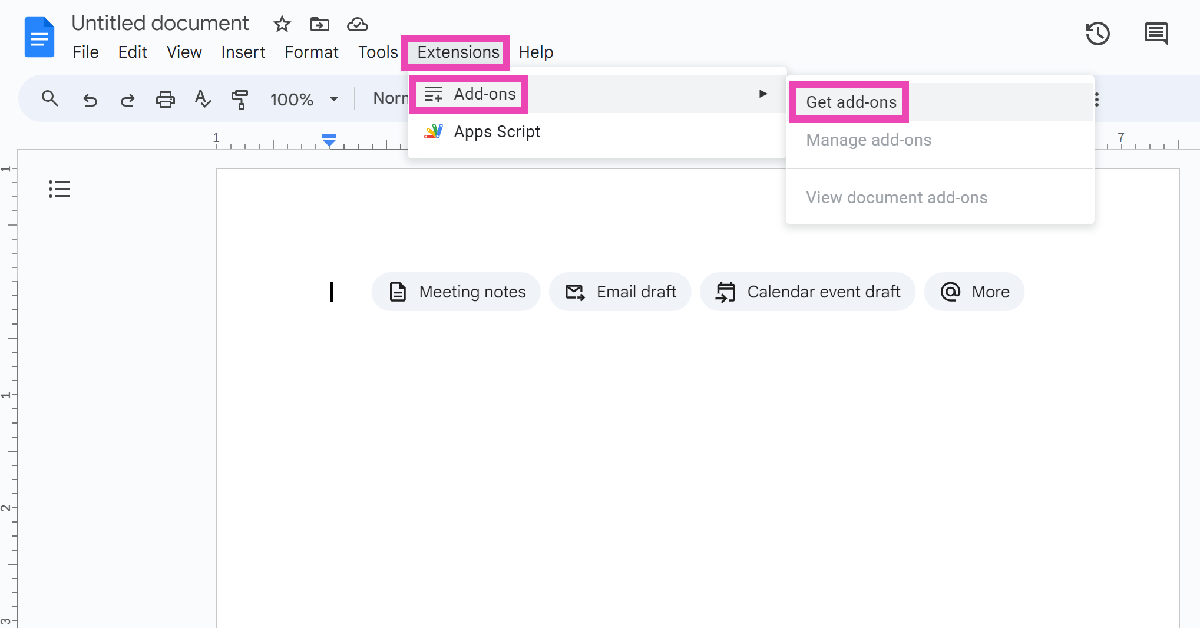
Step 2: Click on Extensions and select Add-ons>Get add-ons.

Step 3: Search for Page Sizer and install the add-on.
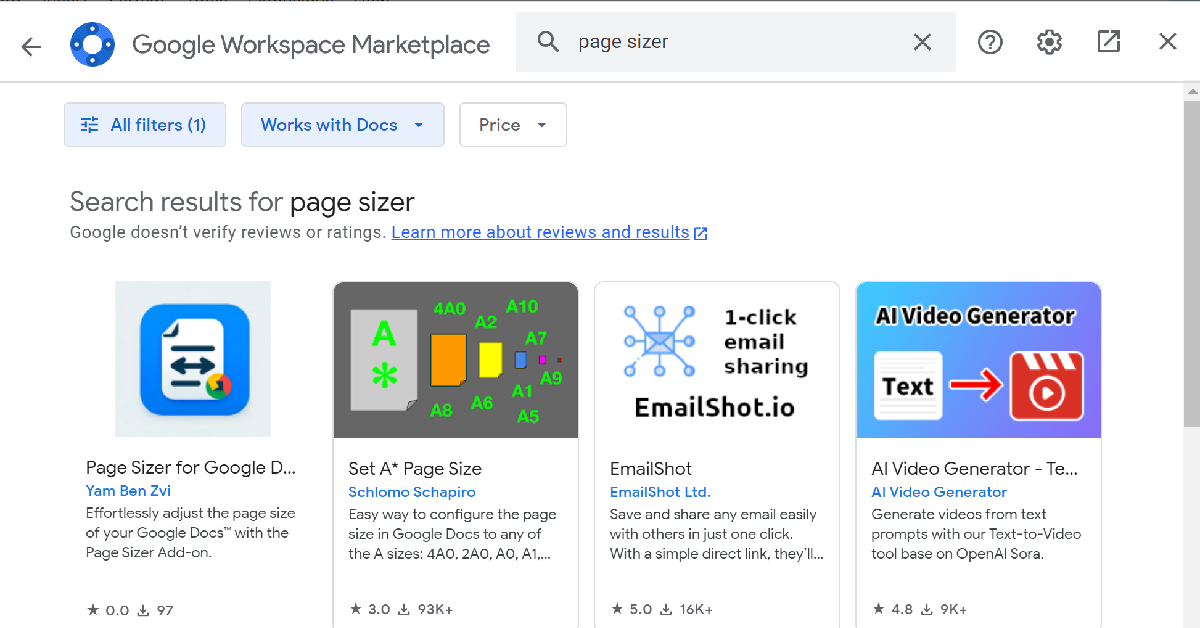
Step 3: Search for Page Sizer and install the add-on.

Step 4: Sign in using your Google Account. Hit Done when the installation is complete.

Step 5: Now, go to Extensions>Page Sizer>Select page size.
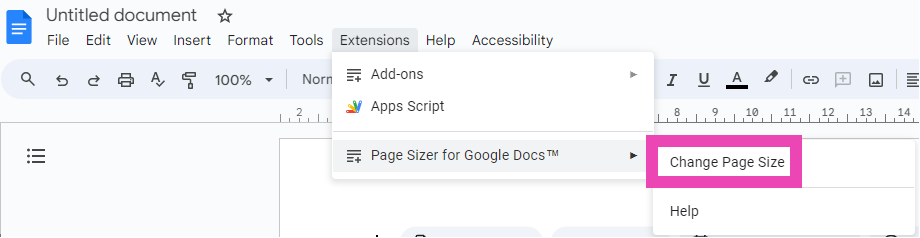
Step 5: Now, go to Extensions>Page Sizer>Select page size. Top 3 ways to change the page size on Google Docs? (2024)

Step 6: Enter the dimensions of your choice and hit Apply.
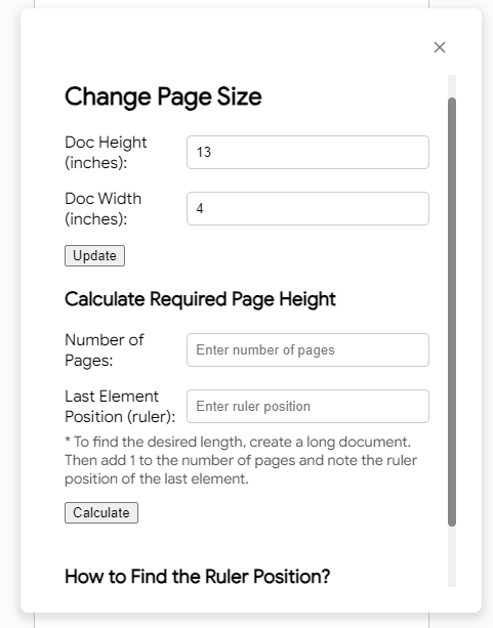
Step 6: Enter the dimensions of your choice and hit Apply. Top 3 ways to change the page size on Google Docs? (2024)

Change the page size on Google Docs before printing

Step 1: Go to Google Docs and open a document.

Step 2: Click on File and select Print.
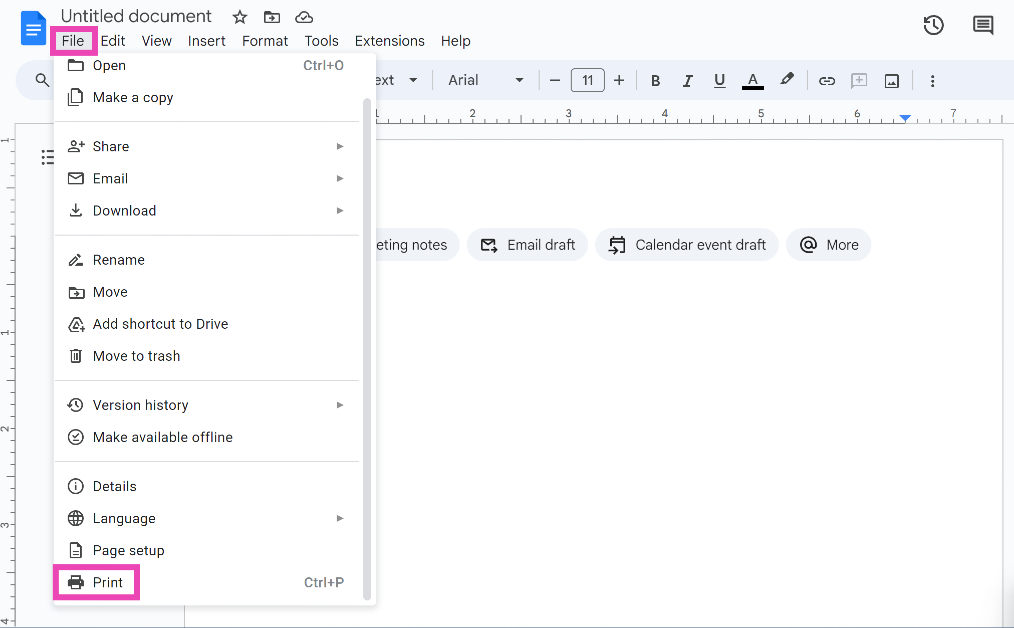
Step 2: Click on File and select Print. Top 3 ways to change the page size on Google Docs? (2024)

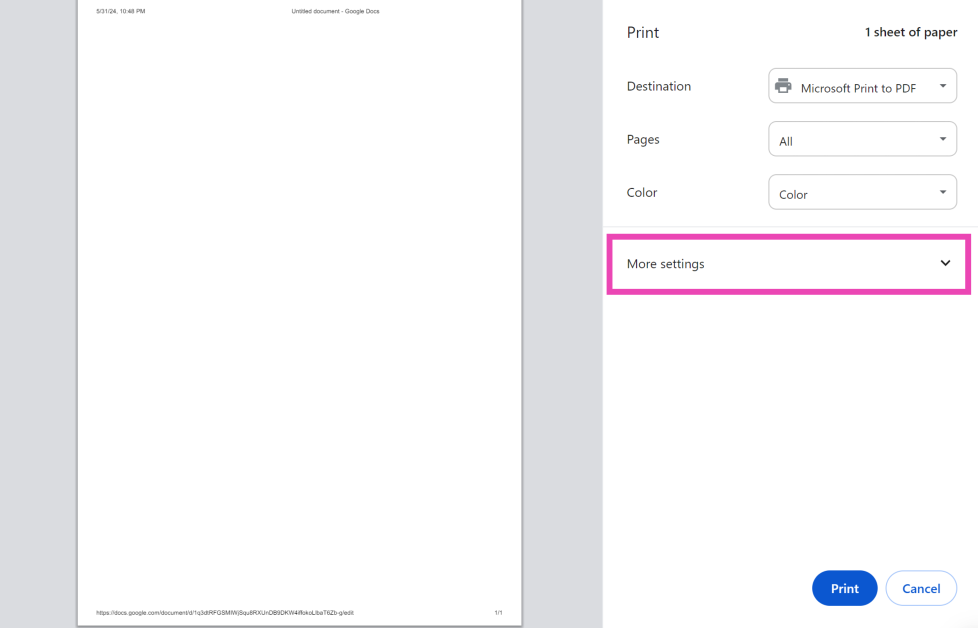
Step 3: Click on More settings.

Step 3: Click on More settings. Top 3 ways to change the page size on Google Docs? (2024)

Step 4: Hit the dropdown menu next to Paper size and make a selection.

Step 4: Hit the dropdown menu next to Paper size and make a selection. Top 3 ways to change the page size on Google Docs? (2024)

Change the page size on the Google Docs app

Step 1: Launch the Google Docs app on your phone and open a document.

Step 2: Hit the ellipses in the top right corner of the screen.
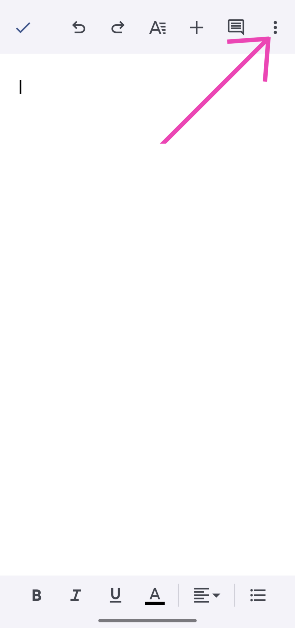
Step 2: Hit the ellipses in the top right corner of the screen.

Step 3: Go to Page setup.
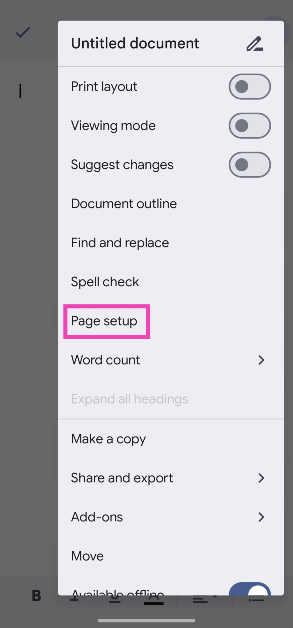
Step 3: Go to Page setup.

Step 4: Tap on Paper size.
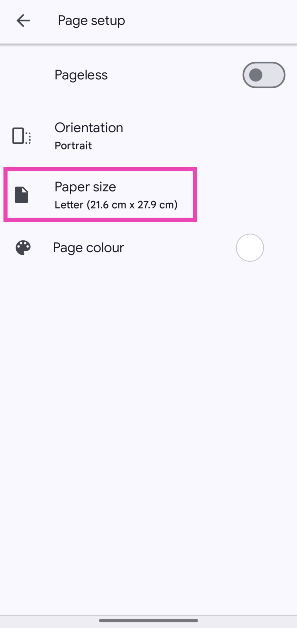
Step 4: Tap on Paper size.

Step 5: Select your preferred size from the list.
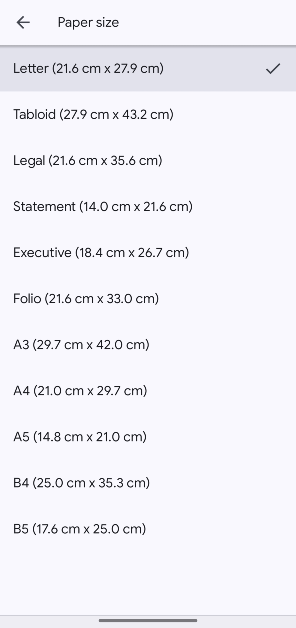
Step 5: Select your preferred size from the list.

Frequently Asked Questions (FAQs)

How do I change the paper size on Google Docs?

Open a document, then go to File>Page setup>Paper size to change its size. You can also use the Page Sizer add-on for this task.

How do I change the paper size on the Google Docs app?

Open a document in the Google Docs app, hit the ellipses, go to Page setup>Paper size, and choose a size from the list.

How do I change the paper size of a document before printing it?

In the print preview window, click on More Settings, then hit ‘Paper size’ and choose your preferred size.

How do I add a watermark to a Google Doc?

Go to Insert>Watermark and select whether you want to add an image or text watermark to the text. You can change the text, font, and transparency of the text before adding it as a watermark.

How do I enable Dark Mode in Google Docs?

Launch the Google Docs app, tap the hamburger menu, go to Settings>Choose theme, and select ‘Dark’ from the list. On your PC, use the Google Docs Dark Mode extension.

Read Also: Acer Aspire C24 and Acer Aspire C27 all-in-one AI PC announced

Conclusion

These are the top 4 ways to change the paper size on Google Docs. You can change the page size on the mobile app for Google Docs as well. Hit the pencil icon to edit a document, then tap the ellipses and select ‘Page setup’ to change the size. If you have any questions related to this task, let us know in the comments!


Garena Free Fire Max Redeem Codes Today 1 June 2024: Here is how to claim them

Garena Free Fire is a battle royale game with regular awards and tournaments to keep players interested. If you play Garena Free Fire, you should be aware of the redeem codes that are released on a daily basis. However, because the battle royale game is banned in India, players from other countries can use the Free Fire Redeem codes daily. If you’re unfamiliar with the Garena Free Fire redeem codes or don’t know how to get them, we’ve put together a step-by-step guide to help you redeem them. Check out Garena Free Fire Max Redeem Codes for 1 June 2024. The Free Fire Max redeem codes are a great way to get free stuff. These are 12-digit codes that contain alphabets and numbers, as well as an expiration date and time. Because the Garena FF redeem codes cannot be used more than once, you should hurry to the redemption page to claim your free reward before someone else does. To get a free reward, all you have to do is go to reward.ff.garena.com/en, which is the official redemption page. Also, keep an eye on this space for daily updates on Garena Free Fire Max redemption codes and rewards. Also Read: Sennheiser Accentum Plus wireless headphones with Hybrid Adaptive Noise Cancellation launched

Garena Free Fire Max Redeem Codes Today 1 June 2024

A4U1KF3D5H7M2Q9V B9F3J7C2T4P1FR5G L6W8FY2Q3N9E4X1S H5G2M7D9R1B3FK6P X1TF4H9R2G6F3C7V M3S6X9N2V5G1FP4J F7T2L0X9G4K5D3N2 FJ6M8R1S4B9P0C3T FE2I7U5H1Y4Q9A6W FV3S6D9N2B4J7R1K FG5X8V2K4H6M1Q3F FN9B2M4R7G1W3C5T FP2R5K9D3N7J1F4G FO8N3V5X1Y2B6D4H FK9C7F3P2M6S4W8R T0G5N1J4K8FV3X6L D7L9FW2B4K8Q1C3A FY4O7H1M5S9J2G6D FR1P4J8V3N5B2F6T FQ6C9T2M5G7X3R8W

How to Get Free Fire Max Redeem Codes for Garena on 1 June 2024?

  • Visit the Garena Free Fire game’s official website at reward.ff.garena.com.
  • Use your Facebook, Google, VK, Apple ID, Huawei ID, or Twitter account to log in.
  • You’ll be taken to a valid redemption code (s)
  • Copy and paste the 12-digit redemption code into the text box.
  • On the screen, a dialogue box will appear.
  • ‘Ok’ should be selected.
For the latest gadget and tech news, and gadget reviews, follow us on TwitterFacebook and Instagram. For newest tech & gadget videos subscribe to our YouTube Channel. You can also stay up to date using the Gadget Bridge Android App. You can find the latest car and bike news here.

Amazon Quiz Answers Today 1 June 2024: Participate to win Rs 500 Amazon Pay Balance

1 June 2024: New Amazon Quiz is now available. Customers from different parts of the country are participating in the daily quiz. The quiz starts at midnight today and will be live until 11:59 PM tonight. By successfully answering every question, participants in the quiz have the chance to win wonderful rewards. A Rs 500 Amazon Pay Balance is up for grabs to participants today. One wrong answer could eliminate you from the quiz. You have a chance to win Rs 500 Amazon Pay Balance if you successfully answer every question. Users of the app only have the opportunity to take the quiz. Check Out 1 June 2024 Amazon Quiz Answers. Amazon Quiz Today Prize: Rs 500 Amazon Pay Balance Quiz Date: 1 June 2024 Daily Timing: 12 AM to 11:59 PM Previous Amazon Quiz Winners Announcement: Today 12 PM Noon

Amazon Quiz Answers Today 1 June 2024: Win ₹ 500 Amazon Pay Balance

Question 1: The Bharat Ratna Shri Atal Bihari Vajpayee Ekana Cricket Stadium is the home ground of which IPL team? Answer:  Lucknow Super Giants Question 2: The recent movie ‘Ae Watan Mere Watan’ is based on the true story of which freedom fighter? Answer: Usha Mehta Question 3: A sequel to a very popular work of children’s literature- ‘Through the Looking Glass’ is a book written by whom? Answer:  Lewis Carroll Question 4: This monument was built to commemorate the landing of which king for his coronation as the Emperor of India? Answer:  George V Question 5: What spice is derived from this flower? Answer: Saffron Also Read: Noise Buds Verve, budget TWS with up to 45 hours of playback launched in India

How To Play Amazon Quiz Today

Only app users are eligible to play the Amazon quiz every morning from 12 AM to 11:59 PM. The quiz is not available on the desktop. For those who are unaware of how to play the Amazon quiz, below are the steps, you can follow to take the quiz.
  • First, download the Amazon app from the Google Play Store or App Store or go here to download the Amazon App
  • Now fill in the required information through the Sign-Up option.
  • You need to log in to the Amazon app and scroll down on the home screen to find the Amazon Quiz banner.
  • Tap on the Amazon Quiz banner and tap on the Start button to start the Quiz.
  • Now you will get 5 questions and you need to answer them correctly. One wrong answer will eliminate you from the Quiz.
  • After answering all the questions correctly you are now eligible for a Lucky Draw.
  • The previous winner’s name will be announced today at 12 PM.

Amazon Daily Quiz Answers from the previous few days.

Here are all the answers from the previous 5 days of the Amazon Daily Quiz and Contest.

Amazon Quiz Answers Today 31 May 2024: Win ₹ 500 Amazon Pay Balance

Question 1: Who scored a brilliant century as Punjab Kings successfully chased down a target of 262 against Kolkata Knight Riders in IPL 2024? Answer: Jonny Bairstow Question 2: The movie Article 370 stars which actress in the lead role of Zooni Haksar Answer: Yami Gautam Question 3: The famous Chamundeshwari temple located on the top of Chamundi Hills is in which Indian state? Answer: Karnataka Question 4: This is a view of the beautiful city of Queenstown in which country? Answer: New Zealand Question 5: ‘Let it Be’ is the name of a famous song released by which famous band in 1970? Answer: Beatles

Amazon Quiz Answers Today 30 May 2024: Win ₹ 500 Amazon Pay Balance

Question 1: Who scored a half century in just 15 balls in a losing effort against Sunrisers Hyderabad in IPL 2024 for Delhi Capitals? Answer: Jake Fraser- Mcgurk Question 2: The Amazon Prime series- ‘A Gentleman in Moscow’ stars which famous actor in the lead role of Alexander Rostov? Answer: Ewan Mcgregor Question 3: The Achyutraya temple, the Virupaksha temple and the Vithala temple are located in which UNESCO World Heritage Site? Answer: Hampi Question 4: This is the logo of a famous automobile company headquartered in which country? Answer: France Question 5: This visual shows which dwarf planet as seen from the New Horizons spacecraft in 2015? Answer: Pluto

Amazon Quiz Answers Today 29 May 2024: Win ₹ 500 Amazon Pay Balance

Question 1: Which team did Real Madrid beat on penalties in the quarter finals of the 2023-24 UEFA Champions League? Answer: Manchester City Question 2: The series ‘Mayor of Kingstown’ stars which of these actors famous for his role in Marvel movies? Answer: Jeremy Renner Question 3: The Gaur, the Ruby Throated Yellow Bulbul and the Matti are the state animal, bird and tree respectively of which state? Answer: Goa Question 4: This picture is taken in the capital city of which European country? Answer:  Poland Question 5: By what name are these flowers popularly known? Answer: Cherry blossom

Amazon Quiz Answers Today 25 May 2024: Win ₹ 500 Amazon Pay Balance

Question 1: Which of these players won the Monte Carlo Masters tennis tournament in 2024, his 3rd triumph in that event in 4 years? Answer: Stefanos Tsitsipas Question 2: Which of these Amazon Prime shows shares its name with a 2005 Brad Pitt- Angelina Jolie movie? Answer: Mr and Mrs Smith Question 3: Which animal features on the election symbol of the Republican party in the USA? Answer: Elephant Question 4: These waterfalls span the border between the province of Ontario in Canada and which state in the USA? Answer: New York Question 5: Which of these famous architects designed this iconic monument in India? Answer: Edwin Lutyens

Amazon Quiz Answers Today 24 May 2024: Win ₹ 500 Amazon Pay Balance

Question 1: Against which team did Sunrisers Hyderabad set a new record scoring 287 in an IPL match? Answer: Royal Challengers Bengaluru Question 2: Who plays the role of soldier Arun Katyal in the recently released movie ‘Yodha’? Answer: Sidharth Malhotra Question 3: Which of these famous rulers was born in the Shivneri Fort in Maharashtra in the 17th century? Answer: Shivaji Question 4: Name this famous church located in Europe Answer: St. Peter’s Basilica Question 5: This is the flag of which Caribbean country? Answer: Barbados

Amazon Quiz Answers Today 23 May 2024: Win ₹ 500 Amazon Pay Balance

Question 1: Who recently became the youngest-ever winner of the FIDE Candidates? Answer: Gukesh D Question 2: Britney Spears’ song ‘Baby one more time’ was recently covered by Jack Black’s band Tenacious D for which movie? Answer: Kung Fu Panda 4 Question 3: One of the ‘New Seven Wonders of the World’ Petra is located in which country? Answer: Jordan Question 4: This is the _____ beetle, named because of its resemblance to another animal. Fill in the blanks Answer: Rhinoceros Question 5: Who among these is the founder of this company? Answer: Elon Musk

Amazon Quiz Answers Frequently Asked Questions (FAQs)

Where can I check the previous winners? Did I win how to check?

You can head over to this link on your mobile or desktop to check the winners of the Amazon Daily Quiz Contest.

How to Play Amazon Daily Quiz or Contest?

We have written an explainer above, you can refer to that.

When are the winners of the Amazon Quiz and contest announced or declared?

The announcement of today’s Amazon quiz winner will take place Tomorrow. As for the Special Quiz and “Spin & Win” Contest, the winners will be declared once the Quiz Contest comes to an end. To find out who the lucky winner is, you can refer to the Amazon Quiz Winners List or visit the Amazon Winners tab in the Amazon App.

How to participate in the Daily Amazon Quiz?

That is very easy, just got to the Amazon app and scroll to the bottom of the page and you will find the Quiz section. Click on it (usually it is called the fun zone) and you can enter the Amazon Today Quiz Contest. 

Are there any other quizzes or contests running on Amazon daily?

Yes, there are many running on a daily basis. These range from spinning the wheel to answering the questions correctly. All are located in the Fun Zone. 

What are the criteria for selecting a winner in the Daily Amazon Quiz?

When a qualified player submits correct answers to all the questions, they will automatically be entered into a lucky draw. This draw will include all participants who answered all the questions correctly. Amazon randomly selects the final winners from the pool of eligible participants who gave the right answers.

Which Types of Questions are asked within Amazon Daily Quiz?

These are very simple and straightforward questions. These are mainly related to general knowledge. 

Where should I look for Amazon Daily Quiz answers?

You can bookmark this page as we will help you every day with the Amazon Daily Quiz. We bring you fresh answers every day for the Amazon Daily Quiz and Contest. 

What time does Amazon Announce previous winners?

The previous winner’s name will be announced today at 12 PM (noon). For the latest gadget and tech news, and gadget reviews, follow us on TwitterFacebook and Instagram. For newest tech & gadget videos subscribe to our YouTube Channel. You can also stay up to date using the Gadget Bridge Android App. You can find the latest car and bike news here.

6 ways to stop an Android app from running in the background

0
If your Android phone’s battery is draining faster than usual, it could be because of an app utilising a lot of resources in the background. Although your Android phone is pretty good at compartmentalising tasks and processes, not every app needs to be running in the background all the time. You can make an exception for instant messengers like WhatsApp, but other apps end up exerting strain on your phone’s battery. So, let’s take a look at the top 6 ways to stop an Android app from running in the background. Read Also: Top 8 ways to fix ‘Google Play Store not auto-updating apps’ on Android (2024)

Why is it important to restrict background access for some apps

Typically, it is recommended that you leave the apps running in the background and let your phone take care of them. Modern Android phones are intelligent enough to determine which apps deserve more RAM space and battery usage. Since you rely on instant messaging apps like WhatsApp for instant notifications, they occupy more RAM space than other apps. Sometimes, an app may demand more battery usage from the system without serving any real purpose. It is a good idea to take a look at the battery stats of the apps on your phone from time to time and observe any unusual activity. If you notice a spike in battery usage for an app that you haven’t used much, you should consider restricting its background usage to improve your phone’s performance and battery life.

Force stop the app

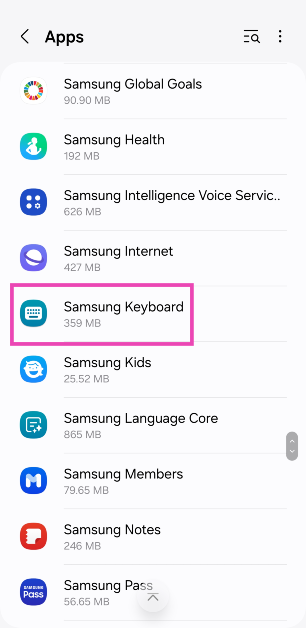
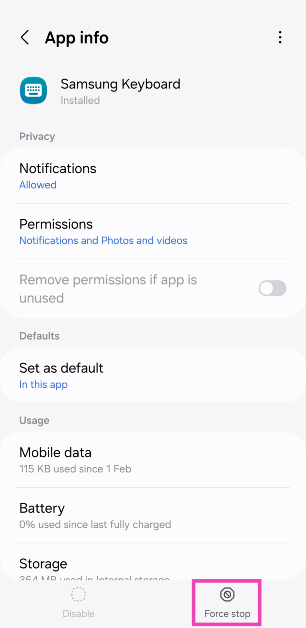
Step 1: Go to Settings and select Apps. Step 1: Go to Settings and tap on Apps. Step 2: Select the app that you wish to stop running in the background. Step 2: Select Samsung Keyboard. Step 3: Tap on Force Stop. Step 3: Hit Force Stop. Step 4: Confirm your selection in the pop-up box.

Close the app from the app switcher

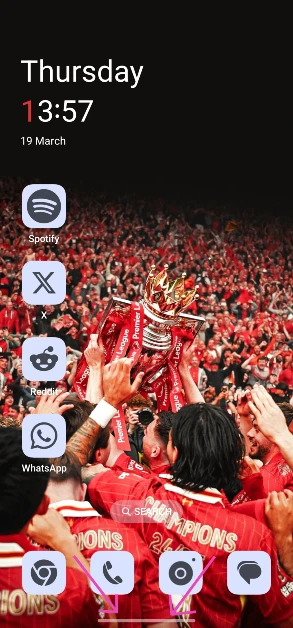
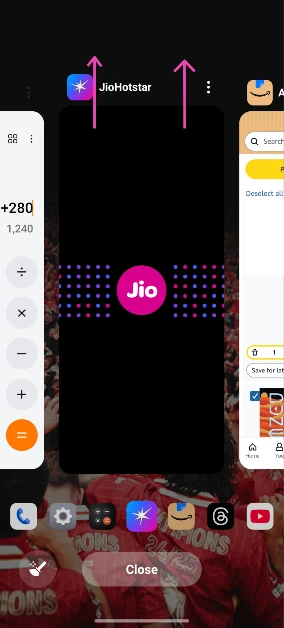
Step 1: Tap the app switcher icon at the bottom of the screen. If you use gesture controls, swipe up from the navigation bar and hold until you see the app switcher. Step 1: Tap the app switcher icon at the bottom of the screen. If you use gesture controls, swipe up from the navigation bar and hold until you see the app switcher. Step 2: Swipe up on an app’s card to close it. Step 2: Swipe up on an app's card to close it.

Restrict battery usage

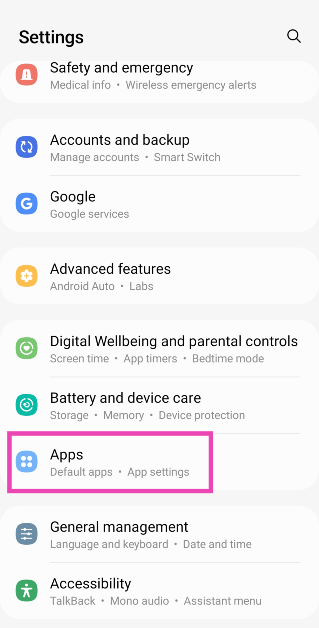
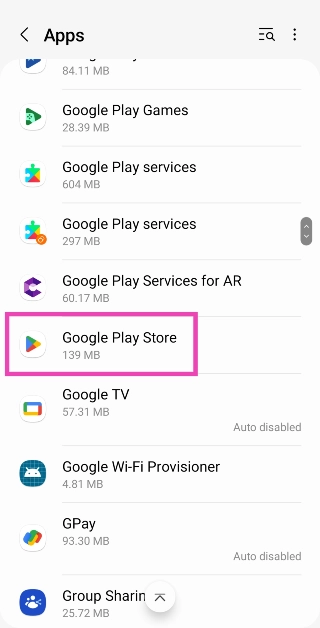
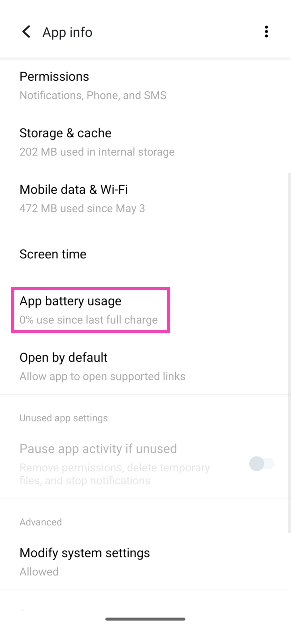
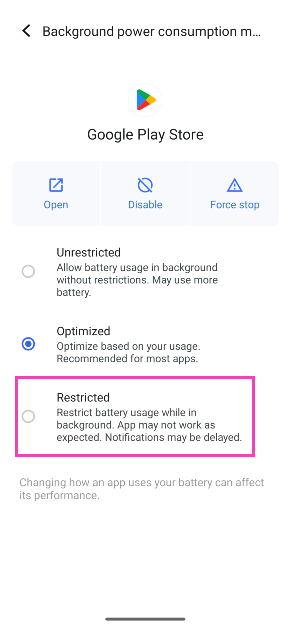
Step 1: Go to Settings and select Apps. Step 1: Go to Settings and select Apps. Step 2: Select the app. Step 2: Tap on Google Play Store. Top 3 ways to stop an Android app from running in the background (2024) Step 3: Tap on App battery usage. Step 3: Tap on App battery usage. Top 3 ways to stop an Android app from running in the background (2024) Step 4: Select Unrestricted. Step 4: Select Unrestricted. Top 3 ways to stop an Android app from running in the background (2024)

Restrict background usage from battery settings

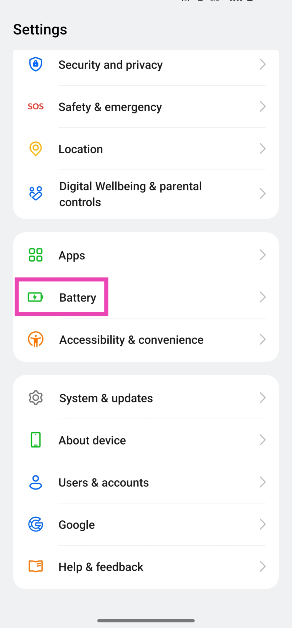
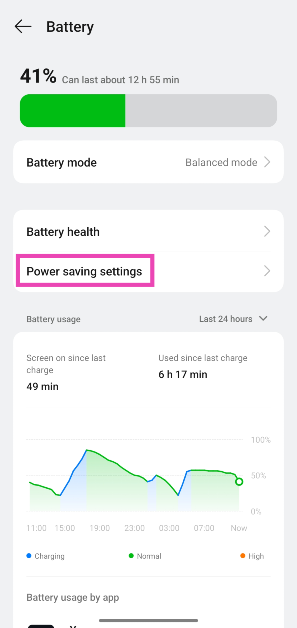
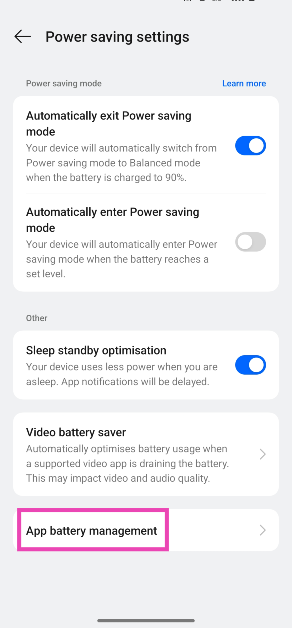
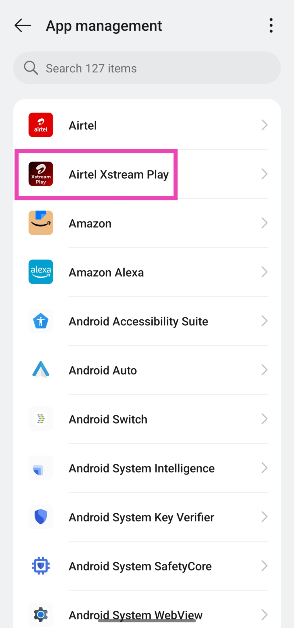
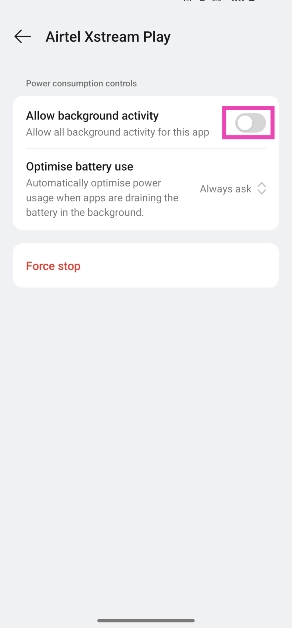
Step 1: Go to Settings and select Battery. Step 1: Go to Settings and select Battery. Step 2: Tap on Power saving settings. Step 2: Tap on Power saving settings. Step 3: Tap on App battery management. Step 3: Tap on App battery management. Step 4: Select an app. Step 4: Select an app. Step 5: Turn off the toggle switch next to Allow background activity. Step 5: Turn off the toggle switch next to Allow background activity. 5 ways to stop an Android app from running in the background

Restrict background data usage

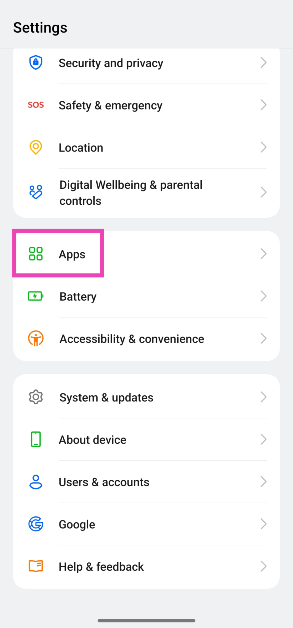
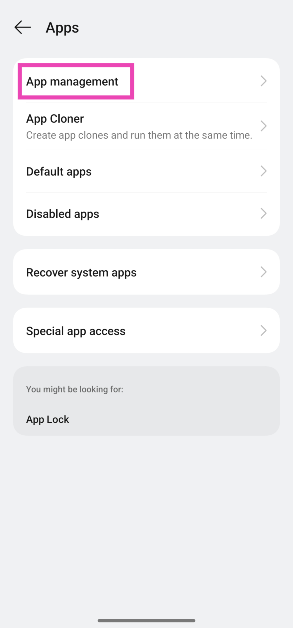
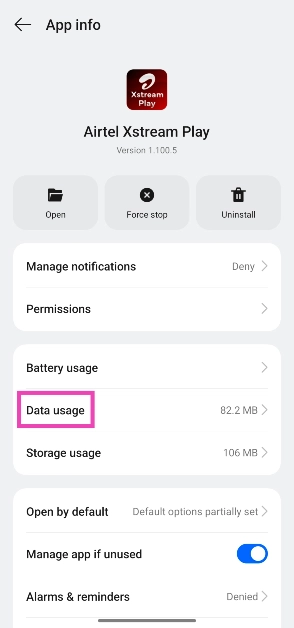
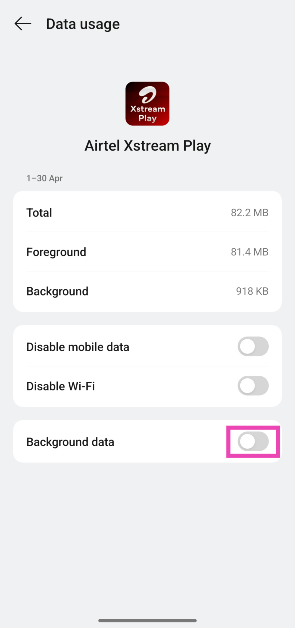
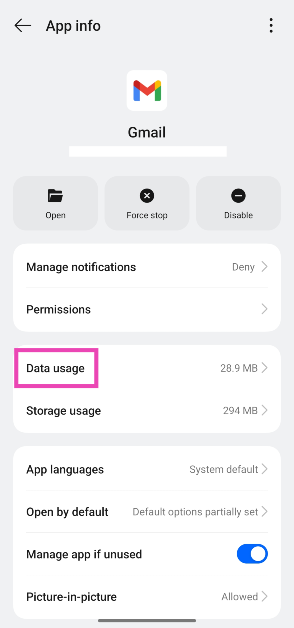
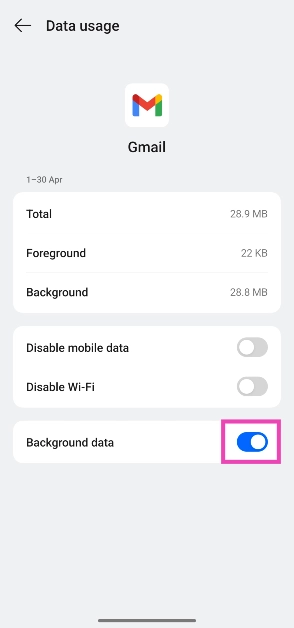
Another way to stop an Android app from running in the background is to restrict its background data usage. If you want to prevent instant messaging apps from checking for new messages in the background, use this method. Step 1: Go to Settings and select Apps. Step 1: Go to Settings and select Apps. 5 ways to stop an Android app from running in the background Step 2: Tap on App management. Step 2: Tap on App management. 5 ways to stop an Android app from running in the background Step 3: Select an app. Step 4: Select an app. 5 ways to stop an Android app from running in the background Step 4: Tap on Data usage. Step 4: Tap on Data usage. 5 ways to stop an Android app from running in the background Step 5: Turn off the toggle switch next to Background data. Step 5: Turn off the toggle switch next to Background data. 5 ways to stop an Android app from running in the background

Stop an app’s RAM usage from Developer Options

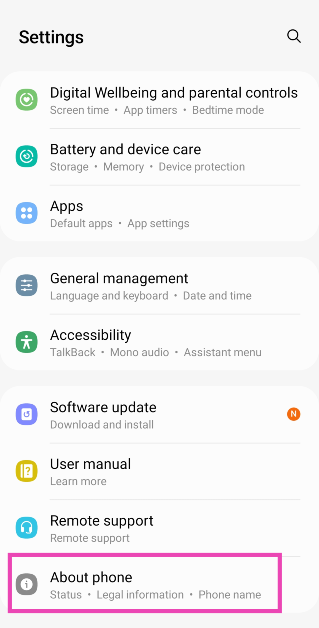
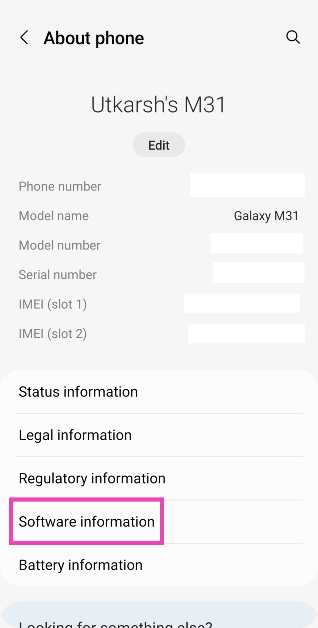
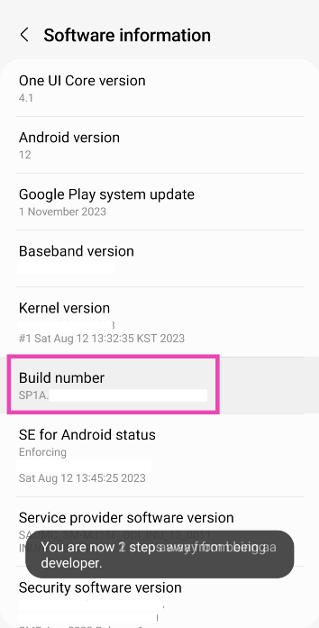
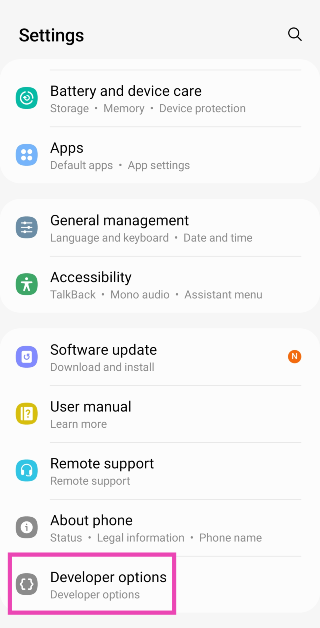
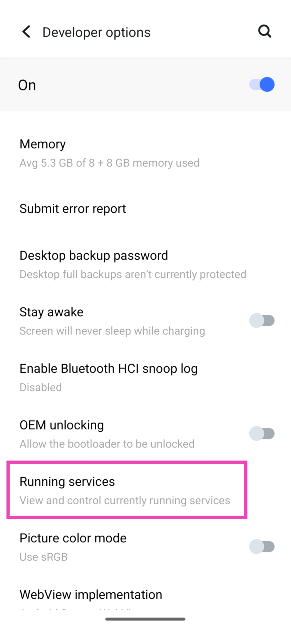
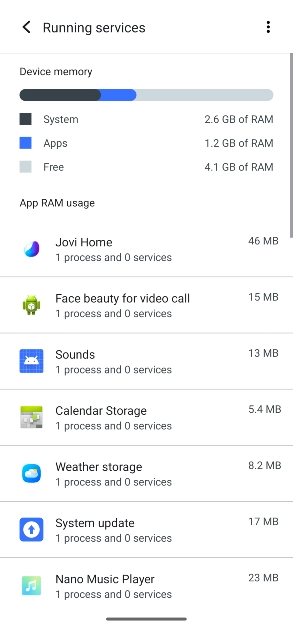
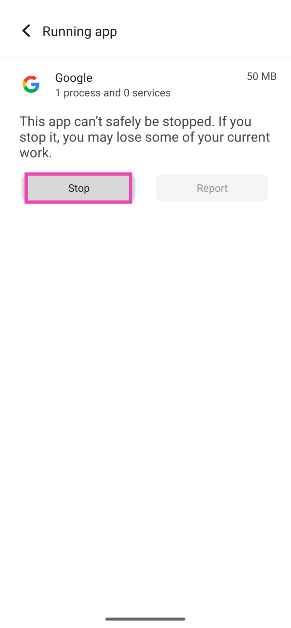
Step 1: Go to Settings and select About Phone. Step 1: Go to Settings and select About Phone. Top 5 Ways To Remove Apps That Android Won't Let You Uninstall (2024) Step 2: Select Software Information. Step 2: Tap on Software Information. Top 5 Ways To Remove Apps That Android Won't Let You Uninstall (2024) Step 3: Tap on the Build Number 7 times to enter Developer Mode. Step 3: Find the Build Number and tap on it 7 times. You will then enter Developer Mode. Top 5 Ways To Remove Apps That Android Won't Let You Uninstall (2024) Step 4: Go back to Settings, scroll all the way down, and select Developer options. Step 4: Go back to Settings and select Developer Options. Top 5 Ways To Remove Apps That Android Won't Let You Uninstall (2024) Here are the top 7 ways to remove or disable the Android setup notification on your phone. Top 3 ways to stop an Android app from running in the background (2024) Step 5: Tap on Running Services. Step 5: Tap on Running Services. Top 3 ways to stop an Android app from running in the background (2024) Step 6: Here, you will be able to see the current RAM status of your device. Step 6: Here you will be able to see the current RAM status of your device. Top 3 ways to stop an Android app from running in the background (2024) Step 7: Tap on an app to stop it from running in the background. Step 7: Tap on an app to stop it from running in the background. Top 3 ways to stop an Android app from running in the background (2024) Step 8: Tap on Stop.

Frequently Asked Questions (FAQs)

How do I force-stop an app on Android?

Go to Settings>Apps, select the app, hit ‘Force stop’, and confirm your selection in the pop-up box.

Does force-stopping an app limit its background activity?

Yes, force-stopping an app limits its background activity. However, the activity resumes as soon as you restart the app.

How do I limit the battery usage of an app on Android?

If you feel that an app is using a lot of battery, go to Settings>Apps, select it, tap on ‘Battery’, and select ‘Restricted’.

How do I stop WhatsApp from checking for new messages in the background?

Go to Settings>Apps>WhatsApp>Data usage and turn off the toggle switch next to ‘Background data’.

How do I check which apps are currently running in the background on my phone?

Enter the developer mode by tapping the build number on your phone 7 times. Then, go to Developer Options>Running Services to view which apps are currently utilising the RAM on your device. Read Also: Moto G04s with 50-megapixel rear camera launched in India

Conclusion

These are the top 6 ways to stop an app from running in the background on your Android phone. Remember, you don’t need to force-stop an app if you’re not using it. Most apps do not occupy a lot of RAM space while they are running in the background. Your Android phone does a good job of shelving inactive apps and limiting their resources.

Acer Aspire C24 and Acer Aspire C27 all-in-one AI PC announced

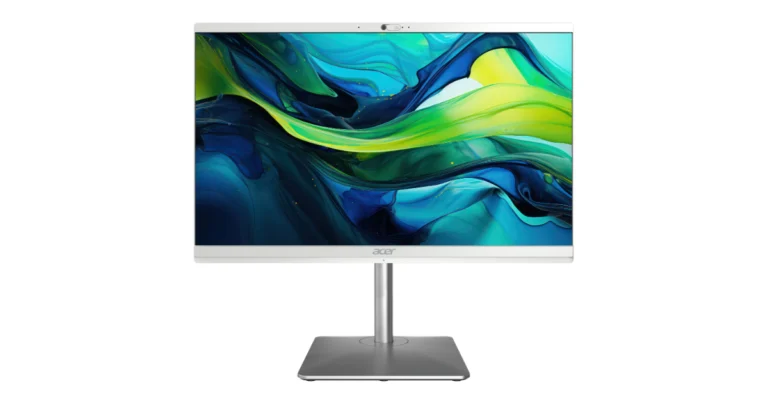
Acer has unveiled two new all-in-one PC models Acer Aspire C24 (C24-195ES) and Acer Aspire C27 (C27-195ES) in its Aspire series that provide AI-powered experiences for both entertainment and daily computing. With its smart collaboration capabilities, stylish designs, and choices for 23.8- and 27-inch displays, the Aspire C line is ideal for families, hybrid workers, and students. It also offers FHD displays and 1440p QHD cameras. The PCs have Acer PurifiedVoice for video conferencing, Windows Studio effects, Copilot in Windows, and Intel Core Ultra processors with AI Boost and Intel Graphics. The Acer Aspire C27 (C27-195ES) will go on sale in July for EUR 999 in EMEA and in Q3 for USD 899.99 in North America. In July, the Acer Aspire C24 (C24-195ES) will go on sale in Europe, with a starting price of EUR 899. According to the company, the specifications, costs, and accessibility will differ depending on the location. Also Read: MediaTek to present Kompanio 838 SoC and Pentonic 800 SoC at Computex 2024 The Acer Aspire C24 and C27 are all-in-one AI computers with Intel Core Ultra 7 processors, Intel AI Boost, and Intel Graphics built-in. With a 2 TB M.2 PCIe SSD and 32 GB dual channel DDR5 memory, they provide good performance and experience. Enhancing productivity and creativity are productivity features like Intel Unison software and Copilot. With Acer PurifiedVoice with AI noise reduction technology and support for Windows Studio effects, the 1440p QHD 5.0-megapixel webcams (with privacy shutter) excel. For consistent connectivity for streaming and surfing, Bluetooth LE audio and blazing-fast Wi-Fi 7 are included. Also Read: OnePlus 12 Glacial White colour variant confirmed to launch in India on June 6 The Acer Aspire C all-in-one PCs feature 23.8- and 27-inch FHD IPS displays with narrow bezels and impressive screen-to-body ratios. They come with up to 95.7% for the 27-inch model, and feature Acer Bluelight Shield technology for comfortable viewing. The slim, minimalist design offers flexibility with a tiltable screen and swivel on a height-adjustable ergonomic stand. The Acer Elite 19 wireless keyboard and mouse set is included, along with four USB Type-A ports, a Type-C port, and HDMI for fast data transfer.

MediaTek to present Kompanio 838 SoC and Pentonic 800 SoC at Computex 2024

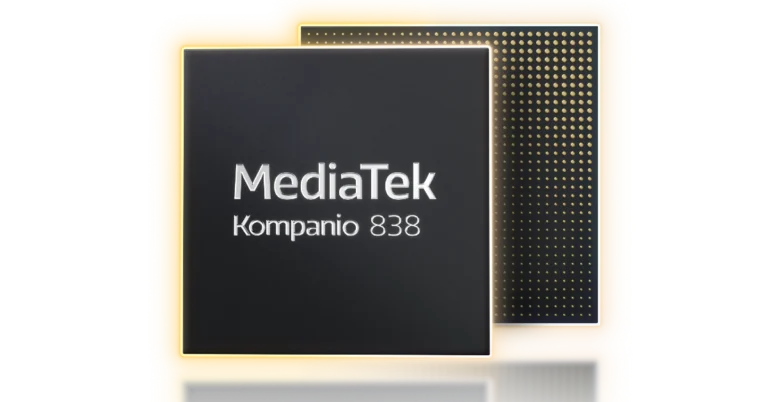
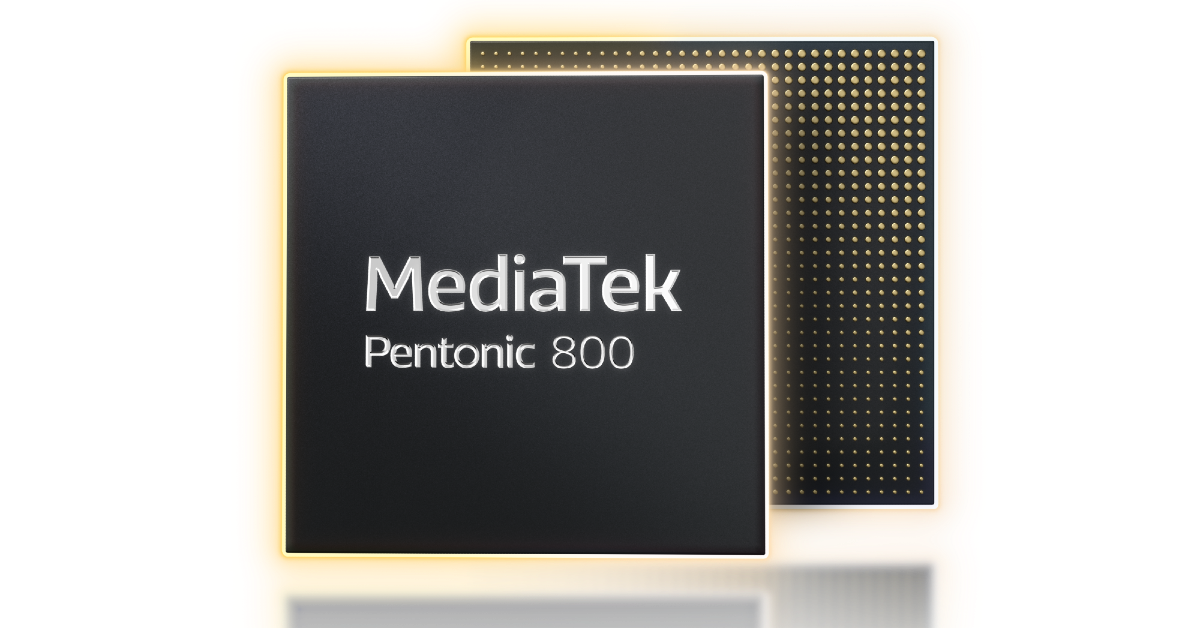
MediaTek will showcase new products and technology demonstrations at Computex 2024. The company will debut two new chipsets with powerful performance and support for the latest AI enhancements across multiple verticals: the Kompanio 838 SoC for premium Chromebooks and the Pentonic 800 SoC for 4K premium smart TVs and displays. A keynote address by Vice Chairman and CEO Dr. Rick Tsai regarding how MediaTek might allow ubiquitous AI will be presented at Computex 2024, along with new product announcements and technological demonstrations showcasing AI, Smart TVs, Chromebooks, IoT, and more. Dr. Tsai will deliver his keynote speech on Tuesday, June 4 at 13:30 Taiwan time at the Taipei Nangang Exhibition Center Hall 2 in Taipei, Taiwan. Two new chipsets from MediaTek, the Kompanio 838 SoC for premium Chromebooks and the Pentonic 800 SoC for 4K premium smart TVs and displays, will make their debuts. Both chipsets offer strong performance and support for the most recent AI advancements across several verticals. Also Read: OnePlus 12 Glacial White colour variant confirmed to launch in India on June 6 For small and light Chromebooks, the octa-core Kompanio 838 is an incredibly efficient System on a Chip (SoC) with exceptional performance and multitasking features. It doubles memory bandwidth, supports DDR4 and LPDDR4X, and uses the MediaTek NPU 650, a dedicated AI processor, to handle the most recent advancements in AI. Even in difficult lighting circumstances, professional quality HDR imagery, dual camera capabilities, and low-light capture are enhanced by the integrated next-generation MediaTek Imagiq 7 series ISP. With the Kompanio 838, customers can stream 4K material and improve visual quality thanks to hardware-accelerated AV1 video decoding. It offers dual-band and tri-band networking choices with MediaTek Filogic Wi-Fi 6 and 6E technology, and it can support up to two 4K screens at once. MediaTek to present Kompanio 838 SoC and Pentonic 800 SoC at Computex 2024 However, the MediaTek Pentonic 800 is a potent SoC made for 4K screens that provides excellent cloud gaming, music, and video quality. Its AI processor offers up to 60% less bandwidth utilisation and 50% faster processing performance. In order to improve upscaling, picture quality, and noise reduction, the processor supports AI-powered display technologies such as AI-Super Resolution 3.0, AI-Contrast 2.0, AI-Picture Quality Scene Recognition 2.0+, and AI-Picture Quality Object Recognition 2.5+. It supports important codecs like HEVC, AV1, AVS3 High Profile, and VVC (H.266), and it can handle variable refresh rate (VRR) up to 4K2K 165Hz. Filogic Wi-Fi connectivity solutions are available for OEMs to add for dependable, high-speed, low-latency communication. At Computex, MediaTek will have an exhibit to highlight its intelligence capabilities across a range of devices. Also Read: Moto G04s with 50-megapixel rear camera launched in India MediaTek will be present at a private booth at Computex, showing off how the business is integrating intelligence into a wide range of products, including Chromebooks, IoT devices, smartphones, smart TVs, routers, tablets, and vehicles.

OnePlus 12 Glacial White colour variant confirmed to launch in India on June 6

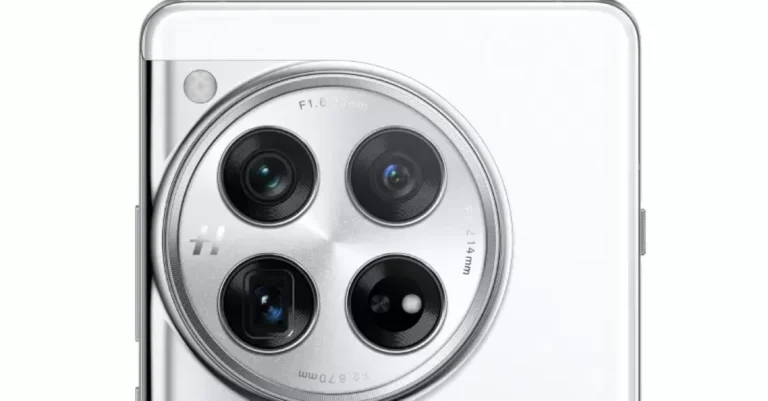
OnePlus has officially revealed the launch date for the new colour variant of the OnePlus 12 in India. The company’s flagship will be available in three colour options: Glacial White is the third. The specs of the smartphone are expected to remain the same. The Qualcomm Snapdragon 8 Gen 3 SoC powers the gadget. Additionally, the phone features an LTPO OLED screen with a 120 Hz refresh rate. With a 50-megapixel primary sensor, it has a triple back camera arrangement. Out of the box, it runs ColorOS 14, which is based on Android 14. The OnePlus 12 will launch in India in a third limited-edition colour, Glacial White, alongside the Flowy Emerald and Silky Black options. The launch is scheduled to take place on June 6. Also Read: Moto G04s with 50-megapixel rear camera launched in India

OnePlus 12 specifications

OnePlus 12 features a 6.82-inch quad-HD+ LTPO OLED with 1,440 x 3,168 pixels of resolution. The front panel has an adaptive refresh rate ranging between 1Hz and 120Hz. Additionally, 4,500 nits of screen brightness is supported. The smartphone also has an IP65 rating that protects it from dust and water. Under the hood sits Qualcomm’s 4nm Snapdragon 8 Gen 3 SoC. Up to 12GB of LPDDR5X RAM and up to 512GB of UFS 4 internal storage are available for the device. The device comes with a triple rear camera setup powered by Hasselblad which includes a Sony LYT-808 sensor with a 50-megapixel primary camera (OIS, and f/1.6 aperture), 64-megapixel telephoto secondary lens (OIS, 3X optical zoom and f/2.6 aperture) and 48-megapixel ultra-wide-angle lens (114-degree field-of-view). The 32-megapixel front-facing camera (f/2.4 aperture) is provided for video calling and selfies. Also Read: AMD’s new bug bounty program announced in association with Intigriti The phone sports a 5,400mAh battery with compatibility for 100W SuperVOOC wired, 50W wireless, and 10W reverse wireless charging. The phone also includes a Dual Cryo-velocity VC Cooling System, featuring a 3D capillary dissipation structure and a dual VC design to significantly reduce overheating.

Top 6 ways to message someone on WhatsApp without saving their number

0
When you create your profile on WhatsApp, it syncs your phone’s contacts, making it easier to find and text your friends. If you want to chat with someone on the messaging app, you need to save their number on your device first. This works fine for the most part unless you’re initiating a chat with a business or a vendor and don’t want to go through the hassle of saving their number for a conversation that will only happen once. Luckily, there are some workarounds to his conundrum. Today, we bring you the top 6 ways to message or text someone on WhatsApp without saving their phone number on your device. Read Also: Top 8 ways to fix ‘Google Play Store not auto-updating apps’ on Android (2024)

Benefits of texting someone without saving their number

Texting someone on WhatsApp without saving their number on WhatsApp doesn’t just save you time, but also protects your privacy. Your saved contacts can view your profile picture, status updates, bio, and last seen & online status on WhatsApp. Of course, you can always exclude certain contacts from viewing these details but carrying out that process every time you want to text a business, colleague, or vendor can be very tedious. A closely curated contact list is essential for maximising your WhatsApp experience. When you’ve got a handful of contacts, you don’t need to worry about people you don’t know seeing your profile picture and status updates. This is where texting people without saving them as contacts comes very handy.

Message the number to yourself

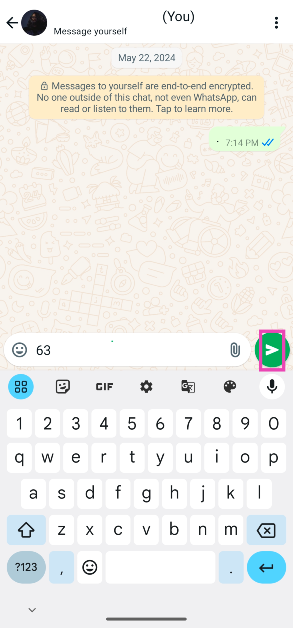
If you don’t want to save someone as a contact on your phone, simply message their number to yourself on WhatsApp and open a chat thread with them. Here’s how. Step 1: Launch WhatsApp and select the conversation thread with your number. It will be suffixed with ‘(You)’. Step 2: Enter the number in the text field and hit Send. Step 2: Enter the number in the text field and hit Send. Step 3: Tap on the number and select Chat with [phone number]. Step 3: Tap on the number and select Chat with [phone number]. Step 4: A new chat thread with the selected phone number will appear on your screen. You can now start chatting with the person.

Message someone from a group

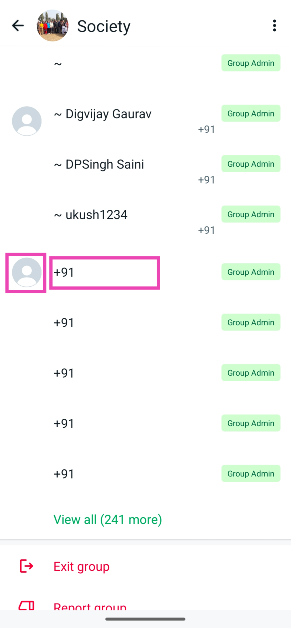
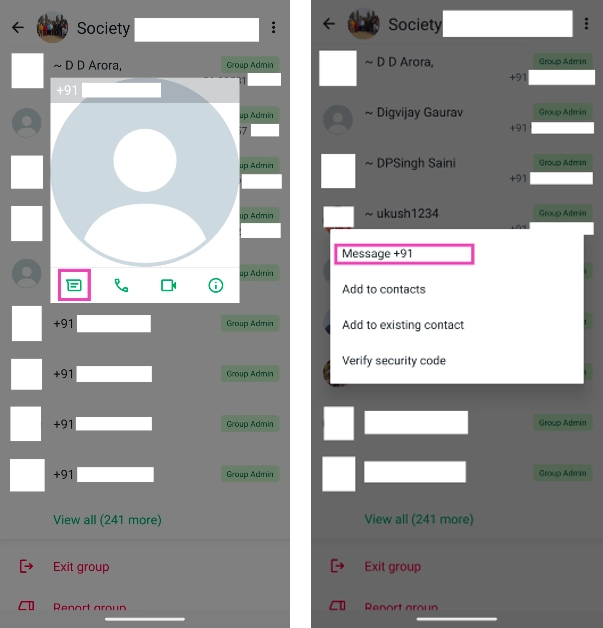
If you share a group with the person you want to text, you don’t need to save their number to chat with them on WhatsApp. Follow these steps. Step 1: Launch WhatsApp and select the group in which the user is a participant. Step 2: Tap on the group header and scroll down to view the members. Step 3: Tap on the user’s profile picture or number. Step 3: Tap on the user’s profile picture or number. Step 4: Tap the message icon or ‘Message [phone number]‘ in the popup box. Step 4: Tap the message icon in the popup box. Step 5: A new chat thread with the user will appear on the screen. You can now send them a text without saving their number.

Use your phone’s web browser

Step 1: Go to your mobile’s web browser and open the link https://wa.me/phonenumber. Replace ‘phonenumber’ with the contact’s phone number. For example: If you want to send a message to +919876543210, simply type https://wa.me/9876543210. Replace the ‘phonenumber’ string in the link with the number. how to send whatsapp message to unsaved number Step 2: Tap on the Chat icon. Tap on the ‘Chat’ icon. how to send whatsapp message to unsaved number Step 3: A new chat thread will open up on the WhatsApp app, where you can send messages to the unsaved number.

Use the contact card

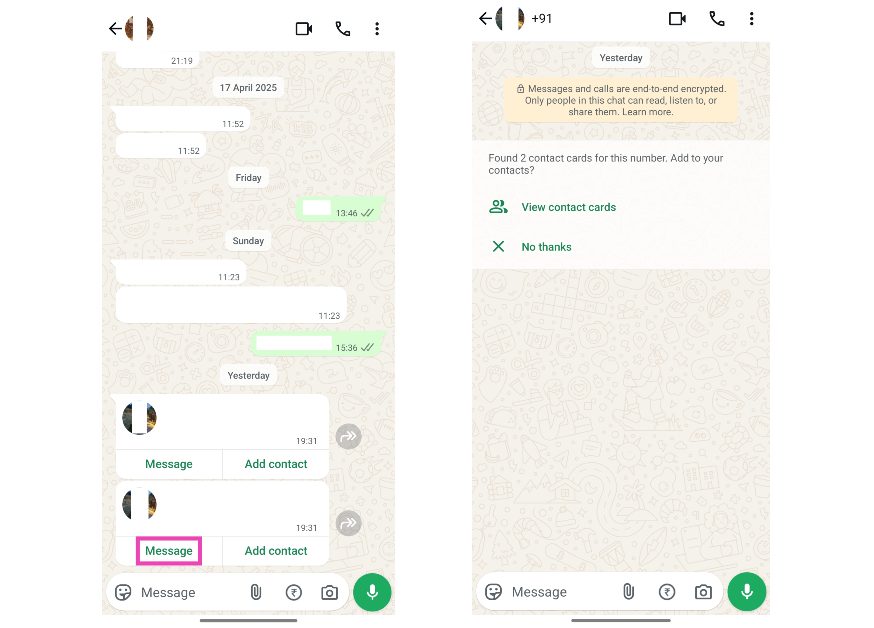
Use the contact card You can message someone on WhatsApp using their contact card sent to you by another user. While WhatsApp gives you the option to save the contact to your account before sending them a message, it is not mandatory to do so. Simple, tap ‘Message’ on the contact card to send the user a text without saving their number.

Use Truecaller

Use TrueCaller While looking up someone on Truecaller, the app gives you the option to text them on WhatsApp without saving their number. All you need to do is select the person’s profile on Truecaller, scroll all the way down, and tap on ‘WhatsApp’. A new chat thread with the user will open on the messaging app.

Use Google Assistant

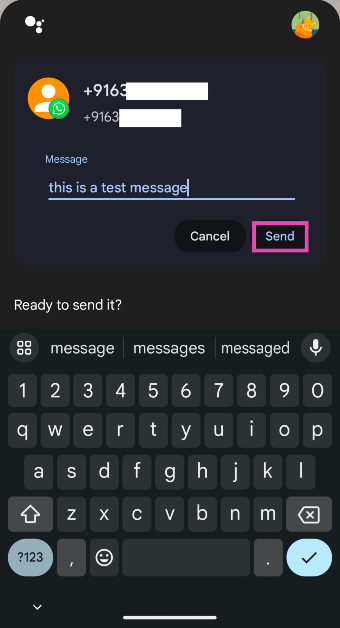
A lot of people aren’t aware of this trick, but you can use Google Assistant to send a WhatsApp message to any number without saving it. Here’s how. Step 1: Say ‘Hey Google, send a WhatsApp message to [phone number]’. Replace ‘phone number’ with the user’s phone number including the country code. Step 1: Say ‘Hey Google, send a WhatsApp message to [phone number]’. Replace ‘phone number’ with the user’s phone number including the country code. Step 2: A WhatsApp text box with the user’s number will appear on the following page. You can choose to dictate your message or type it using the onscreen keyboard. Step 2: A WhatsApp text box with the user’s number will appear on the following page. You can choose to dictate your message or type it using the onscreen keyboard.

Frequently Asked Questions (FAQs)

Is it possible to send someone a message on WhatsApp without saving their number?

You can send a WhatsApp message to an unsaved number simply by tapping it on the app and selecting ‘Chat with…’. If you can’t find the number anywhere on WhatsApp, simply send it to yourself and then select it.

Can I call someone without saving their number on WhatsApp?

Yes, you can call someone on WhatsApp without saving their number. Simply tap on their number or contact card anywhere in the app and hit the call icon on the chat screen.

How do I block calls from unknown numbers on WhatsApp?

You can’t block calls from unknown numbers on WhatsApp, but you can mute them. Go to WhatsApp>Settings>Privacy>Calls, and turn on the toggle switch next to ‘Silence unknown callers’.

Who can see my status updates on WhatsApp?

By default, your WhatsApp contacts can see your status updates on the app. You can choose to exclude certain contacts from the list.

How do I message myself on WhatsApp?

Launch WhatsApp, go to the contact list, and tap the number or contact with ‘(You)’ next to it. This should ideally appear at the top of the contact list. Read Also: Lava Yuva 5G powered by Unisoc T750 5G SoC launched in India

Conclusion

These are the top 6 ways to message or text someone on WhatsApp without saving their phone number on your device. You can also use several third-party apps for this task, but we don’t recommend sharing your WhatsApp profile with another app, especially when there are several native ways to go about it.

Top 11 ways to fix ‘Google Play Store not auto-updating apps’ on Android

0
Enabling automatic app updates on your phone is recommended if you want to gain access to new features as soon as they are rolled out. New updates also boost the security of your device and patch bugs and malfunctions. If you have WiFi access at home, you don’t need to worry about the data consumed by automatic updates. Sometimes, users often report that despite internet access, their phone cannot install new updates. So, let’s take a look at the 11 quick fixes for the ‘Google Play Store not auto-updating apps’ issue on your Android phone. Read Also: Top 7 fixes for ‘Emails not syncing’ on Android phone (2024)

Why are apps not updating automatically on my phone?

The process of updating apps occurs in the background and mostly goes unnoticed by the user. While your phone doesn’t explicitly notify you about downloading updates, you can always find the progress bar in the notification shade when an update is being downloaded. If your phone stops updating apps all of a sudden, it could be due to one of the following reasons.
  • Auto-updates aren’t allowed over mobile data
  • The date and time information on your phone is incorrect
  • Connection issues with the WiFi
  • You have run out of mobile data
  • Google Play Store is out of date
  • Google Play Store’s cache is corrupted
  • Google Play Store isn’t allowed to function in the background
  • Google Play Store isn’t allowed to use data in the background
  • Your phone’s OS is out of date

Allow apps to auto-update on mobile data

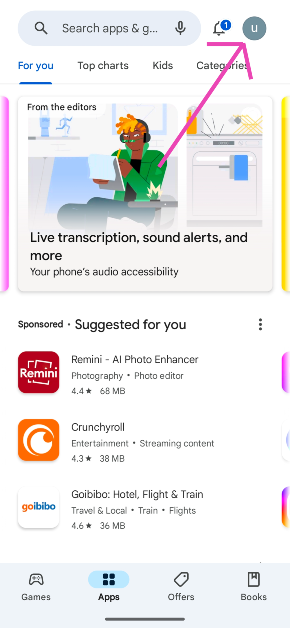
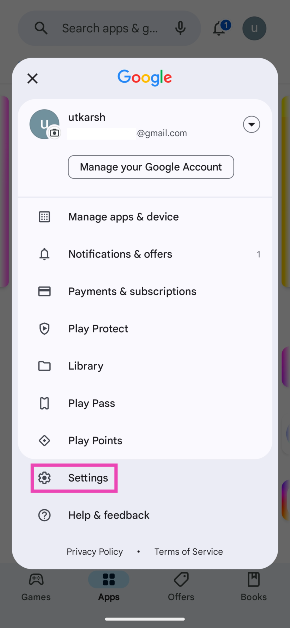
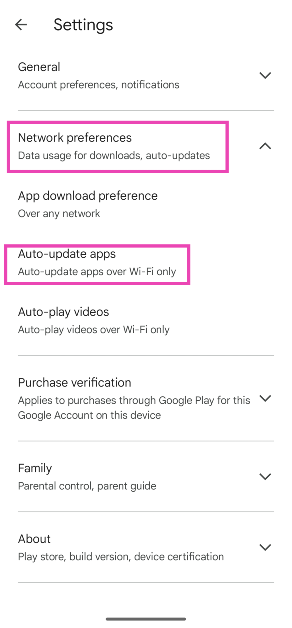
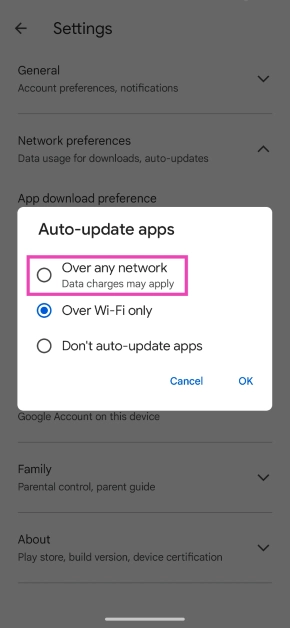
By default, apps are set to auto-update when your smartphone is connected to a WiFi network. Automatically updating apps using your mobile network can consume a fair share of your allotted data and rack up a lot of data charges. If you’re fine with that, here’s how you can go about it. Step 1: Launch the Google Play Store on your phone and tap your profile picture at the top right corner of the screen. Step 1: Launch the Google Play Store on your phone and tap your profile picture at the top right corner of the screen. Step 2: Tap on Settings. Step 2: Tap on Settings. Step 3: Tap on Network preferences and select Auto-update apps. Step 3: Tap on Network preferences and select Auto-update apps. Step 4: Select Over any network. Step 4: Select Over any network.

Update the Play Store version

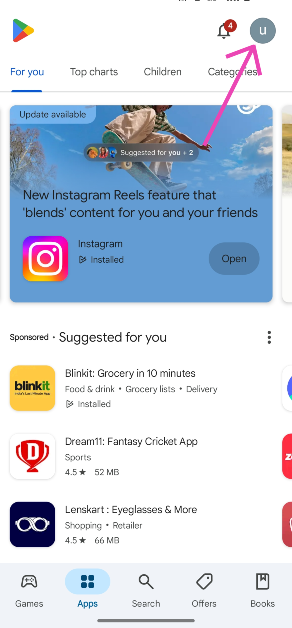
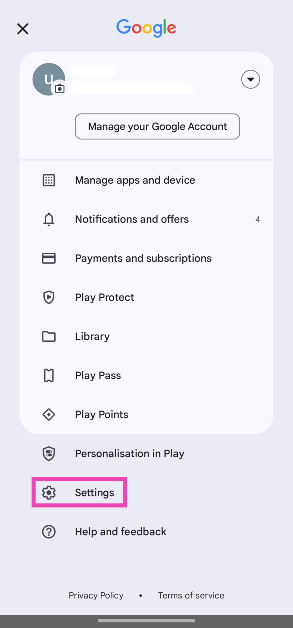
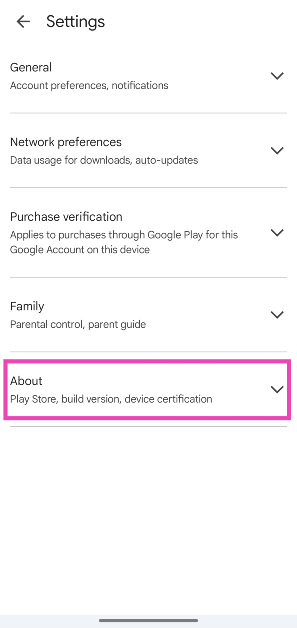
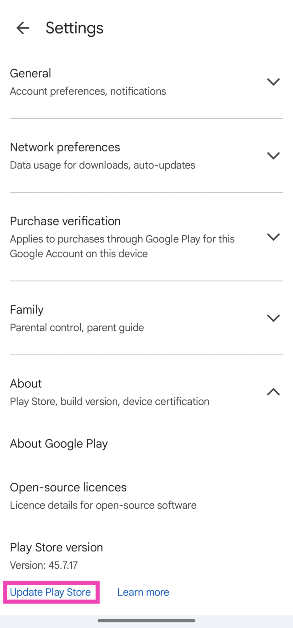
Step 1: Launch the Google Play Store on your phone. Step 2: Tap your profile icon in the top-right corner of the screen. Step 2: Tap your profile icon in the top-right corner of the screen. Step 3: Tap on Settings. Step 3: Tap on Settings. Step 4: Expand the About section. Step 4: Expand the About section. Step 5: Tap on Update Play Store. Step 5: Tap on Update Play Store.

Make sure Google Play Store is allowed to use background data

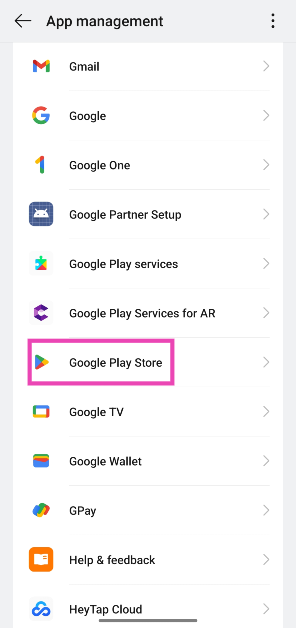
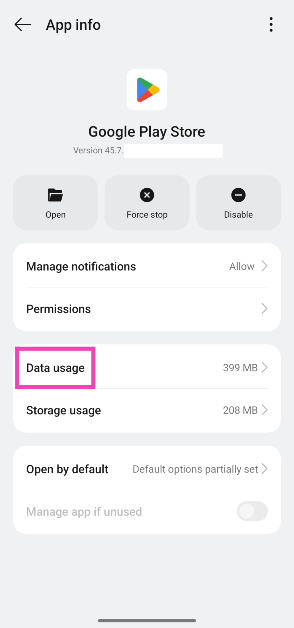
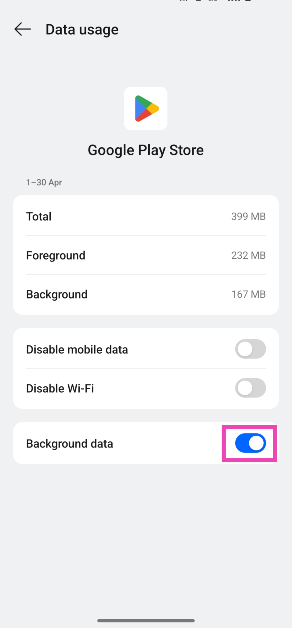
Step 1: Go to Settings and select Apps. Step 1: Go to Settings and select Apps. 5 ways to stop an Android app from running in the background Step 2: Tap on App management. Step 2: Tap on App management. 5 ways to stop an Android app from running in the background Step 3: Select Google Play Store. Step 3: Select Google Play Store. Step 4: Tap on Data usage. Step 4: Tap on Data usage. Step 5: Turn on the toggle switch next to Background data. Step 5: Turn on the toggle switch next to Background data usage.

Clear Google Play Store’s cache

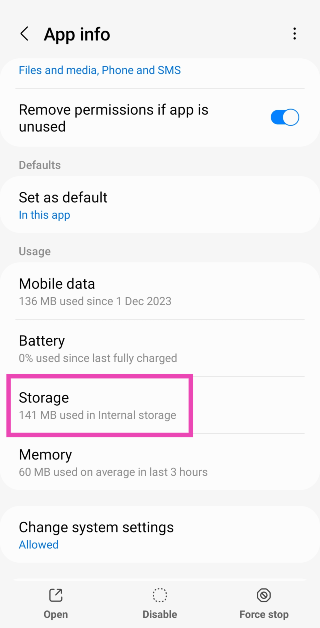
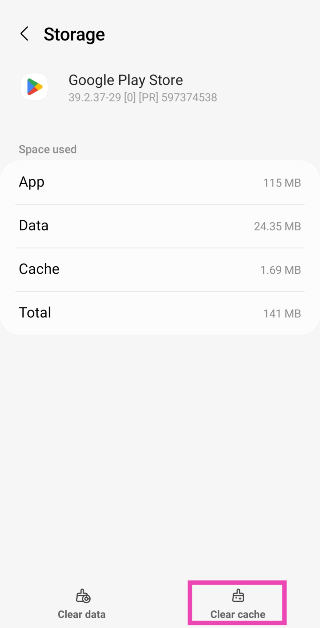
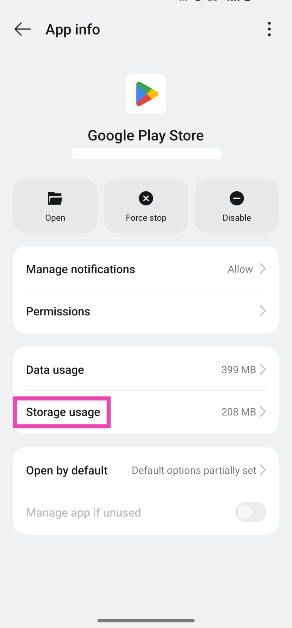
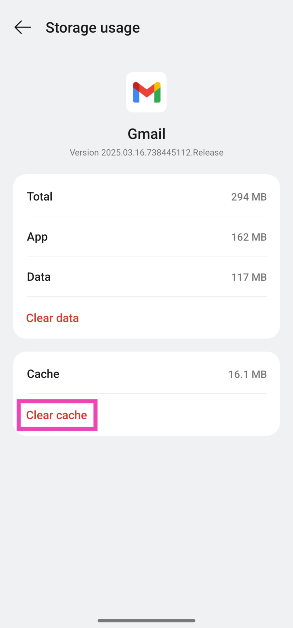
Step 1: Go to Settings and select Apps. Step 1: Go to Settings and select Apps. Step 2: Select Google Play Store. Step 2: Tap on Google Play Store. Step 3: Tap on Storage. Step 3: Select Storage. Step 4: Select Clear Cache. Step 4: Hit Clear Cache.

Uninstall Google Play Store updates

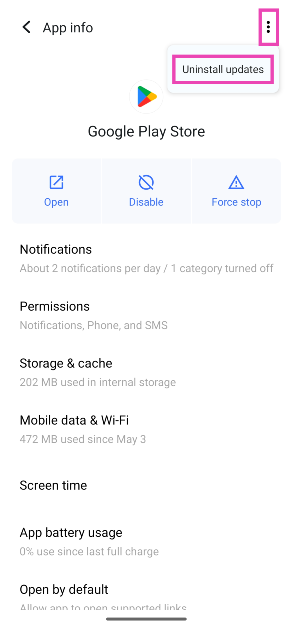
New Play Store updates can often fail to install correctly, causing unwanted malfunctions. Uninstall the updates and reinstall them to fix the issue at hand. Step 1: Go to Settings and select Apps. Step 1: Go to Settings and select Apps. Step 2: Select Google Play Store. Step 2: Tap on Google Play Store. Step 3: Tap the ellipses at the top right corner of the screen. Step 3: Tap the ellipses at the top right corner of the screen. Step 4: Tap on Uninstall updates.

Check date and time settings

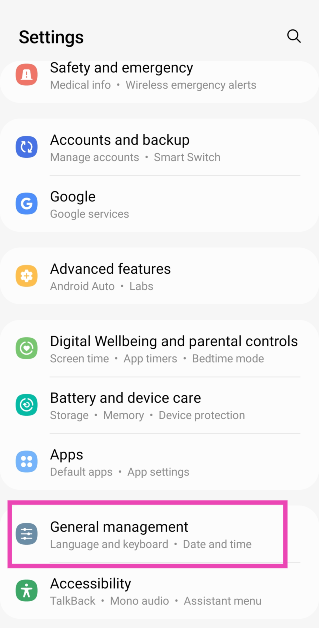
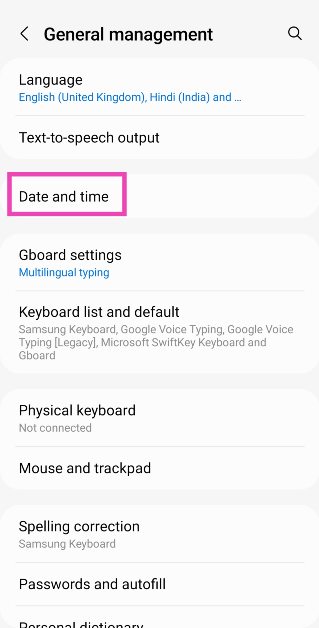
Several integral apps on your phone rely on the correct data and time data to function properly. Google Play Store is one of them. If you notice any issues with the Play Store, check if the data and time info on your phone is accurate. Better yet, use the date and time provided by your network. Here’s how. Step 1: Go to Settings and select General Management. Step 1: Go to Settings and select General management. App updates stuck on pending? Try these 7 fixes Step 2: Tap on Date and time. Step 2: Tap on Date and time. App updates stuck on pending? Try these 7 fixes Step 3: Turn on the toggle switch for Automatic date and time. Step 3: Turn on the toggle switch for Automatic date and time. App updates stuck on pending? Try these 7 fixes

Check your phone’s storage

Updating the apps on your phone requires a little extra storage space. This is because the newer versions of apps are often larger than the ones they replace. If your phone is running low on storage, the apps will fail to update in the background. Go to Settings>Storage to check the storage status and delete large files from your device to create more space. You can also use cloud services like Google Drive and Dropbox to store large files from your device.

Turn off Battery Optimisation

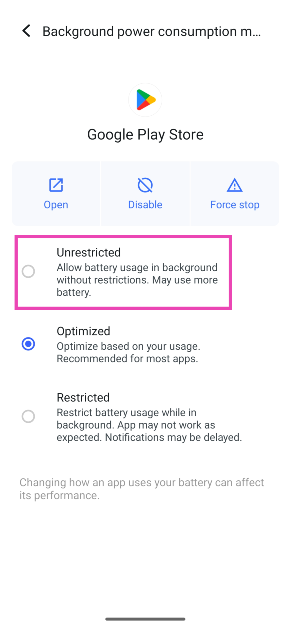
The auto-update process for apps takes place in the background. If you’ve turned on Battery Optimisation for the Play Store on your phone, it can impose restrictions on the app, keeping it from working in the background. Here’s how you can disable it. Step 1: Go to Settings and select Apps. Step 1: Go to Settings and select Apps. Step 2: Select Google Play Store. Step 2: Tap on Google Play Store.   Step 3: Tap on App battery usage. Step 3: Tap on App battery usage. Step 4: Select Unrestricted. Step 4: Select Unrestricted. Top 8 ways to fix ‘Google Play Store not auto-updating apps’ on Android (2024)

Log out and log back into your Google Account

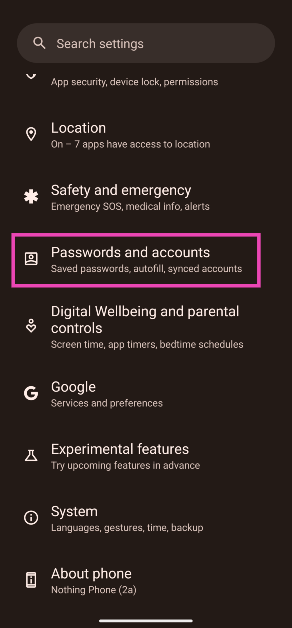
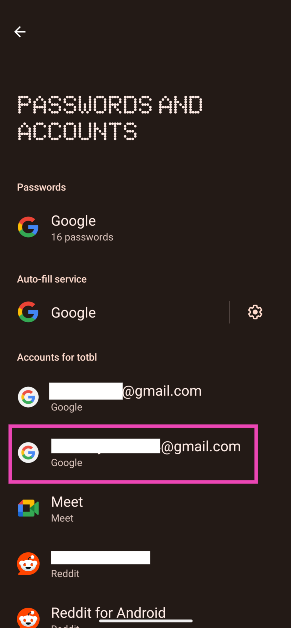
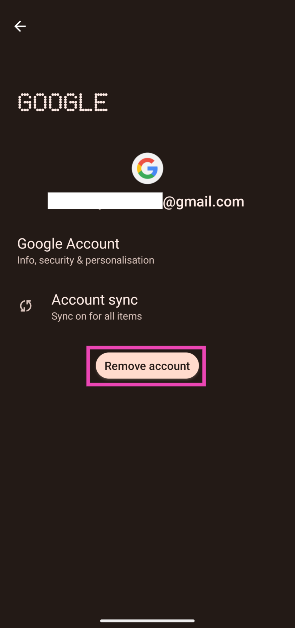
If any account-related issues are keeping the apps on your phone from updating automatically in the background, try logging out and logging back in. Step 1: Go to Settings and select Passwords and accounts. Step 1: Go to Settings and select Passwords and accounts. Top 8 ways to fix ‘Google Play Store not auto-updating apps’ on Android (2024) Step 2: Select your Google Account. Step 2: Tap on the Gmail account you want to remove from the device. Top 8 ways to fix ‘Google Play Store not auto-updating apps’ on Android (2024) Step 3: Tap on Remove account. Step 3: Tap on Remove account. Top 8 ways to fix ‘Google Play Store not auto-updating apps’ on Android (2024) Step 4: Now, select Add account and enter your login credentials.

Use a third-party app store

bloatware If Google Play Store is giving you trouble, there are a bunch of credible third-party app stores you can use to download updated versions of the apps on your phone. APKMirror and F-Droid are two of the most trustworthy app marketplaces around. Additionally, you can use your phone’s manufacturer’s app store for an easier, more accessible experience. Samsung users can turn to the Galaxy Store, while Vivo/iQOO users can get apps from the V-Appstore.

Update the OS

Step 1: Go to Settings and select Software update. Go to Settings and select Software update. 10 top ways to fix unable to answer calls on Android phone Top 8 ways to fix the ‘Emergency Calls Only’ error message on Android (2024) Top 8 ways to fix ‘Google Play Store not auto-updating apps’ on Android (2024) Step 2: Tap on Download and install. tap on download and install 10 top ways to fix unable to answer calls on Android phone Top 8 ways to fix the ‘Emergency Calls Only’ error message on Android (2024) Top 8 ways to fix ‘Google Play Store not auto-updating apps’ on Android (2024) Step 3: Select Install now. Select Install now. 10 top ways to fix unable to answer calls on Android phone Top 8 ways to fix the ‘Emergency Calls Only’ error message on Android (2024) Top 8 ways to fix ‘Google Play Store not auto-updating apps’ on Android (2024)

Frequently Asked Questions (FAQs)

How do I turn on auto-updates for apps on Android?

Go to Google Play Store>Settings>Network Preferences>Auto-update apps and select ‘Over any network’ or ‘Over WiFi only’, depending on your preference.

How do I enable auto-updates for just one app?

Go to the app’s page on the Google Play Store, hit the ellipses at the top right corner of the screen, and select ‘Enable auto-update’.

How do I update the Play Store?

Launch the Google Play Store, tap your profile picture, go to Settings>About, and tap on ‘Update Play Store’.

How do I allow the Google Play Store to use background data?

Go to Settings>Apps>Google Play Store>Data usage and turn on the toggle switch next to ‘Use background data’.

How do I download an app without using the Google Play Store?

Most Android OEMs have their own app marketplaces. If you don’t want to use the Play Store, you can use the Galaxy Store on Samsung phones, V-Appstore on Vivo/iQOO phones, Mi GetApps on Xiaomi phones, and so on. Read Also: Moto G04s with 50-megapixel rear camera launched in India

Conclusion

These are the top 11 ways to fix the ‘Google Play Store isn’t auto-updating apps’ on your Android phone. As a last-ditch measure, you can try performing a factory reset on your device to fix this issue. This will erase all the data on your phone and restore it to its factory settings. If you found this article helpful, let us know in the comments!

Moto G04s with 50-megapixel rear camera launched in India

Lenovo-owned smartphone brand Motorola has announced the launch of a new budget smartphone in India. The company introduced Moto G04s powered by an octa-core Unisoc T606 SoC. It features a 6.56-inch HD+ IPS LCD screen and includes a 5-megapixel selfie camera sensor. The device packs a 5,000mAh battery which comes with 15W charging support.

Moto G04s price in India, sale details

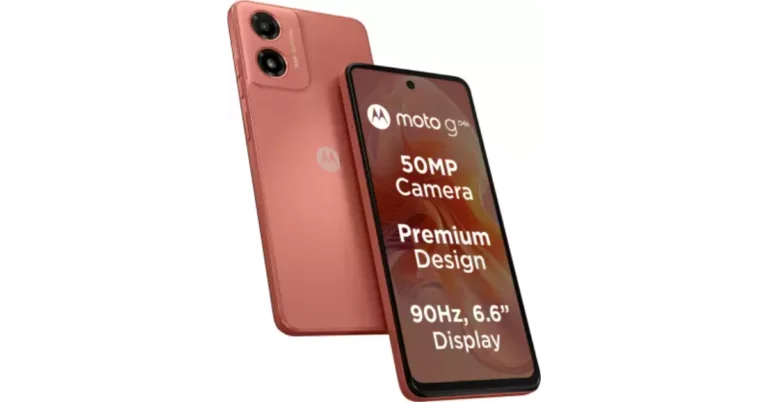
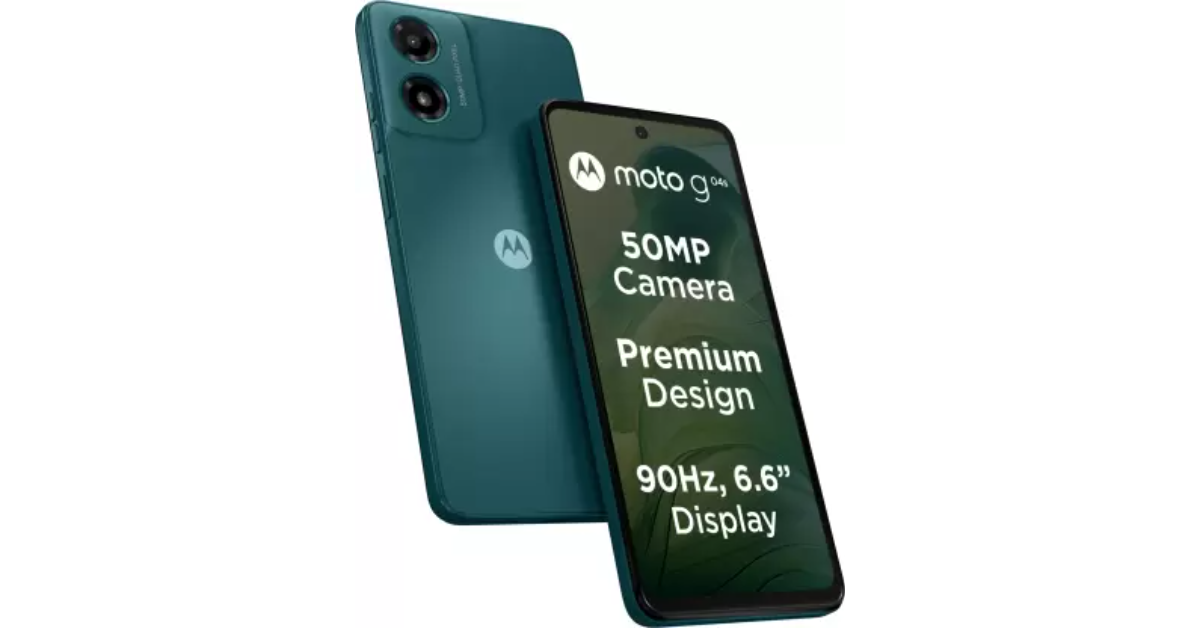
Moto G04s has been launched in India with a price tag of Rs 6,999 for the single 4GB RAM with 64GB storage option. The device comes in Concord Black, Sea Green, Satin Blue, and Sunrise Orange colour options. The phone is scheduled to go on sale via Flipkart, Motorola India website, and select retail stores in the country starting June 5. Moto G04s price in India, sale details

Moto G04s specifications

Moto G04s has a 6.56-inch HD+ IPS LCD screen with 1,612 x 720 pixels of resolution. The display has a refresh rate of 90Hz and comes with Corning Gorilla Glass 3 protection. The handset is driven by a Unisoc T606 SoC along with ARM Mali-G57 MP1 GPU. It includes 4GB of RAM and 64GB of UFS 2.2 storage. Both the RAM and internal storage are expandable and up to 8GB and 1TB (using a microSD card), respectively. Also Read: AMD’s new bug bounty program announced in association with Intigriti The smartphone also features a 50-megapixel primary rear sensor along with an LED flash. A 5-megapixel sensor has been provided on the front housed inside a hole-punch cutout for taking selfies and video calling. The Moto G04s is backed by a 5,000mAh battery with 15W charging support. It includes a side-mounted fingerprint sensor for authentications and comes with an IP52 rating for dust and splash resistance. For connectivity, it includes Wi-Fi, GPS, Bluetooth 5.0, and USB Type-C for charging as well as a 3.5mm audio jack. The handset is an upgraded version of Moto G04 which was launched in India in February this year at Rs 6,999 for the 4GB RAM with 64GB storage model whereas the 8GB RAM with 128GB storage variant comes with a price tag of Rs 7,999. Also Read: Lava Yuva 5G powered by Unisoc T750 5G SoC launched in India It sports a 6.6-inch HD+ IPS LCD screen with a refresh rate of 90 Hz. Under the hood, there is a UniSoC T606 SoC paired with Mali G57 GPU and up to 8GB of RAM. The device also supports virtual RAM expansion of up to 16GB. The device comes with up to 128GB of UFS 2.2 storage that can also be further expanded up to 1TB using a microSD card. The phone runs on Android 14-based My UX.  Moto  G04 features an AI-powered 16-megapixel rear camera sensor and a 5-megapixel front-facing camera for selfies. It sports a 5000mAh battery with 15W fast charging support.

AMD’s new bug bounty program announced in association with Intigriti

With the introduction of AMD’s new bug bounty program with Intigriti, security researchers and ethical hackers can now report bugs in AMD’s software, firmware, or hardware in exchange for cash rewards. Through AMD’s bug bounty programme, possible problems may be found before they are made public, which would be advantageous for both the firm and the possibility of large payouts. AMD has collaborated with Intigriti, a crowdsourcing security service provider, to launch a new bug bounty programme. AMD’s awards are based on the severity of the problem and the product category. While announcing the Bug Bounty Program AMD said, “Following on from its private Bug Bounty initiative, AMD today announced that it is working with Intigriti to launch a new public Bug Bounty Program, enabling researchers across the ecosystem to submit vulnerabilities to further safeguard its products for customers and the IT ecosystem as a whole.” AMD’s Bug Bounty Program will allow researchers from across the ecosystem to submit vulnerabilities to help protect its products for customers and the IT ecosystem as a whole. Furthermore, AMD invites security researchers to collaborate with the team to reduce and coordinate the disclosure of potential security flaws. In support of the program, AMD will be offering monetary rewards based on the severity and impact of the reported issues. Successful bug bounty hunters can earn more than $90,000 per year by locating bugs. Also Read: Lava Yuva 5G powered by Unisoc T750 5G SoC launched in India AMD provides public bug bounty rewards ranging from low to high severity, covering hardware, firmware, and software, with variable sums for each severity. Other large PC sector companies, such as Intel, Apple and others, have bug reward programmes in place to ensure that their systems and products are free of previously unknown vulnerabilities. Also Read: MediaTek unveiled Dimensity 7300 and 7300X SoCs for premium devices and foldables The company said, “Product security is of critical importance to AMD and this collaboration with academics, security researchers and ethical hackers, alongside the promotion of security research, is an important step in continuing to improve the security of AMD products. Additionally, AMD encourages security researchers to work with the team to help mitigate and coordinate the disclosure of potential security vulnerabilities.” If AMD approves your claim for a bug bounty prize, you can get the following:
Bug Severity Low  Medium  High  Critical 
Hardware 2,000 5,000 15,000 30,000
Firmware 1,000 3,000 9,000 15,000
Software 500 1,500 5,000 10,000

Garena Free Fire Redeem Codes Today 31 May 2024: Here is how to claim them

Garena Free Fire is a battle royale game with regular awards and tournaments to keep players interested. If you play Garena Free Fire, you should be aware of the redeem codes that are released on a daily basis. However, because the battle royale game is banned in India, players from other countries can use the Free Fire Redeem codes daily. If you’re unfamiliar with the Garena Free Fire redeem codes or don’t know how to get them, we’ve put together a step-by-step guide to help you redeem them. Check out Garena Free Fire Redeem Codes for 31 May 2024. The Free Fire redeem codes are a great way to get free stuff. These are 12-digit codes that contain alphabets and numbers, as well as an expiration date and time. Because the Garena FF redeem codes cannot be used more than once, you should hurry to the redemption page to claim your free reward before someone else does. To get a free reward, all you have to do is go to reward.ff.garena.com/en, which is the official redemption page. Also, keep an eye on this space for daily updates on Garena Free Fire redemption codes and rewards. Also Read: Sennheiser Accentum Plus wireless headphones with Hybrid Adaptive Noise Cancellation launched

Garena Free Fire Redeem Codes Today 31 May 2024

A4U1KF3D5H7M2Q9V B9F3J7C2T4P1FR5G L6W8FY2Q3N9E4X1S H5G2M7D9R1B3FK6P X1TF4H9R2G6F3C7V M3S6X9N2V5G1FP4J D7L9FW2B4K8Q1C3A F7T2L0X9G4K5D3N2 FJ6M8R1S4B9P0C3T FE2I7U5H1Y4Q9A6W FO8N3V5X1Y2B6D4H FG5X8V2K4H6M1Q3F FN9B2M4R7G1W3C5T FP2R5K9D3N7J1F4G FK9C7F3P2M6S4W8R T0G5N1J4K8FV3X6L FY4O7H1M5S9J2G6D FR1P4J8V3N5B2F6T FQ6C9T2M5G7X3R8W FV3S6D9N2B4J7R1K

How to Get Free Fire Redeem Codes for Garena on 31 May 2024?

  • Visit the Garena Free Fire game’s official website at reward.ff.garena.com.
  • Use your Facebook, Google, VK, Apple ID, Huawei ID, or Twitter account to log in.
  • You’ll be taken to a valid redemption code (s)
  • Copy and paste the 12-digit redemption code into the text box.
  • On the screen, a dialogue box will appear.
  • ‘Ok’ should be selected.
For the latest gadget and tech news, and gadget reviews, follow us on TwitterFacebook and Instagram. For newest tech & gadget videos subscribe to our YouTube Channel. You can also stay up to date using the Gadget Bridge Android App. You can find the latest car and bike news here.

Amazon Quiz Answers Today 31 May 2024: Participate to win Rs 500 Amazon Pay Balance

31 May 2024: New Amazon Quiz is now available. Customers from different parts of the country are participating in the daily quiz. The quiz starts at midnight today and will be live until 11:59 PM tonight. By successfully answering every question, participants in the quiz have the chance to win wonderful rewards. A Rs 500 Amazon Pay Balance is up for grabs to participants today. One wrong answer could eliminate you from the quiz. You have a chance to win Rs 500 Amazon Pay Balance if you successfully answer every question. Users of the app only have the opportunity to take the quiz. Check Out 31 May 2024 Amazon Quiz Answers. Amazon Quiz Today Prize: Rs 500 Amazon Pay Balance Quiz Date: 31 May 2024 Daily Timing: 12 AM to 11:59 PM Previous Amazon Quiz Winners Announcement: Today 12 PM Noon

Amazon Quiz Answers Today 31 May 2024: Win ₹ 500 Amazon Pay Balance

Question 1: Who scored a brilliant century as Punjab Kings successfully chased down a target of 262 against Kolkata Knight Riders in IPL 2024? Answer: Jonny Bairstow Question 2: The movie Article 370 stars which actress in the lead role of Zooni Haksar Answer: Yami Gautam Question 3: The famous Chamundeshwari temple located on the top of Chamundi Hills is in which Indian state? Answer: Karnataka Question 4: This is a view of the beautiful city of Queenstown in which country? Answer: New Zealand Question 5: ‘Let it Be’ is the name of a famous song released by which famous band in 1970? Answer: Beatles Also Read: Noise Buds Verve, budget TWS with up to 45 hours of playback launched in India

How To Play Amazon Quiz Today

Only app users are eligible to play the Amazon quiz every morning from 12 AM to 11:59 PM. The quiz is not available on the desktop. For those who are unaware of how to play the Amazon quiz, below are the steps, you can follow to take the quiz.
  • First, download the Amazon app from the Google Play Store or App Store or go here to download the Amazon App
  • Now fill in the required information through the Sign-Up option.
  • You need to log in to the Amazon app and scroll down on the home screen to find the Amazon Quiz banner.
  • Tap on the Amazon Quiz banner and tap on the Start button to start the Quiz.
  • Now you will get 5 questions and you need to answer them correctly. One wrong answer will eliminate you from the Quiz.
  • After answering all the questions correctly you are now eligible for a Lucky Draw.
  • The previous winner’s name will be announced today at 12 PM.

Amazon Daily Quiz Answers from the previous few days.

Here are all the answers from the previous 5 days of the Amazon Daily Quiz and Contest.

Amazon Quiz Answers Today 30 May 2024: Win ₹ 500 Amazon Pay Balance

Question 1: Who scored a half century in just 15 balls in a losing effort against Sunrisers Hyderabad in IPL 2024 for Delhi Capitals? Answer: Jake Fraser- Mcgurk Question 2: The Amazon Prime series- ‘A Gentleman in Moscow’ stars which famous actor in the lead role of Alexander Rostov? Answer: Ewan Mcgregor Question 3: The Achyutraya temple, the Virupaksha temple and the Vithala temple are located in which UNESCO World Heritage Site? Answer: Hampi Question 4: This is the logo of a famous automobile company headquartered in which country? Answer: France Question 5: This visual shows which dwarf planet as seen from the New Horizons spacecraft in 2015? Answer: Pluto

Amazon Quiz Answers Today 29 May 2024: Win ₹ 500 Amazon Pay Balance

Question 1: Which team did Real Madrid beat on penalties in the quarter finals of the 2023-24 UEFA Champions League? Answer: Manchester City Question 2: The series ‘Mayor of Kingstown’ stars which of these actors famous for his role in Marvel movies? Answer: Jeremy Renner Question 3: The Gaur, the Ruby Throated Yellow Bulbul and the Matti are the state animal, bird and tree respectively of which state? Answer: Goa Question 4: This picture is taken in the capital city of which European country? Answer:  Poland Question 5: By what name are these flowers popularly known? Answer: Cherry blossom

Amazon Quiz Answers Today 25 May 2024: Win ₹ 500 Amazon Pay Balance

Question 1: Which of these players won the Monte Carlo Masters tennis tournament in 2024, his 3rd triumph in that event in 4 years? Answer: Stefanos Tsitsipas Question 2: Which of these Amazon Prime shows shares its name with a 2005 Brad Pitt- Angelina Jolie movie? Answer: Mr and Mrs Smith Question 3: Which animal features on the election symbol of the Republican party in the USA? Answer: Elephant Question 4: These waterfalls span the border between the province of Ontario in Canada and which state in the USA? Answer: New York Question 5: Which of these famous architects designed this iconic monument in India? Answer: Edwin Lutyens

Amazon Quiz Answers Today 24 May 2024: Win ₹ 500 Amazon Pay Balance

Question 1: Against which team did Sunrisers Hyderabad set a new record scoring 287 in an IPL match? Answer: Royal Challengers Bengaluru Question 2: Who plays the role of soldier Arun Katyal in the recently released movie ‘Yodha’? Answer: Sidharth Malhotra Question 3: Which of these famous rulers was born in the Shivneri Fort in Maharashtra in the 17th century? Answer: Shivaji Question 4: Name this famous church located in Europe Answer: St. Peter’s Basilica Question 5: This is the flag of which Caribbean country? Answer: Barbados

Amazon Quiz Answers Today 23 May 2024: Win ₹ 500 Amazon Pay Balance

Question 1: Who recently became the youngest-ever winner of the FIDE Candidates? Answer: Gukesh D Question 2: Britney Spears’ song ‘Baby one more time’ was recently covered by Jack Black’s band Tenacious D for which movie? Answer: Kung Fu Panda 4 Question 3: One of the ‘New Seven Wonders of the World’ Petra is located in which country? Answer: Jordan Question 4: This is the _____ beetle, named because of its resemblance to another animal. Fill in the blanks Answer: Rhinoceros Question 5: Who among these is the founder of this company? Answer: Elon Musk

Amazon Quiz Answers Frequently Asked Questions (FAQs)

Where can I check the previous winners? Did I win how to check?

You can head over to this link on your mobile or desktop to check the winners of the Amazon Daily Quiz Contest.

How to Play Amazon Daily Quiz or Contest?

We have written an explainer above, you can refer to that.

When are the winners of the Amazon Quiz and contest announced or declared?

The announcement of today’s Amazon quiz winner will take place Tomorrow. As for the Special Quiz and “Spin & Win” Contest, the winners will be declared once the Quiz Contest comes to an end. To find out who the lucky winner is, you can refer to the Amazon Quiz Winners List or visit the Amazon Winners tab in the Amazon App.

How to participate in the Daily Amazon Quiz?

That is very easy, just got to the Amazon app and scroll to the bottom of the page and you will find the Quiz section. Click on it (usually it is called the fun zone) and you can enter the Amazon Today Quiz Contest. 

Are there any other quizzes or contests running on Amazon daily?

Yes, there are many running on a daily basis. These range from spinning the wheel to answering the questions correctly. All are located in the Fun Zone. 

What are the criteria for selecting a winner in the Daily Amazon Quiz?

When a qualified player submits correct answers to all the questions, they will automatically be entered into a lucky draw. This draw will include all participants who answered all the questions correctly. Amazon randomly selects the final winners from the pool of eligible participants who gave the right answers.

Which Types of Questions are asked within Amazon Daily Quiz?

These are very simple and straightforward questions. These are mainly related to general knowledge. 

Where should I look for Amazon Daily Quiz answers?

You can bookmark this page as we will help you every day with the Amazon Daily Quiz. We bring you fresh answers every day for the Amazon Daily Quiz and Contest. 

What time does Amazon Announce previous winners?

The previous winner’s name will be announced today at 12 PM (noon). For the latest gadget and tech news, and gadget reviews, follow us on TwitterFacebook and Instagram. For newest tech & gadget videos subscribe to our YouTube Channel. You can also stay up to date using the Gadget Bridge Android App. You can find the latest car and bike news here.

Lava Yuva 5G powered by Unisoc T750 5G SoC launched in India

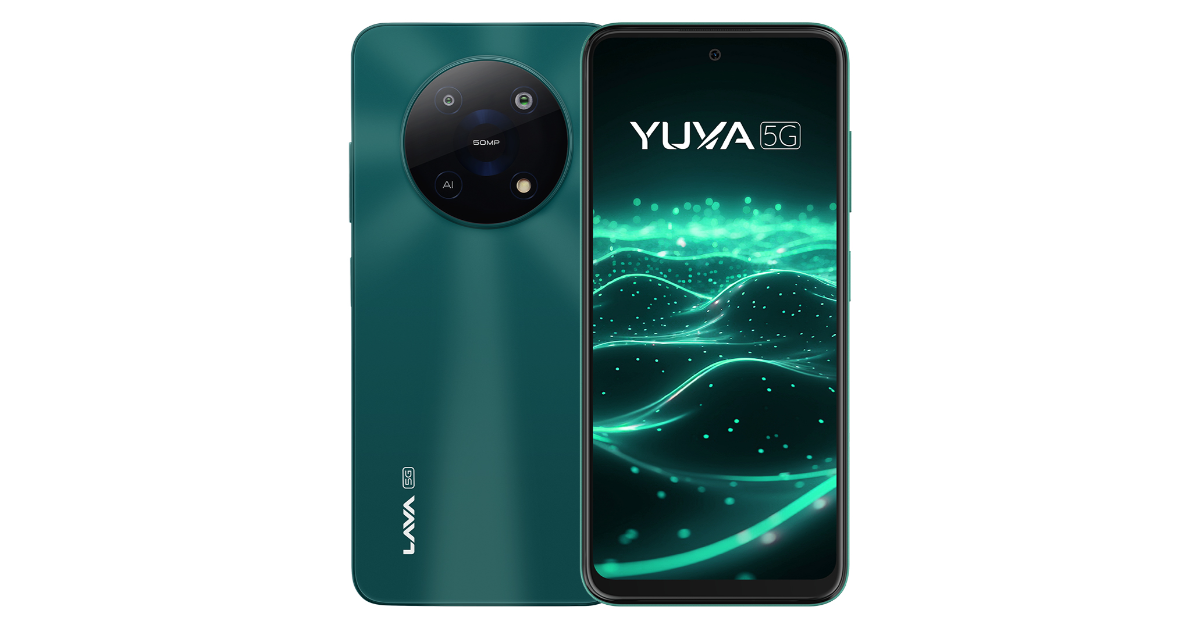
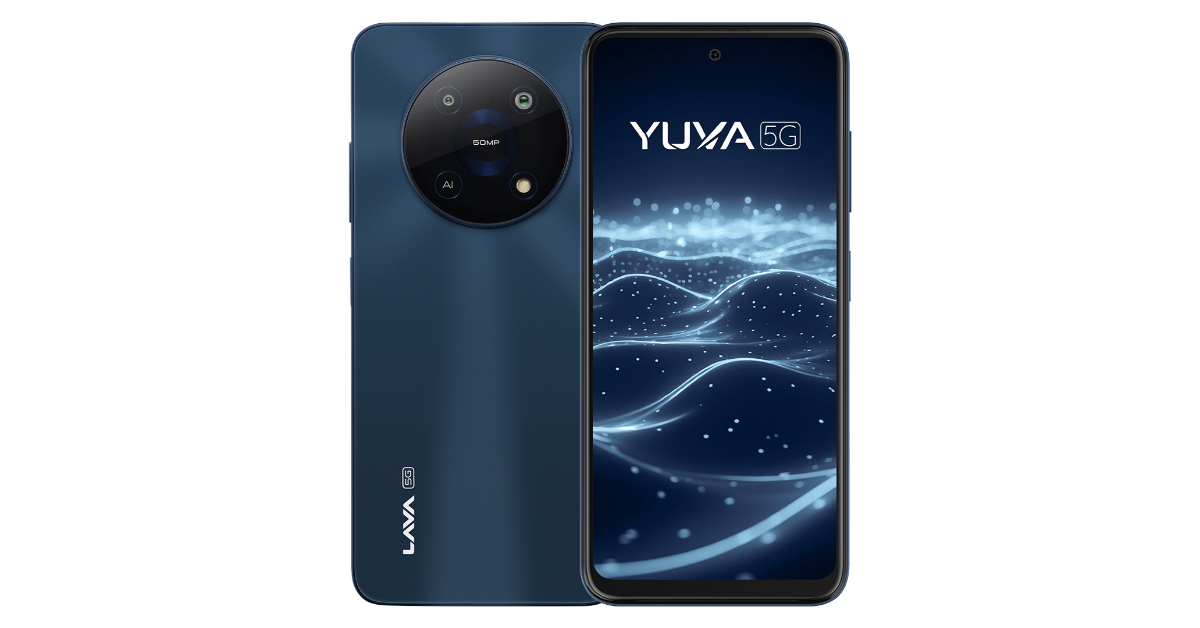
Lava has launched the Lava Yuva 5G in India, the first phone to use octa-core chipsets on the Unisoc T750 5G platform. The device has a dual rear camera system, a 6.52-inch HD+ IPS display with a refresh rate of 90Hz, and a 5,000mAh battery that supports 18W fast charging. It is powered by Android 13 and includes an update to Android 14 along with two years of security updates.

Lava Yuva 5G price in India, sale details

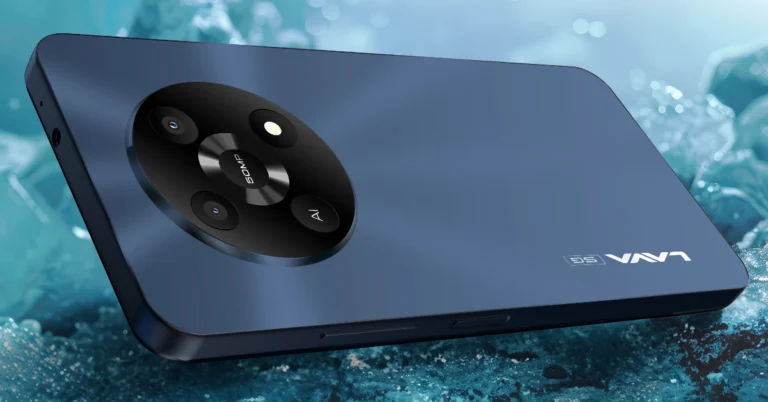
Lava Yuva 5G is priced at Rs 9,499 for 4GB RAM with 64GB storage and Rs 9,999 for 4GB RAM with 128GB storage. It will be on sale on June 5 via Amazon, the Lava online store, and physical stores. It comes in Mystic Blue and Mystic Green. Lava is providing the phone with a one-year warranty. Lava Yuva 5G price in India, sale details According to the company, buyers can use LAVA’s “FREE SERVICE AT HOME” option from any location in India for a seamless after-sales experience. An engineer or technician from LAVA will be at your door to assist you with the request. (When the phone is still under warranty, customers can use the service). Also Read: MediaTek unveiled Dimensity 7300 and 7300X SoCs for premium devices and foldables

Lava Yuva 5G specifications

Lava Yuva 5G comes with a 6.52-inch HD+ IPS 2.5D curved display with 720×1,600 pixels of resolution. The screen offers 269ppi pixel density and 90 Hz refresh rate. Under the hood, there is an octa-core Unisoc T750 5G SoC paired with GB+4GB(Virtual) RAM and 64/128GB UFS 2.2 storage. The internal storage can be expanded up to 1TB using a microSD card. It operates on Android 13 with no ads and no bloatware. The company assures 2 years of security updates and an upgrade to Android 14. Additionally, 1-year warranty on handset and 6- a months warranty on accessories is offered by Lava. Lava Yuva 5G specifications The device features a dual AI camera setup led by a 50-megapixel primary sensor and a 2-megapixel secondary lens with LED Flash. The camera app includes features such as Portrait, Slow Motion, Timelapse, Audio Note, Motion Photo, Ultra Resolution, Beauty, HDR, Night, AI, Pro, Panorama, Filters, and Intelligent Scanning. It also includes an 8-megapixel front-facing camera with a screen flash for selfies and video calling. Also Read: Sony ECM-W3 and ECM-W3S wireless microphones for outdoor use launched in India Lava Yuva 5G is backed by a 5,000mAh battery and comes with 18W charging support. Additionally, it includes a fingerprint sensor, along with an accelerometer, ambient light sensor, magnetometer and proximity sensor. In terms of connectivity, there is 4G VoLTE, Bluetooth 5, GPRS, OTG, Wi-Fi 802.11 b/g/n/ac, a 3.5mm audio jack, and a USB Type-C port for charging.

MediaTek unveiled Dimensity 7300 and 7300X SoCs for premium devices and foldables

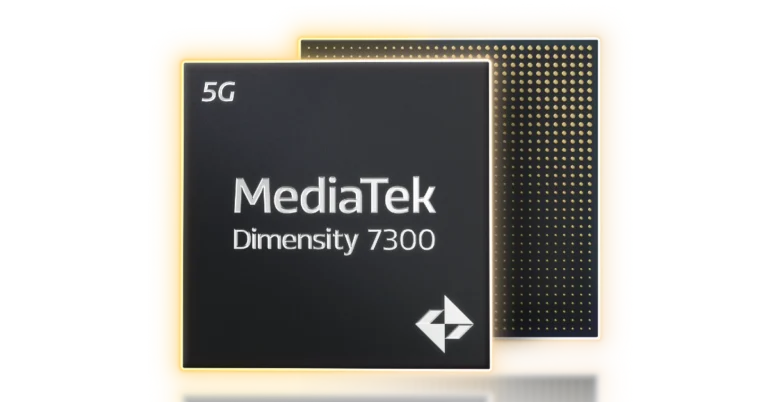
MediaTek has announced the Dimensity 7300 and 7300X, ultra-efficient 4nm chips designed for high-tech mobile devices offering power efficiency, performance, and dual display support for flip-style devices. These chips offer power efficiency, excellent performance, and enhanced gaming experiences. The octa-core CPU, featuring 4X Arm Cortex-A78 and 4X Arm Cortex-A55 cores, provides up to 25% lower power consumption compared to the Dimensity 7050. The MediaTek APU 655 boosts AI task efficiency and accommodates new mixed-precision data types. The chips support WFHD+ displays with 10-bit true colour and support global HDR standards. The chips also support dual-display flip phones and offer MediaTek 5G UltraSave 3.0+ technology. The MediaTek Dimensity 7300 chipsets feature an octa-core CPU with 4X Arm Cortex-A78 and 4X Arm Cortex-A55 cores, offering 25% lower power consumption compared to the Dimensity 7050. They also offer 20% faster FPS and 20% improved energy efficiency, smart resource optimisation, and Bluetooth LE Audio support. Also Read: Sony ECM-W3 and ECM-W3S wireless microphones for outdoor use launched in India Dimensity 7300 chipsets also provide improved photographic capabilities through the MediaTek Imagiq 950, a high-end 12-bit HDR-ISP that can accommodate a 200MP primary camera. The Dimensity 7300 has been improved with new hardware engines that offer accurate noise reduction (MCNR), face detection (HWFD), and video HDR. This allows users to take beautiful pictures and videos in any kind of lighting. Furthermore, compared to the Dimensity 7050, live focus photo performance is up to 1.3X faster and photo remastering is up to 1.5X faster. In addition, 4K HDR video may be recorded with a dynamic range that is more than 50% broader than competing solutions, allowing users to capture more detail in their recordings. AI task efficiency is doubled by the MediaTek APU 655 compared to the Dimensity 7050. By supporting mixed-precision data types, the Dimensity 7300 processors lower the memory needs for larger AI models. The chips’ integrated MiraVision 955 enhances video streaming and playback by supporting WFHD+ displays with 10-bit true colour and global HDR standards. The Dimensity 7300X satisfies consumer demand for novel form factors by supporting twin-display flip phones. Also Read: Lava Prowatch ZN Review: Packs a punch With MediaTek 5G UltraSave 3.0+ technology, the Dimensity 7300 and 7300X offer 13–30% more power efficiency than competing products. With 3CC carrier aggregation, they can support up to 3.27Gb/s 5G downlink, which can provide better speeds in urban and suburban environments. For further customer choice, they also include dual 5G SIM compatibility with dual VoNR and tri-band Wi-Fi 6E support.

Sony ECM-W3 and ECM-W3S wireless microphones for outdoor use launched in India

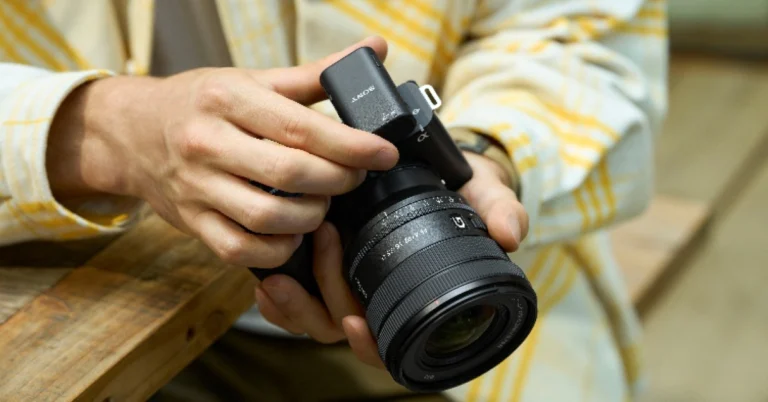
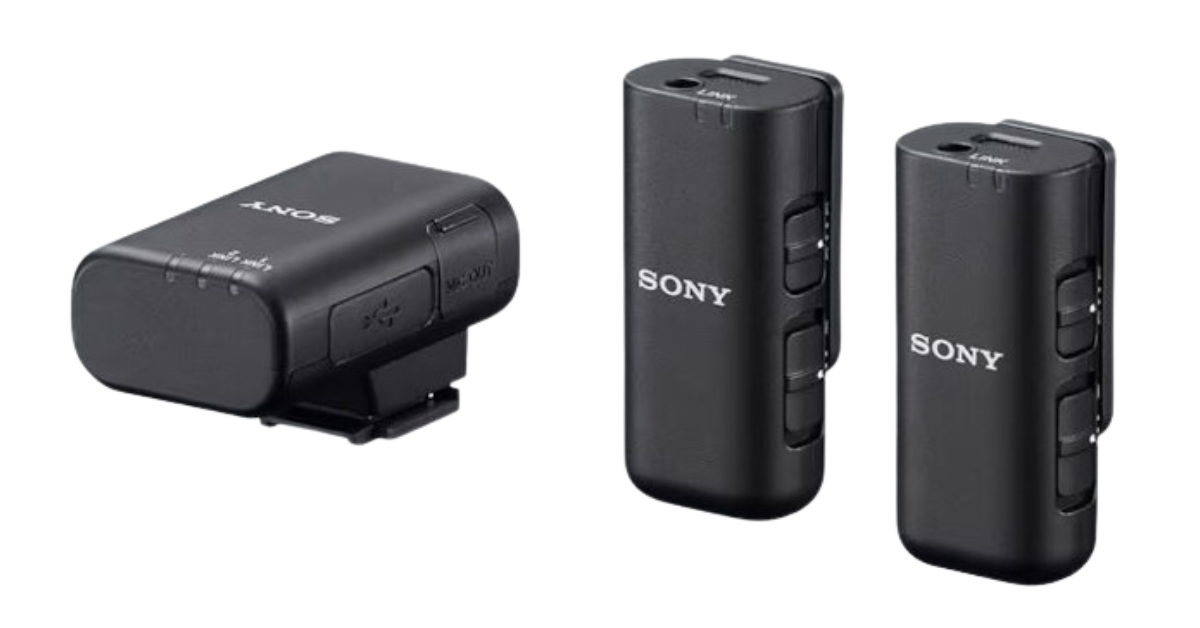
Sony India has introduced the ECM-W3 and ECM-W3S wireless microphones offering a lightweight design along with excellent sound capture. Video content creators who work in a variety of shooting situations, like Vlogs and interviews, will find these mics to be perfect. The ECM-W3S has a single-channel receiver and one microphone, whereas the ECM-W3 features a two-channel receiver and two microphones. Even when shooting away from the camera, both models are built to record sounds in high definition. Also Read: Lava Prowatch ZN Review: Packs a punch The ECM-W3 and ECM-W3S wireless microphones from Sony are ideal for one-on-one discussions and interviews because they capture users’ distinct, expressive voices, which is useful for vloggers and other video content creators. They are compatible with PCs, smartphones, and Sony cameras and provide excellent sound pickup and noise reduction. The lightweight, portable ECM-W3 and ECM-W3S microphones and receivers are intended for outdoor use because they are moisture and dust-resistant. Charging while on the go is possible with the thin, lightweight charging case. Sony ECM-W3 and ECM-W3S wireless microphones price and availability Power is sent straight from the camera to the receiver with the MI Shoe support, eliminating the need for batteries and cables when shooting. For digital audio output to a USB-connected smartphone or PC, it has a USB Type-C connection. Additionally, for compatibility with non-MI shoes, it contains a 3.5mm micro jack audio output connector. Included for multi-interface foot attachments is a terminal protection holder/stand. Utilising a lapel microphone for covert audio recording, the microphone features a 3.5mm small port for external input. After fully charged, the recharging microphone has a maximum duration of 6 hours. To lessen jarring noise and undesired low-frequency noise, they have a noise-cut filter and a low-cut filter. With ambient interference, the integrated windscreen aids in the recording of clear audio. The ECM-W3 and ECM-W3S receivers minimise noise interference by directly recording audio signals when attached to a Sony camera that has the Multi-Interface shoe installed. Additionally, they feature an attenuator function to lessen sound during high-volume recording and a safety function to suppress distortion at high volumes. With Bluetooth 5.3 and the LC3Plus codec, these devices offer low power consumption, minimal latency, and excellent sound quality. Also Read: Nothing Phone (2a) Special Edition launched in India: Details Inside

Sony ECM-W3 and ECM-W3S wireless microphones price and availability

The price of the Sony ECM-W3 wireless microphone is set at Rs 39,090 in India. Whereas, the ECM-W3S wireless microphone will come with a price tag of Rs 32,990. Both devices are available for purchase via Sony Centers, Alpha Flagship stores, Sony authorised dealers, e-commerce websites (Amazon and Flipkart) and major electronic stores across India today.

Lava Prowatch ZN Review: Packs a punch

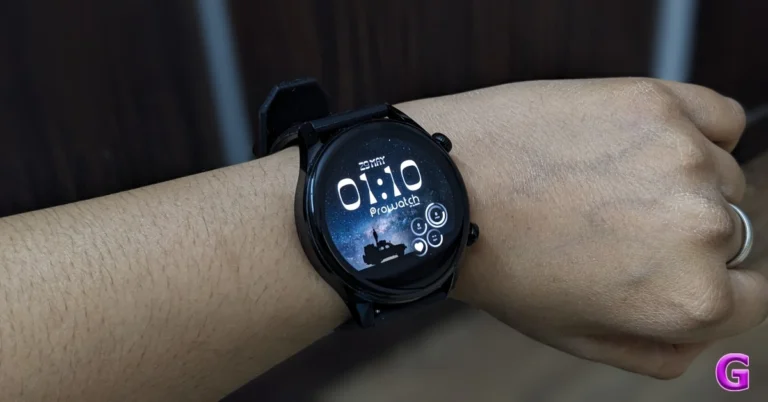
Lava, an Indian tech brand, entered the smartwatch market with the launch of the Prowatch. It is offered in two versions: Prowatch ZN and VN. The former has a circular display while the latter has a square-shaped dial, which is the only difference between the two. We got the more expensive ZN model with a silicone strap for this review. The watch looks great and has a lot of capabilities that the brand often does not include in this price bracket. So, this is our detailed review of Lava Prowatch ZN and is a must-read if you are in the market to buy a new smartwatch.

Lava Prowatch ZN Review: Design and Display

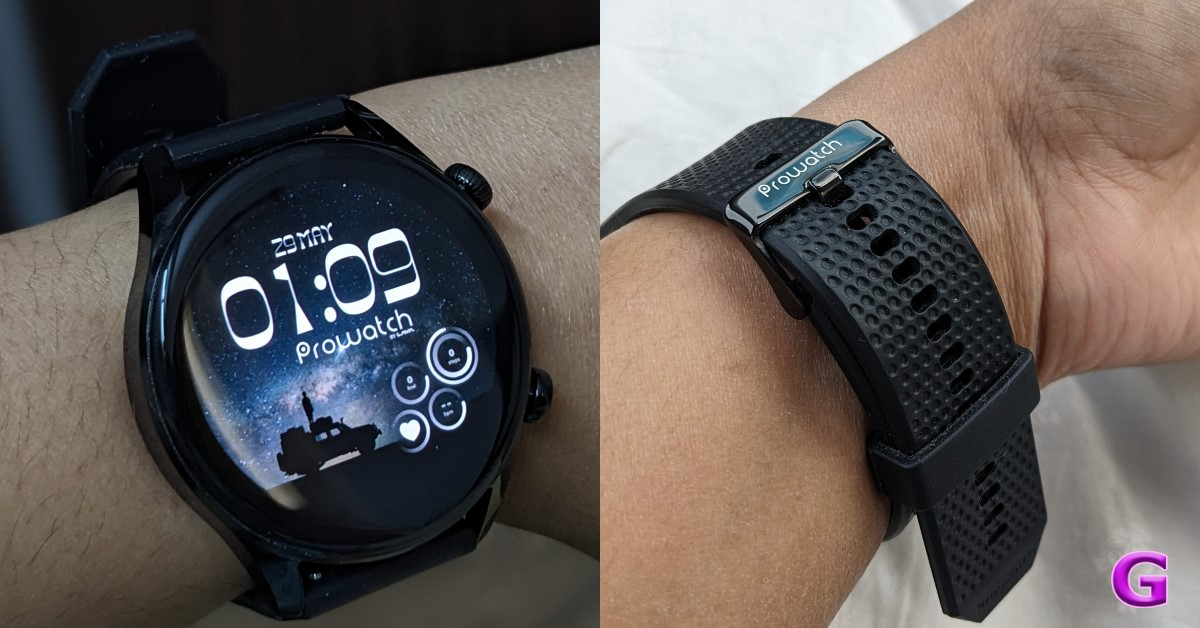
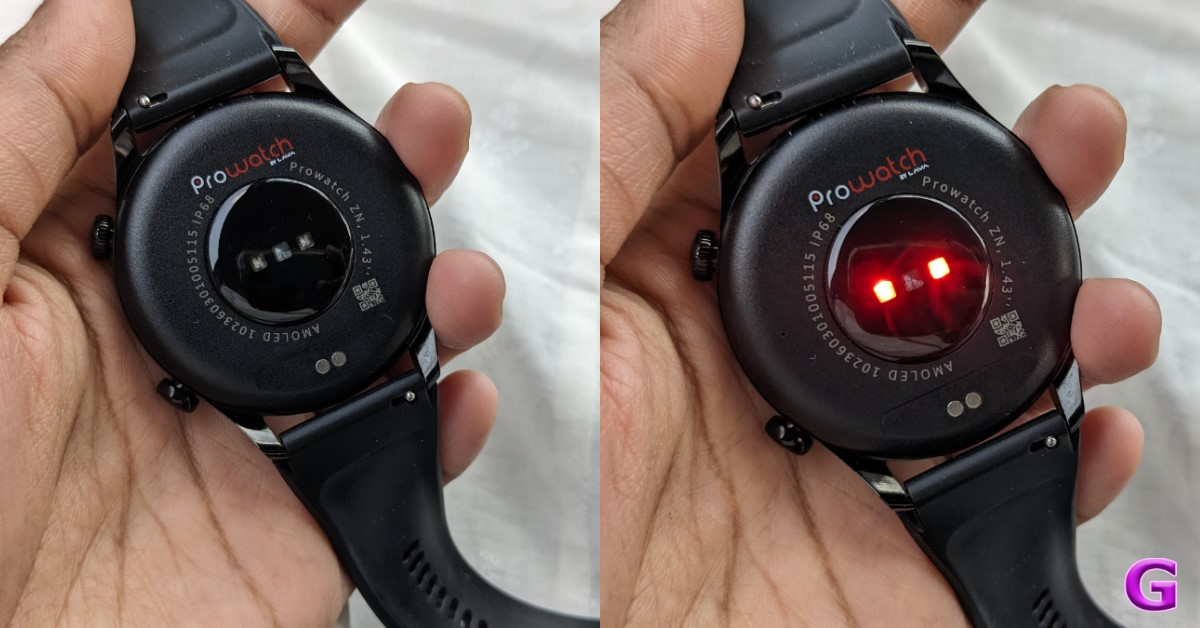
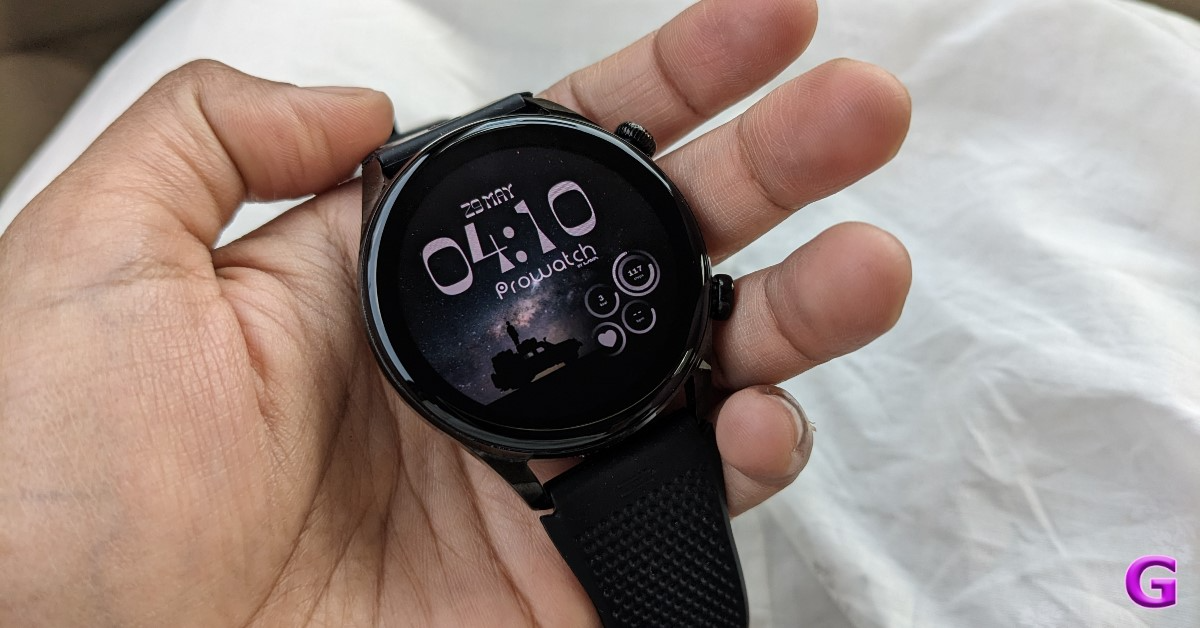
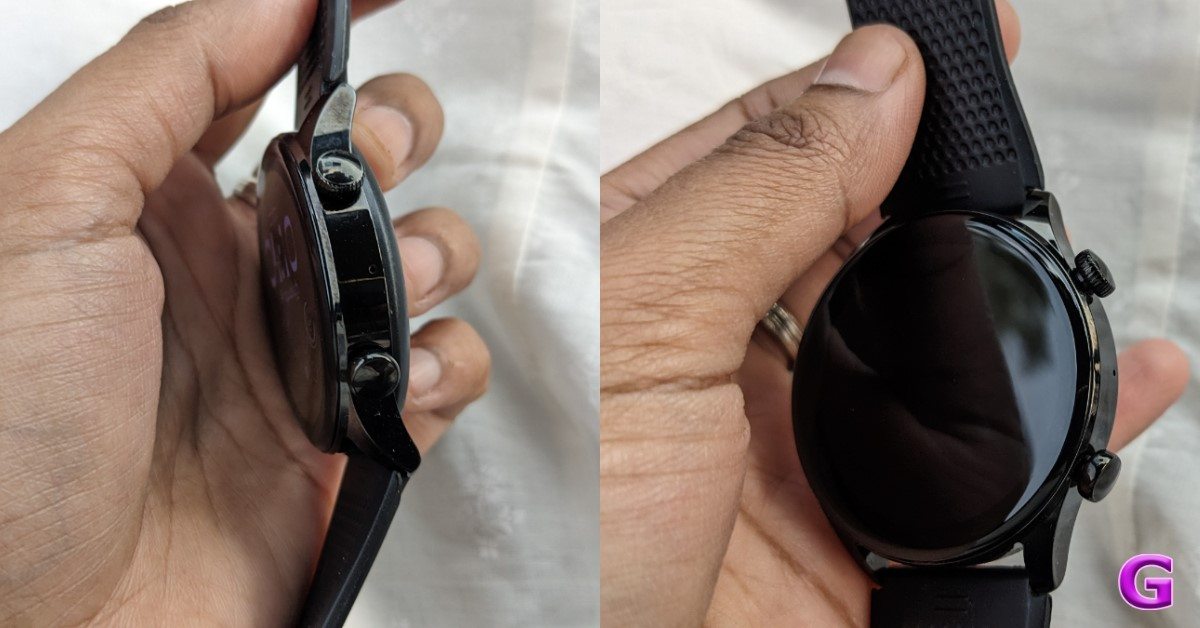
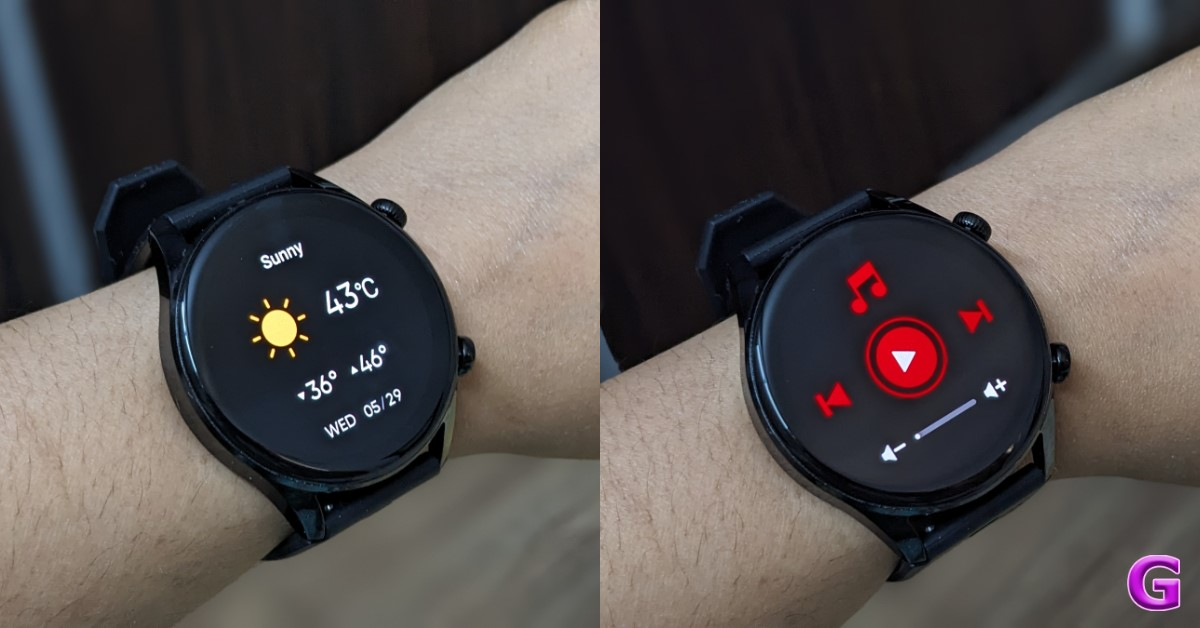
Beginning with the design and construction, the watch appears premium due to its slim and sleek form factor. It does not feel bulky like the other smartwatches and seems to be a quality product. Lava Prowatch ZN Review: Design and Display The body of the Lava Prowatch ZN is composed of zinc alloy. Its metal body gives the watch an expensive appearance. Despite its shiny finish, it does not attract fingerprints or smudges. It contains side-mounted buttons to navigate the user interface. Lava Prowatch ZN comes with high-quality silicone straps. The straps have a textured finish, a metal buckle, and the Prowatch logo. These measure 22 mm and can be replaced by pulling the hook mechanism at its ends. So, if you want coloured straps to complement your dress or metal straps, you can easily replace them. The silicone strap with a 65-degree bend strikes the right mix between flexibility and durability. By the way, the Prowatch is also available with a metal and silicone strap combo, for a slightly higher price. It is skin-friendly, causes no irritation, and fits perfectly. There are two versions of the Prowatch ZN available: Dragonglass Black and Valyrian Grey. For the review, we have the Dragonglass Black Variant. It looks good on thin as well as thick wrists/hands.    Lava Prowatch Review Moving back, the rear has been made of plastic and houses all of the sensors as well as the charging port. Over that. the watch is IP68-rated. This means it is dust and water-resistant, so you may use it at the gym or during a run outside in the rain. In fact, this watch has a swim tracking feature built-in, so you can wear it in the pool. In terms of fit and comfort, even though the body is made of metal, it fits well and does not feel bulky. It can be worn both at work and during a workout. Also Read: WatchOut WearPods Review: Best of both worlds? Now let us take a closer look at the display. The Lava Prowatch ZN’s round, bright AMOLED touchscreen display is 1.43-inches and has a resolution of 466×466 pixels. The display features an always-on mode with a maximum brightness of 600 nits. It’s a high-resolution display, so even the smallest text is visible. It boasts a 326 ppi pixel depth with vivid colours, the whites are whiter, and the blacks are darker. Lava Prowatch ZN Review: Design and Display To turn on the device, simply press the first-side rotating crown; this dial also allows you to change watch faces. Simply rotate it, and the pre-installed watch faces may be switched seamlessly and effortlessly. Of course, you may still add more using the app, as we will discuss later. Pressing the second button will display the workout options. The Lava Prowatch has no built-in GPS, which is the same as most others in its price bracket. Lava Prowatch ZN Review: Design and Display One thing which its competition does not have is a CG Glass. The Corning Gorilla Glass 3 protection ensures that it will not get scratched easily, which is excellent. We have tested it outside, and the display is very legible. It features a 60Hz refresh rate, so the OS does not appear jittery or stuttering. With that, there is a Bluetooth calling feature, and a microphone has been placed near the navigation controls.

Lava Prowatch ZN Review: Performance

Let’s first take a quick look at the interface. Swiping Right allows you to view your daily activities, heart rate, sleep, spO2, weather, manage the music playing on your connected smartphone, and access your voice assistant. Like on other devices, you can access quick toggles by swiping up. You can adjust the brightness in the settings; you can also turn on and off raise to display to wake it up; you can put it in sleep mode; and you can use Find My Phone to enable and disable phone calls. Phew, that is a lot.  Lava Prowatch Review But that is not it. If you swipe right, you’ll get a menu with your activity data, workout records, voice assistant, heart rate, blood pressure, alarm clock, stopwatch, timer, stress monitoring, breathing, weather, menstrual cycle tracking for women, flashlight, missed calls, messages and more. It also contains a variety of games, such as 2048, jigsaw puzzles, and racing games. Also Read: OnePlus Watch 2 Review: Rugged elegance review of Lava Prowatch However, note that playing games on the watch may drain the battery much faster. All of these functions can also be accessed by rotating the crown. An AOD clock can be turned on and off, and you can select between a digital and analogue clock. You can set the Always on time to 5 minutes, 10 minutes, 15 minutes, or 30 minutes. This will not deplete your battery however you can easily turn it off when you don’t need it. Lava Prowatch Review To make a phone call, slide right, select the menu, and then press the phone app. You will see the dial pad, the contact person, and the call record. The speaker on the watch is audible and crisp. You may also manage the volume, mute the microphone, transfer the call to your phone, and end the call right from your smartwatch. Similarly, you can answer calls directly from your watch. There is a vibration alert and a ringtone. You can see the caller’s name, manage the volume, decline the call, answer the phone, and respond with a preset SMS. Taking into account the calling experience, the speakers become loud enough to be heard both outdoors and indoors. The mics also do an excellent job of not capturing ambient sound. Indoors, it was crystal clear both ways. The user interface is quite nice and easy to use. review of Lava Prowatch   In terms of health tracking, we tested heart rate, SpO2, and stress levels. Remember that this is a smartwatch, and while the health parameter readings are accurate they are only for reference and not for medical purposes. Though the smartwatch will provide consistent readings, the heart rate and SpO2 rating are very accurate. Lava Prowatch Review In terms of fitness and workouts, the Lava Prowatch offers over 110 sports modes. By pressing the second button, you can access all of your workouts, but just 10 are available here. You must add them from the companion app. When you start an exercise, you can see the duration, heart rate, distance, calories, pace, and other metrics. In the Pro Spot companion app, you can check your watch pairing, battery percentage, watch faces, steps, heart rate, and access all of your health and fitness data. You now have a large assortment of watch faces to download. You can also set your goals on the app according to your preferences. Then, if you return to the settings, you will see the battery percentage and notifications. review of Lava Prowatch The app allows you to set your alarm and camera shutter, both of which you can do on the watch itself. You can add and remove sports mode. Lava has included a 350mAh battery in the ProWatch Zn. It is touted to provide up to 20 days of standby time and up to eight days of battery life under normal usage. With Bluetooth calling enabled, the battery is said to last up to three days. According to Lava, the wearable requires one hour to fully charge its battery. In our tests, the battery lasted 6 to 7 days without BT calling. If you use this option, your battery will last up to 3 to 4 days. The good news is that the smartwatch charges quickly, in under an hour (as said). Also Read: Titan Traveller Smartwatch Review: Worth the Rs 13,000 price tag?

Verdict

If we had to pick a flaw, we’d say the lack of built-in GPS, but that’s a minor quibble. One feature that stands out is its brightness. It is a vital feature for a smartwatch to have since if the brightness is low outside, you will be unable to see anything. The Lava Prowatch features everything you look for in a quality wristwatch, including a metal design, an outstanding display, always-on mode, health tracking, crisp Bluetooth calls, a fluid interface, and Corning Gorilla Glass 3 protection, which is not found on other smartwatches. It also includes four built-in games, a calculator, and a rotating crown. Another advantage is that it has IP68 certification. So there’s no need to remove the watch while swimming or bathing. The battery life varies according to your usage pattern, however, we were able to acquire 3 to 4 days of endurance. It is Lava’s first smartwatch, and we believe they did an excellent job. Overall, Lava’s smartwatch is good value for money. Its pricing starts at Rs 2,599 for the silicon and Rs 2,999 for the metal variant is highly recommended. Lava Prowatch ZN Pros
  • built-in games
  • IP68 certification
  • Corning Gorilla Glass 3 protection
  • Bluetooth calls
Lava Prowatch ZN Cons
  • Lacks built-in GPS

Top 11 fixes for ‘Emails not syncing’ on Android phone

0
If you use more than one Android device, you can get your emails delivered to all of them at once. Not only that, but you can access all the emails in your inbox on all devices. This is made possible through syncing, and it is one of the integral features of Gmail. If you are not able to receive new emails on your device, it is likely because the syncing function is suspended or broken. Today, we bring you the top 11 ways to fix the ‘emails not syncing’ issue on your Android phone. Read Also: Top 2 ways to add local files to Spotify? (2024)

Why are emails not syncing on my Android phone?

If the Gmail app isn’t syncing new emails to your phone, it could be due to one of the following reasons:
  • Faulty internet connection
  • Syncing is turned off on the Gmail app
  • Syncing is turned off in device settings
  • Lack of storage space
  • Gmail app is outdated 

Check the internet connection

Check Internet Connection A faulty internet connection can suspend all email functions on your phone. You won’t be able to send or receive emails, and the incoming emails won’t sync to your device. Move to an area with better network reception or switch to a different WiFi connection.

Restart your device

Restart Your Phone The first thing you should do when you notice that emails aren’t syncing on your Android phone is to restart the device. A quick restart can resolve any background issues that may be causing this issue. Long-press the side button and select ‘Restart’ from the power menu. If long-pressing the side button triggers the voice assistant, press it along with the volume-up key to launch the power menu.

Check Gmail Settings

Step 1: Launch Gmail on your Android phone. Step 2: Hit the hamburger menu at the top right corner of the screen. Step 2: Hit the hamburger menu at the top right corner of the screen. Step 3: Tap on Settings and select your account. Step 3: Tap on Settings and select your account. Step 4: Tap the checkbox for Sync Gmail. Step 4: Tap the checkbox for Sync Gmail.

Check device settings

Step 1: Go to Settings and select Accounts. Step 1: Go to Settings and select Accounts. Top 7 fixes for ‘Emails not syncing’ on Android phone (2024) Step 2: Select your Gmail account. Step 2: Select your Gmail account. Top 7 fixes for ‘Emails not syncing’ on Android phone (2024) Step 3: Tap on Account sync. Step 3: Tap on Account sync. Top 7 fixes for ‘Emails not syncing’ on Android phone (2024) Step 4: Turn on the toggle switch for Gmail. Step 4: Turn on the toggle switch for Gmail. Top 7 fixes for ‘Emails not syncing’ on Android phone (2024)

Update Gmail

Gmail’s new unsubscribe button for Android: Check out how you can use it An older or outdated version of Gmail may have bugs that keep it from syncing new emails. To update the app, go to the Google Play Store, search for Gmail, and hit the Update button on the app’s page.

Check the device’s storage

If your Android phone is running out of internal storage, it will stop syncing new emails. Delete some files from your phone to make more storage space or transfer them to a memory card or an online storage service. You can check your phone’s storage by going to Settings>RAM & Storage space.

Enable Gmail notifications

Step 1: Go to Settings and select Apps. Step 1: Go to Settings and select Apps. 5 ways to stop an Android app from running in the background Step 2: Tap on App Management. Step 2: Tap on App management. 5 ways to stop an Android app from running in the background Step 3: Scroll down and select Gmail. Step 3: Scroll down and select Gmail. Step 4: Tap on Manage notifications. Step 4: Tap on Manage notifications. Step 5: Turn on the toggle switch next to Allow notifications. Step 5: Turn on the toggle switch next to Allow notifications.

Make sure Gmail is allowed to use data in the background

Step 1: Go to Settings and select Apps. Step 1: Go to Settings and select Apps. 5 ways to stop an Android app from running in the background Step 2: Tap on App Management. Step 2: Tap on App management. 5 ways to stop an Android app from running in the background Step 3: Scroll down and select Gmail. Step 3: Scroll down and select Gmail. Step 4: Tap on Data usage. Step 4: Tap on Data usage. Step 5: Turn on the toggle switch next to Background data. Step 5: Turn on the toggle switch next to Background data.

Clear Gmail’s cache

Step 1: Go to Settings and select Apps. Step 1: Go to Settings and select Apps. Top 10 fixes for ‘Emails not syncing’ on Android phone Step 2: Tap on App Management. Step 2: Tap on App management. 5 ways to stop an Android app from running in the background Top 10 fixes for ‘Emails not syncing’ on Android phone Step 3: Scroll down and select Gmail. Step 3: Scroll down and select Gmail. Top 10 fixes for ‘Emails not syncing’ on Android phone Step 4: Tap on Storage usage. Step 4: Tap on Storage usage. Top 10 fixes for ‘Emails not syncing’ on Android phone Step 5: Hit Clear cache. Step 5: Hit Clear cache. Top 10 fixes for ‘Emails not syncing’ on Android phone

Log out and log into Gmail

If the issue is account-related, logging out and then logging back in may resolve it. To remove a Gmail account from your phone, go to Settings>Accounts, select the account, and tap on ‘Remove account’. Now, launch the Gmail app, go to Settings, select ‘Add account’, and use the proper credentials.

Update your phone’s OS

Step 1: Go to Settings and select Software update. Go to Settings and select Software update. 10 top ways to fix unable to answer calls on Android phone Top 8 ways to fix the ‘Emergency Calls Only’ error message on Android (2024) Top 8 ways to fix ‘Google Play Store not auto-updating apps’ on Android (2024) Step 2: Tap on Download and install. tap on download and install 10 top ways to fix unable to answer calls on Android phone Top 8 ways to fix the ‘Emergency Calls Only’ error message on Android (2024) Top 8 ways to fix ‘Google Play Store not auto-updating apps’ on Android (2024) Step 3: Select Install now. Select Install now. 10 top ways to fix unable to answer calls on Android phone Top 8 ways to fix the ‘Emergency Calls Only’ error message on Android (2024) Top 8 ways to fix ‘Google Play Store not auto-updating apps’ on Android (2024)

Frequently Asked Questions (FAQs)

Why can’t I see new emails on the Gmail app on my phone?

You won’t see new emails on the Gmail app on your phone if your device isn’t connected to the internet or you are running out of storage space.

Why can’t I see old emails on the Gmail app on my phone?

If email syncing is turned off on your phone, you won’t be able to view old emails on the Gmail app. Go to account settings on your phone or the Gmail app to fix this.

How do I sync Gmail on my phone?

Go to the Gmail app, tap the hamburger menu, go to Settings, and tap the checkbox next to ‘Sync Gmail.

How do I allow Gmail access to data usage in the background?

Go to Settings>Apps>Gmail>Data usage, and turn on the toggle switch next to ‘Background data’.

How do I log out of Gmail on my phone?

Go to Settings>Account, select your account, and hit ‘Remove’. Read Also: OnePlus 12 new colour variant is on its way

Conclusion

These are the top 11 ways to fix the ‘emails not syncing’ error on your Android phone. As a last-ditch measure, you can try clearing the Gmail app’s data, but this will delete your drafts, ringtones, signatures, and other saved info within the app. If you know of any other methods to resolve this issue, let us know in the comments!

Nothing Phone (2a) Special Edition launched in India: Details Inside

The Nothing Phone (2a) Special Edition, featuring a unique red, yellow, and blue colour scheme, launched in India. The new variant comes with 12GB RAM and 256GB storage and is set to go on sale in the country next week. The Nothing Phone 2a Special Edition’s hardware specs are the same as those of the regular Phone 2a, only the red, yellow, and blue colour palette has been used for its design to give it a distinctive look. The device was originally launched in March this year. The Nothing Industrial Design Team in London has created a unique new colourway for their Nothing Phone (2a) Special Edition, celebrating the primary colours red, yellow, and blue. Nothing Phone 2a Special Edition price in India, sale details Red, yellow, and blue colour accents create a “story of colour” pattern on the back panel of the Nothing Phone 2a Special Edition. Unlike other Nothing audio devices, this is the first time these colours have been employed on a single device. All three colours have never before resided in the same house: up until now, the red was utilised in the right earbud of Every Nothing audio device, the yellow in the new Ear (a), and the blue most recently seen in Phone (2a) Blue. Also Read: BenQ SW242Q monitor launched in India Adam Bates, Design Director at Nothing said, “We are very happy to unveil the Phone (2a) Special Edition. The first product to explore our palette of the primary colours; red, blue and yellow. Its overall aesthetic references some of our design heroes from the past, whilst creating a new expression for a smartphone. Elevating a functional device into a striking piece of art.”

Nothing Phone 2a Special Edition price in India, sale details

The Phone (2a) Special Edition costs ₹27,999 for a variant with 12GB RAM and 256GB of storage. Customers using cards can receive an instant 1,000 discount, making the effective price Rs. 26,999 for only a limited period. Limited to 500 units, this unique smartphone will be available for purchase on Flipkart starting on June 5. Nothing Phone 2a Special Edition price in India, sale details The price of the Nothing Phone (2a) starts at Rs 23,999 for 8GB RAM with 128GB storage. The price of the 8GB RAM with 256GB storage and 12GB RAM with 256GB storage is set at Rs 25,999 and Rs 27,999 respectively. Also Read: OnePlus 12 new colour variant is on its ways The phone comes with a 6.7-inch FHD+ AMOLED 120Hz display with an adaptive refresh rate ranging from 30Hz to 120Hz. The phone comes with Corning Gorilla Glass 5 protection. The device is powered by MediaTek Dimensity 7200 Pro SoC paired with up to 12GB of RAM and up to 256GB of storage. The dual rear camera setup on the phone includes a 50-megapixel main camera (with OIS and EIS) and a 50-megapixel ultra-wide sensor. In addition to this, there is a 32-megapixel selfie camera. The handset runs on   Nothing OS 2.5 based on Android 14. It also packs a 5,000mAh with 45W fast charging technology.

Garena Free Fire Max Redeem Codes Today 30 May 2024: Here is how to claim them

Garena Free Fire Max is a battle royale game with regular awards and tournaments to keep players interested. If you play Garena Free Fire, you should be aware of the redeem codes that are released on a daily basis. However, because the battle royale game is banned in India, players from other countries can use the Free Fire Redeem codes daily. If you’re unfamiliar with the Garena Free Fire redeem codes or don’t know how to get them, we’ve put together a step-by-step guide to help you redeem them. Check out Garena Free Fire Max Redeem Codes for 30 May 2024. The Free Fire Max redeem codes are a great way to get free stuff. These are 12-digit codes that contain alphabets and numbers, as well as an expiration date and time. Because the Garena FF redeem codes cannot be used more than once, you should hurry to the redemption page to claim your free reward before someone else does. To get a free reward, all you have to do is go to reward.ff.garena.com/en, which is the official redemption page. Also, keep an eye on this space for daily updates on Garena Free Fire Max redemption codes and rewards. Also Read: Sennheiser Accentum Plus wireless headphones with Hybrid Adaptive Noise Cancellation launched

Garena Free Fire Redeem Max Codes Today 30 May 2024

R2A4T7H1B8K9C6YW Q5U3H2V1M9D7G4KP S4A2Z6Q9X1F7H5VJ W6R8M3V5X2S1J7GB F8L2R7N4Q6W1Z3TA D1U5V2H7K9C3B8JN I0F3R1X5S7G4W6EU H4D2J5V6G9Q1FWLR U8K9P4D3J6R7XVZQ E9F3W6D8C2G4J1HZ N6H9W4S7D2R3G1CK B9Y5X3H2T7U1JQ4L C6B8V1D2F9R3N7YK P7Q5J9D1K6N3VRXF L5T9W7QK8E0P2HXJ M6V3S7N2A1G9C4RQ Y3E7C8V6T0B5W1QA X2N5C3M1R6J8V7ZA

How to Get Free Fire Max Redeem Codes for Garena on 30 May 2024?

  • Visit the Garena Free Fire game’s official website at reward.ff.garena.com.
  • Use your Facebook, Google, VK, Apple ID, Huawei ID, or Twitter account to log in.
  • You’ll be taken to a valid redemption code (s)
  • Copy and paste the 12-digit redemption code into the text box.
  • On the screen, a dialogue box will appear.
  • ‘Ok’ should be selected.

Amazon Quiz Answers Today 30 May 2024: Participate to win Rs 500 Amazon Pay Balance

30 May 2024: New Amazon Quiz is now available. Customers from different parts of the country are participating in the daily quiz. The quiz starts at midnight today and will be live until 11:59 PM tonight. By successfully answering every question, participants in the quiz have the chance to win wonderful rewards. A Rs 500 Amazon Pay Balance is up for grabs to participants today. One wrong answer could eliminate you from the quiz. You have a chance to win Rs 500 Amazon Pay Balance if you successfully answer every question. Users of the app only have the opportunity to take the quiz. Check Out 30 May 2024 Amazon Quiz Answers. Amazon Quiz Today Prize: Rs 500 Amazon Pay Balance Quiz Date: 30 May 2024 Daily Timing: 12 AM to 11:59 PM Previous Amazon Quiz Winners Announcement: Today 12 PM Noon

Amazon Quiz Answers Today 30 May 2024: Win ₹ 500 Amazon Pay Balance

Question 1: Who scored a half century in just 15 balls in a losing effort against Sunrisers Hyderabad in IPL 2024 for Delhi Capitals? Answer: Jake Fraser- Mcgurk Question 2: The Amazon Prime series- ‘A Gentleman in Moscow’ stars which famous actor in the lead role of Alexander Rostov? Answer: Ewan Mcgregor Question 3: The Achyutraya temple, the Virupaksha temple and the Vithala temple are located in which UNESCO World Heritage Site? Answer: Hampi Question 4: This is the logo of a famous automobile company headquartered in which country? Answer: France Question 5: This visual shows which dwarf planet as seen from the New Horizons spacecraft in 2015? Answer: Pluto Also Read: Noise Buds Verve, budget TWS with up to 45 hours of playback launched in India

How To Play Amazon Quiz Today

Only app users are eligible to play the Amazon quiz every morning from 12 AM to 11:59 PM. The quiz is not available on the desktop. For those who are unaware of how to play the Amazon quiz, below are the steps, you can follow to take the quiz.
  • First, download the Amazon app from the Google Play Store or App Store or go here to download the Amazon App
  • Now fill in the required information through the Sign-Up option.
  • You need to log in to the Amazon app and scroll down on the home screen to find the Amazon Quiz banner.
  • Tap on the Amazon Quiz banner and tap on the Start button to start the Quiz.
  • Now you will get 5 questions and you need to answer them correctly. One wrong answer will eliminate you from the Quiz.
  • After answering all the questions correctly you are now eligible for a Lucky Draw.
  • The previous winner’s name will be announced today at 12 PM.

Amazon Daily Quiz Answers from the previous few days.

Here are all the answers from the previous 5 days of the Amazon Daily Quiz and Contest.

Amazon Quiz Answers Today 29 May 2024: Win ₹ 500 Amazon Pay Balance

Question 1: Which team did Real Madrid beat on penalties in the quarter finals of the 2023-24 UEFA Champions League? Answer: Manchester City Question 2: The series ‘Mayor of Kingstown’ stars which of these actors famous for his role in Marvel movies? Answer: Jeremy Renner Question 3: The Gaur, the Ruby Throated Yellow Bulbul and the Matti are the state animal, bird and tree respectively of which state? Answer: Goa Question 4: This picture is taken in the capital city of which European country? Answer:  Poland Question 5: By what name are these flowers popularly known? Answer: Cherry blossom

Amazon Quiz Answers Today 25 May 2024: Win ₹ 500 Amazon Pay Balance

Question 1: Which of these players won the Monte Carlo Masters tennis tournament in 2024, his 3rd triumph in that event in 4 years? Answer: Stefanos Tsitsipas Question 2: Which of these Amazon Prime shows shares its name with a 2005 Brad Pitt- Angelina Jolie movie? Answer: Mr and Mrs Smith Question 3: Which animal features on the election symbol of the Republican party in the USA? Answer: Elephant Question 4: These waterfalls span the border between the province of Ontario in Canada and which state in the USA? Answer: New York Question 5: Which of these famous architects designed this iconic monument in India? Answer: Edwin Lutyens

Amazon Quiz Answers Today 24 May 2024: Win ₹ 500 Amazon Pay Balance

Question 1: Against which team did Sunrisers Hyderabad set a new record scoring 287 in an IPL match? Answer: Royal Challengers Bengaluru Question 2: Who plays the role of soldier Arun Katyal in the recently released movie ‘Yodha’? Answer: Sidharth Malhotra Question 3: Which of these famous rulers was born in the Shivneri Fort in Maharashtra in the 17th century? Answer: Shivaji Question 4: Name this famous church located in Europe Answer: St. Peter’s Basilica Question 5: This is the flag of which Caribbean country? Answer: Barbados

Amazon Quiz Answers Today 23 May 2024: Win ₹ 500 Amazon Pay Balance

Question 1: Who recently became the youngest-ever winner of the FIDE Candidates? Answer: Gukesh D Question 2: Britney Spears’ song ‘Baby one more time’ was recently covered by Jack Black’s band Tenacious D for which movie? Answer: Kung Fu Panda 4 Question 3: One of the ‘New Seven Wonders of the World’ Petra is located in which country? Answer: Jordan Question 4: This is the _____ beetle, named because of its resemblance to another animal. Fill in the blanks Answer: Rhinoceros Question 5: Who among these is the founder of this company? Answer: Elon Musk

Amazon Quiz Answers Today 22 May 2024: Win ₹ 500 Amazon Pay Balance

Question 1: Pace sensation Mayank Yadav who won two Player of the Match awards in a row, represents which team in the IPL? Answer: Lucknow Super Giants Question 2: The series ‘Young Sheldon’, currently in its 7th season, shows the childhood of a character of which series? Answer: The Big Bang Theory Question 3: The Lira is the currency of which of these countries? Answer:  Turkey Question 4: This is a bust of which legendary German composer? Answer:  Ludwig van Beethoven Question 5: This is a self-portrait of which famous artist? Answer: Vincent Van Gogh

Amazon Quiz Answers Frequently Asked Questions (FAQs)

Where can I check the previous winners? Did I win how to check?

You can head over to this link on your mobile or desktop to check the winners of the Amazon Daily Quiz Contest.

How to Play Amazon Daily Quiz or Contest?

We have written an explainer above, you can refer to that.

When are the winners of the Amazon Quiz and contest announced or declared?

The announcement of today’s Amazon quiz winner will take place Tomorrow. As for the Special Quiz and “Spin & Win” Contest, the winners will be declared once the Quiz Contest comes to an end. To find out who the lucky winner is, you can refer to the Amazon Quiz Winners List or visit the Amazon Winners tab in the Amazon App.

How to participate in the Daily Amazon Quiz?

That is very easy, just got to the Amazon app and scroll to the bottom of the page and you will find the Quiz section. Click on it (usually it is called the fun zone) and you can enter the Amazon Today Quiz Contest. 

Are there any other quizzes or contests running on Amazon daily?

Yes, there are many running on a daily basis. These range from spinning the wheel to answering the questions correctly. All are located in the Fun Zone. 

What are the criteria for selecting a winner in the Daily Amazon Quiz?

When a qualified player submits correct answers to all the questions, they will automatically be entered into a lucky draw. This draw will include all participants who answered all the questions correctly. Amazon randomly selects the final winners from the pool of eligible participants who gave the right answers.

Which Types of Questions are asked within Amazon Daily Quiz?

These are very simple and straightforward questions. These are mainly related to general knowledge. 

Where should I look for Amazon Daily Quiz answers?

You can bookmark this page as we will help you every day with the Amazon Daily Quiz. We bring you fresh answers every day for the Amazon Daily Quiz and Contest. 

What time does Amazon Announce previous winners?

The previous winner’s name will be announced today at 12 PM (noon). For the latest gadget and tech news, and gadget reviews, follow us on TwitterFacebook and Instagram. For newest tech & gadget videos subscribe to our YouTube Channel. You can also stay up to date using the Gadget Bridge Android App. You can find the latest car and bike news here.

Top 2 ways to add local files to Spotify? (2024)

0
Spotify is one of the biggest music streaming platforms in the world but what most people don’t know is that it also doubles up as a media player for the local audio files on your device. If you constantly switch back and forth between the saved songs on your phone and streaming on Spotify, you can access all of them in one convenient place instead. Today, we bring you the top 2 ways to add local files to Spotify. Read Also: Redmi Buds 5A Review: A good deal at Rs 1,500

Adding your local library of music to Spotify has its perks

While Spotify has an impressive collection of songs and artists, you may have come across an album or song that is absent from its library. This is largely due to issues with record labels, but in some cases, an artist may choose to take down their music from the platform. If you like keeping local downloads of your favourite songs on your device, you can easily sync them to Spotify. Once the songs have been synced, you can access and play them on the app. Spotify’s media player will display the song title, artist name, and album art just like it does for other songs on the platform. Your local files can only be accessed on the device you added them from. If you are logged into your Spotify account on multiple devices, you won’t be able to view these songs on all of them. Once synced to Spotify, these songs can be added to your playlists. Since they can only be accessed by you, other users will not be able to play these songs when they open your playlist.

Add local files to Spotify

Step 1: Launch the Spotify app on your smartphone. Step 2: Tap your profile picture at the top left corner of the screen. Step 2: Tap your profile picture at the top left corner of the screen. Step 3: Select Settings and privacy. Step 3: Select Settings and privacy. Step 4: Scroll down and tap on Local files. Step 4: Scroll down and tap on Local files. Step 5: Turn on the toggle switch for Show audio files from this device. Step 5: Turn on the toggle switch for Show audio files from this device.

Add local files to Spotify on a PC

Step 1: Launch the Spotify app on your PC. Step 2: Click on your profile picture at the top right corner of the screen and select Settings. Step 2: Click on your profile picture at the top right corner of the screen and select Settings. Step 2: Click on your profile picture at the top right corner of the screen and select Settings. Top 2 ways to add local files to Spotify? (2024) Step 3: Turn on the toggle switch for Show Local Files. Step 3: Turn on the toggle switch for Show Local Files. Top 2 ways to add local files to Spotify? (2024) Step 4: Click on Add a source. Step 4: Click on Add a source. Top 2 ways to add local files to Spotify? (2024) Step 5: Select the folder from which you want to add the audio files and hit Ok. Step 5: Select the folder from which you want to add the audio files and hit Ok. Top 2 ways to add local files to Spotify? (2024)

Frequently Asked Questions (FAQs)

How do I add local files to the Spotify app?

Go to Settings and privacy>Local Files and turn on the toggle switch for ‘Show audio files from this device’.

Can I add local audio files on my device to my Spotify playlist?

Once the local audio files have been added to Spotify, you can add them to your playlists. However, other people will not be able to access those songs on their devices.

Do I need an active internet connection to add local audio files from my device to Spotify?

Since you are not uploading the songs to Spotify, you don’t need an internet connection to simply add them to the app. Read Also: BenQ SW242Q monitor launched in India

Conclusion

These are the top 2 ways to add local files to Spotify. Once the songs have been added to Spotify, you can view them in the ‘Downloads’ tab in your library. These songs can only be viewed on the device from which they have been added. If you have any other questions related to this task, let us know in the comments!
Redmi Buds 5A Review: A good deal at Rs 1,500

After releasing the Buds 5 in February, Redmi added an affordable alternative to the TWS last month. This TWS is a successor to last year’s Redmi Buds Active which left a good impression on us. Priced at Rs 1,500, the Redmi Buds 5A brings Active Noise Cancellation company’s budget offering, something that was missing from last year’s Buds 4 Active. Excited to see what the TWS had in store for us, we used it as our primary audio device for a week. Here is our Redmi Buds 5A review. Read Also: BenQ SW242Q monitor launched in India

Redmi Buds 5A Review: Design

Here’s what you get inside the Redmi Buds 5A retail box:
  • Charging case with earbuds
  • 2 pairs of extra ear tips
  • User manual
Much like the Buds 4 Active, the Buds 5A do not ship with a USB cable. Redmi has not deviated from the design language it introduced on the Buds 4 Active. The Buds 5A sports a pebble-shaped plastic charging case with a matte finish. It is lightweight and compact, which makes it easy to carry around. A glossy strip runs around the case, offering a nice contrast to the matte finish on the body panel. The charging case was frequently placed in pockets with keys and loose change and it proved to be quite resistant to scratches. Redmi Buds 5A Review: Design The bottom of the charging case houses the USB  Type-C port and a white LED notification light. The Redmi branding is printed on the back panel of the case, right below the hinge. The flexibility of the hinge allows the case to be opened with one finger. We were happy with its strength as it did not show any signs of tear or loosening even after being fidgeted with regularly. design The earbuds follow the in-ear design language. The stems are equipped with tiny notification lights and the inner panel receives a glossy finish. The off-white colour of the ear tips matches that of the body. The design and the colour pattern of the earbuds and the charging case are simple and safe which will certainly appeal to mainstream sensibilities, but it would be nice for Redmi to shake things up every once in a while, especially when their product looks so similar to its predecessor. design   The Buds 5A has an IPX4 rating for dust and water resistance. We used these earbuds while working out and were satisfied with their fit and resistance to sweat. However, the touch controls on the earbuds need more work. They were largely hit or miss for us.

Redmi Buds 5A Review: Performance

Delivering the audio output on the Buds 5A are two 12mm dynamic drivers. The TWS supports Bluetooth 5.4 and Google Fast Pair. The latter allows you to connect the TWS to your devices by simply popping the lid. Support for the AAC codec is still missing from the earbuds. Redmi Buds 5A Review: Performance An envelope of bass surrounds the audio output produced by the Buds 5A. Despite the heavy focus on the low end, the mid and high frequencies also get good representation on the soundstage. The output relayed the crispness of the guitar chords while listening to funk numbers and the subtle hits of the clapper were noticeable while listening to rock tunes. Redmi Buds 5A Review: Design Good mix of frequencies aside, there are some clarity issues with the audio output. Even in lower volumes, the audio output feels a little rough. It could have used more tuning. This situation is exacerbated when you breach the 80% volume level. The biggest highlight for us on the Redmi Buds 5A is Active Noise Cancellation. The earbuds may only be able to cancel out 25dB of surrounding noise, but it is a great feature in this price bracket. By turning ANC on in an indoor setting, we were able to tune out the ambient noises. The earbuds also offer a transparency mode. performance App support for wireless earbuds is something we rate very highly. While the Redmi Buds 5A can be managed via the Xiaomi Earbuds app, the range of functions available for the TWS is very limited. The app allows you to view the battery level of the case and earbuds, toggle between transparency and ANC modes, toggle the Low Latency mode, and change the name of the earbuds. Apart from renaming the earbuds, all other actions can be carried out without the app as well. Redmi Buds 5A Review: Performance We played gaming titles like Call of Duty Mobile and Asphalt 9 with the low latency mode turned on. Even with 60ms latency, the earbuds weren’t able to completely eliminate the audio lag. We were happy with the crispness of the gaming audio relayed by the earbuds, but the audio lag marred our gaming experience. If gaming is a big part of your routine, we suggest looking at other gaming-focused TWS options. performance Making calls with the Redmi Buds 5A in an indoor setting was satisfactory. The earbuds do a fine job of extracting the speaker’s sound from the surrounding ambient noise and relaying it to the recipient. However, like every other TWS in this category, the Buds 5A struggles with calls made in an outdoor setting. If a certain threshold of surrounding noise is breached, reverting to the phone’s microphones becomes a necessity. With the ANC turned off and volume set at 50%, Redmi claims a battery life of 5 hours on the earbuds and another 25 hours in the case. With the ANC turned on, these numbers fall down to 3.5 hours and 23 hours. With mixed usage, the total charge on the earbuds and the case lasted us 5 days. During the review period, we used the Redmi Buds 5A for 4-5 hours every day, primarily for listening to music and making audio calls. It took us just under an hour to charge the TWS. Read Also: Top 2 ways to turn on 2-factor authentication for your Google Account (2024)

Verdict

The Redmi Buds 5A are a good TWS option under Rs 1,500. Its compact design and lightweight body make it ideal for travelling. The audio output is above average, although it could have been a little more clear. What makes this TWS worth its price tag is Active Noise Cancellation. You won’t find this feature in a lot of wireless earbuds in this price range.

Redmi Buds 5A: Pros

  • Compact design
  • Comfortable fit
  • ANC
  • Affordable

Redmi Buds 5A: Cons

  • Audio output suffers distortion at a high volume

BenQ SW242Q monitor launched in India

BenQ has introduced the SW242Q monitor in India today, designed to meet the colour accuracy and precision demands of professional photographers, videographers, and creative artists. The 24.1-inch 2K display uses BenQ’s proprietary AQCOLOR technology. The display supports HDR10 support and compatibility with various video formats. With a 24.1-inch 2K IPS Panel, 99% Adobe RGB, 98% DCI-P3, and 100% sRGB colour gamut coverage, the brand-new BenQ SW242Q monitor boasts a resolution of 2560 x 1600. The screen has wide viewing angles and a 16:10 aspect ratio. It is certified by Calman Verified and has 16-bit 3D LUT with a colour accuracy of ΔE ≤ 1.5. With precise soft-proofing made possible by the monitor’s highly coated, anti-glare surface, photographers may accurately preview printed colours on-screen prior to final printing. Also Read: OnePlus 12 new colour variant is on its ways The display is equipped with BenQ’s third-generation Uniformity Technology, which ensures perfect uniformity from corner to corner by flawlessly calibrating colour and brightness over hundreds of screen zones. The HDR10 capability of the monitor, together with its compatibility with AJA and Blackmagic SDI devices, and its support for many video formats, including 4:4:4, 4:2:2, and 4:2:0, meet the high-end requirements of professional videographers. It uses the new Palette Master Ultimate software for precise and efficient colour calibration, maintaining colour accuracy over time. The BenQ SW242Q monitor integrates seamlessly with AJA and Blackmagic SDI to HDMI devices. The device has a leatherette base for securely placing cameras and lenses, an easy-carry handle for portability, and improved cable management for a tidy workspace. It also includes a 5-way navigation key with a dedicated information button for efficient colour evaluation during retouching. Also Read: WWDC 2024: Apple reveals keynote timings and more details

BenQ SW242Q monitor price in India and availability

The BenQ SW242Q monitor has been launched in India with a price tag of Rs 38,500. The display can be purchased via BenQ India E-store, Amazon India and leading photography retail outlets across India.

Stay Cool in a Sustainable Way with BougeRV’s Rocky Portable Fridge This Summer

As summer approaches, outdoor enthusiasts and adventurers are gearing up for their next big trip. A crucial piece of equipment for these excursions is a reliable portable fridge that keeps food and drinks fresh and cold. BougeRV’s Rocky Portable Fridge is perfect to accomplish this, offering a blend of durability, efficiency, and convenience that makes it stand out in the crowded market of overlanding refrigerators. The Rocky Portable Fridge is constructed with heavy-duty materials, ensuring it can withstand the demands of outdoor use. Its rugged design includes reinforced edges and sturdy handles, making it resilient against bumps and impacts during travel. Also, the stainless steel exterior is rustproof and easy to clean, adding to the fridge’s longevity and making maintenance simple even in the toughest conditions. Even more, the anti-slip pads enhance stability, ensuring the fridge stays right in place during transit, no matter how uneven the terrain. Its advanced compressor cooling technology is at the heart of the Rocky Portable Fridge. This powerful system allows the fridge to reach temperatures as low as -4°F, providing reliable cooling performance even in the hottest summer climates. The dual-zone feature is particularly noteworthy– it lets users set one compartment as a fridge and the other as a freezer. This flexibility is perfect for storing various items at their optimal temperatures, from fresh produce to drinks to frozen goods, making the Rocky an indispensable addition for extended trips. Energy consumption is a critical factor for portable fridges, especially for those venturing off-grid. The Rocky Portable Fridge excels in energy efficiency, designed to operate with minimal power draw. It supports both AC and DC power inputs, offering versatility for different settings. Moreover, its compatibility with solar power solutions aligns with the importance of sustainable living, enabling users to harness renewable energy to keep their fridges running. This feature not only reduces the environmental impact but also ensures that adventurers can stay off-grid longer without having to worry about power supplies. Ease of use is a significant advantage of the Rocky Portable Fridge. It features a bright LED display for easy monitoring and adjustment of temperature settings. Additionally, a mobile app allows for remote control, adding convenience by enabling users to adjust settings from their smartphones. The unique two-way door design and convenient grab handles on both sides enhance accessibility, letting you reach items easily even in confined spaces. These thoughtful design elements make the Rocky a practical and user-friendly option for any outdoor enthusiast. Whether planning a weekend camping trip, a cross-country road journey, or an overlanding expedition, the Rocky Portable Fridge is designed to meet a wide range of needs. Its spacious interior, complete with a removable divider and nested basket, provides ample storage and organizational flexibility. The fridge’s ability to switch seamlessly between AC and DC power makes it suitable for various environments, from vehicles to campsites, ensuring that your food and beverages are always kept at the desired temperature. BougeRV is dedicated to promoting sustainable outdoor living and providing high-quality, reliable products for outdoor enthusiasts. The Rocky Portable Fridge clearly shows this commitment, combining durability, efficiency, and user-friendly features to enhance the outdoor experience. BougeRV’s focus on sustainability and innovation is evident in its product design, making it a trusted name in the outdoor gear market. As summer unfolds, the Rocky Portable Fridge by BougeRV should be an essential part of your outdoor adventures, ensuring that your food and drinks remain fresh and cool, no matter where your journey takes you.